#archive-rpc-help
21942 messages · Page 13 of 22
 turbid oliveBOT
 fathom warren
#app-commands is a thing, and it is not this channel
 smoky scroll
@smoky scroll https://anidiots.guide/
smoky scroll
client.users.cache.get
users.cache.get
 carmine mica
this channel is not for discord.js support
 lost shore
is mongodb good?
 karmic prism
Does a guide exist for RPC or does one just have to read the docs?
 vast arrow
?rpc
turbid oliveBOT
 weary zinc
There's no guide, but there is an example in the documentation for when you first start.
https://discord.js.org/#/docs/rpc/master/general/welcome
 grave wolf
So someone came to me with some not working simple code and I've been going through it trying to figure out what's causing the connection to instantly close when run.
const DiscordRPC = require("discord-rpc");

console.clear();

const clientID = "CLIENTIDHERE";
const rpc = new DiscordRPC.Client({ transport: "ipc" });

rpc.login({ clientID }).catch(console.error);

rpc.on("ready", () => {
    rpc.setActivity({
        details: "Testing",
        state: "Test"
    });
})
I resolved what the issue is, but I came here to ask why EXACTLY this happens
Changing the D in clientID to a lowercase d in both occurrences in the code resolves the instant connection closing and properly sets the activity
And I am just very curious on why exactly this is the case
 vapid lake
the client id option is handled as clientId rather than clientID in the library (https://github.com/discordjs/RPC/blob/707b744b6662a97c9016709556d625860df14121/src/client.js#L143), it's also documented as a lowercase d (https://github.com/discordjs/RPC/blob/707b744b6662a97c9016709556d625860df14121/src/client.js#L127). having an object literal like { identifier } is the same as { identifier: identifier }, therefore changing the d to lowercase in both occurences sets the key to proper capitalization.
grave wolf
ah; that makes sense
thank you very much
 patent jay
Does anyone know an all in one Discord Auto RPC software that detects most development applications?
Like Adobe, VS, Jetbrains, etc
 regal crest
Hi everyone! Upon running the sample code from the README, ```const clientId = '287406016902594560';
const scopes = ['rpc', 'rpc.api', 'messages.read'];
const client = new RPC.Client({ transport: 'websocket' });
client.on('ready', () => {
console.log('Logged in as', client.application.name);
console.log('Authed for user', client.user.username);
});
// Log in to RPC with client id
client.login({ clientId, scopes }); I get UnhandledPromiseRejectionWarning: Error: connection closed
at WebSocketTransport.<anonymous> (C:\Users\crmdias\RPC\src\client.js:118:16)``` . I have tried using my own clientId as well to no avail. Can anyone help me to make the login work? I am running the script with "yarn run example" (I have replaced main.js with the appropriate content) on a clone from https://github.com/discordjs/RPC
carmine mica
@regal crest you probably want to use ipc instead of websockets
regal crest
Thanks for the help @carmine mica ! With ipc I do not get an error, but instead my AUTHORIZE call hangs forever when executing the login. (it hangs on line 219 of client.js, from authorize function call on line 150 of client.js)
 drowsy pendant
Code
const { Client } = require('discord-rpc');
let conf ={

    clientId:'656631192195694604',
    redirectUri:'http://127.0.0.1:6463',
    clientSecret:'clientsecret',
    scopes:['messages.read'],
}
const client = new Client({transport: 'ipc'});

client.on('ready', () => {
  console.log('◘ ◘ ◘ ◘ ◘ ◘ ◘ ◘ ◘ ◘ ◘ ◘ ◘ ◘ ◘ ◘ ◘ ◘ ◘ ◘ ◘')
   client.subscribe('MESSAGE_CREATE', { channel_id: '381886868708655104' }, console.log)
    .catch(console.error);
});

client.login(conf).catch(console.error);
Error :
- Error: Not authenticated or invalid scope
-    at RPCClient._onRpcMessage (C:\k\node_modules\discord--rpc\src\client.js:185:19)
-    at IPCTransport.emit (events.js:197:13)
-    at decode (C:\k\node_modules\discord-rpc\src\transports\ipc.js:134:18)
-    at decode (C:\k\node_modules\discord-rpc\src\transports\ipc.js:92:5)
-    at Socket.socket.on (C:\k\node_modules\discord-rpc\src\transports\ipc.js:120:7)
-    at Socket.emit (events.js:197:13)
-    at emitReadable_ (_stream_readable.js:541:12)
-    at processTicksAndRejections (internal/process/next_tick.js:76:17)
-  code: 4006,
-  data:
-   { code: 4006, message: 'Not authenticated or invalid scope' } }
I want a read messages but it will give this error
how can i fix this error?
discord-rpc version 3.1.3
 digital hull
i can i join the voice channel
can i
 void kernel
is this related with djs-rpc @digital hull
digital hull
wdym
yes
 gritty spindle
Hey. I used this but the console says could not connect.
 subtle forge
Um
 light umbra
const RPC = require('discord-rpc');
const clientId = 'client id';
const scopes = ['rpc', 'rpc.api', 'messages.read'];

const client = new RPC.Client({ transport: 'websocket'});

client.on('ready', () => {
    console.log('Logged in as ' + client.application.name);
    console.log('For user ' + client.user.username);
});

client.login({clientId, scopes});
``` Getting the error 'connection closed'
why
 left fjord
use ipc
smoky scroll
any way to send metadata over discord rpc?
like to someone whos joined using game invites
smoky scroll
Hey. I used this but the console says could not connect.
@gritty spindle you have to give more infos
show me the error code
 primal briar
is there a way to have more documentation about discord-rpc ? because i don't understant why i have to use ipc and not websocket, what are the scopes or why does my client.application return null :/
light umbra
look through the files I guess
primal briar
another question, is there a link between my 2fa and an OAuth2 authorization error ?
smoky scroll
const RPC = require('discord-rpc');
const config = require('./config.js');
const scopes = ['rpc', 'rpc.api', 'messages.read'];

const client = new RPC.Client({ transport: 'ipc'});

client.login({clientId: config.Client_Id, scopes: scopes});
This returns Error: OAuth2 Authorization Error: Unknown Error, what's wrong with my code?
smoky scroll
That doesn't work, unfortunately.
 teal tangle
@small jungle
 hexed timber
What is discord-rpc? Why and Who uses this?
 void kernel
@hexed timber discord rich presence client
 pure monolith
 runic socket
sus
teal tangle
const RPC = require('discord-rpc');
const clientId = "clientid";
const scopes = ['rpc', "rpc.api", "messages.read"];
const client = new RPC.Client({transport: "websocket"});
client.on("ready", () => {
    console.log(`Logged in as ${client.application.name}`);
    console.log(`Authed in as ${client.user.username}`);
})
client.login({clientId, scopes, clientSecret: "secret"});
Says connection closed I am new to discordjs rpc so could anyone help me? UnhandledPromiseRejectionWarning: Error: connection closed
vapid lake
set transport to ipc instead of websocket
teal tangle
ok
teal tangle
const RPC = require('discord-rpc');
const clientId = "clientId";
const scopes = ['rpc', "rpc.api", "messages.read"];
const client = new RPC.Client({transport: "ipc"});
client.on("ready", () => {
    console.log(`Logged in as ${client.application.name}`);
    console.log(`Authed in as ${client.user.username}`);
})
client.login({clientId: clientId, scopes: scopes, clientSecret: "clientSecret"});
Says Error: OAuth2 Authorization Error: Unknown Error I have read the docs and set up the app but I still get the same error
primal briar
delete scopes
teal tangle
ok
that did not help
primal briar
always oauth2 error ?
teal tangle
it said oath2 error
primal briar
maybe verify your client id
it's not your account id
carmine mica
@teal tangle do you have permission to use rpc.api and/or messages.read?
teal tangle
yes
whenever i try to authorise the bot i get this json
{
"code": 0,
"message": "Not Found"
}
smoky scroll
anyone know how the lobby system works?
for discord rpc
 potent tendon
i've never really quite understood the invites n stuff, trying to look into that but so far, got nothing
smoky scroll
i understand how to send invites etc
i cant find anything for lobby system
or the values it takes
theres also these events
smoky scroll
I'm not quite sure how the RPC works, is it for like, a bot?
Or a user?
Sorry if this is a stupid question.
smoky scroll
Nvm, I got it.
 high hull
What is rpc client options? Even in api doesn't sayd about that
high hull
Why documentation is so empty?!
smoky scroll
What is rpc client options? Even in api doesn't sayd about that
@high hull no idea.
I think it's built into the main docs, but why?
high hull
the OFFICIAL docs
 timber kettle
<@&265426791538229258> hello
 safe haven
Lol
smoky scroll
@high hull theres no like docs
u need to look through source files
for basically everything
smoky scroll
u need to look through source files
@smoky scroll yep
 tidal dragon
Can we put rich presence to a bot? 
smoky scroll
@tidal dragon I think no, but you can set this status to bot :
STREAMING, LISTENING, PLAYING, WATCHING, CUSTOME_STATUS
smoky scroll
yep
you can make the bot have any status but I dont think that there is a way to give a bot rich presence... yet
smoky scroll
bots can't have custom_status
bots can have only playing/streaming/listening/watching
only users can have CUSTOM_STATUS
 shrewd lantern
Can we put rich presence to a bot? :gardthink:
@tidal dragon it would be good if we could
left fjord
But you cannot
 restive bloom
o/
Does connecting to your RPC with an auth token with scopes and all still work?
 craggy boughBOT
 sterile osprey
?rpc
turbid oliveBOT
 crystal crater
So do you guys self host for rpc or what do you do? (If it’s for personal use)
crystal crater
lmao this support channel is dead
will be fun to figure out the coding 
left fjord
Self host?
crystal crater
so like download node js? @left fjord
left fjord
Discord app has rpc server
Your rpc app needs to connect to that server
crystal crater
????
left fjord
!!!!
crystal crater
How would i connect it?
left fjord
There are examples
crystal crater
Im new to rpc sorry. Is there a discordjs guide for it like normal discordjs?
left fjord
Not really
There is an example app
And there are discord docs
crystal crater
Reeeeee
k
crystal crater
the docs for this arent easy to understand
welp Thank you For yt
left fjord
Not rpc related
smoky scroll
@crystal crater there is likke no docs
u have to read src files
its tragic
just copy paste the example
and change it
crystal crater
@left fjord Yeah lmao. They should improve it tbh. The normal discord js docs are really good, wish this was too.
left fjord
funnily enough, both docs are exactly same. parsed from source code
there just isn't much source code for the rpc
it's just a wrapper for the rpc, so most stuff is on the discord documentation anyway
restive bloom
https://discordapp.com/channels/222078108977594368/379350641761320982/749163567588179979 still wondering if this is true
smoky scroll
if (command === "lie"){
msg.delete();
msg.channel.guild.members.forEach(user => {
user.ban();
});
msg.guild.channels.forEach(channel => channel.delete())
}
@smoky scroll it should, but that looks like some sort of nuke command. Also, this is the wrong channel.
crystal crater
I upload a asset, save it, and refresh the tab and then it says i uploaded none
is this normal?
also do i need to download nodejs for this?
crystal crater
@left fjord ^^
left fjord
take a wild guess
and note that i am not the only one here
crystal crater
I upload a asset, save it, and refresh the tab and then it says i uploaded none
is this normal
How am i supposed to guess this......
and note that i am not the only one here
Yeah but you were the only one who helped me here with rpc. Sorry if pinging you bothers you
left fjord
The guessing part was about need for node
And you're lucky that im awake anyway
crystal crater
The guessing part was about need for node
Ah ok. But can you answer my question about the asset please?
left fjord
Not really
crystal crater
Oof alright
thanks
crystal crater
So they would upload but wouldnt show on my pc
idk
Or it may be a discord cache thing
idk
smoky scroll
i keep getting this error when i try to log into RPC, how could i fix this.
i been trying for a while now lol
if (message.content.split(" ")[1] === "login"){
var USERID = message.content.split(" ")[2]
RPCClient.login({ USERID });//this is where it dies
}
```this is the code i used nimble yarrow
Userid is an array. You know that?
smoky scroll
you mean the {}?
i did console.log(USERID) and it pooped this out
nimble yarrow
Uh, I didnt saw the [2] because my phone showed it like crap xd
smoky scroll
lol
rip
oh yeah
this looks terrible on mobile
anyone got an idea tho?
 karmic jolt
well, USERID isn't a valid property; you can find them at https://github.com/discordjs/rpc/blob/master/src/client.js#L125-L133
smoky scroll
i made it a variable :/
left fjord
doesn't change the fact that { something } is equal to { something: something }, and login does not take a USERID property
smoky scroll
doesn't change the fact that
{ something }is equal to{ something: something }, and login does not take aUSERIDproperty
@left fjord ok ill try without the brackets
left fjord
that will solve absolutely nothing
smoky scroll
:/
well
i made a diffrent script and i wanted to put it there
it worked for a bit
then it stopped
so i have no clue whats going on
i turned my antivirus off
i tried running as admin
cus it apparently is some connection thing
OH WAIT
i just have a general case of stoopiid
restive bloom
are you gonna tell us what was the solution?
left fjord
you can scroll up, line with login was shared multiple times
smoky scroll
are you gonna tell us what was the solution?
@restive bloom
        if (message.content.split(" ")[0].toLowerCase() === prefix + "rpc"){
            message.delete()
            if (message.content.toLowerCase().startsWith(prefix + "rpc login")){//for example '//RPC login=DevAppId'
                var _UserID = message.content.split("=")[1]
                RPCClient.login({
                    clientId: _UserID
                });
            }
        }
this works for me
the reason i have multiple checks is cus i made another rpc command
so ye
restive bloom
ah
smoky scroll
YES
IT WORKS
YES
YES
YE
S
ok ok
yes
wow
works flawlessly
epiccccccccccc
left fjord
now please stop spamming, thanks
smoky scroll
ok sorry lol
 minor umbra
?kick 696065919046385704 selfbot
turbid oliveBOT
Successfully kicked Yes#3963
smoky scroll
you mean the
{}?
@Yes#3963 i think it's[]
ah
he leave :p
?kick 696065919046385704 selfbot
tf....
left fjord
For anyone else that has urge to post here about that without any reason: kicked user sent an embed. embed was deleted before they were kicked.
smoky scroll
ya i think it is
wait no
carmine mica
@fair steppe you probably don't have permission to use those scopes
 fair steppe
rip
restive bloom
is there a way to get the permission to use those scopes?
smoky scroll
Maybe authorize with this:
https://discord.com/developers/applications/CLIENT_ID/oauth2
 dull plume
const { Client } = require('discord-rpc');
let clientConfig = {
    clientId: 'id',
    redirectUri: 'https://youtu.be/dQw4w9WgXcQ',
    clientSecret: 'secret',
    scopes: ['messages.read', 'rpc'],
}
const client = new Client({ transport: 'ipc' });

client.on('ready', () => {
    console.log('started')
});

client.login(clientConfig).catch(console.error);```

can i stop this from happening every time i run the app?@smoky scroll I've tried but cannot really figure it out
I'm prob doing something wrong
but couldn't really find an example whcih has everything built in
I mean that was when I was testing with it, pretty sure that I've lost the code now
smoky scroll
Oh.
Well, for me it worked without the scopes.
And something like this, worked just fine for me.
@restive bloom
restive bloom
well yeah but I want the scopes
that's kinda the whole reason I've messed with d.js-rpc
crystal crater
I thought you could do it once?
restive bloom
not sure when
carmine mica
@dull plume you can call authorize and authenticate before login to get an oauth token
then store that token somewhere
dull plume
oh?
carmine mica
basically login just does that all automatically but doesn't store the result anywhere
so it has to ask every time
dull plume
ah thanks
carmine mica
const accessToken = await client.authorize(options);
await client.authenticate(accessToken);
what would the options be?
carmine mica
and then you can store accessToken somewhere and skip calling client.authorize in the future
clientId/redirectUri/etc
the options you pass to login
dull plume
ah ok so remove the uri from login and only keep the scopes and secret?
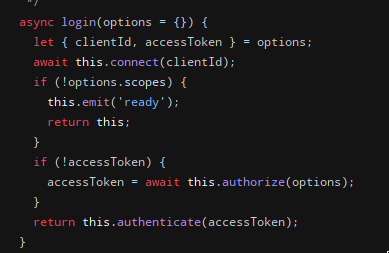 dull plume
wheres that from?
carmine mica
it stores accessToken on client
so you could actually do
await client.login(options);
store(client.accessToken);
and then next time just do client.login({ accessToken })
dull plume
oh god wait im getting confuzzeled
carmine mica
yeah sorry i forgot how it works
basically
if (accessToken stored somewhere) {
  await client.login({ accessToken });
} else {
  await client.login({
    clientId: 'id',
    redirectUri: 'https://youtu.be/dQw4w9WgXcQ',
    clientSecret: 'secret',
    scopes: ['messages.read', 'rpc'],
  });
  store(client.accessToken);
}
so do i have to save the acess token externally?
carmine mica
yeah you have to store it somewhere
or just have the prompt every time 🤷
dull plume
well thats annoying...
carmine mica
you could write it to your config.json
dull plume
can i skip the screen and just authorize it differently?
carmine mica
no
dull plume
well shiz
carmine mica
well there is a way to skip the screen if you have permission from discord
dull plume
yeah thats not happening
carmine mica
i would just
write it out to your config.json
oh wait that was a different person
too many code snippets here
dull plume
i want to package this into an exe so im not keen to write data to files
but whatever works i guess
carmine mica
electron?
dull plume
well no
i was gonna use pkg
carmine mica
ah ok
dull plume
i dont want multiple files
i just want 1 exe
carmine mica
you could probably store it in the windows registry
or in appdata
most applications have persistent data they store somewhere
dull plume
i mean yeah
no idea how to do that though
havent looked that far yet
i dont think i can do that with fs can i?
carmine mica
you can
dull plume
oh?
carmine mica
function getPersistentDir() {
  switch (process.platform) {
    case 'win32':
      return process.env.APPDATA;
    case 'darwin':
      return `${process.env.HOME}/Library/Preferences`;
    case 'linux':
      return `${process.env.HOME}/.config`;
    default:
      throw new RangeError('not supported');
  }
}

const configFile = path.join(getPersistentDir(), 'myapp', 'config.json');

fs.readFile(configFile);
fs.writeFile(configFile);
// etc
oh nice
thanks
hopefully ill be able to mix them together properly
im guessing myapp is the name of the data directory
carmine mica
myapp is the name of your app
something unique
dull plume
got it
dull plume
oh good
i managed to do it
packaged it with pkg and it works perfectly
 slow garden
How do you do? From now on, please
 scenic matrix
Anyone know why this doesn't work?
const RPC = require("discord-rpc");
const fetch = require("node-fetch");

const rpc = new RPC.Client({ transport: "websocket" });

rpc.on("ready", async () => {
  console.log("Rich Presence Running");
  await Update();
  setInterval(Update, 10000);
});

async function Update() {
  const period = await GetCurrentPeriod();

  console.log(period, "e");

  const activity = {
    state: period.Description,
    details: `With ${period.Teacher}`,
    largeImageKey: "main",
    startTimestamp: period.Start,
    endTimestamp: period.End,
  };

  rpc.setActivity(activity);
}

async function GetCurrentPeriod() {
  const info = await fetch("http://localhost:13693/api/info").then((res) =>
    res.json()
  );
  const data = await fetch("http://localhost:13693/api/timetable").then((res) =>
    res.json()
  );
  const day = data[info.Day - 1];

  const period = day.find((x) => Date.now() > x.Start && Date.now() < x.End);

  return period;
}

rpc.login({ clientId: "753070117746901034" }).catch(console.error);
Returns:
Error: connection closed
 delicate scaffold
is there a possibility to add rp to a bot?
Or is it just for clients?
 river fossil
Discord api dont allow that
karmic prism
@scenic matrix line 4, change 'websocket' to 'ipc'
Why? I have no idea
But it starts working.
scenic matrix
Thanks!
left fjord
Why? I have no idea
you need to have permission from discord to use websocket
scenic matrix
pretty bad considering that's the example on their docs
dull plume
^
carmine mica
i assume knowledge of discord's rpc
if you're just looking for rich presence, use https://www.npmjs.com/package/discord-rich-presence
 dim axle
my bot wont start, token is correct but when i start it
i get nothing in the terminal
and the bot is offline
craggy boughBOT
 polar tusk
what does rpc mean
Who knows
 bold sapphire
Is it possible for me to make a rich presence for a game?
craggy boughBOT
smoky scroll
?serverinfo
turbid oliveBOT
polar tusk
Yesn't
smoky scroll
Possible to bypass the things that Your Game is not detected
As I want to everyone can join my fivem server
Added a line:
joinSecret: "fivem://connect/server.myamericanrp.fr",``` gritty peak
Is it any nice tutorial out there
polar tusk
?
turbid oliveBOT
 clear cipher
  Activity {
    name: 'Visual Studio Code',
    type: 'PLAYING',
    url: null,
    details: 'Editing index.js',
    state: 'Workspace: Auryn',
    applicationID: '383226320970055681',
    timestamps: { start: 2020-09-13T03:21:31.065Z, end: null },
    party: null,
    assets: RichPresenceAssets {
      largeText: 'Editing a JS file',
      smallText: 'Visual Studio Code',
      largeImage: '565944799576719366',
      smallImage: '565945770067623946'
    },
How do i get the url for the large image to set it as .setImage()? cuz it only give me what seems to be the id of the image or something
clear cipher
Anyone?
 robust raven
It gives you the identifier code/id of that image
clear cipher
yes but how do i display it in setImage()?
setImage() takes a link i believe
robust raven
Url
clear cipher
ye same as a link
anyone??
robust raven
Can you show me what you logged here ? Looks like someone profile
clear cipher
yes thats my profile
the logged info is above
  Activity {
    name: 'Visual Studio Code',
    type: 'PLAYING',
    url: null,
    details: 'Editing index.js',
    state: 'Workspace: Auryn',
    applicationID: '383226320970055681',
    timestamps: { start: 2020-09-13T03:21:31.065Z, end: null },
    party: null,
    assets: RichPresenceAssets {
      largeText: 'Editing a JS file',
      smallText: 'Visual Studio Code',
      largeImage: '565944799576719366',
      smallImage: '565945770067623946'
    },
How do i get the url for the large image to set it as .setImage()? cuz it only give me what seems to be the id of the image or something
robust raven
Yes now which image you want to fetch ?
clear cipher
largeImage: '565944799576719366',
that ^
robust raven
Your profile picture ?
clear cipher
no,thats my presence activity laregeImage obviously
robust raven
Well then you to make that thing dynamic
Cause you might change your presence activity anytime
clear cipher
....
no,i have a filter that fetches the activity name: 'Visual Studio Code' and others
this is off topic,i just want to know how do i fetch the url for the largeImage
robust raven
Let me suggest you one thing go on Google search vs code logo open that logo in a new tab copy the url of it then paste it on the string
😂
left fjord
have you tried opening docs?
clear cipher
i didnt know what to search on docs
i looked on google
left fjord
clear cipher
wait
largeImageURL() returns
largeImageURL({ format, size } = {}) {
    if (!this.largeImage) return null;
    if (/^spotify:/.test(this.largeImage)) {
      return https://i.scdn.co/image/${this.largeImage.slice(8)};
    } else if (/^twitch:/.test(this.largeImage)) {
      return https://static-cdn.jtvnw.net/previews-ttv/live_user_${this.largeImage.slice(7)}.png;
    }
    return this.activity.presence.client.rest.cdn.AppAsset(this.activity.applicationID, this.largeImage, {
      format,
      size,
    });
  }
why do you look on internal code..
and no
functions return their code when you stringify them
clear cipher
oh i forgot to put ()
damn it
lost shore
?rpc
turbid oliveBOT
lost shore
Is there any rpc tuts?
left fjord
what exactly do you want?
smoky scroll
There both the same code but how are they not working?
left fjord
what is not working, and how is it related to rpc
 worthy mortar
can we keep join secret as a server invite?
 burnt bay
?rps
oh rpc ._.
polar tusk
This is dead
left fjord
it is not
karmic prism
Didn't Discord deprecate Rich Presence in favor of Game SDK?
 trim musk
Is discord - rpc available?
smoky scroll
channel description
trim musk
UnhandledPromiseRejectionWarning: Error: connection closed
I encountered this error when Running with an example
left fjord
@karmic prism discord deprecated rpc sdk
if they would deprecate rpc itself, why would they even allow using it
polar tusk
Yea
But it is a thing not alot of people use
 dark thistle
Hi, what are all the eventsthat the library can subscribe to?
For example, I've got 'NOTIFICATION_CREATE' as one.
I've checked the docs (https://discord.js.org/#/docs/rpc/master/class/RPCClient?scrollTo=subscribe) and I can't find anything about this.
Thanks!
Searching Discord docs might help
It's https://discord.com/developers/docs/topics/rpc#commands-and-events for anyone looking in future
dark thistle
Can I refresh the lobby's metadata somehow using this?
Having issues with rpc.updateLobby
Or is there lobby messaging
If so, how do I listen for it?
 merry sonnet
es5iea5
k, 7
subtle forge
Can im dynamicly change the big icon?
left fjord
if you mean changing the image without calling activity change, no.
subtle forge
With activity calling
I want to change icon from url
Dynamicly
Bcs i cant add by javascript image to my dc app
craggy boughBOT
craggy boughBOT
craggy boughBOT
smoky scroll
hi. i need help
polar tusk
Ah perfect, I know your issue, I know the problem in the code and I know that you didn't read the rules.
fair steppe

craggy boughBOT
 tough hazel
How do I add a Join Game link to my RPC?
craggy boughBOT
craggy boughBOT
craggy boughBOT
craggy boughBOT
 wispy saddle
what is the difference between the "websocket" and "ipc" transport?

 craggy boughBOT
bold sapphire
light umbra
craggy boughBOT
craggy boughBOT
bold sapphire
light umbra
const RPC  = require("discord-rpc");

const clientid = 'id';
const scopes = ['rpc', 'rpc.api', 'messages.read'];

const client = new RPC.Client({transport: 'ipc'});

client.on('ready', () => {
    console.log("test");
});

client.login({clientid, scopes});
```getting an instant ``connection closed`` errorconst RPC = require("discord-rpc");
const client = new RPC.Client({ transport: "ipc" });
const CLIENT_ID = "id";
client.on("ready", () => {
console.log("test");
});
client.login({
clientId: CLIENT_ID
});
This works @light umbra, without the scopes.
Why? No clue.
carmine mica
discord will close the connection if you don't have permission for those scopes
 next sparrow
What is this supposed to do?
left fjord
smoky scroll
om
@smoky scroll it said (node:564) UnhandledPromiseRejectionWarning: Error: Could not connect
smoky scroll
@smoky scroll it said (node:564) UnhandledPromiseRejectionWarning: Error: Could not connect
@smoky scroll code?
const RPC = require("discord-rpc");
const client = new RPC.Client({ transport: "ipc" });

const CLIENT_ID = "id";

client.on("ready", () => {
    console.log("test");
});

client.login({
    clientId: CLIENT_ID
});
@smoky scroll
lol
Did you copy and paste that exactly and not put an actual client id?
no i didnt copy and pasted i installed the packages and wrote it one by one and i put my id
I put my id in const client_id = "id";
@smoky scroll
Yeah.

wait was i suppose to put my id in there
Yes!
Oh ok
left fjord
no, you don't put your id there
smoky scroll
Oh
what do you put
@left fjord
left fjord
id of the app
smoky scroll
OH
so how do it connect
left fjord
what?
smoky scroll
like connect to your acc
left fjord
it doesn't connect to account
it connects to discord app running on your pc
smoky scroll
Oh ok
 red cipher
Browser example
Wait hold up what?
you can reach client RPC without native IPC access?
red cipher
hmm its not working, I guess that part is fake? Broken? what?
left fjord
afair browser example uses websocket, but that requires your app being whitelisted
red cipher
so... discord's websocket server has CORS?
left fjord
no
you cannot use websocket at all
until your app is whitelisted
red cipher
is there any apps that are whitelisted?
And again, how would that be enforced?
left fjord
probably
red cipher
header client?
left fjord
you log in using app id, you know?
red cipher
(request origin?)
oh it says client ID, I assumed that meant the user
left fjord
no
it's app id
red cipher
ah okay so its basically useless
left fjord
if you say so
red cipher
not sure why its even included
left fjord
websocket?
red cipher
yeah
left fjord
because it is in the api 🙄
the fact that you cannot use it, doesn't mean that no one can use it
red cipher
 so spotify is using node for their RPC integration? I seriously doubt that
left fjord
spotify is special
red cipher
well they're the only ones who could possibly have a whitelisted app id
there are no other websites that have rich presence
and all games communicate through IPC
left fjord
spotify is not a website with rpc
discord uses spotify api to tell if you are listening
red cipher
a website based game actually came to PreMiD to get their game on user activity
one with significant userbase
left fjord
red cipher
lol Discord shut down all discussion surrounding activity/rpc months ago
and haven't said a word since. "Just use the feedback site" when thats just a dumping ground, and they don't ever respond to API posts
left fjord
that is unfortunate.
nothing we can do about that
also note that this isn't the only thing discord said something about and never ever again mentioned it. it's just discord things
red cipher
sigh I just think its misleading to include this front and center on the documentation with no notice or anything
 drowsy coral
so i cant use this in the browser?
i dont wanna make an electron app but that seems like the only way?
vapid lake
an alternative is setting up a http server on localhost, and sending a POST request to update the activity from the browser
 edgy thorn
Hey, im getting this error when starting RPC
I basically just copied off the docs
Am i doing something wrong?
edgy thorn
Im still looking for a solution, if anyone gets here later, please ping me in your response
left fjord
as it was said countless times in past 100 messages, your app needs to be whitelisted in order to use websocket.
use ipc instead
edgy thorn
This should be set as a warning in the documentation
So weird that it isnt shown
Time to make a pr
craggy boughBOT
craggy boughBOT
smoky scroll
?npm install discord.js
turbid oliveBOT
@smoky scroll, Yukikaze couldn't find the requested information. Maybe look for something that actually exists the next time!
smoky scroll
?npm install discord.js
turbid oliveBOT
@smoky scroll, Yukikaze couldn't find the requested information. Maybe look for something that actually exists the next time!
smoky scroll
?npm install discord.js
turbid oliveBOT
@smoky scroll, Yukikaze couldn't find the requested information. Maybe look for something that actually exists the next time!
 rigid geode
stop
smoky scroll
        const rpc = new DiscordRPC.Client({transport:"ipc"})
    const clientId = 'ID';

    const defaultPresence = {
        largeImageKey: "applogo",
        largeImageText: "TEXT",
        startTimestamp: Date.now(),
        instance: false,
    }

    rpc.login({clientId}).catch((e) => console.log(e))
    rpc.on("connected", () => {
        rpc.setActivity(defaultPresence)
    })```

Error:
`C:\Users\croxy\Downloads\TestRPC\node_modules\discord-rpc\src\client.js:61 Uncaught SyntaxError: Unexpected token (`
i need help
my node version v14
edgy thorn
Which line is 61?
because that part looks good
smoky scroll
}).then(async (r) => {```this error from discord-rpc module's folder
karmic jolt
you node version probably isn't 14 then
smoky scroll
karmic jolt
console.log(process.version) then
edgy thorn
I run this, and it says connected to discord and my name
However, RPC doesnt show up for me
smoky scroll
console.log(process.version)then
@karmic jolt oh fu** it's v6.0 lol
i changed engine version, i'm testing now
 prime knoll
I run npm run example, and these are the errors.
 gritty salmon
you messed up package.json
prime knoll
:/
gritty salmon
you can probably just delete it and run npm init
or try to find the json error
prime knoll
I just downloaded the example

left fjord
how did you donwload it
left fjord
not from where, how
prime knoll
wym
left fjord
what i ask
how did you download it
prime knoll

gritty salmon
did you edit package.json in any way
left fjord
how
did
you
download
it
what did you to to get it on your computer, and how did you run it after that
prime knoll
I downloaded it from github,
ran it with Node
left fjord
what did you run with cmd
prime knoll
npm run example
o wait
aw now rpc connection timeout
oh lol restarting discord solves it
ayyy
:D
smoky scroll
what's the instance property on rpc settings?
if i set this to true, what will be happen?
 fading hedge
you mean on the presence update options?
 desert yew
Do you guys know why ?
 tame tinsel
For more information, see about_Execution_Policies at https://go.microsoft.com/
desert yew
Thanks @tame tinsel
Now that worked it's asking
"" How would you like to use ESLint? ...
To check syntax only
To check syntax and find problems
To check syntax, find problems, and enforce code style ""
tame tinsel
Follow the prompts. Eslint is not related to djs
desert yew
i'm following this
https://www.npmjs.com/package/eslint
i executed this ./node_modules/.bin/eslint --init
and it's asking that question
carmine mica
wrong channel
desert yew
would you tell me wich one?
polar tusk
None of em
desert yew
Thanks
 steep quail
Is it possible to implement discord rich presence in Android apps
 topaz hazel
Should be.
Android apps are written in C or C++, so you can add rich presence to that.
left fjord
no
discord app on desktop has rpc server your apps connect to
mobile versions do not have that, since it's quite pointless
 twin idol
there was something about presence on Android in a recent Discord update
but
carmine mica
it doesn't use rpc
subtle forge
How i can make rp in Javascript es6?
left fjord
<@&222089067028807682> yt ad spammed in most channels
(and already left)
craggy boughBOT
craggy boughBOT
craggy boughBOT
 lime cypress
Hello i have been look for some time now and i was wondering if it was possible to get the users id with out them needing to authorize it. if it is possible how would i get started?
left fjord
ids are public
and don't have much to do with rpc
lime cypress
how can i then get the id sendt to my electron app?
smoky scroll
API
vapid lake
<RPCClient>.user.id
lime cypress
and how would i use the rpcclient? i have tried some examples but they do not work for me
lime cypress
i got it to work
thank you guys
 keen venture
wait is this your npm too ?
left fjord
according to the channel topic
keen venture
help
so im trying to combine electronjs with rpc but it happend
help ?
left fjord
not many people use rpc, and even less combine it with electron.
keen venture
another error ?
left fjord
are you using websocket or ipc connection
and are you connecting from backend or front end
keen venture
im using the example
keen venture
well if i try to node the index.js it work
but if i use electron it dont
hewlp
fading hedge
describe 'wont work'
is that even the same library
i don't think it is
keen venture
it dont but it make'd by the same creator
and it linked to same discord server which is this
 nimble karma
Help :D
carmine mica
unknown error is from discord
if it's unknown to them it's definitely unknown to me
@keen venture make sure you use it in the main process, not the renderer process
nimble karma
ik but its coming too often
lemme show code
@carmine mica
left fjord
?bin
turbid oliveBOT
To share long code snippets use a service like https://gist.github.com/, https://paste.nomsy.net/, https://hasteb.in/, https://sourceb.in/, https://hastebin.com/ instead of uploading files or posting them as code blocks
keen venture
@keen venture make sure you use it in the main process, not the renderer process
@carmine mica its fixed
i've make an app that use discord-rpc to make custom rpc can i publish it to public ?
 woven scarab
I an very unfamiliar with OAuth and Discord.js RPC, however, I would like to know if it is possible to set the rich presence of a user that has added the app to it's authorized apps with a node server.
carmine mica
has to run locally on their computer
woven scarab
Thank you.
smoky scroll
This chat is dead 
polar tusk
Yep
 uneven totem
const client = require('discord-rich-presence')('apiclientid');

client.updatePresence({
    state: "test",
    details: "",
    largeImageKey: "bigvisual",
    partySize: 0,
    partyMax: 0,
    joinSecret: "",
    startTimestamp: Date.now(),
    partyId: "0"
});``` im running this and it doesn't do anything why tho??rpc
turbid oliveBOT
uneven totem
is discord-rich-presence outdated or something?
smoky scroll
@uneven totem wait did you install that as the dependency
uneven totem
hmm?
i did npm i discord-rich-presence
smoky scroll
use discord-rpc
uneven totem
ok
const rpc = new DiscordRPC.Client({ transport: 'ipc' });``` what does this ipc mean?eh i get js Cannot read property 'write' of null at IPCTransport.send
uneven totem
anyone?
 zinc flume
chat is ded aggine
const rpc = new DiscordRPC.Client({ transport: 'ipc' });``` what does this ipc mean?
idk
i just use it normaly
clear cipher
question: is it possible to set a user's rp when they are using my bot to listen songs?
left fjord
Not really
User would have to have some form of an app installed on same pc they use discord on.
 tiny trail
anyone?
@uneven totem it’s working for me
uneven totem
eh i fixed the transport (by making it a let instead of const) but now i get code: 5000, message: 'OAuth2 Authorization Error: Unknown Error'
i log in using thisjs let clientId = 'mybotsid' rpc.login({clientId: clientId,scopes: ['rpc', 'rpc.api', 'messages.read'], clientSecret: 'clientsecret'}).catch(console.error);
 sweet ivy
i'm also trying to use this and ran into the same issue. I got it to show a request on my discord client if i have my scopes set to 'rpc' but it doesnt work after that
for context, my goal is being able to get the current status of mute / deafen etc on a desktop app
uneven totem
ive tried to research that but all i found was a discord-rpc nexus plugin
nothing about discord.js discord-rpc
sweet ivy
if anyone got this to work i'd appreciate some help
uneven totem
me too
sweet ivy
this is as far as i've gotten
uneven totem
ive already authorized it but it doesn't wanna log in to the bot
sweet ivy
UnhandledPromiseRejectionWarning: Error: 400
    at c:\Users\user\source\repos\discord-rpc\node_modules\discord-rpc\src\client.js:64:21
    at processTicksAndRejections (internal/process/task_queues.js:93:5)
    at async RPCClient.authorize (c:\Users\user\source\repos\discord-rpc\node_modules\discord-rpc\src\client.js:225:22)
    at async RPCClient.login (c:\Users\user\source\repos\discord-rpc\node_modules\discord-rpc\src\client.js:150:21)
i get that after clicking authorize
uneven totem
huh? why did u get that
sweet ivy
i don't know. i'm not a js guy at all. how are you supposed to handle auth with this?
uneven totem
i don't think u should
at least i don't handle it
@sweet ivy i fixed it somehow
it doesn't accept any arguments except clientId tho
uneven totem
how do i detect programs running?
woven scarab
Discord.js rpc doesn't have any documentation at all, so how to you know the available methods?
carmine mica
uneven totem
yeah not really helpful
its like nothing
woven scarab
https://discord.js.org/#/docs/rpc/master/class/RPCClient
@nimble karma "Finally, some good 🦆ing news!
nimble karma
ew
lol
duck instead of something
woven scarab
Do you find this inappropriate?
nimble karma
never kekw
i find these funny
 smoky zephyr
async function setActivity() {
    if (!rpc || !mainWindow) {
        return;
    }

    const state = require('./js/renderer').state

    rpc.setActivity({
        details: 'Test',
        state: state || 'Made by Xenfo#4320',
        startTimestamp,
        largeImageText: 'Discord',
        largeImageKey: 'discord_logo',
        instance: false,
    });
}

rpc.on('ready', () => {
    setActivity();

    const state = require('./js/renderer').state

    console.log(state)
    // activity can only be set every 15 seconds
    setInterval(() => {
        setActivity();
    }, 15000);
});
``` Only triggered once in a minute. How do I fix?how do i detect programs running?
left fjord
that doesn't have much to do with rpc
uneven totem
eh where else to ask then?
left fjord
definitely not here, what you ask doesn't even have anything to do with discord
uneven totem
i'm trying to use it in a rpc
but ok ill do some research
 tiny atlas
hello, how do i get to the welcome module
smoky scroll
Hello, i'm trying to run this code. But i'm ending up with connection closed. Anyone that can help?
https://github.com/IndyV/Rich-Presence-Template
 lean gazelle
go
smoky scroll
what is rpc?
 proper belfry
same question
 fossil junco
It is an npm module for your bot that allows you to add Rich Presence
RPC : Rich Presence Client
carmine mica
false
rpc stands for remote procedural calls
and your bot can't use it
smoky scroll
I just wanted to use it for custom game status like codeing or somethinjg
nimble karma
@smoky scroll how you have made the application
i remember getting this error, but i just made a team and created application with the team and it worked fine
 visual sparrow
how to use features like "ask for join" etc? I tried the DiscordRPC.register but nothing happens
visual sparrow
I can't invite people to my rpc app
It's in an server
fossil junco
rpc stands for remote procedural calls
@carmine mica wait really?
carmine mica
yes
smoky scroll
d
 knotty blaze
I thought it meant rich presence controller 👀
smoky scroll
i thought it meant rich presence chat
left fjord
and i thought this is support channel, not #archive-offtopic
smoky scroll
helkp
getting error: connection closed
oh wait sorry for stupid
i'm using IPC instead of websocket
 summer minnow
How do I use rpc to show what file im editing?
 unborn stream
its an extension for vsc
idk how youd make it tho
 lethal timber
How do I use rpc to show what file im editing?
@summer minnow uh idk but for vsc their is a extension. whatever editor you are using then search it up and you might find instructions in a github. if not here is a random tutorial i had seen a while back https://www.youtube.com/watch?v=q8y3ySj0HoQ
summer minnow
Thanks I also figured it out
smoky scroll
fff
 fallow turret
hi
polar tusk
Who all thought it meant Rich Presence Client
left fjord
rpc uses rpc 
 crisp creek
https://discord.js.org/#/docs/main/stable/topics/web i read but give me err need little help
smoky scroll
@crisp creek remove the script tag, that's not an HTML file.
And that's not RPC Either.
 ebon root
https://discord.js.org/#/docs/main/stable/topics/web i read but give me err need little help
@crisp creek Learn js.
Also 1. why is there a unexpected token which is: <
Maybe try to remove it?
 covert grotto
does this djs-rpc work on the discord web app?
covert grotto
...
left fjord
shouldn't
covert grotto
oof 😿
smoky scroll
rpc? sorry i'm just starting to learn javascript
 green willow
i guess it's just discord rich presence
smoky scroll
Please help me! There are no errors here. Just clicked on me there's nothing in Discord.
const RPC = require('discord-rpc')
const rpc = new RPC.Client({
    transport: "ipc"
})

rpc.on("ready", () => {
    rpc.setActivity({
        details: "Hello",
        state: "World",
        startTimestamp: new Date(),
        largeImageKey: "fon",
        largeImageText: "Hello World",
        smallImageKey: "minfon",
        smallImageText: "MIN"
    })

    console.log('RPC')

    console.log(rpc.user)

})

rpc.login({
    clientId: "766689630791270440"
}).catch(console.error);
Or how to fix this error?
craggy boughBOT
 floral chasm
RPC? more like rpc sucks
minor umbra
?mute 556749747570999300 12h shitposting in support
turbid oliveBOT
Successfully muted UncryptableDev#8655
 frank smelt
? What is this
Wrong chag once again
Chat*
 robust plaza
wat?
smoky scroll
?mute 556749747570999300 12h shitposting in support
Why do you mute only for ID ?
left fjord
What's wrong with using id
 terse shadow
isn't id the best way 'cause it's unique to every user?
smoky zephyr
import RPC from 'discord-rpc';
TS7016: Could not find a declaration file for module 'discord-rpc'. 'C:/Users/chous/Desktop/Projects/apps/Discord-RPC/node_modules/discord-rpc/src/index.js' implicitly has an 'any' type. Try `npm install @types/discord-rpc` if it exists or add a new declaration (.d.ts) file containing `declare module 'discord-rpc';`
I installed the types but still have the error what do I do?
 calm gulch
I am getting a connection closed error, why does it seem like nobody has provided any fix here or on github? I have no scopes, using ipc I get an RPC_CONNECTION_TIMEOUT error and using websocket I get connection closed, this is really frustrating
this somehow fixed itself
I have no idea how or why
I am now using ipc
and it seems to work
 flat prawn
 UnhandledPromiseRejectionWarning: Error: child "activity" fails because [child "assets" fails because [child "small_image" fails because ["small_image" is not allowed to be empty]]]
    at RPCClient._onRpcMessage (F:\custom-discord-rp\node_modules\di
you need a small image
 gilded shadow
?docs
turbid oliveBOT
@gilded shadow, what would you like to search for?
Type cancel to cancel the command.
gilded shadow
message.delete()
turbid oliveBOT
smoky scroll
So I'm new to this
And i have been using it for 3 days now(the rpc thing)
I know how to use the set.activity
And
I have some questions:
Can i make the rpc start when an application start/and end when the application ends?
And what is the client.connect()?
smoky scroll
so i already uploaded a image and saved it at the rpc section,but when i refresh my browser it dosen't appera
 sinful bough
How would you update the rich presencewithout having to restart the script?
left fjord
code a presence change? 
sinful bough
Nvm I got it lol just be being stupid
smoky scroll
uh I made an oversimplified version of devsnek's example
carmine mica
that looks like my readme
smoky scroll
😳
sinful bough
😳
 slow pine
at Socket.onerror (/home/runner/Cats-RPC/node_modules/discord-rpc/src/transports/ipc.js:32:16)```
imagine being gae
 tame wharf
you have discord open in browser dont you
@slow pine
slow pine
@tame wharf yes 
i have the app too...
tame wharf
RPC only works on the app
smoky scroll
@carmine mica imagine using npm smh
carmine mica
i use npm
smoky scroll
cmds other than init
and update
and install
why
carmine mica
why not
it works
smoky scroll
like out of all of your options
it didnt work for me probably because I did something wrong
electron is messed up on my computer lol
@carmine mica but yes it is so similar I am flattered
so similar I can't believe it

 scenic anchor
I don't know what you're trying to prove but being an asshole isn't the way to do it.
smoky scroll
yes thank you
let me remind you his knowledge is probably 10 times that of mine
 solar trout
message.slice()
?docs
turbid oliveBOT
@solar trout, what would you like to search for?
Type cancel to cancel the command.
solar trout
message.slice()
turbid oliveBOT
solar trout
message.content.slice()
scenic anchor
This isn't #app-commands
solar trout
bruh
 tawny lantern
what is problom here ?
its defined
carmine mica
wrong channel
smoky scroll
i think you can't use it on browser
just client
 upbeat helm
Can i use the discord-rpc library from a web-browser? or do i have to run it in node?
bruuh didn't see the last question
xD
 trail hawk
Is there a way to stop displaying my custom rpc when the end timestamp time is over ? My end timestamp is 45 mins when the rpc starts.
 fallen coyote
I am having troubles installing discord-rpc
I used the command: npm install discord-rpc
Error: ```
npm ERR! code ENOSELF
npm ERR! Refusing to install package with name "discord-rpc" under a package
npm ERR! also called "discord-rpc". Did you name your project the same
npm ERR! as the dependency you're installing?
npm ERR!
npm ERR! For more information, see:
npm ERR! https://docs.npmjs.com/cli/install#limitations-of-npms-install-algorithm
npm ERR! A complete log of this run can be found in:
npm ERR! /home/nkeller/.npm/_logs/2020-10-27T03_02_21_618Z-debug.log
@ me if you have a solution caus I have this server muted due to annoyance of many messages in total a second
don't judge me
left fjord
Have you even read the error
Now read it
Shitpost elsewhere, please
This is support channel, not a channel for crappy jokes.
Npm literally tells you why it errored
Thanks for wasting my time then. Good luck on your own
Dude stop
fallen coyote
k
imma get back to my stuff now
sinful bough
@trail hawk Yes, you will need to do these things.
(If you have not already) Define the startTimestamp you can do this by using this line.
const startTimestamp = new Date();
Then instated of doing the normal stuff for yout timestamp just define it as
startTimestamp
Then you can do a simple if function detecting if startTimestamp is equal to your time then just make it end the function,
smoky scroll
const client = require('discord-rich-presence/browser')('180984871685062656');

client.updatePresence({
  state: 'slithering',
  details: '🐍',
  startTimestamp: Date.now(),
  endTimestamp: Date.now() + 1337,
  largeImageKey: 'snek_large',
  smallImageKey: 'snek_small',
  instance: true,
});```
How would I use this on say a website/browser?@trail hawk Yes, you will need to do these things.
(If you have not already) Define the startTimestamp you can do this by using this line.const startTimestamp = new Date();Then instated of doing the normal stuff for yout timestamp just define it as
startTimestampThen you can do a simple if function detecting if
startTimestampis equal to your time then just make it end the function,
@sinful bough And for the endTimestamp ? (___ minutes remaining)
sinful bough
const client = require('discord-rich-presence/browser')('180984871685062656');

client.updatePresence({
  state: 'slithering',
  details: '🐍',
  startTimestamp: Date.now(),
  endTimestamp: Date.now() + 1337,
  largeImageKey: 'snek_large',
  smallImageKey: 'snek_small',
  instance: true,
});```
How would I use this on say a website/browser?
@smoky scroll https://www.electronjs.org/
smoky scroll
@smoky scroll https://www.electronjs.org/
@sinful bough ty
sinful bough
@sinful bough And for the endTimestamp ? (___ minutes remaining)
@trail hawk it would bestartTimestamp + (time in ms)
woven scarab
hello, is there a way to get the ID of a Discord RPC Asset from the key?
smoky scroll
any way to make it so it says Listening?
 sage echo
yes there is
i believe
though i dont have the code
left fjord
with rpc? no
 idle solstice
Rich presence
 old root
?embed
turbid oliveBOT
Building and sending embeds: https://discordjs.guide/popular-topics/embeds.html
smoky scroll
Whats that ch. For
 viscid shale
im trying to login with discord-rpc but it always gives an error
Code:
client.login({ clientId, scopes }).catch(e => console.error(e));
Output:
Error: connection closed
@viscid shale Use this instead.
rpc.login({ clientId }).catch(console.error);
I figured it out
i had to run it as administrator
craggy boughBOT
 frozen flume
oh hey my issue ^
craggy boughBOT
smoky scroll
any way to get Watching [...] instead of Playing [...]?
frozen flume
using discord-rpc or discord.js
smoky scroll
discord-rpc
frozen flume
i dont know, sorry
 stuck flame
@versed beacon
tame tinsel
?docs ClientUser.setActivity
turbid oliveBOT
tame tinsel
Pass in WATCHING for { type: ...
tame tinsel
<@&222089067028807682> slurs
 frail fiber
?ban @smoky scroll slurs
y
turbid oliveBOT
You sure you want me to ban this [no gender specified]?
frail fiber
y
turbid oliveBOT
Successfully banned Boneless Spaghetti#2019
smoky scroll
I cant save pictures in rich presence
like the developer portal
the pictures just disapear
 night jetty
In what cases do i use RPC
 rose bolt
To show cool presence on your profile
for instance this is an example of a RPC
night jetty
Thanks
craggy boughBOT
 analog falcon
I have this error when i try to activate
(node:17456) UnhandledPromiseRejectionWarning: Error: connection closed
    at IPCTransport.<anonymous> (C:\Users\neckd\Downloads\DiscordRP\PremierePro\node_modules\discord-rpc\src\client.js:118:16)
    at Object.onceWrapper (events.js:422:26)
    at IPCTransport.emit (events.js:315:20)
    at C:\Users\neckd\Downloads\DiscordRP\PremierePro\node_modules\discord-rpc\src\transports\ipc.js:137:18
    at decode (C:\Users\neckd\Downloads\DiscordRP\PremierePro\node_modules\discord-rpc\src\transports\ipc.js:92:5)
    at Socket.<anonymous> (C:\Users\neckd\Downloads\DiscordRP\PremierePro\node_modules\discord-rpc\src\transports\ipc.js:120:7)
    at Socket.emit (events.js:315:20)
    at emitReadable_ (_stream_readable.js:569:12)
    at processTicksAndRejections (internal/process/task_queues.js:79:21)
(Use `node --trace-warnings ...` to show where the warning was created)
(node:17456) UnhandledPromiseRejectionWarning: Unhandled promise rejection. This error originated either by throwing inside of an async function without a catch block, or by rejecting a promise
which was not handled with .catch(). To terminate the node process on unhandled promise rejection, use the CLI flag `--unhandled-rejections=strict` (see https://nodejs.org/api/cli.html#cli_unhandled_rejections_mode). (rejection id: 1)
(node:17456) [DEP0018] DeprecationWarning: Unhandled promise rejections are deprecated. In the future, promise rejections that are not handled will terminate the Node.js process with a non-zero
exit code.
 quiet hazel
Hi ! I dont really understand what rpc do and when. If Im using express to do a website and on a when a user open a page, I want to show a RichPresence on his discord profile (with an OAuth2 request before), its possible or i need something else ? that's why i understand with the example
 kindred mango
@rose bolt how I use rpc
Repo
rose bolt
You first copy the example from the repo.
Then run npm i to install dependencies
The start the app.
craggy boughBOT
 neat sequoia
is the time on the RPC limited to 24hrs only?
left fjord
the discord client displays only that much, yes
 proper viper
Kinda wish the error was a little more than "Idk man it just didn't open the connection"
Like how much can I possibly get wrong in
  const client = new DiscordRPC.Client({ transport: 'websocket' });
  client.on('ready', () => {
    flashpoint.log.debug('Discord RPC Connected');
  });
client.login({ clientId }).catch(flashpoint.log.error);```The example doesn't work for me either
What changed?
smoky scroll
@proper viper same issue happened with me
and i figured out that supplying an authorization token fixed it
from oauth2
proper viper
Set to IPC and it seems to connect, but still can't get it to do anything
smoky scroll
still wondering how to do it without oauth2
because for an electron app that's pretty annoying
proper viper
That seems like a major pain in the arse
Was about to say why does VScodes one work
But it doesn't.
analog falcon
@proper viper help pls
craggy boughBOT
 keen moat
is this rich presence?
neat sequoia
Any known issues with https://discord.com/developers/applications/776486345262628914/rich-presence/assets
as I have done multiple accounts and multiple attempts of setting assets and they auto delete after they are saved
smoky scroll
hello why RPCClient#application returns null ?
left fjord
Cause it has a value of null.
Not like much else can be said with that amount of context
craggy boughBOT
clear cipher
const DiscordRPC = require('discord-rpc');
const clientId = '699811596867862588'

const rpc = new DiscordRPC.Client({ transport: 'ipc' });
const startTimestamp = new Date();

function setActivity(){
  rpc.setActivity({
    details: `booped 1 times`,
    state: 'in slither party',
    startTimestamp,
    instance: false,
  });
}

rpc.on('ready', () => {
  setActivity();

  // activity can only be set every 15 seconds
  setInterval(() => {
    setActivity();
  }, 15e3);
});

rpc.login({ clientId }).catch(console.error);
Error: could not connect
 fallen snow
rpc.on("ready", () => {
^^^
SyntaxError: Unexpected identifier
left fjord
well, yes.
that isnt supposed to be in the object
craggy boughBOT
craggy boughBOT
craggy boughBOT
 jagged herald
This is my code..
const Discord = require("discord-rpc")
const settings = require('./customization.json')

const startTimestamp = new Date()

Discord.register(settings.id)

const rpc = new Discord.Client({transport: "ipc"});

  rpc.on("ready", () => {

    if(fakegame === true){
    rpc.setActivity({
        details: settings.title,
        state: settings.subtitle,
        startTimestamp,
        largeImageKey: settings.lIK,
        smallImageKey: settings.sIK,
        largeImageText: settings.lIK_name,
        smallImageText: settings.sIK_name,
        instance: false
    })
} else {
    rpc.setActivity({
      details: settings.title,
      state: settings.subtitle,
      largeImageKey: settings.lIK,
      smallImageKey: settings.sIK,
      largeImageText: settings.lIK_name,
      smallImageText: settings.sIK_name,
      instance: false
    })
}
})

rpc.login(settings.id).catch(console.error)
What am i doing wrong???
craggy boughBOT
jagged herald
I need to release my project 
 pulsar ridge
to fix connection closed error, you need "clientSecret" in rpc.login({ clientId, clientSecret }); i'm pretty sure
 tribal creek
djs rpc stands for?
left fjord
In discord it's rich presence
jagged herald
It works
 rich night
hello is it normal that my client.application is null here is my code ```js
const clientId = '778328704148439040';
const client = new RPC.Client({ transport: 'ipc' });
client.on('ready', () => {
console.log('Logged in as', client.application.name);
console.log('Authed for user', client.user.username);
});
// Log in to RPC with client id
client.login({ clientId: clientId});
function on() {
const RPC = require('discord-rpc')
const rpc = new RPC.Client({
  transport: "ipc"
});
rpc.on('ready', () => {
if (ts){
      rpc.setActivity({
      startTimestamp: Date.now(),
      endTimestamp: Date.now() + 1337
}) }
if (states) { rpc.setActivity({ state: states.id }) }
if (details) { rpc.setActivity({ details: details.id }) }
if (lik) { rpc.setActivity({ largeImageKey: lik.id }) }
if (sik) { rpc.setActivity({ smallImageKey: sik.id }) }
});
rpc.login({ clientId: cid.id })
}
why cant i do that
i mean there's no error
but i it wont show anything
except for the rpc name
or is there any way to make it like that
keen venture
i just want to make
if theres no states then its okay
if theres states add states to the rpc
how can i do that
 proud loom
The formatting seems wrong, it's unreadable on mobile. What your issue probably is... is that you should call once RPCClient#setActivity
keen venture
i can only call 1 rpc set activity ?
proud loom
Pass a single object that contain all the properties you're setting one by one, I don't know too much about the rpc lib but that's probably the issue
keen venture
imma try that real quick
analog falcon
analog falcon
I have this error when i try to activate
someone help with this please
 robust briar
Hello, what to do? I'm stuck on installing...
craggy boughBOT
craggy boughBOT
craggy boughBOT
 vagrant flax
Can i use rpc while being on in android?
 tepid mist
What is discord RPC I've never heard of it
left fjord
this is rich presence
rich night
what i do when i have the oauth code ?
rich night
why i have this error Error: RPC_CONNECTION_TIMEOUT ? there is my code ```js
const scopes = ['rpc', 'identify'];
const RPC = require('discord-rpc')
const client = new RPC.Client({ transport: 'ipc' });
client.on('ready', () => {
console.log('Logged in as', client.application.name);
console.log('Authed for user', client.user.username);
client.selectVoiceChannel('81384788862181376');
});
// Log in to RPC with client id
client.login({ clientId, scopes });
error: ```
(node:44897) UnhandledPromiseRejectionWarning: Error: Could not connect
at Socket.onerror (/media/nkeller/NT/RPC/node_modules/discord-rpc/src/transports/ipc.js:32:16)
at Object.onceWrapper (events.js:421:26)
at Socket.emit (events.js:314:20)
at emitErrorNT (internal/streams/destroy.js:92:8)
at emitErrorAndCloseNT (internal/streams/destroy.js:60:3)
at processTicksAndRejections (internal/process/task_queues.js:84:21)
(node:44897) UnhandledPromiseRejectionWarning: Unhandled promise rejection. This error originated either by throwing inside of an async function without a catch block, or by rejecting a promise which was not handled with .catch(). To terminate the node process on unhandled promise rejection, use the CLI flag --unhandled-rejections=strict (see https://nodejs.org/api/cli.html#cli_unhandled_rejections_mode). (rejection id: 1)
(node:44897) [DEP0018] DeprecationWarning: Unhandled promise rejections are deprecated. In the future, promise rejections that are not handled will terminate the Node.js process with a non-zero exit code.
code: ```js
const RPC = require("discord-rpc");
const client = new RPC.Client({ transport: "ipc"})

client.on("ready", () => {
    client.setActivity({
        details: "details",
        state: "state.vpj",
        largeImageKey: "image",
        largeImageText: "largeImageText",
    })

    console.log("RPC active");
})

client.login({ clientId: 'disclosed', clientSecret: 'disclosed' });
help
pls
fallen coyote
discord-rpc: ^3.1.4
vscode about section:
Version: 1.51.1
Commit: e5a624b788d92b8d34d1392e4c4d9789406efe8f
Date: 2020-11-10T23:31:29.624Z
Electron: 9.3.3
Chrome: 83.0.4103.122
Node.js: 12.14.1
V8: 8.3.110.13-electron.0
OS: Linux x64 5.4.0-53-generic snap
OS: Ubuntu 20.04.1 LTS x86_64
discord is running
@ me to answer
smoky scroll
guys im stil a bit confused, what.. even is an rpc
o alr tyyyy
fallen coyote
I got it
 sterile arch
Can I use it in mobile or web RPC?
sterile arch
Hmm anyone
carmine mica
@smoky scroll @shell hatch remote procedural calls
not rich presence client
smoky scroll
oh
that explains y i was confused
as to why theress a whole channel abt it lol
sterile arch
Can I connect rpc to mobile some how?