#archive-rpc-help
21942 messages · Page 12 of 22
 rocky creek
is that need to be asked here ?
 left fjord
i don't think you will get answer for that specific question here.
rocky creek
Where can i take a quick research about that thing
or just to learn little bit more about rich presence in djs
left fjord
djs has no rich presence, it's separate app as bots cannot have rpc
rocky creek
ohhh
I get it
left fjord
but i guess you could go for examples or discord documentation
pretty sure that gives somewhat of an overwiew
rocky creek
Great , thanks anyway 🙂
 north spoke
?docs rpc
 turbid oliveBOT
 rare flame
?docs
turbid oliveBOT
@rare flame, what would you like to search for?
Type cancel to cancel the command.
 quick lichen
@rare flame look at the topic
rare flame
oh thx
turbid oliveBOT
rare flame
oops
 ripe cradle
Hello, I'm trying to implement a rout that get user's DMs, to do so I noticed I had to use RPC, but I have troubles implementing it
I am implementing it like a normal discord js client expect I add Transport: web-socket in the constructor
and when I do a .on('message' ...) I get a crash due to a heap overflow
 ruby sage
Im using this ```js
const DiscordRPC = require('discord-rpc')
const clientId = "id"
const scopes = ['rpc', 'rpc.api'];
const rpc = new DiscordRPC.Client({ transport: 'ipc' });
rpc.login({clientId, scopes})```but i get an error that i need a redirect_uri in the request?
ruby sage
(node:7356) UnhandledPromiseRejectionWarning: Error: OAuth2 Error: invalid_request: Missing "redirect_uri" in request.
    at RPCClient._onRpcMessage (/home/j122j/Desktop/discordrpc/node_modules/discord-rpc/src/client.js:177:19)
    at IPCTransport.emit (events.js:311:20)
    at /home/j122j/Desktop/discordrpc/node_modules/discord-rpc/src/transports/ipc.js:134:18
    at decode (/home/j122j/Desktop/discordrpc/node_modules/discord-rpc/src/transports/ipc.js:92:5)
    at Socket.<anonymous> (/home/j122j/Desktop/discordrpc/node_modules/discord-rpc/src/transports/ipc.js:120:7)
    at Socket.emit (events.js:311:20)
    at emitReadable_ (_stream_readable.js:562:12)
    at processTicksAndRejections (internal/process/task_queues.js:83:21)
(node:7356) UnhandledPromiseRejectionWarning: Unhandled promise rejection. This error originated either by throwing inside of an async function without a catch block, or by rejecting a promise which was not handled with .catch(). To terminate the node process on unhandled promise rejection, use the CLI flag `--unhandled-rejections=strict` (see https://nodejs.org/api/cli.html#cli_unhandled_rejections_mode). (rejection id: 1)
(node:7356) [DEP0018] DeprecationWarning: Unhandled promise rejections are deprecated. In the future, promise rejections that are not handled will terminate the Node.js process with a non-zero exit code.```full error ^@smoky scroll try adding google or something as a redirect in your oauth section of your app in the dev portal and set google as the redirect url, not sure why rpc would need this @steady sparrow knowledge plz
Wait, fkn kt 🤦♂️ @carmine mica
ruby sage
idk where do i put the redirect uri
quick lichen
In the dev portal
Oauth section
ruby sage
in my code
quick lichen
In the dev portal
Oauth section
ruby sage
bruh
but i need to set it in my code?
not just on dev portal
quick lichen
Doubt, I don’t see any redirect props in rpc
ruby sage
thats why i posted it here
quick lichen
It was@already set in the dev portal?
ruby sage
no
i get this and when i autorize it sends the error in the console
quick lichen
Sec lemme try this shit
ruby sage
wait
i need to put a redirect_uri in login options
wait
i put a redirect uri and it says im missing one?
quick lichen
Where tf did you get that from
ruby sage
from sourcecode
quick lichen
?docs rpcclient#login rpc
turbid oliveBOT
ruby sage
async login(options = {}) {
    let { clientId, accessToken } = options;
    await this.connect(clientId);
    if (!options.scopes) {
      this.emit('ready');
      return this;
    }
    if (!accessToken) {
      accessToken = await this.authorize(options);
    }
    return this.authenticate(accessToken);
  }```
```js
async authorize({ scopes, clientSecret, rpcToken, redirectUri } = {}) {
    if (clientSecret && rpcToken === true) {
      const body = await this.fetch('POST', '/oauth2/token/rpc', {
        data: new URLSearchParams({
          client_id: this.clientId,
          client_secret: clientSecret,
        }),
      });
      rpcToken = body.rpc_token;
    }

    const { code } = await this.request('AUTHORIZE', {
      scopes,
      client_id: this.clientId,
      rpc_token: rpcToken,
      redirect_uri: redirectUri,
    });

    const response = await this.fetch('POST', '/oauth2/token', {
      data: new URLSearchParams({
        client_id: this.clientId,
        client_secret: clientSecret,
        code,
        grant_type: 'authorization_code',
        redirect_uri: redirectUri,
      }),
    });

    return response.access_token;
  }```
it uses redirectUri from options in login
quick lichen
Huh? This is an internal method
ruby sage
client.js in src folder
quick lichen
k, i got it to work by specifying the clientid and clientsecret
ruby sage
so i need to put clientsecret?
quick lichen
ye seems so
ruby sage
hmm can you send the code?
oh wait
got it with google redirect
wait
you dont need a redirect if you put clientsecret
 carmine mica
rich presence is the only usage that doesn't require client secret
rpc.api takes control of the user's client, very important that the rpc is authorized
quick lichen
@carmine mica what permission do I have to give myself to send chat invites? all invites result in this
 steady sparrow
Pretty sure normally you're not many to be able to without some approval thing
carmine mica
@quick lichen you shouldn't ever need to do that so don't worry about it
quick lichen
?
im talking about this
carmine mica
oh that's not a chat invite
should work normally
quick lichen
hmmmmmmmmmmm
 full bison
So i want my discord commands in a different folder because clean but when i put the command for playing something on the bot in there it does not register the command any more. Is there anything i'm doing wrong?
left fjord
this does not look like it's related to rpc
full bison
oh fuck wrong channel
sorry about that
left fjord
all good
rocky creek
?hasbin
turbid oliveBOT
To share long code snippets you can paste them into https://hastebin.com/, press CTRL + S or click the save icon and send the link. It makes it easier for us to help you.
Alternatives: https://paste.nomsy.net/, https://hasteb.in/, https://sourceb.in/
left fjord
not rpc related (deleted)
 smoky scroll
what's RPC
Right but what is it
left fjord
this is rich presence
smoky scroll
Okay let me rephrase
I know what rich presence itself is, but what does discord.js have to do with it.
left fjord
nothing
rpc is separate app to do that
 unborn stream
djs made a lib for rpc
smoky scroll
Ahh okay
so it is more of an extension?
left fjord
no
it's completely separate
bots cannot have rpc
smoky scroll
I meant off the original discord.js module
left fjord
no
it's completely separate
bots cannot have rpc
unborn stream
and clients cant be bots
smoky scroll
.-.
 languid plank
how do i set up a rich presence
nvm
languid plank
i need help with this ``` 'use strict';
/* eslint-disable no-console */
const { app, BrowserWindow } = require('electron');
const path = require('path');
const url = require('url');
const DiscordRPC = require('../');
let mainWindow;
function createWindow() {
mainWindow = new BrowserWindow({
width: 340,
height: 380,
resizable: false,
titleBarStyle: 'hidden',
webPreferences: {
nodeIntegration: true,
},
});
mainWindow.loadURL(url.format({
pathname: path.join(__dirname, 'index.html'),
protocol: 'file:',
slashes: true,
}));
mainWindow.on('closed', () => {
mainWindow = null;
});
}
app.on('ready', createWindow);
app.on('window-all-closed', () => {
app.quit();
});
app.on('activate', () => {
if (mainWindow === null) {
createWindow();
}
});
// don't change the client id if you want this example to work
const clientId = '675539643596406804';
// only needed for discord allowing spectate, join, ask to join
DiscordRPC.register(clientId);
const rpc = new DiscordRPC.Client({ transport: 'ipc' });
const startTimestamp = new Date();
async function setActivity() {
if (!rpc || !mainWindow) {
return;
}
const boops = await mainWindow.webContents.executeJavaScript('window.boops');
rpc.setActivity({
details: booped ${boops} times,
state: 'Test',
startTimestamp,
largeImageKey: 'layerrff2',
largeImageText: 'layerrff2',
smallImageKey: 'snek_small',
smallImageText: 'i am my own pillows',
instance: false,
});
}
rpc.on('ready', () => {
setActivity();
// activity can only be set every 15 seconds
setInterval(() => {
setActivity();
}, 15e3);
});
rpc.login({ clientId }).catch(console.error);```
it is't working...
quick lichen
?dnw
turbid oliveBOT
Against popular belief "does not work" is not sufficient information to provide to receive help.
What's the expected (wanted) behaviour, what's the actual (unwanted) behaviour? Do you get any errors? What's your relevant code that might be causing the issue?
languid plank
???
quick lichen
What isn’t working
languid plank
the whole thing
no error in consle
quick lichen
For starters do you have discord rpc downloaded and in two directories up from the parent of that folder? 
Basically: did you clone the exact repo or only the example folder
languid plank
wdym
quick lichen
Show your folder structure
languid plank
wdym
quick lichen
Are you using an ide? The folders on the side bar
For example:
MainFolder
src
index.js
languid plank
im using server.js
-_-
how do u set this thing up anyways?
quick lichen
If ur gonna copy the example and expect it to work you gotta clone the entire repo
languid plank
howd u do that?
quick lichen
git clone theurlyougetfrompressingtheclonebuttoningithub
languid plank
where do i put that
quick lichen
In terminal
languid plank
i cant
ima go eat dinner
 uneven dove
lmfaooo imagine having to deal with someone like this
left fjord
this is not rpc related (deleted)
 dusk rain
Hey! I am trying to setup a discord RPC however I am just getting "undefined" when I try to login, I am following the Rich Presence example but I think it might be outdated?
const clientId = '685644933797117999';
const DiscordRPC = require('discord-rpc');
const rpc = new DiscordRPC.Client({ transport: 'websocket' });

var boops = 0
startTimestamp = new Date()

function setActivity(){
    boops += parseInt(Math.random()*5)
    rpc.setActivity({
        details: `booped ${boops} times`,
        state: 'in hell',
        startTimestamp,
        largeImageKey: 'large',
        largeImageText: 'Big',
        smallImageKey: 'small',
        smallImageText: 'Tiny',
        instance: false,
      });
}

setInterval(() => {
    setActivity();
  }, 15e3);

rpc.login({ clientId }).catch(console.log);```
I have made my own client and have the right assets
But I just get an error of undefined
I'd love any help
I have also tried with the client secret in the login data as well but that did not work either, same error
oh wait, discord RPC has been depricated
Time to find a libray that does the new API
left fjord
it is not deprecated
dusk rain
oh?
I am confused then
The discord api docs say it is, and I always get undefined errors?
oh I might have fixed it? idk how?
left fjord
does it say sdk?
rpc sdk is deprecated. rpc itself is not
dusk rain
well it is logged in now
yeah
I just got confused
However I can't seem to get it to set the activity
dusk rain
Yeah I cant even get the example from the git to work
It doesn't error or anything, it just does not set rich presence
Ohhh I am silly
I had display in presence off on my discord
 timid basalt
?lmao
?dnw
turbid oliveBOT
Against popular belief "does not work" is not sufficient information to provide to receive help.
What's the expected (wanted) behaviour, what's the actual (unwanted) behaviour? Do you get any errors? What's your relevant code that might be causing the issue?
timid basalt
lol
unborn stream
dusk rain
well sadly I had no more information to give :p
I did say that there were no errors and it seemed to be working other then the fact that it wasn't showing up, so I did give all the info I had
anyway. does anyone know if you can set a rich presence on a bot?
unborn stream
yes, no
 karmic wagon
Would it be necessary to hide the client secret for an electron app?
The worst thing they can do is pose as an imposter for oauth, but that wont really do much anyway
carmine mica
i wouldn't advertise the secret
like people can see the secret in devtools and stuff
in the discord client
when rpc connects
its not a huge security thing
karmic wagon
ok
so just do some base hiding then
carmine mica
you can also set up a server
that does authentication
and sends an authed token back to your app
but thats probably overkill
karmic wagon
was thinking of doing that, but im like "do i really need to?"
carmine mica
if you remove your client secret it should also still work, just requiring a special oauth model instead
karmic wagon
const RPC = require('discord-rpc');

const scopes = ['rpc', 'rpc.api',];

const client = new RPC.Client({ transport: 'ipc' });

let win; // for discord.js reviewers, this is an electron app

client.on("ready", () => {
    console.log(client.user.username)
    win.webContents.send('username', client.user.username);
    ...
})

ipcMain.on("login", event => {
    client.login({ clientId: "id", clientSecret: "secret" });
});
works fine.
is this a feature or a cache problem?
because putting in "id" and "secret" (or any other string) works fine
but im not sure if thats safe to do
 fervent bay
sorry if this is a novice question but what is discord RPC used for?
 summer fable
Stuff like this, just took the first one i saw on the right side there
 hidden geode
Since this evening, my rpc client gets an "Error 1000: unknown error"
when trying to login using:
client.login({ clientId: config.clientID, scopes: ['identify', 'rpc.notifications.read', 'rpc'], clientSecret: config.clientSecret, redirectUri: '<valic callback uri>' })
i have not update the application for a few months, and i did try updating my client secret
this setup has been working since december 2019
cloud anyone shed light on what this might be?
yes the application id an secret are registered under my acount, so rpc whitelisting should not be needed
carmine mica
check the discord console or smth
we aren't any better at guessing what "unknown error" means than you are
hidden geode
"GET https://canary.discordapp.com/api/v6/oauth2/@me 401" unauthorized
whent it tries to authenticate 
carmine mica
401 means you didn't provide valid authentication
hidden geode
but thats most likley because i first try to auth with the last known accesstoken
which will lickley fail, and then i tried the code above, to get a new access token
it doesnt log anything after rejecting my old access token though
becides the "1000: uknown error"
carmine mica
¯_(ツ)_/¯
hidden geode
hoped that you guys would know that discord has done an internal update or something
do you happen to know who i can contact for this?
it happens in both canary and ptb versions of discord
carmine mica
not stable?
hidden geode
i dont have stable installed right now
i guess ill try that to just to be sure
i can confirm that stable does exactly the same thing as ptb and canary
the connect popup shows, i click authorize or connect
and it stays on the screen, but sends an error in the background to my application
very vague
carmine mica
and the console shows nothing?
hidden geode
only the same error 1000 unkown error
and my application does 🤷♂️
carmine mica
anything interesting in the network pane?
failed requests etc
hidden geode
only the previous access token which is invalid anyways
but i do see a valid response from the autorize route with a new access token
but for some reason the discord client doesnt seem to parse it and return the callback or read the callback 🤷♂️
carmine mica
client id isn't a secret btw
hidden geode
i know, but just in case 😛
and the response
seems to both be fine 🤷♂️
i am confusion 😦
If someone happens to know the problem, or wants to talk about this, please @ me 😄
 fast arrow
can you send a welcome message to webhook?
smoky scroll
Can somebody write for me gban command?
unborn stream
lol this is #archive-rpc-help
smoky scroll
I need help with starting with this cus I'm literally confused
 twilit grail
How to give permission for manage the channel with this code ?
tempChannel.autoCreateChannel(client, {
  userLimit: 5,
  nameStartsWith: "Join to Create"
  // nameStartsWithTemp: "//"
 toxic shard
@twilit grail how is this rpc?
twilit grail
rpc ?
carmine mica
this channel is for rpc
 craggy boughBOT
unborn stream
craggy boughBOT
unborn stream
lol
thats the only thing they wrote
and that has nothing to do with rpc
lmao
craggy boughBOT
unborn stream
lmfao
 astral terrace
This is rich presence right?
 static sparrow
@hidden geode did you figure out your rpc auth issues from last week? I was experiencing the same issue you described - no code changes, suddenly stopped working, error 1000, etc.
Out of the blue my RPC app started working again today 😐
hidden geode
no, i had to restart my pc later that day
and after that discord updated
it worked after that
static sparrow
Ah, ok. Must've been an issue on the discord client then. Thanks!
hidden geode
probably, ye 😄
astral terrace
Mk
How can I create a super simple way sdk app that i can run
In js
languid plank
How do you use this?
languid plank
@plucky cargo theres no stats
anyone, help?
left fjord
stats?
languid plank
yeah
@left fjord
how do I add stat to it @left fjord
left fjord
by adding stat to it
with code
languid plank
how
thats my question
@left fjord
left fjord
by coding it
what i am supposed to tell you
what the hell is "stat" you want to add
languid plank
const clientId = '685644933797117999';
const DiscordRPC = require('discord-rpc');
const rpc = new DiscordRPC.Client({ transport: 'websocket' });

var boops = 0
startTimestamp = new Date()

function setActivity(){
    boops += parseInt(Math.random()*5)
    rpc.setActivity({
        details: `booped ${boops} times`,
        state: 'in hell',
        startTimestamp,
        largeImageKey: 'large',
        largeImageText: 'Big',
        smallImageKey: 'small',
        smallImageText: 'Tiny',
        instance: false,
      });
}

setInterval(() => {
    setActivity();
  }, 15e3);

rpc.login({ clientId }).catch(console.log);
This?
omg how, im so confused
astral terrace
How can i create a sdk app in js
and be able to run it
astral terrace
Ik im stupid
languid plank
same
sorry 4 ping @smoky scroll can you help me? im verry confused of how this worsk
left fjord
please don't ping people
smoky scroll
yeah no, absolutely not
languid plank
sorry, but I need some help
smoky scroll
sucks, post in this channel and wait
I have nothing to do with RPC as is the case for most
languid plank
alright
astral terrace
Mk
'use strict';

/* eslint-disable no-console */
const DiscordRPC = require('discord-rpc');


const clientId = 'token-here, there is a token here i swear';


const rpc = new DiscordRPC.Client({ transport: 'websocket' });
const startTimestamp = new Date();

  rpc.setActivity({
    state: `Playing Safari!`,
    startTimestamp,
    largeImageKey: 'safari',
    smallImageKey: 'safari',
    instance: false,
  });


rpc.on('ready', () => {
  setActivity();

  // activity can only be set every 15 seconds
  setInterval(() => {
    setActivity();
  }, 15e3);
});

rpc.login({ clientId }).catch(console.error);
undefined
(node:1137) UnhandledPromiseRejectionWarning: Error: connection closed
that 3 me @astral terrace
nvm
astral terrace
?
languid plank
nvm
how can i amke one?
astral terrace
Idk either
read the docs
WHats transport/
languid plank
who knows RPC hereeee?
 thorny sonnet
Hello!
I'm so interested in discordjs RPC and I downloaded this(https://github.com/discordjs/RPC.git) and then run example but rich presence has no change. Why/?????? 😦
thorny sonnet
And i got an error of undefined 🙂
smoky scroll
@astral terrace @languid plank I dont know much about RPC but i do know this, you must be whitelisted by Discord to use the websocket, which is only available through application. Change it to ipc
astral terrace
Ok
Welp
    at IPCTransport.send (/Users/carter/Documents/swiss-plus/node_modules/discord-rpc/src/transports/ipc.js:151:17)
    at /Users/carter/Documents/swiss-plus/node_modules/discord-rpc/src/client.js:158:22
    at new Promise (<anonymous>)
    at RPCClient.request (/Users/carter/Documents/swiss-plus/node_modules/discord-rpc/src/client.js:156:12)
    at RPCClient.setActivity (/Users/carter/Documents/swiss-plus/node_modules/discord-rpc/src/client.js:522:17)
    at Object.<anonymous> (/Users/carter/Documents/swiss-plus/rpc.cjs:13:7)
    at Module._compile (internal/modules/cjs/loader.js:955:30)
    at Object.Module._extensions..js (internal/modules/cjs/loader.js:991:10)
    at Module.load (internal/modules/cjs/loader.js:811:32)
    at Function.Module._load (internal/modules/cjs/loader.js:723:14)
(node:1706) UnhandledPromiseRejectionWarning: Unhandled promise rejection. This error originated either by throwing inside of an async function without a catch block, or by rejecting a promise which was not handled with .catch(). (rejection id: 1)
(node:1706) [DEP0018] DeprecationWarning: Unhandled promise rejections are deprecated. In the future, promise rejections that are not handled will terminate the Node.js process with a non-zero exit code.
ReferenceError: setActivity is not defined
    at RPCClient.<anonymous> (/Users/carter/Documents/swiss-plus/rpc.cjs:23:3)
    at RPCClient.emit (events.js:223:5)
    at RPCClient.login (/Users/carter/Documents/swiss-plus/node_modules/discord-rpc/src/client.js:138:12)
    at processTicksAndRejections (internal/process/task_queues.js:94:5)
@languid plank I don’t get your question? Can you provide a visual example of what you mean by “how do I add stat to it”
languid plank
like add images and text to it
smoky scroll
can anyone provide me discord logo for rpc
512x512
size*
left fjord
maybe here? https://discordapp.com/branding
 long river
According to official documentation rpc is in private beta and not accepting a new developers state. So if I use djs for rpc it will work?
left fjord
djs has no correlation with rpc
also, the beta is for restricted endpoints of the rpc
smoky scroll
Better don't help me, I don't exist.. Bye..
 tame tinsel
I don't think this is RPC related
 nimble terrace
Oh fuck
 hoary tulip
@cyan troutleft
 humble mango
is it possible to see what guild/voice channel a user is in with rpc?
as far as i know i can send presences but idk if i can fetch data from discord from the client
humble mango
oh okay gotcha
sorry thank u
left fjord
humble mango
nice
 deft moat
Is it possible for your bot in written with discord.js to have a custom rich presence status?
 lethal whale
See pins.
deft moat
I did but I'm still confused a bit since I saw someone mention that discord bots can't have rich presence. Apologies
 pine crater
I did but I'm still confused a bit since I saw someone mention that discord bots can't have rich presence. Apologies
@deft moat
https://canary.discordapp.com/channels/222078108977594368/379350641761320982/595420074110877701
deft moat
Thank you for clearing that up for me.
smoky scroll
discord RPC Means Discord Rich Presence?
 spare saffron
yes
lethal whale
Um. No. It means the usual, Remote Procedure Call.
https://en.wikipedia.org/wiki/Remote_procedure_call
Rich Presence is just a part of that system.
spare saffron
Wait wut
 safe idol
(node:10596) UnhandledPromiseRejectionWarning: undefined
const RPC = require("discord-rpc")

const client = new RPC.Client({ transport: 'websocket' });

client.on('ready', () => {
    console.log('Logged in as', client.application.name);
    console.log('Authed for user', client.user.username);
});

client.login({ clientId: "698082963975569478", scopes: ['rpc', 'rpc.api', 'messages.read'] });
same for me also undefined
 buoyant fog
Hey, I've been trying to get game invites to work. But I get Clydes message that my message was undelivered when I try to invite to the game, but weird thing is Spectate works fine. Any idea what it could be?
      const client = new RPC.Client({
        transport: 'ipc'
      });
      client.on('ready',async () => {
      let lobby = await client.createLobby(2, 10, { });
        client.setActivity({
          state: 'Testing',
          details: `Testning 123`,
          startTimestamp: Date.now(),
          instance: true,
          matchSecret: lobby.secret,
          spectateSecret: lobby.secret + "-spectate",
          joinSecret: lobby.secret + "-join"
        });
});```Fixed if anyone else is experiencing it you need to set partyId as well. TS doesn't seem to have partyId option
 cloud wagon
What are the benefits of using RPC ?
tame tinsel
You get rich presence for your application
smoky scroll
Lol
safe idol
what is ipc exactly
buoyant fog
Inter Process Communication
Processes talk to each other
 frail frigate
Is it bad practice to initiate a load of promises without waiting for the callback
E.g
for(condition){
  thingthatdoesntinstantlyresolve()
}
Actually that should be otherjs
safe idol
Error: child "activity" fails because [child "timestamps" fails because [child "end" fails because ["end" must be larger than or equal to 1]]]
I dont know where the error comes from
buoyant fog
Send your setActivity

safe idol
            const obj = {
                state: payload.topic,
                details: `In a meeting`,
                startTimestamp: Date.now().valueOf(),
                instance: true,
                largeImageKey: "zoom",
                largeImageText: "Zoom",
                smallImageKey: "live",
                smallImageText: "A meeting is on going"
            };

                (payload.duration < 720) ? obj.endTimestamp = payload.duration * 60000 : 0;
I am doing setActivity(obj)
buoyant fog
you can't do that
safe idol
cant do what
buoyant fog
because if it's vfalse
your endTimestamp becomes 0
something cant end before it starts
safe idol
no
Im never defining the endTimestamp
buoyant fog
obj.endTimestamp = payload.duration * 60000 : 0;
safe idol
Its not that
buoyant fog

safe idol
(payload.duration < 720) ? obj.endTimestamp = payload.duration * 60000 : 0;
buoyant fog
Oh I see
Console log obj.endTimestamp
safe idol
well I didnt recieved an error
and it logged undefined
safe idol
Error: Could not connect
    at Socket.onerror (C:\Users\BoraC\Desktop\Projects\Zoom-Discord-Rich-Presence\releases\v0.0.1\src\node_modules\discord-rpc\src\transports\ipc.js:32:16)
I have 2 diffrent js files
which has the same code
when I run the first one it works as expected
but in the second one
it gives that error
safe idol
Actually only on vs code
it works
 lethal kernel
👋 I wanted to write a Discord Rich Presence plugin for Figma.
Figma is running on Electron and its plugin system allows the use of Browser API.
I've tried using discord-rich-presence with the example given with no luck. What is the best way to debug discord-rich-presence?
lethal kernel
^ Follow up
Do I have to provide an OAuth token when connecting to RPC?
Everywhere I look it states I only need to login with the Client ID
const client = new Discord.Client({ transport: "websocket" });
const clientId = "123123123123123";
const scopes = ["rpc", "rpc.api", "messages.read"];

client.login({ clientId, scopes });
Uncaught (in promise) Error [TOKEN_INVALID]: An invalid token was provided.
Discord.Client? Are you actually using RPC?
lethal kernel
Yeah sorry I should clarify.
I've been the webpack bundle of Discord.js
const Discord = require("./discord.js")
My code has to execute in an iframe that Figma provides, making this whole ordeal a lot more complicated than anticipated.
I have no access to node at runtime
hoary tulip
(\❓ do you mean require("discord.js")?)
lethal kernel
ah yes sorry
lethal whale
It still sounds like you're using the discord.js library and not discord-rpc.
lethal kernel
oh, you're right. Sorry, I assumed it was part of the bundle.
smoky scroll
Can i add rich presence for my bot user?
safe idol
why do I get Error: Could not connect
 shadow lichen
About several million reasons
craggy boughBOT
craggy boughBOT
craggy boughBOT
craggy boughBOT
unborn stream
lol
 teal ivy
how do i get the name of the current application?
 night steppe
hi
smoky scroll
um
the rpc example seems to be a little outdated im guessing?
unborn stream
are you saying that RPC has been updated since when the example was created?
smoky scroll
Help me pls,how to install canvas it you error?
This is neither the channel nor really the server for canvas issues
quick lichen
yea, iirc The rpc example assumes you clone the repo so it uses a relative path to the module. everything else should be fine tho?
hidden geode
Hi, i've been using the discord rpc (ipc) local server for my razer chroma application for a while now
and it has worked fine, but since a few days, i dont know how long, because i had my accesstoken cached,
it doesn't connect anymore without access token
i am receiving the following error
{
  constructor: 'Error',
  code: 5000,
  data: {
    code: 5000,
    message: 'Redirect URI cannot be used in the RPC OAuth2 Authorization flow'
  },
  stack: 'Error: Redirect URI cannot be used in the RPC OAuth2 Authorization flow\n   ' +
    ' at RPCClient._onRpcMessage (...\\node_modules\\discord-rpc\\src\\client.js:171:19)\n' +
    '    at IPCTransport.emit (events.js:200:13)\n    at ' +
    '...\\node_modules\\discord-rpc\\src\\transports\\ipc.js:134:18\n' +
    '    at decode (...\\node_modules\\discord-rpc\\src\\transports\\ipc.js:92:5)\n' +
    '    at Socket.<anonymous> (...\\node_modules\\discord-rpc\\src\\transports\\ipc.js:120:7)\n' +
    '    at Socket.emit (events.js:200:13)\n    at emitReadable_ ' +
    '(_stream_readable.js:558:12)\n    at processTicksAndRejections ' +
    '(internal/process/task_queues.js:84:9)'
}
with this code
im running this in an electron app
client = new DiscordRPC.Client({ transport: "ipc" })

client.login({ clientId: config.clientID, scopes: ['identify', 'rpc.notifications.read', 'rpc'], clientSecret: config.clientSecret, redirectUri: 'http://localhost:1608/rzr-discord-chroma-callback' }).catch(async (e) => {
  console.error(e)
}
try another localhost port?
hidden geode
i tried mutiple ports, no success
craggy boughBOT
carmine mica
@hidden geode the error message says your problem lol
craggy boughBOT
hidden geode
without the redirect uri, it will auth as a normal rpc application and will not provide an access token, which i need for authenticating to the local ipc/rpc server
to subscribe to notifications
carmine mica
you can subscribe to events with the client directly
client.subscribe('NOTIFICATION_CREATE', { whatever }, (notification) => {})
hidden geode
no need to login?
because when i auth without a redirectUri, it will fire the client ready event
But when i subscribe with the client to that even it will tell me that i used the wrong scopes or invalid auth
i use the same scopes as i've been using since december, rpc, rpc.notifications.read and identify
carmine mica
@hidden geode using client id, client secret, and rpc.notifications.read, i'm able to subscribe to NOTIFICATION_CREATE
hidden geode
ill give it a double check
    client = new DiscordRPC.Client({ transport: "ipc" })

    client.on('ready', () => {
        log.info(`Logged in as ${client.user.username}#${client.user.discriminator}`);
        //RPC notification event
        client.subscribe('NOTIFICATION_CREATE', (message) => {
            console.log(message)
        })
    })
as soon as that client.subscribe is called, it will throw:
code: 4006, message: 'Not authenticated or invalid scope'
🤷♂️
hoary tulip
(can't you just use ${client.user.tag} instead of ${client.user.username}#${client.user.discriminator})
hidden geode
probably, but thats not really an issue right now 😛
it seems that tag is not provided in the client.user object
hoary tulip

carmine mica
@hidden geode public_flags aren't sensitive data
but anyway did you ask for the rpc.notifications.read scope
hidden geode
client = new DiscordRPC.Client({ transport: "ipc" })

client.login({ clientId: config.clientID, scopes: ['identify', 'rpc.notifications.read', 'rpc'], clientSecret: config.clientSecret, redirectUri: 'http://localhost:1608/rzr-discord-chroma-callback' }).catch(async (e) => {
  console.error(e)
}
yes, i used this one, but without the redirect uri, and only rpc.notifications.read
lethal whale
Perhaps you need rpc as well?
hidden geode
both with all the ones i posted and only rpc.notifications.read, has the same outcome
cloud wagon
Is this related?
 smoky scroll
where can i get help for my js problem?
left fjord
 crystal temple
Everytime I want to you any of methods or subscribe to anything i get Error: Not authenticated or invalid scope
const scopes = ['rpc', 'messages.read', 'rpc.notifications.read'];
const rpc = new DiscordRPC.Client({ transport: 'ipc' });

rpc.on('ready', () => {
  rpc.subscribe('NOTIFICATION_CREATE', (message) => {
    console.log(message);
  });
});

rpc.login({ clientId, scopes, clientSecret }).catch(console.error);
Can somebody please help me with issue?
left fjord
is your app whitelisted?
unborn stream
i need to get my app approved by discord to use all the events?
crystal temple
Idk, how can I check it?
quick lichen
If you don’t know it’s probably not whitelisted.
 rotund furnace
last I saw discord was no longer accepting rpc applications that it was now like #closedBeta
tame tinsel
RPC has been closed beta for a while
safe idol
why cant I run with ipc
quick lichen
You can run with ipc, you can’t run with websocket
safe idol
yes
but I cant run with rpc neither
this is my whole file
I am getting UnhandledPromiseRejectionWarning: TypeError: Cannot read property 'write' of null
Error: OAuth2 Authorization Error: Unknown Error
nvm
I think I got it
no I still get Error: OAuth2 Authorization Error: Unknown Error
 plucky cargo
You need to run setactivity after the ready event
safe idol
I think I got it
I did that in here
but still it give OAuth error
 fleet dew
can you add discord rpc to a bot?
left fjord
no
 wispy vortex
uhm i have rpc running on a selfbot but i just can´t stop the rpc how can i do that?
tame tinsel
You can stop the rpc by not running a self bot
wispy vortex
means there is no way to only stop the rpc client?
wispy vortex
wow thank you
unborn stream
you cant have rpc on a selfbot because bots cant have rpc
selfbots are also against discord tos
wispy vortex
i don't know if i just don't understand it but when you go to my profile you see that rpc is already running on my account through a bot. but i can currently only stop the rpc by closing the bot client
unborn stream
you cant run rpc through a bot. the rpc and bot could part of the same nodejs process, though.
wispy vortex
ah okay yes i understand. but how can I reset this rpc?
unborn stream
(im assuming you are running rpc in a nodejs process) end all nodejs procesess on your computer, shut down your computer and open discord on your phone (is the rpc still showing?), delete the application from https://discordapp.com/developers/applications
carmine mica
you can stop the rpc client by calling destroy on it
craggy boughBOT
plucky cargo
Very big update I see 
unborn stream
rpc would break without that update
left fjord
please stop pointless comments
craggy boughBOT
 wary sierra
Can you use rpc without desktop application?
left fjord
No
As it's the desktop app that runs the rpc server
lethal whale
Did you mean to ask in #archive-djs-v12-voice-deprecated?
hoary tulip
had no idea that rpc does that
 chilly elm
Yes lol sorry
hoary tulip
👍
smoky scroll
👍
whats discordjs rpc btw? (dont hit me w/ that lmgtfy SMH)
you can read the topic 👀
wispy vortex
is there any way to define the client who i would set the rpc without running the desktop app?
hoary tulip
no
the desktop client hosts the rpc server
no desktop client no rpc
wispy vortex
damn, thats bad... so no way to run the rpc on 2 accounts at the same time?
wispy vortex
can i fake this? that i pull the needed data from discord and pass it directly to my rpc
left fjord
i don't remember client having option to have 2 accounts logged in at once, so its rpc server will put data to currently logged in account
wispy vortex
i mean that i can put the data that rpc gets from the logged in account manually and then use rpc without a dc desktop client
left fjord
desktop app has the rpc server you connect to
wispy vortex
and i cant host the rpc server manually?
left fjord
i don't think discord supplies such thing as a standalone
wispy vortex
hm okay... thanks
i thought maby i can log it in like an bot client to rpc
left fjord
again, you connect to the discord app running on your pc, which runs an rpc server. app takes what you send to it and applies the rich presence to the currently logged in account
for example, for that reason bots cannot have rpc
wispy vortex
yes I understand but I still wanted to try it anyway. even though it probably won't work
 visual sparrow
I use the example code ( https://github.com/discordjs/RPC/tree/master/example ) but I get the error:
C:\Users\username\Home\Sort\RPC-master\RPC-master\example\main.js:31
app.on('ready', createWindow);
^
TypeError: Cannot read property 'on' of undefined
at Object.<anonymous> (C:\Users\username\Home\Sort\RPC-master\RPC-master\example\main.js:31:5)
[90m at Module._compile (internal/modules/cjs/loader.js:868:30)[39m
[90m at Object.Module._extensions..js (internal/modules/cjs/loader.js:879:10)[39m
[90m at Module.load (internal/modules/cjs/loader.js:731:32)[39m
[90m at Function.Module._load (internal/modules/cjs/loader.js:644:12)[39m
[90m at Function.Module.runMain (internal/modules/cjs/loader.js:931:10)[39m
[90m at internal/main/run_main_module.js:17:11[39m```did you run npm i in the parent directory @visual sparrow
last time i tried i had to do that
visual sparrow
oh no
ill try
oh wow its installing so much
hoary tulip
yeah
electron big
anyway see here it works
my hand hurts
visual sparrow
I'm connected via Wifi xD
oh is this BetterDiscord?
hoary tulip
shhh
visual sparrow
Never seen that before
there is no avaibility to run rpc on an virtual maschine like debian?
I own an VPS
left fjord
its the desktop app that runs rpc server
you would have to install desktop environment on your vps and install discord in it
visual sparrow
ouf I'll look what I can do
first of all I have to istall git!?
visual sparrow
I have installed all packages now in the RPC-Master dir. I'm using the example files:
app.on('ready', createWindow);
^
TypeError: Cannot read property 'on' of undefined
at Object.<anonymous> (C:\Users\username\Home\Sort\RPC-master\RPC-master\example\main.js:31:5)
[90m at Module._compile (internal/modules/cjs/loader.js:868:30)[39m
[90m at Object.Module._extensions..js (internal/modules/cjs/loader.js:879:10)[39m
[90m at Module.load (internal/modules/cjs/loader.js:731:32)[39m
[90m at Function.Module._load (internal/modules/cjs/loader.js:644:12)[39m
[90m at Function.Module.runMain (internal/modules/cjs/loader.js:931:10)[39m
[90m at internal/main/run_main_module.js:17:11[39m```Please Mention me on help
visual sparrow
Ok found out
    at Timeout._onTimeout (C:\Users\username\Home\Sort\RPC-master\RPC-master\src\client.js:99:47)
    at listOnTimeout (internal/timers.js:531:17)
    at processTimers (internal/timers.js:475:7)```
Whats the problem, why does it times out?
unborn stream
are you using websocket or ipc?
@visual sparrow
visual sparrow
I fixed it already
wispy vortex
@visual sparrow please contact me if you finally run rpc on derbien/raspberry pi. i´m trying too
hoary tulip
its the desktop app that runs rpc server
you would have to install desktop environment on your vps and install discord in it
wispy vortex
but this would not work so easiely on derbian i think
craggy boughBOT
left fjord
@wispy vortex it is possible, but very dumb to do so.
hoary tulip
try ipc
every time i try ws i get that same error
 hoary cobalt
What does rpc stand for?
smoky scroll
Remote Procedure Call ?
hoary cobalt
Oo
Okay
I'm new to this stuff and just noticed the channel
 noble breach
Rich Precense?
unborn stream
presence*
wispy vortex
@left fjord why? think its great
left fjord
VPSes are in no way meant to emulate graphics for your DE
smoky scroll
how can I run the example code for rpc? when i go into the module, example folder doesnt exist
nvm i cloned it from github
hidden geode
follow up question about this: https://canary.discordapp.com/channels/222078108977594368/379350641761320982/701710851341811725
i was able to do some more hunting for the problem
in the discord-rpc package in the authorize function there is the following call
    const { code } = await this.request('AUTHORIZE', {
      scopes,
      client_id: this.clientId,
      rpc_token: rpcToken,
      redirect_uri: redirectUri,
    });
https://github.com/discordjs/RPC/blob/master/src/client.js#L211
when wanting to connect to the local rpc server on a client to receive message notifications this will result in the issue i described in the message i linked
when removing the "redirect_uri" from this call the error is no longer occurring
the second call in this function
    const response = await this.fetch('POST', '/oauth2/token', {
      data: new URLSearchParams({
        client_id: this.clientId,
        client_secret: clientSecret,
        code,
        grant_type: 'authorization_code',
        redirect_uri: redirectUri,
      }),
    });
https://github.com/discordjs/RPC/blob/master/src/client.js#L218
works fine as is
is there any reason for the recirect_uri to be passed in the first call?
if not, can it be removed in the next version?
 tired cipher
Do I need D.JS to use RPC?
 vapid lake
no, they are independent
tired cipher
What does destroy do?
Does it stop RPC?
tired cipher
The assets keep being reset
 uneven falcon
 shut crown
Looks like you don't have git installed, try doing that first
@uneven falcon
uneven falcon
👍
tks
 cyan plinth
i have the RPC working for showing presence but how do i receive a join request, or spectate request?
 wary thorn
@cyan plinth this might help-
// The events for the ones you requested are available on the DAPI Documentation

// Specific events for the ones you mentioned-
// https://discord.com/developers/docs/topics/rpc#activityspectate (ACTIVITY_SPECTATE)
// https://discord.com/developers/docs/topics/rpc#activityjoinrequest (ACTIVITY_JOIN_REQUEST)

//             args for the event |
//                                V
<RPCClient>.subscribe('evt_name', {}, cb_function);
thank you @wary thorn
cyan plinth
@wary thorn its not doing anything
wary thorn
The callback is how you will listen
I would suggest having it "emit" the event on the client, since it is an EventEmitter, and naming it to the event
spare saffron
Anyone have the docs for rpc?
or like a yt tutorial for it
lethal whale
The docs are literally this: https://discord.js.org/#/docs/rpc/master/class/RPCClient
spare saffron
I noticed lmao
my bad
spare saffron
Are there any guides for this?
const RPC = require('discord-rpc')
const clientId = 'ID Here'
const scopes = ['rpc', 'rpc.api']
const client = new RPC.Client({transport: 'ipc'})

client.on('ready', () => {
    console.log('Ready!')
})

client.login({clientID, scopes})
I've tried starting this but I get this error
(node:5359) UnhandledPromiseRejectionWarning: Unhandled promise rejection. This error originated either by throwing inside of an async function without a catch block, or by rejecting a promise which was not handled with .catch(). To terminate the node process on unhandled promise rejection, use the CLI flag `--unhandled-rejections=strict` (see https://nodejs.org/api/cli.html#cli_unhandled_rejections_mode). (rejection id: 1)
(node:5359) [DEP0018] DeprecationWarning: Unhandled promise rejections are deprecated. In the future, promise rejections that are not handled will terminate the Node.js process with a non-zero exit code.```clientID != clientId
spare saffron
oh welp
That must be why
I expected it not to have any effect..
How do i get through the Oauth?
Like I mean how do I get the redirect uri
I don't plan on letting people join, I only plan on using it for displaying a status
@lethal whale
lethal whale
Someone else should try to help you, I'm only really helping through docs, no first hand experience of RPC.
spare saffron
Oh alright my bad
Thanks
Maybe is there anyone you know who can?
if anyone can help pls ping me thanks
spare saffron
Anyone who can help...?
spare saffron
I fixed it up and now getting this eror
(node:6449) UnhandledPromiseRejectionWarning: Error: Could not find endpoint
spare saffron
I fixed the url redirect
but still that error
lethal whale
Where are you running this code?
 thick surge
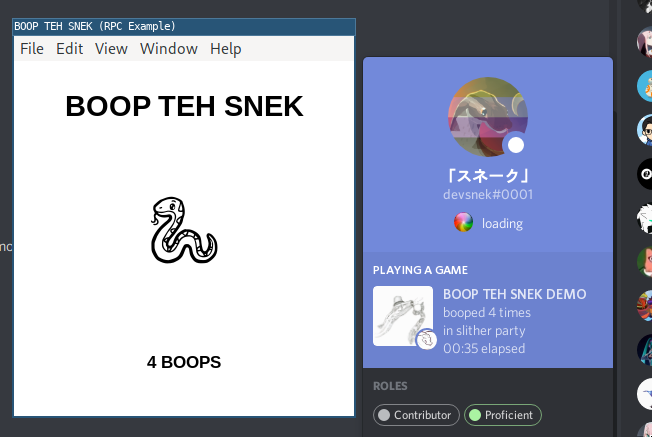
Anyone can help? I tried starting the RPC example, it starts fine, I can click the sneak, but... I dont really see how this has anything to do with discord? Its a webpage that tracks my clicks, what am I missing?
vapid lake
the example that tracks your clicks is just the frontend example, which doesn't have anything to do with discord. but the backend updates your rich presence based on data it retrieves from the client, clicks in this case. https://discord.com/developers/docs/topics/rpc
thick surge
But how is that an example then? o.0 Also I'd have assumed that i'd need to be prompted to enter some login or soemthing, this just started an electron app with some clientID (which i've no clue what it is - but the code said "dont touch if you want example to work") so im a bit confused :S
In other words i've not really authorized my account anywhere, how would this "change" my client's status, for example
I might be going about this the wrong way, maybe I dont even need rpc
vapid lake
client id is the application's id which's name will be displayed in the rich presence (SnekBot in the example as far as I know). you can use any application's ID, including your bot, if you have one. the example is that because RPC is mostly used by games to update your presence/activity.
In other words i've not really authorized my account anywhere, how would this "change" my client's status, for example
it communicates with localhost as far as I know, so if you're logged in, your client grabs data from there and updates your presence/activity accordingly.
 viral rampart
Umm, how can I set a RPC for my bot?
vapid lake
bots can't have RPC
thick surge
Mhm, but, it doesn't do any of that which is what the problem is, my status doesn't change. Though, I think I've wondered off into a wrong direction, I think I dont need RPC for what Im trying to do. :S
viral rampart
Oh
Thanks
viral rampart
Thanks
carmine mica
@thick surge you should see this https://gc.gy/58481349.png
discord clients run a local server which programs you run can connect to
the programs tell discord their client id and then they can show presence
thick surge
Hmm I dont see that so its weird :S But it turns out RPC is not what i need in the end so doesnt matter, thanks for help regardless
left fjord
not sure if disabling showing game you're playing affects rpc, but probably does
thick surge
Yup that was it
 cosmic horizon
discord-rpc doesn't use user's token at all, right?
vapid lake
the lib doesn't
cosmic horizon
I wonder how the lib can show rich presences, only specifying application's ID
vapid lake
discord clients run a local server which programs you run can connect to
the programs tell discord their client id and then they can show presence
cosmic horizon
It only appears on application's owner?
vapid lake
no, you can use any application's ID
cosmic horizon
Oh ok
Thanks
How did he access to this program? 🤔
Oh, maybe electron
carmine mica
that's not supported here
 pale wraith
why i cant setup the rpc
the example from github from discord.js
> discord-rpc@3.1.1 example C:\Users\gino\Desktop\RPC-master
> electron example/main.js


 App threw an error during load
ReferenceError: app is not defined
    at Object.<anonymous> (C:\Users\gino\Desktop\RPC-master\example\main.js:34:1)
    at Module._compile (internal/modules/cjs/loader.js:880:30)
    at Object.Module._extensions..js (internal/modules/cjs/loader.js:892:10)
    at Module.load (internal/modules/cjs/loader.js:735:32)
    at Module._load (internal/modules/cjs/loader.js:648:12)
    at Module._load (electron/js2c/asar.js:717:26)
    at Function.Module._load (electron/js2c/asar.js:717:26)
    at loadApplicationPackage (C:\Users\gino\Desktop\RPC-master\node_modules\electron\dist\resources\default_app.asar\main.js:109:16)
    at Object.<anonymous> (C:\Users\gino\Desktop\RPC-master\node_modules\electron\dist\resources\default_app.asar\main.js:155:9)
    at Module._compile (internal/modules/cjs/loader.js:880:30)
the error
vapid lake
the example shouldn't produce that error
pale wraith
i dont know how it works
wait i install it again
> discord-rpc@3.1.1 example C:\Users\gino\Desktop\discord emojis\RPC-master\RPC-master
> electron example/main.js

'electron' is not recognized as an internal or external command,
operable program or batch file.
npm ERR! code ELIFECYCLE
npm ERR! errno 1
npm ERR! discord-rpc@3.1.1 example: `electron example/main.js`
npm ERR! Exit status 1
npm ERR!
npm ERR! Failed at the discord-rpc@3.1.1 example script.
npm ERR! This is probably not a problem with npm. There is likely additional logging output above.
npm WARN Local package.json exists, but node_modules missing, did you mean to install?

npm ERR! A complete log of this run can be found in:
npm ERR!     C:\Users\gino\AppData\Roaming\npm-cache\_logs\2020-06-03T09_11_37_265Z-debug.log

C:\Users\gino\Desktop\discord emojis\RPC-master\RPC-master>
now i got this
this is a new install
vapid lake
install electron globally
pale wraith
npm install electron
^^ ?? ^^
@vapid lake
vapid lake
-g
npm i electron -g
pale wraith
i got a popup
> discord-rpc@3.1.1 example C:\Users\gino\Desktop\discord emojis\RPC-master\RPC-master
> electron example/main.js


App threw an error during load
Error: Cannot find module 'node-fetch'
Require stack:
- C:\Users\gino\Desktop\discord emojis\RPC-master\RPC-master\src\client.js
- C:\Users\gino\Desktop\discord emojis\RPC-master\RPC-master\src\index.js
- C:\Users\gino\Desktop\discord emojis\RPC-master\RPC-master\example\main.js
- C:\Users\gino\AppData\Roaming\npm\node_modules\electron\dist\resources\default_app.asar\main.js
-
    at Module._resolveFilename (internal/modules/cjs/loader.js:797:17)
    at Function../lib/common/reset-search-paths.ts.Module._resolveFilename (electron/js2c/browser_init.js:7012:16)
    at Module._load (internal/modules/cjs/loader.js:690:27)
    at Function.Module._load (electron/js2c/asar.js:738:28)
    at Module.require (internal/modules/cjs/loader.js:852:19)
    at require (internal/modules/cjs/helpers.js:74:18)
    at Object.<anonymous> (C:\Users\gino\Desktop\discord emojis\RPC-master\RPC-master\src\client.js:5:15)
    at Module._compile (internal/modules/cjs/loader.js:967:30)
    at Object.Module._extensions..js (internal/modules/cjs/loader.js:1004:10)
    at Module.load (internal/modules/cjs/loader.js:815:32)```
npm i node-fetch -g
??????????
vapid lake
not globally
just run npm i with no other arguments
pale wraith
npm i node-fetch
vapid lake
no, install all dependencies
I feel like this is out of the scope of the channel now, though
pale wraith
it not work
if i run the example
it not count
    at EventEmitter../lib/renderer/ipc-renderer-internal.ts.exports.ipcRendererInternal.send (electron/js2c/renderer_init.js:1841:20)
    at EventEmitter.<anonymous> (electron/js2c/renderer_init.js:1803:26)
(node:12484) UnhandledPromiseRejectionWarning: Unhandled promise rejection. This error originated either by throwing inside of an async function without a catch block, or by rejecting a promise which was not handled with .catch(). (rejection id: 1)
(node:12484) [DEP0018] DeprecationWarning: Unhandled promise rejections are deprecated. In the future, promise rejections that are not handled will terminate the Node.js process with a non-zero exit code.
 woven elk
Hello ! I keep getting this error :
at Socket.onerror (/storage/emulated/0/discord/rpc/node_modules/discord-rpc/src/transports/ipc.js:32:16)```
I think it doesn't work because of my OS (which is android, yes really). Is there anyway to fix this ?? I just tried reinstalling the lib but same error. Is this library not supporting android ? (I tried running the code with the Discord app openned and even the browser version) ebon fox
Only desktop apps run an rpc server
 abstract zealot
oof
smoky scroll
.
woven elk
Only desktop apps run an rpc server
@ebon fox ok thanks
ebon fox
np
unborn stream
and is there a way to use the rpc without having discord running?
whats the point of having RPC if it wont even show on your profile?
ebon fox
and is there a way to use the rpc without having discord running?
no
 glad zephyr
hello!
I'm trying to integrate discord rpc to my mini-game project using electron.js (nodeJS). The display part is working as intented, but when i try to invite people to play, i get that weird error from Discord:
(i've tried in private messages and on servers, it's the same message everytime, but the "invite to spectate" works fine tho)
Here is my code:
const rpc = new DiscordRPC.Client({ transport: 'ipc' });
DiscordRPC.register(clientId);
async function setActivity() {
  if (!rpc || !main) {
    return;
  }
  rpc.setActivity({
    state: state,
    startTimestamp,
    largeImageKey: largeImageKey,
    largeImageText: largeImageText,
    smallImageKey: smallImageKey,
    smallImageText: smallImageText,
    partyMax: 8,
    partySize: 1,
    joinSecret: "someJoinSecretCode",
    matchSecret: "justAnotherTest",
    instance: false
  });
}

rpc.on('ready', () => {
  console.log(rpc.user);
  rpc.subscribe('ACTIVITY_JOIN', ({ secret }) => {
    console.log(secret);
    // Handle join
  });
  rpc.subscribe('ACTIVITY_SPECTATE', ({ secret }) => {
    console.log(secret);
    // Handle spectate
  })
  rpc.subscribe('ACTIVITY_JOIN_REQUEST', (user) => {
    console.log(user);
    // Handle join request
  })

  setActivity();

  setInterval(() => {
    setActivity();
  }, 15e3);

});
rpc.login({ clientId }).catch(console.error);
Any ideas where i can be wrong?
craggy boughBOT
 light mirage
?docs guild.Members
turbid oliveBOT
ebon fox
#app-commands for personal usage
light mirage
ah
sorry
smoky scroll
I have a question about the entire DJS RPC itself.
Who/What person wod use RPC?
Just wondering.
quick lichen
A desktop application that would want to interact with your discord client @smoky scroll
smoky scroll
Interesting. Thanks for the response.
carmine mica
@smoky scroll all the games that show info in discord use rpc
some other things like logitech gwhatever use rpc to bind custom hotkeys and stuff
some audio apps use rpc to control discord's audio settings
craggy boughBOT
 subtle forge
Can i make status with discord.RPC for my bot?
vapid lake
bots can't have a rich presence
subtle forge
Oh
😦
 lofty peak
@glad zephyr yes, your and the user your trying to dm must be in the same server, either that or the user has the bot blocked.
Look at the error message Clyde is sending you.
glad zephyr
yea i know that
but i'm sending this to a server
then i've tried in a private group with friends
and also with my alt account
it's working when using the game sdk
but not the discord-rpc
 merry path
what i should do?
 uncut nacelle
Install git
 loud jetty
hey everyone, I have this website:
https://jstris.jezevec10.com/
that I turned into an electron app with this npm package
https://github.com/jiahaog/nativefier
everything works fine but I realized that I need to manually add the game for it to show in game activity, and I want this to be done automatically which is how I found out about rich presence and the djs-rpc package, my question is: where and how am I supposed to add this? all I need is to show "playing jstris" for anyone who uses the electron app, I don't care about anything else.
if you can help me with this please ping me 🙏
vapid lake
RPC is usually done in the main process, in which you retrieve data from the renderer process. I don't know how that package works, but I'll look into it.
loud jetty
thank you very much
all I know is that nativefier has an option to inject Javascript so idk if it could be done like that
ebon fox
Why don't you try it :)
loud jetty
I did of course
but I either didn't do it correctly, or didn't use the rpc correctly, or it doesn't work like that
loud jetty
welp, I was able to use rpc really easily in the electron-quick-start app
I guess I'll just make the electron app myself
 frosty lagoon
How to start out learning rpc?
unborn stream
you can try reading the docs but theyre incomplete, you can read discord's documentation and read the source code
 rough isle
Il your need a simple set activity rpc with integrated question and colors...
Just go to https://github.com/MrNossiom/CustomDiscordRichPresence...
If your need more help just contact me...
And PLEASE DISCORD JS UPDATE YOUR DOCS ABOUT RPC
unborn stream
devsnek lazy
smoky scroll

smoky scroll
okay thx
 bright stream
what is rpc
ebon fox
why do i get this when i invite to join
I got this in the console of dev tools of Discord (Ctrl + Shift + I)
maybe because im not setting the party id, how do i set the party id?
This is all docs says, it doesnt say anything about what to put in the first param
and according to Discord docs, we should do { party: { id: "id here", size: [1,2] } } (or similar)
which i tried, but then (thanks to VSC's autocomplete) realized this library uses partyMax and partySize
but can't find how to set the party id.
This should be documented in my opinion
Just looked at the source code, it was partyId
okay it worked
thanks anyway
 round orbit
I am literally just running the example, and getting an error. what am I doing wrong?
const RPC = require('discord-rpc');
const clientId = '725924742569132093';
const scopes = ['rpc', 'rpc.api', 'messages.read'];

const client = new RPC.Client({ transport: 'websocket' });

client.on('ready', () => {
  console.log('Logged in as', client.application.name);
  console.log('Authed for user', client.user.username);

  client.selectVoiceChannel('488060543693750293');
});

// Log in to RPC with client id
client.login({ clientId, scopes });
$ node --trace-warnings index.js
(node:19580) UnhandledPromiseRejectionWarning: undefined
    at emitUnhandledRejectionWarning (internal/process/promises.js:151:15)
    at processPromiseRejections (internal/process/promises.js:211:11)
    at processTicksAndRejections (internal/process/task_queues.js:98:32)
(node:19580) UnhandledPromiseRejectionWarning: Unhandled promise rejection. This error originated either by throwing inside of an async function without a catch block, or by rejecting a promise which was not handled with .catch().
To terminate the node process on unhandled promise rejection, use the CLI flag `--unhandled-rejections=strict` (see https://nodejs.org/api/cli.html#cli_unhandled_rejections_mode). (rejection id: 1)
(node:19580) [DEP0018] DeprecationWarning: Unhandled promise rejections are deprecated. In the future, promise rejections that are not handled will terminate the Node.js process with a non-zero exit code.
    at emitDeprecationWarning (internal/process/promises.js:161:11)
    at processPromiseRejections (internal/process/promises.js:213:13)
    at processTicksAndRejections (internal/process/task_queues.js:98:32)
https://github.com/devsnek/discord-rich-presence/issues/5 might be this? but idk
I dont understand why it cant connect to discord rpc. i tried out https://marketplace.visualstudio.com/items?itemName=icrawl.discord-vscode which uses this package and it connects fine
round orbit
I switched from windows to linux and got the same issue over there
round orbit
ok I figured that out, but now after I launch my app it always prompts on discord for access then i get this error
(node:5119) UnhandledPromiseRejectionWarning: Error: Not authenticated or invalid scope
    at RPCClient._onRpcMessage (/home/mcpqndq/repos/rpcTest/node_modules/discord-rpc/src/client.js:177:19)
    at IPCTransport.emit (events.js:315:20)
    at /home/mcpqndq/repos/rpcTest/node_modules/discord-rpc/src/transports/ipc.js:134:18
    at decode (/home/mcpqndq/repos/rpcTest/node_modules/discord-rpc/src/transports/ipc.js:92:5)
    at Socket.<anonymous> (/home/mcpqndq/repos/rpcTest/node_modules/discord-rpc/src/transports/ipc.js:120:7)
    at Socket.emit (events.js:315:20)
    at emitReadable_ (_stream_readable.js:562:12)
    at processTicksAndRejections (internal/process/task_queues.js:83:21)
(node:5119) UnhandledPromiseRejectionWarning: Unhandled promise rejection. This error originated either by throwing inside of an async function without a catch block, or by rejecting a promise which was not handled with .catch(). To terminate the node process on unhandled promise rejection, use the CLI flag `--unhandled-rejections=strict` (see https://nodejs.org/api/cli.html#cli_unhandled_rejections_mode). (rejection id: 3)
code:
const RPC = require('discord-rpc');
const clientId = '725924742569132093';

const client = new RPC.Client({ transport: 'ipc' });

client.on('ready', () => {
  console.log('Logged in as', client.application.name);
  console.log('Authed for user', client.user.username);

  client.selectVoiceChannel('81384788862181376');
});

// Log in to RPC with client id
client.login({ clientId, scopes: ['rpc'] });
@round orbit you need permission from discord for certain scopes
round orbit
Is the one for rich presence one of those
carmine mica
@round orbit no, rich presence is available with no scopes
left fjord
Rpc has scopes, and some of them are whitelisted.
Rpc itself isn't a scope
round orbit
o
If I just want to use rich presence do I use no scopes.
 atomic sparrow
link doesn't work?
left fjord
those are docs
frosty lagoon
What does rpc do?
carmine mica
@frosty lagoon a collection of APIs for games to communicate with your discord client
frosty lagoon
oh
atomic sparrow
So the docs is just 1 example?
 rancid mural
how can i set up status for visual code
like iam getting error when i install vscode-discord
 karmic jolt
that's unrelated to this channel
left fjord
this is also a thing
carmine mica
no
unborn stream
could someone with my ip address put rich presence on me
smoky scroll
@unborn stream what?
unborn stream
cuz to use rpc you need to access localhost:something so if someone had my ip can they do this remotely?
carmine mica
@unborn stream no
left fjord
rpc server is not listening for everything coming to it. since it's listening specifically on localhost and not on 0.0.0.0, it only accepts connections from localhost.
unborn stream
ok
 hidden linden
so theoretically i could make a server to forward from 0.0.0.0 to localhost to control it remotely?
carmine mica
rpc works over ipc
you need special permission from discord to use rpc over tcp
hidden linden
what i mean is if i had a server that is connected to my rpc i can control it remotely
my server process would be connected to discord client
smoky scroll
So uh im trying to sift through an array that i get from a json file but when i try and send the string inside an embed the chars are improperly encoded any ideas on where im going wrong?
$data = json_decode(file_get_contents(__DIR__ . "/data.json"), true);
foreach ($data as $user => $data) {
if (strpos($user, $target) !== false) {
$matches[] = " - $user";
}
}
$matches = [];
$mtime = microtime(true);
$took = round(((microtime(true) - $mtime)), 3);
if ((count($matches) <= 50) && !empty($matches)) {
$message->channel->send("", ["embed" => [
"title" => count($matches) . " Matches for \"{$target}\"",
"description" => implode("\n", $matches),
"color" => 0x63ffd0
, "footer" => [
"text" => "Ran by: {$message->author->username}#{$message->author->discriminator} | Took {$took}s", "icon_url" => $message->author->getAvatarURL()
]
]]);
} else {
return false;
}``` sonic quail
Hey
If I upload and save an image asset, and reload it dissapers
left fjord
This isn't website support
 mint bridge
Can you provide an rpc oauth2 access token or whatever somehow with discord-rpc?
carmine mica
ya
rpcToken
mint bridge
thanks
 stray minnow
/home/miha/Desktop/EasyRPC/node_modules/discord-rpc/src/client.js:637
        ...r,
        ^^^

SyntaxError: Unexpected token ...
    at createScript (vm.js:74:10)
    at Object.runInThisContext (vm.js:116:10)
    at Module._compile (module.js:533:28)
    at Object.Module._extensions..js (module.js:580:10)
    at Module.load (module.js:503:32)
    at tryModuleLoad (module.js:466:12)
    at Function.Module._load (module.js:458:3)
    at Module.require (module.js:513:17)
    at require (internal/module.js:11:18)
    at Object.<anonymous> (/home/miha/Desktop/EasyRPC/node_modules/discord-rpc/src/index.js:6:11)
yes i did
karmic jolt
what's your installed node.js version, looks like it doesn't support spread syntax yet
stray minnow
wait what how is it 10, i updated it like a couple days ago
well it didnt use the new version as the default :/
craggy boughBOT
stray minnow
didnt fix it
12.18.2
node version
craggy boughBOT
craggy boughBOT
stray minnow
:(
subtle forge
Can i use djs rpc in my site? (I know XD but can i?)
stray minnow
old node version was NOT the issue
:(
carmine mica
@stray minnow https://gc.gy/62359652.png
 stray minnow
?
carmine mica
@stray minnow works fine in 12.18.2
stray minnow
not for me
rough isle
I have this error when I try to use the rpc client...
UnhandledPromiseRejectionWarning: Error: Could not find endpoint
    at findEndpoint (/Users/Milo_Moisson/Desktop/Programmation/Bot Discord/RPC/node_modules/discord-rpc/src/transports/ipc.js:45:11)
    at findEndpoint (/Users/Milo_Moisson/Desktop/Programmation/Bot Discord/RPC/node_modules/discord-rpc/src/transports/ipc.js:55:12)
This is my code:
const RPC = require('discord-rpc');
const chalk = require('chalk');
const { clientId, clientSecret } = require('./config');
const scopes = ['rpc', 'messages.read'];
// Import

// User Questions Script

// Set User RP
const RPClient = new RPC.Client({ transport: 'ipc' });

// Login
RPClient.on('ready', () => {
    console.log(chalk.red('Ready !'));
});
RPClient.login({ clientId: clientId, clientSecret: clientSecret, scopes: scopes });
I don't understand...
This is the part where is does not work:
async function findEndpoint(tries = 0) {
  if (tries > 30) {
    throw new Error('Could not find endpoint');
  }
  const endpoint = `http://127.0.0.1:${6463 + (tries % 10)}`;
  try {
    const r = await fetch(endpoint);
    if (r.status !== 401) {
      return findEndpoint(tries + 1);
    }
    return endpoint;
  } catch (e) {
    return findEndpoint(tries + 1);
  }
}
He cannot fetch the endpoint... But why ?
And why I get en error when I try to create a new client with transport 'websocket'
rough isle
@carmine mica
carmine mica
@rough isle that means it can't find the client in your computer
rough isle
And can I do to fix that ?
Because My discord is open ?
@carmine mica
carmine mica
@rough isle idk
did you install it with snap?
is the code running on the same device as your client?
rough isle
did you install it with snap?
Waht is snap
is the code running on the same device as your client?
Yes
@carmine mica
carmine mica

rough isle
Do you have an example that work ?
Just a simple one
carmine mica
your code should work
rough isle
And why do I have an error undefined
carmine mica
well it might tell you your scopes are invalid cuz you aren't whitelisted for them but it should work
rough isle
With no place where there is errors
carmine mica
idk
if you consistently get undefined as an error try attaching a debugger and stepping through the code until you find the relevant throw
rough isle
There's a debuger attached...
I use vs code
@carmine mica
carmine mica
that doesn't help
step through
I think vscode has a button for stepping
rough isle
Yes
It fail on login
I already know that...
carmine mica
step into the rpc code
not just your code
rough isle
I already did that...
carmine mica
step to whatever throws the error
rough isle
like for the login func ?
carmine mica
what inside the login func throws the error
rough isle
It is client.js:110:9
The reject has nothing so it console.log underfind
this.transport.once('close', () => {
  this._expecting.forEach((e) => {
    e.reject(new Error('connection closed'));
  });
  this.emit('disconnected');
  reject(); // <-- this one...
});
nice
rough isle
?
@carmine mica
craggy boughBOT
rough isle
@carmine mica What do I do next ?
carmine mica
update to 3.1.2
rough isle
I did it
And next
@carmine mica
carmine mica
¯_(ツ)_/¯
rough isle
But it just change the error
carmine mica
well the connection closed
rough isle
So there is nothing to do ?
carmine mica
idk
i'm sure there's a problem somewhere
but i can't debug your computer
rough isle
@carmine mica:
what is does on yours
just to see if normal...
carmine mica
@rough isle that's normal
rough isle
Why ?
 wicked onyx
discord.rpc
 prisma root
how i can create update Overwrite voice channel
 verbal thorn
not something to ask here, but: https://discord.js.org/#/docs/main/stable/class/GuildChannel?scrollTo=updateOverwrite, a VoiceChannel is also a part of GuildChannel, as it extends, so yes. please ask further discord.js related questions in #archive-updating-to-v13 instead
smoky scroll
Anyone know why it says could not connect?
 vital salmon
@smoky scroll same problem with me happens
Anyone know why it says could not connect?
smoky scroll
@vital salmon I found the fix
i'll dm you it :))
vital salmon
@smoky scroll bro not that Spotify
Rpc
I wnat visual studio code rich presence
smoky scroll
i'll dm you
well
nvm
it was an example
on how it wrks
 strong bolt
    rpc.createLobby("DevelopmentPool",4)
    .then(p => {console.log(p)})
    .catch(e => {console.log(e)})```
Creating a lobby in my ready event
    at RPCClient._onRpcMessage (C:\Users\jeffr\Desktop\SGL\node_modules\discord-rpc\src\client.js:177:19)
    at IPCTransport.emit (events.js:223:5)
    at C:\Users\jeffr\Desktop\SGL\node_modules\discord-rpc\src\transports\ipc.js:134:18
    at decode (C:\Users\jeffr\Desktop\SGL\node_modules\discord-rpc\src\transports\ipc.js:92:5)
    at Socket.<anonymous> (C:\Users\jeffr\Desktop\SGL\node_modules\discord-rpc\src\transports\ipc.js:120:7)
    at Socket.emit (events.js:223:5)
    at emitReadable_ (_stream_readable.js:576:12)
    at processTicksAndRejections (internal/process/task_queues.js:80:21) {
  code: 4000,
  data: {
    code: 4000,
    message: 'child "type" fails because ["type" must be a number]'
  }
}```
results in this error
strong bolt
Am I doing something wrong?
So I found out what's causing this
first argument must be either "PRIVATE", "PUBLIC", 1, 2
fixed that
    at RPCClient._onRpcMessage (C:\Users\jeffr\Desktop\SGL\node_modules\discord-rpc\src\client.js:177:19)
    at IPCTransport.emit (events.js:223:5)
    at C:\Users\jeffr\Desktop\SGL\node_modules\discord-rpc\src\transports\ipc.js:134:18
    at decode (C:\Users\jeffr\Desktop\SGL\node_modules\discord-rpc\src\transports\ipc.js:92:5)
    at Socket.<anonymous> (C:\Users\jeffr\Desktop\SGL\node_modules\discord-rpc\src\transports\ipc.js:120:7)
    at Socket.emit (events.js:223:5)
    at emitReadable_ (_stream_readable.js:576:12)
    at processTicksAndRejections (internal/process/task_queues.js:80:21) {
  code: 1000,
  data: { code: 1000, message: 'Unknown Error' }
}```
getting unknown error now
carmine mica
the error comes from discord
its as unknown to me as it is to you
smoky scroll
RPC.Client().user is a user of discord i mean the discord of the person pc ;-; i dont know how to say i mean the user of discord not the bot
it shows discord user id?
smoky scroll
My Code```js
const RPC = require("discord-rpc")
const clientId = '732932007386021980';
const scopes = ['rpc', 'rpc.api', 'messages.read'];
const client = new RPC.Client({ transport: 'websocket' });
client.on('ready', () => {
console.log('Logged in as', client.application.name);
console.log('Authed for user', client.user.username);
});
client.login({ clientId, scopes });
Error:nvm
understanded how to
 tame kernel
how to delete a message sent by a bot? .then message.delete({timeout:2000})??
 quaint hemlock
is normal djs #archive-djs-v12-deprecated
 keen venture
hey
umm so did djs rpc can be use to discord bot ?
left fjord
no
smoky scroll
hi
rough isle
This RPC Client does not seems to works while using scopes or websocket...
Does the DJS memebers are trying to keep this project alive or does he is over ?
I tried on Mac and Windows...
@smoky scroll The websocket transport does not work and scopes either
 high sky
@carmine mica
carmine mica
@rough isle are you whitelisted to use the websocket transport
rough isle
Haw can I check ?
@carmine mica
carmine mica
you would know if you were lol
rough isle
I am on a administrator session
carmine mica
you have to ask permission from discord to use websockets
rough isle
In the dev portal ?
carmine mica
i don't know how they do it these days
rough isle
@carmine mica And for the scopes ?
Is it because RPC is in private beta ?
carmine mica
rpc isn't in private beta
and you'll have to be more specific than "scopes don't work"
rough isle
If you connect without scopes it works for me
But else it does not work
carmine mica
what does "scopes do not work" mean
does it mean that when you try to connect with scopes, the client deletes all your files?
or perhaps that it rick rolls you
rough isle
@carmine mica How do I get a message with the messages.read scope and with ipc transport ?
I use:
const RPC = require('discord-rpc');
const chalk = require('chalk');
const { clientId, clientSecret } = require('./config');
const scopes = ['rpc', 'messages.read'];
// Import

// User Questions Script

// Set User RP
const RPClient = new RPC.Client({ transport: 'ipc' });

// Login
RPClient.on('ready', () => {
    console.log(chalk.red('Ready !'));
});
RPClient.login({ clientId: clientId, clientSecret: clientSecret, scopes: scopes });
RPClient.subscribe('MESSAGE_CREATE', console.log)
Is this ok ?
carmine mica
you need to subscribe to a channel to get MESSAGE_CREATE events
rough isle
Oh ok
Like this ? :RPClient.subscribe('MESSAGE_CREATE', {channel_id: '379350641761320982'}, console.log)
carmine mica
i don't remember off the top of my head
rough isle
This is like that on the wiki
But it does not work
Also Ive got this error: Could not find endpoint
So I does not find the server
But it does not work
Logic
carmine mica
that means it couldn't connect to your local client
rough isle
Yes but why ????
carmine mica
¯_(ツ)_/¯
you're running this code on your local computer right
rough isle
Yes
carmine mica
¯_(ツ)_/¯
did you install discord with snaps or smth
rough isle
Does it work on yours ?
no with original installer
carmine mica
x
rough isle
? @carmine mica
carmine mica
x
x
rough isle
Wut ?
carmine mica
hmm
oh right i forgot
rough isle
????
Ok...
carmine mica
@rough isle there might be a bug in discord
rough isle
Ok
thanks
craggy boughBOT
carmine mica
@rough isle i've verified there's no bug, you're most likely missing permission to use the event
craggy boughBOT
rough isle
??
 dusky ivy
facts
 small shuttle
hi
i am wondering how can i show the time
of the music playing
anyone knows a way?
 spring saddle
i see this channel is relatively active
is the rpc api public now?
left fjord
is it?
 worthy mortar
how to use RPC
i mean
i want RPC like this via a bot
State: Hosted by [HMO] SCRplayer2403
Details: Hosting a training
Party size- 1
Party max- 20
Join- The training channel
 trim shale
hey
lets say i want to have my bot to say this in the rpc
but i have no idea where to put the code
code:
static void UpdatePresence()
{
DiscordRichPresence discordPresence;
memset(&discordPresence, 0, sizeof(discordPresence));
discordPresence.state = "Ik ben een discord bot gemaakt door Ties113#9851";
discordPresence.details = ">help";
discordPresence.largeImageKey = "catto";
discordPresence.largeImageText = "Very cool guy";
discordPresence.smallImageText = "Level 100 Chad";
discordPresence.partyId = "ae488379-351d-4a4f-ad32-2b9b01c91657";
discordPresence.partySize = 1;
discordPresence.partyMax = 2;
discordPresence.spectateSecret = "MTIzNDV8MTIzNDV8MTMyNDU0";
discordPresence.joinSecret = "MTI4NzM0OjFpMmhuZToxMjMxMjM= ";
Discord_UpdatePresence(&discordPresence);
}
carmine mica
@trim shale discord.gg/discord-developers for help with game sdk
trim shale
ok thx
trim shale
I could get an answer there
trim shale
why tag me?
lol
i dont know anything
i can tim sort
sorry
smoky scroll
so i get this when i attempt to connect to discord rpc
    at IPCTransport.<anonymous> (/home/ararouge/rpc/node_modules/discord-rpc/src/client.js:118:16)
    at Object.onceWrapper (events.js:421:26)
    at IPCTransport.emit (events.js:314:20)
    at /home/ararouge/rpc/node_modules/discord-rpc/src/transports/ipc.js:137:18
    at decode (/home/ararouge/rpc/node_modules/discord-rpc/src/transports/ipc.js:92:5)
    at Socket.<anonymous> (/home/ararouge/rpc/node_modules/discord-rpc/src/transports/ipc.js:120:7)
    at Socket.emit (events.js:314:20)
    at emitReadable_ (_stream_readable.js:564:12)
    at processTicksAndRejections (internal/process/task_queues.js:79:21)
(Use `node --trace-warnings ...` to show where the warning was created)
(node:12133) UnhandledPromiseRejectionWarning: Unhandled promise rejection. This error originated either by throwing inside of an async function without a catch block, or by rejecting a promise which was not handled with .catch(). To terminate the node process on unhandled promise rejection, use the CLI flag `--unhandled-rejections=strict` (see https://nodejs.org/api/cli.html#cli_unhandled_rejections_mode). (rejection id: 1)
(node:12133) [DEP0018] DeprecationWarning: Unhandled promise rejections are deprecated. In the future, promise rejections that are not handled will terminate the Node.js process with a non-zero exit code.
const DiscordRPC = require("discord-rpc");
const start = new Date();
const scopes = [ "rpc" ];
let rpc = {};
let object = JSON.parse(require("fs").readFileSync("conf.json"));
let status = {};
const setactivity = () => {
    rpc.setActivity(status.status);
};
const changegame = () => {
    status = object[Math.floor(Math.random() * object.length)];
    status.status.startTimestamp = start;
    rpc = new DiscordRPC.Client({ "transport": "ipc", scopes });
    rpc.login({ "clientId": object.id });
    rpc.on("ready", () => {
        setactivity();
        setTimeout(rpc.destroy, 30000);
        setTimeout(changegame, 30000);
   });
};
changegame();
this is my code
craggy boughBOT
carmine mica
@ararouge#6722 you might want to try the discord-rich-presence module
ok nvm
 crisp creek
Where i can ask questions about Web build ?
smoky scroll
Hi
For use the discordrpc in web browser, how can I do?
subtle forge
how to make rich presence in my java app?
left fjord
by realising that java is not javascript
subtle forge
smpg
o im search in github]
rpc to java
1:1 tip 🙂
🙂
left fjord
java is not javascript.
now stop the troll
subtle forge
java is not javascript.
@left fjord i know
now stop the troll
@left fjord this is not troll
oh im braindead
this server is js
not java
my bad
sry
:d
smoky scroll
For use the discordrpc in web browser, how can I do?
@smoky scroll can anyone help me?
carmine mica
@Cosis#0846 you need to be whitelisted by discord first
ok nvm
left fjord
just few hours after they asked me in dms and i answered that they need to wait
 woeful hound
o]
 proven forge
?docs
turbid oliveBOT
@proven forge, what would you like to search for?
Type cancel to cancel the command.
proven forge
cancel
turbid oliveBOT
The command has been cancelled.
proven forge
https://discordjs.guide/ @smoky scroll
 dusky axle
?docs
turbid oliveBOT
@dusky axle, what would you like to search for?
Type cancel to cancel the command.
dusky axle
embed
turbid oliveBOT
dusky axle
cancel
 rigid orchid
?docs
turbid oliveBOT
@rigid orchid, what would you like to search for?
Type cancel to cancel the command.
rigid orchid
Embed
turbid oliveBOT
left fjord
#app-commands is a thing, and it is not this channel
 velvet lintel
hey, what's the process to be whitelisted by Discord?
smoky scroll
?docs
turbid oliveBOT
@smoky scroll, what would you like to search for?
Type cancel to cancel the command.
smoky scroll
message.channel