#🤝│community-troubleshooting
1 messages · Page 128 of 1
 deft frost
that's
interesting
@limpid copper Go into Windowed mode and try resizing the window, tell me if that helps
 viral monolith
-koreanrating can i give ban? Eu server?
 modern wadi
hey guys, my account is banned 24hr because I killed the enemy with the distance - / + 400m inside the house but the house is rendering my PC, can my account come back later?
 celest panther
!appeal
 regal vaporBOT
If you feel you were incorrectly banned please submit an appeal on our support website:
celest panther
We dont discuss bans here
file an appeal or wait for a response if you already have
viral monolith
We can assure you that the account was blocked because there was a violation discovered on the account. We apologize but we cannot provide any specifics on the details of the violation.
correct answer
celest panther
If that is the response then you need to accept it and wait for your suspension to be lifted
 jovial osprey
I need some help
a guy named Xx_Elmo_xX is earaping people
currently in squad room
@celest panther hey
@celest panther A guy named Xx_Elmo_xX is ear raping people, currently in squad room 1
@gleaming vector A guy named Xx_Elmo_xX is ear raping people, currently in squad room 1
deft frost
!invite
regal vaporBOT
Invite URL for Discord: https://discord.gg/battlegrounds
deft frost
@viral monolith
viral monolith
Thanks!
 wintry matrix
Anyone know how to fix the "BattleEye: Corrupted Data" issue on test server. I've verified file systems integrity multiple times and even did a fresh install on two different drives but the issue remains.
wintry matrix
@here anyone have any idea?
 bronze fossil
why i'm always stuck on loading screen after matchmaking..
and i had to force close the game and relog
and it will happen again after one or two match
it starts after update #18
 supple nacelle
okay, WHAT the fuck do i need to do to get loot to spawn before i land? This sis getting rediculous.... I dont even have a chance if someone drops near me.
 signal trail
I think a better computer
to render stuff
im not sure
i use to have the problem but ever since i got a new pc the problem is gone
supple nacelle
Which part in particular though
signal trail
probably cpu
 teal zenith
hello. is there somewhere link for body damage chart? thank you
 wispy zinc
!invite
regal vaporBOT
Invite URL for Discord: https://discord.gg/battlegrounds
 limpid copper
@deft frost how do i go into windowed mode if test server is unplayable with that bug
deft frost
Press Esc
deft frost
Pressing Esc doesn't open the menu?
 old holly
How size of PUBG
 tough harbor
Alt+Enter should make you go to Windowed mode
deft frost
Alt Enter doesn't work?
limpid copper
i think not
deft frost

tough harbor
hmm alt enter should definitely make you go windowed though. weird if it doesnt.
tough harbor
not that i know of
deft frost
Through the .ini file?
viral monolith
i think they use the same
celest panther
@deft frost Don't advise changing things in the INI files
limpid copper
why not. in INI files
 sweet isle
@limpid copper so Escape doesn't close that xp thing?
limpid copper
i dont think. so i pressed enter and also didnt work
sweet isle
well, if you want to see if windowed mode helps try changing to windowed in the live client and then check test
celest panther
going into windowed mode wont solve the problem
limpid copper
Robodanjal said to press ESC or enter
i said to him it didnt work and then he said to go to the pubg forums site
@celest panther
celest panther
then thats all we can do for now
its been posted, it will be picked up
you arent the only one who ran into this problem
limpid copper
he said its a known bug
so. i i am not really only one. as you said
with this problem
celest panther
@unkempt grotto If you don't need help with pubg, dont post here.
celest panther
Thats what "known bug" means.
limpid copper
you are right
btw i just verifiied my game files on test server on steam and it says one file failed to validate and it will be reacquired
is that the reason for my bug?
probaly not right?
 idle tree
Only one way to see. Try running the test server again and see if it cleared the issue
tough harbor
T pose?
 wooden pond
YESS
limpid copper
@wooden pond on test server as well?
tough harbor
https://forums.playbattlegrounds.com/topic/284147-character-model-frozen-in-main-menu-troubleshooting-steps/ @wooden pond @rustic jacinth
limpid copper
what if my files are corrupted as on live servers. i had a serialization error on pubg live servers last week i think or few days ago. and didn verify my game files yet on for live servers
maybe i need to verify game files fro live servers as well
@tough harbor
@celest panther
wooden pond
How does it work @limpid copper
 rustic jacinth
I got the same problem, my match always ge crashed after loading screen, I verify my files, but it does not works
wooden pond
Yess
limpid copper
let me show you both my bug on test server
rustic jacinth
So... i do not know what to do know...
limpid copper
in DM
deft frost
@rustic jacinth Is your character stuck in a T-pose by any chance?
deft frost
Follow these steps: https://forums.playbattlegrounds.com/topic/284147-character-model-frozen-in-main-menu-troubleshooting-steps/

PLAYERUNKNOWN'S BATTLEGROUNDS Forums
Hi players! Some players are still experiencing the issue where their character model remains frozen in the main menu, and their game crashes upon loading into the match. This is due to a Steam update not completing correctly and the download becoming corrupted. In order to f...
rustic jacinth
@deft frost Well... honestly not exactly like that... but... the problem it's kind o similar though..

 wooden pond
@tough harbor Ohh Thanks Bra
rustic jacinth
I'm gonna read it , thank you bro
OMG, it says i need to uninstall the game... it gonna take the whole day to downloaded again...
OMG!
deft frost
@tough harbor 
rustic jacinth
Why!!!!
celest panther
Because thats what fixes the problem
rustic jacinth
But if is need i have no option just to do it!
celest panther
The t-pose issue is caused by steam failing to update the game properly. the only way to solve that is to do a 100% clean reinstall.
deft frost
and clearing download cache
celest panther
Your problem is know, its been forwarded on and you now need to wait
there is currently no fix that im aware of for it, so you will just have to sit tight.
limpid copper
ok. i will try to be patient and wait for the fix
tough harbor
or maybe you can try that link also and do a clean reinstall. exactly as instructed while youre waiting for a response.
 shy sun
whats the invite link for this disc
celest panther
!invite
regal vaporBOT
Invite URL for Discord: https://discord.gg/battlegrounds
shy sun
says its invalid
shy sun
I think they got it
regal vaporBOT
Invite URL for Discord: https://discord.gg/battlegrounds
 plucky yoke
My name on the server won't show up and iam stuck on the loading screen .
Any ideas ?
I'am not able to play because of this ):
 thorny pond
anyone know why NA matchmaking is taking so long?
 young ermine
Do I get the win if I leave the game before the end of game?
thorny pond
no
celest panther
@thorny pond Just been playing on NA, had no issues
thorny pond
yeah its woking now, but it said 1 ish minute and it would never find a match
*working
celest panther
if that happens, requeue
thorny pond
yep, tried it over 15 times but still said 1+ minutes
 brazen prawn
My screen overlapa the screen on test server anyway to fix it?
thorny pond
What do you mean by overlap? can you send a screenshot?
 lunar oyster
I havn't played pubg in months and now it won't update. the time it takes to finish downloading keeps going up till its over a year then gives me an error. how do i fix this?
will I have to completly delete pubg and reinstall?
tough harbor
head over to steam settings - downloads tab - clear download cache @lunar oyster
lunar oyster
still counting to infinity and giving me an error.. @tough harbor
tough harbor
have you got enough space in your storage?
lunar oyster
oh I think its trying to install it to a storage space thats maxed...
Can't I just move the files to my hardrive or will i have to uninstall/reinstall
 zealous rain
tough harbor
zealous rain
tough harbor
make sure your steam directory is not set to read only and run steam as administrator.
lunar oyster
I just uninstalled.. I think it was trying to install on 2 different drives
tough harbor
did you copy and paste the game folder manually or did you try to move install folder in steam?
viral monolith
@tough harbor - Copy and paste itwhre u want, then you use the function "Add game" -> " Add non-steam game"
tough harbor
uhh or just right click on the game - properties - local - move install folder to where you want
 manic crypt
this weird dude named TPS_SlayerOfGods doesn't know how to change his resolution to lower than 1920*1080 so his pc keeps crashing
how does he go down in resolution
viral monolith
guys my friend bought Coat (Black) he dosent own pubg after 7 days can he still place it on the market
viral monolith
You dont have to own the game to be able to trade with gear from it 😉 @viral monolith
 dusky breach
Why is PUBG Xbox still not cross platform with pc.
lunar oyster
it would be unfair af?
idle tree
gl with that ever happening. It’s up to microsoft to allow that sort of stuff, and quite frankly putting controller up against M&K just isn’t a good mix
dusky breach
what about the xim apex
idle tree
That’s like 0.01% of the playerbase on Xbox.
 static dawn
When PC patch #21 is come out on Live servers !?
thorny pond
Duo FPP Mini Royale taking 53+ minutes WTF?
thorny pond
okay now its saying 48 sec but after 5 mins still no game
signal trail
What region?
thorny pond
NA
thorny pond
yeah
thorny pond
okay wtf
now its down to 8 secs
but still no game so far
hell yeah! it worked!
Thanks!
signal trail
you're welcome
 sacred tusk
signal trail
sacred tusk
signal trail
!invite
regal vaporBOT
Invite URL for Discord: https://discord.gg/battlegrounds
signal trail
b o i
 ancient venture
HELP
22:28:30: Starting BattlEye Service...
this sh*t is takin' forever!!!!
wtaf
CAN ANYONE HELPPP???
 naive kernel
@snow quest i need help. i am unable to play on the test servers because the wait time says 72minutes or 4minutes and i never end up joining a match what do i do?
tough harbor
only around 1.5k players in test server right now, most of them being on training mode. so you can keep trying to requeue, restart lobby and changing regions/modes till you can get into one. best solution there is
 dire hornet
Im got banned wtf
celest panther
@dire hornet We don't discuss bans here. To raise an appeal visit the link below
regal vaporBOT
If you feel you were incorrectly banned please submit an appeal on our support website:
 stone heart
@ancient venture Go to steamapps\common\PUBG\TslGame\Binaries\Win64\BattlEye and run Uninstall_BattlEye.bat and then Install_BattlEye.bat
 lament jewel
PUBG test servers are stuck at 97% update, tried re-initiating the update, still stuck at 97%
hulp pls
deft frost
@lament jewel It usually fixes itself after some time.
lament jewel
Yeah was just about to say it works
 obsidian bolt
when is the game actually gonna be fixed?
ancient venture
@stone heart ty but
Wait... idek
now it just says 17:39:00: Installing BattlEye Service...
17:39:04: Failed to install BattlEye Service.
then disapears
 kind holly
celest panther
kind holly
celest panther
@obsidian bolt Would you mind being a bit more specific about what you want fixed in particular?
stone heart
@ancient venture Try right-clicking and choose run as administrator when installing
 gilded thicket
yo what the fuck is going on with the updates
I had an 11.9GB update that I downloaded and then I had a 14.1 GB update that just switched to a 12.0 GB update (mid update literally watched it change from 14 to 12) and then it changed to 12.1 GB's again
tough harbor
thats steam's way of distributing updates. game got no control over that.
tough harbor
and youre downloading it through steam. the size is supposed to be 11.9gb and thats it. if steam downloads and finds corrupted data or replaced unintentionally, it'll try redownloading it back. its confusing
you can just try clearing download cache if it keeps happening
gilded thicket
no like it finished the 11 gig update
and then just decided to download another 14 gig update
tough harbor
got no clue mate
 crude pendant
can somebody change my name to kayzax
last time asking
if I could from the settings i would have do so already
10th time asking for this
ty ❤
 tribal flicker
@crude pendant yw 
 thick elbow
anyone else having trouble with installing the new update? been 18.8GB/18.8GB for over 2 hours now, got enough space for it and all
the time remaining has just been going up and up as well, went to 6 days now..
tough harbor
try clearing download cache?
 tame badge
anyone else getting crash reporter after closing out of test?
thick elbow
@tough harbor still not working after clearing download cache and verifying game files :/ was playing perfectly fine today until this installment came
viral monolith
@thick elbow that happened to me i had to delete it then reinstall it
thick elbow
after the #21 update that came today? @viral monolith
viral monolith
yea
thick elbow
hm okay damn, guess I'll do that
 blissful zenith
Is maintenance complete yet?
 cedar dune
Hey pubg why don't you push updates in compressed form like dota 2 does the base game is of 20gb but the download file is only 9.1 gb
That will be time saver
cedar dune
I am posting it here bcoz i can't post on reddit it says something like karma count.
 heavy blade
@rancid verge Скинь пожалуйста инвайт на РУ сервер
tough harbor
maintenance is ovah
 alpine glen
That training mode is only for TPP ?
stone heart
Well, since you aren't competing against anyone it doesn't matter
You can just go into firstperson yourself
 sacred fern
i can't link pubg to twitch it say's this twitch account has already been used
what ?
 weary warren
@sacred fern Please go to your Twitch account and unlink PUBG there.
weary warren
Okay, this is being looked into.
sacred fern
thx in any case of any trying or testing tag me no worries
weary warren
@sacred fern Restart the game and try again, please 😃
sacred fern
@weary warren Thanks man a lot done and working and connected much appreciate
weary warren
👍
 peak rain
Says your client version is 4.6.7. Please exit the game and update to 4.6.17 to join game.
How do i fix this?
ive had it for a while now
and i cant see the new event pass and the training mode area
ive tried verifying the files, restarting pc, changing dns, and re downloading
celest panther
@peak rain Try rebooting steam
Sounds very much like it hasn't triggered the update
 fossil ether
hey after tonight's update all my records are no longer supported -_-, i have pretty important tournaments in it to analyze, is there a way i can still replay them? or im fooked now 😛
celest panther
@fossil ether Sorry, but that was mentioned in the update notes
"Replay version has been updated, replays from previous updates are no longer playable."
fossil ether
yikes really fucked up
ahh well thanks btw, i will run nvidia record in the background just to be sure for in the future
celest panther
Yea, its unfortunate, but sometimes unavoidable
A bit like when old save games no longer work
signal trail
upload?
weary warren
Probably means download.
@rocky edge This is a very large update, with many small changes being made to multiple file packages, because of the way the Unreal Engine 4 engine utilises those .PAK files it is necessary to update more than one, resulting in large downloads.
 rocky edge
yea i can i will see if that fixed or not after finishing the update
thanks anyway ^^
 novel kindle
Is anybody else getting like -1063800 XP when dying or is it just me
novel kindle
Thank you
weary warren
We're aware of the issue.
viral monolith
"your client version is xxxxx pls exit the game and update to xxxxx".....i did update and check game intagrety...still its sayin versionout of date....what to do?
signal trail
restart steam client i think
viral monolith
already did that to obv
signal trail
did you turn the pc off and on?
viral monolith
ofc
signal trail
cleared download cache?
signal trail
@celest panther help this man
viral monolith
ya :D
celest panther
@signal trail You don't own me....
@viral monolith Sounds like steam is being a pain and not doing your download.
signal trail

viral monolith
i already did the 12 gig download
 fading hound
has someone else gotten their xp at -1000000 ?
viral monolith
no i dont have the button...but on the right side i have the "missions"
training mode missing
celest panther
@fading hound A few people have.
@viral monolith It might be that the patch applied incorrectly and you may need to redownload the whole game
Id recommend doing a clean install if thats the case, just to make sure
celest panther
https://forums.playbattlegrounds.com/topic/284147-character-model-frozen-in-main-menu-troubleshooting-steps/ <- These steps will make sure your reinstall is fresh. The topic might not be relevant, but the steps would be the same
fading hound
@celest panther what can i do to fix the minus xp to be normal?
celest panther
Pretty sure theres nothing you can do at your end. For now you need to wait
sorry
fading hound
sad
weary warren
Please show me a screenshot of your network stats when in game.
rocky edge
its now allowed to send screenshots here
how or u want me to upload the screenshot on webstie
weary warren
Link please
 cold flame
weary warren
cold flame
weary warren
@rocky edge Can embed now.
idle tree
I don't see the issue. The game uses very little internet tbh
signal trail
you getting better dstlny?
tough harbor
not here 
idle tree
Still feel dead inside lul
weary warren
@rocky edge I mean't in game.
Go to gameplay in options and enable network data display
then take a screenshot in game and show it here.
rocky edge
ok i didnt know that
here the screenshot to much lag i dont know why and the netlimiter show me that the game take all this upload
@weary warren any help? or anything to do to fix this
this is first time this game doing this it was normal before
weary warren
4.17 kb/s is the normal amount.
signal trail
ouch thats alot of packetloss
tribal flicker
call your ISP and tell them you have packet loss
weary warren
But packetloss means your connection is bad.
rocky edge
ah ok thanks anyway 😃
signal trail
how do you fix packet loss btw
i get that occasionally
is it really just calling the isp
idle tree
lotta ping too, either he’s playing in a region which is super far away and his routing is just terrible, or he’s got a super shitty ISP with super shitty routing to everything
 vale leaf
What's a normal ping?
Mine is saying 150-200 ping, is that normal from midwest Canada?
tough harbor
is that to NA server?
tough harbor
@tepid fox perhaps you could share your normal ping to NA server
 near valve
helo can anybody help me after last update i am stuck at this screen and nothing works
 hidden dust
@vale leaf I live in Ontatrio and it says im getting 20-30
tough harbor
try using mobile data connection and see if it lets you go to lobby @near valve
hidden dust
goes down to 10 every now and then
 twilit herald
Duo FPP NA match queues long / not working for anyone?
hidden dust
Yesterday it was for me, waited 10 mins with my friend doing a new queue every min or so. squad was instant
vale leaf
@hidden dust Are you serious?...
 tepid fox
I see.
vale leaf
20-30!?
tepid fox
I'm getting like let me check.
signal trail
compare it to how much you get in asia
tepid fox
Where's Midwest? Sask? Man?
vale leaf
Alberta
tepid fox
Oh, it's not bad.
84 right now.
I saw it go about 120ish.
Let me check in game.
In the lobby right now.
vale leaf
Dang, idk what to do
twilit herald
2s queues on EU but ETA on NA is 1-2m and I've waited 10. Must just not be enough people on.
tepid fox
Shit. I didn't check my ping.
hidden dust
@vale leaf whos your isp?
tepid fox
I landed with another dude so I had to kill him and then died to another dude.
signal trail
check the one in asia
vale leaf
Telus @hidden dust
hidden dust
ah I got rogers
tepid fox
Shaw
I have 175mbit connection down. but like nothing up.
Canada's upload speeds are atrocious.
hidden dust
ya I got about the same down as you, my ups like 13
tepid fox
My friends in the US get the same up and down.
I'm so jealous.
or close to it.
Yeah I think I'm getting about 15 or 16?
signal trail
arent we talking about how much ping you get in asia
vale leaf
@tepid fox I have 250 up/down
Which I do get whenever I'm downloading
I can easily download multiple games off steam on multiple devices at the same time and hit their cap of around 30ish MB/s
But when it comes to actual gaming... my ping is disgusting
I just didn't know it was this bad for pubg because I never knew my ping
celest panther
Yea, bandwidth is only part of a connection
vale leaf
Also, I attributed me dying to people and my shots not registering because 1) there was just lag between us two, which is normal, whatever and 2) there is no trading in pubg so my shots wouldn't have counted if I died before my shots landed
celest panther
satelite connections are a perfect example - reasonalby high bandwidth, but pings in seconds rather than milliseconds
vale leaf
Comparing myself to BC would be a bit more realistic than comparing myself to Toronto but even then, I don't think it should be a difference of 160 ping between us
celest panther
i remember a connection a friend had in the ass end of nowhere a few years back. had a 10Mb connection, but a 4 second ping

 idle tree
<40ms from UK to NA. <20ms to Ireland/London
tepid fox
That's strange. I don't know what to say.
Seems odd you'd have 250 up and down and would have an utterly shite ping to NA or AS servers.
Especially NA
weary warren
Up and down speed doesn't reflect quality of connection
deft frost
Could be bad routing
weary warren
Ping packets are tiny
signal trail
deft frost
@proud basin Patch notes: https://steamcommunity.com/games/578080/announcements/detail/1688176458556055033

________________________ These patch notes have been updated. Update - 09/11/2018 Read the changes at the bottom of this post. ________________________ Hey everyone, We’ve got a big update for you all today! Alongside additional FIX PUBG progress, we’re releasing the heav...
 proud basin
damn 19gigs holy fuck
tough harbor
is it not 11.9?
proud basin
for me its 18.7 or something
 lime roost
hey wtf
proud basin
signal trail
omg
a training mode
and a gun
and an attachment was added
have fun downloading
idle tree
Steam works in mysterious ways
proud basin
soo like what do i do?
tepid fox
18.8 gb? Are you sure that's PUBG?
idle tree
If it's 18+gig, steam has probably overwritten most of the game for whatever reason
tepid fox
I got caught someone slippin bad then proceeded to get caught slippin myself.
viral monolith
How far gone?
proud basin
7.2
idle tree
if it has already started overwriting the files, it won't do anything
deft frost
I've seen Steam redownload the whole game, then the update fail, and Steam redownloading the whole game again.
tough harbor
yes ive seen that. steam is sensitive
idle tree
Steam works in some very mysterious ways
proud basin
WWTF
i keep restarting steam and it keeps going down
op it went up
it was 17 back then
tough harbor
just let it download. chances are your files are probably messed up already by now so just redownload it
idle tree
steams finnicky with things
proud basin
like my game was fucked up
and i had to make steam check my files
and there were 53 files fucked up
idle tree
could have a bad sector on your drive, that would cause that sort of things - corruption of files and such
viral monolith
Why did you fck them poor files?
viral monolith
"Yea , she ran into the door five times and then she rolled down the stairs"
 turbid talon
Is it possible for mods to change your nickname ont he Discord server so your in-game name matches what's on Discord?
Most Discord servers allow users to do this themselves, but it's locked down here and changing it across ALL Discord servers isn't the right solution...
Can Mods assist?
deft frost
@turbid talon DM a moderator
turbid talon
I did and they ignored me, which is why I'm re-asking here.
turbid talon
I messaged @celest panther a couple days ago. Maybe this tag will wake it up.
Understood -- I realize things take time.
thanks Gab
twilit herald
NA Duo FPP queues are super long or completely broken. I've had to play EU all morning. Is it the user fallout or is something broken?
celest panther
It?
twilit herald
NA is finally queueing in Duos. So nevermind
viral monolith
my game never passes the loading screen before match making it freezes i have a 1080ti and a intel i7 8700k 8 gb ram soon 16 gb like 4 days from now
twilit herald
so before the current update. 4 days doesnt make a whole lot of sense, though, in terms of updates
 steel edge
is the spectate function bugged? I get like a slideshow with 1 frame per 30 seconds
 brisk sandal
The character in the customization when is rotated , the game lags . theres a huge fps drop
 shadow knoll
we cant host scrims on eu.-server. will not be start HELP 😦
vale leaf
Thanks a lot for the advice/tips and personal experiences with pubg guys. After figuring out my ping issues, I feel like the game is a crapton more responsive and the gameplay much more fluid
viral monolith
GUYS
lol help me plz
i downloaded the game 2 times now
my game wont start i can hear the sounds in the back
but my game wont start
tough harbor
@vale leaf so calling isp is your fix?
vale leaf
@tough harbor No, game was messed up
Deleted all pubg files manually, including temp/appdata, and then reinstalled
which fixed the roote cause of my increase in ping
which was that even though it was saying I was connecting to NA servers, it was sending me to AS or SEA
And this only happened if it was Solo games
So I only figured it out because I was using winmtr to see what was happening
I can't replicate the issue anymore so I wouldn't know if it's the case for anyone else 😄

 opal raptor
are there any news regarding the eu custom servers?
 near walrus
i7 / 16gb ram / GTX1060 / SSD
Takes 5+ mins to load into a game and then when I finally get into game. my chute has already deployed and im in the middle of fuck all. EVERY SINGLE GAME
I am uninstalling this game.
 outer fractal
good luck
celest panther
@lime roost Unsure at this time

 dense tiger
Hello,
I have a problem where sometimes if I try to pick up an item or drop one, I just cant do it, I drag it in or out and it doesn't happen. After that the game is "ghosted" I can't do anything to change the world, just move around (I didn't try shooting), I can't open doors and other players are frozen for me. It happened to 3rd time at it is not a little bit annoying. Did this happen to someone else?
viral monolith
Sound like some kind of bugged ping/timing out issue
dense tiger
Discord worked fine in the meanwhile
I would think the networking thread (if there is one) crashed
So my client stopped handling all the network stuff
I could just alt+f4, restart the game and reconnect to the match
But of course, I died to the blue zone once..
Also once I managed to be the last man standing alive 😄
 white swan
I am getting horrible hitching / frame drop I have 1-6MS ping.......
 tender bobcat
Anyone else's game being fucky?
white swan
Define fucky haha
tender bobcat
Just can't seem to connect to a server. Keep being timed out
 unkempt wyvern
so i was claiming my first drop in supply, the screen was spinning indefinitely. I refreshed the lobby and now the supply crate is gone 😦
 soft imp
just reinstalled
after i was getting an error for my dxgi.dll
i cant load into a match rn
was in one then that happened
reinstalled battleye will update soon
just launched a match and game closed
no crash log or anything
viral monolith
@gleaming vector am i the only one get game crush every two matches ?
any help
wtf is this
 fierce shore
Update
 violet ether
hello , in the training mode is it normal i can't follow the bullet in the scope only the last bullet of clip then i can see the bullet and his drop i keep holding fire button after each shot ? thx
and also holding breath did it change on snipers there is always sway
fierce shore
Holding breath should keep all scopes stable
but
for the training mode
Your weapon probably zeroed in by 100m
and you are very up close
weary warren
@violet ether Cannot replicate the issue you are having.
I am able to hold down the fire button to prevent rechambering after each shot.
Shot 1: Holding
Shot 2: Not holding
Shot 3-5: Holding
https://www.youtube.com/watch?v=NqxSw9KPaBI&feature=youtu.be
 fossil ether
like AK yes @viral monolith
BTW, is this a bug?? in deathcam it just showed that someone had a lvl 1 helmet, few seconds after it that guy had a lvl 3 helmet 🤔
celest panther
@fossil ether Any chance you can send me a video to have a look?
fossil ether
i will try
violet ether
@weary warren did test the holding earlier today and yes it works but the holding breath it doesn't show the icon of longs betplaiting like when you swim and there is still a little sway or could be wrong ill check once more today thanks for your response and video gj
weary warren
@violet ether Lung icon shows when you run out of breath, not whilst holding
fierce shore
Question about the challenges. Especially with kills of specific weapons.
Does downing someone with a gun then punching someone to death counts for melee or the specific gun?
 full raptor
Attempting to use a first aid in the drivers seat of a jet ski fails even when youre not moving at all
white swan
This hitching is still unplayable. Is there any fix or workaround.
celest panther
@fierce shore If it says "kill" it means kill. So if you finish someone off with punches then it should count as punch.
 formal haven
Hello did you know when a new update on xbox one?
 hardy agate
 plain stratus
!pubgm
regal vaporBOT
If you have any questions or support requests regarding PUBG Mobile, you will need to go through PUBG Mobile support. Please read the following article for more information: https://support.playbattlegrounds.com/hc/en-us/articles/360002193033-PUBG-Mobile-questions-notices-and-more

PUBG Support
The mobile version of PUBG is being handled by Tencent and they will also be able to assist for any questions that you may have.
- The best option for support is through the in-game ""Cus...
white swan
Where can I get help about hitching
idle tree
Probably an issue on your end. What are your specs, and what have you tried so far to circumvent the ‘hitching’? @white swan
white swan
5960x , dominator 32gb , deluxe ii , 1080ti
Nothing because every other game i play is flawles
 fresh basalt
Man i should learn about computer specs so i would able to help people
idle tree
Have you given a fresh install of your GPU drivers a go? A few people have had success with that. Games also on an SSD i presume? And you've gone through all of these? https://forums.playbattlegrounds.com/topic/181292-read-me-first-troubleshooting-steps/
PLAYERUNKNOWN'S BATTLEGROUNDS Forums
Hi Players, The steps below list the most common fixes with known errors, bugs, and general weirdness. Before trying any of these please check for any announcements regarding ongoing issues on the PUBG Help Twitter and take a look at the Known Issues List 1. Try turning it of...
white swan
I have formatted the entire computer. Installed it on a m2 drive
Has been an issue sense 1.0 , 20 patches later and still dropping frames
idle tree
It's a strange issue man, it has different causes for different people. So all that really can be done is experimenting with different troubleshooting steps, installing latest drivers, disabling un-needed things etc. etc. And by hitching, you do mean just sudden, jarring frame-drops from high frames to pretty low frames, right?
fresh basalt
That might be an issue with your spec. Not the game
idle tree
It could be, but the issue comes in many forms, many things can cause it. Bad RAM can cause it, bad drivers can cause it, bad software installs can cause it. It's really trial and error to find the root cause, and all you can really do is go one-by-one with things until you do stumble upon that cause.
celest panther
Its a tricky one to solve because it doesnt affect everyone, and those it does affect have such a wide variety of specs
idle tree
Pretty much. So all that really can be done is trial and error and classic old troubleshooting to find that cause. Real pain in the ass.
white swan
Yeah, unfortunately it's pretty horrible to play, so guess I'm screwed oh well.
idle tree
I mean, if you have the patience to track the issue down then you'd probably find it. You already said you reinstalled your OS - so that's a big factor out of the way, next goes drivers - install latest one by one, then hardware - so you know the 1070 and 1080ti are fine, test at stock clocks.. test all sticks of ram with memtest overnight, test individual sticks out of the system one by one in each channel. etc., move the game to a HDD and test. etc.
i had a similar issue with BF4, which i found i had a bad stick of ram causing the issue, with that stick out the issue didn't persist - with it in, it did, so it's just trial and error really
white swan
I'll be honest. After months of emails and reaching out and no one responding. I am done with trying to fix the issue with it. I have no hdds I have ssd , two systems different specs all playing the exact same with issues. I have been on every platform seeking help on this issue. I have 15 other games that play flawless. I am thinking it's definitely not a hardware issue. Even have run different xmp and oc and Mobo bios versions, rolled back drivers etc no bueno.
idle tree
It may well not be a hardware issue, could be a specific piece of software causing it, could be anything really. Sadly not many people have this issue, and those that do have vastly different hardware and software setup, so it is pretty hard as @celest panther said to solve. Could be an issue with networking, OS, software, specific firmware's on specific drives, motherboards etc. Without trial & error and some manual troubleshooting of anything that can cause the issue (which is a wide range of things), not much can be done other than hoping an update stops whatever is causing the issue from happening.
I personally have never had issues with PUBG despite it getting shat on for being plagued with issues by people, so i consider myself lucky, but it sucks that this issue does exist and has such a minute affected userbase which have the issue under certain circumstances.
white swan
Are you running amd by any chance
idle tree
I'm running Intel (8600k) and Nvidia (1060-6gb), both heavily OC'd
white swan
Yeah I'm shit out of luck then oh well.
Appreciate the help though, can't seem to get anyone from the company to respond, only members.
idle tree
It's fine man. I've had this sort of issue before, as i said, on another game. Took me a good 5-6hours of troubleshooting everything systematically to find the offender. It's frustrating, for sure.
weary warren
@white swan Who were you emailing? AFAIK we do not have a support email
white swan
I wouldn't complain if I dropped frames while running but the second I get shot at or sone is close to me it goes from 144 down to 30 or skips
@weary warren Submit ticket system, Twitter, Reddit, Discord.
weary warren
So not an actual email, as you stated?
white swan
Technically I am leaving my email address in hopes to be contacted back.
weary warren
Okay, so not actually sending emails.
Well the issue here is that it seems to be system specific, rather than anything to do with PUBG.
Looking at your specs you shouldn't be having issues, yet you are.
white swan
Okay care to explain
weary warren
In contract I can run this on my laptop with a 1050, without the issues you are experiencing
Then on my main computer, with a 1070, I still do not have this issue.
white swan
I have multiple systems having this issue, and thousands of others as well.
weary warren
Could you show me your Tweets where you @pubg_help so I can investigate?
white swan
So what exactly can I don't help provide you with information to get this sorted out.
Sure but my tweets stating I need help with hitching / frame drop isn't going to provide with information
Or my Reddit post.
weary warren
So you stated After months of emails and reaching out and no one responding. I am done with trying to fix the issue with it. You mean a previous issue, but this is a different one?
white swan
Yeah, you can consider it a new issue sense you guys are calling it hitching.
weary warren
Just trying to clarify where you were reaching out to official channels, such as @pubg_help, and not getting a response.
white swan
Anyway anyone I can talk to about system specs or link my directory logs to get the tight people some information that may help.
weary warren
Could you please answer my question above.
I need to identify why our systems failed to provide support.
white swan
@PUBG_Help
weary warren
Could you link me to the tweets, please?
white swan
Yeah let me scroll through my tweets from months ago to provide you some information. Here's one email while you wait.
weary warren
@white swan https://twitter.com/search-advanced?lang=en-gb
Use Advanced Search to find the latest news and world events faster. Find popular people, hashtags and photos for any topic that you can imagine.
 Twitter
Cuts it down to a few keystrokes.
celest panther
@idle tree Totally agree. Thats the biggest issue with intermittent bugs that not everyone has issue with. As a programmer bugs and issues such as that make me want to cry.
celest panther
Link?
white swan
There ya go let's put my Twitter out there
Now I'm deleting it before I get random tweets
celest panther
Sorry, I meant a link to the tweet, not a screenshot. The link has history in it etc
weary warren
Okay, well that isn't a tweet that would get a response. You haven't supplied any information specific to your situation.
Thousands of those come through every week.
weary warren
If you continue to be rude I will ask you to leave the Discord.
weary warren
Please re-read what I have responded with.
Seems your other tweet also provided no details of your specific issue. https://twitter.com/DripzTv/status/992871636473909254
 white swan
What about that one
weary warren
Sorry, is your issue still about voice chat?
white swan
No but I didn't get a response as well about that.
I also sent an nfo file through your contact system from two different system.
weary warren

PC players, we are aware of an issue with our in-game voice comms and are currently looking into it. Apologies for the inconvenience. We'll get it fixed as soon as we can.
Likes
465
Twitter
Individual reports of that issue were not responded to, but instead we tweeted that we were aware of the issue.
PC players, the issue with our in-game voice comms has now been resolved. Thank you for your patience.
Likes
155
Twitter
Then again tweeted when it was resolved.
white swan
Okay, I understand that. However you asked to see my tweets.
I just want my fps issue resolved if at all possible
weary warren
Sorry if I wasn't specific, I meant tweets related to your ongoing issue.
white swan
Is there anyone that would be willing to look at my information to see if there is a possible cause on my end.
idle tree
dropping a DXDiag/MsInfo would probably help in that respect
weary warren
We do not offer a one on one support service for individuals. But if you share complete information, with history of troubleshooting, and full hardware specifications, then someone will be able to try and assist you.
white swan
Yeah I did the help ticket with two of those attached. Not sure if it helped. They were also months ago as well.
weary warren
Have you tired the forums?
As your issue is specific to you, and there is no known issue for those individual components, it is difficult to troubleshoot due.
white swan
I made a threat a long time ago, didn't really get an traction on it.
Thread not threat
weary warren
Did you include all the information that I listed above?
white swan
I believe so. It was quite awhile ago.
weary warren
Have you looked at the troubleshooting threads on the forum, or used the search function to see if other users have the same issue
?
white swan
Pubg did acknowledge hitching as being an issue,. However after latest patch it's really bad.
I have tried alot of things to resolve my issue, alot of what members recommended, firewall, ports, hardware swap, drivers, system wipe, Nvidia settings, gsync vs non vs vsync, recommend user setting on graphics, screen scaling.
I have also tried bios update and roll back, same with drivers.
And os
SSD vs m2 , verify game files
celest panther
@white swan Any chance you can show us a video with whats happening?
or is this a good demo -> https://forums.playbattlegrounds.com/topic/180102-laghitching-while-walking-after-latest-patch/?tab=comments#comment-589124
PLAYERUNKNOWN'S BATTLEGROUNDS Forums
Using autorun to show that its not my input (keyboard/mouse). Happens throughout the entire game, started after latest patch. Only seems to happen when I walk/run. I am able to ADS and shoot and turn fine as far as I could tell during a game.
idle tree
I mean, to be fair there seems to be a thread on the forum (https://forums.playbattlegrounds.com/topic/213048-stuttering-game-after-pc-10-update-10/), but that thread is pretty dead. @white swan, what windows version are you running? (1607, 1709, 1803 etc.) creators update (i believe) does have a specific stuttering issue on certain systems that can be alleviated.
PLAYERUNKNOWN'S BATTLEGROUNDS Forums
Date Seen: Ever since 11.04.2018 Server: Live server System Specifications:(You must supply all of this information) Operating System: Windows 10 64 bit Graphics Card: R9 280, 3GB vram CPU: FX-8320 3.5GHz RAM: 16GBFull explanation of issue:Game is constantly stuttering which ...
white swan
I can gather some footage in a few hours. My stuttering is far more frequently but not as pronounced. Except when someone is next to me or shooting at me then I might as well just stand still and die haha
celest panther
But like it was in the video i showed?
white swan
I did comment on that thread. The second time yes first time looked like rubberbanding
celest panther
rubber banding and that video i just showed you are related to latency as far as im aware
activate the new network stats ingame and let us know what your ping and packet loss are like
take a screenshot
white swan
2-7ms and less than 4% on packet loss, I will definitely take a screenshot later. I go from 120fps down to 1-10
celest panther
4% is high
white swan
Really? My friends had around 15% but it constantly updates
weary warren
That's extremely bad.
white swan
idle tree
So outbound packet loss. Explains the rubber-banding. Only way around that is just contacting your ISP and explaining the issue to them.
white swan
Yeah the rubberbanding is only in the beginning which I don't complain with but this is on an amd 1700 and it plays amazing some how 🤷♀️ idk anymore haha
 uneven kelp
I have an issue, regarding FPS.
I can DM whoever helps me my system infomation NFO
But for basics I have a GTX 1060 3GB, D975XBX2 Motherboard. 8GB RAM, and a QX6700 CPU.
white swan
You dropping frames
dense tiger
For anyone having the same problem as I had (lagging out of the game, meaning you can run around but can't pick up items or open doors and the other players are frozen too) I used 18.8.2 optional amd driver, now I downgraded to 18.5.1 stable and didn't have any issues in 4 consecutive games.
deft frost
That's a weird fix. Graphics drivers shouldn't affect server-side stuff, right?
celest panther
Likely coincidental
deft frost
probably
fossil ether
hey is it a bug that we can not watch 360degrees around the plane? or made like that
deft frost
Should be able to
fossil ether
hmm weird, i am not able to since last patch dunno why
 obsidian geyser
It's not always like that so I think it's a bug
 lucid silo
In the update #21 , the color of the board zone is too hard too see the enemy for shoot..hixx hixx
viral monolith
Any other Xbox pubg players getting stuck on the black loading screen occasionally and have to restart their game to fix it? Or just me
 halcyon tusk
Need help changing my nickname to my IGN please.
tough harbor
DM any online moderator. (or if youre lucky and community team are reading, they could change it for ya)
tribal flicker
@halcyon tusk whats your IGN?
halcyon tusk
@tribal flicker bAKeme420
 cloud finch
Is anyone else having an issue of PUBG taking over a minute to load from the black screen into the lobby?
 tawny flume
Seems matchmaking is broken for the current event, even after 2 minutes no games are found
 pearl mason
 past sparrow
@weary warren can't find the suggestions link
weary warren
@past sparrow What suggestions link?
weary warren
PLAYERUNKNOWN'S BATTLEGROUNDS Forums
General game discussion and feedback for PUBG on PC
It's on the forums.
 worldly egret
Not getting credit for daily or weekly tasks right now
weary warren
Do you have videos showing you completing the tasks?
Which tasks have you completed that are not showing?
 flat raptor
Is there a particular reason why Japanese and Korean players get 100ping to the closest FPPASIA server as of 2 days ago?
Literally SEA is almost better
weary warren
Without further detail on their connection quality it isn't possible to say.
 lament depot
mr ROBO new network debug its true? i got 30-40 but csgo 80 90 ms i have
weary warren
There will be an update about this soon
 worn bolt
@lament depot ben 1ms gördüm 😄
lament depot
eu only german serv is good i guess
 dense patrol
NA solo FPP queue time 50:17 min? squad FPP 4:00 min? what's up w that
idle tree
That’s on your side m8. What’ve you done to try fix it? @viral monolith
deft frost
@silk inlet Trading for all PUBG items is disabled at the moment.
 silk inlet
Will it be enabled?
deft frost
Maybe.
silk inlet
Thank you
deft frost

Hi everyone, Starting today, we're going to temporarily turn off access to "personal trades" for all PUBG items. Some context: Normally, players can trade items using either the "Market trade" or "Personal trade" features. "Market trade" lets you sell items through the Steam ...
 echo valley
Level 10. I got a temporary item....?
viral monolith
Well, did you get to level 10 or did you go from 10 to 11?
 midnight birch
May you change my name to Poonas, ots my IGN and it makes life easier, thanks paps
 mortal sigil
Who is admin or responsable for South America?
mortal sigil
I m Argentina s community's administrator and I have questions about pubg paternship administration, we have talk with Marcelo last month but I Don t see him here anymore
celest panther
Partnership application is currently closed
You can find some information on criteria and how to apply in the future when they reopen in this forum post
PLAYERUNKNOWN'S BATTLEGROUNDS Forums
Applications for the Partnership Program and affiliated programs (Influencer Tryout Program and Community CGA Program) are currently closed. Please follow @PUBGPartners on twitter for updates to the application status. When are you opening partnership applications again? We d...
viral monolith
I want to buy new shroud's set, but it doesnt allow me to
 slow veldt
Every time I try to join a game, I get an infinite loading screen. I have already verified game files and the problem still exists.
 neat tinsel
Can you help me?
fresh basalt
@slow veldt same
 storm quail
Anyone else running a Ryzen CPU having crashes when launching the game?
I've trying disabling HPET, no luck. The affinity fix through task manager works, but I'd rather not do that every time I want to play PUBG.
deft frost
@storm quail Updating BIOS has worked for some people.
storm quail
Im running ASROCK AB350 ... BIOS 4.7
so is it an AGESA issue?
I could go to 4.9 or 5.0, I'll try it tomorrow
@deft frost Thanks
viral monolith
1. I connect to the game and/w a team
2. Voice chat is working like it should on both all/team only
3. Conitnues to work as it should for 5-10 minutes-
4. VC stops working in both directions, I cant speak or hear no matter Mute/Speak open/push or all/team.
5. This continues until the game is over.```Bios update works!
deft frost
@storm quail Nice!
 alpine atlas
Anyone else not get their 10th permanent item? 😦
I clicked the button to get it, the game went into a loading screen for over 5 minutes, so I reloaded and didn't have a new item and can't claim a new one.
 hot plaza
Hey, I got a buddy who's game keeps crashing almost instantly after pressing the play button. only things we've tried is verifying cache and a defrag. We were wondering if there is anything else we can do without having to re-install the game.
 mental bay
I keep crashing every game I get into about 10-15 minutes into it saying error(25): BattlEye corrupt data. I've tried uninstall and reinstall both pubg and BattlEye it still is crashing. Does anyone know a fix to this?
viral monolith
have you tried backing up your game files? it worked for me on rs2, it might work on pubg
mental bay
yes i have
celest panther
@hot plaza is his player in the lobby in a T-Pose?
hot plaza
@celest panther He can't even load into the game to see that I believe
It loads through everything until he hits the PUBG dude with the white shirt loading screen and after 10 or so seconds his game just crashes.
lament depot
@weary warren cl_righthand 0 i want to play with gun left hand
 cedar dune
This month there will be no pubg twitch prime loot ?
deft frost
Incorrect
viral monolith
!invet
deft frost
!invite
regal vaporBOT
Invite URL for Discord: https://discord.gg/battlegrounds
tough harbor
@cedar dune sept 17th
 velvet violet
too much hackers :/
tough harbor
best you can do is to never forget to report them.¯_(ツ)_/¯
viral monolith
@deft frost Got any idea of where the log for the internet-stuff/ping/packet/etc s stored??
deft frost
It's not stored anywhere as far as I know.
viral monolith
Okay, thats supprising, been three times in a row now that if shot the first shots + blood splattar on him + he shots me dead, just would have wanted to log that to see if its client, server or what sided 😛
(I know you cant fix it, just saying ^^ )
deft frost
You could use Wireshark for logging network information.
viral monolith
Well, you cant really count the recoil into the equation there. But yea, Started a custom earlier and i thunk we had 150p limit = 50 kills or so, took them 2 inutes
fossil ether
it is known that the reward items from survival rewards are loading age's?
tough harbor
heard from quite a few people, ye
 sonic jolt
This Top Looks Dope af
tough harbor
not the place to share it. #247459649798930453
deft frost
^
 celest lance
is there any way i can check if a pubg account has been banned from the username, or if the person just stoppped playing on it
tough harbor
pubg.op.gg i suppose if you have their username. doesnt really display if theyre banned but it will show if theyre still playing recently or not
celest lance
yeah
viral monolith
what is wrong with the desync on eu servers :/
unkempt wyvern
is there a way to disable the vibrations on the controller outside of unplugging it of course ?
celest panther
!invite
regal vaporBOT
Invite URL for Discord: https://discord.gg/battlegrounds
 carmine grove
how can you change ingame nick on pc?
deft frost
@carmine grove You could've gotten a nickname change from Event Pass: Sanhok.
As far as I know, that's the only way.
 gleaming vector
Need something @pastel trellis ?
 pastel trellis
I am ok now
 mighty kiln
Every time I open a supply crate, it gets stuck at loading the item forever and I have to restart the lobby. Any fixes?
unkempt wyvern
Is there some issue with certain missions not givign me kills
i had at least 10 dmr kills but i only got counted for 3
 ebon ledge
Anyone else not get their supply drop package shit
 vital gale
Yo so when you get an item after you level up, does the timer mean that is when its marketable/tradeable?
tough harbor
the timer means its only a temporary item. you wont get to keep it in your inventory after the timer ends. it will remain untradable and not marketable, even for a permanent item you get as rewards
 arctic cipher
whats wrong with pubg atm?
not loading, it crashes every after the match...
my friends are having same issue
fresh basalt
Before pubg updated, everything was fine. Until i updated, game stuttering alot, loading to menu is taking very long to texture and the game also takes too long while in loading screen to enter the game until i hear the plane sound

weary warren
PLAYERUNKNOWN'S BATTLEGROUNDS Forums
Hi Players, The steps below list the most common fixes with known errors, bugs, and general weirdness. Before trying any of these please check for any announcements regarding ongoing issues on the PUBG Help Twitter and take a look at the Known Issues List 1. Try turning it of...
 scarlet belfry
will there ever be crosplay between xbox and pc?
deft frost
Probably not.
fresh basalt
If it was, PC players are easily to kill xbox players in game 90%
viral monolith
@fresh basalt Lookup "DPI scaling boost pubg" on google and make sure "Preload the map" in Settings -> Gameplate -> Scroll to bottom, is marked On
 grand pecan
i bought the new Shroud skin set and i havn't receved it yet, what do I do??
 jagged orchid
Could I get my discord nickname changed to AkHollic?
 coarse junco
done @jagged orchid
jagged orchid
@coarse junco Thank you
viral monolith
@viral monolith Nope, my friend who complained about it went from 30 sec load to 10 sec
idle tree
Yeah, i'm sure it's only for the Observers. Probably just coincidence that your friend loads in quicker now haha
scarlet belfry
need 1 guy in room 5
viral monolith
@idle tree Go to Settings -> Gameplay -> Preload map
Sure its under observer but it works the same
idle tree
I know where it is lol. I’ll have to do some testing when i get some time
fresh basalt
@viral monolith i will try it, thanks
 dire zodiac
I can't join any of the rooms here. I just stays on "connecting" indefinitely anytime i try to join. This does not happen on any other discord servers. Any tips or am i missing something?
fresh basalt
@dire zodiac try delete your localdata and appdata of discord from your windows and reinstall
dire zodiac
@fresh basalt didnt work
fresh basalt
Are you sure?
It works everytime when i had an issue with loading problem on discord
dire zodiac
Every other discord server is working fine. It's just this one
and yeah i just did it again and still no dice
@fresh basalt
It just wont connect to the individual chat rooms in this server. just gets stuck on "connecting" everytime
tough harbor
i think itll solve itself after some time. glitch from discord part i'd assume
viral monolith
@fluid ermine You havent completed lvl 10
tough harbor
@fluid ermine you start at level 1. so apparently its on level 11. maths
viral monolith
You havnt completed level 10, when you have completed level 10 you will, and should - Get your 2nd permanent item.
tough harbor
@fluid ermine you still get a chance to get permanent items every 10th level. so you night get it anywhere around 2-10. you wont go on 10 level straight without any perm items, if im not mistaken
 dusty knoll
I'm actually asking for help on behalf of a friend. So basically for some reason after almost exactly 10 minutes into each game, he gets disconnected right on the dot. He's tried verifying the game files, and reinstalling battle-eye, but nothing seems to work. Any help would be greatly appreciated, thanks.
 fresh pike
@fluid ermine You start at level 1, so the first level you reach is 2. So 10 levels is 11. Has something to do with how they deal with ages, you can Google Korean age reckoning to learn about that. Probably wouldn't be a bad idea to localize this kinda thing. As for earlier permanent items, you have a chance every level you complete.
viral monolith
@dusty knoll SSounds like memory leakage/lack of memory. Try removing any OC and lowering the settings some.
weary warren
@dusty knoll Would help if you shared any specific error messages that come up.
viral monolith
@dusty knoll it could be that pubg is using 100% off his cpu so his pc is just closing the app
weary warren
@viral monolith What's up?
Have you registered multiple Amazon accounts to take advantage of the free trial so you're able to get the crates?
Also, we cannot help you with Twitch/Amazon linking, that process is entirely separate from linking your Twitch account to PUBG.
Well unfortunately this is something you need to take further with Twitch/Amazon.
We do not control linking between those accounts, only for Twitch to PUBG.
idle tree
I had the same thing. Seemed to be in my Inventory though so i dunno lol
 mystic sun
My mate seems to be getting this error every time he loads the game LowLevelFatalError [File:D:\wk\tsl-client-dev4-branch\build\UnrealEngine\Engine\Source\Runtime\CoreUObject\Private\Serialization\AsyncLoading.cpp] [Line: 1383] No outstanding IO, no nodes in the queue, yet we still have 'PackagesWithNodes' in the graph.
Any fixes?
And he's tried all of the recommended fixes...
 fallen mist
ME
mystic sun
Yea him...
fallen mist
/\
mystic sun
He's validated his game files like 20 times
Does nothing.
Unistalled, then reinstalled... also did nothing.
All the other troubleshooting methods didn't work
mystic sun
@fallen mist ^
tribal flicker
!pubgm
regal vaporBOT
If you have any questions or support requests regarding PUBG Mobile, you will need to go through PUBG Mobile support. Please read the following article for more information: https://support.playbattlegrounds.com/hc/en-us/articles/360002193033-PUBG-Mobile-questions-notices-and-more
PUBG Support
The mobile version of PUBG is being handled by Tencent and they will also be able to assist for any questions that you may have.
- The best option for support is through the in-game ""Cus...
tribal flicker
@restive magnet What can I help you with?
 narrow apex
@tribal flicker hey can i contact you in a private message on a concern?
tribal flicker
@narrow apex sure
 restive magnet
@tribal flicker can u say when the next twitch prime loot is coming?
tribal flicker
I can not, however I recommend following PUBG on twitter to stay updated.
restive magnet
ohhh,k
teal zenith
hello good people. I did not recieve twitch prime pilot crate (i had no problem crates before that). Where i can solve this? thank you very much for answers.
deft frost
@teal zenith There might be a delay - wait a bit.
teal zenith
@deft frost ok, thank you for answer, have a good day.
 potent totem
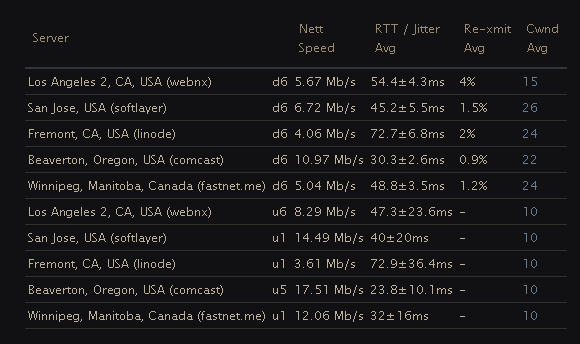
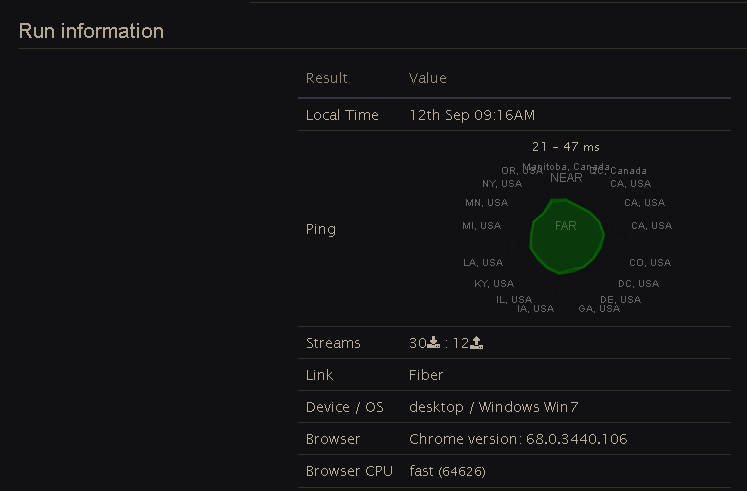
 fallen mist
LowLevelFatalError [File:D:\wk\tsl-client-dev4-branch\build\UnrealEngine\Engine\Source\Runtime\CoreUObject\Private\Serialization\AsyncLoading.cpp] [Line: 1383]
No outstanding IO, no nodes in the queue, yet we still have 'PackagesWithNodes' in the graph.
still getting same error, even with a reinstalll on new ssd
someone please help
i didnt pay for a game to not load