
#technical-chat
4 messages · Page 70 of 1
 analog prism
 winter walrus
It’s bc steam needs to put the update/patch into the game folders in the right place.
 balmy falcon
Can we fix this shit already? been 3 days

Don't even care that the map won't load, just let me deploy
winter walrus
Are you going to the deploy point from the side? Bc this happened to me and I just moved to the front
balmy falcon
winter walrus
Are you going to the deploy point from the side? Bc this happened to me and I ju...
This happens regardless which one I take
Also the map won't load in game
winter walrus
Strange
 stone sonnet
Was smokes removed because of performance issue or balance one?
 regal jolt
stone sonnet
Was smokes removed because of performance issue or balance one?
regal jolt
stone sonnet
Was smokes removed because of performance issue or balance one?
Gameplay issue. A bug allowed them to be thrown several hundred meters, making bypassing defenses trivially easy.
stone sonnet
Oh OK. Such a shame since smoke ads more tactical deepness
But it means it's fixable also
 terse flume
did anyone's sound stop working randomly 
 topaz quartz
 foggy sky
analog prism
every patch, i have to basically download the whole game. why is it ding this?
foggy sky
analog prism
every patch, i have to basically download the whole game. why is it ding this?
If you look at the numbers you'll see you aren't downloading the whole game. You downloaded around 25MB of data. Then steam has to do magic to put the patch into the game. The magic takes time.
analog prism
and its doing it again

this is getting strssful, I just want to play the damn game
@foggy sky so is it just going to keep doing this over and over everytime I launch?
im starting to get frustrated
its doing a 12 gig download every time, WHY?
foggy sky
Uuuh. It shouldn't do it all the time
If it's really being a pain, uninstall and reinstall
You could try deleting some of the .pak files and hope you get the one that needs updating, then just verify files
And it doesn't look like it's downloading 12 gigabytes
analog prism
its doing this everytime
foggy sky
The line with an arrow pointing down is downloaded data. The other number is hard drive stuff.
Since it's taking forever and being a bitch, I'd say bite the bullet, uninstall the game, and then reinstall the game. That'll give you the updated .pak stuff without having to patch anything
foggy sky
Steam does that
 rapid trail
anyone else having issues with the proximity voicechat havent been able to use it in a long time. like ill see the speaker icon above everyones heads but i cant hear them and when i try to use it myself no icon shows up ik its not on my end because my steam voice check works perfectly
foggy sky
It's probably vivox being shit. I haven't figured out any solutions.
rapid trail
foggy sky
It's probably vivox being shit. I haven't figured out any solutions.
yea bro its been months for me now voice chat only worked like twice for me since i started playing
foggy sky
It's possible internet backbone is just being weird from your location. I don't know enough about how vivox works. Hopefully someone else has some ideas.
rapid trail
fingers crossed
 glossy rose
Ok
So i tried 2 different internets in 2 different locations
The slower one lets me play the game normally without losing connection but also lots of lag.
The faster one i actually own is faster, everything loads faster, no lag but i keep losing connection to the server. What gives?
foggy sky
Weird. How are you testing from different locations?
glossy rose
Parent house
 fossil ermine
yesterday I was put into the title screen and when i tried to join the game again it said "failed to download player data[0]. Please try again. If the issue persist, visit our support page." But my issue wasn't listed
so i got off and decided to try again tomorrow
but it's still doing the same thing
foggy sky
I think something is dieing internally server wise
Like, whatever their hosting provider is I think is struggling with two shards and more regions talking to each other.
Im out of tricks really, I don't know enough about foxholes networking magic to guess on how to fix
As far as the support page, there should be a link to submit a custom ticket. That may help investigate somehow.
 cosmic gale
The game keeps turning my monitor off then crashing my pc any1 know what to do
pretty sure its cause my card is ocd but idk what to do
 keen kindle
Did that, didn't work
 tough finch
I cant even seem to join either shard, any ideas?
 hoary hare
Every time the game update, my steam is having a heart attack, never want to finish the download even if everything downloaded, and say there like one month left
 tall warren
Just got a 12GB patch
Anyone know anything about that?
Been playing all night and didnt have update queue until I relogged
hoary hare
I don't know what they are doing with the update but i had a 61Mo patch that would not work
and now a 3.6Go patch that stop working at 3.2Go
 grim kernel
tall warren
Just got a 12GB patch
grim kernel
tall warren
Just got a 12GB patch
That is steam reordering the game files, i had this the second time happening as well.
With the patch of yesterday and with the 43 mb patch today.
Not sure why steam does that, nor do i have a idea if this is caused on the end of the game itself. But it looks like a 12.8 GB large update, but the update itself is far smaller.
balmy falcon
Deployment doesn't work 2 days straight after the pacth. When it actually loads the game fails to connect and kicks me back to the main menu

My fucking stockpile is going to expire soon, I need to attend to it
The map didn't work well after the update either, but at least it used to let me deploy
terse flume
Hello, cos of today update i cant launch my game :

 shell eagle
I don't see nothing in your message...
 inner basin
shell eagle
I don't see nothing in your message...
inner basin
shell eagle
I don't see nothing in your message...
check the message I replied to…
inner basin
terse flume
Hello, cos of today update i cant launch my game :
verify your game files through Steam please
 inner basin
Re install then
 shell eagle
inner basin
check the message I replied to…
shell eagle
inner basin
check the message I replied to…
Ok i see now, thx loot.
 marsh wolf
How play to this game?
 tender hedge
are mammons a good idea for taking out an encampment?
 glossy token
Foxhole keeps applying the entrenched update evertime I open steam, anyone able to help?
 steady quest
Hello how can I change side?
I made a wrong choice when I went in for the first time.
 pastel niche
steady quest
Hello how can I change side?
pastel niche
steady quest
Hello how can I change side?
Game system wont allow it.

 forest coyote
steady quest
Hello how can I change side?
forest coyote
steady quest
Hello how can I change side?
when the war ends
forest coyote
steady quest
Hello how can I change side?
what did you choose though?
steady quest
forest coyote
what did you choose though?
Colonists)
forest coyote
steady quest
Colonists)
so you were intended to play warden?, wise choice
steady quest
forest coyote
so you were intended to play warden?, wise choice
xDDD
inner basin
@steady quest Please see this message regarding faction switching.
inner basin
tender hedge
are mammons a good idea for taking out an encampment?
yes
steady quest
hm
steady quest
inner basin
<@!266686034476007424> Please see this message regarding faction switching.
this does not work correctly, I did not play for the "Colonists" faction, but it is being pumped on another server.
steady quest
xD
xDDD
https://www.bodybuilding.com/images/2016/july/armed-warfare-ct-fletchers-arms-workout-bigshot-v2.jpg

 next marten
So i've got a strange problem that is flat out stopping me from playing. Foxhole is stuck continuously patching on steam. None of my other games are doing this. Verifying the files did not fix the issue, and seemingly the only way i can manage to play is uninstalling the game and reinstalling it everytime. What can I do to fix this?
terse flume
next marten
So i've got a strange problem that is flat out stopping me from playing. Foxhole...
Still have that problem?
next marten
terse flume
Still have that problem?
Yep had to reinstall to play
keen kindle
ETA on fixing the bug stopping people from joining either lives?
inner basin
keen kindle
ETA on fixing the bug stopping people from joining either lives?
What bug?
foggy sky
glossy token
Foxhole keeps applying the entrenched update evertime I open steam, anyone able ...
If it's being a pain, uninstall foxhole and then reinstall. That will get fresh game files without needing to patch them.
 glossy radish
Voip not working any ideas why?
glossy radish
Le fishe voip or ?
terse flume
voice chat error 86-0
 spark void
Has anyone written a shell script to toggle ClickLock for windows? Looking to click a icon on my taskbar to toggle it quicker
keen kindle
 ruby island
restart steam
ruby island
restart steam
did that already, didn't work
 wheat cedar
@terse flumeawahaha
 hollow otter
I bought the game an hour ago but I can't join in because of this error

I've tried everything in #technical-read-first⚠ plus a whole lot of other possible fixes from Reddit
Is this common?
I got in with a VPN
 rigid torrent
I am able to deploy in home territory, but when i deployed on front lines, my audio started working and i could move my character, but my screen was stuck as the loading screen. I am running on an i5 with integrated graphics. i have more than enough RAM. i am ok with it would run slowly but it i cannot play at all
 jagged palm
Usually fixes with a restart @rigid torrent
I've got the same situation. Sometimes it takes two
 sweet nymph
Im sure you all see this everyday, But I got the game last night and I'm still trying to find a fix for Voice chat error 8 6-0. Does anyone know something to help?
rigid torrent
jagged palm
Usually fixes with a restart <@606124996896751619>
ok
 upbeat brook
<@&213133977681264640> I know that we have the ingame Support for that, but The Drowned Vale on Live-1 is really laggy and unplayable since a lot of hours.
 gusty jasper
Thanks, we've forwarded the report to the devs
keen kindle
Any word on this being fixed? Before anyone says anything, I've restarted steam 2-3 times and verified my cache
 ruby island
keen kindle
Any word on this being fixed? Before anyone says anything, I've restarted steam ...
ruby island
keen kindle
Any word on this being fixed? Before anyone says anything, I've restarted steam ...
run these command in a admin command prompt and restart netsh int ip reset netsh winsock reset and ipconfig /flushdns
 empty jetty
Please solve the GS and BS problem

Every factory that i go are either full or like 40min to 1 hour wait.
 keen kindle
ruby island
run these command in a admin command prompt and restart `netsh int ip reset` `ne...
keen kindle
ruby island
run these command in a admin command prompt and restart `netsh int ip reset` `ne...
and even after doing that it doesn't work. Fantastic.
 broken bay
empty jetty
Every factory that i go are either full or like 40min to 1 hour wait.
broken bay
empty jetty
Every factory that i go are either full or like 40min to 1 hour wait.
That would be because others are building them my dude
ruby island
keen kindle
and even after doing that it doesn't work. Fantastic.
try running DISM /Online /Cleanup-Image /RestoreHealth and sfc /scannow then restart
and change your dns server to 8.8.8.8 and 8.8.4.4
 plucky vale
guys having trouble launching the game, it minimizes then reopens on the frozen screen that I cant even cntrl alt delete out of
 fallen bloom
yo , my laptop said that it's need dx11 feature level 10 to run foxhole
 honest hollow
My comp is crashes sometimes whilst I have foxhole open, has anyone had this issue?

 warm rose
warden hackers
fallen bloom
fallen bloom
yo , my laptop said that it's need dx11 feature level 10 to run foxhole
anyone know ?
 steep pasture
fallen bloom
yo , my laptop said that it's need dx11 feature level 10 to run foxhole
steep pasture
fallen bloom
yo , my laptop said that it's need dx11 feature level 10 to run foxhole
What is the GPU model number
fallen bloom
steep pasture
What is the GPU model number
 steep pasture
No, need your GPU model number
Not your about windows screen
That said, your CPU is too low spec, you don't have enough ram and no computer connected to the internet should have windows 7 on it
If the GPU is of similar vintage to the rest of the machine, it's likely too old
It is an 11 year old CPU end of the day
fallen bloom
steep pasture
If the GPU is of similar vintage to the rest of the machine, it's likely too old
well, i got my pc then
steep pasture
It was low end in 2010 when that CPU was launched
Unfortunately pcs advance a lot
If you are relying on the graphics built into the CPU, they definitely don't support the game at all and the error you experience is correct
Same would go for dedicated GPUs of 2010 also
fallen bloom
my pc have no problem running
steep pasture
fallen bloom
my pc have no problem running
Your PC have no problem running what¿
steep pasture
End of the day. It's an 11 year old CPU. You haven't told us what the GPU is, you'd need to check device manager or the directX diagnostics panel for those, but being a low end CPU it's a fair assessment it's a low end machine without a dedicated GPU, meaning it's likely using the intel integrated graphics on the CPU which do not support direct3d feature level 10 as that feature level wasn't made until years after that machine came out
ruby island
@fallen bloom your gpu must support feature level 11_0 you can find that indxdiag by searching it in the start menu and clicking under display
foxhole updated a while ago to push it up to feature level 11_0 before that it use to work on a earlier feature level likely what you mean by it working before
ruby island
honest hollow
My comp is crashes sometimes whilst I have foxhole open, has anyone had this iss...
try running DISM /Online /Cleanup-Image /RestoreHealth and sfc /scannow in a admin command prompt and restart
also make sure you gpu drivers are up to date
 rotund gorge
fallen bloom
my pc have no problem running
rotund gorge
fallen bloom
my pc have no problem running
In non-technical terms, your computer is as old as dirt.
 azure fulcrum
You can ask for a refund as well if the game used to run with dx10 and now needs dx11 to start.
 sly mortar
honest hollow
My comp is crashes sometimes whilst I have foxhole open, has anyone had this iss...
sly mortar
honest hollow
My comp is crashes sometimes whilst I have foxhole open, has anyone had this iss...
What error message?
 rustic jasper
Can some one help me please? i bought the game yesterday but after allot of different tries to get the voice chat working, still nothing.
It immedietly says:
Voice Chat Reconnecting...
Voice Chat Error: [2] 2 5031
i have tried the refresh button, tried closing the game and restarting, tried restarting entire pc, tried setting up the steam friend voice chat settings
and a steam foxhole file integrity check. all files where validated
 jolly nacelle
steep pasture
If you are relying on the graphics built into the CPU, they definitely don't sup...
jolly nacelle
steep pasture
If you are relying on the graphics built into the CPU, they definitely don't sup...
Yeh if youve ever seen the gfx when the spectator cam is almost forced into a first person angle due to a bug the graphics on this game are surprisingly crazy detailed
honest hollow
sly mortar
What error message?
No error message just my comp with a blue screen saying, my comp had an issue retrieving info etc...
 thorn oak
Does anyone know a fix for this? I've been trying everything for the past 30 minutes to no avail. It was working fine yesterday.

 boreal lichen
thorn oak
Does anyone know a fix for this? I've been trying everything for the past 30 min...
boreal lichen
thorn oak
Does anyone know a fix for this? I've been trying everything for the past 30 min...
I lost 9k bmat on 5 separate logi attempts because of that and the frontline. The trucks dont come out the other side if it happens when changing maps. Just today alone didnt have the issue yesterday.
 molten scroll
same problem
 valid tusk
DOWNED VALE IS F$%^&* RIGHT NOW please resolve devman I love ❤️ YOu
 mystic tundra
I am unable to load into Loggerhead in the Drowned Vale. When I do log in, the lag is so bad I can't even function.
 lean jetty
idk if it's because summit but westgate is lagging like a MFer
fallen bloom
steep pasture
End of the day. It's an 11 year old CPU. You haven't told us what the GPU is, yo...
it's a laptop , I saying my other , my main pc have no problem running @rotund gorge
mystic tundra
I give up. I have lost connection too many times.
 rose ore
Is baths and wash in westgate?
If so I couldnt spawn there, kept making me wait and then canceling the queue
 prime tinsel
I am experiencing mic error 2-5006. Can anyone tell me how to fix this
terse flume
is there a fix other than reverting back to old graphics driver version for AMD because if I did then i would have problems with other games that i played that needs latest driver versions to run
 civic pecan
Failed to download player data[0], how do i fix this?
 vernal pendant
prime tinsel
I am experiencing mic error 2-5006. Can anyone tell me how to fix this
vernal pendant
prime tinsel
I am experiencing mic error 2-5006. Can anyone tell me how to fix this
Go to option-voice-reconnect if cant just restart the game its vivox so this thing usually happen
 sonic scaffold
Is shard 1 down? Can't seem to join
plucky vale
The game is broken, I have been trying to play since the update came out but just have faith they are most definitely swamped
 open cargo
Hello! The game freezes after running the application. Tried "blackscreen fix" and it didn't work. What should I do? I bought the game few days ago and still haven't played it because of this.
 waxen arch
Is there a way to stop friendly fire spam from filling up your chat channels?
 blazing glen
it seems to me that both shard 1 and 2 give me failed to download player data
 solar osprey
How do you see your ping in a game to know if you are laggin?
fallen bloom
zooom

 dusk bolt
howdy yall is this the appropriate place to ask for help?
with technical game-related questions/
open cargo
Game freezes on the startup. Please help me. I own it for a few days and still had no chance to play
foggy sky
open cargo
Game freezes on the startup. Please help me. I own it for a few days and still ...
Try running war.exe or whatever the game executable is called in the folder as admin, and see if any error windows pop up.
foggy sky
plucky vale
The game is broken, I have been trying to play since the update came out but jus...
What is the game doing that isn't working.
foggy sky
At what point does it freeze. Does it get to where you can see a splash screen or anything
boreal lichen
plucky vale
The game is broken, I have been trying to play since the update came out but jus...
The a streamer showed 30k people the game. The servers are probably smoking right now
open cargo
sometimes it freezes at splashscreen, sometimess I can get all the way to the "choose your side" screen
open cargo
Intel(R) Core(TM) i7-7700 CPU @ 3.60GHz
16gb ram
Nvidia GeForce GTX 1060 6GB
I don't know much about hardware so tell me if you need more info.
foggy sky
That's the important bits really
Those feel adequate for this game. Hm. As a hail Mary try reinstalling this stuff. Probably the x64 one.
https://support.microsoft.com/en-us/topic/the-latest-supported-visual-c-downloads-2647da03-1eea-4433-9aff-95f26a218cc0
This article lists the download links for the latest versions of Visual C++.
open cargo
I will try that right now, thank you
open cargo
foggy sky
That's the important bits really
Just reinstalled visual c++, tried to run the game and was happy for a second until it froze in the choose your faction menu
foggy sky
Oof.
Uuuh, in Appdata/local I think is the foxhole folder. There's some logname.log files in there that might help shed some light onto stuff.
I haven't experienced the game freezing up before like this. Usually the c++ error causes the game to not reach the splash screen
open cargo
I tried changing some settings there before writing here, and it didn't help. I'll try changing more stuff I guess... It's weird because it isn't consistent. Sometimes it will freeze on the splash screen, and sometimes I'll be able to go all the way to "choose your faction"
foggy sky
Well I'm not really doing anything settings wise. I'm trying to see if the logs are telling us what's wronf
open cargo
in TM the game is responding, but it uses no resources except memory
foggy sky
Almost sounds like the game is sitting there waiting for a server ping that never comes.
Happens a lot in older video games, like pre-2005 games when you join a game. If you fuck up the ip it'll sit there and hang waiting for the server until it times out
open cargo
not really, because sometimes geforce overlay freezes there too
as well as steam messages
foggy sky
Is this the only game that your computer does this freezing thing on?
open cargo
yes, never happened to me before
foggy sky
I'm running out of tricks in my hat without figuring out another clue. Hopefully those logs have anything useful
foggy sky
Shiiet I dunno. Lot of spam about localization, but that might be normal. Nothing really stands out unfortunately
I think there is another location with another log
Those ones are for crashes, the other one should be generated as the game is running
Maybe.
open cargo
[2021.09.27-13.40.32:003][230]LogAudio: Display: Waited 13186.886719 ms for audio thread.
I think that's where the game freezes
terse flume
i am having problems connecting to the "foxhole services" is this a common thing?
cant see news in the main menu, and icons in the deploy map, sometimes the chat doesnt load either
foggy sky
open cargo
[2021.09.27-13.40.32:003][230]LogAudio: Display: Waited 13186.886719 ms for audi...
Ah, that sounds like something we can work with
Uh, plug something into your computers headphone jack
open cargo
My speakers are plugged in
foggy sky
terse flume
i am having problems connecting to the "foxhole services" is this a common thing...
Um. Networking stuff is a bit harder to troubleshoot. As a temporary test you can try turning off the windows firewall VERY TEMPORARILY. See if issue persists, and if it doesnt I haven't thought that far ahead.
foggy sky
open cargo
My speakers are plugged in
I guess try unplugging them. Maybe try changing the audio device in the windows sound setting thingy
Or maybe the audio device in foxholes audio menu, if you can reach it
open cargo
I usually don't have enough time to get into options
terse flume
yeah it's not that
open cargo
pfft... running audio through speakers connected to the TV through HDMI helped.... So I'm basically unable to use headphones in this game?
foggy sky
You can use headphones, it's just... Being weird
Uuuh, I don't know how to describe what I want you to do audio wise
open cargo
Thank you! I was troubleshooting on and off for a few days already
foggy sky
I haven't fully woken up yet lol
The idea is to change the default audio device, or maybe temporarily disable the HDMI audio output.
Edit: do this in the windows sound window thing with Playback and Recording Devices tabs.
open cargo
If you have any ideas I'd be happy to troubleshoot more. At this point it's too late for me to play anyway haha
foggy sky
terse flume
yeah it's not that
Also, damn. I haven't had much luck with any networking troubleshooting with this game
terse flume
is good
ruby island
terse flume
cant see news in the main menu, and icons in the deploy map, sometimes the chat ...
are you on a laptop?
terse flume
nope, wired connection
foggy sky
Could try creating an official support ticket. They would know more about how their games networking works
terse flume
it worked fine yesterday
terse flume
foggy sky
Could try creating an official support ticket. They would know more about how th...
i think i did? the red support button in the main menu?
ruby island
@terse flume have you tried updating your lan drivers?
foggy sky
Maybe. I had to submit mine through some web portal ticketing system. So if its that thing then that's it. Never actually pressed that button myself
ruby island
go to the manufactures website of your motherboard or system builder and download the latest
ruby island
@open cargoare you using bluetooth by any chance?
open cargo
foggy sky
The idea is to change the default audio device, or maybe temporarily disable the...
I made my headphones a default device, physically disconnected both hdmi and speakers(from headphones port). I have bloetooth dongle, but I don't think I ever really used it on this pc
game just freezes with my headphones...
foggy sky
Worry not. There is one final thing you can do
terse flume
bruh is there any video that can teach me how to play this game
open cargo
bluetooth dongle is connected but I don't use it
foggy sky
It is jank though
terse flume
where is everyone
ruby island
open cargo
bluetooth dongle is connected but I don't use it
try disconnecting it or turn off bluetooth
open cargo
ruby island
try disconnecting it or turn off bluetooth
physically disconnected bluetooth, the problem is still there
 shy linden
Hi, dose anybody get the "War service connection failed Error: ConnectionFailed-Unable to connect"?
terse flume
welp wasnt LAN drivers either
ruby island
@terse flume what about changing dns servers and flushing dns cache
terse flume
ahh i could, i doubt it's that
open cargo
foggy sky
Worry not. There is one final thing you can do
what is the final thing I can do?
foggy sky
Aight. So. We are going to essentially sanitize your audio output using software, so the game interfaces with digital stuff instead of whatever physical stuff.
Download the Virtual Audio Cable from here
https://vb-audio.com/Cable
Install and set this virtual audio cable as your default recording device.
Then you'll right click to properties of your headset, and select listen to drop-down box. Select the Virtual Audio Cable playback device.
Then tell foxhole to use the Virtual Audio Cable recording device as your microphone
ruby island
@open cargo what headset are you using that causes the crash?
open cargo
ruby island
<@781720954517979146> what headset are you using that causes the crash?
steelseries arctis5
foggy sky
Fun fact this issue happens with squad, and last I remember the guys headset would lose connection for a millisecond, and Unreal being a shit engine has an absolute fit
ruby island
@open cargo whats the sound settings for the built in dac in sound properties in windows
open cargo
foggy sky
Aight. So. We are going to essentially sanitize your audio output using software...
I guess I'll just use speakers. I don't want to pay for a randomm app that might or might not help. Also it's a bit of a pain in the ass for me to pay for non-chinese stuff online
foggy sky
Ah yeah I fucked up the link whoops
Another fun fact is that so far I have what feels like 90% success with this method, And I use it myself. However it's more like a band-aid than potentially fixing what is physically wrong with the game and the headset
ruby island
@terse flume also if that doesnt work try netsh int ip reset and netsh winsock reset in a admin command prompt and restart
terse flume
alright
open cargo
foggy sky
Ah yeah I fucked up the link whoops
your solution doesn't work
foggy sky
Did you restart computer
open cargo
yes
foggy sky
Weird
open cargo
I guess the game just hates my headset
foggy sky
Sounds like foxhole is being a piece of shit and not caring what audio device you tell it to use
It should only care about what you tell it to use. Foxhole should be being told to use the Virtual cable as the microphone
Wait.
Not mic
Uuuh. Went into autopilot because usually this is for microphones. I need to go on the computer and think a moment
ruby island
@open cargo can you screenshot your headsets proprieties in sound control panel?
open cargo
 foggy sky
Weird that there's two playback devices
open cargo
ruby island
disable the "Chat"
it didn't help
ruby island
is the Game set to both default communications and default device?
also try disabling everything related to the headset in the recording tab
open cargo
I disabled everything in both playback and recording tabs except Arctis 5 game in playback and it didn't work either
ruby island
hmm what happens in you disable the game taking the headset completely out of the equation?
open cargo
disabled everything and the game works just fine
ruby island
reenable the game and double click it and take a screenshot
open cargo
 ruby island
go to the enhancements tab and click disable all enchantments
open cargo
wait
ruby island
also screenshot your advanced tab
 open cargo
spatialsound was off, changing format didn't help
ruby island
hm try disabling "Allow application to take exclusive control of this device"
open cargo
doesn't work
ruby island
interesting it must just be some strange interaction between the dac and foxhole
there might be a firmware update for the dac on the headset
foggy sky
i think it has to do with the headset having its own like... volume control for two audio playback things
ruby island
thats the built in dac
foggy sky
ah
open cargo
ruby island
there might be a firmware update for the dac on the headset
just checked, there are no updates available
foggy sky
Could try forcing foxhole on the windows 10 system level to use a specific audio device

though that may not help much if the mere existence of the headset is what angers it
If you wanted to try the virtual audio cable route again, you'd set foxhole to use the Cable Playback device as default playback, and then Listen To the Cable Recording device on your headset.
 open cargo
right now it's the only device that isn't disabled
ruby island
what if its enabled but not the default device in both steam and windows?
open cargo
foggy sky
If you wanted to try the virtual audio cable route again, you'd set foxhole to u...
in that case cable becomes an input device, and I can't make it a default playback device... or should I also enable it as output?
foggy sky
The virtual cable goes from Playback to Recording device
open cargo
ruby island
what if its enabled but not the default device in both steam and windows?
having headphones enabled but using the speakers instead worked
foggy sky
I wouldnt recommend making the cable a default playback device, cause then you'd route all your system sounds through it, and it may introduce some audio latency. But that might be the only way to make it work
open cargo
foggy sky
I wouldnt recommend making the cable a default playback device, cause then you'd...
just tried it as set to default. it didn't work
foggy sky
I'd have to hunt around a bit, but there is some slight configuration you can do to the virtual cable's control panel
Define didnt work
open cargo
the game freezes on the startup
foggy sky
balls
so hold up. Enabling speakers and not headset works. But enabling virtual cable and not headset doesnt.
ruby island
@open cargo what if you launch the game with your speakers then set the default device in game?
open cargo
ruby island
<@781720954517979146> what if you launch the game with your speakers then set t...
gimme a sec
foggy sky
I have never hated gaming headsets harder than I have today
ruby island
cheap gaming headsets are about the worst audio devices you can buy
foggy sky
the fun fact is these steelseries arctic arctis 5 are like 100 dollars
ruby island
they probably spent 5 dollars on the dac
foggy sky
BUT BOY do they have RGB
ruby island
when you see rgb on a headset run far far away
open cargo
My friend reccomended them to me. I actually hate all the light
foggy sky
Im sorry for your loss.
open cargo
the only way to turn them off is to make them black
foggy sky
Whats surprising is that they have a shit ton of good reviews on Amazon. You'd think if they were absolutely terrible thered be a lot of displeasure. But they also lumped like 4 headsets into one page so...
ruby island

0:00 - Intro
6:26 ||||||| SERIOUS GAMER CANS ||||||| - - - - - - - - - - - - - - - - -
------------OPEN------------
[https://amzn.to/2pX3Ddt] -- Hifiman Edition S (3.5mm Mic Compatible)
[https://goo.gl/6j659F] -- Sennheiser HD58x
[https://www.indiegogo.com/projects/vokyl-erupt-gaming-headphones-with-nc-boom-mic#/] -- Vokyl Erupts (IndieGOGO)
[...
great video
open cargo
So I started the game with speakers on, went into settings and made the headset a default device in game... Next time I run the game the sound still comes out from the speakers hahaha
foggy sky
the fuck
ruby island
@open cargo but does it work while the game continues to run?
open cargo
ruby island
<@781720954517979146> but does it work while the game continues to run?
No, the game sound was going to the speakers, I switched the default device in the menu and the sound was still going through the speakers so I decided to restart the game. In game settings the headset is still default device while the sound is going through the speakers
Thanks for all the help, but it's almost midnight and I have to work tomorrow. If I figure something out later I'll be sure to tell you
At least we figured out what the problem was. Thanks again!
foggy sky
weird
well hopefully we figure something out later
I need to figure out why I have to keep flushing my DNS to get youtube to work
ruby island
foggy sky
I need to figure out why I have to keep flushing my DNS to get youtube to work
change your dns server to 8.8.8.8 and 8.8.4.4
foggy sky
I got my router assigning DNS through DHCP, and I have 1.1.1.1 as primary, ISP as second, and 8.8.8.8 as third.
I'll try swapping them around I suppose
The weird part is it's only on my computer as well
ruby island
1.1.1.1 i have found to be not reliable
many times i have to change to googles dns from cloudflares in order for a site to work
foggy sky
But why's it work perfectly on my phone? Maybe mobile network somehow does magic in the background as well as wifi?
Well now that I think of it I haven't ever flushed any DNS stuff in the phone, cause I'm not too savy with android.
ruby island
it could be some sort of caching your router does that mobile networks does not do
use nslookup on youtube next time it happens and look the ip retrieved
foggy sky
Well it's pretty consistent until I do a flushdns, like it's still trying to load the YouTube video you linked on my browser
Had to step away for a moment though so I'll try the nslookup here in a moment
ruby island
also if you set the dns on your phone it contacts the dns server directly bypassing the cache of your router
try setting the adapter in windows to use googles dns as that will contact it directly
foggy sky
well i set it up on the router so that any device configuring wont be necessary
aight lets play musical chairs
ruby island
if its one of those isp owner routers it probably doesant implement dns properly
i know mine injects its own weird dns stuff
foggy sky
I got some Linksys I've been using for quite some time. However I did rent a dedicated modem instead of using my own this time around
nslookup for youtube is giving me some ipv6 addresses, and one with an ipv4
 foggy sky
mines close but not the same for youtube
uuh, so i did nslookup youtube.com before and after ipconfig /flushdns
everything is the same lol
the difference is that it works now
 foggy sky
i see
ruby island
first try setting the dns server directly to rule out your router and see if the issue happens again
foggy sky
i reckon restarting the computer is all i gotta do, so ill be back
alright i have no idea
restarted computer, without changing anything, and it works
So we gonna be in it for the long haul i guess
ruby island
also try next time it happens a different browser
foggy sky
i did try edge in the past, with no real effect
ruby island
browsers hold their own dns cache
foggy sky
Perfect. Foxhole's Vsync does jack shit
ruby island
make sure you dont have a driver override
inner basin
VSync works for my 75Hz monitor on AMD gpu
 inner basin
praise all-knowing @ruby island
foggy sky
Also ever since that one dude pointed out theres these light splotches on the camera, like someone got water on it, i cant unsee it
its very subtle, but now that i know it exists, it pisses me off
 spare plinth
Anyone figure out why you have to keep reconnecting your voice chat to make it work every 6 minutes? I've had this game since before it was even on Steam and I have had zero issues with voice in game until now. It's only been since the last update.
plucky vale
foggy sky
What is the game doing that isn't working.
the game doesnt launch at the moment, jsut freezes at the entrenched screen cant even cntrl alt delete Ive seen many people say they have this problem too
foggy sky
plucky vale
the game doesnt launch at the moment, jsut freezes at the entrenched screen cant...
Try reinstalling the x64 version of this. If that doesn't help I'm not sure. Could try looking at war.log in the appdata folder for clues. Not in a position to do troubleshooting right now though.
This article lists the download links for the latest versions of Visual C++.
plucky vale
I have reinstalled the game every day since the patch came out last week, the game gets so broken I cant even take screenshots during the window that opens
 primal zodiac
foggy sky
Also ever since that one dude pointed out theres these light splotches on the ca...
primal zodiac
foggy sky
Also ever since that one dude pointed out theres these light splotches on the ca...
Sorry 😉 I have a ticket open right now, I'll let you know if I find out anything
 urban geyser
Anyway to change faction after selecting one?
 mighty wraith
GTX 1650 is the enough for foxhole ?
 queen gale
mighty wraith
GTX 1650 is the enough for foxhole ?
queen gale
mighty wraith
GTX 1650 is the enough for foxhole ?
ur good to go
terse flume
I play at 30fps on an 870
queen gale
mighty wraith
GTX 1650 is the enough for foxhole ?
I got the exact same GPU and it is fine for me
mighty wraith
alright thanks 😄
 last prairie
Help, computer crashed while running logi and now i just get this when i try to get on, already restarted steam 3 times

Restarting PC again fixed it, now just to pray my truck full of scrap is still on the road
 celest river
having an issue where i can spawn in home region and deploy, but upon deploying game freezes and crashes, started happening randomly yesterday. i reinstalled the game and verified files already.
 humble slate
okay so this is probably gonna come off as a dumb question but this has been going on for days and im trying to get some confirmation of some kind
ive had "voice chat is disabled" pop up every time i log in for over a week now and im trying to figure out if its a glitch or if i was banned from voice chat and how long that might last
 devout citrus
Just to cover all bases, did you try enabling voice chat after getting that message?
humble slate
devout citrus
Just to cover all bases, did you try enabling voice chat after getting that mess...
i made sure my steam chat was working and the mic was connected i didnt see anyway in game to do that but hell ill doubel check
devout citrus
Theres a specific button to enable and disable voice chat, my keys are custom so I don't have a reference offhand but yeah check keyboard options it should be listed
Foxhole key settings options that is, the issue wouldn't be steam as far as I can tell
humble slate
devout citrus
Theres a specific button to enable and disable voice chat, my keys are custom so...
okay so yeah it was off lol and i feel like a moron, no idea how that happened though i know i didnt change the setting it happened first while i was still in game
ill see if that worked
devout citrus
Its easy to miss, I just assumed no one talked for my first 3 days...
humble slate
thanks man that fixed it, i just have no idea how it got switched off lol
devout citrus
Glad it worked!! Enjoy

 visual jewel
quick question on voice error 8. is it a error on server or on my end
 manic ember
i havent been able to get into any server for 2 days.. anyone else having these issues
i get a server unstable error
 violet forge
Is it possible to mod the text of the game? I would like to start on a language mod
 empty zodiac
So when playing the game I can use my voice chat and people can hear me but I can’t hear them. I did check my audio. This started last night after playing the game for a couple hours
 astral hazel
how do you change name in game cant find the old profile feature
 tall sand
steam
astral hazel
cool thx
civic pecan
lower resolution
foggy sky
@ruby island
Preliminary results say 1.1.1.1 wasn't working as intended. Changing computer network adapter stuff didn't do anything. Swapped to Google and OpenDNS on the router and it works fine.
 void trench
After update: My camara rotation speed is very slow
is very bad to Play with slow camara rotation speed with the midle mouse button.
Can i chance this setting in gamefolder? text. file or ini. File?
 gloomy helm
void trench
After update: My camara rotation speed is very slow
is very bad to Play with slo...
gloomy helm
void trench
After update: My camara rotation speed is very slow
is very bad to Play with slo...
Why so u need to rotate it fast? No more screen corner meta
 gray granite
I noticed that there are weird transparent white/bright patches on the screen when I'm playing, they are even more annoying when I rotate the camera... is it something on my end, or a foxhole thing?
 small wing
do you have a pic?
gray granite
it's not that obvious on a pic, so let's try this
it feels like there is a layer on top of the game with transparent white patches... I don't know if I didn't notice them before, or it's something new, but it really annoys me 🙂
gray granite
yeah, I tried that, but nothing changed
if you can also see it on that short clip, then at least that means I'm not crazy 😄
small wing
it was kinda hard to spot tho, took me a while
gray granite
I know, it's not that bad, but at first I thought it was a display/monitor problem... and I just can't unsee it 🙂
 rotund harbor
Forgive me as I'm new to stuff like this but i am having a issue with the text size of players names as for some reason as they are a lot smaller than usual. I'm running the game on max settings I've uninstalled and installed the game again, also tried lowering the resolution settings and changed the camera back from tactical but that still hasn't fixed it. The last 2 wars have be fine until yesterday as its has become rather small and being partially sighted it doesn't really help my condition. From what I've seen i haven't seen anyone else with this same issue.
 ruby island
rotund harbor
Forgive me as I'm new to stuff like this but i am having a issue with the text s...
ruby island
rotund harbor
Forgive me as I'm new to stuff like this but i am having a issue with the text s...
My best guess would be the text size slider or ui scale located in settings > ease of access > display. Other then those settings no idea what would be causing that.
rotund harbor
ruby island
My best guess would be the text size slider or ui scale located in settings > ea...
Yeah had a look at that earlier but no results there
ruby island
rotund harbor
Yeah had a look at that earlier but no results there
hmm try resetting foxhole settings by deleting appdata/local/foxhole
you can get to the appdata folder by typing %appdata% in windows search
rotund harbor
yeah sadly no luck with that either
empty zodiac
So when playing the game I can use my voice chat and people can hear me but I can’t hear them. I did check my audio. This started last night after playing the game for a couple hours
ruby island
empty zodiac
So when playing the game I can use my voice chat and people can hear me but I ca...
make sure default communication device and default device is set under playback in sound control panel to the device you want to use
and set the device in steams voice settings
empty zodiac
ruby island
make sure default communication device and default device is set under playback ...
ya i checked all that and its still not working
 clever valve
I'm new to this game seems like i cant deploy and see anything on the map how do you fix this
 ruby island
empty zodiac
ya i checked all that and its still not working
ruby island
empty zodiac
ya i checked all that and its still not working
try fixing vivox files #technical-read-first⚠ message
 opaque beacon
Is Shard 2 down? Cannot access
 deep prawn
Is there any way to enable sound when tabbed?
Can see only voice, but not game sounds
 stuck bison
the deployment points are not showing up. i tried reinstalling, restarting but it doesnt work. checked my network connection too
 winter walrus
what shard?
stuck bison
shard 1
ruby island
stuck bison
the deployment points are not showing up. i tried reinstalling, restarting but i...
try changing your dns server to 8.8.8.8 and 8.8.4.4 and flush dns cache with ipconfig /flushdns
stuck bison
oke let me try, ill let yall know if it worked or not in a few minutes
stuck bison
no its still the same, didnt work
foggy sky
gray granite
it feels like there is a layer on top of the game with transparent white patches...
Submit a support ticket. Maybe if enough people complain about it they'll do something about it
gray granite
I asked a couple of friends to check if they have anything like this, and both of them found these transparent white/bright patches in the same locations... so it's not just me, but I guess most people aren't looking for them or just not bothered by them 😄
foggy sky
I suspect one could create a game mod to remove them, much like people create game mods for custom uniforms.
gray granite
I have no idea, maybe. If it's not a "bug", but a "feature" and it's really just an additional layer with these transparent patches I don't really see the point
foggy sky
Like I said, submit a ticket. If enough people bitch about it in an official capacity that can be measured, maybe they'll do something about it. I dunno. Could all be a pipe dream though
gray granite
Also it's kinda interesting, because I found a steam topic called "Brightness issues" where someone mentioned the same problem in 2017, but got no answers, so I guess I'll try the ticket 🙂
 tired zealot
Help, I just downloaded the game, I was directed here from the support page and I hope someone knows how to fix this:

I have just tried opening TCP 443, whatever that is
did not work
 sonic tiger
tired zealot
Help, I just downloaded the game, I was directed here from the support page and ...
sonic tiger
tired zealot
Help, I just downloaded the game, I was directed here from the support page and ...
Try verifiying game integrity and make sure the games latest version is installed.
Right click on foxhole in steam library > properties >local files > verify integrity
Also make sure beta version is not active
tired zealot
@sonic tiger did that.
sonic tiger
Do you have a stable connection?
tired zealot
Yes.
sonic tiger
Turn off your fire wall and anti virus maybe that could work
sonic tiger
might also try turning off windows defender if you are running on that
Both shards dont work?
tired zealot
Off
Look at the screenshot again; I GET NOTHING.
I get the error on startup of the game.
I get it again if I attempt to hit play.
*in the menu
 tired zealot
It is set to none
As previously stated, I found a discussion thread about this issue, one of the fixes was opening port 443
*TCP
This did not work
I did this in Norton.
Here is the thread: https://steamcommunity.com/app/505460/discussions/1/2806204040000238637/

I've been trying to join the persistant war but I get the error that the game couldnt download the shard. I've tried adding exclusions to my firewall and modifying my router settings but nothing has seemed to work. Maybe I'm overlooking something. Any help is greatly appreciated.
void trench
gloomy helm
Why so u need to rotate it fast? No more screen corner meta
the problem is, my ingame mouse sensitivity works not correctly. i set this on 1% with 800 DPP and is to fast. for a rotation i need to much way with the mouse
inner basin
tired zealot
I did this in Norton.
turn off your WHOLE Norton antivirus and try again
norton sucks balls, sorry
foggy sky
Also if it's a port issue, I could be related to the router that is your "gateway" to the internet
Though it's weird that the router would be blocking 443 completely. I'm a bit rusty but that sounds like a common port
inner basin
443 is literally all HTTPS traffic, so you would be unable to connect to *most websites I'm pretty sure...
 leaden jacinth
My game keeps crashing with this error. Any idea what it is:

 fickle plinth
Theres a glitch in Liegeheart Safehouse, (the one near the factories) that you cant acces with the truck to it
leaden jacinth
Keep getting this same crash. Have verified game integrity on Steam, ran windows update, and restarted.
 ruby island
leaden jacinth
Keep getting this same crash. Have verified game integrity on Steam, ran windows...
ruby island
leaden jacinth
Keep getting this same crash. Have verified game integrity on Steam, ran windows...
have you tried updating your gpu drivers?
leaden jacinth
ruby island
have you tried updating your gpu drivers?
Updated drivers through windows update.
ruby island
dont use windows update for gpu drivers they are ofter outdated
instead go directly to the manufacture like nvidia or amd
leaden jacinth
Kk, I'll run the AMD tool.
 ebon pendant
Why did I get a one hour ban. I cleaned the camp from the cars, took them to the warehouse
foggy sky
some clan guys probably thought you were stealing stuff lol. Welcome to the shit part of foxhole.
you can submit a ticket somewhere if you think it was unjustified
ah here it is
https://clapfootgames.freshdesk.com/support/tickets/new

Clapfoot Inc.
ebon pendant
ok time to go to sleep. thank you
 wanton sierra
I need to change team in LIFE-2
I'am colonial, need change to warden, my friend play warden
foggy sky
if you are below level 5 theres a button somewhere to do so. If you are over level 5 and past 6 minutes join time on Colonial, you wait until the next war
wanton sierra
Dam...
 placid frigate
can ur friend change team @wanton sierra
wanton sierra
No
civic pecan

@sly mortar
\yes. ive restarted steam. redownloaded the game. turned off all firewalls.
verified integrity of game files.
sly mortar
Hmm, are you using a VPN? Is there anything that might be blocking the connection between Steam & Foxhole, or between you and the Foxhole server
tired zealot
inner basin
turn off your WHOLE Norton antivirus and try again
I completely turned off Norton and it did not fix the issue.
 edgy locust
also getting the player data error, verifying integrity of files now. i also got the alt account warning thingy before too, despite not being on an alt account
verifying files and restarting steam seems to have worked, still got the alt account warning, despite not being on an alt
 opaque furnace
are the servers down?
sly mortar
Steam weekly maintenance time
 mild blaze
So the game was running fine until I started alt tabbing a couple of times and from there it just froze, pressed menu button and took ages to appear, would go windowed and back to Fullscreen for some reason..
 sour burrow
anyone else getting this? https://i.imgur.com/edfiHz7.png
ive restarted steam 4 times already
inner basin
Please refer to this message on what to do
sour burrow
ty
 hexed berry
I have a question about the uniforms, The ammo's and stuff aren't stacking anymore.
But I'm pretty sure I've downloaded the latest update
Ammo's & concrete don't stack.
inner basin
hexed berry
I have a question about the uniforms, The ammo's and stuff aren't stacking anymo...
did you read the latest update patch notes? Maybe it's not mentioned there, but ammo no longer stacks for certain uniforms
hexed berry
Oh. I read it wrong. I thought it was a problem that was fixed.
 timber sequoia
So I've figured out the source of my issues with my push to talk button by searching this discord about it. Apparently it is called Audio Ducking which limits my mic from activating (even if I am pressing the button) unless it detects my voice. Problem is, I literally have to yell at my desk microphone for it to activate. The discord post says that I can disable Audio ducking by entering a console command change an ini file: bEnableAudioDucking=false . How to I activate the ingame console, or does anyone know which ini file I need to edit to disable this?
foggy sky
never heard of this before but i guess it makes sense
to my knowledge there is no publicly accessible console key, and im not familiar enough with unreal engine to know how to add stuff to the .ini files. Theres some located in the AppData folder, but there isnt much to edit in there
timber sequoia
yeah...
foggy sky
I found this
https://docs.unrealengine.com/4.26/en-US/ProductionPipelines/VivoxPlugin/VivoxReferenceManual/

Useful reference material for developers integrating Vivox into their projects.
however without knowing how .ini files are generated off the top of my head, i dont know where to shove stuff
 white bobcat
^Was about to post the same link, probably you want Engine.ini instead of DefaultEngine.ini
foggy sky
I guess one could download the unreal SDK, and import a basic vivox preset build with console enabled, and see what it spits out
then copy and paste whatever it spits out regarding audio ducking into foxholes ini
Though this may give the answer here
[VoiceChat.Vivox]
bEnableAudioDucking=false
And you'd just kinda add that somewhere in the ini I guess. Probably with a single line space between previous stuff
timber sequoia
adding that to the engine.ini file you think?
foggy sky
I guess
timber sequoia
Ill give it a shot
foggy sky
The devs at some point locked down most of the engine variables you could mess with
white bobcat
For my install I have two Engine.ini files though Config/Windows/Engine.ini and Config/WindowsNoEditor/Engine.ini Not sure which one is correct; I would guess the latter
timber sequoia
yeah didn't work
foggy sky
could try shoving it into every ini and see if one of them works lol
civic pecan
any ideas on how to fix my issue listed above?
foggy sky
not really im afraid
aside from DMZing your computer, turning off your firewall, etc
That would at least figure out if you can connect at all
civic pecan
DMZing???
foggy sky
tells your router to directly wire your computer to the internet, bypass all firewall protections and port stuff
its a pretty big security risk so you only do it for very temporary testing
civic pecan
yep
 novel sage
i get the error message failed to download shard info error 1 just brought the game do i need to set it up or anything first/
now i am getting this message https://gyazo.com/0831f1daceade9633077252ae188f52d

 lunar wraith
Shard 2 Acrithia lagging so much tf
inner basin
novel sage
now i am getting this message https://gyazo.com/0831f1daceade9633077252ae188f52d
Try verifying your files on Steam
 torn pine
Why? What happened?
 winter walrus
do you have wifi?
torn pine
Yes
But I played for 4 hours yesterday and didn't change anything. I didn't even turn off PC.
winter walrus
the servers could be having problems
 molten dome
I've been having the same problem for the last hour or so
novel sage
i had that problem it was my firewall blocking it from accessing internet
molten dome
I tried to follow the technical read first guide, but its not working for me
 hollow thicket
shard 2 down?
winter walrus
hollow thicket
shard 2 down?
Shard 2 does not exist
 lapis pawn
torn pine
Why? What happened?
lapis pawn
torn pine
Why? What happened?
i get the same error
 winged relic
 pale warren
how do i raise the fps cap
inner basin
@pale warren In the in-game settings menu
@winged relic there is a pinned message here regarding the VAC check failed error. try the solutions in it
 olive mulch
I have a small issue. I can't change my screen resolution
olive mulch
I can change it in the game settings. But doesn't make a change at all
I still have default resolution
I picked 1024 x 768 but the game still runs in 1366 x 768
inner basin
What Full Screen setting are you on?
If you're on Full Screen, the game will stay, well, full screen
olive mulch
Windowed Full-screen
inner basin
Try Windowed
olive mulch
Oh there we go
inner basin
windowed full screen will still be full screen yeah
inner basin
what's your monitor resolution? i'm confused
inner basin
ah nvm
 reef stump
sup was thinking bout copping game i just wanna know some things about the specs if smn can reply i will list some of my specs and stuff i have certain low end stuff but i wanna play the game cheers tho
jagged palm
I can play the game on a Dell Inspiron 15 5000 with an i5 core
reef stump
all i need cheers man
reef stump
jagged palm
I can play the game on a Dell Inspiron 15 5000 with an i5 core
but what ur fps lookin like just wondering
reef stump
ah well this helps a lot
jagged palm
@reef stump low end of playable on medium graphics but you get used to it pretty quick
 dusk nymph
ya
reef stump
jagged palm
<@500986977127235589> low end of playable on medium graphics but you get used to...
yep i def used to low fps so cheers guys
jagged palm
@reef stump you'll need a mouse if you're using a laptop
reef stump
jagged palm
<@500986977127235589> you'll need a mouse if you're using a laptop
dw i know that much
but thanks tho
 neon tree
in #read-first-⚠ they mention to copy your steamID64 , ok then what should I do with it? it doesn't say
 next lynx
How do you fix broken voice in-game?
 timid kiln

 topaz lichen
 dusk nymph
oh no
topaz lichen
been losing connection for 50 straight logins, i'll get to log into lobby but then deploying just gives me lost connection errors as well
no clue what's going on, everything was fine the past few days
 night lake
How the hell can wardens have over 2000k 120mm rounds expelled in one region within 2 hours
Like for real devs, look into that. My math isn’t wrong
Lynn of mercy. They’re duplicating ammo or something
 ebon sparrow
Speaking of Linn, users are getting disconnected when crossing from Loch Mor to The Linn of Mercy
night lake
I’ve seen about 2000k 120mm land on one spot in one region in one hour.
If that’s not a hack I’d be impressed
 sturdy oxide
Before this last update I was able to read the peoples names over their heads, but now they are too small for me to read is there any way for me to make that bigger? I have tried modifying my graphics resolution setting and also the resolution scale. none of my changes make any difference at all that I can see.

 frozen stream
I'm getting the same error as Skwid on both shards (to my knowledge this is only after the update for me because this is the first time I've tried playing the new update)
stuck bison
been 2 days and i still cant fix this issue. the deployment points dont appear at all

 still dust
Maybe im going crazy... but in the keybinds, I dont have a 'move left' key to rebind... what gives?
I can move up, right, and down.. but there's no left option
I got it figured out... apparently a bug from main menu to in game...
 hybrid hawk
<@&213133977681264640> Shard-1 Drowned Vale is nearly unplayable, huge rubberband (not sure it's the right place to ping)
 karmic whale
I come and check
karmic whale
hybrid hawk
<@&213133977681264640> Shard-1 Drowned Vale is nearly unplayable, huge rubberban...
I have absolute no problems on Drowned Vale
hybrid hawk
karmic whale
I have absolute no problems on Drowned Vale
by foot it's ok, it was with vehicle, but ok then
karmic whale
hybrid hawk
by foot it's ok, it was with vehicle, but ok then
tested both..no problems for me
hybrid hawk
fine x)
 vague orbit
olive mulch
1366 x 768
vague orbit
olive mulch
1366 x 768
Fun fact. 21:9 have increased sight
 runic ruin
Guys does this game needs SSD or it will make no difference with HDD?
foggy sky
SSD might help for updates, but I can't imagine this game being so demanding to require a SSD
runic ruin
Oh, ok thank you
foggy sky
I guess it could help with loading times, but usually loading isn't that much of an issue.
karmic whale
No SSD needed
solar osprey
is server having problem? cannot load the deploy map since this morning
 latent pendant
Why do i always get a voice chat error?
inner basin
solar osprey
is server having problem? cannot load the deploy map since this morning
Are you still having problems? If so, could you say what shard you're in?
sturdy oxide
Before this last update I was able to read the peoples names over their heads, but now they are too small for me to read is there any way for me to make that bigger? I have tried modifying my graphics resolution setting and also the resolution scale. none of my changes make any difference at all that I can see.
tired zealot
Still can't download shard info...
 stray scroll
Hello i get this crash near MaidensViel going north in a truck, with stuff in the truck and on me.
 stuck bison
cant load deploy points for shard 1 for like 5-7 hours
stuck bison
latent pendant
Why do i always get a voice chat error?
try reconnecting from Options>Voice.
balmy falcon
This crap again. Was fine for a while now it's back

 long pendant
Steam keeps reinstalling the update unnecessarily at least once a day, and it sometimes fucks with the integrity of the game files
 terse flume
Somethings fucky
 foggy sky
@long pendant @terse flume
It's a common issue with unreal engine games. Usually isn't a problem and steam usually can unpack and download at the same time. Sometimes it's faster to uninstall and reinstall the game however
 south venture
I literally cant do anything right now. Im stuck in this screen and nothing happens if I attempt to respawn. Does anybody know how to fix it?
 foggy sky
This is probably the correct channel. I simply don't know how to fix it
sly mortar
@south venture Have you fully restarted your game?
 severe jasper
Messages sent in the following channels do not appear for myself or others; Squad, Regiment, Local, Region, World Chat, Logi, Intel. I am only able to direct message other players. When I try to send a message it does not appear in my chat window or for any other users.
My coms ratting is good so I do not believe that is the issue. The problem persists after restart of client and computer. Game files successfully validate aswell
I reinstalled the game and still cannot send messages
south venture
sly mortar
<@!254279757766590464> Have you fully restarted your game?
I fixed it by verifying the integrity of game files, somehow it reset the issue
thanks!
sly mortar
👍
reef stump
is the game predominantly cpu heavy or gpu heavy?
 wind grove
gpu in my experience
which i wasnt expecting seeing its a top-down game
but gpu for sure
im running a ryzen 3 3500 and a gtx 1060 3gb, runs great on max settings but gpu is always warmer than my cpu
@reef stump
south venture
My 1060 3gb isnt holding up as well as it used to and I cant buy a new one because of the overprice
sly mortar
the VRAM is the thing that's affecting 1060s the most these days
3gb just isn't that much
wind grove
I agree its not great
reef stump
cheers guys tho
terse flume
Does this game support linux?
 vernal gazelle
i cant see my typing at channels
 lime turret
sometimes i wish i could just ask devs themselves about the reason why they do specific stuff in specific way.
solar osprey
inner basin
Are you still having problems? If so, could you say what shard you're in?
I have it in both shards, it is working now but the problem lasted one whole day for me
it was after the update steam downloaded today
terse flume
terse flume
Does this game support linux?
Not officially, but there's a steam forum thread where someone says that they have gotten it to work; haven't tried it myself yet

Hey I would like of there is Devs here that can read this thread since this is kinda question regarding game for them. I am interested in anti-cheat software will it ban me if I play this game on Fedora 34 RHEL based distribution of Linux. I've heard stories of people getting banned because of easy anti-cheat software since I am unsure which ant...
 prime gorge
Anyone know how to submit crates of tanks into storage depos?
tall sand
yes. put on pad and submit
 wise agate
I was driving around in a flatbed and suddenly the game just crashed? It game me "An unreal process has crashed: UE4-War" and now it does that whenever I try to rejoin the game. Does anyone know what to do?
terse flume
Jvous penetre
 ionic scaffold
Stuck here for like 10 mins. Can’t interact with cancel button either


 fringe tiger
that's a steam error and not related to foxhole, but you are attempting to install the game to a drive that's formatted as FAT32 which cannot support file sizes foxhole comes in
 eager zinc
Hello
terse flume

After I upgrade my os to Windows 10 this keeps happening
Game crashes as soon as I entered to the home island
All my drivers are updated . I tried TdrDelay. But nothing seems working
My Gpu is quite old though. It's Geforce GT740
 oak brook
terse flume
oak brook
terse flume
Use windows shift s 
 supple moat
I'm still getting a failed to download shard error. I've tried the trouble shooting guide and also tried reinstalling. Does anyone know of a fix?
foggy sky
 bronze marsh
i keep getting this error when trying to update
bronze marsh
i keep getting this error when trying to update
Do you have free space on the drive still.
 hoary trellis
anyway to lock your cursor into one monitor? Fullscreen mode dosnt seem to do the trick.
bronze marsh
foggy sky
Do you have free space on the drive still.
yes i do
foggy sky
Is your file system actually FAT32?
bronze marsh
it's not
 boreal sandal
Heyup everyone!.. i’m not sure if it’s the right chat.. are thee any news about the game going on geforce now?.. i tried searching but i didn’t find any “offical” answers since last may
 olive swallow
I'm going to go crazy. People are talking around me but the local voice chat is so loud that I can't understand a single word they are saying. I looked all over but it seems like the setting is global, for both local and squad chat. I never felt this way until the new update. What gives? Can anyone help me fix this?
jolly nacelle
we really need buttons to individually supress local and squad as well as individually mute them, also when you are talking in squad the game really should have an option to supress local... and vice versa, i guess the joys of a game still in development
foggy sky
olive swallow
I'm going to go crazy. People are talking around me but the local voice chat is ...
Adjust Windows Volume Mixer settings. Also adjust voice volume sliders in options
olive swallow
?
foggy sky
Oh if you want individual sliders for squad and local, there aren't any
Your best bet is using something like discord or teamspeak
 plain fog
hey guys my friend cant deploy he gets a blank map why?
olive swallow
foggy sky
Your best bet is using something like discord or teamspeak
The game itself changed for me
Local is literally too silent
foggy sky
I dunno my guy. theres volume sliders and stuff to mess with
 brisk fog
hi guys i can't deploy the war can anyone help?
foggy sky
Take a look at some of the stuff in #technical-read-first⚠ , That error i havent found a full proof solution for
plain fog
@foggy sky could he be banned? how do you know when you are banned in this game
 spark adder
Lads, my discord is visually glitched I had to come onto my phone to post this

I can't find anything about this online
And I've tried killing the task and restarting
sly mortar
@spark adder fully reinstall discord
If you aren't having that issue in other programs something in the install is corrupted
If you are having it in other problems that's a bigger issue
spark adder
Nah it's just discord, I'll try a reinstall cheers
 true hill
Hey, I've recently been having trouble with the game suddenly and permanently freezing and random times.
There's no warning and the only way I can close foxhole is by using task manager.
Like, I may have a clue why it does this but I'm wondering what other people will have to say.
true hill
The game just stops, it freezes and stops. Anything I'm carrying is deleted. At random.
 modern dome
do 120mm shells do damage to trench rifle garrisons?
 tired atlas
true hill
The game just stops, it freezes and stops. Anything I'm carrying is deleted. At ...
tired atlas
true hill
The game just stops, it freezes and stops. Anything I'm carrying is deleted. At ...
Sometimes the game can fluctuate in it's system usage depending on the population in a region and the amount of combat (bullets, buildings and vehicles increase lag and what not, which is to be expected) these same things also strain the server which can cause ping problems (which I often have in high density regions) it could either be you completely losing connection or your computer not being able to handle it
 opaque patrol
anybody know why im getting vac check failed ?
 regal mist
Server locations ? I want to know before i buy
foggy sky
Studio is based in Canada if I remember correctly. Servers are probably in North America. Someone please correct me if I'm wrong cause I don't know for sure
wise agate
wise agate
I was driving around in a flatbed and suddenly the game just crashed? It game me...
Still have it
 rotund gorge
"failed to download player data" This a common issue?
 hushed tinsel
wise agate
Still have it
hushed tinsel
wise agate
Still have it
Reccomend verifying game files and if that doesn’t work just uninstall and reinstall
It looks like something with the files
 pure valve
Man, the number of disconnects today...
 tawny hazel
"Failed to download player data[0]." Any fix for this?
 short lion
Anyone having problems repairing and building.. that it keeps stopping and going again
 obtuse jungle
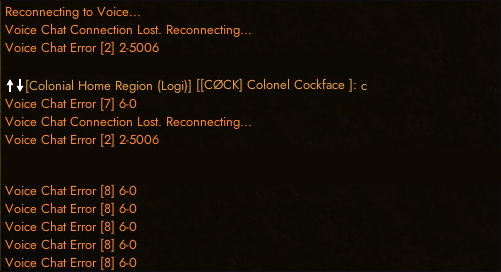
Am i the only one with a dying vc?

 dense saddle
obtuse jungle
Am i the only one with a dying vc?
dense saddle
obtuse jungle
Am i the only one with a dying vc?
No me too. I just came here to ask... https://beno.pw/NdmqJ
 visual lichen
My squadmate is logged off, but the game thinks that they are afk. They logged of a couple days ago, but their status shows them as AFK in ashfields. They've been this way for like two days now almost. As a result, they have become the squad leader, and we can no longer add or remove people from our squad because none of us are the swuad leader anymore.
balmy falcon
Why does this shit keep breaking? Where are my damn deployment points?

First it won't load, now it won't show deployment points. I don't get it.
 lucid ocean
Try zooming in idk xD
 brazen cloak
yo could Foxhole not dc me and then say I have too many recent logins? That'd be siiiiiick
 echo flare
If I have a vehicle claimed by a squad but that squad is not on is there anyway to get the vehicle unclaimed?
foggy sky
if inventory is empty you can submit it to a public stockpile
terse flume
Hey, it started yesterday but i've been playing with it like this all day today, i'm rather laggy and outright stuttering especially when driving vehicles its super noticable, i've tested all of my connections my end and its not that everything is running just fine and i've checked all my hardware, no frame drops etc and so its definitely not that its like my connection to the foxhole servers sucks and I just jitter about everywhere constantly, and on a frontline it's even worse because everyone is just pinging everywhere constantly. I'm on Shard one, based out of Lockheed area, it's really borderline unplayable can anyone please help me?
 unkempt sand
tawny hazel
"Failed to download player data[0]." Any fix for this?
unkempt sand
tawny hazel
"Failed to download player data[0]." Any fix for this?
it fixes for me when ever i turn off family view and when family view is off i turn it on and off and then it works
 drifting pendant
Hey guys, new player here (11 hours). I got 3 crashes since I started playing, always the same error: "corrupt content files" and this crash report. I validated the cache every time, 1 file was broken but it keeps happening. I'll do a clean reinstall today and update my drivers, but any ideas if it keeps happening?
 terse flume
I need some help here. I got a buddy who hasn't been able to play foxhole for 3 months or so now because "Unable to load player data". I've been looking around in technical channels and bug reports and I haven't seen a single person respond on how to fix this issue, also heard rumors on reddit that some people have this issue and can't fix it. Anyone know how to fix it? (it's not related to dev branch)
(My buddy has already tried reinstalling the game several times which hasn't worked)
 lone marten
hello, I can't connect when I push play (Error 1)
 heady sundial
lone marten
hello, I can't connect when I push play (Error 1)
heady sundial
lone marten
hello, I can't connect when I push play (Error 1)
me too
 strong igloo
lone marten
hello, I can't connect when I push play (Error 1)
strong igloo
lone marten
hello, I can't connect when I push play (Error 1)
same 😦
spark adder
I was having issues after never having any when I edited my graphics settings on Nvidia, it seems like alot of the connection issues and errors are connected to
GPU over locking
Settings that max out performance in your graphics card control panel (max performance or prefer performance) so try swapping these over
Andl one that has affected it for me was when you go to your screen settings (mine is adjust screen size or something about halfway down) and changing it from scale using "GPU" to scale using "display" also helped. Basically anything that pushes your GPU to squeeze out extra is causing problems as far as my extensive internet searches were concerned
These were all things I messed with trying to get NFS Heat to work but couldnt get it working anyway I think due to my gpu being older.
I tried putting each of these setting back on one by one and all of them individually caused me an error on server launch
Also I should mention it started after the last patch

 remote basin
a solution?
 topaz egret
keybinding rotate camera to keyboard on "V" and it only stops the mouse movement and still have to use middlemouse to rotate any fix?
 halcyon sapphire
Hi, when I try to connect I didn't even have shard list and when I want to contact support I can't choose shard. I already verified the integity in steam files.
 remote basin
+1
lone marten
I try reinstall , cache check etc ... nothing. I think it's a server problem
halcyon sapphire
Oh yes I reinstall too. But yeah seem more a server problem than a game program problem
lone marten
so waiting time 
 meager sonnet
remote basin
orange have problem
meager sonnet
remote basin
orange have problem
Oh no ... 
remote basin
are you french or do you have orange to another country? ?
 pallid bloom
I have the same problem and I too am at orange
halcyon sapphire
remote basin
you are french?
French and with orange. Thx for the informations
remote basin
ah je suis français aussi et orange et j'ai le problème sur epic games, origin et foxhole (même foxhole stats innaccessible) et sur down detector y a mass de report sur ça
de rien 😉
pallid bloom
moi aussi les gars
 solemn wolf
Yep. French too and same issues. Just have to wait 🙂
pallid bloom
j'espère que le soucis sera résolu avant que ce que j'ai stocker dans le seaport ne passe en public
 static mortar
tu a fait comment?
pallid bloom
tu lag pas si tu passe par un vpn pour jouer?
 young olive
ok donc orange nous fait une crise je viens de mettre mon portable qui lui est chez sfr en partage de co et hop foxhole stat est de retour et foxhole aussi gg orange 🤬
 drifting herald
echo flare
If I have a vehicle claimed by a squad but that squad is not on is there anyway ...
drifting herald
echo flare
If I have a vehicle claimed by a squad but that squad is not on is there anyway ...
You can remove squad-claim when putting vehicle into seaport or storage depot and get it back out. (Needs to be empty though!)
 vestal acorn
" voice chat error [8] 6-0 " What does it means got it every time
i tried a lot of thing nothing seems to change
tall sand
restart game
remote basin
nn 0 lag j'ai un vpn sur une IP à paris et 0 soucis
vestal acorn
restarted the game, check files deleted Steam "cached"
tall sand
yea sometimes u need multiple restarts cause vc is shit
vestal acorn
It seems a big issue with the game a lot of player ask about it. why the dev still not fix it ?
tall sand
because it boils down to vivox the vc provider/service
vestal acorn
sry i tried everthing
tall sand
yea
vestal acorn
literally everything i'm more annoyed then having fun
tall sand
vivox = perro caca
vestal acorn
i will come back in an other 4 years if they repair the bug
tall sand

 ruby cloud
 faint arch

 nova cove
I don't have sound after unistallation of voice mod and I dunno how to fix it
foggy sky
nova cove
I don't have sound after unistallation of voice mod and I dunno how to fix it
Sounds like either a mod is broken and trying to activate, or you should try verifying file integrity. If that doesn't work reinstall
 ripe citrus
nova cove
I don't have sound after unistallation of voice mod and I dunno how to fix it
ripe citrus
nova cove
I don't have sound after unistallation of voice mod and I dunno how to fix it
Go to your voice setting and hit reconnect
And make sure the inputs are right
ripe citrus
foggy sky
Sounds like either a mod is broken and trying to activate, or you should try ver...
It's shouldn't be a game file thing cause it's an external program
foggy sky
ripe citrus
It's shouldn't be a game file thing cause it's an external program
Voice mod was ambiguous, as game mods are a thing for sound. I see he did indeed mean a program
 opal prairie

 foggy hemlock
my game's been running fine all week but now i cant get more than 7 fps
 acoustic orbit
I just got new bluetooth headphones with mic. However after a few seconds spawning in all the audio cuts out. If i change the input to default it comes back but then the mic doesn't work. I have followed all the fixes in the 'read-first' page.
It looks like it cuts out as soon as it connects to local voice channel
sly mortar
@acoustic orbit it’s an issue some BT headphones have - they don’t like accepting 2 audio sources, so they just kill the first audio source in favor of the newest. You can’t do much about it.
pure valve
That's my luck. Been playing fine for ~3 hours, then I pull out rMats and immediate D/C. Of course inventory is gone.
tawny hazel
Intermittent issue:
-verified cache
-restarted steam
-restarted game
-allowed through firewall
-allowed through AV
-multiple restarts of system

REEEEEEEE
 cursive hare
@nova cove Settings > Sound > App Settings > find the game and make the default playback device and mic
terse flume
i got an issue being that i can get in but i can't go anywhere as when i try to deploy it says server refused connection lost connection to host
 sand apex
I'm trying to message the Dev Support, but after authorization it asks me to what server i want it send, however it gives me an error back
An HTTPException error occurred. Please contact an admin on the server with the following information: Invalid Form Body In parent_id: Maximum number of channels in category reached (50) (50035).
 delicate quail
I'm getting the same error
inner basin
@delicate quail @sand apex Hey guys sorry about that. There's a max number of open tickets the bot can support in a single channel category. And that limit has been reached... probably because the devs' response times towards tickets is slower over the weekend
You can always submit an email ticket through this link: https://clapfootgames.freshdesk.com/support/tickets/new
Clapfoot Inc.
delicate quail
inner basin
You can always submit an email ticket through this link: https://clapfootgames.f...
that link is broken for me too. Even when i fill out every field AND the captcha (make sure it has a green checkmark). It tells me the captcha failed when I submit. Is there some other way to contact the dev team to report players that have logged off?
I've tried sending a ticket over 10 times
inner basin
delicate quail
that link is broken for me too. Even when i fill out every field AND the captcha...
Do you have any browser extensions that could be blocking the functionality of the captcha? Try disabling your extensions, or open the ticket page in a different browser
delicate quail
inner basin
Do you have any browser extensions that could be blocking the functionality of t...
That seems to have worked. Thank you.
tawny hazel
Any fix for this issue yet? Everything I'm googling says it's a server issue.
 stray scroll
I had this problem 4days ago but i fixed it myself.
You only need to update the graphics card (in my place Nvidia) drivers, than the game itself will download a little patch, and you are good to go.

 dense pond
Hey guys, getting voice chat error 8 6-0
tall sand
restart game till it works
 tall sand
so far that i and many other have found yes
this isnt to say there is only one solution
but here we are
tall sand
try killing steam too
yes relatively common to have vc shit out on you sometime during play
tawny hazel
This game is painfully buggy for how fun it is. 😫
foggy sky
I swear this update has seen the most amount of bugs for some reason
dense pond
I never even got VC to work once
Really wanted to communicate with the cool community, feel like I'm not playing the game
terse flume
My 99% FPS is always half of my actual FPS making me stutter around the map, any fix?
foggy sky
terse flume
My 99% FPS is always half of my actual FPS making me stutter around the map, any...
I've suspected it has something to do with building loading in, but I can't really figure it out.
terse flume
It's literally unplayabe, i've looked everywhere for a fix and there's nothing I can do
tawny hazel
Lets trade. I'd like to be able to atleast get into game without the "failed to download player data [0]" error lmfao
foggy sky
terse flume
It's literally unplayabe, i've looked everywhere for a fix and there's nothing I...
Uuuh, could try turning off VSync, and if you have Nvidia mess around with program specific settings in the Nvidia control panel
tawny hazel
@terse flumeTurn off vsync, turn settings to low, make sure you only have one antivirus running, close extra programs.
 short fog
<@&374193809174822912> users in this discord are attempting to phish accounts. You should make an announcement of this. @viscid tangle I have messaged you about a particular user.
gusty jasper
short fog
<@&374193809174822912> users in this discord are attempting to phish accounts. Y...
Hello. Thanks for the report. If you have evidence of bots/scammers posting phishing links you can DM them to us or ping Discord mods If It's directly In this Discord's text channels
terse flume
tawny hazel
<@456226577798135808>Turn off vsync, turn settings to low, make sure you only ha...
Doesn't solve anything even with 150 FPS, the 99% FPS is 30-40
foggy hemlock
My fps was crap yesterday n it seems my fans stopped working
 signal sky
my Voice chat doesn't work , any suggestions ?
 round mountain
my voice chat also does not work. when pressing the bound "T" key no icon appears over my players head to indicate communication
winter walrus
are you using the right mic?
round mountain
yeah it used to work fine i only used it like for an hour or two turned my pc off and now it no longer works
winter walrus
it could have some how changed bc when i first started to play it had to change my audio input to get it to work and then had to do it the next time i played
 safe mango
My voice chat doesn't work either, i already tried the solves you have here in Discord, still i get the Error [8] 6-0 and the Error [2] 2-10028


 torn pine
Minimap doesn't work. I don't see it. How to fix?
sly mortar
Only shows in the drivers seat of a vehicle
acoustic orbit
sly mortar
<@277523437235339264> it’s an issue some BT headphones have - they don’t like ac...
Thanks @sly mortar Surely it must be a fairly common problem? Is there no way to merge the outputs?
sly mortar
there might be an external program you can use (Voicemeeter maybe?) but not in-game
acoustic orbit
I'll try that, thanks for your help @sly mortar
 fleet obsidian
how do i connect to voice chat
 cold hearth
Hello, I just got the game and have never been able to connect in game for for more than 3 seconds.
I get the message above every time. I've tried all the basic answers I found on the internet : repair, reinstall, allow through firewall or antivirus.
Also I do not have any VAC ban and I uninstalled WeMod, witch is the only app that would be qualified as a cheat app on my computer. (I think)
Can somebody pls help me, the game looks so fun

 unreal lark
Any ideas why I can't spawn on BBs which have deployment point teched?
inner basin
unreal lark
Any ideas why I can't spawn on BBs which have deployment point teched?
no shirts in the BB stockpile
You need shirts to spawn in
unreal lark
inner basin
no shirts in the BB stockpile
Just checked. BB I want to spawn in has 190 shirts.
@inner basin the other one has 108. Cant spawn in neither.
inner basin
you're trying to spawn in them from the home region, correct?
unreal lark
Yes
inner basin
I don't think this mechanic was removed yet

The BB probably has a Garrison Size of 0
unreal lark
How come? What does garrison size 0 mean?
inner basin
I posted a picture about it...
It's some magic number that a Base gains over time, as dictated by the rules in the picture
sly mortar
If nobody is spawning somewhere you won't be able to deploy to it basically
unreal lark
Huh. I see. I have never known that before, what is weird cause the BB is right next to a frequently driven road and has large garrison.
sly mortar
large garrison increases the rate you gain Garrison Size, but it's based off Activty which is based off spawn sets and other things we don't know
unreal lark
Fair enough. Thanks friends
 lavish yarrow
lavish yarrow
lavish yarrow
anyone?
sly mortar
Updated your graphics drivers?
lavish yarrow
Yes
sly mortar
Are you overclocking or underclocking your card? Have you changed any of the timings on it?
lavish yarrow
I haven't touched it
sly mortar
Do you have software like MSI Afterburner which does that automatically?
lavish yarrow
Nope
sly mortar
Fully reinstalled the game?
sly mortar
Updated windows and all your other drivers?
lavish yarrow
Yes
sly mortar
Could you go to the Nvidia control panel and force your main GPU (Titan) to be used by 3d applications
lavish yarrow
how
foggy sky
nvidia control panel might be a thing you have to search and install through the windows store nowadays
foggy sky
It used to, but i've been told they changed it for some mentally deficient reason
if im wrong thats a good thing
 worn torrent
Question, Any idea would could be causing the past 3 updates to stop me from joining the shard I wish too?
Each time it lets me pick it and once i hit join it freezes on 'loading' until crashing.
foggy sky
sometimes this has happened due to audio devices, in particular these strange bluetooth headsets.
could also be something firewall related, in Appdata there is a foxhole folder that has logs that might shed some clues
 undone bronze
sly mortar
there might be an external program you can use (Voicemeeter maybe?) but not in-g...
undone bronze
sly mortar
there might be an external program you can use (Voicemeeter maybe?) but not in-g...
I use vm but never had any issues
 true osprey
is it normal a character just randomly stops firing or refuses to fire for a while? There's nothing indicating he can't but at random, clicking or hold down M1 while being fine and crouching still will result in the character not firing for a while or stopping his fire
 frank halo
got the mic bug how do i fix?
 urban summit
Hello this happened to my deployment screen how do I fix it

 stray seal
What is this problem and how to solve it? Not only does it appear when you enter the game, there is also a problem that after the refresh it is POSSIBLE to enter the game, but it deprives you of ALL opportunities. Mining resources and collecting them in the truck everything reads and works fine, but! It is IMPOSSIBLE to pick up processed resources from the factory.

 zinc field
stray seal
What is this problem and how to solve it? Not only does it appear when you enter...
zinc field
stray seal
What is this problem and how to solve it? Not only does it appear when you enter...
Same
 worldly kernel
stray seal
What is this problem and how to solve it? Not only does it appear when you enter...
worldly kernel
stray seal
What is this problem and how to solve it? Not only does it appear when you enter...
game was fine for me till today morning, but now when i try same thing is coming

 loud oracle

also
Foxhole failed to exit correctly both times I tried to restart it
the process "war.exe" lingered with about 500MB ram still reserved and using CPU
this is not for this current issue of overfilled shard 1, but maybe a problem with the game not exiting correctly when some of the data isnt loaded
stray seal
worldly kernel
game was fine for me till today morning, but now when i try same thing is coming
By the way, yes, everything was in order, but today I ran into this here. I heard somewhere that you can just quit the game with this error. I reinstalled the game, did everything I could, but it didn't help. It reassures me that I am not the only one with such a mistake.
worldly kernel
ha ha same here my friend
 long linden
is this a server issue?
sly mortar

 stray spoke
Hi, I can no longer see what one of my team mates types, but I don't have him muted. Any idea what could be the issue?
 amber raptor
is this normal? a 880kb patch but it reinstalls the whole damn game
 sly mortar
That's how Unreal Engine games work
The games run as a single PAK file, and to update them Steam unpacks the file, changes the required data, then repacks the file
foggy sky
It isn't a reinstall. It downloads 880kb of data and them edits the pak that is 12 gigabytes. Does what icanari said
terse flume
Hey I asked a couple of days ago that I was experiencing stutter and i've finally narrowed it down - it's my 1% FPS or my 99% FPS however you want to look at it. Either way disregarding all foxhole graphical settings, trust me ive tried everything, my 1% FPS will be around 30-40 frames in built up areas, now with VSYNC it's at at 30-40, with my frames at a stable 60 and without VSYNC it's 30-40 with my max frames at like 130+ so it's definitely not that... This isn't happening on any other games, i played some BF4 earlier just to test and even with uncapped frames my 99% FPS was sitting just under my actual frames which is how it should be. Has anyone else had this problem or can shed some light on it, perhaps even help me fix it - I've tried so many different things to no avail.

^ and when I aim at max length you're looking at about 20FPS with my actual frames being a good 60FPS (VSYNC ON)
 green hamlet
How much RAM do you have, what's your RAM frequency? Do you use a HDD or a SSD ?
How much space available do you have on it ?
terse flume
I'm gonna say it
Update your drivers
16 gig of RAM and as you can see in the screen it barely hits 10k even with chrome etc open too and Foxhole is on my hard drive with like 500 gig free
I've updated them, reinstalled them everything
I always keep my drivers fresh
Does it happen in any other game?
It's hard to tell I just tested Valheim but valhiem is so unstable
Checking Shadow of war now this should give a good definitive
Try a game similar to foxhole if you have one
Also turn off any unnecessary overlays
foggy sky
terse flume
Hey I asked a couple of days ago that I was experiencing stutter and i've finall...
I asked earlier and someone said foxhole is capped at 60 fps, so not sure if theres anything more to do
I've tried various things to try and up it to like 120, but i haven't found anything