#technical-chat
4 messages · Page 54 of 1
 sly mortar
 random tree
I've even uninstalled game, but lemme try that rq
random tree
Still didn't work, I can't think of what it is
sly mortar
random tree
I'm able to connect to the voice servers, it says I've connected to the Squad Voice when i join
but when their speakers light up, I hear nothing
sly mortar
Can you make sure your output devices in the Voice tab are "system default" and that system default are the correct devices
random tree
Let me see what my system's default are
Only got one output device, my headphones
wack
random tree
Honestly if I can't find a fix by Monday I'll just delete steam altogether and try reinstalling it from step one, cuz I can't think of any reason I can hear everything but voices
 ruby island
@random tree assuming you have your mic set as default and as default communication device that error most likely means your mic is not reconized can you send your log file named war.log localed in C:\Users\%username%\AppData\Local\Foxhole\Saved\Logs
random tree
Nah it's not that I can't talk, I don't even have a proper mic
It's that I can't hear any voices
ruby island
did you fix the vivox files
random tree
I looked at the tutorial that's pinned yeah
ruby island
yes
hmm dont see anything unusual
you did mention you reinstalled the game did that include deleting C:\Users\%username%\AppData\Local\Foxhole
as steam does not automaically delete that folder
 frank smelt
Hey guys, my game wont start at all (no error) like many others here, Im running on an Nvidia car tho and i have attempted to verify my cache, reinstall and add it as an exception to my firewall numerous times, nothing is helping, Plz @ me when you reply 🙂 thx
@hot oak any advice?
ruby island
@frank smelthave you read the pins
Particularly the first problem described in the first pinned message by me
sly mortar
@terse flume does it give you an error message when you try to type?
 terse flume
no the message just disappears
as soon as i press enter nothin shows
local chat works which confuses me
sly mortar
what the
terse flume
whispering works too
sly mortar
DM me your steam ID and I can check if they're reaching the server
Because there's a couple bugs this could relate to
terse flume
sent it
sly mortar
All of the messages where you said test are showing up
Are other people able to see them?
sly mortar
Hmm
terse flume
unless the other chats are not showing at all
sly mortar
Try restarting the game and steam
terse flume
It's locking me onto the whisper tab and won't let me switch
sly mortar
wtf
terse flume
I attempted to relaunch foxhole and got a BSOD...?
 terse flume
started up Civ 6 and it works
sly mortar
That error message means some file somewhere is likely corrupted
Most likely a driver file (probably the foxhole related one)
My recommendation is that you use the System File Checker to ensure the integrity of drivers and related system files
You can do this by opening the administrator command prompt (Search command prompt in search bar and select run as administrator), then type sfc/scannow into the command prompt and hit enter
It will then take a while and verify all system related files, and if any are problematic will attempt to fix them
terse flume
Looking at the log and it fixed something that was wrong with the GPU drivers, so I guess that somehow killed the game?
 plucky osprey
My mouse is stuck in the top right hand corner, but only in foxhole
 nimble mauve
 plush crest
A little help?
It literally won't start when I try starting it up through steam, and when I try to start it up in the files itself, it gives me this Error, I've got AMD, I tried updating, rolled back, and it still won't cooperate.
 little violet
I just restart Foxhole, try again, uninstall, reinstall, try again, repeat
May or may not work
plush crest
didnt work
terse flume
you deleted folder that is in appdata?
 ivory mason
if its a proble mwith runtime have you considered getting the latest C++ Runtimes?
sly mortar
@plush crest follow the top pinned message in this channel
ruby island
People need to pay more attention to pinned messages
 slow plover
Guys, after a while after connecting to the game, the image freezes and I can't do anything. Help!
 haughty aurora
Click on the screen
terse flume
np
 wise burrow
when i launch my game I get something that says missing game shard info
i was literally playing yesterday and now it just wont work
 idle wagon
My local and squad text chat have been broken for a long time
No one can read anything I type in local or squad, but I can speak in local and squad and hear local and squad and read what other people type
I just cant type in local or squad, and it is unbelievably frustrating
 opal seal
No one can read anything I type in local or squad, but I can speak in local and squad and hear local and squad and read what other people type
@idle wagon
text chat and voice chat are different services
I just cant type in local or squad, and it is unbelievably frustrating
@idle wagon
hmm, sounds like it may be issue with windows firewall or stuff
idle wagon
Testing now
When I run the game it gives me Voice chat error [6] 3-5025 yet my VC works just fine
but text still doesnt work
opal seal
@idle wagon tried checkin pinned instructions?
idle wagon
Nothing about issues with text on there
opal seal
Cant find anything related
 spark knoll
Just bought the game, had to re installed game 3 times, drivers up to date, have Nvidia card. Game just doesn't boot up, no errors or black screens. Tried everything in the Read first section. Any ideas other than a refund?
spark knoll
Nope, nada
sly mortar
Could you go to the Foxhole folder in your Steamapps folder and try to run the game through War.exe
spark knoll
installing x64 Visual Studio 2015, 2017 and 2019 right now to check, otherwise, im out of ideas
Looks like that was it!
 drowsy turtle
Bought the game recently, worked perfectly when I first launched it, every single other time I've launched the launch load has gotten exponentially longer. Reinstalls, verification of the game cache and most of the applicable tricks suggested have done nothing. Can't even play it anymore, I get stuck on this screen. Do you have any solution? Loving this game so far and I'd be a shame to not be able to play it.
haughty aurora
@drowsy turtle I know its a dumb question but have you clicked on that screen, because normally thats what you have to do in order to advance in the menu
drowsy turtle
yes, multiple times, I even let it run for an hour and it did nothing
wait, I got the dumbest idea ever
let me replug my mouse
I will not pretend to remotely understand why that works, but it does, let me close the game and see if I need to replug my mouse every time is all I need to do
it does, what the hell. I guess the game just doesn't recognize my mouse until i plug it back in? I'm going to reinstall my mouse driver and see if that changes anything
terse flume
maybe your mouse is borked
drowsy turtle
alright yeah that works, that's the dumbest problem and solution i've ever arrived at to fix what I thought was a hung game. I thought it had froze but it just didn't realize I had a mouse for some god's forsaken reason. Thank you @haughty aurora
 pallid gull
Hey @here people, anyone get this one? failed to download profile[1] after clicking Play
 blissful sequoia
try restarting steam
pallid gull
OK, will give it a shot
I deleted firewall rules and had Foxhole recreate them, some suggested trying that. Also opened port 443 inbound, no luck
blissful sequoia
no you dont need to open any inbound ports for foxhole
also likely your isp blocks that incoming port anyway
pallid gull
Hmm, they might. Some suggested using a VPN for this, seems to be a strange network error.
Most of the time if I run it clean, it doesn't have the issue. 100% of the time when I try to run with G-Hotkey it has the issue. Which is strange, doesn't seem net related. And I've been able to use G-Hotkey with it forever
I know the obvious answer is "well, don't run it with G-Hotkey" ... but I actually can't play anything but front lines without a hotkey program due to a wrist injury
 austere galleon
I have same problem.
@blissful sequoia hi derp i have failed to download profile and have restarted steam what else should I try besides restart router
blissful sequoia
err ... weird. did you change something?
austere galleon
No, but last time i played foxhole was a week ago.
blissful sequoia
can use a VPN to test the network but its no fun to play through a VPN
i mean that profile problem is a problem of connecting to steam servers
it is tuesday, and thats steam maintenance day so this happens a lot on tuesday
but it can be a network problem specific to you, also
thats why people recommend modifying firewall and stuff, theyre maybe on the right page but the wrong chapter
its all outgoing connections, nothing incoming
austere galleon
I re re started steam and that still dosen't work.
blissful sequoia
@pallid gull what if you start g-hotkey after foxhole is connected?
restart the whole machine xanxth, and if that doesnt work try the router maybe
pallid gull
Unfortunately G-Hotkey has to link to the EXE
I might have to try a different hotkey program... not sure I can be bothered. The game should have toggles to prevent injury...
austere galleon
foxholegame.com/feedback failed to download profile
pallid gull
Foxhole doesn't have any outgoing rules ... should it?
blissful sequoia
nah
it fits in the existing firewall rules
most firewalls allow all outgoing connections
austere galleon
@blissful sequoia ITS Supposed to be foxhole night QQQ and there getting on foxhole with out me
blissful sequoia
you could uhh install tunnelbear
austere galleon
im going to cry
blissful sequoia
and use a vpn tonight
theyll give you like 500mb or something free, its more than enough for foxhole and voice chat
austere galleon
they have a free plan?
blissful sequoia
probably wont add much latency
austere galleon
Wait what if i tried changing my DNS servers on my adapter from defualt to google do you think that would help xD
blissful sequoia
oh its possible
its worth a try
that is usually not the cause of the profile error, but its possible
pallid gull
Just tried a VPN, wasn't able to fix it with that
My workaround is going to be to play without G-Hotkey and use a controller. Doesn't work too well for you though, Xanxth. I did have the issue without my hotkey program at first, too, so you're not the only one
blissful sequoia
just get a different hotkey program, ask around in the discussion room im sure there are suggestions
oh, i mean unless it works fine
this game is unplayable with a controller (except maybe steam controller)
pallid gull
I used to drive with a controller. I'm planning on using it just for building/mining
I've tried other hotkey programs but no others could do the job that this did
austere galleon
i use jitbit macro recorder and that comes with some hotkey macro thing........ its a pain in the butt kinda sorta but i made a macro to right click pull things AND hold down W
@pallid gull do you just need it to hold down your mouse for you? check Windows Mouse Keys
pallid gull
Ahhh, good point, that might work well, Xanxth, thanks. Controller's working OK for now too
blissful sequoia
steam controller is pretty good for this game tho, with some slight tweaks to the game it would be pretty excellent
more fun than mouse actually
terse flume
wonder how game is on nintendo pro controller
 inner basin
I tried an Xbox controller for a little bit because I was tired of clicking
It's good for logi and mining
terse flume
I really want to buy a small electrical engine and tape a paddle to it and use it for harvesting and building
 sour ridge
Quick question, tried to change my keybinding to azerty and there is no way to change the « move left »
It just does not show
 fleet scarab
pls help im getting voice chat error [6] 3-5025 and i cant here anybodys voicechat. I can here the normal game audio and my mic still works i believe but i cant not here anybody else talk
ive have been able to hear other peoples voice chat until now
fleet scarab
fixed it by switching from main speakers to headphones
 polar marlin

 old raven
terse flume
old raven
terse flume
Ok Foxhole over Proton 5.0-9 and 4.11-13 works but sound doesnt work at all. Anyone had the same issue? Mic works for some reason
ok voicechat works for some reason rn
 red oriole
I have a problem with running the game. First i had a problem with Microsoft Visual C++ but i reinstalled and it worked. Now i have a problem with game crashing on startup without errors. So i installed older version of graphics drivers, that didnt work. Somebody knows how to repair it?
 west night
The game keeps breaking my discord sound. After a minute or two discord voice sound stops working. I have to go into my output device in settings and re-apply my device. VOIP ingame is also very choppy.
ruby island
@red oriole can you send the latest war.log from the latest folder located in C:\Users\%username%\AppData\Local\Foxhole\Saved\Crashes
 elder aurora
uh i just got the game but can anyone help me with the ungame audio
everyones audio keeps cutting out when they speak
sly mortar
@candid dagger saw your issue in #bug-reports, if your game is not starting with those symptoms it's likely an error with VCRUNTIME. The top pin in this channel explains how to fix this.
 olive shadow
Does foxhole work on linux?
ruby island
as of 2 months ago it was working fine https://www.protondb.com/app/505460

Proton and Steam Play game reports for playing Windows games on Linux
probably still works fine with minor issues like the one above
the new steam network sockets broke foxhole on linux
glad they were removed
@terse flume can you install proton tricks by running sudo apt install flatpak flatpak install flathub com.valvesoftware.Steam.Utility.protontricks
and run protontricks-flat -s foxhole to get the app id of foxhole then run protontricks-flat <APPID> xact
make sure you have wine tricks installed first
 shrewd lance
e
blissful sequoia
that fixes foxhole in proton?
ruby island
not necessarily but that command is known to fix lots of sound issues in wine
 languid flint
This is not about foxhole but
This is not about foxhole but I don't have an #updates tab. Anyone know?
 upbeat wadi
I'm guessing it has something to do with the "No Feedback" role you possess
inner basin
@languid flint I'll look into this for you 👌
inner basin
Just to cover our bases here, did you try scrolling up? 
terse flume
I'm guessing it has something to do with the "No Feedback" role you possess
@upbeat wadi I can see it just fine and I have that
sly mortar
@languid flint This seems like a discord being weird thing, as you should be able to see it. Try to refresh discord in any way you can, mobile breaks like this every once and a while
sly mortar
Because Maybar chose a shitty color
languid flint
It's fixed. I just need to update the app. Thanks for helping!
terse flume
I have a problem, when I travel to another region the game tell me that is a connection error and if I want to rejoin I must restart the game
terse flume
@dire ruin
went on steam to verify em and stilll didnt work
(even deleted the game and redownloaded
 dire ruin
Alright, try restarting steam and I'll tag the support guy
@brazen shard ^ can't retrieve profile
terse flume
nvm fixed somehow (idk how)
dire ruin
Well whatever works lol
 kind pawn
I am trying to load into my profile page before I press "deploy" but it says profile cannot be downloaded
 clever escarp
I was literally about to ask the same thing, I noticed there's a pinned message about it but I've tried everything listed there on two different days and I'm still getting the same error
kind pawn
it just worked for me all i did was download the new steam update
clever escarp
I'm actually getting the "failed to download profile" error when pressing play on the menu
sly mortar
@clever escarp restart steam and make sure no other games are running when you start the game
clever escarp
Okay
Yeah, it gives me the same error. My internet speed is good enough, I think.
clever escarp
Nope
sly mortar
Did you restart steam fully by killing it with Task Manager and reopening it?
clever escarp
I am using a Wifi mesh tho
Yeah I did that, fully made sure it was dead from the processes
sly mortar
Try restarting your wifi, or connecting through ethernet if possible
clever escarp
I can try restarting the wifi, an ethernet connection is not possible to test unfortunately
Laptop doesn't have a port
clever escarp
Didn't work unfortunately
clever escarp
I have played the game before about a year ago. And no, I don't have an AMD. I have a surface laptop
sly mortar
What's a surface laptop have to do with it
clever escarp
Sorry edit ^
sly mortar
Ah
Okay I was confused for a second
Could you verifiy your foxhole install?
And if that doesn't work reinstall it?
clever escarp
Will do
Sorry, I was wrong earlier. This is my computer: https://en.wikipedia.org/wiki/Surface_Book_2
The Intel Core i7-8650U (1.9 to 4.2 GHz) - Intel UHD Graphics 620 + NVIDIA GeForce GTX 1050

The Surface Book 2 is the second generation of the Surface Book, part of the Microsoft Surface line of personal computers. It is a 2-in-1 PC which can be used like a conventional laptop, or the screen can be detached and used separately as a tablet, with touch and stylus input...
Still failed after the reinstall
ruby island
@clever escarp can you send war.log located in C:\Users\%username%\AppData\Local\Foxhole\Saved\Logs
clever escarp
It doesn't seem I have that folder
ruby island
huh
sly mortar
Have you started the game after reinstalling
ruby island
is it hidden
sly mortar
shouldn't be
ruby island
steam wouldnt have touched it
clever escarp
Doesn't look like it is hidden. And yeah, I've started the game since re-install
ruby island
strange as that folder should be generated
sly mortar
Are you admin on the PC
clever escarp
I'm the only user yeah
ruby island
doesnt have anything to do with it
the user has full rights to the appdata folder
its located within the users folder
sly mortar
Yeah, was thinking about install permissions
ruby island
still shouldnt have anything to do with it
sly mortar
It's foxhole
ruby island
can you restart your pc then run the game and see if that folder is generated
ruby island
well idk then
you can probably safely assume whatever is the root cause of that folder not being generated is what is causing your download profile issue
maybe dm phil
clever escarp
Alright, might try that tomorrow. Thanks for tryin fellas
 woeful oyster
 formal hornet
lolwut the new war hasnt event started
polar marlin
can't switch after war end
only on war start
 raven plinth
@woeful oyster if u are asking to switch side don't ask in this channel but in #344873396850655235 by submiting a pm to the @coarse trail
 covert mist
does this game support gsync?
ruby island
games themselves have no need/do not support gsync that is to do with your driver, card and monitor @covert mist
covert mist
whack.
i get screen tearing with gsync in foxhole
idk why
some games ill have screen tearing others i wont
ruby island
is gsync enabled in your settings
 rapid shoal
I get screen tearing as well and Vsync was not selectable in settings, so I had to enable it from Nvidia Control Panel
ruby island
there is a issue with vsync in windowed mode but shouldnt affect gsync
blissful sequoia
vsync ... in windowed mode?
ruby island
yes foxhole refuses to enable vsync in windowed mode
it works if you go fullscreen turn it on then go back to windowed mods but only until you tab out then it gets shut off
super annoying
sly mortar
Vsync normally doesn't work in Windowed mode of anything
Windows fullscreen maybe, but normally it's restricted to Fullscreen
ruby island
when i said windowed i meant windowed fullscreen
also vsync works perfectly fine in windowed mode
tried it on some games
with vsync off i get 120+ fps and when turned on it hovers up and down around 60
meaning vsync is working
blissful sequoia
vsync doesnt work in anything except full screen in any game, does it?
anything windowed loses control of vsync i thought
sly mortar
yeah that's what I thought as well
ruby island
just did it in tower untie
and gave been using vsync for years in fullscreen borderless
even foxhole before the update that fixed the fov exploit worked fine with vsync in fullscreen windowed mode
ruby island
huh weird having obs open and set to display capture seems like it forces vsync
yup when i close obs and tab into foxhole there is screen tear when i open obs and tab in there is screen tear for a few seconds then the game freezes for a sec then magic no screen tearing
now i dont have to do that stupid trick every time
blissful sequoia
i mean ... i think it was an option but i dont think it actually worked before
i didnt think it was possible in any windowed mode
kind of shocked to find this out
i suspect it might work with gsync or freesync but not traditional vsync
ruby island
wish i could demonstrate it but obs forces vsync
for some reason
and it doesnt show up on redon recording or other modes for obs
 harsh ridge
Failed to download profile? Anyone get this error when pressing play before?
blissful sequoia
tons of people - its usually fixed by restarting steam
 karmic whale
Just as info for me....for what vSync when the game is locked at 60fps?
never had less than 58fps on my rig
ruby island
just because a game is locked at 60 fps doesnt mean screen tearing doesnt exist
like i know my monitor jumps between 62-58 hz meaning that a stable 60 fps will cause tearing
my monitor being older probably has something to do with it
vsync syncs up your fps to the hz essentially
inner basin
I get screen tearing now when I didn't before, but I like to alt-tab frequently so I haven't enabled VSync :/
It's alright as long as I'm not going too fast
terse flume
if i turn the camera angle slightly it tears so bad
 ashen solstice
Moderate this game!
 random bone
is there any chance the game will be available for mac?
sly mortar
Don't think they have any plans at this point
random bone
i am not very technical so i dont really understand- why would that be difficult
sly mortar
MacOS & Windows operate completely differently
There's massive differences in how they run programs and how they operate behind the scenes, and it's a ton of work to get them working together in the same servers,
random bone
oh, thanks!
blissful sequoia
other UE games run on mac...
terse flume
Doesn't mean Foxhole can.
ruby island
well thats because the devs of those games have put in the work to support osx
terse flume
Or maybe their games don't rely on things that aren't usable on MacOS
 serene field
my chat doesn't work anymore, when I enter messages they don't appear
am I chat banned or is this a technical thing?
blissful sequoia
did you accidentally switch it to the logi tab, perhaps?
serene field
nope... I tried every tab
serene field
I actually have this problem for a few months now, and it's getting quite irritating so I would like a fix if there is any
blissful sequoia
oooh
@serene field its because you dont have english enabled, click the cog for the settings on the chat window
 dry quest
I'm sorry I don't speak English very well. You can tell the address of the game servers to check the ping.
 static spruce
sorry but i cant speak eanglish very well. i have a problem. yesterday around 00:00-03:00 i could use voice chat normally, but not today. i have no idea why this is heppening. please help.
 primal basalt
@static spruce Esc -> Options -> Voice -> Reconnect
static spruce
thank u. now all its ok.
dry quest
I'm sorry I don't speak English very well. You can tell the address of the game servers to check the ping?
dry quest
in the Game User Settings.ini file, I put the FPS limit of 100 in the Frame Rate Limit=100.000000 line, but after entering the game, the value becomes 60 . what is the reason?
blissful sequoia
its been changed and doesnt work anymore
 ancient wind
Hi! so ah i have a problem, my game work fine ant then game just froze
there is Error. sorry for format
im gonna update my software on graphic card
 torpid rivet
i get the crash on startup without error message just like in the thechnical-read-first guide but i downloaded the correct amd drivers and reinstalled two times and checked file integrity but im still unable to play the game. anyone got any ideas on what can i do now?
i have also followed the "fixing the resolution settings" instruction to no avail
 steel kiln
Hi, I’m having trouble with audio. I either hear only the voice chat or in-game sounds, or I hear nothing at all. I’m using a pair of bluetooth earbuds with a microphone. Im pretty sure it’s something to do with the input and output devices I have set, but I have no idea what I’m doing.
sly mortar
@steel kiln are the input / output devices you've set the system default
steel kiln
They are, but I can’t hear voice chat now
sly mortar
Could you go to the Voice page of settings and "reconnect" as well as make sure those are system default devices as well?
steel kiln
Tried that. Not doing anything
And now the in-game sound’s gone too
When i reconnect the in-game sound comes back for like a second then mutes again
sly mortar
Do you have another audio device you could test with?
steel kiln
No 😦 I mean it works fine on my computer’s speaker but i dont have any other headphones
sly mortar
Hmm, I'm thinking it might be some weirdness with the headphones
steel kiln
Damn it. Yeah, they’re a cheap pair i bought at walmart, Sony WI-C200
sly mortar
Mhm
steel kiln
I’ve been fiddling with the device settings for days now trying to figure this out. It worked once for a bit but then went back. Everywhere I look it’s the same thing, change the input and output, but like what the hell do i change it to
sly mortar
There may be a way to force this but it's a bit weird
steel kiln
But I’ve never had a problem with them on my phone so idk if its really the earbuds
sly mortar
It's not the earbuds themselves
It's the computer being weird about sending them the proper information
Have you ever heard of a program called "Voicemeeter"
steel kiln
I have not. I’ll try anything, tech issues put me in an extremely bad mood
sly mortar
heh
VoiceMeeter Virtual Audio Device Mixer by V.Burel
If you download and install that I can walk you through setting it up, it should solve this.
Effectively you can use it to force the audio to go where you want it, instead of being weird
steel kiln
Installed, just need to restart my pc
sly mortar
Yup
steel kiln
Ight what’s the next step?
sly mortar
So make sure that voicemeeter is the system default for both input and output devices
Then set the hardware input to your microphone, and hardware output to your earbuds
steel kiln
Ok that has the mic working
There are 11 different output options and none of them work
Most of them kill my mic when I switch to them for whatever reason
steel kiln
Ok so when I use that setting the audio works and my pc’s mic seems to be working fine. I guess it’s when I try to use the earbuds’ mic that it stops working
sly mortar
My guess is that the earbuds are sending everything in the same channel, and the computer is having issues trying to process that
steel kiln
Well i think I’ll have to work with this for now, doesn’t seem to be anything I can do about that. None of the other options work. Thanks for your help. 😊😊
 solemn jasper
Fatal error: [File:Unknown] [Line: 853]
Rendering thread exception:
Fatal error: [File:Unknown] [Line: 198]
Unreal Engine is exiting due to D3D device being lost. (Error: 0x887A0006 - 'HUNG')
Unhandled Exception: 0x00008000
0x00007fffa170a799 KERNELBASE.dll!UnknownFunction []
0x00007ff71a3a97b6 War-Win64-Shipping.exe!UnknownFunction []
0x00007ff71a3aa87f War-Win64-Shipping.exe!UnknownFunction []
0x00007ff71a35b79d War-Win64-Shipping.exe!UnknownFunction []
0x00007ff71a80a037 War-Win64-Shipping.exe!UnknownFunction []
0x00007ff71a7f73b1 War-Win64-Shipping.exe!UnknownFunction []
0x00007ff71a800e3b War-Win64-Shipping.exe!UnknownFunction []
0x00007ff71ae956a0 War-Win64-Shipping.exe!UnknownFunction []
0x00007ff71ab5c65e War-Win64-Shipping.exe!UnknownFunction []
0x00007ff71a260983 War-Win64-Shipping.exe!UnknownFunction []
0x00007ff71aeecd92 War-Win64-Shipping.exe!UnknownFunction []
0x00007ff71aeed928 War-Win64-Shipping.exe!UnknownFunction []
0x00007ff71a3acdc7 War-Win64-Shipping.exe!UnknownFunction []
0x00007ff71a3acaa9 War-Win64-Shipping.exe!UnknownFunction []
0x00007fffa3af7bd4 KERNEL32.DLL!UnknownFunction []
0x00007fffa47ace51 ntdll.dll!UnknownFunction []
reeeeeeee updated my amd driver and it crash
@tranquil forge help help help
solemn jasper
ok
 fluid garnet
my voic chat not work error 8 6-0
terse flume
@fluid garnet Press ESC go to options find voice click voice if you click you seeing recconect voice that could work
 grand echo
hello , i intall via steam foxhole and it dont work, try re-intall idem, it dont lauch ,not from desktop icon, not from steam, not with avast shield off. update is and automatic on steam, is e-mail support no responce ,can someone help me ?
ruby island
@grand echo have you read and followed the pins in this channel
grand echo
i read now, i ll try Icanari :How to Correctly Reinstall Foxhole thanks
ruby island
i mean i was more talking about this pin https://discordapp.com/channels/203512636556574720/374272127953666048/713199625388949554
Game Opens and Closes With No Error sounds a lot like your issue
ruby island
is your gpu overheating
or have you overclocked it
if both those dont apply then make sure both windows and your driver is up to date
terse flume
Try verifying the integrity of game files.
grand echo
yes it lauching thanks thecruz1 ,very thanks 🙂
 upbeat crown
hi guys, anyone else is having this problem?
terse flume
@upbeat crown restart steam
upbeat crown
@terse flume thanks! It worked 😄
 analog prism
the game isnt allowing to to submit bmats into our squad storage
theres nothing but the Bmats
but it just says that one or more items cant be stored
@elder oracle
any idea
blissful sequoia
you can only store crates of stuff you (or your squad) made
 arctic talon
u need to retrieve bmats in crates from refinery to be able to store them in squad storage
 fluid iris
@frank zealot is it possible to reset a players friendly fire restriction severity? I still get weapon restricted after emptying half a clip of smg on a foxhole 2 days after I killed a bunch of foxholes to clean up
 frank zealot
@fluid iris Yup, modmail it though
 mossy meteor
Why is FPS permanently locked to 60? Even editing the config doesn't change it.
polar marlin
doesn't the config get reset all the time
think of it as a stopgap measure the devs did to stop people from having fun
inner basin
Or a stop gap to prevent people from gaining an unfair advantage...
ruby island
i mean if they built the game properly then fps shouldnt be a factor
 wispy knot
blissful sequoia
wispy knot
blissful sequoia
it was potentially an accident too
 sage mantle
Is there a way to fix the "failed to load shard info" error?
I can not select shard or have the option to
 quiet granite
@sage mantle what do you see in the top right corner of the main menu
quiet granite
You don't see this?
You should also see this on your betas tab from right click > properties in Steam:
ruby island
thats only the case when the game doesnt have a connextion to the internet
do you have any sort of anti virus blocking connection
sage mantle
No ive disabled that
ruby island
can you change your dns servers as described here https://discordapp.com/channels/203512636556574720/551236268004999168/551238446379696130
ruby island
can you send war.log located in C:\Users\%username%\AppData\Local\Foxhole\Saved\Logs
ruby island
hmmmm
can you try using a vpn
use something like tunnel bear or protonvpn to test
both offer free usage
if the issue happens after that then its something on your pc blocking the connection
or it could be related to the previous issue i have seen
sage mantle
Which issue would that be?
ruby island
there is a issue i have been tracking for months now that crashes the game when the game tries to connect to the internet now this isnt crashing but the crashing could have been fixed with a update as a result the game refuses to connect to the internet as a workaround to the crashing
thats just speculation tho
if the vpn doesnt work and you are sure nothing is blocking the connection i would recommend dming phil on discord with your log and a dxdiag report
sage mantle
still not working
ruby island
ok then maybe my speculation is correct
type dxdiag into windows search and open it
then click save all information
then dm phil with both war.log and that text file generated
and explain the issue
terse flume
I keep getting runtime errors from the game how do I fix this?
ruby island
can you install the latest vcruntime as described in the latest pinned message
 unique spear
foxhole ping is so high during this war...
idle wagon
ok what the fuck
all of my chats arent working
no one can read anything i put in local, squad, region, world
what the fuck is wrong with this game
idle wagon
but why would it work some of the time
my chat language was in chinese so that would be it then
how tf did it change tho
interesting
blissful sequoia
because other people are writing english in the chinese text (sometimes)
they probably wonder why nobody else is talking lol
spread the word there if you feel like it
 real pelican
Whenever I enter the home region after selecting a side, it throws up an error saying "Warconnection service failed". The deployment map doesn't load up either. Any possible fixes?
blissful sequoia
possibly your firewall or antivirus
 dull vigil
A weird one I even did an sfc /scannow and downloaded a fresh copy of FH but today when I try to aim I suddenly get my avatar and aim line jolting side to side ( a bit tourettes like 😋 ) and I can't aim at all. This has only happened from today. Any ideas what it is and how I can remedy the issue???
dull vigil
Anyone on the above issue please?
inner basin
could you upload a video potentially? @dull vigil
 lunar iron
anyone here know how bunkerbases work. specifically in regards to infrastructure
inner basin
@lunar iron I think it's better if you ask in #foxhole-discussion where it's more active 😄
terse flume
What's the at most minimum requirements to run Foxhole?
 edgy dune
Make sure you have a dedicated gpu
If you don't the game doesn't really support it well anymore especially with the recent update to unreal engine 4
@terse flume
terse flume
Thanks
edgy dune
I'd your computer is potato you will likely be stuck playing on low graphics
And for better performance having to lower the resolution scaling
edgy dune
You can always try and see how your system runs it
Then if it doesn't work you can refund the game on steam if you have less than 2 hour play time
terse flume
That's right, I guess
fluid iris
I can't tab out of foxhole anymore or I crash.
Fatal error: [File:Unknown] [Line: 853]
Rendering thread exception:
Fatal error: [File:Unknown] [Line: 198]
Unreal Engine is exiting due to D3D device being lost. (Error: 0x0 - 'S_OK')
Unhandled Exception: 0x00008000
0x00007ff9163ea799 KERNELBASE.dll!UnknownFunction []
0x00007ff770d697b6 War-Win64-Shipping.exe!UnknownFunction []
0x00007ff770d6a87f War-Win64-Shipping.exe!UnknownFunction []
0x00007ff770d1b79d War-Win64-Shipping.exe!UnknownFunction []
0x00007ff7711ca037 War-Win64-Shipping.exe!UnknownFunction []
0x00007ff7711b7958 War-Win64-Shipping.exe!UnknownFunction []
0x00007ff7711bf9a6 War-Win64-Shipping.exe!UnknownFunction []
0x00007ff771853c5b War-Win64-Shipping.exe!UnknownFunction []
0x00007ff771853bb2 War-Win64-Shipping.exe!UnknownFunction []
0x00007ff771851156 War-Win64-Shipping.exe!UnknownFunction []
0x00007ff771a2b21f War-Win64-Shipping.exe!UnknownFunction []
0x00007ff771a2d939 War-Win64-Shipping.exe!UnknownFunction []
0x00007ff770c20983 War-Win64-Shipping.exe!UnknownFunction []
0x00007ff7718acd92 War-Win64-Shipping.exe!UnknownFunction []
0x00007ff7718ad928 War-Win64-Shipping.exe!UnknownFunction []
0x00007ff770d6cdc7 War-Win64-Shipping.exe!UnknownFunction []
0x00007ff770d6caa9 War-Win64-Shipping.exe!UnknownFunction []
0x00007ff917a47bd4 KERNEL32.DLL!UnknownFunction []
0x00007ff918a0ce51 ntdll.dll!UnknownFunction []
 kind quartz
i hate that my body gets vaporized whenever i DC
Talked to @inner basin about the issue
the only error message i get is when trying to relog after 5-10 seconds that is some kind of "failure to download profile..." or something similar
wondering why the game system does not have an automatic "sleep" function for 120 seconds when disconnecting.
is this due to some other fix?
inner basin
put that in #foxhole-creative lmao
kind quartz
roger, will do
blissful sequoia
it used to.
sly mortar
 kind radish
anyone know if there are plans to add ultra/super wide support at all in the future?
 formal lance
Anyone have any experience with Foxhole disabling all output to a Bluetooth headset
Its whenever my Vivox chat initializes it cuts all of my system audio
I've already done the fix in #technical-read-first⚠
Whenever I press "reconnect" my audio turns back on
quiet granite
Is Exclusive Mode/Priority set on the headset? In communications properties.
Untick the top one see what happens
blissful sequoia
@formal lance yes I have.
foxhole is downright awful with bluetooth
they really need to address their audio and voice problems, but its been years, good luck
formal lance
I resolved it
Instead of choosing the audio device that I was using on the Vivox screen, I set it to system default (which was the same device I had manually selected) and that fixed it.
terse flume
Game crashed earlier after I died to a halftrack and I got some sort of pop up from Unreal Engine indicating corrupt files which led to the need to fully reinstall the game
quiet granite
Don't die to halftracks then 
 subtle dew
Just going to say you shouldn't get weapon restriction from destroying vehicles on home island

terse flume
o7
 mortal bear
Hmm, I do not understand.. anyone care to help? please.
 tired tangle
weird glitch where voice chat breaks up a lot
started a couple updates ago, i think trench warfare? or later
both local and squad chat
terse flume
@tired tangle reconnect your voice chat in the voice settings, if that doesn’t work; restart the game
tired tangle
both dont work, trust me it's been around for a while
also tried changing output devices doesnt work either
terse flume
Possibly try logging out of your account?
 tropic glen
is there a way to make the ui bigger?
quiet granite
Don't believe there's a scaling option, no
tired tangle
tried a reinstall and wiped all local doesnt work
 flint warren
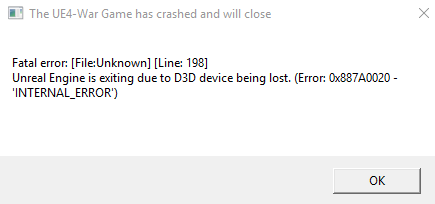
https://i.imgur.com/G5EfMZ7.png
how to fix?
 keen berry
theres been server lagging this past few days in game
despite having good or bad internet
edgy dune
Frontline maps chug when populated especially late war with more stuff built
If you're fine in a backline hex it's just the servers acting up in the laggy region and not your ping
blissful sequoia
maybe this is what happens when we arent spread into 23 maps
i think we would reduce the server load if we all social distanced
terse flume
I have had constant Rubber-banding which makes the game literally unplayable, any tips/troubleshoots? I've turned my computer on and off again, done steam updates, turned the WIFI on and off again, and I've even updated windows. It happens everywhere, front or not, even on the Home region. Please help!
Turn down graphics
i've been lagging in vehicles
Did that already
but ill try it again
Still rubberbanding
 harsh vortex
getting this message when trying to play
ruby island
I actually didn't feel any lag what so ever playing yesterday on the most populated region
Probably what's happening is as the server becomes more and more loaded people's internet connection quality becomes more of a factor
terse flume
i have gigabit ethernet lol
ruby island
distance to where foxhole hosts the servers is also a huge factor
terse flume
servers are hosted in canada right?
ruby island
well the domain for the api resolves to Virginia
i would have to pull up wireshark to grab the ip of the actual servers and see where they resolve to but most likely to Virginia as thats where the api is served
ahhh they use OVH hosting
that would be located in montreal
the api is served by aws
terse flume
i live in east coast US issues started last week when a luv basically flew 60 meters into a lake
ruby island
lol
idk then why you would be lagging must just be server lag then
i got onto a region with 14 queued players yesterday and no issues where the front was
you also got to take in consideration of connection type
if you have fiber then it would have been server lag but if you have cable it could have been due to high demand of internet in your area slowing down response time
terse flume
a lot of people are lagging
i have fiber so it's not me
but i'm not the only one with issues
ruby island
idk man i had no lag what so ever
could have just been a slowdown at the time you played while none at the time i played
terse flume
This makes three days of lag and rubberbanding for me.
 novel hamlet
Currently when pressing play, it displays a message "Failed to download profile[1]." All I have done as of now is Validate my game files.
ruby island
@novel hamlet restart steam
ruby island
yeet
 little stump
@wheat latch can u check your message box pls?
inner basin
@little stump What do you need? Messaging devs should be a last resort.
 unkempt notch
uh you’re giving them money they should at least bother responding
blissful sequoia
max responds, you just better hope its a new problem and not an old one thats been decided not to be fixed
 polar mural
Getting this message. I have closed steam, restarted internet and redownload and still not working anyone help??
blissful sequoia
possibly change your DNS server
if that doesnt work then its your router or your antivirus
i suppose it could be your ISP
 worn oasis
I keep trying to deploy in the devbranch but it says "lost connection to the server" I've downloaded the devbranch thing in steam and joined the devbranch shard, and I don't know whats wrong.
 uncut turtle
devbranch is not open yet
worn oasis
oh
uncut turtle
its only for streamers now
uncut turtle
it'll be tomorrow for the public devbranch
 tall mango
I keep trying to deploy in the devbranch but it says "lost connection to the server" I've downloaded the devbranch thing in steam and joined the devbranch shard, and I don't know whats wrong.
@worn oasis when you first got te game did it ask for admin privelages?
worn oasis
No
I didn’t even know you could do that
Oh, did the game ask for admin? No
I downloaded the devbranch and no question were asked
sly mortar
@worn oasis Devbranch wasn't online today
Which is why you were losing connection to the server, since there was no server to connect to
 civic jacinth
Hey I got A GTX 1070 gpu but my game chokes and dies trying to play it didnt used to lag so bad any help?
 junior verge
The dev branch is available?
inner basin
Nope
blissful sequoia
maybe your fan isnt turning anymore
 tame mantle
Who Do I need to ask if my friend chose the wrong team on accident
and they need to be on the wardens
blissful sequoia
?modmail
 languid thistleBOT
Contacting Mods via Mod Mail
Do you require Moderator assistance? Please send a Direct Message to the Mod Mail bot with your issue. The Mod Mail bot (located on the members list) will relay everything with the Mod Team and they will assist you as soon as possible.
 blissful sequoia
or maybe clapfoot support
nobody really knows, youll be lucky to get a response
blissful sequoia
i cant remember if its developers or volunteer mods doing the faction changes
terse flume
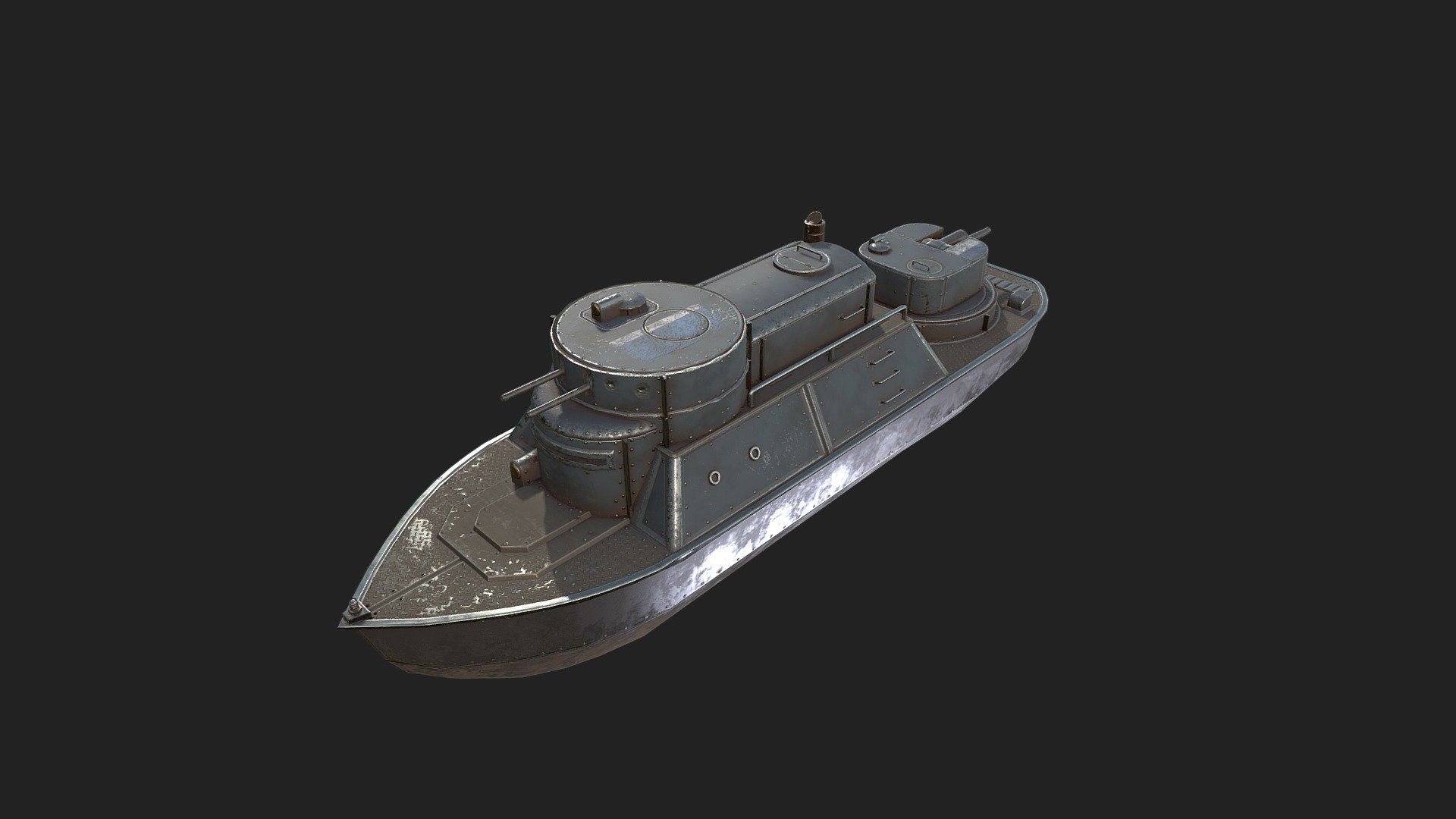
Anyone know how to extract models for things like tanks for 3D printing?
 inner basin
@blissful sequoia we still do faction changes 😄
blissful sequoia
ooh good then its possible to get quick turnaround!
terse flume
@blissful sequoia that's more of a gallery than a repository for downloading
blissful sequoia
oh i thought they could be downloaded hmm
terse flume
That's a setting that's usually disabled for showcased models.
 stone nebula
why can't i hear other players speaking
i reconnected voices and refreshed devices nothing works
analog prism
Im trying to get on the devbranch, as soon as I try to spawn anywhere it says connection refused by server..
@frank zealot
any idea why?
inner basin
@analog prism Were you able to get into Home Region?
 dense spear
i have a similar problem as Owl21burbs, i spawn in home region and i get kicked out by the server, saying "connection lost" even though usually my connection is stable enough
 solid birch
can't wait
 manic flume
Next Tuesday and Wednesday we has got phase 2 so we can mine iron to prototype vehicles
terse flume
None is.
 severe finch
i figured it out
terse flume
Unable to play the devbranch - game crashes as soon as it gets to the 'Arms Race' title screen.
severe finch
opt outmy bad
 gray fog
Is there a way of binding multiple keys to a single action? Thanks
 untold thunder
lol thats called a macro isn't it? and i dont think any game wants that lol @gray fog
ruby island
a macro is programmatically pressing keys in sequence to do some sort of action as for as i can read they want to be able to bind multiple keys to the same key bind so they can press any key assigned to do a action which isnt possible in foxhole and would have to be done outside the game
gray fog
lol @untold thunder I didn't mean that. I'd been enjoying driving with my controller but wanted to use my keyboard for everything else lol, and wanted to see if the game supported having, for example, both 'w' and 'right trigger' as 'forward' if you see what I mean.
ruby island
there is most likely some type of helper program to do what you want
actually steam can remap controller inputs to keyboard buttons
you will find that somewhere in big picture mode
gray fog
I'll have a look around, thank you
terse flume
I just got a BSOD and hit the restart button on my PC and now it won't start up. It starts up initially then restarts it's self on its own then won't even get any feed on my monitor anyone know how to fix this?
sly mortar
Could you try the section under "From a black or blank screen" @terse flume https://support.microsoft.com/en-us/help/12376/windows-10-start-your-pc-in-safe-mode
ruby island
i like how the only way to enter safe mode is to literally force the motherboard to shut down a few times
 woeful chasm
Hey guys, how do i really zoom in on the map? I remebember that i could really see roads and houses very close. Dit it get changed? Now i can i only see the world map and cant zoom in very well.
sly mortar
Nah you can enter safe mode a bunch of ways
That's just how you do it if windows can't open
Some BIOS's have a way to boot to safe mode, but it's not guaranteed and some of them hide it
 craggy solstice
terse flume
craggy solstice
terse flume
all my homies hate 33 and 35
ruby island
actually thats only pre built or laptops that might have that option and launches windows is some sort of different way but if its a custom motherboard you will never find that option and are forced to kill power to your components 3 times to get to recovery unless you turn on the f8 option in windows 10
which was enabled in windows 7 by default and was always the way of getting to recovery till they disabled it in windows 8+
 graceful garden
I have this problem
And all of my files are valid
I don't know what just happened cause i played normally last update but now that i wanted to come back this happens
ruby island
@graceful garden can you send war.log located in the latest date modified folder in C:\Users\%username%\AppData\Local\Foxhole\Saved\Crashes
sly mortar
@ruby island f8 option doesn’t work on my PC because it loads through the interrupt point too fast to notice the keystrokes
ruby island
thats why you hold it before it hits the interrupt
Worked first try for me
Just got to hold down f8 before the bios hands it over to windows boot manager and boom you have the diagnostic menu
Has worked solidly 5 times in a row now
The boot manager catches it from a cold start and reboot as well so all you have to do is hold down f8 and your good
Why windows disables it by default is retarded to me
You have to basically trick windows into thinking it can't start to get into recovery
If it doesn't happen automatically
errant canyon
hey i can't turn on v-sycn is this a file issue ?
quiet granite
You can interrupt win 10 starting 3 times and it will let you enter recovery options
Also you can shift+restart from the lock screen to access recovery options
ruby island
in other words force your motherboard into a hard reset 3 times or just hold down f8
if enabled
@errant canyon if you want to be able to turn on vsync just starting obs will force game to use vsync other then that you will have to enter full screen enable and enter back into windowed for each time you enter another region
errant canyon
ok thanks guys
 lofty marlin
@graceful garden can you add "-forcelogflush" to steam launch options and try again? I think the actual error message doesn't get flushed to War.log without it (your issue looks very close to the problem with SteamSockets on linux...)
graceful garden
@lofty marlin how can i do that??? Cause I'm playing on windows
lofty marlin
launch steam -> go to your library -> right click on foxhole in the game list -> select "Properties..." -> click on "SET LAUNCH OPTIONS..." -> set the value to -forcelogflush
once that's done, reproduce the issue and check if War.log has some extra lines in it
btw: foxhole requires steam, and there's no other ways to run it, right?
terse flume
yes
graceful garden
Is it possible that my problem is caused by changing my name in steam cause i changed it after taking a break from the game @lofty marlin
There was no extra lines
lofty marlin
Ok, then it might be something else
 jolly cedar
Go to options then voice, hit reconnect
 late dagger
Please help! My voice chat is lag and I do not know why. Mine Internet is good.
 normal mountain
Ran some logi across the border with a full truck with a friend and got booted. Reconnection error. Cannot log in now.
Any solutions/fix?
 exotic geode
Seems common, has happened to a few people
I think it's a steam thing, since steam friends appears to be dying for a lot of people right now too
 fresh panther
Yeah it has to be related to steam, cause i can no longer login to steam now
normal mountain
yes appears to be steam
arctic talon
steam usually does maintenance of their servers on Tuesdays
fresh panther
I love the default date as well
 normal mountain
yeah heh, just spent 2 hours farming to be network blocked 😛
 neon vessel
umm my game doesnt meet the requirement can i still play the game with 15 fps?
like low quality?
 graceful tartan
hehe boi
neon vessel
i want to know
ruby island
just always check here before talking in this chat about connection issues https://steamstat.us/

Steam Status
Displays status of Steam client, Steam store, Steam community, Dota 2, TF2 and CSGO
@neon vessel as long as your gpu supports feature level 11_0 then you will be able to run the game as to what fps you will get depends on your gpu
 spring lava
Anyone got an idea of why i get ''failed to download profile''?
blissful sequoia
you can try restarting steam
neon vessel
how to know if my gpu support 11_0
ruby island
you look up your gpu or the program called dxdiag will tell you
neon vessel
k
neon vessel
can i play using a 32 system or 64 system is a must?
ruby island
you require a 64bit os to run the game
but i do not see how you would have 32 bit unless your pc is from like 2006
neon vessel
@ruby island my pc is from 2006 but i can upgrade it right?
like update from the internet?
ruby island
ummm no
neon vessel
welp rip
ruby island
if you are trying to play modern games with a pc from 2006 you are pretty much out of luck with most games
ruby island
ya i dont think so
arctic talon
steam is currently down
 vapid ivy
why is foxholestats still reporting then
 tidal cargo
 faint light
steam down
ruby island
Steam Status
Displays status of Steam client, Steam store, Steam community, Dota 2, TF2 and CSGO
you will need to restart steam once it comes online again otherwise you will probably get failed to download profile
vapid ivy
it returns
 gray prism
anyohne esles voice chat keep breakign?
blissful sequoia
lots of people
 hard veldt
hello! I am having a problem starting the game from steam, I've tried starting it many times but nothing happens. I did "verify file integrity" but the problem remains
any clues?
ruby island
@hard veldt https://support.microsoft.com/en-gb/help/2977003/the-latest-supported-visual-c-downloads install x64 for vs 2015,17,19
 ancient urchin
Is there a way to unlock frames? I'm locked at 60
ancient urchin
Ah
 trim arch
Hi, I've also had the failing to download profile pop-up for the past like... 3 days
It happened while trying to cross the border between Loch Mor and Heartlands
Me and a friend both are having the issue as we were in a truck together
Game crashed and now we can't join the game again, I've tried restarting steam, waiting a few days, verifying file integrity, even reinstalling Foxhole. Nothing I've been recommended has worked, please help I miss the game :(
blissful sequoia
if you have some weird antivirus or firewall maybe disable it, restart your router maybe
ruby island
@trim arch 3 says ago was steam maintenance usually you must restart steam once you receive that error during steam being down for it to work
that also explains why your friend is having the same issue
ah you said you already restarted steam
try it again to be sure as steam had a problem wednesday that could also have caused problems
 livid terrace
@hard veldt https://support.microsoft.com/en-gb/help/2977003/the-latest-supported-visual-c-downloads install x64 for vs 2015,17,19
@ruby island Thanks, this message should be added to the "technical-read-first" on the section game is not launching when you don't have AMD :).
It solved my problem and allow me to discover this marvelous game !!
livid terrace


 ruby island
just nobody checks them
edgy dune
@neon vessel
ruby island
actually those requirements are inaccurate and can mislead people
the game is 7.96 GB so the minimum of 2 GB is inaccurate
and in the current state you need feature level 11_0 which isnt guaranteed to be there if you have a directx 11 card
 sinful pewter
I've managed to run the game with 4gb ram i5 and a gtx 660
 hard hull
Try my Intel Pentium 4, 512mb DDR SDRAM, NVIDIA GeForce4 Ti 4600
 cinder yarrow
can't enter the game
ruby island
@cinder yarrow you are on the dev branch so you must be on the dev branch shard for it to work
cinder yarrow
@ruby island Thanks!
ruby island
yeet
 modern talon
so...im getting 20 FPS in foxhole on low-settings...my specs, 8GB ram , core i5 CPU, 4GB intel graphics card...i really dont know what is the reason for that..i dont have problems in my laptop because i run a lot of games very well...
blissful sequoia
it doesnt play well on integrated graphics
you can lower your resolution scale, make it blurrier, and get a few more fps
ruby island
@modern talon most laptops by default have balanced power plan you can probably squeeze a few fps by changing it to high performance
ruby island
and another thing is mid - low tier laptops can suffer from windows 10 bloat
and can make a decent difference if you removed some of that bloat
 weary pine
Randomly crashed at devbranch and now it crashes every time
Fatal error: [File:Unknown] [Line: 193]
A FRenderResource was deleted without being released first!
0x00007ffabe1e7afc KERNELBASE.dll!UnknownFunction []
0x00007ff77a37c096 War-Win64-Shipping.exe!UnknownFunction []
0x00007ff77a37ea46 War-Win64-Shipping.exe!UnknownFunction []
0x00007ff77a32f99d War-Win64-Shipping.exe!UnknownFunction []
0x00007ff779a75a83 War-Win64-Shipping.exe!UnknownFunction []
0x00007ff77b8a1bce War-Win64-Shipping.exe!UnknownFunction []
0x00007ff77b898b19 War-Win64-Shipping.exe!UnknownFunction []
0x00007ff77a4c814a War-Win64-Shipping.exe!UnknownFunction []
0x00007ff77a41817f War-Win64-Shipping.exe!UnknownFunction []
0x00007ff77a41867c War-Win64-Shipping.exe!UnknownFunction []
0x00007ff77a40540c War-Win64-Shipping.exe!UnknownFunction []
0x00007ff77a404ebe War-Win64-Shipping.exe!UnknownFunction []
0x00007ff77b9314e7 War-Win64-Shipping.exe!UnknownFunction []
0x00007ff77b92308b War-Win64-Shipping.exe!UnknownFunction []
0x00007ff77b938faf War-Win64-Shipping.exe!UnknownFunction []
0x00007ff77b4ea8d3 War-Win64-Shipping.exe!UnknownFunction []
0x00007ff7799275ba War-Win64-Shipping.exe!UnknownFunction []
0x00007ff77992da6c War-Win64-Shipping.exe!UnknownFunction []
0x00007ff77992daea War-Win64-Shipping.exe!UnknownFunction []
0x00007ff779937cab War-Win64-Shipping.exe!UnknownFunction []
0x00007ff77c24e83e War-Win64-Shipping.exe!UnknownFunction []
0x00007ffac0321412 KERNEL32.DLL!UnknownFunction []
0x00007ffac0cb54f4 ntdll.dll!UnknownFunction []
It crashes only after i try to travel to any other region
I can spawn at home island just fine
Steam file verification showed that everything is fine
ruby island
you will probably need to reinstall
weary pine
Ill try to restart pc first
ruby island
did it just start happening
ruby island
and travelling worked before
weary pine
Yes
ruby island
sounds like corruption
ruby island
try deleting War-Win64-Shipping.exe and verify
ruby island
most likely not
ruby island
well that doesnt sound like something wrong with memory
if restarting the game doesnt work there is a very low chance restarting your pc will work
weary pine
video driver issue maybe
@blissful sequoia
Perhaps
ruby island
if its a video driver issue it wouldnt just start randomly happening without some sort of hardware issue
weary pine
I had video card driver failing several times while using sony vegas
ruby island
but thats different it probably didnt work in the first place
weary pine
If it was a file corruption it wouldn't let me into home island
ruby island
not true
weary pine
Huh?
ruby island
i have seen file corruption crash the game while travelling between regions
solved by reinstalling
weary pine
My problem is a bit different because i am deploying
ruby island
but you said travelling
weary pine
Travelling from home island
ruby island
well either way
weary pine
Thats what i meant
ruby island
corruption is the likely cause
ruby island
yes that is pretty much what i am saying
or a consequence of changing to dev branch
then some sort of update caused the corruption
weary pine
or a consequence of changing to dev branch
Then the issue would start right away when i updated the game
But it let me in for a good time
ruby island
thats why the last line i said applies directly to what i said
steam isnt perfect you know
weary pine
Ikr
Ill type if restart helped or not
Ok it does not seem to plague me rn
Yea i am in
ruby island
hm if thats the case then that would be the first time i would have seen an issue like that solved with a full restart
try traveling between borders
weary pine
It may crash me to the main menu because connection lost thing
But as for right now it does this a lot less
Yea its fine
try traveling between borders
@ruby island
ruby island
usually if restarting the game/launcher doesnt work then restarting the pc wouldnt work
probably just windows being windows
linux is 100% more stable
ruby island
i am expecting this chat to light up very soon when this update rolls out
inner basin
steam sockets
ruby island
ya linux users are in trouble
i dont know if its just the new update but in the dev branch i seem to lag a tiny bit more
not sure if its steam sockets
 sinful granite
Latest dev branch worked on my linux machine
sinful granite
Possibly. The first dev branch didn't work whatsoever, I forget what proton barfed about in the error log though
ruby island
its steam sockets
they do not work in the compatibility layer
and steam isnt supporting them yet on inux
its planned in the very near future tho
unless its already out which would explain why it works now
sinful granite
Weird, Unreal Engine documentation mentions using steam sockets with Linux and Mac, so you'd think it's supported
ruby island
Steam Sockets can be enabled for Windows, Mac, and Linux-based builds with the following steps
its build based
so probably proton would have to emulate steam sockets
sinful granite
I just downloaded the update and the game started so steam sockets might not be in this release
blissful sequoia
boy if you think linux is more stable you must not be using ubuntu
ruby island
ewwww ubuntu
try arch 
honestly i cannot go a week in windows without having to restart for different reasons when i was running arch i had a uptime of like a month
and i was updating packages in that time
no issues what so ever
i could have done live updates with the kernel as well but didnt set that up
if you know arch at all its probably the most prone to breakage and i didnt have any within the month uptime and the only reason i restarted after a month was a kernel update
for new features within that kernel
blissful sequoia
any of the distros that opt for cutting edge stuff are prone to break
i just dont find linux all that stable
ruby island
all you have to do is a little reading on the arch wiki and a bit of configuring and bam stable
you just got to understand how to maintain linux
like i had a issue with linux freezing on my laptop i did a little digging and found that it was a cstate issue with the intel chip
just modified a boot parameter and never had a issue since
it even had a broadcom wireless chip which is notorious in linux to cause lots of issues and havent had a single issue
blissful sequoia
i dunno im not one of these believers in arch being best
ruby island
linux is a different mindset and you have to learn how to access logs and maintain it
blissful sequoia
its just a linux distro with good documentation
ruby island
oh no i am not saying arch is the best
ruby island
arch is for more experienced users that understand more of linux
blissful sequoia
and i think realistically you have to go with arch or debian or ubuntu these days
ruby island
if you want stability then debian
blissful sequoia
you know, centos
ruby island
centos is a branch of redhat
and not the greatest for desktop use
thats more for servers
blissful sequoia
jeez i ... would never use linux for desktop use anyway
ruby island
there is lots of projects for desktop
blissful sequoia
yah but compared to windows ... eek
ruby island
Kernel package optimized for Debian Unstable
here is the best desktop kernel
way more optimized for desktop use
blissful sequoia
noticeable performance improvement? cant say i ever noticed anything lacking in terms of speed
ruby island
well you will notice more responsiveness
and probably more stable fps and network performance
there is quite a few more little things you can do
i think once you understand that linux is almost modular in the fact that you can rip out entire system managers and replace them with alternatives and understand how to use all of the things that make up linux and know their commands then its quite easy to find stuff that is wrong and have a much better experience
blissful sequoia
ive been working with linux a long time
and bsd
for me the reason its unusable as a desktop is because it doesnt run anything i care about
ruby island
do you understand systemd and know how to pull logs from it
blissful sequoia
yes
ruby island
well the only thing that linux cannot run really is games with anticheat and adobe
blissful sequoia
all my homies hate systemd
and visual studio. and like 10 other things i care about
blissful sequoia
hah
ruby island
open source
blissful sequoia
id rather use vim
ruby island
like i said emulated or have native counter parts
blissful sequoia
cant emulate visual studio
blissful sequoia
nope
ruby island
have you tried
blissful sequoia
no
ruby island
visual studio is too bloated anyway
blissful sequoia
lol
blissful sequoia
the community edition
ruby island
yes
blissful sequoia
im ok with that
ruby island
i know it does i used it for a month then required me to login
vsc is way cleaner and smaller
blissful sequoia
and way less capable
blissful sequoia
no not really
ruby island
there is tones of plugins on there
blissful sequoia
yah but it still doesnt compare to the real thing
ruby island
it still does the same thing
blissful sequoia
not even close
ruby island
it still works the same way
blissful sequoia
its basically notepad++
ruby island
notpadqq
is native otherwise you can emulated that
same with HxD editor which is only windows i have emulated that perfectly in linux
there is either alternatives or you can emulated applications
there is luitrus for gaming that can be 1 place for every game across launchers and setup scripts written by the community https://lutris.net/
Play all your games on Linux. Lutris is an Open Source gaming platform for Linux. It installs and launches games so you can start playing without the hassle of setting up your game. Get your games from GOG, Steam, Battle.net, Origin, Uplay and many other sources running on any...
actually nvm notpad++ is so tightly built around specific windows libraries that its not a viable option to emulate
technically you can emulate it tho
blissful sequoia
never heard of lutris, interesting
ruby island
there is a lot more tools like that
i think you just havent tried to run linux as a desktop for an extended period of time
if you did you would be surprised what you can run
ruby island
yes that is of course a option but i trust open source software way more then windows and there is way less bloat and tracking in linux
there is games with steams compiler that run better in linux then windows when its a windows exclusive game
blissful sequoia
I am not a fan of copyleft licenses