#technical-chat
4 messages · Page 39 of 1
 blissful sequoia
 bleak turtle
Sec Ill show you
 pearl kayak
so ingame on the actual playing field you cant see the map aswell
blissful sequoia
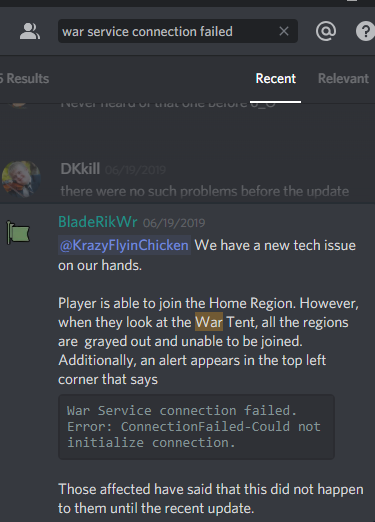
you said "war service connection failed"
 terse flume
Speaking of which, how do I leave the tutorial "boot camp" island?
blissful sequoia
@terse flume the tent everyone is gathered around teleports you
bleak turtle
terse flume
@blissful sequoia Thanks!
bleak turtle
pearl kayak
@bleak turtle odd
bleak turtle
pearl kayak
its not that derp
he cant see the thing that connects the regions
aka has no connection to it or it is blocked
blissful sequoia
mhm
bleak turtle
Its blocked somewhere but I cant figure out where.
blissful sequoia
or its an http connection that is being intercepted
pearl kayak
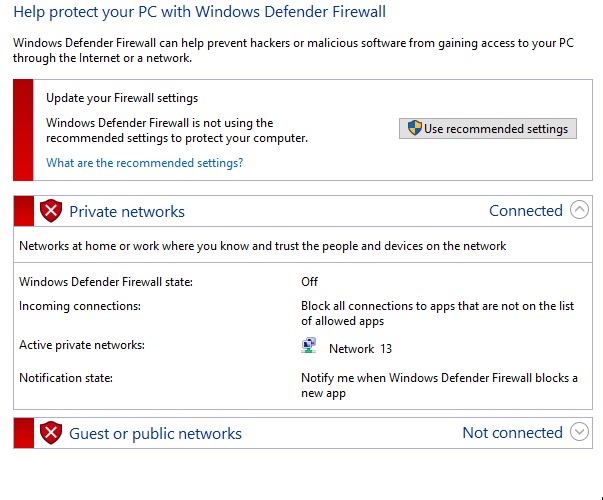
so your firewalls are off
bleak turtle
Yes
pearl kayak
and anti virus asswell
 pearl kayak
i mean the router could be blocking it but that would be stupid
blissful sequoia
can you test with tunnelbear or a wifi hotspot?
blissful sequoia
that will determine if its your router
pearl kayak
rebooting can fix alot of things, it only takes a couple of minutes
so rebooting the router can help alot
bleak turtle
I restarted my pc... but I guess I can do the router.,
pearl kayak
that stopped my steam downloading once
took me 3 days
i was livid when i found out 😄
bleak turtle
Well... I was going to sniff it and see what wireshark said
bleak turtle
@blissful sequoia Should I @ chicken?
bleak turtle
 blissful sequoia
yea im not sure, ive had mixed results about asking devs for things
totally up to you - how bad do you want to play lol
and you can always try a VPN/hotspot to see if its your internet connection causing the problem
bleak turtle
If I knew what ip to look for I could at least track down the issue.
 distant tree
How likely do I get banned for killing 10 people with a truck because they keep walking in the middle
 polar marlin
unless you get mass reported, very unlikely
 balmy shale
Hi, I've just picked up Foxhole today and I'm trying to get it to work on Manjaro (Linux) any advice would be appreciated?
polar marlin
you'll just get weapons locked for 20 min
balmy shale
I've tried proton 3.19-9 beta and 4.2-9 but it won't launch, I've also set Steam to use Vulkan DX11 version in the Steam settings but it just keeps crashing.
distant tree
Is there any good suicide clans?
polar marlin
wrong chat.
distant tree
oh shoot sorry
blissful sequoia
@balmy shale you have the proprietary video drivers?
balmy shale
erm good question I'll double check (I thought I did)
blissful sequoia
the default vesa drivers arent not good enough
youve got to get the binary packages from AMD/nvidia and install those
i found them to be incompatible with ubuntu 18.04.2, so I had to roll back to 18.04.1 lol
but i have kind of an older video card on my linux machine, a 750ti
was able to get it to work with the right video drivers tho
balmy shale
Oh ok, I'll have to search on how to install them in Manjaro
blissful sequoia
it's like a tar.gz you unzip and run the installer (if it's nvidia)
balmy shale
AMD Vega
blissful sequoia
hmmm
well i did try with amd too, similar process, struggled more with those drivers tho
anyway i just download the installer from AMD, no reason to deal with package management/3rd party repositories in my opinion
balmy shale
Your on Ubuntu though right?
blissful sequoia
yeah
bleak turtle
@hot oak I am getting a "war service connection failed". I have tried to Restart my computer, steam and router. Turn off my firewalls (windows and router), verified my files, run using administrator, opened all steam ports on router (Not that they should be blocked.).... I am just kinda at a loss.
 hot oak
@bleak turtle Have you run through the networking troubleshooting steps in the pins on this channel?
bleak turtle
Yes
hot oak
Uninstall foxhole
Disable firewall
reinstall foxhole
Re-enable firewall
bleak turtle
But... if the firewall was turned off... how would that effect it?
hot oak
There has been an issue in the past where the download of the configuration files is being blocked on download by the firewall
bleak turtle
Oh....
hot oak
There is a good chance this is happening because of a conflict with your anti-virus program, which can result in critical files from being downloaded from our cloud services. Here are a few steps you can take to try and resolve the issue:
i) Add Foxhole to your exclusions list
In most antivirus programs, this will be in the ‘settings’. If it asks you for a folder to add to your exclusions list, specify the folder that Foxhole is installed to. By default, it should be :\Program Files (x86)\Steam\SteamApps\common\Foxhole
ii) Unblock Foxhole from your firewall
If you have a firewall, go into its settings and look for something like, “Allow an App through the firewall”. Make sure that Foxhole is selected. Depending on your software, it might also come up as ‘WAR’
iii) Unblock port 443 from your Firewall
For this you may need to Google specific instructions for your software. In most cases, port settings are located under an ‘advanced settings’ section of your router administration site or firewall software. You will need to create an inbound/outbound rule, or exception, for port 443.
iv) Verify Integrity of Game Files
Go into Steam and right click Foxhole, click on 'Properties', click on the ‘Local Files’ tab, then click ‘Verify Integrity of Game Files’. Once completed, restart steam and try Foxhole again.
v) AT YOUR OWN RISK
If the above steps don’t work, you can try disabling your firewall temporarily, reinstall Foxhole, then re-enable your antivirus.
@bleak turtle Antivirus as well. Especially if you're using Kapersky
bleak turtle
@hot oak I dont use an antivirus.
And turning off my firewall should have fixed it.
Turned off firewalls, uninstalled game, reinstalled game. Still nothing.
hot oak
And you've tried the other steps such as restarting your router?
bleak turtle
@KrazyFlyinChicken I am getting a "war service connection failed". I have tried to Restart my computer, steam and router. Turn off my firewalls (windows and router), verified my files, run using administrator, opened all steam ports on router (Not that they should be blocked.).... I am just kinda at a loss.
blissful sequoia
you're tier 2 tech support kfc
we already checked the tier 1 stuff
but there were 2 other people with this problem, 1 guy disappears forever, the other one has nothing to say about it lol
 inner basin
im one step closer to using wireshark on this
bleak turtle
I tried.
I could not get any useful data
Since I dont know what a proper packet is supposed to look like.
blissful sequoia
indeed, although i would not be surprised if the intel was an http request
specifically http
polar marlin
there's some fucky connection going on the servers atm
me and some guys are basically teleporting
 craggy solstice
I waited 30 minutes
craggy solstice
yes
 fallow pagoda
I see the comments
craggy solstice
is down
fallow pagoda
Thx
craggy solstice
The server is very unstable.
fallow pagoda
No worries, I’ll fight another day then
terse flume
Yeah same, been waiting in loading screen for ages
 torpid gale
I'm not the only stuck at the loading screen?
 pallid tangle
I'm also stuck into the loading screen
 verbal pawn
blissful sequoia
verbal pawn
blissful sequoia
works for me...
i dunno if it recently came back online or what. i sure wish we knew the damned servers so we could determine what cuts the network off for so many people so often
i would be inclined to believe its all DNS servers, but who knows. maybe internet routes are going down or w/e
oh or maybe tis faction specific.
torpid gale
Yeah I dunno, was on for a few hours, logged out real quick and now I'm stalled after clicking deploy
blissful sequoia
it might be the colonial home island is broken
 hallow thunder
Okay so I'm not the only one stuck in an endless loading screen then?
 clear ermine
I'm stuck on the loading screen as well. Verified files, but no luck. I'll give it a try tomorrow.
blissful sequoia
no its definitely not just you
if i had to guess, id say theyre probably paging the devs, i bet its back working in a couple hours or less
hallow thunder
Then I'm going back to Runescape (don't judge me)
pallid tangle
Now it's work for me
clear ermine
Confirmed. I'm in as well
 worldly hawk
hate to keep bringing this up but it's getting very frustrating. i've set up voicemeeter as my default audio device and everything and it still hasn't fixed my problem in game
blissful sequoia
which problem?
theres game audio, theres voice audio, theres local and operation voice audio
worldly hawk
for some reason the voice audio from me and everyone around me keeps cutting in and out
blissful sequoia
ok so its the classic bug
the one for voicemeeter, ok ok ...
and you installed it and then you switched to voicemeeter as the defaults...
terse flume
Stuck at loading screen ?
blissful sequoia
and you saw sound in the voicemeeter interface's equalizer properly for mic and speakers?
eazy e i think its down, i cant join either, someone needs to tell the mods
worldly hawk
yes
checking voicemeeter now again, it's not even showing up in my playback devices this time
blissful sequoia
did you uninstall it?
worldly hawk
voicemeeter?
terse flume
this happened before
blissful sequoia
yea i cant imagine why it would disappear from the playback devices, otherwise...
worldly hawk
no, i haven't uninstalled it. i have turned off my computer since last night, however
blissful sequoia
are you using the old windows 7 control panel for sound? i find it easier to use than the new windows 10 stuff
worldly hawk
i am
blissful sequoia
if its not in that list, but you have voicemeeter running, then i think you need to reinstall it
worldly hawk
oh dear, ok
blissful sequoia
there are 2 popups that are red windows (because the driver is not signed)
its not signed because they havent paid microsoft to do the thorough testing
or maybe its not red, no ...
no i think its a regular verified driver
anyway i think its 2 popups you have to OK
worldly hawk
i remember seeing it wasn't a verified driver
blissful sequoia
ah ok so im remembering it right then.
worldly hawk
but i don't remember anything after that, to be honest
blissful sequoia
unverified, but its OK, we've all used it
you may have clicked no because they were red, and then the drivers didnt install - thats my guess, i recommend reinstall it
terse flume
is it fixed yet
 elder prism
so its not just me stuck loading into home region
terse flume
yeah its everyone
worldly hawk
when i go to uninstall voicemeeter from the control panel im just presented with the window to install it?
no option to uninstall
terse flume
everyone that went to loading screen
i returned to home region and now im stuck at loading screen
big oof
happened last war too
took like about an hour to fix
blissful sequoia
uhh you can just install it again i think
or maybe you dont have it installed, actually
worldly hawk
well i've hit install on the installer thing and it said it was installed and asked for a system reboot almost immediately so i'll go do that
blissful sequoia
yea that is needed
its like the one thing i have to restart my computer for, and like updates once a month when the russian get really hackerish
worldly hawk
that doesn't seemed to have worked and no matter what i do i can't seem to uninstall it
worldly hawk
yes
blissful sequoia
i guess you maybe missed a necessary reboot
its all i can think of
so that page says to uninstall it in the device manager
hallow thunder
I just got a one minute respawn timer after being spawn killed
 clever onyx
I have connection problems all the time I cross the border... can it be cured?
worldly hawk
am i supposed to install virtual cable with voicemeeter?
worldly hawk
so yeah, this thing isn't showing up for me at all in playback devices or recording devices. i've done a bunch of searching online and followed a few steps such as disabling the checking for driver signatures, reinstalled the thing etc. but still no cigar
 cunning sapphire
There are several read first related to voice chat errors, in which order would you do them? @inner basin
 charred turret
hello, no new pb, but wondering if anyone found a way to resolve random sound crash during travelling/moving from home island to any other maps
cunning sapphire
The issue is that I get the "connected to local chat" message but I am not, so The message on top right displays when I push to talk but the speaker icon on top of me does not and nobody can hear me or viceversa, on joining a operation sometimes I can talk in operation but never in local(1/2), reconnecting to local chat sometimes works(2/6), sometimes doesen't(2/6), and sometimes does not connect successfully displaying [2] 2-5006 error(2/6). Joining a different region doesen't seem to work(0/2), sometimes restarting foxhole does fix it(1/3), and restoring vivox files as the read first does has fixed it (1/1).
blissful sequoia
i saw somebody in reddit say they fix the 8-6-0 error by disabling their sound card and enabling it in the device manager or sound control panel
every time they want to play
it actually sounds easy to do, you can try it, i think they do it multiple times until it works, but we have basically no other solution for 8-6-0 as far as i know
maybe the voicemeeter thing would work - if its indeed not a network problem
cunning sapphire
Since i can have the problem but still talk in game it is not the microphone or speaker
Since it works or doesent without touching networking it does not seem to be a internet error
I have my suspicions on my potato PC since it works worse when doing other things (discord, league launcher...)
blissful sequoia
i dont think its a potato pc problem
its like a weird sound driver issue - incompatible with vivox but not foxhole
cunning sapphire
will try those another time
charred turret
Hello got an issue, my character keep randomly teleporting around while I walk, when it doesn't, it walk but don't actualy move ahead (like walking and keep walking in an invisible wall) can do 3 to 8 steps before one of the issue trigger
Reproduction steps on the same day discovering the issue : in Home Island, WE (med pop), RT (low pop), Marban (high pop) > walk a straight line, turn, climb up, jump down, trigger with all those actions
Where it happen : when I'm on the global map whether I'm in a low, med, or high populated region
Where it doesn't: in home island
Checked internet working fine, went on ethernet to stabilize, no change
terse flume
Hi! First of all, awesome game! Very promising. But the problem iI have is this. I worked all day in the Loftmire OP and was hauling goods from Great Marsh. But as soon as I left Heartlands, I couldnt hear the voice chat operations anymore. And neither could they hear me. Other people who were outside Heartlands could still hear me, people in Great March but also in Loch Mor so it was not just 1 region. It is as if voice chat doesnt cross the Heartlands borders, neither goin in nor out. Can clarify in game if needed. My in-gane name is the same as here. Greetings JaXx055
and just to clarify....I'm not the only one with this problem... everyone in my Op experiences the same. Maybe even all people in Heartlands
 median forge
Hey dont know if this is a common problem but cant find anything about it on google. when i join i have both game audio and voip but after about 1 min my game audio cuts out but i still have voip any ideas what it could be?
blissful sequoia
have heard a few accounts of game audio dying; i don't know of a fix personally, might be worth a search through reddit or something...
possibly audio driver problems - i know it seems like it couldnt be because vivox keeps working but theyre somehow sharing the audio interfaces
i think it would be worth finding your motherboard model, and getting the audio drivers from the manufacturer's site
or if your audio is from your video card, ya know, update the audio drivers from that source
median forge
ive had a trawl through reddit but havent found anything concrete yet will try the drivers. cheers for the help 😃
blissful sequoia
theres been at least 3 people with the same problem here, i do not know if they fixed it or not
 prisma pumice
hello , do you got some tips for help me to run my game on my potato pc ?
 solid elbow
i just got the game today and when i try to click play on the main menu it loads for a few seconds and then it says failed to download profile[1]
prisma pumice
very potato jajaj , i5 2 gen and hd 4400
8 ram DDr3
its runs at 14 fps but then suddenly the game crash
blissful sequoia
It's not the worst potato I've seen, but yeah you'll have to lower the resolution scale I think, maybe also model detail and texture quality
Only the video on that is marginal
@solid elbow usually restarting steam fixed that error
solid elbow
ok, ill try that
i restarted steam and when i try to click play it says the same thing
blissful sequoia
some people have to restart steam 2 or 3 times, i might be worth just a whole computer restart
solid elbow
all right
ive restarted steam 2 times and i just restarted my computer but it still says the same thing
blissful sequoia
hm well ... what else could it be
could be your DNS server, it could be your anti-virus or firewall
if you have an antivirus besides windows defender, i suggest turning it off to try again
and the same for a firewall, windows firewall is generally fine, but some of the other ones are more strict. some of them come with your antivirus...
solid elbow
i only have windows defender
blissful sequoia
any non-latin or punctuation in your windows user name?
one person got that message because they had another steam game running in the background shrug
and then theres always possibly the DNS server. there is a pinned message about how to change your DNS server
solid elbow
i went through the firewall and allowed everything in the foxhole folder that wasnt already allowed
still doesnt work though
blissful sequoia
yea the firewall is usually not the problem, its usually the antivirus or dns server or network problems
solid elbow
also im pretty sure my windows username has no punctuation or anything
blissful sequoia
some people have like ... parental controls in their router blocking them
solid elbow
i dont
blissful sequoia
i know the devs are working on the servers this week because of all the network problems
you can always test it with a free vpn like tunnelbear and it will determine if your router/ISP is the problem
solid elbow
i dont think my router would be the problem
blissful sequoia
what do you think it is?
solid elbow
i dont know
bleak turtle
@blissful sequoia
For the record.
"war service connection failed"
Is caused by not having a security update for windows 10. I opted out of it for a VM test and totally forgot about it till today.
blissful sequoia
a windows security update?! wow never would have figured that out
thanks samuel, thats useful, im glad you were able to figure it out
solid elbow
i want to commit computer shoot
 tall pendant
does Vsync work in the main menu?
inner basin
VSync only applies in Full Screen mode
terse flume
any idea about my voice chat in Heartlands issue?
 vestal tinsel
Hey, I got a problem. I am not able to hear any voicechat in-game. First I thought it was because of my bluetooth headset but that has worked before. I now use a headset directly connected to the PC but still cannot hear anything. Is there any solution to this problem? I have pressed most options in game I think and cannot get it to function.
blissful sequoia
make sure you have the right output device selected in the foxhole voice settings
blissful sequoia
any vivox errors?
vestal tinsel
What’s that, if you can explain?
blissful sequoia
ok just old fashioned vivox incompatability then ...
uhh the first pinned message has the only hack we know to deal with it
vestal tinsel
Thank
hallow thunder
Why am I constantly getting 40 second respawn timers?
blissful sequoia
regular game mechanic
hallow thunder
This isn't normal
 narrow escarp
Hey so anyone here good with Twitch?
@hallow thunder Could be total pop spawn
people dying to quick
 teal bronze
What exactly with Twitch
 fast kelp
@hallow thunder 4 things contribute to respawn timers
Friendly fire of any kind raises it
Friendly players dying enmasse raises it
You dying rapidly raises it
Outnumbering the enemy raises it
hallow thunder
It's been high for the whole war
 random barn
Hi, I have a problem with Foxhole - I'm getting severe (1-2s) stutters intermittently (15-20 mins). Usually occurring while something new is happening on my screen (enemy soldiers appearing for example), but there is no definitive rule. I tried lowering graph settings, no results.
blissful sequoia
i get that too. its around the borders
random barn
Any way to fix that?
 rustic minnow
WHY!!!!!!!!!!!!!!!!!!!!!!!!!!!!!!!!!!!!!! OH!!! ... sh...;;; Fu....!!!!!!!!!!!!!!!!!!!!!!!!!!!!!!!!!! what is this!!!
lowlevelfatalerror << ㅡ why!!! Why are you doing this ?! I do not understand. This did not happen in the past !!!!!!!!
fufufufufufu!!!!! 씨발!!!
ㅈ같네ㅐ
terse flume
@tech wizard help this pal ^
hallow thunder
Also I keep losing voice chat and the only fix seems to be closing and reopening the game
 spark storm
@rustic minnow that could be caused by many things. For example the GPU overheating. Need to know the PC specs and stuff to troubleshoot more, tho I don't have time right now :(
cunning sapphire
Same as Barcel and Derp, Going near a border invariably gives me a freeze of about two seconds
 fallow herald
Hey my VC is super choppy, I tried changing DNS servers already... didnt work
nvm I used an audio driver proxy and it started working
 vague linden
@fallow herald How did you solve the VC problem?
vague linden
I have had this problem for the last two days or so
 proud schooner
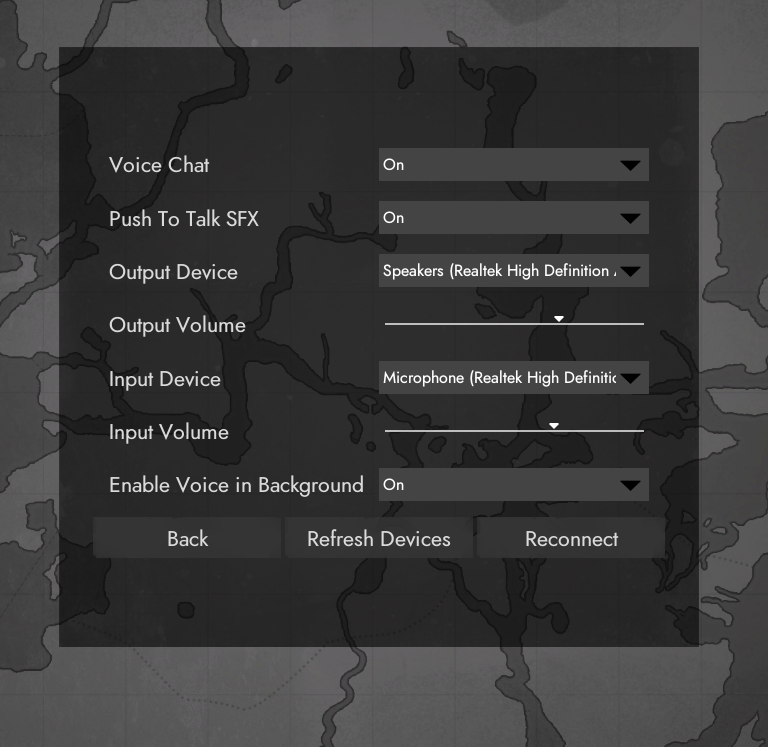
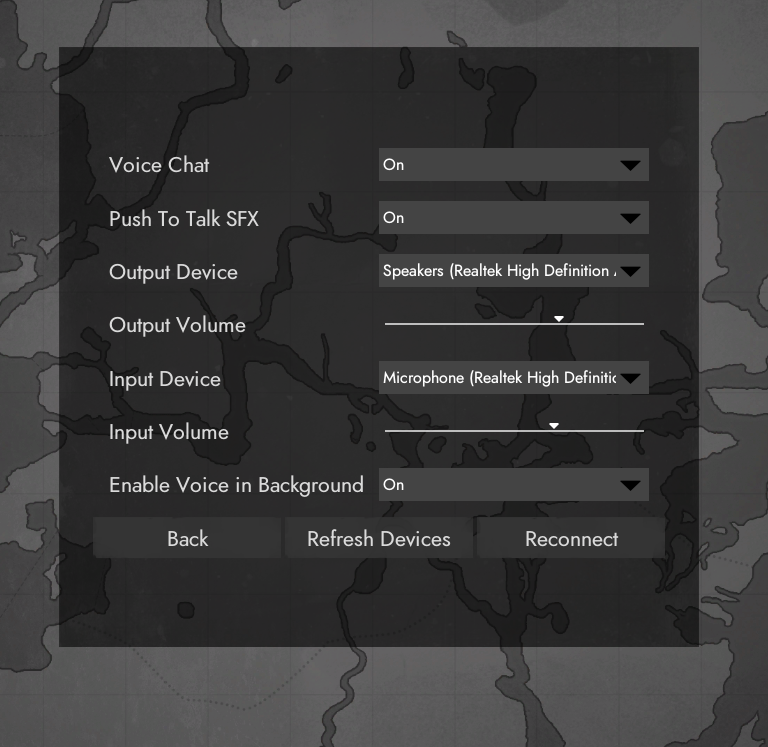
So there's a separate menu for VC related stuff in the menu
proud schooner
Ye
proud schooner
Changed your output device to your headset?
 vague linden
White shark
proud schooner
Is it USB or 3.5mm (headphone jack)?
 coarse path
It a combined 3.5mm jack?
proud schooner
Gotcha. Just to eliminate the variable, if you have the USB adapter for it, go ahead and get that plugged in with the headphone. After doing so, you'll probably have to restart the game fully. Then, the Output device on that screen should be different than what it is now (might say USB audio or something of that nature)
proud schooner
Yep
Plug in the USB and plug the 3.5mm into it (I assume it's a separate adapter basically)
vague linden
Well I did get a response that I plugged the jacks in
But no response about the usb
 vague linden
Ye
proud schooner
If you plug the jacks into the USB and the USB into the computer, do you see a new audio device showing up?
vague linden
Wait wait
vague linden
Plug in the jacks into the usb?
vague linden
Umm
proud schooner
What model headset is it specifically?
vague linden
proud schooner
Well, the USB is probably for lighting power and/or an amp in the headset as well
Now that I see what it is.
vague linden
Well everything works without the usb
vague linden
Okok
proud schooner
And once that's done, make sure your audio settings are good.
vague linden
I got the mic in and the headphones
 vague linden
Yeah, that works
proud schooner
cool
Okay,
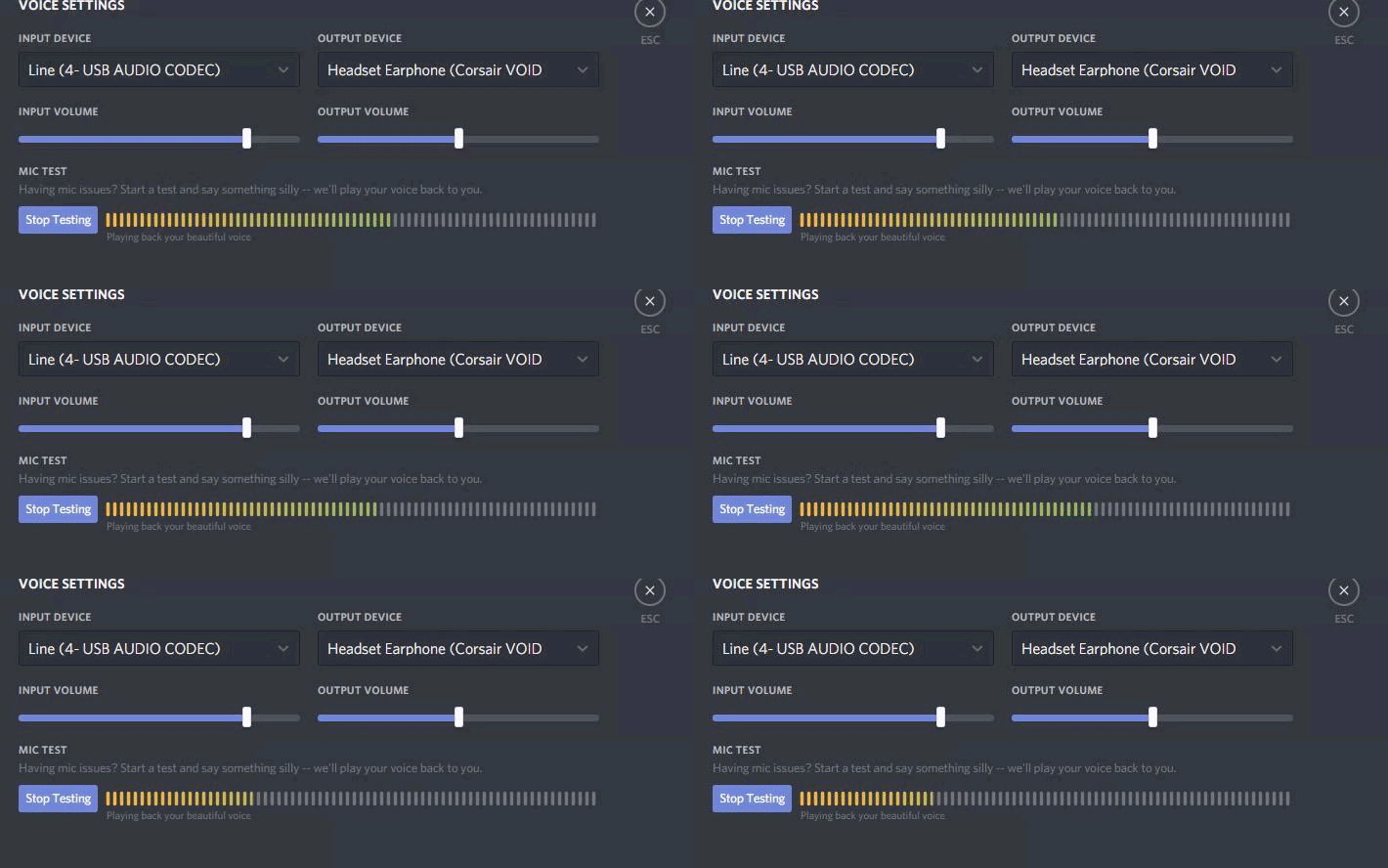
Grab a screenshot of those settings for me
I just wanna see the name
of the input device
 proud schooner
noice.
proud schooner
Okay, so shut down Foxhole completely, and then boot it back up, go to Options and check the device settings
(we'll want to make sure to restart Foxhole since we were plugging and unplugging things - not always necessary but can be)
proud schooner
I believe you're playing Warden?
vague linden
Yes
proud schooner
I'm gonna hop into the home region innamoment
vague linden
Ok, I'm under the name Matrosee88
vague linden
Where should I see em?
blissful sequoia
sometimes the realtek sound drivers differentiate between front and back port on desktops ...
vague linden
I see something on the right
Channel: Local
Maybe it is working but I don't have anyone to tell me if he can hear me hahah
proud schooner
Hah. Ask around in text local for people to hear you
blissful sequoia
you can join operations across all the regions to test
vague linden
There is literally nobody here
proud schooner
That's a good point
vague linden
I'm gonna try that then
Good idea
No
Still nothing
I see people are talking but I don't hear anything
blissful sequoia
really sounds like the wrong output device, but a few people like this just had to do voicemeeter
vague linden
I don't even know if they hear me
blissful sequoia
you can type to them that you are doing a test
vague linden
Yeah
I even talked
And said that they write to me in chat if they hear me
Actually, I am listed in the voice shat
But I don't have that loudspeaker next to my name
blissful sequoia
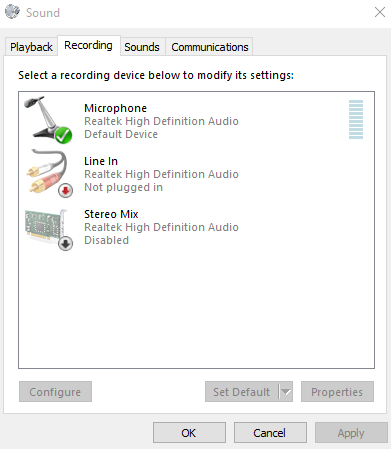
Can you share with us the devices list in the Windows sound control panel in the recording tab? I suspect there could be multiple realtek devices
 blissful sequoia
Hm. Guess not. What's the stereo mix? I've never seen that
vague linden
I have no ide
blissful sequoia
And why is it disabled...
blissful sequoia
Well jeez I dunno if Sir has more ideas but if you have game sound, the first pinned message about voicemeeter guaranteed to get you voice audio...
proud schooner
Ooooh
Line In
Enable that @vague linden
Right click enable
Pretty sure that's your headset
vague linden
Will do, just a moment
vague linden
I'm back
@proud schooner
It isn't disabled
It just isn't plugged in
But the headphones are working perfectly
blissful sequoia
@vague linden did you ever read that #1 pinned message?
blissful sequoia
its what i would do if i wanted voice audio
polar marlin
(Trust me, you don't want voice audio)
 molten solar
Anyone having crashing issues?
 obtuse bolt
I'm getting the "failed to download profile[1]" message. I just bought the game.
inner basin
@obtuse bolt Try restarting Steam
If that doesn't work, restart your computer
If that doesn't work, try the network-related steps in #technical-read-first⚠
obtuse bolt
OK let me give that a whirl. Thanks.
inner basin
No problem.
 sand charm
i got a qeustion i was just looking to the webpage and saw the web page dont have HTTP or HTTPS why ??
random barn
I tried emailing the devs, no response, so I'll try again here - I have a problem with Foxhole - I'm getting severe (1-2s) stutters intermittently (15-20 mins). Usually occurring while something new is happening on my screen (enemy soldiers appearing for example), but there is no definitive rule. I tried lowering graph settings, no results.
polar marlin
you're lucky you're not getting crashes
that's the graphic card failing to render and reseting
random barn
@polar marlin What do I do about it? My GPU is not so bad it would stutter in a game like this. (GTX1060)
spark storm
I don't know your exact problem but I have 1080ti and I get stutter when closing on border :D
It's not about the 'gpu power' it's just something devs need to fix
But if it's happening kind of totally random then it might be another problem and not the border one
spark storm
How did it die?
vague linden
Idk
I installed voicemeeter
And it just disappeared
I tried reinstalling the game
spark storm
Did you restart pc?
spark storm
It has been so long since I used that
vague linden
I downloaded that to fix my vc problem
spark storm
like what you can do with it is virtual cables then you need to 'connect' those for inputs/outputs
vague linden
I did everything which was said in the pinned msg
spark storm
there should be easy to understand youtube videos to help how to do it
idk what they even say on pinned, let me check
vague linden
Yeah, but how do I get sound back to my game
Ok, its back now for some reason
Lemme check when I turn on voicemeeter
spark storm
it's probably cause you had 'wrong' audio output as default
so the sound went somewhere else
when you open foxhole it'll use whatever is as "default"
vague linden
Vc still isn't working
spark storm
You can't hear others and they can't hear you? Or does some part of it work?
vague linden
Neither
spark storm
it's quite odd since you had just fine output / input device in foxhole and you said that discord works just fine
vague linden
I just figured that voicemeeter kills my game sound completely
spark storm
Yeah cause with voicemeeter you have to set the virtual connections right, it's slightly trickier
vague linden
For some reason, when I set it up in foxhole. For output it displays me "voicemeeter input" and vice versa
spark storm
I think sir would be better suited for helping you with this as he uses that daily
I have to go by memory of somehting I used long time ago :D
I can't even try to do it as we go since I'm using totaly different system and things
This seems decent "basic" video to make sure you have everything set right

understanding Voicemeeter ( A Virtual mixer for windows 10) layout and the basic setup, and using with Skype or discord. There are a lot of tutorials for voi...
random barn
@spark storm I need to check if it happens near borders
spark storm
@random barn it's pretty 'common' thing as it loads the other side of the border instantly there so there's the stutter
But if you're just experiencing it middle map and like every 15mins or something it's probalby something different..
I just haven't experienced these issues or gone through them so I can't be much of help here :p
random barn
I'll keep an eye when these happen
I've written email to devs, maybe they'll respond too
Also, +1 for your avatar ❤
spark storm
And yeah that gtx 1060 is good enough to run the game the stutter is caused by something else
 wet cave
My game sound is working good but i cannot hear when others speak in game
any help tbh? <@&521124241395941396>
wet cave
should i reset the game
 rigid vortex
Press the reconnect button
It’s not uncommon for people to be disconnected from the voice server, you just need to reconnect to it
wet cave
pressing that isnt doing anything
 worthy jackal
.
when did i become a tech wizard XD
or a think tank
cool...
@wet cave best way is to change your output device
then reconnect
if you dont have 2 outputs just reconnect
 red vapor
hey i am having issues trying to connect
worthy jackal
you can either restart foxhole or try again in like 10 seconds and ya should be fine
im not positive on this though
 opal shoal
Hi everyone. I require some assistance as i'm stuck
spark storm
If you're stuck ingame use mod mail to contact moderator
opal shoal
I used it and am currently waiting for a reply 😃
spark storm
Or you can try esc -> return to home island
opal shoal
well yeah but i'd like to report the location so they fix it
spark storm
You can use ctrl + shift + p to take screenshot of it and post in bug report
opal shoal
ah alright .. thanks 😃
spark storm
Fuuu,.. I need tech wizard too :D
when you press ctrl + shift + p where does it save the file?
what format is the file?
inner basin
@spark storm @opal shoal The shortcut is Ctrl + Alt + Shift + P. It is stored in C:\Users\USERNAME\AppData\Local\Foxhole\Saved\Screenshots\WindowsNoEditor
If you cannot see the AppData folder, make sure to check "Hidden Items"
spark storm
the problem is I'm on linux and I think it's just one of wine bugs that needs fixing
cause when I press that game just hangs 1-2s and noting gets generated
inner basin
If you do the Ctrl + Alt + Shift + P thing, it should say something in the chat box
Linux... I have no idea where'd the screenshots be
@blissful sequoia Got any ideas?
spark storm
It doesn't but I'm just a derp, was waiting for that message to say something ingame but it was printing all the screens :D

So I actually don't have a problem! I just never checked the directory just assumed stuff is broken as it never gave output in chat like it does on normal windows 10 pc
Tho now I have another problem, I do get the images but not the nice overlay that there was
https://i.imgur.com/D6kH6Kg.jpg
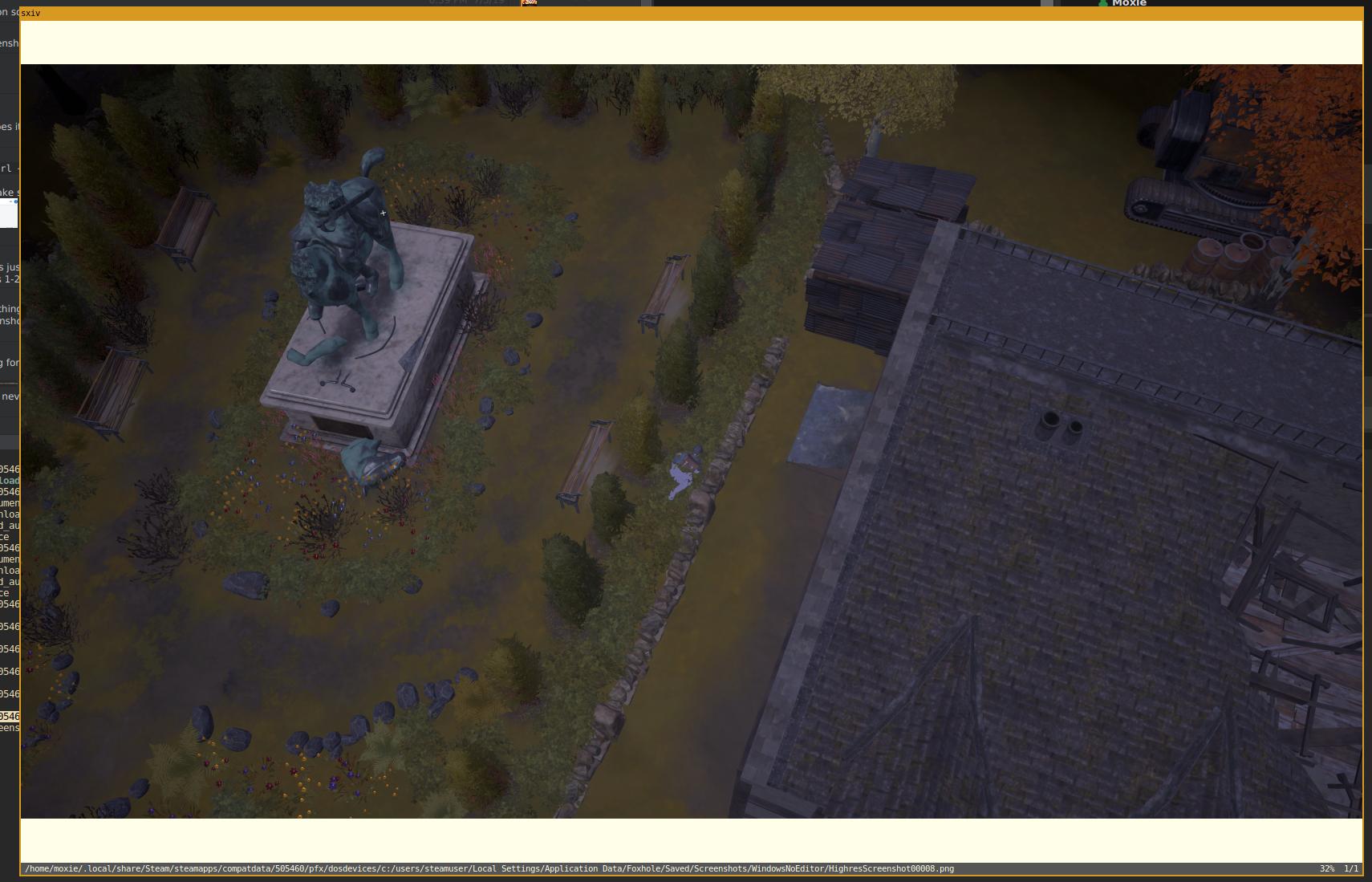
which was the whole point for those shots
inner basin
Overlay?
spark storm
like you know when you take those shots it shows the green on left and other 'nodes'
So it's helpful for devs to locate things
spark storm
Yes
And yeah probably does cause you're on native windows, I'm running game on linux using wine and it works pretty much flawless with a bit of tinkering, other than this screenshot feature, which I don't know how to fix as I don't exactly know where to start. I tought I was missing some lib32 but it's actually generating the screens just not the "hud" or w/e you'd call it
worthy jackal
is what buttons to press determined on the computer?
 lament dune
im having a problem with my audio thing, theres no reconnect button, it only says back and refresh devices
worthy jackal
send picture?
lament dune
sure, just a moment
worthy jackal
yeah take your time
worthy jackal
have you tried closing and re opening the application?
lament dune
yes
i reinstalled it as well
also, everyone in game when they speak, theyre mics are really choppy
its a guessing game to figure out what theyre saying
worthy jackal
did you try changing your output device?
spark storm
You could try, they're generated back
it's really hard to troubleshoot when we can see that you have just fine output/input and your mic / speakers are probably working on discord
I haven't gone into vivox too much so others probably can help you more with that
lament dune
its a strange situation
where do i find the foxhole folders? so i can try to delete and reinstall
nvermind, found it
so i have dleted the folder and reinstalled the game, and the button is still not there
 tiny lake
Anyone else getting disconnect a LOT
 normal plinth
I'm not sure why, but I don't think I'm supposed to be a tech wizard xD
molten solar
I kept on getting crashes a couple days ago
blissful sequoia
@spark storm @inner basin isnt the screen shot key just regular p? also why not use steam's screen shot F12
spark storm
Cause the ctrl shift p brings more things to the screen that helps devs to do their thing
I can take normal screenshots just fine
But it doesn't draw the info
 woeful tulip
someone please help it says my content files are locked, ive had only problems with this game so far on windows and linux
(linux i understand but cmon windows )
blissful sequoia
content files blocked is probably antivirus
or ... or maybe its that thing someone recently told me about
woeful tulip
which is?
blissful sequoia
ah so ... someone had that because the folder had become read-only
have you already deleted the Foxhole directory in %localappdata%?
inner basin
Are you installing Foxhole for the first time?
woeful tulip
yup
blissful sequoia
Foxhole directory
woeful tulip
where?
inner basin
C:\Users\USERNAME\AppData\Local\Foxhole
blissful sequoia
hes ran it once or twice already blade
but if its not a read-only config directory, it is probably your antivirus
woeful tulip
it was read only..
blissful sequoia
do you?
just delete it and try foxhole again
but I think your antivirus is too aggressive
blissful sequoia
the foxhole directory, the thing we are talking about
blissful sequoia
i cannot imagine what is making that folder read-only
uhm, you can try just turning off the read-only, do you know how?
blissful sequoia
it's got to be something else like an antivirus
woeful tulip
ok
there is one more
acces denied
cunts
and im using force
@blissful sequoia what can i do if access is denied
blissful sequoia
2 possibilities, use security tab, advanced, set owner (and all children) to your account
and the other cause is if the file is open already, cant be deleted until its closed
(foxhole running in background still)
woeful tulip
what
security tab
first time i heard
i have avast antivirus
and i cant chut it down
blissful sequoia
yea its hard to shut antivirus down - for safety
woeful tulip
ye
blissful sequoia
maybe you can make an exception for foxhole
but you might have to uninstall it - or figure out temporary disable
woeful tulip
aha
i see it
i restored a file
the one that was locked
yay
its fixed
i legit had to click twoce
twice
and it fixed
i feel rarted
thx @blissful sequoia
blissful sequoia
yea, try not to get run over
woeful tulip
xD
 honest haven
I have a problem where the voice chat output audio is bugged and whenever someone speaks, the audio skips and the sound is distorted. Does anyone know a fix?
 arctic talon
@honest haven try checking the first post in pinned messages, it looks like that can be the issue
honest haven
When i enable my mic in control panel it bugs out and when i disable the mic, the voice output audio returns to normal
blissful sequoia
I wonder if it's a mismatch of the recording vs playback sample rate
I think we've tried all that before tho
 mighty pewter
Hey guys!
Is this the place to ask:
What to do when my discord creates lag spikes?
blissful sequoia
are you certain its your discord?
mighty pewter
whenever i press push to talk my foxhole freezes for like 2 seconds
blissful sequoia
is your push to talk button p?
you might check your foxhole key mappings, you might be pressing something like screenshot repeatedly
if its the discord overlay, then maybe youd have to find a way to fix that or turn it off
mighty pewter
no my discord overlay is off and my PTT is 6 and i have made sure it is nothing in foxhole
blissful sequoia
i heard somebody describe something similar affected by OBS stream software
mighty pewter
it seems to be a rare problem, for I can't find much info on google. Maybe I google it wrong
 cerulean sinew
Hey guys, is there a way to fix lagging/ cut off voice chat in local and operations ? It's not my mic or my connection since the same people I try to talk to in game hear me fine over Discord.
blissful sequoia
@cerulean sinew yea, please check the top pinned message
cerulean sinew
Thanks
blissful sequoia
@sly anvil is the burned spot on the laptop chassis or the screen part?
wires only burn/melt from the inside when you have insufficient power - like low voltage, kicks up amps to maintain current, exceeds wire tolerance
but if it's instead being overheated by say ... the graphics chipset from the outside...
could be a fan thats not turning or turning slowly or dried/ineffective thermal paste
blissful sequoia
photos? curious where the burn is
 sly anvil
It looked burned from the outside.
Oh, um, top right section of laptop. Near power button area
blissful sequoia
ah so the other side of the CPU maybe
or probably graphics chip - is it separate chip or the onboard intel HD graphics?
sly anvil
Separate
blissful sequoia
i bet that thing gets hot, does it have its own cooling system?
sly anvil
Never using Intel again
sly anvil
No, and I've had cooling problems before. But never something like this
blissful sequoia
yea laptops ... heat problems, big time
sly anvil
Yep
blissful sequoia
so does it have separate cooling? does it share the CPU cooler? is it just totally passive cooling?
sly anvil
I think it shares? There are two fans. One was not working when I inspected and I replaced that, but that was on the left...
blissful sequoia
Not working oh... Hm
sly anvil
It works now
blissful sequoia
You replaced it because of the burning smell or previous to that?
sly anvil
As part of general maintenance I did when inspecting the burning (so a few days ago). Also de-dusted and such
One thing that is peculiar: burning did not seem linked to high power/temp situation
I played foxhole earlier today
But restarting my computer and this happened
blissful sequoia
Got an infrared thermometer? I wonder if it's just residual burning smell, like if you fix an oil leak on a car but spill some oil on it...
sly anvil
Hmm.
blissful sequoia
Maybe it's a good temperature now, but smells bad...
sly anvil
Possible. It was pretty strong though
blissful sequoia
Worrying...
sly anvil
Exactly
blissful sequoia
I wonder if anyone with more hardware experience has thoughts here
sly anvil
My hope is that its this wire, the connection between the screen and the laptop
I've switched to a desktop monitor now, so I hope I can just unplug it and it'll leave me be
blissful sequoia
Yeah maybe that wire is shorted now
blissful sequoia

have you googled your laptop model and burning smell? if it happened to you its happened to 1000 people
blissful sequoia
I know, how many extra screws you have now?
sly anvil
I have a cup somewhere with all of them, it's a few
Several even
Anyway I turned it on again (unintentionally) after removing the wire. Smell returned but not too much, might be left over. Still turned it back off to be safe
blissful sequoia
😕
 cerulean hazel
Allod's Bight Server is dead
 proud ravine
@sly anvil Laptop cooling pad, keep it on full fan blast.
Live dangerously and find a way to hold the laptop up with the bottom part off to see it all working
sly anvil
That is definitely an idea, yeah
If it starts up again I'll bite the bullet and do that. I'll try it normally first though. Hope springs eternal
 chilly scarab
Hello I just bought the game and have been having some issues with error one and went through the technical support one by one does any one have any suggestions?
(sorry I copied and pasted)
blissful sequoia
please check the pinned message about changing your DNS server
It could also be your antivirus/firewall blocking the connection
 gritty token
Is the game updated? I have to ask
gritty token
Are you in the US and are you in a dorm?
chilly scarab
I am in the US running a up to date windows PC in my house
gritty token
Do you know how to change DNS for your computer?
chilly scarab
yes I just tryed that
gritty token
did you do 8.8.8.8 and 4.4.4.4 by any chance?
chilly scarab
not 4.4.4.4 I did 8.8.44 for the second one
gritty token
what did you do for the first
chilly scarab
8.8.8.8
gritty token
do you manage your LAN network?
chilly scarab
no I do not
gritty token
a possbility is a firewall block for game related traffic
a specific port, and also do you have an antivirus?
chilly scarab
yes I have malwarebytes and whitelisted the game for it and the firewall
gritty token
try disabling it for a few seconds to see if it works
chilly scarab
did not work
gritty token
turn it back on and check your router for firewall level
i dont know the router / modem
@blissful sequoia any idea what the error 1 is?
gritty token
back to the need for what the error codes mean lol
blissful sequoia
but we know its a network problem i think
gritty token
any idea what?
blissful sequoia
parental lock or something on the router, antivirus that comes with firewall...
gritty token
should i ask the devs for what the error codes mean lol
chilly scarab
oof
rigid vortex
I’ve gotten that exact error twice and restarted the game to make it work. Don’t think that helps at all but it’s weird
blissful sequoia
@chilly scarab is this the first time youve loaded the game?
chilly scarab
yeah, what little I could find on error one was about how it needed to download files to my computer, and yes this is my first time with the game.
blissful sequoia
ok uhh
when you go to join, on the top right, does it say Live?
just want to make sure it doesnt say DevBranch
chilly scarab
no no where does it say live
chilly scarab
again no such thing
gritty token
have you ever had any issues with other games?
chilly scarab
never
if you wish to get into a vc and have me share my screen that might help more
chilly scarab
idk
blissful sequoia
i cant test mine now, im mid-game
it's a drop-down list on the top right to switch the branch
maybe they moved it and i didn't even notice
chilly scarab
yeah the only drop down I saw was on the title screen for language
blissful sequoia
maybe when you go to deploy then?
chilly scarab
same error
blissful sequoia
hm
ok have you tried turning off windows firewall and antivirus softwares?
if it's not that - then it's your router, i think
chilly scarab
yeah I turned off both and reinstalled the game only to have the same issue
blissful sequoia
i think it's a router setting then
chilly scarab
I agree
blissful sequoia
one person had that issue from a parental control setting on their router
chilly scarab
yes I do not own the router lol
blissful sequoia
you can search this channel for the keywords in that message, in the search you put like in:#technical-chat shard failed download 1 the search and scroll through many pages
well you can test with a free VPN like tunnelbear
i mean if it works for you, you could play throuhg a paid one, they are about $3 a month for a good one shrug
but if a VPN works, you can be pretty sure it's the router
chilly scarab
ok thanks for the help
oh god tunnel bear doesn't work
a vpn does not work so Im at a loss of what to do
blissful sequoia
well then it must be a local firewall problem
or possibly your c:\windows\system32\drivers\etc\hosts file is messed up...
possibly something with steam hmm
gritty token
did you verify files?
chilly scarab
yes
blissful sequoia
its tough because they wont share the server addresses with us
it sure seems like a firewall is blocking it...
which antivirus do you have, gspiess?
blissful sequoia
whitelisting is not really a good test - its a good solution, but a bad test
because we dont really know if you white listed it properly, foxhole might do something irregular
chilly scarab
ok
blissful sequoia
and it could also be that you accidentally switched it from Live to DevBranch without realizing it
I guess i will rejoin and find the button
yea its still there for me. Before you click play button, up in the top right there is a select box
there is a button next to it that says Change
chilly scarab
I see no such thing
blissful sequoia
yea it cant even get the news, its definitely being firewalled
avast and avg seem to hate this game
chilly scarab
yeah I just reset the ports for the third time lol, still didnt work.
blissful sequoia
what is resetting the ports?
chilly scarab
port 433 in the firewall so its not blocking it or the steam matchmaking servers
blissful sequoia
the windows firewall usually does not block outgoing ports (except for blocked applications). and the port would be 443 I think
but opening exceptions is not a good test, youve got to turn the firewall off for a test
chilly scarab
I just tried that and no luck
blissful sequoia
I don't really know then. Deduction leads me to being a software firewall doing it, but I don't have any other ways to test that
you can file a #bug-reports
they wont do much without one to try to help you fix it
inner basin
Hi @terse flume can you try
- Restarting Steam, if that doesn't work then
- Restart computer
Is this your first time playing Foxhole?
terse flume
I bought it two days ago, but I still haven't got it.'
It just says it's an error and it can't be executed.
inner basin
Gonna need specifics 😄
terse flume
So I got a refund today.
inner basin
😦
Aw, sorry I wasn't able to get an opportunity to help you out
I mean, I'm sure it could be fixable
terse flume
k
blissful sequoia
it's too hard to diagnose any network problems with no server info
if they cant be solved easily i just give up on it, they need to make a #bug-reports and bug the devs
sand charm
hey guys got a little problem my sound stops working now 2 time in a row yesterday got it 1 time just restarting wil get my sound back but is there a fix for it ??
 brisk ruin
I can unable to hear any voice chat
In game
When I join operations there is no mic icon next to people
Even when they are talking
 paper fern
@tall pendant Nope, sorry.
@brisk ruin Try reconnecting in the options menu if you haven't already. If that doesn't work a restart may be necessary.
 hollow sand
Can anyone confirm where the best waterfalls are in the game? I'm working on something.
inner basin
... well there's one in Shackled
arctic talon
Shackled Chasm have waterfall as Blade said, idk about any other waterfalls on other maps
paper fern
@brisk ruin Sorry, idk how else to help you. 😧
arctic talon
oh yeah, Linn of Mercy, Ulster Falls has small waterfalls too
 fossil estuary
linn of mercy M6k9 bridge
 wooden sluice
Hi, I was wondering if a mod could switch me to another faction.
terse flume
@wooden sluice Send a message to @coarse trail , you will be temp banned, for if im not mistaken 18 hours, to prevent you from leaking intel to the other faction
wooden sluice
Thank you :^)
hollow sand
@fossil estuary , @inner basin Thanks those were the 2 i knew about as well 😃
chilly scarab
uhh remember me? the game works on my laptop
blissful sequoia
mhm its local firewall probably
whats the difference of software between the 2...
chilly scarab
If we can find that the game might work on my main
prob the firewall settings
I'm going to restore firewall settings to default
blissful sequoia
it might some another firewall..
chilly scarab
yeah it didn't work resetting the firewall
blissful sequoia
do you have malwarebytes on both machines?
chilly scarab
no, but I uninstalled it and tryed again earlyer
blissful sequoia
Maybe it leaves something behind...
blissful sequoia
maybe it has polluted the c:\Windows\System32\Drivers\etc\hosts file
chilly scarab
This is what I see when I navigate there
chilly scarab
I'm sorry due to the errors that the game has I will be refunding it. While the game is good and has much potential this error persists since 2017. I will come back to the game when it is fixed but for now the devs are losing out on both money and reputation.
blissful sequoia
they wont fix anything without a #bug-reports
 noble pier
Just bought the game and have a game breaking issue. Everything is frozen and menus don't update unless I tab out and back in.
So for example, when I start up the game and click options, nothing happens, but if I tab out and tab back in, then the options menu will appear. The same idea applies once I am actually in a server as well. I can't see people actively move or anything, but if I tab out and back in then it will update momentarily.
Verified files and it didn't fix it. Updating GPU drivers now to see if it fixes it.
blissful sequoia
@noble pier the fix is setting the resolution to minimum and back up again. have to use alt+tab to do it
so alt+tab in the foxhole menu (it's clumbsy, but you can figure it out) and set the resolution to minimum first, then back to your preference
 tawny sphinx
Anyone can advise on voice channels - Can hear voice through monitor but if I use a headset instead I can hear game sound but no voice channels??
 fair pawn
if i found a cheat/mod/hack for the game, where do i report it?
fair pawn
ok thanks
tawny sphinx
Futher to the above and the audio problem I'm having - seems to be that Hyper X Headset connects into a small hub (sound card in) and then into the PC via USB and this is when I can not hear chat ingame. If I remove the hub and plug directly into the aux (minus USB hub) then I can hear chat in game. Only problem with this is I can now not use mic. Anyone else come accross this? May just need to buy new headset
blissful sequoia
check the first pinned message
tawny sphinx
@blissful sequoia thanks for the info, have given it a try but still having the same problem. Thanks again
blissful sequoia
if that doesnt work, then your mic not be working
it works in other applications? youve checked?
tawny sphinx
I cant hear people talking ingame, all settings are correct and tried various setups. Im sure its to do with the external soundcard that the headset plugs into as if I bypass this then it works but then im going straight into the headphone jack which does not allow a microphone input (hopefully that makes sense). Think ill just get another headset for this
blissful sequoia
@hallow prism restart steam, usually works
@tawny sphinx there should be a mic jack with the headphone one. i am surprised. but theres always the 1st pinned message about vivox
tawny sphinx
@blissful sequoia only got one jack that can go into the external soundcard which then plugs in via USB or the one jack goes straight into in or output. Will have a look into it more tomorrow. Thanks for your help!
blissful sequoia
it does both?
well foxhole (specifically vivox voice engine) has trouble with some sound cards. but if you are sure you can use mic and speakers in other apps, then the 1st pinned message will work for you, even though its not an ideal solution
 spring cove
Hello im having an issue getting ingame im stuck at loading after clicking the play button
blissful sequoia
stuck how?
spring cove
just sits there
blissful sequoia
error messages?
spring cove
just says try refreshing if not work contact support
blissful sequoia
can you please screen shot it?


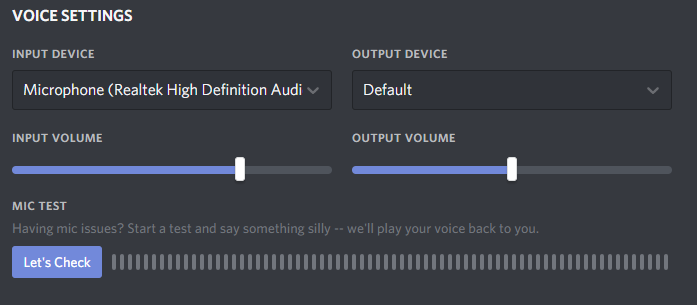


 dire patio
Yo, how do i get my ingame mic working, it works fine on Discord but i think the chat service Foxhole uses is garbage
Haven’t been able to use it for a month and a half
In foxhole
blissful sequoia
ack failed to download shard info ... yea thats a bad one these days
i think its antivirus software doing it - the firewall part
do you have AVG or avast installed? some antivirus other than windows defender, @spring cove ?
blissful sequoia
i would recommend disabling it for testing
not just an exception - totally disable it for testing
 vagrant herald
hey guys ive been searching for hours on how to play this eith an xbox controller because at the moment thats all i can do any advice?
(tumor on my brain makes it so my left side woncth keyboard
polar marlin
I....I'm not sure how will you do the aiming part.
 fervent latch
the game needs WASD for charcter movement, spacebar to climb, Shift to sprint, plus Q, E, Z. so all left handed
can you place the keyboard far to the right of your mouse and switch right hand between mouse and keys?
https://www.howtogeek.com/240188/how-to-control-the-windows-desktop-with-an-xbox-or-steam-controller/
I'm not familiar with but found this article

How-To Geek
If you have your PC set up as a living room gaming PC and media center, why use a mouse for everything when you could just use your game controller?
blissful sequoia
some sort of programmable mouse with lots of buttons ...
steam controller can be mapped to play the game though
its quiet good, but a little clunky because the game is not designed for controllers mostly
vagrant herald
OK
blissful sequoia
steam controller has gyro - you could use that for aiming and the pad for moving
the triggers have a soft and full pull, also, so you can make it aim with soft pull, fire with full pull
vagrant herald
only got xbox1
vagrant herald
i cant even walk cause of wasd
blissful sequoia
i think only a steam controller could do it
i can actually imagine all the configuration to make it work with just the right side
that thing is insanely customize-able
inner basin
@vagrant herald I configured my Xbox One controller using a custom Steam profile
It's not complete yet, but do you want to see it? I'll see if I can fetch it
I do logi with it sometimes when my hand hurts from using the mouse too much
blissful sequoia
wow i didnt even know you could remap xbox controllers
thats worth checking out
fervent latch
If you dont mind switching from mouse to kb, you can remap the WASD and everything to the numeric pad on the right side. You could try that with driving and doing some logi work to fine tune the setup?
terse flume
Anyone know why my OP chat isnt working, but my local chat is fine?
 stable meteor
So, related in some way to the lagged out UI I've reported before: Sitting in a truck at Lord's Mouth TOwnhall. Can hear engine and see others moving. Unable to move or exit car. Please send help
This happened once before and the only fix was gettng someone to kill me
Assume tech chat better than mod mail in this situation
narrow escarp
Hello
 sharp oasis
@narrow escarp Allo
narrow escarp
Could you help me by being my ears and commenting if shit is to loud or garbage messing with audio cables
narrow escarp
@sharp oasis I might of fixed it
 gray fog
How can I find out how logi works? Is there a blog or summat somewhere?
blissful sequoia
@craggy solstice we dont know! can you file a bug report? I've seen that bug hit like 3 or 4 people
 cyan chasm
Hello, i have a problem with choppy voice chat for few past days, i've done everything in the Technical Read First, but nothing helped it. I reinstalling the game a viable solution?