#technical-chat
4 messages · Page 25 of 1
 blissful sequoia
thats a kind of serious amount of traffic, even if the pings are empty
 sly mortar
Steam does not know what moderation is
blissful sequoia
its a ping every .2 ms?
sly mortar
It uses ALL of your bandwidth to download, and most of it to ping
blissful sequoia
i like how it uses all my download bandwidth
but holy crap thats a lot of pings
or is that a per minute?
5000 per minute not as insane
 quasi nebula
And by reinstall do you mean format the notebook?
blissful sequoia
yea
sly mortar
Not necessarily reformat. You can install windows over a previous copy without losing any files.
blissful sequoia
well if its network trouble it might clear up on its own in time...
i really dont know
or if you had other computers that could test it
or if you could repeat the disconnecting problem in any program besides foxhole...
sly mortar
What do you need help with?
 terse flume
Hello. I am extremely upset. I just purchased the game and have been getting attacked by grievers in the form of squads and single individuals. This is a huge problem for everyone in the game and more good people are getting banned by the greivers rather then the actual grievers getting banned.
There are nowhere near enough votes to deal with the grievers and kick them out. It also takes too many votes to kick a player as it is like 6 rather then 2. When players are in fact kicked, They are then banned for far too long.
As an example, I got banned today for 11 hours after someone stole my truck, and i responsibly called them out and asked for it back. The guy simply denied his actions...despite others witnessing him stealing it. He then got his buddies in his squad to vote me out for team killing and vehicle destruction....none of which i did and can be seen in the chat logs. They also said to kill me if i try to wrench my truck back. I didn't even do that, and they tried to kill me anyways
Squads and individuals are bullying other players hardcore by stealing things, lying, and then getting the good guys booted instead of themselves getting booted for stealing and lying. This is a huge problem, and in the last 3 days I have seen it happen at least 40+ times to others as well.
This is the second time i was banned and the first time I believe it was for team killing after it was another guy who was running me and others over and nobody could vote even once let alone 6 times to ban him. This is a serious problem and is wreaking the game for everyone.
Please lift my bans, rest them, and then fix the voting system. It should be 3 votes to ban and there should be unlimited votes. Bans should go up 10 minutes every time too. Not 1 hour the first time and 11 hours the second. I have a few days off and now I cant play this game becasue of other bad actors. I have heard many others talking about filling lawsuits, especially new players. I am seriously considering refunding this game, and i have never done that before with a steam game. It's beyond frustrating at this point.
my game name is asouhleris if you need to llok it up
sly mortar
Hey - Could you take this to a DM with @coarse trail
terse flume
ok
i messaged it already asking for help
but got no response
its only been 10 minuters thoiugh
Squads and individuals are bullying other players hardcore by stealing things, lying, and then getting the good guys booted instead of themselves getting booted for stealing and lying. This is a huge problem, and in the last 3 days I have seen it happen at least 40+ times to others as well.
This is the second time i was banned and the first time I believe it was for team killing after it was another guy who was running me and others over and nobody could vote even once let alone 6 times to ban him. This is a serious problem and is wreaking the game for everyone.
sly mortar
Could you send it to @coarse trail again?
sly mortar
I'm not seeing anything there
terse flume
it should be there now. it looks like someone has seen it.
terse flume
Is there anyway you can contact the mod mail team? They don't seem to be doing anything with my message, and it was a bot that responded. Looking at forums this seems like its a huge issue with many other players too, and instead of listening and acting, it looks like they are actively denying this is even an issue in the first place.
sly mortar
Mod mail is a bot which forwards everything to the mod team.
Your situation is currently being dealt with by people, but most of the mods are busy right now.
blissful sequoia
it doesnt have to be a game
just anything that will complain when it gets disconnected, programs like web pages and skype and stuff will automatically reconnect
they might hide disconnecting problems
quasi nebula
Well, i just played an entire match of Insurgency and its working fine.
And im not having any other problem besides Foxhole
Oh and When i do get to enter an play, ever since i bought the game again i cant be locked by faction
Everysingle time i have to choose either colonial or warden
So, there is that too
sly mortar
Foxhole is special
quasi nebula
lol Icanari
Well, thats why im saying that maybe one of the devs might know
It could be something with the code, or an bug relative to the update or something like that
sly mortar
Yeah. We could ask Nooba.
He might know, and he did tech support a long long time ago.
quasi nebula
Well, at least i have an real tech support problem. It aint like: How do i know my ppc is on?
sly mortar
Heh
quasi nebula
My example sounds impossible, but u would not belive the shit i've heard on tech problems. And i do not work on that an im an tech dino.
Or is it exemple? Sorry, i feel i got the word wrong.
sly mortar
Example is correct
 frank zealot
@quasi nebula Kinda late on this but have you checked your sound devices on foxhole and if the output volume is not 0?
quasi nebula
Output i dont know, but i cant hear people's mics on foxhole
If someone uses the voice chat of foxhole i cant hear.
No matter what i do in settings
frank zealot
@quasi nebula Does the game give you any error codes in the chatbox?
quasi nebula
No
frank zealot
It's probably a sound device issue then
Can you send me a picture of your voice settings if you're in Foxhole rn?
quasi nebula
Yea, but my main problem is still not being able to join the game
Im sorry, but i cant right now
frank zealot
All good, just ping me when you can
 lapis steppe
One of my friends reistalled the audio driver, he had conflicts and problems sith his drivers and reistalled all of them, no problems after that. I don't advice you to do that, just find the latest update for some of your drivers, update them, and see how they work with Foxhole.
 pale solar
Have a problem. I cant hear other player's voices, also i can hear the game sounds, and other players can hear me. Everything was ok about three days ago
 drifting hatch
Maybe someone can assist me with my discord error on my PC
I can't install the program. It always gives me an error about half way through the install
pale solar
<@&521124241395941396>
 slim girder
what do ya need?
 cursive furnace
wot
 snow carbon
@pale solar connected to voice chat?
pale solar
kk
pale solar
yes
snow carbon
i tried to connect my blue tooth headphones and it fucked with it hard
snow carbon
my bluetooth connected but didnt play any sound from em and i looked after a while and it said
"stream speakers" which idk what that is as i never ever owned or heard of those things
pale solar
@sly mortar i tried it but it still didn't work, so reinstalled my game, but it still doesn't work
nevermind
i just changed my output device and it all get worked :/
thx anyways
sly mortar
Was fixed
terse flume
Why was I pinged?
sly mortar
Because you have the Tech Wizards role.
If you don't want to be pinged, don't have the fucking role.
terse flume
Wait, I don't think I even chose it
sly mortar
Hmm
blissful sequoia
@sly mortar dunno about you but im getting tired of voice chat problems and trying to resolve them
its a low success rate...
 austere galleon
is foxhole down for everyone orrrr just me ? I heard there was a restart on deadlands? i was eating dinner
 wanton edge
dead shut down on me, been tryn to get to main island from main menu but get connection issues
austere galleon
okay so thats not only me
 cursive crow
 buoyant crane
The server restarted
quasi nebula
@blissful sequoia @sly mortar Wierdest thing just happened yesterday. I got an stable connection to Foxhole and played for like 7 hours straight. I got some 8 moments with massive lags, in wich i almost disconnected and the Jeep was doing breakdance, but other than that, it worked fine. Just disconnected once when trying to log in.
sly mortar
👀
quasi nebula
Yea. I think it might be the internet provider company malfunction
It would explain.
We've been having some massive rains all around the country. I think it could be it.
blissful sequoia
I kind of think so too but that's a tough problem when they claim they've fixed everything
blissful sequoia
?
 silver panther
Time to talk no voice error, i'm back at that PC
sly mortar
that sounded weird for a second
blissful sequoia
oh god lol
sly mortar

blissful sequoia
ok i guess remind me where youre at, im "working", so ... might respond slow
but yea we are very tired of voice errors
what do you think the fix rate is, @sly mortar? I would guess like 50%
sly mortar
For the simpler ones, like 60%
For the more complicated ones, 20-40%
As soon as we get past reinstall + dns, you’re effectively fucked half the time
silver panther
@sly mortar I have no clue what's wrong with it...
sly mortar
Which is what worries me
silver panther
I see that the person is talking but I can't hear them
I keep reloading, tried 3 headsets, switched foxhole setting but still can't talk
sly mortar
Did you try reinstalling vivox files? Like the third pin I think?
silver panther
Tried that weeks ago
blissful sequoia
any vivox error code? or error at all?
i think its good that you see the person talking
blissful sequoia
makes me think vivox is workoing fine
silver panther
it is
blissful sequoia
did icanari get you to try soundmeeter yet?
silver panther
Discord works
blissful sequoia
volume is too low, wrong mic, or the game cant use the mic (voicemeeter is the fix)
and in foxhole youve already set the voice output device?
silver panther
Yes
blissful sequoia
have you tried soundmeeter yet?
blissful sequoia
you can try that
to route the mic through a virtual sound device
icanari is good with it, he may help if you get confused
sly mortar
Voicemeeter*
silver panther
Well then, I will be asleep in 6 hours
blissful sequoia
you may not get stuck and need his help at all
sly mortar
It’s pretty easy, and there are good tutorials online
silver panther
hopefully
silver panther
@sly mortar @blissful sequoia IT WORKED! THANKS!
quasi nebula
@blissful sequoia They said there was some regional instability in their servers.
So that sucks for me
blissful sequoia
oh thats good if they admit it
they might fix it and you wont have to do anything
maybe keep complaining every week...
quasi nebula
I will probably be complaining every 2-3 days
blissful sequoia
i sure hope thats the problem and they fix it soon
that would be very irritating
 barren hamlet
Is there a problem with the game website every time I get directed to the devblog were they talk about what they will change and what to come in the upcoming update i get this
 gritty token
That is a DNS issue @barren hamlet It isn't resolving the IP address
unless the site is just down but i dont think it is
if you think it is down, send me a link to where you are reffering to
 vivid pulsar
@barren hamlet If you have an adblock enabled, try disabling it temporarily while opening the foxhole site. I use one and it fucks up every time I navigate to the site when it's enabled.
vivid pulsar
@sly mortar I use Opera as my primary browser, has a built-in Adblock.
sly mortar
Ah. Yeah, that would do it
vivid pulsar

Opera Help
Note: Signing out of your account does not remove data from the browser. When you sign out, any data synced to the browser will remain on your device. Similarly, any data synced to your account will remain on Opera servers.
sly mortar
@tulip crest Have you verified your files?
sly mortar
 tulip crest
whats steamapps\common directory.
 floral compass
My game keeps disconnecting me
every 10 minutes when i have other programs runniong
it does this whenever it wants to, i have no idea how to fix it
this is the only game where this happens
 inner basin
@tulip crest I hope you aren't using any Steam launch parameters 😄
frank zealot
@floral compass Could be because of the internet quality
floral compass
indeed
for comparison
i have 2 houses, one at countryside
and one at the city
the city house (where i am now) has this problem
and that other house has no fckin problem
thanks for helping
that's the problem
terse flume
i had this since the beginning of this war it never happened in other wars
this fucking bullshit keeps me out from ever being logistics player
blissful sequoia
are you in brazil?
terse flume
no
blissful sequoia
its the first question in my flow chart now
i suggest you do the DNS change that is described in the pinned messages for this channel
and verifying game files might make a difference
tulip crest
ok
inner basin
darn, you should have pinged me @tulip crest
If you go to Properties then there will be something called launch parameters or something like that
inner basin
Make sure it's blank
inner basin
Hmm have you reinstalled Foxhole?
Follow the steps in this message: https://discordapp.com/channels/203512636556574720/374272127953666048/543922008891588639
 ripe sluice
I am currently seeing mods having fun with the notifications. Is that a new feature?
vivid pulsar
Not at all.
 silent stone
I've set my DNS as the pinned messages tell me, deleted the files, verified, and restarted. Still doesn't work. <@&521124241395941396>
 serene field
Hi guys, I can't hear any voice chat in game but game audio works fine, I have tried reconnecting, refreshing device, relaunching game, checking if Steam audio is on, nothing works, what now?
silent stone
Check the pinned messages.
serene field
where do I see that? Sorry I'm not familiar with how things work here
nvm I found it
serene field
@silent stone are you having the same problems with voice chat?
 rocky python
Might want to check what your communication device is
That is if the pinned mesaage doesn't work
 tall pendant
Does V-sync work? trying to put it on, but it doesnt switch into it
 sonic topaz
Hi I have a problem. You see the other day I tried going to deadlands with my Lt tank but I got dc while in the loading screen saying connection to server timed out now everytime I go in the game it wont let me go in and keep on saying connection to server timed out
its also happened to my friend
because we were both on the same tank
 versed dew
<@&521124241395941396> Every time I cross over a region I crash and it's caused me to lose a LT and I'm afraid a BT. How do I solve this?
sly mortar
Once you get through your currently dilemma, try this https://canary.discordapp.com/channels/203512636556574720/374272127953666048/497631515316846602
 languid thistleBOT
 DeltaPixl#4130 was muted, Spamming in #technical-chat
inner basin
@sonic topaz Check the pinned message regarding network issues 😄
sly mortar
that's what I linked to him
inner basin
Well I didn't want him to feel left out
It looked like you were just talking to Fonzie
sly mortar
ah
inner basin
@tall pendant err, make sure you confirm the settings. The graphics do that to me sometimes
 loud quail
What to do if I have this problem?
sly mortar
loud quail
Ahh ok thanks
sly mortar
@faint steppe @blissful sequoia @gritty token At this point if you want someone to verify files and they have a good internet connection, just get them to the do How-To-Reinstall pin (I'll probably make it into a ?tag at some point), because it's a much more sure thing because it catches all files.
blissful sequoia
Oh nice
gritty token
Will do!
inner basin
@sly mortar tagged the [SOM] Blade 
sly mortar
Fuck
blissful sequoia
best part of being post-war: no technical complaints
blissful sequoia
well, no new patches...
 wooden iron
colonial
 narrow pond
Excuse me I need help
 compact basin
Just provide in detail what you need help with @narrow pond
Someone will respond to you in due time. Other than that, just please be patient.
narrow pond
My issue is every time I start my Game and select my team It says The connection to the server has been lost
blissful sequoia
Do you see where to read the pinned messages in this room?
There is one for changing your DNS server
I would recommend you try that first
 mellow lodge
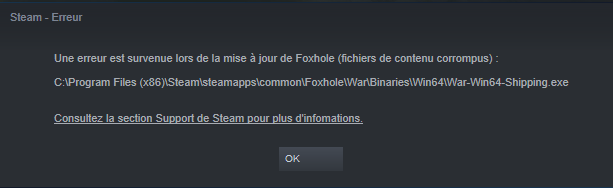
Files corrupted after initializing the new update...... Win64-shipping.exe I already tried to fix the game and check integrity files.... @hot oak I already followed the steps to fix it, game is still trying to download without stop. Everytime download is finished, a new one starts
 trail junco
So, this isnt working
I am reconnecting my voice and refreshing devices but it doesn't work.
mellow lodge

Already followed every steps of how to fix it... doesn't work
Corrupted files Shipping.exe are still there
blissful sequoia
you followed the method in the #1 pin?
verifying game files is not necessary or very helpful, follow the pinned method instead that involves deleting directories
mellow lodge
Yes YES YES
I already did EVERYTHING Requested (I wouldn't have asked then....)
still not working
blissful sequoia
ok, can you do a test. can you set your beta option in the properties for foxhole to dev branch
let that update and try running that
mellow lodge
already tested it
mellow lodge
Already tried to choose devbranch then back to regular version
blissful sequoia
i think you will probably need to file a bug report
mellow lodge
Game is still permaloading updates which lasts between 1 and 15 seconds
blissful sequoia
permaloading? in steam?
mellow lodge
yes
blissful sequoia
well thats interesting
blissful sequoia
have you restarted steam already?
mellow lodge
Yes
blissful sequoia
it sounds like you have a network problem to steam, actually
blissful sequoia
except foxhole and steam updating foxhole?
mellow lodge
Only Foxhole got problems
blissful sequoia
and steam
blissful sequoia
yea but you cant update a game
mellow lodge
I started to have problems...
blissful sequoia
so that makes me think steam is not running perfectly
mellow lodge
Did u checked the screen ?
Corrupted file
shipping64.exe
It's a straight problem with Game files
blissful sequoia
yes i saw it
well what do YOU think it is then?
if you think foxhole is broken, file a bug report
i think steam is not able to write to the files
mellow lodge
and then what ? I call 911 to ask for a Clapfoot technician to pick a flight to france and fix it from my desk ?
blissful sequoia
perhaps running steam as administrator might get it to update
i dunno theyve fixed bigger problems without flying anywhere
im surprised how much theyre able to do with a bug report
you may also not be the only one, so it sometimes helps other people, or multiple accounts help determine the problem
blissful sequoia
and please try steam as administrator
mellow lodge
I reinstalledthe game and it worked
Today, I got same problem with the .exe corrupted
but the Reinstall pipeline doesn't work
Nope, It's still trying to "Validate" files
blissful sequoia
thats so weird.
will you try another reinstall? with some changes
can you make sure steam is shut down after uninstall (before deleting the directories). you might have to find steam in the task manager to make sure it's not running
and after you delete the directory, restart your computer before continuing to re-install
i think steam is holding a file open
mellow lodge
it takes me around 4 hours to get FH completely installed
blissful sequoia
oh, its a long download?
mellow lodge
no more like shit internet widthband
blissful sequoia
Is it possible to do it when you go to sleep today?
mellow lodge
no
blissful sequoia
You see - I think it's weird steam can't update the file, before foxhole even runs
mellow lodge
Foxhole is the ONLY GAME which creates problems of those sorts with Steam during updates...
blissful sequoia
steam should not get stuck
mellow lodge
I got other steam games running with UE4 too, which never cause any problem...
blissful sequoia
maybe foxhole has steam bugs
mellow lodge

See 0 bytes / 0 bytes
Remaining time : 2 m 17 sec
Well, I give up, see you FH...
 wet leaf
Is there a bug or something when saving settings? Options-Text chat SFX=off-apply. I have to do this EVER. SINGLE. TIME. getting f'in old. going on 9 months of this, not to mention countless re-downloads and steam intregrity checks. Any help?
me applying
This is what it looks like after exiting and launching it again...sigh
sly mortar
@wet leaf could you try the top pinned message? Sorry, but foxhole normally doesn’t uninstall well...
wet leaf
uff, didnt even think of chekcing pins. Thanks @sly mortar ill give it a go.
shakes head
still doing it plus now i may have iconDB coruption?
apperes only be the Foxhole Icon too....strange.
blissful sequoia
@sly mortar this seems like the second case
well maybe not
but you were right. they took down the dev branch and now we have problems
trail junco
XD
wet leaf
so does Foxhole not have a simple INI file we can edit to keep settings?
I'm not finding one.
wet leaf
this settings not saveing is some day one needs fixing kinda stuff in my book
blissful sequoia
it doesnt affect everyone
wet leaf
well, I dont know everyone but in my group it's happening to all of us (aroudn 10, all using W10)
sly mortar
Mhm. Go to C:\Users\[USERNAME]\AppData\Local\Foxhole\Saved\Config\WindowsNoEditor\GameUserSettings There might be something in there.
sly mortar
Yeah. Kind of as expected.
The only other settings files are packed into UE4, so they aren't really accessible.
wet leaf
well, its hardcoded into my brain to automaticly go to settings and do what I and others have been doing so no loss anyways. Agian, thanks for the help.
blissful sequoia
alt + print screen captures just the active window
now im wondering who the redhead is
terse flume
as soon as i get into the home region i crash
blissful sequoia
have you reinstalled as the first pinned message suggests?
we havent had 1 success from it yet with the new patch
but it will be the first thing we suggest anyway
 stray copper
I have this issue every time a download hits foxhole where I can't start the game, it says the "war process returned a number: 1-5", or something similar usually, after waiting a while it tends to sort itself out, but it seems to stop me from playing the game at all for an entire day after an update drops.
"Createprocess returned: 5" whatever that means.
blissful sequoia
did you read the 1st pinned message, @stray copper?
blissful sequoia
well we dont have a ton of ideas for new problems yet
blissful sequoia
you have any thoughts about it?
createprocess is probably a function that starts a thread
the thread will catch ALL errors in it's initialization, so I'm guessing it's very generic
stray copper
Well typically what fixes it is just ignoring the game for a day.
But I could list off the full error screen that comes up if you want
blissful sequoia
ignoring the game for a day? like it gets patched?
or you restart your computer in the meantime?
stray copper
Couldn't Start: "C:/Programfiles(x86)/steamapps/common/foxhole/war/binaries/win64/war-win64-shipping.exe" War Createprocess returned 5.
Thats the entire error message
stray copper
Well I guess im not playing tonight
gotta wait until tomorrow till it hopefully fixes itself
thank god this game doesn't have daily updates
blissful sequoia
sorry im listening to presscorps getting distracted
have you tried running steam in administrator?
is there a way to get the command line for war-win64 with the args? hmm
stray copper
This is the only game I've had this kinda problem with
blissful sequoia
yea thats often the case with problems here
i wonder if this is one of those fullscreen problems
stray copper
Fullscreen problems?
blissful sequoia
yea so previous settings are saved somewhere, or maybe the default settings of the game cause you problems
icanari's pin from 12/15
stray copper
Starting the game in windowed might fix it?
blissful sequoia
like the 4th pin down, maybe its something related to that
its something that comes up between patches
"Fixing resolution settings..."
stray copper
Idk, just decided to launch that time.
 frank hill
So my game just freezes and the screen goes black whenever i try to start from steam
blissful sequoia
please check the 4th pinned message
the one about screen resolution
and also the first pinned message might possibly solve your problem
the screen resolution pin is easier to try, i suggest doing that first, then try pin #1
blissful sequoia
awesome
trail junco
Are relics Out>?
Like the tractor??
<@&213133977681264640>
or anyone have an answer?
 gusty jasper
 trail junco
:/
blissful sequoia
can turn off all chat tho!!
 wicked rampart
Read patch notes @trail junco 😃 #announcements
frank hill
Looks like my game has broke again, still having same issue with a black screen when loading but changing resolution in the config files isn't working
trail junco
Uh, Getting this when trying to cross region travel
blissful sequoia
@frank hill try pin #1, the reinstall
frank hill
Ok
 steady umbra
O.k, I honestly don't know what to do anymore. I have NOTHING else running, this has been happening for a while now. Would really to know if i can fix it, or if my laptop is just too outdated now.
*Also i had literally just re-installed the game like 10 seconds prior
blissful sequoia
have you restarted your computer?
steady umbra
I have earlier today, yes. I can do it again, why not.
Unless you mean like factory reset
blissful sequoia
no
just a simple restart
foxhole might be hung up in the background or another application using up video mem
steady umbra
*to help specify it works when i'm in the menu, only happens when i try to join a side (but happens every time)
blissful sequoia
oh
...oh ...
can you adjust your graphics settings to lower the texture quality
perhaps you have had your settings reset and now textures are using a high amount of video ram
steady umbra
I could, the main thing is i have had the settings on ultra since my first time of use and never had this problem.
blissful sequoia
you can leave ultra on but drop the texture quality
you can adjust just that 1 thing
steady umbra
I'll try a few things, i'll get back to you in a bit
blissful sequoia
yea ill bbiab too
steady umbra
O.k, i found the problem (i guess? It's working now)
I changed it from windowed full srceen to just full screen and that worked
I can even tab in and out to here
I'll try joining a map real quick
O.k now that's crashed... I guess i'll just have to turn the graphics down. Oh well
blissful sequoia
oh, graphics resolution problem i guess
 steel hearth
Hey boys been having this issue a lot lately. Anyone has it also? Any fix or something?
 light mesa
Have you tried verifying the game files?
 spark storm
@steady umbra Do you know whatkind GPU you have on your laptop? I was playing foxhole with integrated GPU for a while intel HD4000 series
and that's like from 2010
steel hearth
@light mesa yeah i did
nothing wrong
today i havent had the issue once
it seems really random
i dont know
sly mortar
Try the top pin, if that doesn’t work the Microsoft 2015 c++ one @steel hearth
steady umbra
@spark storm I'll be honest, i have next to no idea how to check how much GPU, RAM, memory cap, etc.
sly mortar
@steady umbra Could you go to your search bar in windows, and type dxdiag?
Then run that?
That will tell you your computer specifics.
 jade lantern
plz help i cant open the res tab
blissful sequoia
@jade lantern maybe F8 key
jade lantern
f8 didnt do anything except for hiding the hud df
when i click this it doesnt do anything
inner basin
wow
ummm the settings .config file should be located in your AppData folder @jade lantern
C:\Users\[USERNAME]\AppData\Local\Foxhole\Saved\Config\WindowsNoEditor\GameUserSettings There's a couple .config files there, but I think this is the one
 rough lance
Would you be so kind and fix (or at least remove) the 2 not working achievements in Fortified? Removing them shouldn't take more than a few minutes. Players have been asking for this for ages, please do something.
jade lantern
well changing res in config didnt actually changed the res but it did give me a fps boost for some reason
inner basin
@rough lance I admire the determination to come into the Foxhole discord and ask about Fortified
But as far as I know, they are 100% dedicated to Foxhole now
inner basin
@terse flume Do a re-log
inner basin
 dusk plaza
my mike is not working and its the first time i have had a mic on there
my mice works on discord
dusk plaza
my mike is not working and its the first time i have had a mic on there
my mice works on discord
 fervent latch
So my headphones worked for ambient and all vehicle wepons, sfx etc, but not voice. In settings I had it set as PC speakers for output, oO not headphones, now fixed that and I can hear player voice chat again.
inner basin
@dusk plaza Please check the voice settings and make sure that your mic is the one being used for Foxhole
inner basin
:/
terse flume
h
 molten swan
I love this game really do but this no home region found and constant restarting my PC just to get access to servers is a real BSJ,@@€$¥^ I have tried others methods and non are working for me
terse flume
@inner basin u got a moment ?
terse flume
@inner basin it was for him and me btw, i could use ur help
terse flume
Do u have a solution about downloading the new FH update ? Its telling me its already downloaded ( so its at 13.8/ 13.8 MB) but Steam doesnt count it as being fully downloaded. The time remaining on the download is increasing every time, its a like 23 hours or some shit, and ive been waiting for 1 hour
inner basin
If it's fully downloaded and you are still waiting, it means it's installing.
 proud dagger
@terse flume i had that issue since last year version
inner basin
But I've had ridiculous installation times before.
proud dagger
my advice to you , i did this, i basically shut down/ restart my PC , exitted steam and relogged back in
at the same time try running only steam at that time
and run it as administrator
inner basin
If a step doesn't work, try the next one.
- Stop the download. Wait like 5 minutes and then resume the progress
- Do the same thing as above, except stop the download AND disconnect from your network. then wait 5 minutes
- Navigate to the Steam "Downloads" folder on your file system and delete all of it.
- File path:
C:\Program Files (x86)\Steam\steamapps\downloading
- File path:
@terse flume
proud dagger
@terse flume u can try that if not tried yet
yeah i also did step 1 and 2
it worked most of the time
no 3 for me
terse flume
hang on, im gonna try both
proud dagger
yis
try all of them
although i have switched to a faster laptop and i now no longer have this issue
terse flume
@proud dagger @inner basin cool, thx, its working. time to get my daily dose of salt in FH now ❤
inner basin
👍 roger
 junior pivot
I'm getting this error again, just like I did after the last update (motorboat one). I've gone through the steps @sly mortar linked me to last time which worked then but this time haven't solved the problem. I've verified on steam, I've reinstalled the vcredist exes, renamed the xinput1_3.dll files so that the UE4 installer reinstalls them and ran sfc /scannow. I'm still getting the error, either the moment I boot up the game or other times about 2-3 minutes into playing.
Does anyone have any ideas about this error this time around?
Thanks in advance.
junior pivot
Okay I've just deleted the game and redownloaded/installed it, restarted my PC before playing and still, I'm getting the same error I screenshotted above.
blissful sequoia
video drivers?
junior pivot
up to date
blissful sequoia
any alternatives possible?
if they are nvidia, the ones from manufacturer instead, or vice versa
perhaps a difference in version ...
video card fan runs ok? its not overheating? suspicious because you say soemtimes 2-3m in
junior pivot
I could try rolling the drivers back, but I just updated to the newest nvidia drivers because I was getting this issue in foxhole
all other games run fine
granted the games I've tried aren't Unreal Engine games but things like CS:GO and League of Legends work fine
blissful sequoia
have you already filed a bug report?
this one happens ot have a specific error with a line number, so ...
might be very enlightening to a developer
also maybe generic to UE4 games of this specific version of the engine, i think they are like 4.21.xx
junior pivot
No not yet, last time I asked in here and @sly mortar helped me by linking this post https://ptb.discordapp.com/channels/203512636556574720/374272127953666048/497281479135461387 but I've gone through all those steps and reinstalled the game from scratch, same error.
Ah okay
Should I post what I posted above in the bugreport discord channel? Or do you mean file a bugreport on the website (if that's a thing)?
blissful sequoia
is it a laptop?
notebook?
i mean the discord channel #bug-reports
@junior pivot
junior pivot
Yeah but I could do it again?
junior pivot
thanks for the help by the way so far 😃
blissful sequoia
theres a lot of similar problems in UE4 where people fixed it by doing regedit on these:
[HKEY_LOCAL_MACHINE\SYSTEM\CurrentControlSet\Control\GraphicsDrivers]
"TdrDelay"=dword:0000000a
"TdrDebugMode"=dword:00000001
"TdrLevel"=dword:00000000
I am not sure if that would help
it would seem like its related to the video driver though
junior pivot
Hmm so it's an issue between the nvidia drivers and the UE4 engine?
I'll try that thanks, and if it doesn't work I'll post in #bug-reports
I don't have any of those key/values in the \GraphicsDrivers folder, should I just add them? Or should they be there for me to edit?
I just added those keys, restarted and then booted up the game, I was able to play for about 3 minutes before the same error killed the game 😦
blissful sequoia
yea not the fix then
someone else with same problem? https://steamcommunity.com/app/532210/discussions/1/1733214357981108902/

Hi, I'm having some issues at playing. It crashes after talking to Sean's dad while trying to explore the house. CPU → AMD A10-7800 Radeon R7, 12 Computer Cores 4C + 86 3.50 GHs RAM → 16 GB Windows Os Version → Windows 10 GPU → GeForce GTX 745 The error after crashing...
i wonder if nuking the video drivers with some software to do that and reinstall...
i wonder if disabling real time thuumbnails made any difference too
sly mortar
Try updating video drivers, if that doesn't work, revert them.
blissful sequoia
i think there is special software to remove nvidia drivers completely
terse flume
?neutral.
spark storm
DDU is pretty good
Guru3D.com
Here you can Download Display Driver Uninstaller, this Display Driver Uninstaller is a driver removal utility that can help you completely uninstall AMD/NVIDIA graphics card drivers and packages from your system, with...
System restore point is pretty good when you're attemting anything you're unsure of
junior pivot
I was on the 2nd newest drivers and I got the crash, so that's why I updated the drivers and still got the crash. I hadn't updated my nvidia drivers since the last time I had the error, because I didn't want to inadvertantly cause it again
I remember using CCleaner in the past so I'll have a go at that. Thanks everyone for the help so far
spark storm
CCleaner is good tool too
Also just a side note, make sure you're actually using your main GPU and not the integrated one, I've seen that error few times and those guys were actually using their integrated gpu with foxhole
junior pivot
hmm good idea, I haven't changed it myself but maybe the update did, I'll check now before I go through uninstalling/reinstalling nvidia drivers
I've got the game loaded now and the options open, is there anywhere that would tell me if it was using integrated or the graphics card?
spark storm
Not from game but you can run dxdiag
and check display

Or you can go device manager
and flat out disable integrated one
https://puu.sh/CRdBO/bb8ad932b9.png

Or if you have nvidia card, you can go there and set it as preferred GPU to run with all or certain applications
I think AMD has similar thing but I haven't used them in 10 years so.. it probably has been changed :D
Also looks like there's this thing too which you can use to check it out if you have nvidia card
https://puu.sh/CRdN1/8fcf9ca5de.png

 junior pivot
Ah awesome, thank you for all the info. I've had the game running for about 20 minutes now with no issues, nothing has changed since the last time I tried and it crashed but fingers crossed it's okay. I'll have a go and totally deleting the drivers and reinstalling them if I get another crash and also use those utilities to check the game is using the card etc, thanks!
spark storm
There's many things it can be, like for some people it was GPU overheating and them actually downclocking the GPU worked out
And like it has been from mid end cards to highend cards so it's really hard to troubleshoot, kinda have to try out step by step :p
sly mortar
@spark storm get the Tech Wizards role..
blissful sequoia
fancy 1080 too...
best video card ive ever had was a 670 i took home from the office
sly mortar
👀
sly mortar
Mhm.
blissful sequoia
i just hate building expensive computers, they depreciate so fast
blissful sequoia
400 bucks on a video card is so painful
sly mortar
I bought it when the price was still low.
blissful sequoia
and the last couple years have been ridiculous pricing from all the gpu compute demand
theres a lot of stuff coming up on used market, maybe ill step into a 1080 now that theyre kind of old
theyre still 400 used tho hah
theyre closer to 600 used
670 is like rent controlled apartment. high performance so you dont want to upgrade, but old features so you're miserable
sly mortar
Haha
The main thing I love about my newer card is that the Control Panel has all the features.
blissful sequoia
like in the windows control panel?
 coarse shoal
 toxic nimbus
Hello-all, I appreciate your time looking into this. I am unable to submit research parts to the tech center. This happened around 6PM PST during mid sticky research,. Step 1 to resolve : I restarted computer, step 2: verify game in steam and restart, multiple log out attempts.
I have submitted MOD mail and they have sent me here.
spark storm
Could you tell in detail how you submit the parts?
toxic nimbus
I clicked left click while they were on my person and not in my truck.
spark storm
Or let me ask it this way, have you successfully submitted tech in past?
toxic nimbus
It did work after patch.
I couldn't at 6PM yesterday PST.
I believe I submitted 80+ yesterday before it broke.
spark storm
Need someone else to troubleshoot this one, I got nothing D: @blissful sequoia
@sly mortar you're up!
languid thistleBOT
Icanari is AFK: 💤 - 12 hours ago
spark storm
Are you able to submit them now?
spark storm
I can only assume it's somekind hiccup on server side and not your pc especialy if it works now
toxic nimbus
I tried 15 minutes ago and it didn't work.
spark storm
I see
toxic nimbus
Let me find another part though. I tried all night for 15+ hours. so
spark storm
Which side you're playing and did you try only one research place?
spark storm
I'll come gather some scrap with you, lets see if I can submit
toxic nimbus
You can, because ive given my tech to other people
and Casper submitted the one from my inventory
spark storm
That's definately odd then, I don't think anyone on tech chat can help you, it's up to the devs
toxic nimbus
Thank you for your time.
blissful sequoia
looks like you have it handled moxie
inner basin
@toxic nimbus Wait, did you make sure you turned it into Research Parts first before submitting it?
 late void
Anyone know how to fix "Voice Chat Error [8] 6-0" looks like nothing worked so far and i need help i already tried "Reconnect" button restarted my pc and router, uninstalled /downloaded steam and game, disabled antivirus, checked firewall, tried different mics also i did all of this few times and still i get this error please help me
late void
didnt work still same error
late void
still same but i got Voice Chat Error [2] 2-5008 when i tried reconnect button also there was another error saying "Failed to download shard info......" (kinda like this) on the Join War screen when i chosed my faction i got "No home Region Found"
sly mortar
Alright. Reset your DNS to automatic then.
late void
hmm idk why but its working now i just spammed reconnect
thank you very much @sly mortar for you support
 charred wyvern
Hey , does anyone else get constantly timed out when trying to get to a map from de home region?
blissful sequoia
no
well some people with network problems, yes
check the pinned messages, the one about DNS might solve your problem - if it does not, it might be your ISP
blissful sequoia
foxhole works fine with dual monitors? anyone can confirm?
blissful sequoia
not a great picture
because its night, so you cant see outside of your radius at night anyway
inner basin
^
blissful sequoia
you said it also happens in day?
 bold nova
alright so i need to wait for it to be day again
blissful sequoia
is that in weathered expanse? lol
bold nova
binocs no work
blissful sequoia
cant see soldiers
inner basin
@bold nova You can't see soldiers that are outside your ~7m view radius, when you are using binoculars
blissful sequoia
really?
bold nova
what is the point then?
blissful sequoia
is that new?
inner basin
I remember they patched it so that the enemy sprites don't "load in" when you zoom with the binos
blissful sequoia
when?
bold nova
why?
inner basin
I will consult the regulars, I might be wrong
bold nova
how am i supposed to spot far off infantry to kill with my howie?
blissful sequoia
yea i thought binos could see people just fine
of course, not at night, and they dont show obscured people
bold nova
if i can see the soldier but not thier name would that count as the binos working?
inner basin
2 respectable players chime in:
@bold nova @blissful sequoia
The binos are mainly for day-time, long range scouting
bold nova
yea seems that way
inner basin
I understand that the bug allowed you to see enemies as they loaded in when using the binos, but that's been fixed
That's why binos suck now at night unfortunately
blissful sequoia
i dont believe thats the issue at hand
@bold nova yes if you can see players but no name - that is working as expected
player names are only up close
inner basin
Yes, that's true ^
 loud bane
hello, if I have a performance issue should I ask here or mod report?
loud bane
@inner basin fair enough, so the issue is today I noticed that I'm losing around 10~12 fps around towns especially overlook in certain times of the day cycle when I have the Shadows on Ultra, and I didn't have this issue before, disabling vsync makes the game even more stuttery around those areas, the only thing that helped me was putting the shadows on medium, the only issue is they look bad and I think my pc is capable on running the game on ultra. I forgot to mention it mainly happens when I'm driving.
inner basin
@loud bane Did the fps drops start happening right around Update 0.20? It came out December 12.
I ask this because this is the update that significantly overhauled towns. This included new assets and made the towns very detailed
I am sure that this can increase the load on the graphics card
mainly happens when driving that is a weird factor
Have you tried to verify the game files, or a re-install?
loud bane
@inner basin no to be honest I only noticed it today, because the drop is too obvious, I haven't had this issue 2 wars ago, I mean not even before today, and right now when I'm pressing M to see the map, I'm getting between 40 to 45 fps on the map screen, does the performance gets worse the more buildings and defenses on the map? I'll try verifying the game files, and mb reinstalling later.
inner basin
Well I mean, the more things the graphics card has to render, the more taxing it will be obviously
When you do reinstall, do a full reinstall: https://discordapp.com/channels/203512636556574720/374272127953666048/543922008891588639
@loud bane
Oh and btw what is your graphics card?
loud bane
gtx 1080 @inner basin
inner basin
wtf, my 950 gets like 40 fps with max settings
yeah something is wrong, either faulty GPU or something else that I don't know about
sly mortar
@loud bane Try updating graphics drivers if you haven't, and Ultra really fucks with your PC. You need a really good CPU, not GPU to run ultra at high FPS.
blissful sequoia
really?
sly mortar
Yea.
blissful sequoia
whats it doing with all the cpu?
sly mortar
There is a massive difference (at least on my PC) between High and Ultra in CPU usage.
Like, upwards of 5%.
blissful sequoia
i run ultra, and my video card kind of sucks, but i think cpu is pretty decent
i see around 10-15% use of cpu tho
liek total
blissful sequoia
a ryzen 5
sly mortar
Mhm. I've got an 8700K.
blissful sequoia
is than an i7?
sly mortar
Yeah.
blissful sequoia
i updated/refreshed all my computers during the spectre and meltdown bugs
suddenly im 100% amd lol
blissful sequoia
even if you werent exploited, the kernel patches were pretty painful on performance
sly mortar
I haven't noticed a difference.
blissful sequoia
i dont think there were any incidents of it actually being used that anyone knows about
but yea those first patches were like 10% penalty, sometimes 50% if the program had a lot of system calls
sly mortar
Yes. But now? They're down to like 0.5% or less.
sly mortar
I bought beforehand.
blissful sequoia
yea i likely would have gone i5 otherwise
inner basin
Ah, Spectre and Meltdown
loud bane
@sly mortar yeah I believe it's a cpu issue I did monitor it, strange thing is, it didn't happen before today to me and only when shadows on high or ultra, I have an old cpu but it's a decent one i7 4790k @4.8.. I guess I will lower the shadows to medium if it keeps happening, because it still inconsistent and it happens only when driving
 lost jungle
Keep getting a Voice Chat Error 2-5006 spam and voice chat dead any way to fix this?
sly mortar
If that doesn't work, try this: https://canary.discordapp.com/channels/203512636556574720/374272127953666048/497631515316846602
lost jungle
Will in a bit!
inner basin
<@&374193809174822912> ban ^
languid thistleBOT
Far#9127 was banned, spam
 proud schooner
@inner basin thank
inner basin
👌🏼 gib Discord mod role 
 static shadow
#BladeRikWr4DM
 limber tinsel
been looking at forums to fix voice chat problems
but i still cant hear voice chat in game
 wind viper
You making sure that the voice chat output is set to your computer's audio output?
It's weird - you can have explosions from your stereos and voicechat in your headphones
sly mortar
@limber tinsel
Fixing Vivox Voice Files
- Close Steam and Foxhole
- Go to
C:\Program Files (x86)\Steam\steamapps\common\Foxhole\War\Plugins\VivoxCoreUE4Plugin\Source\ThirdParty - Delete
VivoxCoreLibrary - Reopen Steam, and verify the game files.
- Restart your computer.
Try that
 celest haven
does foxhole screw up anyone’s internet here too?
like, i played yesterday and discord died and everything died except foxhole multiplayer
now my WiFi doesn’t work on my PC but works on my phone x)
don’t know what this is
celest haven
nvm it was a game enhancement plugin on my computer fricking things up
 gilded cradle
i own my own copy of the game but it still says family accounts must join same faction
blissful sequoia
are you using a vpn? playing from a dorm or wifi or something? it's probably the same IP address as someone else
limber tinsel
Thanks @sly mortar
That was one of the solutions i found but didnt work for me. ended up disable all speakers and microphones in Window's Sounds settings got it to work
 plucky roost
Please help.
Cant connect to servers. Please try again?
Ive tried so many things while researching this. Seems like a common problem.
 fast kelp
@plucky roost have you gone through the pinned messages in this channel?
plucky roost
I have
fast kelp
Sorry for late response would suggest pinging tech wizards now
plucky roost
@sly mortar
blissful sequoia
@plucky roost what do you see when you go to: https://s3.amazonaws.com/clapfoot-test-bucket/test.json ?
 white trench


 blissful sequoia
you hear game sounds? you may not have the right microphone selected in the foxhole voice options
blissful sequoia
it does? it shouldnt
 analog mirage
LowLevelFatalError [File:Unknown] [Line: 3582]
StaticMesh /Game/Meshes/Environment/Props/Trumpet.Trumpet: Serial size mismatch: Got 57895, Expected 172171
0x000007fefd60be0d KERNELBASE.dll!UnknownFunction []
0x000000014017b87b War-Win64-Shipping.exe!UnknownFunction []
0x000000014014b338 War-Win64-Shipping.exe!UnknownFunction []
0x00000001402f5665 War-Win64-Shipping.exe!UnknownFunction []
0x0000000140347bae War-Win64-Shipping.exe!UnknownFunction []
0x0000000140351736 War-Win64-Shipping.exe!UnknownFunction []
0x0000000140350c84 War-Win64-Shipping.exe!UnknownFunction []
0x00000001412281c4 War-Win64-Shipping.exe!UnknownFunction []
0x0000000141235e59 War-Win64-Shipping.exe!UnknownFunction []
0x0000000140eabf45 War-Win64-Shipping.exe!UnknownFunction []
0x000000013fa62b17 War-Win64-Shipping.exe!UnknownFunction []
0x000000013fa6859c War-Win64-Shipping.exe!UnknownFunction []
0x000000013fa6860a War-Win64-Shipping.exe!UnknownFunction []
0x000000013fa6f2fe War-Win64-Shipping.exe!UnknownFunction []
0x00000001419d4187 War-Win64-Shipping.exe!UnknownFunction []
0x000000007755571d kernel32.dll!UnknownFunction []
0x00000000777b385d ntdll.dll!UnknownFunction []
Crashed and got this error
blissful sequoia
verifying game files might fix your problem
that is seemingly the first corrupt file i've seen in here
inner basin
@white trench The game uses Vivox voice engine, it is clearly stated on the main menu...
analog mirage
Fixed
blissful sequoia
what fixed it?
analog mirage
Verifying game cache files
inner basin
I wouldn't say the only time
plucky roost
@blissful sequoia {
"title": "test",
"test1": false
}
 cursive socket
Oof
blissful sequoia
so your DNS is fine. hmm
it could be an old version, or your ISP might have routing problems
if you have good bandwidth and dont mind reinstalling foxhole, i'd recommend trying using the 1st pinned message that's posted here
and when that doesn't work, perhaps the only way to know for certain that the network problem is not you is to use a VPN for a test
 dim salmon
?tags
languid thistleBOT
Tags
how2factionunlock, how2steamid, how2pushtomute, how2systeminfo, how2contactmods, how2clanrecruitment, how2techsupport, how2bugreport, how2suggest, thinktank, how2reportplayer
Use "?tag name" to show a tag
languid thistleBOT
Push to Mute
A very common setup for those that use Voice Activity (voice detected mic) is to use Push to Mute as well.
By setting Push to Mute as your in-game voice key ( Default "T" ), you can effectively "flip/flop" between talking in Discord and in-game. Whenever you pressed "T" to talk in-game, it would mute you in Discord until you unpressed the key.
To set this up, go to: User Settings > Keybinds and Add a Keybind for a Push to Mute action, with the keybind set to your in-game voice key (default to "T").
This works well for anyone that uses voice activation instead of Push to Talk, as it prevents people in Discord from having to hear your in-game chatter.
 tame schooner
So here is the thing, I have problem with my voice chat activation in game. My microphone works fine at Discord. I tried to test a little bit and tried to reconnect, refresh devices and switch devices but push to talk still does not work. Thanks!
blissful sequoia
has it worked before? is this a new problem?
inner basin
@tame schooner Any errors you are seeing? Usually you would get like a Voice error blah blah when that happens
tame schooner
ah I got Voice error 8 (6-0)
something like that
and it has not worked before
I tried to speak like 1 month ago have not worked and I just forgot about that and it annoyed me today so wanted to see what is the problem with that
@inner basin
inner basin
Have you tried the voice related troubleshooting steps in #technical-read-first⚠ ? Like this one: https://discordapp.com/channels/203512636556574720/551236268004999168/553177649523064837
inner basin
Hopefully it fixes it for you 👍
blissful sequoia
outgoing norton firewall, hm blade? what gives
the windows firewall vastly superior to any external firewall program
i still have ptsd from norton firewall days 10-15 years ago
blissful sequoia
well i expect its limited compared to the windows firewall interface?
inner basin
Y'know, I actually did uninstall it. But the anxiety of getting a virus from my "free" Photoshop made me reinstall it
No idea as to which firewall is better
blissful sequoia
hmm
inner basin
Windows Firewall asks about Foxhole traffic on my non-Norton laptop 
blissful sequoia
ive heard of at least 5 ways to run windows programs in sandboxes... i dunno if any of them are still valid
inner basin
I have Sandboxie, but it is limited
blissful sequoia
but its comign to a new version of windows soon, if not the latest. their first move is to integrate the virus scanner into a sandbox
inner basin
Damn that'd be awesome to have a virus scanner within the sandbox itself
blissful sequoia
i always found the norton firewall to be way too bullish - like interrogating every outgoing connection, wtf
blissful sequoia
not so fast - you gotta pay the troll toll
you were full screen? HAH. not anymore.
tame schooner
https://discordapp.com/channels/203512636556574720/551236268004999168/553177649523064837 I tried this and still does not work
@inner basin
tame schooner
Fixing Vivox Voice Files did
Does not work
And did the dns one still does not work
@inner basin
inner basin
Have you restarted your router? @tame schooner
tame schooner
no I have not
I will later
cant right now
but I have not changed DNS for router
just for my device I am playing on
inner basin
Dang, that was it?
Well, at least it worked for ya
These issues can be very finicky
inner basin
So, you restarted your router and all these problems started occuring?
tame schooner
My problem has not been fixed with voice chat and got another problem from nowhere and that problem is I cant aim in game, game frezzes for couple of sec
Aim problem occured after I did that DNS related fix for voice chat
now I got back on old DNS adress, still same problem
inner basin
<@&521124241395941396> This fellow player experienced a voice chat bug, so I had him restart his router. After that, he said his game was in a worse state than before. He couldn't even aim; the screen would freeze up apparantly. So I had him:
- Restart Steam
- Restart computer
- Verify game files.
- Completely reinstall Foxhole
And he still says the game is broken. Anybody have any tips? I already had him follow the two pinned messages regarding voice errors.
@tame schooner Did you completely reinstall Foxhole using these steps: https://discordapp.com/channels/203512636556574720/374272127953666048/543922008891588639
 plucky bluff
what does task manager say
show how war.exe process affects the pc
"screen freezes up" sounds like ram/disk on 100%
tame schooner
thats just when I try to aim
Haven't had this issue before
I got it today
I will reinstall foxhole again
brb in 20 min or so
plucky bluff
it might not be foxhole but your drivers
update gfx drivers, directx etc
tame schooner
gfx drivers are up to date
Direct X should be too
I have Direct X 11
I use win 7
lapis steppe
uninstall Foxhole, delete the Foxhole folder in steam, reinstall drivers, restart computer, then install Foxhole again, this fixed for me at some point...
tame schooner
aim does not work still
I just want aiming to work again
now I got wrong desktop shortcut for game
I got interent shortcut that does not have valid target
this is driving me crazy now
what should I do?
inner basin
Launch the game purely from Steam. Make sure there are no launch parameters set
inner basin
You have any other games that work fine?
inner basin
Ok what's your GPU? Foxhole worked fine before, right?
It was restarting the router that caused all this to happen?
tame schooner
Yes foxhole worked fine today till 18:00
I tried to do that dns fix for voice chat
inner basin
Y'know this might be a network problem after all...
tame schooner
Did everything like it was said
It was not fixed
I left the game
And went to play some Company of Heroes 2
After I finished session of CoH 2 I came back in foxhole and had this aiming issue
After that I restarted my router 2 times
Till now
tame schooner
I have not jiggled anything
XD
I restarted PC and router
Internet connection was good
Pc everything as usula
Usual
wind viper
i am going to assume you verified the game integrity
inner basin
Yeah he did already
wind viper
good
 echo blade
Coming back to Foxhole after a month or two my voice chat problem is now completely different. It appears now connecting to local voice channel is disabling all sound output, even from other programs. I am not receiving any errors that I am not connected to chat however my entire PC's sound output dies as soon as I do. If I disconnect my sound returns, however disabling voice chat has not resolved the issue as the client still automatically connects to the local voice server.
This appears to be only affecting when I put the output through my headset, I am still receiving sound normally through speakers if I restart without it connected.
blissful sequoia
@echo blade if you use the headset in another program, like skype or discord cause the same symptom? Can it be repeated without foxhole?
If no other programs can mimic that, then I suspect your vivox is screwed. there is a pinned message about restoring the vivox files
blissful sequoia
you on windows 10?
tame schooner
win7
blissful sequoia
hmm
tame schooner
I have aiming problem
blissful sequoia
I want to see what it looks like
tame schooner
when I try to aim game freezes on 3-4 s
blissful sequoia
Any possible way to record it easily?
tame schooner
we could go on screen share?
sly mortar
Why would you ever use the webUI?
But if screensharing is easier for you, I can do it.
blissful sequoia
i got in an argument in the main room and i got muted so i uninstalled cause i bailed on FoD
sly mortar
Oh.
blissful sequoia
just never reinstalled it lol
sly mortar
reinstall...
blissful sequoia
im not like 100% committed to using discord yet
im very curious what "freeze" means. it means different things to different people
network freeze? video card freeze? mouse stutter? so many things it could look like
but a first guess is that right click is doing something besides just right clicking
sly mortar
If you @blissful sequoia reinstall, and @tame schooner you want to screenshare, ping me.
blissful sequoia
and my guess is mapping that key to another button doesnt simulate the same lag that right mouse button does