#avatar-dynamics
1 messages · Page 2 of 1
 mighty trail
 timber saddle
oh dang
mighty trail
not sure how that'll work if people interact with it though
if it does break with interactions, use a constraint
(but that's pc only)
timber saddle
i give zero fucks about quest
quest is just an attempt to get money from people with no money
mighty trail
meh you should, it makes you better at creating shit
jesus it seems like thatfatkidsmom is reading finger positions manually - lol no
 rustic wasp
timber saddle
quest is just an attempt to get money from people with no money
rustic wasp
timber saddle
quest is just an attempt to get money from people with no money
Quest kids too
 mellow hawk
timber saddle
i give zero fucks about quest
mellow hawk
timber saddle
i give zero fucks about quest
The amount of projects I've had to cut down to be quest compatible at all is kinds funny.
PC: cool animations, with grabbable props and built in systems.
Quest: look he's now holding a gun.
 torn tendon
where can i find commissioned avis with gogoloco
mellow hawk
torn tendon
where can i find commissioned avis with gogoloco
You can commission someone from the VRCTraders server in #community-servers-old
 cedar vine
Does anyone have a good way of incrementing a parameter value by one every time a contact is triggered?
 barren bramble
I finally fixed it by setting custom radius/height/rotation values for the colliders in the avatar descriptor, uploading, setting it back to automatic, and uploading again. I guess the SDK is funky about when it actually bothers with whatever steps it has to take to link that stuff with your avatar if you're constantly copying the same descriptor to a new imported .fbx over and over
 jolly crane
cedar vine
Does anyone have a good way of incrementing a parameter value by one every time ...
jolly crane
cedar vine
Does anyone have a good way of incrementing a parameter value by one every time ...
you can use a parameter driver
cedar vine
jolly crane
you can use a parameter driver
I didn't realize there was a simple add on param drivers, thank you 🙃
Do you know of an easier way of controlling digits other than a motion time driven where I have to have a keyframe for every digit?
Is there a way to assign a param to a shader value?
jolly crane
cedar vine
Do you know of an easier way of controlling digits other than a motion time driv...
use the Stats overlay section of the poiyomi shader
specifically the Numeric section
"Display value" is the float you animate
then you can set the amount of whole digits/decimals you want to show
 lone quartz
I need help making ears move when you do a facial expression 🙁
 spiral pendant
So I'm working on a Terminator model and it has bones for all the pistons. How does one make the bone/pistons compress and extend with movements?
mellow hawk
spiral pendant
So I'm working on a Terminator model and it has bones for all the pistons. How d...
This video is blender, but a lot of the ideas will be roughly the same.
Parent constants or shader effects can replace the modifiers in blender
https://youtu.be/st84B470kLk

Rigging a piston doesn’t have to be hard! With just a couple of bones and bone constraints you’re all set.
Follow Blender Secrets on Youtube
https://www.youtube.com/c/BlenderSecrets
Free Sample PDF
https://mailchimp.blendersecrets.org/freesample
Full Blender e-book with free updates
https://blendersecrets.gumroad.com/l/IxofeY
https://blend...
 chilly magnet
I have a VRC Contact Receiver set up, and the parameter on it is changing from 0 to 1 correctly in the inspector, but then the matching parameter in the Animator window is just staying at 0
if I manually change the parameter in the Animator window from 0 to 1, the expected result plays out... but the change never makes it from the Contact Receiver to the Animator
(the animator is assigned to the FX playable layer)
chilly magnet
oh wow -- it works as long as the FX layer is set as the controller BEFORE entering play mode
 dapper pebble
How does one pose a phys bone in unity? I can grab it, but I want to test posing.
 modern island
Right click.
dapper pebble
Thanks
 fading pilot
Disabling "Allow Grabbing" on a phys bones prevents everyone, including yourself, from being able to grab the bone, right?
jolly crane
fading pilot
Disabling "Allow Grabbing" on a phys bones prevents everyone, including yourself...
yes
 dusty pollen
can someone please tell me in the simplest way what all of these settings mean? i cannot figure them out for the life of myself

starting from forces and ending at collision
 wise hinge
dusty pollen
https://wolfhowl.became.gay/TJLwPgkYef.png
wise hinge
dusty pollen
https://wolfhowl.became.gay/TJLwPgkYef.png
I can tell you what the slider settings mean but for the rest of them I am gonna have to tell you later
So the Pull Slider is how is puts the 'bone' back into its original position
in example if I were to grab like someones tail in VRChat
And I released
It reacts how slow or fast it comes back into the original position
The momentum slider I have no idea what that means god damn I dont even use it
the Stiffness is pretty simple it just make the tail harder to pull? I am not really sure but I think that is the use of it
the Gravity is like how much the tail drops to the ground
so if gravity is like 0.5 then the tail will have more weight to it (Like in real life) and will fall down
but if its -0.5 it will rise up with less weight/gravity to hang on to
the Gravity Falloff is out of my mind I dont even use it
same with Immobile idk what that is
The Grab Movement is how much you can move it when the tail is grabbed
and the Max Stretch is only used if you want something to stretch and it tells the system how much the object can be stretched
I have to go now so I can explain more later in dsm
dms*
cya!!
dusty pollen
okay, this is making much more sense when it is put like this. i appreciate it.
wise hinge
Yw
 wary onyx
Hello, everyone here
I have a question, so I'm leaving here
When I use a small size of Content Receiver or Sender, the sync between the players is not right
Sometimes it doesn't seem to work for others
Is there a way to synchronize the parameter animation activated by Content Receiver?
jolly crane
wary onyx
Hello, everyone here
I have a question, so I'm leaving here
When I use a small s...
put the same parameter in your expression parameters
wary onyx
jolly crane
put the same parameter in your expression parameters
Oh....is that it...?
jolly crane
np
 upper raven
Adding the parameter to your expression parameters wont do anything different, parameters used on contacts are already synced over the network

 little owl
well, it doesn't need to be added to the expression parameters because it's synced by IK. If everybody sees the contact be touched, then everybody will see the parameter get set. But if it's small or you're in a situation where latency really matters, then different people may see different things, and so it could be inconsistent
so if it's really important that a thing be synced, then you may not want to rely on it to be synced by the IK touching contacts, you may want to force it to sync the parameter itself
torn tendon
So I have been having this problem with the contacts. I set up this squish effect with the contact/ receiver, and it works perfectly fine in unity, but when I upload it to vrc it doesn’t work. I can’t seem to figure out why it’s doing that
mellow hawk
torn tendon
So I have been having this problem with the contacts. I set up this squish effec...
You testing with the emulator?
because unity and vrc act vary differently
torn tendon
mellow hawk
You testing with the emulator?
I’m testing body squish with the receivers
mellow hawk
Yes but are you using this plug in to help you test more accurately?
https://github.com/lyuma/Av3Emulator

GitHub
Emulator for VRChat's Avatars 3.0 system, built on the Unity PlayableGraph API - GitHub - lyuma/Av3Emulator: Emulator for VRChat's Avatars 3.0 system, built on the Unity PlayableGraph API
torn tendon
Umm no
torn tendon
What dose it do?
mellow hawk
Unity can act completely different then how it acts in vrc. This narrows the gap.
torn tendon
Oh alright
mellow hawk
"works in unity" is almost meaning less with out the emulator.
mellow hawk
More then likely it will stop working in unity, because it doesn't work in game.
But you can now use several tools in play mode to help debug why its not working.
torn tendon
Oh alright
I will look at it tomorrow
For the mean time I’m gonna keep looking for answers just in case
mellow hawk
Dose the pram update, dose the controller take the value, it is getting stuck somewhere, etc. Are way easer to debug with this tool
torn tendon
Alright
 fair galleon
I've got a problem where some of my hair's physbones will clip into my torso between 2 colliders and just kinda stay there (it also happens when I'm going backwards but that fixes itself generally after I stop moving) does anyone know how to fix it?
jolly crane
try setting angle limits, and make sure your colliders are not set to Inside
fair galleon
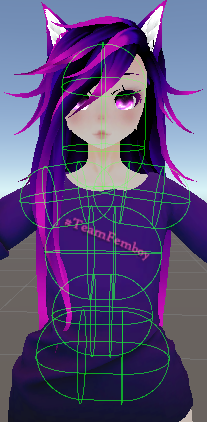
they are not set to inside, before i try and redo all the hair limits are the colliders shown here normal or did i fuck up somehow? https://short.catboy.win/46h1528lq7
 torn tendon
Is there a prefab for an interactable object on an avatar that doesn't flop around?
I'm trying to know how the "avatar prop" prefab from Github works but it keeps moving and rotating too much while it's in someone's hand and the angle of the contacts are always set for hand down even if I rotate a few things. I did read the documentation on Github. There's no info about rotating the prefab or prop.
 fair galleon
they are not set to inside, before i try and redo all the hair limits are the co...
fair galleon
fair galleon
they are not set to inside, before i try and redo all the hair limits are the co...
... hold up all but the hips had bones as spheres on
i swear if this fixes it
im killing myself, thanks for the help Sacred!
jolly crane
@fair galleon you could probably just use 1 collider for the shoulders
one long capsule
fair galleon
wouldn't that get misaligned during animations?
jolly crane
not really, it would be parented to the chest
depending on how the shoulders are rigged, they shouldn't move up that much
you can just put the collider slightly higher to compensate
fair galleon
hmm true, I'll try that out after I add this neck collider rather then a long as head one, thanks
wait if I have 2 colliders on one bone and that bone is selected as a collision check in the physbone does it apply to both collisions or only one?
jolly crane
if you click on the gameobject with the physbone, you will see the gizmos for all of the colliders it will interact with as defined in the list
but my guess is that it will do both
fair galleon
alright thanks
It does seem to work tho i had to add it to one of my shoulders and set the root transform, thanks!
 wide wyvern
Hey! My physbones allow people to move them and grab them in unity but in game even with interacting on they don't move or grab
Im not sure where the disconnect is because everything is enabled correctly
Anyone know how to fix this?
mellow hawk
Do they have a radius on them?
wide wyvern
mellow hawk
Do they have a radius on them?
I did not oml haha that was a dumb mistake, thank you!
 summer abyss
torn tendon
Is there a prefab for an interactable object on an avatar that doesn't flop arou...
summer abyss
torn tendon
Is there a prefab for an interactable object on an avatar that doesn't flop arou...
For rotating the prop you will want to rotate the actual object in the container to face the same way the sword does. I go over that in the installation video and I think the docs aswell. In regards to the object moving in someone’s hand im not sure what would be causing that without seeing it for myself as that’s not something that should be happening if someone is is not moving.
fair galleon
timber saddle
Oh hey. Artsy's old avatar
mhm! I have really been enjoying customizing it n shit
summer abyss
torn tendon
Can I move the reset position anywhere? like my left hand for example?
Yes
torn tendon
Okay thanks.
fair galleon
okay so I was thinking and now I'm curious, what is a usecase for "bones as spheres" on the physbone colliders? is it just more efficient or something?
 cunning spindle
Question about _Stretch. How come the variable seems to skip from 0 to 0.2 something. Is there any way to make it count in the initial stretch that happens?
Its an extremely simple set up.
it works fine after that point, but that deadzone is extremely frustrating
upper raven
I think they did that so the stretch by just moving the bone wouldnt pick up
 boreal void
My physbones are glitching out
mellow hawk
Kinda reminds me of what happens when you have a rotated transform
wise hinge
torn tendon
I do need to ask. Can you use a tracker for a prop in vrchat? Because that's just cool god damm
jolly crane
wise hinge
I do need to ask. Can you use a tracker for a prop in vrchat? Because that's jus...
I use a tracker for my drink, it's possible. it's very janky though and needs setup
wise hinge
Yeah it seems like a hard process. But God damn that's cool
jolly crane
 wise hinge
LOL
modern island
technologically advanced alcoholic
wise hinge
When I'm 21 I am 100% doing that
modern island
just attach it to any cup for now 😄
modern island
i've thought about making a specific cup just for use with tracking in VR
wise hinge
I'm planning on making a post apocalyptic avatar
modern island
i don't have a tracker spare to use for it, so I've thought about buying retroreflective strips and just writing my own basic tracking system using visible light but I'm still trying to figure out if that's worth doing
wise hinge
With a couple guns, a pipe for melee and some other featured
wise hinge
modern island
i don't have a tracker spare to use for it, so I've thought about buying retrore...
Ooo ok ok
modern island
(the answer is - it's absolutely not worth doing, but it would be highly fun)
wise hinge
Sounds like a pain to me
 vital shore
It's a total pain
 pale hatch
Can you animate the Radius size of Phys Bones
using something like a radial shift later on
i simply need to find out because of the hairlenght of a model
torn tendon
I don't use a vive tracker, no. I'm just using a cool script for my mug that ThatFatKidsMom wrote called "avatar prop" that other players can pick up.
jolly crane
pale hatch
Can you animate the Radius size of Phys Bones
only if you disable and reenable the physbone
mellow hawk
jolly crane
You officially have too many trackers lol
jolly crane
I have 10 lol
8 for FBT, one for my drink, one spare (will prob put it on my quest)
or my chair
we'll see
 smoky wind
Hey so i'm trying to do this tutorial https://youtu.be/LOZu6e8ozns
I am attempting to do the animation, but when I click record and then try to check the box to enable animation and sound it changes the animation to an empty one as soon as I click both of them, so I can't animate the checkbox the way that is shown in the video

With the avatar dynamics system of features, Contacts allow you to drive animations on your avatar when you or other players interact with them! This allows many features like grabbable objects, or having your avatar's face react when headpatted! This tutorial will show you how Contacts work, and also show you how to s...
Srry it's a noob question about animation but I cannot for the life of me figure out why it won't stay in record mode and why it shows a seperate animation immediately when I click it.
upper raven
because whatever you're clicking on has an animator with an animation on it
when recording something for an animation always lock it

 smoky wind
Thank you so much @upper raven
upper raven
np
timber saddle
wise hinge
Yeah it seems like a hard process. But God damn that's cool
how the fuck
What do you do, just have a drink on your avatar with a disconnected bone, and the tracker grabs that and moves it?
jolly crane
OSC, animations, and math
you don't sacrifice any tracking points
but it's kinda jank lol
torn tendon
jolly crane
Savage. I like your thinking.
 frail flax
Hi, I am having an issue with an avatar, it's from CM3D2 and I have noticed it is a common problem with models from CM3D2, the bones in the chest aren't correct, if I put a phys bone on it, it will sway or be grabbed in the wrong direction. (ie. if I am moving left, so things should sway right, but they sway left instead, and same with being touched they move in the wrong direction.) Is there an easyish fix for this? like a physbone setting or just like.. turning the bones around in blender?
 full niche
jolly crane
full niche
jolly crane
LMAO
upper raven
frail flax
Hi, I am having an issue with an avatar, it's from CM3D2 and I have noticed it i...
dont put physbones on humanoid bones
frail flax
upper raven
dont put physbones on humanoid bones
Then what do I use in it's place to get the results I want...?
upper raven
you shouldnt put the physbones on humanoid bones, put it instead on empty objects, empty bones or on the object you want it to be itself
Putting physbones on humanoid bones makes them lock up
boreal void
Is it possible to disallow posing for just one hand, I have something on my right and only want the left hand to be able to pose it.
 gaunt merlin
physbones not working?

i wanted to give him a bendy stretchy face but for some reason its all stiff in game
does anyone know why
i dont know why it does not work, i never managed to get a psybone to work for some reason. i got told today it was because i did not add the collider and now i did and i shaped the spheres as the size of the bones but for some reason it still does not work
it also stiffened his facial expressions
since these were bone animations
 brisk minnow
anyone have something i can use as a template for skirt physbone settings?
 kind current
Hello, I need some help, I have a new avatar, and I play on PC (No VR) id like to add this "Limb Control" to my arms on this avatar... anyone know how I could do this?
 halcyon vault
gaunt merlin
physbones not working?
halcyon vault
gaunt merlin
physbones not working?
You have multi child set to ignore and it has like 20 child bones
 urban ingot
gaunt merlin
physbones not working?
urban ingot
gaunt merlin
physbones not working?
Nice Usopp
 elder lion
i need help with physbones
for my fluffy hair ears also my bandana is going threw my body it didnt do that before
gaunt merlin
halcyon vault
You have multi child set to ignore and it has like 20 child bones
But for example i only want these certain bones to move and im scared that if i do they will grab even the friggin teeth out not the lips and they are single bones i dont know how children work
gaunt merlin
urban ingot
Nice Usopp
Its g O d uSoPp
About the other circles i added them because i wanted 6 certain bones on the lips but they are single except the facebone but if i set it to the facebone it deataches from the skull and its extremely messed up
These are the colliders of the parts i want to move
 flat rover
i'm working on something and i want to test this in unity. Used to be able to move the phys bones in unity game mode. but this doesnt work any more. Any one know why ?
 simple elk
set any radius on physbone (0 wont work) , go in game mode, click'n drag
 inner fulcrum
So I'm trying to get a physbone collider (plane) to stick to the root of the avatar to act as a floor collider, I have seen in tutorials how this collider is supposed to stay "attached" to the floor as the avatar moves around but it seems to be stuck to the mesh of the avatar no matter where I attach the collider. Can anyone advise on how to fix this issue?
mellow hawk
inner fulcrum
So I'm trying to get a physbone collider (plane) to stick to the root of the ava...
You need to parent it to the root of the avatar. So it would look like this:

Mine is parented to an empty obj because I like organization. But you can just have to be parented right to the root.
inner fulcrum
Bet! Worked like a charm! Thankyou
 wide harbor
i have nothing in these slots, yet my tutorials show there are supposed to be trees I can edit for animations

what do I need to do to edit my expressions menus?
 tidal pier
sdk 3?
halcyon vault
wide harbor
what do I need to do to edit my expressions menus?
The expressions menu slots are a bit further down in the sdk. If there isn't one assigned you'll need to create one.
wide harbor
so I feel like I'm really close to tackling this animation beast, when I go into the avatar all the menus pop up with the right names however selecting the options doesnt activate the animations, the avatar just doesnt do anything,, what am I missing?


 ionic crater
Uhmmm hai, i've been having some troubles... It appears that the latest SDK version I installed... does not have VRChat Phys bone components...

Anyone here knows what's up...?
halcyon vault
ionic crater
Uhmmm hai, i've been having some troubles... It appears that the latest SDK vers...
looks like an old sdk
ionic crater
but i imported the latest version.. :<
halcyon vault
Pop open your console, clear it in the top left, any errors remain?
ionic crater
welll...
 jolly crane
that is a third party tool, remove it and see if it clears up
delete the whole folder for it
ionic crater
which tool...?
@jolly crane ^^
I also don't think it has anything to do with some of the components of SDK3 not showing up...
halcyon vault
compile errors can stop entire scripts from running
 rose lantern
It does, its causing a compilation error which can and will break everything
ionic crater
Okayy...
rose lantern
you could also see if the author has an updated version
ionic crater
Also... do anyone of you here know how to un-install a previous version...?
jolly crane
VRCAvatars3Tools is not a part of the SDK
delete that entire folder
and then import the newer one, but only if you actually need it
and only after making sure the SDK works
ionic crater
Okayy...
simple elk
means that script is old and wont work with current sdk , you need to update it or remove that script
 halcyon vault
ionic crater
I uhm.. can't seem to delete it
halcyon vault
ionic crater
I uhm.. can't seem to delete it
VRCAvatar3Tools?
ionic crater
O i found a fix :)
Processed the avi in a separate unity project with an older VRC sdk
and then just copied the assets folder over X3
I think iz work now...
ionic crater
Uhm guys.. :c
I has problems...
^^Logs... won't let met build and test... what's wrong..?
halcyon vault
ionic crater
ngl, this is just telling us there were compile errors present in the project when you went to build. Also, #avatar-help
wide harbor
anyone experienced with adding animations to avis ale to figure out why I just get a hald second little kick and the animation resets with every animation I select

 wide harbor
anyone have an exported file of an expressions menu with a good amount of animations I can just plop into my avatar?
the menu and action tree
2$ to anyone who can give me one that works, thats a free mcChicken
ionic crater
halcyon vault
ngl, this is just telling us there were compile errors present in the project wh...
o.. okayy..
halcyon vault
 unkempt timber
halcyon vault
<#801557685300363335>
unkempt timber
halcyon vault
<#801557685300363335>
I know I fixed it a while ago just forgot to delete that one
 brittle lava
quick question, is this new? i've been uploading just fine with 12 physbone components, but only just now being told anything above 8 is prevented from upload. <':

 lone cypress
brittle lava
quick question, is this new? i've been uploading just fine with 12 physbone comp...
lone cypress
brittle lava
quick question, is this new? i've been uploading just fine with 12 physbone comp...
Yeah I heard they changed the limits, sorry :/
brittle lava
delicious, thanks.
halcyon vault
brittle lava
quick question, is this new? i've been uploading just fine with 12 physbone comp...
uploading for Quest?
brittle lava
non.
halcyon vault
brittle lava
non.
That's a Quest upload warning so your sdk thinks otherwise
brittle lava
🫠

never uploaded a quest avatar before, so not sure why it'd think that.
is my sdk breaking? lmfao
 grave sigil
brittle lava
🫠
grave sigil
brittle lava
🫠
Somewhere around that text in the SDK there is a button that says something like ,,Switch build target to Windows/Android"
It switches between uploading for Quest and PC :P
Try that
brittle lava
I never even touched it, so it should just be pc.
I can't try it atm but I will another time
 clever echo
Tongue stick out animation looks fine until physbones are enabled. I want to put an end to this annoying problem Advice?
halcyon vault
clever echo
Tongue stick out animation looks fine until physbones are enabled. I want to put...
I'm not sure if you can animate the position of the root bone. Maybe if you put the phys bone starting 1 bone down in the chain it'll work?
 fair sundial
clever echo
Tongue stick out animation looks fine until physbones are enabled. I want to put...
fair sundial
clever echo
Tongue stick out animation looks fine until physbones are enabled. I want to put...
Make sure you have "isAnimated" checked at the bottom of the physbones component
Maybe that'll help?
 hard vine
Hey, Anyone has an idea on how to add an animation that only plays when you look at a specific direction or when a specific game object is visible?
upper raven
Render.isVisible
 compact cove
Really silly thing - currently creating animations to change Physbone settings (one with gravity enabled, one with gravity disabled).
When going between them with a Blend Tree nothing happens, however if I open up the "Gizmos" tab in the Physbones component it'll suddenly update and snap to where it should be (i.e. if I have the blend tree half-on it'll snap to gravity 0.5, if I have it full it'll snap to gravity 1, etc...)
Seems to be an Editor bug, and it does what it should, but does anyone know if it'll still work in-game or not due to the weirdness?
(And for reference: I do have "Is Animated" enabled, in case anyone asks)
wise hinge
compact cove
Really silly thing - currently creating animations to change Physbone settings (...
Maybe try uploading and checking if it does work
compact cove
-that's a fair point, better to check rather than ask huh lol
wise hinge
Yeah but it's still good to ask
compact cove
Welp, can confirm: uploaded and the animations do NOT work... drat
mellow hawk
Are these two different physbone script or are they just settings in the clip
 short fjord
Hello! my transforms for my ears and tail to move on my avatar when I make an angry facial gesture doesn't seem to work. My faces do, but my tail and ears won't move. I can't seem to find a video tutorial with my issue.
halcyon vault
compact cove
Really silly thing - currently creating animations to change Physbone settings (...
Animating settings in phys bone script is not officially supported. A jank way around this requires you to disable and re-enable the script for the settings change to take affect
grave sigil
short fjord
Hello! my transforms for my ears and tail to move on my avatar when I make an an...
Check the ,,Is animated" checkbox at the bottom of the physbone component, should be ticked :P
 cedar hill
i'm having an issue where default hand and fingers are not activating a contact receiver; i have it flagged for hand and fingers, but it won't work with in game hands or fingers, while it will work with a custom contact sender that is flagged as hands or fingers.
i've had receivers like that working before on other projects, and i'm fairly sure my settings are fine too. any input on what might be going wrong?
 compact cove
halcyon vault
Animating settings in phys bone script is not officially supported. A jank way a...
compact cove
halcyon vault
Animating settings in phys bone script is not officially supported. A jank way a...
Oh, huh… pity, but yee alright, will see if that works well enough for me
short fjord
grave sigil
Check the ,,Is animated" checkbox at the bottom of the physbone component, shoul...
Thank you!
brittle lava
do believe i fixed that error of saying i had "too many physbones" despite never touching the option to use quest. simply did a clean re-install of the vrc SDK.
 lethal tendon
What does "Local Only" on the Contact Receiver exactly mean?
A) Will only run for the wearer/owner of the avatar
B) Will only run for them, which triggers the contact
simple elk
ON = you run it, whatever you change other sees (off is local for everyone that 'runs' it)
So a randomizer behaves wierd if its off since they do the roll on their side
Have an afk randomizer wich i forgot to do that with so the afk animation was different for whoever looked at it
lethal tendon
Thank you!
torn tendon
This is kinda avatar help related but also physbone related so
Is there any way to make a toggle to turn off certain physbone for a object? I have all the objects merged into the base model, so they're not separate meshes, but I wanna make a toggle for my characters scarf so it hides in the body, but then the physbones are still on and it causes issues. So is there any way to just turn off the scarf physbones?
 shadow steppe
hey

so i've been trying some sender receiver shoes, where by proximity they should change emmisiveness. i am not sure what i am doing wrong. it translate the data in the receiver. but it is not sending that data to the FX. i have another one that works just fine using the same method. not sure if i am missing something
 trim citrus
torn tendon
This is kinda avatar help related but also physbone related so
Is there any way ...
trim citrus
torn tendon
This is kinda avatar help related but also physbone related so
Is there any way ...
there is! when animating the toggle for it (on and off state) click the record button. once you're recording the actions in the heirarchy, go to the game object with the physbone script. toggle it off using the check mark and then stop recording and uncheck the Preview box. then record again for the on state and make a toggle per usual!
(i think i said this right, if its confusing dm me and ill help ASAP!)
mellow hawk
Yeah if the comp is not there, it can't do anything.
trim citrus
torn tendon
I might have to hit you up at some point
^-^ feel free to
clever echo
halcyon vault
I'm not sure if you can animate the position of the root bone. Maybe if you put ...
I'll try
clever echo
fair sundial
Make sure you have "isAnimated" checked at the bottom of the physbones component
I did this and it looks a little better but still broken
clever echo
halcyon vault
I'm not sure if you can animate the position of the root bone. Maybe if you put ...
I sete it to the 3rd bone. This helped some but still broken
 rugged quiver
is there any good settings for phys bones
 steel thistle
rugged quiver
is there any good settings for phys bones
steel thistle
rugged quiver
is there any good settings for phys bones
Depends on what you're making
rugged quiver
steel thistle
Depends on what you're making
can i send you a dm
steel thistle
rugged quiver
can i send you a dm
Do you need to?
Better keep it public if there isn't any reason for it
mellow hawk
@rugged quiver check this reply, has two images attached. One for base settings and one so you can understand what the sliders do visually.
There is never a one click fix for everything but this should help get what you want.
rugged quiver
mainly for body physics like hair, tail, butt and breast
mellow hawk
One of the things in that basic setting is hair. It is something to get a feel for by playing around with it
rugged quiver
the breast clip through the clothes and i don't want that to happen but i still want to jiggle
steel thistle
rugged quiver
the breast clip through the clothes and i don't want that to happen but i still ...
That's a different issue, not related to physbone value.
mellow hawk
Use limits to stop clipping.
steel thistle
It's likely either you have different chest bone for body and cloth, and physbone being applied to differently.
Or weight paint on cloth doesn't match with the body
rugged quiver
is there a way to see what bone the clothes was weight painted on
 gray vector

the slingshot wont stretch
and cant be grabbed for some reason

I am getting so confused I have the exact same settings on one of my other avatars and they work but this one doesnt
the stretch part is ste to 5 but it doesnt stretch
set
gray vector
for some reason when they move the nose of my character( yes it has a physbone as a meme) it moves the zipper on the hat they both got physbones but they have their respective root bone it wont stretch the bone just wont stretch when I drag it and it has pull 1 and rest on 0 and max stretch on 5 and max grab on 0.5
 wheat carbon
Does anyone know what this does?
 simple elk
https://docs.vrchat.com/docs/physbones , its for moving bones/gameobjects/hair/tails ectectect
VRChat
PhysBones is a set of components that lets you add secondary motion to avatars, permitting you to add motion to things like hair, tails, ears, clothing, and more! Using these well will make your avatar seem more dynamic and real. PhysBones is a replacement for Dynamic Bones. While both systems share...
wheat carbon
Oh okay that's basically if you wanna have it so that all of your components on your "main" bone and just set the proper roots like that.
 torpid spindle
Dumb questions:
- What is the graph that pulls up underneath nearly all the physbone constraints after press C on the right hand side. I'm not sure if they have a name for it.

- is there any way to zoom out past 1.000 on the graph editor? Can't seem to edit beyond that...
 gray vector
hey so
my stretching physbones work on quest but they wont work on pc
i have collision and a raidus
and grabable on
but they wont stretch and stretching is on 5
 swift sentinel
Is it about that desync thing with having more/different physbones on PC vs Quest?
gray vector
swift sentinel
Is it about that desync thing with having more/different physbones on PC vs Ques...
idk but the stretching physbones dont work
on the slingshot
on pc
but i have the exact same physbone on quest
jolly crane
torpid spindle
Dumb questions:
1. What is the graph that pulls up underneath nearly all the phy...
that's the curve editor. it's used if you want to change the value depending on the position along the bone chain
example: bigger radius at the start, and smaller on the end
torpid spindle
jolly crane
that's the curve editor. it's used if you want to change the value depending on ...
Thank you and is there any way to get past 1.000 on the curve editor?
jolly crane
torpid spindle
Thank you and is there any way to get past 1.000 on the curve editor?
you should just set the slider to 1 and then specify the values using the curve
torpid spindle
jolly crane
you should just set the slider to 1 and then specify the values using the curve
So overall it's trial and error on values greater than one?
jolly crane
torpid spindle
So overall it's trial and error on values greater than one?
the curve is essentially just multiplying the value that you set on the slider
if your curve has some point at 0.5, then that part of the bone chain will have 50% the value you set on the slider
so if the slider was already 0.5, now the value is 0.25
but if your slider is set to 1, 0.5 on the curve means the actual value is also 0.5
torpid spindle
torpid spindle
2. is there any way to zoom out past 1.000 on the graph editor? Can't seem to ed...
I understand the explanation and that does help, but for example going over 1 since from what I can see that it is possible to exceed the graph itself at 1 as shown in the post above.
as you can see the point on the left hand side is complete gone and I can't edit it without setting it to a default/pre done graph in the curve editor.
 prime spoke
it wont let me interact with my phis bones. like grabbing my avatars hair.
mellow hawk
prime spoke
it wont let me interact with my phis bones. like grabbing my avatars hair.
has a radius on them?
prime spoke
mellow hawk
has a radius on them?
?
mellow hawk
prime spoke
?
Physbones are not interactable unless the radius value is more then 0.0 on the script
prime spoke
mellow hawk
Physbones are not interactable unless the radius value is more then 0.0 on the s...
they worked before, just today they stopped working
mellow hawk
That is the only thing that turns it off besides in game interactions.
prime spoke
mellow hawk
That is the only thing that turns it off besides in game interactions.
also when i open my quick menu it highlights al the text and makes it hard to read.
 polar dew
With physbones, are the "end points" also given physics or is it required to add an extra end point to each bone for it to work properly?
mellow hawk
polar dew
With physbones, are the "end points" also given physics or is it required to add...
The endpoints are used if your only have object chain of less then 3.
Otherwise they act about the same as any other bone.
polar dew
ty ❤️
 undone magnet
I have a question about the {parameter}_Stretch on physbones. when im pulling the bone in an attempt to stretch it, its jumping from 0.0 to 0.7, even when i have the max stretch as 5. If i make it any lower, the stretch value doesnt change. Is there something that im missing? because i really need it to go from 0.0 to 1.0, not from 0.7 to 1
it seems i can go around this by adding extra parent bones, but i would prefer not to be adding unnecessary bones to it
jolly crane
undone magnet
I have a question about the {parameter}_Stretch on physbones. when im pulling th...
not too sure what's going on there, but you can always re-map the float
you can animate the value of other floats an an animator
refer to "AAP - Remapping a value from [0, 1] to [X, Y]"
 austere timber
Hello, Im a game Dev with Blender experience, but not unity (let alone VRC addons). I'm looking on some tutorial material to have an object on my avatar act as a pick up item. Its a simple sphere to use as a crystal ball, but i don't expect the process to be so simple.
I have till the 13th to get the functionality working so even if i need to read a thick pdf manual i will!
Please help? 🙂
 short narwhal
do you need the object to be pick up over by other people or just yourself
austere timber
short narwhal
do you need the object to be pick up over by other people or just yourself
Other people! you caught why i could not ask my less experienced friends.
short narwhal
https://docs.vrchat.com/docs/avatar-dynamics you'd probably need to look into Avatar Dynamics stuff as far as like physics bones
VRChat
Avatar Dynamics is a new suite of features aimed at creating fun and interesting interactions between avatars. Understandably, these are some powerful features, so there’s a lot to cover here! The two primary features of Avatar Dynamics are PhysBones and Contacts. These features are governed by the ...

Did this video help you? Consider sending me a tip on Ko-fi! https://ko-fi.com/sippbox
The Avatar Dynamics update recently dropped for VRChat, and with it brings the highly anticipated replacement for dynamic bones, PhysBones! With Physbones, you can apply secondary motion to parts of your avatar, such as hair or skirts, making avatars much mor...
as other people can grab your physics bones
austere timber
short narwhal
https://docs.vrchat.com/docs/avatar-dynamics you'd probably need to look into Av...
Thank you! This should help me refine my inevitable questions on solving development hiccups.
short narwhal
as far as how to get it to behave like a object you just dropped in World space and something attached to an invisible leash probably something involving constraints but I'm not quite sure
summer abyss
austere timber
Hello, Im a game Dev with Blender experience, but not unity (let alone VRC addon...


Create avatar props that other players can grab, rotate, and drop in the world. Prefab available for free on booth and github. #VRChat
Likes
1560
Retweets
444
 Twitter
·
short narwhal
summer abyss
https://twitter.com/ThatFatKidsMom/status/1535760101155299329
Twitter
·
short narwhal
summer abyss
https://twitter.com/ThatFatKidsMom/status/1535760101155299329
I was looking for that but I couldn't remember what it was called
 finite forum
I'm trying to make an animation where I grab a physbone and stretch it, and when I stretch it, it turns on a mesh and plays an animation. The animation and interactions with the physbone works, and I can see it in a mirror, but I can't see it in my own hands. Anyone know why that would be? :P
The mesh is attached to the physbone as well. So when I move the physbone the mesh the animation turned on moves with it. (Have yet to test how another user sees this)
prime spoke
All my avatars phis bones won’t let me grab them but it worked a few days ago and when I open my quick access menu all the text is highlighted until I hover over it. Dose anyone know how to solve one of these problems?
 restive ruin
hello, does anyone have any tutorials on Contact Toggles?
mellow hawk
restive ruin
hello, does anyone have any tutorials on Contact Toggles?
Contact toggles work like a normal toggle, except they will always go back to 0.
Meaning we have to use empty clips to hold it for a sec, and we have to sync it up for late joiners. So it may need a bit of knowledge about how the state machine works.
If you just want a quick tldr read this post: #avatar-help message
Otherwise lmk and I can walk you though it a bit more.
restive ruin
That would be really appreciated
finite forum
Is there a way beyond using the menus in game to reset a single phys bone position or all of them, like in an animation? Toggling it off and on seems to break it. (nevermind, found a way)
 austere python
so for some reason when i put physbones on my avis ears it only affects one of the transforms, and the other transforms cannot be affected even after directlyt putting the physboines component on it, any idea?
 jolly crane
austere python
so for some reason when i put physbones on my avis ears it only affects one of t...
jolly crane
austere python
so for some reason when i put physbones on my avis ears it only affects one of t...
Unity does not know what the "length" of a bone is. if you want a physbone chain 3 bones long, you either need to add a 4th bone, or increase the "End position" on the Y
austere python
jolly crane
Unity does not know what the "length" of a bone is. if you want a physbone chain...
yeah i figured that out lol, i added an end bone and it fixed my problem
ty though
 vague lichen
Does anyone know why when i add a particle system prefab onto a bone with a physbone component, the physbones just stop working on said bone. It's like the script isn't even there anymore, there is no movement at all.
jolly crane
vague lichen
Does anyone know why when i add a particle system prefab onto a bone with a phys...
because that prefab is a gameobject in itself, just like bones. the physbone is trying to include the prefab in a bone chain, but that isn't what you want
you should drag that prefab into the "Ignore transforms" list of the physbone
vague lichen
jolly crane
because that prefab is a gameobject in itself, just like bones. the physbone is...
I thought of that but my main goal is to make the prefab move with the physbones, but based off how you worded that im assuming its not possible?
jolly crane
you want it to move with the bone, but you don't it to also behave like a bone in the physbone chain
otherwise the particle system would also be flailing
that's very much possible, just parent it to the correct bone and add the particle prefab to the ignore transforms
vague lichen
Ohhh, ok. I understand now. Thanks for the help
timber saddle
strange question, because i had some issues when trying to make a cloth skirt.
What's the deal with "mesh collider" when it comes to avatars? is it possible to make a world constraint object that's solid and thus that people could jump on? I ask this because I apparently had the colliders set wrong in my skirt attempt, and they were colliding with ME and sending me darting off and spinning off... plus there's that whole collider jumping/flight system
jolly crane
timber saddle
strange question, because i had some issues when trying to make a cloth skirt.
...
it is possible to use mesh colliders to interact with the world and with players. doing so can be a bit tricky however since you need logic to deal with the fact that your mirror clone also has all the same colliders in the same place
timber saddle
see what i was thinking of was something like sango's boomerang (from inuyasha) but not the same design, something that could be thrown, but was world-locked when it was and when it collided with a wall in a world, players could jump up onto it
but i didn't know if it was possible to make an object that could work like that
jolly crane
in theory it should be possible
upper raven
I dont think other players can interact with colliders set on your avatar, not like that anyway
jolly crane
I was not talking about physbones at all
 drowsy pike
When using contact receiver in on enter mode, is there a way to have it work more than once? It seems to only work the first time then never again until avi reload.
mellow hawk
On enter will set it to true for 1 frame, then false the next frame.
short narwhal

 proven narwhal
 finite roost
Very quick question. I have an empty game object and straight above it is another. The bottom one has a physbone component to create an invisible bone which I'm taking the _angle parameter from.
For some reason though the bone looks still but the parameter is jumping from 0 to 0.25 and back, jittering kind of

I need it to stay at 0 angle when it's not moving, not jitter between a value of 0 and 0.25
Flickering between 0 and this

These are my values. The radius is only to see the line for testing

 fallow plume
Been having an issue lately where every time I try adding extra bones to my rig, pieces of the avatar just flip backwards. Does anyone have any clue what might be the issue here??


 twin dagger
Well to the above the feet are facing the wrong direction dun know if that helps any or not.
fallow plume
Probably should have posted the og models lol
But put simply, everything is fine until I add a humanoid rig in unity. The bones are being inverted upon being mapped.
simple elk
something with export setting in blender / apply all transforms somethingsomething, not the first time ive seen that
 rare raft
can someone help me setup a unlocking dynamic for a avatar with a synced network parameter
mellow hawk
rare raft
can someone help me setup a unlocking dynamic for a avatar with a synced network...
You talking about how physbones don't always 100% position between PC Quest. Or something else?
rare raft
mellow hawk
You talking about how physbones don't always 100% position between PC Quest. Or ...
im talking about the vrc contact senders/receivers and making a synced parameter for a lock.
i want to make public avatars but i want them locked to were i have to unlock them with a key but im having trouble keeping saved
 elfin flower
Does anyone know if there is a library of PhysBones presets?
mellow hawk
elfin flower
Does anyone know if there is a library of PhysBones presets?
This old post has a couple of presets to work from and a diagram to show you how the settings work.
#avatar-dynamics message
elfin flower
mellow hawk
This old post has a couple of presets to work from and a diagram to show you how...
thanks :)
 quaint escarp
does anyone know how to make dynamic bones grabable?
mellow hawk
quaint escarp
does anyone know how to make dynamic bones grabable?
add a radius and have interactions enabled in game.
 rich topaz
Dynamic bones? Not phys bones?
rich topaz
They’re grabbable by default
mellow hawk
false
they default to not have a radius
mellow hawk
radius and interactions, only two things that affect it
Is this your avatar btw, like one your working not one that is ingame.
 fair drum
Best time to add a rigged tail? In Blender or after in Unity?
halcyon vault
fair drum
Best time to add a rigged tail? In Blender or after in Unity?
model editing in blender
fair drum
halcyon vault
model editing in blender
Thank you love
 bronze aurora
now its getting kinda weird
i wanna have some wisps surround my avatar and float around as i move. my idea was to make a central game object on the avatar with the wisp particle effects in it like a container. i then added the physbone component, put the container as root and wanted to see if it works in play mode (editor view). surprise surprise, it didnt
i then tried the exact same thing with dynamic bones instead and low and behold, it worked there. everything is perfect. then i even tried auto translating them and stiff again
is there a difference in how physics bones calculates that stuff compared to dynamic bones?
halcyon vault
bronze aurora
now its getting kinda weird
i wanna have some wisps surround my avatar and floa...
Yes, a lot. Here it’s probably multi child settings.
 main ermine
Wrong chat
bronze aurora
halcyon vault
Yes, a lot. Here it’s probably multi child settings.
i tried all of them yet nothing changed
fair drum
You still have to add dynamic bones even if VRC just adds phys? Never understood that
mellow hawk
They get run through the auto converter at runtime. But people are lazy and would screech if you just remove them from the sdk.
jolly crane
fair drum
You still have to add dynamic bones even if VRC just adds phys? Never understood...
you do not need to buy dynamic bone if you're uploading a model. however, some base models still come with dynamic bone components on them, and they will cause missing script errors unless you import dynbones or use a salvage converter to convert the missing dynamic bone components to physbones
fair drum
Thank you guys
 merry topaz
I'm having trouble syncing grab toggles, I can end up holding a gun on my end, but other people won't be able to see it. Is there any kind of easy fix for this?
(Asking here 'cause technically dynamics related.)
 fluid wadi
is it in your synced parameters?
mellow hawk
merry topaz
I'm having trouble syncing grab toggles, I can end up holding a gun on my end, b...
Are they directly inverted, ie on is off and off is on. Or is it not triggering at all where it works for the local player.
merry topaz
They work perfectly on my end, with non-local clients, it's 50/50. I know the problem is probably in the way that I set this up, but, this is from the only tutorial that I could find.
(I just noticed the mismatch in the enable and the disable for the primary weapon, but, I use the same framework for all of my grab toggles, which, that isn't the only one on that avatar for me to test. So, for the purpose of showing how I do them, and asking for help, it's still valid.)
 simple elk
other will see it differently - enable and have the paramter in your parameter list
 merry topaz
Alrighty, I'll try that. Thanks.
torn tendon
@summer abyss Hi, I followed the instructions in the video about the Avatar prop and on your page and the prop WITHOUT any changes to it, moves along one or 2 axes in a circle if I'm moving my head left or right. It's fine when other people pick it up by the contact though. It works fine with every one of my avatars except the one that doesn't have a ring finger. Does the avatar need a ring finger for the prefab to save or lock its position properly when the Avatar Prop boolean is enabled in the expression menu?
torn tendon
torn tendon
I just setup the hand so that there's a middle and ring finger instead of an index and middle, I'm going to check if it makes a difference.
torn tendon
It made no difference, it still rotates.
summer abyss
torn tendon
<@591736640410746891> Hi, I followed the instructions in the video about the Ava...
You need a ring finger in order to be able to rotate it but thats about it. I’ve never seen this error before though so I would recommend deleting the prefab off your avatar (prefab, fx layers, and parameters) then reinstalling it.
torn tendon
Ok
 peak trout
yeah you need a ring finger
also need help with avatar dynamics tmmr if anyone can dm me about it later
 versed meteor
Question, if you have a custom contact sender with a tag matching someone else's contact receiver, would they be able to interact?
simple elk
yes
this is where the combat thing makes stuff hard to do since they need the same parameter name , currently only one we have similar is head/torso/fingers & hand
versed meteor
simple elk
this is where the combat thing makes stuff hard to do since they need the same p...
I was going to ask a follow up question asking if the community had agreed on a common weapon tag to make everything work together, but I guess this was already the answer.
That's unfortunate. Guess I'll just name mine "weapon" and see if I get any hits (pun not intended)
jolly crane
versed meteor
I was going to ask a follow up question asking if the community had agreed on a ...
people use Damage
you can add multiple tags too if there are other ones you want it to interact with
versed meteor
That's true. Thanks for the advice!
mellow hawk
Attack, is sometimes uses
 cursive agate
Hey. I want to create a hair root bone to keep my number of physbone components down. Is it possible to ignore the first bone in a chain? I know you can do stuff with the curves. But i don't know how to do it precise. Since I would imagine that the root bone could move a bit and move all hair out of place. Or Am I compleatly wrong?
mellow hawk
It should be okay to just have an dmpty holder bone coming from the head bone. That way you can group all the hair together. It should be fine, but you can always use the ignore transfroms option to remove it from the script.
cursive agate
Okok, I'll see what results I get. Thanks.
versed meteor
Would it be taboo if I gave a sword a hand contact tag?
halcyon vault
If you want people to high five the Sword, go for it
 ember bay
what's the best way to test contact receiver within Unity? I made an empty object with sender component in it and have it set to hand, but it doesn't seem to do anything during playmode
ember bay
yeah I did. doing it in playmode through the scene window should work, yes? I mean It also doesn't work on something I've made in the past
fluid wadi
does it work ingame?
ember bay
yes
fluid wadi
are you using av3 emulator
ember bay
no
fluid wadi
i believe you need that running
ember bay
oh
fluid wadi

GitHub
Emulator for VRChat's Avatars 3.0 system, built on the Unity PlayableGraph API - GitHub - lyuma/Av3Emulator: Emulator for VRChat's Avatars 3.0 system, built on the Unity PlayableGraph API
ember bay
thanks
yeah that seems to work
if I set physbone component's parameter as "thing" and if I wanted to play an animation according to how much it has been stretched, what do I refer to it as in FX? thing? or thing_Stretch?
fluid wadi
thing_stretch
its the parameter + _stretch that it changes
also for angle and IsGrabbed
 desert tiger
Hi, i attached clothes in Blender to the body but the clothes won't move with the Physbone physics in Unity, how to fix that?
short narwhal
have you set up any Physbone for your clothing
desert tiger
short narwhal
have you set up any Physbone for your clothing
Nope..just the body, thought they would move because they are attached
can I add it the same way I did with the body?
short narwhal
double-check are you referring to them not jiggling for physics bones are like they're not even attached to to your main skeleton
desert tiger
short narwhal
double-check are you referring to them not jiggling for physics bones are like t...
yep the body jiggles but clothes dont with it!, Do i have to go back to blender-
desert tiger
got it working, It didnt work because the mesh was attached in blender
 peak horizon
how do I make breast physics not look goofy with physbones?
mellow hawk
peak horizon
how do I make breast physics not look goofy with physbones?
Limits and settings more than anything.
 floral arrow
Heyo, i was wondering if there's any guides or information out there related to avatar props that'd be interactable by other players like picking up objects and etc?
seen a few avatars that has the among us character where you're able to pick it up, so I'd assume it's more than possible :) thanks!
 royal musk
question, how do I show Physbones I put them on my Avi and they showed up but I pressed something my keyboard and now I can't see Physbones at all- help would be appreciated Q-Q
 stiff viper
royal musk
question, how do I show Physbones I put them on my Avi and they showed up but I ...
stiff viper
royal musk
question, how do I show Physbones I put them on my Avi and they showed up but I ...
probably pressed Gizmos
at the top of your scene, should see this

just press it and it should show your physbones
royal musk
oh
royal musk
stiff viper
at the top of your scene, should see this
thank you
 jolly edge
So I'm trying to use the _Angle physbone parameter thing to play an animation but when I use the Gesture Manager in Unity and grab it with my cursor nothing changes. I checked it with the _IsGrabbed and it worked fine
I'm stumped
I even went into the debug and checked that the _angle is moving, but nothing is changing
upper raven
jolly edge
So I'm trying to use the _Angle physbone parameter thing to play an animation bu...
Let me see the FX layer
And the parameters
jolly edge
upper raven
Let me see the FX layer
It's alright, I scrapped the _Angle idea and used a very small _Stretch instead which works. I'm still not entirely sure why the _Angle doesn't work tho
 high dove
how would i make a physbone being grabbed trigger a 2d texture to change and a different expression
simple elk
Parameter_IsGrabbed - do stuff on fx be it material swap (bleh) , material offset or uv swap (pconly)
 distant silo
can I exclude colision from the root of a bone and not the rest

having issues with this kind of situation
the root in the back has colision when it shouldn't 🙂
(Purely for realism btw)
 cerulean agate
fluid wadi
https://github.com/lyuma/Av3Emulator
cerulean agate
fluid wadi
https://github.com/lyuma/Av3Emulator
Just updated Avatar 3.0 Emulator with fixes for the new SDK, FX masks and GestureManager 3.7 support. It contains some fixes for OSC and avatar dynamics parameters, so _Stretch, etc. now work with OSC while testing.
Get it here! https://github.com/lyuma/Av3Emulator/releases
Let me know if there are still issues using it together with the default controllers.

GitHub
Emulator for VRChat's Avatars 3.0 system, built on the Unity PlayableGraph API - lyuma/Av3Emulator
upper raven
cerulean agate
Just updated Avatar 3.0 Emulator with fixes for the new SDK, FX masks and Gestur...
The package doesnt come with with GM 3.7
 cerulean agate
💢 how did I miss that. thanks
cerulean agate
upper raven
The package doesnt come with with GM 3.7
fixed. Download it again, or download from GestureManager 3.7 and add that
upper raven
yeah i did, thanks
 ancient sage
so the contact updates to 1 but the parameter dosent update? im out of ideas of what to do
 fluid wadi
ancient sage
so the contact updates to 1 but the parameter dosent update? im out of ideas of ...
fluid wadi
ancient sage
so the contact updates to 1 but the parameter dosent update? im out of ideas of ...
are you using av3 emulator
linked above
ancient sage
i have it in the project but its easier to just use sender
ive even tested it in-game, i just have no clue whats wrong here
ancient sage
yeah it is
ancient sage
yeah
like the parameter works
it just dosent feel like updating
u can even see it
it sets it to 1
but wont on the animator
fluid wadi
is ON not 1?
ancient sage
it is
fluid wadi
so it is updated?
ancient sage
the Unlock parameter
this shows it better

the transition from lockscreen to songoff is just Unlock=true
but for some reason no contact receivers actually update the parameter
fluid wadi
what happens when you move the sender off of it
fluid wadi
try with another receiver type
simple elk
proximity is what i mostly use
ancient sage
ive tried it with other collision tags, a different game object with the same receiver, local only or WD on and off
like the only thing i can think of is for some reason the receivers just not attached to the animator somehow
even though its the only animator in the entire scene
fluid wadi
to double check is av3 emulator's game object in the same scene? if you have multiple scenes it only works in the ones its actually in
ancient sage
i have the package in my project but its not used
ancient sage
well i dont really have an avatar in this package
im just using the dynamics demo for now
fluid wadi
you don’t need one
av3 emulator will make unity behave like vrchat
without it a sender will do nothing
ancient sage
well either way, still nothing
fluid wadi
it’s enabled?
ancient sage
ye
fluid wadi
same scene?
ancient sage
yup
fluid wadi
lyuma updated it 17 hours ago are you on that one?
ancient sage
updated it, but still nothing
fluid wadi
the avatar you put it on is the fx controller on it?
ancient sage
it has no avatar
fluid wadi
get one, put a descriptor on it and attach the fx controller
fluid wadi
you tried?
ancient sage
i mean i can do it again
it wont change anything cause i havent done anything though
fluid wadi
you didn’t have the emulator on before
ancient sage
the emulator shouldnt even do anything
like its a prefab asset you'd slap on an avi
i did that
still no work in game
i even went on to work on a stupid roomba that explodes
it uses receivers and works just fine
fluid wadi
you don’t put it on anything
it’s a game object with scripts on it that is just active in the scene and changes how play mode behaves
wait so it doesn’t work ingame?
ancient sage
No
fluid wadi
ok i’ve been under the impression it’s been working and you just wanted to test it in playmode
ancient sage
Parameter wise, it is
like toggling them on and off works as intended
but for some reason trying to put those parameters in contact receivers just wont do anything
simple elk
uugh do you have av3emulator in your scene or not
ancient sage
its there
i just updated the sdk so lets see if that magically fixes it
i hit play and it crashed unity
reopened it, still nothin
works functionally but not practically
fluid wadi
so it won’t transition off lockscreen?
fluid wadi
confirm that av3emulator is enabled, you have an avatar with a descriptor and the lockscreen fx controller attached to it
 kindred fiber
is there any way to have it where a user is able to grab my sword from my back ?
Im really really new to Avi Dynamics so idk
mellow hawk
kindred fiber
is there any way to have it where a user is able to grab my sword from my back ?...
Yes for sure. First idea that comes to mind, having it set up like: chest > empty > sword.
Adding a physbone script is empty with a lot of stretch, no radius, and endpoint at the sword base. Then the sword having a physbone script, no stretch, radius to grab it, and endpoint at the tip.
Should work, but have not tested it. There maybe better ways than this as well.
kindred fiber
mellow hawk
Yes for sure. First idea that comes to mind, having it set up like: chest > empt...
what do you mean by "Adding a physbone script is empty with a lot of stretch, no radius, and endpoint at the sword base. Then the sword having a physbone script, no stretch, radius to grab it, and endpoint at the tip."
Like the blade itself have a lot of stretch with no radius while the handle has no stretch but with radius?
like when you say empty, you mean by "empty object"? 😮
Sorry is hard for me to understand cuz I’m a visual learner hahaha
🤔
mellow hawk
So because a phybone script will always face the direction that is being pulled when it's being stretched, we need to have two independent scripts. One for rotation, one for offset.
The sword can have one just to be grabbed and rotated wherever it is.
But we need to link that wherever with the avatar, so we use another one. We cant directly attach it to a humanoid bone so we need to use an empty game object.
We also don't want to be able to grab this bone because it's just to bridge the gap so we turn the radius off so it can't be grabbed, we also want it to stretch so it can be in or out of the original spot we grabbed it from.
kindred fiber
oooh okaaaaay
thank you so much
since this is physones based, would that mean that this is able to be used on quest avis as well ?
mellow hawk
Yeah, it would take up 2/8 Components, and 2+/64 Transforms
kindred fiber
thats no problem at all
 rigid plover
So, I was trying to add Gogo Loco Beyond, but when I try in it vrc, the scale toggle just causes the avi to bug out between different sizes. Is there a way to fix that?
 rustic ferry
If a contact sender and receiver are always overlapping, but using On Enter as a receiver type, will the parameter be set to 1 only the first time that the velocity goes over the minimum velocity? The language is vague in the documentation, but it does say "upon first contact" which makes me think that if the two are always overlapping it may never trigger.
upper raven
yes, the parameter will only be 1 when the two contacts "touch", after that the parameter will go to 0 and will only go to 1 again after the sender leaves the receiver and touches again
if the sender "stays in" the receiver it wont become 1 until it leaves and touches again
 sinful tiger
I'm running into an issue with a contact triggering an unrelated animation. I can't figure out what I'm doing wrong. I'm making a basic boop. I've set this up in the fx controller, using a pretty standard animation loop. Entry->default (with a zeroed out animation) <-> boop (with the triggered boop animation). The transitions are set to use a bool called "boop" which the receiver also specifies.
once I added the zeroed out animation to the default node, it started triggering a separate avatar scaling animation. So now whenever the boop animation triggers, it scales my avatar down considerably. The pic is the scaling animation. I did not make this one, so I only have a cursory idea of how it works (this from @summer abyss's gumroad).
I was hoping someone might have an idea of what to look at next? This is my first foray into avatar dynamics and I very much don't know what I'm doing.
 summer abyss
sinful tiger
I'm running into an issue with a contact triggering an unrelated animation. I ca...
summer abyss
sinful tiger
I'm running into an issue with a contact triggering an unrelated animation. I ca...
So you get booped and end up being scaled down?
sinful tiger
yep.
Didn't think you'd answer this quickly, but thanks for popping in. Sorry to tag you.
I'm also using your high five, and not having any issues with that. From what I've been able to tell, I'm not doing anything very different.
summer abyss
Go into the AV3 manager, click on the WD symbol, and ensure that you click "Set WD on" if you see a bunch of checkmarks on the right side of the window. If you do not see a bunch of checkmarks that click "Set WD off"
sinful tiger
My avatar apparently uses a mix of write defaults. Would it be better to try forcing them all off or on? I know vrchat recommends off
summer abyss
They should be set uniformly throughout with the exception being my scaling prefab.
That is mixed on purpose
summer abyss
summer abyss
Go into the AV3 manager, click on the WD symbol, and ensure that you click "Set ...
Refer to this to select the appropriate option.
sinful tiger
that seems to have fixed it. Thanks for your help. Now to go test to see if anything else broke.
also, thanks for the great assets. 🙂
rustic ferry
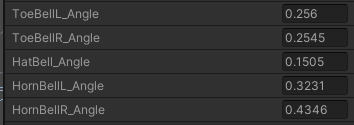
I have 5 physbones that I am pulling the _Angle parameter from. In play mode, most of the parameters are at 0.0 at rest (expected) except for 2 of the horns that are at 0.5 at rest. When jiggling the associated physbone, it appears that the it's adding and subtracting from 0.5. Is this normal? https://i.imgur.com/dvbBQqP.png
At rest: https://i.imgur.com/qPUmWga.png
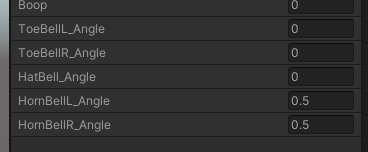
The HornBellL_Angle and HornBellR_Angle values also don't seem to be moving quite as much, as if they were clamped.
mellow hawk
Do they have gravity?
rustic ferry
@mellow hawk They do not. However, they're a separate physbone script from a different physbone on the chain which does have gravity. I tried disabling gravity on those particular bones and did not notice any change.
rustic ferry
Basically the 5 different layers I've created for these 5 parameters are exactly the same, nothing else is referencing the parameters, but for some reason these two have both decided to report different values... and the left horn reports less overall change from the right one. I'm very baffled, but I think I will set up the physbones again on a fresh version of the model to see if anything changes
modern island
is there any way to reset physbones to their original pose before / after disabling them ?
halcyon vault
modern island
is there any way to reset physbones to their original pose before / after disabl...
if you have the component disabled you can animate the bones to their original orientation. I did this for a while with things that relied on blendshape deformation
 somber robin
Hello, I tried to make a prone still animation, and when I tested it on the unity model, it floats. and when I try it on my own model, it doesn't float. when I try it in vrchat, it floats just like the unity model. how do I make it not float?


 plush arch
I've heard someone be able to pet anyone and it makes a brushing sound. Is there a way to read the head bone collision and produce an action with contact senders and recievers?
mellow hawk
plush arch
I've heard someone be able to pet anyone and it makes a brushing sound. Is there...
Yeah the head has a contact sender tagged as Head, automatically added to every avatar
plush arch
ah, so you can have a reciever on the hand that reads the tag Head, and it'll be able to play a sound?
mellow hawk
More or less yeah, just use normal toggle logic and it just kinda works.
plush arch
oki
mellow hawk
The defult ones are head, chest, fingers, hands, feet. (names may not be 100%) But these are senders on every avatar. and the hands have physbone colliders as well.
 bronze siren
Is there a way to have senders/colliders attached to the feet that would interact with others physbones the same way hands/fingers do?
Could you just use a sender with hands
err, no that wouldn't work
upper raven
There's already colliders on the feet that interact with physbones
It's added automatically
jolly crane
upper raven
There's already colliders on the feet that interact with physbones
no, those are only contact senders
they are not physbone colliders
the default "colliders" are mostly just contact senders, with only the palm and fingers doubling as global colliders
upper raven
My feet always worked as colliders for physbones
fair sundial
mine dont?
jolly crane
sus
it is possible to steal the colliders off some fingers and put them on the feet, but that is not a supported thing
halcyon vault
upper raven
My feet always worked as colliders for physbones
show video of your feet interacting with someone else's hair. I'd love to set that sort of interaction up
jolly crane
literally asking for feet pics kekw
 bronze siren
jolly crane
it *is* possible to steal the colliders off some fingers and put them on the fee...
bronze siren
jolly crane
it *is* possible to steal the colliders off some fingers and put them on the fee...
could you not just attach new colliders to the feet
jolly crane
those will only interact with your own avatar
and only on the physbones you specify
not with others
bronze siren
:c
rustic ferry
Hey folks, I'm completely stumped why my physbone _angle parameter on two particular physbone scripts is always returning 0.5 in Unity, and flickering constantly between 0.5 and 0 in VRC. The other three physbone scripts return 0 when not in movement, as expected.

@mellow hawk maybe but I know you've already seen me ask this question before 😭
plush arch
I'm looking to make a brushing sound, but don't know how big the bubble should be, and if i need a spatial audio source, and what volume it should be.
The plan is to trigger it when a reciever in the hand connects to a head (i have that set up already), but just don't know the specifics to the audio source.
Can anyone help out?
rustic ferry
rustic ferry
Hey folks, I'm completely stumped why my physbone _angle parameter on two partic...
Update: was a bone too high up on the horn bone chain. Needed to use an endbone which wasn't in a great position, so I added a new bone in Blender
rigid plover
is there a way to fix this?

 tardy light

hey so for some reason the bones on the tatas stay stuck in position and there arent bouncing back anymore
i tested these setting on all of my avis but just on this on the bones on butt and tatas get stuck
do u guy know what it could be?
halcyon vault
rigid plover
is there a way to fix this?
Top and bottom, if it's using an fbx/obj, position the model in blender with the feet in line with the X axis and apply transforms
rigid plover
halcyon vault
Top and bottom, if it's using an fbx/obj, position the model in blender with the...
i tried that didn't work either, but im doing it in unity. would that change anything?
halcyon vault
rigid plover
i tried that didn't work either, but im doing it in unity. would that change any...
I mentioned blender for a reason. Unity doesn’t care for it’s position in the scene, it’s calculated on the pivot point of the object that holds the descriptor. Setting the avatar’s position to 0, 0, 0 will be the best visual of where the model sits and what needs to change
rigid plover
halcyon vault
Top and bottom, if it's using an fbx/obj, position the model in blender with the...
ah ok, i think i did that in blender. havent rlly used it before, what would i do after that?
plush arch
Does anyone know any worlds that could work well for testing avatar dynamics? Like a world where there's spheres that are contact senders and recievers for different body parts
for example: - a sphere with a contact sender/reciever with the tag "Head", to test headpat mechanics on avatars
jolly crane
plush arch
Does anyone know any worlds that could work well for testing avatar dynamics? Li...
you can't do avatar dynamics in worlds yet
plush arch
ah, so to test i'd need someone to test it on
jolly crane
either that, or test in unity with the emulator
or add those spheres to your avatar and have them world constrained
so that they stay in the same spot
plush arch
jolly crane
either that, or test in unity with the emulator
well i did
but the person I made the avatar for said it didn't work.
 vocal frigate
vocal frigate
vocal frigate
Figured out an easy way to detect world collision and translate it into a parameter via avatar dynamics
(also pictured, gesture-less controls, using SteamVR input with OSC and contacts to grab the sword, and physbones to detect swings)
jolly crane
vocal frigate
Figured out an easy way to detect world collision and translate it into a parame...
are you ray-casting a contact?
or using particles?
vocal frigate
jolly crane
are you ray-casting a contact?
particles with stop action behaviour but using contacts to convert to parameters
 glossy ferry
Do any body know the different between Dynamic bone on Unity store and the VRC Dynamic bone?
jolly crane
glossy ferry
Do any body know the different between Dynamic bone on Unity store and the VRC D...
there is no such thing as "VRC Dynamic bone". previously we used Dynamic bone from the asset store, but that is obsolete now
VRC has their own system called Physbones
glossy ferry
jolly crane
there is no such thing as "VRC Dynamic bone". previously we used Dynamic bone fr...
my bad, and thank you
timber saddle
I got a bit of a dynamics issue. I had phsybones, and capsule colliders, and they're going through each other rather than properly repelling

Basically, the head tentacles keep going through my arms, despite the arms having colliders that are set to STOP that.
or could they be slipping through here?

maybe this isn't enough overlap to keep them going through the elbow?
 jolly crane
timber saddle
I got a bit of a dynamics issue. I had phsybones, and capsule colliders, and the...
jolly crane
timber saddle
I got a bit of a dynamics issue. I had phsybones, and capsule colliders, and the...
it's most likely your angle limits
timber saddle
I jsut added thsoe to try to stop it
jolly crane
if you reach the limit the collider will go through
timber saddle
they weren't there before
I added those just now (not in the upload) to try to stop them from bending in half, so it's not those XD
it was doing it without them there
 stark sparrow
I was updating an avatar that still had Dynamic Bones, and I was wondering if anyone had a good starting place for hair numbers? All Google is telling me is stuff about when Physbones came out in April, and I was hoping for something a little more recent now that we've had more time to play with it
vocal frigate
jolly crane
or using particles?
https://github.com/Entorix/Entorix-Collision-Trigger made this prefab. Linking it in case you're interested

GitHub
A basic particle death stop-action/avatar dynamics based collision detector that allows the triggering of animations when the gameobject collides with a generic collider - GitHub - Entorix/Entorix-...
short narwhal
cool making it a prefab
 halcyon vault
Cool, either your phys bones are shooting away or you have an animated blendshape that’s exploding
 vestal obsidian
The physbones go nuts
Didn't happen on old SDK
oh wait it does
dufuq
lol
Doesn't happen in game.
mellow hawk
Did you apply transforms?
glossy ferry
can we use cloth physics like this in VRchat?
https://youtu.be/Nc_ZMgEFj-A

Find out more about cloth physics and learn more about Unity on the official learn site: http://ole.unity.com/unitylearnmore
torn tendon
I feel like you would need a million tiny bones to achieve that in vrc
mellow hawk
glossy ferry
can we use cloth physics like this in VRchat?
https://youtu.be/Nc_ZMgEFj-A
You can use cloth in vrc, but do know that cloth gets laggy fast.
They are PC only 1 is medium 2 is very poor.
Read more here: https://docs.vrchat.com/docs/avatar-performance-ranking-system#pc-limits
VRChat
The Avatar Performance Ranking System allows you to see how much a user's avatar is affecting performance via analysis of the components on that user's avatar. You can also use it on yourself to see how performant your avatar is. This system is provided to inform users what is likely the most perfor...
glossy ferry
mellow hawk
You can use cloth in vrc, but do know that cloth gets laggy fast.
They are PC on...
Thanks
 cedar yarrow
Idk how but now the vrm to vrchat converter works at making physbones
I have a vroid model and it worked at converting all the hair to physbones
It has a very poor performance rating but it doesn't seem to lag so i guess it's worth it
 bitter mason
cedar yarrow
It has a very poor performance rating but it doesn't seem to lag so i guess it's...
bitter mason
cedar yarrow
It has a very poor performance rating but it doesn't seem to lag so i guess it's...
I would recommend taking a look at what your model actually uses of those physbones. For example, the Vrm converter often ports unused skirt physbones. With a little tuning and removing unused physbones scripts I can generally get the avatar to good or medium.
cedar yarrow
yeah it's got skirt physbones, but interestingly they do make the skirt move
i have noticed that weirdly it seems to somehow like, put physbones throughout the entire arm
It's kind of strange though because when I tried it on my old custom avatar, it didn't make any physbones at all
and this one is based on it
bitter mason
cedar yarrow
i have noticed that weirdly it seems to somehow like, put physbones throughout t...
So those are actually colliders, the physbones in your arm are for long sleeves. If your avatar doesn’t have long sleeves (play around with it, it might not have physics on the shirt anyway) you can remove those colliders. Same with the body, if you have a skirt the leg ones are probably needed, but using angle constrains would be much more performant.
Depending on your model, if you look through the armature you will have a ton of unused bones too.
wide harbor
Im getting a no animator error, but im already set to humanoid?

 shut igloo
Nvm I figured it out. it was the Multi Child Type "Average" checkmark.
 olive copper
scouting some interest here; does anyone miss the way distribution curves worked on dynamic bones?
Physbone distribution is based on biggest number of bones in a strand, but Dynamicbone distribution is based on longest bone strand.
Usually these don't have a difference in practice, but now with physbondes for example: if you had all your hair under a single root bone but wanted your two hairbuns to have a bigger collision radius compared to the strands, you'd have to
a) edit the model and separate the buns under their own root bone, adding a physbone component
b) exclude the buns from the primary hair component, adding two physbone components (each their own since there's no multi-roots)
either way since the number of components still counts, you'd still end up compromising hierarchy or bloating the number of components.
with dynamicbones you'd find the bone-point, and add a spike there
ran into issues with the physbone distribution again, so is this such a niche issue no-one else'd like this as a feature? Should I suggest on the canny like a check-box on what distribution method is used
it's hella ugly and unoptional, but while waiting for multi-roots, it's the second option
upper raven
no sorry
 fierce ginkgo
anyone have any physbones settings they can suggest for female avatars and long hair?
 bleak needle
no sorry
 honest mantle
does anyone know if it's possible to make a child bone in a physbone chain pull its parent bone along with it when it's pushed by a collider? i know they do that if they're being grabbed but if it's just being pushed by a player's hand collider or something only the child bone seems to move and the parent stays put, even if it's set to be able to move
 dry panther
Have the parent have a parent
sinful tiger
I have an interaction that's supposed to play audio on a specific interact, and I can't for the life of me figure out how to get the audio to actually work. The current animation is in the screenshot. There is a 1 second transition between headpats and headpats 1 (perfectly named, I know). The animation in headpats 1 enables a game object called purr. The game object looks exactly like another audio source that does work. The second screenshot is the audio source. The third screenshot is the animation. It works testing in Unity, but as soon as I'm in game and someone triggers it, the purr does not play. Everything else works as expected.


This is my first time trying to add an audio source myself, that hasn't been a part of a prefab, and I'm stumped on why this isn't working. The only thing I can think of at this point is maybe I'm doing something wrong in the animation controller, but the rest of the animation works entirely as expected. It's just the purr that's not triggering.
I'm wondering if there's anyone more experienced than me with audio sources that might be able to help/give pointers/throw ideas out
olive copper
sinful tiger
I'm wondering if there's anyone more experienced than me with audio sources that...
Often the audio does play, but it's so darn quiet because of how audio behaves in-game. I had a similar issue, and what fixed things for me was making sure the audio track itself wasn't too quiet, and adding this component under the audio source

I was looking at debug windows etc and after maxing my volume, I could tell there was something. The rolloffs and spatial audios were just off
I amplified the audio in audacity as well

otherwise your setup looks fine :)
 loud path
Does anyone know.... Is the hand holding "shader" the only way to hold hands in vr?
Is that what the hand holding world does?
simple elk
Thats a really old shader thing (free to try - pain to setup) - surprised it still behaves , you could probably make up something with contact/recivers
sinful tiger
olive copper
Often the audio does play, but it's so darn quiet because of how audio behaves i...
thanks, I feel like if I boost the audio any more it'll end up being clipping hell, but I can try boosting it more. I'll try adding a much higher spatial falloff as well, for testing (I originally had one but removed it based on how a prefab I'm using is set up)
this is the audio clip currently. Seems like reasonable levels to me, at least.
 olive copper
sinful tiger
this is the audio clip currently. Seems like reasonable levels to me, at least.
olive copper
sinful tiger
this is the audio clip currently. Seems like reasonable levels to me, at least.
audacity boosts the audio 'to max' before it starts clipping, so the audio looks perfect
sinful tiger
Yeah, I boosted it to 0dB last night, still nothing. I'm adding the spacial audio source now to see what happens.
olive copper
oh, also set your min distance to 0
 sinful tiger
do you think it would matter that the gameobject container is parented to the head bone, rather than using a constraint?
olive copper
makes no difference, as long as the animation paths can be found
sinful tiger
That's what I thought, but wanted to confirm.
olive copper
audio is difficult to get working, since so many things can be wrong
sinful tiger
I've noticed 😦
Min distance is 0 on the 3d curve, spatial audio source was added with a gain at 10, then I boosted the gain to 40 in the vrc spatial audio source, but still nothing.
olive copper
huhh.. 🤔
sinful tiger
Here's a hopefully not-too-odd question, should this audio be working with a local build & test? I have another animation that doesn't function on a local-only avatar (because it's a scaling thing).
sinful tiger
olive copper
next I would look at the animations, but you said everything works in unity?
sinful tiger
I can double-check, but I definitely heard it in unity before making changes using a sandbox avatar. give me a sec to be sure.
simple elk
yes - i test local avs randomly with audio , 3d will always be low 2d is loud as hell but everyone can hear it
setting fallout do squat on avatar audio if its 2d , works in worlds with the same setting
olive copper
vrc automatically lowers volume significantly but the vrc spatial audio component bypasses that
sinful tiger
I have somehow entirely broke interaction on my sandbox. Today is a blessed day. This will be a few mins, gotta remake the sandbox avatar. :V
So now, I'm not hearing it in Unity on testing.
Is ee the audio source activate, but not hearing it

(screenshot done after trying to temporarily change min/max distance, etc.)
simple elk
add audio listener on something , you can hear it
sinful tiger
I already have one in the scene
simple elk
then you should hear it in play mode and when its near radius
sinful tiger
And yet, I'm not
olive copper
sinful tiger
bruh your pitch is at zero

that's the reason
by default it's 1, anything lower slows down the clip, and 0 is at complete halt
sinful tiger
thanks for that catch
It's working in unity again. I'm trying an upload and seeing if any of those changes worked.
olive copper
you had to suffer with it so now everyone else has to as well 🔫
sinful tiger
exactly.
the best part is it's like a 1 second loop. whoever triggers it is going to hate life after a few seconds.
FINALLY. Thanks so much for your help, I really appreciate it.
olive copper
boom pow, glad it works
sinful tiger
This has seriously been a week of effort trying to get this clip working.
olive copper
I doubt it has been the pitch all this time? hopefully not
maybe all the other tweaks were of use as well
sinful tiger
I doubt it's been the pitch this whole time, but it was probably the pitch in conjunction with other things. I think I changed the pitch before I increased the gain on the file itself, thinking the pitch was screwing it up, and never changed it back. Also, now I'm curious if I could get this audio clip to somehow crossfade into itself nicely when it loops, so it's more of a continual purring.
olive copper
I made a working otamatone into the game, and the key to get rid of that looping 'snap' was to align the waveform in audacity; and I mean get it perfect
and I'm talking this type of matching
sinful tiger
That’s about what I was expecting. I was considering splitting the track at a good loop point, and reversing the order of the resulting clips, so I can control how it crossfades (because it’s a natural recording, it won’t have a perfect sine like that)
tidal pier
olive copper
I made a working otamatone into the game, and the key to get rid of that looping...
how many note it plays
 abstract saffron
@summer abyss Hi I love your interactions on booth pm. I have use the halo without problem and currently trying to add the avatar prop but I am have some issues. The script in avatar prop/Rotation/Get rotation/rotation is missing. I might downloaded it wrong? not sure
summer abyss
abstract saffron
<@591736640410746891> Hi I love your interactions on booth pm. I have use the ha...
There is a list of prerequisite assets that need to be imported into your project prior to installing my unity package. The one specifically for this error is the VRLabs final Ik stub. There is a link to it in the product description. With that said I would highly recommend you delete the avatar prop folder from your project assets, remove the existing prefab from your avatar, import the final ik stub, import my package again, and then reinstall the prefab onto your avatar in that specific order.
abstract saffron
summer abyss
There is a list of prerequisite assets that need to be imported into your projec...
It works! Unfortunately my halo has some issues now. It won't go to someone head, instead it will go to around the spawn area high above. My head still works though and still grabable
olive copper
tidal pier
how many note it plays
sorry i have my mentions off for this server so didn't notice your message; but I added the range from C3 to C8, but in increments
others can play it too in your hand; the only stipulation is that it takes the pitch value from the closest player, so whoever has their finger closest is giving the highest pitch. So I gotta stand with the otamatone in my hand and have my other hand behind my neck to not mess with their pitch.
idk if people would care for this, I could put it up on booth
 sonic lava
olive copper
idk if people would care for this, I could put it up on booth
sonic lava
olive copper
idk if people would care for this, I could put it up on booth
that is SO sick please do upload it
summer abyss
abstract saffron
It works! Unfortunately my halo has some issues now. It won't go to someone head...
Just uninstall and reinstall the prefab. Your avatars position is at 0 0 0 right?
 acoustic anvil
Does anyone have any settings that sorta simulate cloth physics that is willing to share them?
Just saw several months ago someone suggested some physic settings, I'll try those, but if anyone has some settings they prefer lmk.
 ruby quarry
Would anyone know why the tail physbones won't work?
Currently have less than 8 total physbones and have tried applying the VRC physbone to all 'Tail' bones as well as hips but it simply won't drop in play mode like the other physbone parts


 halcyon vault
ruby quarry
Would anyone know why the tail physbones won't work?
Currently have less than ...
halcyon vault
ruby quarry
Would anyone know why the tail physbones won't work?
Currently have less than ...
You need 1 component for a chain of bones on the bone you wish it to start from
Each object seems to have more than 1 child so with the Multi Child Type set to ignore it's... well, ignoring them all.
As an aside, I know this is a game rip but 80% of the objects in the rig aren't used by vrchat and can easily be cleaned up/rearranged.
ruby quarry
halcyon vault
You need 1 component for a chain of bones on the bone you wish it to start from
...
Oh I see, thank you 😅
ruby quarry
halcyon vault
As an aside, I know this is a game rip but 80% of the objects in the rig aren't ...
Yeah, I just wanted to test some custom animations and gestures. Will re-work it on a later day
 lost surge
not sure if this is the right place to ask, but I have an avatar and I want to add glasses. Ive seen people set theirs up so they can actually grab their glasses and hold it in their hands, and then put them back. Does anyone know how to do this?
fluid wadi
lost surge
not sure if this is the right place to ask, but I have an avatar and I want to a...

Avatar Contacts can be used in a variety of ways, including using them to toggle objects by grabbing them off of your avatar. This video will show you how to do exactly that, in the form of grabbing a prop off of an avatars hips.
Toggles Tutorial: https://youtu.be/XqtSg6_W07Y
Join my discord for avatar help and free ...
lost surge
thanks!
mellow hawk
lost surge
not sure if this is the right place to ask, but I have an avatar and I want to a...
Long and short, you'll need to know about: state machine's network sync, button-based toggles, contacts, and global prams.
None of these are hard things just gotta put them all together.
 frigid trail
Hey, this may be a bit of a dumb question and I don't know if this belongs in avatar help or here. but, how do I test psychics. I'm only new to unity and every tutorial never shows how to turn on the psychics in unity. Making me Manually go into into the game to test it out. I've gotten tired of doing it this way. So how do I see my psychics in action on Unity?
mellow hawk
frigid trail
Hey, this may be a bit of a dumb question and I don't know if this belongs in av...
the psychics will tell me my future lol.
You can click the root of the avatar and drag the avatar around in the scene window. You can also mouse click and drag in the game window to test grabbing, right-click will even pose the physbones.
frigid trail
yeah, but I tried moving it by the root and yet the psychic bones remain static, and my games tab doesn't even have controls for me to look around
mellow hawk
are you in play mode?
frigid trail
how do you go into play mode?
mellow hawk
The play button at the top of unity
frigid trail
Oh! wow I did not see that! thanks soo much!
frigid trail
Ok I fixed half of the problem I was trying to fix but I don’t know how I did it- is there anyway to stop psychics from sticking up like this?
 celest pasture
don't suppose someone could help me understand something?

I've got this HueBody float param set up to adjust an avatar's color -- and it works fine via the radial menu and in playback; but I'm trying to set up some physbone controls.

so I've got this set up, and it does work as a slider, but nothing's happening to that param.
I figured {parameter}_Angle implied that I could do "HueBody_Angle"...
am I missing something?
(oh jeez... don't tell me the {}'s are required)
jolly crane
they aren't
your issue is that you added _Angle in the name
don't do that
only call it HueBody
otherwise in your animator you would need HueBody_Angle_Angle
celest pasture
well now I feel silly
jolly crane
by putting in a parameter in that field, you can use all 3 properties in the animator
celest pasture
I see... alrighty -- I'm curious about one more thing there
I set a max angle at 16.5
does that means I'm only gonna get a fraction of the 180 == 0-1, or does it adjust for that?
jolly crane
I don't think it normalizes the range no
you can do that yourself multiple ways though
celest pasture
oh?
jolly crane
using animations, you can animate the value of other floats in your controller
so you can make an animation that changes the value of another float from 0 to 1 linearly, but the "1" is where 16.5 would be

Haï~'s Notion on Notion
Animated Animator Parameter (AAP)
look for the "AAP - Remapping a value from [0, 1] to [X, Y]" section
don't forget to change the curve to be Linear
celest pasture
I'll check it out, thanks
jolly crane
can do that by selecting all keyframes, right clicking, Both Tangents > Linear
celest pasture
hmm... I have no issue setting my keys to linear, but I'm having trouble finding the remapping stuff
Set the Normalized Time parameter to be the same as the parameter that is being animated. This is a basic feedback loop.

Create an animation that animates the parameter from 0 to 1, and make sure the curve shape is set to be linear.```seems straightforward, but ... where is this setting? 😛
hmm... the only thing I can think to do is just stretch the keyframes from 0 to 16, then put a duplicate at 100
I can't find anything that resembles normalized time or remapping as per that article
 jolly crane
celest pasture
seems straightforward, but ... where is this setting? 😛
jolly crane
celest pasture
seems straightforward, but ... where is this setting? 😛
Normalized Time was renamed to Motion time
it's a setting when you click on an animation state
if you're having issues setting this up I could probably help you tonight
celest pasture
jolly crane
if you're having issues setting this up I could probably help you tonight
I appreciate the offer -- It was around 1am cst when I sent that last message, so I had to get some sleep -- that aside, I'll investigate motion time. If I run into any issues I may poke this channel again.
wait a tic...
this "motion time" ?

that's what I've been using to control the playback...
suppose the root of my issue persists... must to find a way to turn 0-16.5 into 0-1
jolly crane
@celest pasture so one way you could do it is by editing the animation for the hue, making it so that it does a full hue rotation from 0 to 16.5
celest pasture
I tried that earlier -- kinda breaks radial menus
well, break is a strong word... just makes 83.5% of the wheel unuseable 😛
I'm honestly kind of baffled that it's not normalized from the max value in the physbone
like... should I submit a canny?
jolly crane
celest pasture
like... should I submit a canny?
you could probably submit a canny about normalizing values yea
for your case though there are a few things you could do to make it work
celest pasture
I think I can do this with a blend tree, but the downside is that I'd have to use two animators instead of one :/
jolly crane
no? you don't really ever need to use more than one animator
unless you mean animator layers
celest pasture
er... actually yea, I guess I can just use the same motion there and set the values.
 jolly crane
if you're free about 8 hours from now we could hop in a call and work this out
there's a lot of esoteric knowledge about animators that could come in handy here
celest pasture
I should be, and I appreciate it -- I'm optimistic about this blend tree setup, but I'm always open to better/more efficent ways
celest pasture
what a pickle this has become

It might be hard to tell, but I'm pulling that little rainbow slider (hinged physbone) with my right hand, and the open menu is updating accordingly (Color) -- but it's still maxing out at 16% -- even with a blend tree remapping the float.. :/
If I adjust via the expression menu, the new percentage isn't sent back to the physbone's rotation. That's understandable, but it makes me wonder if I'm creating something unsustainable.
arguably, the hand menu for color stuff would only be necessary for desktop players
Given the limitations, I wonder if I should leave the styles controls in the radial menu and maybe use these hand menu options for non-desktop stuff, pen adjustments maybe...
 queen spruce
I've noticed this problem ever since the update, but on Quest you can't pose Physbones anymore, like. On PC you can, all my settings are set that you can pose them, but on Quest you can grab them and just not pose them and was wondering if that problem was addressed or will be patched, or was intentional.
 thick bison
I have an AV with only 4 fingers- so I thought itd be possible to sacrifice the useless 5th finger bone and make it act as a global collider.
I'm pretty sure its technically possible, but I aint sure how to get it to work ingame. Ive tried just parent constraining it but that doesnt seem to work.
Any ideas on how I could get it to function?
jolly crane
thick bison
I have an AV with only 4 fingers- so I thought itd be possible to sacrifice the ...
it's possible, but very jank and not an intended feature
bronze siren
Anyone know if there's a script for Unity for moving physbones/contacts, IIRC there was one that added gizmos but I can't find it on Google
jolly crane
bronze siren
Anyone know if there's a script for Unity for moving physbones/contacts, IIRC th...
Dreadrith's AD Overhaul
for contacts, you should be adding those to their own empty gameobjects anyways
so that you can easily move those around
bronze siren
jolly crane
Dreadrith's AD Overhaul
perfect, thank you!
timber saddle
before i hit export.. will this give a stretch_ amount ?

or do i need to put a bone between these two, that's connected?
 jolly crane
timber saddle
or do i need to put a bone between these two, that's connected?
jolly crane
timber saddle
or do i need to put a bone between these two, that's connected?
this should work
 rugged vale
Is it possible to make a accessory you can put on anyones avatar?
rugged vale
timber saddle
https://i.gyazo.com/9b58fe86f94b54562ba888c1ba348265.mp4
Tri stinger.
rugged vale
rugged vale
Is it possible to make a accessory you can put on anyones avatar?
Something like a friendship braclet you can give to someones avatar
tidal pier
timber saddle
https://i.gyazo.com/9b58fe86f94b54562ba888c1ba348265.mp4
unity auto connect all bones
jolly crane
rugged vale
Something like a friendship braclet you can give to someones avatar
not easily, and it won't be synced
late joiners won't see it
 slim steeple
celest pasture
suppose the root of my issue persists... must to find a way to turn `0-16.5` int...
slim steeple
celest pasture
suppose the root of my issue persists... must to find a way to turn `0-16.5` int...
use a VRCAvatarParameterDriver?
setting it to "Copy" will allow you to map between two ranges of values
it would only trigger on state entry so you would need to have 2 states that are rapidly switched between to make it update in real time
I have done exactly this on one of my avatars before and it worked quite well
celest pasture
yep -- @jolly crane hopped into a dm and showed me that method. 👍
 wraith patrol
Does anyone know why this happens? Physbones are added to the model and for some reason a second non-moving part is there
 thick bison
jolly crane
it's *possible*, but very jank and not an intended feature
thick bison
jolly crane
it's *possible*, but very jank and not an intended feature
Any source or guide on how to set it up? I know its possible. I just aint sure how to pull it of
trim citrus
just an idea, if you make a bow an arrow you could make it shoot using dynamics using a book or float, make the first state idle, then when it's pulled to the max make it true to enter a pre fire state, then when it sets back to 0 or false you can have it do the fire animation and then when it stays false, go back to the idle state
this could be done by using either the (is grabbed) parameter in physbones OR for more accuracy and realism, you use a contact receiver at the string of the bow around the center, make it so the string can only be moved backwards via a very tight angle constraint (rotated ofc) and then, when the sender on the string passes through the sender once it enters pre fire, then stays there using a second pre fire state for when its false. then when its released and sent back to the original position, it goes back on again and shoots, then enters the beginning idle state again
something like that
 teal nexus
so random question what is the radius tool on the vrc phys bone thing in unity
mellow hawk
teal nexus
so random question what is the radius tool on the vrc phys bone thing in unity
radius is how far away from the original bone that bone can be interacted with. Set it to zero to turn off interactions.
 harsh depot
whats a good setting for dynamic bones when it comes to hair? i want it to be droppy and not go back to the og place when i turn my neck ect
 cobalt mango
So I don't know if anyone else has this problem but for me I feel that velocity receivers are a bit unreliable. I think this is because the parameter is set to one for only one frame and sometime that gets skipped do to lag or something.
Anyway does anyone else have problems with them not working correctly and what are some alternatives/solutions?
For me I wanted to use them to be a toggle for a sound but sometime I won't hear the sound when it triggers while other players do dame with animations and toggling item.
 acoustic ridge
harsh depot
whats a good setting for dynamic bones when it comes to hair? i want it to be dr...
acoustic ridge
harsh depot
whats a good setting for dynamic bones when it comes to hair? i want it to be dr...
for drooping down, put gravity and falloff all the way up, and just mess with the other settings in play mode until you get something you like
harsh depot
ohh okay thank u sm!
upper raven
cobalt mango
So I don't know if anyone else has this problem but for me I feel that velocity ...
thats due to vrchat's network tick, since the parameter is only on for a frame it sometimes doesnt sync, yes its not reliable, not idea why vrchat did it like that anyway since it will always be unreliable since frames not always get sent over the network the way vrchat's networking works
cobalt mango
upper raven
thats due to vrchat's network tick, since the parameter is only on for a frame i...
Do you know of other ways to get the same outcome?
I have seen someone use something they called a dampener.
It looks like a contact receiver that has a max velocity. When it hits that max it stops or slows down. This way you can have a colider and receiver attached to the same part, but they'll collid when you hit the right speed.
It's good for swing animations, but I haven't seen anyone explain how to set this up.
 dark drift
@cobalt mango do a non-synced stuff. When and only when you see some stuff collide (local only=true on reciever), set some synced var (typical toggle) to true via vrc parameter driver. also bettoer to put publuc var on a puppet in menu for faster sync
cobalt mango
dark drift
<@330203879335526400> do a non-synced stuff. When and only when you see some stu...
thank you
 civic pelican
Just wanna ask for some good numbers to start with on phys bones for male hair, and clothes
 rapid berry
Jiggle boo-
 vestal finch
So can receiver parameters really only use one bool parameter at a time?
halcyon vault
vestal finch
So can receiver parameters really only use one bool parameter at a time?
Yes, there’s really no point to have it set multiple different bools as you could just check for the 1 and get the same result.


 jolly crane
using an old SDK?
 quick phoenix
I just downloaded from the website
Which is partially what I'm asking, are there two versions or something?
Can't find it in debug mode either, the documentation was updated in the last 30 days
Did they remove it and not say so?
simple elk
no, but if its missing you have a old version of sdk mixed in there somehow, they added that in may
quick phoenix
I believe this project was done with the companion tool, but i'll make sure
You're saying you're updated and it's there?
quick phoenix
Cool that's what I need to know. I'll see if i can get it back migrating, I guess I didn't do my main project
Ty!
quick phoenix
Migrating the project fixed it, thank you guys
 stoic vale
bones
 bronze stump
Does anyone know any particular examples or translation of what Min Velocity (or Velocity in general) with vrc translates to in the unity editor? Or would this be up to just experimentation?