You need a resting state for false in the same way you would do a contact driven toggle. So true moves cap to hand, and it goes to a state that does nothing on false. Then the next time you make the bool true, it goes back to your head, then rests again on false. Make sure you're not trying to do it all in one layer, because it probably isn't going to sync. Use the contact control layer to drive synced bool on another layer.
#avatar-dynamics
1 messages · Page 1 of 1 (latest)
 rugged steeple
 mellow hawk
Practical systems get a bit weird with trying to have them trigger asynchronously. Because the way it wants to work is it wants to be hard coded. When they are disabled they reset.
I would use 2-3 particle systems and some State Behaviors to keep track of whose turn it is to activate. That way the contact point can drive animation clips that drive parameters.
rugged steeple
Just use buffer properties.
I'm actually not seeing any issues toggling emission property via contact rn. Mayhaps it's a logic thing.
Somethings hiding from your ignores.
 cyan geyser
I was curious
Do you think it's possible to make some sort of elastic type system using physbones
Let's say a bungee cord
Which while held is short
But when swung around becomes extended and stretchy
 halcyon vault
Using the Head bone as a root and also ignoring the Head bone. Putting aside that we shouldn’t be using the Humanoid bones as roots anymore, wouldn’t this just cancel itself out?
 viral jackal
I have a shark model I am trying to make a little dynamic... its rigged fine for what it is, however, I dont want the root and its direct children to be grabbable. everything else is fine. Is there a way to do that with one physbone on root, or do I need to do one on each tree under root?
mellow hawk
Bones need either a 3+ transform chain, or to have an endpoint transform in the script.
 torn tendon
Anyone know if there's a way to disable avatar dynamics for a certain physbone? I have a scarf that moves using physbones but I want them to turn off when the scarf is toggled off, is it possible to do that?
I tried making an animation where the immobile slider goes up to 1, but that doesn't seem to do it
I also hide the object using a blendshape and hide it in the body
Instead of an actual separate object
viral jackal
torn tendon
I tried making an animation where the immobile slider goes up to 1, but that doe...
https://docs.vrchat.com/docs/physbones#important-notes-usage-tips-etc says you can't animate properties of physbones... but there might be a workaround listed there but they say it could break at any time because its not intended.
VRChat
PhysBones is a set of components that lets you add secondary motion to avatars, permitting you to add motion to things like hair, tails, ears, clothing, and more! Using these well will make your avatar seem more dynamic and real. PhysBones is a replacement for Dynamic Bones. While both systems share...
torn tendon
Thank you a ton
That kinda sucks, hopefully something gets implemented in the future
I'll look into it, dunno why I didn't think of even reading the documentation
Thanks a ton
halcyon vault
torn tendon
Anyone know if there's a way to disable avatar dynamics for a certain physbone? ...
Animate the Component off.
torn tendon
I think I tried that
Clicking the little checkbox to turn it off, right?
Is that what you did? Does it work for you?
halcyon vault
yep, I have multiple hairs, ears and tails on my models. That's how I change between them
torn tendon
Okay I'll try that
I think I tried it, and it worked, but for some reason it wasn't applying on the right component
It was turning off like the tail physics and not the scatf
It was weird but I'll mess with it, knowing that it can work
rugged steeple
torn tendon
Okay I'll try that
I think I tried it, and it worked, but for some reason it was...
Disabling a script type will affect the first script of that type on a gameobject. If you want to disable specific scripts, they'll need their own gameobject so that they are always the first script of that object.
 thorny isle
Apply transforms in Blender and you should be ok
https://feedback.vrchat.com/avatar-dynamics-reports-and-feedback/p/physbone-angle-value-flickers-in-an-object-hierarchy-that-invovles-scale

 grim owl
What is the best way to have a skirt that bumps into the legs?
rugged steeple
"Best" in terms of looks is probably the combination of weighting the skirt partially to legs and having it be a separate mesh for using Unity cloth simulation. If you want to have a high-poly skirt, probably enough physbones with proper limits to keep the mesh tamed. Both have caveats.
 modest crest
what is the best program or add-ons for putting physbones on an avatar. like a quest one. I want to get as much physbones on my avatars. I see other avatars with phys all over their avatar, I want to know what kind of physbones they use or HOW they put it on their avi
 stable crag
modest crest
what is the best program or add-ons for putting physbones on an avatar. like a q...
stable crag
modest crest
what is the best program or add-ons for putting physbones on an avatar. like a q...
You need to add them in Unity with the VRChat SDK
 crimson pebble
Why does my stretch bone not show anything in the _stretched variable? It's max stretch is at 0.75. _grabbed and _angle both show values.

 sick geyser
Alright Soo possible bug or limitation
cant apply contact receiver or sender onto a object with parent constraint script
any work-arounds?
nvm I was being dumb c:
 thorn tendon
having a weird issue where i cannot change the radius of the other side of the feathers

it's the one that was mirrored in blender
there a way to fix this?
 naive leaf
You're gonna be waitin a while considering everyone is heated in gen 1 and 2, sorry guy
I'd help you if I could, but I don't know how to do that either
thorn tendon
naive leaf
You're gonna be waitin a while considering everyone is heated in gen 1 and 2, so...
yeaaah i know that it's a giant mess right now

i appreciate the reply tho

 native nebula
I was wondering if the avatars in the avatars dynamic world are available for download? I'm trying to copy the chip eating avatar dynamic but I can't get my object to move away from the origin bone. when I check the debug the bone on my avatar turns red and the functionality stops. While the debug in the chip eating avatar turns green when grabbed.
 dire gate
Is there a way to make grabbable props without constraints
halcyon vault
If you're asking for Quest I don't believe so. You would have to fake it by having the grabbable be in both places, disabling one and enabling the other to fake movement
dire gate
lemme find a way
 onyx vapor
thorn tendon
having a weird issue where i cannot change the radius of the other side of the f...
onyx vapor
thorn tendon
having a weird issue where i cannot change the radius of the other side of the f...
Do the game objects for those ears have really tiny scale values on the transform component, perhaps? Can you show what the heirarchy for both ears look like?
thorn tendon
onyx vapor
Do the game objects for those ears have really tiny scale values on the transfor...

also the feathers don't have tiny scale values
it's identical to the other side
i tried making the radius incredibly huge but it didn't change
onyx vapor
Try making them really small instead (maybe they are super huge for some reason)
Can you show the phys bone component for them?
onyx vapor
thorn tendon
it's identical to the other side
Forgot to make it a reply
thorn tendon
onyx vapor
Try making them really small instead (maybe they are super huge for some reason)...
checked and they're not huge
and here

if u don't know the fix for this then don't bother, i'll probs be moving anyways
 near rain
how do I do hair physics?
halcyon vault
thorn tendon
and here
I’d update the sdk. The phys bones you have here and the ones in game are different. Won’t fix this initial issue but it’ll help if you see a change in game.
thorn tendon
halcyon vault
I’d update the sdk. The phys bones you have here and the ones in game are differ...
i have the newest version of vrchat sdk
idk what about you
i'm positive it's an issue from blender after duplicating and mirroring the feathers
halcyon vault
thorn tendon
i have the newest version of vrchat sdk
Considering that immobile has different settings on the current sdk you might want to check that. The sdk folder has a version txt file, lemme know what yours says.
thorn tendon
are you sure you didn't just change this to advanced?
 halcyon vault
Yeah because that gives the momentum and stiffness
halcyon vault
Mhmm, current is 2022.06.03
thorn tendon
so from last month?
halcyon vault
Yeah, it’s a bit old but there are some settings changes
halcyon vault
Yeah new sdk will be out within the next 24hrs
near rain
nvm about the hair physics, this model doesn't have a hair root bone
I can't do the skirt either without breaking her fucking spine
onyx vapor
I dont know the fix for sure, best I can do is offer some troubleshooting suggestions. If you still want to try to fix the phys bone thing, perhaps: try hitting the X next to the radius to apply that same radius across the whole chain. If you make a duplicate of your avatar (so you can test this change and delete it after) then delete the phys bone component and just re-create it with default setting + a radius - does the radius then show?
For the hair and skirt (im assuming your spine issue is that all of the skirt bones are direct children of the spine) you could create a whole copy/paste of all the skirt bone object (so they'd be empty game objects but in the same hierarchy as the original), then create your own skirt root object and move the copies into that. Then, apply your phys bone component and then constrain each copied skirt bone to its original bone. (the performant way to do this would be to open the fbx up in blender and re-jig the armature)
near rain
i think I'll just try rerigging the skirt, it's got at least 5 bones
that's too many
don't think I can dp physbones on both the hair and the skirt 
rugged steeple
Wrong channel friend. They don't have Physbones.
Yeah, so the performance would be bad and it would have much less features. It's not physbones.
Sorry.
¯_(ツ)_/¯
No, sorry! Dynamics bones, at it's core, is unoptimized spaghetti code!
Which is why it was replaced.
Nope! That's called user error and misinformation. Have a good day!
 quaint geode
I can't play VRC anymore
Seeya
 full crypt
hello so how can I tell you that I am in no way delighted and I am completely frustrated I will in no case install something that is not part of your games which first requires you to make changes to your pc hard drive thank you well and goodbye
 hard sleet
Not sure if it's a world or avatar question, but, does anyone know what influences the proximity your hands/finger need to be for a button in a world that uses physical contact rather than trigger press to actually be pressed?
And is it possible to adjust that for an avatar?
There is a sort of dead zone on my avatar's fingers that would not activate a button in physical contact until the tip of my finger clips through it a bit, and I was wondering if that can be adjusted or not
torn tendon
hard sleet
Not sure if it's a world or avatar question, but, does anyone know what influenc...
Contactors work with colliders, so if the contactor is in the proper position, and you are having to push way through it, chances are the auto generated collider on your model aren't quite right. If I remember correctly, auto generated only works properly when you have leaf bones on the fingers. You can manually adjust the colliders though.
They are in the avatar descriptor btw
hard sleet
So a meticulously adjusted physbone collider would be able to more or less solve my issue?
torn tendon
More than likely. I've noticed the actual proximity to be very accurate when adjusted properly.
hard sleet
excellent
hard sleet
much obliged for the help
torn tendon
♥️
 winter stream
i have the bones script added, to the ears and hair tho nothing shows up on the model in unity
winter stream
every avatar creator ive talked to says they never seen anything like it
halcyon vault
Do you have gizmos on in the Scene toolbar?
 tawdry tusk
im having issues where not all of my dynamic bones are uploading to vrchat
it all works in unity, but its not all working in vrcaht
onyx vapor
do you have the option enabled in game to convert dynamic bones to physbones? maybe that is killing off your dynamic bones
onyx vapor
the option is on by default , so you turned it off, right?
tawdry tusk
yes, that is not the issue
tawdry tusk
there is something that is is stopping the tail from having db uploaded with it
onyx vapor
might be worth making a duplicate of the avatar and just testing removing the entire DB component for the tail, adding a brand new one to it (leaving all the settings as default) and see if that at least effects it. Might help narrow down if the component in unity was just being spazzy or something
tawdry tusk
doesnt work with physbones either
 raven isle
does anybody know if gravity on dynamic bones works in chilloutvr
because it didn't in vrchat
halcyon vault
raven isle
because it didn't in vrchat
Gravity absolutely did work. People used it all the time. It was more common to use force rather than gravity as it gave a more consistent downward drop.
 quasi blade

Someone ping me if ya can vc to help or sumt
I explained a lil better in #avatar-help
 tawny valve

 potent knoll
The funny
rugged steeple
tawny valve
Being a nuisance honestly isn't the right way to push positive change, friend! Try a proper channel! 
 hidden acorn
BALLS
 calm owl
Are contact receivers working at the moment on live? Trying to troubleshoot a friends avatar and just want a confirm
mellow hawk
calm owl
Are contact receivers working at the moment on live? Trying to troubleshoot a fr...
Yes
calm owl
ohh they dont work in desktop? Maybe? Guess not
 vestal finch
Are physbone transforms different from bone count?
Cause the amount of physbone-affected bones should be less than 64 yet the build panel says I have 76 transforms
Is there a way to count transforms ahead of time?
Oh! Does it count “joints” instead of “bones” ??
Ahh that number still doesn’t add up.
I got rid of the leaf bones
And as it stands I’m stuck at 77 joints, 59 phys-affected bones in blender (what should be at least)
Transform count in unity is at 66
Trying to get below 64
mellow hawk
Transforms are Start > Joint > Joint > ... > End
If you add end point to the scripts, it will add +1 for each end point
So a two bone chain will end up being three transforms. Start > Joint > End
vestal finch
I haven’t added end points. Is that something that’s needed?
I have a root bone but all of its children have grandchildren and the documentation says to use if there’s children but no grandchildren?
mellow hawk
Yeah, you only need end points in the scripts if you have a bone chain of length 1
So you are correct
calm owl
If you wanna save a buncha bones, dont have end bones and instead use endpoint position instead. They were counted in dynabones but dont seem to be counted in physbones
vestal finch
Yeah I got rid of the end bones since I figured they added to the count.
But wouldn’t using the end points increase the transform count?
calm owl
Expected behavior, but nope
vestal finch
Interesting
Would it help decrease the transform count in any way?
I’m mostly just trying to figure out the relationship between joint count and transform count, cause the numbers between blender and unity aren’t adding up
Like if anything I somehow have more would-be affected joints in blender than in unity


lmao I know I’m really skating the line with trying to get the good rank here
calm owl
Hmm it seems to be 1:1 here. The root transform + every bone in each chain
Problem might be exporting with end bones, check that
but without end bones you'd have to dial in a good endpoint position
vestal finch
Yeah I made sure that option was disabled upon export. (As in export with leaf bones turned off)
Alrighty I’ll try messing with that real quick-
calm owl
6 extra bones somewhere is concerning.. 4 dynamic bone scripts
vestal finch
Yeah I’m not at all sure where those are coming from
But putting in an endpoint number made the medium rank go away!
Is there a way to check the transform count in unity in a place other than when the build panel tells me I’m over?
I always try to be super conscious abt my performance rank. This is def on the more extreme end of the stuff I usually make.
 uncut axle
vestal finch
uncut axle
vestal finch
I know this is a sort of help channel but I love your avi! Land of the Lustrous is a great anime/manga ❤️
vestal finch
uncut axle
I know this is a sort of help channel but I love your avi! Land of the Lustrous ...
Ah thank you very much!! ^^ She was def a fun one to make! I might end up making her brother as well for fun
A friend of mine got me into the anime and with the way it ended I’ll def have to hunt down the manga sometime soon lol

The lower skirt has an opacity mask in unity so it’s a bit see through. Didnt bother applying it in blender though.
 flat sigil

how do I see the standard colliders on my avatar?
Also, when I try making a custom collider in the avatar descriptor, I can't see it in the scene at all
 random apex
Can u use scripts in vrchat?
random apex
Am trying to make a demon effect that shoots flaming arrows
 neat elk
Stuff like that can usually just be done with particle systems and animations.
Don't need custom scripts.
random apex
K i have a demon figure and a ghost shader on it but how can i get it to shoot the flamin arrow i have a prefab on?
 neat elk
random apex
K i have a demon figure and a ghost shader on it but how can i get it to shoot t...
neat elk
random apex
K i have a demon figure and a ghost shader on it but how can i get it to shoot t...
You'd make an animation to enable the object that contains the effects when a certain condition is met.
I'd read up on how animators work in VRChat, it's a bit different from a standard Unity project. https://docs.vrchat.com/docs/playable-layers
VRChat
In the Avatars 3.0 Avatar Descriptor, there are five buttons labeled: BaseAdditiveGestureActionFX These are Playable Layers. Each of them takes a Unity Animator, and they layer on top of each other. In other words, you've got five root animators to play with, and each of them can have a huge amount ...
random apex
But my demon already have animation that act like its shooting but nothing comes out of the bow
neat elk
You'd probably be better off asking in #avatar-help or #animation.
random apex
K thx for ur help have a great day
neat elk
I'm not awake enough to properly explain lol.
random apex
K
Btw are u familiar with gumroad?
@neat elk
When i search my profile name up it dosent show my profile or my products do u know why?
neat elk
No idea.
random apex
I dont have any ratings yet can that impact?
 night crest
Is it possible to make a toggle using avatar dynamics?
been trying to research it for the past couple hours to no avail
 fair sundial
night crest
Is it possible to make a toggle using avatar dynamics?
fair sundial
night crest
Is it possible to make a toggle using avatar dynamics?
like with contacts? Or like when you grab somethin?
Im pretty sure theres an "is_Grabbed" parameter you can enable on the physbone
that can be linked to a fx controller
night crest
fair sundial
like with contacts? Or like when you grab somethin?
with contacts specifically, I'm trying to make a mask that enables when you press the side of the head, much like Star Lord from Guardians of the Galaxy
fair sundial
i saw something that helped me a whole lot with contact toggles, lemme see if i can find it
 timber saddle
Can anyone help me with this? I seem to be misunderstanding how to do what people keep telling me, i'm being told that for a contact weapon parent-constraint shift i should make it local and push a parameter? That's what I did i thought? The contact on the avatar is set self and local only, It's layer when contacted triggers a paremeter driver "grabbedweapon = 1", and then a second layer has grabbedweapon = 1 that makes the parent constraint move...but it's NOT. Most of the time people are like "i don't see it in your hand.."
night crest
fair sundial
i saw something that helped me a whole lot with contact toggles, lemme see if i ...
i'd really appreciate that!

 fair sundial
night crest
i'd really appreciate that!
fair sundial
night crest
i'd really appreciate that!
here's a sword grab, kind of a similar idea with a toggle involving contacts

Yeah I know. Idk how to get rid of watermarks. I apologize.
night crest
thank you very much!
onyx vapor
Is there any creative solution to allow other people to interact with your Cloth components? The only thing i can think of is some kind of system where you have a bunch of empty game objects around where the cloth is, and then set them up as grabbable phys bones. Then enable colliders on them that collide with the cloth component - so others can sorta drag the colliders around. (its not great)
 quick pollen
timber saddle
Can anyone help me with this? I seem to be misunderstanding how to do what peop...
quick pollen
timber saddle
Can anyone help me with this? I seem to be misunderstanding how to do what peop...
I think what's wrong there is that you try to drive the same parameter as contact is using (I assume from images?) You should have a parameter specifically for contact and then a completely new one that is driven and is defined in your avatar parameters.
That's how I'd do it at least.
 finite roost
I have a phisbone on my hand. Is there a way I can fully stop physbones from moving when walking but still work when moving my arm?
Immobile stops it entirely. Is that what immobile world is for?
halcyon vault
I believe so
finite roost
thanks
contact senders and recievers are part of dynamics so I'll ask here too
What is the value of minimum speed with recievers?
Like, what's the translation from irl movement speed to the number values it requests
 steel thistle
finite roost
Like, what's the translation from irl movement speed to the number values it req...
steel thistle
finite roost
Like, what's the translation from irl movement speed to the number values it req...
The unit is in meter per second. For reference, average slapping has velocity of 11 m/s.
finite roost
cool. I'm looking for a value around that, so that's a perfect example, thanks
steel thistle
finite roost
cool. I'm looking for a value around that, so that's a perfect example, thanks
For much chilling slap should be half of that number. 11 m/s sounds like it's a full power slap for me
finite roost
I have a floating detector next to the hand which I want to be ignored with regular hand movement but detected with a firm flick, to open a gun's drum. I was using 5 a moment ago but I've upped it to 6
Ok last question of the day then lunch.
Is there a way I can un-pose a phisbone with a toggle?
Set the pose tick box to off? Or is there a better way?
steel thistle
finite roost
Ok last question of the day then lunch.
Is there a way I can un-pose a phisbone ...
vrchat just added an option to unpose physbone in the latest update. It's in game
finite roost
I have a jacket which I zip up using the stretch value of an invisible bone. I want it to reset to 0 when I toggle off the jacket
finite roost
steel thistle
vrchat just added an option to unpose physbone in the latest update. It's in gam...
Ok so simply turning off the posing doesn't seem to work. Is there a way I can do it in a toggle? Reset the stretch value to 0?
I considered a Parameter Driver but it's a phisbone_stretch, not a regular parameter
steel thistle
finite roost
Ok so simply turning off the posing doesn't seem to work. Is there a way I can d...
I'm not sure about the solution yet, hadn't tried to figure it out either
finite roost
ok. My issue is I shrink the body under the jacket so it doesn't clip. And if I toggle it off while half zipped up the body remains squished
I'll do a temporary work around for now and make it so it just can't be toggled off when zipped up
 potent relic
If I could suggest anything is to have something for hard of hearing when listening to a person or and have something for physically disabled people
finite roost
potent relic
If I could suggest anything is to have something for hard of hearing when listen...
Probably best to mention this in #feature-requests
potent relic
Thank you 😊
 patent gull
How do you put a collision source in unity so I can test without launching vrchat (example a fake body I can hit to test something)
 kindred fiber
Im trying to place plane collider on my avi. does it matter which side of the plane is facing?

 simple elk
Remember that plane has infinite size, it just looks small
simple elk
yes , i forgot wich side it is, the line maybe
simple elk
other side doesnt stop anything
kindred fiber
and another issue i got with avatar phys bones. The phys bones in Unity works perfectly fine. But when its in game, its completely different.
THis is how i wanted it: https://gyazo.com/0f21f0df91e5b982a441819d85ee6702
This is what I got : https://gyazo.com/50a1808f17ae788372134f31687a7342 (it seems like its hitting an invisible collider but i thoroughly checked there shouldnt be.)
 errant notch
kindred fiber
Im trying to place plane collider on my avi. does it matter which side of the pl...
errant notch
kindred fiber
Im trying to place plane collider on my avi. does it matter which side of the pl...
The line is pointing up, so collisions will be stopped only on that top side
kindred fiber
errant notch
The line is pointing up, so collisions will be stopped only on that top side
Thank you !
kindred fiber
Anyone would know why i would try to apply phys bones to an avatar's butt and it wont attach? I have the root transform properly placed. and i see the phys bones there in the scene. but it just wont.. attach to the avi.
https://gyazo.com/2f0e176ab1d0e35b02350992d9b0cd06
 fair sundial
night crest
i'd really appreciate that!
fair sundial
night crest
i'd really appreciate that!
Hi!! I'm not sure if you've already done what you were looking to do, but check this out!! https://www.youtube.com/watch?v=Cp0ysawmizM&t=37s

Avatar Contacts can be used in a variety of ways, including using them to toggle objects by grabbing them off of your avatar. This video will show you how to do exactly that, in the form of grabbing a prop off of an avatars hips.
Toggles Tutorial: https://youtu.be/XqtSg6_W07Y
Join my discord for avatar help and free assets! https://discord.gg/...
new sippbox video 🙏
night crest
fair sundial
Hi!! I'm not sure if you've already done what you were looking to do, but check ...
yeah, I just saw this today lol - thank you though!
halcyon vault
kindred fiber
Anyone would know why i would try to apply phys bones to an avatar's butt and it...
Try clearing the root transform for both Phys bones. Don’t put anything in the field, leave it blank and see if it works then.
 civic spade
How would I be able to make a tail collide with the floor using phys bones?
 granite crater
civic spade
How would I be able to make a tail collide with the floor using phys bones?
granite crater
civic spade
How would I be able to make a tail collide with the floor using phys bones?
I don't think it's directly possible BUT you can definitely "cheese" it with a combo of well placed colliders and constraints
civic spade
granite crater
I don't think it's directly possible BUT you can definitely "cheese" it with a c...
thats what I meant, I just needa make it not go directly into the floor lol
granite crater
yea!!! some colliders placed near the floor (possibly parented to the hips? im not sure on that front) and some limits on the physbones themselves can reduce clipping a lot, not all of it tho (thats just kinda the nature of vrchat tbh)
timber saddle
civic spade
thats what I meant, I just needa make it not go directly into the floor lol
there's a plane collider. You add it to your avatar below your feet, then add it to your tail. it looks small, but it sets the floor as your floor, always
basically eliminates people's giant sphere colliders
granite crater
OH FR?!! i didnt know abt a plane collider thats super helpful,,,
timber saddle
yup!
physbones plane collider
it literally acts as the floor, so be careful and put it under your feet
I've even seen a model use it as the chest, so the breasts collided with it
granite crater
OH HUH!!! tysm!!!
timber saddle
welcome ^^
timber saddle
fair sundial
Hi!! I'm not sure if you've already done what you were looking to do, but check ...
now see, I'm having an issue. I've done pretty much this because.. well.. i know how to make toggles with conditions and all that. My condition is "contactParameter" = true, and gestureRight = fist. Yet some people don't SEE me grabbing it. they see it still on my hip, and not my hand, until i do it -again-
which is why i made the contact parameter local, and made it push a second parameter through Avatar parameter driver, that ALSO makes people not see me grabbing the weapon
 scarlet nymph
anyone know how to fix this? theres 2 chains on the arm but they're not weighted to it and idk how its affecting the entire arm

 fading adder
hey if anyone here knows how to set up grabbable props on an avatar for quest (think putting your hand to your face and grabbing a mask to take it off, or taking a weapon from its holster on the side of your leg)
can you please teach me how to do it
fair sundial
fading adder
hey if anyone here knows how to set up grabbable props on an avatar for quest (t...
Here's a good turorial video! https://youtu.be/Cp0ysawmizM
Avatar Contacts can be used in a variety of ways, including using them to toggle objects by grabbing them off of your avatar. This video will show you how to do exactly that, in the form of grabbing a prop off of an avatars hips.
Toggles Tutorial: https://youtu.be/XqtSg6_W07Y
Join my discord for avatar help and free assets! https://discord.gg/...
halcyon vault
scarlet nymph
anyone know how to fix this? theres 2 chains on the arm but they're not weighted...
I literally don’t see what you’re talking about in this photo. Do you have phys bones on your humanoid bones?
fair sundial
^
fading adder
fair sundial
Here's a good turorial video! https://youtu.be/Cp0ysawmizM
i cant use parent constraints :|
halcyon vault
fading adder
i cant use parent constraints :|
You’d have to fake it moving. You could do this by having the prop in it’s idle position, on your leg or on your face, and then have a duplicate of that prop in your hand. You can weight both of these props to their own bone so when you’re switching you’re just scaling bones up and down. This also means the props will be integrated into your FBX so you can keep the mesh and material count down.
fading adder
does the prop need to have bone on it or can it just be a mesh
halcyon vault
Assuming your avatar is one mesh and one material, having the props be their own mesh will add two more meshes and two more materials. Quest is very tight on resources, so this will dramatically bump you up in your performance rating. Whereas if it’s integrated into the FBX, then you could have it potentially be one mesh and 2 materials with the possibility of merging those 2 materials further, bringing the performance cost of your avatar down.
Considering how little work it actually is to weight these props to a single bone and parent that bone to whatever general area it’s being attached to, it seems extremely worth it.
Now this is all assuming that the avatar isn’t already very poor in which case I can see why you wouldn’t care putting in the extra work.
fading adder
and ya lost me :<
if your ever free and don't mind teaching an idiot mind showing me what im supposed to do?
i have maybe 1-2 months experience in unity
onyx vapor
Before i spend a bunch of time possible trying to re-create the wheel - is there some established way to allow another player to pose your avatar's limbs. And if so - how?
My basic intent is to allow someone to grab a phys bone (i guess because thats the only thing other players can grab) on your elbow, for example, and then turn off tracking for that arm and allow them to move and pose the arm.
The best idea I have is to basically have two armatures and parent/rotation constrain one to the other and do fancy off/on stuff - but I need to work out how to make the grabbing actually move the limbs and not just stretch part of the limbs like they are rubber
edit: i ended up spending a bunch of time and set up something that works. Basically added a 2nd copy of the avatar's fbx into the avatar (but rig type set as generic) and removed the meshes from the original avatar. Then set up a bunch parent/rotation constraints and physbones with 1 child each. When one of the physbones is grabbed, i turn off the rotation constraint on that phys bone's parent to let it be moved around. (skipping over a lot of detail, but thats the general idea - not great performance-wise because of all the constraints and bones needed, but it at least works)
 slender crest
Hello I'm trying to test animations but I can't figure out how to stretch physbones in the editor
slender crest
slender crest
Hello I'm trying to test animations but I can't figure out how to stretch physbo...
my bad turns out you're supposed to interact trough the game window
finite roost
So I'm having an issue with the animator tracking control.
I have two toggles:
- One turns on and off a bag in the left hand. In the gesture layer when off it has left fingers to Tracking, and when on, left fingers to Animation
- Second animation is triggered with an on-enter receiver and is for taking a piece of food from the bag. When off it has right fingers to Tracking, and when on, right fingers to animation.
The issue I have is when the right hand takes a piece of food, the left hand stops it's holding animation and returns to an open hand
 whole pike
Is there a better way to sync 12 different pickup-able objects rather than doing this spiderweb?

 runic osprey
whole pike
Is there a better way to sync 12 different pickup-able objects rather than doing...
runic osprey
whole pike
Is there a better way to sync 12 different pickup-able objects rather than doing...
Certainly there is, but this is hot.
finite roost
finite roost
So I'm having an issue with the animator tracking control.
I have two toggles:
-...
Anybody got any clues reguarding this?
steel thistle
finite roost
So I'm having an issue with the animator tracking control.
I have two toggles:
-...
Is the issue actually tracking control is set for both hand finger?
finite roost
This is bag off

Bag On

Then with the snack on-off it's the same but for right finger
steel thistle
btw, finger tracking only applies to index controller. Other time it's mostly using animation track instead.
So the issue maybe not related to tracking control
finite roost
That will probably help with my other issue. I'm making this for a friend with quest and after putting away their toggles their hand is stuck in open position hahaha
I assume the stuck hand is related to the animation thing, But this issue of the hand opening when taking the snack is happening within unity while using avatar tester
steel thistle
So then it isn't tracking issue. How do you control finger animation? Like you added a new state to original hand layers, or created a new layer in gesture?
finite roost
new layer in gesture with the same animations and layer as the FX layer. The fx layer to handle the onoff toggle, and the gesture to handle the hand position. The tracking control is in the gesture layer
 steel thistle
finite roost
new layer in gesture with the same animations and layer as the FX layer. The fx ...
steel thistle
finite roost
new layer in gesture with the same animations and layer as the FX layer. The fx ...
Is that fx or gesture?
finite roost
I have exactly the same in both because the ON animation contains both aninimator and game object stuff

The VRC Animator Tracking Control is only in the gesture controller though
steel thistle
When you're working with gesture layer you 'd need avatar mask to apply animation to only a part you want.
finite roost
oh yeeeah I forgot about masks. I'm not used to using them
I guess something else is turning it off
lemme test stuff now with the masks applied
steel thistle
Masks apply only on gesture layer, you don't need it on fx btw
finite roost
yeah that's why I'm not used to using them
I'm new to working with hand animator stuff
The mask fixed it
And I have a suspicion that it fixed the quest hand getting stuck open too
The gun uses both hands, but only their right hand got stuck open. I had a mask on the layer for the left hand but not the right hand
steel thistle
finite roost
And I have a suspicion that it fixed the quest hand getting stuck open too
Probably it does since the animation from bottom layer will override the above one
finite roost
yeeeeah
Stuck in a "nothing" pose from the turned off animations instead of paying attention to the hand gesture layers
thanks a bunch you're amazing like always
time to use receiver proximity to control the mouth open blend shape and add the TF2 heavy om nom nom sound effect 🙂
 thorn meteor
Can Someone That Knows How To Use Phys Bones Please Let Me Know
 desert lark
Ran into an issue where I'm not able to grab nor pose any of my own physbones, but other users are able to. My assumption is that the game isn't able to auto generate the contacts. There's no glaring issues with the armature that would prevent such a thing, so I'm at a loss.
If someone knows a fix, or a way to manually set the grab contacts, please @ or DM me. :]
I'm beyond frustrated at this point
desert lark
The fix was hiding right Infront of my face.
For people having the same issue in the future: Located all the way at the bottom of the VRC avatar descriptor is a Collider Tab to set up a custom radius.
Keywords: contacts, hand contacts, grab, cant grab, physbone, physbones, physics bones, avatar dynamics.

 brave canopy
I have a scarf with way too much bones, is there a way to skip every few bones when setting up Phys Bones?
If not I will have to edit it within blender
I don't want to use every bone after the root bone
calm owl
bit of a forbidden method but unpack the model and parent one object(bone) one up. Hard to describe but instead of 1-2-3-4-5 it would go 1-23-45. Than ignore any forbiddenly moved bone such as 3 and 5
or just do it correctly in blender ye
 hollow shoal
is anyone having an issue with the physbones grab thing, where u can make a toggle that works upon grabbing an area like a weapon? im having issues with an avatar i didnt have before and with one i recently uploaded where it works and then just stops working and have to reset my avatar for it to work again
 willow sand
I am struggling with a physbones bug (?) on every single avatar: when you scale down the bone on 1 or more axes, the bone starts to tilt to the side randomly at some point. (If I move around the avatar, it tilts to the other side too).
This makes scaling bones impossible without bugs (imagine sliders for ears, tails, boobs, etc, ...).
Yes, I can increase the "pull" to an ridiculous amount to get them straight again, but then the physics looks really bad.
How to get around this ? Will it be fixed ? Help appreciated

 floral junco
willow sand
I am struggling with a physbones bug (?) on every single avatar: when you scale ...
floral junco
willow sand
I am struggling with a physbones bug (?) on every single avatar: when you scale ...
What's your gravity set to?
willow sand
floral junco
What's your gravity set to?
gravity is 0. it is not my PB settings ... it only happens when the bone is scaled by an animation
floral junco
I assume scaling it up doesn't break it?
 cyan kraken
Could someone help me set up a bonk bat with sound and an animation with contact receivers? I'm struggling to get it to work properly.
I'm open to dm if it would be easier
 dark heart
Is there a way to use constraints to make the arm bones snap to something? I can use a parent constrain to make my hand snap to something, however the rest of the arm bones will not follow the hand. Is there some sort of IK that I can set up so that when the hand moves, the other bones will move in relationship with it?
The arm is disconnected with the hand's fixed/locked placement
 neat elk
Pretty sure you need to use FinalIK for a setup like that to get a true IK effect like you want. But it's a paid (and very expensive) asset.
onyx vapor
Is there a way to detect when a phys bone has been posed/un-posed? (Can I trigger an animation if someone poses a tail , but not if they just grab it, move it around a little then let go)
Does a phys bone that's been posed still count as "is grabbed" = true while it's posed?
onyx vapor
dark heart
Is there a way to use constraints to make the arm bones snap to something? I can...
If you want to set up a dummy version of your avatar you could have it constrained to your real armature, but then toggle rotation or facing constraints to have your upper/lower arm rotated towards your hand. Won't be perfect but it's an alternate non-ik way to try and get a similar effect.
dark heart
onyx vapor
If you want to set up a dummy version of your avatar you could have it constrain...
That might be a good way to do it, that way each piece isn't a child of the previous "bone" and they can have their separate rotations
onyx vapor
dark heart
That might be a good way to do it, that way each piece isn't a child of the prev...
Yep, I've used this idea to make an avatar with grabbable legs/arms (with extra empty phys bones to allow the grabbing)
hard sleet
I've set up a whole system using contacts and receivers, but I have a question, is there any way to essentially reset parameters back to their original phase? as if you just loaded a new world when they're not marked as "saved" but in real time
 cedar holly
brave canopy
If not I will have to edit it within blender
cedar holly
brave canopy
If not I will have to edit it within blender
If you just threw the whole scarf into the physbone component underneath where the scarf object is in the physbone component, there's an option for exclusions, you can put the objects you would excluded from having physbones into there
onyx vapor
hard sleet
I've set up a whole system using contacts and receivers, but I have a question, ...
You could use parameter drivers to specifically set them back to what you know to be the default values. Not exactly what you were asking for but maybe its good enough?
 brisk oxide
Hello! Does anyone know if it's possible to set up a tail so it doesn't phase through the floor ?
hard sleet
brisk oxide
Hello! Does anyone know if it's possible to set up a tail so it doesn't phase th...
I do not believe there is a foolproof way to avoid complete collision of a tail and floor, my avatar also has a large tail and the best solution I found so far is to make use of Physbone Limits, it won't guarantee 100% collision avoidance but if set up right, you can at least avoid collision 80% of the time
brisk oxide
oki! thanks!
halcyon vault
brisk oxide
Hello! Does anyone know if it's possible to set up a tail so it doesn't phase th...
you can always use a Place collider facing up on the Armature object. Planes are infinite so it'll treat your Armature as the floor
brisk oxide
alright i'll try it out, thanks!
brave canopy
cedar holly
If you just threw the whole scarf into the physbone component underneath where t...
The scarf is 20 bones long, I'd need to exclude every second bone
At that point its easier to use blender
 wheat nymph
Could anyone tell me how to use the Dynamic Bones software for unity
I got it but idk what to do with it
simple elk
outdated wouldnt recommend using it anymore , you want physbones instead
mellow hawk
wheat nymph
Could anyone tell me how to use the Dynamic Bones software for unity
I got it bu...

Did this video help you? Consider sending me a tip on Ko-fi! https://ko-fi.com/sippbox
The Avatar Dynamics update recently dropped for VRChat, and with it brings the highly anticipated replacement for dynamic bones, PhysBones! With Physbones, you can apply secondary motion to parts of your avatar, such as hair or skirts, making avatars much mor...
 dry portal
question i wanna set up a sword slash when i well slash with the sword
is there a tutorial on how to set that type of thing up ?
i wanna do the same for stabbing my sword into the ground
i did manage to get that working but there is a HUGE delay on it happening
even tho i 0'd everything out
 azure sinew
so im having a problem where when i press my own contacts they seem to press twice for others but not for me, so it desyncs. anyone know how to fix this?
cedar holly
dry portal
question i wanna set up a sword slash when i well slash with the sword
contact sender on the sword and contact receivers in the air connected to the sword with the use of spring joints I would imagine?
cedar holly
¯_(ツ)_/¯
dry portal
like i dont know if the blue ones lag a bit by them selves
cause is saw one dude do it without physbones

right now this is plan B
for like usage its better if it was all contained on the sword
cedar holly
dry portal
like i dont know if the blue ones lag a bit by them selves
I'm not sure what you mean by the contact receivers lagging tbh
cedar holly
dry portal
for like usage its better if it was all contained on the sword
also I'm not sure if you've seen this: https://www.youtube.com/watch?v=Arb0AGav2wY, but I imagine it uses spring joints
#VRchat #avatar #epic
shroom : https://twitter.com/mushroom_thing
business mail : wjdfogur98@naver.com
Discord : https://discord.gg/jjRNy6x
twitter : https://twitter.com/aroma_great
Smartest avatar creator in VRChat - 💡 VRchat Epic avatars #20
editor : czlas
dry portal
cedar holly
I'm not sure what you mean by the contact receivers lagging tbh
So like sword hitting collider and 1 to 3 seconds go past before the animation actually happens
It has no overlaps on anything
Also thats the vid that got me inspired Xd
cedar holly
Lol same
cedar holly
dry portal
So like sword hitting collider and 1 to 3 seconds go past before the animation a...
You mind showing me a video of it as well as your unity project?
brisk oxide
hello ! using avatar dynamics with my avatar's ears, i notice the inside of the ear peaks through when moving, is it related to the weight painting ?
 halcyon vault
yes
brisk oxide
okay good to know ! thanks
finite roost
I think contact receivers are dynamics so I'll ask here.
I'm using a proximity receiver and it works perfectly in unity, it's value going up from 0 to 1.0 when testing with a sphere.
In vrchat though it does nothing and stays at 0
 runic turtle
Hii,i know its kinda difficult but is there any kind soul who can tell me how to put dynamic bones into an avatar?
Bcs i bought an avi and it says dynamic bones only compatible,and i dont know how to put it
 silver sonnet
runic turtle
Bcs i bought an avi and it says dynamic bones only compatible,and i dont know ho...
silver sonnet
runic turtle
Bcs i bought an avi and it says dynamic bones only compatible,and i dont know ho...
You have to buy it from the unity store for $20
runic turtle
Oooh okay
timber saddle
don't.
there's a package that's been floating in here that will convert dynamic bones without having to buy it
 green salmon
what would be the ideal physbone settings for a follower?
 golden comet
my "on enter" colliders aren't even doing anything- i don't know why
halcyon vault
Are you entering fast enough?
 full echo
hi a quick question. The parameter MuteSelf, I know that you can use the parameter to animate. But is it also possible to switch this parameter from outside? Via Contacts or OSC? I can't get it to work that I can switch from outside the muteself paramter.
timber saddle
Can a contact not be on a gameobject on the end of a stretch bone? I have this tube of chips, and was trying to make the chip i pull out of it do "crunch" so that it reset, but I can't seem to make it trigger by moving the chip to head contact
 knotty oracle
https://youtube.com/clip/UgkxPpKSq6NJSr4YHlQt45dvlTe17jpupQ0l
Someone know´s more in deepth how this works..? or how i can add dampening to a reciever? want to build a system like this for an avatar of mine where i can activate a shield when i make a fist and swing my arm right or deactivate it when i swing left.
YouTube
15 seconds · Clipped by Nagoras · Original video "Smartest avatar creator in VRChat - 💡 VRchat Epic avatars #20" by GreatMoonAroma 대월향
halcyon vault
knotty oracle
https://youtube.com/clip/UgkxPpKSq6NJSr4YHlQt45dvlTe17jpupQ0l
Someone know´s mor...
try the dampening constraints from vrlabs
knotty oracle
Thx, i take a look at it ^^
knotty oracle
Sadly this dosnt Work in unity.. so i need to test it with "build and test" all the time... XD
 red carbon
halcyon vault
try the dampening constraints from vrlabs
red carbon
halcyon vault
try the dampening constraints from vrlabs
vr labs only has 3 prefabs for what i see, where is the dampening?

 amber aspen
red carbon
vr labs only has 3 prefabs for what i see, where is the dampening?
amber aspen
red carbon
vr labs only has 3 prefabs for what i see, where is the dampening?
on their github.
 red carbon
is the weapon slash?
amber aspen

GitHub
Contribute to VRLabs/Damping-Constraints development by creating an account on GitHub.
@red carbon
red carbon
thank you!
halcyon vault
There’s always more than one way to do the same thing.
 plush arch
Could someone help? I just updated an avatar from a 4 month old version for a commission, and when uploading, it turned into spaghetti.
This problem persists when playing, when an avatar descriptor is removed. It's only happening when physbones are attached to the avatar.
This is not an error with CATS, as this was working last night. I overwrote the VRCSDK using the updated version (as the wiki reccomends), and this happened.
Here's the error i'm finding:


 pastel token
I know in the past physbone toggles had to be manually synced, but i was noticing my IsGrabbed was synced. Do i still need to manually sync my isgrabbed?
timber saddle
Can a contact not be on a gameobject on the end of a stretch bone? I have this tube of chips, and was trying to make the chip i pull out of it do "crunch" so that it reset, but I can't seem to make it trigger by moving the chip to head contact
 crimson wind
Can contacts be used on particle systems?
 summer abyss
timber saddle
Can a contact not be on a gameobject on the end of a stretch bone? I have this ...
summer abyss
timber saddle
Can a contact not be on a gameobject on the end of a stretch bone? I have this ...
Idk. I do know you can just constrain an object with the contact to the end bone of your chain to make it do what you probably want.
 chilly niche
how can i do a spear that I can throw or something like this ?
mellow hawk
Okay, so, I'm planning out a cowboy gunslinger avatar. I'm gonna have an animation of the gun doing a finger spin. But only want it to trigger when I'm spinning the hand. Otherwise, it would go pendulum animation.
Any ideas would be appreciated.
granite crater
mellow hawk
Okay, so, I'm planning out a cowboy gunslinger avatar. I'm gonna have an animati...
theoretically you could just make the gun a physbone so that you could manually spin it with your hand, though i imagine that might be a bit tricky to test hehe. plus it isnt very useful if you want to be able to toggle the spin on and off
mellow hawk
To be fair the gun will already be on a parent constraint
So would be about as easy as moving the active transform when a gesture triggers it.
onyx vapor
If a contact is set as "Allow Others" and "Local Only" - can other players still see the contact in the avatar overlay debug?
(receiver, that is)
 shy yarrow
(That error is about dynamics?)
 onyx vapor
check those game objects it mentions in your heirarchy, they have some script on them that is either broken or you dont have in the project
a common issue is importing an avatar that is set up with dynamic bones (old) and you not having dynamic bones in your project

 onyx vapor
yep it looks likely those wwere set up with the old dynamic bones stuff
so you need to right click and remove those scripts
you can add component > phys bone
and set that up instead
shy yarrow
the VRC physic bone?
 shy yarrow
and for the previous script I click on the 3 dot and remove component?
onyx vapor
you can add the phys bones later if you just want to get it uploaded and working
yep
(you'll have to configure the phys bones, pont them to the correct root bones etC)
shy yarrow
Uhh how do I do that?
onyx vapor
probably best to check out a youtube video, be more comprehensive
Did this video help you? Consider sending me a tip on Ko-fi! https://ko-fi.com/sippbox
The Avatar Dynamics update recently dropped for VRChat, and with it brings the highly anticipated replacement for dynamic bones, PhysBones! With Physbones, you can apply secondary motion to parts of your avatar, such as hair or skirts, making avatars much mor...
shy yarrow
Yeah just i'm literally new so i'm kinda lost in all of that
 tall tide
for some reason this model I have isnt working with dynamic bones. I add the component but when testing it doesnt move
it has a bone


well it has multiple bones but they are all seperate
not really connected to a root bone


do I need to parent the hair bone to the root bone?
halcyon vault
tall tide
for some reason this model I have isnt working with dynamic bones. I add the com...
Phys bones need an endpoint for these bones to work on them
tall tide
halcyon vault
Phys bones need an endpoint for these bones to work on them
what do you mean? just add an end bone?
thats all?
halcyon vault
Yeah Phys needs a second bone in the chain to calculate a start and endpoint for the physics
tall tide
ooooohh
halcyon vault
else it's just a dot and there's no axis to calculate on
tall tide
thanks for the tip
went and edited the skeleton to be ✨not shit✨ and have all the bones i want physics'd to be parented to one single bone for optimization.

eyyy

🅱️ones
 tranquil spoke
Silly question likely, but if I were to set a bone on a skirt, say it had 11 bones from the waist to the hem, and I set bone 3 as the phys bone, would the bones below bone 3 flow in VRChat without Physbones bones being applied like they do in the Unity editor? I know with Dynamic bones they did at least in Unity but I never managed to get the Avatar in VRChat due to issues externally
 marsh pivot
They will move with the physically-affected bone, but they will not flow with the physically-affected bone, yes.
 pearl loom
hey I was wondering how I can let people pick my avatar up?
 deft fern
Can anyone recommend an approach to this problem I'm having? I want an animation that lets me restrict the motion on a physbone component, but a lot of those properties are controlled by curves, and when I record an animation while manipulating that curve it doesn't seem to pick that up as a changed property. Can these be controlled from animation, or do I need to seek another solution?
 obtuse crest
Do I need an existing bone (from blender) to make a physbone in unity? All I wanna do is make this* antenna spring.
 halcyon vault
I would give it a bone, yes
finite roost
Are constraints a feature which works on Quest?
Wait I just looked, they're not from the looks of it
So I have a gun which defaults holstered then can be taken out of the holster with constraints. What would be a quest friendly way of doing this?
mellow hawk
Can't do constraints on quest at all, have to toggle skin mesh renders.
finite roost
So one in the holster, one in the hand and just toggle the mesh renderer between them?
finite roost
Does toggling the mesh renderer instead of the full component make it not render and thus impact performance less?
mellow hawk
Both do roughly the same.
finite roost
ok
 warm wyvern
Anyone knows any good cloth physics for a dress?
mellow hawk
@warm wyvern Check this reply, first image shows how physbones works, and the second image shows some good presets to start with.
 regal wren
*reads the title of the chat , now physbones
timber saddle
I need to learn how to rig a skirt which has no bones... To give it bones and physics and not look like ass
Or just learn how to make a cloth skirt
deft fern
I think the capsule colliders for contact receivers are broken, this is the second time I've tried using em where the receiver flickers on contact with a matching object. Doesn't happen in unity, only within VRC itself
 clever storm
tall tide
what do you mean? just add an end bone?
clever storm
tall tide
what do you mean? just add an end bone?
theres an option in physbones component to extend a fake endpoint, so no extra bones required

in 99% of cases you are looking to change the Y value
good luck
 brisk minnow
is there any way i can toggle an int via contacts?
mellow hawk
brisk minnow
is there any way i can toggle an int via contacts?
yes, use state-behaviors to set the the value of the int.
 lost pebble
i'm trying to lower it but im still very new to phys bones. How would i go to just lower it a bit?
 mellow hawk
lost pebble
i'm trying to lower it but im still very new to phys bones. How would i go to ju...
mellow hawk
lost pebble
i'm trying to lower it but im still very new to phys bones. How would i go to ju...
Bring it back into blender, combine bones. Otherwise you'll need to compromise and not have some parts wiggle.
lost pebble
mellow hawk
Bring it back into blender, combine bones. Otherwise you'll need to compromise a...
ah alright, thank you!
it was on the quest platform so
mellow hawk
Yeah, for people who know all this stuff, its no biggie, for new people its kinda hard to know what to do.
lost pebble
mellow hawk
Yeah, for people who know all this stuff, its no biggie, for new people its kind...
Yeah, but that's the fun part!, to experiment and have trials and errors. To learn during the process.
brisk minnow
mellow hawk
yes, use state-behaviors to set the the value of the int.
i don't get what you mean
mellow hawk
brisk minnow
i don't get what you mean
VRChat
When you've got a specific state selected in the Animator view, you'll be able to add State Behaviors. They're a bit like components for states. They do different things. Try adding them, and you'll see what they can do! All state behaviors run on the first frame of the transition into that state. S...
 oblique crypt
I think this would be the right place to ask this, since it has to do with contacts/physbones:
I want to add a hairbrush to my model that has a collider on it that interacts with people's physbones. (Specifically, brushing their hair/ears and the physbones in people's hair/ears actually moves because of the brush.) How do I do this? Everything I've tried with Contact Senders and Phybone Colliders doesn't do anything except on myself if done a certain way.
timber saddle
kinda can't, the only way to move others bones is via the built in "contact" points. hands and feet, maybe head
it would be nice if we could set like, "global " colliders that can act like the hand and foot colliders
Like a hairbrush, or a fan (blowing air) to move others bones
 silent palm
Have you heard of these things called physbone colliders
 meager breach
silent palm
Have you heard of these things called physbone colliders
meager breach
silent palm
Have you heard of these things called physbone colliders
they are talking about physbones. What they're saying is that they want more ways to interact with it.
Only thing I wanted to say here is that although avatar dynamics is really cool and shit, the major issue is the syncing of parameters
because technically speaking, these are not synced up at all
timber saddle
silent palm
Have you heard of these things called physbone colliders
Yes and those colliders only work with your OWN, not others -hence my "global" colliders comment, where a collider could collide with ANY bone that allows collision
plus at current every bone has to be told what colliders it can use, like okay hair, you collide with head. Otherwise your hair will just go through your own head. Not the best logic there. If we could tag a physbone, for instance like we do contacts... Set this physbone to be tagged "Hair" then anything made to collide with hair could collide with it
then all colliders that are tagged as hair_collide for example, would make it respond, such as hairbrush, comb, fans (wind), or anything else that would be allowed, logically. a "clothes" tag would allow for clothing that would collide with body colliders, or as in the previous case, a "wind" collider that could make your clothes move, if in a windy world
 vestal obsidian
I need some help. I made a working toggle for toggling an object on and off. But I'm trying to have it play a sound when it hits my head. The issue is that the object now doesn't show up in-game. Any idea why?
hang on
I think I used the toggling on and off animations for the sound animations.
lmao
Let me switch them around and I'll see if it works.
YES! It worked!
After switching them around, the sound plays!
timber saddle
woot
making a bonker?
i have all sorts of sounds on my avatar. Kicks (kick someone's head, hands, or body), Slaps (slap someone's hand, head, or torso, or my OWN head -facepalm), a comic book i can whap people with (head, even my own), Punch people (make fist, hit head or torso)
and then as a novelty, a "ass" on me that people can slap, to make a handprint appear on my rear XD
torn tendon
are there any tutorials on how to have a item like a hat that can be placed on others?
timber saddle
that's a little harder
torn tendon
ive seen stuff where people can place signs above peoples head like its attached to it but i have no clue how to do that
timber saddle
i do
sec.
Player Tracker hfcRed A system which allows you to select and attach a tracker to any standard avatar contact on any player.
Presumably, with that you could put anything on someone. I'm pretty sure it's how wingman's mario hat works
wingman would have to pipe up to confirm
torn tendon
ah oki ill try that thank you
brisk minnow
mellow hawk
https://docs.vrchat.com/docs/state-behaviors#set
thank u thank u thank u thank u
im gonna make something so fuckin sick with this
mellow hawk
is good, and also fixes a good amount of problems lol
 cunning turret
I am having an issue where i am unable to toggle between parent constrained physbone colliders. has anyone had similar issues? when switching between (toggling one off and the other on) them i can see the gizmos turn off and on, but the effected physbones act as if nothing has changed.


 still lotus
somehow the source value is not copied to the destination parameter, where is the mistake?
EDIT: Solved, you CANNOT copy values from GestureLeftWeight or GestureRightWeight. A converter is needed

or its just the avatar emulator glitched
 rugged crown
I am trying to add phys bones but when I do it doesn't go through and there is an error at the bottom
 quartz iron
why do colliders won't work?
made them huge, made the phy bones radious huge, put the legs as colliders on the phy bones inspector, yet still the dress go through the legs like it's nothing
 mellow hawk
quartz iron
why do colliders won't work?
made them huge, made the phy bones radious huge, p...
mellow hawk
quartz iron
why do colliders won't work?
made them huge, made the phy bones radious huge, p...
Did you add the colliders to the physbone script?
mellow hawk
Yeag screenshot the physbones settings
quartz iron
solved
 scarlet schooner
help…touch triggers work in unity but not in VRC.
i mean it shows in vrc and all my prams are mapped correctly but when the touch trigger is in range of a contact sender it "hides" the contact overlay for everyone who has it on. i have redone the trigger 2 times completely with different anims and pram names but nothing has changed. also i have 2 triggers on my face one works how its supposed to one isnt.
 mint kestrel
does anyone know of a way to have say.... a disjointed physbone hitbox? i've got a model with bones, but the bones don't match the alignment and size of the area i'd like for the collision hitbox to be
is there a way to say specify a custom collider hitbox and tie it to the root physbone?
scarlet schooner
mint kestrel
does anyone know of a way to have say.... a disjointed physbone hitbox? i've got...
only way is to move the bone in blender or any other 3d rigging software
 indigo hawk
quartz iron
solved
indigo hawk
quartz iron
solved
How did you fix it 🙏
quartz iron
indigo hawk
How did you fix it 🙏
basicall my problem was that I made 2 of the colliders on the legs but I didnt put the each leg as root bone for each of them
i just placed them on the legs without connecting them to the legs

 timber saddle
Anyone?
clever storm
timber saddle
here are your options
1 - use avatar dynamics constraints, these perform better than colliders and have a higher chance of succeeding at doing what youre trying to do, id reccommend following one of sippbox's guides on that to get you started and of course using vrc docs
they basically let you limit how far each bone can actually move
if youre clever with the setup and your bone rotation is done right in blender, you can make it so that way your bones have free range outward or away from your legs but little movement inward and toward your legs
timber saddle
clever storm
1 - use avatar dynamics constraints, these perform better than colliders and hav...
got a link? I've not seen one on constraints
clever storm
if i wasnt sitting waiting for a 400mb world to download id ask you to use google since i gave you a name
Did this video help you? Consider sending me a tip on Ko-fi! https://ko-fi.com/sippbox
The Avatar Dynamics update recently dropped for VRChat, and with it brings the highly anticipated replacement for dynamic bones, PhysBones! With Physbones, you can apply secondary motion to parts of your avatar, such as hair or skirts, making avatars much mor...
constraints are a pretty big part of physbones
timber saddle
new to me :p
clever storm
this is hard to explain but for the second solution
instead of having your skirt rooted at your hip
timber saddle
mhm?
clever storm
you instead have the left and right halves of your skirt
rooted to your left and right upper leg bones
which will make your skirt follow your legs no matter what
timber saddle
oh yeah, but doing that looks barf
clever storm
not really
timber saddle
Like the sims or secondlife XD
clever storm
you can still make your skirt bones dynamic
im not talking about a skirt directly weight painted to your legs
im talking about rerooting your physbones
timber saddle
ah
clever storm
in older versions of the game
i could make skirts that looked way better than anyone else's
that never clipped
were really flowy and free
and they had at most 2 or 4 dynamic bones
was great
still can do that, actually 0u0
timber saddle
I ain't got money to commision someone to make this skirt work XD
So i'm trying to figure it out myself
I found success using unity cloth, but I don't know how performant that is in vrchat.. I only know of like... one person who uses it, on his Kons
You can see there what i -wanted- to happen, phsybones was like "nah we just go past the legs"
i dunno if 6 bone chains aren't enough, or what

 rose narwhal
Hey guys, I'm having an issue where my physbone colliders aren't colliding with the bones. If I set the collider to inside then everything gets pulled into the collider, so they are linked correctly. 🙂
Just when set to outside they don't collide at all.
 dusky crest
updated with more info: https://feedback.vrchat.com/avatar-dynamics-reports-and-feedback/p/bug-physbones-dont-follow-animation-constraints-if-the-gameobject-is-also-animat
(tldr animated physbones ignore animation constraints)
 jolly crane
timber saddle
I found success using unity cloth, but I don't know how performant that is in vr...
jolly crane
timber saddle
I found success using unity cloth, but I don't know how performant that is in vr...
cloth is very bad, especially at high poly counts
if you are going to use it, you need to keep the amount of vertices in your mesh at a minimum
timber saddle
i mean, it's a mesh from a nintendo game
they go kinda low poly
plus it's just the lower part that's cloth, the "skirt" of the dress
torn tendon
Is there any way to make the physics not go crazy when moving with the touchpad?
The analog sticks, oops
I was thinking of just using the same vrc default animations but adding to the animation to turn off the scripts for the physics
Also trying to figure out a way to make the physics not jerk in directions when you stop moving too
 fair flax
torn tendon
Also trying to figure out a way to make the physics not jerk in directions when ...
fair flax
torn tendon
Also trying to figure out a way to make the physics not jerk in directions when ...
The option you're looking for is Forces>Immobile, the last option in the Forces section. Set Immobile Type to "World (Experimental)" and crank Immobile up p high; like 0.8 or so to start out with, most likely, depending on what you want.
 golden pike
what do i do when my dynamic bones dont convert?
theyre fully functional dynamic bones
 acoustic path
Hello, I’m working on an avatar but the dynamics I have set up for her hair I’m not quite happy with.
I want it to be affected by gravity but be smooth and flowy when the model moves.
Would anyone be willing to share their hair physbones settings? The ones I found in tutorials on YouTube I tried but also didn’t really give me the results I so often see in clips.
clever storm
acoustic path
Hello, I’m working on an avatar but the dynamics I have set up for her hair I’m ...
i just started messing around with physbones yesterday so 2 cents but, you may find a solution in gravity falloff
which iirc will adjust the strength of gravity based on tilt
which can get you started
jolly crane

 woven flame
Does anyone have good physbone values for the Rexouium avatar's tail, Ears, etc.?
torn tendon
woven flame
Does anyone have good physbone values for the Rexouium avatar's tail, Ears, etc....
If you purchased the avatar you should have the updated package with physbones already
 rugged flame
Could somebody help me with the {parameter}_stretch on the physbones? I'm a lil confused as to how they work
 topaz hamlet
hey where can i get a good dynamics bones ?
mellow hawk
rugged flame
Could somebody help me with the {parameter}_stretch on the physbones? I'm a lil ...
The {parameter}_stretch is a float value between 0.0 and 1.0. You do not need to put this value in the synced pram list in the descriptor. Just any animation controller you want to use it in. More than likely Fx.
The {parameter} part will be replaced when you set the Parameter slot in the script. Example: Tail would give you Tail_stretch.
mellow hawk
topaz hamlet
hey where can i get a good dynamics bones ?
Dynamic Bones are an out of date, paid asset on unity asset store.
It's recommended to the newer Physbones. These are free and come with the vrc sdk
topaz hamlet
mellow hawk
Dynamic Bones are an out of date, paid asset on unity asset store.
It's recommen...
okay thank you
torn tendon
any idea on what the problem could be? I'm in unity messing with physbones, the bones I'm putting in are getting 0 physics. for example: The hair moves just fine but when trying a different bone it just full on doesn't work, 100% stiff.
I tried dynamic bones to see if was just physbones but same case, i did notice however that the tracers & indicators are tiny on my test avatar with the issues while the one that they work on the physbones are normal scale
torn tendon
ok nvm I'm gonna cry I just needed to add leaf bones in blender 😭
jolly crane
torn tendon
ok nvm I'm gonna cry I just needed to add leaf bones in blender 😭
Unity has no idea what bone "length" is. if you want to add physics to a single bone, you need an extra bone at the end of it. enabling "Add leaf bones" does this, but also adds extra bones to every chain, like fingers. I recommend adding your own bones instead
torn tendon
I just trim them in unity, I always disable leaf bones on export to keep things smaller
jolly crane
"trim them in unity"?
torn tendon
but ig I gotta use them
jolly crane
are you unpacking your avatar?
torn tendon
yea
torn tendon
well I'm done with the avi
jolly crane
not unpacking means you can quite easily re-export the model over the old one and Unity takes care of the rest (mostly)
torn tendon
so I don't really mind unpacking since everything left is just unity work
calm owl
Physbones are pretty forgiving with just using end length to simulate blenders bone length
jolly crane
in 99% of cases, if what you're doing requires unpacking, you should be doing that in blender in the first place
also yea good point ^ normally you can get away just adding an end offset on the Y to single bone chains
 topaz glacier
Hi, for some reason i've problems with avatar contact, it works perfectly in unity but not in game
I made a boop and headpat contact, the boop works perfectly in both but the pat only works in unity
the only difference between them is that one of them is a capsule and not a sphere, but i don't know how that could be the problem
 green tinsel
is there a way to turn off a physbone in a animation? and turn it back on and it not being all broken? back whenever dynamic bones was still the main thing i was able to toggle it without it being all over the place
 lethal ruin
Hello! I would like to know if there is a way to set up phys bones so that other player can grab my avatar’s arms and legs, but without having them wobble around when I move my my controllers around 🤔
steel thistle
lethal ruin
Hello! I would like to know if there is a way to set up phys bones so that other...
Set Immobile to 1, this will prevent the bone from effecting by physics
But you can't put physbone directly onto humanoid bone from the first place. You will have to do some workaround to get them to work
lethal ruin
hmm, tyy
 crystal aspen
Does anyone know how to sync physbones with quest? The quest version of my avatar has the maximum amount of physbones but my PC version has more. The bones are in the exact same location on the avatar. When someone on quest grabs it I can't see it on PC but they can see it on their screen.
mellow hawk
as long as the bone chain is the same length and the script is in the same spot with the same settings, it will be synced.
Assuming the hands are the in the same spot for the other players avatar.
If the settings cause it to oscillate or not reset, its passable they wont sync up as well.
native nebula
acoustic path
Hello, I’m working on an avatar but the dynamics I have set up for her hair I’m ...
I dont know if you found your solution, You can always test your setting by hitting play in unity and moving around your avatar by selecting the whole armature. Lock the window where your phys bone are in (Probably the head) to make changes in the settings, copy the parameter but hitting the 3 dots at the top corner of the window when you're happy with the changes, then paste them after you hit play again. There are no solid numbers to physbone especially if your avatars follow certain themes.
 inland stirrup
mellow hawk
as long as the bone chain is the same length and the script is in the same spot ...
inland stirrup
mellow hawk
as long as the bone chain is the same length and the script is in the same spot ...
A quick note: it has been a, while since I tried this, perhaps about 2 months ago?
In my experience, this hasn't been the case. Identical armature, identical name scheme, identical script, except I added a single extra script on pc.
It lead to people grabbing my tail on quest and one of my uhh... Well, chest components reacting as if grabbed on pc. It even stretched, which the tail can do but the chest component wasn't supposed to do.
Removing the extra component completely moved it back in sync; tail->tail, hair->hair etc. So long as that extra component for some extra movement existed on PC, grabbing parts on quest grabbed completely different parts on PC and visa versa.
I'd loved for it to be fixed though, as right now my PC version is incredibly limited by the quest version. 32 whole transforms. It gets the job done, but why have higher pc limits if I end up having to adhere to quest anyway?
inland stirrup
Yeah I want to test again myself in perfect synced terms, ie no quest specific build; I just put quest shaders on my PC one with identical setup. Slap that extra component on and see.
Cause something may have changed. But I vividly remember struggling with syncing at the launch and found that unless the entire setup was identical, from stem to stern, they did not sync.
It was 2/3 days of trying to figure out what went wrong, only to eventually narrow down that so long as component and transform counts were identical, they were synced. 1 effects more bones or has an, extra component and they are completely unsynced.
inland stirrup
mellow hawk
ill have to mess with that and see
By all means, ping me if you find different results, I'd love to not be limited by that anymore.
inland stirrup
mellow hawk
ill have to mess with that and see
I managed to get it; Conditions are exact same avatar with exact same controllers (FX ripped out due to incompatible material swaps) with the exact same amount of physbone transforms and/or components. No colliders, as I don't use any.
Only difference is a single component on the butt cheek on PC. Result; Quest Interacting with self or PC was straight up missing entirely; PC saw no changes, even though quest had posed several bones on itself AND PC.
When I interacted on PC with self and Quest, Quest saw out of sync grabs (grabbing my front bang on PC was my tail on quest).
So, it's still around. I figured it was the case. Removing the extra component put them back in sync with each other.
There's a Canny for it. I'm going to take my small test here and compile it a bit into a short info dump, as it's currently listed as "needs more information"
Opps, seems there's another one that has more traction.
ANYWAY, seems it's a bit all over, as some have found uniquely naming each component, regardless of whether or not you use them, is an option.
That didn't quite work for me.
Went on a tangent, done spamming this chat.
mellow hawk
Good info tho
inland stirrup
I tried to explain it in a reproduceable fashion. Made a proper comment.
 scenic crown
Why did I just see a E-Girl avatar with 800 contact count 🤦
 muted glen
scenic crown
Why did I just see a E-Girl avatar with 800 contact count 🤦
muted glen
scenic crown
Why did I just see a E-Girl avatar with 800 contact count 🤦
i can make it for you
scenic crown
muted glen
i can make it for you
Make.. what?
muted glen
scenic crown
Make.. what?
Avatar
scenic crown
I'm good 👍🏻
 little locust
I have really long hair on an avatar I'm working on but don't want to add a new collider to the body to prevent clipping. Is there a way I can assign the default body collider to the PhysBones of the hair or is that not possible?
scenic crown
little locust
I have really long hair on an avatar I'm working on but don't want to add a new ...
No, best bet is putting a capsule collider in your body and assigning it in the Physbones.
little locust
scenic crown
No, best bet is putting a capsule collider in your body and assigning it in the ...
Damn, I wanted to avoid doing that since avatars have a default body collider now but oh well
Thanks anyway!
scenic crown
little locust
Damn, I wanted to avoid doing that since avatars have a default body collider no...
Those body colliders are for triggers, not actual collision unfort -- the only ones that are internal colliders are the fingers
little locust
Yeah but I was kinda hoping there was a chance the chest could be assigned that way too
It's not a big deal to just add a capsule collider but yeah
 lilac ruin
Question, are parameter driver layers still necessary for making sure contact receiver triggered animations are network synced? I haven't messed with them since the initial release.
This would be for animations involving constraints btw which from my understanding have a habit of not syncing well at all
jolly crane
lilac ruin
Question, are parameter driver layers still necessary for making sure contact re...
no, you can just stick the parameter in your expression parameters and it will be synced
halcyon vault
scenic crown
Why did I just see a E-Girl avatar with 800 contact count 🤦
first thing that came to mind was a skin touch detection set up all across the avatar to play sounds/expressions; tickle reactions or something along those lines.
 solid sandal
 halcyon vault
yeah weird idea but, 800 contacts? If you're not coating the body what could you possibly be doing?
 weak sinew
anyone willing to share some ears dynamic bones settings? i need something relatively stiff. i spend over 2 hours trying to get something looking like cat ears but can't figure it out
 swift compass
Anyone know the best setup for colliders? I don’t want my models hair to be moving up oddly when she looks down or moves a certain way
mellow hawk
@weak sinew You may wanna check this replay to get a better understanding of whats happening.
torn tendon
Is it possible to make an avatar prop grabbable by other players? If yes, could someone kindly recommend a tutorial on how I can go about doing so? Thank you~
 vital shore
torn tendon
Is it possible to make an avatar prop grabbable by other players? If yes, could ...
vital shore
torn tendon
Is it possible to make an avatar prop grabbable by other players? If yes, could ...
Yes, kinda. Use grabbable physbones. It's limited in it's usability tho
torn tendon
vital shore
Yes, kinda. Use grabbable physbones. It's limited in it's usability tho
I see! I'm experimenting with it right now as suggested by some of my friends too. Thank you!
summer abyss
torn tendon
Is it possible to make an avatar prop grabbable by other players? If yes, could ...


Create avatar props that other players can grab, rotate, and drop in the world. Prefab available for free on booth and github. #VRChat
Likes
1538
Retweets
437
 Twitter
·
Twitter
·
 mellow shadow
i wanna make my lil candy strip here retract back after someone grabs and pulls it... how would i do that?

 lone cypress
mellow shadow
lone cypress
mellow shadow
Contact Receivers and Senders, It's an OSC thing. Might wanna ask in that room 🙂
thorny isle
lone cypress
Contact Receivers and Senders, It's an OSC thing. Might wanna ask in that room...
no
thorny isle
mellow shadow
try adding a bit more pull to your physbone
it should just retract on its own with default settings and stretch
 prime latch
I've been getting a lot of desync when it comes to grabbing props on my avatar using dynamics. Is there a way to work around this so desync occurs less?
timber saddle
Question, is it possible to make a prop using a physbone that can stretch on it's own? without being grabbed?
timber saddle
basically i wanted to make one of these

It's a japanese water balloon on a piece of elastic, called a "yo-yo tsuri", basically a water balloon yo-yo
but it has weight and stretches the string as you bounce it up and down
simple elk
gravity setting
timber saddle
it'll stretch?
halcyon vault
Wouldn’t a spring/configurable joint work well for that?
 knotty siren
timber saddle
basically i wanted to make one of these
knotty siren
timber saddle
basically i wanted to make one of these

For Help on my Booth Items
timber saddle
I dunno. I've never seen a spring joint with an actual string
knotty siren
Fair. The question is whether or not you need the string to represent what you want to do.
timber saddle
I mean....it's part of the physical and mechanical system of how it works...
It's a waterballoon on an elastic string, that you bounce like a yo-yo
 untold idol
Sometimes when im making avatar contacts, the contacts do not work
https://i.imgur.com/Up5BNf1.png FX Layer
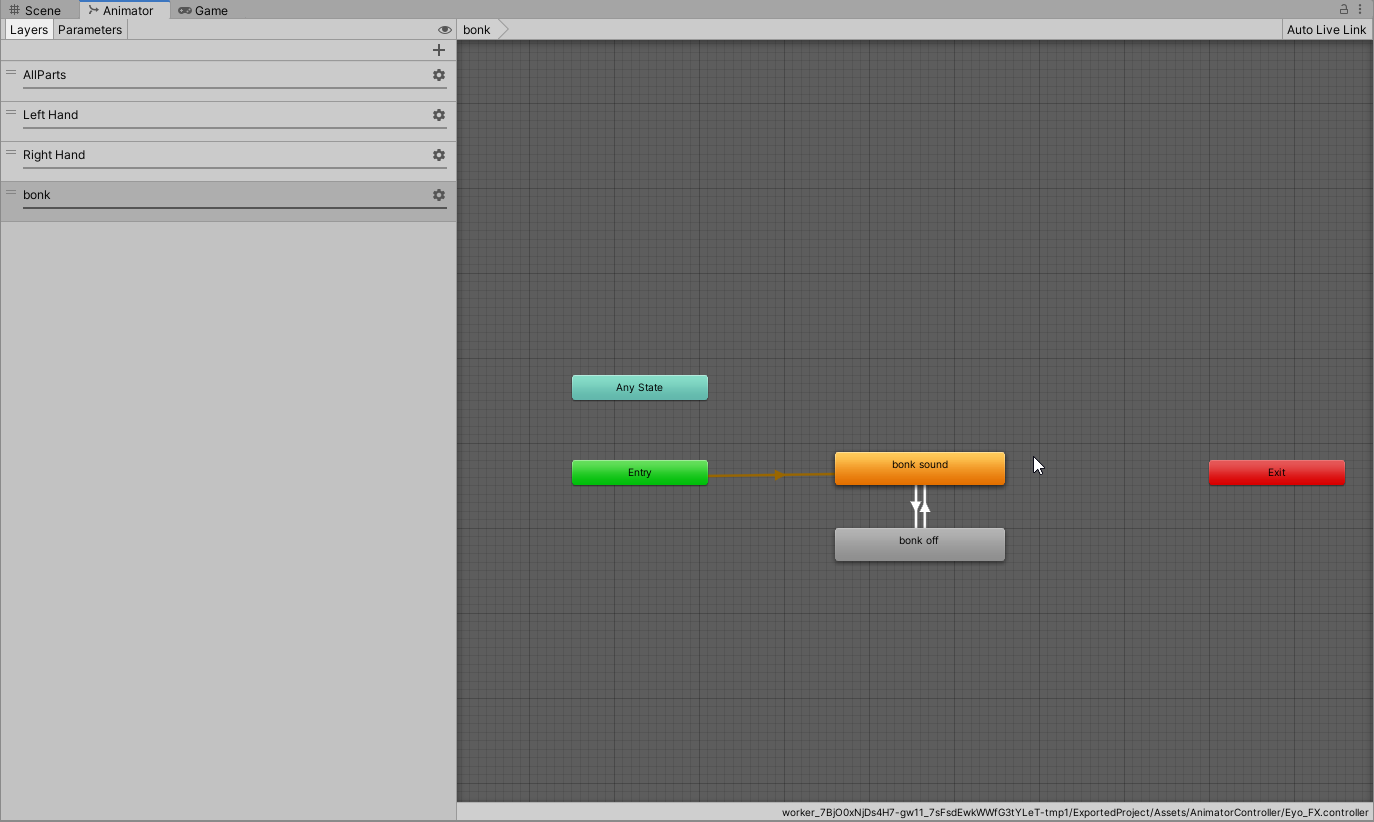

actual contact
cant figure out why it wont do the animation lol
https://i.imgur.com/8cUJZpE.pngand yes i got the parameter too
 calm owl
Proximity uses a float
untold idol
are u sure?
ive used proximity without float before
and changing it to float didnt do anything
knotty siren
It's definitely a float.
But also, if you are creating a new layer, make sure that you set the Weight of your layer to 1 and remove any masks you don't need.
untold idol
I have
knotty siren
But if you want this to play a Bonk Sound - you probably don't want Proximity.
You probably want this to trigger off of 'Enter'.
untold idol
I swapped it to enter
and trying integer to see if it switches to1
and it doesnt
the reciever and sender just do not work together
knotty siren
Create a duplicate, create a sender with the right settings, and use the animation controller & play mode to see what value the receiver is getting set to.
untold idol
the duplicate without changing anything
activates the animation by itself
and i removed head and anything close to activating it

on bool int, float it all activates
but no animation lol
I got it to activate once but then it kept staying activated
knotty siren
You transfer from Entry to Bonk Sound
untold idol
figured it out, toggling exit time made it work
knotty siren
You want to start at Bonk-off and then wait for a transition into Bonk Sound when Enter is true
calm owl
has exit time of 0 = wait for relevant parameter to change to leave state
does not have exit time = wait for the end of the animation to check if can leave state
or, i might have those backwards holdup
untold idol
hi yeah im back and its doing it again after i tinkered with it lol


Doesn't activate the animation or reciever at all it seems
 native nebula
untold idol
hi yeah im back and its doing it again after i tinkered with it lol
native nebula
untold idol
hi yeah im back and its doing it again after i tinkered with it lol
drop the min velocity to .001 or just have it as a constant
simple elk
you can use bool i think 🔨 🐇 , velocity is just to trigger it

forgot i have it on my bonk hammer
lilac ruin
so im still having issues getting others to see my contact receiver triggered animation...
I have all the parameters involved in my Parameter list.
I see the animation functioning as intended locally but nobody else can see it.
Its just a simple OnEnter transition to animation thing... so im really not sure what im doing wrong with it. ive never been able to get these damn receivers to sync over network.. https://gyazo.com/bf260fa4e4b111dcec06681ef024f74d


 stray island
lilac ruin
so im still having issues getting others to see my contact receiver triggered an...
stray island
lilac ruin
so im still having issues getting others to see my contact receiver triggered an...
Where is the bone "Eye_Trigger" located in the hierarchy?

 stray island
It may be related to how the head is shrunk down locally, so its probably best to keep it with the head via constraints than direct child
lilac ruin
hmm I guess I can try that but since its attached to a dummy head bone that doesnt shrink at all you'd think that would be good enough
stray island
I think neck may be scaled too, cant remember
lilac ruin
I dunno I was also having this exact same issue when these contacts first came out, and that was with contacts on my hips. I cant help but feel like im missing something
but ill bring it to the root and parent it to the actual head bone and see if that helps
 frank minnow
is "immoble type: world (experimental)" supposed to only be functional on physbone scripts without the "is animated" check?
 little owl
no, those two options are independent
frank minnow
hmm, weird. can't seem to get world immobile to work without unchecking "is animated".
if i can reproduce it i'll make a canny or smth, but it might have just been user error
timber saddle
lilac ruin
its an empty attached to a dummy head bone
Put the trigger in your param file. If it's an animation that needs to be triggered for other people it needs to sync with all other parameters. I found this out the hard way.
they claim you don't need the param file but in some cases you do
triggering an animation for others to see, you do.
source : My fucking weapons that would not grab unless someone was LOOKING at me when i grabbed them. I put their trigger parameter from the contact in my parameters file, now everyone sees my weapons getting grabbed properly
lilac ruin
timber saddle
Put the trigger in your param file. If it's an animation that needs to be trigge...
It is in my synced param file 😫 I had someone try and trigger the animation looking right at me. It worked for me, but not them. Parameter is in my FX Layer and in my Synced Parameter list.
The only thing I can find searching through here that I might be missing, is checking Local Only on the contact itself? But I don’t understand why that would change anything.
 quick crystal
does anyone by chance have a solution for scaling issues with physbones? https://feedback.vrchat.com/avatar-dynamics-reports-and-feedback/p/1992bug-irregular-behaviour-when-scaling-the-y-axis-of-a-root-bone-used-in-a-phy
My avis still show that behaviour (and not only mine), maybe one of you guys know something, i might be able to do to work around this issue?
sick geyser
So I dunno if its my jank setup for any changes done by animations onto a Physbone chain are not applying even with disabling the physbones quickly between changes
 daring wasp
Hey, I'm trying to figure out how to solve the tail here.
So, the tail drops straight down now when in playmode, but I would like to have a slight bend at the end, see the yellow artistic drawing I made.
I've tried to add physbone to the last tailpiece in Root, and setting different endpoint positions, as I think VRChat suggests in their manual.
But it doesn't achieve what I want - yes I get some sort of a bend, but it also lifts the entire tail upwards.
Anyone got a few pointers as what to do?
 simple elk
Could just manually move the end bones to where you want it 🤷 , wouldn't rely on physbone to do it
 stray island
Yeah the rest pose you want should just be the norm with no dynamics
simple elk
If you want to try it need a curve on the gravity to not affect everything (kinda meh tho)
 daring wasp
simple elk
Could just manually move the end bones to where you want it 🤷 , wouldn't rely o...
daring wasp
simple elk
Could just manually move the end bones to where you want it 🤷 , wouldn't rely o...
Sorry for asking stupid questions, but how do I work with end bones?
I did a quick search on it, and it seems it's added in Blender?
Or can I work with it in Unity?
I'm pretty new to Unity, so I'm trying to work on my avatar here, but I feel that most guides aren't really up to date.
 daring wasp
simple elk
If you want to try it need a curve on the gravity to not affect everything (kind...
daring wasp
simple elk
If you want to try it need a curve on the gravity to not affect everything (kind...
By 'meh' it's not reliable? Thanks for the tip though. 🙂
 nocturne stump
can someone help on all of my avatars the hands dont move their all just like stuck in same position
like my hands are broken
 pale hatch
Are proximity triggers with floats with a blendtree Currently broken ?
 ripe sphinx
Probably not
Likely some other issue
They can’t work for motion time and not work for blend trees, because the parameter is what’s driving them. Check that your blend tree is set up properly
 lethal gorge
how do u add physbones
not convert dynamic bones. literally add them to an avatar im so lost rn
do i have to do something wif blender like
the avatar im working with is STIFF. she has NOTHING on her but she’s rlly adorable and.. how tf do i put the bones on her
lone cypress
lethal gorge
how do u add physbones
not convert dynamic bones. literally add them to an ava...
Did this video help you? Consider sending me a tip on Ko-fi! https://ko-fi.com/sippbox
The Avatar Dynamics update recently dropped for VRChat, and with it brings the highly anticipated replacement for dynamic bones, PhysBones! With Physbones, you can apply secondary motion to parts of your avatar, such as hair or skirts, making avatars much mor...
 wary burrow
lilac ruin
The only thing I can find searching through here that I might be missing, is che...
wary burrow
lilac ruin
The only thing I can find searching through here that I might be missing, is che...
So local only means it would only change the parameter for you, but of course if you made it a synced parameter others would be able to see it too. Honestly making it a local contact but synced param is the way to go with toggles like this. It may be that your hand isn't entering the receiver at a high enough velocity for remote users
wary burrow
lilac ruin
so im still having issues getting others to see my contact receiver triggered an...
Also maybe one of these other parameters in the transition condition isn't being synced? Gotta be extra sure that your synced params match your controller variables exactly
lilac ruin
Gotcha thanks I’ll give the local only a shot, I include every parameter from my FX controller aside from the stuff like IsLocal, Seated etc the ones built into the game already. This is an RP avatar so it’s imperative my animations are sync as much as possible lol
 thorny kestrel
Hey, everyone! I have a cloth-piece on my avatars arm that I would like to give some gravity. My problem is, the motion starts stuttering whenever I give it even a little bit of gravity like 0.05. It has around 5 bones in it. I tested simplified and advances, but so far it didnt change anything.
When I set gravity to 0 it looks fine. Anyone knows what causes the stuttering with gravity > 0?
timber saddle
Can a physbone be uh... locked, by an animation? let me throw a couple pics
I have this

the joint there lets it do this :


I want to be able to lock it at these two positions without having to do the whole "grab and lock bone" thing
(Image 1 and 3 )
jolly crane
if your pull is 0 it shouldn't return to the original position
timber saddle
there's a bone on the small lever there, so that could be made into a trigger with _IsGrabbed, but I still need to know how to lock the joint where i want it, perhaps when it reaches the two points (with a contact)
well i don't want it to only go to one, i want it able to lock in both spots
folded, and unfolded
so what i was thinking was contacts for when it reaches each point, with the little lever "releasing" it to be allowed to move.. I just don't know how to lock it into one of the two positions
like can a certain setting force it to one end of the bend or the other?
not just "don't bend"
Like can the hinge limit and rotation be animated maybe?
contact 2 = max angle - 0 , pitch -90
grab lever = angle back to 45, pitch to 45
contact 1 = max angle - 0 = , pitch - 0
pale hatch
Is there currently, a way to make velocity contacts, that don't trigger each other, but only 1 of them if the right velocity is reached ?
like if i create 3 spheres ontop of one another, and i change my speed of touching the object, depending on how fast i touch it the speed changes ?
without playing all 3
halcyon vault
pale hatch
without playing all 3
you mean like OnEnter receivers with different min velocity values?
Saw people doing it for... marking avatars.
pale hatch
any idea to pull it off ? Or what i have to do
ripe sphinx
How do proximity contacts work when set to capsule colliders? Is the parameter set based on proximity to the center axis of the capsule or based on proximity to the center point, halfway up the capsule’s height?
timber saddle
so according to the wiki you can't change the state of physbones after the avatar has played, which does seem to be the case with trying to change the angle restrictions.. what a bother
Just have to use a extra object and a rotation constraint then..
 modern island
timber saddle
so according to the wiki you can't change the state of physbones after the avata...
modern island
timber saddle
so according to the wiki you can't change the state of physbones after the avata...
shouldn’t you be able to just disable and then re-enable the component?
frame one, disable, frame two, change values, frame three, enable?
timber saddle
tried,didn't seem to work
halcyon vault
modern island
frame one, disable, frame two, change values, frame three, enable?
This is great if you’re running at 60 FPS, but if you’re dropping frames, you can straight up skip these keyframes. if I’m changing something over the course of an animation I’ll hold a keyframe value for at least 10 frames. This gives it time to not only work locally but also remotely.
modern island
oh yeah, forget that you need to keep in mind that you can just drop shitloads of frames at random :P
jolly crane
 gloomy spoke
👀 how do I combine phys bones?
gloomy spoke
👀 how do I combine phys bones?
can you elaborate?
gloomy spoke
jolly crane
can you elaborate?
as in if my project has physics bones, is there a way to create a phys bones component in the parent of children w/ phys bones to possibly combine them?
jolly crane
gloomy spoke
as in if my project has physics bones, is there a way to create a phys bones com...
a single physbone component can affect multiple bone chains, as long as they are all children of the bone the component is on (or whatever the root is set to)
just don't make the root be any humanoid bones (like the head bone)
you can create extra bones in blender to act as a common root for multiple chains
gloomy spoke
jolly crane
a single physbone component can affect multiple bone chains, as long as they are...
Thank you!
ripe sphinx
Are contacts able to set ints to a specified value?
jolly crane
yes
 plain dove
I have this hand puppet avatar with wings that has physbone move starting at the neck. For some reason, the wings will not flap/fold as directed, instead they shake trying to animate. IsAnimated for the physbones is on. How do I fix?
This is how my wing animations are set up.

 crude forge
Been trying to create a button contact for a flashlight on a gun. Any help would be good with what Im doing wrong, been at this for three hours
torn tendon
crude forge
Been trying to create a button contact for a flashlight on a gun. Any help would...
What's the value(s) of the receiver(s) when they get their input?
torn tendon
crude forge
Been trying to create a button contact for a flashlight on a gun. Any help would...
I think it's as simple as adding a VRCAvatarDescriptor component to your Avatar, in this case it's the A9M2 GameObject... Without it, the Receivers and Senders behaviors won't take effect, therefore the AnimatorContrller would remain silent, and won't react to your input...
You don't need to do anything fancy with it, just have it there to emulate the behaviors, example:
 crude forge
torn tendon
What's the value(s) of the receiver(s) when they get their input?
crude forge
torn tendon
What's the value(s) of the receiver(s) when they get their input?
How to you check the values
torn tendon
Once you're in play mode, a value will appear on the component of type VRCContactReceiver... Something like this:

 bronze siren
Anyone know of any examples for making clothing blendshapes physbone reactive? Eg, an interactive sleeve
inland stirrup
I did not, no. Ended up taking my findings and attaching them to a canny mentioning the bug. Best we can do is hope that it gets enough traction!
 cedar vine
I am having an issue where a physbone position is in the wrong place in its parent constraint position.
This image shows a small glimpse into the set up
This is the physbone position


Even in play mode, with an emulator running, it is all correct

It is only once I am in game that it starts to be in my neck like that
cedar vine
cedar vine
Something thats interesting is that is the zeroed position of the head bone, so it looks like the position is resetting itself to 0 0 0 on the head bone rather than keeping the constraint's values that it should have
 amber crane
You would need to constrain anything to head bone instead of putting it on directly. Locally your head bone is scaled down to almost zero, which is what you see.
There is a setting in emulator which shows it too.
cedar vine
amber crane
You would need to constrain anything to head bone instead of putting it on direc...
So you're saying that I should have another item, constrained to the head bone with the contact sender and crown holder (physbone constraint) as children of that? Like this:

The scaled head would make sense, as soon as I turned on enable head scaling on lyuma settings my head disappeared and broke
amber crane
Yeah, it should work I think.
cedar vine
Awesome, building now and will let you know
cedar vine
amber crane
Yeah, it should work I think.
You absolute champion, thanks a ton! Worked like a charm
modest crest
does anyone know how to decrease the transform count on physbones? I am trying to make the hair on my avi has physbones for the quest version.
modern island
Merge some bones together
modest crest
is there a way i can merge bones through unity or do I have to do it through blender
modest crest
modern island
Merge some bones together
?
modern island
Blender.
You can’t merge bones in Unity.
You could also ignore some useless transforms (eg - end bones)
ripe sphinx
Do posed physbones sync their positions and stretch over the network? Say if you pose a physbone and someone joins afterwards, does it show the pose or does it not sync
modern island
I don't believe so
 wheat carbon
Any way I can get my avatar to somehow notify me when touched on the back? Since can't exactly tell if someone is touching me and I can't see them.
timber saddle
yes!
there is a thing for this
gimme a few to find it (unless someone finds it first)

VRC Touch HUD On Avatar Use VRC Avatar Dynamic to work (use latest VRC SDK) Contain a small add-on to make VRC more friendly to deaf, mute or any person who want. When someone touches you a small icon is visible on the left or right side of your vision to know on which side a person ask for your
and it's free!
wheat carbon
timber saddle
and it's free!
Omg thanks! Also lol on the free part... that's what I pray for everytime I click on a booth link.
timber saddle
right?!
 coral mantle
 lethal ruin
Hello, I need some help with a contact receiver, I'm trying to set up an animation for when people pat my head, but I cant make it work :/
 tardy quarry
Does anyone know what might cause a physbone component to simply refuse to move? I've added and removed it a few times and tried putting it on different bones, but the wings just aren't feeling it https://media.discordapp.net/attachments/485508328135327745/1017151284148715651/unknown.png

Even if I put the physbone component on the upper chest, I can see the arms and head bobble around, but the wings are static. One of my thoughts was that they might be stuck inside the torso collider, but turning off collision for them doesn't fix it either, nor does moving the physbone component down to the individual wing pieces. The mesh is definitely rigged up to the wings properly, I can move them in Blender. I'm just not sure what else to troubleshoot.
halcyon vault
tardy quarry
Does anyone know what might cause a physbone component to simply refuse to move?...
Each branch has more than one child. If you look at the Phys bone script you can see a Multi Child Type, this is set to ignore. This means that if you have two children on every single object, it will ignore every child and your wings will never move. Play with that option.
tardy quarry
Oh, weird - I'd tried "ignore" and "first" on that, but setting it to "average" makes them suddenly start moving again
but the upper and lower halves of the wings are locked together, which is different from how it behaved before I changed it around and broke something.
Got it!
Update unless anyone else has the same problem later - what I had changed was re-exporting the FBX from Blender and turning off "add leaf bones." The main wing bones no longer had endpoints, which caused the problem. Setting a Y offset for the endpoints and then setting multi-child type to "average" makes it behave the way I initially wanted
tardy quarry
halcyon vault
Each branch has more than one child. If you look at the Phys bone script you can...
thank you for this though, set me in the right direction
silent palm
Anyone know what kind of settings I should use to recreate the physics of Callie's tentacles like in this video? https://www.youtube.com/watch?v=fVq0s1ABjNE
Check out solo performances from Callie & Marie!
Subscribe for more Nintendo fun! https://goo.gl/HYYsot
Visit Nintendo.com for all the latest! http://www.nintendo.com
Like Nintendo on Facebook: http://www.facebook.com/Nintendo
Follow us on Twitter: http://twitter.com/NintendoAmerica
Follow us on Instagram: http://instagram.com/Nintendo
Follow...
halcyon vault
silent palm
Anyone know what kind of settings I should use to recreate the physics of Callie...
Depends on bone density.
 twilit jay
not sure if this is the right channel or not to be asking for help with phys bones but im having a weird issue with them
the front of my hair is just randomly sticking into my forehead after a few minutes and i cant undo it without resetting the avatar

this is what its meant to look like

i cant even pull it back into place with my hand lol, its almost like the bone is just snapping itself into place
what i find the strangest is the fact that i have the exact same hair on most of my avatars, using the exact same physbone settings, and it only appears to happen on this avatar
twilit jay
ok nvm i realized it was because the immobilize was set to world
 slender crown
imma sound like an idiot but what is recommended forces for physbones
I'm a bit new to this
twilit jay
its best to play around with forces till you get something close to what you need
for example the forces needed on hair will be quite different than the forces needed for a moving piece of string on a hoodie
best way to do that is to just click play and then jiggle the avatar about whilst messing with the forces in my experience till you get the result you want lol, thats what i do atleast
 leaden fable
How would I get the hair to flow over the shoulder rather than stay stiff like that?

 pulsar arrow


 visual isle
okay, another stupid question. Is it possible to have multiple physbones on the same parented bone chain IE two physbone scripts attached to two bones, one parented to another
jolly crane
visual isle
okay, another stupid question. Is it possible to have multiple physbones on the ...
I mean, yes, but could you elaborate more?
visual isle
i dont have an exact sample but effectively something like this

each bone having its own physbone script assigned to it
jolly crane
if you just need the behavior to be different, use curves
like if you want more pull the further along the chain, click the C icon to add a curve to the pull
and tweak the shape of it
you can add a curve to most things in physbones
visual isle
hmm, alright. Answers my question then
jolly crane
there are really not many cases where you would actually need a 2nd physbone script. but in the event that you do, you can "cut off" the chain early by adding one of the bones to the Ignore transforms list of the first physbone
and then you can add another physbone component to that same bone
but you should use curves whenever possible as it's better for performance and your perf ranking
visual isle
tried that, it sorta works but the bones themselves only interact with themselves IE cant pull on the child bone to make the parent bone move as well
visual isle
jolly crane
but you should use curves whenever possible as it's better for performance and y...
no worries on perf ranking, I have a lot of headroom to experiment since its well within medium rating
probably just gonna do what i have planned via animation since i already have all the blendshapes for that built as a fallback
thanks for the help tho, I appreciate it
 forest jasper
hello anyone else having this issue i bought dynamic bones but it says its not in my assest
 modern island
you don't need dynamic bones, physbones comes with the avatar 3.0 SDK
halcyon vault
true, if you're making a model yourself but if you bought anything made before about April you got a really good chance of needing dynamic bones to some aspect
 shadow steppe
is there any part of the physbones i can animate, such as angle that limit the area of movement? i have tried a few things, but i radial for a balloon , so it is "heavier / lighter" and i think i can do it with angles since you cannot animate gravity and such.
but any ideas on how i could animate this, i am already using a blend tree, my brain is farting
torn tendon
Anybody know how to make dynamic bones less jumpy?
halcyon vault
no
 broken crater
how do you enable physbones self interact?
halcyon vault
broken crater
how do you enable physbones self interact?
Phys bones can't interact with other phys bones or even with itself. They can only interact with phys bone colliders
halcyon vault
I imagine that uses particles to detect physics colliders
broken crater
Oooh forgot to add coilders to my hands
Yes I ment so I can move the phybones with my hands
halcyon vault
broken crater
Oooh forgot to add coilders to my hands
Phys bones will use the hand and finger areas generated by the descriptor as colliders if Allow collisions is enabled. Only if that is disabled I believe you'll need to make colliders
 alpine dock
I was wondering what the best way to make a contact slider of sorts would be. I'm trying to make a phone prop with a slider that you can touch with your index finger and slide up and down. I would want it to effect a float parameter. Any tips are appreciated!
halcyon vault
alpine dock
I was wondering what the best way to make a contact slider of sorts would be. I'...
first thing that comes to mind is a constant receiver as a capsule for the specific area and a second receiver as proximity for the distance
alpine dock
halcyon vault
first thing that comes to mind is a constant receiver as a capsule for the speci...
This works pretty well, thanks! Do you happen to have any ideas on how I might go about freezing the float parameter value in place when I take my finger off of the button so it just stays in place?
amber crane
Something like this? https://vxtwitter.com/vr_hai/status/1557940425855766529?t=76I9V5a7bh3wKta8PYbe8Q&s=19
Toes grounding with PhysBones again, except it's not the individual toes
https://twitter.com/vr_hai/status/1516593545930489865
halcyon vault
wait, so why no use a plane collider? is it because it follows you when you jump/fly?
 short scaffold
Hi there I'm trying to use the Avatar Parameter Driver's Add function to have it set if a person punches my avatar a certain amount of times it plays a KO sound but am running into issues. It works if I punch myself the correct amount in testing but when my friend tries it doesn't work.
Anyone know what could be wrong?
 frozen breach
what exactly happens when your friend tries it? does the counter not count up at all, or does the counter count up inconsistently? [as in sometimes it counts up, sometimes it does not, other times it counts up multiple times]
short scaffold
As far as I know the counter doesn't count up at all
frozen breach
in that case the punch is probably not being registered at all. since it is working if you punch yourself, I can only see two causes:
- your friend's avatar does not have the contact sender your contact reciever is listening for
- your contact reciever is set to only register your own contact senders
if you are using a default contact sender, such as e.g. hands, two is probably it
short scaffold
Well the strange thing is the collision between avatars works if I don't have the Driver's add function (IE she punches once it animates the KO sound)
But the addition one only works locally it seems, she couldn't even hear the KO sound when I punched myself enough but I could
frozen breach
perhaps the variable you're modifying isn't synced?
 harsh copper
can physbone parameters like gravity be adjusted in real time with an animation or is that still not a feature and never will be?
stray island
harsh copper
can physbone parameters like gravity be adjusted in real time with an animation ...
https://docs.vrchat.com/docs/physbones
However, if you animate a property of a PhysBone component and then animate the component off and then on, you may get the behavior you want. Be aware that this is not a support method of animating these properties, and will not be supported in future changes. (In other words, it might break. If it does, we're not going to try to fix it.)``` boreal minnow
I'm trying desperately to give Selestia physbones equivalent to EYO's dynamic bones, and for whatever reason certain features of the avatar only move left and right, not up and down
is anyone else having this problem
 olive mesa
hey does anyone know what happened to "immoble type:world" ik it was experiemental but twas a realy useful feature and i cant seem to find it in the latest sdk ;w;
steel thistle
olive mesa
hey does anyone know what happened to "immoble type:world" ik it was experiement...
Can you screenshot the physbone component menu?
timber saddle
amber crane
Something like this? https://vxtwitter.com/vr_hai/status/1557940425855766529?t=7...
Okay i want to do this... just physbone for the toe and plane colliders with position constraint or something?
amber crane
I remember he used FinalIK to achieve this effect. I don't know more details.
stray island
Yeah if you want it to react to world colliders you'll need to use Final IK. More specifically using a grounder with a LimbIK/CCDIK/FABRIK and then put the collider on the foot of the grounder
timber saddle
i wasn't after world colliders as much
you can use a plane collider to make tails collide with ground, so why not feet?
amber crane
With Final IK you can make feet react properly to non-flat surfaces as well
For example
It's actually better shown in the tweet he is quoting.
stray island
Yeah that plane collider for tails is a fake, it's not colliding with the ground at all, just a fake floor that you have defined.
amber crane
Well... Hai actually wrote what he did there: https://vxtwitter.com/vr_hai/status/1517218581657833473

@DrBlackRat Toes are PhysBones.
FinalIK is used to create an invisible leg (LimbIK) right above the toes, and this invisible leg tries to touch the world colliders on the ground (GrounderIK).
At the end of this invisible leg is a PhysBone plane collider, that the toes collide with.
💖 7 🔁 0
stray island
Yeah its exactly what I wrote, LimbIK is smart because of elbow control
timber saddle
Well. I managed to make an object follow a bone... on the floor
So i don't understand why i couldn't just put a plane collider, and put a physbone on my toe..
I don't care for -exact- floor angle, just think it would be cool if when using fullbody your feet go slack when you playspace up like 3-point does
then flatten out when you come to the ground
stray island
Yeah if thats all you want then having a fake floor is fine.
 lethal garnet
can two contact receivers have the same parameter name?
lethal garnet
alright, thanks!
mellow hawk
They can have weird behaviour if they are too close to one another, where both can be active at the same time.
wheat carbon
$100 for feet to touch the floor, sounds a little unreasonable.
timber saddle
right?
 woven patio
so im adding the physbone component to my hip and adding the root transform of ass wiggle but for some reason it does not work you dont even see the phybone gizmo....when i set the multi child type to average the gizmo shows but then i get a really odd effect such ass insane stuttering from the slightest movement which is not ideal at all

ive yes tried adding the component to the ass wiggle bone its self but still same problem in genral might it be a problem with the bone it self ?
jolly crane
woven patio
so im adding the physbone component to my hip and adding the root transform of a...
don't add it to the hip (more specifically, don't set the root to be the hip)
adding a physbone to any humanoid bone fucks up tracking
also, if you only have a single bone, that won't work. either set the Y endpoint position to some small value, or add a second bone in the chain
woven patio
When I use a new fbx model it works but the fbx I have everything add to doesnt work either way I only tried the hip as a option since it wasn't working on the main asswiggle bone regardless so I'm gonna reset up the avatar and maybe figure out what's making it not work
But thanks 🙂 appreciate the idea/help
woven patio
jolly crane
don't add it to the hip (more specifically, don't set the root to be the hip)
Never set the root to hip lol that would be terrible ahaha u can have 2 components on the hip and the set the root of each ine the thenass wiggle bones and it normally would work as normal
But I still add then to each separate bone
 barren bramble
Hey guys, at some point during the past few days my avatar stopped sending contacts with any other avatars. No more interactions or moving/grabbing hair or anything. I've never messed with avatar dynamics before--all I've ever done is use the default colliders in the avatar descriptor and set some physbone colliders in obvious places such as each middle finger. That's still all I'm doing. I've been working on my avatar a lot and re-uploading a lot at the same time this broke, but I've changed nothing about the physbones or avatar descriptor colliders, so I'm at a loss as to why this broke. Other people are still able to interact with the physbones in my hair, and I can still move my own hair with my hands, but I can't grab it anymore, and I can't move or grab anyone else's, nor do anything else that involves touching another person's avatar. I'm still able to do world interactions that involve touching things with my hands/fingers, though.
wheat carbon
Why does setting the root bone to the hip bone mess up tracking?
wheat carbon
barren bramble
Hey guys, at some point during the past few days my avatar stopped sending conta...
Colliders for your hands and feet should be specified by VRChat automatically.
barren bramble
I just tried reuploading and now the Quest version can interact with other avatars just fine... I'm too lazy to test the PC version right now but I'm gonna assume it works again if Quest does.
lethal garnet
mellow hawk
They can have weird behaviour if they are too close to one another, where both c...
I have two contacts with the same name on both thighs, not too close, but they can be triggered at the same time by either hand. The animator got stuck as if the contact was true even though the debug window showed false. I guess that's what you meant by weird?
 latent mirage
For toggling contact senders, do I turn on/off the object itself, or the component?
lethal garnet
I'm not sure, but given that we can disable physbone components I would say you can disable those too. I usually set up my animator so it doesn't trigger the contact response when needed
barren bramble
barren bramble
I just tried reuploading and now the Quest version can interact with other avata...
ugh nope it just doesn't work on PC
it works on Quest and not PC, the exact same avatar, identical avatar descriptors and hand/finger colliders, and almost the same model except with less bones and heavy decimation
this cant be my fault right? it has to be a bug? but how would i fix it
i can use any other avatar on PC and im able to interact with other avatars, just not mine
i guess ill try verifying on steam and clearing caches
timber saddle
Odd thought. With physbones, could you make a chain with two ends that sways inbetween? For instance say you had handcuffs with long chains on your avatar. Ignore bone 1 (left cuff) and bone 6 (right cuff) would the inbetween bones (on the chain) be flexible and mobile, and give off a stretch parameter?
 mighty trail
timber saddle
Odd thought. With physbones, could you make a chain with two ends that sways inb...
mighty trail
timber saddle
Odd thought. With physbones, could you make a chain with two ends that sways inb...
You could probably do something like that by using Forces curve, to make the end bone (6 for example, not move) and as long as it's weightpainted fairly well It wouldn't be too bad
also, is there any way of reading a remote player's GestureLeft/Right (without any modifications on their avatar)
timber saddle
someone managed
because thatfatkidsmom made a gun people can use
and it tracks their gesture
mighty trail
hmm yeah, even with their shareable springjoint system
which is what I'm re-creating lol
timber saddle
mighty trail
You could probably do something like that by using Forces curve, to make the end...
forces curve? that term confuses me
mighty trail
timber saddle
forces curve? that term confuses me
https://cz0.au/xVzx.png - you can click the "C" to make a Curve, that changes the value depending on it's position in the chain


so you can have the first and last bones be stupid rigid, and not move from it's initial position