
#ik-2
1 messages · Page 7 of 1
 rustic berry
with CATS, you can combine bones and their weights together. with AvatarBuilder, you can subdivide them into however many bones you want, and control the weight falloff
 undone plinth
This is a completely WIP model, test rig. Although it's nice to know someone got around to making an addon for bone subdivide with splitting weights.
rustic berry
yea it's super useful
since it's a WIP model, I'm gonna plug my own addon which might help if you're trying to optimize for texture memory https://github.com/sacred0/SubstanceMultiUVExport

GitHub
Creates duplicate meshes for every UV map of the selected meshes to allow for painting with different UV maps in Substance Painter. Supports unlimited UV maps, materials, and meshes. - GitHub - sac...
allows you to export a model that is using multiple UV maps and paint on any one of them in substance
by duplicating the mesh for each UV map and assigning each one unique materials
an example use case would be if you're using stacked UVs for the main texture for things like hair, but still want to bake AO properly, which you could do using a 2nd UV map
undone plinth
Yeah. I'm aware of mult-uv workflows. Nice addon to make that more efficient (until substance cries as the project grows).
I'm not actually the person making this, but I'll send it their way in-case they find use.
They don't have FBT so we're trying to fit model and get everything feeling good before locking stuff in. I can handle blender, I can't character model for shit.
rustic berry
sounds good, let me know how the different proportions work out for you
I use 11pt tracking, and since ever the new update my tracking has never been better
undone plinth
Would be nice if Unity actually had a decent reference skeleton for mechanim that used every slot so it wasn't as much of a guessing game around what it wants.
rustic berry
it really depends on the IK system you use, which could be different for any Unity based game
undone plinth
That's fair
rustic berry
it should really be a VRChat reference rig
there's sort of one, but it's a little out of date
undone plinth
Yeah
rustic berry
guessing that's the one you and your friend used
undone plinth
Well there's the really old one hiding in SDK2 and then there's the robot in the official tutorial Kung made, but this started as a metarig I believe
 abstract forum
For knee trackers (and elbows too I suppose), does the IK prefer them to be placed above or below the joint?
rustic berry
abstract forum
For knee trackers (and elbows too I suppose), does the IK prefer them to be plac...
for elbows, always put them above the elbow so that you also get shoulder tracking. for knees, it just depends on what's most comfortable for you
I personally use above the knee, but a friend of mine uses under the knee. works fine
abstract forum
That's good to know, thank you
undone plinth
Tried proportions more like this based on your suggestion (the weights haven't been cleaned up much so they're pretty nasty, but even if I'd fixed the weights this issue isn't with them it's with the way the bones are bending, spine is straight) and I'm still getting some absurdly nasty scrunch (you can see it's rotating spine downwards and then rotating chest upwards to correct).
If I shut off the chest tracker (final image) the entire spine smooths out as it just compresses between the chest and spine. Any suggestions at this point or is it just going to be a game of fidgeting?


 rustic berry
because the chest tracker always binds to the chest bone and not the upper chest, you might want to have it moved up a little bit more so that it doesn't crunch as much at the spine
have you also checked the proportions of the model? Kung's FBT fixes video covers proportioning things, but the idea is that you can use your controllers to help measure different points on your body and see where it lines up on the avatar
in this case, try putting one controller on your shoulder, and the other at the lowest point of your crotch to measure your torso length. compare that to the avatar, and see if the spine length needs to be changed
undone plinth
I'm using the EOZ chest strap which puts the tracker dead-center around where upper-chest is on the sample mapping in unity, so if it's binding strictly to the chest bone, the bones being a bit far back (so more travel distance) and the actual tracker being (relatively) high-up, that's probably not helping. I'll try lowering the tracker with a hip strap and putting it where the bone is as an experiment
I'll also check overall torso length. I know with more stylized stuff there's always gonna be a balance of making it work
rustic berry
could try something like this perhaps

just kinda shifting everything up
and yea moving the whole spine forwards a little bit may help
maybe
 raw wadi

setup like this works

add an extra bone that have the spine weight in the butt that copy 50% of the spine.

kung did the same when I show them while back.
but if each bone of the upper body bend in armony, probably don't need to do this
 fiery plinth
Is there a way to use a head tracker instead of hmd tracking, pretty much narrowed down my ik2 chest wiggle issue to having a quest 2 with virtual desktop with lighthouse trackers
Issue not there when using an index or legacy ik (but chest bone doesnt move or rotate anyways with legacy+q2)
rustic berry
fiery plinth
Is there a way to use a head tracker instead of hmd tracking, pretty much narrow...
do you already use a headset tracker and Continous calibration?
fiery plinth
yeah
a friend had me switch to lock head and use the tracker adjustment to move the hip ball down a few inches to keep the chest stiff, kinda works but not the best solution
 elfin relic
With the jitter fix if your avatar is mid animation then its orientation doesn't change (for example with swimming prefabs, flying prefabs or just falling), is there a way to force an update through Udon because it can be quite easy to do a physical 180 and that doesn't look good for either the user or remote users?
undone plinth
raw wadi
but if each bone of the upper body bend in armony, probably don't need to do thi...
This is a pretty good trick, thanks. Going to hold this one in the back pocket if needed.
At the root, it seems like the issue is that the torso is too long relative to my actual body, so when I add the chest tracker, there's really only so much that can be done.
Shrinking down the torso with bone scaling has eliminated the spine crunch, although my arms are proportionally too long now (which I can fix)
I'll probably just go back to the original version before I modified any bone positions and do a pass using kung's old guide for easily measuring proportions to get them closer. Combine that with the fact that I can see where the trackers are in real-space in calibration, I can pretty easily pull the proportions in line.
I don't see much of a workaround beyond making it more proportionally accurate if I want to use a chest tracker in lock-both mode.
In the end, if the proportions of the body are off and I'm injecting more tracking points (chest), the compensating systems like spine compression can only do so much
 lilac spear
any way to solve the entire body lifting up when i just look down with my neck? all avatars do it to some extent. tracker boxes do not move at all
 devout current
That's mostly due to the view point not being correctly positioned.
You can try to go through this thread to see what helps
https://x.com/Kung_VR/status/1619137610223607814?s=20

@VRCSpooky Viewball is where you will be IRL relative to the avatar. Viewball far in front means avatar far behind. And reverse if the viewball is deep in the avatar's face. When you tilt your head (for example) down IRL things attached behind go up and things in front go down. (see image)

 Twitter
·
lilac spear
Twitter
·
lilac spear
tyvm. looks like what i need
raw wadi
often people put the view ball near the nose, but it should be more in the head
 narrow yew
official recommendation for extra trackers on legs is to have them above the knee but a lot of people are recommending below knee because calves keep them in place much better. assuming you wear feet trackers on top of your feet and not ankles, is there any reason why trackers just below knees wouldn't work? seemed to work pretty well for me yesterday and i had to adjust them a lot less than when trying to wear above the knee
rustic berry
it shouldn't matter whether or not it's above or below the knee in terms of tracking
but having it above the knee makes the tracker less in the way
 agile cedar
raw wadi
often people put the view ball near the nose, but it should be more in the head
agile cedar
raw wadi
often people put the view ball near the nose, but it should be more in the head
Could this potentially be why my avatars stand on their Tiptoes when I look down? (Desktop)
 gleaming lake
agile cedar
Could this potentially be why my avatars stand on their Tiptoes when I look down...
gleaming lake
agile cedar
Could this potentially be why my avatars stand on their Tiptoes when I look down...
probably
view ball should be just under the skin between the eyes from what ive heard
agile cedar
Ooh alrighty then thanks. I always ended up putting it just slightly in front of the eyes
rustic berry
agile cedar
Ooh alrighty then thanks. I always ended up putting it just slightly in front o...
you should have the viewpoint inside of the head, behind the eyes, almost directly above the neck. this will reduce the "spine shifting" when you look up or down
agile cedar
Awesome thanks, I'll keep that in mind from now on. The animations I use are kinda weird and hunched over, but in vrc the legs are always fully extended which leads to a really awkward stance. Is there a way to improve that too, or would that also come down to the view orb placement? The animations are supposed to have a bit of a bend in the knee.
 west bane
rustic berry
you should have the viewpoint inside of the head, behind the eyes, almost direct...
west bane
rustic berry
you should have the viewpoint inside of the head, behind the eyes, almost direct...
It helps with the spine shifting, but I find it makes my avatars body feel too far forward.
On a side note, where is the tracking point on most headsets? Is it in the center of the main headset body? if so, does that mean smaller headsets like the bigscreen beyond have less of a lever effect when rotating your head?
 marsh elm
west bane
On a side note, where is the tracking point on most headsets? Is it in the cente...
marsh elm
west bane
On a side note, where is the tracking point on most headsets? Is it in the cente...
the player 'camera' is positioned near the display/lenses on the q2 at least
 vestal ridge
marsh elm
the player 'camera' is positioned near the display/lenses on the q2 at least
vestal ridge
marsh elm
the player 'camera' is positioned near the display/lenses on the q2 at least
i feel like if any headset didn't do that it'd be sickening, lol
marsh elm
vestal ridge
i feel like if any headset didn't do that it'd be sickening, lol
yep lol
imagine grabbing a [insert big headset] with the view on the very front of the casing and having it yank your view around further than your eyes are

raw wadi
can we get more aggressive tracking prediction. near the remote network ?
 short knot
vestal ridge
i feel like if any headset didn't do that it'd be sickening, lol
short knot
vestal ridge
i feel like if any headset didn't do that it'd be sickening, lol
You can try it out with OVRIE, and yes, it is
devout current
raw wadi
can we get more aggressive tracking prediction. near the remote network ?
tracking prediction is something SteamVR and not VRChat does, so idk how much they can change it
lilac spear
vrchat has a prediction slider- but ime its effects are very subtle
devout current
That slider just changes what data they get from SteamVR
100% = normal prediction
0% = no prediction / raw data only
devout current
So you want actual smoothing instead of just less prediction? 
raw wadi
Ye
vestal ridge
raw wadi
Ye
there's a tool for that already lol https://yuumu.booth.pm/items/4018006

激しい動きする時に起こるトラッカーなどの揺れを少し改善できるツールです 原理はsteamvrの移動予測機能に干渉をかけたものです プルプルになる一番の要因がそれ故に ベースステイションを使用したデバイスは効果的です ※既知の問題: pimaxの場合「PiTool」と相性が悪いみたい ツールのドライバが機能しなくなる Radeon RX 7000/6000では不具合が出る場合があります This tool smoothes the jittering of VR trackers when moving intensely while FBT. This tool works by
raw wadi
I know
vestal ridge
why not use that then, lol
elfin relic
vestal ridge
there's a tool for that already lol https://yuumu.booth.pm/items/4018006
But doesn't it literally do the same as VRChat's solution?
This tool works by limiting steamVR’s movement prediction feature.
Since that is the biggest cause for jittering trackers
That is how VRChat is doing their "smoothing".
 polar bloom
elfin relic
But doesn't it literally do the same as VRChat's solution?
polar bloom
elfin relic
But doesn't it literally do the same as VRChat's solution?
The tool smooths tracking locally if you’re doing stuff like streaming. VRChats smoothing is done over network I believe
elfin relic
polar bloom
The tool smooths tracking locally if you’re doing stuff like streaming. VRChats ...
VRChat added a separate thing that does smooth tracking locally using the same way as that tool does.
rustic berry
not exactly, the option is to essentially have control over how much prediction is done to help with fast movements. it used to be that it was basically always doing the maximum amount of prediction
now you can choose to not have any
it's still not quite the same as doing actual smoothing though
devout current
YES, it's not actual smoothing, just less prediction which results in it looking smoother as you wont have problems with it overshooting in the ground etc
that's also what OVR Smooth Tracking did btw, they also just lowered the prediction
 mild nimbus
devout current
that's also what OVR Smooth Tracking did btw, they also just lowered the predict...
mild nimbus
devout current
that's also what OVR Smooth Tracking did btw, they also just lowered the predict...
Glad I don’t need that any more
 stone solstice
This may not be the right channel to ask this but has any one else run into this or similar issue -I use the Kat walk treadmill to “free walk” I currently connect to SteamVR to launch VRChat, I recently purchased the Leap Motion 2 for controller free hand tracking, as soon as I started using this my Kat Walk no longer works: If I shut down the Leap Motion software I am able to walk again !
 vale ibex
hello im trying to narrow down whats causing this. i think this started happening with the ik update because i dont remember this ever happening before. ive tried multiple avatars and all of them have the same issue with different degrees. any idea?
 naive sandal
If the knee is too near the hip, yes it will freak out
devout current
Yeah, the IK doesn't really know what to do in this case
that has afaik always been the case though
 turbid plaza
Hi, I'm trying out fbt in vrchat (SteamVR) now, is there a way to turn off hips and only track my knees and feet? My SteamVR tracker settings are already properly set, but my right knee is controlling my avatar's hips in the game
my left knee, left foot, and right foot is tracking well
narrow yew
turbid plaza
Hi, I'm trying out fbt in vrchat (SteamVR) now, is there a way to turn off hips ...
i guess reduce calibration range in vrchat's settings under tracking & ik to prevent your knee tracker binding to your hip
devout current
Why is your knee tracker closer to your hip than then actual hip tracker? 😅
vestal ridge
i think what they're asking is to have no hip tracker
just feet and knees
which, to my knowledge, you cannot do without having a hip tracker and powering it off after calibrating
which kinda defeats the purpose of not having one
so you essentially cannot do it
 empty root
vestal ridge
which, to my knowledge, you cannot do without having a hip tracker and powering ...
empty root
vestal ridge
which, to my knowledge, you cannot do without having a hip tracker and powering ...
no you can
its just stupid, idk why youd do it
vestal ridge
i mean I've tried and it didn't work so
empty root
well ur just silly (and smelly)
vestal ridge
prove me wrong lol
devout current
vestal ridge
which, to my knowledge, you cannot do without having a hip tracker and powering ...
You can, but it will look really stupid as that's not really what it was designed for
Since the spine rework you can combine trackers in what ever way you want to
vestal ridge
you for sure can't do upper body only
as that's what i was trying
a hip tracker is mandatory
a tracker far from the hip will be grabbed if there isn't one there
devout current
vestal ridge
you for sure can't do upper body only
as that's what i was trying
you can
vestal ridge
shooow me
devout current
just do it lol
vestal ridge
I fuckin'
did lmao
devout current
there is nothing special you need to do for that
I did that a while ago to try out shoulder tracking
devout current
I'm not home at the moment so I can't really show anything xD
empty root
i finish work in 5 hours soooo
vestal ridge
I tried to do chest and elbows only
and it wouldn't let me
devout current
when did you last try it?
vestal ridge
good point
I do not remember
devout current
Cause IIRC this is only possible since the spine rework from a few months ago
vestal ridge
also mr dr rat can u file a bug for me im too lazy to write a canny
devout current
lmao
vestal ridge
the haptics settings and presumably others are missing from the settings menu, only accessible through search
devout current
vestal ridge
pls and ty
devout current
that would be new to me
vestal ridge
a friend and i couldn't find em, lol
devout current
They are in the accesibility settings menu for what ever reason
vestal ridge
oh no they're there
my bad
can u file a different canny for a more minor bug instead
there's a double line break line at the end of the "common" tab in graphics

and a couple single line break lines in some other settings
pls and ty
devout current
I probably already made a canny about that at some point
vestal ridge
lol
devout current
I went through the entire menu a month ago and made a canny about every small little Issue I could find
lilac spear
vestal ridge
you for sure can't do upper body only
as that's what i was trying
you definitely can. i’ve used owotrack for waist-only for months
(which is still a huge improvement over regular 3 point)
raw wadi
I assumed they scale the spine bone but the actually translate the chest up and down in lock both ?
raw wadi
@oak pendant correct me if am wrong
devout current
I'm not Kung but afaik in lock both the distance between the chest and spine bone changes, without any scaling
 oak pendant
raw wadi
<@153868400282566656> correct me if am wrong
oak pendant
raw wadi
<@153868400282566656> correct me if am wrong
You're correct the distance between the spine and chest is what changes, but the bone transforms themselves are never scaled.
raw wadi
 wet gorge
Got any tips when making a rig to not make your spine shrink?
wet gorge
Got any tips when making a rig to not make your spine shrink?
like mention above, it's the chest that shift down
wet gorge
That's not what I asked.
I know how it works, I want to know how to make a model not do it so much.
raw wadi
I did a lot of testing long time ago to understand of thing move/ rotate in fbt before that feature so I don't really know for sure
raw wadi
something about bone ratio
 dusk mango
it doesnt let me change my beta to ik how do i do it ?
raw wadi
there is no ik beta
dusk mango
Oh I guess it’s over then
devout current
I has been over for a while 😅
 sharp ore
How do I change the custom arm ratio setting in desktop mode? I would like to make it an accurate value rather than struggling because my hands shake with VR controllers
If I need to, I'd be willing to change the Registry Editor setting for that if there is one
oak pendant
sharp ore
If I need to, I'd be willing to change the Registry Editor setting for that if t...
(Obligatory dsclaimers: edit the registry at your own risk, also this is very much not the intended way to alter settings so again, perform this at your own risk) So in Computer\HKEY_CURRENT_USER\SOFTWARE\VRChat\VRChat you'll find the key VRC_IK_HEIGHT_RATIO the value here is stored as a double type using big endian. I've found a converter here you can use to input the value you want: https://gregstoll.com/~gregstoll/floattohex/ you'll need to checkbox "Swap to use big-endian" or the format will be incorrect. Then type the value you want into "Double value:" and click Convert to hex. You can then enter the resulting 8 hex bytes that follow after the 0x into VRC_IK_HEIGHT_RATIO in the registry.
lilac spear
what’s the use case though? that setting only matters in vr aiui
oh, never mind. accessibility issue
yeah the sliders are crap
oak pendant
I think the request was to alter it to an extremely fine tuned value due to not being able to get the slider just right, yeah
lilac spear
you can also use height based scaling, that’s just pressing a button
oak pendant
Yeah if that solves their issue that could work, but they may be using it to precisely fine tune the relationship between avatar scale and IRL scale to something other than matching height exactly.
Sometimes people might want to do that if the avatar has high heels or similar angled feet where the ankle is high, but IRL you stand with feet flat so your ankle would be lower than the avatar's making a pivot mismatch
other reasons might be wanting to tune the tightness of the arms to a certain fit
lilac spear
aiui, the arm span or height just scales the avatar. it doesn’t fix bad rigging or avatar proportion issues
not much you can do to fix high heels/digi legs apart from wearing them IRL
sharp ore
oak pendant
(Obligatory dsclaimers: edit the registry at your own risk, also this is very mu...
So, with that value, would it just be the number I want the setting to be at?
oak pendant
lilac spear
not much you can do to fix high heels/digi legs apart from wearing them IRL
Yeah in the end it can only alter the relationship of how the avatar is scaled to fit their IRL body. But if your ankle matches at least there wouldn't be pivot mismatch
oak pendant
sharp ore
So, with that value, would it just be the number I want the setting to be at?
Ah, sorry I should have been specific. The default value of 45.37% would be represented as 0.4537 in this example
so if you wanted to slightly adjust it to 0.01% less than the default you'd enter 0.4536 in the "Double value" field on that converter website

 oak pendant
sharp ore
Ah, so with that being said, I have *no* idea how I'd input that hex into this
oak pendant
sharp ore
Ah, so with that being said, I have *no* idea how I'd input that hex into this
You should be able to select it and type in the new hex value
for example setting 0.44 would look like this:
 sharp ore
I'm just completely unable to edit anything in it
OH
I got it!
I'm just very slow LOL
oak pendant
No worries! It's good to be careful in general with any editing of registry values.
sharp ore
Oh definitely, I've already messed up on that years ago when I had no idea what I was doing
oak pendant
Yeah it can be perilous. Also make sure you had this checkmarked or the bytes will be in reverse order and result in garbage data

 final oasis
So issue with model lift is gone, but now on legacy IK if you are not staying straight to your playspace, the torso rotates, like it was before with menu opened. I mean on FBT.
Now about IK2.0.
-I still cant lift my elbows like it was on legacy ik.
-avatar 2.0, when my head is lower than some point, changes finger gestures at rest to more like "grab" and changes shoulders position.
-avatar 3.0 just changes only shoulders position.
 iron hamlet
Got a weird FBT tracking/calibration-issue since ~2 weeks and cant for the life of me figure it out 😐
Apparently my hip-tracker-position somehow gets interpreted wrongly... so when I look down on my female avi I look straight at my feet, instead of as usual the upper-body whiggly parts.
Complete AVI-view

Looking down on Desktop (thats the view I would expect in calibrated FBT too)

This is what I get after calibration, to even get parts of the hoodie into my FOV i need to look WAY more down as you'd naturally would...

To my knowledge I didnt change any settings in steamvr/vrchat these last 2 weeks... did un/reassign (waist) the hip tracker in steam, un/repaired all devices, redid playspace, tried with & without OVRAS & fpsvr, changed settings in vrchat and back (lockmode etc), hiptracker on front and back (my normal) - no change.
Also happens on all AVIs, so shouldnt be a viewpoint issue.
When using legacy-calibration I can get it right-ish, but not just quite... and ik2 calibration always comes up with this result.
I'm lost... 😐 Any ideas, thanks in advance!
empty root
iron hamlet
This is what I get after calibration, to even get parts of the hoodie into my FO...
look down irl and this is what youll see
desktop head movement pivots the head itself, while in vr it follows your headset 1:1. its expected for movements to be different between the two
 worldly quartz
could be a lock head/hip thing
iron hamlet
idk 🤷🏻♂️ all I can say for sure is 2-3 weeks ago I calibrated @ 1,68cm height, changed it to 1,73cm (IRL height) after to compensate for the plateau-boots -> perfect
...recently - not so much anymore.
tried pretty much everything popping into my mind and atm I'm almost suspecting my HMD having an issue with its internal (tilt/axis) sensors
visually aligning the trackers to my avi using legacy-calibration doesnt have this issue (but others)
however, the IK2 calibration setting your avi-position by looking straight ahead always is noticably off - my avi gets placed too much forward 🤷🏻♂️
iron hamlet
 empty root
iron hamlet
...recently - not so much anymore.
tried pretty much everything popping into my...
empty root
iron hamlet
...recently - not so much anymore.
tried pretty much everything popping into my...
lean in either direction fowards/backwards and try to line yourself up irl to the tpose
iron hamlet
appears I actually did figure a new routine out that works consistently... only took like friday & saturday night flailing around in my system...
...and in the end it happened more due to random luck, but I won't complain
so... what NOW works for me:
- increasing arms/height ratio +10 ish (never had to touch this before)
- using 168cm & 178cm height to calibrate & dial into the sweet spot
still have no freakin' idea why/what exactly did cause this change 🤷🏻♂️
iron hamlet


byebye random-ass limb stretching... good riddance! ❤️🔥


took those 30min ago during serenitydnb spinning at deviate
 timber grove
I would try using the normal calibration mode. Legacy is legacy for a reason
idk how long it will still be in-game for
iron hamlet
not using legacy
no idea where you read that, just tested it
to check & compare results while troubleshooting
wondering if @oak pendant might have some idea what happened on my end... I still dont have the slightest idea
sorry for the ping 🙈
timber grove
ah sorry
 robust tangle
i wish there was a setup for fullbody that didn't require calibration, similar to how your controllers and headset don't need calibration. i wonder what it would take
fiery plinth
Vrchat already has saved calibration, it would just take sweettalking the devs to load it when the game starts. And always having your trackers equipped in the same spot.
 minor rampart
I’d much rather see them bake something like standable into the IK, by default, than spend the time on something that’s not likely to be used much between sessions.
There’s going to be a decent amount of variation when taking off and putting on trackers.
Even with really stable straps like EOZ.
Holding between avatars was the big time saver.
empty root
robust tangle
i wish there was a setup for fullbody that didn't require calibration, similar t...
thats not quite how trackers work tho
controllers and hmd are always in the same spot of the body
trackers wiggle and move and rotate and stuff
empty root
minor rampart
I’d much rather see them bake something like standable into the IK, by default, ...
they wouldnt even have to do that, theyd just need to change the proxy anims in the adk 💀
robust tangle
empty root
trackers wiggle and move and rotate and stuff
so if we had some kind of plastic boot and belt that snap trackers into known orientation, it could be hard coded into the client and skip calibration? if it was supported?
empty root
robust tangle
so if we had some kind of plastic boot and belt that snap trackers into known or...
that belt still moves on ur body
robust tangle
real belts don't
empty root
robust tangle
real belts don't
they still move lol
 vocal oxide
you can use the rest of the belt that is used to tighten it as a kind of "thong" just tie it on the other side. Quite uncomfortable but works perfectly for me for handstand, handsprings, dancing and so on.
robust tangle
What causes avatars to shuffle feet and the head moves up a little whenever you stop using the analog stick? Some avatars do this, some don't
Even with all default playable layers
 timber willow
ooh I noticed this too and was just going over my avatar that does it - I did some reworking the legs here and was guessing I didn't get the leg bones aligned well, like I have the feet too far forward or something
haven't confirmed yet though
robust tangle
timber willow
ooh I noticed this too and was just going over my avatar that does it - I did so...
My legs all the way up to my head bone are 100% vertical and all have identical Y axis coordinates. is this wrong to do?
I also have feet bones but not toes as the existence of toe bones seems to make the avatar always lean forward to hover over the toe bones
timber willow
I found this in here recently: https://cdn.discordapp.com/attachments/940416188041809980/1199801072261288117/image.png?ex=65c3dcd2&is=65b167d2&hm=831ba69011e9c1f302ebc4e8a8147606f6b2291836e0443984f0fbccc1f764fc&

I made such adjustments today but haven't tested yet. I also had my avatar's hip bone not at y=0 so that may be another problem
(blender y, not unity y)
robust tangle
timber willow
I made such adjustments today but haven't tested yet. I also had my avatar's hi...
I remember that being a thing to fix the knee bending direction, but I'm not having that issue at all. do you know if this was in reference to fixing a shuffling issue?
timber willow
robust tangle
I remember that being a thing to fix the knee bending direction, but I'm not hav...
I don't, it was more of me guessing at what might be the cause, and fixing things I knew were wrong
(haven't tested yet, will try to do so this week)
timber willow
Ok so I tested a bit with the same avatar and I'm not seeing this little shuffle thing again, though I'm using FBT now and I wasn't when I last noticed it
robust tangle
timber willow
Ok so I tested a bit with the same avatar and I'm not seeing this little shuffle...
It doesn't appear for FBT. it's a 3 point tracking issue only
Well, desktop as well
timber willow
robust tangle
It doesn't appear for FBT. it's a 3 point tracking issue only
Yeah at this point that's my conclusion as well. That avatar I do still have to fix the knee angle though, if nothing else it's an indicator I got that slightly wrong 🙂
naive sandal
Upright 0.65 plz fix
 magic wigeon
?
 humble goblet
Hey, all. So I tried the following FBT setup:
Left Foot
Right foot
Hip
Chest
It was pretty good, until I realized that the IK of my right elbow was acting strangely. My right elbow would jut out to the side while the left arm behaves normally. Does this configuration of FBT not work?
 vivid saffron
So what is this IK-2?
west bane
humble goblet
Hey, all. So I tried the following FBT setup:
Left Foot
Right foot
Hip
Chest
It ...
Should work completely fine, I've used that combination of trackers before.
When you calibrate does your chest tracker lock onto the chest bone? As in the indicator points towards that boen. My first thought is that the chest tracker is somehow choosing to lock to the elbow instead of the chest.
Another question. Does this happen with all avatars you try in FBT? My second thought is that the IK pose or rigging on your avatar is causing the IK to mess up. If it happens on multiple avatars, then that isn't the issue.
 strong nova
Is the toggle for Legacy IK and IK 2.0 supposed to be gone in v1442?
 final raven
Still there.
 strong nova
You only get this dropdown when FBT is enabled. I remember this being a toggle with in desktop or half-body.
devout current
to be fair, I'm honestly surprised this is even still an option
same thing goes for legacy calibration
final raven
strong nova
You only get this dropdown when FBT is enabled. I remember this being a toggle w...
I have it in half-body
strong nova

Could have sworn that the Body Tracking dropdown should still be in desktop mode.
guess not anymore?
 naive karma
devout current
same thing goes for legacy calibration
naive karma
devout current
same thing goes for legacy calibration
tbh if legacy calibration goes I might uninstall, can't stand my avatar moving away from my trackers while calibrating
fiery plinth
It your trackers move away from you.. you got other problems
naive karma
it's the opposite problem actually, tracker positions are fine, it's lining them up with a body that's constantly moving that's the problem, every time I've tried non legacy calibration it's been off in some way, either body way behind my actual trackers, or arms being completely screwed up because my arms weren't in a perfect T-pose (can't check when my avatar moves when I turn left/right to look and make sure arms are lined up), legacy calibration for me always has my body lining up nearly perfectly after calibration
fiery plinth
Unless you have elbow trackers it doesnt matter what your arms are doin, legacy or not. If legacy goes away, i recommend making sure vr floor is accurate by using toolkit set floor button every time you start up vr and having user real height accurate to what the game thinks. Than try combinations of tilting head down and/or pre bending knees. If knee bending trick does it, adjust arm span ratio.
iron hamlet
fiery plinth
Unless you have elbow trackers it doesnt matter what your arms are doin, legacy ...
I beg to differ... calibrating without t-posing my arms usually turns out in a weird scuffy result...
since I started aligning my bodys orientation to the t-pose in calibration mirror the results are WAY more consistent!
and consistent in like*** "for 3 weekends now it works almost perfectly like that"***
...whereas the MONTHs before I basically spent HOURS each weekend trying to get my calibration right, just to end up frustrated af and letting scuff be scuff
and the kicker is...
I did try basically everything, every single one of those "new" advanced IK & tracking-toggles & sliders... still couldnt get it dialed in as it once was
now, I reset all of them (apart the wrist alignment thingy) and get near perfect results with 2-3 tries using my new routine!
if my calibration-result is weird it definitely was me not standing straight!
...klingt seltsam? Is' abba so!
iron hamlet
naive karma
it's the opposite problem actually, tracker positions are fine, it's lining them...
do try enabling your personal mirror - infront of you
then you can see the tracker-positions again
would not shock me if that'd help you too
ngl, really would LOVE to hear Kungs thoughts about that.
if anyone really can tell whats going on its him 😉
 mystic basalt
do you guys really have this much trouble calibrating
hours of trouble?
💀
must be really broken armatures i gues 🤔
fiery plinth
Nah literally two seconds, can do it with my eyes closed. The most trouble i have is how far should my feet be spread apart and/or is continuous calibration makes a last second adjustment. There was that weirdness last vrchat version where my viewpoint would drop like 4 cm every time i switched worlds but that seemed to have fixed itsself
raw wadi
 naive karma
that's gonna happen when legacy calibration is just better
mystic basalt
naive karma
that's gonna happen when legacy calibration is just better
—literally no one ever, 2024
 static scroll
If legacy calibration is better it’s because your bones are a mess.
mild nimbus
I still use it out of habit and my bones are fine 🤷♀️
I don't see the point in shaming people for it either
 mint abyss
mystic basalt
—literally no one ever, 2024
mint abyss
mystic basalt
—literally no one ever, 2024
what even is legacy calibration? I use head lock because I can actually look in mirrors correctly
if they're talking about head-hip lock its better when you cannot notice the torso-stretch in some aspects, but that's far and few between
mild nimbus
mint abyss
what even is legacy calibration? I use head lock because I can actually look in ...
your feet get locked to the floor and your avatar stays in place
slower but I personally find it easier to get the sweet spot better with some specific avatars
mint abyss
I also use playspace mover which is a godsend
(and totally not for messing around and visual-clipping through walls)
mild nimbus
mild nimbus
I don't see the point in shaming people for it either
also normally I'm the person shaming people for using older stuff B U T in this case its different given
- it doesn't cause any performance issues (I hope)
- it isn't too much extra work to maintain (I hope)
Now if either or both of these turn out to be false I'll change my tune right away 😅
naive karma
It's better because you can actually line your trackers up with the body properly, every time I try calibrating with the "new" calibration regardless of avatar it's always off, usually the hips are way behind my actual hips and my feet are always offset to the side, any time I try to adjust for the hips in particular it's impossible because the avatar moves with my head so I can't just step back slightly while calibrating, this could just be my OCD but how the hell anyone finds it even usable I will never understand, but surely if you can get it 100% perfect with one system and can't with the other, the one where complete perfection is possible is better, even if the "new" one is "good enough" for some people.
anyways muting this channel, I'm going to die on this hill until the end of time, if the fact I use a different calibration method is triggering to you, I'll keep using it just to piss you off :3
marsh elm
simply a lack of skill
raw wadi
raw wadi
Foreseen the future
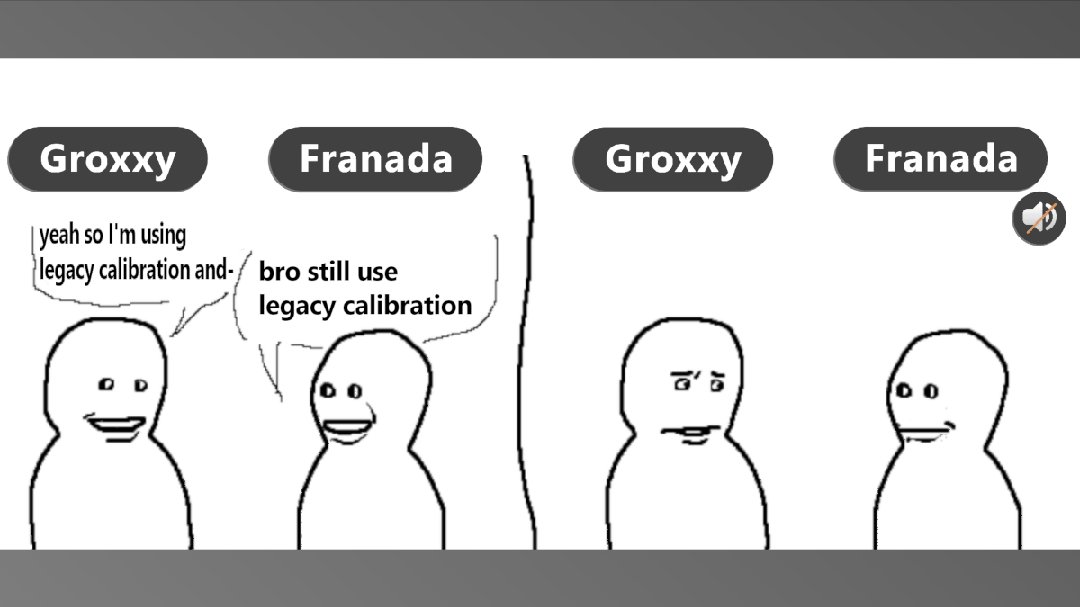
Made it a post so we can see what others have to say on an open platform or not. https://twitter.com/franadaVRC/status/1785545941145006463?t=KINbkO84vPRkbG98tnqfkA&s=19
What are the reasons you still use legacy calibration in FBT when playing #VRChat ?
Everything is centered around the head in this game so IK 2.0 is the better option no ?
 Twitter
·
Twitter
·
Both can be valid options if one fails for you
 slim temple
The avatar swinging around with head movement while you're trying to calibrate is annoying and pretty bad UX
mystic basalt
It just means you have a messed up armature
Probaly using cats in 2024 💀
Pressing fix model
devout current
raw wadi
Made it a post so we can see what others have to say on an open platform or not....
as long as no one is also still using legacy IK lmao
 thorny carbon
may sound like a stupid question. where do you get the IK 2.0? everyone tells me i have it but i do not have anything that remotly resembles the IK 2.0 menu
elfin relic
thorny carbon
may sound like a stupid question. where do you get the IK 2.0? everyone tells me...
You have it, but some things are only accessible with FBT and of course they have spread out the options, so you have to look both in the big menu and the handheld menu.
thorny carbon
ok then my head and hip lock will not show up untill i am in fbt?
marsh elm
thorny carbon
ok then my head and hip lock will not show up untill i am in fbt?
Yea? Why would you be offered to hip lock without fullbody
 dusk anvil
marsh elm
Yea? Why would you be offered to hip lock without fullbody
dusk anvil
marsh elm
Yea? Why would you be offered to hip lock without fullbody
anchors it to world
 polar blade
What change to my avatar armature should I change if I encounter that when I put, in real life, one hand on top of my face and another one on my chin, in vr it looks offset downward?

like in the image, the oval represents my face and my avatar face and the lines my hands
 harsh belfry
strong nova
harsh belfry
strong nova
Nope, I'm running into this issue too. None of the Body Tracking options are available if you don't have an HMD connected running in VR mode. Which is...very obnoxious for what I'm trying to do
strong nova
Ah, shoot.
harsh belfry
strong nova
Ah, shoot.
Do you know where the correct place to report this might be? I know its probably intentional behaviour...but you know there are some esoteric use cases where you would like to have FBT but you don't have a HMD to connect...
strong nova
harsh belfry
Do you know where the correct place to report this might be? I know its probably...
 harsh belfry
strong nova
probably https://feedback.vrchat.com/vrchat-ik-20
harsh belfry
strong nova
probably https://feedback.vrchat.com/vrchat-ik-20
Cool, I'm checking to make sure there isn't a duplicate but I can put something here
Do you know where to report outdated documentation? This page is very out of date, the gear menu no longer looks like this:
https://docs.vrchat.com/docs/osc-trackers
VRChat
VRChat now offers support for receiving tracker data over OSC for use with our existing calibrated full body IK system. Please note: This is an advanced feature! It is NOT plug-and-play. You must create your own program to transmit this data to VRChat using OSC.Manufacturers of tracking hardware may...
strong nova
🤔 probably hello@vrchat.com?
harsh belfry

There are situations where one might want to track their hands, waist, feet, etc. but not have an HMD connected.
Additional discussion has been happening in #full-body-tracking
robust tangle
harsh belfry
https://feedback.vrchat.com/vrchat-ik-20/p/allow-fbt-calibration-in-desktop-mode
From what I can tell this would have been an oversight that stared when we no longer had to re-calibrate every time we switched avatars; before that you'd just be dumped into fullbody right away without the need to calibrate to activate additional trackers
upvoted!
 mystic hawk
harsh belfry
https://feedback.vrchat.com/vrchat-ik-20/p/allow-fbt-calibration-in-desktop-mode
mystic hawk
harsh belfry
https://feedback.vrchat.com/vrchat-ik-20/p/allow-fbt-calibration-in-desktop-mode
there is a workaround... connect the headset and just replace its position with a vive traker on a cap.... it uhm.... works
 bronze olive
Does anyone here know : if theres an actual RULE on where your armature should lie in relation to origin? like, every base i look at (i make assets for sale so i have access to MANY different bases), rests so differently and I would be shocked if this doesn't effect FBT in some way....
im looking specifically at, hip, head and feet location since i assume thats what would be important (also maybe wrist?)


 finite bough
That looks fine
 sharp stump
@uncut nova I remember the pivot of my Head being most important to have centered over the origin, versus anything else. iirc what was affected was, if I looked way down, sometimes my avatar would start shuffling away, when my Head bone was too far off the origin.
raw wadi
I believe the ik is dragged from the viewpoint
Too forward, when you look down the body lift up
Etc
lilac spear
tons of avis suffer from this, but you only really notice it with fbt and "lock head"
 clear ledge
anyone who needs an admin hit me up
 wise panther
raw wadi
I believe the ik is dragged from the viewpoint
wise panther
raw wadi
I believe the ik is dragged from the viewpoint
The viewpoint is the primary tracking point yes
 crude finch
Owo emoji
 errant pulsar
anyone know why with freeze tracking on disconnect enabled, if i turn off a controller parallel to my body while laying down itll end up perpendicular (90 degrees)
figured it out, re-enabling legacy ik, locking in, disabling, then locking back in makes arms rest at side if fbt animations is disabled aswell
 tame sonnet
Hey, does anyone know if VRCArmatureConstraint exists or has ever existed as a component?
wise panther
Armature what now
rustic berry
tame sonnet
Hey, does anyone know if VRCArmatureConstraint exists or has ever existed as a c...
that doesn't sound familiar at all, can you elaborate?
tame sonnet
rustic berry
that doesn't sound familiar at all, can you elaborate?
I confirmed that such a thing never existed.
I was looking for a constraint for use in a dance emote where I wanted an avatar's hands and fingers to automatically snap to an object's position and orient them to align instead of having to manually position them myself and edit the animations for fine-tuning.
It was supposedly a base component for implementing inverse kinematic effects, specifically to allow you to move a target object and have the rotations of a chain of bones in your avatar's skeleton automatically adjust so that a specific bone reaches the position and orientation of that target as well as control over the weight blending to allow blending between an original animation and the influence of the constraint.
Supposedly it had a rotation position constraint that would allow you to define both the position and rotation of a constrained bone based on a source object where you need both a location and orientation of an object you're trying to auto-position, in my case, a set of hands on a standing beam.
mystic basalt
tame sonnet
I confirmed that such a thing never existed.
I was looking for a constraint for...
finalik
strong nova
VRChat Wiki
Inverse Kinematics (IK) are the animations and movements of an avatar within VRChat. VRChat currently utilizes IK 2.0, a "complete revamp" for every aspect of tracking in VRChat; including support for more tracking points, calibration saving, newer IK settings, and more.
 tame cloak
Hello everyone
 rotund aspen
hello
marsh elm
what compels someone to say hi in the most unused and hidden channels of the server
 fringe echo
Idk man
fiery plinth
Its friday, let them vibe
 rare cedar
well well well
 vestal crater

finite bough
Super dead channel.
 potent yew
ik-3 when? /s
iron hamlet
potent yew
ik-3 when? /s
sheeesh & yeet! lol
 ornate turtle
Why is no one reporting on vrchat's server connection issue like what the fuck it's been like this for months.
fringe echo
Talks in the most dead channel btw
 ashen wadi
does the feet/toe sinking into the ground has anything to do with IK? or is it a matter of bounding box? or T-pose posing?
 lyric wedge
 versed nebula
I got the update but there’s a bug where you can’t un favorite the avatars that has been taken down
Also trying to load up chill worlds won’t load and it keeps crashing
fringe echo
Talking in the most dead and not right chat at all
iron hamlet
Might've been me & my social phobia avoiding conversations 😄
 void bridge
Ok, I'm at a bit of an impasse here. I'm trying to get my fingers to look right when bending with my index controllers but as most of us who work with avatars know, muscle limits are not being respected anymore with the new IK. is there a formula here to get fingers to not look terrible? It seems to ignore bone roll too
I'm starting to think it has to do with A pose vs T pose but that would be kind of crazy
void bridge
ok...so turns out, it expects every finger bone to be perfectly aligned with the X axis. It works fine with A pose, as long as the fingers are aligned perfectly when T posing. I still haven't figured out what it expects for the thumb though
void bridge
seems to be expecting the thumb to not be angled down, like flat with the fingers but pointing away at 45 degrees kinda
iron hamlet
didnt dare to dive into that since the change, just relying on the legacy fingerposition-toggle 🙈
void bridge
yeah uh, turns out I had legacy finger tracking turned on and turning it off made them go back to looking awful. so...back to square one
 left rose
awh phooey i cant send a cat emoji
 viscid sedge
Not sure where to ask this, but I just got a Quest Pro and I was getting the facetracking set up last night. I got my eyes to track but nothing else would track. If someone is able to help I'd greatly appreciate it!
 elfin spoke
viscid sedge
Not sure where to ask this, but I just got a Quest Pro and I was getting the fac...
elfin spoke
viscid sedge
Not sure where to ask this, but I just got a Quest Pro and I was getting the fac...
 viscid sedge
elfin spoke
https://cdn.discordapp.com/emojis/1378227878063243364.gif?size=48&animated=true&...
viscid sedge
elfin spoke
https://cdn.discordapp.com/emojis/1378227878063243364.gif?size=48&animated=true&...
I forgot to update, I got it figureed out!
 acoustic snow
wrangling and mangling IK2 and finalIK to get non-clipping legs
 quartz sail
acoustic snow
wrangling and mangling IK2 and finalIK to get non-clipping legs
quartz sail
acoustic snow
wrangling and mangling IK2 and finalIK to get non-clipping legs
wait omg i wanna learn how to do that for my avi 
 clear sentinel
since the function is come with IK2.0 , did anyone has faceing "--ignore-trackers=" is not working in current client and SteamVR?
I have use OpenVRspacecalibrator to only setup for head continuous calibration , but it look like even I set to ignore in launch option , it still be asign as tracker in VRChat and trigger avatar to FBT mode
fiery plinth
clear sentinel
since the function is come with IK2.0 , did anyone has faceing "--ignore-tracke...
works for me, heres how mine looks
 clear sentinel
fiery plinth
works for me, heres how mine looks
clear sentinel
fiery plinth
works for me, heres how mine looks
uhh , after some debug , it turns out I have include some space that make syntax error in my batch file that make it not working as normal , thx!

 celest arrow
hey guys vive 3.0 questie here.. is this normal? both my arms would be usually downards if my hands are facing upwards
 rustic berry

📑 Translated from Japanese
Yesterday, while talking with a friend, we came to the conclusion that my View Position might be off. When I checked the View Position using Nadema's gimmick, I was shocked to find it was at my mouth. However, when I checked in Unity, it was at the eye position. Upon further investigation, I found that when standing, the View Position is at the eye level, but when sitting on a chair, it shifts to the mouth position (this happens with both 3-point and full tracking). Furthermore, it shifts even more when there’s forward or backward movement, like leaning against a backrest. After more research, I found that enabling the setting [Use Tracking and IK/Old IK Solving] fixed the issue. Additionally, I corrected a 5cm deviation in the user’s height and fine-tuned the View Position in Unity while checking with Nadema’s gimmick, finally setting it to the perfect position. If you feel it shifts when sitting, it might be worth checking this settin…

 FixupX
·
FixupX
·


this came across my feed, and seems to line up with some experiences other people have described before
fiery plinth
for a while i needed to rejoin my homeworld after calibrating fbt to recalibrate fbt again so the viewball wasnt in my like neck, never figured out what caused it so never filled out a canny
empty root
rustic berry
https://fixupx.com/damakokoko/status/1977537069133213913/en
inb4 they had lock hip and not lock head
wise panther
yea no thats definitely just lock hip being enabled
empty root
追加情報。フォロワーさんが以下のような情報くれたので参考までに貼っておきます
︀︀>同じ現象になってたけど別の解決策として小さいメニューにある背骨のモードを頭もしくは両方を固定にすると直りました
FixupX
·
empty root
wise panther
yea no thats definitely just lock hip being enabled
ding ding ding ding, we have a winner winner chicken dinner
rustic berry
lmao
 long topaz
rustic berry
https://fixupx.com/damakokoko/status/1977537069133213913/en
long topaz
rustic berry
https://fixupx.com/damakokoko/status/1977537069133213913/en
use lock head or lock both , that happens when using lock hip
lol just saw now that they already said it
 dim perch
 modern lynx
I want a simple seating animation for world stations. So I created a simple pose (image 1) and a controller for my station (image 4/5). This works fine as long tracking is set to animation (image 2). But I would like to be able to look around - so I enable tracking of the head after some delay. But as soon that happens, the lower spine does a unnatural rotation (image 3).
I have another (lying) pose, which works better. It seems to be random to the pose. Why the spine is affected when I enable head tracking only? Are there any docs on it (I didn't found). Or are there some rules how a pose has to be designed (some secret bone alignments maybe)?


 wise panther
When animation takes over completely ik is not used
But when you enable tracking in something it tries to drag the rest of the body to where that part is
Otherwise itd be your neck stretching backwards instead of the spine
modern lynx
Ok, that makes sense in VR, because you can move your head away from the pose. I forgot to mention it - I built and tested this for desktop (and it's the same avatar for creating the pose and in the world - it has only a different skin). I would not expect such a stretch compensation here 🤔
modern lynx
Yes - it looks so. For example: This second pose does also some unwanted hip rotation. But less then the other. I also tested to move the hip forward or backward from the origin (or align the head, view point, neck with it). It seems to change things. But it's never as designed and look always crumpled.


And the third example look almost the same. There is only a minor offset.


And I also observed that it makes a difference depending on how you look when you enter the station.
I start to think about to keep all on animation and implement my own head look (pitch/yaw). But thats idiotical.
modern lynx
Another thing I remarked: When I enter into the station from a crouched or crawling position, it works! The issue is only when I enter from a standing position. I guess, here is a bug somewhere 🤔
modern lynx
As there are a bunch of issues related to my last post, I created a Canny in meantime:
https://feedback.vrchat.com/vrchat-ik-20/p/wrong-behavior-in-desktop-when-entering-upright-in-stations

Goal I wanted some special seating poses for world stations for desktop players (maybye for VR 3pt tracking users too).
 jolly mural
What does Ik-2 mean
 empty solar
jolly mural
What does Ik-2 mean
empty solar
jolly mural
What does Ik-2 mean
it's the updated IK system that was introduce around 2022 that allows you to use multiple trackers in vrc.
jolly mural
strong nova


Tfw you still have some edge cases to fix in your procedural locomotion system #gamedev
**🔁 82 ❤️ 266 **
 FxBluesky
·
FxBluesky
·
 terse kestrel
IK... TWO

 frosty loom

 vale oar
T W O
terse kestrel
@oak pendant say something in your channel before we open it
make it impactful
no pressure
oak pendant
Hi everyone! Been looking forward to you all being able to try this! Have fun and remember to give your feedback!
 real trellis
Bro
final raven
omfg
devout current
what
dusk anvil
finally they made the sequel
 prisma meadow
pog
 rocky crypt
Very nice!
 clever thicket
BRO
 hollow sigil
Avatar dynamics is next beta, I swear it is
undone plinth
Nice
devout current
AAAAAAA
 meager matrix
The announcement scared me lmao
 trim fox
finally
 stiff mulch

 loud oxide
what is ik
 tall smelt
meager matrix
The announcement scared me lmao
tall smelt
meager matrix
The announcement scared me lmao
same
final raven
omfg it's compatible with live lets fuckign goooooo
 ocean bolt
Pagman
final raven
i'm literally... this is too much
 desert elm
@terse kestrel 3 now 6 when can we have 40 pucks or a mocap suit
undone plinth
Spine bending alert i repeat spine bending alert
stiff mulch
256-point tracking?
 gleaming igloo
AAAAAA
 bright sand
A
desert elm
stiff mulch
256-point tracking?
yes
dusk anvil
did i read... automatic elbow positioning?!!?!?
oak pendant
Yep!
 runic rover
wheres my beta
desert elm
listen hear me out VRC is the most expencive game to get in to now
 tender plaza
does it work for non fbt?
oak pendant
"IK-Beta" on steam
runic rover
tender plaza
does it work for non fbt?
IT says so in announcements
 strange idol
Looks good! Very hyped to give it a shot. 😮
 ancient geode
hell ya i can finaly use my sw7's
oak pendant
tender plaza
does it work for non fbt?
Yes, works for just head and hands only as well
 ancient ermine
YOOO Excited!
devout current
wait, it works with live?
tender plaza
oh hell yesss
oak pendant
Yes, live users will see your new IK as well
devout current
yessss
 silver geyser
devout current
wait, it works with live?
silver geyser
devout current
wait, it works with live?
yes
trim fox
wow
devout current
me happy
 foggy mauve
This is really awesome
trim fox
time to do it
foggy mauve
I'm so glad that it works in 3pt tracking too
runic rover
oak pendant
Yes, live users will see your new IK as well
So people non-beta cna see my new IK? Amazing work :D
foggy mauve
I love the elbow tweaks
dusk anvil
oak pendant
Yes, live users will see your new IK as well
thank you kung
 tawny oyster
ok so question: if i were to get knee/elbow trackers, which trackers and which straps would anyone recommend
ancient geode
oak pendant
Yes, live users will see your new IK as well
ya its all just bone positions you send the same data in the end just calculate it better
 lethal bridge
Thank you Kung
dusk anvil
(and vrchat team)
foggy mauve
Vrc devs are the real mvps
 merry cliff
is there a specific time the open beta will be live? i dont see it on steam
 carmine gate
omg I love every single vrchat developer so much
ancient geode
it doing 10point right now lol
 open salmon
👀
ancient geode
tundra trackers for the win
 river wyvern
Lemme go grab my tundras
prisma meadow
merry cliff
is there a specific time the open beta will be live? i dont see it on steam
need to restart steam
merry cliff
prisma meadow
need to restart steam
ok i'll try that
open salmon
restarting steam does the job
 river wyvern
@oak pendant any bone placements on models I need to fix or we all gucci with current bone systems
 final sphinx
POG
river wyvern
or add
 icy ferry
sach told me no fbt fixes for me specifically. sach was confidently WRONG.
terse kestrel
I fixed some errors in the blog, please refresh it!!
merry cliff
aahh yes i see it now
 meager sand
another beta? already?
merry cliff
and yall said it works with live non-beta servers, yea?
final sphinx
Too bad at this apartment i only got the old bases and 6pt qwq or concurrently at max 6 trackers
desert elm
terse kestrel
I fixed some errors in the blog, please refresh it!!
im confued is it net compatiable ?
silver geyser
interesting to see a beta that separate from the regular beta branch
 flint yew
time to charge my trackers lol
 ionic skiff
super cool!
terse kestrel
desert elm
im confued is it net compatiable ?
... it's quite clear in the discord announcement, blog, and tweet that it's live compat, but yes! it is!
strong nova
❤️
desert elm
POG
runic rover
thanks yall for the hard work
terse kestrel
Please read the things we write! They mean stuff! 
icy ferry
i'll have to check it later
 digital grove
holy shit what I was almost right about the new beta release
 fallow fractal
👀
terse kestrel
Please!!!!!!!
 ionic heron
1: new channel pog
2: new IK pog AAA
digital grove
nice
runic rover
Will this fix the "Head goes through chest" issue on various avatars or is this per avatar?
ionic heron
also rtdm
open salmon
i wonder how it's going to work with the kinect
undone plinth
Read the patch notes guys
open salmon
gonna test that out later in the day
undone plinth
It has multiple modes that address the various potential situations
 snow heart

 vagrant vector
Is all the new IK still based in FIK 1.9 or has that been updated to 2.0/2.1?
gleaming igloo
does it still autodetect which trackers go where? or do I actually need to label my trackers now?
 dark silo
deadass, best part of this IK update is not having to mildly hold my arms out from my chest while "pretending" to grab the side of my body doing thinking poses
strong nova
I'm on my treadmill right now. What a coincidence.
runic rover
dark silo
deadass, best part of this IK update is not having to mildly hold my arms out fr...
Agreed.
 devout current
wait, whats with my build id? xD
 runic rover
strong nova
I'm on my treadmill right now. What a coincidence.
runic rover
strong nova
I'm on my treadmill right now. What a coincidence.
Now you can run on your treadmill in better IK :p
ionic heron
devout current
wait, whats with my build id? xD
1169
4
strong nova
devout current
wait, whats with my build id? xD
nice
gleaming igloo
nice
open salmon
nice
ionic heron
nice
trim fox
nice
 wet trout
nice
runic rover
nice
 viscid hatch
nice
final sphinx
nice
merry cliff
nice
oak pendant
The "4" will increment with updates
devout current
ahhh
gleaming igloo

dark silo
it's actually build 292.25
runic rover
Gonna just screenshot the nice
gleaming igloo
same
oak pendant
was checking some other stuff reading back through and replying to questions
meager matrix
4
undone plinth
snow heart
https://tenor.com/view/tldr-george-clooney-too-long-didnt-read-flip-pages-gif-13...
You can tell it to prioritize keeping your view ball aligned, you can tell it to prioritize keeping your hips aligned, or you can tell it to attempt to do both which might result in some weird bending.
strong nova
You guys want to see me sprint on a Kat Walk C?
river wyvern
Its not going to cause "noodling" with bones like neos does if you have twist IK right?
 solar cloud
I don't have fbt but I'll test the beta out anyways i guess cause it mentions 3 point too
ionic heron
strong nova
You guys want to see me sprint on a Kat Walk C?
thought "run 9" was a speed or something lmao
dagger speed 9
also I'm so salty that my headset cable is broken rn :sadge:
oak pendant
river wyvern
<@!153868400282566656> any bone placements on models I need to fix or we all guc...
The goal to have more compatibility than old IK with bone placements. But because the spine is free to bend more than before, if you have a sharp corner in your spine (a lot of people have chest bones that are pretty far forward) when new IK solves your spine it might pull it straighter causing an undesirable look, try it out and see how it goes though. Overall the new IK supports many of the previously messed up rigs
vagrant vector
Time to test if spiders still work 🙏 😭
oak pendant
vagrant vector
Is all the new IK still based in FIK 1.9 or has that been updated to 2.0/2.1?
We didn't update FIK version, but there is a LOT going on beyond just FIK. I tested on spiders though if that's what you're wondering about
gleaming igloo
oooh
vagrant vector
oak pendant
We didn't update FIK version, but there is a LOT going on beyond just FIK. I tes...
I love you kung
digital grove
kung works in vrchat now? interesting
 brazen condor
I'm not able to switch to the IK beta version
gleaming igloo
nvm I guess Kung got us ❤️
river wyvern
oak pendant
The goal to have more compatibility than old IK with bone placements. But becaus...
Alrighty are you guys planning for chest tracker in the future? If so are we going with a 4 bone spine set up? I'll test it with the rig I made to see if it causes that straight issue.
icy ferry
if nobody else got us, kung got us
brazen condor
 terse kestrel
Remember, same rules apply in here as they do in #open-beta-discussion:
- If you didn't post your report to the Feedback board, you didn't report it and it will not be addressed. Mentioning it in this channel does not count. https://feedback.vrchat.com/vrchat-ik-20
- Construct your feedback and bug reports sanely. Focus on clarity, succinct but complete descriptions, direct observations, examples, and reproduction steps.
- We might ask you questions on the Feedback board. Please respond as soon as you can, with as much detail as possible. The easier it is for us to work with you, the more we'll be happy to work with you to solve your issue.
ionic heron
brazen condor
Its saying "Passord incorrect"
restart steam fully
terse kestrel
terse kestrel
Remember, same rules apply in here as they do in <#449386885299830794>:
1. **If...
gleaming igloo
brazen condor
don't need a code , you're in it
if you selected it in the drop down, then you're in the beta
oak pendant
river wyvern
Alrighty are you guys planning for chest tracker in the future? If so are we goi...
If you'd like a chest tracker please try what you'd use it for in 10pt first and then make a case on canny for how 10pt doesn't work for your use case.
 finite basin
Have the best practices for bones/rigging for vrchat full body Ik changed? On both the most recent live build, along with this IK beta, my avatars hips are twisted backwards about 30 degrees when using full body IK. I think I can fix this by moving the top of the leg bones forward to be aligned with the hip bones on the y axis, but im curious if anything has changed to cause the 30 degree twist.
clever thicket
this new ik looks great, bless ❤️
solar cloud
clever thicket
this new ik looks great, bless ❤️
Can i join you quick?
gleaming igloo
everyone liked that
terse kestrel
finite basin
Have the best practices for bones/rigging for vrchat full body Ik changed? On bo...
Generally speaking: https://docs.vrchat.com/docs/full-body-tracking#rigging-requirements
VRChat
VRChat supports additional tracking points using the HTC Vive Trackers. These work with the Lighthouse ecosystem to permit these two additional modes of motion capture: Four-Point (4PT): Tracking headset, two controllers, and one hip trackerSix-Point (6PT): Tracking headset, two controllers, hip tra...
dusk anvil
the guy telling kung what to do to show off ik 2 like: "alright now do the chicken dance"
river wyvern
oak pendant
If you'd like a chest tracker please try what you'd use it for in 10pt first and...
Yeah because for things like neos I add an extra spine bone. I'm happy to send copies of both rigs. I'll upload and test both rigs as well. I give out my rig for others too so some creators do rely on the way I set up my bone structure. Gives me something to do today especially if I need to update models.
ionic heron
dusk anvil
the guy telling kung what to do to show off ik 2 like: "alright now do the chick...
heard the music in my head
oak pendant
finite basin
Have the best practices for bones/rigging for vrchat full body Ik changed? On bo...
The rig requirements are more lenient now than before in general. Though if you use "lock head" mode and you have a completely upside down hip bone, that mode doesn't function right now
clever thicket
ik beta go brrr
icy ferry
i'm tempted to stop what i'm doing and go get in vr
 copper trench

meager sand
im about to try it out soon
terse kestrel
clever thicket
ik beta go brrr
... so, just a live instance??
river wyvern
Im throwing on all my trackers rn
finite basin
oak pendant
The rig requirements are more lenient now than before in general. Though if you ...
Odd, Its now not working where it was before. Would it be possible to include an example rig as part of the vrchat docs for reference of the best practices?
brazen condor
river wyvern
Im throwing on all my trackers rn
same'
brazen condor
Do we wanna get a public beta instance up?
dusk anvil
alright time to attempt to intentionally break the game and bring it to its knees
river wyvern
I just released a new model Im due for a break
ionic heron
brazen condor
Do we wanna get a public beta instance up?
This is compatible with Live - also Sipp literally just started one above lul
oak pendant
river wyvern
Yeah because for things like neos I add an extra spine bone. I'm happy to send c...
Upper-chest bone is now supported if that's what you mean, but 11pt with a chest tracker isn't supported at this time. In general a lot reasons behind of requests for the chest tracker are fixed by the general bug fixes to even 6pt so I'd just like to keep my eye on what use cases people need 11pt for. Not ruling it out, but no promise to implement at this time either
 small umbra
Got dam this is sick
meager sand
i wonder it this is gonna break my avatars leg rigging setup
clever thicket
terse kestrel
... so, just a live instance??
...yes.
oak pendant
finite basin
Odd, Its now not working where it was before. Would it be possible to include an...
Change your "lock" mode and see if it works. Your hip bone is likely upside down from the 3 year old rig hack
 placid crown
Does the new ik place your viewpoint where the eyes are regardless of how it's calibrated?
river wyvern
oak pendant
Upper-chest bone is now supported if that's what you mean, but 11pt with a chest...
For dancing, chest tracker is great if you do isolations, any sort of pop-locking or animation. Its extremely useful. So for people like the people in IDA they will use that consistently.
strong nova
Hands on hips looks really goofy in 6pt
oak pendant
finite basin
Odd, Its now not working where it was before. Would it be possible to include an...
You can also take screenshots of your bones in this world so we can see what's going on: https://vrchat.com/home/world/wrld_01025423-c339-4735-8af9-ba45cc9e46f2
 plain quail
Have the walking animation been changed? Also the hands seems to move towards your body when you run.
oak pendant
plain quail
Have the walking animation been changed? Also the hands seems to move towards yo...
The torso no longer is pulled to the hands so depending on how far out you reach, they'll get pulled back by the run animation
terse kestrel
I personally prefer "lock head" and leave hips unlocked
because idc if my hip is slightly off
but I DO care if my head is
small umbra
I've heard it was possible to sacrifice legs for tracking chairs. is it now possible now to track chairs and legs or has this mode of tracking never been possible or very broken now or then?
 primal viper
Do people not on the beta branch see the new IK?
oak pendant
plain quail
Have the walking animation been changed? Also the hands seems to move towards yo...
And yeah there was a request to have less drift on tracking during locomotion so run animation is smoother. If you'd like the less smooth mode in legacy leave feedback on canny
terse kestrel
primal viper
Do people not on the beta branch see the new IK?
yes
IK is solved locally and then transmitted to remotes as serialized muscle poses, so
dusk anvil
incredible
final raven
I just wanna say, thanks for enabling compatibility with Live servers 💜
river wyvern
Alrighty time to go do a ton of dance moves record it and tear the tracking apart 🙂
ionic heron
dare I say this is incredibly pog
plain quail
Also Cyberchimp is super happy on the tracking, never seen him this happy
oak pendant
Just putting out there "lock head" mode is the roughest in the current version. it lets the body sink down to match view position, but an attempt was made to prevent this from causing the knees to bend when you look down. If it's too janky (I think it's a bit janky) I'll likely simplify it to just allow knee bending
 keen stream
lock head always work better for me
finite basin
oak pendant
You can also take screenshots of your bones in this world so we can see what's g...
I think the leg bones being behind the hips is the issue. Would this cause issues with the new IK?
 river wyvern
OH kung how are you placing your trackers for elbow and knee are you above or below the joint?
oak pendant
keen stream
lock head always work better for me
latest version has the anti-knee bend change though, so you may no longer like it
oak pendant
river wyvern
OH kung how are you placing your trackers for elbow and knee are you above or be...
Above the joint
river wyvern
awesome thats great to know because knee slides might end in trackers breaking the other way
oak pendant
finite basin
I think the leg bones being behind the hips is the issue. Would this cause issue...
if the hip bone is pointing up, it should still work, but if it doesn't let me know and I'll want to see why, upside down hip not working in "lock head" is currently the only known issue of a rig config that fails
 oak crow
this already? guess it's more trackers time, although personally I only care about the arm ones, the knees usually work pretty well without special tracking as is 
finite basin
oak pendant
if the hip bone is pointing up, it should still work, but if it doesn't let me k...
Heading back to work now, but ill try that lock head mode later on this beta branch. Thanks for the help!
oak pendant
finite basin
Heading back to work now, but ill try that lock head mode later on this beta bra...
grab some screenshots in https://vrchat.com/home/world/wrld_01025423-c339-4735-8af9-ba45cc9e46f2 if you can too. It shows the bone orientations better than the sticks in blender. Thanks for testing btw!
 wise dew
Hey quick question, do you guys need people testing budget tracking options. Kinect, Webcam, etc, or are you looking more for laser tracked FBT testing.
oak pendant
river wyvern
awesome thats great to know because knee slides might end in trackers breaking t...
Yeah I experienced the same thing, knee slides down if it's below the joint
 teal halo
so testing now in 3pt, shoulders have changed ALOT. for the better for sure
finite basin
Saved that world for later, thanks!
teal halo
actually fixed a number of clipping issues of mine
oak crow
I wasn't going to play more tonight but I guess it's time to get back on lol
oak pendant
wise dew
Hey quick question, do you guys need people testing budget tracking options. Kin...
Testing various setups is always appreciated!
oak pendant
teal halo
so testing now in 3pt, shoulders have changed ALOT. for the better for sure
Glad you like it, I spent some time modeling normal anatomical motion
clever thicket
great work kung
teal halo
as a seated player 24/7 user i can feel the fixes drastically.
 misty fulcrum
Wow, you all are on fire, so many new good things just so suddenly :D
small umbra
speaking of which KinectToVR just launched a new beta
misty fulcrum
Thanks for bringing the amazing new things
 mystic thistle
Guess il have to setup all my trackers tonight and give it a try.
Very curious how the new elbow rotations and such are in 3 point aswell.
gonna see in person later
carmine gate
Me when we literally just dropped a K2VR beta with knee and elbow trackers
Also, aughip amazing, try it https://getaughip.com
 tight aurora
aughip 0.2 just dropped too
carmine gate
your mom dropped
small umbra
this is so exciting
clever thicket
im hurting https://i.imgur.com/wlegWbp.png
 tight aurora
carmine gate
your mom dropped
tight aurora
carmine gate
your mom dropped
*dies*
wise dew
everyone be putting in work. lol
 wispy grail
So where is it listed how to access this?
flint yew
so it’s 7 trackers max now pog
short knot
owo
tight aurora
wispy grail
So where is it listed how to access this?
 carmine gate
When using Kinect, I recommend setting the IK to lock head. That way you alleviate the 30hz latency on the hip
robust tangle
Can “elbows only” (2 trackers) be on the game plan?
wispy grail
thanks!
robust tangle
carmine gate
that's what 8point is
8 point requires 5 body trackers
oak crow
I wonder if this changes anything about how the chest keeps acting weird
 tame pewter
clever thicket
im hurting https://i.imgur.com/wlegWbp.png
tame pewter
clever thicket
im hurting https://i.imgur.com/wlegWbp.png
it’s ok do chicken dance
carmine gate
If you have only 2 trackers, use augmented hip to make a virtual IK hip
flint yew
imma have a go at 10 point and record it
robust tangle
carmine gate
If you have only 2 trackers, use augmented hip to make a virtual IK hip
Do you have a guide for that
flint yew
vrchat 16 point when? I need a reason to use all my trackers
carmine gate
https://getaughip.com run the installer, start steamvr, turn on the feet trackers, done.
oak pendant
robust tangle
Can “elbows only” (2 trackers) be on the game plan?
Make a canny post asking for it, we've received requests for various other combinations of trackers but I want to have it documented there as well as gauge interest and see people's comments on how they'd plan to use
oak pendant
flint yew
vrchat 16 point when? I need a reason to use all my trackers
toe trackers?
flint yew
robust tangle
Can “elbows only” (2 trackers) be on the game plan?
do you mean elbows + typical hip and feet?
robust tangle
oak pendant
Make a canny post asking for it, we've received requests for various other combi...
Yeah I know a lot of people that have three tracters currently who would love to trade their legs for better elbows without buying more hardware
oak pendant
j/k toe handling is probably better done via OSC at this point
mystic thistle
Im happy to see after all these years the IK being worked on.
Been a long time coming for sure
flint yew
oak pendant
toe trackers?
was mostly a joke, have no idea where to stick em on as well lol
might just get a cat, and strap em to it, and have an osc cat
 maiden rock
kung do the arms still need to be offset with shorter player heights / ovr offsets
flint yew
would have to get tundras for better cat comfort
dusk anvil
i can notice a very slight difference when i put my arms up in live ik and beta ik
(3 point standing)
oak pendant
robust tangle
Yeah I know a lot of people that have three tracters currently who would love to...
the question would be, would they still trade legs for elbows with the new elbow position prediction model, but yeah I can see the use case, make sure you document on canny tho
dusk anvil
dusk anvil
i can notice a very slight difference when i put my arms up in live ik and beta ...
a good difference
 hazy sleet
Hmm, I wonder if my very first avatar will work with this new system or if it'll still pretzel.
robust tangle
That’s true I still need to jump in and look at the new six point
oak crow
okay, wow, the elbows already feel better
oak pendant
maiden rock
kung do the arms still need to be offset with shorter player heights / ovr offse...
Start out using your correct IRL User Real Height with the new IK. If you don't like scaling you can then change from there as before, but an effort was made to make scaling more consistent and accurate to the arm span when you t-pose IRL
maiden rock
cheers
robust tangle
Maybe VRChat will stop making me say I’m 4 inches shorter than I really am now lol
silver geyser
question if this is going to be a more long-term open Beta what happens if a regular open Beta starts while the ik still being worked on
oak pendant
robust tangle
Maybe VRChat will stop making me say I’m 4 inches shorter than I really am now l...
it likely will, try your actual IRL first when testing the IK beta
 sleek anchor
What a great announcement! Can't wait to try it out 🙂
oak pendant
I mean will likely stop needing you to use a fake User Real Height
oak crow
the knee follows my foot just that little bit better too
oak pendant
silver geyser
question if this is going to be a more long-term open Beta what happens if a reg...
The plan is for this to hang out for a while as a live compatible beta. There may be other open betas that come and go as this one sits here.
 hot grotto
kung was the hip animation thing fixed or will i need to mangle my animator to force it?
oak crow
my legs aren't just going through each other when I cross them while standing
oak pendant
hot grotto
kung was the hip animation thing fixed or will i need to mangle my animator to f...
For default locomotion, it's still using the smoother style that 3pt has on live
oak crow
incredible lol
hot grotto
ok
hazy sleet
oak pendant
The plan is for this to hang out for a while as a live compatible beta. There ma...
In other words: IK-beta is the new live until further notice 
small umbra
oak pendant
toe trackers?
Spaghetti Bowl, Chair, and Door
oak pendant
hot grotto
kung was the hip animation thing fixed or will i need to mangle my animator to f...
definitely post a canny about it though. The canny is useful because other people can vote and we can see what people like/dislike, especially useful when talking about something users can change on their own but we're setting a default for
oak pendant
hazy sleet
In other words: IK-beta is the new live until further notice <a:KEKCAT:752001694...
I mean... I'll be using it 😉
hot grotto
gotcha
mystic thistle
One big question Kung since cant test right now maybe you will know.
is the Root Bug fixed? where in FBT your root will become offset over time and cause issues like avatar disappearing in mirror or things on roof of avatar floating away as you move around.
mystic thistle

 stuck coyote
Nice
oak pendant
mystic thistle
One big question Kung since cant test right now maybe you will know.
is the Roo...
yep, at least it should be, that was early in development of this, so if you find that the bug has creeped back in let us know
mystic thistle
 still grotto
I am so, so happy to be done with that bug, you have no idea
still grotto
I am so, so happy to be done with that bug, you have no idea
YESSSSSS
silver geyser
still grotto
Yes
awesome
small umbra
CDJ tracking when?
mystic thistle
oak pendant
yep, at least it should be, that was early in development of this, so if you fin...
Will do. Been such a annoying bug
hazy sleet
Time to buy more trackers, though.
VRChat: the most expensive free "game" you'll ever "play".
robust tangle
First thing I’m testing is the index root translation weirdness when you have index controllers
oak pendant
Ah, yeah just noticed left out the root bug fix in patch notes. But yeah should be fixed
mystic thistle
❤️
 spiral mesa
fully crouching then moving returns me to the standing running animation and not crouch walking
really feels 100x smoother, i can now fully extend arms and legs without awkward bending
other than the 1 issue, i like it
silver geyser
cross my mind it's very helpful there is a toggle to Old Behavior button so it makes it very easy for folks to make comparison videos showing off how much better the ik is
oak pendant
spiral mesa
fully crouching then moving returns me to the standing running animation and not...
make sure to get that on canny, thanks for testing
spiral mesa
oak pendant
make sure to get that on canny, thanks for testing
i'll record a video later for you
 final moss
devout current
final moss
devout current
hmmm, locking it to my head looks kinda broken 😅
 silver geyser
question even though this beta is PC only will the quest players see the better ik & Ten Point track
oak crow
chest no longer moves with the head, that's good
devout current
devout current
hmmm, locking it to my head looks kinda broken 😅
hip looks fine though

 mossy tendon
oh, root bug was fixed? heck yeah, hopefully that should make avatar stations less funky too
oak pendant
silver geyser
cross my mind it's very helpful there is a toggle to Old Behavior button so it ...
It's theoretically possible that the legacy toggle doesn't work correctly because there's a lot going on behind the scenes to allow both to exist in the same build. So if anyone wants to test legacy on the IK Beta, please do as well. (AFAIK it works correctly to restore the old behavior though)
devout current
with hip & head it's also a bit broken
 oak pendant
devout current
hip looks fine though
oak pendant
devout current
hip looks fine though
yeah your avatar's hip bone is pointing straight down. lock head doesn't work with upside down hips

 tawdry nymph
🔥
robust tangle
Does the IK beta include OSC
oak pendant
robust tangle
Does the IK beta include OSC
Yep
mossy tendon
it'd be nice if you could do how much head/hip following is done as sort of a percentage thing 🤔
while sitting, if i set head lock mode my neck straightens out sorta weird and my hips move dramatically if i look down
but maybe its armature issues or somethin
devout current
oak pendant
yeah your avatar's hip bone is pointing straight down. lock head doesn't work wi...
okay, thx for letting me know
flint yew
oak pendant
yeah your avatar's hip bone is pointing straight down. lock head doesn't work wi...
that's gonna be an issue as like probably over 3% of vrc users are rexes lmao
 tawdry glen
I'm going to assume this isn't going to do much for desktop players, cause IK is mostly irrelevant on desktop other than for certain tracking/animation hybrid states.
river wyvern
is there an official testing lobby
digital grove
tawdry glen
I'm going to assume this isn't going to do much for desktop players, cause IK is...
correct
silver geyser
wonder if there's going to be lots of chicken dancing in the testing lobbies
tawdry glen
silver geyser
wonder if there's going to be lots of chicken dancing in the testing lobbies
You know it lol.
oak pendant
flint yew
that's gonna be an issue as like probably over 3% of vrc users are rexes lmao
The upside down hip actually works in the other two modes, so they'll have that. It may get fixed at some point, but we aren't considering it a bug because upside down hip is quite broken from a rigging perspective. It got popularized 3 years go as a rig hack and some people still do it
minor rampart
def some issues wwith things, but overall the arm and chest fixes I'm impressed with
 brazen condor
I think the elbows are less accurate when you are holding your hand on your elbow and trying to test it

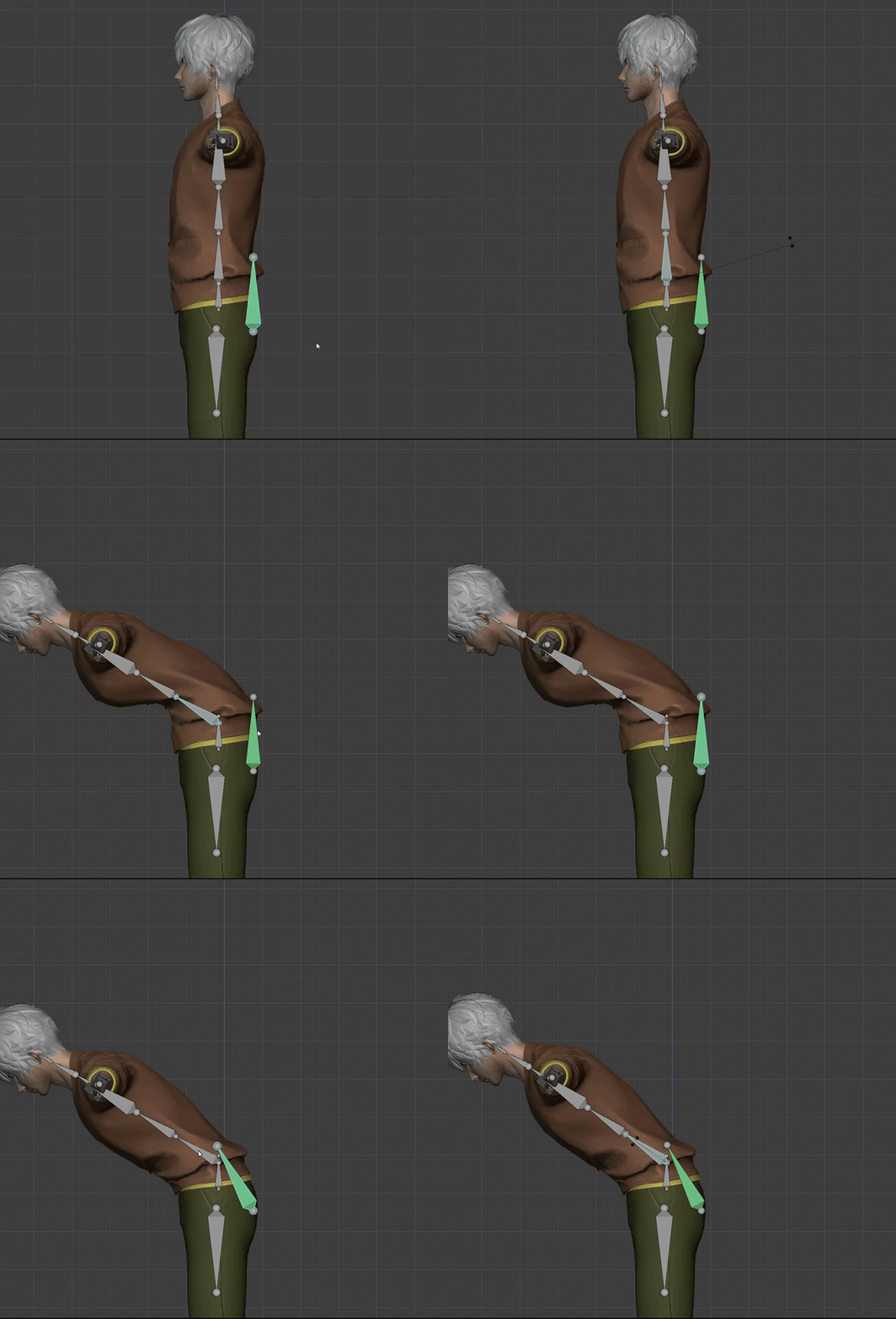


 brazen condor
But overall it seems much smoother
I'd say old IK vs new IK, new IK wins but old IK has some uses its better at (More accurate elbows when up close, versus more dyanmic elbows)
tawdry glen
minor rampart
https://cdn.discordapp.com/attachments/915325049387483157/946925027348058152/VRC...
I don't know why I get so much amusement out of broken IK lol.
oak pendant
minor rampart
https://cdn.discordapp.com/attachments/915325049387483157/946925027348058152/VRC...
try the different modes to see if you find one that works for you, also did you reset to your actual IRL User Real Height? Scaling is different between legacy and new so floor clipping might happen if you don't adjust USer Real Height
brazen condor
If the IK is only a client side changed meh might as well keep both options
viscid hatch
is it normal that my trackers go under the floor in the new ik?
brazen condor
No that seems to be it in general without playspace mover
I really do hope VRC fixes that aspect
minor rampart
oak pendant
try the different modes to see if you find one that works for you, also did you ...
I did
I set it to my actual height and tried full lock, head lock, and hip lock
results are still the same
tried different heights, too just in case, but still no dice.
oak pendant
Ah, so it's always clipping through the floor for you? Try on a few different avatars if you can as well, if it's a consistent issue then make a canny post please if you can
minor rampart
absolutely
need to break for dinner, but I'll do follow up testing after that
and if it persists with multiple avatars, I"ll be more than happy to make a post
robust tangle
There is a really common “sitting on ground cross legged” animation that is publicly distributable that has always had questionable knee rotations. I wouldn’t be surprised if it looks bad now.
 silk magnet
does this new system still use FinalIK as the backend or is this a totally new system?
brazen condor
Shrug
tawdry glen
silk magnet
does this new system still use FinalIK as the backend or is this a totally new s...
Same system.
oak pendant
viscid hatch
is it normal that my trackers go under the floor in the new ik?
depending on avatar proportions and your User Real Height, I think they can go under the floor, but this might be an issue related to the new scaling methods, so if it's something I can solve I'll keep an eye on it. May relate to @minor rampart 's issue, so just keep stuff documented on canny and I can get on it
silk magnet
Ok cool
devout current
viscid hatch
is it normal that my trackers go under the floor in the new ik?
same issue here
final sphinx
the rantichis broken
minor rampart
devout current
same issue here
I'll third this
minor rampart
right click on VRC in steam-->properties->beta tab->IK
viscid hatch
Old IK
 oak crow
okay, my left index controller's finger tracking feels a lot better
viscid hatch
New IK (trackers under the floor, arm length shortened)

 heady yoke
minor rampart
right click on VRC in steam-->properties->beta tab->IK
heady yoke
minor rampart
right click on VRC in steam-->properties->beta tab->IK
Okay, do I need an access code or anything
minor rampart
no
oak pendant
silk magnet
does this new system still use FinalIK as the backend or is this a totally new s...
FinalIK is still in use, but it's not just FinalIK, there's quite a bit going on but can't give specifics on inner workings of everything
brazen condor
I will say a lot of people without playspace mover was under on the feet aspect
minor rampart
just select it, click ok, and it'll start downloading
minor rampart
oak pendant
FinalIK is still in use, but it's not just FinalIK, there's quite a bit going on...
oh, I will say...
oak pendant
viscid hatch
New IK (trackers under the floor, arm length shortened)
Are you using the same User Real Height in both Legacy and Beta modes?
viscid hatch
Yup
minor rampart
having support for JUST elbow tracking+hip, would be great.
viscid hatch
No settings changed between switching modes
river wyvern
editing this list as I go along will also post side by side to canny:
- proportions need to be fixed to your body type if using this system 100% I tested two rigs, one that is fit to me and one that I make average for others. The one thats accurate is my own version
- if you lose a knee tracker position body goes yeet requires recal to come back doesnt happen with elbow, elbow goes yeet instead of full body
- hip is acting stiffer (compared to live movement)
- neck is being weird (weird rotations could also be because my neck length to match irl)
- real user height required (people cannot lock into lower heights)
minor rampart
because not everyone can afford/get ahold of enough trackers yet, but they still might want...for whatever reason, elbow over feet tracking---or at least just want to test out elbow tracking for bugs and such
river wyvern
minor rampart
because not everyone can afford/get ahold of enough trackers yet, but they still...
like that with the hip it should be okay to have only elbow Im pretty sure
like people can just havbe a hip tracker if they wanted
oak pendant
river wyvern
editing this list as I go along will also post side by side to canny:
- proporti...
hip acting stiffer in which mode?
minor rampart
river wyvern
like people can just havbe a hip tracker if they wanted
you can't
if you have hip + 2 on the locatino of the elbow, it still thinks they're feet trackers.
unless trackers now support SteamVR assignments
if that's the case---that explains it and I'll have to switch that in the controller config
river wyvern
minor rampart
unless trackers now support SteamVR assignments
you set them to disabled to stop that from happening
river wyvern
oak pendant
hip acting stiffer in which mode?
lock hip mode I'll try other modes now
oak pendant
river wyvern
editing this list as I go along will also post side by side to canny:
- proporti...
also "lock all" is almost guaranteed to give some strange neck or spine crunching. It doesn't try to play nice with the tracking data and just forces both the hip and spine into position.
final sphinx
the new iks amazing
but my arms are dragging behind the viewpoint, like a bit delayed?
minor rampart
oak pendant
also "lock all" is almost guaranteed to give some strange neck or spine crunchin...
it does allow you to reallyyy get that hunchback/slump look like you just got up and didn't have your coffee though
 autumn junco
So is this beta staying up all the way until release?
oak pendant
autumn junco
So is this beta staying up all the way until release?
Yeah, in general the plan for this live compatible beta is to make the new IK available to everyone to use daily even though it's not in the live release yet
river wyvern
@oak pendant all modes have stiffness in the hips I can show you in game if your on atm
lock head had some weird crunch going on as well
oak pendant
river wyvern
<@!153868400282566656> all modes have stiffness in the hips I can show you in ga...
Can't easily get in at the moment, but if you can take a video comparing that would be helpful. Also mention if you perceive rotational or positional stiffness
 deep osprey
you should be making bug reports in the canny https://feedback.vrchat.com/vrchat-ik-20
 river wyvern
I am going to be Im trying to compile everything into one instead of making a lot of cannys
river wyvern
oak pendant
Can't easily get in at the moment, but if you can take a video comparing that wo...
yeah making the video comparision too did you want the lock in positions recorded as well?
oak pendant
Lots of issues if they're unrelated in one canny make it harder for people to vote and comment on
frosty loom
river wyvern
I am going to be Im trying to compile everything into one instead of making a lo...
Please only keep related issues to the same canny instead of packing them all into one giant thread 
deep osprey
river wyvern
I am going to be Im trying to compile everything into one instead of making a lo...
that's not really useful in my opinion, different problems might need different amount of attention
viscid hatch
I'm already writing an issue on the proportions going out of whack
river wyvern
frosty loom
Please only keep related issues to the same canny instead of packing them all in...
oh so each indiviual tracking issue? Im only testing the tracking issues thats all
oak pendant
river wyvern
yeah making the video comparision too did you want the lock in positions recorde...
Yeah, please show how it performs in different lock modes
river wyvern
viscid hatch
I'm already writing an issue on the proportions going out of whack
thats most likely due to it not being lined up to your IRL scales. I just tested that its not a one size fit all unfortunately
river wyvern
oak pendant
Yeah, please show how it performs in different lock modes
alrighty done deal
I'll also give you guys a copy of the rig as well and include it in the canny
viscid hatch
My avatar is proportionate and my height is already set correctly. The issue is with the new ik being enabled
Every avatar I tried broke
river wyvern
are you 6 or 10 point?
viscid hatch
6 point
oak pendant
viscid hatch
I'm already writing an issue on the proportions going out of whack
There are likely two issues, if the floor height is consistently wrong, I need to look into that I think. However avatar proportions are probably you just noticing that the world/avatar scale associated with a given User Real Height setting is different now. Start out with your IRL value, but depending on the proportions of your avatar you may then need to break away from the IRL value to set the scaling how you're used to feeling it. In general you'd likely need to increase User Real Height, compared to legacy to achieve the same scaling
viscid hatch
I'll try messing with the height more and see if it fixes anything
devout current
hmmm with the new Ik and locked to hip, my chest is dented way more in

 viscid hatch
I increased the IRL height by a ton and managed to get everything lined up. Only issue was that my avatar's feet were in the floor so I all had to do was move my playspace up a bit and everything worked fine.
 thorny oriole
new ik, I like this
viscid hatch
I'll post a video of what I mean if it helps at all
or should I link the video on the canny post instead?
maiden rock
@oak pendant works first time, default settings, all 10 point tracking

admittedly I am still using legacy calbiration
oak pendant
devout current
hmmm with the new Ik and locked to hip, my chest is dented way more in
If the avatar's rest pose has a hard angle in the spine, the new IK will use that angle as slack and will likely straighten it out. This is fixable by avatar creators by not having a lot of "slack" in the spine, but if this is a consistent problem that can't be fixed by moving the spine joints more in line (or that doing that doesn't work because of the avatar's shape or weight painting issues etc) then please make a canny so we can track it
oak pendant
brazen condor
What happens with the new calibration?
Avatar scale calculation is different, start out with your IRL user real height, and then adjust if needed to proportionally fit the avatar
devout current
okay, I'll try out the latest version of the rexouium and if it still happens
brazen condor
No no I meant to ask Toweh why they used the old one
Do you think the height adjustment will fix the feet situation?
viscid hatch
It did for me at least
brazen condor
Hrm let me give that a shot
oak pendant
brazen condor
Do you think the height adjustment will fix the feet situation?
It may or may not, if it can't be fixed then it's a bug I think. I'll be doing some extra testing myself to see if there's an inherent problem with the floor height. (Of course I'm not used to just dragging my height in OVRAS all the time, of course I would have noticed such an issue sooner.. 😅 )
But gotta be sure it's actually an issue and not just people being surprised that different User Real Height values result in different world scales now
Canny on it here to post your findings: https://feedback.vrchat.com/vrchat-ik-20/p/feet-under-the-floor
 real bane
curious on how my avatars will react as I never change my height, using IRL height and never have to adjust height after calibrating
oak pendant
Depending on the length of your avatar's neck bone there will be more or less difference between old IK scaling, (new method is more consistent across avatars of various neck bone lengths)
but likely your avatar will feel smaller
brazen condor
Tried the height fix across 3 avatars (Known good proportioned) (Standard human) (Default bot), no dice for the floor feet
oak pendant
if you've iteratively fit it against the old IK you may need to use a higher than IRL value to get the old behavior
brazen condor
If I had to guess it almost looks like it guesses the bottom of the avatar is too high
real bane
@oak pendant I see, I will do some testing later tonight!
brazen condor
Also Kung, dear gosh this will be an exciting night for you, best of luck Salute
oak pendant
brazen condor
Tried the height fix across 3 avatars (Known good proportioned) (Standard human)...
Thanks for testing, make sure your findings are documented in canny
brazen condor
oak pendant
Thanks for testing, make sure your findings are documented in canny
Already added >.O
You gotta put all this stuff in one place or it will be lost in the depths of discord
 zealous ruin
Do you need elbow trackers for Headset only? :o
flint yew
the worst part of this update is the fact that pairing more than like 4 trackers is quite literally the bane of my fucking existence
real bane
I am staying FBT with out elbow and knees but do have enough trackers for elbows or knees but not both
dark silo
Okay, lock head is capital B Broken for most of my avatars
brazen condor
Perhaps some sort of sensing mechanism to tell if you have knee/elbow trackers from the TPose
brazen condor
Funny enough I actually observed lock all worked fine for me
oak pendant
dark silo
Okay, lock head is capital B *Broken* for most of my avatars
Screenshots in a canny will help.
brazen condor
I think the closer your avatar is to your IRL body and the less jank its bones, the better it looks
Ye document what sort of jank is going on, so we have seperate threads for each break
real bane
@brazen condor That is encouraging, only problem I may have my elbows are alight bend when calibrated but I have not change any of my avatars in so long.
dark silo
lock head/all fix the bug where your hip shifts (locally) every time you move with locomotion disabled
I will not be silenced BOT
I am so happy
oak pendant
dark silo
**lock head/all fix the bug where your hip shifts (locally) every time you move ...
Nice, yeah the issue there is that if your head/view isn't aligned it will line it up during locomotion. Lock Hip (meaning head is unlocked) allows the head to be offset, thus the jump when you locomote. The other modes already have the head perfectly aligned so no hitch on locomotion
viscid hatch
I posted a video of the proportion issue on the canny post
carmine gate
10-point with KinectToVR
Knees are meh, but I only tried one avatar, they looked way more expressive in SteamVR than they did in VRChat.
Elbows lag a tiny tiny bit behind, unless we could add prediction, not much that can be done. But they're otherwise super awesome, like way way better than I thought.
 oak pendant
viscid hatch
I posted a video of the proportion issue on the canny post
oak pendant
viscid hatch
I posted a video of the proportion issue on the canny post
Ah I see, so playspace moving was required for your fix. Likely then it's a bug, we gotta support users who don't install a playspace mover
viscid hatch
Reminds me of the old days of vrc fbt where you'd have to fake your user height and use playspace
good times
carmine gate
the wild west
digital grove
kung, 13 point tracking when
tight aurora
I wonder what aughip would look like on the IK beta
carmine gate
whats the extra 3?
digital grove
shoulders and chest
carmine gate
oh yeah, I immediatly wanted shoulders the moment I tried elbows
 void lintel
imagine shrugging in vr with shoulders
digital grove

tawdry glen
Might as well track every humanoid bone at that point.
void lintel
cat ear tracking
digital grove
tawdry glen
~~Might as well track every humanoid bone at that point.~~
individual rib tracking
oak crow
okay this is SO MUCH BETTER
fiery plinth
neck movement seems rather expressive with neck and hips locked, what can i do to the neck bone to make it... less
err head
off to testing!
oak pendant
fiery plinth
neck movement seems rather expressive with neck and hips locked, what can i do t...
(Assuming you don't use the legacy calibration command line arg) You can look down slightly while you bind in. I'd say maybe 10~20 degrees down from horizontal. This will lower your HMD relative to your hip when you bind, when you look straight again it will tighten your spine and lessen neck movement if you'd prefer it to be less "expressive"
final sphinx
Asking again, the delayed hands-after-viewpoint/head is known right
digital grove
final sphinx
Asking again, the delayed hands-after-viewpoint/head is known right
what'cha talkin'bout willis
 whole glacier
The new beta update is great.
final sphinx
like when i put my finger on my viewpoint on the quest and moved my head the hands movement wasnt in sync with the hmd / delayed for around half a second / dragging behind
and i even used touch controllers
oak pendant
final sphinx
like when i put my finger on my viewpoint on the quest and moved my head the han...
I'm not sure, I'd want to see some video. I think it warrants a canny post if you can
final sphinx
ill do it tomorrow
oak pendant
thanks 👍
whole glacier
The avatars body is much more aligned with my own. 🙂
Although it makes it much more aperient that the chest seems to be bound rotationally to the waist.
 placid gale
Litrally just got fbt today and this gets announced, pog
minor rampart
whole glacier
Although it makes it much more aperient that the chest seems to be bound rotatio...
I mean, the chest doesn't have much rotational ability on its own, IRL, so.
whole glacier
mine does 🙂
river wyvern
Is there any special naming conventions with the canny posts I need to be aware of or can I just bracket it. I'll put a circle on the video areas where theres issues
finite basin
oak pendant
You can also take screenshots of your bones in this world so we can see what's g...
Thanks for showing me this world! After a full reinstall of vrchat, my avatar is now working fine with the beta IK, but is having that odd hip behavior with "legacy IK" selected, this is a bit strange, as before the most recent live update, the avatar was working fine. Maybe you have accidently committed some IK code into live(non beta) there by accident during the IK work. I can just run the beta for now, so no issues for me, thanks for the ideas!
Beta IK is the first one without the hip rotation, second one with hip rotation is the "Legacy IK"

 whole glacier
if I only rotate my hips (IRL) my chest also rotates (in game).
oak pendant
river wyvern
Is there any special naming conventions with the canny posts I need to be aware ...
As long as you post it here it should be ok. If you want to bracket if it's [Bug] or [Request] etc that helps at a glance https://feedback.vrchat.com/vrchat-ik-20
river wyvern
alrighty thank you
oak pendant
finite basin
Thanks for showing me this world! After a full reinstall of vrchat, my avatar is...
To be sure that "legacy" is different from the Live release, please test again after switching away from the beta branch in steam. If the behavior is different then please document it on canny
 elfin sleet
oak pendant
(Assuming you don't use the legacy calibration command line arg) You can look do...
elfin sleet
oak pendant
(Assuming you don't use the legacy calibration command line arg) You can look do...
Would you say the legacy calibration is / isn’t good to combine with the new IK? I personally prefer the static t-pose over the “floaty” feeling of the newer calibration, but if you think it’ll cause issues, I might swap
oak pendant
whole glacier
if I only rotate my hips (IRL) my chest also rotates (in game).
This is one of the use cases for a chest tracker, if you'd like to see that, please make a request on canny. I'd be interested in how many other people would express interest in it
finite basin
oak pendant
To be sure that "legacy" is different from the Live release, please test again a...
So both live and beta "Legacy" are the same, the difference is live before the OSC update my hips where not doing the rotation. I only just noticed this now as I did not participate in the OSC beta.
Im thinking that some sort of IK related update in the OSC update caused this issue.
Just letting you know! Thanks for being such awesome and open devs about these things!
digital grove
oak pendant
This is one of the use cases for a chest tracker, if you'd like to see that, ple...
yes please
oak pendant
elfin sleet
Would you say the legacy calibration is / isn’t good to combine with the new IK?...
We don't explicitly support the legacy calibration (command line) but we also aren't going out of our way to remove it. If it works for you that's great. If you do find an issue feel free to report on canny because I'd like to know about it, but we might not devote dev time to it because it's a hold-over legacy thing. However if there's a necessary use case that can't be solved any other way, I'd want to know about that too and we can see how the issue can be solved in general
elfin sleet
oak pendant
We don't explicitly support the legacy calibration (command line) but we also ar...
Okay, thanks, that’s good to hear - I’ll be testing the new IK later tonight, so if I run into any issues, I’ll be sure to make a canny post
icy ferry
i did a bit of testing with new ik and honestly overall it's great. i don't really have much input aside from what others are talking about, such as the feet sinking, so i'd say that's pretty good. i'm sure i'll notice small issues over time, but so far it feels so much better. the viewpoint feels so much more consistent and the chest rotations are so much more smooth. i love it so far.
digital grove
digital grove
yes please
and also shoulders (13 point)
 kindred acorn
I can't cross my arms in the new IK. Arms IRL are parallel, and they show up as that in legacy (and before the update). It feels as if the chest "area" that the elbows are now avoiding is too big and pushes them away when it shouldn't. Might be avatar specific, haven't tested much cause 2am but I'll see if I can get better insights tomorrow.

(the elbows in the image are too far "forward", towards the camera, not just too high up)
oak pendant
kindred acorn
I can't cross my arms in the new IK. Arms IRL are parallel, and they show up as ...
in general it has to push it pretty far forward to avoid clipping during this pose, but still good to document issues you find (on canny) so thanks. The new elbow prediction is mostly intended to look good to outside observers, if it matches your IRL elbows that's just lucky/bonus
 kindred acorn
I'll open a canny once I get better pictures/check other avatars
brazen condor
oak pendant
in general it has to push it pretty far forward to avoid clipping during this po...
If thats the intention, it definitely has that
It looks more natural at the expense of accuracy, but I think thats a fair trade (Expecially now that you can just have elbow trackers)
Is there any word on if the legacy/new IK will remain togglable after beta? Is it a local only IK calculation change or something more worrysome?
digital grove
it was never accurate due to the arms going inside your body, but I guess the only way to make it accurate is with elbow tracking
more tracking is always better
so 13 point tracking pls
brazen condor
Do shoulders have that issue?
From my understanding this sort of prediction issues happen if there are more than 2 bones between the joint. Its why Knees are more accurate than elbows
With elbows in theory shoulders should be reasonably interpreted
digital grove
knees are particularly noticeable when dancing, so this update is great, but shoulders and chest would make it even better
oak pendant
brazen condor
Is there any word on if the legacy/new IK will remain togglable after beta? Is i...
The legacy toggle is planned to stay (at least for now) after release
brazen condor
Chest would make the spine bend more clear
Is anyone currently documenting the elbows/knee tracker priority issues?
I was thinking about making the Canny since I can write one relatively clearly
digital grove
brazen condor
Is anyone currently documenting the elbows/knee tracker priority issues?
what'cha talkin'bout willis
brazen condor
I mean if you only have 5 trackers, and you wanna track elbows or knees rather than just the one your stuck at
kindred acorn
digital grove
it was never accurate due to the arms going inside your body, but I guess the on...
in that particular pose I'm holding they didn't go inside the body before either, and now they are "floating" above it with a gap - I personally think the old behaviour looks better in this case, regardless of accuracy to IRL positions
brazen condor
3 (Head hands) + 3 (Feet + Waist) + 2 (Elbows) + 2 (Knees)
From my understanding your stuck in that progression
If you wanna do Knees with 8 trackers it wouldn't work
(Correct me if I'm wrong)
I think someone was asking if there could be a way to toggle 8 point tracking between knees and elbows
brazen condor
I believe so, let me review
brazen condor
I do not see a toggle, it implies Knees comes before elbows
digital grove
indeed
brazen condor
Ye all good no worries
@oak pendant Curious, how exactly is the different tracking points implemented
Is it a different build for each (3) (6) (8) (10) or is it parametrized where you just say which bones you wanna bind to what
brazen condor
I agree the walking animation needs to be togglable in menu it does look... very wonky for FBT users
I think it got moved out of Ik-2 since its not really an IK issue though
devout current
strong nova
https://feedback.vrchat.com/vrchat-ik-20/p/feedback-toggle-6-locomotion-walk-ani...
you know there is https://feedback.vrchat.com/vrchat-ik-20 for this beta right?
brazen condor
But this isn't for that beta
The walking animation isn't an IK issue
So don't put it there
strong nova
Wait, I forgor to read the notes for this beta. My bad.
brazen condor
Kung just moved a canny out for that very issue
 rose beacon
digital grove
knees are particularly noticeable when dancing, so this update is great, but sho...
rose beacon
digital grove
knees are particularly noticeable when dancing, so this update is great, but sho...
you dont need dedicated shoulder trackers, having a tracker on the uper arm is enough to calculate both elbow position and shoulder position.
brazen condor
"Need"
strong nova
brazen condor
Noooo
 wintry bluff
So, Would I have to reupload my avatar with this new IK or it going to be automatically applied
 warm lintel
To join the beta do I just set it to beta in steam or something?
digital grove
rose beacon
you dont need dedicated shoulder trackers, having a tracker on the uper arm is e...
two people just commented on how you can't shrug in vrchat
brazen condor
strong nova
https://feedback.vrchat.com/vrchat-ik-20/p/feedback-toggle-6-locomotion-walk-ani...
Kung just moved one of those canny's out, that isn't an IK issue
oak pendant
brazen condor
Kung just moved a canny out for that very issue
two separate things, one was for a toggle for all animation, that's just a AV3 feature request, the other is for the changes to default walking animation that comes with this build, that one is related and stays
oak pendant
anyway, I need to afk for about an hour but I'll keep an eye on stuff in here
if you want to be sure I see something though.. canny!
brazen condor
Salutes
rose beacon
digital grove
two people just commented on how you can't shrug in vrchat
ah, thats an ik issue.
brazen condor
Well in theory with elbow trackers you can
digital grove
which is solved by tracking the shoulders and chest
brazen condor
Its the 2 bones between the hands and head that fuck that up
If its just one between elbows and head in theory it would be more accurate
I couldn't comment on if a chest would help, idk the ik that well
digital grove
ik is fine and good, but it has limitations, which are solved by tracking more points