#avatar-help
1 messages · Page 256 of 1
 past escarp
Definitely, that makes sense! ty :]
 somber citrus
Hi! So this is my first time making an avatar because i felt kinda bored but its only publishing on windows when I want it to publish on BOTH windows and quest, this pops up when I try and build and publish the avatar for quest. Can I have some help please? (Yes I used VRoid)


And yes I switched to the quest shaders before that happened
 somber sequoia
somber citrus
And yes I switched to the quest shaders before that happened
somber sequoia
somber citrus
And yes I switched to the quest shaders before that happened
you missed one somewhere. Check particle systems or materials swapped in via animations
somber sequoia
if you have one on the avatar, click it, then look in the inspector, way at the bottom in the "Render" tab is where the materials are listed
 pine valley
to quickly find everything that could be a problem, search the hierarchy for:
t:renderer
This will list every single object that uses materials
This won't help you with material-swap animations, however
pine valley
top of the Hierarchy window, which will be on the left, by default

(it will look slightly different; this is Unity 6)
t: finds components of a specific type
and renderer is the parent type for every kind of thing that draws
 cinder creek
regarding my WAY earlier issue with the black on the clothing, how... how do i actually... do it in blender or where can i find a tutorial?
somber citrus
pine valley
top of the Hierarchy window, which will be on the left, by default
Found it!
 lilac musk
cinder creek
regarding my WAY earlier issue with the black on the clothing, how... how do i a...
lilac musk
cinder creek
regarding my WAY earlier issue with the black on the clothing, how... how do i a...
It's pretty normal blender stuff. Look up 'knife tool'. It's a pretty common way for people to cut around the black parts and delete the black entirely.
cinder creek
ok
somber citrus
Okay i searched it but it just appeared with both the ones i have materials for
 somber sequoia
you won't find materials which are swapped in via animation in that hierarchy though
somber sequoia
I have no idea how your project works
somber citrus
Should i send a pic of my screen?
somber sequoia
it's not going to help really
somber citrus
I have the 2022.3.22f unity ver
somber sequoia
good
somber citrus
If that helps with anything
somber sequoia
that is the correct one
somber citrus
Alr
cinder creek
oh who am i kidding, i can't do this manually
any ways the cutout thing can be easier?
somber sequoia
cutout thing?
somber sequoia
oh right, that
You don't have to use the knife tool but it's probably easiest if you don't really know blender. If you do know blender you probably know how to do this.
cinder creek
knife clings to every line on the mesh
somber citrus
Okay I found the materials but when I go to change it to toon lit or toon standard it has these black bits which I dont want. Is that unsolvable with a VRoid modle?
 timber wharf
@somber citrus theres no transparency on quest
cinder creek
somber sequoia
You don't have to use the knife tool but it's probably easiest if you don't real...
at the very minimum, is there a way to make knife NOT cling to each line, like photoshop lasso tool?
timber wharf
so its knife tool on blender as well
somber sequoia
I'm not sure what you mean by cling? I don't really find much use for the knife tool though, so I rarely try it
cinder creek
somber citrus
Okay I found the materials but when I go to change it to toon lit or toon standa...
can confirm no transparency, exact issue here
somber citrus
Oh so will that just appear if it somehow uploads?
cinder creek
somber sequoia
I'm not sure what you mean by cling? I don't really find much use for the knife...
it gets stuck on these black lines
 timber wharf
heres how to #avatar-help message
somber citrus
Okay maybe I should just wait until I get a new pc because my laptop will most likely die because it has a shit battery and it overheats easily. Thanks for ur help tho
somber sequoia
those look like the edges of your mesh - so yeah, of course
cinder creek
is there an issue there?
somber sequoia
not sure what you mean? You have to split edges in order to draw a new edge across the middle of a face, the knife tool just helps you do that easier in some cases
cinder creek
okay so what i want is to cut it smoothly along the edges of the dress there without any unrenderable transparency
yet you are stuck with selecting point a and point b for each segment and can't freeform it
somber sequoia
I suspect you'd have to have those faces split into many more smaller ones for that to work
cinder creek
what are other ways to do this thing
somber sequoia
you could manually split the faces in question, then manually move around the resulting edges, and delete the faces you don't want
cinder creek
and how do i do that?
somber sequoia
select two edges, right click, subdivide
I really suggest basic blender tutorials for this stuff
a little bit of the basics goes a long way
cinder creek
ok
 median stream
Do i replace these ones on the quest avatar and delete the original ones? when i added a toggle for my pc avatar
 somber sequoia
these being what? I wouldn't delete any of those folders...
median stream
Hmmm, so how do i make the toggles sync with my pc version?
I added toggles for the PC version, and it broke the quest where all the toggles is off
somber sequoia
Oh I see what you're asking - you use the same parameter list. Ideally the same file - order matters here.
you also have to take into account tools which edit that at build time, like VRCFury. It does have a way to keep those in sync, so look into that.
 zenith spade
Not sure how to shade him. All the flats are done. He’s an all white lion.

 cinder creek
i suppose the smart thing to do is assume that people don't do cutouts for others
somber sequoia
eh, it's just blendering, I'm sure you could commission someone to do that for you
 plain mural
How can I make it so that other users can push my physical bones without grabbing them in their hand, but only by passing their hand past them?
somber sequoia
The only way this works is with a physbone component on the bone, set the radius as large as you like.
Note that you usually don't want to be putting a physbone on a humanoid bone... unless you like being a noodle
 floral smelt
can anyone help me with gogoloco
somber sequoia
just ask your question
floral smelt
i kadd gogo loco but it gives me this warning but i cant find any files
somber sequoia
... you're going to share the warning, right?
 somber sequoia
Oh it says what the problem is. You can use either the vrcfury prefab, or do it the manual way with the gogo loco animation controllers.
seems you're doing both
floral smelt
but even when i look for the files they are not there
somber sequoia
what files? Look at your avatar descriptor, find the animation controllers.
Feel free to screenshot
I actually don't know what that check ^ is doing, so you might have to dig into that or ask on the VRCFury discord for details, maybe you have something in one of your controllers it thinks is gogo loco but isn't
 rare jacinth
Anyone know how I can fix my fallback model not having clothing? I did the toggles with vrcfury and they are all set to on. So im not sure what the problem is
floral smelt
im going to do a clean redo of the avi and take a look
pine valley
somber sequoia
I actually don't know what that check ^ is doing, so you might have to dig into ...
It checks if any of your playable layers include "goloco" in their asset path
somber sequoia
ahhh
pine valley
after checking that one of the controllers that it's trying to merge is identical to something plugged into a playable layer
somber sequoia
makes sense
pine valley
I missed that, whoops
if "goloco" isn't in the name, it gives a more generic error about trying to merge a controller that's already a playable layer on your avatar
pine valley
floral smelt
but even when i look for the files they are not there
what did you actually do?
floral smelt
i had deleted the old gogo files then added the vrc fury gogo and when i went into play mode it gave me that error
somber sequoia
I wouldn't think you'd want to delete the actual files, doesn't the fury prefab use those?
floral smelt
does it i dont really know still kinda new to this
im going to try and use what gogo is there and see what i can get

now im getting this
pine valley
you need to look at the "Playable Layers" section of the avatar descriptor
 pine valley
floral smelt
pine valley
floral smelt
VRCFury shows this error if you have something plugged in here that is also used by VRCFury
 drowsy garnet
friend tried to upload avi for me so on unity, it uploads and it says the avatar builds but when i try and see if it works on vrc i always get the error robot

do anyone know how to fix this

 wintry ledge
upload failed and i get this in console,what does it mean 🥀

 little plume
how can I modify my animation to make the character teleport around

this is the animation, but I need to modify it so she moves around
all i gotta do is make her move around, and change her scale for the second half
I know this is possible because I have a friend that did a similar thing for another avatar
little plume
little plume
https://cdn.discordapp.com/attachments/730948141196509297/1485035253491044462/20...
sorry it didnt embed
zenith spade
Would this type of shading and dithering work in vrc or should I just use shaders within software?
 little plume
zenith spade
Would this type of shading and dithering work in vrc or should I just use shader...
little plume
zenith spade
Would this type of shading and dithering work in vrc or should I just use shader...
poiyomi toon
zenith spade
little plume
poiyomi toon
Ok I’ll take note of that. Thank you! 🙂
 cobalt cloak
hemm i need some help what shoud i doo
 little plume
cobalt cloak
hemm i need some help what shoud i doo
little plume
cobalt cloak
hemm i need some help what shoud i doo
you press quit
that is a crash error
you made unity crash
cobalt cloak
okay and i just switch form andorid to pc version
cobalt cloak
little plume
you press quit
wen i restart unity the same thing pops up up
 agile reef
question about android models- how do I make it set to default a specific outfit?
 small shoal
hi everyone, i dont mean to speak over the previous person! but i was hoping someone would know the fix to this, the first picture is how my avatar looks ingame when i start kneeling down, and the rest are how it looks in blender + unity. ive tried a lot of things to fix it, the bones are symmetrical and the weight painting looks fine as well :( i dont really know what to do


 lilac musk
small shoal
hi everyone, i dont mean to speak over the previous person! but i was hoping som...
lilac musk
small shoal
hi everyone, i dont mean to speak over the previous person! but i was hoping som...
The knees on the rig need to have a slight bend to them. Same with the elbows.
lilac musk
agile reef
question about android models- how do I make it set to default a specific outfit...
It depends on how you setup your animation controllers. If your using a specific parameter on PC to set what outfit your wearing, the Quest side will change the same parameter (As long as the parameter lists are the same, which you should keep them the same for this reason) and animate as it does. So just keep things as simular as you can in that way
small shoal
lilac musk
The knees on the rig need to have a slight bend to them. Same with the elbows.
hii thank you! how exactly would i do this? do i need to rotate the bones or something?
lilac musk
small shoal
hii thank you! how exactly would i do this? do i need to rotate the bones or som...
Honestly, just edit the rig and either pull the heels back a bit, the knee forward a bit, or both. Just give it enough that you can visually tell the leg is bent
In blender
small shoal
lilac musk
Honestly, just edit the rig and either pull the heels back a bit, the knee forwa...
ok! blender, right?
lilac musk
Yea
agile reef
what is this errorr i cant test my model in gesture manager?

 modern wren
is there any quick means to locate precisely where in the hell these shaders actually are? i can't seem to find them no matter where i look, even deleting and putting back my prefabs hasn't helped.
 lilac musk
modern wren
is there any quick means to locate precisely where in the hell these shaders act...
lilac musk
modern wren
is there any quick means to locate precisely where in the hell these shaders act...
There is a search bar at the top of your hierarchy. Put in 't:renderer' and it will show you every object that has a renderer and so you can check its material lists to make sure they are the correct shader
 drowsy flicker
Has anyone made png for android I need a lil help
little plume
little plume
how can I modify my animation to make the character teleport around
ideas?
lilac musk
little plume
ideas?
The only thing I can think of is to change the values in the animation. I think you can use the curves portion to select a group of key frames and move the x,y,z pos of the hips all at once, but I've never done it. I'd suggest making a duplicate of the animation and just play around with the values
 dusky walrus
My avatar looks fine in the mapping/muscles inspector but is posed so weird in the viewport, how do i fix this


Figured it out! Had to go through all the leg bones and revert the modified components (didnt know this existed)
 scarlet flower
So i need help really bad. I cant make my avi quesst compatible bcz its download size iss too big, how can i reduce this?

how do i take this much off
will taking all other textures off besides the base model help?
lilac musk
scarlet flower
will taking all other textures off besides the base model help?
Yes it would help, but I'd simply try reducing their resolution first. It helps a lot if they haven't already be reduced
 merry ermine
Dude.. What even...????


What did I even DO what happened
Its.. Fine in blender but..??
lilac musk
scarlet flower
how would i do that
Select a texture, then in the inspector, there is a max size setting. Reduce it's max on android.

Hit the 'Override for android' and it will unlock the settings
lilac musk
merry ermine
Its.. Fine in blender but..??
Did you apply all transforms before exporting?
modern wren
prepare for extremely undesirable compromises
merry ermine
lilac musk
Did you apply all transforms before exporting?
Umm.. Lemme check rq
modern wren
am doing the same thing right now :)
ideally you've got your stuff sorted nicely
if not in the future maybe consider using folders to sort nicely
lilac musk
merry ermine
Umm.. Lemme check rq
Also kind of looks like you have some odd parenting on some of the bones
merry ermine
lilac musk
Also kind of looks like you have some odd parenting on some of the bones
OH very possibly could be that
Let me try and fix it
I should never rely on the X mirror option lol
scarlet flower
lilac musk
Select a texture, then in the inspector, there is a max size setting. Reduce it'...
So i have made all of it lower quality
but it says its the ssame download size
did i do something wrong?
do i have to refresh?
omg.
Im so sslow bro
i did it for windows
merry ermine
lilac musk
Did you apply all transforms before exporting?
I did that, tried to fix the parenting and its still giving the same issues.. Any ideas??
merry ermine
scarlet flower
iss there an undo button😭
Um ctrl z I think
With every new export its the same issue and Im not sure what happened

I just wanted to test out sizing to make sure its accurat in comparison to my other avatar
Anyways I have to pack so please ping if you have a tip
scarlet flower
lilac musk
Yes it would help, but I'd simply try reducing their resolution first. It helps ...
so i reduced the resolution but it says its the same size whats going on?
 dark egret
is there a reason for this error? i tried fixing it and im still getting it

 modern wren
scarlet flower
so i reduced the resolution but it says its the same size whats going on?
modern wren
scarlet flower
so i reduced the resolution but it says its the same size whats going on?
did you do it for android or for everyone
 modern wren
and you hit apply each time, yeah?
scarlet flower
yes
modern wren
do you have the right avatar selected
scarlet flower
yes
modern wren
welp im out of ideas
i'm not much more experienced than you LOL
im going through the same process right now and unfortunately we're still needing to go through another 2.5 mb or so
lilac musk
scarlet flower
Did you do it for all your textures or just the one?
scarlet flower
lilac musk
Did you do it for all your textures or just the one?
all
modern wren
and i've already made every compromise i'm okay with making :D
scarlet flower
Its not going down even a bit tho
lilac musk
scarlet flower
Its not going down even a bit tho
Might want to try Thry's Avatar Performance Tools and see what's causing the large size
lilac musk
google should find it
scarlet flower
it doesnt add
im so sslow bro

nvm

sso i got this now
does that mean i gotta lower my messh?
lilac musk
scarlet flower
does that mean i gotta lower my messh?
Mesh is a little more complicated. Could start off with removing unneeded blenshapes. VRCFury can do that on upload
lilac musk
Unless you want to delete the unneeded blenshapes yourself. I'd say it's worth using
lilac musk
Nice
lilac musk
Keep workin at it and you'll be a pro in no time
 loud arrow
how would i make a color wheel for vrc particles quest


 night ember
if its just the color thats emitted and not the color of every particle exisitng or not then just animate the start color
 lilac musk
Make an animation that goes through the colors you want, add it to your controller with motion time set to a parameter with zero speed, then use a radial puppet to control it
loud arrow
lilac musk
Make an animation that goes through the colors you want, add it to your controll...
how do i make it drive it thats what i am asking
lilac musk
loud arrow
how do i make it drive it thats what i am asking
Radial puppet? I don't know exactly what your asking.
 warped chasm
Hello I had a hopefully quick question. Im new to Unity but have a some blender experience. On the right I made a model where I wanted it to be shiny and silver.
How do I achieve this look in unity? I did add a texture to in unity in the screenshot you can see metallic map at 1 and smoothness at .816.
I guess the real question is, is this enough inside Vrchat? It looks like paper in unity but if I put in vrchat will it actually reflect? Tried to keep it short and to the point, thank you.
 night ember
you dont have a skybox so its just reflecting the grey
warped chasm
Ah gotcha. So the question now, even though if I dont have a skybox how will that look like on an avatar?
night ember
depends on the world
loud arrow
lilac musk
Radial puppet? I don't know exactly what your asking.
what in here do i have to select to change starting color

 warped chasm
Understood so theoretically it SHOULD reflect in game with these settings? Im getting ready to give this to a friend for their model
loud arrow
night ember
the literal bar of color
i dont see a start color here
 night ember
itd just reflect whatever the world has
night ember
loud arrow
i dont see a start color here
just click the red dot and then animate the particle
warped chasm
Awesome, so I think im done. I was concerned it wasn't working on my end. For avatar uploading, does it need to have a skybox to work? (Never worked on an avatar/Uploaded one before). Thank you so much for your quick responses!
lilac musk
Avatars are just an object, the skybox is part of worlds in VRChat. As long as you have your shader setup correctly (I think you do), then it should function in worlds with proper skybox/lighting
warped chasm
Appreciate it, I was losing my mind haha
I had the same theory but didn't know how to word it or who to ask. You guys are great!
night ember
the only time youd have a skybox/cubemap on an avatar is for some toggle thatd specifically emulate a skybox or you overwrote it via a shader like poiyomi
 hot loom
How to add assit to avatar on VRCFury ?
 stark kiln
does anyone know why it's doing this..😭

is it the armature
or something
like it's fine here but if i switch to crouch or anything it does this


and i've tried everything to get it to stick on
 rustic bolt
guys does it cost money to make my own avatars that only i can use?
stark kiln
rustic bolt
guys does it cost money to make my own avatars that only i can use?
umm no there's a ton of free assets
stark kiln
rustic bolt
i need a body asset lowk
i'm pretty sure if you go on like jinxxy or something u can find free ones?
idk actually i've seen some tho that r free
rustic bolt
does anyone wanna give me a body base or at least teach me how to make one before i cry 🥹
 ornate stump
rustic bolt
does anyone wanna give me a body base or at least teach me how to make one befor...
ornate stump
rustic bolt
does anyone wanna give me a body base or at least teach me how to make one befor...
Try searching on jinxxy website.
ornate stump
Switch to Authentication tab and change back to Build.
rustic bolt
ornate stump
Try searching on jinxxy website.
all of them cost money and im broke unlike these rich ppl
 vale locust
ornate stump
Switch to Authentication tab and change back to Build.
vale locust
ornate stump
Switch to Authentication tab and change back to Build.
the issue is uploading it, like even if i switch it just dosen work
stark kiln
stark kiln
does anyone know why it's doing this..😭
can anyone plsss help me with this
rustic bolt
i am so hecking confused why is blender so complicated
stark kiln
rustic bolt
i am so hecking confused why is blender so complicated
IKR?
it's the most confusing thing in the world
 alpine jay
my face blendshapes work fine in blender but in unity and vrchat the lips deform really badly and i dont know how to fix it

 ornate stump
vale locust
the issue is uploading it, like even if i switch it just dosen work
ornate stump
vale locust
the issue is uploading it, like even if i switch it just dosen work
You might have to look in console for error in the console.
ornate stump
rustic bolt
i am so hecking confused why is blender so complicated
Because 3D modeling isn't that simple.
ornate stump
rustic bolt
all of them cost money and im broke unlike these rich ppl
You clearly can set price range to zero so it shows only the free one.
ornate stump
rustic bolt
like it literally wont let me
rustic bolt
like its showing ones that are like $30 or more
and also does anyone know how to upload the free avatars when im on pc-vr
ornate stump
rustic bolt
like its showing ones that are like $30 or more
You only looked at the top of the list which show "paid boost" items. You have to scroll down to see your actual search result.
rustic bolt
ohhhh makes sense
rustic bolt
stark kiln
it's the most confusing thing in the world
bro i gotta take a whole course next year to figure ts out like 😭
ornate stump
rustic bolt
bro i gotta take a whole course next year to figure ts out like 😭
A collage has a whole course for 3D modeling.
rustic bolt
ornate stump
A collage has a whole course for 3D modeling.
im in high school and theres a 3d modeling class
ornate stump
That's lucky for you to have that.
rustic bolt
yuhhh
i was in the class but then i left it
cause it was too confusing
but i also joined it mid way thru the semester so
ornate stump
You clearly missed the basic part of the course so that's why it's confused you.
ornate stump
rustic bolt
but i also joined it mid way thru the semester so
If you're going to get from the basic again, watching the donut tutorial serie videos is the way to get started.
rustic bolt
but hes using a circle and im using squares
 strange saffron
Anyone have ideas on how to create avatar lights in which the position of the light can be moved in the 3 axis on at least 3 different raidals (z radial is actually degrees, x and y are distance from the avatar) and if it is possible to vary the type of lighting (is behind a tree texture, is strong light, wider light spread, etc.)?
 torn beacon
hey there, I am completely new to the VR Chat, I have modelled my own Vtuber avatar and a friend of mine asked me to create one for her for VR Chat - but it seems there are different settings needed than for e.g. Warudo
 gaunt knoll
torn beacon
hey there, I am completely new to the VR Chat, I have modelled my own Vtuber ava...
gaunt knoll
torn beacon
hey there, I am completely new to the VR Chat, I have modelled my own Vtuber ava...
I mean I don't think most of us and used warudo
If you know blender and unity you should be fine
gaunt knoll
strange saffron
Anyone have ideas on how to create avatar lights in which the position of the li...
I believe most people use blendshapes to make something move in 3 axis
Or I guess you can use an animation
strange saffron
for avatar lights?
 balmy barn
any radial animation that move a gameobjects in xyz direction , done it on stations so i could adjust anyone sitting on it
never made a video on how, you just animate the object on each axis on 3 different gameobjects
strange saffron
isn't stations chairs?
balmy barn
3 gameobjects, then motion time (blendtree should also work) , its a 'station' i just put the same avatar on it show its moving stuff
strange saffron
also are there any tutorials on avatar lights specifically? I can find general lighting advice but that's different from avatar lights, right?
strange saffron
well the purpose is not for purely VRC for this version of the model
I'm going for a mixed media type content showcasing a background photo for videos
so the avatar lights will help bridge immersion of the model in the photo world
and if I can dynamically swap photos/lighting, that can make the end result more impactful
and I won't need to render/make an entire VRC world for it either
 teal bolt
What do you need to download the iOS version?
 tired lintel
hey can anyone with unity knowledge help me upload a avatar in dms, im new to unity.
somber sequoia
lots of us can help in the channel, feel free to ask specific questions
 quick sky
How to import an avatar. I’ve looked up yt vids and nothing is helping me bc I don’t understand anything about code. I just wanted to download the file and upload it on my game
From Vroid
Ping me when you answer
ornate stump
quick sky
How to import an avatar. I’ve looked up yt vids and nothing is helping me bc I d...
There is no code involving in the procedure, so you likely misunderstood something.
quick sky
ornate stump
There is no code involving in the procedure, so you likely misunderstood somethi...
How do I do it
ornate stump
quick sky
How do I do it
Which step that you got stuck?
quick sky
I have my file of the avatar download it’s the problem of getting it to vr
ornate stump
quick sky
I have my file of the avatar download it’s the problem of getting it to vr
What kind of file is it?
somber sequoia
.vrm?
ornate stump
quick sky
Ben
Is that also an answer?
quick sky
ornate stump
Is that also an answer?
No
It’s a vrm file
And google said to go to GitHub
So I went and idk where to go from there
quick sky
ornate stump
https://www.youtube.com/watch?v=HPXe0a_yMQc
All this is through computer right?
Or supposed to be right
I didn’t have to do it on vr headset
ornate stump
quick sky
All this is through computer right?
You need a PC to run all of those apps.
quick sky
Would a mac book be good to?
ornate stump
quick sky
Would a mac book be good to?
It works but may have some problem.
ornate stump
quick sky
Would a mac book be good to?
Also note that if it mentions about using VCC, you will have to use ALCOM instead for your mac book.
quick sky
Alcom?
ornate stump
quick sky
Alcom?
It's a replacement for VCC
quick sky
Is it a browser app or something?
ornate stump
quick sky
Is it a browser app or something?
You should see in the tutorial.
quick sky
Ok
 placid sleet
Does anyone know the avatar code for mimi the silly's avi seduction?
lilac musk
placid sleet
Does anyone know the avatar code for mimi the silly's avi seduction?
Probably wont get an answer for that here as this is for help making avatars. I'd suggest finding the creators discord/community and ask there
 charred escarp
does anyone know how to fix my avatar from being in this pose,
its stuck in the pose when you press preview while doing animations and it just lingers forever and i don't know how to fix it, can i have help please?
 lilac musk
charred escarp
does anyone know how to fix my avatar from being in this pose,
its stuck in the ...
lilac musk
charred escarp
does anyone know how to fix my avatar from being in this pose,
its stuck in the ...
Pumpkins avatar tools has an 'enforce t-pose' that should fix it
charred escarp
lilac musk
Pumpkins avatar tools has an 'enforce t-pose' that should fix it
okie dokie thank you ill have a look into that
charred escarp
lilac musk
Pumpkins avatar tools has an 'enforce t-pose' that should fix it
do you know where that button is, from what i looked online people just talk about it but never really say where said button is?
if its not too much trouble
balmy barn
put av in there, click reset pose , old screenshot but its somewhere in the pumkin tools tab (add it first)
 little plume
Is there a way to make a particle texture follow along a mesh or something?


If you look at the thing in the right, it uses a line of particles to make him look like lightning
 violet summit
Hello! I am making my very first avatar and I am running into this one issue while in game. I'm not sure if its the viewpoint because i've tried everything i could with that and nothing worked.... can someone please help me?? The photo on the left is what happens when I use it and the one on the right is where I put my viewpoint. Thank you!

 little plume
violet summit
Hello! I am making my very first avatar and I am running into this one issue whi...
little plume
violet summit
Hello! I am making my very first avatar and I am running into this one issue whi...
Wat exactly is the issue? Can you describe it further
violet summit
little plume
Wat exactly is the issue? Can you describe it further
Literally when I spawn in, i only get the view of outside of the world. I wanna know why its doing that and not where the avatar is??
little plume
Where s your new position?
Nvrm I see it
Still don't see wat the issue is, it looks like you are just looking at something
timber wharf
@violet summit you have camera object, probably from exporting actual model alongside default blender stuff
little plume
timber wharf
<@1175118328709267498> you have camera object, probably from exporting actual mo...
Oh yeah I see that camera now too
That'd be your culprit
violet summit
How do i do it the right way? Am i supposed to delete certain stuff?
timber wharf
yep, normally you should delete light/camera/whatever is not a part of an avi in blender.
 fluid sinew
Hey, can somebody help me fix this clipping issue?
I rigged the model myself and the rig is identical to the avatar (at least the bones that are present)

I know with clothing you usually make the model thinner, but how do I do that when it's not "fully enclosed"?
timber wharf
@fluid sinew uh usually data tranfser modifier - vertex groups - mapping being one of the last two options (whatever works better)
manualy painting stuff and hoping it will match wont work
fluid sinew
I used the data transfer modifier and vertex groups
maybe something got messed up there cuz the weights look a little off
timber wharf
doesnt look THAT skintight so should work decently
skintight is almost impossible to fit without it being the og geometry cut down
fluid sinew
well yeah, the chest part is not tight cuz I didnt sync the blendshapes yet
I don't think that'll fix the legs tho
Ill try to make it a little bigger
fluid sinew
Well scaling it doesn't really work
I'm using this asset but with a newer version of the rig (which is why I rigged it myself) so there should be some way it works
https://pawmodz.gumroad.com/l/RexouiumHarness
timber wharf
again r you sure youve removed old stuff ie made it unrigged then transfered weights with one of two last options
fluid sinew
Yes, I did the following:
removed everything except for the mesh
imported the avatar mesh and rig rig and deleted all the boney I don't need
Deleted all all vertex groups I don't need (only keep the ones used in the armature)
Used the data transfer and armature modifier
timber wharf
whats the dropdown selected to
its default to uuuh nearest vertex
which is suboptimal by far
fluid sinew
Nearest vertex interpolated
timber wharf
well i really dont remember which one, so it should be one of the last two options
ie i dont remember their names
fluid sinew
I used the same as the tutorial I watched
I rigged some tight stuff before that worked
but I just made the mesh below it thinner with a blendshape
which is not really an option with a harness
timber wharf
try the other one
otherwise, idk, i guess difference between density of src model and new stuff is too vast so manual painting or making stuff thicker it is
 raven lodge
this will go on forever but the project wont let me upload it unless i click auto fix. and it just sits here loading doing this.

 sand cedar
Im trying to make a tranforming avatar that uses two seperate models. does anyone know how to make it so i can swap betweent he two?
balmy barn
lots of constraints to control the other avatar
sand cedar
is there a video tutorial on it
 fathom basin
why is this showing up even though i already uploaded like 3 avis
 somber sequoia
logged in to the wrong account?
 tight quail
(Asked for help in general earlier, whoops) Im trying to have colliders toggle an object. Using custom colliders with custom tags. Taking this step by step in debugging. Right now the animation I have that scales my object armature (rn my shirt for testing) down to 0. That animation doesnt seem to work in gesture manager. Not sure whats going wrong there.
 hot ferry
tight quail
(Asked for help in general earlier, whoops) Im trying to have colliders toggle a...
hot ferry
tight quail
(Asked for help in general earlier, whoops) Im trying to have colliders toggle a...
If the animation isn’t working in Gesture Manager, it’s usually a path or binding issue. Make sure the animation is targeting the correct armature/object path and that the scale keys are properly set (not missing or overridden)
Also double-check the FX layer and parameters are set up correctly sometimes it’s not the animation but the controller not triggering it
tight quail
I just have a basic vrcfury toggle to test it rn

When i run the animation in the scene outside gesture manager, the armature does disappear
hot ferry
Alright that helps
If it works in-scene but not in Gesture Manager, then your animation is fine the issue is likely how VRCFury is driving it
Make sure the toggle is actually linked to the correct object/parameter, and that nothing else in the FX layer is overriding the scale (like another animation resetting it to 1)
Also check if Write Defaults is causing conflicts that’s a common one
tight quail
I'll be honest, I dont know what the hell im doing with this stuff so I'm not sure exactly what that all means
hot ferry
Ahh got you no worries at all
Basically, your animation is fine it’s just the setup that’s not triggering it properly. That’s pretty common with VRCFury/FX layers
If you want, I can quickly fix it for you
tight quail
Kinda in dnd atm haha. IT should be wrapping up soon tho. Will definitely take that help as soon as its over.
The exact thing I need the animator to do is have the object able to be toggle as normal, then have it be enabled if the collider gets within range. I have no idea how to work the animation controller to make it do that unfortunatly
raven lodge
raven lodge
this will go on forever but the project wont let me upload it unless i click aut...
Anyone know a fix for this?
 prisma sedge
raven lodge
this will go on forever but the project wont let me upload it unless i click aut...
prisma sedge
raven lodge
this will go on forever but the project wont let me upload it unless i click aut...
What are you clicking autofix on?
raven lodge
prisma sedge
What are you clicking autofix on?


usually i can upload the avatar with this error present, but for some reason this time it wont let me
balmy barn
never seen that before, how wierd is your armature (blender please not unity) 
raven lodge
balmy barn
never seen that before, how wierd is your armature (blender please not unity) <:...
not that weird this error pops up when i add a new outfit from blender and use armuture link on the outfit
balmy barn
if you adding in blender why you'd need armature link
raven lodge
balmy barn
if you adding in blender why you'd need armature link
cause im not reimporting the fbx everytime i add a new outfit, i just rig the outfit to the body and armuture and then drag the outfit and drop it on the avatars name and then add an armuture link to the outfit via vrcfury
balmy barn
euw , okey
raven lodge
yea
it says build failed, avatar validation failed?>
and my avatar is stuck in tpose while in gesture manager, there is something def wrong lol
somber sequoia
raven lodge
and my avatar is stuck in tpose while in gesture manager, there is something def...
got a warning about the rig being non-humanoid?
(feel free to show errors)
raven lodge
the rig is fine, it is humanoid
raven lodge
somber sequoia
(feel free to show errors)

idk why im having an issue now, the avatar uploaded fine like 4 hours ago
somber sequoia
are those the First errors? if not, show the first 2-3.
raven lodge
yes those are the first ones
somber sequoia
unfortunate, there's no useful info there
raven lodge
yea ik thats why im so confused LOL
 analog igloo
anyone know how to make multiple toggles on a avatar from a video game such as a pokemon for example tried making multiple but they never work only got 1 to work which is the idle when i tried adding the others they dont work at all
somber sequoia
in a basic sense, without something like vrcfury, you make the second one just like the first, putting it into its own animation layer
 sharp zinc
Hello, its my first time trying to upload an avatar, but I can't, I'm newbie in unity and all of this topic, and I wanted to ask for help so I can upload the avatar
As I see, in others uploads appears a loading bar, but in mine doesn't, I'm confused and I don't know how to proceed
 sleek pebble
to fix these clipping issues do i take both the body and pants fbx's to blender and sculpt the pants? is there anything i gotta do besides that?
 somber sequoia
that's about right - might need to update weight painting too
somber sequoia
sharp zinc
As I see, in others uploads appears a loading bar, but in mine doesn't, I'm conf...
you'll have to explain what actions you've taken, and what is going wrong. possibly via screenshots
sharp zinc
Thanks
For now I tried reloading the VRC SDK and I searched in internet for answers or fixes but didn't found nothing, this was the last error but it didn't appear again, now I'm waiting in the "building avatar" phase

This is another error that appears only when I switch the panel in unity

Another thing to add, I bought the avatar and I'm working in the version 2019.4.31f1
sharp zinc
alright, let me try on that version
sleek pebble
somber sequoia
that's about right - might need to update weight painting too
in what way exactly? like how do i know what the "optimal" weight paint is
somber sequoia
When it moves how you want it to
sleek pebble
somber sequoia
When it moves how you want it to
and how do i test that
im guessing in blender>?
 left gull
pose mode in blender while you're messing with the weightpaint
sleek pebble
left gull
pose mode in blender while you're messing with the weightpaint
okay thank you
somber sequoia
That exactly.
sharp zinc
somber sequoia
you want to be working in 2022.3.22f1
I tried that version, only to verify, is it normal to be waiting half an hour and it didn't progress?
somber sequoia
I didn't mean to imply that would fix all your problems, just that that is the correct version to be using.
sharp zinc
I see
tight quail
Playing with some contacts now to debug smth im working on. I have colliders in empty objects that arent working with each othe. I believe its the sender that isnt working. Im testing it with my boop and the sender isnt activating my boop even though they both have the finger tag. Heres the reciever and sender. The boop still works with my actual hand hitting the collider still

 somber sequoia
why use armature link when you can just drag the target transform into the "root transform" slot?
sharp zinc
somber sequoia
I didn't mean to imply that would fix all your problems, just that that is the c...
The avatar did upload, don't know how, but it did, but I can't use it, when trying to use it says that the avatar is unavailable
somber sequoia
okay
tight quail
somber sequoia
why use armature link when you can just drag the target transform into the "roo...
Idk haha. But would that break the collider? Not sure why it’s not working
fluid sinew
Does anybody know why this happens?

I redid the rig and check the vertex groups multiple times
it's right where some feathers are, but the bones of them are part of the rig as well
lilac musk
fluid sinew
Does anybody know why this happens?
Weight paint issue. Those few vertex's have no weights
fluid sinew
So I have to paint them manually?
lilac musk
Yea probably
fluid sinew
aight thanks
somber sequoia
tight quail
Idk haha. But would that break the collider? Not sure why it’s not working
no, wouldn't have anything to do with how collision works, just placement of the object
 lime gorge
how can i assign this texture file to my avatar?


its not applying right and how can i update texture files like this easily?

they are supposed to look like this
 somber sequoia
lime gorge
how can i assign this texture file to my avatar?
somber sequoia
lime gorge
how can i assign this texture file to my avatar?
presumably there's a material for whatever the "accessories" is, you'd put the texture into the base color slot there.
lime gorge
somber sequoia
presumably there's a material for whatever the "accessories" is, you'd put the t...
same for blender like in unity?
somber sequoia
lime gorge
its not applying right and how can i update texture files like this easily?
for editing this easily, usually a 3D program like Substance Painter is best, assuming you have source files for that. Otherwise..... it depends
somber sequoia
lime gorge
same for blender like in unity?
same concept where textures go into materials, and those get applied to a model
(in Blender you can assign materials to faces)
tight quail
somber sequoia
no, wouldn't have anything to do with how collision works, just placement of the...
Ah I see. I’ll change it to see if it fixes it, but I don’t see why that would change it. Also quick question. Haven’t used root transforms before, what would go in there?
Other than that, and issues in those colliders that might stop them from working?
lime gorge
somber sequoia
same concept where textures go into materials, and those get applied to a model
looks like i found how to do the rest
 somber sequoia
I refer you to the docs for full details, but you can drag in a bone you want the collider attached to
somber sequoia
lime gorge
looks like i found how to do the rest
note that "shader editor" is the "Shading" tab
lime gorge
somber sequoia
note that "shader editor" is the "Shading" tab
thanks for the tip
somber sequoia
somber sequoia
I refer you to the docs for full details, but you can drag in a bone you want th...
sorry, @tight quail this one was for you, I forgot to hit reply
lime gorge
somber sequoia
note that "shader editor" is the "Shading" tab
i'm trying to fix an offset viewpoint and update my textures of my avatar (a friend made it for me)
sadly im lazy and not in the mood to use blender
tight quail
somber sequoia
sorry, <@558383993922519083> this one was for you, I forgot to hit reply
Yup I saw. Going to apply in a sec. Ty for the help!
 zinc ferry
every single time i enforce t-pose and save it.. and press done and then return to check on it, it just goes right back to its original state?? how do i fix this.

please someone help
somber sequoia
do you have this in blender? what's it look like there?
zinc ferry
a disaster, i got this off a website💔
 zinc ferry
every single time i enforce t-pose and save it.. and press done and then return ...
zinc ferry
zinc ferry
every single time i enforce t-pose and save it.. and press done and then return ...
ill have it perfectly fine and then it reverts back to this
 somber sequoia
zinc ferry
a disaster, i got this off a website💔
somber sequoia
zinc ferry
a disaster, i got this off a website💔
I'd say you'll want to be fixing the default pose in Blender
zinc ferry
somber sequoia
I'd say you'll want to be fixing the default pose in Blender
do you know why it does this though? i see tutorials and they do the force t-pose thing and then it stays like that.. but mine just wont.
somber sequoia
no, because I don't think any of that is relevant if you fix it in Blender.
zinc ferry
gosh i have no clue what im doing, this is my first time ever working with avatars. all because somehow no one made a slenderina avatar😭
tight quail
tight quail
Playing with some contacts now to debug smth im working on. I have colliders in ...
Still having issues with this. Debugging it still and when I swap from using the "Finger" tag to a custom one it breaks. Also the reciever I made, and added the boop param to it doesnt work with "Finger" or a custom tag. Not sure what is causing these issues
This is reminding me of debugging code and I do NOT miss that
Okay so learned something. If you have multiple receivers, it seems like proximity overwrites constant
 robust bison
My texture ain't working
It's that good or bad?
And well some please test it to see if the texture actually works on the model
DM if you can do for FREE because im Break
somber sequoia
tight quail
Okay so learned something. If you have multiple receivers, it seems like proximi...
ohhh I didn't realize that's what you were doing
zinc ferry
can someone help fix whatever is wrong with this model😓
I'm not great at this stuff, if you can help.. Thank you!
 blissful pulsar
is it possible to attach something directly to the players camera? not to the head, but the actual camera. for desktop users when crawling on the ground the head is no longer where the camera is
tight quail
Alright so I simplified my controller to this. Im trying to have it toggle on and off based on two things. I want the t-shirt to be able to toggle on and off normally, and I want to to toggle on and off based on a collider. When the collider is activated the t-shirt should be hidden. Does this look right for that?


Right now it isnt working. The tshirt toggle isnt turning the shirt on and off. Instead its only toggling the blendshapes under the shirt. The collider also seems to do nothing to anything. I verified in the debug menu that param is getting toggled by the colliders (going true and false as it should).
(Also whats tripple arrow vs single arrow. Is that an and gate vs an or gate? If so that would be perfect)
 carmine dock
Hi guys does anybody know how to upload an avatar to your account? 
tight quail
if I wanted multiple cases to be true for it to go to the next state, then jou would that happen?
somber sequoia
carmine dock
Hi guys does anybody know how to upload an avatar to your account? <:vrcTupCry:8...
Yes, many of us do
somber sequoia
tight quail
if I wanted multiple cases to be true for it to go to the next state, then jou w...
if you mean an AND, then put all the conditions into the same transition
somber sequoia
carmine dock
It’s just idk how to work any of it
start here, if you haven't: https://creators.vrchat.com/avatars/
tight quail
I need both. AND for going to one state, OR for going back to default
somber sequoia
sure
carmine dock
somber sequoia
start here, if you haven't: https://creators.vrchat.com/avatars/
ok ill look at that
tight quail
More debugging now... I set it so its just the collider toggle trying to toggle the shirt but its doing literally nothing when I activate the collider. In thee debug menu I can see it activating correctly. Just nothing in the animation controller is happening. Any ideas of whats happening?
rustic bolt
how does one even learn how to use blender
tight quail
tight quail
More debugging now... I set it so its just the collider toggle trying to toggle ...
Ide imagine that this is the final issue with what im trying to do. Once this part is fixed, it should all work
sleek pebble
what did i do
 lilac musk
rustic bolt
how does one even learn how to use blender
lilac musk
rustic bolt
how does one even learn how to use blender
Lot's of google. I'd suggest simple blender tutorial videos to start
sleek pebble
anyone know what script the chocolat base avi is supposed to have?
 lilac musk
sleek pebble
anyone know what script the chocolat base avi is supposed to have?
lilac musk
sleek pebble
anyone know what script the chocolat base avi is supposed to have?
The store pages usually tell you its dependencies
somber sequoia
rustic bolt
how does one even learn how to use blender
Look up "The Donut Tutorial"
sleek pebble
lilac musk
The store pages usually tell you its dependencies
theres no dependency i dont have, i have no clue what's wrong with it
it's several prefabs too
 lavish glen
does anyone have the unity version link, the tools needed to upload pc and quest
somber sequoia
I get it via unity hub
installs -> install editor -> archive tab -> click the link for "download archive"
lavish glen
somber sequoia
I get it via unity hub
?
somber sequoia
what part of that do you need me to clarify?
oh you edited your question
well then if you've installed it via unity hub, those are available if you click "manage"
otherwise, you can get packages at the link I mentioned
lavish glen
somber sequoia
I get it via unity hub
where do i find quest tools? and vrchat avatar manager? vrcfury gogoloco
somber sequoia
those you get via VCC or Alcom, not Unity's package manager.
lavish glen
somber sequoia
those you get via VCC or Alcom, not Unity's package manager.
i got alcom
where do i download those things?
somber sequoia
you find the package repository and add that to alcom, then the packages in it show up in the list
lavish glen
somber sequoia
you find the package repository and add that to alcom, then the packages in it s...

 sharp lotus
sorry to interrupt, quick question, my avi has an elbow shrink shape key for long sleeve shirts, how would I go about having that shape key turn on when applicable? Will this be a unity/VRCF thing or a blender thing?
somber sequoia
sharp lotus
sorry to interrupt, quick question, my avi has an elbow shrink shape key for lon...
Unity
Fury if you prefer.
sharp lotus
bet thank you
 prisma goblet
Hii i'm having issues with my unity. The SDK just does not exist. Its on the latest version, and I have tried uninstalling it and reinstalling it, and looked in the filles. My brain is so fried lol. help would be greatly appreciated.
 somber sequoia
prisma goblet
Hii i'm having issues with my unity. The SDK just does not exist. Its on the lat...
somber sequoia
prisma goblet
Hii i'm having issues with my unity. The SDK just does not exist. Its on the lat...
which unity version?
prisma goblet
2022.3.22f1
somber sequoia
Good, maybe try reinstalling the VRChat SDK, and make sure you have 3.10+
somber sequoia
ugh, annoying
prisma goblet
Tell me about it lmaoo
lavish glen
how do i reduce a quest avatar size? I deleted stuff from the avatar, but its barely going down
ornate stump
lavish glen
how do i reduce a quest avatar size? I deleted stuff from the avatar, but its ba...
You need to know what is taking up the size first. Use Thry avatar performance tool, and VRC world toolkits to inspect that.
lavish glen
ornate stump
You need to know what is taking up the size first. Use Thry avatar performance t...
transitions?
the avatar is over the limit
ornate stump
lavish glen
transitions?
Transitions what?
lavish glen
ornate stump
Transitions what?
 ornate stump
lavish glen
ornate stump
lavish glen
It's VRAM. And partially blendshapes.
lavish glen
ornate stump
It's VRAM. And partially blendshapes.
sadly, I dont know what this means
ornate stump
lavish glen
sadly, I dont know what this means
Are you going to see and post the details here so we know where to go next?
lavish glen
ornate stump
Are you going to see and post the details here so we know where to go next?
 ornate stump
lavish glen
ornate stump
lavish glen
Put your avatar object in there.
lavish glen
ornate stump
Put your avatar object in there.
the avatar itself
cause I don't see any objects for the avatar beside a hairpin
ornate stump
lavish glen
the avatar itself
The avatar object means the object that has avatar descriptor on it.
lavish glen
ornate stump
The avatar object means the object that has avatar descriptor on it.
?
i have like no knowledge of that entire sentence
ornate stump
lavish glen
i have like no knowledge of that entire sentence
Avatar descriptor is a component that make avatar an avatar. When talking about component, you will have to select some object and see in the inspector panel.
lavish glen
lavish glen
i have like no knowledge of that entire sentence

i just dropped the entire avatar in there because i dont understand
ornate stump
lavish glen
i just dropped the entire avatar in there because i dont understand
Have you never seen avatar descriptor at all?
lavish glen
ornate stump
Have you never seen avatar descriptor at all?
no
I never heard of that all i know is pipe manager
ornate stump
lavish glen
no
It's the most essential part of the avatar that make avatar to become actual avatar.
lavish glen
is it like a download file for this
ornate stump
lavish glen
is it like a download file for this
You already have that in your avatar if you could start the build progress.
Literally written Avatar Descriptor.
ornate stump
There is only one meaning or avatar descriptor.
lavish glen
 ornate stump
lavish glen
ornate stump
lavish glen
I didn't ask to see avatar descriptor, I only ask you to drop the avatar object that has avatar descriptor into the VRAM inspector which you already did.
ornate stump
lavish glen
From here, your size mostly from mesh data. Likely the amount of blendshapes is the problem.
lavish glen
oh, so I just delete those
ornate stump
lavish glen
oh, so I just delete those
Do you know how to?
ornate stump
lavish glen
i just saw the delete option is gone
There has never been the delete option for that.
lavish glen
ornate stump
There has never been the delete option for that.
oh
ornate stump
lavish glen
oh
You have to use VRCFury Blendshape Optimizer component to remove unused blendshapes.
lavish glen
ornate stump
You have to use VRCFury Blendshape Optimizer component to remove unused blendsha...
I have vrcfury
but i dont see blendshape optimizer
ornate stump
lavish glen
but i dont see blendshape optimizer
Where did you look for it?
lavish glen
 lavish glen
ornate stump
Where did you look for it?
lavish glen
ornate stump
Where did you look for it?
all three rows
ornate stump
lavish glen
VRCFury Blendshape Optimizer component
It's a component. You have to do "Add Component" on your avatar object.
lavish glen
ornate stump
> VRCFury Blendshape Optimizer **component**
It's a component. You have to do "A...
im on the object and i click on it and nothing happens
ornate stump
lavish glen
im on the object and i click on it and nothing happens
Did you click on the Add Component button and it show the menu?
lavish glen
ornate stump
Did you click on the Add Component button and it show the menu?
I don't see add
ornate stump
lavish glen
I don't see add
Where are you looking at?
ornate stump
lavish glen
im on the object and i click on it and nothing happens
What do you mean you "click on it" when you don't even see the add component button?
lavish glen
ornate stump
What do you mean you "click on it" when you don't even see the add component but...
ornate stump
lavish glen
You have to select your avatar object that's in the scene first before adding component.
And as I said before, avatar object is the object that has avatar descriptor on it.
lavish glen
ornate stump
You have to select your avatar object that's in the scene first before adding co...
 ornate stump
lavish glen
ornate stump
lavish glen
Wrong object.
lavish glen
ornate stump
Wrong object.
 ornate stump
lavish glen
ornate stump
lavish glen
Then try build publish again.
lavish glen
ornate stump
Then try build publish again.
ok
lavish glen
ornate stump
Then try build publish again.
omgg thank you
I learned something
sorry for wasting an hour of your life
lilac musk
Now the real fun begins, start customizing it
 toxic panther
Is there a way to make a toggle to disable eye movement?
toxic panther
ornate stump
https://creators.vrchat.com/avatars/state-behaviors#animator-tracking-control
how do i get this tool tho i dont see a way to download it
ornate stump
toxic panther
how do i get this tool tho i dont see a way to download it
It's already a part of sdk.
ornate stump
toxic panther
how do i get this tool tho i dont see a way to download it
State behaviour is added via state in animator controller.
toxic panther
ornate stump
State behaviour is added via state in animator controller.
oh i see thanks!
torn beacon
gaunt knoll
I believe most people use blendshapes to make something move in 3 axis
for the Face I used blendshapes for the expressions, but for the body I should use them too? I know blender in regard of modelling, blendshapes and rigging for the bone structure. Unity I only know in regard of getting my model in the right formatting
 gloomy garnet
So I have a really fuckin weird issue I've been trying to troubleshoot and fix for months now, and have yet to figure out what could possibly be causing it.
So, I have an avatar that has a bunch of poses(primarily on FX layer but also has a toggle that enabled the action layer too to move the viewpoint too) tied to a particular paramter. The parameter IS a synced parameter.
It works fine on Desktop. Syncs fine. You can sit, get up, lay down, etc and everyone will see you correctly.
But, SPECIFICALLY, if you're in VR... once you activate a pose, to everyone else, you are now STUCK in that pose and will not get back up or change poses. Even if it looks normal on your end, the correct pose, etc- everyone ELSE sees you stuck in that first pose. And this ONLY happens in VR???? Which makes zero sense to me???
 austere bay
torn beacon
for the Face I used blendshapes for the expressions, but for the body I should u...
austere bay
torn beacon
for the Face I used blendshapes for the expressions, but for the body I should u...
what are you trying to do?
austere bay
gloomy garnet
So I have a really fuckin weird issue I've been trying to troubleshoot and fix f...
have you checked if your parameters are set to local only?
gloomy garnet
they are not set to local only, thus why I mentioned they are synced parameters
it also works fine in Desktop
this issue ONLY occurs if you're using the avatar in VR
austere bay
very weird, i honestly dont know where to start with that, I'd triple check all the parameters just in case, aside from that I don't see why you'd look fine on your end but be frozen in a pose for other people
if I'm understanding that right
gloomy garnet
I've checked the params like 500 times at this point
it's definitely synced
😭 \
it's a single "Pose" parameter
the baffling thing is that it works in Desktop but NOT in VR
that doesn't seem like a parameters issue
austere bay
maybe make a duplicate layer and just keep removing things until you find the culprit?
works for skyrim and sims mods, probably works for unity bugs :)))
gloomy garnet
yeah i don't even know where to BEGIN removing things bc the ONLY parameter that should be affecting that is the Pose parameter bc that's how the controller and menus are set up
and again it works in desktop
but not vr
😭
so like ????
what's weird is it syncs for the FIRST pose, too
but then you get STUCK like that on other peoples' screens
it's like, you sit... everyone sees you sit... but then if you get back up, everyone else just sees you still sitting
it's so fuckin weird dude
ornate stump
gloomy garnet
it's like, you sit... everyone sees you sit... but then if you get back up, ever...
You should also provide detail of how you setup the animator controller for posing, for we at least get some idea for where to look at.
gloomy garnet
ornate stump
gloomy garnet
https://i.gyazo.com/57f387ff07010fec09244df575648a0b.png
Do you only have that one layer in action layer?
ornate stump
gloomy garnet
yep
What are the conditions in the transition for some pose for example?
gloomy garnet
I have two layers for poses, one is without the viewpoint following your head, the other has the viewpoint follow. a second parameter (PosedViewpoint) controls which layer it uses and whether or not it also applies the action FX layer(in the case of PosedViewpoint = true)
As for the conditions-
for ex Sit goes:
if Pose = 1, SitTransit. If Pose still = 1, Sit Loop. Pose does not = 1, Sit Transit backwards(getting up) and then restore tracking
and it works just fine on desktop mode
but specifically in VR it just ????
ornate stump
gloomy garnet
for ex Sit goes:
>if Pose = 1, SitTransit. If Pose still = 1, Sit Loop. Pose do...
There are 5 transitions in each branch, can you post all 5?
gloomy garnet


 ornate stump
gloomy garnet
ornate stump
gloomy garnet
Exit Time might be an issue. You should only either have exit time to be non-zero without condition, or disable exit time if you added condition.
gloomy garnet
But if that were an issue wouldn't it still cause issues on Desktop?
ornate stump
gloomy garnet
But if that were an issue wouldn't it still cause issues on Desktop?
It could be either this or different issue. It's also possibly exit time timing issue is different between desktop and vr.
gloomy garnet
that'd be so weird tho bc it's the same exact avatar
like, same upload ID, same prefab
😭
ornate stump
I mean the game itself runs differently between desktop and vr.
gloomy garnet
ok upon reupload and testing again w/ a friend, issue is still there
even after disabling Exit Time on the transitions w/ conditions
ornate stump
gloomy garnet
even after disabling Exit Time on the transitions w/ conditions
If it's in action layer, did you also add PlayableLayerControl state behaviour to control action layer weight?
gloomy garnet
yep, but also by default the PosedViewpoint toggle is off so the action layer is irrelevant and not even animating
rn I'm testing w/ PosedViewpoint off
so the action layer can't be the issue bc it's entirely FX
it's the same issue whether it's toggled on or off tho
ornate stump
gloomy garnet
so the action layer can't be the issue bc it's entirely FX
Does the FX for that has same layout?
gloomy garnet
this shit's driving me crazy man no matter what I try nothing seems to fix it, and I have like no clue what could even possibly be causing it 😭
torn beacon
austere bay
what are you trying to do?
I have built the avatar in blender, made Blendshapes for the face and a rig with weights for the body, and now wanted to make it ready for VR chat. I downloaded the proper version for Unity and the VRC SDK - but here is then the problem, I receive alot of errors or issues
I have multiple meshes inside because I don't wanted to merge all of them, but it seems that is also a Problem
gloomy garnet
............ok so as it turns out. it SEEMS to be caused by another layer I have on the FX. "Disable Pose on Move".
It's set to set Pose to 0 if Velocity > 0.001
idfk WHY that would cause issues.
but APPARENTLY that's the problem
and the only reason I even thought ab that layer. is bc I set one extra condition to it that I just added today: Pose does NOT equal 8. Bc pose 8 is a "pick up" pose that you're supposed to be able to move with. and in testing, THAT pose worked fine and could transition out of


 balmy gyro
how do we fix the blueprint bug
ornate stump
balmy gyro
how do we fix the blueprint bug
Look for other error that come before that one.
 small valve
I wish VRChat would update their Unity version to Unity 6, because since I switched yesterday to Linux with everything Unity related (including VRChat Avatar Projects)...
I am forced to use OpenGL for VRChats Unity version 2022.3.22f1, because Vulkan would crash the Project and lock me out to change it back) - but this seems to be fixed in Unity 6 because my none-VRChat-realated projects in Unity 6 works fine with Vulkan as the Unity Editor Graphic API.
Any idea when VRChat will update to Unity 6 or does anyone may know how to make Vulkan as Graphic API work under Unity 2022.3.22f1?
Because editing avatars in Unity with 5-8 FPS is nothing I would enjoy.
somber sequoia
oh Vulkan works great for me, interesting
I pass these flags to the Unity editor:
-force-vulkan -force-gfx-direct -force-vulkan-layers
ornate stump
small valve
I wish VRChat would update their Unity version to Unity 6, because since I switc...
There is no public information on whenever vrc will switch to unity 6.
small valve
somber sequoia
oh Vulkan works great for me, interesting
Are you using Unity on Linux? or just enabling Vulkan Graphic API under Windows?
somber sequoia
Linux
I switched to Vulkan maybe 2 months ago, upgraded my system (including nvidia drivers) and it got all slow with OpenGL, this was the solution.
Still running OpenGL mode on my laptop, which I have not done that system upgrade on, and uses an AMD GPU.
small valve
somber sequoia
I switched to Vulkan maybe 2 months ago, upgraded my system (including nvidia dr...
I use Linux Mint 22.3 with Kernel 6.17
somber sequoia
Fedora 43 with 6.18.16 at the moment
 haughty sparrow
Was updating the sdk on my project and the power cut out. Now whenever I click "Manage Project" I'm just met with this..

How cooked is this project?
ornate stump
haughty sparrow
Was updating the sdk on my project and the power cut out. Now whenever I click "...
You could create a new project and move Assets folder from the old project into the new one.
gaunt knoll
haughty sparrow
Was updating the sdk on my project and the power cut out. Now whenever I click "...
ehhh you can repair it maybe
haughty sparrow
ornate stump
You could create a new project and move Assets folder from the old project into ...
Was about to try this, but I might have found another method
Took these json files from a functioning project, deleted them from the corrupted project and pasted these healthy ones in

Was able to load the project in VCC, go to Manage Project and resolve dependencies
somber sequoia
yeah that'll work, nice job
sleek pebble
i think i missed a step... how do i connect the armature and make the hair not visible to me😭
 somber sequoia
how are you doing this now?
sleek pebble
somber sequoia
how are you doing this now?
wdym
somber sequoia
there are lots of ways to do this, tell us what you have done so far
sleek pebble
i just dragged the assets underneath my avatar base
changed some blendshapes
tho now that i look at it i think i uploaded the old version that i deleted some armatures from
somber sequoia
Yeah that's not going to attach it to the head bone, you'll need to use something like VRCFury's Armature Link if you're doing it in Unity.
Or you could set it up in Blender.
pine valley
haughty sparrow
Took these json files from a functioning project, deleted them from the corrupte...
nice!
sleek pebble
somber sequoia
Yeah that's not going to attach it to the head bone, you'll need to use somethin...
ill look into it then
i thought maybe modular avatar did it automatically
pine valley
sounds like the VCC blows up if one of those files is malformed
ornate stump
sleek pebble
i thought maybe modular avatar did it automatically
If you added yourself, you still have to configure it to work properly.
pine valley
sleek pebble
i thought maybe modular avatar did it automatically
you'd need to tell MA to attach the clothing to your body
sleek pebble
pine valley
you'd need to tell MA to attach the clothing to your body
is that one of the big options on the script?
 hasty gorge
dose the textures in the assets that are not applied in a vrchat avatar add to the mb even thought its not on anything
lilac musk
hasty gorge
dose the textures in the assets that are not applied in a vrchat avatar add to t...
Nope, it only uploads the stuff that the avatar has on it, nothing else. This does though include things that animations use as well, so if you switch to a different material and therefore texture, it will be counted
pine valley
It is possible to have unwanted references to textures
For example: you have a material feature turned off, but the texture is still plugged in
I'm pretty sure that locked shaders (notably, Poiyomi Toon) avoid this
but shaders that don't use locking may wind up including textures by surprise
https://github.com/Thryrallo/VRC-Avatar-Performance-Tools can help you spot this
lilac musk
Good point
pine valley
pine valley
I'm pretty sure that locked shaders (notably, Poiyomi Toon) avoid this
(shader locking completely deletes unused features)
hasty gorge
lilac musk
Nope, it only uploads the stuff that the avatar has on it, nothing else. This do...
for some reason this avi was uploaded befor and worked for both pc and vr and was fine but now says its 50 mb
pine valley
by itself, that doesn't help, but i'd expect them to also delete unused texture references
pine valley
pine valley
<https://github.com/Thryrallo/VRC-Avatar-Performance-Tools> can help you spot th...
try this out, then!
you can install it through the VCC
it tells you every texture your avatar uses
If you're using VRCFury, I'd suggest entering play mode before using it
otherwise, you may miss textures
lilac musk
I second this
 wide jasper
hi everyone, i really need help about the sitting pose of my character, so in unity it's still sitting normal but in game, the knee is not on the floor, i don't know how to fix this, hope you guys gonna help me


 sick mesa
Hi everybody! I have this platypus avatar that I want to fix or optimize. People have said the hitbox for my avatar is wonky so it's hard to play with it and I want to fix it
lilac musk
sick mesa
Hi everybody! I have this platypus avatar that I want to fix or optimize. People...
Probably the bounds of the mesh. Are they seeing you disappear at some angles or something else?
 hasty crest
sorry if this is a stupid question, first ever avatar and i dont really know how to use unity but its saying that i dont have my hands and feet mapped even though they have bones assigned? do i need every one of unitys bones for it to export?


 haughty moth
Trying to make it so players can grab an item from my avatar. Made it so when it is grabbed (thanks to physbone) it moves to their hands position constantly, but the object will not rotate when the one holding the item rotates there hand. Is there any way to get a physbone to rotate relative to the players hand. (As if the bone was parented to that other players hand)
(Doubt that I explained this well).
somber sequoia
hasty crest
sorry if this is a stupid question, first ever avatar and i dont really know how...
#avatar-rigging but also show the main page of the rig setup, not the head page.
hasty crest
oh right, sorry
sick mesa
lilac musk
Probably the bounds of the mesh. Are they seeing you disappear at some angles or...
I shall list out some issues:
-
It's hard for people 'touch' me so I can't be picked up in furry hideout or something like that (my friend tried to pick me up)
-
It was a murder mystery game and I couldn't play cause my hit box is smaller than my model. I think it's cause i would be unkillable if I use it
-
I am very slow on some worlds like sunset bar for some reason and people said it was because I was too small even tho I saw some avatars smaller than me and they were fine
-
Same thing on the scp world. I couldnt use my avatar because the label won't show up above my head.
-
Also some worlds would inflate my avatar and I can't shrink it- such as cuddle and sleep
-
I also have the tendency to sink into some couch cushions
Thank you so much. Im planning on downloading unity and the vr chat character creation tool to help with it. I really like this avatar a lot and wanna make it work
Also if you want like more examples I can hop on and show you what I mean- I can stream i really dont mind
tight quail
Day 2 of working on this lol. Im trying to have a collider toggle an object (using my shirt rn). I have the collider working which I confirmed in thee debug menu in game. I went to my object's animator and simply replaced the parameter from the radial toggle parameter with the parameter than my collider is toggling. This animator controller still works perfectly with the regular toggle in place. Any ideas why this might not be working?


 small valve
Why does the Rotation.x value always reset itself back to -6.524 if I write a value inside?

 balmy barn
editing a humanoid bone isnt that easy
zenith spade
I wasn’t able to clean up the shading I tried to create earlier in blockbench. He was rigged in mixamo. Everything was done on an iPad Pro. Is using mixamo ok to use as a base rig if I want to do commissions in the future? How do you think he looks despite the shading?
 small valve
balmy barn
editing a humanoid bone isnt that easy <:ratl:1090025945081065493>
small valve
balmy barn
editing a humanoid bone isnt that easy <:ratl:1090025945081065493>
so how to solve it then?
sharp zinc
Helloo, I was tryying to upload this avatar since yesterday put it always got freeze in Building Avatar, but it uploads the name and picture of the avatar to my profile, anyone has a clue what could be the cause from this? Any help is appreciated


 warm finch
Hai everyone? I recently got an avatar called Lisa by a creator named Pawsiku. The instructions to upload it however are little unclear and the example image within the text file provided is invalid and no longer exists. I have to use Unity 2019 and SDK 3.4.1. It also want's me to configure sps and vrc fury, however I don't know which versions I need in specific due to same reason I listed above. Does anyone have this avatar as well and know the upload process, or does anyone at the very least know how to figure out what to do if I can't get in contact with the creator?
somber sequoia
you really want to be using current Unity and SDK here.
balmy barn
anytime someone say it must use x unity y sdk they are just badly written instructions from creator
somber sequoia
you cannot create a new avatar with those old versions.
warm finch
I see, so should I ignore the instructions and just use the latest versions of everything? I attempted this before and the avatar upload size ended up being too big.
balmy barn
sdk 3.10.2 is the one you want now
warm finch
Alright I'll try that and see what happens.
balmy barn
hope they didnt include shaders/other scripts in the package, they are way too old if it used 2019 , but easy enough to update (unless it some obscure one)
pine valley
zenith spade
I wasn’t able to clean up the shading I tried to create earlier in blockbench. H...
You're going to want to have finer control over rigging. Mixamo can help you get a good starting rig, of course.
pine valley
sharp zinc
Helloo, I was tryying to upload this avatar since yesterday put it always got fr...
to start, this error is a red herring – it appears whenever an upload fails

This part is interesting. I have seen other people with the same error.

If it's what I think it is, it's thrown from code that tries to decide whether your avatar is private or public
Is this the first time you've uploaded this avatar?
zenith spade
pine valley
You're going to want to have finer control over rigging. Mixamo can help you get...
Ok. 🙂
He still needs to put in unity. Is it potable to add bones to his tail if I import him into blender after using mixamo as a base?
sharp zinc
pine valley
Is this the first time you've uploaded this avatar?
Yes, is the first time
pine valley
okay, so you're in the same boat as the other person
After you've uploaded the avatar once, VRChat pulls things like "is this avatar private?" from its own servers
But before that point, I'm pretty sure that's stored locally
my hunch is that there's something that causes this data to go missing
there's a function that takes a string and checks if it's "private" or "public"
the error suggests that it's receiving null (i.e. nothing at all)
sharp zinc
pine valley
my hunch is that there's *something* that causes this data to go missing
You have a clue what could be this something? It's my first time and it's an brought avatar, so I'm have no clue what could it make that
Also, idk if this counts but, I tried to upload it some times, and deleted the "avatar" from my profile, bc it didn't let me use it
warm finch
balmy barn
hope they didnt include shaders/other scripts in the package, they are way too o...
 somber sequoia
that's quite large.
warm finch
this is the message I got. When I imported the package, it did import unlitwf shaders. I don't know if that's the shaders you mentioned
I am on unity 2022 now tho
night ember
How in the hell does it reach that much
warm finch
I’m not sure, I’m very new to this
pine valley
500MB is enormous
balmy barn
animations/sounds and a large mesh my guess
pine valley
you probably have a ton of very large textures
tight quail
tight quail
Day 2 of working on this lol. Im trying to have a collider toggle an object (usi...
Slight update. Still not working but I had to change the parameter in the controller to a float, and make the receiver proximity. I have it defaulted to shirt on, which works, but when the colliders activate, the shirt stays on.

 balmy barn
id stick to bools, unless you need to change something many times (blendshape for exsample longer someone stick a finger on nose)
constant for contacts act as on/off
tight quail
tight quail
Slight update. Still not working but I had to change the parameter in the contro...
With the bool nothing was happening at all. Now the shirt working as defaulted on. Either way this should work no?
warm finch


 tight quail
Ill swap it back for a sec and see what happens tho
warm finch
these are the red errors for whenever I upload
balmy barn
521k  otherwise not THE worst material/mesh counts you see in here
tight quail
Whats giving you that many triangles??
warm finch
I'm not sure. This is my first time uploading an avatar and it appears I picked a difficult one
I have no experience with unity
lilac musk
It's pretty common for people to not optimize their avatars or expect the buyers to do it
balmy barn
good thing then , it would require blender to fix most of it , some people love to slap on things in unity wich that one likely have
tight quail
tight quail
Ill swap it back for a sec and see what happens tho
Swapped to constant and bool's. The shirt is defaulted on and is appearring. It is not not toggling off with the collider still. When I swap the controller back to it's radial toggle it works just time.
Why can't unity just be happy for once
 dawn oak
shape key gets set to 0 in aniamtion but still shows up and overlaps with my expressions please help

 warm finch
What should I do? Like I said I'm a little lost as I really don't know this program or this process.
lilac musk
You can take some steps to get it to upload for PC, but quest is going to take a lot of work
warm finch
It’s for pc only so thats the goal
lilac musk
I'd first start with reducing the texture sizes
 teal laurel
^
Check your texture size and drop it step by step until it looks too ugly
this is gonna get download, texture memory and uncompressed size down quickly
warm finch
is this the texture menu? If so, where would I go from here
 somber sequoia
warm finch
somber sequoia
warm finch
Wow this avatar is raising all kinds of red flags
lilac musk
warm finch
is this the texture menu? If so, where would I go from here
That's your assets, it's what Unity will use to build your avatar. It does have textures, so select them, and in the inspector, reduce the size. You can select multiple textures at once with shift.
balmy barn
guessing lots of matswaps
warm finch
lilac musk
That's your assets, it's what Unity will use to build your avatar. It does have ...
Alright I turned everything down in that menu to 1024 as the max size
somber sequoia
I notice you have _PoiyomiShaders in the Assets folder, I'd delete that and install it the modern way, via VCC/Alcom.
lilac musk
warm finch
Alright I turned everything down in that menu to 1024 as the max size
I'd imagine it will be able to upload now. Though I'd also suggest working on making it a little more optimized in the furture as well
warm finch
somber sequoia
I notice you have `_PoiyomiShaders` in the `Assets` folder, I'd delete that and ...
Alcom?
somber sequoia
open source, cross-platform replacement for VCC
warm finch
So i should delete the one in assets and download the shaders repository?
somber sequoia
not what I said. Here, see the install docs: https://www.poiyomi.com/download#method-1-alcom--creator-companion
warm finch
somber sequoia
not what I said. Here, see the install docs: https://www.poiyomi.com/download#m...
Ah I see, sorry I feel so dumb- This is all very new to me
somber sequoia
no worries
warm finch
Ok I added the toon poiyomi to the project
Alright it uploaded! Time to put it to the test!
warm finch
It works! thank you guys sm
 turbid cedar
when i go to weight paint an object parented under my armature, and alt click/ctrl click it wont lemme click the bone
 vague cedar
asking for advice here. been a weak since i downloaded a random cloth asset and eversince i havent figured how to fit it to my avatar in blender. i cant help but to wonder if im doing sculpting wrong or it would be easier if i just make my own clothes from scratch instead
turbid cedar
vague cedar
asking for advice here. been a weak since i downloaded a random cloth asset and ...
uhh
i just sculpt and use the draw tool for that!
just click on the bits that are too small
but try to use base mesh scaling to get as close as you can first
vague cedar
turbid cedar
but try to use base mesh scaling to get as close as you can first
what brush tool do you usually use? sry but im still a new to blender
tight quail
tight quail
Slight update. Still not working but I had to change the parameter in the contro...
I'm sorry to keep coming back to this but I have been tinkering with it for a while with no progress. It doesn't work with the receiver being on constant or proximity. I am not sure what is going wrong with this. The collider is working as I can see it in the debug menu. The controller works when I revert it back to its original toggle in the radial menu it works just fine there. I really dont know what is going wrong here.
I did one more test and it really is reading the collider as false, and never reading that it has updated to true.
turbid cedar
vague cedar
what brush tool do you usually use? sry but im still a new to blender
grab is good too
pine valley
tight quail
I'm sorry to keep coming back to this but I have been tinkering with it for a wh...
by "Debug menu" do you mean the Gesture Manager's debug screen?
or is this the in-game debug window?
tight quail
In game Debug menu
turbid cedar
turbid cedar
when i go to weight paint an object parented under my armature, and alt click/ct...
?
pine valley
tight quail
In game Debug menu
and what are you "seeing" there? the parameter value changing?
tight quail
pine valley
and what are you "seeing" there? the parameter value changing?
Exactly. When I had it set to constant I saw it going false and true as it should. Same with it going from 0 to 1 with proximity
pine valley
Have you tested this in the editor? It'll be easier that way
Gesture Manager has a "clickable contacts" option for this
tight quail
pine valley
Gesture Manager has a "clickable contacts" option for this
Wait when I force it to be true through the gesture manager, it toggles the shirt correctly
This is confusing
Wait the full name of the contact in gesture manager and the name of it in the debug menu in game are different
In gesture namager its VF141_CustomContact, in game its just CustomContact
pine valley
ah, did you put the contact receiver under a VRCFury Full Controller?
VRCF renames parameters to avoid conflicts between different full controllers
tight quail
The receiver is just under an empty object I added rooted to my hand
pine valley
tight quail
In gesture namager its VF141_CustomContact, in game its just CustomContact
or, is "VF141_CustomContact" the one that makes the shirt turn off?
tight quail

I named the parameter CustomContact. Idk where it got the VF141 from
One sec lemme just ss all the components
pine valley
pine valley
or, is "VF141_CustomContact" the one that makes the shirt turn off?
I'm talking about what parameter you are setting in the gesture manager
tight quail
That should be them all


 pine valley
Which one made the shirt work correctly?
tight quail
pine valley
I'm talking about what parameter you are setting **in the gesture manager**
Ah 1 sec lemme grab
The VF141 is in gesture manager
pine valley
okay, so this suggests that:
- the contact receiver is still using CustomCollider
- the layer that controls the shirt is using VF141_CustomCollider
how is the shirt attached to your avatar?
through a Full Controller?
tight quail
 pine valley
okay, that's the important bit
You need to edit the prefab
unfold "Advanced Options", then add an item to the "Global Parameters" list
(and name it CustomCollider)
VRCFury is renaming the parameter to prevent it from conflicting with anything else on your avatar
Global Parameters prevents it from doing this renaming
 empty sentinel
is there a way to have a toggle that offsets an avatar from the floor to accommodate footwear with different sole thickness?
tight quail
OOoooooohhhh I see. So many small things in avi work haha
pine valley
tight quail
OOoooooohhhh I see. So many small things in avi work haha
This renaming is useful when you have multiple systems that want to use similar names for their controls
e.g. all of my "modules" use things like Control/Active
without parameter renaming, they'd all wind up colliding
so turning on one system would turn on everything else too
Using a control worked because you put it into the menu used by that full controller
If you had put the control in a different menu (that wasn't merged in by the Full Controller), you'd have had the same issue
tight quail
Uhhh its still seeming to not work.
Going into gesture manager real quick to see what its named as
tight quail
pine valley
This renaming is useful when you have multiple systems that want to use similar ...
Its still named VF141_CustomContact in gesture manager?
Wait... i may be stupid 1 sec
 grim heart
so i have a prop, i want it to be grabbable by everyone via physbone and constraints, but when people grab it, it rotates around the bone area. how do i make it so when its grabed it stays upright and doesnt rotate?
pine valley
tight quail
Uhhh its still seeming to not work.
Show me the full controller's inspector (after hitting "Edit in Prefab" and unfolding the advanced options)
tight quail
I named it the wrong thing. 2 seconds
pine valley
grim heart
so i have a prop, i want it to be grabbable by everyone via physbone and constra...
If the prop should never rotate, you can use a VRCRotationConstraint
tight quail
Testing rn
pine valley
You can use a prefab as the source
prefabs won't even move (they don't even exist, really), so this lets you set the rotation to some fixed value
grim heart
pine valley
If the prop should *never* rotate, you can use a VRCRotationConstraint
i can try it but if i remember corrctly it made it very... broken. ill try again and show you ina bit
dawn oak
dawn oak
shape key gets set to 0 in aniamtion but still shows up and overlaps with my exp...
please help
 idle quartz
so my hand animations are kinda messed up. the left hand gestures work but the right hand only plays a slight hand closed animation for every gesture. I've redid the masks and also made sure each animation is right to no avail
 arctic ginkgo
dawn oak
please help
arctic ginkgo
dawn oak
please help
something else must be animating it. You can try removing controllers and layers (on a duplicate controller) to see what is affecting it
alternatively, your animation may have multiple keyframes with different values
dawn oak
arctic ginkgo
something else must be animating it. You can try removing controllers and layers...
i removed the controllers tho
hm
arctic ginkgo
dawn oak
i removed the controllers tho
if you remove every controller then it will not be animated
 stiff kiln
Can... someone help me with a weird issue about my avatar's screen shader?
I made a custom shader that hides my avatar's screen from it's own camera using a masking plane. But for some reason, when I upload the avatar, the shader will randomly stop working. It can be as soon as I upload the avatar, or randomly stop a week later. I tried many things, but nothing worked.
pine valley
does it work in some worlds and not in others?
also, what does this "masking plane" do?
stiff kiln
Gimme a sec... im opening Unity.
Basically, the mask is a plane placed in front of the camera. And what the mask does is that it makes the screen invisible, so that it doesn't block the camera's view. But for some reason, it will randomly stop working and show this black rectangle instead.


At first I tried using the Camera object's layer culling system, but apparently it doesn't work on avis since all objects get their layers changed in-game. So I had to make a custom shader that uses stencils.
stiff kiln
pine valley
does it work in some worlds and not in others?
Also, no. It doesn't seem to matter which worlds I go to, the issue still appears randomly. The only fix I found so far was to re-upload the avi until the shader works again. But again, it randomly stops working after a while. Its a private avatar too and the camera's animation isn't a sync parameter, so idk why its doing that.
pine valley
Are you using stencils to do this?
stiff kiln
Yes, I just said it.
 burnt rose
Do you really need a humanoid skeleton just to add an expressions menu to an avatar?
I set up all my animations, parameters and menus for a 2d avatar, and the menu simply doesn't show up no matter what i do
EDIT: if you add a Generic (non-humanoid) "Avatar" to the Animator components avatar slot, it works. I had to duplicate one from an fbx import set to Generic. It's weird as heck that this step is required.
stiff kiln
pine valley
Are you using stencils to do this?
Its the only way I found to make the mask work in the first place.
I was told to use Poiyomi, but I couldn't find a way to make it work. So I gave up and tried making my own shader.
pine valley
stiff kiln
Yes, I just said it.
Oh, my bad! Gotcha
yeah, avatars can only use a handful of layers
Although, I believe you can use the "UI" layer (and then tell the camera to not render that one
pine valley
stiff kiln
Also, no. It doesn't seem to matter which worlds I go to, the issue still appear...
Does it ever un-break itself?
or do you have to reupload every time
stiff kiln
pine valley
Although, I believe you **can** use the "UI" layer (and then tell the camera to ...
I tried, but then the game seem to automaticly set the screen's layer to PlayerLocal.
stiff kiln
pine valley
Does it ever un-break itself?
Nope, sometimes I even have to reupload it 4 or 5 times before it works again.
But yet, on the SDK Test version, it seems to work more often than the regular upload.
pine valley
I wonder if this is an order-of-rendering issue
i.e. the mask renders before or after something else in an inconsistent way
stiff kiln
Order of rendering?
Like... these things?
(They're both set like this on my screen and mask.)
 pine valley
stiff kiln
Like... these things?
(They're both set like this on my screen and mask.)
pine valley
stiff kiln
Like... these things?
(They're both set like this on my screen and mask.)
So they have identical render queues right now?
Do the mask and screen sit in the same position?
If so, that’s very likely the issue. Try making the mask render earlier, like at 1999
stiff kiln
They dont sit in the same position, the mask is attached to my hand's camera and the screen is attached to my head.
So, I just tried changing the rendering Queue, nothing changed...
turbid cedar
she very much does have one


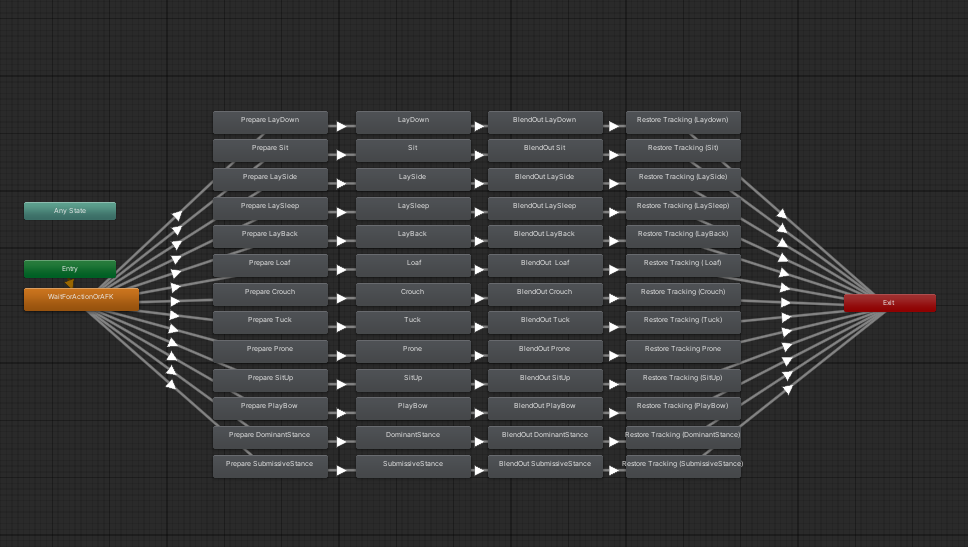
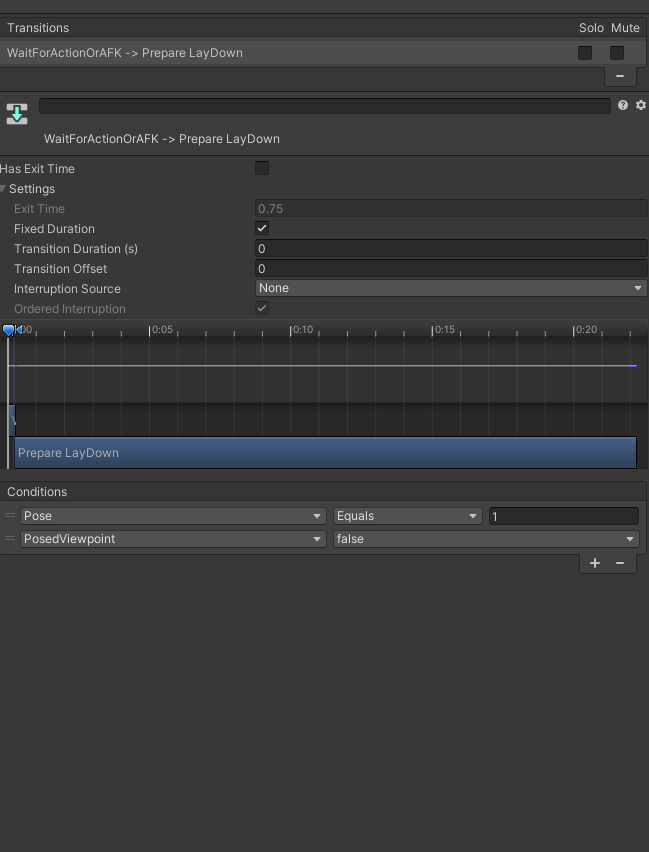 hot loom
How to fix SPA?
hot ferry
For the model: check textures, layers, and mesh visibility
For the SPA: check routing, component rendering, and console errors
 tulip linden
Hello! I would like to ask If I want to add clothing changes to a model converted from an MMD model to FBX format, do I need to remove all the clothes in Blender and redo the avatar, or should I create a clothing system in unity directly?
somber sequoia
I generally do all mine in Blender, and export the body + a single "outfit" as an avatar, different outfits = different avatar.
tulip linden
i see thank you!
 slow panther
i didnt delete any related bones to my avatar, sometimes on export it decides to pick a random bone to send to the floor, my only workaroundive found was to rebuild the entire avatar again with a new dropped fbx if that makes sense, but thats like an hour of copying over settings to the new fbx like physbones and stuff

any workaround?

when i delete the strap bones it just breaks my legs
im 50% sure its an exporting glitch or issue
somber sequoia
interesting. I'm not sure how those things would be related
slow panther
its happened to me so many times
 civic sinew
Do y'all know how to reduce the MB on a model without removing anything? (There's nothing on the Avi but goloco and the limb scaler)
somber sequoia
what is taking up the space then?
somber sequoia
Thry's avatar tools has a thing that can hell you see what's large
civic sinew
My buddy said something Abt baking the model bc of unused something or others but he told me weeks ago and I've got the memory of a goldfish
civic sinew
somber sequoia
Thry's avatar tools has a thing that can hell you see what's large
What's is called?
civic sinew
somber sequoia
I forget the actual name
?
 somber sequoia
yep, that's the right thing
somber sequoia
civic sinew
Alr what am I looking at, mb I'm a bit new to ts
you have many blendshapes, which take up lots of space. Remove some to save space.
civic sinew
somber sequoia
you have many blendshapes, which take up lots of space. Remove some to save spa...
How do I remove blend shapes?
somber sequoia
blender. some unity tools too, though I don't use those so don't really know much about them
civic sinew
OHHHH is it because I went in to shrink the model to remove clipping on the clothing?
Alr, I'll figure it out from here THX A BUNCH!
 mental zephyr
Never had this happen before, unity not recognizing foot bone

