#udon-general
59 messages · Page 76 of 1
 quartz meadow
well, you wont have to deal with server stuff here
well, sort of
in udon, basically variables are assigned owners (default, first person on the map), and only they can change synced variables, to be synced out to the rest
 dreamy gorge
is that what the synced thing is
it syncs its shit over the server
so other ppl see
quartz meadow
well, intrestingly vrchat is almost like a mesh network
it syncs to other people
while this reduces server load a ton, it comes at the cost of more latency (usually), and more code complexity
this is why there are a lot of bugs with network stuff
I would stay away from more advanced networked stuff if you can until you are comfortable with udon
I believe theres a checkbox to sync position and rotation which is straight enough to use
but syncing variables is more complex
quartz meadow
do you have that vrc scene descriptor on the canvas?
dreamy gorge
i dont
quartz meadow
add it, it fixes some issues and makes things more convenient for vr players
it should be something you can assign in the object properties directly
dreamy gorge
i dont even have a scene descriptor
lol
do i just make a gameobject and attach it?
quartz meadow
it should be part of the same object
actually, this video goes over sliders

Interacting with modeled buttons is fine, but when you have a lot of buttons and such all in one place, you may want to integrate them with Unity's UI system. Here's how you go about doing a basic UI setup with custom events!
00:00 - Intro
00:35 - UI Canvas Setup
05:40 - U# Slider Script
10:24 - Slider in VRChat
12:30 - U# Button Script
15:27 ...
check it out
you may be missing a few steps
 dreamy gorge
i got confused cus the character
uhhh
this is my first world so im very happy that i even got this far
quartz meadow
not bad then. I recommend this whole channel since its pretty good. udon is actually pretty good for what it is, but its really limited by unity
and lack of list support
although hopefully that will come soon
hopefully
dreamy gorge
question for you
you said i should put the VRC Scene Descriptor in the canvas, but there is already a component like that in the VRCWorld prefab i have
Do i just make another one?
quartz meadow
no, keep one
intrestingly, searching around for that issue shows this post
seems to be a feature of unity lol
dreamy gorge
ouch
i figured that at first actually
but i couldnt find a way to change slider input
Ah this is how to fix slider moving when A D
 quartz meadow
ah, nice
dreamy gorge
thank you so much for your help @quartz meadow
quartz meadow
not bad, good luck with the rest!
 limber wharf
Is it possible to somehow force a players avatars animation/gesture from a world? As example imagine a world with a gun as pickup. Now I want to force the players hand to hold the gun and animate the fingers when as example pressing the trigger. A good referene for how i would like it work would be the way boneworks does it
 potent sandal
I was creating a vrchat world and gave an error message when exporting, does anyone know how to solve it? the message was this:
a unity scene containing a vrchat scene description should only contain one scene description
 jagged heron
potent sandal
I was creating a vrchat world and gave an error message when exporting, does any...
jagged heron
potent sandal
I was creating a vrchat world and gave an error message when exporting, does any...
that means that you have multiple scene descriptors in your project
you should only have one
the scene descriptor is the component that you put in that you add the spawn and reference camera too
 dapper lion
limber wharf
Is it possible to somehow force a players avatars animation/gesture from a world...
dapper lion
limber wharf
Is it possible to somehow force a players avatars animation/gesture from a world...
stations. very smartly done stations and animator overrides
limber wharf
dapper lion
stations. very smartly done stations and animator overrides
Sounds like a lot of work
dapper lion
there might beanother way
limber wharf
Can i controll it with scripts?
quartz meadow
yes but itll be a bit challenging. I suggest being comfortable with udon before tackling such a thing
I think the jet set maps released their assets which do this, you can peek in there to see how exactly it was done
 river plover
HELP: below is the original Idea
with a push of a button
multiple canvas texts are going to have random strings
and everyone will see the same string (aka synced for everyone)
===
Monitor Text is the canvas texts, it is a public array
PossibleQuotes is a public array, strings elements will be typed manually at the Inspector
PRIVATEcurrentquotes is a private array, this is used to store the current state, playing the role as a memory disc.
===
Main concept:
When player hit the button,
choose randomly from Possible Quotes for each PRIVATEcurrentquotes element slots
Then do the following to everyone if you are the Master of the instance:
smack the strings from PRIVATEcurrentquote to each MonitorText accorddingly
When a player joins, do the same thing so everyone is on the same track, including late joiners
===
Main Problem:
when the button is pressed, nothing happended
Debugging Trails which didn't work:
- I tried to set the default size of PRIVATEcurrentquote as 32
===
PS: If you are reading this now, this problem is solved by Nestorboy, thx

 potent sandal
jagged heron
that means that you have multiple scene descriptors in your project
potent sandal
jagged heron
that means that you have multiple scene descriptors in your project
thanks
 grand temple
It should be right shift + the button to the left of 1 + 3
On English keyboards it's tilde but it could be anything on non-english
And it's the position that matters, not the key
 stray junco
is it possible to set new pool table to be visible to only 2 players
because the big irony for new pool table that works with new U# when player hit the ball the traveling time of ball will cause very big drop of frame for everyone in the world
but with old "harry's pool table" that work's on old U# will not cause any issue with frames
any idea ?
 vast sparrow
in udon how would i detect if a player is in collision with another object then the one my script is attached to?
just for the reference
ive got a bunch of invisible cubes here. how would i detect if a player is colliding with box 1 with in the script of box 2?

 wind atlas
vast sparrow
just for the reference
ive got a bunch of invisible cubes here. how would i dete...
wind atlas
vast sparrow
just for the reference
ive got a bunch of invisible cubes here. how would i dete...
Only way I know of: Your parent has a script and a rigidbody (even if you don't use it). Then, every child collider will be counted as the parent collider.
So the script will detect collision/trigger events even if the collider is on a child. Do tell me if my explanation didn't make sense.
wind atlas
vast sparrow
just for the reference
ive got a bunch of invisible cubes here. how would i dete...
Otherwise, you have to create a dedicated script on every collider, especially if you want to differentiate them. That script will call your main udon methods.
vast sparrow
wind atlas
Otherwise, you have to create a dedicated script on every collider, especially i...
Yeah I was planning on making a script of each block because im moving players in between the blocks but I don’t know how to detect a player (or no player) in a separate box.
I guess the simple way to put it is how do I detect the state of objects that aren’t already attached to my script
wind atlas
vast sparrow
Yeah I was planning on making a script of each block because im moving players i...
So you want to make sure a player is NOT in the other colliders? Only in a specific one?
Like, in your picture you grid, and you want to have a x,y coordinate or the id of the box that the player is in?
vast sparrow
i need the id of the box that the player is in but i also need to check if there is a player in the next box in the set so box 3 only has to check if there is someone is box 2 and then to teleport the player to box 2 from 3 if there is no player in box 2 so that the players are always shuffled forward in the set
 paper plinth
that just sounds like complicated teleporter logic
vast sparrow
it is
paper plinth
could you use ontriggerenter to the box trigger zones to sendprogramvariable the player ID that entered the collider to your main program and then just let your main program decide where it wants people to go?
vast sparrow
how would i do that?
wind atlas
I think I'd store each box as id and somehow connect those ids to a list of players.
This way, you can just go through the ids and move all players to the next box.
vast sparrow
would that use the setowner parameter?
paper plinth
you couldn't use ontriggerenter anyways, that was bad advice
vast sparrow
how about oncollision?
 vast sparrow
yes
vast sparrow
yeah basicaly
paper plinth
u could maybe use onplayercollisionstay
but I don't know enough about how that works
wind atlas
It depends on how you want to structure it, but I'd use OnPlayerTriggerEnter
And then notify my main script that the box with certain id got entered by a certain player
vast sparrow
this all helps but i still dont know how to refrence box 2 from the script attached to box 1
paper plinth
but what if they don't teleport
paper plinth
vast sparrow
this all helps but i still dont know how to refrence box 2 from the script attac...
getprogramvariable and setprogramvariable
vast sparrow
how do i use those?
i found the udon block for it
i feel like thes two would work together for this
 paper plinth
imo
and keep in mind I'm pretty new

that will get the playerID to the main program
vast sparrow
ok
paper plinth
and you need a public integer
in your main program
called intPlayerID or whatever
paper plinth
u must tell it which udonbehavior is the target of your setprogramvariable
so u make a public variable of type udonbehavior
and drag in your main program object in the inspector
vast sparrow
ok i dont have a main progam object
paper plinth
by which I mean the object with your main program that handles your cubes in it
wind atlas
Maybe to explain in another way. You have your main udon program that manages the state of the whole grid. And then each box has an udon whose ONLY job is to tell the main program someone collided with it.
paper plinth
where all your logic goes to sort out who goes where
vast sparrow
wind atlas
Maybe to explain in another way. You have your main udon program that manages th...
yeah alright
my original idea was to have the blocks asigned to an array to refrence them is that what you basicaly trying to tell me to do?
paper plinth
better to use onplayercollisionenter (oronplayertriggerenter) than onplayercollisionstay I think
paper plinth
vast sparrow
my original idea was to have the blocks asigned to an array to refrence them is ...
you can if you want to, just concat the string however that's done
stick the array element on the end
or sacrifice a program scan and just copy your integers into the array
vast sparrow
alright ill try that
paper plinth
or just don't use one lol
vast sparrow
i mean then cant i just have an extra?
vast sparrow
Yee
paper plinth
like for makign additional cubes?
paper plinth
there's no way around making sure every single collider reporting in I think
so there wouldn't be any extra anything
if you want the colliders to work, you need to have them detect collisisions and send the player ID to your main program
vast sparrow
Alright I’ll see if that works and I fit doesn’t I’ll come back here
paper plinth
good luck
 junior coral
How do i set a Toggle to change the Material/Texture on toggle Box itself
quartz meadow
not sure what you are asking for. if you are asking for the box itself to be an interactable button, id check this out
With the recent Udon updates, some of the basics have changed, so here's my most basic tutorial redone with the new editor, and not recorded at 2am! If I get enough requests, I'll redo my "Contextual Buttons" video as well, which will give me an excuse to just rename them "Event Buttons" which actually makes sense.
00:00 - Intro
00:20 - Udon Gr...
just have it trigger a mateiral change
 hushed gazelle
I just want to check, None sync is what we'd ideally want for things like buttons and such that we just interact with and has no values that might update or change?
 night viper
Over the network. If you are using a script that runs locally only and never sends network events or syncs variables you can set the sync type to none to save network data. There is no point on constantly checking 4 times a second for a local mirror toggle script that never sends any data over the network. There is still no docs for this new sync type yet..so it´s hard to explain all of it
hushed gazelle
That's what I figured it was doing.
river plover
question: for the new SDK3, I just need to download the package and import it, nothing much else I need to do before that ? O_O
hushed gazelle
Do you mean updating an existing Udon world or an old 2.0 world?
river plover
exsisting Udon world O_O
 cold raft
depents on version difference,
https://docs.vrchat.com/docs/updating-the-sdk here are the update guidelines, especailly if your comming from the older unity version to the newer one you need to follow the process or everything breaks horribly
river plover
I am at Unity 2019.4.30f1, will anything break if I update SDK3 ?
 hard wraith
junior coral
How do i set a Toggle to change the Material/Texture on toggle Box itself
hard wraith
junior coral
How do i set a Toggle to change the Material/Texture on toggle Box itself
Are u talking about ui toggles? If ur wanting to enable the check mark that toggles have u just change do toggle.ison if ur using udonsharp idk the graph equivalent
cold raft
river plover
I am at Unity 2019.4.30f1, will anything break if I update SDK3 ?
no you be fine than
junior coral
quartz meadow
https://www.youtube.com/watch?v=ibDu0dCeUE8
that only sorta work since VRC is phasing out UdonSharp
quartz meadow
Vrc is a third party thing that just compiles to assembly readable by the udon vm
Vrc udonsharp*
junior coral
and it has no material change but i need that the button changes its texture when toggled
quartz meadow
I doubt the devs would try to block it
 devout trout
any chance it's possible for a world to read a certain avatar's av3 parameters and react accordingly? As in, if I have a display case in my world with a copy replica of a weapon I have on my avatar, could the world auto-hide it from the display case when I activate it on my avatar? I'm assuming that's well beyond the capabilities of udon, but figured I'd ask just in case.
quartz meadow
I am not familiar with material swapping itself,, but look through unityes manual for how it would be done there. Udon will likely have the same.calls whitelisted fkr you to use
quartz meadow
devout trout
any chance it's possible for a world to read a certain avatar's av3 parameters a...
I do not currently believe this is possible unfortunately
Someone feel free to correct me, i have seen janker workarounds
junior coral
quartz meadow
I doubt the devs would try to block it
go in unity install the latest SDK and u will get a Message when u try to use UdonSharp scripts that it is pahsing out
quartz meadow
Can you screenshot this please?
junior coral
if my unity is playing nice now
quartz meadow
It could be that that specific version of udonsharp is outdated with the new vrc release and will need an update. The github hasnt updated just yet though
junior coral
ok seems i have to load the old world that i didnt update yet to the new SDK bc it donsnt show it anymore on my Updateded project.
give me a momemt i update the SDK in my Second World thats still on the Old SDK
bc there i know i have the Old Toggles in use
ok i missread also bc i missclicked xD
bc i usally do behaviour but jumped that step bc i was barely awake when i did ask for how to set Material change on a Toggle

so no SDK fault it was user fault
Never do Scripts and stuff in Unity when barely 20min awake and the brain is still in Boot up mode.
But i still need to know how i set the Toggled that it changes it's own Texture/Material to a Different one when Used
So that it Shows Texture 1 per Default and switches itself to Texture 2 when used and the back to Texture 1 when used/Pressed again.
stray junco
is it possible to make some udon game to be only visible to players
but for none players it will be invisible
 indigo wagon
junior coral
that only sorta work since VRC is phasing out UdonSharp
indigo wagon
junior coral
that only sorta work since VRC is phasing out UdonSharp
Why phase out U#?
Forcing usage of visual scripting is a bad bad idea
And it means people haveing to RW complex scripts in a harder to read way
dapper lion
its not
junior coral
stray junco
is it possible to make some udon game to be only visible to players
but for none...
Place a toggle set as Local only and say Toggle Obect (Game X) so only people that want to see can see it
dapper lion
they most likely mispoke
indigo wagon
dapper lion
its not
IK was just trying to work out their logic
dapper lion
but it would be terrifying if merlin was like: “I am done”
indigo wagon
junior coral
how about REad
How about not being condicending
dapper lion
20 mins is def not enough for unity
indigo wagon
Yeh I read through it
Still asked that question tho as a why would they even
dapper lion
oh ye, you can do “SetMaterial(mat1);” but i highly suggest going to codegrepper and double checking because its been awhile since ive done materials and texture swapping
and just set up a bool for the toggle so you can sync the material if you wanted to/make it easy to figure out texture1 and texture2
or, yiu can do an int so you can toggle thru more than 2
junior coral
Bool is only for Avatars i'm speakin about Worlds so Udon
junior coral
When Material stuff is to hard i would be happy when it just Activates Yellow/Golden Emission/Glow instead
bc i dont want to Spend 2300yen (about 19€) just to purchase an asset with Advanced buttons and scripts bc it's alot of money for me.
 fiery yoke
devout trout
any chance it's possible for a world to read a certain avatar's av3 parameters a...
fiery yoke
devout trout
any chance it's possible for a world to read a certain avatar's av3 parameters a...
It is actually possible, but you need to work with stations and it gets very experimental. I would not recommend trying to do that at the moment.
dapper lion
junior coral
When Material stuff is to hard i would be happy when it just Activates Yellow/Go...
that sounds slightly harder to me
junior coral
dapper lion
that sounds slightly harder to me
the Funny thing i find it alot easier to make Toggles in Worlds then doin Toggles for Avatars xD
and i say it as Someone that does Avatars and Worlds at the Same time everything teached by myself by Trial and error.
ok Avatar toggles i got teached by a Friend bc it was that frickin hard
dapper lion
fiery yoke
It is actually possible, but you need to work with stations and it gets very *ex...
i thiught you coukd just get state values that are only exposed by the debugger?
devout trout
stations, huh...? I was actually considering something even jankier, like having the avatar emit a collision particle on a very specific layer, with a trigger collider on the same layer in the world to detect it... might be a suitable workaround, but idk if it'd be worth the hassle, lol
dapper lion
junior coral
the Funny thing i find it alot easier to make Toggles in Worlds then doin Toggle...
whatever you feel comfy with
quartz meadow
devout trout
stations, huh...? I was actually considering something even jankier, like having...
Thats so damn janky it may actually work
hard wraith
@junior coral u can do toggle.graphic = image; again this is for udon sharp
I believe its graphic for the toggle sprite
Target graphic i think is the background image of the toggle?
Its one of the 2
I'm not at my pc to confirm which to use
I created my own toggles with udon instead of using unity's tho with my menu
It may be u just change the checkmark image instead on the child actually
Its been a bit since I've looked at unity toggles lol
junior coral
hard wraith
<@145710918171361281> u can do toggle.graphic = image; again this is for udon sh...
there is no Graphic Toggle or anything like that
hard wraith
Also u can look up this stuff in normal unity c# and use it in udonsharp pretty much the same way if the functions are exposed
junior coral
well i tried something but i'm to exausted to test it just modified one Toggle on my would uploaded it to my PC World, but i will test it when i wake back up again.
Bc i don't want to get to deep in it with my Almost asleep Brain.
Before i Break something again.
quartz meadow
Get some sleep, then check out some unity tutorials for toggling materials
It'll likely work with udonsharp
 young scroll
is there any way to make network requests in udon? like a generic get request, also i know we can stream video, but can we stream audio? and persistant storage?
 west mural
young scroll
is there any way to make network requests in udon? like a generic get request, a...
west mural
young scroll
is there any way to make network requests in udon? like a generic get request, a...
no, well video has audio, but no, not only audio, not yet
young scroll
lame, ty
 placid spear
The system used in UdonTycoon can be found on my booth page 1:1 and it's called Pickup Tracker for VRChat worlds
devout trout
Someone already directed me there the day after I asked, thanks for making such cool scripts!
dapper lion
young scroll
is there any way to make network requests in udon? like a generic get request, a...
not officially. but yes and yes and not officially again but also yes
but obviouslly the first and last questions answers are extremely complex
young scroll
well, i mean u could forge request with get params on the video player, but thats not what im after
dapper lion
well there are other ways. but i cannot suggest any others in fear of getting in trouble. and also wouldve been harder anyway
but im not sure what kind of network requests youre after?
young scroll
JSON API
fiery yoke
young scroll
JSON API
Yeah no. VRChat does not want to give people too much leeway, in case someone finds some way to use it maliciously.
Its probably a bit over-reactive but better safe than sorry.
The best you can get is an HTTP GET request with a video player, and even that is already a stretch since they are specifically for video requests only.
young scroll
mega lame
i can only do so much with the video player API, i wanted to work with more data to pipe audio data around to make a neat live studio setup
fiery yoke
I think thats outside of the scope of VRChat. So not big of a surprise that you will find a lot of road blocks in your way there..
young scroll
you would be surprised what u can do with a few basic http requests
i can do it mostly with just the video player  its just tacky and far less performant
dapper lion
like a radio operrated from in game?
young scroll
kidna yeah
dapper lion
why would you need to make reqs?
young scroll
i spent last hr making a working prototype which works so
young scroll
dapper lion
why would you need to make reqs?
why not? there is loads u can do
young scroll
all i asked is if there was a way to make requests, i dont need to have my ideas questioned, joys of being creative is pushign limits and just doing things cos u can
i dont need a propper reason to do it, i just want to
 distant lava
I tried to purchase vrchat plus but it says it's not available can anyone help?
young scroll
should ask in a support channel, not a scripting channel ^^;
west mural
young scroll
i can only do so much with the video player API, i wanted to work with more data...
if you want it to be something publicly accessible, that's gonna be tough.
If it is for a private studio, you could output to your log (Debug.Log) read that with an application (e.g. simple python script) and then pipe the audio in via video player.
 keen oyster
ocs
 fading cipher
Can I get a verification that it's safe to delete Unity's Temp and Library folders if I'm having issues with my scene?
 stone kelp
fading cipher
Can I get a verification that it's safe to delete Unity's Temp and Library folde...
stone kelp
fading cipher
Can I get a verification that it's safe to delete Unity's Temp and Library folde...
Can't really answer the question itself but have it as a rule of thumb before doing any large changes to just make a backup folder of the entire Unity project (Usually stored in \Documents) so you can always go back in case something breaks.
But you probably already know that already 😅
 topaz jetty
fading cipher
Can I get a verification that it's safe to delete Unity's Temp and Library folde...
topaz jetty
fading cipher
Can I get a verification that it's safe to delete Unity's Temp and Library folde...
yeah deleted the library folder multiple times when I had issues, it regenerates itself when you load up your project the next time (will take a while though)
 surreal scarab
will we need to update our media players/worlds to take advantage of the new avpro 2.2.1 or the better syncing?
dapper lion
no
but i think auto resync is disabled right now I guess 🤔 so you may need to make youre own
 civic trench
Hello, I want to migrate my world from 2018 LTS to 2019 LTS, so I see this page(https://docs.vrchat.com/docs/migrating-from-2018-lts-to-2019-lts), and I proceeded the upgrade operation. But after that, I can't open the VRSDK window and I'm getting an obscure error on the console. I tryed the import newest version of VRCSDK3World and UdonShape, but It is not fixed. Does anyone know about it?
 cold raft
if you hit clear in the top left of the error list, do these error persist and if not what errors do persist?
paper plinth
If you decided to select the option to upgrade scripts, you might have to go into package manager and downgrade them again
civic trench
@paper plinth @cold raft
Thank you for your kingness. I deleted and reimported the VRSDK3 package and Udonsharp, afterthat almost errors vanished and I can open the VRSDK3 window. I'm really thankful to you.
 rancid eagle
Does anyone know how to make a whitelist script that allows an already whitelisted player to whitelist/un-whitelist other players from in the game?
paper plinth
lol when in doubt, reinstall the SDK
rancid eagle
Or, if someone knows how to make a playerlist with a button that allows you to teleport users
paper plinth
that doesn't sound hard
 calm zephyr
If I have a rigged body for some reason the event mouse click up and down does not work ? Any idea how to get arround this
 junior lava
Hey is there a good resource somewhere for a sample singleton/gamemanager that works with UdonSharp? I generally use a static class to serve as a singleton but U# doesn't allow static classes. It can't be hard, just want a simple example of how people generally do that.
grand temple
There's a beta version of U# that supports static classes
junior lava
I just want a gamemanager I can access easily, I feel like it's feasible without a static class...
I guess I can use Unity methods, findgameobjectbyname etc...
grand temple
yeah, gameobject.find works. Just make sure to use a very specific name because if you do something generic it's possible to grab protected objects like something in the UI or on an avatar, which will be protected and give null references
 velvet star
You can make a empty GameObject with a custom Game manager UdonBehavior and have all other UdonBehaviors access the obj through public GameManager.
something like this:
One UdonBehavior with the name GameManager,
UdonBehavior - TestForGameManager:```cs
public GameManager GM;
void Start()
{
if (GM != null)
{ Debug.Log($"The current gamemanager is {GM.gameObject.name}."); }
}
You can alternatively check for any objs with the name "GameManager" and check if they have the GameManager UdonBehavior.
junior lava
velvet star
You can make a empty `GameObject` with a custom Game manager `UdonBehavior` and ...
Yeah I was expressly just trying to prevent the need to drag and drop the manager to every other gameobject, it's why I prefer the singleton pattern. But I can do it, won't really take that long.
 broken bear
Is there an underlying performance cost of object pool ownership outside automatic late join sync/spawn/return requests? I plan to have about 40 pools of 15-20 objects and just wondering is there's anything passive under the hood that may affect it for a realistic limit (like if all those spawn/return are continuous sync)
 abstract talon
I don't know if this is the right channel for this but I have problems with the Neo-Flight package by @dawn gate. The readme clearly states that I should put the "flyin" prefab in my scene, but I can't find it. If I put the "flying_logic_and_panel" prefab in the scene, it turns out that the "flyin" prefab is missing.
 dawn gate
abstract talon
I don't know if this is the right channel for this but I have problems with the ...
dawn gate
abstract talon
I don't know if this is the right channel for this but I have problems with the ...
its a bit broken, I havent had the time to put it together in a newer version of unity yet
abstract talon
Is there a way I can fix it manually in the editor?
dawn gate
uh, probably, but I dont know off the top of my head
abstract talon
What was exactly in the prefab (components, etc.)?
dawn gate
I think its the little control panel and the udon behavior and not much else
strong might
its a bit messy and doesnt have a readme, but I think the old readme is close enough?
abstract talon
Thanks, I'll try it and see if it works.
calm zephyr
No offense to anyone here but out of all the questions I have asked here not one thing was solved using this group. Im not sure why that is.
broken bear
did you have an outstanding question?
abstract talon
dawn gate
this might work?
https://cdn.discordapp.com/attachments/883869824768413766/88387...
nope 😔
 dawn gate
abstract talon
nope 😔
dawn gate
abstract talon
nope 😔
Did you try testing it in game?
I know udon gets messed up when it tries to find the local player If you are running it in the editor
abstract talon
Desktop version works fine, I'll try to publish it.
dawn gate
Cool
abstract talon
it works
dawn gate
Excellent
 narrow cloak
This has been asked lots but I cant find any actual examples, I just want a button that moves an object back to its original location
broken bear
hmm two manual sync udon behavior scripts on the same object, and getting the mixing-sync type error
hard wraith
narrow cloak
This has been asked lots but I cant find any actual examples, I just want a butt...
Is this for a pickup or just a a plain gameobject?
narrow cloak
I just use the graph
hard wraith
Ah okay, uh idk how it is in graph but there should be something for objectsync respawn?
Ik it for u# but not what it is exactly in graph
narrow cloak
there is a node thats just VRCObjectSync Respawn
no idea what to do with it
was trying to follow this but doesnt make sense
literally fails at the first step "interact, goes to GetComponent"
because Interact cant link to GetCompnenet
hard wraith
narrow cloak
there is a node thats just VRCObjectSync Respawn
yeah think u just need to have an interact event then connect a public gameobject variable that u connect to the respawn node im guessing? idk graph that well but in u# it would be like this

 pastel yew
Does anyone know - is there an Udon function for capturing the local players ping as a variable?
The idea is to use that to make network-based events line up properly for everyone in the instance when triggered.
 eager olive
pastel yew
Does anyone know - is there an Udon function for capturing the local players pin...
eager olive
pastel yew
Does anyone know - is there an Udon function for capturing the local players pin...
This would honestly be lovely. In the past I've estimated it by measuring how long it takes for a networked event to bounce between players. But it's inconvenient...
It actually seems like we don't have a canny for that yet, do we?
 wise charm
is there a way to destroy gameobjects
indigo wagon
wise charm
is there a way to destroy gameobjects
 wise charm
*is there a way to destroy gameobjects using udon (i cant find anything so if its there and im dumb then tell me)
grand temple
wise charm
*is there a way to destroy gameobjects using udon (i cant find anything so if it...
For most things, Udon is just directly using unity API so it's the same thing
 normal mortar
so i have a question to make music play in worlds (On button/Cube) now with out the VRC_Trigger i have to go thought Udon but how to i make the audio source work?
hushed gazelle
Is there still no way to set a newline character in a string?
fiery yoke
hushed gazelle
Is there still no way to set a newline character in a string?
\n usually, but I guess you've tried that
hushed gazelle
Yup. Doesn't work from a string variable.
 dawn forge
I usually use Environment.NewLine, but not sure if Udon exposes it..
hushed gazelle
It does not, to my knowledge.
 elder peak
using \n on tmp works just fine for me
junior lava
Yeah TextmeshPro supports newline.
abstract talon
What exactly does GetRotation of a player do? I know it returns a Vector3 but is it the Euler rotation of the player, or does it function like transform.forward does with normal objects?
Oh, wait, apparently the official VRChat docs are wrong and GetRotation() actually returns a quaternion... Hmm...
indigo wagon
normal mortar
so i have a question to make music play in worlds (On button/Cube) now with out ...
Game object that has a audio source
Use a script to enable it
Iirc AudioSource.play is a thing so you could do it that way aswell
Toggle if you want it to loop play if not
 gaunt tiger
Wonder how hard it would be to make a working model railway in VRchat
cold raft
well there is that udon tycoon map where you build rollercoasters so its posable, but that map took like a year indevelopmenmt
dapper lion
shouldnt be to crazy hard. what you can do is make a bunch of gameobjects and tranform a coastercart in the direction of each gameobject in order of hierarchy
but to make a rollercoaster in real time. i would use like.... invisible line renders and sync that up to make a ride work
paper plinth
I am reporting that I had a project from the previous version, and upgraded it to the new version (of unity), and there were a ton of errors. I deleted the sdk and udonsharp and reimported them and I have no errors in the project. So +1 for reimporting the SDK
 ebon musk
It might've been udon sharp honestly
paper plinth
if you just wanted model railroads you'd need some kind of system that would link two railcars together and break them apart when you pulled them apart
then you would need to put them on a track if they were near a track
sounds like a project
hard wraith
rancid eagle
Does anyone know how to amplify volume in a certain area, for mics etc
take a look at guribo's better player audio github page!
rancid eagle
hard wraith
take a look at guribo's better player audio github page!
thank uuu
gaunt tiger
cold raft
well there is that udon tycoon map where you build rollercoasters so its posable...
I'm just meaning a simple railway with some points and a speed controller or 2
 round furnace
How do I get this to work as a button? I'm not able to use it. No blue outline. No text.
 round furnace
How do I get this to work as a button? I'm not able to use it. No blue outline. ...
round furnace
round furnace
How do I get this to work as a button? I'm not able to use it. No blue outline. ...
nvm'
round furnace
Can I change skyboxes with Udon?
 zinc ridge
i'm having a problem with udonsharp and a prefab called audiolink
 keen oyster
have you imported the UdonSharp package?
zinc ridge
yep !
 keen oyster
did you import it before or after AudioLink?
zinc ridge
before
keen oyster
hm. have the latest version of AudioLink? (and UdonSharp i guess?)
keen oyster
are there any other errors in the logs?

 keen oyster
your SDK and UdonSharp are having issues
UdonSharp is probably having issues because the SDK is having issues.
zinc ridge
i mean its just a sphere right now LOL
keen oyster
however you are most comfortable trying to fix the issue is the best* way to fix the issue
zinc ridge
alright thanks !
keen oyster
@zinc ridge looks like this is the solution to one of the issues: #world-development message
(right click -> reimport the VRCSDK or more specifically specifically the plugins subfolder)
 gray rampart
So I'm trying to trigger an animation in my world with Udon that I want all players to see. Currently I'm sending a networked event and each client picks that up and plays the animation. This works fine...but I notice the animation doesn't appear to happen consistently as the event trigger is clicked. Sometimes its immediate, sometimes it happens ~400ms-1s afterwards. Would it be more performant for me to only receive the event and play the animation on the local client and then use VRC Object Sync to sync its location to the others? Is this likely a performance problem with Udon, or networking, or Unity's animation system?
TLDR: Which is more performant? VRC Object Sync or SendNetworkedEvent?
grand temple
network events have pretty bad latency, they're just considered low priority. Objectsync isn't going to be much better. The best latency you can get will be with manual synced variables
 balmy bison
is the player's handheld camera position+rotation exposed in udon anywhere? or any fun tricks to get that data?
 glacial estuary
Is there documentation on how to read particle collisions from an avatar? i'm trying to make my av toggle a world event when a parameter is changed, and only way that seems possible is with onparticlecollision
hushed gazelle
So TextMeshPro supports newline... sort-of. If you type it into the component directly it works, but if you apply it in an udon graph from a String it just comes out as "\n" as plaintext.
 hushed gazelle
Get Now
Also I solved my newline issue; If you use <br>, TextMeshPro will parse it as newline.
 red gazelle
How can I affect Poiyomi Emission Strength in U#? Anyone know?
dreamy gorge
hushed gazelle
Get Now
thats not possible
hushed gazelle
DateTime. Get Now.
I literally have a working analogue clock in my world running off it.
 hushed gazelle
You don't make a variable, just look for DateTime then look for get now on its own.
hushed gazelle
 dreamy gorge
yeah that works now
hushed gazelle
If you make a variable of course it's gonna be blank.
red gazelle
Any suggestions for messing with Poiyomi via Udon? ;^;
night viper
red gazelle
Any suggestions for messing with Poiyomi via Udon? ;^;
Maybe with animations? You then control the animator parameters with udon. Also i dont think poiyomi is a good shader for worlds
abstract talon
How do I check if a player is AFK?
 kindred sandal
I want to replicate the sort of pickupable invisible chairs that you get, akin to those found in MEROOM (when it still existed, RIP) and Room of the Rain. How would I go about doing that?
grand temple
Tools that allow you to manually moderate more effectively are fine. Tools that automatically moderate people when you're not there are not fine. For example a list of banned usernames would be a problem
dawn forge
I had a design to where I would whitelist game masters who can temporarily assign moderators in memory of the instance. But automatic moderation is something that is controversial but I'd only want to use that when pure evidence is given such as videos and multiple people report it. For instance, someone is using tools to manipulate themselves across the battlefield ruining the competitive concept entirely.
dreamy gorge
does anyone know how to play audio in a vrc world without causing performance issues?
 stark crescent
How would I go about making an item reset? In my world I have a lot of items and they always get tossed around and it's annoying to put them all back after someone does so. I'm inexperienced with udon all I've done is a mirror toggle
dawn forge
stark crescent
How would I go about making an item reset? In my world I have a lot of items and...
Use VRCObjectPool and then use method TryToRespawn(). Load your objects into the array of objects on the inspector.
Or if you want to do it manual, have a Transform variable for each item populated at initialization of its current position, then have a button event SetTransform the items back to the variable values. Make sure your items are either using VRC Object Sync or VRC Pickup so it'll automatically update positions.
 tropic tangle
Hey folks! Its been a while so, I may need a refresher.
I'm trying to check when an object is rotated or tilted.
Making something of a virtual zen garden where you have to dump dirt into the garden to start.
 misty abyss
Short Question in hope, I can also ask here UdonSharp Questions:
To Avoid a lot of assignments in the editor I want to build an auto assign script for some components. Problem is that transform.root doesn't return "szene" as root but first object in tree only. In some maps people use my scripts there are of cause multiple root game objects - therefore in Unity we have getActiveSzene().GetRootGameObjects() - problem: this is not exposed by UDON.
Does anyone know a possibility to achive the result of this function in another UDON-accepted way?
gray rampart
This is the best showcase for any kind of tool that I've ever seen
west mural
misty abyss
Short Question in hope, I can also ask here UdonSharp Questions:
To Avoid a lot ...
I think (not 100% sure ,but pretty) there is intentionally no way for udon to iterate through the scene hirachy.
This is made so udon cant find vrc protected objects and avatars.
What you could do is specifify each script with a name and use GameObject.Find() or have all the objects be searched and assigned in the editor by an editor script before upload
 haughty hearth
Is there an API for getting the player attached to a given station / the station a given player is attached to?
quartz meadow
Any way to convert a string to a VRC URL?
found my answer, eh

GitHub
An experimental compiler for compiling C# to Udon assembly - VRChat API · MerlinVR/UdonSharp Wiki
so basically, can only create them as a public variable in editor
thank god it at least supports array, still gonna be annoying lmao
 plush stump
random.range(int, int) will return min value but not include upper bound, is that right?
abstract talon
What exactly does Player Get Position return? The position of the player's feet or the center of their capsule collider? I want to know, because I want to know how far the ground is from player's feet via raycast.
abstract talon
plush stump
random.range(int, int) will return min value but not include upper bound, is tha...
How do I get position of the player's feet? (The lowest point on their collider, not the avatar feet)
Nevermind, I found it: https://ask.vrchat.com/t/get-player-position-or-head-position-and-stick-an-object-to-it/633/2 Get Position is the position of the feet.

VRChat Ask
Here is what I could come up within 5 min And here is how it looks in VRC **Not entirely sure how you would target a specific body part with it, but if you allowed the player to move it around somehow that would probably solve that problem. But that would be a bit more complex than the Udon stuff I just showed
plush stump
which bone should I use if I want to set UI position and rotation to player's view?
I'm now using player headbone as anchor point, works great for non VR player but very strange when VR player move their head
abstract talon
plush stump
which bone should I use if I want to set UI position and rotation to player's vi...

Replace LocalPlayer with whatever your player object is.

 winter halo
yo guys I want to make a button that cycles through objects in order then back to nothing, any ideas how?
fading cipher
plush stump
which bone should I use if I want to set UI position and rotation to player's vi...
There’s a lot of jitter that makes reading UI really hard if you just set it to the head’s rotation each frame, so you end up needing to lerp it towards their look direction so it moves more smoothly
 odd cloud
How to add a GIF in mp4 format to the world?
 shut patrol
Is there a way to cancel the pickup on OnPickup event? When VRCPickup.Drop() is called the console throws an error: Collection was modified; enumeration operation may not execute.
When I trying to call Drop on the next Update frame - the object flies away.
 trim parrot
is there a way to show a canvas on player camera?
trim parrot
trim parrot
is there a way to show a canvas on player camera?
is htere a way to get the canvas to go behind the vrc menus?

 sage ledge
Any reason why the control panel for the sdk would disappear? I just reimported the sdk same issue.
 scarlet lake
yeh, try reimporting it like 5 more times
its possible something else in your scene is breaking it. but have had it just stop working randomly and require a bunch of re-imports before it works again.
@sage ledge
sage ledge
Thank you!
haughty hearth
winter halo
yo guys I want to make a button that cycles through objects in order then back t...
have the button increment an index into an array of GameObjects
winter halo
haughty hearth
have the button increment an index into an array of GameObjects
Thanks!
winter halo
is there any way to do this on the udon graph?
 dense imp
How do I do a mirror toggle with the new update??
Watched so many tutorials on udon behvaiour, tried too create a new program and theres 0 option for accessing the udon graph
 rotund wolf

is it supposed to say miscilianous file on the top left side?
isnt it usually supposed to say assemblycsharp
glacial estuary
I have a udon script that attaches a gameobject to the player, but is throwing errors since it runs on onupdate
likely related, my game crashes upon leaving the world
any reccommendations to give the program a fallback so it doesnt crash when localplayer breaks?
glacial estuary
-is what i assume to happen. game doesnt wanna tell me where its crashing so..
scarlet lake
does anybody know how to use udon kart system
junior lava
glacial estuary
I have a udon script that attaches a gameobject to the player, but is throwing e...
What does the error say?
scarlet lake
why dosent the link to my paypal token work for buying vrc+😐
it just says no token passed when i write in the link
 flint urchin
@scarlet lake wrong channel, and you'll have to contact support for specific help on this. #vrchat-support
https://help.vrchat.com/hc/en-us/requests/new
shut patrol
Dear udon developers, does the RetrieveProgram method from SerializedUdonProgramAsset have persistent caching of parameters? For example all parameters except Heap do not change at runtime. I ask this because the editor is fully copying the program from the asset. And in the case of a large number of UdonBehaviour instances there can be huge memory consumption.
 serene moat
They don't, it's all treated per-behaviour. I've wanted to look at moving stuff like the bytecode away from the heap so you can skip redundantly deserializing the things other than the heap altogether
glacial estuary
junior lava
What does the error say?
It turns out the crash wasnt caused by the udon script at all
it was having issues running localplayer.transform.positionvector3 specifically in my script that attaches an object to local players asynchronously
turns out the crashes were from trying to build my own avatar pedestal
shut patrol
serene moat
They don't, it's all treated per-behaviour. I've wanted to look at moving stuff ...
Do you happen to know if there is a feature request for this?
serene moat
I haven't seen one, it was just one of a bunch of small things I wanted to look at. Though it's a little larger scope since it'd need the world to be reuploaded with a new VRCSDK to take advantage of the optimization.
shut patrol
serene moat
I haven't seen one, it was just one of a bunch of small things I wanted to look ...
I'm not sure that the update is needed, for example it can be done like this:
interface IUdonProgram
{
    ...
    // The program clones non-persistence parameters
    IUdonProgram CloneProgram();
}

class SerializedUdonProgramAsset
{
    private IUdonProgram cachedProgram;

    ...

    public IUdonProgram RetrieveProgram()
    {
        if(cachedProgram == null) cachedProgram = Deserialize();
        return cachedProgram.CloneProgram();
    }
}
But in general thanks for the answer
serene moat
the IUdonProgram contains the deserialized Heap as well, unless you want all programs to start having their heaps conflict and share the same data you'd need to handle those
yes, you could cache the bytecode and symbol lookups then drop the redundant deserialized ones so they're not eating memory
but at that point you may as well just make the heap serialization data separate so you're not redundantly deserializing everything else
so you get marginally better init time for UdonBehaviours and save the memory allocations in the first place
this isn't something critical to worlds functioning so imo you shouldn't need to make concessions for the sake of old worlds benefiting from it
shut patrol
I understand what you mean, well there is a question about two methods - deep cloning or deserialization. With deserialization, there is a need to change the structure of program, and with deep cloning - write it. Both methods are quite complex 😄
serene moat
If it were to do a deep clone it'd use Odin serialization->deserialization either way, any other method of cloning just the heap would be subject to a lot of potential issues
changing the program structure would just mean you could avoid needing the client to serialize anything which removes more chances for weirdness
shut patrol
Hmm, there is a possibility that it is possible without changing the structure, but keeping a bunch of serialized inside UdonProgram for example. But by the way i don't know how it works inside, so i'll rely on the developers in this matter
 sly wharf
how do you get world animations to work in the udon sdk?
 wet dragon
Having a UdonSharpCompiler Error CS0246 saying that the Type or Namespace name 'UdonSharpProgramAssest' could not be found (are you missing a using directive or an assembly reference?)
 hoary echo
Another probably stupid question, and again, not 100% udon related. On the spookality rules it says "All submissions must consist entirely of original assets", meaning any and all asset packs off the Unity store isn't allowed, right?
 last steppe
Did you resolve this?
 ebon light
last steppe
Did you resolve this?
ebon light
last steppe
Did you resolve this?
no. i added a chair toggle, for now..
last steppe
Do you still have multiple Udon Behaviors on your stations?
ebon light
no, only the default station udon behavior.
this is a client bug, it happens on SDK2 chair too
last steppe
I see
@ebon light Thanks for the information.
@ebon light Do you happen to have a test world?
ebon light
 last steppe
Thanks!
scarlet lake
Ok how can i get a ban system in my world? cause i have a few toxic indeviduals who are being toxic as fuck i wanna get them out of my community.
eager olive
Doing that would be against the guidelines.
VRChat
If you want to apply moderation effects to a user in your world using Udon, you must: Inform a user upon entering your world that you have a code of conduct and that you will apply moderation effects if they break it.Communicate what effects you've applied and why, in both the world and in a VRChat ...
 young falcon
What is udon?
grand temple
?whatisudon
 hidden martenBOT
VRChat Udon is a programming language built by the VRChat Development Team for use in VRChat worlds! It enables complex behaviors and logic in VRChat worlds. Read more about Udon in our documentation: https://docs.vrchat.com/docs/what-is-udon
VRChat
What’s this Udon thing anyways? VRChat Udon is a programming language built completely in-house by the VRChat Development Team. It is designed to be secure, performant, and easy to use via the VRChat Udon Node Graph, a built-in visual programming interface that uses nodes and wires (we call them “no...
 drifting sage
@grand temple we've got a new /help command for that, actually, and its got better info 😄
 foggy flumeBOT
What do you need help with?
drifting sage
ah dang, idk how to show that particular item
grand temple
yeah I see it
drifting sage
There's a way to skip directly to that help item
grand temple
hmm that works if you're the one asking, but I'm not sure it works if somebody else is asking and you are providing the information
the bot should really just recognize super common phrases like "What is udon?" as a command itself
serene moat
oh that's cool
 marsh beacon
drifting sage
There's a way to skip directly to that help item
marsh beacon
drifting sage
There's a way to skip directly to that help item
/showhelp page:What is Udon? ? o:
 true laurel
grand temple
the bot should really just recognize super common phrases like "What is udon?" a...
true laurel
grand temple
the bot should really just recognize super common phrases like "What is udon?" a...
I have considered doing that, but yes, /showhelp is around, I wish it was clearer what commands were present, but a list is available if you type / and click the "VRCat" tab.
If you do /showhelp and press Tab (Or click the "Page" option), all available choices should appear.
 hasty sage
Hello, I kinda need a little bit of help to set up interactions with UI.
I checked out the UdonExampleScene, and just saw a worldspace Canvas with the VRC Ui Shape component, but not more.
That's what I have in my other scene, but I seem to be missing a step, reading the documentation was of no help in this
question being: "what objects / components do i need to ensure that ui interactions with both vr and desktop are working?"
hasty sage
solved it. the issue appears to be the UI being on the UI layer (the default one in unity)
 chilly crater
Does ObjectSync also sync scale?
 shrewd kernel
Hi I have this script for toggle something and its global and it works fine, but the only problem is that if I put it on a button its sets itself on On and I want it to set it on Off. If you press the button then its Off and I want it reverse. I made a screenshot, hope its visible. Have someone a answer in this script to set it on Off.

 amber crow
Can tags be networked ? So say user1 can assign /read a tag to/from user2
grand temple
amber crow
Can tags be networked ? So say user1 can assign /read a tag to/from user2
no, playertags are local
red gazelle
night viper
Maybe with animations? You then control the animator parameters with udon. Also ...
What shader is recommended for worlds if not Poiyomi? Why is it not good?
 fickle stirrup
red gazelle
What shader is recommended for worlds if not Poiyomi? Why is it not good?
fickle stirrup
red gazelle
What shader is recommended for worlds if not Poiyomi? Why is it not good?
standard / bakery shader if you use bakery / https://gitlab.com/s-ilent/filamented for pc/quest based on google's "filament"
i don't think that poiyomi will work great with baked lightning, have accurate filmic look, very optimized and etc

GitLab
A transposal of the shaders from Google's Filament renderer over the framework of Unity's Standard shader to allow for higher quality rendering in Unity.
chilly crater
Quest shaders are alright if you aren't going for anything fancy.
winter halo
hey I'm trying to make a button that goes through an object pool and enables a game object then disables it before going on to the next one and enabling it until it gets to the end of the pool and resets. any ideas of how I could do this?
 exotic river
Im trying to make a button that locks the door I made to teleport to another room does anyone know how to do this?
 earnest vessel
Looking for a way to figure out how a player can cast a vote for another player in Udon.
When I click a button with the name of the player I want to vote for, I cast a vote for that person. Then in another script, the game calculates the votes of all the players to determine who had the most votes.
In a different, non-VRChat project, I was able to do this using Dictionary and KeyValuePair, with the key being the voted player and the value being the number of votes received. Since Dictionary/KeyValuePair is not supported in Udon, I am looking for an alternative.
Are there any alternatives to Dictionary/KeyValuePair that I can use to figure out how players can cast a vote for one another?
fickle stirrup
earnest vessel
Are there any alternatives to Dictionary/KeyValuePair that I can use to figure o...
maybe, master has a list of players, there's also a playerTag which is key-value like but it's local, on vote start he store playerID for who vote is and increment synced voteCount which other players see, and if them voted already - locally for them disabling that function 
you can actually have a double (array[][]) of object type, and parse it via casting to specific type later on your logic to have something like key "string"/etc and value something or array of more object[] but hard to maintain that and no existing search methods/etc
 amber crow
red gazelle
What shader is recommended for worlds if not Poiyomi? Why is it not good?
amber crow
red gazelle
What shader is recommended for worlds if not Poiyomi? Why is it not good?
mochie standard
earnest vessel
fickle stirrup
maybe, master has a list of players, there's also a playerTag which is key-value...
I am currently trying to implement playerTags into my scripts; how would it work for voting in this context?
 pallid mango
If I leave a instance input blank, for example the one on Animator.Play, will it default to This.GameObject.GetComponent("Animator") ?

 oblique rock
 hybrid canyon
checking its description it's a world that plays like a roguelike
grand temple
it's not in a namespace, it's a function that you override from udonsharpbehaviour
    {

}```yeah my issue was I thought it was on interact ;-;
 vernal maple
Quickie udon question. Is there a way to get the very first GameObject in the scene without assigning it to a script? Something like FindWithTag, but something that's exposed to udon.
quartz meadow
hey yall, just checking with you if this is a coding issue or if I fucked my steamvr bindings. I am trying to get the right index thumbstick click input using "Input.GetButton("Fire2")" but its not working ("Oculus_CrossPlatform_PrimaryThumbstick" works fine tho). anyone else have this issue?
rancid eagle
Quick question, I'm trying to write a script that toggles VRCSpatialAudioSource's spatialization on and off. Does this code work? Audio.GetComponent<VRCSpatialAudioSource>().enabled = true;
(I'm trying to make a toggle that toggles 3D/2D audio with only one audio source)
rancid eagle
@floral dove Is it not possible to change this in a custom script? I get this error:

 mighty fjord
vernal maple
Quickie udon question. Is there a way to get the very first GameObject in the s...
mighty fjord
vernal maple
Quickie udon question. Is there a way to get the very first GameObject in the s...
The only thing we've really got exposed to search or get objects like this is GameObject.Find
west mural
@rancid eagle this might be another case of "you have to get vrc compoenents with (<vrctype>)GetComponent(typeof(<vrc type here>))"
rancid eagle
west mural
<@!893877901181747270> this might be another case of "you have to get vrc compoe...
I noticed that I was completely blind looking at the documentation..

 craggy harbor
Except the gameObject is set to inactive or the script halted by an error, is there any other situation where the OnDeserialization not being called for remote players? I receive both debug.log messages on host but none on remote player.


 so confused.
For the player 2 it's just pure empty without any "Received sync" happened, also no error for script halt and the sync mode is marked as manual sync.
craggy harbor
west mural
just to make sure, sync_playerID has [UdonSync] , right ?
Correct, it's set to synced variable

And sync mode is manual
 west mural
and you are not instanciating the object ?
craggy harbor
They are fixed object set in the scene.
west mural
scratches head yeah those code snippets alone should work.
What does it output on Player2 ? How do you call the BindPlayer method ?
craggy harbor
west mural
What does it output on Player2 ? How do you call the BindPlayer method ?
BindPlayer is being called in an update and it's only executed on host player.

It is a very odd bug, usually when there's a RequestSerialization call on a manual-sync behavior, the OnDeserialization should be triggered as long as the object and the script component are active.
west mural
yeah, only thing i could think of rn is that the ownership somehow doesnt transfer
craggy harbor
 if it didn't transfer... how is the host player received OnDeserialization debug message then, only the owner can call RequestSerliazation right
craggy harbor
Player 1 triggers it and player 2 doesn't get the message.
Player 1 is the instance master and also by default the owner of all game objects in the scene when he's triggering it.
craggy harbor

there's no error message saying "Couldn't find open slot for player". So everything else is working fine except the OnDeserialization is not being triggered by other players.
 west mural
yeah, no all seems fine.
how are you CrewCharakterGameobject layed out ? Does it have anything like ObjectSync, or just the udon behaviour ?
craggy harbor

let me try move the damage sync to an isolated object
ya I think it's because I had more than one script on one object
west mural
how is health synced ?
craggy harbor
west mural
how is health synced ?
It's all good now, it was simply because I have 2 udon behaviors attached on one object and it's causing some sync bug. It's working perfectly now after I separated them. Thanks for all the help ! 
craggy harbor
west mural
how is health synced ?
Health sync in this game is a bit complicated, it's a combined system with local & networked variables fake the latency and gives a immediate response feeling to the damage dealer player. I can't help with the latency and the ping, but I can decide when to "show" the latency to the player to make least impact for the gameplay.
Of cause it has its shortage, high latency players will very often resulted killed each other at the same time, but I think it's a minor issue in this game.
west mural
oh i meant is it also manual sync.
cause i thought two manual sync behaviours together should work
but if you mix you get issues
craggy harbor
There's no auto sync in my game x3,
DamageSync and the PlayerCharacters are both manual sync, but it's still causing bug if I put them together.
craggy harbor
I guess It might due to VRChat network is very "Object Oriented", it's okay, as long as it works.
 sly island
anyone have a tutorial or know how to have a ui canvas button turn on an off a post processing override using the udon graph?
So many worlds have these options but trying to find an udon tutorial for vrc for some reason is super difficult
vast sparrow
ok if i have an array in one udon script how would i interact with the variables of that array from another script?
 tawny geyser
sly island
anyone have a tutorial or know how to have a ui canvas button turn on an off a p...
tawny geyser
sly island
anyone have a tutorial or know how to have a ui canvas button turn on an off a p...
https://www.youtube.com/watch?v=ibDu0dCeUE8
Here's a good guide about toggles, you'd just plug in your post processing volume as the object. As far as the UI button, there's an option in the inspector to have it invoke an event from another script and you'd point it to the interact event on your toggle.
With the recent Udon updates, some of the basics have changed, so here's my most basic tutorial redone with the new editor, and not recorded at 2am! If I get enough requests, I'll redo my "Contextual Buttons" video as well, which will give me an excuse to just rename them "Event Buttons" which actually makes sense.
00:00 - Intro
00:20 - Udon Gr...
grand temple
vast sparrow
ok if i have an array in one udon script how would i interact with the variables...
you'll need to have a reference to the other udonbehaviour, like adding a public UdonBehaviour to the variable list and then dropping it into the slot in the inspector. Then you can use GetProgramVariable, SetProgramVariable, and SendCustomEvent to interact with it
vast sparrow
alright i try that thanks
sly island
tawny geyser
https://www.youtube.com/watch?v=ibDu0dCeUE8
Here's a good guide about toggles, ...
i guess a simple toggle would work, ive done plenty of those. But a simple toggle still doesnt help the end goal of referencing inside the post processing volume override to change the values with a slider. I guess i should of elaborated more.
tawny geyser
sly island
i guess a simple toggle would work, ive done plenty of those. But a simple toggl...
Oh gotcha, misunderstood what you were doing yea.
 indigo finch
sly island
anyone have a tutorial or know how to have a ui canvas button turn on an off a p...
indigo finch
sly island
anyone have a tutorial or know how to have a ui canvas button turn on an off a p...
I don't know if this is what your after, but a while back I wanted to make a darkness slider for a world. To do so, I made two animations, one with the post processing weight set to 0 and one with it set to max. Then I did a simple blend node in an animator. Afterwards, I then called it with this script
 sly island
I had a thought of making an animation for the post processing but, i wasnt sure how to reference an animation with an udon script. that looks like what i was after. Thanks!
indigo finch
Glad I could help ^^
 meager ocean
hello, does anyone know which version of unity do we use now?
indigo finch

Unity
Unity is the ultimate game development platform. Use Unity to build high-quality 3D and 2D games, deploy them across mobile, desktop, VR/AR, consoles or the Web, and connect with loyal and enthusiastic players and customers.
exotic river
Im trying to make a global toggle for late joiners and it toggles two targets how do I connect both of them so I can connect it to the OnPlayerJoined because I can only connect 1 branch to it and the branch only lets me connect to one target anyone know how to help?
night viper
exotic river
Im trying to make a global toggle for late joiners and it toggles two targets ho...
You could use a "block" It lets you have one input and multiple outputs. Hard to know exactly, can you show a picture of what you have and what you are trying to connect?
exotic river
Oooh ty I was just trying to get two gameobjects to work with a branch
but I think I got it to work without it
 rose mauve
right so im quite new to udon but experienced in the map making itself, im trying to create a function to enable a box collider on a button through a keypad prefab, ive got the object one working fine but the collider issue is being a pain, is there a simple graph i can use to enable/disable local box colliders
i have this so far but its not giving me any results
 tawny geyser
rose mauve
right so im quite new to udon but experienced in the map making itself, im tryin...
tawny geyser
rose mauve
right so im quite new to udon but experienced in the map making itself, im tryin...
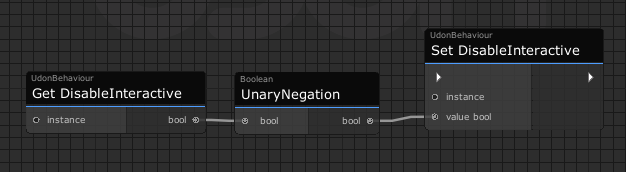
If your goal is to enable/disable the button itself, VRC added a function to Udon that can enable and disable button interactivity so you could just leave the collider there and toggle that instead. Something like this: https://i.imgur.com/VdqjIzo.png
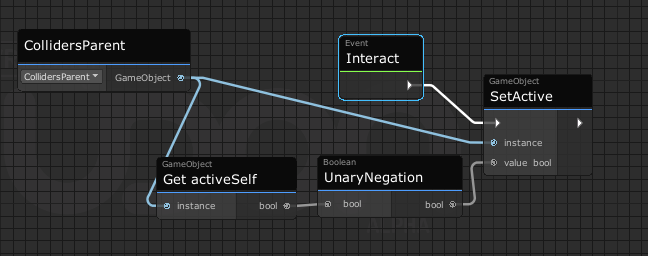
If you're using the button to toggle other colliders you'd just put the colliders in their own empty game object and toggle its active state using unary negation similarly.
 fierce verge
So I made this graph, and all the 4 objects in the pool just straight up dissapear when I test? why is this?
 cold raft
well seems you set Mode to 1 for the animator on all 4 of them, maybe its a issue with the animation controller?
fierce verge
Ive simplified it to this but it doesnt work

When I click the button just nothing happens
wait
I think I might be dumb
omfg it works but for only one light :<
All my objects in the pool vanishing and I dont know why
junior lava
fierce verge
All my objects in the pool vanishing and I dont know why
I'd be happy to help you further but I've never touched the ObjectPool object, sorry man.
fierce verge
I fixed it still thank you!
junior lava
Eyy congrats dude!
 sage whale
Working on somke teleports in the map, I have on where you click and ok you go, but I want to make it so they walk in an area and it TPs them, what do I need to fix or change to make it work like that?
 night viper
sage whale
Working on somke teleports in the map, I have on where you click and ok you go, ...
night viper
sage whale
Working on somke teleports in the map, I have on where you click and ok you go, ...
There is a specific node for when a player enters a trigger collider. "OnPlayerTriggerEnter" Just make sure you get a branch with "Get Is Local" so it only activates when the local player enters and not when any player enters.
 sage whale
night viper
There is a specific node for when a player enters a trigger collider. "OnPlayerT...
sage whale
night viper
There is a specific node for when a player enters a trigger collider. "OnPlayerT...
Alrighty Thank you very much!
scarlet lake
im unable to add multiple interact nodes to make multiple mirror toggles it just does nothing when i click it how do i add more?
exotic river
I need help trying to make a button that toggles a box collider, anyone know how?
night viper
scarlet lake
im unable to add multiple interact nodes to make multiple mirror toggles it just...
On most cases you can only have one type of event per script, however you can have as many custom events as you want. What are you trying to do/what do you have right now?
scarlet lake
night viper
On most cases you can only have one type of event per script, however you can ha...
trying to have multiple mirrors in my world with toggles but its only allowing one interact node https://gyazo.com/464dbca197d1813de7fd41d01fa12df6

is there only one udon graph per scene or multiple and im just not knowing
night viper
exotic river
I need help trying to make a button that toggles a box collider, anyone know how...
You can use "Box Collider - Set enabled" to toggle the box collider colliders on gameobjects.
night viper
scarlet lake
trying to have multiple mirrors in my world with toggles but its only allowing o...
You can use the same udon script on a different button. You will need to get the reference to the second mirror on the second button. Or are you trying to use the same button to toggle 2 mirrors? Or one button per mirror?
exotic river
night viper
You can use "Box Collider - Set enabled" to toggle the box collider colliders on...
how would I connect it to a gameobject?
scarlet lake
diffrent button
night viper
oh then you can use the same script on that other button. Your script is called "Cube_012 Udon Graph Program Asset 1" I would rename it to "InteractToggle" to find it easier in case you need to use it again on different buttons instead of creating the same script each time you need a toggle with interact.
scarlet lake
night viper
oh then you can use the same script on that other button. Your script is called ...
also do you know how to start the mirrors off first cause there on by default first
night viper
You just set its initial Active state as OFF (unactive/false/unchecked) before uploading by checking this on the mirror object. On the picture the cube starts off (not active)
 scarlet lake
awesome thank you
night viper
exotic river
how would I connect it to a gameobject?
You can get a direct reference to the box collider by making a public "box collider" variable and plug the gameobject with the box collider on the "public variable" slot (red arrow) on the script of your button. (not sure if you are using Udon graphs or Sharp, but here is an example)
 exotic river
Oooh TY SM
glacial estuary
for onparticlecollision, can you identify the origin of the particlesystem that cast? is that what the gameobject other is?
grand temple
OnParticleCollision when called on the collider will have the gameobject of the particlesystem. When called on the particlesystem it will have the gameobject of the collider
glacial estuary
got it
thx
devout trout
I've been struggling with this for a few days now, where trying to use an animation controller override on a chair/station works, but also locks player's movement when standing up... I know there must be some kind of workaround to this cuz I've seen recent worlds with custom sitting animations that don't have this issue, I'm just at a loss trying to figure out what I'm doing wrong :/
plush stump
How can I design a comfort UI for VR player? My game map require a countdown and player role text in the center of player's view so I use transform.setposition and vrcplayer.getboneposition to do so. But if I set the UI to use headbone as its root, it looks really weird when vr player rotate their head (works well for screen players)
exotic river
I was working on making a toggle global but the toggle only turns it off and not back on, anyone know why?

 hallow sable
is there a way to get a random world id?
udon can't see to access anything besides room ID
 tough hatch
if anyone knows how I can add music to my dance, I would appreciate it, the videos on youtube don't show my unity version (2019.4.31f1) ping me
 tough hatch
how do I fix this?
 night viper
exotic river
I was working on making a toggle global but the toggle only turns it off and not...
night viper
exotic river
I was working on making a toggle global but the toggle only turns it off and not...
You will have to show more of the code you have. There is a global toggle tutorial made by vowgan vr on youtube you can look at
scarlet lake
trying to make an object where you pick it up and the object goes invisable and when letting go it become visable again im in the udon graph and all i know is this not sure what elts to put https://gyazo.com/d839720b2df68a4e9de1f470222e565b

 earnest forum
im updating a map from 2.0 to 3.0 i put it into a new project and i have done everything using udon but the blueprint isnt working and won`t overide
am i missing somethin
 desert grove
scarlet lake
trying to make an object where you pick it up and the object goes invisable and ...
desert grove
scarlet lake
trying to make an object where you pick it up and the object goes invisable and ...
OnPickup get the mesh renderer component and disable it. OnDrop get the same component and enable it.
ebon musk
What would one go about using as a replacement for the standard Assets LookAtTarget Script? I'm trying to get my weapon to have a second hand hold point but Aim Constraints don't seem to follow the front Object.
scarlet lake
desert grove
OnPickup get the mesh renderer component and disable it. OnDrop get the same co...
like this ? https://gyazo.com/0690488a7e0e832db585dc18787bb08e the things named text are the pickup object
 desert grove
That doesnt look right. Maybe someone that knows graph can help ya. For me it's public override void OnPickup{gameObject.GetComponent<MeshRenderer>().enabled=false;}
OnEnable/OnDisable are events that are ran when the gameobject is toggled on or off. You are looking to disable the behavior, not the gameobject itself.
potent sandal
i logged into vrchat and all my saved avatars are gone, my added friends are no longer added, and my maps that i posted in community labs, i cant find in the maps tab that are mine. Does anyone know how to fix it?
glacial estuary
So im using onparticlecollision on a collider which responds to avatar particle systems to parent an object to that avatar's particle system, but i can't read the transform of system it is to set the parent
 uncut tusk
hey i need help, i have make a Graph that do 1 Mirror On and another one off. but it not work ingame and withCyanEmu. what is wrong?
 wind atlas
uncut tusk
hey i need help, i have make a Graph that do 1 Mirror On and another one off. bu...
wind atlas
uncut tusk
hey i need help, i have make a Graph that do 1 Mirror On and another one off. bu...
Your "SetActive" nodes are never executed. You need to connect the for loops to them.
uncut tusk
oh thanks now i see it ^^ what a shame qwq
 torn cipher
how do you make it so that an object's box collider doesn't effect a player, but when you place an object on it it won't fall trough?
cold raft
at the top select a layer
each layer interact with different things, if you want to forexample let picks collide but not the player you need something like environmentPickupNoCollision or something like that, i keep forgetting the exact name 😄
 sand basalt
what happens to ownership, vars and udon scripts of disabled objects?
desert grove
Nothing, you cannot read the ownership,vars,scripts of an object that is disabled.
sand basalt
i mean, if someone was an owner, and then disabled object, and enabled again. is ownership stays with same player or transferred to instance owner? same for vars: are they stay the same or revert to original value?
desert grove
You shouldn't be disabling a control. If it stores valuable vars it is a control or it should be. The owner could be reset, it depends on who disabled it. OnEnable and OnDisabled can be used to ensure the ownership is reset.
Those are events that are ran when you tick the enabled box or setActive. They run either before start, or just before the object actually goes into hiding
 neat jasper
using u#, dealing with a game prefab that spends 500ms in one method that it calls pretty frequently. is there any simple way to give the main thread room to breathe here, or do i have to go hacking and split the work up in some other way
desert grove
Split everything that can be split up into their own events, and ensure those events are not called unless required with conditional statements.
and predefine as much as possible ahead to avoid re-defining
neat jasper
it's a pretty big nightmare, four nested loops for mahjong hand evaluation
desert grove
yeah you cant really split up the loops, just the conditions inside the loops
neat jasper
i was thinking that my best bet on this might be to try and move the behavior into its own event, make sure all the state inside the loop persists, then just repeatedly run one inner iteration at a time with SendCustomEventDelayedFrames
which is pretty invasive and seems fragile, but it's all just raw computation, no networking stuff or gameobject manipulation...
desert grove
sounds good, just copy your work prior because VS is destructive. Easy to lose your original work once you save to build a test.
neat jasper
nod
I have no idea what the deal is with unity/vs integration in general, every time i've tried to use it VS just pops open with no project loaded LOL
vscode's been treating me nicely for now, at least
desert grove
I have project load issues if my library cache gets corrupted. Deleting the library and reloading the project usually fixes it. But it's not a common issue for me. Concerning VS
neat jasper
yeah, it happened for me on a deadass fresh install of windows so i'm not really sure what to think, LMAO
ebon musk
Does anyone know how to make a teo handed grip for a pickup. I tried using Transform.LookAt in a graph using the VRC_Pickup.getTransform as the target, but it doesn't seem to follow the pickup at all.
I had used LookAtTarget script from the standard assets pack but it doesn't work on SDK3
scarlet lake
does anyone know how to make a reset all pick up items to there original place button toggle?
scarlet lake
so guessing you put a udon behavior script in every object that will have its position reset then have the button interact with that or what im kinda new to udon grpah
tawny geyser
The pickups wouldn't need their own scripts aside from the pickup and sync components.
scarlet lake
how do i get this sharp thing i searched it in components and nothign there
ahhh ok
im used to working with second life scripting not unity lol
i see
well ill give that a try
thank you
ebon musk
So I'm fairly new to udon, and I have a pickup weapon set to have two hand hold. Currently, I have this behavior applied to the front grip, and I was wondering what I'm doing wrong. Any help would be appreciated. Basically, I can grab the second point, but the gun will not follow it, as if the Transform isn't being applied
 night viper
ebon musk
So I'm fairly new to udon, and I have a pickup weapon set to have two hand hold....
night viper
ebon musk
So I'm fairly new to udon, and I have a pickup weapon set to have two hand hold....
You need to add an event to start the flow of actions. An event can be something as a "Interact" "onPickup" "OnEnable" and so on. Something that will tell the graph to start flowing.
 ebon musk
night viper
You need to add an event to start the flow of actions. An event can be something...
ebon musk
night viper
You need to add an event to start the flow of actions. An event can be something...
Still no dice
night viper
What event do you have? You could simply use a constraint (there is a Look At constraint) instead of making a script for it
ebon musk
I tried a constraint but it seems that the gameobject doesn't follow the pickup
ebon musk
night viper
What event do you have? You could simply use a constraint (there is a Look At co...
Like the pickup wasn't updating the transform of the game object, and the constraint won't let me pick the rigid body or VRC Pickup transform
night viper
hm So if you add a constraint you are unable to pick up the objects? Sorry it is a little hard to picture what you have or what you are describing.
ebon musk
night viper
hm So if you add a constraint you are unable to pick up the objects? Sorry it is...
So basically I have a gun with a main grip, to which the VRC pickup and Mesh are attached. I also have a front grip outside the Grip Gameobject with its own pickup component. I want the rotation of the main mesh to be pointed at the second hold point. However, with an aim or look at constraint, while it works if I move the gameobject in the editor, in game if I grab the pickup, it doesn't follow said pickup
I made that graph to try to get a similar result but to no avail
night viper
I just did a quick test and for me it works fine (made a pickup with a "aim constraint" pointing at a secondary object) and the pickup does points to that second object. I did not test this in VR or with a second Pickup (grip). I will not be able to reply for a bit since I need to head to work. I hope you get it fixed, I would like to know what the problem was since it works on the editor but on on the game, which is strange.
 barren idol
quick question: is there any way to get the player's viewport resolution?
Ideally Id be interested in the viewport resolution in desktop, as well as either single-eye res in VR or combined resolution (which I could later divide anyway!)
I saw Udon has access to the Camera class, but its quite limited and requires a reference. Would getting a player camera reference be possible then?
Unless my approach is wrong, I specifically need this info for some complex-ish camera rendertarget texture shenanigans
 lapis belfry
I'm importing QV Pens into my world, and am consistently getting 144 error messages, anyone have any knowledge as to why it's doing this?

all of it looks like udon problems so let me know if this is in the wrong chat
 twin cobalt
anyone knows why any time i import a udon profab into unity the udon behaviors are missing and gotta be selected :
ebon musk
Whenever I make an UdonSharp script I get an error saying usertype could not be found
before even editing the script at all
hoary echo
What is the appropriate way to check if a gameobject.find comes up null? I'm doing the following, but it only works if it finds a gameobject. If it comes up null, it throws an object reference error.
 desert grove
ebon musk
Whenever I make an UdonSharp script I get an error saying usertype could not be ...
desert grove
ebon musk
Whenever I make an UdonSharp script I get an error saying usertype could not be ...
It will, every time. Just ignore it or press clear. It's because Unity jumping to the conclusion before both the behavior and the script are created thinking one of them is missing. Typically any error that clears is a false flag unless its a runtime error.
desert grove
lapis belfry
I'm importing QV Pens into my world, and am consistently getting 144 error messa...
Udon yes... You made sure to import Udon Sharp right? Because it is missing every Udon Sharp refence.
hoary echo
As for my issue, I gave up and just did a workaround that is probably more efficient anyways.
I'm using an int.range to generate a number to randomize events in a map, but I don't want it to necessarily activate an event on every roll. So, if I have 100 events, and the roll is 1 - 1000, I just do a check to see if it's 101 or higher, and if so just reset the timer
desert grove
sweet, are you defining the range at start or in an event?
hoary echo
At the start, my end goal is a sort of procedural horror map
desert grove
awesome, sounds like a fun project.
ebon musk
What initial event should I use if I want an udon graph to loop while a pickup is being held? I tried OnPickup and it only runs once when the item is picked up
desert grove
set a bool that is true when held and false when dropped. In update run your loop if bool is true. Pick the best update method to fit your needs https://docs.unity3d.com/Manual/ExecutionOrder.html#UpdateOrder
lapis belfry
desert grove
Udon yes... You made sure to import Udon Sharp right? Because it is missing ever...
Oh! I had not, didn’t realize that was a thing, thank you!!
desert grove
easy mistake, make sure you read the descriptions and requirements of prefabs before adding them. Chrome has a translator built in. Will save you from breaking things.
 narrow ether
I can no longer access the SDK window to upload the world and I dont know why. I have the latest SDK as well as the latest unity. There are a ton of error messages and I dont know why

 craggy harbor
Is there any override event that's being called when a player do a "Respawn" ?
craggy harbor
narrow ether
I can no longer access the SDK window to upload the world and I dont know why. I...
Try remove the VRCSDK, UdonSharp, Udon folders in your project and re-import the VRChat SDK and UdonSharp packages.
ebon musk
Does the Physical root parameter no longer exist on VRCPickup
 cursive inlet
Is there any way to tell what rank a user is by using Udon?
Like visitor, for instance.
eager olive
Not normally, no. Even if it were possible, I believe that would be against the guidelines.
ebon musk
So I'm trying to use an Udon script to make a gun ollow a ront hold point using the LookAt node. So, I have gotten it to the point where it does follow the pickup, sort of,If you only grab the front grip it works fine, Howver, i you grab the rear grip, it acts really funny
Any idea whats causing it, its hard to describe, but its like the front point tries to spin in a small radius circle, causing the gun to shoot in a circle rather than straight on
tawny geyser
craggy harbor
Is there any override event that's being called when a player do a "Respawn" ?
Yes, OnPlayerRespawn(VRCPlayerApi player)
 valid totem
I have a button that only the owner can set off the interact event, how can I have anyone in the room be able to interact with that button?
 median sun
how can I made an udon script that generates random colors?
I would know how to do this in C#, but in udon how can I replicate it?
median sun
never mind figured it out
craggy harbor
tawny geyser
Yes, OnPlayerRespawn(VRCPlayerApi player)
Thanks!
 severe tree
barren idol
quick question: is there any way to get the player's viewport resolution?
Ideall...
severe tree
barren idol
quick question: is there any way to get the player's viewport resolution?
Ideall...
I don't know if you've figured it out yet, but you can reference the world's reference camera as the camera you mentioned and from there you can get the screen resolution of the player in Udon. I'm not sure about getting individual eye resolutions but it does work for VR and will update with stuff like SteamVR overrides and such. If you have figured it out feel free to ignore me but if you haven't I'd be willing to share my exact setup. It's probably not the best way of doing it but the only way I could figure out that would work.
tawny geyser
https://i.imgur.com/mzvGNQf.png I have a pretty simple object pool which spawns these objects that move forward slowly per frame (spawnVelocity here is 0,0,1 passed directly from the script), but for some reason when the spawner is grouped inside another empty game object, they shoot out like 10 times as fast. Any hints on why it's doing this?
 grand temple
does the spawner have a different scale than the object you're putting it in?
if it's a mesh it may be scaled to 10 or 100
tawny geyser
No, the spawner and the empty group are both 1 scale.
I was just using one to organize multiple spawners together.
And the objects never reference anything above those parent spawners.
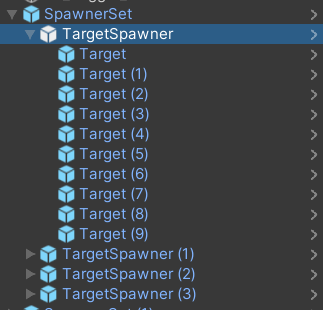
I'm wondering if this is a prefab bug because I just tried a new copy in a new empty and it's fine. Nevermind it's happening again.
valid totem
I wish I could call GetPlayers.Count(), is there a way to get the current player count as an int in udon graph?
grand temple
VRCPlayerApi.GetPlayerCount
valid totem
derp... thank you
Is there a way to keep the owner an object that's picked up from changing, essentially disable the transfer of ownership when something is held?
I have an action that fires when a ball passes through a collider
and it fires once for each person in the instance
imagine there are other ways to handle it, like turning the collider on only if you're the master
grand temple
you can implement OnOwnershipRequest. This is a function that gets called when someone tries to take ownership, and if it returns false the request will be canceled
grand temple
the event first happens on the client of the person who called SetOwner, and if they return true it will go across the network and then the owner has the opportunity to return as well. If both return true, then it will properly transfer
valid totem
thank you @grand temple
tawny geyser
Figured it out, they weren't actually moving faster, I had their initial spawn position set to local instead of world so they were shooting to who knows where. 🤦♂️
valid totem
When the old master leaves an instance is their ownership status of all gameobjects transferred to the new master in VRC or so we need to handle this ourselves on an event?
 tropic canyon
it should automatically transfer ownership of the objects
 gloomy apex
Trying to learn how to make a world to upload to VRChat. For world creator status it says not yet allowed or something. Do I have to pay money or something to be able to upload a test world?
tawny geyser
gloomy apex
Trying to learn how to make a world to upload to VRChat. For world creator stat...
IIRC you need New User rank to upload private worlds which doesn't take long but you should be able to build and test without uploading.
junior lava
gloomy apex
Trying to learn how to make a world to upload to VRChat. For world creator stat...
You need to play the game more and rank up. Personally I think it took me about a week of play time? When you play are you logged in using a VRC account or do you use Steam or Oculus as your login?
valid totem
Anyone know of a tutorial or guide that mentions how to handle variable syncing with late joiners?
junior lava
valid totem
Anyone know of a tutorial or guide that mentions how to handle variable syncing ...
I used this one, basically storing states as NetworkSynced variables and then doing any necessary changes on each player's client.

So this took me longer than it should have.
Time to toggle objects again, but this time, for everyone! You'll see that syncing is a little bit more complicated than it was in SDK2, so to set everything up we have to tell every player to toggle that object, but also catch up anyone who joins in after the button was pressed!
All assets are availab...
valid totem
thanks
junior lava
I should mention this tutorial came out before the VRC Network Update from a few months ago, there might be better ways of handling network syncing now but I'm not versed in them.
valid totem
Doesn't seem like there are a lot of tutorials with info that includes the changes, so getting into this right now I bet I'm doing things in an obsolete way heh
for me the problem is that the sync'd variables don't seem to actually be sync'd
I have to use a customnetworkevent to change a text box for everyone
even with ondeserialization the data doesn't come through
junior lava
Huh that might be a problem I have on my side too then, from what I understand only the owner of an item can sync its variables?
valid totem
or ondeserialization doesn't happen
ah yeah I ran into that too
I dealt with it like this...
I have a collider that triggers when another collider passes through it, in this case a ball
but when everyone had the collider it got really weird
so when the game is turned on there is a branch that only the master gets the trigger collider enabled
that keeps the customevent always running as the master
crap, typing this out I think that might be why it's not syncing...
but the idea was to force the owner to make the variable updates and then share the variables with the rest of the instance
then back to the problem, the variables don't sync
tawny geyser
Make sure you aren't getting master and owner confused, they aren't the same thing. Also in your case where you are filtering triggers you usually want to filter those to local player only.
So for example actions that you only want to go off for the relevant user like triggers, you'd filter the local player. But if you had something like a global action that goes off on a timer, you'd want the timer filtered by the timer's network owner because you don't want it shooting off multiple times for every person in the instance.
valid totem
Okay so the owner and master... it's the owner that does the syncing not the master
tawny geyser
Correct. Instance master, in my experience so far, is pretty irrelevant in most cases unless you specifically want it to be for world design reasons.
valid totem
and if we're trying to get the entire instance to have the up to date data, the owner needs to sync that but only once so we don't get it going off a bunch
in that case we're not sending network events to everyone, just the variables which would come through in the var onchanged or ondeserialization?
 unborn hornet
Instance master is the default/fallback owner for all objects.
tawny geyser
Right, you always want the least amount of data shooting back and forth as possible. What I do for any basic action is split it into three parts: initialization, processing, and update. The initialization happens for everyone, setting up the variables etc. The processing happens only for the network owner of the object - changing the synced variable that will be acted on and then requesting serialization. Then the update method would be called once for the network owner and then for everyone else in OnDeserialization.
valid totem
okay
great distinction there
I think that I've been seeing the master as the owner of everything except for the balls that players pickup and so it looks like the master and owner are equivalent
but that's not true, and is probably why it seems so inconsistent
do you ever set the owner explicitly on an interact?
tawny geyser
In most cases you would set owner to the local player who interacted with it.
valid totem
What's the best way to get the name of the owner?
tawny geyser
if (!Networking.IsOwner(gameObject)) Networking.SetOwner(Networking.LocalPlayer, gameObject);
Oh, the name.
Updated that top post to remove my variable. If you want a local player's display name it's Networking.LocalPlayer.displayName
tawny geyser
No, the network owner for each object defaults to the instance master like Archi said above, but it wouldn't change unless you tell it to or the current owner leaves.
So if you want to update a networked object you always have to set the owner to the person making the change.
valid totem
got it
tawny geyser
If you're doing something with a pickup object that has VRCObjectSync, it's going to automatically change the owner of the pickup to whoever picks it up IIRC.
valid totem
yeah that's frustrating
in this instance
so the object owner can be different than the scorekeeping logic
if someone else throws a ball through one of these colliders
tawny geyser
If you're filtering a trigger with a pickup object, you can use Networking.GetOwner(otherCollider.gameObject) in the OnTriggerEnter event to see who owned the object that hit the collider.
Just make sure you turn off 'Allow Collision Ownership Transfer' on the VRCObjectSync component.
valid totem
if we're only enabling the trigger on the owner's instance is that reasonable?
valid totem
tawny geyser
Just make sure you turn off 'Allow Collision Ownership Transfer' on the VRCObjec...
would this cause the trigger's ownership to change if I don't turn it off?
not using objectsync though, using vrc pickup
gloomy apex
junior lava
You need to play the game more and rank up. Personally I think it took me about ...
I log in with Quest or Steam, but choose the VRChat login I think
How can I tell my rank and how much longer I need to play?
valid totem
gloomy apex
How can I tell my rank and how much longer I need to play?
I don't think there is any sure way to tell, it sort of happens based off of a formula using different metrics
one sure way to make it happen is to subscribe to vrchat+
gloomy apex
Is that a requirement?
valid totem
no it's not
gloomy apex
Will they allow me to upload right away or do I still have to wait
valid totem
at least it worked for me when I ran a steam account for a long time and then switched over
junior lava
gloomy apex
How can I tell my rank and how much longer I need to play?
In-game you can open your Social menu and your rank will be written next to your name. It doesn't take long till you're allowed to upload content.
Make sure you're not a "Guest" ranking though, that's when you login using a Steam or Oculus account that's not linked to any VRChat account.
If that's your rank, make sure to make an account on the VRC website and link your accounts properly.
gloomy apex
I dont' see a rank, I see edit bio, edit status, and playlists, with my username to the left saying online
tawny geyser
valid totem
would this cause the trigger's ownership to change if I don't turn it off?
It's just a checkbox toggle on the object sync component that helps with syncing when you don't need to be managing ownership, but in your case it would cause problems because you want to know whos pickup is hitting the trigger, etc.
gloomy apex
Is any control over the avatar movement possible with Udon? Such as making an avatar raise arms and hold a tennis racket in a particular way? What about controlling the movement of the avatar, such as teleporting it within the world if something happens etc.
junior lava
gloomy apex
Is any control over the avatar movement possible with Udon? Such as making an av...
Teleportation of players is definitely possible, there's been quite a bit of discussion in this channel about how to do that.
Making avatars do animations in specific ways though? That's definitely a more difficult task. Personally I'd write off that idea.
You can make them play expressions I believe, but moving an arm in a specific manner seems more intense.
tawny geyser
gloomy apex
Is any control over the avatar movement possible with Udon? Such as making an av...
You can make avatars play animations and hold objects that are part of the avatar but you wouldn't necessarily need Udon for that.
gloomy apex
Well, I was thinking of actions controlled by the world when some event happens. I am guessing it isn't possible what I was thinking of. I guess to do it right the movement would depend on the avatar shape also, if they have a big hand and a long arm or whatever.
scarlet lake
how would i make a toggle where people have option to change the skybox
tawny geyser
scarlet lake
how would i make a toggle where people have option to change the skybox
https://ut.orels.sh/behaviours/misc-behaviours#skybox-adjustment This might help.

A collection of small, general / single purpose built behaviours
valid totem
I set an udon behaviour as manual sync and when I launch build & test it is changed back to continuous. Are there certain requirements that must be met to have a manually synced object?
tawny geyser
valid totem
I set an udon behaviour as manual sync and when I launch build & test it is chan...
Are you using UdonSharp?
valid totem
I have the asset package loaded, but this is all graph right now
tawny geyser
Ah okay, I'm not super familiar with graph or why it might be reverting like that, but I know in U# you can put [UdonBehaviourSyncMode(BehaviourSyncMode.Manual)] above your class declaration to override the inspector setting.
valid totem
lol right on. I'm having lots of regrets of starting this in graph when I am very familiar with C#...
I'm about to trash all the udon graph and start over at this point
tawny geyser
There's also CyanTrigger which is kind of an inbetween event system, but if you're familiar with coding I'd still recommend U# in the long run.
Oh wait I just remembered, is there an object sync component in the same object?
valid totem
there is in the same hierarchy, but not the same object
looks like saving it as a new original prefab did something to help... 🤷♂️
tawny geyser
ObjectSync would force continuous but I'm not sure how your heirarchy setup would be specifically effected. And yea sometimes prefabs are just wonky on their own.
valid totem
heh
still 2 inches away from starting over in U#
Are you able to do regular debugging with U#?
tawny geyser
You can output to the unity debug log.
Which leads to another recommendation if you aren't already using it - CyanEmu. Lets you test in unity game tab instead of launching a build.
valid totem
CyanEmu definitely speeds up iterations when not worrying about networking, thanks!
unless there is a way to have two players in CyanEmu that isn't obvious? I see you can spawn remote players
pretty cool!
tawny geyser
Yea you can spawn remote but afaik if you want to control multiple to test networking you still have to test build.
 cyan venture
Thank you very much for your help. I'd like to ask you a question.
If I want to make the subject's voice louder in a world where the voice is amplified by udon, should I increase the world volume or increase the volume of the voice speaker?
valid totem
Anything special to do to get Intellisense working in VS? scrapped the graph lol
nm, need to load the actual unity project
valid totem
right out of the gate this is 100s of times easier
@tawny geyser if I could buy you a coffee or a beer for all your input today I would
 acoustic glacier
So I am building a production studio for Streaming and Podcast recording. I have multiple cameras, tracked cameras, and dolly systems up and running with my render texture switching working fin but running into problems figuring how to take the render texture output of the selected active camera to be a fullscreen overlay for recording by software like obs
any thoughts or input would be great
tawny geyser
valid totem
<@!902072131616116776> if I could buy you a coffee or a beer for all your input ...
 It's a pretty much endless amount of stuff to learn and I'm still lost sometimes so I'm happy to help!
acoustic glacier
Been staring at the screen to long and need some input from someone with fresh eyes lol
tawny geyser
acoustic glacier
So I am building a production studio for Streaming and Podcast recording. I have...
This stuff is still over my head but I do remember seeing this https://ut.orels.sh/systems/presentation-system#stream-and-video-capture which might have some similar code to set you in the right direction.
A turn-key solution for Virtual Conferences
acoustic glacier
thanks I will start digging and looking ito that
and yea this is by far the most complex udon project ive taken on yet but thats the fun in it lol.
valid totem
Is it possible to change a gameobjects collider "Is Trigger" property in game? Doesn't look to be an available method
tawny geyser
I think you can just reference the collider and do colliderVariable.isTrigger = true;
ebon musk
Ok so for the life of me I can't get audio to play on the UdonSyncPlayer for Quest users. I've tried dropbox, Bunny, Youtube, all to no avail. Does anyone know what the issue could be. All I want is for the world to have background audio, and not have to have a semi large file built in
 pearl tiger
tawny geyser
There's also CyanTrigger which is kind of an inbetween event system, but if you'...
pearl tiger
tawny geyser
There's also CyanTrigger which is kind of an inbetween event system, but if you'...
U# eh? hm.... I have been trying to fight with the graph to make a simple basketball counter but honestly that might be faster for me and others who know c#
Because I know exactly how I would personally code a specific system but the whole idea is getting it to comply with the sdk, and if U# helps with that, it sounds like a god send. Update: Yeah I highly recommend that U# now too lol, once I got it set up it took me less than 5 mins to get a working basket ball score counter
ebon musk
Now it just seems like no video player whatsoever will work on my quest project. Apparently people hear sound for a split second when they join, and then nothing
desert grove
ebon musk
Now it just seems like no video player whatsoever will work on my quest project....
You are using direct links correct? A standard dropbox share is not a direct link. A direct link is https://dl.dropboxusercontent.com/s/ [your identifier] / [filename] without the []. Also, if all you want is background music and not a video player, mp3 files can be reduced in size by merging stereo to mono and don't normally take a lot of space unless you are trying to use an hour long recording. In the event of using an mp3, a simple AudioSource set to play on awake works just fine for all.
ebon musk
desert grove
You are using direct links correct? A standard dropbox share is not a direct lin...
I am indeed. I also went to a world using the ProTV 2.1 prefab, where all links I tested worked for quest except youtube, but when tested on my own world with the same prefab(found online), they had the same issue and no sound. It almost seems to be an issue specifically with my project. Ill try uploading a new project just to check.
valid totem
If I have multiple trigger colliders on a single udon behavior is there a way to distinguish which trigger was hit on the same OnTriggerExit event?
Seems like each trigger collider has its own instance of the behavior, so maybe it is a parent/child hierarchy thing?
 nova flare
Hello, not sure if im at the right Spot here but ill try ^^ Im at creating my first VRChatworld atm and i ran into a little problem. I mostly use Udon Graph and wanted to set up "unique" Objects wich are pickups and should then interact with an specific Box Collider each to then get Events done wich SetActive stuff play Sounds, effects etc. So the pickup is "placed" there and stuf happens essentially.
I just cant figure out what exactly to do in Graph to get that Trigger to work for the Pickup and Zone where it interacts and cant find any Tutorial on that for Udon Graph either.
(Its the stuff before i send the "CustomNetworkEvent" wich i just dont get i guess something with the "OnTriggerEnter" or "OnCollisionEnter" Events but i just dont get it how to set that up for object and triggerzone. /+later on multiple objects)
Hope someone here can help me out ^^
junior lava
valid totem
If I have multiple trigger colliders on a single udon behavior is there a way to...
I think each component in Unity has a unique ID so perhaps you can check that in your OnTriggerExit?
Otherwise can you put the triggers on separate objects?
Oh wait, you're saying you have multiple objects that use the same behaviour? You can check the gameobject's name, or assign to them an ID you set?
valid totem
I have two box colliders that are triggers, they share the same udon behavior. The udon behavior increments a public int when a ball collider passes through the trigger and fires OnTriggerExit. If one of the triggers is hit twice the count goes up from 0 to 2, if we then throw another ball and it hits the other collider the count goes from 0 to 1, then if we hit the first collider again the count goes from 2 to 3. I'm trying to get these colliders to act as one
I'm trying putting the behavior on a parent object of the two colliders and seeing if that makes a difference
junior lava
What I would do:
Make a parent object with a separate class that includes the counter
In the OnTriggerExit, just call parentObject.IterateCounter
So that the shared logic is handled from an external class.
And the code attached to the colliders is just... Collider handling.
valid totem
ohh right on
so colliders have their own behavior
a method in the parent object's behavior is called by the children
junior lava
Yeah exactly.
ebon musk
So I've confirmed that it is explicitly something in my world preventing audio from playing for quest users. Does anyone know of any conflicting prefabs or anything that would cause this issue? No Video players work at all
 balmy solar
Trying to make a texture scroll on a MeshRenderer Material but it isn't working and I have no idea why.
 nova flare
i somehow figured it out heres my work xD should work i guess for what i have now 😮
 balmy solar
I changed back to the normal getMaterial property and also changed to the standard shader in case the one I was using was the issue but I'm stumped
 indigo wagon
is there a way to convert time.deltatime to FPS?
fiery yoke
Divide 1 by it :)
indigo wagon
ah k
indigo wagon
i dont get why this is giveing errors
    void Update()
    {
        Debug.Log(1 / Time.deltaTime );
        if(1/ Time.deltaTime  >MaxFPS)
        {
            MaxFPS = 1 / Time.deltaTime;
        }

        SlowerFlicker = SlowerFlicker + 1;

        if(SlowerFlicker-1 == FlickerDelay)
        {
            Filter.Rotate(0,0,180);
            SlowerFlicker=0;
        }
}```What's the error?
indigo wagon
it was telling me taht delta time wasnt usable like a method but it fixed itself by me adding a fake out else statement so ig it just didnt recompile
now that debug.log is giveing me fps values like 200
valid totem
Iis each Udon Behaviour component a separate instance? for example, two buttons with the same script acting independently of one another?
tawny geyser
Yes, if you put the same behaviour in two different buttons they'll run separately and use their own public variables from the inspector etc. Editing the source script would change all of them.
valid totem
oof
how do I watch for trigger events from other objects? sending customnetworkevent?
Like, the main logic on the root object and each function of the machine is a different script on separate child objects using custom events networked or otherwise?
guess this is where the access modifiers come into play
tawny geyser
I'm not really sure what you mean but it's object-oriented so you can either send network events to communicate between behaviours or just directly reference public methods and variables.
valid totem
I'm trying to understand the typical design pattern for udon
and I guess unity in general
going back to what you said earlier
tawny geyser
valid totem
excellent thank you
 lilac hatch
Hello hello, random question.
Is it possible to control a post processing value using udon graph ?
I vaguely remember it possible using an animator back in the time.
fiery yoke
lilac hatch
Hello hello, random question.
Is it possible to control a post processing value...
Only indirectly, by controlling an Animator yes.
lilac hatch
So that didn't change, gotcha
fiery yoke
At least not yet. Who knows if it ever will
lilac hatch
Will have a look at some prefabs/tutorial tomorrow, been a while since I did that
thanks you as always for the fast answer
 mint jackal
Hey if someone can help I am struggling with a missing asset problem and I’m not sure how to fix it
 desert grove
mint jackal
Hey if someone can help I am struggling with a missing asset problem and I’m not...
desert grove
mint jackal
Hey if someone can help I am struggling with a missing asset problem and I’m not...
https://docs.vrchat.com/docs/current-unity-version good idea to follow the guides for setup first. get that sorted and see where you are.
VRChat
This page lists the current Unity version you should use when creating content for VRChat, as well as links to the correct version for both Unity Hub and direct downloads. Current Unity Version The current Unity version in use by VRChat is Unity 2019.4.31f1. Ensure you are using this exact version! ...
 tacit pasture
?
uh
anyone know of or have the script that disables (that purple tthing that people use to fly/ apparently i cant say that word) in an udon world?
didnt realised you couldnt say anything relating to those mods
@fiery yoke any idea?
desert grove
So basically that exploit unlocks the controller allowing you to move freely without a ground check right. Roughly and poorly explained no doubt. It isnt setup to look for anything other than your player controller. So if you setup a system to auto assign a player to a station that isnt permitted to leave a specified y value then you break that attempt. In theory anyway. Outside of trying something like that, you can't control anyone using an exploit. You can report them and then block.
HOWEVER these same clients can directly toggle behaviors so any script or safety you create can be bypassed anyway. The only solution is for VRC to start being proactive.
tacit pasture
gotcha ty
 autumn plume
I have a question i was updating a world and then i change the build and it frooze or its just slow idk but it doesn't that unity isn't working so don't think its crashing is it just slow or something it's stuck on importing

 near steeple
Hey guys, I'm working on a concept at the moment and i had a couple of newbie questions
Can udon scripts be assigned to a vrc avatar? Or do they have to be in worlds?
And is it possible for udon to relay avatar bone location/rotation data to a shader?
 tall vault
Udon is only for worlds, at least for now
And you should be able to set shader variables
 halcyon falcon
what programming langauge is udon based on? also what type of restrictions are on it for quest? Im a newbie
grand temple
Udon most closely matches C#. I don't think there are any quest-specific restrictions for udon
valid totem
Anyone know of an example that shows resetting an objects location to it's starting coords? I saw somewhere that this was made easier with the networking upgrade
@tawny geyser linking the different classes together using [SerializeField] works great by the way, thanks for pointing that out
grand temple
valid totem
Anyone know of an example that shows resetting an objects location to it's start...
yes, you can just call objectsync respawn
valid totem
VRC.SDK3.Components.VRCObjectSync got it thanks @grand temple
ebon musk
Does anyone have a link that they for sure know works on quest to an MP3 file so I can work my issue? Any help would be appreciated
 covert arch
can I make a eyeless jack avatar?
valid totem
Could anyone share an example of how to use VRCObjectSync.Respawn() in udonsharp please?
grand temple
            VRCObjectSync obj = (VRCObjectSync)GetComponent(typeof(VRCObjectSync));
            if (Utilities.IsValid(obj))
            {
                Networking.SetOwner(Networking.LocalPlayer, obj.gameObject);
                obj.Respawn();
}```Much appreciated!
So there is no need to specify which object is getting reset?
grand temple
you definitely need to specify which object, that's what getcomponent is for
lilac hatch
So ; on my old SDK2 UI ; To control PostProcessing I was using a slider and did this everytime:
https://niyah.eu/i/Unity_zijuePGVP6.png
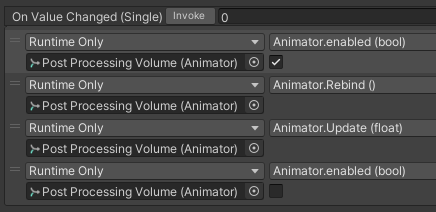
Right now ; I'm trying to simply recreate that on udon graph (funny graph) but I'm stuck concerning the Animator.Update function ; as in ; Can't find it in the class tree.
grand temple
In udon, you would SendCustomEvent to an udonbehaviour and then the udonbehaviour would have a reference to the slider, where it would get the value from
lilac hatch
(I be very tired, nearly sure it's easy but eheh)
Well ; Post Processing can't be used in udon, does it ?
grand temple
oh, no you have to animate post processing weight
lilac hatch
Let me update the SDK quickly and i'll show what I mean, I basically can't find the Animator.Update
grand temple
I don't think UI elements can control animators in SDK3, that's for security reasons
lilac hatch
but i might just very tired
grand temple
and getting a slider to control an animator is extremely cursed anyway
grand temple
so what you can do instead is have the slider control the udonbehaviour which properly sets an animator float that can be used in a blend tree


 grand temple
I don't think that will work, it'll probably remove it ingame
 viscid reef
yeah, update isn't whitelisted https://docs.vrchat.com/docs/ui-events
lilac hatch
I'm using it inside a udon graph, should be fine right ?
grand temple
yes of course
 vivid crown
I’m getting an issue that occurs only when uploading an Udon world, for some reason the world will upload fine, but then when I go into vrc to test it out it loads in, goes black, reloads and chucks me into my home world.
tawny geyser
Missing spawn point maybe? Try this world debugger too: https://github.com/oneVR/VRWorldToolkit
vivid crown
Thank you, it does have a spawn point so that’s why I was confused
I’ll try out that toolkit though!
 hollow cave
how do i make if object collide and check it tag
tall vault
You can't get an object's tag in Udon, but you could work around it by adding something identifiable to the object's name
 still valley
my mirror in my udon world is acting like this and cant find way to fix it
 ebon musk
Anyone know of any good tutorials for objectpool usage? I want a pickup to spawn on the hip of every player who joins
 midnight beacon
still valley
my mirror in my udon world is acting like this and cant find way to fix it
midnight beacon
still valley
my mirror in my udon world is acting like this and cant find way to fix it
Try using the standard Udon Skybox and see if that makes a difference. If so you should check the material you're using for the Skybox and what layers the mirror is rendering.
 hexed yarrow
When it comes to syncing an object's position what is the best way to do that?
ebon musk
hexed yarrow
When it comes to syncing an object's position what is the best way to do that?
You should be able to just put VRC_ObjectSync component on the Parent object
That's worked for me. The only exception is if it is a pickup with multiple pickup components on different parts
hexed yarrow
Urmm yea ngl I put that on but for some odd reason for the other players. The item just floats
hexed yarrow
Just one platform and it isn't a pickup. I just want an object that'll slide between two positions
ebon musk
Huh. I haven't had any issues, even with crossplatform
valid totem
I'm looking to mess with the "Post-Process Volume" component via U#, where do I find these APIs and what I can call?
grand temple
postprocessvolume.weight
indigo finch
still valley
my mirror in my udon world is acting like this and cant find way to fix it
Did Takanu's answer fix it? if not, perhaps it's on the wrong side of the object. had a problem when making a double sided mirror, where one side would be fine, and the other would smear like it had "don't clear" option found on a camera. The fix was to add a plane or other gameobject to the other side, and treat them as seperate mirrors
still valley
Not really it seem the problem i was using plane 3d object it fixed once switched to quad
 vestal nimbus
Does someone know how to detect a specific player by using Udon?
I think the VRChat given ID is the one on the picture below, but I'm not sure how to use this ID for determining whether the player can use a gimmick.

To be specific, I want to make only one specific player can fire my gun gimmick.
 last geyser
I'm curious, I want to create a small counter thing, Kinda like a collectable counter. I have 25 Crates that would be collected that are scattered around the map but how would I go about making a counter that will do a certain action after reaching 25?
junior lava
last geyser
I'm curious, I want to create a small counter thing, Kinda like a collectable co...
You want to make it so that each time a crate is used, it iterates a counter?
last geyser
junior lava
You want to make it so that each time a crate is used, it iterates a counter?
Yeah, Like it counts towards a counter till the required amount is met to trigger something else
junior lava
That's very simple, I'll code it up when I'm at my pc, but basically :
Have a code, let's call it crate manager, have an int counter initialized to 0
Give the manager a public method Iterate Counter that just does counter ++ followed by checking if your counter == 25
In your crate code, have a reference to the manager, and onuse call the iterate counter method.
last geyser
junior lava
That's very simple, I'll code it up when I'm at my pc, but basically :
Have a c...
Does this method also apply for Udon Graph?
junior lava
I'm not sure how to make custom methods in Udon Graph, I imagine it's possible but I was looking for an example of how to do it the other day and couldn't figure it out.