
#udon-general
59 messages · Page 75 of 1
 kindred pendant
 eager olive
I think you misunderstand how the voice distance works. There's no way to "trap" a player's voice in a collider
You also probably don't want to change the near voice distance, or players will be extremely loud or not audible at all
kindred pendant
ok so how do i keep their volume the same throughout the radious i set
eager olive
I would not advise it, but you can connect the player two the second node the same way as you did the first node.
kindred pendant
huh? how?
eager olive
kindred pendant
ok so how do i keep their volume the same throughout the radious i set
That's what your current code would already do (if you removed the second node)
eager olive
kindred pendant
huh? how?
You... Connect "player" to the "instance" input
kindred pendant
so theres a player node?
eager olive
It might be worthwhile for you to look at some more Udon basics, it seems like you're still unfamiliar with the interface
kindred pendant
which is why im trying to figure it out
eager olive
The node on the left, OnPlayerEnterTrigger had a player output.
kindred pendant
so put it in a triangle then
eager olive
Again, you might want to look into some of the basics... Triangles are for execution. They determine what happens in what order.
All other nodes carry data.
kindred pendant
unfortunately i need to figure it out now, since my world is already public
i cant spend 3 hours reading through something that isnt really going to help with this problem
eager olive
I believe I've already told you the answer, actually.
Your solution already works, if you delete the second node.
kindred pendant
so your saying onplayertriggerenter connects to setvoicedistancefar and the player connects to both far and near
eager olive
If you want a player's voice to change again after leaving, you will however add more code.
eager olive
kindred pendant
so your saying onplayertriggerenter connects to setvoicedistancefar and the play...
Well... Almost. You shouldn't be using near at all.
But yes, that is how you would connect it.
kindred pendant
currently, when im in the bubble everyone is just really quiet and it cuts off further then what i want it to
so basically i need it to cut off in shorter distance but be louder
ive sort of got it too work. but everyone is just too quiet
eager olive
Sorry, I'm having trouble understanding your problem.
kindred pendant
ok. ill explain what im trying to do
eager olive
By everyone, do you mean everyone in your world? It shouldn't affect people unless they enter the collider.
If time is really critical for you, I have a finished U# script you can use.
kindred pendant
i have 6 booths in my world. intended for private talking. in the booth you shouldnt be able to hear out of the booth. nor in the booth when your out of it.
eager olive
kindred pendant
i have 6 booths in my world. intended for private talking. in the booth you shou...
Oh that is a lot more complicated than what you have right now.
kindred pendant
so im trying to make it so your voice only travels so far. but is louder at the start
eager olive
The best approach would be to teleport players, actually. because otherwise you would have to change the volume of every player in the world
Treating the booths like private rooms would make things much simpler
kindred pendant
so theres no way to make it so once you enter the trigger your voice only travels to a radius of 4 meters and no more?
eager olive
Maybe someone else can help you if you want to go through with your initial approach, but I don't think it's feasible if you have very little time
eager olive
kindred pendant
so theres no way to make it so once you enter the trigger your voice only travel...
... yes, that is what your script currently does.
But you mentioned that players also shouldn't be able to hear what's going on outside the booth.
kindred pendant
ok so hopefully it should be fine then if i test it now
well the voice wont travel that far for them to hear
eager olive
kindred pendant
well the voice wont travel that far for them to hear
Other players will be as loud as they were before.
Also, you'll also need to add something that makes players louder once they leave the booth
kindred pendant
if i stand 6 meters away from the booth. i shouldnt be able to hear them if the far radius is only 4]
what about if i added voice gain?
eager olive
kindred pendant
if i stand 6 meters away from the booth. i shouldnt be able to hear them if the ...
The default voice range is 15 meters. If someone is closer than that, but not in the booth, you will hear them.
It sounds like you won't be able to fix this in such a short time span. I'd advise taking a closer look at the documentation, learning some more basics, and maybe switching to a teleport approach instead of changing voice range
kindred pendant
how would i also connect voice gain to my graph?
eager olive
Same way as I previously explained. You would daisy-chain the execution nodes and add the player input.
eager olive
Again, Udon basics might be worth looking into 😖
SDK has a lot of examples, too
kindred pendant
ill be looking through the documents eventually. doesnt rn tell me what i need to know tho
which is why im asking for help
eager olive
Well, hope I could point you in the right direction!
 dusk lance
It sounds like you have a slight misunderstanding on how The Sphere works. Yes all players are put into stations, but the station isn't for the local player, but for all remote players. Everything about The Sphere is actually fake. The player is always upright and moving around actually moves the world. See the attached video of what it looks like in editor. It's basically a giant hamsterball. The reason for the station is so that locally you are mobile, but remotely, the players are stationary. This allows you to move the station itself around to move the player sitting in it. If you sync where the local player is relative to the sphere rotation, then you can apply that rotation to on remote clients, making it look like you are on the edge of the sphere.
Just so you know, The Sphere was built in SDK2. Udon stations might be a little different with mobile vs stationary.
 scarlet lake
Are there any free Udon Keyboard prefabs that mutes can use to talk to each other?
 potent elbow
 fresh cave
anyone know how to make a hue slider in the world to change the hue of lights?
 autumn birch
why isn't this working?

 grand temple
maybe check this out 👀
 autumn birch
ah yee missed one
 whole wraith
Hey..ive been stuck for some time now...im trying to set GameObject, thats picked up, to script..any idea how to do that? U#
 balmy tendon
does the avpro video player work for quest users?
 pseudo parrot
What's a fast way to covnvert SDK2 to SDK3, using the CyanTrigger method.
Or any tutorials.
I'm having a hard time trying to fix and convert my SDK2 to SDK3 without the need to redo all the triggers all over again.
I've already deleted the SDK2 on my old project and imported SDK3
 hybrid canyon
GitHub
CyanTrigger is a new compiler for Udon with focus on in-scene editing. The interface resembles the old SDK2 VRC Trigger interface, but has more functionality. CyanTriggers is not intended to replac...
 karmic gust
Anyone know how to fix this issue?

No reimporting the SDK does not work
No restarting unity doesn't work
grand temple
might be the wrong version of something. Do you have unity 2019.4.31f1 and the latest VRCSDK?
grand temple
no, unity 2019.4.31 is not the latest version. Make sure you have that specifically
 grand temple
ok. Is this a project migrated from something else, like 2018 or SDK2?
grand temple
that's minor enough that it shouldn't matter
karmic gust
This seems to be a Unity problem, only issue is that google searching hasn't been the best helper of this issue
grand temple
not sure exactly what it is, but first thing I would try is a clean install of the SDK. Close unity, navigate to the project and delete VRCSDK/Udon folders, reopen unity, reimport VRCSDK
karmic gust
grand temple
not sure exactly what it is, but first thing I would try is a clean install of t...
I've already done that
grand temple
did you fully delete the folder while unity is closed? If you just import on top or delete it without closing, it's not the same
karmic gust
Yes, i've deleted the folder while unity is closed
 cunning mist
Maybe go to an empty scene before doing that though just as a precaution
grand temple
nah that's not necessary
cunning mist
I wouldn't say so, it definitely sounds like something is causing the VRCSDK specifically to fail to compile. Which version of the SDK have you imported?
grand temple
it's a VRC script causing the issue because it doesn't see something in unityengine
karmic gust

It can't load the sdk because its missing UnityEngine.UI or a dependency of it
its the latest version of the SDK
cunning mist
If UnityEngine.UI is failing, try creating UI Button in your scene and see what happens.
grand temple
I guess you could go to window > package manager and search UI, see if anything about this page is weird?
 cunning mist
I've run into that once before but it definitely broke my project waaayyyy more than just two VRC errors
 cunning mist
What's the new error there at the bottom?
karmic gust
the latest error is complaining about scaling

the third is about cloth or something
grand temple
maybe there's some other package in this project that's causing a problem
karmic gust
Hmm
Lemme delete some scripts from their folders
from other packages
they can't be used anyway
cunning mist
One thing that may be able to resolve this is clearing some temporary/cached files and forcing Unity to reimport a large portion of your project. This can be done by deleting your Library folder which is alongside your Assets folder while Unity is closed. This may take some time to open your project after doing but this has definitely saved a few projects of mine.
 cunning mist
It will regenerate most of these files again when you open the project again, just be prepared to wait a few minutes depending on how big your Unity project is.
cunning mist
I wish you luck 👋
We need a salute emote
karmic gust
o7 is good enough
cunning mist
Ayy
 vast locust
I asked in #world-development without any progress so I try here
Is it possible somehow maybe via Udon to dim the screens like post processing but for quest?
Maybe by putting a 75% dark sphere around the users head?
cunning mist
vast locust
I asked in <#361741445352259584> without any progress so I try here
Is it possib...
Yep! Just do exactly as you describe. Move a sphere to the player's head position as they walk around, then animate the transparency of it's material. I'd recommend some sort of Unlit shader to help with the effect.
 grave lantern
what does that small "+" icon mean?

 tall vault
It means that object was added to a prefabbed object which wasn't in the original prefab
scarlet lake
Dose anyone know how to fix this?

 heavy merlin
dusk lance
It sounds like you have a slight misunderstanding on how The Sphere works. Yes a...
heavy merlin
dusk lance
It sounds like you have a slight misunderstanding on how The Sphere works. Yes a...
Oh wow that's pretty ingenious, so the stations are just there to make other players look not upright relative to you. Difficult to wrap my head around it but I think I'll spend some time on that and play around with it. Sounds like you can do a few cool things with that idea. Thanks for your help!
 dull stream
scarlet lake
Dose anyone know how to fix this?
dull stream
scarlet lake
Dose anyone know how to fix this?
You have other errors that are causing this
scarlet lake
dull stream
You have other errors that are causing this
Thank you i just went through and its fixed
 distant grotto
I made a model/charecter in blender and dont know how to convert a .blend to a .avatar file
 fickle stirrup
distant grotto
I made a model/charecter in blender and dont know how to convert a .blend to a ....
fickle stirrup
distant grotto
I made a model/charecter in blender and dont know how to convert a .blend to a ....
that channel related to programming/worlds, need to ask on avatars section. but to answer - there's a bunch of tutorials on youtube, you don't need .avatar, you can export as .fbx or use .blend directly in unity, you need to look how to use unity to upload
but if you are about something else, then i don't know the .avatar extension, my bad 
 glossy sky
Could I get some guidance of where I'm going wrong with my graph? I'm trying to parse a string into an array but for the life of me can't seem to figure it out. For example, I'd like to parse "Alpha jumped high" and split all 3 words into a separate text box that's also set as an array.

 trim parrot
yo sorry noob question is there a way to get a value between udonbehavior scripts?
 wind atlas
glossy sky
Could I get some guidance of where I'm going wrong with my graph? I'm trying to ...
wind atlas
glossy sky
Could I get some guidance of where I'm going wrong with my graph? I'm trying to ...
Do you mean so one would be "Alpha" another "jumped" and the last one "high"?
grand temple
glossy sky
Could I get some guidance of where I'm going wrong with my graph? I'm trying to ...
You need to define the separator for string split. Also, you are currently doing string split inside a for loop. That's going to be really expensive. You should do it just once before the for loops and set a string array variable
 sturdy flame
Does anyone know how i can make clothing and put it on my avatar from either blender or unity
grand temple
trim parrot
yo sorry noob question is there a way to get a value between udonbehavior script...
you need a reference to the other udonbehaviour. You can do that by making an udonbehaviour variable on the left sidebar, then marking it as public, then in the inspector you can select the udonbehaviour you want.
Then all you need is getprogramvariable and plug in that udonbehaviour you just added
grand temple
sturdy flame
Does anyone know how i can make clothing and put it on my avatar from either ble...
Try #avatar-help
trim parrot
grand temple
you need a reference to the other udonbehaviour. You can do that by making an ud...
ty
grand temple
grave lantern
I've tried to make a zone where peoples audio are amplified when they enter it. But i'm not sure how to make a "late player sync" for this system. It kind of breaks whenever someone join while people are inside the box collider trigger. Any thoughts?
 wind atlas
glossy sky
Could I get some guidance of where I'm going wrong with my graph? I'm trying to ...
wind atlas
glossy sky
Could I get some guidance of where I'm going wrong with my graph? I'm trying to ...
Not sure how to explain it over with words, but problem is, you are setting each text field to "high" right now, if that makes sense. You have to iterate both the result of split and List_TestBox in parallel.
glossy sky
OHHH. Okay okay, thank you thank you both. I'll give it a try.
wind atlas
grave lantern
I've tried to make a zone where peoples audio are amplified when they enter it. ...
Were you the person with the microphone example? I see you are using very similar code to the mic. The problem is, zones have to include multiple people, so I don't think you should use owner for this.
You could honestly just use OnPlayerTriggerEnter without the SetOwner, because it should be called on each client anyway.
wind atlas
The case becomes a bit simpler then. After that, you have to handle late joiners. Ideally, OnPlayerTriggerEnter will get triggered as soon as the late joiner comes in, because you know, the players get teleported to your zone. But idk if that's the case.
Alternatively, you would need to track the players yourself and then sync them using a manual variable.
karmic gust
cunning mist
I wish you luck 👋
We need a salute emote
I have fixed the problem
The problem was the SDK. There was a cloth performance script in the SDK that was throwing errors. I deleted the file and now the SDK works lmao
karmic gust
Anyone have the issue where you cannot type in the Text fields?
 grand temple
is it paused at the top?
grand temple
disable "error pause" in the console
grand temple
you should try to fix any errors you have, but some errors are unavoidable and can be ignored
 still valley
where do i find the player pick up prefabs?
 past geyser
im trying to make a book shelf open and close but all it is doing is just opening and staying open even after i push the botten agin
 grand temple
you should probably have the same bool for both cases
you're only ever setting move, you're not setting move back
 cunning mist
You probably want to just have one Bool for Open that opens the door when true and closes the door when false

Ignore how old this reference looks but you can get the current value of that bool from the animator and flip it's value.
 cunning mist
past geyser
cunning mist
past geyser
Here's my solution if you're still wondering
past geyser
its a book shelf so it slides open and close
cunning mist
Yes
past geyser
ty i got it to work
but befor this i was trying to have items respawn when they go past -100 y but they just keep going and falling way past it and not respawning

even tho i have it as yes respawn
grand temple
past geyser
but befor this i was trying to have items respawn when they go past -100 y but t...
That only applies to objects that have objectsync
past geyser
omg thank u so much
 vernal magnet
Hello! I'm very new to Udon and I was wondering if there were tutorials for or if anyone knows how to do these two things.
- Toggles that toggle other items off. I know how to do a singular on/off toggle and an array, but I don't know what to add to the graph to check if other items are on and turn them off.
- A toggle that cycles through a material change. I'm guessing this will entail animations along with Udon. I'm wondering if it's at all similar to doing it on an avatar?
past geyser
The 2 one has a test in the udon seen and if u know a little about coding it can help understand it
vernal magnet
past geyser
The 2 one has a test in the udon seen and if u know a little about coding it can...
I know nothing about coding, but I'll have a look at the test scene, thank you.
 frail cliff
Does anybody know the code for the Krystal help avatars
dull stream
frail cliff
Does anybody know the code for the Krystal help avatars
not the channel for it, try #user-support-old or #avatar-search-old or something
I'm making a minimap that's just an orthographic camera looking down and rendering a specific layer. I want to move sprites above players for the camera to see.
How do I handle spawning of these sprites?
Do I need to use an object pool? Or since everything is local I can just instantiate regularely?
 tulip anchor
Wondering if anyone can help,
Ive been trying to set up a mic boost for the world im working on to basically have the DJ play through his mic and by greatly increasing the near/far values i can have his music fill the room without it being directional, basically making him 'global', however because of it having no audio falloff, its super loud.
I usually fixed this by adding into the graph a -20db voice gain but no matter how much i adjust the -gain it doesnt seem to shift below 0, i cant get it any quieter.
I have tried guribo better player audio (increasing far & voice volumetric radius) and can get distance but i still cant set the gain to a negative value.
Any idea's or workarounds, i just want everyone in the room to hear him at equal volume. Ive attached my graph.
 grave lantern
tulip anchor
Wondering if anyone can help,
Ive been trying to set up a mic boost for the worl...
grave lantern
tulip anchor
Wondering if anyone can help,
Ive been trying to set up a mic boost for the worl...
It took me ages to make this my self. Here is my working code:
Aparently, You really don't need any form of netcoding because the player movement is already serialized.
 grave lantern
tulip anchor
Wondering if anyone can help,
Ive been trying to set up a mic boost for the worl...
grave lantern
tulip anchor
Wondering if anyone can help,
Ive been trying to set up a mic boost for the worl...
Add this for late join sync

 odd cloud
Does the SDK3 prefab have an underwater effect?
 tropic canyon
do you need that latejoin sync code? I feel like it should call the ontriggerenter on latejoiners for people already in the instance
scarlet lake
do lists exist in udon?
grand temple
no
scarlet lake
damn it
does anyone know how to make a sequence on Udon? if lists aren't a thing here, then what is?
things are so much easier on python or C# ;;;
 dawn forge
I love Lists, but what are you trying to achieve @scarlet lake ?
scarlet lake
dawn forge
I love Lists, but what are you trying to achieve <@456226577798135808> ?
you know the ocarina from Zelda?
I'm trying to achieve something like that wile using the least resources possible
dawn forge
I do not, but I read up while quick, you're wanting to play random notes?
scarlet lake
so there would be a few buttons that can be pressed at random, but when a specific combination is pressed, it recognizes it as a specific song and has different effects
I wanted to recreate that in my world, but making it easy to make it recognize many combinations, while still making it not very RAM heavy
gotta have it quest compatible, after all
dawn forge
Instead of arrays you could always concat to a string with mnemonics?
scarlet lake
I'm not sure I follow
 fiery yoke
@scarlet lake Here is a simple array list implementation I made in U#:
https://gist.github.com/TheHelpfulHelper/cf78aae26976fe3b97d18a81815631a6
However usually you dont really need the dynamic allocation aspect of a list, since just having a decently sized array is fine.
scarlet lake
hold on, I thought we couldn't use non-udon scripts in our worlds
fiery yoke
Ohh....UdonSharp is a C# to UASM compiler written by Merlin (a VRChat user). It converts C# code into Udon Assembly relatively well.
scarlet lake
ah, wonderful
grand temple
it doesn't sound like what you're trying to do actually requires a list. Just use a static array, you don't even need to deal with dynamically resizing it
fiery yoke
Yeah thats what I was saying. Lists are really just a "convenience" thing.
scarlet lake
grand temple
it doesn't sound like what you're trying to do actually requires a list. Just us...
It would require a list for Python, which is where I come from ^^""
grand temple
wtf python just straight up doesn't have arrays? damn
oh there are libraries for it
scarlet lake
fiery yoke
Ohh....UdonSharp is a C# to UASM compiler written by Merlin (a VRChat user). It ...
thanks for telling me about UdonSharp, I thought Udon was just the node-based thing
scarlet lake
grand temple
wtf python just straight up doesn't have arrays? damn
I'm not sure QwQ
dawn forge
scarlet lake
thanks for telling me about UdonSharp, I thought Udon was just the node-based th...
There is even Python to Udon compiler as well xD
fiery yoke
Udon is three things: Udon Assembly, the Udon VM and the Udon Node Graph
scarlet lake
udon vm?
fiery yoke
Virtual Machine. The Udon VM runs the assembly instructions, which are generated by the Udon Node Graph.
grand temple
The real power of udon is that it's a virtual machine that runs assembly. The node graph is just one way to compile nodes into assembly. U# compiles C# into assembly and CyanTriggers provides an inspector based interface for generating assembly
oh yeah, if you know python you might want to try this but it kinda stopped getting maintained when U# took over https://github.com/zz-roba/UdonPieCompiler

GitHub
UdonPie Compiler translates UdonPie code into Udon Assembly. - GitHub - zz-roba/UdonPieCompiler: UdonPie Compiler translates UdonPie code into Udon Assembly.
scarlet lake
fiery yoke
Virtual Machine. The Udon VM runs the assembly instructions, which are generated...
interesting
grand temple
not sure if it will even work in the latest unity with latest VRCSDK
scarlet lake
grand temple
The real power of udon is that it's a virtual machine that runs assembly. The no...
now that makes sense
grand temple
if it doesn't, and you're really desperate for python, you could try an old SDK. But you'll probably have a better time with U# if you're willing to learn C#
scarlet lake
grand temple
oh yeah, if you know python you *might* want to try this but it kinda stopped ge...
thanks; though I'll try to learn C# as well
fiery yoke
The thing is that the Udon VM is not really a VM in the original sense, as it does not virtually process the instructions on its own architecture.
The Udon VM is essentially just a "Housekeeper". The VM hooks into the underlying C# code and calls the actual methods there.
In short: Udon is a wrapper around C# allowing access-control and abstraction.
Hence why it makes the most sense to actually go from C# to Udon, as its the closest relationship.
scarlet lake
ah, I see
so it's like a skin
C# is the gun, the variables and attributes are the ammo, UdonVM is the skin (I don't know how well this FPS analogy will hold up)
grand temple
the VM is just a C# script so it's going to be a subset of C# in one way or another
scarlet lake
I meant C# as the programming language, not as the script
grand temple
yeah
grand temple
kinda. Only difference is that you can't just add new entries. You have to specify the length of the array when you create it
scarlet lake
that's only better for organization
if it doesn't compile, I forgot something important
autumn birch
Is there a node setup for masterlocking/whitelisting object enabling events on buttons?
 restive veldt
is there a way to get the distance between a players eyes?
 glass niche
How do I do this in the current version of udon

 night viper
glass niche
How do I do this in the current version of udon
night viper
glass niche
How do I do this in the current version of udon
Was about to reply to you here, what are you trying to do? Seems like setting the button variable is not necessary, unless there is more to the code
 glass niche
its just a simple Ui button toggle that followed from a yt video
 torn pendant
❤️
wind atlas
restive veldt
is there a way to get the distance between a players eyes?
I'm curious. What would you want to use the eye distance for?
scarlet lake
I know this is dumb of me, but why doesn't Udon use static variables?
I don't want to have to make different scripts if I can combine everything in only one
 scarlet lake
restive veldt
is there a way to get the distance between a players eyes?
scarlet lake
restive veldt
is there a way to get the distance between a players eyes?
pretty sure that would need info that VRChat simply doesn't use
like, that data is probably crunched by the computer before it reaches VRChat
wind atlas
scarlet lake
I don't want to have to make different scripts if I can combine everything in on...
You don't need the static keyword to make everything in one script though.
scarlet lake
I do, because these variables need to be shared through different game objects with the same script
wind atlas
I see, that's not really possible the way you want to do it as you've noticed.
scarlet lake
yeah...
wind atlas
There is a U# beta I haven't checked out yet that has a lot more features for OOP stuff.
But currently, you have to rethink your approach.
wind atlas
scarlet lake
thanks
Honestly, I'm not even sure that approach is that great in regular C# either. Maybe it's a valid way, but seems a bit wild to me.
In general, you already have something like singletons because you have gameobjects. So you already have concrete "things" to store data on and retreive from.
scarlet lake
I see
so should I make an empty object that does all the calculations (and therefore takes the data from each of the other scripts)?
wind atlas
scarlet lake
so should I make an empty object that does all the calculations (and therefore t...
You could do that, it hugely depends on your use case. I just read what you are trying to do, which is basically store input and then see if there is a pattern in it, right?
wind atlas
That's an interesting problem. I'd suggest to just use an array to store the input. They obviously work different from python :P
scarlet lake
yeah, of course
I don't want to store in an array, though
like, I want every note combination to be possible to play in any key, so that means that I'll be comparing the difference between the last two inputs to a value in an array
hence why I was calculating height instead of just getting the notes
wind atlas
How are you going to store it if not in an array?
Are you basing the ocarina on a specific zelda game in the series? I want to check out how it works there. (haven't played most big zelda games.. sorry)
scarlet lake
the correct height combination is in an array, but the input would be two different variables
scarlet lake
wind atlas
Are you basing the ocarina on a specific zelda game in the series? I want to che...
I'm basing this piano on the ocarina from Ocarina of Time and Majora's Mask; when you played a specific combination of notes, the game would recognize it; you could play any random notes before the correct combination
the n64 controller was very limited, so only 5 notes could be played; since I'm making a piano for this, I want it to be possible to play that same combination in any key (so it doesn't matter if you start in an A or an E; if the melody sounds the same, it should recognize it)
wind atlas
Ahh, so that's what you mean by height, to keep the input more flexible.
scarlet lake
exactly
I think this is a better explanation of what I think the program should be able to do
 wind atlas
Yeah I see now. So what I meant earlier is basically, on press you call your actual Ocarina script from those keys and send them what was pressed.
scarlet lake
I see
wind atlas
Thanks for sharing more information, this is an interesting problem. Probably not super complicated, but there are different ways to solve it.
scarlet lake
so on press, send the keyIndex value to the main script, update lastKey to be equal to keyIndex, and do the maths from then
scarlet lake
wind atlas
Thanks for sharing more information, this is an interesting problem. Probably no...
probably, yes
thank you for helping me through this
wind atlas
scarlet lake
thank you for helping me through this
Sure, although you already seem to know where to go.
scarlet lake
yeah, but I needed someone to help me; U# doesn't have the same capabilities of C#, and I'm more used to thinking in Python, so it was important that someone more experienced in U# told me what was and wasn't possible
so thank you for that^^
wind atlas
scarlet lake
yeah, but I needed someone to help me; U# doesn't have the same capabilities of ...
No problem. I know how it can feel to have to break away from old mindsets.
kindred pendant
anyone know why udonsharp keeps complaining that the namespace name 'compiler' does not exist in the namespace 'udonsharp' etc. keeps coming up when i important the package?
idk what im missing but udonsharp doesnt seem to like to import properly
 restive veldt
wind atlas
I'm curious. What would you want to use the eye distance for?
restive veldt
wind atlas
I'm curious. What would you want to use the eye distance for?
I'm trying to make a portal, and i need the position in world space of each eye to get depth perception on my portal
scarlet lake
restive veldt
I'm trying to make a portal, and i need the position in world space of each eye ...
that shouln't really be a problem, but there's probably no way to get IPD info
https://www.youtube.com/watch?v=YuWbH5c9CBI
how did this guy playtest his world inside the unity editor?
like, without exporting the world and having to open VRChat and such
(Sorry, accidentally recorded this one in 1080p, whoops)
Two of my oldest videos, Contextual Buttons and and Door Animations, have both grown rather outdated, so I've combined the two into a brand new video to go over them!
Full Tutorial Playlist:
https://youtube.com/playlist?list=PLwEtUGCdQX7HMkFCVxiNvO4DS2CmHWbe6
00:00 - Intro
00:42 - Animat...
glass niche
scarlet lake
https://www.youtube.com/watch?v=YuWbH5c9CBI
how did this guy playtest his world ...
one way would be using cyanemu
scarlet lake
what's cyanemu?
glass niche
CyanEmu is a VRChat client emulator in Unity. Test your SDK2 and Udon worlds locally in Unity without uploading! Read the Github wiki for extra features.
GitHub
CyanEmu is a VRChat client emulator in Unity. Includes a player controller with interact system. Works with SDK2 and SDK3. - GitHub - CyanLaser/CyanEmu: CyanEmu is a VRChat client emulator in Unity...
all you need to do is put this in your world
 grave jungle
wasn't cyanlaser also making something that converts sdk2 to sdk3?
wind atlas
restive veldt
I'm trying to make a portal, and i need the position in world space of each eye ...
Do you mean displaying what's on the other side of a portal? For example, if you just show an image, that might work on desktop but in VR it's very obvious it's flat.
There is definitely no supported way to get the distance. Maybe there is some hacky way by finding the player camera or something, if that is even possible.
scarlet lake
glass niche
https://github.com/CyanLaser/CyanEmu
thanks, now I can playtest and understand the glitches; I wonder why no one in the VRChat team implemented this officially in the SDK package
fiery yoke
grave jungle
wasn't cyanlaser also making something that converts sdk2 to sdk3?
Cyan made an Editor Tool that gives you a "Trigger-Like" inspector which lets you generate UdonAssembly. Its pretty good for people struggling with the Graph or U#
grave jungle
ic
restive veldt
wind atlas
Do you mean displaying what's on the other side of a portal? For example, if you...
What i have set up is two cameras that render to 2 rendertextures, and then a screenspace unlit shader that will display the left rendertexture to the left eye and the right rendertexture to the right eye
i have it functioning on desktop, but since i cant get the left and right eye camera positions i cant make it work in vr
since avatars scale differently, the positions change
i could require for everyone in the world to use one avatar scaled in such a way that i know the distance between the left and right eye cams
but thats inconvenient for everyone
wind atlas
restive veldt
What i have set up is two cameras that render to 2 rendertextures, and then a sc...
Yeah, I've looked into it briefly and saw those techniques, looks like it's not as straight forward in VR from what I read. Maybe there is another way to do in shader code?
 dire relic
ALright so i got an issue and i really need someone to sit down with me to fix this bcs dumb brain
So i got a couple world wide toggles, whenever i turn the spotlight on it works fine and everyone current in the world can see it on
But as a new player joins the world, the spotlight turns off, and so it does for everyone else, just kinda annoying having to renable the spotlight everytime someone joins the world
grand temple
dire relic
ALright so i got an issue and i really need someone to sit down with me to fix t...
could you share the graph or code that you already have?
dire relic
Yus


i got about a week to fix this issue n been bashing my head against a wall with this xd
 ember vine
 broken zodiac
Is it possible to have too big of a Udon Graph that things start to break?
Like mine just started to chug when I try to connect nodes, but in early testing I didn't have issues, so I released the event I made and now it seems like only one person can complete the event, but it breaks for others at different parts...
Here's a pic of the graph that runs it all, should I just test splitting it to smaller graphs and see if that resolves it, or any other ideas? The event is local, so everyone's doing their own progress at the same time...
 scarlet lake

Does anyone know if this is a paid asset or if there is a free prefab of it somewhere?
scarlet lake
does Udonsharp support trees?
fiery yoke
scarlet lake
does Udonsharp support trees?
Trees? gotta be a little more specific
scarlet lake
fiery yoke
Trees? gotta be a little more specific
I also don't know exactly, I was advised to use these

In this article, you will learn about Tree Data Structure.
I'm trying to understand them in order to use them in my code, but it would be futile if Udonsharp doesn't support them
fiery yoke
The thing about Udon is that custom data structures dont really exist. You cannot simply just create an object that holds on to some values and pass it around.
it makes working with Udon really difficult. For example Lists do not exist in UdonSharp, and you cant really implement a List yourself, because Udon does not let you dynamically allocate memory (on the heap). It is allocated statically based on the variables in your Program.
fiery yoke
Well theroetically you can use object[] to hold onto arbitrary data, but that gets really complex really fast, and static type checking goes out the window at that point.
You could even implement your own heap with that, but that is far beyond reasonable without some serious dedication and a custom compiler like UdonSharp, that makes using it less abstract.
scarlet lake
^^; eh...
 uncut tusk
can someone help me? I would like to build a graph that ensures that after an object has been switched on, it is switched off again after 3 seconds, for example. The graph is ready to switch on the object or the component

 abstract talon
uncut tusk
can someone help me? I would like to build a graph that ensures that after an ob...
abstract talon
uncut tusk
can someone help me? I would like to build a graph that ensures that after an ob...
Make a new float variable called timer. Every time your event is called, set that variable to 3. Now add an event called "Update" which will run every single frame. Subtract Time.deltaTime from timer every time Update runs (Time.deltaTime is essentially the time between frames). Now, check if timer is greater than 0. If it is, turn on the thing, if it isn't, turn it off.

(For my example I have Interact and set the timer to 3 seconds, but you can have any event there and set the timer to whatever whole or decimal number you want)
 errant ivy
is there a way to convert str to VRCUrl in udon?
grand temple
errant ivy
is there a way to convert str to VRCUrl in udon?
no, VRCURLs cannot be created at runtime. Either you add them in editor or the player inputs them into the VRCURLInputfield
errant ivy
ok
 paper plinth
Can players see inactive objects or do they disappear when they're inactive?
grand temple
paper plinth
Can players see inactive objects or do they disappear when they're inactive?
disabled objects are entirely invisible, yes
 shut patrol
scarlet lake
I also don't know exactly, I was advised to use these
shut patrol
scarlet lake
I also don't know exactly, I was advised to use these
You can try Katsudon. It supports simple classes (i.e. no inheritance).
https://github.com/Xytabich/Katsudon

GitHub
IL to VRChat Udon compiler. Contribute to Xytabich/Katsudon development by creating an account on GitHub.
 halcyon falcon
I wanna make a my first map and try some udon on it aswell, does it work on quest? any decent tutorials you recommend?
 dapper lion
scarlet lake
dapper lion
scarlet lake
it is paid, it is being updated by "bironist" iirc
dapper lion
anyone know how to move the desktop cursor to a new position?
messing with the new player controller stuff and was wondering if thats accessible now
grand temple
you can create your own player controller, but the vrchat player controller is still protected so no
dapper lion
ok: so no way to even hide and then move the cursor?
acc nvm, thats a weird question, ill try to do some math to follow the cursor then
now i have another query: when i put someone in a chair with mobility, and i now in control of a seperate animation override control set up? and if so, can i make it so desktop users can use a left hand via animation controller lol
I feel like yes. but also... no since this is probably the 5th most weirdest thing ive done to this game
grand temple
You can use stations to give them a custom animator which does whatever you want. But it's also still protected so udon can't touch that animator while it's controlling the player
if you only need to read mouse movement, you can do that with InputLookHorizontal and InputLookVertical
 plush stump
which event should I use for grab a handle?
I mean pull trigger for x second
If I need the player to hold a handle for x second, should I just use Interact event and get delta time or shoud I use input Grab?
 floral root
Anyone know what a udon graph would look like if you want to toggle a door not to disappear but just to simply change position?
fickle stirrup
floral root
Anyone know what a udon graph would look like if you want to toggle a door not t...
(Sorry, accidentally recorded this one in 1080p, whoops)
Two of my oldest videos, Contextual Buttons and and Door Animations, have both grown rather outdated, so I've combined the two into a brand new video to go over them!
Full Tutorial Playlist:
https://youtube.com/playlist?list=PLwEtUGCdQX7HMkFCVxiNvO4DS2CmHWbe6
00:00 - Intro
00:42 - Animat...
floral root
Cheers
 shrewd kernel
I made a toggle button for switching a object on or off but when I pressed it but the problem is only I see this so its local, is there a way to make it public so everyone see it when I press the button?
plush stump
you can use sendcustomnetwork event or Requestserilization/Ondeserilization to do that
plush stump

I want to make a timer that only decrease when player hold it
which node can I use?
 cold raft
i think there was an event like OnPickupHold or something that triggers every frame its still held
else you could use OnUpdate and check Pickup.IsHeld to see if still beeing held
plush stump
What if I want the timer to be fixed on the wall instead of being picked up?
cold raft
the timer can be on a completely different object, on pickup object you just put an udon behavior with a public variable where you pass in the the udon behaviour that controlls the timer, then you send events to it
plush stump
yes but I want my player to hold a switch for 5 seconds to open a door(for example), I don't want them to pick up the switch and walk away
plush stump
OK I see OnpickUseUp shall work for this
plush stump
null it didn't work for me


 broken bear
Not move like transforms ? Add a parent constraint with all axis constrained to an empty gameobject
Not sure if unchecking everything in the rigid body there with freeze position/rotation accomplishes the same thing
 mossy cobalt
Hello, so I am wanting to make a UI button that opens a link for the player. Is there anyway this is possible?
broken bear
We unfortunately can’t open web browsers, but you can have a field they can copy-paste from depending on your use case
mossy cobalt
broken bear
We unfortunately can’t open web browsers, but you can have a field they can copy...
do you have a link to a video or even a prefab I could use?
broken bear
On mobile but I can help tonight if someone doesn’t catch this first
mossy cobalt
ok
plush stump
broken bear
Not move like transforms ? Add a parent constraint with all axis constrained to...
Thanks, that solved my problem.
 burnt monolith
hypothetical, would it be possible to use uson to create a FPS mini game for vrchat?
i wanna build an overwatch map that has some functionality
i think all i would really need (to start) is something like, if hit then send back to spawn
 indigo wagon
burnt monolith
hypothetical, would it be possible to use uson to create a FPS mini game for vrc...
indigo wagon
burnt monolith
hypothetical, would it be possible to use uson to create a FPS mini game for vrc...
Yes
indigo wagon
burnt monolith
i think all i would really need (to start) is something like, if hit then send b...
Put a rigidbody on the bullet, on the bulled put a script that on player colide go to an out of bounds bullet storage and teleport the player
burnt monolith
 interesting. time to do some testing
indigo wagon
Only issue I see is if someone is lagging a delta time bullet will just pass through people
Idk if raycast work with players tho
burnt monolith
lol, step 1. learn udon
dapper lion
grand temple
You can use stations to give them a custom animator which does whatever you want...
ok so when i have a station set to mobile but disable the ability to leave the station. does it apply that animator controller even tho the player can move?
 empty trail
im trying to do a trigger enter voice amplifier for my udon world anyone got an example. i seem to be struggling
broken bear
#udon-general message good example graph to work from here for voice amplification
 frail basalt
So i just tried to update my unity project, but the whole thing keeps crashing all the time. Is there anything I can do to fix this?
grand temple
dapper lion
ok so when i have a station set to mobile but disable the ability to leave the s...
from what I've heard, yes, but I don't have personal experience with that
 fading cipher
What do you mean by prop colliders and station teleporting?
If you click on a station and your avatar zooms too far to get to it, it counts that as speeding
 prime fossil
Flight via colliders
fading cipher
Flight via colliders, yep.
prime fossil
And teleporting via a modified/moved station exit point
 marsh beacon
make sure it conforms to the Udon moderation tool guidelines o: https://docs.vrchat.com/docs/udon-moderation-tool-guidelines
fading cipher
I stopped using VRChat's built-in IsGrounded check and instead wrote a simple raycast... I'm not sure if it scales with the player, I think it's just a 50cm raycast
prime fossil
What about armature movement via animclips and enter/exit posestate
Aka fake playspace and also real one? (both dont move the player bubble, but the armature)
fading cipher
Both forms of playspace it currently allows, because there's no easy way to make a player stop doing that when it's happening
Sure you could force swap their avatar, but I don't think that's a good move for that
fading cipher
We do have quite a bit of forced avatar swapping already setup, especially if the avatar is too small or large and/or is missing too many essential bones
prime fossil
Id love to try the system in the world sometime c:
fading cipher
Sure thing, what's your in game username?
dapper lion
you can change avatar heights with stations
in the animation override. you can shrink/grow people
fading cipher
dapper lion
in the animation override. you can shrink/grow people
that's only server-side, that doesn't change their local size
prime fossil
fading cipher
Sure thing, what's your in game username?
Sent via dm
fading cipher
or vice versa
dapper lion
and apparrently you can be in 8 stations at once
prime fossil
You can enforce an animation via the station
You can kill fake psm with that in theory (set their root transform to y again). Also need to exit pose space tho
dapper lion
ngl. i was preparing to make a station based controller system with like 70-100 instantiated stations per onjoin event
prime fossil
dapper lion
and apparrently you can be in 8 stations at once
wat
At least for avas only ones valid to be sat in at a time
 mighty fjord
dapper lion
and apparrently you can be in 8 stations at once
mighty fjord
dapper lion
and apparrently you can be in 8 stations at once
Are you sure about that?
dapper lion
from what i can tell. at least how i did it which is awkward to explain
cus if you do different param layers on a station. you can disable and keep them in the station. and then go to a new station
mighty fjord
Parameter layers?
 hot ridge
fading cipher
Sure thing, what's your in game username?
hot ridge
fading cipher
Sure thing, what's your in game username?
Can I try too?
fading cipher
xD sure thing
maybe this is a good time to advertise my discord~ ;)
It is specifically for my team's projects, but we (or I) post a lot of live dev every day because it helps me dev
@hot ridge friend requests sent!
oop you fast
 short aspen
ok I'm dumb why does this not work?
Voice amplifier - pastebin Paste can store text, source code or sensitive data for a set period of time.
just a simple pickup script to amplify someone's voice when they grab the object
guessing it has something to do with networking but i got no clue tbh
also this is probably more of a weird question, how do I make "[RequireComponent(VRC_Pickup)]" work
 quick coral
I'm having a problem with trying to get my colliders for my chess/checkers board to allow object colliders to collide with the table while allowing players to passthrough so they may move pieces without their arms reach being limited. I am new to coding and have 0 idea what I should be looking for to allow this even after scouring the internet for a while. I can use Udon Sharp or the graph so either is fine, any help is greatly appreciated! feel free to tag me in the off chance I miss your reply
 lucid geyser
So I was wanting to add player pickup for quest to my project but im not entirely sure how to. Any suggestions?
quick coral
There should be a "VRC Pickup" script included in the SDK, no? I'm not sure if it works the same cross platform @lucid geyser
lucid geyser
quick coral
There should be a "VRC Pickup" script included in the SDK, no? I'm not sure if i...
There is a VRC pickup but thats for objects not for entire players. The Just B club, Smallcottege, the movie room, etc kinda worlds have this feature. I want them to be able to press a toggle and pick up a player.
quick coral
ah gotcha, I read that wrong. my b
 indigo finch
short aspen
ok I'm dumb why does this not work?
indigo finch
short aspen
ok I'm dumb why does this not work?
This isn't networked. 'onPickup' and 'onDrop' is only called for the client that picked it up, not everyone. Here's a link to an udon graph one a did the other day for someone
#udon-general message
 unborn hornet
short aspen
also this is probably more of a weird question, how do I make "[RequireComponent...
unborn hornet
short aspen
also this is probably more of a weird question, how do I make "[RequireComponent...
[RequireComponent(typeof(VRC_Pickup))]
Make sure you've added the necessary namespace for vrc_pickup to the using statements at the top.
 last geyser
I got a question, So when I set up a button trigger than makes a box with a trigger that teleports people within that box, It causes the whole map of people to be teleported to that said location, when it should only be for those that are standing in the box. What would be the cause of the problem?
night viper
last geyser
I got a question, So when I set up a button trigger than makes a box with a trig...
You will need to specify to the script that only fire when the Local player enters, With a branch
indigo wagon
Is there a way to get a user's rank in udon
I want to lock a door for visitor rank
That way you filter quite a few kids
indigo finch
indigo wagon
Is there a way to get a user's rank in udon
I want to lock a door for visitor ra...
Don't believe so. Gate keeping wouldn't really be a wise idea for VRChat. That being said, if you add a wall there for the quest version, you'll stop everyone on quest, which does have a higher kid population (and save on world space if you delete what's behind it). If you really don't want kids though, just go to a private instance with friends of friends
last geyser
night viper
You will need to specify to the script that only fire when the Local player ente...
Now the Trigger isn't working
 night viper
Plug the player into the instance
 indigo finch
last geyser
Now the Trigger isn't working
indigo finch
last geyser
Now the Trigger isn't working
you need to add a player api to 'instance'
networking.getlocal
indigo wagon
indigo finch
Don't believe so. Gate keeping wouldn't really be a wise idea for VRChat. That b...
Fair enough, so now rank or grater party rooms, got it
last geyser
indigo finch
you need to add a player api to 'instance'
The Noodle doesn't connect to that
night viper
Oh it is a bool, sorry wrong one, drag it from the event (OnPLayerTriggerEnter) Sorry
last geyser
night viper
Oh it is a bool, sorry wrong one, drag it from the event (OnPLayerTriggerEnter) ...
Should I remove the Get IsLocal as well
night viper
no, because you want the event to fire only when the local player enters the trigger. When other players enters the collider it will check if it is the local player (branch) if it is true, it will fire the next event. If it is false, nothing happens locally (you dont get teleported)
last geyser
night viper
no, because you want the event to fire only when the local player enters the tri...
So in the end it should look like this?
 karmic gust
I'm trying to create a toggle where you press a button and it updates the GI, however upon changing the lighting, the environment stays the same color. Is there a way I can update the lighting when the player presses a button?

color is set to blue

changing the color to magenta keeps the room blue even though i have real time global illumination on
 viscid reef
you need to call RenderExtensions.updateGIMaterials() to update real time gi from material changes
karmic gust
I shall try that
viscid reef
sorry *RenderExtensions
karmic gust
What would i set the renderer to be? The emitting lights?
 viscid reef
the mesh renderer containing the material you're changing
 north temple
Anyone know how to fix the problem like below?
- ERROR: [UdonBehaviour] ~~~ rejecting request to perform serialization on non-manual object.

 elder peak
north temple
Anyone know how to fix the problem like below?
```diff
- ERROR: [UdonBehaviour] ...
elder peak
north temple
Anyone know how to fix the problem like below?
```diff
- ERROR: [UdonBehaviour] ...
you have to set your udon behaviour to the manual sync mode
north temple
elder peak
you have to set your udon behaviour to the manual sync mode
Oh, I was stupid. thank you for answering me! The problem has been resolved.
elder peak
north temple
Oh, I was stupid. thank you for answering me! The problem has been resolved.
nice!
short aspen
indigo finch
This isn't networked. 'onPickup' and 'onDrop' is only called for the client that...
bless
 devout trout
are there any prefabs to "holster" held items on your avatar, like in the udon tycoon world? the only thing i've been able to find is an "udon pockets" on the vket store for 1000 yen, but the site isn't even letting me buy it (spits out a 1002 error), so wondering if there's alternatives
grand temple
devout trout
are there any prefabs to "holster" held items on your avatar, like in the udon t...
Yeah, here's one that even allows you to attach to other people https://github.com/bdunderscore/attach-to-me/releases
GitHub
Contribute to bdunderscore/attach-to-me development by creating an account on GitHub.
devout trout
I don't suppose there's any simpler ones where you can just drop the item by your hip or whatever, and it sticks? with how that one uses triggers and whatnot, i feel like it'd work poorly with items that can be 'use'-d
scarlet lake
Hello I was wondering my gf’s pc keeps disconnecting from vrc when she try’s to get on and I was seeing if anyone one knew how to fix it thx 🙏
scarlet lake
hello i have a question..i dont kwon why but my VR game dont let me put more avatars in favorite even that i have space how can i repair that?
@scarlet lake You don’t repair it, it’s a glitch u just have to wait until it lets you favorite again.
okeeey>!
mhm 👌🏻
thank you!
 jagged stone
You guys remember udon dungeon??
dawn forge
Yup!
jagged stone
God that was hella fun with meme avatars
still valley
For some reason my world mirrors show particle systems behind the main structure like walls and stuff even tho both are on default layers any clue why that happens?
 dreamy haven
devout trout
I don't suppose there's any simpler ones where you can just drop the item by you...
dreamy haven
devout trout
I don't suppose there's any simpler ones where you can just drop the item by you...
Reimajo, who worked on UdonTycoon, also has this at his booth store: https://reimajo.booth.pm/items/2487214

This script enables users in your VRChat SDK3 world to attach any pickup to their avatar and even to other avatars. A pickup will stick to their nearest bone when being dropped close to a bone (range can be defined). It only uses a single update loop in total no matter how many pickups you have, so
devout trout
perfect, thank you!
broken bear
still valley
For some reason my world mirrors show particle systems behind the main structure...
Update your video card drivers, happens to me to and that fixes it for me
still valley
broken bear
Update your video card drivers, happens to me to and that fixes it for me
it not my card in other worlds it work fine and particles render normally infront of walls just my world
and for all players not just me
 heavy flower
Are you talking about the stars? Lmao just making sure
still valley
nah just normal particle systems like if there avatar that do gun shot it appears on mirror behind the walls of the room and not in the place it should be
dapper lion
whats the easiest way to slowdown fixedupdate so it sends 1 event per second rather than every frame?
broken bear
Would SendCustomEventDelayedSeconds work for you?
dapper lion
tried that but after 1 second. it goes back to everyframe. but delayed by a second
i need a event every second once
or at least control over that time
my current plan is to use time.Time or something that counts time but I don’t know if thats efficient
indigo wagon
Modern pc have more than fast enough ram speed to update a delta time counter each frame
fiery yoke
dapper lion
tried that but after 1 second. it goes back to everyframe. but delayed by a seco...
You simply call the delayed event once in start and then call it from itself at the end.
dapper lion
interesting
dapper lion
fiery yoke
You simply call the delayed event once in start and then call it from itself at ...
ill try that. thank you!
 supple root
I have been having a problem with both SDKs(SDK2 and Udon) recently where when i try to test build a world it just shows this message and stops loading the world, I have tried loading in a brand new project with Udon and only putting in a VRCWorld prefab and a cube for floor and the same thing happens. Did i miss something or is it a bug?
 dawn forge
supple root
I have been having a problem with both SDKs(SDK2 and Udon) recently where when i...
dawn forge
supple root
I have been having a problem with both SDKs(SDK2 and Udon) recently where when i...
Any errors in your console tab?
 sage whale
I want to learn more optimization so I ask this
With a Udon world, where would I start to learn how to load sections of the world for the player as long as they are in it, like you have spawn and the next room, room 2 is not loaded when player is in spawn, but as soon as the player leaves spawn, Spawn deloads and room 2 loads in
dawn forge
@sage whale That's where you can utilize the VRC Object pool to manipulate the objects and their active states.
VRC Object Pool
VRC Object Pool provides a lightweight method of managing an array of game objects. The pool will manage and synchronize the active state of each object it holds.

To make an object active, the Owner of the pool triggers the TryToSpawn node, which will return the object that was made active, or a null object if none are available. Objects may be returned to the pool by the pool's owner, and automatically disabled, via the Return node.

Late joiners will have the objects automatically made active or inactive where appropriate.
Source: https://docs.vrchat.com/docs/network-components
For determining if they're in a room, you can utilize a box collider and provided methods "OnPlayerTriggerEnter" and "OnplayerTriggerExit".
Source: https://docs.vrchat.com/docs/player-collisions
VRChat
This doc covers Networking Components, Properties and Events you can use in your Udon Programs. Special properties you can get from Networking: IsClogged - returns true if there is too much data trying to get out. You can use this to hold off some operations or adjust your logic. IsInstanceOwner - r...
VRChat
Udon has three ways to detect when a Player and an Object Collide - Triggers, Physics, and Particles. Triggers If you want to detect when a player has entered or exited an area, your best bet will be to use the OnPlayerTrigger events. There are three of these: OnPlayerTriggerEnter is called when a p...

 night viper
grave lantern
how do i sync an int parameter on an animator for late joiners?
night viper
grave lantern
how do i sync an int parameter on an animator for late joiners?
What is the specific problem you are having when you test it? Is it out of sync? or Only one person can make changes? or it doesnt work at all?
grave lantern
Oh it works fine, but it syncs wrongly on late joiners
night viper
is it by 1?
grave lantern
yea the sync is offset by 1
night viper
Is because you are setting the sync value after you set the animator int. So when you click the button, it will get its current int (0) and add 1 making it 1. Then you call the Set Network Scale, which takes the current int (1) and adds 1, making it 2. That value is synced, so late joiners will always get one off. I hope it makes sense.
night viper
you could fix it by doing this
 fading cipher
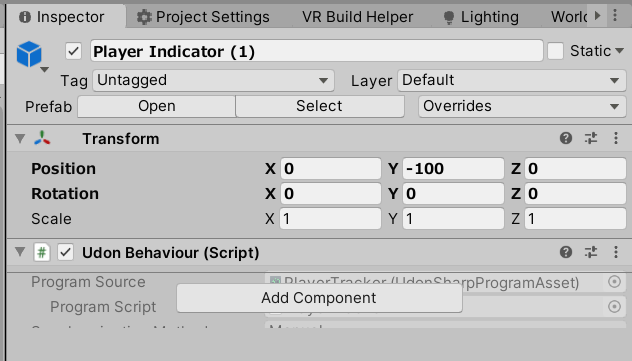
please help
the behaviour won't show me serialized data lol
And this is actively breaking the entire object
It sucked but I just delete the script and re-added it and its billion references, sigh
fading cipher
Anybody here ever had Build & Test not actually make a new build?
I have 40 copies of the same object and in-editor each of them have the exact same numbers because I've cloned them all off of one object
but I've gone through like 6 build & tests with 2 players so far, and the 1st one is correct while the 2nd is wrong
Which means those numbers aren't there even though they are in the editor???
I'm so flipping angry at this rn lol
it's been like an hour of testing repeatedly and this not working
supple root
dawn forge
Any errors in your console tab?
nope
 quartz meadow
anyone have a good idea of how many math operations I can do within a single frame without causing noticable hitching? Like a rough estimate?
vernal magnet
Is there a way to turn off the ability to pick up objects in a world? I don't want to turn off the object itself, just the ability to pick it up. I set this up with the target as the VRCPickup script itself, but that results in an error. I'm guessing I need to target the part of the script that says "pickup" and not the whole script itself, but I do not know how to do that.

Also I realize turning off the colliders of pick-ups will achieve the same effect, but not all the objects in the scene are kinematic which causes them to fall through the floor when I switch the colliders off.
night viper
vernal magnet
Also I realize turning off the colliders of pick-ups will achieve the same effec...
Have you tried using "pickupable"? This makes it so players cant pick it up while keeping their colliders (I am not sure why the node looks like that )
 vernal magnet
night viper
Have you tried using "pickupable"? This makes it so players cant pick it up whil...
vernal magnet
night viper
Have you tried using "pickupable"? This makes it so players cant pick it up whil...
This is what I'm looking for, thank you! But how can I actually target it? In variables I can only target the script itself, and I can't make this node an array version either.
grand temple
there is no such thing as targeting the array. That's the point of the for loop and the array get, that allows you to set properties on everything in the array individually
vernal magnet
But I do have to target something, right?
grand temple
yes, the pickup that you get from VRCPickup[] get
vernal magnet
Ohh I replace "Set enabled" with "Set pickupable"! It was that easy. Thank you both so much. The more I work with this the more I understand the language.
 limber wharf
Is the “compiled“ UDON Assembly plain text? And is it going to be interpreted at runtime?
fiery yoke
limber wharf
Is the “compiled“ UDON Assembly plain text? And is it going to be interpreted at...
Yes and no. It's not interpreted. It's a custom byte format that is read by a virtual machine.
limber wharf
Wouldnt it be better to convert the graph in C# code wich is being compiled to a library
I made a test where i made a c# script that rotated a cube and a udon script that did the same. Its such a simple thing but the c# version was 7 times faster. I mean for rotating cubes it realy does not mater but if you want to perform more havy things, it will get slow pretty fast.
plush stump
I put udon program on a Quad and now it seems to have infinite interaction distance, is that how Interact works for Quad object?
dapper lion
check your udon behaviour. it might be set to max trigger distence
 dapper lion
might be the collider size
 dapper lion
whats the size of the transform
also your z scale on your box collider might also be an issue but i dought
plush stump
I see, if the interactive collider box is behind another collider box, then the interact distance become infinite.
 hushed gazelle
Got a videoplayer question; Is there a way I can check if the videoduration exists so the player doesn't crash out if it's a livestream?
hushed gazelle
Figured out my problem; For future reference you can just compare GetDuration against IsInfinity. If it's streaming, it'll be Infinity.
 midnight gulch
Well I finally figured out why the world I bought was crashing.... I thought it was an udon issue
I accidentally left the default scene after I imported the world scene. Once I deleted the default scene it was all good.
🤦♂️
what a newb
 red girder
Is there any way of uploading a video with the world to be played by some video player?
dapper lion
red girder
Is there any way of uploading a video with the world to be played by some video ...
you can make a videoplayer autoplay a video url
but uploading a video into the actual world is not recommended nor do i think its possible since the videoplayer would pull from a local drive
red girder
Rip, ty
red girder
dapper lion
you can make a videoplayer autoplay a video url
Do you happen to know which filetype works the best? https://docs.vrchat.com/docs/video-players mentions both .mp4 and .webm
dapper lion
.mp4
red girder
ty ❤
dapper lion
ffmpeg would havea more detailed explanation
paper plinth
I wish there was a way to export my graph
I'd like to get some comments on my graph but IDK how to make it so you folks can see the whole thing
red girder
paper plinth
I wish there was a way to export my graph
I'd like to get some comments on my gr...
record video with sharex or something?
dapper lion
pretty sure people can open the graph .asset in udon sdk projects
paper plinth
I guess I could cut and paste it into paint
hmm
can you see it?
it works
it's a display terminal
 dapper lion
i would send screenshots if this is for here
dapper lion
wait. so if it works. whatre you trying to do again?
paper plinth
just cause it works doesn't mean it's the best/right way
paper plinth
for example, this is how I made it cycle back around to the first (or last) item in the array when it gets to the end (or beginning)

intObjectInViewer is what tells you which item in the array of gameobjects to make active
that makes them active depending on which number is up
 dapper lion
i believe theres a subtraction node you can use instead of addition
dapper lion
fair lol
as far as graphs go. this looks pretty good
I don’t know how youre starting tho
paper plinth
this makes the number change when you're not pushing the buttons, like a standby mode that activates after 30s inactivity
 paper plinth
dapper lion
as far as graphs go. this looks pretty good
paper plinth
dapper lion
as far as graphs go. this looks pretty good
lolthx
dapper lion
wait. standbymode is part of the same graph right?
paper plinth

yup this is all one graph
just the arrows have their own graphs bc idk how to do that without sending a custom event
this is on the buttons

it is ok to make two nodes go into one like that?
this is what the buttons do, they reset the timer and manually change the object to set active up and down
 dapper lion
paper plinth
this is on the buttons
dapper lion
paper plinth
this is on the buttons
why are you wanting it to fire on mouse up?
i would just do interact
other thatn that and what i can read. it looks fine
paper plinth
sweet
paper plinth
dapper lion
why are you wanting it to fire on mouse up?
so I can test it in the editor lol
works good too
dapper lion
oh
just remember to remove it in game or it might double fire
another thing you could do but dont have to is make a public text and set the text as the int youre using to show which option you are on in number form
paper plinth
sure could
I haven't got the display screen text yet
the girl is still doing her master's degree
but when she's done I'll have her thesis which will have little descriptions of each of the buildings, so there will be all that text.
dapper lion
ok now i have a question. whats the best way to get relative.velocity and save its value repetitively?
or actually. what the best way to get velocity without needing a rigid body?
wind atlas
dapper lion
ok now i have a question. whats the best way to get relative.velocity and save i...
Can you can tell us how you are moving your object, and how you intend to use those saved velocities?
dapper lion
ok so now im wanting to get angular velocity lol. ok so what im doing is making every instrument i can in vr this month. so right now im finishing the marimba and what i want to do is use the velocity of the “mallet” or “mallet head” and set the volume of the audioclip (via playoneshot) to the velocity the mallet was swung
and i think..... i should do angular velocity from the hand/pivot point
since that is a pickup AND has a rigid body to call from
hopefully that makes sence. if you want an example. look up videos of people playing the marimba
wind atlas
Sounds similar to swinging a sword in VR, right? I don't think you can use the velocity of the hand, it has to be at the tip.
wind atlas
dapper lion
ok so now im wanting to get angular velocity lol. ok so what im doing is making ...
The way I did that, I cached the positions of the sword each update loop and then calculated the speed/strength myself. I don't think it's super accurate though, if the user is swinging too fast for example, but at least it would work.
dapper lion
wind atlas
The way I did that, I cached the positions of the sword each update loop and the...
i was able to relative velocity to make breakable objects so im hoping angular velocity would be a better idea. but actually. i think your idea might give me more accurrate numbers. but i need this to be fairly optimized as the world im building for this will have so many calculations going on but i think ive kept things clean enough that i might be ok. I don’t know lol
but my reasoning to use angular velocity is because its coming from the rigid body that should in theory be more accurate
wind atlas
dapper lion
i was able to relative velocity to make breakable objects so im hoping angular v...
For performance, I don't think it will take much. I was thinking it could be as simple as this:
public Transform Tip;
public Vector3 LastPos = Vector3.zero;
public float Strength = 0f;

void FixedUpdate()
{
  Strength = (Tip.position - LastPos).magnitude;
  LastPos = Tip.position;
}
I can't comment on the angular velocity, never tried it like that.
dapper lion
wind atlas
For performance, I don't think it will take much. I was thinking it could be as ...
interesting, ill check this out. thank you!
ok. now i have another issue lol: so over the year, i have learned that using 100s of audiosources is not smart. so all my instruments use their own single audio source. howrver, this does make everything feel better. but it now makes it hard to make notes sustain in chords. for example: i want to play 2 notes via playoneshot on getkeydown. and on getkeyup, i want it to mute the previous audioclip, and i have been able to do this with a piano sustain pedal system. but not a note by note system. everytime i release any key. all notes are stopped instead of the key i released
basically. i want to control the length of an audioclip in realtime using 1 audio source and roughly 88 clips if not more
im doing “audiosource. Stop()” which is most likely the issue. but I don’t know of any other ways
i was attempting to do “audiosource.clip = newclip; audiosource.Play();” instead of playoneshot
 vernal condor
I have a question, I just started play on my oculus, and I was in a avater world, I was trying on some avaters and like one of em showed up, it was just making me the gray robot idk what to do to remove it ;-;
I mean, I see other ppl! Just not myself
 humble silo
i have a question how am i suppost to fix this is there a way to do getcomponent in udon#

 west mural
humble silo
i have a question how am i suppost to fix this is there a way to do getcomponent...
west mural
humble silo
i have a question how am i suppost to fix this is there a way to do getcomponent...
(T)GetComponent(typeof(T))
wind atlas
humble silo
i have a question how am i suppost to fix this is there a way to do getcomponent...
That's odd, it looks like GetComponent for materials is not exposed.
I don't know when you would use it in regular Unity, but Materials aren't really components anyway. So try getting them via the mesh, that's how I usually do it.
wind atlas
west mural
the type in front is the return type
I just tried what you wrote, but this is the result:
 west mural
yeah true, materials not compoents
humble silo
bruh this.GetComponent<MeshRenderer>().material.color = Color.red; i was doing this
but idk why it didn t work i remade the .cs file
and now it workt somehow
west mural
ah, yeah ((MeshRenderer)this.GetComponent(typeof(MeshRenderer))).material.color ...
wind atlas
west mural
yeah true, materials not compoents
Oh wait, GetComponent<Material>() would just always return null. Because Materials can't be components.
That's why it work in regular unity.
west mural
actually, ive been saying bullshit.
Yeah, GetCompoenent<T>() should work in U#
only exception is getting an UdonBehaviour
wind atlas
And I think some VRC scripts too?
wind atlas
west mural
other udonsharp scripts
I meant like stations for example, you also have to cast them... Btw, you are the person with the gravity stations from back then. I am trying to do something similar, but to rotate players so you can walk on planets and stuff.
west mural
someone showed off a concept for this a few weeks back at the community meetup
only thing is the animation controller
you apperently cant set parameters in the station animator
so i dont think there is a way to get a working walking animation
wind atlas
Oh, I think I saw that in another experiment I did. The animator you put in counts as another class (RuntimeAnimator or something like that), and isn't directly usable...
But I'm hoping that you could just use the default avatar parameters to make locomotion work.
wind atlas
What I mean is, the parameters that vrc sets for us, like this stuff:

But haven't tested it yet.
west mural
hmmm, i wonder if velocity is set in stations
and if it is set on the station controller
but that might work
wind atlas
Hopefully, otherwise you need to put people into a wheelchair or something before they can't access gravity lol
wind atlas
west mural
hmmm, i wonder if velocity is set in stations
Do you happen to know how the person did the rotation of the head?
There is something weird that happens. Basically, on seated desktop, you can move 90 degrees to the left and right before it stops.
 wind atlas
Currently, I just made it so I only move the seat when it reaches that amount. Otherwise it uses regular head movement.
west mural
wind atlas
There is something weird that happens. Basically, on seated desktop, you can mov...
jup, you need to rotate the player into the direction he looks in destop. In my spaceship i am doing it via angular velocity, but for walking on plants just snapping the rotation should be sufficient
wind atlas
west mural
jup, you need to rotate the player into the direction he looks in destop. In my ...
Snapping doesn't work for me because you get double movement. Ideally I would like to have super natural left and right movement.
Eh, hope that makes sense.
grand temple
Wait what, no, udon is NOT compatible with standard assets
What you're missing is udonsharp
I mean, standard assets would probably cause new errors that suppress the original errors maybe
It certainly wouldn't make the pool table work
Try deleting standard assets
 normal condor
greetings! i do have a question, maybe it's simple to do but i don't have any idea on how to do it
i want to have a key pickupable object (like a literal key) and once it collides with a door object, the door opens. also kinda want to have that same feature with a cd object and once it collides with a cd player, will play a song. i know it is a common gimmick in some worlds but i can't find any tutorials online on how to do it using udon.
grand temple
it's pretty simple, you just need to chain together a small handful of nodes. You first need an event which will start logic when something happens. In this case you'd be looking for OnTriggerEnter. OnTriggerEnter will give you a collider, and you can check anything you want about that collider to make sure it's the key that you want. You could check it's layer, check if it's name is exactly something, or check if it's name contains something. All of this would plug into a "branch" node which allows you to only do something if all the conditions are met. On the true side of the branch, you would send a custom event or set something on your animator which tells the door to open
There are two main things to be aware of though: First is that not everything you get in OnTriggerEnter is going to be valid. This means it's either null or protected, and as a result trying to interrogate such objects will crash your udonbehaviour. So the first thing you need to do in OnTriggerEnter is to use the isvalid node. If they're not valid, you can just stop there
The second thing to be aware of is networking. Technically, all of this code happens on everybody's computer independently. So if the key is synced and a player puts the key into the trigger, then everybody will see the OnTriggerEnter happen and everybody will see the door open. But that doesn't account for late joiners, as everybody needs to see the key actually enter the trigger. What you should instead do is that when you get OnTriggerEnter, you check who the owner of the key is. Then you can do a branch so that it will only continue if the owner of that object is local. Then you can make it so that player takes ownership of the door and sets all the synced variables necessary to sync with everybody more reliably, including late joiners
 river plover
grand temple
it's pretty simple, you just need to chain together a small handful of nodes. Yo...
river plover
grand temple
it's pretty simple, you just need to chain together a small handful of nodes. Yo...
I though that OnTriggerEnter would only work on players O_O
indigo wagon
river plover
I though that OnTriggerEnter would only work on players O_O
OnPlayerTriggerEnter is player only
river plover
i see....
dapper lion
wind atlas
For performance, I don't think it will take much. I was thinking it could be as ...
ok, so this works, at least sort of. i moved this function to ontriggerenter instead of fixed update and it seems to work ok lol. but i might try angular or relative velocity in the future but this works fine. tysm!
anyone have that spreadsheet with all the vr controller inputs?
hushed gazelle
How do you set custom destinations for a VRC_Portal? The world parameter just has "None" "Hub" and "Home" and I presume room ID just targets specific instances?
 lavish basin
 craggy harbor
 Does anyone experience VRCplayerapi.teleportTo function only teleport player's camera to the destination but leave player's avatar and collider at where it was bug.?
Seems the player will stuck on any collider on the way. I thought teleport was immediate position change, does it need a clear path??
mighty fjord
craggy harbor
<:vrcCatThink:784264661410381835> Does anyone experience VRCplayerapi.teleportTo...
Sounds like it might be related to what's described in this canny.
https://vrchat.canny.io/vrchat-udon-closed-alpha-bugs/p/teleport-sometimes-gets-stuck-on-geometry
 fiery yoke
TeleportTo is highly inter-frame timing dependent. You should never call it from OnDeserialization for example. It's safe to call it in Update. So you might just want to defer it to the next update call.
dapper lion
what is the audio count/voice count limit in game?
fiery yoke
Unity max audio source limit is 64
dapper lion
not sources. i mean like the “real voice” count limit in game
 silent nebula
Does anyone know why when I double click a script and when I try to write for eg "VRCPlayerApi." it doesn't show the members of the class?
 toxic nest
anyone got any ideas on creating the u# scripts? its not popping up
 hallow sable
how can I on interact get the person who interacted with it's name?
I thought I did it right but it's local
 fiery yoke
hallow sable
how can I on interact get the person who interacted with it's name?
fiery yoke
hallow sable
how can I on interact get the person who interacted with it's name?
Interact only happens locally. What youre doing is correct, but will only work locally.
hallow sable
so if I was trying to like
check who clicked a button how can I do that?
like trying to have little pieces and when people click on it, it puts their name above them
fiery yoke
There is multiple ways, but if you also want it to work for late joiners, you will have use a synced variable with the playerID or the displayName depending on your needs.
hallow sable
I have not been able to find a way so far :/
I would be fine with the non late joiner method
broken bear
What common events are triggered by other player interaction or movement? Just OnPlayerTriggerEnter/Stay/Exit, what else?
I know we run all programming local and our client sees a player cross bounds of a collider, I guess that’s it
dapper lion
playercollision, playerjoin/exit, stations. thats all i can think on the top of my head
hallow sable
would set owner and get owner be useful instead?
dapper lion
theres a few more tho
but i mean. if you wanted to post the playername on the text. im pretty sure you would just send a event with the string you have already aquired locally and sending it out globally
but i could be wrong. i have not touch playerapi in 10 days

 crisp oak
I was wondering if anyone here would happen to know how the recent "Poly Island" world allows players to climb other players.
I'm not an Udon dev, so I guess the question is more whether it's a prefab that's available/sold anywhere, or whether it's currently unique to that author/world?
hallow sable
Any guides for syncing strings? having issues with it tbh
 distant lava
hey can anyone help me getvrc plus? i tried buying it via oculus but it says the item is unavailable
grand temple
distant lava
hey can anyone help me getvrc plus? i tried buying it via oculus but it says the...
You can also buy it on steam
As long as the accounts are linked you'll keep it after you go back to oculus
distant lava
grand temple
You can also buy it on steam
I tried searching for it on steam no results
grand temple
You didn't find vrchat on steam?

 floral dove
distant lava
I don't see vrc+ anywhere
floral dove
distant lava
I don't see vrc+ anywhere
this channel is for help with Udon - you can try #user-support-old for general help from other users or #faq to learn where to ask other questions
 left venture
so anyone who knows how i can make a udon graph that triggers an animation when its geting hit 3 times? not sooner or later and its synced for everyone?
vernal magnet
Hello, I made this Udon graph to turn kinematics on when colliders turn off. It works, however because kinematics are off first, they don't turn on until I turn the toggle off then turn it back on. This makes the colliders/kinematics turn on and off at the same time. This is the opposite of what I want to happen: kinematics should turn on when the toggle (and colliders) is off, and turn off when the toggle (and colliders) is on. I'm unsure how I should change the graph to make this happen.

 broken bear
Which IsValid node should I be using?

Utilities.IsValid, or the one that comes up on a node search for IsValid
paper plinth
 cinder marten
What's your question?
You need to put VRCCam where you want your view
paper plinth
vernal magnet
Hello, I made this Udon graph to turn kinematics on when colliders turn off. It ...
if you want the top one to do the opposite, maybe put a unary negation after get ison
will this send a custom event containing the name of the gameobject it's attached to?

 hoary echo
Not really a dev question, but what is the general consensus on re-posting worlds that never left labs? I've got an older world I'm planning on giving a facelift, not sure if I should just update the OG world, or repost it as new.
grand temple
broken bear
Which IsValid node should I be using?
Both can be used. But one of them is just a branch built in, and most of the time you're going to plug isvalid into a branch so it just skips that step and gives you what you most likely need
broken bear
alright, thanks!
broken bear
for object pool, when a player leaves the instance, is there something under the hood that triggers OnOwnershipTransferred, or do I need to plan for a player leave event to return the object
grand temple
Either one. onownershiptransferred will go to the master
Though many things can trigger ownership transfer so you may get false positives. Onplayerleft is more specific
broken bear
I have a trigger area on the objectpoolmanager, I want to assign an object on enter (works), when a player leaves the trigger area or logs out, i want to return the object. Trying to figure out the trigger exit, whether it should be on a rigidbody on the object, or somehow access the assigned object from the objectpoolmanager to return it there
I guess I can assign the object onjoin and manage the trigger area seperately on the object through rigidbody but not sure how to get the exit either way
hmm I just may scrape it, raycasting this isn't consistent on update for me
Long story: I'm trying to object pool a raycast that plants a line renderer on the ground, but only activate when entering a trigger area, and returning it to thepool when leaving the area. I can get it to assign when entering the lake area here, but not sure how to return it when leaving. Also, the raycast sometimes stutters and I get a vertical line as shown in the clip https://gyazo.com/56b41050438678c294e6d49985d7f24c
 grand temple
It would be much easier to just assign an object to each player when they join the world and then enable the line renderer when they enter the trigger
also the built in object pool isn't really meant for assigning to players. I have a prefab for assigning objects to players on the prefab database, "simple object pool" that would be appropriate for that
broken bear
I was actually building off the obsticle course object pool with a rigidbody since I prefer working with graphs, and familiar with that from the jam
grand temple
That one can also be used, yes
Just assign on player join/leave instead of trigger enter
broken bear
I'll move to that, I'll keep at it 🙂
 feral merlin
Anyone know how to grab a player's name and check it?
I want to ban some individuals from my world and need a way to make a check on the player's name
broken bear
vrchat discourages hard-coded banlists unfortunately
feral merlin
Ah I see
broken bear
I think I got it! Set pooled object on join, return on leave, object has capsule collider set on a layer interacting only with a same-layer trigger area, child is a raycast trail renderer. Collision with trigger area on that specific layer causses a search of the pool manager's active pooled objects which may have caused the collision, then find that object's trail renderer, then enable or disable its emission.
adjusting maximum distance of raycast seems to help mitgate the jumping line as well, this should work, thanks for the tips
I wonder if I can feed the GetComponentInChildren's trailrenderer directly into SetEmitting without the local holding variable
Yep! Graphs are...fun?
updated graph
grand temple
I would recommend an isvalid before trying to do anything like get component
broken bear
Safety checks like this?

although the second one in the flow would always be true if the GetComponentChildren returns a result, if it somehow passes a null, the first equality check would capture that, so maybe just need the first? (keeping both, just thinkingof optimizations)
grand temple
No, isvalid on the object you get from the trigger enter/exit
 feral merlin
So is there a way to check the player's ID though? I want to make a room that only I can access
 tawny geyser
feral merlin
So is there a way to check the player's ID though? I want to make a room that on...
tawny geyser
feral merlin
So is there a way to check the player's ID though? I want to make a room that on...
https://docs.vrchat.com/docs/players Local player displayName up top there.
VRChat
You can interact with Players in your world through the VRCPlayerApi. Each Player has a VRCPlayerApi Object, and your world fires the OnPlayerJoined / OnPlayerLeft events on any UdonBehaviours that listen for them when a player joins or leaves. This page includes info on using some general nodes. Si...
vernal magnet
paper plinth
if you want the top one to do the opposite, maybe put a unary negation after get...
That did it, thank you!
However it only seems to work in CyanEmu, not in VRC itself. The cubes fall right through the floor when I test. Objects can definitely be kinematic in VRC so why wouldn't a kinematics toggle work?
indigo finch
hoary echo
Not really a dev question, but what is the general consensus on re-posting world...
I would post it as a new world. If it didn't get out of the labs, even if you update it, no one will get to see that it got an upgrade unless they have already favourited it (or has a link). You could technically un-publish and republish it, but I don't know if that effects its ability to get out. Btw, as for getting a world out of the labs, I wouldn't recommend updating a world while it's in the labs, as I've found that makes it much harder for it to get out.
 hallow iris
execuse me what? its hooked up, but why does it break at exaktly that point <-<

 vital pine
Ummmm does anyone have the code for the crystal hub avatar world
 snow silo
im new to making worlds what do i do if it dosent say build and publish for windows
vernal magnet
snow silo
im new to making worlds what do i do if it dosent say build and publish for wind...
Make sure there is a scene descriptor and check if you have errors.
snow silo
i accidently cleared the console so what do i do
vernal magnet
snow silo
i accidently cleared the console so what do i do
If you have errors and open the SDK or press play they should come back. Also since this channel is Udon specific, you should probably be asking your questions in #world-development
fickle stirrup
snow silo
i accidently cleared the console so what do i do
be sure you have proper Rank that allow you to publish worlds/avatars, you have Scene Descriptor component on your scene, etc. check tutorials about world making to vrc. or you have compile errors try right mouse click on vrc folder and Reimport, then on Udon rmb Reimport
snow silo
fickle stirrup
be sure you have proper Rank that allow you to publish worlds/avatars, you have ...
i do
paper plinth
vernal magnet
However it only seems to work in CyanEmu, not in VRC itself. The cubes fall righ...
Maybe it needs to be kinematic for one scan before you activate it or something, before physics is applied to the object and it starts falling.
vernal magnet
paper plinth
Maybe it needs to be kinematic for one scan before you activate it or something,...
Would that mean having it on by default and the.n perhaps... Turning it off with a timer? How long is a scan?
paper plinth
vernal magnet
Would that mean having it on by default and the.n perhaps... Turning it off with...
Idk it's just a guess
But I think you have to turn kinematic on
Then check to make sure kinematic is on before you disable the collider or whatever it was you were doing.
vernal magnet
paper plinth
Idk it's just a guess
But I think you have to turn kinematic on
Then check to ma...
Would this require using a branch node? I honestly have no idea how to set that up.
paper plinth
vernal magnet
Would this require using a branch node? I honestly have no idea how to set that ...
Probably, but here are other factors that can get a cube to drop through the floor. To use a branch node, you'd just add the branch before you disable the collider and check to make sure that kinematic is on and only disable the collider when that's true
*there
left venture
dosent vrchat suport normal spring join? made a button that u can push but when i test it in vrc it dosent work?!. eve traid to hit it with a game object. anyone who knows? Pleace @ me
hoary echo
indigo finch
I would post it as a new world. If it didn't get out of the labs, even if you up...
Huh, thanks for the info! That makes a lot of sense as I've got a different world that's been in labs over a year, over 350 favs and 9000 visits, but I've updated it probably 5 or 6 times, at least
vernal magnet
paper plinth
Probably, but here are other factors that can get a cube to drop through the flo...
I appreciate your help with this. I probably did this very wrong. I replaced the Block with the Branch. Currently it will make the kinematic toggle turn on, but it won't turn back off and the collider toggle doesn't work at all anymore.
 paper plinth
vernal magnet
I appreciate your help with this. I probably did this very wrong. I replaced the...
paper plinth
vernal magnet
I appreciate your help with this. I probably did this very wrong. I replaced the...
Then perhaps you were right the first time and your cube is falling through the floor for another reason
And in that case my solution won't do anything except break stuff, which is has, or nothing
vernal magnet
paper plinth
Then perhaps you were right the first time and your cube is falling through the ...
There's no in-game debug console to see why it might be falling through the floor, is there?
paper plinth
I think you can watch your colliders toggle on and off in the editor
that's why I spend all my time rigging my graphs to work with mouse clicks
cause in the editor I can see stuff toggle on and off
iirc if your object has physics and a collider and the floor is a collider and they're on the same layer then it won't fall through the floor
vernal magnet
By editor do you mean Unity? I can see them toggle there.
paper plinth
yeah unity
vernal magnet
Yeah, again it works just fine in Unity, it's in VRC that it doesn't.
Although sadly the Branch fix didn't work in Unity or VRC.
paper plinth
that's not what's wrong then
I wonder if there's a vrchat componenet you haven't added or a setting you need to toggle
vernal magnet
I tested something and I think I figured out what's wrong.
The cubes are pick-ups, and I think the fact I'm toggling off the colliders without toggling off the pickup is interfering with it. To test it I just turned off the collider and kinematic of a cup I have in the world, Built & Tested it, and it fell through the floor.
Edit: Actually that doesn't make much sense, if I toggled off the collider and kinematics is would fall through the floor wouldn't it?
Nope that wasn't it. 😅 Well I will either figure it out or just give in and make the cubes kinematic. I appreciate the assistance!
paper plinth
oh they are pickups
that's different
when I try messing with pickups they go flying across the map
another thing you can do is replace that gameobject with an identical gameobject that has the settings you want
depending on what it is
vernal magnet
paper plinth
when I try messing with pickups they go flying across the map
It's interesting you say that because they go flying when I test in Unity with CyanEmu, but don't do that when I test in VRC.
paper plinth
like if I had an item that the player needed to use, I'd put a dummy there with an interact on it, like a button, and on interact, hide the dummy and put the actual pickup in its place, and let it fall gracefully to the floor
vernal magnet
Sadly the object the needs to stay. What I'm making is basically a small photo studio world. The cubes are movable "chairs" that can be used for posing. However depending on if a person has FBT or not, they may not want chairs or colliders. In case the colliders are off, the cubes need to be kinematic so they don't fall.
 vernal magnet
Is there another way to basically tell it 'when x happens don't move'?
paper plinth
switch the mass to 0 and freeze the x,y,z position and disable the pickup?
I didn't know we were allowed to instantiate
 tacit pasture
if i wanted to teleport a player that isnt LocalPlayer, how would i go about doing this. e.g. one player presses a button, it then teleports another player in the instance
fiery yoke
tacit pasture
if i wanted to teleport a player that isnt LocalPlayer, how would i go about doi...
That is indeed not trivial. You need to use either Custom Network Events or Synced Variables.
tacit pasture
gotcha, is that all documented on https://docs.vrchat.com/ ?
VRChat
fiery yoke
The concepts itself are documented yeah. But how to properly use them can get a little tricky. Especially for what youre trying to do. I would recommend to use the "playerID" from VRCPlayerApi and a Synced Variable in Manual Sync Mode.
tacit pasture
my plan was to log and create there playerID when they join then call that for the tp
 topaz jetty
you don't have to create a playerID
vrchat has it's own player ID system
VRCPlayerApi.playerId
tacit pasture
yeah thats what i ment
topaz jetty
you can make it sync a vector3 and player ID and teleport them with that
tacit pasture
yeah i think that could work
topaz jetty
you'd have to make sure that it only teleports them once though, so not every time OnDeserialization is called
tacit pasture
yeah
topaz jetty
you could make a system with some sort of request ID or something
tacit pasture
i think ive got a plan, well see if it works
paper plinth
throw an object, like a wrench, and enable the collider when you throw it, and teleport whatever it touches
if you can dodge a wrench you can dodge a ball
can I set an objects position below the respawn height to get rid of it / destroy it?
topaz jetty
[UdonSynced] private int playerIdToTeleport;
[UdonSynced] private Vector3 teleportPosition;
[UdonSynced] private int requestID = 0;
private int lastFinishedRequest = 0;

public void TeleportPlayer(VRCplayerApi player, Vector3 positon)
{
Networking.SetOwner(Networking.LocalPlayer, this.gameObject);
playerIdToTeleport = player.playerId;
teleportPosition = position;
requestID++;
RequestSerialization();
}

public override void OnDeserialization()
{
if (Networking.LocalPlayer.playerId == playerIdToTeleport) {
if (requestID != lastFinishedRequest)
{
// teleport local player to teleportToPosition (forgot the method name)
lastFinishedRequest = requestID;
}
}
}
``` @tacit pasture something like thisohhh nice, i reakon that could work
 stone kelp
Would it be possible to make so a button is only clickable if UntrustedURL is active?
U#
 storm kettle
every udon script i have in my project has an error.
[<color=#FF00FF>UdonSharp</color>] Assets/vertex-color-pens-main/Scripts/VCPensPen.cs(12,4): System.Exception: User type VCPensPen could not be found
every script says "user type could not be found"
i have the correct unity ver, sdk3, and udon sharp. idk why its doing all of this(im completely new at making worlds)
topaz jetty
stone kelp
Would it be possible to make so a button is only clickable if UntrustedURL is ac...
no, your best option would be to have a popup where it says the person must have untrusted urls on with a continue button
stone kelp
topaz jetty
no, your best option would be to have a popup where it says the person must have...
I've tried that, However the majority of the playerbase don't read and if it's a message blocking their view they just close it
topaz jetty
stone kelp
I've tried that, However the majority of the playerbase don't read and if it's a...
yeah guess the only option would be to make it more in your face (big letters and screenshots of the option menu with red arrows or something so it's easy to see what to do)
stone kelp
topaz jetty
yeah guess the only option would be to make it more in your face (big letters an...
Exactly what I have, You can't really proceed into the world without closing it
topaz jetty
and maybe a 5 second countdown before they can press continue
so button > popup > wait 5 seconds > continue
stone kelp
Large text & image, I was thinking about a countdown before but will just make it annoying for frequent visitors
topaz jetty
yeah it is, but it gets the message across better I guess
stone kelp
Thanks tho! 👍
I'll send a mail to VRChat support if something can be improved about the overall idea about untrusted url
fiery yoke
The untrusted urls thing is a temporary solution
The original plan was to make it so you can make your own whitelist of trusted domains and maybe even a per world setting or something like that
topaz jetty
@stone kelp ok there's a pretty janky solution you could use:
first try loading an untrusted URL on a video player, for this usecase just try loading a short few second video on a local non synced video player so it loads fast
then ```cs
public override void OnVideoError(VRC.SDK3.Components.Video.VideoError VideoError)
{
if (VideoError.AccessDenied)
{
// stuff when untrusted urls is off
}
}
Yikes! Yea... 500 visits is usually enough to get it out
 wanton palm
how do you access player bone position again?
Networking.LocalPlayer.GetBonePosition(HumanBodyBones.Head)
something like this right
cold raft
yes something like that
 torn sedge
Can I play VRChat internationally?
cold raft
probaly
grand temple
If you are using sendcustomnetworkevent then no, they are not buffered to late joiners. You should instead have synced variables and manual sync
stone kelp
fiery yoke
The original plan was to make it so you can make your own whitelist of trusted d...
Ah I see, The perfect idea would be if we could have a button "Do you agree to enable Untrusted URL?" -> User clicks -> Untrusted gets checked, Or just without it,
Can anything malicious be used over UntrustedURL?
Do you know the main idea behind that feature?
In my eyes it just puts an hinder to anyone who wants to play media for Quest users / outside direct Youtube links
quartz meadow
does udonsharp not support the class "TMP_Dropdown"?
TextMeshProUGUI (the normal text object) seems to work fine
I do have "using TMPro;" at the top
quartz meadow
wanton palm
> ```csharp
> Networking.LocalPlayer.GetBonePosition(HumanBodyBones.Head)
> ```
yes
keep in mind if someone is using an avatar without the bone you specify, it will error out
fading cipher
Out of curiosity, is there an ETA on VRC’s persistence?
quartz meadow
quartz meadow
does udonsharp not support the class "TMP_Dropdown"?
answered my own question, it is not supported
Also, any word on list support?
 dreamy gorge
Can someone help me with my udon graph? This is supposed to change the Z Rotation of a cube from the Slider value
 quartz meadow
what do you mean not work? also quaternions do not work that way
depending on what you are trying to do, converting to EulerAngles is probably a better bet
 quartz meadow
quarternions, as simply as I can put, are a 4 dimensional way of representing 3d rotation while avoiding gimbal lock. you cannot really just modify one of their values and since they are in imaginary space, their math gets weird fast. I suggest you try to convert the quaternion into a 3d euler vector (like the xyz rotation you see in unity), then convert the euler angles back into a quaternion (since thats what an object rotation takes)
actually there may be a eulerangles property you can also modify directly
 quartz meadow
not quite. seriously, quaternions need quite a bit of a math background to work with, and a lot of reading. I suggest this:

there is also a transform -> set euler angles
I would actually use that

this takes a vector 3, so you are gonna have to make a vector 3 first
 quartz meadow

yup, I think this should work better
I dont really use udon graph, I use udonsharp lol
quartz meadow

GitHub
An experimental compiler for compiling C# to Udon assembly - GitHub - MerlinVR/UdonSharp: An experimental compiler for compiling C# to Udon assembly
just code in regular ol unity c#
works just fine
dreamy gorge
i tried using regulart unity c# but it was very angry at me
maybe this wpould work better
quartz meadow
I think very simply stuff may be easier to make in udon graph, but at a certain point for large projects, udonsharp is the way to go
unity c# will not compile for vrchat
since it has access to system fileio and stuff
which, obviously wont end well
dreamy gorge
quartz meadow
this still doesnt work!!!
quartz meadow
something else isnt causing it to trigger likely then
dreamy gorge
they need to put error messages in the graph thing
quartz meadow
there is actually
quartz meadow
VRChat
What is Debugging? Debugging is how you learn about what's going on under the hood in the VRChat client and your world. It's a key skill to develop for programming in general, and for building your worlds. VRChat Logs When you use the VRChat client, it saves logs about things that happen like worlds...
Shift + Backtick + 3
dreamy gorge
Where do you use that combo?
quartz meadow
keyboard, even in vr
you can also just go to your appdata/LocalLow\VRChat\VRChat folder
logs will be saved there as well
 quartz meadow
all of them are total vrchat logs, check your most recent one, and search for this line
[UdonBehaviour] An exception occurred during Udon execution
if your code errored, it will spit some stuff here
if it doesnt show up, it means your code didnt error, so I would likely pin it on not starting at all
 quartz meadow
oh, you are testing in unity itself?
dreamy gorge
yes
quartz meadow
so, unity itself, interestingly, cannot run vrchat script, but there is a work around
GitHub
CyanEmu is a VRChat client emulator in Unity. Includes a player controller with interact system. Works with SDK2 and SDK3. - GitHub - CyanLaser/CyanEmu: CyanEmu is a VRChat client emulator in Unity...
import this, it is a vrchat emulator for unity
basically, it will make the play button work as expected
dreamy gorge
ah instead of putting you in the camera
quartz meadow
yeah, it will give you a dummy capsule avatar to go around and stuff
you can also click and do most thing desktop players can
dreamy gorge
How do you install that
quartz meadow
its discussed in the getting started section. basically, just download the file and in unity, go to assets, import package, custom package, and select the fil;e
it will take a minute or two
dreamy gorge
oh lol i shoud've read that my bad
quartz meadow
no worries
quartz meadow
nah, its pretty straight forward. after that, your play button will work, and you can walk around, test buttons and stuff
 quartz meadow
so, the main error is that the object reference is not set
dreamy gorge
holy shit
quartz meadow
what does your udon thing look like in unity?>


 quartz meadow
lol F
quartz meadow
welcome to progrmaming mate
dreamy gorge
my bad
quartz meadow
if it makes you feel any better, cyan will show those errors realtime
dreamy gorge
i couldnt really tell because the error was overwhelmingly large
o thats nice
im definetly gonna use that
i cant be spending an hour on a simple udon script 😄
quartz meadow
its great, not just for programming, but also for world building
we all start somewhere, no worries
dreamy gorge
game dev is new to me
im usually a python dude
i swear if this works after changing that im gonna cry
quartz meadow
this channel is excellent for learning udon

YouTube
Environment and Interaction Developer for Social VR | Udon Tutorial Series Creator
he does both udon graph and udonsharp
I suggest udonsharp if you are more comfortable with text based programming
dreamy gorge
yeah ill need to find a way to get that running
quartz meadow
same deal as cyan, just import the release
dreamy gorge
lmao
quartz meadow
oh, wait till you discover the joys of unity networking lmao