#udon-general
59 messages · Page 71 of 1
 plush stump
 grand temple
it starts at 0
plush stump
Thanks, I find there's a node that can set InteractionText for vrcpickup, is there a way to set InteractionText for udon behaviour instead of manually set in Inspector?
 nimble stirrup
on my first world in VRChat I have this error : export exception - system.DIINotFoundException: Shell32.dll. is anybody knowing what is it about ? Thanks.
 grand temple
I'm not familiar with that error. Just to be sure, could you clarify what steps you took to get to this point? In particular, what unity version are you using and how did you import the vrchat SDK? Did you install any other packages?
nimble stirrup
unity 2019.4.30F1, I downloaded SDK on my computer (by VRChat website), and then i got on : import package and downloaded the SDK package. I imported a unity package afterwards...
grand temple
did you move any folders around after importing the SDK?
For that matter, what does the folder structure in the "project" tab look like?

 grand temple
That's very unusual. Is there anything else that might be important? Are you on linux or mac? Do you get this same issue if you create a brand new project and just import the SDK alone?
nimble stirrup
mac
grand temple
ahhh right
nimble stirrup
I have a PC I can try it on...
grand temple
I don't think the vrchat SDK is supported on mac. It used to at least mostly work, but with the 2019 update I don't think it does at all
 cursive vapor
heyo more of a unity vrchat specific question but when i add a new layer do i need to re set up the collision stuff/layer stuff that we normally do at the beginning of projects
 fiery yoke
cursive vapor
heyo more of a unity vrchat specific question but when i add a new layer do i ne...
fiery yoke
cursive vapor
heyo more of a unity vrchat specific question but when i add a new layer do i ne...
FYI: Custom Layers are not uploaded to VRChat since that is something project specific.
cursive vapor
good to know ty!
so adding any new layers is a no no :O ? how do ppl do it in some of the packages im using
or am i confusing custom layers
grand temple
the name of the layer does not get uploaded, but you can still use the number and the collision matrix. That does get uploaded with your world. Anything after layer 21 is fair game for you to create a custom layer
not sure what your original question is though... you set up the built in layers once, and then you can create your own custom layers outside of that. You don't have to redo the built in layers if you don't ever touch them
cursive vapor
i made a layer 22 for a specific use case. Dont think i need the name necisarilly but am i understanding you correctly that if i dont need to adjust anything with that layer im all good
and itll upload/work?
grand temple
sure, you can define exactly how that layer interacts with all the other layers and everything
or you can just leave it default
but I'm not sure why you would need a layer if you're leaving it on default
 severe plaza
so, is their some trick with chairs? it seems to be super touch and go where ppl end up on it even if its fine in the test build
cuz...it even throws ppl way up in the air then back down on mine and other worlds for me/friends :L
 echo steeple
severe plaza
so, is their some trick with chairs? it seems to be super touch and go where ppl...
echo steeple
severe plaza
so, is their some trick with chairs? it seems to be super touch and go where ppl...
Chairs kinda suck in this game. There are some assets that attempt to improve this. Check out Reimajo on booth, he has a Chair prefab that fixes all of the major issues and has auto calibration and can be adjusted to use with any seat setup.
severe plaza
echo steeple
Chairs kinda suck in this game. There are some assets that attempt to improve th...
i lowkey wana say i love you XD kinda used to not getting any answers. will 100% look into Reimajo. looks like they have a demo as well
echo steeple
Yea, he makes good stuff, I use the script for spaceships in my world as the basic chair would always position players wrong so it never looked like they were sitting on the seat correct depending on avatars. Now everyone is positioned where they should.
fiery yoke
@cursive vapor Yeah sorry I confused something. You can of course use the 32 layers that Unity gives you and configure the collision matrix.
severe plaza
echo steeple
Yea, he makes good stuff, I use the script for spaceships in my world as the bas...
tried it and got nothing but errors even following his video after, sigh idk. sitting shouldn't be this hard... or finding updated info
echo steeple
Join his discord. That absolutely shouldn't be the case. Seeing your errors would be very useful
He's really good with providing support.
German so prob online rn too
severe plaza
echo steeple
Join his discord. That absolutely shouldn't be the case. Seeing your errors woul...
ok, doing so
echo steeple
Good luck. I hope it works out. I'm in there too
 broken token
If I wanted to spin an object, or lift up and down a platform, I must do it in udon or I can use normal c# scripts?
 dapper lion
broken token
If I wanted to spin an object, or lift up and down a platform, I must do it in u...
dapper lion
broken token
If I wanted to spin an object, or lift up and down a platform, I must do it in u...
udon graph or udonsharp is what you can do
echo steeple
UdonSharp is a C# compiler for UDON
dapper lion
but it is very limited
broken token
I'd like to just loop a platform going up and down and maybe make a sound each time it stops. I guess I can do it with udon sharp?
echo steeple
absolutely
can do it with normal UDON assembly as well, but where's the fun in that?

GitHub
An experimental compiler for compiling C# to Udon assembly - GitHub - MerlinVR/UdonSharp: An experimental compiler for compiling C# to Udon assembly
 vital wind
Can udon enable multi core for cpu?
 lean sleet
How can i change the player speed?
 cold raft
vital wind
Can udon enable multi core for cpu?
cold raft
vital wind
Can udon enable multi core for cpu?
No udon has no controll over cpu or gpu
cold raft
lean sleet
How can i change the player speed?
there is a simpel basic script that lets you set gravity / speed etc let me see if i can find it
lean sleet
cold raft
there is a simpel basic script that lets you set gravity / speed etc let me see ...
👌
echo steeple
Jetdogs udon prefabs has a Udonsharp and an assembly example for player movement with SDK2 stutter step emulation if desired.

GitHub
A compilation of prefabs and other useful items for vrchat users. - GitHub - jetdog8808/Jetdogs-Prefabs-Udon: A compilation of prefabs and other useful items for vrchat users.
lean sleet
echo steeple
Jetdogs udon prefabs has a Udonsharp and an assembly example for player movement...
Ok
lean sleet
echo steeple
Jetdogs udon prefabs has a Udonsharp and an assembly example for player movement...
Sorry but i can't use it
echo steeple
Why?
lean sleet
echo steeple
Why?
some problems with unity that i can't get it in.
echo steeple
What do you even mean?
It's a unity package, you just drag and drop it into your project
cold raft
lean sleet
👌
you need an udon behaviour like this
 lean sleet
cold raft
you need an udon behaviour like this
lean sleet
cold raft
you need an udon behaviour like this
it's ok if i use the only first 2 right
cold raft
yes
lean sleet
but what do i put the script at?
cold raft
wel on any gameobject, i useally put this on the game object i have my vrc world descriptor on
clock add component and choose udon behaviour
then click open grapth and create this
lean sleet
so i just put it at the player join?
 echo steeple
Press space and type playerapi and hit enter and search for the nodes you want.
You also don't need those variables because you're only setting this once on load
If you can't figure it out, look into adding that collection of free scripts and prefabs I linked. You'd just drag and drop the already setup player movement prefab into your scene and you'd be done. Learning assembly is good to do as well but none the less.
Your run speed node also has no start
 burnt moth
i have the togglegameobject udon graph but when i go click there is no trigger anywhere
where i can click
i put the script on the thing that should activate the event
but it aint workin
echo steeple
You need a collider on something like a cube with the script on it.
 soft scaffold
Hi I working through the editor window code in the obstacle course project and I am learning alot, if I am correct all game objects are looped through until the right udon behaviour is found and returned. My question is, is this the only way to assign an udon behaviour file to an udon behaviour variable?
 floral dove
soft scaffold
Hi I working through the editor window code in the obstacle course project and I...
floral dove
soft scaffold
Hi I working through the editor window code in the obstacle course project and I...
It's not the only way, no. I've done it by referencing the name of a GameObject or the path to that GameObject in the hierarchy as well. The challenge is that an EditorWindow will 'forget' references to anything it hasn't serialized on every "assembly reload", which happens often. AND - you can't serialize references to objects in the scene.
So you need a way to find UdonBehaviours in your scene if you want to set their variables. In the case of this project, we use an approach where giving any UdonBehaviour a certain name and type of variable will have a particular reference set automatically, as a sort of dependency injection: https://en.wikipedia.org/wiki/Dependency_injection
In software engineering, dependency injection is a technique in which an object receives other objects that it depends on, called dependencies. Typically, the receiving object is called a client and the passed-in ('injected') object is called a service. The code that passes the service to the client is called the injector. Instead of the client ...
soft scaffold
ok thanks @floral dove
 pliant spade
How do i make this local?
 floral dove
pliant spade
How do i make this local?
floral dove
pliant spade
How do i make this local?
check if the player .IsLocal
 sweet star
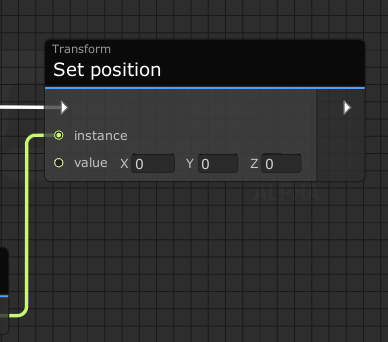
Hey, quick question. Trying to randomize the Y of this, but it only takes one input, a Vector3. Is there a way to maybe generate a Vector3 out of three floats, or something that will let me randomize that Y?
https://i.imgur.com/MbVN8M0.png
 fiery yoke
sweet star
Hey, quick question. Trying to randomize the Y of this, but it only takes one in...
fiery yoke
sweet star
Hey, quick question. Trying to randomize the Y of this, but it only takes one in...
There is a few approaches to this rather simple seeming problem. Its quite intricate due to how C# handles Value-Types (which includes structs, Vector3 being one).
The "best" approach I know is to get the position, then construct a new Vector3 with x being your position.x and z being your position.z, and y being your randomized value.
sweet star
I just want the value [0, Random(0, 0.2), 0] essentially.
fiery yoke
In that case you can simply multiply Vector3.up by your random amount
Vector3.up is a Vector that points up in world space so its (0f, 1f, 0f)
sweet star
That's a strange constructor 😅
fiery yoke
Its not a constructor
The actualy constructor of Vector3 is in Udon can be found by searching "Vector3 => constructor"
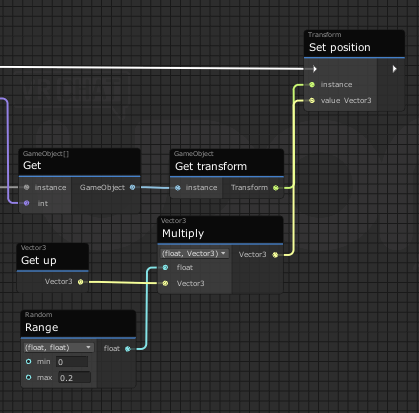 fiery yoke
Vector3.up is a static read-only property of the Vector3 struct that gives you a Vector pointing up ;)
fiery yoke
sweet star
So something like this?
Yup
fiery yoke
Well, this is very biased, but I really love the way C# works, because it forces you upfront to be very deliberate about the choices you make and prevents you from making bad assumptions or general logical mistakes that would come back to haunt you later on.
You have a Vector pointing up. You essentially scale it (by multiplying it, not to be confused with Vector3.Scale which multiplies component wise, which is semantically weird mathematically speaking but thats another topic) and you get a new Vector that is still pointing up but more or less.
sweet star
My personal take is that Python has one of the lowest "brain-to-code" times, and the more boilerplate or strange syntax that gets in the way of the thing you want to happen being on screen, the worse.
fiery yoke
Yeah thats the mindset of developers who have to rush things to meet deadlines and cant spend much time on optimisation and code practice.
C# is the opposite ;)
You can btw also just construct a Vector3 with 0, your random number, 0
But I like doing the multiplication method because its more "explicit" of what youre doing mathematically in my mind. But its up to you what you prefer.
sweet star
For instance, if I wanted a vector pointing "up-left," how would I go about that? I now have to dig through all my options, maybe use a special constructor or add Vector3.Up, scale that, make a Vector3.Left, scale that, add them together... maybe that's not the solution at all? Like, it's not even about rushing it, it's frustration between "here's what I want to make" and "why am I sitting here setting up a bunch of stuff instead of making the thing I want to make" (a huge issue with say, Java.)
fiery yoke
You do Vector3.up + Vector3.left :)
fiery yoke
But thats the whole point. It isnt as complicated as it may seem at first, since the foundation of how C# works is very very logical. You dont have to cut corners like in Python or even god forbid JavaScript.
sweet star
I've always been an advocate for "use the language your brain works best in," but the Python slander, man, dang 😄
fiery yoke
Well I mean obviously. If someone just cant work with a certain language then it wont help them at all. I think it just needs some time getting used to tho.
floral dove
@sweet star you could always pick this project back up: https://github.com/zz-roba/UdonPieCompiler

GitHub
UdonPie Compiler translates UdonPie code into Udon Assembly. - GitHub - zz-roba/UdonPieCompiler: UdonPie Compiler translates UdonPie code into Udon Assembly.
fiery yoke
Ohh well yeah, good luck with that... xD
sweet star
Oh for sure. I plan to learn C# (mainly for VRC/Unity specifically) but Python is still the langauge of my heart. I've had great success making some pretty dense projects in it for 5 years running 😄
Another question, is there a way for me to fill a GameObject[] variable without dragging 100 elements into it manually? 😄
floral dove
@sweet star yes - you can write an Editor Script to do that
fiery yoke
You can actually mass select GameObjects and drag them all into an array to populate them. However I think you have to lock the Inspector Window for that
floral dove
I believe you want to target UdonBehaviour.publicvariables.TrySetVariable
sweet star
fiery yoke
You can actually mass select GameObjects and drag them all into an array to popu...
That doesn't seem to work?
fiery yoke
It needs to be done in a pretty specific way
sweet star
I'm not sure how to write Editor Scripts and it seems overkill here 😄
fiery yoke
Ohh yeah I forgot, I think the UdonBehaviour Editor cant handle array population like that
sweet star
oh no, so it really is drag and drop time? 😖
They're all under a prefab, can I just say like "everything that's a child of X"?
and then just have one variable which is like "the parent object"?
floral dove
sweet star
and then just have one variable which is like "the parent object"?
yes, you can retrieve them that way at runtime
sweet star
awesome, what node do I use for that?
floral dove
you'll want a "For" node. You can see a simple example of how to use For nodes to loop through arrays here: https://docs.vrchat.com/docs/udon-example-scene#clickablecubeforloop
sweet star
ah, I'm already using one
one sec
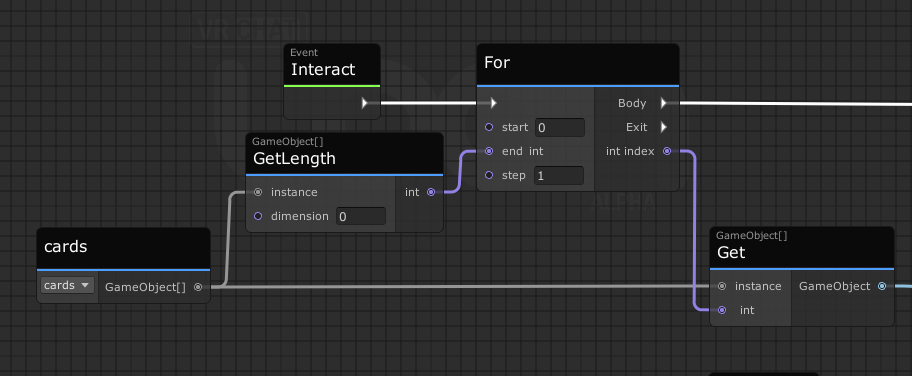
but I want to replace the GameObject[] with one object it searches the children of
floral dove
In Unity, it's Transforms who have children, so you could use Transform.GetChild along with Transform.childCount: https://docs.unity3d.com/2019.4/Documentation/ScriptReference/Transform.GetChild.html
 dapper lion
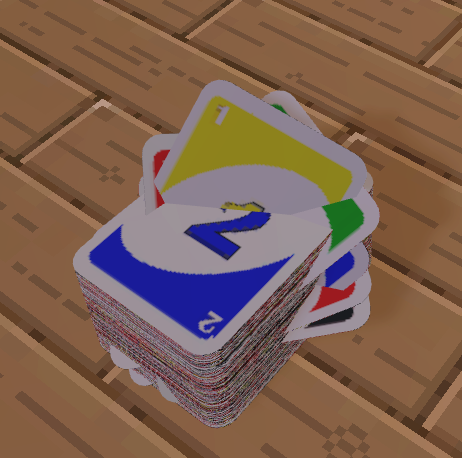
are the cards atlased?
sweet star
My friend recommends making like a random spawner instead of spawning all the cards at once, but I really wouldn't know who to do that 😄
sweet star
dapper lion
are the cards atlased?
What do you mean by this?
 calm smelt
sweet star
My friend recommends making like a random spawner instead of spawning all the ca...
calm smelt
sweet star
My friend recommends making like a random spawner instead of spawning all the ca...
You dropped from 120 fps in the world to thirty!

floral dove
oh yeah - no need to have all the cards active if you're only using a few at a time. You could use an Object Pool: https://docs.vrchat.com/docs/udon-example-scene#objectpool
calm smelt
Would it be easy to have a pool and randomly spawn from said pool?
floral dove
calm smelt
Would it be easy to have a pool and randomly spawn from said pool?
yes, you can Shuffle the order of the objects in the pool. It will sync by default since the Owner of the pool owns all the objects, but if the owner changes, that order is not automatically synced so you'll want to end the current hand and have the new owner reshuffle
 sweet star
@floral dove How do I populate the Object Pool without
a) dragging and dropping every object in
b) having the objects still in the world on spawn?
grand temple
you can lock the inspector while selecting the object pool. Then you can freely select all your objects without it changing the inspector, and drag all of them into the pool at once
sweet star
Thank you Phase for the solution to A!
B is still in question though, the objects are still like, there, in the world.
floral dove
the objects need to be in the world, but you can have them all Inactive
sweet star
OK, so, let me see if I got this.
Have a "pool" of cards inactive somewhere in the world.
Have a single card on the table, that when you interact with it, spawns an object from the pool and sets it active.
Not sure how to do the reset button here though.
Maybe that's not even right. I'm getting confused 😄
floral dove
yep, that sounds right. Reset would just be a loop that returns all the objects to the pool. If only the Owner of the Pool can reset, you're good to go. If anyone can reset, you'll want to send a CustomNetworkEvent to the owner of the pool to ask them to reset instead.
(only the pool's owner can return pooled objects)
sweet star
Huh, I assume it's not this simple, is it.
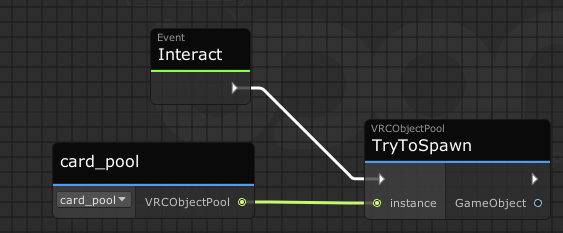
Since this doesn't work 😄
(nor does this, for the record)
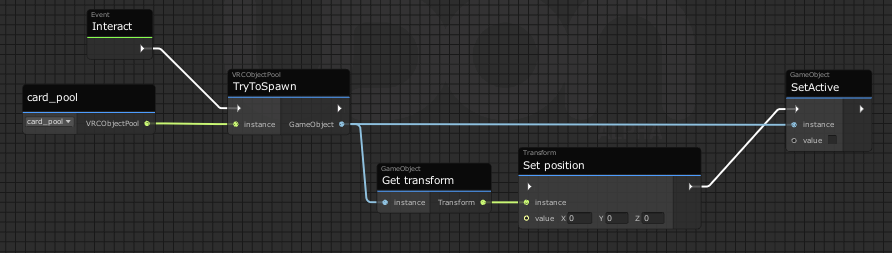 echo steeple
Isn't there an example Object Pool with the SDK?
Yea, there is. Just search "Object Pool" in your asset folder and you'll see the example you can change for your use
sweet star
I'm not sure either of those examples are what I'm trying to do, and they look like they use TryToSpawn anyway.
Maybe I'm just confused. What I'm trying to do is have a single card on the table that when you click, spawns a new card from the pool so they player can pick it up. Later, I need a reset that removes all these cards.
echo steeple
yea, that's why I suggested you can just change them to your use. They are at least working examples.
There is also a working example of an Assembly setup and an UdonSharp setup in JetDogs UDON prefabs pack for exactly what you are doing without any changes xP https://github.com/jetdog8808/Jetdogs-Prefabs-Udon
sweet star
Well I want to like, learn how it works 😄
I just don't know where to start with it if "TryToSpawn" isn't even, trying to spawn 😛
I'm not really looking at learning U# rn.
echo steeple
xP that's why I mentioned it has an assembly version as well if you just want to see how it's setup
sometimes seeing how things are done is a really good way of learning how to do it yourself
sweet star
I'm sorry, then, what's the name of the prefab I'm looking for?
My brain is a bit foggy today, been having thyroid issues.
echo steeple
object pool
IIRC there should be a prefab for both in there. been a while. I personally use U# because it tends to be more reliable
edit: just looked, I guess there isn't an assembly prefab, because the SDK already comes with an assembly example so one wasn't included which makes sense. Good luck then.
floral dove
sweet star
https://i.imgur.com/k7dKfSJ.png
that should work if card_pool is valid. Do you get any errors when you Build & Test that?
 glossy sky
Hi. I've come across an issue I have no idea how to tackle regarding object pooling. So, I was wanting to in most simple terms, assign different shapes to a players head whenever they joined. So person A got a sphere, then person B got a cube and it could change and vary.
https://i.imgur.com/VkiMOGo.png
When the player left, I'd want them to return the cube they were assigned.
https://i.imgur.com/Ty2K9OE.png
The issue I'm having however is where it gets weird which I don't understand why-- basically, whomever was the original world master somehow breaks the graph upon rejoining or I assume rather, when they the master leaves. Is there a way around this and am I just taking this on in an incorrect way?

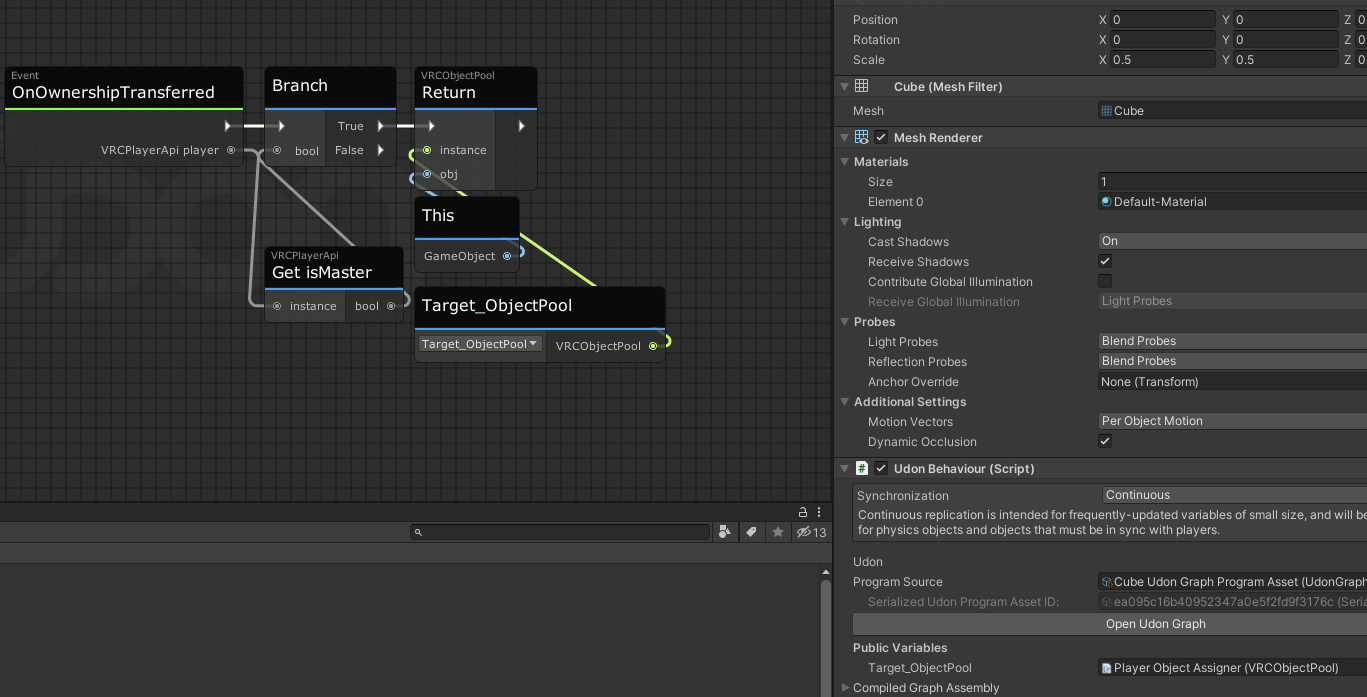 floral dove
glossy sky
Hi. I've come across an issue I have no idea how to tackle regarding object pool...
floral dove
glossy sky
Hi. I've come across an issue I have no idea how to tackle regarding object pool...
you can take a look at the Udon Obstacle Course's PlayerDataManager, which does this: https://docs.vrchat.com/docs/uoc-how-stuff-works#playerdatamanager
VRChat
How all the different programs and custom editor scripts work together in the Udon Obstacle Course
glossy sky
OOOO. Thank you thank you.
floral dove
first off - you want to check for the Owner of the object not the Master, since the Master might not be the owner
the other issue is that you want to know whether an object is changing ownership due to a player joining, or due to players leaving (including the owner of the pool, who owns all the objects)
the way this works in the Obstacle Course starts off much the same - when a player joins, TryToSpawn an object and assign it to them:

the difference is here in the actual logic on the object:

each object has a synced int called playerId which is -1 by default. If the object just changed owners and it has a playerId of -1, then we can go ahead and Initialize it. However - if it has a different value, then this is probably an object assigned to a player who has just left, so we Reset it by setting the playerId to -1 and Returning it.
the final bit of logic is this, run on Start:

If the local player is the Owner of the object on Start, then set it up for them (since OnOwnershipTransferred won't be triggered for them)
glossy sky
Hmm. I think I see and understand, is there anywhere I can download the example scene of the course as well so I can look at it and understand it a bit more?
floral dove
glossy sky
Hmm. I think I see and understand, is there anywhere I can download the example ...
Absolutely, I just updated the main page to include the download links, meant to do that once the Jam ended: https://docs.vrchat.com/docs/obstacle-course
glossy sky
Awesome, thank you thank you. Networking stuff is something I neglected to learn for a bit but I'm having so much fun learning. My goodness though is this a challenge and a half. xD I'm loving it.
sweet star
floral dove
that should work if card_pool is valid. Do you get any errors when you Build & T...
No! Weird, right?
floral dove
Yes. Does the ObjectPool example included in the UdonExampleScene work for you?
sweet star
I'm not using "UdonExampleScene", let me try it.
sweet star
floral dove
Yes. Does the ObjectPool example included in the UdonExampleScene work for you?
Yeah, it respawns the boxees.
Maybe I just don't know how the pool works.
I wish I didn't have to ask so many questions, sorry.
 woeful haven
? XD
 floral dove
sweet star
Yeah, it respawns the boxees.
floral dove
sweet star
Yeah, it respawns the boxees.
ok - maybe you can try making a copy of that scene and program, then change it little by little until it does what you want but still works
sweet star
That's a lot of bloat for what I thought would be a simple script...
And either I'm missing something, or the way the boxes work and the way cards should work are very different.
I'm just starting to get frustrated.
Not your fault, obviously, I'm just worried I'm in over my head now.
I thought you could pretty simply "spawn object from pool at position"
floral dove
don't worry about bloat until you have something work 😄
The only extra bits are the part that automatically spawns things. Replace all that with an Interact and you should be up and running.

if that works and your graph didn't, then the issue is likely with how things are set up in the inspector or scene
sweet star
floral dove
don't worry about bloat until you have something work 😄
The only extra bits are...
Where will it try to spawn the object?
grand temple
I believe it takes note of the original position of the object and moves it to that location when spawning. You can override that by setting the position afterward however you want though
 shrewd brook
Hello, have you ever used UI of Text mesh pro such as TMP_Dropdown in VRC world? Is it possible to use? I am using normal dropdown, but I would like to show each character in it more clearly.
sweet star
Um, my variable window disappeared?
echo steeple
Right corner, top
sweet star
Show Variables is checked 😅
sweet star
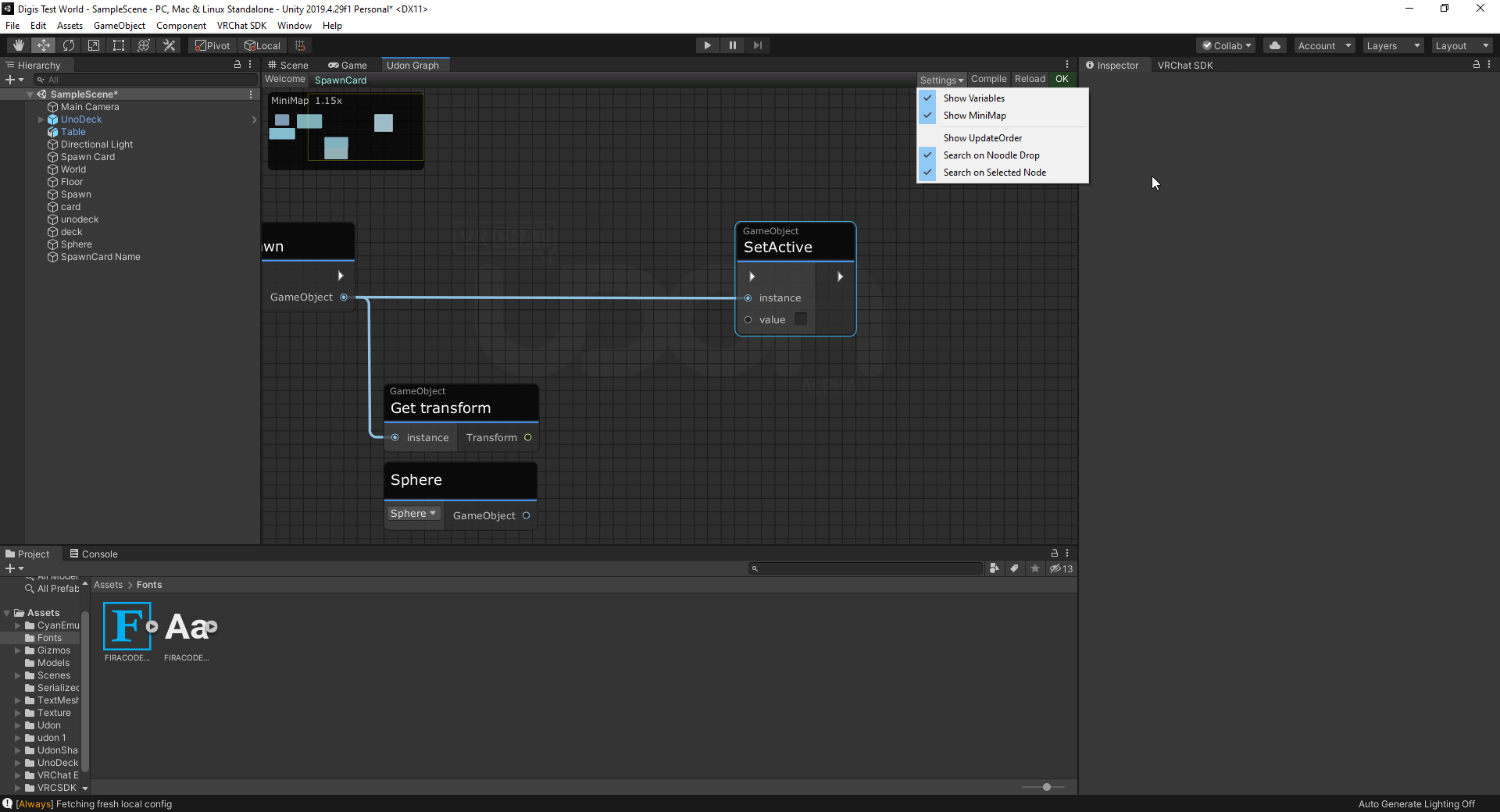 echo steeple
xP idk. Restart unity
Also consider updating to the new version of unity
restart/update may just fix it anyways
echo steeple
Nothing will break. It's a very small update. You'll have to do it eventually regardless and your scene looks pretty much empty.
that said. I'm not sure. Do you have any errors in your console preventing a build/enter play mode?
sweet star
Updated. Still gone.
I think I closed it and now it's gone.
The only error is
Error: Could not load signature of VRC.SDK3.Components.MultipleDisplayUtilities:GetRelativeMousePositionForDrag due to: Could not load file or assembly 'UnityEngine.UI, Version=1.0.0.0, Culture=neutral, PublicKeyToken=null' or one of its dependencies. assembly:UnityEngine.UI, Version=1.0.0.0, Culture=neutral, PublicKeyToken=null type:<unknown type> member:(null) signature:<none>
I FOUND IT
I stretched out the window as far as I could and saw [Va 😅
echo steeple
lol nice. L east you are updated now anyways.
That window isn't supposed to be able to leave the view so that's odd
maybe it glitches if you go from full screen to windowed or something 🤷♂️
sweet star
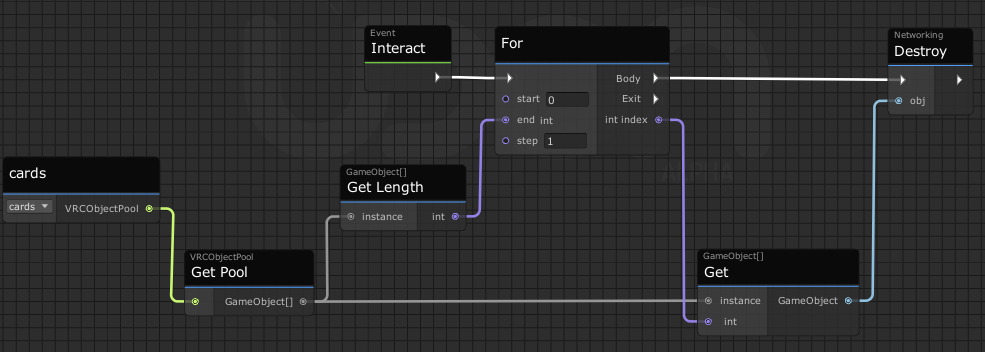
OK, I know I have a lot of questions today, but I'm learning.
Reason this isn't working?
 grand temple
networking destroy shouldn't be used because there is no networking instantiate
sweet star
D:
grand temple
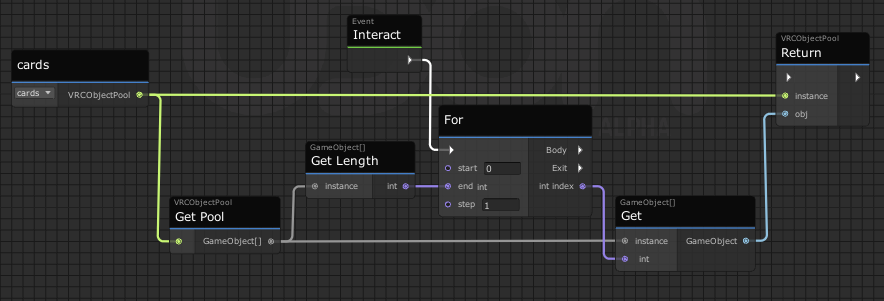
if you actually do want to destroy something, you should use regular destroy. But I don't think you actually want to destroy it, if you want to put something back in the pool you should use objectpool.return
sweet star
Oh, OK! I'm used to return meaning like, in the programming way, so I overlooked it.
Is there a way to put a bend in the noodle just to make this look better?
grand temple
unfortunately no
 sweet star
grand temple
if you actually do want to destroy something, you should use regular destroy. Bu...
sweet star
grand temple
if you actually do want to destroy something, you should use regular destroy. Bu...
Huh, this doesn't work either
grand temple
your flow isn't plugged in
grand temple
nah don't worry about it, you're fine
sweet star
Update: it works! Now to try to make it only happen within the bounds of a box.
grand temple
unity can do a lot of that work for you if you use bounds https://docs.unity3d.com/ScriptReference/Bounds.Contains.html
 dapper lion
hola. i have a question about udonserializeddata asset file size. what causes them to get large and small? and how would i go about making them smaller
 deft tide
need help with 2 things, 1, i made a mirror that works but how can i make it so its off and then you turn it on instead of the reverse? and 2. im trying to make more than one mirror and it wont let me
okay i answered my second question, can anyone help with the first?
 stone kelp
deft tide
need help with 2 things, 1, i made a mirror that works but how can i make it so ...
stone kelp
deft tide
need help with 2 things, 1, i made a mirror that works but how can i make it so ...
Do you use a button today to just set active bool today?
You could use interact toggle to toggle it on or off,
I recommend checking out this video as a example: https://youtu.be/ibDu0dCeUE8
With the recent Udon updates, some of the basics have changed, so here's my most basic tutorial redone with the new editor, and not recorded at 2am! If I get enough requests, I'll redo my "Contextual Buttons" video as well, which will give me an excuse to just rename them "Event Buttons" which actually makes sense.
00:00 - Intro
00:20 - Udon Gr...
 velvet mulch
I tried out the cube and it changes to a set colour, only when there is a texture is on there it changes all of the colours toward said colour, instead of changing the hue like I'm looking for. I currently using post processing to achieve what I want, to change the hue of all the colours in the world (I'm using 1 colour and the rest is white/grey/black). Only problem is that you can't exclude things from pp (so far as I know?, if this is possible I would not have to do the texture changes), so things like avatars, your menu and video players change as well. So instead I was trying to find out if it could be done without pp. But thinking of it, even if the textures could change hue like I want to, the Lightmap and Reflection Probe might be impossible to have their hue changed.
 scarlet lake
im trying to create my first world, and every time i try to upload a test or publish it, it uploads nothing. like the world it uploads is completely empty. im not sure if its something to do with these things i get a pop up with at the start of creating, cuz my friend says he never seen it before. also side note when im trying to upload a test it says im missing an application?
 floral dove
velvet mulch
I tried out the cube and it changes to a set colour, only when there is a textur...
floral dove
velvet mulch
I tried out the cube and it changes to a set colour, only when there is a textur...
You could try changing the color of the light in your world instead. You don't need a texture to change the color of items that share a material, but you'd need to find or create a shader that applies a Tint without needing a texture, then change the value of that tint. Sure, you can exclude things from PostProcessing, you'll need to set the mask on your Post-process Layer: https://docs.unity3d.com/Packages/com.unity.postprocessing@2.0-preview/manual/Quick-start.html
floral dove
scarlet lake
im trying to create my first world, and every time i try to upload a test or pub...
Make sure you get your world working with Build & Test before you try publishing: https://docs.vrchat.com/docs/using-build-test
scarlet lake
it wont let me use it, ive clicked all the auto fixes and set up the world, but once i actually get to the part of uploading it cant build a test because it loads nothing
floral dove
scarlet lake
it wont let me use it, ive clicked all the auto fixes and set up the world, but ...
have you followed all the instructions on that page?
deft tide

help
im on the verge of literal tears
i was following a tutorial about light probes and baked lighting and then everything broke when i tried to test it out.
floral dove
deft tide
Are you trying to use a custom C# script at runtime? If so, that's not supported.
deft tide
i dont think so, how can i make that go away
i dont even know how to open the scripting
grand temple
Simple light probe placer's last update was to unity 5.6. That was a long time ago, so it's possible that 2019 is no longer compatible with it
 deft tide
how do i remove that from my project?
grand temple
actually there's a comment on the asset store page about this


Get the Simple Light Probe Placer package from Alexander Vorobyov and speed up your game development process. Find this & other Tools options on the Unity Asset Store.
deft tide
thank you so so so so so much i couldnt figure out for the life of me what was wrong
deft tide
I am using unity and when i select build and publish in my control panel for the sdk it says a vrc scene descriptor is needed (i have one) and then it plays the scene, should i wait for a while or is it not working?
floral dove
deft tide
I am using unity and when i select build and publish in my control panel for the...
does Build & Test work?
deft tide
yes
floral dove
if you clear out your console and then press Build & Publish, do you get any warnings or errors in the console after?
deft tide
trying it now

it does this
but then it does this

like immediately after
oh wait it says "there are 2 audio listeners in the scene. please ensure there is always exactly one audio listener in the scene" all i can think of is i have a slider and a button toggle
but idk if thats causing it
floral dove
Hm, at this point it should be showing you the uploading options. It's not a great sign that there are over 10,000 errors for the 2 audio listeners issue. Did you change the Main Camera? It's very odd that there's no camera rendering when the scene goes into play mode with the VRCCam added.
deft tide
i dont think i did
floral dove
That Canvas is a World-Space canvas, yes?
the play mode should show something like this:
 deft tide
yes
floral dove
oh wait a sec - you've got "Display 4" selected in your Game Mode
deft tide
 floral dove
should be Display 1:
 deft tide
oh ok fixed it
floral dove
if you want to figure out where the extra audio listener is, you can type t:audiolistener in your Hierarchy window, it will you you every object which has an AudioListener on it, like this:
 deft tide
finally got through to the configure world page
you have been so very helpful momo, thank you!
jesus i cant even load into it
help again pls
floral dove
when troubleshooting, the following info is very useful for people trying to help:
What you were doing when the problem occured
What you expected to happen
What actually happened
Any related logs
deft tide
I filled out the info to upload the world and completed that process within unity, i got a message saying it would be available in "mine" on the worlds page. I see it in the "mine" section, i can hit "go" but it does not load.
Also, how can i make this world quest compatible?
floral dove
what's the link to your world?
can you find it under the 'Mine' category in VRChat and get to it that way?
deft tide

Using this as a fun get together spot‚ I will be updating soon with more features․
no if i hit launch from the vrc website it opens vrc, i have the "go" selection, i hit it, it loads for a second, and i spawn in the default home world
floral dove
yep, I see this in my logs when I try to join the world:

not sure how you got a blueprint mismatch, but try this: in the VRChat SDK Control Panel, go to the "Content Manager" section and then look under "Worlds" and find your world. Press "Copy ID", then select the object in your Hierarchy which has the VRC Scene Descriptor on it. press "Detach" to clear the ID that's there, and then paste in your new ID and publish it again.
If that doesn't work, then you can simply Detach the ID and leave it blank to have VRChat generate a new one for you.
deft tide
okay thank you
 feral valve
Can pc and quest watch videos together? Just quest not being able to enter the video.
floral dove
feral valve
Can pc and quest watch videos together? Just quest not being able to enter the v...
Yes, as long as it's a direct link to a video and not a video on YouTube, Twitch, etc: https://docs.vrchat.com/docs/video-players
VRChat
Using the Prefabs The easiest way to put a Video Player in your Udon world is by using one of the Prefabs, which you can find in Assets/VRChat Examples/Prefabs/VideoPlayers. Both of these prefabs will play a video of your choosing, synchronized for everyone in your world. They won't loop - the graph...
feral valve
Intended for youtube and twitch. Ty anyway
floral dove
feral valve
Intended for youtube and twitch. Ty anyway
yeah, not supported, sorry
 dapper lion
you can use a resolve technique, however a public aval solution is not present (i totally am not forgetting to make a demo on it)
floral dove
dapper lion
you can use a resolve technique, however a public aval solution is not present (...
what do you mean?
dapper lion
so like - you can ping a server with a string or ping a hosted script on something like heroku and have it relay the googleapi v3 raw video back as a resolved link that can work on non natives
floral dove
dapper lion
so like - you can ping a server with a string or ping a hosted script on somethi...
FYI using video players to do anything other than retrieve video files is not supported and could result in moderation action.
dapper lion
well yes: thats why it wuld just be simple resolve and not like a data unloader. however : what are the general rules on how shader interpret video data then?
like if i treat uv data as calculated parameters to either create geometry or tell a mesh where a lightmap should be via a web source: does this touch anything that shouldnt be touhed?
floral dove
I'm not a moderator and can't answer specific moderation questions. All I can tell you is that the Video Players are meant to retrieve video files from remote servers and play them back onto a surface in the world.
 prisma prism
Hello, I'm currently trying to use "vrchat instantiate" to summon an object with dynamic bones, but when it appears, the bones are not jiggly. anyone know why? (also, I have made a version of the world where the prefab with dynamic bones loads in with the world, and they work there. its only after destroying and re-instantiating that the bones are no longer dynamic.)
echo steeple
prisma prism
Hello, I'm currently trying to use "vrchat instantiate" to summon an object with...
Prob want to use an object pool instead.
 pliant dew
some audio player prefab for sdk3?
echo steeple
pliant dew
some audio player prefab for sdk3?
There's two good ones on booth for cheap. One has a visualizer built in as well. Might be worth checking there and seeing if you like those.
If you just want to play YouTube videos, Usharp Player and VideoTXL are good options. TXL supports URL playlists as well.
pliant dew
muchas gracias!
 stray junco
is it possible for udon avatar that i can make multiple toggling objects
without duplicating avatar ?
grand temple
Udon is not available on avatars
 hushed gazelle
Is there a way to change a specific material slot on a skinned mesh renderer? Eg; the third material of four.
 narrow cloak
Is it possible to toggle every child of a parent based on its state? So you push a button and everything that's active gets deactivated but everything deactivated doesn't get activated
stray junco
@grand temple
i know i make mistakes i shod pronounce as 3.0
bedside's isn't 3.0 avatars use similar udon algorithm?
but tbh idc how i pronance udon or 3.0 avatars is the same thing for me
and i can't mix udon- i mean 3.0 avatars with udon worlds they are different sdk i know that
 slim hound
narrow cloak
Is it possible to toggle every child of a parent based on its state? So you push...
slim hound
narrow cloak
Is it possible to toggle every child of a parent based on its state? So you push...
 scarlet lake
Um so like ik someone helped me with this before but i still dont know. I tried several setups and triggers like pickup, and start and end. But idk.
Im trying, to get particles for ketchup and mayonnaise working, its a food world. Its looking good.
I don’t have any world creator friends. So I’m sorry for bothering u guys. Any help is grreatly apreciated. ❤️


 slim hound
scarlet lake
Um so like ik someone helped me with this before but i still dont know. I tried ...
slim hound
scarlet lake
Um so like ik someone helped me with this before but i still dont know. I tried ...
When do you actually want the particles to play?
scarlet lake
When players interact with the prefab/ketchup or mayonnaise
When they let go of it. The particle stops
slim hound
scarlet lake
When players interact with the prefab/ketchup or mayonnaise
When they let go of...
You would want this then
 scarlet lake
slim hound
You would want this then
scarlet lake
slim hound
You would want this then
It didnt work, even with the particle systems off.
It seems that is the exact way it should be but idk.. cry
narrow cloak
slim hound
Ive no idea how to attach the Variables to this lol
slim hound
scarlet lake
It didnt work, even with the particle systems off.
It seems that is the exact ...
That behavior would need to be on the object with the pickup if it isn't already
slim hound
narrow cloak
Ive no idea how to attach the Variables to this lol
Not sure what you mean attach the variables
narrow cloak
What you gave me + My variables
What I want to happen when I press the button :
- All Children of AllMirrors to be turned off
- All Children of OffSwiches to be turned off
- All Children of Onswitches to be turned on
- TargetOnSwitch to be turned off
- TargetMirror & TargetOffSwitch to be turned on

in that order
.>
scarlet lake

it was send to all but i changed it
muiltiple times idk what im doing wrong. triggers are painful
slim hound
narrow cloak
What you gave me + My variables
What I want to happen when I press the button : ...
Oh you want to turn off all children objects, based on your wording I assumed you wanted to toggle
narrow cloak
yeah trying to make a graph that makes it so only one mirror and switch is active at any time without referencing every single mirror and button on every buton
the process i said abouve seems like the easiest way ive just no idea how to do it on the graph
slim hound
narrow cloak
yeah trying to make a graph that makes it so only one mirror and switch is activ...
You could try this then

 acoustic vale
Is opening multiple clients to build and test a good way to test Network Syncing?
 lucid juniper
I've seen a lot of things that say "Powered by Udon" on them, more often than I'd expect for a standard VRChat feature. Is there a specific reason people like to put that there? It doesn't bother me; I'm just curious. There isn't any rule saying you need to, is there?
floral dove
lucid juniper
I've seen a lot of things that say "Powered by Udon" on them, more often than I'...
no, there's no rule that you have to identify your Udon programs
 hybrid canyon
mostly just helps with social media searchability
lucid juniper
hybrid canyon
mostly just helps with social media searchability
I'm referring more to places I've seen it which wouldn't affect search results. Like in world splash images or textures on inworld fixtures/objects.
hybrid canyon
also helps distinguish its compared to Maps made with SDK 2
 broken bear
For me sdk3 is much easier to share example code, so if I see a world advertise it’s in udon and I want to know more how they got some particular effect going, I know it’s easier to share snippets than in sdk2
pliant dew
can someone help me with this error loading udon, unity 2019.4.30f1 , udonsharp v 0.20.3?
 grand temple
just try to reimport the SDK until you don't get it
pliant dew
grand temple
just try to reimport the SDK until you don't get it
It is the option that I had thought to do but I do not lose the reference of the world? since I have one already uploaded.
grand temple
no, you don't have to worry about that
grand temple
?whatisudon
 hidden martenBOT
VRChat Udon is a programming language built by the VRChat Development Team for use in VRChat worlds! It enables complex behaviors and logic in VRChat worlds. Read more about Udon in our documentation: https://docs.vrchat.com/docs/what-is-udon
VRChat
What’s this Udon thing anyways? VRChat Udon is a programming language built completely in-house by the VRChat Development Team. It is designed to be secure, performant, and easy to use via the VRChat Udon Node Graph, a built-in visual programming interface that uses nodes and wires (we call them “no...
hushed gazelle
Is this the correct way to set a specific skinned mesh renderer's material slot from an array of materials? (Material[]). I've confirmed the materials exist and are reachable with debug.log, but they're just not applying.

 cinder wadi
is it possible to change an animations speed with a slider with udon? what I have tried so far I have had no luck with.
 slim crow
Is there a way to interface between Udon and shaders?
burnt moth
is there something called setfalse instead of setactive??
fiery yoke
burnt moth
is there something called setfalse instead of setactive??
SetActive takes a boolean. Its the same method for both enabling and disabling
burnt moth
fiery yoke
SetActive takes a boolean. Its the same method for both enabling and disabling
how do i make it only turn off something then?
 hallow geyser
is it possible to attach udon code to a avatar? Like say you wanted a NavmeshAI to spawn in when your avatar spawns in and follow you around?
 tulip vapor
What’s udon
fiery yoke
hallow geyser
is it possible to attach udon code to a avatar? Like say you wanted a NavmeshAI ...
No. And not in the foreseeable future.
 tough finch
tulip vapor
What’s udon
tough finch
tulip vapor
What’s udon
?whatisudon
hidden martenBOT
VRChat Udon is a programming language built by the VRChat Development Team for use in VRChat worlds! It enables complex behaviors and logic in VRChat worlds. Read more about Udon in our documentation: https://docs.vrchat.com/docs/what-is-udon
VRChat
What’s this Udon thing anyways? VRChat Udon is a programming language built completely in-house by the VRChat Development Team. It is designed to be secure, performant, and easy to use via the VRChat Udon Node Graph, a built-in visual programming interface that uses nodes and wires (we call them “no...
fiery yoke
hallow geyser
is it possible to attach udon code to a avatar? Like say you wanted a NavmeshAI ...
However what you're asking for does not require attaching Udon to an Avatar. You can interface with the player using VRCPlayerApi to get something like e.g. their position in the world.
plush stump
Did UI elements also have a transform that can help me get its child?
 harsh fern
I have an object and I want it to play a song everytime you press the trigger, does anyone know how can I do that?
 fickle stirrup
harsh fern
I have an object and I want it to play a song everytime you press the trigger, d...
fickle stirrup
harsh fern
I have an object and I want it to play a song everytime you press the trigger, d...
Make a public variable for AudioSource, and Interact() method which call audioSource.Play(). Object with this udon behaviour should have collider, if you want pickup, add vrc pickup to the object, and use OnPickupUseDown() method instead. If i'm correct, that should work
harsh fern
Thanks :3
 fathom gazelle
I want to know how to create our own avatar in blender
 bronze pier
model it, rig it, export as fbx, import as humanoid avatar, add avatar descriptor, configure eye movement, jaw bones/blend shapes,, etc...
stone kelp
fathom gazelle
I want to know how to create our own avatar in blender
Going to be real hard to code an avatar in Udon, Lemme tell you that.
Check #avatar-rigging / #avatar-help or something like that
 hallow sable
can you limit people running in a udon world in a specific part?
 sacred thicket
Hello, I have a little question: Would it be possible to make a udon trigger that copy a link to the clipboard? For exemple if I want to invite people to a Discord Server and instead of making them having to get out of the VR to Ctrl+C they just have to press a button and paste it later?
dapper lion
the best i could see people doing is the VR clipboard with a inputfield which would require ctrl+c anyway
sacred thicket
Alright I see, thank you!
dapper lion
i made a mini prefab for it if you want
 simple shell
SO I'm looking for something... is there a tutorial somewhere on how to make a clock? I'm trying to make a .Beat clock ( https://en.wikipedia.org/wiki/Swatch_Internet_Time )

Swatch Internet Time (or .beat time) is a decimal time concept introduced in 1998 by the Swatch corporation as part of their marketing campaign for their line of "Beat" watches.
Instead of hours and minutes, the mean solar day is divided into 1000 parts called .beats. Each .beat is equal to one decimal minute in the French Revolutionary decimal ...
 visual atlas
hello, was wondering how i can convert 3 floats into 1 vector 3
 raven rover
does anyone know to fix it when I try to log in and this email verification shows up? I do it all correct, but after it just brings me back to the same page.

please help i'm new to vr chat
 night viper
@raven rover Try asking in the #user-support-old channel. This channel is more for vrchat programming tool (udon)
night viper
visual atlas
hello, was wondering how i can convert 3 floats into 1 vector 3
You can use a vector3 constructor (takes 3 floats)
visual atlas
thanks
hallow sable
anyone know why it keeps deleting itself? D:
 grizzled trout
i kinda dumb question but is it posible to have to scrips communicate? for exsample what i want is one person to stand on a presure plate and another needs to hit a button , but if the button is pressed when no one is on the presure plate i want a trap to open for the one pressing the button
sorry if this is the wrong channel
figgerd udon
 raven peak
grizzled trout
i kinda dumb question but is it posible to have to scrips communicate? for exsam...
raven peak
grizzled trout
i kinda dumb question but is it posible to have to scrips communicate? for exsam...
yes you can either through events or setting variables. im assuming you are using graphs?
grizzled trout
yeah thats right the udon graphs
raven peak
you need a variable for the udonbehaviour you want to communicate with. then you can send a event to it or get/set a variable.
 grizzled trout
thank you i will do my best to look in to that
hallow sable
using this code, the main object I am trying to bring the item to deletes itself after running the program, any help?
 cold raft
you got the script on the wrong object?
hallow sable
well I kinda narrowed it down to the particle system actually

so I have this, when I take away the PS.Play(); it doesn't delete the object the script is on after use
is using the particles.play not a good thing to use for vrchat?
all I know is whenever I get the particle system to play like this, I get this error and the object that you take the skull to deletes itself
 cold raft
maybe move the assingment of PS out of the start, iv seen some cases where other objects wherent correctly initialised at the time the start was called
hallow sable
cold raft
maybe move the assingment of PS out of the start, iv seen some cases where other...
move it to ontriggerenter then?
cold raft
yes
 cold raft
i dunno than sorry
hallow sable
all good ty
scarlet lake
Anybody here
 haughty mural
quick question how do you use camera on pc vrchat? ive been having trouble using it
 zinc ridge
are playertags synced for everyone?
 chilly iron
eh im trying to ask how do i fix the mirror thingy because in my screen its white, trying to send a screenshot in here. Wont let me send so.
Also im visiting the world btw
hallow sable
does anyone know what default walk/run speed is on a udon world?
fickle stirrup
hallow sable
does anyone know what default walk/run speed is on a udon world?
maybe values that udonsharp uses in example script: walk 2, run 4
https://github.com/MerlinVR/UdonSharp/blob/master/Assets/UdonSharp/Examples/Utilities/PlayerModSetter.cs
 vocal coral
Hi, does anyone know if you can attach gameobjects to an avatar with udon? I want to do raycast on players by attaching colliders to avatars' head to intercept the raycasts. Is it even possible? Thanks
vocal coral
nvm there's a ChooserContainer attachment in the built-in example scene duh🤦♂️
hallow sable
Would a shader be the best way to limit vision? like make it so you can only see so far in a certain area?
 zenith solar
Just starting out and the UI stuff is kinda stumping me. Watched a few different tutorials on UI and it seems as though some point toggle using udon graph programs and others just write the u# scripts. Can anyone point me to why I cant even interact with the button at all? Its on the default layer and within the object of the world itself. This button is the only child of the UI canvas.


BiLights is just a child of an empty with 4 point lights
slim hound
zenith solar
Just starting out and the UI stuff is kinda stumping me. Watched a few different...
First thing would be to add a VRC UI Shape to the canvas which will make it interactable in VRC
Other than that you would probably want to be using Get Active Self rather than active In hierarchy
prisma prism
Question, when I plug "Event Update" into "Transform Rotate" the object rotates at different speeds depending on what I assume is client framerate. Is there a better way to make an object spin slowly without using animation? (preferably one that looks the same on everyone's screen)
 elder peak
prisma prism
Question, when I plug "Event Update" into "Transform Rotate" the object rotates ...
elder peak
prisma prism
Question, when I plug "Event Update" into "Transform Rotate" the object rotates ...
yes. look into https://docs.unity3d.com/ScriptReference/Time-deltaTime.html, you can access this in udon.
use it to scale your speed by it
echo steeple
Huh?
 haughty dove
No good my chrome book I can’t get work
echo steeple
I honestly doubt much of anything in terms of design software will work on a Chromebook. Most of the programs used to make content for this game (unity, blender, substance painter, Photoshop) all are pretty big system hogs and often suck done a ton of memory and require a decent CPU. Really want something with 16+gb of memory and a decent CPU. Do Chromebooks even have dedicated GPUs? Yea I doubt any of this stuff would run
haughty dove
Idk
echo steeple
I doubt VRChat would even run
haughty dove
What iOS I can work that why nether
echo steeple
What? Idk what you're saying. Regardless. Chromebook won't work. Too weak plus I'm pretty sure the OS wouldn't even support most of these programs
haughty dove
I’m say could I get work on my iPhone?
echo steeple
No
haughty dove
Vr chart
haughty dove
Do you what pic of what I’m saying
echo steeple
No. This isn't the right thread for that.
haughty dove
On my computer I can open be chat online but the app I can’t get to download load
So I can do stuff
haughty dove
German
 tacit harness
Hey i have stopped working on worlds for quite a bit and it seems that udon sharp isnt working at the moment is that correct or am i doing something wrong ?
I pulled in the newest version of it but i still get errors
 stone kelp
tacit harness
Hey i have stopped working on worlds for quite a bit and it seems that udon shar...
stone kelp
tacit harness
Hey i have stopped working on worlds for quite a bit and it seems that udon shar...
If you stopped working on worlds, Are you in latest unity and updated SDK as well?
 fading cipher
Can you get someone’s avatar ID with udon?
 west mural
State your problem
 mighty fjord
fading cipher
Can you get someone’s avatar ID with udon?
mighty fjord
fading cipher
Can you get someone’s avatar ID with udon?
No, but if you've got access to the avatar there might be other ways to identify it.
fading cipher
@mighty fjord Nah it was wishful thinking to swap back to the avatar the player had after successfully loading their save data 😅
mighty fjord
Yeah, I wish I could've implemented that into my latest project aswell
 devout trout
Is there like... a tool to check for non-udon scripts in a scene? Been using a modular asset pack, wanna be sure I didn't miss removing any scripts from the prefabs
 magic pelican
Don't know if this is an udon specific question or not cuz I'm unsure of what's out there, but can anyone point me in the direction of an interactive water prefab I can use for a pool? Don't need udon swimming, just need the water itself as a prefab
magic pelican
Figured out that issue but now the USharp Video Player I am importing is throwing a ton of errors saying several components can't be found. Ree
magic pelican
This is the second Udon Sharp prefab I have tried to use that throws me the same error. Two completely different developers but the exact same issue. So far I have reimported every single package in my scene and no luck. There is a github issue on it marked as solved but they never mention the solution. Please halp!
 floral dove
magic pelican
This is the second Udon Sharp prefab I have tried to use that throws me the same...
floral dove
magic pelican
This is the second Udon Sharp prefab I have tried to use that throws me the same...
What version of Unity, VRCSDK and UdonSharp are you using?
grand temple
It seems like in some projects, you now have to use "VRC.SDKBase.Utilities.IsValid"
It's very weird. It's independent of what SDK or unity version you're using, it seems like a project setting or something
started with 2019
if you want to fix it temporarily, just open the error and add VRC.SDKBase. before utilities everywhere
magic pelican
grand temple
It seems like in some projects, you now have to use "VRC.SDKBase.Utilities.IsVal...
You! Thank you soooo much! You fixed my problem! You have no idea how frustrating that was! Bless you you wonderful person
 fathom spoke
Hi there.
Anyone, how can i use UnityEngine.ImageConversion.LoadImage.
Its not support yet in udon?
Or is there any other way?
I want to read a texture from Byte data.
Please help me.
fiery yoke
fathom spoke
I want to read a texture from Byte data.
Only way I know to do that is using Texture2D.SetPixel/s()
fathom spoke
fiery yoke
Only way I know to do that is using Texture2D.SetPixel/s()
oh... ok. thanks!
hushed gazelle
If I'm adjusting the position of a seat relative to an avatar's bone distances, do I need to worry about if an avatar's not humanoid, or is there a condition I can check in Player() somewhere?
grand temple
generic avatars can't sit in stations anyway
hushed gazelle
Can't they? I swear I've seen them on stations before.
grand temple
lots of avatars look generic but have an invisible humanoid skeleton
hushed gazelle
Ahh, gotcha.
mighty fjord
You can sit in a station and switch into a generic avatar
hushed gazelle
If i want to keep a value updated consistently is it better to tuck it in Deserialization or (Value)Change?
 orchid stag
Hi! I have a UI button, and in my script, I need to fetch the Button component of it when it is pressed. Normally i would write the line:
EventSystem.current.currentSelectedGameObject.GetComponent<Button>()
to do this, but Event system is not exposed in Udon. Does anyone know some Udon syntax, for getting the Button component, I can use instead?
The catch is that the Button component is not located on the object to which my script is attached
hushed gazelle
What's the actual intended outcome of this?
orchid stag
I need the button to stop working while the action of the script is happening, and I don't want the script to be attached to the button UI object
hushed gazelle
So why not have whatever event the button runs just set the button interactible bool from there? You don't need to turn the whole button off
orchid stag
I'm making a larger system, for people who are not used to unity, programming, or even VRchat. I need to convey to them visually, that the button is not functional, and I think the best way to do this, is to make the button disapear, so they know they can't use that object as long as the feature from the script is running.
Also, while they are not used to any of this, they need to set up a VR scene themselves, so I need to make this as easy as possible for them.
which Is why I don't want to tell them stuff like: hey, if you need this button to run, you also need to attache this script to it and so on and so forth
I can make at least 3 work arounds instead of trying to fetch the button by code, but this will mess up what I am trying to do, which is to make an easy to use system for newbies
🙂
west mural
No way to do that as far as I know
I would say make a udonbehaviours for the button that relays the click and itself to your script.
Then prefab that button to make it easy to add new buttons
Or you could make an editor script that sets that up automatically anytime you create a new button
orchid stag
Thank you for your input, I think I will look into the editor idea. That should be easiest to implement with the system 🙂
hushed gazelle
I think you're overthinking it tbh. Buttons actually have a customizable appearance state for being inactive (Specifically DisabledColor), so you're solving a problem that doesn't necessarily exist.
hushed gazelle
Not really; Click Button -> send custom event -> set button interactible = false from custom event.
west mural
Which button ?
Your script doesn't have any reference to the button
NobodyNoName wants one script for multiple buttons
orchid stag
@hushed gazelle i respect your oppinion, but I disagree in this instance.
@west mural I will create a button in my editor script, which will essentially create a UI button, that will automatically go as a reference into the script.
I already have a larger editor script setup, such that the students will have an easier time figuring out what is what.
hushed gazelle
Your use case is off; You're making this for complete amateurs with zero experience, correct? Making parts of your UI arbitrarily disappear is going to confuse people because they'll think they've broken something. Having it present but visibly disabled is what you want because they know something's happened and oh, look, now it's blinked back on again after ~Things Happened~.
west mural
The conversation / problem is not the turning off or disabling part. The whole question was about how to i get a reference to the pressed button if th button is on a different game object. What they do with it afterwards is of no importance to the problem.
hushed gazelle
If it's going to consistently be from a specific button, why is it just not assigned to the script?
orchid stag
the script has multiple functions, and there are 4 ways to activate the instances of them: collider, button, another instance of the same type of script, or run when the scene is loaded.
Basically, I'm giving my students a script, where they can choose what to do with different objects of their choice. They can e.g. set the script to toggle lights, like range or intensity, on as many lights as they wish, where the change can happen over as large as a time frame as they set.
when the script, in the lightning example, is set off, it has the opportunity to set off other instances of the script, where another maybe have been set to toggle some movement of some object(s), or the color of some object(s)
And the thing is really how do they want to activate the lighting script from the example. Do they want a user to walk over a collider? Do they want them to press a button? and so on.
So it is not only going to be one button function, it is simply going to be a button which activates my public function, that sets off the scripts behaviour, based on what they choosed to do with it.
I'm sorry if this explanation is not good enough to convey what I'm trying to do.
hushed gazelle
Okay. There's no way to get at the thing that sent the command, unless you've already assigned it to the script. So no; you can't call back the sending object and ask for its components unless it knows about its existence in advance.
orchid stag
Which is a goddamned shame 🙂 but it is as it is, and I will use my editor script to solve the problem
 opal dew
Is there a way in Udon to do platform detection? So I can call a different code path (due to shader differences) when someone is not on Desktop?
dapper lion
like if theyre on quest or not?
opal dew
Yes
dapper lion
in usharp: #if UNITY_ANDROID
private bool isQuest = true;
#else
private bool isQuest = false;
#endif
opal dew
I need to not call certain properties on a material/shader if its fallen back to a basic one
Ah, thanks!
Hmm.. that's a compile time tag though isn't it? I can't detect it after compiling?
Just thinking because if I don't want to distribute my source file and only send out the Udon Assembly, file, I'd need a PC Assembly and Quest Assembly.
dapper lion
well if yky have a bool for it. you can use that switch processes
raven peak
Not sure entirely what your doing but can't you check what shader the material is using then do what you need based on the results.
opal dew
oh.. using say, MyRenderer.materials[MaterialIndex].HasProperty("CustomProperty") ?
raven peak
I'm curreny on mobile and currently can't check it but sounds right.
opal dew
Okay, thanks! :)
fiery yoke
The UdonSharp way would be to use:
bool isQuest =
#if UNITY_ANDROID
true;
#else
false;
#endif
can someone help me with something?i am using the graph and, i think i relized that when i search for nodes some are not showing that should? sorry if this dose not make sense, this screnshot hopfully can help explan
 floral dove
grizzled trout
can someone help me with something?i am using the graph and, i think i relized ...
floral dove
grizzled trout
can someone help me with something?i am using the graph and, i think i relized ...
you can learn about how to search for nodes in different ways here: https://docs.vrchat.com/docs/searching-for-nodes
VRChat
Quick Search Press the Spacebar to open up Quick Search, then type in the first few letters of the class you want to interact with. Full Search Press Tab to open up Full Search, then you can search for any method on any object. For GameObject.GetName, you could just search for 'getname' and see all ...
grizzled trout
floral dove
you can learn about how to search for nodes in different ways here: https://docs...
thanks
yeup that did it
floral dove
we do have some guidelines - the page is not findable through docs search since we don't encourage users to build these systems, but here are the rules if you've made one: https://docs.vrchat.com/docs/udon-moderation-tool-guidelines
scarlet lake
is there any way to make a audio clip play when i click on a button?
floral dove
scarlet lake
is there any way to make a audio clip play when i click on a button?
Sure, you can use AudioSource.Play (https://docs.unity3d.com/ScriptReference/AudioSource.Play.html) or AudioSource.PlayOneShot (https://docs.unity3d.com/ScriptReference/AudioSource.PlayOneShot.html)
If you don't know how to do that, check out the top pinned post in this channel which has info on learning Udon
 wind zenith
How do I lerp an opject with udonSharp if I can't call StartCoroutine? (System.Exception: Unrecognized identifier 'StartCoroutine')
floral dove
wind zenith
How do I lerp an opject with udonSharp if I can't call StartCoroutine? (System.E...
you can do it during one of the Update methods
using https://docs.unity3d.com/ScriptReference/Vector3.Lerp.html if you want to update the position
the UdonExampleScene has a "FollowPlayer" program that does this using the graph: https://docs.vrchat.com/docs/udon-example-scene#choosercontainer-1
scarlet lake
floral dove
Sure, you can use AudioSource.Play (https://docs.unity3d.com/ScriptReference/Aud...
is there a way i could see those as a udon graph?
floral dove
scarlet lake
is there a way i could see those as a udon graph?
VRChat
Quick Search Press the Spacebar to open up Quick Search, then type in the first few letters of the class you want to interact with. Full Search Press Tab to open up Full Search, then you can search for any method on any object. For GameObject.GetName, you could just search for 'getname' and see all ...
scarlet lake
i meant the getting the sound to play, its supposed to play apon opening a hidden door in my world.
floral dove
scarlet lake
i meant the getting the sound to play, its supposed to play apon opening a hidde...
Sorry, I guess I don't understand your question. You can use the Udon Graph to create a program to play a sound using the above methods.
 warm acorn
Momo, I don't know if you are around still, but this is also in regards to the Udon Moderation Tool that was mentioned earlier, if someone is abusing a client to escape the 'ban' room and has that bubble around them in the main part of the world, is that enough evidence to prove client usage?
scarlet lake
Hello, could someone please briefly explain what “VRChat message log” means in the guidelines? Thank you
cinder wadi
can anyone tell me if im missing something here. I can't get the slider to update the animation speed. ```using UdonSharp;
using UnityEngine;
using VRC.SDKBase;
using VRC.Udon;
using UnityEngine.UI;
public class Anispeed : UdonSharpBehaviour
{
public Animator anim;
public Slider slider; //Assign the UI slider of your scene in this slot
// Use this for initialization
void Start()
{
    anim = GetComponent<Animator>();
    anim.speed = 0;
}

// Update is called once per frame
public void SetSlider()
{
    anim.speed = slider.value;
}
}```
scarlet lake
Can I have someone from Udon message me pls
 dawn forge
Momo, is there a way for me to force a specific avatar to be used? i.e. Map provided avatar for consistency and fairness of a gamemode I am working on?
This won't necessarily force them to keep the avatar on, but to join the arena they have to pick a red or blue vested warrior?
hushed gazelle
Anyone know what might potentially cause this?

@dawn forge Just look at the avatar pedestal script and use another trigger method (eg; interact with thing, assign avatar, teleport into arena)
dawn forge
Yes but then they'll return to the other avatar, I don't know how to have my script know when they change. All I can think of is getting their "viewball" and if it's modified then I can consider that they changed away from the map's required avatar?
hushed gazelle
I just wouldn't bother and let people make their own fun.
dawn forge
Sure, but it won't be fun when you have invisible or massive avatars make it hard/impossible to identify which team they're on or which tool/weapon they're holding.
At first I was going to make a standalone of this game, but then I want to do it on VRChat. My friend suggested this move long ago and I am actually considering it.
 hardy seal
what do i do to fulfill the empty behaviour?

trying to use the VRCBCE Billairds table
here are my options? which one? >.>
 grand temple
hardy seal
what do i do to fulfill the empty behaviour?
grand temple
hardy seal
what do i do to fulfill the empty behaviour?
I don't think you have the prefab imported properly. You're missing all the scripts
hardy seal
are you able to help via VC?
grand temple
no
just try reimporting it
make sure you're using the latest unitypackage from the releases page
hardy seal
ill try again and test
hardy seal
so heres me after deleting all files, all files are ticked and ready to import

straight away this happens

place the pool table into the world, and i build/compile to test gameplay and this happens
 grand temple
are you getting any errors or is it just warnings?
grand temple
what unity version are you using?
hardy seal
2019.4.30f1
grand temple
ok, that's correct. And you have the latest VRCSDK and latest Udonsharp too?
grand temple
are you able to create a new udonsharp script? If it's the package that is broken, then you'll have to ask the creator of it
mighty fjord
Ooh, are the scripts missing altogether? Or were they there when importing the package?
hardy seal
i know nothin about scripting haha, is it just a component? i was hoping this owuld just work after import XD
grand temple
they said no errors so I think VRCSDK and Udonsharp are fine 😕
you can create a U# script by right clicking in the project files, then add it as a component and convert to udonbehaviour
 mighty fjord
Is there a 'Scripts' folder in the 'VRCBillardsCE' folder?
hardy seal
 grand temple
try clicking one of the green ones and then "compile all udonsharp programs"
see if you get any errors
hardy seal
theyre both green XD
grand temple
the one that is not white
hardy seal
haha okay
mighty fjord
Would also be worth doing a quick right-clicking on the prefab asset and selecting reimport
hardy seal
grand temple
try clicking one of the green ones and then "compile all udonsharp programs"
no errors but still the same 30+ warnings
empty behaviours
grand temple
it really seems like the package is just broken
maybe you could try an earlier release of VRCBCE
hardy seal
they all kinda look like this, as if i can select the right one
 hardy seal
grand temple
maybe you could try an earlier release of VRCBCE
hardy seal
grand temple
maybe you could try an earlier release of VRCBCE
yeah ill give it a go
 tall flax
okay so.. whats the most up to date way to make a simple teleport script in Udon via upon interact with object/ button?? ALL the youtube tutorials are out of date because the way they all do it doesnt look anything like the options i have currently. Its all been changed.. siiigh i really miss the sdk2...
west mural
OnInteract -> LocalPlayer -> TeleportTo
tall flax
west mural
OnInteract -> LocalPlayer -> TeleportTo
Thing is i cant find "get player local"
the closest thing is "Get is local" under player api
is that the same thing ? or...
grand temple
it's in the networking category
west mural
 grand temple
yep
however if you're ever unsure of what category something is in, you can do tab to do a full search
you may want to plug in the rotation of the transform as well
west mural
optional, but yeah
tall flax
@west mural @grand temple thank you both very much 🙂

 devout trout
Is there any sort of udon prefab that makes the player collider dynamic, like so someone could duck down to go underneath something they'd otherwise collide with? I vaguely recall seeing something like that for sdk2 once, but no idea if it was ever remade for udon
fiery yoke
devout trout
Is there any sort of udon prefab that makes the player collider dynamic, like so...
The short answer is: No thats not possible.
The long answer is that theoretically you can make your own Player Controller in Udon, and then teleport the player to your calculated position in FixedUpdate, however there is a few caveats to teleporting itself and especially teleporting every frame or so...You can also use SetVelocity, but there is also caveats to that, so it would be really tricky and could break rather easily as its not supported.
grand temple
If you just want a basic workaround without getting too complex, you could just disable colliders if you get near them and are below a certain height
fiery yoke
True that is a good hack. Dont see many problems with that either, however you would probably need to have another collider that is on the Walktrough layer, so you still have object collisions.
Actually thanks for bringing this up, that gave me a very nice idea for my own project :D
fickle stirrup
devout trout
Is there any sort of udon prefab that makes the player collider dynamic, like so...
is player's collider on LocalPlayer layer? 1. on project settings > physcis tab - disable colliding of localPlayer with default / custom layer(where you have world objects) 2. make a custom collider and move it to the player's position 3. check for the player's height from head tracking data to the floor (player's origin?) and change collider height-center according to this
  i think that should work
 midnight kelp
anyone know why I'm getting these compiler errors?

i'm usinv the Varneon VRC World Helper and importing the Video Player from that, etc..
but it just randomly broke
 stiff fiber
pls help
 dapper lion
midnight kelp
anyone know why I'm getting these compiler errors?
dapper lion
midnight kelp
anyone know why I'm getting these compiler errors?
reimport usharpvideo or use just varneons videoplayer
dapper lion
stiff fiber
pls help
close and open. if its still weird. reimport the sdk
stiff fiber
@dapper lion yeah i tried it already but still same
dapper lion
are you using the most recent sdk3?
dapper lion
does this happen in a brand new project?
stiff fiber
sdk 3 only thing in project
stiff fiber
dapper lion
does this happen in a brand new project?
yes
stray junco
is it possible for AV3.0 to make animation for avatar that when on button press or toggle
it will transport main avatar with it's camera view to another place
like fast forward vrc_user teleportation to another spot?
pretty much same as (3P locomotion) but i need (2P holoport locomotion) because i need for desktop
BUT WITHOUT GUIDE LINES just like when you press the button and you will be transported to another spot
and how i can achieve that?
@fickle stirrup
thank you
but i saw this channel udon question
and i'm not able to find vrc3.0AV question
so that's why i ask here
sorry
stiff fiber
😫 help
 stray junco
@stiff fiber
do you have latest unity,sdk and (if you have) u#?
if don't then please do check them out for newest version update
did you change from pc to android platform or versa?
and you try to add some functions that are not supported to current platform
if yes then this is your error
if you have some unsupported custom unity package assets
try first to delete those errors and if you can delete them then you dont have to worry to much
if you can't then put everything away from your unity project except important assets
and see how it will performs
you can also click or 2x click on some of those errors and they might lead you to the cause of that problem
 craggy harbor
stiff fiber
and unity2019.4.30f1
craggy harbor
stiff fiber
and unity2019.4.30f1
If I didn't remember wrong... Isn't the v2019. 4. 20f1 the one VRChat supports and using?
craggy harbor
cinder wadi
can anyone tell me if im missing something here. I can't get the slider to updat...
It seems all correct, is the min/max value for your slider set to 0 to 1? And you also linked your animator and slider properly onto the script component, right?
The SetSlider() function has to be set called OnValueChanged from your slider, make sure set it up too. It's no longer Update(). The comment is a bit misleading lol
stiff fiber
craggy harbor
If I didn't remember wrong... Isn't the v2019. 4. 20f1 the one VRChat supports a...
 craggy harbor
stiff fiber
craggy harbor
stiff fiber
ahh, my bad, i remembered it wrong
(/ω\)
stiff fiber
stray junco
<@!395888844408487946>
do you have latest unity,sdk and (if you have) u#?
if don...
1-yeah i have current and last sdk version 2-no i did't change or add some functions 3-the only thing in project is sdk
stiff fiber
craggy harbor
ahh, my bad, i remembered it wrong
(/ω\)
np
stiff fiber
stray junco
<@!395888844408487946>
do you have latest unity,sdk and (if you have) u#?
if don...
i uninstall every thing and reinstall problem still same , when i try build & test looding me into home

 floral dove
 steep haven
try doing what is says in this image - detach the Blueprint ID and try again.
stray junco
@stiff fiber
if you have latest unity & sdk
make sure that nothing else is in your project folder
then save the unity>exit>open unity again and try to publish your world
i'm now AFK for 20min
floral dove
stiff fiber
i uninstall every thing and reinstall problem still same , when i try build & t...
do those errors clear if you press "clear" on the Console? If so, nothing to worry about.
Make sure the path to your VRChat client is set up correctly: https://docs.vrchat.com/docs/using-build-test#setting-up-your-settings
stiff fiber
floral dove
do those errors clear if you press "clear" on the Console? If so, nothing to wor...
yeah i already did this
floral dove
which one, the clear or the vrchat path?
scarlet lake
Momo, could I just ask what a “VRChat Message Log” is?
floral dove
scarlet lake
Momo, could I just ask what a “VRChat Message Log” is?
I'm not sure what you mean without some context
scarlet lake
on your guidelines for Udon it states something about a message log
or a “VRChat log message”
 stiff fiber
floral dove
which one, the clear or the vrchat path?
stiff fiber
floral dove
which one, the clear or the vrchat path?
both and it didn't work
floral dove
scarlet lake
or a “VRChat log message”
ah yes, that refers to using Debug.Log to write to the VRChat Logs: https://docs.vrchat.com/docs/frequently-asked-questions#how-do-i-find-the-vrchat-output-logs
floral dove
stiff fiber
both and it didn't work
If the error message won't clear when you press "Clear" on the console, try closing the project and opening it back up, then let me know if the error is still there.
stiff fiber
floral dove
If the error message won't clear when you press "Clear" on the console, try clos...
didn't work too 😫
stiff fiber
floral dove
If the error message won't clear when you press "Clear" on the console, try clos...
when i click build & test vrchat open up normal and go 2 looding screen and then kick me into home
floral dove
all the errors about "assembly will not be loaded" remain after you close and reopen the project?
stiff fiber
floral dove
all the errors about "assembly will not be loaded" remain after you close and re...
yeah
floral dove
can you show your Assets folder?
stiff fiber
sure
midnight kelp
dapper lion
reimport usharpvideo or use just varneons videoplayer
I did, doesnt work
sadge
stiff fiber
floral dove
can you show your Assets folder?
 floral dove
stiff fiber
floral dove
stiff fiber
hm, looks clean. Maybe the required packages didn't install for some reason? Check your Package Manager for:
- Cinemachine 2.8.0
- PostProcessing 3.1.1
- TextMeshPro 2.1.6
If you're missing any of these, or the versions don't match, use the Package Manager to switch to the above versions.
stiff fiber
floral dove
hm, looks clean. Maybe the required packages didn't install for some reason? Che...
when i searched for cinemachine 2.8.0 there's button say import into project
do i click it ?
floral dove
stiff fiber
do i click it ?
yes
stiff fiber
floral dove
yes
still same
floral dove
after you import all the required packages, close and re-open unity
stiff fiber
k
stiff fiber
floral dove
after you import all the required packages, close and re-open unity
still same 😩
looding 2 time after that kick me into home


 floral dove
stiff fiber
looding 2 time after that kick me into home
floral dove
stiff fiber
looding 2 time after that kick me into home
let's focus on the errors first - do those still show in your console?
ok great - so we fixed the import errors, that's progress. Are you trying to Build & Test the UdonExampleScene?
stiff fiber
yes
floral dove
do you get any new errors in the Console when you run Build & Test?
cinder wadi
craggy harbor
It seems all correct, is the min/max value for your slider set to 0 to 1? And yo...
Yep, but no go it doesn’t work.
floral dove
stiff fiber
no
Weird, ok. Can you post the log file so I can see what's going wrong in the client? https://docs.vrchat.com/docs/debugging-udon-projects#viewing-your-logs-in-a-text-editor
cinder wadi
Momo is changing animation speed with a slider something that isn’t supported under udon? Been trying to get it to work for a couple days no with no luck.
stiff fiber
floral dove
Weird, ok. Can you post the log file so I can see what's going wrong in the clie...
sorry , do you mean project file ?
floral dove
stiff fiber
sorry , do you mean project file ?
no, the log files from the client. The link I posted shows where to find this on your disk.
stiff fiber
floral dove
no, the log files from the client. The link I posted shows where to find this on...
there like 11 file log do you want me post them all !?
floral dove
just the latest one right after you try to Build & Test and it puts you into your home instead
stiff fiber
floral dove
just the latest one right after you try to Build & Test and it puts you into you...
this one
floral dove
stiff fiber
this one
Hm - it looks like your VRChat client is not getting the launch parameters to even try loading into your local world. I see this:
[Behaviour] launching in normal manner
[Behaviour] Going to Home Location: wrld_4432ea9b-729c-46e3-8eaf-846aa0a37fdd
Where if I do Build & Test then I get this:
[Behaviour] launching from command line
[Behaviour] Destination fetching: local:3e9f94ae5833a01f0dfa8229a3c1489fb4c9f6614b4f37d6c7d082b6f81cbcf9
so either your world is not building or your registry is not set up to pass those params.
Can you show me what this part of your VRChat SDK > Settings panel looks like?
 stiff fiber
 floral dove
stiff fiber
floral dove
stiff fiber
Ok, that looks good. One more log so I can see what your editor is doing:
- Close the project
- Open it back up.
- Run a "Build & Test" on your scene
- In the upper-right corner of your console window, press the three dots and then choose 'Open Editor Log'
- Save that text file somewhere and then post it up here

downloaded, looking now. Going to remove the log so your info doesn't stick around.
floral dove
shoot - I'm stumped. I thought maybe it had something to do with having a project with spaces in its name, but I just made a new project with spaces in it and it worked fine.
stiff fiber
oh
stiff fiber
floral dove
shoot - I'm stumped. I thought maybe it had something to do with having a projec...
umm did you found anything
floral dove
stiff fiber
umm did you found anything
I haven't, no. My only guess left is that your registry isn't set up to pass along the arguments correctly. You can try running D:\SteamLibrary\steamapps\common\VRChat\install.exe to see if it will update the registry
stiff fiber
floral dove
I haven't, no. My only guess left is that your registry isn't set up to pass alo...
it crash my game
uhhh i give up
floral dove
what do you mean by "it crash my game"?
stiff fiber
sorry , i mean i click it nothing happend
floral dove
stiff fiber
sorry , i mean i click it nothing happend
ok, that's very different than 'crashing your game'. It wouldn't necessarily do anything obvious, I'm hoping that it updated your registry. You can try Build & Test again to see if it helped. If not, you might try uninstalling VRChat, restarting your machine, then re-installing.
stiff fiber
floral dove
ok, that's very different than 'crashing your game'. It wouldn't necessarily do ...
yeah i tried it already uhh
I give up , Thanks for your time and sorry for the inconvenience
have a nice day
floral dove
you, too
craggy harbor
cinder wadi
Yep, but no go it doesn’t work.
May I see your Slider setup?
cinder wadi
craggy harbor
May I see your Slider setup?
When I get home tonight I’ll post some photos of it
craggy harbor
cinder wadi
When I get home tonight I’ll post some photos of it
That would be great, hopefully we can find some issue out of it to help you fix it. x3
cinder wadi
Appreciate it. Would be cool to get it working in the world as it’s for a swing and would be awesome to control the speed.
craggy harbor
Should be a way to make it work, it's definitely viable.
tall flax
Hiya! I need some help.. i feel like the BIG DUMB because i found it before, but since then have started over. I cannot seem to find the magical button/setting for adding terrain layers/ editing terrain layers. I follow many youtube tutorials YET they almost always look different than what I have currently.. so makes it a bit difficult to follow when your layout is different. The button is there for him..

yet my layout doesnt have that.. so .. HALP?

Also can you use just any neat/pretty image you make or find as a texture for terrain? i couldnt seem to add any custom textures before 😦
 shell ingot
 floral dove
since player movement is networked by default, yes - remote players entering and exiting this trigger should have their gain and distance changed.
In this particular case, lowering the player's voice gain from 15 to 13 may not be very noticeable. Reducing their Voice Distance Far from 25 to 13 may be noticeable if players are hanging around an area around 20 meters or more in diameter.
 bronze ridge
at a high level, is it possible to read a texteure from udon? It'd be a render texture but can you say do one thing if the whole thing is blue and another if the whole thing is white?
floral dove
bronze ridge
at a high level, is it possible to read a texteure from udon? It'd be a render t...
sure, the Stylus program in the Sketchbook Jam example project does this to pull colors from a color picker: https://github.com/vrchat/VRChat-Sketchbook-Jam
GitHub
Contribute to vrchat/VRChat-Sketchbook-Jam development by creating an account on GitHub.
 karmic pumice
What would be the way to basically have my toggle button enable an object and disable another at the same time?
So Example: Having two separate mirror buttons one HQ/one LQ and when pressing the LQ when the high quality mirror is active, it would disable it and enable the Lower quality one in one interaction
floral dove
just chain those two operations with a single flow
karmic pumice
I'm sorry I'm not sure how I would do that, I'm still super noobish when it comes to udon
floral dove
Interact > GameObject.SetActive(true) > GameObject.SetActive(false)
floral dove
you can find all sorts of examples in this scene: https://docs.vrchat.com/docs/udon-example-scene
karmic pumice
Thanks!
karmic pumice
floral dove
Interact > GameObject.SetActive(true) > GameObject.SetActive(false)
So I kinda understand but at the same time when it comes to doing it in udongraph I really don't know where to even start. Like where do you chain it and how, and how to you make it false? Unarynegation?
floral dove
karmic pumice
So I kinda understand but at the same time when it comes to doing it in udongrap...
you can start by looking at the programs in the UdonExampleScene, they show how to chain multiple nodes together using the white flow noodles
yes, Unary Negation will turn 'true' into 'false' and vice-versa.
karmic pumice
alright yeah I was trying to find it all
So I'm just uploading the sdk into a new project to test things out and in the meantime I was curious if this was a valid way to do it or is there maybe a better way just in terms of how the graph is

Or if I need another target
floral dove
that will invert the active state of the "Target" gameobject, yes. If you want to also control a second gameobject, then you'll want to add a second variable, and you can simply set it to the value of the first object's 'activeSelf' value before you flip it.
karmic pumice
I think I understand but doing it in practice is where it gets a bit confusing sorry hahah
 rotund wolf
how do i make it so that a join audio only plays once when that person joins in the world
and doesnt play again for the first person when i second person joins?
im using udon graph btw
karmic pumice
floral dove
that will invert the active state of the "Target" gameobject, yes. If you want t...
So I've taken a look at the examplescene and the graphs to understand what some of the things inside it do, and I understand what you mean by "set it to the value of the first gameobject's" my struggle is how to how to I translate that to in udongraph itself, hearing it and implementing it just feels like two completely different things on their own
warm acorn
Do you think something could be wrong with the client you are running that might be causing abnormal behavior?
cinder wadi
craggy harbor
That would be great, hopefully we can find some issue out of it to help you fix ...
i renamed SetSlider to see if adding the underscore might help so thats why you see that but still no dice. Also have tried it with 0 to 1 and 0.2 to 1 as values.
 craggy harbor
cinder wadi
i renamed SetSlider to see if adding the underscore might help so thats why you ...
craggy harbor
cinder wadi
i renamed SetSlider to see if adding the underscore might help so thats why you ...
Is there any error in the console when you run this?
cinder wadi
craggy harbor
Is there any error in the console when you run this?
no errors on this one at all.
craggy harbor
cinder wadi
no errors on this one at all.


Try this way of setting the animation speed
I just did a bit of research and I found that changing animation speed dynamically cannot be done by just tweaking the play speed of animator, but here's an alternative way.
So for your code it will be:
using UnityEngine;
using VRC.SDKBase;
using VRC.Udon;
using UnityEngine.UI;

public class Anispeed : UdonSharpBehaviour

{
    public Animator anim;
    public Slider slider;   //Assign the UI slider of your scene in this slot

    // Use this for initialization
    void Start()
    {
        anim = GetComponent<Animator>();
        anim.speed = 0;
    }

    public void _SetSlider()
    {
        anim.SetFloat("AnimationSpeed", slider.value);
    }
} ```will give that a shot
craggy harbor
 Still confusing though, the Unity manual says this is dynamic and should have tweaked the speed of animation currently playing.

I have a similar function that allows player to adjust the height of the loli-collider. And it works just fine...
 craggy harbor
cinder wadi
will give that a shot
craggy harbor
cinder wadi
will give that a shot
Anyway, let me know how it goes, I'm curious to see what's the problem with it.
hushed gazelle
How do I get a graph equivalent of -transform.forward?
plush stump
can I drag multiple objects in Hieracrchy into udon public variable(like a public gameobject array) at once?
 zinc thicket
plush stump
can I drag multiple objects in Hieracrchy into udon public variable(like a publi...
zinc thicket
plush stump
can I drag multiple objects in Hieracrchy into udon public variable(like a publi...
You can lock the inspector from switching objects by clicking the lock at the corner.
Then, just drag your multiple objects into the variable.

 mighty fjord
This is an U# feature though iirc
mighty fjord
I could be wrong though, unable to check rn
karmic pumice
anyone would know how to make a Ui slider for Post-exposure?
hushed gazelle
I'm trying to get a camera aligned with the player's head rotation, but just directly pulling the head bone's rotation pivots it 90 degrees sideways. Is there a proper way to get a correctly-aligned rotation?
orchid stag
I want to use this 'Utilities.IsValid' in my script, but apparently I am missing something for 'Utilities' to be recognised properly. I currently have these:
using UdonSharp;
using UnityEngine;
using UnityEngine.UI;
using VRC.SDKBase;
using VRC.Udon;
What am I missing for it to work?
grand temple
You'll have to use VRC.sdkbase.utilities.isvalid
orchid stag
Amazing, thank you very much 🙂
 floral dove
this graph will do the following, on the same frame:
- When any player joins the instance,
- Play the current clip in the 'joinaudio' AudioSource
- Turn off the GameObject with that AudioSource on it.
I think this will not result in anything obvious happening because you're turning off the GameObject with this AudioSource on it for some reason.
it should work if you get rid of the part where you set the AudioSource to inactive
rotund wolf
mhmm
how do i make it so that it plays when "player 1" joins but have it not play when "player 2 or 3 etc..." joins
aka
it only plays locally for the player that joins the world
floral dove
oh, you just want a sound that plays for the local player when they join the world?
rotund wolf
yup
floral dove
in that case, just make a graph that plays a sound when the 'Start' event fires
rotund wolf
so anyone who joins, it'll only play on their end
oh
so i dont need the on player join?
floral dove
right - OnPlayerJoin is run when other players join the instance
so you'd use it if you want to play a sound for the local player when someone else joins
rotund wolf
ah i see
but the "start" funciton still works for people joining the world right?
only locally?
floral dove
remember that Udon always runs locally - it's a program running in the client on the player's machine. So something happening in "Start" will play when the player first joins an instance.
rotund wolf
it worked
thanks a lot
you're a great help
most youtube videos on this stuff are literal dogwater
 autumn birch
Does anyone have a script that "when player grabs object (not click) then enable/play sound track?
floral dove
autumn birch
Does anyone have a script that "when player grabs object (not click) then enable...
I don't have one ready to go, but it's a very simple Graph to make. Just make an object with a collider and a VRC Pickup component, then make an Udon Graph that uses OnPickup to call AudioSource.Play.
autumn birch
floral dove
I don't have one ready to go, but it's a very simple Graph to make. Just make an...
will try
 small beacon
Anyone have any tutorials on udon
Like a complete series or something?
floral dove
small beacon
Anyone have any tutorials on udon
Like a complete series or something?
check out the top pinned message, it lists a suggested reading order for Udon docs and examples. We've got an official Udon Tutorial playlist here, too: https://www.youtube.com/playlist?list=PLe9XHNvXcouQjg5GULWGLj1tMzeythnQi

YouTube
small beacon
So 5 episode covers everything?
 rigid siren
plenty of other tutorials if you look around that may or may not be more detailed about certain things
small beacon
It’s probably just the basics then I’ll probably be able to figure the rest out
rigid siren
that playlist is basic stuff yeah
rotund wolf
youtube videos on udon are typically horrible imo lol
floral dove
rotund wolf
youtube videos on udon are typically horrible imo lol
if you have any constructive suggestions, I'm happy to take the feedback to the team
small beacon
Ok so the udon docs
Would they show what each node does
Is there any docs that show what every node does
Or at least some of them
grand temple
unity's documentation covers most of it
There are some specific things related to networking or players that are unique to udon, in which case there are doc pages like this https://docs.vrchat.com/docs/players
VRChat
You can interact with Players in your world through the VRCPlayerApi. Each Player has a VRCPlayerApi Object, and your world fires the OnPlayerJoined / OnPlayerLeft events on any UdonBehaviours that listen for them when a player joins or leaves. This page includes info on using some general nodes. Si...
floral dove
small beacon
Ok so the udon docs
Would they show what each node does
you can open Assets\Udon\ReferenceDocs\index.html in a browser to see some info on each node. Most of them are just wrappers for Unity things as @grand temple said.
rotund wolf
floral dove
if you have any constructive suggestions, I'm happy to take the feedback to the ...
imma watch those videos first and see if they're any good
they're from vrchat so im sure they wouldn't be bad
grand temple
Vowgan also has some videos that are worth watching
small beacon
So what if I wanted to make like a moving spotlight
Would that be the particle system and a bit of udon
small beacon
grand temple
Vowgan also has some videos that are worth watching
Pls link
 visual elm
Hello, i need help with the object toggles, can someone assist me?
i want to make one active object disappear, while the disabled object appears, like a key for the treasure chest
floral dove
you can try looking through this Discord a bit - that question gets asked and answered daily 🙂
visual elm
i see.... hmmm...
i really need to get this done, i don't think i have the patience to dig through the posts..
floral dove
ok, what have you tried so far?
visual elm
Ok i'll breakdown what i have so far:
a crowbar mesh object visible with an udon behavior: Interact > Setactive, crowbar object variable to get activeself to unary negation to setactive, that will cause the active crowbar object to disappear, as the other object [vent] was unchecked, was suppose to toggle on
floral dove
can you show the graph?
visual elm

i made some small adjustments to see if it works, but no avail
like this is what i wanted to do:
Crowbar ON, press it, Crowbar OFF, while vent set from off to on, press vent, set vent to off while an id card set from off to on
floral dove
oops! you missed connecting the crowbar GameObject to that first SetActive call, so the first thing this program does is turn off the current GameObject, which has the UdonBehaviour on it.

your logic is sound, otherwise
dawn forge
Ok this is an interesting case, using U# to load various names into an array based on playing cards. The logger shows all was enumerated, but the array in the inspector isn't loading it all.
 floral dove
I know the inspectors don't update at runtime for Udon Graph programs since the variables are actually in the UdonProgram and not in the inspector, maybe C# is the same way?


 floral dove
if you want them to show in the inspector, you'll want to load them at edit-time using an Editor Script.
dawn forge
It's not the inspector; the array has only 4 populated elements...
grand temple
Udonsharp should be able to see the whole thing and update live in play mode
dawn forge
I am re-evaluating my logic, but here is the output at the end of loading the array. I am echoing out the length. If it's a UdonSharp Case I can bring it to their Discord.
 grand temple
But you may have to hover over the inspector to get it to re-draw, maybe that's what's happening?
rotund wolf
grand temple
Vowgan also has some videos that are worth watching
true, he does use c# sometimes tho
id rather use the graph
 mild stirrup
Hello! Does anyone know how to make door lock system where someone can lock it from the inside and unlock it too. Like the private room in Meroom.
dawn forge
So the array does allocate 48 elements, but it only has 5 elements filled in,
Edit: Disregard, the rest is blank, Unity just bunched the rest of the debug into one.
Update: It's my code, I am basing the for loop length on the Verb, not the array I am trying to update.. I need more coffee 😛
visual elm
does anyone have a tutorial of how to set up a security camera screen with a security camera live feed?
 clever eagle
visual elm
does anyone have a tutorial of how to set up a security camera screen with a sec...
clever eagle
visual elm
does anyone have a tutorial of how to set up a security camera screen with a sec...
not neraly as experienced in unity or world creation but i think you can do this with a render texture and some udon
clever eagle
 gritty acorn
how do i connect my piano to vr chat
gritty acorn
how do i connect my piano to vr chat
be specific
orchid stag
I'm having trouble making a trigger work with avatars.
I have a cube set up with my script on it, a kinematic rigid body, and the box collider set to trigger.
The layer of the cube is set to 'Default' and I have not done anything with the Layer Collision Matrix in physics.
If I dump some regular object, with an active collider, on the trigger, everything works as expected, however, when I try to walk through the trigger with some avatar, the trigger does not fire. What am I missing?
mighty fjord
There are separate collision events for players. Are you using the OnPlayerTriggerEnter event aswell?
orchid stag
nope, was only using OnTriggerEnter, thank you for that information 🙂
 quartz meadow
hey, when making a UI, yall make a worldspace canvas just follow the player head, or is there any other magic trick?
fiery yoke
quartz meadow
hey, when making a UI, yall make a worldspace canvas just follow the player head...
You mean a HUD?
quartz meadow
fiery yoke
You mean a HUD?
yup. theoretically I can just use an udon script to have it match (with an offset) the position and rotation of the player head bone or something, but that sounds a bit janky
was just wondering if there was some other nice way to do it but I could be wrong lol
fiery yoke
Well first of all you shouldnt use the head bone, but instead head tracking data. Another thing is that you might want to consider creating proxy objects that are specifically just setting their own transform to the tracking data. Then you can either directly parent objects under them or use parent constraints. However thats a little overkill if you just want a HUD. The next problem is scaling. The HUD would need to be scaled according to the avatar size...making a good HUD aint easy :^)
quartz meadow
head tracking data sounds like a better bet to make sure its visible. thankfully I already have a few functions for getting player scale so thats not the issue. at worst I can just add in a few buttons somewhere to allow the user to adjust themselves. but yeah, basically just a moving canvas. oh well. thanks!
orchid stag
Okay, so I can still not get the trigger to work. It still works fine with the OnTriggerEnter, but the code
public override void OnPlayerTriggerEnter(VRCPlayerApi player)
Where I just run this for testing:
if (player.IsValid()) {
gameObject.SetActive(false);
}
Still doesn't work
grand temple
don't use player.isvalid, use utilities.isvalid(player)
I'm not sure that should stop it from working though
are you sure the script isn't crashing? You should check your log and search for "halt"
orchid stag
using utilities.isvalid(player) did not help, and when you say log, can I get that when running VRchat, or do I need to use the 'build and test' function? 🙂
grand temple
you can find logs in appdata/locallow/vrchat
or you can view it ingame if you have the launch parameters --enable-debug-gui --udon-debug-logs and then do rshift + tilde + 3. The parameters are set automatically for build and tests, but you can also add it to steam
orchid stag
Just to be sure, if I ran the test through the VRchat app, I can still get the log from appdata/locallow/vrchat?
Sorry for noob questions, I've only been diving into Udon for the last two weeks 😅
grand temple
yes
the log file is always accessible. Accessing it ingame is what requires the launch parameters
orchid stag
'halt' does not exsist in the log 😦
grand temple
are you doing anything else in the OnPlayerTriggerEnter function?
orchid stag
Wait a minut...
Okay, so the 'player.IsValid()' did in fact stop the function from running. After testing that syntax, I put back in my OnTriggerEnter, which I had disabled, and I had put the trigger a bit down the floor, so it auto fired. My function temporarily turns off the collider component to prevent double firing, and so, when implementing utilities.isvalid(player), that function did not work, as the trigger was disabled. No I disabled the OnTriggerEnter, and everything works 😄
I feel so stupid now 😄
 cinder glade
So I was wondering if there is a way to find or replicate the Thread.Sleep function in Udon.
I am trying to loop a audiosource call so that I can have it play more than once in a second but it seems that calling the audiosource with delay does not delay the program itself so the while loop goes at max speed so it breaks and halts the udon script.
So is there a way to replicate Thread.Sleep in Udon?
grand temple
you can use sendcustomeventdelayed
cinder glade
If I while looped that, would it halt the program so that it didnt immediately go back to the while loop?
grand temple
no, it doesn't delay further execution in the same function. It just calls another function after a delay
udon runs on the main thread so you can't just pause it. You need to have definitive entry points, aka functions, and those functions need to start and stop
if they don't stop, they will freeze the entire application
cinder glade
so could I not even call Thread.sleep in the Github extension that allows you to code in C#?
grand temple
udonsharp does not magically make udon behave like C#. It compiles C# into udon assembly, so it has the same limitations
cinder glade
ah darn thats unfortunate. Was trying to make a bullet sample loop faster than a second. I know other people just make a second long audio clip of multiple shots and then loop it but I wanted to see if I could make a work around to not have to do that
hmmmmm
what about the OnTimer script from sdk2? is there an equivalent in Udon?
grand temple
huh? I've already said, just use sendcustomeventdelayed
or if you want more control over it, the "update" event happens every frame. You can check the current time and if enough time has elapsed, do the thing you want to do
cinder glade
alright. Thank you for the help
 eager olive
sendcustomeventdelayed would certainly work for this! It just lets you execute your event in X seconds. which would be very similar to sleeping for X seconds.
Except you'd jump to another method.
fiery yoke
cinder glade
So I was wondering if there is a way to find or replicate the Thread.Sleep funct...
Udon runs on the main thread. Sleeping the main thread is a veryvery bad idea, since it would halt the entire Client.
SendCustomEventDelayed starts a Coroutine which acts like another thread, which is halted and then causes an event on the main thread and immediately kills itself.
cinder glade
right so I just did a triangle custom event loop that breaks on a bool check. I got it working thank you lads for the inspiration
but now i've come into a new problem. There seems to be no documentation for the 3.0 combat system (as far as I am aware)
fiery yoke
The combat system is pretty much considered legacy. The only two thikgs you cant really do in Udon atm is ragdolling and visual damage (scaling to ipd is the issue there).
cinder glade
what does ipd mean?
fiery yoke
Inter-Populary Distance. Essentially how far your eyes are apart. Which determines the size of the Camera rendering the Stereoscopic Views.
cinder glade
ah I see but you could still have damage and forced respawn happening you just have to find some other way to display damage?
 quaint trellis
I'm trying to have an animation increase with 1 frame whenever I press a button. If I press it now, it only goes to frame one and not further. This is my udon graph rn.

 merry flame
Would there be a custom script that hides something when your unmuted and shows when your muted?
visual elm
i need some assistance with buttons with the cameras
i used a guide for hq and lq mirror tutorial, and i'm trying to figure out if i can do more than 2 on the same graph to switch live feed cameras from 1 - 3, like five nights at freddys
can someone assist me with this?
floral dove
visual elm
i used a guide for hq and lq mirror tutorial, and i'm trying to figure out if i ...
if this is a continuation of the graph you shared from yesterday, you just need to add more GameObject variables, wire them up in the inspector, and set them to active / inactive as needed.
visual elm
something like that, but i'ma share an example of what i intended to do
1 x off, 2 x off, 3 x off, 4 x off, if i turn on 2, the rest stays off, but if i turn on 4, 1 and 3 remains off and 2 gets turned off, if i turn on 1, 2 3 and 4 becomes off, turn on 3, 1 2 and 4 becomes off
i tried adding 3rd button, when i tested it by pressing, it wouldn't toggle on
1 and 2 works
floral dove
You can simplify the logic if you always turn everything off, and then just turn on the one you want to be on.
For example, create a program that has a reference to all the objects, and make a Custom Event called "AllOff" which turns them all off.
Then add a custom event called "TurnOn1" which calls "AllOff" and then turns on on 1. You can then trigger this from any other UdonProgram by calling "TurnOn1" on this behaviour.
visual elm
hmmmmmm
let's see if i understood this.... so...
if i make a new graph program for Turnon1, turnoff2 turnoff3 and turnoff4, then for 2, turnoff1 turnoff3 and turnoff4
that's like 4 udon scripts in each button mesh, yes?
i can work with the toggle, but how does it look like when other functions gets turned off in the graph?
can i get an example how the graph looks like?
floral dove
Not quite. I'll suggest a slightly different approach, maybe it's a little easier.
You'd create a total of 2 Udon Programs - we'll call one of them "CameraManager" and the other one "CameraButton".
The CameraManager program is on an object called CameraManager, it has a reference to all four GameObjects you want to manage. It has the events "AllOff".
You then have 4 GameObjects with colliders that act as Buttons. They each have the "CameraButton" program on them, a public GameObject variable called 'objectToTurnOn', and a public UdonBehaviour variable called "CameraManager"
You set the 'objectToTurnOn' on Button1 to camera1, on Button2 you set it to camera2, etc. Wire the "CameraManager" variable to the CameraManager GameObject on all of them.
On the "CameraButton" program, have the interact event call "SendCustomEvent" on the "CameraManager" UdonBehaviour. You should be able to choose "AllOff" from the SendCustomEvent dropdown if you've already wired up the manager. Then after that SendCustomEvent call, just call GameObject.SetActive(true), using the "objectToTurnOn" variable as the target.
So whenever you press Button1, it first tells the CameraManager to turn everything off, and then it turns Camera1 on. This way you can easily add more cameras and just update the array on the CameraManager to turn them all off before turning on your new one.
autumn birch
is there a script to enable a secondary animation that is attached to the same controller on an object on grab? which ideally would stop the previous one and then revert back when the player lets go.
 warm acorn
Hey Momo, I'd like to thank you for spending so much time here helping people with Udon stuff
floral dove
autumn birch
is there a script to enable a secondary animation that is attached to the same c...
you could do this with parameters in your Animator. This tutorial teaches a few different things, one of them is how to control Animators with Udon. That part starts here: https://youtu.be/95jRByYHE4Y?t=663

These features are currently available only on our Open Beta version - check our Discord for more information.
Learn how to make doors that automatically open and close to let players through. This tutorial will use the Udon Graph to work with Player Triggers, Haptics (aka controller vibration) and controlling Animators with Udon.
Music i...
autumn birch
floral dove
you could do this with parameters in your Animator. This tutorial teaches a few ...
thanks
autumn birch
floral dove
you could do this with parameters in your Animator. This tutorial teaches a few ...
So I did that, but it isn't switching to the animation on grab. I assume it's defaulted to transition when clicked but not grabbed?
floral dove
autumn birch
So I did that, but it isn't switching to the animation on grab. I assume it's de...
that's up to you to implement - if this object has a VRCPickup component on it, you can use the "OnPickup" event to change the animator value when it's grabbed, and "OnDrop" to change it back when it's dropped.
autumn birch
I can't figure out how to do that... trying to make something like "onpickup -> Animator disable @floral dove
floral dove
autumn birch
I can't figure out how to do that... trying to make something like "onpickup -> ...
what have you tried?
autumn birch
floral dove
what have you tried?
most recent attempt, I can't remember I keep going through different nodes

Oh, I got it
found one that works
floral dove
autumn birch
most recent attempt, I can't remember I keep going through different nodes
Did you watch and follow along with the tutorial I posted? In this graph, you're setting the value of the animator variable "BoboMove" to itself. Not sure what you expect that to do 🤔
you need to get the refrence to the animator and call SetBool or SetInt on it, depending on how you've set up your Animator Parameters
autumn birch
floral dove
Did you watch and follow along with the tutorial I posted? In this graph, you're...
You wouldn't happen to know how to remove the "5" speed limiter from Hirabikis swim asset would you? It defaults to 5 on all values even if set to 9999 in game.
floral dove
autumn birch
You wouldn't happen to know how to remove the "5" speed limiter from Hirabikis s...
no idea, sorry. You can get in touch with that author if you want help with their asset. Did you figure out how to control your Animator?
autumn birch
floral dove
no idea, sorry. You can get in touch with that author if you want help with thei...
I can turn it off now, sadly when re-enabled it reverts to its original position rather than starting up the animation I gave it where the player drops it.
 hallow pumice
I'm searching for options to create portals that can be used to send folks to a pre-defined instance. Preferably, I'd like to use the instance creator from the website to put a link into my world portal, so that it can send folks to the same instance by using that portal. Can this be done?
 mighty herald
I'm trying to parse a fairly large XML file using UdonXML, but I'm running into an error that's shutting down the parsing mid-operation:
"Program execution time exceeded max VM time of 10 seconds."
Has anyone dealt with a workaround for something like this before? Thanks in advance 🙂
grand temple
you should time-slice it so you spread out the operation over multiple frames. Do a bit, stop, do a bit, stop, every update
floral dove
is it possible to parse it at edit-time instead of runtime?
mighty herald
grand temple
you should time-slice it so you spread out the operation over multiple frames. D...
Was thinking this, but Udon doesn't support coroutines, does it?
grand temple
no, but coroutines are not required for time-slicing
mighty herald
grand temple
no, but coroutines are not required for time-slicing
oh, then it sounds like I'm about to learn something cool 🙂
grand temple
There's nothing special about time slicing, it's not a specific effect. It just means to spread a large operation out over multiple frames. Whether you do that with update, coroutines, delayed events, it's all the same
but I would definitely investigate edit-time parsing before going down that road. If this is so huge that it takes more than 10 seconds, then I assume you're uploading the XML file with the world, so you should be able to parse it before uploading instead
mighty herald
I'll check that out. I've always only done runtime parsing of JSON and XML in Unity, wasn't aware that could even be done at edit time. I'll do some research on that. Thank you @grand temple and @floral dove !
floral dove
Yeah, you can do more at Edit Time than runtime with VRChat worlds since you're not limited to using Udon at edit time - you can just write normal Editor Scripts / Windows
how are you even getting the XML data at runtime?
grand temple
doing it at edit time means you can use standard C# instead of udon, so it will probably be a lot faster anyway
mighty herald
XML file is a TextAsset variable in my UdonSharpBehaviour. As a TextAsset I can just use myTextAsset.text and send that into the parser at runtime
floral dove
yeah, here's an Editor Script I wrote to load all of Hamlet from XML, then fill out virtual scripts in a scene (just loads Act 1 Scene 1, caveat that it was written for Unity 2018 so some things have changed but it can give you an idea of how it might work)
mighty herald
oh wow, thank you!
Ah I see. Editor scripts. Ok, making sense. So my issue is that I'm loading the Bible, lots of books, lots of chapters in each book, and lots of verses. The idea is that the player can choose Book and Chapter and that populates the UI at runtime. I suppose I could create a Text element for each chapter programmatically in the Editor. But I'm not sure that's the most efficient way to do it
I've got an app on Sidequest that works by just loading all of the text into a custom class at the start of the app while I do a load screen, but I don't really have that luxury for VRC
grand temple
If you're using udonsharp, you could just store everything in a massive jagged array
mighty herald
That's what I do in my standalone - but getting the strings readable to put in the array...I thought I would need to parse the XML first to do that
grand temple
Right, that's the part that you would do with the editor script
Then at runtime you just access the jagged array without parsing
mighty herald
so would you just make the array declared as a constant then? I think I'm missing the link between using the editor script and how to retain the array at runtime
grand temple
Not constant, no. That would make it unable to change, you'd have to define it in your IDE
though constant is only a c# extra, udon won't respect it so you could change it if you use methods like setprogramvariable. Udonsharp will stop you though
You just need a public string[][][] whatever is necessary. Then an editor script which parses and dumps it in
mighty herald
I guess I'm wondering - if I set a variable in my script via the editor, will it retain it at runtime
grand temple
Yes, as long as it's public
grand temple
It's a bit different because you can't just go into play mode and set it, then get out of play mode. It will reset the values
The main vehicle to do this through will be an editor window. You can Google how to create your first editor window. and then in that editor window, you have a reference to the text asset and a reference to your udon script that needs to store the value. Then have a button that does the parsing and dumps it into the udonbehaviour with something like trysetvalue
floral dove
(this is what my example window does if you want to use it as a starting point btw) - except that it updates a TextField instead of an UdonBehaviour, easy enough to swap out
mighty herald
yep I'm very familiar with extending the editor - all good 🙂 I really can't explain why it didn't dawn on me to do it that way. I guess I'm more used to using it to automate creating objects, rather than set the variables only. Totally appreciate you guys getting me unstuck
gonna hit the sack, but I'll send you guys my progress when I get back to it. Thank you again for taking the time to work that out with me. Super appreciative!
 rain hearth
I'm an Udon noob here, I have a question about making a toggle that changes something in the scene lighting. I want to set an Udon graph node that can swap the color in the fog setting so it will appear more "nighty" but not sure if Udon can change that

I do know how to do a simple object toggle, but its not like I can find a subreddit or a YT tutorial on this sort of thing
rain hearth
a little video as I try to explain what I am after