#udon-general
59 messages · Page 48 of 1
 pastel kite
 somber hawk
What is VRCPlayerAPI.isModerator? It doesn't seem to be documented here https://docs.vrchat.com/docs/players
 floral dove
it's not documented because it's not usable in Udon
 void ridge
from: https://docs.vrchat.com/docs/player-forces#getgravitystrength--setgravitystrength
GetGravityStrength / SetGravityStrength
float, working range around 0-10
Multiplier for the Gravity force of the world (set to Earth's default). Don't change Unity's Physics.Gravity in your project, get and set it here instead. Default is 1.
Why the "don't" here? For now Physics.Gravity seems to work fine, and it's the easy way to change gravity for all players and all rigidbodies
Momo?
floral dove
does it work in the client or just in the editor? It would affect all other worlds if you modify the Physics.Gravity value directly. Not sure if we allow it and just reset it when you change worlds, but in general we discourage modification of properties that could persist when you visit other worlds.
void ridge
It works in client. In the case of the world I made, I modified the project setting rather than using an Udon program
So that definitely makes sense if the setting is in the realm of stuff that could screw with people's games outside of your world. Does this mean changing this value is an 'exploit' of sorts that might stop functioning in a future update?
floral dove
It's possible.
 serene moat
setting the project gravity has been one of the things that has worked for a long time even in SDK2
pretty sure VRC explicitly applies it on world load
void ridge
It seems likely that they do, but the question is whether they need to do it that way or need not. If something in the future makes it desirable not to do it that way, then this becomes a landmine
 paper plinth
That would be hilarious if you could somehow get the player mods to persist...would be a super fun time until you got b&
void ridge
paper plinth
That would be hilarious if you could somehow get the player mods to persist...wo...
And that's why they pack so many big brains into closed and open beta 😉
serene moat
It's one of those things where it'd make a bunch of worlds act differently and they have support for it
¯_(ツ)_/¯
they could remove it, but it'd break worlds for no particular reason
 eager olive
Today I've had to use Physics.gravity to circumvent an issue with VRChat's player gravity: https://feedback.vrchat.com/vrchat-udon-closed-alpha-bugs/p/setgravitystrength0-does-not-actually-disable-gravity
I think it could be removed if SetGravityStrength(0) worked properly, and if gravity was applied in FixedUpdate().
 fiery yoke
Try doing SetGravityStrength(Mathf.Epsilon)... no idea if that works or not lel
eager olive
Oh goodness! You should mention that in the canny
fiery yoke
Does it work?
eager olive
Setting it to 0 set it to 0.1 for me instead, would be funny if Epsilon actually worked
fiery yoke
Igbar technically said exactly that
just in a less "formal" way
Epsilon is in mathematical theory a number that is infinitely close to but not zero
Since computers like to be discrete, here its just the smallest number representable
eager olive
trying it rn. though that still leaves the update vs fixedupdate issue
thank you for the suggestion!
yep, that seems to have done the trick
-giverep @fiery yoke
😄
paper plinth
good chat folks
way to keep it relevant
now I can make quicksand
couldn't figure out how to get that gravity down
 sick thunder
I'm sure this has been asked before, but is there any definitive limit on the number of udon synced variables?
Or is it just however much Photon can handle?
 harsh peak
anyone knows here dope tutorials for udon?
harsh peak
floral dove
Official: https://www.youtube.com/playlist?list=PLe9XHNvXcouQjg5GULWGLj1tMzeythn...
Thanks for the links! Appreciate it. I actually did the first one already
 quick basin
 broken bear
is there a player audio occlusion method for udon for world objects? For example, reduce or even negate player audio when they move behind a wall. I know guribo's audio system can do it for occlusion between players or facing/distance, but not objects. Goal is to have areas that work like camera occlusion to prevent audio traveling outside boundaries
 pale heath
cansomeone help me my mic is working and everything in the setting and everything is working but stell cant speek
 dapper lion
@broken bear jetdog has a prefab where it has zones you can use but i havent seen anything public like a material barrier or just a basical audio barrier yet. but it is technically possible
 normal zenith
Hello, I am wanting to have the skybox slowly rotate in the world and I used this video as a guide script wise to allow for that but when attempting to build and run the world with the script running on a game object I am crashing immediately but placing it onto a camera (attempted with the main and a secondary) does not cause it to execute. Would anyone have information on how to fix this? https://youtu.be/cqGq__JjhMM
floral dove
normal zenith
Hello, I am wanting to have the skybox slowly rotate in the world and I used thi...
You can't use Unity Scripts in VRChat - you'll need to learn Udon to make things happen.
?whatisudon
 hidden martenBOT
VRChat Udon is a programming language built by the VRChat Development Team for use in VRChat worlds! It enables complex behaviors and logic in VRChat worlds. Read more about Udon in our documentation: https://docs.vrchat.com/docs/what-is-udon
VRChat
What’s this Udon thing anyways? VRChat Udon is a programming language built completely in-house by the VRChat Development Team. It is designed to be secure, performant, and easy to use via the VRChat Udon Node Graph, a built-in visual programming interface that uses nodes and wires (we call them “no...
 silent gazelle
Just quick question, it possible to check if player holding item and the type/name of the item?
Item from the world
 twilit hawk
silent gazelle
Just quick question, it possible to check if player holding item and the type/na...
twilit hawk
silent gazelle
Just quick question, it possible to check if player holding item and the type/na...
You can access the current holder of a pickup with VRC_Pickup.current_player (iirc), and you can access pickups in the hand of a player with VRCPlayerAPI.get_pickup_in_hand (names might be slightly different, but that's the gist)
From there you can access gameobjects and udonbehaviour components and variables, etc.
silent gazelle
Gotcha, thank you very much!
twilit hawk
No problem, good luck!
silent gazelle
If player pick ups an object, he turn to IsOwner of this object?
twilit hawk
Sure, they do, but ownership is inconsistent sometimes (supposed to improve in upcoming versions of udon), and you're better off using the current_player from the pickup component
But yeah, whoever picks up a gameobject with a pickup component automatically becomes the owner, after several networking ticks
 shut patrol
Is it possible to find out the radius and height of player capsule?
paper plinth
normal zenith
Hello, I am wanting to have the skybox slowly rotate in the world and I used thi...
I have a rotating skybox shader I got off the asset store, you might try something like that
 bold marlin
Can anyone tell me how i can damage the player in udonsharp? or have a small example?
 quasi rivet
wasabi
 dim horizon
normal zenith
Hello, I am wanting to have the skybox slowly rotate in the world and I used thi...
dim horizon
normal zenith
Hello, I am wanting to have the skybox slowly rotate in the world and I used thi...
RED_SIM has a great sky shader specifically for VRC if you're willing to sub to him on patreon. You can change the time if day by rotating the directional light in your scene or you can animate it. https://www.patreon.com/red_sim
normal zenith
@dim horizon @paper plinth thanks for the info, appreciate it
 balmy plaza
Does the game work without a VR Headset and if it does, how well does it work?
 vast locust
balmy plaza
Does the game work without a VR Headset and if it does, how well does it work?
vast locust
balmy plaza
Does the game work without a VR Headset and if it does, how well does it work?
Yes on both questions.
It works without VR.
It works just as well on Keyboard^Mouse as it does in VR.
VRChat is not large, Super small download. Just download and test
balmy plaza
I am enjoying it rn
 trail verge
Would anyone have example of how to build a udon graph for UdonSyncPlayer to have a time position slider (to be able to fast forward into a video to some point) ??
vast locust
trail verge
Would anyone have example of how to build a udon graph for UdonSyncPlayer to hav...
Check out @cunning mist's Youtube channel. He has a tutorial video on it.
balmy plaza
How do I switch avatars without going home?
vast locust
balmy plaza
How do I switch avatars without going home?
Not #udon-general , Just click the avatar button
 scarlet lake
hey does anyone know a way i can change my worlds fog to black at night?
i dont need any fancy slow move to black just a instant click would be fine, i mean thats how the shops cycle works
ive looked it up online but all i have sound is scripts and stuff that i have no idea how the hell to use
vast locust
scarlet lake
hey does anyone know a way i can change my worlds fog to black at night?
i dont ...
Not sure how you have it setup the fog but can you just make a duplicate of it and have a button switch between two different "Fogs" ? One is darker, One is lighter
scarlet lake
its not like particles
its using unity's built in fog render
its in the lighting tab
but no idea how to play with it
the fog looks fine in the day

but at night.. less so

 cunning mist
 scarlet lake
it is close to what i want @cunning mist but i have no idea how to do those scripts, dont know the programming language, and ontop of that i cannot use a hex code to get specific colors
cunning mist
All scripting words are the same as their nodes. Just search in Udon for RenderSettings and see if anything comes up.
scarlet lake
ill have a look now
tbh i might just have to live with the wierd fog
also this works surprisingly well

this also makes me feel REALLY small

like wow
 trail verge
vast locust
Check out <@!131785662318903296>'s Youtube channel. He has a tutorial video on i...
trail verge
vast locust
Check out <@!131785662318903296>'s Youtube channel. He has a tutorial video on i...
I did.. he did not make a time slider in his tutorial.. (I went through the 3 hour one even x.x)
cunning mist
Make a slider that goes between 0 and 1. Then when you start playing a video, set the max value of the slider to be the length of that video. In update, while it's playing, set the value of the slider to be the current video time. On the slider, add an Event Trigger component. OnPointerClickDown, call an event that pauses the video. OnPointerClickUp, call an event that sets the time of the video to the current value of the slider, then resumes the video.
trail verge
Thanks! goes to poke around
void ridge
@cunning mist did you ever figure out any workaround for this issue?
https://feedback.vrchat.com/vrchat-udon-closed-alpha-bugs/p/1048-toggling-disablestationexit-does-not-affect-player-currently-in-station
cunning mist
nnnnope
void ridge
I'm setting a delay timer that locks exiting for 3 seconds, and it never unlocks
womp womp
cunning mist
There's a chance you can try turning the chair's gameobject off, but I haven't actually experimented with it.
fiery yoke
Last time I experiemented with Stations ... toggling them (while sitting in them) leads to a lot of unexpected behaviour 😅
void ridge
yeah this is getting ooky. Disabling the GameObj might be an OK idea

 verbal socket
i kinda want to create an NPC in my world
is that possible ?
if not can some one send me a tutorial for toggling in between 2 things ?
so if A is on and you toggle it B will turn A off
floral dove
verbal socket
is that possible ?
It is! But it's a big project if you're just getting started. If you need a tutorial in order to toggle between two objects, I think you're best path forward is to start with the basics.
https://docs.vrchat.com/docs/getting-started-with-udon
https://www.youtube.com/playlist?list=PLe9XHNvXcouQjg5GULWGLj1tMzeythnQi
verbal socket
like ican toggle things on / off
i thought i could make panels with text
and turn it into an menu maybe
xD
so i would fake it being a NPC o3o
its mostly if people want to ask me stuf
i can put the FAQ on the model in my world
and people can ask there
 gusty swallow
Does uh.. did anyone have a prefab for teleporter doors that I could use? There's only one recent tutorial that covers it and it didn't seem to work for me.
This is such a simple thing I could get done in SDK 2.0, I don't know why I have to struggle this much for udon
If anyone has a prefab they could throw my way I'd appreciate it
dapper lion
cool
verbal socket
i would love that as well
is it then if you hit a collider your automatically teleported then ?
dapper lion
i cant dm you for some reason
 glossy sky
Hello hello. Is there a way to ragdoll/kill players like in SDK2? Looked around and saw that SDK3 and the combat system for it was highly discouraged so I was wondering if there was a work-around for that.
fiery yoke
glossy sky
Hello hello. Is there a way to ragdoll/kill players like in SDK2? Looked around ...
No there is not.
The only way is to use the "outdated" CombatSystem.
 unborn hornet
A general question to put things in perspective: How long as SDK2 existed and how long has SDK3/Udon existed? (As mainline releases that is)
glossy sky
fiery yoke
https://feedback.vrchat.com/vrchat-udon-closed-alpha-feedback/p/ability-to-ragdo...
Ahhhh, alright. Thank you very much for the information! I suppose I'll make do with it for the time being until another method is made available.
 narrow ether
I'm wanting to create a Club world with Udon but I've only worked with SDK2, does anyone have any sources for tutorials or prefabs I could use for it? (Light effects, DJ booth, audio, etc)
 lilac hatch
So hm, I have a question / an issue i'd like to talk about.
I made a world with a videoplayer for quests users using u# (in case it matter, the one shared by Merlin), the videos seem to play fine and stuff but everytime, the video just stop in the middle of the file.
I guess it's because quests don't have a lot of cache space / don't allow files over X in files, but is there a way to tweak that on quest ? (The video files are kinda big and I don't wish to re-encode all of em to 480p or smh)
Asking them to restart the instance 2 times to clean the cache is a bit MonkaS aswell :(
floral dove
lilac hatch
So hm, I have a question / an issue i'd like to talk about.
I made a world with...
do you get any errors when this happens? You'll need to use Android Debug tools to pull logs, not sure what we log on Quest, I know we turn most logging off for performance.
lilac hatch
I sadly don't have a quest myself to try it ! Is there any tutorial to pull up logs anywhere I could ask someone to do ? :o
floral dove
there's some information here: https://docs.unity3d.com/Manual/LogFiles.html
lilac hatch
Seem to honestly be a pain 👀
floral dove
it is - debugging Quest is not easy
lilac hatch
I'll just let the people re-make instance for the time being, but yeah, it happen after the file hit a certain size I think since clearing the cache just seem to do the trick
and 480p seem to play all the way trough it
 trail hazel
is there a vector version of the udon logo available?
paper plinth
narrow ether
I'm wanting to create a Club world with Udon but I've only worked with SDK2, doe...
There's a prefabs list if you search the discord.
trail hazel
the press kit for vrchat, ironically, mentions in the usage guidelines to 'avoid artifacts' but issues no vector format for any of the logos, nevermind the udon one

there's a relatively low quality raster version in the SDK that gets used for UI but if a higher quality version exists i'd want to use it because the raster version will look awful on docs pages on mobile where hidpi logos really show
floral dove
trail hazel
is there a vector version of the udon logo available?
we don't provide one generally, where are you looking to include it? The Udon logos in the SDK are 1024 pixels wide, what size are you looking to make it?
trail hazel
i'm mostly looking to include it in docs pages and readme files, etc, potentially as part of a header. the udon logos in the SDK have whitespace around them so they end up being maybe 250px? high, which is fine for desktop displays, but tends to look worse on mobile and print formats (such as PDF builds of doc pages)
floral dove
what PDF docs are you making?
trail hazel
a higher quality version at all would be nice, but ultimately vector will always render better than raster across screens (because it can ensure sharpness), and presuming one exists it'd be nice to use it
i'm making effectively "udon libraries" that utilize U#. the docs are interface docs that describe signatures, API reference, guarantees etc of scripts within them
floral dove
sounds cool! I'll see if we have a vector version we can share.
trail hazel
trail hazel
a higher quality version at all would be nice, but ultimately vector will always...
also as an aside: the time it takes to download and render a vector version on mobile is usually faster than it would take to download an equivalent quality raster image, so can help reduce FOUC there as well
 keen oyster
Is there any way to get a bone transform for parenting purposes? i.e. say i'd like to parent an object's position to someone's arm
i'm guessing that the answer is a no so that you can't modify the transform from udon, which is a shame, and i'd just have to make do with setting the object's position/rotation periodically, but i figured i'd ask instead of making an assumption
floral dove
keen oyster
Is there any way to get a bone transform for parenting purposes? i.e. say i'd li...
you can't directly parent something to the bone, you need to update the item's position to match
fiery yoke
If you need several objects, then make a proxy object that you update and parent to that
keen oyster
nods thanks for the confirmation
floral dove
@trail hazel here you go!
 paper plinth
hey I forgot to ask something
the other day I was in a world that was a complete disaster
it was very fun but without a doubt breaks rules because it vibrates the player and makes all the game controls unuable
so chernobyl guy if you're in here I sent you a friend request
that's about all I can do besides this
If you're out there, let's collab...
fiery yoke
@ivory thorn You want the highest sample rate you can get, for the best quality, so you can divide it later. Also you can scale cubes with a Vertex shader, instead of actually setting their scale. Has some problems, but it generally works fine. Depends on what you want.
 ivory thorn
imo it looks ok with 64 sample and then I have 6 ranges of frequencies which output nice -0-1 float to use
fiery yoke
Well yeah it solely depends on what style/look youre going for
ivory thorn
e.g. I can take only low freq if I want mat to blink only on base or something
What I am not sure is the perf. impact of like 256 sample
fiery yoke
For Unity getting the 1024 samples is no problem at all
You just cant do anything with them in Udon because Udon is way too slow for processing that
Thats why my world relies purely on shaders
ivory thorn
Well then I will stick with 64 for udon 😄
If you have know any useful shaders I could buy for visualization let me know, shaders and black magic for me 😛
fiery yoke
Same.
 waxen breach
So right now im having a problem where i updated to the latest udon and version of vrchat but when i build and test its not updated and is using the last version of vrchat. i need to test a udon using the new is valid but it wont work since it keeps using the last version. Do i need to reinstall udon or vrchat to fix?
 gaunt rover
Does anyone know if there's a way to make it so that if you click a button, it'll change the skybox for everyone in the world and not be local only?
unborn hornet
You'd need to use SendCustomNetworkEvent -> [NetworkEventTarget] All, "MyEvent"in some capacity
gaunt rover
Ah ok. ty, ty! I'll try that, although I'm not sure how to use that node yet. XD
floral dove
waxen breach
So right now im having a problem where i updated to the latest udon and version ...
make sure your VRChat SDK Control Panel Settings point to your install of VRChat: https://docs.vrchat.com/docs/using-build-test#setting-up-your-settings
gaunt rover
unborn hornet
You'd need to use `SendCustomNetworkEvent -> [NetworkEventTarget] All, "MyEvent"...
Thank you so much!! It worked!! 😄 😄 😄
narrow ether
paper plinth
There's a prefabs list if you search the discord.
i feel really stupid but I can't find it 😅 do you know what channel?
 frank lily
anybody know how to make it so people can slide up a whole wall? i've seen in some worlds where they probably put colliders in a very specific way so when you touch the wall you kinda get shot up to the top of the wall
like for a ladder or something
that udon yeet world had it
paper plinth
I will find the link
 unborn hornet

 idle brook
Does anyone know when the Udon will have midi?
cunning mist

dapper lion
thought it did?
 gray bane
hello
waxen breach
floral dove
make sure your VRChat SDK Control Panel Settings point to your install of VRChat...
it is pointed to the install of vrchat. Its able to build and test and even upload. The problem is it just starts vrchat in a older version (the last version) (build 1040 i think). I can start vrchat fine regularly and when ingame it says the latest version. Maybe i just need to reinstall vrchat. if i cant get it to use the newer version ill try reinstalling udon/vrchat.
somber hawk
Is it normal to have Unity hang for 10-20s pretty regularly between tabbing over to edit some U#? Any tips for how to improve this? 😄
twilit hawk
It happens every time I save the U# source. I think it's just compilation triggering because a file is modified.
You can disable this in the Edit > Project Settings > Udon Sharp tab.
Turn off "Auto Compile On Modify", and "Compile On Focus" and it should stop hanging until you manually compile everything
Speaking of, I should probably turn those off too - considering I compulsively recompile anyway 🤷♂️
trail hazel
it's because the editor has to rebuild
somber hawk
twilit hawk
It happens every time I save the U# source. I think it's just compilation trigge...
Hm I only have compile on modify on, but I don't always see the "n scripts compiled" log when it hangs, I guess it could be checking if they are modified being slow? But I'd expect that to be pretty quick.
I'll definitely test turning it off to verify if it's actually u# or not
lilac hatch
well i didn't expect much when checking this channel today
But that's a very good piece of information
thanks you 👀
trail hazel
when you edit your scripts, unity has to build a version as part of Assembly-CSharp (UdonSharp reads data from the compiled version, as opposed to reading the source code itself). because UdonSharp has to use reflection on it to build the program sources in the editor, it must be present from the perspective of the editor as opposed to the engine, and so changing it causes all editorscripts to be recompiled and loaded
this means that during this freeze unity is effectively unloading all of your editor scripts, compiling everything as part of a single assembly, and loading it again (and so you might notice the VRCSDK 'flash' when this occurs)
twilit hawk
Ah ok, a much better response, thanks!
trail hazel
the freeze is kind of unavoidable if you're doing quick testing, but what can help is making your unity install an exception in your antivirus and windows security (so it doesn't get profiled when the build tools start up)
serene moat
You can go into your Unity preferences and turn off auto refresh if you don't want Unity to recompile every time you modify a C# script
scarlet lake
i asked in the world dev chat about changing fog at runtime, apparently UDON can do it?
i want to have the fog clear during the night but then come back as soon as the lights turn on, the world is a remake of SCP-3008: Lone Survivor, but obviously modeled different ect, i have my day/night cycle somewhat working but the fog remains the gray color it is at daytime ruining the pitch blackness of the map, does anyone here know how to toggle fog off during the night parts?
the day is attached to a directional light if that helps
it uses the unity fog lighting system as particles would lag too much because of the maps size
even if its just changing the color of the fog id be fine with it
 paper plinth
scarlet lake
i asked in the world dev chat about changing fog at runtime, apparently UDON can...
paper plinth
scarlet lake
i asked in the world dev chat about changing fog at runtime, apparently UDON can...
u tryna use an animation?
Or do you want to control the color of the fog by accessing the renderer with a script maybe?
scarlet lake
the fog is using unitys lighting system, i considered particles but the maps size would make it lag like hell
the map is sized at 2500x2500
so X2500 Z2500
i want the fog to just not exist or be black at night
but during day
it would be the grey/white color it is now
i have my week day/night cycle working using a animation that toggles them on and off
@paper plinth
if theres another way to render fog id use it
as long as it doesnt cause lag
as the world scale is massive
paper plinth
I wonder if you could just control that aspect with a script like you can with material settings
scarlet lake
maybe
unity scripting isn something i know how to do
don't know C#
just some basic JS and discord.js stuff
ive seen in the unity docs you can use scripts to change the fog during runtime
but
no clue how to use C# scripting
so the knowledge of that is useless to me
paper plinth
You can probs just do it in nodes, find the renderer and access the fog. I'm not in front of a PC or I would look
scarlet lake
ill have a look later
for now i need to focus more on the map details
what i really will hate doing is making every single chair, table, bed and lamp, grabable and moveable, they will not have gravity but doing that will allow for people to make bases
paper plinth
Search by type or tag in unity and apply the pickup component all at once
 pastel sinew
why don't they add a way so keyboard players can can move there hands
dapper lion
so, there is technically a easy “live hack” where a desktop user can hold an object thats invisible and their hand is up, but youd have to make like screen graph and a lot of controls to make something like the AS desktop object grabber
thatd would probs be the easiest way to script something in since it can be done with extra keybinds and tracking
scarlet lake
another way is to have them controlled as a emote in your menu
void ridge
I suspect this person is just asking for a feature request for VRChat in general, which belongs on canny, and they're in the wrong channel
scarlet lake
if your using 3.0
think of it like this remote but it controls each arm

@dapper lion
it is possible but you would have to set the avatar up to be able to do it
but most likely say bye bye to any VR usage
as they loose the ability to be arms that way
so your actual arms are invisible
dapper lion
yea, you can probs set up a radial that can move your hand around
probs add a enable and disable function
like that image
however that only applies to that avatar
broken bear
We now have parameters if they are in desktop, 3pt vr or 6pt now in avatar 3.0, so you could run an animation in a way for desktop only, but I don’t know if those parameters are available in udon
dapper lion
i think wed have to move bone positions based on keys. but it would def be wonky since its never really been done
avatar 3.0 would def be the easiest solution. but it wouldnt apply to all avatars which is probs not ideal
broken bear
I’m sure there’s a proxy_holding animation in av3 that can be copied over that the world could run but like you said it’s the desktop check, not sure of that status is available in udon, though it is part of the player component running at least client side so maybe it’s accessible by u#
paper plinth
scarlet lake
would that just allow for that one item pickup?
if you had a hundred pickups, you could set one up perfect and just copy and paste the components into the other 99
dapper lion
so question, does udon worlds not support the default quest keyboard that usually appears when you click on a text box?
scarlet lake
paper plinth
if you had a hundred pickups, you could set one up perfect and just copy and pas...
wait so if i setup a UDON code for one pickup, i could just clone it
and get like several hundred more?
paper plinth
Ideally for similar pickups you would have one script and maybe only change the references
I have a world with a few dozen little globes that you shoot at
scarlet lake
fair enough
i can just give all my objects the same physics
as they do not really need anything different
as theres no gravity
does having alot of pickups lag the world at all?
just want to know before i start this
i know ones with physics will because good god the physics
but ones that dont shouldnt lag right?
dapper lion
yes, especially if they have gravity and they try to collide while synced
scarlet lake
alot of the models in my ikea also use box colliders
as its cheaper
than mesh ones
few things use mesh colliders
dapper lion
i think even without physics, they add some performance drop, its just not as bad
scarlet lake
yea
ill have to experiment
as i want to have a unique thing as i havent seen many worlds that allow for building
dapper lion
i think anything with rigid body usually cause a tiny bit of lag
and if you hve like a billion synced objects, that cause also cuase other issues
scarlet lake
the only other SCP-3008 map is pretty bland, no hate to the creator, they had a good idea, just could have had better execution
thats what i plan to achieve with my 3008 vrchat remake
i mean i have my whole week day/night cycle mapped out

just need to get the fog to disapear at night
dapper lion
i think there is an environment slider somewhere but I don’t know if it still works or even exists
scarlet lake
yea
my fog uses this option however
hold on let me load up unity
also my map allows for flashlights, but i will provide my own too
 dapper lion
i cant open images but im assuming its the lightmap options?
scarlet lake
in short my world uses the built in unity fog option
the one that fogs up objects but the skybox is left visible
its why i completely enclosed my world
dapper lion
i feel like that is exposed in udon but I don’t know if anyone here has done it before
scarlet lake

thats how i am doing fog currently
i might just temporerally remove it
unless theres another way
this is what night should look like

pitch black
outside the lamps and overhead lights in the show off areas
without the fog though the world looks fking wierd

you can even see the top of the world
 dapper lion
some world creators use particles for fog. I don’t know if youve considered that
scarlet lake
i have
but uhh, the world is 2500x2500 it would be VERY laggy
if only there was a system like unitys fog but it wasnt
dapper lion
possibly make the particles only spawn near by
scarlet lake
yeah but the other issue is they are not instant either
as the lights in the IKEA literally just go BANG full daylight
wouldnt be surprised if it sent people blind
dapper lion
you could also do ths stupid idea : make a sphere around the player that looks like fog. and all you could do is either edit the material or disable the sphere
scarlet lake
that is a good idea but idk how i could fade it in
nor do i know how to make it sync to the player
and only that player
as you could overlap spheres
dapper lion
you can tell the sphere to track like their heads and make the sphere not sync between clients so everyone has their own sphere
scarlet lake
i did see volumectic fog would work, but the issue there is i need to create a whole new project
and yeah no
and overall i have no idea how it would work
dapper lion
odd
scarlet lake
or if it can be changed in runtime
when i eventually figure out how to make color of the fog change on day/night change ill do it
as since i have 3 types of weather now, Day, Night, and Blood night
blood nights happen every sunday night
if i ever get into adding any form of AI (as i know its possible)
ill add employees in
dapper lion
thatd be cool. but as i said, its like a really stupid idea cus im pretty sure there has to be a way to edit the fog. i just dk what the namekey would be
paper plinth
it's easier just to rip off people's scripts and remake them in graph
paper plinth
my quicksand is too real
there's literally no way out
paper plinth
how do I get the jump button? I can't find it on any of the input cheat sheets
well you need to set your jump impulse to something not zero
it's in the vrcworld prefab
one of the public variables for the world script
 paper plinth
I don't like the defaults
 fiery yoke
Animation events
paper plinth
yeah if you just want it to switch on and off use an event
or black to grey
if you want it to get progressively darker you can hook it to a value, there's ways to multiply colors
I have a light that changes color by an animation already and I just went off that

but if you want instant bang dark use an event and shut it off or drive it off the same event that makes night happen
disco fog is pretty goofy
what does it toggle?
I mean on the light
what part of the light do you toggle to make it turn off
set active?
ok so game object is active
probably something like this but keep in mind active self will only check if the object is active because you set it that way
if it's not active because a parent object is not active then this will not work

just don't get fooled
yup
render settings
waxen breach
Hey im trying to make a system where you can select a player by their id and it do something to that player. But since udon as far as i can tell does not reuse id's so to prevent it from breaking i tried to use the new isValid for the VRCPlayerApi. Although when testing it always seams to go false. Am i doing something wrong here?
 somber hawk
What's the recommended max length for a synchronized string?
fiery yoke
Depends on pretty much everything. For a single object, and a single string the max length seems to be around 125 from what I heard. But its all fuzzy limits and tons of factors.
floral dove
waxen breach
Hey im trying to make a system where you can select a player by their id and it ...
how are you saving / setting those IDs in the first place? FYI if you use the generic IsValid node instead of the VRCPlayerApi verson, you'll get a branch built-in to it
waxen breach
i just figured out it was just something weird in testing. i uploaded it and joined the world and it worked. Also im using jetdogs player list to show the id number and to select it im using a slider. im currently working on a moderation menu for worlds. I will most likely make a public version soon once done.
 somber hawk
fiery yoke
Depends on pretty much everything. For a single object, and a single string the ...
somber hawk
fiery yoke
Depends on pretty much everything. For a single object, and a single string the ...
Gotcha, for mine the worst case right now is ~50 or so. Just wanting to make sure I don't hit the limit since it seems to end up breaking things when that happens 😂
fiery yoke
There is only a limit for the overall outbound data and per behaviour. How those limits look like or which data type contributes how, is unknown to me, as its not documented anywhere.
paper plinth
Is Fire2 the jump button?
good show
badass
the grind continues
yeah I hooked mine into to a constantly changing disco light and it was real horrible
transform.position += Vector3.forward
what is this in graph?
unborn hornet
@paper plinth
 paper plinth
thx!
 dull trail
is there a nice simple udon mirror prefab someone can link me?
twilit hawk
Move the items to a new layer, then go Edit > Project Settings > Physics, and tick only the player, and playerlocal boxes (and any other layers you want them to block) in the collisions matrix.
(for the new layer)
You might also want to check out the edge case of a player picking up an object that they're standing on. If it launches somebody into the stratosphere, you might need to add some Udon to turn a collider into a trigger while it's held.
somber hawk
dull trail
is there a nice simple udon mirror prefab someone can link me?
The SDK comes with a prefab VRCMirror.prefab and some examples which you can copy/modify accordingly
 edgy moss
I'm having a very interesting issue. I'm specifically working on a Quest world. And let me preface by saying I am admittedly pushing the quest 2 right up the the boundary of what it should handle. I have a lot of heavy meshes, particles, shaders etc, so it's certainly not the MOST performant world, but it's still pretty decent considering, and i've optimized quite a lot. The issue is, I have a few pickup items in my world that have scripts attached, (for instance, the basic rainbow QV Pens set) and when I pick them up, my frames drop A LOT. Now I know this is natural to some degree, especially since like I said I have a lot going on. HOWEVER there are a few aspects that tell me there's more to it than that.
- When I pick up the objects and move them through space, I drop to 11 frames per second. No more, no less. Exactly 11.
- When I first spawn into the world, I have this issue. BUT if at ANY point I respawn, whether it's by the respawn button, or by travelling through a teleporter, after that point the pens work perfectly. Consistently, without fail, the pens are broken, but only until I respawn at least once per instance. So my solution was going to be to just have the player automatically respawn upon arrival and problem solved. BUT unfortunately,
- this fix does NOT work if there is more than one player in the world.
So it's super wierd, and is not just about performance, but networking as well. I'm hoping this is a known issue with a fix. Any ideas would be greatly appreciated!
unborn hornet
Does anyone know the exact position offset and direction of the VRC default UI raycast pointer? I have a need to replicate that info with precision as a custom raycast. I've gotten close but there are edgecase angles where it doesn't align. (Hoping momo or one of the other devs sees this 🙏 )
 misty hedge
Hi so I am very new to making maps but I really would like to, currently I am running into not being able to load into my would. Did I do something wrong?
unborn hornet
Are you using the Unity play button or are you using the VRCSDK Build & Test button?
unborn hornet
Do you have the VRC Scene Descriptor script add to your scene? If not, try adding the VRCWorld prefab to the scene.
 misty hedge
unborn hornet
Do you have the VRC Scene Descriptor script add to your scene? If not, try addin...
misty hedge
unborn hornet
Do you have the VRC Scene Descriptor script add to your scene? If not, try addin...
Thank's let me see if that fixed it
unborn hornet
Also, make sure to update the walk/run/strafe values at the bottom of the inspector for the VRCWorld object. I've had times where the all 0'd out and had to change them to be able to move in game lol.
misty hedge
Yes thank you it worked
Ok now quick question why cant I collide with the prototype props?
Are they just their for scale/model of what to make?
unborn hornet
prototype props?
misty hedge
Oh its a model
It's these things that come with VRCSDK

anyways thanks for the help
 terse musk
how does onRenderImage working?
floral dove
unborn hornet
Does anyone know the exact position offset and direction of the VRC default UI r...
sorry to say that it's not as simple just an offset and direction. However, you can add an invisible UI layer over an object to force the pointer to show and then accept that event and send it along
unborn hornet
floral dove
sorry to say that it's not as simple just an offset and direction. However, you ...
More specifically I need to be able to get/recreate the exact pointer hitpoint on the UI's collider so that the player can interact with the UI whilst holding a pickup, which normally prevents the UI pointer from showing up.
It's explicitly just a visual feedback problem related to pickups and UIs.
floral dove
ah gotcha.
I don't think I have a solve for that while keeping the UI, but you could add your own actual raycast to an object with a collider
unborn hornet
That's what I'm doing atm, but the alignment is never 100%, and I keep getting reports that players find it's accuracy problem annoying.
I'll re-angle the question maybe. Is there a way to get the hit position of the raycast off of a UI collider? I can fake the source point easy, but the intersection is what's needed for the "phantom" pointer to aim properly. if not that's understandable. Just spit-balling for a raycast of hope.
floral dove
not as far as I know, sorry. But I appreciate your pun fwiw
unborn hornet
Alright. Thanks for responding. I'll try to find a work around...
Unrelated curiosity: [Is there a/what is the] maximum number of uasm instructions that can exist in a single script?
floral dove
Yes, there are a few different limits you could run into but I don't have numbers. Would be nice to document somewhere but it's not a common occurrence to exceed them afaik.
serene moat
I think the instruction limit is pretty much just uint max so around 4 billion, which you're probably going to run into other issues with beforehand
The heap has a maximum size which people used to run into, but it was raised to 1 million heap values which again you'll probably run into scalability issues before you hit it
unborn hornet
Neat
lilac hatch
Before I'm looking into stuffs i'd like to ask here, is there a simple way with udon to know if a player is currently calibrating his FBT ? :o
 native estuary
That's a really good question honestly would allow for something like showing a automatic mirror in front of the user for calibrating
Def possible but not sure how simple
lilac hatch
That's what i had in mind :)
Spawn a local small mirror for em, i'm a bit annoyed about having to look for one when my tracking decide to yeet itself
native estuary
If I was on a computer rn I would try to come up with some ideas for you but sadly I'm heading to work
lilac hatch
all good eheh, i'm heading to bed tbh right now ^^
paper plinth
Potentially you want kinematic objects and then script the interaction with each other, like making the cubes stack up straight
Yeah then a lot of game physics won't act on the object at all
If you're trying to create building blocks that snap into place, that is
As a rec room player I have opinions on how base building should work
Because it ends up working and looking like crap lol
Because the cube stacks aren't straight T
Straight
Looks like a stack of boxes in a storage unit
Instead of a base
There was a guy in here who did legos
His only issue was you can't parent two objects to the same thing at the same level
So linking a 2x2 to a 2x4 was a little problematic but he was so close
Including having the resulting object respond to physics
Those are pretty straight
lol
You can get around that with baked area lights and such...there are big boys who will delete the directional light and build it all themselves
Are those chairs pickups that you can't sit on?
Thought so
In that case I think you're good
The trouble is if they're kinematic you need to script them so the orientation is right when you drop it
Like put y on the next object down and orient it to the nearest 90 at least
Or 45
And orientation is pretty easy, just pick an object's rotation and use it for everything
Take the eulerangles, pull out the right axis, round it to the nearest 45, plug the noodle back in
One thing that helped me out quite a bit in the beginning was creating another scene in the project and importing pickups, and putting settings on in different ways, and then interacting them for a while to see how the settings affect the way the objects move
I'll release the quicksand prefab today maybe
 storm scarab
???
paper plinth
They'll put out their real-time light
Well I don't think you can set them to mixed or baked if you're going to move them around, I don't think it works that way
Put a cube at world 0,0,0 and put everything at scale 0,0,0 world position 0,0,0 until you need it
You can also make an inside-out dome and set it as a trigger and respawn objects that hit the trigger.
broken bear
I can’t tell by the screenshot, Is the object distorting when moved
Make sure all of its parents in the hierarchy are scaled at 1,1,1
I just had this issue last night
dapper lion
ive seen that before. I don’t know how people fix it tho but I think 🤔 its cus of its armature or something
they probs have something extra for some reason like armatures or weird LODs
also theres this weird glitch that rarely occurs when you change your avatar. certain meshes will expand or shrink depending on avatar size. I don’t know if that could also be happening
is the thing static?
broken bear
I had the same pickup object scaling issue last night and it was fixed by changing scaling of patents to 1,1,1
Oh sorry I typed that already
dapper lion
makes sence
paper plinth
The best way is to just play with it until you find the combination that works....i ended up ditching pickups altogether
dapper lion
i dont think ive made a pick up object on purpose for 2 months now
broken bear
This all may be better for #world-development for progress updates to the world
dapper lion
thats cus world dev was supposed to combine both basic standard dev kits
its not sdk2 exclusive
i dont see that
hmm odd, but i dont really see any reason why itd be sdk2 only. plus it says “questions” not discussion sadly so I have no idea then, either way id post in world dev as no one reads the description either way
i dont even see a description
ye
somber hawk
In some open source code I saw this check included, is there a particular reason you might need this?

I figure this wouldn't be called if you are the owner, but is there a possible race with ownership changing hands?
floral dove
@scarlet lake you've been flooding the channel a bit - you're welcome to share significant updates in #udon-showoff and ask udon-related questions here, can you please take your 'dev blog' style updates to another channel?
floral dove
somber hawk
In some open source code I saw this check included, is there a particular reason...
Ah, interesting. I don't know of any situation where this event would be triggered on the owner of the object, it might just be a case of being super-careful.
somber hawk
floral dove
Ah, interesting. I don't *know* of any situation where this event would be trigg...
This was seen in MerlinVR/USharpVideo if helpful, maybe they know 😄 There's also some interesting logic around deserialization where they use a counter to try and avoid some problems
fiery yoke
I know why that is
And its sort of a bug
After becoming owner of a gameobject again you still receive OnDeserialization events from yourself sort-of
Its a little complicated, but essentially you will receive old data from yourself. No idea why that is, but it has been a long standing bug that has been reported multiple times afaik.
somber hawk
So is it good practice to throw that logic into any object that transfers ownership a lot with synced variables?
I definitely saw that behavior when I tried to implement multiple people controlling the default graph video player
fiery yoke
Ohh actually I think Im mixing it up with something else
fiery yoke
There is a few weird bugs regarding networking at the moment, with multiple different guards
somber hawk
fiery yoke
that is just a guard to make sure that nothing unintended happens-
Yeah there is another way where you just ignore the first few deserializations after becoming owner
but this should be effectively the same and shouldnt cause any problems
somber hawk
Follow up question to improve my understanding of this logic, I thought OnDeserialization was only called when a variable was changed, how does this counting up to 10 work if there aren't 10 changes? Does it send on an interval or something instead?
floral dove
in the current networking system, it's more of an interval, yes. It can be called when any variable changed, not tied to a specific one
somber hawk
Cool cool, is it any (synced right?) variable on the specific object with the handler or on any object in the scene?
fiery yoke
VRChat uses a (probably) heavily modified version of PUN. Their networking architecture is very similar to that of general P2P, however the data goes through a middleman (the Photon Servers).
Currently Synced Variables of some behaviour are serialized by the networking owner of that behaviour every "network frame", send to all other users connected to the instance/room and are then deserialized on the corresponding behaviour.
There are two events called "OnPreSerialization" and "OnDeserialization" relevant for this. Note that serialization only takes place when two or more users are connected to an instance.
Network Events are essentially named RPCs. They are sent from an instance of an UdonBehaviour component to the corresponding behaviour on a remote client.
Thats pretty much all there is to know about the fundamentals of VRCs networking. Ohh and networking data is badnwidth limited, per-variable and per-behaviour and there is an absolute global limit across all behaviours. ( I believe)
That is the message I typed out a few days ago
Thats pretty much all the generally available knowledge compressed into one paragraph (bugs aside).
unborn hornet
lilac hatch
Spawn a local small mirror for em, i'm a bit annoyed about having to look for on...
Detect bone rotation to see if T posing? Lol
lilac hatch
🤔
misty hedge
how does one make it so these textures are the same scale?
 floral dove
misty hedge
how does one make it so these textures are the same scale?
floral dove
misty hedge
how does one make it so these textures are the same scale?
#world-development may be a better channel for learning about textures and uv mapping
paper plinth
is there no gameobject.get tag?
like if I want to check a collision and see what tag the other collider is
get tag
lol oops
oh you can't, got it
 cold escarp
I have a avatar I didn't make that got banned for lewd reasons I was wondering if there is a way for me to get it "revived" without its emotes?
For like a second chance
floral dove
cold escarp
For like a second chance
contact http://help.vrchat.com/hc/en-us/requests/new for support
cold escarp
THANK YOU
floral dove
check #faq to learn where to ask different questions. This channel is for questions about Udon, our custom programming language for VRChat worlds.
 sage obsidian
ok
paper plinth
can I make an array of float arrays?
floral dove
we don't support multidimensional arrays at this time, sorry
paper plinth
all good I don't know how to do it anyway thx
would have to look it up lmao
tryna make an inventory system with object IDs
in the past I would just make my own custom data structure but I don't see where you can do that either
floral dove
the only usable collection right now is an array.
paper plinth
that's a lot more than they gave us with a slc500 honestly
floral dove
we don't offer custom data structures as every type has to be compiled ahead of time
paper plinth
there's tons of array types
floral dove
the closest thing to a custom data structure is the symbolTable on an UdonBehaviour itself, which is a string-to-object lookup
we generate every Array Type ahead of time
paper plinth
I think that's probbaly the best I can do
floral dove
it's one of the reasons we've held off on introducing Lists. It's not just List, it's List<bool>, List<int>, List<object> etc etc
and Dictionaries...oof
paper plinth
I can store at least 9 floats in the transform of an empty gameobject if I can figure out how to find the object
like if I can concat the playerid onto the end of a string like Inventory1 Inventory2 and make those gameobjects the data structures
floral dove
well,you can inline your values instead of arranging them into a multidimensional array. Like if you wanted an array of three float[3] arrays, you'd just make a float[9] and just offset your lookup
floral dove
automatic sync will not be coming, we're removing that disabled button.
you can sync it yourself
paper plinth
so I get the player id that's holding the handle and I multiply it by 10 to offset the array, and then add an object ID from 0 to 9 and increment the integer to count how many I have of each ID. It's an array of 1024 ints. Any opinions?

in the above I harvested a green flower
paper plinth
lol just rip off other folks
 stark fiber
Did you ever solve this?
Just been hit with this myself and struggling to find why
paper plinth
U need to restart unity
 paper plinth
That's a little different lol
The problem is in your script
Did you just install Odin Serializer?
There aren't a lot of programming contexts where you start with literally nothing.
At minimum you have templates and standards documents to guide you, and requirements and specifications that define what needs to happen and how.
So it's natural to use other people's stuff. It's never going to be a perfect fit but it's pointless to blaze trails when there are well traveled roads for routine stuff
 muted basin
floral dove
you can sync it yourself
muted basin
floral dove
you can sync it yourself
What does animation syncing actually mean?
unborn hornet
Syncing values of some kind, and adjusting animations locally based on the values.
 agile vigil
Is there any way to make it so a world "remembers" your progress, somehow?
floral dove
agile vigil
Is there any way to make it so a world "remembers" your progress, somehow?
nothing built-in to support this, yet. I've seen some people offer a text box that generates a string based on some world data that you can copy to save data, and paste to restore it.
floral dove
yep
agile vigil
At the same time, it may be a bit intensive with what I want to use it for
floral dove
ye
 summer scroll
stark fiber
Did you ever solve this?
Just been hit with this myself and struggling to find w...
summer scroll
stark fiber
Did you ever solve this?
Just been hit with this myself and struggling to find w...
deleting the SDK then reimporting it
broken bear
Can U# access and/or set local avatar synched parameters? Like if a script knew what to look for, could it read/write that parameter locally on the player.
if so then the world could use a password avatar that can use the av3 128 bits now to set the parameters that save locally, and then could be read at a later time. the avatar is the save file. I think I know the answer though
unborn hornet
Udon cannot directly read from, alter or affect the player character except for the API available on the VRCPlayerApi type.
 fiery glen
Does anyone know how many youtube videos can be played in one scene with UdonSyncPlayer (Unity)?
I put two UdonSyncPlayer (Unity) in the scene, the second one won't work
 viscid reef
video players are rate limited to loading 1 URL every 5 seconds, this limit is global for your entire map
if you have multiple video players you need to stagger their loading of urls
fiery glen
viscid reef
if you have multiple video players you need to stagger their loading of urls
What does it mean?
If I have one video of 30 seconds and another video of 20 seconds, how do I stagger their loading times?
viscid reef
it means after you load video 1, you have to wait 5 seconds before you attempt to load video 2
 worldly wolf
so dumb question to ask but what is UDON
and why has it come to vrchat.
is it some new scripting code? some kind of editor?
fiery glen
viscid reef
it means after you load video 1, you have to wait 5 seconds before you attempt t...
Then why do I check the loop parameter, the film will not loop, and check auto play, the beginning of the enter also did not automatically play
viscid reef
because if you just put 2 video players down
fiery glen
 viscid reef
when they start playing at the same time, 1 will succeed, and the other will fail with a rate limit error
VRChat
Using the Prefabs The easiest way to put a Video Player in your Udon world is by using one of the Prefabs, which you can find in Assets/VRChat Examples/Prefabs/VideoPlayers.Both of these prefabs will play a video of your choosing, synchronized for everyone in your world. They won't loop - the graph ...
see section on rate limiting
if you're going to have more than 1 video player, then it is a must for you to handle their loading in your udon behaviors, be it with a delay, a queue etc
fiery glen
But Udonsharp doesn't have the syntax of IEnumerator or yeild
viscid reef
you're going to have to handle the logic of it yourself with whats available, to ensure a url is only loaded once every 5 seconds
fiery glen
Okay, I'll give it a try, thank you!
 robust drum
Is the object syncing system changed at last update?
It seems maximum time of position lerp became unlimited at last update. That means any object teleport are replaced lerp movement that takes the time of last position update (on non-owner sight).
Example: If the position is updated after 30 second of last update, the object moves to synced position taking 30 seconds on non-owner sight
paper plinth
@scarlet lake Maybe make the audio source only play if you're inside collider bounds
but I don't know if that plays for all users all the time or just the one who needs to hear ti
it
misty hedge
how does have a switch to like toggle between 2 objects
like if one is off the other is on type thing
dapper lion
have it toggle 2 objects at once, so it disabled the enabled and enables the disabled
dapper lion
sorry, not at pc until like 10 or so more hours
if you have udon sharp, there should be a interact toggle script that allows you to do more than 1 thing
paper plinth
I made some switches in #udon-showoff lol oops literally almost tagged the wrong person @misty hedge
dapper lion
i didnt tag anyone
misty hedge
paper plinth
I made some switches in <#657394924433571870> lol oops literally almost tagged t...
I can't find it, sorry could you send me like the message link?
paper plinth
This
You can see different ways to select
And then just wire your behavior to the output of the switch
 dawn plover
Hello! I'm trying to debug something that needs OnDrawGizmos, but apparently there's no a node for it, which is kinda weird considering we have the other nodes to draw gizmos, is there's some other event I can use instead of OnDrawGizmos or I can't use those nodes?
fiery yoke
I thought those were added a while ago...are you sure youre on an up-to-dare sdk? x)
dawn plover
Yup, I've downloaded the latest one, I have the nodes to draw Gizmos (like DrawWireCube and other stuff) but there's no OnDrawGizmos, so I can't actually use them lol
fiery yoke
That was noted before...and I thought that they had actually added them...
shut patrol
came to brag a little about gizmos
Oh, i forgot, the code for this example:
void OnDrawGizmos()
{
    Gizmos.DrawCube(transform.position, Vector3.one);
}
 misty hedge
So what is it?
shut patrol
A weird cross between unity and udon functionality. Experimenting with my IL code postprocessor (or a compiler?)
 brittle pebble
Does anyone know how to make pickable objects global?
 hardy fog
I think there's a check box for synchronize position
brittle pebble
In VRC Pickup?
hardy fog
Mmmh, if not there, then on the standard VRC behavior / (Udonbehaviour as THH said)
fiery yoke
its on the UdonBehaviour. Just add one with an empty program
agile vigil
Quick question, I want to set the spawn points for my world, so I go to my SceneDescriptor, but there's no way for me to tell it which objects I want to set as spawns
Is there something I'm missing here?
 fiery yoke
Spawns is an array, it only gives you slots if you set the "Size" to something greater than 0
 paper plinth
you can
on interact
use a right thumbstick up (bool) to cycle it through your rotations
I do this on the switches I posted above, there's a slider that's 0-10 integers
for whatever reason, when I harvest a plant from my harvester, my text display freezes in position and stops letting me turn it active or inactive

doesnt' matter what hand I do the harvesting with
that's the collecting script

for some reason it causes my text display to just freeze there
 fading cipher
When you accidentally leave Unity in play mode overnight https://i.imgur.com/UEJSjo3.png
 serene moat
re gizmos: you can register a custom event named exactly _onDrawGizmos in the graph and it will fire the proper event to draw gizmos in Unity. Udon doesn't register the event as a node, but it does exist and gets called if it's named properly. The main downside which makes it very limited with that method is that Udon code does not run in edit mode so you need to be in play mode to see any gizmos. So they're only useful for debugging game logic and aren't viable for providing editor markup. If you're using U#, there is handling for running gizmo code from edit mode via the editor scripting systems https://github.com/MerlinVR/UdonSharp/wiki/Editor-Scripting#using-gizmos you can also use Handles similarly
dull trail
anyone know how to set up that thing where video players "emit light" based on the video?
floral dove
dull trail
anyone know how to set up that thing where video players "emit light" based on t...
I believe you'll want an Emissive material: https://docs.unity3d.com/Manual/lighting-emissive-materials.html
 elder bridge
why is the public variables box glitched

i checked for errors in consoles, it doesn't have any errors
floral dove
elder bridge
why is the public variables box glitched
does it look like this on the actual UdonBehaviour or just the program asset?
elder bridge
how do you check that?
i just picked up udon recently but this prevents me from doing more progress to the world : (
floral dove
It looks like you've selected the program asset in your project. What does this program look like when it's actually on an UdonBehaviour in your hierarchy? The UdonExampleScene, for example, has lots of UdonBehaviours on objects, do they have this issue?
elder bridge
i'm not sure where i'm going but that's the example scene and the public variable is bugged for one of the things
i'm probably lost
i'm probably not looking at the right place maybe
 floral dove
elder bridge
i'm not sure where i'm going but that's the example scene and the public variabl...
floral dove
elder bridge
i'm not sure where i'm going but that's the example scene and the public variabl...
It looks like you're just getting started with learning Udon. That's great! I recommend you watch this video to learn how to open, inspect and build your first Udon world: https://www.youtube.com/watch?list=PLe9XHNvXcouQjg5GULWGLj1tMzeythnQi&v=8yaQY0arCnc&feature=youtu.be
Once you're up and running, I recommend reading through the "Udon Node Graph" articles on our docs which show how to use the node graph to build your programs: https://docs.vrchat.com/docs/udon-node-graph-upgrade
elder bridge
i already read the docs, but guess i'll reread again : |
need to remember some stuff again
i was just trying to build a mirror toggle button
floral dove
in this case, you need to click on a Gameobject in the Hierarchy window instead of in the Project window.
The example scene has a mirror toggle button you can use as an example
 wintry radish
Hey there. Just a quick question. What exactly is the difference between "is Master" and "is Owner" in Networking?
misty hedge
Owner is the map owner and Master is the instance Master
fiery yoke
https://docs.google.com/document/d/1PuqqbIalSNLvOISgVyRKtPOHY-8i6ZH6vLJTTIF9rAc/edit?usp=sharing
I will refer you to this document I wrote

Google Docs
VRChat Content Creator Glossary - written by TheHelpfulHelper Disclaimer: This document is not officially affiliated with VRChat and should only be used as guidance. I am also not a member or part of the VRChat Team. Some of the terminology or information might be outdated, inaccurate or mislea...
floral dove
generally, you want the owner of an object. The Master is either the person who started the instance, or the person who took over from them.
fiery yoke
IsOwner refers to the "Object Owner" section
while IsMaster refers to the "Instance Master" section
floral dove
They will be the owner of all the objects when the world first loads, but that can change. Generally, you care more about who is the current owner of the objects.
wintry radish
Okay. Thank you. That's what I needed ^^
 rigid plume
How do I send a custom event to another GameObject? SendCustomEvent accepts an instance, but it is of type IUdonEventReciever, which doesn't even show up in the type list.
fiery yoke
The graph is not telling you the whole truth there, UdonBehaviours are IUdonEventReceivers, so you can send it to an UdonBehaviour
rigid plume
So if I get the UdonBehavior component of the object I want to target and connect that to the instance, I should be good?
fiery yoke
Yes
rigid plume
Cool, thanks!
rigid plume
When you send custom events, are they executed in the order they're sent? Do I need to be wary of race conditions or multiple threads?
fiery yoke
Udon runs exclusively on the main thread, for local custom events they are executed in order.
 hushed gazelle
What's the best way to trigger a particle emitter with Udon? Just needs to fire once consistently when told to do so.
 foggy perch
so i just started up my game and all my models i uploaded veiw points are broken in game when the view point is in the eyes and such, public models views are find but it is broken for my models idk why
hushed gazelle
You want avatars, this is for Udon worlds.
lilac hatch
sometimes i wish the Local testing was an actual local testing.
so i could still work on stuff when the servers are down
 fiery yoke
The testing is actually local. But VRChat is a SaaS type thing. You cannot use the service without logging in, which requires a connection to their servers.
lilac hatch
Yush, it's a bit sad tho :(
I used to go with at least a good 4-5 days w/o internet a year ago, could've used this time to do a lot of testing instead but meh
The servers usually get fixed pretty quickly so
Just gotta wait
scarlet lake
are the servers down right now or is it just my game?
 mystic flare
scarlet lake
are the servers down right now or is it just my game?
mystic flare
scarlet lake
are the servers down right now or is it just my game?
Servers are down but @drifting sage is trying to fix them
scarlet lake
oh ok
lilac hatch
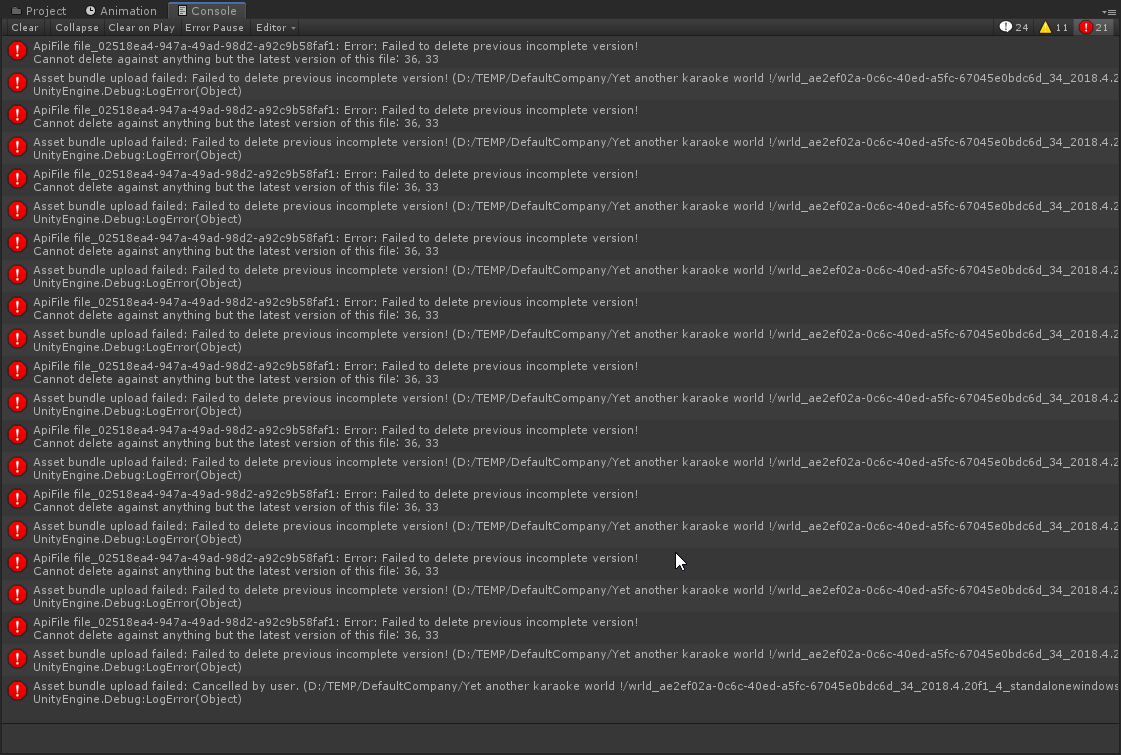
Yeah, hm.
^Happen when i'm trying to upload an update to my world, unsure of what's up, guess it have to do with the servers going madlad earlier :(
silent gazelle
Any possible way to sync door position/animation?
paper plinth
hushed gazelle
What's the best way to trigger a particle emitter with Udon? Just needs to fire...
I have a particle emitter that emits a 1s program when I set the gameobject active and so when I want a little burst of particles I just wake it up and put it back to sleep when it's done
hushed gazelle
Oh I could fudge that easily enough with an animation, I was just curious as to if there's a proper way to tell a Particle Emitter "trigger once with an X particle burst")
paper plinth
That's all settings
 elder ledge
Any easy way to add additional launch options from VRSDK + Unity when running "Build & Test". I'm trying to see Debug.Log statements, anyway to turn these on for debugging? If not, how does everyone debug udon graph programs?
 flint kite
i think can use physics on roller coaster for udon?
scarlet lake
Anyone know why this happened when I added the Billiards Prefab in my world?
 broken bear
make sure it's at Y=0, and you set up the collision layer. Also it needs udon sharp
scarlet lake
I think that issue is fixed in xiexes fork of the project
dapper lion
collision matrix is still needed
floral dove
elder ledge
Any easy way to add additional launch options from VRSDK + Unity when running "B...
The debug options are passed along automatically, make sure you have the path to the VRChat client properly set up in the control panel
VRChat
What is Debugging? Debugging is how you learn about what's going on under the hood in the VRChat client and your world. It's a key skill to develop for programming in general, and for building your worlds. VRChat Logs When you use the VRChat client, it saves logs about things that happen like worlds...
 scarlet apex
how do i make a button with udon to switch mirrors? like, i have a button for a HQ mirror and one for LQ. i dont want to accidentally have 2 mirrors on at the same time so how do i get either button to turn off the opposite mirror?
i currently amd using Vowgan's object toggle thing
 paper plinth
Use a branch
 tribal meadow
hopefully this is something simple...but I've got an invisible box collider that is used to turn a mirror on when someone enters the box. The issue is, if a second person enters the box, the mirror shuts off for the first person, and turns on for the second....any ideas what I might have set wrong?
 scarlet lake
So i was trying to update my world and this happened. Failed to delete previous version. I doin something wrong? Started yesterday when the servers went down.
 native estuary
You'll need to contact support or just upload to a new id
 hardy night
Uh hello there. I have a problem with using buttons to animate a door. Is this the right channel for that?
hardy night
So here's what's right: I have the buttons working AKA you can press them, the door has an animator that also works, and the animator has a boolean that lets you transition between states.
However, the problem is that I have no idea how to code it where the boolean of the animator changes when you press a button.
I've tried several times in C# (even using a C# to Udon compiler) and I don't know Udon enough to code it in there, so that's where my trouble is
rigid plume
If you're doing it in Udon#, you could do it with just an assignment like doorToggle = !doorToggle; (I think. I haven't used C# or Udon# really, so going off my experience with other languages). In vanilla Udon, you will need to have a boolean variable for your door. Let's call the variable doorToggle. In Udon, you'll hold ctrl and drag the doorToggle variable onto the graph to create a node that sets the variable. Then, create a new node by pressing space. Navigate through the menu to Boolean > UnaryNegation. Drag the doorToggle variable under that (not holding ctrl this time). Connect that to the left hand input of the UnaryNegation. Then connect the right-hand output of the UnaryNegation to your Set doorToggle node. That should implement the toggle for you. From there, create a Branch node connected to your Get doorToggle node. For the true branch, play the door open animation. For the false branch, play the door close animation.
hardy night
Okay so I have it but Im unsure if this is what I need. Let's see
How do I add this to the button?
rigid plume
You create a new Udon program and then add it to your button's GameObject as a new UdonBehavior component.
hardy night
Nah, I mean a UI Button
rigid plume
Ah, you'll need to create an Event Interact node.
hardy night
Where shall I place that?
rigid plume
First, you'll need to press space in the Udon graph editor, then choose Event > Event Interact. Put that on the left-hand-side (LHS) of your Set doorToggle node.
hardy night
So this will make my button change the boolean each time, it's pressed, right?
rigid plume
yes
Unary negation basically switches a boolean value on or off.
If it was on (true), it will be switched to off (false). If it was off (false), it will be switched to on (true).
hardy night
Like this right?
 rigid plume
yes, that looks like it should do the trick.
you will also need to get those bool instances from the door's animator itself though.
For the part after the branch, I mean.
hardy night
How shall I get an instance?
rigid plume
First, you'll need to have a variable for your door's GameObject and make that a public variable. In the scene editor, be sure to assign the door itself to the door variable in your Udon Behavior component for the button.
Next, in the Udon Graph editor, you'll need to get the boolean for the open parameter from your door GameObject's Animator component.
To do that, drag your door GameObject variable somewhere to the right of the branch. Then create a GameObject > GetComponent node. Create a Type Animator node under that, and connect that to the type input for the GetComponent node.
Connect your door GameObject's node to the instance input of the GetComponent node.
Under all that, create a Animator > SetBool node. Connect the GetComponent's Component output to the Animator > SetBool node's instance input.
For the Animator > SetBool node, be sure to set its drop-down menu to (string, Boolean. Set its name input to open or whatever the name of your animator parameter for it is.
Then, drag your doorToggle variable under that to create another Get doorToggle node, and connect that to the value input of the SetBool node.
hardy night
So stupid question, how do I connect the instance of the door to the code?
rigid plume
You click and drag the little circle on the right of the door's node to the LHS circle next to the instance input of GetComponent.
If done right, you'll have a line connecting the input and output for those nodes.
hardy night
So everything should look like this, right?
 rigid plume
Almost. Thinking through it more myself, I realized, you don't really need the branch. You can just connect arrows from the Set Open node to a single SetBool node (the uppermost one you have in your graph).
So, you should end up with a program that looks like this:
 hardy night
Can I use this script on another button controlling another door?
rigid plume
You sure can!
Just in the scene editor, reuse the same script in the Udon Behavior component, but assign a different door GameObject to the door parameter.
hardy night
You mean the hierarchy?
rigid plume
By "door GameObject" I mean the object for the door itself, which presumably has your animator with the open close animations tied to your open boolean parameter.
hardy night
Shoot, it didn't work. The door doesn't open when you click the button. Anyway to check if the variable changes while playing?
rigid plume
You could create Debug > Debug.Log nodes to try to write your variables to your VRChat log file.
hardy night
Imma try to see if I can get it to cause the door to just open then progress from there to make it open and close
rigid plume
What does your animator look like?
hardy night
 rigid plume
In your program, is your SetBool's name "open" or "Open" (case matters)?
hardy night
"Open"
rigid plume
ok, the animator looks fine then.
hardy night
Coding can just get stupid at times, lol
Im gonna try out the "play" function and see if I can get it to open
rigid plume
That would certainly help to make sure that animator itself is working.
hardy night
Its best just to see if everything is working
rigid plume
In the scene editor, your button has the Udon program attached to it in an Udon Behavior component, and the door object set to its door parameter there, right?
hardy night
I dont see anything there
 rigid plume
Looks like you need to make your door variable public.
hardy night
In the Udon Graph?
rigid plume
yes
hardy night
Nope, it's public
rigid plume
You're sure? If it were public, there would be a Public Variables section under the Open Udon Graph button.
hardy night
I think there's a problem with the compiler? It says "Object Reference not sent to an instance of an object"
rigid plume
In the Udon Graph editor, you should have this under your variables:

Can you share a picture of your Udon Graph program again?
hardy night
 rigid plume
No, that doesn't look right. Sure it would set your animator to the Door Open state, but it makes no change to the Open parameter, so it would immediately go back to the Door Close state.
I would recommend that you have your Udon Graph set the Open parameter of the animator instead of directly setting the Animator's state.
hardy night
?
 rigid plume
That's closer. That would make it so the button always opens the door, but never closes it.
hardy night
Im just trying to see if it can open it
rigid plume
ok. Those are good first steps then.
hardy night
But Im still getting the "Object Reference not set to an instance of an object" error
rigid plume
To be sure that your Door variable is set to public, could you expand it out?
hardy night
It's public
 rigid plume
Hmm... that looks fine there. It's strange that in the scene editor it wasn't showing the public variables.
hardy night
Should I attempt starting over?
rigid plume
Maybe try removing the Udon Behavior component from your button, and try adding it on again.
It could just be a hiccup with Unity.
hardy night
HAHAHA, It is the STUPIDEST solution I've ever seen. Apparently, I had 2 different programming scripts with the same name and they messed with each other
I see the Door variable now!
rigid plume
Oh no! I guess that would do it. XD
rigid plume
nice!
rigid plume
Now all you need to do is tie in that UnaryNegation bit and you should have a working toggle.
 steel nova
anyone experienced this?
 cunning mist
The servers are crapping their pants, don't worry
steel nova
i had this happen last night aswell, not during this outage
cunning mist
Try swapping the upload ID on the VRCWorld instead of overwrighting the old one.
hardy night
Alright, new problem: it won't close
 steel nova
this is so odd
 hardy night
Correction: it does close. It just loops the animation
rigid plume
In the earlier screenshot for your animator, I didn't see the condition for the transition from Door Open to Door Close, but can you confirm that it is Open equals false
oh
hardy night
Lets see if it works now
cunning mist
Make sure your Animation Clip file itself has Loop disabled.
hardy night
It was on lol. I must say, it is a bit weird at times such as like it takes a second for it to toggle again. Though that could be the animations being weird, it works!
rigid plume
Huzzah!
hardy night
So once I finish on some details, I need to add one more thing: a locking mechanism
rigid plume
I presume that'll be controlled by something outside your button?
hardy night
It'll be a secondary button. I was thinking it could be another boolean that changes another animator boolean, but it uses a custom event when pushed instead of Interact
rigid plume
If you're just changing another boolean parameter on the same animator, you might not need to deal with any custom events.
You could just add it as another condition on the transition from Door Default and Door Close to Door Open.
 rigid plume
You would need to modify your Interact event's workflow to check for whether it's locked.
hardy night
That's already done with the animator transition conditionals
rigid plume
ok, that should be fine there then. Do you have your lock button sending a Lock custom event to your toggle button?
scarlet lake
Udon looks really complicated to someone who's used to straight up text programming instead of GUI stuff
Is there some kind of non-gui version of udon or that the only way to use udon?
rigid plume
It is... I come from a text programming background too. XD
hardy night
Would the correct thing be UdonBehaviour.SendCustomEvent?
rigid plume
Yes, you would use SendCustomEvent. You'll need to be sure to set the instance input of that to the UdonBehavior component of your toggle button.
Otherwise, it'll use the this object by default.
hardy night
How can I be sure?
rigid plume
Your lock button's Udon program will look something like this, except remove the evtName node and just hardcode "Lock" for SendCustomEvent's eventName input.
 unborn hornet
scarlet lake
Is there some kind of non-gui version of udon or that the only way to use udon?
unborn hornet
scarlet lake
Is there some kind of non-gui version of udon or that the only way to use udon?
UdonSharp
rigid plume
You would set your door toggle button as the evtTarget public variable.
scarlet lake
UdonSharp? Sounds like a version of C# w/ some kind of Udon API and limited C# access?
Could I have some kind of link or page to read up on it. Sounds fun, really want to try it out
rigid plume
@scarlet lake https://github.com/MerlinVR/UdonSharp

GitHub
An experimental compiler for compiling C# to Udon assembly - MerlinVR/UdonSharp
hardy night
Oh no, it's being weird again. I have the "Object reference and instance" error again
rigid plume
What does your lock button's program look like?
hardy night
 rigid plume
You don't have anything flowing into your SendCustomEvent node.
Do you mean to connect an Event Interact to that?
hardy night
Wait... am I being an idiot or should I have just made a new script for this?
rigid plume
If this is controlled by another button, you should probably make a new script for it.
hardy night
I did and now they both have Interact and the same error
Oh, no, lock door doesn't have it 🙂
Its called NullReferenceException
rigid plume
What's your lock button's script look like?


 rigid plume
Are you using the same programs on the Udon Behavior component for both your toggle and lock buttons? You should have separate programs for both of them.
hardy night
I have Open and Close Door on one and Lock Door on another
rigid plume
We already established that your Open/Close script was working on its own. Can you share your Lock script and can you confirm that the open/close button object is passed in as a variable to your lock script?
hardy night
Here is my lock script
 rigid plume
Ah... For your lock script, you don't event need the Door variable. You can just delete everything to the right of the SendCustomEvent node. However, you do need a variable to take in your open/close button. You need to connect that to your leftmost GetComponent node instead of the LockButton. Since LockButton is this anyways, you don't need LockButton either.
hardy night
Huh? Isn't this script supposed to be used to a new button that controls another boolean in the Animator?
rigid plume
You could do it straight through just the lock button's script without custom events, but I got the impression that you wanted to do it with a custom event sent to your open/close button.
hardy night
Also, how come I need to add in the Open/Close button to the GetComponent?
rigid plume
The SendCustomEvent node needs an instance of an UdonBehavior object. You need to obtain that as a component from your Open/Close button.
hardy night
Oh! So the GetComponent is actually where the customevent will go to?
rigid plume
Sort of... it's the UdonBehavior object that gets forwarded from the GetComponent node that goes to the SendCustomEvent node.
hardy night
Alright so CustomEvent is what I use to receive the SendCustomEvent?
OH! resetting Unity does the trick 🙂
rigid plume
Cool! Got your locks working then?
hardy night
Too good. The door doesn't open anymore, lol
rigid plume
Like it doesn't open at all, or it doesn't open after being locked and then unlocked?
hardy night
Doesnt open at all
rigid plume
What do your scipts and animator look like now?
hardy night
Nothings changed to stop it from working
I took and put back in the udonbehaviour to see if that could work
Nope
 stark adder
So world uploading is broken.. ? PERFECT -_-
hardy night
...Im an idiot
rigid plume
You figured out the solution?
hardy night
I didnt have it connected to the click of the button
I should also fix the delay of the closing animation
rigid plume
The closing animation delay might just be something to do with the exit time for the transitions in your animator.
hardy night
Hmmm, lock isnt working
but I can open and close it
Yep, I had it on a different toggle when you click it
rigid plume
You got it sorted out?
hardy night
I'd like to congratulate everyone and say it works!
rigid plume
Huzzah!
flint kite
hi i wonder can make physics like roller coaster made out udon. any idea?
paper plinth
Sure, that's just an animation
flint kite
paper plinth
Sure, that's just an animation
?
scarlet lake
can i move my arms without vr?
paper plinth
.
 fickle stirrup
@scarlet lake > #avatar-help you can via animations and puppet menu which av 3.0 provide https://youtu.be/VX-BoYUrUjM
broken bear
may be a stupid question but Ionly started Udon.. can a gameobject have more than one udon behavior script on it? I got an area trigger that I want to run two concurrent behaviors and doubling up the area trigger with a clone doesn't seem efficient
 stoic mountain
I want to teleport someone, but not by interaction but by trigger. I want to check if the thing entering the trigger is a player and not something else. I was thinking of finding a "player" component in the collider/his parents but im not sure what to look for, nor that it is the right way to do it. Suggestions ?
(oh thats udonsharp btw)
paper plinth
stoic mountain
I want to teleport someone, but not by interaction but by trigger. I want to che...
If you want to teleport the current player you need to check player islocal
stoic mountain
I dont have a player at the start, I have a collider :|
paper plinth
And on playertriggerenter teleport to the (world) pos/rot you desire
Ohhh
Then you want ontriggerenter
stoic mountain
im curious about playertriggerenter, but ultimately I may need my teleporter to teleport other things as well
paper plinth
If you need the collision info then use oncolliderenter or whatever that's called
stoic mountain
XXX playerObject = other.gameObject.GetComponentInParent<XXX>();
}```
what should I use for "XXX" ? dawn forge
Either put var to let the compiler decide the best type or mouse over getcomponent and see what the type is in the tool tip. Documentation should also tell you the type.
stoic mountain
Either im confused or there is a misunderstanding.
Any kind of gameobject can enter my trigger. When that happens, I want to check if that object is a player. So Im looking into the objects components to check if it has a "player" component. But I dont know what is the name of the component im looking for.
So that if the object has that "player" component I do something, otherwise I do something else
fiery yoke
Udon has a special method for detecting collisions with players. The one that youre looking for is probably "OnPlayerTriggerEnter"
stoic mountain
Wont the generic "OnTriggerEnter" method be triggered as well there ?
fiery yoke
yes. so what?
stoic mountain
so if I have code on OnTriggerEnter, and I want to check if its a player or a pickup that entered my trigger, I still need to check for that
or ... I instead of making conditions to check if the "object is a player", I could make conditions to check if the object is any of the non-players types the teleporter could accept. I guess that would work
fiery yoke
Well VRChat could have gone with a different way of providing a means to convert a player object into a playerapi, but they didnt. So yeah.
broken bear
kinda realted to my question above with this too, if I want multiple udon behaviors to run in a trigger area, should I duplicate the trigger area/collider (that doesnt seem optimized), or is there a way for the object to have multiple udon behaviors on it, I can just edit the U# to condense the behavior if needed but I don't want to do that if I don't have to
stark adder
Momo why the heck does GetPlayers return players in completely random orders.. ? -_-
broken bear
Also, is there a way to change world master within a node/script, no options seem obvious. Would like to have master restored when the intended master may rejoin
stoic mountain
UdonSharpBehaviour doesnt seem to have a OnPlayerCollisionEnter(), do I just type my method this way and hope for the best ?
void OnPlayerCollisionEnter(GameObject go) { ... }
void ridge
broken bear
Also, is there a way to change world master within a node/script, no options see...
I don't think you can change master, but you can always set ownership of any specific GameObject with GameObject.set Owner
pretty much all master ever matters for is network ownership
broken bear
and room kicking
void ridge
Oh, is that how that works? First player in and then inheriting masters can instant kick? Didn't know that
I definitely wish there was more control over that
broken bear
yep they have a 1-hour kick option special to them without vote. Lots of troublemakers have antikick though, but I'm contemplating in the event someone troublesome gets the master role. Would love to have a button to assign master by whitelist
void ridge
broken bear
kinda realted to my question above with this too, if I want multiple udon behavi...
As for this, no, I don't think you can have multiple UBs on one object. I might be wrong, but it'd be confusing if that were possible
I don't think there's really any problem with just copying an object so that you can have another, separate collider component
The soccer balls in Soccer Practice have three separate colliders on them, active at different times 😅
stoic mountain
(ok, found this : "public override void OnPlayerTriggerEnter(VRCPlayerApi player)", testing it)
broken bear
got it
I'm just trying to limit ways troublemakers can distrupt events. if Master is protected then it is what it is. issue: we have events where 1-3 troublemakers join on friends and distrupt. Plan to have a space 6000 meters away that will contain someone by a pre-set troublemaker list (on-enter area trigger to teleport them, and on-exit at the teleport area to pull them back in) or if someone new needs to be added, then an object a whitelisted player can spawn and collide with the troublemaker to add them to the troublemaker list. no idea how to graph that though so will just build on U# whitelist examples I have. Hopefully moded client teleport movement will still trigger on-exit of a trigger area. if not then I got to rethink this. I don't want the player space to be one collider with a constant check since that seems inefficient, only the spawn area.
twilit hawk
broken bear
I'm just trying to limit ways troublemakers can distrupt events. if Master is p...
Alternatively, you can have an object that operates only on the local player (all of them) periodically, or in an event that gets triggered for everybody's instance if you want to drop the ban hammer, such as the trigger system you were talking about. If they're a banned display-name, then flip a local (unsynced) boolean.
That boolean is checked in fixedupdate, and if it's set to true, then teleport the banned local player into to the ban-zone each frame. It's just local, so any extra performance cost of teleporting 50 times a second is shouldered by the person you don't care about, and it gets around modded clients potentially being able to teleport away.
You can also set their voice far-distance to zero, so they're completely muted, even if they do manage to escape.
Of course, this system amounts to (counter?-)griefing, but there's no native world-moderation tools, so we're stuck with these double-edged swords for now.
broken bear
thanks for the review of that
I think instead of an area trigger I'll do a slow march down the player list periodically and set the boolean
twilit hawk
If the master is able to dynamically "ban" people (eg. through a menu), then it's probably most efficient to run through the player list only when the banning event fires.
Unless you're hard-coding the ban list, in which case it's more straightforward for you, and you can just check OnPlayerJoin.
broken bear
I may do both, a hard-coded, then a player list that a whitelisted player can bring up and interact with to ban or unban. this avoids using a collider trigger object which could go wrong
I'm still very new to udon so it will take some time to navigate this, but I do appreciate the feedback on this
twilit hawk
Instead of also having a whitelist, it might just be easiest to let the instance's master control banning/unbanning. That way the griefers/cheaters can simply make their own instances to be in if they want to just experience the world.
No problem!
unborn hornet
void ridge
As for this, no, I don't think you can have multiple UBs on one object. I might ...
Actually you can. I do this for my prefabs to specify a color pallete for UIs of my assets
void ridge
Right, but can you have more than one active at once?
unborn hornet
Yes.
 edgy plume
i dont know much about the new sdk3/udon but anyone know how can i upload my old sdk2 world to the new sdk3? i tried importing the assets folder to the new sdk 3 but i dont see my scene.
 jaunty schooner
I've got a pickup with two children representing open and closed states. I'd like the player to click on the pickup to open and close it, and I want the current state to be synced across all players in the room including late joiners...
This is how I have it currently set up:

But I'm wondering if I should be using events for this instead, and if so, how I would do that with six different pickups without six different Udon scripts with different event names on toggle? Also, I seem to recall someone telling me that synced variables aren't synced very often, while events are instant? I can't recall exactly how long they said each takes though.
paper plinth
Varneon let's friggin goooo...I'm waiting for that prefab to drop
 visual drift
Heyo,
I'm having some trouble with a UI panel where I can interact with it in desktop mode, but I can't get the laser to appear in VR. The canvas has a VRC Ui Shape component, and is on a non-ui layer.
Anyone seen this before?
cunning mist
Try putting a box collider on the Canvas itself with a Z scale of like 0.01 or something, see if that helps.
visual drift
cunning mist
Try putting a box collider on the Canvas itself with a Z scale of like 0.01 or s...
oh heck, I've been making heavy use of your tutorials as I fumble through this, thanks for those!
Collider doesn't seem to have any effect, still can't get a laser goin 😦
cunning mist
Do you have any big Colliders in the way? If you have any large trigger Colliders, they need to be on MirrorReflection in order to keep your hand from getting blocked by them.
paper plinth
is that why buttons don't work inside my walkable ship?
or is it that you are being teleported about 50 times per second?
visual drift
cunning mist
Do you have any big Colliders in the way? If you have any large trigger Collider...
This was 100% it, thanks much
While I'm here, is there anyway to get a full list of players inside a collider? Or do I just have to keep track of everyone entering and exiting. Basically, I have a stage and I want players standing on it to have their voice volume increased when a button is pressed to "turn on the microphone"
cunning mist
Entering and exiting would be the easiest way to populate that list, though there's definitely route's both ways.
Glad the collider check worked 👍
 twin drift
The VRC_Panorama replacement isn't available yet, right?
fiery yoke
There is no replacement yet.
twin drift
fiery yoke
There is no replacement yet.
ty
visual drift
visual drift
While I'm here, is there anyway to get a full list of players inside a collider?...
I've mostly got this working but I think I'm running into a permissions issue with SendCustomNetworkEvent. It's getting blocked in some situations, saying "RPC abandoned" in the logs. Is there specific rules about master/ownership I should know for network events?
 full wind
hi anyone knows what could cause this? [USharpVideo] Video failed: https://1drv.ws
i have been using one drive direct links for a while but today it's not loading anything
jaunty schooner
Does anything see anything wrong with my code here? My magazines are behaving oddly.

So I've got some magazines in my world right? One is open, the others are closed. I could see them all until I designated them as pickups and added the script. Now all the ones that defaulted to closed are gone (presumably invisible) and the one that was open has both its open and closed states visible at the same time.
These are the parameters of the magazine that defaults to open:


So here's what I expect to be happening:
Each update, the graph runs, and sets the Open magazine mesh active state to equal MagazineOpen. Therefore, if MagazineOpen is true, the Open mesh will be visible, and if it is false, it will not. The Closed magazine mesh's active state meanwhile is set to the opposite (boolean negation) of MagazineOpen. So if MagazineOpen is true, the closed mesh will be hidden, and if it is false it will be shown.
Alongside this, the code is checking to see if the player's use button went down. (I assumed this only fires once, though now I'm wondering if it fires constantly while the button is down, though even if it did, that shouldn't be the cause of this bug since I was not holding the magazines.) If the button was clicked, then MagazineOpen is set to the opposite of what its current value is, thus toggling it true and false each time you click the object.
This all seems straightforward, and yet, my open magazine is showing both open and closed meshes, while the closed ones are apparently showing neither.
Since the only difference between theses objects is what I set the default state to... It seems like both open and closed active meshes are just being set to the default value. In other words, the boolean negation I placed before the closed mesh's active state is set to the value of MagazineOpen isn't working.
jaunty schooner
Hm, actually it has to be more than that, because the closed magazines default to having the closed magazine mesh visible. Which means not only is the closed mesh being made active on the open magazine... It's being made inactive on the closed magazines. While the open mesh... Well, that doesn't seem to be being touched at all. It remains hidden on the closed magazines, and remains visible on the open magazine.
Why aren't there any Udon examples for simple things like toggling a synced boolean?
I found these two examples for incrementing a counter, but they use an event, and I can't make heads or tails over what the difference between them is:


Like, I can't tell what these examples are supposed to DO. Does the first one increment the counter and sync that count to all players ONLY when the owner of the object clicks it?
And does the second one do it when anyone clicks it? And if so, why do that, since it's my understanding that as soon as you interact with an object, you own it, so only the owner should ever be able to interact with an object?
Perhaps the issue with my code above is I need to use OnDeserialization? I just found this page on that: https://ask.vrchat.com/t/how-to-send-data-over-the-network-using-synced-variables/2264

VRChat Ask Forum
As of right now (07/16/2020) the only way to transfer any sort of data across the network is using “Synced Variables”. Unfortunately these variables do not tell you when they have changed. However you can setup your own logic to do exactly that. But lets start simple: Basic Synced Var The most basic way to handle synced vars is by just handlin...
But from what I can tell my code should still work even if I don't trigger it based on those deserlization events... But it might be running more often than it needs to since the data may not have changed. And even if a deserialization event has triggered, the state still might not have changed. Though I'm not sure if its really worthwhile to add the extra complexity of an if statement to check if the data has changed rather than just setting the active state, since I can't imagine setting active repeatedly is noticablly slower than doing an if statement repeatedly.
 valid basin
where can i find how to use Network.GetNetworkDateTime ?
i can not find an article about networking in vrchat documentation
paper plinth
I think you're overcomplicating the magazine thing. I think you need to start with your pickup scripted in one way, and then change it when the player interacts with it.
jaunty schooner
@paper plinth "I think you need to start with your pickup scripted in one way, and then change it when the player interacts with it." - I don't understand.
I have no idea what you're trying to convey. Start with my pickup scripted in one way and then change it? It sounds like you're suggesting I swap the script on the object after the player interacts with it, but that doesn't make sense.
paper plinth
Your graph looks like you're trying to write your entire script at once. Your script has multiple parts that interact with each other.
jaunty schooner
Sure but it's a very simple script.
I'll try removing the part to allow it to toggle the magazine and see what happens.
paper plinth
Envision how you want your object to look when it's not being interacted with and script it that way.
Then use blocks and branches to build on top of that
If you want to write it all at the same time you need to establish how you're going to do that first.
Like...write a requirements and specifications document
Also one of the benefits of graph is being able to visualize your script that way and when you have your elements interact like you're doing, you're not really using one of the great benefits of graph and nodes.
It's cool to spread out.
jaunty schooner
You're making this out to be way more complicated than it is.
paper plinth
Different strategies of writing scripts require different levels of planning and what I'm suggesting is that if you want to keep going down the path you're on, it would be helpful to you to have at least some metacode telling you how to build it. But you're right, it's a pretty simple script.
jaunty schooner
So I removed the noodle that toggles the value if the user is interacting with the magazine... And now they all retain their initial state the way I expect them to?

I just deleted that one noodle on "OnPickupUseDown" that went to SetMagazineOpen.
But I'm just more confused now. That node should never have triggered. Not only because I haven't even tried to pick up the magazines, but also because I just tested this in the editor where I literally can't interact with pickups.
The graph compiles okay so it's not that the graph isn't running at all...
I'm gonna see what happens if I reverse the inputs...
Okay.. the graph is definitely running...

When I did this, all my closed magazines opened and the opened one closed. So the graph is working, aside from that one OnPickupUseDown node which caused everything to go wonky.
I'm still at a loss to explain why this isn't working though. That OnPickup node should never trigger in these tests, so it being connected or not should be irrelevant.
Futhermore, even if it were triggering repeatedly, the state the magazines are ending up in makes no sense.
Also, what even is that Start node? I cannot find any documentation for it. I only used it because I saw others using it. But I'm wondering if maybe it only runs once the first time the script executes. Cause there's also an Update node, but that too is undocumented.
paper plinth
Don't forget Awake
jaunty schooner
Awake what?
paper plinth
And FixedUpdate
jaunty schooner
Well I've heard of FixedUpdate. But I don't know what you're getting at, unless I should go look in the Unity docs for a Start function somewhere. But I'd asssumed that was just a special Udon node.
paper plinth
Nah
Start happens when the game starts
Any object in a scene asset that has a start event
The start event fires
If your gameobject is not active when the game starts
Awake will fire when you make it active
Never seen anyone use it
Update fires every program scan/frame
jaunty schooner
I just found these docs: https://docs.unity3d.com/ScriptReference/MonoBehaviour.Start.html
paper plinth
If you're sequencing events and you need more determinism / predictably there's fixedupdate which I don't know how to use
But your script isn't working because it fires once when the game starts and never again
You need to use update if you want your code to execute
jaunty schooner
Hm... Well now I wish I could recall whose script I was looking at when I saw that Start node used because I want to know why they used it.
paper plinth
Start os for configurations, setting the pos/rot, setting variables that do t have defaults, setting up interaction conditions...
*is
Now that's where you get to see the utility of developing your program step-by-step
jaunty schooner
Yeah, I understand that now. I'm not new to programming, but I'm new to scripting within Unity. And to Udon. And I have no way to tell if a node is an Udon specific thing or a Unity specific thing and I keep forgetting that sometimes they're Unity functions.
paper plinth
You can do anything that's exposed and almost everything you need is exposed.
Nodes are just scripts in a different visualizer
jaunty schooner
I've got like 30 years of programming experience, so I know how to code, I just didn't realize the start function there wasn't doing what I thought it was. I thought it was the "start" of my program flow in an udon graph.
However, even if I fix that Start issue, this still does not explain why having that OnPickup node connected breaks everything.