#udon-general
59 messages · Page 47 of 1
 silent gazelle
How it possible to give a player option to press on button and have a full-screen overlay from the camera view?
 paper plinth
To make a menu?
silent gazelle
Nope, I want to stream camera view so I need my sceen to be fullscreen of the camera view
paper plinth
Can you use the streamer camera that's in the app?
silent gazelle
Im setting up couple of cameras that the host can change between, cuz that i need to make fullscreen overlay of the "main stream" that will show the camera view
I have this with render texture, the question is if it possible to put this render texture full screen on the player that wants to
paper plinth
I don't know how desktop works but now I understand the problem lol
In VR you could have it in your field of view like a hud and switch it on and off but that's it
silent gazelle
Gotcha, thank you
 placid niche
Anyone know how to destroy instantiated objects with U#?
 scarlet lake
i found out a way to maybe get my audio to work
i have to setup a large collider though to surround each area
and when the player enters it the music toggles on
or off if the player isnt in that area
placid niche
That's kinda overkill
scarlet lake
its the only way i found that could work
as i tried making my 2d audios for music stop after leaving their circles but that didnt work
and i have to have them 3d
but
that makes them sound all earrapy
and annoying
compared to when they were 2d they sounded nice
and searching on the web has given me nothing exept that
is there anything i can follow to help me get the 2d audio to toggle when in certain areas?
 lilac hatch
So, I had report of, sometimes,
Whatever the videoplayer
People not having the sound when watching streams from twitch/whatever.
It work for some in the world but not everyone, the same link work in others world.
Could it be because i'm using only one audio source ? ( Using the same on left/right since it's a 2d audio world wide i didn't see the point of having 2. )
placid niche
How do you destroy instantiated objects with u#
 glossy hornet
ive got some problems with the merlin video player prefab, if u put in a twitch stream i can see the picture but i dont hear any sound. other worlds are working with sounds. i have no idea where to look at. youtube is working fine - other people in my world are able to hear the sound, im the only one
paper plinth
scarlet lake
its the only way i found that could work
that's actually pretty elegant
I tried to do audio zones like you're talking about and I couldn't get it right, so I added a streetlamp with speakers on it to orient the player's sense of direction
paper plinth
in terms of terrains
how many terrains can I have until the world becomes unmanageable
can I make a scale model solar system with planets and moons and stuff and reasonably expect people to be able to be at both mercury and neptune?
paper plinth
huh
modeling the solar system seems to be a pretty established process and I have a flying ship so....I think I'll just do it and see what happens
how many spheres is that? you can't include literally every moon and orbit but it's probably like 100 spheres
 heavy hull
what is udon?
heavy hull
?whatisudon
 hidden martenBOT
VRChat Udon is a programming language built by the VRChat Development Team for use in VRChat worlds! It enables complex behaviors and logic in VRChat worlds. Read more about Udon in our documentation: https://docs.vrchat.com/docs/what-is-udon
VRChat
What’s this Udon thing anyways? VRChat Udon is a programming language built completely in-house by the VRChat Development Team. It is designed to be secure, performant, and easy to use via the VRChat Udon Node Graph, a built-in visual programming interface that uses nodes and wires (we call them “no...
heavy hull
ok
glossy hornet
ok my problem seems to be related with the avpro player but i still wonder why the unity player works out of the box, the avpro player not (in other world it does, in my world everyone else can hear it) no idea whats going on
 tall girder
Is there a way to save ur skins
 pallid mango
placid niche
How do you destroy instantiated objects with u#
pallid mango
placid niche
How do you destroy instantiated objects with u#
GameObject.Destory(GameObject)
In general, look up the unity scripting way of doing things. In most cases, it will be the same for udon sharp, unless it involves actual VRC APIs, functions, or events, or happens to not have been exposed
 void ridge
Are there any good guides on using VRCPlayerApi[]? I'm getting a random player who is currently inside a volume
GetPlayersWithTag would be lovely, but the docs say it's not working yet
 somber hawk
Are there any pen prefabs available for udon?
 fiery yoke
Networking stuff is currently being overhauled. I think there do exist some, but I would wait after the networking update.
 dapper lion
@somber hawk yes maam
 tall vault
@void ridge You can do something equivalent to GetPlayersWithTag with:
var taggedPlayers = new VRCPlayerApi[VRCPlayerApi.GetPlayerCount()];
VRCPlayerApi.GetPlayers(taggedPlayers);
int taggedPlayerCount = 0;

// Get list of tagged players
foreach(var p in taggedPlayers) if(p.GetPlayerTag("tagname") == "value") taggedPlayers[taggedPlayerCount++] = p;

// Pick a random tagged player
var randomTaggedPlayer = taggedPlayerCount > 0 ? taggedPlayers[Random.Range(0, taggedPlayerCount - 1)] : null;
if(randomTaggedPlayer != null) {
  // Do something with random tagged player
}```I don't know C# syntax yet. But is this basically just searching through VRCPlayerApi.GetPlayers, filtering only for players that have the tag, and putting them into their own array? Because that's what I was considering doing
tall vault
Yep
That example uses one array, gets all of the players in the instance and shifts all of the tagged players to the beginning of the array
And keeps a count of how many tagged players there are
GetPlayersWithTag will probably need another function added to return the number of players there are with a certain tag so you can allocate the array ahead of time like GetPlayers needs
Unless they add support for lists
 floral dove
FYI - when iterating through players, I'd recommend calling .IsValid() on each Player to make sure they haven't left the instance.
void ridge
Thank you, I was checking for Inequality on Null. Is that the same thing?
fiery yoke
Unfortunately its not, because of internal workings of Unity.
void ridge
Actually, I'm not finding an IsValid for VRCPlayerApi
fiery yoke
Its only in the most recent SDK
I believe its the open-beta one if Im not mistaken...
void ridge
Sorry, I should have asked if they're equivalent, not the same thing
tall vault
So a VRCPlayerApi object can be invalidated within the same frame?
void ridge
And yes I see that IsValid is in the notes for the beta. Maybe Momo just let it slip that that's an RC and will ship tonight 😛
tall vault
I would have expected it to last at least until the end of the frame
void ridge
What value does GetPlayerTag return if that player's tags have been cleared or never set? 
pallid mango
void ridge
What value does `GetPlayerTag` return if that player's tags have been cleared or...
My assumption is a Zero length string. Checking now
(Aka “”)
void ridge
Cool, thanks
floral dove
void ridge
And yes I see that IsValid is in the notes for the beta. Maybe Momo just let it ...
Heh - my bad, was thinking that IsValid() had already gone out in a release.
floral dove
tall vault
I would have expected it to last at least until the end of the frame
Yeah, I think it should be fine until the end of the frame. Was just jumping the gun a bit on spreading the word about IsValid since it fixes the issue where a Player is not null but has left the room. Also makes null-checking any object much easier since you can use IsValid to easily only fire a branch if the given object is not null
void ridge
tall vault
For an unused tag
Is this answering my question?
tall vault
Yep
void ridge
Boo. So I have to nullcheck that string value before I can deal with it? 😕
fiery yoke
String.IsNullOrEmpty
tall vault
String.IsNullOrEmpty(value) should cover you
pallid mango
There is a IsNullOrEmpty in unity. Not sure if in Udon
fiery yoke
Actually
maybe not
This might be a flaw of the Udon VM not sure exactly right now
Can you show the assembly that generates?
Im pretty sure that Udon is incappable of doing Conditional logic, because of how it works.
pallid mango
W h a t
fiery yoke
I will test that on my own now
void ridge
So it's going to try and evaluate that second term every time, and give a NullReference if the string is null?
pallid mango
Oh you mean no short cutting
void ridge
yeah I want that shortcut 😕
void ridge
This is frustrating because I avoid stringing together Branch nodes because that's caused problems for me in the past
But that's the only alternative to ConditionalAnd
pallid mango
If string is null or empty returns true, use an empty string instead of what the api returned
I mean there is nothing wrong with branch nodes you are going to need them if you are doing anything reasonably complex
That’s like wanting to code without ifs
void ridge
I use branch nodes, but I avoid stringing more than 2 together at once
I really don't know if that's the issue, but unexpected behavior is unexpected 🤷
fiery yoke
Yeah I think this is a major flaw in the UdonVM/Compiler, already hit up a dev about it, waiting for a response.
Ahh yeah
void ridge
These are my null checks now
fiery yoke
after narrowing it down, its completely the graph compilers fault.
The graph compiler does not handle conditional logic correctly. It can, but it does not, since UdonSharp does handle it correctly.
void ridge
It can, but it does not, since UdonSharp does handle it correctly.
this sentence does not handle conditional logic correctly I think 😛 😄
fiery yoke
it can (handle it correctly) since UdonSharp does handle it correctly (which is proof of it being able to be handled correctly, => but it does not.
It is correct. Just a little complicated :P
paper plinth
help
I had sdk2 in here
thought I deleted everything and imported sdk3
getting this:
ArgumentOutOfRangeException: Index was out of range. Must be non-negative and less than the size of the collection.
Parameter name: index
System.ThrowHelper.ThrowArgumentOutOfRangeException (System.ExceptionArgument argument, System.ExceptionResource resource) (at <e1319b7195c343e79b385cd3aa43f5dc>:0)
System.ThrowHelper.ThrowArgumentOutOfRangeException () (at <e1319b7195c343e79b385cd3aa43f5dc>:0)
System.Collections.Generic.List1[T].get_Item (System.Int32 index) (at <e1319b7195c343e79b385cd3aa43f5dc>:0) System.Linq.Enumerable.ElementAt[TSource] (System.Collections.Generic.IEnumerable1[T] source, System.Int32 index) (at <fbb5ed17eb6e46c680000f8910ebb50c>:0)
VRC.Udon.Editor.UdonBehaviourEditor.OnInspectorGUI () (at Assets/Udon/Editor/UdonBehaviourEditor.cs:93)
UnityEditor.InspectorWindow.DoOnInspectorGUI (System.Boolean rebuildOptimizedGUIBlock, UnityEditor.Editor editor, System.Boolean wasVisible, UnityEngine.Rect& contentRect) (at C:/buildslave/unity/build/Editor/Mono/Inspector/InspectorWindow.cs:1647)
UnityEngine.GUIUtility:ProcessEvent(Int32, IntPtr) (at C:/buildslave/unity/build/Modules/IMGUI/GUIUtility.cs:179)
when I try to open the node editor
pallid mango
Officially SDK3 should only be imported into a blank new project that has never had SDK2 before
paper plinth
well yes I am of course aware of that option, I'm looking for others.
pallid mango
It’s not a matter of files being left behind
paper plinth
I was looking for something more expedient than opening a new project and exporting and reimporting everything
pallid mango
I haven’t had any luck with fixing up a project that had SDK2 run it’s changes beforehand to let SDK3 not freak out
SDK3 was not designed to clean up after SDK2
paper plinth
well I was going to change the skybox anyway
pallid mango
Best advice is prefab everything up and transfer assets and dependencies
That’s the only way I could port stuff to Udon
Trying to upgrade SDK2 was just never ending console errors
somber hawk
I'm trying to dynamically populate a song list with a script and running into an issue where there is an exception thrown when it attempts to use the value:
Exception Message:
  An exception occurred during EXTERN to 'VRCSDK3ComponentsVRCUrlInputField.__SetUrl__VRCSDKBaseVRCUrl__SystemVoid'.
      Parameter Addresses: 0x00000003, 0x00000004

  Cannot retrieve heap variable of type 'String' as type 'VRCUrl'
The code that sets it is just script.SetProgramVariable("videoURL", "the-url-of-video");, so that's where the string comes from. I'd pass in a VRCUrl if I could but as we discussed a little yesterday that's not currently exposed.
Is there any way to get this working?
Basically I have a big list of URLs that I want to get into my world and be able to play on screen but I don't want to manually add them all in the editor since that would take forever, so I'm trying to script the addition in some way. It doesn't have to happen at runtime, if there are ways to do this at build time instead that would also be fine.
Maybe an editor plugin is a good way to do this?
void ridge
I've manged to move my variables list in such a way that I can't click the title bar on it to move it around. Help? 😭
Maximizing graph editor, restarting unity, show/hide variables didn't help
tall vault
You can click and drag anywhere on the variables panel to move it
void ridge
Thank you. I have no idea how I didn't try that.
 dense halo
If I want to randomly scale something do I just use:
using UdonSharp;
using UnityEngine;
using VRC.SDKBase;
using VRC.Udon;

public class ObjectScale : UdonSharpBehaviour
{
    public GameObject A;

    void Start()
    {
        A.transform.localScale.Set(Random.Range(0.2f, 0.8f), Random.Range(0.2f, 0.8f), Random.Range(0.2f, 0.8f));
    }
}
It will not be a uniform scale
 steady palm
during a test with UdonSharp, if a gameobject has the avatar prefab system, it will only globally toggle for that targeted version (eg PC for PC users and Android for Quest users). tested both systems before posting this, other game objects sync perfectly. does anyone else encounter this?
same goes for VRC Pickup
steady palm
SDK3.0
void ridge
TIL that trying to sync a VRCPlayerApi[] value breaks all syncing on that UdonBehaviour 😭
and causes OnDeserialization not to fire
 dusk lance
You can't sync arrays yet, so that's probably why
void ridge
Thanks, I was wondering if it was part of something more general
Seems like the pattern is Try to sync a thing that can't be synced yet --> All syncing on that UB stops
I think the same thing happens when I try to sync an int16 value
paper plinth
#udon-general message
I imported the sdk into a fresh new world and tried to open the node editor and got this
opened a previous project and it worked fine
....reinstall what?
is there anything I can reset in unity so I don't have to try reinstalling the engine?
 quick basin
VRC_CustomRendererBehaviour with udon for video?
 smoky fossil
Hey so i am trying to mae a chess board with a reset button and for the life of me cannot get it to work.
When ever i hit the button to reset it cyanemu just decides to die. And when tried ingame it just does nothing
Its takes the array of peices i have and should send them to the locations in another array.
 thick star
Is there gonna be any udon gun games that uses deagles, snipers etc
 manic yarrow
I have this graph that lets me teleport by interacting with objects, but I want to alter it to use OnTriggerEnter instead of Interact. I tried just swapping the Interact for OnTriggerEnter, but that didn't do anything.
Any ideas?
 cosmic pike
Hey, sometimes I can get stuck panning in udon. As in, all mouse movement just pans the udon graph, and I cannot seem to stop the panning, making my interaction with the graph useless. How do I detach my mouse cursor from panning if I do not wish to continue panning? I've tried the escape key and reloading the graph but I've not had much success.
Disregard -- it seems that the deletion of a script is what made the whole udon thing stuck. Udon keeps the node graph open even after it gets deleted. I'm guessing that's what broke things.
manic yarrow
I've made the teleport script work with triggers now, but how would I preserve player rotation? right now, it uses the rotation of the teleport target.
 glossy sky
manic yarrow
I have this graph that lets me teleport by interacting with objects, but I want ...
glossy sky
manic yarrow
I have this graph that lets me teleport by interacting with objects, but I want ...
Use OnPlayerTriggerEnter or something like that.
manic yarrow
glossy sky
Use `OnPlayerTriggerEnter` or something like that.
Yeah, I worked that out by messing around until it worked
I just need to figure out how to preserve player rotation
glossy sky
You could try getting the tracking data of the head.
So your variable that's target can be the bone tracking for the head instead.
manic yarrow
I need the target variable so I can choose a gameobject to teleport to
 native estuary
Remember to also make sure the player entering the trigger is the local player otherwise you will be teleporting all the players in the world
manic yarrow
I know I should get rid of the local rotation thing, but I don't know what to replace it with
manic yarrow
native estuary
Remember to also make sure the player entering the trigger is the local player o...
That's what the "get local player" part is for
I use this same script for some other teleports
native estuary
Well but that would still happen to everyone
manic yarrow
I've seen it work
native estuary
Enter trigger player happens when any player enters it, so if one player enters the trigger it's gonna run that code for everyone
I mean sure it works if you do it right
glossy sky
I'm pretty sure it's local because I use it to teleport players to different sections of a map.
Okay yeah, I stand by my statement. OnPlayerTriggerEnter is local.
native estuary
Well unless they suddenly changed it it's not
glossy sky
manic yarrow
I just need to figure out how to preserve player rotation
You can go to a map called "BrickTown Udon" by Sn0wBreeze. I added doors there where you just walk through and it teleports player locally.
native estuary
Well yeah because they have it setup to only teleport the right player 😔
Just changing the event in the above graph would not
manic yarrow
I've just tested with 2 clients and it seems to work
native estuary
Can you show the graph you have right now?
manic yarrow
All I've done so far is use a popular teleport script and replace the interact node with a trigger node
glossy sky
manic yarrow
I just need to figure out how to preserve player rotation
Yeah.
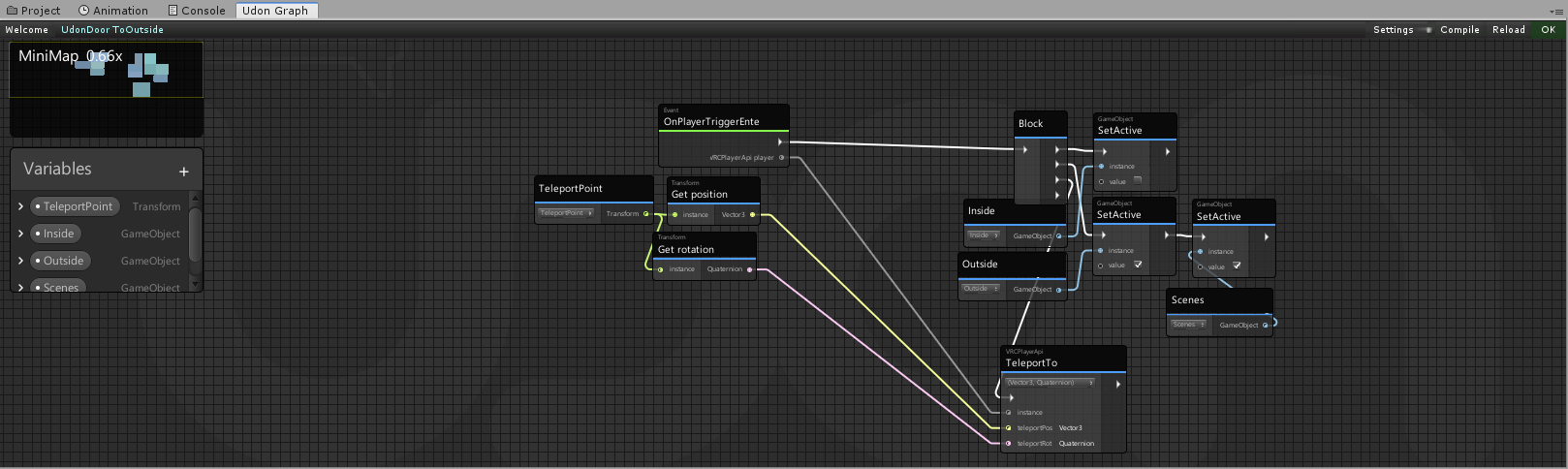
This graph is for another map I'm making but it's local.
manic yarrow
This is what I've been using
glossy sky
Also Fiji, for your target. That's wher eyou plug in the bone tracking data.
manic yarrow
I know I need to remove the Transform Get Rotation node, because it's using the rotation of the target gameobject
glossy sky
You don't need the "NetworkingGetLocalPlayer", you can just hook it directly from the OnPlayerTriggerEnter.
Here, I'll make the graph quickly for you.
manic yarrow
glossy sky
You don't need the "NetworkingGetLocalPlayer", you can just hook it directly fro...
That local player node stops the teleport from affecting everyone
at least on my version of the SDK
glossy sky
Errr. Update your SDK then because it's local now.
glossy sky
Then yeah, you don't need the extra node.
native estuary
Oh yeah never mind I'm just too tired and was thinking about it completely wrong
You guys are right
manic yarrow
just delete it?
glossy sky
Yeah then connect the "VRCPlayerApi" that's on the trigger event to the instance instead.
native estuary
manic yarrow
This is what I've been using
Though this should still run it on everyone since you are getting the local player for everyone, which of cource using the player from the event would fix
glossy sky
This is how you preserve the rotation.
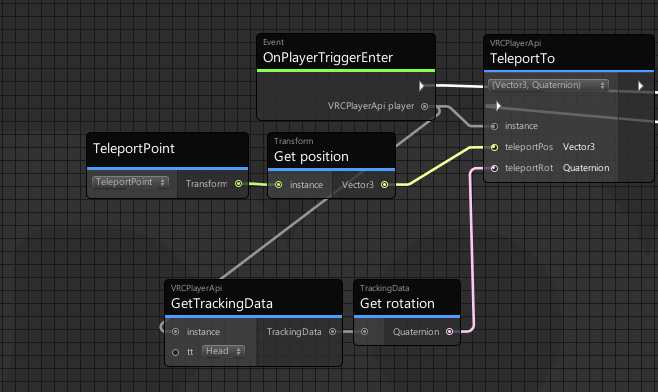
So your position would still be whatever you set your destination to be.
manic yarrow
wouldn't the tracking data include ALL rotation?
I wouldn't want it jerking someone's head around
glossy sky
Jerk their head around?
manic yarrow
if you're getting the rotation from the bone data and setting it somewhere else, wouldn't it change where they're looking?
or am I just thinking weirdly because it's late? 😅
glossy sky
It's not being set somewhere else. All you're doing is getting the rotation.
The "TeleportPoint" in the example dictates the destination. Only that.
So if I'm looking South for example, the bone tracking would be South. That's dictating how you end up rotation wise.
manic yarrow
For context, I'm using this on an endless stairway
so the smoother I can get it the better
glossy sky
Yeah then, there's no difference. Your orientation is remaining the same.
manic yarrow
I want someone to be able to walk through at any angle and not know they moved
glossy sky
Exactly. So you want to move their position, but you want the rotation to remain the same.
That's why you want to track the head instead to retain the resulting teleportation rotation.
I understand what you mean about quaternion tracking all rotations but unless you're in a chair, your orientation shouldn't change aside from you looking south, north, eat, or west.
Reason being is because it'd remain Scene Up.
manic yarrow
That doesn't seem to have worked
Whenever I teleport to the destination gameobject, it faces me forwards relative to the gameobject
glossy sky
Mm. Let me go open up my Unity and I'll see if I can get it working for you then.
manic yarrow
Wait
is it because I have it on instance instead of head?
you mentioned earlier about tracking the head
manic yarrow
never mind, can't actually set it to tt
This is what I've got
I can't see any glaring differences
native estuary
I mean just
manic yarrow
Still does the same thing
manic yarrow
wait, I'm just dumb
it's because the place I'm teleporting to isn't facing the same way
is there a math node or something I can use to save myself the hassle?
Never mind, it's not that either
 shut patrol
@unborn hornet sources are available in github https://github.com/Xytabich/UNet/blob/master/Examples/UNet Tests.unitypackage
GitHub
Network system for VRChat UDON. Contribute to Xytabich/UNet development by creating an account on GitHub.
 hushed gazelle
Is it possible to get avatar stats on a player via udon?
 stark adder
hushed gazelle
Is it possible to get avatar stats on a player via udon?
stark adder
hushed gazelle
Is it possible to get avatar stats on a player via udon?
You mean the stats where it shows how many polys etc players have ? No
hushed gazelle
Yes and dangit.
 jagged crow
when you teleport somebody, is it based on their feet or their center?
 near wolf
jagged crow
when you teleport somebody, is it based on their feet or their center?
near wolf
jagged crow
when you teleport somebody, is it based on their feet or their center?
I believe their feet to avoid clipping. Cus differences in sizes of the avatar can cause glitching.
jagged crow
ahh gotcha
scarlet lake
any ideea why i can't use udon at all
paper plinth
@scarlet lake it looks like you haven't opened a script
paper plinth
I realized this morning that I'm not using the latest sdk
and when I made a new world I had to download the latest
which is giving me an error when I try to open the graph editor
it works fine when I upgrade from the previous sdk
 half shadow
hello..
paper plinth
Heyyy
 near sedge
I have an UdonSharp script that oscillates a mesh in a sine motion to look like waves. My FPS drops by 30 frames when I enable it. Is there any way to speed it up?
My script
Or maybe call the script fewer times, so the fps drop isn't so bad?
 neat mantle
hello, i just downloaded and my character keeps automatically walking backwards and turning arounmd, how do i stop this?
manic yarrow
hushed gazelle
Yes and dangit.
That would be pretty useful for limiting what avatars people use
detain people in a room with no lighting and no mirror if their avatar is very poor 
hushed gazelle
Because deciding how others can have fun works so well for encouraging them to use your world.
manic yarrow
I wouldn't do it on a small world
but some of those club worlds that ask you not to use very poor avatars would run a lot better
hushed gazelle
The rating system isn't a good metric anyway, there's a lot that'll drop it way into Poor or Very Poor arbitrarily despite not being a real-world performance cost.
manic yarrow
Yeah, fair enough
I have a poor avatar that's perfect otherwise, but uses a dynamic light with 0 brightness to help make a shader work
hushed gazelle
Deciding people can't join because of avatar quality doesn't make them change avatar, it just makes them not visit your world.
manic yarrow
I've been to worlds with avatar bouncers before, that was fun
At least it's better than those worlds where you have to grab 2 buttons with both hands to prove you're not a desktop user
quick basin
Is there a way on quest to get the video player to change video without reloading room?
paper plinth
There's a node for player is in vr tho right? Lmao
manic yarrow
paper plinth
There's a node for player is in vr tho right? Lmao
this was pre-udon
the dark ages
 tribal meadow
thanks Arkaik, tried this over the weekend, it is was a lot of work to setup but the result works perfectly
paper plinth
Lol good because that sounds pretty janky to hold two buttons. Guess I never really went outside the Pug
quick basin
can quest video players play more then 1 movie without having to reload?
paper plinth
no o o
the walkable vehicles script errors out
doesn't look too tough to put into graph so I guess that's what I'll do and then blame the graph editor when it doesn't work
 frosty oxide
tribal meadow
thanks Arkaik, tried this over the weekend, it is was a lot of work to setup but...
frosty oxide
tribal meadow
thanks Arkaik, tried this over the weekend, it is was a lot of work to setup but...
👍
manic yarrow
I think I broke my SDK install somehow
I can't open udon graphs anymore and they don't work when I test the world
floral dove
quick basin
can quest video players play more then 1 movie without having to reload?
Yes. Quest can only use direct video links, though - no YouTube, Vimeo, etc.
https://docs.vrchat.com/docs/video-players#youtube
VRChat
Using the Prefabs The easiest way to put a Video Player in your Udon world is by using one of the Prefabs, which you can find in Assets/VRChat Examples/Prefabs/VideoPlayers.Both of these prefabs will play a video of your choosing, synchronized for everyone in your world. They won't loop - the graph ...
somber hawk
I've put a scrollview with buttons on it, which send an interact event to a script on click. When I was using it in VR yesterday it seemed really flaky in that sometimes you had to click it many times for it to work. It almost seemed like I had to get really close to it but even that wasn't reliable. On just PC it doesn't seem to have this behavior.
Is this a known issue or is there some other way I should set up buttons to have it be more reliable?
paper plinth
manic yarrow
I think I broke my SDK install somehow
Try importing the sdk into a new project and see what happens
 restive dust
manic yarrow
I can't open udon graphs anymore and they don't work when I test the world
restive dust
manic yarrow
I can't open udon graphs anymore and they don't work when I test the world
What happens when you try to open the graph?
manic yarrow
restive dust
What happens when you try to open the graph?
nothing happens
the button clicks in
floral dove
manic yarrow
the button clicks in
try resetting your layout - switch to a different one using the Layout dropdown:
manic yarrow
floral dove
try resetting your layout - switch to a different one using the Layout dropdown:
That seems to have done it
manic yarrow
@dusk lance Just moving the conversation here since it's primarily Udon, but can you wrap your head around that video you showed me? I'm struggling to figure out where I should position the child objects and such.
dusk lance
Video for context
https://youtube.com/watch?v=U1K3QcW5ssQ

You can support me on my pateron
https://www.patreon.com/mcphersonsound
A no frills take on seamless teleport. Its a little bit nicer than regular teleports as you won't have everyone piling on top of each other when you reach the target position. This can also be done with a interact, just change the method to interact and remove the local pla...
Now I need to watch the ending of it
manic yarrow
As it stands, I get stuck in a teleport loop back and forth between 2 triggers
I have 1 trigger at the top of the stairs that should send me down, and another trigger at the bottom that should send me up
dusk lance
So, with seamless teleport, if you put the trigger in the exact same location relative to the other side, then you will obviously be inside it when you teleport.
What you should probably do instead is move the collider .2 units back from the origin.
In the video, he has only one trigger collider so he never ran into that problem.
manic yarrow
hang on, I'll take a screenshot of it so you can see what's going on
dusk lance
I have an idea, just hard to explain without a diagram
manic yarrow
dusk lance
I have an idea, just hard to explain without a diagram
here's a side view of the stairway, the green is where you initially spawn and the red is where the triggers would be ideally
So in either direction you go up or down 4 flights and get sent to where the other trigger is
Hopefully that helps
dusk lance
Hmm, move the red cubes further apart maybe. Have the top one be closer to the top of the stairs and have the bottom one be closer to the bottom of the stairs. By doing this, you will have less chance of player entering the other collider after teleporting.
manic yarrow
Where would the child objects go?
dusk lance
Child objects should auto move, so it doesn’t matter.?
Oh, the other origin needs to be at the same location as the collider, but at the other end of the stairs where you want players to end up.
I would say turn off one system and just focus on getting one working for now.
void ridge
Can values of VRCPlayerApi type not be synced?
UB is not doing any syncing or firing OnDeserialization again, only big difference is that I tried syncing the VRCPlayerApi value directly rather than pulling out the PlayerId integer and syncing that
Yep. Disabled sync on that variable and now I'm getting OnDeserialization as expected. Boo. Back to the int.
floral dove
no, VRCPlayerApi can not be synced. Stick to basic types - bool, int, float, etc.
somber hawk
I'm trying to add a toggle for 3d vs 2d audio and getting this error, is there any workaround to be able to do this?
System.NotSupportedException: Udon does not support variables of type 'VRCSpatialAudioSource' yet
You should be able to just make the gameobject itself the variable and get the component off it
somber hawk
pallid mango
You should be able to just make the gameobject itself the variable and get the c...
That's actually what I'm trying, I attempted to inline the casting too which may kind of work, but gives a new error when I try and set the property I need to
System.Exception: Field accessor VRCSDK3ComponentsVRCSpatialAudioSource.__set_EnableSpatialization__SystemBoolean is not exposed in Udon
modifying VRCSpatialAudioSource is not currently supported in Udon for changing things at runtime
pallid mango
somber hawk
That's actually what I'm trying, I attempted to inline the casting too which may...
Assuming you just want one extreme or the other, make both, and toggle with SetActive
somber hawk
pallid mango
Assuming you just want one extreme or the other, make both, and toggle with SetA...
Ah that's a good idea, I may try that out
paper plinth
@placid spear hello I used your script, thanks bud 
I hope that person is still around
I couldn't figure out how to use it though so I put it in nodes
 grizzled trout
So dumb question, every once in a while it will do this thing where it acts like the mouse clcik is stuck when i am in the graph edditer and it keeps dragging around, not sure how to prase it better, it seemse the only way to fix it is close the project and reopen but i am hopeing there ie a better way
void ridge
grizzled trout
So dumb question, every once in a while it will do this thing where it acts like...
Don't know the answer, but that seems to have happened to this person too
#udon-general message
grizzled trout
i see , well atlest i am not alone
tribal meadow
I had that happen yesterday too. First time it did that. I think I hit something on the middle mouse button to get out of it but I can't remember what
I've also been getting crashes when trying to upload. Restarting Unity fixes it. I think it's probably more related to my project, than anything else.
lilac hatch
Yoyo, I had a question, how would 2-3 or 4 people go about working on the same project together ? I know that in UE you can just setup perforce / SVN with the collaboration feature but idk about unity ? if anyone have done it already, i'd be glad to get some informations 👀
stark adder
Not exactly Udon related but any idea why in my Animation Controller I can't put my animation inside ? I can put any other but the one I made I just can't.. 🤔
Like WTF 😄 ?
grizzled trout
lilac hatch
Yoyo, I had a question, how would 2-3 or 4 people go about working on the same p...
unity dose have a colab function, i think just hit the colab button on the top copnner to set it up
floral dove
stark adder
probably a mismatch between the object the Animator is on vs the object in that Animation?
stark adder
Idk what was the issue but recreating the animation fixed it.. And it was the same object idk..
floral dove
lilac hatch
Yoyo, I had a question, how would 2-3 or 4 people go about working on the same p...
We use Git to manage our official VRChat Unity projects. There's a bunch of guides on best practices. Here's one: https://thoughtbot.com/blog/how-to-git-with-unity
 lilac hatch
Since I have a gitlab, i'll give it a good read, thanks :)
placid niche
When is Start() called? I need to do something when a player joins the world
need to sync things with late joiners
dusk lance
Currently start is called on the first update when networking is ready. This does not mean variables are synced. You can also try with OnPlayerJoined and look for the local player.
void ridge
hrm
Yeah, it should be emphasized that "networking is ready" means something pretty narrow
I'd really like an event that only fires when networking has started and everything that needs to be synced "should" reliably be synced
dusk lance
Let's hope the networking update has that
void ridge
I acknowledge that that's a very scary "should" and probably a super complicated thing to ask for
As it is right now, I'm just starting a timer for ~8 seconds after Start and calling that good enough for all scenarios including the worst
dusk lance
There is a more reliable way than waiting 8 seconds, but I'm not sure if you want to dig into checking if a variable changed in OnDeserialization.
void ridge
Oh no that sounds just like what I need
 umbral hearth
@lilac hatch you can sync your own repo with Git, you can use Unity Collab for in-editor, easy to use features (limits on team members and file size), or Plastic SCM as a more fully featured integrated unity collab tool. The Devouring was done with 4 members on a paid Teams Collab account. Since then we have been demoing Plastic, for beginners, I’d say Collab is easy as long as you do not work on the same scene at the same time. Communicate pushes and pulls.
dusk lance
void ridge
Oh no that sounds just like what I need
For OnDeserialization, this will be called on all clients other than the owner. You can create a duplicate of your synced variable that is unsynced and has the same initial value as the synced variable. In OnDeserialization, you compare the values between the two. If they differ, you know the value has updated. You set the duplicate equal to the synced, and then perform any logic for that variable being changed.
scarlet lake
Cyanlaser hmm.. I think I remember that old username.. but I'm old and I forget, but sometimes I remember..
dusk lance

scarlet lake
Where's lakuza at.. I ain't seen him in a long long time..
lilac hatch
@umbral hearth Thanks a lot ! Since it's not a big project (Or at least, should not be) we'll go for unity collab for the moment I guess eheh
somber hawk
Is there any reason y'all know of as to why video played with AVPro would have audio on PC but not on Quest? There isn't any quest specific configuration I have for quest for it. But when I just tested on Quest the video itself still plays but there's no audio.
I bring up AVPlayer specifically because it worked fine yesterday with the other and this was my first test of it on Quest
scarlet lake
Why doesn't synced video work on a quest?
somber hawk
Yeah yesterday syncing worked just fine with the Unity one, I haven't tested syncing yet with AV. But for this test it was just me trying to play it for myself and there was no audio
void ridge
dusk lance
For OnDeserialization, this will be called on all clients other than the owner. ...
Thanks a ton for the tip. I think I have the right idea. Is this at least equivalent to what you were describing?
Hmm actually also adding a node to set syncReceived to true for the owner-only top part, that way if ownership transfers the old owner won't fire that event
dusk lance
I'm going to say yes, but I'm only hesitant because I'm not thinking through your "not equal" logic. I probably would have set it up more general, but in this case, you know that the value will be true and you don't need to set syncReceived directly to syncedData.
void ridge
Alright, but I think I get the basic idea that you can get a reliable event by executing a flow on the first frame a synced value differs from its default
Only problem is I'm not really sure if this is a proper way to address the IsUserInVR delay, which is the other thing I'm using the timer for
void ridge
It wouldn't if you were the first to join either, would it?
dusk lance
If you don't want a timer in this graph, you can also use my TimerQueue prefab in the database.
void ridge
Because that only fires if there's a second person connected
dusk lance
You can send it events with durations and it will automatically call it. It can handle any number of running events too. (I think limited to 1024, but that number is arbitrary)
dusk lance
void ridge
Because that only fires if there's a second person connected
Wait no? OnPlayerJoin fires for all players in the instance.
Otherwise I would need to "fix" CyanEmu behaviour
void ridge
I could easily be wrong
So if you load into a new instance, all by yourself, one of the first things you do is fire OnPlayerJoined for yourself?
dusk lance
Yes
void ridge
OK, I accept this.
 wanton oxide
OnPlayerJoined gets called for each player in the instance, starting with the local player, then counting up from lowest to highest playerID
dusk lance
Pretty sure you aren't guaranteed the order of on player joined, but I haven't tested that in awhile
wanton oxide
so if you join an instance with people in it it will still first call the local player and after that all the other players
the order is fixed, its in order of playerid
with the exception of the local player
which you need to handle
void ridge
So the theory is that this would give me whether the local player is in VR? I'll try it out
If that doesn't work I think I'll use the method of saying
auserwho'sinVRsayswhat? really fast
Oh and thanks for the tip on your TimerQueue Cyan, I'll use that for other stuff if not this
dusk lance
My timer queue uses U# as a heads up. I made the graph version over a year ago, but it broke completely because we still can't have UdonBehaviour arrays. I'm pretty sure it has an example that uses graphs so you can see how to use it.
 potent lark
New to doing Udon stuff. I just have no idea how to respawn my chess pieces. Tried putting them below respawn height, but they still don't come back
somber hawk
somber hawk
Is there any reason y'all know of as to why video played with AVPro would have a...
following up on this, I swapped back to the unity player and it worked. Not sure if that was actually the problem or maybe something odd happened with the build but it worked fine after that
 steel nova
dusk lance
For OnDeserialization, this will be called on all clients other than the owner. ...
steel nova
dusk lance
For OnDeserialization, this will be called on all clients other than the owner. ...
Oh my god i have had something not working for the longest time and this is why thank you so much muah
 vast locust
Even when I have nothing going on in my world (Udon game is OFF in the world), I still have many calls in unity profiler,
Any idea how I can identify what is causing this?
 placid niche
Currently supports bool, char, byte, int, long, unsigned byte, unsigned int, unsigned long, float, double, short, unsigned short, string, Color, Color32, Quaternion, Vector2/3/4
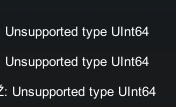

uint64 is a long, but its "unsupported"
scarlet lake
Can someone help me fix these errors? I've been trying to fix those sinced last night yesterday with no success :
 fossil thistle
scarlet lake
Can someone help me fix these errors? I've been trying to fix those sinced last ...
fossil thistle
scarlet lake
Can someone help me fix these errors? I've been trying to fix those sinced last ...
Could try reimporting the VRCSDK folder and reimporting it.
scarlet lake
i just did that
gonna try again
done
now im back to square 1
it did nothing
@fossil thistle
fossil thistle
Uhh.
I'm going to be honest, last time I got something like this I just evacuated ship, created a new project and yoinked all the assets in there, somehow that worked since removing individual parts of the project didn't fix anything.
It's an option if you can drag in most of the assets.
Maybe make a prefab.
scarlet lake
so u would suggest start a new project ?
fossil thistle
It's something you can try as a last resort.
scarlet lake
new project > import assets from old project.
fossil thistle
Well, you could at least try to see if it fixes your problem.
scarlet lake
i can try
fossil thistle
If it doesn't work, you can probably conclude that something is going wrong in your scene/with the assets.
fossil thistle
Let me know if it works out.
void ridge
steel nova
Oh my god i have had something not working for the longest time and this is why ...
OnDeserialization fires only if (1) you're not the owner and (2) there exists at least one synced variable on that UdonBehaviour. Similarly, OnPreserialization fires only if (1) you are the owner and (2) there exists at least one synced variable on that UdonBehaviour and (3) at least one other person is connected in that World instance
I have a question. Collider.get Name appears to be identical in function to getting the gameObject and then getting the game object's name. Is that correct?
a collider has no name 🗡️
 dull stream
I'm trying to figure out how to move something in the direction of input.
float x = Input.GetAxis("Horizontal");
float z = Input.GetAxis("Vertical");

// If not holding anything return forward
if(x == 0 && z == 0)
    z = 1;

return new Vector3(x, 0f, z);
This works but is in world space. How do I make it relative to the player rotation? I can't use transform.forward from the player transform as far as I know. Or can I get it somehow?
fossil thistle
void ridge
_a collider has no name_ 🗡️
That's hecking trippy, if we look in the Unity docs, we see that collider has the name property inherited from the "Object" object, just like a Gameobject does.
(Sources:
https://docs.unity3d.com/ScriptReference/GameObject.html
https://docs.unity3d.com/ScriptReference/Collider.html )

You'd expect them to be the same.
dull stream
collider.name should return UnityEngine.Collider(GameObjectNameHere)
void ridge
fossil thistle
That's hecking trippy, if we look in the Unity docs, we see that collider has th...
Thanks! I tried clicking the button for the doc but the link is broken there
fossil thistle
void ridge
Thanks! I tried clicking the button for the doc but the link is broken there
Oh, haha. I thought you meant that it didn't return a name.
Because it should. :b
void ridge
Oh, no, it seems very much to be handing the name correctly
I just wanted to assure that I could rely on using that node rather than going through GameObject
fossil thistle
Awesome, if you're familiar with OOP (Object Oriented Programming) then this should be pretty easy to understand.
void ridge
I've learned that when things seem like they're redundant, there's often just subtle distinctions I'm not appreciating yet
And no, I'm not experienced with OOP. That's the current task, in essence 😛
vast locust
Hi,
If I want a slider to sync what position it is on between all players, Do I just add a udon behvior: Sync ?
The value is currently being synced by ownership, But I also want the slider to sync so everyone sees the slider at the same position
 unborn hornet
dull stream
I'm trying to figure out how to move something in the direction of input.
```csh...
unborn hornet
dull stream
I'm trying to figure out how to move something in the direction of input.
```csh...
I believe if you multiply that vector by the player's rotation, that'll do it.
fossil thistle
vast locust
Hi,
If I want a slider to sync what position it is on between all players, Do I...
That should be right.
vast locust
fossil thistle
That should be right.
So like
Add empty udon behavior - sync position ?
void ridge
vast locust
Hi,
If I want a slider to sync what position it is on between all players, Do I...
Not quite. You'll need to use OnDeserialization to keep this up to date. Check out the slider example and the program attached tot it in the Udon Example Scene, which is included in the project files of the SDK.
void ridge
networking = hard
fiery yoke
fossil thistle
That's hecking trippy, if we look in the Unity docs, we see that collider has th...
That is somewhat true, however its not just Object, but UnityEngine.Object which is a subtle but important thing to point out. Also components i.e. MonoBehaviours and GameObjects differ in the sense that all MonoBehaviours copy the name from the GameObject they are attached to, however GameObjects name is directly manipulatable via the Inspector.
vast locust
void ridge
networking = hard
If the world already has many networking components, Would it be better to just ignore this and not have it sync position?
void ridge
That's a design decision, i.e. it's up to you and what you think your world needs 🙂
vast locust
I was thinking of networking performance
unborn hornet
Basically, you need to update the slider value during OnDeserialization, but the thing is is that when you change the slider value, it implicitly triggers the onchange triggers, which since the on change trigger is already doing the variable update. It basically loops and can cause race condition problems.
fossil thistle
fiery yoke
That is somewhat true, however its not just Object, but UnityEngine.Object which...
Yeah, good thing to point out. After just working with Unity for a while you tend to forget to mention those things and you just think that's all.~
vast locust
HMm, Or maybe it will be better to be able to send a custom event,
So when someone grabs an item, It sends the ownership command to the slider,
Could that work?
I'm just trying to make it not confusing for the players
void ridge
unborn hornet
Basically, you need to update the slider value during OnDeserialization, but the...
Assumption check here. They said "slider" and we assumed "UI Slider," but might they be talking about from-scratch slider?
unborn hornet
It's UI. I helped them with it previously.
paper plinth
Joker did you see my walkable blimp?
vast locust
Example:
15 people in world.
1 person plays the game, Changes the value to fit their play style
Then next person plays, And thinks the value is still on their previous spot, But since ownership changed, the value of the object changed?
paper plinth
That wasn't hard to convert to graph
vast locust
So let's say someone grabs the "GUN", Then it sends "OnSlideUpdate" towards the slide so it updates the ownership
Would that be possible?
I am currently assuming that every object has it own Owner and not that everything in the same world shares the same ownership, Is that correct?
void ridge
paper plinth
Joker did you see my walkable blimp?
Not yet! Getting headset on now so I'll check it out since I'm thinking of it
vast locust
I think I might need to rephrase what I was tlaking about above
Networking.SetOwner, Is that for all objects or just one specific object?
 hoary echo
You need to specify a single object
 left elk
Hi can I ask a question, Might be super simple,
I have a button,
I want it to either Set an object as active or non active.
But I can't find the option for "Set Active", Only bool so I need to specify if it's on or off,
What can I do?
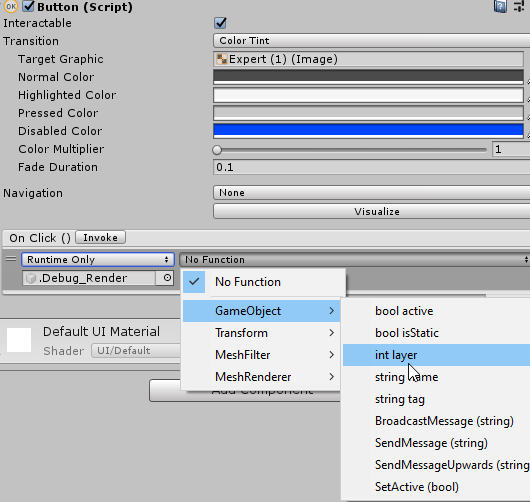
I am looking for this option?

It was Toggle I needed, not Button!! Hihihi
paper plinth
turn on search when you drop a noodle
it helps with this
dusk lance
vast locust
Even when I have nothing going on in my world (Udon game is OFF in the world), I...
So, dumb way to improve perf for your case. Find every udon behaviour that also has a renderer component on the same object, and move one of them to another object. If you have a renderer and udon on the same gameobject, unity will call OnRenderObject, even if you do not have that in your udon program.
 iron oriole
i dont know if this is udon related but im trying to use the vrcav pro video player and i have a speaker setup but no sound at all
somber hawk
When do you need to use [SerializeField] in UdonSharp? I see it in lots of examples but I haven't been using it and things seem to work fine?
fiery yoke
It tells Unity to serialize a field even when its private. Which means that the private field will show and be editable in the Inspector.
By default all public fields are serialized.
dusk lance
[SerializeField] private var
And
public var
are the same in U#.
fiery yoke
Not quite
dusk lance
Pretty sure there is no difference in the assembly, but I could be wrong in that it actually does modify the default values
I haven’t actually checked.
fiery yoke
Mechanically yes. However while in the C# environment private vs public still shows intent and lets the IDE know what is and what isnt acceptable to use by your standards.
dusk lance
Okay... intent is one thing for code readability but functionality is another. My comment was for functionality, meaning others can still modify the variable.
fiery yoke
I would still argue that showing intent is valid enough of a point to say that they are not "the same".
But yes there is no accesibility restriction regarding variables in Udon
all variables are public inside the VM
somber hawk
Thanks, why would someone to opt for private+serialize instead of having it be public? So other scripts couldn't access it or something?
Oh I see you mentioned intent above which is what I'm referring to 🤦♂️ . You at least signal you probably shouldn't be trying to use this, but it might be nice to have in the editor to easily tweak config
fiery yoke
somber hawk
Oh I see you mentioned intent above which is what I'm referring to 🤦♂️ . You a...
Precisely. Showing intent is important when working with other people, releasing your code as some form of library or open source thing, or just to remind yourself of what the f youre actually doing.
unborn hornet
My understanding is:
[SerializeField] private = you don't want other classes to access this but you still want it to show up in the inspector
[HideInInspector] public = You DO want other classes to access this but you DON'T want it to show up in the inspector.
private only = no external access and not shown in inspector
public only = external access and shown in inspector
Obviously as mentioned the access levels aren't a thing in the VM, they only matter for the C#/U# compiler phase.
fiery yoke
Thats the long answer yep.
However there is also a minor difference between [HideInInspector] and [System.NonSerialized] but anyway
scarlet lake
any ideea why i can't open the udon script
in the tutorial im watching u can just press open udon graph
oh nvm i fix it
 plucky plaza
 heady tusk
Someone a Idea how to Reset Position of objects that can get thrown around?
My main problem is that i have some more objects. So i try to get a Button that basicly says the Objects to go back to root position. But the question is how xD
dapper lion
@plucky plaza try compiling all programs
floral dove
heady tusk
My main problem is that i have some more objects. So i try to get a Button that ...
save their positions to a local variable on start, then set position to stored position on Reset
heady tusk
but... how D: Sorry i am still at the beginning. I got Buttons to work as they should but this is melting my head atm xD
i get that i have to save them but i can't figure out how..
https://imgur.com/a/fQmfLxo i found this but this is not really working.
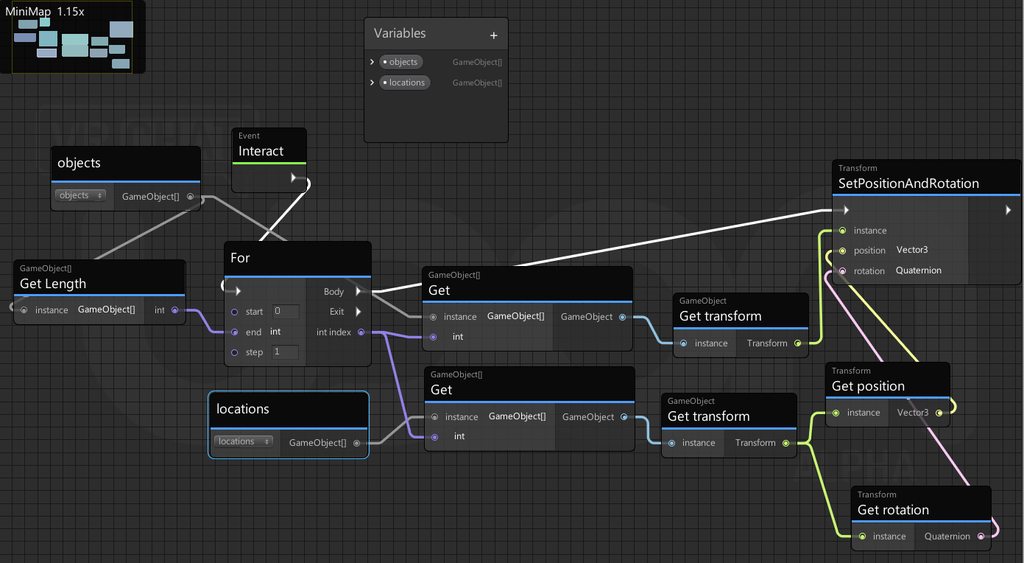
In SDK2 it seems so Simple. This is what confuses me more xD
heady tusk
2am. Time to give up for now. If someone has a idea/layout or tutorial for something similar please let me know. I am a noob at this. I like to do try and error but at some point its to much xD
somber hawk
I've got a scrollview that scrolls when I look at it and use wasd (or joysticks in VR), how do I get that not to happen?
I previous tutorial I've watched said to turn set navigation to "none", the only place I see that is on the scrollbar and I have that set.
 cunning mist
Yeah, scrollviews kinda just do that. :/
fiery yoke
I think there is a way to do that by setting the content to none/null but its janky and weird.
somber hawk
One more question for today 🙂 I just hopped into my world on quest and this wall looks really bad until you get closer to it. It basically just constantly is choppy when you look at it.
It definitely has some transparency and stuff going on but I don't see the same effect on PC.
Is there some odd thing I might be doing here to cause this? It's a canvas with a scrollview placed in front of a wall
edit: For a quick fix I just removed the alpha and put solid colors behind thiss

 winged depot
hi, i have a good question here for you!
why when I am the hostn in my world I do 90 - 70 fps like a little bit of lag per second but when I leave and another becomes the host it starts to lag too
only the host lag
do you have a solution to this problem ?
 willow tartan
probably you either have a lot of synced pickups or other synced objects that the master has to do a lot of network processing for, and/or have some heavyweight udon script that runs only on the master. The latter might be visible in the unity profiler, depending on what exactly it's doing
oh, also check the output logs for log spam
winged depot
thank you
quick basin
with unity player how do i get real time screen lighting?
 fiery glen
Does anyone know how to push something in Vrchat?
paper plinth
Push a button? Or make things get out of the way?
vast locust
I have a question,
I want to make a button that resets a objects position, But only in Z position.
I made this, But it doesn't work, What did I do wrong?
    public void SetPos()
    {
        SetBox = new Vector3(transform.localPosition.x, transform.localPosition.y, 0);
        transform.localPosition = SetBox;
    }
}
And note
The "SetBox" is another GameObject in the list.
The script above is set on a toggle button
placid niche
vast locust
And note
The "SetBox" is another GameObject in the list.
The script above is s...
Another gameobject? it looks like a vector3
fiery yoke
Thats just how it is.
placid niche
theres other worlds with a near 0 delay tho
fiery yoke
Like?
fiery yoke
No. You just dont notice the delay between you and remote clients because everything is delayed.
placid niche
[insert any well developed world name]
fiery yoke
If you would join those world with two local clients you would see the exact same behaviour
placid niche
can you even do that?
fiery yoke
I think you can yeah. Just not with the same account.
vast locust
placid niche
Another gameobject? it looks like a vector3
Vector3 is the function not gameobject I want to control?
placid niche
vast locust
And note
The "SetBox" is another GameObject in the list.
The script above is s...
You define SetBox as a Vector3
if you want it to be another object make it a transform or a gameobject
Ohhh
you are moving the transform i see.
could try setpositionandrotation
vast locust
placid niche
could try setpositionandrotation
I don't want to change rotation, Just set a reset the Z position and leave X&Y to be on the value they are on.
Are you sure setpositionandrotation is the correct way to go to just reset Postion.z
placid niche
Are you running the SetPos() inside of void Update()?
And no you should be able to just use transform.position.y = 0
vast locust
placid niche
Are you running the SetPos() inside of void Update()?
I don't have any Update()
I only run this,
Then on the button itself I have this
https://i.imgur.com/QOUVljv.png
 placid niche
Well you gotta trigger that in interact or something
ah
and that doesnt do anything at all..? any errors
vast locust
Nothing happens
I'm not even sure if it findsthe object I want to change position of
Since
Button =/= GameObject I want to move
placid niche
Well the script has to be on the thing you want to move
or
you drag the object into the field in the inspector
vast locust
GameObject I want to move is "SetBox"
placid niche
"transform" moves the position of whatever its on
yeah so put the script on the button with a public GameObject box
and in inspector, drag the box gameobject into that slot
then use box.transform instead of transform
vast locust
placid niche
then use box.transform instead of transform
Do you mean
Box.localPosition.x
Or
Box.Transform.x
Or
Box.Transform.localPosition.x
vast locust
I will try!
placid niche
yeah transform.position.x should work
unborn hornet
Position is relative to the world's center (0,0,0), localPosition is relative to the parent transform center.
@vast locust
vast locust
Can't get it to work sadly, I don't understand what I'm doing wrong
pallid mango
Local space is also rotated /scaled coordinate space as well if the parent is rotated/scaled
So Y might not be up
vast locust
pallid mango
So Y might not be up
I've tried it in inspector to move the object in the position scale and it moves like it should
pallid mango
If you want to match the inspector you need to use local in udon
vast locust
pallid mango
If you want to match the inspector you need to use local in udon
localPosition? (Am using it now)
pallid mango
Local everything, but yes
vast locust
Maybe it will be better if I set a world position instead of local postion since the parent can move but I want to reset just the child object.
However I can't get either local or none local to work
Am I missing any functions to get it to worK?
pallid mango
If you want to move a child directly on top of its parent, you set local position to 0 0 0
In general you want to deal with local space otherwise programs will break if you relocate stuff in your scene
somber hawk
I'm doing this in UdonSharp, is this considered bad for performance? I don't need to update these on every frame since that's too frequent, but it's an easy way to do so and not have to worry about syncing as much
 fiery yoke
somber hawk
I'm doing this in UdonSharp, is this considered bad for performance? I don't nee...
fiery yoke
somber hawk
I'm doing this in UdonSharp, is this considered bad for performance? I don't nee...
Ew lightmode...But seriously, you kinda have to run it on Update. The best way known to me to make something happen only every x seconds is to use an accumulator in Update that checks against x. Which would be a micro optimization if it does not need to run every frame...but probably not a point you should even consider. Udons performance isnt great, but its not bad to the point where you need to reduce every single assembly instruction to a minimum.
somber hawk
fiery yoke
Ew lightmode...But seriously, you kinda have to run it on Update. The best way k...
The first 3 are all triggered by user actions, so those I could just wire in at the right places & OnDeserialization, but if that doesn't seem like it would have any noticeable effect then I do like the simplicity of this version
I assume that continually setting it to the same value probably isn't actually thrashing the UI
fiery yoke
There is some considerations with how to do UI stuff, but nothing that will drown your fps (on a low level).
It would ofcourse be best using Event-Driven Programming where the Video Player has some event that lets you know when it has progressed further like OnNextFrame or something like that, but unfortunately thats not a thing.
cunning mist
What's the Player variable a reference to? If it's possible to avoid it, Null checks can be pretty rough performance-wise.
pallid mango
There is also FixedUpdate to update in a slightly less frequently :)
fiery yoke
FixedUpdate is not meant to be used like that
FixedUpdate is meant to be used for updates that need to happen at a fixed time interval, like physics calculations.
somber hawk
cunning mist
What's the Player variable a reference to? If it's possible to avoid it, Null ch...
I actually probably don't need that check, so I'll give removing it a shot. It's there because of an error I saw awhile back and added it but I'm pretty sure it's not actually needed
pallid mango
fiery yoke
FixedUpdate is meant to be used for updates that need to happen at a fixed time ...
True, but in practicality it’s less intensive than updating every frame, no? And the end of the day it’s just a poll.
In the case of checking for a null player, I don’t think it makes sense to check far more often just because the player has a higher framerate
Maybe I’m wrong but I’ve been using FixedUpdate for anything I want to be “framerate independent”
scarlet lake
Do anyone know how to change the video player to world instead of local
floral dove
scarlet lake
Do anyone know how to change the video player to world instead of local
you need to add an action to change ownership of the player to the new person.
scarlet lake
can u explain me how to do that couse i don't realy goot any ideea how udon works
floral dove
scarlet lake
can u explain me how to do that couse i don't realy goot any ideea how udon work...
You can begin your journey of learning here: https://docs.vrchat.com/docs/getting-started-with-udon
Or wait for our upcoming Udon Networking update which includes this ability for the video player.
scarlet lake
i already got like everything setup i have a udon video player to
hoary echo
floral dove
You can begin your journey of learning here: https://docs.vrchat.com/docs/gettin...
Is there an ETA on that networking update? Just curious
floral dove
hoary echo
Is there an ETA on that networking update? Just curious
hoping for an Open Beta in the next few weeks.
quick basin
Does volumetric light beams not work?
hoary echo
Beautiful, I'm really looking forward to that
 bright kiln
whats udon
fiery yoke
?whatisudon
hidden martenBOT
VRChat Udon is a programming language built by the VRChat Development Team for use in VRChat worlds! It enables complex behaviors and logic in VRChat worlds. Read more about Udon in our documentation: https://docs.vrchat.com/docs/what-is-udon
VRChat
What’s this Udon thing anyways? VRChat Udon is a programming language built completely in-house by the VRChat Development Team. It is designed to be secure, performant, and easy to use via the VRChat Udon Node Graph, a built-in visual programming interface that uses nodes and wires (we call them “no...
 grizzled oak
okay, third time asking. Does anyone know how to make the portals used in Udons Portal world?
floral dove
quick basin
Does volumetric light beams not work?
I've seen some cool ones that are simple particles with sprites
floral dove
grizzled oak
okay, third time asking. Does anyone know how to make the portals used in Udons ...
if you keep asking and no one answers, then it's likely that the answer is not to be found in this channel. You could try to get in touch with the author of that specific world instead 🤷
floral dove
grizzled oak
this is the only place to find an answer
You could start by googling 'Portals in Unity' and looking for techniques that work in 2018, that would give you a good path to explore.
grizzled oak
i tried that multiple times
the best i found was a guy that said he did it but didn't say how
 mossy cobalt
Simple udon question, so I am needing to make it so that when the player toggles the HQ Mirror On and then switches the Mirror to LQ that the HQ Mirror will toggle off. and vise versa
wouldnt anyone be able to help me or even have a prefab of this?
vast locust
Ok I have a issue I don't understand at all.
I have a cube
[] - Scaling on this cube is .5 on X Y Z
I add another Cube as a child to this cube, It gets scaling 1.0 since it's a child,
I then modify the Cube scaling on the Parent cube [] to scale with a slider.
Since the parent and childs have different scaling (0.5 & 1.0), They scale differently with the slider.
How can I fix this?
floral dove
vast locust
Ok I have a issue I don't understand at all.
I have a cube
[] - Scaling on th...
what is it that you want to happen?
vast locust
floral dove
what is it that you want to happen?
I want to scale the cube to fit my settings.
This is the code I use to scale the parent cube
this.gameObject.transform.localScale = new Vector3( slider.value /2, slider.value /2, slider.value /2);
However only the parent cube scales correctly, Child cubes scales is off, Their like half the size of the parent cube, But in the inspector (When scaling) they say they are the same size as the parent cube
floral dove
the inspector will show the localScale of the cubes
children will scale proportionally when you change their parent's scale
vast locust
Example:
Parent cube scaling
https://i.imgur.com/mbd7VUX.png
Child cube scaling
https://i.imgur.com/wEFeHiO.png
Then when modifying by using the slider,
They return same value, But different sizes
(same on both - https://i.imgur.com/a3zT27u.png )


 floral dove
when you change the local scale of the parent cube in the inspector, does the child cube change the way you expect?
vast locust
floral dove
when you change the local scale of the parent cube in the inspector, does the ch...
When changing directly in inspector or via the slider?
floral dove
vast locust
When changing directly in inspector or via the slider?
directly in the inspector
vast locust
floral dove
directly in the inspector
If changing in the inspector directly they all change to the same size
floral dove
vast locust
If changing in the inspector directly they all change to the same size
is this what you want?
vast locust
floral dove
is this what you want?
Yes
floral dove
Ok - do you have UdonBehaviours on both the parent and child cubes, or just the parent? Can you show your full graph?
vast locust
floral dove
Ok - do you have UdonBehaviours on both the parent and child cubes, or just the ...
Entire U# code:
    public Slider slider;

    void FixedUpdate()
    {
        if( this.gameObject.transform.localScale.x != slider.value)
        {
            this.gameObject.transform.localScale = new Vector3( slider.value /2, slider.value /2, slider.value /2);
        }
    }
}
This is then placed on the cube, Then add slider to the Public

Maybe I need to add this to every cube and have multiple "parents", But I feel like it would maybe be more efficient to have one parents all multiple objects below?
floral dove
no, this should only be needed on the parent cube, all the other cubes should scale proportionally.
Hm - I recreated your code in the graph and it works as expected here, perhaps you have something amiss in your setup?
 vast locust
Hmm let's see
Are these cubes added to a parent or are one of these cubes "The" parent?
floral dove
Also, this wouldn't cause your problem, but you could save checking every FixedUpdate by using OnValueChanged to fire an event instead like this:
 floral dove
vast locust
Are these cubes added to a parent or are one of these cubes "The" parent?
floral dove
vast locust
Are these cubes added to a parent or are one of these cubes "The" parent?
the cube on the left is the parent, the one on the right is the child.
the parent scale is set to (0.5,0.5,0.5), the child is set to (1,1,1)
vast locust
floral dove
Also, this wouldn't cause your problem, but you could save checking every FixedU...
Is this better for performance? If so I will change to it!
vast locust
floral dove
Also, this wouldn't cause your problem, but you could save checking every FixedU...
Now updated it to valuechange via slider instead, Will try to work on multiple settings,
I've never used The graph, Only U#
vast locust
floral dove
the parent scale is set to (0.5,0.5,0.5), the child is set to (1,1,1)
Update: It now works as planned!
floral dove
oh good!
Yes, it's better for performance since it will only check the slider value when it changes, rather than constantly
 sick dawn
quick question is there a sync for a world. "example i make a door lock using globe hierarchy to turn off the doors so people won't click on them" is there a way for it to sync for people that coming after when the door been lock?
 wraith root
I'm really sorry if this is the wrong place to ask, is there anyone here who would be kind enough to help me with a problem I have? I have been working on a world it works fine when I build and test in unity. I then uploaded it which worked, but when I try open the world in VR chat it fails and just drops me back to my home world. I'm going a bit crazy trying to solve it so any help would be really appreciated.
fiery glen
@paper plinth push 3d object movement
dapper lion
yes?
somber hawk
Is there any way to glean more information out of a "Video failed: theurl" log from the default player?
I'm working on it's transferring ownership and there seems to be some sort of issue where after I transfer ownership a few times, it says "video failed" on the non-owner and then "playing video" (the one that failed), but it actually plays the previous video
floral dove
somber hawk
Is there any way to glean more information out of a "Video failed: theurl" log f...
you can get the VideoError and check which error you got
Then you can handle different video errors like this:
 wanton oxide
Does anyone know the default audio gain values?
wanton oxide
👌 👌 👌
floral dove
?whatisudon
hidden martenBOT
VRChat Udon is a programming language built by the VRChat Development Team for use in VRChat worlds! It enables complex behaviors and logic in VRChat worlds. Read more about Udon in our documentation: https://docs.vrchat.com/docs/what-is-udon
VRChat
What’s this Udon thing anyways? VRChat Udon is a programming language built completely in-house by the VRChat Development Team. It is designed to be secure, performant, and easy to use via the VRChat Udon Node Graph, a built-in visual programming interface that uses nodes and wires (we call them “no...
wanton oxide
lol i was about to do that
 torn lichen
That’s dope
thick star
I play vr chat but I want my own custom skin for vr cause vr chat on pc for me is laggy before it wasn't I also play rec room
 valid bolt
wanton oxide
valid bolt
wanton oxide
I'm having an issue where when teleporting a player, instead of the player moving to the desired location they move into a wall
the target location is here

original location is below it, inside a room

i'm using a reference to the Transform (its an empty gameobject) like this

Teleport is definetly getting called correctly because the player is moved but yeah the player isn't moving to the correct location
after messing with it for a while more, seems like its only moving in the X and Z directions but not Y?
can a player be teleported upwards?
void ridge
wanton oxide
can a player be teleported upwards?
Yes, of course. Are you sure this is an empty gameobject? Might it be that you're looking at the handles and inferring the location, but those handles aren't on the actual pivot of that object? That's a mistake I've made.
Also, is this Udon or SDK2? The stuff in that last image doesn't look familiar to me
wanton oxide
its a custom script
it does quite a lot of things thats why it may look weird
it can toggle gameobjects, pass information to some other function and teleport a player somewhere

i can't really do custom editors so it doesn't look very nice lol
but hey it works
 honest steeple
okay for the life of me I can't figure this out, I'm trying to setup a button in my world using udon that will toggle a wall to appear but it only appears locally. how do I get it to appear globally?
 marsh beacon
honest steeple
okay for the life of me I can't figure this out, I'm trying to setup a button in...
marsh beacon
honest steeple
okay for the life of me I can't figure this out, I'm trying to setup a button in...
In the Udon Behavior script component, try checking "Synchronize Position" o:
honest steeple
okay, im really sorry but consider me stupid

is what im looking at
oh you mean

the synchronize position is checked but its not global
stark adder
Is there any kind of ETA for it ? In year ? In ten years ? I kinda realized that that's the only thing I need.. 😄 I already can sync infinitely sized arrays I realized.. 😄
But Events with parameters would really help as currently my world is at around 10K Networked events +-
scarlet lake
hi i have a mirror and i want to make it reflect. can someone point out what ive done wrong?

instead of reflecting, it shows white, even with the FX/MirrorReflection shader applied to it
native estuary
Well for one that shape is not gonna work at all
native estuary
Yes
And if you are making a custom mesh you need to make sure the mirror mesh lies on XY plane in the mesh renderer's local coordinate system, and its facing direction is negative Z axis in local coordinate system
scarlet lake
how do i do that?
honest steeple
does anyone know how to get a toggle button to activate globally. instead of locally


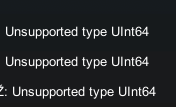


 native estuary
Plane doesn't work because it doesn't follow what I said above needs to be a quad
native estuary
Cube is not a quad
Quad is a quad
 scarlet lake
ah ok
alright now i got the reflection fine
but how do i make it show the entire room?
nvm i got it
my shader was set to Reflection : none
placid niche
@floral dove Is there a full list of what the networking update will add? Syncing arrays, list, kinematic objects, etc?
stark adder
This is all we got @placid niche
placid niche
thx
stark adder
Lists.. O I WISH
Lists and Networked Events with parameters.. That's what I wish for Christmas lol
placid niche
stark adder
Lists and Networked Events with parameters.. That's what I wish for Christmas lo...
well..networked events with parameters is coming at least
placid niche
2 weeks
wanton oxide
void ridge
Yes, of course. Are you sure this is an empty gameobject? Might it be that you'r...
alright so after like 2 hours of fucking around and eventually restoring my git to when it last worked, i narrowed down the issue to something really stupid
turns out, you can teleport a player from within Interact() but not another function?
Idk, this shit is really weird, the thing that broke everything was me adding a delay to actually teleporting the player since having an animation on the button looks nicer
dull stream
float delay = 3f
float timeLeft = 0;

void StartTimer()
{
  timeLeft = delay;
}

void FixedUpdate()
{
  if(OnCooldown())
    timeLeft -= Time.fixedDeltaTime;
}

bool OnCooldown()
{
  return timeLeft > 0;
}
If you're using udonsharp
paper plinth
@placid niche you can use a float * delta time to get a value and add that value to a float counter. Then use a branch to gate your payload that's true when the float counter gets over a certain amount. Don't forget to reset the float counter when the payload drops.
dull stream
I think it's better to remove than to add
as in count down from a value to 0 instead of up
that will prevent you from having an issue somewhere that ends up with the value counting up to crazy amounts
placid niche
@dull stream completely off topic but are you the one that made pumkins avatar tool?
dull stream
yes
paper plinth
That's a valid point
dull stream
Thanks 
But then again it can count down to ridiculous amounts too
Still, i find count downs and comparing to 0 to be easier to wrap your head around
paper plinth
There's plenty of ways to jack your stuff up, to be sure lol
I use up counters because I learned most of my programming on rslogix in context where we used the counters for other stuff too, and the counter functions were super robust, so you just get used to doing things a certain way and you don't think about it.
Almost everything else I do counts down to zero lol 🤷♂️
dull stream
I used to do it like this too when doing scripts for csgo
But I would also have a cached variable for the now time
Which, as you can imagine, got pretty big
and the target time was = now + delay
paper plinth
Idk how to feel about it but once I took the now time as a variable and added five seconds and used that compare to set a bit high.
For some reason nobody does that
The system clock is used for friggin everything in a plc
dull stream
I mean, you're probably not gonna run out of memory with one big number lol
But I like small count downs
paper plinth
That's another thing I don't really understand about how memory works in a PC and why you use time for some things and not others. I just try to follow the crowd.
shut patrol
How can i get the udon version in the unity editor (in editor script)? I mean the version of the current set of supported methods and etc. Do i need to use the SDK version for this?
dense halo
Is there a simple video or example of an udon# collider trigger?
I want to just create a situation where it knows if a player has entered a collider, and if so it does something!
paper plinth
dense halo
Is there a simple video or example of an udon# collider trigger?
There's some prefabs in #udon-showoff that have triggers that you can look at, and are done in graph. My walkable blimp includes I think a couple of ways to determine if something is in a collider but there are other onplayertrigger examples in there.
If I remember right, to make a teleporter, you want a collider set up as a trigger and then onplayertriggerenter with a branch to check if the player islocal, and if true, teleport to, the player (drag the noodle from the onplayertriggerenter event) and you destination position and rotation, and sometimes people put a gameobject in the scene in the right place and rotation to represent that and then drag it into their graph editor and get the transform position and rotation off that. You can also public it and set it in the inspector.
void ridge
wanton oxide
turns out, you can teleport a player from within Interact() but not another func...
definitely not true, you can teleport players with lots of stuff. People do it with OnPlayerTriggerEnter all the time
wanton oxide
Oh yeah alright, i do that too
Was just very surprised it didn’t work from a random custom function
tribal meadow
I'm sure this has probably been asked before, but is there any timeframe for when the animation sync function will be available?
tribal meadow
... yeah
void ridge

tribal meadow
I'm not critisisizing, just wondering if I should try to find alternative methods to achieving what I need to do, or keep waiting. It's preventing my whole project from moving forward.
void ridge
I'm guessing it's not possible to get the blueprint id of the avatar a player is wearing? I'd use this to put them back into their previous avatar after setting a temporary one.
But being able to get a blueprint ID would probably come with a bunch of privacy & security baggage 😛
 errant pilot
Yeah no. You can only get the id from the content panel in the sdk
 harsh magnet
void ridge
I'm guessing it's not possible to get the blueprint id of the avatar a player is...
harsh magnet
void ridge
I'm guessing it's not possible to get the blueprint id of the avatar a player is...
I think the current trick is to calculate the bone length of the avatar and use that as a fingerprint
void ridge
Oh, no I'm talking about setting the player's avatar, using the pedestal script
harsh magnet
Gotcha. No idea, I haven't tinkered with that yet
void ridge
I want to store their current avatar ID as a string locally, then put it back on them later
fiery yoke
Cant do that.
pallid mango
How can I get the left and right eye’s camera positions? Not the eye bone, their view camera?
It’s for some stereoscopic stuff
Or, even better, get the player’s eye camera separation distance
fiery yoke
Its possible with some jank. So I wouldnt rely on it. Plus rendering stuff in VR is a recipe for disaster, unless you really know what youre doing x)
pallid mango
Well I’m making some perspective-accurate visual portals, but they currently look flat in VR despite the perspective being correct
They look fine on desktop
paper plinth
does one of you folks have a "poof" effect or like a puff of mist that disappears immediately that would reveal an object?
I don't know much about what unity can do so i don't know where to start for that
tribal meadow
So I guess the answer for now to sync everything is to create an entrance lobby to the world that has a button that needs to be clicked with a teleport to the main area of the world, that includes all of the animation sync variables and a 'check' to set them all correctly so everything is correct when someone enters. This is a heck of a lot of hassle and work to get around the check box that is greyed out. I sure wish we had at least a hint of a timeframe on when 'soon' is... Oh well I guess I get more experience this way at least.
dense halo
How can I assign skinned mesh materials for materials at later indicies?
At the moment I can only do the first material:
        SkinnedMeshRenderer SMMesh = GameObjectA.GetComponent<SkinnedMeshRenderer>();
        SMMesh= NewMaterial;
I'm having a problem with an SDK3 station. I'm activating VRCPlayerApi.UseAttachedStation with Networking.get LocalPlayer and it's putting other players into the station. This is in a test build, so all the other players are other instances of me. What's up with that?
And the other players put into the station, in screen mode, can't look left or right 😕 I have to force quit the client
 outer warren
every udon prefab I install leads to me getting this error when i try to upload the world \and I did install udon sharp so I have no idea what I'm doing wrong.
 void ridge
outer warren
every udon prefab I install leads to me getting this error when i try to upload ...
void ridge
outer warren
every udon prefab I install leads to me getting this error when i try to upload ...
Check out the pinned message in #world-development
paper plinth
is this redundant? The emitter shows up for a 1 second burst and then I set it inactive when it's finished emitting. If I add the audio source to the particle emitter and set it to play on awake and not loop, is that enough?
 hoary echo
void ridge
I'm having a problem with an SDK3 station. I'm activating `VRCPlayerApi.UseAttac...
hoary echo
void ridge
I'm having a problem with an SDK3 station. I'm activating `VRCPlayerApi.UseAttac...
I'm pretty sure that's a known bug with local testing, something about all of your instances are all the same 'localplayer' as far as udon is concerned
void ridge
Cool, I was hoping that was the case
somber hawk
Anyone know what an error like this means?
Error      -  [DžDŽDžDŽDŽDžDŽDžDžDŽDŽDžDŽDŽDžDŽDžDŽDŽDŽDŽDžDŽDŽDžDžDŽDŽDŽDŽDŽDžDžDžDžDŽDŽDŽDŽDŽDŽDŽDŽDžDŽDžDž] Caught ArgumentOutOfRangeException while encoding DŽDŽDŽDžDŽDŽDŽDžDŽDžDŽDžDŽDŽDžDŽDŽDžDžDŽDŽDŽDŽDŽDžDžDžDŽDŽDžDžDŽDžDžDŽDžDžDŽDŽDžDŽDŽDŽDŽDžDŽDŽ: Negative offset supplied: -105
Parameter name: offset
If youre syncing a string then its probably too long
somber hawk
Hm, there shouldn't be anything long. Is there any way to get more information about what is exactly is causing this? I'm working with a (now modified) version of MerlinVR/USharpVideo
fiery yoke
Well as far as I know it has to do with deserialization of network data
 serene moat
you probably have a URL that's too long
can't really do anything about that other than shortening the URL
you only have ~70 or so characters you can have in a URL before sync starts dying
somber hawk
My URLs are pretty short, example: https://karaoke.constarr.com/yt/XVG-jODTeyQ
Is there such a thing as too many synced variables on one game object? I've added more to this than the standard ones, nothing crazy, but things like song artist/title which are also still fairly short
serene moat
yes if you add more synced strings on the same object you will quickly run your limit out since the limit is shared between all synced data on the object
I don't recommend adding any synced strings to the video player itself, if you want to sync more strings you should move them to other udon behaviours
somber hawk
Funny enough I initially had these on another object when using the default graph based player, but I wanted a code based one so I could modify it easier 😂 Looks like I'll have to reintroduce the other now but that's not too bad
serene moat
the sync limit should improve with the manual sync update whenever that gets released so we hopefully won't have issues with URL's being too long. I'm going to be moving the video player to manual sync since it really doesn't have anything that needs continuous sync
somber hawk
Moving that state to another object resolved it 😅 thanks for the help!
Do debug logs have any effect on uploaded worlds? (assuming they aren't intensive to calculate the values provided)
Just wondering if they're included in logs by default really or if you need to specifically enable debug
serene moat
they are included in VRC's logs by default
 twilit breach
So there's that dealy where if a player hits a collider and you try and run code on collision it just stops the Udon behavior. I've been avoiding it by using layers so the player doesn't collide with said objects. But is there a way to start the collision code so that it detects it's colliding with a player and stops instead of crashing the behavior forever?
I suppose more precisely it's when you try to grab the object that collided
floral dove
Hm - our intention is that Players should not show up in normal collision events but only the playercollision events. However, maybe that's only true for the player collider and not for other colliders?
twilit breach
oh the ragdoll can still collide
floral dove
the extra colliders added from SetupCombat?
twilit breach
So my specific case is that I have mining node that grabs strings on collision and checks for "pickaxe". They don't detect players or crash if i walk into them or touch them with the colliders attached to hands from combat setup. But if the player dies and their ragdoll touches the node then it crashes.
on player death does the layer for those extra colliders change?
floral dove
I'm afraid I don't know, it's possible but I haven't looked at our ragdolling system at all
twilit breach
That's understandable, I recall its officially unsupported atm so its to be expected
 hardy crown
I'm trying to build a switch that goes between 3 states but I'm running into an issue where it works in Unity but not in VRChat... It uses a springjoint attached to a sphere, and ideally the script takes a vector3 value for each of the 3 states and applies that to the connectedAnchor property of my object's springjoint so that the sphere "boings" between 3 different positions. I can press play in Unity, manually change the Connected Anchor, and see the behaviour I want, but I don't see it in VRC.
twilit breach
How does your Udon behavior look. It seems that it's not properly changing the Connected anchor to the new vector 3 through Udon, but without your code its hard to check
dusk lance
floral dove
Hm - our intention is that Players should not show up in normal collision events...
I haven’t checked, but how does the system handle avatar colliders? Is it considered on player enter, or does it get passed through normal collision as null since it is a blacklisted object?
floral dove
we check if the 'other' collider is on the Player's gameobject. If it is, we divert to the PlayerCollisions (in Udon only)
dusk lance
Hmm, it would be nice to know if it was the actual player capsule vs user collider. That was a major issue with the devouring but still doesn’t sound like a good solution exists in udon yet. Then again I haven’t tested ¯_(ツ)_/¯
hardy crown
twilit breach
How does your Udon behavior look. It seems that it's not properly changing the C...
I just cracked it by solving it a different way, but just for reference, here's what wasn't working for me:

I made an empty gameobject with just a rigidbody, set it as the "connected body" of my sphere's springjoint, and set the empty gameobject's transform instead. That works for some reason.

Shouldn't these two things, functionally, do the same thing though?
twilit breach
Could you post an image of the hierarchy? I'm still a little hazy on your specific use case but sometimes you have to set the connected body to null, change the anchor vector, then re-attach.
and if game objects are getting set active and inactive it can mess with the anchor vectors at runtime
and also for some cases you want global vector coordinates and other times it needs to be local in regards to the parents
hardy crown
In both cases they're both children of the same parent object, in the first it's a stationary object. The script is a component on Control Sphere, as is the springjoint

In the first case I had Cube as the Connected Body and I was trying to change the Connected Anchor vector3 as a means to move the Control Sphere object
twilit breach
whats is the value of onRelative vector 3?
hardy crown
I tried a couple of different values
Sorry for being obtuse here, I'd be more specific but since I figured out how to get it to do what I wanted I've kind of lost track of what the state was where I had the problem
twilit breach
If I'm visualizing it right in the first case you are setting the connected anchor to a vector 3 based on the scale/parent position of cube (since it is the connected body), and in the second case you are using the transform of a new object that is also a child of PlinthActivate so you are using Plinth as the parent for local position reference. But if it's working now I suppose it should be fine
hardy crown
Thanks Dinky!
twilit breach
lol sure, I feel like I just had you re-iterate stuff for no solution but 🙂
if the lever is working I think all is right in the world
hardy crown
I was just wondering if I was making an obvious mistake I could ask for help with or one of those ones where I have to dig for hours to find WTF the problem is
 brittle stump
I'm trying to send an event to an "udonbehavior" 5 seconds after someone joins but I'm struggling..
 void ridge
brittle stump
I'm trying to send an event to an "udonbehavior" 5 seconds after someone joins b...
void ridge
brittle stump
I'm trying to send an event to an "udonbehavior" 5 seconds after someone joins b...
Don't be intimidted by this like I was. There are a lot of extra nodes on this screen because it's an older version of Udon and because Helper made it as general as possible
https://ask.vrchat.com/t/delaying-event-execution/1892
But the basic idea is pretty simple. Record the time plus the delay at start of the timer, and activate a boolean. Then compare the time against the end time until it passes it, and on that frame, execute the event and turn off the boolean to stop the timer running.
brittle stump
void ridge
Don't be intimidted by this like I was. There are a lot of extra nodes on this s...
I'm having trouble finding "set variable" in the nodes
void ridge
brittle stump
I'm having trouble finding "set variable" in the nodes
Yes, the way that works in Udon has changed. The way I know how to get a node for getting and setting a variable is to click and drag from the variables list. Click, drag, drop for a getter. Click, drag, hold CTRL and drop for a setter.
You should probably watch this, too, if you haven't yet. https://www.youtube.com/watch?v=IVjEx_H5BZc
brittle stump
void ridge
Yes, the way that works in Udon has changed. The way I know how to get a node fo...
I'll try this and hope for the best
 void ridge
brittle stump
I'll try this and hope for the best
void ridge
brittle stump
I'll try this and hope for the best
At a glance this looks good except (1) you should replace OnPlayerJoined with Start, and (2) it looks like you're setting a delay for 120 seconds. Time is measured in seconds as a float
outer warren
void ridge
Check out the pinned message in <#361741445352259584>
okay so I tried that and it didnt work so then I closed my project and the control pannel got deleted
void ridge
I can't really help, sorry, I just know the guide is listed in that channel. You can ask for help in that channel and someone there might be able.
outer warren
okay
brittle stump
void ridge
At a glance this looks good except (1) you should replace OnPlayerJoined with `S...
when I had it on “Start” I had an issue using the player. When I used “OnPlayerJoined” it would resync for everyone when someone joined. What if I put it on a different layer would that work? I want it to resync 1 time locally.
stark adder
I am starting to have a feeling that DžDžDžDž is never going to be fixed :thinks:
 spark flicker
What happened to udon dungeon
scarlet lake
I was wondering if anyone knows how to fix this error and if it is a world problem from Udon
 native estuary
Not really related to udon at all but
https://github.com/oneVR/VRWorldToolkit/releases
Import this and check VRWorld Toolkit > World Debugger from the top bar
scarlet lake
Thank you ^^
hardy crown
I have this code that uses DateTime to get the day of the year, do a cross-product on it to get the rotation (I'll handle leap years later) and apply that to the script's gameobject. But for the life of me I can't figure out how to cast an int to a float in udon.

Ideally I'd like that last division to be a float as well, but it just shunts the problem up the line
floral dove
hardy crown
I have this code that uses DateTime to get the day of the year, do a cross-produ...
Convert.ToFloat()
hardy crown
floral dove
Convert.ToFloat()
D'oh! Thanks! :D
floral dove
Also, if you turn on "Search on Noodle Drop", you can just drag a Noodle from an int port, drop it on an empty space in the graph, and type 'float' to see some options. This method can be used to search for what you can do with any given Noodle type
hardy crown
I just turned it on, let's see where it goes. ^^
paper plinth
half the useful stuff you can do with float is in math, be warned...
guys my audio plays in Unity but not in vrchat...do i need a udon component? Any guesses what's wrong?
 brittle stump
can anyone help with this timer delay? I seem to get it working but it's triggering the event for everyone every time someone joins. I want it to only trigger once for the local player.
 void ridge
brittle stump
can anyone help with this timer delay? I seem to get it working but it's trigger...
void ridge
brittle stump
can anyone help with this timer delay? I seem to get it working but it's trigger...
I still recommend using Start. But if you must use OnPlayerJoined, your problem here is because you're not actually filtering for the Local player, even though I can see you've tried
You need to put a Branch node between OnPlayerJoined and the first execution, and control that branch with the bool output of get IsLocal
Output the True execution to your timer program, and False should connect to nothing. Then it'll execute only for the local player joining.
 fathom stratus
Hello,
I was working on some advanced items in my world but realised when I wanted to show my friends that the scripts ofcourse all are client side.
How would someone go about making a function happen on the server side?
( im a educated game-dev with a degree. so give me all the information you have. )
normally i would use photon2 for my networking but as its vrc and I cant even parse a integer to a enum. dont think i can do fun stuff
( I use udon-sharp btw), thought It would be good if I clarified
somber hawk
fathom stratus
Hello,
I was working on some advanced items in my world but realised when I wan...
What do you mean happen on the server side? Like make an API call to your server? VRC?
Networking in Udon is done with VRChat's networking, and if you wanted to trigger something for everyone, you can SendCustomNetworkEvent to everyone or the owner of an object and have them react accordingly. If you need variables, then you'd use [UdonSynced] to sync them up between users
fathom stratus
how would one, go about making a customnetworkevent in udon sharp. Do you have any examples I can refer to?
somber hawk
fathom stratus
how would one, go about making a customnetworkevent in udon sharp. Do you have a...
It's basically just implementing a public function on your script, and then calling Networking.SendCustomNetworkEvent with the function name as the second argument. This guide is for a more specific use case but covers how it works a bit https://ask.vrchat.com/t/how-to-send-variables-over-network-udonsharp/2282
I don't think it's any different than normal events in Udon
fathom stratus
thanks for the help will look into it further with use of the information that you have send me.
As I am not very familiar with the use of Udon yet as I do not really see any connections or similarities with networking plug-ins like photon 2 that I normally use for my game programming so might take some time for me to be able to make some cool stuff in VRC but now I am just trying to try to recreate some complicated functions that I use quite frequently during my programming.
But as the udon networking is based of of photon 2, should be finding some similarities soon
But I would like to thanks you once more for the information you have given me an responding so quickly to my question, and I wish you a very nice day.
-ItsM3rk
fiery yoke
fathom stratus
thanks for the help will look into it further with use of the information that y...
VRChat uses a (probably) heavily modified version of PUN. Their networking architecture is very similar to that of general P2P, however the data goes through a middleman (the Photon Servers). Currently Synced Variables or some behaviour are serialized by the networking owner of that behaviour every "network frame", send to all other users connected to the instance/room and are then deserialized there. There are two events called "OnPreSerialization" and "OnDeserialization" relevant for this. Note that serialization only takes place when two or more users are connected to an instance. Network Events are essentially named RPCs. They are sent from an instance of an UdonBehaviour component to the corresponding behaviour on a remote client. Thats pretty much all there is to know about the fundamentals of VRCs networking.
Ohh and networking data is badnwidth limited, per-variable and per-behaviour and there is an absolute global limit across all behaviours.
 inland gyro
Is there a way I can make a button toggle to disable fog (Window > Light Rendering)? This seems to be stuck to world lighting rather than a particular empty/light source.

 twilit hawk
You can with animators (I think they can control world lighting). Have the button interact set an animator boolean. Alternatively, if you want it to be global, call a custom network event for everybody that sets the bool.
fiery yoke
inland gyro
Is there a way I can make a button toggle to disable fog (Window > Light Renderi...
twilit hawk
Unless I'm mistaken and you can't set world lights with animators...
inland gyro
fiery yoke
https://docs.unity3d.com/ScriptReference/RenderSettings-fog.html
I'll look into this. Thanks!
I don't think I understand that well, since I'm not good with coding. I also tried changing it to false. 😓
 inland gyro
Should I try through a graph instead?
fiery yoke
Unless you know how to code in Udon Assembly...yeah x)
native estuary
No one can help you if you don't say what you need help with 😔
quick basin
unity video player can you have more then 1 audio source?
native estuary
How does udon have anything to do with that?
Ask in the general channels or #user-support-old
 rain tendon
k
quick basin
anyway to get avpro to have sound?
or better yet multiple sound in unity video player
 long fiber
What is the best way for waiting some amount of time? I'm making a cat and need to wait sometimes between movements or sleep for some time.
For now the best thing I decided is setting a parameter to some time in future and on update just ignore anything if the current time is less
tribal meadow
Can someone point me in the right direction for an example script to make toggle-able objects be in the same state for late joiners, as it is for everyone else in the world. I assume that a 'button' must be clicked when you enter the world, but I haven't a clue how to implement that.
dusk lance
long fiber
What is the best way for waiting some amount of time? I'm making a cat and need ...
If you check the udon section prefab database (vrcprefabs.com/browse), I submitted something called the TimerQueue. It allows you to send it any number of events and durations and it will properly wait that duration before calling it. It requires Udon sharp though. (I really need to remake it in graphs again)
If you would rather make the logic yourself, you would need to create a variable that represents the time for your event and check in an update loop until that time is reached, and then call your event.
dusk lance
tribal meadow
Can someone point me in the right direction for an example script to make toggle...
There are two ways to do it, but it depends on how you are handling it for people in the instance. If you are using a synced variable, then it would be the same for late joiners as it would be the people in the instance. You can see a graph example in the example scene. Check the ToggleSync graph and UI Toggle example.
For non variables, this means you are using network events. On click, someone sends the network event to turn on or off the object. You can handle this for late joiners by having master check on player join and then sending a network event based on the current state of the object. I don't know if there is an example of this approach though.
tribal meadow
OK, I've been using the network event method so maybe I'm approaching this wrong (didn't know this could be done in a different way) What I'm trying to do is basically have a trigger object, that works as a teleport, to simulate a 'locked door' when the door is in the locked position, the trigger object is removed, when it is unlocked, the trigger object is present. The problem is when someone joins the world, the default position of the trigger is on, even though it's off for everybody else, so I need this object to be in the same state for everybody.
 mossy blade
Can anyone help me work out why player.GetPosition() is returning seemingly random numbers?
Testing with Cyan Emu, but the issues seems to persist in VRC too.
Numbers only change as I move around, and moving along just one axis (by moving against a wall) all three numbers change
obj.transform.position = player.GetPosition();
 dusk lance
mossy blade
Can anyone help me work out why `player.GetPosition()` is returning seemingly ra...
dusk lance
mossy blade
Can anyone help me work out why `player.GetPosition()` is returning seemingly ra...
Is that the only thing that moves the object? Also, does that object have a parent? What information are you displaying there since it isn't the transform of that object.
mossy blade
The object does have parents, none of which are moving
The numbers there are the rect transform that I'm trying to update with the player's location, looking at the object while in play mode
I am adjusting the transform a bit:
return new Vector3(-newPosition.x, newPosition.z, 0);
had some of the coords around the wrong way, but numbers are still wrong
Here's the full script for clarity
dusk lance
mossy blade
The object does have parents, none of which are moving
First impression is that the parent of your icon doesn't have a zero'ed out transform. You won't see accurate numbers there as it is displaying local position and not global, but you are setting global position in code.
mossy blade
Is there a way to set the local position?
dusk lance
transform.localPosition =
mossy blade
That was the source of my problems, thank you. Workingoutside of visual studio is making API discovery tricky, easy to miss things
 indigo finch
SDK3 Question: I know you can do it with SDK2, but can you have a post processing weight slider in SDK3? is it done differently?
 jolly musk
hey, is anyone willing to teach me how to use udon scripts (such as triggers)? or atleast send me a tutorial. i already know how to make pickupables btw. (using 3.0 sdk)
dapper lion
@jolly musk look up vowgan
 hollow salmon
is there a way to make this udon script only fire for local players? it's basically someone entering a cube, which enables a mirror, but right now it enables for everybody instead of local
 fiery yoke
Take that player output run it trough the VRCPlayerApi->get IsLocal node, and input the resulting boolean into a branch.
hollow salmon
Thank you! Works!
 broken bear
Has anyone tried harry's pool table in an 80 person room? is it just a recipie for network lagging everyone?
 chilly aspen
Is there a method to communicate the state of a variable outside of VRChat? I have a boolean I need to save as either true or false when I leave the world.
fiery yoke
broken bear
Has anyone tried harry's pool table in an 80 person room? is it just a recipie ...
The network should be locally unaffected by the amount of players. Harry knew what they were doing and its only sending a single string from the owner to all others.
fiery yoke
chilly aspen
Is there a method to communicate the state of a variable outside of VRChat? I ha...
No. (None that are supported by VRChat)
long fiber
I have added Sound Source and VRC Spatial Sound Source and when play Sound Source in Udon while running Game in Unity it works but in VRChat test it does not. Did I miss anything?
void ridge
long fiber
I have added Sound Source and VRC Spatial Sound Source and when play Sound Sourc...
It might just be really quiet. I was messing with VRC spatial audio component yesterday, and it seems like the primary thing it does is to make your sounds really quiet 😕
Try cranking up your in-game volume settings, and turning up the volume of the Audio Source component? (pls test this before publishing it)
long fiber
Hm, thanks. I will try
tribal meadow
dusk lance
There are two ways to do it, but it depends on how you are handling it for peopl...
I'm still a bit confused, I'm looking at the examples, and I'm not completely understanding what these scripts do, or how they would be implemented...all of them are related to a checkbox? on a UI panel...I'm not sure how I would use that for a toggle button.... in a nutshell, all I'm trying to do is have an object toggle button that turns the specified object on or off (there or not there) and have it so everybody, regardless of when they entered the world, has it set the same way. I guess i am not fully understanding the back end of things and why this is such a difficult thing to achieve :)

The purpose of this is to remove a teleport collider to the back (control room) area of the world, where I only want those operating things to have access, and to prevent 'just anybody' from being able to access these controls (stage world)
tribal meadow
fiery yoke
Take that player output run it trough the VRCPlayerApi->get IsLocal node, and in...
Like this?
 tribal meadow
I removed the Get IsLocal for the turning off portion, seems to do what I need now
left elk
Haiai, I have a Udon question,
Is it possible to make a toggle to activate or deactivate a script that I have placed on a GameObject?
Example: Script is disabled, With a toggle on a button, It activates the script,
Pressing the button again would disable the script
U#
tribal meadow
The way I've done this is attached the script you want to toggle on and off to an empty object, that way when the script is run you don't see what it's attached to, but it runs the script.
left elk
Pefect, Will do that, THanks
tribal meadow
Hope that helps, I'm really new at this too
 wanton heron
Hey, quick question. Can you pass arguments when calling methods in different scripts in udonsharp?
fiery yoke
wanton heron
Hey, quick question. Can you pass arguments when calling methods in different sc...
Yes. For further questions see Merlins Discord Server linked in the U# wiki.
 warped valley
uhh if your on non vr and your in the map grand theft vr, how do you put the money inside of the cash register to get guns
 queen panther
Wrong channel. Tbh I'm not sure if any channels are right for that question
paper plinth
long fiber
I have added Sound Source and VRC Spatial Sound Source and when play Sound Sourc...
Make sure you slide the spacialization from 2d to 3d on the audio source component
warped valley
sry i figured it out
paper plinth
if there's a GTAV world I want to know what it is
paper plinth
I have a much better implementation of the walkable ship coming. I just finished the graph for the display screen. We're taking an interplanetary journey.
 proper pier
Does Udon or U# support the in-code modifier to the culling mask of referenced camera?
dapper lion
anyone know how to make a portal that leads you into the same instance?
 fading cipher
Is there a way to make a VRC_Pickup object force the player to release it?
stark adder
stark adder
But Events with parameters would really help as currently my world is at around ...
Momo is there any ETA for it ? I ask so I know if I should wait till it gets released for the next update I plan to work on or if I should just try it with the current system and reach 20K events.. 😄
twilit hawk
fading cipher
Is there a way to make a VRC_Pickup object force the player to release it?
you can use the VRC_Pickup.Drop() method
eg. you reference an object's VRC_Pickup component (my_pickup), and call in the script/node graph my_pickup.Drop(), and it will unequip
left elk
How can I make a slider that controls the amount of Post Processing in Udon?
unborn hornet
The slider has to control an animator's variables which the animator then modifies the post processing stuff.
paper plinth
@fading cipher if you're trying to send someone back to spawn just teleport them there
fading cipher
twilit hawk
you can use the VRC_Pickup.Drop() method
eg. you reference an object's VRC_Pick...
Woot! I saw the method but there’s no description for it. That’s exactly what I need, thank you!
fiery yoke
fading cipher
Woot! I saw the method but there’s no description for it. That’s exactly what I ...
Unfortunately VRChat never XML documented their code I think. At least its not available to us. And there is also no documentation (yet), since Udon was built on top of the more or less "private" API that was developed by VRChat. So yeah a lot of guess work and asking involved there...
fading cipher
I thought I saw some code documented, but I can’t fully recall 👀 I will try to remember to check today
fiery yoke
Yeah there is some
but its not well advertised and last time I checked it was very sparse. (which is probably why its not well advertised)
fading cipher
Yeah that’s what I saw too
long fiber
Is it possible to detect hand touch? Like player trigger for hands only?
paper plinth
I got to the point where I compare the player hand bone position to the collider bounds and that's as far as I got
If the position of the hand bone is inside the collider bounds, fire the event. It didn't fire.
 edgy slate
hello, how do i use events with udon?
what i need to do is that when i click a button, it will run code in the parent
 ornate sky
do you guys know how to import an emission cycle material from blender to unity ?
@edgy slate i think in the add event you can put a script, like c# script
edgy slate
add event where? i don't see any add event. it's asking for the name of the event
long fiber
Is it possible to get Intellisense in Udon Sharp? For Udon and VRChat classes
maybe some dummy libraries?
paper plinth
edgy slate
hello, how do i use events with udon?
Use udonbehavior
Get program variable
Or
Set program variable
Or
Send custom event
If you need to have it to be event driven
edgy slate
i want to do a keypad to have a portal only appear if i type in the combination basically
i'm not sure if it needs to be event driven
are program variables spread through the whole code?
fiery yoke
No. They are per behaviour
edgy slate
is it possible to detect a pressed interact in a different object? that would pretty much solve everything
fiery yoke
No, you would send a custom event to the interested behaviour
edgy slate
ok, I think i only need one more thing. how do i receive the custom events in udonsharp?
somber hawk
There’s also prefabs like this you can use if you want something already built or an example to reference https://blog.foorack.com/keypad-prefab-in-udon-for-vrchat/
somber hawk
edgy slate
ok, I think i only need one more thing. how do i receive the custom events in ud...
It’s just a public method on your script
somber hawk
edgy slate
thank you, i just spent 6 hours on nothing :D
But you probably learned a lot 🙂
edgy slate
i did learn a bit of udon, yeah
left elk
Hai, Not sure if this is Udon related but I my button wont click unless you stand .1 meter in front of it.
What am I doing wrong?
 fiery yoke
left elk
Hai, Not sure if this is Udon related but I my button wont click unless you stan...
fiery yoke
left elk
Hai, Not sure if this is Udon related but I my button wont click unless you stan...
You probably have a trigger overlapping with your collider, thats interfering with VRChats raycasts.
left elk
fiery yoke
You probably have a trigger overlapping with your collider, thats interfering wi...
I will check, thank you
 pastel kite
Could someone help me consolidate for the following stuff?
Udon Script Variables:
walkSpeed
runSpeed
StrafeSpeed
(is there a crawl/prone Speed? I'm only looking at the Example World atm)
Desktop controls:
direction arrow walking
crouching speed
prone crawling speed
left-shift (speed multiplier? it can be used while both walking and crouching)
Keyboard and Mouse VRChat Doc:
WASD | Player moves *
Z | Crawl
C | Crouch
left-shift | Sprint
Locomotion Controller Standing blendtree and proxy_animations:
walk
run
sprint (only forward animation and forward blendtree option is present)
.
I'm only interested in Desktop at the moment, I know with VR, the crouching and prone is slotted into automatically depending on how high or low the player's headset is while playing.
floral dove
pastel kite
Could someone help me consolidate for the following stuff?
**Udon Script Variab...
what is it that you're trying to do?
pastel kite
floral dove
what is it that you're trying to do?
What is Sprint? Is it when I am holding forward and holding shift? Or is that just Run? If the latter is correct, what is the Sprint animation and blend-tree option at that and is it ever used? (ie can I just not animate for it since it is unreachable)
What is Crouching + Shift? Since it's faster than just holding movement while crouching, does that mean that it's not "Sprint" as designated int he web Docs, but is actually just a speed multiplier? Does that also mean I could figuratively have a while set of crouch_run animations that would be seperate from crouching?
I'm trying to understand lol, and animate and be consistent with the existing VRC build.
floral dove
if you have questions about setting up animations on your avatars, I recommend #avatars-2-general or #avatar-help depending on your SDK
this channel is for questions about Udon, our world scripting system
pastel kite
Okay, thank you. I encountered the variables in the Udon scripting panel, which is why I put it here.
floral dove
yes, you can change the walk/strafe/run speeds from Udon. Unfortunately, I don't know exactly what this corresponds to on Avatars.