#udon-general
59 messages · Page 40 of 1
 olive orchid
 cunning mist
Glad to help, I plan on continuing more, but at the moment college is taking priority.
olive orchid
absolutely
 void ridge
olive orchid
You have excellent beginner tutorials btw. Its really helped me get going, so th...
void ridge
olive orchid
You have excellent beginner tutorials btw. Its really helped me get going, so th...
Second this. I've both made and curated tutorials for games and tools, and I rate Vowgan's highly 🙂
 unreal grail
I'm trying to find the most efficient way to handle a variable sync where part of the variables are local. Here's the scenario--it's a tabletop roleplaying game being done in VRChat.
7 users are in the instance. One is the game master.There are 6 "character variables" scripts, which hold the character's stats, and one "LocalPlayer variables" which is an empty version of the character variables. When the player selects a character, the variables of the selected character are copied to the LocalPlayer variables. (the player's pop-up HUD, for example, pulls from the LocalPlayer variables.)
When the player does anything, like swinging a weapon, those scripts only have to look at the LocalPlayer Variables and calculate the result, displaying it somewhere the player can see. None of this data is network-synced.
This is fine if the GM relies on players to be honest, but I'd rather be able to spit out a player result that the DM can see. So if a player swings their sword, I'd love to be able to send the result string to a separate object/string only the GM can see. objects visible only to the GM are easy, but syncing variables is confusing me a lot.
I've been trying to get it to work using a "middleman" object, but so far it's not successful
 paper plinth
Why is the character's own data being displayed to the character?
unreal grail
@paper plinth as a character sheet, for reference.
paper plinth
Oh I'm sorry I misunderstood you want the result of the sword strike to be displayed to everyone?
unreal grail
Yes. Well, to the DM anyway.
I don't ahve to worry so much about "everyone" seeing it because the text mesh where the result will display is only visible to the DM anyway
paper plinth
Any reason not to just give the target a hit box and hit points and a display and decrease the hp on a hit?
unreal grail
because dice rolls are being used for more than just combat
void ridge
Oh heck. Udon Behaviour ≠ just a place where you put the Udon program. The behaviour is a larger thing that defines stuff in SDK3.. It just also is the place you put Udon scripts 🙃 that just clicked for me 🌠
So that's why "Synchronize Position" lives there... It's not defining something about the script (which would make no sense), it's defining something about the GameObject which is just specific to SDK3
</thinkingaloud> is that right, or off the mark? 😛
paper plinth
Yeah and if you mess it up it breaks everything
 unborn hornet
void ridge
Oh heck. `Udon Behaviour` ≠ `just a place where you put the Udon program`. The b...
unborn hornet
void ridge
Oh heck. `Udon Behaviour` ≠ `just a place where you put the Udon program`. The b...
Spot on, ol' chap.
unreal grail
@paper plinth any suggestions on syncing this variable?
unborn hornet
🤔
There was an asset floating around that might fit your needs... UNet was the name I believe. Lemme see if I can find the link again...
GitHub
Udon Networking for VRChat. Contribute to Xytabich/UNet development by creating an account on GitHub.
I havent used it myself, but the goal it is trying to accomplish seems like it might fit your use case. @unreal grail
Something worth looking into, at least
paper plinth
@unreal grail I would treat any dice rolls like combat where the outcome of the roll is displayed on a target
And the parameters of the roll itself in the target as well
 scarlet lake
When I try to "Build & Test" my world in the SDK, it just opens VRChat and doesn't actually bring me anywhere
unreal grail
Currently it displays the results in a HUD. The question is, how do I sync a variable to all players
Once it's synced, I can do things with it for the DM, or other playerts
paper plinth
Make the outcome happen on the third object
Perhaps use udonprogram to pass the result of the roll as a public variable
unreal grail
When I do that, it is only visible to person who initiated the roll
That's the problem
@paper plinth confirmed it...even if I use a method to cause the outcome to occur on the third object, the resulting text is only changed for the local player, because nothing is syncronized.
 floral dove
A synced variable will update on all other players via the 'OnDeserialization' event
floral dove
you can check out how this works in the Sync Examples included in the UdonExampleScene with the SDK
unreal grail
Yep, I've been looking at that and it's not qorking. But I'll go look at it again.
@floral dove All of the examples use Udon graphs.
How is it done in C#/ U#?
floral dove
that's right - UdonSharp is wonderful, but it's not made by VRChat or officially supported so we don't supply any examples for it.
unreal grail
I definitely understand it's not officially supported.
floral dove
but you can replicate a graph in code and vice versa
you can find the Discord for UdonSharp from the UdonSharp wiki linked in this channel's pins. If you're looking for U# support, that's going to be your best bet.
 twin drift
Is there anyway to debug udon in editor?
floral dove
twin drift
Is there anyway to debug udon in editor?
twin drift
floral dove
https://docs.vrchat.com/docs/debugging-udon-projects
I'm looking at that page and I don't see anything there for debugging outside of VRC
 fiery yoke
You can use Debug.Log(string) to display a message in the console
You can also use Gizmos to Debug, but those are a little more complicated
floral dove
those are your options for debugging. Udon runs UAssembly in a VM so you can't step through it in an IDE like you would for a native C# project.
fiery yoke
You could technically adjust the VM to be able to step through it tho :P
But then you would also need to understand assembly probably.
In general making it Debuggable like normal programs would require a lot of extra work
twin drift
fiery yoke
You can use Debug.Log(string) to display a message in the console
Rad, thank you! Thought that was just for the log inside VRC
scarlet lake
When I try to "Build & Test" the game it just brings me to the VRChat home
It doesn't bring me to the world I am making in Unity
paper plinth
That means the world didn't load, check the editor
floral dove
scarlet lake
When I try to "Build & Test" the game it just brings me to the VRChat home
double-check this: https://docs.vrchat.com/docs/using-build-test#setting-up-your-settings
scarlet lake
I did everything on there. You think it has something to do with my accounts at all? Maybe I have to compile something? I doubt it though
floral dove
scarlet lake
I did everything on there. You think it has something to do with my accounts at ...
what happens when you Build & Test the UdonExampleScene?
if that scene works, then check your console for errors in your own scene, you may have an issue there. If Build & Test doesn't work, then the issue is likely with your SDK or Client installation, but that's rare.
 native estuary
https://github.com/oneVR/VRWorldToolkit/releases
Try my world tools to find issues with your scene/project, VRWorld Toolkit > World Debugger 😉
 pliant barn
I have a super stupid question, i have a VRC world now but the player has no walking,sitting.running,crouch you get it no animation at all. Anyone has an idea why?
 mighty fjord
Quick question, is there any good way to delay a network event currently?
 frank lily
@floral dove i've been seeing a few people say that testing their worlds hasnt worked suddenly, i think it may be related to an issue me and a few others are having where upon booting vrchat, we dont load into our home world and get redirected to default home
its like the first world you enter when opening the game doesnt work
i can still enter my home world if i go there manually, but setting as home doesnt work
i'm thinking the build and test is similar
unborn hornet
pliant barn
I have a super stupid question, i have a VRC world now but the player has no wal...
Did you use the default VRCWorld prefab provided in the SDK examples Asset folder? VRChat Examples -> Prefabs -> VRCWorld.prefab
pliant barn
yes
unborn hornet
Do the fields in the VRCWorldSettings script have values greater than 0?
pliant barn
how do i check that?
unborn hornet
It's in the inspector panel when you click on (to focus) the VRCWorld node in your project hierarchy.
(might have to scroll to find it)
You'll be looking for the "Public Variables" section
pliant barn
have thes it is set to 3 2 4 2
unborn hornet
So that's fine. Other thing is are you trying to run VRC with the Unity play button, or by the Build & Test button?
pliant barn
i have the CyaEmu addon for testing
and uh no i start it over steam
like noraml people
by the unity play button
sorry
misunderstood the questiob
unborn hornet
lol np. Just to double check that it's not a problem with your world, can you use the Build & Test button to check that it works in a non-emulated env?
pliant barn
sure can try
unborn hornet

pliant barn
ugh
i don´t really know what happens, it starts VRC but i start at Def home world
works just fine
void ridge
This is the script that grabs all connected players and sets their voice distance. What the heck is that Constructor and what is it doing, and why the number 8?
floral dove
void ridge
it's creating an array of 8 players to pass into the VRCPlayerApi.GetPlayers function. You should use the max number of players allowed in your world.
void ridge
Wait but, why not just plug that number into the end field of the For node?
I would think that VRCPlayerApi.GetPlayers wouldn't even need an input
floral dove
good question! The GetPlayers function expects you to pass an Array of players into it. It takes this array, fills it with as many players as it can find, and passes it back to you. This is done for performance reasons under the hood.
if you're checking all players a bunch, you can make it into a variable, construct it at startup, and then just use your variable anywhere in your graph to get / set the value.
void ridge
Fair enough. That "filling it with as many players as it can find" step is pretty important, I guess, since I'm guessing that player ID integers start at 1 and keep climbing?
floral dove
player IDs are not guaranteed to follow any sort of logic, which is why we have a way to retrieve them without knowing their ID. You do want to null-check every player in your array, though, to make sure you've got a real player out the other end.
void ridge
Yep. Getting a list of connected players is an challenge Rec Room has yet to solve 😅
floral dove
Yes - when you first make the array, it's empty but ready to be filled. After you pass it into GetPlayers, it's filled with as many players as are in your world, up to the size of the array you created.
I know it's a bit complicated, but it saves allocating the array each time which could eat up memory real fast
void ridge
Easy enough. A comment bubble in that example graph would have saved the confusion 🙂
floral dove
void ridge
Easy enough. A comment bubble in that example graph would have saved the confusi...
good idea! I'll add one in.
void ridge
Cool, thanks for the help Momo 👍
floral dove
Sure thing! And welcome - I think you started posting things while I was on break, but I've seen your name pop up in the Canny a few times already, appreciate that.
pliant barn
@unborn hornet worked fine in Build&Test but in VRC it does not
unborn hornet
Right, so Build & Test is a special mode that is used by the SDK for building your world for local testing (ergo the name). If you try to access it through normal VRC startup, it's not going to work as expected.
If you want to access the world through normal VRC, you have to Build & Publish first.
That puts your world on the VRC servers to be accessed normally (and you can then invite friends as well at that point).
I'm not sure of your rank, but you do need to be a "New User" (blue color) to be able to upload worlds privately. For Community Labs/public release, it requires the "User" (green color) rank. In case you didn't know yet.
CC @pliant barn
pliant barn
Trusted user here
in build & test everything works, after the upload to VRC the aniamtions are gone again, so i need build&test and then Build&Publish is that correct?
Cause the Publish version does not work at all
unborn hornet
The Build part of the two actions should be the same. So doing either test or publish should result in equivalent builds. It is recommended to run Build & Test prior to publishing for quality assurance reasons.
After you Build&Test and check everything is good, then do Build&Publish and try and access it through normal VRC. If something is broken at that point, I would seek additional help, cause that might be a discrepancy in the environments which can happen, but shouldn't and should be reported as a bug/issue.
floral dove
I'd recommend they test that the UdonExampleScene doesn't work with Build & Publish before filing a bug. That's a known good world.
pliant barn
well i tried Build and Test worked fine everything, now i did Publish and The character animations are not working at all again. They do in Build&Test though
floral dove
which character is not animating? The players in the scene, or an imported animated character?
floral dove
Hm - highly unusual. Gestures, crouching, etc from Avatars are protected from world changes. Can you share the link to the published world?
pliant barn
yesh but only in DM don´t want it public
floral dove
pliant barn
yesh but only in DM don´t want it public
ok, I unblocked my DMs
pliant barn
so?
floral dove
it took a long time to load in, and gave me a few errors about custom scripts and broken behaviours, but my animations are running fine
pliant barn
 floral dove
got warning: The referenced script on this Behaviour (Game Object 'Head') is missing!
and: [UdonBehaviour] Could not load the program; the UdonBehaviour on 'usagurumi_HWA' will not run.
floral dove
also: [VRCFlowManagerVRC] Room instantiate took 74.17294s
Yeah, took me over a minute to load up all the assets in your 300MB+ world on an i7. Pretty rough.
pliant barn
i know
other worlds are fine
also The Standart avatars work with walking.....interesting
okay, interesting @floral dove it seems that SDK2.0 avatars are doing fine in the world but not 3.0 ones
any ideas?
OKAY, i changed some avatars and it works......
unborn hornet
ayyy progress!
pliant barn
ayeee it work rng somehow
another thing after 3~4 min the animations slowly starts and then they work
any ideas how or why that happens?
floral dove
Hm - it could have something to do with bandwidth - if your world is using up too much bandwidth it could fight with IK network data for what gets through. I had a MASSIVE freeze for over a minute when I loaded into your world, if you're doing something super resource-intensive on either the CPU or with network data, it could affect IK.
twin drift
Does AudioSource.GetSpectrumData not work in VRC?
twin drift
Pretty sure, I'm able to log the spectrum data in my editor but not in VRC
Neeevermind, got it working
 strange charm
how do I do lists in udon?
cunning mist
You don't, unfortunately.
void ridge
I can't find the node to cast a rounded float to an integer 😩
aaaaand it's Convert.ToInt32
but if I hadn't asked, I wouldn't have found it
floral dove
I'm a firm believer in rubber-ducking
unborn hornet
void ridge
I can't find the node to cast a rounded float to an integer 😩
Mathf -> RoundToInt ?
lol
void ridge
I swear that's the first place I looked. Also, bot has no chill.
Thank you
I was doing a float round and then casting it, so that saves a node 🤷♀️
unborn hornet
one less extern is always a nice thing.
unborn hornet
You need to pass the instance in.
void ridge
OK, makes me sad that it doesn't default itself in. But where do I get that instance?
unborn hornet
the only implicit instance types are Transform, GameObject and UdonBehavior. Everything else must be declared. Reason? Not every scene object has a rigidbody. It's bad to assume that, thus it doesn't auto-fill it.
void ridge
the only implicit instance types are Transform, GameObject and UdonBehavior. Everything else must be declared.
eyyyyy that one's going right in the "gotchas" pile, thanks
unborn hornet
GameObject -> GetComponent, pass in output from Type -> RigidBody
... I think
Or, alternatively, you could make a public RigidBody variable and pass that in directly via inspector.
I prefer the explicit GetComponent via udon when possible, but depends on the use-case.
void ridge
eh?
unborn hornet
Da.
void ridge
спасибо
unborn hornet
Though it would fair better performance wise to do that in the Start event, and then store the resulting instance in a private variable for internal referencing.
void ridge
Sure, sounds like a good thought
Is that just because reading a GameObject is a bunch more in memory?
Because that contains so much more information?
unborn hornet
GetComponent is an extern (and a relatively expensive one at that) so doing that as few times as possible is ideal.
So something like this
void ridge
Hmm that's exactly what I have and I'm still getting the exception
I'm dumb
I'm not gonna explain why, let's just all accept it.
(that was "I'm dumb" as in "I figured it out and it was a goofy mistake")
unborn hornet
Happens. np
 elder ledge
Quick question, maybe someone can explain to me what's happening. I have a platform that moves up in down with a simple trigger area which enables an animation of the platform. However, I noticed the platform is globally synced, however I don't have "Synchronize Position" enabled on the platform. So why does the platform move globally? Are animations synced?
 grizzled trout
not sure where in this server to ask but i am using sdk3 and trying to follow this guild but at this part https://youtu.be/TfyL99fA_vU?list=PL8KgUGVwBd_HjEGo6_5UriffNxLzyZeX-&t=503 for some reson my trigger says this and my scrip there as a error his dose not

Part 2 of my video series for basic VRCHAT world building with the VRCSDK3 Udon kit. This series will be designed for beginners. I will try to cover every step from start to finish of each vrchat world creation tutorial. The goal of the videos is to allow users to follow and recreate the functions being demonstrated in a step by step manner when...
elder ledge
grizzled trout
Can you fill in the name field of the component? or is it just greyed out
grizzled trout
it is grayed out, i cant do anything with it
grizzled trout
yeah it is disabled
 raven peak
elder ledge
Quick question, maybe someone can explain to me what's happening. I have a platf...
raven peak
elder ledge
Quick question, maybe someone can explain to me what's happening. I have a platf...
other players have colliders so if you dont check if the player entering the trigger is local it will do it for any player.
elder ledge
raven peak
other players have colliders so if you dont check if the player entering the tri...
Thanks, that makes sense. I'm not checking for a local player 🤦♂️
grizzled trout
elder ledge
Can you fill in the name field of the component? or is it just greyed out
Wait the heck ?? it randomly just fixed itse self??
hehe uinty be bizar
elder ledge
Oh, you also need to drag the object with the animator on it to that curtainsleft box
Has "None" set right now so maybe that's why it's having issues 🤔
grizzled trout
i know , i could not till now hehe i think i got it, befor it would not let me set anything
 open ermine
anyone else's udon buttons randomly break overnight?
 sharp shadow
despite me not changing anything specific, on one of my worlds, my ui shapes dont interact with vr users at all, was working fine a bit ago and theres no sdk update either
 valid badger
Hi, i want to make soud door bell need to make a networking for all player ear ?
grizzled trout
valid badger
Hi, i want to make soud door bell need to make a networking for all player ear ?
this is what i use to sync "on action" accessed an instance(aka make it so when you hit a button everyone in the instance/room gets the change , so if you have a doorbell already set you can just plug this in to it
valid badger
grizzled trout
this is what i use to sync "on action" accessed an instance(aka make it so when ...
Okey thx you
grizzled trout
valid badger
Okey thx you
good luck
paper plinth
I'm new
so you're saying if a player activates an audio event it doesn't necessarily play the audio to everyone in range?
 sly knoll
Hello, I'm having some trouble with an object respawn button that I'm doing. The button works, but it seems that only the last person who grabbed the object can respawn it. Maybe it's related to the object ownership?
This is the graph
paper plinth
you could pass the respawn event to the object and let the object do it
sly knoll
I'll give it a try
 dapper lion
is udon able to be set up in a way to change the fog amount/starting range? or am i thinking of something that has to be done using unity methods?
fiery yoke
@dapper lion Youre looking for RenderSettings.fogStartDistance fogDensity etc. Should be accessible.
dapper lion
oh, ig i missed that in the list, nothing stuck out so i think there was a workaround instead. much thanks
 outer shoal
Hi. Is it possible to store persistent data related to a user in a world? For example, is it possible to make an specific achievement system for each user in my world, so that when they log out and log in again, they still have their personal achievements displayed on a wall?
fiery yoke
No.
paper plinth
Do you want to make a save system?
outer shoal
I want to know what I can do and cannot do with VRChat as a developer
paper plinth
In 8 bit games we had level codes, for example..
In vrchat there's no way to store user information but if you didn't have a whole slew of parameters you could use something like a saved game code
Any user with the code would be able to apply the set of parameters to their character though, it wouldn't be individual
outer shoal
but the user has to enter his code each time he logs into the world right?
paper plinth
And it is something like this:
GarbageDigit
Level
GarbageDigit
Health
GarbageDigit
Boots
GarbageDigit
SwordPower
And yeah
So I was thinking you use a set of dice
And let the user set the rotation of the dice to the right combination or something
outer shoal
I see
paper plinth
Or perhaps a series of words in a certain order where the letters translate to a value in your code?
outer shoal
Is it possible to call a backend service like Firebase for example?
fiery yoke
No.
outer shoal
Why?
fiery yoke
Security. And Independency. I guess.
fiery yoke
They are special partners
paper plinth
Ooooo
fiery yoke
That have special privileges
outer shoal
When you say no, you mean it is technically impossible or it is forbidden?
fiery yoke
Probably both
paper plinth
For various reasons they make it impossible for you to pass data in and out of the platform without going through the platform
Everything with ucc does it, it's a limitation....

Research shows that folks can remember a series of 7-9 numbers if you give them the right motivation, or you can write that down pretty easily. I think you'd have to limit yourself to that.
outer shoal
That is a big limitation but I understand. Thanks a lot for your idea.
And thank you both for your help
paper plinth
If you implement it
Don't forget to dm the udon
To your buddy parachute
Because I want it too
outer shoal
dm?
paper plinth
Send lol
outer shoal
ok 🙂
 vital rose
Hey there, I've just recently started playing with the SDK again and decided to give the udon video players a whirl from the example scene included with the SDK.
Video players work pretty well except when I use them to play a twitch livestream - they keep pausing (I assume buffering) and then restarting, this would be less annoying if it didn't show a 15s placeholder for an ad that never plays each time it did this.
Has anyone else run into this? Is this maybe something I may not get if I implement my own prefabs?
floral dove
vital rose
Hey there, I've just recently started playing with the SDK again and decided to ...
you can add the OnVideError event and hook it up to a Debug.Log to get a little more insight into what's going on. You might not want to run all the sync logic when viewing a livestream, not sure if that could be the cause. You could test that theory by pre-filling the Twitch Stream URL, turning on autoplay, and removing the UdonBehaviour with the Video Sync program.
unborn hornet
The unity video player doesnt support livestreams. You need the AVPro player for that.
floral dove
ah, perhaps I misunderstood, thought it was playing ok and then pausing
floral dove
vital rose
Hey there, I've just recently started playing with the SDK again and decided to ...
as @unborn hornet said, you need to use the AVPro player if you want to play streams, are you doing that? You can read about the difference between the two here: https://docs.vrchat.com/docs/video-players
cunning mist
On a related note, I noticed that you're unable to check against what error you receive in the graph since the nodes for those error types don't exist, but the values are exposed so U# can access them. Are those nodes planned?
unborn hornet
I think I saw a canny for that at some point...
dapper lion
anyone know the process or the layering for an audio source to have effects but not player effects?
cunning mist
Unfortunately you can't avoid modifying the player's voice with audio effects, so you must apply them to the files themselves.
dapper lion
i was able to do it once tho, i just cant remember how
i was wondering if anyone here messed with that and knows
the world that i was able to do so in is still public and works as intended for the audio matrics. but i sadly lost the files and i cant remember how its done in 3.0
floral dove
cunning mist
On a related note, I noticed that you're unable to check against what error you ...
hm - I'm not seeing the Video Error Equals node in the latest SDK though - wonder if it got accidentally pulled 
cunning mist

unborn hornet
Good ol' regression bugs.
 karmic pike
unborn hornet
karmic pike
unborn hornet
Real time competitive games are not advisable at this time.
Turn based or (very well done) cooperative games are fine generally.
floral dove
people have a lot of fun in Laserdome fwiw: https://www.vrchat.com/home/launch?worldId=wrld_1c2bed4c-168c-4f2c-a359-428987f55b19

Lasertag made in Udon․
unborn hornet
Well I suppose. It's hard to do it well and I've had my own share of sync issues trying to play that (even though it is fun).
paper plinth
Is this a good way to apply basic rotation to an object and set the speed?
here I took out the part that wasn't rotating the cube
unborn hornet
Generally for per frame speed, you'll want to use Time GetDeltaTime
paper plinth
ok
unborn hornet
The other thing is that you are using lerp without any values (all of it is zero)
paper plinth
there's a 1 on y
unborn hornet
Oh missed that. K
floral dove
why are you lerping at all? Rotate is a relative method so it applies the input value on top of the current value
paper plinth
does it do nothing?
unborn hornet
Essentially Rotate adds the input to the existing rotation the object is already at.
fiery yoke
You can set the rotation of a transform tho
unborn hornet
Well if you set LocalRotation then it would be
fiery yoke
ohh yeah localRotation in that case
paper plinth
ok we're doing that then
unborn hornet
The rotate methid is just a simpler convenient way of doing relative rot adjustments using degrees.
floral dove
you probably want something like this:
this will rotate a cube on its y axis at speed
floral dove
here's a string you can copy+paste if you want to try it out:
application/vnd.unity.graphview.elements AN1XXW/bNhT9KwafRYOUSFEMkJemXVEM3YY19UsTGPwMtMmioY+unpNf1of+pP6FXtmxE8eqITTx0Aw2DImiyXPvPefw6uvnL0v0URWtQycflsi3RfGbmsENmqgqV7pw03eLunGzd3l5VTgUoTa38JQkjjAuBLZEUcx8SrA2McWW8owrTpRNLEyehzpv8lCikyX6hE4wl2RMIrSASyn4mNxEqAzWvX/zsob9Efzj7nsZIV+Ef26fXa5nTjqo9QprW+bN4nf9lzPNZB3AEuVl3ajSuDcv0Um3eN1UgPv2MVpHMl6HEo1mtQlVketoNHFVDShP2Zh0n2h01hZNW7nT0rVNpYpo9Eeri9z86hbn4W9XnmohFDc8pTJhjmTymqKb6DGQVoNPC6meO2cfB+tFCIVT5dPiOq9gi58P1i+qqB+J6xhVLEMJqC47XPfEeV+T4+k0zKdvYeF8DkupTm/THdXu3vQL2meKUmEM9owIzAThWGuTYCFpbJlnikvVI+hso2fK9+VMUmOc5xZznqWYJUxiSaXCqReOp0zGAgIksGpMSMxjyzGPjcaMW4eV1BYbx4wxKeGpYzDxWTkCeSSXjgPpIZHed/helVd56SaAMVTJDp0W0+n+jAd02p+wJZWVLEmhyNhpwTGzSmJN4Uc6p5mKieO2h1SUbEjF9jkFBKE6YRonzsLBQ5XHiloB60qrqCcKYl1xagihj8Kpe/kY3yYkGt0fPAuVexts25V3U1QytKgl1O56eYE+XcDe8IcLtNhe/bu+unkWzDsLAOYQeYZUuseRaLxhT48j/U/KTR+U+4CqX8PIOh4Q9pVrprBNWftQzXaUe74Z3aZfWqEyDXassyzBTHmCMykyHAtN49grKog4pF3c1989ffoPBr+NCmL/MzSq6bWrzYk4Cbndhp/FlItUEGwtAfY5OMAyoZOuwU0FUFtb38O+hG7Dp/F+/ENyujKvIca5mniUjP6Qe/wMOngGtvcaJLh5tbqzugH9T4/Vxdu3KfrfiO2Ife6gF8qDWs9n7tbirCsa1d1/p9cd0pf2pPtO3Psny+FcP4T96qMr4eybW3CkLSrmY5NC7bE3ClAZm2FJoGFhUngrpbIpz3oMl905zj4JdmENM7V98Jc33wA=
Text lol
floral dove
you'll want speed to be pretty high for this graph since it's multiplied by deltaTime which is a very small number
fiery yoke
Yeah thats a nice feature of the graph. You can take an entire graph and serialize it into a string.
But it only works well for small graphs as you can see
unborn hornet
Quite
floral dove
to make this reuseable, @paper plinth, you'd probably want to make that Vector3 into a public variable as well, so you can set the rotation amounts in the inspector.
 indigo wolf
paper plinth
indigo wolf
paper plinth
and yeah ultimately I guess from other objects
unborn hornet
Is there an existing enum in unity that has x, y, z as values?
fiery yoke
Ahh yeah I had the same question a while ago
There is "Axes"
but its not a general enum, but a rather specific one
unborn hornet
Does it translate well to the inspector?
Was hoping to have it as a public variable.
fiery yoke
https://docs.unity3d.com/ScriptReference/IMGUI.Controls.PrimitiveBoundsHandle.Axes.html
Its part of the IMGUI stuff. So probably not even accessible
unborn hornet
Blah. Lame. Fine I'll just use an int range 
fiery yoke
You can also use C-Style enums
const int enum_Axes_X = 0;
const int enum_Axex_Y = 1;
const int enum_Axes_Z = 2;
but that just helps with not having to remember which is which, which in this case isnt too complex :P
It also doesnt enforce anything so yeah /shrug
unborn hornet
Well I need it so that a world creator can pick only one axis via inspector. The consts as internal references is fine though.
Probably would combine the two cases.
 exotic shale
How would you go about making a physical button you can press?
void ridge
exotic shale
How would you go about making a physical button you can press?
There's something like that listed here, "VRC Physical Interaction"
https://docs.google.com/spreadsheets/d/e/2PACX-1vTP-eIkYLZh7pDhpO-untxy1zbuoiqdzVP2z5-vg_9ijBW7k8ZC9VP6cVL-ct5yKrySPBPJ6V2ymlWS/pubhtml#
You have to click the Udon Prefabs tab up top
exotic shale
Thank you!
vital rose
floral dove
you can add the OnVideError event and hook it up to a Debug.Log to get a little ...
Thanks @floral dove I'll give it a go this week
vital rose
unborn hornet
The unity video player doesnt support livestreams. You need the AVPro player for...
Yep, I'm using the avpro version
unborn hornet
void ridge
There's something like that listed here, "VRC Physical Interaction"
<https://doc...
How does one add their asset to that list?
CC @floral dove @cunning mist
cunning mist
This is the VRCPrefabs document, which they manage and maintain.
grizzled trout
is there away to have a working mic? or like make it so when someone is on a stage it projects their voice? i am still rather new so i dont relly know , if somone chan just show me a scren shot or link vid i would be gretfull
unborn hornet
So is it just added on a whim by them? Is there a submission process? This sheet gets around a lot and it'd be nice to be featured on there, especially for the buttons I'm working on.
floral dove
grizzled trout
is there away to have a working mic? or like make it so when someone is on a sta...
The UdonExampleScene shows how to adjust the volume for everyone in the world. You can simplify that one to modify volume just for the player that enters a trigger zone.
grizzled trout
Ooh i will look in to it, thanks
cunning mist
They're assets developed by people in that group.
I'm not an admin for Prefabs, but I'd recommend bothering CyanLaser or the likes during the Sunday Community Meetups.
unborn hornet
Oh? And where does that occur?
void ridge
Yeah, and didn't there used to be an #events channel or something where those were announced?
Digression from topic, but I tired to join one once and found it impossible to find 🙃
cunning mist
VRChat Events is community run and has it's own discord now, you can find more information on it there.
https://vrchatevents.com/
 unborn hornet
Sweet. Thanks!
cunning mist
It's also hard to get in a lot of times because we'll commonly max out at 80 players in every world haha, make sure to show up early
 noble hatch
what is udon
unborn hornet
VRChat
What’s this Udon thing anyways? VRChat Udon is a programming language built completely in-house by the VRChat Development Team. It is designed to be secure, performant, and easy to use via the VRChat Udon Node Graph, a built-in visual programming interface that uses nodes and wires (we call them “no...
void ridge
I'm really beginning to suspect that folks are showing up in this channel because it's the first channel in the list with the word "question" in the name. #vrchat-support and #user-support-old are not nearly as clearly a place to go to ask questions when you need help
unborn hornet
Vertically, it's also listed above the general dev channel group, so it's seen first.
Maybe if just the user support channel was moved to the general group it'd help, but ironically that is a discussion for another channel.
:P
scarlet lake
Why would I be getting compiler errors when I try to test my world in Unity?
native estuary
Most likely because you have compile errors
As to why it's hard to say without seeing your console
scarlet lake
It might be the skybox I have then
native estuary
If you have the free skybox pack that comes up in unity asset store it has a script that has a compile error in newer unitys including 2018
Just remove the script the skyboxes are fine
dapper lion
@cunning mist i was able to seperate the player audio layer and the world and ui audio. it is possible
twin drift
Is it possible to change the post processing profile with udon?
 chilly crater
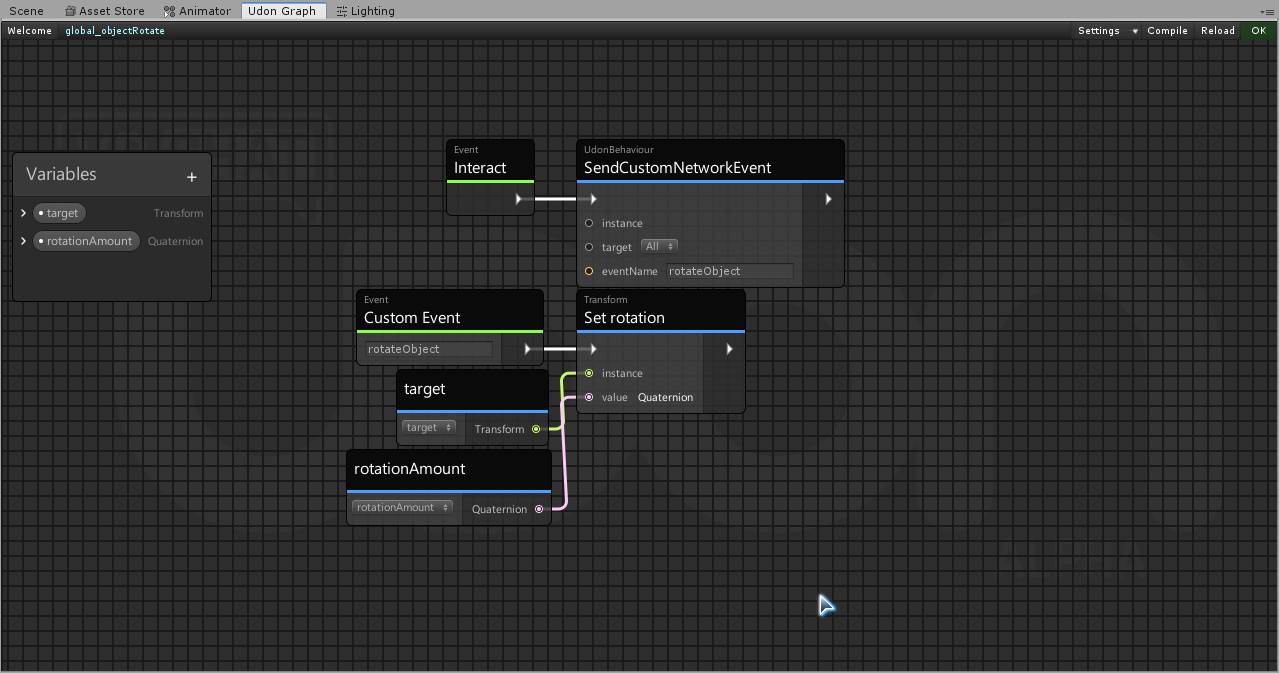

I'm trying to set an object's X rotation to a set amount.
but in game it automatically goes to 90
is this something with the default values?
Or am I applying a quat when a vector is more appropriate?
Or, I just messed up the variable inputs...
floral dove
it's not usually wise to use Quaternions directly - the x,y,z,w elements don't line up to the xyz Euler angles if that's what you're trying to do. It might be better to have a public Vector3 variable that you turn into a Quaternion in your graph
chilly crater
I just want to set an object's rotation to a set angle when I push a button.
I'm making an over-engineered beachchair
so i want to recline and raise the back/footrest
Testing with vector atm
floral dove
yeah - I think a public variable Vector3 will serve you well.
chilly crater
Does that apply X degrees of rotation, or does it set the object's rotation at X degrees?
floral dove
since you're using 'Set rotation', it will set the transform's rotation to the Quaternion you pass in
if you used Transform.Rotate, it would apply it on top of the current rotation
chilly crater
So I need to figure out how to translate vector to quat
floral dove
you can always search the Unity docs and then look for the matching node. In this case, it helps to know that they're called "Euler angles" which is not obvious if you're not a math nerd
chilly crater
Thanks.
Now off to trying to figure out chair placement...
Does the seat transform signify where your feet end up?
floral dove
chilly crater
Does the seat transform signify where your feet end up?
I believe it's where your hips go but haven't done much with stations tbh
chilly crater
I'm starting to believe it is feet. I have the seat item below the item and I'm still hovering.
Nevermind, there might be collider magic going on...
Thanks for the rotation help
floral dove
looks like the example station has the 'seat' at the floor, so that would be where the bottom of the chair is I guess
floral dove
np
chilly crater
Is the box collider important?
I can adjust the height of that to whatever, right?
floral dove
I'm not sure if it has an impact on how your avatar interacts with the station or not.
chilly crater
I'll figure it out somehow. Thanks again.
cunning mist
I feel like this would be better as an animation lol
chilly crater
Throwing it on my to-do list.
I really need to get off my butt and throw cyanEmu into my project...
void ridge
chilly crater
I really need to get off my butt and throw cyanEmu into my project...
Do it right now. It takes literally seconds, here's the link https://github.com/CyanLaser/CyanEmu/releases/download/v0.3.1/CyanEmu.v0.3.1.unitypackage
Sincerely,
Someone who dragged their feet for like three days on that before just doing it
native estuary
Just do it
chilly crater
So what, do I just press Play?
native estuary
Yeah
chilly crater
Well that just saved me the five minutes to setup a testclient. Thanks
What is the text for?
Couldn't you just use the UI text?
void ridge
Sorry, I moved that question to #quest-optimization
chilly crater
oh
unborn hornet
I had to deal with it when making my auto placement seats in order to make the knees always be on the edge of the seat no matter the avatar size.
 hoary echo
Probably a stupid question, but to publish a world for both PC and quest, I just Build and publish for PC --> Upload, then do the same as an android build, yeah?
void ridge
hoary echo
Probably a stupid question, but to publish a world for both PC and quest, I just...
hoary echo
In my defense, it's been a long day. Thanks for the link!
unborn hornet
tfw open 21 clients instead of 2
void ridge
I just made a big box collider to use as a trigger volume. And now I've discovered that I can't interact with the button that's inside that volume, which is also a trigger collider.
native estuary
void ridge
I just made a big box collider to use as a trigger volume. And now I've discover...
Change the encompassing trigger volume to be on mirror reflection layer
void ridge
.....whyyy?
void ridge
Sure, I believe you, but, why would that ever work?
native estuary
Because mirroreflection has a special role as a layer it's a pretty usual trick in vrchat if you search back in the discord
void ridge
I'm glad that it works, but, that seems kinda senseless that it works that way
Feels like a hacky workaround to a problem that has no other solution yet
 obtuse zinc
how can i set up buffered triggers? i cant seem to find anything on it
i want to have a button that globally activates a song
 inland gyro
Did the SDK just crap itself? How do I fix this? Clicking "Clear" does nothing.
unborn hornet
Restart Unity, if that don't work, reimport the SDK.
scarlet lake
Haha i just did all that some time ago with some problems still appearing. but it has been such a long time i think i am better off getting the new sdk and start over again.
grizzled trout
so mostlikey a dumb 10 out of 10 question but how do i put infinity ?
unborn hornet
Mathf.Infinity
unborn hornet
Happens. No worries.
grizzled trout
thanks
unborn hornet
For the inspector, it's literally the word 'Infinity'
Prefix with hyphen for negative
grizzled trout
thanks heh
 sudden saffron
i have a "summon" where someone should be able to push a button to reset the location of the summonable object to somewhere near the object that contains the summon script.. but if Player A touched the summonable object first and Player B tries to use summon, the summonable object appears in the right spot but zings back to its previous location
is it likely to be something to do with the player that owns the object, and how do i tell any VRCPickup object that it now belongs to some other arbitrary player
scarlet lake
Idk but i think the easiest way is just to make it local so they all have their own object to use
Hope someone could help otherwise you could always take this road
sudden saffron
true true, it's easier but i would prefer people to be able to see roughly the same thing in this world
mighty fjord
Or you could set the owner of the summoned object as the person who presses the summon button
sudden saffron
yep that's what i would like to do
if i've already got the player who interacted and the summoned object, what's the node/command/etc to tell the summoned object "you are this player's wife now"?
mighty fjord
There should be a node called something like setOwner, probably under networking
sudden saffron
Networking -> SetOwner - thank you!!
actually how do i get the player that did the interaction?
Networking.GetLocalPlayer seems not right
mighty fjord
LocalPlayer would work as interact is a local event
Actually though, you could also send a custom network event to the owner of the summoned object to make it be summonsed on their end which would sync for everyone else
sudden saffron
true true..
i don't really understand owners of objects vs instance masters yet..
for the purpose of syncing, it sounds like the object's owner "observes and reports" information about say the loc/rot/velocity of a Pickup (which the summonable object is)
so that information gets synced to the other players.. but does that sync process happen directly from the object owner to other players or is it synced through the instance master?
mighty fjord
I believe it's handled directly from the owner of the object
sudden saffron
thanks for your help!
what i'm doing now is setting the owner to the local player, then doing the change in position after that
so we'll see how that goes i guess
mighty fjord
Yeah, I'm just wondering if the set owner function has got some form of delay to it, which would mess it up
sudden saffron
seems to run ok in Build & Test so i think that's licked it
thank you so much for your help Nestor
sudden saffron
live tested it, it seems to work even with a short noticeable delay - i'm triggering SetOwner and the velocity/position reset as part of a Block so i guess they fire in sequence 🙂
unborn hornet
All objects in scene must have an owner. The instance master is the default owner of objects unless explicitly set to somone else via SetOwner.
fiery yoke
Not quite true. Pickups for example implicitly/automatically set you as the owner when you pick them up.
paper plinth
poggers
unborn hornet
fiery yoke
Not quite true. Pickups for example implicitly/automatically set you as the owne...
Pretty sure the pickup script just implicitly calls SetOwner, so we can both be right. :P
Ayyyy a ban speedrunner. Lets see how long it takes
paper plinth
I'd like to tell you there was a time in history where folks would just take their ban
unborn hornet
Lol
paper plinth
but there never was
sharp shadow
Has anyone implemented a global world whitelist in udon where a udon behaviour can ask, "is this person on the list" and receive a true or false from this other udon behaviour?
instead of maintaining lists for each interaction you have 1 list and many calls to the list
fiery yoke
That is simple enough to do, but why would you want that? Whitelists are not supported by VRChats design philosophy if you ask me.
sharp shadow
for example, a staff door, or series of staff doors
fiery yoke
Ahh now that makes more sense
sharp shadow
you only want a list of people to enter
fiery yoke
Special privileges based on the Username is relatively easy to do
sharp shadow
but if you add or remove staff you have to update like 5+ different arrays depending on how many doors
instead of 1 string array per udon behaviour, you have all the behaviours call 1 list
then you only maintain the list in 1 place
i have a whitelist teleport but i dont want to have to enter 15 names in 3 -4 different places manually
Like in programming you can call a function with a parameter and receive a return value, can you use udon to "reply" to whatever called it?
fiery yoke
What youre describing is solved by something called "Dependency Injection"
Essentially you have a central object that holds a list of "Staff member names"
And then every object that depends on that list is dependent on that object.
So the easiest way to solve that is by simply manually giving every object a reference to that other object that holds the list.
That ofcourse is a lot of manual work. Since Udon does not have a concept of "static"-ness, the only work around I know of is to use GameObject.Find(string name)
which will look through the entire scene for a specific GameObject. However that can get slow, if done excessively.
sharp shadow
Yeah, udon needs a global parameter function as well as simply public
fiery yoke
Yeah some global space would definitely help
sharp shadow
That was we can assign a variable as global and call it wherever
sharp shadow
Yeah, more of an advanced feature
 quartz meadow
Just have an empty game object with a scrip just holding an array of player names
mighty fjord
Wouldn't it work if you just had one script to check it and then have it set up the doors if it detects that you are on the 'staff' list?
fiery yoke
The whole problem is getting a reference to that object :P
Either you have to manually assign it
quartz meadow
That's easy
fiery yoke
And how?
quartz meadow
I mean what I do is I call said holder program "holder"
fiery yoke
And then GameObject.Find?
quartz meadow
Tbf I do my work in udobsharp where this is easier, idk about graph
fiery yoke
Its still the same
fiery yoke
I dont think you understand my point
To get a variable from an object, you need a reference to the object. When you Drag'n'Drop an object into an Inspector Field youre MANUALLY referencing the object.
If you have multiple objects, then you need to do it for all of them MANUALLY. The only work arounds are GameObject.Find and Editor Scripts which can automate the manual-ness.
mighty fjord
So one part of the solution to Wise's issue would be to not store users in an array, but in something like a .bytes file, easily edited using any text editor
fiery yoke
Then you still need a reference to that text file :P
mighty fjord
Yeah, but they were mentioning that they were using entire arrays for it currently, instead of just referencing a single list
quartz meadow
Personally I would use prefabs to avoid redoing it that many tines
fiery yoke
Well yeah but it doesnt get around their actual problem
Prefabs and UdonBehaviours are very tricky
mighty fjord
No, but it does make it alot easier having just one list that you can edit end then have all the doors reference that one
But I guess if you're referencing something you might aswell reference some for of handler that does the check independently
fiery yoke
The underlying issue is getting a reference to a central location. How you store the list of names is up to you.
mighty fjord
Yeah
fiery yoke
And ofcourse copying the object, or using prefabs (which I dont recommend) will hide the manual assignments.
But it creates a "loose-couple" which I prefer to avoid. But since there is no real solution in Udon its fine I guess.
unborn hornet
Using an editor script to compile the list ahead of time based on conditions seems like it'd be the most effective way.
Maybe not the easiest or most immediate to make...
But probably the easiest to maintain/update in the long run.
It requires working with U# though.
So ya know... Pros & cons...
fiery yoke
It doesnt
you can make Editor Scripts for UdonBehaviours no matter if they run a Graph Compiled Assembly or UdonSharp compiled Assembly
UdonSharp just offers a lot of neat utility things I think
sharp shadow
i ended up doing it by having each door GetProgramVariable from the referenced StaffList and setting it to a local variable on interact, this way i just have to maintain 1 array and just reference the staff list in each door, not completely efficient but it will do
floral dove
paper plinth
massive pog
FYI this is what the #udon-showoff channel is for
paper plinth
oh lol
didnt' think anyone would care about the cube
was just showing the folks who helped me the results of their effort
unborn hornet
Oop. F i guess.
 fair leaf
How do I go about adding music in udon? I just want some peaceful bgm but nobody I have seen online has a guide that works
paper plinth
add the audio source, add the vrc audio source, and then uncheck enable spacialization I think.
the component that VRC needs
forget what that is
yup that's right, add the audio source, put in your mp3, add the vrc spatial audio source and uncheck enable spatialization
oops probably you need to click loop since it's bgm
fair leaf
Whats the structure look like got an example by chance? its my first day with udon scripts
thx for answering btw @paper plinth
fair leaf
your good
paper plinth
Create an audio source (optional: move it to 0,0,0) and in the inspector click add component and then select the vrc spatial audio
fair leaf
I think I figured it out not sure tho lol
this is what I am trying would you say this is accurate? https://ask.vrchat.com/t/how-to-play-music-in-udon-music-sync-time-playlist/998/1

VRChat Ask Forum
(upgrade : music sync time) I’m going to explain here a simple way to play music, play music sequentially, and share your thoughts on how to sync music. " Hi, nice to meet you 🙂 I don’t speak English very well, I’m sorry if you don’t understand I’m not an expert, I just wrote this because I want to share my thoughts and help Please tell me ...
paper plinth
The enable spatialization option is under advanced in the vrc spatial audio component
Oshi
You want a Playlist
I don't know that in unity yet soz
fair leaf
this one is one song only my next proj is playlist
I am a visual learner most the time so what your saying I dont get 😦
@paper plinth this is what I got
idk what I am doing
paper plinth
Well I can tell you now
That when you see the word instance like that
It's looking for and inpit
Input
In this case I would suggest that you look at the gameobject in question that you are suggesting should play your clip
However, there are things you need to do to make audio in vrchat
I suggest the use of plugins
 warm goblet
is this the right place to ask SDK3 world questions? I'm not actually using Udon but there's no #worlds-sdk3 channel
fair leaf
I guess @warm goblet
dapper lion
udon and sdk3 is basically the same thing
fair leaf
@dapper lion any chance you know of a guide I can use for bgm
dapper lion
hmm, i mean you could look up vowgan, not 100% sure if hes made any
fair leaf
I have an audio source but I need a screenshot or something of the udon map for it and thx
@dapper lion he has done video player but not audio
dapper lion
hmm, idk of any udon graph, but i have seen an asset passed around labeled "BGM_control"
wait, are you looking for a video player?
fair leaf
nah
im tryna just play some creek sounds in my creek themed vrchat world
but I wanna be able to disable it via button
dapper lion
oh, i belive if you put an adio source down, make it 2d audio and make its audio bubble about 3 times the map. set it to loop, and add the audio clip you want
oh
fair leaf
im considering saying screw this to the audio though
paper plinth
Audio doesn't necessarily need to be scripted does it? To turn on and off with a button?
unborn hornet
@fair leaf An udon script with a public variable of AudioClips, then have some logic present to swap between the clips on an AudioSource via AudioSource -> set clip and then AudioSource -> Play
Then in the inspector, set the number of clips (read: songs/tracks) you want and drab those files from your assets folder onto the slots for the audio clips.
The logic that drives the track selection is up to you as the creator depending on your needs, but the above is the boilerplate you'll need for it.
fair leaf
@unborn hornet thank you, but @dapper lion covered it sorry :/
unborn hornet
Ah. Np
dapper lion
sorry lad
 supple spoke
is there a way to collaborate with multiple person on a unity project for a vrchat world
like editing the same project in real time
fair leaf
it should work the same way it does it regular unity
hoary echo
Media players, any way to get a video file from google drive or one drive to play on them? I can only assume an open share link is what's needed, but it doesn't seem to want to play.
native estuary
From drive it would need to be under 100 mb to be able to be played
Otherwise there's the warning about it not being virus checked which stops the video from being played
hoary echo
Good to know, in this case it's relatively small (40mb)
native estuary
That's the main tip I can give you since I haven't really played videos from drive in game myself
But I do know that others have
hoary echo
It's h.264, but I'm not really sure how to link directly to it via google drive (literally ending the URL with .mp4), as far as I know you can only just get the share links which are their whatever hashes
 viscid reef
it should be fine as long as it is a link that resolves into a supported video file
hoary echo
Hmm... it's all a no-go. I won't worry about it for now, I've got a 'good enough' alternative, I can fight with this another day
viscid reef
oh, make sure the video files do not have spaces, even url encoded spaces, not sure if it affects sdk3 players, but its a problem on sdk2
 fiery tide
Does anyone have any idea how to do the following: spawn a local game object bound to the front of the player with 2 toggles. When 1 is toggled on disable the hitboxes of the triggers. Spawn 2 objects. 1 synced to all players and bound to the player (you should be able to choose what bone). And the other synced only to the local player.
 gusty trout
Has anyone had an issue when updating from VRCSDK3 2020.8 to 2020.12, I have lost most options within the VRChat SDK dropdown on unity.
Tried all the usual stuff to get it back but nothing is working. When I tried downgrading to the working version, all the options are gone still.
Any ideas?
 cursive stratus
 lilac hatch
Are we limited concerning the number of things done each frames ?
I'm trying to have two different gameobject to UpdateGIMaterials and after a while, one of the two somehow break and don't update anymore
(Or perhaps the lightprobes don't update anymore, i'm unsure)
And it sometimes just fix itself out of nowhere

 compact stirrup
Is anyone else having trouble with player trigger enters? I have a script that creates a platform under a player when they fall through a trigger, but it only happens the first time someone enters it. I'm instantiating from an object that exists in the world, but every time the second player falls through the collider they fall right through, and the script doesn't fire again until the world is reloaded
anyone have any idea why that might be?
 hallow sable
anyone here that uses cyanemu know why I would be getting vrc_playermods could not be found error
 ocean sundial
udon network spawn prefab transform not sync please help
vital rose
floral dove
you can add the OnVideError event and hook it up to a Debug.Log to get a little ...
Thank you for the suggestion earlier this week to remove the video sync program, that did the trick! all fixed
fiery tide
Has any1 made a player combat system yet? I would like to borrow it. You will be credited if it is used.
Must be udon/U#
fiery yoke
Combat or generally PvP is impractical because of the typcially high latency in VRChat. You can make it work, but it wont be anywhere near what most people that play Multiplayer FPS are used to.
lilac hatch
Hm
 grand temple
Basic favor the shooter isn't hard to implement if you have an object pool framework. And the style that they're going for (open air combat with very few walls) will allow you to get all the benefits of it while avoiding most of the downsides (getting shot after ducking behind cover). Don't expect anything plug and play though, you gotta make it yourself
 vernal maple
Udon Sharp question. Trying to force a client to drop an object if it exists outside of a collider, but I'm a bit confused. I believe I'm supposed to call gameObject.GetComponent(VRC_Pickup().Drop(), but can't for the life of me make it work.
 lyric mason
Did you removed SDK2 before importing SDK3?
lyric mason
hallow sable
^
hallow sable
not sure if I missed something
dleeted the vrcsdk folder, vrchatexamples
@lyric mason
native estuary
You still need to remove the scripting define in the project settings
hallow sable
how do I do that?
native estuary
Project Settings > Player > Other Settings > Scripting Define Symbols
 karmic wyvern
hey
i have a problem
plz help me
im following this tutorial
right
and i dont have that button
"build and publish"
where do i find it
also for me this tab is just "show control panel"
 rose arrow
@karmic wyvern Do you have any errors in the console?
Usually that menu having missing entries means something didn't load properly.
lilac hatch
My stuff got burried so uh
Are we limited concerning the number of things done each frames (using Update() ) ?
I'm trying to have two different gameobject to UpdateGIMaterials and after a while, one of the two somehow break and don't update anymore
(Or perhaps the lightprobes don't update anymore, i'm unsure of which one is breaking)
And it sometimes just fix itself out of nowhere
I don't really understand wassup to be fair, make absolutely no sense to me but my unity understanding is very sm0ll
void ridge
Argh I wish Discord had Threads like Slack 😖 I keep coming here with questions but I don't want to bury/derail
Is there an event for when a player respawns? Event.OnSpawn seems only to happen once, on initial spawn
hoary echo
I'm not sure, but I can think of a few ghetto workarounds for it
fiery yoke
The most common one we used for a while is having a collider at the spawn that detects the respawning and then teleports you somewhere else. But its jank.
hoary echo
That was the ghetto idea I had
cunning mist
@void ridge If you want to have your questions cataloged like a forum, VRChat actually has a forum for that! They're not great at advertising it and personally the website looks incredibly boring, but it does the job.
https://ask.vrchat.com/
 void ridge
Thank you, I do use the forum. I always check there first 😛
But then I come here, and if no one's around, I post there 😅
cunning mist
You can also secretly know when the player respawns by putting a VRC Station on the object you respawn to. VRChat reuses their code for putting someone into a chair to manage respawning, so putting a VRC Station on the respawn object actually puts you into that chair when you respawn. Then, just do an OnEnterStation or whatever the event is, do your events related to your respawning, and kick them out of the chair.
fiery yoke
That is also incredibly jank lol
scarlet lake
wat dis meen
cunning mist
Make sure you have a disabled box collider on the object though, otherwise players will be able to click on it to sit.
And yes, it's horrible and I love it.
void ridge
Yeah, jank/10. Good to learn about how that stuff works, but def not gonna use that unless I'm desperate
hoary echo
I think to do anything in VRC, you must accept the jank. You must love the jank.
void ridge
I had that attitude with Rec Room for a while. Then stuff started breaking, and the devs started talking about how they had to spend dev time supporting jank so that people's stuff wouldn't stop functioning
hallow sable
what would be the best replacement of objectsyncs respawn?
hoary echo
void ridge
I had that attitude with Rec Room for a while. Then stuff started breaking, and ...
The problem here is, there isn't a 'proper' way to do it... yet
void ridge
That is exactly, precisely, word-for-word, the excuse people use in that community too 😛 it's not the way
fiery yoke
It would be so simple to add a respawn event
at least in my eyes
maybe its not
But I doubt it isnt
void ridge
"It would be so simple to add X" is also a sentence I hear in my nightmares 😂
fiery yoke
Well what I mean is that the benefits is way higher than the cost :P
scarlet lake
plees tel wat dis meen
void ridge
Helper, the request you made seems out of date. You can just teleport a player to the respawn point now, right?
void ridge
scarlet lake
plees tel wat dis meen
Do you mean the VRC_PlayerVisualDamage thing, which you have highlighted, or the null ref exception?
If it's the exception, click on it and you'll get some more info in the lower part of the pane
hoary echo
Joker, are a dev? The only people I know who shy away from jank are proper devs in their day jobs, haha
fiery yoke
void ridge
Helper, the request you made seems out of date. You can just teleport a player t...
A Respawn() method would then cause an OnRespawn event if it existed. Just teleporting them wouldnt.
scarlet lake
It's my first world and I just want to upload it so my friends can vibe on it
void ridge
So I don't know what VRC_PlayerVisualDamage is, I just know I see that warning often and it seems inconsequential. If you're having an issue, it's probably that exception error.
 fiery glen
Does anyone know why my dropdownlist expands and then the mouse box appears and covers my content?
hallow sable
did anyone know how I could setup collider toggles? I know how to do gameobject but can't find a component one
 hushed gazelle
What do you mean? Turning them on/off?
hallow sable
yeah like for a couch collider
hushed gazelle
Just toggle enable on the collider.
hallow sable
wdym?
 dawn oxide
I was wondering if there was a way to have a mini-map with udon? Like perhaps it could either be a ui connected to the player model when they spawn in to the world? If possible, how would it be done?
fiery yoke
dawn oxide
I was wondering if there was a way to have a mini-map with udon? Like perhaps it...
Yes thats totally possible. You do it by getting the position of every player and either have a pre-taken picture, or use a camera with a render texture.
hushed gazelle
@hallow sable go look up the collider component in Udon and you'll see Set Enabled.
dawn oxide
So it would be the same if you wanted a live mini-map where if a player went to a different location let's say a house, their location wouldn't show up until they leave that location or if you join them? Just making sure I'm asking everything in detail since I've never seen this in any world
hushed gazelle
Is there a prefab, or specific way to set up, two-handed held objects like the pool cues in harry's pool world or the laser tag guns in the laser tag world?
 warm cave
I noticed that my int for the client is always like a step behind, my master can have a 1 and the other clients have 0. Any ideas to correct this with proper since instead of guessing or something?
void ridge
Networking is hard
I'm not finding any docs or easy guides for UdonBehaviour.SendCustomNetworkEvent, but I'm pretty sure I grasp enough to use it. But could someone get me started? I don't get what the instance and target inputs do
unborn hornet
instance refers to which udonbehavior to act upon. target determines who receives the event call (Owner of the object or All in the instance)
void ridge
OK. Owner of the object of which the UdonBehaviour is a component
A synced variable does a sync when... The owner of the object to which an UdonBehaviour is attached sets that variable?
cunning mist
That will be a feature eventually, however as of now Synced Variables are passed during an event called OnDeserialization, which happens about 4 times a second, so users are constantly being re-fed synced data whether it has changed or not. "Manual syncing" (what you've described) is what will be coming with Danly's networking patch in the future.
void ridge
users are constantly being re-fed synced data whether it has changed or not
This is my takeaway from this. That correct?
cunning mist
Correct
void ridge
So what I'm trying to do here is update a player who has joined a while into a session with rotation information about an object that... rotates a lot
Do I even need a network event? Or can I just declare that object's Transform as synced variable, and then do a Transform.SetRotation on Start?
Start, or whatever other time seems convenient
hallow sable
what do I do if ui works fine with cyanemu but in game none of it works?
like ui buttons a
void ridge
Oh man. I threw some spaghetti code at this problem and I think I made it work 😂
hushed gazelle
If your object is physically moving, slap a rigidbody on it and just enable sync on the udon script on the object itself.
void ridge
I'm specifically avoiding that
hushed gazelle
Then you're just making it harder for yourself.
void ridge
Well, it's a resource thing
I have something like 25 of these objects, and I don't want them all to sync position continually
Because that would be too much
hushed gazelle
What specifically are these "things"?
void ridge
They're objects that rotate
hushed gazelle
That tells us precisely nothing.
void ridge
Well, yeah, that's the point. They don't do anything beyond that. Nothing that's unpredictable.
hushed gazelle
Ferris Wheels? Revolver cylinders? Platforms? Give us something in the ballpark.
void ridge
It really shouldn't matter
It's an object, it's got a Quaternion, I want to make sure players who join get the right quat
But without overloading network resources
hushed gazelle
WHY does it matter though? With optimization what works for one "thing that revolves" may not help another depending on what they're actually doing. Context is needed!
void ridge
The context is that I don't need their rotation to be synced frequently. Probably not at all beyond when the new player joins.
hushed gazelle
Yeah, you're just being evasive and telling us nothing. What is it these "things that rotate" actually do/convey, and why does it matter to the player that they're synced?
void ridge
I dunno man. There's a lot to be said for solving problems in the abstract 🤷♀️ anyway, here's what I slapped together, and I'm all but certain it could work better, but it works
Appreciate any input, and thanks. And thanks Tech and Vowgan for the input earlier
void ridge
hallow sable
what do I do if ui works fine with cyanemu but in game none of it works?
Bumping Militia's problem from earlier
hushed gazelle
Solving problems in the abstract still requires knowing WHAT the problem actually is though, @void ridge. "25 revolving objects" gives nothing about the actual nature of the problem and why syncing them is required.
unborn hornet
Also some people might not want to divulge the exact purpose and nature of what they're trying to solve. If that's the case with them, then it should be respected. If a problem cannot be solved without divulging such purpose or nature, then that's on them. No need to get undies in a twist over it.
But Joker seemed to have solved the problem, so all is well
quartz meadow
tough question, but I am trying to get "GetFloatArray" to work, I can set float arrays just fine, but when I try to get them I get nothing out of them
hushed gazelle
@unborn hornet I recognize that, but for help to be useful something needs to be divulged to actually get to the core issue and fix it. "I'm trying to animate a spinning wheel in a game that needs to consistently land on the same result for all players" or "I need to sync rotating targets for a shooting game" is nice and vague while still explaining precisely what they're trying to achieve.
@minor steeple Instantiated spawns aren't synced at the moment, it's a known thing with the current Udon version. CustomNetworkEvent'ing them into existence is just telling everyone to spawn their OWN instance of it rather than a shared synced one.
 ornate furnace
Hey, so players are asking for me to have a toggle button to enable/disable the colliders on my couches that I have in my scene. I have tried changing the object layer in an udon graph, but it just dissapears when I try that. Just disabling the mesh wouldn't help me because I have other objects like pillows and such that rest on the couches. Any suggestions?
dapper lion
@ocean sundial who died?
@ornate furnace ive never made a collider toggle, but you could hav 2 meshes over lap. one eith collide and one without. and make the collide one toggle. but thatll technically not be “optimized” as youd have 2 seperate meshes present
however i believe you can set up a compinent varible script thatll do colliders
mighty fjord
You can disable the collider component instead of the entire object or mesh
ornate furnace
mighty fjord
You can disable the collider component instead of the entire object or mesh
If I disable the collider, wouldn't the other objects (pillows and stuff) fall through it?
mighty fjord
Oh, so that's the issue, yeah they would fall throigh than, mb :x
Changing the layers is what I would've done for sure
ornate furnace
Yeah, I tried setting the couch to the same layer as the pickup objects, but it just completely dissapears
mighty fjord
It might be setting it to a weird layer instead of pickup, it shouldn't have any unexpected results like that
scarlet lake
How do I check the tag of the collided other of an OnTriggerEnter event?
I want to check if the other is tagged with AIWall
ornate furnace
mighty fjord
It might be setting it to a weird layer instead of pickup, it shouldn't have any...
It was basically this, was setting the layer wrong. Thanks! Got it working now!
mighty fjord
Good job ^^
scarlet lake
How do I sync animated objects in Udon? I noticed that adding a Udon Behaviour script with Synchronise Position enabled will disable the Animator animations
 supple root
Is there a simple trigger to add damage, i have been looking in the graph for 15 minutes now i count find a thing, Just something as simple as OnTriggerEnter add15Damage or something like that.
fiery yoke
Damage...to what?
If you mean the player, then there is theoretically still the (outdated) CombatSystem. But I wouldnt recommend using it.
You would probably have to manage your own.
supple root
Im currently looking to add damage to a object
paper plinth
@void ridge if their rotations don't need to be individually synced, could you synchronize maybe four of them and have them produce their rotation via an udonprogram node and a public variable to the others that could rotate the same way?
You have 25 rotating objects, I doubt you need them each to have their own individual rotation.
If it's done for the purposes of randomizing the position of similar objects you can randomize the rotation on the first program scan and then synchronize it from there.
void ridge
Oh, interesting, right, I could simplify the whole thing and then have less that I need to sync. But to be totally honest, I'm actually making this difficult on purpose, because this is all a learning exercise and I want to create problems that I need to figure out how to solve.
So for my purpose, yes, each of the 25 objects have their own individual rotation. Matter of fact, they each rotate at a random angle, where those values are generated by the first person to join the instance 😛
And now, I want to optimize how those are synced, maximizing shared player experience within the constraints of networking
paper plinth
I suppose lol
void ridge
They're already simulated per-client in a way that should be faithful, so in theory I only need to update them once for each player that joins. But I think I'm gonna go the extra step and sync each one once every minute or so, just to make myself feel good.
paper plinth
People don't remember the 80s
They didn't learn: Reduce, Reuse, Recycle
Reduce is a very important vector when it comes to resource use optimization
Because you do not have to worry about optimizing resources you never use
void ridge
I wouldn't call it an "issue," I'm just learning. I built this yesterday
#udon-general message
void ridge
Basic goal is to sync the rotation of an object with some event. Then I'm gonna generalize that to sync a bunch of objects
scarlet lake
Wanna dm me? Might take a bit to explain
void ridge
Sure
scarlet lake
anyone know what the performance is like with deserialzation? like if i have it turn on a mirror based off a bool value, will it like try to set the mirror to active constantly and thus taking a performance hit?
or does it not effect performance since the action was performed once thus not needing to update the game object again
void ridge
cunning mist
That will be a feature eventually, however as of now Synced Variables are passed...
After chatting with penguin, it sounds like my takeaways from this actually should have been:
Every variable you declare as synced across all your UdonBehaviours increases your network load, regardless of how or when that variable gets used by clients.
Is that more like it?
Additionally, ticking the "synchronize position" box on an UdonBehaviour increases network load, because it's kind of equivalent to declaring that object's Transform as a synced variable?
So in order to decrease my network load, I should
- decrease the number of total synced variables, and/or
- change the variable types to things that use less data
Source for #2:
https://ask.vrchat.com/t/how-to-sync-with-udon/449/7
scarlet lake
Honestly I cant imagine it being too much of a burden
Vowgan is an actual god though so
void ridge
What do you mean by "it" there?
scarlet lake
Oh all the variables ondeserialzation has to read and the actions it performs
It cant be that much of a performance issue
Although I have seen it lag
void ridge
As a burden on the client's CPU? Yeah, I doubt that too
I'm purely focused on network load, like this post
https://ask.vrchat.com/t/how-to-sync-with-udon/449/6
scarlet lake
There's also some bugs with it I almost forgot about
The first comment is from a vrchat dev on April 20th
Probably just got a lil high and forgot
😂
void ridge
I'm sure this is out of date by now, but it's a ballpark of what I care about:
I tested how many distinct UdonBehaviors with synced variables you can have in the scene before VRChat’s network layer stops processing events . . . . The answer is somewhere between 8 and 16 behaviors (each with 2 synced strings). At 16, I wasn’t getting total loss of all events, but a fair number were dropped. 8 was perfectly stable however.
scarlet lake
That is interesting
So If you try to sync more than 16 integers It might cause an issue?
void ridge
It looks like they were doing between 16 and 32 strings
scarlet lake
Its unfortunate but there are just some things that udon does, but poorly
void ridge
So I think I can get away with ~50 integers. But I do already have 8 rigidbodies with "Synchronize Position" checked. I'm hoping that when those are sleeping they don't get synced or something.
scarlet lake
Or even not at all
cunning mist
Oh yeah syncing strings is the slowest thing you can do and practically breaks after like 60 characters or something
void ridge
Do we have any read on how many rigidbodies can have synced positions before stuff starts catching fire?
scarlet lake
I don't think that has to do with the deserilization node so I'm pretty sure it wont have much effect
void ridge
but it's still data that's getting sent over the network 🤔
scarlet lake
True but I think it might be handled differently
Yeah it seems like the doc you sent earlier about syncing is all the info we currently have on it
vernal maple
Need some advice on how VRC_Pickup.Drop() works. I'm having no luck, and my error says "The given key was not present in the dictionary."
Using U#
unborn hornet
When you call that method on a pickup instance, it forces the object to be dropped.
vernal maple
I continue to get an error every time I do. Something about a key not in the dictionary.
dapper lion
mispelt?
fiery yoke
Sounds to me like a graph bug
vernal maple
gameObject.GetComponent<VRC_Pickup>().Drop(gameObject.GetComponent<VRC_Pickup>().currentPlayer);
Nervously looks around in udon sharp
fiery yoke
Ohh
vernal maple
I tried getting currentPlayer as well, but also errors out the same
fiery yoke
well then
Ohh
yeah
VRC Components cant use the Generic GetComponent
Use (VRC_Pickuo)GetComponent(typeof(VRC_Pickup))
vernal maple
Lemme give that a shot. :D
<3
Works perfectly.
((VRC_Pickup)gameObject.GetComponent(typeof(VRC_Pickup))).Drop();
Looks hideous, but it works XD
scarlet lake
pft you udonsharp coding plebs
paper plinth
listen
I am being supportive
I complained for two years that the only reason I don't make anything in Unity is because there's no node graph and now there's a node graph
so I'm obligated to give it a run lmao
 limber jackal
Is there a way to get the current contents of your clipboard with udon?
floral dove
limber jackal
Is there a way to get the current contents of your clipboard with udon?
you can ask the user to paste into a text field. We do not allow world creators to arbitrarily read a user's clipboard.
vernal maple
I actually had a question about that as well. This will require a CTRL + V keyboard stroke or can it be done by pushing a button in world?
limber jackal
Yeah that makes sense. I was hoping to have something paste with a button press, but that makes sense as a security feature
vernal maple
Something something unlockable achievements in game world for custom skins. Copy pasta would make life simple because there is no save/load.
floral dove
ctrl+v only.
otherwise a malicious author could make a 'mirror toggle' that reads your clipboard
native estuary
Once we get a proper per world permissions system going would be great so that the user can agree to this first
paper plinth
is float unaryminus the same as multiplying by -1?
raven peak
a proper save world system would be best but dont see that coming for a while.
fiery yoke
floral dove
otherwise a malicious author could make a 'mirror toggle' that reads your clipbo...
I mean you could just get the clipboard, check if its in the format of a url and if it is then let it trough and pass it on. And if it isnt then return an empty string or something.
(Im talking about the VRC Client doing that, then passing it on to Udon)
 wispy depot
has anyone had issues with buttons in worlds not working in VR but working in desktop?
fiery yoke
You probably have a collider blocking the button
hoary echo
Usually there's a trigger or something blocking the... ^^^
wispy depot
I've tested with the button floating in free space and it still wont show up
I thought maybe it was occlusion culling but I cleared it and the issue persisted
cunning mist
There's likely some sort of box collider or the likes covering it like Helper mentioned
wispy depot
hmmmm
if the user is inside a collider would this still be an issue?
I'm going to do a test
cunning mist
If the user is inside of a collider for detection, you need to have that layer on MirrorReflection, otherwise it blocks hand-based raycasting.
cunning mist
👍
wispy depot
actually I have it on a custom layer and player local but I guess thats still an issue
really unfortunate
cunning mist
Yeah, MirrorReflection needs to be the one you use for any larger trigger colliders to avoid that issue.
wispy depot
the problem is they become global
cunning mist
Udon doesn't rely on custom layers nearly to the extent Triggers needed them, so your situation can likely be reworked.
What's your setup you're trying to get working?
wispy depot
I'm using SetActiveFromPlayer to toggle parts of the world on and off locally depending on what part your in
there didnt seem to be a way to do so locally
without maybe explicitly writing something in C# for it, but most of that is beyond me
there didnt seem to be a way to make on player enter/exit, on player local
raven peak
wispy depot
I'll give that a shot jet, thanks
I tried so much lol https://media.discordapp.net/attachments/520171806561402880/797132478182850641/unknown.png

 wispy depot
I figured after trying but gave it a go
scarlet lake
Why can't you add shaders to quest?
cunning mist
You can for worlds, it's just not recommended. The Quest, being an arm-based setup, doesn't handle graphic computations as well as a PC, so they struggle to do fancy stuff.
wispy depot
Thanks for the help guys, its all working now.
void ridge
Oculus Quest = literally a mobile phone strapped to your face
void ridge
Checking my understanding here. the (Vector3, float) mode of Transform.Rotate users a Vector3 to define an axis, and then rotates around that axis by degrees defined by the float.
But Vector3 is not a super intuitive way to define an axis (maybe there is no super intuitve way). Because in this context a value of (3,4,5) is equivalent to (6,8,10), correct?
raven peak
void ridge
Checking my understanding here. the (Vector3, float) mode of `Transform.Rotate` ...
usually when defining a axis its normalized to one to indicate the direction (0,0,1) or (0, .5, .5). to indicate the magnitude or how strong the direction is its multiplied like (0,0,2) is a magnitude of 2.
fiery yoke
Also there is a mathematical concept to define an Axis: Quaternions
They are everything but intuitive, but they do their job well.
Technically Quaternions dont define an axis, they define a rotation, but if you apply the rotation to the identity/forward axis then you get an axis.
void ridge
Quaternions were once explained to me this way:
"They fix gimbal lock."
"What's gimbal lock, and how do they fix it?"
"They fix gimbal lock."
Yeah, I understand how a rotation will define an axis. (0,0,0) is an axis, just not yet rotated.
fiery yoke
Well 0,0,0 is just a point
:P
Axes are more or less axiomatic
But yeah just use Vector3.Forward * Quaternion (or vice versa dont remember right now) and you get the Vector that is rotated by the rotation the Quaternion describes.
Obviously getting that Quaternion is hard, but there is a lot of Utility methods to calculate one for many situations.
However thats probably more advanced than necessary in most cases. Youre probably fine just using Rotate. But yeah in that case I dont think it matters if the axis is normalized or not. It might even do the normalization internally anyway.
void ridge
well, what's important is that 1 represents a full rotation around that axis, right?
so (3,4,5) would be equivalent to (1,1,1)
fiery yoke
No
Vectors are equivalent in this case when they are component-wise multiples of each other
void ridge
I'm gonna keep reading the Unity docs like I should be 😛
fiery yoke
Linear Algebra is fun :^)
void ridge
..the documents actually, for real, say "don't modify these unless you know exactly what you're doing." 🤦
Cheeky docs.
chilly crater
Is there some new fancy way to target the player camera in Udon? All of my google searching keeps pointing to the SDK2 Toybox prefab.
fiery yoke
No
Player Camera is protected and there is no supported override system
You can render over it, but its not supported and a struggle.
If you however just want to get the position/rotation of the "Camera" then TrackingData.Head is exactly that
chilly crater
Now to translate that for a lookat
fiery yoke
Well the build-in lookat requires a Transform. But to get a vector pointing from A to B you subtract A from B (so B - A) and then normalize it to get a Direction-Vector. Then you you can transform that into a Quaternion by using Quaterion.LookRotation and then use the Quaternion as the rotation for the object.
Super easy :)
mighty fjord
Are there currently any known issues with 'for loops' and arrays in the Udon Graph?
chilly crater
oh boy, converting this to an udon graph is going to be fun. This isn't sarcasm.
I'm stuck at what to do with the quat after the LookRotation.
fiery yoke
You set it as the rotation of the transform, of the GameObject that you want to lookat the other object. So in this case A
mighty fjord
I've once again ran into an issue where a loop tries to retrieve a value or object from an array, but instead of it yielding what I'd expect, it either gives me null or some value might seem like it makes sense yet it doesnt.
The fix for this issue that I'm currently using is to pull these 'schrödingers arrays' into a debug log inside of the loop right before I need to use them, and for some reason that makes them work.
Honestly, I have no idea what's going on with that.
fiery yoke
lol good luck
chilly crater
wait... I did all that math and I can just do a set rotation instead of a LookAt?
fiery yoke
Well obviously you can set the rotation of transform...but you need to provide a Quaternion :P
fiery yoke
Ohh
well if that is a Transform
then you can just do Transform.LookAt(otherTransform)
chilly crater
I want an object to look at the playercamera.
fiery yoke
Well yeah
then either
you need a dummy Transform
that you set to the position of the camera every frame before doing the lookat
or you calculate the lookat stuff yourself
chilly crater
Yeah, the math way sounds easier.
fiery yoke
Its probably more performant and easier to have a dummy transform
chilly crater
But that involves an objectpool and parenting it on join and destroy on leave.
fiery yoke
Depends on what youre doing
But yeah calculating it yourself doesnt require any scene-objects
chilly crater
Small floaty skull in a room that creepily looks at you.
I was gonna do an area trigger to toggle the skull on/off when you enter/exit.
So it's not running all the time.
fiery yoke
Back in SDK2 I had a giant vrpill head that always looked at you in my test world lol
Was horrifying
chilly crater
So the math route isn't so bad in my usecase?
void ridge
I'm running into an issue where my movement controls on Screen mode are slow to react 🤔 I'll press W to go forward, for example, and it hesitates for a second or two before I move. It's intermittent, though. Happening in test builds. I've been abusing Event.FixedUpdate a lot recently--could that be related?
 shut abyss
Does anyone know what this is?
I can play test fine but when I try to upload I get these errors
twin drift
Is it cool to ask Udon Sharp questions here?
dapper lion
usually
twin drift
One of the features Udon Sharp's readme says it supports is being able to reference custom classes, but I haven't been able to do that at all
I've tried it both as a private class within the udon sharp class I'm writing, as well as a public class in another file.
 haughty depot
Assets\Music Visualization\musicvis.cs(12,61): System.Exception: Method is not exposed to Udon: Void GetSpectrumData(Single[], Int32, UnityEngine.FFTWindow), Udon signature: UnityEngineAudioListener.__GetSpectrumData__SystemSingleArray_SystemInt32_UnityEngineFFTWindow__SystemVoid
``` How to fix thisPeople do occasionally, but is it preferred to ask directly on the U# discord server. You can find links to it in the pinned messages of this channel.
raven peak
haughty depot
```cs
Assets\Music Visualization\musicvis.cs(12,61): System.Exception: Method is...
As it says that method is not exposed. I would suggest looking at https://docs.unity3d.com/ScriptReference/AudioSource.GetSpectrumData.html but its just for audio sources.
 haughty depot
unborn hornet
People do occasionally, but is it preferred to ask directly on the U# discord se...
haughty depot
unborn hornet
People do occasionally, but is it preferred to ask directly on the U# discord se...
cant find discord linked pls send U# inv to me
unborn hornet
Literally the first purple link on the page. https://github.com/MerlinVR/UdonSharp/wiki

GitHub
An experimental compiler for compiling C# to Udon assembly - MerlinVR/UdonSharp
dawn oxide
how would you get a camera to follow the player in a minimap? I'm currently using the render texture with a camera
paper plinth
Maybe set the camera's position to TrackingData.Head minus 2 on Z?
For the rotation you can rotate to a direction but I don't understand it yet
void ridge
I'm stick trying to tell a particle system to Emit. This is where I'm at so far
I'm assuming I need to input the Particle System component of the separate game object, but that's where I'm stuck
fiery yoke
@void ridge Emit only works with Burst Particle Systems
void ridge
OK, so I probably want ParticleSystem.Play then?
If so, I'm still stuck on the same issue--how do I plug in the component
fiery yoke
Instead of using Component.GetComponent, how about GameObject.GetComponent? :P
void ridge
That sounds better. I still don't have a great handle on how that stuff is organized
Yeah, that's working. Thanks Helper
hoary echo
Is there any way to pull a player's distance from the closest point of an object's collider, instead of just the pivot point of the object?
Or I guess, distance from any point of the object, and not just the one
Nvm, time to learn raycasts
 hoary ocean
can udon be used to pull the new vrchat player icons?
fiery yoke
No. And probably wont ever be able to. But maybe, who knows.
 mighty quiver
may sound stupid, but how do i make a interact() trigger global with Udon#? (yes i hate the node based programming)
dapper lion
@prisma abyss what is that?
 prisma abyss
Normally there is field for VRCUrl, but it seems doesn't recognize anymore, and thinks it's invalid function because there is no editor type for it.
Means something is changed in last SDK3 version.
dapper lion
@prisma abyss are you using the new udonsharp?
dapper lion
ah, you might wanna try going back or use an older sdk, that video player has hit the dust like 3 weeks ago
dapper lion
a few yea