#udon-general
59 messages · Page 28 of 1
 fallen prawn
 floral dove
@chrome oracle check your VRChat logs for details - not the easiest thing to decipher but it could provide some insight.
 hushed gazelle
I'm trying to output the quaternation of a transform.getRotation node via a toString node into the debug log, but it's returning null. The getPosition works fine, but not getRotation. I'm not sure if this is a bug, or I'm missing something.
 chrome oracle
@floral dove Can I DM you the log? I don't want to post it here in case I accidentally leak something
 dark tiger
What does Scale on the VRC Avatar Pedestal component does?
I don't find any noticeable difference :p
 native estuary
That value is pretty much just legacy
If you want to scale the picture just scale the placement
That got pretty unsustainable pretty fast 😄
dark tiger
Nice. Thx
 thick sable
@floral dove Pardon the repost, but I would really love your input on this. I think it might be a bug. The two connecting branches don't seem to get along. Ive tried to use a block, but that didn't work either.
This does work tho.
floral dove
@thick sable if you think you've found a bug, Canny is the right place to report it. Please don't ping me if we're not in an active conversation.
thick sable
I'll go post it on the canny, but I was trying to establish if it was a bug or not since I don't know if its a bug or an error on my part. Apologies for bothering.
floral dove
Understood. I took a quick look when you first posted over the weekend but can't know if it's a bug vs an implementation issue without some more details about what exactly isn't working, how your scene is setup, etc. Today's busy with work supporting the last release, so a Canny is just a much better place to have an ongoing conversation about an issue if we need to dive a bit deeper.
 tardy glade
Is udon complicated to use and what is it like? Is it similar to python are box coding?
floral dove
@tardy glade https://docs.vrchat.com/docs/what-is-udon
VRChat
What’s this Udon thing anyways? VRChat Udon is a programming language built completely in-house by the VRChat Development Team. It is designed to be secure, performant, and easy to use via the VRChat Udon Node Graph, a built-in visual programming interface that uses nodes and ...
tardy glade
Oh thanks
 scarlet lake
Can quest users use the new video player?
floral dove
@scarlet lake yes, but Quest has limited supported for codecs, etc. I'll write up the info I've got on that this week.
scarlet lake
So, if I allow them to use the video player in my world, it isn't going to cause a huge problem?
Last thing I want is for quest users to crash or get huge visual bugs in my world and scare them away UWU had that happen with the pens xD they start drawing and their screen basically goes wee woo (its probably the unlit shader idk)
floral dove
they won't be able to use any links from YouTube, Vimeo, etc - only direct links to supported MP4s.
scarlet lake
weird x3 so don't even bother having it for them, that kinda sucks
 stark fiber
It is normal for OnPlayerJoined to trigger multiple times for a single player?
stark fiber
Ah, I thought I was going crazy! Thanks for letting me know, hope it's fixed soon~
Any known work arounds currently?
 fiery yoke
No easy ones I guess
If they happen right after another, then you could keep track of the playerID and compare them
if they are the same just discard that one
stark fiber
I'll do some experimentation then. Thanks again for the help!
Do playerID's always remain unique, or are they re-assigned if a player leaves and another enters?
I was thinking of keeping track of players via array and ignoring duplicates that way, but ID's would be useful if they're genuinely unique
fiery yoke
IDs arent unique, but they are unique to the same player :P
PlayerID is just an incrementing counter
stark fiber
That's a shame, I'm finding the lack of unique identifiers for players a bit of a chore to work around.
Even a GetUsername instead of GetDisplayname would work, or player assigned UUID's :c
scarlet lake
Is there a way to search for materials with a specific shader? SDK is telling me there's a material with Standard shader on it (uploading too quest) but I can't freaking find the material its saying
Is standard going to actually cause issues?
Another question, is the Platform synchronization issues fixed? Had to disable Sync Positions on my pickups for quest users because what they picked up, would be totally different to what we see them pickup
Example: They pick up a pillow, PC user's see them picking up a teddy bear.
We pick up a ball, they see us pick up a pillow
floral dove
@scarlet lake - have you filed that Platform sync issue as a bug on Canny? I've never heard of that until now.
scarlet lake
It's been a bug from when I first started adding pick-up items, no I haven't because I wasn't sure if it was a Me issue or a known issue, i'll happily file it if given the link ❤️
https://vrchat.canny.io/ is this it?
Give feedback to the VRChat team so they can make more informed product decisions. Powered by Canny.
https://vrchat.canny.io/vrchat-udon-closed-alpha-bugs/p/platform-sync-issues Hope I filed it right
inb4 posted in the wrong thread, idk how this all works
native estuary
Would be good to include a repro world or steps to repro from empty project
scarlet lake
Would have to upload a private version of my world or something because right now, I have item sync disabled for quest users because it would cause item spatic lag
Like, quest pick up a small item, PC users see them pick up a larger item, quest presses it against the floor or something and they go crazy because the collision boxes are different lol
im sure they can put together a flat plane world with some pickups and try it out
floral dove
@scarlet lake - I replied in the canny so we can diagnose and track this issue - but it would be helpful if you could make a simple repro that had this behaviour because I've got two cross-platform worlds with pickups that don't have this problem.
scarlet lake
heckie, unless im doing something wrong, pretty sure they just need an empty Udon behavior script with Sync Position enabled, correct?
floral dove
yep, that sounds right
scarlet lake
floral dove
you've got sync position off there
scarlet lake
(I have it disabled right now)
because of the issue, thats why x3
for quest, PC it's enabled
floral dove
ah, ok. If you can reproduce the issue in a simple scene that we could check out then we can verify the issue and work on it.
scarlet lake
I can enable it right now, upload my world ||WHEN I CAN FIND THE MATERIAL WITH STANDARD SHADER ON|| and upload it, send you the world link
 agile oasis
im trying to animate a tea pot and ive got everything down , but udon wont pick up my animator oof. does anyone know how to add my animator into the udon behavior- i know i have to set it to public variable , but i have little to no clue how to do it
floral dove
we'll need a unitypackage with the full scene to test it, otherwise we have no way of knowing what you might have changed between uploading the PC and Quest versions. The more minimal your scene, the better.
floral dove
@agile oasis - you can check out this tutorial about triggering Animators: https://www.youtube.com/watch?v=95jRByYHE4Y&list=PLe9XHNvXcouQjg5GULWGLj1tMzeythnQi&index=4
@scarlet lake that would be great!
 sweet drift
Are there any other ways to manipulate a player's physics with UDON other than using the VRCPlayerApi class's SetVelocity or TeleportTo methods? Also, is there any documentation on what these methods do anywhere? Also, what happened to the old SetAngularVelocity/AddForce/AddVelocity methods from https://docs.vrchat.com/docs/vrchat-201821 ? Are we ever going to get better methods for controlling the forces of a player in VRC?
floral dove
@sweet drift - what else do you want to do to the Player?
SetVelocity lets you manipulate the velocity of the Player's RigidBody, TeleportTo lets you move the Player directly to a particular position and rotation.
Those methods you linked to are for generic RigidBodies, not for the Player.
What do you want from "better methods"?
fiery yoke
Has the bug been fixed where you couldnt set velocity when grounded?
sweet drift
@floral dove I want to be able to be able to sync motion between the player and an object without using a chair so that the player looks like they are moving along with the object seamlessly and their walking animation does not play.
Current attemps I have experimented with and seen others try to do with this leave the player sliding in different directions and not respecting physics like centripetal forces and such.
@fiery yoke I think so because I was setting velocity today and my avatar was moving with the force of it while grounded.
fiery yoke
Good
sweet drift
Also, even if I used complicated math to sync objects manually using the TeleportTo method, the player's menu UI slides off into space.
floral dove
Hm - I think stations are your best bet for that sort of thing, I believe they're meant to enable that sort of behavior.
fiery yoke
That would be kinda bad tho, since they force you into an animation set
I really doubt that they are "meant" for that sort of mechanic.
sweet drift
What is a station?
fiery yoke
Basically a Chair
sweet drift
Oh ok, the VRCStation object in the SDK you mean
floral dove
right. I believe they let you override the animations on a player so their legs don't flail around, haven't done that myself though
fiery yoke
The problem is that they override other stuff as well
Because they then use the sitting animations
Also you obviously cant move when in an imobilized station, so if you want to have a platform that moves you around with it, but still be able to move around on the platform...then you cant use them
Stations are not meant for locomotion
sweet drift
Yup and so thus answers my question pretty much, there just isn't methods in the SDK capable of manipulating movement fluidly in VRC yet, but thank you for the information.
fiery yoke
The problem is mostly within networking
You could just teleport the player every frame
But teleports are not meant for that
No idea why we cant just set the players transform position
 serene moat
It would be nice if stations' ability to control the transforms of players was divorced from the ability to control player animations/bone transforms whenever they get around to updating that stuff for Udon
there are plenty of cases where you want one but not the other
sweet drift
@fiery yoke There's a request for that currently actually https://vrchat.canny.io/vrchat-udon-closed-alpha-feedback/p/expose-player-transform-in-udon
fiery yoke
I mean there is (hopefully) a good reason that its not exposed.
serene moat
people were actually able to mess with the transform of the player for a while in SDK2, which let them actually flip players upside down without the station desync thing
but it screwed with the locomotion a lot
the locomotion controller really doesn't expect the player to be rotated any other way than straight up
fiery yoke
I mean they could just clean that up inside the rotation setter
Have some proxy for the rotation cancel out any x/z rotation. Done.
Or just allow Y rotation through some other method
serene moat
it depends on the use case, if they just have a thing to set the Y rotation that could work
but people are going to ask why they can't just flip the player upside down or something
agile oasis
gods, im attempting to do the thing, but now udon is giving me an error saying "the object refrence not set to an instance of an object". im not quite sure how to go about fixing this
fiery yoke
Right now people are asking why they cant just set the position, so that isnt an argument :P
serene moat
I mean they should expose a way to set the position
but that doesn't solve a lot of issues
like the IK foot stepping dragging behind players
they'd need a more complete way to control stuff like that
fiery yoke
I guess VRChat isnt meant to have complex custom locomotion
But that really sucks if moving platforms just dont move you
serene moat
also I think that canny asking for setting the player transform was made before the interpolate on remote option was added, I'm not sure if that fixes the network spam but I'd hope it does
 valid oar
How can I use a trigger to set the position of multiple objects? It won't let me create multiple instances of the Enter Player Trigger node or connect that node to multiple set position nodes. Do I have to layer multiple triggers on top of each other?
serene moat
though teleport has other issues
valid oar
Basically I want that one "on player trigger enter" node to control all the set position nodes but it will only let me connect it to one.
fiery yoke
There is an arrow that goes inside the node and one that goes outside the node. Just grab the arrow that goes outside and connect it to the next inside arrow
valid oar
Oh, okay, I'll try that. Thanks.
agile oasis
is there any way to manually set an object reference for the udon behavior graph, i got it to drag in , but the animator isnt registering at all in the script block. it wont allow me to even drag the animator in, just kinda- has an error saying theres no public variables.
valid oar
Could you drag in another public variable or create a new one and then use the highlighted button to select your animator? Not sure if that's what you're looking for.
agile oasis
yeah , for me it just says nothings there sadly
ive been actively trying to drag something in there but it wont take anything i pop in oof
floral dove
@agile oasis use the plus button on the Variables window to make a new variable, and set it to 'public' to get it to show up as a Public Variable. You may want to read / review the docs: https://docs.vrchat.com/docs/udon-node-graph-upgrade
agile oasis
nvm, the udon was messed up had to save and open the project everything working now
floral dove
@valid oar - btw your use case of having an event do a few things in order is also exactly what the 'Block' node is for.
valid oar
Ah, it's like a splitter. Very nice. Can you add additional outputs so I can have it control 3 nodes or would I just have to chain one of the blocks into another block?
 vivid prism
how do you get controller joystick input? I tried using Input.GetAxisRaw, but I cant seem to get any values from them.
nevermind, I just forgot to put it into the update function
floral dove
@valid oar - you can add additional outputs. Each time you use one, another empty one appears below.
 median smelt
can someone give me a run down on teleporting a player somewhere when interacting with an object? im a beginner with Udon
floral dove
@median smelt read through the Udon docs: https://docs.vrchat.com/docs/getting-started-with-udon
https://docs.vrchat.com/docs/using-build-test
https://docs.vrchat.com/docs/udon-node-graph-upgrade
Then this will make sense: use an Interact event to call VRCPlayerApi.TeleportTo on the Local Player.
 rotund lion
I'm trying to upload my world but I'm getting a ton of errors and the world flat out isn't uploading, any ideas?
floral dove
@rotund lion - looks like you're making an SDK2 world, this channel is for SDK3. You can try #world-development. First thing is to fix all of those errors.
rotund lion
I just downloaded the newest sdk
native estuary
Ruuubick just sent them to this channel 😄
Here's the non downscaled picture
They seem to have a bunch of udon assets
rotund lion
thanks
floral dove
oh! I saw the 'VRCSDK2' error, but that's a dependency thing that hasn't been moved to core yet.
@rotund lion - you'll need to work your way through those errors one by one, you've got a LOT of them. Looks like maybe you're combining a whole bunch of asset packs?
I recommend you start by reading the getting started docs and beginner tutorials. Get the demo scene running and then you can learn to modify it and make your own scene. Then you can try bringing in other people's assets, but it will be easiest if you just do one package at a time so you can see if something gives you an error when you bring it in.
First 3 Udon Docs:
https://docs.vrchat.com/docs/getting-started-with-udon
https://docs.vrchat.com/docs/using-build-test
https://docs.vrchat.com/docs/udon-node-graph-upgrade
rotund lion
Alright, thanks.
 echo coral
Do the Udon streaming video players support any audio only formats like ogg/mp3/m4a through the supported CDNs?
 cedar cairn
Upgrading SDK2 world to SDK3, simple as deleting old VRCSDK folders and importing SDK3 and making all the toggles etc work again or is there some other settings to mess with?
floral dove
you'll need to delete all your triggers, etc too.
cedar cairn
Yep ofc, but i faintly remember that you have to change some project settings or something?
floral dove
Hm. You could make sure there's no Scripting Define Symbols left by SDK2. I've never tried to upgrade so I'm not sure.
cedar cairn
Hmmm yeah. Maybe i just re do the world then
fallen prawn
How to set volume from UISlider for AVPro Speaker?
I use typical UIEvent way and it doesn't work at all.
floral dove
@fallen prawn you can have the volume changes trigger an UdonBehaviour which sets the volume.
fallen prawn
Is it normal that AVProVideoPlayer.SetTime(float a) sound gone silence for a short period (about .5 sec)?
Also is Live stream always give .GetDuration() value to less than 0?
fiery yoke
That is probably intended. A livestream has no known duration, so it gives you a value thats otherwise unreachable to tell you that its not a normal video.
scarlet lake
Am i the only one having problems with the new video player?
No one who comes to my world can see the screen
 night bluff
Here's a question that some people are thinking, how come Steelin' Gold and other older VRChat games haven't made a return yet?
🤔
 distant abyss
How do people upload movies to worlds? Do they just get links and use different toggles for the video players?
 light fjord
btw does anyone know if OnPlayerJoined Triggers for everyone in the world? or is it only for world owner?
 prisma abyss
I was busy with getting data from MerlinVR's USharpvideo. But still problems. Here what i did so far:
Still no status, stays on False. (IsPlaying output)
The code part here convert timespan to string:
Is here, but it gives format error. (must have with 3 floats for me)
Also, i don't get currentTime output, stays at zero. So what is missing here?
The source is correct pointed, but i have no results.
floral dove
@prisma abyss - does it work if you use the overload with just the string? You've got the one with the IFormatProvider selected but you're not providing one
prisma abyss
If only string without provider, error is gone. With it, it says wrong format type or so
As you can see i need formatted time output. But not only that, i have also no getting data from player. So i am stuck too.
without data, i have no output here.
 obtuse agate
@fallen prawn live stream has GetDuration() == Infinity
valid oar
So I got my door working but there's an issue where if two people enter the trigger and then one leaves, the door closes where I want the door to remain open so long as there is anyone in the trigger area. How could I modify this behavior?
vivid prism
How do you use the OnPlayerTriggerEnter in U#?
nvm got it. just used the class exposure tool to get what I needed
scarlet lake
Can somebody tell me how to make a little cube that I can grab, throw (with physics), and toggle a light on it? (I want it to glow). I'm not a coder or anything and Udon is extremely confusing. No video guides on youtube are helpful for my case.
Please?
floral dove
@scarlet lake - you can start learning about Udon here: https://docs.vrchat.com/docs/what-is-udon
I recommend reading through that info, followed by:
https://docs.vrchat.com/docs/getting-started-with-udon
https://docs.vrchat.com/docs/using-build-test
https://docs.vrchat.com/docs/udon-node-graph-upgrade
scarlet lake
Errr.. I just want to figure out how to make that specific cube with abilities. I don't want to learn Udon as a whole.
floral dove
There's examples of most of what you want to do in the materials that come with the SDK, but at the very least you'll need to download Unity and the SDK and learn how to test & publish your world, even if someone gave you the exact program that you need 😄
The docs above teach you how to do that
 lilac hatch
You're looking to do a pick up & use prop, there's some videos about it on youtube
scarlet lake
False. I already tried searching up what I wanted to create, and nothing surfaces. I need more than just being able to grab an object. Anyone with a brain can understand the videos on youtube are pretty bad and fail to explain most things. Nevermind though, don't need insults or rude responses.
lilac hatch
"& use"
Then you gotta tell the script what to do obviously, in your case: light up the cube
Tbf udon is a pain if you don't feel like learning, i'd recommend to stay on sdk2

agile oasis
tbh, making an object that has udon coding with a use function is a pain. i haven't been able to find a good tutorial ( since many people tend to overload the tutorials they make with a mass amount of information for a very specific project they themselves are working on adding functions to it that one might not need ect without explaining what is for what) , or figure out how exactly to get the function to work properly and no one really helps much in that stance so i can understand that persons frustrations no offense. been trying to learn the udon functionality and coding for about 3 months now and the sdk3 has alot of roundabouts that you really have to cheese your way through before even getting 10% through a simple trigger animation use function.
floral dove
@agile oasis let me know if there's any specific tutorials or docs you'd like to see. There's a lot to learn since you need to know Unity as well as VRChat and some C# /programming terms. Always happy to hear if you think something is missing.
agile oasis
i honestly think a good set of basic udon functions as simple tutorials would be benificial, such as the simple use fuctionality, how to trigger animations upon use of an object , things that players might use all the time that long time VRchat world dev's might not think is really a big deal
floral dove
I do focus on 'learning to learn' when I provide help here, since I think that becoming a creative programmer is greatly helped by learning how build your basic programming and technical comprehension skills.
agile oasis
yeah lol, i got some help from the tutorials, though im still tryina code a tea pot with partical collision to fill a cup XD
floral dove
@agile oasis I'm curious - no judgement here either way - but did you go through the UdonExampleScene and the Readme that comes with it? I really tried to cover a lot of the basics there but I often find that people haven't really gone through it.
agile oasis
basic world needs were covered after many times of trial and error
floral dove
I know some people don't learn as well from reading a picture-less doc
agile oasis
and indeed , ive gone through it alot tbh
though for me , starting out i was super confused oof.
floral dove
Yeah, I get that. I was thinking of make tutorial videos to go through everything in the example scene, do you think that would be helpful?
agile oasis
i feel that , im using a super out of date tutorial for food objects currently though once i figure out the best way to trigger an animation on use ( ive gone through about 20 trials )
and yea ! i honestly think that would be extremely helpful specially in the long run
might help anyone whos thinking of getting into udon get a head start
same, theres a really big lack of tutorials for things that people have on their worlds i kinda had to develop my own system of pourable drinks for a moment , but then got hit with the ' triggering animations is 500 times harder now'
tbh i think if the design is good, like those custom toggle buttons on Booth it'd be kinda worth it tho
fiery yoke
I want to do exactly that
I want to make my pushable buttons free-for-all
But Im not done with them yet so yeah
agile oasis
tbh if i figure out the perfect way to make pourable drinks ima yeet the tutorial into the void of the internet. i wanna see more worlds with ediable food and pourable/ drinkable drinks
i find the simple stuff really amazing
legit, ive seen it done on a hand full of worlds but 0 information on how to do it lol
mainly with tea pots, but once i can figure it out and perfect it im sure it can be implemented into other drinks too
stark fiber
Does anybody have any ideas on how climbing can be done?
 thorn pilot
Trying to understand the "VrcAvatar pedestal Set Avatar Use" node/function and was wondering if you can feed it a Player other than the one that clicked the (in this case) Avatar pedestal?
Or in other words is it possible with this function to change another players (that is in the same world) avatar?
Cause in my test i tried to give it another random player or a fixed player so that it changes the avatar of a random or said fixed player, but that didn't work, it only changed once own avatar, or in the latter case only if the fixed player pressed the pedestal.
 ivory panther
What's the node/set up for getting user input from analog stick/touchpads on controllers?
I see input get axis, but can't seem to figure out what to put before that
floral dove
@thorn pilot no, users should always have the choice whether they want to switch their avatar.
thorn pilot
I kinda figured that was the reasoning behind that.
Thanks for the quick awnser 😄
lilac hatch
Would be gud to be able to force change avatar for game worlds 👀
But it's understandable.
prisma abyss
@floral dove Any idea how to get working format?
floral dove
@prisma abyss - please don't ping me if we're not in an active conversation. Try this:
that node produces this output for me
 half rampart
who can make udon script?
need for interaction transition to gameobject (animator) parameters (int) of changing (global sync)
how in sdk2 (onInteract - animatorInt)
sorry im stupid, and i no understand how make global sync
floral dove
@half rampart - should anyone be able to trigger this effect globally, or only the owner of the object?
half rampart
@floral dove everyone
 stark adder
Just now i realized i asked my Udon question in Avatar Help..
Anyway.. Anyone knows if theres some kind of limit on how many UdonSynced variables you can have before VRC will just not sync it ? Also is OnDeserialization supposed to be called x times per second ?
I know theres limit on max transfer rate but i somehow made it not sync at ALL not even after 10 minutes and with only 30 integers
floral dove
@half rampart this simple graph should do what you want, with a couple caveats:
- You'll need to make that
animatorvariable public and set it in the inspector - You need to change
targetPropertyto match the property you want to change on the Animator - You need to set the
valueto whatever you want the value to be - You'll need a similar graph that changes the value back if you want to be able to change back to the original animation
half rampart
@floral dove thanks i try it
 sinful slate
Can anyone explain, why this graph might not work? I have a 2D audio source attached to the audioSource variable, which should play a sound when the player joins. Yet this doesn't seem to work
floral dove
@stark adder the limit is not easily calculable, but 30 synced integers could overwhelm the system, especially if you have synced objects in the room as well. Yes, OnDeserialization can be called many times per second if you have many variables. The current Udon Sync system is not yet complete, which is why we don't have much documentation on it. We've got major improvements to sync in testing right now that will enable much better control over what is synced and when.
@sinful slate - do you want this audio source to play for everyone when any player joins?
 ivory shoal
why are variables synced many times a second rather than when they're modified?
floral dove
ok, then your graph looks correct. It can sometimes be hard to tell when Audio Sources actually play, so you can start by adding some debugging before or after your AudioSource.Play to make sure the event is firing as it should.
https://docs.vrchat.com/docs/debugging-udon-projects
stark adder
hmm thats bad 30 ints is nothing from what i was planning
even tho i need 99% of them synced once on join and then every link 30minutes..
floral dove
@stark adder current sync is very limited, you'll need to work within those limits if you want things to work. I'd recommend saving your bigger ideas until the new sync system is launched, which gives better control and allows for syncing arrays.
ivory shoal
its really annoying right now how the sync system is terribly unoptimized, and there's also no option to pass parameters in network events so people cant make their own syncing system
sinful slate
@floral dove wondering, is there something on the roadmap to send network events with data?
floral dove
@ivory shoal sorry, I'm not a network engineer so I don't know the details about why things were made the way they are.
stark adder
i guess no estimates ? weeks ? months? ?years?
floral dove
@ivory shoal I hear you there - working around the current early-stage, unfinished sync system can be quite a pain. Parameters in Network Events will come after we implement parameters in events in Udon in general, which is the next big item on the list now that video players are in.
@stark adder I'd estimate that our new sync system will be released within weeks not months.
stark adder
that would be super nice 🙂 i guess w'll see.. 🙂
floral dove
@sinful slate - yes, Custom Events with Parameters are the next big Udon feature we're working on. Once we have that system built, we can add the ability to network events as well.
sinful slate
Looking forward to that 🙂
floral dove
me too!
sinful slate
The only other thing I'd still love would be some kind of (small) localstorage
stark adder
same
sinful slate
for savegames and world preferences
floral dove
Right, I can see how some local storage would be very useful
stark adder
yea even like 50 kb would be maybe enough
sinful slate
yea even like 50 kb would be maybe enough
@stark adder Absolutely
 errant pilot
Question: with video players, it is possible now to just stream audio?
floral dove
@errant pilot - yes, with AVPro you can stream audio. I posted the manual in this channel yesterday which enumerates which formats are supported specifically.
sinful slate
@floral dove is it still using WMF, AKA, broken on linux?
floral dove
@sinful slate I believe so - though I know the backend can be switched per platform (ie to use ExoPlayer on Android) I don't know if any of that switching is implemented. I thought the issue for Video Players on Linux was that it tried to run youtube-dl, I believe that was gated off.
sinful slate
@floral dove Actually no, youtube-dl was working perfectly fine. Disabling it just worked around the actual problem: WMF crashing when trying to play it, since it was not implemented. Proton 5 worked around that by stubbing WMF, while the fix introduced by VRChat simply removed it for any wine instance.
Proper solution would be of course to just build VRChat for Linux as well, as then it would use the system's media framework
scarlet lake
Will the new sync system be launched soon, like this year?
floral dove
@scarlet lake I'd estimate it's a few weeks away
scarlet lake
That's awesome
 rough beacon
anyone getting bug from uploading that make user just sit down for some odd reason. like some bad upload?
 sullen torrent
hey i have never used udon before but would it be possible to make walking on walls a possibality? If so how hard would it be to implement?
floral dove
@sullen torrent - I don't know of a straightforward way to do that - the system has checks that keeps the user's avatar pointed up.
fiery yoke
Unless when in a station
There is ways to do it, but they all use hacky and janky workaround. So yeah there is indeed no easy way to make that.
 gusty oriole
Has anyone seen an Udon video player prefab that isn't Master Only? Or know how to convert it as such?
fiery yoke
They are relatively new, and the networking in Udon works very different from SDK2. I've been working on an SDK3 Video Player, but its quite a lot more complicated. So just give it some time and Im sure there will be plenty of Video Player Prefabs eventually.
gusty oriole
Alright, thanks.
floral dove
@gusty oriole - the easiest change to allow people to put in URLs would be to add an object that would give Ownership of the VideoPlayer object to whoever Interacts with it.
fiery yoke
Ownership transfer is especially "dangerous" when it comes to synced variables tho
I honestly think its not really worth designing a Video Player until Networked Events with data happen. Because passing ownership around is much more prone to error than sending messages back and forth.
prisma abyss
@floral dove Because the problem not getting data from videoplayer with Base VRCVideoPlayer (no idea why), i decided to modify USharpvideo player to send data to text areas, then i can grab the text from textareas with another udon script, and it works. Even UdonBehaviour to get some values has some problems too.
I might made error in other script - so the script will stopped - i might check that later again. From now i can continue with time data.
Now i need split the big text string in smaller String[] rows as data, and i know the seperator is just Enter (hex value is 0A) - aka Enter / newline code. I saw Jetdogs Char To String with "Enter" char inside, but it doesn't work even i put in String[] and send to String Split.
I need find working way to split it, still searching for correct value.
And i must use hh:mm:ss,fff format. This is now with success added in script of the videoplayer. No idea why Udon Graph has a error, but i give up and use directly from videoplayer with send data to text area - which is good enough for me.
This is how it looks trying to split big string data.
I am waiting for correct trick to split string. Then i can continue. I already read internet (it was even .NET information) but there is no much info which value can used.
Yes, it's newline like \n or \r\n or \r. I need that to split string.
 native fern
is the execution order Start before OnEnable intended? Unity does it differently: https://docs.unity3d.com/Manual/ExecutionOrder.html

Actually... it looks like UdonBehaviors don't receive OnEnable initially at all...?
fiery yoke
Yeah thats another known issue. They initialize after the Behaviour sends that event, so they never receive it the first time.
native fern
ok... do you know if default Monobehaviour behaviour is the goal with Udon? 🙂
because if that is the case I can write a bunch of tests ^^
 snow arrow
Is it possible to make an event when the vrchat bind 'menu button' is pressed rather than a direct button press event?
Also Helpful, what are the current networking constraints? Are the synced variables not actually working? I'm just no diving in with low base knowledge
Am I even talking about the right thing LOL?
fiery yoke
They are working, but they constantly send the data (unless the behaviour is disabled). Bandwidth is also pretty heavily limited and gets used up pretty quickly if not careful.
They are also a little cumbersome to work with, since they dont tell you when they update, so you have to constantly check all of the variables.
And they are also the only way to late-sync data reliably.
snow arrow
yikers
Do you have any insight if I can reference vrchat binds? Or maybe just reference when the menu is open. I'm trying to make my menus become an auxiliary of the vrchat menu for my admins / hosts to use for moderation. The idea is to attach them to the wrist like the vrchat menu but add a vector to offset it so it doesn't interfere. I did something similar with exmenu but it didn't follow the player's wrist
fiery yoke
Nope. Not possible afaik. You can only get the normal Unity Input stuff.
snow arrow
Ok. So I've figured out that I need to check if the player in VR --> check their input method --> and call that default button press for the menu and PRAY they didn't rebind
well i can tell my hosts to leave their vrc menu on the default button but its an ugly solution
fiery yoke
Unfortunately VRChat does not provide any means to get any of the bound buttons.
snow arrow
cool beans. Thanks for your help as always.
 dawn gull
I've looked through the pins and done a cursory chat search, but can't seem to find the C# code that the Udon Graph builds. It'd really help me to learn it if I could just find that. Anyone know how to get to it?
fiery yoke
@dawn gull The Udon Graph does not produce C# code. It instead procudes Udon Assembly Code. Which is then compiled into byte code, which runs in the Udon Virtual Machine.
You can see the assembly code, if you click on the arrow that says "Compiled Graph Assembly"
dawn gull
Ah. I had assumed it does since all of the documentation links point to C# code and examples
fiery yoke
The Udon VM basically runs ontop of C# and Unity Mono
It is essentially C#
but in a little sandboxed secure environment
dawn gull
Is there a way to convert that assembly code to C# for me to figure out what is actually happening? The way Udon Graph functions just doesn't make sense to me without being able to see what happens in code and the assembly isn't code I really understand.
Not sure if it's actual assembly that could be decompiled
fiery yoke
You cannot "convert" udon assembly to C#.
But most people use Merlins C# to Udon Compiler called UdonSharp.
So when looking at something someone made in UdonSharp you have the C# code right there.
dawn gull
I'll try that. Thank you for the help. It's a step in the right direction
I'm trying to get using a held object to duplicate that object, but it's not working. What am I missing here? Getting that to work will give me a much better idea of how this GUI works. I'm sure it must be something simple I'm overlooking.
fiery yoke
For that to work the Pickups AutoHeld property must be set to "Yes".
dawn gull
That already seems to be set to yes, but it's still not working.
I may have found the problem. I pointed the variable to the wrong object somehow. Gonna try it again.
Huh. Still not working
As long as I know that GUI code is correct and should be working, that's a big help in understanding it. Thank you
rough beacon
ok. i been having bad luck with thing but this is local right?
rough beacon
it local
 flint urchin
It will try teleport others on remote, so you should do a isLocal check on the vrcplayerapi
 severe tree
^ that PlayerAPI output just feed that into an isLocal and use the true off of a branch to teleport them and then it'll work how you would expect it to
scarlet lake
should I make my hangout world in sdk2 or udon? I have absolutely no experience or understanding of udon, and I feel tutorial videos do a poor job. though, if udon is still "easier" and provides more, I would still try it. which should I choose?
flint urchin
Personally I would go with Uon. It's what will get the new features.
stark fiber
Is there a way to attach things to the player's camera, for HUD's for example?
rough beacon
i have no problem with teleport. everyone who try so far have 0 problem. i 100% sure it local...
 sly lodge
Is AVPro Media Player usable in SDK3? I tried that, works in Unity editor but not in the world. Source path in Media Player points to rtspt:// URL. The setting "allow unsafe URL" in VRC is checked. Any idea?
rough beacon
i dont think rtspt url work. it got be www. something like youtube URL. btw, AVPro fully work in sdk3
sly lodge
Same scene in SDK2 works with rtspt URL well.... but thanks for your opinion.
 tall vault
Can you define your own struct data types to use in U#?
 limber garnet
moving this from #development-advanced because it makes more sense here https://discordapp.com/channels/189511567539306508/336764732482650112/758709024513589309
floral dove
@rough beacon you can use an array of VRCUrl objects, and have your button trigger an UdonBehaviour to pick the next one in the array and set it on the VideoPlayer
rough beacon
thank you 🙂
 bleak widget
How would I go about changing the default background color of the video player screen from the full white when no video is playing?
rough beacon
i may have idea for you.
when people load in to your world. play a 1sc black screen video. after that. it be black. work around
not sure if you can find a video like that tho 🙂
floral dove
@bleak widget - if you're using Material Override, you can set a texture on the target video screen material to be whatever you want. This will show first, then it will be replaced by the video when it loads.
@scarlet lake - this channel is for people making worlds with our Udon scripting tool. You can learn about it here: https://docs.vrchat.com/docs/what-is-udon
bleak widget
@floral dove Is this what you were saying to change?
 potent sandal
Is there a free alternative to AVPro? I see that there's a trial but i'm not sure if I want to go through that just to re-do the trial everytime it expires
floral dove
@bleak widget that's right
@potent sandal - what do you want to accomplish? Last I used it, the trial version of AVPro just added a watermark to your videos (which will not show in VRChat, since it will use the licensed version within VRChat). Did they add an expiration?
potent sandal
Ohhh, I didn't know that's how the trail version worked! I was assuming it would go poof after some time
Thank you!
bleak widget
@floral dove From what I can tell, the texture wont show correctly unless I change the color component to black, but if I do that then the video texture won't show when playing a video. I feel like I am just missing something obvious
floral dove
@bleak widget which Material Property is your Video Player targeting?
I forgot that the default from the prefab is _EmissionMap - if that's the case, you'll want to set the Emission Texture
bleak widget
Yup! That was it. Just had to change the Emission Texture and it worked perfect
limber garnet
is there a way to actually instantiate a new nevermind, can just override an existing textureTexture2D with udon
 burnt jackal
Getting this any time I try to upload a map with SDK3
I've clicked play on the scene and I saved it.
 grizzled trout
you are using the newest world sdk3 right?
 chilly crown
unity application is running stop it to access the control panel my unity keeps saying this when I try to upload a world then it crashes what do I do
burnt jackal
@grizzled trout Something was up up with a skybox pack I have. I think it came with scripts conflicting with the SDK, but I have it working.
grizzled trout
OOh good to know, glad you got it working
chilly crown
Does anyone no how to build and publish every time I try unity just closes and nothing happens
grizzled trout
you might not have swiched versions right, happens somtimes if i go from androied to pc build with the control panil menu
grizzled trout
just go to build and make sure you are on pc
if that dose not work try getting rid of the sdk files and reinstall it
chilly crown
Ok sounds good thx I’ll try that
It says my active build target is windows64
So I’m pretty sure it’s on pc
chilly crown
So do I just delete the assets in unity and re import them
grizzled trout
thats what i was told to do when updating
let me chek tomake sure i tell you the right ones
chilly crown
Kk thx
grizzled trout
VRChat Examples and VRCSDK are the ones
chilly crown
So just delete those from unity assets and re import them
floral dove
as well as the Udon folder if you have that one. Make sure to delete the meta files, too. You can safely delete the contents of your Library folder as well, that's just got cached data in it.
chilly crown
Ok sounds good thx I’ll try it
rough beacon
i guess it be ask to much to add a setting that make toggle synchronized button within it toggle script file it self. i know you going recommend udon. but lot of player is not that skill like my self, a simple on/off toggle synchronized will be great.
floral dove
There's a working synchronized toggle in the UdonExampleScene
rough beacon
ya. i try and cant seem to get to work outside the toggle it self 😦
i feel Example need go into more detail.
floral dove
what are you trying to do that's not working?
chilly crown
It wasn’t working I tried reinstalling it 3 times
It works fine when I test it tho
Only when I try to publish for windows it closes unity and nothing happens
floral dove
@chilly crown - any errors in the console?
chilly crown
Let me look
I also tried just pressing play in game mode and it also crashed
When I press play right before it crashes the console says the reference script (unknown) on this behavior is missing and the reference script on this behavior (game object ‘vrc_playervisualdamage’) is missing
limber garnet
so I have this piece of code which hangs the main thread for like 3 seconds which is obviously Not Good, but I can't really optimize it further due to Udon's limitations -- is there a way I could throw this on a backgroudn thread?
fiery yoke
Yeah thats just a warning, that comes from the VRChat devs not cleaning some of their prefabs-
@limber garnet No, everything in Udon is running synchronously on the Main thread. Best you can do is to split operations across multiple frames (or finding a more efficient method obviously)
floral dove
hm - I fixed that prefab before the last release, weird regression.
fiery yoke
There also are some missing script warnings on the AvatarPrefab and some avatar related objects btw
Ohh also
floral dove
I'll take another look. I had cleaned everything up to 0 warnings on assembly reload before our last release 😦
fiery yoke
the "Fix Audio Source missing Spatialization" button doesnt work because it references an abstract class
You probably changed some class names and definitions around
so that doesnt work either anymore
Would have filled a Canny. But I dont like that I have to login with my VRChat account on Canny :P
And the Avatar related warnings are not in the SDK, but the client (because obviously only there avatars exist)
floral dove
k - we don't take bug reports here so...
fiery yoke
Not really bugs
A bug is unintended behaviour in program flow.
Those are just some minor looked over issues.
But alright, Ill make some cannys
rough beacon
well. i got workaround for now. i try make it global next time for my video player. just have to set toggle to global. thank you for helping me. i will try later.
bleak widget
I tried to get 2 audio sources for one video player working. I thought this would be done the way in this picture but it only played out of one of the sources. Is this a bug or did I set it up wrong?
rough beacon
I tried to get 2 audio sources for one video player working. I thought this would be done the way in this picture but it only played out of one of the sources. Is this a bug or did I set it up wrong?
@bleak widget hmm. only 1 audio max per object. try cloning audio object where sound come out
 steel nova
does that work? ^^^
bleak widget
@rough beacon There were two separate game objects that the audio sources were on when I tested the first time
rough beacon
just like this
bleak widget
Yup, that is just how I had it. Hmm..
 hoary echo
Is there a download link to the new SDK3 beta?
rough beacon

VRChat lets you create, publish, and explore virtual worlds with other people from around the world.
hoary echo
I checked, that's the version I'm on, but it's missing some of the new Udon stuff that was showed off in the latest youtube channel (Triggering doors)
rough beacon
well, right now from that and beta. it the same file. there no new beta at this time
hoary echo
Good to know, thanks for the info!
rough beacon
your welcome
floral dove
@hoary echo - this SDK doesn't have trigger doors in the Example Scene, but it does have some Player Trigger examples that print your name when you walk into a blue area.
 shadow hawk
Hi, I've been trying to learn Udon with the example scene and I've spent about six hours trying to make a mirror toggle off and on, only just managing it with a friend's help. Given that this is supposed to be the most basic level, I feel so incredibly out of my depth and I'm wondering if there are any guides around that explain things in a manner that's easier to understand. Looking at the example Udon scene, I am opening up the graphs and they don't make any sense to me at all. Is there anything that might ease me into it more easily, like a "hello world" guide, etc? It's so incredibly complex for me as I have only a small amount of experience in Unity and coding, and I haven't used a visual scripting language before. It's a little frustrating to spend so long on this to make so little progress. Thanks so much.
So I just found this, haha. https://docs.vrchat.com/docs/udon-node-graph-upgrade
Maybe I should start there.
VRChat
Interface The Udon Node Graph is the default interface for creation of Udon programs. This section goes over how to use it. If you want to dive right into examples, take a look at the Readme file in the VRChat Examples folder that comes with the SDK. You can open up the Udon G...
I feel like trying to go into the examples as suggested in the "getting started" video was just way too much for me and I needed something more fundamental to begin with.
Yeah, I get that. I was thinking of make tutorial videos to go through everything in the example scene, do you think that would be helpful?
@floral dove I am in desperate need of video tutorials, because I'm finding it incredibly, incredibly difficult to follow the readme document and understand what's going on. There's too many details to things that I don't understand because I'm a newcomer, and the one tutorial I found uses an old version of the Udon graph editor and I'm unable to follow it because the interface is significantly different.
shadow hawk
I'm trying basically anything I possibly can to get a sound to play when I pick up an object, but I'm not sure how to do it. I tried looking at "AudioTrigger" in VR Chat docs, but maybe that's from SDK 2 and doesn't apply to Udon. I can't find an AudioTrigger node. I'm not sure how to connect the Event_OnPickup node into a sound to play it. I'm sure it's simple if you know how, but maybe someone can guide me in the right direction? Thanks!
severe tree
Just attach the Audio source to the object using an empty game object with the audio component on it with Play on Awake checked on, and then use the On Pickup to turn the gameobject on, and then when dropped to turn it back off. Just uncheck looping on the sound of course for it to play once
shadow hawk
Thanks! I guess that empty GameObject with the audio component on it would be a child of the pickup.
severe tree
That would make sure it stuck to the object. And then to get it just make sure to use a public variable using the gameobject type and then feed that into a setactive
shadow hawk
use the On Pickup to turn the gameobject on, and then when dropped to turn it back off
@severe tree What is the Udon command for turning a GameObject on?
Ah, I found "Game Object Set Active"!
severe tree
Yeah that's it
shadow hawk
Does ticking this box mean make it active, and if the box is not ticked, that makes it inactive?
severe tree
Correct
shadow hawk
Here's what I've got so far.
severe tree
Yeah that's great. Now just make a new variable, game object type, and name it Audio Source or something like that.
Then you'll want to make it public by checking the box when you dropdown the parameter
shadow hawk
Alright. This is what I've got now, and I'll test it.
Omg. It works as expected. Thank you so much @severe tree!
severe tree
👍
shadow hawk
Now I'm finding that my sound is the same volume no matter what I do, but I'll try and figure out why that's happening.
 frank lily
ok i have 2 questions, the second one is only if the first one does not work
I've made an animator for a block that essentially acts like an elevator to help me get to the top of a building, in unity it works fine but doesnt in game. How do i go about fixing that, and if it's not possible, then does anyone have any good ideas on how to get to the top of a building that doesnt involve walking up stairs for 5 minutes?
fiery yoke
Teleporter. Or Launchpad.
frank lily
fuc
frank lily
no way to get the elevator working then?
frank lily
man i dont even know what kind of program source something like that would use
 fickle stirrup
@frank lily teleport each frame player position + 0.f of current elevator position 
fiery yoke
Teleporting the player (used to) have a really negative impact on networking.
It should not be used for Locomotion
stark adder
Could you theoretically use Udon Video player to play picture ? Perhaps of something like leaderboard which could update without needing to update the map ?
I guess theoretically you could make 2 sec video of the picture and pause it after second or something idk how that would be practical ?
flint urchin
It is possible yes. Hopefully we’ll get a better solution to get images. And it would actually be fully doable with the URL filtering they have now.
 silk briar
@frank lily-- I liked the way the Convention world does it-- it's an elevator and you press a button. You'll see the floors count in the elevator, but if you stick your head through the wall, you haven't moved. When you hit the desired level, it teleports you.
It keeps the immersion while keeping the locomotion light.
prisma abyss
I go try program in UdonSharp, because i cannot find solution in Udon Graph, and also some codes from UdonSharp doesn't work well in Udon Graph. Kinda frustrating.
 nocturne sedge
can someone walk me through making a simple interact teleporter before I have a stroke
ok im just gonna go back to worlds2 and assume udon is hot garbage
nocturne sedge
😟
steel nova
okboomer
 proven vessel
Question, The Working URL players in Udon, do they need a newer version of the SDK to work?
I am having issues updating from 2020.04.25.12.49
 trail glacier
that sucks
hoary echo
Is there any way in SDK3/Udon to, on interacting/using an object, toggle an animation controller parameter?
trail glacier
ok why is you pic big boy @hoary echo
hoary echo
That's just how I be
trail glacier
oml
nocturne sedge
is there any way to make players slide down steep slopes instead of just stand on them akwardly?
scarlet lake
is the onplayerjoin fixed?
floral dove
@nocturne sedge - here's the basics of Interact > Teleport:
@hoary echo - sure, you can use an Interact Event to change a parameter on an Animator. Here's what it looks like to set an Integer parameter, very similar for float, string, bool, etc
@nocturne sedge - you could use an OnPlayerTriggerEnter area to add velocity to the player in the direction of the slope
nocturne sedge
Its just that I noticed there is exceptional air control when walking speed is set high enough, surf could be possible if I could make frictionless surfaces
also thank you for the teleport thing
hoary echo
@floral dove Thanks for the info! I'm still a bit lost with Udon, I can't find anything in the documentation on how to get that specific Animator Set Integer (Bool/string, etc..) node. I've got the latest SDK from the site, but seem to be missing some of the udon data, based on what I've seen online.
floral dove
@hoary echo maybe these docs will help:
https://docs.vrchat.com/docs/udon-node-graph-upgrade
https://docs.vrchat.com/docs/searching-for-nodes
hoary echo
Nada, I've opened up every node with a name that looks even remotely related, but nothing seems to do the trick
hoary echo
Thanks! Eventually I'll get the hang of this
floral dove
You're welcome! You just need to learn to search for the Class, then the Method or Property you want
you can also use noodle-drop to avoid needing to search for your base class. Drag and Drop an animator from your hierarchy to the graph, drag out a noodle, type setinteger.
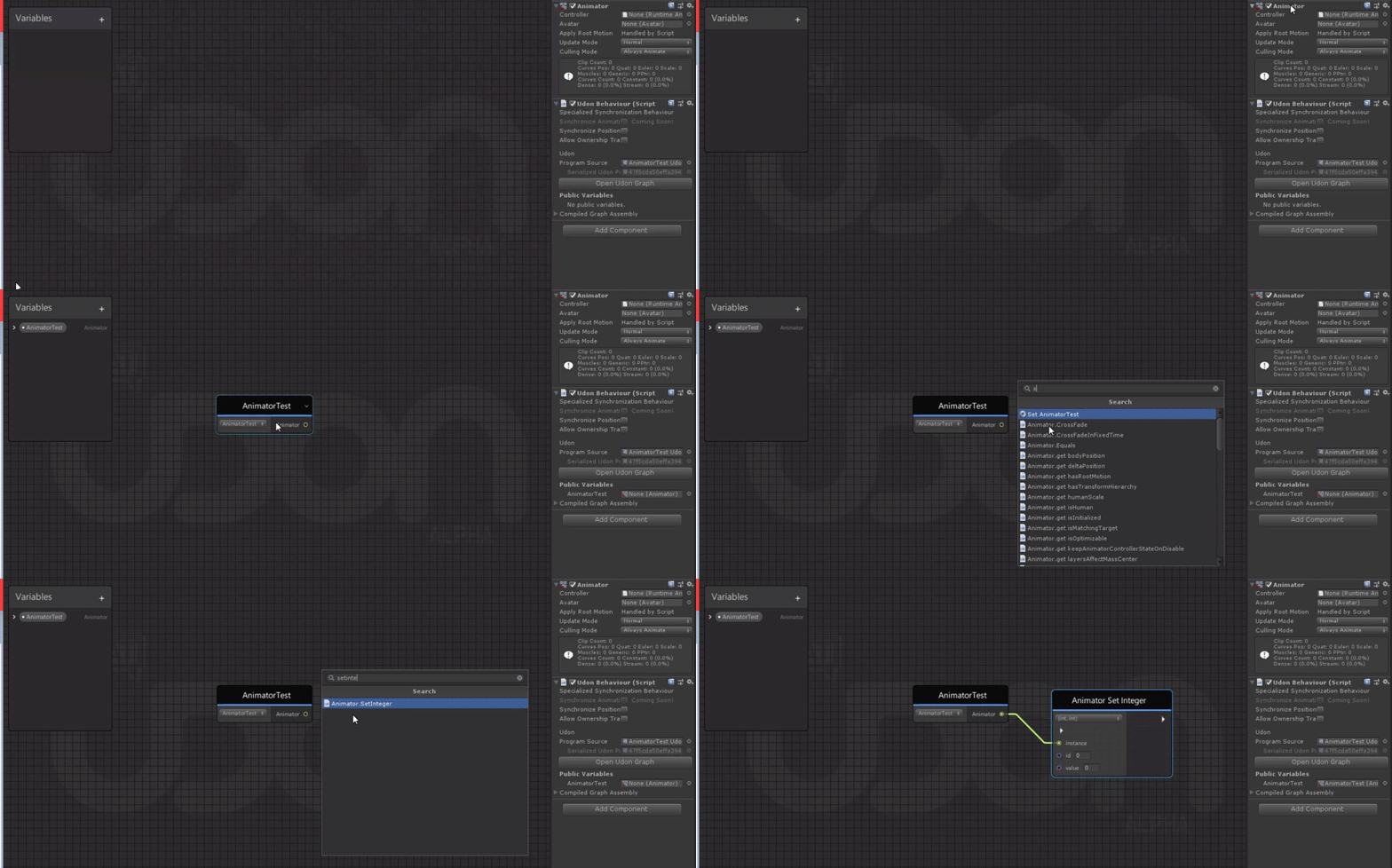
 hoary echo
Thank you! Those tips are what I needed
 last briar
soo... apparently there is now RTSP support?
floral dove
Yes! From the release notes: Added RTSP, RTMP, RTSPT to the allowed schemes for video player URLs
last briar
well, I just tried it to stream something from VLC as an RTSP stream to the test world which runs locally... didn't work :/
flint urchin
Got to make sure you have the un trusted URLs checked in the settings
last briar
what's the exact url which is needed? rtsp://domain.tld:port/ for example?
flint urchin
Just what VLC gives you should be fine
last briar
Got to make sure you have the un trusted URLs checked in the settings
@flint urchin I did enable that, and I can add video files from my own webserver, that works
flint urchin
Check the log and see what it says when you try play it
last briar
btw. which video does support it? (i tried both, the unity prefab one and the AVPro one)
flint urchin
Avpro
floral dove
the Unity player only supports direct mp4 and webms, really. AVPro handles everything else
last briar
aight, I'll test it and take a look at the log
I guess I found the culprit
why does it try to use youtube-dl.exe?
for me that looks like a bug, because it doesn't recognize rtsp:// correctly
so... just one question: I know you guys are a small dev-team and all... but did you actually test those protocols and verified it? Or did you just added AVPro and because it has support for those streaming protocols, announced that the new video players now also have that feature support?
That's not meant in a bad way, I'm just curious if you actually tested those and if there is someone who can verify that it actually works :/
because if it doesn't recognize rtsp:// as a protocol, that looks like it wasn't tested once.
As I said, I don't mean that in a bad way, it's more constructive criticism.
vivid prism
Is there a built-in way to detect if a player is using VR, or is that something we have to do ourselves?
floral dove
@vivid prism
@last briar - I'm looking into the RTSP issue to see if I can get a stream working on my end
vivid prism
thanks!
last briar
@last briar - I'm looking into the RTSP issue to see if I can get a stream working on my end
@floral dove well, I found the problem more or less my self, you guys just handover the url to youtube-dl, which doesn't recognize the url (one of the test URL used: rtsp://wowzaec2demo.streamlock.net/vod/mp4:BigBuckBunny_115k.mov)
I don't know how the internals inside the udon player works (didn't looked in to it right now), but you probably need to handover the url directly to the AVPro player, instead of passing it to youtube-dl, if the url for example has rtsp://, rtmp://, rtspt:// as a protocol. The last part is just a guess...
floral dove
@last briar that sounds right - I've logged the bug on Canny so you can get an update on the issue as it progresses: https://feedback.vrchat.com/vrchat-udon-closed-alpha-bugs/p/bypass-youtube-dl-for-rtsp-links
last briar
ah, nice :D
thanks for the heads up (:
oh, and just a sidenote: you may want to update youtube-dl more regularly, those guys update it all the time to keep up with all the sites they support, (the shipped version of vrchat is two months behind)
floral dove
Yeah, we keep an eye on its updates and only do it if there's a breaking change or addition of a big feature
last briar
good to hear, because it's kinda a vital part of videoplayers and people are complaining a lot that those break (I guess mostly because of an outdated version of youtube-dl)
lilac hatch
^ I backup that, a lot of time asking people to manually update the youtubedl fix their issues
Tho i havent heard about issues since I updated my world to udon
God bless
rough beacon
it seem like update may have fix global toggle for video player. so i think i going test it out fully!
funny part i was thinking i was doing it wrong 🙂 i did post for easier way. LOL
well. still not working with toggle for some odd reason. Maybe ui Toggle is wrong. in photo. i did add button it self.
1min. i over look something
after fix this, master see it right as other player see it flashy weird.
this is other
this is master
this may not be working right
fiery yoke
You could name it something like KEY_1 and then check that name
 deep hollow
I have a question guys I'm having an issue when trying to update my world, it doesn't seem to find the blueprint anymore I tried re-adding it back again manually but still doesn't find it. And when I try to upload it as a new world it does compile and go into play mode before upload but when I click upload it doesn't do anything
 wise charm
Does anyone have any idea on how to choose a random player in an instance (like in Murder 2)? Because... my current method of doing this is very... inefficient to say the least, and it probably doesn't even work properly.
fiery yoke
Jesus christ.
The highest difficulty in this is that everyone needs to "agree" on one person. So the best way is to let the master randomly decide and then sync the playerID via a synced variable. To do that you would get an array of all players (using VRCPlayerApi.GetAllPlayers) then getting a random index between 0 and GetPlayerCount. Then getting the players playerid and setting that to the synced variable.
wise charm
thanks helpful person, very cool
agile oasis
oof lord have mercy on me. im still attempting to figure out how to do a pick up and use animator trigger. and ive already tried so many different ways but keep failing. anyone got any ideas as to how to make one that auto triggers the animator when the hold object is used? cuz im struggling.
stark adder
What would probably have smaller performance impact ? I have about 20-30 objects and using script i go through all of them and enable some of them and disable some of them.
- Try to Enable or Disable them no matter what their current state is.. Soo Enabling already enabled object..
- Using if (object.active != newstate) checking if it is the same state or not and then switching it.. ?
severe tree
If you go through all of them at the "same time" then I imagine that trying to enable/disable them would hurt more than checking, but I think that the difference it makes is so small it'd be negligible. Only way to find out for sure is to test both ways as Momo says lmao
stark adder
😄 i guess yea
fallen prawn
@fallen prawn you can have the volume changes trigger an UdonBehaviour which sets the volume.
@floral dove
I tried
VideoPlayerComponent.gameObject.GetComponent<AudioSource>().volume = VolumeSlider.value;
VideoPlayerComponent.gameObject.GetComponent<AudioSource>().mute = MuteToggle.isOn;
but still cannot set the volume.
Also on AVPro video ratio become stretch and I can't find the way to adjust the fitting.
scarlet lake
Which version of Unity is compatible with SDK3 worlds?
native estuary
2018.4.20f1 same as with SDK2
scarlet lake
They made a whole new node language..... and they kept it in 2018.
At this point I almost think it would be more optimized to make a world in Neos Vr
native estuary
Sure 
 sour wind
How would I sync instantiate? I have a button that spawns a prefab but it doesn't sync between clients.
@scarlet lake Its just c#? You can use Udon Sharp if you want to type it out. Just know a lot of methods are unavailable.
floral dove
@sour wind Synced Instantiation is not yet available, you can instead make a pool of objects and sync those.
sour wind
Dang! Alright thank you 😄
floral dove
@scarlet lake we've got to keep the SDK on the same version that the client uses. Actually, when we started with Udon we were still on 2017 and upgraded everything mid-development.
scarlet lake
Any plans to update to the 2020 update @floral dove ?
 pulsar cove
Seems I posted in the wrong channel, but seems RTMP is bugged too
native estuary
I should have also mentioned it's a known issue
https://feedback.vrchat.com/vrchat-udon-closed-alpha-bugs/p/bypass-youtube-dl-for-rtsp-links
pulsar cove
For RTMP, AVPro doesn't directly support it but I believe YT-DL does
floral dove
@scarlet lake yes, but no timeline on it. It’s a huge undertaking without a ton of benefit to users and creators and we’ve got some big things cooking right now.
rough beacon
is there way toggle global video player without breaking them. i use prebuild toggle and it didn't play nice with video.
wise charm
@fiery yoke would this work?
rough beacon
is there way i can input text to URL on video with just a click?
 unique bolt
Hey Ya'll, any ideas on this? Every time I try to Build and Test a VRChat world it gives me an error that says "a VRCSceneDescriptor or VRCAvatarDescriptor is required to build a VRC SDK Content"- and then a windows link opens that says "You'll need a new app to open this VRchat Link" with the "Look for an app in the microsoft store" option. I get this error even when I load the UdonExampleScene and try to build that.
unique bolt
@sour wind Thanks but I JUST fixed figured it out!
sour wind
Ay!
unique bolt
It was actually that Unity couldn't find me VRChat.exe
It still shows that error briefly but then it loads up
unique bolt
a VRCSceneDescriptor or VRCAvatarDescriptor is required to build a VRC SDK Content
it says it briefly but then opens fine so who knows
dawn gull
I'm creating a setup to delete a d20 from the world and replace it with a new one in a particular location. Here's what I have so far. I'm not sure how to set the instantiate location and the delete/respawn only works once. Any idea how to fix those two issues?
 paper wraith
You're probably deleting the prefab that's originally making it
Try to set the position/rotation on the output GameObject of the Instantiate parameter, save it in a variable, and destroy that instead?
and keep the prefab d20 somewhere stashed away?
dawn gull
I think I know what you mean by that. I'll try
paper wraith
I haven't worked with Udon or visual scripting yet, so take it with a grain of salt - but that's what I'd do in Unity
errant pilot
You could set the position of the dice to the location on where you want it to go instead of using instantiate. Or hide that dice and show another one, since Instantiate is local only, no other players will see it.... For now....
 cunning mist
Is there any particular reason that you're spawning a new die instead of just resetting the position?
dawn gull
I guess I just hadn't actually thought about simply resetting the position. Such a simple solution I can't believe it didn't occur to me. That gave me a good laugh. Thank you!
cunning mist
No worries!
My cheat for this is to just teleport the object to -9999 on the Y. That way, VRChat's auto-reset happens since you're probably below the respawn position.
dawn gull
I guess I also don't know how to set the location of the object in the Udon Graph. What node would I use for that? I'm really new to Udon and GUI coding makes much less sense to me than C#. Having a bit of a difficult learning curve
Nevermind. I think I figured it out. It's the transform node as far as I can tell
sour wind
@nocturne sedge #avatar-help might be a better place to ask :3
nocturne sedge
unless this only happens with test avatars
wait wtf I selected that and it brought me here
so sorry
sour wind
all good 😄
nocturne sedge
my discord freaks out a lot
dawn gull
Okay, one more question. My apologies for asking such a simple question, but I'm definitely changing the position of the d20 game object incorrectly. The button is moving instead. What should this look like to make the d20 move instead? The Block is there for when I add the other dice.
Okay, I'm an idiot tonight. I figured it out. Thank you all for the help
 deft elm
So, I'm absolutely new to making worlds, and I'd like to add some movement, like wall-climbing and wall-running, and I'm not sure how I'd do it. I guess my question is, where should I start?
deft elm
Also, I can't open more than one udon script, how do I do that?
 trail hazel
do videoplayers actually work in udon on stable now? they were disabled for the longest time
the OnVideoError change and USharpVideo is making me think they work now but i'm not certain if it's on stable or just beta
fiery yoke
Video Players are in the live version of VRChat and do work.
trail hazel
in SDK3W worlds with udon?
fiery yoke
Yes
trail hazel
cool. do you happen to know when this became the case (because i never saw any kind of announcement on it or anything, i just thought they were still disabled)
fiery yoke
 sinful bluff
Now the big question.... is Quest support on the new players?
fiery yoke
Technically yes. But the Quest can only handle certain Codecs
And only direct links
so no youtube or anything that isnt a direct link to an mp4 or other supported formats
 tall bison
Hello, everyone!
I'm experiencing a strange problem. When I add an event to for loop, it compiles just alright (first picture). But when I try to add another event, be it directly or via other nodes (as shown in pic 2), I get an error Failed to refresh program 'MirrorToggle' due to exception 'System.ArgumentException: An item with the same key has already been added. Key: (a8931655-0ac2-4a6d-885c-1762f7f6bc70, index, -1, True), and the program doesn't update, so the new event is not processed.
Of what I tried, it happens only to for loops so far.
Has anyone encountered this issue?
Thanks
tall bison
Trying to circumvent it with a While loop. It doesn't seem to have this problem
But now I'm having another problem. Op Less Than is giving True when both variables are equal
Although, no. It evaluates correctly. It seeems that the problem is with While loop. It does not reevaluate the condition on every iteration
lilac hatch
Do quest support hvec 264 ? :o
If yes i might have to make the world quest compatible
stark adder
After i put in Udon script i cannot change it for some reason.. I have to remove/reset the component and add it.. Any idea why ?
Its just locked and cant do do anything
fiery yoke
@stark adder That is intentional within U#. Switching out the program source with UdonSharp stuff can lead to unintended behaviour.
stark adder
Weird it worked like 3 days ago soo it got changed in some last updates i am guessing ? ..
tall bison
Using UdonSharp fixed my problem though. Guess I'll stick to it from now on
sinful bluff
Ok, USharpVideo... is it Quest compatible?
dark tiger
In terms of performance, is it better to have this information saved like this in (public) variables? or...
...get them from the Game Object variable?
Or maybe it doesn't matter 😅
potent sandal
Hi, regarding UDON. Is there a way to shrink the collider's of players in the world?
I've been having to make a workaround by no-colliding the top of doorways but I'm wondering if there's an actual way to change player size
 flat musk
hey where is the pin for the manual reset of cache if the test and build keeps outputting the prior build?
dawn gull
Can anyone tell me why this isn't compiling? I'm trying to copy the reflection settings in the Reflect Layers property from VRCMirrorHQ to VRCMirror.
flint urchin
Vrcmirror isn’t fully supported yet afaik
dawn gull
Ah. That's unfortunate. Any recommendations for how to switch mirror modes between HQ, LQ, and off? I'm guessing I'll just have to teleport alternate mirrors around then
Love the GIR, btw ^_^
flint urchin
Having multiple or moving them around is the only option atm yeah
dawn gull
Here's hoping that gets added soon. Thank you =^_^=
 warm goblet
Having a pain migrating one of my worlds to SDK3. I fully wiped the scene of everything VRChat, and then deleted both VRCSDK and The VRChat examples folder from the project, before importing SDK3.
For some reason on import, SDK3 is complaining that something doesnt exist in SDK2 namespace
as far as I can tell there is no remnant of SDK2 in the project but SDK3 seems to be finding something
I've tried clean wiping VRC stuff and reinstalling 3 times now.
 oak trail
You can't import SDK3 into an SDK2 project. You have to make a new project.
oak trail
No, they aren't compatible with each other, if you have both in the same project it will break everything.
warm goblet
Im not having both in one project
fiery yoke
Thats why he tried to delete the other stuff. And you can do that
but its a little complex
warm goblet
I made a copy of my project, deleted all SDK2 stuff. And imported SDK3
oak trail
There must still be something from SDK2 left behind according to those errors.
warm goblet
yeah I can tell, but I'm not sure where or why it's looking in an SDK2 namespace
fiery yoke
Unity stores some other stuff to reference assemblies and scripts outside of just the library. I know how to remove them, but I cant remember right now xD
warm goblet
I did just find a Scripting Define Symbol for VRC_SDK_VRCSDK2
warm goblet
heck yeah that single removal fixed it
Thanks for getting me to keep looking instead of giving up that it wasnt possible
fiery yoke
VRChat could probably include an "Uninstall SDK" button or something along those lines. Or at least give some instructions of how to remove an SDK.
warm goblet
they really should.
Even for normal small updates that'd be nice
Maybe these two options:
Prepare for update (remove vrcsdk, but keep references in scene)
Clean Uninstall (remove all references to VRCSDK completely. DANGEROUS!)
warm goblet
New question, does it make sense to have a master script that controls all my button's actions? or is it better to have a script per-button?
Ideally I could have one interact event per button?
fiery yoke
That depends. The overhead per UdonBehaviour seems to be relatively low
Some things like Interact you have to have per-object ofcourse
warm goblet
so there's no way to have one script handle inputs on multiple buttons?
fiery yoke
Not for VRChat defined things like Interact now
warm goblet
dang
I guess I could use UI events for it, but I have pretty 3d models for the buttons >_<
fiery yoke
You can ofcourse redirect all of you Interacts to one Behaviour. But that still means that you need a behaviour per interactable object
warm goblet
dang
is that pretty much how people usually handle having multiple buttons for one "action" ?
like a volume up and down button
fiery yoke
Volume is a bad example since its usually handled with Sliders
And if youre talking about UI Buttons then thats a completely different story
warm goblet
well I'd rather avoid UI buttons
thats just the only way I see this going without being able to use one script with multiple interacts
(if I want to avoid a script per button)
warm goblet
I know I just have a lot of buttons I wanted to have one master "brain" script for my cinema that had all the functions
 obsidian sinew
This question probably has been asked before, however when you make toggle buttons in Udon, are they local or global?
fiery yoke
@warm goblet You can still redirect all of the inputs to one Behaviour.
You just need multiple behaviours. But that doesnt mean that you cant control everything from one behaviour.
warm goblet
ah gotcha
flint urchin
@obsidian sinew everything is local by default
obsidian sinew
Ah, thanks!
fiery yoke
If its an UdonSharp you can just reference the "class" name and then the method like you would with normal c#
warm goblet
ok, so something like
on the reveiver
and on the button,
(both are in the same namespace)
fiery yoke
I dont understand what youre trying to achieve there.
warm goblet
only, of course that should be in on interact
Push a button, so on interact, and that runs LightsOff() from the other script
fiery yoke
Well first of all this channel here is more meant for normal Udon Graph and general Udon related questions. Not specific UdonSharp questions. You should probably ask in Merlins server for help with that.
warm goblet
alrighty, thanks!
fiery yoke
At least as long as UdonSharp isnt officially supported by VRChat
flint urchin
Also, don’t name your class names and methods the same
warm goblet
yeah I just realized I did that >_<
lilac hatch
Class.function(args);
Also, i'm unsure of why you're running with two class for a light switch .-.
rough beacon
now i just need find away to input text into input URL for video player. or i just end up with lot of video player that dont need to be there
any idea?
fiery yoke
You can just have a public array of VRCUrl's and edit them in the inspector.
rough beacon
not to clear on that 😦
lilac hatch
Have a public vrcurl variable
And you edit it on each buttons playing a specific video
fiery yoke
You cant really do that
VRCUrls are essentially "protected" strings.
You cant construct them at runtime which is the security behind them
You can however have an array of predefined Urls and then set one variable to be one of the elements from the array.
But you cant just "edit" it
lilac hatch
I meant to say, edit the array/the variable value in the inspector yup
lilac hatch
Also, since we can't use comparetag I was asking myself (always have questions when i'm in bed kekw)
Can we copy and then paste gameobjects somewhere else using udon ?
fiery yoke
Copy and paste?
You can instantiate GameObjects via a template if you mean that.
lilac hatch
More of
I got 1000 differents gameobjects in my world currently
Made a simple array searcher
But i'm now stuck at "how would i display the result"
fiery yoke
No idea what youre talking about
lilac hatch
I'm trying to make a search option in an UI.
Since comparetag and lists are not usable, it's kinda awkward to do
fiery yoke
Search option for what?
fiery yoke
Alright, no idea what youre trying to do.
But as a replacement for tags, most people just put the "tags" in the name of the GameObject and then use gameObject.name.Contains()
lilac hatch
Yup, I got the searching working atm
I'm just wondering if I could duplicate the results into another UI, never really bothered with that yet
Meh, might have found a more simple way to do what I want to do actually
I should stop over thinking everything
 hard wraith
this doesnt seem to be working or does this break an object being able to to be interacted with thats set to teleport someone?
fiery yoke
No. Those are input fields. VRCUrl is its own type
It is essentially just a string. With some protection around it.
rough beacon
ok. can i get photo of what you talking about. at this point. i just lost
this than?
fiery yoke
A public. Array. Of "VRCUrl"s. Exactly as I said.
rough beacon
no wonder i am lost. you using udonsharp -.-
rough beacon
ok. thank you
warm goblet
I'm having an issue with the UdonSyncPlayer(Unity) prefab. For some reason when I point it to Surround sound audio sources the same way I did in SDK2, its only sending the full mix to the back right audio.
This is a surround video file with 6 separate audio tracks.
 worldly plank
Hi everyone, got a noob question.
How would an udon graph look like, that toggles a certain component of a scene object.
I managed it with the object itself
fiery yoke
Most components have an "enabled" property that you can just set to true or false
worldly plank
The component is itself a script.
Does that change anything? Because it doesn't seem to work
fiery yoke
All components are inherently "scripts". Some components just have a fancy icon and the scripts are built into unity.
What component are you talking about?
worldly plank
Touché :D
I downloaded a "floater" script and simply attached it to a cube.
I just want to have a "toggle" here, which is triggered by a button.
In the Udon graph I don't really find my way around yet and with a C# script I get the error "error CS1061: Are you missing an assembly reference?" if I want to set X.enable to "true".
fiery yoke
Well first of all: The whole point of Udon is so you can make some custom logic, within a secure sandbox. If everyone could just run any kind of script in a VRChat world...then that would be disastrous.
You would have to convert your script (if possible) into Udon
worldly plank
Ah ok, I didn't think of it that way.
Should be possible. Thank you!
 patent lynx
how to make player list... i first time udon...
 verbal socket
is there a way for a video player to show what a camera is seeing ?
in a world
i kinda want to make a thing that you can see where people are in the world through that
fiery yoke
You dont need a video player for that
verbal socket
i got the camera in place now
fiery yoke
What you are looking for is simply called a Render Texture
verbal socket
whats next
fiery yoke
You can assign a render texture to a camera. The camera will then render to that texture instead of the screen.
severe tree
^ Use it as the diffuse on a material tossed onto a plane and basic CCTV screen lmao
fiery yoke
Thats just standard Unity Game Development stuff
verbal socket
i have 0 clue xD
i never done that much in unity for games i've only been using it for uploading avatars
and a world i have kept on updating
fiery yoke
Well there is plenty of videos on Render Textures in Unity
warm goblet
Does VRCUnityVideoPlayer not support multiple audio tracks like it did in SDK2 ?
I see the dropdown for Target Audio Sources, but setting up my surround audio sources in there still results in only the first being used.
 copper ocean
^ Following this. Also curious
sour wind
Is there support for arrays yet?
floral dove
@sour wind - you can use arrays for many types, the ability to sync arrays is in development.
rough beacon
i miss good old day where i didnt need to learn udon. oh well. 1 day i get arrays to work out
Does VRCUnityVideoPlayer not support multiple audio tracks like it did in SDK2 ?
@warm goblet just clone audio with same link.
 edgy ingot
not sure what I did but I think I broke the AVPro video player, it has no audio in game
also I can't get public variables to work across udon scripts (im trying to get data from the video player with minimal changes to the script
rough beacon
omg. support not very helpful. so all this time. i dont need array. to set up my button to input url to video player
sour wind
@edgy ingot Are you doing a public void?
edgy ingot
im using udon graph not U# if that matters, so I'm not entirely sure
rough beacon
2 day waste on try pull my hair out try get rarray to work -.-
sour wind
@edgy ingot what information are you trying to get?
rough beacon
not sure what I did but I think I broke the AVPro video player, it has no audio in game
also I can't get public variables to work across udon scripts (im trying to get data from the video player with minimal changes to the script
@edgy ingot you can re-import new UndoSyncPlayer. i broken it before try get arrar to work
edgy ingot
im trying to change the values on an animator and get spectral data and maybe volume later on @sour wind
@rough beacon I already tried reimporting it (the script and the prefab)
rough beacon
what you can do. open a 2sc new udon file. drag it and drop it into old one that you working on
sour wind
Access the animator component and then you will be able to change the values you need.
rough beacon
make sure you delete broken one
edgy ingot
i have the value changing stuff and spectral data stuff already working, it's just unable to get any booleans to transfer over @sour wind
sour wind
Are you getting two scripts to communicate with each other?
edgy ingot
that's what im trying to do, if that's not possible I can probably just make a copy of the SyncAudioPlayer and put my extra bits in it
edgy ingot
only thing I can think of is these
but i checked, I don't use visual damage
and nothing else HAS a script on it
rough beacon
that's what im trying to do, if that's not possible I can probably just make a copy of the SyncAudioPlayer and put my extra bits in it
@edgy ingot i dont think you can edit udon video player it self. it protected.
edgy ingot
the udon script isn't but the script script (C#) is in a .dll from the sdk
rough beacon
that was werid. i didnt boot into my test room i got popup ask screen size ect
edgy ingot
if you hold shift while launching the game it does that
default unity options menu or something like that
rough beacon
i see 🙂
warm goblet
edgy ingot
im just a little confused cuz i JUST had it working
rough beacon
Audio it self have a build in link to your video player
warm goblet
Thats only for AVPro though
I'm talking about the Unity component
Plus doesnt AVPro only work with a single audio track with 1 or two channels? no more?
@rough beacon I may be wrong, but I really dont use AVPro often because playlists with it are a pain
but I'm coming from SDK2 so maybe things are different.
rough beacon
oh, this group is for sdk3.
rough beacon
SDK2 video setup will not work in SDK3
warm goblet
So if you use a file with 6 separate audio tracks, AVPro can put each of those to its own speaker script?
yes... I know
rough beacon
but what i show you do the very same thing
you can do that with unity player too
warm goblet
But each of those can only choose mono left or mono right? I dont see how that accesses other tracks in the video
rough beacon
no. there mix too
warm goblet
ok, but still only stereo. Stille only selecting single channels or both channels from a single track
warm goblet
They always supported it in SDK2, so I'm sure they will in SDK3 eventually
My bug report is about the fact that they currently already appear to support it, but the feature for it doesnt actually change anything.
rough beacon
well, SDK3 is still very neww. they say they still building video player. who knoww, maybe it come later
warm goblet
"Target Audio Sources" allows more than one audio source to be added. So I'd expect more than the first to actually effect the runtime VideoComponent it adds. But if you check my post, the pictures, I show what it actually does with those entries, which is exactly nothing.
It only uses the first entry
So to me it sounds more like a bug, than a non-implemented feature
rough beacon
if you like. you can test out my world. it got very good sound set up. if you like it. pm me and ask how i set it up
warm goblet
I may use your dual-stereo setup for now until they get multitrack working again, nice world!
rough beacon
thank 🙂
edgy ingot
yeah AVPro straight broke
not sure what to do, if yall got ideas, neat
if not im takin a break lol
stop button doesnt work
dark tiger
Shouldn't there also be an Integer Set Value node for the sliders?
I am using integer values on the slider, but it seems that I am not able to change them from code
floral dove
Sliders only accept floats. It's just a UI convenience that locks them to Ints
dark tiger
Oh, interesting. Thanks :)
silk briar
Is this also the best place to ask general SDK3 / world building questions? Or just Udon?
Gotcha-- I was just having an issue where the "Force Non-VR" setting doesn't seem to be working for world tests. I saw some stuff for SDK2, but didn't find anything for SDK3.
fiery yoke
Set the path to your VRChat install directly to the Steam path
By default it uses a bat file that does not have the --no-vr parameter set
so it ignores it
silk briar
Aha-- trying that now.
fiery yoke
Because whoever programmed that was apperantly not aware. Or something. I dont know why or what went wrong there. And why it has not been fixed. But thats how it is.
silk briar
That did the trick; much thanks @fiery yoke.
floral dove
@fiery yoke FYI the issue with the default path being incorrect has been fixed, but only for new installs of VRChat.
fiery yoke
for new installs of VRChat?
floral dove
yes
fiery yoke
So people that have VRChat installed before this fix will still encounter that issue right?
floral dove
that's right. I think the fix went in two releases ago.
fiery yoke
Hmm alright
floral dove
so it will someday be a thing of the past
floral dove
The most straightforward way is to edit your registry: Computer\HKEY_CURRENT_USER\Software\VRChat needs to be set to the directory where your VRChat.exe lives, like this
you can also re-run the install.exe program that sits alongside VRChat, but if you've ever checked "Don't show again", it won't work correctly until you delete its prefs in C:\Users\Username\AppData\Local\install
Once your registry key is set up correctly, then the 'Reset to Default' button in the VRChat Control Panel will set your path to this value. For first-time installers, it will start at that correct value and they'll never have to know about any of this nonsense.
fiery yoke
Yeah one should never touch regedit unless they know what they're doing 😅
floral dove
The issue with the flags is caused by VRChat defaulting to vrchat:// style URL-handling, which still needs to be fixed re:flags
yes, agreed
The install.exe basically just sets up a bunch of registry keys
fiery yoke
Also being able to set your own start params in the SDK or somewhere in the options (doesnt need to be manually typing in the string, but just have some checkbox bools)
Would be sweet. So you can define which profile you want to start, or if you want to have udon debug logs or not
 edgy moss
hello! how do I change a Respawn Point, once they have already entered the world? I created an animation to simply move the spawn point empty, but they still spawn where it originally was, even though it has moved
 fair bough
how to make player walk on wall?
I try use station mobility but can't move (i check out option seated)
when i put rigid on station it violent shake when sit
fiery yoke
Its theoretically possible but only with some black witchery
For single player that would work maybe :P
fair bough
🐿️
i just see this world can walk on loop line.... and i just want do this for puzzle my world
https://vrchat.com/home/launch?worldId=wrld_fbb65a01-6f43-4d0c-b818-048a43591966

2020-08-15 v1․00 Release‚ v1․01 BugFix
and i see CyanLazer can make it....
Apologize, if i misunderstand something
 chilly aspen
Can anyone see if I'm doing something wrong here? When I have these functions in my code, the master player sees flipBool and flipInt updated correctly. However, all other players only have the flipInt working correctly.
Image:
Oh, I just realized that somehow non-master players are calling the same function twice.
fiery yoke
OnDeserialization is called whenever the client has received and deserialized network data
It does not matter what kind of data
As long as its deserialized by that PhotonView on the UdonBehaviour
So you most certainly dont want to do what youre doing in OnDeserialization (nor OnPreSerialization)
chilly aspen
Yeah, I think found the bug. Somehow players are able to call the OnPreSerialization() function when they are not the master nor owner of the object.
This means that the Flip() function is being called twice, which ensures that flipBool = !flipBool doesn't do anything since it's negating itself twice.
(This is for batch-processing jobs on Udon, so that I can split a big chunk of data into multiple batches.)
 tulip badge
Hey,
I'm new to that world creation stuff, but I already made a world with SDK2. Now I'm working on a world with SDK3 and have the AVP Pro player in it. Is there a way to synchronise the video for other players or later joiner?
echo coral
@tulip badge You can definitely do it, but it's easier to use a pre-existing project as a starting point. This is a great one written in U#: https://github.com/MerlinVR/USharpVideo

GitHub
A basic video player made for VRChat using Udon and UdonSharp - MerlinVR/USharpVideo
tulip badge
Oh great!
Thank you. I'll have a look at it
floral dove
Also, the prefab that comes with the SDK includes a graph that handles sync @tulip badge
tulip badge
That's good to know!
Will probably return with a question later again. But this helps a lot for now!
sour wind
Anyone know how to loadURLs into the VRC Unity Video Player? Ive been messing with it for a bit but cant seem to find the answer.
floral dove
@sour wind - BaseVrcVideoPlayer.LoadURL or BaseVrcVideoPlayer.PlayURL. You can check out the example graph 'UdonSyncPlayer' for examples of using many of the nodes.
sour wind
Wait, the Video players sync?!
floral dove
@sour wind - not on their own, but the prefabs come with a BIG graph that covers basic sync from owner > everyone for URLs and time.
dark tiger
i just see this world can walk on loop line.... and i just want do this for puzzle my world
@fair bough That is effectively an illusion. I think they achieve that by rotating the world from the perspective of the player. It's pretty nice. But it is only local, so you will see your friends clipping through the floor as you or they move.
Gravity never changes in any way. It's really a very nice effect though :)
steel nova
whats the best streaming method for the video players for low latency? Looked through all the documentation and dont know anything about streaming with a CDN, tried setting up bunnycdn; dont know if its even worth it
floral dove
@steel nova - what do you want to stream? CDNs are useful for playing your own content with lower latency by distributing it to servers around the world, but if you want to Livestream your easiest setup will be to use a service like Twitch or YouTube Live
steel nova
will be hosting events with a dj; need reliable/low latency/high bitrate
i was looking at some of the cdns on documentations TOS, video streaming said it wasnt allowed?? lol
floral dove
Yeah, I think your best bet will be to stream to a service mentioned above, they're supported in the AVPro player.
It says video streaming isn't allowed somewhere in our docs?
fair bough
@dark tiger Oh thanks for expand.
obtuse agate
@steel nova you may try TopazChat. It’s a free-to-use low-latency streaming server for vrchat users. The latency is less than 5s normally, but there is a restriction on bitrate. You can simply use OBS to stream to it
steel nova
in BunnyCDN's TOD
TOS*
also, ive used topaz for sdk2, how can i stream to it with 3?
is there an updated prefab?
sullen torrent
Is it possible to make a vechele that can only move on the y and z axis
floral dove
maybe ask the creators of TopazChat about that - I've never used it, and we don't provide an official prefab or support for it.
sullen torrent
Do they have a discord server? Or a place I can contact them?
steel nova
^ ,rico he wasnt talking to you lol
sullen torrent
🤦♂️
wise charm
how would you add a HUD
obtuse agate
@steel nova i guess you can put topaz URL rtsp://topaz.chat/live/<stream_key> directly into any SDK3 stream player
https://pbs.twimg.com/media/Ei0pqUMUMAEkc-4?format=png&name=small
 floral dove
FYI RTSP urls get caught in a bug right now. I'm working on it but finding that AVPro has VERY limited support for RTSP streams
steel nova
how do synced variables work? IE why doesnt this sync for people that have joined late
its a door toggle
floral dove
@steel nova - in this case, the 'globalisopen' variable won't necessarily be synced by the time the 'Start' method runs. You can add the event 'OnDeserialization' and it should be updated then, that's called when a synced variable is received from over the network.
Check out the Synced examples in UdonExampleScene for a couple of simple graphs that react to changing Synced variables.
steel nova
🙌
floral dove
Deserialization is when network data arrives and is converted from binary data into usable information like an integer, string, etc.
There's not any VRChat documentation about it because Sync is in an early state and not meant to be widely used yet. We're finishing up the real Udon Sync system, which will be fully documented.
steel nova
understood, thank you for being so active in this chat!
 inner steeple
Is there some specific way we're meant to set up cloudfront distributions for me to play an mp4 in udon video players? My s3 bucket works fine but as soon as it comes to cloudfront, I get WindowsVideoMedia error 0xc00d2ee3
floral dove
it should work as long as your URL resolves to a direct mp4 link
inner steeple
That's what's confusing me.. My url does resolve to a direct mp4 and yet I get the error
It's probably not a udon issue but I thought I'd ask in case anyone else had the issue before
 tacit trench
So the udon video player how would I go about having a link baked in the player for the world on load.
Thank you in advance! <3 much love 💙
 shy imp
Hi All. I am trying to make a camera in world that can be used by a news crew, camera man and reporter. The idea is to stream the camera to a render texture in world and that would have a dedicated avatar screen recording whatever the camera is seeing. My question is... How would I pass the audio of what the camera hears to the same point as the render texture? Any ideas?
floral dove
@tacit trench just fill out the url field and check autoplay
@shy imp we don't have support for capturing and replaying audio separately like that.
shy imp
@floral dove thanks for the feedback :)
floral dove
Sorry it's not supported, sounds like a cool idea. 👍
wise charm
Alright, imagine this. There's a mini-game where to win everyone in an instance has to press a button. I assume you would do this by changing a synced variable by 1 when you interact with the button, and win when that synced variable is equal to Vrcplayer Api Get Player Count, but then I thought that maybe that synced variable wouldn't change when someone else pressed the button, because you can't detect when another player interacts with something. So, can someone with more knowledge than me tell me if that would work or not? Ping me if you reply
light fjord
why in the world does OnPlayerJoin trigger so many times..
fiery yoke
Its a bug.
light fjord
oh god.. also is there no way to fill up a collection with all players that join?
fiery yoke
There now is a method for that called GetPlayers
light fjord
so there is no way to do it under Onplayerjoin?
fiery yoke
Well you can
light fjord
cause atm it only shows one user
fiery yoke
No idea what youre talking about.
But OnPlayerJoined should only fire once for each player that joins.
GetPlayers fills an array you provide with all players currently in the instance.
That can be used in combination with GetPlayerCount.
Thats all you need to know about that to do whatever you want with the player apis
fiery yoke
As I said its bugged at the moment.
floral dove
@light fjord you need to create the array to pass into GetPlayers
dark tiger
What is the limit of synchronized object positions using this?
I am afraid of maybe going to use too many for a performance cap :p
light fjord
i know mate. it finally worked. for some reason it just did not
 vital quail
So im just starting to learn udon and I already have a problem...
isn't there supposed to be a button that says open above the settings?
floral dove
@vital quail - only if you've previous had a graph open
I recommend you start with the official docs and tutorials which will guide you through things without skipping steps:
https://docs.vrchat.com/docs/getting-started-with-udon
https://docs.vrchat.com/docs/using-build-test
https://docs.vrchat.com/docs/udon-node-graph-upgrade
vital quail
okie. thank you momo
 trail shard
I have a toggle script set up right now for some buttons I use for mirrors, is there a way to make it so that the objects I want to toggle start out as off instead of on being the default?
flint urchin
Turn them off in the hierarchy?
trail shard
Yea figured it out thank you!
steel nova
this isnt toggling a gameobject; turns it on and it stays on. Why ;_;
i actually have a few scripts that randomly stop behaving
those gameobject toggles at the end dont fire anymore
floral dove
@steel nova - that looks right, what does the assembly show for that top graph?
floral dove
yeah, that looks good - any errors in the Unity Console when you Build & Test or in the Client when you run it?
floral dove
aha - I think your scene is not actually building. Errors in your console = no buildy
check your scene descriptor - I've seen the 'two delegators' issue show up if you have a missing reference on that component
native estuary
Two delegators is pretty common and shouldn't stop builds from happening
floral dove
Hm - I've never had the issue myself, but the existence of that error as well as the ones about Destroying things in Edit Mode and the log about the UdonBehaviour on Cylinder.008(14) not being able to run points leads me to believe the problem lies not in these specific scripts but in other changes OP has made to their world
fiery yoke
The Two delegators thing is actually an SDK bug I think. That message duplicates itself the more times you do something specific (not sure on what).
Leads me to believe that something isnt cleaned up correctly by the SDK so it creates a memory-leak type situation. Just a speculation, but I have seen it happen myself.
floral dove
It's logged whenever a surplus UpdateDelegator is created. If you can make that happen through normal usage of the SDK, then it's a bug. If it's caused by third-party Unity Editor scripts then it's good that we log something, though if it doesn't stop builds and only logs after the extra Delegator is removed then it should probably be a warning and not an error.
@scarlet lake - it doesn't mean that but...we will! I'm testing and writing the docs for it now, it's looking solid.
FYI it's a very different system with more fine-tuned controls, as most things re-made in Udon are.
but it will enable a lot of awesome new audio possibilities
warm goblet
Anyone know why bunnycdn was removed from the whitelist?
pulsar cove
RTMP still doesn't work 😭
 solid cairn
dang, I had purchased some bunnycdn stuff bc it was pretty nice compared to some of the alternatives :/
 simple shell
- Soundcloud added to SDK3 URL whitelist...
Yo what? We can trigger SoundCloud hosted music now?
pulsar cove
I gues so?
simple shell
Or any audio rather...
pulsar cove
@solid cairn you can still use it, just check the "allow unsecure URLs" or whatever in the VRC settings menu
I self host my MP4s / livestreams and use my own URLs and allow them that way
simple shell
Holy crap I need to figure this out... this would make the operation of my Tv studio easier...Sounders and the like could be on a trigger board that streams instead of bloating my world... dude.
pulsar cove
@simple shell if you have a webserver you can upload them to it and then allow unsecure urls