#udon-general
59 messages · Page 22 of 1
 solid cairn
have some logs as well:
2020.07.16 17:40:21 Log        -  [Spawn] Spawning Kosyne at location (10.5, 0.0, 1.0)
2020.07.16 17:40:21 Log        -  [SpawnManager] Not aligning tracking to Spawn because false == !False || (!True && (False || False))
 brazen epoch
How can I enable udon logs in game testing? I'm creating a system which is based off the Interact event and It's not working, so I decided to just Debug.Log a String to see where things break
solid cairn
Do you mean show them ingame? I'm just checking the logs at AppData/LocalLow/Vrchat/Vrchat, latest one there
brazen epoch
I see. Thank you
 upbeat tide
Alright, weird question
why Canvas groups are not supported?
is there any workaround for this?
 floral dove
@brazen epoch add the flag --enable-udon-debug-logging when you launch.
 vernal phoenix
does the proximity slider not work?
to pick up my object, i gotta be like directly on it
floral dove
@vernal phoenix the proximity slider works. It looks like you've got it on a prefab, try unpacking the prefab and see if that fixes it? In this pic, I've increased the proximity to 10 and you can see how far it stretches.
solid cairn
starting to chalk the tp thing up as a bug. Imma see if I can't create a small repro world sometime, nothing happens in the ingame debug when it happens, it's not hitting any of my TP/spawning logic when it does it.
Edit: Happening via U# as well, except it affects all players? :/
 celest shuttle
Anyone else now getting the "Error: Failed to create file version record That file is much too big" with the new SDK. looks like it now trying to upload all assets in the project rather than the ones just in the scene.
 candid patio
I'm new to mapping so forgivie me if this is a redundant question, but Is there a way (even if hacky) to make an external call to an API (probably HTTP) with Udon/SDK3? I was mapping and heard that maps like callous row s2 will have a live map, and was curious how I could implement something similar.
floral dove
@candid patio nope, no web access for now.
candid patio
@floral dove are there unsupported (i.e. working-but-likely-to-break) workarounds?
 flint urchin
For web? No
flint urchin
Nope
candid patio
dang
 vast inlet
I'm currently having issues with NPC head tracking the player's position using Centauri's player tracking prefab and the LookAt camera script.
In unity, the NPC's head will look at the position of the tracked object but in game, the head does not move at all.
 unkempt horizon
It crush when the player enters this trigger zone. Am I doing something wrong? 😔
 tropic canyon
you can't read anything from the player
Collider.GetGameObject will give you null
tho
the collider thing itself might not be null
solid cairn
Solved my earlier issue. Between the two teleport locations, I had a trigger enter TP box to prevent noclip stuff, etc. I had forgot to set that trigger box to collide only with the local player, so when player A teleported, player B's client saw player A move through those bounds, and was therefore affected.
floral dove
@unkempt horizon you can do this to test if a player has entered a trigger
floral dove
nope! The trick is that you have to get it as a System.Object, and you can only use ToString on it
 fiery yoke
But its not
Its a UnityEngine.Collider
Do you mean that Object.ToString() is automatically casting/converting it?
floral dove
if you cast it to an object, you can run ToString on it
vast inlet
Does this not work for NPC Head Tracking?
fiery yoke
Not for SDK3. Standard Assets have been removed.
vast inlet
I tried using this Player Tracking Udon Prefab and it works in Unity but not in game.
fiery yoke
That wasnt my question tho momo. I asked if it automatically converts it.
Usually it returns a UnityEngine.Collider object
Ahh
Hmm that is interesting
floral dove
you can get the playerId from the string, too - it's the last number
floral dove
it's another workaround not a long-term fix, but maybe easier than adding layers or a capsule proxy
floral dove
well, you can't do anything other than convert it to a string afaict
everything else will throw an exception
fiery yoke
What exception?
Either this is specially handled or upcasting could be pretty dangerous
flint urchin
((object)other).ToString()
object
flint urchin
yeah
fiery yoke
not Object. object is reserved specifically. Otherwise it confuses it with UnityEngine.Object
flint urchin
It's a typo...
fiery yoke
Well typos can sometimes be pretty devistating in software :P
But yeah just wanted to say
flint urchin
It can, but thankfully we can edit posts.
fiery yoke
Touché
flint urchin
So
VRCPlayerApi player = VRC.SDKBase.VRCPlayerApi.GetPlayerById((int)((object)other).ToString().Split(" ")[2])
(Not tested)
fiery yoke
That seems pretty fucking interesting
Obviously not a final solution. But until something better gets implemented. That is pretty nifty
I dont know how the string looks like
someone would have to test that
Also you cant just do that
since not all objects collided with would be a playerapi
flint urchin
VRCPlayer[string] RandomNumbers PlayerId
fiery yoke
but other than those little details, that might be the best solution to get a player from a OnCollider event
flint urchin
Well, player layers should only be players
fiery yoke
What?
There is no vrc layer that only collides with player or playerlocal
you would need a custom one
which is meh
floral dove
the string looks like "VRCPlayer[Local] 62523777 2 (UnityEngine.CharacterController)"
so you could check first for it containing VRCPlayer, and if it does, do the rest
fiery yoke
Yes
floral dove
or [Remote] if it's a remote player
fiery yoke
if youre just looking for local then you would only need to check for "VRCPlayer[Local]"
and then just Networking.LocalPlayer
Alright I will update my guide I guess?
floral dove
true, local is easier with this.
fiery yoke
Thats basically a solution for what I had proposed in my canny:
https://vrchat.canny.io/vrchat-udon-closed-alpha-feedback/p/request-onplayercolliderenterstayexit
 wanton oxide
well since reaching that is possible anyways with this method just making it like that canny proposal seems much better yes
fiery yoke
Well internally they have much better options to make that mechanic anyway.
But in Usharp you can practically make those methods yourself now.
wanton oxide
yeah i know
doing it like this is kinda ugly tho :P
but it'll do for now definetly
fiery yoke
Im updating my guide
flint urchin
We should still have a native API for getting the player via Collider (CharacterController)
fiery yoke
so you dont have to write the code yourself :P
wanton oxide
well i've already done that so too late i guess heh
but yeah thanks anyways :P
i love how like 90% of the people in these channels are in merlins server as well btw
flint urchin
What is graph?
fiery yoke
right?
wanton oxide
yeah idfk, seems so complicated
flint urchin
Tbf, the new one is much better
fiery yoke

VRChat Ask Forum
If you want to make something happen when the player collides with a trigger, e.g. runs into an area or touches some object, you will have to detect that collision. UPDATE: A new method was pointed out by Momo the Monster on the VRChat Discord. To get a PlayerAPI from an On...
Hope that is correct
Would appreciate if someone could check that for me
flint urchin
At least give credit where credit is due 😛
fiery yoke
I did give credit to momo. I didnt even copy your code lul. I just wrote it by hand.
wanton oxide
you should probably remove the stuff thats below the newer method
the code looks good
why not just test it tho
i mean is that really that hard?
fiery yoke
Because Im working on a different project in Unity within a different user :P
Switching over would be quite an effort right now
wanton oxide
mention the fact thats its untested then
that'd be better
until you can test it yourself
fiery yoke
God damn it, alright
wanton oxide
i dont want to be annoying lol, its just better to test shit before publishing it :P
flint urchin
Which is why I said proof of concept
fiery yoke
just excited that there is a better method than the stuff before
I dont see how it would fail
fiery yoke
well I forgot the return types
oops
¯_(ツ)_/¯
Okay yeah youre all right...You cant simply convert a string to int
you have to parse it
plus the space has to be a char and not a string
rest works tho
wanton oxide
lol thats exactly why
it looks good at a glance, but without testing it you never know :P
even tho you can fix it in a few seconds probs
fiery yoke
Yeah. I was just busy with something else so I was hesitant. But thanks for pushing me to test it
There. Now its corrected and tested.
wanton oxide
👌
unkempt horizon
@floral dove @fiery yoke
thx so much! fix the problem!
graph like this.
floral dove
ah, interesting - looks like you're making sure that it's not the player triggering your flow?
unkempt horizon
tested in-game, if enter trigger, players are ignored. It works good.
I want to print debug log, but I don't know how to make a virtual player in unity.
floral dove
you can show logs in-game. press these three keys: right-shift, `, 3
that works if you launch with Build & Test or if you launch your client with --enable-udon-debug-logging
 vale current
So I have a problem, I have colliders on the player hands and they prevent all interactions with UI in the world
like, I think they block the ray used to interact
fiery yoke
fiery yoke
¯_(ツ)_/¯
tropic canyon
probably cause they got a layermask being "everything ,-mirrorreflection"
vale current
that's so dumb
fiery yoke
¯_(ツ)_/¯
tropic canyon
the ignore raycast should be a layer that should work but apparently it doesn't
fiery yoke
Indeed
vale current
even when the colliders are triggers it stills blocks
vale current
it's not a welcome, it's a continuous pain
fiery yoke
indeed
vale current
I already made things with udon and I still discover stupid things
 viral mist
welcome to the lands of the continuous pain
fiery yoke
Now imagine making stuff before we had Udon
vale current
I still don't understand how the cyan climb prefab works
fiery yoke
I and many others made logic/turing machines from Animators
Animators, UI Events and Standard Assets
Thats pretty much all we had.
vale current
the hackiest of hacks
viral mist
from what i remember he was saying, it's just spamming 3 teleports per frame or something
fiery yoke
Yeah that is one of the things to get the play space root
There is many other things involved with that
vale current
I did managed to make a custom player physics that was quite advanced
fiery yoke
Well. I tried to mimic VRChats controller
Getting Input and handling VR was tricky to impossible tho.
vale current
I got something that worked with every headset I could test
which mean oculus and vive
and mouse + keyboard
unkempt horizon
when player enter trigger, received as object type from the collider, the contents is this.
Is not completely ignored. but it seems like the most effective way.
thx. I learned how to show logs in vrc.
floral dove
yep - that's what we expect
fiery yoke
You could alternatively test if the Collider is equal to null
That is the "simpler" method I guess.
 quaint galleon
me me may be dumb dumb but how would one differentiate network behaviour and local behaviour?
Say I wanted to change a variable for the whole instance and not just the local player.
Dunno if I'm wading in the right waters right now, so to speak. I'm pretty new to how VR chat handles worlds. Not necessarily new to unity or programming, just VR Chat
sorry if this has been asked a billion times, I can't seem to find documentation
Wait, I think I may have gotten it, is it the Serialisation/ Deserialisation functions?
floral dove
@quaint galleon - yep, take a look at the Readme and UdonExampleScene in VRChat Examples that comes with Udon. There's a few examples of getting sync working. Basically, if you check the 'sync' box on a variable, then any changes made on the Owner will change for everyone else's copy of the variable.
If you want to specifically detect and act on that change, then check the value of the variable in OnDeserialization
however - OnDeserialization doesn't tell you what changed (unfortunately), just that network data has come through. So you can either update everything that relies on your synced variable (like updating the text in UI elements, etc.), or you can make a local variable that's not synced, and check the new value against the local value to see whether it has changed.
quaint galleon
Thanks alot, yeah I found ask.vrchat and that cleared a lot of stuff up too.
I'll just have to mess around a lot and I'll get it
floral dove
also, make sure you're using the newest version of Udon - we updated it on Wed and the graph UI is much better and the examples now have more info in the graphs themselves
 hoary flame
how to use spiderman web shooter
 scarlet lake
Hey, so I am trying out udon for the first time and I thought that this graph should work but the Assembly doesn't seem to be doing anything other than getting the animator. Did I reference it wrong?
I just realized how hard that was to read. This is the assembly code.
.data_start
.export LightFixtureModle

LightFixtureModle: %UnityEngineAnimator, null
.data_end
.code_start
.code_end
scarlet lake
I should also mention that when built the cube with the Udon-Behavior does not indicate that it is interactable.
floral dove
@scarlet lake - yeah, it looks like the compiler might have gotten into a bad state. Try this - select-all using Ctrl+A, then Cut, Compile, Paste, Compile. That should compile a blank program for a second, then kickstart the compilation of your actual graph. Saw this just earlier today.
scarlet lake
Thank you so much. I was resorting to banging my head on my desk.
 patent lynx
Can be used vr controller vibration function in udon?
I want someone who knows to mention to me with a comment.
 hushed gazelle
I believe Haptics are what you want, @patent lynx
patent lynx
The reason I asked was, I wanted to make an object of the knife and make it vibrate when it hits each other.
 hazy canopy
Does anyone have any udon/quest compatible pens they could share
 paper plinth
Do I use Station to teleport players now?
They've deprecated the trigger!
fiery yoke
VRCPlayerApi.TeleportTo
paper plinth
Uh oh
What if I never learned C?
fiery yoke
Udon offers a Graph Editor
wanton oxide
you can just use the graphs
paper plinth
Oh right...good stuff.
fiery yoke
You dont have to use SDK3
paper plinth
I'm using it on one just to get over this stuff lol
Gotta learn sometime
Thx for the tips
I search this channel lol
scarlet lake
Sorry if this is the wrong page but when I enter the game (I have the oculus quest) it always blinks black and then back to the original screen it’s really annoyig and I can’t play with because I always pause, if you have any idea why, or how I can fix that, please let me know! Thx (btw I just got my VR headset today for background information)
@fiery yoke (sorry just your name said helper so I assume you could help)
fiery yoke
I dont have a Quest and thi is the wrong channel. If you want people to help you, then you have to ask the right people :P
wanton oxide
thanks mod team that was just gross
 abstract aurora
Anyone know the current way for syncing data with udon? is VRC_DataStorage still the thing to use?
(referring to syncing data between players, like setting the color of a light for all players)
wanton oxide
use the udonsynced attribute
in udon graph i'm pretty sure its a checkmark on a variable node, in udonsharp you put [UdonSynced] before a declaration to sync that variable
abstract aurora
Thanks! I will try that. I use U#.
wanton oxide
Ah in that case it should be pretty easy
keep in mind that you need to make the local player the owner of an object btw before editing a synced variable will really do anything
abstract aurora
Ahhh. So if I wanted to have a shared central control panel that synced the state of things like lights, I would have to change the owner each time someone used it?
wanton oxide
I'd just put a Networking.SetOwner(Networking.getLocalPlayer()); in the OnInteract function
that way anytime someone presses a button for example that player will first become the master of the control panel before changing a variable
abstract aurora
Awesome, thanks so much.
abstract aurora
I'm very familiar with Unity and C# programming but I've been having trouble with the VRChat documentation 😅 I guess it's not all exactly finalized yet.
wanton oxide
ayy yeah i had the same issues at first
it still needs some work, you could say that
but UdonSharp is really good
abstract aurora
Yeah, I'm a fan. Makes the workflow much more similar to the regular unity scripting I'm used to.
wanton oxide
you can do pretty much anything in vrchat now that you could do in unity before
yup exactly
not literally btw, there are performance limitations, and well some stuff isn't exposed so you need dirty workarounds
but you can do some damn cool stuff
abstract aurora
yeah, I've been watching some youtube videos on a channel called VowganVR, it's giving me a better idea of what is and isn't possible
abstract aurora

YouTube
I do VRChat tutorials for Udon and UdonSharp! I also put out assets on my Booth page and Patreon. Enjoy!
I'm watching his "spin-the-bottle" video now, it seems to have some more of the networking features I was looking for
wanton oxide
ayy i guess i have seen his stuff before
yeah the networking stuff is whats gonna be the most complex part
abstract aurora
are you japanese? I used to live in tokyo ahaha
wanton oxide
nah, i'm studying it tho :P
put everything on japanese to maybe get some extra progress
abstract aurora
very nice, immersion is key- I learned more in the time I was living there than I did all the years I spent studying beforehand
wanton oxide
yeah i've been trying to do pretty much that
going there sometime again would be awesome for sure
but money is a thing sadly :P
one day
abstract aurora
also the whole global pandemic and all the borders being closed 😅
wanton oxide
yeah thats not really helping heh
abstract aurora
you know you can get a pretty good job doing C# development
wanton oxide
hmm might look into that sometime
i'm actually more into hardware stuff, its what i do now
coding (unity as well) has been kinda like a hobby
abstract aurora
Ohhhh gotcha gotcha. I do development for Disney and I know it's one of the only things we're still hiring for during the pandemic.
abstract aurora
sweet, UdonSynced works great
wanton oxide
awesome
abstract aurora
Although I had to change your code from Networking.SetOwner(Networking.getLocalPlayer()); to Networking.SetOwner(Networking.LocalPlayer, this.gameObject);
abstract aurora
it was close enough to get me to the right place! 😂
wanton oxide
nice :D
abstract aurora
I'm trying to make a karaoke world that has an actual proper queuing system. All the current worlds just kinda override whatever song is currently playing. I know there's no video player for SDK3 yet but I'm gonna go ahead and build the rest of the logic so I can just add that in whenever it comes out.
wanton oxide
the only real issue with that is the current lack of lists
which makes that really hard to do properly
but it possible for sure with some dirty tricks :P
abstract aurora
yeah, I was already starting to think about nasty things I could do like representing the logic of a queue as objects in the scene
wanton oxide
oooh thats not even that bad of an idea lol
it sure hurts tho heh
i was thinking keeping like an array of ints
with ints representing an index in a song list or something
abstract aurora
yeah, I'll prototype a few different options and see which one makes my eyes bleed the least 🙂
wanton oxide
ayy nice
i gotta say btw, it is kinda fun
having to work around limitations like that
even if it is kinda painful as well
abstract aurora
for sure, very different than the sterile structured code I usually have to work with for my job
wanton oxide
yup you could say that probs
 twilit breach
Anyone made a graph for dropping pickups in hand? Mine breaks the behavior if the player isn't holding anything
upbeat tide
Is anyone knows is there any plans on compute shaders support in Udon? I stumbled upon yet another roadblock.
fiery yoke
They are requested, but its highly unlikely that they will be supported any time soon
upbeat tide
Okay, is there any documentation on Udon to learn what supported and what not? On official pages i can only find Event nodes and VRCSDK3 nodes.
fiery yoke
Trial and Error.
upbeat tide
I see. Okay, thx.
solid cairn
having an issue where I can interact with stuff in desktop (avatar pedestals, mirror toggles, switches, etc) just fine in desktop within the given proximity, but in VR every build I do has it randomly going between not working at all, or having to be really close or inside the object to interact with it.
 left girder
Anyone waana play vrchat rn dm me?
 restive dust
This isn't the right channel for that. Maybe try #vrchat-general-2 .
hushed gazelle
Is there a node to just get the game object an executed script is a part of, or do just I need to manually set that as an assigned game object?
fiery yoke
an executed script is part of? wat
hushed gazelle
For clarity, what I'm trying to do is make a script for a spawned object that goes do thing -> destroy self afterwards.
fiery yoke
That didnt clarify anything
You can call Destroy(gameObject) in any script and it will destroy the GameObject the script is on
hushed gazelle
So if it's unassigned it'll default to itself?
fiery yoke
No. Every Component has a field called gameObject that is set when the Component is instantiated.
You should not, and in fact cant set that field. (as its readonly)
abstract aurora
Is there any way to get a Timestamp value from the server?
abstract aurora
Thank you! Exactly what I was looking for.
I don't suppose there's an API somewhere that has a list of all the methods like that? I haven't been able to find one so far.
fiery yoke
VS Intellisense is my Documentation :)
wanton oxide
There is
If you install UdonSharp there is a class tree that lists what methods and stuff are exposed
pretty neat, you can pretty much check anything from there
abstract aurora
Oh, that's super helpful. Thanks again 👍
wanton oxide
👌
restive dust
Hey y'all, does anyone know how we're supposed to edit the curve in a Const MinMaxCurve node? I'm not seeing any options. Am I missing something?
To be clear, I'm not asking how they work, but rather how I would go about editing the curve. In the graph editor in the previous sdk version, I could see options that I could click to open up the curve editor. But I'm not seeing them anymore. Neither in the Const MinMax Curve node, nor in other nodes that have MinMaxCurve ports.
fiery yoke
@floral dove ^
 oak marten
Is the "Send Custom Event" function broken in the udon graph?
fiery yoke
It shouldnt? Why?
oak marten
I'm trying my best to build using the graphs. But it seems that events are a bit squiffy? I'm testing using some really basic stuff (i.e. a local audio toggle split in to two graphs by way of a "send custom event") and I just can't get it to send over.
But then at present, it seems that the events generally aren't always compiling correctly (even basic interact/on enter collider) I'm having to rebuild the same graphs multiple times in order to get it to work
fiery yoke
Are you sure that you have set the UdonBehaviour references correctly?
Ohh
Yeah
Graph compilation is pretty broken
it has been pretty much since day 1
oak marten
Yeah I get it, its an alpha thing. I'm just reticent to start learning C# in order to do things that used to be easy. Not an uncommon story I am sure.
hushed gazelle
Okay, here's an odd one; Why does this work on an existing object, but not a spawned clone?
As far as I can tell it should reference the object's avatar pedestal just fine
wanton oxide
I know there are issues with udon behaviours on instantiated objects
Don’t remember exactly what
But thats probably part of why
fiery yoke
Prefabs are weird, and UdonBehaviours take a bit until they are initialized after being instantiated. Those are the two main points.
wanton oxide
yeah i know about them needing to get initialized
but thats not really relevant here
fiery yoke
Just saying.
wanton oxide
to make it completely bulletproof you could just disable the collider by default and enable it in void start (there should be a graph equivalent)
 rough beacon
is there way to hide big blue T in my udon world?
fiery yoke
@rough beacon
hushed gazelle
@wanton oxide and @fiery yoke Cheers for the rundown on that.
wanton oxide
np :)
 bold hazel
Do we have a way of doing pickup without a rigidbody?
wanton oxide
you can just make the rigidbody kinematic and disable gravity
then you won't even notice its there
just making it kinematic sould be enough actually
bold hazel
hmm
I'm going to take a guess that somewhere something (that i wrote) is clearing the kinematic flag
rough beacon
i need help. some weird reason. i end up teleporting everyone at same time. how do i fix that?
bold hazel
I think you need to teleport "NetworkingLocalPlayer"
rough beacon
where at?
 tame matrix
you'd want to use "Send Custom Event" and not "Send Custom Network Event"
 rugged scarab
So, I just started playing vrchat again, and wanted to make a new home world, and I've got my design done, but how on earth do I do literally anything else? I wanted to put a mirror and I'm guessing I need a spawn, and I don't even know how to set up a mirror toggle thing anymore (Note: I'm using the SDK3+Udon)
hushed gazelle
There are world and mirror prefabs included with SDK3. Try searching for "world" in your project and it should give you the prefab for creating one.
rough beacon
so Send Custom Event is local and Send Custom Network Event is not local. neat!
hushed gazelle
Well turns out my avatar-applying problem with the spawned gashapon balls might actually be a bug in the SDK. I've used UIText fields running on Update to confirm that each spawned object can indeed see their avatar pedestal component via ToString, as well as the local player (player.getName), but it still bombs out on application while a pre-existing non-clone version works successfully.
Something in the underlying code of the VRCavatar.PedestalSetAvatarUse node is not instantiating properly.
rough beacon
how you make a global toggle button to turn on and off stuff from udon?
i got working as local but not global
 broken zodiac
Wondering if I can get some help with animations, does anyone have an example of how to run an animation? I saw a tutorial by Vowgan with doors, but I can't find the correct nodes that are used in the video...Any help would be great!
abstract aurora
Anyone know if TextMeshPro is on the roadmap for Udon?
abstract aurora
Also, is there a way to get any sort of UUID to distinguish between players? Ideally one that would remain the same between sessions. Best I can find so far is VRCPlayerApi.displayName but I think it's possible for users to change their name, so this isn't reliable.
left girder
Does ANYONE have a giagantic anime girl with chairs on her hands that I can clone?
 proper bluff
anyone knows where i can get a pen prefab
 frosty shoal
Does anyone know what I need to add to make this global so everyone can see the animation? Basically click a button and it activates an animation of a wall sliding open.
 clever trout
Could anyone point me to more info on sound and events please? I'm trying to trigger sounds both locally and globally. If send a custom network event to trigger for everyone, the sound plays twice. If I send a custom event it plays once for everyone and if I just hook the trigger up directly without any events it fires for everyone as well. Is that expected? I'm sure I'm doing something silly at the moment 🙂
wanton oxide
make a check to test if someone is the one sending that event or not
if yes, don't play it based on the event
but instead play it from where you send the event
clever trout
Thanks @wanton oxide I think I follow!
wanton oxide
👍
fiery yoke
@frosty shoal Animation Synchronization will be added as a feature some time later. In the meantime you have two options:
- Synced Variables
- Networked events
With synced variables you can directly use a synced boolean and toggle the state of your animation bool when the synced var changes.
This is however has 2 important notes: 1. Only the owner of the UdonBehaviour (usually the master) can change the variable. If you want anyone to be able to toggle the bool then you have to send a networked event to the owner telling them to toggle it 2. It will sync up for late joiners which can sometimes cause problems depending on your setup, but can also be helpful.
The other method would be using networked events. I got a picture of a graph showing how to here: https://ask.vrchat.com/t/synchronizing-a-boolean-state-exclusively-with-custom-network-events/2037
Synced variables are a little less straight forward, but less janky than using exclusively networked events.
frosty shoal
Thank you for the help 
fiery yoke
Also if you dont want someone to join the world and suddenly the wall opens then use a trigger instead of a bool
that would be much easier
because then you only need a single networked event
frosty shoal
Yeah trigger sounds like the way to go then, thank you
rough beacon
still looking for way to build globally toggle system from udon
floral dove
@rough beacon take a look at the Synced Toggle in the VRChat Examples folder that comes with the SDK
rough beacon
i did. it seem it dont toggle object. 😦
floral dove
It toggles a UI Toggle, does that work for you?
 near dust
So; I'm attempting to set up a fresh project with Udon, just loading up the example world without any modifications attempting to build and test, it attempts to join the custom world and then kicks me back to my home world.
This is the error:
2020.07.20 16:06:25 Error - [Always] Error Downloading or Instantiating Custom Scene - file:///C%3a%2fUsers%2fChip%2fAppData%2fLocal%2fTemp%2fDefaultCompany%2fSciFiApartment%2fcustomscene2.vrcw - ErrorProcessingScene
The file path it references exists. I've also attempted to use a different world ID. Is there anyone here who might be able to help please? 🙏
I see @Auzurial#6939 had the same issue a couple of weeks ago in this channel and they resolved it with a game update. I'm fully up-to-date.
floral dove
@near dust have you set the path to your VRChat client?
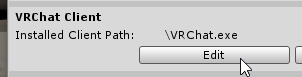 floral dove
Here's how to use Build & Test to Run your Udon World: https://www.youtube.com/watch?v=8yaQY0arCnc&list=PLe9XHNvXcouQjg5GULWGLj1tMzeythnQi&index=3

Learn how to make a Build of your World and run it in the client to test your Udon graphs.
floral dove
floral dove
Here's how to use Build & Test to Run your Udon World: https://www.youtube.com/w...
near dust
Same behaviour with the path change, but I'm going to review the video
fiery yoke
Try changing it to the steam directory. Maybe thatll help
near dust
The path?
near dust
This is how I have it configured now, same behaviour with this setting https://i.imgur.com/G529jRo.png
 fiery yoke
Guess youre cursed then lol
No idea why it wouldnt be able to instantiate the scene if it has the correct path.
near dust
@floral dove followed the video to the tee, also started another fresh project to ensure nothing was out of order, same behaviour unfortunately; any other steps you know of I can take?
floral dove
@near dust you're on Unity 2018.4.20?
 floral dove
sorry, @near dust nothing else comes to mind - I do this on a near-daily basis as I'm testing the SDK and haven't run across this issue.
solid cairn
Having issues with interactables in VR. Desktop works fine, but in VR, I have to have my hand right inside the object to activate it, and some objects I simply cannot interact with. Anyone else encountering this or have any ideas?
near dust
strange alright, I'm sure it's user-error, I just can't put a pin on what I'm doing wrong
Could it be that my steam library is on a different drive perhaps?
floral dove
@near dust you could try deleting that whole temp folder where the temp scene is being built and restart your machine, maybe a file lock issue?
I don't think your Steam Library being on a different drive should be an issue
near dust
Yes, I'll try that, thanks
rough beacon
@floral dove i just going work around the problem. i was try build a game. everything just going have to be UI to make it work
near dust
Weirdly, that worked. Thanks so much @floral dove
floral dove
@rough beacon I highly recommend you take a look through the examples and learn to build things the way you imagine. It has a working synced UI toggle, and a working non-synced GameObject toggle (the mirror one). You should be able to combine the logic to make what you want. Get it working locally first, then use a Synced Variable or Custom Networked Event to make it work for remote users, too.
@near dust - that's good to know. I'm tracking bugs in compilation and scene-building, so if that worked then it's worth looking into on our side to make sure things can recover gracefully if a file is locked / unavailable.
rough beacon
well. thank you for your help. i do have idea to work with toggle you told me. i just have to back track 2hr work 🙂
floral dove
sure thing - good luck!
rough beacon
thank
it may be even better this way, not 100% sure but it seem to have lass lag this way. so it win and lost for me
still dont like the big blue T tho. lol
floral dove
TheHelpfulHelper showed you how to turn those off, though, right? Those are from Unity, not Udon.
rough beacon
ya. it from Unity. it just much easyer to work with over text they have before
sorry. typo. eating pizza
ok, fix it 😛
rough beacon
so UI Synced Toggle cant toggle it self?
near dust
What would be the equivalent of these nodes now? https://i.imgur.com/QHj7VxA.png
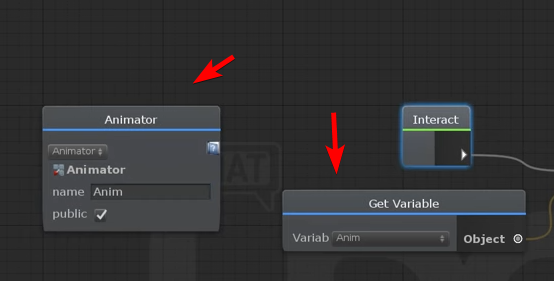 near dust
Yeah
Well, even the nodes would be good, I can't find them
That screenshot is from a video from a few months ago
fiery yoke
Ahh
You need to make a variable in the variable window now (top left)
And then drag n drop it into the graph
near dust
Yep, I think I've figured out the variable bit
just the defining a public animator I'm stuck on
wanton oxide
probably something like this
near dust
Oh lol, yeah
wanton oxide
wanton oxide
you can get rid of the GetComponent btw if you set the animator in the inspector
near dust
So, in the inspector, you used to be able to do this: https://i.imgur.com/9qkEJcK.png
Now the types mismatch, do I need to something special to link the bool setter/getter to the variable instance? https://i.imgur.com/vaN1yym.gif
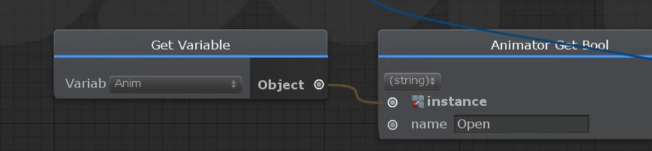

Meh, I just used UdonSharp instead, nothing's changed there
I'll figure out the inspector later
floral dove
@near dust - in the gif above, you're trying to connect a string port to an Animator port
you need to make an Animator variable
near dust
I'll have a play with it later, I thought these two guys were different evolutions of each other https://i.imgur.com/yCsrras.png
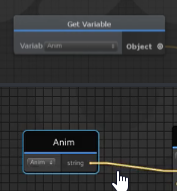 floral dove
yeah, the top one is a Variable of unknown type, the bottom one is a String. The easiest way to make a public Animator variable is like this: https://youtu.be/IVjEx_H5BZc?t=22
VRChat Client Engineer MomoTheMonster walks us through all the brand new stuff in the latest Udon Node Graph!
As of 26 June 2020, this Preview version of the Node Graph is available on our Discord! Join us with the link below and check out our latest Announcements for the lin...
near dust
I'll have to go off and watch all of these videos later on
floral dove
I linked right to the important part. You just drag and drop the component onto your graph.
rough beacon
cool 🙂
rough beacon
1 thing i do want see is simplified toggle switch to be global or local build into UI it self
 lyric hamlet
so I'm a newbie at world building and I have zero clue what these errors are. They prevent me from uploading also.
floral dove
@lyric hamlet it looks like you're working on an SDK2 world, this channel is for discussing SDK3 / Udon. Try #world-development
lyric hamlet
I'm using SDK3 for this world
floral dove
Well, that last error looks like it's coming from an SDK2 script, that might be a problem then. You need to have only SDK2 or SDK3 in a project, not both.
lyric hamlet
I only installed the asset pack for udon so I'm not sure why this would be happening
floral dove
Do you have errors building the example scene in VRChat Examples/UdonExampleScene?
lyric hamlet
It gives me the same errors minus the null reference but I can upload the sample while I can't upload my own world
rough beacon
just 1 of tho day when you try get it right but it not happening. i try make admin card go away so no one login admin control. however, i got closer. it seem that player control was lock out for player who got admin before me. LOL! so ya, it did work but not the way i want too.
floral dove
@lyric hamlet the UdonExampleScene gives you errors about 'Two delegators in existence' and 'Destroy may not be called from edit mode'?
rough beacon
@floral dove is this how it should be set up? toggle on off for Synced Toggle
floral dove
@rough beacon if you want to show an admin panel only to the Master of the room, you'll want to use Networking get isMaster
rough beacon
hmm
see, i only got 10min before work. i going pick up on this problem later. i take screen shot of this so i dont forget.
lyric hamlet
yeah it does @floral dove
floral dove
Ok, it sounds like you've got something in your project that's breaking things. Do you get these errors in a fresh project with just the Udon SDK imported?
floral dove
oh wow, I've never seen that. When you select the 'Two delegators' in existence error, what shows up in the bottom half of the console? That would tell me more about what's causing the issue.
lyric hamlet
floral dove
these look like errors you get from running edit-time scripts that manipulate your scene. If you press 'Clear' on your console and then run the Udon Example Scene, these errors re-appear? If not, then they're not in the Example Scene, and are instead caused by some kind of editor script you're running in your scene.
lyric hamlet
no it doesnt give me the errors... hmm
I checked every individual part to the models I used and couldnt find any scripts though which is why I'm confused at the moment
floral dove
if you get the error again in your scene, you should be able to click on the errors to see which script is causing them
 carmine jolt
I have a object with the Udon Behavior Script and made a new program but it wont show the "Open Udon Graph" am I doing something wrong?
floral dove
@carmine jolt did you accidentally make an Udon Assembly Program Asset instead of an Udon Graph Program Asset? The dropdown next to 'New Program' might default to assembly.
carmine jolt
Yes that's what happened thanks
lyric hamlet
Okay I figured it out
apparently the scene descriptor was set to an invisible game object which caused the SDK to freak out
floral dove
glad to hear it! By 'invisible' Gameobject, do you mean you had set it to inactive?
lyric hamlet
nah it was the spawn gameobject that the descriptor was set to
moving the script to the floor fixed the whole issue
floral dove
Ok - I recommend using the VRCWorld prefab that comes with the examples for your Scene Descriptor in the future, makes it a bit simpler and more foolproof.
scarlet lake
Hey so I am getting this error: AssemblyException: Cannot jump to an unaligned address '0x00002501'. Jump targets must be 4-byte aligned boundaries.
I think it might be because I am comparing an int to null. are you not allowed to do that?
fiery yoke
That usually happens after having a lot of branches in your graph
floral dove
Yep - that's tracked here, I'm looking into it: https://feedback.vrchat.com/vrchat-udon-closed-alpha-bugs/p/591-flow-breaks-with-many-jumping-nodes
scarlet lake
One thing I did is I had an if branch break off a sequence and rejoin it. I think that might be the problem. Thanks for the help. I'll watch the feedback\
frosty shoal
Here is a simple question, I have an Udon UI Button to turn on and off the lights, why does the lights turn off I'm stumped lol
This worked before now it doesn't
floral dove
if it worked before and now it doesn't, try this - select all the nodes in your bottom group, cut them (Ctrl+X), then paste them back in your scene (Ctrl+V) and see if that helps. There's a known issue with compilation at the moment, that seems to jumpstart it.
frosty shoal
Oh okay I've had to do that in the past
floral dove
Also - you can simply drag and drop the button component from your hierarchy into your graph to make a variable for it instead of getting the component the way you're doing in the top group.
frosty shoal
I'll try that
floral dove
I've got a fix for that in QA now, should be in the next release 🤞
frosty shoal
Awesome 🙂
rough beacon
so i want to see if i got this right after look on Synced Toggle. so do Synced Toggle add a code to toggle to make it global for everyone in the world at that time?
do it say their forever?
floral dove
Don't @ me
solid cairn
Fixed the interactable proximity issue I was having. Apparently it was a longstanding bug with a trigger completely inside an overlapping trigger: https://vrchat.canny.io/bug-reports/p/a-larger-trigger-overlapping-with-a-smaller-one-causes-interaction-conflicts
Making a second playerlocal collide layer and putting my interactables there helped in my case (as the MirrorReflection workaround wouldn't work in my case since 1 trigger needs to only collide with players, and the other object needs to be visible in more than just a mirror)
restive dust
I asked this question a day or two back Haven't figured it out yet so thought I'd ask again. Has anyone figured out how to edit MinMax Curves in the latest SDK3 graph editor? In the previous version of the sdk I could see options that I could click to bring up the curve editor. But in the latest sdk's graph editor I don't see any such options. Neither in Const MinMaxCurve, nor in any nodes that have MinMaxCurve inputs. The only place I can see options is in the Inspector, when I make a public MinMaxCurve variable.
floral dove
Sorry, haven't re-implemented the drawers for all elements yet. You can file a Canny to get an update when it's added.
restive dust
Ah I see. Thanks!
abstract aurora
Is there any way for me to run a script that will just always run as long as the world is open, without being dependent on any one player to stay in the world and be its "owner"?
or alternatively, is there a way to automatically assign a new owner after the current owner leaves?
fiery yoke
That is done automatically.
An object cannot be without an owner
Networked objects that is
abstract aurora
Hmmm... right now I have a script that updates a UI based on a timer, and when the owner leaves it stops
But I'm not sure it's a 'networked object', it's just an Udon Behaviour on an object in the scene.
fiery yoke
Every GameObject that has an UdonBehaviour is a networked object
abstract aurora
I discovered the problem. You're right that the owner gets reassigned automatically. But I was making a call to VRCPlayerApi.GetPlayerById with the playerId of the previous owner who left. I guess that must break the script if you call that function with a playerId that's no longer in the world.
flint urchin
If you don’t have any checks in place then yeah
rough beacon
anyone know how make master udon button? my skill is limited on udon and any info be helpful or you can send me copy of your master button for udon that work with object!
floral dove
@rough beacon there's an example of a Master-only button in the VRChatExamples folder. Take a look at the readme and UdonExampleScene for ButtonSyncOwner
rough beacon
i was look on that. but it code it wrong. it count up and i am unclear how to make it where it turn object on or object off
floral dove
Take a look at the ToggleGameObject graph on the MirrorSystem object to see how to turn an object on and off.
rough beacon
k. i try my best.
btw, i really do like new avatar. i was looking on that other day. it look nice.
 frozen matrix
Does anyone knows where l can fine this
I have a bit of problem finding this
If anyone find the answer to my problem will be much appreciated and will be good if anyone ping me as well
 zealous mason
@frozen matrix System > String > Concat, then use the drop down to change it to the type of inputs you want
 formal orchid
So how much better performance is it to use udon with things like dynamic bones
zealous mason
Also, I've updated my Udon from old to new and it seems my udon behaviors aren't linked to the objects anymore, opening up the asset gives the serialized version, however it doesn't copy-paste into new udon
frozen matrix
well it is still same
zealous mason
is that what you need?
frozen matrix
no
floral dove
@frozen matrix is the issue that the new version doesn't have flow in and out? btw, looks like you're on an old version of Udon Graph, I recommend updating to the latest.
zealous mason
found the answer to my own question, was able to find and re-assign the old udon files, just did a search in my assets for 'udon graph' and found them. just in case anyone runs into that too.
 sharp basin
Hate to ask what is probably a repetitve question, but any idea of when video players will be back for SDK3 worlds? ❤️
floral dove
working on them right now. They'll be in soon™
 native estuary
🙏
flint urchin

 torpid patrol
will it be able to take a render texture instead of creating its own?
 zinc frigate

hushed gazelle
Just a quick check; Is UdonBehaviour[] working in the new version or is that still broken?
 cunning mist
Just a visual overhaul, sorry.
hushed gazelle
Ah well.
rough beacon
i hope udon video player support YouTube video 🙂
abstract aurora
Anyone know how to instantiate a prefab that will appear for everyone? VRCInstantiate seems to only spawn it locally.
fiery yoke
Not yet™️
fiery yoke
This isnt your calculator mate
broken zodiac
Is there an array node? I thought I saw someone talk about them but only issue was they don't sync, which is fine for me but I can't seem to find them...
fiery yoke
Arrays are notated by an [] after the type name
abstract aurora
@fiery yoke do you mean there's no way to instantiate objects for all players?
fiery yoke
Yes. There currently is no proper way to do that.
 chilly aspen
Sorry, was cleaning the keyboard earlier.
fiery yoke
Use compressed air next time. Much easier and youre not accidentally pressing random keys :P
 summer ocean
So I'm a noob at making VRC worlds and I uploaded a world with the plane and spawnpoint to test it out and set the scene descriptor but I go to test the world and it's just grey and then takes me back to my home world. Any ideas on what this could possibly be?
I have no error messages and it uploads with no problems but for some reason just crashes as soon as I join my new world
floral dove
@summer ocean does Build & Test work for you?
summer ocean
yes
at first i thought the build and test was buggy so i also uploaded it as a private world but it did the same thing
floral dove
take a look at your logs in C:\Users\YourName\AppData\LocalLow\VRChat\VRChat
there may be some helpful info in there
native estuary
You might have multiple pipeline managers in your scene confusing the upload on the world id
"t:pipelinemanager" in the hierarchy search will show if this is the case
summer ocean
imma test those two and see if i can find anything
@native estuary i have a pipeline manager on the plane and the vrc world
do i need to remove one of those?
native estuary
Remove the one not on the vrcworld
native estuary
In that case check logs for more issues
You can also give my world tools a go it can find a bunch of issues that might cause you get thrown back home
https://github.com/oneVR/VRWorldToolkit/releases
summer ocean
tysm!!
native estuary
@summer ocean how do you mean? 🤔
summer ocean
apparently sdk 3 didnt support triggers and such?
idk i just kept trying everything and that was somehow the solution
native estuary
Yeah SDK3 is Udon
fiery yoke
SDK3 is not just an "update" to SDK2. Its a completely different sdk. If youre trying to use one and switch to the other its gonna cause problems.
summer ocean
im a complete noob to all of this but hey i got a solution lol
broken zodiac
Heyo, so using the update node to create a timer, just wondering how many frames are in a second on here?
A friend guessed 96fps, Since 100 seemed to go just over a bit...
fiery yoke
That depends completely on how fast your cpu is.
And how much processing it has to do
you could have one frame per second. Or up to like 144.
Thats why there is a great thing called deltaTime
floral dove
@broken zodiac - you can save Time.time to a variable, and then in Update, check the new Time.time value against this variable and see if enough time has passed. Much better than counting frame updates.
there's a Timer graph in VRChat Examples that does this if you want an example to work from. Take a look at the included readme for some more details.
broken zodiac
Oh ok, so the update node is based off my frames and not some VRChat timer at all? And I will look at the example, ty!
fiery yoke
Update is called every frame yes.
wanton oxide
if you want a more precise update loop use fixedupdate
its called with every physics update, so the rate is fixed
i think its either 30 or 60 calls per second
fiery yoke
Every 0.2 seconds
fiery yoke
Ah yeah forgot a 0
fiery yoke
Working with fixedupdate is dangerous tho.
summer ocean
how do i make it to where in my worlds you cannot walk through 3d objects?
say like you cannot walk through a table or chair
floral dove
Just need a collider on them.
hushed gazelle
Is there a way to check the player/owner from a collider? I want to have a trigger area that will only fire for the local player, not ANY player entering/exiting the trigger area around them.
 mighty fjord
Actually, I believe fixed update calls 90 times per second when in VRChat, though Unity has it set to 50 by default
fiery yoke
Ahh yeah I remember something along those lines as well
 zenith river
Oh good to know
vale current
I was wondering, is the Teleport method still networking intensive ?
tropic canyon
Why not test it?
vale current
true
if it's not I can make a fully custom controller with it's own collision and just teleport the player to it at the end of each frame
fiery yoke
The general problem is that the players position is interpolated from network data.
Which means that just setting the position will make them lerp to the destination.
Which is why teleporting will tell the network to ignore the interpolation and just set the position.
Thats why teleporting causes some sort of network load from what I know.
The better method is to use SetVelocity
Only problem with that is collision detection
which Im not quite sure of if it is discrete or continous
vale current
from what I tested you can't go through walls at high speed
fiery yoke
Then its continous
which ruins that
I think there is an option on teleports tho to tell it to not do that network thing. Not quite sure tho
tropic canyon
I was able to go through mesh colliders
vale current
vale current
there is a parameter called LerpOnRemote
vale current
if it actually works that would be awesome
tropic canyon
I never saw that overload..
fiery yoke
Then you didnt look hard enough :P
vale current
With the spiritual successor to Jet Set Radio being announced I kinda want to make a map with roller physics
tropic canyon
vs doesn't show me all overloads :(
vale current
and grinding
fiery yoke
Again. Custom controllers biggest pain point is input
tropic canyon
just the smallest one and the one that corresponds to the current given params
you can also do it with vrc stations
fiery yoke
Well yeah I guess making your own input scheme is making it pretty easy
I was trying to stay exactly one to one with VRChat
which is impossible because of Vive Advanced settings
And other weirdness
tropic canyon
I wonder if we'll ever get playerprefs on something like bgm and other toggles
vale current
maybe in a sandboxed system it could be implemented
fiery yoke
Writing a binary file isnt too bad
it can be flagged by windows to never be executed as an executable
vale current
like each world has it's own folder and is locked in it
tropic canyon
some generic settings so I don't have to turn off the stuff in every world I visit
fiery yoke
However that would just be a logistical mess. Having a folder for every world that uses the system would get messy pretty quick
vale current
or all the file methods only work in a single folder
you cannot write/read outside of that folder, which is defined by vrchat
it's just a simple sandboxing, making it safe
tropic canyon
1 txt file in a folder
fiery yoke
VRChat couldnt really define that. That is up to the operating system. And remember that VRChat should be able to run on Windows, MacOS (I think even Linux)
fiery yoke
Kind of
tropic canyon
tho it could be abused.. writing a ton of garbage
fiery yoke
Have a byte limit
Also
You can write lots of garbage to the log
Ive seen logs of double digits gigabytes
vale current
WAT
tropic canyon
oh..
vale current
that mean multiple spamming debug per frame
fiery yoke
Sitting in a world, having VRChat in the background, where something spams the console for hours...
Leave your PC on overnight...yeah that happens
vale current
btw is there any info on an official custom server requests system ?
tropic canyon
wdym by that?
fiery yoke
Ask again when Video Players are out
vale current
XD
tropic canyon
wait.. that video player stuff could be used for io 
vale current
there was a way to abuse the player to do request with servers
fiery yoke
wasnt really abuse
thats literally its purpose
You could just make arbitrary requests to arbitrary servers. Thats kinda spooky
fiery yoke
Whitelist. Request-Approval System. Not at all...who knows
summer ocean
I'm making a world and I published a version of it yesterday with just a few prefabs from sketchfab and then today i added some more prefabs like chairs, desk, etc and whenever I go to test the build in VRC all it's showing is the old version. I tried saving the scene, saving the project, but it doesn't seem to update to the changes I've made by adding prefabs/moving stuff around/new artwork. I'm so lost on how to get my new world updated ;-; !! In game view on unity it shows everything there properly but in VRC it doesn't for the test and the public build. im a noob
floral dove
@summer ocean if this isn't Udon-related, you may be better off discussing in #world-development , you built this with SDK2, right? Maybe you're uploading this world with a new id? Is there only one version of this world listed in Unity and on your Worlds section on the website?
summer ocean
i just completely deleted the world that i published and im just so lost im about to give up for a bit lol im just running off of tutorials
but yea there's only one version of this world
i just deleted the world off of my vrcsdk and build and test to see if it did anything and it wont
is there like any polygon/triangle limits in worlds?
floral dove
is it the "Chill Dessert" world?
summer ocean
no it was called "The Black Net" It's named after an inside joke and was going to be a hangout for me and my friends
floral dove
try this:
- Close Unity
- Look for a folder called TheBlackNet in
C:\Users\YourName\AppData\Local\Temp\DefaultCompany - Delete this folder if it exists
- Re-Open Unity and Build & Test again
also - make sure you've set the path to your actual VRChat client
summer ocean
how do i check the path?
floral dove
Here's how to use Build & Test to Run your Udon World: https://www.youtube.com/watch?v=8yaQY0arCnc&list=PLe9XHNvXcouQjg5GULWGLj1tMzeythnQi&index=3
Learn how to make a Build of your World and run it in the client to test your Udon graphs.
summer ocean
i deleted the folder and reopened unity to build and test but now it just takes me back to my home
summer ocean
im trying to see if i got any errors but my computer is being a bit slow so it'll be a minute but im gonna check if i set my path after i check for errors
i have only one error after testing it
"Error building Player because scripts has compiler errors"
But I did everything else
floral dove
yeah, that means you're not building a new version of the scene
summer ocean
hmmm
floral dove
when you click on that error, it should point to a script that's not compiling
summer ocean
After I deleted the file now it redirects me to my home world
that's what is confusing me, it's not pointing anywhere
floral dove
what information is visible in your console when you click on the error?
there should be two panes to your console - top and bottom. You can select an entry on the top to see details on the bottom.
summer ocean
Yea it just says the same thing on the bottom
floral dove
can you screenshot it?
summer ocean
yea gimme one sec
summer ocean
sorry it took so long my computer just decided to update windows in the middle of u
it*
the two errors above are from a skybox asset
floral dove
your scene can't be compiled if there are errors! Looks like someone else had the same issue as you. AllSkyFree has some scripts that aren't compatible. You might be able to modify those scripts as it looks just like menu stuff but that's definitely outside of how I can help you here.
https://www.reddit.com/r/VRchat/comments/f8y3dd/vr_chat_world_isnt_updating_when_i_upload_it/
summer ocean
should I just remove them because i'm not too picky but idk how to remove them
floral dove
you can try deleting them but I can't guarantee that will work or offer any specific guidance on them. You can't use custom scripts in SDK2 or SDK3 worlds. You have to use SDK2 or 3.
summer ocean
ok! tysm :)
floral dove
Also - for guidance and questions about general world building, check out the #world-development channel.
summer ocean
thanks!!
floral dove

summer ocean
yess it worked, you're a legend
scarlet lake
how do u create an Enemy AI System?
floral dove
@scarlet lake one node or line at a time. I suggest if you want to get started with learning Udon, you check out this Playlist and then go through the VRChat Examples folder included with the SDK: https://www.youtube.com/playlist?list=PLe9XHNvXcouQjg5GULWGLj1tMzeythnQi

YouTube
scarlet lake
i know how to use udon but ive never created an AI System before so im just here to ask what do i need to do for it to actually track the player?
or each player
floral dove
You can feed it each players' position. Then use Navigation and Pathfinding to guide it around: https://docs.unity3d.com/2018.4/Documentation/Manual/Navigation.html
 gray knot
How easy would it be to make a Mario Odyssey style balloon hiding minigame? Where would one even get started with that?
floral dove
@gray knot I suggest if you want to get started with learning Udon, you check out this Playlist and then go through the VRChat Examples folder included with the SDK: https://www.youtube.com/playlist?list=PLe9XHNvXcouQjg5GULWGLj1tMzeythnQi
wanton oxide
if you have experience doing other unity stuff it shouldn't be too hard actually
gray knot
I will check that out for sure
wanton oxide
that includes coding tho lol
summer ocean
do you all know why my friend's and i's fps drops whenever i uploaded my world?
rough beacon
Got mirror on?
summer ocean
no mirror
rough beacon
It can be too many poly, mirror, texture, moving part, etc
1 PC may can run it, it don't run on all pc
floral dove
@summer ocean if you're not using Udon, then please take your questions to the #world-development or #world-optimization channels
summer ocean
i made a second world with udon but everyones frames drop on my udon world ;-;
rough beacon
If you gone from sdk2 to sdk3. It will run not the same. Look for anything say missing
floral dove
do you see the frames drop if you remove your Udon Behaviours? What are you doing with Udon?
floral dove
hm - I jumped in The Black Net and it seems like the frames mostly drop when I look towards the mirror, even when it's off. Try uploading a version that doesn't have the mirror in it at all and see if that helps.
sharp basin
does anybody know if NoeNoe Pen prefabs work in udon or do they rely on dk2 components?
rough beacon
ya. my fps drop about 1/2 when mirror is at max. it funny you can do same with cam and my fps dont drop at all 🙂 on plus say, their a cool water layer trick with mirror. water layer dont show in mirror
floral dove
@sharp basin anything written with SDK2 logic will not work in Udon. But I've seen some pens in Udon worlds.
rough beacon
oh, someone made pen for udon. now i got look that up 🙂
sharp basin
Im just curious if anyone has used that pen/knows if it uses anything sdk2 reliant.
like triggers
floral dove
do you have it? You could just look at the prefab and see if it uses triggers or Udon.
sharp basin
oh duh
 limber jackal
does udon support post process volume variables from the standard post processing stack?
 ocean sluice
Hey, so I encountered a graphical bug that I think is due to Udon (as the only way I've run into it is in a specific Udon world)
It's the gravity rush one, has anyone else had problems with it?
basically, sometimes one to a few horizontal strips appear across my screen, and within those strips, the graphical quality is low and pixelated
floral dove
on what headset? That doesn't sound like the sort of effect that Udon itself would produce. But when you want to file bugs, here is where you do it: https://feedback.vrchat.com/
Give feedback to the VRChat team so they can make more informed product decisions. Powered by Canny.
near dust
any idea why I keep waking up to this https://i.imgur.com/Lpi7pax.png


Probably not Udon specific, but I have no idea how to get the other options back, like the control panel without a completely fresh project
I've attempted to reimport the SDK too, no dice
 dusk zealot
Log
dusk zealot
Other one is trigger
vale current
the OnTriggerEnter only work when the collider on the same gameobject as the script is a trigger
you cannot use that to detect if the gameobject with the script is entering a trigger
vale current
Is there a way to get the "Vive Advanced Controls" settings ?
near dust
Anyone know how to debug when the build and test button for worlds decides to do nothing at all and output nothing to the console?
I'm guessing it's a memory or a scripting issue, but I'm just shooting in the dark with no debug logs
vale current
the other collider has to have "Is Trigger" disabled and also have a rigidbody component
dusk zealot
Both ones have RigidBody. but other one is trigger. i'll try fix.
It is not effective.
OnTriggerEnter Don't work Still now.
It works on Unity play mode.
 daring copper
how many times per second are synced variables updated?
fiery yoke
Roughly every 500ms, because thats the average ping
It depends on your ping obviously how and when you receive packets
daring copper
im just trying to visualize it in a message per second sense
i feel like any syncing issues i have now or in the future could be solved if i had the ability to do some hard calculations on how many messages per second are being sent
fiery yoke
There is 1000ms in a second...so thats roughly 2 deserializations per second
Well you cant
ping varies.
There is no guarantees and hard codeable timings in networking. You have to build systems around it to handle asynchrony
daring copper
hm...i figured it would just be the object owner sending rpcs for the synced variables on a fixed time frame
at least whenever i looked up photon stuff for syncing variables thats the type of solution i see suggested
im still pretty new to learning about photon though
wanton oxide
I found latency to be much better then that actually
up to 500ms maybe yes, as exceptional cases
fiery yoke
Might be 200ms not sure
wanton oxide
but i've had it around 100ms as well on good days
fiery yoke
I think the 500 is for from player-to player
wanton oxide
no i'm talking player to player
i had a bug in my project where that was made pretty clear lol
and the 500ms "so 2 deserialisations per second" doesn't hold true afaik either
fiery yoke
Well from what region are you? :P
wanton oxide
i used some text elements a while ago to display synced udon variables being updates and they seemed to be updating at around 20 times per second
europe
does that matter?
also something to note, the player i was testing with was in the UK, not that far from me (i'm in the netherlands)
fiery yoke
Ofcourse. Ping is not just some arbitrary number you know. Its how fast the information can go from you to the server.
wanton oxide
just to note that it can be quite decent tho
fiery yoke
All data goes through the photon servers in California
wanton oxide
well yes, but 500ms is just ridiculous
fiery yoke
Not really
wanton oxide
thats the ping i get when i connect to a vpn in japan lol
and thats almost exactly the other side of the world from here
fiery yoke
California isnt too close either
When someone does something, it has to travel to california, and back to you. 500ms isnt "ridiculous" in that sense
wanton oxide
that'd make sense yes
but i find it hard to believe that everything goes through those servers
cause the latency i've been working with has been much better then that
fiery yoke
Maybe its outdated information
wanton oxide
that what i'd think yeah
either way, even if latency can reach 500ms the update rate is still quite high
daring copper
wouldnt it be more fair to say ping is how long it takes for information to get to the server rather than how fast it goes to the server? what rate data is sent is independent from ping
daring copper
for his example where things were updated 20 times a second id imagine itd be updated 20 times a second whether he was a mile from the server or 1000 miles from the server
it would just be more delayed in what other clients would see
fiery yoke
Not sure if thats how that works
wanton oxide
it is for sure
if it wasn't how it worked i wouldn't be able to see information get updated 20 times a second lol
50ms is too low to get to california and back
daring copper
20 times a second is a lot
i wonder if that number goes down as player count increases
wanton oxide
thats what i would expect
wanton oxide
it almost ran too smoothly lol compared to normal vrchat stuff
daring copper
wouldnt the messages per second increase multiplicatively with the amount of players in that case? so if the server is updating 5 people instead of 1 person youre looking at 100 messages per second?
fiery yoke
Well ofcourse the server has to message all players
wanton oxide
and theres that
fiery yoke
But it just gives each player the data it needs
You dont send your data to all players
you send the data to the server
and the server distributes it
wanton oxide
that does make me think
if they made at least part of vrchat peer to peer
based on latency tests or something
how would that affect it
fiery yoke
It is essentially peer to peer. There only is a middleman that manages connections and messages.
wanton oxide
so its inherently not peer to peer
the player doesn't talk to all other players, it only talks to the server
fiery yoke
Well yeah not quite. But true peer to peer is a horrible mess. Way too unreliable for more than 4 players
daring copper
yall tryin to get me ddosed again
wanton oxide
haha yeah theres that as well
fiery yoke
There is no authority in peer to peer. Guess you could make some blockchain stuff or whatever. But the problem is that you kinda just have to trust everyone.
Good for an online mode with friends. Bad for a social platform with strangers.
daring copper
in a way with photon its sort of like that already isnt it?
its not like photons servers are performing any sort of validation
wanton oxide
the issue right now is that as long as those servers are only in california the round trip time is very long tho
daring copper
they just fully trust the clients to not be malicious
wanton oxide
thats not the only issue tho
with a true peer to peer system you also need to worry about what to do when a client randomly disconnects for example
but the part where i don't think it should be an issue
in theory anyways
is that you only need to worry about sending everyone your position / whatever
its not like thats very hard
thing is how do you handle 20 packets coming in 20 times a second with new data from 20 different players
scaleability
fiery yoke
Thats biggest reason why you need a middle man: bandwidth. Photon Servers are equipped to handle a lot of traffic. Your poor router isnt.
daring copper
then give more than 500 messages per second >.>
wanton oxide
my poor router can handle that shit without issues lol
fiery yoke
Having 40 players connected to you?
sending data about their position 20 times per second and all the other data about things they own
fiery yoke
Hmm...still tho. I dont think peer to peer is any good for VRChat at all
wanton oxide
but it might work fine for a lot of players lol, and its certainly better then 500ms round trip latency
fiery yoke
Way too open, unreliable, and causes tons of issues
daring copper
i just would like some hard data on stuff we don't really know about instead of having to run random little tests to try and get even a little bit of data, like the synced variable update rate that bocu had done. worlds take a long time to make in vrc and will have no return on that time investment outside of personal satisfaction...but a lot of those hours are working around things i didn't know about and weren't documented anywhere. it's hard not to feel like i'm wasting my time in those scenarios where i spend like 5 hours developing something thinking things work in a certain way, and then have to learn later on from third party sources that they don't. if it wasn't for the help from everyone on the u# discord i'd be dead in the water at so many different steps lol. but i prefer having documentation and teaching myself if the information is out there.
wanton oxide
maybe setting up a wiki or some collection of documentation is a good idea yes
explain some basic shit there
anyone here who wants to work on that? cause i'd be down to spend some time testing and documenting that stuff
fiery yoke
That has already been a project since SDK2
However VRChat changes things so quickly
that it was basically pointless
wanton oxide
i've not seen anything for sdk3 really
wanton oxide
and well, if we don't make it extremely detailed but just include some of the basic things
fiery yoke
Something today could be absolutely wrong and pointless tomorrow
wanton oxide
it'll be easier to keep it up to date too that way
things like getting an object from a player collision like momo suggested the other day
fiery yoke
Well you cant document something with cetainty
its always a "We guess its this way based on these things"
Ohh well yeah simple tutorials exist for a lot of stuff
fiery yoke
Well have fun then
wanton oxide
lol thank
floral dove
@wanton oxide - let me know if there's specific things you'd like to see documented and I'll work on getting them integrated in the official docs. Sync docs will be coming soon once we have the new SyncedVariables in place and a few other upgrades.
wanton oxide
Ah awesome, yeah will do once i start actively doing shit
vale current
Is it possible to control the stations custom animator?
like, change the parameters
sharp basin
SO from searching the discord and reddit, it seems that day/night lighting can be done by swapping skybox material with the udon node, while also swapping what directional light is on for proper night lighting. IAs for the "environmental lighting" section, would I want this set to realtime as tp mpt bake the skybox lighting to the world? Is this whole idea a feasible way to do day/night lighting? (moved form lighting channel) @me
vale current
you can also use a dynamic skybox shader
where you can set the color and stars opacity
then you just get 1 directional light that you change the color/rotation depending on the time
also you cannot use any baking with day/night cycle
sharp basin
That sounds better- but I have 2 really specific skybox materials Im wanting to usem, I dont want an actual cycle but simply a toggle
vale current
what shader do the materials uses ?
sharp basin
Skybox/Cubemap
vale current
ok so
you can use a shader that takes both skybox textures
and just add a slider that fade from one to the other
so you have a clean transition from day to night
sharp basin
as for lighting, will 2 different directional lights witrh different temps work AND realtime environmental lighting (with skybox as source) work ok?
vale current
environmental lighting should work
since it takes the sky material as input
I wouldn't recommend 2 directional lights tho
sharp basin
currently on mixed global ilum w/ baked indriect, but I would be trying realtime global ilum with ten skybox as the source
thats not a lag fest?
generally?
vale current
the problem is if you want a true day/night cycle you can't use any baking at all
vale current
the problem is that the light moves
sharp basin
cycle wouldent work for the kinda world im making
vale current
I think baking doesn't like that
 still sundial
So I have an idea for a game world where you are presented with a warehouse full of different boxes and items. And the objective is to have the system pick a random item from a list, show some of the keywords describing it and then have the players locate and bring the item back to spawn. I'd also like to rearrange all the items randomly with every round.
Question is how difficult this would be to make with Udon?
I have surface level experience with code and game logic but none with Udon/node based programming.
flint urchin
Not difficult at all
floral dove
@still sundial - that's totally within the realms of what you can do with Udon, sounds fun! If you've already got C# experience, then UdonSharp might be the right place for you. Check the pins for the Discord, and you can google it for the github repo.
still sundial
cool, that's motivating. I need to finish my current world project before jumping on this, so I'll just lurk in the meantime.
thanks for the advice
floral dove
sure thing! It's worth learning the graph for sure, but since you have some coding experience and a specific game world in mind, I think it might be a good fit for you
still sundial
Yeah I'd like to be able to prototype games as well, I'm an environment artist so being able to code simple stuff like doors, triggered events etc would be nice. The programmer on my team has more important matters to work on.
I have an idea of how to structure the logic but the execution is a different matter, I'll cross that bridge when I get to it
 grand bolt
Hello, I'm trying to make a sword weapon play a sound when the velocity of its rigidbody is over a certain amount, and a timer has been set. I've gotten that part working, and will work with a single noise. However, I have a few audio sources I would like to play, (Either in order or random, doesn't really matter).
However, it does not seem like I can successfully get an array of AudioSources, using
"sources = (AudioSource[])GetComponents(typeof(AudioSource));
I looked at my VRChat log and saw this error.
VRC.Udon.Common.Exceptions.HeapTypeMismatchException: Cannot retrieve heap variable of type 'Component[]' as type 'AudioSource[]
I am using UdonSharp for this as well.
Is there a known work around that I can retrieve multiple audio sources, or other component types on the same gameobject without using an array? I know Udon has struggled with working with arrays in my experience.
Should I maybe just make an empty gameobject with an audio source for each and use public references through the editor for each instead?
flint urchin
You should join the U# discord, linked on github or pinned in #avatar-general
Other than that, you can't get a single component as a array, so remove the brackets
grand bolt
Awesome, there's a discord for U#? I'll be joining that.
vale current
is there a way to disable the rotation lock on stations ?
vale current
so, I have a problem with stations right now, when a player enters one every other player on the server also enter the station
vale current
nevermind, it's only broken when I test in local with two clients
 polar robin
Where is the node "set variables"?
 shell glade
hello anyone up for a chat
 sinful slate
I was wondering for a while now… is it possible for Udon (or any scripting at all in words) to store and retrieve world specific data on the users' system? Like for instance when you make a game, store the users' progress, so when they come back to the world, they old progress is restored?
fiery yoke
No.
Writing any custom data to the harddrive is a security risk and can generally go wrong in many different ways. VRChat doesnt support that (for now).
vale current
So I managed to create my own input system that support every device but now I have a new problem
on desktop when you enter a station you cannot look farther than 90 degrees left and right
is there a way to unlock that?
fiery yoke
Not as far as I know. Its probably hard coded.
sinful slate
Writing any custom data to the harddrive is a security risk and can generally go wrong in many different ways. VRChat doesnt support that (for now).
@fiery yoke Hmmm… do we have network access? An alternative would be to use a small API server to write and read data to based on the player id
fiery yoke
Same goes for that. Video Players have been abused for that, hence why they were disabled in Udon. Once they are back I will investigate what is possible with them after the changes.
sinful slate
too bad… it'd be really great to have a key-value store for simple values like ints/floats/ (small) strings
possibly with a max size limit
fiery yoke
Yeah. We know. They know. But its complicated.