#quest-optimization
1 messages · Page 13 of 1
 real oasis
 sharp zinc
Quest cant use shaders
 sand mantle
use vrcmobile
real oasis
sand mantle
use vrcmobile
thats what its on
sand mantle
lightmapped is world shader. I don’t know why its in avatar sdk
use matcaplit so it looks cool or toonlit if you want quicky
idk whats up with alpha blended. thos particle shaders are very cursed
real oasis
yeah i
fixed it
looking good & uploaded now
had no clue it wsa meant for worlds lol
sand mantle
i honestly have no idea why thats still in the avatar sdk. I don’t know if theres a canny for it but there probs should be
 lusty ether
Was wondering if there's any way to make a quest-compatible shader transparent?
 slow hearth
You can only use the provided vrcmobile shaders, and none of them do transparency
lusty ether
hecc...
Not even full transparency?
sharp zinc
NO
lusty ether
Well, time to learn how to use blender...

 humble canyon
yup
lusty ether
Just wish there was an invisible shader or somethin'.
slow hearth
How to invisible shader on the quest:
Mesh -> right click -> delete
lusty ether
Yea I can't do that either unfortunately, mesh I need to make transparent doesn't show on the hierarchy.
slow hearth
(is joke, don't actually do that)
lusty ether
oh okie lol.
slow hearth
Depending on what it is, couldn't you cut up the mesh then just toggle the mesh bit when needed?
Wouldn't work if its particles or something semi-transparent, but if you just need something to "not be there at all" then that's an option
lusty ether
Not really sure how to do any of that without messing up other things.
Am really new and I'm trying to figure out a ton of different things at once.
slow hearth
Then describe what you have, what needs to be done & someone could point you in the right direction
lusty ether
That's the hard part for now.
The fixes I need are far into the process and if I fix something I needed at the beginning I'll need to start over.
I just keep running into new things I needed to do towards the beginning when I'm almost ready to export.
Everything is just a mess lol.
Also hecc polygon limits.
 sullen moat
Have you tried turning it off and on again
sharp zinc
What.
sullen moat
Have you tried turning it off and on again?!
sullen moat
Yes
 gentle grotto
XD
 sleek sedge
I have a problem with an avatar I bought called Mini Lilly
Her hands won't move when I do gestures but she still makes emotions though
Also I'm on quest if that helps and everything works fine except the hands
sand mantle
finger bones might be misslabeled/not assigned in unity
 frail quail
swapped all of my materials from the Material section in unity to get it to work with quest and I still have this same issue with a shader issue,
Any ideas?
Nvm, I fixed it

 neat fossil
my physbones stuff wont work on quest, is there like a full on hard limit to physbones on quest? cause if so im screwed
slow hearth
neat fossil
my physbones stuff wont work on quest, is there like a full on hard limit to phy...
yes
neat fossil
le poop
slow hearth
 sleek sedge
sand mantle
finger bones might be misslabeled/not assigned in unity
sleek sedge
sand mantle
finger bones might be misslabeled/not assigned in unity
How do I reassign them? I'm new to using unity and stuff
slow hearth
sleek sedge
How do I reassign them? I'm new to using unity and stuff
go to your project files, click on your FBX file

in the inspector click the rig tab, then configure

go through the bones and make sure they're in the right slot
sleek sedge
slow hearth
go through the bones and make sure they're in the right slot
Tysm I'll try this out and hope it works!
 plush jacinth
your faces are probably facing inside not outside mobile shader shows only one side
you need flip your eye faces
in blender
 jolly cedar
so i'm working on a custom fallback avatar. i did a lot of manual tweaking to the meshes already like deleting meshes inside of other meshes (ie legs which are totally covered by pants and shoes) and removing transparent parts of meshes on eyebrows, etc. but i'm still at 16.7k triangles total. i might be able to dissolve some edge loops to cut out a few hundred more but getting down to 10k without holes or serious distortion will be a challenge! i know that cutting away that many polys will be destructive no matter how i do it, but can anyone advise the gentlest approach? like should i use the decimation modifier on individual parts or the CATS decimation on the combined mesh? or both? or something else? i can provide the .blend if anyone wants to take a look and help more specificially.....
humble canyon
question have you deleted anybody Parts hiding under clothing
jolly cedar
yes but i did not delete parts of the head under hair because i'm afraid of messing that up. that might free a little more
humble canyon
and could you like show a screenshot with a wireframe of your model to make suggestions on reductions
jolly cedar
it looks like i can dissolve some edge loops on the sweater and maybe pants but that won't save me 7k tris, just a couple hundred

the hair could probably safely take some decimation?
humble canyon
yeah probably could use some reductions in the hair
and if it's helpful 15,000 would put you at medium if you just want to upload a quest version of the avatar
jolly cedar
the hair is (at least) 3 seperate meshes, should i join them before decimating?
humble canyon
probably a good idea so you can decimating them all at the same time?
also you might want to dissolve some Edge loops on your glasses
could you take a screenshot Focus just on the face and hair so I can actually see there wireframe instead of being all solid black
jolly cedar
all i did for them so far was decimate in VRoid export settings - i don't know how to reduce further without potentially breaking shape keys (which i don't fully understand) or whatever
 humble canyon
good to know
 wide quartz
when trying to make a texture atlas material combiner always makes it just 3 solid textures
 sharp zinc
jolly cedar
all i did for them so far was decimate in VRoid export settings - i don't know h...
sharp zinc
jolly cedar
all i did for them so far was decimate in VRoid export settings - i don't know h...
Try the CATS blender plug-in decimation feature
jolly cedar
can I cats decimate just the face or does it have to be the whole model?
humble canyon
you can separate the model into multiple models so you can only decimate want to decimate
jolly cedar
i must be missing a step because even if i split the mesh by materials and select the face mesh, using CATS decimate affects the whole model not just the selected part
jolly cedar
okay i made it below 10k polys and i don't see any holes or other issues in blender! but i have 93 bones. i think the best place to remove a couple would be in the ponytail. how is the best way to go about it? should i merge the bottom ones with their parents? or do something in the middle?
 humble canyon
merge the bottom ones with their parents would work fine
and I would suggest removing the glasses glass so you can see your eyes
because of the lack of transparency
jolly cedar
i am specifically leaving it to hide the eyes because they are slightly broken without transparancy >_>
humble canyon
Fair
jolly cedar
augh i was sure i had 90 wtf
 humble canyon
did it load the new model?
jolly cedar
yeah i must have not had everything selected or something i guess
slow hearth
jolly cedar
i am specifically leaving it to hide the eyes because they are slightly broken w...
Remove the eyes 😎
 quick ferry
I recently got a kinect 360 sensor for full body, and the day after iset it up now my oculus lags out really bad when i link it to my pc. has anyone experienced this? i feel like ive done everything to trouble shoot.
 crimson mural
I just optimised my first avatar down to the bone and it went from very poor and 8 material slots to just 1 and medium on quest. I AM A GOD. (Obviously I am not, but I'm having my moment)
 zealous isle
I'm working on my quest/fallback version, and when I get to the Cats Atlas part, it seems to only be atlasing my shirt/shorts and everything else turns white. Checking the atlas it does only have my shirts/shorts... it shows all the materials in the list when I click save atlas. Am I missing something?
humble canyon
crimson mural
I just optimised my first avatar down to the bone and it went from very poor and...
Cool
 static jolt
can someone help guide me through optimizing and uploading a vrchat avatar?
All I have is the unity package so im not sure if i can use blender to further optimize it.
 wicked fulcrum
quick ferry
I recently got a kinect 360 sensor for full body, and the day after iset it up ...
wicked fulcrum
quick ferry
I recently got a kinect 360 sensor for full body, and the day after iset it up ...
for me any time i run the fbt,it crashes my whole game and brings me back to the steamvr home
i think it might just be bugged atm as it hasnt been working properly since the last driver4vr update
quick ferry
Jeez
wicked fulcrum
yeah
im tryna find out whats up with it and if i can fix it myself or not
if i find a way to fix it ill lyk
 north bay
where is the pyhs bones package/ new sdk?
humble canyon
north bay
where is the pyhs bones package/ new sdk?
just download the Avatar SDK off the vrc website
north bay
do i need a new unity version?
humble canyon
no
slow hearth
static jolt
All I have is the unity package so im not sure if i can use blender to further o...
Unless you are messing with physics bones then most/all optimization comes from blender
To be honest
Unless you count crunching textures to be optimization lol
 coral raven
I have a question about the new avatar dynamics if anyone could help, I don’t think it’s a super in depth question
My friend has all the avatar dynamics settings on, but they cannot see any of our friends extra movements and such due to the update, is it necessary to have your quest connected to a pc or does it work for the quest version of vr chat
slow hearth
Works for the quest
coral raven
Hmm, I wonder why they can’t see anything
slow hearth
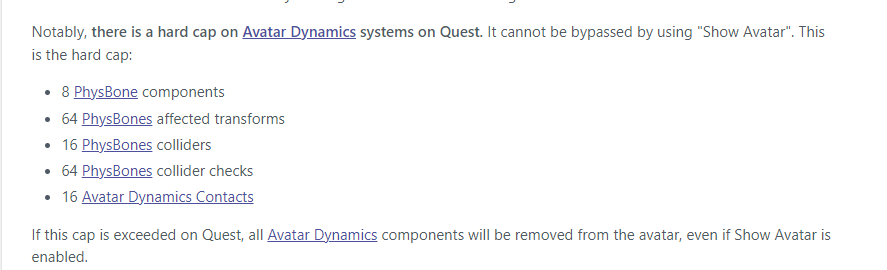
But it turns off if you upload an avatar with more than 8 phys bones components
So your friend probably didnt take quest limits into account
coral raven
They can’t see any at all though
So for the quest specifically it has to be a more basic version
Not as advanced as a pc one
slow hearth
Everything has to be more basic 😄
slow hearth
The specific limits are stated in the phys bones documentation
Tell him to give it a look
coral raven
Ah okay
So basically all of my friends are wearing like PC scale dynamic skins and my friend can’t see that because the limit is too high for the quest
For the movement to be present on their quest, I guess that’s kinda the reasoning behind it
humble canyon
coral raven
So basically all of my friends are wearing like PC scale dynamic skins and my fr...
yes
wicked fulcrum
quick ferry
Jeez
its a bug in driver4vr,theyre working on fixing it now and hopefully there will be a new update soon,try going to the previous version and see if that works,it doesnt for me but it has for a few others so just try it out
quick ferry
Thank you so much
quick ferry
Wait a minute I didn't buy driver4vr I'm using the free driver
wicked fulcrum
slow hearth
Use kinect2vr, its miles better than driver4vr
i'll try it out thanks
 solemn trout
Does anyone know why my phys bones aren’t showing on quest vr
Is there like a hard limit or something
Or a setting I have to turn on?
humble canyon
solemn trout
Is there like a hard limit or something
there is a hard limit on Quest on the amount of physics bones you can have

 violet jay
@humble canyon Thanks, I had trouble finding that info, now I'm sacrificing hair bones in favor of tail movement, good enough!
 plucky kindle
What does this mean and how do I fix it
 crimson mural
check your unity version
solemn trout
what shader specifically should I use for particles on quest?
sand mantle
vrcmobile additive
 amber surge
I don't know if this is the right channel, but-
How do I access my pictures I take in vrchat?
I can't find them in my app on my phone?
sharp zinc
amber surge
I don't know if this is the right channel, but-
How do I access my pictures I t...
It's in ur quest gallery
Iv just merged my vrc accounts together and it says I'm a new user
Iv been playing like a year
Whyyy am I a new user
Still
amber surge
sharp zinc
Whyyy am I a new user
been playing 6 months 7 hours a day and still a visitor....
amber surge
sharp zinc
It's in ur quest gallery
and thanks i'll look for them
slow hearth
amber surge
been playing 6 months 7 hours a day and still a visitor....
Wtf lol
Do you have a proper vrc account?
sharp zinc
I do and I'm still a new user
 tawdry kiln
hi
Welll now you need your FBX to have all the materials it had in Blender
Buuuut I'm not totally sure how exporting materials out of Unity works and how importing them to Blender works
BUT what might work is if in Unity, you set the materials to be a part of the FBX. Then they might carry over into blender when you import it
Sooooo select your FBX in Unity and I think you go to the 4th tab in the inspector which is named materials (?)
amber surge
slow hearth
Do you have a proper vrc account?
I'm guessing?
 tropic coral
tawdry kiln
Sooooo select your FBX in Unity and I think you go to the 4th tab in the inspect...
tropic coral
tawdry kiln
Sooooo select your FBX in Unity and I think you go to the 4th tab in the inspect...
ummm ill try?
i mean the materials for my avatar are on a comission folder
tawdry kiln
Oh are they?
Too bad I've never imported a material into Blender before though, because I have no idea how hah.
Maybe Hisashi knows
tropic coral
allright ima go eat then
slow hearth
amber surge
I'm guessing?
If you're guessing then probably not, steam/oculus accounts "level up" absurdly slower compared to creating an account on vrchat's website then merging your oculus/steam account into it
tropic coral
sharp zinc
Gimmie like 10 15 minutes
allright im back
amber surge
slow hearth
If you're guessing then probably not, steam/oculus accounts "level up" absurdly ...
if i merge my account, do I lose my current one?
slow hearth
No, you merge your stuff into it
Friends, favorites, everything
You can still use the oculus/steam account to login, but it'll redirect you to the vr chat account when you login
slow hearth
Ya for sure lol
Took me like 2 months playing every other day to get to known
With the website account
amber surge
slow hearth
Ya for sure lol
Where do I get my Merge Token?
amber surge
Kk thank you ^^
tropic coral
all good
ive waited 2 long years for this avatar, pretty sure i can wait a couple more minutes XD
sharp zinc
Might be easier if I remote lead if you are chill with streaming via discord call.
sharp zinc
Nono, I will lead you just where there is less ricochet
sharp zinc
tropic coral
tho its on you
Go ahead and DM me whenever you are ready
tropic coral
allright then
 safe island
can anyone make me an avatar? i will pay but i don't want to talk with greedy avatar creators
sand mantle
thats the worst thing you could ever say in an avatar commissionry request
 hushed shale
speedrun every-creator-ignores-you any%
sharp zinc
Wrong server, wrong attitude
 compact cobalt
'greedy' = wanting to be reasonably compensated for your time and experience
solemn trout
Anyone know why my particles look cubish on quest
I used vrchat/additive and looks fine on unity but on quest it looks blocky and nothing like what I saw in unity
 edgy kraken
avatar or world?
solemn trout
Avatar
edgy kraken
you cannot have transparency (and particles) on quest
solemn trout
Wym I see particles on quest all the time
edgy kraken
for avatars no
solemn trout
Yeah on avatars
edgy kraken
ops sorry my bad im mistaken
solemn trout
So does anyone know how to fix the blocky particle issue..
edgy kraken
you should link your texture here, otherwise its pretty much impossible to guess
 slow hearth
solemn trout
I used a material
slow hearth
solemn trout
I used a material
Well show the material then
 edgy kraken
does that really have a transparency? O.o
edgy kraken
because it looks all white and not fading out
 slow hearth
So its transparent?
solemn trout
I’m guessing yes
slow hearth
Otherwise it'd be a square
solemn trout
I have no problems on unity
slow hearth
Of course you wont
Vrchat for the quest disables transparency, its not something you catch in unity
solemn trout
bruh.
slow hearth
Work with a non transparent texture or figure out some other way to do it
solemn trout
Alright
edgy kraken
he said he's using it for avatar particle system tho, that the website says should allow transparency
slow hearth
What website
slow hearth
edgy kraken
under Particles/Additive
? Where does it say transparency is allowed
 slow hearth
🤔
edgy kraken
hmm then whats the point of allowing particle system on quest, just to display squares?
slow hearth
Why block it, particles can still work without transparency
Might as well leave it for people that know how to fiddle with it
I sure don't
edgy kraken
but you can only show a rectangle in this case right...? basically can't have anything circle
slow hearth
I've heard some people mention stuff about cutting up meshes to not look ridiculous without transparency
Snipping off the transparent bits using knife tool in blender
edgy kraken
actually no i just wasnt imagining enough
slow hearth
Might be something to that tune
edgy kraken
@solemn trout you can draw a white circle in paint with the trasparent areas in black
slow hearth
He's starting to believe
edgy kraken
because the mode is additive, adding black doesn't do anything. You can get a white circle fading out just going from white to black
solemn trout
That definitely did something
The particle now looks circular
I think if you replace the texture with a transparent background and a shape it will work for quest
maybe.
edgy kraken
transparent probably doesnt work, but if you change your transparency to black then yeah using additive mode should simulate the transparency well
 somber slate
Is there anyone who can take a look at an avatar and maybe make it quest compatible?
 fast silo
What’s quest avi poly limit before it gets blocked?
slow hearth
fast silo
What’s quest avi poly limit before it gets blocked?
20k? You can find the performance ratings in the vrc website
After that it turns very poor i think
10k for staying green
fast silo
Thank you
safe island

I'm trying to make a VRChat club but unity won't let me do it, I have a problem with the inspector and it won't let me modify the textures
Vrchat
Avatar
World
Unity
Help
Fix
Bug
2019.4.31f1
Error
Texture
Inspection
Material
Materials
 quartz berry
Are Quest avatars still capped at 10 mb and don't allow transparency or has that changed?
 radiant osprey
quartz berry
Are Quest avatars still capped at 10 mb and don't allow transparency or has that...
radiant osprey
quartz berry
Are Quest avatars still capped at 10 mb and don't allow transparency or has that...
Yep those are both still a thing
quartz berry
Damn
One of the Quest compatible avatar dynamics public avatars seemed like it had some sort of transparent effect so I had hope
They gave us avatar dynamics and doubled the world size I really don't understand why Quest avatars are still capped at 10 mb
radiant osprey
quartz berry
They gave us avatar dynamics and doubled the world size I really don't understan...
Because the quest has a very limited amount of VRAM. Textures are the most of that that 10mb is, so giving people more than 10MB would cause crashes up the wazoo
quartz berry
But letting worlds double from 50 to 100 is fine?
radiant osprey
quartz berry
But letting worlds double from 50 to 100 is fine?
Well you only join 1 world. You may see up to 80 players in a world so imagine 100mb avatars x 80 = over 1 gig minimum of VRAM
The quest 2 only has 6gb of total memory (shared with the OS, VRC, etc) to work with
quartz berry
Fallbacks exist and such, but I guess I understand
It just sucks though because it's hard to fit what I want in that space
radiant osprey
Yeah but you can't rely on that because even if you have a 500mb avatar it can still be excellent perf rank
quartz berry
I'm holding out hope that they atleast up it to like 15 or something
I'd be pretty happy with just that
humble canyon
basically it's unlikely for the quest limits to ever change until like the quest 3 comes out and they discontinue the quest one outright
and that's a big Maybe as they would still have to support the quest 2
compact cobalt
Even my optimised desktop avis are under 5mb or so. It shouldn't be that hard to keep it under 10 as long as you keep your texture sizes reasonable and make sure to set them to compressed.
sharp zinc
my extremely unoptimized avatars are all under 10mb
i should check the dates of messages before i send my own
 dense moth
I've got a quest avatar uploaded that's 18.3 mb, vrcquest tools does some wild stuff to make it work
slow hearth
It crunches/lowers rez to 10mb
You didn't find the holy grail of going over the size limit, if that's what you're thinking
sharp zinc
can somone help me i have a avatar that is 32mb and i needa make it quest compatible
humble canyon
crunch compress all the textures
sharp zinc
im trying to optimize a new avi now its 21mb and ive set all quest shaders ive deleted unused toggles
and still
its still 21mb it was 28
humble canyon
have you compress the textures yet
humble canyon
basically it makes the textures take up less size to download
humble canyon
sharp zinc
im used to just making pc only
then why are you in the quest optimization Channel
sharp zinc
cause obviously trying to make a avatar quest compatible
sharp zinc
humble canyon
basically it makes the textures take up less size to download
how do you do that
humble canyon
click the used crunch compression check box in the texture settings when you click on a texture in the unity folder at the bottom
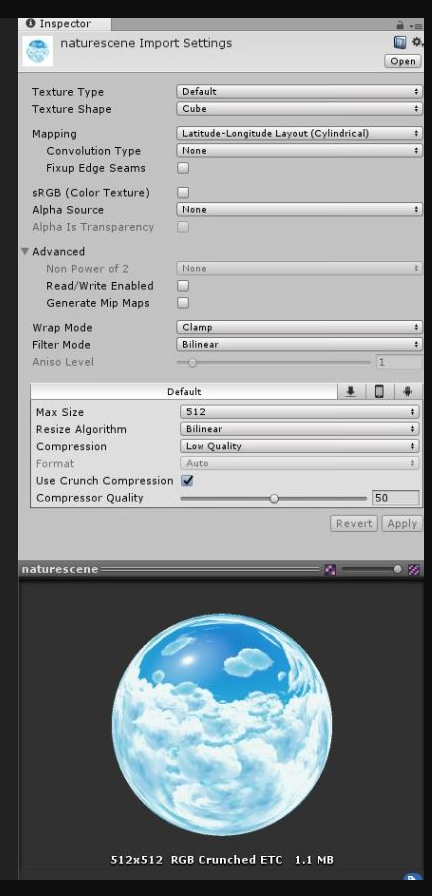
 humble canyon
that's the material settings not the texture settings
click on the texture itself
that select button would take you to it

 sharp zinc
 humble canyon
start with normal
 humble canyon
cool now do that on all of your other textures
 rancid patrol
there is a unity package that just does quest compatibility at the press of a button, a few textures break and go white but thats an easy fix instead of going through the whole avi piece by piece right? thats how ive always made them questie.
humble canyon
GitHub
Unity editor extension to support uploading VRChat avatars for Oculus Quest - GitHub - kurotu/VRCQuestTools: Unity editor extension to support uploading VRChat avatars for Oculus Quest
 whole plank
Is quest not supporting constraints an android limitation or a vrchat limitation?
radiant osprey
whole plank
Is quest not supporting constraints an android limitation or a vrchat limitation...
VRChat
whole plank
They should really add that, it makes optimizing certain things incredibly easy
radiant osprey
How so
whole plank
There's a tool called nara's avatar tools that lets you add constraints that make so my coat with 45 bones into a 5 bone constraint
radiant osprey
whole plank
There's a tool called nara's avatar tools that lets you add constraints that mak...
Constraints aren't free for performance. It would be miles more optimized if you just merge the armatures
whole plank
this is a single armature
plush jacinth
45 bones for single coat wow
whole plank
My coat is 5 connected bones in 9 sets around the coat
radiant osprey
Why
plush jacinth
coat can have like 15 bones and have decent physics
radiant osprey
Even less
whole plank
That's true, but hitting a button to add a constraint is a lot easier than reweight painting the entire coat
radiant osprey
Easier does not mean more optimized
whole plank
Contraint is more optimized than doing nothing
radiant osprey
Constraints should be used sparingly. They do affect performance, just not a huge amount
plush jacinth
i don't use constraints in any avatars even for pc
i know so many tricks with rigging they are usueless
plush jacinth
yeah they are easy to avoid
radiant osprey
I have some setups that require constraints
plush jacinth
i do too but i always find way to outsmart it
i think i used constraints maybe on 2 avatars but i removed them and reworked them so they wont use them
radiant osprey
And honestly they're not bad to use if used sparingly
radiant osprey
They might eventaully
plush jacinth
maybe when new quest comes out
radiant osprey
Like I said contraints are not heavy on performance. They used to be but a VRC update fixed that
Quest can handle it with limits
plush jacinth
well we will see maybe they will add them but with limitations
quartz berry
So, is there any given reason as to why Quest users can't hear avatar sounds?
Like, how hard on a processor could playing audio be?
 stark isle
quartz berry
So, is there any given reason as to why Quest users can't hear avatar sounds?
Li...
stark isle
quartz berry
So, is there any given reason as to why Quest users can't hear avatar sounds?
Li...
ive had this question too!!
quartz berry
They gave quest users cameras, dynamic bones and doubled the world size but we're still stuck without avatar sounds
Like why
What's the point
Saving on memory?
The avatar size is already capped at 10 mb so as long as it fits within that what's the problem?
radiant osprey
quartz berry
So, is there any given reason as to why Quest users can't hear avatar sounds?
Li...
Audio is quite CPU intensive. If they gave avatars audio, the Quest would simply explode
 heady wing
quartz berry
So, is there any given reason as to why Quest users can't hear avatar sounds?
Li...
heady wing
quartz berry
So, is there any given reason as to why Quest users can't hear avatar sounds?
Li...
heh.
There’s three main reasons that avatar audio isn’t on Quest.
1: Audio actually uses a lot of CPU power to do, and that needs to go to people speaking.
2: File size, you only get 10mb, you wouldn’t even be able to add much audio anyway.
3. Apparently some forms of audio compression actually cause the quest to crash so uhhhhhh yep never happening
heady wing
slow hearth
did you really \**heh*\*'d him
Mainly about the second question, but yeah. It’s that bad.
I mean, the quest 2 already struggles with 20 people in one instance, give each one another audio source and that’s effectively halved.
and don’t get me started on the quest 1
sharp zinc
Give it a year and he'll do just that
radiant osprey
Then you'd have to be in SteamVR
 sand jackal
does anyone know how to upload quest avatars with physbone?
 final spade
sand jackal
does anyone know how to upload quest avatars with physbone?
final spade
sand jackal
does anyone know how to upload quest avatars with physbone?
physbones are included in the latest sdk
 wind umbra
Anyone else having issues on quest when changing avatars or going to worlds where your avatar goes into desktop mode?
sharp zinc
wind umbra
Anyone else having issues on quest when changing avatars or going to worlds wher...
Yep. Had issues last night. A couple of my friends had issues and same for my boyfriend. So it's messing up for pc users and quest users
It a vrchat bug
sharp zinc
wind umbra
Anyone else having issues on quest when changing avatars or going to worlds wher...
Not a just quest problem x3
wind umbra
sharp zinc
Not a just quest problem x3
Oh okay, only seen it with quest users so far so that’s why
sharp zinc
wind umbra
Oh okay, only seen it with quest users so far so that’s why
XD yes I was with my pc friends and pc boyfriend and they had worse issues
wind umbra
Oof
sharp zinc
I do think it's a vrvhat bug.
 verbal crag
Just getting out and back into your avatar fixes it
 brisk bough
My girlfriend's quest/pc link cable setup has been gradually getting worse and worse with frame loss issues and we've already tried multiple fixes we've found on google
 vocal lantern
brisk bough
My girlfriend's quest/pc link cable setup has been gradually getting worse and w...
vocal lantern
brisk bough
My girlfriend's quest/pc link cable setup has been gradually getting worse and w...
oculus link in my experience is really unreliable
for the best pc experience on q2 i recommend getting virtual desktop but that comes with the extra cost of getting a primary vr router if you don't already have a decent router close to your room
brisk bough
Unfortunately a better router/internet isn't an option for her right now
radiant osprey
Not much you can do with a quest then
 ocean creek
Only choice is connected or Frankenstein a better connection
 daring frigate
um is there any double sided shader for quest?
daring frigate
I guess I spent hours working on this avatar for nothing...
slow hearth
daring frigate
um is there any double sided shader for quest?
Double sided shader?
Like no backface culling or
final spade
daring frigate
um is there any double sided shader for quest?
if you can afford the triangle count you can jut double side the mesh
directly
daring frigate
yeah. I tried that but it gets me over 20k and I can't really decimate more.
so i have to figure out how to do more simple hair. i'll try something and see how it goes.
thank you. I was afraid this would be what I need to do 🙂
 blissful owl
Has anyone here got qt pens to work for quest on the newest sdk?
slow hearth
yes
 hearty lodge
I need help moving my model to vr chat.
slow hearth
hearty lodge
I need help moving my model to vr chat.

Part 2: https://www.youtube.com/watch?v=rRAnDMUbWt8
0:00 - Intro
0:23 - What You'll Need
1:26 - Installing Software
2:26 - Get the VRChat SDK
2:53 - Make a Unity 3D Project
3:26 - Import the SDK
Link [1]: (Example Avatar Files) https://assets.vrchat.com/misc/Tutorial_Avatar_Robot_v1.zip
Link [2]: (How to merge Steam / Oculus / Viveport accoun...
hearty lodge
slow hearth
https://www.youtube.com/watch?v=xjS8rreIMos
Does unity make it easy for you? Can I just use Blender?
slow hearth
blender is optional if you have the model rigged and ready
hearty lodge
My model is ready
slow hearth
unity is entirely non optional since that is where is you configure your avatar and upload to VR chat
 blazing stag
Where do I find physbones in Build 1198 of Open Beta? I looked in a tutorial of physbones but the script name of "VRC Phy Bone" is missing apparently?
slow hearth
blazing stag
Where do I find physbones in Build 1198 of Open Beta? I looked in a tutorial of ...
Phys
not "phy bone"
If you still dont have it then download the sdk from the website to make sure you have the newest one
Then delete & reinstall it on your project
 sharp zinc
heyy can anyone help me with my game
it keeps on crashing
i've tried reinstalling it and switching internets but nothings working
the only time it did work was when i first logged in and played for a bit. then i closed it and now its not
 smoky burrow
sharp zinc
heyy can anyone help me with my game
smoky burrow
sharp zinc
heyy can anyone help me with my game
what are you playing on?
if your on quest you can switch oculus accounts, delete your game data before uninstaling and reinstalling, factory reset your headset or installing and starting over the oculus app
or just wait until it works
smoky burrow
wind umbra
Anyone else having issues on quest when changing avatars or going to worlds wher...
disable and enable osc it works after that but it may breake again
wind umbra
smoky burrow
disable and enable osc it works after that but it may breake again
I had straight up deleted VRchat and it worked h- but thanks
amber surge
wind umbra
Anyone else having issues on quest when changing avatars or going to worlds wher...
okay, so for me. If i'm using an emote with one avatar and then change, it makes me look like a pc player. to fix I just go back to the avatar with the emote and reset it. Then it's all fixed. I'm not sure about when you go to worlds and it changing like that tho?
wind umbra
amber surge
okay, so for me. If i'm using an emote with one avatar and then change, it makes...
I’m all good now, but everytime I changed avatars or worlds it would go into desktop mode. I just deleted and reinstalled VRC and it was good. But it’s been an issue for some people as a bug and most fixed it by just doing that
amber surge
wind umbra
I’m all good now, but everytime I changed avatars or worlds it would go into des...
That's good, but uh.... I need some help too 😅
so... I use link cable and play thru steamvr
but then someone joins with a corrupted avatar / lagger
and now it messed up my whole steamvr
every time I turn steam vr on... it has a seizure on the screen
so like it shows me steam home for 1 second and then the next, a loading screen
and then the next second I see my oculus home.... and it does it very fast-
I have uninstalled steam and updated it completely..... it won't work...
i thought it would work over time. but.... it's been 2 weeks since i've used steam vr.
I can't even launch any of my other steamvr games........
so yeah- Idk if it's because I have a mod tho, I use voicemod and kinect2vr for tracking
I haven't uninstalled them and back yet- I don't know if its because I have mods being lagged or what
Oh and sometimes it lags my oculus home when i use cable link. and has the same problem.
but the oculus itself, without using the link, doing it through oculus and not steamvr. everythings fine
i just want to have my graphics because steam/pc looks better and I want my voicemod AND my kinext2vr- because that's my body tracking.
so yeahhhh
somethings going on. Btw if I use my HTC Vive, and someone joins with a lagger/corrupt avatar It handles fine, I just get MINOR lag and it's all good. It's only when I use my oculus and my mods.
so yeah
I don't rlly wanna uninstall my mods, because I have custom settings and calibrations
wind umbra
I honestly have no clue h- I only play on quest since my computer is a MacBook. Only thing I can say is maybe completely shutdown your computer and maybe see if that helps?
wind umbra
Have you contacted steam support? They may be able to help
amber surge
I've prob uninstalled and reinstal steam vr like 12 times
I opened a ticket and haven't heard back yet
wind umbra
Posted anywhere else about the problem? Personally I tend to post issues on reddit to get SOME help
amber surge
I haven't used reddit or any socail place
social*
I've only discussed here and looked on google for answers
wind umbra
It may be worth doing so, I’ve fixed some stuff that way when no one has answers
amber surge
I even talked to Dragonoid prime, he has the same setup as me and he said when someone joins with an lagger/corrupt avtr. it just lags him
so it's just me?
well
the avatar that prob joined him could have not been as bad as mine
wind umbra
Idk man, is it steam VR itself or have you tried opening the games on their own? Sorry that I don’t know much h
amber surge
steam vr itself.
everything else works
but if i wanna use my mods it automatically launches steam vr
I can use my voicemod with normal pc mode because it just uses steam and not steam vr though
but I don't want to play on desktop
wind umbra
Hm, have you tried reinstalling both steam and steam VR? Some have said if steam is having a slight issue it’ll mess up both.
wind umbra
Idk if maybe anything here will help: https://www.reddit.com/r/SteamVR/comments/jcl7nu/steam_vr_isnt_working_with_my_quest_2/?utm_source=share&utm_medium=ios_app&utm_name=iossmf
amber surge
I've even turned the headset on and left the seizure on the screen and ran diagnostics and checked the pings/status of it and there was nothing wrong. said steam
Imma check that out rq
That specific forum that's opened doesn't exactly help with the issue, but I'll see if reddit can help out
wind umbra
Sorry can’t help much, hope you figure it out
amber surge
wind umbra
Sorry can’t help much, hope you figure it out
steam just did an update to fix issues (Idk about steamvr)
Imma test it sometim
 raw talon
im just trying to make my world quest compatible... im watching this video but its from a year ago... is there a more recent tutorial or is their automated method to convert?

Welcome to a new episode on how to make VRChat Worlds, the tutorial series for my beloved Patrons on https://www.patreon.com/surudoiryu.
Tutorial part 3 - VRChat make Quest World:
In this part we will be converting our existing world to a Oculus Quest compatible world! There are a few things to remember when you make a VRChat World, specially w...
compact cobalt
raw talon
im just trying to make my world quest compatible... im watching this video but i...
The process shouldn't have changed since last year really
raw talon
Assembly with name 'Unity.XR.Oculus.Editor' already exists (Packages/com.unity.xr.oculus/Editor/Unity.XR.Oculus.Editor.asmdef)
i cant get rid of this error I googled it and others are getting the same thing.. im not sure how to fix it
 woven glen
raw talon
Assembly with name 'Unity.XR.Oculus.Editor' already exists (Packages/com.unity.x...
woven glen
raw talon
Assembly with name 'Unity.XR.Oculus.Editor' already exists (Packages/com.unity.x...
Try pressing play on project. If you get compile errors and u cant enter play mode then theres a script issue. Last resort is new project
sharp zinc
Can somebody help sometimes every body in the world just freezes and after a few minutes it goes normal
 snow herald
the pink fbx is the original one included in the unitypackage, but because it has vertex colors i had to import it into blender to remove it. the black fbx is the exported one without vertex colors, which is missing the avatar icon. how can i get that on the fixed fbx?

the pink fbx files are only pink bc i didn't install the 3rd party shader they reference since i'm trying to optimize for quest
snow herald
is there any way i could just change the mesh of the pink fbx while keeping everything else in the unitypackage intact?
slow hearth
snow herald
is there any way i could just change the mesh of the pink fbx while keeping ever...
Did you create a separate fbx, or overwrote the existing one when exporting from blender to unity?
snow herald
slow hearth
Did you create a separate fbx, or overwrote the existing one when exporting from...
i made a separate one
 quasi oak
Hey good night everyone! So i'm in a journy trying to make my avatar optimized... Im using MacOS and Blender/Unity. Im not a dev so i really did my best here, can anyone help me out? For some reason my avatar is unsupported. Thanks alot!
 slow hearth
snow herald
i made a separate one
slow hearth
snow herald
i made a separate one
Then overwrite it
A bunch of the fbx related settings in unity will pass over to your new model
snow herald
I see, I'll try it now
snow herald
slow hearth
A bunch of the fbx related settings in unity will pass over to your new model
I exported the fbx, overwriting the original, but when I import the unitypackage it still shows as having vertex colors
I checked the modified date of the fbx to be sure and it says that a change was made
snow herald
Oh okay, i understand what you mean
snow herald
I dragged the overwritten fbx into unity, but the materials aren't showing properly. In the original fbx, the materials weren't inside the fbx. What can I do to fix this? When I try clicking on any of the materials I can't edit them
 slow hearth
snow herald
I dragged the overwritten fbx into unity, but the materials aren't showing prope...
slow hearth
snow herald
I dragged the overwritten fbx into unity, but the materials aren't showing prope...
Right click on material, extract from prefab
Then just copy paste the material values
 timber basalt
Does anyone know how I can merge 3 materials together?
 odd tiger
quasi oak
Hey good night everyone! So i'm in a journy trying to make my avatar optimized.....
odd tiger
quasi oak
Hey good night everyone! So i'm in a journy trying to make my avatar optimized.....
You need to install the android build support in unity hub and then switch to that in the builder panel (It will have a large switch build target to android bar to click). You are currently trying to build to MacOS, which is not supported by VRChat.
quasi oak
odd tiger
You need to install the android build support in unity hub and then switch to th...
thank you!
raw talon
hello I have a model imported from maya... preset all these standard shaders . I cant seem to edit the shaders to change them to quest friendly? why are they locked?
https://i.imgur.com/CLCZQZm.png
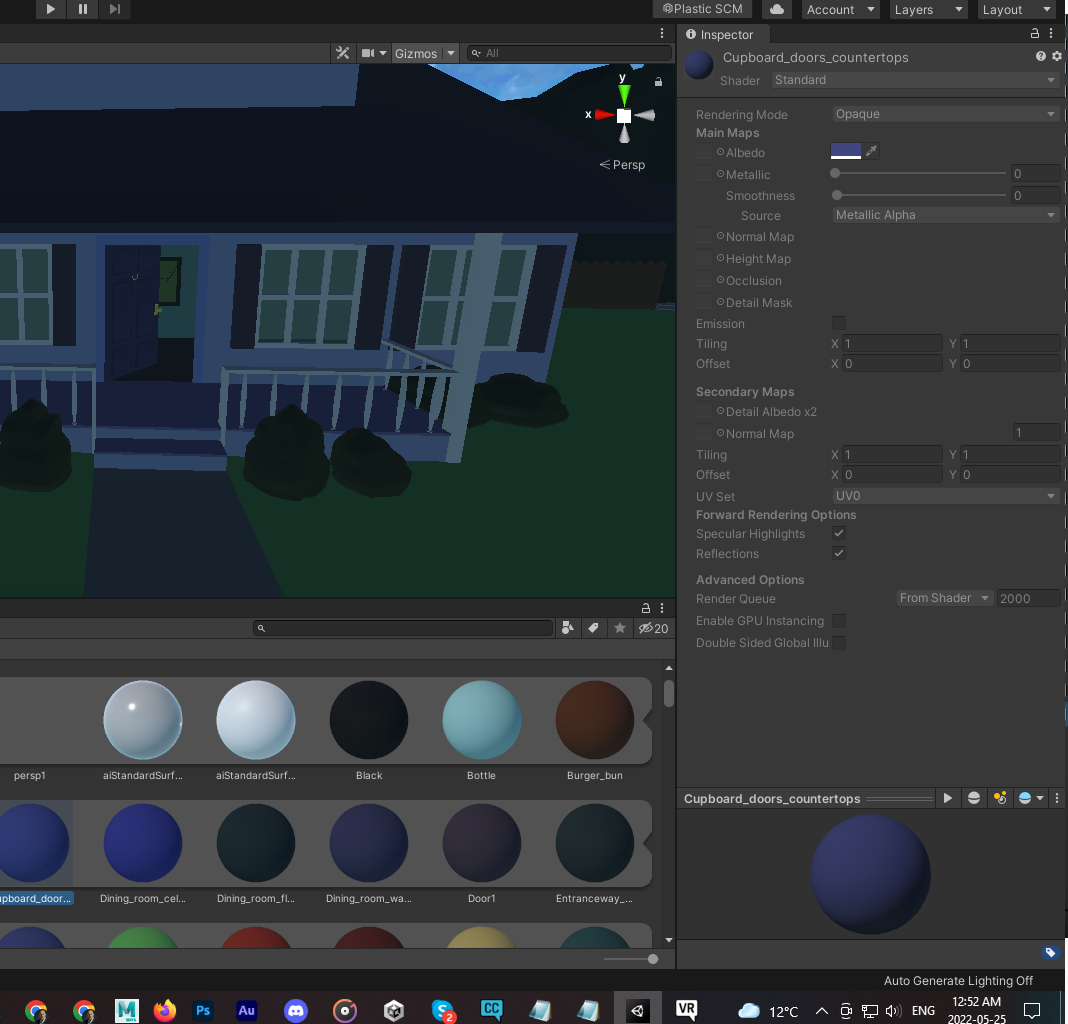 slow hearth
Extract from prefab
 summer tiger
So I'm currently trying to make an avatar and this is my first time, I want to combine the materials using atlas but it just keeps doing this, any suggestions?


 shell jay
summer tiger
So I'm currently trying to make an avatar and this is my first time, I want to c...
shell jay
summer tiger
So I'm currently trying to make an avatar and this is my first time, I want to c...
Make sure the base UVMap for everything is named the same
and set all the material shaders to Principled BSDF
ALSO I HIGHLY RECOMMEND AGAINST CATS AUTO ATLAS
If you'd like to call sometime I'll show how I atlased a VRoid model to be much lower material count
@summer tiger
 cosmic wraith
summer tiger
So I'm currently trying to make an avatar and this is my first time, I want to c...
cosmic wraith
summer tiger
So I'm currently trying to make an avatar and this is my first time, I want to c...
reexport your vroid model. you can immediately get it down to 2 materials inside vroid. cats atlas does work but more than 8 mats makes it break
no idea why 8 is the limit, but from 2 you can use the cats atlas
 slow nymph
anyone know how to make a avatar that quest can hear? i know its possible
timber basalt
slow nymph
anyone know how to make a avatar that quest can hear? i know its possible
It is currently not possible to make an avatar with an audio file that the quest by itself can hear, however, if you plug in your quest to your pc you should be able to hear audio files then
slow nymph
timber basalt
It is currently not possible to make an avatar with an audio file that the quest...
your wrong my friend
i have two characters i found that are quest compatible and i can hear the music they play surprisingly both the chars are made by the same person
cosmic wraith
so then they were uploaded with a modded sdk then because quest avatars not having audio hasn't changed.
raw talon
BTW i finally got my world quest optimized , it was the models from maya import that were a little tricky but it was very fulfilling to finally get over that hurdle...
sharp zinc
So I'm using a quest 1 and I haven't touched it for about a week but I logged in today and I can't use my index fingers or thumbs on either hand, does anyone know why this is happening or how it can be fixed?
 kindred bone
Is there a specific reason Quest doesn't have access to constraints?
slow hearth
kindred bone
Is there a specific reason Quest doesn't have access to constraints?
Performance
Like many other limitations
Its all performance
kindred bone
Yeah but to my understanding, constraints are not very performance heavy. And would actually optimize some things cause if you had say a gun that went from your chest to hand, you can simply reparent it instead of need two versions of the same mesh toggled on and off. Like, surely constraints can't be any worse than physbones? And they can simply put a hard limit on the constraints if too many at once is the issue. Just allowance for one or two would go a long way. Eg, followers for avatars.
kindred bone
They even say this on their documentation on quest limitations, which was written ages ago.

Yeah I'll write a canny
Welp turns out there already is one
 rotund rapids
i have no clue how to make a pc vr avatar quest compatible and tutorials havent been of any help
 elfin sable
Hey I need help if anyone is available. I’m trying to purchase vrchat plus for my quest 2 however everytime it says the transaction is processing it cancels the purchase. Does anyone know how to fix this?
elfin sable
Ok. I’ll try that first. Thank you 🙏
elfin sable
Ok I figured out. So I merged the oculus (has vrchat plus) with my vrchat account(doesn’t have vrchat plus) now it works. It’ll
 eternal onyx
rotund rapids
i have no clue how to make a pc vr avatar quest compatible and tutorials havent ...
eternal onyx
rotund rapids
i have no clue how to make a pc vr avatar quest compatible and tutorials havent ...
change your project's build target to android, then convert your material/materials to vrchat mobile shader
then upload again. make sure you back up your project first.
the rest of it is just optimization, depending on how complex your avatar is
violet jay
@rotund rapids or buy Polytool
https://www.vrcarena.com/assets/15847fc6-cb6d-4c8c-89ce-502df4f1289a

VRCArena
Polytool is a Unity package that helps you with optimizing your models, right inside Unity! > > It makes optimizing models quite simple for those who value a quick and easy solution. You can just choose a preset and go! > > It was originally created to ...
eternal onyx
thought you said you already had a PC avatar, sounds like you don't if it's still in vroid.
violet jay
IMPORTANT 2021 UPDATE: Unity 2018 is no longer compatible with VRChat. Please use Unity 2019.4.29f instead!!!
Almost finished up with finals! Been neglecting my studies to keep getting content out, so please forgive me for not having full episodes out at this given moment! I hope this tutorial was helpful, as I know the process is a bit confusi...
 languid basalt
kindred bone
Yeah I'll write a canny
languid basalt
kindred bone
Yeah I'll write a canny
paste a link here later i want to vote for this
 spring anvil
Would anyone be able to help me? I recently bought an avatar off booth that I wanted to use as my main, so I've spent all day trying to quest optimize it and... honestly I can't figure out what's wrong. It feels like it should be really simple since it's not a very complicated model
The avatar in question:
 humble canyon
could you post a screenshot of the SDK panel showing the avatars stats
spring anvil
Alright one sec
okay so this is obviously too much for quest. SO I've been taking it into blender using the CATS thing to fix it

But once i take it back to Unity, first of all the colors are suddenly hecked up, but also everything the avtar was originally set up with is gone
 humble canyon
you also need to swap this shaders to quest compatible Shader
spring anvil
Yeah I'd been swapping it to uuuh what was it
humble canyon
I guess you forgot a material then
spring anvil
STandard lite
humble canyon
GitHub
Unity editor extension to support uploading VRChat avatars for Oculus Quest - GitHub - kurotu/VRCQuestTools: Unity editor extension to support uploading VRChat avatars for Oculus Quest
spring anvil
Yeah but I mean after it's gone into blender, everythign is gone. The physbones, everything. Do I have to just rebuild the whole thing?
humble canyon
this tool could help you catch any forgotten materials
https://github.com/rurre/PumkinsAvatarTools and this tool makes it easier to transfer components from one Avatar to another
GitHub
A toolbox for easily setting up VRChat avatars in Unity. Adds functionality to the editor and automates some of the tedious tasks. - GitHub - rurre/PumkinsAvatarTools: A toolbox for easily setting ...
humble canyon
and it wouldn't be the end of the world to be poor as that's still better than most avatars
spring anvil
THANK YOU
humble canyon
are you able to get it sorted out
spring anvil
Good enough at least. I'm leaving it at Poor as i have given up trying to figure out how to reduce polygon count
Which is too bad because i would have liked to use this as a fallback too
humble canyon
you can always try that another day
and glad you were able to upload it where it wasn't very poor
spring anvil
Aaaalmost done making a fallback version of this! I'm up to Good quality
just one thing that's stopping me from publishing
What does this mean?
 eternal onyx
means your avatar's skeleton doesn't have a defined chest bone
you need to edit the avatar definition and map some bone to the chest so mecanim knows how to control the skeleton
spring anvil
THank you!
Okay! FInally done then!
Gonna test it. Thanks for all the help!
oh dear

how did this happen
back to the start i guess
slow hearth
looks like a serious case of the fucky wuckies
spring anvil
I'm so glad I decided to start messing around with this on an existing simple avtar and not start out with making my own custom one
my journey in learning blender and unity for the first time summarized in one image
 humble canyon
spring anvil
I'm so glad I decided to start messing around with this on an existing simple av...
humble canyon
spring anvil
I'm so glad I decided to start messing around with this on an existing simple av...
yeah definitely easier to start this way so you can slowly get used to the tools
spring anvil
oh my god it's working. Finally. I'm free
humble canyon
good
 cunning mist
I may be shooting in the dark here but is there anything I can do in unity in order to lower the amount of physbones components while retaining more movement for quest users. asking because whenever I end up getting a pc avatar, I make a quest version and I would lovie it if there was something I could do to have them see more of what I see
slow hearth
group them under a shared root bone
as long as you don't go over 64 transforms, you can have one component controlling a whole bunch of physics
cunning mist
slow hearth
group them under a shared root bone
is there a video i can watch that explains how to do that?
slow hearth
well, if you know blender
for example for the hair bones
make a new bone after the head bone, move it to the same spot as the head if you want
then go to every root of hair bones that previously connected to the head, and parent them to the new bone you made
then under unity just drop a component there, and all hair bones will be affected
i don't really have a guide handy
 tribal warren
I'm a bit lost on Physbone transform count
But sort of understand it, it says I have 77 and the max is 64
But I don't know how to get rid of or lower the transform count for quest.
And I'm just lost
Anyone know anything about it? :D
compact cobalt
tribal warren
Anyone know anything about it? :D
You have to merge some bones togeather in blender.
 willow hinge
Does anyone else using the quest 2 hear themselves talk thru the quest mic(like mic monitoring) and can you turn that off. I can’t without muting the whole mic . I want to talk but don’t want to hear myself.
slow hearth
willow hinge
Does anyone else using the quest 2 hear themselves talk thru the quest mic(like ...
not really
you use q2 standalone?
sharp zinc
willow hinge
Does anyone else using the quest 2 hear themselves talk thru the quest mic(like ...
its probably because your mic volume is 100% and your quest headset volume is also 100%, causing it to echo
or if you have a headset, some have a built in playback feature where youll hear yourself
 slim bison
tribal warren
But I don't know how to get rid of or lower the transform count for quest.
slim bison
tribal warren
But I don't know how to get rid of or lower the transform count for quest.
One way is to add some exceptions on the phys bone component to ignore some of the bones at the end of each of the affects chains. The ends will look a little more stiff but its a simple way to reduce the affected transform count
 sacred jasper
i dont undestand

its good and it says it can be used for fallback

But it isnt in fallback selection
Nor does it say its quest compatible
 eternal onyx
switch your target build to android and publish again
sacred jasper
OOOOH
eternal onyx
if it meets the requirements for Android you can select it as a fallback
sacred jasper
 eternal onyx
go to unity hub and make sure the Android sdk is installed
sacred jasper
eternal onyx
go to unity hub and make sure the Android sdk is installed
a
i think i figured it out
eternal onyx
Android has its own libraries you need to install for unity to be able to build for it
once that's done you can switch your project over
sharp zinc
question is there any way to find out the percentage exactly of each tracker?
 blissful timber
is anyone online?
 delicate wagon
 valid dagger
eternal onyx
go to unity hub and make sure the Android sdk is installed
valid dagger
eternal onyx
go to unity hub and make sure the Android sdk is installed
I need to install the SDK to unity hub? and not import into the assests?


 valid dagger
alrighty thank you
will this work if my version o finuty hub is newer?
im using 3.1.2
eternal onyx
the version of unity hub shouldn't really matter at all
unless they completely changed the interface, i have no idea
valid dagger
eternal onyx
the version of unity hub shouldn't really matter at all
i'm asking because it doesn't seem to be working for me still
eternal onyx
what does not working mean
 eternal onyx
what version of unity, and what version of the VRC SDK are you using
valid dagger
im using 2019.4.31f1 and the SKD i just got of Vrc website
eternal onyx
okay. go to your Build Settings in your project, click on Android. It should complain that you don't have the thing installed and give you a link to download
 valid dagger
all good
 fresh stratus
honestly i dont mess wit it and leave it open and i can still upload it perfectly fine
 midnight gazelle
idk if it's for this channel but why can't quest avatars use sound
I dont see how it would be laggy
eternal onyx
audio processing is cpu intensive and the quest hardware just can't handle it
cunning mist
I have a model I bought and I want to make a question of it. however, the file size is too large to be uploaded. I've tried lowering my textures among a couple other things but the file size is still about 10+ mb larger than allowed on quest. what should I do
slow hearth
cunning mist
I have a model I bought and I want to make a question of it. however, the file s...
crunch compression
i.e.
 cunning mist
slow hearth
i.e.
cunning mist
slow hearth
i.e.
tysm ^^
cunning mist
what should I do if I want to lower the amount of my colliders. usually getting rid of components deals with it but I still have a bunch
cunning mist
how can I lower the size of my avatar besides lowering the textures. I've crunch compressed them and need one more mb to put it on quest
 modest quarry
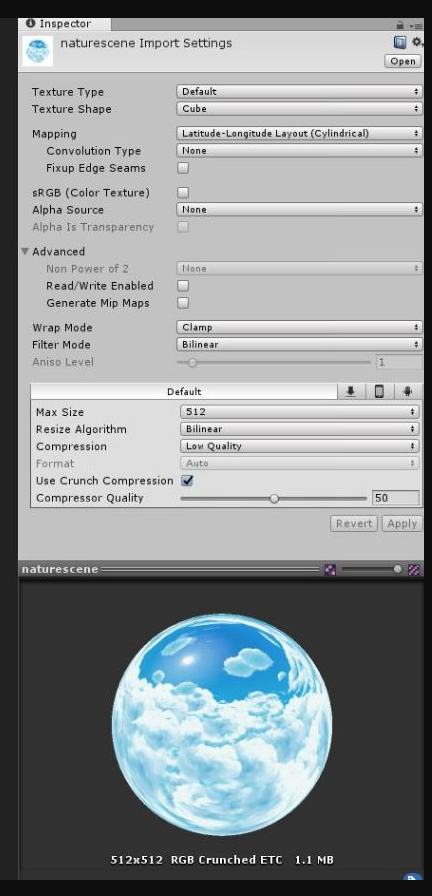
What's the best compression format to have my lightmaps in? I'm not a fan of the artefacts the default settings have
radiant osprey
modest quarry
What's the best compression format to have my lightmaps in? I'm not a fan of the...
I believe Quest has to use ASTC compression, but I'm not 100% sure on that
cunning mist
I made a quest version for an avatar but for some reason, the skin color slider is only affecting the face and not the rest of the body. does anyone know what the issue is
 analog cargo
cunning mist
I made a quest version for an avatar but for some reason, the skin color slider ...
analog cargo
cunning mist
I made a quest version for an avatar but for some reason, the skin color slider ...
Is the face a separate material than the rest of the body?
sharp zinc
how do i convert links for quest
 dim bluff
neat trick: if you absolutely HAVE to have a 4096x4096 texture on your Quest avatar, overriding settings to ASTC 12x12, best quality will take the same VRAM/upload size as a 1024x2048 ETC2 texture
The default 'low quality' ASTC compression will only get you halfway there
 graceful dust
dim bluff
neat trick: if you absolutely HAVE to have a 4096x4096 texture on your Quest ava...
graceful dust
dim bluff
neat trick: if you absolutely HAVE to have a 4096x4096 texture on your Quest ava...
Thank youuu!
graceful dust
darn it
 graceful dust
another thingy to lower upload file size, open the model in blender and use decimate modifier to lower polygons
 waxen hornet
Ngl, I am the big frustration. I have deleted unnecessary meshes on the avatar, deleted materials that were associated with it, and crunched textures with max compression crunch. I have gotten it down to 14.50 MB but cannot get it any lower. I would bring it into Blender to decimate but the problem is the meshes are actually as decimated as much as they can be. Anymore and they lose faces or skin just clips through. Not sure what else I can do?
radiant osprey
waxen hornet
Ngl, I am the big frustration. I have deleted unnecessary meshes on the avatar, ...
Remove unused blendshapes on your mesh and it'll go down a lot
waxen hornet
radiant osprey
Remove unused blendshapes on your mesh and it'll go down a lot
Unfortunately, the avatar that was made HIGHLY relies on blendshapes
radiant osprey
As well as setting Tangents to Import in the FBX settimgs
waxen hornet
I didn't make the avatar, it was a purchased and I just wanted to convert it to Quest.
radiant osprey
waxen hornet
Unfortunately, the avatar that was made HIGHLY relies on blendshapes
That in itself is super unoptimized
waxen hornet
radiant osprey
That in itself is super unoptimized
Yeah, I'm aware lol. I've talked to him about it in the past where he really should rely less on blendshapes cause then if people want to optimize the avatar they can't.
Unless they feel like removing all the blendshapes themselves and then further weight painting the avatar so the clothes fit more appropriately.
radiant osprey
Well in that state you're gonna need to remove some features to get it under the 10mb limit
waxen hornet
I guess I'll have to. It sucks, too, because she looks very awkward if certain meshes are removed. Sorta like she's incomplete, but it is what it is.
radiant osprey
Well in my opinion if you can't get under 10mb there's something seriously wrong with the avatar. My PC avatar is less than 4mb and I have a ton of toggles and even a gif on my avatar
waxen hornet
radiant osprey
Well in my opinion if you can't get under 10mb there's something seriously wrong...
I honestly never had an issue making an avi quest compat before but his are a bit problematic.
His always give me a hard time.
radiant osprey
Yeah some creators give 0 craps about optimization
And then people wonder why VRC runs at 20fps
waxen hornet
The thing is his avatars run very well in other lobbies, which is surprising. He said he had figured out a way to really optimize materials so they're not as GPU intensive but still look good, which they do. With his avatar, I run with 60 fps where with other avatars they make me drop down to 40 putting them on.
It just makes it so hard to make it Quest compatible. 😭
radiant osprey
He's lying unfortunately. There's nothing a creator can do to "optimize materials" other than lowering the amount of them
Either way, materials are not the only culprit to FPS loss and many creators don't even know
waxen hornet
Also, this may be a dumb question but do radial puppets still work with Quest avatars?
radiant osprey
Yes they have always worked
waxen hornet
Okay, wasn't sure. I'm a pc user so I'm not very familiar with what actually functions on Quest.
humble canyon
basically it's rotational constrains custom shaders and like real-time lights that don't work on Quest
radiant osprey
Any constraints
humble canyon
good point
 amber surge
 limpid dock
Where can I get index controllers for less than $400?
limpid dock
Where can I get index controllers for less than $400?
I got a set on facebook marketplace for 200.
They were used but good condition.
limpid dock
Is that the cheapest it gets for good condition? I only make $8.50/hr, so I can't afford that kind of thing easily lmfao. Took me about 2 months just for the Oculus.
OOOH
amber surge
No yelling in the halls
limpid dock
amber surge
You should be able to find a set for 200 if you're lucky.
I'll try Facebook
slow hearth
limpid dock
I'll try Facebook
You'll need the dongles too if you're using a quest
radiant osprey
limpid dock
Is that the cheapest it gets for good condition? I only make $8.50/hr, so I can'...
I think you need a new job before you get new controllers
slow hearth
radiant osprey
I think you need a new job before you get new controllers
lmao
probably some kid working part time? dunno
doubt they need to pay rent
radiant osprey
I hope so
cunning mist
is there a way to keep things like springjoints or objects on quest because everytime I attempt to upload a version of my model it asks to remove those and I would really like to keep them
or is that just too much for the quest to handle
radiant osprey
cunning mist
is there a way to keep things like springjoints or objects on quest because ever...
Nope. Too much for the quest to handle
cunning mist
sadge :T
limpid dock
slow hearth
probably some kid working part time? dunno
Yes :sadge:
 kind oxide
with using the VRQuest tools from booth how can you make an avatar pc and quest compatible? Or do you have to upload the same avatar twice and make the blueprint IDs the same
and how do you make them the same for both uploads if you do it with blueprint ID
graceful dust
That discussion would probably go in #avatar-quest
 remote marten
why my game is locked at 60 fps how to unlock???
radiant osprey
remote marten
why my game is locked at 60 fps how to unlock???
It's possible it just can't hit 90fps with your avatar/world.
remote marten
No its even on a blank world with lowest settings
radiant osprey
What performance rank is your avatar
remote marten
excellent
humble canyon
does the quest even offer 90 frames per second Standalone for vrc
radiant osprey
I think 72 is the max?




 radiant osprey
What are your PC specs
humble canyon
then why are you in the quest optimization Channel as this is a pcvr question
slow hearth
these channels are for quest standalone lol
remote marten
gtx 1650
remote marten
no i just want a little more than 60 lmao
radiant osprey
Turn down some settings and make sure your own avatar is optimized
You're not going to get 60+ in public worlds no matter what
slow hearth
you either hit the fps goal (72, 80, 90, 120) or half of that if you cant
you dont get "a little more"
unless you disable asw and enjoy nausea
radiant osprey
slow hearth
you either hit the fps goal (72, 80, 90, 120) or half of that if you cant
It can vary about 5fps around those goals
And it isn't always half. For example, Vive with a goal of 90fps can reproject to 60fps and then 45fps
slow hearth
he is not on a vive
remote marten
is 72 possible
radiant osprey
I know I'm just saying how reprojection works
humble canyon
how Quest two handles it is the only thing that matters
radiant osprey
SteamVR does it's own stuff even using Quest link
slow hearth
its either half, or half of half (80 ->40->20)
remote marten
is 72 fps possible?
radiant osprey
slow hearth
its either half, or half of half (80 ->40->20)
Not correct
slow hearth
radiant osprey
SteamVR does it's own stuff even using Quest link
steam reprojects it doesnt do motion smoothing like the vive
on the quest 2
remote marten
im typing this on q2
radiant osprey
slow hearth
steam reprojects it doesnt do motion smoothing like the vive
Right, thats what I was talking about
remote marten
lmao
slow hearth
oculus software handles asw
slow hearth
pray to the gods
remote marten
okj
humble canyon
don't ever show very poor avatars if you're trying to hit maximum frame rate
remote marten
i hit 120 for 1.2 seconds with lowest possible graphics
in a blank world
i have 45 fps on 2804x2832
resolution
slow hearth
LOL
dont even think about 120hz, and drop that rez to about half of that
if you want to smell frames with that 1650
 barren frost
I’m new to VRC but I’m on quest is there any way I can enable to show avatars without manually going through and enabling them?
humble canyon
your headset would crash instantly if the very poor avatars were automatically shown
graceful dust
humble canyon
your headset would crash instantly if the very poor avatars were automatically ...
Why that?
humble canyon
graceful dust
Why that?
because it's basically a cell phone running the quest 2 so all of those complicated avatars would overwhelm its little mobile processor
graceful dust
humble canyon
because it's basically a cell phone running the quest 2 so all of those complica...
I mean, i know it runs android but aren't the components bigger than a simple small phone
or even if so
turning them on one by one
waiting for the previous one to load
humble canyon
graceful dust
I mean, i know it runs android but aren't the components bigger than a simple sm...
it's not magically big enough to handle a bunch of very bad avatars
graceful dust
.-.
i mean
Avatars with 200 particles and all the stuff maxed out maybe
but an avatar with only a couple details that still goes in very poor
or like an avatar with 3 material slots because you added toggles and weapons or stuff to it
humble canyon
very poor because of draw calls can still be quite expensive to the mobile processor
graceful dust
that goes in very poor because yes
oh my wifi
Ohh
True
alriiiight.. you aint wrong
But still sometimes you can turn on everyone's avatars and be fine
ugh I swear mountains are annoying
No mob data
 minor imp
Hi! I have a pc avatar that I want to make quest compatible. Can you all tell me how? I watched a bunch of tutorials but like someone to walk through it with me or give me a checklist of some sort. . .
humble canyon
Part 1: https://www.youtube.com/watch?v=xjS8rreIMos
00:00 - Intro
00:19 - Importing Your Avatar: UnityPackage Import
00:42 - Importing Your Avatar: FBX Import
01:20 - Importing Your Avatar: FBX Rig Configuration
02:23 - Importing Your Avatar: FBX Material Setup
03:56 - Avatar Descriptor
04:25 - Avatar Descriptor: View Position
04:45 - Avatar De...
 lyric briar
graceful dust
I mean, i know it runs android but aren't the components bigger than a simple sm...
lyric briar
graceful dust
I mean, i know it runs android but aren't the components bigger than a simple sm...
there is a reason why the quest just doesn't have the oomph then a PC whos CPU is twice as expensive, and whos GPU has has twice the amount of VRAM then the Quest 2 has RAM, among other things.
And the reason why there are so many very poor quest avatars is simple, a lot of people have spent countless hours and sometimes a lot of money (sometimes several times the value of the quest 2 itself) in to their avatars. And those avatars would look completly different and basically get destroyed if they would be optimized to quest 2 standards. Also it takes quite a lot of time and skill to optimize them to that standard, but in the end you have an avatar that looks terrible in comparison. So most people just remove a lot of optional stuff from their avatars and upload them "as is" as a quest version, because quest users sometimes complain a lot because they just see fallback avatars. Also, some avatars just don't work on quest because of features that are not present on the quest 2 build, like constraints.
The quest 2 hardware limitations are just to to high.
just to give you an idea: an Avatar that is "Excellent" on PC, can be very poor on quest
a while ago I started to create an Avatar from scratch, the goal was to be excellent on quest and PC, and also to have a lot of features and little details, and that it looks good and the same on both plattforms, just to prove that it is possible to do it.
I gave up after a few dozen hours, because I rather spend my time doing something else.
dim bluff
lyric briar
there is a reason why the quest just doesn't have the oomph then a PC whos CPU i...
CATS bake will make it... acceptable, at least!
one of these days I'd like to work on a way to manually control the simplification portion, but that may be a ways off
 dusty robin
Hi
lyric briar
dim bluff
CATS bake will make it... acceptable, at least!
yeah, no
dusty robin

 sick yacht
If you make a PC Model first and then optimize it for quest using CATS decimator It's super easy.
 vast cobalt
any aussies who have an oculus quest 2 connected to air link? I'm having trouble connecting it
sharp zinc
slow hearth
i.e.
I used this method and it hasn't reduced the size of anything, or dented it. I just need .47 of a MB to crunch down.
 green oriole
sharp zinc
I used this method and it hasn't reduced the size of anything, or dented it. I j...
green oriole
sharp zinc
I used this method and it hasn't reduced the size of anything, or dented it. I j...
The only time that I know of when it doesn't decrease size is when you have the "compression" setting set to "High Quality" instead of "Normal Quality
".
But even then, question if you really need this to be this high resolution, while it may look low resolution in Unity, in VR you are very unlikely to notice.
I can get away with a single 4k texture for the entire body, for smaller accessories you can get away with far lower resolutions.
And worth remembering that all crunch compression does is decrease the download size, not the actual size in memory and Quest does not have a lot of memory.
humble canyon
and you probably don't need a 4K texture just to have a metallic map
sharp zinc
green oriole
The only time that I know of when it doesn't decrease size is when you have the ...
What is really fucking weird is I compressed almost everything ... And the total MB went up by 0.18.
green oriole
sharp zinc
What is really fucking weird is I compressed almost everything ... And the total...
Not sure how crunch compression works, but there is a thing called a table that is often used to compress stuff and it takes up size on its own, which makes it pointless to compress low res stuff since the table could make it bigger than before.
All I can really recommend you to do is decrease the resolution of the textures instead, which you can easily do in Unity.
Although if you have a texture with transparency that doesn't need it then making it a solid color like pure black has decreased size for me in the past.
 tame tendon
I can’t load into specific worlds on vrchat and my game consistently crashes when trying to load into these worlds. Is there a way to fix this?
Uninstalling and reinstalling doesn’t fix the issue
graceful dust
I have this issue too
radiant osprey
You can still add an emission and just apply whatever color grading you used for the base color onto the emission colors
radiant osprey
How is the color of the particle controlled
radiant osprey
I can't remember, does VRC allow the VRC Particle shaders on avatars?
Alpha Blended is technically transparent but appears solid. But VRC doesn't allow it
Well with the provided shaders the only thing you really can do is use something like Toon Lit or Standard Lite with a grey emission so it's not entirely taking the color
Unfortunately that's the only options you have for Quest
Gotta upvote that canny request to add an unlit shader to quest
radiant osprey
Bounds? Make sure the white box is coverting the entire mesh
 stone sonnet
idk it this is where to ask but im getting <20 fps and constant crashes on my quest
 quaint citrus
If there's anything that is pain on vrchat it's making a optimized quest avatar.