#quest-optimization
1 messages · Page 7 of 1
 oblique dagger
 tribal tartan
scales?
 rare apex
Do you have a screenshot?
 wide ridge
Well it would be intresting to have it like that, not 7k but the way to calculate what gets shown, less peps more optimised map= higher poly avatars and the other way around
oblique dagger
No but you can find the model in Deviantart
I mean chop up
As in
CReating gaps
;-;
rare apex
Aaah it's that character ok, now I understand why so many triangles in the tail
tribal tartan
and expect it to work
rare apex
People usually expect Decimate to do miracles 🤷
wide ridge
Ah remember the time when everyone just used mantis lod editor? Good times
rare apex
Btw this stuff belongs to #avatar-quest I believe
oblique dagger
I will wanna make an MMD Medusa (Gorgon) one day so I'll have to figure out how to get that tail polygons lowered without breaking shiet again
 sharp zinc
triping there's no reason to be mean about it and say i'll cry
i've done enough of that already.
 slow plover
@tribal tartan re: "you do realize worlds are max 50k, oculus recommends max 100k in a scene"
if that's the case, the recommendation for 5k on an avatar means you'll be right on target with 10 avatars in-scene
which i believe was the point you were making, but just making sure 😄
tribal tartan
yes, that was indeed the point
hence why getting your avatars under 5k technically allows for more people (even though the Quest's CPU shits itself from netcode alone at that point anyway)
 sinful bone
Has there been any additional word on the final poly cap?
tribal tartan
Apart from Tupper saying he thinks 7.5k will be the cutoff point, nah.
sharp zinc
you can support alternative optimization methods here @sinful bone : https://vrchat.canny.io/feature-requests/p/quest-avatar-limits
slow plover
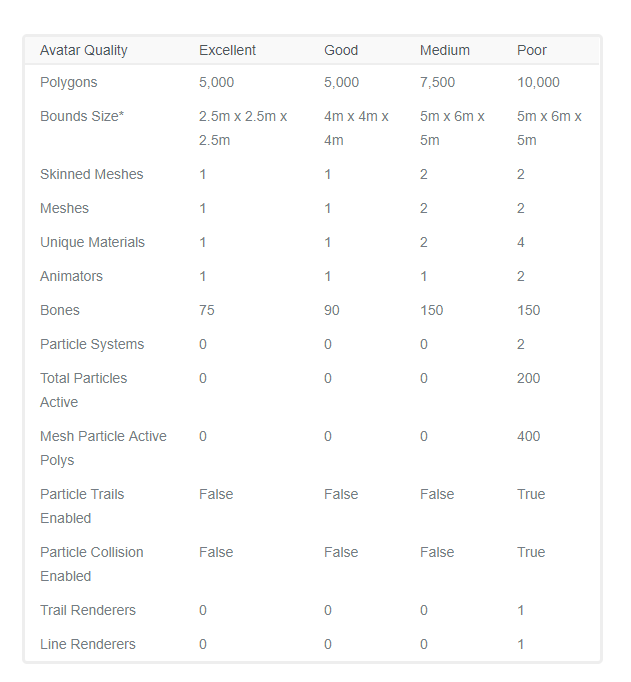
I don't think this has been noted strongly enough, but other avatar stat qualities will be capped as well
Materials, mesh count, etc
I should have numbers to put out publicly soon, we're in the process of nailing things down
tribal tartan
imagine caps are set, half the public avatars stop working
sharp zinc
thankfully i rarely see anybody who needs, and even rarer, uses more than 1 material or mesh for quest avatars
tribal tartan
imagine nabu loses his shit when he realizes how underpowered the Quest REALLY is and how people DO need to use 4-7k poly avatars max, preferably 5 or under or the framerate just goes to shit in literally any world with any level of detail.
sharp zinc
i don't want to argue this here triping but you were there when the quest users were using 20-30k+ avatars without issues in "large" (for quest world limits) groups. i'd appreciate if you stopped trying to shit on me every chance you get here while acting cordial and friendly in game.
i've already been threatened with mod action if i keep talking about tbhis and its real tough to just sit here and ignore it when you're speaking that way
tribal tartan
I'll shut up. sorry.
sharp zinc
i know you're just passionate about it since it affects you significantly even as a non quest user
i get it, don't worry, i just hope you understand too that i don't want unoptimized stuff either, i just don't agree with strict hard-line limits because i havent observed breaking them cause issues for the questlets
 ebon spade
Don't worry, the Quest doesn't need unoptimized avatars, it's perfectly capable of dropping frames on its own ;)
It's a miracle the game runs on it at all
tribal tartan
lmfao
agreed, audio thread dies just from being in a room with 10+ people, even if their avatars are empty gameobjects
slow plover
Audio thread issues should be fixed in our next release, just did some testing earlier 😃
tribal tartan
yaaaayyyy
sharp zinc
@slow plover this ones a tiny suggestion so i don't think it needs a canny: turning off transparency for menu/nameplates for quest users
i've been hearing them mention stutter just opening the menu up
tribal tartan
honestly, the transparency probably doesn't have much to do with it
and if transparency IS to be removed on the quest menus
itll most likely happen when all the menus are redone for all platforms
ALSO, nameplates and menus are completely flat planes
so they don't have any depth calculation
meaning transparency really isn't costly
for example, some parts of the junkyard have transparency on their textures, but they're flat. hence why it doesnt kill the quest
at least, thats what I think is going on
ebon spade
Transparency is actually quite problematic on mobile GPU's
It's better without any depth stuff but still
Well, it can be problematic
slow plover
stutter on menu isn't related to GPU load (transparency), its due to a large number of scripts and gameobjects firing Awake events and doing various menu awake things
we've been improving that over time
there is also a stutter on new user join on Quest that I believe is being solved with the next release
tribal tartan
Im dreaming of a day where the UI is so optimized, we can have discord overlay style avatar circles above the mic icon for people talking.
rare apex
I've been making some performance tests on Quest compiling some Unity stuff on it, like models with animations, baked lighting, mixed lighting + shadows
I feel the urge to laugh at all those people on Reddit that were mad at me when I said Quest can't barely reach the graphical fidelity of a modern phone or Switch, but I'll just stay calm
Enabling lowest quality shadows totally kills the performance
LWRP doesn't seem to improve performance at all over standard RP
wide ridge
Shadows at low quality aren't even worth it either way, they look super messy and blocky
rare apex
Yeah, in fact, they just look terrible
Also there's some shit going on with the default Oculus plugin because head movement feels kinda janky regardless of what's in the scene
I still believe I'm missing some optimization points for Quest
Because the same stuff I tried to run on Quest (decent shadows too) runs solid 60 fps on a iPhone 6S, which will turn 4 years old this fall
And on Quest is just motion sickness fuel
wide ridge
Yike
 lean kernel
When do we get quest account merging
tribal tartan
lean kernel
Well yea I already asked
 livid trellis
eventually.
 runic lake
I'd love to see when discord can be used on the quest controllers
 wide hemlock
I have a friend who uploads quest avatars still....
When will quest/vrchat have the selfie camera? ^^
 royal sparrow
interested for answer for this question too
 toxic hollow
@royal sparrow @wide hemlock they said on their recent dev stream that they're still looking for a workaround to get that feature in, since the quest apparently doesn't have any screenshot/picture storage
slow plover
That isn't the only reason, but it is probably the most easily explained user-facing issue 😛
wide hemlock
Alright well I hope it all goes well either way.
royal sparrow
thanks for the response!
wide ridge
Can we rename the #quest-optimization to questionable-optimization?
rare apex
Only if we rename #world-quest into #quest-warudos
 lavish parrot
@wide ridge This post wins the internet
sharp zinc
got my legs/shoes/etc down from 25k to 1.7k tris
i can never do as well with the upper half, because of fingers, remaking shape keys, etc
 humble canyon
how many triangles is the head
sharp zinc
face without eyes, eyebrows, inner mouth etc is 3.5k
humble canyon
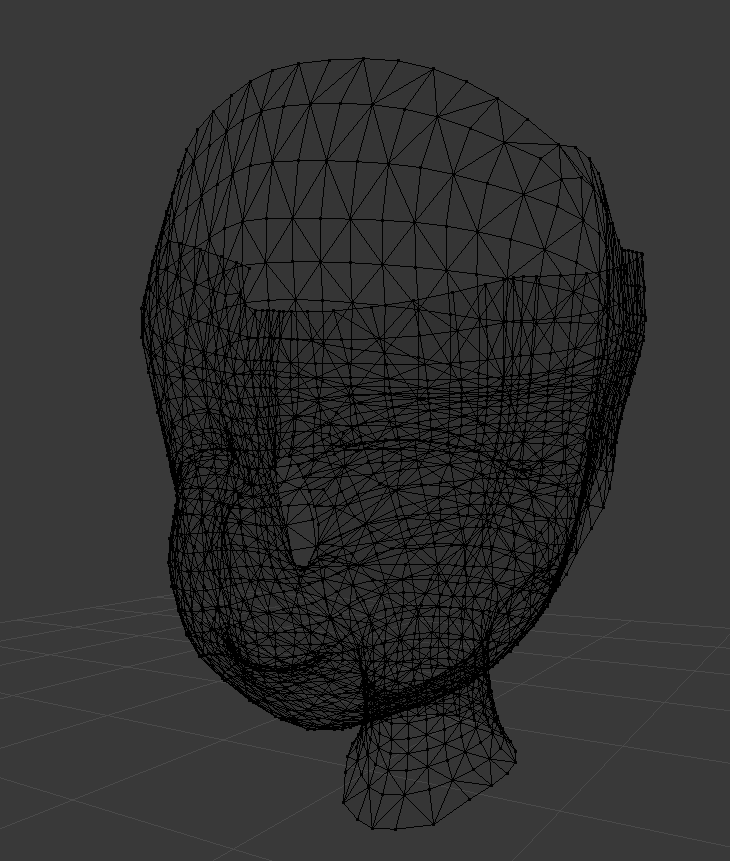
mind if I see a wire frame
 humble canyon
could you hide the rest of it as it's kind of hard to read with the rest of the Mash there
 left holly
you can have around 750 poly for the face and it would look good
sharp zinc
https://i.gyazo.com/31613915246d9eabd7eb8667b75bc55a.png always the toughest for me
 humble canyon
could I see a non wireframe version of the whole Avatar

Make some easy face shade keys animation - Low poly face - 3D model by Offy (@axe163)
sharp zinc
https://i.gyazo.com/6dba07693b35c53f01e295905273848f.png can see i've tried to get the lower body to be decent

havent touched anything else yet
there's some more cleaning i have to do with the shoes
but it's not too many polys now
livid trellis
Yes
humble canyon

Lowpoly game character with hand painted texture. Rig for body and face is ready to use. I’ve modeled this basic clothing for him and tested some standard animations like running and jumping.
All work done in Blender. - Boy Finnigon Lowpoly Gamecharacter - Download Free 3D ...
an example of low poly topology that has all the facial features
sharp zinc
can i select all the verts affected by a shape key?
humble canyon
I don't know
tribal tartan
not without code. but depending on the situation, you could select different vertex groups?
sharp zinc
@tribal tartan i found a ghetto way to decimate while keepign shape keys
withotu a script too
tribal tartan
welcome to modifier painting
humble canyon
start deleting Edge loops ?
sharp zinc
i select, for example, blink right, and do my decimation, then i do space-> re-time shape keys. dunno what that's supposed to do, but it doesn't seem to freak out my verts all over the place as much when i switch to another shape key? then i can just delete the shape key that's causing things to move (the one i used for decimating) and replace it
the downside seems to be that the verts still do move from their 'original' spot
maybe
i did a blanket dumb 7.5k decimate to see if it broke anything in game, will let you know
am i stupid or did i find a decent way to skip a lot of work if you don't mind unintended consequences @experts like @left holly
left holly
Shape key are easy to redo with proportional edit or bone. So decimate the face should not be a problem
humble canyon
also would suggest learning how to select Edge loops and delete them as that can result in less messy results
sharp zinc
it seems to have worked though, i can skip making new shape keys
sharp zinc
pls
tribal tartan
you would actually be everyone's hero ngl
left holly
If it work. Thats great
sharp zinc
i'm too lazy to go that far, and i don't think i know enough to actually know if this doesn't cause other issues
left holly
I need to decime half of the thing i upload :/. Delete some doubleface and decimate a little should do the trick
To be under the 7.5k
humble canyon
surprised someone hasn't made a quest compliant anime base mesh
left holly
Shouldnt not be that a problem since I already downgrade some to 5k
How much tris for a base you suggest
 proud valley
tribal tartan
proud valley
tribal tartan
whatever ze fuk a "base mesh" is comprised of, WHEN YOU DELETE MOST OF IT UNDER CLOTHES
aka, just go 5k straight
get dem detailz boi
humble canyon
no it needs to be lower than 5K so you have room for the hair avatars are recommended to be under 5K
as for what a base would include good low poly hands and a fully rigged head model
left holly
Naked can be around 5k yeah
humble canyon
personally I would say 4000
left holly
But we dont want again all the same miku face all over again :(
humble canyon
well the anime faces are pretty same already
as it's pretty much just different eye textures differentiating
tribal tartan
boi u dont know shieet about animay
humble canyon
it's not that hard to tweak facial features with the blender sculpting tool on the base blendshape if it would be a little too samey the base space
but if that'd be too much work you could probably cover most characters with three different eye presets as that seems to be most of what changes
left holly
Maybe do like a game i saw. Put shape key to change the shape of the face or body
humble canyon
we could probably steal the blend shapes from vr anime character making tool
we probably should just me making a low poly based off of that
left holly
much work for one person and for free
humble canyon
well better to do a proper retopology than just decimate if we were making a base mesh
I suppose I can take a whack at making a low poly base mesh from the VRoidStudio Avatar tomorrow as I cannot see track the license on that to know if that would be kosher
sharp zinc
my "merge weights to parents" button no longer works for some reason in cats
wide hemlock
That's so coolll!
 mossy tulip
@desert veldt optimize
 desert veldt
it's optimized. it needs to bend, and have a roughly human shape.
rare apex
mossy tulip
@desert veldt quest avatars will rarely have the need for full body tracking. You can skimp out on some leg areas.
 tender cloud
@mossy tulip unless you're a PC full body tracking user who wants to be visible to quest users
mossy tulip
@tender cloud true...
sharp zinc
@rare apex lmao Vrchat should put that pic ingame
 jolly peak
Can someone tell me if there is a possibility to turn a screen image into a 3D model
livid trellis
With a looot of skill and well.. modelling it yourself based off the imahw
jolly peak
Well i guss it will take alot of time to make it
I want try the one in my image profile but is not going be easy the avatar is from ps4
desert veldt
well even if I didn't have full body, the knees are still bending if you aren't standing completely straight
and those 30 tris I could save there would hardly made it better for anyone
 toxic mulch
For quest a texture can't be more than 1024 in size right? Any advice for a beginner to get decent textures of that size? I see alot pixeling going on on mine.
 craggy marsh
It can be more than 1024 if REALLY needed

 left holly
How heavy a texture should be in general
 tribal path
i make combined atlas maps like, 1024, I think just one of that is okay for an av
if you can't get away with 516 at least
512*
ebon spade
1024 should probably be considered the maximum for Quest. If you go higher you might run into the size limits anyway.
One 1k texture for an avatar sounds good tbh, lower is better of course
left holly
There no way to see the weight of a the final model? What the max again
desert veldt
hard max is 10MB
my avatar with a single 2k texture has an asset bundle size of 2MB. that's with ASTC 4x4 compression, with default ETC2 it was 1.2MB
this also includes the same dance anims I have on my PC avatar
sharp zinc
would be nice if you could easily see the filesize of your avatars
ebon spade
It's definitely there in the editor logs, the SDK is in sore need of displaying basic info like this.
left holly
If i addition the texture plus the fbx. Its around 1mb i think
desert veldt
AppData\Local\Temp\DefaultCompany\vrc project name
DefaultCompany can be something else if you changed that
 dreamy plaza
@toxic mulch When unwrapping UVs, you can increase detail on key areas by increasing size of the UVs on the map for the relevant areas.
Faces, exposed skin, etc.
It's how Square-Enix would texture Final Fantasy characters in limited environments like PSP

Example here.
It's okay to have pixelated textures in places people won't look at often.
Aesthetically, the character will still be pleasing.

I think that's the same model.
That could be uprezzed tho

Ah ha.
Optimized for potato handheld.
left holly
But we are in vr so we have the mesh very near our eyes
dreamy plaza
Yeah, face UVs need even more real estate.
SE pays particular attention to face/head UVs in this example, however. The head is almost 1/2 of the entire map, ignoring blank space.
left holly
If we have a flat color. On a texture. Its less heavy then a range of color in the same place right?
tender cloud
@left holly it might compress better for download but it's going to use the same amount of texture memory. If you have a truly flat texture you probably want to make it smaller on the UV map (but not so small that mipmapping causes problems)
mossy tulip
In my experience face, eyes, and hands get more real estate. Hands because they are the closest a user sees.
sharp zinc
is there an easy way to decimate hands without ruining the joint areas? or maybe a specific easy way to select those joint areas so i avoid breaking them?
ebon spade
Dissolve edges manually in edit mode
Or select the fingers, separate mesh by selection, then decimate the non-fingers
sharp zinc
took manual work but i got it
still a tiny bit scuffed when i make a fist but it's totally fine withthe default hand position now
 hollow carbon
This is edited from my live twitch demonstration for making existing avatars quest compatible. If your on PC an incentive for doing this would be so quest us...
wide hemlock
that one too long do meeka's version
tender cloud
If I want to simulate eg skirt or hair physics with a static animation, is it typically cheaper to use bones or blend shapes for this sort of thing?
 rare pebble
Hi! I posted on here a while ago, im trying to optimize my avatar for quest
im not very familiar with modeling
i grabbed the fbx from the model resource and plugged him into mixamo to rig him up
which worked pretty well
but now hes made up of several different meshes and materials
is there any way to just glue everything together to create one big mesh?
i opened him up in blender and this happens
i am very confused
sharp zinc
you'll want CATS blender plugin
rare pebble
alright, done
sharp zinc
CATS has some buttons
model options -> join meshes to join all those
and you can get the atlas combiner plugin for combining all the materials
if they all use the same material just hitting combine same materials' in CATS may work
rare pebble
how do i know if joing the meshes worked?
it spat an error
i did it again
no error but no noticeable difference
sharp zinc
up in the top right you should just have "Body" or something instead of a bunch of shit

also you should import using CATS instead of normal blender import
and hit Fix Model
almost always
sharp zinc
yep it's combined
sharp zinc
never heard of .dae so good luck
sharp zinc
fbx is probably best
sharp zinc
hit fix model
rare pebble
wow
thats just straight up magic
alright, so i guess last thing to do is merge the materials?
or is that done?
we're here rn
whatever happened to the materials, i dont think it worked
unity isnt seeing anything but the base material
v
ok, i think i got most of it
just one last issue
he's transaparent
and the materials are still fucked
well shit
sharp zinc
where can I find the requirements for quest launches for my world
left holly
Extrack the material from the fbx. Click on the arrow to expand it. Right click extrac. Now you can edit it and change the shader
rare pebble
alright im back with 2 final things, because i actually imported him into the game
1: How can i get transparency? His eyes have black outlines because theyre transparent png's
ebon spade
Transparency on Oculus Quest is not a good idea
rare pebble
2: he's always t posing in game and i set him to humanoid
alright then, thats not a big deal then, i just made the eyes the same color as his skin to hide it
works well enough
still cant fix the t-posing tho
i think it's on the avatar himself
.... It isn't because he doesnt have fingers is it?
sharp zinc
can you check to see the actual avatar configuration
rare pebble
i have it unchecked, it was an accident and i dont know how to remove it
also, how do i check the actual avatar configuration?
.....
weight paint?
sharp zinc
you can remove a component by right clicking by that check box
https://i.gyazo.com/725f3b9122179104de5b462890649355.png can click down here to select the avatar
 rare pebble
right clicking doesnt do anything...
sharp zinc
and then in the top right you can see "Configure avatar"
sharp zinc
https://gyazo.com/9859a43c5512ce01290e0bd88419235d to remove components
 rare pebble
thanks
so
no avatar
i dont know what im doing
but
i found linebeckavatar over here
sharp zinc
that's the hierarchy
you can find the avatar in the actual assets
down in the bottom
yeah
rare pebble
he moves fine
sharp zinc
dunno, try reuploading after removing that component like rokk said?
sharp zinc
maybe
rare pebble
that worked!
his legs dont shift when i move
but it might be because they're too stubby
but he walks!
thanks!
ebon spade
It's because you don't have fingers.
You can add fake finger bones in Blender. They don't have to do anything or make any sense. You just need at least one thumb, index finger and middle finger bone mapped on each hand.
@rare pebble
Why fingers affect your legs is something I'll never know. I mean I know why, I just don't know why they made that decision.
You also can't crouch without fingers. You only have IK between your hands and head.
rare pebble
odd
but sure
also, how do i make the avatar cross paltform?
for some god forsaken reason pc players cant see quest only avatars
i also dont know how to add bones in blender
im a wreck
sharp zinc
you switch platform to windows/mac/linux standalone and upload again
rare pebble
Got it, thanks!
Now all I gotta do is get this guy some fingers
Somehow
I added them to the model, absolutely no clue how to rig em
rare pebble
@ebon spade you are it's the fingers? I'm in game and i can move his little hand nubs
left holly
They are not asign of weightpaint currently
Soo
You character dont have real finger
So in edit mode press
E
3 time and assign them to thumg index middle
 main tusk
what
 knotty valve
@rare pebble the other possibility is to copy/make a new project and then link the two over the uuid of the pc or android version. VRChat SDK -> Manage Uploaded Content -> Copy ID (from avatar you want to link) -> select avatar in unity hierarchy -> inspector -> pipeline manager -> press detach (optional) -> paste uuid
this way you can avoid the converting between plattforms, everytime you want to update one of the versions
rare pebble
Thanks! Will try later!
 lost pewter
I like to use the unity unlit color shader for interactives sometimes, and the SDK gives me a warning about not being supported. Is there a particular issue with it on quest, or has it just not been added to the whitelist? I know unlit texture doesn't give any warnings.
rare pebble
I think they've limited it just to their pool of mobile shades that they know have a light impact on performance
 acoustic estuary
World can use any shader that compiles for mobile
rare pebble
Well shit
They're probably minimizing lag on the actual models themselves
Also, out of curiosity, I rigged my model with mixamo
tribal tartan
so, most worlds on quest are actually way under the 50k poly limit
hence why
- youre left on your own to do what you think works best with shaders
- youre allowed to use up to 10k poly on a single avatar out of the full 100k poly budget for a scene recommended
probably requiredby Oculus.
rare pebble
Sorry was working
Also odd
Anyway
I used mixamo to rig my model
2 of his Verteses are off
2 of the head Verteces are mapped to the torso
Is there a way to easily fix that?
Literally only 2 points
left holly
Select them and apply weight to the good vertex group
And delete it from the wrong one
rare pebble
and is this in blender or the skeleton editor in unity?
left holly
Expend the fbx in unity. A bunch of stuff appear
 quiet kraken
Hello everybody! Hopefully someone can help me solve a recurring issue I am having. When using the mobile shaders, my whole avatar, except the hair, turn black.
sharp zinc

in case anyone likes comparison images
71 bones on pc and 69 on quest, can prolly guess why
livid trellis
byebye boob bones
toxic hollow
this is so sad
tribal tartan
what's requiring more than 55 bones?
toxic hollow

tribal tartan
I'll also add you could probably bake jiggle physics into the walk cycle if you really wanted.
sharp zinc
i have 9 hair bones i haven't messed with yet that i could remove since i attached the relevant verts to the chest anyway
i have a dummy duplicated head bone that that hair is children of so that the hair renders for me on my side (since vrchat culls anything that's a child of your Head bone normally)
the other 5.... well, i have an extra eye bone that i haven't removed yet, and the tiddies are actually 4 bones total
also 2 tongue bones for some reason i don't use
tribal tartan
ah
lol, imagine actually making the tongue on bones, I dont know what that could be for....
sharp zinc
hey i didnt make em!
sharp zinc
everything 'just works' right now and is pretty decent optimized so i don't want to risk removing stuff, then making future changes, and then needing those things back, so i kept these just in case
instead of dynamic bones on the back of my hair i assigned that hair to the chest vertex group, so it doesn't just stick out at a 90 degree angle when i turn my head 90 degrees
though it doesn't quite work yet for the quest version since my quest version lost those original hair vertex groups, i need to fix that someday
tender cloud
@sharp zinc maybe use transfer data to copy vertex group data from the original mesh?
sharp zinc
it's not a big deal, i'm just manually selecting what would have been the same groups now
 wintry ember
i got this error
and i did the shaders it came with
thats what im trying to upload
tender cloud
@wintry ember you have a lot of optimization to do before you can upload that for quest unfortunately
livid trellis
youve got to decimate about 20k polys down, combine it all to one mesh, before you worry about shaders.
wintry ember
i dont know how to use blender
livid trellis
Youll have to either learn or update it to a PC only model
wintry ember
i already uploaded it to pc model
livid trellis
The quest has a limit of 7.5k polys, and 1-2 Meshes.
Unless you plan on optimizing it thats the most you can do
wintry ember
i mean i can probly just use another 3d tool
livid trellis
dont think so
wintry ember
well im too lazy to to learn a freaking tool like that
livid trellis
Then dont have a quest ready model.
livid trellis
no. you need to reduce the poly count. you need to reduce the meshes. Otherwise itll be auto-blocked by any quest users ingame.
You will be able to upload it as far as im aware but theres a mechanic ingame that will stop quest users entirely from seeing it, since its over the limits
sharp zinc
191 bones is also horrible
sharp zinc
you shouldnt need more than about 50 but it's understandable not to go all the way that low
tribal tartan
This doesn't belong here @heady viper
 weak vessel
well reassigning the shader island to hard. Click on the model in the hierarchy, find its mesh, there will be a list of material(s) with drop downs on the materials. Then you can reassign the shader. You do need to decimate it though.
tender cloud
so if I'm retopologizing a mesh in blender, and I want to both atlas and retopologize in a single step (and, to be more specific, I want to deal with situations where I have multiple 3d layers that I want to bake into a single flat layer), is there a way to project the texture of the original mesh onto my new mesh and bake that into a new texture on an independent UV map?
tender cloud
been trying :/
there's a lot of documentation on how to e.g. make normal maps, or to compute a projection through some points
but I'm finding it difficult to find information on projecting onto nearby geometry
left holly
Bake normal is simple yeah. But texture/UV I did nor really think about it
tender cloud
I can transfer UVs, which works great if the underlying mesh is already more-or-less a flat sheet
but if I have multiple layers it gets a bit tricky
eg these straps
I'd prefer not to keep that as geometry
tender cloud
so, the initial model is 33k total, which is obviously way too high. At one point I manually reduced it down to about 9000 by dissolving edges but found it hard to get any lower, I'm doing a new run at it trying out retopologization, in part to learn how retopo works and in part to hopefully get under 7500 😃
so part of that is getting rid of these geometric details that can go into a texture instead
left holly
What the model look
tender cloud
here's the body part that I'm working on
currently the dress is a different mesh than the underlying body. I'd like to combine everything into one smooth surface to get a mostly-unbroken UV map
maybe the better approach would be to combine the meshes as a high-poly mesh, bake the textures, then construct a new low-poly mesh using the inner body geometry as a base, and copy UVs
copy UVs from the atlas that is
wintry ember
how do i fix that
sharp zinc
answered you in the other channel
left holly
You need to unlock the legal right to use that model
wintry ember
oh
left holly
Was a joke
Right click on the ball
Extract from prefab
@wintry ember
@wintry ember
But there is to much matarial
I know your new. But you need you merge all those to less then 4
left holly
@wintry ember
lean kernel
am i the only one who thinks 5k polys are NOT ENOUGH ? i mean every avatar i see needs to be manually unlocked dure to this. its just really really low. how would i be able to make avatars with 5k ? really
but thanks for account linking :3
sharp zinc
i posted this yesterday in another channel but, for a good looking avatar, from scratch from a professional, 5k is possible. for stuff not from scratch though:
5k: probably a professional still, if you can do it without any loss of detail. the exact avatar really makes a huge difference here
7.5k: possible for many avatars given a lot of time on a single one, if they have some experience working with blender already for vrchat stuff
10k: possible for most avatars by almost anybody if you spend a lot of time on it, even without previous experience
lean kernel
i see avatars havinf 20k and my game still being on 72fps on quest
its just annoying having to turn on every sings avatar, i would want to just get rid of the auto blocking
sharp zinc
of course
there was -no reason- to disable showing all avatars on quest
we can do that on pc
lean kernel
i mean, if a avatar has more than 5k quest users just see a robot until the manually click show avatar. thats annoying. i get that pc avatars wont show on quest but that 5k limits is very annoying: having to click that button everysinge time i join a room
sharp zinc
the default hides anything Poor, correct?
sharp zinc
...
ok, read this:
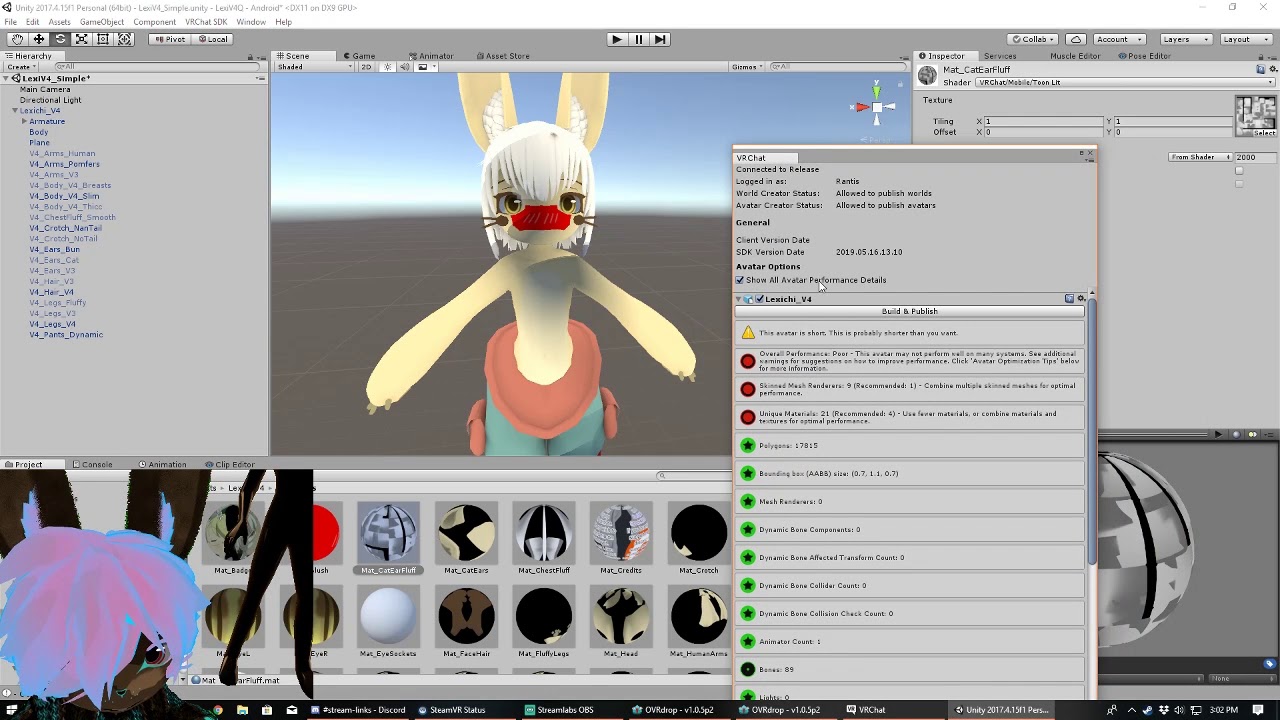
The Avatar Performance Ranking System allows you to see how much a user's avatar is affecting performance via analysis of the components on that user's avatar. You can also use it on yourself to see how performant your avatar is. **This system is purely informational at this...
On Quest, the Minimum Displayed Performance Rank is set to Medium by default. This means you will not see any avatars ranked as Poor or Very Poor.
to exceed medium, you need over 7500 polygons:
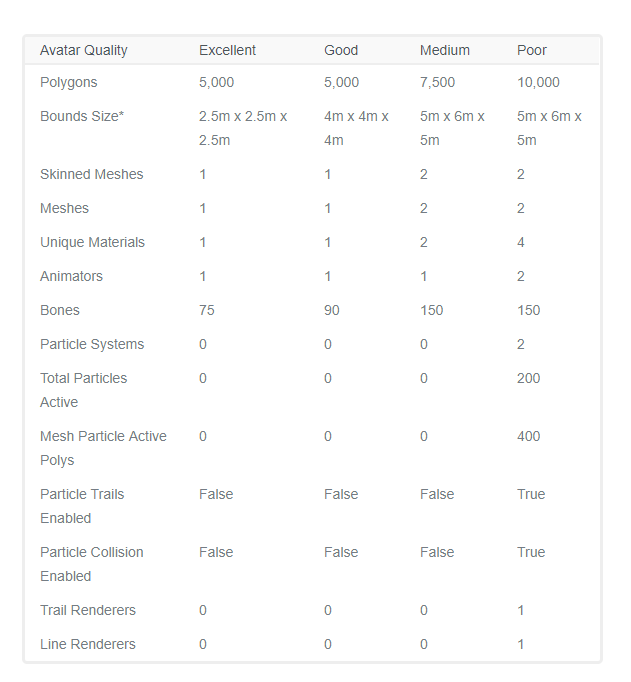
i dunno why i even need to argue this
lean kernel
but, over 5k polys it blocks it for quest idk what to think of all that then
sharp zinc
no, most certainly, it does not ever autoblock things "over 5k" by itself
sharp zinc
it blocks anything by default that exceeds the numbers inthe Medium category there
i literally have a 7500 poly avatar that's shown by default for every single quest user
left holly
7.5k is enough 5k is something else in term of details
 shut dagger
seems kinda arbitrary given the first 2-3 weeks we could see nearly anything
cepting of course, weird PCs
 lean gate
I had a 42K Poly avatar and used the CATS Decimate tool to get it to 10k, it broke visemes however at least im not a robot with an icon.
humble canyon
a 10K you won't be seen under default settings you need to get under 7500 to be seen
lean gate
Yea but its better than nothing. I usually just ask quest users to change it and many quest users I know usually have it set to Poor
humble canyon
of course just figured I should let you know
craggy marsh
When testing world performance on Quest make sure that you have Guardian disabled or far away from borders. If any borders are visible, FPS in VRChat drops by 5-20 fps (depending on world)
rare apex
I wonder why Guardian is so heavy... Probably because it's basically rendering a transparent plane above everything else, dunno
It totally kills performance on some demos I tried to compile from Unity
lavish parrot
Throughput from camera in 3D, rendering AR-sort guardian content over the footage; something about the task
tender cloud
is there a handy way to take a tree of bones and merge them - updating weights appropriately - to their common parent?
left holly
to parent
tender cloud
aha, that's where it was hiding
oblique dagger
@lean kernel Your client must've bugged out
 sudden wing
💩
 slate cradle
Ok I'm getting mixed messages here
the performance guide said that textures should be no bigger than 1024x1024
So I split my model into two separate 1024x1024 textures
but the uploader says i should atlas them together
what's better, two 1024x1024's, or one 2048x1024
slate cradle
Figured so; sadly my polys are 7498 so it's medium either way
I just thought the quest needed no more than 1024x1024 per image for some reason
humble canyon
mostly that's just vram usage
and if it won't let you upload just cut the resolution in half and put it in atlas
slate cradle
Alright SDK's got a annoying thing where I have to disable all my PC avatars in the scene to enable the quest avatars to upload
left holly
I aim to have medium so I end up using whatever till am not poor
slate cradle
My avatars are excellent on every category except medium on polys \o/
i'll decimate more when I can, there's room for imporvment
left holly
some time I have 2 material
slate cradle
everything on quest is 1 material because the shaders are so limiting they're all basically the same
left holly
I put particle to have thing transparent
slate cradle
wait, is blended transparency on quest avatars possible?
that would change everything
I removed all my cutout and blended stuff because I couldn't find a shader that does either on quest
left holly
ebon spade
@slate cradle I don't think it is, that's too expensive
You can use particle additive and that's about it
 vale jay
Hi
 versed lion
Ok
 fallow wind
Aww yeah... this is for you my Quest friends. 
shut dagger
nice
wide hemlock
satisfyinngggggg
acoustic estuary
Yeah but what's the avatarrrr??
sharp zinc
So, I am completely new to the subject of making avatars, or really anything 3d. After a couple of hours, I figured out how to make an mmd model, put it in blender, put the blender model into unity, and upload it to vrchat. Now that I can atleast do that, I want to learn how to optimise characters so quest users (including myself) can see and use them. Is there an efficient way to optimize them? Or, if there isnt, is there an easy way to make characters (preferably looking like mmd models) that are optimized? Sorry if this sounds confusing, I just don't really know where to start
wide hemlock
Decimating, taking some things off that are unnecessary
sharp zinc
Ok, thank you!
Oh, I've come across one other issue aswell. In blender when I'm doing the eye tracking and visemes (using the cat plugin) they are in Japanese. I've been able to figure out the eye tracking and visames aa and oh, but not ch. Any solution?
wide hemlock
you can translate to english in the model options
sharp zinc
Thanks again!
wide hemlock
np!
 final spade
@sharp zinc pro delay in response time, but from what i've heard and seen, the absolute best practice (after of course messing around with and understanding decimation / just removing parts of an avatar outright) is retopology, though it is difficult and will take practice to get down correctly.
if you find yourself wanting to bring more avatars to quest that are more complex and harder to decimate without ending up with soemthing looking like crap, retolpology is your next step. of course, that's if/when you get to that point
 glossy adder
@waxen nimbus I had no idea you were canadian, also, bang up job on the online texture editor, that's cool as hell
 waxen nimbus
@glossy adder Thank you!
glossy adder
we've met in HF too btw if you remember. I've been all about quest optimized avatars lately myself
I picked some up for some folks so being visible to them is super important to me
sharp zinc
@final spade I'll look into it, thanks!
 gloomy arrow
 wide hemlock
lol
wide hemlock
yass
 slender rapids
There’s no mic jack on the Quest afaik.
wide hemlock
its an headphone jack, headphone with an mic already
 amber jacinth
Ayy, I'm new to Quest Development and I have a question.
How does it work to create an Avatar for Quest AND PC?
Can you create an Avatar for the Quest (with all the limited stuff) but for PC Users, it looks like the PC Version (without the mobile shaders but good shaders?)
Well sorry, english isn't my native language xD
I mean...
Is it possible to upload an Avatar which looks different to PC users as for Quest Users?
(Quest users see the avatar with limited shaders, PC Users see all features)
wide hemlock
Hmmm
I dont underrstand waht you mean, but i do know that you cant use any much shaders
@amber jacinth But yes you can upload avatars that are like pc, but just dont go crazy with the effects, it wont work too well, and i dont recommned going crazy over 39,999 poly, you can do so, but i wouldnt, maybe 5-20k polys
amber jacinth
well, I mean something different.
I see Avatars that are supported on both platforms, Quest and PC.
I've build one for Quest now and it's only visible on quest.
I want to create an Avatar that is supported on Both platforms.
If possible, PC Users should see the avatar with all its features (shaders and stuff) while Quest users see a Quest version of the avatar (limited shaders and stuff).
Is that possible?
wide hemlock
oh
you switch build settings ot pc
Pc can also see quest users no matter what becus their pc
@amber jacinth THATS al you gota do
amber jacinth
So I have to upload it two times.
One time for PC (with all shaders and stuff) and on time for Oculus Quest (without the shaders) but using the same blueprint_ID.
Seems to work 😄
wide hemlock
Yes!
amber jacinth
thank you!
wide hemlock
No problem ❤
final spade
quick protip for newbies who just so happen to be reading this chat rn: alpha cutout or any alpha texture will not work on quest vrc since no mobile shader supports it. this is because transparency is very hard on mobile gpus, and trying to force alpha textures onto a model will result in obscenely fucked UVs.
left holly
We should really need the weight of an avatar. Because on my side can only add the fbx and texture raw size. But idk how vrchat calculate it
In general its 1 mo total
 paper epoch
@final spade
a good way to deal with the alpha issue is to use shaders that has color masking
if you already have a model with alpha textures you would need to paint the alpha background color black and set the mask color to this
this is a better way to handle doing cutout or fade for performance not only in Quest
 wide hemlock
Yaaa
 calm mauve
Are there any guides for manually atlasing textures in Blender 2.8, specifically? Trying to reduce the number of draw calls in my world, but all of my model work thus far has been in 2.8 and I'd like to keep it there if at all possible. Unfortunately, I haven't been able to find an updated guide.
tribal tartan
MatCombiner hasn't been updated in months... But it's so good I'd say it's worth booting your .blend in 2.79 just to use it.
calm mauve
Ah, that sucks. Blend files saved in 2.8 won't load properly in 2.79b, so I was hoping to avoid exporting/re-importing to downgrade the files. I've found a few resources that say the texture atlas addon is no longer required in 2.8 because the functionality is now built-in to the edit mode, but all of them stop short of saying where that functionality is or how to use it, which is... nice. I'll keep poking around to see if I can figure it out.
sharp zinc
How do I make avatars and worlds for quest?
weak vessel
It’s pretty much the same as on pc except you upload in android mode
 vocal egret
^ and downscale on the assets heavily due to the limits being vastly different
weak vessel
Yes, definitely build it with optimization in mind.
slate cradle
Yeah I just use knife tool and cut out anime eye irises. Looks fine. Touch up texture to remove the edge halo
No cutout needed
I just wish there was a double sided shader
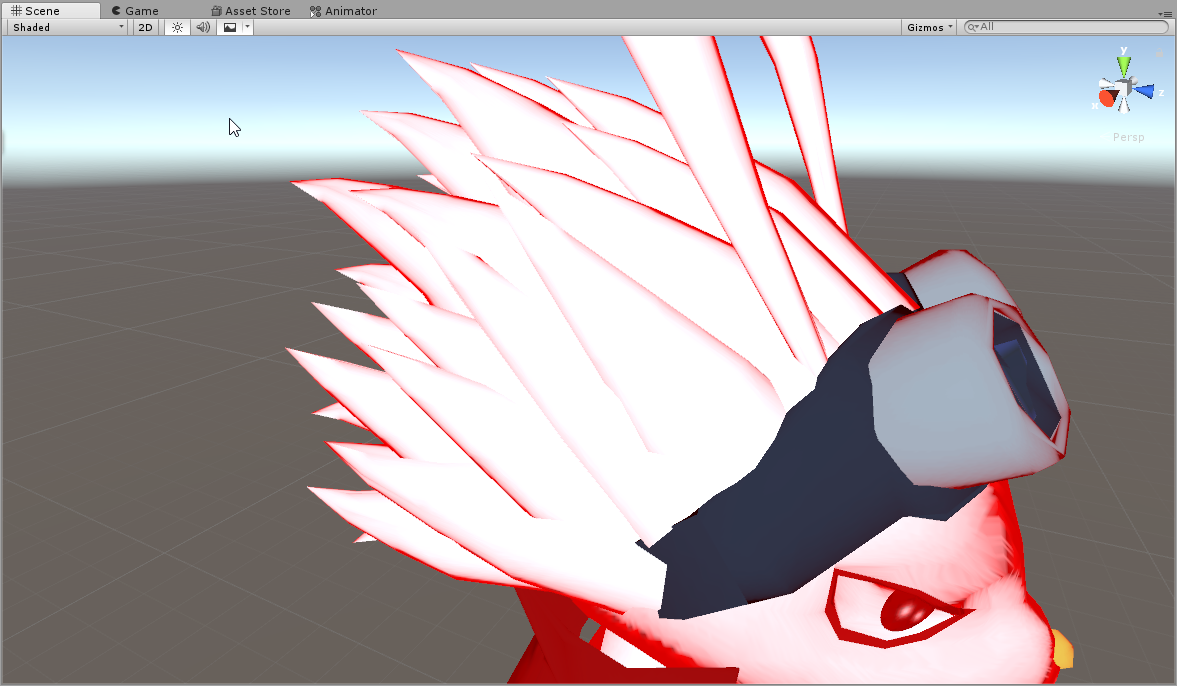
I did find that mobile > lit matcap can make a decent outline / rim lit shader
left holly
Same
 strong jackal
Has anyone else encountered an issue like this? Whenever I export one specific model I've edited in any format from blender it generates a cube inside the head which I confirmed by importing the exported model back to blender. This cube also has a material on it which immediatelly drops the avatar ranking down. I can see in unity that it says there is 2 submeshes on the model. If I change the model's settings in unity to not allow quads it doesn't have this issue but the use of tris drops the ranking to poor. If I do upload and attempt using the model while keeping quads, it always crashes vrchat on quest on joining world. If I change to the avatar after joining a world, it won't crash, even if I change worlds. The extra material cannot be deleted in unity nor does importing the model into blender and deleting it help.
strong jackal
The reimported exported model has identical hierarchy but the mesh shows this in mesh data as well as the extra material.
strong jackal
Only modifier I have is the armature modifier, cube does not have any seperate modifiers. I can see the cube if I switch to it but deleting it deletes the main mesh, too. If I delete the cube in edit mode it disappears but it doesn't solve the issue after I export the model. The ghost submesh and material still exists in unity and blender shows new ones on import as well.
 keen night
wut
paper epoch
@strong jackal
DM me the fbx file if you like
paper epoch
🤦🏼
 swift sky
@keen night you have to use VRChat's provided mobile shaders in order to publish avatars to Quest.
strong jackal
Does anyone have a technical explanation on why audio sources must be disabled on avatars on quest? What makes them so bad on quest vs pc? Or is it because oculus decided so as some sort of requirement considering they have quality control on the store?
final spade
i wouldnt be surprised if it was both, but id have to guess its a performance budget issue. apparently 3d audio in games is somewhat taxing on the CPU, or so ive heard from someone in this chat category before
dont take my word for it though
strong jackal
I guess it is rarely an issue on pc. And indeed quest is.
humble canyon
well we are essentially talking about an Android phone with the quest so it's having much less power to work with
considering your phone is only using like 5 Watts whereas the computer is using 500 or more
versed lion
Sorry, my mind is too feeble to process double negatives, please rephrase that in simple English for me
acoustic estuary
I wouldnt worry about it, its nonsense
versed lion
What’s he trying to say tho
acoustic estuary
They are agreeing that the quest is and should be underpowered compared to a pc, because thats obvious.
 unreal pebble
@acoustic estuary that's illogical.
acoustic estuary
@unreal pebble Whats illogical?
paper epoch
She has an illogical fear of the color blue
acoustic estuary
dangit
 strong valley
How do you merge your account for the oculus quest?
tribal tartan
start the game on quest
login to your oculus account
open the main menu, go to settings, there should be a merge account button towards the bottom, click it
you'll get a code, which you will need to painstakingly write by hand back into https://vrchat.net/home/accountlink while logged in to the vrchat account you want to merge. then click merge accounts
you can also launch the rift version of the game login as oculus acc and copy the token into the clipboard
even a shittop from 2012 with intel hd graphics should boot vrchat enough to do that btw
 opaque vector

 gritty pebble
I don't see any pinned messages for Quest Optimization, and Quest users are saying my world lags them out pretty bad. Is there any documentation for this....or some settings I need to be using?
final spade
@gritty pebble in general, the obvious limits that the quest can handle before dropping frames is 50k-100k tris and about 50-100 drawcalls per scene, so figure out a way to budget your world into that if you havent already. About 25% of those numbers should be good (to leave room for say 8-12 quest users)
im not a world dev nor a hardware / driver specialist but what i will say is that the mobile units on the quest have a hard time keeping up with certain things a pc can
as an example, cutout is unavailable on quest shaders because transparency is apparently really hard on the gpu
all sorts of werid things like that
gritty pebble
my limitation is knowledge on the subject
(I kinda hate Quest tbh) but I want to make my worlds Quest compatible
final spade
optimizing for quest is a challenge ^ ^` but i think for the most part it's not the biggest leap of learning, especially if you're already a world dev
you really just need to know the new constraints. the specifics i cant help you with, youll need to get some testers who know their stuff for that > >`
gritty pebble
well I really don't know what Quest can and can't handle as far as that goes
I don't have a Quest
final spade
like i said, the entire thing can only handle like 50k-100k tris and 50-100drawcalls at a time, compared to PC which can do well around 10-20 times those numbers
gritty pebble
(thats why I hate quest) lmao
final spade
thats a good place to start imo and should be more than enough, just remember to never put transparent anything anywhere
lol even if you hate quest its still really good that you want to optimize for it ^ ^
keep at it
gritty pebble
oh yes, it's just the hardware limitations I hate
In the future I think the Quest will be powerful
final spade
yeah, it would be a real pain in the ass for me to tone down my existing avi
which is why im scratch-making a low poly version of it for quest uuw
gritty pebble
I like the untethered nature and standalone, but the hardware is weird and not really that great, and the battery life is even worse IMO lol
I might make a Quest world, and then after it's good to go make it a PC world too.....
final spade
when making crossplay worlds a friendo said some wise words
see if it would be good to make the quest version first rather than dumb down the pc version
final spade
or idk if this applies to worlds. That kind of workflow has its place somwehere but probably not everywhere, but can be useful for any new projects uwu
gritty pebble
Yeah I don't want to make a really cool world JUST FOR PC users, I want Quest people to be able to enjoy my work too, I do it for everyone, and if it's limited then I'm not gonna be happy ya know?
final spade
the key is cramming everything into 12-25 drawcalls and 25k tris
gritty pebble
indeed. I know how to lower draw calls and all but idk how to check it
final spade
i believe unity has a profiler for that maybe
unless that one is solely for perf
imma bout to head to bed so i may be unable to effectively talk more about this tho ^ ^`
gritty pebble
no worries 🙂 have a good night! Thanks for the info!
final spade
np~
strong jackal
Yeah unity allows you to see draw calls. I'd say in general smaller worlds are more likely to be worth it porting over to quest. Some worlds have 2d mirror options, like the current hub world.
acoustic estuary
As far as I can tell they don't like or use the quest mirrors
strong jackal
It does look quite shitty. it's too low res on the hub.
strong jackal
Bunch of performance testing I did.
And that was on a well optimized world
Another note, polygons definitelly are not the worst offender for bad performance.
It's still most likely going to be really bad having multiple high poly avatars.
For more comparison one of my avatars has 9k polys and 1 material and I can barely tell the difference between the higher poly model.
acoustic estuary
Its well established that polygons wont have much of a hit.
a 3 fps hit per very poor avatar is still quite substantial.
Most quest worlds reccomend about 8 players which means theoretically 16 if you do the hard cap
Fill that up with the "decent very poor" and you still drop around 50 fps
strong jackal
Hm alright, I was hoping having some kind of concrete data is useful. As long as most people have avatars that don't exceed poor ranking in any way and most stats are better n than poor the performance won't be too bad. Especially if there is only 1 material. I also noticed some kind of stuttering every couple seconds since the last time I played the quest version. Something has turned for worse since last vrc or oculus update. Video recording didn't affect the performance enough to be noticeable.
 long lance
Not sure if this is the right channel but me and my friend have stopped playing vrchat for a bit because we literally can't see any avatars that are above an ok polygon limit.
So basically anything over 100 polygons or has any special materials or whatever
Like we literally can't see gifs
Just flat gifs
Why
 peak anchor
avatars must be uploaded for both quest and pc separately for them to work on both
acoustic estuary
Gifs cant be uploaded to quest, because it requires a special shader and what Teh Bucket said above @long lance
The polygon limit is actually 10,000, not 100.
sharp zinc
I have avatars that are 20k and 24k
acoustic estuary
Sorry
 fervent warren

 Or bust
 empty nymph
glossy adder
I'm wondering if since most mmd models are so similar, a retopoflow workflow could be made that's easy to follow
humm
humble canyon
yes someone could make a quest compatible body mesh and just bake the texture onto the new mesh and then just worried about decimating the clothes and hair
or the VRoid Studio Avatar retopoflow could work
I'm surprised they haven't released a quest compatible base mesh yet
desert veldt
there are some quest models on booth, it's just that there's no lower poly tda base released yet (that's the most common vrc avatar base)
humble canyon
which is yet freaking weird since you think someone would be able to do some retopology to make an anime base
then again I might be overestimating the average skill level around here as most folks seem to get by just using the decimate button
desert veldt
you can get it down to a low enough tri count just by removing edge loops, no need to retopo
I did it to one of my avatars, but it doesn't have a full base, and it's scaled to fit me, so not that useful for a generic base
humble canyon
FairPoint even doing Edge Loop reduction surprised no one's made a base using the MMD base or the VRoid Studio Avatar
left holly
I could provide a naked body of around 5-6 k tris
humble canyon
that would certainly be helpful so folks don't have to keep Reinventing the freaking wheel with faces and hands on quest with anime art styles
glossy adder
there is a absolutely wonderful base for quest for female models: https://booth.pm/en/items/1381874

■■オキュラスクエストを想定した2A-7の軽量化版です■■ ――――――――――――――――――――――――――― 3Dのキャラ素材としてご使用ください。 ワールドで使ったり、シェーダーで使ったり...

just to give you an idea of how much you can do with a tiny bit of mesh edits (we shrank the bust, edited the bangs, adjusted aspects of the skirt, shirt, etc) and a texture edit.
I would give up a finger for a male model that's as nice as that
@humble canyon I have actually, but they're lacking a little
also it's tough with fullbody, you need to adjust a lot of things
humble canyon
cool
glossy adder
@humble canyon It would be fairly easy to keep a TDA or lookalike miku/len/kaito/gumi or whatever face at the correct poly level and pair it with a lowpoly body (or really just hands/forarms/legs) by doing a decent unsubdivide on less visible things that don't matter as much like ears. I've done that, it works, getting under 10k isn't impossible, but ideally under 7k so you're visible by default
@humble canyon Doing vroids is a bit trickier. I've done one, and it's fairly attractive, but you need to re-do the uv map. Vroids use a single sided plane for customization "leafs" around the face and body, and you're expected to use a cutout shader
which of course you cannot do on quest. Sorry for the double tag there, I wasn't thinking
What I have done, however, is taken the base vroid face, selected linked faces MINUS the eyelashes/etc, and just took those textures and plopped them on top of the face as a "screen" layer then deleted everything that relies on one sided
(separate by shapes first, then select the eyelashes/eyebrows/etc in edit mode, by selecting linked, separate the selected mesh, then delete so you don't obliterate the shape keys, redraw face)
humble canyon
no problem for the double tag thanks for pointing out that decent Quest Avatar to use as a base since checking the page it's pretty much just credit them & your good with whatever
glossy adder
yep, cc:by is wonderful
humble canyon
yeah I just having a look at the blend files that's like that'll do nicely
very nice clean topology & the clothing gives great examples of what's a reasonable amount of edge loops on the quest
glossy adder
it's fantastic, yeah
I spend a fair bit of time dinking with them. the non-shorty model uses a repeat texture for the second on the skirt which you'll need to remove if you want to make pants instead, but everything else is straightforward. Honestly, even their HQ model, https://booth.pm/en/items/1197108 has accessories you can bring in and they basically all share the same texture map

★★★ 2A-7用アイテム ★★★ ■ ビーチバレー風セパレートビキニ(Uraki/zephyrant 様の作成) https://u-q-t.booth.pm/items/1428366 ■ 競泳水着(Uraki/zephyrant 様の作成) https://u-q-t.booth.pm/items/1311140 ■ ニアナちゃ...
there's some pretty awesome setups possible:
getting them to quest sized isn't hard
but as always, tons of awesome stuff for female models
humble canyon
now if only there was nice stuff for dudes
glossy adder
tell me about it
humble canyon
like for Pete's sakes I can find more stuff for being anthropomorphics animal compared to a human male
glossy adder
I'm tempted to modify 2a-7. I already steal the hands and just remove the nails lol
if I'm doing something fast. Fullscratch is great and all, but I don't have the time if I also want to enjoy my downtime
humble canyon
and it's not like there's a good point and making the same hands over and over 50 times besides for the initial practice to get good at hands
glossy adder
if you're making humanoids and not robots, yeah
strong jackal
And you believe you will not need that level of skillset in future
 celest briar
Is it somehow possible to see non quest chars??... :/
 graceful snow
i've seen some pc avatars that aren't marked as optimised but i've been able see them
but most of the time you just can't see them because they are marked as unoptimised until whoever made the avatar updates the model to be optimised or makes a seperate quest version
long lance
@acoustic estuary for quest it perf blocks any avatar over 100
They may have fixed it I haven't been on in awhile but still wtf
But thanks for letting me know about the shader thing anyways
celest briar
It perf Blocks like shrek or some dogs and random childish stuff
final spade
@long lance quest dows not block over 100 tris? the quest lobby is easily 25,000 tris
the actual auto-block limit is 10,000 tris which is probably what you were meaning anyway
to anyone reading this, if a pc user is using an avatar that is marked as crossplay but is auto blocked anyway, it most likely means they went over the tri limit. you can still see a very poor crossplay avatar by directly enabling it for that user, as you would any other specific avatar/user.
long lance
Hmm gotta find that in settings. Man idk there were avatars we could see on quest then it updated and it said these avatars were"perf blocked". Only ones that would show we're the ones with like 50 polygons and 13 polygons
left holly
I think you read the wrong stats or something
wide ridge
Making a 50 poly avatar, challange accepted
acoustic estuary
I want to try that now

 small grotto
DO IT
strong jackal

glossy adder
go a step further and make a 0 poly avatar, just particles.
long lance
O oke
 sand harbor
Wait any avatar over 100 polygons is blocked?
 sly pecan
There is quests?
sand harbor
Bruh quests are not worth it
small grotto
No
@sand harbor you can have any amount technically (I have an All Might Quest Avatar thats 500k polygons) it’s just the Quest recommends that it is less than 10,000
Any avatar over 10k is usually bollocked
 crude cove
@sand harbor This is the quest avatar pref check,
Technically speaking you are able to go over the limits shown here in the Pref, but it's not really welcomed to do so and anything higher then "Poor" will be labeled as "Very Poor" the avatar will be blocked by default for quest users unless the Quest users click on you and click [Show Avatar] The Quest also has a 50Mb File Download limit, so if you try to upload a avatar or world more then 50Mb it will not work and end up with an Error, VRChat currently as of this post has limited Avatar file sizes to 10Mb, in unity you can lower the texture resolution's file sizes in the [Inspector] Tab while a image/texture is selected, able to change the Quality-Compression and Resolution Size to change the Memory File size of the image/texture to help lower the avatars overall file size
@sand harbor if you'd like to read or know more about anything then you can start here as a starter for your issue
https://docs.vrchat.com/docs/avatar-performance-ranking-system
The Avatar Performance Ranking System allows you to see how much a user's avatar is affecting performance via analysis of the components on that user's avatar. You can also use it on yourself to see how performant your avatar is. This system is provided to inform users what ...
sand harbor
oh im a oculus user i was just wondering about making a halo model for him

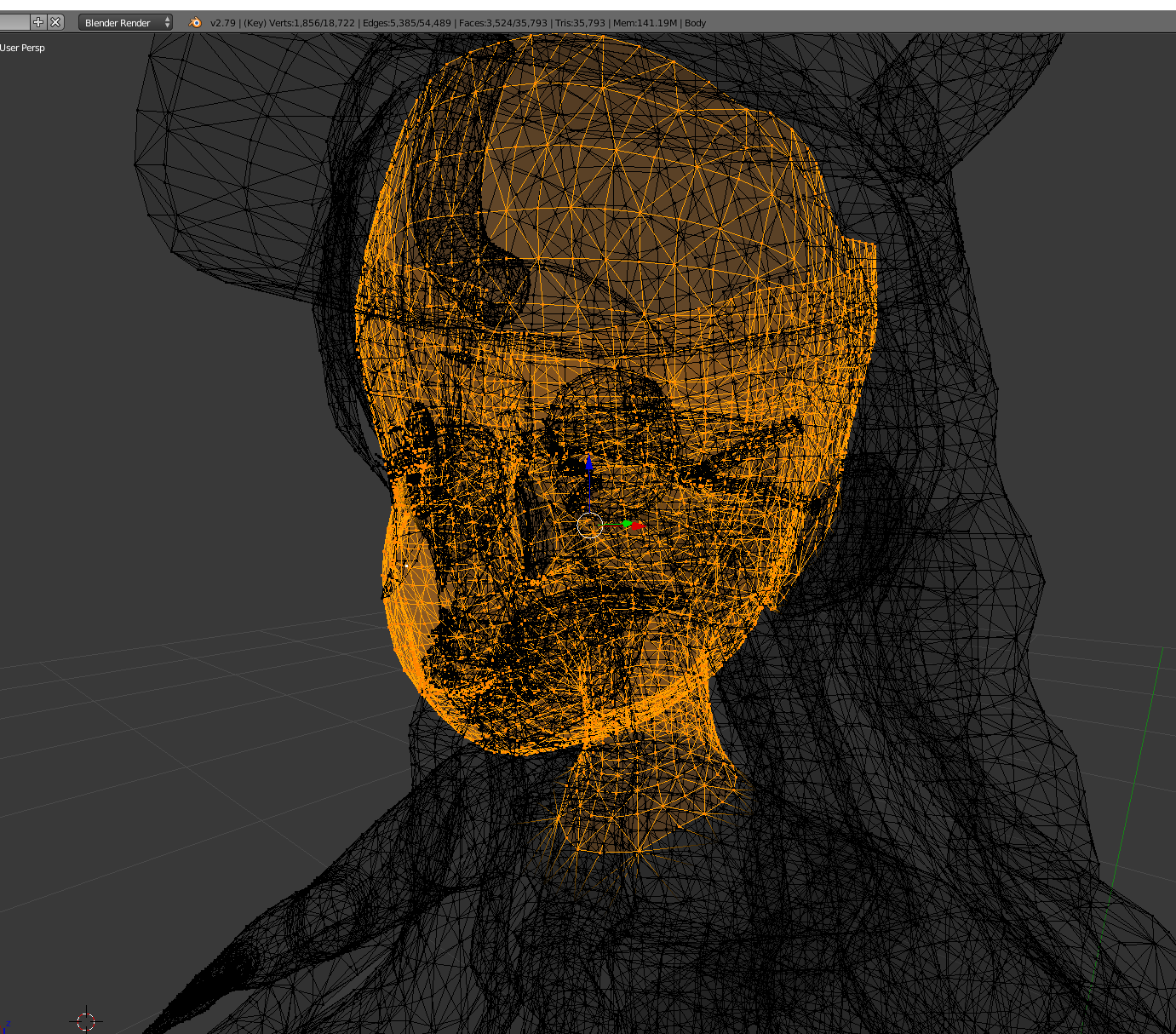
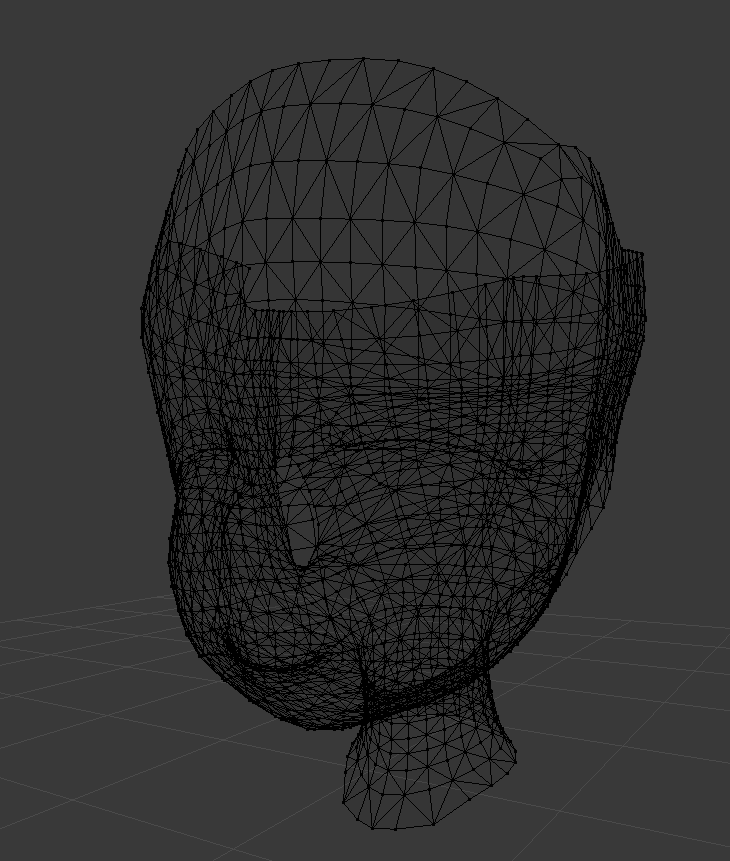
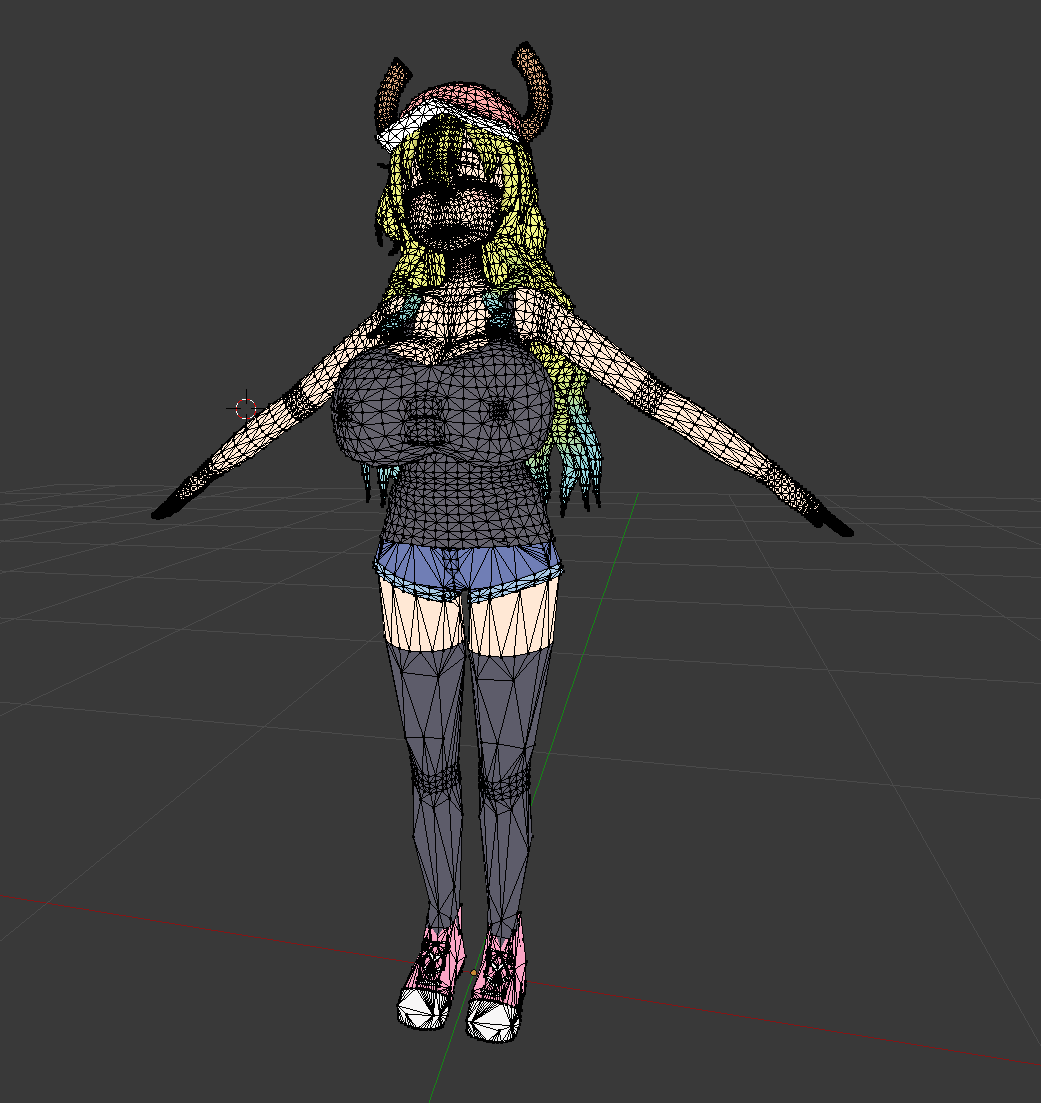
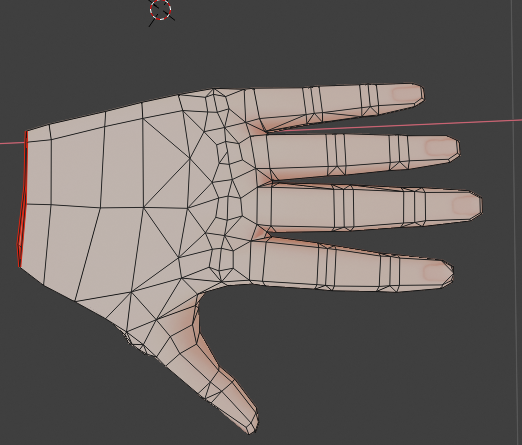




 agile wadi
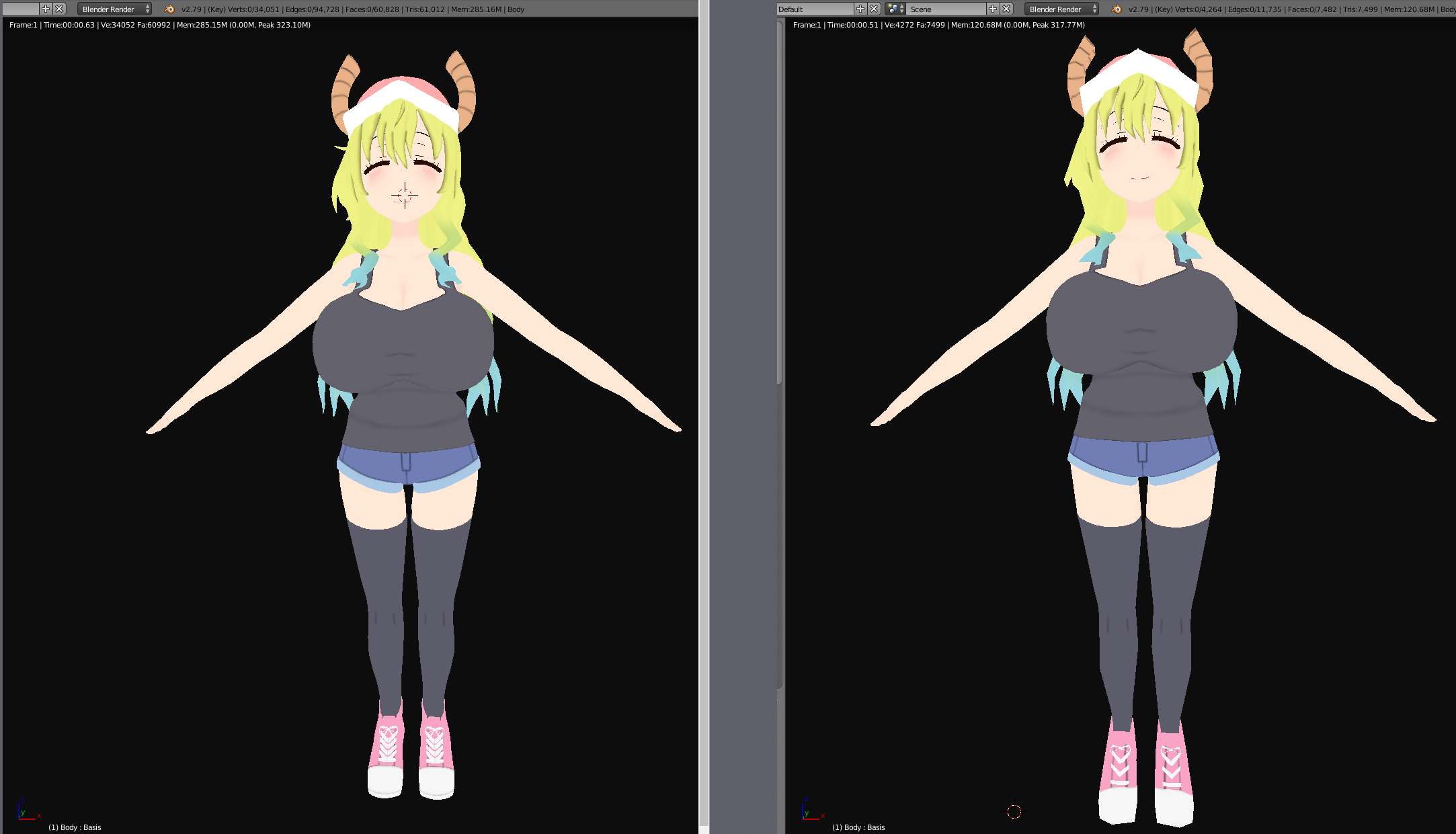
im trying to get this avatar into vrchat as quest compatible, but when i put on quest shaders it just screws it all up.
final spade
@agile wadi remove all alpha from your texture and delete any parts of the mesh that have transparency or semitransparency on them
agile wadi
K.
acoustic estuary
and set your textures to the filter type 4x4
 dim pewter
why cant we upload files bigger than 10 mb
sharp zinc
I couldn't find a set in stone poly limit on the VRC doc about Quest Optimization, so what is the highest you can do?
crude cove
@sharp zinc Look up a bit i had shared the limits
you can go over the limits but it will be hidden by default for quest users if you go over the poly limited so they will have to show your avatar but theirs no real poly cap just a set cap but for quest the cap is 10Mb download file for avatars so you could have 1 Trillion polys (don't do this) and quest would be fine as long as you know how to optimize the skin renderer and what you do with the polys
@dim pewter The Quest has a 50MB file Cap on a file, thats the Quest limit not the VRChat limit unless they change it later, VRChat limited avatar files to 10MB although i dont agree with it being so low i'd rather have it be 25MB i understand that to manny avatars loading with huge file sizes could lag/crash/disconnect the quest user so as long as the file of the avatar is under 10MB you can upload it
Also Quest can not render TGA or DDS textures so use PNG and maybe JPEG but PNG works
sharp zinc
@crude cove If I use a TGA texture but then combine materials and it converts all of the images into one PNG image, that's fine?
humble canyon
I'd imagine the cap is at 10 and not 50 because they don't want folks having avatars more expensive than worlds
crude cove
@sharp zinc just use the Cats plug-in on blender and select the model's Body (mesh) and click "convert textures to PNG"
that will fix your texture issue
@sharp zinc
if you have textures of Lightmap, emmision, normal then just make a 2 save files of the model so you can reload it
after makeing 2 save backups remove the other textures on the mats so only 1 type of file like if you have 5 Mats and on eatch mat theres 3 textures .d .n .l just remove all the ones that you are not atlising so you only have .d files on all your mats then atlis them and it will make 1 atlesed texture and mat then load the back up and do the same thing with the other types of files and repeat then in unity just use the "vrchat moble standerd lite" and/or the other mobile shaders or shaders that work
if you need better explaining on any of this you'd have to talk about that in the #avatar-quest for thats more to avatar stuff and this chat is for optimization and explaining how to do X or Y for avatars is not this channel you could also DM me if your having issues
sharp zinc
does anyone know a shader that is reccomended to use that will not throw an error
or are the Standard shadar, and unlit texture warning negligable
im about ready to publish a world
just want to clear up the shader issue
acoustic estuary
@sharp zinc You dont have to worry about the warnings as long as you know what shaders you're using.
I also replied in the two other channels you spammed this question with : - )
sharp zinc
thanks @acoustic estuary
 glad oracle
how do you stop an avatar from moving its legs? when i look down the legs start moving and vibrating constantly
shut dagger
heyyyyy, i've published a few avatars for PC, following the instructions for quest... everything seems great until: "unity failed to optimize file for upload" - i'm loving life
a while googling now - no love. iDeers fine people? i'm at a loss.
 barren condor
iDeers? lol. Does the SDK throw any warnings before uploading? Either in the performance boxes or the console?
shut dagger
i have 3 yellow triangles "too short", "lower leg warning", "hip warning"
barren condor
I'd fix those bone warnings first to be honest
shut dagger
overall performance good, 36,000 polygons, all green stars otherwise
don't know how yet
barren condor
36000? Quest? Ouch
shut dagger
the original fbx doesn't have them, but the error i'm getting is "Error updating content. Unity package upload failed. Failed to optimize file for Upload"
before the hard limits, i had 90k+ polys on some avatar. this is merely an experiment to see if i can publish for android/quest. so far, not so good.
barren condor
Keep in mind on Quest it's supposed to be < 7000 lol
shut dagger
still learning the cat/blender operations (which were also buggy today) - fighting tech for hours just to do proof of concept, so fun. like my day job. lol.
i have read the docs 🙂
barren condor
I thought there were still hard limits on the Quest polys.. hmm. I'll have to double check that.
shut dagger
if the poly thing is the issue, i'm not sure how to get that model out as an fbx again. i imported from blender.
there is for "safety" and viewing (10k) is considered poor, but the SDK is saying "good to go". vrchat servers were DOSed earlier. the error message is kinda annoying.
barren condor
Do you still have it in Blender? Going back from FBX to Blender rarely works well
shut dagger
i do have that file. took a little while to fix it the first time in unity

Hello. After a lot of work i tried to Upload an Avatar to VRchat. (9361 Triangles) but when i click on the "Upload" button This Error appears:"Error updating content. Unity package upload failed. Failed to optimize file for Upload" Please fix?
seems like a number of people get that error message for a variety of reasons
barren condor
Do you have future proofing off?
shut dagger
i also have a gifted version of the avatar, but ironically i could never figure out self inspect avatar - only other people
i've tried on and off for future proofing
barren condor
Always keep it off
barren condor
Considerably
shut dagger
i suspect it's something about the android kit setup, but can't prove it. possibly file size.
shut dagger
mmm, how to make that work. there's not much going on with this thing.
barren condor
Click the textures and see how big it says they are
Although a model with that many tris could easily be a good few MB on its own
barren condor
Like 4MB or so, so add in textures, etc and you've hit 10MB easily
shut dagger
not sure where to find that
barren condor
Check the textures first, click one and the preview of the texture in the bottom right should say the compressed size
shut dagger
the fbx is 2MB
the only thing in the hierarchy now is a CATed body and amature. many things are greyed out now.
shut dagger
trying again from scratch. faster this time. reverted to CATS 14.0 as 15.0 seems to have bugs. hah.
same errors tough - all green stars.
barren condor
@shut dagger Just one texture, right?
shut dagger
I think so once CATS is done
I’ll try later when vrc isn’t being DOSed to death and more time to study or use a different model; confusing as full green stars excellent perf and 10k poly. Odd to be sure .
shut dagger
Just woke up have not tried; DOS happens when it happens
 rigid fox
Ah cause when i was on this morning (1am British Time) it wouldn't work but then i waited for an hour and worked fine
shut dagger
It was up and down and around; it was pretty funny when there were people spawning in my private home (world issues?) and the first thing they do is Yeet! And head to the mirror. That’s as far as some got for hours. Lol. Like a mass extinction event .
Off to work!
barren condor
@shut dagger But yeah, click the texture and see how big it is, out of interest
shut dagger
I don’t see how to find it after squishing - it’s a large blob though if it’s the fbx container it’s 2mb as I reported
barren condor
You just click the original texture
In the preview box, it'll have some text written over the top that tells you the new format and filesize.
(the preview box being the image in the bottom right corner)
 brittle fossil
@shut dagger Mind telling me what bugs you encountered in cats 0.15.0? I can only fix things that I know of
shut dagger
Bones error in line 852 iirc, pc is at home, working on impim model, v14 runs but mentions it failed on finding leg bones - am planning on filing a proper bug report but I wanted my test run to work in any way possible for validation:)
One issue I might have is the shaders are “not mobile friendly” on this model. Too many tweaks and guesses
shut dagger
back to the desktop... "overall performance excellent", polygons: 10,000, skinned mesh renderers: 1, unique materials: 2 (really? huh!), dynamic bones: 0, animator count: 1, bones: 71; combined textures file: 679k
shut dagger
see #avatar-quest i figured out my few issues - i had an older SDK... but that mattered less than not having the latest mobile shaders
"it just works" now
mossy tulip
Is it possible to have a repeating grey texture then i paint my color of the texture with baked lightmap?
Im really struggling as a world maker trying to make a quest compatible world and I don't have a quest myself
 regal summit
@mossy tulip for world dev you can use any shader you want or edit as necessary. I'm assuming what you want is a detail map
It's just a matter of keeping to mostly simple shaders or keeping shader features disabled that you don't need (and of course shaders have to be compatible with shader model 3.0)
@mossy tulip I'd be happy to help test
I can pull up adb logcat to see why it's crashing
mossy tulip
I am using unity standard shader for the world. I've been told it compiles nicely when the build is android.
I turned off specular and other stuff on it
@regal summit here is the launch link:
vrchat://launch?ref=vrchat.com&id=wrld_deb15a6e-7571-4ff4-b16f-d67afdb0d1cc:87304
humble canyon
you might want to also consider vertex colors if you're just trying to color different materials different colors but using the same grayscale textures
glossy adder
@mossy tulip I reccomend using a mipmap and standard(roughness setup) or VRChat Standard Lite set up the same way for worlds if you want the lightmap to bake nicely
Specular setup for translucent or "organic" things, and use a spec map, roughness for metallics or rough surfaces like concrete
https://vrchat.net/home/launch?worldId=wrld_b98af255-d08c-446f-adff-7871db43e1a0&instanceId=46143 is a good example of what's possible with the correct bake settings. This map is uploaded identically on pc, and having tested on both quest and pc, it looks identical in both.

Vapormall unfinished
everything is crunched, including the lightmap. The screencapture is old, it looks far better now
world size is due to music only
it doesn't really hurt to use materials with spec and mip, the key is changing the import settings
on the actual images themselves
you can also just use a "base" color inside unity and a mip without albedo if you want to do super cheap surfaces , which is similar to what you were inquiring with the lights for colour
doing a "painted surface" that way can look excellent
mossy tulip
Yeah.
glossy adder
like, if anything, for textures it's really worth it to use at least a mip
especially on quest worlds
I hope that gives you some inspiration
 north willow
I bet the color looks different between the two.
Unless work was done to make the Quest version have the same color profile
glossy adder
I've seen it in a quest and switched back and fourth in realtime
looks identical, i build for android first
I use compression overrides on pc to make it the same just for the sake of it, more like a challenge to see what I can do.
wintry ember
I need some help
My persona 5 joker avatar doesn't show up correctly on quest
it shows up all black
toxic hollow
what shader are you using?
wintry ember
I'm trying to upload joker from persona 5
I'm using the shaders vrchat came with
And he's still black
wintry ember
Ik its not gonna work
Cause the quest has a snapdragon 835
That can only render less then 5000 polygons
left holly
Delete the vertex color in blender
wintry ember
Ok
wintry ember
Avatar is still black
 spare sage
@wintry ember look up Leblanc in the worlds tab
There's already a Joker model in the upstairs bedroom
Quest ready, too
wintry ember
Ok
spare sage
It's by the desk that you use to craft stuff in the game
Can't remember what it is, but it's something you can click on the top shelf
spare sage
I have a quest and I have that avatar favorited 🤧 try changing your avatar settings to low performance, it's in the safety tab
wintry ember
Which world is it
I can't find it
At this point I'm just streaming the pc version of vrchat to quest
Is it cafe lablanic wip
Give me the link
You lied
Its only pc ready
Look
It clearly says PC
Not quest
spare sage

Leblanc Cafe from Persona 5
I'm telling you, as a quest user, it works :b
some avatars say PC only but are just rated as "poor"
it's convuluted but I promise you Ive used a joker avatar from a cafe leblanc world
spare sage
shrug
wintry ember
its telling me that i have too many mat
and says to reduce it to 4
really
why 4
if i do that it messes up the model
yep only 2 errors
i dont know how to fix the bones one
it says reduce the number of bones to 75
tribal tartan
in blender, get into edit mode on the armature, then you can select extraneous bones, skirt hair and such, select the ones at the tips, and in CATS' you can use the merge bones feature under custom avatar creation to dissolve it and merge it into the parent bone, do that until you've removed the hair.
the second method is removing all the hair bones in one swoop, selecting the vertex group for the hair, going into weight paint mode, selecting the head bone, enabling vertex mask and using the fill tool on the hair.
 sharp flume

Polygonal Mind
Learn to adapt your VRChat avatar for Quest by reducing textures and polycount, along other tricks like rigging, materials and face expressions.
 flint mesa
oi
 gray mango
Oi
barren condor
Hmm, that article does have quite a lot of "now draw the rest of the fucking owl" instances. The catch 22 there being that if people are able to fill in all the gaps in the article, they're not the sort of people that would need the article in the first place.
humble canyon
yeah it's because not every article can complete step-by-step tutorials there is room for showing methodology
barren condor
I understand that, but there's a big gap between the two there
humble canyon
so basically don't bother putting tutorials in here that are not absolute beginner
barren condor
Not really. As I said - "The catch 22 there being that if people are able to fill in all the gaps in the article, they're not the sort of people that would need the article in the first place."
So the article is likely either not in-depth enough for people, or "preaching to the choir" for the others. That's how it seems anyway.
humble canyon
yeah but someone can be confident is how to use Maya and have not necessarily thought about how do you make mobile-friendly content
 heady viper
ok
sharp zinc
Hmm
acoustic estuary
ATSC 4x4
sharp zinc
the block size is like a quality slider, 4x4 best 16x16 worst
strong jackal
I can't believe there's so little tutorials on the blender's atlas addon. I found one longer tutorial which was actually an in depth tutorial on vrchat avatars a while ago. Now I found another on manual atlasing which was made by Tupper. In a way I find it kinda funny how we are getting good 3d modelling tutorials through vrchat. Manual atlassing is certainly going to come in use now that I know how it is done. What I really like about the addon is the padding option on edges which. It's the worst when your model has white lines on edges of texture uvs (mipmap bleeding if I remember right) and you can't fix it properly with moving uvs a bit.
rare pebble
How do I report somebody on this discord?
 calm gust
XD
 tulip mist
God bless this server
 nova canopy
What in tarnation
strong jackal
Anyone tried out the tafi avatar creator program? How well does its avatars work on quest so far?
left holly
What is that
tribal tartan
https://maketafi.com/vrchat this thing
Tafi’s easy to use, highly customizable Avatar Creator is now available for VRChat users. Tafi’s application allows you to personalize your avatar with over 400 components from species, skin tone, body shape, clothing, etc so you can change your look for any occasion or a...
They claim they're Quest-compat, I haven't tried yet, and I don't really have a way to know how optimized or bad looking they might be on Quest
Especially since the only thing I heard was Fliptrip say "woah 17 materials!?"
barren condor
Yeah, immediately Quest incompatible lol. Also why would it need 17 mats when they all appear to be just standard Unity with no features?
tribal tartan

