#quest-optimization
1 messages · Page 3 of 1
 humble canyon
 marsh glacier
Not even remotely, the highest cause of crashes on quest are not memory limited it's a processor based issue. If it were something remotely related to VRAM or Ram in general there would be more frequent issues like even loading into worlds. If an avatar were to be 150 MB on standalone then ofc it would make more sense to be prone to crashing but if it's in the 30-60 range (which is more realistic for those who optimize for quest then it's 9 out of 10 times fine. There was a given slide for MB for a reason. It was a 1 braincell decision to remove it all together and limit it to 10. VRC is at this point known and going to be known for making ignorant decisions and making stupid blatant bad calls.
humble canyon
there are a bunch of quest compatible worlds that outright crashed the quest one before anyone else shows up so yes it is possible to exceed the ram
 fallow portal
like i have most of foob's avatars uploaded after purchasing them and they're all over 10 mb for quest, and hers have hardly any blendshapes
humble canyon
and vrchat themselves have said Ram running out is the most common source of crashing
marsh glacier
humble canyon
and vrchat themselves have said Ram running out is the most common source of cra...
So? As someone who has benchmarked the game standalone and link there has been a processor issue RATHER than a ram issue.
Do not take what they say at face value.
fallow portal
all in all
i think
they shouldve just left the mb as optional
if a player turned it up too high and they crashed
that was on them
humble canyon
the quest is literally fixed Hardware so any testing they do would be equally as valid as yours
marsh glacier
humble canyon
the quest is literally fixed Hardware so any testing they do would be equally as...
I'm more than aware it's fixed hardware. So they likely ran a short few inaccurate tests that showed otherwise if it were to do so and scrambled around with it and said "screw it why not" and pushed out an update that makes 0 sense. As someone who works on technology mainly computer based and with the quest being basically a mini small form computer it's not hard to easily diagnose the issue compared to PC. They either didn't test it properly and just took it from the word of some prick of a tester of some sort or they tested and failed utterly and didn't acknowledge it and pushed out some rushed half-assed 'patch'.
 ruby marsh
what the heck did I even read
ruby marsh


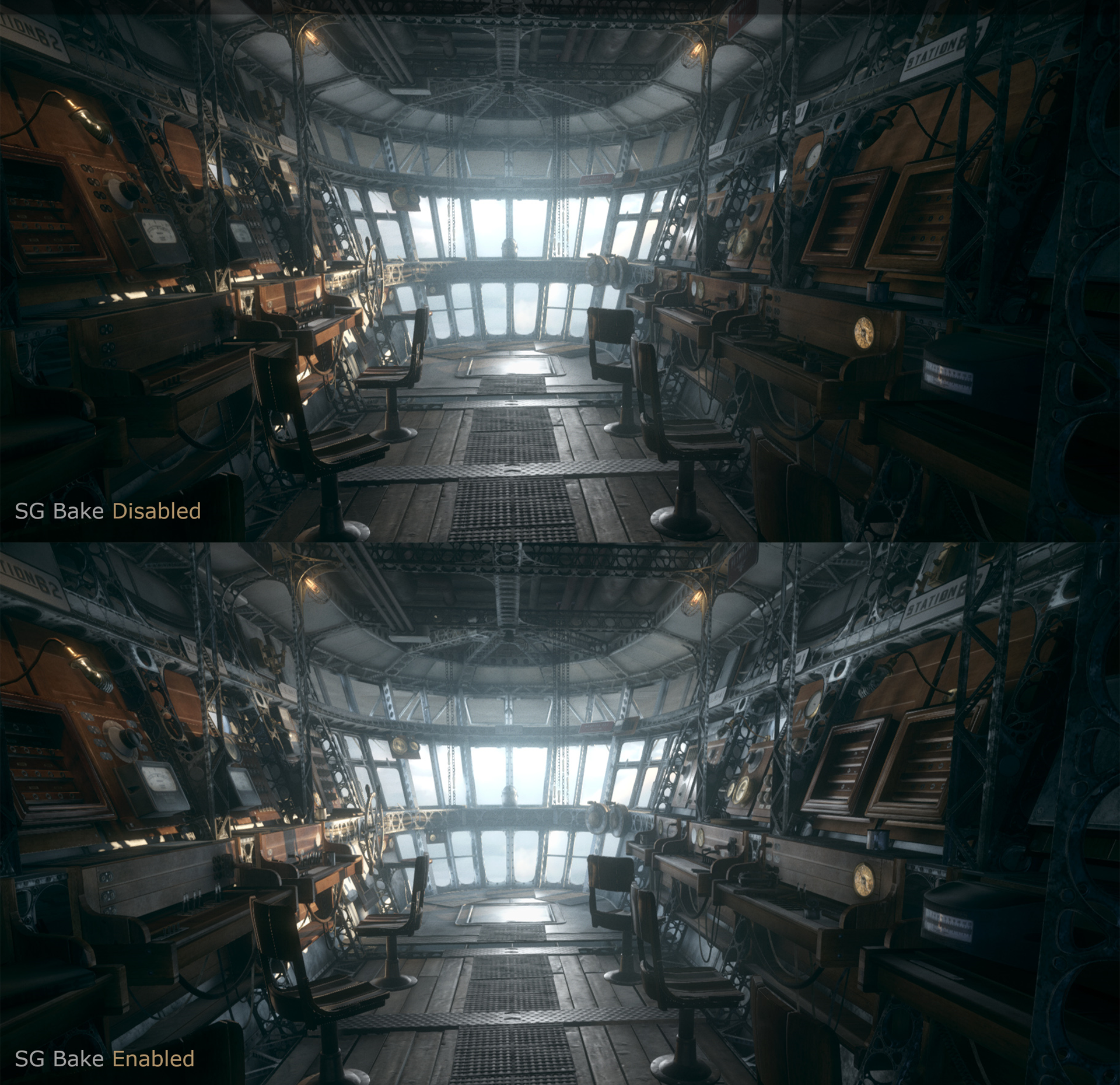
optimized world, with box projected glossy reflections, specular highlights/micro shadowing, tonemapping on quest
easy peasy
humble canyon
ruby marsh
Cool
 pearl bough
ruby marsh
pearl bough
ruby marsh
Holy shit that fps is really good compared to 90% of worlds your stuck at 20 xwx
ruby marsh
for some reason screenshots have a warm filter over it, might be because of a setting I have but yeah all runs and looks good
I haven't seen any quest worlds with that quality though
 gentle kindle
For Joker roleplay this world fits perfectly
ruby marsh
lmao true
I would link the world but I can't make public worlds yet
but also for others to try it out on their quest
 green oriole
ruby marsh
I would link the world but I can't make public worlds yet
green oriole
ruby marsh
I would link the world but I can't make public worlds yet
Letting people visit your private world still works.
And all you need is the link to the world to visit any private world. (Does mean they have to start the instance from the website, but still.)
It also helps with rank
ruby marsh

Quest graphics test․
green oriole
Pure speculation, but would guess a popular private world would have higher rank gain.
green oriole
ruby marsh
https://vrchat.com/home/world/wrld_62e0faf7-667c-4e59-9ed4-55caabdcbdd2
I am real curious to check this one out next time I am on.
green oriole
Why not just swap and upload again?
pearl bough
ruby marsh
I would link the world but I can't make public worlds yet
Cant you just upload it for community labs?
green oriole
Still, got a Quest and need to test some Quest things so could bundle that together.
green oriole
pearl bough
Cant you just upload it for community labs?
Only if user or above in rank.
New user can only make private worlds.
ruby marsh
^
pearl bough
Ohh
ruby marsh
since I don't use my vrc account much its low rank
pearl bough
Well i didnt knew you were just new user lul
humble canyon
good question
ruby marsh
making a PC version
ruby marsh
ruby marsh
quality wise the only difference between the PC should just be a bit of fog and bloom
and slightly brighter specular highlights/reflections
because HDR
ruby marsh
both versions are up
PC and quest
Quest graphics test․
6.09mb for quest
8.54mb on pc
 trim verge
What's a good way of testing quest performance without having a quest. I'm trying to see if a model I'm making will work well on quest
green oriole
trim verge
What's a good way of testing quest performance without having a quest. I'm tryin...
There isn't really a way for you to do it.
You either ask a Quest user, or wait for the mobile version of VRChat to be released.
Any testing done through PC would miss quite a few things, especially graphical things, since the GPU architecture makes some things wildly more costly on Quest.
pearl bough
Ah yes
The mobile port of VRChat
If VRC can barely work on an oculus
Then your phone would be a hand grenade if you attempt to download it
green oriole
pearl bough
Then your phone would be a hand grenade if you attempt to download it
For any budget phone yeah, probably, but it won't install on any android phone without at least 6GB of RAM and at that amount of RAM and above you'll find phones with better SoC's than the Quest 2.
Any flagship phone released since the Quest 2 will run better than the Quest 2, since its chip wasn't super new at the time.
Now, keeping the phones cool will be a problem.
trim verge
pearl bough
Then your phone would be a hand grenade if you attempt to download it
At least quest users have someone to bully soon ( I'm kidding please don't bully)
pearl bough
trim verge
At least quest users have someone to bully soon ( I'm kidding please don't bully...
I only bully people who are being a public nuisance to everyone
(Aka just prove a point they're wrong of what they're doing and/or saying)
ruby marsh
trim verge
What's a good way of testing quest performance without having a quest. I'm tryin...
you can make a seperate unity project
that builds a quick android demo
if you have an android phone
and debug performance there
trim verge
Hmmmm
I'll try that. In your guys option, is it better to have a bunch of 512 textures or fewer 1024 textures.
ruby marsh
I lean towards 512
but honestly just measure the difference
in terms of size/memory
trim verge
Thats what I was thinking. But honestly it's hard because I know old unity preferred less textures and larger sizes but I've heard it's changed since then.
ruby marsh
mehhh not quite
I will say whatever leads you the best usage
1024 is nice but its 4x as large as 512
ruby marsh
trim verge
Thats what I was thinking. But honestly it's hard because I know old unity prefe...
but what makes it hard?
in theory some are not wrong, performance wise its better to pull from fewer texture files than multiple small ones. hence the usage for texture atlases
but if you don't construct your atlases well you are wasting memory/disk space

polycount
Hey all, I just need to ask quick, I'm working on an iPhone game using most likely 'Shiva' or 'Unity' and I'm making some railings for snowboards ect to grind on and whatnot.
some good opinons here
trim verge
Oooo I'll give it a read. I'm no stranger to textures atlasing but I hear so many options that are very different from each other.
ruby marsh
the reason for differing opinons usually is that it can vary depending on what you are doing
i.e. platform you are developing for, and what you prioritize as a dev, quality/efficency
trim verge
I swear unity is sometimes like defusing a bomb whose wires keep changing colors.
ruby marsh
this isn't really a unity thing though lol
trim verge
You know what I mean lol.
ruby marsh
yeah I do, I've been there when I was a beginner hearing a bunch of conflicting opinions when you don't know the exact sources or contexts in which they are for. but just know that what matters at the end of the day is your platform and your usage of it. which is why I said earlier to measure the differences yourself
only way to know is to test it, so be a computer scientist
😛
trim verge
I dont have a quest is the issue. I'm more of a beginner to quest stuff. Thanks for the advice and resources.
ruby marsh
you can use an android phone as a proxy @trim verge , or if you don't have one then you can use some android emulators
humble canyon
green oriole
For any budget phone yeah, probably, but it won't install on any android phone w...
and also a cell phone doesn't have to render the world twice and 30 frames per second is acceptable
 vocal egret
latter probably, although I've found I can get away with multiple 4096x4096 textures while still being below the halfway mark of "excellent" because astc go brr, no idea how that performs on actual quests because I don't own one but eh, VRchat doesn't seem to have a problem with it.
also pro tip for standard lite: encode the smoothness channel into your diffuse's alpha channel if you don't have any metallics, saves you one whole ass texture in terms of vram usage
humble canyon
Yeah that is a very helpful tip the channel packing
vocal egret
tbh I do channel packing even on PC, no reason to have 10 textures per material when I can combine metallic roughness and AO into a single DXT1 texture
humble canyon
Now I'm wondering if anyone's been crazy enough to do what Nintendo's done and channel pack something in the blue channel of the normal map as it's always going to be the same color so you can just calculate that in the shader
vocal egret
humble canyon
Now I'm wondering if anyone's been crazy enough to do what Nintendo's done and c...
bit of a problem: unity encodes normal maps in the red and alpha channel instead of red and green, and are just converted when importing, soooo either you're gonna need a shader that reads regular textures as normal maps or you're going to have to manually encode the normal map how unity expects and not import it as a normal map, and hope unity doesn't throw a fit.
also hope it doesn't get weird about the green and blue channels
TLDR: blame DXT5nm/BC3nm
ruby marsh
^
can confirm unity always recalculates the z channel also if you have a texture interpeted as a normal map
ruby marsh
humble canyon
Now I'm wondering if anyone's been crazy enough to do what Nintendo's done and c...
also honestly this is very viable
most modern games I've seen get rid of the z channel
as you can just very easily recalculate it at runtime
of course it would incur a runtime cost needing to calculate that z channel when a normal map is sampled, though it does save on memory overall
but yeah same, I do channel packing regardless of platform
if you can, should always be efficient and save whatever you can. Takes a bit of effort but always worth it in the long run
humble canyon
vocal egret
bit of a problem: unity encodes normal maps in the red and alpha channel instead...
So does that mean the normal maps looking the color they do in the editor is just a audience convenience
vocal egret
humble canyon
So does that mean the normal maps looking the color they do in the editor is jus...
yep, actually encoded they're transparent red textures
vocal egret
makes me wonder why normal map formatting isn't used for metallic smoothness maps by default, though that'd make channel packing even more painful so actually better for it not to be that way
humble canyon
ruby marsh
of course it would incur a runtime cost needing to calculate that z channel when...
Do you know how expensive that cost might be as wondering if that might be beneficial to big quest maps to use less vram?
ruby marsh
humble canyon
Do you know how expensive that cost might be as wondering if that might be benef...
I don't have or know any numbers, but honestly speaking for an underpowered platform like quest its best to save runtime costs whenever you can
so classic RGB/XYZ normal maps
humble canyon
Good point
vocal egret
the more efficient you are, the more headroom you get to go crazy, tbh I really feel like quest could benefit from some more optimization trick oriented shaders like UV tile discarding so you can do multi-outfits without becoming very poor for too many meshes
ruby marsh
^^^
I mean I was recently able to publish a quick graphics test on quest that is rather high fedelity
humble canyon
And for worlds I do wonder if folks would benefit from like detail maps more often
Like one extra sample but using less vram seems like a decent trade-off
Like no need to make the floor 4K if you put the repetitious detail on the detail map
 humble canyon
Or stuff like world space/light map uv noise to make the tiling less repetitious?
ruby marsh
posted it here before but getting good quality on quest with achievable frame rates isn't overly difficult
literally have box projected reflections + tonemapping and directional lightmaps with specular highlights being done at rock solid framerate
just gotta be efficient
humble canyon
Yeah definitely familiar with that combo as I have like a chill bedroom that's like 70 frames on quest with directional lighting specular highlights
vocal egret
wonder how stupidly high my FPS will be on PC
humble canyon
But it is literally just one room so that doesn't necessarily scale to a big space
ruby marsh
humble canyon
Like no need to make the floor 4K if you put the repetitious detail on the detai...
or using 4k for mostly toon worlds/avatars 🤦
humble canyon
Like even on a realistic Avatar 4K is a bit Overkill as like RGB tiling detail maps could cover being able to stick your nose up to it and see the fabric detail
vocal egret
humble canyon
Like even on a realistic Avatar 4K is a bit Overkill as like RGB tiling detail m...
depends on the UVs imo
or if it's an atlas
humble canyon
Most of the time the badly optimized vram hogs also have like a bajillion materials
humble canyon
vocal egret
or if it's an atlas
That's what the RGB mask is for so you can have more than one detail map
vocal egret
I mean, if the texture is spread across the whole body though it might end up looking horrid
1 4k texture taking the spot of a bunch of 1-2k textures is very different from 20 4k textures that are just there for the sake of "haha pixel density go brr"
ruby marsh
I mean
from an artist standpoint
easy way to maximize details
mirror UVs
i.e. UV half of the model, mirror the other half
that way you can allocate way more pixel density
but of course that has its obvious drawbacks
vocal egret
multi-uvs are pretty neat
humble canyon

Bakery v1.95 is out! (who could've thought??)
Highlights:
- MonoSH directional mode;
- Preview final lightmap UVs before baking;
- Shadow supersampling;
- RTPreview support for built-in RP post-processing...
Read full changelog here: https://forum.unity.com/threads/bakery-gpu-lightmapper-v1-9-rtpreview-released.536008/page-129#post-8653209
#ga...
ruby marsh
ahh good ol mr f and his bakery
I really want to make my own lightmapper someday
he needs to look into implementing spherical gaussians
humble canyon
Yeah I just figured I'd bring it up in case you haven't seen it as far as a directional lighting mode that uses less file size than the built-in one
ruby marsh
instead of spherical harmonics
You can find an ad-free static site version of this post here: This is part 5 of a series on Spherical Gaussians and their applications for pre-computed lighting. You can find the other articles he…
sorry
probably lost all of y'all dropping jargon like this
humble canyon
Single material, 3.3k △, using RGBA masked 256px normals in @poiyomi's shader. 🧵👇
Tweet showing what I meant with the RGB mask
ruby marsh
by RGB mask I'm assuming you mean sampling a seperate texture for each channel in that RGB mask?
ah yep
your still sampling alot of textures at the end of the day though
humble canyon
Yes but using a boatload less vram
ruby marsh
your still eating up vram needing to load in those other textures though
humble canyon
The equivalent of a 512 texture is not a whole lot of vram compared to like a 4K texture
ruby marsh
yes, but just want to clarify it isn't a magic bullet lmao. still needs to be loaded in at the end of the day into vram
vocal egret
humble canyon
https://vxtwitter.com/VIANVOLAEUS/status/1517951135528665088?t=FvZRB472HwJA5JplY...
ok I need to try that
humble canyon
ruby marsh
yes, but just want to clarify it isn't a magic bullet lmao. still needs to be lo...
And I suppose isn't too particularly relevant to this channel is it's more of a PC Avatar thing
ruby marsh
yeah, pushing us down this tangent I blame that on you 😛
humble canyon
Yeah that's completely Fair
Just was on my mind because using detail maps on my own cross-compatible map to cut down vram
As basically I construct my fabric assets out of big shapes with a low res normal map and then the repetitious structure with a tiling low res normal
Unfortunately currently a power outage where I'm at at the moment so can't grab screenshots
vocal egret
I mean, y'all making a good case for why quest needs some more shaders, literally so optimization tactics let us have closer to PC avatars without chewing at the XR2 so much
ruby marsh
ruby marsh
i.e. for my little test here it was all a custom ubershader
vocal egret
specifically the latter, shaders that allow for more efficient methods of doing things, like UV tile discarding (outfit toggles without having to either use more meshes causing very poor, or use shape keys which eat memory and cause performance issues)
humble canyon
I'll be it I'm not sure most folks have the triangle Budget on quest for multiple outfits
If they're not being very poor
vocal egret
valve game models tend to have less than 10k polys pre half life alyx and look quite good, you can get away with the polys for multiple toggles if you try hard enough
humble canyon
Probably helps that the half Life characters are not wearing stuff with lots of little intricate chains like a lot of the MMD kit bashes are
That for some reason they insist on doing in full geometry the kit bashers
vocal egret
yeah 400k poly eboy avatars really give kitbashers a bad name
humble canyon
I suppose worst are those that try to upload those straight to the quest
vocal egret
tbf there are some things that are hillariously difficult to translate to quest
case & point: anything involving hair or feather cards
ruby marsh
yeah transparency is tough on quest
humble canyon
Like honestly surprised there aren't more tutorials for how to model like solid geometry hair like you see in fortnite for VRC creators
Mostly just splines
Though I suppose some retopology could probably make spline hair a lot cheaper
vocal egret
humble canyon
Like honestly surprised there aren't more tutorials for how to model like solid ...
I mean, if you think this can be done in under 15k polys without transparency be my guest
 ruby marsh
ouch yeah don't think so
humble canyon
was more referring to the humans
ruby marsh
well even for humans as well, going to have to be mostly texture tricks
perhaps even resorting the old school ways of baking occlusion/specular right inside of the albedo maps 😛
humble canyon
vocal egret
I mean, if you think this can be done in under 15k polys without transparency be...
You could probably bake most of those to the body texture
As probably most of the quest people looking at you aren't going to be sticking their nose right in your chest like that
ruby marsh

 slate plume
Why can’t I see Avis above 10mb anymore mannn
humble canyon
that's setting menu being there at all was copy-pasting pc ui as the sdk does not let you upload more than 10 MB anyway
slate plume
If it ain’t broke don’t fix it
humble canyon
like if you saw any avatars above 10 MB on quest they were breaking terms of service by using a modded SDK
 heady wing
In other words, it was broke so they fixed it
 civic gale
So the SDK is recommending we switch to ASTC with a warning sign and an auto fix button.
The SDK tells me this is being done to reduce VRAM usage, maybe, however, it's more than quadrupling the size of all my textures on disk.
I'm hitting the 20mb limit with a single 8k atlas now. I don't mean to sound accusatory but like, what is the rationale behind this?
civic gale
I'll note that cranking the block size all the way up to 12x12 doesn't recuperate the cost.
gentle kindle
yeah astc 12x12 is the best way and you can increase the size without changing much and still looking good
and disabling mip maps helps too
 oak knoll
why when i load into worlds it says not enough memory but my oculus has 250gb of space left
gentle kindle
its not talking about this type of memory but its vram memory
oak knoll
oh
gentle kindle
The Quest 2 has 8gb of vram but vrchat can use only 6gb of that
oak knoll
can i get more somehow or do something to make it run better i guess?
gentle kindle
Its not possible
the memory is internal and you would need to open the quest 2 entirely to access
oak knoll
so if i were to open it it would just be like upgrading ram if you can in like a computer?
gentle kindle
I once thought about that and I did some research and it looks like the ship is attached with the motherboard
oak knoll
so you cant even upgrade it at all
gentle kindle
Nop and the best we can do is waiting for quest 3
oak knoll
dang!
is there nothing in the settings we can do about it either to make less stuff run for our ram?
gentle kindle
Well there is the quest pro wich has more ram than quest 2
oak knoll
i hope the quest 3 is a bit more light
gentle kindle
oak knoll
is there nothing in the settings we can do about it either to make less stuff ru...
Its hard but what we can do is to be aware the apps we open in the menu and make sure the apps is closed when playing vrchat bc some apps can still running in background
gentle kindle
oak knoll
i hope the quest 3 is a bit more light
Me too. I'm already saving money
civic gale
gentle kindle
yeah astc 12x12 is the best way and you can increase the size without changing m...
I was talking about the size of textures on disk, not the VRAM usage.
gentle kindle
civic gale
I was talking about the size of textures on disk, not the VRAM usage.
I was talking about that too hahaha
civic gale
But what you're saying doesn't apply here. 12x12 ASTC still increases the size of my atlas texture on disk by almost 3 times as much as ETC2.
It's a bit better than the default 4x4/6x6 block size, but it still prevents me from uploading my avatar.
My atlas goes from 1.6MB to 7.2! That's worse than PNG. The original file was only 5.

Here is a 78.6 kilobyte solid red texture (for example) being shot up to 9.5MB after ASTC.
humble canyon
civic gale
I'm hitting the 20mb limit with a single 8k atlas now. I don't mean to sound acc...
an 8K texture is way too much for Quest
as that's going to use 256 MB of vram
humble canyon
gentle kindle
The Quest 2 has 8gb of vram but vrchat can use only 6gb of that
the quest to only has 6 GB of RAM so vrchat only has 4 gigabytes to work with
civic gale
Again, these were for example.
Trying to illustrate that ASTC tanks size on disk, not VRAM.
humble canyon
wouldn't surprise me if vrchat considers that a plus that you can no longer put a A 8K texture on a quest Avatar
civic gale
Okay let's say I reduced the size of the texture to fit the 20mb upload limit.
ETC2 would still be beating ASTC for size on disk. So we're trading a VRAM benefit for a massive increase in bandwidth requirement?
That VRAM uptick better be worth it because the average size of a Quest avatar is about to double, triple or even quadruple.
humble canyon
there's a hard cap on Quest Avatar file size so they literally cannot double
civic gale
woosh
humble canyon
I suppose mission accomplished if the average resolution of textures get smaller on Quest as far as cutting down on vram
like vrchat some documentation considers 1K the highest anyone should be using
VRChat
Creating content for VRChat Quest is a challenge-- you have to create attractive, compelling content all the while keeping the content optimized for a mobile device. These are the same challenges that game developers must deal with while building for mobile.Here, we'll give you some general guidelin...
"Keeping texture size low is important. You should aim for using 1k (1024x1024) resolution textures at maximum. You should also create efficiently packed atlases, allowing for more texture resolution in the same size."
civic gale
double woosh
humble canyon
like a 4k texture already puts you at very poor on Quest for texture memory usage
VRChat
The Avatar Performance Ranking System allows you to see how much a user's avatar is affecting performance via analysis of the components on that user's avatar. You can also use it on yourself to see how performant your avatar is.This system is provided to inform users what is likely the most perform...
gentle kindle
civic gale
disk
sorry I just saw the messages now
I wasn't talking about the vram
This is a texture using etc 4bits that comes as standard and the size is 2.7mb

This is the same texture using ASTC 12x12 and the size is now 0.6mb

And this is the same texture but with the mip maps disabled
 gentle kindle
humble canyon
the quest to only has 6 GB of RAM so vrchat only has 4 gigabytes to work with
gentle kindle
humble canyon
the quest to only has 6 GB of RAM so vrchat only has 4 gigabytes to work with
Sorry my bad. I got confused hahaha
vocal egret
humble canyon
like a 4k texture already puts you at very poor on Quest for texture memory usa...
🤔


this is with mipmaps by the way
civic gale
Yeah VRAM usage varies by compression type. They weren't even speaking on similar terms. Felt like I was talking to a dictionary.
 brisk cove
Did something change with the latest SDK for quest optimization? It's not preventing me from uploading models that are big now but it's also not showing me what I need to fix before people can see it.
It usually prevents me from uploading models if they're too big
humble canyon
do you mean the file size or physical dimensions
brisk cove
Like file size, I was able to upload a model I had not optimized yet while on the android version of unity, and I know for sure the model could not have been able to be uploaded like that because it have more than 8 phys bones on it as well
Usually I just click "build and publish for android" so that it lets me know which things I have to fix before I am allowed to upload it but this time it didn't do that at all
humble canyon
Quest avatars always had a hard cap of 10 MB for file size
brisk cove
Yeah, but I wasn't getting that "Current size XX.XX mb" message that would prevent you from uploading to android on the new sdk, I am getting it now on the old SDK though
 north bay
My avatar top and bottem is green and I cant turn it any color idk a fix
humble canyon
sounds like your model has vertex colors you need to remove those
north bay
yh i did it thank you also what good ways are there to remove megabytes. liek clothes or texure quality
 candid thorn
Lowering resolution of textures, removing unused stuff that needs textures
Probably don't need any textures above 2k resolution, some will probably be fine at 1k or 512
pearl bough
candid thorn
Probably don't need any textures above 2k resolution, some will probably be fine...
Lul why have 2k textures?
Everything for me is 1k or lower
heady wing
pearl bough
Lul why have 2k textures?
If you have one material and your vram use is quite low, a 2k texture would be fine, especially if you need the detail
pearl bough
heady wing
If you have one material and your vram use is quite low, a 2k texture would be f...
I could care less about that honestly
Lower = less vram usage
So good enough for me lul
humble canyon
like if you have a metallic smoothness map if it's just solid Blobs of color you could probably crank it even lower
 sharp zinc
Bro my avatar is literally 10,00mb and wont let me upload wtf
"Cant upload a 10mb avatar cause the limit is 10mb"
humble canyon
then just make it a little bit smaller
sharp zinc
I know but it's just stupid lmao
pearl bough
sharp zinc
"Cant upload a 10mb avatar cause the limit is 10mb"
LMAO
Imagine if it was a kb bigger lul
And denied you cause of it xd
 slim coral
pearl bough
And denied you cause of it xd
slim coral
pearl bough
And denied you cause of it xd
actually happened to me once
10.01
i cried
pearl bough
Rip
pearl bough
slim coral
10.01
10.03 for me
 daring dragon
pearl bough
I could care less about that honestly
Lower = less vram usage
So good enough for...
daring dragon
pearl bough
I could care less about that honestly
Lower = less vram usage
So good enough for...
One 2k texture is actually way better for VRAM than several material slots of 1k textures
 tribal roost
Unless you have two or less 1k textures. Three 1k textures would be pushing it like you are saying, and four or more would almost certainly be more VRAM usage than one 2k texture
But you do have to keep in mind that a 1k texture is one fourth the size of a 2k texture in theory
Which is kinda funky but also makes sense
daring dragon
But also draw calls in general are much more taxing than texture size overall
Texture size is more of a strain in the fact that you have to download a larger file, while draw calls are arguably more expensive otherwise
pearl bough
daring dragon
One 2k texture is actually way better for VRAM than several material slots of 1k...

humble canyon
daring dragon
Texture size is more of a strain in the fact that you have to download a larger ...
and also take up more RAM which when the quest is out of ram it crashe
daring dragon
That is true
But with vram performance blocking, usually not as much of an issue nowadays
humble canyon
yeah I suppose that something worlds more have to worry about
gentle kindle
maybe matcap if you find a good metal matcap
vocal egret
matcap lit is unironically better for metal annoyingly, blame standard lite not supporting reflection probes
sharp zinc
Hello guys i connected my octulus quest 1 with air link and when i try to play any games the quality is being very low do i have to connect with cable for good quality? even tho in vr home quality still being very blurry and details are bad
pearl bough
sharp zinc
Hello guys i connected my octulus quest 1 with air link and when i try to play a...
How the hell does this fit in quest optimization
sharp zinc
pearl bough
How the hell does this fit in quest optimization
:))
 north bay
it had a standerd shader but i had to delete it how would i add it back inot the prefab
@fathom oar
add component?
since i did delete it
@fathom oar
okay thank you alot
pearl bough
north bay
it had a standerd shader but i had to delete it how would i add it back inot the...
Literally just drag and drop
north bay
Okay..
pearl bough
Drag the material into the eyes by just dragging it from the asset folder (or whatever folder the mat is in) to prefab
 willow hare
I notice that webm videos play in Quest now, but do they use more resources to decode than mp4 files?
 plucky night
Any help on how to fix my VR Chat from crashing with the message "you do not have enough memory to run VR Chat" on Quest 2?
Im also getting kicked out saying system didn't have enough memory, but i have over 20gbs left
humble canyon
plucky night
Any help on how to fix my VR Chat from crashing with the message "you do not hav...
that's referring to Ram that error message not storage space
plucky night
How do i fix it, do you know?
humble canyon
there's not really anything you can do about that besides showing less very poor avatars
plucky night
I'll try that, thanks.
humble canyon
plucky night
Any help on how to fix my VR Chat from crashing with the message "you do not hav...
and basically that error message happens because if vrchat is trying to load more stuff than it has RAM for it crashes
plucky night
I changed the distanced of when avatar are shown, and how many are shown, hopefully that helps.
I also cleared the cache
I never used to have this problem before.
Weird
Now i can't load into any maps with alot of people cause I'll get kicked out.
 keen sage
Yes. Recently this error kept recurring. It used to happen once in a blue moon for me too.
Wonder what's wrong with Vrc.
 timber scarab
I been having worlds either lag a lot or freeze my quest causing me to power it off then on in order for it to work again. :/ If I can fix that would be wonderful.
 grand harbor
trying to find these shaders so I can switch them to the vrchat ones and upload the avatar to quest. but i cant find them at all. is there another way to do so?

 last patrol
pearl bough
last patrol
pearl bough
Huh
Why do you need that?
He is just missing some materials that has custom shaders
Which he needs to change
For quest
 placid laurel
so quest avatars can't use custom shaders like poiyomi? good to know.
 severe atlas
not by default no
 dull oyster
hey there!
just curious.. does the handtracking work via steamvr too? since i only found smth from 2022 which says, that it's beta for quest standalone only...
does this still apply or did smth change?
thank you:)
green oriole
dull oyster
hey there!
just curious.. does the handtracking work via steamvr too? since i on...
It does not, blame Meta, they make hand tracking on PC developer only, so it will likely stay like this until Meta changes their mind.
dull oyster
green oriole
It does not, blame Meta, they make hand tracking on PC developer only, so it wil...
damn.. thank you for the fast answer.. thought there would be a workaround for that :/
green oriole
Nope :/, annoyingly no standard for hand tracking on PC.
In theory ALVR and some OSC program could allow for hand tracking, but you'd lack the ability to move and the avatar itself would need to be setup for it.
dull oyster
ahh i see..
so there is no other option than to play it from quest itself instead via link cable then
will have a look at the ALVR thingy 😛
 slow scarab
hey i'm have a lot of problems with my q2 and vr chat, namely 0 avaters loading in (even my own characters actual texture don't load, just the model), and it crashes really easy once i start showing peoples avatars
 quaint carbon
what was it? i'm having a similar issue 🥲
north bay
whats the best way to reduce MB without taking clothes and toggles. ik texture is one
humble canyon
honestly just not having as much clothing on one Avatar would be helpful for file size and vram
north bay
humble canyon
honestly just not having as much clothing on one Avatar would be helpful for fil...
yh its just that they look really nice with them. always wondered how so many avi creators or editors have so much for quest
humble canyon
But to answer the question probably lots of crunch compression on the textures to make them take up not too much file size
north bay
okay will do that thank you
pearl bough
Lowering poly count aswell ig
north bay
pearl bough
Lowering poly count aswell ig
how would i do that?
also using crunch compression do i set it to 100 or 0
or 50
 azure stone
Why my hair is green????
 north bay
How do i replace the pink/purple mising material. i deleted a greyed out material on the eye now it is gone can some1 run me down how to fix it]
severe atlas
Right click, create new material, drag new material to where the missing one is
severe atlas
north bay
How do i replace the pink/purple mising material. i deleted a greyed out materia...
☝️
north bay
severe atlas
Right click, create new material, drag new material to where the missing one is
thank you very much. would u know how to reduce phys bone tranform count
severe atlas
north bay
thank you very much. would u know how to reduce phys bone tranform count
Try changing your endpoints
north bay
on unity could u run it throug just a little bit new
severe atlas
north bay
on unity could u run it throug just a little bit new
I mean it really just depends on the model idk what your working on
north bay
severe atlas
I mean it really just depends on the model idk what your working on
i fount endpoint but there all on 0 so idk how to reduce that and just woman really i could send ss?
 wispy locust
How can I see, what is creating this large file size?

I have only 2 images one is 32x32 (384 Bytes) and another is 2048x2048 (1.3MB).
how in hell do I gett 13,56MB?
How can I see what is causing this large size?
pearl bough
north bay
how would i do that?
Blender
green oriole
wispy locust
How can I see, what is creating this large file size?
https://github.com/Thryrallo/VRC-Avatar-Performance-Tools is really useful for this, it has a list of what is taking up VRAM, which is the same as download size unless you crunch compress.

GitHub
Contribute to Thryrallo/VRC-Avatar-Performance-Tools development by creating an account on GitHub.
wispy locust
green oriole
https://github.com/Thryrallo/VRC-Avatar-Performance-Tools is really useful for t...
why VRAM?
I am talking about the file size
(disk space)
(download size)
green oriole
wispy locust
why VRAM?
As I said, it is the same thing, unless you compress textures (with crunch compression).
wispy locust
why does I have 13MB if I only have 4,5MB VRAM usage?
green oriole
wispy locust
why does I have 13MB if I only have 4,5MB VRAM usage?
The VRAM usage in the SDK only lists the VRAM of the textures.
It does not include the model
blendshapes
wispy locust
Its confusing as hell.
What does "Optimize Game Object" do with a avatar?
is it recomended to check or do I break some functions with it?
 north bay
how do i reduce physbones tranform count
severe atlas
north bay
how do i reduce physbones tranform count
Remove physbone components
north bay
severe atlas
Remove physbone components
what if im trying to keep some
severe atlas
Keep some just remove some
north bay
hair takes up so much but i need it
severe atlas
north bay
hair takes up so much but i need it
Then you're gonna have to take the model into blender and re rig the hair to have less bones
 stoic epoch
i genuinely just need help quest optimizing a opossum model please help ;-;
 shell jay
wispy locust
How can I see, what is creating this large file size?
shell jay
wispy locust
How can I see, what is creating this large file size?
Maybe use https://vrcfury.com/
"Blendshape Optimizer" and "Direct Tree Optimizer"?
Those can help a bit with filesize
Non-Destructive Tools for VRChat Avatars
sharp zinc
Number 1 Tip for Quest optimisation
Buy a PC
heady wing
Can confirm you won’t be able run blender without one
pearl bough
and can confirm your pc will sound like a PS4 while running vrchat
pearl bough
sharp zinc
**Number 1 Tip for Quest optimisation**
Buy a PC
Also people have better things to do then buy a PC for VRChat lmao
And if your not a quest user, maybe don't speak here unless it's for development reasons instead of making a really dumb comment
tribal roost
Depends how old the laptop is
If it was bought within the last couple of years and wasn’t like a bare minimum $200 laptop, then it’s CPU and integrated graphics should be enough for Blender.
Now rendering or baking are out of the question, you need beefier hardware to do those
shell jay
azure stone
Why my hair is green????
if I had to guess
Vertex colors
You can remove them in Blender
or there's tools like VRCQuestTools on Booth.pm that remove it automatically
sharp zinc
pearl bough
And if your not a quest user, maybe don't speak here unless it's for development...
I am a quest user this is why I said it 😭
pearl bough
sharp zinc
I am a quest user this is why I said it 😭
Well a PC isn't going to solve your issues
Lmao
 blissful owl
So I added a new video player to my pc world and want to make it visible for questies, what needs to be done for it to be synronized now in the quest scene, the pc and quest one are much different, would I have to remake the quest one entirely?
severe atlas
blissful owl
So I added a new video player to my pc world and want to make it visible for que...
You'll either need a url resolver to make YouTube links work on quest or just put the whole video in the world
Like this https://t-ne.x0.to/?url=
Just put that before the YouTube address
 halcyon adder
What up with the saying memory i s full but my quest 2 memory is not full
humble canyon
halcyon adder
What up with the saying memory i s full but my quest 2 memory is not full
memory in that case is referring to your headsets Ram not your file storage
halcyon adder
humble canyon
memory in that case is referring to your headsets Ram not your file storage
but there no why tp upgrade the ram in quest 2, or can you send me a pic where it is
humble canyon
halcyon adder
but there no why tp upgrade the ram in quest 2, or can you send me a pic where i...
you cannot upgrade the RAM on the quest so there's basically nothing you can do about it
 proper flare
(Vrchat issue, and limitation issue)
blissful owl
severe atlas
You'll either need a url resolver to make YouTube links work on quest or just pu...
That wasnt the question but thanks
severe atlas
blissful owl
That wasnt the question but thanks
I mean every time you make a change both builds need to be in sync or things will get fucky
blissful owl
severe atlas
I mean every time you make a change both builds need to be in sync or things wil...
thats what I was tyring to find out, what makes things in sync because its not just object location, you have to rebuild from the pc version everytime you want changes made in both worlds
severe atlas
I mean i just build one scene and just make sure its quest compatible then upload to both
 fervent drift
can someone tell me if its better to buy a game on the oculus store and run it on just the vr set or buy it on steam and connect through pc. I assume the latter performs better if you have a cable however I am running on airlink and Im not sure if it's still worth it.
severe atlas
fervent drift
can someone tell me if its better to buy a game on the oculus store and run it o...
really depends on the game
vocal egret
fervent drift
can someone tell me if its better to buy a game on the oculus store and run it o...
Depends on the game and if you care about being locked to only one brand of headset, if you do care and want to be able to move to any other ecosystem, get them on steam, you won't lose them for getting another headset, if you don't care, well I guess that comes down to if you care about graphics, mods, or features specific to PCVR.
 wraith zodiac
Anyone know what can be causing issues with my quest and how to fix it? I used to be able to play VRChat with no issues with link cable back then until it suddenly stopped working, I can play for only a good 10 minutes before my quest link stops working, my game keeps playing on my PC but it freezes on my headset, looking around just shows the last screen I was on and glitched out stuff and I can't even open the quest menu I have to disconnect my link cable to fix it anyone had this issue before?
fervent drift
vocal egret
Depends on the game and if you care about being locked to only one brand of head...
so my problem right now is that the games run very well through the oculus store on the device. Anything Ive tried through steam has issue. My best example is breachers which I bought on steam and on oculus to compare and it's night and day. I refunded the steam one. You bring up a good point though but Id have to be able to optimize the steam games first. Ive gone through videos and guides to optimize it and I can't figure out where my issue is. I have 16gb of ram I wouldnt think thered be an issue on my end processing wise and my graphics is a gtx 1650 which Id think would be good enough for a game like breachers.
 abstract roost
pearl bough
and can confirm your pc will sound like a PS4 while running vrchat
abstract roost
pearl bough
and can confirm your pc will sound like a PS4 while running vrchat
My computer revved up like a motorcycle first time i started it up XD
pearl bough
Kekw
 unborn jasper
 ionic iris
wraith zodiac
Anyone know what can be causing issues with my quest and how to fix it? I used t...
ionic iris
wraith zodiac
Anyone know what can be causing issues with my quest and how to fix it? I used t...
I have before. It could of been many things. It happened with me and my index. It's not the headset when it happend to me. It could be a faulty file or outdated driver. Just check and update. I reinstalled windows and it started working fine. Don't forget to check if it's a heating issue.
 main elm
Anyone know why the URL resolvers aren't working on Quest anymore?
 trim flint
A lot of the Video players are actually pretty broken right now. Either have to program one yourself or find one that has a built in resolver. I think there are a couple out there. I need to grab one myself since the Udon Sharp player decided to break in the most recent update.
humble canyon
there are no video players in vrchat capable of Auto Link resolving for Quest
as VR chat for security reasons doesn't let udon have the capability of modifying urls
trim flint
Well not a built in but rather adding a predefined URL String before the main URL Sting is always possible.
green oriole
trim flint
Well not a built in but rather adding a predefined URL String before the main UR...
You can't add a predefined URL string to anything a user has put into a inputfield, because it isn't a string, it is a VRCURL object and they can only be read, not edited or created at runtime by anyone except users.
green oriole
proper flare
Don’t the movie worlds function that way?
A raw link to a video (usually a URL ending in .mp3 or other video format) works without the need of a resolver.
proper flare
green oriole
A raw link to a video (*usually* a URL ending in .mp3 or other video format) wor...
So the usage of a normal link, or downloaded version of said link converted to raw mp4/3 functions the same?
green oriole
proper flare
So the usage of a normal link, or downloaded version of said link converted to r...
All resolvers are doing is digging out the actual link from websites and part of the reason why the links are hidden in the first place (and why the raw links expire after an hour or so, at least with youtube) is to stop people using it like we are.
So aside from the fact that raw links expire, yeah, they work the same.
proper flare
Neat bypass, won’t need nextnex until then.
Going to also assume everything functions the same, with or without using a resolver. Like having my own conversion.
green oriole
proper flare
Going to also assume everything functions the same, with or without using a reso...
Technically, when you input, for example, a youtube video, even on PC, into a video player then it is doing the same resolvery bits that websites like nextnex were doing, just locally.
Still do not entirely get why yt-dlp (the program that does the resolving) hasn't been added to the Quest version so we don't need resolver websites at all.
proper flare
green oriole
Technically, when you input, for example, a youtube video, even on PC, into a vi...
Limitations I guess, I’m unsure. But another question I want to ask is, how would the streams work?
green oriole
Streams do not work, you can't even watch recent vods before they are converted to actual videos using resolver websites, it does work on PC though.
proper flare
Let me rephrase it
I meant more of how do streams work for pc.
Because if pc and quest do the same system on resolver for vids how would streams function
green oriole
Don't know the technical side of things, but since resolver websites can only do their thing once, when the URL is first run, I assume that must be why they do not work.
Pure guess, but streams run through PC are probably continously run through yt-dlp.
There is one resolver website that does advertise being able to do streams, but as far as my knowledge goes they must be restreaming the stream, which is really expensive, because no idea what else they could be doing.
proper flare
Another question would be, couldn’t you also just use the yt-dpl for quest?
If both systems do function as is, wouldn’t streams if slightly edited work the same?
I know quest limitations are the first problem
green oriole
proper flare
Another question would be, couldn’t you also just use the yt-dpl for quest?
It isn't on Quest though, which is the issue.
It seems like I was right and when you point yt-dlp towards a live stream it downloads the buffered chunk and then continously does that after a amount of time, you can't do that without yt-dlp being on device, unless you want to run a server that handles a ton of video streaming, which is very expensive.
green oriole
Best guess for why yt-dlp isn't on Quest is because of Meta, because there is a android version (sort of a android version) of yt-dlp.
proper flare
Excluding that, price, and limitations
green oriole
yt-dlp is open source software.
 void otter
proper flare
Excluding that, price, and limitations
void otter
proper flare
Excluding that, price, and limitations
I think the service vrcdn allows quest to view it on a normal video player because of how it directly streams the video someone correct me if I'm wrong
void otter
trim flint
A lot of the Video players are actually pretty broken right now. Either have to ...
Pro TV is next best and still gets updated semi regularly
trim flint
void otter
Pro TV is next best and still gets updated semi regularly
Yeah probably going to update to that one or IwasSync 3 or whatever it's called.
green oriole
void otter
I think the service vrcdn allows quest to view it on a normal video player becau...
Any service that doesn't hide the video link, which should be pretty much every paid service, will work.
proper flare
I’ve tried pro tv and for me, I just like things simple for everyone to use
Nextnex was that for me lmao
void otter
Never heard of nextnex but i should probably look into it
 digital timber
How am i supposed to get rid of this physbone when it doesnt show itself when i click on armature (it only shows when i click on the avatar within the hierarchy)

@ me if anyone has a solution
green oriole
proper flare
Nextnex was that for me lmao
Nextnex was a service, not a video player.
green oriole
void otter
Never heard of nextnex but i should probably look into it
Nextnex is dead, it converted youtube links so Quest users could see them.
There are alternatives.
proper flare
green oriole
Nextnex was a service, not a video player.
I was talking about video player I forgot the name of what I used
😭
green oriole
USharpvideo is the simplest one I know.
proper flare
Prob
 verbal rune
digital timber
How am i supposed to get rid of this physbone when it doesnt show itself when i ...
verbal rune
digital timber
How am i supposed to get rid of this physbone when it doesnt show itself when i ...
That's Avatar descriptor, not a Physbone
digital timber
verbal rune
That's Avatar descriptor, not a Physbone
oh lol. i cant find this 9th physbone
 pastel solar
There is a materal on a avatar on mine and i cant find it, i even looked through the all material tab and still cant fine it
any ideas?
proper flare
pastel solar
There is a materal on a avatar on mine and i cant find it, i even looked through...
See if there is a object inside the armature
I know if a avatar has collars, bows, other objects get shoved at the neck maybe something Is there
pastel solar
proper flare
I know if a avatar has collars, bows, other objects get shoved at the neck maybe...
I added a pocket knife and couldn't find the missing textures
proper flare
In armature? Oh I’m unsure then. I’d advise looking at mat count and counting the ones you can find
 half pine
salut depuis une mise a jour quand je passe mon avatar en quest il y a une option a auto fix qui touche au paramètres des textures depuis que il y a ceci les MB des textures limites ne se baissent pas même quand il y a pas de textures sur l avatar les composant eux mêmes pèsent beaucoup.
 sudden dome
does anyone know how many particles i can use in a quest world before it gets too laggy?
proper flare
sudden dome
does anyone know how many particles i can use in a quest world before it gets to...
That really varies on if you are good on optimizing. I’d avoid using tons of particles though. But in general any particles that aren’t too important to the world shouldn’t be in the world.
Some games can do it right, most just don’t make particles for quest because it’s a hassle.
I don’t know an exact limit, but it does depend on what’s in the world also.
sudden dome
proper flare
I don’t know an exact limit, but it does depend on what’s in the world also.
the particles are very important as its fire for burning people at the stake
 sinful badge
Hey so I here that the quest world poly reccomendation is around 50,000 or so- does anyone know if I can go above it and be mostly okay?
I really wanna add more to my world but I'm already around 55,000 right now and I don't wanna overdo it haha
heady wing
According to Meta’s own guidelines for the quest 2, technically up to a million tris is okay for rendering (being worlds, players, props, etc), but you will have to account for other users in the world.
Really up to 100k is fine, but you should be using occlusion culling to reduce that number beyond that point
More important is to keep draw calls down (so fewer materials and unique meshes and the like)
sinful badge
heady wing
More important is to keep draw calls down (so fewer materials and unique meshes ...
Gotcha!! Thanks!! I've been pretty good at keep the number of materials down, and unique meshes. So I think I should be fine haha.
 sturdy barn
Could anyone with the zenin free model can convert him to quest and upload him for free for me pls? And maybe add fake quest index if possible?
 kind trail
i got my batches down to 20-50 at any given time and my polycount is only around 100k now, but I still only get around 30-35 fps in my world. Is there a profiler for quest that lets me see what's causing performance loss specifically?
proper flare
kind trail
i got my batches down to 20-50 at any given time and my polycount is only around...
When you look around, check where you lose fps. Depending on lights and what registers, it might cause slight frame drops.
Idk any profiler to look for where you lose performance other then the thing to look at textures download size
kind trail
proper flare
When you look around, check where you lose fps. Depending on lights and what reg...
Same area, looking at the same things, under the same conditions, getting inconsistent fps
and i have zero non-baked lights
i thought it could’ve been occlusion culling causing more cpu lag than the gpu lag it reduced, but after turning occlusion off it’s laggier
gentle kindle
standard material can cause that
Even when the model has too much polygon
 bronze remnant
ive made like all the textures the lowest they can be while still looking good, made menu icons the lowest they possibly can be, deleted a few toggles, and now im not sure what the problem could be still someone please help this is so frustrating ive never had this much trouble optimizing
 humble canyon
bronze remnant
ive made like all the textures the lowest they can be while still looking good, ...
humble canyon
bronze remnant
ive made like all the textures the lowest they can be while still looking good, ...
blend shapes also take up file size
gentle kindle
bronze remnant
ive made like all the textures the lowest they can be while still looking good, ...
Is the textures ASTC 12x12?
kind trail
i think i've genuinely done all i can to optimize my world for quest (and in general). reduced batches to double digits most of the time, heavily reduced polycount, occlusion culling and optimized bgm/ambience system to have the least amount of audiosources active, and it still runs at around 30~ fps
is it just because it's a huge world or something? even in a build with every tree disabled it runs at the same fps
gentle kindle
kind trail
i think i've genuinely done all i can to optimize my world for quest (and in gen...
Did you tried compress the models?
kind trail
they aren't high poly
gentle kindle
I know but it helps a bit with the download size.
Also is the textures type with astc 12x12?
kind trail
the download size is 35mb, i think it's ok
kind trail
gentle kindle
I know but it helps a bit with the download size.
Also is the textures type with...
i'll check
kind trail
gentle kindle
I know but it helps a bit with the download size.
Also is the textures type with...
they're set to rgb(a) compressed astc 6x6 block
gentle kindle
change to rgb(a) compressed astc 12x12 block
Its impressive how the size of the texture change and with texture size reduced you get more fps
kind trail
Well, it increased by 1 or 2 fps, but it’s still barely near 30
looking around feels fine in the headset due to the smoothing, but as soon as you see something move it’s really jarring
kind trail
does anyone know?
green oriole
kind trail
does anyone know?
Have you tried the exclusion method, turning things off individually, or starting from nothing gradually turning things back on?
Wouldn't be too hard to make a script that did that on load, with a delay between things.
kind trail
green oriole
Have you tried the exclusion method, turning things off individually, or startin...
i dont think it has anything to do with toggling gameobjects on/off, i made a build with every single tree disabled and it ran exactly the same
it has to be something CPU related but I have no clue what
I optimized my background music/ambience system so that it pauses/stops audioclips when necessary instead of just muting them so that there's only 1 or 2 playing at any given time, and switched background music to streaming
i dont think i have anything else that's cpu intensive
green oriole
kind trail
i dont think it has anything to do with toggling gameobjects on/off, i made a bu...
The music is also a game object.
Just try and see what happens if you turn everything, except the floor collider off.
You've done a ton so I can't really point to anything else.
kind trail
audiosources cause lag just by being an enabled gameobject even if they're completely stopped?
i'll see
green oriole
kind trail
audiosources cause lag just by being an enabled gameobject even if they're compl...
As far as I know Unity practically disables audio sources that are out of range or muted, so..
kind trail
green oriole
The music is also a game object.
Just try and see what happens if you turn ever...
fps went up to 45 (from 30) after disabling every audiosource, even though they all start completely stopped
nevermind, i guess it did nothing, fps were at 45 for a few seconds but now they're back to 30, even after making a new instance
green oriole
kind trail
nevermind, i guess it did nothing, fps were at 45 for a few seconds but now they...
And it is the same for all Quest users that go to your world?
kind trail
i think so
ruby marsh
The low performance could be due to the shaders your using as well
kind trail
ruby marsh
The low performance could be due to the shaders your using as well
I thought it could’ve been my custom shader
I made a build with the shader completely empty (returns light mapped white) and it still had the same performance
kind trail
is there really no way to profile the game on quest? i feel like i’ve done everything i can to optimize the world at this point
heady wing
kind trail
is there really no way to profile the game on quest? i feel like i’ve done every...
The easiest bet is looking at the Unity profiler in-editor
kind trail
yeah i tried that, didn’t really help
heady wing
As others have suggested, disabling objects one by one could be your only option
kind trail
it complained about occlusion culling taking 5ms, but even after disabling every tree and clearing occlusion culling data it still ran at 30fps
hmm
heady wing
If disabling trees didn’t do much, there could be other culprits
kind trail
does continuously rotating stuff (like a windmill/pinwheel) cause a significant amount of lag on quest, even if it’s just 10 objects?
heady wing
Updating transforms isn’t that expensive
kind trail
that’s the only udon script i have that continuously does stuff from what i can remember
heady wing
You’ll just have to disable stuff, and retest, or start with nothing enabled and work your way up
kind trail
alright
humble canyon
kind trail
is there really no way to profile the game on quest? i feel like i’ve done every...
yes there is no way to actually profile the quest version of vrchat running on a quest
 sterile gyro
Looking to put nightvision on a quest and pc compatible avatar, anyone know of a way so we can make questies see in the dark? I've been trying a number of options but no luck
kind trail
disabled everything, ran at 50+ fps until i started enabling udon stuff
which is weird because i don't think any of my scripts are that intense
kind trail
heady wing
Updating transforms isn’t that expensive
turns out it was that, partly
i have no idea how something as simple as that could be so expensive
heady wing
kind trail
i have no idea how something as simple as that could be so expensive
I do suppose it could be partly due to udon
Maybe using animations would be better instead
 heady wing
¯_(ツ)_/¯
heady wing
Updating transforms can be slow when there’s lots of child objects, but this should just be done with an animation
humble canyon
udon tends to be quite slow compared to Native c-sharp so honestly yeah the animator might be faster
kind trail
not sure why i didnt combine these 4 into just one mesh
 humble canyon
yeah that would be a lot better for draw calls for that to be one mesh
kind trail
also do animations have culling? i remember reading animations could cause a lot of lag on quest too, is there an option to cull them when you're far away like reducing their framerate like Switch games do?
heady wing
kind trail
also do animations have culling? i remember reading animations could cause a lot...
Pretty sure there is a property you can set

Yep!
kind trail
ah
 echo rampart
My oculus linked pcvr keeps crashing after 10 minutes of vrchat, quest standalone does not have this issue but only when I connect it with Quest Link. Could anyone please help me solve this problem? I want to stay longer in PC only maps... (sob)
 mellow isle
I know this is frowned upon but who can I pay to help me make my world quest compatible like we jump on a discord call and just go through it
I’m not necessarily saying do it for me but just help me and guide me lol
tribal roost
mellow isle
I know this is frowned upon but who can I pay to help me make my world quest com...
It’s less this is frowned upon, more so that trying to do anything with a payment of some kind is fairly risky in this discord server as there is no verification and a good deal of people trying to take advantage of others
Take a look through https://discord.com/channels/189511567539306508/407970838294560769 for something along the lines of VRChat worlds or content creation. Some of these servers have verification for vendors so you know the people you are paying will actually come through
Or maybe you might even learn how to do it yourself for free
mellow isle
I see I never thought of that nor did I know that! Thank you
 slow basalt
anyone got any clues? wasnt too big before

deletes some clothing accesories still no fix
someone help pls xD
i fixed it omg has future proof off
 nimble apex
For Quest worlds, how much should we budget for vram? Currently I'm targeting a max of ~250 MB to hopefully leave plenty for avatars (world has a soft cap of 15), but I was wondering if maybe there an officially suggested limit or some form of guidelines for worlds?
 wild spade
anyone got a good metal matcap they can hmu with?
kind trail
are 2048x lightmaps too high res for quest? they're the only high res textures i have, everything else is under 512
nimble apex
kind trail
are 2048x lightmaps too high res for quest? they're the only high res textures i...
Personally I would say it's fine, especially if everything else is already low res. Using two 4K lightmaps with ASTC compression uses 64MB of VRAM according to the Unity Memory Profiler, and adds ~30MB to the build size in my experience. I believe one 2K texture would only use 8MB of VRAM. Of course, the lower resolution the better, but I'd say 2K is absolutely fine. If you're interested in knowing how much memory something uses, you can install the Unity Memory Profiler and take a peek.
sturdy barn
FOUND
sharp zinc
So idk if this is the place to put this but on my quest ever since the new update came out me and my friends have been randomly getting colored screens while loading into worlds and it’s sorta staticy and then we have to exit vrchat and get back in
 zinc oak
Can y’all please put the Max download avatar back to how it was before y’all updated it to 10MB. It’s really annoying especially when I’m looking for avatars with over 10MB. Please and thanks
tribal roost
zinc oak
Can y’all please put the Max download avatar back to how it was before y’all upd...
the upload limit was always 10MB, despite what the download used to say, people just found ways around the upload limit by breaking the TOS. That limit is there to help with the crashing problem as well. A 10MB avatar limit is a direct solution to help fix the "ran out of memory" problem, so its not increasing anytime soon
zinc oak
tribal roost
the upload limit was always 10MB, despite what the download used to say, people ...
Oh
proper flare
zinc oak
Can y’all please put the Max download avatar back to how it was before y’all upd...
You know you would just crash right? Downloading 3 different people with 10mb avatar all the same time will boot you and say you ran out of memory.
even if they didnt decide to fix the bypass people did, you still have crashing issues with those avatars anyway
 torn hamlet
Thinking about optimizaing quest avatars makes me wanna puke
tribal roost
torn hamlet
Thinking about optimizaing quest avatars makes me wanna puke
yeah?
proper flare
torn hamlet
Thinking about optimizaing quest avatars makes me wanna puke
Not really hard other then polygon count, just takes a lot of time to do so.
9,999 is too hard to work with for some avatars
Also everyone ignores the standard for quest anyway. Me when seeing anime avatar with 500,000 polygons. (Blocked avatar.)

 real leaf
 limber bear
why?
limber bear
why?
Alpha Blended is for worlds only unfortunately.
limber bear
real leaf
Alpha Blended is for worlds only unfortunately.
I want transparency :/
verbal rune
No transparency for quest avatars.
proper flare
Did anyone else randomly be able to use imposter avatars?
tribal roost
limber bear
why?
The only shaders in that folder you can use on avatars are standard lite, toon lite, and matcap lite
limber bear
no
This page will describe various limits in place for the Oculus Quest version of VRChat. These limitations are in place in the interest of performance, user safety, and discouraging malicious behavior.
 loud jay
I'm gonna make my fallback avatar 100 triangles max just to annoy my Questie friends
Oh and like 100 pixels is the max length of a texture
And it's an atlas
So that's like 2 pixels per texture
Idk someone do the maths
tribal roost
limber bear
no
oooops, forgot there were that many
granted, a couple of those do not work despite saying they do
like the particle shaders for example
proper flare
The ones anyone mainly used is mapcap lite and stander lite
Idk anyone who uses toon lit
tribal roost
true
matcap can literally just be a better toon
cause you can make fake but good looking cell shading for example
proper flare
Only nitpicking I have for matcap is when you are in worlds without lighting system you just look dark
(Problem with toon lit also)
 elder scroll
Is it better to enable/disable props & clothing or shape key shrink them?
green oriole
elder scroll
Is it better to enable/disable props & clothing or shape key shrink them?
I really depends, right now enabling and disabling can be better.
But whenever VRChat jumps to a newer Unity version shape keys will cost less, which would make them more viable.
Still, in both cases you really should consider whether you need something on a separate toggle, or can combine multiple ones together.
Personally, just better to create multiple avatars, less for people to download and less that needs to be kept in VRAM/RAM.
elder scroll
I'll just stick to toggles then. Thanks
 waxen prism
I made a PC only avatar, Quest compatible by compression and lowering resolution. One friend mentioned it was 2,000 polygons over the limit for very poor. Would like to get it to poor
 carmine stream
waxen prism
I made a PC only avatar, Quest compatible by compression and lowering resolution...
carmine stream
waxen prism
I made a PC only avatar, Quest compatible by compression and lowering resolution...
using blender you can probably decimate it just a little bit and still retain most of the look of the model
if it does look strange you can always go in and manually dissolve edge loops
waxen prism
The only knowledge I have with Blender is preparing it to upload to be an fbx file and exporting to unity
I never did the reverse
humble canyon
waxen prism
The only knowledge I have with Blender is preparing it to upload to be an fbx fi...

Did this video help you? Consider sending me a tip on Ko-fi! https://ko-fi.com/sippbox
Making optimized Quest models is hard. But it doesn't have to be! With recently updated polygon limits and fallback avatars, it's a better time than ever to create something that represents you to Quest users! Hopefully this tutorial will help you out!
0:00 ...
waxen prism
Thank you
 pine dune
It was tough, but I managed to get one of my avatars with toggles to go from very poor, to poor rating on Quest so that it's visible on mobile. (Not all toggles shown here) It's all one single joined mesh and shape keys were used to make toggle animations, as well as using atlas material, with its texture compressed from 8K to 2K resolution in low quality and 50% crunch compression to okay results.

Forgot to mention that mesh decimation was done, down to at least 20,000 tris.
I know this is sort of common knowledge at this point, just wanted to show off some decent optimization work to have it work on mobile.
For the accessories, I just shrink the meshes down to microscopic size when they're toggled off.
 twilit niche
if textures are usualy not ok to have over 1024, what about lightmaps? bakery gives me a buch of 4k light maps and look alot worse when downsampled
for worlds of course.
nimble apex
twilit niche
if textures are usualy not ok to have over 1024, what about lightmaps? bakery gi...
Personally I'd say going over 1024 is fine for lightmaps. I use two 4K (one subtractive, one directional), with every other texture lower res and everything seems to run smoothly enough on Quest. If you're concerned about using too much memory, download the Unity Memory Profiler and play around with that. Also, if you're wanting one specific size of lightmap (rather than a specific texels/unit), you can put all your lightmapped objects in a Bakery group and force it to be a specific size and it'll automatically find the right texels/unit value.
 deep juniper
if im using the standard shader or mochies shader do i have to switch them over to stander mobile light shader in unity
humble canyon
deep juniper
if im using the standard shader or mochies shader do i have to switch them over ...
yes
 white terrace
Hey can someone teach me how to make a quest avatar? I made the avatar how do I export it from blender and put it in Unity
I have ab nine materials
 grim swan
verbal rune
No transparency for quest avatars.
grim swan
verbal rune
No transparency for quest avatars.
why? it should be possible
 ashen crest
uses too many resources sadly
 analog kernel
Imagine you have an avatar near you. Imagine it's taking up about 1/3 of your screen. Because of that you won't need to render anything behind that avatar, nor the back side of any of the meshes on the avatars. If that avatar had transparency, then you would have to render the front and back sides of the avatar, on top of everything that is behind. That means you need to render that part of the screen three times. Imagine you have another transparent avatar behind that one. Then where they are overlapping you would need to render that section of the screen five times
It just keeps going like that the more you have overlapping transparent objects
Transparency is okay in moderation and on less complex meshes, but vrchat I belive is trying to prevent the worst case scenario
Most beginners make unoptimized avatars
Most everyone does tbh
humble canyon
even a optimized Avatar maker can't control for how are the avatars arranged to prevent a oh dear drawing 10 transparencies on top of each other
 deft nacelle
 hazy bluff
stop showing every very poor avatar you see
deep juniper
i switched my build over to android and when i tried to re bake my reflection probe my materials werent being affected do reflective surfces just no work on quest
this is on the vrchat mobile standard light shader
nimble apex
deep juniper
i switched my build over to android and when i tried to re bake my reflection pr...
I believe the VRChat Mobile Standard Lite shader doesn't currently support reflections. Although, it was mentioned in a devlog that reflections were actively being worked on and should be in soon™️. If this is an avatar, I don't think you can do anything other than wait. If this is a world, you could use a different shader, such as just Standard.
deep juniper
nimble apex
I *believe* the VRChat Mobile Standard Lite shader doesn't currently support ref...
? i thought the standard shader didnt work on quest
nimble apex
deep juniper
? i thought the standard shader didnt work on quest
On avatars it doesn't, you're restricted to a small list of mobile optimized shaders. For worlds, it works just fine. It's not as performant as mobile shaders though. If you don't need Standard, try sticking to Standard Lite.
nimble apex
Everything should work fine then. Just swapping it to Standard should allow reflections. As a note, on Quest 'Box Projection' is disabled for Reflection Probes, so reflections may be a bit different if you were using that option. Other than that, everything should be identical to PC ^^
 solar lava
how could I do toggles while keeping compatibility with quest?
i've tried a few things like splitting my pieces into seperate mesh renderers but that causes it to not be uploadable
i've also tried making them smaller and controlling them with shape keys but when i move my avatar there are vertexes floating around due to the weight painting
tribal roost
solar lava
how could I do toggles while keeping compatibility with quest?
i've tried a few ...
You could give each toggle It’s own bone that has total control over it so you can shrink that bone down to scale 0 to toggle it off and scale it up to 1 to toggle it on
It’s weird but this even works with clothing for example, because you can actually weight paint something to have a total weight from all the bones effecting it over 1
solar lava
tribal roost
It’s weird but this even works with clothing for example, because you can actual...
couldn't that cause issues though
i'll try it though
tribal roost
well, it can, so definitely make like a copy of the blend file
You can also do it more manually then weight painting. You can manually assign vertices to a bone group with a weight by selecting all of them, selecting the bone group in the mesh settings, and then assigning with a value of one
As long as you don’t have normalization of weights on then it shouldn’t break
solar lava
tribal roost
You can also do it more manually then weight painting. You can manually assign v...
did this (using edit mode) and now it's doing this
it isn't normalized
and deleting the vertex group (that i created for the toggle) fixes it
tribal roost
Ooop
Guess my idea was wrong
Prolly could work… I would just need to think about it, cause I get why it would do that now that I see it…
 bitter coral
can always make a shapekey to hide the object inside the body mesh
 foggy lichen
Hi y'all, anyone here just virtual desktop to play wirelessly? Getting some really bad frame rate issues.
hazy bluff
If you have an Android phone, download a wifi viewer app to make sure there's no interference
foggy lichen
hazy bluff
If you have an Android phone, download a wifi viewer app to make sure there's no...
Do you have a recommendation on any specific app? Nothing about my setup has changed beyond me moving to a new house/city and getting a new wifi configuration. But I'm getting like 350mbps and I think it's fine.
I have always connected my Quest 2 to my PC and streamed pixels from the PC to the headset using an application called Virtual Desktop. In the past, I never had performance issues. Even from across the house, far away from my router. But now, I'm getting issues and I don't know what may be causing them. I'm struggling to maintain 20 fps in VRchat while streaming through my headset. I've yet to try it without involving the headset--just playing on my PC but I suppose that's the next step in my troubleshooting.
I don't think it has anything to do with the network connection because I got around the same amount of frames away from my router as I do next to it. Also, my frames increased when I lowered the graphics settings. Since I'm just streaming pixels, that shouldn't have an effect, as far as I know.
I really am kinda at a loss as to what to do next. I am considering over-clocking my GPU but I just wanna know why I even have a problem in the first place.
hazy bluff
I'd recommend turning on the performance overlay in settings of VD. That way you can see where in the process your frames are being eaten.
foggy lichen
hazy bluff
I'd recommend turning on the performance overlay in settings of VD. That way you...
That's the weird thing. Everything looked fine for the most part, as far as I could tell anyway. I'll see if I can screenshot it.
foggy lichen
hazy bluff
I'd recommend turning on the performance overlay in settings of VD. That way you...
- Framerate 27-28
- Latency 180 ms

- Game 70-75 ms
- Spacewarp = ALWAYS
- 5ghz - 1200mbps
- Bitrate 140 mbps
- encoding <10
- networking < 15
- Decoding < 15
Processor Intel(R) Core(TM) i9-9900K CPU @ 3.60GHz 3.60 GHz
Installed RAM 64.0 GB
System type 64-bit operating system, x64-based processor
Pen and touch Touch support with 9 touch points
Nvidia Geforce 3080 ti EVGA
shell jay
foggy lichen
Hi y'all, anyone here just virtual desktop to play wirelessly? Getting some real...
Change some graphics settings in VRChat to low
and check your steamvr resolution?
foggy lichen
shell jay
Change some graphics settings in VRChat to low
and check your steamvr resolution...
I actually figured it out.
shell jay
What was it?
foggy lichen
I needed to uninstall VRchat and SteamVR. This solved this issue and I was back up to 60fps. Super weird though.
shell jay
Very odd
In future you can try the option in steam "verify file integrity" before reinstalling
 shadow depot
Hi, if I want to ask some questions about air link, is this the right channel to do it?
tribal roost
 bitter coral
not really in this case since it isnt the right channel
bitter coral
shadow depot
Hi, if I want to ask some questions about air link, is this the right channel to...
id ask in #quest-general, maybe #1138891887374237706 if its more vrchat specific
shadow depot
tribal roost
https://dontasktoask.com/
My apologies, I just wanted make sure I was following the server's rules
tribal roost
shadow depot
My apologies, I just wanted make sure I was following the server's rules
lmao, I’m just saying don’t ask online if someone can help you with something. Ask directly and exactly what you need help with, what your problem is
so no worries
 safe salmon
So quick question, does anyone know if empty bones that aren't connected to anything on the avatar add mb's to the avi?
 pastel basalt
safe salmon
So quick question, does anyone know if empty bones that aren't connected to anyt...
pastel basalt
safe salmon
So quick question, does anyone know if empty bones that aren't connected to anyt...
everything has a cost. in this case, the cost of bones with no associated weights is miniscule
safe salmon
pastel basalt
everything has a cost. in this case, the cost of bones with no associated weight...
Do you by chance know what I should set the textures to, to crunch them on quest (My avi is mostly PC I just want it relatively shown on quest)
nvm
pastel basalt
safe salmon
Do you by chance know what I should set the textures to, to crunch them on quest...
don't use crunch compression. lower the Max Size as much as possible
for each texture
safe salmon
What does this mean? I was trying to upload to quest

 undone plume
 autumn pecan
So, I've been making a world in the background for about a year now, on and off, still unpublished until a couple minor bugs get worked out. The Quest and PC download sizes have always been reasonable. PC will be only 10mb or so larger than Quest. But recently, about 2-3 weeks ago, I updated to which ever sdk was current for the time, and now, with no changes made, the Quest download size is 20mb larger than PC. I've double and triple checked that all my assets are as optimized as possible. As of now, the PC download size is 48mb and Quest is 70ish... It still runs very well on both PC and Quest, so I'm not sure what happened. Anyone else experiencing similar issues or have any advice on how to figure out what is causing this?
green oriole
autumn pecan
So, I've been making a world in the background for about a year now, on and off,...
One SDK update a while ago made it so they wanted you to use ASTC as the texture format on Quest and you can't crunch compress it, so I could see it having been that.
Assuming you used crunch compression.
autumn pecan
green oriole
One SDK update a while ago made it so they wanted you to use ASTC as the texture...
So on Quest, I just need to try setting my textures to not be compressed, or change the compression method? This sounds right as some of the texture quality did change since that update. Thanks, I wouldn't have checked there!
green oriole
autumn pecan
So on Quest, I just need to try setting my textures to not be compressed, or cha...
Assuming it doesn't push you above the 100MB limit (now or in the future), ASTC might be better than whatever you were using before, it has a lower VRAM usage (which is RAM usage on Quest) than the default format, which is the actually important metric.
autumn pecan
green oriole
Assuming it doesn't push you above the 100MB limit (now or in the future), ASTC ...
Figured it out, I had to go into each texture, and manually override the compression format to the correct ASTC for the android side. I just took 10mb off the world and still runs great. Thanks! 😀
kind trail
can draw calls cause this much performance loss? the scene with less triangles runs noticeably worse than the other one (but not game-breaking i think)

 green oriole
kind trail
can draw calls cause this much performance loss? the scene with less triangles r...
green oriole
kind trail
can draw calls cause this much performance loss? the scene with less triangles r...
Draw calls are rough, especially on Quest.
The recommendation for the Quest 2 is that in a "busy simulation" game (which VRChat is) you should have between 80-200 draw calls per frame (doesn't apply to avatars really, but with worlds everything isn't always rendered, things can be behind you or culled with Occlusion culling, so you can go above it).
Overview of performance requirements and recommendations for Meta Quest Unity apps.
kind trail
100 draw calls dont seem like a lot then, not sure what's causing this much performance loss
i mean it's definitely much more playable than earlier versions of the world that ran at like 20fps though, i'd release it in its current state but I still want to see if I can make it run better
green oriole
kind trail
100 draw calls dont seem like a lot then, not sure what's causing this much perf...
Does the forest use any transparency, like cutout for its leaves?
Also 100 draw calls is quite a bit for Quest 2 when you consider that avatars have to fit into the 80-200 as well.
kind trail
green oriole
Does the forest use any transparency, like cutout for its leaves?
just these two materials, there isn't anything transparent anywhere else in the vast forest area, and every sub-area has big occlusion culling walls

they're just unlit/transparent materials
kind trail
green oriole
Does the forest use any transparency, like cutout for its leaves?
wait, could non-deactivated UIs decrease performance?
i was testing an avatar selector system, it has an UI and an avatar pedestal to the side, I haven't added any code to automatically deactivate it when the player leaves its trigger yet
 humble canyon
Yes that would be transparency rendering
pine dune
What's the recommended resolution for the video player screens on the Quest world if there's a total of four screens (each in different areas, so there's no multipe screens in view at once, if that makes any difference.)
Cause in my world, I currently have it set to 1080p, which might be causing some frame dips and occasional freezing (on mobile, at least)
sharp zinc
quest is always stuttering
 jovial basin
sharp zinc
quest is always stuttering
jovial basin
sharp zinc
quest is always stuttering
ya thats why i stoped playing on quest
 wise quarry
Does anyone know if bakery lightmaps impact quest more than normal?
nimble apex
wise quarry
Does anyone know if bakery lightmaps impact quest more than normal?
To my knowledge using Bakery lightmaps and Unity lightmaps would be identical performance wise. I'm not an expert, though I don't see any reason why it would have a larger performance impact. Although using the Bakery Standard shaders "Bakery" options (such as SH lightmaps) would indeed have a performance impact.
humble canyon
They would be identical performance wise as it's just baking a texture and the unity would be reading the texture so you could have made the light map in Photoshop and it would be the same
 modern spade
Hello everyone! By any chance does anyone know where to find the tools to make a 2D fallback version of an avatar? I have seen some avatars that are like 2D (still 3d) waffles that look hilarious but are very useful as fallback. And I can't find it by googling so far.
humble canyon
you can't use custom shaders or transparency on quest
 copper heart
no fun allowed on quest
tribal roost
modern spade
Hello everyone! By any chance does anyone know where to find the tools to make a...
It’s literally taking a screenshot or render of the front and back of an avatar, and making the cutout in blender
If ya got the know how you can go a step further and make it like South Park lip sync
But there isn’t an automated tool for it I am aware of
I have always had to do it manually
modern spade
tribal roost
It’s literally taking a screenshot or render of the front and back of an avatar,...
What I'm looking for wasn't like that, it was like a set of sprites in a flat shape that was still 3D a bit.
Unfortunately I don't have a screenshot of it.
tribal roost
Sounds like Imposters, it’s still in development by the vrc team
even if it’s not what you are thinking about it will basically be what you are talking about and at the push of a button as well
modern spade
tribal roost
Sounds like Imposters, it’s still in development by the vrc team
I saw a girl wearing one in Drinking Night some time ago and she said to search for fallback in jinxxy but I don't get accurate results.
modern spade
tribal roost
even if it’s not what you are thinking about it will basically be what you are t...
Yea, i'm excited for those
tribal roost
Until then, sorry I don’t really know enough
or it’s cause it’s like midnight here and for some reason I’m on my phone… idk
modern spade
tribal roost
or it’s cause it’s like midnight here and for some reason I’m on my phone… idk
No worries, I appreciate your input. Next time I find an avatar like that I will make sure I take a photo or video so I can explain better what I mean, last time I saw one I didn't had a chance.
 pure leaf
Hello there. Is there currently any other way to profile for quest other than using Unity? Trying to figure out why I am experiencing "you have been sent home your system ran out of memory" when the world I am working on is only 41.9MB, with no crunch compression so its not an decompression overload issue.
pure leaf
Ah, perfect! I found the Snapgradon Profiler. I think that'll help loads!

 tribal roost
pure leaf
Hello there. Is there currently any other way to profile for quest other than us...
tribal roost
pure leaf
Hello there. Is there currently any other way to profile for quest other than us...
Just because you aren’t using crunch compression doesn’t mean that nothing will uncompress. That 41MB download is still a compressed version of the world, just not as compressed as everything using crunch compression, but there is still compression to decompress
pure leaf
Mmmm, I understand that so it'd be nice to have a better representation than just the download size then, just like for avatars because I did just another profile and found that even after leaving the default home world, it didn't seem to clear out any RAM before launching the next world so not entirely sure what option there is to circumvent the current memory managment in place. :/
Standing in default home world for a few minutes

Then this was hitting join to the test world I was using and it really didn't seem to free up much of anything

This was from hitting the Go button to the next world and then being kicked back to home because it was "out of memory"
 green oriole
pure leaf
Then this was hitting join to the test world I was using and it really didn't se...
green oriole
pure leaf
Then this was hitting join to the test world I was using and it really didn't se...
I really don't see why it would apply to worlds, but VRChat clears avatars from ram after 60 seconds, could be worth a test.
pure leaf
I was the only person in the instance
pure leaf
green oriole
I really don't see why it would apply to worlds, but VRChat clears avatars from ...
I'd say at a base the level, the world should have importance over the avatars. That's why they are allotted 100MB opposed to avatars which are only given the allotment of 10MB
Which in the scenario of having a world just at both those limits, that still leaves 5.89GB of RAM so I am trying to diagnose what VRC is running under the hood in order to know what is actually doable running on top of that. 😵💫
pure leaf
pure leaf
Which in the scenario of having a world just at both those limits, that still le...
world and my avatar
green oriole
pure leaf
I'd say at a base the level, the world *should* have importance over the avatars...
But what is the point in storing a world you left in RAM, avatars make sense since it happens that people only quickly swap to and back from an avatar and you want that to be smooth.
With worlds you can afford to have it stutter and load from the cache.
green oriole
pure leaf
Which in the scenario of having a world just at both those limits, that still le...
Also VRChat only has 4GB available to itself, the QuestOS takes at least 2GB (updates may be making it take more, which could be a cause for some crashing)
pure leaf
green oriole
But what is the point in storing a world you left in RAM, avatars make sense sin...
I am not talking about storing it, I am talking about ridding the RAM of the world you just left. It doesn't need to be cached anymore so it didn't seem to reflect it doing so in my profiling analysis
But the world stuttering I show is when the world didn't load at all and stuttered before showing the Go button, being kicked back out to the home world
tribal roost
pure leaf
Which in the scenario of having a world just at both those limits, that still le...
you are assuming vrchat has access to all the RAM, the majority or almost a majority of the Quest's memory is already taken by the QuestOS. Like, all the updates to it over the years have legitimately been amazing and neat, but let's just say it really shows that this is Meta's first operating system, and they haven't done as well as they shoulda at keeping Memory lower. Now don't take what im saying as its all Meta's fault and vrchat is in the clear, no they both have some tidying up to do, but at least vrchat is vocal about it and has been taking some steps towards fixing their issues they can find.
Although stop thinking that a 100MB download equals 100MB on storage and especially in memory. Like realize that a .PNG is actually a compressed file format even if you tell it to be 0% compressed. When loaded into memory for use by the GPU, it needs every single pixel of that texture available instantly without decompressing to actually work with it, so in memory it doesn't actually use the .PNG file format, it fully decompresses it into a raw image with every single pixel stored separately in memory ready to be used in computations. That same decompression happens to everything so meshes, textures, shaders (granted that becomes machine code), colliders, etc.
A good example with this is downloading a game from Steam. I can download a game that is 60GB, but commonly the actual download for a game that may take 60GB in my storage will only be a 33GB download.
pure leaf
tribal roost
you are assuming vrchat has access to all the RAM, the majority or almost a majo...
 tribal roost
pure leaf
https://tenor.com/view/it-crowd-memory-is-ram-oh-dear-laughing-mocking-gif-24959...
tribal roost
pure leaf
https://tenor.com/view/it-crowd-memory-is-ram-oh-dear-laughing-mocking-gif-24959...
yeah bout sums it up, fair, fair
pure leaf
I'd just like a better representation of what the full uncompressed amount would be, my only reliable source now would just be running the profiler with every single world which seems a bit excessive but if thats what I've got to do. 💀
tribal roost
pure leaf
I'd just like a better representation of what the full uncompressed amount would...
fair, I agree it would be cool to see real time memory usage or something a bit easier
pure leaf
Yes, I hope it gets some eyes, I submitted a 'feature request' to at least have that display similarly to how the avatar download size/texture memory pairs exist now
Which is still a huge issue but thats a whole other can of worms I choose not to dwell on atm haha
tribal roost
the texure size kinda works for avatars in the end, because by far any of their actually significant memory usage will come from textures, unless of course they have a ton of blendshapes in which case the mesh might actually have a significant memory usage, but they are activly working on introducing a blendshape metric to the performance rank system
 edgy scarab
i need some help optimizing for quest
ive already removed some stuff from the model and used crunch compression and turned down the texture quality
pastel basalt
make sure the UV maps have the same names
 feral flume
Is it possible to get her under 10mb? Should I remove some clothes? She's really cool and it's a shame questies can only see the fallback

 tribal roost
feral flume
Is it possible to get her under 10mb? Should I remove some clothes? She's really...
tribal roost
feral flume
Is it possible to get her under 10mb? Should I remove some clothes? She's really...
that looks like it would crash a quest if they attempted to show it... like Cr_nch said, file size isn't the real issue here. That is WAY WAY too many skinned meshes, materials, textures, basically everything
feral flume
tribal roost
that looks like it would crash a quest if they attempted to show it... like Cr_n...
Fuck it then, fallback for quest it is
Let's say, theoretically, I removed most of it...
Like just one set of clothes, no pet, no Kunai no Katana, nothing
tribal roost
feral flume
Like just one set of clothes, no pet, no Kunai no Katana, nothing
saying it with the reality of what should be done: Take that thing into Blender... thats the only solution.
saying it not caring for good performance but hopefully cutting it down enough to not crash a quest: Yes, that might work
feral flume
Might as well just use leave the fallback as is then
I'm not daring enough to blender my way into it
feral flume
I know  it hurts
I tried converting an mmd for quest
Vrchat
Quests are hunting me now
tribal roost
well... if you really wanna try, it is Blender, but there is a plugin for it called "CATS" and it turns a lot of these more complicated things you would need to do into literal single buttons
including exporting
feral flume
Yep, I have it. Except the model I want to use is the most fucked up, unoptimized, trillion bones and its also in chinese
tribal roost
feral flume
Yep, I have it. Except the model I want to use is the most fucked up, unoptimize...
lmao fair, I think CATS has a thing to automatically limit bones as well as translate stuff... but I haven't ever touched it
feral flume
I tried its just a pain
It has 2 armatures as well
One for hea dand one for body
And the skin and clothes are separate, and when you turn off the skin it judt disappears
Not invisible or nothing, straight up gone
tribal roost
I literally have CATS installed because I keep forgetting the export settings and forgetting to save them in the moment... so CATS is kinda hard for me to use compared to just doing it in blender...
tribal roost
feral flume
One for hea dand one for body
well thats fun...
feral flume
tribal roost
feral flume
Not invisible or nothing, straight up gone
lmao wut?
feral flume
Yep
The mesh just gets yeeted out of existence
Until you enable it again
And the shape keys ans modifies disappear when exported to fbx
tribal roost
only other time I have heard of a avatar this messed up was helping out a friend set one up in unity... I walked away for a few minutes and came back to see he somehow turned it into a soap monster... yeah, idk either.
 gleaming mantle
feral flume
Is it possible to get her under 10mb? Should I remove some clothes? She's really...
gleaming mantle
feral flume
Is it possible to get her under 10mb? Should I remove some clothes? She's really...
Remove the gpu particles lol
Can't even use them on Quest
humble canyon
you've done about as much as there can be done besides for go to world that use less Ram itself
 ruby oxide
What kind of optimization tools for animations work with vrc?
Instanced animations etc
 foggy mist
why theres no option like lower world textures
also video players or image loaders are pretty much insta crashes
there must be solution to that
considering i was checking meminfo and still had solid 150mb of ram
green oriole
foggy mist
why theres no option like lower world textures
Because asset bundles only store one resolution of textures.
Changing them on the fly would probably cause second long stutters.
And mandating adding in several resolution of textures would bloat world sizes and only do something on newly updated and published worlds (on the latest SDK, which a lot of people aren't using).
sharp zinc
green oriole
Because asset bundles only store one resolution of textures.
Changing them on th...
I don't think he is talking about texture streaming. Just a simple settings where you can globally adjust the texture quality
foggy mist
better stutter than crash
and needing to spam join same world 5 times to actually join and not be kicked out of memory
sharp zinc
green oriole
And mandating adding in several resolution of textures would bloat world sizes a...
And every textures have lower resolution, it's called Mipmap. Every texture have them unless its for specific purposes
foggy mist
im pretty sure mobile uses that already
green oriole
sharp zinc
And every textures have lower resolution, it's called Mipmap. Every texture have...
I was actually just thinking about a global adjust. . kind of forgot about mipmaps.
This area I don't know much about, but mipmaps don't help with RAM usage right, that is what texture streaming would have helped with if it was ever implemented?
sharp zinc
Yes mipmap does not free up the memory unless you use the streaming mipmap feature or globally adjust the max texture resolution. VRChat does none of those
green oriole
Good and bad news then, good that there is something VRChat can do, bad that they still haven't implemented it.
sharp zinc
The devs said that streaming mipmap would be hard to implement because not every avatars are setup with this parameter but I totally agree that a global texture quality should exists in the graphics settings
green oriole
Isn't streaming mip maps forced to be turned on, or are you talking about something else?
Or was that worlds only. .
foggy mist
whatever it is its not related with external sources loaded crash
something is messed up with script
sharp zinc
green oriole
Isn't streaming mip maps forced to be turned on, or are you talking about someth...
it is forced to be turned on by the sdk, I even made a canny that was (again) completely ignored
https://feedback.vrchat.com/sdk-bug-reports/p/incorrect-texture-streaming-setting

 unborn kraken
Rtx or rx for vr
 halcyon pebble
How can I make particles quest compatible?
 split mason
Can someone please find out why Dutchie Star keeps getting sent to the We’re Sorry Something went wrong world it needs to stop 🛑 she’s getting rather upset
copper heart
halcyon pebble
How can I make particles quest compatible?
can't lmao
quest hates particles and shaders
green oriole
halcyon pebble
How can I make particles quest compatible?
Use the allowed Quest particle shaders.
kind trail
My world's background music stopped working completely in the latest VRChat update. I have it set as my homeworld for testing, when I joined there was a black screen for a brief second, then it reloaded the world and there was no background music (sound effects worked). The UI displayed a message that said something along the lines of "You were sent to your homeworld because you ran out of memory" for a few secs
This never happened before the update
 stuck igloo
My memory too
I join some worlds it happens later, and now it even gets me home during the loading
 pulsar swallow
does any of the mobile shaders allow disabling backface culling?
humble canyon
pulsar swallow
does any of the mobile shaders allow disabling backface culling?
There are none
 vital spoke
Am I the only one that got severe performance issues since they published to preload worlds? Like every second my frame rate breaks down 20 fps
For example my beloved Serenity Cove, never had problems but now I drop from 50 to 30 fps and then again to 50 to just drop again and that over and over again
kind trail
vital spoke
Am I the only one that got severe performance issues since they published to pre...
No, the update had some really bad performance issues and memory usage issues (at least according to what a lot of quest users posted) so they rolled it back
 chilly yacht
Hiya guys! I wanted to ask if the oculus head strap elite any good? If not does anyone have any recommendations? I wanted to buy a new headstrap for a while now and finally have the money but idk which one to get
kind trail
are there any general guides for quest world optimization when it comes to memory usage?
nimble apex
kind trail
are there any general guides for quest world optimization when it comes to memor...
I personally don't know any general guides, though I do recommend Unity's memory profiler to see how much memory you're using & what's using it. In my experience, large textures (2K or higher) and large audio files tend to eat up the most amount of memory. I would aim to use less than 250MB of memory on the Quest version if possible, though I don't believe VRChat has given any official numbers on what you should aim for.
 terse vector
I was reading through the documentation and stumbled upon this section. I'd be fascinated to understand more about how mesh combining could negatively impact performance.

I've been aiding a community map with optimization and they've experienced some weird behaviours with performance for some users and I'm wondering if this could be the culprit? I just don't know how I would tell, as I can't personally replicate the issue.
Creating content for VRChat Quest is a challenge-- you have to create attractive, compelling content all the while keeping the content optimized for a mobile device. These are the same challenges that game developers must deal with while building for mobile.
pure leaf
terse vector
I was reading through the documentation and stumbled upon this section. I'd be f...
I'd like to have an example provided because that seems like a very vague statement other than just the runtime optimization
I use MeshCombineStudio and it does an amazing job at providing a pre/post-runtime optimization workflow
It's helped immensely for Quest
terse vector
Its not my statement!
pure leaf
terse vector
Its not my statement!
Oh yeah, I know. It's from that VRC page
They mention nothing else and move straight on to the avatar section after that haha
I'm excited to see VRC asking for help people testing the beta for Quest
sharp zinc
do we still need to use mobile shaders for quest 3
pastel basalt
sharp zinc
do we still need to use mobile shaders for quest 3
nothing has changed between quest 2 and quest 3. quest 3 is still an Android based device just like the quest 2, and it's still nowhere near a gaming PC
it's still using a mobile chip, which means it's still doing tiled based rendering and therefore cannot do transparency well
proper flare
It can do better, tests would have to be done. But I don’t think anything would change. Quest 3 makes vrchat much smoother though, able to get 30frames in a server with 50 people. Compared to the 10frames
sharp zinc
Vrchat lags on quest now thanks yo the new update
 light nest
how did the update improve the memory?
sharp zinc
light nest
how did the update improve the memory?
Before the update it would crash everyone and say out of memory
light nest
after?
sharp zinc
light nest
after?
Idk if it’s the issue but they re-added world preload so it’s jittering on quest
 sour ruin
Do you guys now the max tris of quest avatars?
humble canyon
sour ruin
Do you guys now the max tris of quest avatars?
The Avatar Performance Ranking System allows you to see how much a user's avatar is affecting performance via analysis of the components on that user's avatar. You can also use it on yourself to see how performant your avatar is.
sour ruin
humble canyon
https://creators.vrchat.com/avatars/avatar-performance-ranking-system/#quest-lim...
Tyty
 muted haven
Quest is basically unplayable more than ever now ;-;
 hasty sand
Fr
 undone sorrel
light nest
how did the update improve the memory?
undone sorrel
light nest
how did the update improve the memory?
Yea it keeps saying that my memory runs out and all I have is vrc and roblox
humble canyon
undone sorrel
Yea it keeps saying that my memory runs out and all I have is vrc and roblox
the error messages referring to Ram not the internal storage
 pearl finch
anybody else having an issue where often you'll get caught in an unending state of freezing for a half second every two seconds
the only way to stop it is to reopen the game but oftentimes it reinitiates not long after and i have to keep closing the game
it happened when they added preloading and stopped when they took it away for a small bit, and then when preloading came back the issue came back with it
sharp zinc
I switched to the beta version and it stopped for me
 cosmic sapphire
I’m having the same problem:((
vital spoke
Same here, it p*sses me off
I don't care about world preloading if I sacrifice performance for it
 pseudo thorn
fr
pseudo thorn
pearl finch
anybody else having an issue where often you'll get caught in an unending state ...
Same happening with me. I feel like it’s just too much that it needs to be optimized down to the point it doesn’t have “Preloaded Worlds”.
proper flare
Lag problem?
Only issues I've ran into is when preloading then joining the world I would get kicked out of world for low memory. But atleast load times and buffering issues are resolved, so it hasn't really bothered me too much.
As I can just as easily go back to the world without waiting for so long,
pseudo thorn
I’m gonna say this for the last time. VRChat, I don’t really care about preloading worlds, please just get rid of the fact that I keep lagging every second for atleast half a second. /nm
proper flare
pseudo thorn
I’m gonna say this for the last time. VRChat, I don’t really care about preloadi...
Don’t show poorly optimized avatars, don’t join poorly optimized worlds, your headset is limited, and also I don’t think vrchat or anyone else can help you if you don’t provide what happens each time. Anything could be causes to your issues.
proper flare
I wouldn’t know as I haven’t had issues
I only have memory issues and that’s if I load into a world higher then 70mb
sharp zinc
According to some people that’s a RAM issue
 devout girder
Hey Guys? There's a HUGE Lag problem for VRChat on Quest right now.
It just sutters every one second, for no reason.
 uneven leaf
yeah that’s probably because of the glitchy update
devout girder
Mhm. It's been suuuuuuuper clunky for me these past few days.
Ranging from mildly annoying to unplayable.
sharp zinc
Some people full on can’t play, it’s random for everyone
devout girder
Like, that's the thing. It FREEZES Constantly now.
One second, fine.
Another second, completely frozen.
One second fine, one second frozen, One second fine, one second frozen.
It's a massive pain.
uneven leaf
😨
devout girder
How can you report bugs to the VR Chat team again? I would really appreciate it.
uneven leaf
on the site i think
green oriole
@devout girder since I assume that thing causing that is related to trying to make crashing less common, is it at least crashing less?
devout girder
It's crashing less, Yeah.
But in turn, it's freezing allot.
Like ever 3 to 1 second.
pseudo thorn
ngl i have the same problem, but aswel as getting sent to my home world, getting stuck on initialising world, then getting kicked outta the app
 crystal ether
pearl finch
anybody else having an issue where often you'll get caught in an unending state ...
crystal ether
pearl finch
anybody else having an issue where often you'll get caught in an unending state ...
i legit thought it was only me yes 😭
 smoky tundra
I've been getting that too
devout girder
Please fix this as soon as possible, if any of the VR Chat team is seeing this.
This is rendering the game to be unplayable.
And I'm not exaggerating.
 tawny cipher
I honestly prefer crashing once every 20 minutes to lagging or freezing every 2 seconds
smoky tundra
please do, I actually wanna play, not have a fucking stroke every 2 secs
It's because the preloading feature, that's when it all started-
pseudo thorn
fr
 tough warren
Do y’all lag every few seconds like this? This has been happening for ages and I didn’t know if it was just me
pseudo thorn
tough warren
Do y’all lag every few seconds like this? This has been happening for ages and I...
yeah its happening to most people right now because of preloading worlds
 inner relic
It’s sucks really, it can get as bad as to lag every half second three times and it gets incredibly annoying fast
smoky tundra
Can we just like, get rid of the god damn preloading feature?, it barely does shit, all it does is cause so many issues-
sharp zinc
Genuinely non of my friends use the preload feature
tawny cipher
The only thing it does is break the game
 proven hawk
I'm hoping to develop worlds that are visually compelling on both quest & desktop with minimal differences between the two, with the added benefit of being able to host large gatherings-
I was wondering if there are any perspectives on how to budget poly count vs. texture size & material count for conveying detail; which you're likely to hit limitations sooner on when developing for a mobile processor like quest
 umbral oar
The hell? I tried logging in VRChat via quest but after stuck at login screen it disconnects me saying timed out but on pc I login just fine
proper flare
umbral oar
The hell? I tried logging in VRChat via quest but after stuck at login screen it...
I’d try reinstalling vrchat
 balmy mango
so is it just me or is verchat straight up not ready for the quest 3
i literally cant play ANYTHING without crashing
vrc seemed fine when i was playing on the quest 2
which was like a day ago??
 zealous lagoon
umbral oar
zealous lagoon
umbral oar
Does this situation happen to you? In the middle the system suddenly either flashes muting your audio or even the 2 joysticks suddenly malfunctioning (freezes literally)
 feral lark
Can we get rid of the memory low on the avatars? because I don’t understand the purpose of it being there other being annoying in my opinion.
nimble apex
feral lark
Can we get rid of the memory low on the avatars? because I don’t understand the ...
Isn't the purpose of it to prevent you from running out of memory and crashing? I'm not on Quest, but the update changelog seems to suggest that it's rather important
humble canyon
feral lark
Can we get rid of the memory low on the avatars? because I don’t understand the ...
it's there so that you don't crash outright and stop being able to hang out with your friends
feral lark
nimble apex
Isn't the purpose of it to prevent you from running out of memory and crashing? ...
I’ll be honest it doesn’t seem important at all because some of my friends that are on quest look like pc players with there hands at their waist and I just don’t like the whole memory low idea because I like to see my friends avatars.
humble canyon
feral lark
I’ll be honest it doesn’t seem important at all because some of my friends that ...
if that feature wasn't there you would be kicked back to your home map unable to hang out with your friends at all
feral lark
humble canyon
if that feature wasn't there you would be kicked back to your home map unable to...
To be honest with you I wouldn’t mind that and I’m not trying to sound rude at all, so in advance I apologize if I do sound rude.
humble canyon
feral lark
To be honest with you I wouldn’t mind that and I’m not trying to sound rude at a...
vrchat gets constant complaints about getting kicked back to the home space so this new feature was to prevent that
hiding avatars does take them out of memory
so you could hide strangers avatars if you're having your friends avatars get stuck with that error
feral lark
humble canyon
vrchat gets constant complaints about getting kicked back to the home space so t...
I guess it’s something I’m not used to yet and I hope that I can eventually get used to it
Is there any advice you might have for the memory thing I’m open to hearing more about it
humble canyon
about the only functional one would be don't show poor and very poor avatars as they can use more memory

& your less likely to run out in instances with smaller number of players
pseudo thorn
can we like forget about so many updates and just get rid of preloading? its just unplayable by now with lagging every second for about 0.5-1 second
pearl finch
exactly, all these updates later and the still haven't done anything about the skipping that's making the game near unplayable
tough warren
Does anyone know if that constant lagging due to the preloading feature is fixed?? I haven’t been on vrchat since the update so I’m unsure
proper flare
tough warren
Does anyone know if that constant lagging due to the preloading feature is fixed...
Check yourself , don’t know anyone else with that issue.
 fossil canyon
Tried the update out, and it's just... fine.
I don't see why this update required the whole blocking avatar thing, when you could quite literally just do it yourself with the safety settings, or the user settings by clicking someone and blocking it that way.
To me, it feels redundant, since you could just do it yourself, or even just permanently hide avatars with the hide globally thing, but now it'll just do it for you, no matter who's wearing it, including yourself, which can be really irritating.
It can also make trying to get an avatar without a link a lot harder, since when you can't see it, you can't clone it, which is a whole other issue.
The lag also hardly went down either, every once in a while the game will stutter about two times before going back to normal, and sometimes that won't even save you.
I myself am a user that has only my friends avatars shown, and these issues still persist, plus the annoyance of not even being able to see my friends avatars anymore.
 languid gust
fossil canyon
Tried the update out, and it's just... *fine.*
I don't see why this update requ...
languid gust
fossil canyon
Tried the update out, and it's just... *fine.*
I don't see why this update requ...
I'm pretty sure they might be getting a lot of reports related to people going over the memory limit
fossil canyon
languid gust
I'm pretty sure they might be getting a lot of reports related to people going o...
One of the main issues is really just how quickly quest users can get to the limit. It's really, really easy to. Cleared my cache, and I'm already a 3rd of the way full, judging by how 4 GB is considered the limit for us on average.
Seeing as how easy it is to get it full, this avatar thing can happen very often, which is going to be very aggravating, and I can see it being aggravating for quest avatar creators, or creators trying to test for quest users, as there's a good chance the avatar won't load for them because of this memory limit.
heady wing
fossil canyon
One of the main issues is really just how quickly quest users can *get* to the l...
It’s not related to cache, it’s related to RAM.
Previously when it got full, it would just kick you back to your home or crash
You can load others by freeing up RAM, such as by hiding other avatars.
Although it could be more clearly communicated
fossil canyon
Cache, at least for me, is a way to figure out what's gonna happen.
At about 4 GB, that would've been around the amount till you'd be sent home very often, and crashing being plausible.
The update before this let me get to 5 GB, before doing one of those two things, making it happen less often.
Now, it's back to 4 before no avatars could load, and even so, it takes a very, very long time before it loads said avatar, like the minimum was 2 minutes for my friends avatar to load, and nearly 5-7 minutes for another's.
humble canyon
the Avatar hiding stuff because low memory is entirely about Ram not Cache
heady wing
And size in cache ≠ size in RAM either
And the taking a long time to load would just be because the game is waiting for ram to clear
(A player leaving, switching avatars, you hiding someone’s avatar, changing worlds, reloading the game, etc)
fossil canyon
heady wing
And size in cache ≠ size in RAM either
I know it's not. As I said, I use it as an indicator, and it's proven as an effective way to do so. Every time it reached such points, said issues would start.