#avatar-quest
1 messages · Page 29 of 1
 pastel storm
but my worry is that people like you will be so few and far between that quest users will have a hard time finding content
(if there's really such a strict hard limit in the future i mean)
 velvet portal
I'm sure everything will go smoothly during the months and it'll be more
pastel storm
once a number is set it will be very hard to get that changed by players
months of very little content during the launch of the quest would be killer too
velvet portal
Yeah..
pastel storm
luckily there's -no- limit right now and tons of quest people love it
the longer this goes on the more upset they'll be when it's taken away, too...
 twin pebble
well.... in IDEAL circumstances, everyone airms to make better and more efficient assets. so everyone can enjoy a high frame rate experience.
pastel storm
i have seen very few quest avatars that didn't at least aim for a lower poly, material, etc count
as far as poly count alone, quest users tell me they experience more problem with many avatars that are even down in the 2k poly range, dropping their fps 30 or so by themselves, than any 60k+ poly avatar they've seen
twin pebble
higher polys though, means higher data storage when it comes to blend shapes.
pastel storm
without crazy texture sizes and 50mb flac files shitting up the filesize of avatars i haven't experienced any crazy large avatars
if you're interested in hearing feedback from quest users, you can read the comments on this canny post: https://vrchat.canny.io/feature-requests/p/quest-avatar-limits
 next trench
I'm really not worried about Quest content availability. There's tons out there already that'll (very likely) be safe when hard limits are put in. And people seem to think that Quest users will never become creators themselves. 20k 10 material avatars may seem fine in Quest but get a few of those avatars in a world and Quest performance tanks badly
pastel storm
i had my world taken down -already- for being above a limit that hasn't been implemented
we were testing the cumulative effects of it actually in the world before it was made private
twin pebble
people dont understand that each material node and each mesh node = 1 draw call each
pastel storm
with 8 users all using 15k poly avatars they had better performance, all of us standing in front of a mirror too, than with 5k poly avatars. i can't explain it, but yeah. all the avatars had 1 material, etc
twin pebble
so a 1 mesh with 10 materials = 10 draw calls.
5 avatars each of that = 50 draw calls.
you only get like...200 draw calls per frame before frames have to start dropping
pastel storm
there's never a reason to use more than 1 material on quest anyway unless you need more than 1 shader, which, without transparency and stuff, is kinda unnecessary
the biggest complaints i've seen from quest users are from the big orange tiger (a 2k poly avatar) and the dva one (i dunno how many pols that one is). the dva one is very large, and they specifically said they always drop when large avatars are around
next trench
It's probably my DVA. She's under 5k 😃
pastel storm
i'm not sure why that might be, besides a fill rate limitation maybe
next trench
1 material too
pastel storm
under 5k but bad for performance
twin pebble
when i replease my ungada shiba publicly for quest. we'll see if people complain.. if they do then its on the quest istelf
next trench
She has two stations. I have no idea if stations have any significant performance impact honestly
But I've had 6 of her on my Quest in one scene without an issue, so shrug
twin pebble
issue being with user generated content, is everyone has to put in the work. ... most people dont put in work...
pastel storm
right but if people put the work into the wrong place then they can end up with worse performance than if they didn't do anything at all!
so if people do nothing but focus on '5k polys' and '1 material' but end up creating an avatar that somehow harms others' frames more than a haphazardly quickly decimated 15k poly 1 material avatar, what was the point?
twin pebble
its because people dont understand what they are doing.... 😒
pastel storm
yes, and that's gonna keep happening and it will be blamed on 'quest being too weak' when it runs 70k poly avatars now just fine!
next trench
I mean the best they could (and should) do is reasonable hard limits. Even if the hard limits are too strict, it means an overall better experience. Even if you're running 10 avatars that are well optimized in a reasonable world on Quest, you'll still see slow-downs to IK update rates. Best to put hard limits on polys, particles, and anything else that impacts performance
twin pebble
yes, however, it should have been implimented originally. a LOOOTT of original creators in the early days of VR chat left because they were tired of their hard work breaking.
next trench
Yea, I agree. Though honestly, not too different than the limits they (temporarily) put on pedestal avatars. I had to cull like 9 months' worth of older avatars before I knew as much on optimization, lol
next trench
Breaking a month's worth of Quest content isn't a huge deal, it's unfortunately expected in a game like this
pastel storm
we can support alternative optimization methods though
next trench
Best to rip the bandaid off for the long-term health of Quest IMO
And not wait years like with PC
Well, sort of cause still not much hard checks with PC avatars
twin pebble
its really community driven
just encourage creators and everyone to learn proper techniques

become wizards!!
next trench
Yea, for sure. I mean honestly a lot of people won't want to learn without hard checks, or comprehensive in-game options for blocking low-performing avatars. My optimization was pretty meh before it was hard-enforced for public pedestals
Even though it's super easy to do the basic stuff on PC, I was just too lazy until forced to
velvet portal
omgg yayyy i got my avatar to all greennn 😭
 foggy quail
You shouldn't need identical UVs for projection baking o.O or at least you don't in Blender. I converted some meshes I made for a body in SL to my own avatar specifically by redoing new UVs and projection-baking the textures and such across. I used it to redo the textures for my hair, too.
so that I could shift some UV islands around
velvet portal
I'm uploading an avatar thats 26k to quest @pastel storm as i said before, my friend uploaded 50k just don't gi crazy with effects and particles
foggy quail
don't be surprised when it gets removed is all, really
velvet portal
it's a test anyway
many avatars (for quest) ive seen on vrchat has visemes and expressions so hope that stays
twin pebble
and im getting tired of the whole "polygon count doesn't impact performance"
yes... polygon count BY ITSELF doesn't impact performance much... but then you through in skin weighting and weight tables, blend shapes for visimes, the amount of UV seams. then have multiple people with high poly avatars in a world and it can add a lot
 distant nymph
@velvet portal visemes and expressions are there to stay, but poly count, who knows
velvet portal
ahhh okayyy
distant nymph
I wonder how much deleting unused blend shapes impacts perf
velvet portal
yeahhh qq
 golden stream
The quest will always be a pain in the bum to develop for. I wish they could've gotten a Snapdragon 855 in it.
In theory the 855 would have near double the CPU & GPU power of the 835.
pastel storm
@twin pebble it's just strange that 8x 15k poly fully blend shape features, weight painted, etc, 1 material, 100+ bone avatars had a smaller collective performance impact on 8 quest users in one world than each of those quest users using a public list avatar that was curated by the devs as being perfect for quest users.
i know it's hard to believe
that's precisely why i say 'its strange'
there are other factors at play that simply aren't being taken into account when the limits are being decided, that's a problem!
twin pebble
@pastel storm those avatars weren't curated by the devs. There was a call out to the user base to submit cross platform avatars for default. I doubt the devs went through each one with a fine tooth comb
pastel storm
whether they checked performance impact of those avatars or not, it's messed up. if they did, then they underestimate what the quest can do. if they didn't, then they shouldn't be responsible for setting strict limits
golden stream
@sharp spear I don'y have benchmarks in front of me; Keep in mind 835 is two generations behind 855.
 sharp spear
Two generations; substatial, mate
pastel storm
this whole argument stems from the fact that no single aspect or even combination of aspects is enough to simply across the board say "this is the limit for x y or z"
twin pebble
how much power does the new sapdragon 855 consume and how much more expensive is the chip
because more power consumption would requre shorter play time, or larger battery. that equals more weight and more costs.
pastel storm
the quest is very capable and can do what it's asked to for vrchat
as long as people take some optimization whatsoever into account, something they should be doing for PC but often don't
golden stream
The 855 consumes less power than prior 845.
sharp spear
ppw improvement then
golden stream
20% less according to anandtech
twin pebble
the fact of the matter is Occulus is trying to grow the ecosystem of VR to more convienent and acceptable levels. And undo the damage that Gear VR and Google Cardboard did to public reception of VR.
golden stream
I assume they went with the 835 because of cost.
Qualcomm clearing their stock; Good deal for both
twin pebble
currently VR has the same opinoin that google glass does to people on the outside
a cheep gimick
we either work together and work with the devs to optimize our avatars to provide the best experience for people brand new to vrchat. or we continuously debate.
im willing to help you all learn.
pastel storm
i do want to work with the devs to find the right solution
some strict limit that disregards everything else, including performance in a literal sense, is silly
twin pebble
😏 try working in mobile games before unity was big
sharp spear
Curious if there's a factory OC on this chip at all
Although power cost calc might not make sense
pastel storm
the quest already thermal throttles
twin pebble
im very sure you can make a much more optimized and performanced game if you know.....coded your own engine to work with the specific hardware
🤣 🔫 do that then we can talk about strict limitations ha ha
sharp spear
People'll do that wide-scale if demand for Quest titles specific picks up; headset adoption specific to the Quest. - People leanrnt to hardware-optimize for Xbox 360 and PS3 like nothing I've seen in a long time. Compare early titles to late, that many years down the pipeline and it's miraculous.
Unless you're talking less low-level on that optimization ^^
twin pebble
rule number 1 of coding your own game engines:
dont do it
sharp spear
Stand on the shoulders of giants; don't reinvent the wheel unless necessary
pastel storm
I posted a tip for less noisy artifacts on textures in #world-quest that applies to avatar textures as well, choose ASTC 4x4 compression for textures that need it, more details in the other channel
 shy pike
@pastel storm are you aware most Mone developers suggest a budget of 100k poly total in a scene, and that's not even counting skin mesh renderers. The world suggestion, for a good world, would be 50k. Now, you can get more through good occlusion sure, but, say people follow they limit and a world is around 40-50k poly. That leavea room for 10 people to be around 5k-7k poly and be with budget. These budgets probably are too high too since they aren't for vr, but, we can probably make up for that because quest has cooling, giving it significantly better performance, probably equalling out and loss in performance from making it vr, maybe
pastel storm
^ yeah and single pass stereo helps too: the quest loads mesh, shaders and textures and draws both eyes before loading the next batch
instead of doing each eye batch for batch separately
pastel storm
"suggestions" don't matter when actual measured performance contradicts it so significantly
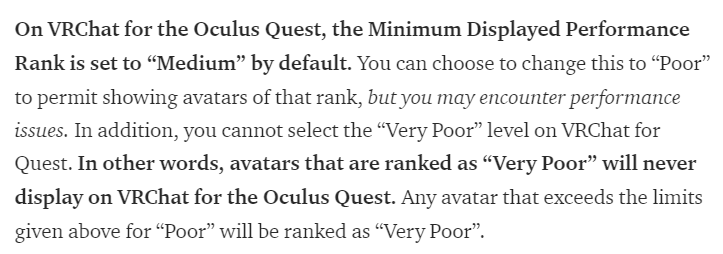
@fluid kiln "On VRChat for PC, the Minimum Displayed Performance Rank is set to “Disabled” by default. You can choose between “Medium”, “Poor”, or “Disabled” options." we can't choose 'very poor'?
or am i misreading
 fluid kiln
No, that wouldn't make any sense.
pastel storm
ok i misread
fluid kiln
Choosing "Very Poor" would mean that the minimum rank you want permitted is "Very Poor", which is the lowest rank
which... won't do anything
pastel storm
"disabled" would mean basically no poly limit for quest, huh?
oh
guess i shouldve kept reading
fluid kiln
If you continue reading, "Disabled" is not available on Quest.
pastel storm
guess there goes my avatar world
i like these improvements even though they weren't everything that i could have hoped for, good job @fluid kiln
 long talon
oh shiiieeeet, so max top is 10k. hail based tupper.
fluid kiln
There will be a new SDK with the next release.
hard limit is 10k, but you won't see those unless you change your minimum limit
so best to aim for 7.5k so you don't have to tell every user "please change your settings"
pastel storm
renaming my world to loli quest graveyard
7.5k is so prohibitive i'll do it for a few personal avatars at most
biggest bonus in this system will be disabled components counting
autohiding very poors should prevent crashers almost entirely
 mellow plank
Ive done testing to where an 48K poly avatar works fine on quest with no issues. 8 people in 1 room. So that 10K should be raised or allow the ability to see very poor.
pastel storm
16 pc robots dorp them to 20 fps regardless of the poly count
twin pebble
Ha ha!! I knew it!! Ha ha!! This is why you ad here to the lowest denominator in game dev. 🤣 salutes @fluid kiln uganda shibas are gonna go live hopefully tonight.
 north ivy
🤔
mellow plank
The limit being that the 48k is private and yes i do agree that it should be limited, but still i say that if it can handel it at all....then how is there already a problem?
next trench
The limits are very reasonable. I mean, 5k was the recommended target anyways, it shouldn't come as much a surprise for peeps doing development 😃
north ivy
It's all in service of having as many people in a world as possible, and not having that world be a box. 🤷
mellow plank
13k id say as most models are / should be that range anyways.
10K is good but 13K is better...with debates of course.
 viscid bloom
I have seen great stuff under 10k so I'm happy if that's the limit
twin pebble
I just have to figure out how to get there delorean quest version. To the puppy factory I go!
 prisma pine
so having a tail wag will drop you to poor, because you have 2 animators, making the avatar disabled by default.
but if someone has animations disabled in safety settings, that will disable that animator.
will that setting be reflected in the actual performance rating logic, so that users can see avatars that fit in "medium" perf rating with the disabled animator?
twin pebble
I'm going to be looking at any racing game in N64 for inspiration
mellow plank
Mickeys Raceway
pastel storm
im just wondering if there will ever be a quick way to switch to quest uploading with the same SDK, but just like a "switch profiles" kinda thing
or maybe that's a difficult task, idk
fluid kiln
its kind of a Unity-level thing
and is base to how building for different platforms work
pastel storm
its the main reason I see a lot of my friends not uploading to quest, "too lazy" to switch or set up a diff version of unity for it
fluid kiln
If you keep your project clean its really quick to swap
pastel storm
then again, quest users have trouble loading in a lot of grey robots sometimes so maybe a lot of people without optimized avatars is a good thing lol
muh snapdragon
long talon
Yeah, Thats my main issue rn, I have like 4 worlds, 60 avatars and shit tons of addons and shaders in one project....
twin pebble
I smell morr buisness opportunity. 

 long talon
well lots of people with greybois laggin I think comes down more to other parts of vrchat still needing optimization
next trench
I've just maintained/created two separate projects. Converted a base project over and just trimmed it down and edited from there
long talon
I really really need to learn the githubs
pastel storm
honestly tho half the quest users ive seen still dont know the quest has a mic so
maybe they need a bit of support
twin pebble
@pastel storm lol. Most quest users I've ran into, if they figure out the Mic, conversation mostly goes as follows: "oh. Shit dwag.woah dude thus is weird. Uh hey, uh there is this dog talking to meh. Ah ha. Dude."
twin pebble
I walk up talk to them. "How's it going?" And i get back. "Whoa! .. Wtf yo dwag its like ah Disney cartoon or sumthin."
long talon
I think I've only met one Quest user who didn't know they had a mic.
pastel storm
@twin pebble and they take like 20 seconds to respond
long talon
I should add a sign to my avatar that says "hey! you have a mic! (it's okay if you wanna stay mute)"
twin pebble
I honestly like those interactions ans like giving newbies a tour
viscid bloom
I must be an odd quest user
pastel storm
@twin pebble its like theyre on a new planet
they act so weird about it
and theyre so fascinated by everything
 inner wolf
first vr experience
 chrome girder
Anyone know what has to match between the platform versions of an avatar? Is it just the armature?
twin pebble
@chrome girder amature and avatar descriptor
chrome girder
Shiny. Just curious. I uploaded the Quest version on both slots and that was fine, but thinking about reworking the PC one.
long talon
Any tips on making this look more like a ring? https://bocchi.is-pretty.cool/8VysAhk.png

I've just been hacking at it with no success
prisma pine
alt+J
prisma pine
however those won't easily convert to quads
easiest way would be to move the verts by hand
there are like 10 you need to move or merge
long talon
I subdivided where needed and got it mostly fine
now uhhh
Why is this not working? and will my blinking work in VRChat anyway? https://bocchi.is-pretty.cool/6R9tvyX.mp4
Also, currently the only way I know of to get the blink shape key to render the eyelids with the eyes closed is duplicating the faces and flipping the duplicate, but that doubles the polycount for the eyelids. and Im going for as low as possible.
I considered redoing the blink shapekey so that I actually move the eyelid down manually like most models, but I like having it swing...
velvet portal
omgg that avatar is soooo cuteeeee
pastel storm
maybe the tester requires the 2 extra shape keys lowerlid_left and right
 dry zealot
o la the 5k panda
 gilded surge
Wow niceeee
 cyan spoke
That’s friggin great, love the outfit! 😮
dry zealot
Maybe upload a naked version to rival pikapetey dogo
 errant dirge
Heads up. Standard lite shader does not respect reflection probes and possibly also light probes in worlds.
pastel storm
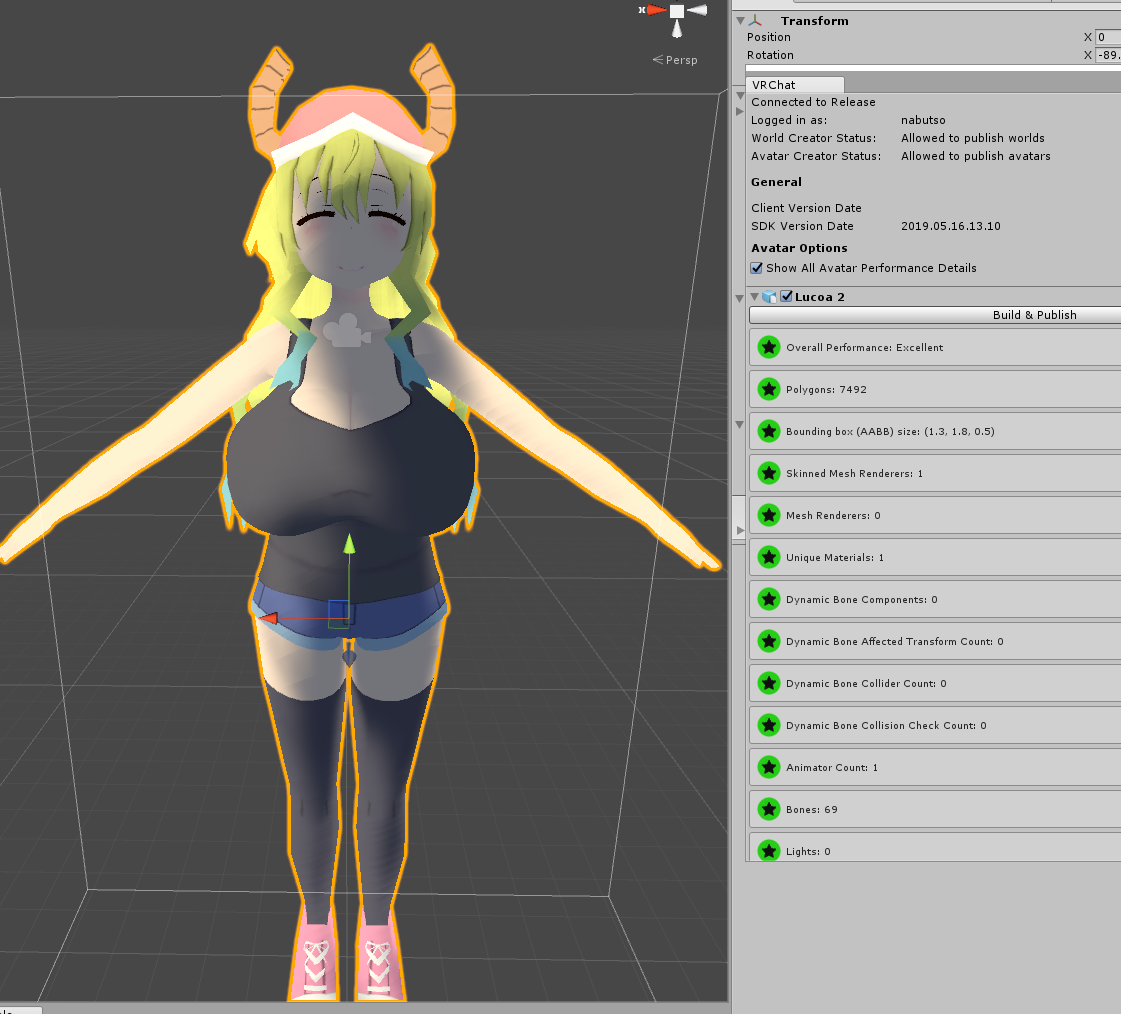
 wraith ocean
pastel storm
wraith ocean
pastel storm
@long talon i -feel- like i could get eveyr avatar i've down down to 10k but i dont think i'm gonna do it
because of this cheap trick
also i dont think the re-time thing does anything
it's all about not decimating things more than once and being cautious to check the damage on the movements
with that i think anyone can get their avatar down to 10k at least, maybe 7.5k with more time
long talon
for the record Ive been lurking here for a good while
dry zealot
Fix the shadow on avatar
long talon
thats just how toonlit shows on pc
its dumb
I keep an eye on all the quest channels.
also nice delete
dry zealot
Its on you light option .put all on the max @pastel storm
long talon
making a single directional light in unity just brighter than 1.0
causes toonlit to overexpose
not remove shadows
you need lights from all directions
or area lights
pastel storm
my fingers are a bit scuffed (i decimated and got rid of the joint areas) but otherwise i'm quite happy with it
i don't have to see the fingers myself so that's whatever
dry zealot
I say that just for the oreview photo of your avatar
pastel storm
that's ok i don't mind the preview showing the shadows and stuff
dry zealot
Its all about the presentations
pastel storm
it's a personal avatar though
cyan spoke
Shadows are disabled on Quest anyways so it shouldn't be a problem
Ah nevermind, you're talking about the preview pic, sorry
 sacred matrix
Disable cast shadows on the avatars mesh render. Makes it look bright but also disables the shadows
Did that to all my qyest avatars and it seems to be working fine
pastel storm
i ended up getting a flavor image cause _qb bullied me into it!
 pastel delta
so stupid question but with the new performance ranking for quest, aka 7.5k medium, 10k poor
what exactly does that mean, if I have 9k polys, am i under medium, or does it count as poor?
pastel delta
ah damn
getting to 10k is easy for me, but im struggling having high quality 7.5k :/
dry zealot
its ok if you sacrifice shape key
pastel delta
i wish Decimate Geometry would not break shape keys
would help so much, i have a model with 23k poly face, i can easly make it 1.2k but the shapekeys then move the whole face
 amber crater
You have to be a bit aggressive and stylistic about it.
I pretty much went back and tore apart what I was working on earlier because there were just a lot of better ways to do things
Detail only needs to be kept on key areas where geometry matters.
As far as clothing goes, just pretend "retro cubic" is in vogue
(And it will never be out of vogue)
Also, this is a great time to give your avatar a mask. 🙃
I can only be so positive about poly limits before I break
cyan spoke
VRC: Costume Party Edition
amber crater
But yeah, p much
My current avatar clocks in at under 5K, part of that is because his head is masked.
cyan spoke
I used to choose the happy mask seller from Majora's Mask avatar the first time in VRC, ironically he has lots of masks on him, but not on his face : D
amber crater
His face is like 7 polys anyhow
cyan spoke
Gotta optimize
amber crater
make it six
cyan spoke
N64 mindset there, good times
amber crater
I also forgot how nice AO maps look.
cyan spoke
Ah I can feel you. I started making 3D graphics around that year, maybe a couple before? J2ME and NDS era...
amber crater
I would pretty much slap AO on everything instead of setting up actual lighting.
Who had time to wait for raytracing?
Now raytracing is just a thing that happens at 60FPS... 😐
That's so fucked.
Anyhow, that's kind of offtopic.
The future is wild
cyan spoke
Stadia is watching you
twin pebble
@pastel delta well your problem is your workflow. The key word is "Decimate"
pastel delta
i got a good workflow now, i also noticed "Decimate Geometry" works better when you remove doubles before hand, didnt know about that, so many double verticies :/
 alpine slate
any way you can remove the quest version from an avatar from the ID that also has the pc version on it? (crossplatform avatar)
twin pebble
@alpine slate ooh lke, On'y removing the quest version and no t the pc version?
alpine slate
yeah.
not possible i guess?
pastel delta
not really
distant nymph
@alpine slate upload a 10,001 poly avatar and wait for the next vrchat release
prisma pine
or an empty gameobject with 2 trail renderers under it
 queen moth
Will the Show Avatar option override the performance threshold used for showing an avatar on quest that is more than 7.5k polys?
So you can leave the threshold at the lowest setting but still show less optimized avatars on an individual basis
 onyx leaf
hmm anyone have any info on how to make a avatar be dual platform supported?
so it loads quest for quest users and pc version for pc users?
onyx leaf
yeah indeed
581
584
weird that theres no info in the gui that you're not just "overriding" a avatar but adding it to it's "for quest" slot
pastel storm
yeaaaaaa ... you can't 'delete' a version either, only update it, I hope they add some controls for that eventually
 hushed wedge
Apparently the Quest version of one of my worlds is broken (and I lost the files) and I couldn't delete it, had to upload a pretty much blank Unity scene with a small explanation
pastel storm
ask ppl with a quest
hushed wedge
I guess that's how desktop devs test their stuff for VR too
pastel storm
I can check it out for you, but not right now, I have the debug overlay installed so I can check performance for you a little better
pastel storm
but since it's avatars that won't help too much
onyx leaf
no blendshapes, animations, uses vrc standard lite shader and is 1 mesh of 584 tri's
pastel storm
should be more than fine
the only quest debugging would be if it looks good and moves normally but you know what you're doing
onyx leaf
yup 😏
pastel storm
triggering blendshapes with gestures and all that good stuff works fine on quest too btw
onyx leaf
nice
yeah wanted to atleast have a few avatars quest compatible so i wont be one of the grey bots
now ill be a pink one or a blue one!
onyx leaf
it works, and it's popular with the quest kids 😉
velvet portal
omg thats amazing
 jagged sequoia
cool
pastel storm

Hey @VRChat and @dtupper before you completely nerf the Quest version based off your “benchmarks” how about you do some in game testing! On my Quest the avatars with way more polygons and stats gives me a better FPS than the “excellent” ones you made default... #VR...

 Twitter
velvet portal
Twitter
velvet portal
omgyessss
 delicate basalt
heavy doubt
jagged sequoia
did you try putting 10 of them in a room
pastel storm
we had 10 in a room weeks ago but yeah same results comparatively
velvet portal
does this mean i can make custom avatars
pastel storm
i mean, you can upload avatars to quest right now with more than 10k polys, but that's going to be going away when the maintenance comes
not just the uploading but anyone seeing those 10k+ poly ones

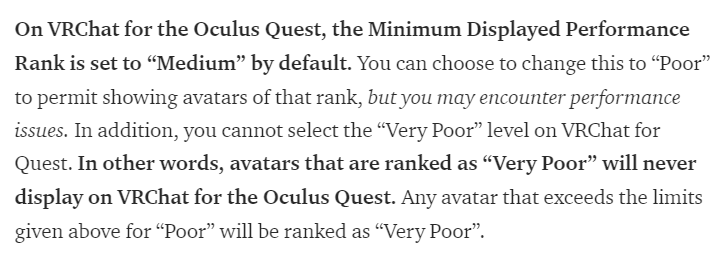 pastel storm
the update itself is fine, the very specific numbers are worth discussing
 jaunty tartan
Now do same tests with OVR Metrics tool and with all numbers and graph visible. These screenshots shows nothing. Fps on Quest fluctuating a lot even in empty rooms.
 toxic cipher
How do I upload a quest avatar? Is it possible to upload one to my account? Or do I need to do some weird submission that is closed? or? And when I try to upload it, it says I have the wrong shader. What shader should I be using? Please @ or DM me. Thank you very much.
pastel storm
you can only use shaders from the vrchat-> mobile selection
yours is from the legacy->self-illum selection of shaders
@toxic cipher
take note you're also limited to 10k polys etc

Medium
Check out the changes we’ve got coming for the Avatar Performance Stats and Ranks in 2019.2.4, including the VRChat for Oculus Quest…
toxic cipher
I read that website. I am very confused
pastel storm
so in unity, select your avatar's body and then on the right side in the inspector you should see your material(s)
each of your material(s) should be using a vrchat-> mobile shader
toxic cipher
I don't have a vrchat mobile shader
pastel storm
when you select a shader for them you can see the vrchat category, then the mobile one. if you don't see that, update your SDK
toxic cipher
I'll update my SDK
Oh I see it. Which one do I use? Toon lit? It makes a weird shadow on my face. @pastel storm
velvet portal
if u want the same effect as pc users with their anime avatars then yes
@toxic cipher it doesnt do the shadow on my face so..
 hidden cedar
I was reading over that new update, and frankly, I'm super confused
pastel storm
toon lit is fine
the shadow you're seeing is because you can get shadows cast on you and there's a light source in the unity scene etc
hidden cedar
Did we only test raising the limit for quest avatars to 32k polys?
And why the sudden drop?
Because I've noticed one thing for sure, dispite not seeing PC avatars, it has a massive effect. And quest avatars apparently don't seem to effect rooms at all.
So, I might be missing something here, cuz I'm not sure why the sudden decision to gut the recommended 32k polys to a whopping 10k.
I mean, I might be shootingyself in the foot, but....if I might extend a suggestion, if limits period, why not stick a limit across the entire board rather than testing and gutting and what feels like suffocating a particular audience?
toxic cipher
It was always 5k then a max of 10k to my understanding @hidden cedar
10k is "poor" and it auto blocked by default.
hidden cedar
Weird, for the last week, I've been using a rated good avatar that's 63k polys
toxic cipher
That's PC, not quest
Also..
64k I believe is impossible to be good
even with PC avatars
pastel storm
anything under 70k polys can be good on pc
you only lose excellent at 32k
you become very poor above 70k because you need to modify the SDK to upload higher than 70k. why that's even allowed, i don't know
velvet portal
sighh this update is still stupid
 floral crest
this 10k poly hard cap is really dumb
i cant name a single person who even complained
pastel storm
if you want to support alternative optimization stuff for quest users, see the relevant canny post: https://vrchat.canny.io/feature-requests/p/quest-avatar-limits
but do take note that it's unlikely we'll see this changed in the immediate future because they already have plans to do it the way they described
floral crest
i really dislike it
because then i basically got make my model look like ass for my quest friends to see it
pastel storm
it should be possible for almost anybody, given enough time, to get down to 10k poly for their personal avatar
with very little quality loss
long talon
or even 7.5 if you wanna be seen on default
but tbh, I expect most quest users to set it to show "poor" avatars
long talon
also, tfw I was basically writing what you said, then you said it and I was like, k fine and erased mine
pastel storm
mass producing quality avatars for free for public worlds is a no-go at 7.5k but i hope some people continue to try
dry zealot
I have a bunch 7.5 k -
 keen sigil
;w;
No way my gorgon can go low as 10k
pastel storm
i got 2 wings on flandre down from 5k total to 250, idk about your snakes but simplifying lots of snake-like shapes should be easy
velvet portal
welp time to learn more about downgrading my favorite avatars to 5k
long talon
If you can get an excellent rating on quest, legend says the ice fairy will come at night to give you presents.
 safe gazelle
are there any Pokémon quest avatars?
long talon
as in, Pokemon, Quest, avatars? or
Pokemon Quest, avatars?
safe gazelle
Yes Pokémon avatars for the oculus quest or if not can I make my own avatar for the quest?
pastel storm
There is a Ash already
 hidden cedar
Ok, but again, on my quest, it's still rated good, at 63,222 polygons, so either somebody doesn't k ow what the actual specs on the quest is, or they are halfassing and never tried it.
I can run a room with a good amount of people from quest, but add in PC players, it immediately goes to shit.
That's what I've been getting at.
I also wanted to bring this up, since last night, we had a PC player with a modified client crash the game multiple times.
I bring this topic up, since the argument is performance, but when you put PC and quest in the same room it doesn't work. Lowering quest standards for PC sounds dumb, because then your catering to PC, and pandering the idea that having a system like the Vive is best.
I say this because, I'm hearing talk that with every little update that 'removes' minor freedoms, such as lowering the polygons, people don't want to play using the quest.
Not to mention those that pay fair money to comission avatars to fit the specs, like I did, when I found that I'm able to work with.
That loss in performance?
That's when PC in rooms with quest. The bar is high for pc, it needs to be lowered dispite the versatile in customization. Even my PC which is recent has issues dealing with other PC's.
Thank you for joining my grump session.
I just think lowering a low bar further will lose players on a particular system and generate bad buzz.
long talon
The bar was never lowered.
VRChat still needs quite a bit of fixing. and as said before, limits will be loosened as devs see fit when they optimize other parts of the game more.
also, that screenshot, easy fixes all over... I'm just gonna go pour acid on my head while I scream really loud, wishing for humanity to learn how to avatars.
hidden cedar
By lowering it to 10k, from 32k?
That's not lowering?
I also will mention, that majors issues in performance arise more in encounters with the PC's, I rarely have issues with Oculus quest. We already can't access rooms purely for PC, most avatars can't be used, now again, another wave of avatars can't be used
I'm saying, that by strangling the quest now, your killing yourself. The quest owns the market right now.
PC users have the advantage, and there are some that go out of their way to crash questers.
I'm bringing this up, because I'm annoyed at how the bar for quest is lower than PC, yet the claim is performance. However the quest runs better than PC.
pastel delta
I wouldnt think about using 10k
hidden cedar
I will say it.PC's crash the quest, but quest can't crash PC.
Stop stabbing questers, I'd recommend posing a overall limit across the board for performance.
pastel delta
the default limiter will limit it to 7.5k and knowing people, not many will bother changing it
hidden cedar
I mean, I kept getting crashed by PC users. Dispite that I can't see their avatars and such. If you impose a limit on avatars, and set it so there is one format.
Then there is no confusion on making avatars.
And then there isn't a argument between what's better. Because the stats and requirements are the same. Then all rooms can be accessed and so on.
But I will stress, and will continue to do so, so anybody telling me what my system should be telling me, that my avatar shouldn't even be in good at 63,222 polygons, and it is telling me that it is in good performance, is complete garbage, that this update will screw players.
 languid lion
graulis, youre funny, good joke. straight up if you develop an app for the oculus quest there are plenty of these performance analytics to take into account. I think youre focused too much on comparing what vrchat is doing when you should probably be reading the quest developer documentation to understand why these restrictions exist. Also understanding that the quest is effectively a slightly more powerful android device objectively does not make it better than pc right now due to all the mobile specific restrictions, mainly around performance.
delicate basalt
yeah. the quest is running a mobile GPU after all, and that thing has easily noticeable limits. IIRC Oculus themselves recommend 100k tris per scene in some official tips for mobile devs back during the GearVR days, and the processor the quest uses i think comes from the same phones
with a world limit at 50k tris and a reccommended player count of 8-10, it makes sense that the avatar limits are 5k, 7.5k, and 10k respectively
languid lion
In essence though, people might say the quest runs better. What they need to realise is that it technically cant run better but it will run smooth only after its been restricted and the content correctly optimised. the same can go for PC, if pc gets even more restricted it could run better but then the pc can still handle far more than the quest can performance wise.
delicate basalt
exactly! PC worlds could be running just as fine as quest worlds in terms of FPS, stability, and general performance if people just followed the guidelines up to good, medium if you wanna be a bit greedy but they'll still run fine
explanation: the avatar limits are not designed around the individual, but are designed for the group. they're enforced and heavily encouraged because while 3 or 4 people with very poor avatars in a room may not cause an immediately noticeable performance drop, having 20 in a public room is definitely going to cause some shit to go down for most systems. after all, the game should strive to run on as many PCs as possible - including desktop users - since this would not only mean smoother, faster performance for all, but also the potential to have even bigger rooms than we have now.
thats why the tri limit is 70k, why 10+ dynb checks is very poor, and why most avatar limits seem outrageous at first: if everyone has a 400k tri, 60 draw call avatar, thats going to be a massive fucking problem when they all get together
hidden cedar
@languid lion sure I'm funny.
But I got told I'm lying about how my avatar is, when my system is running at good, and a person says I'm spouting B.s.
hidden cedar
I did read this. I'm also saying questers feel like they are being singled out. The bar is already low.
languid lion
content creation for a multiplayer game differs significantly in terms of restrictions and on top of that you need to optimise for a mobile VR device.
hidden cedar
The main reason for my Ted talk, is I'm annoyed with the devs reasoning to make it so that avatars over 10k can't be seen by other questers. We are not experiencing issues untill PC's are involved.
delicate basalt
might be a specific case. sometimes shit just runs better for no reason, but you cant rely on the sheer luck behind the systems that make it run better for every person who makes an avatar. you may be the only person in a room of 12 where your 20k tri quest avatar just so happens to let you have more FPS than a 5k tri one, and that doesn't mean that everyone else is experiencing the same thing - and even if most of the players did experience higher FPS, it wouldn't change the fact that it's still taking up precious room on the GPU, which could go to more avatars, thus making the room lag anyway as it starts to approach capacity
and i think 10k is fine. most of the quest avatars ive seen are fantastic and a handful of them look less scuffed than most PC avatars ive seen despite being aimed at 5-6k tris
languid lion
and I pointed you to the quest development documentation. 10 quest users at 10k polys is already at the maximum recommended by Oculus
delicate basalt
then some people got greedy and aimed for sub 7.5k, and now they have an extra 2.5k to work with
languid lion
that means no world to render at that point
vrchat has been very accommodating by allowing anything above their initial 5k recommendation for avatars.
delicate basalt
obviously its not going to be for everyone, because mesh retopology is hard - but people with more skills or the will to learn more will come around eventually
definitely much harder than using CAT's to combine meshes and MATs tho, which is 90% of optimization for PC avatars apart from "use common sense, check the limits, and dont mod your SDK"
hidden cedar
😆 then why have I been able to use my 63,222 poly avatar with no issues?
 languid lion
get 10 people with your avatar in view with a decent world and I want to watch you hit 72 fps
pastel storm
Ah yes
delicate basalt
i dont know. define no issues. is your framerate stable all the way through or does it fluctuate a lot? you testing it in worlds with just you, a few friends, or full blown public worlds? are other people experiencing frame drops?
hidden cedar
And yet, I've been in rooms with 19 other questers, no issues. Add a PC, everything fucks up
pastel delta
lmao graulis
pastel storm
So what u tryna say
pastel delta
why do people still give him attention when he clearly has no idea what bullshit he is saying
delicate basalt
there are a ton of cases that can crop up in a game where the content is produced and facilitated by a very powerful game engine and few limits on what you can do
pastel storm
Just make some worlds for quest users only
delicate basalt
im rlly tired and cant sleep, leave me alone >~>
pastel storm
Is that it?
languid lion
well we try to educate users
delicate basalt
anyway, the avatar limits are designed around the worst case scenario
pastel delta
some people dont want to be educated :d
delicate basalt
the worst case scenario being that everyone has a 69.999k tri, 10 material, 4 mesh avatar, and plug quest-respective numbers if you need
if everyone at least tries to keep everything under medium the game should run mostly fine,
pastel delta
but looking at public avatar worlds, people dont try
delicate basalt
and even if its poor, it should still at least try as long as you start bringing down the player count
pastel delta
there are like 4-5 specific creators, using 150k polys, 40 meshes, 7000 dynamic bone collision checks etc
they arent trying
pastel storm
Yup I agree with kina
delicate basalt
the biggest, widespread issue is just misinformation on proper avatar optimization, why it matters / why you should care, and the fact that it only takes a few clicks to do most optimization
though i will agree that there's also the fact that public world creators also just tend not to do it out of sheer laziness, some even just dont want to do it out of...not being told what to do? i dont know >~>
but for now the most we can do is just talk to our friends or anyone we can with the promise that PC VRChat can easily push 60+ frames in worlds of 20 or more players with just 5 min and a few clicks of your time per avatar
because at the end of the day, even if it was 2021, the devs did their shit, and VRChat ran so well that you could actually have the luxury of listening to music on youtube while playing it, your experience will still be ruined by people who upload avatars with component counts 6x above the hard limits for any bad reason
hidden cedar
@delicate basalt this I agree with.
As I mentioned prior, I encountered a person with a client that has be modified, with the purpose to repeatedly crash people
But like I also said, set a hard limit for everything. This way everything match's and works.
hidden cedar
Yes
delicate basalt
we should both know that it isnt gonna work out in the end
languid lion
no because the quest cant handle the hard limits that the pc would have
hidden cedar
Low ball everything
delicate basalt
maybe when the devs iron out VRChat they can allow a bit more leg room for avatar content
 midnight cipher
how do you get running link???
delicate basalt
but at the day, a smartphone processor has nowhere near the capabilities of even an i3-6100, and a smartphone GPU is dwarfed by any normal PC GPU
and at the rate tech progresses, it's always gonna be like this
we need to have different hard limits for PC and Quest, else we run the risk of cracking down the game's content on one platform or making it unplayable for another
hidden cedar
Well, everything is getting smaller, and in a few years the quest will run better than current day gaming PC. So if you low ball a standard hard limit. Then everything will run smoothly, and you don't have PC players purposely crashing people at whims desire
delicate basalt
everything moves forward, not just mobile hardware. by that time, the "2019 gaming PC" is going to be mobile hardware, and the gaming pc of 2030 is going to be miles ahead of anything we have now. so will script kiddies, custom clients, and crashers
limits and migitations are going to have to exist every step of the way, and although we can lift them as time goes on, they're still gonna have a similar relative relationship in the future.
delicate basalt
if the Oculus Quest 2 (or Oculus Journey as I hope it's called if it ever comes to in like 2025) can run 70k tris, 12 draw call avatars, then that means that the Rift 2 is going to be running 700k tri, 60 draw call avatars. this is a scuffed, gross analogy, but you get my point
i mean no matter how far into the future we are, the pattern is gonna be the same
languid lion
probably move the conversation to #quest-general or end it. this is not relevant to developing avatars anymore
delicate basalt
hidden cedar
Point is, right now it works.
Don't fix something that works. Look at what doesn't. And fix it. Right now, look at lowering and fixing a hard standard at PC limits. Or devs need to upgrade their hardware. Because restriction of quest avatars is going to cost them a audience.
languid lion
the people making content for quest have already followed the restrictions
delicate basalt
most of that isn't even true anyway tho. the SDK limits for PC do not need to be lowered, and the devs certainly do not need to upgrade their hardware, and this is definitely not going to cause them a big audience loss. nothing that cant be replaced anyway.
hidden cedar
I applaud those that do follow restrictions, I really do, but when I got harrased by a PC player that has a client that lets them fly around and drop portals on people and they crash both PC and quest....there are issues. And not all of it is quest. Just saying
If it works, don't try to fix it.
pastel storm
yeah i unironically got DDoS'd for hiding someone who had an unoptimized avatar so there's some serious hostility from some people regarding misinfo about optimization and what matters
if quest users say they aren't impacted by polys then you shouldn't just tell them they're wrong, it's not something we're just hearing once or twice either
hidden cedar
At best it's bones, I was made aware of an avatar that has well over 77k but has 6 materials, and the killer of what made it poor was it included 137 bones. That's what made it poor. It's not the polys. And I've been trying to say that. But nah, call me a liar.
I don't care what tech talk you use. But I'm saying, is even if you don't see a PC avatar, the presence of their avatar affects questers. You can block somebody, but their presence in the room still affects you digitally. I blocked that person with a modified client and they repeatedly dropped portals within seconds of each other (on me) that lasted only a few moments.
It's not the polys.
pastel delta
ayyy uploaded my first avatar world
floral crest
my problem with the poly hard cap is the fact i have to decimate my model more which was already optimized for the quest
and that's going to make it look like ass cutting out another 20-30k polys
foggy quail
If you can remove 20-30k polys from it then it wasn't optimized for the quest though 🤔
 craggy glacier
@pastel delta whats the name of the world? would love to check it out
floral crest
except it was when it clearly had no problems before.
shouldn't have to potatofy something for a system that can clearly handle it
velvet portal
@pastel delta is it for quest? i thought they said those avatars wont be available anymore
pastel delta
who said they wont be available? what do you mean?
@craggy glacier its Kinami's Quest Avatars they are still not as good ad they could be, but im still learning and ye
craggy glacier
ah don't worry, im still learning too
few of the avatars in my world are scuffed as fuck
optimized though, thats what counts
velvet portal
@pastel delta so the poly for ur avtaars is 5k? if so thats amazing
chrome girder
@pastel delta Looks great! I’ll have to poke around your world and try them out. 😃
pastel delta
i decided to go with 10k instead of 7.5k, because im just to bad to get it good looking with decimation alone, going to look into retopology the next few days
and thanks ya'll ❤
velvet portal
ahh okayy well good job either wayy~ its fun to learn imo
cyan spoke
Looking good! Gonna visit the world as soon as I get to play VRC
 outer tide
Ok stupid question but what is the best way to make low poly shoulders?
I can technically already make shoulders but they are way to square
cyan spoke

At 1103 tris this is pretty cheap, adding some loops around the shoulder should be pretty easy
pastel delta
that looks very good
cyan spoke
Yeah that's a nice reference, has plenty of budget left for details too
velvet portal
Kinami i just checked your world and the avatars are really decent! xo
jagged sequoia
https://i.gyazo.com/500fadaee608a768c9980723e668064f.png work-in-progress of a low poly of the VRoidStudio female mash 5300 triangles at this point
 velvet portal
vroid is fun and amazing to use, but that looks cool!
outer tide
Huh guess I was making the shoulders kinda right(minus the lack of polish on the underarm and a bit of roundness)
Though going of that I really should fix the arm locations though
Still thanks though
jagged sequoia
I'm trying to get it under 5000 triangles but haven't quite managed yet so that there's budget for hair and clothing
outer tide
also last stupid question would you call optimized enough for 1000 tri including all clothing (albeit with arms or leg) or are there still major spots that can be improved with minimal impact to the shape
cyan spoke
I believe the very top polygon loop on the chest can be removed
Looks ok enough to me
outer tide
That's good to hear, also hopefully I remember to remove the top loop tomorrow and maybe add some hexagon arms
 prime imp
Love seeing what people can do with low poly models.
outer tide
True, that is what I did on the older models but I could not get enough detail out of them for my liking plus I can just texture the base model to be the clothing( with some minor editing ) to reduce any Tri later
That and the clipping started to annoy me even though you really could not see it
safe gazelle
I'm trying to import a fbx into blender for an avatar I'm trying to make for the quest and I'm getting this error anyone know how to fix this? version 6100 unsupported must be 7100 or later error!
@outer tide
outer tide
Never heard of that issue ever before, sorry
safe gazelle
ok I'll try to reach out my friend on google hangouts who might know how to fix it. He knows blender in and out like the back of his hand.
outer tide
Have you tried googling the error? / is this normal blender or cats fbx import
safe gazelle
I googled it apparently I need to update the fbx using a software to update the fbx file to a working version
hidden cedar
🤔 I'm sorry, I still find it bs, that they are making it harder for avatar creators.
When avatars run good to excellent at 63k+ polys, somebody is bullshitting me; especially for questers.
dry zealot
10k is fine. But be block automaticly after 7.5k is annoying
Its like when they but the dynamic bone limiter.
Everyone was. Why my dynamic bone dont work
prisma pine
and since editing the limits is a pain people ended up disabling it and forgetting about it
safe gazelle
anyone know how to apply multiple textures in blender I'm trying to make a pokemon avatar for the quest and I'm trying to put on the texuture for his eye bu I keep putting it on the entire body.
twin pebble
@safe gazelle you need to learn "UV unwrapping"
dry zealot
The uv of the eyes are maybe on a completly other uv map
On mobile. They use a range of 2D texture for the face/mouth to have less poly. Some time its combine with the body and other time its its own material
safe gazelle
ok I got it
dry zealot
Reminds me I did not made the 2D viseme tutorial that I wanted to do.
safe gazelle
does anyone mind making it because I'm struggling over hear how it doesn't look right
@dry zealot
dry zealot
What is that
cyan spoke
Lugia with UV map problems I believe?
safe gazelle
It supposed to be lugia and his eyes don't loo right I'm trying to fix it
@cyan spoke
cyan spoke
The pic is a bit small to understand what’s going on, but to me it definitely looks like the UV map is misplaced
safe gazelle
how do I move the map so I can fix it?
cyan spoke
Blender has a UV map editor; I dunno how to use it since I use C4D for modeling, but that’s pretty universal
Someone here might help you better I believe
amber crater
You'll want to look up a tutorial for UV Unwrapping for your chosen 3D development software.
There's a decent chunk of info to go over, I think.
cyan spoke
^ indeed
safe gazelle
@cyan spoke do you think you could make it for me or direct me to someone who can help me?
amber crater
With UVs, working on a single part of the model's UVs, but not knowing what to do with the rest of it, will mean you have to go back and redo stuff later.
Just search for "UV Unwrapping Tutorial Blender"
But someone here might have a good tutorial saved.
When searching, make sure to include your version number for Blender
cyan spoke
I’m not at home right now. As Krackatoa said, just look up for a tutorial on Youtube. There are plenty
It’s not as hard as it looks!
amber crater
Learning to learn is as important as the information itself.
Since you're going to run into a few issues with UVUnwrapping, information that may be missing from videos we give you.
safe gazelle
I someday want to learn how to do this so I can make games and maybe someday make my own vr experience but I'm struggling with making models.
amber crater
It's best to get used to scouring Youtube for tutorials
safe gazelle
I already followed youtube and then that happened
amber crater
You need a better explanation on UVs, I think
Because it almost looks like the UVs are "overlapped" on the map.
cyan spoke
I suppose you were trying to reduce the polycount of the model?
amber crater
It's possible for UVs to share space on a single texture, causing the texture as it exists on the model to "break"
safe gazelle
I think I need to get in contact with my friend on google hangouts who knows this like the back of his hand.
amber crater
So you need to learn how to fix UVs within the UV Editor before you'll get anywhere
You'll want to look for a comprehensive UV Editor tutorial.
safe gazelle
he can then remote control into my pc using TeamViewer
amber crater
If it's not a problem with multiple textures/UV Maps, you're going to run into this problem more than once if you don't get all of it explained.
So in the meantime, watch some tutorials
 calm rover
Anyone know where to find funny avatars please message me being new to vr chat I only know of big als
 charred wave
Hi guys! I need some one who can help me with blinking and mouth open rigging in blender for one custom avatar, please help)
 golden kettle
so what shader does work with avatars, every single one i pick says its unsupported
pastel storm
anything in the vrchat-> mobile category
if you don't have that category (not mobile itself) then get the most recent SDK
 velvet portal
That's so cute
 shadow olive
hi, im having a tiny issue making an avatar for quest
how exactly do i change the shaders to the mobile shaders?
i dont know how to access the shader settings
shadow olive
so @jagged sequoia interesting bit, i dont have the materials under skinned mesh render
theres nothing under there
jagged sequoia
does a texture show at all on your mesh
could I see a screenshot of your model & the object hierarchy
shadow olive
underneath dynamic occluded theres nothing, even though im pretty sure theres materials
languid lion
did you happen to add that skinned mesh renderer yourself?
shadow olive
...no....
jagged sequoia
try clicking on that says polygons
languid lion
you need to select your mesh not the root
I dont know why your root has a skinned mesh renderer
shadow olive
well shit
which ones the mesh?
wait..
ah, heres the issue
but dont know how to fix it
it's greyed out
languid lion
youre hierarchy looks incorrect for vrchat, and your avatar is nowhere near ready for quest with that many meshes
jagged sequoia
you need to make a texture Atlas for it https://www.youtube.com/watch?v=0cSesu_zkQQ

Oh! Crap! I missed a super important part! At the end, you have to delete the original "UVMap" under the Data tab (under UVMaps), and rename the "TextureAtla...
languid lion
follow any vrchat avatar tutorial for using cats in blender. you need to combine meshes for a start and rename the hierarchy correctly to the vrchat one
shadow olive
looks like im gonna be busy...
jagged sequoia
yep
velvet portal
It's fun to learn
jagged sequoia
lots of new things to explore and learn
 foggy garnet
Been working on different pixelart styles. Here's a tiny pistol!
jagged sequoia
cool
pastel delta
looks sick @foggy garnet you should do some more and sell on the unity asset store
foggy garnet
thank you! I've still got a lot of practice to do (the texturing on this handgun's still kinda wonky) but I'd really love to make some kind of living out of lowpoly stuff at some point.
pastel delta
getting really good at decimating by now >_> still alot to improve, and still didnt touch retopology :/
pastel storm
Looks really good loving your avatars so far
foggy garnet
looks great, yeah!
pastel delta
dont give me to much credit, the models are still from deviantart, not selfmade MMD's^^ im just decimating and doing basic stuff
 high hazel
looks good!
velvet portal
just to be 100 again, after update the poly limit for quest is 5k or 7.5k?
cus i reallly wanna make my custom avatars again
 cunning imp
Excellent/good = 5k
Medium = 7.5k
Poor = 10k
Poor is blocked by default, above 10k is blocked permenately
craggy glacier
technically the limit is 10k, but if you want everyone to see your avatar without having to tell some people to change a setting, the limit is 7.5k
velvet portal
alright thank you
velvet portal
hmmm... would i still be able to like use blendshapes/expressions?
cunning imp
Yes, animations are limited I think just due to the hard limits but you can edit blendshapes values via gestures
velvet portal
ahhh okayy
twin pebble
you can have unlimited blend shapes
i have not found a hard limit
you can also animate a blendshape 90times per second
you could essentially have your blendshapes "draw" other shapes
pastel storm
yes
you might -destroy- your existing ones decimating but otherwise you can -have- them yes
twin pebble
yes you can have expressions. here is my avatar on the quest @velvet portal https://twitter.com/PeterJCasaey/status/1137912065786634240


its an #OculusQuest version of my shiba inu avatar on @VRChat!! Very fun challenge to get all the expressions working with only 4,276 polygons! #gamedev #vr #animation #motioncapture #crossplatform https://t.co/tj8qoc4Xbc
Likes
394
Twitter
velvet portal
Aweee that's so cuteee~!!! Well okay thank you!
hushed wedge
Be careful with blend shapes, for some reason if you move a lot of verts at once in a lot of shape keys it tends to destroy performance.
I've seen a model that was 60k polys and lagged me to death whenever its user spoke, because every vert moved differently on every shape key
That was on PC
pastel storm
probably an issue with decimation
if you decimate in edit mode it ends up making every vertex move on that shape key
you need to shape propagate to fix that
twin pebble
every vertex has an ID number, shape keys just interlopate between vertexs that moved. If you decimate, you change the id numbers of each vertex
dry zealot
Propagate shapekey all the body that normally wont move with a shape key
distant nymph
If you need to reduce polygons on an area with shape keys do it manually by dissolving edge loops. It's safe to delete vertices, and to change edges and faces, as long as you don't create or move any vertices
Also take backups and check that your shape keys haven't exploded periodically
pastel storm
^ very important lesson to learn
craggy glacier
just finished my quest optimized version of my avatar
left is 7,478 poly
right is 16,238
craggy glacier

distant nymph
@craggy glacier make sure the first five shape keys, in order are basis, left and right blink, left and right lower lid
You probably shuffled them at some point
craggy glacier
thanks for the info, ill look at that when i get home later
 stuck iron
Heya, all! I was planning on getting an Quest, any ideas if there are any wolf/werewolf avatars for this yet?
dry zealot
Probably at some point
velvet portal
@craggy glacier so amaazzing gimmee lessonss haha
prime imp
For quest avatars things like blinking and visemes are still possible right?
 random badge
Yes @prime imp
prime imp
Alright thank you for clarifying 😄
random badge
@stuck iron there are a few, even in the default avatar list, if not I'm sure you could find one or get one made
stuck iron
Thanks @random badge !
 tawdry swan
anyone know how i can use my quest version of my avatar on pc version , i dont have a quest but i made a quest version
pastel storm
upload the quest version in the pc slot
tawdry swan
its already uploaded i just want to change my avatar to the quest version
how is it possible on pc cause it using my pc version since im on pc
 fiery glen
I don't think you can see the quest version unless you are actually on quest.
pastel storm
yep, can't see quest version unless on quest
remember, the quest versions are built for android. they simply won't work at all on pc even if you could 'toggle' between them
you need to actually build an avatar for pc to see it on pc
errant dirge
Switch unity build to pc from android and upload it again.
 red bay
is it easy to make a penguin on the quest?
tawdry swan
i said it was already uploaded and that kinda shit that u need a oculus quest headset to test if it work as intended
pastel storm
just upload to the pc slot.
instead of the quest slot
then you can test it all you want (except for th elittle things like different LOD distances for texture stuff)
tawdry swan
they could add the quest graphical setting in the menu
and not have to spend 450€ just to try out and test if ur avatar is setup properly
pastel storm
they can't because as i said, the quest avatars are built for android. they won't run on a pc
it just doesn't work that way. it's not a graphical setting. it's a different platform.
tawdry swan
true
im still waiting for them to fix the time outs
since the new ik update
i can't join anyone
random badge
Upload the quest version on the pc build
chrome girder
Or just ask a Quest user to test for you. 😃
twin pebble
@stuck iron shiba avatar
pastel storm
Can quest avatars be rigged for fullbody for those who wish to use it around their quest friends?
delicate basalt
ye
pastel storm
It's saying my "Unity package upload failed" / "Failed to optimize". What do I need to do to fix this?
craggy glacier
an avatar i just uploaded is slightly clipping through the floor, any possible reason why/fix?
 blazing meteor
Excessive texture size is entirely unenforced on Quest. Isn't this problematic?
pastel storm
its soft enforced by avatar upload size isnt it
safe gazelle
I'm trying to use the newest version of unity and its giving me issues making the avatar.
long talon
wdym by newest version?
 shy kayak
hold on can i dm someone my avatar to see if they like it?
i need opinions but this server is blocking all my images 😦
thats a big L if u ask me
long talon
wdym blocking all your images?
you can put pictures just fine in here https://bocchi.is-pretty.cool/4CYFQfy.png

Are they too large? are you dragging them onto Discord from a window without full OLE support?
viscid bloom
So I'm gonna hop on vrchat tonight is there any new avatar world's I should check out?
delicate basalt
@viscid bloom off the top of my head u should check out Kinami's if u havent already
viscid bloom
I believe I have been there before but kinami recently uploaded more right?
pastel delta
hey das me
i just updated the world to be a world and not a flat plane, no idea how it runs on quest, still working on most of them
viscid bloom
I can check out its performance after I get home @pastel delta
pastel delta
22 avatars sofar, some are to broken to be public, some are broken and public, atleast they are out there i guess
dry zealot
I have 17 i think at the moment on mine
cunning imp
Cutout is not allowed on quest due to it not handling transparency well
shy pike
@still tusk cutout on mobile is quite expensive so there is no shader for Avatar for it
It's the opposite of pc where it's almost free!
 still tusk
WAT
IT'S Expensive on Quest but not on PC?
I didn't know that Cutout would be jarring on performance
Frick, even the 3DS handled it.
 distant epoch
is there a technical paper on these issues?
or are people simply running some stats and trying things out?
<-- software developer interested in performance stats
shy pike
@still tusk the 3ds is a completely different type of hardware and anything between them it's very unrelated
It's not that "this computer is too weak to do cutout" it's that the way it works is just different, making it worse. If Android did everything like how it's done on pc it would be the same low cost as it is on pc. I don't know enough to explain why they did things the way they did, on mobile
cyan spoke
Actually cutout is heavy on all platforms, but on PC it has much less impact due to the amount of power of the GPU. A decent explanation: https://www.gamedev.net/forums/topic/655602-why-discard-pixel-take-a-noticeable-performance-hit/
GameDev.net
something as simple as that if(textureColor.a 0.5f) discard; take around 25% hit in frame rate (assuming all the objects on your scene use that)
For 3DS they might have used a different shader optimized for the integrated GPU or vice-versa, I have zero info on that 😕
dry zealot
A lots of low poly game use transparence or cutout idk
cyan spoke
Cutout is not going to kill the performance if used on small areas, but imagine 10 avatars only using cutout shader, that will kill the performance quickly
You can fake cutout with an AlphaBlend shader, same result and better performance
pastel delta
same thing with Anisotropic Filtering, its horrible on console, but a shitty computer from 2004 can easily do x16
hardware is a complicated thing
hushed wedge
In this case, mobile GPU's do certain optimizations that are canceled out by cutout.
pastel delta
More Avatars woo, taking a break from quest avatars tho
twin pebble
@distant epoch its so a quest doesn't have to worry about performing an alpha test when rendering.
distant nymph
@hushed wedge to be fair PC GPUs do the same optimisations, they just have the memory bandwidth and FLOPS to tolerate a fair amount of alpha and cutout
pastel storm
nice
 formal zodiac
can I have 10,800 poly's with a Quest Avatar? I will have only 1 material.
formal zodiac
I'm down to that from 27000 and it looks pretty good. This is without having to fix any clipping, etc.
 gusty patio
I'm at 30k. It'll be months for me.
formal zodiac
Well last I knew 5k wasn't a hard limit.
I didn't know if that changed. Did you get a Quest storm or are you just trying to be friendly to Quest users?
gusty patio
Good thing 10k is there. It's reachable now.
Haven't seen hardly any. 10k is hard limit.
I think 7.5k to 10k is going to be the very poor rank ans 10k and over won't be seen.
formal zodiac
I can surely hit 10k. Beyond that is beyond my skill level. IF a Quest user prefers placeholders they can block me. 😃
I will keep trying to do better. Actually it doesn't look too bad without the hoodie. That can probably save a lot of Poly's but I would prefer to find a simpler hoodie to serve as shirt and all.
gusty patio
800 is really close.
velvet portal
eeehhh
jagged sequoia
check if you have any overlapping parts like are their arms under the shirt you can delete them
formal zodiac
Ok, I will. I also need to learn how to add points to the mesh. Quick tip on that?
Overall it looks good, and I'm certainly willing to live with some rough edges to for a decent overall impression. I have fixed several tears just by pulling out existing points, but I need to add a few back to the top of the hoodie and the sleeves, etc.
jagged sequoia
select two edges you want to fill & press f
formal zodiac
I'm needing to add shape back
jagged sequoia
how much experience you have in Blender at the moment
formal zodiac
hardly any. I just uploaded my first avatar yesterday. I'm a pretty fast learner, but 3d models were completely new to me.
It doesn't look bad without the hoodie, but I would need to do a lot to the hair. I would want the back to look like the front.
jagged sequoia
well for one thing you still have the back of the head behind the hair you probably want to delete that to free up some polygons
jagged sequoia
involve copy-pasting hair chunks
formal zodiac
but those hair chunks would add poly's. If I add a few mesh points I can make the hoodie look better.
jagged sequoia
first things first let's go delete any duplicate Parts under clothing as it going to free up a bunch of polygons mind showing a wireframe of the model
formal zodiac
I'm at 10,100 with that.
Tris not faces right? Faces are below 10k now
Sure, give me a minute.
 proven monolith

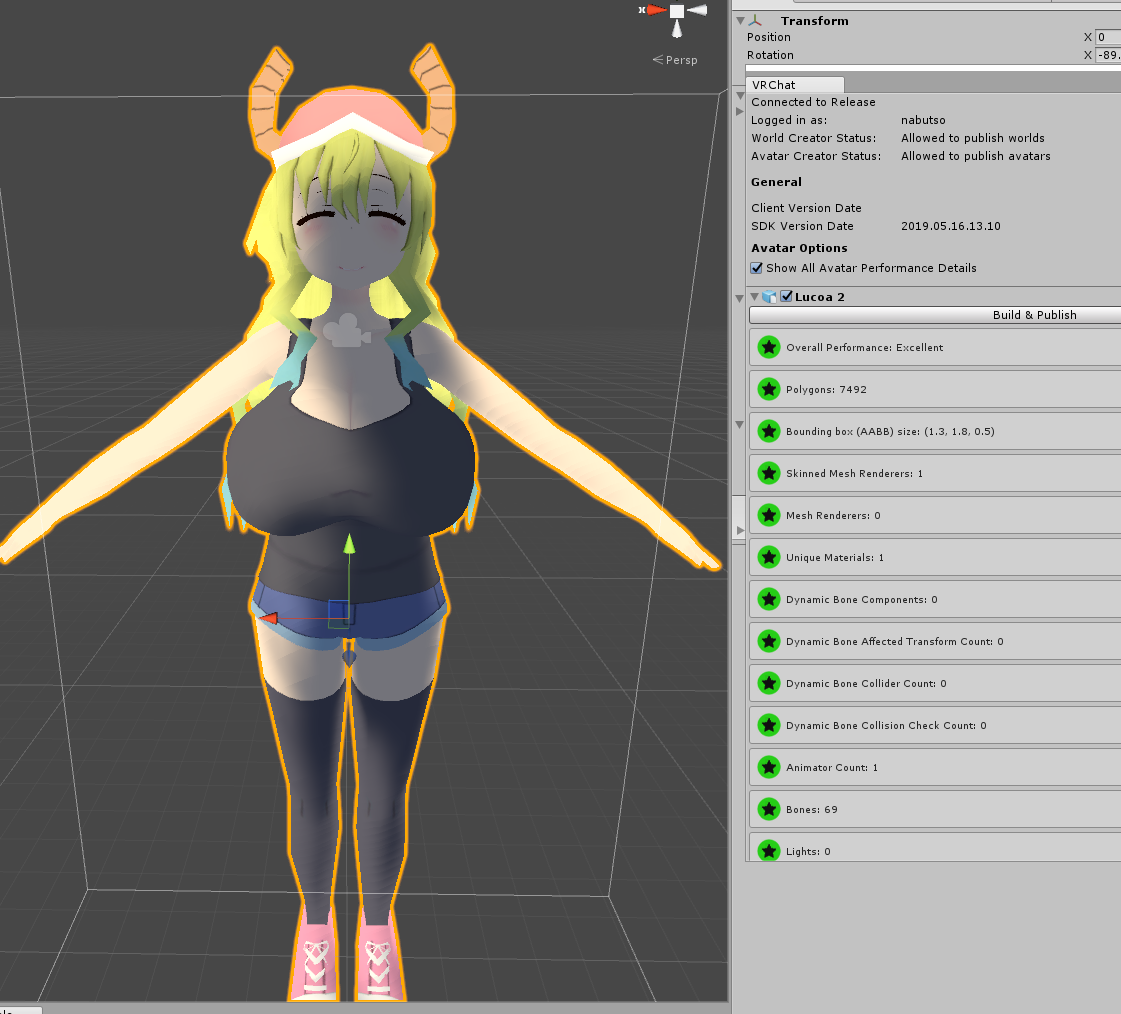
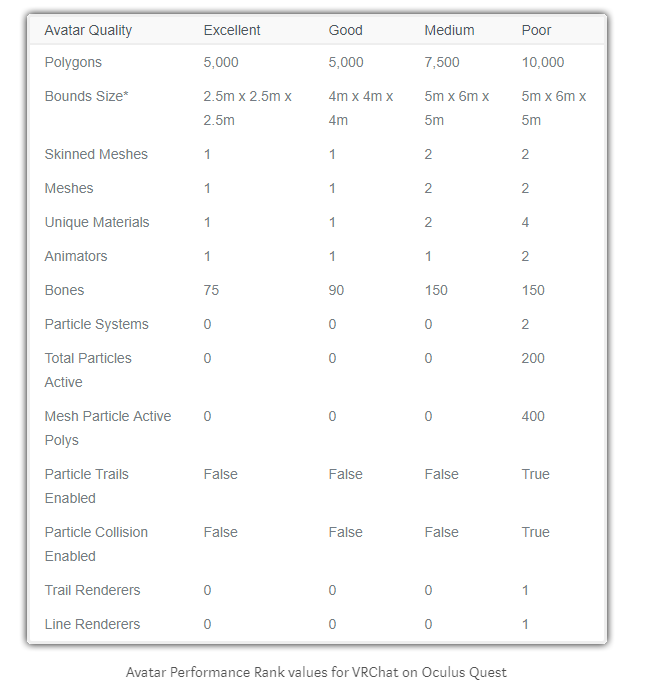


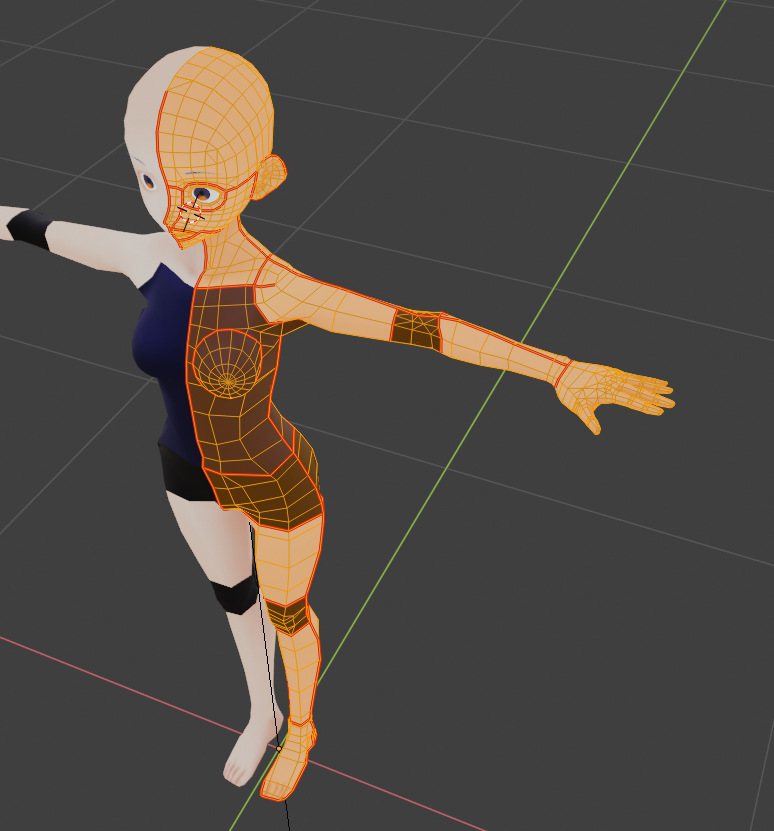
 formal zodiac
The clothing and parts that are hidden are really pretty basic already.
jagged sequoia
you still should delete them regardless so that you have more triangles for stuff you can actually see
formal zodiac
jagged sequoia
could you zoom in showing the side of the head wireframe
formal zodiac
jagged sequoia
mind if I see the triangle count displays
formal zodiac
Not sure how to do that.
jagged sequoia
just take a screenshot of your whole blender screen
jagged sequoia
okay you just need to delete 110 triangles
formal zodiac
The coat and shirt cover the top of the pants.
I know I don't want to decimate joints, but is there a way to select portions of the mesh to decimate?
jagged sequoia
I wouldn't recommend decimating the joints at the moment I think you're better off deleting the top of the pants.
formal zodiac
Right that is what I meant, is there an easy way to delete the top of them?
jagged sequoia
select the jacket and move it out of the way by dragging a Direction and then pressing the number 4 so that it goes 4 meters so that you don't accidentally delete the jacket
formal zodiac
Even if I lose the hoodie later I would stick with a long shirt. Probably the one that is on it.
hiding it won't work?
jagged sequoia
is it a separate object from the rest of the body
formal zodiac
Yes the jacket and shirt are both seperate.
It used to have dynamic bones, but obviously not for quest
jagged sequoia
then go to edit mode on the pants
viscid bloom
Watching this unfold is mesmerizing
jagged sequoia
you can press the B button to box select the parts you want to delete
formal zodiac
Ok, what is the best selection for the delete? Edges and faces?
and I needed to know that Box select option agest ago, lol
jagged sequoia
faces
formal zodiac
9,723
Now I wish I could put some of those back on the jacket and save some work
Do you think 10k avatars are ok on Quest, or should I really try to create something 5k in the future?
jagged sequoia
you would want to get it below 7.5 k so people can see it by default in the future
formal zodiac
A big help for that would be to find a hoodie that can replace the shirt and jacket combo but still cover the pants.
If I found one I was happy with I could loose the entire back of the head and hair too.
jagged sequoia
go look for one but try to get it uploaded and working first
formal zodiac
I have no natural artistic ability but I can use tools to pretty good effect. How hard is it to create custom textures?
Yes, I just have to copy my project and add the android SDK. The sleaves and shirt didn't like the mobile shaders earlier. Any pointers for how to change the shaders in blender that caused that?
jagged sequoia
not that I could quickly explain on the sleaves and shirt
as far as custom textures depends on what you want to do
formal zodiac
Ok, well it's definitely for another day. Getting this working today was far beyond anything I even imagined doing. I only have an hour to an hour and a half tops decimating. Thankfully I hit under 11k easy.
Actually for Quest, if the textures don't cooperate I can just make them solid black, not big deal.
But as they are the mobile shaders made them transparent. I had no idea how to fix that.
jagged sequoia
which mobile shaders do you select
formal zodiac
Can I pick a different texture in unity so that they appear solid?
I tried them all. I can't remember the name but the top option under mobile shaders looked best.
jagged sequoia
select that and take a screenshot of your entire Unity screen so I can see what's wrong
formal zodiac
I sent you a DM. If you aren't present here I can update you. Before I try that again I want to go ahead and copy the project and set up the SDK...so if I get it fixed I don't have to do it again.
How do I add to the mesh so I can clean up the front of the hoodie?
add points?
actually I got it. It's not round but it works.
jagged sequoia
cool
formal zodiac
Is there an easy way to scale Avatars to look correct with FBT? I'm 6'4. By the time I adjust my real height I have ridiculous arms.
But I did hear that even just a hip tracker adds a lot of movement. I tested that today and its true. Still I want my legs, lol.
jagged sequoia
don't have a lot of knowledge on that as I haven't done full-body tracking
formal zodiac
Understandable.
jagged sequoia
learning more about blender the future as that would be handy
@viscid bloom out of curiosity what's been mesmerizing about it
viscid bloom
Just seeing the process, I have no clue how to make avatars so it's really cool
jagged sequoia
you should definitely give it a try sometime
formal zodiac
Ok, it looks great. Everything is definitely acceptable, except the odd transparency to the right of the neck. The hoodie is complete on the other side. Any suggestions?
jagged sequoia
not that I can think of that will be doable at your skill level
jagged sequoia
yep that's a screenshot from Unity
formal zodiac
Right, I mean it didn't Atlas that way. It looks fine in blender
Can I edit the mesh inside unity? Strech something from the front side to hide this?
jagged sequoia
you have to do that in blender
formal zodiac
Any idea what causes this kind of break between unity and blender though?
jagged sequoia
blender doesn't have backface culling turned on by default
n button while in blender a little menu should pop up in backface culling is on it
jagged sequoia
your problem is unrelated to the mobile Shader it has to do with the model itself
formal zodiac
Do I need it on?
jagged sequoia
yes I need to turn on the backface culling if you want to see the the hole in the back of your hoodie
so that you can drag vertices to hide it
formal zodiac
How do I hide everything but what I have selected?
and how do I add new vertices if you don't mind?
foggy garnet
If you select everything and then deselect the parts you want to stay visible with shift-B or shift-right click, you can then press H to hide all selected vertices.
It's alt-H to unhide them
formal zodiac
Ok.
and then to add vertices
I only have one I can move on that side on the inside
pastel storm
basically, vrchat mobile shaders don't include any double-sidedness
so you need a mesh that's viewable from both sides to actually be modeled with both sides
duplicating one doubles the polycount of course
but you can select a mesh-> hit space -> duplicate mesh-> hit space-> flip normals
formal zodiac
Right. I have room to add enough poly's to get it done.
pastel storm
you also probbaly should have removed doubles before decimating
because now you've got gaps all over from disconnected faces
foggy garnet
If you're wondering about creating individual vertice points, too, you can do it in a couple of ways.
You could create a loopcut with ctrl-R, or use the knife tool with K.
formal zodiac
I'm getting the option to duplicate but when I hit space again I am not getting the flip normals option
foggy garnet
Oh, you might need to start typing it in.
The space key works a bit like a searchbar for tools.
formal zodiac
Oh that remove doubles. Yes, I recall hearing about that but forgot all about it.
The duplicate and flip normals aren't giving me anything.
can I join objects to fill gaps?
foggy garnet
Like, two separate meshes? It should be possible by either selecting vertices and using F to fill a gap, or selecting two and using alt-M to merge them.
Just be careful with shapes connecting over four vertices, they can get weird when flexing or shifting.
formal zodiac
Phew, I finally duplicated and flipped some.
Can I select the poly's themselves easily? I'm selecting the vertices until it finally selects the filled space, but I'm having trouble getting that to work on all of them.
and I just drew a line somehow that ctrl z wouldn't remove
It's a GP pencil but I can't delete the stupid thing
foggy garnet
Oh, I'm not sure about the pencil. If you use ctrl-tab, though, you can choose to select edges or whole faces (polys) at a time.
formal zodiac
Thank You. That helped a ton. I don't think the pencil will export. I hid it from view
Ok, so in unity I could see through my arms at the shoulders. I have no idea why. Apparently due to backface culling but the backfaces should not even be seen.
Do I need to duplicate and flip the poly's at the shoulder on the sleeves to fix that?
Or was that happening because I didn't have a backface on the exposed sections of my jacket?
foggy garnet
I'm sorry, I don't have enough experience with quest shaders to figure that one out. You could always try the duplication method, just in case.
formal zodiac
ok
formal zodiac
what am I doing wrong when trying to hide everything but what I am working on? I know how to select all. How do I only deselect what I am working on?
foggy garnet
Oh, holding shift while using box select or right clicking should deselect specific vertices or faces.
formal zodiac
Ok, and when I try to edit the shirt which appears to be inside out, it disappears when I switch to edit mode. Any ideas?
foggy garnet
Maybe it's hidden? Try using alt-H in edit mode.
formal zodiac
That was it. I didn't even know that was possible to do. 😃
I am actually very glad I had these issues. I have come a long way in learning to navigate and manipulate with blender. I half know what I am doing, but if I hadn't had these issues, I wouldn't have learned this tonight.
foggy garnet
The beginning's always pretty rough, I think. I'm not proud of my first avatar, and it probably took more than a month to create, but it was still probably the best way I could've learned to use the program.
I think you're doing really great so far! 👍 👍
formal zodiac
Yes, my first was just an MMD to Unity conversion but I did atlas the textures and modified some textures. That was earlier today, and then I had a wild hair to create a crossplay. I started with 27k
formal zodiac
I appreciate the help. I fixed it.
Now just to finish descriptors, etc. Best part is, I still need to do more for my PC model, but this one is done. The only way I can go below 7.5k respectably is to trade the sleeves, shirt, and jacket for a single hoodie.
foggy garnet
Ey, nice! The model looks great, I'm glad the shoulder areas weren't too much of an issue.
formal zodiac
Thank you. Well I am getting complaints about the visemes
Does Quest use them?
Sorted it out. It was an unfinished model that was in the project folder giving me that result.
formal zodiac
Well it didn't upload as a Quest version .
formal zodiac
2nd time time unity has blue screened my pc
pastel delta
very interesting thing happend
this is how the model looks like with many materials, using ToonLit
this is how it looks with one texture, same shader
anyone know whats up with that
cyan spoke
Blind shot... It looks like the whole texture is darker from the preview on the right
pastel delta
yeah but why, i guess i should ask on CAT discord what the atlasing actually does, maybe it changes the color space?
cyan spoke
Never used that, but yes it looks like something else is messing with the texture
 rigid dagger
or you could try and use photoshop to make the texture bright again
prime imp
Eye tracking/visemes/gestures is all fine for the quest right?
pastel delta
Yes
foggy garnet
It's a long shot, but have you checked that the colour of the material on the model isn't set to something?
IIRC, unity materials sometimes have a preset colour that messes with things a bit.
 wanton cipher
Do particle lights work on Quest?
 cosmic locust
can't upload because button is greyed out.
mellow plank
Does it say you can upload?
rigid dagger
scroll to the top and check if there's any red errors
cosmic locust
PC on left
Quest on right
pastel storm
excellently done
formal zodiac
What am I missing on getting my Avatar Crossplay. They are named the same and as identical as they can be, what is keeping them from being crossplay instead of PC only and Quest only
gusty patio
Same id?
formal zodiac
Same name. What id exactly? Maybe that's what I'm missing.
pastel storm
when you upload an avatar it has a blueprint id
they need to match
you can remove the id (detatch) from one and attach the other one's id to that one
and that'd match them up, then upload again with that id
formal zodiac
Ok. I see that. I should have asked sooner, lol.
So on the hierchy do the names need to match or just the structure?
Because it is definitely hard trying to match names while keeping Quest and PC content separate for editing, etc.
I was careful to keep scaling the same and of course the Quest version is just the PC version decimated, so I have the same bones.
pastel storm
not really sure
formal zodiac
Ok, well I'm hopeful I have it this time. My internet is horrible so it will take a minute to confirm.
@gusty patio I didn't know you were into content creation. Have you bought a Quest or are you just trying to do crossplay to be nice?
dry zealot
I do crossplay to be nuce
formal zodiac
Well it is appreciated, whether they know to or not. I have a Quest in addition to PC, and it's impressive at first but placeholders really make it suck pretty bad after a while.
At least as someone who has played PC quite a bit. VRchat is the worst experience I have had on Quest, and they should do something about it. Any solution but placeholders in game will be better.
I thought having my own avatar on Quest would help, but in a world full of placeholders, it didn't matter.
I digress. Thanks for the answer on the ID. I'm just surprised that in discussing this placeholder thing that people not only don't care but they are actually opposed to addressing it. People who have PC of course.
pastel storm
i try to spend almost all my time with quest users
more than half of PC users don't have VR anyway so it's not like you get less interaction
gusty patio
@formal zodiac I am. Haven't really done full size avatar creation though. I don't plan on buying Quest any time soon but I am slowly working on making a compatable version of the avatar I use now. I mean it was at 44k and now 30k. I'm going slow because I don't really visit many cross play worlds anyway and when I do a rarely see a Quest user.
yeah and right now it really can't be that fun for being a Quest user. I still think it would have been better to not make this cross play and that would beneifit both Quest and PC.
Because at this moment, Quest users need to join worlds in hoping to find more Quest users but need to fight through all the placeholder PC users.
formal zodiac
Exactly Storm.