#avatar-quest
1 messages · Page 15 of 1
 arctic slate
 naive pagoda
That is what I am saying though
The files never leave the owners PC
The account is logged in by the owner
arctic slate
then why would they need to do it via remote desktop?
they'd just login to their account and upload it themselves?
naive pagoda
so somebody could theoretically do it for them without breaking TOS
Its a hypothetical question
arctic slate
if you want to risk it do it but you'd recieve no help with anything avatar wise/account recovery or safety wise by doing that
and you run the risk of account suspension,content removal etc by trying to bypass the rules
naive pagoda
Am I really bypassing them though
im not doing it i havent had the need to do it for someone yet but im just asking in hypotheticals
arctic slate
okay well "hypothetically" yes that would count as bypassing, you'd be actively trying to find a way around the rules that would A: get someone to upload models/avatars to your account. and/or B: possibly filesharing depending on how you think it'd work. B wouldnt get you a ban from anything other then the discord (unless a DMCA claim is made) but would get you in trouble with the creator if deemed as breaking your TOU you agreed to though
naive pagoda
arctic slate
and you run the risk of account suspension,content removal etc by trying to bypa...
No files have been shared, intellectual's property is preserved, all logins and such will happen through the actual owner, the upload button (including the "i have the right to upload" button) gets clicked by actual owner
time to read through TOS to see if that would work lmao
arctic slate
if we're going by simple rules (as im not a moderator/support of any kind) as long as they share: the same IP/same network ID, same device/PC during upload and the accounts owner agrees you'd be fine unless caught as i dont think their systems can really find a way to flag that yet
naive pagoda
i doubt it could flag that ever
except if you use kernel level monitoring over desktop applications vrchat has no right to know about
naive pagoda
arctic slate
if we're going by simple rules (as im not a moderator/support of any kind) as lo...
Honestly I genuinely think there's legally nothing wrong I'd be doing
Although Vrchat probably reserves the right to revoke my account n stuff REGARDLESS of what i do
arctic slate
its also just bad practice and any game/company will tell you not to do it (i mean no offence when i say this but the original person who asked about it doesnt 100% know that they're going to be with their partner forever engaged or not so password/account sharing shouldnt be done imo even the "family sharing" that steam allows is a bit sketch as you can never know what the other person who has your info might click/do that could compromise your accounts)
naive pagoda
arctic slate
its also just bad practice and any game/company will tell you not to do it (i me...
Letting someone use your account =/= Sharing login credentials
arctic slate
it does though
which part of what i said doesnt require them to have your login info?
naive pagoda
arctic slate
which part of what i said doesnt require them to have your login info?
sharing the account without the person present yes, that would need the credentials to be shared
however they mentioned they shared a pc
meaning they have access to it aswell, which means they could logon themselves
account sharing is bad practice however i agree
arctic slate
i dont have enough context/info from them to confirm if they've only got the singular shared PC or multiple since they said "shared PC across from me" but it doesnt change the fact that they'd be logging into/using an account which is not their own
to upload you need to be logged into the account which means thats still accessing an account which isnt theirs which still breaks TOS
its not just logging into the account thats against the rules its the overall usage of an account which isnt your own
naive pagoda
im reading through TOS and i genuinely
cannot find anything thatd break
“You are solely responsible for maintaining the confidentiality of the password(s) for your User Account and any Third-Party Accounts (each an “Account”), and you accept responsibility for all activities that occur under your Accounts.”
“you accept responsibility for all activities that occur under your Accounts”
arctic slate
i mean you could always make a support ticket or discord ticket to ask them about specifics of it if you're really curious 
im not sure how well maintained their TOS is they kinda just spit out stuff in the discord and moderation/support tickets about these things
naive pagoda
“[…], accessing any other Platform account without permission, […]”
under 13.2 of TOU/TOS
im pretty sure this says
that account sharing is allowed with permission
can i also say that vrchat has pretty baller TOS
 livid compass
i uploaded the same avatr long time ago and now i made a low poly verion of it but ti wont upload.. everything i do the size will not even change.
 half fable
livid compass
i uploaded the same avatr long time ago and now i made a low poly verion of it b...
half fable
livid compass
i uploaded the same avatr long time ago and now i made a low poly verion of it b...
What’s the error
 finite flower
When I make a quest build of an avatar, am I able to edit expressions so that its different on quests end? One of my expressions require transparency, so I wanna edit the animation by duplicating and placing a quest-safe version in its place, but wanna know if it'll work at all. 
 flint forge
finite flower
When I make a quest build of an avatar, am I able to edit expressions so that it...
flint forge
finite flower
When I make a quest build of an avatar, am I able to edit expressions so that it...
It does.
The versions are basically only tied together by your movement and parameters, so you can change anything else.
finite flower
flint forge
It does.
The versions are basically only tied together by your movement and para...
That’s perfect then! Thank you!

 earnest stone
What's the most polygons I can have without lagging a quest 2? Does anyone know?
 magic slate
there's way more factors than just one avatar's polygon count
earnest stone
magic slate
there's way more factors than just one avatar's polygon count
makes sense, I'm very new to this stuff so m just collecting info
flint forge
earnest stone
What's the most polygons I can have without lagging a quest 2? Does anyone know?
Don't want to have to dig out that documentation page again, but pretty sure Meta's recommendations for a busy simulation (which VRChat is), is 200K polygons, Total in view, this includes all avatars, the world, mirror copies and any other case where the mesh gets duplicated. In Unity's game mode you can see stats over the amount of polygons that the camera is currently rendering.
But note, that is 200K is only what is rendered, on avatars the polygon count matters more since if you see the avatar then you are very likely rendering all their polygones, the same does not apply with worlds.
earnest stone
flint forge
But note, that is 200K is only what is rendered, on avatars the polygon count ma...
Ohh I think I understand, thank you! My understanding is that I should do my best to have minimal polys on an avatar, and be wary of how many polys are in a given perspective/view in a world. This is helpful!
This is best achieved with good topography, at least partially?
flint forge
earnest stone
Ohh I think I understand, thank you! My understanding is that I should do my bes...
Yes, but you can't really do anything about the polys on someone's avatar, most Quest avatars are way over the limit, but you can at least build something around reasonable limits, like if people actually cared about the performance rankings, 20K being a "poor" avatar.
flint forge
earnest stone
This is best achieved with good topography, at least partially?
Yeah, consistently dense topology is probably best for a world.
Otherwise you can also build it so it is impossible to see too much stuff, by having corridors with sharp turns or something.
earnest stone
I'll definitely be keeping this in mind. I appreciate the help! :)
 uncut summit
hello people I need help with mine avatars I try put on quest but idk how to fix it, I new to it ;-;
 magic slate
look up "quest avatar optimization" and see discussion in #quest-optimization
 dense nest
Hello all, I’m really shy about this but I need help, I own a laptop and I just followed the instructions on VR chat to download the unity 2022.3.22f1 and the vcc but now I’m stuck, I can’t see my downloads from playhip or Gumroad after on laptop. So I have payed avatars but I don’t know how to put in my account…. I feel so stupid…. Is here someone with a big BIGGER patience to explain and do step by step with me? I tried using you tube but I can’t find the download…. Yes I’m a totally new to VR and computer stuff…. 🙈
 wooden fable
dense nest
Hello all, I’m really shy about this but I need help, I own a laptop and I just ...
wooden fable
dense nest
Hello all, I’m really shy about this but I need help, I own a laptop and I just ...
You buy an avatar from the website. It will give you files that you must download. In these files there is usually a set of instructions. The instructions will probably say something like this:
Download the shader the avatar uses (usually poiyomi or liltoon). Then import that file into unity. After that, drag the unity package of your avatar into unity. Then upload
There are lots of videos on this
 indigo bronze
what is a good target amount of tris i should go for when optimizing my avatar for quest? (quest ver of avatar)
sub 50k polygons, less than 16 skinned meshes, less than 16 materials, etc?
current avatar for pc has quite a lot;;
magic slate
indigo bronze
what is a good target amount of tris i should go for when optimizing my avatar f...
the stats published on the vrchat docs should likely guide you here
indigo bronze
yeah but it says 1 material, 2 at most
but then i see some quest avatars with like 12 materials
magic slate
that's not good though 🙂
 magic slate
that seems ok
indigo bronze
wonder if i can just reuse the same avatar as pc in scene, but just take away most of the modular avatar stuff and leave it fixed with 1-2 outfits (copy pasting the avatar in scene and changing descriptor, then editing that copy)
magic slate
Yes!
indigo bronze
ty will do
indigo bronze
damn a lot of decimation and optimization still needed
specifically skinned meshes...
booth avatars have body+head+each outfit part as separate skinned meshes
half fable
uncut summit
hello people I need help with mine avatars I try put on quest but idk how to fix...
As a quest user your fine as long as that number isn’t higher than 250 000 depending on the kind of world
For example 500 000 in a poorly made / poorly optimized world will slightly reduce frame rate
 dim cove
half fable
For example 500 000 in a poorly made / poorly optimized world will slightly redu...
dim cove
half fable
For example 500 000 in a poorly made / poorly optimized world will slightly redu...
500k polygons is way too much for quest
especially if it's a public avatar
that would mean that if two people wore that 500k avatar it would be displaying 1m polygons for quest... need i say more?
half fable
dim cove
500k polygons is way too much for quest
especially if it's a public avatar
that ...
You can have 500k the average E boy avatar has them my person has 1.3 million but the difference is that mine at any given time is only like 300k at most
dim cove
half fable
You can have 500k the average E boy avatar has them my person has 1.3 million bu...
e-boy avatars are not optimized
i lose around 10-20 frames if i face the direction of an e-boy or e-girl avatar with lots of polygons
half fable
I’m not saying that they are I’m saying that the quest can handle it but once the polygon is around or above 300k it starts to lag but if it’s built well enough you can push it well beyond
So if the polygons are on a toggle for example like my base model is only 50k while everything else is toggles
 mossy surge
 mossy surge
You can search it anywhere,I'm the creator, using blender and unity

 formal whale
can anyone help me im new to making avatars
and i just need help with unity and stuff
magic slate
formal whale
and i just need help with unity and stuff
thats what this channel and #avatar-help are for. feel free to ask questions
 robust whale
half fable
You can have 500k the average E boy avatar has them my person has 1.3 million bu...
robust whale
half fable
You can have 500k the average E boy avatar has them my person has 1.3 million bu...
just because theirs is worse doesn't make yours good. yours is fine if you're in a well-optimized world by yourself or with a handful of other people in well-optimized avatars. Don't rely on everyone else to have extremely optimized content just so you can have yours unoptimized. I wouldn't go over 100k total on a quest avatar at all. I don't think i've even ever reache that amount even with multiple clothing toggles, hair toggles, props, etc.
 pearl aurora
how to delete or change these standard materials that are preventing me from uploading my quest avi

 arctic slate
pearl aurora
how to delete or change these standard materials that are preventing me from upl...
arctic slate
pearl aurora
how to delete or change these standard materials that are preventing me from upl...
go through all the meshes material dropdowns in the inspector and find the slots that dont have VRChat/Mobile materials
or if they're visible drag the new materials directly onto their designated spots
 prisma shoal
pearl aurora
how to delete or change these standard materials that are preventing me from upl...
prisma shoal
pearl aurora
how to delete or change these standard materials that are preventing me from upl...
if it's imported from an .fbx file or the like, you can extract the materials, edit those, and then remap them, all in the Materials tab in the import panel (which you get by clicking on the model file)
 brazen axle
im not sure what's preventing me from uploading?? I've done everything I can with the textures to the point I lowered the limit but it just won't let me upload for some reason


maybe im missing something? but it just says it'll delete stuff on runtime
magic slate
wow, that sure is something
brazen axle
??
arctic slate
its likely preventing the upload because its not optimized enough, try lowering physbone and material slot count aswell as removing unused blendshapes
 hybrid valley
brazen axle
im not sure what's preventing me from uploading?? I've done everything I can wit...
hybrid valley
brazen axle
im not sure what's preventing me from uploading?? I've done everything I can wit...
You only need to fix the 8 sided exclamation marks, because those are hard caps that you can't go over
brazen axle
dunno if i’ll be able to do that but i’ll try, thank you
hybrid valley
brazen axle
dunno if i’ll be able to do that but i’ll try, thank you
you can easily fix it by removing some of those components, it will break some things, but it's the fastest and easiest way. You try type t:VRCPhysBone or t:VRCContant in the hierarchy's search bar that will highlight those components for you, and you can remove them
hybrid valley
or if the t:VRCContant isn't working, you can also try the t:VRCContantSender and t:VRCContactReceiver
 mossy niche
who are the best quest 2 compatible avi makers? 🙂
arctic slate
mossy niche
who are the best quest 2 compatible avi makers? 🙂
that really depends on the style of models you're into/looking for
you should make a post in #1138520828556890214 specifying what kind of models you're looking for (with either a written or visual description) and that they be quest compatible
dim cove
 cinder lark
I made over 5000 avatars
cinder lark
I made over 5000 avatars
5000? how long have you been making avatars for? i've made avatars for 4 years yet i only have a little over 400
mossy niche
arctic slate
that really depends on the style of models you're into/looking for
interesting
 red fractal
Making 5000 avis is crazy. Like, clearly insane. Unless you meant getting pre-built avis, which require only to publish.
 hushed ibex
hello, im having issues to fit in the 10mb limit. I cant find what part of my avi is too big, i tried to put all textures in very low resolution and it still 15mb. Any advice or tools to help me find where is the issue?
i also tried to remove all outfits and still it barely changed the size
flint forge
hushed ibex
hello, im having issues to fit in the 10mb limit. I cant find what part of my av...
https://github.com/Thryrallo/VRC-Avatar-Performance-Tools
Or the less made for the purpose, VRCWorld toolkit that is already in Creator Companion.
GitHub
Contribute to Thryrallo/VRC-Avatar-Performance-Tools development by creating an account on GitHub.
 sour vault
Is there a way to fix emissions not working with the VRC Standard shader, or do I need to reinstall Unity 2019?
sour vault
hushed ibex
i also tried to remove all outfits and still it barely changed the size
How many meshes and how many polys? Both of these matter
cinder lark
dim cove
5000? how long have you been making avatars for? i've made avatars for 4 years y...
Half of my Avis are the same just recoloured
hushed ibex
flint forge
https://github.com/Thryrallo/VRC-Avatar-Performance-Tools
Or the less made for ...
thank you very much you're my hero,
thanks to this tool, i noticed that in one "material swap anim" it was still using one of those high res pc textures
flint forge
sour vault
Is there a way to fix emissions not working with the VRC Standard shader, or do ...
Emissions on standard lit were broken with some SDK several months ago, reinstalling unity is very unlikely to do anything.
Is possible that they didn't fix the issue before they stopped supporting Unity 2019.
All I can say for sure is that it does work on Unity 2022
 pastel storm
Is it really difficult to use unity to do PC and QUEST avatar? I only know how to upload pc haven’t tried to do the quest option
arctic slate
pastel storm
Is it really difficult to use unity to do PC and QUEST avatar? I only know how t...
quest uploading is the same as PC just not allowed to use certain things on quest (custom shaders,audio sources,lights etc)
their size limit is also alot lower (you can see those here https://creators.vrchat.com/avatars/avatar-performance-ranking-system/#mobile-limits) but theres auto converters that do pretty well aslong as the model isnt super complex like VRCQuesttools or Polytool
The Avatar Performance Ranking System allows you to see how much a user's avatar is affecting performance via analysis of the components on that user's avatar. You can also use it on yourself to see how performant your avatar is.
red fractal
Be aware of quest tools, it can generate textures in a bad way. Sometimes you might need to look through manually and do manual conversion. Also, you would need to re-do some face animations for quest version if you have facial animations.
But it's a great time saver
 ancient tapir
My "imposter" version of my avatar is slightly off? Like, the viewpoint is 15 centimeters off (at least in the vertical direction, I'm not sure about the X and Y axis). In Unity, it's in a T pose, so I don't think it's that it does that animation thing where it sits down halfway
 mortal juniper
 indigo topaz
is there a way to preview an imposter from pc?
 glad ravine
Can someone tell how quest compatibility a avatar is because i have no idea how to tell if im honest
magic slate
glad ravine
Can someone tell how quest compatibility a avatar is because i have no idea how ...
that's not an avatar, it's a model. At a glance looks pretty high quality, so at best it'd be a LOT of work
glad ravine
I see, i don't really understand tech stuff if im honest lol
Thanks for the answer though
:D
magic slate
also it seems to be free so you could grab it. but it's a maya file, so...
glad ravine
Idk what a maya file is
glad ravine
magic slate
also it seems to be free so you could grab it. but it's a maya file, so...
It is from what i can see
magic slate
oh there's a .fbx
glad ravine
A what?
magic slate
FBX file, one of the common formats for 3D models
weirdly, this thing is about 60k polys, so that's good. The armature is a mess though, setup for games, not VRChat.
pastel storm
arctic slate
quest uploading is the same as PC just not allowed to use certain things on ques...
ah okie, i just mastered the pc versions i dont think im ready for the quest yet ;-;
thank youuuu
 covert gate
yo, i just made my own avatar, uploaded it. but i cannot use it since its apreantly only usable on pc... how do i fix this?
 sage mesa
covert gate
yo, i just made my own avatar, uploaded it. but i cannot use it since its aprean...
sage mesa
covert gate
yo, i just made my own avatar, uploaded it. but i cannot use it since its aprean...
Look up some videos on quest avatar conversion
wooden fable
covert gate
yo, i just made my own avatar, uploaded it. but i cannot use it since its aprean...
You have to upload it to each platform. Go back to unity and switch the "build platform" to android then re-upload.
magic slate
you can commission someone to do this.

 random comet
look in the console for spammed errors
 random ridge
omg i see them
random comet
can you show what they are
random ridge
 random comet
random ridge
random comet
random ridge
you have a corrupted state machine somewhere in your avatar descriptor's animators, look through your animator layers for a completely empty layer and delete it
random ridge
random comet
you have a corrupted state machine somewhere in your avatar descriptor's animato...
The animator or the avatar descriptor?
 gaunt stirrup
random ridge
The animator or the avatar descriptor?
gaunt stirrup
random ridge
The animator or the avatar descriptor?
they mean this

 royal ridge
has anyone had an issue with not being able to upload vrc parent constraints to quest because it it tagged as an illegal script?
magic slate
royal ridge
has anyone had an issue with not being able to upload vrc parent constraints to ...
if you aren't on a 3.7.0+ version of the SDK, upgrade that first
royal ridge
already did
this has been a periodic error that doesn't always cause problems but is now for some reason
random ridge
@random comet @gaunt stirrup it worked, thanks I appreciate it. Hope yall have a good night
 idle sail
how can i fix one sided face for Quest? i know i might need Blender for it but idk what exactly to do and how to do it, Any help with a tutorial would be 100% greatful
 gaunt stirrup
You'd have to duplicate the faces and invert them to see both sides
idle sail
gaunt stirrup
You'd have to duplicate the faces and invert them to see both sides
will that have issues with Shaders?
gaunt stirrup
You might have to offset the duplicates vertices a little, what im describing could be done with the solidify modifier but you'd have to separate out the part you want to see the backface of and put the modifier on that, then join it back after it's been applied
gaunt stirrup
gaunt stirrup
You might have to offset the duplicates vertices a little, what im describing co...
imo for this method it'd also be better to have the rim off and weighted to a vertex group with a weight of 0 around the edges of the surface
 rain osprey
is there a way to replicate this glasses effect from blender but in unity w/ quest shaders
 dim cove
rain osprey
is there a way to replicate this glasses effect from blender but in unity w/ que...
dim cove
rain osprey
is there a way to replicate this glasses effect from blender but in unity w/ que...
you could use additive particle shaders (under the vrchat mobile shader section)
 proper depot
gaunt stirrup
they mean this
proper depot
gaunt stirrup
they mean this
Having this issue, but not sure what they mean by "completely empty layer".
gaunt stirrup
proper depot
Having this issue, but not sure what they mean by "completely empty layer".
ngl im not the one to ping for this issue, i just stepped in cause i knew they were talking about the playable layers, ive never had this issue. maybe you could send a screenshot of your playable layers?
robust whale
idle sail
will that have issues with Shaders?
no it won't messwith shaders
you don't have to offset anything, just shift+d, then flip normals
gaunt stirrup
i suggested offsetting it because even if it doesn't affect shaders, i had a model where i flipped duplicated verts and flipped normals and somehow it screwed with the weightpainting or something on those verts and it only fixed after offsetting them from the original verts. maybe it was something else and i didnt realize?
 robust whale
gaunt stirrup
i suggested offsetting it because even if it doesn't affect shaders, i had a mod...
robust whale
gaunt stirrup
i suggested offsetting it because even if it doesn't affect shaders, i had a mod...
yeah i've never had that issue before.. weird
 astral scroll
for some reason when i go into play mode one of my materials turns error pink but is fine in normal view mode
i dont see any issues with mat swaps and such, so i dont know what the deal is
random comet
astral scroll
for some reason when i go into play mode one of my materials turns error pink bu...
Do you use VRCFury and are in the Android build target?
 subtle grotto
gaunt stirrup
https://ptb.discord.com/channels/189511567539306508/1138520828556890214
subtle grotto
gaunt stirrup
https://ptb.discord.com/channels/189511567539306508/1138520828556890214
Aye thanks
astral scroll
random comet
Do you use VRCFury and are in the Android build target?
yes
I use the blendshape optimizer
random comet
astral scroll
yes
VRCFury removes PC shaders on VRCFury build if you're on the android build target even in play mode
switch to the PC build target if you want to see PC shaders in play mode
astral scroll
they aren't pc shaders
covert gate
i cannot find this anywhere...

 thick vault
Colliders are green gizmos. you may find that inside the physbone scripts, there is a collider number given - reduce those.
covert gate
thick vault
Colliders are green gizmos. you may find that inside the physbone scripts, there...
these green spheres?
 thick vault
Yes. You can realistically make the 3 lower arm ones into one long pill shaped one and the 2 upper arms one into one as well
i dont see why you need so many
covert gate
idk
covert gate
thick vault
Yes. You can realistically make the 3 lower arm ones into one long pill shaped o...
how do you make them into one long pill shaped one?
thick vault
find it and make it capsule

 gaunt stirrup
you can rotate the capsule to fit the shape of the arm, and the lengths need to be pretty small, like 0.001
thick vault
please i beg you look at the options on the right
random ridge
are you able to change the default-particlesystem shader, its not compatible on quest
 robust whale
random ridge
are you able to change the default-particlesystem shader, its not compatible on ...
robust whale
random ridge
are you able to change the default-particlesystem shader, its not compatible on ...
No, why would you need to edit the default material though? Use a new material instead
hybrid valley
random ridge
are you able to change the default-particlesystem shader, its not compatible on ...
You can use the VRChat/Mobile/Particles/Additive and VRChat/Mobile/Particles/Multiply shaders that are quest compatible, they do support almost all the things you need, like alpha cutout, transparency and colors
 errant blade
is there a way i can use cube maps on quest shaders?
 topaz zephyr
errant blade
is there a way i can use cube maps on quest shaders?
topaz zephyr
errant blade
is there a way i can use cube maps on quest shaders?
no. you can only use matcaps.
errant blade
damnit
robust whale
errant blade
is there a way i can use cube maps on quest shaders?
you can probably convert a cubemap to a matcap via blender, but you'll have to choose a side to use since it will be based on camera normals, not world normals
robust whale
errant blade
yeah.. i just wanted the same effect that it gave on pc
i figured a decent way to do it with an image editing program and unity
errant blade
robust whale
i figured a decent way to do it with an image editing program and unity
the kind of 3d look? on quest?
robust whale
errant blade
the kind of 3d look? on quest?
first make sure your cubemap texture is formatted as a cube shape, then create a new material. Set the shader to skybox/cubemap, then drag your cubemap texture into the slot. Drag this material onto your skybox in your scene. Now create a new material and change the shader to vrchat/mobile/standard lite. Set the metallic and smoothness to 1, and disable "specular lightprobe hack". Add a sphere into your scene and move it to the side somewhere (away from your avatar). Apply this material to the sphere. Now create a new material with the shader unlit/color. Create a plane and rotate and move it so it creates a wall behind your sphere. Apply the unlit material to the plane. Now select the sphere and press F. This should center your camera on the sphere. Make sure you're in orthographic view and rotate and zoom the camera so the side you want is visible on the sphere and the sphere is just barely touching the top and bottom of your view. Take a screenshot of this. Import the screenshot into your image editing software and then crop the image to a square aspect ratio with the edges of the circle touching the edges of the frame. Export the image as a .png and then import into unity. You can now use this as a matcap texture for the shader vrchat/mobile/matcap
this isn't a perfect solution, but it's quick and easy, and should look decent
errant blade
Also is there a way to get lights on quest
or something that works that way
i have seen some avatars on quest that can do that
robust whale
errant blade
Also is there a way to get lights on quest
yeah but i wouldn't reccomend it, realtime lights are very expensive
if you're going to add one please keep the range fairly low
so it only affects things near you
or for a spotlight keep it kinda slim
just so it doesn't effect a large area
it will lag people
errant blade
i wasnt going to use it alot
more just to show off for a moment
i was gonna put it on a destiny ghost follower
so i had a flashlight
which is just kinda cool
but it wouldnt be a thing i use often
robust whale
okay i'll dm you how to do it
and dw it's not against tos
i just don't want to share the info publicly bc i dont' trust people with it lol
errant blade
i perfectly understand that
 strong ember
I'm not understanding how something thats in Vrchat/Mobile, says its not in vrchat/mobile
I'm trying to use Vrchat/Mobile/Lightmapped Shaders

And it's the only one that isn't turning everything into a blueish color for some reason
gaunt stirrup
strong ember
yeah there's a few shaders in that category that do that, they're for worlds, not avatars. that error message needs to be reworded. i think the only ones that work on avatars are the ones not in the subfolders
 jagged sequoia
strong ember
And it's the only one that isn't turning everything into a blueish color for som...
jagged sequoia
strong ember
And it's the only one that isn't turning everything into a blueish color for som...
the bluish color means you have some vertex colors attached to the Avatar and the vrchat mobile shaders show vertex colors
https://kurotu.github.io/VRCQuestTools/ this tool can handle removing vertex colors
Avatar Converter and Utilities for Android
strong ember
jagged sequoia
the bluish color means you have some vertex colors attached to the Avatar and th...
Alr thank you so much
I was very confused
 coarse drift
Hi, Spharin, hopefully you're the person I'm looking for.
I have been using your avatar for a few months now, and I really like it!
But within those months, I have come to figure out some differences between pc and quest.
I don't mean to make this seem like a message to rush you to fix anything, no no, just to ask if I may dm you to discuss these things and give insight to what the issues are in case you want to fix it.
I hope to hear from you, thank you for your time!
sour vault
coarse drift
Hi, Spharin, hopefully you're the person I'm looking for.
I have been using your...
There are going to be differences because quest is inherently weaker, so avatars need to be less intensive than the pc version
 hollow shore
EVIL

 blissful badger
hi
coarse drift
sour vault
There are going to be differences because quest is inherently weaker, so avatars...
No some things aren't synced properly
Like if I switch to white hair, on Quest it looks normal, but to pc players I switched to white clothes too, but clothes have their own toggle on the avi.
And pc players also can't see the mask, nor horns properly.
That's just two that I feel like listing atm
gaunt stirrup
coarse drift
No some things aren't synced properly
might be that both versions aren't using the same parameters in the same order
 gaunt stirrup
yeah, if you didn't upload it then the uploader is gonna have to fix it
 eternal mango
Any effective way to make glasses become clear but not invisible on quest?

nvm I fugured it out!
 elfin dagger
Does anyone know any depressing vrchat avatars? Like someone would take a look at you and ask "Are you okay"
elfin dagger
eternal mango
Any effective way to make glasses become clear but not invisible on quest?
Change the particles to either Additive or Multiply-
 steady idol
elfin dagger
Does anyone know any depressing vrchat avatars? Like someone would take a look a...
finite flower
eternal mango
Any effective way to make glasses become clear but not invisible on quest?
steady idol
elfin dagger
Does anyone know any depressing vrchat avatars? Like someone would take a look a...
finite flower
eternal mango
Any effective way to make glasses become clear but not invisible on quest?
Pericat
 broken crystal
anyone know why quest converting works but then breaks in game turning you pink?
steady idol
broken crystal
anyone know why quest converting works but then breaks in game turning you pink?
pink is error shader/missing shader
you cant get around the quest only shader limit by trying to use animations to material swap
broken crystal
steady idol
you cant get around the quest only shader limit by trying to use animations to m...
That's the thing. All materials are converted to vrchat madcap lite
steady idol
you 100% sure?
broken crystal
Yes I used vrcquest converted used it as I always do. And this is the first time it happened
All body materials hair and head that are turning pink. Are all quest converted mats
steady idol
do you have an mat swap animations
broken crystal
Yes but all swapped with the quest mats
steady idol
and is the animation actually using the quest material
 wind spruce
Hey how are you all
royal ridge
does anyone know of a shader for quest that is just an emission and color map because for some reason normal maps on quest are severely broken.
magic slate
you can only use the VRChat-provided ones
royal ridge
really? cause I have been using legacy pipeline shaders with no issue for a bit now
magic slate
probably this is what you're using
royal ridge
do we know why normal maps are breaking on quest end? I noticed it happened after the engine updates.
magic slate
you might have to explain what you mean by "broken" here
royal ridge
hyper glossy for no reason, broken lighting, weird edge lighting.
it varies on the material
royal ridge
magic slate
probably this is what you're using
and using what?
magic slate
I mean you're probably using the VRChat-provided shaders on quest, since that's all that works
royal ridge
nope
 magic slate
is that a really old avatar or something? how'd you get that uploaded?
royal ridge
this is rn. and idk, it just works
random comet
Don't use modded SDKs
magic slate
yeah I didn't think that worked
royal ridge
either way it doesn't matter, I just need to figure out why normal maps are fucked. when I swap to mobile they come out dark blue and not the usual android purple.
royal ridge
they let you use transparent shaders for quest. like cutout, that's about it from what I heard.
steady idol
gets your dumbass banned
steady idol
royal ridge
they let you use transparent shaders for quest. like cutout, that's about it fro...
that was patched
royal ridge
steady idol
that was patched
so it works with the vrc shaders now?
steady idol
modified sdks are entirely against tos no matter what you do to the sdk
steady idol
royal ridge
so it works with the vrc shaders now?
quest doesnt allow transparency whatsoever
particle shaders being the exception of technically being transparent but not actually transparent
its literally a modified sdk
they can detect that
royal ridge
yep, untouchable
steady idol
then count yourself extremely lucky
royal ridge
then you keep your mouth shut
steady idol
cause eventually you do get banned in a banwave when they patch out the bypass
or they just patch the bypass anyways and fuck over the avatar upload
royal ridge
but they never do.
steady idol
there has been several times where they patched out the bypass and you can see a ton of idiots crying here about their avatars suddenly being "broken" when all vrchat ever did was fix a bypass
avatars that used bypassed shaders for transparency or whatever got their shader reset to vrchat shaders
sounds on avatars got permanently removed for quest
good job?
royal ridge
steady idol
avatars that used bypassed shaders for transparency or whatever got their shader...
unless you keep it up to date
royal ridge
steady idol
good job?
dude not my monkey, not my circus, just pointing out how the ban waves never work
royal ridge
steady idol
sounds on avatars got permanently removed for quest
well that is true but even then audio is just hard to optomize in general.
steady idol
whenever a ban wave happens you can see people crying in the user support threads or crying that some random "popular" person suddenly got "falsely" banned
eac doesnt ban
it just stops the game from being able to be opened when modified
royal ridge
I say we just drop the convo, we could be here all day talking about the incomitance of the devs.
steady idol
unity nor the sdk ever opens the game or uses eac
steady idol
royal ridge
I say we just drop the convo, we could be here all day talking about the incomit...
you act like much MUCH larger game dev companies can stop ban evading
Im not angry Im just blunt
not really
royal ridge
most people in here are dragon, you get used to it
avatar makers are both some of the most chill and prideful people you will meet.
The big thing is this. keep a low head, make cool shit, and people will still hate ya. all you can do is use the best tools and make cooler shit.
steady idol
pretty sure using tools that break tos is a reason why people would hate you
the same tools is the reason why crashers can exist
people use the bypasses while completely ignoring the reason why it was a limit to begin with
magic slate
they generally have very good reasons for the limitations.
steady idol
you are making stuff for a game not your person "show off what I made" website
putting a limit actively generates creativity
random comet
yeah the limit is the tile based rendering XR2 chip inside the quest
steady idol
you completely ignored the fact its still a game
its a game not social media
when you are making content for vrchat you are actively doing game development which you need to consider the limitations of the hardware not outright ignore them cause you want "cool stuff"
social media you dont need to care at all about the stuff you make since you can just render it once and then post it
vrchat being a game has to constantly rerender it
you didnt understand a single thing I said
random comet
So your take is "at least I can see it at 2 fps, and have hurling nausea in VR"
steady idol
you genuinely dont know anything about what you are talking about
vrchat is quite literally a game that needs to render everything and then rerender it constantly
social media is just render it once then post the video of it
thats not what you do at all in vrchat
they are definitely not
magic slate
I must have missed what Discord has to do with this
steady idol
magic slate
I must have missed what Discord has to do with this
the person is trying their damndest to argue that vrchat isnt a game but a social media
magic slate
oh I've been following along, it just doesn't make much sense 🙂
I mean, I get the point, but I'll still aim to produce stuff people will actually see and won't ruin their performance and thus experience.
how very condescending
random comet
robust whale
extreme incompetence can be malicious. You either know what you're doing and evade the restrictions because you know it's creates poor performing avatars (either intentionally or with disregard for others) or you're unaware of how bad it really is. The limitations within the sdk exist for a reason. If the VRChat dev team can figure out a way to bring things to quest and further optimize current and future avatar technologies, they will. They've created optimized replacements for dynamic bones and unity constraints AND brought them to quest, they've added more features to quest shaders, added the animator play audio component to help with audio optimization (although not enough to allow it on quest, which is reasonable), and so much more. If you can't comply with the quite reasonable restrictions placed for the sake of performance, that's on you, not the VRC Team.
and 100% limits inspire creativity. Invention is sparked by necessity. When there is a hole to fill, limits encourage you to problem solve how to fix it
also no, you didn't read what i said since a decent amount is factual and you've never addressed what aspect you consider incorrect
you're allowed to disagree, just read what i said if you feel the need to engage
then don't respond?
but i'm giving you the decency to comprehend your responses
who what?
who asked is the stupidest response in existence
nobody has to ask to start a conversation
then you could say "who asked you to ask?"
and there is no longer an incentive to talk
it's just an immature dismissal
?
why start the discussion when you don't want others to respond?
and why be immature in your response?
no you quite literally were discussing this before me
because it's unproductive
why have i earned disrespect?
i've, in my opinion, been nothing but respectful, but if i've done anything in particular that you consider disrespectful i'll gladly listen
i'm an open-minded person, if you have something you'd like me to change, just ask
you haven't asked anything of me yet
magic slate
Sunshine is one of the major contributor to these help channels.
dim cove
you're only making enemies by behaving this way, dragon.
magic slate
this person must be 13, we should just ignore them.
dim cove
doubtful.
robust whale
probably, i always hope people have a desire to be genuine
it's naive of me but i don't think i can comprehend the desire to troll or intially treat people with disrespect 🤷
magic slate
robust whale
it's naive of me but i don't think i can comprehend the desire to troll or intia...
Yeah I don't really either.
dim cove
i am heading to bed, so i am going to have to decline your request.
dim cove
robust whale
it's naive of me but i don't think i can comprehend the desire to troll or intia...
some people do it for the reactions they will receive, or the clout points. although in the end, it is simply not worth ruining their reputation for.
robust whale
dim cove
some people do it for the reactions they will receive, or the clout points. alth...
i think i'm alright, i probably should stop engaging, but as far as i'm aware there aren't many people who explicitly dislike me; i try to be kind to everyone
hm?
i'm not sure what you mean by that
if you're willing to have a genuine discussion i'll keep resonding, but if you're going to keep engaging the same way as before then i'm going to leave the conversation
like i said, it's really up to the way you choose to engage
 vocal tinsel
What happened here...
magic slate
a troll disappeared.
 serene light
are there any way to attach something to another thing (like moving item from one hand to another) on quest other than having two of exactly the same object on both hands and toggle them on and off?
like moving gameobject to another under gameobject with animation?
vocal tinsel
You could use a VRChat parent constraint to do that, I think?
Video shows how to do it with a Unity Constraint but they should act exactly the same, I think!
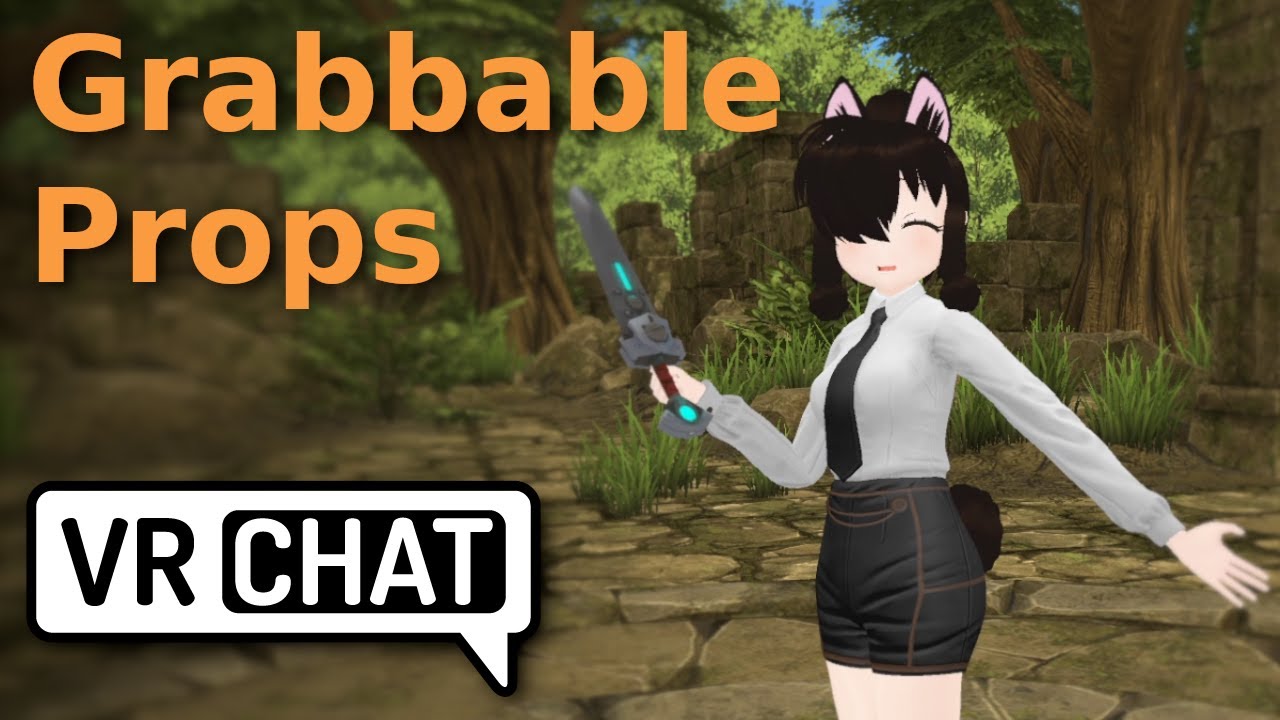
Ever wanted to have a sword on your hip that you can grab without a toggle?
Here i'll show you how!
Other VRC Tutorials: https://www.youtube.com/playlist?list=PLtyZOFyiveKq9Co2bpkrX3-qXO01CNJHY
I often stream here:
https://www.twitch.tv/airpaca
serene light
thank you, i thought constraint doesn't work on quest
i'll try
robust whale
serene light
thank you, i thought constraint doesn't work on quest
i'll try
unity constraints don't, while vrc constraints do
serene light
thank you so much
 worn pasture
Somebody make metaphor quest compatible avatars and my life is yours
magic slate
metaphor?
jagged sequoia
worn pasture
Somebody make metaphor quest compatible avatars and my life is yours
Metaphor: ReFantazio?
worn pasture
Yes 🥺
 quartz mantle
Hello, I'm trying to change my avatar to be quest compatible and I think everything is fine now but when I try to upload it I get the following message and then the build fails.
Eventho in this model I checked and on all assets the VRChat/Mobile/Toon Lit
Shader is selected. Not sure what to do / try now. Any help is appreciated

 tender crag
quartz mantle
Hello, I'm trying to change my avatar to be quest compatible and I think everyth...
tender crag
quartz mantle
Hello, I'm trying to change my avatar to be quest compatible and I think everyth...
Enter play mode and then upload after.
That fixes it for me.
 distant prism
I'm looking to make a clone of my own avi spawn in the palm of my hand in a quest compatible way.
Well Ideally in A way I could wave at someone, and be also waving out a thing car also in my hand.
I understand that its going to be rougly my (regular avis performace * 2) + car. But how do I bind the BONES!!! Sorry I miss holloween.
steady idol
vrc rotation constraints
magic slate
distant prism
I'm looking to make a clone of my own avi spawn in the palm of my hand in a ques...
There are a few (non-free) prefabs for this, if you prefer, though they might not be up to data and you have to convert the Unity constraints to VRC ones.
distant prism
magic slate
There are a few (non-free) prefabs for this, if you prefer, though they might no...
Contraints, I kow their are blender bone constraints. So VRC Contrastraings should be where I put in some research time
Thank you @magic slate
errant blade
so im just gonna make a guess and say that there is pretty much no way to add sounds on quest?
cause i know theres a way to use particals for lights
but
theres no alternet way to add sounds?
robust whale
errant blade
so im just gonna make a guess and say that there is pretty much no way to add so...
no, avatar sounds are completely disabled on quest
even if you somehow managed to upload an avatar with sound on it, it would be removed in-game
there used to be a way to get them in the game (although the method broke ToS) but even if you were to do this now it has been patched in the client, so it's impossible to have functioning audio sources on quest
errant blade
robust whale
no, avatar sounds are completely disabled on quest
but why tho
like why did they remove them>
?*
jagged sequoia
errant blade
like why did they remove them>
they were never officially implemented in the first place and basically it's too expensive for the CPU for the quest
errant blade
oh welp
well
honestly my other question is
why make quest so fuckin small. i know in the past i could change how big of avatars i would have wanted to load and i could set it to how ever low i wanted so i wouldnt be overwhelmed and lag. so why shrink quest avatars more? and even the same thing for pc? we have the option to choose who we want to show
so why crunch it down more?
jagged sequoia
errant blade
why make quest so fuckin small. i know in the past i could change how big of ava...
the quest has a very limited amount of ram to work with to load content
and the headset outright crashes when it runs out of RAM
errant blade
jagged sequoia
the quest has a very limited amount of ram to work with to load content
thats true but at the same time the newer headset that people are getting can run things more effeciently and has more ram then previously yet it still gets crunched. Also what about pc?
jagged sequoia
errant blade
thats true but at the same time the newer headset that people are getting can ru...
the quest 3 still has a very small amount of ram compared to a PC and the previous limits they had for Max file size on PC was completely ridiculous
avatars shouldn't be using like 1/16 the entire Ram of your PC
 wind ice
for the love of GOOOOOOOOOOOOOOOOOD increase the size limit to at least 15mb im losing my damn mind
jagged sequoia
wind ice
for the love of GOOOOOOOOOOOOOOOOOD increase the size limit to at least 15mb im ...
that is not going to happen anytime soon because of the quest 2's Ram
wind ice
jagged sequoia
that is not going to happen anytime soon because of the quest 2's Ram
sobbing
distant prism
Im down for it personally, more room for world makers. All frames were happy untill the avitar shaders attacked.
jagged sequoia
Quest avatars can't use custom shaders
pastel storm
Hey so anyone know why this happens with quest normal maps? It does it fine on pc but for some reason quest normal maps always break for me. But it doesn't for my friend who also uploads avatars. So

 alpine eagle
is there a way to have backface culling or does quest not support it?
gaunt stirrup
Isn't backface culling already on all quest shaders
alpine eagle
apparently not? the eyes in my avi have polys that show when backface culling is off, and the mobile standard lite just blacks out my eyes due to that
flint forge
alpine eagle
is there a way to have backface culling or does quest not support it?
While Neiryl did answer your question, they didn't get what you actually meant, backface culling is the function that removes backfaces, if you want backfaces to show then you turn off backface culling.
And no, no Quest shader allows you to turn off backface culling, since that doubles the polycount.
alpine eagle
flint forge
While Neiryl did answer your question, they didn't get what you actually meant, ...
weird, that isnt the issue i seem to be having then because the backfaces ARE showing on the mobile shader 🤔
gaunt stirrup
alpine eagle
weird, that isnt the issue i seem to be having then because the backfaces ARE sh...
yeah i don't think the problem is backfaces, maybe look into whether the mesh has vertex colors? if it has black vertex colors on the eyes that could be the issue
 velvet badger
So with quest avatar constraints being a thing now has anyone found a solution to creating a ball and being able to throw it where it drops or thrown into the world and lands on the collider floor that is normally placed under the feet? I know it's possible to animate it to look like its thrown but I rather have a realistic concept to throwing it and landing where ever it falls. Not just faking gravity on the ball. (I'm still gonna do some test on seeing what the locked position and rotation concepts do but just thought I'd check ahead of time.)
steady idol
velvet badger
So with quest avatar constraints being a thing now has anyone found a solution t...
for realistic throwing you would use a rigidbody which you cant use on quest
velvet badger
Alrighty
Okay so can someone inform me about how to fix the base has invalid normals. try cleaning and triangulating base in your 3d modeller before importing it in unity? Basically something to do with shade smooth in blender on a character rig I have which is 4.3 blender and importing it into unity gives the error.
magic slate
can you show the specific error?
 velvet badger
Right now gonna try Recalculate Normals and Triangulate or Clean Geometry and see if that fixes things.
Alright I got it pretty much to work. I also shaded smooth and added the auto smooth Modifier. Then exported. So yeah Recalculate normals with Shift+N in edit mode making sure everything is selected then Ctrl+T to Triangulate faces and then went to mesh > clean up > Delete Loose. After all that after exporting and bringing into unity it fixed my issue with the error.
velvet badger
Alrighty so it seems having export settings with the apply modifiers clears out blendshapes oop.
So basically got to redo my shapekeys I guess after applying auto smooth modifier.
gaunt stirrup
velvet badger
So basically got to redo my shapekeys I guess after applying auto smooth modifie...
GitHub
Blender script. Contribute to przemir/ApplyModifierForObjectWithShapeKeys development by creating an account on GitHub.
velvet badger
Oh thanks,
magic slate
Yeah - it won't work well if the modifier changes vertex count, but for lots of stuff it's fine
magic slate
velvet badger
Alrighty so it seems having export settings with the apply modifiers clears out ...
Usually it's modifiers that can't auto-apply cleanly. Some do work.
velvet badger
Alright that worked and my blendshapes exported into unity perfectly without any errors. Looks like that's the work around right there.
Okay so got everything fixed up and uploading without errors found also that my import setting on the character needed the read/write enabled so my vertices don't say 200m+ and says the proper 20k+ like it normally is.
robust whale
velvet badger
So with quest avatar constraints being a thing now has anyone found a solution t...
the closest thing to realistic physics on quest would be with particles
you can use other things in combination, constraints, physbones, animaitons, and get something that looks pretty realistic
i'd think the simplest way would be using a stretchy physbone to determine direction and force. You could have a physbone attached to your hand with stretch motion, and the more it stretches, the higher the start speed value is animated to on the particle system. then to get the rotation correct you either use the physbone transform itself or a transform rotation constrained to it.
also if you want to have world motion not taken into account (although for realistic physics you would) an idea i've had for being able to ignore world motion on physbones is to create an extra transform that would have a rotation constraint targeting whatever motion you need to copy, then attach the physbones to this transform. Then the original bones (the ones that are weight painted) would be rotation constrained to the physbones. the bone with the rotation constraint and physbones on it would be parented to an empty with a parent constraint and "freeze to world" enabled. Keep in mind this will break physbone collisions, so only use this for cases that you do not need physbone collision. What's also nice about this is that it isolates the motion not just to the playspace, but to the local space of whatever bones you choose to include. If you want to include the motion of the hand relative to the hips, you can include all the bones in the hierarchy path from the hips to the hand
velvet badger
Not sure why this error is popping up on android side when my materials don't have a texture added. It's just 3 materials.
 magic slate
seems likere must be a texture somewhere
robust whale
velvet badger
Not sure why this error is popping up on android side when my materials don't h...
there should be an auto fix button
you might need to scroll or expand the window
and it could be icons for your menu
magic slate
oh yeah, icons
velvet badger
I found the fix for it, but there wasn't a fix button on it. So what happen was after I uploaded my avatar on pc side. The windows button I clicked it to swap to android. When I did that it didn't make it into ASTC format so I had to go into the file and build setting then change the texture format over to ASTC format there. Not sure why ASTC isn't enabled by default when swapping to android on that little windows tab section to swap from pc to android.
Alright so now my avatar is bugging out, After uploading to quest my avatar shows it uploaded but in-game only shows it pc compatible?
So after I checked the website is saying security checks failed? Not sure why that is. My avatar is basically a cartoonish stickman avatar any info?
 magic slate
you'd have to show the stats or something. Make sure you have the latest SDK too, it should get most of the major issues
velvet badger
I have the latest sdk cause I use Creator Companion. I mean I guess only thing it could be is file size but it shouldn't be very big
magic slate
you can look at all of these stats in the build window. Feel free to screenshot for us to look at too
velvet badger

This is what I have, I have 3 materials on it and avatar vertices are at 26k which I don't think should be a big issue. Could be a problem with the toggles and radial wheels I have. I got a toggle for Happy, Shocked, Squint eye emotes then I got 3 extra radial wheels for Fat, Skinny, Muscle body size.
magic slate
seems weird that'd have 3 material slots
velvet badger
I mean the glove has a small shine to it since the skin and gloves are seperated.
I didn't use an atlas texture for 1 material yet since I basically am just running some test at the moment.
I could try removing the fx layer and menu and just have the avatar as default to see if that fixes it. If so then I got to limit the avatar toggles/radial which I think could have brought up the avatar file size possibly.
I found the issue I think xD

Forgot to remove FX from controller xD
magic slate
I never bother to remove those
velvet badger
Well I'm double checking the FX controller thing first before I go and remove fx layer and menu and para.
Yep so it passed security check on pc so now uploading on quest side again.
So it fails uploading it on quest side but passes when uploading on pc hmm, time to test the menu removal toggles.
gaunt stirrup
velvet badger
So it fails uploading it on quest side but passes when uploading on pc hmm, time...
how about reduce the poly count, it doesn't even look like it would be difficult to do on that model.
velvet badger
I guess I can try real quick.
also removing the menu/para/fx layer didn't fix the upload to quest side so gonna have to try lowering poly count.
gaunt stirrup
and the material count too, would be easy to set up with just one
velvet badger
Alright so I made the triangles to 19k instead of 26k and added the material to 1 with texture and still showed it failed oop.
magic slate
it's got to be some other reason it isn't catching
velvet badger
So when I upload it on pc side it tells me rating is good standing but when I upload the quest side it fails security check even with the avatar at poor rating at 19k triangles. It's odd not even the file size is that big like 1mb-2mb for the avatar.
 solemn quiver
Is it at all possible to get some form of transparency on Quest? I have this avatar and the face of them sits underneath the visor, when trying to port it to quest the shaders causes the visor to become solid and covers the face underneath so I need some way to get Transparency on quest.
 magic slate
velvet badger
So when I upload it on pc side it tells me rating is good standing but when I up...
magic slate
velvet badger
So when I upload it on pc side it tells me rating is good standing but when I up...
yes, it's flagging on none of those things though, it's something else.
magic slate
solemn quiver
Is it at all possible to get some form of transparency on Quest? I have this ava...
not really, no. You'll need to work around it somehow.
solemn quiver
Aw seriously?
jagged sequoia
I would suggest for the quest version of the Avatar you turn the normals of the visor inside out so it's rendering behind the face
jagged sequoia
solemn quiver
Aw seriously?
yes
solemn quiver
jagged sequoia
I would suggest for the quest version of the Avatar you turn the normals of the ...
How would I do that?
 solemn quiver
Oh boy
jagged sequoia
here's what it would look like if you did inverse the faces using vrchat mobile shaders
 solemn quiver
Is there a way to do it Without blender?
solemn quiver
There's got to be another way cause if I'm being honest. I'm scared to even touch Blender
magic slate
it's not so scary.
magic slate
But no, Unity isn't for this. Use a tool that is for this. Blender is such a tool.
solemn quiver
And then that would just be the model itself what about the data for all its functions?
magic slate
?
solemn quiver
I don't know I'm new to this
magic slate
you edit the model in Blender, then put it back into Unity.
solemn quiver
And everything should still work?
magic slate
generally yes. There are certainly ways to screw it up though 🙂
steady idol
I mean people can screw up importing a unity package with instructions so that is a given
magic slate
yep
steady idol
solemn quiver
And everything should still work?
Just import while ignoring endbones
Click on visor mesh and enter edit mode
Click on a visor vertice and hold ctrl numpad+ till it selects the whole glass part
Or if its also selecting other parts then you can select by material or uv
After which alt + n and select flip
Export as fbx
velvet badger
So I found out that they have a que system on quest so if it says security check failed, but still has a question mark on the thumbnail. Then the avatar is pending.
If it has an X then it will mean the avatar needs fixing.
solemn quiver
Any Ideas?
 magic slate
just as it says: decrease size. See discussion in #quest-optimization for help
velvet badger
Any info though on if the shade smooth will be fixed so I don't have use auto smooth and apply that modifier to prevent the error popping up when importing an avatar?
magic slate
it's broken?
velvet badger
velvet badger
So when using shade smooth in blender either 4.2 or 4.3 there has been some problems importing it over to unity with the latest sdk getting this error in the console : The mesh base has invalid normals. Try cleaning and triangulating base in your 3d modeller before importing it in unity. So the way I fixed it was Recalculate normals with Shift+N in edit mode making sure everything is selected then Ctrl+T to Triangulate faces and then went to mesh > clean up > Delete Loose. After all that after exporting and bringing into unity it fixed my issue with the error but I don't like using this method since shade smooth is different from auto shade smooth. With auto shade smooth it makes some edges sharp compared to shade smooth which is what I prefer.
magic slate
oh I saw this the other day - so far I've not seen this at all
my models are pretty clean though
velvet badger
Which version of blender do you use?
magic slate
4.3.0
velvet badger
Okay so I got the same version. Do you do your avatar on pc side or both pc and android/quest?
arctic slate
upload them to w/e platform you use
or if you're making it a public model for others and have the time to make it optimized for all platforms then do that
magic slate
velvet badger
Okay so I got the same version. Do you do your avatar on pc side or both pc and ...
I haven't done a Quest avatar in a while. So, PC.
velvet badger
Yeah think the error mainly show up when doing android/quest side of things.
magic slate
hmm, not sure how that'd matter
 oblique herald
is there any way i can have an avatar constaint like damped tracking in blender? and if so, could it be compatable with quest
robust whale
oblique herald
is there any way i can have an avatar constaint like damped tracking in blender?...
looking at the blender documentation, it seems that the damped tracking constraint is the equivilent to unity's "look at" constraint
magic slate
ohh I forgot about that - I was thinking of following paths
robust whale
yeah i was thinking that too, just wanted to double check
magic slate
glad you did
robust whale
i'm not too familiar with blender's constraints so i wanted to be sure i knew what it was
magic slate
Yeah I've been doing VRC ones a lot lately, and FinalIK, forgot that's what Blender calls it
oblique herald
robust whale
looking at the blender documentation, it seems that the damped tracking constrai...
oh, i didnt know about it, do you know if it works with quest? i hope it does
magic slate
VRC constraints do
 covert mural
Hey ppl, I’m on uh… day 3 or 4 of getting a Quest, still tinkering with things till I get the hang of it and my pc comes in buttt generic question for anybody. Anyone seen an Avatar similar to Queen Marika that’s public that’ll tide me over till I can get my pc and start making my own and figuring stuff out? I appreciate any help cheers!
arctic slate
covert mural
Hey ppl, I’m on uh… day 3 or 4 of getting a Quest, still tinkering with things t...
if you're trying to find a premade avatar make a post in #1138520828556890214 but if you're looking for one to get made for you go to VRCTraders (link in #1204490664637890580 )
specify in your post that it needs to be quest compatible aswell
covert mural
Got it thanks a ton. I read the rules pretty good but this is my first time using discord my fault. Bit technologically challenged but I’m getting there 😂
magic slate
cue the scammer DMs...
 lilac bolt
I have a rough list of about 20 30 scammers already
 pliant yarrow
Jars avatars?
pliant yarrow
lilac bolt
To anyone who is familiar with jars avatar
Jar as in murder mystery Jar?
pliant yarrow
lilac bolt
Jars too busy working on new games
I mean what are you trying to do? Get his models? or work with them for a custom job
lilac bolt
pliant yarrow
I mean what are you trying to do? Get his models? or work with them for a custom...
Make a custom version of his models
 keen aspen
Go to VRCTraders to ask about commissions. There are multiple reasons why this server doesn't allow it. @lilac bolt
 daring orbit
im trying to upload a question verison
and it wont load the blueprint id of the pc ver
magic slate
haha that's a nice auto-correct
 proven monolith
I want to remake the quest version of my main avatar, since the current quest version I have was made years ago when they first added support. Are there any shaders I can use to recreate the clear shiny plastic effect?

I don't mind if it's not actually reflective, it can be a matcap if necessary, I just don't know what quest-compatible shaders are like nowadays.
magic slate
you can't get alpha transparency on quest, that's going to limit things
proven monolith
magic slate
you can't get alpha transparency on quest, that's going to limit things
Would it be possible to have the logo on the front be a cutout, with the rest additive?
magic slate
only if you cut out the mesh itself
wooden fable
proven monolith
I want to remake the quest version of my main avatar, since the current quest ve...
Your best bet would be matcap lit for a plastic look since transparency isnt supported
proven monolith
wooden fable
Your best bet would be matcap lit for a plastic look since transparency isnt sup...
The weird part is that there's an alpha blended shader in the VRChat/Mobile section, but it complains when you try to use it
even weirder is that it's not documented on the website
gaunt stirrup
proven monolith
The weird part is that there's an alpha blended shader in the VRChat/Mobile sect...
that shader is for worlds
proven monolith
gaunt stirrup
that shader is for worlds
Makes sense, it's just odd how it isn't mentioned in the documentation
magic slate
it is
oh I guess not one called alpha blended, but this is the place this is documented: https://creators.vrchat.com/platforms/android/quest-content-limitations#shaders
This page will describe various limits in place for the Oculus Quest version of VRChat. These limitations are in place in the interest of performance, user safety, and discouraging malicious behavior.
huh, I really thought that one was in there too, it must be considered legacy at this point.
gaunt stirrup
that page probably needs to be updated cause it's labeling components as shaders 💀
 magic slate
it is? Seems to clearly have shaders and components as separate categories
gaunt stirrup
it says "shader name" and "shader description" at the top
gaunt stirrup
guess whoever made this page didn't either
gaunt stirrup
i probably would be making mistakes like that too if i was put in charge of making docs
magic slate
it happens.
proven monolith
strangely, the other two particle effects work
I take it there aren't any cutout shaders either
magic slate
nope, that usually is done via alpha transparency with a threshold value
proven monolith
Fair enough
Credit to the devs though, having actual enforced limits for performance stuff
I remember 2017/18 VRC where people would just straight up edit the SDK to remove limits and ruin performance
 oblique nebula
Can anyone help in uploading a quest avatar? For whatever reason wheni get to the step to Build and Publish the quest version in the VRC SDK, it gives me an error about the SDK
I've googled it, but nothing is helping :/
magic slate
paste the error
 pliant junco
oblique nebula
Can anyone help in uploading a quest avatar? For whatever reason wheni get to th...
pliant junco
oblique nebula
Can anyone help in uploading a quest avatar? For whatever reason wheni get to th...
Let a snap or SS of the error maybe I could help
pliant yarrow
proven monolith
I remember 2017/18 VRC where people would just straight up edit the SDK to remov...
I think for now they are only hard enforcing things on quest. PC is still the wild wasteland. That being said, I wish they'd update their requirements or give us a tiny bit more freedom with shaders. I love the new VRC constraints though, finally able to make PC and Quest models that essentially function the same.
magic slate
you'd need a tiny bit more hardware for that 🙂
pliant yarrow
I know. At least a special particle effect that allows transparency on quest. That way I can recreate things like blood or sparks or other things on quest.
gaunt stirrup
pliant yarrow
I know. At least a special particle effect that allows transparency on quest. Th...
can't you use the additive/multiply shaders for that
flint forge
pliant yarrow
I think for now they are only hard enforcing things on quest. PC is still the wi...
Now with the server-side checking we do have a hard enforced uncompressed size limit of 500MB, download size was always hard limited behind the scenes tmk.
pliant yarrow
flint forge
Now with the server-side checking we do have a hard enforced uncompressed size l...
Oh cool I never noticed probably because I never even gotten close to that.
pliant yarrow
gaunt stirrup
can't you use the additive/multiply shaders for that
I would but it always creates black boxes, unfortunately you can't really create a good blood effect or at least I don't know how to without cut out
Well I've been making avatars for PC for quite a while I've only recently tried to do my best with quest avatars
gaunt stirrup
if you use multiply make the "transparent" parts full white
pliant yarrow
Bro I didn't think of that I'm going to try that
gaunt stirrup
and the opposite for additive, make the "transparent" parts full black
pliant yarrow
How many materials on Quest until an avatar is very poor, cuz I've heard that very poor is getting blocked soon, like where you can't even see it
gaunt stirrup
you'd have to have no more than 2 materials for it to stay medium
pliant yarrow
So three is poor and any more than that is very poor
gaunt stirrup
oh i read the question wrong, 4 for poor ranking
The Avatar Performance Ranking System allows you to see how much a user's avatar is affecting performance via analysis of the components on that user's avatar. You can also use it on yourself to see how performant your avatar is.
pliant yarrow
Thanks I keep forgetting that's there, I really want to keep my avatars at least in the poor rating so people are able to see it, plus it's nice to be able to do fun stuff without people lagging the shit out because then they just complain about that
Actually reading this I want to keep my avatar right where it is at medium, because any higher in the Avatar will be blocked
Reference this is the Avatar I'm talking about, I've been working on him for the last week and a half this is his stats on Quest
 rain osprey
how do i cronch textures on unity 2022
 pliant yarrow
Crunch compressing is where the resolution place. The square beneath this one.
It looks like a detail map. Judging by the colors.
magic slate
Right but what I meant was what file type is it - some image file types likely aren't going to have the same compression options we expect with .png files
rain osprey
image
i reopened it and it appeared
are lightmaps supported for quest

my mats r set to the vrc quest compatible lightmap
so it should work
but its saying they arent compatible
pliant yarrow
Yes... but not on avatars. Only maps. You can only really use toon and standard lite.
pliant yarrow
It's really really dumb they don't clarify that.
pliant yarrow
From my testing, not even particle works for particles. It only works when publishing world maps. Avatars are limited to unlit, diffuse, standard and toon.(reporting from memory so idk if its every shader.)
wooden fable
pliant yarrow
Yes... but not on avatars. Only maps. You can only really use toon and standard ...
and matcap lit! using matcaps can get you some cool effects, even on quest, for certain materials :)
magic slate
lightmapped is for worlds, always has been
 heady peak
I have a gun that uses Particle/Standard Unlit, and it's blocking me from loading to quest. This material is greyeed out and I haven't been able to delete it or change it. WHat did I do with this?
robust whale
pliant yarrow
From my testing, not even particle works for particles. It only works when publi...
multiply and additive work, alpha blended does not
robust whale
rain osprey
ik lightmapped used to work 😭 y vrchattt
what do you need lightmapped for unless you are baking lightmaps (something you can only do and would only need to do on worlds, not avis)
robust whale
pliant yarrow
From my testing, not even particle works for particles. It only works when publi...
unlit also doesn't work for quest avatars
it's toon lit, matcap lit, standard lite, diffuse, bumped diffuse, bumped map specular, additive, and multiply
magic slate
heady peak
I have a gun that uses Particle/Standard Unlit, and it's blocking me from loadin...
if it's greyed out, that's the embedded material in the FBX. You'll need to extract it (materials tab in inspector for the model file) or just make a new material to replace it
heady peak
magic slate
if it's greyed out, that's the embedded material in the FBX. You'll need to ext...
I created the particle system, and have made a material to replace it, but can't because it's greyed out and won't let me delete it. It's not in an FBX currently.
I tried replacing it, and tried making a new one, and the new ones were the same.

I've tried it in and out of an FBX, and in and out of a game object, nothing has worked so far.
hybrid valley
heady peak
I created the particle system, and have made a material to replace it, but can't...
I think you need to edit your material in your assets folder, not in the hierarchy
you can also replace your material with a new one, you can open your particle system, then on the rendering tab, replace the material
magic slate
heady peak
I created the particle system, and have made a material to replace it, but can't...
you can't edit that material, you need to make a new one
heady peak
magic slate
you can't edit that material, you need to make a new one
I made a new one. I can't replace it. It won't let me do anything to it.
magic slate
you did something wrong then, not sure what
hybrid valley
you need to replace that one
 heady peak
magic slate
you did something wrong then, not sure what
heady peak
magic slate
you did something wrong then, not sure what
Yep. that's why I'm here asking. 😄
Sadly that won't let me add anything.
magic slate
assets -> create -> material
please explain what it is you are doing if it is not this
heady peak
Yep, yep, yep. or alternatly, right click in the asset folder,> create > material. I can make a new material, VRC/mobile/particles/additive.
I just can't get rid of the old one to add the new one.
magic slate
you cannot drag it into the slot where Sacrion pointed to?
heady peak
nope.
magic slate
fascinating, I've never seen it do that. Probably restart unity.
heady peak
hence, why I am slowly banging a small forhead shaped dent in my desk.
I've restarted the whole PC, run the virus scaner, reloaded the projects, used a different project, run SFC /scannow from the admin terminal, drank a margarita, gained a few grey hairs, and took a nap. nothing seems to change this.
hybrid valley
heady peak
Yep. that's why I'm here asking. 😄
Sadly that won't let me add anything.
you need to tick the renderer first
 heady peak
hybrid valley
you need to tick the renderer first
heady peak
hybrid valley
you need to tick the renderer first
It is. In fact I can load and change the trail material, ( (shows up under the default if ticked)I had that ticked as well) but just not the default material.
hushed ibex
for some reasons none of those physboobs works on quest ( works fine on unity test mode)
Any ideas please?
 keen aspen
show the components on both tatas rq
just showing a list of your total physbones says nothing if the physbone components themselves are screwy
hushed ibex
keen aspen
show the components on both tatas rq
both tatas?
keen aspen
theyre trying to get the physbones on their chest to work
and those have individual physbones 99% of the time
keen aspen
can you show me the components then for any of them


 keen aspen
,, why is basically your entire hair under ignore transforms,,,
hushed ibex
so i can keep the 2 first bones of each hair bangs, but the rest of the bone chain stay stiff
idk thats how i always do my quest avis (it might be stoopid idk )
hushed ibex
thats the only difference between my pc and quest physbones,
they work fine on pc
in play mode on quest in unity they do work,
but none of them work in game on quest mode
keen aspen
can i have you take a picture of your avatar with Gizmos turned on?


 keen aspen
this is truly friggin weird
let me check smth on my end rq
loading up an avatar with physbones rq to do some comparisons
question
are these physbones in their own folder? or are they directly on the bone
like are they in a dropdown like this in the hierarchy, or in the armature?
 hybrid valley
hushed ibex
hybrid valley
hushed ibex
is the VRChat SDK window only tells you that you only have 1 phys bone collider, meanwhile your avatar seems like to have way more than that?
hushed ibex
yes but on the physbone components obly one was active, but i removed them anyway
hushed ibex
they were on the armature all seperated, and yes i deleted them and kept only the one thats was used
and i did managed to fix the issue
thanks for your help
keen aspen
can you tell me how you fixed it?
hushed ibex
the issue was : i used pumpkin tool to copy the physbones from a previous version but the root transform was still linked to the previous avi
for exemple the hair root was the previous avi hair root
keen aspen
ah, but next time you see those separated physbones, don't delete them, they're basically just components separated for ease of use
they still work
hushed ibex
but for some reasons unity was able to make those bones move anyway
okay thank you so much for your help and for taking the time to give all those infos ❤️
keen aspen
np!
hushed ibex
hi, i have another issue with my avi, i used vrcfury to add gogo loco, everything is fine in test mode,
but in game (for quest users) my avi is on the ground when i try the poses
i also tried to install manually with avatar manager
same issue
please what should i do?
hushed ibex
both
 fresh zinc
what it is with the normals maps looking all werid on quest😭
pliant yarrow
keen aspen
did you add gogo loco to BOTH versions?
Both
pliant yarrow
fresh zinc
what it is with the normals maps looking all werid on quest😭
Different compression algorithms.
 wintry falcon
genuinely the worst update ever
almost all my avatars look horrible
I think the devs underestimate how many avatars are very poor quality
debating on not playing until they fix this because this honestly ruins the game
steady idol
having exclusively very poor avatars isnt a good thing
wintry falcon
still, majority of fnaf avatars are very poor
my game didn't run that bad either
I was ok with the occasional crash or being sent home
didn't bug me enough to warrant a forced update
I think I'd prefer it if it was togglable?
magic slate
right but you can show very poors if you want, right?
wintry falcon
yeah, but they have PS2 quality textures
and if you so much as have more than atleast 2 of them shown, the game decided to obliterate everyone's textures
horrid update
my decision is either deal with it, stop playing, or buy pc
kinda hard to deal with it when everyone's avatar looks like this

like dude

 keen aspen
clay,,,
magic slate
wintry falcon
my decision is either deal with it, stop playing, or buy pc
PC is the answer here. people don't want to put the effort into looking decent on Quest.
not sure what you mean by "horrid update" - not much has changed here in a while
wintry falcon
magic slate
not sure what you mean by "horrid update" - not much has changed here in a while
horrible for quest users (me)
wintry falcon
wintry falcon
like dude
idk, if you used quest and almost all of your avatars looked like this I don't think you'd be very happy?
magic slate
the only thing that got changed is the size limits are now enforced, but they were basically present anyway, so I'm not sure what difference you're talking about.
and I thought all quest content was kinda pixely and blocky anyway. Kinda why I do PC 🙂
wintry falcon
it was never this bad before the update
wintry falcon
wintry falcon
like dude
it was only ever so slightly on certain avatars, but not like the example shown
magic slate
hmm, I thought it was. But I could be wrong here.
I'm used to seeing half the room as fallbacks though, I block ridiculous unoptimized crap.
wintry falcon
very much wrong, but I wouldn't blame you since you seem to be strictly pc lol
magic slate
I follow the beta stuff and it's not like they pushed out a "make quality worse" update recently.
wintry falcon
wintry falcon
very much wrong, but I wouldn't blame you since you seem to be strictly pc lol
I usually only wear avatars made by friends since I have insight into how they were made, usually always decently optimized
magic slate
you should be able to selectively show very poors if you really want to
otherwise quality settings didn't change, just download limits are enforced
wintry falcon
like I said, majority of avatars on quest are rated "very poor"
wintry falcon
and if more than two are shown, texture quality drops
magic slate
Ohhh you're talking about the streaming mipmaps thing
magic slate
I spent most of this conversation trying to figure out wtf you were talking about, but it makes so much more sense now 🙂
pliant yarrow
magic slate
PC is the answer here. people don't want to put the effort into looking decent ...
It's not fair to say lol it's your issue. PC is a bandage on a fire hydrant. People have different circumstances they can't control.
Saying just go on PC is not an solution
And I'm sure the devs are working to revert or fix things.
magic slate
But it is a solution - if you want higher quality there's a ceiling for standalone.
pliant yarrow
Yes but right now the ceiling is kissing the floor. People are saying the new update has made the game unejoyable, meaning they would rather the previous system.
magic slate
Yep, not arguing that this is a good thing - I made the comment you're replying to before I realized what the actual issue was.
pliant yarrow
In case you weren't aware there's a update which has crunched textures to the point of no detail.
magic slate
Yep, I am aware, just haven't tried it on quest yet and wasn't sure that's what was being described.
pliant yarrow
Ah gotcha.
magic slate
now that I'm caught up, it's been mentioned a few times in the beta channel that perhaps there should be a toggle for it.
not sure if there's a canny though
pliant yarrow
I hope there's a update soon that gives it as a option.
magic slate
(I guess it makes taking photos kinda crap too - I haven't had a chance to check that out yet myself)
pliant yarrow
magic slate
(I guess it makes taking photos kinda crap too - I haven't had a chance to check...
Someone shared this

It's uh.... bad right now.
magic slate
that looks okay?
pliant yarrow
Look at the neck and nose. The textures are so low res especially with the nose there's no detail to define it.
magic slate
honestly, so much of VRChat is janky and I often see fallbacks that I wouldn't complain too much about that.
pliant yarrow
The issue is mostly mipmaps. Avatars with them off aren't suffering this issue.
magic slate
I get what you're saying, definitely
pliant yarrow
I personally don't use them. Then again I swear someone used voodoo on my stuff.
The VRAM on my model should be about 1.6gb and yet it's only 4.5mb
I don't know how.
half fable
The compression or whatever that seems to be happening seems to be dynamic but it still has ruined my avatars because it drops my 1024 to 512 and all my stuff starts overlapping
 hot horizon
I thank them for trying something new but this is not it's my boyfriend avatar looking clean next second looks like a 140p
hot horizon
I really do thank vrchat developers for trying but just so bad
half fable
It’s beyond bad it catastrophically makes some of mine unwearable
 last anvil
 hot horizon
half fable
It’s beyond bad it catastrophically makes some of mine unwearable
hot horizon
half fable
It’s beyond bad it catastrophically makes some of mine unwearable
Same here
half fable
I’m debating swapping all mine to public’s to private in advance
hot horizon
I don't think it will do anything
half fable
hot horizon
I don't think it will do anything
My credits are textures and it breaks my credits page
hot horizon
That's dumb
half fable
True but it also causes my body parts to bleed into each other
hushed ibex
Hello, so i made a different fbx for quest (decimate some parts), but i double checked the import settings, they are the same.
Even with default locomotion i have a weird issue
I play pcvr but questies see my avi sunken in the ground
Any ideas how to pinpoint where is the issue please?
pastel storm
@brittle veldt hi
magic slate
hushed ibex
Hello, so i made a different fbx for quest (decimate some parts), but i double c...
is the avatar's origin not at their feet, or that point not at 0,0,0 ?
 woeful apex
is there a way to remove all hand expressions on quest and have it just be a static one as the blush and a bunch of other emotes are scuffed on my avi

or how to fix these issues as well would work ig
magic slate
Sure, find the animator layer that does them, and change it to do whatever you want it to. Could be as simple as disabling the transitions to the gestures you don't want.
woeful apex
magic slate
Sure, find the animator layer that does them, and change it to do whatever you w...
kinda new to all of this, is there a good tutorial on this kinda stuff
magic slate
I don't have one in mind, but a lot of the basic ones are a good place to start
hybrid valley
woeful apex
is there a way to remove all hand expressions on quest and have it just be a sta...
you can change the blush effect to use the VRChat/Mobile/Particles/Multiply shader, but it may not look as good or as much visible, but it's the only way to have transparency on your material
alpine eagle
why is it that my eyes black out without emission on the mobile/standard lite shader?
 magic slate
I'd bet the mesh has vertex colors, that shader will take those into account.
alpine eagle
how do i change/deal with this
steady idol
quest tools or blender
alpine eagle
im sorta a newbie with the quest workflow, is this just the VRCQuestTools repo?
jagged sequoia
alpine eagle
im sorta a newbie with the quest workflow, is this just the VRCQuestTools repo?
yes
alpine eagle
in this same vein. i use a lot of build time decimation. is there any way i can see the perf stats/view my quest upload on pc or have they STILL not supported this?
pastel storm
can anybody make an avatar for me
im not very educated on making them
it is a simple one
 simple scroll
pastel storm
im not very educated on making them
simple scroll
pastel storm
im not very educated on making them
everyone be beginner at start. you got so many resource on YouTube to run for.
If you looking for commission, try #1204506421631393913
or just look for avatar on booth or gunroad.
pastel storm
ok thank you
hushed ibex
pastel storm
can anybody make an avatar for me
do not trust all those scammers who WILL DM you, ask them to send you a link to their online store
they don't have online store? run away
keen aspen
fiverr does not count
hushed ibex
hey, does particles multiply works now for quest? or only additive?
the creator of my avi put the blush in multiply, and indeed ingame it doesnt seems to work
hybrid valley
hushed ibex
the creator of my avi put the blush in multiply, and indeed ingame it doesnt see...
it works fine for me, I have blush on my character too and I'm using the vrchat/mobile/particles/multiply shader both on my pc and quest build without any problems, and it looks good even with fallback shaders
can you show a screenshot how your blush looks?
 urban hawk
So I have this problem after I made my question conversion-
When I play on PC/PCVR, all of my toggles and GoGo work just fine. However, for Quest users, whenever I use my GoGo random toggles will appear on my avatar! (Like if I sit, a mask will toggle on, for example)
However, when I play on my Quest 2, all of my toggles and GoGo work just fine, and nothing accidentally gets toggles on!
I don't know what I messed up for this to happen, or how to fix it. Because this only happens when I am on PC and Quest users see me, but not when I am on Quest myself. Please help!!!
random comet
urban hawk
So I have this problem after I made my question conversion-
When I play on PC/P...
your avatar's VRCExpressionParameters list need to be in the same order on both Quest and PC builds
doesn't need to be the same file, just the same order of parameters
you can use VRCFury to automate this if you'd like
urban hawk
random comet
your avatar's VRCExpressionParameters list need to be in the same order on both ...
I didn't change any of that when I converted it, though. I use VRCFury and VRCQuestTools to convert the avatar. The only thing I ended up changing were the quality of the Materials, deleted some phys bones, and set different shaders on Quest so my blush works properly.
This is a Booth model, if that matters.
wooden fable
urban hawk
I didn't change any of that when I converted it, though. I use VRCFury and VRCQu...
VRCFury messes with parameters. If you removed some vrcfury components which add parameters from the quest model, that means the parameters might not be exactly the same.
urban hawk
wooden fable
VRCFury messes with parameters. If you removed some vrcfury components which add...
So what can do I do to fix this. As somebody who is still very new to Unity, I'm not 100% sure where to find everything. Would it just be easier to remake the Quest conversion?
I'm not quite sure how to make sure that the parameters are the same
random comet
use VRCFury on both the Quest and PC version
urban hawk
random comet
use VRCFury on both the Quest and PC version
Yes, I did
wooden fable
If it's not too difficult, then that would be a potential solution, that's probably how I would do it but I'm not particularly bothered about syncing my quest and pc avis
Just make sure you're not deleting any vrcfury components that are full controllers
urban hawk
wooden fable
If it's not too difficult, then that would be a potential solution, that's proba...
I wouldn't be too worried either, but the problem is that some of the toggles are inappropriate. 😅 And majority of my friends are on Quest
random comet
what VRCFury version are you on
urban hawk
wooden fable
Just make sure you're not deleting any vrcfury components that are full controll...
I think I will just try to remake the conversion
urban hawk
random comet
what VRCFury version are you on
I'm not sure. How can I check?
random comet
"Manage project" on your project inside VCC
urban hawk
I'll check now
wooden fable
urban hawk
I wouldn't be too worried either, but the problem is that some of the toggles ar...
You could remove the innapropriate toggles from the quest version, if for some reason you don't manage to sync your parameters
urban hawk
random comet
what VRCFury version are you on
It looks like I'm on 1.1150.0
random comet
Are you using 2 seperate projects for the Quest and PC version?
urban hawk
random comet
Are you using 2 seperate projects for the Quest and PC version?
Yes I am
random comet
make sure both VRCFury versions are up to date on each project
and you're using at least a single VRCFury component on each avatar
urban hawk
random comet
and you're using at least a single VRCFury component on each avatar
What does that mean?
urban hawk
random comet
make sure both VRCFury versions are up to date on each project
Yes, they are both up to the same version.
random comet
add a "Fix Write Defaults" component to your avatar root object (both versions)
upload the PC version first, then the Quest version
 nocturne sundial
its been a longg time, how do i fix this from being green again, its white in the texture

last time i think i installed quest tools and it helped
its been like 3 years since i made a new quest project
nvm i figured it out XP
 loud condor
For some reason the vertex colors on my avatar are faded on Quest. It seems like I need to convert my vertex colors from linear based on Poiyomi doing the same thing when I don't have "linear colors" toggled on, but I'm not sure how to do that conversion myself
magic slate
This is a bad place to do this, you'll likely get scammers contacting you.
Instead visit the VRC Traders discord, there's a link in #1204490664637890580 .
 static hedge
Is it possible to make a Quest-compatible Christmas tree avatar that has actual transparent leaves, like the 1st picture, or I have no choice but to make a completely solid cartoonish tree like the 2nd picture?

 keen aspen
you'd have to basically cut the mesh yourself
quest can't use transparency, the easiest way to do it is to take the mesh in blender and cut out the parts you want to be transparent
hybrid valley
keen aspen
quest can't use transparency, the easiest way to do it is to take the mesh in bl...
you can technically use transparent materials, but they don't look good on a complex mesh, but you can have transparent blush effect and glasses on your avatar this way
I also see a lot of broken quest avatars, where the blush effect just makes the avatar's face almost full red, because people don't know they could just use the vrchat/mobile/particles/multiply shader to make it transparent
sage mesa
static hedge
Is it possible to make a Quest-compatible Christmas tree avatar that has actual ...
Since I'm assuming this is for a quest avi, you don't have access to transparency so you will have to either cut the mesh and have a higher poly count or go with the toon-like look of the one on the right which lends itself better to the quest platform.
static hedge
Thanks for confirming guys! yeah I'll go for cartoon style for Quest version since I want to keep it Medium ranked
robust whale
static hedge
Is it possible to make a Quest-compatible Christmas tree avatar that has actual ...
best you can do is duplicate the mesh and slightly offset along normals then put that duplicate on another material and use multiply for one and additive for another
you can get cutout transparency this way but you'll need to make sure the multiply texture has only 2 colors: black and 100% transparent, no in-between
otherwise you'll have gray edges
it basically acts like a mask
static hedge
robust whale
best you can do is duplicate the mesh and slightly offset along normals then put...
I see it has "additive", "multiply", and "alpha blended" particle shaders. So only first 2 work on mobile (for avatars)?
 cold ermine
do very poor avatars show on quest if you choose to show them?
someone told me they don't anymore
steady idol
cold ermine
someone told me they don't anymore
Thats only on mobile phones not quest
steady idol
While they are the same platform the phone is basically mobile desktop mode with very poors disabled
cold ermine
so my avatar is fine on being very poor for quest users?
steady idol
Sure but its not great
 indigo rain
Maybe a lot of people already asked about it, but how to add outline for quest avatars?
steady idol
indigo rain
Maybe a lot of people already asked about it, but how to add outline for quest a...
either fake it with a matcap or double the polygon count and making it actually a model on the avatar
indigo rain
steady idol
either fake it with a matcap or double the polygon count and making it actually ...
what about matcap, what is ti?
shader?
steady idol
matcap
positional based material texture
just have a matcap of an outline and itll make the outer edge of the model black or whatever color the outline is

combine it with fake shading to give it the full look
 steady idol
yea? vrchat has a matcap shader?
indigo rain
Cuz for PC I used poiyomi
steady idol
and?
 steady idol
matcap lit
pliant yarrow
Question: Can you put seats on Quest Avatars
basically can the VRChat Station work without a Collider
dim cove
pliant yarrow
basically can the VRChat Station work without a Collider
I have been pondering this question too.
keen aspen
im p sure quest avatars can have seats that people can sit on, they're just kinda buggy. I've found public avatars that have seats for questies
pliant yarrow
keen aspen
im p sure quest avatars can have seats that people can sit on, they're just kind...

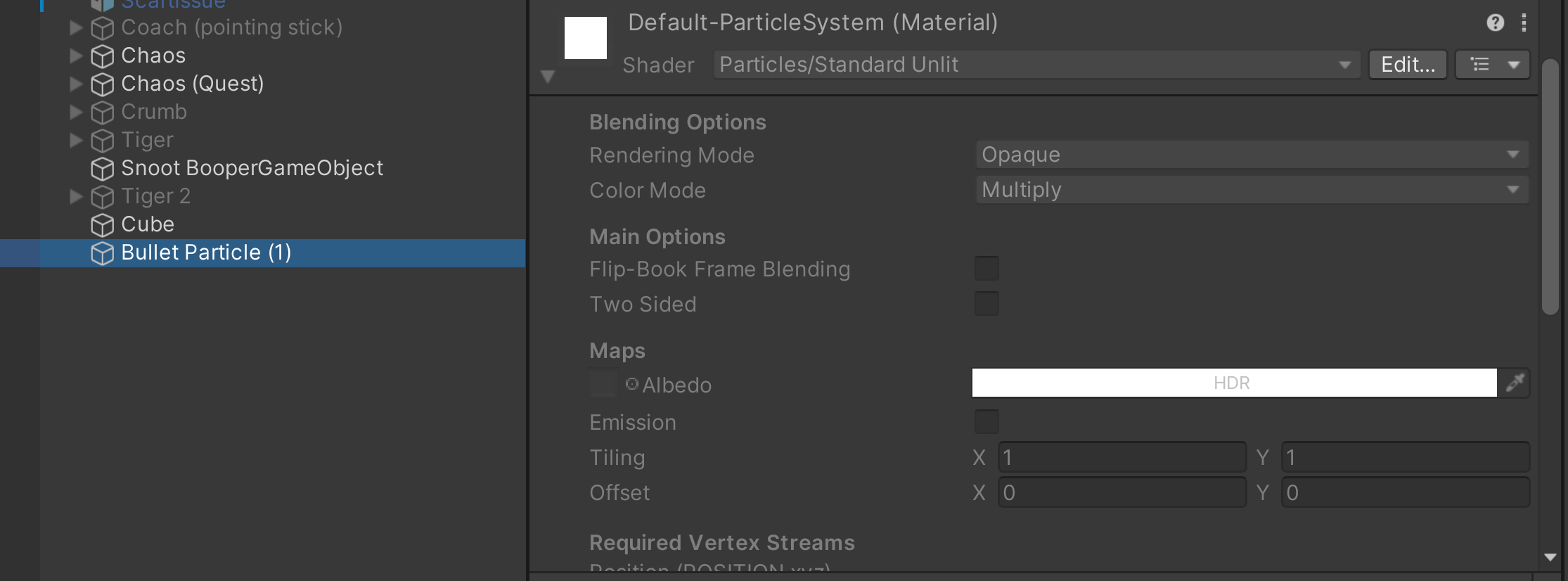 keen aspen
Be warned!! Turn them off in the hierarchy before you upload it!!
If you don't, anyone who doesn't turn your avatar on all the way can see and use the seat even if you have it toggled off
pliant yarrow
Good to know
robust whale
pliant yarrow
basically can the VRChat Station work without a Collider
yes and no. It technically doesn't work without a collider, but you aren't allowed to upload colliders. If you upload an avatar with a station component on it the sdk will automatically add a collider for quest. Just make the seat like normal, then remove the collider.
last (bold) sentence is really the only important part, rest is just an explanation
also fun fact this is how quest avatars can fly, it's using the collider from a station (seat) to give you something to stand on in the air, which lets you fly
pliant yarrow
robust whale
also fun fact this is how quest avatars can fly, it's using the collider from a ...
Good to know.
pliant yarrow
robust whale
also fun fact this is how quest avatars can fly, it's using the collider from a ...
Last question real quick. Can quest have more than one seat? I know the max is 6
gaunt stirrup
pliant yarrow
Last question real quick. Can quest have more than one seat? I know the max is 6
i think so because gogoloco works on my quest avatars and it puts 3 seats on them
robust whale
pliant yarrow
Last question real quick. Can quest have more than one seat? I know the max is 6
yes, the same limitations apply for quest and PC
strong ember
jagged sequoia
https://kurotu.github.io/VRCQuestTools/ this tool can handle removing vertex col...
How do I use it?
strong ember
I figured it out, I apologize greatly 😅
 acoustic karma
I don't know if this is the place to go for this But my wife has got a problem She's using the quest account And is unable to access the website And she's accidentally changed into a crasher avatar That is crashing her as she spawns in And she's unable to change out of it how would we go about fixing this
If this is the wrong place can somebody tell me where the right places thanks
keen aspen
go to #1138891887374237706 i know theres a way to cancel an avatar from loading via a button combo but i dont remember it-
@acoustic karma "hold down both the Quick Menu buttons for the duration of loading a world and your avatar will be reset upon load-in."
acoustic karma
I will find out if this works
acoustic karma
Okay I've done This and it does work however my wife only has one controller Is there another solution
So she can't do this one sorry
keen aspen
Then she MIGHT be screwed unless you guys find a way onto the website
acoustic karma
She needs to be able to get in to be vrchat to be able to merge the accounts Into a VR chat account
keen aspen
did you try the button combination with only one controller?
acoustic karma
Yea I did it myself it did not work sad I tried the bottom combination myself with both controllers and it did work meaning it does work
She is just missing the other controller
 ocean jacinth
did you try it with your other controler entirely disconected?
keen aspen
I remember I used to accidentally turn on Safety Mode with one controller back in the past, I would assume if you only have one controller you should be able to do everything as if you had both
ocean jacinth
cause if it detects its connected its perfectly posible that the keybind would be differant
keen aspen
can you even get ticket help with this if you don't have a VRChat account proper?
acoustic karma
We are both very confusing the situation It's completely unexpected that this has happened I was hoping the server was Able get in contact with a VR chat staff member Who Would be able to delete or change the avatar but Thank you for trying I'll see if there's something else I can do
keen aspen
You would go to https://help.vrchat.com/hc/en-us/requests/new and submit a ticket
acoustic karma
Well this has been great help and I will take that link But it seems she's fixed it When I tried the one controller I did it on desktop On the valve index So it didn't work for whatever reason But when she tried it on her quest controller and it fix the problem and she was able to change her avatar you all been great help sorry for the late reply
keen aspen
nod nod, usually for Quest Controllers if one is disconnected, VRChat will redo the bindings to work with one controller, so I'm glad she was able to fix it without a ticket! Be sure to do the merging ASAP though so this doesn't end up happening again!
 dusky fractal
Anyone got any good avatars
magic slate
yes.
 dim nimbus
Converting to quest for a friend and the avatar texture is missing some added color markings, is this a known issue that cant be fixed with current shaders?
magic slate
You'd probably have to see how those markings got added in the non-quest shader
magic slate
if you mean the base color file, they should show up
dim nimbus
I got it
keen aspen
what was it?
dim nimbus
I had to click and drag the updated material file to the model
Are their any other quest compatable shaders that arent so bright?
magic slate
you can adjust the color
dim nimbus
Edit the texture directly or in unity?
dim nimbus
Got it working but now the file is too big for quest lol
I have to remove 8.23MB of data, what could I remove?
magic slate
you can adjust the color in the shader, or edit the image texture to adjust it there (using an image editing program, not unity)
dim nimbus
Ok, something weird is going on, I tried to upload a premade quest avatar for a friend on their account but its telling me its to big a file. this is weird
 flint forge
dim nimbus
Ok, something weird is going on, I tried to upload a premade quest avatar for a ...
flint forge
dim nimbus
Ok, something weird is going on, I tried to upload a premade quest avatar for a ...
That isn't weird, that is the uncompressed size limiter at play, it is there to stop people abusing crunch compression and other compression techniques that don't actually reduce the true size of the avatar once it has been downloaded and unpacked.
dim nimbus
I mean the avatar was premade for quest
flint forge
Did you import any textures yourself?
or anything else.
Is everything on the avatar as it was?
The limiter is not new
dim nimbus
flint forge
Did you import any textures yourself?
I added some textures but the issue stands even when they are not on the model, Looking at the compression data
magic slate
compression won't change the uncompressed size
oh texture sizes... still that's not the best way of doing things - reduce size, or possibly look at removing unused blendshapes, those take up a lot
dim nimbus
Where can I do that?
magic slate
blender, maybe vrc fury or vrcquesttools
dim nimbus
Ok
flint forge
dim nimbus
I added some textures but the issue stands even when they are not on the model, ...
Badly made quest version then.
VRCfury's blendshape optimizer component can help bring it down, depending on amount of unanimated blendshapes.
Might still be related to textures, so check whether any of them use crunch compression and turn it off, use ATSC instead, it is just better, lower download size and lower true size.
If you have any detailed animations on the avatar, like dances, then those will take up a surprising amount.
dim nimbus
I removed the blendshapes, still too big lol
Does it matter wich avatar I used? I did the 2022 version
 magic slate
you want 2022
dim nimbus
Ok
Hmm I change the resolution of the textures and its still saying too big
The FBX barely has any blendshapes
Its like 10mb to big on both avatars I am trying to upload
dim nimbus
Ok, something weird must be afoot. I have removed uneeded items, blendshapes, and physbones. Still shows the file is 10mb to big
keen aspen
10.01 mb is still too big
its best to try and get it to 9.something bc even 9.999999999 MB is within the limit
dim nimbus
I mean it has that much too much on top of it, I cant seem to make that number drop
dim nimbus
Would anyone mind taking a look at the avatars I am trying to upload and figure out how I can make them smaller in size?
arctic slate
Thry's avatar performance tools might help you, it can tell you most of whats taking up space size-wise on your model
dim nimbus
Ok, showing me a list of empty states, where do I find those to delete?
And that is a lot of blendshapes
 dim nimbus
Could something I have installed with my unity be adding files I do not need?
gaunt stirrup
dim nimbus
it would be in the animators, but pay close attention to what you're deleting because if other things transition into/out of the empty state, it might be in use and would mess up the animator logic to delete it
dim nimbus
Could adding vrcfury be adding the extra data?
keen aspen
VRCFury on its own doesnt add anything
in fact, VRCFury can be used to optimize an avatar and make it smaller when you go to upload it.
is there a blendshape optimizer on your avatar using VRCFury?
dim nimbus
I'll check