#avatar-quest
1 messages · Page 9 of 1
 runic smelt
 vapid wasp
difficult to set up w vrchat?
 lucid quest
try removing the vertex color
 final terrace
Hey Can i ask how do you add a prob to a quest avatar?
 proper quest
Is anyone else’s avatars bugged with the standard lighting? Looks really flat and has no detail anymore🫤
 spare summit
proper quest
Is anyone else’s avatars bugged with the standard lighting? Looks really flat an...
spare summit
proper quest
Is anyone else’s avatars bugged with the standard lighting? Looks really flat an...
shouldnt be bugged
if a quest avatar looks different recently it might have used a modded sdk
proper quest
spare summit
if a quest avatar looks different recently it might have used a modded sdk
I used a Vrchat SDK and used the standard lighting that it told me to
spare summit
thats weird
proper quest
Look I’ll show a comparison image
What I looked like before

What I look like now

Both used the same standard lighting
spare summit
dunno what to tell u then man
different avatars in different worlds r gonna look different
 spare summit
i wont lie man i rlly dont see a difference other than the world's lighting
proper quest
Basically before I looked like you know more shiny and leather suit-like I guess and now I look really flat textured and no detail
A lot of details are in the textures but now there’s little to none
Like here for example was the normal lighting I had in any world but now it’s sucks
 spare summit
u could try reuploading it? i rlly dont know man im sorry 😭
 jovial haven
proper quest
What I looked like before
jovial haven
proper quest
What I looked like before
i want it
that spiderman avatar looks amazing
proper quest
Looked*🥲
 steady idol
proper quest
Like here for example was the normal lighting I had in any world but now it’s su...
steady idol
proper quest
Like here for example was the normal lighting I had in any world but now it’s su...
are you using the actual vrcsdk or something else
proper quest
steady idol
are you using the actual vrcsdk or something else
Vrcsdk
 grizzled bone
I've been trying to make a pcvr avatar quest compatible for some days now but I haven't managed to do it. At first the shaders were messed up (which i somehow managed to fix) and now apparently the textures arent mapped correctly to the mesh. It looks right on unity but absolutely wrong once i upload it. I've used VRCquesttools to make the character quest compatible and then Mantis LOD Editor to lower the polygon count, maybe i broke something then. I do not have a lot of knowledge about vrchat avatar creation in general... any help would be appreciated
steady idol
pictures
grizzled bone
Difficult since i dont have a quest myself to make screenshots of it. The textures are just completely misaligned
grizzled bone
okay managed to get a picture thanks to a friend. i have the unity screenshot (how it should look like) and i have the ingame image (how it shouldn't look like lol). the avatar was a premade avatar by another person but it was only made for PCVR. i was trying to make it quest compatible and i have no idea what im doing xD
(credit to zoidrawz for the avatar)


 cursive tartan
proper quest
Basically before I looked like you know more shiny and leather suit-like I guess...
cursive tartan
proper quest
Basically before I looked like you know more shiny and leather suit-like I guess...
if you increase the smoothness slider in the shader settings it should give you the effect youre looking for
grizzled bone
grizzled bone
okay managed to get a picture thanks to a friend. i have the unity screenshot (h...
managed to find out that i can replicate the exact effect in unity by offsetting all textures by -0.6 in y direction. would it fix it if i just offsetted them with 0.6 positive so in the end it puts it exactly to 0, which would be the right offset? xD
 grizzled bone
managed to find out that i can replicate the exact effect in unity by offsetting...
grizzled bone
grizzled bone
managed to find out that i can replicate the exact effect in unity by offsetting...
update: it didnt fix anything...
grizzled bone
i tried and tried different things for days now but i can't find any solution to my problem. i'll have to give this one up if noone can help me. really any help would be really appreciated if you know what the problem could be. thanks
 mystic trellis
how do i get an avatar to upload as quest?
 grizzled bone
mystic trellis
how do i get an avatar to upload as quest?
grizzled bone
mystic trellis
how do i get an avatar to upload as quest?
set selected platform to android (you need to have the unity android build version downloaded)
mystic trellis
grizzled bone
set selected platform to android (you need to have the unity android build versi...
i click confirm but it dosent change it tho
grizzled bone
hmm i honestly cant help cuz i have no idea about making avatars and i am having a mental breakdown
mystic trellis
mystic trellis
how do i get an avatar to upload as quest?
still need help on this please
 minor spoke
new avatar creator here, some minor experience. I have a premade avatar package that has an outdated version of GoGo Loco, and I can't find any information on how to remove it without damaging the avatar. I know how to install it after the fact. thank you!
 jagged sequoia
pretty much do the process to install it in reverse?
like delete the old animation controllers and any prefabs attached to the avatar?
minor spoke
the issue is that i've used vrcfury which makes it a 2 step process, i didnt realize there was a manual install version
let me look at some tutorials and try to backtrack from them :)
jagged sequoia
then that should be even easier as vrcfury is non-destructive?
so you can pretty much just delete the original prefab that would be installed by VRC Fury and put in the new one
minor spoke
this package came with gogo pre-installed, its not an easy to find prefab in the heirarchy :(
unless its named something strange or buried in the armature im not sure how to get at it
jagged sequoia
have you tried using the hierarchy search to search GoGo Loco
minor spoke
..i probably should have thought of that, but im messing with playable layers at the moment and trying to replace them
gogo isn't a prefab in the hierarchy it seems
oh shoot this is avatar quest.. oops
mystic trellis
can someone help me understand why this avatar project wont go into android mode?

i select it click confirm it does nothing
grizzled bone
grizzled bone
I've been trying to make a pcvr avatar quest compatible for some days now but I ...
Anyone know a solution?
grizzled bone
mystic trellis
can someone help me understand why this avatar project wont go into android mode...
Is there an error in the unity console?
 wide heart
grizzled bone
I've been trying to make a pcvr avatar quest compatible for some days now but I ...
wide heart
grizzled bone
I've been trying to make a pcvr avatar quest compatible for some days now but I ...
I've never encountered something like this, but from my limited understanding of Unity, this shouldn't really happen. That is unless you're possibly using a specific kind of shader for PC. What shader is the PC end using? Or maybe some kind of animation is interacting with the UV offsets in some way?
grizzled bone
wide heart
I've never encountered something like this, but from my limited understanding of...
thats what i thought. the PC users will see poiyomi shaders, which i know that it isnt compatible with quest. quest users should see the Toon Lit shaders. i tried checking if any of the animations change any of the UV offsets but i couldn't find anything...
wide heart
grizzled bone
thats what i thought. the PC users will see poiyomi shaders, which i know that i...
That is odd. Have your tried in a different project?
grizzled bone
wide heart
That is odd. Have your tried in a different project?
you mean putting the quest avatar into a different project?
wide heart
grizzled bone
you mean putting the quest avatar into a different project?
Yes, the current project might have a bug or something
grizzled bone
wouldn't the pcvr version then also have the same bug?
wide heart
Not necessarily, just give it a shot and see.
 austere lodge
mystic trellis
still need help on this please
austere lodge
mystic trellis
still need help on this please
Needs to be under 10mb
mystic trellis
austere lodge
Needs to be under 10mb
how do i check that?
austere lodge
mystic trellis
how do i check that?
What errors does it give you when you try to upload the avatar
grizzled bone
wide heart
Not necessarily, just give it a shot and see.
apparently its fixed even tho i haven't done anything besides adding gogo loco xD maybe the update fixed the problem? idk to be honest but im happy i got it to work xD
 silent steppe
grizzled bone
okay managed to get a picture thanks to a friend. i have the unity screenshot (h...
silent steppe
grizzled bone
okay managed to get a picture thanks to a friend. i have the unity screenshot (h...
Did u figure out a fix? 💀 I have same problem
grizzled bone
nope
still trying to figure it out
but i figured changing between this states somehow offsets all of the materials and i have no idea why and how i can fix it
 grizzled bone
so the issue i am having is that these toggles change every material instead of only one. is there any solution for that?
silent steppe
Where even are those toggles 💀
grizzled bone
i need to know if its possible to offset one single material in an animation on quest and if yes, how. does anyone know that? cuz what the animation is doing is moving every single material in the skinned mesh renderer down instead of the one im trying to do it on. i have no idea why it doesnt do that on PC but i honestly dont care about knowing exactly how this works right now, i just want it to work xD
silent steppe
I've seen many people tell of the problem now. I'd just wait until the big bosses see what's going on and either make an update to fix it or revert back to pre update
mystic trellis
looking for some help on setting up and publishing the quest compatible j4ck3l, its my first time doing this so if anyone has good advice or a video they cam redirect me to that would be greatly appreciated


 random comet
mystic trellis
looking for some help on setting up and publishing the quest compatible j4ck3l, ...
random comet
mystic trellis
looking for some help on setting up and publishing the quest compatible j4ck3l, ...
you need the Android build module installed on your unity editor, press Ctrl + Shift + B in Unity and select the Android tab instructions will be listed there
mystic trellis
k i installed it
mystic trellis
random comet
you need the Android build module installed on your unity editor, press Ctrl + S...
what next?
oh wait its doing it
 mystic trellis
random comet
you need the Android build module installed on your unity editor, press Ctrl + S...
mystic trellis
random comet
you need the Android build module installed on your unity editor, press Ctrl + S...
wwhat would i do next when i goes to quest? just update it to quest and itll be quest pc?
random comet
yeah just make sure it uses the same Avatar ID for the avatar you need it to be in the pipeline manager
steady idol
same id and they are on the same avi
they dont even need to be the same avatar
just need to share the id
 shrewd dove
if im planning on using an avatar on quest but play threw a link cable does that mean ill still only see quest avatars?
steady idol
shrewd dove
if im planning on using an avatar on quest but play threw a link cable does that...
if you are doing the link cable to a pc then you are playing pcvr
shrewd dove
ahh okay thanks
 golden idol
I recently found this when looking for resolutions for my model
I fixed issues with the head without even changing the textures and now all the textures are flat white on Quest, even though it still uses the same standard lite shader as it did before
Maybe I forgot to enable emissions at a certain level, but I'll test it later
golden idol
golden idol
https://www.reddit.com/r/VRchat/comments/16quigt/avatar_textures_white_on_quest/
Has anyone found a fix for this yet?
golden idol
Was it something about a modded client? Idek what “mods” I added, just plugins
jagged sequoia
modded sdks are against the terms of service of vrchat
 upper kettle
https://jingo1016.booth.pm/items/4035411 haihaiiiii okay soooo i dunno how to read kanji and idk how well of a job google translate does, but does anyone know if this avatar base is quest compatible? its really adorable and Ive been looking at getting a custom avi sometime in the near future. pls ping me cuz tbh i dont check in here that often ^^;

▶発売記念7月31日まで6000円→5000円セール中!◀ ▶출시기념 7월 31일까지 6000円→5000円 으로 세일중!◀ オリジナル3Dモデル「セレスティア」 製作者: 진권/ジンゴ このモデルはBlender 2.83で製作されました。 他のプログラムでの互換性は保障いたしません。
 rose yew
upper kettle
https://jingo1016.booth.pm/items/4035411 haihaiiiii okay soooo i dunno how to re...
rose yew
upper kettle
https://jingo1016.booth.pm/items/4035411 haihaiiiii okay soooo i dunno how to re...
You can make most things quest compatible if you try hard enough. The page doesn't say anyhow. 🙃
grizzled bone
grizzled bone
i need to know if its possible to offset one single material in an animation on ...
Hey i've been trying to find a fix for days but never got any response... any help would be greatly appreciated...
 pastel storm
grizzled bone
Hey i've been trying to find a fix for days but never got any response... any he...
pastel storm
grizzled bone
Hey i've been trying to find a fix for days but never got any response... any he...
No, because Quest uses either StandardLite or ToonLite. Same for PC using Standard. Something like Poi or lilToon could, because it can change materials respectively on a single mesh. For Quest, rather than making a single mesh with two materials, you'll have to make two meshes. Then you can change that mesh and its material without changing the other mesh and its material. You can see an example here #avatar-help message and if you scroll a bit, you can find the unitypackage for it.
 wary flume
grizzled bone
i need to know if its possible to offset one single material in an animation on ...
wary flume
grizzled bone
i need to know if its possible to offset one single material in an animation on ...
DO you mean like a tiling effect?
 jovial meadow
can anyone upload me a avi
 wooden umbra
grizzled bone
I've been trying to make a pcvr avatar quest compatible for some days now but I ...
wooden umbra
grizzled bone
I've been trying to make a pcvr avatar quest compatible for some days now but I ...
I might be having this issue, I havent touched the project for a very long time but after the recent update that went out all my quest friends see this

 sand steppe
Cute avi I found


 frozen merlin
wooden umbra
I might be having this issue, I havent touched the project for a very long time ...
frozen merlin
wooden umbra
I might be having this issue, I havent touched the project for a very long time ...
I saw that too with some skins in the Avatar Search.
 shadow rover
sand steppe
Cute avi I found
shadow rover
sand steppe
Cute avi I found
Is it public 🥺❓
 loud harness
 timber axle
grizzled bone
i need to know if its possible to offset one single material in an animation on ...
timber axle
grizzled bone
i need to know if its possible to offset one single material in an animation on ...
oh, just isolate it in blender
then try again
timber axle
upper kettle
https://jingo1016.booth.pm/items/4035411 haihaiiiii okay soooo i dunno how to re...
it is 100% possible to get into quest, just gotta know what youre doing
 hearty tusk
Do quest avatar uploads require a PC upload for others to see the quest version upload?
wide heart
What? Quest upload allows quest users to see the avatar, PC uploads allow PC people to see the avatar. Upload to both for everyone to see it.
wide heart
Lol its fine
 rancid cloud
Hi, i want ask if there is a alternative way to move arms of this avatar, on pc version it use rotation constraint, but on quest these are blocked, any way for do it?
 wide heart
rancid cloud
Hi, i want ask if there is a alternative way to move arms of this avatar, on pc ...
wide heart
rancid cloud
Hi, i want ask if there is a alternative way to move arms of this avatar, on pc ...
Sadly, as you said, constraints aren't allowed on quest. Not much you can do.
rancid cloud
i think they should just add a limit like physbones instead blocking them at all
wide heart
I would think it has some compatibility issue or something. Because that would seem like a solution, yet here we are.
austere lodge
upper kettle
https://jingo1016.booth.pm/items/4035411 haihaiiiii okay soooo i dunno how to re...
all avatars are quest compatible if you make them
 robust whale
wide heart
I would think it has some compatibility issue or something. Because that would s...
robust whale
wide heart
I would think it has some compatibility issue or something. Because that would s...
Constraints work on quest, but they are not allowed because when they did testing on them, they found that they quickly and at unreliable amounts severely reduced performance. The reason iirc is because the way they are implemented means even though it is basic math, it pretty much has to stoo everything else the computer is doing, so lots of constraints can EASILY drop your framerate by a lot. And because of the unpredictability and severe performance drop they aren't allowed on quest. They never will be as far as I'm aware either, but I believe they are eventually planning on making a vrchat version of constraints that are multi-threaded and therefore more performant. Just like they made physbones as a vrchat version of dynamic bones.
 late silo
rancid cloud
Hi, i want ask if there is a alternative way to move arms of this avatar, on pc ...
late silo
rancid cloud
Hi, i want ask if there is a alternative way to move arms of this avatar, on pc ...
there is a limb puppet system you can get but it kinda sucks
 sturdy goblet
robust whale
Constraints work on quest, but they are not allowed because when they did testin...
sturdy goblet
robust whale
Constraints work on quest, but they are not allowed because when they did testin...
huh, neat
can't wait lol
(i can wait but it'll be neat
 dense sigil
New to unity, I was able to upload an avatar with some difficulty, but when I do certain expressions there is a block of colour as a blush, I know that you can't do transparent blushes on quest, but is there a way to delete the blush all together? (The avatar is Manuka if that helps at all)
 dry ridge
dense sigil
New to unity, I was able to upload an avatar with some difficulty, but when I do...
dry ridge
dense sigil
New to unity, I was able to upload an avatar with some difficulty, but when I do...
If by delete you mean you just don't want it to show up, the VRChat Mobile > Particles > Additive shader should still allow you to upload, but the blush will never be rendered.
That means the blush has to be on a separate material slot though. If that's not the case, I'd just plop the model into Blender and delete the blush there.
dense sigil
Thank you
dry ridge
I've got a weird bug with the Quest Mobile Toon Lit Shader. Currently on the most up to date version of all the SDKs, confirmed by the Creator Companion. Parts of the model are rendering as completely black, the liner and the pupils. Some extra information.
- I have already checked the vertex colors in Blender, everything is set to white.
- There is no alpha/transparency in the texture for the eyes and liner.
- It is not an issue with the eyes being a single sided surface, as the white shine is the same type of mesh, and the liner is a closed surface.
- Replacing the texture with a solid color still renders the eyes and liner as black.
- I have worked with other models with this exact same eye geometry (Other BGB models) and this has never occured before.

Here's what it looks like on almost any other non-mobile shader.
 vapid wasp
anyone used the new ai pose llms w avatars?
 solemn lotus
Anyone down to make me a avi?
late silo
solemn lotus
Anyone down to make me a avi?
Careful messages like that will get you spammed with scammers
pastel storm
optimised my avi for quest and got this error, has anyone ran into it? iv never seen it before

 magic slate
rancid cloud
Hi, i want ask if there is a alternative way to move arms of this avatar, on pc ...
magic slate
rancid cloud
Hi, i want ask if there is a alternative way to move arms of this avatar, on pc ...
You could just weight paint them to the bones
rancid cloud
but what about fingers tracking?
magic slate
I mean, to the standard humanoid bones
hmm, though they probably wouldn't move that well with the wrong rotation centers.
steady idol
they wouldnt in the slightest
late silo
rancid cloud
but what about fingers tracking?
you could make animations for the fingers and map them to your fx layer for hand gestures
 misty horizon
Has anyone else had issues with 2022 models for quest that once they upgraded their project, the model has become super broken and pixelated?
wide heart
As in, an impostor?
misty horizon
wide heart
As in, an impostor?
I ended up figuring it out, it wasn't an imposter no. A quest model I upgraded to 2022 unity broke, but it was just that the model importer changed and I had to change some import settings for the fbx to fix the broken meshes was all
wide heart
Interesting. Wonder what that was like. Only "broke" avatar I've seen actually upload was broken shape keys. Causes the whole thing to turn into a spike ball when any shape key was turned up.
 rugged bobcat
How do I fix this? (Vrchat expressions)

 scarlet ermine
rugged bobcat
How do I fix this? (Vrchat expressions)
scarlet ermine
rugged bobcat
How do I fix this? (Vrchat expressions)
You need to go to the VRCExpressionsParameter and define that parameter. Obviously a GoGo Loco issue here. Generally easier to install GoGo Loco with AV3 Manager. Plenty of guides on that on YouTube
scarlet ermine
scarlet ermine
You need to go to the VRCExpressionsParameter and define that parameter. Obvious...
Best way is just to install GoGoLoco with AV3 Manager as that allows you to merge parameters rather than doing it all manually
rugged bobcat
Thank you so much!
 copper summit
Sucks there are no hunt showdown avatars.
 tall oriole
question is it only to me that happening this or smt but for quest my avatars turn out like this and i have no idea how to fix them

does this problem happen to anyone else?
 cyan apex
tall oriole
question is it only to me that happening this or smt but for quest my avatars tu...
cyan apex
tall oriole
question is it only to me that happening this or smt but for quest my avatars tu...
looks like z fighting
indicating that you might have two meshes
check if you have a duplicate body mesh
tall oriole
cyan apex
check if you have a duplicate body mesh
how would i do that ?
tall oriole
it dosent look like it figthing with to meshes
its only on wuest that its affected
pc player look at the avi like normal
cyan apex
does it look like this in unity too?
 potent pivot
how to make the quest particle shaders white instead of black
 hot elbow
Hey all im looking for a quest avi creator that can create a sheriff cruiser avi with working lights for sirens can anyone help?
tall oriole
Lol no
sturdy goblet
wash off all the rusty polygons
 indigo rain
Maybe someone has encountered this problem when loading a character?
 cyan apex
indigo rain
Maybe someone has encountered this problem when loading a character?
cyan apex
indigo rain
Maybe someone has encountered this problem when loading a character?
what's the first error in the console?
indigo rain
cyan apex
what's the first error in the console?
sec

i think i fixed it
and now it just won't let me load a character because I haven't spent enough time in VR chat.
late silo
hot elbow
Hey all im looking for a quest avi creator that can create a sheriff cruiser avi...
i mean a working siren wouldnt really work
 inner harness
a normal cowboy
steady idol
hot elbow
Hey all im looking for a quest avi creator that can create a sheriff cruiser avi...
Dont ask here because scams
Lights dont work on quest avatars
Best you got is faking them
You wouldnt even have any sounds on the avi
 foggy terrace
(quests are a ton more limited than you think)
 tulip dagger
just a pro tip for quest/android avatar creators, try baking specular highlights into the emission on standard lite, it won't look good for everything, but for some stuff, well, see for yourself, unfortunately this does require substance painter to pull off.

 steady torrent
if i update my pc version like adding a toggle do i have to do the same on the quest version or will it do it by itself?
it sounds stupid
foggy terrace
tulip dagger
just a pro tip for quest/android avatar creators, try baking specular highlights...
on android holy shit thats so good?!
looks like a very poor but running on mobile means thats insanely optimized which is amazing
 cyan ember

 outer patio
rancid cloud
Hi, i want ask if there is a alternative way to move arms of this avatar, on pc ...
outer patio
rancid cloud
Hi, i want ask if there is a alternative way to move arms of this avatar, on pc ...
where can i find that avi? its rlly cute :>
rancid cloud
outer patio
where can i find that avi? its rlly cute :>
Her name is Kirale, is custom with karin base, just google it for know who is her (it will be a game character in future)
wary flume
tulip dagger
just a pro tip for quest/android avatar creators, try baking specular highlights...
Do you mean making the specular highlights as the material?
pastel storm
Im wanting to buy an custom avi but idk where to buy one from
 limber parrot
magic slate
limber parrot
magic slate
 azure hamlet

 obtuse junco
😦 is alpha blended not supported on android? On the mobile shader?

I mean if we cant use it why is it even there
random comet
VRChat/Mobile/Particles is for worlds
obtuse junco
The other ones work just not the alpha blended
And that is the only one that seems to work well with transparent backgrounds 😦 if they brought that to avatars it could make things considerably more optimized imo
random comet
would be the opposite as alpha rendering is tasking for the quest's APU
sure it would be okay on a single avatar, but instanced over a ton of avatars in a public instance is a huge difference
obtuse junco
Thankyou, I figured that specific particle shader is not supported on avatars.
And I suppose I have to learn more. Im just getting into transparent stuff because of a game that uses low poly transparent textures and what not to produce really nice looking objects in a small package (low poly and low texture memory)
So I started making my own objects and came into this predicament xD maybe one day theyll find a way to deal with cutouts in a more efficient way for the android apu
steady idol
obtuse junco
The other ones work just not the alpha blended
The others dont actually work properly
Outside of a particle they dont render at all
indigo rain
Hey hey, Maybe someone knows how many hours you need to play to be able to upload their Avatar?
 valid cloud
indigo rain
Hey hey, Maybe someone knows how many hours you need to play to be able to uploa...
valid cloud
indigo rain
Hey hey, Maybe someone knows how many hours you need to play to be able to uploa...
I think it‘s remaining a secret. I played one evening talking to alot of different people and got ranked up immediately. I think you just gotta socialize maybe?
 steady idol
pastel storm
The error I got when uploading it to Quest is this
steady idol
pastel storm
The error I got when uploading it to Quest is this
you never downloaded the android build
pastel storm
steady idol
you never downloaded the android build
Did
Still nothing.
It’s been having issues installing Windows Visual
cyan apex
 winged egret
Someone should make vrchat public trolling avatars like for example this one: the default gray robot avatar with just hands and a head with a blank stare that jump scares you
steady idol
winged egret
Someone should make vrchat public trolling avatars like for example this one: th...
thats a thing but quest side wont happen since you dont get avatar audio
obtuse junco
steady idol
The others dont actually work properly
Outside of a particle they dont render at...
Youre right, you can upload it but it becomes invisible using particles shaders w/o a particle system
 lime ridge
hey! anyone willing to mentor me in the ways of avatar uploads and help me become a pro? im willing to pay for professional help lol
cyan apex
lime ridge
hey! anyone willing to mentor me in the ways of avatar uploads and help me becom...
is there anything specific you need help with?
late silo
"trading" public avatars makes no sense, if its a public avatar it has no value in a trade....its already public
you dont own it
 jade bough
avatar traders are stupid
you guys dont even own the avatar or make it (majority of the time), so why act like its yours
its purely a superiority complex thing
 torpid meteor
Working with an avatar that uses specular over the eyes in the PC version, what's the best way to convert that over for quest? Since we can't use transparency, it's just covering the eye with any material I try
pastel storm
Anyone got some cute furry girls or furry femboys?
steady idol
torpid meteor
Working with an avatar that uses specular over the eyes in the PC version, what'...
You kinda dont
Hide that mesh around the eyes and emulate it on the texture
 dawn spruce
where do i find and downlod the shader for quest avatar
now how do i add it
i added the toonlight to unitity
torpid meteor
steady idol
You kinda dont
Hide that mesh around the eyes and emulate it on the texture
Ironically I did learn VRChat/Mobile/Particles/Additive works, just use a full black texture and it's additive will be nothing, therefor completely invisible
steady idol
torpid meteor
Ironically I did learn VRChat/Mobile/Particles/Additive works, just use a full b...
the particle shaders just dont render in the first place on non-particle
cyan apex
torpid meteor
Ironically I did learn VRChat/Mobile/Particles/Additive works, just use a full b...
while you can do that, a better choice would be to just delete that part of the mesh in blender
 civic crest
was toon lit or matcap lit ever fixed to not show as black in some worlds? or should i just stick with using base texture over emission on standard lit for a flat shaded effect on quest
jagged sequoia
something I'm pondering I'm trying to make a tutu skirt for my mom for VR chat but she will be playing the Android version of VR chat so I can't use transparency so how do I make it properly look like a tutu skirt?
steady idol
jagged sequoia
something I'm pondering I'm trying to make a tutu skirt for my mom for VR chat b...
make it without transparency
some tutu skirts are solid/opaque
 odd sigil
Does anyone have time to make me an avatar
magic slate
odd sigil
Does anyone have time to make me an avatar
join vrtraders, link in #community-servers-old
 prime ocean
Does anyone know a way I could have mesh with alpha be just be mesh
magic slate
mesh doesn't really have alpha - what do you mean?
steady idol
prime ocean
Does anyone know a way I could have mesh with alpha be just be mesh
meshes dont have alpha at all
if you mean materials then you just dont make it transparent
if it requires transparency then go in and edit the mesh in blender or dont use it at all
pastel storm
What quest do I have to do to get an avatar?
cyan apex
avatar-quest refers to the platform quest
as in the oculus/meta quest family of vr headsets
 novel jolt
lol
 modern escarp
lol
modern escarp
pastel storm
What quest do I have to do to get an avatar?
Check your index im sure youll find your quest
 thin bobcat
What's the best way to get around backface culling, is it just duplicating mesh and reverting normals?
 inner rivet
Blud is all over.
late silo
 solar sky
does anyone knows why the standard lit shader dosen't want the emission to stay ...
solar sky
does anyone knows why the standard lit shader dosen't want the emission to stay ...
Yeah Im having the same problem
its annoying
 rugged tulip
Hey. Has anyone encountered an issue since moving to 2022 project where animating emissions on Standard Lite is breaking now?
I have been giving Quest avatars clothing brightness sliders and hair emission controls using this and now after the swap to 2022 this seems to be breaking.
Additionally I noticed that the state of the emissions on the model in the editor is reverting to no emissions until you open one of the materials in the inspector and then at material will show the correct emission state.
rugged tulip
I assume the above issue and my own are closely related lol
cyan apex
rugged tulip
Hey. Has anyone encountered an issue since moving to 2022 project where animatin...
tons of people seem to be having that issue
rugged tulip
cyan apex
tons of people seem to be having that issue
Gotcha. Well hopefully it is addressable then.
And not a new limitation
This may work for some people trying to animate the emission values, but I was able to get some of the animations to work if I opened all of the materials in the inspector prior to upload, but it weirdly only fixed animating the value and not the hue.
 zealous cobalt
Hey!! Sorry if this is the wrong channel. I like an avatar that I found, but it's rated VeryPoor. I want to optimize it, but since it's not mine I don't really know what to do, or if I can optimize it. Any tips?
cyan apex
zealous cobalt
Hey!! Sorry if this is the wrong channel. I like an avatar that I found, but it'...
if you didn't make it, then there's nothing you can do to optimize it
 prisma shoal
more specifically you'll need the file and permission to edit it
try contacting the user who uploaded it, or perhaps googling their (or the avatar's) name
 hybrid furnace
has anyone got some cool flashy interactive avatars that they would be able to show me or let me use please?
pastel storm
Anyone know where I can get some Ensemble Stars Avatars? (Specifically Subaru Akehoshi)
 charred scarab
Can someone make a avatar for me
prisma shoal
charred scarab
Can someone make a avatar for me
not in this server, and definitely not for free
 cyan apex

 misty kindle
for some reason an avi im working on is suddenly 3mb over max for quest, even though i have other versions with more verts, more materials and more textures that work just fine, any ideas?
i deleted evry mesh on it and its still 12mb???
 loud fiber
cyan apex
did you try uploading again?
loud fiber
cyan apex
did you try uploading again?
idk how to do it. im basically new to all this avi uploading thing
cyan apex
loud fiber
idk how to do it. im basically new to all this avi uploading thing
the build & publish button in the sdk control panel
misty kindle
yeah it shows when i try to upload
legit an armature with nothing on it is apparently 12mb
cyan apex
try switching the build target to windows, then building a test copy
load that test copy into https://vsk.lox9973.com/abstat/
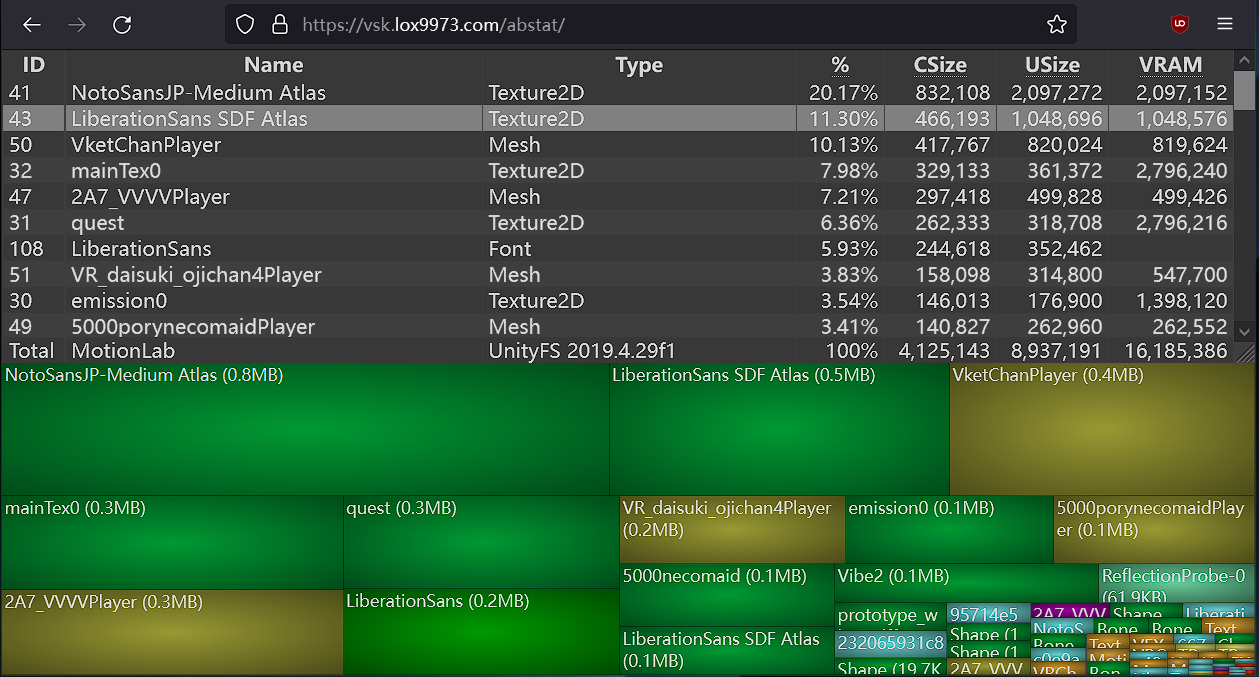
A WinDirStat-like online Unity asset bundle inspector
misty kindle
thats not the issue, i belive its unity being dumb, cause nnow that i think about it ive had this issue before and i just made a new project and imported all the quest stuff over and it worked
cause i know the rex FT base isnt 12mb
misty kindle
cyan apex
load that test copy into https://vsk.lox9973.com/abstat/
its showing meshes that i deleted off the avi
misty kindle
misty kindle
its showing meshes that i deleted off the avi
i had to delete the meshes through blender rather than unity ig
 eternal trench
Anyone know the work around of placing things in the world
 flint forge
eternal trench
Anyone know the work around of placing things in the world
flint forge
eternal trench
Anyone know the work around of placing things in the world
You could attach the thing to a stretch bone with 0 strength.
Stretch bone just being a physbone with basically infinite stretch.
late silo
eternal trench
Anyone know the work around of placing things in the world
Particle effect
 muted jungle

 carmine slate
muted jungle
carmine slate
muted jungle
i know that

og prod. legion & gab3
bpm: 150
not perfect
#kencarson #agreatchaos
 twilit sapphire
what do you guys reccomend for not having the face planes be visible

this is toon lit and its definetly not lit
needs to be mobile shader
random comet
are those different meshes?
twilit sapphire
yeah
random comet
did you set lighting probe anchors?
twilit sapphire
nah i dont know about that ill look into it
twilit sapphire
random comet
did you set lighting probe anchors?
perfect thank you!
 arctic zinc
Anyone know a fix around color changing the hair with quest shaders on the body material?, cause no matter what I try it changes the color for the whole body and not just the hair
 steady idol
arctic zinc
steady idol
arctic zinc
Separate mesh
All unity knows is animate the color on the body mesh
Stuff like poiyomi can get around it for being a more dense shader with the built in functionality
arctic zinc
Welp, guess Imma just do material swaps cause I ain't redoing the pc version lol
steady idol
arctic zinc
Welp, guess Imma just do material swaps cause I ain't redoing the pc version lol
Just make a quest version with the hair as a separate mesh
cyan apex
or animate the uv offset
much more performant option
and would even allow things like hue shifts if done right
they already have more than 10 meshes it seems
steady idol
cyan apex
they already have more than 10 meshes it seems
Also a ton of materials
arctic zinc
cyan apex
or animate the uv offset
how would I do that?
Cause rn I got my material's fairly low and my meshes kinda low lol, so if there's a way to Not have to make more unnecessary adjustments pls tell me 😭
cyan apex
arctic zinc
how would I do that?
You have to understand how to work with and modify uv maps
Then you can put multiple colors or variants of the hair color onto the texture, next to each other
And then offset its uv map by animating these values to move it to one of the variants
 arctic zinc
I really don't wanna make one but, if it means the avi being optimized so be it ig

gotta love quest stuff
🥲
 blazing raptor
Anyone here know anyone who makes vrc furry avatars with a drawing sort of look to them?
steady idol
blazing raptor
Anyone here know anyone who makes vrc furry avatars with a drawing sort of look ...
You can try vrctraders discord
blazing raptor
I'll check that out
steady idol
Or #1138520828556890214 if you arent wanting to com and just want one
blazing raptor
I'm looking to commission
steady idol
Then vrctraders
blazing raptor
Would you be able to send me an invite or is an invite for it in this server?
cyan apex
blazing raptor
Would you be able to send me an invite or is an invite for it in this server?
twilit sapphire
im using the current avatar builder and i cant switch to android, it gives the error "Switching to Android:WindowsStandaloneSupport is disabled" in console
i think sdks are missing or not where they were in the old version
cyan apex
you are missing android build target support
 fiery minnow
you need to install the dedicated android unity module on the unity website
cyan apex
press Ctrl+Shift+B in a unity project and install android build target support from there
i already have it installed, but it would look like on iOS here
 twilit sapphire
ah alright
 vernal trellis
How do i make a 2d avatar compatible with quest
fiery minnow
if it's 2d, you create a plane, you place the texture and you publish it as an avatar 
vernal trellis
No like am trying to make it companitible with quest
 winter glade
vernal trellis
No like am trying to make it companitible with quest
winter glade
vernal trellis
No like am trying to make it companitible with quest
You'll have to switch the build mode in the vrc upload menu to android
prisma shoal
vernal trellis
No like am trying to make it companitible with quest
if you mean transparency then you'll need to make the mesh be in the shape of your character instead of just a square
i'm not sure if there's an automatic way to do it
 undone dune
Is anyone else having issues logging into the VRC SDK Control Panel?
I'm entering my credentials correctly - double checked by logging into the web - but it still says invalid.
nvm.
It worked just now
 tough kelp
Does anyone here do requests?
wide heart
Requests? Wdym?
 runic pike
does anyone have any tips?

ive already deleted clothing, comppressed my texture amd stuff
cyan apex
do you have vrcfury? if you do, add a blendshape optimizer feature to your avatar
steady idol
tough kelp
Does anyone here do requests?
Not here
Too many scammers
And people like being paid
tough kelp
steady idol
Not here
Too many scammers
And people like being paid
Payment isn't an issue
But understood
steady idol
tough kelp
Payment isn't an issue
Vrctraders
tough kelp
However the avatars wouldn't be for vrchat
So don't know if that throws a cog in the works
cyan apex
you can commission any 3d work or even 2d work there
steady idol
cyan apex
be it animations for a game you're working on, a model for printing, just 2d art etc
tough kelp
Thankyou
 robust harbor
Can anybody help? Whenever I try switching to android it keeps saying this
 steady idol
robust harbor
Can anybody help? Whenever I try switching to android it keeps saying this
steady idol
robust harbor
Can anybody help? Whenever I try switching to android it keeps saying this
You dont have android installed
robust harbor
steady idol
You dont have android installed
Ik I just figured it out after like 3 hours 💀
 balmy yarrow
robust harbor
Ik I just figured it out after like 3 hours 💀
balmy yarrow
robust harbor
Ik I just figured it out after like 3 hours 💀
how did you fix that error if you dont mind me asking?
robust harbor
balmy yarrow
how did you fix that error if you dont mind me asking?
Just go into this menu
Also ignore the avatar 💀
Go to android and it should say something about a download
And ur done
balmy yarrow
robust harbor
Just go into this menu
👍
ok, anyone android player just straight disabled even with it installed?
cyan apex
balmy yarrow
ok, anyone android player just straight disabled even with it installed?
that means it's likely not installed
press ctrl+shift+b and check if the android platform is greyed out
 deft saddle
i bought this avatar and im trying to make it quest , everything else is fine but as soon as i make the materials toonlit or mapcap it turns red its supposed to be white

im useing 2020 unity
random comet
deft saddle
i bought this avatar and im trying to make it quest , everything else is fine bu...
remove vertex colors from the model
VRCQuestTools can do this for you
deft saddle
random comet
remove vertex colors from the model
ty i was stuck on it for the longest of times
arctic zinc
runic pike
does anyone have any tips?
try using an addon called ( BuildSizeViewer ) you can download it from git hub, shows you what is taking up what percentage on ya avi

I hope this helps lol
It won't show up as a unity file when you download it, but all ya have to do is drag and drop it into your asset section in unity
 cyan apex
a lot of the fbx size comes from blendshapes :P
arctic zinc
ye
Sometimes it can just be some textures you didn't see tho so I love using build size viewer for that reason
runic pike
arctic zinc
try using an addon called ( BuildSizeViewer ) you can download it from git hub, ...
I already have it lmao 😭
runic pike
But I ended up just deleting a bunch of shits
arctic zinc
did you try reducing the polygons on the avi?
runic pike
I hate having to go into blender for that 😭
arctic zinc
felt lol
runic pike
If I would've thought it through I probably would have done it before I started
But I'm not the brightest ;-;
 runic pike
Sure! Maybe in a bit though I'm chillin, I just got done cleaning
arctic zinc
yea no worries, just shoot me a dm later if ya want
runic pike
Alright!
arctic zinc
Imma go make some jello☺️
 fresh musk
pls help mee i dont know hoow to fix this

 white epoch
So, Im having some massive issues with getting toggles to work on quest. I bought an avi, and tried converting it to quest, however most of the toggles are not working properly, even though i've tried setting them up the same way tutorials have described it
cyan apex
white epoch
So, Im having some massive issues with getting toggles to work on quest. I bough...
parameters sync as one long string of bits cross-platform
so if they are not in the same order, or there are missing parameters somewhere in the middle, they won't align properly
 marble dew
Hey everyone, Pleasure meeting I'm currently working on building a avatar from scratch for the first time and was wondering if anyone was interested in help me with some tips and issues I have .
white epoch
cyan apex
parameters sync as one long string of bits cross-platform
its not a crossplatform issue, they just straight up wont work when you try and toggle stuff on or off on Quest.
It honestly feels like an issue with the animator, however im not experienced enough with it to determine if thats the actual issue
pastel storm
Do the avatar special effects work on an oculus? If so how would one activate them.
 summer zodiac
hey so i'm about to help my gf make her first custom avatar using vroid and she's a quest user. i've done this before but not in a long time so i'm sure things have changed and i could use a reminder of the landmines to look out for. like how quest lacks transparent/cutout shaders so things like eyes and eyebrows take special attention. any other stuff we need to watch out for in the early steps?
 mortal dome
Is there any really good quest Avis cause I need new ones
late silo
mortal dome
Is there any really good quest Avis cause I need new ones
there are literally thousands of avatars on quest just look
mortal dome
Ok
 unborn gate
Some of my avatars that I've made quest just seem to be naked for quest users ingame? I've tried using gesture manager and avatar emulator in unity to check that no animations are broken but everything works fine. I also tried to upload the quest version of the avatar on to pc but still everything works fine. What could be the issue?
 lyric meadow
please help any way to view everyone’s avatars at once in VRchat?
magic slate
lyric meadow
**please help** any way to view *everyone’s* avatars at once in VRchat?
Do you mean the ones that you have to click on and say "show avatar" in Quest? Nope, can't - this is good though, it's trying to help you have a reasonably performant experience
magic slate
unborn gate
Some of my avatars that I've made quest just seem to be naked for quest users in...
If you have clothing off by default and only on because of an animation, then anyone who's got your animations disabled will see only the default setup - naked. Better to default clothing and such to on.
lyric meadow
magic slate
Do you mean the ones that you have to click on and say "show avatar" in Quest? N...
Thanks for your help! 🙂
cyan apex
unborn gate
Some of my avatars that I've made quest just seem to be naked for quest users in...
are your expression parameters in the same order?
unborn gate
magic slate
If you have clothing off by default and only on because of an animation, then an...
They are on by default and I've asked quest users to fully enable my avatar before and it had no change
unborn gate
cyan apex
are your expression parameters in the same order?
Yes I just used quest tools to convert the avatar so parameters were left unchanged
white epoch
white epoch
It honestly feels like an issue with the animator, however im not experienced en...
Is there anyone i can hop on call with maybe to get some help with this?
nvm found the issue
ok double nevermind i have found a bigger more confusing issue
magic slate
there's always one of those
 obtuse sundial
Does anyone know any good regulus avatar worlds?
obtuse sundial
There's only 2 searches. 1 is a question and 1 isn't a good one
 nimble prairie
obtuse sundial
Does anyone know any good regulus avatar worlds?
nimble prairie
obtuse sundial
Does anyone know any good regulus avatar worlds?
Regulus aren’t supposed to be public, don’t use public ones
If you want a regulus avi buy the model
obtuse sundial
Ooh
Does that work good for quest? (I'm not a PC user) so I'm unsure how avi modeling works
nimble prairie
Well you’ll need a pc to upload it
 brazen pelican
ola quick question I've seen a few Quest avatars over time with World Constraint toggles or something very similar but cant find any source's on how to do it for quest anyone know of any?
magic slate
brazen pelican
ola quick question I've seen a few Quest avatars over time with World Constraint...
Quest doesn't support constraints, it must have been done some other way
 dire quiver
How do I search for a specific type of avatar (like anime characters)?
 pine vector
On VRChat Mobile Standard Lite: If I uncheck the emission box on a material, then hit ctrl +s to save the scene it turns on the emission anyways but the box in the inspector tab is still off. Is Standard Lite broken?
cyan apex
Yeah, it doesn’t seem to save properly with the new sdk
Try editing the material directly
pastel storm
how do i make avatars quest compatible
random comet
did you install Unity through the creator companion?
random comet
if it was a manual install of it through Unity hub you'll need to make sure you installed the "Android Build Support" module
 kindred fractal
pastel storm
how do i make avatars quest compatible
kindred fractal
pastel storm
how do i make avatars quest compatible
You can use quest conversion with VRCQuestTools on github or do it by hand by changing shaders and optimizing stuff
prime ocean
Who here loves mos
 fluid birch
Quest capability ey?
Never done that.
 wraith notch
i have an avatar that is chashing questies, but works fine on pc. how would i go about fixing it?
cyan apex
wraith notch
i have an avatar that is chashing questies, but works fine on pc. how would i go...
you'd need to provide more information
 graceful geyser
converting a vroid over to quest and using VRCQuest tools to do the bulk of the conversion but... eyebrows and a couple of other "cutout" features are rendering with the ugly black non-transparent boxes around it due to Mobile/Toon Lit shaders... is there a work around?
flint forge
graceful geyser
converting a vroid over to quest and using VRCQuest tools to do the bulk of the ...
Bringing it into blender and using the knife tool to cut out, manually, those features.
 tiny narwhal
so like I have a problem, I am trying to use the same blender project to deploy my avatar for pc and quest however when I switch to quest after deploying the pc build it results in it breaking the pc build with it loading the robot avatar instead and not showing that it has quest support at all.
I even went as far as changing the build config from both the SDK menu, as well as File -> Build Settings and still no changes.
 kindred escarp
tiny narwhal
so like I have a problem, I am trying to use the same blender project to deploy ...
kindred escarp
tiny narwhal
so like I have a problem, I am trying to use the same blender project to deploy ...
shader or anything is using only for Quest ?
do you have a image to show how is SDK look now ?
tiny narwhal
It has only poly’s in red, and bones in medium due to not being able to eliminate a bit more on the triangles (or rather quads that I import as triangles).
Which show as just over 51k.
I would import them as quads however I am using AMD and we all know what NVIDIA did to AMD to mess them up HARD when it comes to tessellation.
tiny narwhal
kindred escarp
shader or anything is using only for Quest ?
poiyomi toon shader ye.
kindred escarp
tiny narwhal
poiyomi toon shader ye.
iirc poiyomi not support in quest ?
robust harbor
Is it just me or at times I can’t open unity and I have to factory reset my computer just to use it again 💀
I have to do the same thing everytime I wanna use unity
So either my computer sucks or unity hates me
tiny narwhal
robust harbor
Is it just me or at times I can’t open unity and I have to factory reset my comp...
no need to go that far
when it stops working it is usually when you did not use it in a few days and it having not contacted there servers in that time
cyan apex
Factory resetting your pc to use unity is wild
tiny narwhal
so it then goes to think your license is not valid and wants you to go into the hub to return it and obtain a “fresh” copy.
I know that code is stupid.
 hollow crow
Hey, anyone having trouble uploading quest versions of avis with the new unity ver & sdk?
It doesn't throw an error at all when uploading, but on vrc the pc version is broken (robot) and quest doesn't show up at all.
tiny narwhal
hollow crow
It doesn't throw an error at all when uploading, but on vrc the pc version is br...
that is what happens to me too
 hollow flare
I'm trying to understand how the expression parameters sync work, it makes sense that all parameters should be in the same order (the expression parameters in quest are included and in the same order for PC), but any extra parameters in PC makes Quest goes bonkers, I would think those would just get discarded and not used.
 plain pond
It seems that mobile/standard lite emission in unity 2022 for android/quest functions in unity, but does not reflect in-game. 2019 works fine. a few others found the same issue
hollow flare
This still causes issues anyways.
 hollow flare
Okay doing more debugging there are some stuff happening behind the scenes.
Seems like the Expression Parameters are being organized by type internally! It's either Int/Floats/Bools, or Floats/Ints/Bools
Which means if Extra has Ints or Floats, it will offset the Bools since they go to the end, very strange behavior honestly. I tested this by adding only the floats in Extra to Quest , I can add them to the end or start of the Expression Parameter list and it works (the toggles).
So that makes me think the order of the Expression Parameters matter by type, while the order of the types does not.
plain pond
hollow crow
It doesn't throw an error at all when uploading, but on vrc the pc version is br...
I had this issue before. If the avatar you are trying to upload has too many errors (in my case, it was extremely unoptimized and went far beyond all the limits) it will simply not report any errors, and let you upload anyways, resulting in an error robot.
Also found that when switching platforms, if you don't save and exit, relaunch the project, then when you upload, it will not update the avatar. If uploading a new avatar, simply no avatar will be uploaded.
tested in unity 2022.
hollow flare
Okay after more testing, it is Ints&Floats then Bools in order
So all Ints & Floats need to be in the same order, then all Bools in the same order. Since Ints & Floats are first, Ints & Floats in Extra would also need to be in Quest to avoid issues with Bool expression parameters, since they are at the end. So if I have 3 floats in Extra, need to be sure they are also in Quest Expression Parameters.
cyan apex
Interesting, thanks for your testing!
I'll repost this to the vrcfury discord in response to someone having issues with this lol
hollow flare
 robust harbor
tiny narwhal
when it stops working it is usually when you did not use it in a few days and it...
robust harbor
tiny narwhal
when it stops working it is usually when you did not use it in a few days and it...
I keep getting this error whenever I try opening unity/unity hub 💀
 robust harbor
cyan apex
Factory resetting your pc to use unity is wild
robust harbor
cyan apex
Factory resetting your pc to use unity is wild
I've done it like over 15 times thats the worst part 😭
Time to factory reset again
tiny narwhal
robust harbor
I keep getting this error whenever I try opening unity/unity hub 💀
sfc /scannow
robust harbor
Idk wtf that means

 nova sleet
robust harbor
Idk wtf that means
nova sleet
robust harbor
Idk wtf that means
Wtf mean what the fuck
rugged tulip
solar sky
does anyone knows why the standard lit shader dosen't want the emission to stay ...
@late silo
I found the solution to this if you have not figured it out yet.
In debug, set the second parameter for _EnableEmission to 1 in the Floats Saved Property.
 tiny narwhal
Sometimes I wish I could edit a quest shader in a way to trick the VRCSDK to think it is a default shader to disable backface culling on a hair of mine for my avatar.
tiny narwhal
Looks like there is no way and no option to force backface culling to be off in cases of hair which screws up most free hairs oof.
magic slate
yep, quest won't do that
tiny narwhal
yeah which is kinda dumb as it blows out 99.999999% of hairs that people can find for free and/or paid anyways.
because most of them depend on backface culling being off.
magic slate
someone should make some that doesn't require that then 🙂
tiny narwhal
magic slate
someone should make some that doesn't require that then 🙂
hard to do then.
Some would duplicate the mesh but we all know what it would do when the hair is alreadt 3k poly and duplicating it for the other face would double it.
And that does not account for 10k poly head/face body, outfit, etc.
20k polys for most avatars is simply not possible on quest sadly even when you try to cut it down as much as possible too.
magic slate
yep, I know what it takes, but also why this is a good limitation
tiny narwhal
yeah but
I feel 32k poly is a better limit than 20k for avi's
because those with 21k~just under 32k becomes oof.
magic slate
sure, especially with the improvements in Unity 2022, I can see this as a reasonable argument
tiny narwhal
yeah
besides quest supports importing entire avi as quads right?
because my avatar is all quads in blender and when imported like that in unity is just under 32k.
magic slate
I haven't heard that
tiny narwhal
😅
jagged sequoia
tiny narwhal
besides quest supports importing entire avi as quads right?
that is incorrect there is no such thing as a quad in unity
all the engine knows how to deal with is triangles
tiny narwhal
jagged sequoia
that is incorrect there is no such thing as a quad in unity
are you sure about that?
on the fbx import settings it has a keep quads toggle.
flint forge
tiny narwhal
on the fbx import settings it has a keep quads toggle.
Doing a bit of researching it seems like the toggle is around for the rare occasion when a specifically made shader might benefit from it.
magic slate
ooh, probably tessellation
jagged sequoia
the Avatar ranking system only counts triangles
 hushed monolith
Hey , I’m trying to upload an avatar to quest (I’m using a quest file ) I converted it to android and attached the PC blueprint but it’s still PC only . I don’t understand why it’s still not quest compatible ?? Can someone please help me out
jagged sequoia
hushed monolith
Hey , I’m trying to upload an avatar to quest (I’m using a quest file ) I conver...
did you actually upload the Android build
hushed monolith
Yes . I uploaded the PC version first then opened a new project , imported the quest version of the avi , and switched the platform to android . I then attached the PC blueprint , uploaded and it was still PC only
 old dawn
why does the hair on my avatar turn black when I use quest shaders? the ears use the same but they are correct
this is what it looks like for context
 cyan apex
old dawn
why does the hair on my avatar turn black when I use quest shaders? the ears use...
cyan apex
old dawn
why does the hair on my avatar turn black when I use quest shaders? the ears use...
vertex colors
use vrcquesttools or blender to remove vertex colors
 rancid isle
hushed monolith
Yes . I uploaded the PC version first then opened a new project , imported the q...
rancid isle
hushed monolith
Yes . I uploaded the PC version first then opened a new project , imported the q...
Remove the blueprint probably
cyan apex
rancid isle
Remove the blueprint probably
?
rancid isle
I've dealt with that problem & by detaching it, it worked for me
If not, it kept exporting as pc even if I set it to android
cyan apex
rancid isle
I've dealt with that problem & by detaching it, it worked for me
i don't think you're understanding what they're trying to do
they want to upload it as both pc and quest to the same blueprint id
which will make the avatar cross-platform
rancid isle
Ohh ok !
Do yk how to fix it?
Since I need the same thing sooner or later for my avis
cyan apex
rancid isle
Do yk how to fix it?
fix what?
rancid isle
Their issue
cyan apex
my guess is that they didn't copy the correct id
hushed monolith
cyan apex
my guess is that they didn't copy the correct id
I did copy the exact ID from the PC version of the model- I’ve had this issue before with another model and still don’t understand how to fix it
pastel storm
It's something to do with the sdk. So if you upload it to quest somehow it still only uploads to pc even with no blueprint or a new blueprint
hushed monolith
pastel storm
It's something to do with the sdk. So if you upload it to quest somehow it still...
Soooo…. How do I fix it ..?
tiny narwhal
pastel storm
It's something to do with the sdk. So if you upload it to quest somehow it still...
it works if you change build configuration using File -> Build Settings -> Android -> Switch to this config then log out of your vrchat account on the sdk dialog. Close Unity, Reopen Unity, relog into the VRChat SDK dialog.
There now you can accurately see everything for quest

 lost sequoia
 cloud trail
robust harbor
cloud trail
robust harbor
Is anybody else getting this error whenever trying to open up unity hub or unity 💀
 tiny narwhal
robust harbor
Is anybody else getting this error whenever trying to open up unity hub or unity...
tiny narwhal
robust harbor
Is anybody else getting this error whenever trying to open up unity hub or unity...
run sfc /scannow
and chkdsk
 frozen marsh
Is there a problem with uploading Quest versions ? I am trying to upload a quest version of a pc avtaar, but it just does not appear as Quest compatible
Upload says it was succesful, no errors
It's been like 2 hours
 tiny narwhal
 tiny nimbus
anyone know how to fix this?
tiny nimbus
anyone know how to fix this?
check your normals as one cannot do backface culling to off
yet
I do find it dumb one cannot set it to off for a special hair shader smh
tiny nimbus
tiny narwhal
check your normals as one cannot do backface culling to off
backface is off that is the headache part
magic slate
tiny nimbus
backface is off that is the headache part
Go into Blender and flip the wrong faces, you can use the "recalculate outside" option in the Normals menu
tiny nimbus
alright
tiny narwhal
tiny nimbus
backface is off that is the headache part
how did you turn it off for quest tho?
tiny nimbus
tiny narwhal
how did you turn it off for quest tho?
blender also
magic slate
tiny nimbus
it was very stupid
What was it, flipped face normals?
tiny nimbus
magic slate
What was it, flipped face normals?
messed up vertexs and had to recaculate inside instead of outside
magic slate
tiny nimbus
messed up vertexs and had to recaculate inside instead of outside
ah yep
magic slate
actually this is a good reminder for me right now to check face orientation
magic slate
yep, there's one object, oops
tiny narwhal
tiny nimbus
messed up vertexs and had to recaculate inside instead of outside
how did the vertexs get messed up?
 terse shoal
Yo
tiny nimbus
tiny narwhal
how did the vertexs get messed up?
1 tringale was a mess
had like 3 layers
and a mess on the last one
tiny narwhal
tiny nimbus
had like 3 layers
why did it have 3 layers?
 astral moon
Can you make avatars on meta quest 2
tiny narwhal
they plan to eventually remove support for quest 1 and 2 for quest 3 ^
because quest 3 is afaik just BETTER
 nimble meadow
magic slate
astral moon
Can you make avatars on meta quest 2
nimble meadow
magic slate
astral moon
Can you make avatars on meta quest 2
on the quest? no. for the quest, using a PC? Yep.
astral moon
I don’t have a pc
pastel storm
Anyone have an Anita max Wynn avatar
tiny narwhal
now this is funny, when merging my hair mesh alone in blender flips it's normals so I go into edit mode prior now before I merge each mesh for export as fbx into a single mesh for my avatar and then flipping the normals so when I ctrl+j the hair would flip itself back to how it was prior 😅.
robust harbor
Anybody else having problems with the newest unity version? 💀
tiny narwhal
robust harbor
Anybody else having problems with the newest unity version? 💀
everything is working fine for me, what seems to be the problem for you?
Ever since I switched to quest config in my File -> Build Settings... menu then loaded up the SDK panel to logged out, and then fully close Unity AND Unity Hub and relaunched from creator companion and logged back in I have not yet seen problems with uploading to quest again.
 sharp olive
magic slate
sharp olive
magic slate
smoothness = 1 (or roughness = 0), metallic = 1
cyan apex
you can also use a matcap, those can look even more metallic
 oak lodge
Anyone wanna trade Avis dm me
late silo
oak lodge
Anyone wanna trade Avis dm me
 modern escarp
so i have this avatar i bought thats PC only and i bought the quest version as well. is it possible to wear the PC version and use the blueprint ID to upload the quest version so that questies can see my avi or is that a silly idea my friend lied to me about?
steady idol
modern escarp
so i have this avatar i bought thats PC only and i bought the quest version as w...
dont ask in multiple channels
use the same blueprint id
pc and quest are different builds and needs the same blueprint id or you end up with a pc only and quest only
robust whale
modern escarp
so i have this avatar i bought thats PC only and i bought the quest version as w...
yes that is extremely common
cyan apex
modern escarp
so i have this avatar i bought thats PC only and i bought the quest version as w...
that's how you upload an avatar cross-platform
just publish an avatar with the same blueprint id to both windows and android build targets
 surreal raptor
Does anyone do free avatars
jagged sequoia
nobody's going to make you an avatar for free
 chilly night
Yeah but at least you can have a avatar unlike me because it doesnt appear
 solid scroll
I hate mobile
 tiny narwhal
I been thinking about getting a Quest 3, however it is sad that VRChat does not seem to support it's half-body tracking according to filian 😅.
Yes the streamer who broke over 20 headsets in a year.
random comet
Would need native implementation from vrchat to get it working
tiny narwhal
yeah
And quest 2 and 1 suffer from not having it and would require them to know between the 3,
flint forge
tiny narwhal
I been thinking about getting a Quest 3, however it is sad that VRChat does not ...
That feature launched when the dev team was winding down (making sure things will work while they are gone) for the holiday break, which they got back from last week.
tiny narwhal
Oh wait VRChat is dropping quest 1 eventually anyways.
flint forge
tiny narwhal
Oh wait VRChat is dropping quest 1 eventually anyways.
Already dropped
been months
flint forge
It doesn't change anything
random comet
Figuring out what quest you’re using in code isn’t much of an issue
flint forge
They aren't going to increase any limits just because they dropped the Quest 1, it was suffering severely.
The Quest 2 is also suffering.
tiny narwhal
Quest 3 can handle a little more but still suffering
Once they drop quest 2 support they could increase the 20k poly limit to 32k though
flint forge
Or, they could let performance stay better.
(Going by VRChat comments, that is what they are planning)
Would assume that when the Quest 2 gets properly dropped by Meta though (which will likely be a few years), they will do some changes. The Quest 4 would probably already be out.
tiny narwhal
Also it seems the Quest 3 can share some of it's GPU load with a PC's GPU so yeah
flint forge
tiny narwhal
Also it seems the Quest 3 can share some of it's GPU load with a PC's GPU so yea...
Uuh, no?
jagged sequoia
don't expect the texture memory stat to change even after a quest 2 deprecation
flint forge
jagged sequoia
don't expect the texture memory stat to change even after a quest 2 deprecation
Yeah, that couldn't change.
tiny narwhal
jagged sequoia
don't expect the texture memory stat to change even after a quest 2 deprecation
I don't even use 3 MB of texture memory even on my PC version.
jagged sequoia
tiny narwhal
Also it seems the Quest 3 can share some of it's GPU load with a PC's GPU so yea...
it's either entirely using its own GPU or the PC GPU but not a shared workload
tiny narwhal
nice

yeah if I could reduce that from 8k to 2k I would be sitting at 32k poly on my avatar.
jagged sequoia
you could honestly just texture those gloves on to the hands
as those have like zero noticeable impact on the silhouette
tiny narwhal
That is actually cut from the base.
I made the gloves from the base itself by cutting them from it.
The low poly base just was 21k poly and I would love to cut them further.

hmm probably could optimize some of them by merging some of the edge loops.
Maybe also some of the "rows"
jagged sequoia
still not seeing anything I couldn't just be a texture
tiny narwhal
jagged sequoia
still not seeing anything I couldn't just be a texture
it becomes a texture after atlas 😅.
 spiral tartan
hi
tiny narwhal
it helps optimimize my vram that way as then the rgb parts of each mesh becomes 10x10px 😅.
spiral tartan
do anyone actually do commissions for avatars?
tiny narwhal
most people here scam people when they see someone ask that.
so usually nobody do commissions that are legit from here.
cyan apex
yup, if anyone dms you about commissions, they are likely a scammer
if you want a safe place to commission someone for an avatar, go to vrc traders
tiny narwhal
or go to the pup avatar school discord server
where you can then chat with pup and others there for commissions that are not scams.
 molten elm
cyan apex
molten elm
cyan apex
vrc traders has very strict authorization guidelines, it's the safest place to go to, especially if you're looking for a from scratch avatar costing multiple hundred dollars
 burnt shoal
I went on my quest and i wanted an avatar they were quest compatible and it said "PC/mobile"
And idk how to fix
steady idol
burnt shoal
And idk how to fix
you are mobile on the quest
burnt shoal
steady idol
you are mobile on the quest
I don't know..
steady idol
burnt shoal
I don't know..
the quest is literally the mobile version
the quest is an android phone
tiny narwhal
cyan apex
vrc traders has very strict authorization guidelines, it's the safest place to g...
true
btw after dissolving some edge loops I managed to go from 46k to 34k poly. I really hope I can find enough edge loops that I can dissolve with minimal change to the mesh to make it go under 20k poly for both PC and quest 😅.
 tiny narwhal
yeah I been looking for those and also been dissolving the gloves to make them look more like gloves as well
which reduced their poly count alone from 8k to just under 3k.
oh my on Quest the texture vram usage 😅.

on PC under 2.3 MB.
tiny narwhal
LMAO if I press on "Keep Quads" it goes down in poly to this:

 cyan apex
tiny narwhal
https://feedback.vrchat.com/avatar-30/p/on-quest-make-a-fur-shader
cyan apex
tiny narwhal
https://feedback.vrchat.com/avatar-30/p/on-quest-make-a-fur-shader
any fur shader, including warren's fast fur lite, would perform very poorly on quest, if they even run at all
also, there are no third party shaders whitelisted on quest at all
flint forge
tiny narwhal
https://feedback.vrchat.com/avatar-30/p/on-quest-make-a-fur-shader
The lite wouldn't work at all, it requires geometry shaders, which the Quest GPU can't understand at all.
The superlight might, but the Quest GPU also can't handle transparency (that stuff was removed so it would be more power efficient.) so it would run miserably.
Even then, I don't think any of those shaders would run, the Quest GPU would likely be missing some important part.
tiny narwhal
cyan apex
also, there are no third party shaders whitelisted on quest at all
Yeah, even ones that duplicate the quest toonlit shaders to add the "cull: off" setting to it does not work either so one can have double sided faces on some materials as well.
😅
cyan apex
tiny narwhal
Yeah, even ones that duplicate the quest toonlit shaders to add the "cull: off" ...
cause that doubles the render cost
cyan apex
flint forge
The lite wouldn't work at all, it requires geometry shaders, which the Quest GPU...
quest gpu when geometry shaders
tiny narwhal
cyan apex
cause that doubles the render cost
Also the quest GPU: able to render hundreds of thousands of pixels every frame.
cyan apex
tiny narwhal
Also the quest GPU: able to render hundreds of thousands of pixels every frame.
okay?
 hasty parrot
any fix?
 random comet
hasty parrot
any fix?
random comet
hasty parrot
any fix?
press Ctrl + Shift + B, click the android tab, do the method that it'll tell you to do to install the android build module
obtuse sundial
Does anyone have any good recommended public rooms for avatars? I know there's prismic's but they don't give all the best ones. All the best avatars tho are PC versions. If it was quest worlds that would be heavily appreciated
 lusty compass
cyan apex
just publish an avatar with the same blueprint id to both windows and android bu...
lusty compass
cyan apex
just publish an avatar with the same blueprint id to both windows and android bu...
I’ve been trying to this for so long lol and I still have yet to get it. When uploading and you have both avatars, one quest and one PC (two scenes), what platform do you select in the VRChag SDK menu?
lusty compass
Oh wait
civic crest
for some reason, when i use a pc shader (poiyomi, standard lit) the avatar looks fine, but when i use any of the mobile shaders the textures break?? (the one with the lime head and torso is the broken version. i know for a fact its not vert colors i ported this model myself, of which my friend made. i did atlas the materials but i dont think thats the issue either

 rose yew
civic crest
for some reason, when i use a pc shader (poiyomi, standard lit) the avatar looks...
rose yew
civic crest
for some reason, when i use a pc shader (poiyomi, standard lit) the avatar looks...
Vertex paint seems like
civic crest
it was, odd, i dont remember adding vertex paint data
nor there being any in blender's mat preview mode
 simple zealot
Hey, is there anyone with experience of uploading Rexouium avatar for Quest? I don't know how to deal with one material for EyeLens... On PC it's transparent.. On quest I can not make it transparent which makes the eyes a single color and it looks awful.
 glass trail
So, when setting up a quest avi, and you're setting up the materials, you can make a material swap or an animation to change the material on a model. Obviously this feature is usually setup on pc, then ignored on quest. Im looking at a situation where i want to take the material swap thats being done on PC, and have it work on quest.
My normal method to doing this, is to change the model i want to do material swaps on to have a "1" at the end, then remake any toggles or animations that use that model, and then make the material swap animation using quest materials on that renamed quest mesh. Is there a better way to do this? Or am i asking a loaded question lol.
unborn gate
Has vrc changed something how quest sees the particle shaders? I've used the multiply particle shader to fix partially transparent textures like holes in shirts for example but now the quest users I've asked can't see them anymore but used to in the past. Is there just no way to have transparent parts anymore?
 fallow seal
why when i upload my avi for quest does my toggles and emotes and walking animation not work
am i allowed to move thing out of my avatars hierarchy
 golden sparrow
If you move them to the root tree, then no. Though for stuff like prefabs from the assets folder (think world.prefab) then yes.
As for why toggles dont work, some creators dont support toggles on quest since the vertices might put the avatar into the very poor rank. Walking animation should be easy to fix, just ensure the same base layer controller is used in both the PC and quest version of the model (so long as the animation is only stuff like the humanoid armature and nothing like special fx)
fallow seal
well the toggles worked before but i ended up removing a script that i think my pc avatar used
because everything works for my pc avatar and the toggles used to be synced but idk if its the script or my hierarchy
i moved particles out of my avatars hierarchy
golden sparrow
The toggles worked on the quest version?
fallow seal
yes
like i could toggle my glasses and stuf and use my dance emotes
and my friends saw
golden sparrow
Well. Is your menu and parameters asset still in your descriptor
fallow seal
yes
golden sparrow
And the menu does show up in game?
fallow seal
yes
golden sparrow
Have you perhaps looked at the debug menu to see how your states are transitioning
pastel storm
Is anyone able to open a blender file and show me what this avi looks like?
pastel storm
im trying to make a workable portal gun on quest using a chain of physbones with specific settings. but, the object at the end of the chain is kinda rotating a bit. I was wondering if anybody had done this before and knows the settings for the physbone to make it stay.
pastel storm
Can I have someone upload my avi for me?
steady idol
pastel storm
Can I have someone upload my avi for me?
You cant share files if its a paid base
Against tos for someone else to upload to your account
steady idol
Why cant you upload it yourself?
pastel storm
And it kinda be a bday present
Because I spent alot of time sketching and then taking that sketch and making it into something and it's my bday and I wanna chill;-;

There's honestly no other reason than I want to feel special
Also why can't they just upload it to their own account and let me clone it
magic slate
pastel storm
Also why can't they just upload it to their own account and let me clone it
because then it's public and if they take it down it's gone.
pastel storm
Oh well then they could just not wear it and no one would see it! Other than me
 craggy trellis
Why not just... upload it? You already went through the trouble of making the model. Setting it up in Unity and uploading it should be simple
magic slate
happy birthday?
cyan apex
random comet
cyan apex
random comet
omg wanna date
random comet
sums up the average Discord e couple
nimble prairie
pastel storm
I don't want tooooooooooo
Really isn’t long of a process to upload stuff
tiny narwhal
omg if I had 1$ for every time I seen someone say "I am lazy", "I don't want to", "It's my birthday I want to relax and feel special while everyone else does the hard work for me" I would be bill gates rich right about now.
steady idol
as soon as the birthday card was pulled I just stopped talking
aint gonna argue with stupid
pastel storm
Lol thats crazy how it's a bad thing to want to feel special with the work I already did
Grow a pair dude
steady idol
you can very easily upload it yourself
pastel storm
I literally wasn't asking anything wrong or bad just say you don't have any empathy lol
cyan apex
chicken sandwich
random comet
besides the berating of "do it yourself" you should look into the security of why you shouldn't do it. You're giving a random stranger on the internet access to your account and they could basically do anything on it, as well if that person has their VRChat account banned it'll ban you as well as when an account gets banned it bans any associated account that the main IP has logged into.
tiny narwhal
random comet
besides the berating of "do it yourself" you should look into the security of wh...
not to mention if that other person gets banned it bans the user who uploaded it for them.
Also the fact that sending a random stranger your avatar's files could result in them instead LEAKING said files.
😅
Not saying that I would do it, just that you can never trust any random person. You just don't know what they will do to get an advantage.
Besides if they don't leak said files, they could do things as far is taking credit for your own work if you made it from scratch too and then selling it.
steady idol
Not to mention the other side of the issue
If they upload it as public for you to clone that makes it where everyone can use it not specifically you
And now that person has to keep it uploaded as public or you lose it until you yourself uploads it
tiny narwhal
steady idol
Not to mention the other side of the issue
If they upload it as public for you t...
yep
KEKW
because then anyone can search for it in avatar worlds / the UI
steady idol
pastel storm
𝐂𝐚𝐧 𝐚𝐧𝐲𝐨𝐧𝐞 𝐦𝐚𝐤𝐞 𝐚 𝐯𝐞𝐥𝐯𝐞𝐭 𝐚𝐧𝐝 𝐯𝐞𝐧𝐞𝐞𝐫 𝐚𝐯𝐚𝐭𝐚𝐫?
Go to vrctraders and ask there
Too many scams here
pastel storm
steady idol
Go to vrctraders and ask there
Too many scams here
𝐂𝐚𝐧 𝐲𝐨𝐮 𝐭𝐞𝐥𝐥 𝐦𝐞 𝐰𝐡𝐞𝐫𝐞 𝐭𝐨 𝐠𝐨
𝐎𝐫 𝐬𝐦𝐭𝐡
cyan apex
why funny font
magic slate
pastel storm
𝐂𝐚𝐧 𝐲𝐨𝐮 𝐭𝐞𝐥𝐥 𝐦𝐞 𝐰𝐡𝐞𝐫𝐞 𝐭𝐨 𝐠𝐨
it's linked in #community-servers-old
 timber hornet
Does anyone know how to find codes for avatar when you can get a hold of The owner?
timber hornet
@
magic slate
codes?
 wise sorrel
Anyone here Know a good jujutsu kaisen avatar? (I'm mainly looking for hakari if you even know what jujutsu kaisen is)
magic slate
wise sorrel
Anyone here Know a good jujutsu kaisen avatar? (I'm mainly looking for hakari if...
 uncut veldt
Having some weird issue rn

the base model I'm using is like
7mb
and when uploading, its claiming its 18
I removed all the textures so its just an empty material its legit just the raw fbx
 finite compass
quest converting an avi how do i fix this? (the eyelashes eyebrows and baby hairs) pc pic included


 lucid sphinx
if anyone has any aot titan avatars Dm me or avatars that summon nukes
finite compass
lucid sphinx
if anyone has any aot titan avatars Dm me or avatars that summon nukes
tiny narwhal
uncut veldt
7mb
optimize your polys a bit more
tiny narwhal
finite compass
quest converting an avi how do i fix this? (the eyelashes eyebrows and baby hair...
quest does not support cutouts
combine the eyebrows and eyelashes with the base model texture somehow
I wish I knew how to properly do it though.
finite compass
idk howw to do that-- TvT
tiny narwhal
😅
tiny narwhal
finite compass
idk howw to do that-- TvT
same
cyan apex
finite compass
quest converting an avi how do i fix this? (the eyelashes eyebrows and baby hair...
you'll need to import the model into blender and use the knife tool to cut out the eyebrows
finite compass
i managed to fix the eyebrows with the blendshapes just stuck on eyelashes and the babyhairs now,, trying my best not to get blender
timber hornet
magic slate
codes?
Like for the locked Avis
cyan apex
what locked avis
magic slate
Haha yeah
late silo
timber hornet
Like for the locked Avis
If the avatar is password locked and the code wasn't given to you then the avatar is not for you
flint forge
uncut veldt
Very likely then the size of the mesh, blendshapes take up a lot of space.
If you have VRCFury installed, put on the blendshape optimizer, it removes all blendshapes that aren't used.
rose yew
finite compass
i managed to fix the eyebrows with the blendshapes just stuck on eyelashes and t...
If you want that avi in vrchat for Quest, you NEED to go into Blender, I 100% believe you'll need to optimize that mesh too
timber hornet
late silo
If the avatar is password locked and the code wasn't given to you then the avata...
No shit I mean if it’s say in a public search world and u can’t get ahold of the owner to get the code
Goddamn, Sherlock Holmes over here
late silo
timber hornet
No shit I mean if it’s say in a public search world and u can’t get ahold of the...
yeah just because it shows up in a public search world doesnt mean the person who made it wants it out to the public thats why its password locked meaning "not for you"
timber hornet
late silo
yeah just because it shows up in a public search world doesnt mean the person wh...
Just stop I said no shit if u can’t get ahold of the owner and there’s no QR code I wold be trying to buy it u are no help
cyan apex
 stark python
I want emission on a quest avi of mine, but I like the flat look of Toon lit. Is there anyway to make Standard Lite look like toon lit?
late silo
stark python
I want emission on a quest avi of mine, but I like the flat look of Toon lit. Is...
no texture image on albedo and color set to black then put your texture image on the emission slot and turn the color white
thats the closest you'll get
stark python
Regrettable, but thanks!
tiny narwhal
cyan apex
you'll need to import the model into blender and use the knife tool to cut out t...
will it automatically cut out the transparent parts of it when I click on the face?
 grave jungle
tiny narwhal
will it automatically cut out the transparent parts of it when I click on the fa...
grave jungle
tiny narwhal
will it automatically cut out the transparent parts of it when I click on the fa...
hi can i ask u somin
tiny narwhal
late silo
no texture image on albedo and color set to black then put your texture image on...
is there any way to make toon lit look like standard lite on some parts of the avatar but not others?
Welp
grave jungle
tiny narwhal
Welp
did u see my ping
tiny narwhal
late silo
no texture image on albedo and color set to black then put your texture image on...
that seems to mostly work for my issue except for the hair that I atlas'd to the same material. Anyway to make it look like what it would look like when I say for example that I want my hair on that material to look like how it does with toon lit?
tiny narwhal
grave jungle
did u see my ping
no
late silo
tiny narwhal
that seems to mostly work for my issue except for the hair that I atlas'd to the...
If you assign a separate material to the parts that you want emission on in blender you can do it that way
grave jungle
I just had a question about getting started with avatar creation, ive tried videos but none actually get me started.
this isnt just for quest this is in general
tiny narwhal
late silo
If you assign a separate material to the parts that you want emission on in blen...
hmm which is problematic as I need to atlas all of the materials together into a single one when I need to export.


top is with standard lite made to almost look like toon lit
botton one is toon lit
late silo
tiny narwhal
botton one is toon lit
🤷
tiny narwhal
hmm
late silo
with only one material it wont really be possible on quest
 fluid hare
I am so new to making pc Avis quest compatible
I’ve used some tools, but none of this makes sense nor am I experienced in blender
I only know a bit of unity
Does anyone have some really good videos that helped you guys out?
 safe reef
this doesnt seem right.
 rose yew
safe reef
this doesnt seem right.
rose yew
safe reef
this doesnt seem right.
Change your material's shaders to quest
safe reef
this is a quest material

its in the folder with the other two quest particle shaders, but neither are what i need
cyan apex
That one seems to be worlds only
Idk why it is in the Mobile folder if you can‘t use it but
You‘ll have to use some other shader
 somber nimbus
why do the color of the avatar looks like this

before I save the project it looks normal

 long jetty
Hello atm I'm trying to make a PC Avatar into a Quest Avatar. I've gotten everything good except the size of it. Right now it is 21.71mb, while I need 10mb. I have already deleted all non-necessary images, crunched them, and made them a lower resolution. Is there anyway to specifically see what is causing the increase in the size?
late silo
long jetty
Hello atm I'm trying to make a PC Avatar into a Quest Avatar. I've gotten everyt...
you could open the project in file explorer and check the file sizes there
long jetty
late silo
you could open the project in file explorer and check the file sizes there
I will try that, thank you!
long jetty
late silo
you could open the project in file explorer and check the file sizes there
So it turns out my .fbx is 55mb for my avi
How would I lower that?
Is there anyway in Unity, or will I have to go through blender
late silo
long jetty
So it turns out my .fbx is 55mb for my avi
you can compress it some in the import settings but that can break it
long jetty
hmm, aight
cuz no matter what I do it isn't lowering
I even used polytools and it didn't do anything
I lowered it to 17mb now
but can't get any lower
I feel like the rest is just the .fbx
It's at 16mb now
gonna go take a break
long jetty
bruh
 long jetty
finally fixed it
 meager thorn
is there a way to get past the build limit on quest? without decreasing the size.
flint forge
long jetty
So it turns out my .fbx is 55mb for my avi
Sounds like blendshapes, if you have VRCFury then its Blendshape optimizer would probably drastically bring that down, it only removes blendshapes that aren't used and can keep MMD blendshapes.
cyan apex
meager thorn
is there a way to get past the build limit on quest? without decreasing the size...
No
cyan apex
flint forge
Sounds like blendshapes, if you have VRCFury then its Blendshape optimizer would...
Blendshape optimizer my beloved
Although 55mb fbx sounds like a >300k poly fbx xD
 solemn creek
the pinned document for this channel seems to have 404'd. After getting my avatar to an overall Good rating, is there anything else additional I need to do to have it visible on Quest?
steady idol
meager thorn
is there a way to get past the build limit on quest? without decreasing the size...
the build limit is there for a reason
steady idol
safe reef
this doesnt seem right.
none of the particle shaders are really built to be used on avatars
outside of actual particles none of the particle shaders even render on quest
 nova flame
i need to reduce bones without using blender, who knows the answer to this wins a free favour from the Italian Mafia


 fluid nimbus
does anyone know how to fix this ? i wanted to put clothes on a friend of mines avi for quest and this happened
 magic slate
fluid nimbus
does anyone know how to fix this ? i wanted to put clothes on a friend of mines ...
magic slate
fluid nimbus
does anyone know how to fix this ? i wanted to put clothes on a friend of mines ...
you'll probably need to explain what's wrong about this
fluid nimbus
magic slate
you'll probably need to explain what's wrong about this
Your right, though I did that’s on me , so basically the skirt , arm warmers and leg warmers are suppose to be blue pink and white but when I chanced the shader to “VRChat/mobile/standard lite” it changed into the color you see on the picture
magic slate
Ah! Okay then probably the mesh has vertex colors, and the shader is picking them up. You'd have to check that in Blender
fluid nimbus
If that does end up being the case what should I do ?
magic slate
Go into Blender and remove the vertex colors, then re-export.
I haven't heard if you can do this within Unity
fluid nimbus
Ok thank you imma check this real soon
fluid nimbus
magic slate
Go into Blender and remove the vertex colors, then re-export.
i owe u a life time worth of thank yous my good lad , it worked and atlass ill be able to rest in peace
meager thorn
metal shader for quest anyone know any?
late silo
meager thorn
metal shader for quest anyone know any?
matcap
steady idol
meager thorn
metal shader for quest anyone know any?
You cant use custom shaders on quest so you can either max out the metallic on vrc standard or fake it with the vrc matcap shader
cyan apex
magic slate
I haven't heard if you can do this within Unity
VRCQuestTools can do this i think
magic slate
cyan apex
VRCQuestTools can do this i think
oh cool, had no idea
pastel storm
im trying to make a workable portal gun on quest using a chain of physbones with specific settings. but, the object at the end of the chain is kinda rotating a bit. I was wondering if anybody had done this before and knows the settings for the physbone to make it stay.
arctic zinc
meager thorn
is there a way to get past the build limit on quest? without decreasing the size...
you caaaan perform a forced upload like on how some people do to force avi's that have flashlight and shaders that shouldn't work on quest, buuuut it's really un optimized for quest and can crash you and others lol, and I'm 80% sure vr chat might get upset at you for doing so
I haven't went threw the nono stuff for vr chat since easy anti cheat lol
oh...
the pain
I still remember it
arctic zinc
pastel storm
im trying to make a workable portal gun on quest using a chain of physbones with...
could try using one of the limiters
 pastel storm
well lemme open the project and see what they are
its a chain of bones btw. it overall stays in place but rotates depending on where I am.


something I could also do is if I can make the last bone stay upright completely
idk
meager thorn
any fixes?
 magic slate
meager thorn
any fixes?
magic slate
meager thorn
any fixes?
It's a rounding error, you'll need to decrease the size more. Usual methods: reduce texture size, remove unused blendshapes, etc.
 viral flicker

things like this make me wish there was a bit of an allowance
 deft saddle
i dont know what to do , its only happening on quest and its not the phys bones

also posting it here cause avatar help is doing crap
indigo rain
Maybe someone knows a way to make the mono-eye mobian moving pupils( is there a way to transfer nodes in vr ?).

like from this video https://www.youtube.com/watch?v=3IDD5_HtPYE&t=25s ?
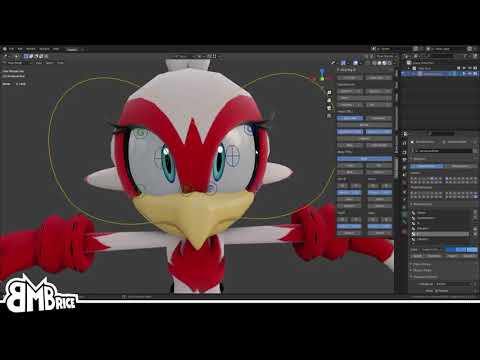
I've been showing previews of my current project (Vice) to people and have gotten frequent questions about the eye rig because Sonic characters have that monoball thing and attaching a disc to the surface always looks... well, not great. So here's a quick showcase on how I put it together.
The Vice rig will be dropping in a few days, so keep an...
 safe birch
Can anyone explain what this means (Its my first time uploading and I've been at this for almost 3 hours)

 hot pebble
safe birch
Can anyone explain what this means (Its my first time uploading and I've been at...
hot pebble
safe birch
Can anyone explain what this means (Its my first time uploading and I've been at...
Missing prefab
Delete it
Its the vrcfury gogo loco
Just add gogoloco manually
pastel storm
Does anyone have a riggy avatar I could clone?

 sinful charm
Hey When i Try To Swap The Avi Im Trying To upload from windows to android it keep saying in console Androidplayer is disabled what do i need to do
do i need to install the Android module for the editor 2022 if so how since you cant do it on unity hub for that editor
random comet
Press ctrl + shift + b, find the Android tab and click it, instructions on how to install it will be shown there
sinful charm
im swaping it over to android throught the sdk
random comet
it's the same thing
sinful charm
plus since i dont have the android module in the editor it wont be selectable see
random comet
It gives instructions on how to install the android build module on your respective installation of Unity
sinful charm
 random comet
you should still be able to click it
sinful charm
no android module in the editor thats why
random comet
What installation of Unity are you using (Standalone or Unity Hub), and what specific Unity version (stated in the titlebar)
random comet
then you should be able to access this


A standalone installation won't show "Add Modules" however
sinful charm
ive installed it right its showing on the hub but when i right click the gear logo only show in explorer and remove from hub

 random comet
that looks like a manual installation
random comet
You can always download older unity versions through the hub via protocol links inside of the unity archive site
but since it's a standalone install, close the project, and install the android build support setup in this page https://unity.com/releases/editor/whats-new/2022.3.6
random comet
the folder to the editor
in this case for you, E:\New folder (6)\unity editor\2022.3.6f1
sinful charm
this better work or im gonna go crazy since i want to upload this avi for side for quest
 terse oasis
I'm not quite sure what went wrong... Just tried to remove the transparent layer of eyelashes and eyebrows


 high lion
I have no clue how this thing with 1 mat and nothing on the 673KB avatar can get so much size?

I have 1 mats with all body parts in it, the texture is 2048x2048 and is 1.3MB large and the fbx only 673KB.
How in he## does this avatar have over 90MB of size??


In my field of view, this avatar should be just 2MB large and not 97MB.
Its so weird!?
The uploadtime was done in just 2 seconds and my max. Internet speed is 30MB/s how can I upload a 97MB avatar in 2 seconds before the upload was finnished?
Is it maybe possible that this is a bug or something?
How can a 1.3MB texture + 673KB avatar fbx be 97MB large?
 tired spoke
high lion
I have no clue how this thing with 1 mat and nothing on the 673KB avatar can get...
tired spoke
high lion
I have no clue how this thing with 1 mat and nothing on the 673KB avatar can get...
might be a sdk bug, try uploading anyway, it could be reading an old build and test you've done for another avi
or upload for that matter
oh you mentioned it got uploaded
check the perf stats ingame for correct size
astral moon
Does Vroid work
magic slate
uh, sure?
wide heart
Vroid often comes with geometry setup to rely on transparency shaders. Quest doesn't have these shaders. So it will likely need to be sent back to blender and fixed.
wary flume
 So I have an issue were if you bend down in some of my models that the knees cross in. Its annoying and I know I have to fix it in Blender but everytime I think I have it the problem gets worse. Any thoughts on fixing this stupid annoying prob?
wide heart
You have to make sure the legs are straight up and down. Then the knee is slightly forward.
 jaunty trellis
OK so I upload my avatar and it uploads fine I have the ability to change to it. However, when I change to it, it doesn’t work like everything just shows n/a
I would appreciate any help
 fresh talon
What component does gesturemaneger need
Or well it’s missing a prefab on gesture manager
magic slate
it shouldn't need anything
 hot nymph
Is there a way to upload a Transparent material on a quest avatar?
rose yew
Nope, it's gotta be cut out via blender
hot nymph
Dang, my avatar has a mask on his face made of glass, and your supposed to see the guys face through said glass, this sucks.