#avatar-quest
1 messages · Page 7 of 1
 stray saddle
 random comet
select the mesh with the head and look in the blendshapes, pretty sure it's called "Quest Eyelashes"
stray saddle
Dang, I don't see it in the list. Could it be a texture thing?
Bc the alpha of the head is this

 molten ginkgo
stray saddle
Bc the alpha of the head is this
molten ginkgo
stray saddle
Bc the alpha of the head is this
any kind of transparency will not work on quest
your alpha maps will be useless
things like eyelashes and eyebrows will have to be done with mesh, rather than cutout alpha
stray saddle
Idc if it has the lashes, at this point I'm trying to figure out how to get rid of them. I went into blender and don't see anything about lashes in the head's meshes
 leaden nebula
Is there a way to switch between PC to Android that doesn't take forever to import....the wait time is sooo painful
 flint forge
leaden nebula
Is there a way to switch between PC to Android that doesn't take forever to impo...
flint forge
leaden nebula
Is there a way to switch between PC to Android that doesn't take forever to impo...
Not sure of the implications of doing it, but swapping to an empty scene apparently speeds it up, just something I have heard.
 ashen oracle
leaden nebula
Is there a way to switch between PC to Android that doesn't take forever to impo...
ashen oracle
leaden nebula
Is there a way to switch between PC to Android that doesn't take forever to impo...
the first time will always be slow, but unity caches things pretty well now so future swaps should be quick
 white turret
I don't know how else to reduce avatar size. All textures are 32 with crunch compression set to low and 100... yet I'm still 2.33 mb away from it being quest compatible...
 elder widget
does anyone know why this is happening (i converted the avatar to quest and cleared vertex colors, all the shaders does this to the body)
 dusk moon
elder widget
does anyone know why this is happening (i converted the avatar to quest and clea...
dusk moon
elder widget
does anyone know why this is happening (i converted the avatar to quest and clea...
is it your avatar?
 silent grove
Is there any good female avatars for my sister
 topaz zephyr
white turret
I don't know how else to reduce avatar size. All textures are 32 with crunch com...
topaz zephyr
white turret
I don't know how else to reduce avatar size. All textures are 32 with crunch com...
very possible it's just the mesh putting you over, you'll probably have to strip the model down in blender or some such. you can see what's using space using thry's avatar performance tools and https://vsk.lox9973.com/abstat/
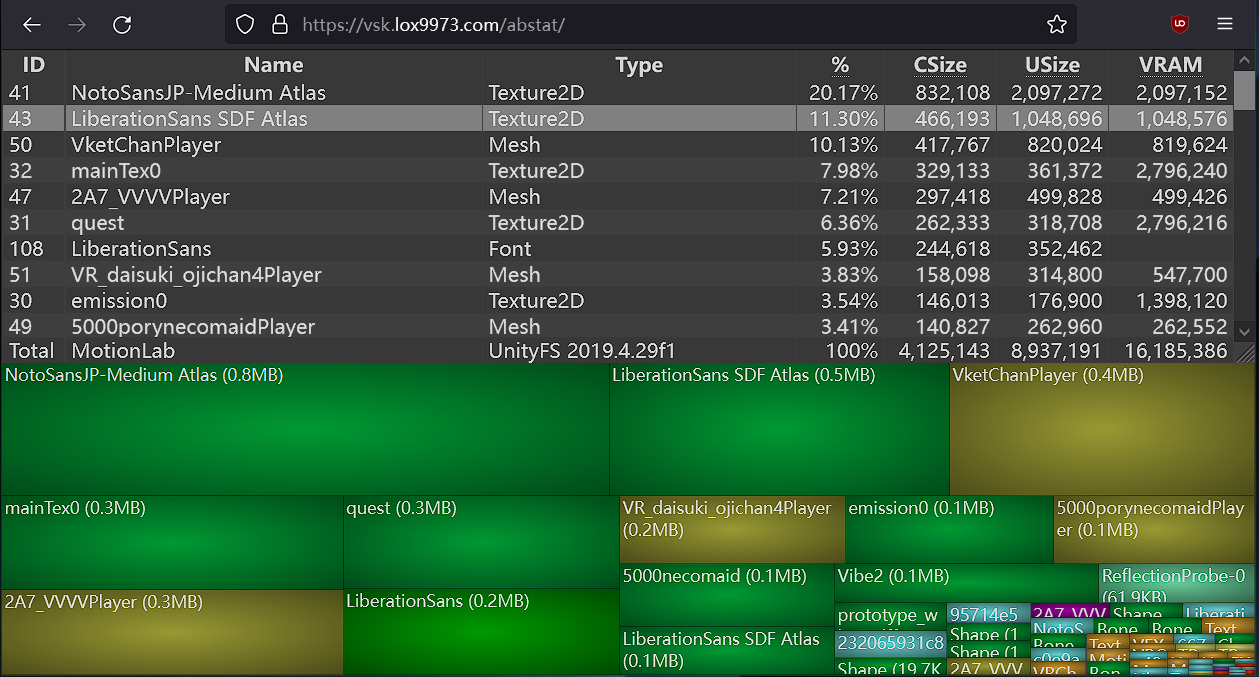
A WinDirStat-like online Unity asset bundle inspector
white turret
topaz zephyr
very possible it's just the mesh putting you over, you'll probably have to strip...
Thank you!
 white turret
silent grove
Is there any good female avatars for my sister
white turret
silent grove
Is there any good female avatars for my sister
Just go avatar hunting in public worlds
 clever dagger
Is there anyone that could explain to me how to sync PC toggles to Quest toggles? Like what exactly should I be looking at?
And if its possible at all if the Quest version is not a carbon Copy of the PC one.
For example for my PC avatar I use UV tile discard to create my clothing toggles, while on Quest I just separated the meshes and hid them as needed, and of course removed some things so the Polygon count isn't too high.
 jagged sequoia
basically you just make sure the two different animations for the two different platforms are controlled by the same network sync variables so they know to do the same thing at the same time?
 atomic obsidian
What shader can I use for my eyelash textures? Because normally you use the Standard Shader and then the Cutout option, but I can’t use that on like any of the mobile shaders so does anyone know a shader I can use for my eyelashes??
molten ginkgo
atomic obsidian
What shader can I use for my eyelash textures? Because normally you use the Stan...
you can't do any kind of transparency for quest
molten ginkgo
you'll need to cut the eyelashes out in blender, or stamp the texture directly on the face texture
atomic obsidian
Strange
Do you mean like make them in blender instead of using a texture??
Bc they are already cut out
atomic obsidian
molten ginkgo
yea, like literally cut the mesh out
Aight I can try
atomic obsidian
molten ginkgo
you'll need to cut the eyelashes out in blender, or stamp the texture directly o...
Also I put the texture on directly on it but it just doesn’t work
 magic slate
clever dagger
Is there anyone that could explain to me how to sync PC toggles to Quest toggles...
magic slate
clever dagger
Is there anyone that could explain to me how to sync PC toggles to Quest toggles...
use the same avatar parameters list if you can, the order has to match perfectly.
 royal ridge
Question for quest avatars, I have a particle package but I want the particles to stop playing after colliding with the terrain instead of stopping mid air when the gesture parameter is not met. Is there a way to get that to work on quest? I was told to animate emission rather than the particle source but then it's constantly looping in mirrors. Is there a fix for that?
 uneven token
I'm looking for some avatar worlds were I can find some good male avatars.
I would like some nswf ones.
But don't have be
I like the ones in Starish avatars.
So looking for more like them
 spare summit
uneven token
I'm looking for some avatar worlds were I can find some good male avatars.
I wou...
spare summit
uneven token
I'm looking for some avatar worlds were I can find some good male avatars.
I wou...
nsfw avatars are against tos so if i were u i wouldnt use public ones
cause theyre more likely to randomly get deleted n whatnot
uneven token
I don't mind using public ones.
Just looking for good worlds to visit
 solemn orchid
how do I make a Toggle to swap between textures?
random comet
solemn orchid
how do I make a Toggle to swap between textures?
A material swap animation
solemn orchid
How would I go about doing that?
random comet
in the animation tab record yourself changing the material slot of the mesh to a different material with the texture you want
solemn orchid
alright, made the animation, how do i turn it into a toggle?
 somber dove
elder widget
does anyone know why this is happening (i converted the avatar to quest and clea...
somber dove
elder widget
does anyone know why this is happening (i converted the avatar to quest and clea...
from what it looks like there is 2 meshes overlapping eachother
 misty kindle
how can i make a working hue shift for quest? ive seen people do it before but i dont know how
and im not talking about like texture swaps for hue, like a fully functional hue shift for quest
misty kindle
bruh

 pastel storm
misty kindle
how can i make a working hue shift for quest? ive seen people do it before but i...
pastel storm
misty kindle
how can i make a working hue shift for quest? ive seen people do it before but i...
https://www.youtube.com/watch?v=92PusEHSSms
And you can just 'reroll'/upload to get by the 10mb/10mb
If you're using SDK 3.3.0, they changed the math so if you got an avi that's 9.70 then it's always 10mb
Switch from SDK 3.3.0 to 3.2.3, via VCC. If you do not use VCC or can't, delete the two VRChat folders in /Packages then add https://assets.vrchat.com/sdk/VRChat-Avatars-SDK-3.2.3.unitypackage
silent grove
Does anyone now any good female avatar for quest (dont have money)
 olive locust
@unkempt steeple I saw you needed help with an avatar, feel free to dm me
 summer breach
Hello guys, first I'm korean not good english. sorry
I try to make quest avatar. but 10mb limit
But, when I look at another quest avatars, they are all over 10 mb
Is there a way to make the quest avatar exceed 10mb?
 crude acorn
the pc version can be above 10MB, usually quest avatars are uploaded the same as the pc version but with a lot of missing stuff and compressed textures
 shy stratus
Does anyon know any good hijab avatars?
Or just any hijab avatars
I found a lot but only for pc
 nimble prairie
silent grove
Does anyone now any good female avatar for quest (dont have money)
nimble prairie
silent grove
Does anyone now any good female avatar for quest (dont have money)
Ask In #1138520828556890214
nimble prairie
shy stratus
Does anyon know any good hijab avatars?
Ask in #1138520828556890214
pastel storm
hey i doing gogo loco flying this part is not making since I mostly a quest person this is a my personal avatar so no one else will be using it it say remove the constraint it is it the constraint setting?
 pastel storm
Can some one help make a custom avatar for me, im far to busy to make it myself, (I will be willing to pay for it), please dm me if your interested.
 glass pumice
@pastel storm
pastel storm
pastel storm
Can some one help make a custom avatar for me, im far to busy to make it myself,...
Go to VRCTraders in #community-servers-old, or Fiverr. These sites have safeties in place to minimize scams
 wide heart
pastel storm
hey i doing gogo loco flying this part is not making since I mostly a quest pers...
wide heart
pastel storm
hey i doing gogo loco flying this part is not making since I mostly a quest pers...
The reason you remove the constraints for quest, is that they aren't allowed. On PC the constraint is to allow players to look up and down to then fly up and down, so it's not crucial.
 turbid bobcat
Yo I'm looking for a good quest joker avatar can any one hook me up i
 fading saffron
@everyone hey im looking for someone to model an avatar for me its a clone but ill tell more if you contact me
nimble prairie
fading saffron
@everyone hey im looking for someone to model an avatar for me its a clone but i...
Not the place to ask
 plush narwhal
does anyone know a way to use the multiply particle shader on quest
i saw an avatar that has done it but idk how they did
pastel storm
plush narwhal
i saw an avatar that has done it but idk how they did
If it's really old, it could have been allowed to. If it's made in the last 2 years, maybe an old SDK or modified SDK.
If you add multiply shader and it turns out pink/black/white in-game, then there's no way as far as I know
 viscid hornet
anyone know a way to make quest assets shiny? i have a MF DOOM mask and wanna make the quest version shiny
wide heart
viscid hornet
anyone know a way to make quest assets shiny? i have a MF DOOM mask and wanna ma...
Matcap
viscid hornet
wide heart
Matcap
unity or blender?
wide heart
Unity. Look at the matcap shader for VRC mobile shaders
viscid hornet
wide heart
Unity. Look at the matcap shader for VRC mobile shaders
appreciate it :)
plush narwhal
pastel storm
If it's really old, it could have been allowed to. If it's made in the last 2 ye...
when i add the multiply shader, it makes the object/particle not show up, like invisible
 left gate
so uhhhh im having issues adding a non human character.
this is gerbo from bugbo. and hes not made like a human. i tried making his bones shaped like a human but that wasnt enough. how can i fix this and no i am not re rigging this unless its the only way 😭

wait
is this even the right place
oops
no its not sorry
 vale dock
Can someone make me a Vrchat avatar for free
nimble prairie
vale dock
Can someone make me a Vrchat avatar for free
No one’s gonna do thar
 hollow cargo
Make a cube as a avatar
spare summit
vale dock
Can someone make me a Vrchat avatar for free
no. if you want a free avatar then use a public one or make your own.
 ornate hawk
Any tips on how to reduce MB? my avi for the quest is currently 14,06 MB
 austere lodge
ornate hawk
Any tips on how to reduce MB? my avi for the quest is currently 14,06 MB
austere lodge
ornate hawk
Any tips on how to reduce MB? my avi for the quest is currently 14,06 MB
Reduce the size of textures! Or remove jncececary blendshapes that arent used
Atlasting aswell
 finite flower
left gate
so uhhhh im having issues adding a non human character.
this is gerbo from bugb...
finite flower
left gate
so uhhhh im having issues adding a non human character.
this is gerbo from bugb...
I’m scared of this
 steady idol
ornate hawk
Any tips on how to reduce MB? my avi for the quest is currently 14,06 MB
steady idol
ornate hawk
Any tips on how to reduce MB? my avi for the quest is currently 14,06 MB
Also make sure the texture is dxt1 or dxt5
steady idol
you dont ask here for free avatars
a crap ton of scams
secondly
vrchat avatars are going to pretty much always be paid for
 orchid shard
I'm getting the error "avatar validation failed" whilst trying to upload the avatar for quest. But uploading for PC works flawlessly any help?
 grave onyx
y isnt the avatar descriptor copying over to the fbx when i use pumpkin tool?
 molten ginkgo
grave onyx
y isnt the avatar descriptor copying over to the fbx when i use pumpkin tool?
molten ginkgo
grave onyx
y isnt the avatar descriptor copying over to the fbx when i use pumpkin tool?
make sure you're in the Show all tab, and that it's actually checked
grave onyx
it is selected 😦

i think i did it? i used a prefab instead of the fbx and it is all packed and everything now
maybe im just dumb and i forgot how to do it lol

 astral vector
Hello~ is there any way to test the quest version of my avatar..without a quest? I just recently found out that one of my avis have a big flaw in the quest version, because I can only upload it blind
hollow cargo
Upload ur quest as a pc?
steady idol
hollow cargo
Upload ur quest as a pc?
even then it would end up looking different in some ways
steady idol
hollow cargo
It would be the same as a quest
pc and quest handles its own vrchat shaders differently
hollow cargo
Even the same shaders?
steady idol
yes
for example
one moment you got a cool glowing fire effect using quest shaders on pc
the next moment its just shit brown on quest
pastel storm
Well just get VRC on android! Then oooh it costs VRC+. Well it's just a one-time purcha oooh it's no very poor avis. Well...find a Quest user and ask them what it looks like.
If you're shy, skip uploading to Quest and just wait for imposter system
 thorn onyx
I have a question, why do the mamehinata avatars keep getting deleted? ((Becoming pc only))
random comet
thorn onyx
I have a question, why do the mamehinata avatars keep getting deleted? ((Becomin...
avatar isn't allowed to be public, would recommend buying it and using it that way https://booth.pm/ja/items/4340548

 torpid meteor
Will Android Support change to YES, once I get the avatar more optimized? Asking while waiting on CATS to do it's thing
 random comet
torpid meteor
Will Android Support change to YES, once I get the avatar more optimized? Asking...
random comet
torpid meteor
Will Android Support change to YES, once I get the avatar more optimized? Asking...
that field doesn't update frequently, it just represents if it has an android build which you can tell in game anyway if it has quest/android support
torpid meteor
Gotcha, so the option to build to Android is greyed out at the moment, I assume that changes with optimizations
Avatar was 'Good' on PC so I'm unsure what the minimum would be for Quest publishing, documentation didn't help clairify this part
random comet
look in the validations field and make sure it's scrolled to the top
screenshotting the whole builder window will help
torpid meteor
This is all the validations, this is before starting the CATS process though

At least, I think this is
random comet
do you have other avatars in the scene?
torpid meteor
I do, but they're not the selected avatar, does that matter?
random comet
if other avatars have upload issues they'll effect every other avatar's upload button, it's weird. easiest workaround is disable all avatars but the one you're wanting to upload
torpid meteor
Yeah that fixed it; Had no idea that'd happen since as you stated, it's weird-
Thank you!
Well; it uploads with the android build support, but it's not saying it can be viewed on quest at all, even if someone tried to manually unblock it,
 vestal shell
weird there is even a quest divide
i feel like a 300 dollar vr headset should be able to handle some poorly optimized vrchat avatars
but hey my pc cant handle really full public lobbies so idk
i feel bad for all of the people playing on really low fps because of all the super complex avatars thats why i pretty much exclusively use good or very good avatars
hollow cargo
vestal shell
i feel like a 300 dollar vr headset should be able to handle some poorly optimiz...
You have no idea how bad poorly optimized avatar are
 wooden hound
vestal shell
i feel bad for all of the people playing on really low fps because of all the su...
wooden hound
vestal shell
i feel bad for all of the people playing on really low fps because of all the su...
You mean?
vestal shell
wooden hound
You mean?
yaknow the like 80mb 7373838388282 poly avatars that take forever to load
its bad on pc but its gotta be worse on quest
i have fiberoptic and i'll still be getting like 5 minutes per frame while i load in
although my antenna is covered in wires and the router is a couple rooms and a floor over
torpid meteor
When it comes to the expressions menu for Quest; I know some options like Hue Shifting don't seem to work (from finding out in game)
Is there a list somewhere for what expressions can be used on a quest?
random comet
torpid meteor
When it comes to the expressions menu for Quest; I know some options like Hue Sh...
expression menus are just whatever you link a parameter to, just gotta take quest limitations into considerations. Quest shaders don't have a simple hue shift slider, but there are some workarounds like using rainbow texture and using tiling/offset values within the material.
torpid meteor
Clever idea
 vapid snow
trying to upload an avatar for quest and need to delete some things, what is this and how can i fix it?
 molten ginkgo
vapid snow
trying to upload an avatar for quest and need to delete some things, what is thi...
molten ginkgo
vapid snow
trying to upload an avatar for quest and need to delete some things, what is thi...
what do you need to remove?
in general, you should avoid unpacking models in the hiearchy, since doing so will make future updating of the model more time consuming
 eternal trench
Im trying to upload and i get this error. anybody know whats goin on?

nvm it fixed its self i think
torpid meteor
VRCQuestTools doesn't show up at the top even after importing the package, does anyone know why this might be happening? It's not like I'm importing the package incorrectly...

 crude acorn
astral vector
Hello~ is there any way to test the quest version of my avatar..without a quest?...
crude acorn
astral vector
Hello~ is there any way to test the quest version of my avatar..without a quest?...
you can use GestureManager off github :)
crude acorn
torpid meteor
VRCQuestTools doesn't show up at the top even after importing the package, does ...
do you use the cck version or the unity package version
astral vector
c: thank you guys for the input :hrt:
torpid meteor
crude acorn
do you use the cck version or the unity package version
Unity package version, casual import; like in the video tutorial I was following
I DID have the cck version in first which wasn't working, so I removed it and then started going through a tut. Not sure if that'd be the reason behind it though
crude acorn
torpid meteor
Unity package version, casual import; like in the video tutorial I was following
be sure to delete any outdated scripts, then update your sdk to the most recent version. if everything is up to date, it should work
but you have to delete the original questtools folder with all the scripts before you import the cck version
torpid meteor
So delete the package from assets, save and close, re-implement from CCK and make sure it's up to date?
crude acorn
yep
and make sure all your stuff in the cck is updated too
as if you have an old sdk and new poiyomi or plugin, etc, itll break

 young fiber
I don't think you could even find someone doing a low poly version of that for 10 bucks haha
Especially without a full ref
 oak lantern
How do I make metal look nicer for quest?? 😔
I know there’s a way I just don’t know it-
 glad cobalt
vale dock
Can someone make me a knight avatar that looks like this for $10
glad cobalt
vale dock
Can someone make me a knight avatar that looks like this for $10
lmao bro
molten ginkgo
oak lantern
How do I make metal look nicer for quest?? 😔
I know there’s a way I just don’t ...
metal looks bad because of the lack of Reflection probes support in the quest shaders. fortunately, Standard Lite is being redone, and it will support reflection probes.
vale dock
crude acorn
that's less than I get paid in an hour to bag groceries
I’m surprised you even have a job
Dick
 sage mesa
Says the person asking for a super complex commission to be done for change lmao
steady idol
vale dock
Dick
Man you know nothing about avatar making
Just modeling it alone without textures or rigging already would cost a lot
At best for an incredibly bare bones version of that made by someone doing it for way too cheap would be 10 dollars by the hour
Something of that quality would be several hundred to possibly over 1k
If you were looking for someone to edit a base model
It would be the price of the base plus the hourly wage set by the artist
pastel storm
what’s the best way to convert eyebrow and eyelash textures from pc to quest? they always just end up being black boxes and i’ve tried changing the background color to the same as the skin but it doesn’t look the best.
 pale stream
pastel storm
what’s the best way to convert eyebrow and eyelash textures from pc to quest? th...
pale stream
pastel storm
what’s the best way to convert eyebrow and eyelash textures from pc to quest? th...
You'd most likely need to make a dedicated mesh for it, since you can't have transparency
 novel vessel
vale dock
I’m surprised you even have a job
novel vessel
vale dock
I’m surprised you even have a job
you have the audacity to call an artist names for them trying to tell you that what you're asking for is unobtainable. i don't do avatars myself however as an artist i know full well how difficult it is to create artwork that is highly complicated. it isn't cheap either. catch yourself on and wind your neck in.
 vale ibex
Anyone Know how to fix this error?
DK3A.Editor.VRCSdkControlPanelAvatarBuilder+<>c__DisplayClass104_0+<<CreateBuildGUI>b__4>d.MoveNext () (at Packages/com.vrchat.avatars/Editor/VRCSDK/SDK3A/VRCSdkControlPanelAvatarBuilder.cs:1813)
--- End of stack trace from previous location where exception was thrown ---
System.Runtime.ExceptionServices.ExceptionDispatchInfo.Throw () (at <eae584ce26bc40229c1b1aa476bfa589>:0)
System.Runtime.CompilerServices.AsyncMethodBuilderCore+<>c.<ThrowAsync>b__6_0 (System.Object state) (at <eae584ce26bc40229c1b1aa476bfa589>:0)
UnityEngine.UnitySynchronizationContext+WorkRequest.Invoke () (at <7d87237cea3743d093e22c5b98f74fba>:0)
UnityEngine.UnitySynchronizationContext:ExecuteTasks()
Tried Reataching in the pipeline manager
 dapper frigate
anyone know how or where to get the android player?????
 viscid cosmos
Does anyone know of any avatars with face tracking that would work with a quest pro? or have any for sale / can make one for commission?
molten ginkgo
viscid cosmos
Does anyone know of any avatars with face tracking that would work with a quest ...
go to the Jerry's Mod avatar world
and click the VRCFT button to show the VRCFT avatars
I'm assuming you already have VRCFT installed and set up?
and that you are playing on a PC?
viscid cosmos
playing on a quest pro, and have no idea how to install VRCFT 😄
molten ginkgo
so you don't have a PC?
viscid cosmos
i do, but i haven't linked my QP to the PC - is that a better way to do this?
molten ginkgo
you will not be able to have face tracking playing the standalone version of the game, unless you somehow stream the FT data back to a PC and then back to the headset using OSC
the PC version of the game is a much better experience anyways (as long as your PC is actually capable of handling the game), and the face tracking setup is significantly simpler
Follow this guide to setup your face-tracking hardware and start sending face tracking data to VRChat.
viscid cosmos
thanks for all the information, much appreciated
viscid cosmos
Think I got everything hooked up, except in VRCFaceTracking it says 'no modules loaded' even though Installed the Quest Pro OpenXR
so close!
molten ginkgo
viscid cosmos
Think I got everything hooked up, except in VRCFaceTracking it says 'no modules ...
you need to enable it in VRCFT
by default there's no modules loaded
viscid cosmos
I think it was because oculus wasn't the active OpenXR runtime. i feel like some kind of a hacker getting so many things to work together: headset, oculus pc app, oculus mobile app, oculus developer mode, oculus VR chat install, vrcfacetracking...
vale ibex
vale ibex
Anyone Know how to fix this error?
DK3A.Editor.VRCSdkControlPanelAvatarBuilder+...
Still need help with this
 pearl vigil
crude acorn
pearl vigil
crude acorn
real
 unique sorrel
how do i reduce physbones for quest conversion... to build i do not want my avatar to look stiff
torpid meteor
Box colliders are not allowed for Quest versions of Avatars, but I've seen had quest users sit on station chairs of avatars before, How is this achieved?
flint forge
torpid meteor
Box colliders are not allowed for Quest versions of Avatars, but I've seen had q...
You don't need box colliders for stations, they work without them, it just makes turning them off harder.
To turn them off your only option is to move them far away, which isn't ideal if someone is sitting in it.
torpid meteor
I see, so how do I decide the 'hitbox' of the station in this case?
Also, based off what you've said, I might also need to find a way to kick them out before relocating the station
(Unless I can just scale it down to something impossible to target?)
flint forge
torpid meteor
I see, so how do I decide the 'hitbox' of the station in this case?
You don't, you just get a default size hitbox.
flint forge
torpid meteor
(Unless I can just scale it down to something impossible to target?)
Doesn't work, it is still targetable even if it practically doesn't exist.
flint forge
torpid meteor
Also, based off what you've said, I might also need to find a way to kick them o...
I don't know if you can, but not really sure.
torpid meteor
flint forge
I don't know if you can, but not really sure.
I got it working but the VR player's head and hands were overriding the animation, so it looked strange; Which settings could I configure to fix that?
 hushed summit
does anyone know where can find a tatsumi from akame ga kill avatar
 molten turtle
hi i need help
magic slate
hi, you might try explaining your problem
nimble prairie
molten turtle
hi i need help
Explain ur problem instead of just saying “i need help”
molten turtle
okay i am stuck because im trying to figure out what to do with this
 molten turtle
nimble prairie
Explain ur problem instead of just saying “i need help”
molten turtle
nimble prairie
Explain ur problem instead of just saying “i need help”
so what should i do
magic slate
are you trying to make that into a Quest avatar?
molten turtle
magic slate
are you trying to make that into a Quest avatar?
yes
magic slate
you should probably find a tutorial, there's a lot of work to do. You'll have to reduce the number of physbones and physbone transforms, as the first two errors say
molten turtle
magic slate
you should probably find a tutorial, there's a lot of work to do. You'll have t...
can i collab with you?
magic slate
no
molten turtle
im stuck though
molten turtle
magic slate
no
see this is where i am stuck

 reef pewter
molten turtle
see this is where i am stuck
reef pewter
molten turtle
see this is where i am stuck
You have to remove phybones.
Also your avatar isn’t quest friendly at all anyway.
 mellow sigil
 molten turtle
reef pewter
You have to remove phybones.
molten turtle
reef pewter
You have to remove phybones.
okay but i might need to figure it out which phybones i should remove
torpid meteor
Do any shaders for quest support Alpha cutoff?
crude acorn
molten turtle
see this is where i am stuck
why do you need 57 physbone components
crude acorn
reef pewter
For the comp part you can only have 11
8 phys bones max for quest 64 transforms max
reef pewter
crude acorn
8 phys bones max for quest 64 transforms max
👍
 north brook
molten turtle
see this is where i am stuck
north brook
molten turtle
see this is where i am stuck
its not that hard😭
goto vrc quest tools if you use it and delete some physbones
magic slate
torpid meteor
Do any shaders for quest support Alpha cutoff?
No
 blazing meteor
Thry VRAM Calculator says I'm 3.86 MiB, but VRC SDK says I'm 10.5321 MB. Anyone know the cause?

 molten ginkgo
blazing meteor
Thry VRAM Calculator says I'm 3.86 MiB, but VRC SDK says I'm 10.5321 MB. Anyone ...
molten ginkgo
blazing meteor
Thry VRAM Calculator says I'm 3.86 MiB, but VRC SDK says I'm 10.5321 MB. Anyone ...
which version of the tool are you on?
says at the top
blazing meteor
molten ginkgo
which version of the tool are you on?
1.3.2
 blazing epoch
hellow if someone could guide me
im making a quest avi and the poly count is going up there
id like to know what is the limit for a UNoptimised quest avi ..like how far can i stretch the poly count
150K ? 200k ? 300k?
ik the given baseline is 70k but :/
id like to know what you can use without lagging
molten ginkgo
blazing epoch
hellow if someone could guide me
im making a quest avi and the poly count is goi...
for quest, the maximum is 20k, not 70k. 70k is the limit for PC
blazing epoch
molten ginkgo
for quest, the maximum is 20k, not 70k. 70k is the limit for PC
thanks
 nova flame
why does this want me to remove the light source? i'm adding a torch it needs to make light

 wide heart
nova flame
why does this want me to remove the light source? i'm adding a torch it needs to...
wide heart
nova flame
why does this want me to remove the light source? i'm adding a torch it needs to...
You're on the Android/Quest build. They can't have lights.
nova flame
wide heart
You're on the Android/Quest build. They can't have lights.
and how do i make a torch then?
wide heart
nova flame
and how do i make a torch then?
Just remove the light. It wont light up the world, but everything else should be allowed and work.
torpid meteor
Someone pointed out that I could create a Quest friendly Hueshift feature on avatars by using a rainbow gradient and changing the UV coordinates for it...
But which material would I need to use to achieve this & would it just tint the original albedo map, or would I have to create a special albedo map to achieve this?
nova flame
wide heart
Just remove the light. It wont light up the world, but everything else should be...
but then it doesn't make light😅 should i use another kind of light?
wide heart
nova flame
but then it doesn't make light😅 should i use another kind of light?
No lights are allowed on quest avatars
nova flame
wide heart
No lights are allowed on quest avatars
but i have seen quest avatars with lights, how do they do that?
steady idol
nova flame
but i have seen quest avatars with lights, how do they do that?
Cone with vrc mobile particles additive
Faking the light
crude acorn
I thought you couldn't use the particle shaders on quest-
molten turtle
hi i need help im trying to upload this avatar for quest and all i can see is blank
 steady idol
crude acorn
I thought you couldn't use the particle shaders on quest-
steady idol
crude acorn
I thought you couldn't use the particle shaders on quest-
vrc mobile shaders particles can be used
additive for taking a texture and adding it to the area basically making a flashlight effect
multiple would combine the texture with the area
pastel storm
I keep on hearing people say different things. Some say mobile particles become pink or black on Quest and they're meant for worlds, while some say it works. I feel I actually need to wait until Pico gets standalone VRC and test it myself
pastel storm
when i try to upload a quest avi i get this error (ArgumentException: Getting control 1's position in a group with only 1 controls when doing repaint Aborting)
 pastel storm
dif avatar but same error when i switch to andriod build

 echo tide
anyone know the reasons that could stop me from publishing here? no direct errors show up on the sdk

It does have a lot of polygons but the textures are fairly small, and I haven't gone through and added any extra stuff to the model.
wide heart
echo tide
anyone know the reasons that could stop me from publishing here? no direct error...
It's not stopping you, just telling you it's going to have a performance rank of Very Poor.
echo tide
the button is grayed out though, clicking it does nothing
wide heart
Oh, might need to reload the SDK
random comet
if you have other avatars in the scene, disable them
SDKs older than 3.3.0 have an issue where they won't upload if another avatar has upload issues
echo tide
yup, that was the problem, ty
 robust whale
steady idol
vrc mobile shaders particles can be used
robust whale
steady idol
vrc mobile shaders particles can be used
No they can't. I have tried and it let's you upload but it turns the particles invisible (it doesn't render them)
robust whale
echo tide
It does have a lot of polygons but the textures are fairly small, and I haven't ...
Switch to android build
Sometimes it will switch but it still doesn't let you
You just have to press the switch button again
Oh you're on an older sdk I think nvm
This happens in a new one
What could be happening then is you have components not allowed on quest on ANOTHER avatar active in the scene
If you have any other avatars in your scene just disable the gameobjects
Like disable the avatars
steady idol
robust whale
No they can't. I have tried and it let's you upload but it turns the particles i...
they are rendered when I use them for quest
steady idol
robust whale
they render in unity but not ingame in vrchat standalone
I have vrchat standalone and it renders for me just fine
 lilac geyser
This better be a bug in the sdk

and it only does it on alpha blend this is straight up evil
topaz zephyr
lilac geyser
This better be a bug in the sdk
you can't use particle shaders and you can't use lightmapped
 dapper fox
Hi, I wanted to know if anyone can make a quest compatible avatar for free (I’m broke) I have a specific file that I want to be used in the avatar so I was wondering if anyone can do it. (I don’t really care on what the base is it’s fine on what you make but I just want some stuff to have physics I also have a file that’s already paid for and I want the item in the file to be used)
pastel storm
Can someone please make a Scott pilgrim avatar with the electric guitar that plays his songs play
Pls
For quest
nimble prairie
dapper fox
Hi, I wanted to know if anyone can make a quest compatible avatar for free (I’m ...
No one will make you a free avi
dapper fox
nimble prairie
No one will make you a free avi
I was just asking if anyone can :I
thorn onyx
So I was wondering why some of my favorite Avis get turned off even when they are free and not booth or any other and aren’t copyrighted?
nimble prairie
thorn onyx
So I was wondering why some of my favorite Avis get turned off even when they ar...
Well they most likely aren’t supposed to be public
Someone might’ve not ripped them but uploaded them when they shouldn’t
Do you have photos of which Avis?
 jolly cloud
pastel storm
Can someone please make a Scott pilgrim avatar with the electric guitar that pla...
jolly cloud
pastel storm
Can someone please make a Scott pilgrim avatar with the electric guitar that pla...
Quest can’t hear avatar noises anyway
vale ibex
Avi Isnt uploading


 lean plank
avatars get auto censored for me even if shield level is on minimum
nimble prairie
lean plank
avatars get auto censored for me even if shield level is on minimum
Are you on quest
If so could be cuz the Avis to big
Avis over 10mb can’t be seen
Or are you saying like you can see the Avis you just gotta turn them on to see them
lean plank
nimble prairie
Or are you saying like you can see the Avis you just gotta turn them on to see t...
i need to turn them on even tho i have my shield level on minum
random comet
lean plank
i need to turn them on even tho i have my shield level on minum
Very poor rated avatars cannot be shown automatically
lean plank
aw
 severe zephyr
vale ibex
Avi Isnt uploading
severe zephyr
vale ibex
Avi Isnt uploading
 vale ibex
severe zephyr
vale ibex
severe zephyr
?
severe zephyr
for the hip to leg angles
steady idol
You have missing scripts
misty kindle
So for some reason it's happening again, my quest versions of my avis just cycle through everything constantly and it's driving me insane, nothing I do fixed it,
 cerulean yacht
misty kindle
So for some reason it's happening again, my quest versions of my avis just cycle...
cerulean yacht
misty kindle
So for some reason it's happening again, my quest versions of my avis just cycle...
Have you fixed it
misty kindle
cerulean yacht
Have you fixed it
Nope, been having this issue for like near a month now. Any of my semi recently uploaded quest compatible avis just cycle through every mesh on the Avi except the body and show and hide them constantly
cerulean yacht
Can I upload and fix it for you?
misty kindle
Nah, lots of money worth of assets in the project that I'm not supposed to share in any way shape or form
cerulean yacht
No problem! You can continue trying
misty kindle
Yeah probably what's gonna happen
 late sail
I love when this happens 🫠
 steady idol
Rounding the number but not actually is fun
pastel storm
So I was wondering if there was a relatively good looking avatar anyone had for quest that had your avatar projecting like your main body was in front of you
steady idol
I dont even think that would work on quest
steady idol
pastel storm
So I was wondering if there was a relatively good looking avatar anyone had for ...
Theres an #1138520828556890214
pastel storm
oo ty
 honest rover
Is there a way I can make hue shift assets like eyes and clothes quest compatible on an avatar I purchased? The pc version obviously won’t work since I have a meta quest 2, is there any way I can make it compatible?
 shell nexus
not sure if i should put this in another channel or not but im trying to optimize this vroid avatar for quest, i found out how to cut the vertices so they dont show up as black in unity, but im having a lot of trouble with it
is there Any way i can hide specific materials in blender so i can cut the vertices off one at a time cause having them all overlap is really confusing and i dont wanna cut into the wrong mesh
i hid all of the hair cause they were separate objects but i cant figure out how to just hide the face texture (cause it makes the eyeline disappear which is what im trying to fix)
pls ping me if u know how to do this i cant find anything on google asjhddf
NVM FIGURED IT OUT u gotta go to materials hit select on the one u wanna hide in edit mode and then press h 😭 im dumb

 gentle lantern
Im trying to make an avatar quest compatable and I followed a tutorial saying to change all the shaders to quest compatible shaders. Once I did though all the toggles stopped working and i dont know what to do.
royal ridge
Anyone here have any details about the new sdk for unity 2022 and what this means for quest avatar development?
pastel storm
royal ridge
Anyone here have any details about the new sdk for unity 2022 and what this mean...
Doesn't mean much. Some long-waited improvements you're already getting now on Unity 2019, such as uploading avis without play mode, such as toonlite/standardlite overhaul with proper reflection, more detail maps, etc (SDK 4.0.1)
pastel storm
gentle lantern
Im trying to make an avatar quest compatable and I followed a tutorial saying to...
Without knowing more about the setup, and it's hard to say. If it was using something like Poi and the toggles are shader-based (turning on/off rendering), then it can't be converted to Quest. Easily. More information had been nice, perhaps screenshots
pastel storm
late sail
I love when this happens 🫠
When this happens you can reupload, it'll be a different number each time. The later SDKs should have fixed this, the latest is SDK 4.4.1. If they haven't you can use VCC to go back to SDK 3.2.3, and you won't have that problem anymore. I'm calling it a bug because my avi is 9.70mb and I can't upload (on SDK 3.4.0, at least)
pastel storm
honest rover
Is there a way I can make hue shift assets like eyes and clothes quest compatibl...
I like this tutorial. https://youtu.be/92PusEHSSms?feature=shared&t=188
royal ridge
pastel storm
Doesn't mean much. Some long-waited improvements you're already getting now on U...
So a texture update then. Not much in regards to upload size and limitations?
And what of allowing already existing android compatible materials like Autodesk?
pastel storm
VRC has said before that even if Quest 3 carries a 20-40 performance increase, that it'll be used as breathing room
With Quest 1 standalone decrepatated and VRChat removed from the store, the optimization target will continue to be Quest 2
Quest 2 already runs poorly. Quest 3 will run slightly less poorly. You probably wont see any change in upload mb limit for worlds or avis, or change in the performance rank, until there's a Quest 4 or 5.
If you want better performance, you can opt into Beta in the Oculus Store, you'll get 10-20 more frames, because it's running Unity 2022 instead
royal ridge
So in short rather than pushing the capabilities of quest further with a newer engine they are keeping it the same for "breathing room"
Because I'm not talking about hardware increases, more so engine optimization, it seems the new 2022 is far more capable of handling larger avatars and models for quest. Otherwise making it so we have more materials on hand is useless if we are at the same mb cap.
random comet
upload size is limited mainly to prevent filling up the ram so much, the Quest 3 isn't a good upgrade in ram from the Quest 2 (Just 8gb from 6gb)
royal ridge
Again, I wasn't asking about the quest 3. I was asking about the new game engine.
I'm a pcvr person who makes quest avatars. That's why I ask. I couldn't care about the hardware. My biggest point is what does this mean for avatar creators? Can we start improving what we make for quest or do we have the same limitations as always?
pastel storm
Everything will run a bit smoother. Bones, animator, so on. The biggest difference is blendshapes won't be very costly.
The docs rn are for Unity 2019, and recommends splitting off the head (or any mesh using blendshapes) from the rest, if the overall mesh polygon count exceeds 32k. You can stop doing that and instead merge all the meshes to one.
Here's a benchmark comparing Unity 2019 and 2022. https://gist.github.com/d4rkc0d3r/f77c1e96d4aeefd0d1eaf13fb096a2de
So if you did account for that in the past, you don't need to anymore. That also means you can start making toggles with blendshapes.
But toggles with bones will still be better
This isn't a Quest-specific thing. For Quest specifically, not much changes. For avi making at a whole, this at least changes
random comet
we hoped for the the biggest performance upgrade component to 2022 which is SPS-I, but instead we got a build with normal SPS so nothing much on the drawcall side.
so mainly frametimes and blendshape performance is just better
pastel storm
I think they'll still try SPS-I because they warned shader makers earlier this year to support it, with advice how
We're still getting Udon2, that'll be an improvement for script-heavy worlds. Nothing that's directly Quest-related, still affects Quest Ig
 granite ingot
pastel storm
I think they'll still try SPS-I because they warned shader makers earlier this y...
granite ingot
pastel storm
I think they'll still try SPS-I because they warned shader makers earlier this y...
What is SPS-I ?
random comet
granite ingot
What is SPS-I ?
Unity has 2 main stereo rendering methods for VR, Single Pass and Single Pass Instanced. Single Pass is a lot more heavier on the CPU than the instanced variant, but VRChat needs a bunch of content's shaders to support it for whenever they do jump to Single Pass Instanced. I'm guessing VRChat is still waiting for more SPS-I supported shaders to be in most content before changing, and make a system to fallback non SPS-I supported shaders.
 pearl osprey
I’m trying to change the build to android in this new sdk thing and it won’t change
 merry frigate
Does anyone know where to find a tsumiki model or have the file for it? I’ve been trying to find it and couldn’t find it.
 vestal mortar
Can anyone help me find a anti spiral avatar with attacks?

 novel jolt
had this last year but is broken @vestal mortar
 robust whale
misty kindle
Nope, been having this issue for like near a month now. Any of my semi recently ...
robust whale
misty kindle
Nope, been having this issue for like near a month now. Any of my semi recently ...
hi sorry this is really late but if you want me to help i can. just dm me or we can talk here. It's late so i can't vc, but if you want to i can troubleshoot, just send screenshots for stuff i can help
robust whale
honest rover
Is there a way I can make hue shift assets like eyes and clothes quest compatibl...
kind of. The best ways you can do this are with the albedo/emission colors on standard lite. You could also try matcaps of solid colors.
misty kindle
robust whale
hi sorry this is really late but if you want me to help i can. just dm me or we ...
already got it, figured out it was due to the arangemnet of my parameters for quest and pc, m,y face and eye tracking stuff gets confused when prams dont match
robust whale
ohh yeah you gotta have those exactly the same
 brazen path
can some amazing person make an avatar with a working portal gun that shoots poratls and can go though it and works on quest
 fiery ibex
brazen path
can some amazing person make an avatar with a working portal gun that shoots por...
fiery ibex
brazen path
can some amazing person make an avatar with a working portal gun that shoots por...
when god comes back, ill make this
brazen path
also when i try to create a avatar or world when im done it says the there must be a build but I had alredy built the project whats happining
steady idol
brazen path
can some amazing person make an avatar with a working portal gun that shoots por...
this isnt even remotely possble
pc barely because seat jank
but quest no
 late silo
steady idol
this isnt even remotely possble
late silo
steady idol
this isnt even remotely possble
It would technically be possible but you would need an abundance of contacts and receivers and it would a pain to set up also you wouldn't be able to place the portals wherever you want just the pre determined locations you make in unity
but vrc stations are a pain
steady idol
yes
 patent saffron
how do i make things double sided for quest or do i just have to deal with it??
 late silo
throw your mesh in blender, duplicate the mesh, go into edit mode ands flip the normals, then merge the meshes together
 runic jungle
Or add solidify modificator
 tall burrow
How do i make smthing transparent on quest
magic slate
tall burrow
How do i make smthing transparent on quest
you don't, quest doesn't support transparency
tall burrow
magic slate
you don't, quest doesn't support transparency
Ive seen many quest avatars with transparent clothes, skin, etc.
magic slate
probably you didn't actually see transparency, but gaps in the mesh. You could certainly cut holes in blender or similar.
 magic slate
not sure what you're referring to?
topaz zephyr
tall burrow
Is this a blender doing?
yes. VRC will not let you upload that transparency.
robust whale
tall burrow
Ive seen many quest avatars with transparent clothes, skin, etc.
either you saw faked transparency (like parts of the mesh missing, or inverted normals) or they were breaking the TOS by using modified software.
steady idol
the best you got for transparency which this is absolute transparency (aka invisible) is taking the vrchat mobile particles multiply shader
robust whale
that only works on particles
and it's also only for worlds i think
i've seen some people successfully use it on quest
avatars
but it only works on particles
which means no skinned meshes
 true plover
Im trying to convert pc to quest i never had this problem before what do i need to remove or change to make it quest compatible

Phys Bone Transform
steady idol
remove physbones
pastel storm
Can someone make good td South Park avatars
steady idol
pastel storm
Can someone make good td South Park avatars
Not good to ask here
A lot of scams
steady idol
pastel storm
Can someone make good td South Park avatars
Also dont copy and paste ask in every channel
topaz zephyr
 forest charm
Does anybody know how I can make a material transparent like slime?
forest charm
Does anybody know how I can make a material transparent like slime?
you can't
forest charm
topaz zephyr
sorry
 dire swift
my avatar uploads perfectly fine for pc vr but for quest uploads it brings up this error despite there being no reason in the control panel
 topaz zephyr
dire swift
my avatar uploads perfectly fine for pc vr but for quest uploads it brings up th...
topaz zephyr
dire swift
my avatar uploads perfectly fine for pc vr but for quest uploads it brings up th...
scroll up to that first error
dire swift

 hollow nimbus
 topaz zephyr
 solar venture
what do your materials look like and what does it look like in editor
forest charm
Can I get the blush to work on quest?
random comet
blush that uses transparency, no

 random comet
Quest hardware wouldn't handle transparency that well on 20+ avatars at the same time
forest charm
Ah..
solar venture
topaz zephyr
what do your materials look like and what does it look like in editor
normal

and in editor it's the same way
shitty

sorry for the late
 thick vault
Hi zero
topaz zephyr
solar venture
normal
I meant the material settings
solar venture
thick vault
Hi zero
hello
 sturdy goblet
is there a way for me to get eye simulation working by having a pupil laterally move instead of rotating a spherical eye mesh? i've got a character model with stylized glasses and rotation won't work for that
(also please ping for the response since i don't check this server often)
topaz zephyr
sturdy goblet
is there a way for me to get eye simulation working by having a pupil laterally ...
You can put a contact sender on an eye bone and receivers around the perimeter, use that to drive animations via blendtree or something
Those animations can be as simple as animating UV offset or something
sturdy goblet
alright, thanks!
steady idol
Thats is comically vague
topaz zephyr
 analog sand
i need help making avatars
analog sand
i need help making avatars
sure, what's up
analog sand
I'm busy right now but we can talk about it later sorry
 hollow carbon
can someone help me?


 old tide
Hey if I have an avatar that's gonna be too difficult to make quest compatible, can I just upload an entirely different avatar as the quest version? Or is that gonna fuck with toggles and stuff?
topaz zephyr
old tide
Hey if I have an avatar that's gonna be too difficult to make quest compatible, ...
If the toggles don't match then they will not work cross-platform
other than that yeah you can upload basically whatever you want
old tide
Gotcha, so I guess I'll try using a quest compatable avatar and just throwing the menu/params from my PC avatar on it and seeing if that works
 crisp violet
I only started making avatars yesterday. The avatar is completely fine but in game its under the ground. Does anyone know what to do? Im clueless.
(The model is there in VRChat I can see it but only if I look under the ground or jump.)
 deft saddle
Wdym , like make it and gift to them as a package ?
 faint hound
 steady idol
You probably have too many physbones
pastel storm
Iv been working on a project for a fair ammount of hours and i think the fatique is kicking in and making a simple issue complex in my head.
perhaps someone here can help...
I have a particle effect on my model (namida) and im trying to swap the particle shader over for quest optimazation, but its greyed out. so i cant swap around the shader to vrc.
im almost certain this is a easy fix and i have a box checked that shouldent be, but my brain is lagging at this point.|

 magic slate
pastel storm
Iv been working on a project for a fair ammount of hours and i think the fatique...
magic slate
pastel storm
Iv been working on a project for a fair ammount of hours and i think the fatique...
you'll have to go find whatever material uses the wrong shader. I'd look at your particles first, based on the name of the bad shader.
 lucid quest
pastel storm
Iv been working on a project for a fair ammount of hours and i think the fatique...
lucid quest
pastel storm
Iv been working on a project for a fair ammount of hours and i think the fatique...
Search t:renderer in the hierarchy search to find all object that uses shader
 muted bane
I can just about handle vroid enough to create a very bad PC-only avatar. A more experienced avatar maker talked me, step by step, through putting the *.vrm through Creator Companion and Unity to get an avatar to VRC. I want to create a Quest version of one or two of those Vroid avatars. I've been trying to learn via YT tutorials, but it seems like the ones that I find go too fast and skip over obvious-to-them steps. As well as working with older versions of Unity, so the dashboard onscreen doesn't look like the one that I have. I have Blender on my PC on Steam, but I even more don't know how to use that. What would be my best starting point? I know a Quest avatar would have to be much simpler, which I'm fine with, but I have no idea how to get there.
 nocturne sundial

is there a tool to help lower avi size? ive made every texture on it 128pixel and high compression and i cannot get it under 10mb
the avatar isnt even that intense
flint forge
nocturne sundial
the avatar isnt even that intense
Ho many blendshapes does it have?
If it is many then try using VRCFury's blendshape optimizer on the root.
nocturne sundial
looking into it, its mostly mesh memory
flint forge
ie, blendshapes most likely.
 quick rampart
Does anyone know why when I switch to mobile shaders the toggles for this avi I downloaded mash into the other textures

This is what it looks like on PC

 chilly hedge
Hey yall, right now and now I’ve been working on a avatar and for some reasons, even though I uploaded it to Quest every time Quest users see my Avi all my toggles are disabled for them and they don't see anything until I get on Quest where they can see it but then PC has the issue of not being able to see the toggles. If anyone can help, it would be much appreciated!
magic slate
chilly hedge
Hey yall, right now and now I’ve been working on a avatar and for some reasons, ...
use the same avatar parameter list for both quest and PC versions. In the same order.
chilly hedge
Ok
 civic torrent
im trying too make a model quest but it says its disabled??

 quick rampart
civic torrent
im trying too make a model quest but it says its disabled??
quick rampart
civic torrent
im trying too make a model quest but it says its disabled??
You need to download android build for Unity most likely
Search the unity version your using and download the android build support for that version
quick rampart
quick rampart
Does anyone know why when I switch to mobile shaders the toggles for this avi I ...
Does anyone know what's up with mine?
flint forge
quick rampart
Does anyone know why when I switch to mobile shaders the toggles for this avi I ...
The PC shaders are probably not just "standard" (the shader) I assume, the PC shaders could be making use of UVDiscard which is a pretty neat solution for hiding mesh on PC, but that no shader on Quest supports.
quick rampart
flint forge
The PC shaders are probably not just "standard" (the shader) I assume, the PC sh...
Makes no sense because I have tons of other toggles on here but its only doing it with the ear and plush texture
flint forge
quick rampart
Makes no sense because I have tons of other toggles on here but its only doing i...
Check if the PC shaders make use of anything called UVDiscard or I suppose it could just be dissolve.
And it isn't all that odd to have different things toggle differently, the ears I would definitely use UVDiscard for.
quick rampart
I literally put the shaders on myself it's just poiyomi shaders
quick rampart
flint forge
Check if the PC shaders make use of anything called UVDiscard or I suppose it co...
It works perfectly like with the Poiyomi shaders I have on on PC I jut can't use it on Quest
flint forge
quick rampart
I literally put the shaders on myself it's just poiyomi shaders
Poiyomi supports both dissolve and UVDiscard, "just poi" could literally mean it does almost anything.
However, since you put it on I guess it isn't that then.
Is it making use of cutout?
If you change the shader on PC to be opaque instead of cutout do those things appear?
quick rampart
flint forge
Poiyomi supports both dissolve and UVDiscard, "just poi" could literally mean it...
Sorry had to reopen my project, yes thats the issues, PC is on cutout. Is there a way to do that for quest?
flint forge
quick rampart
Sorry had to reopen my project, yes thats the issues, PC is on cutout. Is there ...
Nope
flint forge
quick rampart
Sorry had to reopen my project, yes thats the issues, PC is on cutout. Is there ...
Just in case though, you did check what happened when you swapped it over to opaque yeah?
quick rampart
Yes
flint forge
You either have to live with it or go into blender to separate or remove those things.
quick rampart
Okay thanks
merry frigate
Does anyone by chance have this model I’ve been looking for it for a while it’s called tsumiki

 civic torrent
quick rampart
You need to download android build for Unity most likely
civic torrent
quick rampart
You need to download android build for Unity most likely
wouldnt that get rid of my current build and overwrite everything
 unique ferry
civic torrent
wouldnt that get rid of my current build and overwrite everything
unique ferry
civic torrent
wouldnt that get rid of my current build and overwrite everything
nope, you can swap between them
pastel storm
merry frigate
Does anyone by chance have this model I’ve been looking for it for a while it’s ...
have you tried going to prismics search world and looking it up?
merry frigate
No I’m saying in unity
quick rampart
civic torrent
wouldnt that get rid of my current build and overwrite everything
What no?
Quest runs on Android
You can't upload on Quest without android build installed
And then just switch to it on the SDK
 primal hornet
merry frigate
Does anyone by chance have this model I’ve been looking for it for a while it’s ...
primal hornet
merry frigate
Does anyone by chance have this model I’ve been looking for it for a while it’s ...
 austere nest
is there any way to make particles not just boxes on quest? bc i see a lot of avis with good quest particles and they show up fine in unity with the quest shaders but in game they just boxes
late silo
austere nest
is there any way to make particles not just boxes on quest? bc i see a lot of av...
Not really
topaz zephyr
austere nest
is there any way to make particles not just boxes on quest? bc i see a lot of av...
Use a blend mode like additive or multiplicative
for additive particles use a black background. for multiplied particles use a white background.
austere nest
topaz zephyr
Use a blend mode like additive or multiplicative
where do i find that?
topaz zephyr
vrchat > mobile > particles
austere nest
oh those
yeah im askin bc im just tryna make a laser for quest kinda like how you see on all those dragon ball avatars lol
topaz zephyr
use additive
austere nest
ill try lol
merry frigate
primal hornet
Thank you so much
austere nest
why does the quest additive particle shader look completely different in unity then in game
it makes it very annoying to make particles work on quest bc you have to use a quest to see if it works right
primal hornet
austere nest
why does the quest additive particle shader look completely different in unity t...
Because the transparency effects on the quest don't work.
topaz zephyr
primal hornet
Because the transparency effects on the quest don't work.
shaders that blend additively (like vrc's additive particle shader) don't actually do alpha comparisons and stuff, they're supposed to literally add the diffuse albedo value for a given texel to the current screen pixel
topaz zephyr
austere nest
it makes it very annoying to make particles work on quest bc you have to use a q...
Hard to say what's going wrong with no description of the problem or any visuals.
I much prefer visuals, personally.
austere nest
i just wish quest had transparency at least just for the particles
topaz zephyr
You think you want transparency. You don't want transparency.
primal hornet
You think you want something, you don't want anything.
sage mesa
You will want nothing and be happy
austere nest
topaz zephyr
You *think* you want transparency. You don't want transparency.
why not?
topaz zephyr
Transparency on Quest is especially expensive
topaz zephyr
It takes more memory accesses because tile based renderers work differently
austere nest
well maybe someday there will be a way to at east change the particle shapes to not be squares
unless there already is
topaz zephyr
If I knew what your particles looked like right now I might be able to offer a suggestion
https://www.youtube.com/watch?v=BD1zXW7Uz8Q if you want to learn more about the differences between desktop and mobile graphics processing

In this video, originally presented at Vulkanised 2023, get an introduction to a modern mobile system-on-chip (SoC), and the hardware building blocks of the Arm GPU family. Find out some of the key best practices for efficient rendering on Arm GPUs, including some highlights of the Vulkan API that are critical for efficient rendering.
Get more...
austere nest
topaz zephyr
If I knew what your particles looked like right now I might be able to offer a s...
they are just translucent red squares
topaz zephyr
What do your import settings look like
I'm assuming you don't want translucent red squares, since you haven't provided any kind of visuals to demonstrate what this is supposed to look like vs what it actually looks like
austere nest
yeah i was just tryna make a simple laser ill try to work on it more when i get home
 chrome sable
Is it possible to transfer an avatar from vrchat or vseeface to blender?
tutorial ?
topaz zephyr
chrome sable
Is it possible to transfer an avatar from vrchat or vseeface to blender?
from vrchat, no
chrome sable
topaz zephyr
from vrchat, no
and unity?
Is it possible to transfer an avatar from unity to blender ?
topaz zephyr
That is actually a complicated question. Usually you're going to have the files on your harddrive already.
Normally you don't "export" resources from unity like that, you import them
chrome sable
and can blender import a unity model? Or does it have to be in a certain format so you can open it in Blender?
topaz zephyr
FBX is the preferred format.
primal hornet
topaz zephyr
FBX is the preferred format.
FBX which version is preferable?
topaz zephyr
Given the questions they're asking, I doubt expanding on that will be productive.
primal hornet
topaz zephyr
Given the questions they're asking, I doubt expanding on that will be productive...
Exactly, making FBX in Blender 3.6 and exporting without additional plugin in 2019 Unity is just a great idea
topaz zephyr
If they asked that I could have told them I guess? I'm not sure what you're getting at
They haven't explained what they're actually trying to accomplish so I'm just answering the questions as they ask them
primal hornet
topaz zephyr
If they asked that I could have told them I guess? I'm not sure what you're gett...
They asked about this, now after your advice they will sit for two days wondering why the blendshapes and skeleton are broken.
topaz zephyr
primal hornet
They asked about this, now after your advice they will sit for two days wonderin...
Again, they haven't even said what they're trying to do. They asked a question. I answered. There's nothing to be upset about here.
chrome sable
topaz zephyr
Again, they haven't even said what they're trying to do. They asked a question. ...
I have an avatar in Unity and I want to transfer it to different things, such as making animation through SFM, and transfer it to blender to implement that model to games in the form of a MOD, similar to this video https://www.youtube.com/watch?v=nh1ax-jnjZI&pp=ygUOZ29kIG9mIHdhciB5dWk%3D

#keion #k_on #godofwar #godofwarragnarok #godofwarpc
Yui and Azusa embark on a journey in Midgard!
https://www.nexusmods.com/godofwar/mods/167?tab=description
Here is a demonstration video of the Yui Hirasawa/Kratos and Azusa Nakano/Atreus model swap mod! Instructions and full details on installing will be in the link above!
Rigging and im...
topaz zephyr
chrome sable
I have an avatar in Unity and I want to transfer it to different things, such as...
as long as you have the model you should be able to just import that into blender
there are also ways to add props and stuff to your avatars directly in unity
if you need a primer for blender I really recommend BlenderGuru's donut tutorial series
chrome sable
I will try to try it
 obtuse junco
Part of my mesh is black when i use the mobile shaders for my avi

If i use standard its fine :c

Any ideas on how to fix this?
It seems to be ok in blender

Maybe i should just combine all everything together into one material and texture.
I did extrude the mesh in blender to make the tail from the existing mesh. Maybe I didnt do something or missed an essential step for the mesh
chilly hedge
Do yall know how to fix the error that says, chest, feet, etc. are not defineded?
 quiet reef
what do you mean its not supported my brother in christ its from the folder you TOLD me to go to
 chilly hedge
quiet reef
what do you mean its not supported my brother in christ its from the folder you ...
chilly hedge
quiet reef
what do you mean its not supported my brother in christ its from the folder you ...
The SDK for Quest only supports certain shaders that are for avatars. For example: VRChat/Mobile/Sprite would not work
quiet reef
bruh
flint forge
quiet reef
what do you mean its not supported my brother in christ its from the folder you ...
Lightmapped is for worlds, yes, it is annoying that they don't make that clear.
One of the particle shaders are the same I think.
quiet reef
Damn
 ruby gale
anyone ever have this problem?
glass pumice
Any avatar uploader here please am just asking don't come to my DM
late silo
glass pumice
Any avatar uploader here please am just asking don't come to my DM
Its against VrChat TOS to share your account stuff to get avatars uploaded, unless you are asking for someone to upload to their own account and you clone it
 indigo rain
thats im made smthing wrong when transfer or my rig is too bad ?
1st time try to add into VR

 magic slate
obtuse junco
Part of my mesh is black when i use the mobile shaders for my avi
magic slate
obtuse junco
Part of my mesh is black when i use the mobile shaders for my avi
almost certainly it's vertex colors causing this
glass pumice
late silo
Its against VrChat TOS to share your account stuff to get avatars uploaded, unle...
Oh okay
pastel storm
late silo
Its against VrChat TOS to share your account stuff to get avatars uploaded, unle...
There's actually nothing in the ToS that says sharing accounts or passwords isn't allowed.
ToS 3. You're responsible for any activity, but it doesn't say it has to be yours.
ToS 12.1.G mentions sharing account access without permission isn't allowed. Implying permission is.
The community guidelines only mentions that, only 1 person should use each account. I've also never seen staff enforce any requests on the Discord, where others ask others to upload content. It's entirely possible it's okay, so long you don't get in trouble.
But for hopefully obvious reasons, it's unsafe. Installing Unity and uploading yourself isn't that hard
late silo
pastel storm
There's actually nothing in the ToS that says sharing accounts or passwords isn'...
I'm just repeating what I've been told many times 🤷
pastel storm
Many do that. Let's break the circle spam
 shell obsidian
[Always] AssetBundle was not built
UnityEngine.Debug:LogError (object,UnityEngine.Object)
VRC.Core.Logger:LogError (string,VRC.Core.DebugLevel,UnityEngine.Object)
VRC.SDK3.Builder.VRCAvatarBuilder:ExportCurrentAvatarResource (UnityEngine.Object,bool,bool,string&,System.Action1<string>,System.Action1<object>)
VRC.SDK3.Builder.VRCAvatarBuilder:ExportAvatarBlueprint (UnityEngine.GameObject)
VRC.SDK3A.Editor.VRCSdkControlPanelAvatarBuilder/<Build>d__106:MoveNext () (at Packages/com.vrchat.avatars/Editor/VRCSDK/SDK3A/VRCSdkControlPanelAvatarBuilder.cs:2034)
UnityEngine.UnitySynchronizationContext:ExecuteTasks () any ideas on how to fix?
 upbeat pelican
hi
 timber sentinel
shell obsidian
[Always] AssetBundle was not built
UnityEngine.Debug:LogError (object,UnityEngin...
timber sentinel
shell obsidian
[Always] AssetBundle was not built
UnityEngine.Debug:LogError (object,UnityEngin...
having this same issue ^^^
trying to publish a quest version of an avatar, slightly different mesh, bones, and physbone placement but all the menu functionality is the same. I tried reloading the SDK and removing the blueprint ID so it'd be separate, and the issue persists. I asked in avatar-help yesterday but didn't get a response
edit: it is most likely mesh/map garbage from decimating it in blender, which feels like it implies a ton of work that I really don't want to do, and also doesn't make sense because the previews work in the Unity editor, as well as Blender
timber sentinel
still there after using cats for it, I think I'm done trying to make this thing work for quest users for a while. they can just see my fallback lol
 lusty vigil
DoesDoes anybody know where i can find fnaf movie avatars?
 crisp berry
lusty vigil
DoesDoes anybody know where i can find fnaf movie avatars?
crisp berry
lusty vigil
DoesDoes anybody know where i can find fnaf movie avatars?
No but the avis are probably being made right now just not ready yet as the movie is only two weeks old
late silo
lusty vigil
DoesDoes anybody know where i can find fnaf movie avatars?
I made a William Afton

 buoyant dragon
who made the smashing brush?
late silo
buoyant dragon
who made the smashing brush?
you can get the base here, its just a texture edit on the face
https://blueasis.booth.pm/items/2015781

AVATAR UPDATED FOR SDK3! message me on twitter if you find any issues. Brush from VRChat and the no no square videos! the extra skins (purple and brown) are just textures and cannot be purchased separately as they are just simple texture edits & not worth selling individually! Included: Materials,
buoyant dragon
but its $13
late silo
buoyant dragon
but its $13
But it's ONLY $13, thats cheap
 lost sequoia
Ngl I thought all of those were public
late silo
lost sequoia
Ngl I thought all of those were public
Only publics allowed are either the fallback or others made by the creator otherwise it breaks tos
lost sequoia
Oh
buoyant dragon
late silo
But it's ONLY $13, thats cheap
im broke tho
jagged sequoia
no custom brush for you
buoyant dragon
get the files then send it to me then
jagged sequoia
buoyant dragon
get the files then send it to me then
that would be against terms of service
jagged sequoia
the avatars terms the service doesn't allow distribution like that
buoyant dragon
y
jagged sequoia
and the vrchat Discord does not allow discussing pirating things
buoyant dragon
its not tho
jagged sequoia
it would be because you would be getting access to something you didn't pay for
buoyant dragon
but im broke
jagged sequoia
then no avatar for you
 thick flame
I have a question if I’m converting an avi to quest and it says the avi is to big and I already delete most of the physbones to make it quest and it’s still to large what do I do?
 crimson relic
thick flame
I have a question if I’m converting an avi to quest and it says the avi is to bi...
crimson relic
thick flame
I have a question if I’m converting an avi to quest and it says the avi is to bi...
Chuck your monitor out the window out of rage
thick flame
I agree 👍
 unborn gate
thick flame
I have a question if I’m converting an avi to quest and it says the avi is to bi...
unborn gate
thick flame
I have a question if I’m converting an avi to quest and it says the avi is to bi...
Lowering texture quality in unity can help
thick flame
unborn gate
Lowering texture quality in unity can help
I tried I put everything to 256 and it’s still to big and I don’t know what im doing wrong 🤦♀️
unborn gate
Delete some parts of the avatar like extra clothes, accessories etc.
thick flame
Gotcha
steady idol
thick flame
I tried I put everything to 256 and it’s still to big and I don’t know what im d...
Also selecting dxt1 or dxt5 for the android override
thick flame
steady idol
Also selecting dxt1 or dxt5 for the android override
Ah okay I didn’t do that I’ll try that
steady idol
also crunched over compressed iirc
 vapid wasp
do hands properly render w pcvr yet?
 copper charm
Avatar on PC says its fine but on quest it says "Server side checks failed", any ideas?
Avatar was quest and normal before, in fact was a fallback for a little while before I tried to make it a bit more unoptimized by better textures, etc
steady idol
vapid wasp
do hands properly render w pcvr yet?
They never didnt?
 blazing latch
tried uploading quest avi I converted halp
 steady idol
Show entire console
 proven hinge
Anyone know a walten files av I can have?
unborn gate
Does the toggle menu on the quest version of the avatar have to be identical to the pc one? I'm just thinking if I toggle something on pc and the menu is in a different order for example on quest will it toggle something completely different?
 rose yew
unborn gate
Does the toggle menu on the quest version of the avatar have to be identical to ...
rose yew
unborn gate
Does the toggle menu on the quest version of the avatar have to be identical to ...
you can make an entirely different avi for quest if you like, not a big deal 🙂
unborn gate
rose yew
you can make an entirely different avi for quest if you like, not a big deal 🙂
Yes I know that but the thing I'm wondering about is how are the toggles synced?
rose yew
unborn gate
Yes I know that but the thing I'm wondering about is how are the toggles synced?
I just depends how you do the animations and how you set them up
flint forge
unborn gate
Yes I know that but the thing I'm wondering about is how are the toggles synced?
Parameters are synced, crossplatform, by position in list and type https://creators.vrchat.com/avatars/animator-parameters/#cross-platform-parameter-sync
This document is written with the assumption that you know a bit about Unity Animators.
Basically, don't change your parameter list when uploading for Quest or vice versa.
unborn gate
Okay got it thanks, I was worried I had to keep the toggle menu layout the exact same
 worldly veldt
I've been shrinking textures and removing features from ym avatar to make it Quest compatible It is still at 17 MB even after most textures are 128x128 and some are 256. Shrinking textures seems to be loosing effectiveness
so what do I need to get it under 10mb?
Saw the note about DXT1 and DXT5, I'll try
flint forge
worldly veldt
I've been shrinking textures and removing features from ym avatar to make it Que...
Could be because of the blendshapes.
How many blendshapes does your avatar have?
flint forge
Blendshapes can take up a lot and since, aside from MMD blendshapes, you basically never need to touch unanimated ones, you can use VRCFury's blendshape optimizer to bake the blendshapes (baking makes it save the current value to the mesh and then removing the blendshape).
flint forge
worldly veldt
How I do this?
Install VRCFury and add its script to the root of the avatar (where the descriptor is), inside that script you can add various VRCFury scripts, one of them is the Blendshape optimizer and when it has been added you are done, it will handle things during the upload step and keep your avatar intact and untouched.
worldly veldt
Ok, I've used other VRCFury features like 'turn off before upload' etc
worldly veldt
flint forge
Install VRCFury and add its script to the root of the avatar (where the descript...
Does this apply to just the Avatar mesh, or all of its clothing too?
flint forge
worldly veldt
Does this apply to just the Avatar mesh, or all of its clothing too?
Should apply to everything, why it is added on the root.


 raw abyss
 wise idol
anyone know how to fix this?
wise idol
anyone know how to fix this?
downgrade your textures further
or have less stuf on ur avi
flint forge
@wise idol @raw abyss
VRCFury will probably fix it #avatar-quest message
Blendshapes can take up a lot of space, you can check using Thry's performance tools https://github.com/Thryrallo/VRC-Avatar-Performance-Tools
It will tell you the amount the textures and mesh are taking up.

GitHub
Contribute to Thryrallo/VRC-Avatar-Performance-Tools development by creating an account on GitHub.
raw abyss
flint forge
<@948455311285567540> <@241899676285009921>
VRCFury will probably fix it https:...
bruh my entire avii is buil onit
flint forge
raw abyss
bruh my entire avii is buil onit
Well then you should be using the blendshape optimizer, and with how many blendshapes you might have, you should probably enable the keep MMD blendshapes in the advanced settings.
raw abyss
flint forge
Well then you should be using the blendshape optimizer, *and with how many blend...
I already used all fixes so it's purery was basing it on sheer amount of textures and meshes in the avi and yes i already optimised them all and uploaded them.
 ebon arrow
hey can someone help me figure out how to retexture an avatar either later tonight or tomorrow i have been trying to figure out how to do it for about 2 weeks but i just cant figure it out
 sharp jewel
 uneven gate
does anyone know why avatars on quest with normal maps/cutouts look ass now?
jagged sequoia
do you have any screenshots to demonstrate
and there aren't any Quest shaders with cutout support
jagged sequoia
uneven gate
there's a modded sdk that can use cutouts on quest
that's against terms of service
jagged sequoia
uneven gate
they're just non-existent for quest users now
well yeah cut out shaders are not supposed to exist on Quest avatars
jagged sequoia
uneven gate
does anyone know why avatars on quest with normal maps/cutouts look ass now?
would you happen to have any screenshots showing the same Avatar before the update and after
it's not possible to use shaders that aren't in that section without breaking terms of service
okay that doesn't change the fact that it sounds like people were breaking terms of service using Shader mods
and Alpha overdraw is indeed a problem for mobile Hardware

question are your avatars using the standard light Shader or something outside of the VR chat mobile list
could you answer the question as I'm trying to narrow down what's actually broken
does your avatars that use the standard light Shader render any differently in the update
that wasn't my question do you have any standard light Shader avatars and are they showing any different Behavior
thank you for answering the question
did you upload the avatars themselves or are they public avatars
 muted compass
Modification of the SDK or VRChat is not allowed. Doing so can result in your account being banned.
The Shader limitation is there for a reason
uneven gate
muted compass
Modification of the SDK or VRChat is not allowed. Doing so can result in your ac...
Why not just revert the update or just make you be able to use custom shaders on quest
jagged sequoia
the open Beta is upgrading the render quality of the standard light Shader
muted compass
Mobile GPUs are terrible at Transparency :D
Also, I don't even work for VRChat. So please don't say "your game" when talking about it to me.
jagged sequoia
the literal manufacturers of the the headset disagrees with you
so you were using a Shader that's not a VRchat mobile Shader?
uneven gate
jagged sequoia
so you were using a Shader that's not a VRchat mobile Shader?
Yes, cuz the vrc one is ass for quest
 silent horizon
ok so im just asking here cause i saw in a few other servers im in that people (yes they are using the standard lite shader with the regular sdk and it isnt modded) are having issues where avatars arent looking that good anymore on quest. They are claiming that the avatars just look dull now and that reflections such as smoothness data are no longer visible visually on quest. I just need to know whats going on with this
currently im out of town so i have no way of testing this with my own avatars
spare summit
*mods the game* WHYS IT BROKEN >:(((((((
 daring dust
Yea all of my avatars are broken
spare summit
same shit
silent horizon
thats beside the point
spare summit
lol bye
silent horizon
why are the shaders basically screwing over reflections within worlds
 vague umbra
Moddked SDK's are against tos
muted compass
Modifying the SDK is just as much against the ToS as modifying the client is.
silent horizon
and yes they have tested in worlds with proper lighting including realtime, baked, mixed, and they all have reflection probes and have tested in a large amount of worlds not just one
spare summit
.......bypassing... by using a modified version of the sdk.... aka modding
 static elk
modded sdk always been violation of tos and ban'able, easy to spot one ingame
 sick ridge
 this conversation is hilarious to read
daring dust
Fr
jagged sequoia
daring dust
Yea all of my avatars are broken
are the avatars using the standard light Shader
silent horizon
im just trying to figure out how to fix my damn shaders and people are whining over modded sdks
spare summit
just dont use modded sdks, dont b stupid 🥱 ull only get actual support if u use actual legitimate sdks
jagged sequoia
silent horizon
im just trying to figure out how to fix my damn shaders and people are whining o...
unfortunately it seems like there's kind of two issues going on at the same time that makes it a bit hard to tell heads or tails at the moment
vague umbra
transparency doesn't work well on quest iirc
silent horizon
jagged sequoia
unfortunately it seems like there's kind of two issues going on at the same time...
yeah its getting annoying
spare summit
daring dust
but transparency will not brake my Quest
adding an alpha channel makes image files a lot larger
so while it might work in theory, your avatar would be very poor performance rank no matter what
muted compass
vague umbra
transparency doesn't work well on quest iirc
Mobile GPUs aren't good at it
silent horizon
according to people i know avatars that they have made and uploaded for quest using the regular sdk with the standard lite shader are basically fucked in worlds im tyring to figure out how to fix it so when i get home from vacation i can reupload my avis to fix the issue
 fathom oxide
daring dust
but transparency will not brake my Quest
fathom oxide
daring dust
but transparency will not brake my Quest
yeah i have a friend who makes avatars and there avatars had transparency for quest and they work fine
jagged sequoia
silent horizon
yeah its getting annoying
do you have pictures of the Avatar before the update and after so the standard light Shader issue can be diagnosed
daring dust
But strawds avatars we're fine I never laged once with there avatars this update was point less
silent horizon
jagged sequoia
do you have pictures of the Avatar before the update and after so the standard ...
sadly i do not have ones before
i dont take very many pictures
jagged sequoia
fiddlesticks
silent horizon
ok so this picture came from a friend of mine and apparently they uploaded this avi on quest. Im a pc user so i dont really know if the avi looks worse or not but theyre saying this looks worse than what it used to look like
 vague umbra
is the photo taken from PC?
silent horizon
no that is taken from quest
jagged sequoia
looks like there's specular highlights on the avatar?
silent horizon
you can tell cause there isnt an AO detail above the kneecaps
silent horizon
vague umbra
does it look really shinny in the new update?
no it seems according to them that the avatars have less reflection
and are more dull
fathom oxide
jagged sequoia
do you have pictures of the Avatar before the update and after so the standard ...
this is avatar after i put spoiler because of how terrifying it is
 jagged sequoia
fathom oxide
this is avatar after i put spoiler because of how terrifying it is
jagged sequoia
fathom oxide
this is avatar after i put spoiler because of how terrifying it is
is this the before or after
fathom oxide
after
silent horizon
again im a pc user so i dont realy get the problem but i make my avatars for a few communities and when i get home from vacation it would likely be useful to make sure that my avis are looking weird
fathom oxide
jagged sequoia
is this the before or after
this is before

bb everything changed
ive lost my dignity
jagged sequoia
question what Shader were you using
fathom oxide
idk my friend made the avatar
but i had no issues with it, my game on my old ass quest 2 ran so smoothly
silent horizon
fathom oxide
this is avatar after i put spoiler because of how terrifying it is
try taking this photo in the same world as the before one in the same spot
so the lighting is the same
i am curious what the exact differences are
fathom oxide
the avatars were so amazing for quest
fathom oxide
silent horizon
try taking this photo in the same world as the before one in the same spot
the transparency in the hair
and you can see that there are no reflections
and i dont think theres any normal maps
silent horizon
ok they likely used a modded sdk for that then
fathom oxide
ohh
silent horizon
cause of transparencies
fathom oxide
i didnt see how it lagged though?
jagged sequoia
if there's transparency in the hair your friend was using modded sdk
fathom oxide
so far everyone ive asked has no issues with lag
are the avatars going to look like this forever?
 silent horizon
fathom oxide
i didnt see how it lagged though?
silent horizon
fathom oxide
i didnt see how it lagged though?
the thing with it is not that its necessarily hard for the quest to render. Its just that it adds more size to the avatar cause you are adding another layer to the image. It also adds slight performance decreases that arent as noticeable unless there are more people in the world with the same avatar
jagged sequoia
fathom oxide
are the avatars going to look like this forever?
your friend was exploiting a illegal bug so yeah the avatars are probably not going to revert back
daring dust
Yea but this new update made everything look horrible
 craggy glacier
fathom oxide
i didnt see how it lagged though?
craggy glacier
fathom oxide
i didnt see how it lagged though?
tile-based GPU's (like the quest has) do not like transparency and objectively perform worse when it is used
just because you didn't personally experience lag doesn't mean others didnt
fathom oxide
its not necesarrily just me but i kinda understand??
jagged sequoia
and the lag gets worse if more than one transparency is overlapping on top of each other
craggy glacier
it sucks, sure, but thats the disadvantage of playing standalone
fathom oxide
do you think you guys will ever make it so transparency is fixed for quest
static elk
cutout/transparency are heavy for mobile - its not about one person using it - add up multiple in same room and their terrible avatars you can create crashers/terrible performance - why vrchat does not let you set one in its sdk
jagged sequoia
so looking at just one Avatar with transparent hair might be fine but a dance club full of transparent hair would send your headset screaming as it's having to draw the same pixels like 10 times
fathom oxide
maybe like a option where you can toggle the transparency
jagged sequoia
fathom oxide
do you think you guys will ever make it so transparency is fixed for quest
transparency is not intended feature on Quest avatars so no that's not going to change
craggy glacier
fathom oxide
do you think you guys will ever make it so transparency is fixed for quest
won't happen until mobile hardware gets much better and becomes the standard
also im not a vrc dev if thats what youre thinking
daring dust
jagged sequoia
so looking at just one Avatar with transparent hair might be fine but a dance cl...
It never once did tho???
fathom oxide
craggy glacier
also im not a vrc dev if thats what youre thinking
oh sorry
jagged sequoia
fathom oxide
oh sorry
not many members of the vrchat dev team actually hang out in this Discord
daring dust
I'm sorry but like so may creaters are gonna be affected
fathom oxide
Ive been in worlds with people who r using transparency and there have been no issues im pretty sure 90% of these creators use the transparency for quest
daring dust
Yea
jagged sequoia
daring dust
I'm sorry but like so may creaters are gonna be affected
sounds like most of those creators were breaking the rules
fathom oxide
and its not just me its big portion of the community saying this
craggy glacier
daring dust
I'm sorry but like so may creaters are gonna be affected
that's kinda on them for using unsupported (and otherwise not allowed) modified sdk's
jagged sequoia
fathom oxide
Ive been in worlds with people who r using transparency and there have been no i...
a world maker can make sure you don't have 10 transparencies on top of each other
fathom oxide
oh i meant avatars sorry
jagged sequoia
where is avatars because they move about could stack themselves up in a scenario where you get like 10 transparencies on top of each other with no way to control that
fathom oxide
my frinds are still having issues with lag even without the illegal hacking, is it also the physbones?
 daring dust
Like I still lag like a bitch
Sooooo
What's going on
Because that transparency removal did not help
jagged sequoia
are you showing very poor avatars @daring dust
fathom oxide
We dont know a whole lot but the avatars looked soo good before
craggy glacier
lag comes from all kinds of sources, transparency is just one of them
in particular, many creators do not optimize their avatars for quest
daring dust
jagged sequoia
are you showing very poor avatars <@908468768181731420>
Almost every avatar that looks descent is very poor
silent horizon
im just waiting for the day that the quest 2 gets phased out and the awful hardware doesnt need to hold progress back anymore
jagged sequoia
daring dust
Almost every avatar that looks descent is very poor
then yes you're getting lagged by the avatars
fathom oxide
craggy glacier
in particular, many creators do not optimize their avatars for quest
is there a way to keep avatars optomized but make them look good because so far every optimized quest avatar look really horrible like all of them
jagged sequoia
silent horizon
im just waiting for the day that the quest 2 gets phased out and the awful hardw...
unfortunately the transparency problem is not likely to go away anytime soon because of how mobile Hardware renders
silent horizon
daring dust
Almost every avatar that looks descent is very poor
likely because they use more textures
with more textures you can add more detail such as metalic, smoothnes, normal, etc
well the more materials you have the more textures you need
craggy glacier
fathom oxide
is there a way to keep avatars optomized but make them look good because so far ...
avatar optimization is on the creator of the avatar
daring dust
jagged sequoia
then yes you're getting lagged by the avatars
Then by that people can just turn off the transparent avatars that are "lagging"
silent horizon
thus increasing the amount of textures your mobile gpu needs to load at a time
jagged sequoia
daring dust
Then by that people can just turn off the transparent avatars that are "lagging"
the problem is all of those very poor Avatars are causing you lag
fathom oxide
craggy glacier
avatar optimization is on the creator of the avatar
is there an alternative for transparency because alot of these avatars look really bad without them its like the beggining of vrc
silent horizon
jagged sequoia
unfortunately the transparency problem is not likely to go away anytime soon bec...
sadly, its annoying too cause at this point pc is a much better option
 jagged sequoia
so basically either you get a laggy mess or everyone looks like a PS2 game
silent horizon
like quest by itself even the newer ones are shitty, theyre nice for like 6 months and then die off due to the software being shit
daring dust
jagged sequoia
so basically either you get a laggy mess or everyone looks like a PS2 game
That never even happend
craggy glacier
fathom oxide
is there an alternative for transparency because alot of these avatars look real...
probably, i dont personally do much quest avatar development
fathom oxide
 fathom oxide
craggy glacier
probably, i dont personally do much quest avatar development
fathom oxide
craggy glacier
probably, i dont personally do much quest avatar development
do the vrc creators go on quest
and like expirience it
daring dust
I would have evey transparent avatar on and I would never lag tbh
silent horizon
likely not
craggy glacier
dunno, i dont know every creator
fathom oxide
bc its really diffrent than what people are describing
jagged sequoia
craggy glacier
probably, i dont personally do much quest avatar development
I'm guessing the answer is probably not on the transparency as if vrc found one they would have allowed it
silent horizon
theyre all pc from what i know
if you have a pc powerful enough to develop things for the game your pc can likely run the game
this is assuming your referancing the vrc developers being the people such as tupper
jagged sequoia
yeah most of these very poor avatars are avatars that were never designed for the quest being just upload it on the quest with no regard for how it performs
fathom oxide
isnt that why you can turn people avatars off
daring dust
Exactly
fathom oxide
im in this server for avatars and everyone is complaining about this😭 and peope on my friends list are yelling about it in their bios
silent horizon
i dont really optimize my avatars for quest granted i make them for mil sim communities so they care more for if it looks better and has lower performance as most of them can bear through the lag as long as they hide a few avis and have decent wifi
 proper basalt
hi guys
jagged sequoia
proper basalt
hi guys
hi
fathom oxide
does this mean that people who used the illegal sdk are gonna get banned because it sounds like alot of people are gonna get banned like alot alot
proper basalt
i hear everyone talking about this new quest update
and how their avis are messed up
jagged sequoia
fathom oxide
does this mean that people who used the illegal sdk are gonna get banned because...
yes
 silent horizon
i doubt theyll be banned
fathom oxide
oh ok
daring dust
fathom oxide
does this mean that people who used the illegal sdk are gonna get banned because...
That would be a LOT of people
proper basalt
like half the vrc population?
silent horizon
or if they do vrc would get fucked significantly. There are an annoying amount of people who use modded sdks for it to look better and its likely that a lot of people would be complaining if they got banned from vrc
jagged sequoia
proper basalt
like half the vrc population?
the vast majority of the vrchat user base never uploads anything so no that would not be half
silent horizon
im pretty sure like 70% of the vrc creators out there use modded sdks
craggy glacier
56% of numbers are made up on the spot
fathom oxide
proper basalt
like half the vrc population?
yeah i think so😭
proper basalt
jagged sequoia
the vast majority of the vrchat user base never uploads anything so no that woul...
i was exaggerating
fathom oxide
silent horizon
im pretty sure like 70% of the vrc creators out there use modded sdks
probably
proper basalt
fathom oxide
yeah i think so😭
😭
fathom oxide
 proper basalt
girl the gifs
 silent horizon
there are a lot of people who dont know how to make shit that looks decent so what they do is they get recomended an sdk that can allow for things to make it look better. And most people who get into this shit usually dont ever try to get better. Atleast from what ive seen
proper basalt
fathom oxide
this is avatar after i put spoiler because of how terrifying it is
i said.. "That's so bad" in caps...
so
fathom oxide
silent horizon
there are a lot of people who dont know how to make shit that looks decent so wh...
have you been on quest?
silent horizon
yes i was a quest user before i was a pc user
 silent horizon
i do know what they used to look like and they still look like shit compared to pc
daring dust
Me when I load in and everything looked bad on my avatars
 jagged sequoia
proper basalt
well i just wanted some info
jagged sequoia
proper basalt
well i just wanted some info
basically a bunch of folks were outing themselves as using modded sdks
because they were using those to do illegal things to their avatars but there's also been some folks who
use completely vanilla sdks who are having issues so it's a bit of a mess trying to figure out what's going on
silent horizon
and to be fair as well its also because of bad lighting
fathom oxide
silent horizon
i do know what they used to look like and they still look like shit compared to ...
i wonder whyyyy😭
proper basalt
jagged sequoia
basically a bunch of folks were outing themselves as using modded sdks
because...
might be another glitchy update
silent horizon
sadly a lot of the worlds on vrc have the worst lighting imaginable and then the avatars look like shit because of it
fathom oxide
silent horizon
and to be fair as well its also because of bad lighting
but they dont even reflect light anymore, they lost reflection and specular
jagged sequoia
proper basalt
might be another glitchy update
the people using modded sdks that might be closer to intended Behavior stopping them from using illegal shaders?
silent horizon
before the update atleast
fathom oxide
this world had the most beuatiful lighting but now the avatar is just flat
 fathom oxide
silent horizon
before the update atleast
fathom oxide
silent horizon
before the update atleast
yeah before the update
proper basalt
jagged sequoia
the people using modded sdks that might be closer to intended Behavior stopping...
pc shaders?
fathom oxide
jagged sequoia
the people using modded sdks that might be closer to intended Behavior stopping...
is my friend gonna go to jail?
proper basalt
wdym illegal?
proper basalt
fathom oxide
is my friend gonna go to jail?
oh!
 calm monolith
oh.
proper basalt
i hope not!
jagged sequoia
fathom oxide
is my friend gonna go to jail?
no they just might get banned from vrchat
silent horizon
honestly i doubt vrc will ever ban the people using modded sdks
proper basalt
me too
fathom oxide
jagged sequoia
no they just might get banned from vrchat
ohh
jagged sequoia
silent horizon
honestly i doubt vrc will ever ban the people using modded sdks
two people who admitted to it got banned from the Discord
 rich geyser
fathom oxide
is my friend gonna go to jail?
rich geyser
fathom oxide
is my friend gonna go to jail?
yeah sorry they're getting 25-life.
silent horizon
from vrc atleast
fathom oxide
silent horizon
honestly i doubt vrc will ever ban the people using modded sdks
then they would get rid of almost the entire avatar creator community😭
fathom oxide
rich geyser
yeah sorry they're getting 25-life.
 silent horizon
if they had a difinitive way of knowing who uploaded what using a modded sdk the amount of people who would be banned is ridiculous
jagged sequoia
fathom oxide
then they would get rid of almost the entire avatar creator community😭
that is not going to be the case
proper basalt
silent horizon
honestly i doubt vrc will ever ban the people using modded sdks
there's so many avi creators i know who use modded sdks
silent horizon
exactly
i think what vrc is doing rn makes sense
theyre basically just removing your need to use a modded sdk
fathom oxide
jagged sequoia
that is not going to be the case
is it because you guys made the update to get rid of the good avatar stuff
proper basalt
ig shutting them out and making their avis worse is better than banning
fathom oxide
 jagged sequoia
fathom oxide
is it because you guys made the update to get rid of the good avatar stuff
jagged sequoia
fathom oxide
is it because you guys made the update to get rid of the good avatar stuff
I don't work for vrchat
fathom oxide
ohhh
proper basalt
that didnt answer her question
 daring dust
 daring dust
https://tenor.com/view/glee-brittany-pierce-i-feel-so-terrible-i-feel-so-bad-i-f...
daring dust
daring dust
https://tenor.com/view/glee-brittany-pierce-i-feel-so-terrible-i-feel-so-bad-i-f...
Me without the good avatars
proper basalt
if ur going out to help people pls answer questions properly or to the best of ur ability instead of avoiding or saying the same thing as last time without a proper link
silent horizon
like ill admit when i first started making avis i tried a modded sdk cause i didnt realize that it was against the TOS (i did not read the TOS and lets be fair no one does) and i did stop cause i realized it was against the tos and a lot of the draw for using it was specifically the fact you could have ao detail on avis. Now that is no longer the case. What i did figure out though is that its not incredibly hard to just bake ao detail into the base color through a process in blender.
jagged sequoia
But to answer the question vrchat does tend to try to stamp out any modding
fathom oxide
daring dust
Me without the good avatars

its ok aquire well make it out or atleas well try
its kinda impossible but hopefully well survive
calm monolith
silent horizon
like ill admit when i first started making avis i tried a modded sdk cause i did...
any sane person would not fully read a tos lets be real😭
proper basalt
i dont bake avatars
proper basalt
calm monolith
any sane person would not fully read a tos lets be real😭
YES
silent horizon
calm monolith
any sane person would not fully read a tos lets be real😭
yeah if you read the full TOS your a psychopath
jagged sequoia
calm monolith
any sane person would not fully read a tos lets be real😭
then don't be surprised when you hit the consequences of it
proper basalt
but the loading screenss
silent horizon
i eventually found out it was against it so i stopped of course
 green saddle
The TOS was shorter than I expected
I read it because of an argument I got into with a friend lol
rich geyser
good thing theres any easy to read TLDR of the TOS called the community guidelines
silent horizon
if i read the TOS of all the accounts i have id have spent a year reading
like its absurd how long some are now adays
fathom oxide
lol
silent horizon
like the full google TOS is stupidly long
calm monolith
silent horizon
like the full google TOS is stupidly long
microsoft
proper basalt
my friends were tryna make some christmas avis and this kinda ruined it for them
daring dust
Tbh don't be upset when a lot of people leave vrc because all there work got ruined
jagged sequoia
honestly if they were uploading very poor avatars they weren't doing a good job at Avatar making
calm monolith
hours, even DAYS of work wasted
jagged sequoia
calm monolith
hours, even DAYS of work wasted
if they were using a modded SDK they knew they were playing with fire
silent horizon
if you care that much about quest avis just join a pc community and then youll be fine
proper basalt
jagged sequoia
honestly if they were uploading very poor avatars they weren't doing a good job ...
but it looked beautiful?
daring dust
jagged sequoia
honestly if they were uploading very poor avatars they weren't doing a good job ...
Almost every avatar that's not a cube says very poor...
silent horizon
you can usually find some really nice pc communities that dont worry about uploading stuff for quest
calm monolith
daring dust
Almost every avatar that's not a cube says very poor...
HELP
proper basalt
daring dust
Almost every avatar that's not a cube says very poor...
Right!
rich geyser
This just in folks, a limited platform has limitations to it!
silent horizon
yeah honestly the quest is ass
daring dust
daring dust
Almost every avatar that's not a cube says very poor...
Or poor and they would still Run fine
jagged sequoia
proper basalt
but it looked beautiful?
is irrelevant to the point of the intentionally breaking the rules
silent horizon
it has zero longevity
fathom oxide
ive asked alot of people and none of them had lag issues, the "limitations" worked fine before
i play on pc and i hve quest frends
rich geyser
oh no what do you mean my glorified mobile phone cant run raytraced game at 8k 144fps
fathom oxide
and they had no issues
proper basalt
jagged sequoia
is irrelevant to the point of the intentionally breaking the rules
you changed the point yourself, you changed the convo to optimization
jagged sequoia
daring dust
Or poor and they would still Run fine
honestly poor avatars are a lot better than very poor ones performance-wise because they have a cap on resource usage
fathom oxide
rich geyser
oh no what do you mean my glorified mobile phone cant run raytraced game at 8k 1...
🤯
proper basalt
not modded sdk usage
silent horizon
it works nicely for a few months then everything just starts to get super slow in every game, your tracking gets worse, and the only way to fix it is a full factory reset
calm monolith
rich geyser
oh no what do you mean my glorified mobile phone cant run raytraced game at 8k 1...
😭
silent horizon
and even then that only works for a few short months again
daring dust
jagged sequoia
honestly poor avatars are a lot better than very poor ones performance-wise bec...
My point was both poor and very poor run perfectly fine...
jagged sequoia
proper basalt
not modded sdk usage
mostly because it honestly comes to the same of skill issue
because they don't actually know how to design their content to fit within the quest limitations
daring dust
It literally just depends what's in and on the avatars
fathom oxide
jagged sequoia
mostly because it honestly comes to the same of skill issue
because they don't...
im pretty sure quest has alot of limitations theres hardly anything you can do
daring dust
daring dust
It literally just depends what's in and on the avatars
And not the transparency
fathom oxide
i think thats why so many people used the other sdk
calm monolith
fathom oxide
im pretty sure quest has alot of limitations theres hardly anything you can do
confirmable
 silent horizon
jagged sequoia
mostly because it honestly comes to the same of skill issue
because they don't...
silent horizon
jagged sequoia
mostly because it honestly comes to the same of skill issue
because they don't...
i know how to im just lazy and dont half the time lol so my stuff on quest all i really do is change the shader and then change the size of the images
rich geyser
fathom oxide
im pretty sure quest has alot of limitations theres hardly anything you can do
quest has limitations for a reason because you are using a slightly stronger than normal phone
fathom oxide
 proper basalt
rich geyser
quest has limitations _for a reason_ because you are using a slightly stronger t...
proper basalt
rich geyser
quest has limitations _for a reason_ because you are using a slightly stronger t...
I think she knows that already
fathom oxide
rich geyser
quest has limitations _for a reason_ because you are using a slightly stronger t...
We arent using nokias thoo
 daring dust
Y'all treating us like we're dumb
proper basalt
oh!
calm monolith
BYEEE
fathom oxide
fathom oxide
https://tenor.com/view/nokia-cep-telefonu-tam35-gif-d%C3%BCnya-gif-12498299
thats what a nokia looks like btw
daring dust
fathom oxide
We arent using nokias thoo
exactly
proper basalt
fathom oxide
thats what a nokia looks like btw
wow the nokia looks sooooo goodd!
calm monolith
samsung smart fridge
rich geyser
You cannot expect the same level of fidelity that youd get on a pc. Of course things aren't going to look great, or have every single bell and whistle.
proper basalt
calm monolith
samsung smart fridge
i play vrchat on that/j
jagged sequoia
that also has to render everything twice so it has less resources to spend on pretty compared to your phone only having to do 30 frames per second once
calm monolith
proper basalt
i play vrchat on that/j
real
daring dust
rich geyser
You cannot expect the same level of fidelity that youd get on a pc. Of course th...
again y'all treating us like we're dumb