#world-quest
1 messages · Page 11 of 1
 steel fern
If you have no differences between PC and Quest side you can just switch the platform from Unity build menu and upload it
 vale trench
ya im saying do i have to upload it as pc then upload it again as quest
steel fern
You have to upload for each platform separately
vale trench
so basically yes
steel fern
Yes every time you make some change
vale trench
more work so thats fun
 cosmic agate
So i'm looking for some avatars from the series Overlord, I can't exactly make my own so I was wondering if any knew a world where I could find some, I already have Ainz
If not i'd also happily welcome any fantasy like worlds
 sage fiber
Quick question, is it safe to keep one project for a world and just switch from W/M/L standalone to android, or should i maintain two projects for the same map?
steel fern
If there is no difference in used assets between the platforms yes
Just keep in mind that for big projects platform switch will take hella long time
sage fiber
Small project so meh
steel fern
Should be fine then
sage fiber
Just need to take some mirror stuff out and (im going to assume due to a shader being used) noenoe pens can't be in there
steel fern
I'm not sure about noe's but I would test first, they might work just fine with some minor changes or out of the box
sage fiber
It's custom i would need to tweek the particle system used
steel fern
You can disable them or use different pens for quest build as long as you're fine with them not being synchronised
 rain star
Noe pens work fine on Quest
steel fern
Then there's no issue at all eh
 past shell
make my map 20 mb more for a sky box. wort it
past shell
but a more serious question. what texture compression should I use for android ?
 quartz scaffold
Photoshop + change canvas size.
past shell
I dont think you know what I talk about.
past shell
because now I get red water color spot the texture. did not notice that before or I done something
steel fern
That seems more like lightmap problem
steel fern
I would say play with lightmap filtering settings, that seems like most likely culprit
steel fern
RGBA ASTC formats should be supported
 plain moth
@past shell always use astc 4x4 block for making quest content
Increasing the block lowers the quality so maybe in some cases you need 5x5 etc but quest has lots of memory available for graphics
past shell
thats the only one with zero artifact. Yes its the best.
 tardy osprey
Is the Mobile/Lightmapped shader a suitable alternative to unlit? or should i just use standard light with an emission?
past shell
If the object is not a part of a lightmap. The lighmapped shader will be as bright as the texture color
 glacial nimbus
Anyone know where any Nintendo avatars are
 worn isle
heres a list of nintendo worlds
worn isle
Worlds list。Introduce worlds on VRChat
and theses are nintendo avatar worlds
no problemo
 jade mason
Im having a issue with the sdk on the new version of the sdk and when ever i try and switch the platform to android fir the quest worlds the whole thing crashes
It stops around the textures and gives up
 wild hull
can anyone fix it
 vocal terrace
How do i upload worlds with the new Unity version?
past shell
like before
 vital lance
?
 thin wagon
@past shell I've been told ASTC is the best, but slows things down much more when converting assets in Unity
past shell
i don't really care if its only affect the editor. its the final result that matter
plain moth
it's way way better than ETC2. Please use ASTC 4x4 block or 5x5 block. One of the big sources of slowdown is the Ethan model in standard assets. I'd suggest deleting him and it will save time.
Also, to cut down on import time make use of a cache server to save time, or do what I do duplicate the project and copy the Assets folder back and forth whenever you want to convert to PC and back. As long as you move the whole Assets folder, it should be safe and import just what changed since last time you opened the project.
 serene elbow
what's a very "Quest friendly" water out there right now?
quartz scaffold
A solid blue plane.
serene elbow
yeah thought so too lmao
plain moth
@quartz scaffold @serene elbow check prefabs database in #world-development shader tab
1001 made a really beautiful quest optimized water
quartz scaffold
You didn't need to ping me.
I was kinda making a joke answer.
Mostly one that worked and was funny.
plain moth
ok, some people may take it seriously
plain moth
agree, so u\it could be misinterpreted as serious
i will say you can use a texture and scroll uvs. this is easy to do with an animation MeshRenderer Material._MainTex_ST
if you want a simple water plane along the lines you suggest
but please do give 1001's shader a try. It's used in his Bamboo Temple world.
 proper cradle
how do i make a mirror for quest
 rancid dove
@proper cradle
the camera needs to be set to orthographic, it defaults to perspective
proper cradle
@rancid dove what camera
serene elbow
@dire vector Do you do any type of mentorship? I need a mentor on creating worlds especially for Quest. I can make worlds but i'm not that experienced with shaders or anything like that.
Oh of course! Keeping myself within the limitations is easy for me. The challenge is more or less the actual design such as lighting, shading and all that of objects and the world itself. 😂
Sounds good thank you! ❤️
 coarse grail
@dire vector that is a very nice looking map
past shell
what was the shader use for the water temple again ?
plain moth
@past shell "Quest Reflecting Water Ripple Shader" by 1001 in tinyurl.com/vrcprefabs.
Here's the link: https://pastebin.com/raw/kfzFJSiP
worn isle
@vital lance here is best to ask prob
 mortal seal

Here's My Avatar Worldǃ it Took Me 10 Weaks To Make‚ so if it's not that good then sorry if it isn't im making 2 more avater worlds so yeah‚ i hope you like my pc and quest avaterǃ
 iron edge
Is there a way to add the Android SDK to an already installed unity version? I'm doing a commission for someone and they need it to be quest compatible and I can't figure out how to get the android sdk installed
@ me if you can help
plain moth
First step make sure you have unity hub. If no, install unity hub and use the Locate button to find your existing unity install

That's how you add a module like android to unity @iron edge
More detail about android https://docs.unity3d.com/Manual/android-sdksetup.html
You shouldn't need to install your own sdk. Unity comes with one built in
steel fern
Both hub and standalone installer come with module selection during installation
If it's standalone install you can install the module by going to Unity download archive and getting the build environment installer, if it's installed from hub you can install it from there
If you used headless deployment container for Unity then you likely have proper license and can download the modules installer from Unity FTP
past shell
thats sound complicate word
So when you install unity you have the option to add other platform. Quest use android. Even after you install unity. You can go in file/build setting and select/download android.
 pseudo urchin

Special Thanks to the original creator of Box World․ Credits wthin the world․
made for Quest users, by a quest user (me lol) enjoy xd
pseudo urchin
50 visits on the first day of being public, thank you guys!
if you like it feel free to favourite it :3
 foggy oyster
It’s epic go check it out
pseudo urchin
Really didn't expect it to do this well, thank you everyone and i'm glad you like it
I'll be uploading more song animations there soon just working on my avatar first
 still wing
NullReferenceException: Object reference not set to an instance of an object
VRCSDK2.RuntimeWorldCreation.Start () (at Assets/VRCSDK/Dependencies/VRChat/Scripts/RuntimeWorldCreation.cs:82)
help pls
 left hull
Can we get the same version of the great pug from the pc version and put it in the quest please?
coarse grail
that's not likely to happen as it's too big for the quest and would look terribly Lonely with only 10 people
left hull
But it is possible yes?
steel fern
On technical level yes
But it would either have to be full of lowres textures and lowpoly meshes or lag
 alpine kernel
hey guys, just letting you know I published an Udon world to oculus quest! You can find it in the udon alpha spotlight section. Check out the trailer here! https://www.youtube.com/watch?v=aXLSMDIdb_E&feature=youtu.be

New VRchat map i made with Phasedragon check it out!
 glad horizon
what version in unity i need to make a world?
plain moth
2018.4.20f1
for quest worlds, make sure to select Android when installing unity
and you need to use that specific version, not newer
glad horizon
ty
 drowsy flame
@crude gorge @dusk cypress If you're still interested, I just released the tool I was talking about months ago that automate changes in components whenever you switch build platform https://github.com/JordoVR/EasyQuestSwitch 😄

GitHub
EasyQuestSwitch is a Unity editor tool developed for VRChat world creators, it can automate changes to components within a scene as soon as the build platform is changed from PC to Android (for Ocu...
 sharp tundra
Hey, are there any good quest worlds for dancing?
 hollow spade
Are qvpens still adapted for quest by changing the shader to color>unlit? Reason why I'm asking is that the Mute Chat world seems to be using a shader that allows for that rainbow pen to work.
plain moth
The problem with QvPen's bundled shader is it uses a Geometry stage.
@hollow spade any shader which is not a Geometry shader should work, actually...
Also trails have some builtin features which can make them go rainbow using a color gradient--you don't always need a custom shader
Do note!
The bundled settings for QvPen have Trail Renderer -> Width set to 0. This will not work for any normal shader: generally setting width to 0 makes it invisible.
So make sure to increase width. I suggest 0.005 or 0.01
you can do this easily in bulk by typing t:TrailRenderer into the search bar, or type Ink into the search bar, shift-click all of the Ink objects, and set the width to 0.005
hollow spade
Any way to tell which shaders are geometry shaders?
coarse grail
not present on the quest as they're too expensive
steel fern
You can use dynamic bones in world so feel free to put them on some animated character in your homeworld
 patent hull
How demanding is untiy on a computer? I’m trying to get into creating a world and I’m just learning the basics!
quartz scaffold
It's really easy on a computer.
If your making a Quest world, you should be fine.
patent hull
Ok thanks!
patent hull
Sketching out stuff for my world. Not gonna reveal what’s it is though
 dry stream
trying to convert avatar world of my for quest - textures look terrible / dark / low quality - is there tutorial for make better look the texture files of room internals ?
steel fern
That's probably lighting problem, bake it again for quest
patent hull
My world just wont convert to Android. It always seems to crash while loading the file damageGrayNoAlpha.png does anyone know how to fix this
steel fern
Reimport SDK, that's part of combat system
Alternatively just make your own damage overlay
patent hull
Reimporting didn’t do anything
Should I just import it without the overlay? I don’t really need it
steel fern
If you don't use it feel free to remove the files
patent hull
Ok I deleted those files, made it android, uploaded it, and when I get on it on the quest it just instantly kicks me out
steel fern
Does the world use combat system?
If yes you either need those textures or you need to disable damaged overlay in combat system
 hushed rapids
@alpine kernel just been doing your new world and omg it’s so fun
I love the physics of it
Small idea though: make it so that there’s little Easter eggs hidden around so if you somehow get bored of swinging around you can try and find all the collectibles
patent hull
No combat.
hushed rapids
does hook junkers have some kind of race course?
ive noticed all the areas have some kind of theme to them, but theres one bit that seems to have a finish line or something
 autumn pendant
@hushed rapids They're working on the map update currently, you can try the races if you join their discord server
 opaque violet
Do you guys ever get annoyed when you join a quest-only world to chat with people while seeing their avatars only to find out it’s filled with 10 year old Sirenheads and Brushes screaming and singing no no square?
hushed rapids
Yeah
vital lance
So my friend is having an issue where her world is both pc and quest compatible but when she tries to load into it it gets stuck in a constant loading screen and won’t load them into the world, I tried myself and got the same result. Is there any way to fix this or is it a list cause?
steel fern
Clear cache and try again, it's recent problem
 pulsar minnow
@steel fern tank u ill try dat
 shy bay
does anyone know where i can find ddlc avatar worlds, or just avatar worlds that have ddlc characters? i found one once but i forgot to favorite it
 slim ravine
@hushed rapids As ruuubick said, we are working on a race system - and its very close to completion, shouldnt have to wait much longer!
vital lance
lmao he's got pretty much a bit of everything
 lusty vault
I’m starting to think the “automatic public” of VRChat worlds should work separately for quest. Lots of popular worlds getting auto-public’d when their quest version is entirely unusable and is an instant crash
opaque violet
Community labs on/off
lusty vault
I don’t mean community lab worlds. I mean worlds that went full public because their pc version was popular but their quest build was totally unplayable
opaque violet
Oh
 cobalt hound
Hi! i was looking for tutorials how to upload a world to quest and i havent found any, is the proces of uploading to quest the same as uploading avatars? just switching to android? or do i have to do something else?
cobalt hound
So i dont know whats happening because when i switch my vrchat control panel buil button disappears
plain moth
Did you make sure to add android support to your project
Also you need to optimize your world for quest. Not all pc features are allowed
Honestly I usually recommend making a separate project for quest. BUT! I'd check out Jordo's "easy quest switch" prefab
Easy Quest Switch can be found in the prefabs database (pinned message in #world-development )
steel fern
Just about anything except for media players should work cross platform, just keep the safe limits somewhat in mind but for general switch procedure, make copy of your project, switch the copy to Android and upload, check how it works
If you're getting crashes just nuke the SDK and plugins from the copy of project completely, switch to Android and then reimport SDK
cobalt hound
mi world its in udon and only have avatars and a mirror so if i set up directly on andoird maybe it works?
steel fern
You can try and probably did already but if you use baked lights you'll have to generate them again
 quick hearth
Im creating a VR chat world for the quest platform ONLY and I need some help to start
past shell
No
quick hearth
I just needed help on making it ONLY for the quest was all 😢
so PC players couldn't join
quartz scaffold
then don't upload for pc and why?
quick hearth
How do I do that tho
quartz scaffold
if you don't know how to upload for same process as building for both platforms, minus doing it for pc.
slim ravine
Why dont you want PC players, if i may ask
quick hearth
Cuz sometimes I can’t see PC players avatars and it’s depressing @slim ravine
slim ravine
Uh okaaay
 sly scroll
I try upload my new world with quest but I can't upload it because from error
It create 600+ CS0012 Errors
This issue only occurs when I try attempt to upload with android(quest)
Does anyone know how to solve this?
 naive pagoda
You could try removing textmesh pro trough the package manager to start with
Also I don't suggest using Legacy Diffuse at least on pc it appears as broken in game from my tests
sly scroll
I don't think I have textmesh pro..... and I though I'm not using Legacy Diffuse.... could be hiding at somewhere...
steel fern
Legacy diffuse is virtually the same shader as mobile diffuse
Also clear your temporary files and save the scene again
Also textmeshpro is sorta broken in 2018, use canvas and normal textmesh
 rugged lintel
Anyone seen that guy with the COOL world with the pokemon skins? Yeah, longstory short I have no more favorite slots
naive pagoda
@steel fern yes it basically is, that's why you should not be using the legacy and instead use any other working versions
steel fern
That's probably result of uncompiled shader, legacy diffuse works perfectly fine on PC. With that said both legacy diffuse and mobile diffuse are not exactly something one would want to use, writing basic diffuse shader is simple and even some of the shader labs examples will likely yield better results
naive pagoda
This is on PC though 🤔
It's gonna work in the editor but turn pink ingame
https://ptb.discordapp.com/channels/189511567539306508/361741445352259584/711320495982641222
There was already one person today that had their hole world pink because they were using legacy diffuse in their world
steel fern
That must be new then, there honestly isn't any reason legacy diffuse shouldn't compile or render properly, it's reference shader
naive pagoda
Even unity recommends not to use legacy shaders, but yeah it is new that legacy diffuse is breaking
There's even more problems that just come from using legacy shaders that I've run into before as well
But don't have any examples of those currently
steel fern
Well that's sorta problem because most standard shaders fallback to diffuse
naive pagoda
Fall back to the Standard included with Unity is VertexLit at the moment
steel fern
I'll try to compile legacy diffuse for OpenGL 4.x target separately later to see if it's problem with shader itself or if it's client side bug
naive pagoda
And Mobile/Diffuse is basically the the non legacy basic diffuse
Main reason Legacy shaders are still included is for backwards compatibility for older projects I doubt it is unity's priority checking on them
steel fern
There is no reason diffuse would fail tho, it's as basic as lit shader gets
naive pagoda
Yeah I don't know why it does I just know it does 🤷
Still no one should be using the legacy shaders and instead use the mobile or vrchat versions that are similar
steel fern
VRC mobile diffuse doesn't support albedo colour, only texture, which can be problem
naive pagoda
Yeah that's true that's why I have my own version I changed around
steel fern
Then again you can just take the VRC diffuse shader and make albedo colour variant, it's like 10 LOC tops
naive pagoda
But I did just try a new project and build it and here it seems to work so this might be just a vrchat bug
I could make a canny about it I guess
I'm gonna experiment some more
Oh I most likely have an idea why it might be failing 🤔
@steel fern I figured out why it wasn't working 👌 I'm gonna make a canny about the issue
steel fern
Good job!
sly scroll
Solved issue with re-installing the unity itself
 dusk field
i think i may have uploaded a quest version of my world, anyone want to give it a test run ?
dusk field
Sombody tested it but they had a problem with a difference in what the left and right eye were seeing
 maiden birch
I have a new world for everyone to vew/use https://vrchat.com/home/launch?worldId=wrld_9b42d316-1e53-4419-8ce0-cb13c9747fca

A world that is a hangot and a place to get avatars eventually‚ complete with mirrors water phsics and a bed․
avatars are currently in development and will be out in future updates
dry stream
are light probes supported for quest ?
past shell
you should always use light probe even on pc.
dry stream
yes - am aware of that - i ask only because I'm having problems with a 3 year old public map I'm attempting to port to quest - managed to upgrade it for 2018.4.20f1 with good conversion - didnt know if this was just a quest problem - i guess it's not
steel fern
You probably figured this out but 2017 lightmaps don't work in 2018 projects, gotta generate again
 obtuse niche
How do you make a world quest compatible.
Im lowkey curious.
past shell
Upload to Android plateform
Bake light. Occlusion culling. Mobile shader.under 50 mb.
vital lance
Any1 know what that one house is
 lucid kettle
Is there a way to get rid of the color compression that happens when you switch to android build?
past shell
use RGB 4x4 compression
lucid kettle
where can I set that?
past shell
inspector of the image
lucid kettle
ok, thanks!
plain moth
ASTC RGB
plain moth
Find the Console window/panel. Disable Clear On Play button on it. Then clear your console, change something small (like add an empty game object) and try again.
This should cause error messages to show up
Usually it's caused by a bad or unsupported script somewhere in your assets
But the red error should tell you which script @blissful parrot
Also-- does your unity have android support installed. If not you might want to add that in unity hub and reopen the project
 red oracle
Does anyone know a world where a vrchat family can go to?
 blissful parrot
does anybody know how to fix that bug on worlds on quest where your body and hands dissapear, when their not rmotely close to the veiwball of an avatar
steel fern
That's camera setting of the world, if it has no clipping plane settings it will use whatever value was last (automata flowers has it at 0 for example) but if it's set that's what you're stuck with in that world
blissful parrot
what should I set it to for the most compatibility
steel fern
Compatibility with what, setting it low will prevent culling of hands and other objects in front of your viewport but will cause rendering problems on distant objects
blissful parrot
ok
steel fern
If your world isn't big you can safely drop it to near zero
 lyric socket
Can you make worlds if you use a quest?
steel fern
With Unity same as PC worlds
lusty vault
You use Unity, on a Pc, for all VRChat content creation, including Quest content
Unity does not need a good pc, it just needs any Pc really
 split gale
Best if you have a good cpu for baking reasons
lusty vault
Ideally yes but you can also trade having a good computer for just waiting longer to render.
 trail rover
so I have a question I have a world I am making for both pc vr and quest the pc vr side works great but when I upload it to quest the right eye shows a different render from the left eye and makes you go cross-eyed has any one ever had this happen and how might I fix it?
serene elbow
@trail rover This is best known as double vision and can commonly happen. I've experienced this first hand as well as trouble shoot it for others. There are a couple of things that can cause double visions for both worlds and avatars :
2. out of date SDK
3. Improper Skyboxes```
- Particle shaders have been reported for mainly avatars not worlds.
- I've experienced the SDK being out of date. Check to make sure your current SDK is the most current with VRChat.
- I've troubleshot a friend's world creating where he experienced having his default skybox wasn't actually working properly. Check to make sure in `Window > Rendering > Light Settings > Environment > Skybox Material` is not showing some sort of issue. Regardless, it is best to attempt to create a new 6 sided skybox, even if its a temporary bad one, and just replace it in the Light Settings box to ensure. Then reupload your world.
Let me know if this works or if you found another solution so I can add it to the list of things to help people troubleshoot! 👍 clever summit
wait the pydance world is not quest friendly i remember seeing a dance world that allowed quest and pc
=/
plain moth
sadly, quest doesn't support video players, except very specific hardcoded URLs using the builtin unity video player
and on top of that, the 50MB download size limits how much videos / music you can have in the world
so something like pypy could never work on quest in its form, unless the world literally contained the music videos
I feel like MMD worlds could be made quest compatible but you'd probably have like 10 or 15 songs per world only
clever summit
hmmm thats sad to hear. the world can be certainly entertaining for them
hopefully they implement the video player support so far pydance just streams the videos 1.01mb is the world size tho the 40 players is gonna be impossible so another 10 people or 12 for quest
plain moth
murder should be quest compatible. what's wrong?
 outer condor
when the game starts, it respawns me and it tells me my role but I'm not in the game I stay in the lobby
plain moth
hmm, you might need to get in contact with jar who designed the game
trail rover
@serene elbow so I changed my sky box several times, even put it as a solid color, after about an hour I decided to use the older sdk since I had used it before on another world and that fixed the issue. the first sdk I was using was the "VRCSDK2-2020.05.12.10.37_Public" I switched back to VRCSDK2-2020.04.01.10.20 and it worked perfectly even when I put back in the original sky box
steel fern
Sounds like shader problem
Try to recompile shaders in Android build or try to switch to some failsafe legacy shaders
red oracle
A
serene elbow
@trail rover thank you, i'll tally that in my notes for future people with this problem ❤️
 jaunty skiff
is there any good quest avatar worlds?
one that's not children with weapons
and has clothes
lusty vault
Wow getting very specific there
 cloud bear
How does the tri count for worlds look on quest? These are usually where I can really get low and optimise
lusty vault
It’s not so much total tri count it’s how many can you see at once. camera culling is required
cloud bear
Yea
Can you make a huge wide wall with 2 triangles without it lagging?
Or is it better if it's just a but more dense?
lusty vault
The documentation suggests you keep total tris under 50K for worlds
Size of tris doesn’t matter except that huge ones won’t cull
cloud bear
Makes senae
Sense
The bigger triangle count is probably for worlds like modeling a real life house or something
Or just big worlds
steel fern
Generally speaking avoiding rounded shapes will save you tris obviously so anything that can be broken down to cube primitives can easily be optimised to minimal polycount, even very large maps can be lowpoly if you avoid rounded primitives
red oracle
.
.
.
.
.
.
.
.
.
 normal storm
Spam much?
still wing

particle abyss music animations EXPERIMENTAL SCREEN SHAKE edm hardstyle and hardcore ․(very epic)
check out this its very epic
 wooden copper
How come in my world when I spawn I fall through the floor?
dry stream
put box collider under spawn point
serene elbow
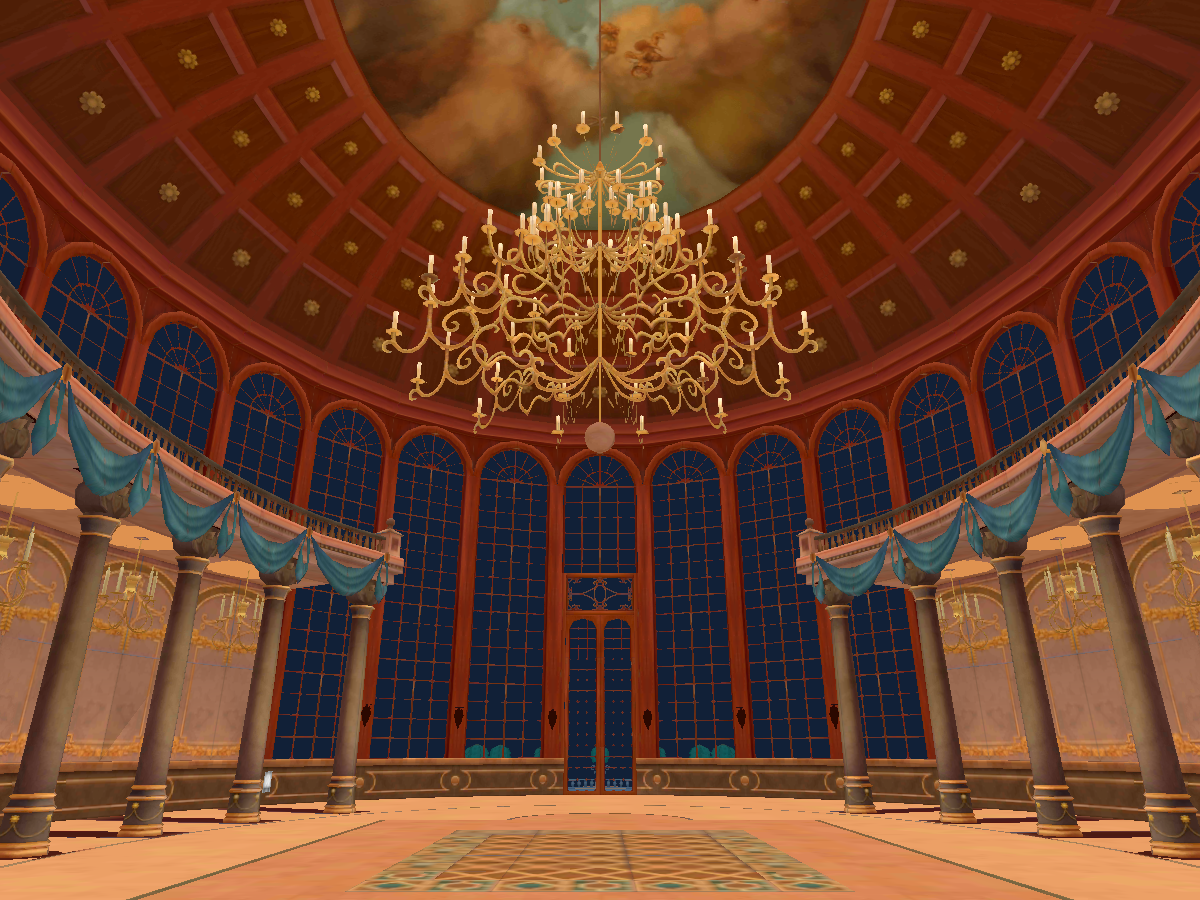
Beauty and the Beast‚ the Ballroom dance scene․ Relax and enjoy with friends․
Did some practice with the KH's Beast's Ballroom map, i'm getting the hang of world building as long as it's SDK2 😂 Has some pens , a mirror, a chatbox and two keyblades: Divine Rose , Ultimate Keyblade (Secret To Find)
 edgy pebble
ooooh!
vital lance
So I am making Quest support right now
Is there a way to achieve the same result for a mobile shader?
lusty vault
Yes. Matcap shader.
Use the diffuse texture and then The matcap texture would be a black and white blurry metal ball with that horizon sheen
Something like this https://www.pinterest.com/pin/425730971004943842/

Pinterest
-
- 5 - Erol Teaching님이 찾은 핀입니다. Pinterest에서 회원님만의 핀을 찾아 저장하세요.
if you get matcap textures on the Internet you usually have to crop them so the edges of the texture are tangent to the ball
lusty vault
Models that rely on transparent or cutout shaders should be remade to not need them
steel fern
For world you can use transparent and cutout shaders as usual
Just keep in mind that it's added load for GPU so use it sparingly
For matcap, you'll probably want to write your own matcap shader using some examples as source or use one of the store ones but those are... not very good
steel fern
It's recommended
normal storm
Ideally yes
steel fern
Generally it is better for performance so yes
 light egret
How to fix that? if i press upload! its not uplodaing
steel fern
That's bugged upload, stop the playback and upload again
You can tell it's broken when you see the worlds menu row
plain moth
check the Console window for red errors
vital lance
So if I bake lighting in blender and import the texture to my map in Unity, would that work?
Because baking light in Unity for quest cripples the light maps for the Quest, which ends up looking like crap.
plain moth
@vital lance you can fix textures looking like crap on quest by changing the textures to ASTC 4x4 RGB or RGBA in the texture import settings
The default is ETC2 which literally quantizes colors and causes severe color banding
steel fern
ETC2 is legacy fallback, always use ASTC when possible
plain moth
you can bake lighting in blender, but you will have to modify the shader / figure out how to get it to use that texture instead of the usual lightmap. I've successfully done this in a project, and I know friends who have accomplished the same, so it is possible but not out of the box
vital lance
Would it be more optimized to render it in blender or Unity?
plain moth
no, there's no optimization benefit
vital lance
This is only for the quest btw. I already took care of the light bake for PC
plain moth
yeah, I'd start by looking at the import settings of your lightmap
See here for how to change the default texture compression for Android:
https://docs.unity3d.com/Manual/Lightmaps-TechnicalInformation.html
Again Quest recommends ASTC . other compression formats will not look good
vital lance
This is the baked light on the PC version. Works like a charm
This is the android version with the same scene (same baked light). How can I change this?
@plain moth
past shell
a yes
plain moth
Yes @vital lance that looks like the artifacts caused by using ETC2
you need to change your texture compression to ASTC. Did you read the link I posted?
past shell
change to that
on all your texture in your scene and use the RGBA for the thing with transparency/cutout
plain moth
that's for textures, but you have to do something different for lightmaps
*If the target is Android then you can override the default texture compression format from the Build Settings to one of the following formats: DXT1, PVRTC, ETC2, ASTC. The default format is ETC for RGB textures and ETC2 for RGBA textures.
vital lance
plain moth
Also did you read
The Other Settings panel in the Player settings has a Lightmap Encoding option for these platforms
its' not format: that's talking about color format
vital lance
I am very confused, because on of my settings match yours. Also it is set not to override any textures during upload
The 24-bit did it. Thanks @plain moth
plain moth
hmm, that might be uncompressed - so your world might be large and use extra vram
but maybe it's ok if your lightmaps are small
ASTC would be better but yeah they do look to have moved things around in 2018. it's confusing
the unity docs are helpful as always
steel fern
Switch to internal build system instead of Gradle, too, it bloats the resulting file
Gradle is meant for standalone APK builds
plain moth
huh, I think VRChat world uploads don't do a full build though...they just create a asset bundle
so pretty sure the world uploads end up the same size, even if unity tells you one will be smaller
steel fern
Gradle still bundles some redundant files with it
It's better to stick to internal unless your Android SDK is giving you troubles
plain moth
Good to know. All I can say is the quest version of VRMC is 3.50MB and I never changed the defaults. It's built with Gradle selected
It's much smaller than the PC version, but the overhead of gradle must be extremely tiny if it's there. I probably would focus on other optimizations first
vital lance

So I am using these pencils for a lesson, and apparently they do not sync between PC and andriod
It is called QvPenSet_v2.1.2.1
Anyone know how to sync this gameobject between Andriod and PC?
lusty vault
Are the scenes the same in both builds?
Infinite reasons it wouldn’t work, make sure all triggers are the same for both versions
plain moth
not the issue of the prefab or directory, but rather the scene you put it in
when porting content from PC <-> quest, you should use the same scene, and disable objects you don't need
if you start with a fresh scene, objects may be in a different order, which means they will get assigned different network IDs and either not sync or get mixed up
vital lance
The problem is the fact that I have different detailed light maps
plain moth
that should be fine, just swap out the meshes in the scene
you can duplicate the scene and swap stuff.
Some world authors use this prefab:
https://booth.pm/ja/items/1893576

"Easy Quest Switch"はUnity用Editorツールです。 Switch Platformした場合にPCやQuestそれぞれ用のカスタム設定にすぐに切り替えられます。 例えばMaterialのシェーダーを一括で切り替えたり、GameObjectをON/OFFしたりLightProbeや ReflectionProbe Anchorを変えてパフォーマンス向上しやすくしたりできます。 "Easy Quest Switch"は日本語UI対応の無償アセットです。 それではワールド制作ライフをお楽しみください。"Easy Quest Swi...
this helps you keep stuff between PC and Quest (and it has an english version too, don't worry)
vital lance
You are a life saver. Thank you so much
plain moth
if you want to keep doing what you are doing right now.... I suspect making a nwe scene with all the network synced stuff in it like pens, world descriptor etc
then duplicate that for pc and quest, and then add in all the graphics objects and stuff that doesn't use sync
and same for pc... that way the original stuff you start with might have the same network id
and of course network synced stuff must be at the same path...try to only add stuff to the bottom maybe, not sure what order it iterates but probably better safe than sorry
 tall isle
why does the build and publish button disappear when I try to upload my world to quest?
plain moth
There might be errors
For example some features don't work on quest
Or you did not run the unity installer and add android support.
tall isle
There aren't any errors in the console
The build and publish button is just not there for some reason
tall isle
anyone know what to do?
plain moth
@tall isle you need to make the window bigger
like drag from the bottom and make it bigger
you kind of checked every possible tag...they probably didn't test what happens when you have so many tags
 turbid wasp
has anyone found a good list of vrchat rooms?
is there something like that on this discord??
turbid wasp
let me ask it differently: are they're regular events on vrchat listed somewhere?
turbid wasp
thank you @quartz scaffold lol
 terse crescent
Does anyone know a good Avater world?
past shell
kings raid quest avatar / quest church
terse crescent
Cant't find it ingame 😅
past shell

A bunch of King's Raid model for quest user․ Anime style․ Head spinning Free

Small church for Quest People Asset from Alchemia Story․ Discord_qb #7164․
 twilit fox
alrighty boys im boutta record a yt vid
 ornate heron
Are there any yandere avatar worlds for quest
 steep spruce
Yes the is a avatar world that my friend made with the yuno avatar in it
vital lance
i want married but i dont have the avatar for the wedding...
sorry my english is bad xd
steep spruce
There is a world from ask_amber there are avatars for a marriage @vital lance
 reef solar
Any DOOM avatar worlds?
edgy pebble
OK, i have an extremely dire problem! two of my worlds that ive just uploaded have an insanely bad problem. the left eye can see just fine but in the right eye, the world is almost "projected" except for seats, mirrors, portals, and avatar pedestals. its extremely motion sickness inducing and i have absolutely no clue what i could have done to cause it, this is even more annoying due to the fact that this is the second time that ive had a problem similar to this.
normal storm
What shader are you using for your world?
edgy pebble
standard lite, mobile diffuse, i think mobile lightmapped (although thats only on one of the worlds) and toon lit
steel fern
I would check camera settings, this is almost always shader problem or camera settings problem
edgy pebble
i havent messed with the camera on either of them, and i wouldnt know what to look for
normal storm
My guess was shaders too, since usually bad shaders create issues with seeing something different in one eye than the other
edgy pebble
this is the second time ive had bad luck with the mobile shaders causing odd effects between eyes and its starting to annoy me
i would love to get this fixed asap and i dont really want to make them private since i dont want to wait a week to put them back through labs
steel fern
Try to upload copy of the world using nothing but legacy diffuse, if the problem persists it's camera problem
normal storm
I thought legacy wasn't supposed to be used?
edgy pebble
i dont think you could even upload it with that shader
normal storm
You can if it's a world
But last time I forgot to change the shader from legacy to something else, the object was pink
edgy pebble
trying to upload just tells me to fix compiler errors
steel fern
Legacy diffuse is the simplest world shader you can use
And is known to work on Quest without issues
If you have compiler errors there's broken scripts in your project somewhere, try to backtrace it to origin
edgy pebble
how do i do that?
also i thought i removed everything that wouldnt work well on quest but if theres an error then i guess not
steel fern
The error output should point to the source of the error
edgy pebble
wheres the error output?
edgy pebble
this is all i see
steel fern
Scroll up
edgy pebble
theres a few repeats of those from trying to build it again but this is the only other unique one
steel fern
That's weird one, it seems like there's problem with builtin script
Try to filter it to only show errors
steel fern
Those are irrelevant, what's important is that you have Unity Collab enabled but it failed to connect
Either disable it from Unity package manager or check if it isn't blocked by firewall
edgy pebble
it doesnt really seem like its enabled, ill go figure out if its blocked, not sure why it would
curious as to why this only became a problem after changing all of the shaders?
steel fern
It could also be problem with SDK itself
edgy pebble
nothing under unity is blocked
steel fern
Either way, collab is in services window, I believe it might be enabled by default
edgy pebble
and i just migrated the sdk yesterday, or this morning i cant remember, but there shouldnt be anything that went wrong
and the pic shows right there it isnt enabled
steel fern
My bad
But the collab is the only blocking element from the error log
So maybe try enabling it instead? It's not problem with project but rather builtin editor component judging by the error log
edgy pebble
i guess ill just flip it a few times and see if it works itself out
ive tried it with it on and with it off and it makes no difference
this is pissing me off, this was only supposed to be a short project
steel fern
Never expect Unity to just work
edgy pebble
all i did was change some shaders and the thing just breaks
steel fern
I would also try to switch build target from Android to PC and back again, maybe something didn't get compiled properly
edgy pebble
for goodness sake, that fixed it
steel fern
Unity - working as intended
edgy pebble
of course its only a temporary victory since we still have to figure out whats wrong with the world itself
well guess its a shader issue then, not surprised at all
steel fern
Well it was likely shader that failed to compile then
Sticking to builtin like legacy diffuse is always safe solution but obviously that won't work for things that need shader with more options
edgy pebble
you know something just occured to me, i might be wrong but it feels like this problem correlates to me using the build settings switcher in the vrchat control panel instead of unitys built in one
steel fern
Well, that likely might be the problem
edgy pebble
if that is the underlying problem then im surprised it isnt a more common problem, ill have to do some personal bug checking to find out for sure
steel fern
I noticed the SDK switch is faster which likely means it doesn't do full platform switch
Or assumes that some assets are crossplatform by default
edgy pebble
i honestly hope thats it because that means i can finally fix the problem on my one avatar aswell
steel fern
Certainly worth a try
edgy pebble
yep that indeed fixed the world, once i find if the avatar gets fixed ill go close the bug report and open a new one on this
thank you very much for the help!
steel fern
You're welcome even if it was jsut trial and error
edgy pebble
well you stuck around and gave helpful tips, just wish i could find these simple fixes sooner
 stone owl
question - the stereoscopy is messed up in my world that i just uploaded. did everything like normal as far I could tell. Looks fine on PC non-vr, eyes are not rendering properly on the Quest. any idea what could be causing it? I don't have a Camera in the scene but when i did and had it as reference camera, it didn't solve the problem
the stereoscopy in particular is what is messed up
plain moth
@stone owl this is caused by shaders importing before your project settings were configured correctly and not reimporting after changing it
If you know all the shaders in your world (for example ones included in the VRCSDK), you can find each and every one and do right click -> Reimport
Otherwise, you might need to do a right click -> Reimport All and let it reimport all assets
oh, another common cause - if it's rendering only left eye and right eye is black (or otherwise just broken)... it's because one of your shaders uses GrabPass
GrabPass is required for shaders which use other pixels on their screen than the one being rendered, as opposed to blending with the current pixel for transparent stuff
so common causes are: screen overlay shaders / postprocessing, water (Please use 1001's water shader in the prefabs database), refraction / certain glass effects
if you really don't know, you might want to disable custom shaders and switch stuff to the VRChat Mobile shaders where possible
serene elbow
@stone owl If stereoscopy is another name for double vision, then some of the solutions have been : ```
- Deleting SDK , Reimporting your SDK , then Restart Unity and Re-Upload the world.
- Replace the default Skybox with something else```
vital lance
I get derpy vision in my world help
edgy pebble
Gonna take a pretty wild guess but try switching back to pc through unitys built in switcher and then switch back to android
vital lance
It was because I used linear colorspace
 mild oriole
erm yes?
hmm for a reason look like my Android Unity is not there anymore, so need to redownload i think
mild oriole
Also, why the Android version is soo laggy on the scene editor?
vital lance
is there nay chance someone can msg as i need help with creating a quest world
 unkempt rampart
Hello I’m trying to join this one community labs world that has people in it, but every time I get to the loading screen for that world I get sent back to the hub world, can anyone help me with this?
Oh and I’m on oculus quest
 old seal
does anyone have any horrer maps for me and my friends to play?
 timid grove
Anyone know how I can get to KI N’s black and white avatar world on the quest? Bc when I look it up it doesn’t pop up
 jolly scarab
anyone know any japanese kimono samurai avatar worlds?
serene elbow
How would I create a trigger to parent an object to another object? That's not TakeOwnership correct?
plain moth
@serene elbow Install Toybox from prefabs database in #world-development pinned messages.
Create a new game object with an unchecked animation component, add the EventSelectorOnce animator from toybox.
Add Component -> Button. Set transition to None and set navigation to None. In the On Click () box, add 3 actions.
First action, put itself into the first box and put Animator-> Rebind from the menu
Second action put Animator -> enabled from the menu and uncheck it
Third action: put the first object in the first box, then find Transform-> SetParent then put the second object in the second box.
Finally, every time you want to set the parent, make your trigger do SetComponentActive and your special button/animator game object and put True
Be careful changing an object's parent if it has synced triggers because it may break them; or object sync because it might break syncing for new joiners maybe?
...
A completely different approach is to not set the object's parent but instead add an AutoCam onto it. The AutoCam works a lot like a ParentConstraint which you use on avatars but is banned in sdk2 worlds for some reason.
Basically go to the object you want to be changed, and add a Camera component. Uncheck the camera. You won't use it but it needs to be there. Then Add a AutoCam component. Uncheck Auto Target Player. Set the first things to Infinity and set the last things to 0. Finally drag in your target object in the target slot and uncheck the auto cam.
Your trigger will do SetComponentActive AutoCam true to activate it
serene elbow
@plain moth Appreciate the help. Definitely odd as to why World AutoCam is banned though
plain moth
No it's not @serene elbow
I meant that ParentConstraint is banned in sdk2
So you need to do something a bit more complicated
AutoCam is ok in sdk2
Hope my instructions work.
serene elbow
Ahh okay my bad, thank you very much!
autumn pendant

Polygonal Mind
Learn how to upload your worlds to VRChat using Unity and the VRChat SDK. Optimize your world for PC and Oculus Quest.
autumn pendant
autumn pendant
https://www.polygonalmind.com/blog-posts/worlds-in-vrchat-uploading-and-doing-cr...
serene elbow
Is there a way to be able to interact with objects you create without VRChat highlighting the entire collision box? Say if i was messing with a screen with triggers and i wanted to have some sort of closing button. it would highlight the entire screen rather than just me being able to hover over it and click it. i think button ui do something like this
plain moth
I believe you can override the highlight by creating a tiny MeshRenderer inside the object you want to use. For objects with a mesh inside you want to avoid the highlight, you can do this by upgrading to a SkinnedMeshRenderer, because VRChat ignores those for highlights. There's a tiny overhead for skinned meshes, but if it's just the one button, it should be ok.
The other weird effect though is it vibrates your controller every time you look at your controller (it's really weird like that: the vibration depends on if the center of the object or the controller is visible on screen, not whether it is highlighted).
mild oriole
@vital lance idk if you find the solution but I had to redownload android support for Unity
vital lance
I’m new to world making how do I make a pc and quest world?
vital lance
@mild oriole nvm i got it
 valid geyser
Who knows what is josh vr name
 mint idol
JoshDub?
steep spruce
Yep
vital lance
he4rd theres a SAO world . . .wut do i search for it under?
vital lance
Can anyone help? Me and my friend were testing a world in vrchat and in one of the lenses the world was distorted and in the other it was just fine so it looks like I’m looking at two versions of it know it’s not my headset bc I checked it.
 merry nova
Yeah that happens when the update came some worlds for glitchy like that
There’s no way to fix it you just have to go to a different world rlly
vital lance
It was my world tho I’m asking how to fix it
 floral harness
Working on this ❤️ so far it's 4.5 mb in size
so my world works fine on PC but it's all black on the quest
plain moth
You must bake your lighting on quest
All black? No skybox either?
Can you try changing shaders on things in your world? You may have chosen shaders which are not quest compatible. Try VRChat->Mobile->"Standard Lite" for starters, or try Standard
The lighting does look very un-baked. So that's the first thing to figure out perhaps
 wary ginkgo
when i uploaded my world it just looks like its crosseyed any fixes?
floral harness
Brush Are you using the Right Profile like 3D, not 2d or lightweight?
floral harness
I helped Brush out. he's all set up.
Is there any issues using a DDS texture on the quest?
still wing
guess its unsupported shader
vital lance
Hey y’all
plain moth
@floral harness if they work, they might get decompressed on load and use up all of the limited memory. You should convert them to png in a different program
floral harness
oh you think? I've loaded as small as 2 megs
plain moth
BC7 will be decompressed. DXT1,5 might be unsupported completely
DDS can contain several formats. Generally good to avoid that format in general
And let unity recompress
floral harness
oh i get you 🙂 thanks
 lone chasm
@wary ginkgo did u fix the crosseyed issue?
 earnest heart
is their any tool that will compress the size of the world / convert all shaders to compatible ones for quest?
plain moth
You can try out EasyQuestSwitch by Jordo: https://github.com/JordoVR/EasyQuestSwitch
GitHub
EasyQuestSwitch is a Unity editor tool developed for VRChat world creators, it can automate changes to components within a scene as soon as the build platform is changed from PC to Android (for Ocu...
other than that, it's just going through the list of materials shown by the SDK and converting them as needed
note that some shaders it thinks are bad performance are actually fine. for example Unlit and some UI shaders
vital lance
does anyone know any daycare worlds for quest?
 sinful cobalt
is there support for video players on quest yet?
 misty meadow
@sinful cobalt No
sinful cobalt
Thanks
 frozen pecan
Hoje é dia de Ghost of Tsushima! Só vem assistir com nóis cellPog
https://www.twitch.tv/cellbit

 frail steppe
Is there any worlds that have like rides for quest
vital lance
I need help real bad
I’m working on a world and it looks fine on pc but when I go in vr the right lens is broken and distorted (left one is fine) I invited friends and it’s the same for them
 near sky
i dont think its a problem with the headset i think its a problem with the software
maybe the world is made for pc
idrk about this stuff im just goign by common sense
vital lance
I know that I wanted to see if anyone could help me fix it
near sky
yeh i cant man sorry
vital lance
It’s cool I was about to see if anyone else needs an avatar done before I go into maker mode
So if anyone does, ask
I’ll start making my requests tomorrow
near sky
i dont have a quest yet but could you make me an avatar for when i get it
vital lance
Ok what do you want it to look like?
vital lance
Ooook
vital lance
This is #world-quest
 urban hornet
do anyone know where i can find a video player ?? help me plz i really need it ;-;
misty meadow
Not compatible with quest
urban hornet
umm can some one help me i created a world and publish in vrchat it show i have it in the website but it dosent let me join and when i join vrchat and see if i have the world it not there ?
naive pagoda
@urban hornet most likely used wrong unity version check the docs for the correct version
vital lance
Yeah do that^
 raven pollen
hey i uploaded my world to quest but for some reason the right eye as a weird warped affect, anyone know a fix?
past shell
Have you assign a reference camera
plain moth
@raven pollen make sure you don't use post processing, and avoid any GrabPass shaders (usually water or glass effects) - those do not work on quest
raven pollen
@plain moth how do i turn post processing off
plain moth
check your main camera and make sure you don't have a post processing Layer on it
if you don't know, you probably don't have it
just trying to brainstorm
raven pollen
main camera?
sorry, this is my first time making a world so i don't really know much
raven pollen
I'm guessing no one knows how to fix the Warped right eye effect on quest?
plain moth
@raven pollen other debugging steps: double check every shader on every material. Disable everything not absolutely necessary
tall isle
heyyy anyone know how to add flying vehicles to worlds?
I downloaded the jetpack prefab and all that but I don't know where to go from there
 frozen slate
hi
 buoyant matrix
I've had a lot of hit and miss with the jetpack prefab for quest users. It requires tweaking to function correct for Quest.
 tepid plaza
@tall isle what is server name?
tepid plaza
your vrchat server
vital lance
Is there a world that has the entirety of Rapture from BioShock or is that not made yet?
past shell
no point to upload so large map
vital lance
Oh I see. It’d still be cool as hell tho
lone chasm
@vital lance theres like three rapture worlds
- apartment
- light house, entrance
- i dont remmeber it srroy
lone chasm
is there a fix for "pickups" object sync between pc and quest.
I have four pickup objects that aren't synced properly between quest and pc. The name is the same and path to it is the same. Even in the hierarchy...
Yes... its two different projects. I thought it be good to have a separate project. Like I didnt have an issue with it til I added three more pickups.
plain moth
If anything is different between the two projects, that could happen. I'd recommend one project and a tool such as EasyQuestSwitch to fix stuff between them
If you want to sync them up but keep two separate projects, close Quest unity. Then You can delete the assets folder in the quest project and copy Assets from pc to quest project. Then open the Quest project again
But you will almost certainly have to redo some of the quest specific changes. I recommend learning EasyQuestSwitch so you don't have to do that work an extra time
vital lance
When I upload my world my right eye is messed up even though I use standard lite and I am not using any pc shaders. I tried re adding the shaders but it didn't work, if anyone can help me please let me know. (im using vrcsdk v2)
lone chasm
@vital lance Close unity. Delete the SDK via file explorer then open unity again and import latest sdk and try reuploading again
vital lance
I'll try that
vital lance
Alright
lone chasm
I have that issue with my worlds when I switch to android build via the SDK sometimes for the first time in one of my quest projects. TO be safe I just reimport the sdk
vital lance
@lone chasm tysm it worked
lone chasm
awesome
 minor finch
I don't have a Quest, but I'm trying to support it as I continue building up my world from what used to be a 2D plane with a Marimba on it.
May I get some feedback on how this world is performing on a Quest?
The major feature worth interacting with is a light switch I have swapping environments with different baked lighting.

This is a test world․ Please keep it secret‚ keep it safe․
urban hornet
@1 it 2018 is that right?
vital lance
How do I make a transparent block with standard light?
serene elbow

Super Smash Bros․ Brawl Battlefield․ Enjoy with friends․
Forgot to post it forever ago but I made the battlefield map public for those who care lol
Comes with a mirror and 3 songs
 pine pumice
that looks awesome! @serene elbow
minor finch
I've worked on this world for a little over half a year now. It has a fully playable Marimba in it!
https://twitter.com/DrakenStark/status/1289052003360890881?s=20

The playable Marimba world update is going live right now!
Here's the world link!
https://t.co/V5fBv9PP3I
#OculusQuest Compatible!
@VRChat #VRChat #VRCMarimba #MadeWithSDK2

 Twitter
lone chasm
Twitter
lone chasm
Anyone know a fix for choppy world audio on quest?
 barren basalt
^
 fluid hemlock
Anyone know how to move an object along a path without scripting? Don't want to make a giant animation if I can help it
 cerulean sequoia
You either need to make a script to lerp the object or use and animation. But, their might be a system that can do that for you without scripting or using an animation.
 random geyser
i'm jsut starting to learn unity, and got a question, my pc friends had no problem with my world, but my quest friends all experienced the right eye "doubling" i did not have post-process on, my skybox is a jpeg hdri. and i think only mistake i made was not using android shaders
before i rebuild all my textures, I assume that its an absolute to use the android shaders for quest opt?
 solid grove
@lone chasm set audio sources so they don't all contain the same priority. Do not leave them at default.
lone chasm
ty
 scenic tapir
I'm porting a world I just made to quest, but no matter what I've changed and tried to fix it renders twice. I don't know what is causing this as I've had a similar issue with avatars and I figured out how to fix that
Any help would be greatly appreciated
The world is a tribute to my pet/best friend who just passed away and I really want to get it working on quest so I can make it my home world without blinding myself when I'm on quest
plain moth
@scenic tapir water shaders and "glass" shaders can cause this effect, as can anything that uses Refrection "GrabPass" in unity terms. If you need a quest water shader, there is a really nice one by 1001 in the prefabs database. I you need a quest glass shader, use Standard or something like it can do glass pretty nicely without the GrabPass that doesn't work
scenic tapir
I'll have to check out everything then and see if anything is doing that, I originally thought it could be a shader issue but since I changed everything over to mobile ones to quest and it didn't work I didn't know what else to do
Hopefully this works and thank you if it does
 strange timber
Hey, I was wondering how to find the Hogwarts Harry Potter world? I really want to explore it, but it doesn't come up when I search "Harry Potter" or "Hogwarts"
 rapid ledge
I know that world exists on PC, not sure about on Quest
 eager shoal
so like, quest maps cant have realtime lights?
normal storm
They can but it's entirely not recommended
eager shoal
was working on a world, went to test, had double vision
turned off realtime lights and something else and it worked
normal storm
What was that something else?
eager shoal
i had a 3rd person camera prefab
normal storm
That might've broken it
eager shoal
it uses toybox / standard assets
normal storm
Also why do you need that on Quest?
normal storm
If you play in VR you can't really third person
No, it's best to keep it the same project but two separate scenes
eager shoal
ohhh
normal storm
Save the scene, then copy it, remove everything not quest compatible and upload that one
Much easier to keep both PC and Quest versions consistent
 fallen sentinel
Anyone know the name of some Danganronpa worlds
sly scroll
I get this error when I try build for quest.
I don't have issue with windows build
sly scroll
solved
 jaunty nexus
BRUH
past shell
they need to fix the double vision in the 3.0 world for ques by replacing the camera and use mobile shader
 atomic rose
Is there a school map for quest?
unkempt rampart
Is there now a limit to how big worlds can be now on quest?
unkempt rampart
No because before I was able to play this game called zombie tag but after the update, I can’t now and it says the game is over 50 mb and then it sends me to home😕
past shell
no
unkempt rampart
No to what?
rapid ledge
Did the map update and get bigger possibly?
fluid hemlock
Anyone know how to get a vrc_pickup script to work on a parent game object that contains two mesh objects underneath it? I have an object comprised of two meshes and don't wan to merge the mesh for texturing reasons... wondering if the parent object can be picked up.
I tried it but placing a box collider, vrc_pickup script, rigidbody, and object sync on a parent object causes the child object to "float away" as soon as I start the scene
solid grove
set ridgedbody to isKinematic @fluid hemlock
 bronze sentinel
so anyone know how to fix the warping with the right eye for quest? if that makes sense
 rustic ivy
@vital lance should look like this
and make sure your on the right unity and sdk
Unity 2018․4․20f1
VRCSDK2 2020․08․07
show
@unkempt rampart
Quest has a 10MB Avatar limit and 50MB world limit
always has been like that, was you using link or something?
@vital lance make sure your on the right unity and sdk
@bronze sentinel depends on your eye bone and Wight paint you should have the eyes ONLY weight painted to the bones
the Warping might be that the eyes have some weight paint to the head making the warping just remove the eyes form any other bone
can you show me what it looks like for you like how i did for you? @vital lance
also dose your unity say 2018.4.20f1
you might have the worng andorid setup
make sure you have the file named UnitySetup-Android-Support-for-Editor-2018.4.20f1
bronze sentinel
@rustic ivy i was talking about a world not avatars cause this is the chat for worlds but i fixed it like an 1hr ago
not trying to be mean btw
rustic ivy
well you can put models/avatars into a world and have them do stuff like AI movement and stuff so i thought you ment that by how you had asked
bronze sentinel
oh its fine i fixed it tho just scrolled up in this chat and saw someone else asked
 lime phoenix
How do I fix my users seeing double?
past shell
Its simple
Delete the camera and create a new one.
Then place it in the worldprefab
lime phoenix
huh?
@past shell why does it do that and could you show me how to do it with some kind of video
past shell
no
lime phoenix
how do i create a camera and how do i place it in the world prefab?
vital lance
can anyone pls tell me how to join a NSFW in VR chat ?
 tropic sable
Whwwhwhwhwhhwhwhwh what
past shell

rustic ivy
@lime phoenix if people are having that warpping effect happen with the one eye seeing a stile image or what ever i had it happen and i know how to fix it
make a new project and import the sdk 2 times to make sure EVERYTHING was inported 100% and just copy paste old project stuff into new project stuff
rustic ivy
make sure you have
Unity 2018․4․20f1
VRCSDK2-2020.08.07.18.21_Public
UnitySetup-Android-Support-for-Editor-2018.4.20f1
@lime phoenix
rustic ivy
you download the sdk form the website, and you get the andoroid editor automadicly if you selected with android when downloading it form the the unity hub @lime phoenix
lime phoenix
i did get the android and i uploaded it again after switching it to that
Delete the camera and create a new one.
Then place it in the worldprefab
i just clicked it, deleted it, created a new one under the gameobject thing, then dragged it onto the vrcworld. is that what i needed to do? @past shell
the camera is indented now below the VRCWorld
rustic ivy
You dont need a camera in a world
the camera fix thing they are telling you about dose not work for your issue @lime phoenix
I had your same issue and was told the same thing and did not work
what worked for me was Making a new Project, deleteing the camera, inporting the sdk and inorting it again to make sure everything was inport and put everything into the new project and uploaded 2 times pc then 2 times android then 1 more time pc and it worked @lime phoenix so try this out and let us know if it works or not 🙂
lime phoenix
i think its not worth it
its just some long walk to an arrow and a sign saying stickbugged lol
its just a meme
i could start over
but how do you pan the camera in unity
@rustic ivy
rustic ivy
hold right click and move with WASD in the scene
rustic ivy
inport sdk and do it again
lime phoenix
hrm
inport sdk and do it again
@rustic ivy the delete camera add under vrcworld worked
past shell
You drag the new camera in the reference camera slot in the vrcworld prefab that is in your scene
 abstract pecan
hey guys!
im not sure if this is a common occurence
but like
i just made a quest world
and for some reason
the right eye is always warped
it gives me a headache if im in there for over 10 seconds
does anybody know what the issue could be?
the only 2 shaders im using are standard and standard specular, both of which are going to be changed to standard lite later
 weary epoch
What are some Quest world's?
urban hornet
umm any one know how to add text to unity world? i did the text mesh pro but it doesnt show
cobalt hound
Hello! i made a Vrchat map based on FallGuys! Quest compatible! check it out! https://bit.ly/34p4mtx

Fall Dudes is a map inspired in Fall guysǃ With comunity fall guys avatars‚ and multiple platform mapsǃ
serene elbow
@delicate bear i know a guy that will probably do that for you. ♥️
Also for you guys out there, i keep forgetting to post my stuff. I made a chill little library world that's small and cross-platform (PC and Quest) compatible that is currently being updated as well. Has a mirror, 4 different songs listen to, and some cookies and tea.
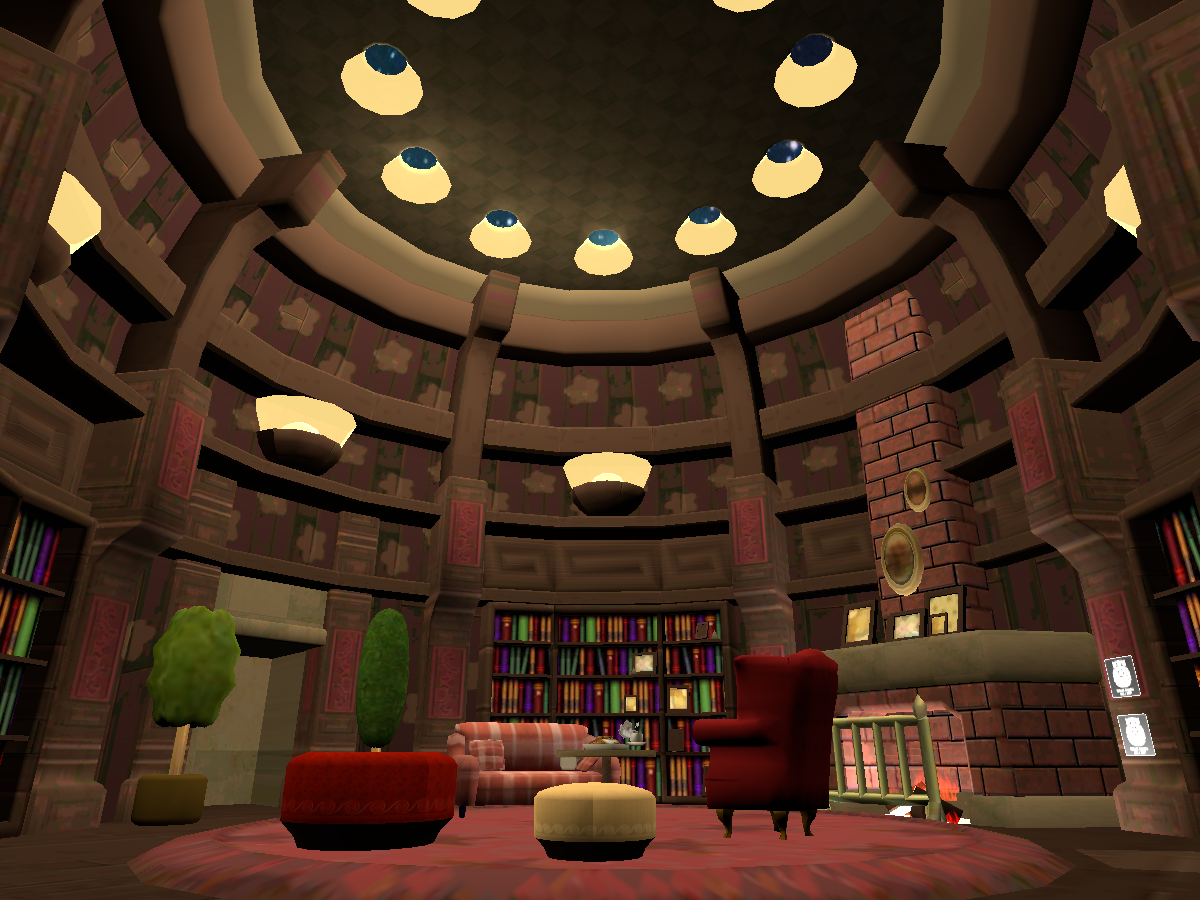
Super Mario Galaxy Rosalina's Storybook Library․ Also a therapy room to relax and enjoy with friends․
 vocal hinge
are there any quest worlds with toradora avatars?
 serene ore
Is there any Working Pen prefabs for Worlds?
 sinful mesa
I have way too many problems... I imported SDK 3 to export a world, thing never shows up on the top.. Don't know why.. and I don't know why I'm the one with all the problems.. thanks for your time I guess
 neat quartz
Hhhhhhjmmmmmmmmm
quartz scaffold
@sinful mesa Your Unity version is too new.
sinful mesa
ah, alright thank you
past shell
create a new reference camera and change the sky
urban hornet
um i have a question when i try to login unity it keep tell me to put my phone number in and when i put it in and send it but it dosent send me the code what should i do ;-; ?
vital lance
@urban hornet Is there another way for you to verify your info for Unity?
Maybe email verification or something?
urban hornet
Already did and it still doesn't work I even change my password I even create a new account I still won't work ;-; I have so many projects up there ;-; @vital lance
 hidden horizon
Was over on the worlds channel looking for help but my issue seems to be Quest-specific. Basically, I can build and test a world on PC, publish to PC and access the world from a PC but while everything seems to work the same with no errors when I switch the build to android, attempting to access my world with my Quest gives me a second of black before booting me to the default home world. This is the case with my custom worlds and with the sample scenes included with the VRChat SDK. I've even tried deleting everything from the scene but the floor, spawn, and camera and the same thing happens. I've also tried changing the standard shader to VRChat's diffuse material because it doesn't seem to like the standard shader. Any ideas?
 mint silo
anyone on?
scenic tapir
@hidden horizon how big is the world on quest?
hidden horizon
Turns out the solution was just getting the Android SDK. I thought the VRChat SDK had everything needed to publish to Quest in it already but after getting that, everything's been working fine.
 earnest perch
Does any one know that f bird sanctuary world is on quest version
fallen sentinel
Hello does anyone have any, or know an avatar world with, danganronpa avatars?
 zealous dagger
Is there a way to get Textures on Quest shaders cut out?
past shell
For world you can use alpha particle shader. But don't use it on thing like tree since it's multiple plane behind each other. You will see some weird blending.
 cosmic laurel
Does anyone have a hunter x hunter world
cosmic laurel
Does anyone have a hunter x hunter world
 surreal sleet
i will ask this here , i am still a new user in rank and i am trying to make a world hub for my friends, i am not sure what i need to do to set up portels
urban hornet
do anyone know how to put in shader for the world and still able to use the texture? and change color?
past shell
standard lite
 twin bay
what is the user limit on Quest worlds?
 vital falcon

Cross-platform hangout map with night and day adjustments and a full focus on performanceǃ
👍
twin bay
If I were to create a stylized forest scene, would it be better to:
• Use an alpha cutout transparency for the masses of leaves. The result is very optimized tree foliage models
• Model the foliage detail, resulting in lot more polygons but no transparency
plain moth
Better...
In terms of performance: definitely #2 (provided you don't go too too crazy and make each leaf 1000's of polys).
In terms of development time and your own sanity: maybe #2 but maybe #1 - sometimes development time matters more than the quality (or performance isn't bad enough to justify doing extra work). The question is: can you hit 72 frames with a few people in the room.
alpha cutout transparency is supposedly as bad or worse than ordinary transparency, so that's not going to lead to great performance...
 glad knot
Hey everyone!
I am looking for people who are familiar with creating worlds and who are willing to support me in a project.
Background: I work as a systemic consultant and together with you I would like to use the potential of VR to create a world for remote counselling. I use to work with people with physical disabilities like muscular atrophy or paraplegia. They are not able to move objects in real life. In VR they can as many of them can still move their heads and are able to control avatars with their hands. So it would be feasible to use effective Gestalt therapy techniques like arranging objects, life-size drawings and working with space.
I have a large, cozy and simple designed room in mind, with small movable objects and the possibility to draw.
Any serious input is welcome!
 north marsh
I am not sure how well this can work within vrchat. Might be a better idea to develop your own app for it
glad knot
I am not a developer and new to vr. Why do u think it won't work? I think building a world in VR is a lower hanging fruit. Perhaps you know worlds which already have these features. The ones I checked out did not seem appropriate
north marsh
Vrchat isnt really designed to create your own ways to control things like objects. It can be done buts its phinicky
glad knot
Do you know any existing app in wich it this is possible, which allows interaction between people (and lets u customize)?
btw thanks alot for commenting 🤩
 runic hedge
I need some help setting up a mirror for an Oculus Quest world. I need it to be highly optimized.
I've seen some worlds make the mirrors for Quest 2D
surreal sleet
ok idk what i did but with a world i made everthing sticks with your movements
like like when you turn the world goes with you
 edgy merlin
Lol
surreal sleet
is there away i can make it so only my friends can join a world i make when i am not on?
 modest wolf
 cosmic laurel
Is there a hunter x hunter killua skin
surreal sleet
swo i have this rally bad glich with this world i made, one eye everthing looks fine but in the other the world worps and twists , what did i do wrong?
past shell
Delete and create a new reference camera. Delete the default sky box as well
surreal sleet
OOOh that makes sense
 shell lark
Hey if anyone here can make a dj type world (like having sound visualizer and stuff like that) Hit me up Ty <3
 orchid sage
Just wanted to put this out there. I would like to build a art gallery in VRC for Quest but I need to hire someone to build it. Does anyone know of anyone that I could hire to build this Gallery?
coarse grail
VRC Traders in the community server section is for doing that
orchid sage
@coarse grail thanks. I will try there
 delicate bear
Will the world's be compatible for the Oculus Quest 2?
quartz scaffold
no
surreal sleet
so dumb question, and probly not a esay ansur, how do i get pens in to a world i make?
 feral minnow
Dynamic bone works in my world, so why documented as "Completely disabled" here ? https://docs.vrchat.com/docs/quest-content-limitations
VRChat
This page will describe various limits in place for the Oculus Quest version of VRChat. These limitations are in place in the interest of performance, user safety, and discouraging malicious behavior. Find more information about limited components on our Quest Content Optimiza...
feral minnow
@quartz scaffold Misunderstood. Thank you.
 dusk mortar
Any cool preferably anime avatar maps that have characters with particles/useable items
@cosmic laurel Did you find any im also looking for hxh avatars
cosmic laurel
@dusk mortar no
 gusty tide
hi guys so for quest, what would be the maximum recomended particles on screen for a particular area? like, I want to have some particles in my world but I don't want to lag the players out on quest, so what should be the limit?
 proper herald
I can use things like poiyomi on world objects right, I'm just limited on shaders for avatars? or do I have to use the Mobile shaders for world shaders as well
quartz scaffold
You can use other shaders on worlds
 low cargo
mobile can't run my shaders period
it's simply too powerful
neither can mac
It's a limitation of the hardware and graphics APIs
quartz scaffold
Well in that case... @proper herald sorry but no.
You could still use cut-out shaders though
Like standard
proper herald
yhea I got that for like tree leaves, was hoping to have a paning texture though
low cargo
it does
which you can then animate to pan
but it's not as efficient as just having a pan option
quartz scaffold
Still an option.
low cargo
indeed
past shell
Poiyomi freeze my unity when on android.
plain moth
poiyomi's shaders are not designed for use on quest - and tend to be geared more for avatars than worlds anyway
Also...how do you know it's caused by poiyomi? Does the freeze not happen if you delete the shader?
if you think it is poiyomi's editor scripts at fault, I would report the issue to Poiyomi on their discord (I've seen them cause exceptions when not even using them... but never freezes.)
vital lance
: P
past shell
Happen when i forget to plug the shader in easy quest switch to change it to unlit. If it stay on poiyomi the editor freeze and i have to go back on windows to change prior
low cargo
The shader does not function with android and therefor isn't really tested with it
past shell
The shader is use for the pc plateform. A official one is use from the vrchat sdk for android. But the unity ingine will freeze when selec a material with the shader named poiyomi.
low cargo
yeah it's way too intense for android
 long coyote
Would anyone happen to know why when I load a world on Quest, I can see fine out of only one eye at first while the other is either dark or like double vision?
drowsy flame
To switch between platform versions you have to go in File > Build settings & select Android/PC and click switch platform from there, the weird eye issue is from using the SDK button that has a bug
@long coyote
long coyote
Oh, wow, good to know! Thank you!
 patent anchor
any good quest worlds???
surreal sleet
there are a few good ones out there but most of the ones i seen are not that poplar
patent anchor
aw
surreal sleet
just keep your eyes opne and head through worlds, i am sure ytou can find populer ones , new worlds get made all the time
vital lance
long coyote
Ok, so I had used the method you had mentioned, but it still wigs out, but only when I'm looking at a certain object, so I'm guessing that it's a shader that's at fault @drowsy flame
Anyone know any good ice-like shaders that could be quest compatible?
 ashen elbow
Hi to all, newbie here. I follow guides to build a World, Unity right version, SDK, Android, upload. I see my world in "My worlds". From web i click "Launch World" or "Invite me", i see Share link ... now, if i click the link in Oculus Browser, nothing occur. Inside VRChat in Quest, i cannot find any invite or my world. In web 'Community Labs' i see 'You don't have enough trust to publish worlds, yet.' but i just want to enter only myself to check it before publish. Any tips? Thx.
naive pagoda
Did you check the my worlds section in game? That would be the easiest way to join your own private world.
ashen elbow
I don't have in Oculus Quest under "Worlds" the section "Mine" or "My worlds", and i'm logged with the same account (VrChat, not Oculus account)....
If i use the web interface via Oculus Browser, i see the section "My worlds", i can launch, but button "Launch World" or "Invite me" don't do nothing
Edit: issue resolved, i don't know why was the issue, i rebuild from stratch anything. Thx anyway.
 versed stratus
Is the 50mb size for world limitation still a thing ?
Just to know if I bother or not.
(pls ping if answer ;-;)
coarse grail
I haven't heard anything about that changing@versed stratus
versed stratus
well that's unlucky
coarse grail
that's not likely to go away anytime soon because of storage size limits on Quest
versed stratus
they could change the cache size instead https://cdn.discordapp.com/emojis/582941309174546569.png?v=1


 astral leaf
Am I allowed to show off worlds here?
 sacred steeple
How come the Thumb Nail Photo of my VRChat World is different and keeps switching when I click on the world in my UI
versed stratus
Anyone know the maximum cache size on quest ? I got a cinema world up and running on quest but it seem like after a while the video just stop and the only possible reasons I see would be the cache size being to small...
 gloomy raft
I’m almost done with a world but I need the door so when I I click I spawn inside, I already have the door is trigger so what else do I need to do
gloomy raft
Plus getting unsupported shader as well, targeting quest in android build
gloomy raft
Plus it saying I have to add scene descriptor when I already have one before upload if anyone can help me on these issues be great plus it’s acting like this scene is whole new project would be nice if I did not have to redo everything
surreal sleet
@gloomy raft for unsaported shaders it dose not relly mater it works anyways, and for the scene descriptor you need to make sure it is in the top of the hyarky
gloomy raft
Okay I will try that
naive pagoda
In your picture you don't have the spawn foldout open can't see if you have spawns or not
 harsh idol
can anyone here upload a world for my discord server, dm's are open
 unkempt marsh
Can anyone find a dragon ball avatar world 🌍 for quest
 whole sigil
Anyone down to watch some movies on quest
 signal arch
Is there any way to create custom shaders for Quest? If your shaders are based on the default ones (with slight mods) do they work? Does anyone know what (specifically) causes compatibility issues?
My current demo
This is what I'm working on...I use this shader to hide everything but the skybox & the doorway: https://github.com/doomlaser/DepthMask-Unity-Shader. It works beautifully in Unity & on PC, but breaks down in Quest (reverts to black)....Is there any way to fix it?
 shut prism
for worlds you can use whatever shaders you want, but know that they have and adverse affect on performance.
signal arch
I guess my question is specifically about stencil shaders, ones that hide everything but the skybox, as seen above.
Here’s the same demo as before but in VR (Quest). The shader isn’t working at all. Instead, I get this black box.
I know that it will physically allow you to use these shaders, I’m just wondering why they (this one specifically) tend to break the game (or just not work). Is there a specific formatting that you need to follow for Quest?
coarse grail
signal arch
That’s so frustrating, but I guess we have to live with it. I’ll try to find a work around, maybe with baked occlusion, mirrors, matcaps or with normals...who knows.
Thanks for the help though. If you have any leads, let me know. 💙💙💙
coarse grail
hope you can figure something out
 twin flower

A sleep world in space that has peaceful music and relaxation
signal arch
@coarse grail I figured it out. Check the shaders chat for my working demo.
gloomy raft
So I’m building a quest world first and want to have avatar portals to other quest avatars, I have the avatar pedestal and avatar portal prefabs together yet I’m trying to get rid of the of robot in the blue square because it acts as two and only want the avatar world to set up, I have messed with box colliders, moved it and turned off meshes and I’m still having this issue so if anyone can help me that be great
Never mind solved it
vital lance
I’m not sure if it would be possible, but it would be cool if Oculus Quest 2 could have video players in VRChat worlds
 dusty smelt
Yo so Im having a problem with my world whenever I try to load in it will go to black and kick me to home
This only happens on quest and Im using all mobile shaders
Theres nothing in like the build menu saying something is going wrong either
vital lance
That happens every once in a while to me too. I often will close down VRChat and reopen it, and that will fix it. If not, then I don’t know.
signal arch
@dusty smelt First, check to make sure that your world isnt over 50mb (the world limit for Quest). Next, clear your cache in the advanced settings and re-start VRChat. It should work.
gloomy raft
I need some help what like to do is have a player click this sphere and then spawn inside the room can someone help me with this?
signal arch

This tutorial shows you how to make another type of door, this time that teleports players around within the map simply by walking into the door. I'll also show how to lock the door so people can't walk through it. This version does not suffer from sync issues as the lock and ...
vital lance
Hi where can i find wold avatars in the vrchat world that look lyk wolf
signal arch
Wrong thread. Check out ‘Quest Avatars’ or the general chat.
@dusty smelt If you made the world yourself, make sure you have a VRCWorld element in your scene. If you do, but the world is still not working, try replacing the SDK in your unity file (download a brand new one). As a last resort, click ‘detach’ in the ‘VRC World’ object properties panel before you upload.
gloomy raft
Deprecated
Triggers and Actions are deprecated with the release of VRChat Udon and VRChat SDK3. is direct quote from here https://docs.vrchat.com/docs/trigger-summary
VRChat
Triggers are the current main method world creators can get interactivity into their worlds! Although more advanced forms of interactivity are on their way, triggers can do quite a lot right now. Concepts Master Client One Master Client is assigned per instance. Typically, it ...
that why I was asking
signal arch
Right, okay, you’re using SDK 3, in that case, I have no idea...
dusty smelt
@signal arch I got it working thanks
fluid hemlock
I've heard a rumour that the Quest supports direct link video (i.e. .mp4 or .m3u8) but I've been unable to find any documentation to back this up. Does anyone have knowledge on this subject?
vital lance
I'm about to start work on an Udon world that I would like to be Quest compatible. Are there some ways in which I can build it such that it's as easy as possible to get the Quest version done/ be able to switch between the PC/ Quest versions and essentially develop one map but spit out a PC and a Quest build?
the last time I did a Quest version of a map, I believe I duplicated the project and changed a lot of the assets in the Project and the Quest specific scene, which isn't feasible when I just want essentially 2 builds from the one project/ scene
vital lance
i mean they literally tell you outright to dupe the project 😔
i want one project and 2 builds
the best compromise i can think of would be to do rare quest updates, which essentially amount to duping the project and optimising, for each 'major' update
past shell
change the build to android in your project
vital lance
So I was making a world in sdk3 for PC and I noticed my avatar world was not on quest so I uploade my world to quest but when I did that. When ever a quest user joins my world they see two world one on the left is perfect but on the right lens it distorted a placed at a 35 degree angle. So I need help with this to fix the quest glitch in my world.
 spring garden
Someone make the mushroom forest/karaoke rooms a quest 2 w/o cable compatible 🥺👉👈
proper herald
Portal it’s likely a shader issue, on the quest version go to a standard shader if possible
 fiery flower
Hey, what shader do I need for transparency for worlds? I'm trying to make windows but I can't seem to get a transparent material... :/
past shell
Particle
vital lance
i used multiple shaders that is for vrchat provides and it causes the issue
vital lance
i fixed it because the udon chairs had a standard shader and i forgot to remove it
plain moth
@vital lance you do not have to be stuck with VRChat shaders for worlds. They are just encouraging you to use things mobile optimized. Also a lot of custom shaders neglect to add the macros necessary to implement multiview / stereo instancing, which causes the eye mismatch
So if they work for you use them, but sometimes custom shaders can allow for optimization in another way
gloomy raft
I would like to know how to make a slide show so when a button is pressed another slide shows up? Not sure how to do this but could this be done in undon or some other method let me know in the comments below
 barren bridge
How much space do lights take up?
past shell
a lot
 zealous kernel
does anyone have a oculus quest world with a quest compatible kanna avatar in it?
barren bridge
I have the avatar model so I could throw one in my avatar world if you don't find one
zealous kernel
Yes please
@barren bridge
Also is it possible you could give her a glock in her right hand when she closes her left hand into a fist?
Its fine if not, i was just gonna use it for trolling purposes
zealous kernel
@barren bridge do you have the 1.3 model? I have the file saved if its a later model of it, i just can't use it bc no pc
zealous kernel
@barren bridge yea i cant find one, ive looked like all day
barren bridge
I'd have to find a gun model but I can do that. What is the 1.3 model? The one I have i just found somewhere online
vital lance
@barren bridge I’d also like to get a Kanna avatar from your world if you decide to make one available. What is your world titled?
 verbal mortar
What are some worlds i should check out?
 carmine tusk
Are there any quest worlds that have an avatar that might look like this:
I’m just looking for an avatar that I think looks like me
past shell
Be something yiur not
signal arch
Or do whatever you want. We’re not the avatar police...
@carmine tusk Maybe you should consider hiring someone to do a commission. It can be pretty cheap if you’re just looking to customize an existing model.
carmine tusk
I’m not going to spend money on that. But if nothing like that exists, it’s fine