#world-quest
1 messages · Page 3 of 1
 lean relic
It just blacks out and I get taken back to my home world
It works on my pc, but won’t on my quest
lean relic
I got it figured out nvm
 lean fossil
lean relic
I got it figured out nvm
lean fossil
lean relic
I got it figured out nvm
What was the issue?
lean relic
Idk, I just restarted my headset and re opened the world and it worked. Ig it just was an oculus issue, not a world issue 
 tepid hornet
Is unitys Polybrush compatible with quest?
 atomic merlin
tepid hornet
Is unitys Polybrush compatible with quest?
atomic merlin
tepid hornet
Is unitys Polybrush compatible with quest?
It should be, the shaders just use vertex painting to do the different textures, it isn't anything special.
 fresh skiff
It's The Tub or so...very spooky...short but well made!
 ripe geyser
So, came across an issue that's only visible on a Quest headset and not in Unity. There's supposed to be holes only at the back of the house and not in front of it. I can't for the life of me figure out why. The 1st pic is from Quest side while the 2nd pic is from Unity. I've tried redoing occlusion so that doesn't seem to be the issue.


 fervent bluff
I came back vrchat in a long time, but my world's portals didn't work in VR mode. I can go other worlds through the portals in PC, but vr portal doesn't work... Is there someone who can help me? Thanks

 zinc bridge
fervent bluff
I came back vrchat in a long time, but my world's portals didn't work in VR mode...
zinc bridge
fervent bluff
I came back vrchat in a long time, but my world's portals didn't work in VR mode...
probably just a bug. you can enable an option to let you press trigger to enter portals, and it should work more reliably
 smoky cove
Hi guys, I am running the game on a quest2 but using a pc like 99.9 % of the time. Is there any reason I should build a map that is cross plateform? Do you bother to do so, why you do or do not so please. Also do I need to host server on my server or pcs to get the map "Started" and running somewhere or it's running on VRchat server?
Newbie here 🙂 !
atomic merlin
smoky cove
Hi guys, I am running the game on a quest2 but using a pc like 99.9 % of the tim...
Worlds are not hosted at all, there are no instance servers, it is basically a more secure and less intense p2p connection.
Normally a p2p connection means everyone would be connected to everyone, like a mesh network, one connection to each player, but in this case there is a relay server that people send and read data from, so only one connection, but otherwise working the same.
When you move an object then you doing that is sent to the relay and then sent out to everyone else, meaning everyone is "server-side", but only one player can own an object and decide things for it, unless that is transferred, which for pickups is if anyone else grabs the object. This is why we have game masters, it makes it easier to sync the state of things if one player acts as server-side.
And making it cross compatible means a lot more people check out your world
smoky cove
Thank you both for the information! Lovely
 paper pollen
any ideas why questies cant see this text mesh?

 late bluff
I am trying to upload a world but it will not work and I think this is the problem can someone help me?

 scarlet jetty
late bluff
I am trying to upload a world but it will not work and I think this is the probl...
scarlet jetty
late bluff
I am trying to upload a world but it will not work and I think this is the probl...
copy and paste the text here, is a looot easier to read it
zinc bridge
or just get a larger screenshot
 grand trellis
hi y'all
 shadow olive
idk if this is the right place to put this kind of thing, but im working on recreating a bunch of features from the portal series in vrchat. I'm planning to make a full testing track, or maybe even a multi-part campaign.
already have portals(made by Aurycat), duel portal gun, portal panels, turrets, doors, buttons, and i'm working on making items pass through portals

all the logic is made from scratch by me other than the visual and teleporting system of Auracat's seamless portals
im a questy, so this is fully quest compatible
 pastel nebula
For your consideration: https://ask.vrchat.com/t/upcoming-changes-to-standard-lite-monosh-specularity-hacks-optimizations-oh-my/23131

VRChat Ask Forum
Hey y’all! As you may have seen in the latest Developer Update(s), we’re currently working on integrating some overhauls into Standard Lite you may be interested in. I’m reaching out here to get some opinions on these upcoming features, especially one in particular. As you may be aware, Standard Lite effectively disables specular highlights in...
 flint umbra
hey guys, are anyone aware of the transfer to the VRCWorld spawn point after entry in the Unity world center. Meaning someone will spawn into a world ,you'll see them for a brief moment at the unity scene center then they will xfer to the appointed spawn point. If any of you are aware of this, has it been reported to be fixed, or do we just start lining out world spawn point up with the unity scene center point?
lean fossil
flint umbra
hey guys, are anyone aware of the transfer to the VRCWorld spawn point after ent...
This is the expected behavior. You can align your spawn with the origin if you want to hide the effect.
I personally like to put the origin under the floor so people can't be seen while they're loading in!
flint umbra
lean fossil
This is the expected behavior. You can align your spawn with the origin if you w...
ok cool, do you think this will get patched in the long run?
lean fossil
Unlikely
 whole sonnet
oh my gosh vrchat still hasnt fixed that bug in the quest standard shader that makes emission not work. its been months, jeeze
we all just not supposed to make quest content anymore?
lean fossil
whole sonnet
oh my gosh vrchat still hasnt fixed that bug in the quest standard shader that m...
What exactly do you mean when you say emission doesn't work?
whole sonnet
lean fossil
What exactly do you mean when you say emission doesn't work?
- make material with standard lite
- turn on emission on material
- ctrl+S
- emission turns itself off
atomic merlin
Mm, it has been a bug for a while now, annoyingly means I need to reupload my recent Quest versions again, whenever it is fixed.
 blazing fossil
i spent an embarrassingly long time after the sdk update tracking down non-existent bugs in my own stuff when it was just the shader being broken
whole sonnet
Unity 2022 has so many bugs. I only use it for worlds because its so much faster to build
 light hazel
anyone knows any good double sided (backfaced) shaders i can use for my world?
 zinc bridge
you can easily download the built in unity shaders, and add one line to the code that disables the culling
instead of having to track down some shader someone’s made
GitHub
Unity Built in Shaders. Contribute to TwoTailsGames/Unity-Built-in-Shaders development by creating an account on GitHub.
just add “Cull [Off]” right after the “LOD 300” line

then boom, double sided standard shader
you might want to change the shader directory at the top though, so there isn’t two standard shaders in the same place. change the very top line from Shader “Standard” to be Shader “Custom/Standard”
@light hazel
lean fossil
light hazel
zinc bridge
you might want to change the shader directory at the top though, so there isn’t ...
i have 0 clue the coding part, never done that ^^"""
zinc bridge
light hazel
i have 0 clue the coding part, never done that ^^"""
there’s zero coding experience needed to do it, because i told you exactly what to do, which is literally add two words and change one line
 dusk field
what shader should i use for plants/leaf cutouts on quest?
zinc bridge
standard is fine
 winter fjord
but standard doesn't allow transparency so it just looks like a bunch of squares
 charred mesa


 wary stag
I just use filamented for everything
 buoyant hill
whole sonnet
oh my gosh vrchat still hasnt fixed that bug in the quest standard shader that m...
buoyant hill
whole sonnet
oh my gosh vrchat still hasnt fixed that bug in the quest standard shader that m...
it still isn't fixed as far as i'm aware, but it is tracked. In the mean time, make sure you're animating both your albedo and emissions color and it should work fine.
Sorry for very late reply
 placid ember
buoyant hill
it still isn't fixed as far as i'm aware, but it is tracked. In the mean time, m...
placid ember
buoyant hill
it still isn't fixed as far as i'm aware, but it is tracked. In the mean time, m...
I don't think it's fixed but they did confirm an update to the standard lite shader in the works that fixes it and adds native support for mono sh
placid ember
light hazel
anyone knows any good double sided (backfaced) shaders i can use for my world?
I use mochie shader, it has rendering options to cull front faces, back faces, or turn off culling. You'd want to turn off culling then you can see it from both sides and even use transparency with it too
I've tested mochies standard shader on quest and it's like 99.999% compatible. Just don't use the uber version for quest
 low pasture
Is there any way to make quest have anything glow since I know the post processing doesn’t work on there-
 bitter stone
how do you set a spawn point in and world?
atomic merlin
bitter stone
how do you set a spawn point in and world?
You either give the World descriptor a gameobject, the gameobjects location then being where they spawn, or you just move the gameobject with the world descriptor on it to wherever you want people to spawn.
 carmine harbor
hey i have been having a problem where i can't join any world and idk what to do i have done everything
buoyant hill
low pasture
Is there any way to make quest have anything glow since I know the post processi...
emissions
standard lite shader
low pasture
buoyant hill
emissions
Oh wait emissions transfer over?
buoyant hill
low pasture
Oh wait emissions transfer over?
?
low pasture
buoyant hill
?
Oh I thought they were only for like PC my bad
 pulsar bobcat
I'm trying to upload the quest version of my world, it does upload and I get 0 errors; however when questies try to join the world, it crashes them and sends them back to their home world. Any idea on how to fix this?
 ripe glacier
Looking for this world all I know is that it’s pc only please help!

 steep cloud
how do i fix the glossyness on the terrain for Quest?

 silent turret
why does a mirror that reflects a single layer (that doesnt include players) still shave like 8 frames off my standalone performance 🤔 🤔
silent turret
steep cloud
how do i fix the glossyness on the terrain for Quest?
should be as simple as making sure smoothness is 0 and specular highlights/reflections are ticked off
lean fossil
silent turret
why does a mirror that reflects a *single layer* (that doesnt include players) s...
because it's an extra camera rendering
silent turret
i get that but the layer in question also has a single model with one material and less than 100 verts
low pasture
So I’ve been having an issue with quest lag on my world. Anyone know any common problems so could try and whittle it down? The world isn’t too big and I made sure to optimize all my textures.
 coarse grail
low pasture
So I’ve been having an issue with quest lag on my world. Anyone know any common ...
coarse grail
low pasture
So I’ve been having an issue with quest lag on my world. Anyone know any common ...
some World optimization tips that would apply to pretty much any world
low pasture
coarse grail
https://discord.com/channels/189511567539306508/415412644682661908/1007403691520...
Thank you o wise one who’s been giving me advice since well since I got here
coarse grail
what kind of shaders are you using for your world, are you having lots of different materials , is there lots of transparency going on in your objects/
low pasture
Well just the standard lite. Also no transparency I’m pretty sure.
coarse grail
how's the triangle count of the world?
and might be a good idea to consolidate some of your materials together so it's using less draw calls
low pasture
coarse grail
how's the triangle count of the world?
Uh where do you check that again?
coarse grail
https://docs.unity3d.com/Manual/ViewModes.html Unity does have a Wireframe View mode
 low pasture
Thanks!
 timid pawn
low pasture
coarse grail
and might be a good idea to consolidate some of your materials together so it's ...
timid pawn
low pasture
coarse grail
and might be a good idea to consolidate some of your materials together so it's ...
Wait what does consolidate of materials mean? Like how would I make it more whole
coarse grail
making texture atlases for your models in blender
low pasture
coarse grail
making texture atlases for your models in blender
Uh actually I don’t really use blender. I use probuilder 😅
coarse grail
good to know and did you see anything with your wireframes that looked like it had way too many triangles
low pasture
What’s considered a lot of triangles? Because I did happen to have one structure that seemed to have a lot
coarse grail
maybe just post a screenshot
and question are you using a very large amount of materials for your scene
and are you using real time or baked lighting
low pasture
Actually still experimenting with lighting so the only lighting there is I guess is the skybox and the environment in that lighting settings. I’ll post a screenshot
Just have to take cookies out of the oven
Could this be the cause maybe...?
 coarse grail
could you take a screenshot closer to the curtains and chains
low pasture
here
 coarse grail
and I suppose you could always try removing the chandelier curtain chains and couch and do a test build and see if that makes any Improvement
okay those metal chains are way too many triangles if they're still pitch black at that zoom level
low pasture
Holy moly Yeah I see it.

Thanks for teaching me stuff over the course of years randomly with questions. I really appreciate it!
coarse grail
I would suggest having a look at the chandelier as well
coarse grail
low pasture
Worked!
so removing those objects did help with the frame rate
low pasture
coarse grail
so removing those objects did help with the frame rate
Yeah a ton for quest!
coarse grail
then yeah in future try to check the polygon count before you put it in your world
low pasture
will do!!!!!
 hollow hinge
do you guys know where can I advertise my room? Recently build a new room and need feedback on it~
been feeling a bit desperate now...😿 didn't know it would be in the community lab initially
 random flame
Are standard lite emissions still broken?
low pasture
random flame
Are standard lite emissions still broken?
It’s broken still for me
 shadow flint
random flame
Are standard lite emissions still broken?
shadow flint
random flame
Are standard lite emissions still broken?
Marked as future release, so sounds like we'll get it soon
https://feedback.vrchat.com/sdk-bug-reports/p/standard-lite-emission-broken-in-unity-2022

In Unity 2022, emission on the Standard Lite shader will break upon saving the project or uploading the avatar.
 jagged jacinth
steep cloud
how do i fix the glossyness on the terrain for Quest?
jagged jacinth
steep cloud
how do i fix the glossyness on the terrain for Quest?
Try turning down the Smoothness slider in the texture settings for the object, in the inspector window. You could also try scrolling further down in the material options for your floor object and turn off reflections and specular highlights.
 steep cloud
jagged jacinth
Try turning down the Smoothness slider in the texture settings for the object, i...
steep cloud
jagged jacinth
Try turning down the Smoothness slider in the texture settings for the object, i...
Its alreadyt set to 0 there
 topaz juniper
Hey there! im a new vrc creator and ive got many questions! Starting with this one
Ive got this picture here, and usually I would use the standard shader with Cutout in order to only render the leaves.
However on quest that option is not available.
I tried using alpha blended, but it causes some weird texture clipping.
Is there any way to do this?

 zinc bridge
it is an option though
you can use standard on quest
@topaz juniper
it only gives you a warning in the SDK, not an error
and it doesn’t really affect performance noticeably unless you have a lot of alpha or overdraw
topaz juniper
zinc bridge
you can use standard on quest
Okay! Thats great to know actually.
This world is gonna have a lot of greenery though, so around how many of these should i he concerned about?
How much counts as too much alpha?
In the meantime i thought, maybe I could convert these into meshes but that would increase the poly count
 brittle pasture
I am trying to find a liquid shader that distorts the mesh from a side veiw, is there a place I could find it?
zinc bridge
brittle pasture
I am trying to find a liquid shader that distorts the mesh from a side veiw, is ...
Noriben’s Quest Water

■■■このシェーダーは既にサポート終了しています。 新規に見た目が良く使いやすいものを作ったのでこちらを利用してください。 ↓↓↓ ■Quest対応ベーシックウォーターシェーダー https://noriben.booth.pm/items/4967253 VRChat用にリアルさよりも軽量さとOculus Quest対応を優先した水シェーダーです。 いわゆるgrabpass(屈折表現をするために使うシェーダーの機能)を使った水シェーダーよりも非常に軽量です。 Cubemapを指定して水面に映り込む風景を直接指定することができる機能があります。
 steady hinge
anyone know how to make a toggle where when the button is activated one turns off and the other turn on?
 zinc bridge
just toggle both object’s active state at the same time
or if it’s a one-time thing, just use the checkboxes on the SetActive node and set each one manually
 teal dust
hey guys theres i world i wanna find.
is like a house with like upstairs has a blue and yellow star bed with a teddy bear on is pillows and there is a computer with a gameboy on the desk
Here's the photo of the world I took of a YouTube short

 wraith hawk
What's a good way to make a performant flashlight for quest ?
 swift shard
What is the best couple avi world for quest+pc
 spark palm
wraith hawk
What's a good way to make a performant flashlight for quest ?
spark palm
wraith hawk
What's a good way to make a performant flashlight for quest ?
quest platform doesn't support use of lights
zinc bridge
wraith hawk
What's a good way to make a performant flashlight for quest ?
just make a realtime spotlight, shadows off unless they’re needed, and make sure its Cull Layers are only set as what they need to be
if you need shadows on, set the quality to low or medium at most
and preferably have the cull layers only affect Default. if you really need or want it though, you can enable MirrorReflection to make it appear in mirrors, and enable Player and Playerlocal to make it affect players
teal dust
Can someone pls tell me?
 cyan kestrel
teal dust
Can someone pls tell me?
cyan kestrel
teal dust
Can someone pls tell me?
I don't recognize that place Q_Q
 quasi fox
The quest version of my world is overwriting my PC version despite having the build target set to android
teal dust
cyan kestrel
I don't recognize that place Q_Q
Damn it
 restive ruin
when i inport a modle from blender into unity how do i get it to add colision bc its ust walking streight through when i try
 vital lance
Like why tho sdk?
restive ruin
vital lance
Like why tho sdk?
tap ctrl +shift than esc it will open task maniger check if there is the sdk runing?
if not save and close it and re open it
vital lance
There is no sdk runnning and i tried reopening it before making a video
restive ruin
reopen the world trugh the creator companyon
vital lance
Yeah i did
restive ruin
restive ruin
when i inport a modle from blender into unity how do i get it to add colision bc...
can someone tell me how
nvm
vital lance
I uploaded the worls but i am unable to upload it to quest but in vrc it shows the world is quest only and not pc and quest , anyone help me?
steady hinge
Anyone know a world where u can test lights or emissions on a avatar?
restive ruin
steady hinge
Anyone know a world where u can test lights or emissions on a avatar?
i think every world lol
coarse grail
don't post the same thing in multiple channels
 cosmic fern
There any dnb rave sorta worlds?
 twilit shard
Before I get in to deep, does anyone know if Geometry shaders work on Quest/Android?
zinc bridge
twilit shard
Before I get in to deep, does anyone know if Geometry shaders work on Quest/Andr...
afaik any shader works, as long as it doesn’t need a grabpass
i don’t know a whole lot about shaders though, so there’s probably a couple more limitations i don’t know about
twilit shard
zinc bridge
afaik any shader works, as long as it doesn’t need a grabpass
Yeah no need for grabpass. My use case is grass growing over time
atomic merlin
twilit shard
Before I get in to deep, does anyone know if Geometry shaders work on Quest/Andr...
I am 99% sure they do not support geometry shaders,
On a hardware level
Another pretty major limitation, inside of VRC, is that any shader relying on the depth texture won't work.
 rare coyote
atomic merlin
Another pretty major limitation, inside of VRC, is that any shader relying on th...
rare coyote
atomic merlin
Another pretty major limitation, inside of VRC, is that any shader relying on th...
Depth doesn't work but you can get the same effect with the height on the standard shader. If you want some type of 3d effect. but there are other methods of getting the results you want.
atomic merlin
rare coyote
Depth doesn't work but you can get the same effect with the height on the standa...
I guess, but in most my cases the depth texture has been essential since it is dynamic, no way you making fog with height, can only really think of a carpet shader that could use height map instead of the depth texture, although in that case I'd be confused why it was even using depth.
rare coyote
Yeah just read one chat, didnt know what they were using if for.
 half zodiac
can the quest view render textures in worlds?
 tepid vapor
atomic merlin
Another pretty major limitation, inside of VRC, is that any shader relying on th...
tepid vapor
atomic merlin
Another pretty major limitation, inside of VRC, is that any shader relying on th...
does quest just not have a depth texture?
atomic merlin
tepid vapor
does quest just not have a depth texture?
Not normally in VR (no clue about phones), seems to work in mirrors and cameras though, at a lower precision compared to PC.
Assuming there isn't some special way to trigger it that I have missed.
I have heard that Quest doesn't and seen it for myself that it isn't generating a depth texture though.
Can't use post processing to force the render of the depth texture and lights lack shadows which I think was the trigger for the depth texture.
 white notch
On a scale of one being no impact to ten being it will kill the majority of quest users joining, how bad is real-time lighting? I had a friend join my world recently, and the only thing i can think of causing the lag for them is the lighting, but i wasn't lagging myself so idk
mind you we were both on quest for it
lean fossil
white notch
On a scale of one being no impact to ten being it will kill the majority of ques...
It totally depends on the world
Realtime lights dramatically increase draw call count
but if you only have one draw call, then who cares
lean fossil
white notch
On a scale of one being no impact to ten being it will kill the majority of ques...

This section covers exactly what the cost of each type of light is.
As we're measuring cost, our cu...
 pine sable
white notch
On a scale of one being no impact to ten being it will kill the majority of ques...
pine sable
white notch
On a scale of one being no impact to ten being it will kill the majority of ques...
real time lighting in general is a bad idea for optimization; bake your lights
white notch
alr then can y'all help me with a problem i'm having? i'm trying to add a darkness slider for my world but from what i've heard post processing doesn't work for quest users, so unless im just wrong, there has to be another way to make the world darker without using post processing or turning down the intensity on a real time light, am i missing something? /gen
pine sable
I wouldn't use real-time lighting at all, for quest or pc users. Quest doesn't support post processing so darkness sliders wouldn't work
And using a backdoor method will just cause lag issues on quest because you'd essentially be forcing them to render an extra pass which would be terrible for users on the quest platform
right now you have real-time lighting in your world, which is terrible for quest; adding a backdoor method of having a darkness slider would make the world unplayable for them. bake your lights, especially if you want more than 5 people in your world at a time
baked lighting also looks 100% better than realtime lighting in vr, you can't have your emissions interact with the environment with realtime, unless you're rendering SSO and bloom on top of it.
which are both expensive
white notch
do you think it would be possible to turn down the value for object materials atp? giving a similar effect without using realtime or post processing?
pine sable
doesn't really work, it's not stable. it's possible but will always sort of cause a desync issue where you can't return the normal values unless rejoining eventually for players
plus, it wouldn't solve the issue of avatars being lit differently to the world
white notch
i guess what i'll do is i'll make a seperate material and apply them to hidden duplicates of the objects i want "darker" and have a toggle that can turn hide/unhide them. not preferable but i know that'll work :\
thanks again!
coarse grail
the avatars would stick out like a sore thumb in the dark lighting if you did that
pine sable
that's a lot of work because that'll be tied to an animation and animator; you'll have to write code for the toggle to work properly
pine sable
white notch
i guess what i'll do is i'll make a seperate material and apply them to hidden d...
that's a lot of work; is this your first world?
white notch
pine sable
that's a lot of work; is this your first world?
- no not really the world is very simple actually, like 5 materials 7 objs to replace at most
- yeah why?
pine sable
to achieve this on a toggle you'll need to learn udonsharp, it's not the same as making a toggle for an avatar
white notch
yes i'm aware
i've already finished the world and know some udonsharp, and if i don't know how to do it i do know where to find out to learn
mainly making like a million revisions to make it actually playable lol
 quick hemlock
white notch
alr then can y'all help me with a problem i'm having? i'm trying to add a darkne...
quick hemlock
white notch
alr then can y'all help me with a problem i'm having? i'm trying to add a darkne...
https://booth.pm/ja/items/3747950 This prefab looks more like wearing sunglasses than turning the lights down. But it's another option. Uses a giant transparent cube and a shader setting (renderqueue) to draw it on top of everything else.
white notch
interdasting, i'll check it out for myself
white notch
quick hemlock
https://booth.pm/ja/items/3747950 This prefab looks more like wearing sunglasses...
thank you for showing me this though!
 cunning ginkgo
I’m looking to hire someone to get a concept card game working in a vrchat world for me :) thanks
cunning ginkgo
cunning ginkgo
I’m looking to hire someone to get a concept card game working in a vrchat world...
C# Script used
 echo latch
Bonjour à tous les membres de la communauté VRCHAT. J'ai besoin d'aide pour un projet World, et comme nous sommes dans un salon de mappeurs, je me tourne vers vous. J'ai oublié comment camoufler une zone lorsqu'on se téléporte (en gros, lorsqu'on se téléporte sur une zone, elle est cachée pour éviter le lag, et il me semble qu'il y avait une méthode dans les animateurs pour cela, mais j'ai complètement oublié). Pouvez-vous m'aider à optimiser le monde en m'expliquant la procédure à suivre ?
 white notch
quick hemlock
https://booth.pm/ja/items/3747950 This prefab looks more like wearing sunglasses...
white notch
quick hemlock
https://booth.pm/ja/items/3747950 This prefab looks more like wearing sunglasses...
you are honestly so goated for showing me this, made making that 10000X easier
tttyyyyyyyyy
quick hemlock
white notch
tttyyyyyyyyy
No problem, glad it helped!
 ashen hill

 analog solstice
what material do i use to make a material have alpha transparency
 final drift
any shader that supports transparency to begin with
iirc unity's standard shader does
final drift
is it for an avatar or a world
final drift
unity's standard shader should work fine then
analog solstice
oh
oh yeah its only giving me yellow triangle error
how do i make a texture tile on a cube at a consistant scale instead of stretch across the individual surface
like so i can have the same size tiles everywhere
for a wall
analog solstice
ok i kinda figured out tiling but it would mean i would need a new material for every differnt sized wall
is there a way to automatically make it tile to be a constant size?
i can do it in blender and have done it in unity 2d
coarse grail
analog solstice
is there a way to automatically make it tile to be a constant size?
I suppose you could build with Probuilder for the walls as it does automatic UV unwraps at a consistent scale but if you're already building your stuff in blender setting the UVS there would be appropriate

Gumroad
UPDATE Texel Density Checker 2023.2 (Blender 3.6.1, 4.0 and higher) (29 Dec, 2023):[New] Added Link to Documentation[Fix] Show Gradient doesn't work on Blender 4.0[Fix] "Auto Min/Max Value" for VC baking doesn't working[Fix] Many Small FixesUPDATE Texel Density Checker 2023.1 (Blender 3.6.1 and higher) (26 Aug, 2023):Full info about update (GitH...
 sly snow
Question about QuestEasySwitch:
So I have a map with a lot of materials and i can filter in assets to "material" and drag and drop the whole lot into QuestEasySwitch like so:

but on the shader change I have to drag and drop the Standard-lite on each individual one on the right. Is there a way to mass do it?
 crystal canopy
teal dust
Here's the photo of the world I took of a YouTube short
crystal canopy
teal dust
Here's the photo of the world I took of a YouTube short
Hey
Just did a whole lot of searching for you and I finally found it
It should be called 'summer in the suburbs' or something along that line
teal dust
crystal canopy
It should be called 'summer in the suburbs' or something along that line
Summer in the suburbs?
It actually is! Thank you so much dude! I been looking forever! How can I thank you :]
crystal canopy
teal dust
It actually is! Thank you so much dude! I been looking forever! How can I thank ...
You don't need to, that's why I'm here man
 mossy basin
teal dust
Here's the photo of the world I took of a YouTube short
mossy basin
teal dust
Here's the photo of the world I took of a YouTube short
Popping in to say I love that vid, and I'm glad the source world was found
 slate badge
does it take awhile after upload for it to show up as quest? It uploaded sucefully but doesnt show up


quest world some how uploaded as the pc build >_>

 crimson kelp
 crystal kindle
ok
crystal kindle
It's not all three😭😭
 stone kraken
Hello !
I am trying to make my first world ever and the only thing that is left is to optimize it for quest. However i am running into issues.
Inside of quest, the world is very choppy in frames and the camera drags.
I tried fixing this by;
- adding occlusion
- reducing texture resolutions
- compressing meshes and textures
- toggling the items / decorations
- removed a couple assets from the scene
- removed realtime lighting
However despite all of these, inside the world even with (almost) everything toggled off, the world is still very laggy and not comfortable to play in.
What am i missing? what else can i do to fix it???
 fringe birch
stone kraken
Hello !
I am trying to make my first world ever and the only thing that is lef...
fringe birch
stone kraken
Hello !
I am trying to make my first world ever and the only thing that is lef...
Quest 2 or 3?
Testing with an optimized avatar?
Any.. insanely detailed meshes? (I had a few overly detailed speakers cost about 40 FPS on a quest 3).
Also using standard shaders?
Some 3rd party shaders can chug like heck on mobile gpus
 lofty wagon
stone kraken
Hello !
I am trying to make my first world ever and the only thing that is lef...
lofty wagon
stone kraken
Hello !
I am trying to make my first world ever and the only thing that is lef...
Showing us a screenshot while you are in playmode with the performance stats might help as well
zinc bridge
yeah could be shaders or high-poly meshes if most things being off still causes issues
could also be the camera far plane being super high, if you even changed that
fringe birch
Speaker in question 
 zinc bridge
nice
my friend bought a model of the valve index a while ago, and each speaker grate was completely modeled
needless to say, as soon as i realized that i turned it into a very basic mesh with a cutout texture
fringe birch
Remade it in probuilder , much better
 stone kraken
lofty wagon
Showing us a screenshot while you are in playmode with the performance stats mig...
stone kraken
lofty wagon
Showing us a screenshot while you are in playmode with the performance stats mig...
Inside of unity or quest?
lofty wagon
Unity
stone kraken
fringe birch
Quest 2 or 3?
Testing with an optimized avatar?
Any.. insanely detailed meshes? ...
Quest 2
The avatar is not very optimized, however i feel like it should run somewhat smoothly with a red avi.
Also i am using standard mostly! The only different ones are for players, gimmicks and all that stuff.
I do plan on inspecting every single model and their poly counts, as i have found a few that has more than desirable polys
stone kraken
lofty wagon
Unity
It runs perfectly fine inside unity! The problem starts in standalone quest
lofty wagon
stone kraken
It runs perfectly fine inside unity! The problem starts in standalone quest
Ok? Still want to look at the stats in unity because that might tell us things that might work in unity but doesnt in quest
coarse grail
stone kraken
It runs perfectly fine inside unity! The problem starts in standalone quest
that's because Unity is running on your x86 computer instead of the arm processor inside of the quest
lofty wagon
Exactly lol
stone kraken
Alright i see, where do i see the stats?
lofty wagon
Be default they are on the top right of the game screen in play mode
stone kraken
 lofty wagon
stone kraken
lofty wagon
stone kraken
The tris are pretty bad. Generally you should be aiming for roughly 50,000 tris on the screen at a time for quest players. I would start there
stone kraken
hmm okay, i see. I'll update once i am done optimizing them then, thank you!
lofty wagon
Np
coarse grail
stone kraken
you would definitely also want to try to lower the amount of batches involved maybe try combining a textures together that aren't tiling textures so that you're using less materials there by using less draw calls
stone kraken
coarse grail
you would definitely also want to try to lower the amount of batches involved ...
how do i do that?? is it just reusing a texture on different objects or is there more to it? (i am so sorry, i am very new to worldbuilding / unity 😭😭 )
coarse grail
stone kraken
how do i do that?? is it just reusing a texture on different objects or is there...
I meant more like this where you have multiple textures squished together so that they're one texture
 stone kraken
oohh i've never seen anything like it before. could you tell me a bit more about it or how to do it? or if there's a tutorial of some sorts could you link it to me ?
coarse grail
stone kraken
oohh i've never seen anything like it before. could you tell me a bit more about...
do you have any experience with blender or should I try to find a Unity only workflow for that
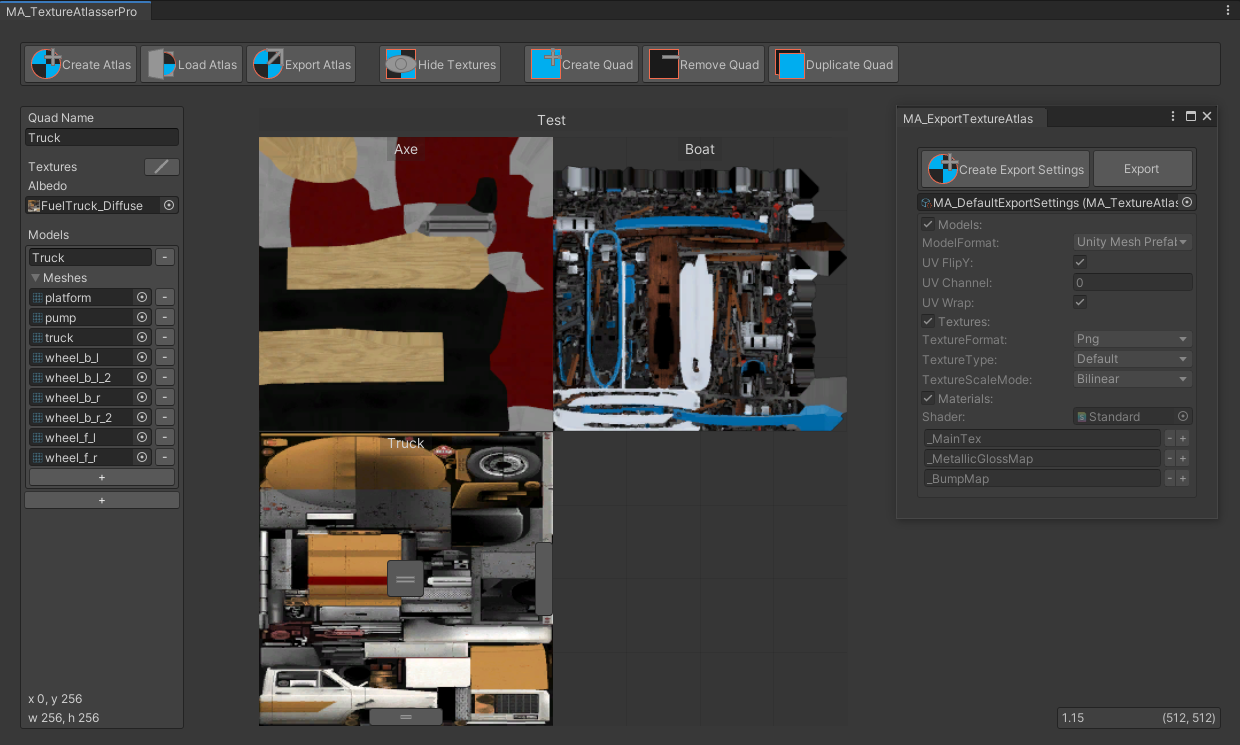
GitHub
Texture atlas creator for Unity. Contribute to maxartz15/MA_TextureAtlasser development by creating an account on GitHub.
a potential Unity workflow
stone kraken
thank you!! i'm not really familiar with blender, i could learn but it would take me a while lol
coarse grail
stone kraken
thank you!! i'm not really familiar with blender, i could learn but it would tak...
hope going with that tool goes okay for you just don't try to use it on tiling textures as the tiling textures would have UVS that expand past the border so it would start showing the other textures if it was rearranged to be put on a texture Atlas
 frozen nimbus
On smash down or smack down whatever that was called it kept lagging
 tranquil stirrup
Can quest users see pc shaders in worlds?
Like if i use poiyomi or something for a wall, will they see the same shader or do i have to switch it to a vrchat mobile shader?
coarse grail
yes you would be able to use that Shader on a world on Quest just be mindful of performance
tranquil stirrup
Cool, if only quest could have some sort of post processing though haha
coarse grail
apparently post processing is a bit resource intensive for mobile architecture
atomic merlin
tranquil stirrup
Can quest users see pc shaders in worlds?
Most shaders work, but ones using grabpasses do not (which would have been a way to do post processing kind of). I am pretty sure that any shader using depth textures do not work either.
Basically you have to test your world on Quest or Android directly, as you might otherwise miss that you are using a shader that just outright doesn't work.
 celest raft
mossy basin
celest raft
mossy basin
Hi folks! I'm trying to find a liquid shader replacement that doesn't use a grab pass - any suggestions?
 vital lance
Hey not sure if this is a okay general to ask but any quest world suggestions for taken photos
zinc bridge
mossy basin
Hi folks! I'm trying to find a liquid shader replacement that doesn't use a grab...
Tsunamoo or Noriben’s quest water
mossy basin
zinc bridge
Tsunamoo or Noriben’s quest water
These'll work! Thank you very much!
 gray basin
Trying to optimize a world for quest and it's telling me that some materials have unsupported standard shaders, but Unity greys out the option to even change it, how do I fix this?

 zinc bridge
gray basin
Trying to optimize a world for quest and it's telling me that some materials hav...
zinc bridge
gray basin
Trying to optimize a world for quest and it's telling me that some materials hav...
that means it’s a material that’s embedded in the model file. you need to make one for it, and drag it onto the object, or into the Material Slot on the Meshrenderer
gray basin
Ohhh alright!
sly snow
is there a master list of 3rd party quest compatible shaders? for stuff like water ive heard of stuff like noribenQuestWaterShader (https://www.youtube.com/watch?v=7ag5LyYOBCg)
& "Silent ClearWater" ( https://www.youtube.com/watch?v=mL02IqEkrMM )
& morioh's "Seawater" ( https://gitlab.com/xMorioh/unity-shaders/-/tree/main/Assets/Moriohs Unity Shaders/Enviroment/Sea-Water )
Anyone know how to find out which ones more performant? I dont have a quest to test other than getting my friend whos only online sometimes
im looking for a few simple things like:
-texture scrolling shader
-animated ( I found animated sprites work across quest and regular but wondering if you can just use a material with more controls)
-glass effect
zinc bridge
tsunamoo’s quest water is really performant, only downside is it uses a matcap, so it won’t look too good unless you know how to use matcaps
sly snow
oh im well versed on those and have made my own matcaps
zinc bridge
that’s good
when i use that shader, i like to take screenshots of my reflection probes that would normally affect the water, edit it in gimp so it looks like a regular matcap, and it turns out looking pretty nice
(screenshots of the preview in the inspector)
sly snow
oh my god thats a nice hack, use the inbuilt probe previews to pull it
zinc bridge
yup
 cloud lion
sly snow
& "Silent ClearWater" ( <https://www.youtube.com/watch?v=mL02IqEkrMM> )
& morioh...
cloud lion
sly snow
& "Silent ClearWater" ( <https://www.youtube.com/watch?v=mL02IqEkrMM> )
& morioh...
(3 days late BETTER LATE THAN NEVERRR if you have an android phone, you can test vrchat on it, incase you weren't aware)
 cobalt loom
why does the scale of my objects change as i walk through model model in the quest?
vital lance
Heya, having some issues my friend sent me this picture, a white bar is taking up part of my world? But only on the quest side? Is there anyway to fix this, I've checked colliders, lighting, reflection probes. Everything, but nothing has fixed it.

 autumn pendant
vital lance
Heya, having some issues my friend sent me this picture, a white bar is taking u...
autumn pendant
vital lance
Heya, having some issues my friend sent me this picture, a white bar is taking u...
White bar or white plane? How long does it extend for? What shaders are you using in your world
vital lance
autumn pendant
White bar or white plane? How long does it extend for? What shaders are you usin...
I'm not sure? some people say plane, others say bar. For the whole world, im using standard and thats it
I use mochi shaders/pc only shaders, but onnce I swap the build to quest I change them to standard/hide the mesh that has the pc only shader
autumn pendant
vital lance
I'm not sure? some people say plane, others say bar. For the whole world, im usi...
You might want to give this a look https://docs.unity3d.com/560/Documentation/Manual/PhysicsDebugVisualization.html
The Unity Manual helps you learn and use the Unity engine. With the Unity engine you can create 2D and 3D games, apps and experiences.
vital lance
autumn pendant
You might want to give this a look https://docs.unity3d.com/560/Documentation/Ma...
Awesome, thank you!
ill let ya know if it fixes my issue :)
autumn pendant

vital lance
autumn pendant
You might want to give this a look https://docs.unity3d.com/560/Documentation/Ma...
THANK YOU IT FIXED IT! there were some weird mesh colliders that looked fine, but for some reason bugged out on quest
sly snow
cloud lion
(3 days late BETTER LATE THAN NEVERRR if you have an android phone, you can test...
unfortunately my phone is iphone.
another question:
what would be the "safe" and "pushing it" amount of pickuppable props in a world with quest compatability?
also if I have a different mesh Quest lowpoly variant FBX of a pickupable, what would be the best practice to swap them out? is it just by entity name or do you have to parent it off the original and disable mesh render on original?
zinc bridge
sly snow
also if I have a different mesh Quest lowpoly variant FBX of a pickupable, what ...
swap the Mesh in the Mesh Filter
 errant veldt
sly snow
also if I have a different mesh Quest lowpoly variant FBX of a pickupable, what ...
errant veldt
sly snow
also if I have a different mesh Quest lowpoly variant FBX of a pickupable, what ...
Not sure if it helps but, maybe have a look at easy quest switch, its a package you can add via vcc, also if you use a lot of the same meshes, enable gpu instancing on the material to reduce batches, and look for optimized shaders, something like vrchats mobile defuse, vrchat mobile standard or silent filamented
sly snow
zinc bridge
swap the Mesh in the Mesh Filter
thanks.
sly snow
errant veldt
Not sure if it helps but, maybe have a look at easy quest switch, its a package ...
ye im already doing that but i didnt know you could use mesh filter drag into it.
Also would you know how to mass set shaders on materials in Easyswitch? Like i can drag and drop my folder of materials but when i set it to "standard lite" I have to tediously do it for each entry in Easyquestswitch
errant veldt
sly snow
ye im already doing that but i didnt know you could use mesh filter drag into it...
sadly i dont know, i only use one shader for both
sly snow
is it safe to use crunch compression on all the baked lightmap images (using bakery) or do you have to leave those as its default image format
 clear thorn
When I teleport a quest user in my world while their chatbox or menu is open, they become slanted and can't move or talk anymore. How can I fix this?
clear thorn
we noticed this occurs in magic freeze tag for a moment then the player gets readjusted.
 cosmic fable
When I uploaded the world to PC & Quest, I encountered significant image freezing inside the game on Quest, and also faced screen freezing when entering the world. Can anyone tell me what the reason might be or provide me with good Unity Android settings for uploading the world to Quest?
 eternal sinew
I'm getting this error when i'm trying to upload on quest

 steady cairn
Hey guys- im trying to work out what would be the cause of these really weird frame drops in the world im building.
The world gets a constant FPS almost everywhere exept a few minor places, and its really stumping me imma be honnest.
On PCVR it works perfectly fine- and everything is occluded
Nothing changes in the process of walking back/forth either- just decides its gonna be laggy
fringe birch
steady cairn
Hey guys- im trying to work out what would be the cause of these really weird fr...

VRChat tutorial for checking your drawcalls. This works for both worlds and avatars!
------------Timestamps----------------
0:18 Drawcalls Explained
0:54 Using Stats
2:39 Using Profiler
3:39 Using Frame Debugger
5:21 Note on Material Count
5:52 Debugging my Instancing
6:30 Note on Post Processing
6:49 In Summary
---------Useful Links----------...
steady cairn
I think I found the issue, 1 part of the world had 2.8 mil tri's
So I wacked it into blender and dropped it down to 1.1m
 umbral knoll
Anyone else have transparent mirrors break on you lately?
fringe birch
steady cairn
I think I found the issue, 1 part of the world had 2.8 mil tri's
that would do it lol
placid ember
In my experience 1 mil polys is still pretty heavy, vertex count is what sucks up a lot of the vram and performance though. My reference is quest 2 though not quest 3. I've read that the best practice at least for quest 2 is 500k on screen at a time or lower. Not sure with quest 3
autumn pendant
Quest 2 is 1M in frame Oculus' recommendations back then, I can't imagine that Quest 3 would be that much higher
 pure fjord

 zinc bridge
look for a purple error and send a screenshot of that. the ones you showed aren’t the cause of the problem, they simply state that the problem exists


 languid river
Anyone know of any transparent shaders that are compatible with quest? Currently developing a world and need a shader for the windows on quest.
atomic merlin
languid river
Anyone know of any transparent shaders that are compatible with quest? Currently...
Aside from fancy shaders using the depth texture or a grabpass, most shaders just work on Quest.
But the simplest, computationally, transparent shader would probably be the additive particle shader.
 pulsar shoal
hey guys do any of u know how i could start an animation when the player enter the server ? (like an animation in front of the cam, my animation is under .gif extention)
thanks a lot
 royal rock
languid river
Anyone know of any transparent shaders that are compatible with quest? Currently...
royal rock
languid river
Anyone know of any transparent shaders that are compatible with quest? Currently...
The standard unity shader
 limber meadow
Can I use the standard (not lite) materials that are included with FBX? Or do I need to create a new material for mobile vrchat shader and replace it?
 zinc bridge
limber meadow
Can I use the standard (not lite) materials that are included with FBX? Or do I ...
zinc bridge
limber meadow
Can I use the standard (not lite) materials that are included with FBX? Or do I ...
you should make your own materials regardless, using the built-in ones makes the materials completely non-customizable
but no, it isn’t completely necessary to switch them to VRChat > Mobile shaders, it just saves a bit of performance
limber meadow
zinc bridge
but no, it isn’t completely necessary to switch them to VRChat > Mobile shaders,...
Thanks, and additionally, what about representing translucent objects in Quest actions?
I tried all the mobile shaders, but I couldn't get translucent objects to work (e.g. inflatable tubes).
zinc bridge
none of the mobile shaders support transparency, but if you need a couple things to be transparent for quest, it’s perfectly acceptable to use the regular Standard shader
like, you aren’t forced into using mobile shaders for a quest world
it’s only about saving performance for the most part
limber meadow
zinc bridge
none of the mobile shaders support transparency, but if you need a couple things...
I thought you had to use mobile shaders, but I learned something new, thank you so much!
zinc bridge
nope, it’s only avatars that are forced to have mobile shaders for quest
you’ll notice that if you don’t use a mobile shader, the SDK only gives a warning, not an error. meaning you can still upload just fine
lofty wagon
Im having a issue trying to get something working for quest, basically a announcement feature that puts text in a players face. It works perfectly fine on PC and PCVR, i am unsure about quest but it doesnt show on android phones. I dont think its the script cuz it works on PC fine and is very basic, but just in case ill put them there. Basically you press a button that sends a networked event to activate a gameobject, which will be a camera. The camera has a event to enable the camera component and then a delayed event to turn it off after 8 seconds. Is there anything i could be doing wrong here?


 lofty wagon
btw i got someone on quest to tell me that it works for them, so its just a phone issue
 tame lark
Hey guys im new to Map Development started very recently due to a school project and im running into some issues when i want to make my World accessible for Android/Meta Quest
the Error shown in the screenshot keeps on popping up
already installed the recommended Version but doesn´t seem to change a thing
Can someone please help me fix this error so i can proceed to upload it
Grateful for any help i recieve 🙏
 atomic merlin
tame lark
Hey guys im new to Map Development started very recently due to a school project...
atomic merlin
tame lark
Hey guys im new to Map Development started very recently due to a school project...
Android build support is optional when installing unity, so did you install it?
tame lark
atomic merlin
Android build support is optional when installing unity, so did you install it?
resolved the issue thanks
 shrewd hare
anyone know why my terrain went very shiny when I changed the build to quest?
 shrewd hare
nvm fixed it
 frozen sail
Are normal maps allowed on quest?
like height maps, occlusion, etc. I didn't know if it would cause the screen glitching
zinc bridge
the only thing that causes screen glitching are Grabpass shaders
zinc bridge
frozen sail
like height maps, occlusion, etc. I didn't know if it would cause the screen gli...
but you can just use the Standard shader for all that stuff, which doesn’t have any grabpass functions
frozen sail
zinc bridge
the only thing that causes screen glitching are Grabpass shaders
okidoke, thank you 🙂
I appreciate it ❤️
frozen sail
Hello, I'm kind of in a spot. I've uploaded vrchat quest worlds before without problem but ever since I went to the new unity, whenever I upload a quest world it causes a complete shutdown of the headset and will cause extreme lag and greenscreening. I was wondering if anyone knew why that could be? And I was wondering if I had the correct android package but wasn't sure what to look for because that's my initial tought.
Because I remember there's an android thing I need to download for android to work but I have no idea whats wrong
frozen sail
can anyone help me? Im about to have to delete it on quest
zinc bridge
not sure why that could possibly happen, you didn't use any intense shaders or anything did you?
and, i don't think there's any other package for andriod other than the correct one
 languid quarry

 high oar
Ok so I have VCC but when I try to download the recommended version of unity it never downloads, can anyone help me fix this glitch
 dusky prism
Does anyone know a world that u can do art with 3D objects?? I remember I went to one a while ago, but I forgot to save it :( and it’s also quest compatible, like u can have bunch of shapes where u place them and resize them to whatever you’d like
atomic merlin
dusky prism
Does anyone know a world that u can do art with 3D objects?? I remember I went t...
You might be thinking of this one:
https://vrchat.com/home/world/wrld_d0e7dc1f-15eb-4ca9-8c42-7f766299b38e
Create 3d scenes using a simple udon-powered modelling systemǃ Does not sync for late joiners․ "Matter manipulator" model by Rawrcakes․
dusky prism
atomic merlin
You might be thinking of this one:
https://vrchat.com/home/world/wrld_d0e7dc1f-1...
thank uuuu!!
 crude gorge
Does anyone have any magical tricks for dealing with Z-fighting on decals when it comes to the Quest? (due to the horribly rubbish depth buffer). I already have the camera set to a rather conservative 0.03-500m (as it's outdoors too) so no easy fix there.
coarse grail
about the only thing that I know that would completely fix it would be to cut into the geometry so there's no overlapping geometry but that would defeat the point of it being a decal
or using a extra UV map to select the decals
vital lance
hey, what shaders should i be using for quest worlds?
zinc bridge
vital lance
hey, what shaders should i be using for quest worlds?
change anything you can to Mobile > Standard Lite, but if you need other shaders for certain effects, you can use anything as long as it doesn’t need a Grabpass/Depth pass
vital lance
ok, thanks
crude gorge
Or rather, change everything you can to Mobile > Diffuse. Only use Standard Lite if you need Emissions or Metalic maps.
crude gorge
Why does the Standard Lite shader use Vertex colours? Given that none of the others do is it safe to assume that this is another bug?
 harsh wadi
Heya, so I just got myself this world with a PC and Quest version. I'd like to make em both compatible. What's the easiest way to do this while keeping the same ID Blueprint ?
zinc bridge
harsh wadi
Heya, so I just got myself this world with a PC and Quest version. I'd like to m...
copy the blueprint ID of one version and paste it into the other
atomic merlin
crude gorge
Why does the Standard Lite shader use Vertex colours? Given that none of the oth...
?
Quest shaders have always used vertex colors. (There are no textures on any of these materials)
 crude gorge
atomic merlin
?
Quest shaders have always used vertex colors. (There are no textures on any of...
crude gorge
atomic merlin
?
Quest shaders have always used vertex colors. (There are no textures on any of...
Mobile Diffuse doesn't, Standard Lite does.
atomic merlin
crude gorge
Mobile Diffuse doesn't, Standard Lite does.
Huh

It is definitely not a bug that standard lit applies vertex colors.
But that diffuse isn't working for you does sound like a bug, a bug that probably would only appear in vrchat then, since the Quest shaders are probably replaced on runtime.
crude gorge
I remember people complaining about it in the past because standard shaders don't. So you switch from a normal shader to one of the Quest ones and suddenly models are the wrong colours as the Std Lite uses vertex colours and normal shaders don't.
atomic merlin
crude gorge
I remember people complaining about it in the past because standard shaders don'...
Mm, and that is when people try every Quest shader and end up on lightmapped, which isn't allowed on avatars, and makes people come to this discord to ask why a shader in the vrchat/mobile/ folder isn't allowed even though it says it should be.
 timid cave
Has anyone tried the mobile app and is it very comparable in performance compared to the Quest 2?
I dont have a quest and it would be handy to have a way to test the quest content i make
crude gorge
timid cave
Has anyone tried the mobile app and is it very comparable in performance compare...
My cheap phone runs it quite a bit better than the Q2, so most compatible phones will probably be better.
sly snow
is there a list of quest-compatible interactive world prefabs available?
this channel pinned link seems to be broken
 buoyant matrix
sly snow
this channel pinned link seems to be broken
buoyant matrix
sly snow
this channel pinned link seems to be broken
https://creators.vrchat.com/platforms/android/quest-content-optimization/
https://creators.vrchat.com/platforms/android/cross-platform-setup/
Creating content for VRChat Quest is a challenge-- you have to create attractive, compelling content all the while keeping the content optimized for a mobile device. These are the same challenges that game developers must deal with while building for mobile.
Setting up a cross-platform world or avatar is actually quite straightforward! In short, all you have to do is use a duplicate project to build an Android version of the asset, and upload it to the same content ID as the VRChat PC asset. The client will manage which version it needs to download.
crude gorge
buoyant matrix
https://creators.vrchat.com/platforms/android/quest-content-optimization/
https...
They were asking for Quest compatible prefrabs.
buoyant matrix
crude gorge
They were asking for Quest compatible prefrabs.
They asked that, but that isn't what I was replying to. They mentioned a specific link in the pinned comments was dead. That link was an old page explaining how to make cross platform quest content and quest optimization. I linked the updated pages for that information for anyone who needed it. If you wish to reply to their question, feel free.
crude gorge
Ahh, I see now. My bad.
 balmy moat
Hey anyone know of some good free worlds to test out on Unity that’s compatible with quest?
 wanton harness
crude gorge
Does anyone have any magical tricks for dealing with Z-fighting on decals when i...
wanton harness
crude gorge
Does anyone have any magical tricks for dealing with Z-fighting on decals when i...
Either turn up the near plane or maybe make sure the decal materials are on a higher render queue?
crude gorge
wanton harness
Either turn up the near plane or maybe make sure the decal materials are on a hi...
Near far are already 0.05-200 and render queue causes issues because it's a 3D environment.
wanton harness
crude gorge
Near far are already 0.05-200 and render queue causes issues because it's a 3D e...
What's the render queue on the decals and the terrain
Ideally decals should always render after the terrain
Render queue is just the order in which things are drawn, it shouldn't cause issues on anything except overlapping transparent meshes
crude gorge
Sorry, I misread render queue - I was referring to the sprite queue ID, not the render queue.
wanton harness
Sprite?
crude gorge
Yes, the decals are sprites.
crude gorge
It's to avoid making 500+ additional materials.
wanton harness
Sprites have the same issue internally
Each will be drawn on a separate draw call
You could atlas your decal textures
What are you using the decals for? Stickers?
crude gorge
They sprites are atlased already.
Hence that shouldn't be an issue.
I'm using them for album covers, as more will be added in bits and drabs randomly over time. Making a manual atlas and meshes to go along with that isn't feasable.
wanton harness
crude gorge
I'm using them for album covers, as more will be added in bits and drabs randoml...
There are tools to automatically atlas textures if you're making your world in blender, and album covers should be very easy to combine all into one atlas due to mostly being squares
crude gorge
I'm not making it in Blender, I'm doing it in Unity.
wanton harness
Ahh, that would be a problem
crude gorge
wanton harness
There are tools to automatically atlas textures if you're making your world in b...
Constantly having to redo that every time I add more things would be a pain in the ass.
wanton harness
Anyway, if you could find a way to increase the render queue on the sprites then they should stop flickering
Most shaders are configured to do depth test greater or equal, which means that if they are rendered after something in what the gpu thinks is the exact same distance from the camera they will still render on top of it
If you make a material using the "Sprites/Default" shader you should be able to apply it to your sprites and it should automatically use the texture that is already on the sprite object
Then you can check the render queue of thst
But it should already be on a higher render queue so it's possible there are other issues
wanton harness
crude gorge
The Quest just has fuck-all z-buffer accuracy :/
Well, I think .05 is still a pretty small near plane
I assume you have the decal sprites placed slightly above the surface they are part of?
crude gorge
Yeah, as much as they can be without there being a very obvious gap
It's fine on PC, it's just Quest is the issue.
vital lance
does anyone know a good quest compatible foliage pack?
 unreal lintel
Does anyone know of any Quest-compatible water shaders?
unreal lintel
@spiral atlas Thank you for your awesome YT tutorial (https://www.youtube.com/watch?v=mL02IqEkrMM). I want to play with the Silent shader, but I do not have the download button when I arrive at the GH page. Any suggestions?
UNITY 2019.4.31f1 SDK3 (VRChat) UDON
How many out there have been searching for the correct water asset that shows up in VRChat for PC & Quest Users? FINALLY, after a year I discovered the asset and procedure for making water show up for Quest users!
The "Silent Clearwater 2" Water shader, the best I have encountered. Used in many VRChat World...
 spiral atlas
unreal lintel
<@483026362102185987> Thank you for your awesome YT tutorial (https://www.youtub...
spiral atlas
unreal lintel
<@483026362102185987> Thank you for your awesome YT tutorial (https://www.youtub...
Hi, and thank you. There is no download button for the shader, you need to copy and paste the silent shader directory into your world project folder under assets 🙂
unreal lintel
Bit of a GH noob... I saw in your video, you dl the zip file. This is what I see, so not sure how to copy what I need from here
 spiral atlas
unreal lintel
<@483026362102185987> Thank you for your awesome YT tutorial (https://www.youtub...
spiral atlas
unreal lintel
<@483026362102185987> Thank you for your awesome YT tutorial (https://www.youtub...
Once on the page at: https://gitlab.com/s-ilent/clear-water , click on "CODE", then download the .zip file under "Download source code"

GitLab
Simple water shader for Unity/VRchat that (ab)uses some Unity features to get a pretty water surface.
Code, top right, should highlight in blue
unreal lintel
spiral atlas
Once on the page at: https://gitlab.com/s-ilent/clear-water , click on "CODE", ...
Got it - thanks so much!!! Love your YT channel!
spiral atlas
Once you open the zip file, copy the "clear-water-master" folder to your projects asset folder
Your welcome, and thks for enjoying my channel 🙂
 trail star
Hello I just joined back to the server after a few years of not being here I just had a question and I don't know if it'll get answered or not but I've been told by multiple people that the 2018 hub world acids might be accessible still I was just curious if that is the case and also if there would be any way to purchase the assets for the 2018 hub world if I'm wrong then I apologize for the inconvenience
unreal lintel
Hi everyone! Can someone please point me to the VRC portal prefab? It wasn't in the prefab folder that installed with the latest version of VRC SDK. Thanks
unreal lintel
spiral atlas
Once you open the zip file, copy the "clear-water-master" folder to your project...
Hi! Have you ever encountered issues like these with the clear water shader?
 spiral atlas
unreal lintel
Hi! Have you ever encountered issues like these with the clear water shader?
spiral atlas
unreal lintel
Hi! Have you ever encountered issues like these with the clear water shader?
Just ignore it, it still looks okay when you build/test right?
unreal lintel
spiral atlas
Just ignore it, it still looks okay when you build/test right?
The last time I checked, it worked. It does seem to cause my upload to fail 4/5 times. But if I keep trying, eventually it will upload despite the errors.
spiral atlas
unreal lintel
The last time I checked, it worked. It does seem to cause my upload to fail 4/5 ...
Hmm, seems like something is wrong, it shouldn't fail at all on upload
Unity version 2022? latest sdk/base?
unreal lintel
Yes on both accounts
spiral atlas
unreal lintel
Yes on both accounts
Was that error, on upload for Quest, or does it do the same thing on PC as well?
Could be a file missing when you copied/pasted it over, maybe try again?
unreal lintel
spiral atlas
Was that error, on upload for Quest, or does it do the same thing on PC as well?
It uploaded eventually, so not sure exactly what is causing it. It cites specific lines (on gles 3) regarding the shader, but everything looked fine in my project. I will just ignore it unless it stops working. 🙂 Thanks for your help and for leading me to a water shader that actually works for Quest!!
 lunar briar
Same exact world for me on pc is 11 mb bigger on android, this normal?
topaz juniper
lunar briar
Same exact world for me on pc is 11 mb bigger on android, this normal?
check the world debugger to see where its coming from
lunar briar
dont see any identifiable differences
crude gorge
lunar briar
Same exact world for me on pc is 11 mb bigger on android, this normal?
I had that issue too, the encoding is weird. It uses ATSC 6x6 by default now on Android which is larger than DXT crunched textures, hence the size difference.
Try some larger numbers e.g. 8x8 (higher numbers = lower quality = smaller)
You can access them on the Android override tab for the texture.
 burnt badge
Hey i need help. Im searching for the map than appears on here than looks like an hotel. https://youtu.be/iBdOTY6VDAw?si=YHZasClat5jvhfH-

Ready to get tactical? Check out Breakout, which is available on PS4 and Xbox One: https://breakout.patron.me/JoshDubPlay Don’t miss the chance to get the game at a 20% discount as part of Sony Summer Sale (till August 19) and Ultimate Game Sale (till August 24)
- FOLLOW THESE -
INSTRAGRAM - https://www.instagram.com/joshdubgaming
TWITTER - ht...
crude gorge
burnt badge
Hey i need help. Im searching for the map than appears on here than looks like a...
Not the right place to ask, but I'm pretty sure it's this world - https://vrchat.com/home/world/wrld_b155ff30-0bbf-486c-afc5-e7a05145387b

Now with a working VR Piano‚ Elevators‚ Rooms‚ VR Keyboard‚ Chat System‚ Know your friends better dice gameǃ - Follow us on Twitter @VirtualFurence or join our Discordǃ discord․gg pmWvzbM
burnt badge
crude gorge
Not the right place to ask, but I'm pretty sure it's this world - https://vrchat...
sorry and thanks.
 gaunt cobalt
Quest issue: Is anyone having problem with avatar search world “YAAS” I keep getting an error that string couldn’t be loaded, view logs for more info HTTP/1.1 403 Forbidden
 wet summit
gaunt cobalt
Quest issue: Is anyone having problem with avatar search world “YAAS” I keep get...
wet summit
gaunt cobalt
Quest issue: Is anyone having problem with avatar search world “YAAS” I keep get...
i get it on pc too
 merry otter
out of curiosity do many quest worlds use real-time lights? (i know it's awful to use on quest)
just wondering cause avatar standard lite shader looks odd testing on PC in worlds with real-time lights and wanted to make sure if it's something i should worry about fixing for Quest lmao
zinc bridge
merry otter
out of curiosity do many quest worlds use real-time lights? (i know it's awful t...
hopefully not
even one realtime directional light can lag PC if the environment is complex enough, so people shouldn’t be using realtime lights for quest worlds unless it’s absolutely necessary
most good popular worlds though use baked lighting
 ivory raft
gaunt cobalt
Quest issue: Is anyone having problem with avatar search world “YAAS” I keep get...
ivory raft
gaunt cobalt
Quest issue: Is anyone having problem with avatar search world “YAAS” I keep get...
I have that same issue on PC
 glad monolith
Hey fellers, are there any good worlds that are tiny little city's for kaiju or gundam skins?
 full galleon
so... i'm trying to find this certain world were this photo was taken by someone, any ideas on what it's called? I remember there were two or three hall ways, the left hallway leading to were you're teleported to a bar area with bar stools and all, and the other(s)... I don't remember. it's been 2 years I think?

 honest cloud
Anyone know some good horror maps to play
 robust pelican
full galleon
so... i'm trying to find this certain world were this photo was taken by someone...
robust pelican
full galleon
so... i'm trying to find this certain world were this photo was taken by someone...
i this that’s midnight rooftop i could be wrong but if so it’s midnight rooftop on the second floor i think
i could possibly be wrong
 ebon bay
Starting a new world and having issues with reflections in the entrance of the world on Android shown here, is there a way to fix this or no? Looks amazing on pc
final drift
did you set it to box projection?
ebon bay
final drift
did you set it to box projection?
What should it be set too for android cause on the pc build it doesn’t do that
ebon bay
final drift
did you set it to box projection?
it wont even let me select box projection
 final drift
odd
ebon bay
final drift
odd
its selected on the pc build though so i figure best bet is to unmark the sign, portal door, and neon lighting from the static layer so that they dont project though itd be cool to have them reflect like they do on the pc side

 icy lance
ebon bay
its selected on the pc build though so i figure best bet is to unmark the sign, ...
icy lance
ebon bay
its selected on the pc build though so i figure best bet is to unmark the sign, ...
I'm pretty sure box projection isn't supported on android for some reason
zinc bridge
correct
box projection is disabled for android
(even though there’s ways to make it work with community shaders, and i’ve heard it really doesn’t impact performance)
ebon bay
icy lance
I'm pretty sure box projection isn't supported on android for some reason
Well that’s silly, I’ll just unmark as static on the android side of things
crude gorge
Given how bad the Android version is with Z-fighting, does anyone have a good way of gauging if things are likely to z-fight when in the editor?
glad monolith
glad monolith
Hey fellers, are there any good worlds that are tiny little city's for kaiju or ...
buuurp
vital lance
aa
 terse wing
glad monolith
Hey fellers, are there any good worlds that are tiny little city's for kaiju or ...
terse wing
glad monolith
Hey fellers, are there any good worlds that are tiny little city's for kaiju or ...
If ur looking for avatars/avatar worlds make a post in #1138520828556890214
glad monolith
terse wing
If ur looking for avatars/avatar worlds make a post in <#1138520828556890214>
Nah I just mant a world where I can roam
 tranquil egret
Looking for some interesting shooter worlds any suggestions?
 tulip garden
Any good tutorials on light for worlds?
coarse grail
tulip garden
Any good tutorials on light for worlds?

Blender Guru's general artistic tutorials:
https://youtu.be/Qj1FK8n7WgY
https://youtu.be/O8i7OKbWmRM
https://youtube.com/playlist?list=PLj...
https://www.pureref.com/
https://allusion-app.github.io/
https://gitlab.com/s-ilent/SCSS/-/wikis/Other/Light-Baking
https://gitlab.com/s-ilent/SCSS/-/wikis/Other/Reflection-Probes
https://gitlab.com/s-il...
vital lance
does this mean my world was uploaded for quest?
 buoyant hill
vital lance
does this mean my world was uploaded for quest?
buoyant hill
vital lance
does this mean my world was uploaded for quest?
Yeah
But also you can always just check on the website
Ot also you know when you upload to quest you can check to make sure it says upload succeeded
buoyant hill
buoyant hill
Yeah
Actually no wait
I'm not sure if it means it uploaded successfully, just that it built successfully
Just check on the website
 azure bronze
ive noticed that some real time lights in worlds are broken on quest, such as flashlights in some worlds are only lighting up the walls and not the floors. has anyone else noticed this?
zinc bridge
light importance option
if that happens, it’s importance is probably set to low or auto
azure bronze
Any idea what would cause this? this started happening recently on pretty much all of my worlds (ive seen others too) where the flashlights (Real time spot lightss) dont seem to work on alot of surfaces they used to. These seem to have broken over night and i didnt update the worlds. Is this a known bug in vrchat or is this something else? Ive tried on old unity and new unity versions as well as old and new SDK versions.
notice how the car is the only thing being affected by the flashlight, while everything else (walls and floors) are not being lit up at all
errant veldt
azure bronze
Any idea what would cause this? this started happening recently on pretty much a...
check the shaders of the materials you're shining light on, vrchat mobile shaders have real time lights disabled

 azure bronze
they are using standard shaders. the lighting was working up until recently.
azure bronze
errant veldt
check the shaders of the materials you're shining light on, vrchat mobile shader...
when i do not bake the lights, the spotlights work, but after i bake them, the spotlights dont work on quest only. but they work on PC
errant veldt
azure bronze
when i do not bake the lights, the spotlights work, but after i bake them, the s...
not sure, it might be the lighting mode? though im not sure why it would differ on quest
azure bronze
they are set to important. like i said, they were working until recently. im not sure if its unity, vrchat, or just a me bug
but it happened on all my worlds at the same time
errant veldt
sorry, i mean the baked lighting mode
azure bronze
just full lighting

 azure bronze
do you have the newest bakery?
errant veldt
im using asset store bakery, but im aware of newer versions
azure bronze
 errant veldt
try using subtractive or shadowmask lighting mode
azure bronze
what does that do? sorry ive never used it before

 azure bronze
ill give subtractive a try
azure bronze
errant veldt
unfortunately that did not work
azure bronze
errant veldt
try using subtractive or shadowmask lighting mode
after testing more. it seems to work if my world is very small and baked. but if i make the world bigger and bake it, the flashlights dont work anymore, and revert to just showing on the floor only.
 candid lodge
Anyone on quest able to help me test my call of duty world?
Need to test match making, pvp, syncing, and performance.
lunar briar
Anyone know how to make local animations in worlds, so that when activated, only the person who initiated/started the animation can see it?
zinc bridge
just.. don't make it networked
if you don't specifically make something networked, it won't be
if you really want to make sure it's local, set the UdonBehaviourSyncMode to None
lunar briar
zinc bridge
just.. don't make it networked
I dont specifically make things networked but they can still be seen by others, I have animations that are triggered by particles, if you see it happen, it happens. I understand mirrors/object toggles work this way but that's not what im actively trying to do in this specific case.
zinc bridge
did you use OnPlayerTriggerEnter with no isLocal check?
oh i see, OnParticleCollision
lunar briar
Yes haha
zinc bridge
that's a little harder to make local, unless you only play the particles locally for one player
lunar briar
The particles come from players (Avis)
Anyone else have any ideas on how you might tackle this?
 vague drum
In a world, I have poiyomi toon shaders for a hologram effect. Will quest see this, otherwise what should I change it to?
atomic merlin
vague drum
In a world, I have poiyomi toon shaders for a hologram effect. Will quest see th...
It should work, Quest worlds can use custom shaders, but there are some features that either the GPU can't do or aren't available to us, neither gives an error in editor, but in game on Quest would either not render or turn bright pink.
Unless this is a needlessly fancy hologram shader then it shouldn't be using any of these features.
If you have an android phone then you could easily check.
vague drum
I don't have one I'm afraid but I suppose I can use a mobile particle additive to have a see-through color texture anyways
 worthy belfry
i like to make a fluffy carpet , i used fur shader but it reduces the FPS in game
do you guys have any suggestion
atomic merlin
worthy belfry
i like to make a fluffy carpet , i used fur shader but it reduces the FPS in gam...
All fur shaders are pretty intense, but which fur shader did you use?
Fast fur is the only one I know of with good performance, it has a free lite version you could test.
worthy belfry
atomic merlin
All fur shaders are pretty intense, but which fur shader did you use?
Fast fur ...
i used xie , uh ty ❤️
zinc bridge
worthy belfry
i like to make a fluffy carpet , i used fur shader but it reduces the FPS in gam...
i found a very performant fluffy carpet shader that supports baked lighting, and i believe works on quest
and is very easy to use, and cheap
worthy belfry
zinc bridge
and is very easy to use, and cheap
i prefer to use free stuff tnx
zinc bridge
well here it is for others if they want it

VRChatのワールドに設置することを想定したカーペット用のもこもこした軽量ファーシェーダーです。 透過なしの1度のパスで描画しているため、ワールドに使用しやすいシェーダーになっています。 ライトベイクを前提にしており、リアルタイムシャドウには対応していません。
i don’t even notice a slight FPS drop when using it
only downside though, is that it has no texture input for the noise. it only has an enum with two options
 rain gulch
So i am nearing the point where I need to make my world quest compatible. Is there a way to sync meshes and scripts and all of that between scenes, but have materials be different so I can allow for the quest compatible materials?
 idle stone
u can just use easy quest switch
and also its not like avatars where u need to use like 1 out of 5 materals that are required to be used if u want it on quest
 crimson linden
Hey, uh, I'm trying to figure out how to install the module needed for Android compatibility, but I can't seem to find the option to add that module.
Ah... Just saw some very helpful advice. Nvm.
placid ember
vague drum
In a world, I have poiyomi toon shaders for a hologram effect. Will quest see th...
It's been a long time since I've tried to use poiyomi in a quest build, mainly because the last time I tried poiyomi would just render as the pink texture of death. It's possible that newer versions don't do this anymore though. I love using mochie standard because it works on quest by default and also supports monoSH
crude gorge
placid ember
It's been a long time since I've tried to use poiyomi in a quest build, mainly b...
I'd use Silent's Filamented instead for this, I found it quite a bit more performant than Mochi's (when using it as a replacement for Unity Standard with MonoSH support).
placid ember
crude gorge
I'd use Silent's Filamented instead for this, I found it quite a bit more perfor...
Never heard of that one, I'll check it out though especially if it's supports monosh
placid ember
crude gorge
I'd use Silent's Filamented instead for this, I found it quite a bit more perfor...
I'm curious now, have you done any testing with the s-ilent shader vs Vrchat lite? I might make a benchmark scene to test vrclite vs mochie vs s-ilent
crude gorge
placid ember
I'm curious now, have you done any testing with the s-ilent shader vs Vrchat lit...
VRChat Lite does still run better (and Mobile Diffuse even better than that) but obviously those don't have MonoSH support (or even emission/metallic support in the case of Diffuse)
Basically Filamented is the lightest "fully featured" one I've found.
 tough agate
Hey how do I make my world work with quest it’s pc only
This is my first time making a map
 uneven egret
monkey b@lls
crude gorge
tough agate
Hey how do I make my world work with quest it’s pc only
You switch Unity to Android via the VRCSDK window then upload (after optimising it further, if necessary).
tough agate
crude gorge
You switch Unity to Android via the VRCSDK window then upload (after optimising ...
Ok thanks
 limber goblet
「8番出口」もVRCで楽しめるそうですが、いつ公開されますか?

 sharp marlin
Still learning the basics of baked lighting, but would be amazing quality if quest could see this lol. (Rendered in blender, but built by me. Still working on the project though once I Get used to baking lights. (Why is baking lights in unity so much slower than baking lights in blender? Any tips to speed up the process besides bakery? (I stick to free so I can go through the struggles instead of paying my way through lol. Basically future profit without spending gives me 100% revenue when projects are either created or sold.)

Probably gonna reduce the amount of lights lol.
zinc bridge
sharp marlin
Still learning the basics of baked lighting, but would be amazing quality if que...
what’s your lightmapper settings?
also, there’s definitely no need for bakery. i’ve only ever used the default lightmapper and i can get my maps looking great
David M also uses the default lightmapper, and his work is beautiful
sharp marlin
zinc bridge
what’s your lightmapper settings?
I guess I got to look into what the lightmapper is in general 0-0 sorry still learning the lighting system. Once I find the lightmapper I'll give a heads up ❤️
zinc bridge
i’ve tried bakery before, and maybe it’s just cause im not used to it, but personally i found it not as good and less intuitive because you need their custom light components, and they don’t have a realtime light preview
oh, i assumed you already knew what it was because you said light baking was slower in unity
sharp marlin
Oh gotcha, I'm pulling up my project to see about the lightmapper settings
Yeah some stuff gets overlooked lol
zinc bridge
got it
sharp marlin
zinc bridge
got it
Okay so lets just say that I have the default light settings as if I just created a new light settings.
Lighting mode baked indirect.
now I see the light mapper settings.
sharp marlin
zinc bridge
got it
 zinc bridge
sharp marlin
zinc bridge
sharp marlin
try this instead
 sharp marlin
I think I did something that fixed the baking time speed. Yesterday it told me 1day to 2days but now it shows around 10mins.
I will try those settings as well though to see.
zinc bridge
those are about as optimized as you can get while still having it all look just fine
Lightmap Resolution should usually sit around 20-40 depending on your scene and how high quality you want it or how big your world is
sharp marlin
zinc bridge
those are about as optimized as you can get while still having it all look just ...
I have a template build I created in blender so I could use something that isn't advanced yet to test out the baking system so this is with my original settings now time to test the settings with yours.
 zinc bridge
place some walls too, and spot lights
so it has some more shadows and indirect lighting to calculate
zinc bridge
along with that, learn light probes
you’ll need lightprobes to light moving objects with baked lighting
sharp marlin
yeah saw a couple of a videos about that.
zinc bridge
the basic checklist for baked lighting is:
- Set all objects you want to be in the lightmap as Contribute GI Static in their Inspectors
- Enable Generate Lightmap UVs on any imported models you have in the Assets
- Set up your lights, making sure shadows are enabled and they’re set to Baked mode
- Set up a Reflection Probe for each room
- Set up Lightprobes in a grid, deleting any that end up inside objects
- Bake the lighting, adjust whatever you need as you see fit, bake again, etc
sharp marlin
zinc bridge
the basic checklist for baked lighting is:
- Set all objects you want to be in t...
What shadow type which would you recommend hard or soft shadows?
zinc bridge
i don’t really notice a difference between the two, but i tend to use hard shadows
sharp marlin
Okay,
sharp marlin
zinc bridge
i don’t really notice a difference between the two, but i tend to use hard shado...
With the spotlight how can I make it so I can see how it would look like it shows up for render or does it just stay invisible based on the direction its pointing and just has a small glow effect to it like a pointlight does?
sharp marlin
zinc bridge
i don’t really notice a difference between the two, but i tend to use hard shado...
speeds are crazy good with the settings you suggested. Takes about 1-2 minutes compared to the 5minutes I got with my settings.
zinc bridge
sharp marlin
With the spotlight how can I make it so I can see how it would look like it show...
not sure what you mean
sharp marlin
zinc bridge
i don’t really notice a difference between the two, but i tend to use hard shado...
With your suggestion on light settings and added a spot light and a wall and a block just as place holders as examples. Looks pretty nice.

Thanks for the help and I messed around with the reflection probes got that going and also messed with the light probe think I could get the hang of that easily just some testing with it.
zinc bridge
no problem
 merry bone
um... what is happening? I'm getting spammed with errors the moment I switched from windows to android
 sharp marlin
merry bone
um... what is happening? I'm getting spammed with errors the moment I switched f...
sharp marlin
merry bone
um... what is happening? I'm getting spammed with errors the moment I switched f...
That's why I work on things on quest side then transfer over to pc side and do extra stuff there if you decide to
sharp marlin
merry bone
um... what is happening? I'm getting spammed with errors the moment I switched f...
This is what I found searching the error online (Effects which require compute shaders are disabled when this is not supported on the target platform. An warning message has been added to the editor to indicate this.)
So it has something to do with your post process volume and layer.
From researching more answers you are using a computer shader over on the android side which isn't allowed. You would need to use a vrchat mobile shader I think.
 clever shadow
Post processing isn't supported on Quest so disable anything related to it
 heavy burrow
Can somone please help me . I recently built two worlds. I just opened cc to make some edits . And both projects are gone from cc and unit hub ,but they exist in VRchat app to join.
Where are my two projects !?!
How can I get them back ?
What happened ? 😦
clever shadow
Assuming they're still on your computer, you can add them back in Unity Hub under Add (Arrow button) > Add project from disk > navigate to the folder where the project is located and click Add Project
And in Creator Companion under Create New Project (Arrow button) > Add Existing Project > navigate to the folder where the project is located and click Select Folder
Not sure why they would get removed though, maybe if they're on a network or removable drive that got disconnected
 young tusk
so I'm making my first world, its for a star wars group I'm in. basically I don't want it to lag and I'm about to go get/make models and before i make said models, i just want to know a good triangle count for the whole world (world is for quest too)
crude gorge
young tusk
so I'm making my first world, its for a star wars group I'm in. basically I don'...
You don't want any more than a few million on screen at a time, but also draw calls and such on top of that matter too.
young tusk
so would like 300k be a safe number?
crude gorge
Sorry I just realised this is Quest not PC, haha. But yes, 300k would be fine for Quest 3.
Try to keep draw-calls minimised as well and you'll be OK.
 wanton sand
how do i add the avatar udon pad?
 hasty canyon
Can someone help me Im getting an error that says " switching to Android:androidplayer is disabled" what do I do
 gilded iris
Hey! Can someone recommend me mobile well optimised and good looking shaders?
I have pretty heavy (in terms of polygons and setpass calls) world and i was using mochie and filamented for quest version. Right now i want to get rid of most of pbr (leaving only albedo and normals) but I don't really like how default mobile shaders look
gilded iris
hasty canyon
Can someone help me Im getting an error that says " switching to Android:android...
Maybe you don't have android stuff for unity. Check unity hub for android sdk
crude gorge
hasty canyon
Can someone help me Im getting an error that says " switching to Android:android...
You need to install the Android module for Unity via Unity Hub.
 tulip delta
Hello 🙂 I am looking for someone to help with a feature build in my VRC world.
I would like to have something that would display my events as I add them in real time.
Is this possible in VRC?
 urban ibex
tulip delta
Hello 🙂 I am looking for someone to help with a feature build in my VRC world.
...
urban ibex
tulip delta
Hello 🙂 I am looking for someone to help with a feature build in my VRC world.
...
more of an #udon-general question but eh
Sounds perfectly doable ! I'm assuming you're speaking of DJ events or similar, so something you set ahead of time and would rarely change while someone is in the instance (though it should be possible to refresh it).
Never did it before, but this should work:
Set the events
- Create a Github public gist with your events listed as json. As an example, let's say you want the name, date and time of your event (set as strings here because idk if Udon has access to DateTime to read timestamps):
[
  {
    "name": "Event 1",
    "date": "07-28-2024",
    "time": "10pm"
  },
  {
    "name": "Event 2",
    "date": "08-03-2024",
    "time": "11pm"
  }
]
Create the UI
- Create a simple UI with a vertical layout group
- Create a line with 3 TMP_Text objects (for the name, date & time)
- Create a script/graph that has a reference to those 3 objects and has a method to set their text, then attach it to the line
- Save the line as a prefab
Load and display the events
This should be done at runtime in a custom event called from Start (since Start is called when the player joins the world)
You could also add a "Refresh" button that sends a networked event to everyone, where you Destroy all the existing lines and call the custom event again
- In Udon, create a script with a public VRCUrl (https://creators.vrchat.com/worlds/udon/external-urls) and enter the name of your gist in the editor
- Use
VRCStringDownloader.LoadURL(https://creators.vrchat.com/worlds/udon/string-loading#vrcstringdownloaderloadurl) to load the json data - Use
VRCJson.VRCJson.TryDeserializeFromJson(https://creators.vrchat.com/worlds/udon/data-containers/vrcjson/#json-functions) to convert that json data into a DataList - Loop on the DataList to get each event as a DataDictionary
- For each DataDictionary, instance a line prefab in your UI and get a reference to the script you created on it
- Finally read the name, date & time of your event from the DataDictionary and use the line's method to set the text on the TMP_Text objects
tulip delta
urban ibex
### Load and display the events
This should be done at runtime in a custom event...
I was looking for something that wuld autoupdate from a list of events that I make so I don't have to add to another list 🙂
Like from my website or a feed
urban ibex
Hmmm well idk how your list is presented, but VRChat can only load raw strings or images from a few trusted sources (like Github)
So unless your original list is in a public repo/gist/pastebin you might have to create another list
tulip delta
Could it pull from a feed like this - https://www.thedjsessions.com/events/feed/
urban ibex
Don't think so. It's not a trusted URL and I don't think anyone's made an XML parser in Udon :')
tulip delta
Lol ok. I have some people looking into it but figured I'd check here 🙂 Thank you
And what would be a "trusted" url?
urban ibex
OH WAIT
I'm stupid
I didn't pay attention, you can actually load data from untrusted URLs MY BAD
but the users need to have "Allow Untrusted URLs" enabled in their settings
(still, the list of allowed URLs for text data is here: https://creators.vrchat.com/worlds/udon/string-loading)
hasty canyon
crude gorge
You need to install the Android module for Unity via Unity Hub.
In unity hub I can't do anything with modules they don't show up when I click the gear
crude gorge
hasty canyon
In unity hub I can't do anything with modules they don't show up when I click th...
Can you screenshot it?
hasty canyon
Best I can do is take a pic with my phone
@crude gorge

When I try to upload it also says "can't upload world we don't own" or something like that
crude gorge
Where did you get the world from? The former error is because Unity Hub doesn't think it manages that installation of Unity and the latter error is because you have a Blueprint ID attached which is owned by soneone else...
crude gorge
hasty canyon
<@294944043211685890>
Also please use Print Screen and don't crop so much, I need to see more of the Window.
hasty canyon
crude gorge
Where did you get the world from? The former error is because Unity Hub doesn't ...
I made it through the CC
How do I get an id
@crude gorge
crude gorge
One is assigned automatically when you try and upload it, hence my question of where you got the world in the first place for this to be an issue...
hasty canyon
 hasty canyon
crude gorge
One is assigned automatically when you try and upload it, hence my question of w...
hasty canyon
crude gorge
One is assigned automatically when you try and upload it, hence my question of w...
We all I did was make it
crude gorge
Very odd. So if you open the project, find the world asset component and select the pipeline manager, what is the blueprint ID listed there?
Regarding the Hub, Unity says...
Click the three dots to the right of the version label, then select Add Modules. (NOTE: If you didn't install the Editor via the Hub, you will not see this option. To enable this option, install the Editor via the Hub.) In the Add Modules dialog, locate the module to add and tick its checkbox.
So... does everyone that uses the VCC have this same issue? I installed via the Hub so I've not seen it myself.
hasty canyon
crude gorge
Very odd. So if you open the project, find the world asset component and select ...
Give me a minute I'll loading into unity
hasty canyon
crude gorge
Regarding the Hub, Unity says...
```Click the three dots to the right of the ver...
Idk
crude gorge
Should look something like this.

Let me know what the blueprint ID is, should be able to copy and paste it.
hasty canyon
@crude gorge it don't got one
crude gorge
No blueprint, or no pipeline manager?
crude gorge
Very odd
hasty canyon
Do u think if I make a back up, will it fix it?
hasty canyon
@crude gorge
crude gorge
I wonder if there's a second pipeline manager on there somewhere. In the hierarchy search bar at the top, type:
t:pipelinemanager
hasty canyon
I will later when I can
hasty canyon
crude gorge
I wonder if there's a second pipeline manager on there somewhere. In the hierarc...
No pipeline manager
crude gorge
It shouldn't have even let you try and upload. Is there even a Scene Descriptor in the scene?
crude gorge
The VRC Scene Descriptor is a component that must exist in the hierarchy before you can upload.
crude gorge
You're gonna need to look at some "How to make a VRChat world" videos, these are the absolute first things you need to know and there will be quite a lot more you need to sort, fix and optimise before uploading.
hasty canyon
I did it never went over a scene descriptor or anything that we have talked Abt
@crude gorge
coarse grail
Before getting started, ensure you have a Unity project with the SDK set up.
tulip delta
urban ibex
(still, the list of allowed URLs for text data is here: <https://creators.vrchat...
Would this be in VRChat settings? I could include a message under the display that says to "allow" 🙂
hasty canyon
Can some one help me I have a world I made and I wanna post it but I don't have a blue print id, what do I do
I'm using unity. 2022.3.22f1 the latest version, and the SDK it gives me I'm so confused
clever shadow
Leave the blueprint empty and it will create one for you when you publish the world for the first time
You only need to provide a blueprint ID when you're updating a world you've previously published which you can get by clicking Copy ID for the world you want to update under the Content Manager tab of the SDK control panel
hasty canyon
Thx
hasty canyon
My world won't upload still it's saying "failed to upload world we do not own, clearing blueprint id" @clever shadow what do I do

 fringe birch
hasty canyon
Every time I try and upload
fringe birch
hasty canyon
Every time I try and upload
for one, windows key + shift + s for taking screenshots, and two, are there any other messages above those in the log?
hasty canyon
I don't have discord on my lap top so screen shots ain't gonna work, and they are all pretty much the same errors @fringe birch
clever shadow
Try logging out and back in through the SDK control panel, sometimes the API derps out and messes up your login state
Are there any errors prior to the An error occurred while sending the request error, or more details for the error at the top? Usually the earliest errors indicate the real issues and when you select them you can get some additional info that helps to debug them further
 full crow
Does anyone know the name of the furry World that (classic) made back in the day
sly snow
is it safe to compress/resize the directional lightmap image or will that break the lightmaps. I noticed that both the main lightmap and directional take up a decent chunk of filesize
(using bakery)
hasty canyon
clever shadow
Are there any errors prior to the `An error occurred while sending the request` ...
Yea it does say that
 torpid raft
Quick question, is Realtime Global Illumination allowed for quest world builds or will SDK throw errors?
hasty canyon
Idk I just did what the videos said to do
fringe birch
torpid raft
Quick question, is Realtime Global Illumination allowed for quest world builds o...
Are you trying to set questies on fire?
torpid raft
fringe birch
Are you trying to set questies on fire?
"in moderation"
lol
its for a RTGI + LTCGI setup
fringe birch
Mhm I have LTCGI in my quest world, it should work
But be very wary of the poly/object count being impacted
torpid raft
fringe birch
But be very wary of the poly/object count being impacted
wym?
fringe birch
Render material passes basically
I had to optimise the hell out of my LTCGI area to have it not run like crap on quest
There's more about it in LTCGI server if you want to lookup my past stuff when I was attempting it
I also had to use the bare bones LTCGI shaders
From there ish
torpid raft
oh
torpid raft
fringe birch
Render material passes basically
I'm using mochie's standard lite mainly
Also that pillow is scary
fringe birch
torpid raft
I'm using mochie's standard lite mainly
I was using z3ys, changing to the bare bone LTCGI shaders for affected materials got me a hefty FPS boost
Quest GPU just sucks for this kind of stuff
But I was determined to get it looking the samish on pc and quest lol
And pretty much succeeded
topaz juniper
fringe birch
I had to optimise the hell out of my LTCGI area to have it not run like crap on ...
Would you mind elaborating on all the processes used? My world has a real time moving sun so i cant bake my lightning and opimization is really valuable
Im just using standard shaders for now and unsure if i want to change that
fringe birch
topaz juniper
Would you mind elaborating on all the processes used? My world has a real time m...
the ltcgi shaders are specifically for ltcgi, not real realtime light so it would likely not apply
quest limitation is a pain but maybe you could split it into a few baked lightmaps and cycle between for quest
to simulate a near effect
topaz juniper
fringe birch
to simulate a near effect
ah i see, yeah i thought of that, maybe i will in the future. It sounds a bit hard to set up as i dont know how to change lightmaps on the fly + world size might be a concern if i save even just 8 of them
hasty canyon
Can anyone help me or no
 gray hemlock
please help me im looking for video recording studio world with cameras, lighting, ability to record/livestream, and a projector screen behind m, im digging through vrchat but cant find any
 twin zinc
hasty canyon
Can anyone help me or no
twin zinc
hasty canyon
Can anyone help me or no
you havent sent any more info about your errors or what video you were following once you do those someone would be able to help you
zinc bridge
you don’t, you’d have to unzip it first
sly snow
I was thinking of for quest making texture atlases but was there a hard cap on dimensions or was that just an avatar limit?
What would be better, a bunch in a single 4k pack atlas or a bunch capped out at 1024x1024?
Also any blender atlasers that are good, the avatar one with that plugin pack doesnt work for me anymore
buoyant hill
sly snow
I was thinking of for quest making texture atlases but was there a hard cap on d...
material combiner?
coarse grail
sly snow
I was thinking of for quest making texture atlases but was there a hard cap on d...
you would be able to use a 4K Atlas for the world on quest
sly snow
buoyant hill
material combiner?
thats the one that bugs out for me. As soon as I click "Save atlas to" it clears everything and generates a white image. On older blender I think it worked
buoyant hill
oh weird
 drifting spindle
I have a question whenever I try to load a specific World it doesn't load past 200 bytes and the world itself is only 1.92 MB is there anyway I can fix that
cloud lion
drifting spindle
I have a question whenever I try to load a specific World it doesn't load past 2...
(this channel is for developing worlds, try asking in #1138891887374237706)
drifting spindle
cloud lion
(this channel is for developing worlds, try asking in <#1138891887374237706>)
I also did that
 median flume
when publishing on quest this happens, but i did manage to publish on pc, when i switch to quest it gives this error


i did not upload it on quest, it is not uploaded already, the sdk is lieing.
i made some modifications before uploading, that message should not pop up.
median flume
i may have found a vrchat sdk bug.
median flume
now it doesn't let me upload in on windows either, please someone help
 deep rampart
@median flume #world-development message
probly do so in pc, also export them, then after switching to quest, import
tho if its the same project idk, import export usually needed when quest and pc are two separate projects
median flume
deep rampart
probly do so in pc, also export them, then after switching to quest, import
nvm sorry for tagging, apparently i had to just replace the VRCworld prefab
 untold garnet
Does anyone happen to know how to fix this issue I’m having. So I just updated my world and for some reason in the quest version it was reported that people’s nameplates, toggles, and parts are the world are just flickering and causing lag spikes. The weird part is that not every quest user is experiencing these issues.
I’m using silent filamented and using bakery. But I don’t really think that would affect this.
untold garnet
untold garnet
Does anyone happen to know how to fix this issue I’m having. So I just updated m...
 sage horizon
untold garnet
https://cdn.discordapp.com/attachments/1269530697954099223/1269699461450432532/c...
sage horizon
untold garnet
https://cdn.discordapp.com/attachments/1269530697954099223/1269699461450432532/c...
what world is this? I can go take a look
untold garnet
sage horizon
what world is this? I can go take a look
dilucs tavern
sage horizon
Diluc's Tavern Angel Share by Tay?
untold garnet
sage horizon
Diluc's Tavern Angel Share by Tay?
Yes!
sage horizon
has this rendering bug only started recently?
I was there a while ago on Quest, and I saw no rendering or performance issue
hmm... oh! is there any correlation between when you migrated the map to Unity 2022 and when the bug reports started coming in?
because I just remembered that I tried to import Filamented to a Unity 2022 project once and it started throwing a bunch of shader compiler errors
untold garnet
We just updated the materials a few hours ago to have normal standard and standard lite shaders but for some reason the reports of this rendering problem are still happening
untold garnet
sage horizon
I was there a while ago on Quest, and I saw no rendering or performance issue
We updated the world completely actually, unless you were there yesterday the world is now different
 slim jay
My world has this thing where when you grab like the pen or any item it causes lag
is there anyway to optimize that?
zinc bridge
if you’re using QVPen, it just does that sometimes. i recommend VRCMarker instead
if it happens for any pickup though, i’m not sure why that happens
lofty wagon
slim jay
My world has this thing where when you grab like the pen or any item it causes l...
When I started doing worlds i had the same issue and eventually realized that it was because the rest of the world was heavily unoptimized, mesh colliders everywhere bad shaders etc etc.
sly snow
speaking of Quest perf
What would be the object pickups limit before you get performance issues/lag
zinc bridge
there’s no set limit, everything depends
it depends on the collider complexity of the pickup, the world, how many colliders there are, are they affected by gravity, are they synced, etc
you can’t really say there’s a hard limit where you’ll instantly experience performance issues
slim jay
lofty wagon
When I started doing worlds i had the same issue and eventually realized that it...
Ahhh okay, I used the mesh colliders 😭
slim jay
zinc bridge
if you’re using QVPen, it just does that sometimes. i recommend VRCMarker instea...
I’ll try that later, thanks!
lofty wagon
slim jay
Ahhh okay, I used the mesh colliders 😭
Yeah mesh colliders will tank performance if used excessively since it calculates alot more to give more accurate colliders, avoid them whenever possible
 mellow oracle
I made a world all sudden when I go to the world which is my home world turn black so I can't get on vrc
 sage moat
Yo, there is a pc only world that used to be quest compatible
It was part of the Black Dahlia ARG, its in Edge Of Memory, made by Jacket+
I need to have it be quest compatible again, I want to find a way to contact the creator outside of vrchat so I can pay them for it
Please help
zinc bridge
look it up on the website
you can find it on the website and see the creator’s name there
 celest gale
is there any sort of post processing i can do on quest? i literally just need color grading and my worlds would be fine
sage moat
zinc bridge
look it up on the website
What website
celest gale
the vrchat website
sage moat
Well I know the world creator’s name, but its an alias for the ARG
I need to find a way to contact the person behind the ARG
celest gale
celest gale
is there any sort of post processing i can do on quest? i literally just need co...
like cmon

 celest gale
sage moat
Well I know the world creator’s name, but its an alias for the ARG
I need to fin...
celest gale
sage moat
Well I know the world creator’s name, but its an alias for the ARG
I need to fin...
check their profile if they have any socials
celest gale
again, is there any way i can get color grading on a quest world?
 restive summit
Pp is disabled on quest
If you figure out exactly the color grading effect you want, you might be able to do it with a shader on the users head like that other person said
If it's just an effect for the lightmaps/skybox, consider doing it in Photoshop or something
celest gale
i was thinking a shader on the head could work but i don't really know where to find that, guess i'll get looking
clever shadow
You could probably crank up the contrast on your textures and tweak the lighting a bit to make a similar look without post processing
 vivid cairn
Does anyone know how to get Google Emulator to run VRChat? It says not support in Beta
fringe birch
vivid cairn
Does anyone know how to get Google Emulator to run VRChat? It says not support i...
It used to work under android subsystem for windows, but was a major pain to setup, and that was back in alpha
 autumn grail
Anyone hope the vrchat will some day support the meta xr sdk? I installed the package and added the keyboard tracking prefab but nothing happened in the world.
coarse grail
Unlikely because the world still need to function the same on every other platform that's not the meta quest
vivid cairn
fringe birch
It used to work under android subsystem for windows, but was a major pain to set...
So it's like if you not owning an Android phone or Quest is impossible to know the performance or it 
fringe birch
vivid cairn
So it's like if you not owning an Android phone or Quest is impossible to know t...
Basically, we used to have a couple of people with quest test ls media for us for years lol
But tbh you can guestimate it from the raw stats pretty often
Unless you have a completely evil shader
Like my projector shader lol
vivid cairn
 My friends are always on QuestPc mode, don't wanna bother them too much
 urban junco
celest gale
again, is there any way i can get color grading on a quest world?
urban junco
celest gale
again, is there any way i can get color grading on a quest world?
That issue looks like a high intensity HDR texture being turned into a flat RGB texture. I've had stuff do this to me. The fix is: whatever colorization you have on the material, bring down the saturation and eventually you'll get the white centers back. I don't think any post processing will fix this.
celest gale
that was my plan but i'm too lazy to do it right now
 obtuse mirage
is there a max mb size for a quest world?
atomic merlin
obtuse mirage
is there a max mb size for a quest world?
Yes, 100MB.
obtuse mirage
cool thanks, and what is recommended for textures? Claude is telling me 1024 for albedos, 512 for the others, higher quality compression and crunch compression for the normals
atomic merlin
obtuse mirage
cool thanks, and what is recommended for textures? Claude is telling me 1024 for...
Those numbers would generally be under the assumption that you will be tiling your textures, which is what you should be doing anyway.
I forgot this was in context of Quest, but the below is still useful to know for PC content.
||Texture format wise, you'll generally want to use DXT1 for most things, but BC5 for normal maps and BC4 for things like black and white masks. BC7 does take up more room, but does have the benefit of handling darker textures better, so could be a good choice for some textures.||
For Quest:
Since it lacks the formats recommended for PC I think ASTC is the generally best choice for most things, it also allows you to play around with block size for squeezing textures down in size, which unlike crunch compression is compression that actually lowers the actually important size in RAM.
I'd recommend against touching crunch compression unless you have to (if the world is running into the 100MB limit), if you are under the 100MB limit then don't touch it, it doesn't bring any benefits.
torpid raft
So I've been having issues with the quest version of my world. For some reason perf on my old Quest 2 is bad (1-11fps) and I'm not sure why. My max lightmap size is 1024 while minimum is 512. Not using any real-time lights or realtime GI either, only LTCGI with baked lights and GI. Using Mochie's Standard Lite shader for all my materials pretty much (max texture size 1024). Also have a protv player in world.
(For PC version I'm using a LTCGI + RTGI setup and it runs fine)
 torpid raft
So I've been having issues with the quest version of my world. For some reason p...
torpid raft
torpid raft
So I've been having issues with the quest version of my world. For some reason p...
Bakery Settings

 lofty wagon
torpid raft
lofty wagon
torpid raft
My guesses are your tris/verts amount is the biggest problem, generally around 50,000 tris maximum should be on a screen at a time for quest, and you have more than 5 times that.
atomic merlin
torpid raft
So I've been having issues with the quest version of my world. For some reason p...
Are you using mesh colliders?
torpid raft
lofty wagon
My guesses are your tris/verts amount is the biggest problem, generally around 5...
I actually didn't notice that, thats weird since everything I have is pretty much low poly.
torpid raft
atomic merlin
Are you using mesh colliders?
Only on my couch meshes but only as a trigger/contact, rest is box colliders
obtuse mirage
atomic merlin
Those numbers would generally be under the assumption that you will be tiling yo...
sorry for the delay, thank you for the info!!


 fringe birch
torpid raft
So I've been having issues with the quest version of my world. For some reason p...
fringe birch
torpid raft
So I've been having issues with the quest version of my world. For some reason p...
My guess is LTCGI on complex meshes
torpid raft
fringe birch
My guess is LTCGI on complex meshes
Even if LTCGI is toggled off by a script, it still persists. I don't have any complex meshes really.
fringe birch
torpid raft
Even if LTCGI is toggled off by a script, it still persists. I don't have any co...
Do you have any weird shaders?, like a projector light shaft etc?
torpid raft
fringe birch
Do you have any weird shaders?, like a projector light shaft etc?
Nope just Mochie’s, ProTV, and Poi
fringe birch
lol.. i forgot I had windows setup to do this..

 tacit karma
@shell topaz do you still do requests for movies in your dreamlite drive-in world?
crude gorge
torpid raft
So I've been having issues with the quest version of my world. For some reason p...
Mochi Standard or Standard Lite? I don't remember ever seeing a Mochi Standard Lite around.
zinc bridge
crude gorge
Mochi Standard or Standard Lite? I don't remember ever seeing a Mochi Standard L...
Standard Lite was in their earlier packages, it got removed for a while because it was barely different, and now they brought it back again recently because it makes a difference again
(also, you do spell their name with an E on the end. mochi is a food)
zinc bridge
torpid raft
Nope just Mochie’s, ProTV, and Poi
first of all, your baked lighting/lightmap isn’t going to change your performance. only download size. second, try not using poiyomi on quest, and test switching to Standard instead of Mochie Standard Lite
crude gorge
zinc bridge
Standard Lite was in their earlier packages, it got removed for a while because ...
Ahhh interesting. I'd never spotted it. I was going to say the normal one isn't the best to use on Quest as I noticed a substancial performance difference.
torpid raft
zinc bridge
first of all, your baked lighting/lightmap isn’t going to change your performanc...
download size is ~20MB, i only use poi on 2 mats but ill swap it to something else for testing
i cant really use standard since i use my own packing workflow
but ill try it out anyways
vital lance
is there people who do comissions for private worlds?
 smoky lily
i cant even upload my damn avatar world, me tryin to upload it deletes the sdk from my project
sharp marlin
So on the material standard lite. What does it mean that I need to pack my detail mask(a) into the Albedo(RGB) or Emission(RGB) map. Then you can drop it in both texture slots?
zinc bridge
vital lance
is there people who do comissions for private worlds?
check the VRCTraders server. i think it’s in #1204490664637890580
zinc bridge
sharp marlin
So on the material standard lite. What does it mean that I need to pack my detai...
don’t worry about it if you don’t know what it means. it’s not necessary it’s just a small optimization
what it’s saying though, is that you can pack a mask texture into the alpha channel of your texture, instead of having multiple textures for it
but i don’t even know what it means when it says “Detail mask,” that’s not any sort of PBR mask i know of
coarse grail
zinc bridge
but i don’t even know what it means when it says “Detail mask,” that’s not any s...
it's a mask for controlling a secondary texture overlaid onto the main textures
commonly used for overlaying repetitious tiling detail

Wanted to show off another practical example using detail normals!
This one is more pertinent to furry characters where we want the flesh parts of our characters (nose, beans) to have a bumpy texture. Simply using a Detail Normal instead of a 4K normal, we save 20mb!
zinc bridge
oh okay, i thought it might’ve meant a detail color/normal
coarse grail
zinc bridge
oh okay, i thought it might’ve meant a detail color/normal
yeah that would be controlling those the detail mask just show controls where it shows up on the model
vital lance
Is there a script where it would kick a certain player of your choice when joining worlds you've made?
coarse grail
that kind of automated moderation is against terms of service
vital lance
oh It's only bc I have this person who has been stalking me and my accounts
 modest copper
hi im new
 sick knot
Are there tutorials on VRChat world-making that cover making large, exterior places for Quest?
Or can someone offer suggestions / advice?
 agile mesa
black
Does anyone know any worlds that have swords and magic a kind of thing where you can battle each other maybe?
buoyant hill
vital lance
Is there a script where it would kick a certain player of your choice when joini...
you can't do that bc that means they also can't join their own private instances, but you can always have a manual way to tp someone to a room they can't get out of. As long as they are free to explore the world in a private instance and aren't automatically kicked
vital lance
Oh
smoky lily
Just one question, is udon supposed to fuckin delete the sdk out of ur project when uploading to quest?
topaz juniper
no
smoky lily
There was a screwed dll file in my project I had to delete and I got my world stuff working again
smoky lily
And the quest version of my world doesn't fucking work-
 robust scaffold
Whats a good naruto world?

 timber ocean
anyone know how i can still publish it?
 fringe birch
balmy moat
Got these errors
fringe birch
balmy moat
Got these errors
Update sdk, update protv
fringe birch
timber ocean
anyone know how i can still publish it?

Check the build for what's taking up the space
Also #world-optimization
timber ocean
fringe birch
Check the build for what's taking up the space
how do i do that?
topaz juniper
timber ocean
how do i do that?
use the world debugger window
timber ocean
 zinc bridge
timber ocean
zinc bridge
timber ocean
you have to install VRCWorldToolkit
 grizzled stratus
Hi everybody~
I have to projects for PC & Quest and I want to put cool things to the world but how can I update this to quest? Do I need manually to put the same objects as is in the PC version? Any help will be appreciate 🙏
coarse grail
grizzled stratus
Hi everybody~
I have to projects for PC & Quest and I want to put cool things to...
it's probably an easier workflow to use the same scene for both PC and Quest in future so you're not having to do all of the work for updates twice
grizzled stratus
coarse grail
it's probably an easier workflow to use the same scene for both PC and Quest in ...
How to? Because I bought the world and came two projects for PC & Quest 🥹
coarse grail
grizzled stratus
How to? Because I bought the world and came two projects for PC & Quest 🥹
I suppose pick one of them and use that as the scene for both of them?
like does the content differ significantly between the two
grizzled stratus
coarse grail
like does the content differ significantly between the two
I will check a video because I don’t understand 😭
coarse grail
grizzled stratus
I will check a video because I don’t understand 😭
I was just trying to figure out why it was two different scenes?
grizzled stratus
coarse grail
I was just trying to figure out why it was two different scenes?
I things is not 2 scenes , there have two projects one is PC and the other is Quest they are separate projects, why? I don’t know because I bought this world I didn’t make it myself…
coarse grail
do you have a link to where you bought the world to see if the documentation might be of any help
but I suppose for Simplicity just work with the quest build so you're not having to add everything twice
as it's not a requirement for them to be separate projects
grizzled stratus
coarse grail
do you have a link to where you bought the world to see if the documentation mig...
Yes is this: https://ewancross.gumroad.com/l/stellarblue

Gumroad
DESCRIPTIONStellar Blue is a small, comfy world where you can chill alone or with friends while floating through space.Whether you wanna watch a movie, fall asleep, or stare at yourself in a mirror, this world has you covered!FEATURESVideo PlayerPens4 Different Mirror SpotsPicture FramesAvatar PedestalsCustom UI ControlsAnimated Solar System (Th...
Come two unity package:
- Pc version
- Quest version
grizzled stratus
coarse grail
but I suppose for Simplicity just work with the quest build so you're not havin...
What I want to do I want to add the same thing to the both versions but I want to know the things I add on PC version how can I sync on Quest version 😭
coarse grail
grizzled stratus
What I want to do I want to add the same thing to the both versions but I want t...
watching the video I'm not seeing any difference in content so I would just upload the quest build for both as the vrchat SDK settings you can change the platform Target in the same project
there is not any way to synchronize changes between two different Unity projects
grizzled stratus
coarse grail
watching the video I'm not seeing any difference in content so I would just uplo...
Please do you a video? I’m a visual learner 🥺
coarse grail
grizzled stratus
Please do you a video? I’m a visual learner 🥺

VRChat now allows you to upload iOS content! Fax explains how.
Read our docs to learn more: https://creators.vrchat.com
grizzled stratus
I just understand the I can Use the pc version so I should duplicate this world in the same project and the new duplicate I just should switch to android and that’s it?
coarse grail
whether or not it's Android or Windows targeted is a independent setting from the unity scene
basically my suggestion is you only use one Unity scene for everything
grizzled stratus
coarse grail
basically my suggestion is you only use one Unity scene for everything
I will use the PC version, and will watch the video you show me for can understand better, thank you~
grizzled stratus
coarse grail
I hope you have fun redecorating the world
Thank you~
I have saw for convert the world compatible with quest need to use “easy quest switch” I was looking a manual or something to learn how to but I cannot found anything 😢
Do you know is there a video showing how to? I think learning this I may switch easily 🥺
crude gorge
grizzled stratus
Thank you~
I have saw for convert the world compatible with quest need to use “e...
EQS isn't needed, it's just a tool that lets you perform some changes automatically when switching from PC to Quest and vice versa.
grizzled stratus
crude gorge
EQS isn't needed, it's just a tool that lets you perform some changes automatica...
I don’t understand, so the PC world I just can upload to quest as normal?
crude gorge
grizzled stratus
I don’t understand, so the PC world I just can upload to quest as normal?
Depends on the complexity of the world. This may work, but you need to assess how many textures you have, their size, the amount of polys on screen at a time, etc. If these are all reasonable for Quest hardware (and you're not using any special shaders which would break on Quest) then you may be OK.
But typically you'll want to lower the resolution of textures, use simpler shaders, etc
grizzled stratus
crude gorge
But typically you'll want to lower the resolution of textures, use simpler shade...
I would really prefer to use EQS since I reed is more easy. I’m noob and it’s gonna be my first time doing this, I didn’t found any relate video tutorial or something showing how to use, since in the web of vrchat says coming soon they will upload the manual but don’t know when is that day…
crude gorge
grizzled stratus
I would really prefer to use EQS since I reed is more easy. I’m noob and it’s go...
EQS lets you automate things like shader switching, etc, which is useful.
The way it works is you drag the thing you want to change on platform switch into the EQS window and it'll split it in two, you then set what you'd like set for each platform. Let me get a screenshot.
 grizzled stratus
crude gorge
grizzled stratus
crude gorge
With these in the same project I can upload for the quest version without creating a new project right? 🥹
crude gorge
grizzled stratus
With these in the same project I can upload for the quest version without creati...
Yes, do not make a new project or even a new scene. It should be the same scene in the same project.
Creating a new project would be a massive amount of work and almost impossible to sync up, you'd also have to keep importing and exporting the network IDs between the projects every time you made changes, it would be a nightmare.
grizzled stratus
crude gorge
Creating a new project would be a massive amount of work and almost impossible t...
I’m in that since I want to edit a world I bought but this come with two separate unity projects one PC version and the other is quest and my issue was then if I add something on pc then how to sync in quest and then @/rainwolf explain me that now is not necessary
So in the moment I will upload I just switch the windows for android and upload and that’s it?
crude gorge
grizzled stratus
I’m in that since I want to edit a world I bought but this come with two separat...
That may imply that the PC one is just too heavy for Quest and can't be easily modified. There's no much I can advise here. You'll need to experiment.
vague drum
I have a world which requires fake skyboxes to hide what's behind it, the best shader is the VRChat/Panosphere
however this doesn't seem to work for quest, apparently it's pure black
does anyone know of an alternative which would work? I've tried other shaders but they don't have the same required effect.
 topaz juniper
vague drum
I have a world which requires fake skyboxes to hide what's behind it, the best s...
topaz juniper
vague drum
I have a world which requires fake skyboxes to hide what's behind it, the best s...
why use fake skyboxes?
vague drum
topaz juniper
why use fake skyboxes?
Because it's incomplete building pieces from a game, simulating a much bigger internal environment
your view is limited and as it's only parts of the internal structure, not an entire thing, the external is segmented to help it.
It's necessary, I'm just looking for a way to render the system best on quest.
topaz juniper
aaah i see
 opal stirrup
whats the best things i can do to optimize a world for quest without sacrafising quality in a big world
 winter stratus
opal stirrup
whats the best things i can do to optimize a world for quest without sacrafising...
winter stratus
opal stirrup
whats the best things i can do to optimize a world for quest without sacrafising...
Hello there!
In addition to using occlusion baking, another effective optimization technique is to toggle off objects that aren’t currently visible or relevant. To do this, you can use colliders to detect when the player exits a specific area and then disable or deactivate objects in that region. This helps ensure that only necessary elements are active, which can improve performance without sacrificing the quality of the world.


Here’s a comparison: even with occlusion culling applied in both images, using this additional technique boosted my FPS [ IN GAME ]from 110 to 200. This improvement was especially significant in my large space station project.

 opal stirrup
winter stratus
Hello there!
In addition to using occlusion baking, another effective optimizat...
opal stirrup
winter stratus
Hello there!
In addition to using occlusion baking, another effective optimizat...
does this also lower the MB of the world
my world is at like 230mb and i need it below 100
winter stratus
opal stirrup
does this also lower the MB of the world
to do that you need to optimize your mesh and compress your textures
You can use VRWorld Toolkit to check if your textures are compressed and see how much space they’re using
 opal stirrup
winter stratus
You can use VRWorld Toolkit to check if your textures are compressed and see how...
opal stirrup
winter stratus
You can use VRWorld Toolkit to check if your textures are compressed and see how...
i already compressed my textures to 1024 and used bit compression and I compressed all the meshes to medium. I would put them on high but it messes up the world when I do that
I just don’t wanna be sacrificing too much quality yknow
I set the textures as low as I could once just to see and the lowest I could get it is like 113MB
fringe birch
Going to be hard to give advice without knowing what's taking up the space
clever shadow
Depending on where and how much your textures are used you could disable mipmaps on some of them to reduce space
opal stirrup
fringe birch
Going to be hard to give advice without knowing what's taking up the space
I barely even know myself
fringe birch
winter stratus
You can use VRWorld Toolkit to check if your textures are compressed and see how...
if only someone had told you how to check~
winter stratus
opal stirrup
i already compressed my textures to 1024 and used bit compression and I compress...
Check if your lightmap resolutions are higher than needed. Reducing lightmap resolution can save a lot of space.
Ensure lightmaps are compressed (set them to a lower bit format, e.g., RGBM).
If your world uses audio, reducing the bitrate of audio files can save space without significantly impacting quality (128 kbps is a common compromise.!
Check for any unused assets in your project and delete them. Sometimes, unused assets still contribute to the overall build size.
 paper hawk
I wonder if someone can help shed light on an issue I've been trying to resolve...
I'm using AsyncGPUReadback to pump color data from a custom render texture into the world fog. It's working great, but when I tested the world on a Quest 2, it did not work. The fog would turn black. As such, I set up a script to detect pcvr/quest and disabled this functionality if the user 'isQuest'.
There's no mention of quest/android compatibility on the page: https://creators.vrchat.com/worlds/vrc-graphics/asyncgpureadback/
I was chatting with a friend who plays with a Quest 3 (standalone), and they were certain that the colorful fog effect had worked, but had stopped after I pushed that update.
Thus the dilema... Can anyone here confirm if AsyncGPUReadback works on a standalone Quest 3?
And if so... I may need to find a way to differentiate quest 2/3 in my conditional check. 
opal stirrup
winter stratus
Check if your lightmap resolutions are higher than needed. Reducing lightmap res...
ok I will do that when I get home, thanks.
atomic merlin
paper hawk
I wonder if someone can help shed light on an issue I've been trying to resolve....
https://creators.vrchat.com/worlds/vrc-graphics/#meta-quest-exceptions
I thought it outright didn't work personally.
But there shouldn't be a difference.
paper hawk
"works on quest unless you: Add ZTest Always to the shader OR Turn off the depth on the target RenderTexture."
The conundrum I have is that this isn't shader based -- it's setting the color of the world fog. But maybe the depth or ZTest logic applies?
EDIT: I realize this is a page back from asyncreadback -- is that related?
 acoustic apex
Im trying to just make a quick avatar world and I keep getting this everytime I hit build, any ideas what I'm doing wrong?


 acoustic apex
thank you so much 😭 i was going nuts for the past 10 minutes lmao
im getting these errors now ;-; (avatars are so much easier i stg)

 paper hawk
the console tells ya what to do 😛
clear the blueprint id
the error implies that another account uploaded with that id, or that the id is invalid.
hmm.. on second read, maybe that's not a typical blueprint id error; but it's a place to start.
atomic merlin
paper hawk
"works on quest unless you: `Add ZTest Always to the shader OR Turn off the dept...
Yeah sorry, I definitely skimmed through things quicker than I should have, it isn't related.
And after a bit of reading it turns out I was wrong about asyncReadback not working on Quest, apparently it got support with 2022 so I was just out of date.
If you mean standard Unity fog then I donno, but if the fog is a custom shader using the depth texture then it won't work on Quest, outside of cameras and (I think) mirrors, I don't believe there is any workaround.
The GPUs themselves aren't drastically different so shouldn't support different things.
paper hawk
atomic merlin
Yeah sorry, I definitely skimmed through things quicker than I should have, it i...
It's standard unity fog, but all I'm doing is using the color32 output from the readback to change it relative to the render texture. If it's compatible, then perhaps there's an issue somewhere in my graph logic that simply won't reconcile on the quest side...
here's my graph for some context

it's a tad messy, but the important bit is in the start, update and set atmosphere events
ooh... a clue... maybe it's the shader on my render texture

that might be the culprit -- I'll test (without) it
(also removed the quest check)
paper hawk
didn't seem to make a difference :/
atomic merlin
paper hawk
didn't seem to make a difference :/
Moving this to #shaders might bring it to the attention of someone that does recognize the issue.
paper hawk
I didn't think it was a shader issue, but maybe I could rule out my render texture code as being the problem over there.. :/
 humble wind
Is any of this stuff hard? I’m just getting into this and I’m just pressing a bunch of buttons and following guides
Idk much of this computer stuff but I think I’m creating a world now
 crimson turret
are depth textures of any kind allowed on Quest?
atomic merlin
crimson turret
are depth textures of any kind allowed on Quest?
In theory, supposedly, or at least maybe you could at one point.
Getting it to generate is the hard part, you can't use post processing and using lights doesn't seem to work either.
But documentation from someone knowledgable about shaders, in context of VRChat, exists https://github.com/pema99/shader-knowledge/blob/main/depth-texture.md#depth-buffer-is-reversed-on-oculus-quest I just have not heard of any way to actually get it working, aside from in the camera and I think mirrors, although I tested a while ago.

GitHub
Documenting obscure technical shader knowledge (mostly VRChat specific) - pema99/shader-knowledge
crimson turret
atomic merlin
In theory, supposedly, or at least maybe you could at one point.
Getting it to ...
I ask this because I have a very nice water shader I want to use but quest doesn’t allow it and it shows up as black because of the depth fog it uses
 gleaming ferry
How do I make a teleport? like an object you click and it transports you somewhere