#quest-development
1 messages · Page 11 of 1
 sweet tundra
 vale sierra
the goal posts in this conversation just keeps moving, i'm out
sweet tundra
They have changed so much from the original rant
 wraith jewel
It used to have loads of people till they added that stupid event
No one will do shit in that place they replaced the hub portal with
There is nothing to look at
There ain't a mirror
sweet tundra
Yeah, as Temporal said, this is completely different to the original conversation about performance.
wraith jewel
The hub ran better than this stupid drawing game it's replaced with that gets messed up by the 6 year olds playing this game within the second they join
sweet tundra
Don’t… go to the hub?
wraith jewel
There litterly is no hub to go to easily
Also cross hub is where half of the people get crashed for being quest users
Every public instance on quest is a crashers paradise
sweet tundra
Yeah, even if I wanted to continue this conversation, I can’t. My phone’s gonna die soon, and I’m going to sleep soon anyway. This also just feels like one-sided complaining now.
sweet tundra
I was also going to sleep soon, and my iPad was charging, so I had to wait for that to charge a bit, becuase its battery sucks.
 pulsar fox
You aren’t on the quest only hub then
The quest only hub does not show pc-only worlds
wraith jewel
it does
 steady moat
Anyone know if the next update will allow quest to have a separate camera like the pc players?
sweet tundra
steady moat
Anyone know if the next update will allow quest to have a separate camera like t...
Likely not, due to performance.
 elfin ridge
When are we getting a camera for quest users
elfin ridge
sweet tundra
Likely not, due to performance.
What the hell is a camera gonna do to performance???
 opal hill
Export Exception - System.DllNotFoundException:shell32.dll at (wrapper managed-to-native)
any ideas why i would be getting this error on mac?
sweet tundra
elfin ridge
What the hell is a camera gonna do to performance???
Drawing the screen again.
Twice for each eye total if you have a camera.
8 times total if you're in front of a mirror as well.
 delicate kraken
use the vrchat+ profile picture camera to capture screenshots and grab them from the website 🙂
elfin ridge
sweet tundra
Drawing the screen again.
that doesn't actually sound that bad. Whats the worse that could happen????
sweet tundra
elfin ridge
that doesn't actually sound that bad. Whats the worse that could happen????
You crashing and having to restart your headset.
elfin ridge
And theres no way they can make some kind of work around to make it where that doesnt happen??? like come on
sweet tundra
The Quest 2 already gets less than 72 fps in the default home with the mirror on.
A camera is essentially a mirror, but probably worse for performance because it saves images/videos.
And then you put people into the world and it runs worse.
sweet tundra
elfin ridge
And theres no way they can make some kind of work around to make it where that *...
There's not really a work around, except disabling all mirrors and likely most of the other users in a world.
And the second option completely removes the point of vrchat.
There was a camera in some event world, and using it froze the game for about half a second.
Or you could have a horrible camera resolution.
But that defeats the purpose of cameras.
 tranquil linden
In short: no fun for you.
wraith jewel
sweet tundra
There's not really a work around, except disabling all mirrors and likely most o...
True
What about the camera that pc users use why don’t quest users have that
sweet tundra
wraith jewel
What about the camera that pc users use why don’t quest users have that
Same reason.
 lament owl
It would technically be possible to make one that doesn't have a live preview
wraith jewel
Ya
wraith jewel
does anybody have some good carpet for a quest world of my real life room?
just regular ol apartment carpet lol nothing fancy
 median monolith
will we ever get more features and push the quest 2 hardware slightly harder? no movie worlds work, udons are scarce, and the game being free and now easily accessible on quest has brought a ton of of young children that need to be policed
wanna play with my gf. both have quests but only one gaming pc and so far it has been our experience that theres nothing to do in the quest 2 version of vr chat due to all the real entertainment being disabled and the majority of players you can socialize with are children
 fair tinsel
stuff preventing video players are unlikely to change in a hurry and as far as like interactive udon games that's entirely on the user base as far as making Quest compatible udon games not really serving the developers can do anything about
median monolith
oh well. we bare minimum need ID verified accounts and to give map creators the option of not letting anyone join their world who doesnt have a verified ID that's over 18, give the adults a place to hang out ya kno
perhaps some "beta" worlds that can warn you about performance issues but if you're willing to cope you can still do things that you would on the PC
fair tinsel
median monolith
oh well. we bare minimum need ID verified accounts and to give map creators the ...
that is unlikely to ever happen as it would get them kicked off the Oculus store
median monolith
dang that’s whack. I’ll keep my hope I’m holdin out to a minimum then haha
 south lily
median monolith
wanna play with my gf. both have quests but only one gaming pc and so far it has...
south lily
median monolith
wanna play with my gf. both have quests but only one gaming pc and so far it has...
were trying, issue is unity 2019 (avpro and uvp) has a issue firing content on android and vrc limited more UI inputs and the work arounds were thinking of are kind of loopy
and shader inputs are also slowly being repaired
fair tinsel
median monolith
dang that’s whack. I’ll keep my hope I’m holdin out to a minimum then haha
yeah basically none of the app stores wand adult content on it and ID lock 18-plus kind of implies that
 unkempt dirge
They need to add cameras for avatars that would be amazing
sweet tundra
unkempt dirge
They need to add cameras for avatars that would be amazing
Not happening due to performance issues that would just be worsened. If it rarely updated, then it wouldn't be as bad, but then there's no point in the camera.
opal hill
There is no way to play a video on quest, correct?
south lily
opal hill
There is no way to play a video on quest, correct?
you can
opal hill
south lily
you can
is there a 3rd party asset i need to import or can i accomplish this with the player that comes with sdk3?
south lily
opal hill
is there a 3rd party asset i need to import or can i accomplish this with the pl...
technically
however i would recommend using protv. as its meant for quest use
opal hill
south lily
however i would recommend using protv. as its meant for quest use
you are awesome. thank you so much!
 gaunt spade
Not that it matter much but all 3 tv's play quest. All 3 main prefabs require direct dl mp4's. Not one of them will play a youtube link for quest. ProTv does have a lot of neat features tho.
south lily
gaunt spade
Not that it matter much but all 3 tv's play quest. All 3 main prefabs require di...
it however does have a varient that can plugin resolves
essentially acting as ytdl
 stuck kettle
um dose that mean we get cameras on the quest now ?
 stoic gale
if you have vrc+ yes
stuck kettle
wait? what but pc users gets camera for free? how is that fair?
stoic gale
its a different camera
but also it isnt fair its just how it works
i dislike this setup but its the best we got
 frosty tapir
stuck kettle
wait? what but pc users gets camera for free? how is that fair?
frosty tapir
stuck kettle
wait? what but pc users gets camera for free? how is that fair?
The camera PCVR has is likely too performance heavy for Quest. The VRC+ camera's are for taking profile picture icons or pictures to the gallery, it's a pretty simple camera.
stoic gale
on that note its probably been asked for 42069 times but i would kill for pc camera on quest
alas it will likely never happen
stuck kettle
i get that but ill be fine with simple camera . its still dose seem un fair
south lily
stoic gale
on that note its probably been asked for 42069 times but i would kill for pc cam...
iirc, the main factor right now is being able to save photos directly on the quest via vrchat's app. but i could be wrong and something else is limiting it
stoic gale
well I mean they could just have it save and upload like the VRC+ camera
south lily
some day: there will be some sort of camera. but it will most likely be different than the pc camera
 fleet fable
Does anyone know of a quest and pc video player?
opal hill
fleet fable
Does anyone know of a quest and pc video player?
i found the key to have videos play on quest is using the right url
fleet fable
What?
opal hill
maybe im confused what youre asking
gaunt spade
Pick any player and use a direct link to a downloaded and cloud stored mp4. Find a host, google, dropbox whatever, upload the video, share it publicly and then google how to make that hosts link a direct link. That link will play for quest and pc. You will not find a video player that will accept a youtube url as of yet for quest.
south lily
yet
fleet fable
gaunt spade
Pick any player and use a direct link to a downloaded and cloud stored mp4. Find...
How exactly do I use a direct link to an mp4 I have downloaded?
 dense mantle
am I missing something
 fair tinsel
that Shader is only supposed to be used on worlds
the vrchat SDK for worlds and avatars used to be the same thing so that's probably why the shaders are the same in both
gaunt spade
fleet fable
How exactly do I use a direct link to an mp4 I have downloaded?
Pop it in the url input of the player or create a Playlist that feeds it for you.
fleet fable
I already tried popping the mp4 in the url input, but it wouldn't fit.
gaunt spade
Need a better url. Scale that shot down. Both Wolfe and protv let you increase the url size but you don't want to have outrageously long urls.
fleet fable
I used "Fit" as a reference, it can't go in the url slot
gaunt spade
sure it does. Everyone with a working player did it. good luck.
wraith jewel
fair tinsel
the vrchat SDK for worlds and avatars used to be the same thing so that's probab...
Honestly they should remove the world only mobile shaders from the sdk3 avatars and vice versa for worlds
It confuses alot of new people and causes extra frustration
fleet fable
gaunt spade
Pick any player and use a direct link to a downloaded and cloud stored mp4. Find...
Can I upload it to Google Drive?
gaunt spade
fleet fable
Can I upload it to Google Drive?
yep this is what a drive example looks like:
original: https://drive.google.com/file/d/1aps732j02_VDZUgSQdwH5WZXPlv771Gn/view?usp=sharing
DL: https://drive.google.com/uc?id=1aps732j02_VDZUgSQdwH5WZXPlv771Gn&export=download
you might need to change the maximum characters permitted for google links 85 I think is what wolfe and ArchiTech are set at by default which should be good.
I use dropbox for all mine
which is like
original : https://www.dropbox.com/s/hriinb9w3a2107m/iPad intro.pdf
dl: https://dl.dropboxusercontent.com/s/hriinb9w3a2107m/iPad intro.pdf
drop box allows you to rename the file which results in a shorter url.
fleet fable
gaunt spade
yep this is what a drive example looks like:
original: https://drive.google.com/...
Hey, I tried this but it won't work, I copy the link and paste it in the url for the video player but it doesn't work, then I try to put in a youtube video url and it works.
gaunt spade
🤷♂️
fleet fable
gaunt spade
yep this is what a drive example looks like:
original: https://drive.google.com/...
Not even you're reference links work?
gaunt spade
Those are examples of how to set the up lol not meant to work.
fleet fable
Ok, so all I did was upload a video to google drive then copied the link, am I missing something?
gaunt spade
I use wolfe with Dropbox links converted to direct links
wraith jewel
anyone know why vrchat wont let people log in?
gaunt spade
Koolkids night only ;) jk try user support. Lots off complaints today
fleet fable
gaunt spade
I use wolfe with Dropbox links converted to direct links
Can you send a link to wolfe
gaunt spade

A free Synced Video Player prefab for VRChat. Updated for Unity 2019
There is a section on the site that explains quest setup again
Pay extra attention to the custom url section in the faq
fleet fable
gaunt spade
https://vrchat.nishawolfe.com/prefabs/videoplayer
Can you have it play a video on join?
(When you join the world)
gaunt spade
Yep
fleet fable
gaunt spade
Yep
How?
gaunt spade
fleet fable
How?
I don't have a world loaded with the player to show you. If you just examine the prefab it will be obvious where it has an autoplay video url in the inspector. Without changing a single thing about the player it will auto play a vrchat advertisement using a youtube url. Find that url in the hierarchy while inspecting and change it.
fleet fable
gaunt spade
yep this is what a drive example looks like:
original: https://drive.google.com/...
Why doesn't this link work https://drive.google.com/file/d/1EbtWpA4NUxBfBSE6oCx7btHVaZ0a3YbA/view?usp=sharing
Google Drive is a free way to keep your files backed up and easy to reach from any phone, tablet, or computer. Start with 15GB of Google storage – free.
fleet fable
fleet fable
Why doesn't this link work https://drive.google.com/file/d/1EbtWpA4NUxBfBSE6oCx7...
It doesn't work with any video player, how do I fix that?
south lily
google drive is extremely finnicky to get working as it is not even included with ytdl to help resolve the link
i highly suggest just using dropbox
fleet fable
south lily
i highly suggest just using dropbox
Right but when I muse Dropbox and copy the link and click on the link it says could not load video but with google drive it can load the video through the web browser but not with video players.
south lily
if the video isnt shared/public on dropbox. then its not going to play it
fleet fable
south lily
if the video isnt shared/public on dropbox. then its not going to play it

At the bottom it says anyone with the link can view
frosty tapir
There isn't a hard limit that prevents you from uploading with polygons.
 tender aspen
oh awesome
gaunt spade
tender aspen
whats the quest avi poly limit
"For example, if an avatar on Quest exceeds 20,000 triangles (polygons), it will not display by default in the application. These avatars can be forced to show by clicking on each user and clicking "Show Avatar"."
https://docs.vrchat.com/docs/avatar-performance-ranking-system#quest-limits
VRChat
The Avatar Performance Ranking System allows you to see how much a user's avatar is affecting performance via analysis of the components on that user's avatar. You can also use it on yourself to see how performant your avatar is. This system is provided to inform users what is likely the most perfor...
 indigo topaz
Hello, I would love to know what does this mean: The SDK lets me upload the avatar but tells me this, does it mean that if I'm wearing the PC avatar Quest players won't see this version? If yes, why is Unity letting me upload it? Or is it only concerning the PC avatar with no Quest version option thing?
 gaunt spade
VRChat
The Avatar Fallback system is a way for a user to select an avatar that displays in place of the "gray robot" placeholder that appears when the avatar is being shown on an incompatible system. Example Jim and Naomi are in the same VRChat instance of the VRChat Home. Jim is using a Valve Index, and i...
indigo topaz
Ooh ok I see, so that's what I was thinking about. Thank you!
fair tinsel
cats has a very handy tool for helping making Quest avatars https://github.com/GiveMeAllYourCats/cats-blender-plugin/wiki/Bake

GitHub
:smiley_cat: A tool designed to shorten steps needed to import and optimize models into VRChat. Compatible models are: MMD, XNALara, Mixamo, DAZ/Poser, Blender Rigify, Sims 2, Motion Builder, 3DS M...
 stone widget
fair tinsel
cats has a very handy tool for helping making Quest avatars https://github.com...
stone widget
fair tinsel
cats has a very handy tool for helping making Quest avatars https://github.com...
Yep in Blender Cats now but like the Quest limit feels so low
fair tinsel
the quest is literally a cellphone attached to your head
stone widget
I know but still
Like I made socks in blender because I thought; Good, Then I don't need to use feets for polygons, Just have a blob as sock but even after optimization just the socks are 800
fair tinsel
the current Quest limits are what the limits were on vrchat like 2 years ago as far as like triangle count
have you dissolved more Edge loops
and out of curiosity what's your current total for your quest version at the moment
stone widget
fair tinsel
and out of curiosity what's your current total for your quest version at the mom...
Currently I am at 23000 for entire model
Body, Hair, Ears, Socks, Clothing, Body
fair tinsel
that's not too bad you only need to shave off 4000
question do you currently have the body under the clothing
stone widget
fair tinsel
question do you currently have the body under the clothing
Nope fully removed
fair tinsel
mind taking a screenshot of your wireframe
so I might could suggest spots to remove edge loops
stone widget
I believe I just need to optimize the hair a bit more as it's currently eating a big chunk but I hate it because the hair looks so bad going lower and lower
fair tinsel
yeah but the quest users won't know what it's supposed to look like so they're not going to miss out on the marvellous hair
stone widget
Would be awesome if you could add a start command to VRChat like "--Enable-Quest-Only"
To emulate what Quest users see in game
fair tinsel
cannot be done because the quest version runs on Android
stone widget
To test both avatars, worlds, anything related to Quest development
I know but would be awesome still 😄
fair tinsel
and also your computer has vastly different specs than the quests so not going to get a accurate frame rate reading
so basically you're not going to gain any more info then you would just staring at the unity editor
stone widget
fair tinsel
that's not too bad you only need to shave off 4000
Down to 15K now, Still want it to be lower 
fair tinsel
if you can make it lower go ahead but you hit the stretch where everybody can see you so you've done good
stone widget

fair tinsel
might also be good if you can get it to the number to do a fallback Avatar
VRChat
The Avatar Fallback system is a way for a user to select an avatar that displays in place of the "gray robot" placeholder that appears when the avatar is being shown on an incompatible system. Example Jim and Naomi are in the same VRChat instance of the VRChat Home. Jim is using a Valve Index, and i...
I suppose if you can't manually get to that number you could make a second version using the cat Bake tool
 vale zinc
Is there any way to see quest content on a PC? I dont have a quest but i like to make quest content but cant test it
tender aspen
can we have audio sources on quest avatars
sweet tundra
vale zinc
Is there any way to see quest content on a PC? I dont have a quest but i like to...
Yes, just change the build target to Android and upload as normal. I didn't read the question correctly, see Digi's answer.
sweet tundra
tender aspen
can we have audio sources on quest avatars
No, audio sources use way too much of the quest's computational power already through players.
tender aspen
okay
tender aspen
vale zinc
Is there any way to see quest content on a PC? I dont have a quest but i like to...
i just switch the platform back to windows and upload it as a new avatar usually called "avatar name quest pc test"
vale zinc
tender aspen
i just switch the platform back to windows and upload it as a new avatar usually...
oh okay thank you for the answer ... well i will hope that vrc will release a function to switch to quest emulation for a pc user.
tender aspen
No problem!
gaunt spade
vale zinc
oh okay thank you for the answer ... well i will hope that vrc will release a fu...
That is more of a Unity responsibility and Unity cannot release something that Facebook won't share. As always, blame Facebook.
vale zinc
gaunt spade
That is more of a Unity responsibility and Unity cannot release something that F...
Really? I thought there is something which tells vrchat 'hey i'm a quest please show mobile' and vrchat could do a checkbox in the settings which emulates 'please show mobile' even on pc :0
gaunt spade
I see, you said emulation. The test button on for pc isnt an emulator, its the actual client. Quest VRC isnt launched from the PC is it? I suspect it is launched from the headset. Does the quest even connect to the PC (without additional components)? So if its not even connected there is no way for the sdk to access it. So an emulator is the only way to test before upload and an emulator has not been released by Facebook. It's also illegal to emulate proprietary software without consent and Facebook would love free money.
vale zinc
i seeee :<
gaunt spade
the most Facebook has shared is movement lol https://developer.oculus.com/documentation/unity/unity-hmd-emulation/
vale zinc
i always thought vrchat programms how quest users see the world based on their low engine power. That vrchat has this 'quest detection' which tells vrchat if it has to display the environment as pc or as quest and therefore it should also be vrchat who has the power on letting pc users decide in entering the quest display method for testing purposes ...
gaunt spade
I suppose but Quest is compiled for Android. You cannot play an android app on PC without emulation because PC cant read it.
I'ed watch Android studios for the first functional emulator. If they get one approved we'll have something to use.
vale zinc
highly wondering if we will get Android-Users one day 😂 VRChat will be flooded! hahaha
gaunt spade
Easier to develop for as well
fleet fable
How do I get a video player to play on quest, couple people said "get a video link from dropbox or google drive", didn't work.
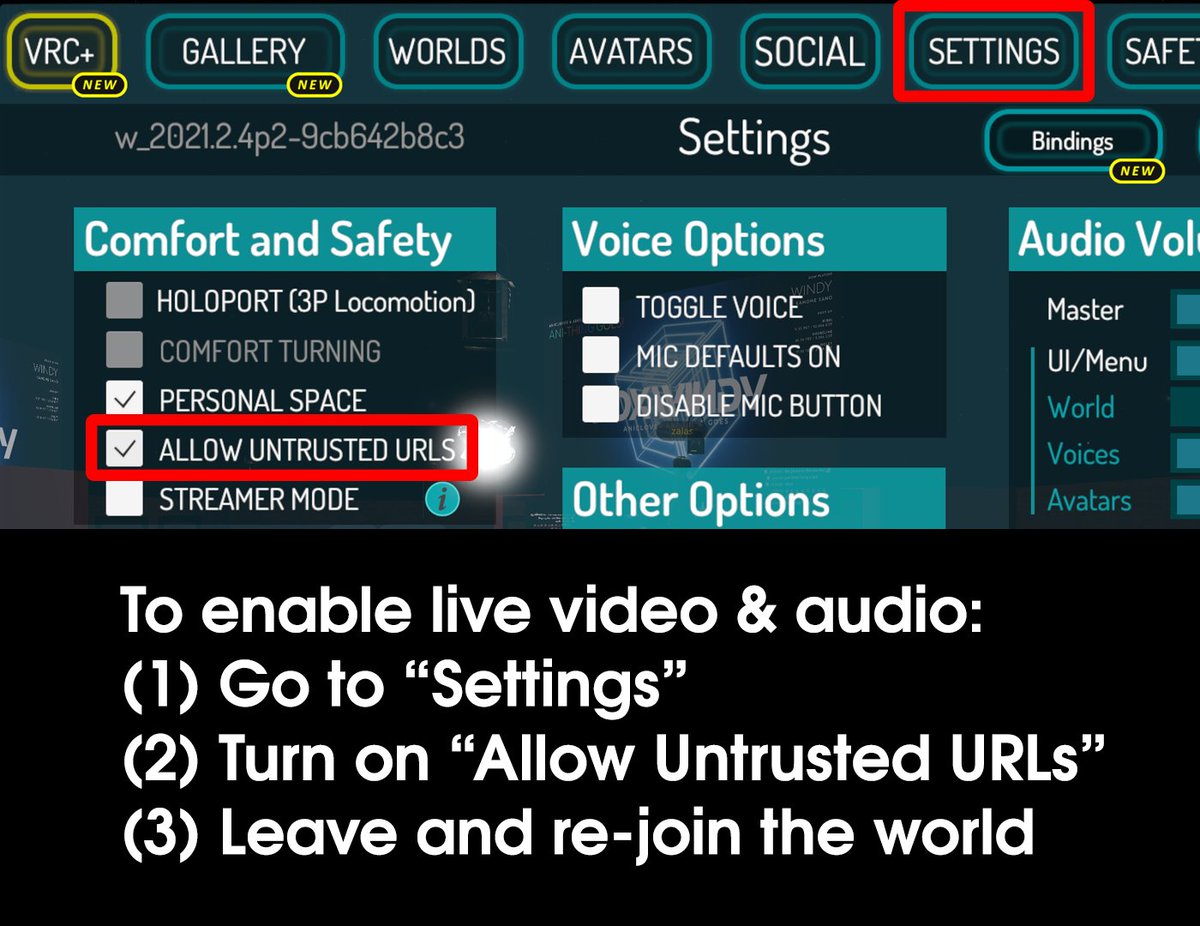 fleet fable
gaunt spade
https://pbs.twimg.com/media/E4nDA0cVUAAOS3r.jpg
fleet fable
gaunt spade
https://pbs.twimg.com/media/E4nDA0cVUAAOS3r.jpg
Yep
Urls from google drive and drop box don't even work on a normal pc video player
gaunt spade
https://dl.dropboxusercontent.com/s/n0i164n0osy6hxk/80hh.mp4?dl=0
that is a working quest url. If it doesnt play for you then you are setting something up wrong.
fleet fable
gaunt spade
https://dl.dropboxusercontent.com/s/n0i164n0osy6hxk/80hh.mp4?dl=0
that is a work...
Yes, it works, how did you get it to work!?
gaunt spade
exactly how I told you to
gaunt spade
get a public anyone can see link and paste it here
fleet fable
gaunt spade
get a public anyone can see link and paste it here

Google Drive
gaunt spade
well was going to change it for you but I only work in dropbox lol
 gaunt spade
😉
wraith jewel
Does anyone know if I make 2 identical copies of an avatar, Quest & PC and upload to same blueprint,
If I make an toggle when on PC, Will quest users see the same toggle?
Example: I toggle a sword in my hand
fleet fable
gaunt spade
https://dl.dropboxusercontent.com/s/airhq4f36ekf1rk/Lofi%28Copy%20and%20Paste%20...
It won't play for quest, it shows the picture on the screen when you load in but theres no video
gaunt spade
can you hear the audio?
fleet fable
no
gaunt spade
if you see stewie the video is loaded. If its not playing then something isnt right with the setup. But you do need to make sure you are using a quest ready material/shader for the render.
talking about my link but same with ur link
Standard lite works for the quest video render

 gaunt spade
🤷♂️ I use wolfe I have no idea how your player should be setup. I've also used ArchiTechAnon's player without issues.
fleet fable
gaunt spade
🤷♂️ I use wolfe I have no idea how your player should be setup. I've also used...
It doesn't work for autoplay but it works when I manually put the url in
gaunt spade
lol yeah something is wonky with the setup, i doubt its the video player.
you have a few hidden udon behaviors and an extra disabled avpro. The extra av component is sus which makes me wonder what else is attached that might be duplicated and not needed.
 gaunt spade
all good now?
fleet fable
I don't know, youtube videos autoplay but my one might not
I'm testing rn
Am I soppose to use the avpro vid player for it to work???
Cause the video wont auto play only youtube vids
gaunt spade
All the working quest players use it 🤷♂️
try this: https://vrchat.nishawolfe.com/prefabs/videoplayer
read the FAQ's especially:
"Is this video player Oculus Quest compatable?"
A free Synced Video Player prefab for VRChat. Updated for Unity 2019
fleet fable
Can you test it please https://booth.pm/en/items/2758684

KineL式VideoPlayer v1.1.2 2021/2/28 v1.0.0 初版 2021/3/1 v1.0.1 MasterOnlyの不具合があったため修正しました。 2021/3/2 Booth表記ミスを修正しました。 2021/3/11 説明文の表示を改善しました。 2021/3/28 Questの動画再生に関する追記を行いました。 2021/4/5 v1.1.0 Playlistのタブ機能と各種不具合の修正、及び軽量化 2021/4/28 v1.1.1 テキストが最前面に来る問題を修正 2021/5/28 Utility[Font
fleet fable
gaunt spade
try this: https://vrchat.nishawolfe.com/prefabs/videoplayer
read the FAQ's espec...
I already tried this, it doesn't work for me.
gaunt spade
it didnt work with your old links
fleet fable
fleet fable
I already tried this, it doesn't work for me.
Won't let me build and test with this
gaunt spade
naw, sorry... I'm not down to test another player.
tender aspen
wraith jewel
Does anyone know if I make 2 identical copies of an avatar, Quest & PC and uploa...
yes if the quest avatar is set up exactly the same (like the same gestures do the animation and it has the prop) then yes
 magic imp
On pc this avatar looks fine, but on quest it has scrambled uvs. The only difference between the two is the material on quest is set to standard lite and the textures are in astc 12x12 compression format. Any idea of what's making the model messed up on Quest?


 outer raft
Is there a way to test quest versions of worlds and avatars with an index? like launching vrc in some kind of quest mode?
fair tinsel
nope that is not possible because the quest is running Android
 pearl knot
Something yall might find pretty cool; i managed to create some rudimentary constraints that will work for quest using particles!
sweet tundra
Only issue is, constraints don't work on Quest avatars
pearl knot
thats exactly my point; these dont use constraints, they are an alternative that does work on quest
south lily
was about to say: animators
but particles ig works? (if im understanding particles correctly enough lol)
pearl knot
all particles, no animation required
sweet tundra
oh
 warped frigate
Yo is the standard shader on quest thing working for anyone on unity 2019 or has VRChat cracked down on it with the 2019 engine? Cuz if so that sucks.
gaunt spade
warped frigate
Yo is the standard shader on quest thing working for anyone on unity 2019 or has...
It is Standard-Lite that works on Quest.
warped frigate
Yeah i know but there was a glitch with unity 2017 and 18 that allowed you to use normal standard on quest which me and a lot of my friends use for hair etc.
Its better than having blocky rectangle hair
 tall hedge
Who wants to share games I need help I have no games on my oculus at all my brother rebooted it
 oblique tiger
tall hedge
Who wants to share games I need help I have no games on my oculus at all my brot...
oblique tiger
tall hedge
Who wants to share games I need help I have no games on my oculus at all my brot...
wrong channel
indigo topaz
Hello, I have upgraded to Unity 2019 for a Quest world update and so my SDK, everything works fine exept the build tab: It shows empty. Any idea why?

 sudden palm
indigo topaz
Hello, I have upgraded to Unity 2019 for a Quest world update and so my SDK, eve...
sudden palm
indigo topaz
Hello, I have upgraded to Unity 2019 for a Quest world update and so my SDK, eve...
I’m a creator for VRChat and I had that problem, I fixed it a few times just by editing the avatar config
indigo topaz
The avatar config? You mean the menu to ajust the rig, like chest-upperchest thingy?
sudden palm
Yes
indigo topaz
Ok, I will try this, thanks!
indigo topaz
sudden palm
I’m a creator for VRChat and I had that problem, I fixed it a few times just by ...
Ok, I tried it 3 times, and switching scenes as well. When there is no script I get this screen:

But nothing when I have one
sudden palm
You added the descriptor to the model??
indigo topaz
It's a world, and yes there is a descriptor on it
sudden palm
Ah
World wise hm— I’m sorry this is all I can do, let’s hope you did the world SDK
And not avatar SDK
indigo topaz
I'm using the SDK 2 and here is the script
 sudden palm
Oh uh— I use SDK 3 
indigo topaz
Ohh I see, I'm going to see what I can do to solve this but i have no clue lol, it's a weird issue 😅 Thank you for the help thought!
 worldly stone
anyone able to help with this xD ?
 wraith jewel
indigo topaz
Hello, I have upgraded to Unity 2019 for a Quest world update and so my SDK, eve...
wraith jewel
indigo topaz
Hello, I have upgraded to Unity 2019 for a Quest world update and so my SDK, eve...
What is the EXACT unity version you are using, and the exact version of the VRCSDK?
For Unity, you need to have 2019.4.29f1, other versions will cause you to run into various other problems. The SDK as of this message needs to be version VRCSDK3-WORLD-2021.08.11.15.16_Public
Old VRCSDKs that were made when 2018.4.20f1 (and other older versions) do not cooperate in newer versions like 2019.4.29f1
fair tinsel
what current problem you having
 twin wing
uhhh well its a whole bunch u tried watching tutorials on blender and unity
fair tinsel
yeah I'm aware of the basic process of creating avatars and how it's a lot
twin wing
dm?
fair tinsel
probably better for the questions to be posted here so multiple folks can answer
twin wing
oh ok ;-;
worldly stone
anyone able to help me?
 indigo topaz
wraith jewel
What is the EXACT unity version you are using, and the exact version of the VRCS...
indigo topaz
wraith jewel
What is the EXACT unity version you are using, and the exact version of the VRCS...
Hello, sorry for the delay: I'm using Unity 2019.4.29f1 and the SDK VRCSDK2-2021.08.04.11.23_Public because it's an older world I'm upgrading
wraith jewel
indigo topaz
Hello, sorry for the delay: I'm using Unity 2019.4.29f1 and the SDK VRCSDK2-2021...
you don't have any spawns in your scene descriptor
 indigo topaz
Oh yes I do, the list is just closed
wraith jewel
oh
id make your own spawn yourself then and try that
spawn in an empty add the scene descriptor yknow the ol way
delete the vrcworld prefab from ur scene if you do that
 long mesa
I just uploaded my avatar and was wondering how I could make it quest compatible too. It is basically just a mesh and has only like 3000 polygons
fair tinsel
but how many materials is it
long mesa
fair tinsel
but how many materials is it
enough within the limit
wraith jewel
: eye roll : : smhhvh :
 distant perch
Need help with my spooky world:
Okay anyone know how to add Qv Pens to Android builds WITHOUT BREAKING THE SDK2? x.x i nearly lost EVERYTHING last time i tried...
.
OR does anyone know HOW to add fog WITHOUT breaking the lighting ?? Thanks! ❤️
 gaunt spade
distant perch
Need help with my spooky world:
Okay anyone know how to add Qv Pens to Android ...
gaunt spade
distant perch
Need help with my spooky world:
Okay anyone know how to add Qv Pens to Android ...
So about fog...
- Unity's PP fog is a depthTexture overlay so distorting the light is what it does.
- Volumetric Fog requires the HDR Pipeline which we don't get to use.
- So your only option is particles.
Particle fog works, only if you take the time to set it up optimally. Particles hit performance hard if left unchecked especially on Quest. The particle system is also permitted to use transparencies (alpha volumes) so that adds to the performance hit. However, if you keep the particles low and maybe use a local as opposed to world setup, then it shouldn't be an issue. Here is a tutorial with good fog, the author also has an incredible FX asset on the store with the fog included if you would rather skip it https://www.youtube.com/watch?v=DvKRGwCImJ4
distant perch
gaunt spade
So about fog...
- Unity's PP fog is a depthTexture overlay so distorting the li...
Thanks so much! VERY useful information 🙂
 unreal garnet
Hi, does anyone know how to make a good water/ocean plane optimized for the quest 2?
gaunt spade
use a quad. and resist the urge to use a massive quad, split it up into smaller objects and only add it where it is needed.
Using multiple quads as opposed to one big one lets you benefit from occlusion culling if the landscape permits.
unreal garnet
Thank you!
unreal garnet
Hi again, in the builder section of SDK2 it says my "World uses unsupported shaders" even though I have checked every single game object and I am not using those shaders. Trying to upload like this leads to "Unity package upload failed"... How can I troubleshoot this?
south lily
check your console for errors
unreal garnet
It's telling me that not enough buffer space is available. What does that mean and how can I clear some up?
south lily
if the harddrive your unity is on is almost full. it will not have enough
unreal garnet
I've got 1.4 TB free
south lily
have you closed and reopen unity yet?
unreal garnet
yep
going to restart my machine next
Also when I click build it gives me "the following open scenes have changed on disk: assets/scenes/samplescene.unity Do you want to reload the scenes?" If I click reload it crashes, if I click ignore it lets me name the world but package upload fails
south lily
anything else in the console?
unreal garnet
Restarting my computer didnt help. The console seems to have 3 errors but the only one i can remotely understand is the not enough buffer space one.. but i do have the space. I'm thinking maybe this is an sdk issue?
south lily
screenshot?
unreal garnet
south lily
screenshot?
 south lily
youre on 2019.4.29f1, right? try detaching your world ID and reuploading the world on a new ID
south lily
yiu only need to detach
go to your scene descriptor (usually on the VRCWorld prefab) and there will be a pipeline component with a detach button
unreal garnet
I did, got similar errors as before, failed to upload
south lily
switch back to PC and then back to android (from build settings and not the SDK), other than that, i can only suggest making a new unity project and see if the issue persists
unreal garnet
I had this issue with a different world and I just gave up because I thought the water in the world just wouldnt work on quest
if u cant tell im a novice but ive been making worlds fine for months before this
I even "remade" that project and I was still having package upload fail
unreal garnet
I have sdk2. tried redownloading it a few days ago. Kind of worried that I haven't been deleting things properly/that there are duplicate files but I don't know how to figure out how to get exactly what I need to be able to upload again
south lily
youre technically supposed to update it without deleting stuff
but importing the sdk after wouldve replaced whats needed
is this issue only occuring on android or is it on pc as well?
unreal garnet
The build settings swap didnt fix the issue :/
havent tried pc, as i only use quest
south lily
oh - are you in mac?
unreal garnet
yeah. ik its controversial but its been working fine for my needs till now
south lily
ahhhhhhhhhhhhhh
ok so - there was a change in the unity 2019 sdk that i have been trying to figure out but it makes mac users unable to use it and have to upload stuff with the 2018 sdk and unity
unreal garnet
wait so is there any way I can upload these worlds ive got piling up
unreal garnet
is there a way to get the old sdk? i still have unity 2018 downloaded
south lily
but vrc stopped/never supported mac so I don’t know if any of these issues will be fixed
south lily
unreal garnet
is there a way to get the old sdk? i still have unity 2018 downloaded
i archieved the last few sdks for 2018
unreal garnet
so uh how can i access these archives
south lily
this
unreal garnet
I see a lot of letters and numbers how do i know what to pick to download
south lily
it should take you to the folder with the sdk2 unity package
unreal garnet
oh just a lil confused since it says 2021
south lily
oh ye. thats the release date
unreal garnet
i thought i needed the 2018 sdk tho
unreal garnet
gotcha my bad
south lily
the sdk linked above is the last one before the switch
unreal garnet
content successfully uploaded! you're a legend thank you so much
south lily
👍🏻
 gray sigil
Hey does anyone know how to make a quest version for an existing avatar?
sweet tundra
gray sigil
Hey does anyone know how to make a quest version for an existing avatar?
If you have the avatar files (in a legal way, no ripping), you install the Android modules for Unity, switch platform under build settings, make changes necessary (shaders, componenets (dynamic bones, audio, lights, physics, etc are not allowed), textures, optimisation (do it, requirements are in the docs)) and upload in the same method as a PC avatar.
If you don't have the files, you can't.
gray sigil
sweet tundra
If you have the avatar files (in a legal way, no ripping), you install the Andro...
Okay I got all of that done. Worked like a charm. Now the problem is to lower the number of polygons and I don't know how to do that
lament owl
Decimation is a low effort way, CATS blender plugin can help you do that. Cleanest is loop dissolve but thats labor intensive
gray sigil
Ahhh I see. Looks like i'll have to go all the way from blender lol
 glad root
gray sigil
Ahhh I see. Looks like i'll have to go all the way from blender lol
glad root
gray sigil
Ahhh I see. Looks like i'll have to go all the way from blender lol
your best bet for complex objects that arent completely made out of quads or things with either sketchy or really custom topology is to do retopology on the entire thing
wraith jewel
Can you test you world if you have unity set up for quest
gaunt spade
wraith jewel
Can you test you world if you have unity set up for quest
With the sdk no. It is possible to use air link to connect to Unity but that might have adverse effects on your upload so look into that at your own risk. Plenty of guides on how to use Quest with Air link for Unity.
wraith jewel
Ok thank you
unreal garnet
Hi, I'm trying to do indoor ceiling lighting and wondering what emissive shader works best with quest 2
im trying to enable emission on standard lite but the emission isnt producing light
fair tinsel
you would probably have to bake your lighting for that to actually have light
as emissive shaders only make it so they don't get affected by lighting
unreal garnet
hmm ok thanks
fair tinsel
also in general you'd want to bake your lighting to not have terrible performance on The Quest
 hearty finch
Heya, not sure if this is the right chat, but im wondering a few things if anyone could help me
- for some reason, the sdk says the polygon limits for models are 5000 for excellect, and 7500 for medium, isntead of what the vrchat webside says for their performance rating
- im trying to currently port a pc only to quest to use as a fallback model. I got the model all ready to go, polygon count and the sdk registers it as excellent rating yet when I upload it theres no option to set as fallback, even though there should be the crossplay button
Thanks again!
if it means anything, im still using the 2017 unity version instead of the newer 2019
fair tinsel
you need to be using Unity 2019 for that
hearty finch
once i swap to unity 2019 it should all work right?
and is there an easy way to port a 2017 project to 2019 easily?
fair tinsel
yes it would probably work better
hearty finch
and as for porting, i cant exactly just drag and drop stuff in right?
fair tinsel
not quite sure about a 2017 to 2019 migration as most everybody was 2018
how many avatars are you needing to bring over
hearty finch
just this one which im trying to make into a fallback
fair tinsel
VRChat
Migrating your project from Unity 2018 to 2019 LTS isn't as difficult as you might think! Here's a guide providing each step in detail.
hearty finch
sounds good, oh and an on related/unrelated note, I'm having an issue where in full body mode, when i bend down my avatar can only reach down to about under their knee, as the real floor gets in the way, any idea on how to fix that?
fair tinsel
no clue on that one as I have have not done full-body myself
hearty finch
back again, would updating from 2017 to 2019 also fix the polygon count not ligning up with what it says on their site?
fair tinsel
yes because you're using a SDK from before they did the polygon count upgrade using a 2017 version
 safe quartz
hi everyone, can someone tell me the maximum number of polygons allowed for a quest avatar please
because i think the help doc is not up to date
i think the hard limit is 2000 tri, am i right?
wraith jewel
safe quartz
i think the hard limit is 2000 tri, am i right?
There is no hard limit, but you can budget 20k tris until it becomes a very poor avatar, that becomes autoblocked for others on quest and makes others needs to manually show u
safe quartz
thank you
unreal garnet
Hello everyone, I really like the popular "movies" world where there is a huge tv always playing content, and I would like to put a similar entertainment system in one of my own worlds. How can I do this for quest? Is there an easy way to do this in the SDK like setting up a mirror or portal i.e not requiring much coding knowledge?
 zealous panther
unreal garnet
Hello everyone, I really like the popular "movies" world where there is a huge t...
zealous panther
unreal garnet
Hello everyone, I really like the popular "movies" world where there is a huge t...
well what i know is that booth sells pre made movie players
that you place in your world
e
zealous panther
unreal garnet
Hello everyone, I really like the popular "movies" world where there is a huge t...
KineL式VideoPlayer v1.1.2 2021/2/28 v1.0.0 初版 2021/3/1 v1.0.1 MasterOnlyの不具合があったため修正しました。 2021/3/2 Booth表記ミスを修正しました。 2021/3/11 説明文の表示を改善しました。 2021/3/28 Questの動画再生に関する追記を行いました。 2021/4/5 v1.1.0 Playlistのタブ機能と各種不具合の修正、及び軽量化 2021/4/28 v1.1.1 テキストが最前面に来る問題を修正 2021/5/28 Utility[Font
wraith jewel
How much is it to get someone to install venture bros. avatars?
unreal garnet
zealous panther
https://booth.pm/en/items/2758684
thanks so much for the link! any idea where I can download VRChat SDK3 (2021.08.04.15.07)? the video player requires that one but i can only get my hands on the current sdk3...
fair tinsel
it'll work correctly with the current SDK
zealous panther
unreal garnet
thanks so much for the link! any idea where I can download VRChat SDK3 (2021.08...
just check if its quest compatible
because i didnt i just said there are
gaunt spade
Unless you need live streams like twitch, all video players are quest compatible using the same method. It's the links and emission shader that isnt which is why all players require you to change the video shader and use a direct link. So your options are not limited to the one player that mentions Quest.
unreal garnet
So I ended up using the vrc unity video player component. Everything seems to be set up right except I get the error "Export Exception- System.DllNotFoundException: shell32.dll". Also, it says that "World uses unsupported shader 'video/RealtimeEmissiveGamma", but thats the shader the tutorial i used said to use.. is there another shader i ought to use so that I can use a video player in quest? I am using the latest sdk3 and unity 2019.4.30f1
south lily
you on a mac?
unreal garnet
yes
I have also tried uploading on the 2018 version of unity but that hasnt worked either
So from what I gather shell32.dll is a windows thing? Are video players just not supported for mac? I know technically mac isnt supported at all by vrc but I've been developing worlds thus far no problem on mine
south lily
no shell32.dll has been a recent plague on mac unity and im not sure how to solve it
but if the shell issue is on 2018 unity. then something very important changed
unreal garnet
south lily
but if the shell issue is on 2018 unity. then something very important changed
well its very weird, in unity hub i have the project set to 2018, i even duplicated it and added it as 2018 instead of downgrading, but when I open unity it still says 2019 both at the top and in the pipeline manager
i bet it would work if i could just get it to actually be 2018 somehow
south lily
did you set it to 2018?
unreal garnet
I did, I just tried to create a new project in 2018 and it opened in 2019. I just downloaded unity 2019.4.30f1 so I'm gonna restart my computer maybe that will help
its still doing it.. maybe i should delete my 2019 unity versions
wraith jewel
unreal garnet
its still doing it.. maybe i should delete my 2019 unity versions
you probably installed another unity in the same directory but unity hub still seees it as whatever version it recognized first
but yeah try deleting the other versions
unreal garnet
wraith jewel
but yeah try deleting the other versions
so I was able to uninstall unity 2019.3 but the uninstall button doesnt appear in the hub for 2019.4, it just has options to "Reveal in Finder" and "remove from hub"... any idea how i can delete it? and if that will even fix the issue/allow me to see my projects in unity 2018 again?
When I search my library for "Unity" a list of literally hundreds of files with the word unity in it pop up... surely i'm not supposed to delete them all to delete unity.. a little worried I'm gonna mess all my projects up
wraith jewel
unreal garnet
so I was able to uninstall unity 2019.3 but the uninstall button doesnt appear i...
delete it from the folders manually and then remove the connections from the hub
gaunt spade
if you are on windows you can also do add/remove. I only use the hub but sometimes the option to remove a version can only be found in windows add/remove. its super weird.
unreal garnet
I'm on mac so its the wild west out here
unreal garnet
wraith jewel
delete it from the folders manually and then remove the connections from the hub
delete unity from which folders? like i said theres so many files on my computer when i search "unity" do i delete them all?
nvm silly me its under applications hope this works
south lily
ye mac uninstalls and reinstalls suck really bad
there should be a version text file that tells you what unity is 2019 or not
in the column
unreal garnet
ugh this is bad even after deleting unity and the hub from applications and then reinstalling only unity 2018 it still shows me as having 2019 and only letting me open things in 2019
south lily
i mean. at this point. get rid of all unity and only install 2018.4.20 or really any 2018 unity should work
unreal garnet
thats what im saying i did which is why its weird. anyways now it seems to be trying to open in 2018 but I'm getting: "Project has invalid dependencies:
com.unity.package-manager-ui: Package [com.unity.package-manager-ui@2.2.0] cannot be found. A re-import of the project may be required to fix the issue or a manual modification of /Users/***/Desktop/Movie Theater/Packages/manifest.json file." Then if i continue with the import it crashes/freezes
south lily
https://unity3d.com/get-unity/download/archive dont download the hub

Unity
Unity is the ultimate game development platform. Use Unity to build high-quality 3D and 2D games, deploy them across mobile, desktop, VR/AR, consoles or the Web, and connect with loyal and enthusiastic players and customers.
south lily
unreal garnet
thats what im saying i did which is why its weird. anyways now it seems to be tr...
i think thats a library folder change. meaning its wanting to use unity above 2018
try making a brandnew 2018 project and move all the assets from the original (like the column folder) and put it into the new 2018 project
unreal garnet
kk I'll try that thanks
unreal garnet
so im rebuilding in 2018 now but when i search for the vrc unity video player component it isnt there... but it was before!! agh
unreal garnet
im trying use the normal video player component but now realizing that the vrchat sdk drop down at the top with the build menu is missing so I think somethings wrong with my sdk.. but i have to use this old particular sdk since im on mac.... hmm
south lily
check console
unreal garnet
oh boy
unreal garnet
south lily
check console

I think I'm just out of luck it seems like unity 2018 no longer supports the vrchat sdk3
that i need to use since im on a mac
or wait is there an older version of sdk3 as well that i need to use since im on a mac?
south lily
yes. but i still have no idea what youre console says lol
south lily
this
south lily
ye. sdk first then udonsharp
unreal garnet
first i've gotta delete it from my project folder right? is deleting sdk3 any different from deleting sdk2
south lily
um. i would just straight import the sdk first and it should overwrite what it needs to overwrite
unreal garnet
my control panel is back 😄
unreal garnet
Someone in a youtube comment section said quest users can only see video in players that is from a direct link i.e. the url ends in .mp4 or the likes. How can I get links like this/host my videos so that they have links like this I can use (for free preferably)?
gaunt spade
?dropbox then google dropbox direct link 🙂
south lily
or resolving url tactics
unreal garnet
hmmm so i uploaded my .mp4 to dropbox and put the share link in the vrc unity video player component but it still isnt working
gaunt spade
Zapier
Read or Download How do you Generate a Direct Download Link to Share a Dropbox File? from our How to Do Anything in Apps e-book for FREE and start learning today!
unreal garnet
Thanks! alrighty so I've got my video technically working through direct dropbox link, but in the world it freezes every fifteen seconds or so for 5 seconds before continuing. My internet connection is fast, maybe I've made the display too large?
gaunt spade
Resolution plays a part, sometimes the video sync is the issue as well.
if you disable automatic sync the freeze will stop or should.
gaunt spade
Ive not looked into how the player functions but the break tells me there is no buffer or the buffer is sht (only with direct links), if you stream directly from youtube there is no issues that i have found. but that doesnt work on quest
on the video component around where you added the link in the editor should be an automatic sync check box.
unreal garnet
oh kk i'll check that thanks
not seeing an automatic sync box, closest thing i see is "auto play"? im having to use unity 2018 and a particular version of the sdk3 since im on mac
gaunt spade
avpro?
gaunt spade
not sure sorry, the sync i know is at the top of the component on avpro.
unreal garnet
is avpro the one that costs like 500$
gaunt spade
no its another free component. Um ArchitechAnons free player uses it as does Wolfe's free player
unreal garnet
gotcha. im guessing ive gotta dl them online and then import?
gaunt spade
https://vrchat.nishawolfe.com/prefabs/videoplayer
https://booth.pm/ja/items/2536209
not sure how the setup with architech goes, but you basically do the same tweaks to make either one play direct links for quest. Use the Direct Link and change the shader (for the screen) from realtime emission to standard-lite.
gaunt spade
both do require UdonSharp so if you dont have that make sure you install it before those
 green estuary
i dont get it
 zealous panther
green estuary
i dont get it
zealous panther
green estuary
i dont get it
you are not allowed to use that shader i think
arent there like more of those shaders that are in mobile but will give errors anyway
for me only 3 worked i think or something
green estuary
zealous panther
you are not allowed to use that shader i think
but its the only one that looks good😭
sweet tundra
green estuary
i dont get it
There are world shaders left over from when the two SDKs were together, that is one of them.
Transparency isn't supported on Quest avatar shaders because of performance.
green estuary
sweet tundra
Transparency isn't supported on Quest avatar shaders because of performance.
that is just not true. Mobile/Particles/Additive provides transparency. Just add a different blending mode from what i want.
sweet tundra
green estuary
that is just not true. Mobile/Particles/Additive provides transparency. Just add...
It provides transparency... which kills mobile performance. It's blocked on Quest VRChat avatars.
I think the devs know what they're doing.
 arctic dome
When Will the dynamic Bones come to quest
fair tinsel
never has there to intensive but vrc replacement for them physics bones is fast enough that they're considering it for the quest but it's a maybe
unreal garnet
anyone know how I can turn into a glass window in unity?
with quest shaders
turn a cube* into a glass window
south lily
you can use standard shaders for quest worlds for windows
unreal garnet
oh ty!
 mighty monolith
is there any kind of tool for comparing scene hierarchies? would be very useful for quest development
gaunt spade
if you develop in windows first and just clone it when you are done its identical. there is nothing for unity specific for comparing hierarchies. You could just open both projects at the same time. OR maybe try https://github.com/JordoVR/EasyQuestSwitch/releases which lets you do quest and windows from the same project so no hierarchy management.
GitHub
EasyQuestSwitch is a Unity editor tool developed for VRChat world creators, it can automate changes to components within a scene as soon as the build platform is changed from PC to Android (for Ocu...
Either way its the same amount of work. EQS doesnt speed anything up just eliminates the hierarchy management part.
mighty monolith
thanks. i have the quest build in a separate project and did something and the sync got messed up. tried manually going thru the hierarchies but havent found the problem yet and its painnnnn.
gaunt spade
If that happened to me ied just delete the quest project, reclone the windows one and convert the clone to quest. That way I just need to sort out any shader differences.
mighty monolith
oof. i have a lot of lighting changes there to make the world look like the pc version without post processing
unreal garnet
does anyone know where i can buy like a terabyte of prefabs
unreal garnet
How do some quest worlds fit so many prefabs while I can't put nearly as much stuff in my world for 50mb?
fair tinsel
crunch compression on the textures helps
and potentially using lower-resolution textures
south lily
specific compression. better mipmapping, and other stuff
like im currently in a self compition to get a 35 mb world under a mb while still retaining original quality and it is possible.
unreal garnet
hmm interesting
unreal garnet
So I've been able to get a 7 minute video to play through the sdk3 vrc unity video player using a direct link to the file download from dropbox. I want to stream a movie but the file doesn't fit in the 2gb dropbox gives me for free. Is there any way to have working video stream on quest using something other than dropbox? Youtube link and google drive direct DL (sharing enabled) don't seem to be working...
 iron hare
does anyone know the absolute max size a world can be before it can't be made quest compatible
south lily
iron hare
does anyone know the absolute max size a world can be before it can't be made qu...
49.99 mb
iron hare
thanks!
 mortal estuary
Crunch compression is good
Plus if you add music I recommend forcing it to mono. It cuts filesize down and it honestly sounds better for VR for me.
 blissful verge
i recently (basically today) updated my world to udon the pc build uploaded just fine but i cant upload the quest build for some reason as the builder doesnt display anything at all and dunno how to fix it and yes i did report the SDK and restarted unity multiple times
 wraith jewel
blissful verge
i recently (basically today) updated my world to udon the pc build uploaded just...
wraith jewel
blissful verge
i recently (basically today) updated my world to udon the pc build uploaded just...
check the unity error console it will tell you the problem most likely in red errors
click on the bar at the bottom to actually open the console
blissful verge
console is empty and shows no errors
wraith jewel
blissful verge
console is empty and shows no errors
fuck uh delete the gameobject that is the spawn assuming you didnt add it onto a important world object then in that case just delete the scene descriptor and pipeline scripts and the udon behaviors for jump and speed etc
and then open the console again
and then if it needs you to make it again do that manually dont use vrcworld
just spawn an empty and add the scene script on that
blissful verge
i tried putting in the prefab again didnt work
tried it manually didnt work
builder is still empty
wraith jewel
blissful verge
builder is still empty
I guess you will have to trace your steps back to the point when your project was working, undo any changes you made and delete anything new you added to see what may fix it
hopefully you made a backup but I dont think you have
opal hill
fair tinsel
and potentially using lower-resolution textures
yeah i would start with your textures. many times a material comes with multiple 1+ Mb images that A you don’t even need and B can easily reduce to 200kb without any quality loss.
unreal garnet
Anyone know if there is any way to hook vrchat worlds up to spotify playlists? anyone know if this sort of thing is in the works?
 umbral socket
VRChat is able to stream videos (or music) via video players. But we wouldn't be able to stream something like spotify, unless it was streamed through a third party
unreal garnet
umbral socket
VRChat is able to stream videos (or music) via video players. But we wouldn't be...
I'm developing for quest and been using VRC Unity Video Player to stream. So far only dropbox direct download links have worked, but I am out of dropbox storage space. Any idea how i can find download links for things that are already being hosted that would work with the quest
even if its public domain type stuff, im not trying to violate copyright stuff its just annoying that rn i have to host everything myself
umbral socket
unreal garnet
I'm developing for quest and been using VRC Unity Video Player to stream. So far...
What a lot of people do is use videos from youtube - there's lots of great public domain music to be found there
Though you'd also be able to stream any other music you like - because it's a livestream, and not an actual part of your world.
I'm not very familiar with video players, but there's some prefabs that have playlist features built-in. For example https://architechvr.gumroad.com/l/protv
unreal garnet
Is videosync on quest possible? if so how can it be implemented
also how the heck can I get baseboards to emit light in unity so my room looks all futurey
ive been doing everything with point and directional
south lily
unreal garnet
also how the heck can I get baseboards to emit light in unity so my room looks a...
like baked emissions or bloomy?
south lily
unreal garnet
Is videosync on quest possible? if so how can it be implemented
you set up a sync float with the video time between players. unless you are specifying another issue
i highly suggest checking out pro tv as there will be eventual plugins that will include jinnai and maxpar for youtube link resolution on quest
along with sync
unreal garnet
oh ok ty
 gritty lynx
Does anyone know any cool gimmicks like ex:particle follow, playspace because I want to do more unique quest avis
south lily
someone was making a playspace mover for quest that made quest users look like they had full body but i can’t remember who
gritty lynx
Ik who it is and use their prefab, Franada. I was just wondering if there’s anything else that ppl can use for their avis @south lily
 grand shell
please gimme some help
unreal garnet
I'm experiencing an issue with my SDK where the control panel wont show up in the dropdown from Vrchat sdk like usual so I can't build my world.. In the past I solved this by replacing my sdk and unity versions but that isn't working now... the issue first happened when vrchat most recently updated the unity version, which for some reason caused mac developers sdk options to disappear like this. I had been using older versions of both unity and the sdks just fine until yesterday... Now I've got no idea how to fix this.. help please!!!
south lily
unreal garnet
I'm experiencing an issue with my SDK where the control panel wont show up in th...
check console?
unreal garnet
theres 200 yellow and 200 red things ugh
south lily
do red
unreal garnet
i would try rebuilding from scratch except when i just tried a blank project and brought in the sdk the top VRC SDK menu button wouldnt show up at all
it seems like most of my errors end in "missing assembly reference"
I had deleted the sdk from the project files and reimported in hopes of retrieving my build menu, maybe those errors are from when I first opened the project... reimporting didnt help thoug
south lily
hit clear in the console and send screenshot of console red errors
unreal garnet
south lily
hit clear in the console and send screenshot of console red errors
this is only a few of them
 south lily
looks like your library forgot to generate what its supposed to generate
does closing and reopening reset the library errors at all?
south lily
ok so... im semi hesitent to say “delete the library” in hopes unity will. replace whats missing. but i think itd b safer to make a new project and drag and drop everything from the old project into the new one
unreal garnet
I'll try that, but like I said I can't even get a blank project to show the sdk when i bring it in
well, the contents show in my assets but the menu button to build wont appear...
I've also tried restarting my computer many times throughout but didnt help
south lily
was the project working before?
unreal garnet
It was originally another project, I duplicated it, renamed it, changed a lot of stuff, and then found i couldnt build it
The original project i was able to build just fine, not sure at what point the build menu disappeared
I see how that might be problematic, but the sdk is giving me issues regardless even in an empty new project
unreal garnet
south lily
was the project working before?
update: I downloaded unity on my windows partition and everythings working fine now thanks for your help
 lone quarry
I wanted to make a Vrchat game. But Idk how really. And It seems like hard work.
south lily
it gets easier after awhile depending on how patient you are
youtube and unity docs are your friends
unreal garnet
im having a hard time finding tutorials on how to do specific things like allow an in game toggle to rotate skyboxes
umbral socket
well, you'd have to either control the offset parameter in the skybox's material, or you'd physically rotate the sky box (or sky sphere), if it were on a mesh.
different ways to approach it, and it depends on your experience with.. toggles, animators, or udon
 tough kestrel
Hey, I'm trying to port one of my oldest maps over to Quest, and I'm just learning now that Standard Lite doesn't support realtime lights. Any workaround for that?
The world uses flashlights.
south lily
could stay on normal standard but im pretty sure standard lite allows rt lights
tough kestrel
Weird, since I switched everything over to standard lite, everything just ignores any realtime lights
south lily
could use a projector for flashlight. but as long as the map is relatively optimized. yiu should be able to get away with just standard
tough kestrel
Good to know, I'll play around with it! Thanks
tough kestrel
So, uhh.. Is there a tool out there to change shaders on materials en masse?
wraith jewel
tough kestrel
So, uhh.. Is there a tool out there to change shaders on materials en masse?
You can search ur projects tab with "t:material" or "t:materials" one of the 2 and then select one material and shift select one far away to select all of them inbetween and then change the shader of them all
not the best way of doing things but its something
tough kestrel
Yeah, that's been my go to. I really wish you could filter by in scene
tough kestrel
In case anyone else runs into this, I just flipped everything back to Standard, made sure my occlusion culling was up to snuff, and everything runs A-ok
Without gutting the world too much, I got the PC (105Mb) version down to 49Mb for Quest
lament owl
If you aren't using crunch compression, switching textures to ASTC cuts them down by half too
gaunt spade
tough kestrel
So, uhh.. Is there a tool out there to change shaders on materials en masse?
late but "NG Shader Finder Free" allows for converting mass shaders. the free version is limited to about 8 per interaction the paid version will do them all. I just use a macro with the free version because the confirmations pop in the same location. You can find it in the asset store.
tough kestrel
gaunt spade
late but "NG Shader Finder Free" allows for converting mass shaders. the free ve...
You are a god among men. Thank you!
tough kestrel
lament owl
If you aren't using crunch compression, switching textures to ASTC cuts them dow...
I'm a crunch compression man, but thanks for the tip, that's good info!
 sweet tundra
wraith jewel
sweet tundra
wraith jewel
You have too many tags.
wraith jewel
Hi, ive recently uploaded a fallback. I have uploaded it both to android and windows, but it will not show up as a custom fallback. Is there any reason for this?
(It is under 10k polygons.)
 crisp lodge
wraith jewel
Hi, ive recently uploaded a fallback. I have uploaded it both to android and win...
crisp lodge
wraith jewel
Hi, ive recently uploaded a fallback. I have uploaded it both to android and win...
What is the avatar rating with bones etc? Can you show it in the sdk pre upload so we can see the stats?
wraith jewel
crisp lodge
What is the avatar rating with bones etc? Can you show it in the sdk pre upload ...
It’s just this https://yuuboku.booth.pm/items/3284267

showavatarrobotは、VRChatのアバターとしての利用を想定した3Dモデルです。このモデルは、パフォーマンスランクの関係で相手から自分の本来見せたいアバターが見えなくなっている場合に、本来のアバターを表示(Show Avatar)することを促すフォールバック(代替)アバターとして設計されています。 モデル及びテクスチャはMITライセンスで公開されており、改変しての使用も可能です。
crisp lodge
wraith jewel
It’s just this https://yuuboku.booth.pm/items/3284267
Ok, Could you still go show the SDK where you have the build button?
wraith jewel
One sec, I gotta open the file
wraith jewel
crisp lodge
Ok, Could you still go show the SDK where you have the build button?

its been uploaded to both platforms, twice to quest
crisp lodge
It should be able to be used,
What does it say in game?
 wraith jewel
it just doesnt show up
crisp lodge


 umbral ember
 unreal garnet
Anyone ever come across this error before?

Oh ok thanks. Downloading visual studio now 👍
ooh good idea
Okay I made the change to the code and saved the notepad file, the error changed to this

and keep UI.Text instead of GUIText?
that didnt work
also it already said using UnityEngine at the top
using UnityEngine;*
like this?

ive just been saving the notepad file is there something else i need to do to apply the changes
i keep clicking clear but the most recent error i sent is still there
its weird somehow a second notepad window keeps opening
but i only opened it once
just restarted my project and the code is updated but error persists
thanks anyways
 silk harness
Does any one know why standalone quest can't load videos or images from an external source in VRChat (like the internet) but hardcoded / embedded videos will work however? I just want to know the core issue. Is it kind of security realted things?
unreal garnet
Eeek anyone ever come across this error right after starting a new Unity project?

 fallen fossil
I haven't seen in the rules that asking for a specific development isn't allowed (Sorry, I'm new here lol) I'm just wondering if anyone can take on a request possibly?
fallen fossil
Alrighty, thank you
tough kestrel
Am I just crazy, or do stations not work on Quest? (Primarily PC user, trying to optimize/make maps cross platform)
south lily
silk harness
Does any one know why standalone quest can't load videos or images from an exter...
http request = security for android and unity request.
ytdl = ytdl is not on quest so there is no complex link resolving method
south lily
tough kestrel
Am I just crazy, or do stations not work on Quest? (Primarily PC user, trying to...
just spent 4 days working with stations and attempting to make them bend to my will but i an confirm that stations do work on quest
silk harness
south lily
http request = security for android and unity request.
ytdl = ytdl is not on qu...
Thank you very much for your reply. So you mean If I develop video player which only use http request then every user with standalone quest can enjoy the external sourced video, right?
south lily
otherway around
silk harness
ah... opposite....
That means ytdl should be equipped with quest?
So I should make quest version of ytdl.
tough kestrel
south lily
just spent 4 days working with stations and attempting to make them bend to my w...
Perfect, thanks! I'll do some digging to see what's stopping them from working in my case...
south lily
silk harness
ah... opposite....
raw data with https will work
south lily
silk harness
So I should make quest version of ytdl.
with a offshore resolving method - yep
silk harness
south lily
with a offshore resolving method - yep
Thank you very much!!!!!!!!!
silk harness
south lily
raw data with https will work
Oh my god!!!!! you are perfect.
I tested video at vimeo pro in https://vrchat.com/home/launch?worldId=wrld_985acb34-cc17-4b5a-85ae-04ade5195059&instanceId=0

Compare and contrast the free and most common video players․ (Source of distribution noted) - 無償かつ最も一般的なビデオプレーヤーを比較検討できます。(配布元の記載有)
AVPRO standard player works with standalone quest2.
vimeo pro provide direct links to videos(https://vimeo.zendesk.com/hc/en-us/articles/224823567-Direct-links-to-video-files)

Vimeo Help Center
Vimeo Pro members and higher have access to the direct links to their converted video files, which can be used to download or play videos hosted on Vimeo through a third-party player or web page.
...
The test has been successful with https, vimeo pro direct link for video play(not download). But new comer sync part is still problem.
I will check with other players in Video Player Showroom by techanon.
south lily
good choice
https://zapier.com/learn/how-to/generate-direct-dropbox-link/ this may help as well
Zapier
Read or Download How do you Generate a Direct Download Link to Share a Dropbox File? from our How to Do Anything in Apps e-book for FREE and start learning today!
silk harness
south lily
https://zapier.com/learn/how-to/generate-direct-dropbox-link/ this may help as w...
God.... thanks a lot!
 jovial kindle
iron hare
jovial kindle
iron hare
k so i'm trying to make my world quest compatible but its like 70mb. if i turn ever poster i made with thin cubes (28) into planes do you think i can shave off that 20mb i need to get it down?
wraith jewel
iron hare
k so i'm trying to make my world quest compatible but its like 70mb. if i turn e...
im pretty sure that will do prettymuch nothing, but if you want to have a better idea of whats taking all the storage space use this: https://github.com/oneVR/VRWorldToolkit/releases/tag/V2.0.0

GitHub
After successfully importing the release unity package the toolkit menu will appear in the Unity top bar as VRWorld Toolkit - If it does not, check Troubleshooting for common problems and solutions...
whenever you build and upload (or attempt to and fail) it makes a report detailing what is what filesize
also i'd recommend making worlds in Blender, it seems like you are making them entirely in Unity which is not the best practice but yknow it still works obv
iron hare
thank!
 deft stone
Anyone know how to fix my emote wheel on the quest 2, I can open the Main wheel but can't access anything
 gloomy parcel
why are there shaders in VRChat Mobile that you still cant use on avatars.
why includthem with the SDK3 Avatar SDK
Diffuse dosen't even seem to render correctly. and Matcap Lit wont let you upload it.
wraith jewel
gloomy parcel
why are there shaders in VRChat Mobile that you still cant use on avatars.
they are just more optimized alternatives for world shaders
Well matcap lit should work fine
and diffuse
actually now that i think about it why tf is lightmapped and the particle shaders even bothered to be included in the vrcsdk for avatars
I mean I guess you could use them on PC avatars but i think they should seperate the ones you cant use on quest avatars into a different catagory to avoid confusion
sweet tundra
wraith jewel
actually now that i think about it why tf is lightmapped and the particle shader...
Leftovers from when the two sdks were one sdk
wraith jewel
ah ok
 olive zinc
hello, is there any built-in way to show the fps on the quest?
sweet tundra
olive zinc
hello, is there any built-in way to show the fps on the quest?
Opening the quick menu will show your FPS in VRChat
olive zinc
🤦♂️ , thanks!
 languid zealot
hi all - i'm part of the org team of MIT reality hack, one of the world's biggest AR/VR hackathons, and i'm looking for some folks to help me teach people to build vrchat worlds at reality fest, the VR hackathon we're running this weekend!
i'm relatively new to the team and can tell you that it's a fantastic community - we have so much fun together, and there are some really talented XR industry people involved who have taught me a ton about worldbuilding and VR event design (we've built custom interactive venues to make it feel like a real--and sometimes surreal 😉 --hackathon). so excited to bring some more people on board to help us bring this same spirit to our participants!
if this sounds like fun to you, you can fill out this form, or just shoot me a PM - whatever's easiest ☺️

MIT Reality Hack Mentor Form
wraith jewel
are they announcing the quest pro or the quest 2 plus on the 28th
make your bets now
wraith jewel
so im not baking any lights for my quest world but most of the map is just black.
Yet it looks fine in unity.
 patent zenith
Thanks
wraith jewel
Super power cute boops you face
 vagrant schooner
wraith jewel
so im not baking any lights for my quest world but most of the map is just black...
vagrant schooner
wraith jewel
so im not baking any lights for my quest world but most of the map is just black...
Perhaps the texture format or compression type you're using isn't supported on Quest
 toxic quail
Heyo. When I change build target to android the lightmap seems to have gone super compress it became pixelated so I tested a new scene and the problem still presist

Is there any setting that I miss out or it has gone whack during the conversion?
umbral socket
toxic quail
Is there any setting that I miss out or it has gone whack during the conversion?
That's a result of the default compression method used for android. You can change it to ASTC 2x2 to reduce artifacts
toxic quail
umbral socket
That's a result of the default compression method used for android. You can chan...
Ah thanks appreciate the reply ✨
 pure tusk
Hey I was working on making a world quest2 compat is it true that there are no shaders that support emissions?
 craggy marlin
Just FYI bootcamped Windows on my 2015 iMac worked for uploading Unity VRC world, as does Udon AVPro pulling vid from Vimeo Pro on Quest 2.
Audio and video are slightly out of sync (audio is a little early) and get glitches every now and then. All ears if anyone has any tips on that.
Lastly, does anyone know if it’s possible to livestream into the Udon AVPro for Quest? I’d be happy with just audio if had to.
 south lily
craggy marlin
Just FYI bootcamped Windows on my 2015 iMac worked for uploading Unity VRC world...
south lily
craggy marlin
Just FYI bootcamped Windows on my 2015 iMac worked for uploading Unity VRC world...
vrcdn and technically twitch are streamable on vrcquest, i highly recommend getting vrcdn as doing the twitch way is super jank
craggy marlin
south lily
vrcdn and technically twitch are streamable on vrcquest, i highly recommend gett...
Awesome thank you for that!
 wide holly
pure tusk
Hey I was working on making a world quest2 compat is it true that there are no s...
wide holly
pure tusk
Hey I was working on making a world quest2 compat is it true that there are no s...
worlds can use emission just fine
but you won't be able to have bloom as post processing cannot be used in android worlds
 barren wing
wanted to make a keypad for quest users that they can locally interact with to toggle objects?
I know there are prefabs for sdk3 keypads but the UI elements dont show up for some quest users
barren wing
nevermind i think i got my answer
 pulsar parcel
particle with negative velocity/gravity i think makes a springjoint like effect on quest
i dont really remember, someone told me a bit ago but i didnt care to listen that well :P
wraith jewel
Dunno if it's useful but @slow girder or some of the VRChat team could this be helpful at all for quest development of the game in any way??
https://uploadvr.com/quest-2-application-spacewarp/
To quote part of the site "Quest headsets will get a new feature called Application SpaceWarp next week, letting apps run at half framerate by generating every other frame synthetically"

Quest headsets will get a new feature called Application SpaceWarp next week, letting apps run at half framerate by generating every other frame synthetically.
Maybe for frame rates?
 slow girder
Definitely looks interesting, we'll see how it goes
wraith jewel
id take more fps for a little bit extra visual wonkage
 rich epoch
hi
wraith jewel
slow girder
Definitely looks interesting, we'll see how it goes
Sorry for late reply, but I was wanting also to stare it should let things run smooth for many quest applications, so I figured it's something u and the team may be able to check out
 broken crow
wraith jewel
Dunno if it's useful but <@70347370923040768> or some of the VRChat team could t...
broken crow
wraith jewel
Dunno if it's useful but <@70347370923040768> or some of the VRChat team could t...
Isnt this like real-time frame interpolation? Sounds like converting 30 fps to 48 fps on the fly
wraith jewel
broken crow
Isnt this like real-time frame interpolation? Sounds like converting 30 fps to 4...
Possible but I don't know for a fact
sweet tundra
I think it is but really complicated so you have more performance than just doing that
And also from 36 to 72 instead
or whatever fps the app targets
broken crow
Ive seen something like this on a website, 2 scrolling pictures had different frame rates, 30 fps and 144 fps. Another test did both the scrolls at 30 but one had used interpolation
sweet tundra
I'm fairly sure that Oculus already does this on desktop
broken crow
The scroll that used interpolation was still actually 30 fps, but the interpolation made it look like 90 fps
sweet tundra
Interpolation is magical (unless used to upscale anime to 60fps)
broken crow
Ive seen it used on lego stop motion before and i saw little to no artefacts in the interpolated version
sweet tundra
Most interpolation is intended for use on real-life video
As in: No smear frames, a constant frame-rate, etc
broken crow
Yes
sweet tundra
Which stop motion would have
wraith jewel
Umm dynamic bonesss on quesssttt???
Soooonnn???
I'll literally pay 200 dollars for that lol
pulsar parcel
wraith jewel
Umm dynamic bonesss on quesssttt???
animate fake dynamics for your avatar, or hope physics bones make it on quest when avatar dynamics are released
 molten marlin
does anybody know how to upload a world in the quest 2 using unity ??
im trying to make a world but since i dont have permission to upload i dont know how to see my world on the quest 2
wraith jewel
the thing is anykind od dynamic bones on quest would kill performance even if optimised there is currently a way to make things move and flop on avatars tho
wraith jewel
molten marlin
does anybody know how to upload a world in the quest 2 using unity ??
you have to switch your build project from windows, TO android. Android builds uploaded to VRChat will be accessible by Quest users
 bold hare
Why does quest not have access to the camera feature. it would be so nice to actually be able to take pictures with friends
fair tinsel
they're adding the camera next update
pulsar parcel
fair tinsel
they're adding the camera next update
Camera is coming to the Quest version of VRChat in our next major update!
Seems like it'll come next big update, so most likely not alongside small patches that may come next.

fair tinsel
fair but at least they announced it's coming out
 potent drift
I don’t know about you, but I’m pretty psyched for the new quest camera
unreal garnet
Hi quest devs, I saw there was a recent update to vrchat and I noticed I was able to enter worlds over 50mb! Does anyone know if all of the particle shaders are still broken for quest avatars?
south lily
they were never broken afaik.
pulsar parcel
south lily
they were never broken afaik.
they turned black when used on particles in game
pulsar parcel
unreal garnet
Hi quest devs, I saw there was a recent update to vrchat and I noticed I was abl...
i don’t think that’s been fixed sadly, but you could try the legacy particle shaders if making a world
if using on an avatar, i don’t think there’s an alternative
south lily
interesting... sounds like a weird gi issue but if its happening everywhere then I guess 🤔 thats an issue
 indigo chasm
Hey so It's not letting ig some oculus players get on Vrchat cause it goes like it's about to open up but then closes.
 lament locust
indigo chasm
Hey so It's not letting ig some oculus players get on Vrchat cause it goes like ...
lament locust
indigo chasm
Hey so It's not letting ig some oculus players get on Vrchat cause it goes like ...
Yea I’ve been experiencing that since yesterday
Will it need a whole new update just for the people that can’t get on just to be fixed?
I’m only guessing
wraith jewel
lament locust
Yea I’ve been experiencing that since yesterday
VRChat support might know about it, can make a ticket to them #vrchat-support
pulsar parcel
indigo chasm
Hey so It's not letting ig some oculus players get on Vrchat cause it goes like ...
need both controllers connected
https://vrchat.canny.io/open-beta/p/1144-quest-crashes-on-launch-with-disconnected-controller
 lament locust
wraith jewel
VRChat support might know about it, can make a ticket to them <#3721428544302612...
lament locust
wraith jewel
VRChat support might know about it, can make a ticket to them <#3721428544302612...
I sent a support message the day I realized that the stuff was happening
lament locust
pulsar parcel
need both controllers connected
https://vrchat.canny.io/open-beta/p/1144-quest-...
Wait could this be the reason why I can’t get on I only have one controller because my other one broke
vagrant schooner
lament locust
Wait could this be the reason why I can’t get on I only have one controller beca...
You could try launching VRChat with no controllers connected or using a gamepad
I've heard those options work
Not great that you have to do either but ya'know ...it's VRChat so
lament locust
vagrant schooner
You could try launching VRChat with no controllers connected or using a gamepad
With the gamepad part could it be a Xbox controller?
pulsar parcel
lament locust
With the gamepad part could it be a Xbox controller?
if its one of the xbox controllers that supports bluetooth yes
vagrant schooner
pulsar parcel
if its one of the xbox controllers that supports bluetooth yes
Or if you have a USB C to USB A-in/female adapter then you could use a wired one
lament locust
Yes it works! Thank you so much!
 sterile mural
You couldnt run a micro usb from the controller to a usb c to the headset @vagrant schooner

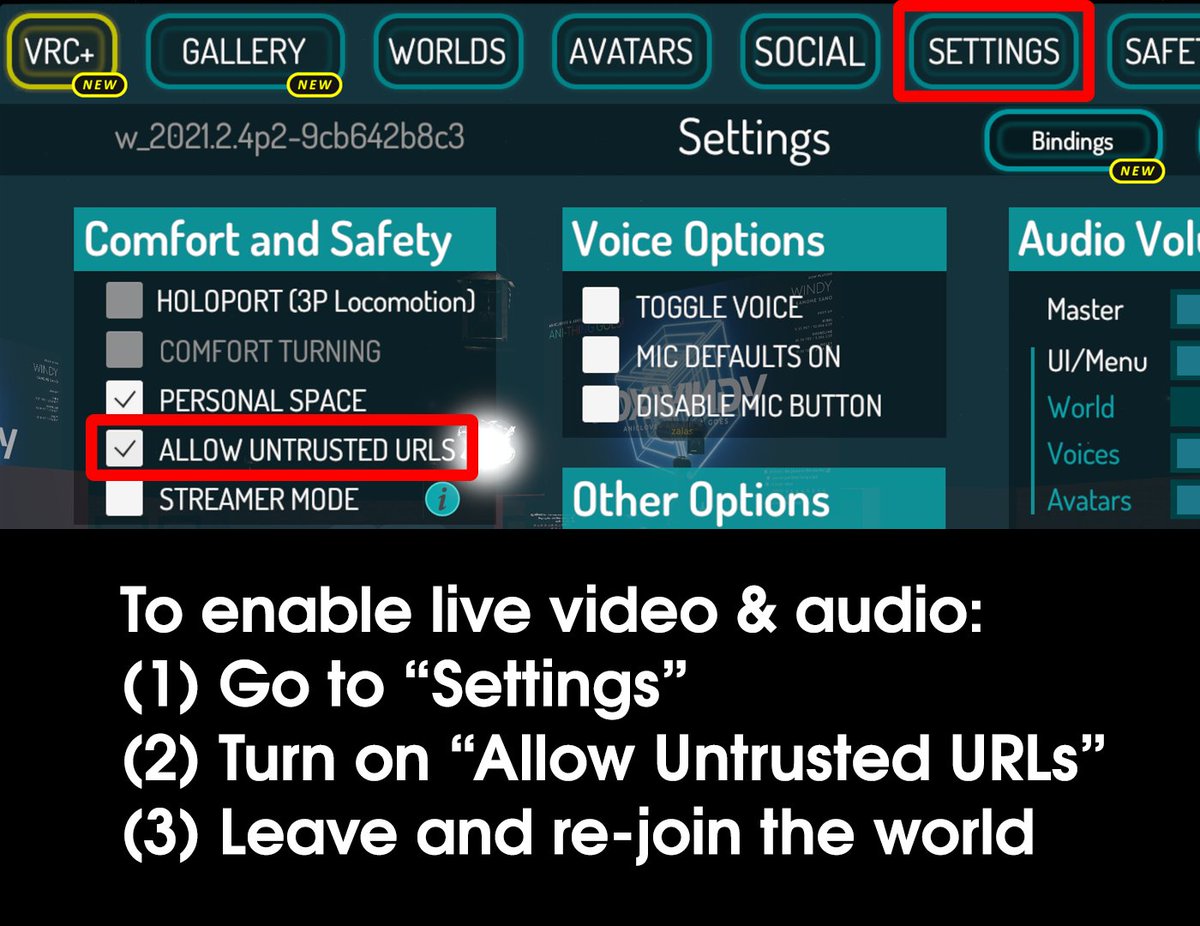


 brittle hull
Usb-C otg adapters are tiny now days
 nova sluice
I see that PostProcessingVolume doesn't work on quest, is there any way to have it work?
trying to at least implement a sleeping mode using tonemapping
nova sluice
ah, damn, thanks
south lily
hiribiki has a good darkening volume shader that seems pretty optimal on quest
pulsar parcel
nova sluice
I see that PostProcessingVolume doesn't work on quest, is there any way to have ...
pls implement i love worlds with sleep mode/brightness control 
 sweet onyx
You can add it by using a black semitransparent inverted cube or quad covering the camera
And just change the opacity
wraith jewel
sweet onyx
You can add it by using a black semitransparent inverted cube or quad covering t...
Id just make the cube a child of the main camera so it follows the POV of the User ingame right?
sweet onyx
You have to use a camera follower. The main camera isn't actually included in world uploads so not as a child
camera follower in udon is just set position of object to VRCPlayerAPI GetTrackingData(Head)
Or you can use the screenspace canvas trick from sdk2 but udon is better
wraith jewel
I need to learn udon
not like I would use sdk2 instead thats gross but I just don't understand udon
sweet onyx
@wraith jewel if you're using SDK2 it's just called a player tracker prefab. You can get it from the Toybox in prefabs DB. Make sure you install standard assets first from the unity asset store
wraith jewel
ewww sdk2
sweet onyx
but yeah SDK2 is 🔪 on the chopping block
wraith jewel
die
sweet onyx
I thought you just said you hadn't upgraded to udon yet lol
but yeah use udon if you can
wraith jewel
I dont have any buttons or udon things its just a world
sweet onyx
aha I see
lol Prefabs database only has complicated prefabs. nothing simple like a head tracker
it's funny what doesn't get added to the spreadsheet because everyone assumes someone else has already done it
wraith jewel
sweet onyx
lol Prefabs database only has complicated prefabs. nothing simple like a head tr...
mayb Cyan has a prefab for that\
sweet onyx

GitHub
CyanTrigger is a new compiler for Udon with focus on in-scene editing. The interface resembles the old SDK2 VRC Trigger interface, but has more functionality. CyanTrigger has full access to all of ...
I just asked and sure enough. Get CyanTrigger
ping me if you need help with the material, but basically an inverted sphere around the player's head with transparent black shader should do what you want
wraith jewel
oh I was going to do this for like audio that follows a player
or like a light
thanks though
sweet onyx
oh right, that was for @nova sluice who was asking how to darken a quest world
 agile cloak
quick question, would it be possible if Nvidia's CloudXR was implemented into the Quest version so it could provide some level of compatibility with PC only worlds?
I’m not sure about how bad input lag would be, but it would be worth a try
pulsar parcel
soo.. cloud pc streaming vr game to quest?
you can already do that with virtual desktop and a cloud rig
i dont think it would be implemented into the quest standalone app either
sterile mural
vagrant schooner
When did I mention micro usb?
You didnt just asking
I know what the adapters are
agile cloak
pulsar parcel
soo.. cloud pc streaming vr game to quest?
you can already do that with virtual...
I meant for the Quest only version, not via AirLink
Not everyone has a capable rig that can run VRC in VR mode on top of streaming it to a Quest after all, it’s why the Quest is as popular as it is
pulsar parcel
agile cloak
I meant for the Quest only version, not via AirLink
AirLink only works with PCs on your local network. Virtual Desktop can stream games from computers not on your local network.
VRChat would never implement something like that, at least not for free. Servers for that kind of thing are ridiculously expensive. It would make more sense to just rent out a cloud pc from an already existing service and use VD to stream it.
agile cloak
pulsar parcel
AirLink only works with PCs on your local network. Virtual Desktop can stream ga...
The whole point of Nvidia’s CloudXR is that Nvidia themselves do the rendering on their backend without the developers having to maintain servers
which is why I suggested it specifically, VD still depends on servers or other computers while CloudXR depends on the Nvidia servers who do all the rendering
pulsar parcel
agile cloak
*which is why* I suggested it specifically, VD still depends on servers or other...
how is using CloudXR different than a server running VD? what is there for the client to do if the game is run on a server?
agile cloak
It’s already displayed how it would work on the page that explains how CloudXR works
 pulsar parcel
agile cloak
pulsar parcel
agile cloak
i see that, and it shows that the game would run on nvidias servers and stream over to the quest
agile cloak
All the client would do is receive and display the data on the headset
pulsar parcel
that is exactly what VD does
agile cloak
pulsar parcel
i see that, and it shows that the game would run on nvidias servers and stream o...
That’s the point I’m making and why I suggested it in the first place
And it would save the devs the cost of maintaining servers because Nvidia would harbor that cost (I think)
pulsar parcel
i dont think nvidia would run free servers for people to play pcvr vrchat
agile cloak
pulsar parcel
i dont think nvidia would run free servers for people to play pcvr vrchat
It’s because for now, it’s a limited program they’re doin cuz it’s brand new
pulsar parcel
agile cloak
It’s because for now, it’s a limited program they’re doin cuz it’s brand new
i think there are too many users on quest vrchat to even think about testing it here
agile cloak
Was only suggesting that they at least try it on PC worlds only
pulsar parcel
agile cloak
Was only suggesting that they at least try it on PC worlds only
you'd need to start a vrchat instance on the nvidia servers, log the user in, sync the configs on the quest to the pc side, seamlessly transition from standalone to streamed PCVR, and then load the world the user was attempting to enter
then having to sync any screenshots or config changes back to the quest so they persist as well
seems like a really cool idea but a pain to implement
 fathom birch
I remember seeing something about audio channels on Quest requirements... would having like 40 different audio sources, but only two-three playing at a time cause problems?
vale sierra
possibly, depending on how they're set up

Game Developer
A guide to using Unity's audio import settings to help improve game performance.
with a lot of audio clips you'll also want to really take care of what import settings they're using, if they're all in decompress on load they would take up a nice chunk of ram and potentially cause out of memory issues on quest etc. Multiple audio sources playing at the same time also take up more cpu on quest than pc.
fathom birch
Thank you, i'll combine them into one that gets thrown around as needed instead into different positions
 split zealot
Hey, I'm having some trouble installing The oculus PC app, If anyone could help that would be wonderfull
 merry birch
Yeah so my VRchat just crashes everytime I join and spawn in my home world. can someone help?
 placid egret
Is there any way to stream audio to a quest world from a dropbox link?
 viral matrix
merry birch
Yeah so my VRchat just crashes everytime I join and spawn in my home world. can ...
viral matrix
merry birch
Yeah so my VRchat just crashes everytime I join and spawn in my home world. can ...
Try going to your default home world if you dont crash, change your home world
 rancid fern
split zealot
Hey, I'm having some trouble installing The oculus PC app, If anyone could help ...
rancid fern
split zealot
Hey, I'm having some trouble installing The oculus PC app, If anyone could help ...
 placid egret
Are there any Shaders that work for quest that incorporate scrolling or Flipbooks? Poiyomi shaders apparently don't work correctly on Quest
 shell monolith
is there way to a world in quest 2 standalone before uploading to it?
 livid basin
i got question
i having problem with Quest 2 in VrChat
ever since that i got Quest 2
 vital cosmos
Could the quest 2 have a camera please?
Like we could whip out a camera like pc vr players can?
 glad shadow
It's already coming in the next update
vital cosmos
glad shadow
It's already coming in the next update
Really!?!
Let's go
I'm excited
When is the next update?
 inner crest
n e v e r 😶🌫️
 lethal lark

 random shore
inner crest
n e v e r 😶🌫️
random shore
inner crest
n e v e r 😶🌫️
Bruh
inner crest
:c
agile cloak
So little update on ASW
It released and there seems to not be obvious drawbacks
Hopefully this means that VRC’s polygon limit can be lifted a bit and that some of the limitations would be lifted as well
fair tinsel
probably not going to do that because they would want to have the frame rate stay at a good level instead of just everyone going to the new maximum and tanking the framerate again
agile cloak
fair tinsel
probably not going to do that because they would want to have the frame rate sta...
Considering that ASW can render at 36 FPS or 45 FPS, I think they could strongly get more performance in
FB/Meta promises a 70% increase in performance with it after all
fair tinsel
question does it work on the quest 1
fair tinsel
and I doubt like sound effects or lights would be able to be used on avatars even with that as the CPU cost of those can get very high very quickly
agile cloak
(Which means the frame rate in game would be 72 btw)
Eh fair enough, would still like for the limitations to be lifted since this new tool is really powerful
fair tinsel
like having a real-time light basically makes the render cost of everything twice as expensive
so if like everybody in the room had one that would get very expensive
agile cloak
Maybe not real-time light but shit like DynamicBone and upping the polygon limit would be greatly appreciated and even possible with this
fair tinsel
there's no reason for them to add support for dynamic bones as they're replacing it outright with physics bones
agile cloak
Still though
fair tinsel
and also the question of what does vrchat need to do to add support for ASW
agile cloak
I think it’s just adding the SDK
fair tinsel
does the SDK support the version of unity vrchat is using
agile cloak
I checked and sadly, it doesn’t seem like it does
fair tinsel
so yeah that's probably going to be literal years before that's doable
agile cloak
 fair tinsel
and also vrchat doesn't use openxr at the moment
fair tinsel
so yeah it's not the Magic Bullet To Save users from having to learn how to optimize
 burnt berry
sorry im not sure where to ask this, but ive been trying to connect my pc and quest 2 together using airlink but when i launch vrchat it gets very disorientated and slow, but on my pc monitor it looks fine i dont think its my vr headset because i got it yesterday um is there anyway i could fix this?
stuck kettle
hello i wanted is . when or if quest dose get the physics bones vrchat. well they also let us use constraints that unity haves. like rotations constraints. as i know there not very profromens heavy. and have no colliders . so is it possible to have that for quest? as ill give us more options for model making.
sweet tundra
agile cloak
It requires 2020.3.22f1
Also, it needs URP, which VRChat doesn’t use either.
 quartz river
Wait. Is it confirmed that they're going to add physics to quest?
fair tinsel
not 100% confirmed but they're going to try really hard to get the physics bones in
 undone trellis
@slow girder for quest when you take pictures with camera where do you find the pictures at
 fervent knotBOT

Can't find pictures
PC:
Your pictures are still there! They are now being saved to sub-folders based on the year and month.
Just look in your Pictures folder > VRChat > [Year-Month]
Quest:
The images are saved in the Quest's Pictures folder under VRChat, and can be accessed via the Quest's OS.
They can also be accessed via connecting your Quest to your PC and looking under the Pictures/VRChat folder
 reef knot
On quest, how come the new update makes everyone lag?
wraith jewel
fair tinsel
not 100% confirmed but they're going to try really hard to get the physics bones...
What about dynamic bones?
fair tinsel
wraith jewel
What about dynamic bones?
never going to be implemented because they're too resource-intensive
wraith jewel
fair tinsel
never going to be implemented because they're too resource-intensive
Damn. Alright
fair tinsel
that's why they're making physics bones because Dynamic bones was too heavy
wraith jewel
fair tinsel
that's why they're making physics bones because Dynamic bones was too heavy
Oh like a alternative
merry birch
fair tinsel
that's why they're making physics bones because Dynamic bones was too heavy
so basically bootleg dynamics
nice
sweet tundra
merry birch
so basically bootleg dynamics
Except it runs better
And has actual triggers to do things on a collision or similar
merry birch
nice
 sacred marsh
This has probably been asked before, but why is there not a way to just download the quest version as an APK and run it in bluestacks or something. I'd like to make my worlds Quest compatible, but I'm not willing to go buy a Quest Headset to do that. There needs to be a way to troubleshoot and run the android client without the hardware.
 left rain
sacred marsh
This has probably been asked before, but why is there not a way to just download...
left rain
sacred marsh
This has probably been asked before, but why is there not a way to just download...
When I develop Quest worlds, I’m able to test most things in Unity editor, except FPS on Quest.
 sturdy cape
how to fix the favriote on avatars when i delete a avatar and come off of menu and go back on menu avatars it still says 25/25
sweet tundra
sturdy cape
how to fix the favriote on avatars when i delete a avatar and come off of menu a...
Just wait, the api will process the request and update it, but it can take a few hours
wraith jewel
fair tinsel
that's why they're making physics bones because Dynamic bones was too heavy
When will that update come out?
fair tinsel
no clue at this point
 leaden vine
What are physics bones?
wraith jewel
leaden vine
What are physics bones?
VRChat's homemade version of Dynamic Bones, that is projected to be at least x10 more optimized than Dynamic Bones and do pretty much the same stuff it does and more
There is no guarentee that Physics Bones will be available on quest when it gets released, but if it is optimized enough then the Devs will put it on the Quest VRC
 empty nexus
is there ever gonna be a recording camera for the quest in the future???
wraith jewel
You can record from your perspective I think.
empty nexus
yeah ik, but a recording camera like the photo camera in game but a recording one
wraith jewel
But not from a camera.
leaden vine
Is it possible to search avatars
wraith jewel
You can search for tags from the menu to find avatar worlds.
leaden vine
Oh ok
 cunning cradle
So, question is anyone else on quest, unable to log in since this new update? I can’t tell if it is just me.
I will get the loading screen, be on it for a 1-2 minutes, log in and then crash. I have uninstalled and reinstalled, I have factory reset, not sure if it is the new update or not.
I figured this went here since, quest development and all.
Also, I would like to mention sometimes it lets me log in, play for a bit, I go to work, come back, and it is broken again.
 prisma fable
cunning cradle
So, question is anyone else on quest, unable to log in since this new update? I ...
prisma fable
cunning cradle
So, question is anyone else on quest, unable to log in since this new update? I ...
The whole loading screen and crash happened to me before the update. But it was obvious since I got a pop-up saying I needed to update. After the update everything worked fine for me.
cunning cradle
prisma fable
The whole loading screen and crash happened to me before the update. But it was ...
It hasn’t worked for me since the update, I legit go on Thursday after it started working again before work, got off work, hopped on and it hasn’t worked since.
prisma fable
cunning cradle
It hasn’t worked for me since the update, I legit go on Thursday after it starte...
I'm sorry I don't know what's going on with yours 😅
cunning cradle
prisma fable
I'm sorry I don't know what's going on with yours 😅
It is fine, no need to apologize, I even hoped on steam vrc to see if it was my account or something but it runs fine, nothing wrong or anything. It is just on the headset and the headset runs every other game I have on it perfectly, just vrc.
 coarse talon
Was using the picture camera in Quest, and none of the pictures saved to my headset. Is anyone else experiencing that? Because I took many pictures while spending time with friends only to not have them when I went to transfer them to PC moments ago. I just went on VRChat, took a few pictures then checked the files and they weren't there either.
random shore
coarse talon
Was using the picture camera in Quest, and none of the pictures saved to my head...
thats indeed weird. they should be showing up right away. but just incase try going to twitter or instagram on the quest internet browser just to be able to send a picture to someone and try to send a picture there. in case they are being saved in the wrong place for sure you can see all pictures your device has there
coarse talon
random shore
thats indeed weird. they should be showing up right away. but just incase try go...
Updated the browser to do exactly that, and they're still not there. What I'm guessing is that the latest update yesterday messed up the file saving, as it worked beforehand.
It's a shame that I have lost the pictures though. I planned to upload some of them to insta and share with other friends too.
 coral karma
coarse talon
Was using the picture camera in Quest, and none of the pictures saved to my head...
coral karma
coarse talon
Was using the picture camera in Quest, and none of the pictures saved to my head...
Im also having this problem, but im trying to find out how to get them onto my phone instead but im not sure where to find the photos or how to get them to my phone.
coarse talon
coral karma
Im also having this problem, but im trying to find out how to get them onto my p...
Usually after taking a picture it would go into the files application, under VRChat > Pictures > year-day.
There's an option within the files to synchronise media files with the oculus app on your phone. Either that or you can do as I went to, and link cable to a PC, and them transfer them to your mobile that way.
coral karma
I used to do that, but atm my pc is down and i couldnt find a way to save pictures.
coarse talon
Then I'd say that the media sync is your current method of file transfer.
coral karma
ah i think i figured it out
 torn folio
Hey does the new VRC camera work for anyone? I can take regular oculus screenshots but with the new camera the pictures aren't saved anywhere.
fervent knotBOT
Can't find pictures
PC:
Your pictures are still there! They are now being saved to sub-folders based on the year and month.
Just look in your Pictures folder > VRChat > [Year-Month]
Quest:
The images are saved in the Quest's Pictures folder under VRChat, and can be accessed via the Quest's OS.
They can also be accessed via connecting your Quest to your PC and looking under the Pictures/VRChat folder
fervent knotBOT
Can't find pictures
PC:
Your pictures are still there! They are now being saved to sub-folders based on the year and month.
Just look in your Pictures folder > VRChat > [Year-Month]
Quest:
The images are saved in the Quest's Pictures folder under VRChat, and can be accessed via the Quest's OS.
They can also be accessed via connecting your Quest to your PC and looking under the Pictures/VRChat folder
 wooden onyx
quests OS??
 jagged seal
Where can I find documentation about how the Quest locates it's controllers? How are the drivers implemented?
 bright rivet
Suprising enough I’m able to find my photos
wooden onyx
bright rivet
Suprising enough I’m able to find my photos
how?
brittle hull
wooden onyx
quests OS??
Quest has its own os
You can fine the photos in the files app
wooden onyx
brittle hull
Quest has its own os
You can fine the photos in the files app
i know but as of 2 days ago they’ve been gone
brittle hull
wooden onyx
i know but as of 2 days ago they’ve been gone
Maby connect your quest to your pc and see if they excist in the fs
bright rivet
The file browser
brittle hull
FS means file system but ehh file explorer works too
 pulsar nova
So I’ve been reading back a bit about the camera problem and have a question, since the camera were added was there any update that changed how they function?
According to other people around the time vrchat got updated was around the time camera began to not upload the pictures taken so just a heads up to quest people the camera will most likely be down until the next update (whenever that is)
south lily
cams work, they just dont work all the time
pulsar nova
Every picture I have tried taking was not uploaded into my files, I mean the camera itself is accessible but none of the pictures are saving, and it’s happening to every quest user I have ran into
Sorry I’m just trying to gather more information on the matter simply because I also was unable to sync my media to the oculus app yesterday when I tried so it’s not just an in game issue I believe
south lily
i havent messed with settings much but from my point of view, it sounds like the folder its supposed to save photos is locked
pulsar nova
I’ll check this in a bit but I doubt it would be locked for everyone on quest 😅
south lily
and all my other quest friends and peeps have had 0 issues except me, but i blamed myself for possibly missing the button lol
south lily
pulsar nova
I’ll check this in a bit but I doubt it would be locked for everyone on quest 😅
like as a security check or something, like how windows and mac allows you to lock access to folders
but i havent dwelved into the settings deep enough to see anything like that yet
pulsar nova
Ya I understand, thank you for your time also sorry I’m currently in school and class for me just started so I have to get going but after I’ll try and check the files and see if it is locked, thank you
 dense ether
How do you unlock the files?
wraith jewel
south lily
i havent messed with settings much but from my point of view, it sounds like the...
It’s definitely a bug. Every quest user I know that has been attempting to take pictures on the vrc camera recently has had the issue lately where the photo isn’t uploading or saving anywhere. I’m just wondering when they’ll fix that.
We didn’t have this issue before. I don’t think any files would be locked.
dense ether
Just got a message from vrc and they said they’re tracking the camera issue but it won’t be fixed till a future update whenever that is
wooden onyx
dense ether
Just got a message from vrc and they said they’re tracking the camera issue but ...
they probably won’t update for a week
dense ether
That’s the part I hate. The waiting
wraith jewel
dense ether
Just got a message from vrc and they said they’re tracking the camera issue but ...
At least they’re aware and working on it now.
jagged seal
One week turnout would be exceptional.
 calm ivy
im glad this is being worked on bc the struggle of images.. pain
wraith jewel
the storage permission's not there in the latest update, it was there before
 wraith jewel
downgraded my vrc to v1156 and I can take pictures just fine
brittle hull
Downquest be like
wooden onyx
wraith jewel
downgraded my vrc to v1156 and I can take pictures just fine
how does one downgrade
wraith jewel
wooden onyx
how does one downgrade
same I wanna know this😭
 thorn widget
wraith jewel
downgraded my vrc to v1156 and I can take pictures just fine
thorn widget
wraith jewel
downgraded my vrc to v1156 and I can take pictures just fine
Wait you can do that?
dense ether
I don’t think you can do it on quest but rather on pc
Looks like they’re fixing the camera with an upcoming patch which should be within the next week or so
wraith jewel
thorn widget
Wait you can do that?
I use sidequest or sideloaded the old version of the game, u can Google how but I can't really explain it here
Edit: update came out, no point of doing this now
wraith jewel
wraith jewel
~~I use sidequest or sideloaded the old version of the game, u can Google how bu...
Is it fixed now?
yes
 forest viper
Can sound be for avatars come out for guest please
 thin parrot
Will there be slime vr support on quest since it already works standalone and if so that would be great?
wraith jewel
thin parrot
Will there be slime vr support on quest since it already works standalone and i...
The Devs might one day when standalone slime vr becomes mainstream, I dont see it happening within a year but thats my unofficial not-a-dev guess
thin parrot
wraith jewel
The Devs might one day when standalone slime vr becomes mainstream, I dont see i...
Yea ur probably right but that would be nice to have fbt on quest sooner
 autumn acorn
I wonder if we will ever get shaders
wraith jewel
autumn acorn
I wonder if we will ever get shaders
ye got yer shaders in the VRCSDK child!!
make use of matcap lit or standard lite will ye
autumn acorn
hell yeah
unreal garnet
Hi quest devs. Does anyone here have any experience putting a bunch of .OBJs together in blender somehow to make a cuatom avatar? The .objs for some reason give each polygon its material so I can't just join everything and rig it, because the VRCSDK limits avatars to under 3 materials (1 recommended)
wraith jewel
unreal garnet
Hi quest devs. Does anyone here have any experience putting a bunch of .OBJs tog...
what object files are you using that do something insane like that?
yea please even a computer couldnt handle hundreds and thousands of materials on a single model
unreal garnet
but it works based on " liked named materials" and my materials are m1-m300+
wraith jewel
bruh
i think there has to be a better way to rip the models
no just a better tool that doesnt produce objs in such a shitty way
wraith jewel
What causes desync on identical objects that sync fine between pc to pc user/quest to quest but then doesn't sync at all when e.g. a pc user draws with a pen but the quest user cannot see it?
south lily
wraith jewel
What causes desync on identical objects that sync fine between pc to pc user/que...
hierarchy most likely, but theres obvs other issues that could be afoot
wraith jewel
Thank you, I will test in smaller project to troubleshoot further incase the hierarchy is the issue
south lily
they must be the same
 proven terrace
Yo how do i record via the quest via a command?
 crude summit
ok soo.. does anyone know how to fix this.. weird texture glitch that sometimes happens with avatars??
 wraith jewel
crude summit
ok soo.. does anyone know how to fix this.. weird texture glitch that sometimes ...
wraith jewel
crude summit
ok soo.. does anyone know how to fix this.. weird texture glitch that sometimes ...
does the weird coloring only occur with certain shaders?
if so it could be vertex colors
youd remove those in a software like Blender or smth else
crude summit
alright, i'll try that. thanks!