#quest-development
1 messages · Page 10 of 1
 wraith jewel
 fair tinsel
yeah but they probably don't change the content limit so that the frame rate stays higher on average
 south lily
@wraith jewel technically, but i dought it, itd be something id implement but itd have issues
 surreal pendant
camera when?
 quasi sphinx
Belongs in #avatar-search-old. Also, there's a world with a ton of One Piece avatars already, just search "One Piece" in worlds and you'll find it.
 coral cipher

 mellow zenith
Hey guys, i was wondering if the camera on the pc version of vrchat will ever be released on the oculus quest version.
wraith jewel
how can i make this cube transperant
south lily
@wraith jewel set it to standard and set it to transparent then mess with its alpha to make it a certain opacity. if its supposed to be something you cant see, make a cube with no normals
 lament owl
WIP still, but: Projected lighting influence in CATS bake. Left is typical emission, Right is the quest version with light influence baked to the emission channel!
 fair tinsel
very nice
 upper whale
back yet again, with some great tools that i highly recommend anyone to manage the insanity of making large projects cross platform
Unity Search & Replace let me do in seconds what i would otherwise require several hours or even a day for. Replacing shaders, simplfiying materials, its really epic
https://assetstore.unity.com/packages/tools/utilities/project-search-replace-55680
Use the Project Search & Replace from Enemy Hideout LLC on your next project. Find this utility tool & more on the Unity Asset Store.
@vale sierra i have started from PC version again and now this is the current result, so there are more textures displaying but still not all of them:
https://media.discordapp.net/attachments/818355284976074782/818669920602292264/157980349_123217079808869_5125409202540491918_o.jpg?width=559&height=559
https://cdn.discordapp.com/attachments/818355284976074782/818669918219665428/158128718_123216663142244_4316550140696512591_o.jpg

 upper whale
any more ideas when you see this?
 vale sierra
what are the texture file formats?
upper whale
same perspective as last pic, but in editor
 upper whale
vale sierra
what are the texture file formats?
upper whale
vale sierra
what are the texture file formats?
mostly PNG
vale sierra
resolution?
upper whale
it depends they are usually 1k or 2k and then have max size compression override for android
so for example the statue on the left has 1k texture, it is compressed to max size 512 for quest version using RGB Compressed DXT1
upper whale
vale sierra
what are the texture file formats?
and i should also say that another answer to this question is: the same as worked perfectly fine in the previous quest version
vale sierra
and theres no discernible difference between the textures that show up and those that don't?
so weird
upper whale
im looking but i cant necessarily see anything
@full condor oh wise sage of lighting and knower of unity, are you able to weigh in on this?
vale sierra
is the ceiling and the wall the same texture?
upper whale
nope they are different
care to look at my screenshare @vale sierra maybe you can spot something i'm missing
vale sierra
sure, not gonna get on voice tho
upper whale
👍
 full condor
you should purge all lightning stuff, GI cache included, close unity and then retry
upper whale
full condor
you should purge all lightning stuff, GI cache included, close unity and then re...
will try this again
vale sierra
I don't think its a lighting issue as it persisted in his last attempt when he had cleared lighting, and it is also specific to textures. If it was lighting it'd affect all meshes that were lightmapped
it was also affecting textures on particles when i checked on my quest
so that should rule out a lighting issue i think
upper whale
that new version is up now if you have time to give it a try @vale sierra
curious wether or not the ceilings look any different
vale sierra
sorry, now's not a good time for me to get in vr
upper whale
alright thanks anyway!!
vale sierra
in my experience, incompatible shaders show up as pink, and incompatible textures show up as black
but i just cant see why it would be the case here
full condor
cleared lighting and gi cache ?
 upper whale
@full condor @vale sierra turns out it was the image format after all, i changed the artworks and ceiling to RGBA Compressed ETC2 8 Bits and now they show up
vale sierra
aaah I missed that
if you want crunched compression ETC/ETC2 should work
I think DXT1/5 doesn't work on mobile gpu's

shucks, should have noticed that earlier
upper whale
well imglad i figured it out lol
been stuck on this since friday morning and making whole days trying to fix it lol
thats like 5x12 hours rofl
 glad shadow
Well that's going in my toolkit as a error
upper whale

here is proof that it was perfectly fine in the previous quest version i made
so maybe something happened in the recent SDK update that changed that
upper whale
oops let me grab the right tab for that override setting
well anyway yeah @glad shadow if you could let your tool check for incompatible compression formats that would be a lifesaver aparently
glad shadow
I'm in the progress of adding it currently
upper whale
epic
upper whale
thanks again for listening to my wailing and all the help over the past week, im really glad its fixed and also that some of the suffering is being put to use for the benefit of others with your tool @glad shadow
and @vale sierra you too thanks very much for your time and attention
glad shadow
Next person might not have to suffer so long thanks to your sacrifice 😅
 glad shadow
Also found the bug that was missing the one gameobject you had
upper whale
ohhh epic
oh and one more thing i think i may have spotted but not sure, does the tool also look inside SBSAR materials to check what shader they're set to use?
i think its pretty bad practice anyway to not bake the textures and pack the whole sbsar instead, when making quest worlds
glad shadow
I don't have any special substance handling right now
Might need to look into it but I always bake my stuff in substance painter
 barren peak
Quest mirrors... how do they work

not sure if I broke anything but dont wanna touch stuff lol
 daring dock
might wanna test it
upper whale
does anyone know where i can find Unity Cache Server windows download? For some reason i keep being directed to a github page but there are no releases there only source code
 barren holly
question: what optimizations do i have to make for a world to bequest compatable? im new to developing worlds and im making onefor my friends.
south lily
@barren holly do you accept "everything:" as an answer?
 ebon goblet
so idk if this is a quest thing or what but no matter what i do my bf's model is hidden for me
he's also on quest atm
south lily
@ebon goblet set your perf settings lower
ebon goblet
south lily
<@!348247834421624834> set your perf settings lower
It was already set to none
south lily
copy their avatar and see if it shows up
ebon goblet
It's a private avi
south lily
oh, then im not sure how to show a quest avatar that is obvs above 12,000 polies without cloning them
 midnight gulch
@ebon goblet Does he show up as the robot or as the crystal guy?
ebon goblet
Perf blocked robo
midnight gulch
@south lily I’ve seen Quest avatars with way more than 12,000 polygons though. I don’t think that’s the issue.
south lily
@midnight gulch cloning^^^^^^
midnight gulch
I just hit “show avatar”, no cloning involved.
@ebon goblet Maybe it’s a download size issue, how many MB is their avatar?
midnight gulch
Kk, well ask next time he’s online. That might be it. 🙌 🤷♂️ Good luck!
 fallen portal
Question, is there a list for supported Image Formats for Quest?
I attempted to use DX1 Compressed RGB, and it shows up as Black for the Quest
glad shadow
fallen portal
I attempted to use DX1 Compressed RGB, and it shows up as Black for the Quest
https://github.com/oneVR/VRWorldToolkit/blob/4593cff8ad6e104ebb954db5616fa9ce1929088b/Scripts/Editor/VRWTDataStructures.cs#L122
I listed the unsupported ones here in a array for detection, check the link for the full documentation
fallen portal
Gotcha
Is there any format thats recomended besides RGB EC Crunch?
I see the list of most of the unsupported are the ones I was kinda interested >.>''
glad shadow
ASTC is what is recommended by Oculus
https://developer.oculus.com/blog/tech-note-unity-settings-for-mobile-vr/
fallen portal
Gotcha
fallen portal
glad shadow
ASTC is what is recommended by Oculus
https://developer.oculus.com/blog/tech-not...
Wanted to give the heads up that ASTC worked perfectly and helped a ton with my size stuff
Thanks for the help!
glad shadow
Nice 👌
 lone cairn
my quest 2 is not pairing with my phone and i cant find it on bluetooth, can i get someones help with this??
 inland pagoda
Hey I just had a question. There are users, like myself, who don't care about choppy framerate. Is there going to be a toggle to enable the ability to see all avatars without having to manually go through each one and enable them at some point?
south lily
i dont think so, however the poly limit has gone up by double so you may not have to
wraith jewel
There is a way in safety settings you just have to go by rank and enable all
 vale anvil
to enable all avatar features for everyone just click "none" in safety settings
 humble obsidian
Hey does anyone know if vrc + is coming to quest?
vale anvil
probably not for a bit but I'm pretty sure it will eventually
 whole vortex
humble obsidian
Hey does anyone know if vrc + is coming to quest?
whole vortex
humble obsidian
Hey does anyone know if vrc + is coming to quest?
There is a way to do it. If you link your steam account to vr chat. You could buy it through steam
 fiery plinth
Hello. I noticed that there was an update recently. Unfortunately, my Microfone hasn't worked since then. Yesterday we went without any problems. Only since the update it spins. It's only in vrchat. I'm just a quest player.
I have already restarted the vr glasses. Etc
 vital shuttle
fiery plinth
Hello. I noticed that there was an update recently. Unfortunately, my Microfone ...
vital shuttle
fiery plinth
Hello. I noticed that there was an update recently. Unfortunately, my Microfone ...
Same! That happened to me too! Yesterday it was fine, but today it isn’t!
inland pagoda
i've got a question. will there be any plans to implement finger tracking for oculus quest?
fiery plinth
But I can tell you that it is unfortunately due to VRchat itself. I'm not expecting or changing anything. It's very bad not to be able to play properly.
inland pagoda
I've been using Quest 2 and it works for me. I think it might be a Quest 1 issue because another person I came across had the same problem and is on a 1.
 lusty crystal
wraith jewel
lusty crystal
wraith jewel
Its working for me and my friends but sometimes the voice audio... It keeps going like I can't hear them anymore but I can see that their name is lighting up when they talk.. Its happened to other people I know aswell
wraith jewel
can somone make me a avatar for free pls~ it doesnt have to be good just anime boy cuz yk but anything else you can chose
 wooden lichen
Beggar
wraith jewel
So which one of these do I need to install to upload to quest?
 wraith jewel
Do you think Quest will ever allow more than 10MB avatars?
I make my models PC & Quest compatible but sometimes I find it challenging because of the limit and have to lower my texture quality to have them uploadable
 vestal ravine
i sure as hecc hope they dont.
way too many people with bad wifi connections, and honestly i wish they were stricter with the 10 mb limit. i wish they could just make it so that it didnt allow you to upload at all unless you met the limit. it would hopefully convince more people to actually optimize stuff. especially since ive never even personally ran into the limit anyway.
 crystal pawn
When will Dynamic Bones be supported on the quest?
fair tinsel
it's unlikely to ever be supported because it's too expensive performance-wise
 silver hamlet
hifAC X
 paper mist
So i recently had a problem with vrchat freezing and now it doesent load, i logged in with a new account and it just never loads, the bar stays at 0
any fixes?
 copper plinth
Any idea as to why this is just showing up as a green square in game?

 plush temple
Check that render queue dropdown, you may want to change it to something else.
I believe one of the options is transparent, for example. Transparent objects must be drawn after everything else for the blending to work correctly.
So it's on a separate layer entirely.
 keen valley
Does anyone know if they sent out a patch that fixes the quest 1's mic break that happened earlier?
plush temple
Personally, I fixed it by unplugging my third party mic, uninstalling Nvidia HD audio drivers, uninstalling the Occulus app and drivers and then re-downloading and re-installing it.
I never plug in any more mics and I always stop nvidia from installing it's audio drivers. No clue which part of this fixed it, but at least I can get my mic working through Quest link if I re-launch it a few times.
Might help, idk, other than that no, I don't think they've fixed it yet.
 frosty swift
if anyone here is good with adding features for world development I posted in the world-development channel looking for some help with something
wraith jewel
Is there a client that lets me use the vrchat cameras on quest 2
vale anvil
Not at the moment I don’t think so, the client would have to access your quest photos and save the images you take to there, the simplest way to do it without getting banned is to not use a client and buy a pc
 silent vapor
Any way to have a decimated avatar without the textures breaking? I tried to decimate it but the textures I've broke heavily so i currently had to upload my avatars as very poor. Can i do something about that? Redoing the textures isn't an option. Even with almost 20k polys it doesn't look good. My avatar is currently 60k polys.
Oh i used CATS to decimate
Which also introduced weird issues like after exporting i suddenly had 2 body meshes.
The max i would go down in polys would be to 15k as everything below just already doesn't look good at all.
plush temple
I wouldn't be surprised if decimating it yourself may provide better results. CATS isn't the end all.
It actually causes more harm than good in a variety of situations.
If it still has issues (it should not, but just incase) you'll want to look into texture baking between your high poly and low poly model: https://amp.reddit.com/r/blender/comments/1egnqp/how_do_you_transfer_textures_from_one_mesh_to/
reddit
r/blender: /r/blender is a subreddit devoted to Blender, the amazing open-source software program for 3D modeling, animation, rendering and more!
 maiden tundra
can sobody say why on my quest version map one eye it look normal and on the ather eye its black sobody say to me like that whats the problem here?
 woeful elk
maiden tundra
can sobody say why on my quest version map one eye it look normal and on the ath...
woeful elk
maiden tundra
can sobody say why on my quest version map one eye it look normal and on the ath...
I was told to remove the camera from the world and recreate it then upload, but I'm not 100% sure what that means except I hear it works.
maiden tundra
@woeful elk thx but i fix it dont know why it fixet but the only think that i done is remove the old sdk and add new version one and also i reuploadet the quest version then it was ok
woeful elk
maiden tundra
<@!180358767978872833> thx but i fix it dont know why it fixet but the only thin...
Oh, nice. Hey, whatever works. Lol
maiden tundra
👍
 old wharf
Hopefully someone can modify the quest into a Oculus PC
So i can see everyone's avatars
silent vapor
You can with link cable or VD
 grizzled wasp
Well I love the bug where I can’t talk lol 😂 and you go through the settings for a hour straight guess time to try and connect it.
 heady magnet
is there a way for oculus to have a camera on vrc without plugging into a pc
south lily
there are worlds now that provide a camera that quest users can use
 frigid acorn
is there a way for oculus 2 users to move around without teleporting?
south lily
@frigid acorn turn off holoport in the main settings
 night prairie
Yep
 unreal flax
When will they add a camera for quest
vale anvil
not for recording on quest sadly, the quest does not pick up mic audio when recording.
lament owl
silent vapor
Which also introduced weird issues like after exporting i suddenly had 2 body me...
oh! That's not an issue, that's actually a feature
Vertices attached to a mesh with active blendshapes have a waaay higher gpu cost than ones attached to a non-blenshape skinned mesh. So, even though the VRChat importer detects it as 'worse', actual profiling proves it to be better. It bakes in the vertex normals before splitting so it's super hard to see the difference
As far as texture packing... CATS bake uses blender's default square packing, which is... not that good. Basically considers each island a square, then packs the squares... wastes a lot of space but often works out a little better than naiive atlassing
However! If you install and enable UVPackmaster Pro, it takes advantage of it, getting much better results. (but uh, it's a paid addon)
If you atlas your textures yourself, you can turn off the UVMap generation completely: it'll just bake everything into whatever layout it is now
 viscid marten
Any updates on the camera function for the quest 
south lily
theres a camera in the qht :0
viscid marten
But like a legit camera built into vrchat! All the pics in the qht is in first person
 narrow compass
I’ve got a question
Which is better VR (am talking about the quest two VR) or the PlayStation 5?
 frank thorn
I personally like quest 2 with link cable the best.
 pulsar sage
narrow compass
Which is better VR (am talking about the quest two VR) or the PlayStation 5?
pulsar sage
narrow compass
Which is better VR (am talking about the quest two VR) or the PlayStation 5?
quest 2, because you can actually buy it lol.
 tawdry depot
narrow compass
Which is better VR (am talking about the quest two VR) or the PlayStation 5?
tawdry depot
narrow compass
Which is better VR (am talking about the quest two VR) or the PlayStation 5?
I really like the quest
 plush magnet
I setup a fresh av3 project today for quest, but building is failing with errors like Assets/VRCSDK/Dependencies/VRChat/Scripts/ShaderStripping/StripPostProcessing.cs(4,19): error CS0234: The type or namespace name 'Build' does not exist in the namespace 'UnityEditor' (are you missing an assembly reference?)
south lily
what version unity? and you made sure to use the avatar 3.0 sdk right?
south lily
try reimport it
 real copper
Im suffering with crashing aswell
south lily
@plush magnet does the same issue occur when you make another fresh project?
plush magnet
i mean i can see but i don't see anything changing
real copper
Everytime i switch to android with the sdk installed or switch to it and install the sdk and it gets to the "damagenogreyalpha.png" file unity crashes because of a sigill
south lily
@real copper could you elab? were you switching via the sdk or thru the build settings?
south lily
wheres that file from?
real copper
Its in the sdk
south lily
thats a weird file for unity to get stuck on. im not sure whats causing it but i also dont see much harm just deleting that png
real copper
Oh no its a dependencie
If i try to delete it that ALSO leads to a crash
this is the latest crash log
south lily
thats odd
plush magnet
south lily
<@!102192337135886336> does the same issue occur when you make another fresh pro...
same errors
this time i set the build settings to android, then imported the vrcsdk and the model
... ffs that model package also included the VRCSDK
that explains it, probably
i usually check for that but it's been awhile
south lily
about to say. if the model has the sdk, its probs a different version sdk and is causing issues
plush magnet
this is why i always check. except for when i forget. thanks for putting up with me >_>
real copper
i finally fixed mine
plush magnet
ditto
wraith jewel
Will cameras come to quest? If anyone knows
vale anvil
wraith jewel
Will cameras come to quest? If anyone knows
For streaming definitely not, but for pictures it might
wraith jewel
vale anvil
For streaming definitely not, but for pictures it might
Ok
wraith jewel
I hope so
 mighty cove
DLSS when 😛
 vale anvil
 obsidian aurora
You don’t need o remove those shaders just hit publish
obsidian aurora
I did but i dont show in labs why
obsidian aurora
See its there n OMG ima cry i got a report is way to check that?

I cant click it or im stupid but like to know why got a report
south lily
theres always a starter report for some reason
 mint bluff
 empty horizon
HII pleas help me with that... i have a world for pc and quest user ... but thr quest user cant see the mirror , TV , pen and other things
what should i do !!!
vale anvil
empty horizon
HII pleas help me with that... i have a world for pc and quest user ... but thr ...
Quest can see the mirror and pens, but the tv will not work there should be something in the docs or YouTube
empty horizon
vale anvil
Quest can see the mirror and pens, but the tv will not work there should be some...
they cant see the mirror and pens x(
vale anvil
empty horizon
they cant see the mirror and pens x(
interesting, did you change the shaders for them?
If you did don't
empty horizon
to be honest i dont know a lot about that ... how and what should be there ?
i can show you if you want
empty horizon
vale anvil
interesting, did you change the shaders for them?
,
i really need to fix it like in 1 hour max xD cuz i have to update my world
 last breach
Pls anyone here know how to do uploading of file for quest
 spice bloom
Is there a good way to test the quest version of your world without uploading it if you don't have a quest?
south lily
there was a public emulator. but it got removed and it didnt really change the colors to how quest users would see the world so it didnt help much at all. @spice bloom id try to scurge around until you find someone with unity expierience or are good at trouble shooting with a quest come and test for you
 icy elk
Im just curious what is the timetable as of right now of when vrchat will be updated from 2018 to 2019? thanks
south lily
summer
 snow bobcat
My vrchat keeps crashing every ten seconds I load up the game,I'm on quest 1
Does anyone know how to fix
icy elk
thanks @south lily
wraith jewel
I need help
 topaz flax
wraith jewel
I need help
topaz flax
wraith jewel
I need help
What's up
copper plinth
Does anyone know what the last SDK with the correct additive particle shader was?
In the current SDK all vrchat mobile particle shaders are broken and in previous builds additive and multiply looked identical
narrow compass
Are able to link your alt Facebook account to your main oculus account?
 fervent hemlock
narrow compass
Are able to link your alt Facebook account to your main oculus account?
fervent hemlock
narrow compass
Are able to link your alt Facebook account to your main oculus account?
Chance that your alt will get banned is high and you will lost oculus account along with it.
fair tinsel
and potentially render it where you couldn't use your headset ever again
narrow compass
Aww
That’s rude
Plus my main Facebook account got disabled or something for no reason
And it’s stupid to HAVE to connect your Facebook account to your oculus account
Cant Facebook and oculus think of simpler way like link your Game Center or google account
(Sorry for the vent)
 rose thistle
Facebook owns oculus. That's why it's like that
narrow compass
Oof
 median coyote
are generic animations possible on quest?
narrow compass
fair tinsel
and potentially render it where you couldn't use your headset ever again
Is there anyway to get it back?
fair tinsel
nope not really as you're only allowed one to Facebook account if you try to make a new one to evade a ban it's likely to get kicked as well
narrow compass
But my main got blocked or disabled for nothing and I did nothing wrong (even though I haven’t used that account in weeks/months)
narrow compass
fair tinsel
nope not really as you're only allowed one to Facebook account if you try to ma...
What if I say ‘back-up’
fair tinsel
nope you're only supposed to have one Facebook account according to Facebook
narrow compass
Well that’s stupid
I just hope I don’t get banned or block or anything like that cus am buying a quest2 soon
Soo it’s best to use my backup email to merge it with the back up other one
I need stop worrying about it
fair tinsel
yeah Facebook's policies are very concerning and I would see if you can run that Facebook account awhile without getting banned before hitting purchase so you don't end up with a paperweight
 ebon sable
vestal ravine
way too many people with bad wifi connections, and honestly i wish they were str...
ebon sable
vestal ravine
way too many people with bad wifi connections, and honestly i wish they were str...
This convinces me to not bother with uploading Quest versions of my avatars anymore. Afaik Quest users have to show the avatars, as in they aren't visible by default so it should be their choice if they want to load that or not. But well more basic Quest avatars visible for every Quest user. 😛

I also have no idea where that 100 MB comes from, it's 1,85 MB on the PC version.
I actually found the culprit for the 100 MB, there was "Legacy Blend Shapers Normals" not ticked (other avatars had that ticked by default) and that apparently caused that.

 keen tartan
Hey, i'm trying to upload a quest port to an existing pc avatar but the sdk doesn't let me press the build and publish button for android for some reason. i did porting before and this has never happened

 frosty tapir
Disable the other avatar in the scene and try again. The other one likely has SDK errors
keen tartan
ahh ok thanks, that worked
 cloud sedge
Hey does anyone know how to have world particles follow your hand? I’ve tried spring joints, rigid bodies, fixed joints, parent constraints and a lot of weird stuff, but vrchat blocks it like some pack of flies, any ideas on how to fix this?
fallen portal
cloud sedge
Hey does anyone know how to have world particles follow your hand? I’ve tried sp...
If your using udon, use a script to teleport the particle emitter to players hand joints
 sacred marsh
When a dual mode world instance is created by a PC user, is the Quest instance actually 'there' and running even if there are no quest users currently in the world? I'm having issues where items are toggled on by a user in the PC side, and the Quest users don't see it.
 dense tendon
Hello! I uploaded my first world the other day for both PC and Quest and there seems to be some drastic inconsistencies with the Quest version of the world. While things like the main structure of the world, lighting and so on all show where they are supposed to, any triggerable items like buttons, chairs, and mirrors are in vastly different positions (sometimes in the wall or out of the map) for Quest users. Stranger still they are in different locations for different Quest users from testing with some friends. What could cause all of these interactables to be so inconsistent but only for Quest?
fair tinsel
does the object hierarchy differ between the PC & Quest the versions of the map
dense tendon
Nope, literally just switched to 'android' build version in Unity and left all the hierarchy the same
and turned off a couple things like some reflection stuff/post processing for the quest users
but otherwise order-wise it's all the same
south lily
do you have anything that creates/instantiates prefabs when runtime?
do you have a parent/child changer?
dense tendon
I don't believe so, it's a pretty simple little world with some like, chairs and mirror
 dense bloom
So for Quest avatars, do I just do the same thing as normal, or is there a different process
south lily
for worlds or avatar?
dense bloom
Avatar
dense bloom
Also, If I made a avatar in unity the normal way, would I be able to use it on the quest 2 by logging in?
south lily
so quest avatars are a little different. you have to use the vrc/mobile shaders and its recommended to use 1 mesh for 1 material slot. also to have less than 7,500 poligons
dense bloom
Ok
I’m pretty sure I’m currently using the VRC shaders because I had none applied, but then again, I’m new to making avatars.
But I know I have one material, and one mesh, with under 7,500 polygons
south lily
then all you need is to switch build to android
wraith jewel
Can some one tell me if you can just use a regular 3D scene in u it’s to create a avatar
south lily
what do you mean?
wraith jewel
Like if I was going to make a world rather than building what I want in the world like a house do I just make my avatar
Or is their like a different place to do it
It’s a weird question
Also if I go to make a new project what do I do if it says project path does not exist I made worlds before and never had an issue and when I switched to the 2020.3.7f1 it doesn’t open
south lily
im not sure what youre asking. and do you mean your. unity is 2020.3.7f1?
you need to 2018.4.20f1
south lily
correct. where are you getting this information?
frosty tapir
Unity versions higher than Unity 2018.4.20f1 can and sometimes will appear to work completely fine with the SDK, that is right up until you want to upload something.
See, when you upload something from a unity version higher than the one in use by VRChat the uploaded content will not appear / work in-game.
wraith jewel
I have no idea I downloaded unity a while ago and left it and when I came back I tried adding a module to the 2018 one through the installs of unity hub but their was no option for it but I was able to add modules to the 2020 one
wraith jewel
frosty tapir
Unity versions higher than Unity 2018.4.20f1 can and sometimes will **appear** t...
Oh alright Thankyou
Sorry I have a lot of questions but I have a few more
If I wanted to make an avatar would I just choose the 3d template on 2018.4.20f1
frosty tapir
yes
south lily
preferibly in your c drive but technically you could put unity anywhere
wraith jewel
Ok
When I created it it’s says project path does not exist when I click on the name
 south lily
good lord thats a big image plz hold lol
wraith jewel
Oh sorry 😂
frosty tapir
What was the location you set the project to be in?
wraith jewel
Applications
frosty tapir
I don't know where that exact location is so give me a second. I imagine you put it in a spot that Unity does not have access to
wraith jewel
Oh alright
frosty tapir
Just dump it into your documents / downloads folder
south lily
was this in a different drive?
wraith jewel
frosty tapir
Just dump it into your documents / downloads folder
I’ll try it
south lily
can you find the applications folder its referencing?
wraith jewel
Wait a min
Three different unities just opened and they have little timers on them and their is a pop up that has a loading bar that says unity package manager
It might be working
south lily
that sounds good. but question. how many unity versions do you have installed?
south lily
ok. just make sure when the project opens that its using the 2018.4.20 version
wraith jewel
Alright
frosty tapir
Inside the file directory for each Unity version there's a executable called "uninstall.exe" does this not work either?
Like so.
 wraith jewel
frosty tapir
Inside the file directory for each Unity version there's a executable called "un...
wraith jewel
frosty tapir
Inside the file directory for each Unity version there's a executable called "un...
I’ll try that in a min becuase the little pop up is still loading
What does this mean
frosty tapir
What does what mean exactly?
wraith jewel

That pic sorry
I’m in class so I might be slow to respond
Some weird stuff is happening
The two on the right just popped up
 frosty tapir
That seems to be a relatively common issue with MacOSX and attempting to load the Android build of Unity, why exactly I'm not sure. (I don't use Apple computers at all)
wraith jewel
Yeh I couldn’t get a gaming pc so I tried with this
south lily
i cant load the image but if youre using a mac. you may need to install a module for pc building
frosty tapir
Only other thing I could find was a bug report about it in 2018 on Unity. But it was labeled as "Not Reproducible" so
south lily
give me a minute or 2 to download image. i might recognize
frosty tapir
south lily
give me a minute or 2 to download image. i might recognize
GetManagerFromContext: pointer to object of manager 'MonoManager' is NULL (table index 5)
Is what it says
 frosty tapir
Oh, well I guess it's working ¯_(ツ)_/¯
wraith jewel
So it may have worked idk how but it might have
south lily
that happens sometimes. if its a crash error then im thinking its something else but you should be fine
was it a starting blocker?
wraith jewel
south lily
was it a starting blocker?
Idk thank you tho both
frosty tapir
Dunno, looks like OP was on the building a project part when it happened.
south lily
are you able to send screenshots instead? these images will not load
oh yep. thats normal
idk why that occurs either. but it doesnt break anything
wraith jewel
Is it alright if I add u both cuz I’m going to work on it more after school and I’ll prob have more questions
wraith jewel
south lily
oh yep. thats normal
Nah sorry I’m on my phone and I don’t have discord on it
frosty tapir
Just ask in the most relevant channel to your Question
south lily
i think its better to ask here so if we dk the answer to something. someone else might
wraith jewel
Oh alright
wraith jewel
How do I download the android sdk for 2018.4.20f1
And do I only need just that sdk
Because the website is talking about like ndks and jdks
It talks about the sdk but I can’t find the link to it
south lily
if youre on mac. you should have android support by default as its mobile device support
wraith jewel
Oh so I don’t even need to download it or switch it to android
south lily
if not. there should be a “install modules” button in your build settings
frosty tapir
wraith jewel
Oh so I don’t even need to download it or switch it to android
Go to your build settings and click Android
south lily
yea. but whenever you want to switch to pc will be when youd might need to download the module for
wraith jewel
Build settings as in Cntrl shift b
frosty tapir
yes, that
frosty tapir
If you see this when you click on "Android", you do not have android build support installed.
 wraith jewel
frosty tapir
If you see this when you click on "Android", you do not have android build suppo...
wraith jewel
frosty tapir
If you see this when you click on "Android", you do not have android build suppo...
Yeh I don’t that’s what it looks like
frosty tapir
Click "Open Download Page" then
wraith jewel
frosty tapir
Click "Open Download Page" then
Where’s that
frosty tapir
By executing the executable it downloaded?
wraith jewel
frosty tapir
By executing the executable it downloaded?
Wdym
south lily
mac doesnt use executibles
wraith jewel
I clicked open download page and it downloaded
frosty tapir
Looks like you're going to Unity hub then
south lily
itll be in unity hub i believe is where you start the instal
wraith jewel
Ok one sec let me try
frosty tapir
Go to unity hub -> Installs -> 3 dots at the top right of Unity 2018 -> Add modules
Ensure android build support is checked on
frosty tapir
Did you install Unity 2018 through Unity hub?
 frosty tapir
No, you can add a installation of Unity that wasn't installed via Unity hub to it. Primarily just to make sorting it easier.
south lily
oh i cant download that image lol. but did you open unity hub from your build settings?
mac unity is set up slightly different and its been like 2 months since ive messed with modules
should be a modules download page somewhere in the hub
wraith jewel
Uh I just have unity hub as an application and I open it and when I click on my project it opens actual unity
wraith jewel
frosty tapir
No, you can add a installation of Unity that wasn't installed via Unity hub to i...
But where is the other unity tho
south lily
i think you have unity hub for your 2020 version i think. which may be the issue
wraith jewel
south lily
i think you have unity hub for your 2020 version i think. which may be the issue
Oh
What if I’m not signed in
Would that matter
south lily
that might also matter. i think it asked when you try to download anything for unity
south lily
hmm.... do you have the unity 2018 installer? was there an add modules section that asks you for modules?
im looking thru an old chat and apparrently they got to the add modules pages from the installer
wraith jewel
What do u mean installer
I just closed it all and reopened it and all the kinds of unity are back
The 2020 2019 and 2018
south lily
the way you were able to get unity 2018.4.20f1 instaled
wraith jewel
Oh ok let me find that
I can’t find it
I found where it says it’s the only one that works but it doesn’t have a download link
Is it possible that their are different kinds of unity hubs
wraith jewel
Becuase it allows me delete the 2020 version but the 2019 version is just removed off the screen
So it might be a 2019 version
It just shows my projects screen
south lily
umm. they should all show up
i wish i could see screenshots because i can’t remember what everything should look like
wraith jewel
It’s just my projects screen with all my projects
south lily
all i can really suggest is googling “how to add modules to unity on mac”
wraith jewel
I looked this issue up and they said to restore all unity editors including modules
Ima try it
If I’m on the website for unity 2018.4.20f1 how do I download it
I don’t see a download button
And I want to try one of the solution that someone had
Would it be component installer mac OS
Bruh I’m so confused
Becuase why did it let me uninstall 2020 but for 2019 and 2018 can I only remove from hub
south lily
thats weird. but mac unity in general, for installation. if very evil
wraith jewel
Ok ok
I deleted all versions of unity and then reinstalled just 2018 one but it’s says add modules to unity which one do I click
Android build support is checked off automatically
Is it just android build support being the correct one
south lily
you need android build, windows build. and i think thats it
wraith jewel
Ok so I checked off android build and windows build support (mono) is that the correct one
wraith jewel
Yeh sorry those are the ones that are checked
Ok I’m installing it Thankyou so much for the help I really appreciate it
wraith jewel
I dont know if this is the correct spot to ask this or not. Will vrc+ ever come to oculus quest 2?
vale anvil
Probably not for a bit, but it will, there is no specific date
wraith jewel
wraith jewel
I dont know if this is the correct spot to ask this or not. Will vrc+ ever come ...
You can buy it through steam
That’s how I got it on quest
wraith jewel
wraith jewel
That’s how I got it on quest
I'm going to guess you need a link cable and a pc or laptop?
 floral tendon
Hello so i was playing but when i go in to a lobby then i only see robots dose anyone know how i can fix it and i cant her ant one cuz tay have a mute botten over there head i know how to un mute and mute but anyone pleas help me
vale anvil
floral tendon
Hello so i was playing but when i go in to a lobby then i only see robots dose a...
Adjust your safety settings so avatars are on by default and people aren’t muted
floral tendon
vale anvil
Adjust your safety settings so avatars are on by default and people aren’t muted
thansk you do much no i can finerly play the game cuz i only swa my freds avitar
vale anvil
No problemo honey
 craggy acorn
Hello everyone
I'm finding any program development projects.
Who has any projects now?
 tender aspen
ayo, so i make a new project, import the sdk and my model. trying to upload a model to quest. ive done it before in a different project. project works fine when building to windows. as soon as i switch to android the SDK breaks and i get 999+ errors telling me there is no animator attatched to the gameobject. when i switched to windows it worked again, so i tried going back to android, nope.
there are no shaders in this project, no extra scripts, no dynamic bones or avatars with missing scripts its brand new i am so confused
tender aspen
SDK2 btw
tender aspen
reimported it twice. didnt work. decided to use an old sdk i had from a few months earlier. it worked. nice programming guys. ultra cool.
fervent hemlock
Does transparency even work before?
 sweet tundra
fervent hemlock
Does transparency even work before?
sweet tundra
fervent hemlock
Does transparency even work before?
No
It was only allowed in worlds
 shadow sonnet
anyone ever make a videoplayer prefab that works with quest+pc?
heard something like the video file sizes have to be small. trying to figure out what id have to do to get a video in or how to allow vids from youtube :o
vale sierra
video players on quest work if you're using sdk3, but because the quest does not have youtube-dl, the videos you provide have to be direct links to video files in a compatible format, ie. mp4 h264 with aac audio. For youtube, you would have to download the videos using youtube-dl for example, and rehost it somewhere else where you can link it directly, such as dropbox, your own webserver, etc.
south lily
yea, there is a bot controlled videoplayer that appears to switch out youtube links with the raw mp4 (not 100% on the bot driven part, that was they theory we had). however i dont think this videoplayer is up for grabs
but if you were able to, you could make a bot driven videoplayer
wraith jewel
are yall gonna be adding dynamic bones to quest 2?
 crimson cypress
Ok
wraith jewel
Hello everyone! So I've been working on creating this world for VRC Quest users and So far I have a link to share, but I'm not sure how others would be able to find my world through this invite link. Example, if i send them the link through discord and they are using the headset how do they click the link on the quest? Thank you all and I'm always happy to make new friends 🙂
 dark sky
You can log on into Discord through the Internet explorer thingy on the Quest
wraith jewel
Well they are slowly shelling out updates to vrchat due to short staffing and other thing please be patient with them
 leaden river
yo
 buoyant current
Y’know I hope they add flowing hair and stuff for the next update 😔
 stuck kettle
hello i have question , when will quest have access to camera feature. as i know vrchat have so much cool stuff for pictures and icons. but its mostly all unlivable on quest as we dont have camera.? when will we get camera?
 snow ledge
I hope they allow for an in-game avatar creator
Imagine modelling your avatar in VR. Perhaps it might make things easier for people who want to try it out like myself.
Perhaps it could make it harder but more available.
south lily
snow ledge
I hope they allow for an in-game avatar creator
that just sounds evil but i can see whyd you asked oml
 kind sleet
We need camera ui
 placid egret
Anyone know why Unity would be constantly freezing and unresponsive when the build target is set to android, but fine otherwise?
 pulsar fox
Searching my world everywhere for this freaking warning. What is the best way to find a given shader in a project?
 glad shadow
The world debugger in my toolkit would list where they are
http://toolkit.onevr.dev/
GitHub
Unity Editor extension for making VRChat worlds. Contribute to oneVR/VRWorldToolkit development by creating an account on GitHub.
placid egret
So I duplicated my project to make a quest version, but when I switched the build target to android via build settings the project becomes unresponsive constantly after moving the camera view or doing anything else. It also takes ages to load. Anyone know what could be causing this?
 gaunt spade
placid egret
So I duplicated my project to make a quest version, but when I switched the buil...
gaunt spade
placid egret
So I duplicated my project to make a quest version, but when I switched the buil...
do you have auto lightmapping enabled?
I have a quest question. When you publish for both and you make updates, do you need to reupload for both or will vrc handle the future conversions?
vale anvil
buoyant current
Y’know I hope they add flowing hair and stuff for the next update 😔
It’ll be a bit, to make a completely new dynamic bone system of their own that’s optimized to not destroy they quest is tricky,you gotta be patient. The vrchat team is working very hard.
vale anvil
snow ledge
I hope they allow for an in-game avatar creator
You wouldn’t be able to use base models especially if this is on standalone quest.
buoyant current
vale anvil
It’ll be a bit, to make a completely new dynamic bone system of their own that’s...
🐻🖤
placid egret
gaunt spade
I have a quest question. When you publish for both and you make updates, do you ...
You need to reupload for both
And I ended up just copying my entire windows project, renaming it, and switching it to build for android, solved the problem
 rose pendant
Do both quest and PC version have to be exactly the same?
vale sierra
They don't, but the hierarchy for your scene in both versions need to be identical to prevent network syncing issues. You can just keep unwanted things disabled on either version or leave an empty game object in its place.
rose pendant
Nice, so even if I don't want to make 2 separate avatars, PC user will see the 70k poly version while quest users will see 20k poly version, right?
Thank you
vale sierra
oh, for avatars you can ignore the hierarchy thing, assumed you were talking about worlds
yeah, you can have a low poly quest version and a higher quality pc version uploaded to the same id
rose pendant
How about shaders and texture? Can it be different?
Since quest version doesn't have custom shaders, I'll have to make new texture for quest shaders
vale sierra
you are basically uploading 2 separate avatars to the same id, so you can change whatever you want
rose pendant
So it can be totally different from each other?
vale sierra
ideally you want to keep certain things the same like armature etc so things line up for someone looking at you from another platform but yeah
rose pendant
Like it can be a human on PC but quest version can be a unicorn?
vale sierra
yeah
rose pendant
whoops, now I've got some prank avatar ideas lol
 flat finch
The have a question for the vrc team
When are quest users going to get avatar sounds
vale anvil
flat finch
The have a question for the vrc team
When are quest users going to get avatar ...
They will add it back eventually, right now they're focusing on the small things (I'm pretty sure) such as bug fixes and UI updates, it will be bit they're doing their best.
 tall atlas
Are there any way to check why the Avatar size is big?
My model is 4MB, my textures 2MB, but the SDK said that my Avatar is 11MB but I can't find what causing this
I see, it's animations
The only way to test how Quest Avatar look like is asking someone to use my Avatar and wear VR to see it?
No way to impose those limits on PC?
 wise spindle
my world seem to crash quests users on loading zzz
a way to get vrc logs on quests so i can take a peak at the issue ?
south lily
im not sure if quests keeps the logs it makes. and are usually less reliable. but question: did you add audiolink of any kind into the world @wise spindle ?
south lily
theres the problem lol
south lily
np
 potent drift
@wise spindle How come you guys haven’t allowed audio as an avatar animation yet
wise spindle
I'm gonna pretend I didn't see this ping since I'm not a member of the vrc dec team aight
 carmine tundra
Hello is anyone having an issue when launching vrchat? When I open it it logs me in and takes me to the tutorial but the screen just stays black. Oh and I'm on quest 2
 wet prawn
plz fix the favorating sistem please i cant favorate
wraith jewel
Cameras on quest?
 dusk mortar
There is a glitch i have experienced the other day where you fully download a world and it sends you into a loading screen but its loading your home world instead
 pine galleon
I've experienced a glitch were I can't log in unless it's with Facebook and I don't want to log in with Facebook
vale anvil
with vrchat or oculus? if oculus you have to use facbook bc its a company owned by facebook
flat finch
2 things
1 I sometimes find myself in a loading loop
2 will quest ever get the camera
vale anvil
-
that issue happens to everyone now and then, just uninstall the game and reinstall it or somethin
-
most likely not since vrchat would have to get access to put picture files on your headset rather than a folder
wraith jewel
vale anvil
1. that issue happens to everyone now and then, just uninstall the game and rein...
Answer to the 2
They already have the ability to "save to device" on the quest, so they could still possibly add the camera
vale anvil
true. but knowing vrchat, the most likely wont add the same camera that pc has, they'll definitely add the VRC+ photo gallery system along with a quest optimized camera.
you wont be able to have vrc lens or any of the special stuff bc it needs to be optimized for the quest's requirements
wraith jewel
I'm pretty sure that if enough quest users request it or get annoying about it they'll probably try and figure a way to add it, but until that day comes, we'll just have our cameras in the menus
vale anvil
yeah, but don't annoy the vrchat team, no matter how much you want it, they're human beings too
wraith jewel
Obviously, people will request/suggest it, I'm not saying I would but others definitely will
vale anvil
yep
 foggy star
how do i put world particles on quest?
wraith jewel
World particles are usually already in worlds when you spawn in.. but quest has lower graphics quality than an actual pc so sometimes it's not compatible on quest, sorry hon
 glossy bramble
vale anvil
they usually appear as a black square
glossy bramble
vale anvil
they usually appear as a black square
You forget that you can change the particles to a 3D Mesh that you can give a regular material. You can most definitely use Particles for Quest. You can even make it transparent if you knew how to do it.
glossy bramble
foggy star
i meant simulation space
Depending on how you set up your particles, it's as simple as setting your Particles from Local to World. Keep in mind the World settings make it behave a little differently than normal.
glossy bramble
wraith jewel
World particles are usually already in worlds when you spawn in.. but quest has ...
Quest can still run particles just fine. He's referring to the movement of particles. Locally, particles will move with the avatar and look unrealistic. Worldly, it will follow behind you to give a more natural feel. The graphics part is not why Quest doesn't work with particles sometimes, it's because the developers specifically limited the ability for Quest to run certain shaders that otherwise would be known as transparent / alpha or cutout. Because of this, the display for particles looks funny but not impossible to work with.
wraith jewel
glossy bramble
Quest can still run particles just fine. He's referring to the movement of parti...
Ah, okay
 steep jetty
IDK how dumb of a question this is, but is there any way to get transparency/alpha on the Quest?
fair tinsel
not possible as transparencies to Performance intensive Android chipset
glossy bramble
steep jetty
IDK how dumb of a question this is, but is there any way to get transparency/alp...
It's not a dumb question don't worry. There are ways to do it but are not allowed by the devs. It's always possible to do it though.
 weary yarrow
I was going to add audio to my world but then I read "Audio sources are restricted in worlds in VRChat Quest." but it doesn't specify at all what type of restrictions there are. Can anyone explain what the actual restrictions are?
pulsar fox
weary yarrow
I was going to add audio to my world but then I read "Audio sources are restrict...
Audio is not allowed on the quest versions of avatars. It is entirely allowed, and to my knowledge, entirely unrestricted, for worlds. Just mind the world size, audio takes up a lot of RAM.
weary yarrow
Ah thanks they should probably update the documentation to note that is isn't restricted anymore
steep jetty
glossy bramble
It's not a dumb question don't worry. There are ways to do it but are not allowe...
Update: I'm HEAVILY abusing the additive particle shader 🤣
 grand path
Are there any quest-compatible shaders aside from the VRChat/Mobile ones?
fair tinsel
nope those are the only ones you can use for Avatars
grand path
Ah well. On another topic; I've got an Excellent avatar that says it can be used as a custom cross-platform fallback, but when I load into VRChat and open the Quest avatar option I see the "Custom Avatar" tab for all of a second before it disappears and leaves me only the Public ones to choose from. Is that a bug, or is there likely something I've done wrong with the avatar somehow?
fair tinsel
did you click the checkbox when uploading to actually have be a fallback Avatar
fair tinsel
no biggie glad you're able to find it
 left bear
Does anyone know how to fix on the quest every avatar being pref blocked even if im wearing it
vale anvil
It seems to randomly happen for every quest user, i'm sure vrchat is trying to fix it at the moment
 long ferry
Yo
glossy bramble
left bear
Does anyone know how to fix on the quest every avatar being pref blocked even if...
Check your safety settings.
 quartz widget
left bear
Does anyone know how to fix on the quest every avatar being pref blocked even if...
quartz widget
left bear
Does anyone know how to fix on the quest every avatar being pref blocked even if...
Leave the game and rejoin, it’s a bug with Vrchat they probably don’t even know it exists
 feral sluice
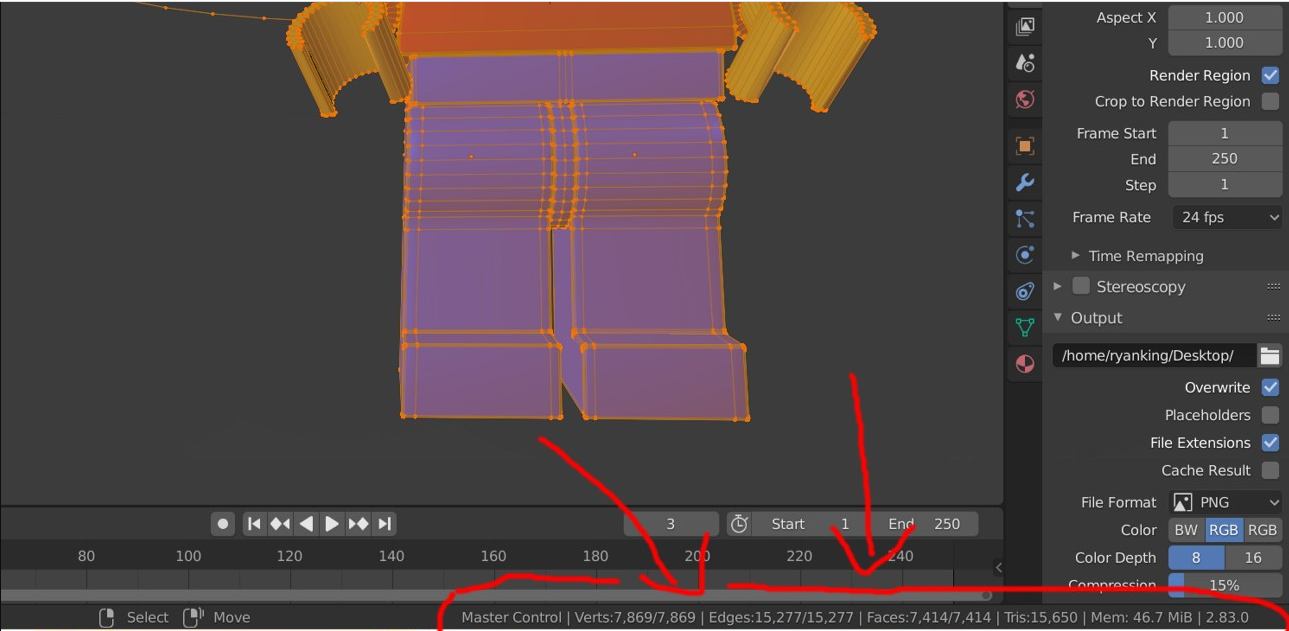
Where can I find the polygon count for a model in Blender?
 feral sluice
Okay, thanks!
Mine wasn't there. If your bar is blank, apparently you have to right click it and select "Scene Statistics" just for anyone who has the same problem, that's how to show it.
pulsar fox
They moved it around in a recent update. Mines floating text near the Upper left now
 dense mantle
requesting backup on a texture issue. Attached are pictures of an avatar that I have; one with the unlit transparent cutout shader, the other with a Quest particles shader. I had to use the particle shader because any other shaders completely remapped the texture because android cant handle cutout textures (im surprised it even worked with the particle shader but thats another can of worms). So the avi is good to go on quest but i dont know how to make the particle shader solid, non-translucent.

tldr: how do i make particles not act like particles
 fair tinsel
unfortunately the answer is you cannot as the particle Shader is not intended to be a cutout replacement my suggestion would be to cut out the bits of the second layer as geometry with the blender knife tool as that is so gosh darn low poly adding some extra geometry would be ok
dense mantle
awesome, so i only have the model as a unityproject so is there a way to put that into blender or
fair tinsel
the original source file should be somewhere in your project folder you probably would be able to double click on the mesh renderer on the right to see where is
dense mantle
ok so it turns out the rig is some 14k polys for some reason so thats not gonna work, but in other news I got a similar level of functionality by using the sprites shader. It still doesnt work but it's better than i've gotten before. any ideas on how to perfect it from here?
 fair tinsel
something is horribly wrong if a Minecraft avatar uses 14k polys
dense mantle
all the edges are slightly rounded
fair tinsel
then you might want to get a different Minecraft avatar to be your base
as that's kind of unnecessarily heavy for the quest having lots of beveled edges
dense mantle
so it's not an issue with shader or texture settings? i'll need to alter the rig no matter what?
also this was the only good mc rig i could find so xD
fair tinsel
yes as transparencies aren't supposed to be allowed on Quest avatars
dense mantle
ah butts
fair tinsel
transparencies expensive for Android Hardware to do
pulsar fox
dense mantle
ok so it turns out the rig is some 14k polys for some reason so thats not gonna ...
14k is medium on quest, it’s not bad, just wasteful for what the model is
(Also, you hype for the advanced wars remake?)
dense mantle
pulsar fox
14k is medium on quest, it’s not bad, just wasteful for what the model is
the 14k was in relation to just snipping out the geometry that would not be needed for the skin
dense mantle
pulsar fox
(Also, you hype for the advanced wars remake?)
and yeah, Andy has been my pfp for stuff for years
pulsar fox
From what I see visually, no bevel is even visible, i'd remove the bevel. it's not contributing
dense mantle
the bevel?
sweet tundra
dense mantle
the bevel?
The slightly rounded edges you mentioned are the bevel.
dense mantle
sweet tundra
The slightly rounded edges you mentioned are the bevel.
go to town
oh sorry heres just the fbx lol
sweet tundra
HOLY
 fair tinsel
like the elbows are the only thing that still need to be there
sweet tundra
Maybe knees as well.
But the elbows are really scuffed too.

I feel like this is a base for an animation model.
A minecraft player (in the standard game) uses 144 tris with all outer layers. 150 if you have a cape.
This has 100x that.
fair tinsel
and I tried bending it and most of those triangles aren't actually doing anything to help with the bending

Here is perfect steve, but this time i rigged him, hope you like it :P. You don’t have to use the animation presented, you can delete it and rig him as you choose. - The Perfect Steve Rigged - Download Free 3D model by Blender3D (@Blender3D) [0cffc39]
this one would be a excellent rated Quest Avatar so I would suggest using that instead @dense mantle
dense mantle
fair tinsel
this one would be a excellent rated Quest Avatar so I would suggest using that ...
so the texture uh

dare I say it's even more broken
fair tinsel
potentially different UV layout
glossy bramble
dense mantle
so the texture uh
That is because of what people call Backface culling (Unity and Blender) or Calculated Normal Faces (Blender). For efficiency purposes, only one side is rendered unless otherwise specified. In Blender you won't see it as clearly without turning on your overlays. In Unity though, it will clearly show you if it's inside out by turning invisible. If you go into Blender, you can go to Edit Mode and turn on your normals to see what is outside and what is inside. This is called "Face Orientation".

Anything in red is turned inside out and will be invisible in Unity like your minecraft character is.
cloud sedge
What does clear cache do?
 chrome citrus
cloud sedge
What does clear cache do?
chrome citrus
cloud sedge
What does clear cache do?
it clears the local data downloaded on your device (as in avatars & worlds)
frank thorn
cloud sedge
What does clear cache do?
It is something you shouldn't do.
gaunt spade
Is there a quest shader that is comparably as good as "Standard"?
cloud sedge
frank thorn
It is something you shouldn't do.
Why?
frank thorn
cloud sedge
Why?
It does basically nothing except requires you to re-download everything.
cloud sedge
Damn
glossy bramble
gaunt spade
Is there a quest shader that is comparably as good as "Standard"?
Standard lite is what you're give with i'm afraid.
gaunt spade
glossy bramble
Standard lite is what you're give with i'm afraid.
Thanks bud. I was using lite, was kind of hoping there was a better alternative not included. Had no luck with google. Standard lite works, just means I have to tweak the lighting a bit more to get what I want. Thanks again.
glossy bramble
gaunt spade
Thanks bud. I was using lite, was kind of hoping there was a better alternative ...
Np bud, it's all you can really do right now. there's alternatives but they can't be talked about here lol
 minor nexus
all my binds are set to one controler can anyone help
dm me if you know how to fix it
 real ginkgo
Is one of your controllers dead?
 solemn ermine
It's not gonna happen, quest can't support all of the audio sources neither on the 1 or 2 due to limitations
fair tinsel
used up most of the audio sources that it can handle doing the voice


 south lily
a little more tighter than that
potent drift
Limitations were established by the developers because they thought that quest was low power, but look at games like beat saber on the quest where they take the performance testing to the max. Or even the performance boosting option in the oculus beta features. It’s only up to the developers to have “limitations”. They are completely capable of adding audio sources to individual avatars, but don’t consider it at all.
frosty tapir
potent drift
Limitations were established by the developers because they thought that quest w...
If you think this then you probably should get Oculus themselves to rework their documentation / guidelines for Unity Audio on Quest.
Additionally you can read a conversation the VRChat team had with some users talking about the removal of Audio sources on Quest avatars.
#quest-general message
pulsar fox
 magic imp
trying to get a big world to fit on quest like
magic imp
trying to get a big world to fit on quest like
That's why I build it on android and then port it to PC
 cloud bear
is it just a myth about the whole quest getting dynamic bones situation or what
fair tinsel
apparently it's we don't know because they haven't finished doing the testing to see if it'll work
pulsar fox
cloud bear
is it just a myth about the whole quest getting dynamic bones situation or what
Dynamic bones? No, never. But the devs have said that it’s replacement, Physics Bones, will be considered for Quest.
Even that is not officially confirmed - but they are officially open to it
potent drift
Have constraints been allowed on sdk 3.0?
pulsar fox
potent drift
Have constraints been allowed on sdk 3.0?
SDK3, yes. Android/Quest builds, no. I've heard some people say it may be allowed in the future, but I haven't heard anything official.
 young ridge
I dont get the quest limitations for vrchat, quest 2 can handle dynamic bones as it can handle transparency
fair tinsel
documentation for all of the major game engines recommends away from using lots of transparencies on mobile Hardware
and no the quest couldn't handle the current implementation of dynamic bones considering how many people get lag from them even on desktop VR
young ridge
I would pin that to vrchat being an ancient monstrosity that not even the devs fully understand the workings of
south lily
the transparency stuff and dynamic bone stuff is true. but audio sources and constraints however is not
fair tinsel
there is Oculus documentation recommending against lots of audio sources
upper whale
So it turns out there are now Quest worlds popping up with working youtube players, how does this work? Does anyone have info how to replicate ?
south lily
upper whale
So it turns out there are now Quest worlds popping up with working youtube playe...
so in simpler terms, the easiest way to rep is with a proxy, but idk if vrc allows americans to go that far yet (?)
next easiest wouldbe photon
wraith jewel
Help?

 runic belfry
I seriously hope physics bones come to the quest it’ll be such a present for quest users I’m pretty sure the vrc team is trying their best to make it work out :>
runic belfry
young ridge
I dont get the quest limitations for vrchat, quest 2 can handle dynamic bones as...
I dunno if the quest can it’s very cpu heavy it can make some good hardware drop to it’s knees and that’s the pc side of things.
young ridge
pavlov runs at a consistent 60fps
ragdolls, gun mechanics and transparency. vrchat is just not very well optimized for the platform
runic belfry
ooo Pavlov on the quest has transparency???
That’s cool
I remember there was this one world that demonstrated dynamic bones on quest or something like that I think it was fake tho
south lily
pavlov is also much newer and more properly designed. where as vrc is the wild west when it comes to optimization and age
south lily
runic belfry
I remember there was this one world that demonstrated dynamic bones on quest or ...
ye, i think it was a quest only shader actually that was made 7 years ago using distortion
however the closest i think that can be fakedinto dyn bones would be spring joints (not spring bones) but i cant remember if they are allowed
fair tinsel
young ridge
ragdolls, gun mechanics and transparency. vrchat is just not very well optimized...
and it also doesn't have user-generated content
south lily
ye its much more organized and strict
fair tinsel
looking over the Oculus Quest Trailer I don't see any transparency on the avatars https://i.gyazo.com/43454a923a26280e13ef1576d3e174ca.png
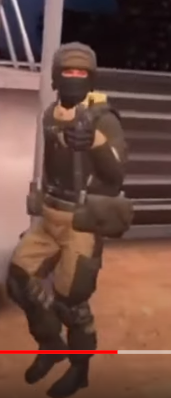
and also probably no blendshapes whatsoever
also probably helps that there's no mirrors whatsoever
south lily
youre not wrong about mirrors lol
fair tinsel
so yeah it's a lot easier to have a stable of fps when developer is completely in control of what being rendered
young ridge
fair tinsel
and it also doesn't have user-generated content
most of the game is user generated content tbh, from game modes to maps. only thing not user generated are avatars which aren't important and no, there's no transparency on the avatars
the crux of the problem is like you said its the wild west on an already outdated engine
fair tinsel
question does even the quest version have the user-generated maps?
 nova stream
why is it just saying future proofing then does nothing afterwards

is it the android support thingy
vale sierra
disable future proofing
in your vrcsdk settings
nova stream
ok
i'm mainly doing this so people can actually see my avatar
and not see an ugli robot
and now when i click build and publish it goes grey then does nothing
does poiyomi shaders have quest support???
fair tinsel
nova stream
does poiyomi shaders have quest support???
no nope you can only use the vrchat mobile shaders
and the PC version of the Avatar can have a completely different Shader to the quest version
fair tinsel
https://cdn.discordapp.com/attachments/565256303614623767/860622421496954890/unknown.png maybe this might work "Use Mobile/VRChat/Matcap
regular texture goes on top"


 heavy hornet
When the avatar dynamics come out, would they be supported on quest or will it be the way it is with dynamic bones where its PC only. Could the quest handle the dynamics?
fair tinsel
the developers mention they're looking into having physics bones on Quest so potentially yes
 crisp thistle
any cutout particle shader that vrc have that work for the quest.??
vale anvil
No there is not.
You would have to make a mesh particle to have some kind of cutout.
crisp thistle
hmm ok.
pulsar fox
crisp thistle
any cutout particle shader that vrc have that work for the quest.??
For worlds, vrchat/mobile/particle/additive and vrchat/mobile/particle/multiply support both transparency. For avatars, no transparency is supported. You can use custom mesh shapes as particles to get the shape you need
potent drift
So, I just found a way to create a constraint-like effect with quest
It’s pretty epic
pulsar fox
potent drift
So, I just found a way to create a constraint-like effect with quest
Would you like to share with the rest of the class XD
south lily
rotational animator
crisp thistle
potent drift
So, I just found a way to create a constraint-like effect with quest
Share??????.
 rose anvil
wraith jewel
Help?
rose anvil
wraith jewel
Help?
have you tried resetting the app preferences globally? i know how to do it on android i don't know how to do it on the quest
https://www.androidauthority.com/change-default-apps-android-2-633572/
wraith jewel
rose anvil
have you tried resetting the app preferences globally? i know how to do it on an...
I got it figured out, I had to reset the defaults for gallery.
My phone is just really stupid and all the settings are hard to find.
 tribal otter
dumb question how do i get pickup objects to sync between quest and pc
i tried finding the answers but i do not see where to find it
south lily
tribal otter
dumb question how do i get pickup objects to sync between quest and pc
object sync component
tribal otter
yes but i only have luck getting it to sync between the same platform
not quest and pc
unless im using it wrong
south lily
are the hierarchies the same?
tribal otter
its an identical world
south lily
im not sure then, try reuploading both version
tribal otter

anything seem out of place?
usually i just keep the same project then convert this project to quest and upload the same world \
so its basicly identical\
south lily
thats odd then, if theyre identical. and have object sync, they sould sync
nova stream
does anybody know how to keep dynamic bones on a quest avatar for pc only but remove them for quest users
myself is a pc user but im just making my avatar quest compatible for everyone to see it'
south lily
@nova stream duplicate the avatar, and in that dupe. delete the dynamic bones
and then upload that under the same ID
 split steppe
Can anyone upload an avatar for me?.i for the love of good can't figure it out
split steppe
I don't know how set up unity for it and i don't really have the time to figure it out right now
split steppe
Do i need to have unity 2018 to upload characters, or can I use like 2019 as well?
south lily
2018
pulsar fox
split steppe
Do i need to have unity 2018 to upload characters, or can I use like 2019 as wel...
VRChat works with 2018.4.20f1 only. No other version of Unity will work, even if it’s still 2018. It will act like everything works, even say upload successful, until you get in game and see it never appeared.
split steppe
Asking because i can't seem to figure out how to get that version with the Android SDK
pulsar fox
I installed it from unity itself when I attempted to change platforms, it said they were missing and asked permission to download them
split steppe
can anyone please upload an avatar for me? i can't upload it myself
split steppe
Please.... .about to give up with figuring it out. O wanna do new, exciting stuff, but it's on hold because of this stupid unity thing
sweet tundra
split steppe
Do i need to have unity 2018 to upload characters, or can I use like 2019 as wel...
The next project for the devs is moving to 2019. Source: #open-beta-announcements
split steppe
Kinda don't want to wait until then, but i guess it would help me with uploading my character, because there I know how to get the Android sdk
sweet tundra
split steppe
Kinda don't want to wait until then, but i guess it would help me with uploading...
How are you getting the SDK for 2019? Because if it's through Unity Hub, it's the same process for 2018
If it's not through Unity Hub, get Unity Hub and do it through Unity Hub.
split steppe
The version in unity hub doesn't seem to be the excact version that is listed on vrchat
Or does the 2018 version in unity hub work as well? If yes, then problem solved, because there I know how to get the Android sdk
frosty tapir
@split steppe The unity version has to be the exact same one as in use currently (Unity 2018.4.20f1).
You can download it from here https://docs.vrchat.com/docs/current-unity-version using the hyperlink to install it via Unity hub.
VRChat
This page lists the current Unity version you should use when creating content for VRChat, as well as links to the correct version for both Unity Hub and direct downloads. Current Unity Version The current Unity version in use by VRChat is Unity 2018.4.20f1. Ensure you are using this precise versio...
sweet tundra
Unity Hub only lists the latest versions of each major update
split steppe
frosty tapir
<@!230392051211042818> The unity version has to be the exact same one as in use ...
thank you a lot. finaly the right version with an easy way to install android sdk. i hope the rest is easier now
plush temple
Did a recent VRChat update break additive blending somehow? My avatar's shirt and blush appears lukewarm yellow on Quest. (???) I don't even have that kind of yellow anywhere in my shaders.

They are both on the same material slot yes. It shouldn't be relevant. Neither are supposed to be yellow. :<

This was a screenshot from roughly two weeks ago when I created the Quest version of my avatar. I confirmed it was working with my Quest headset.
 pastel wraith
I see people having cool avatars like Darth Vader on the quest, how do people get those?
plush temple
Time and patience.
pastel wraith
Is there a website people use?
plush temple
They make them using a combination of a modelling program (usually Blender) and the VRChat SDK with it's build target set to Android.
VRChat
Creating content for VRChat Quest is a challenge-- you have to create attractive, compelling content all the while keeping the content optimized for a mobile device. These are the same challenges that game developers must deal with while building for mobile. Here, we'll give you some general guidel...
Some do it from scratch, most rip assets from games and make them compatible.
plush temple
Read the documentation link it describes what people have to go through to make an existing avatar Quest compatible.
pastel wraith
The link you sent to me just now, or another?
plush temple
Yes, same link.
pastel wraith
Thanks! Appreciate your help
plush temple
It's all there, that page outlines everything that needs to be accounted for and will contain extra links to more details.
 onyx orchid
Guys, why isn't the Quest version of the last update properly tested??? Almost everything is pink for Quest users after the last update :///
 shrewd dome
onyx orchid
Guys, why isn't the Quest version of the last update properly tested??? Almost e...
shrewd dome
onyx orchid
Guys, why isn't the Quest version of the last update properly tested??? Almost e...
same
all of my friends have the issue
onyx orchid
it also broke the Among Us game :( (@jar is trying to fix that rn)
 static fox
onyx orchid
Guys, why isn't the Quest version of the last update properly tested??? Almost e...
static fox
onyx orchid
Guys, why isn't the Quest version of the last update properly tested??? Almost e...
Same ok my end,y game won't even load
magic imp
it seems to be skinned meshes using the same material more than once have the error
 lavish bough
Can someone help me with the oculus app?
gaunt spade
Anyone know why a Button pressed in a World would return "Access Denied" on quest; the return is an error output not something scripted to be cute.
south lily
gaunt spade
Anyone know why a Button pressed in a World would return "Access Denied" on ques...
more info?
gaunt spade
you press a ui button that sends a link. the button is outputting access denied as an error.
it sends a link to an input field that triggers the link to load.
ied assume the link is protected, but since it works just fine on pc, thats clearly not the issue.
pulsar fox
gaunt spade
you press a ui button that sends a link. the button is outputting access denied ...
Does the quest user have allow untrusted URL’s enabled? It is a per client thing, not per account
south lily
ye. if its qvid or my revision of pro tv to allow youtube. it will say that error if either A) a vpn is being wack. or B) untrusted urls is off
apparrently differentiating from the 2 is wacky so the “access denied” will appear for thw client
but then again. everythinfs wacky
gaunt spade
ye, its not even a youtube link, its dropbox. works most of the time but he needs air link for it to work, if not "access denied".
my mind is fkin exploding. the hoops to jump through is just completely ridicules.
south lily
gaunt spade
ye, its not even a youtube link, its dropbox. works most of the time but he need...
what world/videoplayer?
gaunt spade
sry, world isnt published. Noris. Merlin wont even play dropbox or drive.
south lily
oh norix isnt supposed to work on quest period
gaunt spade
not the video, the sound should still load.
gaunt spade
what I am saying is that the quest user isnt fetching a youtube.dl. they are fetching a mp4 from drive. Does quest not allow mp4 to load period?
south lily
gaunt spade
what I am saying is that the quest user isnt fetching a youtube.dl. they are fet...
Zapier
Read or Download How do you Generate a Direct Download Link to Share a Dropbox File? from our How to Do Anything in Apps e-book for FREE and start learning today!
gaunt spade
yeah, thats what I have done. https://www.dropbox.com/s/gqlsyx7sef61xci/TkNr.mp4?dl=0

with airlink YAY, without Airlink 😢 booo lol
oh wait... so i need https://dl.dropboxusercontent.com/ and not https://www.dropbox.com
?
south lily
gaunt spade
oh wait... so i need https://dl.dropboxusercontent.com/ and not https://www.dro...
correct. but remember norix will usually return null unless you modded it so it doesnt have headset racism
gaunt spade
can you recommend an alternative?
gaunt spade
in all fairness; we develop tech to be cheaper && >=superiority to the market. Facebook purposefully marketed snake oil with an ultra low price tag. Facebook == Wish.com in every way. So now the entire industry has to go nuts over absurd compatibility restrictions.
south lily
gaunt spade
in all fairness; we develop tech to be cheaper && >=superiority to the market. F...
very accurrate
pro TV has a beta in their discord thats designed for quest streaming and such
gaunt spade
Keeping an eye on ArchiTech thanks for that. But the link alteration worked perfect. Saved my life bro
south lily
np
 tribal leaf
Is transparency on UI element, such as Image and Raw Image have performance issue on quest?
 frigid cipher
we don't have that on pc ? if it's mods, it's not supposed to be supported, and i'd rather, as a creator, have that not be a thing. because we sometimes disable avatar cloning & make one public just to give an avatar or let someone test one, which would result in people being able to use those that are public but still private in a way. I hope this makes sense, but lots of us creators really do'nt want this to be a thing.
ah, you deleted your message.
sweet tundra
tribal leaf
Is transparency on UI element, such as Image and Raw Image have performance issu...
If you have lots layered, then yes, but one or two will not do much.
 inner torrent
i want to slave the left arm to the the movement of the right and cant do that on quest with constraints dose any one have any ideas its for stroke therapy avatars one arm and hand are controlled by the other both arms can move at the same time but one must be master and other slave.... im not a doctor but i was told it works like this it work on me it helped me regain so much of my skills. the left and right sides of the brain talk to each other when the brain seeing the slaved arm moving with no cross talk causes the brain to try to find new paths around the stroke damage like finding new side roads to replace old roads that are damaged and closed off
 crude reef
inner torrent
i want to slave the left arm to the the movement of the right and cant do that o...
crude reef
inner torrent
i want to slave the left arm to the the movement of the right and cant do that o...
What the fuck
 abstract pond
the sentence looks like made from iOS predictive text
pulsar fox
I understood it pretty well. He has one arm and is asking if an avatar can be set up so his missing arm simply mirrors the one he can use.
The answer is unfortunately, not on quest. But PC can do it with rotation constraints
@inner torrent
 copper stirrup
hi so uhhh, my avatar toggles just DONT work on quest??? all the things are in the same spot as my pc avatar, and its using the same FX layer (everything is named the same, the only differece is the model is slightly decimated on quest) and gahHHHhhh its driving me insane. if anyone can help, please ping me
 errant lagoon
Maybe someone from the vrchat team could answer if the quest version will ever support video and audio (for music venues). That would be super cool.
south lily
errant lagoon
Maybe someone from the vrchat team could answer if the quest version will ever s...
it does....
it has for 7 months now
errant lagoon
Oh I just checked and it didn't
south lily
errant lagoon
Oh I just checked and it didn't
did you just read the old docs?
anyway: theres a few ways in getting videos to player and even live streams now
 dusk crypt
need some help, im trying to port a pc avatar on SDK2 but im getting a malformed avatar issue and when i try the auto fixed it makes the avatar invisible, and it doesn't show up on the control panel. control panel says this: "The following component types are found on the Avatar and will be removed by the client: Transform, Animator, VRC_AvatarDescriptor, PipelineManager, SkinnedMeshRenderer" Meanwhile, unity console says this: "Malformed avatar
UnityEngine.Debug:LogError(Object)
VRCSDK2.Validation.AvatarValidation:GetWhitelistForSDK(GameObject) (at Assets/VRCSDK/Dependencies/VRChat/Scripts/Validation/AvatarValidation.cs:176)
VRCSDK2.Validation.AvatarValidation:FindIllegalComponents(GameObject) (at Assets/VRCSDK/Dependencies/VRChat/Scripts/Validation/AvatarValidation.cs:187)
VRCSDK2.Editor.VRCSdkControlPanelAvatarBuilder2:ValidateFeatures(VRC_AvatarDescriptor, Animator, AvatarPerformanceStats) (at Assets/VRCSDK/SDK2/Editor/VRCSdkControlPanelAvatarBuilder2.cs:22)
VRC.SDKBase.Editor.VRCSdkControlPanelAvatarBuilder:OnGUIAvatarCheck(VRC_AvatarDescriptor) (at Assets/VRCSDK/Dependencies/VRChat/Editor/ControlPanel/VRCSdkControlPanelAvatarBuilder.cs:318)
VRC.SDKBase.Editor.VRCSdkControlPanelAvatarBuilder:ShowBuilder() (at Assets/VRCSDK/Dependencies/VRChat/Editor/ControlPanel/VRCSdkControlPanelAvatarBuilder.cs:91)
VRCSdkControlPanel:ShowBuilders() (at Assets/VRCSDK/Dependencies/VRChat/Editor/ControlPanel/VRCSdkControlPanelBuilder.cs:323)
VRCSdkControlPanel:OnGUI() (at Assets/VRCSDK/Dependencies/VRChat/Editor/ControlPanel/VRCSdkControlPanel.cs:200)
UnityEngine.GUIUtility:ProcessEvent(Int32, IntPtr) (at C:/buildslave/unity/build/Modules/IMGUI/GUIUtility.cs:179)"
Please help, i cant find info on this in the documentation and most things online are from different issues.
pulsar fox
Yeah something is seriously wrong with your project. I’d recommend starting a new project, importing only the official sDK, and only the fbx model of the avatar, nothing else, and setting up the descriptor yourself and see if it uploads. If you imported someone else’s unity package, it’s probably bad.
dusk crypt
ah, alright.
dusk crypt
well, that fixed it! Thanks a lot!
pulsar fox
Size as in height?
Stay above 3 feet and under 9. Or above 1 meter and under 3.
For file size, you need to be under 10mb
 weak flame
Hello guys. So i am uploading all of my PC avatars to quest/android now. But i see that there is no cutout/fade option with vrchat/standardlit shader.
Any tips? Because the hair looks bad if i don't change it
sweet tundra
weak flame
Hello guys. So i am uploading all of my PC avatars to quest/android now. But i s...
You can use the blender knife tool to cut it out manually. That's the best option.
 supple folio
ey, I'm working on a world and am currently in the process of making it quest compatible and noticed some pretty intense z-fighting on a few things and even avatars in the world when the player is roughly 10 meters or further from some objects/players.
The various sections of the world are each 300m from the origin and I was wondering... Is that beyond the quest2's limits?
sweet tundra
supple folio
ey, I'm working on a world and am currently in the process of making it quest co...
It’s likely due to floating point imprecision, there would also likely be an issue on PC (but less noticable) I advise you move them closer to spawn, and if you need to hide them, adjust the clipping planes, or make a wall with the skybox’s textures.
supple folio
sweet tundra
It’s likely due to floating point imprecision, there would also likely be an iss...
it boggles the mind... 300 meters really doesn't seem like enough to cause floating point issues. The camera render distance is only 150, so each area is unable to see the others.
supple folio
I think the issue is only happening with objects using Unlit/Transparent Cutout
sweet tundra
supple folio
I think the issue is only happening with objects using Unlit/Transparent Cutout
That may be it, the Quest doesn't work well with transparency.
 proven oar
god damn it was going to upload a pc model to quest and forgot it needs transparency and the devs wont fix the sdk so we can use transparency on models
fair tinsel
you cannot use transparencies on avatar on the quest because it's too expensive for mobile Hardware
proven oar
The quest 2 can handle it just fine not the quest 1 though and also you say that when more then half the quest avatars on the game are using modified sdks to use transpareny/cutout and all the other bullcrap like why cant you use sound files on quest or have constraints and why is the partical shader completely broken
I have seen tons of avatars with dynamic bones on them as well which means they used modified sdk
As far as I can tell the vrchat dev's don't want to support quest anymore so they refuse to fix/address the problem
Like me and king Todd want to give quest good models but a ton of models need transparency/cutout and we don't want to modify our sdks to do it and get banned if we did
wraith jewel
Im pretty sure quest 1 users almost are all gone
also Ive worked on a demo of a world out on vrchat using about the same specs and situation with 2 times rendered and it ran better
if the dev team wants the restrictions I have litteral video evidence of these demos running perfect
still kinda pissed off from being warned for asking for a shader for my quest world
if I could only get a shader that wasnt trash or downright performance destroying
its enough to make me waste my time to learn it
I hate making stuff in unity aswell
I only know html good
sweet tundra
proven oar
The quest 2 can handle it just fine not the quest 1 though and also you say that...
I went on a world on my Quest 2, there was no one else there. There was a lot of cut-out grass on the ground, when looking at the grass with lots of it layered (I mean at most 10 layers, which is practically nothing), I was getting 60 fps. Now imagine what would happen if there were people, all with their own transparent particles and textures. Further dropped performance, likely 30-40fps. The performance is then dropped because they all have their own audio sources as players, which really take a toll on the Quest (and Quest 2). The fps is probably near crash levels, less than 15. Give everyone their own audio sources as part of avatars, and if you haven't crashed yet, you may as well have because you can't see, nor play the game, nor leave because of that low fps menu bug (unless they fixed that)
And they are considering constraints on the Quest platform: https://docs.vrchat.com/docs/quest-content-limitations#components
And I'm pretty sure dynamic bones get removed by the quest client as well.
wraith jewel
sweet tundra
I went on a world on my Quest 2, there was no one else there. There was a lot of...
Ha constraints we already got enough
Any more and I'm quitting and so are my fans
wraith jewel
and that would impact the games numbers quite a bit
proven oar
No it wouldn't I have my own quest 2 and i know what the frame rate Is like also audio sources would not affect performance only the download size of the model/map
And crunch yes dynamic bones get removed but the problem is people are modifying the SDK to get around it
And also the game would run better if people would optimize there worlds and models
Like I see quest models all the time with over 100 materials and dynamic bones and all that other crap
And if you don't believe me go to kingtodds world he's optimized the crap out of that world there could be 30 people in that world and you barely would be lagging and he has like 6 or 7 full sized maps in there
You just think the quest 2 runs like garbage because nobody optimizes their models and maps I'd you had a pc you could see it's even worse on there you could have a god tier pc and go into a world and drop down to 10fps it's really bad on the pc side
sweet tundra
proven oar
No it wouldn't I have my own quest 2 and i know what the frame rate Is like also...
This is just straight up wrong. Audio sources absolutely impact performance, have you ever been in a room with 25 people, all with their avatars disabled? How big a download is also has nothing to do with it. You could have a 50mb world filled with disabled objects and it could still end up running better than a 5mb world filled with multiple of the same high poly mesh. I do agree that the game would run better if people optimised their worlds and avatars, but that's the whole point of the avatar blocking system, to keep the game performant by default, even when people do that. And I hight doubt you see Quest avatars with dynamic bones, as they are removed the client (being the VRChat game itself).
proven oar
sweet tundra
This is just straight up wrong. Audio sources absolutely impact performance, hav...
yeah i have because people wont optimize their shit and audio sources do not affect fps or ping at all. also your argument of the world size crap does not make sense at all. and i have been seeing poeple with dynamic bones and other crap on quest models its actually really common to see that stuff. and your wrong on the game removing it the sdk removes it and the sdk can be modified its not hard
fair tinsel
that would be ridiculous for audio sources to have literally no effect on FPS as they do have a CPU cost to process and SDK modifications aren't going to do squat to how the Quest client handles the data
sweet tundra
do not affect fps or ping at all
Well of course audio sources don't affect ping. Ping is related to your internet connection.
But they do affect fps.
Especially when the audio is being live decompressed.
proven oar
then explain all the fucking quest models im seeing that are breaking the restrictions
sweet tundra
idk a modded client
fair tinsel
I doubt you can get a modded client running on the quest
proven oar
you cant do it with a modded client
and what rain just said you cant get a modded client on quest
sweet tundra
fair tinsel
I doubt you can get a modded client running on the quest
It's possible just harder to do.
Like beat saber quest mods.
They exist, but are more annoying to make.
fair tinsel
so this would all depend on how does the quest client handles illegal SDK content
proven oar
its a big problem i go into a public world and i see atleast 3-4 quest users using models that break the restrictions
also what the fuck do you guys act like quest cant handle audio it can easily you act like the thing will blow up as soon as someone plays some audio
and also unity compress the audio for you so why would vrchat have to do it?
sweet tundra
proven oar
and also unity compress the audio for you so why would vrchat have to do it?
When you speak, your microphone audio gets compressed to be sent over the internet quicker. It gets sent to the other people in the room, and decompressed live. That compression and decompression uses the CPU, which the Quest doesn't have much power to use. I've been to instances with 12 people on the Quest 1, and 24 on the Quest 2, and I had around 30fps, even when I couldn't see anyone (models get culled and not rendered, so it wasn't avatars).
The audio not part of avatars (people speaking) go through this. And then it has to calculate the volume in 3D space (although this isn't too bad), using more CPU.
It then renders the people you are talking to, and it gets even slower.
fair tinsel
proven oar
also what the fuck do you guys act like quest cant handle audio it can easily yo...
the vrchat dev team would know more than you about what it can and cannot handle
proven oar
sure totally
fair tinsel
why would you know more than the folks that literally programmed it
proven oar
because i do model making i try to make good models that are not awful on performance and because i dont trust the dev team at all there has been quest stuff broken for months and even on the pc side there has been stuff broken for months
 bold hare
proven oar
because i do model making i try to make good models that are not awful on perfor...
bold hare
proven oar
because i do model making i try to make good models that are not awful on perfor...
Everything. From visuals to audio are proccessed by the onboard cpu of the quest. If there is a shit ton of audio being played then there is a shit ton to proccess. Thus impacting performance. While audio isn't as big of an impact as all the avatars with millions of particles, shaders, dynamic bones and all the polygons in the world, audio still has an impact on system performance.
wraith jewel
sweet tundra
This is just straight up wrong. Audio sources absolutely impact performance, hav...
I have a world running 20 different audio sources at the same time and the quest lost no performance
Also a litteral Nintendo ds can run I believe 10 audio sources at max and that's weak hardware from 2005
The quest may be weak but its about as fast as a Samsung galaxy s7 in power and the quest 2 being about as powerful as my phone which is a note 10
sweet tundra
wraith jewel
I have a world running 20 different audio sources at the same time and the quest...
Is the audio for those sources being steamed live from a server and decompressed as it arrives at the device, or not?
sweet tundra
And is the audio file set to be streamed?
And I don’t think the Quest 2 is as powerful as a note10.
wraith jewel
Specs wise not really but very close
The quest 2 has lil less ram
But quest 2 is more capable than people understand
If you ever go to my worlds you will see what I mean
sweet tundra
Also 72fps on the Quest 1 or 2?
sweet tundra
Because the Quest 2 got updated to 90 pretty sure. Idak tho, I haven’t been on in a while
wraith jewel
It's capable of 120
sweet tundra
Yes I know the Quest 2 can reach 120
wraith jewel
But vrchat restricted the fps to only 72
wraith jewel
Want a screenshot of the mess quest 2 is?
sweet tundra
I have a quest 2 I know vrchat is a mess on it
I even played it on a quest 1
And it was worse
wraith jewel
Same
sweet tundra
But they’re already forced to limit a lot to allow in the oculus store
wraith jewel
My worlds run better than the ones made by vrchat themselves
The home world on quest 1 can't even hit 50fps
sweet tundra
I get full fps on the homeworld, i have no clue what you’re talking about
wraith jewel
On quest 1
wraith jewel
How long ago
sweet tundra
Quest 1 was quite a while ago, I sold it a few months ago for a quest 2.
wraith jewel
That will be old news then
sweet tundra
But Oculus still has high standards for games on their store
sweet tundra
Namely, they have to be performant (pretty sure more than 60fps), and since vrchat is so popular they probably made an exception. But the VRChat team still had to reduce a lot of stuff on the quest.
wraith jewel
You can easily change things to run better
sweet tundra
wraith jewel
Should of stayed in labs
If you mean app lab, that released this year, VRChat Quest released two years before that
wraith jewel
I know so how about side quest
vale sierra
72 fps on my quest 1 in vrchat home world
gee, maybe you're just using an unoptimized avatar
sweet tundra
Or maybe you had people in the world
One of those two, because both are fps droppers
wraith jewel
vale sierra
72 fps on my quest 1 in vrchat home world
I was in a good ranked avatar
Explain that
vale sierra
I'm getting 72 fps in the home world right now on my quest 1
wraith jewel
Well it must of been updated in the last week
vale sierra
the last update was 3 weeks ago
sweet tundra
The last vrchat client update was over 2 weeks ago, and I don’t think the home world is updated often
That last major change was the Unity 2018 update
Maybe Avatar 3.0, i dont remember
wraith jewel
I believe I got a download when I joined the homeworld yesterday
Yno what would be good if vrchat allowed it
Lod groups
vale sierra
Its also such a common misconception that audio is cheap. Its not as cheap as you think, processing audio takes up cpu time, and having multiple audio sources concurrently adds up quickly. Incorrect import settings on audio clips can also make a big difference especially on mobile hardware, for example a single large audio clip set to decompress on load has the potential to cause Quest 1 especially to run out of memory, and can make the difference between a world loading and crashing.
wraith jewel
Ever heard of gpu instancing?
vale sierra

sweet tundra
Yup. Audio can GPU instanced confirmed in Unity 2069.
wraith jewel
I Don't think you get what I ment
sweet tundra
Yes, I know how materials work.
But GPU instancing only works on object with the same material AND the same mesh.
vale sierra
gpu instancing also doesn't work on skinned meshes
also the last time the vrchat home world was updated was 5th june
sweet tundra
I’m pretty sure the VRChat team would’ve used it where they could in the home world (which wouldn’t be in many places)
wraith jewel
Have you ever seen their old hubs running on quest?
sweet tundra
Yes. I played the game in 2019 on my Quest. It ran fine in the homeworld
wraith jewel
Do you remember before that we had a good hub now we Don't have one
vale sierra
and by old hub you mean the current hub design which has stayed the same since the Quest was first released?
sweet tundra
The hub has not changed at all.
Excpet for seasonal things, like winter, where they added sleds or something.
wraith jewel
The seasonal hubs were better because there was something to do
Another problem I have with the hub is that they only advertise PC only and cross
They don't do quest only
Also they almost never approve quest only
vale sierra
There is a quest only hub
wraith jewel
Yes but it only advertises cross and PC only
sweet tundra
And it’s very advertised on quest pretty sure
wraith jewel
They left the PC only stuff on the quest only hub to litterly rub it in
If they cared they would of made the quest only hub advertise worlds they can go to
sweet tundra
The homeworld advertises places you can go to on quest