#quest-development
1 messages · Page 9 of 1
 wraith jewel
And it should run, it has the NVIDIA GeForce 1050Ti
If I said that correctly
Yeah, it's a pretty good PC.
Wait so my Oculus quest 2 won't fry?
 midnight gulch
Not plugged in, no.
wraith jewel
If I run it there and shaders from there? Ohh.
midnight gulch
Your essentially running everything on the PC, the headset just becomes a monitor...
wraith jewel
By the way do I have to keep it plugged in to play, or just once to set it up? And is the wire like far enough so that I can have room to play?
Ohh I see.....
midnight gulch
So yeah, you need to keep it plugged in; and it<s worth getting the official link cable instead of any random USB3; because the connection can cut out randomly.
wraith jewel
Yes of course, I'll see if I can get it from the original Oculus website.
midnight gulch
Alternatively, you could stream the game from your PC to the Quest using Virtual Desktop. I think its like 30$. That will allow you to play the full PC game (with everything shown) wirelessly.
The frame rate drops off substantially though; since your streaming it.
wraith jewel
I see, so it has some pros and some cons.
How much of a drop rate are we talking?
Do you know?
Holy shit it costs 80 bucks, lmfao.
But it's worth it so I'll get it
 pulsar fox
They should make an update in VRChat so that people with Oculus quest 2, like me, can see other peoples shaders because apparently you can’t see other people shaders if you have an Oculus quest 2 because it’s disabled for that VR headset. That sorta ruins the game for people that have Oculus quest 2 and I think it should be fixed. But overall it’s a great game.
@wraith jewel they can’t - the quest is an android device. It doesn’t matter how good it’s specs are - if it’s android it can’t run content made for windows
You need either x86 architecture mobile processors, or ARM processor gamer PCs for everything to be cross compatible. Nether of those things are ever going to happen
pulsar fox
No.
What I am saying is the quest is a ARM processor. Windows VRChat content is built for windows. Windows/mac/linux for x68 chipsets. It’s not a matter of being underpowered, quest is the wrong kind of cpu
Now if you connect your quest to a pc you can just play the pc version over link. That’s because your pc just uses the quest like a display device
wraith jewel
you mean x64?
Btw thanks for the info, could you check if my PC could run it?
In DMs?
 fair tinsel
The SteamVR Performance Test measures your system's rendering power using a 2-minute sequence from Valves Aperture Robot Repair VR demo. After collecting the data it determines whether your system is capable of running VR content at 90fps and whether VR content can tune the vi...
 wraith jewel
Who agrees that vrchat on quest could have been better?
I would personally say that the performance could of been increased a bit throught the lifespan of quest 1
fair tinsel
honestly there's probably not too much they can do because user-generated content
wraith jewel
Who agrees that vrchat on quest could have been better?
@wraith jewel I thought so too but after playing it for a while , my Quest started to heat up like crazy and I think it even crashed twice without shaders.
VRChat isn't really the game when it comes to the Oculus quest.
I'd recommend you buy a/the linking cable from the Oculus website and link it/your Quest to a nice PC if you have one.
That way you can play VRChat without ANY problems.
- Shaders
Lol.
@wraith jewel If you need any help on how to link it to your PC, and if your PC doesn't have a USB C port (which is the port used to link the linking cable) what to do. Then let me know and I'll be glad to help.
wraith jewel
Nah I don't need help with link I just need help with performance
wraith jewel
Performance?
Wym?
Btw I was wrong about VRChat, just disable particles for everyone and you're fine, lol.
Yeah, you can’t really fix performance aside from avoiding hard to run worlds and avatars, so I don’t understand the question.
He sorta can, but not with the Oculus quest alone.
You'll need a good PC.
Or laptop.
Then link it and you're good to go, if the performance is still bad then, then it's your laptop/PC.
To know if you can run VR games greatly or not, go to steam and take the "SteamVR Performance Test".
wraith jewel
I get compatable
wraith jewel
Is there any way I could say stream vrchat through a application like geforce now and use that paired with good internet to play oculus link?
 thick solar
you can play wireless steam VR with Virtual Desktop
if you have good internet its only 13-20ms
wraith jewel
Well my issue is I currently do not have a capable computer
I use GeForce now to stream my games my pc cannot run
thick solar
ah I see.. no you can't do geforce now
wraith jewel
Dang
Would a laptop with an intel UHD graphics card be powerful enough?
Or should I just build a pc and try to make it cheaper
wraith jewel
I have a $300 build that runs VR games. It doesn’t run them fantastically, but it runs them well enough
pulsar fox
I worry about the input delay that would be present using oculus link over GeForce now, if it were possible (it’s not)
If someone could solve the latency issue I can bet people would like that as a service
wraith jewel
Have you downloaded the Android Unity Build pack?
 sweet tundra
They have, they switched to it.
It could be an issue on that avatar, or a different avatar in the scene.
wraith jewel
Hm
 lament owl
@wraith jewel if you have any avatar in the scene that won't upload, it'll gray out the button. If you have no warnings for the current avatar trying deleting/disabling other avatars
 civic prawn
Hello, so I am trying to build a quest world and when I uploaded it and I join the world the right eye is blacked out except you can see mirrors. The problem isnt on the left side and it is only on that world. Is there a way I can fix this?
 solemn ermine
@civic prawn do you have any chairs that are from the sdk?
civic prawn
like an actual chair that you sit in?
solemn ermine
Yes
@civic prawn I advise hiding it or deleting it, for a good number of vrc worlds chairs that do not have changed meshes will screw up the quest version
civic prawn
I have a a chair from the asset store do I need to delete that?
solemn ermine
I would advise just hiding it for now
No need to delete it if you still want chairs on the pc version of your world
civic prawn
Okay I’ll try that. But it doesn’t happen on the PC version if that means anything
solemn ermine
It won't happen on the pc version
 next current
I got a weird bug on my world. Made a world and did the usual port to quest, but for some reason people on quest see the world completely fine in one eye, but the other sees nothing but players and a pen asset I added. An earlier build of the map worked fine on quest, but I had to rebuild it due to many things been added, and it was only this time that this bug occurred. Any suggestions on why this might be?
I'll probably rebuild it to see if that does anything, but even if it does I would love to hear why
solemn ermine
@next current you have chairs from the sdk in your world?
Would recommend disabling them if you do have any chairs on the quest version that do not have changed meshes just to see if that fixes the issue
next current
I do have chairs. they were there on the earlier build too
solemn ermine
Might as well try it, if not check all of your shaders and make sure nothing uses grabpass
next current
hmmm... shaders have been changed... thanks for the tip!
solemn ermine
Hope it helps
 glad shadow
https://github.com/oneVR/VRWorldToolkit
Has built in detection and a warning message in the world debugger for using grabpass shaders on quest 😉
solemn ermine
Might have to try that out for the next world I work on
 icy elk
Is there any development within vrchat to fix the capabilities of VRC video syn so that does not break comparability with quest or is it as it stands and there nothing you can do about it? Is there a solution in which both quest and PC users can a videosyn without it breaking?
 dusky vault
Is there any possible way to use videoplayers in quest? Modding? Addons, ect
glad shadow
You've always been able to use video players on quest
Youtube-dl is a different thing though
But if you want to play straight video files go for it
dusky vault
How the hell lol
Bc like me and girl are comin up on our 1 month and I wanna make it special, ya feel
glad shadow
Well udon video players have proper support for playing videos hosted on proper servers on quest
https://docs.vrchat.com/docs/video-players
VRChat
Using the Prefabs The easiest way to put a Video Player in your Udon world is by using one of the Prefabs, which you can find in Assets/VRChat Examples/Prefabs/VideoPlayers.Both of these prefabs will play a video of your choosing, synchronized for everyone in your world. They ...
With sdk2 it's not so straight forward
glad shadow
Well udon would be easier since you can just use the prefab
solemn ermine
How reasonable of a thing is it to do on sdk 2
glad shadow
You do also need to host the files somewhere
Since youtube-dl doesn't work it needs to be a direct link to the video
Quest is also a bit limited on how well it can handle playing the videos ofc
dusky vault
I don’t even know how to add a custom charger my guy
solemn ermine
I'd make it like 480p 30fps
 dusky vault
Do u think I could get someone to make a world (quest supported) and make it compatible or not?
glad shadow
I mean you can get someone to do anything as long as you can pay the amount they want you to pay for it 😄
dusky vault
1 you wanna do sum for free 🤣
glad shadow
I got enough work needing doing already to take free work
dusky vault
Wish I had some money rn lol
solemn ermine
@glad shadow Tried and it does not work
glad shadow
How exactly did you try it?
solemn ermine
Dunno if I goofed something up but it works in unity but on quest it won't show
I followed what the webpage said
glad shadow
Udon?
glad shadow
So you set the url in the video player component?
solemn ermine
No its playing an mp4
glad shadow
Oh a local one
glad shadow
Might be matter how the file itself is then
I can't really remembee specifics from the top of my head
glad shadow
This is more of a whether unity supports it
glad shadow
After building it changes a bit differently after you start running it on the quest
solemn ermine
Anyway you would know to possibly fix it?
glad shadow
Try webm vp8 or vp8 mkv with ogg audio
I gotta wake up for work in 6 ish hours so I don't have much time
glad shadow
@solemn ermine if I was you I would prob check if the video file was getting included in the build properly. But I guess you might need to play it trough a url(?) unless they've messed them up working at some point. I have no quest myself so I've never tested things first hand.
 sacred pilot
Anyone know if there's any plans to actually change the requirements for Quest thanks to the additional power of Quest 2? https://docs.vrchat.com/docs/quest-content-limitations
VRChat
This page will describe various limits in place for the Oculus Quest version of VRChat. These limitations are in place in the interest of performance, user safety, and discouraging malicious behavior. Find more information about limited components on our Quest Content Optimiza...
pulsar fox
I think asking people to build content for three different specs is asking a bit much considering most people don’t even build for two
sacred pilot
That's true, but at the same time if the requirements are more manageable it is actually easier to build content (at least avatars). Back in my day, VRChat requirements weren't even as strict as Quest 1 requirements. If we can bring the old VRChat requirements to Quest 2 levels....
pulsar fox
From what I heard the quest 2 version of VRchat doesn’t really have a lot of headroom for increased graphics since most of it went to the higher resolution and refresh rate.
sacred pilot
Hmm, makes me wonder if VRChat can actually restrict refresh rate and resolution in Quest 2?
pulsar fox
I don’t know about you but I would rather the game run at the native resolution
sacred pilot
I use a VIVE and my native resolution is less than Quest 2, but if I were a Quest user I would like to be able to see more avatars than I currently do....
pulsar fox
If we increase the specs on the avatars they won’t really look much better and people were still be complaining they want more anyway. End result is just more laggy avatars
sacred pilot
I find that to be a bit of a slippery slope, I believe people can understand things have to come in steps, but I see where you're coming from
pulsar fox
Right now what little extra headroom Quest 2 has after resolution and refresh rate, can be put towards hitting a better framerate (which it really needs desperately)
Even with the existing restrictions, native quest 2 struggles in big groups, even with poor avatars prefblocked
sacred pilot
That's unfortunate. I expected the Snapdragon XR2 to perform better but as you said, upscaled resolution and trying to push out more frames really absorbs that performance
solemn ermine
I think the avatar limits should stay the same or maybe just a tiny bump maybe like 11-12mbs at most for just a little bit of leg room but with all the testing I've done quest 2 can hold it's punches.... When the cpu and gpu are set to max level. I usually can handle full lobby's of black cats and things just fine at 30-40 frames (haven't checked since new update though)
midnight gulch
So true, performance on the Quest 2 is exponentially better than on Quest 01.
solemn ermine
I really do think though that any updates to quest should go to performance and resolution upgrades, avatar limits probably shouldn't be messed with on quest side unless it's some form of adding audio back but then again while I would like that I don't think it will/should happen
lament owl
I think 7500 tris is about what Bioshock 2 characters used, I can't find any numbers on Bioshock 1
HL2 characters are around 5k tris
Normal maps are dark magic for making lowpoly things look highpoly
Incidentally, it's not quite in yet, but I have been working on a little something to make making Quest avatars easier: https://github.com/GiveMeAllYourCats/cats-blender-plugin/pull/221

GitHub
This is more or less a port of all the best parts of my avatar creation script I've been working on for some months.
Features:
Instantly duplicate and decimate any model, without affecting...
Basically just, once your desktop-version avatar looks how you want it in Blender, click 'autodetect quest' then 'bake', wait a few minutes for it to rerender everything, and you end up with a Quest version with rebaked normals, diffuse, etc in a single texture/mesh
The most useful part is the normal mapping though... it produces normal maps that specifically make the quest version pretend to be the desktop version
fair tinsel
"Polygons counts for some of the Half-Life 2 characters:
Soldiers: 4,682
Police: 3,852
Resistance: 4,976
Zombie: 4,290
Helicopter: 6,415
Strider: 6,444
Alyx: 8,323"
lament owl
Speaking of HL2... my changes let you premultiply the AO into the diffuse texture for Quest, the way you used to have to for Source engine games x3
fair tinsel

have a bit of hard time Googling a wireframe for alyx Vance which I suppose would mean I might need to go stick my nose in Gmod
solemn ermine
I'd be really interested in trying out this plugin
fair tinsel
I did find her beta model on sketchfab and basically most of the budget went to the face https://i.gyazo.com/683bf80613b7b4436e7e3910b0f01c44.png


 lament owl
Pretty typical yeah
fair tinsel
not surprised they're just figure that might be new info for a lot of folks in here
as everything being anime models so folks might not be aware of how much normal Maps can do
lament owl
Don't toon shaders still use normal maps? Just in a more discrete 'shaded/not shaded' way
fair tinsel
probably but most of the MMD models I've seen don't really use normal Maps
solemn ermine
@lament owl any way to keep up to date with the plugins progress other then checking the github? I'm really interested in it cause it would be a big help
fair tinsel
vroid pretty much most of the textures are also just diffuse only like pretty much all the user-generated clothing is just a diffuse texture
lament owl
@solemn ermine you can subscribe to that thread, but the stuff is more or less ready... just not merged into the dev version yet
If you'd like to give it a try you can download/install it manually from my 'development' fork
solemn ermine
I'm not very experienced in github stuff but I would be willing to try that
lament owl
Just do 'Code' -> 'Download Zip' from here: https://github.com/feilen/cats-blender-plugin/tree/development

GitHub
:smiley_cat: A tool designed to shorten steps needed to import and optimize models into VRChat. Compatible models are: MMD, XNALara, Mixamo, DAZ/Poser, Blender Rigify, Sims 2, Motion Builder, 3DS M...
solemn ermine
Thank you
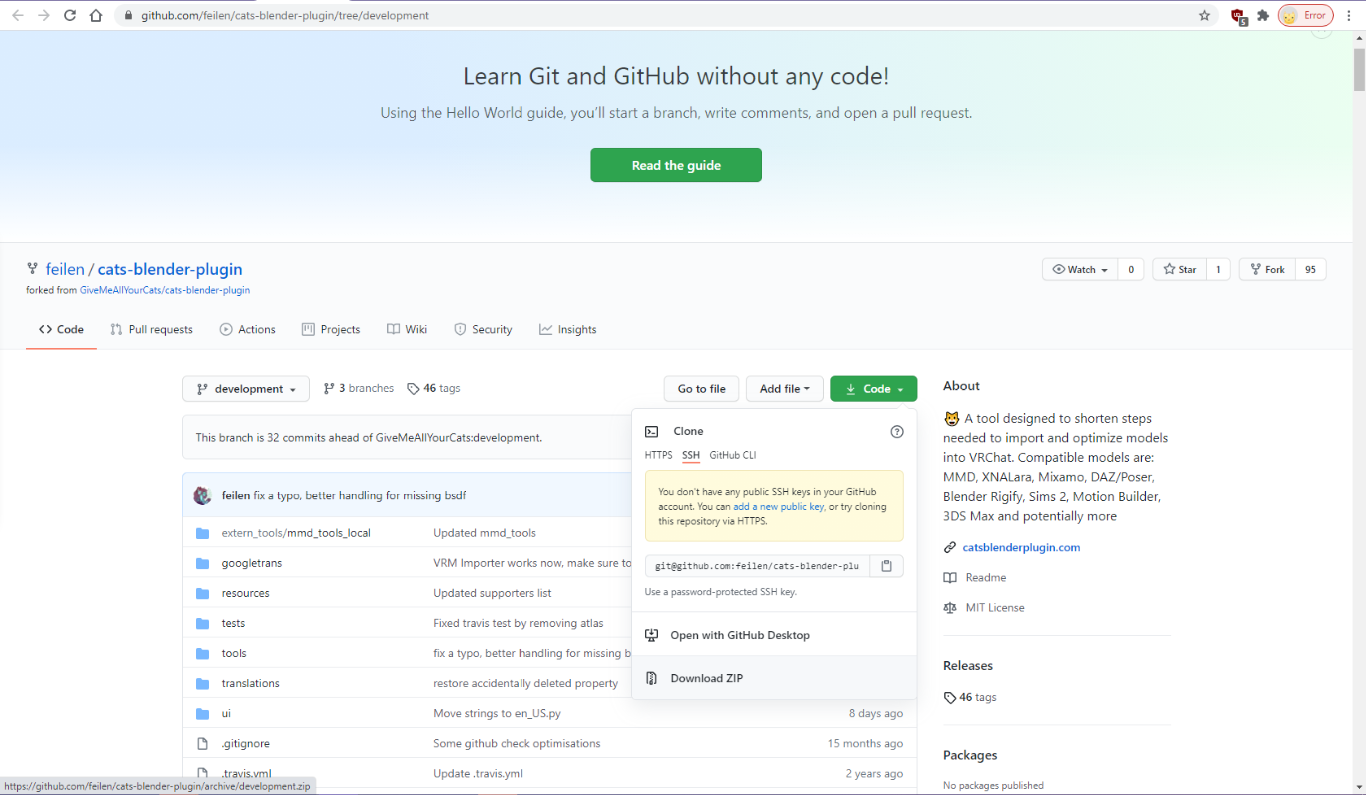 lament owl
You'll probably have to remove your existing CATS install before installing this one, if you have one
solemn ermine
Will do
lament owl
If you give it a shot, let me know if it works/what breaks xD
 lament owl
Some screenshots, for posterity
Left is 34k tris, right is 5k tris output (@ 1 material, 1 mesh)
 misty sail
Can quest avatars have the finger pen things?
midnight gulch
@lament owl That’s stellar. The arms and legs are the only places with visible geometry, and even then, it’s so subtle that I had to do a double take.
midnight gulch
@lament owl That’s not default 🐈 plugin. What are you using to do your décimations?
lament owl
@midnight gulch it's my forked changes, see here: https://github.com/feilen/cats-blender-plugin/tree/development
GitHub
:smiley_cat: A tool designed to shorten steps needed to import and optimize models into VRChat. Compatible models are: MMD, XNALara, Mixamo, DAZ/Poser, Blender Rigify, Sims 2, Motion Builder, 3DS M...
The decimation uses most of the same code but doesn't seperate by material before decimating like the default CATS one does
The idea with the Bake panel in general is that it spits out a super-optimized copy of your model, leaving the original alone. So your model can have 100k+ tris, 50 meshes, 45 super complicated materials and it just spits out 32k 1 mesh 1 material at the end
but your original is untouched
solemn ermine
I've been messing around with it just seeing what it does and what happens and yeah yakuza models were probably a bad idea with testing cause I forgot how messy they are in blender for a lot of them
I kinda want to mess with it and see what happens with ff7 remake cloud though
lament owl
@solemn ermine they should still work, as long as you can plug in the textures and everything right
solemn ermine
Whenever I try it on the wonky yakuza models it'll just leave white spots all over the avatar randomly I dunno if I did a wrong setting or something so it could be my fault
pulsar fox
misty sail
Can quest avatars have the finger pen things?
Depends on how they were made. The common ones won’t work as they need custom shaders
I don’t know if anyone made a quest supported finger pen. It would probably eat up a lot of tris
solemn ermine
All the stuff does work when I put them through the setting but how the Yakuza models are set up, at least the ones I have they are really weird in blender already
pulsar fox
You’d need to do it with particles
lament owl
solemn ermine
Whenever I try it on the wonky yakuza models it'll just leave white spots all ov...
ahh that sounds like weird UVs. Try switching the one setting from 'Unmirror' to 'Reproject'
by default I try to keep the same UV islands, but that doesn't always work if your UV map is weird, so there's an option to reproject and bake to a new UV map automatically
solemn ermine
I'll try that out then. Cause when I load them into blender they have random transparent textures
lament owl
oh, yeah, make sure it's setup right in blender first
solemn ermine
Yeah I usually go through and fix them in blender but I'm guessing what's happening might be the UV map issue cause once I fix them myself the textures work fine to an extent
At that point it's usually the number of material slots that I usually just get stuck on but I've been learning how to lower them down
One model I was working on had over 7k 😬
lament owl
jeeesus
lament owl
On trying to import? Did you get rid of your old cats installation?
solemn ermine
Yep
lament owl
hmm
solemn ermine
Reinstalled the new one too and it gave me the same error
lament owl
someone else reported that... wonder if I messed up the formatting in the translations file or something
solemn ermine
It worked fine yesterday
I uninstalled it in blender and restarted and now it works
Weird
lament owl
odd
solemn ermine
@lament owl Sorry for the ping but once the model is baked where does the texture file for it go? I can't find what its named or where it is at
lament owl
Wherever your .blend file is located, it gets put into a folder called 'CATS Bake'
solemn ermine
Thank you
 coral ibex
Is there a way to make all avatars visible while playing on quest?
glad shadow
Unity can't load assetbundles build for a different platform
pulsar fox
coral ibex
Is there a way to make all avatars visible while playing on quest?
If someone’s wearing an avatar that hasn’t been compiled for android, there is nothing you can do to show it.
wraith jewel
Does anyone know how to upload an avatar such that quest users can see it?
I'm trying "switch build target to android", but get an error "Switching to Anrdoid:AndroidPlayer is disabled"
wraith jewel
Oh I think you need to install the android module when you install unity
I changed my build target and now VRchat thinks I have a quest, so I can't join pc worlds anymore. I use a vive
pulsar fox
wraith jewel
I changed my build target and now VRchat thinks I have a quest, so I can't join ...
Whaaaa? Could you describe what’s going on? That doesn’t make sense at all.
wraith jewel
I restarted and its fine now.
Earlier I was playing VRchat and wanted to show my avatar to quest users, so while leaving vrchat running I installed unity and set the build target to android and uploaded the avatar, but when I went back to VRchat I couldn't join worlds anymore because VRchat thought I was on quest. I don't own a quest. However after closing unity and restarting VRchat, I can join PC worlds again
I did note that even though VRchat wasn't letting me join PC worlds, it was letting me use PC avatars
 astral elbow
Is there any way using the Oculus Quest to see pc avatars?
 rose thistle
No
astral elbow
Like connecting it through your computer or downloading stuff?
rose thistle
You can do that yeah
wraith jewel
Hello, can i somehow delete quest version of the world without deleting whole world?
pulsar fox
You don’t have to delete it but you will need to upload it under a new blueprint.
Same applies to avatars as well
 rancid ether
Hi, I'm trying to publish a test world to Quest as a test, but Unity is saying "Your license does not cover Android Publishing" in the Build Settings. What do I do?
rancid ether
Ah, nevermind. Seems I just needed to login to Unity Hub for that error to go away.
 rich dune
I just uploaded a quest build, it looked fine until I gave it a go in VRC and it only renders one eye. Any ideas?
solemn ermine
rich dune
I just uploaded a quest build, it looked fine until I gave it a go in VRC and it...
You have any chairs in your world that you haven't hidden the mesh on or changed out the mesh?
If not you might need to check your shaders and make sure none are using grabpass
rich dune
@solemn ermine No chairs. I thought I had checked all the shaders but will take another look. Is the mesh issue only related to chairs?
solemn ermine
Not sure honestly but that's what I and others have noticed is that chairs can cause it
I know one person made a thing that can find any shaders using grabpass
Pretty sure it's this
rich dune
@solemn ermine much appreciated.
solemn ermine
rich dune
<@293800135551352833> much appreciated.
If not I'd say start disabling meshes on quest and narrow down what could be the issue with items in your world potentially and if it fixes then you know what is causing it
 torpid horizon
hello, i would like to know what is depending on the quest that quest users are only possible to see quest avatars for example, is this limitation by vrchat or by quest itself? and are there ways to bypass this limitation in any way?
solemn ermine
No you can not bypass the limitation
sweet tundra
torpid horizon
hello, i would like to know what is depending on the quest that quest users are ...
That's a hardware limitation, to summarise, the Quest and PC are entirely different, down to the architecture of the CPU. If something is made to run on Quest, it's pretty much a different language to PC.
pulsar fox
Yeah there’s no way for a quest to see content built for windows unless Facebook makes a quest that can run Windows
They are not “model files” they are actual compiled unity files
For a specific platform
 cyan elk
actually answering the question, it's a unity problem! not a vrchat or even a quest problem
unity has some weird limitation about platform switching, "cross platform" asset bundles don't really exist
the quest 1 was extremely underpowered, straight avatars from pc is a bad idea anyway - but thats not the actual reason, but just a side effect
that definitely doesnt stop people from straight porting huge models from PC over to quest though... :-/
 humble ibex
Does anyone know where I can download a free/paid world that I can edit myself in Unity? A world optimized for the quest. I have tried home kit already.
torpid horizon
is only standard shader using for quest user? or if more, how do i know which are working?
lament owl
Standard Lite and toon lit are all that works on Quest, or simpler subsets (diffuse alone, bump mapped diffuse)
torpid horizon
any double sided will not work or?
lament owl
prooobably not
for that just make a copy of the mesh and flip the normals... unfortunately that means half the tricount
torpid horizon
can someone maybe help me? everytime if i try to switch my project from pc to android it crash and idk what the problem is
torpid horizon
ok nvm. i guess i could fix it, i use the current version of sdk2 and i dont know if this are known issues but this i had to delete:
Assets/VRCSDK/Dependencies/VRChat/Textures/damageGreyNoAlpha.png
Assets/VRCSDK/Sample Assets/Prototyping/Textures/prototype_white_dff.png
Assets/VRCSDK/Sample Assets/Prototyping/Textures/prototype_blue_dff.png
 vast cosmos
I upload a world but for some reason the trigger scripts on the avatar pedestals aren’t working
Can anyone help?
 vale anvil
Did you place the pedestal down from the assets or did you insert the trigger yourself?
inserting the trigger yourself is quite broken
also quest avatars are recommended to be under 10,000 polys but the quest doesn't start lagging until you reach about 200,000 polys on an avatar
 vestal ravine
got it. ill start uploading my models with only 199,999 polys
vale anvil
lol
lament owl
Are rotation constraints not allowed on Quest?
 frosty tapir
On avatars I don't think constraints are allowed at all on Quest.
pulsar fox
lament owl
Are rotation constraints not allowed on Quest?
Constraints should work. The documentation does not say anything about blocking them, and constraints are very lightweight, almost free.
The documentation says the following are blocked on quest: dynamic bone, cloth, cameras, lights, video players, post processing, audio, rigid bodies, colliders, and joints
Constraints are not listed, so try ‘em.
frosty tapir
🤔
lament owl
@pulsar fox yeah, by all means should be fine, but see above
pulsar fox
lament owl
<@80755724644261888> yeah, by all means should be fine, but see above
No idea why they opted to disallow it. Perhaps they work on a allowed list not a blocked list
Constraints are pretty cheap
Maybe I’m wrong
 mossy dove
ç
 autumn radish
pulsar fox
Constraints are pretty cheap
autumn radish
pulsar fox
Constraints are pretty cheap
There are a few things that they disallow on Quest that on their own would work just fine on Quest. From what I've read, a lot of stuff is blocked not because it's too intensive or breaks VRChat for Quest, but because a number of creators overused the features causing early betas of the Quest version to frequently crash or experience issues. So rather than require extensive testing of every upload, they just made it easier by turning a bunch of it off and limiting others.
pulsar fox
So just make overuse go to very poor. Quest has it pref blocked anyway
autumn radish
pulsar fox
So just make overuse go to very poor. Quest has it pref blocked anyway
I mean that'd be the smart way on a lot of things; let users toggle manage their own performance options, rather than blocking things that work in moderation.
I just don't think the devs will actually do that though; concern over too many people just setting the min avatar performance to poor then wondering why they keep crashing out.
vestal ravine
pulsar fox
So just make overuse go to very poor. Quest has it pref blocked anyway
i would very much like it if we didnt have even more very poor avatars than we already do xD
autumn radish
vestal ravine
i would very much like it if we didnt have even more very poor avatars than we a...
I mean the alternative is things are just blocked in general.
It'd be nice to get more optimized PC level content on Quest.
Perhaps the option to allow "severe" performance avatars could be added, but only on a user by user basis (IE you wouldn't be able to set the minimum performance to "severe", you could only "show avatar" on users with severe rated models, on a user by user, model by model basis.)
vestal ravine
isnt that already what the very poor rank is?
autumn radish
I don't recall there being a very poor rank. Just "poor".
vestal ravine
there very much is a very poor rank on quest.
its the most common one to see xD
it does literally exactly what you just typed
autumn radish
I don't interact with people much so I've probably not ran into them, lol
vestal ravine
the very poor rank in general was an awful idea to bring to quest. it gives too many people the "easy" way out
autumn radish
My minimum performance setting only goes to poor AFAIK (i had to set it to Poor in advanced safety for a Paimon avatar), so if Very Poor has to be shown per-user, I don't see the harm. One can always leave them as bots.
Though perhaps a "severe" category should still be added. Maybe with a warning that showing said avatar can have adverse effects on performance or stability.
It'd be better to encourage developers to optimize their avatars, rather than just not port them at all. A lot seem to skip on Quest just due to the performance limits.
vestal ravine
what would really be the difference between severe and very poor then? both hurt the platform, lag out people, crash people, and are the easy way out for all the creators who literally couldnt care less.
the harm about very poor avatars is because everyone just uploads that. i can go into any quest compatible world. and besides the non compatible avatars. 99-100% of them will be very poor
sure there are good creators out there that do care. (like me) but the problem is that its not even close to the majority
autumn radish
Perhaps Very Poor should be avatars where a couple being shown don't hurt, but still have worse performance than Poor, and Severe should toggle itself back off in the event of any failure, as well as on next log on (so you'd have to enable it as a user every time to see it, on every person who uses it, per person.)
vestal ravine
hmm
autumn radish
vestal ravine
sure there are good creators out there that do care. (like me) but the problem i...
I feel like that's because there's those weird limitations though. The creators that don't care are going to push the limits with the tools they have anyways, meanwhile the creators that do care, but rely on features exclusive to PC, are just going to skip all together on bringing their content to Quest.
vestal ravine
the limitations arent as bad as so many people make them up to be imo. its not like they are ever close to being a poor rank. its almost always that the creator was lazy as balls and just changed the build settings and shaders and called it a day. and alot of them also glitch out their shaders since they are too lazy to remove the transparent parts of their avatar and still want it to look good.
what makes it worse is that alot of the player base wants this garbage. and ive gotten a shit ton of flack for the stance i took
every time i talk with a quest user they always ask why my quest models barely have anything on them. and good friggin luck trying to explain stuff like that to snotty 9 year olds.
autumn radish
It's the same with Quest worlds. There's some very simple worlds out there that would most certainly have no issue on Quest, but due to technicalities or size restrictions (apparently quest worlds are limited to 50MB in download size.) they can't be brought to Quest.
Yet Japanese Shrine, a promoted world, is utter jank on Quest.
vestal ravine
fun fact. somehow i saw a labs world that managed to upload a world over 50 mb on quest. and yet it doenst actually let you go there on quest at all. just throws up an error.
gta v map in vrchat is what it was called iirc
autumn radish
vestal ravine
what makes it worse is that alot of the player base ***wants*** this garbage. an...
This is fair. A lot of people don't understand what goes in to the development process. VRChat also doesn't have any sort of proprietary bundle format or way of optimizing existing assets, so it's entirely up to the designer. — People just want the avatars; they don't really care how they get them.
autumn radish
vestal ravine
fun fact. ***somehow*** i saw a labs world that managed to upload a world over 5...
Yeah that's how i figured it out. A furry convention uploaded their vcon map as Quest compatible, but it exceeds 50MB so VRC just errors out.
Which is weird, because the Quest isn't exactly pressed for space.
vestal ravine
it hurts the person using them too though... its not like you are immune to the lag of the avatar your in
autumn radish
Yeah. I hear ya.
That's why i suggested they make it harder to see very poor and this suggested "severe" avatars. If a user has to go into each user profile and show the avatar, person by person, including themselves, just to see them, every time they log on, at some point they're going to get tired of it.
Developers who use the tools responsibly and creatively will have no issues, meanwhile lazy devs will get hit with frustration for their avatars just not working.
Maybe even throwing in a message every time you log on warning the user that "Low quality avatars have be disabled due to performance concerns. These avatars can be shown from the user profile."
I agree if VRC added more avatar features, but did nothing to curb both user and developer behavior, it's going to get worse.
But i think there's a way to meet in the middle with all of it.
vestal ravine
my ideal future would be just removing very poor avatars from quest. Entirely. its too late for pc to make that kind of change, but it doesnt hurt as much there due to varying hardware. but quest will always run the same for everyone really. i feel that they need to rip this bandaid off sooner rather than later or the problem will just continue to get worse. after the snappening there will be a rush to find the actually good models that got left behind. and creators will be forced to fix their act.
the community will complain. but i see it as a necessary evil to continue the growth of this platform
alot of the people complaining about crashes and lag are because of all the avatars they have unblocked. so after that the complaints will slow down.
autumn radish
I need to get ready for a stream but i really enjoy the discussion on this; don't want you to think I'm just dipping out.
vestal ravine
its ok man. i need to get back to finishing this christmas present avatar... as soon as i can fix this damn weighpainting...
pulsar fox
autumn radish
I don't recall there being a very poor rank. Just "poor".
There is. It’s one worse than poor.
On quest they can never be shown by default have to opt into the lag by showing the avatar
lament owl
I think most of the things that get caught by very poor on Desktop should also just be... not allowed :v my framerate jumps by a third or more when I set my minimum displayed to 'Poor' on desktop sometimes
cyan elk
lament owl
I think most of the things that get caught by very poor on Desktop should also j...
yeah people complain about it all the time on quest, but recently i was in a world hitting 50 fps on my pc, and i hid two verypoor avatars and i jumped right back up to 90
this isn't a potato pc either, it's rocking a 5700 xt
its just that some people's avatars are that ridiculous :-p
cyan elk
you really should
are you rocking wine, proton or qemu?
or just not gaming at all on linux haha
lament owl
Proton!
cyan elk
oh does vrchat work fine in there? i guess it should
lament owl
I did qemu before and that was pretty neato, but proton's been pretty good to me lately
Uh, mostly. There's some deadlock issue where avatars/worlds/social tab stop loading sometimes, and it's a huge pain
And streams don't work
cyan elk
oh thats just a general vrchat issue :v
lament owl
but other than that... yeah surprisingly well
cyan elk
streams? like the video player?
lament owl
Yeaah
cyan elk
never worked for me on windows sooo
but thats good to hear, i hope eventually other platforms other than windows will get better vr support
lament owl
(psst: if you wanna make your avatar 1 material 1 mesh 32k tris with zero effort: https://github.com/GiveMeAllYourCats/cats-blender-plugin/wiki/Bake)
GitHub
:smiley_cat: A tool designed to shorten steps needed to import and optimize models into VRChat. Compatible models are: MMD, XNALara, Mixamo, DAZ/Poser, Blender Rigify, Sims 2, Motion Builder, 3DS M...
lament owl
cyan elk
but thats good to hear, i hope eventually other platforms other than windows wil...
yeah, my big changes are aiming at quest right now, see above x3
cyan elk
oh you were the one who contributed that??
lament owl
I expect there'll be a huge influx of quest users in checks 4 days
cyan elk
thats awesome, ive been reading over that page
lament owl
:D
cyan elk
thats a very good idea, the quests are already selling out
im guessing it's going to be another huge wave
lament owl
tell your friends, twist their arms till they optimize
cyan elk
i wish it was that easy
lament owl
it is now! press the magic optimize button x3
(but yeah I know what you mean)
It -is- really neat hopping into a public world with a lot of quest users, having a custom originally-desktop avatar, with how people are just astounded you exist
cyan elk
i know, it's a much better alternative than no quest port at all
hopefully it'll give a nice push for other creators to simply at least try this automatic option
lament owl
yeah, at the very least. Topology can be chunky but it's something, and it's fairly decent even compared to some first attempts at porting
And with the shape key preservation also introduced, you don't have to manually re-do your visemes or anything
cyan elk
okay i think thats finally convinced me to give this a shot, ive been eyeing this addon for a while 😄
lament owl
:D
cyan elk
im getting a really strange error when trying to use the bake function though, it's emitting a
AttributeError: 'NoneType' object has no attribute 'copy'
autumn radish
cyan elk
its just that some people's avatars are that ridiculous :-p
I find it funny as this is the reason why uploads were limited behind a mysterious user ranking system to begin with (Idea is you actually have to experience VRC to create content for it.), as a lot of avatars were made purposefully poor to lag out the game.
It never really went away... making the upload limit feel pretty useless.
—
That's a cool plugin. The easier it is to streamline avatar and world creation, the better.
cyan elk
i could post the full stack but it seems to fail when copying the armature, i don't know if it's because of how i set up in my blend
cyan elk
autumn radish
I find it funny as this is the reason why uploads were limited behind a mysterio...
yeah the upload limit sucked a little bit when i first started, but i didn't realize that was to try to limit the spammy content hahah
autumn radish
I'm just a little bummed because I know people with VRChat but I never seem to be on at the same time, and they use PC. I don't feel comfortable interacting with randos, so I'm just kinda locked out of uploading.
That, and my old canny account since they tied feedback to user rank too.
cyan elk
hrmm yeah i get you, thats a sticky situation
i tried removing and purging my blend file a little bit, so now im getting another error, something about calling the modifier in the wrong context
lament owl
hmmmm, pm me with screenshots?
 idle nimbus
Never sure where to put thing in this server but has anyone encountered head rotation being reversed when creating a world? It only affects this particular world and also the menu closes immediately after it opens. I've already tried removing and adding VRCWorld and VRCCam back in and that didn't fix it.
 placid egret
So will there be updated allowances for quest 2? I feel like an audio source or 2 and particle effects should be allowed on the quest 2.
sweet tundra
placid egret
So will there be updated allowances for quest 2? I feel like an audio source or ...
No. Because 3 platforms is too much and we don't want crashing again.
placid egret
Why is quest so limited? I get the hardware is limited, but I feel like it would have no problem with a sound source or 2 and a particle effect
sweet tundra
Hardware, and people upload 500k tri avatars with 30 materials anyway.
and the og quest can only handle 8 audio sources (people speaking) at once.
the Quest 2 is double that.
that means 16 people in a room, if everyone adds an audio source, then that's 8 people again.
 wide otter
sweet tundra
that means 16 people in a room, if everyone adds an audio source, then that's 8 ...
wide otter
sweet tundra
that means 16 people in a room, if everyone adds an audio source, then that's 8 ...
So despite the quest 2 being able to handle 16 audio sources, it will still only hear 8 in vrc?
sweet tundra
No.
It can handle 16 before glitches and low framerates.
but, there’s 1 source per person
because they need to speak.
If the devs allow audio sourceson avatars, then that’s probably 2 sources per person, or 8 people again.
and the quest 1 would have 4 people.
@wide otter
wide otter
Ah OK
 delicate kraken
Does anyone have a link to the asset where it allows a quick swap between pc and android plaforms within the same project?
 quick glade
why there isnt any turkish chat in international
lament owl
delicate kraken
Does anyone have a link to the asset where it allows a quick swap between pc and...
Such a thing exists? :o
quick glade
<@&397642795457970181> can someone anwer my questions ?
 visual orchid
Neither is that a question for this channel nor should you ping the emergency chat mod role for it
You can check if it's already been requested at https://feedback.vrchat.com and upvote it if it has, otherwise you can create a request there.
Give feedback to the VRChat team so we can make more informed product decisions. Powered by Canny.
quick glade
I think you are racist
visual orchid
Excuse me? 😄
quick glade
when i look international chanells i couldnt saw any chat for turks
and i asked politely but you treated me badly
visual orchid
I literally just told you what you gotta do if you want one.
If enough people vote for it it might happen.
Language channels only get added if enough players speaking said language request it, else there literally would be hundreds of them.
And a missing channel has absolutely zero to do with racism.
quick glade
you can be more polite just an advice
 brave mesa
@visual orchid  I feel bad for you mate
visual orchid
brave mesa
<@82980791352557568> <:vrcCatThink:784264661410381835> I feel bad for you mate

brave mesa

 shell monolith
How would one go about making a quest 2 avatar/my own, is it possible? I have a poopy pc
rose thistle
shell monolith
How would one go about making a quest 2 avatar/my own, is it possible? I have a ...
Blender is the 3D modeling software most people use here. Can run on a potato
fair tinsel
especially if you're trying to make potato avatars not several million High poly sculpts for normal map baking
 gilded cove
Anyone know where to find a furry 3d model that would work in Unity?
fair tinsel
Download and upload various kinds of assets and tutorials for the different species found in the online multiplayer VR social game VRChat.
gilded cove
thanks
fair tinsel
not all of those would-be Quest compatible but you could give this a try to make a quest version https://github.com/GiveMeAllYourCats/cats-blender-plugin/wiki/Bake
GitHub
:smiley_cat: A tool designed to shorten steps needed to import and optimize models into VRChat. Compatible models are: MMD, XNALara, Mixamo, DAZ/Poser, Blender Rigify, Sims 2, Motion Builder, 3DS M...
fair tinsel
then you would probably want to just look for a quest compatible avatars if you don't want blender work

【商品説明】 オリジナル3Dモデル『ワフト(WAFT)』 VRChatにおける使用を想定して作成したアバターです。 Oculus Quest版VRChat向けに使用を想定して作成していますが、PC版でも使用できるように耳と尻尾にDynamic bone用にボーンを設定済です。 身長約110cm △約3950 リップシンク有り アイトラッキング有り フルボディトラッキング使用可能(PCVRのみ) ※VRChat導入時にUnity上で設定をする必要があります。 ≪お知らせ≫ 2019/11/18 v1.02 修正しました。
a quest compatible canine if that's what you're looking for
gilded cove
thanks
gilded cove
Anyone know of any free like base canine models?
gilded cove
fair tinsel
https://anaguraworks.booth.pm/items/1417205
oh this kinda works
 pure niche
can i use "sprite" shaders for models? i wanna have a feather piece but the way it inported makes it basically a flat plane unless i use a sprite shader, but its included with the VRChat thing so im guessing its okay, but im checking anyway!
fair tinsel
nope as you cannot use transparencies
 vale sierra
unless its for a world you can only use the shaders listed in https://docs.vrchat.com/docs/quest-content-limitations
VRChat
This page will describe various limits in place for the Oculus Quest version of VRChat. These limitations are in place in the interest of performance, user safety, and discouraging malicious behavior. Find more information about limited components on our Quest Content Optimization page.Although the ...
fair tinsel
cell you'll have to go cut out the transparent objects in blender using the knife tool so you don't need to use transparency
pure niche
damn
wraith jewel
I created a cross compatible test world and I have two vrchat accounts - one account is a desktop user and one account is quest user. I cannot invite my desktop user to my friends only instance of my private test world and I cannot join on the quest user, despite the user privacy settings being "green"for both. Any ideas?
the invite button is unavailable. the join button is unavailable
the world has been uploaded for both pc and quest
i can visit the world on both quest and pc and it works for both
vale sierra
I think its just the current server load which makes social status updates a bit slower, and it affects the checks to see if you are allowed to invite/join a person based on instance type
could try inviting yourself via the website
shell monolith
Rank needed for world uploading?
vale sierra
New User to upload, User to publish to labs
wraith jewel
Hey why does the quest version of my world only render in the left eye?
wraith jewel
yeah, that usually happens-
some people said it'll go away as you update your world often or publish it to Windows first then wait a week for Quest I don't think this is valid, but it's what my friend said
vale sierra
wraith jewel
Hey why does the quest version of my world only render in the left eye?
theres a bug where switching to android build via the sdk will cause that. try switching to PC and back to Android via the build settings under unity, and then reuploading
wraith jewel
vale sierra
theres a bug where switching to android build via the sdk will cause that. try s...
ok will do
 blazing cedar
Hi, does anyone have a favorite site or video series they like for getting started with VR Chat world development?
 next grove
Where do I go for help
brave mesa
next grove
Where do I go for help
Depends what you need help with
wraith jewel
Is it possible to put audio sources on a quest avatar?
vale sierra
audio sources are not allowed on quest avatars
wraith jewel
damn
autumn radish
vale sierra
audio sources are not allowed on quest avatars
That's odd. They have the option in Safety settings. The only thing that's not an option is shaders, I want to say? They tell you the latter is not available on quest, so IDK why the former would be an option to show on avatars if no Quest avatars can have them. :u
vale sierra
 autumn radish
I'm aware what the documentation says.
My statement was that it's odd to have the option to disable or enable custom audio on avatars in Safety settings on Quest when that's not a feature of Quest to begin with, seeing as they removed another unavailable feature from Safety (it's greyed out permanently).
vale sierra
probably just an oversight
having multiple audio sources active, especially on mobile hardware can be very taxing
one of the reasons why voices starts to have heavy stuttering in a heavily populated instance on quest is because of all the concurrent audio sources for each person for voice
autumn radish
Why are they all separate audio sources? Shouldn't unity have spacial audio that allows it to process the audio as a single source?
Like, Discord exists and it doesn't seem to have issues with groups.
vale sierra
I imagine 3d audio spatialization is tied to each audio source, but dont quote me on that
discord also doesnt have to run a full vr environment at the same time lol
autumn radish
True.
I mean there are going to be multiple audio sources in general, for each person in a world, but I'm curious if they're letting Unity handle spacial audio, or if they're manually processing the audio of each user and adjusting volume as necessary.
wraith jewel
autumn radish
I mean there are going to be multiple audio sources in general, for each person ...
From what I tested vrchat is using proximity chat for their audio for voices/sounds meaning as long as you are close to said person or sound source, the louder said thing is so the more people in proximity of you the more it's garbled or laggy
vale sierra
its using 3d spatialization, its more than just volume just based on proximity lol, you can also apply audio reverb zones etc
its probably just using unity's built ins for it, no sense making your own when there is a perfectly working system for it
wraith jewel
is there a shader that glows in the dark for quest?
lament owl
Anything in the 'emit' map on Standard Lite is glowy
 sweet cradle
speaking of shaders, which shader are you supposed to use for particles on the quest
I tried using VrChat/Mobile/Particles/Additive since it seemed to look fine in unity, but once i tried it out in vrchat, the background wasnt transparent
sweet tundra
sweet cradle
speaking of shaders, which shader are you supposed to use for particles on the q...
Use mesh particles, there is no transparency on quest except worlds.
sweet cradle
wack, also whats a mesh particle, just an animated thing?
also what? ive seen particle effects that look like textures on quest avatars
stop
sweet tundra
sweet cradle
wack, also whats a mesh particle, just an animated thing?
A mesh particle is a particle that uses a mesh.
sweet cradle
well i figured, also i looked it up, but thanks for the heads up
sweet tundra
and meshes can have UVs, so you can texture it
sweet cradle
is there a way to just take the animated texture from the particle emitter, put it on a plane, and make it face the camera?
sweet cradle
time to try it out
sweet cradle
that sounds correct, so cool
 meager pewter
whats needs to happen is allow pc user to use Quest models....not upload PcVR/Q2 and cant use Q2 Avatars while in PC.......
you cant even properly test it in VRChat if PCVR cant actually see what the Q2 model looks like live use...unless you have Q2 or someone being your property for a bit......unless someone knows of method that dont involve buying Q2?
 devout timber
When I click build option for android it doesn’t do anything
rose thistle
meager pewter
whats needs to happen is allow pc user to use Quest models....not upload PcVR/Q2...
Impossible to combine the two. Quest runs on a whole different kind of build since it's a mobile device. It must be uploaded separately to be compatible with the Quest's hardware. If you want to test a Quest avatar on PC just upload the Quest version under the PC build and if everything works correctly upload it for Quest
sweet tundra
tldr: The Quest and PC speak different languages.
And you can use Quest models on PC, you just have to upload the quest version to pc.
lament owl
It would be super, super good if VRChat distributed a Desktop-styled (think, keyboard/mouse compatible) version of the Android (quest) build that you could run in an emulator
That would be help testing cause you could see exactly how everything would fit together
 torpid plover
Tbh it would be nice if there was a setting to enable the robots or not instead of constantly having to click on people and show their avatar
sweet tundra
torpid plover
Tbh it would be nice if there was a setting to enable the robots or not instead ...
Trust me. No.
vale anvil
torpid plover
Tbh it would be nice if there was a setting to enable the robots or not instead ...
is safety settings you can just make it so everyone's avatar is on by default, the only reason the avatar would be off no matter what is because of the performance
 crystal mica
Is it cool to ask Udon Sharp questions here?
sweet tundra
crystal mica
Is it cool to ask Udon Sharp questions here?
Udon stuff should probably go in the udon channels.
crystal mica
LOL my bad
 silver skiff
when i hit build and publish, nothing happens after the "future proofing content" bar completes. i don't see the "update avatar" interface in the game window
i started a new project, imported relevant packages, then copied my assets over and removed anything incompatible with quest.
silver skiff
figured it out. there's a 10mb limit that doesn't seem to be documented anywhere aside from the sdk itself
EDIT: turns out it was actually broken dynamic bone scripts that vrcsdk didn't see fit to warn me about
wraith jewel
Will the quest ever be able to have the minimum pref thingy of very poor like pc? As a quest user I find it pretty annoying to have to enable everyone's avatars in everything I load into. I read the document thing and it was it was for how it performed but seeing I have to enable everyone's avatar when I load into a lobby and it having no affect to me seems like it shouldn't be a problem. I apologize if I'm not allowed to put this here but I am unable to access the feedback section of the website as I cannot login.
sweet tundra
wraith jewel
Will the quest ever be able to have the minimum pref thingy of very poor like pc...
As I said to the last person who wanted this, trust me. No.
People complain about performance a ridiculous amount already.
wraith jewel
Well if you have any, count me as someone who's complaining about avatar's not appearing before of perf settings on quest.
wraith jewel
Facebook
Log into Facebook to start sharing and connecting with your friends, family, and people you know.
help?
 proven arch
I've got an issue where using bumped diffuse shaders on my avatar causes its skin to turn green. Resetting the materials to default does nothing and parts that should be textureless are bright cyan. Does anyone know what the problem could be?
This is true for all quest shaders except light mapped.
glad shadow
You models most likely have green vertex colors on them you could clear them in blender for example
Only the lightmapped shader would not display the vertex colors
I can't think of any good tutorials to link you and I don't do that much blender but hopefully that would tell you enough to fix the issue
proven arch
I'll try that when I get off work.
proven arch
It worked! Thank you so much!
 molten sonnet
Is there a difference in UI events between Quest 1 and Quest 2? Recently there were some problems when interacting with the UI buttons, and now it works fine on Qust 2, but on Quest 1 I can't test it yet.
 sweet onyx
Quest had issues with UIEvents related to InputField, because the Android OS on quest prevents focusing input fields or something. Probably not your issue
molten sonnet
sweet onyx
Quest had issues with UIEvents related to InputField, because the Android OS on ...
It was also interesting to know, thanks
 teal trench
Hey Guys Should I make a vr social game that has hand tracking support for the quest?
 pulsar sage
quest does not stand for question
wraith jewel
@teal trench i would love to see that in the future
brave mesa
As far as I've seen, it doesn't look like they're planning on implementing it but you have to think "how am I gunna use emotes or move around if I have no buttons"
 quiet spade
I'm having an issue with the VRC AVPro Video player on Quest1/2. The video is playing just fine, but (I've tried multiple files) the audio is nonexistent. I've tried both the UdonSyncPlayer (AVPro) version with and without the Udon behavior stripped. I've also tried creating my own simple player on one Quad. Nothing works
Here is my simple player. Again, video is working fantastic, but there is no audio at all. World volume is maxed out, I can hear other audio (in game menus, etc).
Link to current test video: http://commondatastorage.googleapis.com/gtv-videos-bucket/sample/BigBuckBunny.mp4
 true marten
how do I make working swords in VRchat that kill people if they touch the players avatar and do damage
wraith jewel
how can i turn theese beat saber models into actual working katanas on my avatar
 frank garden
Whenever i try and view someone's social page on vrchat to show there avatar it won't show up, anyone know why?
 thorny flume
Same issues here @frank garden i am attempting to contact staff about the issue in general
 ember oasis
Im having a issue where the sdk will crash and i cant upload my avatar
any suggestions? with help
please @ember oasis
 uneven spear
@ember oasis are you using the right unity version?
ember oasis
uneven spear
<@630406997174517760> are you using the right unity version?
the version it suggest yes why?
ill go deeper into the problem when i try switch mt avatar to andoid for quest the sdk keeps crashing everybody is saying use sdk2 or sdk3 but both of them crash my unity
my*
and yes ive already seen the video of the bunny man showing how to switch to android like 13 times
so please if you have any tutorials from the begining when you insert the avatar to the end you make it android compatible please share it to me
 naive cairn
Is there a way to detect if someone is on a Quest 1 vs Quest 2 using Udon?
Quest 1 performance lacks behind Quest 2 and would like to disable certain features in a world for Quest 1 users while keeping them active for Quest 2 users.
wraith jewel
are there any good lightning trails that can work with the katana im using that work for quest
i wanna add trails but dunno how
vale anvil
wraith jewel
are there any good lightning trails that can work with the katana im using that ...
couldn't find lightning trails but had some on my pc
wraith jewel
thanks ^w^
vale anvil
np
quiet spade
naive cairn
Is there a way to detect if someone is on a Quest 1 vs Quest 2 using Udon?
Quest...
As far as I can tell at this point there is no way to know if it's Quest 1 versus 2.
wraith jewel
Ok how the hell can i get a black outline/cel shaded avatar on quest i cant use custom shaders or get the dumb error for not using one in the mobile section
quiet spade
Maybe Toon Lit? https://docs.vrchat.com/docs/quest-content-limitations
VRChat
This page will describe various limits in place for the Oculus Quest version of VRChat. These limitations are in place in the interest of performance, user safety, and discouraging malicious behavior. Find more information about limited components on our Quest Content Optimization page.Although the ...
 tawny sparrow
Can I run "Build and Test" directly on the Quest like I can with Steam VR? Maybee this is a very dumb question, because its disabled in Unity when Android is build target so apparently not. But maybee I've set up something wrong.
quiet spade
No you need to upload it to the site then login with your headset
If you're doing native (non VRC) development you can do it but VRchat requires you to upload and login
I recommend installing CyanEmu so you can test things locally and limit the amount of times you need to upload
tawny sparrow
Thank you. I'm ok testing it with Steam VR until I'm ready (and actually able) to upload it. Wouldn't make a Quest only world anyway.
But needed to know so I can decide how to proceed.
quiet spade

GitHub
CyanEmu is a VRChat client emulator in Unity. Includes a player controller with interact system. Works with SDK2 and SDK3. - CyanLaser/CyanEmu
quiet spade
Yeah makes sense to develop for PC first then when it's done port it to Quest
When you're ready to port use this: https://github.com/JordoVR/EasyQuestSwitch/releases

GitHub
EasyQuestSwitch is a Unity editor tool developed for VRChat world creators, it can automate changes to components within a scene as soon as the build platform is changed from PC to Android (for Ocu...
tawny sparrow
Just had a thought that it might be easier to test some things for performance if it would have been possibel
quiet spade
I haven't messed with it yet but I hear it's fantastic
tawny sparrow
Very cool. Thnaks
quiet spade
Yeah best bet is to remember the Quest is a mobile processor and plan accordingly
Different shaders, less sync'd objects, lower texture size, and lower mesh counts, and baked lighting are the important things to focus on for Quest optimization
tawny sparrow
Yeah, I probably try to think ahead to much for now. Probably there are more important things to figure out first. 😃
quiet spade
Well just be mindful as you're building out your worlds, getting a world PC optimized is important too. You really want your world running 90fps on PC / in headset before you start porting over to Quest.
So those same thoughts and techniques are good for PC as well... baked lighting, occlusion culling, mesh counts, sync'd objects all factor in as well on the PC side
 covert venture
Hi folks, What's the best way of displaying text on a wall (3dgameobject-cube)?
I tried using textmeshpro but when it came to building for Android (I want it quest 2 compatible) it said the shaders weren't supported.
glad shadow
Should be really no problems using textmeshpro on quest
The whitelist for the shaders only contains the shaders in the sdk but if you know what you are doing you can use other shaders as well
 honest coyote
So I’m trying to upload an avatar to quest and i am way over the limit of mb I have like 26mb when I’m supposed to have 10
Any way I can lower that?
covert venture
Hello 1, thanks for the reply Yes, it's on the whitelist, but for some reason Unity shows a warning before building for android that says all the shaders are unsupported. The only ones I found that are supported don't display the text clearly???
glad shadow
Unity shows a warning?
covert venture
@1 i just switched the build target to windows, then back to android, and now no warning about unsupported shaders???? Oh well, it fixed itself, thanks for your input anyhow
covert venture
@1 okay so problem is back, now if I create 3d textmeshpro object is show the warning - ! World uses unsupported shader "TextMeshPro - Distance Field". This could cause low performance or future compatibility issues. -
But if I create a UI gameobject with textmeshpro using the same shader, then it is supported.???
glad shadow
Thanks bot
glad shadow
covert venture
@1 okay so problem is back, now if I create 3d textmeshpro object is show the wa...
I doubt it's the same shader if one shows the warning and one does not
These are the only shaders that will not throw a warning
covert venture
@1 so now I can display text as long as I have a UI canvas as well as the text?? It makes editing it all a bit more fiddly, but problem solved.
This means the UI/Default shader is being used.
Thanks for your help though
 jade egret
glad shadow
These are the only shaders that will not throw a warning
jade egret
glad shadow
These are the only shaders that will not throw a warning
lightmapped always gives me a warning tho
glad shadow
On avatars it will yeah since it's not a avatar shader
ember oasis
what do you do when sdk 3 just crashes when you try switching it to android
 stable verge
what time i need to spend in vrchat to upload if i'm a new user?
sweet cradle
depends, took me like 7 ingame hours, takes others about 24
just depends on what you do
covert venture
play lots of games and add lots of friends, also you could pay for vrchat plus, that levels you up too
sweet cradle
i reccommend finding people you enjoy talking to and just hang out with them, maybe add them and their friends, vrchat can detect quality over quantity
also you're actually having fun while farming trust
 versed crater
I wish for audio source is back on vrchat for the quest so I can hear my sound effect and my friends can hear it to
jade egret
versed crater
I wish for audio source is back on vrchat for the quest so I can hear my sound ...
i agree. im not a quest user myself but i have friends who are, and its sad they cant hear my avatars :( tbh there was no reason to remove sound after all quest graphics are the problem, not the audio
vale sierra
jade egret
i agree. im not a quest user myself but i have friends who are, and its sad they...
not true, audio sources are expensive, and even more so on a mobile cpu
in a relatively populated instance of 8-12 people the quest 1 already starts struggling just because of the audio sources for each person's voice chat
sweet cradle
then why can you add audio sources to worlds for quest
i guess... depending on the amount of avatars with sounds...
vale sierra
the same reason you can use any shader for quest worlds
sweet cradle
alright, then
vale sierra
it also doesn't help that with incorrect import settings, all it takes is one person with a couple of big audio clips to crash every quest user

Learn how correctly set up Audio Clip Import Settings to make your Unity game consume less memory and CPU.
versed crater
Can someone help me with this audio source for the Oculus quest
I have a lightsaber sound effect
sweet cradle
im gonna assume this is sarcasm
versed crater
Ok
wraith jewel
so my friends on quest say the avatar is extremely large?
but in unity she is normal sized?
does anyone know why she becomes really big in game ?
 boreal needle
i think avatar settings on pc and oculus aren't consistent they must be the same
i think you need set up this avatar for oculus users like for pc
wraith jewel
I have
they are both set as the same scale
my other quest avatars are fine its just this one became large for some reasons
sweet cradle
drag one of your other avatars into unity and scale this one down until it looks the right size
frosty tapir
wraith jewel
but her scale is 1 1 1
The scale of the model locally could still be really messed up. I.E. it's normal 1, 1, 1 scale could actually be like 10 meters big on each of those dimensions.
As someone stated already either compare it's size in Unity to other models which do not have this issue or just put a Unity cube in the scene and compare the avatar's size to that.
wraith jewel
frosty tapir
The scale of the model locally could still be really messed up. I.E. it's normal...
she is smaller then a default cube
 wise sentinel
Hi! I'm having trouble adding the android modules to the version of unity vrchat uses. I have uninstalled, reinstalled hub too! In the hub there is no option to add the modules that are supposed to be able to access by clicking the 3 dots. its not there even when I install through the hub. Can anyone help?
 vapid comet
Does anyone know how U# reads controller triggered events for htc vive cosmos?
I know this is the oclus moderator, but I can't find the vive section.
 still mist
when will u decide to give colliders to quest avatars?
sweet tundra
still mist
when will u decide to give colliders to quest avatars?
There's no point in colliders on avatars, because we don't have physics objects anyway.
still mist
u dont need rigidbodies to fly. i do it on pc with just boxes all the time
sweet tundra
How? exaclty.
still mist
i just want a way to fly and this is all i can think of
i literally just put a box on my feet and it works. idk ask unity
sweet tundra
Actually, the player movement probably uses a rigidbody, which is why it would work.
still mist
then there already is a rigidbody on quest
still mist
we collide with the world and can be turned into ragdolls. dont say we dont have that stuff already cuz ive seen it b4
and its global
sweet tundra
still mist
and its global
IK gets sent over the network, so it could be locally.
still mist
we have physics on quest is my point so let us have colliders so we can do stuff with em. like fly
sweet tundra
still mist
we have physics on quest is my point so let us have colliders so we can do stuff...
my point is performance, and worlds could probably allow you to fly with udon stuff
still mist
i dont want a friggin world. i dont care about performance. everything is a shitshow as it is. i just want a way to fly without relying on a world. i wanna be ur equal
in terms of physics
is that so much to ask for is 1 freakin collider in the whitelist?
box
thats all i need
sweet tundra
still mist
i dont want a friggin world. i dont care about performance. everything is a shit...
If a world doesn't allow you to fly, maybe it's because they don't want you to
And colliders are more supposed to be used for physics, and flying is broken physics
by physics, I mean joints, and other things like that
still mist
well thyen why not get rid of it on pc too?
sweet tundra
Because on PC, you can use joints
still mist
oh wait. they wont cuz it would upset them
on quest worlds can use joints and not avatars. why? because of the friggin whitelist
sweet tundra
still mist
on quest worlds can use joints and not avatars. why? because of the friggin whit...
Because of performance
still mist
BECAUSE NOONE CARES! people already have crashers and laggers so why do they care anyways
newsflash. if they care so much about performance why not stop pissin every1 off and make performance into a toggle system
u can turn off features. extreamly specific ones
or hell. make a physics toggle in safety
sweet tundra
crashers and laggers
they have stricter performance limits on quest to stop this from happening. optimised avatars, as in those that are better thandon't do this.
still mist
or make it a toggle in the menue with show avatar and friend
ever think maybe its not the quest thats the problem. maybe its the fact that vrchat isnt really a game
its a beat up, nerfed, game engine
let us use the engine to its potential. if we crash we crash. if we dont we dont
dont limit ur creators so much
also @sweet tundra all my avatars are and they've never lagged or crashed any1
u can even ask my friends
sweet tundra
Know what, I’m going to ask you this:
“Do you really need it?”
And in an empty world, with one of you avatars on, what is your fps.
If it’s below 72fps, then it lags people
And by empty, I mean just a plane
still mist
the quest 2 doesnt reach 72 fps
ive tried that even as just a friggin standard cube
do i really need it? no. does pc really need it? HELL NO THEY DONT
sweet tundra
still mist
the quest 2 doesnt reach 72 fps
Yes it does. I’ve had that in the standard hub world without mirrors every single time
still mist
but its nice to have tools dont u think so?
internet connection also is a factor in fps. depending on ur connection the frames streamed to u can dip or rise
sweet tundra
still mist
but its nice to have tools dont u think so?
Yeah, that stuff would be nice. But we don’t need it.
sweet tundra
still mist
internet connection also is a factor in fps. depending on ur connection the fram...
i. WHAT
No. Just no.
still mist
u fool. the world data is streamed to us constantly. the connection is half the friggin battle. tell me how many frames u get on ur connection vs a friggin mcdonalds
then we'll talk
sweet tundra
i play VRChat at the other end of my house where I can’t even watch YouTube at 240p, it still runs at 72fps
still mist
let me test this 1 sec
im standard unity cube: 72-74 fps
in my avatar: 69 - 75 fps
thats much better thyan most of the other trash ive seen lying around that world
sweet tundra
yeah, that’s a lot better than I thought you meant.
still mist
and ive got so many things people arent allowed to use on quest on there. mobile/particles/additive even. and multiply. why are those banned? theyre literally made for mobile
still mist
vrchats multiply screws everything up. its like inverted colors of the built in variant
i make transparent particles all the time
tf u talkin bout
this is me on quest
sweet tundra
Well, they fixed it then
sweet tundra
well that makes sense then
still mist
seriously. why did they take away transparency of all things? as if rendering a black solid particle is any better for performance
they still didnt have a cap in that update
so what was the point?
sweet tundra
still mist
seriously. why did they take away transparency of all things? as if rendering a ...
Transparency is apparently extremely bad for android devices or something
becuase it has to render that area multiple times
still mist
doesnt do a damned thing to me
sweet tundra
That’s because it’s one layer
still mist
1 layer? its particle systems on every part of the body with a max particle count on all of them at 250!
they overlap u know
they MOVE too
slight noise
sweet tundra
Now imagine 50 particles on top of each other, where it has to render the particle, then the next, on and on and on until it reaches the background, and it’s had to draw the same pixel 51 times
still mist
they do practically nothing
sweet tundra
Then the next pixel gets drawn
and that repeats
That’s a more extreme case though
still mist
thats why u dont make that many particles in 1 place
u have em move around
so they DONT overlap
sweet tundra
Moving them around can cause them to overlap more in some cases
still mist
and give em a shorter lifetime
or u could make 1 particle with a really long lifetime that has a very low max particle cap
sweet tundra
But pretty much, game runs like trash, they were pushing the oculus store guidlines already, so they have to do all they can to mke sure it doesn’t crash every two seconds
Allowing any more avatar features would make the game run worse, resulting in more lag, possibly resulting in no quest version at all
still mist
then why are they using unity if they want all of it to run well? u know how unity is
sweet tundra
Yes I do, it runs great.
sweet tundra
Nothing runs well in VR.
It has to render something twice, which makes anything run worse.
still mist
isnt there a way to render things in like say, panorama type of things
so it draws it once
sweet tundra
No, because then perspective is off
still mist
hmm
sweet tundra
And then you only have one eye
still mist
we'll discuss that another time
that was the plan for how the quest2 would originally do stuff wasnt it? 1 screen?
sweet tundra
whoops, I meant one eye
still mist
o
sweet tundra
And the quest one has 2 screens, so one screen anyway
still mist
the quest2 said it had only 1. the lenses were like looking into it with magnifiers i thought
sweet tundra
Yes, but it acts as 2 screens but having the eyes look at different areas
still mist
does it still draw twice or at least display the same thingf on both sides just slightly tilted?
sweet tundra
It draws it twice, becuase there are 2 cameras, one for each eye
Slightly offset from each other
So that perspective is correct
still mist
why cant the xr2 be as powerful as a pc? is it because mobile processors arent in as high demand to be all that powerful?
most people just use phones for buisness after all. not every1 can be a gamer
sweet tundra
It’s because it’s a mobile processor, and is intended to not use as much power as a pc cpu so it can run on battery, and it has to be small and lightweight too
still mist
1 day japan will probably make mobile push as hard as a pc can, seeing how popular mobile gaming is
sweet tundra
It’s not because they are ‘t in high demand, mobile processors are in very high demand
still mist
in japan at least
sweet tundra
you know phones exist right
still mist
yes ik
still mist
im saying that the demand for faster, smarter phone cpu's and gpu's arent as high
sweet tundra
They are though.
sweet tundra
That’s the reason the XR2 exists, for better performance.
still mist
not enough to accellerate them to the point of higher-end processors
like intel's latest ace in the hole
or nvidia standards
still mist
im saying not enough people want a phone that pushes that hard so noone tries to make that a thing
sweet tundra
Anyway, i gtg have breakfast.
sweet tundra
but seriously, mobile processors are always going to be behind PC, the quest version of vrchat will be the same
still mist
u sound like the guy who said apollo is as good as we were gonna get in terms of computing
glad shadow
They aren't though? They are just saying that there's a limit to how much we can fit to a small device with less power.
It's always gonna be behind computers while we figure out ways to put more into less
https://en.wikipedia.org/wiki/Moore's_law for example
 still mist
adding colliders alkone to avatars arent going to do much to performance. think about it. people add colliders to people's hands on quest to open doors in the world. they do it for hitboxes on udon. colliders are everywhere already. how much do u really think a collider will impact performance
glad shadow
I'm not really talking about the first part of the conversation just the latter part
still mist
particle colliders i can understand not bringing back but can we at least have normal ones back? i wanna be able to fly again
but of corse they never listen to any1 except streamers or that 1 guy who made the moon man avatar they hired
glad shadow
Huh?
still mist
the amount of ignorance in this chat has reached intollerable levels. i bid u farewell before i start to get as pissed off as the russians did at rasputin
glad shadow
I just want to know who the moon man avatar guy is lmao
vale sierra
ironic
wraith jewel
Jesus theirs a bunch of babys in this chat arguing about the most stupid thing ever 😂
 livid falcon
can quest get sounds back
sweet tundra
livid falcon
can quest get sounds back
it’s not getting them back, mainly because the audio sources used by people talking already almost kill the quest past 15 people
 trim kite
Vr chat
vale anvil
Just get a pc and connect the awful Facebook-brand of a headset to your pc with the link cable smh
Decent VR computer: at least $800
Link cable: $20-$50
Monitor: $150
I’ll stop being a dick now see y’all later
 sacred marsh
I just uploaded a quest version of a world I'm building. The user I had test it said everything was working, but they were only getting video in one eye...is this something easy to correct? I don't have one of these headsets so I have no way of testing this myself.
 south lily
@sacred marsh so usually reflection probes or excess cams can cause the switch to android to cause issues. but if you switch back and forth, that can usually fix it
sacred marsh
ok so not a world issue?
south lily
@sacred marsh cams and probe logic glitches, if it happens again, you may need to manually switch it to android
vale sierra
the problem is an issue with the sdk, and nothing else
switch via build settings in unity, not the sdk
if you didnt switch via the sdk, then the issue is most likely an unsupported shader
 molten wasp
Alright, so.. question! I'm considering getting into quest avatar building
(I have 0 experience with modeling)
Does anyone have any tips or tricks on how to do so? Or where I even find the menu to even start creating?
sweet tundra
molten wasp
Alright, so.. question! I'm considering getting into quest avatar building
(I ha...
Tips for 3D modelling as a whole would probably fit in #3d-modeling
 terse pawn
quick question how do i turn my avitar to a quest 2 avitar
south lily
you download android support and switch it to android then upload
also. whats with people saying “avitar”
vale anvil
quest 1 and quest two don't have two vrchat versions separate, just call it quest in general
they upload both with android support for the avatars
honest coyote
Need to delete the standard shader to upload a model to quest anybody know how to cuz I don’t seem to be able to
 kind steppe
honest coyote
Need to delete the standard shader to upload a model to quest anybody know how t...
kind steppe
honest coyote
Need to delete the standard shader to upload a model to quest anybody know how t...
Do you still need help with it?
honest coyote
@kind steppe I got that now I’m just kinda struggling to remove remove/disable dynamic bones
kind steppe
What is the problem? When you remove them, do they return when you try to upload?
honest coyote
when I clicked armature in the hierachy the dynamic bones come up in the inspector
but changing all the colliders to none didn't fix it
kind steppe
Quest does not support dynamic bones, so you need to remove them. Are you able to right click and remove components?
wraith jewel
Do you know how i can modifi the shaders
versed crater
can audio work in the quest
 woeful elk
On VRChat Quest audio works in worlds but not officially on avatars.
 quasi sphinx
@stuck pelican Custom shaders and cameras do work in Quest worlds, we're just advised to be careful with how we use them. I don't know a lot but your world is so simple that I doubt the way you're using them would be an issue
https://docs.vrchat.com/docs/quest-content-limitations
VRChat
This page will describe various limits in place for the Oculus Quest version of VRChat. These limitations are in place in the interest of performance, user safety, and discouraging malicious behavior. Find more information about limited components on our Quest Content Optimization page.Although the ...
As for your 1 million poly mesh? I don't know if that would be an issue or not. Again, don't know a lot, but if may very well be that Quest "struggling with polys" is more complicated than the number of polys, it's probably about what you're doing with them.
And what you're doing seems pretty inexpensive.
The best way to know what's an issue and what's not is to test 🙂 and like I said, totally willing
 stuck pelican
3 cameras in total, 2 capturing depth and 1 in a feedback loop to store state. So 2 depth textures, 1 rgba. One shader reads the depth textures and does a series of texture taps to determine displacement. The shader on the actual cylinder just moves vertices.
Performance will be down to how much overhead quest has for cameras, high poly count and texture taps.
It's made in this way because I have an avatar version too that is a 1:1 copy, actually it started as an avatar. The world spawned from someone asking me to do so, so they could play with it alone.
quasi sphinx
ha ha ha that's an amazing idea for an avatar
stuck pelican
I can try just uploading for quest and see how hard it breaks, it it's not too much hassle I don't mind
stuck pelican
quasi sphinx
ha ha ha that's an amazing idea for an avatar
I pretty much only make esoteric avatars, haha
Latest effect was this

Good performance rank btw xDDDD
quasi sphinx
Yeah, that's exactly my thought 🙂 worst case is, I can test it for you, it breaks hard, oh well. Best case is, it's performant on Quest and a huge new audience gets to play with it.
stuck pelican
There is almost an inverse relationship between how well my avatars actually perform and their stated performance rank at this point, lmao
quasi sphinx
I would recommend adding to the instructions for capturing the encoding photo, though, since that would be different on Quest (genius btw)
stuck pelican
I wanted to make it better but every way I tried there was some limitation preventing me (VRC_Panorama doesn't work for SDK3, Clipboard limitations so you can't store it in text, etc.)
I've been gathering a few submissions by people, I was gonna put some of them in the world once I get just a few more
quasi sphinx
disclosure, some of my motivation for bugging you about this is that I have a good friend who has some training with clay sculpting IRL, and she plays VRC regularly, but for right now she's only on Quest
stuck pelican
hahaha nice 😄
quasi sphinx
But I think that probably generalizes. There's probably a scattering of artist-y type people out there who will and have played VRC on mobile VR, and they ought to have access to cool stuff like yours
stuck pelican
it isn't exactly comparable to real sculpting I think, since you can't really make anything concave
quasi sphinx
It's virtual reality, it's the virtue of it that matters 🙂
stuck pelican
I'm honestly surprised that world got out of labs as fast as it did, it was pretty much made in an afternoon and the image & name at the time where it got out was super uninteresting
Something like "Sculpt test" with the thumbnail being a wall of text
Do you know if CyanEmu works when building for quest?
quasi sphinx
stuck pelican
Do you know if CyanEmu works when building for quest?
It sure does. Building for Quest involves changing surprisingly little. But there's some ice to break, because you need to install the Android SDK.
stuck pelican
Already have it installed for other purposes 😉
Switching the project now, seems like shits gonna take a while xD
quasi sphinx
Yes, reimporting takes a while. I always make a full copy of my project folder first, too. I'm still working on a good workflow, gotta start using git
stuck pelican
Uploading
Camera loop seems a little fucky when in android mode, I think I've fixed but I'm not sure it will work in game at all.
 steep jetty
My character isn’t letting me change. I play on the quest 2. I have tried restarting my device and it won’t work!!! My menu won’t do anything when I press. PLLLLLLSSSSSSS HELP!!
stuck pelican
@quasi sphinx world is up now if you feel like testing if it works. I got some stuff to tend to soon, so I won't be doing so for a while.
quasi sphinx
Cool! This should be interesting 😄
quasi sphinx
steep jetty
My character isn’t letting me change. I play on the quest 2. I have tried restar...
You should probably ask for help in #user-support-old
steep jetty
@quasi sphinx I did-
stuck pelican
On pc there is a hotkey to change to a robot, maybe there is something similar for quest?
stuck pelican
quasi sphinx
Cool! This should be interesting 😄
lmk if you try it out btw, I'll be half-afk for a while
quasi sphinx
Just checked it, out, things went wrong 😛 DMing you about it
 silent flame
Does anyone know what would cause a skybox on quest having a low bitdepth?
It just happened automatically when i switched build target to quest and haven't found any setting in the import settings or whatever setting it lower
This is what my skybox looks like on quest

same spot on PC

 weary jay
quasi sphinx
Just checked it, out, things went wrong 😛 DMing you about it
weary jay
quasi sphinx
Just checked it, out, things went wrong 😛 DMing you about it
Is that the joker from RR?
weary jay
How’s it been joker?
quasi sphinx
great, learning Unity 🙂
 limber echo
BocuD, when you switch to Android build, you want your compression methods to be ASTC. That will help the banding.
 lyric lance
so im trying to log in to vr chat with my oculus sign in to steam but i forgot the email and password
wraith jewel
i have an issue with my quest project - it seems incredibly prone to freezing (it appears to update about once per minute, rather than once per 1/60 of a second) - the logs have a bunch of 'Animator not playing an Animation' errors followed by a bunch of poiyomi/ unity lightmap errors

might someone know what exactly is the cause of the freezing?
and now after like 10 minutes it's unfrozen

i deleted resource checker and then a bunch of shaders and rn it's not freezing
and post processing stack package
wraith jewel
what does it want from me?

i am clicking the only non-last 'build' button available to me
had to restart the project, after which it reimported the post processing stack for some reason (i've removed it twice now, via the package manager) and now it seems to be building
it also keeps including unused assets in the build report so idk what it's up to
it might finally be under 50mb so maybe it will stop fucking about

aaaaaa the numbers don't add up
i shave things down and the total barely moves
glad shadow
Depending on what you shave down it might not do much if LZMA compression was always doing it's job on that particular asset
Because you first crunch compress and do other stuff to the asset but in any case afterwards it will get LZMA compressed to be inside the asset bundle which is sometimes more effective than other times
wraith jewel
i mean, one of the things i've done is with the reflection probes which aren't in the scene but it says they are - they were like 1mb or 2mb and i set them to 32 max size - they disappeared from the build report yet the total size went from like 55mb to 54mb
i've replaced the mesh of the npc with another one which should instantly knock 5mb off the total so i have to be good for 50mb now
glad shadow
The problem with build reports is that Unity doesn't give a way to access the post LZMA size for comparison before unity 2019/2020
So most likely in that case the final compression was already comparable previously without the lower settings
wraith jewel
glad shadow
But lower sized assets will still help with overall compression and performance
wraith jewel
well i got it running
which in itself is pretty cool
the weirdest thing is that the world runs pretty consistently at about 26fps
and with low/ temporal mirror on it only drops about 4fps
and with full mirror on it only drops to about 17fps
so i guess it's a cpu issue
is there a way to replace the shader on all materials using a certain shader? I'd like to replace 'standard' with 'mobile diffuse' or something
glad shadow
Mainly with editor scripting unless you just select every material in your assets and change their materials
wraith jewel
idk how i'd select only standard ones tho
just thinking about special shaders and not wanting to change them, like bakery ones, or the video player one, or mirror ones
i might set the render distance really low and maybe have some heavy fog wew
get all ps1 on this
glad shadow
I don't think you can mass replace like that without a editor script
wraith jewel
how do i make bakery not look horrendous?

i figured the original light bake looked horrible because it was compressed, but i just baked in the quest project for the first time and it still looks awful


nothing seems to change if i change the LIghting Data Asset
wraith jewel
holy heck i think fionna's advice earlier magically fixes it
takes an age to compress but no banding

after
 wraith jewel
alright what the fuck

it was 50mb
before i changed compression to ASTC
@limber echo @glad shadow it took a couple hours to re-import everything after i switched to ATSC which fixed the light bake but bloated the file size by 19mb - that's a lot and I'm not sure where I'm going to find 19mb to remove at this point. Should I switch back and find some way to fix the light bake (or somehow only use ATSC on the lightmap)? It takes hours to switch so I really don't want to do it again unless I can be sure it's the correct approach
wait it undid all my compression
aaaaaaaaaaaaaaa
why
now i have to go through all the textures again
pls ignore the original question, but i'd love to know why it's overwritten the max-size i put on each texture
also unity_builtin_extra is 3mb larger on the quest build


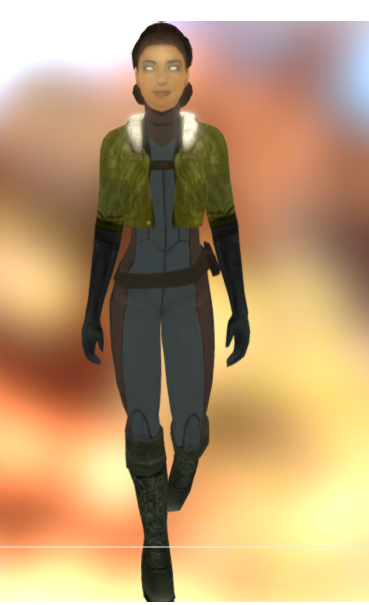
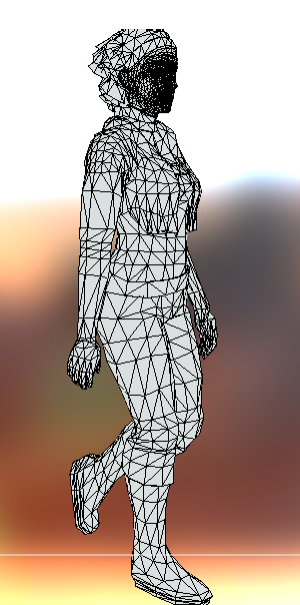
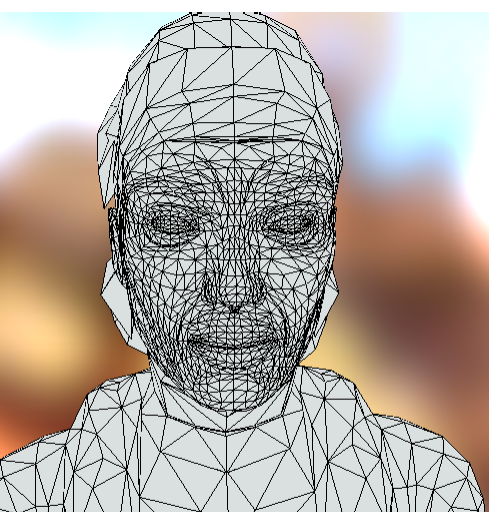
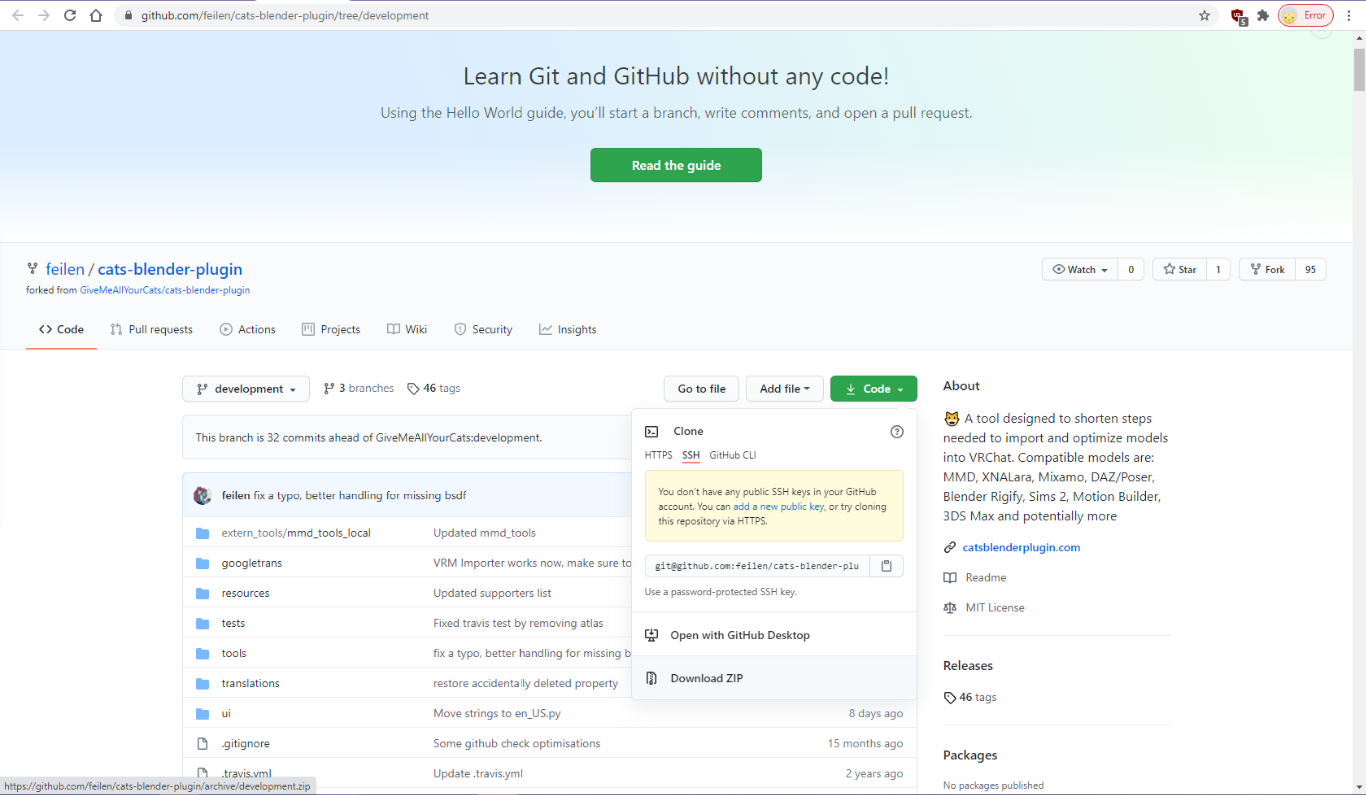

 plain bluff
Question, I currently have a world set to private that has both PC and quest compatibility. If I upload a new version of PC, does that delete the old quest version of the world? I want to start off by publishing only for PC.
(Only because I am ridiculously terrible with lighting, even more so with quest optimization)
fair tinsel
from what I can tell changes done to the PC version does nothing to the quest version
plain bluff
Is there a way to delete just the quest version?
fair tinsel
no clue myself
south lily
i think there was on the website, but i just checked and its gone. the best you could do is upload the world on a different pipeline
and not upload the quest
 wise spindle
So hm, I have a question / an issue i'd like to talk about.
I made a world with a videoplayer for quests users, the video seem to play fine and stuff but everytime, the video just stop in the middle of the file.
I guess it's because quests don't have a lot of cache space / don't allow files over X in size, but is there a way to tweak that on quest ? (The files are 2-3Gb)
south lily
@wise spindle quest doesnt have built in protocols to continually keep grabbing data, i would suggest creating a way to “pseudo sync” or use lower file sizes
perferibly low bitrate
(this is vrc quest, basic quest do have this ability but do not apply this in vrc)
wise spindle
Meh, I guess i'll just let the people make a new instance https://cdn.discordapp.com/emojis/583566131940294677.gif?v=1


cba since i don't have a quest myself to test shit out
south lily
is it the benvr or the 0.3.2 Uplayer?
wise spindle
Hm ? video player i'm using ?
south lily
ye
wise spindle
I'm using the USharpVideo by Merlin
 thick relic
costume shades 👀
south lily
so that one still needs a protocol to keep videos running
and im like 90% sure that protocol was never made and does not exist still
 scenic knoll
heyy, is it possible to create a vrchat world on macbook pro for quest? dont know if this is the right place to ask
south lily
like in unity? vrchat only supports pc/windows and quest/android. im not sure what you mean exactly
scenic knoll
most tutorial videos are showing windows
yess, so would it be possible for me to create a world on unity and then it would successfully uplaod to quest?
from my macbook, i noticed i might not be able to test the world through unity on macbook or maybe i missed something
south lily
i thought macs could only upload quest worlds actually. so in theory you should be able to
scenic knoll
ohh really thats great then! haha
south lily
yea that might be why the test option is greyed out
scenic knoll
thanksss! so this is the right place to go then with more questions?
south lily
idrk, not many people do quest questions so id keep asking here until someone says were wrong
scenic knoll
will do 
wise spindle
You'd be aware of a video player that actually got a protocol for it ? @south lily i'd be interested in it
That would imply a lot of work to port over everything again but eh, why not
south lily
no sadly. ive been working on one but nothing budges on vrc-quest. it budges for every other game with a quest but vrc doesnt seem to allow many things
the protocol would probs be in u#player 0.3.3 or something. as benVR isnt even supposed to work on vrc but it works kind of
wise spindle
hm
 small karma
yo, it seems that Additive shaders might be broken on quest. Anyone else getting a blue polygon loading guy that literally just uses Multiply instead of Additive?
it's only in worlds, not the UI- both the loading man and the avatar im tryina port both looks good in the avatar UI, but the moment it's in the world it's got multiply shading
happened in 3 different worlds- default home, black cat, and summer solitude, with the latest update of vrchat quest
 gritty pier
Will there be an update that adds features from the pc version of the game to the Oculus Quest 2 version of the game? Like the camera, pc avatars, pc worlds, and custom sounds for avatars like music?
fair tinsel
very unlikely to happen for performance reasons and PC avatars aren't compiled for Android so they couldn't even show up on the quest if the developers tried without the user's uploading Quest versions
wraith jewel
Ok, I understand why sound and shader avatars don’t work, but what about dynamic bones
fair tinsel
dynamic bones as they're really expensive as has to do physics calculations every frame
sweet tundra
There’s alternatives to dynamic bones that are significantly better for framerate, but they use Unity’s Burst compiler and jobs, which could require a major rework of VRChat’s internal code to work
Or not idk
I haven’t used it before
wraith jewel
I am still disappointed. That vrchat ported the quest to the quest 2. Even though the mic changed yet that is one of the biggest issues. And I have not ran into a game that makes the mic this bad. This is the only game I ran into with the mic issue. Then we got new hardware and a little different software. When will vrchat update to optimize for the quest 2.
sweet tundra
wraith jewel
I am still disappointed. That vrchat ported the quest to the quest 2. Even thoug...
They will never be able to make a sudden perfect fix for optimisation on the Quest, mainly because of user content.
fair tinsel
it's probably not going to be heavily changed for the quest 2 as it still needs Quest 1 compatibility
and yeah there's no changing the fact that it's a mobile GPU that uses like a hundred times less electricity than a gaming PC
south lily
@wraith jewel vrc doesnt have a system that smooths the sudden audio bitrate changes. which results in the "fish bowl mic"
wraith jewel
sweet tundra
They will never be able to make a sudden perfect fix for optimisation on the Que...
I know that but it's been now how long since the quest 2 has been out
wraith jewel
south lily
<@456226577798135808> vrc doesnt have a system that *smooths* the sudden audio b...
Do you think they can add one?