 errant oak

#world-lighting
4 messages · Page 1 of 1 (latest)

 vagrant dirge
Hi everyone, I had an idea to have a flickering light that mimics a Campfire, but that means it needs to be Realtime? Would even 1 realtime light be too expensive on recourses? Not advise or its okay?
 odd oak
1 light is not big difference
vagrant dirge
ok
 kindred shale
Is it possible to only bake certain parts of my map?
 dry spire
sure, disble other stuff
 magic temple
or turn off contribute gi
 earnest mantle
kindred shale
Is it possible to only bake certain parts of my map?
earnest mantle
kindred shale
Is it possible to only bake certain parts of my map?
If you're using bakery, you can assign a Lightmap group to some object, click on of them then press 'Render selected groups' to only render the objects in that lightmap group whilst keeping all the other lightmaps
kindred shale
Sweet thank you!
 weary cradle

 supple berry
🚬
 hard sleet


 spring heath
So this is a major thing then 😮
weary cradle
To get things started, here's a few useful links:
Bakery - Unity lightmapper asset, powered by your GPU. https://assetstore.unity.com/packages/tools/level-design/bakery-gpu-lightmapper-122218
Xiexe's Lighting Tutorial - "How to get good at baking lighting." https://vrcat.club/threads/xiexes-lighting-tutorial-how-to-get-good-at-baked-lighting-101.2081/
Silent's Post Processing Tutorial - An in-depth guide for understanding post-processing, how to set it up properly, and common pitfalls to avoid. https://gitlab.com/s-ilent/SCSS/wikis/Other/Post-Processing

Bakery is a high-end, production-ready, hassle-free GPU lightmapper, designed as an alternative to Enlighten and Progressive.
NOTE: Requires modern Nvidia GPU (6xx or newer) and 64-bit Windows (7 or higher).
Doesn't support AMD cards for baking.
Tested on everything ...

VRCat: Community-Run VRChat Forums
Greetings! Over my course of playing VRChat I've noticed that most worlds, mainly the ones that have baked lighting, are done poorly, or in an...

GitLab
A surface shader for Unity based off Cubed's Flat Lit Toon shader
 modest vapor
Make sure to also grab the Bakery documentation on the asset store page !
 edgy forum
Here's some tips:
Test your light setup with multiple shaders
What might look good with flat-lit toon may well look horrid with Standard.
Standard is usually good enough
The Unity Standard Shader is pretty good for a whole load of things. Unless you have specific needs that standard can't fulfill, it's probably fine for your scene.
Use Environment Lighting
Envrionment lighting is a nice cheap approximation of indirect light (often scattered light from the atmosphere) and without it, anything in shadow will be completely black. This looks awful.
Light Probes are great
Light probes are a representation of what the scene light is doing at the point in space they're sampled from, and then they reapply that to whatever object is within their influence. (Along with interpolating between neighbouring probes as things move)
 orchid epoch
i've got a question about light probes actually!
I've got a scene that is mostly outdoors. should i still add light probes?
orchid epoch
alright!
 lofty jungle
You should always add light probes if you have baked lights at all.
Even if you also have a mixed/realtime light
orchid epoch
cool. I do, but liked how accurate lighting looked in my world.
i was worried about the processing overhead when adding light probes.
orchid epoch
great! that's what i was curious about. not easy to find that info
thanks @lofty jungle !
you're my lighting expert now
lofty jungle
Unfortunately environment lighting can only be intensified with a proper skybox
And environment lighting is hard with solid color or no skyboxes anyway, such as a very dark night
There has to be a better way to manage it right?
I had to turn up the environment light multiplier to 1.5x and set my directional light's indirect multiplier to 0.5 to get Standard shaded models to look right
At one point I was considering a second directional light that didn't cast shadows
 hushed isle
oh nice a place for lighting
 whole tusk
We need Silent’s PPS tutorials linked here! https://gitlab.com/s-ilent/SCSS/wikis/Other/Post-Processing&sa=D&ust=1547515864055000&usg=AFQjCNFN2BWKJKE_976w9nVJEQOi2P0-PQ
GitLab
A surface shader for Unity based off Cubed's Flat Lit Toon shader
weary cradle
That appears to be an empty link D:
modest vapor
GitLab
A surface shader for Unity based off Cubed's Flat Lit Toon shader
weary cradle
 small oyster
Can we get a script already to be able to change the environmental light colors (solid colors) in animation, this will make it possible to have dynamic light cheep
Even if it is a suggestion, i could write it on the canny. Just popping it out as it is very relevant here
 sonic marsh
Yeah, an animatable component that allows you to
- change the ambient colour (colour mode)
- change the ambient gradient (gradient mode)
- refresh the ambient probe (skybox probe)
would be hugely helpful for making worlds with lighting transitions and day-night systems.
But I think that's a bit tangential to lighting
 main anchor
!!! Kind of but there are worlds that want day night cycles for example and right now you are forced to do it by having 0 ambient and using only directional sources
Would realtime GI give you some control over ambient lighting? Or is ambient irreplaceable
Oh another good reason to have control over ambient lights. A lot of maps want night mode for sleeping like a dimmer switch, and they are kind of forced to do this with post processing or grabpass
small oyster
There is documentation on Unity to add that type of script for adjusting the ambient colors, just that it does not work (blocked), would be easy to add and good to have as an VRC script for world makers
You just have to tick off realtime ambient i think it was called
main anchor
It would be great if you file a canny and put a pointer to the unity scripts that would give us this control.
Lack of control over ambient lights does kind of force map authors to bend over backwards for some things and excessively use directional lights and shadows
So this could vastly improve lighting in some large or dynamic worlds
small oyster
Ye i could add that, but there may be other things that i dont know about what could be a good addition to the script in the canny.
Il, wake up and write that canny and then go back to sleep :p
main anchor
People can add feedback in the comments and iterate. Best to keep it simple as a starting point
small oyster
Mhm, i guess
Il try to make it short and detailed, was blocking me to make day and night cycle on my map, instead i had to do janky stuff to make it work somewhat, and found out that it made the lighting terrible, as i boosted up some intensity grade when baking the ambient into a texture map, and then lowering some other setting to make it almost black in night, but quite light in daytime.
It made all shaders work somewhat, but all bloom was destroyed on the map
 twin burrow
oh thank goodness a support channel for lighting exists. I really hope mappers learn to do it right 🌗
small oyster
alright, managed to recreate the basic script for ambient color change
gonna just write some things down now so i can get it going on Canny
hushed isle
anyone submit a canny for setting up a day night cycle
 grave flax
That's up to the world maker, to be precise
hushed isle
useing script
main anchor
You use animators to run the day night cycle. As long as all light sources and post processing are animatable you can usr animations. [Unless you are asking to receive the real world time (local? Utc?) to control the day night]
The last piece to the puzzle is this control over ambient, so that's the idea for this canny
hushed isle
😃
hushed isle
? first time thinking about using bakery lightmesh . any one use this ? did you add a regular light with the same mesh
 mortal marsh
bakery light mesh is for something with a baked emissive material, I didn't find it that useful because it bakes just fine without it. It's also what's used for the Area Light I believe but it kept getting mad at me because it didn't have a mesh on it
hushed isle
ya i am trying to find a way to illuminate glow a mesh over a beast2018 shader using tessellation with out using a script
hushed isle
so anyone ever solve the issue of rotating a reflection probe box ?
sonic marsh
It's not possible.
As I understand it, Unity calculates all the blending for probes based on axis aligned boxes because it would add a lot of extra complexity and processing to allow rotation.
hushed isle
ah
hushed isle
anyone have some info about how a skybox reflection probe works and where do i find its settings , perhaps i am confused now as i see in Bakery they have a render selection for match skybox reflection probe, ummm and i pushed it as it was a button i haven't pushed before, now its getting real crazy
 cobalt arrow
what
3D Objects -> Lighting -> Reflection Probe
u can do things such as bake it and set cubemaps
dont put realtime bc of quality and lag problems
also shaders typically use the nearest reflection probe
so u might wanna do things such as put probes that span whole rooms or multiple of the same probe around exit points
 hard atlas
@high sandal
small oyster
There is an world reflection possible in the lighting tab if i remember witch uses skybox reflection, there is possible to add your own cubemap already created from an reflection probe
hushed isle
kk it was i just didn't see a actual sub-source for probe itself in the skybox environmental reflections, it has only skybox as the source and custom that will allow the selection of the cubemap. In bakery it had a very large selection tab for updating the skybox probe, i posted a question for clarification about this to the DEV see if i am correct it only updates in used thru custom or if he has some background script working on the skybox itself
--
On a other note in Baking i mistakenly had a few items set on realtime that i missed, after baking they showed some odd coloring effects pointing them out to me. i didn't see this as a option in bakery or is this a material issue that just worked out this way somehow.
after setting to bake and rebaking the map it cleared up
 dapper vessel
I'm making a world using baked lighting and emmisive materials, though the world is going to have some moving objects like doors and pickups. I don't think I want to use mixed lighting though, as without support for emmisive materials, it doesn't turn out as well. I've considered having real-time lights shining on the doors and self illuminated pickups. Is there a better way to do this?
 haughty bough
@dapper vessel You can use Light Probes to illuminate non static objects on a baked lighting environment
edgy forum
@dapper vessel Kriss is right, also it's worth reading the whole section on Light Probes in the unity manual
https://docs.unity3d.com/2017.4/Documentation/Manual/LightProbes.html
 small oyster
^ this is valuable info
 native dome
Lightprobes are great. I’m working on a dark map, and placing my light probes conservatively is making it so I can have dark ambient lighting without making player blend in to much.
small oyster
standard shaders and such have a bad time in dark ambient color maps
lofty jungle
Yep
small oyster
thus i want the realtime color change :S
you can make such great maps just with the ambient light, as it can create an artificial mood for the areas
you can do it somewhat with a Sun Directional light with Color but the shadows makes it whole
lofty jungle
Generally I try to make outdoors look decent enough with ambient and only then add a directional light
Basically how it would look on a very cloudy day
small oyster
If you are making a day may you can do that, but at night you cant see a thing :p
so a bit of light is good hehe
sonic marsh
@hushed isle The skybox probe isn't something you can set from Unity normally, because it's baked when you click Generate Lighting in the Lighting tab along with the other baked light. Bakery's button to Generate Skybox Probe refreshes it.
The issue you see there with the objects turned red is because of the Bakery bug that occurs with VRC where the skybox probe gets corrupted and turned red. Those objects are not covered by light probes in the map so they're using the default ambient probe. A workaround is to bake light probes into the map and change the ambient light mode from skybox to gradient and match it to the scenery.
For my outdoor maps I've been baking ambient lighting and probes for them where possible, it looks a lot better but it means having a bigger file size
In the map I've been working on, isolation, having the probes also means I can have covered areas where you get darker in shade, even though ambient light is high because of all the snow
But doing that isn't really compatible with a day/night cycle...
hushed isle
@sonic marsh I going slow building a complex level with piping, AC, light beams thru windows and such. i decided that a day/night cycle may be to much for performance at the moment so i a going with a dusk or darker skybox and a outdoor underwater area (Ah still waiting for your water shader updates lol ). For the underwater sections i am experimenting using bakery light mesh on some corals thru out the reef . for light probes i only been using simple light probe placer for testing small areas until i get further along perhaps next week https://assetstore.unity.com/packages/tools/simple-light-probe-placer-58290

Simple Light Probe Placer it is simple tool
and it help you easily place Light Probes in your scene.
It's provides two new components:
- Light Probe Volume
- Light Probe Group Control
Read more: documentation and source.
hushed isle
link
sonic marsh
https://gitlab.com/s-ilent/clear-water
Direct link:
https://gitlab.com/s-ilent/clear-water/-/archive/master/clear-water-master.zip
GitLab
Simple water shader for Unity/VRchat that (ab)uses some Unity features to get a pretty water surface.
hushed isle
thanks
weary cradle
public reminder to please god don't have your directional lights/ambient over 1.0 intensity combined without using tonemapping, thanks in advance
you will look fine with flat lit toon (because it ignores light intensity over 1.0) but it murders any standard/PBR/actually-respecting-how-light-works shaders
edgy forum
Which is why You test your lighting
Ideally with a variety of shaders.
modest vapor
testing 
edgy forum
To clarify what's going on here rather than just saying "No don't do this"
The numbers are the directional light intensity (+ambient light)
Left is Unity Standard Shader, right is Cubed's.
What's going on here is that as the recieved light is increasing, so is the reflected light increasing proportionally on the PBR material, compared to Cubed's which is a NPR material and has been clamped to 1, which is okay because letting it go over 1 would probably start to get weird.
So this is why you test with multiple shader types, you might be doing something that isn't 'visible' on one of them.
As usual, if the standard shader is doing something weird chances are there's something off in your scene.
small oyster
Want emotes!  Looking at you Ruuubick
^^
sonic marsh
Hmm, I'm not actually sure that's entirely correct to say
Whether a shader is physically based or NPR (as in, not) isn't exactly relevant to what's going on here. The problem is just that Cubed's is clamping the received light. It doesn't actually need to do that, mind you, the way it's set up would even allow that to work okay. But it clamps it, and so the output values will always be dull and washed out.
Here's a demonstrative image! This is taken with auto exposure (so the super intense light is in visible range, as it should be) and you can see how the different examples here react to light.
Anyway, the point is - the easiest way to test your lighting is to drop a Standard Unity sphere in your map and drag it around. If it turns pure white, you probably have a problem. Don't use Cubed's to test your lighting!
lofty jungle
Besides that, avoid using Cubed's for your actual world materials unless you know what you're doing
Even for more "toony" worlds, standard looks great if set up correctly
sonic marsh
Well, you definitely shouldn't use it for worlds at all. The light clamping issue alone makes it really bad!
Yeah! In anime, the backdrops are painted, not drawn. Or photographs! In either case, they're not drawn, and the "world" of anime typically uses realistic lighting, so even stylised worlds can use Standard to great effect.
native dome
Anime background tend to have a more matte look to them so for the anime look turn down the shininess
cobalt arrow
use xiexes with a hybrid standard + toon ramp
will look like breath of the wild and etc
hushed isle
ok am i just missing something . why do new items adding in my map turn purple and blue until i bake them ?
what is Unity trying to tell me
weary cradle
That's bakery doing that, its safe to ignore
weary cradle
no
hushed isle
ooof
hushed isle
ya just trying to do textures on it before baking is odd
modest vapor
You can fix it by changing the environment lighting to color or gradient
hushed isle
ah ok
 stuck furnace
What ruubick said should fix it.
I also wouldn't ignore it if it's happening in the scene. If it happens in the scene then you'll see it in game. The moon on one of my maps was very pink and blue awhile back. Much spook. Bakery pls fix. 👀
hushed isle
not baked yet
ya hope its fixed in the next update i see a lot of reports already with the DEV
Xi any progress on issuing a updated best practice guide using bakery lights , i understand its changing fast
 autumn mirage
is this tab only about world lighting?
weary cradle
There's not much other lighting going on in VRChat, so yes 😃
lofty jungle
For dealing with lighting on your avatar you'd probably be closer to #shaders
Even then it's more on how to deal with the incoming lighting
sonic marsh
Specifically, you don't need to rebake the lighting when using Bakery, but just hit this button
But due to a bug, that won't take effect in-game, so you should set up a Gradient in the Lighting tab
stuck furnace
@hushed isle Been really busy. I'll write a guide when I get the time to, I'm sure it'll be posted somewhere here when I get around to it, either by me or another. :P
hushed isle
@sonic marsh
sonic marsh
Hmmmm
 mint cipher
Alright explain to me like I'm dumb
I'm using enlighten lightmapper
And Idk if I have any reflection probes
I'm still new to lighting P:
lofty jungle
Try placing just one reflection probe in the area and then baking it. The center should be somewhere in the middle of this area, the bounding box should cover the floor and the major area.
Then bake the probe and see what happens
The version switcher in the Unity manual sucks, going to the 2017.4 docs just takes you to the homepage 😩
mint cipher
Alright I'll try this in a second
I'm rebaking my lights atm
@lofty jungle If you don't mind, could you explain how the reflection probes work? I read the page you sent me but I'm still a bit confused for the most part
lofty jungle
Shiny materials tend to use the skybox as a reflection source by default.
A reflection probe captures the area around it, and will make any objects inside their bounding box use the reflection probe's stored reflection instead.
This means that if you have a really shiny metallic object inside this area, it will actually reflect the area around it, rather than show you the skybox.
This is a key thing to make both your world and Standard-shaded avatars inside look good
mint cipher
I see
And I could also make my water surfaces reflect area around it instead of skybox as well
hushed isle
not trying to overload you but you could also add a few light probes
this tool helps with that
Simple Light Probe Placer
place Light Probes in your scene. It's provides two new components: - Light Probe Volume - Light Probe Group Control
https://assetstore.unity.com/packages/tools/simple-light-probe-placer-58290
Simple Light Probe Placer it is simple tool
and it help you easily place Light Probes in your scene.
It's provides two new components:
- Light Probe Volume
- Light Probe Group Control
Read more: documentation and source.
mint cipher
No worries, just uh
Explain what they do I suppose
This is only my second world, and my first time working with lights.
hushed isle
they will help you a lot in the dark they capture the light settings to help the light map see shadows, also they help with lighting the avatar in the dark areas when playing
 azure ore
I I highly suggest to read lighting guide which is pinned here(second link) as explains what is needed
mint cipher
Yeah I read through the guide
Still a bit confused here and there
But I'll keep re-reading and working with it
 long glade
anyone know why my lighting doesn't work properly in the mirror?
the light is mixed
but it only shows my shader on my model and not it's skin and stuff
mint cipher
@long glade most mirrors have pixel lights disabled, make sure your skin doesn't look like that without realtime lights
native dome
if you have light probes set up it will work with pixel light's disabled
hushed isle
 topaz horizon
Why do mirrors have pixel lighting disabled, is it a performance thing?
mortal marsh
They're only disabled by default, you can uncheck Disable Pixel Lighting in the mirror component. But yes it is a performance thing, as realtime lighting is already bad enough, adding the cost of reflection is going to be hefty
sonic marsh
Yeah, the way it works is
- Everything must be rendered once with one light, and that light comes free with the base pass.
- Unity will also allow up to 4 vertex lights that are calculated in a much simpler way than regular lights. These lights are "not important". They are also in the base pass.
- Every light rendered after that costs an extra pass.
Now, passes are expensive, because an extra pass means everything touched by or on the vicinity of the light must be rendered again for that light, and that ends up being pretty slow.
Then you have mirrors, and by definition, a mirror renders everything again. So the default for mirrors is to only reflect the base pass, which includes the one directional light and the 4 cheap vertex lights. This saves the potential cost of rendering several extra lights all over again in the mirror, which would be hugely expensive.
But depending on what shader you use, it may not even handle the vertex lights at all, which would mean you aren't lit in the mirror.
So if you're not lit in mirrors at all, that's probably your shader not handling vertex light. The question is whether you want lower performance but to cover more shaders, or better performance but leave some people in the dark.
lofty jungle
You can also have two mirrors
hushed isle
Spotlight Team Best Practices: Making believable visuals in Unity
https://blogs.unity3d.com/2018/03/09/spotlight-team-best-practices-making-believable-visuals-in-unity/

Unity Technologies Blog
Being part of the Spotlight Team, I am fortunate to be involved in some very interesting projects. The Spotlight Team at Unity works on games together with...
has a few good points to take away from in this , not every thing is applicable in VRchat
some more on making your lighting wrokflow efficient
Spotlight Team Best Practices: Setting up the Lighting Pipeline
https://blogs.unity3d.com/2018/08/28/spotlight-team-best-practices-setting-up-the-lighting-pipeline/
https://drive.google.com/drive/folders/10mms98ARgIkOSZcAxdJKaK90SDAOwUsM
Best practice guides: https://docs.unity3d.com/2018.2/Documentation/Manual/BestPracticeGuides.html

Unity Technologies Blog
Unity offers several rendering pipelines, two Global Illumination systems, four Lighting Modes, three Light Modes, two Shadowmask Modes, etc. This tremendo...
hushed isle
so i a have a sky box question, i am looking at making a few 6 sided sky box maps i have into a cubed HDR to support the bakery skybox shader . i found the legacy Cubemap asset ( https://docs.unity3d.com/Manual/class-Cubemap.html ) and generated a cubemap that i placed into the new bakery skybox shader
ok .. now i see a few warnings from the legacy cubemap maker "It is preferable to use the cubemap texture importer type instead of legacy" however this looks like that only supports generating a cubemap from a single texture not one that has already been striped into 6 ... Can someone check below settings and give any guidance
Legacy Cubemap Assets
lofty jungle
Yeah, generally cubemaps are done with single images, with a large variety of different projections available
Such as panoramic pictures
If the cubemap is already 6 textures I don't know if you can convert it easily and it probably does not matter.
hushed isle
for this case in a very dark sky i cant really see a problem in quality , i am more concerned with correct settings to apply such as readable
mint cipher
sure you can convert: https://www.360toolkit.co/convert-cubemap-to-spherical-equirectangular.html

Convert equirectangular to cubemap, convert cubemaps to equirectangular, preview panoramas, and meta tag photos for Facebook all in one place!
hushed isle
will this work with a 6 sided
mint cipher
yea it takes 6 images and spits out one
hushed isle
i am looking at a few assets i have that only came with 6 sided setups and i found that using any 6 sided maps with bakery does not match with the skylight component data e.g making the the render match . so its best in this case to convert my maps into HDR cubed
DEV was working on a 6 sided but doesn't look like they can get past this technical issue yet
mint cipher
I see
hushed isle
@mint cipher do you use this tool a lot I'm looking at this (Convert cubemap to Equirectangular)
Cam_0_Front+Z = Front
Cam_1_Back-Z = Back
Cam_2_Left+X = Left
Cam_3_Right-X = Right
Cam_4_Up+Y = Up
Cam_5_Down-Y = Down
mint cipher
I only used it once a while back and yeah I had to rename and figure out the sides too
hushed isle
kk getting thru it now
thank s
any preferred import settings when changing it to cubed ?
hushed isle
ya regardless of what i do cant get the quality close to the 6 sided
may just need to manually set the skylights
hushed isle
so we think we found a way not certain if anyone try this before ? set up a blank map with all the sky objects add a reflection probe bake it and use the that cubemap
lofty jungle
Yeah, that's one way. But do you really need a newer cubemap then?
sonic marsh
You know, the skybox supporting Bakery is only important for baking the skylight. You don't need to use the Bakery shader. In my maps, I've used a reflection probe to bake a cubemap of just the sky and told Bakery that was my skybox.
Because Bakery skylight also works better with a low resolution input (i.e. not a full resolution skybox) it's a good solution even when not needed
From the page, it sounds like Legacy Cubemaps are a bad idea to use, as they'll lack proper filtering and compression.
hushed isle
ya i am just getting it ready for making the new Cubemaps thru baking the reflection
sonic marsh
You don't really need to do anything, just set it up like a regular skybox material and bake from that
hushed isle
got it looks good
mortal marsh
I can't say for certain but it kinda looks like post processing might be blooming up your everything? Could also be the lights themselves came out a lot brighter than you thought
sonic marsh
Your bloom looks like it's set up badly
modest vapor
Slightly too bloomy
mint cipher
That'd be strange since I didn't have my post processing stack active at the time.
v:
actually I didn't even have one at the time.
I thought it'd might've been bloom at first myself, so I removed my post. But the map still had that weird effect.
It really was just an issue with my baked lights. Had to re-bake and it was golden.
sonic marsh
Aaaaaahh, right, that would look like bad bloom
 still sandal
Looks like some Inf.
sonic marsh
If it's just broken lightmaps it wouldn't be
 tropic needle
As this is the lighting channel ... Anyone have a nice collection of lighting rampmaps (i have the ones in poiyomi's,NoeNoe,cubeds shaders and a custom one i made myself)
lofty jungle
Xiexe's has a gradient generator built in
So you can generate your own
You can also use MMD ones, some shaders require the ramps to be rotated
And in either case make sure to set the texture tiling mode to clamp
cobalt arrow
make a hybrid of soft lighting and hard shadows
 pure cobalt
I'm looking for the most efficient way to do stage lighting. Looks like spotlights are not going to work. Anybody have suggestions. As of right now, I'm not worried about lag as much as I am getting it to work. Lightmap quality not that important as long as they are there.
 arctic portal
Hi. I am making a night map with several zones and I would like to illuminate certain areas, but when using an Area Light, the game slows down. Is there any way to avoid this and be able to illuminate without lag?
mortal marsh
are you already familiar with basic lighting and light baking?
mortal marsh
you might want to get started with this then: https://vrcat.club/threads/xiexes-lighting-tutorial-how-to-get-good-at-baked-lighting-101.2081/
VRCat: Community-Run VRChat Forums
Greetings! Over my course of playing VRChat I've noticed that most worlds, mainly the ones that have baked lighting, are done poorly, or in an...
hushed isle
@pure cobalt check DM
pure cobalt
dope. Thanks!
@mortal marsh Thanks for that. I have already watched that, but these are going to be realtime lights. I'm researching some "non-light" methods to use
arctic portal
I've tried and it works, but everything looks too dark. The illumination of the map should be a normal, bluish, dark, like a normal night in a city.
and the shadows look weird
I would like the lamps to light up
There is a way to do it with the emission in the Mesh renderer but I do not know how it works
mortal marsh
I'd steer away from mesh emission for lighting right now and use normal lights, as that will give you more control over it
arctic portal
The problem is that it gives much lag the normal lighting. I can not put several in the same area, and I have to light several windows and lamps
mortal marsh
yeah that's probably because those lights are realtime, you have to set them to baked and then bake them into the map, which has a much smaller performance cost but will increase world size
edgy forum
Set the lights render mode to Not Important
arctic portal
I have to illuminate the area?
the maps that I use have vertex lightning, but I do not see that it is applied in Unity3D
Here the Vertex Lightning in Blender
Somebody can help me?
I never worry about lighting because I always make illuminated or sunny maps, and therefore I never deigned to learn to control it properly
sonic marsh
@arctic portal You've baked the lighting to the vertex colours, right? The Unity Standard shader, by default, doesn't support vertex colours. However, there is a version that does.
arctic portal
What is that?
sonic marsh
That's a modified version of the Standard shader that supports vertex colours
arctic portal
Oooh
I see
Not works
Either I do not know how to use it
I need to make the model of the map to baked?
sonic marsh
It should work
If you baked lighting in Blender as vertex colouring, then assigning that shader to the material for your map will apply the vertex colours.
arctic portal
Well, no. Do I just have to apply the shader or do I have to do it baked and generate lightmapping?
It works! But looks so weird and darkest
sonic marsh
Well, the vertex colours you baked are like lightmapping
arctic portal
I can fix it?
hushed isle
so i have a bakery question regarding Bakery light Mesh and its settings
the objective is to use light a large coral reef underwater project using some corals with light mesh also adding the glow effect as this is a darker night time skybox
when i read the compatibility charts for this method it suggests that bakery standard for vertex lightmaps , however i found that it must output unlit color and when matched it will about default to Unlit shader . this is good
so my question is what do suggest on my approach and my sample rates
my second part is about light mesh on LODs , i been applying this only on LOD0 , should this be on parent object or am i correct in the first
hushed isle
any one have a light color sample chart or should we just google one
i would like to find a tool to sample the color and tell me the hex with out importing the textures to much
 deft lintel
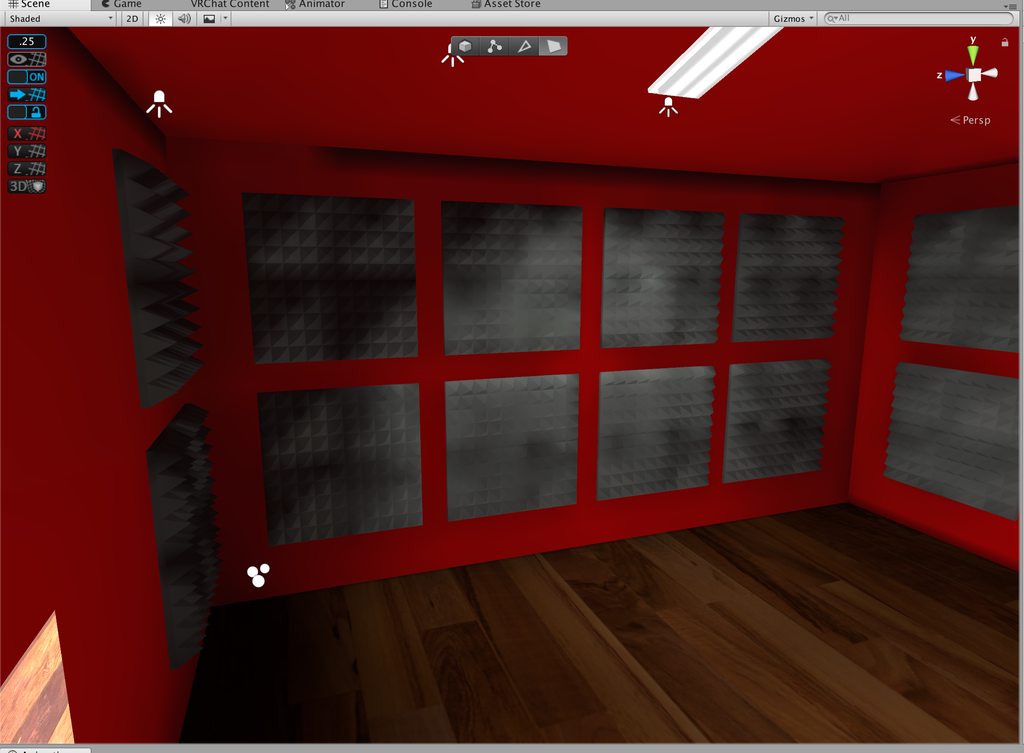
https://imgur.com/a/Y9MfTOh Can anyone help me fix this. Just random dark spots everywhere. The foam padding on the walls has manual UV2 maps sense unity's generated ones are unusable. The walls are all done in pro builder
 prisma radish
They don't seem too random too me, if the lightmap UVs are not overlapping each other. Can you make Unity generate those lightmap UVs on their Import Settings on the model?
I would try that.
Otherwise try increasing the Lightmap Resolution on those objects in the scene.
deft lintel
https://imgur.com/a/8bWBsHx this is why i no longer use unity light maps
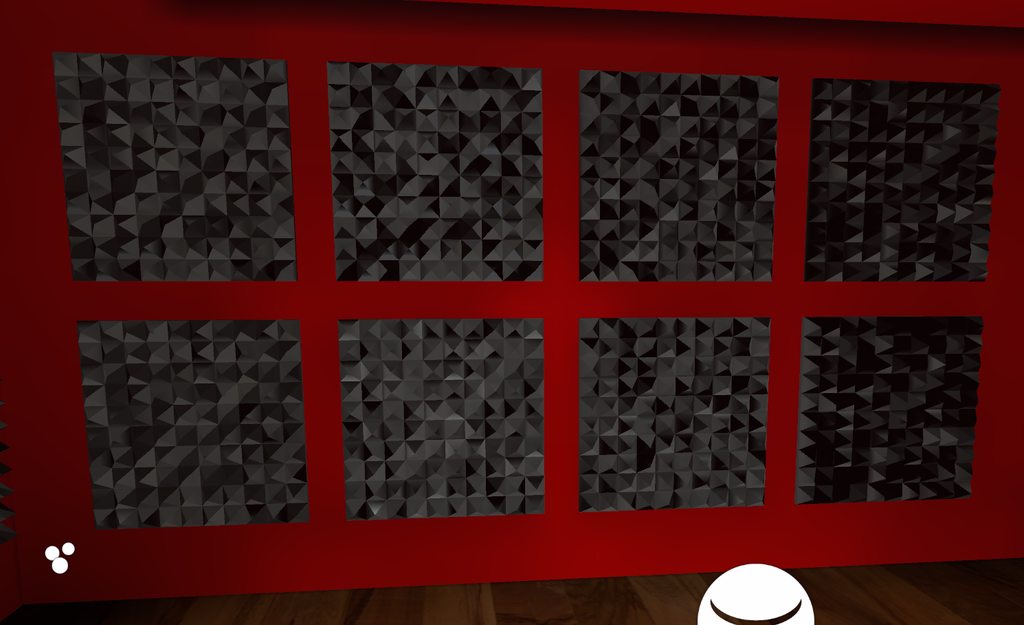
they are not overlapping i cleaned it up
prisma radish
I see, yeah, they are not always good
Increasing the lightmap resolution might be your only bet
deft lintel
but the walls are weird
prisma radish
Also, if you can make the lightmap contiguous that sometimes helps with making it a smooth map.
The dark edge on the top?
And similar?
That is a Unity artifact that is sometimes hard to get rid of. Again, increasing lightmap resolution may help
deft lintel
contiguous?
prisma radish
Sadly a lot of those issues are trial and error / experimentation.
Yeah, all one continual lightmap
instead of lots of small islands
it may be hard to do with that topology though
deft lintel
oh ya i did that, i used a top down projection
prisma radish
hmm
To me that would be ideal UVs for those
Try increasing the lightmap resolution on the foam panels.. or maybe even lowering it rather low.
deft lintel
oh ya the resolution helped the walls
not looking forward to doing the UV's on my mixer
prisma radish
oh, I wouldn't even bother lightmapping that
Set the lightmap scale/resolution for that to 0
Then it will cast shadows on the floor/walls, but not on it'self
Or at least do that on all the controls.
or just don't make them lightmap static.
I would only attempt the "base"
deft lintel
ya the autio generation is "ok" but some controls are darker
I spent 3 days of 20 hour work making that thing so im about exaused on working on it
prisma radish
Looks really detailed
deft lintel
ya adjusting the scale seems to help more
ya i did everything by hand including the textures that was so much damn wok
hushed isle
what shader are you using did you try changing
 spark hornet
use unlit shader 👌
deft lintel
Standard for everything only time i have used something different is for displays and LCD's they have unlit or cubed unlit shadowed
pure cobalt
Is anybody familiar with doing dynamic occlusion culling? I'm basically making fake volumetric lighting for a stage, but I don't want the "beam" to cross over any structures.
hushed isle
@deft lintel for the wall sound panels i suggest you try beast 2018 tessellation shader
dapper vessel
Anyone know how I could get real-time shadows with baked lighting sourced only from emmisive materials and if not how much of a performance issue would it be to have a mixed light inside each light source just for shadows
hushed isle
try Shadowmask , i think only Direct, Point and Spot lights can interact with shadowmasking because they are the only types Unity supports in real-time. this will help with blending the realtime shadow and the baked shadow . i would think it helps with performance over pure realtime as not all the shadows will render on the full map and only a few
@dapper vessel
i am not certain if your Unity Enlighten mapper or bakery , they would have different procedures
dapper vessel
I'm using the progressive lightmapper
azure ore
@pure cobalt Volumetric lighting is a tough nut, especially without any scripting here. 'Occlusion culling' is mostly refers to entire object being culled when fully hidden by other geometry.
One idea I got is making rigged beam mesh, one bone for the base(source) side of cone/cylinder, other for the end vertices. Then by using 'ProtectCameraFromWallClip' script for each beam to control that 'end' bone so it always ends up at surface of environment.
(Toybox has aim-teleportation staff that uses this script)
Fair warning that this will not look good with textured beams to the dynamic length - need either a solid color or a specialized shader. (I'm also interested in stage lighting and have beam shader in progress, but its not good enough yet)
 lavish field
@pure cobalt Check this out, it's a shader for particles that simulates volumetric lighting

 hushed isle
nice how did it do for FPS drop ?
lavish field
depends how many particles you use. It's probably better for specific light fixtures, not a good idea to fill an entire map with them
hushed isle
may be fun to put on a flashlight
pure cobalt
I thank you all for the tips. I simply shortened the cones
 cosmic falcon
wow
deft lintel
@hushed isle I fixed it by just manually making UV2 maps in Blender from a top down projection
mint cipher
didn't know this existed


the top image is bakery - the lighting is correct (but the quality is poor). The bottom is Unity - lighting is smooth and nice, but wrong. The lights are above the cubes.
the whole cover + light part is probuilder - I use emissive materials to provide the lighting
could anyone help me to fix the Unity light baking?
lofty jungle
@mint cipher did you hit "Generate UV2" on the probuilder meshes?
The top looks distinctly like missing lightmap UV's, and the bottom could probably be explained that way too
mint cipher
i don't see it
lofty jungle
It's in the Probuilder menu
With the object selected, there is an option called Generate UV2
You may have to re-bake after that
Do this for all probuilder meshes
For non-probuilder meshes, "Generate Lightmap UV's" should be ticked in the inspector, after selecting the mesh in assets
mint cipher
alright well Generate UV2 has an option for 'scene'
so lets see now
light transport is taking a lot longer 🤔
rip
no game
hushed isle
Rokk if your using Bakery you should not generate UV light maps when importing
lofty jungle
Oh, really? I didn't know that
sonic marsh
@dapper vessel Do you have a single fact to back that up? That's totally wrong
dapper vessel
Que?
hushed isle
@sonic marsh https://docs.google.com/document/d/19ZDUAVJA69YHLMMCzc3FOneTM5IfEGeiLd7P_qYfJ9c/edit#heading=h.ws9kb2tjh0dn

Google Docs
Bakery - GPU Lightmapper Manual (v1.5) Why use Bakery Bakery is designed as an alternative to existing lightmappers and focuses on solving following problems: Fixing various baking artifacts, such as seams, light/shadow leaks, incorrect shadow terminators, etc. Baking a li...
look over the section for Best Practices
 frigid harbor
that's more-so just saying manually unwrapping will give better results than automatically doing it, doesn't mean you shouldn't
sonic marsh
Yeah, but telling people not to click that with no other context is bad advice
hushed isle
got it my bad i should have provided suggestion
sonic marsh
✌
 brittle oak
so i baked lights with light probes of my scene, and i have a vrc_mirror disabled by default, when i open it in game, player's avatar feels so dark, what should i do to make it affected by the light as well?
frigid harbor
put a sphere or something in the scene and it should be lit up by the light probes if it's not they're not gonna light up players
if they're lit up but people aren't the avatar might not have a shader that makes use of light probes
brittle oak
I fixed it, it was because i scale down the scene, but not the light probes, i forgot to reset light probes to match the scene, but, avatar's shadow on the floor not reflected by the mirror at all, i don't know how to fix that
small oyster
You need to add so it accepts pixel lights on the mirror, it should be a checkbox.
sonic marsh
The proper solution is leaving it on and having light probes, though, that's much faster 👀
native dome
Yes please use light probes. They are very easy to setup and make your map look so much better
brittle oak
I have set light probes, but vrc_mirror don't show avatar's shadow
sonic marsh
When you have a point/additional light that casts a shadow, and isn't baked, it won't be included in the light probes
brittle oak
em... still not sure how to do it😂
small oyster
you need to set it to off to let shadows be cast from realtimelights in the mirror
its not recommended as it adds quite a hefty amount to compute it
brittle oak
they said use light probes, but idk how, is that still not able to make shadows work with vrc_mirror?
must use realtimelight?
brittle oak
so shadows generated by light probes wont have any effect on mirror?
small oyster
but it is VERY cheep to use instead of realtime lights
it will, but you wont see shadows as you would think. it will make your whole character or parts of it darker/lighter based on where the meshes is located inside the Lightprobe areas.
Baked lights should/need lightprobes to add light/shadows to the meshes inside baked areas
since an avatar is based on usually 1 skinned mesh you will only see the whole character change to the same Light/Shaded value inside the lightprobe area.
The shaders will use that value if it is designed to use it, or you will have an Unlit shader that does not care about those values
So if you want Shadows like realtime, you will need to use Pixel lights
brittle oak
can I think that shadow is out of lightprobes range so it will not display in mirror?
small oyster
but i recommend to add 2 mirrors that you can change between so you can have 1 with and 1 without Pixel Lights enabled
if you dont have lightprobes around the area it wont grab the baked values when you bake the lights into the map
an lightprobe area consists of a 3 point value it just like an Triangle, each probe acts as an corner of the triangle and the value is based on a median of those 3 values
if you move out of the area you will lose the values, so it is importaint to spread them all around your map
if you have many hard shadows it is also important to strategically place them inside shaded areas and light areas, or else you will be shaded in light areas or opposite
brittle oak
ye i put it all around my scene, just i cant figure out why shadows not working with mirror, i don't know too much about how mirror works
small oyster
did you bake with the probes active?
if you use Bakery it can bake it separate I've heard
brittle oak
i do bake the light with light probes, and shadows work on normal area(except reflection in mirror)
small oyster
probes need to be baked at the same time as the lightmaps are baked, it will create the values it needs then
well, then i think its a shader problem
you tried Standard shader?
brittle oak
oh, you mean shaders of avatar?
small oyster
yes
try one of the VRchat ones
they have standard
or make a few balls with different shaders you can go around your map with
brittle oak
oh, wait, i have pickups with standard shader, i'll try
small oyster
with pickup script on
i think cubed shader dont use anything :p
skips a lot of the values and creates a whole lot of problems if you base it on that shader
anyways, thats my rant.
dont think i can add any more, the rest is yours
 keen oriole
anyone know how you would go by making the effect used in greenscreens? like, having a wall or floor be one solid color with no shadows, but players or objects on it are well lit? (sorry its hard to explain)
frigid harbor
create a material and give it the unlit/color shader and put it on a cube or w/e
keen oriole
i’ll try that out, thanks
mint cipher
@brittle oak VRC Mirrors don't generally reflect shadows for lighting, mostly because it's far too taxing. Shadows are one of the most complex parts of baking lighting, meaning they take a lot of rendering.
 median plinth
I doubt it. but is this tool whitelisted? IDK where the list is but this would be helpful for my next map

GitHub
Tool that allows switching different baked lightmap sets on a unity scene at runtime. - laurenth-unity/lightmap-switching-tool
 fickle sequoia
i got bakery gpu and i still have no clue what to do for lighting
hushed isle
lol
@fickle sequoia you should study this a bit https://docs.google.com/document/d/19ZDUAVJA69YHLMMCzc3FOneTM5IfEGeiLd7P_qYfJ9c/edit
Google Docs
Bakery - GPU Lightmapper Manual (v1.5) Why use Bakery Bakery is designed as an alternative to existing lightmappers and focuses on solving following problems: Fixing various baking artifacts, such as seams, light/shadow leaks, incorrect shadow terminators, etc. Baking a li...
this for the latest version 1.5
looks like 1.51 may be issued this week for some small hotfixes
 peak hazel
I have an enemy game object that has a red spotlight effect, much like the killers in dead by daylight. I've been looking into the best lighting technique that I can use, but I'm not very good at this. I can't bake it since it would move, but Realtime has too much impact.. What's the best I can do?
mortal marsh
instead of an actual light, you could use a projector tracking the player to cast a red texture over the killer
cobalt arrow
can also use a transparent shader that imitates lighting or glow
main anchor
Yes if it's an object controlled by the map, you can use a Mesh Renderer.Material property in an animator to edit things about the material, like an emission map... when it is in a certain state (you can use SetAnimation... triggers to change parameters and trigger effects from an animator). In your case you could maybe get this by swapping materials or changing emission
 trail timber
Could someone explain to me how to use the Simple Light Probe Placer that has been linked earlier? I'm reading through the documentation but I'm having a hard time actually understanding it. I've placed a Light Probe Volume, and adjusted it to be the size of the area I want to fill, bit I'm not seeing any light probes inside of it.
 nova lynx
Lets say I have a candle, how and what should I add to the candle to make it so when I move it around it also makes a light source around me
 vale obsidian
add a point light that's parented to the candle and put it where the tip is
lofty jungle
If that's realtime, make sure you turn shadows off. It doesn't look good and is laggy. The realtime light itself is laggy enough already
nova lynx
So where it has "Shadow Type", put that to "No Shadows"
lofty jungle
Yes
nova lynx
ok
edgy forum
What also helps is turn the range of the light down quite a lot. It being a candle you can do this and it'll still make sense visually. Objects outside of the light range don't get lit by that light and won't take up frame time being calculated.
sonic marsh
@trail timber Make sure you also set the number of probes to fill it with
hushed isle
so as i understand the light probes use the nearest 3 probes on a object to calculate the intensity / balance on a object so you should consider this when placing the density of probes .. please correct me if incorrect
this is really only more critical when using LODs
lofty jungle
You basically need more dense probes when you're dealing with a lot of light changes in a small area
Ideally you only have probes around areas where the lighting changes, but in practice probes are a little dumb so you might need more.
sonic marsh
Yeah
mint cipher
gah posted in wrong section.. whatever.. anyone got a clue how to compress lightmap data with Bakery? read the entire documentation and cannot find anything in relation.. unless it compresses automatically, in which case i need to rebake as my lightmap is massive.
sonic marsh
You have a few options. First off, the size of your lightmaps in Unity is their uncompressed size - not their download size. As such, their size in the bundle for your world is probably smaller thanks to compression.
If that isn't enough, your other option is to switch Unity's lightmap compression quality in Quality Settings from High to Normal, which enables you to crunch them. When Quality is high, they use a full HDR format that's faster to load and more precise, but crunching isn't supported for it in Unity 2017. By setting it to Normal, you can then crunch the textures directly. Note that using Normal alone is not a size improvement - the Normal quality files are by default as big as the High quality ones.
mint cipher
@sonic marsh Thanks for that silent, i'm very much aware of all you stated above though.. i was talking about Bakery which is an alternative to unity's useless baking.. i found out so its okay.. basically it saves in three formats and yes they can be crunched compressed just like original textures. However in my case i had to rebake my map because i had over a gig of lightmap, now downscaled too 512, seems fine, runs beautiful as i would expect.. But yes.. bakery is on a whole different level compared to unity's absolute crap mapper.
sonic marsh
😆 It's okay, read what I said again and maybe it'll make sense
mint cipher
Nope.. honestly you gave me a basic explanation to how unity handles lightmaps while using its own individual lightmapper.. nothing at all to do with bakery..
cobalt arrow
put ur projecc in an oven for 15 min
sonic marsh
What I said applies to Bakery. You shouldn't be so rude and dismissive.
hushed isle
i forget how i fixed that issue it was a long time ago , i am using normal quality compression crunched %100 with no bakery issues . for my mesh i take extra care to normalize its scale 1x1x1 for everything . then a extra step to recalculate the average normal and tangents
weary cradle
I will note that crunching lightmaps often results in some wonky behavior. Be sure to check your shadows after crunching, if you follow Silent's method.
lofty jungle
Crunching lightmaps also won't decrease the download size by as much as you would think. My world's lightmaps go from 48 to 8 MB after crunching, but the download size only goes from 40 to 37 MB.
It may help with RAM usage just a bit though
lofty jungle
Facing a slight issue/dilemma in my world.
By default, I want my world to be entirely devoid of realtime lights. I simply only have a baked directional light (the sun). However, I also have a local toggle for a low-intensity realtime directional light, which is needed for some shader features like specular.
To minimize lag, I set the realtime light to only affect players through the culling mask. However, this means that players won't cast shadows on the floor. If I set the culling mask to also include the Default layer, this adds a lot of unnecessary light
What I need is a Mixed light where I can toggle the realtime component on/off. But right now, if I set the sun to Mixed and turn it on/off, the baked parts get darker too.
Is this even possible?
main anchor
Is the issue that you want shadows? My understanding is that a realtime directional light without shadows has no performance impact
lofty jungle
Well it would still add drawcalls to materials, right? It would make the forward additive pass render too
main anchor
And if you choose to enable hard shadows, the overhead is in the shadowcaster passes to generate the shadow and depth maps
Not forward add
Forward add is only point and spot lights I think
lofty jungle
Oh, really? That might be interesting
lofty jungle
Oof, for some reason my lightmaps also became incredibly large after doing it with mixed instead
main anchor
So if you have two directional lights you might need add passes
lofty jungle
Well ideally what I want is just a baked light setup at default, but then have players be affected by a realtime light on a button press, including shadows on the floor, but without changing the scene's lighting visually any
Right now I just add a realtime directional light at low intensity which helps with some effects but not all
main anchor
Your scene can be baked to use unlit shaders probably?
Since you say you only want players to be affected by realtime lighting
lofty jungle
Yeah
Basically I'd need a mixed light where the "realtime" portion can be toggled on/off but apparently that isn't as easy as I hoped
main anchor
Hmm I still don't see the advantage of that over having two lights: a completely baked one (after which you assign unlit shaders to all world materials) and a realtime directional light
lofty jungle
I don't want fully unlit though since I have PBR materials 😅
main anchor
You can edit the shader to ignore the directional lighting
Or just make it realtime if you're going to have realtime lighting anyway
Wait can't you still do the thing having two lights: one baked and one realtime. And just make the realtime light only affect Player/PlayerLocal/MirrorReflection
lofty jungle
That's what I do right now
The problem is that it won't cast shadows on the floor since it can't see the floor
main anchor
Ah I see. You could make a shadow only material for that
main anchor
Make a duplicate material and Disable the ForwardBase and ForwardAdd passes
Yes. You can use the disable shader passes feature of the material in the debug inspector
lofty jungle
Oh, I didn't even know that was a thing
main anchor
Type ForwardBase and ForwardAdd and maybe also Vertex
lofty jungle
I'm assuming I can only do this for the floor but that should be fine enough
main anchor
Yeah exactly and maybe a couple walls too
lofty jungle
Cool, thanks!
main anchor
Simplified geometry
The disable shader passes was kind of a recent curiousity, and it was discovered to be useless for most things, especially since you could also just duplicate the shader and delete most of the code including the fallback line
mint cipher
 charred steeple
soo, is it normal that Light Transport takes so long
its been 1h its stuck at 14 jobs
what is this?
modest vapor
If you're trying to bake big meshes, it won't go through at all
charred steeple
yea it is big
does it affect something if i get a bigger pagefile?
its working
yess
 untold helm
The bigger your mesh, the more likely it is to cause issues with lightmapping.
It'll often be covered in artifacts if it does bake
At least in my experience
charred steeple
it still takes very long to bake
the scale of my mesh is 900
ill see the result
just for you to see how big it is
hushed isle
why don't you just normalize the scale
mint cipher
hello, I just applied a metallic texture to my fridge and it turned entirely black. can someone please help me?
modest vapor
Is the albedo black as well ?
 robust granite
I updated unity recently and I can't seem to find the color temperature mode under lights anymore. Did it move?
It used to be here right?
modest vapor
What version of unity did you update to ?
robust granite
2017.4.15f1
lofty jungle
@robust granite that's odd. Do you have any weird editor scripts anywhere?
robust granite
Brand new project with no imported assets :/
lofty jungle
There might be an asset fucking with your light settings, Alloy is super invasive and does that
Oh
What happens if you go into play mode? @robust granite
robust granite
it just runs the scene, no errors or anything
lofty jungle
Try debug mode in the very top right of the inspector
robust granite
Hmm, still not there.
This might be unrelated also but when I bake reflections my probe looks like this. I'm new to baked lighting so I'm not sure if it's supposed to look like that or not
Shouldn't it show the reflection on the probe?
cobalt arrow
yea it should show a mapped version of the reflection
robust granite
it seems to only work if set to realtime and not baked
cobalt arrow
it work if u use baked and bake ur lighting
cobalt arrow
also for help on making it run fast
also it says if u have auto lighting it updates
If you have Auto enabled in the Lighting window then baked probes will be updated automatically as you place objects in the Scene view.
robust granite
It's staying grey even after I bake the lighting
cobalt arrow
does it show anything when clicked
robust granite
Nope. it worked when I baked the lighting the first time, then I changed it and after baking again it's not working
lofty jungle
Ohh
Uhm
The objects around it are set to Reflection Probe Static, right?
Or just marked static completely
robust granite
Everything is static right now
With the checkbox in the inspector
When I generate lighting and bake reflection probe it becomes dark as if there are no light sources.
hushed isle
@charred steeple sorry perhaps i missed the subject . i was talking about normalizing the scale. if you increase the size of mesh beyond 1x1x1 say to 900x900x900 you can "normalize" it back to 1x1x1 keeping the same scaled size mesh
for this i use a external tool "MeshEditor" that locks onto the scaled mesh and just makes a new mesh 1x1x1 for it , its very fast and easy
i also use beast engine editor to normalize the UV and tangents a extra step but not needed unless your doing tessellation
charred steeple
im only using difuse maps
hushed isle
for speed of baking this helps a lot about 100x faster
let me check if i saved the test results for this
charred steeple
was it a large mesh?
hushed isle
i don't have the exact math for performance loss out of scale objects but here is a example
I ran a simple test
baking a rock with rock shader (Used scale 1x1x1) = Rendering finished in 31.93 seconds
baking a rock with rock shader (Used scale 100x100x100) = Rendering finished in 244.99 seconds
baking a rock with Beast Shader (Used scale 1x1x1) = Rendering finished in 30.89 seconds
baking a rock with Beast Shader (Used scale 100x100x100) =Rendering finished in 246.58 seconds
the change in shader did help performance a little but not much, however the change in scale showed massive performance loss regardless of shaders used. this test was performed on the same mesh with 2 LOD groups under them and the baking maps cleared prior to each test @charred steeple
robust granite
Would anyone know why my lighting won't bake properly unless Baked GI is unticked in the lighting pannel?
mint cipher
Have you got each light set to baked rather than realtime?
Just wondering, are you mean't to clear the baked data every time you want to bake something? I've always cleared it.
robust granite
I've been clearing it every time I try. Each light is set to baked.
All the lights disappear after I generate lighting. I have no idea why
hushed isle
are your objects set with a layer that bakes
robust granite
They're set to lightmap static. Could you explain what you mean?
hushed isle
look on the light source setting for culling, check if its set for everything
robust granite
It is.
hushed isle
hummm
robust granite
It looks like this with realtime lights
They all disappear after generating
Maybe it has something to do with UV but I really don't know what I'm doing at this point lol
hushed isle
thats odd did you try restating Unity perhaps a bug
also try adding a simple cube in this and see if it bakes
robust granite
I might have to reinstall unity since I don't have the color temperature option on my lights for some reason
Looks like it gets the red
from the sign
but no light source
hushed isle
ya perhaps also you picked up a bad script some place , before you re install open a new project see if it has the same issues
robust granite
This is a new project with standard shader so maybe its just bugged
mint cipher
Yeah, might be a UV problem.
robust granite
I'm not sure how to do that
hushed isle
not certain how it could be UVs when its so many objects , did you import this or make it yourself , do a test look for the fbx file on something and in the inspector you will find the model import settings , select import UVs
but this still does not explain why your light is not showing option for color temp
open a blank project new and only add a simple cube and stuff , see if its a unity issue
robust granite
I'll give that a shot.
hushed isle
if it works its likely some script or something in your project
robust granite
It works with a directional light but not point or spotlight
hushed isle
you should never have more than one directional light in your project e.g the sun or moon
mint cipher
If it is a UV problem then you'll need to unwrap each mesh in Blender then import the .Blend file back into Unity. https://youtu.be/2HepEuQlFcE?t=65

This is a tutorial video on how to create a cube, do a UV unwrap, apply an image texture to it, and bring it into the Unity game engine. Blender 2.7, Unity 4.6.
robust granite
is a directional light required for the scene?
hushed isle
yes you should have one
mint cipher
Have you got your lightmapper set to enlighten?
hushed isle
put it in the sky and match it to your skybox
robust granite
I think enlighten was the default so yeah.
I removed the skybox because it's an indoor scene
I just set environment lighting to a color
hushed isle
the directional light will add light to everything e.g environment
still just put it in the sky outside the light will pass thru everything
robust granite
Oof, noob mistake.
hushed isle
VRCat: Community-Run VRChat Forums
Greetings! Over my course of playing VRChat I've noticed that most worlds, mainly the ones that have baked lighting, are done poorly, or in an...
check thru this may help
mint cipher
Are they baked or realtime lights, or both? Realtime lights can't function if the pixel light count is too low.
robust granite
Thanks. I was following that earlier until I ran into trouble
They're all set to baked
mint cipher
ah okay.
hushed isle
real-time is nice but kills your FPS so best to go with baked just starting
robust granite
Realtime lights mess with my friends WMR so I was trying to learn how to use baked haha
hushed isle
also note if you did have more than one directional light Unity will default the most intense one as your environment
robust granite
The directional light is illuminating the interior as if there was a sun in the middle
mint cipher
Lol, i was just reading that guide a few hours ago.
You don't really need a directional light for indoors, unless you're using it for ambience.
hushed isle
hummm ya perhaps you need light probes , did you add them yet
robust granite
I haven't. I thought they were only for non-static mesh
hushed isle
no they are for dark areas also shadows
mint cipher
Light probes only work on non-lightmap static objects though.
Which is usually the player and anything animated.
hushed isle
for me they also work on my LODs
mint cipher
pickups as well.
hushed isle
check again the culling on the objects is set to default and also check again the culling on the light source is set everything
layer
also did you check the FBX yet for import setting generate UVs
robust granite
I have most of the objects merged into one mesh. Could that cause a problem?
yeah I couldn't find it
mint cipher
Did you remember to set all the lights to important?
hushed isle
you may need to clear the old baked maps and rebake
hushed isle
completely remove the baked maps
robust granite
under the generate lighting dropdown?
hushed isle
they should be in a file with the same name as your project
robust granite
Ah yeah. They get deleted when I clear data from the generate lighting dropdown
mint cipher
Are there any warning messages about UV problems or some such in the console tab?
robust granite
Console is empty
mint cipher
Some of my materials look like that, not sure if it's normal since unity 2017 is new to me.
So this cube you put into the world lights up and the room doesn't. Think that is a UV problem, so you'll be needing Blender.
robust granite
I exported it from blender but I don't know much about UV maps
hushed isle
in about 45min i could do a test for your if you send me a small part that is not working , don't send me the entire thing please
mint cipher
Just select all meshes and unwrap the textures like in that video i just showed.
Make sure it's in edit mode, click on mesh, then unrwap UV. Then import the blend file back into unity.
hushed isle
lol sounds so simple
robust granite
I think it's going to mess up the map
I'm just waiting for blender to respond after clicking unwrap lol
hushed isle
open a second window in blender and view the UV editor
mint cipher
No need to open the uv editor though.
I wouldn't know what to do with it anyway, lol.
hushed isle
just pressing unwrap will not lay it flat
mint cipher
It worked?
robust granite
It looks like it messed up the UV map
mint cipher
Hmm, not sure then. Check again the UV option is checked?
robust granite
It looks like that in blender
mint cipher
oh sorry i thought that was unity
robust granite
Sorry I just grabbed a section of the screen. I guess it unwrapped it wrong
mint cipher
What does it look like in unity?
hushed isle
you really should take the time to unwrap each part one by one , doing a single un wrap will kill you
robust granite
I'm going to test it with one object to make sure I don't waste my whole night for it not to work lol
Thanks for the help @mint cipher and @hushed isle
hushed isle
good
robust granite
Reinstalled unity and still don't have the color temperature option :/
modest vapor
The correct version of it ? Because it hasn't been removed
hushed isle
are you testing it as new project with nothing , nothing even post processing installed
should be Unity v2017.4.15f1
@robust granite i suggest you first load a copy of Unity HUD https://store.unity.com/download?ref=personal , after this you can get copy of 2017.4.15f1 in this link https://unity3d.com/fr/get-unity/download/archive

Unity
Unity is the ultimate game development platform. Use Unity to build high-quality 3D and 2D games, deploy them across mobile, desktop, VR/AR, consoles or the Web, and connect with loyal and enthusiastic players and customers.
If you don't load the HUD you can get a copy from this link https://unity3d.com/fr/unity/qa/lts-releases
Unity
Unity is the ultimate game development platform. Use Unity to build high-quality 3D and 2D games, deploy them across mobile, desktop, VR/AR, consoles or the Web, and connect with loyal and enthusiastic players and customers.
robust granite
I followed the steps in one of the vrc docs that explains to install unity hub then install 2017.4.15f1
Brand new project. No settings changed and no bundles installes
robust granite
Idk if I'm gonna go that far haha
it shows up in debug now
but it's not a slider
hushed isle
hey anyone do you have a good solution for light beams / light shafts ?
robust granite
Probably particle systems
 dusty spoke
For light shafts, it's best to make a card that fades as the player gets closer.... cards with a transparent material are pretty low cost.
main anchor
@hushed isle did you try https://github.com/Xiexe/XSVolumetrics

GitHub
World of Warcraft inspired Volumetrics that hold up well in VR with small cost to performance. (You have to not be dumb when placing it though :P) - Xiexe/XSVolumetrics
main anchor
It's a shader. All of Xiexe's stuff is designed specifically with vrchat in mind
nova lynx
What are some good lighting effects for worlds, because no matter how much I adjust I just keep getting completely black shadows. Any good screenshots of a good lighted world for day time?
main anchor
Is there a reason you don't have any ambient lighting?
And/or a skybox light for example the unity skybox or an HDRI background
nova lynx
I dont understand any of that
How about is this wrong?
is there anyting I should switch up
cobalt arrow
that world looks way 2 bright
nova lynx
but in game the shadows are almost a solid black
cobalt arrow
i think thats a lighting issue not rlly the fact that ambience isnt bright enough
nova lynx
okay
cobalt arrow
did u use light probes and try baking all ur lights
nova lynx
where do I use light probes?
nova lynx
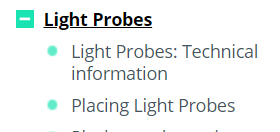
okay but where do I apply light probes


 nova lynx
do I add these to every object?
cobalt arrow
no these are used for sampling lighting effects when u have baked lights
nova lynx
ok
cobalt arrow
and u should have baked lights as per #world-optimization
 thorny mantle
Heyo, anyone uses Bakery?
Remembered that i had it for a while now, so i gave it a shot, really liking the speed and the final result so far, but wanted to know if anyone has found good settings for final bake (trying this stuff by yourself is a bit lengthy)
mortal marsh
reading the documentation helps a lot to explain what most of the options do. Enlightened with mostly default advanced options is honestly fine unless you're going for a specific look
modest vapor
@thorny mantle Make a tiny version of your scene in another scene, with a few objects, that way you can try a lot more settings in a shorter time. There isn't really a solution for everything, you need to find what looks better for you. The fact that you managed to get a bake result at all means you're on the right track.
hushed isle
basically if you have the settings the way you like and its time for final bake you may try turning up the the global bounces , the manual has some good examples to show basic effects , however this should be yes closer to final render as it will increase time on your bake , at this point stat looking for small stuff imperfections and rework them as needed
thorny mantle
Thanks @ Ruuubick#7777 @ Dawie3565#0693 👍
Experimenting with the smaller scene is an idea I never thought about 🤔
i was just mostly wondering if there is a general rule of thumb for a reasonable amount of global bounces, etc. But considering how dark my scene is and how much it relies on spotlights and big but pretty weak area lights compared to a bright scene that can use minimal light sources and one directional light, i can see how much this will depend on the scene you're working on
modest vapor
The default settings are often good enough
The smaller the scene, the higher the number of bounces/texels
thorny mantle
👌 i'm just using Bakery (the gpu lightmapper), so i just wondered if any had experience with it in particular.
But anyway, your advice about the smaller scene works really well, was experimenting for like 30 minutes and i think i found some good settings to use for somewhat final results
modest vapor
Most of us are using Bakery, but the settings are really on a per scene basis, especially when you're trying to get close to a reference
hushed isle
well bakery is somewhat new for everyone
 versed shoal
@nova lynx did you also check your shadow strength settings?
nova lynx
I did and I fixed it
thorny mantle
lighting is fun
lofty jungle
Lighting is fun in indoors and/or dark maps
Unfortunately there's little lighting to be had in outdoor sunny day scenes
thorny mantle
I don't have that much experience, but it feels to me like outdoors lighting will be more focused on technical parts (light/reflection probes) since there is a lot of light bouncing around from the sun.
And also the sun position/object placement becomes really important, since everything is lit by the sun and you need to play around to get the nice looking shadows from your objects
lofty jungle
Reflection probes are pretty easy, I think they're harder in indoor areas
My world has two reflection probes for the outdoors, one for next to the water and the other for everywhere else
cobalt arrow
i used 2 do box projected reflection probes 4 every room
take long time 2 bake but accurate reflections somewhat
thorny mantle
Any input which directional mode works better for VRChat? Just baked normal maps/dominant direction?
tried baking with RNM (using bakery shader) and it got my lights messed up somehow 😦 they are shining in a wrong direction all of a sudden (some of them at least) which i didn't really expect
thorny mantle
seems like it's connected to RNM specifically 🤔
hushed isle
RNM is a bit heavy on memory, it makes 3 HDR maps.. HR is higher quality you could try this it makes 4 maps however only one of them is HDR so is actually higher quality with less memory than RHM
Note - RHM can only be used bakery shaders or a customized shader for this , if your going to use RHM and or SH you should use bakery shaders on all the components or make light groups to separate the RHM and SH objects from the rest
you can find more detail on this subject in the manual about directional modes
thorny mantle
yeah, i read the bakery manual, and got questions.
since i was using bakery shaders everywhere and got weird issues
it wasn't much of a difference between that and dominant direction so I end up using it
thanks for the input tho
maybe for the normal/specular-heavy materials i'll look into SH, thanks!
hushed isle
interesting when you get some results or issues could you post a screenshot as i also will be getting into the new bakery shaders perhaps next week and it would be helpful to gain some guidelines or best practices for different material types
i am building a few material packages and trying to set up preset material when i can
thorny mantle
Not sure how useful this is, materials are pretty basic here, with almost no specular. Using Bakery spotlights (using IES), bakery Standard Specular shader, materials are from Poliigon.
This is a Dominant Direction result
RNM.. pretty sure it's the floor material
but idk what's wrong with it
(the specular map is provided)
mint cipher
I feel like Im always getting issues with bakery
thorny mantle
it was working pretty well apart from that single directional mode
my scene isn't complex tho, so ymmv, i guess
mint cipher
I had a scene that I couldnt get indirect lighting from bakery spotlights
And the lighting / mixed modes and all that confused me
As far as unity docs trying to explain it
hushed isle
did you try to change the light render mode to important ?
hushed isle
can someone tell me the basic steps to making light map groups or point me to some documentation
hushed isle
no light map groups not probes , as in setting the groups to bake with different settings
i think this is applied on the Sponza demos , will check it out , perhaps my terminology is off
sonic marsh
@thorny mantle Other directionality modes will not work in VRC without preprocessing as Bakery uses a script to load them at run time by default (which isn't available in VRC)
hushed isle
@sonic marsh does that include baked normal maps ?
i think your only talking about RNM and SH ??
sonic marsh
Yeah.
Baked normal maps doesn't really count because technically that's not actually baking directionality 👀
hushed isle
any work around , can you explain preprocessing
thorny mantle
so basically i should just use dominant direction and do not bother
if the results are similar for my materials
 high dew
Does anyone know what could be causing these? I'm using bakery, simple render.
*The light brown boxy areas are not intended to be there
hushed isle
is that a terrain mesh ? are you using the latest version of bakery ?
high dew
Not a terrain mesh, just a plane. It is the latest version.
 kind blaze
Having a weird issue where realtime lights are not lighting avatars.
Anyone know what might be causing it?
kind blaze
Ok, figured that out, but now the mirror is not showing the avatar as lit.
main anchor
Better answer: bake your lighting. Laggy answer: check enable pixel lights on the mirror @kind blaze
main anchor
Two realtime lights = every avatar renders 3 times. Enabled in mirror = every avatar renders 9 times. Disabled in mirror = every avatar renders 5 times
@kind blaze realtime lights aren't free, except for one directional light
kind blaze
Yes, I know how lighting works with draw calls.
Not too worried about it. Tiny map as my home world.
Plus, I would do baked lighting, but I want to be able to turn lights off without using circumvention aka post processing and what not. Only way I know of to have light switch with baked lighting is to have a script swap lightmaps, but VRC doesn't allow scripts AFAIK.
If there is another way, I would love to know.
lofty jungle
Mixed lights can be turned on/off especially if you tick Realtime GI in the lighting window. @kind blaze
Mixed also provides the same fidelity as realtime with shadows and specular etc
kind blaze
Hmmm. I have not played too much with mixed lighting. WIll have to mess with it, but I assumed it was basically just a realtime light that didn't light up static objects in realtime.
lofty jungle
It basically is, but I recently learned you can also turn them on/off and actually see the effects
lofty jungle
Does ambient light just not work correctly on 6-sided skyboxes?
Having issues getting my ambient light bright enough in my current world
kind blaze
Have you tried changing it to a color?
The Skybox lighting that is.
Setting the ambient light to a white color should make it pretty blinding.
kind blaze
Yes, but the objects that the light is baked on to stay lit.
cobalt arrow
yea have some ambient baked light
thats very low brightness
and then have ur on lights that get activated/deactivated
kind blaze
Welp. Poiyomi's Shader does not seem to like realtime, so swithced to mixed with probes. While it works for light switches, it isn't quiet dark enough when off.
And nevermind.
Found the setting.
sonic marsh
Don't use toon shaders for worlds!
Unless you mean on you avatar, in which case... Mine supports delta lights 👀
kind blaze
I mean on Avatars. Lol
Using standard shader for my world.
I gave up on trying to make Poiyomi's work in the world cause I am either forced to have white avatars way to bright or used baked lighting instead of mixed. Not sure of any other way to fix it.
small oyster
Corrupted Light UVs or not assigned UV on that plane, something that is with UV and light.
thorny mantle
Regular UVs are fine on that, since the textures are mapped properly. Tried to tweak generate light map uvs settings, but no dice so far, and it’s also a flat plane 😦 really confused
I guess I’ll keep looking
Need to take a look with bakery’s checker preview I guess
kind blaze
Could give ProBuilder a try, and just remake that plane with ProBuilder. That's what I started doing. Not had any lighting issues on Objects since.
thorny mantle
Well... it’s a pretty big mesh, don’t wanna just throw away the time I spent building and unwrapping it in blender
There is a small rim on the side, compound curves (outside the screenshot), etc
kind blaze
Is it connected to the walls or anything else?
thorny mantle
No
It’s a stand-alone thing
(Easier to unwrap like that)
I’m away from my pc for a bit, will dig into how light map UVs are being generated
kind blaze
Yeah, not sure. I just switched to ProBuilder for any sort of environment or structure stuff as it fixes all that by default.
thorny mantle
I guess
kind blaze
It might be an overlap in the UV.
thorny mantle
Hmm... you know what, that might be it actually 😃 need to double check
Haven’t thought about that
👌
 calm forge
@kind blaze if you have issue just @me and I'll see if it's a problem that needs fixing
kind blaze
You can actually see it yourself now. The world is public.
kind blaze
Mixed or realtime doesn't apply to the shader too well for some reason, but ambient light does.
calm forge
What version?
kind blaze
I can also post some screenshots cause maybe it's just a setting,m but a friend of mine had the same issue.
calm forge
2.0 redid all the realtime lighting
kind blaze
The Toon one acts almost OK, the old Master Shader is just broken.
calm forge
Don't use master it has issues
But feel free to PM me with any issues at all @kind blaze
kind blaze
Standard
Cubed
Old Master
New Toon Shader
Now your new toon shader might be just because of me. Settings were a bit weird when I imported it.
kind blaze
But these are the two shaders that seem to have issue so far.
Poiyomi_Master_Shader_V2.1.1
PoiyomiToonShaderV2.0.2
Added.
Would be nice to figure out cause I nearly killed myself trying to get the lighting to work with it last night.
frigid harbor
do what? the flare?
mint cipher
yeah the pointlights have like a invisible kind of mesh around them that is not affected by lighting.. it didn't happen before the update to the new unity version
frigid harbor
it's probably the shaders on the particles and/or avatar
lofty jungle
Or a flare
main anchor
@mint cipher when you usee a weird invisible shadowy kind of halo around a mesh (often much more visible in vr than the screenshot) that usually indicates a problem with the ShadowCaster pass related either to casting or receiving shadows
Since 2017, unity supports casting and receiving shadows on particles. If you see something like that, it could happen if the particles run on AlphaTest or lower queues, shadows are enabled and they have either a bad ShadowCaster pass or a Fallback "Diffuse" at the bottom (somewhat common)
You will need to double check the shader or make sure to turn off receive shadows. I think if the shader is set to transparent queue it shouldn't have that issue
mint cipher
@main anchor that was the explanation i needed, i just couldn't figure out what caused it. Thanks alot!
main anchor
That insight into it being related to the new unity was what got me thinking. Good eye. I was just debugging some flickering yesterday on some small particles. I'll take another look to see if it's the same issue maybe
mint cipher
It seems like it happened because of the shader on the flare mesh itself and not the particles. I switched the shader on the flare from flat lit toon to standard and the weird mesh around the flare is not visible anymore
and poiyomi's mastershader seems to work better with the lighting than cubeds flat lit toon because it's not visible on the flare either when i use poiyomis
main anchor
@mint cipher I wouldn't use poiyomi's master shader to test this: It is outdated. The new version you should be using is poiyomi toon shader.
Also, flat lit toon has a lot of problems depending on which variant you use: that might explain some of your trouble. You need to use the latest version and you must use the Lite versions: the non lite has lots of problems and it is only designed for completely opaque avatars which require an outline
(I wish there was some place for people to put this type of information that can be easily discovered . The community collectively wastes so much time by using outdated shaders)
mint cipher
alrighty, i'm going to try that out. Thanks. And yeah, you're right. I probably wouldn't have needed to go through all this trouble if i had my shaders updated
main anchor
Well cubed is unmaintained in general. I don't think people know the Lite version is the only maintained one for most use cases
mint cipher
I'm going to try out the Lite version right now and see if it works
main anchor
(The relevant issues in your case being that lite transparent is a separate shader: the non lite is one shader with a dropdown for Transparent. Hence shadowcaster pass is defined. Also vrchat ignores render queues set by dropdowns so the transparent effects are rendered on the geometry non transparent queue
mint cipher
The Lite version works, i just checked
Thanks for helping, i would've probably never figured it out because i thought the issues were the lightsources
main anchor
*wishes TCL had deleted the non lite version entirely instead of a mere note in git that it is deprecated *
Cubed shader causes so much trouble. Honestly if this is a particle effect, can I ask if you have tried with the unity default particle shaders?
mint cipher
i completely turned off the particles earlier and it still happened, that's why i figured out the particles weren't the problem so i didn't really test other shaders for the particles itself
 rain sage
How do I make the lightning in this room much more dark?
rain sage
It's not supposed to look so fancy... xD It's a dungeon so....
 grizzled tree
lmao
mortal marsh
it looks like you still have a directional light in the scene, saying that this is an indoor environment you probably don't need it anymore and that should make things darker
hushed isle
you could make everything into a layers and set each light with culling mask to the layer
mint cipher
You're probably getting reflections from the skybox. You should post a screenshot of your lights and lighting settings, otherwise we'll not know for sure.
rain sage
So the problem was there is a directional light in the world , and when I disable it, everything gets much darker. But the thing is , I need it to be bright on the outside part of the map, and very dark inside the dungeon, so dark that you need torches or else you wont be able to see.
thorny mantle
weird, the walls should block it if they're static and have lightmap uvs
so it should be dark inside
rain sage
The only soultion I found was to make a layer for the dungeon, and make then make the dircetional light not target that layer
Atleast it works
edgy forum
lightmap UVs won't block light, or being static. On the mesh renderer component you can control how objects cast shadows, you might want to set it so they use both sides (two sided)
edgy forum
the Cast Shadows dropdown
thorny mantle
i thought the mountains outside would've blocked it though
edgy forum
Hm, good point.
edgy forum
Also definitely need to be using occlusion culling, otherwise the directional light is gonna make everything get rendered again, all the time.
rain sage
It's darker now, but is there a way to make it much more darker than this? I want it to be so dark that the player must use a torch to see where they are.
hushed isle
so basically first time playing with bakery light mesh and i am not getting what i expected, any idea what to check for ? i feel the its not casting light baking onto the surrounding surfaces
thorny mantle
tried playing with intensity?
as long as the object is static it it should work out of the box 🤔
i had some weird results with intensity though, sometimes i had to crank it up real high to get any effect, depending on the mesh (hard to say tho, looks like any of my lights)
my cutoff is way higher though, but still
hushed isle
ya i had the intensity very low around .5 for many of them , am i correct that i need to bake the results each time as this type will not show in real time ?
thorny mantle
yup, i split my scene into different groups for faster bake times with bakery (so the lights that only affect a small area can be re-baked with that area separately
hushed isle
when you say groups your talking about layers ?
thorny mantle
no, the baker render groups
hushed isle
ya i need to check that
thorny mantle
check out the manual, it's near the middle of it
hushed isle
i avoided that button as i read in bakery room that it still has some bugs
thorny mantle
¯_(ツ)_/¯
i mean, you can always just set resolution to 10 to get some fast results
depends on your scene, i guess
hushed isle
i finally got this map split up into layers for culling setups so that's coming up on my list next
na i will do it just need to get into it , this map has been going on for months so no rush with any short cuts
hushed isle
How high above 1 did you go to cast light ? my top directional light light "Moon" is set for intensity 2 so I'm not certain am i correct that i would need to be above this value as the starting point for casting light mesh ?
when changing the intensity i also notice that the color texture is influenced a sort of blending the HEX with alpha
thorny mantle
with the "match material to light" thing? yeah they're pushing the color with the intensity too
i do not remember the exact values from the top of my head, but i had very different settings, from 2 to like 10+
for smaller lights
hushed isle
kk
hushed isle
hey when you made the light map groups did you have any issues with VRC having the light map group scripts applied?
high dew
Bakery is generating shapes like this all over my map, does anyone know why it would do this?
high dew
Yes, very strange. I'm not sure where it could have come from
this light brown rectangle is on a single plane
hushed isle
is that a terrain mesh ?
high dew
nope
hushed isle
just a plane mesh ? did you try to replace it
high dew
Yes, then the random shapes move to other objects on the map... Very odd lol
hushed isle
did you try baking with the plane removed ? do you still get shapes
high dew
Yes, the shapes moved to trees and hill things. It's had me baffled for a while this one 🤔
hushed isle
i suggest remove 90% hide in the inspector and keep baking adding items till you pin down what this is
high dew
That's a great idea, thank you
hushed isle
you should clear all the old maps before starting