#avatar-optimization
1 messages · Page 67 of 1
 stray tangle
 keen rain
stray tangle
what do you mean exactly as "separate layers"?
keen rain
stray tangle
what do you mean exactly as "separate layers"?
Im still new so i dont know the lingo but one fbx can have multiple meshes and im wondering if these should be separate fbx's or in the same fbx and toggled from there?
stray tangle
that's just considered separate meshes in the same model (fbx)
keen rain
so it does not matter?
stray tangle
there's a balance here between real-world performance and what the SDK thinks is best for performance
for clothing, I opt for separate meshes that I add to my model in blender
for props, you could do multiple things
since they don't need to deform with the armature, you could just throw them on the model in unity, which would add +1 mesh renderer and +X materials
assuming each prop you're adding is already 1 mesh
alternatively, you could add them to your model in blender, create a bone for each prop, weigh the prop 100% to that bone, and then join the mesh
that way, you can toggle the prop by scaling that bone
good for your performance rating, but causes that geometry to still be rendered
keen rain
ok, thanks. even though i have them already in blender im just gonna toggle them off. Also. for cloth. does it behave differently if i just put all cloth parts into one mesh instead of keeping each cloth separate?
stray tangle
keen rain
ok, thanks. even though i have them already in blender im just gonna toggle them...
if you're referring to Unity's cloth system, it has to be a separate mesh. every vertex in the mesh becomes a cloth vertex
would recommend using bones + dynamic bone (or Phys bones when they come out) for better performant cloth
keen rain
is there a setting to simulate only a percentage of verteces in a cloth component? i still want my main mesh to be high fidelity however it would add way too many cloth verteces.
stray tangle
nope, sorry. has to be a separate mesh
you can just separate that in blender by selecting it and doing P > Selection
keen rain
stray tangle
would recommend using bones + dynamic bone (or Phys bones when they come out) fo...
I have experimented with physbones but i cannot use them until they come out and they constantly swing through everything as the bones themselfes are going next to the legs. and for the cloth. i have it in a separate mesh but it is relatively high fidelity and way to many simulated verteces area added so wanted to ask if they could be reduced
stray tangle
you can try decimating the cloth mesh to reduce its polycount
keen rain
so there is no setting that says simulate only 20% of verteces?
stray tangle
no, how would that even work lol\
you'd have parts of the cloth that would just be stuck
keen rain
i would say just treat them as one big polygon or something similar. i would like to use physbones but as i said it just swings through. do you know a fix that kinda retains accuracy?
stray tangle
did you not add colliders?
keen rain
i added some but the bones went around them
stray tangle
make the colliders bigger and move them outwards
 wild monolith
Hey I have an avatar with under 20000 polygons. I should just be able to upload it to oculus vr chat right?
 onyx harness
wild monolith
Hey I have an avatar with under 20000 polygons. I should just be able to upload ...
onyx harness
wild monolith
Hey I have an avatar with under 20000 polygons. I should just be able to upload ...
You could have a model with 200,000 polygons and upload it to the Quest platform. Could, but shouldn't.
onyx harness
no minimum, no maximum. You'll just have a worse performance rating and be a menace to those around you if you push the values up
Quest hides Poor and Very Poor models by default so you can rock 20k you'll just need to request to be shown
 willow tiger
oh yeah, gimme that fallback goodness

 undone moat
I am surprised you can have an avatar with 8k textures and Still make it of Excellent quality for Quest
 ruby isle
undone moat
I am surprised you can have an avatar with 8k textures and Still make it of Exce...
ruby isle
undone moat
I am surprised you can have an avatar with 8k textures and Still make it of Exce...
Yeah there's a lot of ways to get around the performance rankings
 plush kestrel
keen rain
is there a setting to simulate only a percentage of verteces in a cloth componen...
plush kestrel
keen rain
is there a setting to simulate only a percentage of verteces in a cloth componen...
Cut the part you want to be affected by cloth
plush kestrel
keen rain
so there is no setting that says simulate only 20% of verteces?
You'd have to select/weight the cloth component (like in the script) very specifically but yes it's possible
undone moat
Any tutorials (up-to-date) on bone merging and reducing the number of bones for the purpose of making a fallback avatar?
 keen tundra
Gotta ask, Has the material Atlases updated to work with blender 3.0 yet? or a different one so I can optimize this thing?
stray tangle
keen tundra
Gotta ask, Has the material Atlases updated to work with blender 3.0 yet? or a d...
if you're talking about the CATS plugin's Atlas feature, you need to be on the dev branch for it to work. even then, it's only compatible with up to blender 3.0.1, NOT 3.1
even then though, there's a better thing you can do
CATS also has a "Bake" section
there are a lot of options, but the gist of it is that it can:
- merge your meshes
- re-pack all UV's
- bake all original textures to the new locations on the packed UV map (including PBR textures like metallic, roughness, etc, something that Atlas doesn't do)
- smart decimation
- Normal bake from the original to the decimated version to preserve detail
think of it as like a "1-click make optimized model" button
although you'll probably want to tweak some of the settings
keen tundra
Noted, thank you very much!
 sudden horizon
How is it possible to have more meshes than skinned meshes?

 buoyant holly
you attach a rendered object to the to the avatars hierarchy that's not a skinned meshes like say you import a sword model and just directly parent it to like the hand bone to make it move
sudden horizon

Unity Forum
I know after using Unity for more that 2 years that this is a very stupid question but what's the difference between a skinned mesh and a non-skinned...
Oh, incase anyone else has the same question as me this is the answer
Thanks!
I'm helping my buddy with an avatar and I can pretty clearly see it has two skinned mesh renderer components even though the SDK seems to say there is only one. I wonder if there is some quality which allows them to count together as one.
It may just be that the beta SDK is not paying attention very closely since it also won't whine if I swap to a non-mobile shader on Android build target.
OH, that object has EditorOnly tag
plush kestrel
keen tundra
Gotta ask, Has the material Atlases updated to work with blender 3.0 yet? or a d...
Why not just use older blender tho
Heck vrchat isn't even using the most recent version of unity 🤷♀️
 heady smelt
If I use standard lite, will that dramatically improve performance of an avatar instead of using poiyomi when uploading?
heady smelt
It should. I imagine Poiyomi's more heavy
 radiant shadow
if its a old poi without locking , its gonna be considerably heavier then newer
stray tangle
Poiyomi is actually lighter than standard in a lot of cases
since the lock in system throws away so much of the unused code
ruby isle
heady smelt
If I use standard lite, will that dramatically improve performance of an avatar ...
This was posted by someone in #shaders a while ago. Poi, as long as it's locked, will have the same impact as Standard
 stray tangle
Thry's performance analyzer can benchmark your materials compared to standard
buoyant holly
retro standard is performing horribly from the looks of it on that chart
and looks like filament would be a performance Improvement compared to standard
heady smelt
ruby isle
This was posted by someone in <#534472629013315606> a while ago. Poi, as long as...
That is really weird, why is my performance going up with standard lite??
ruby isle
heady smelt
That is really weird, why is my performance going up with standard lite??
Standard Lite gives better performance than Standard
 heady smelt
Neat, thank you.
buoyant holly
not surprised on that as it simplifies some stuff
ruby isle
Right and it's built for Quest in mind
buoyant holly
yup
out of curiosity how was that graph made so I can like check any other shaders I have for their performance
ruby isle
buoyant holly
out of curiosity how was that graph made so I can like check any other shaders I...
It's using the built in Unity Profiler
buoyant holly
cool
heady smelt
+-
 robust anchor
ruby isle
It's using the built in Unity Profiler
robust anchor
ruby isle
It's using the built in Unity Profiler
on what materials? certain material settings can change which variant of the shader is used, and different variants can perform differently
ruby isle
robust anchor
on what materials? certain material settings can change which variant of the sha...
I assume this is plain defaults for them all. Doing tests for each variant would take a LONG time
robust anchor
true, but heuristically you only need to differentiate between a few cases for standard that should all be independent of each other, so you should only need to make one baseline test and then one test per option
transparency type,
specular/metallic texture present,
normal map present,
emissions,
specular highlights,
reflections
ruby isle
robust anchor
true, but heuristically you only need to differentiate between a few cases for s...
Poiyomi has over like 40 options
robust anchor
I was merely talking about standard here
ruby isle
Standard yeah. that's not too difficult
The other shaders though would be a ton of testing
undone moat
what mobile shader should I use for a texture that I want to be fully lit at all times? like fullbright in source games
 high kiln
undone moat
what mobile shader should I use for a texture that I want to be fully lit at all...
high kiln
undone moat
what mobile shader should I use for a texture that I want to be fully lit at all...
toon lit
undone moat
is it actually lit though? I think I've used it before and didn't like it
high kiln
it's the most lit there you can also try matcap
undone moat
just tested one avatar I remember being fully Toon Lit, it follows the lightning of the map
willow tiger
that's how it works
 topaz hollow
undone moat
what mobile shader should I use for a texture that I want to be fully lit at all...
topaz hollow
undone moat
what mobile shader should I use for a texture that I want to be fully lit at all...
If you want a texture that seems to emit light you can use Standard Lite with an emission map.
robust anchor
I think he just wants an unlit texture. basically the color of the pixel on the screen will be the same as the corrosponding pixel on the texture regardless of lighting
 novel snow
undone moat
what mobile shader should I use for a texture that I want to be fully lit at all...
novel snow
undone moat
what mobile shader should I use for a texture that I want to be fully lit at all...
Standard Lite with an emission map
undone moat
novel snow
Standard Lite with an emission map
Yeah thanks, I basically used an emission map that looks the same as the texture lol.
novel snow
Yep
If I want the avatar to glow I just throw the texture in the emission slot and set the color to white
undone moat
I planned to have a pop-up screen that was a screenshot of... ScrubHub for some instant comedic effect
but I scrapped that idea
novel snow
Gotcha
I usually just use emission for eyes
The only thing to note is your avatar could potentially be too bright for some PC players if the world has bloom on PC
undone moat
yeah, emission for eyes and lips
I gave up a bit on optimization because I have problems with CATS decimation. Model looks OK in Blender, but in Unity becomes an abomination
novel snow
I always try to optimize my content nowadays
Used to not care but now if it’s very poor I won’t upload it
undone moat
Oh I haven't made models, too hard, I just edit existing ones
 old thorn
Issue with saving atlas to get my 15 materials into 4 or less. When I select similar materials to atlas together, ie face, eyes, body. It stretches the material of one of those selected over nearly the entire model. I have tried rebuilding the model from scratch and cannot seem to make it work.
old thorn
old thorn
Issue with saving atlas to get my 15 materials into 4 or less. When I select sim...
Issue may have been resolved by another user. Will know if it works when I get home.
 normal nova
ruby isle
This was posted by someone in <#534472629013315606> a while ago. Poi, as long as...
normal nova
ruby isle
This was posted by someone in <#534472629013315606> a while ago. Poi, as long as...
Yeesh, maybe I shouldn't be using rero
ruby isle
normal nova
Yeesh, maybe I shouldn't be using rero
Yeah definitely not xD
normal nova
Though, I guess it's not unexpected. It adds basically a realtime light (but only to you)
ruby isle
How it is only for you? Aren't shaders running locally for everyone
normal nova
I should say 'only to your avatar'
ruby isle
But shaders are run locally on all machines
normal nova
yes, that's not what I meant
ruby isle
It still takes up that much performance
normal nova
ahh
 final osprey
if your paid avatar creator gave you a non excellant avatar report them and/or ask for the cash back or to optimize it

why? because it is a scam and most of the players won't see your avatar
 tawdry venture
You just described 90% of paid avatar bases.
Getting Excellent rating is hard if you want to make a good-looking avatar that has anything other than the default emotes. I'd say you shouldn't complain unless it's Poor or Very Poor, if it's at least Medium, it will never be perf-blocked.
stray tangle
to add to this, the performance ranking system does not perfectly reflect real-world performance of the avatar. some things that aren't as bad for performance like poly count are rated pretty harshly, while things that actually have a more significant impact like shape keys on high poly meshes and texture resolution aren't even accounted for at all.
hitting "excellent" or even "good" as a matter of fact can be pretty difficult, especially if you're also trying to add any level of functionality to an avatar, such as some clothing options.
saying that every avatar creator that doesn't strive for an "excellent" rating is a scammer is bullshit
tawdry venture
stray tangle
saying that every avatar creator that doesn't strive for an "excellent" rating i...
Couldn't have said it better myself.
stray tangle
@final osprey ^
 solemn owl
I am working on a fallback for an avatar, for some reason I have these black lines on it in Unity but in Blender it does not look like anything like this.. What is the problem ?
 onyx harness
check the uv map against the texture
 stray tangle
solemn owl
I am working on a fallback for an avatar, for some reason I have these black lin...
stray tangle
solemn owl
I am working on a fallback for an avatar, for some reason I have these black lin...
uhhhh those fingers will not work well at all lol
how are they supposed to bend lol
onyx harness
I'd give the texture a bit more padding around the uvs. it's getting a bit close to some of those seems
stray tangle
there's nothing to bend
onyx harness
final osprey
if your paid avatar creator gave you a non excellant avatar report them and/or a...
If you're buying a model from someone that's not telling you any basic information that you care about such as Poly/Material/Bone counts, total compressed and/or uncompressed size of the Avatar before you purchase it, why are buying it from them?
That's like buying a loot crate and expecting to always get something good.
willow tiger
Sometimes you get SS tier results
Sometimes you get  270432/75000 polygons
All in the luck baby
onyx harness
mutually exclusive toggles be like
 willow tiger
That's quite yeeee and a little haw partner
solemn owl
onyx harness
If you're buying a model from someone that's not telling you any basic informati...
I'd say majority of avatar buyers do not know much about these things
The average consumer is not a creator
solemn owl
For Quest I'd agree
onyx harness
Oh yeah, for quest if you're not at least medium please work on the model a bit more
I see so many avatars designed for Pc just slapped into quest
solemn owl
Poor is fine
willow tiger
It'd be nice to have a little more nuance in very poors, like one rank for the reasonably unoptimized avatars
And a "oh lordy Jesus save my frames" rank for the ones where the creator didnt give a shred of a fuck and is completely out of the expectations of being reasonable
solemn owl
I agree with that 100%, I'd appreciate a new rank between poor and very poor
willow tiger
Some avatars straight up make my 3070 chug just by existing
I wouldn't mind hiding those monstrocities, but keeping the other crap
solemn owl
Also, what's the deal with poly count being only good or very poor and nothing in between ?
For PC
onyx harness
I'm the opposite xD
I am the issue described above
solemn owl
My avatars are very poor now usually because of cloth and poly count
Speaking of my latest uploads
 onyx harness
I get a lot of people hiding me just by default. The difference is if people are lagging I just tell them to hide me straight up
stray tangle
onyx harness
I get a lot of people hiding me just by default. The difference is if people are...
make a fallback?
willow tiger
My game just worked so much better once i make poor the minimum rank to be shown
But then ye
You dont see 90% of the lobby 😂
stray tangle
mine's "Very poor" only because i'm at 90k polys
willow tiger
So i went back
stray tangle
everything else is poor or under
solemn owl
willow tiger
You dont see 90% of the lobby 😂
Yeah that's how it is in publics
stray tangle
and I have like 10 pieces of clothing lol
onyx harness
I know they can be an issue and tend to use the more optimised versions in publics but if we're in a friends or Private I'm not holding back
willow tiger
stray tangle
mine's "Very poor" only because i'm at 90k polys
See? Thats one of the "fine" very poors I'd like to have on
Not the guy with 69 materials and 378 hair bones
All of them dynamic
 onyx harness
I do need to make a fallback, hopefully using at least the base I use so it's somewhat similar. I only recently got a Medium Quest version working
 distant jetty
I'm genuinely surprised how many people manage to make very poor avatars on pc
solemn owl
I use a Kon as a fallback lol
onyx harness
a bit late considering vrchat is mostly Quest but better late than never
distant jetty
Like how
solemn owl
distant jetty
Like how
? Literally everyone I know makes these exept like 5 people
onyx harness
distant jetty
I'm genuinely surprised how many people manage to make very poor avatars on pc
It's not hard, just take all the functionality from like 12 models and put it on 1
boom
8 very poor sections
willow tiger
distant jetty
Like how
Start adding props and features and you very quickly fall in ranks
solemn owl
Oh you want your hair to move really nice ? Booom 5000000 collisions bro
willow tiger
If you have dedicated avatars for pieces of wardrobe or w/e you can stay on a better rank easier
But those swissknife avatars aint ever staying out of very poor
willow tiger
And then once you fall into very poor you have very little reason to try to optimize
distant jetty
willow tiger
Start adding props and features and you very quickly fall in ranks
I mean I guess, but the ranking limits for "poor" are extremely lax already
solemn owl
willow tiger
And then once you fall into very poor you have very little reason to try to opti...
Kinda true
onyx harness
distant jetty
I mean I guess, but the ranking limits for "poor" are extremely lax already
you're not going to go to prison for adding a second jacket and another pair of pants to toggle between
willow tiger
There aint a rock bottom auto hidden minimum tier rank to scare people away into optimizing, like quest avis
onyx harness
and that leads to 8 tops and 12 bottoms with 6 pairs of shoes
distant jetty
I've seen very poor avatars that were literally just an image on a plane without anything else
solemn owl
distant jetty
I've seen very poor avatars that were literally just an image on a plane without...
Bounds ? xD
onyx harness
nah, you can inflate super easily
willow tiger
owo
distant jetty
solemn owl
Bounds ? xD
Nah somehow that specific avatar had like 50 material slots lol
willow tiger
onyx harness
nah, you can inflate super easily
venezuela be like
distant jetty
It's like how the fuck do you even manage to do that
onyx harness
lemme find something that'll make people cringe
solemn owl
I might make an medium or good avatar that looks like a crasher aesthetically, if people like them and start using them maybe public lobbies will get a bit better. Lmao
onyx harness
I have an Avatar that is Pc and Quest compatible, uses the same fbx on both but is Excellent on Quest and Very Poor on Pc
willow tiger
onyx harness
I have an Avatar that is Pc and Quest compatible, uses the same fbx on both but ...
What
solemn owl
willow tiger
Do crashers have a typical look? Edgy?
Yeah, usually hovering mid-air too, I got the animation
willow tiger
Literally how
solemn owl
What
willow tiger
Inflate me da-
solemn owl
I thought inflation is only happening IRL with our currencies
onyx harness
It shows as Very Poor but preforms like an Excellent model. It's all just an illusion
 willow tiger
Lmao i have an avi called "average vr chat avatar" too lmaoo
onyx harness
I delete 1 gameObject and this is the result
 stray tangle
lmfao
willow tiger
Its some public avi i downloaded with a billion polys, mats, bones etc
solemn owl
Lol what
willow tiger
Works horrid
willow tiger
onyx harness
I delete 1 gameObject and this is the result
Tf
buoyant holly
onyx harness
I delete 1 gameObject and this is the result
wow that was a very bad object
onyx harness
I made this for all the people that would cry about my model being Very Poor when everything is mutually exclusive so it preforms like a Poor model
 solemn owl
I can't speak
onyx harness
Just to show the the performance rating wasn't the be all end all to the actual performance
solemn owl
After seeing that
onyx harness
willow tiger
Here, this is my own "average vrchat avatar" one:
bro, the dynamics must look sick though
solemn owl
And also perf rating does not rate shaders
onyx harness
I'd love to play with that hair on Phys though
willow tiger
It's a free avi, i can give you the link later if you want
Not very impressive but the hair sure is bony
The bone zone
onyx harness
Nah I wouldn't use it I'd just play with the hair if someone else was in it xD
onyx harness
onyx harness
 willow tiger
Oh yeah, the unmentionables
willow tiger
onyx harness
😂
onyx harness
yep
solemn owl
What is even going on
onyx harness
it's so helpful. Maybe even better purchase than Dynamics
stray tangle
oh wow look what's on sale
 onyx harness
oh sick
heady smelt
just wait till the avatar dynamics are on public :3
 onyx harness
When Phys drops those 30 stand long lair models with 15 bones per chain will triple in density
I promise you that
heady smelt
._.
onyx harness
once anyone can touch it it'll be smoother than water
heady smelt
I just want to make my tail all fluffy and touchable and stuff 😄
heady smelt
and I think I can still wait for stuff being on public because my avatar still needs longer arms, better looking hands (need some proper paws) and proper looking feet
(although I did spend yesterday and the day before on adding avatar dynamics and it works nicely on the beta 🙂)
onyx harness
it's always an improving process. We all can relate to that
 heady smelt
Then people here maybe also can relate to the problem of version control etc. 😂 ? Biggest roadblocker for me is that it's not really possible to easily decimate a model while also keeping visems 😅
stray tangle
heady smelt
Then people here maybe also can relate to the problem of version control etc. 😂...
you can
not even hard to do
heady smelt
oh how so? 🤔
buoyant holly
vrchat cats can do that
stray tangle
create a new shape key, do your decimation on it, then apply it to basis
heady smelt
That sounds super useful
stray tangle
or use CATS's smart decimation
heady smelt
Because currently I'm stuck with my decimated head
it doesn't look bad but adding details etc. isn't really that easy anymore
stray tangle
you can also use CATS's Bake feature to decimate your model and then bake the normals from the original to the new one automatically
if your model already has a normal map, they will be combined
heady smelt
I should probably make more use of cats 🤔
buoyant holly
definitely a decent way to make a fallback version
heady smelt
I think I ran into some problems due to me using Blender 3.1 but not exactly sure anymore 😅
heady smelt
I like my up-to-date blender 😄
stray tangle
either use 3.0.1 with the dev version of CATS, or 2.93.8 (LTS) with the release version
staying "up to date" is not the way to go when you need to use addons
you want to use a stable version
heady smelt
Hm downgrading a minor version is bearable
will do that then
I just like using the new blender versions because the updates often enough include useful things
i.e. performance improvements for sculpting
my future workflow probably really will be to not start making any visems before every proportion and detail is right 😅
stray tangle
shape keys should be the last thing you do
if you want to do any mesh edits when you already have shape keys, you should do those changes on a new shape key, then apply it to basis
heady smelt
well at a certain point I wanted to see more improvements to keep my motivation up 😄
 gilded viper
I'm trying to make my avatar quest compatible, and i've gotten most of the materials changed to quest shaders, but I can't find the ones giving me these errors. Is there a way to search an entire avatar for materials? I've checked all my meshes, and can't find them.
 gilded viper
I did, but it only selected the avatar. I switch to the inspector after that, but nothing pops up
final osprey
tawdry venture
Getting Excellent rating is hard if you want to make a good-looking avatar that ...
the perfect avatar should be seen by quest 1 users to be 100% perfect
willow tiger
Do quest1 users have a different performance rating?
Well anyways the q1 is underpowered to the point of being silly, I wouldn't particularly care if it didn't work on that version
final osprey
willow tiger
Well anyways the q1 is underpowered to the point of being silly, I wouldn't part...
but if it can run it, anything can
willow tiger
sure, if a nintendo gameboy runs it, anything can
its a matter of being worth the effort
final osprey
willow tiger
Do quest1 users have a different performance rating?
i have a quest 2 but a i'm sure that a quest 1 will have lower settings
final osprey
willow tiger
sure, if a nintendo gameboy runs it, anything can
is there vrchat for nintendo?😂
 vernal sorrel
I'm trying atlas with matcombiner but when i click "Save Atlas to" it doing weird stuff to the face... never had this before (Blender 2.93)

 coarse vine
stray tangle
if you want to do any mesh edits when you already have shape keys, you should do...
coarse vine
stray tangle
if you want to do any mesh edits when you already have shape keys, you should do...
You just saved me so much grief, thank you.
stray tangle
👍
 loud delta
how is silent's crosstone shader 6.8 MB lol
ruby isle
loud delta
how is silent's crosstone shader 6.8 MB lol
Not well optiimized
loud delta
what could possibly be in a shader that takes up that much space
 tranquil glen
vernal sorrel
I'm trying atlas with matcombiner but when i click "Save Atlas to" it doing weir...
tranquil glen
vernal sorrel
I'm trying atlas with matcombiner but when i click "Save Atlas to" it doing weir...
unpack all texture to a designated path first
vernal sorrel
tranquil glen
unpack all texture to a designated path first
Yeah i was laying in my bed and I thought oh shoot… that was the reason 😣 Thanks!
 valid knoll
Hey so I have a model for PC that I want to make a fallback version of. Is there a way in blender (not unity) to disable transparency so that I can more easily see where I need to cut meshes?
 void echo
quick question is 140,000 polys okay?
stray tangle
that's definitely on the higher side, I would try to reduce that a lot if I could
void echo
managed to lower it to 104,699 which is a bit better
ruby isle
void echo
quick question is 140,000 polys okay?
Anything over 70k is pretty horrible IMO. Unless you split your face and body
tranquil glen
void echo
quick question is 140,000 polys okay?
okay if the target fps is 40fps and below
 nova hornet
void echo
quick question is 140,000 polys okay?
nova hornet
void echo
quick question is 140,000 polys okay?
Depends on how much of it is seen at any given time
willow tiger
void echo
quick question is 140,000 polys okay?
😂
void echo
Well I've just met someone with over 500,000 polys, so I suppose it's not bad. They had a full stage system and a flying star destroyer outside.
 heady perch
Alright so I asked in other chats as well Im not sure where to go here
Uh Im not exactly sure how to combine meshes while keeping textures intact
Mostly because it'll help optimize the avatar who is under 70000 polys
(Just a little over 9000)
And because it'll end up removing seams, making the verts stretch instead of just having seams
buoyant holly
then don't remove the edges that contain your seams
heady perch
The model is actually split into each separate part, I'm just not sure how to keep those parts together is all
I'm most likely going to keep it the way it is for now, I just need to add the eye movements and I'll be done since the model wasn't made for an fp game 😅
buoyant holly

A simple tutorial on Texture Atlasing/Texture Baking using Blender 2.8+.
Links in Video:
Pumkins Tools: https://github.com/rurre/PumkinsAvatarTools/releases/tag/0.9.5b
=TIME STAMPS=
0:00 - Intro
0:08 - Disclaimer
0:30 - Combine Your Meshes
0:42 - Removing Leftover UVMaps
1:04 - Removing Unused Materials
1:17 - Creating Baking UVMap
1:40 - ...
 languid wave
void echo
managed to lower it to 104,699 which is a bit better
languid wave
void echo
managed to lower it to 104,699 which is a bit better
if it’s one mesh, cut that number in half
 onyx harness
heady smelt
any fix to this
onyx harness
heady smelt
any fix to this
Jump back to blender and recalculate normals on the polygons
languid wave
what is the performance impact of dynamic bone transforms vs components
languid wave
because I managed to get down to 64 transforms but I’m still at 16 components
 calm estuary
How do I make the insides of my sleeves and skirt visible? (Exported from Blender using CATS)
Tried enabling backface on Poiyomi Settings and also disabling backface culling in Blender
Seems to work in Blender, but not in Unity

 radiant shadow
Backface culling on material (poi=rendering options) , the other backface option is if you want a different texture on it
calm estuary
radiant shadow
Backface culling on material (poi=rendering options) , the other backface option...
That was it, thank you so much!
 dusty otter
hello im trying to use the cats plugin to merge my materials together using the atlas but for some reason my model only stays white and the atlas generated has none of my textures in it
dusty otter


 dusty otter
i also ment material combiner 😛
calm estuary
dusty otter
You haven't selected the textures, check all the checkboxes
willow tiger
dusty otter
You gotta, you know, actually select the materials
 dire forum
not sure how people end up with 100+ Mbit avatars, i got 3 outfits with a 30+Mbit texture, 500k polygon and the final download size is only 7.5 Mbyte
stray tangle
because people don't know how to reduce their texture resolutions and use compression lol
a lot of people don't care about optimization in general
really stupid
dire forum
i only got 2 atlas materials, 1 for occupent the other for transparent stuff, no special effects or shader something like that, just normal pyomi
onyx harness
When people put 100 textures on a model for their 10 different outfits plus particles and don't know how to optimise them, even if the largest are 1k/2k max it stacks up
 runic gorge
That and people don't know that they put in too much effort, for something that isn't viewable at all even at close distance.
 languid quartz
I know some people set the texture resolution to 8k in Unity because the atlas is fucked for whatever reason so that's the "only" way they see to fix it from looking low resolution
willow tiger
Ya, because they have 4k textures or a billion smaller ones so it ends up with the big ass 8k atlas
Setting max sizes per material to be atlassed? Noooo, i need my 2k eyeballs
My 4k earrings
 upper yacht
I'm sorry, my 4k big toenail texture is important to my avatar. It's the lynchpin in the entire setup, plz and thank.
onyx harness
Considering how close some people keep toes to their viewpoint, this could be a legit argument
 halcyon niche
whats the current quest polygon limit?
high kiln
20k
halcyon niche
okay, thank you. i'd read some places it was 10k, and others 20k
 bright scaffold
Question. Alber and me are currently working on a new base and we somehow ended up with 300+ blend shapes for customization etc.. The majority won't get 3.0 control but are to be adjusted in unity before uploading. Since we can expect a decent bunch of that base being around: How much does the amount of blend shapes impact runtime performance?
(pls @ me in response so i get a notification)
willow tiger
i dont think anyone has numbers, if that's what you are asking, it depends on the avatar
but its not exactly performant and 300+ might be a little too much if your avatar is high poly lol
buoyant holly
would probably help performance to split the face from the the body has separate meshes so it's not having to do blend shape calculations on the body that's never go to move
bright scaffold
Surprisingly we are still talking sub 70k. Most of detail is done by normal maps. This is mostly for stuff like horn shapes, wing shapes and all like that.
If you are making avatars that are gonna be picked up by a few thousand people you really have to balance stuff like ease of use (changing blend shapes is easy- we use spacer blend shapes to make categories in there, making the user put a new set of wings or horns on the hierarchy is hard and a support load we just can't really commit to).
I guess the better question is: What's probably worse
5 extra mesh renderers or that huge amount of blend shapes
ruby isle
bright scaffold
Surprisingly we are still talking sub 70k. Most of detail is done by normal maps...
Blend shapes are worse. They constantly incur CPU performance hits while they're running (not to mention it's still rendering those polygons too). The extra mesh renderers take no hits to CPU or GPU when toggled off.
 loud nexus
ruby isle
Blend shapes are worse. They constantly incur CPU performance hits while they're...
loud nexus
ruby isle
Blend shapes are worse. They constantly incur CPU performance hits while they're...
That's actually interesting, so do you recommend separating the head mesh?
ruby isle
loud nexus
That's actually interesting, so do you recommend separating the head mesh?
Absolutely. If you're over the 32k limit for Excellent polys I recommend it 100%
loud nexus
Good to know, ill do that from now on.
buoyant holly
like even the vrchat documentation recommends it
ruby isle
50k is IMO the cutoff where you are hurting performance excessively if you don't split the head
loud nexus
buoyant holly
like even the vrchat documentation recommends it
I'll have some more reading to do then
buoyant holly
VRChat
Do you want your avatar to be efficient and be loved by everyone because of all the frames you're saving them? Follow these tips and you should be good! Any recommended numbers or limits in this document are subject to change at any time. Although some of the descriptions provided below are not prec...
" except when you're using shapekeys!
There is an exception here! Calculating shape keys can be expensive, especially on avatars with more (>32,000) polygons or when running on lower-spec hardware (Quest). If all your shape keys are on your face, it can be beneficial to split your face mesh from your body mesh, and delete all shape keys from your body mesh. This can be a more advanced technique. Because you have more meshes, it may negatively affect your Avatar Performance Rank, but in reality you'll be slightly more optimized. Remember, the Perf Rank system isn't perfect-- it is just a surface-level recommendation system."
loud nexus
This is some cool stuff, surprised I missed this part.
ruby isle
It was added maybe like 6 months ago or so
loud nexus
I noticed, if I separate the mesh and rename it to "Head" unity then renames my armature head bone to "Head 1"
ruby isle
That won't mess anything up, but I recommend naming the mesh "Face"
loud nexus
Good idea
bright scaffold
ruby isle
Blend shapes are worse. They constantly incur CPU performance hits while they're...
thank you
languid wave
halcyon niche
okay, thank you. i'd read some places it was 10k, and others 20k
it's 10k for fallbacks
 hoary peak
I've got a question about performance: I've got an avatar that has a hat/clothes I can turn off and on, is it better (performance wise) to have this be part of the same skinned mesh as the rest of the model, and use a shapekey to shrink it into the model, or have it be a separate mesh that I turn off. I know that shape keys have a downside in VRchat, that they calculate for every vertex, so even the verticies that aren't "affected" by the shapekey are taking processing power.
also, along that same line of questioning, does separating the face of my model (which uses speech shapekeys) improve performance? I'd heard it does but I never know if it's bs or not.
buoyant holly
don't use blendshapes for hat/clothes toggles that's one of the worst methods & and ya separating the face does help because then the blendshape calculations only have to consider the face not the entire Avatar when doing blendshape calculations
hoary peak
Ok cool, thats good to know
buoyant holly
like bone scaling would probably be a better idea than blendshapes to toggles accessories
VRChat
Do you want your avatar to be efficient and be loved by everyone because of all the frames you're saving them? Follow these tips and you should be good! Any recommended numbers or limits in this document are subject to change at any time. Although some of the descriptions provided below are not prec...
hoary peak
gotcha, I'm just gonna do separate meshes, Its what I wanted to do to begin with, I just didn't want to make something inefficient that would lag other ppls computers
willow tiger
hoary peak
gotcha, I'm just gonna do separate meshes, Its what I wanted to do to begin with...
make a new upload for each clothes set if you dont wanna lag people
you didnt hear that from me
hoary peak
I was reading about "crunch compression" reducing texture sizes drastically, but only if the hardware of the computer running vrchat supports dtx (otherwise cost performance as the program uncompresses the textures at runtime). Is there a general consensus on if its the right thing to do? (I have no real idea of what dtx is, or how ubiquitous it is/isnt)
buoyant holly
generally I've seen folks go with go with crunch compression on like everything
 proper grail
To not support compression, you would need a gpu that doesnt support DirectX 10. That means a GPU about 12 years old phew
buoyant holly
and a twelve-year-old gpus not going to be running vrchat to well so I wouldn't worry about it
dusty otter
willow tiger
You gotta, you know, actually select the materials
Spoke with the creator and had to unpack the materials to the location the program was trying to grab them from and it worked
willow tiger
hoary peak
I was reading about "crunch compression" reducing texture sizes drastically, but...
crunch all
people that dont have hardware support for that in 2022 are asking for it lol
hoary peak
Thats what I wanted to hear, makes the idea of an atlased 8k texture less intimidating
willow tiger
not like that ever stopped the average egirl avatar before
buoyant holly
I would point out the crunch compression only helps with download time not the size in vram so a 8K texture would still be a bit Overkill
hoary peak
yeah, im probably going to scale it down to a 4k, i'm just gonna see what the visual difference is once im testing the avatar
 somber heart
are physics bones going to be allowed on opti avatars and if so is there any word on how limited they will be? for anyone who doesn't know the current limit is 4 DB components.. since Phys. bones are supposed to be a lot more optimized i wonder if that will open up possibilities for opti avis.
buoyant holly
yes you can use physics Bones on Quest avatars
 unreal plover
Only exception to not use crunch compression is when you only have clean textures (i.e. flat colours or gradients). Then you can get by with a very low resolution texture (64x64/128x128) and let the pixel interpolation do the heavy lifting. It's usually smaller in file size, VRAM, and looks better
somber heart
buoyant holly
yes you can use physics Bones on Quest avatars
not what I asked at all
 hasty mantle
Does anyone know how to make the transforms for the new Phys bones get to the limit they set it for quest?
buoyant holly
basically merging physics bones in blender
high kiln
better word dissolving
ruby isle
unreal plover
Only exception to not use crunch compression is when you only have clean texture...
Crunching those textures actually helps the most. They can crunch to incredibly low filesizes (I'm talking mere kilobytes) and basically don't change in look
unreal plover
A 64x64 crunched gradient looks like ass compared to 64x64 compressed texture. No matter how large te texture, crunching will give artifacts
It's more a case of know when to use what
I can whip up an example in a bit
robust anchor
crunching tends to mess up the most with regular sharp patterns in my experience [such as a pixel aligned grid of black lines on white background]
willow tiger
Yeah i think crunching is overall good, but it really "unsharpens" textures sometimes
robust anchor
I think it's mostly because crunching was intended for "realistic" textures, not for simple icons and such
willow tiger
Yeah i have some anime textures with hard color/lines changes and you can really tell the crunch in between these
I can get away with high quality on pc, but questers get the cronch lol
 fierce lotus
no matter what i do to this avatar its always barely above the quest size
fierce lotus
i lowered them as low as possible and it still won't upload for quest
willow tiger
do you have enough 32x32 textures to go over the limit? 😄
what else is weighting your avatar so much
willow tiger
decimating wouldnt really help you with file sizes
when you mean quest size, do you mean the 10mb size limit or something else?
willow tiger
maybe you have lots of animations or whatever?
fierce lotus
all it has is very basic mouth movement i don't get why its so big
 versed saddle
I have a sick avatar coming, but need to wait for a new trust rank before uploading, just wondered if anyone knows if there is an Avatar checklist they use before uploading into VR chat?
willow tiger
like a personal checklist or
there are plenty of rules for making working avatars, if that is what you're asking
versed saddle
Yeah a personal checklist
My ava is rigged up and ready to do, just want it to work as soon as my rank status goes up
hoary peak
Regarding performance, if I have three 2k textures, is it better to just combine those into one 4k texture, even though I wouldn't be using 25% of the texture space?
buoyant holly
personally I'd suggest turning it into one 2k x 4k & a 2k as you would probably want the face separated for blendshape reasons anyway so you might as well use two materials
and your textures can be rectangles that are powers of 2 @hoary peak
hoary peak
oh so a 2k x 4k texture works? I always assumed they had to be squares, this is great news
Regarding the face, why "might as well use two materials" is atlasing textures from multiple meshes not helpful?
buoyant holly
because if you separate the face it's going to incur another draw call
hoary peak
That makes sense, ok
 dusk badge
how to make toggles for vrchat quest/pc
 balmy scaffold
thats a question for youtube
dusk badge
yeah but i mean i need to do like altas and do toggles
Substance does not show any of the new items i added textures, how do I put them in the texture file to be textured?
 silent jetty
has anyone ever had an error with material combiner where it makes an atlas with just 3 solid colors
something like this
 fierce lotus
for some reason my avatar is black
and see through, like a shadow
only on quest tho
nova hornet
silent jetty
has anyone ever had an error with material combiner where it makes an atlas with...
Before atlasing make sure every material is set to Principled BSDF
Fixes most cats weirdness for me
nova hornet
fierce lotus
for some reason my avatar is black
I recommend using Matcap Lit or Toon Lit on Quest if it's an anime/toon style avatar
silent jetty
nova hornet
Before atlasing make sure every material is set to Principled BSDF
Fixes most ca...
ok ill try that
silent jetty
nova hornet
Before atlasing make sure every material is set to Principled BSDF
Fixes most ca...
none of them are Principled BSDF and changing the material to them removes the texture
nova hornet
silent jetty
none of them are Principled BSDF and changing the material to them removes the t...
Ah you've never messed with BSDF okay
You just need to add the texture back
the option for it is near the top of the material options
I'll send a screenshot in a sec of where
silent jetty
ok ill mess with that
nova hornet
silent jetty
ok ill mess with that


That's where the texture goes with Principled BSDF
willow tiger
we're on the atlas boys 😎 lets go
 silent jetty
nova hornet
That's where the texture goes with Principled BSDF
silent jetty
nova hornet
That's where the texture goes with Principled BSDF
im importing from a VRM and all I needed to do is change it to image texture
I still have to do it to all of them then try the atlas
nova hornet
silent jetty
I still have to do it to all of them then try the atlas
Good luck especially if you want it on Quest with all the transparency/cutout VRoid uses
I've done it once but it took me a bit to make it look right
silent jetty
nova hornet
Good luck _especially if you want it on Quest with all the transparency/cutout V...
ive made plenty of VRoid avatars before but for some reason my plugin decided to stop working even after a full re-install of everything
nova hornet
silent jetty
ive made plenty of VRoid avatars before but for some reason my plugin decided to...
CATS?
silent jetty
yup
nova hornet
I've heard CATS doesn't play nice with Blender 3+ did you update Blender?
I use 2.93.9
silent jetty
ive always used 3.0.0 do you think it would be worth a shot going down to 2.93.9?
nova hornet
Maybe? I haven't tried 3 so I don't know what you'd be losing by going down to 2.93.9 LTS
silent jetty
ill try that first since itll only take a few minutes
nova hornet
👍
silent jetty
I just think the weirdest part is it just stopped working all of a sudden on all blender files
silent jetty
nova hornet
so many moving pieces
2.93.9 isn't letting me open my 3.0.0 .blends?
nova hornet
nova hornet
Maybe? I haven't tried 3 so I don't know what you'd be losing by going down to 2...
^
Apparently the ability to load those blend files
Guess you'd have to import just the fbx/vrm if you wanna use 2.93.9
silent jetty
nova hornet
Guess you'd have to import just the fbx/vrm if you wanna use 2.93.9
I dont know if this helps but I always seem to get this error as a part of material combiner:
 nova hornet
silent jetty
thats gonna be a pain to redo
nova hornet
silent jetty
thats gonna be a pain to redo
Export fbx from new blender import to old one so you have less to redo
nova hornet
silent jetty
I dont know if this helps but I always seem to get this error as a part of mater...
Hopefully helpful to someone but not me sadly
Best I could do is ignore material combiner and send stuff on baking/atlasing textures manually
silent jetty
nova hornet
Hopefully helpful to someone but not me sadly
Best I could do is ignore material...
I honestly might need that
 sly olive
Does anyone use a model with a cape in Quest? I have a Batman model that's all rigged up and ready to import into Unity but idk what to do with the cape. (I already know cloth physics don't work on Quest)
nova hornet
sly olive
Does anyone use a model with a cape in Quest? I have a Batman model that's all r...
You could animate it using the Velocity paramters in 3.0 to move when you move forward,backward,left,right
blendtreess
nova hornet
silent jetty
I honestly might need that
So this could be used if you've made a new UVMap for a texture/mesh/etc to transfer a texture designed for the old one to the new UVMap
https://app.gumroad.com/d/d00d59785b8ce01b1e7f3c508c565481
I don't think it handles transparency or margins though
they did make a version with margins that I could send if you need
 willow tiger
sly olive
Does anyone use a model with a cape in Quest? I have a Batman model that's all r...
willow tiger
sly olive
Does anyone use a model with a cape in Quest? I have a Batman model that's all r...
Physics bones got released for the quest, like, yesterday
Go make that cape king
 flat rapids
Uhh, but I am using a shader in the VRChat/Mobile O.o
 proper grail
All shaders, such as ones in animations or on toggles
flat rapids
I swapped all shaders to that one... every single one, and it errored on that one which makes no sense
Weirdly there is an animation with a different shader that it did not error on 🤔
how does that make any sense, it doesnt let me use a vrchat supplied shader on quest versions but does allow another one 😂
buoyant holly
flat rapids
Uhh, but I am using a shader in the VRChat/Mobile O.o
not all of the vrchat mobile shaders are usable on avatars as they made that folder before the sdks split up into two sdks
 ruby jewel
How do I turn on physbones
flat rapids
buoyant holly
not all of the vrchat mobile shaders are usable on avatars as they made that fol...
There should really be a distinction between avatar allowed and avatar not allowed...
 fluid marten
So I think somewhere along the lines my avatar went to the moon and uh.. Yeah.. Might need to get this fixed somehow.
 buoyant holly
there under "Meshes" there's a checkbox called "Read / Write Enabled" ensure this is checked on for all meshes on your model
sly olive
is the triangle count still the same for Quest?
buoyant holly
yes they haven't increased the triangle count budget and that's unlikely to change anytime soon
willow tiger
the quest didnt get any stronger 😄
 mellow geyser
could anyone help me with a problem i am having with blender and atlasing the materials?
willow tiger
its easier to help if you actually describe the issue
mellow geyser
sorry
when i try to atlas the materials they merge and change
the clothes became the shoe texture
 copper plover
I'm working on my quest/fallback version, and when I get to the Cats Atlas part, it seems to only be atlasing my shirt/shorts and everything else turns white. Checking the atlas it does only have my shirts/shorts... it shows all the materials in the list when I click save atlas. Am I missing something?
balmy scaffold
mellow geyser
the clothes became the shoe texture
you have to go into the UV editor window and select the vertices of the clothes and move them on top of the clothes, theres a way to do it, i forget
oh the fancy way is to scale it .25 then move it by a quarter of the image like pressing G then x then 512, if the image is 2048
if its in the right side
mellow geyser
thank you for trying to help i just started the bkender bit again and it has worked
 crisp monolith
what is the requirements for an excellent avatar?
up to 75 bones
up to ? polygons
up to ? materials
stray tangle
VRChat
The Avatar Performance Ranking System allows you to see how much a user's avatar is affecting performance via analysis of the components on that user's avatar. You can also use it on yourself to see how performant your avatar is. This system is provided to inform users what is likely the most perfor...
crisp monolith
stray tangle
https://docs.vrchat.com/v2022.1.2/docs/avatar-performance-ranking-system
thank you!
heady smelt
Hey! Trying to optimize an avi or two so my quest friends can see me lol. Anyone have any easily explained videos or tools to help? I mainly wear pretty demanding dancer like Avis so I don’t even know if those can be compatible. Any help would be sick.
 mossy cargo
probably not best practice but I just decimate the hell out of everything to get it under quest poly counts. depending on the model though it might not work very well at all. take it into blender and use ctrl+L to select linked verts and seperate out the face or anything else with shapekeys you want to save, decimate the rest, join all the meshes again
crisp monolith
How do I convert particles to Quest?
Or some asset I can buy that is for quest and has effects. What I really wanna do is make a gun shoot.
I know it's possible withing it's limits cause I have seen a lot of kids in Quest playing with anime avatars filled with these effects/animations
keen rain
how do i make prop toggles with just one mesh? i made some animations in blender that change the scale (0 and 1) and in the unity preview they look functioning but in the animator(emulator) and vrchat itself they do not work. the one that moves the fingers and ive placed in the gesture layer works
willow tiger
keen rain
how do i make prop toggles with just one mesh? i made some animations in blender...
how did you setup the layer?
keen rain
willow tiger
how did you setup the layer?

the one that functions has a hand mask. do i need a mask for it to work? when using anims where the mesh gets toggled off and on it works without one
i am new but if i understand correctly shouldnt it if it is the mask just make the whole body tpose instead of doing nothing at all
I know why it did not work now. i still have it in the fx layer and this does not accept transforms. im gonna move it into the action layer
keen rain
In gesture layer it also does not work
can someone help?
i really dont want to rely on mesh activation
willow tiger
I only know how to setup props as toggles, can't help you with gestures
keen rain
willow tiger
I only know how to setup props as toggles, can't help you with gestures
yeah, i also know that but when i will join all meshes into one this wont work anymore
(i know how to change them with gestures but cant get the animation to work)
i only want to know how to get toggles when all are one mesh
willow tiger
How did you setup the prop
I only ever used one mesh ever
Did you map the prop to a bone in blender?
Then you just animate the bone to turn on/off, but its only a faux off, you scale it to be tiny and hide it somewhere
You cannot "disable" it as a single mesh
keen rain
yeah, and then i made a blender animation that sets the scale. it doesnt change ingame but unity recognizes it since it gets shown correctly in preview. just not in the animationcontroller
i thought fx did not work since it does not allow transforms and action since it needs to be specifically treated, so i put it in gestures
willow tiger
I use fx
I made the animations straight in unity, just scale the bone and drag it into the main mesh to hide
Make a parameter in the expressions, a menu toggle, add the parameter to fx layer, then just make a new layer that goes from the any state to off / on depending on the parameter
keen rain
whenever i make these animations in unity it says that the rig cannot be used for transform animations
i know how to deo everything besides make these animations show up
the controller works correctly but the animation assinged to the state does not get played
willow tiger
I mean, if the animations are created right then the fault is in the layer logic
keen rain
i use an avatar emulator to see what the controller is doing and its doing everything correctly and it works with the mesh toggle animations so it could only be a problem with the animations but i dont know what since it looks correct in the preview
and since the docs for fx say that it does not allow transforms i put them in gesture layer
nevermind. suddenly the animations in unity are not working. but only scale. the ones with modified rotation are working as intended
@willow tiger i think it is not just scale. the animations of those bones are not transferred. finger animations are translated into animator commands but these extra bones are not. do you know how to get these into unity?
willow tiger
From blender?
keen rain
yes
keen rain
now it suddenly no longer spits the error. idk. my unity is behaving really weird or im incompetent
unreal plover
So I was thinking of a better way to do toggles for skinnes meshes with weighted bones: add an extra bone and assign it with a very low weight (e.g. 0.0001) to all vertices you want to toggle. To toggle it off move/translate it to some silly large value (i.e. 3e38) so it'll never get rendered. The only caveat is that you can really only have 1 other bone controlling a vertex since the max skin weights on on low graphics/quest is 2.
ruby isle
unreal plover
So I was thinking of a better way to do toggles for skinnes meshes with weighted...
It would still render it if it's the same mesh, it'd just be offscreen
unreal plover
ruby isle
It would still render it if it's the same mesh, it'd just be offscreen
Wouldn't clipping prevent any pixel shading from occuring? The same as modifying vertices in a vertex shader to produce degenerate triangles (NaN values). The costs of still running the vertex shader part is negligible compared to another material/mesh.
ruby isle
unreal plover
Wouldn't clipping prevent any pixel shading from occuring? The same as modifying...
It would still render the mesh as a whole
If it's the same mesh, as long as that mesh is being rendered (aka the bounding box is still in the camera's view) the entire mesh would be sent to the GPU to render regardless if a piece of it is sent to that silly large value
unreal plover
On itself, yes. But it'll be a small extra cost if the mesh is merged with something that should be rendered.
ruby isle
If the mesh is separate, just toggling the mesh renderer is the best way. If it's combined, the method you're describing would offer no performance boost
unreal plover
ruby isle
If the mesh is separate, just toggling the mesh renderer is the best way. If it'...
It will give a performance boost since you will only be rendering 1 material instead of 2 if they are atlassed together and both are enabled.
ruby isle
unreal plover
It will give a performance boost since you will only be rendering 1 material ins...
If they're atlased isn't there only 1 material regardless?
unreal plover
Yes, but toggling on a single material requires either a blendshape (more expensive than bones) or a custom shader (not always guaranteed, i.e. quest, trust & safety settings)
ruby isle
unreal plover
Yes, but toggling on a single material requires either a blendshape (more expens...
The proper method to toggle an item on the same material is to weight to 100% to a bone and scale that bone to near 0 so it's not visible
What you described is sort of similar to that but with extra steps
unreal plover
ruby isle
The proper method to toggle an item on the same material is to weight to 100% to...
Doesn't work with multiple bones affecting the prop, like clothing, unless you add extra bones which is even more tedious
ruby isle
unreal plover
Doesn't work with multiple bones affecting the prop, like clothing, unless you a...
For clothing, you're SOL. You have to use blendshapes
Moving a bone really far out would just be the same as scaling a bone to 0
So if the scaling method doesn't work, the movement one won't either
unreal plover
ruby isle
So if the scaling method doesn't work, the movement one won't either
Well that's the thing... It does work c:
ruby isle
If you truly wanted to toggle clothes properly, why not give it it's own bone hierarchy and use constraints when it's active, and scale to 0 when not active
ruby isle
unreal plover
Well that's the thing... It does work c:
So does scaling then
Also for future reference, if you're toggling clothing it's way better to just make it a separate avatar for each outfit. Avatars shouldn't really have togglable outfits in the first place
Especially since the IK Beta allows calibration saving. There's no excuse to keep making it all in one IMO
unreal plover
Already knew that don't worry 😅 Just brainstorming alternative ways for people to get the fancy things without affecting performance too much.
ruby isle
I doubt many people would even understand how to do that =P
heady smelt
there a specific channel to helping teach others how to make avatars?
 frank falcon
dont know
frank falcon
heady smelt
there a specific channel to helping teach others how to make avatars?
pnada uploaded a series on it
heady smelt
could you send in dms?
frank falcon
yea
heady smelt
alr ty
stray tangle
heady smelt
there a specific channel to helping teach others how to make avatars?
https://www.youtube.com/channel/UCk5rOzOFIIX5tjozbU9hWZg I recommend watching all 3 videos here in order to learn about terminology, and how to upload an avatar

YouTube
heady smelt
ty
unreal plover
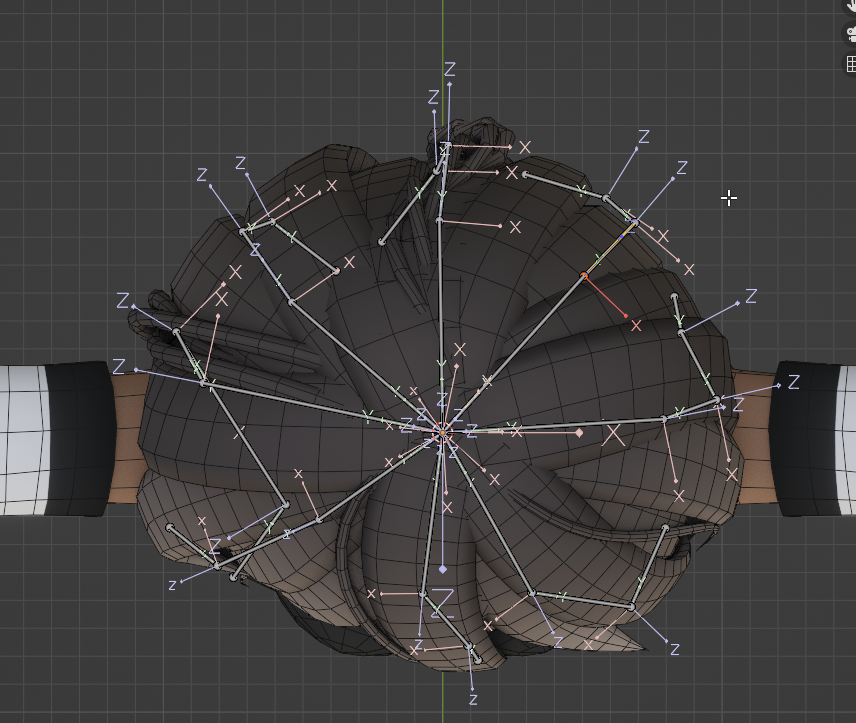
Hair-head colliders without a head collider:
https://twitter.com/NaraWithVR/status/1518955332340531205
https://twitter.com/NaraWithVR/status/1518955335322673153


You do not need head colliders for #VRChat #PhysBone hair. By rolling the bones in Blender such that the Z-axis points way from the head, you can fake collisions with rotation limits. Less colliders = more frames! 1/2
 Twitter
·
Twitter
·
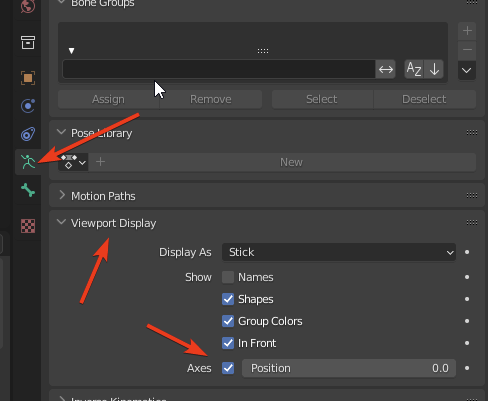
If you enable Axes in viewport display in Blender you can easily roll the bones with Ctrl+R. You can then setup rotation limits with curves in Unity. If you use polar you can control yaw as well: the rotation that runs parallel to the "head" (xy-plane of the bone in blender). 2/2
 Twitter
·
Twitter
·


 willow tiger
Wowie
 calm spade
Excellent 
radiant shadow
wanna see what happen if someone grab that and its locked to one orientation 🤔
(zero radius on that so not gonna happen)
buoyant holly
that'll be very handy for performance in general and the quest users
versed saddle
Just wondering if anyone has advice on the best way to prep and avatar for VR chat? Combine into a single mesh etc?
buoyant holly
VRChat
Do you want your avatar to be efficient and be loved by everyone because of all the frames you're saving them? Follow these tips and you should be good! Any recommended numbers or limits in this document are subject to change at any time. Although some of the descriptions provided below are not prec...
radiant shadow
Also look up limits, you can easy get medium-good with the changes https://docs.vrchat.com/docs/avatar-performance-ranking-system , excellent is abit strict
VRChat
The Avatar Performance Ranking System allows you to see how much a user's avatar is affecting performance via analysis of the components on that user's avatar. You can also use it on yourself to see how performant your avatar is. This system is provided to inform users what is likely the most perfor...
 tacit sparrow
in vrchat and blender my poly count very highly differs


 lone tiger
In SDK above polygon count you should have an autofix.
tacit sparrow
lone tiger
In SDK above polygon count you should have an autofix.
this is what i see above it
 high kiln
tacit sparrow
this is what i see above it
high kiln
tacit sparrow
this is what i see above it
you have read/write disabled
 vast depot
Find the fbx of your avi and make sure read/write enabled
high kiln
click on avatar in assets go to Model and enable it
vast depot
high kiln
you have read/write disabled
Beat me to it
lone tiger
You should update your SDK if you didn't see this:

This auto fix has been added long time ago to SDK.
tacit sparrow
i did see it
new question though
when i fix this (with autofix or poiyomi) my whole build menu goes blank?

example
 high kiln
did you set rig as humanoid?

 tacit sparrow
high kiln
u need only one neck bone
tacit sparrow
high kiln
u need only one neck bone
so should i just dissolve one? if so which one?
unreal plover
tacit sparrow
so should i just dissolve one? if so which one?
Dissolve the top neck into the lower neck (keeping the lower neck)
tacit sparrow
is there any new parenting that i need to do?
ok it seems to work!
ty for all the help
 heady seal

I've never had my avatar show up as anything other than very poor even when it's the only mesh and texture
it's the rexouium
oh I had hair on it too which had like 200 polygons max idk
oh I have a monocle I created in blender with very little polygons but each seperate shape has its own mesh and material. should I be worried about that?
the texture is a flat one so I don't really think so
stray tangle
heady seal
oh I have a monocle I created in blender with very little polygons but each sepe...
bro, material slots are one of the worst things for performance
your monocle should have a maximum of 2 materials; one for the glass (transparency), and one for everything else
heady seal
ok I'll alter that in blender
what if the texture is default resolution
I don't really understand compression that much
stray tangle
you should always enable Crunch compression, since it tremendously reduces the file size of the texture at a minimal quality hit
textures get decompressed when put into VRAM though, so compression doesn't help with that
for that, you want to reduce the resolution of the texture as much as possible
for a monocle, 1k should be the max you need
ruby isle
stray tangle
bro, material slots are one of the worst things for performance
Not exactly anymore after that Graphics Jobs update ages ago
stray tangle
do you have a link?
ruby isle
stray tangle
do you have a link?
https://docs.vrchat.com/docs/vrchat-202111#client-changes-and-fixes
Graphics backend optimizations that may help improve performance. Testing showed an improvement in frame times of 20-30%, depending on your system's setup. If you are CPU-bound (and have GPU room to spare), you are likely to see the most benefits. If you are not CPU-bound but are instead GPU-bound, it is unlikely you'll see much improvement.
While I can't say for sure, this update most likely enabled the "Graphics Jobs" option in Unity which allows Draw Calls to be threaded a bit better
IMO, the biggest hit to performance now is from blendshape-driven Polygons (draw calls do still matter though a lot)
stray tangle
if they meant what I think they meant by "but each seperate shape has its own mesh and material", every chain link + frame + glass all have different materials and are separate meshes
so, many drawcalls
ruby isle
Yeah that can be combined so much better
I have a monocle on my avatar that is actually atlas'd with all my other toggles
And it's like 400 polys
sly olive
is there a cape tutorial for Quest?
 tender tree
Any good crash course tutorials for optimization you guys could recommend?
Trying to ascend from the very poor trusted user
buoyant holly

Did this video help you? Consider sending me a tip on Ko-fi! https://ko-fi.com/sippbox
Making optimized Quest models is hard. But it doesn't have to be! With recently updated polygon limits and fallback avatars, it's a better time than ever to create something that represents you to Quest users! Hopefully this tutorial will help you out!
0:00 ...
loud delta
Is there a difference between putting something in the armature and using parent constraint?
buoyant holly
well you can't use constraints on Quest
loud delta
Other than that? I find it easier to keep things out of the armature for organizational reasons
buoyant holly
not quite sure as I haven't really played with constraints much
robust anchor
the difference is performance
constraints have to manually update position every frame. regular parenting does not
the reason for why is that a childs position, rotation and scale are stored relative to the parent, so any movement or scaling of the parent does not need to change any data of the child.
a constraint cannot use that, so it has to update the position rotation and scale every frame.
it's almost negligible though
ruby isle
loud delta
Other than that? I find it easier to keep things out of the armature for organiz...
(Pretty much what M127 said)
Constraints do take up a small performance hit, although it is quite small (unless you're using hundreds). Regular parenting doesn't take any performance hit at all so it's generally the better option if you can
loud delta
Thanks for the responses @robust anchor @ruby isle ! It sounds like it’s not too bad to keep things I share between different avatars at the root level for convenience.
ruby isle
It's not too bad unless you're using hundreds, but I still do suggest considering to make them parented if you want the most performance out of your avatar
robust anchor
constraints have one benefit parenting does not though: you can switch between "parents" and even do so gradually
ruby isle
Before a recent update I would have urged you to not use contraints however an update fixed up the constraint performance to hit much less
robust anchor
I'd say a constraint is about as performance intensive as an animation that updates the position, scale and rotation of an object each frame
heady seal
quest users can cry more I guess

each gray box is a clothing toggle
pc users
I've just made a crasher I believe
imagine this uploads
there's no way
for demostration purposes only I guess. I have to show off the assets I have and gawdamn I have a lot
 tawdry drift
heady seal
I've just made a crasher I believe
tawdry drift
heady seal
I've just made a crasher I believe
why show something that tells people how to make crashers?
should delete imo
heady seal
it's not a crasher I was joking @tawdry drift
It would definitely be a lot more laggy if it behaved how I expected it to but it doesn't so that's good
for some reason I expected it to behave like how a quantum computer would handle ints
but obviously vrchat doesn't run on quantum computers lmao
(aka int values being multiple different numbers at the same time)
 swift copper
anyone know how to remove a light prefab from an avatar fbx jeez
ruby isle
swift copper
anyone know how to remove a light prefab from an avatar fbx jeez
In the FBX settings uncheck "Import Lights"
swift copper
ruby isle
In the FBX settings uncheck "Import Lights"
in unity correct? under the inspector i can't find the component to uncheck that.
ruby isle
swift copper
in unity correct? under the inspector i can't find the component to uncheck that...
Yep. When you click the FBX file itself
It's not a component it's in the FBX import settings
swift copper
jesus christ thank you so much lmao i was clicking on the avatar in unity then inspector instead of under the project files on the left haha.
im just learning trying to optimize an old avatar for my friend so she can use it on quest but the 24 materials were a big problem already turned them into a single atlas and now time to lower a 21k poly count to 10k somehow already at 17k with some moderate decimation.
ruby isle
Also take into account if your atlas is huge like 4 or 8k it's still going to demolish a quest
ruby isle
Yeah definitely do not use 8k
2k should be the max you put for quest
Anything higher will detonate the VRAM
buoyant holly
honestly I even wouldn't recommend 8K on PC
swift copper
using 1k and it seems detailed enough, unfortunately in fixing the avatar on blender using CATS i replaced the original avatar/atlas but now the humanoid rig has no matching bones.
at least performance is rated good 👍
 modern star
So im trying carefully to make a more optimized version of my own avatar. One thing that has been a little bit of a thing for me is how to handle hair so that I could maybe have a physbone or two in it to keep it looking allright. To take the highlighted chain of bones as an example, is it a decent alternative to merge weights on these so that its 2 bones rather than the current 7? Or do some of the more experienced ones here have a better trick for this?
 stray tangle
I think 2 is not enough, but maybe something like 4 would be better
 gleaming glacier
Not sure if someone can help me, but i get these 2 errors when trying to convert my model into a vrm model.

how could i fix it?
unreal plover
modern star
So im trying carefully to make a more optimized version of my own avatar. One th...
If you're not bone limited you can throw rotation constraints at the problem, see my unity tools in pins
But if you want to do it properly, merge both adjecents hair strands and child bones
Or just weight paint it from scratch
modern star
Thank you ❤️
swift copper
after importing my avatar from blender to optimize it a bit for quest i realized my bones do not match the model at all which leads to some nightmare fuel in game

any clue why
balmy scaffold
if its scaled at all in blender before u exported it
swift copper
thats probably why
 worn vault
I think physbones dramatically affect the avatar size
 unreal plover
worn vault
I think physbones dramatically affect the avatar size
unreal plover
worn vault
I think physbones dramatically affect the avatar size
No, I can get my avatar under 4MB just fine
balmy scaffold
Check your very poor rating on everything else
 daring badger
the issue is absolutely the fact that your avatar has 36 material slots and 97k polygons on quest and not physbones
willow tiger
Lol dude has 36 materials and thinks phys bones are the issue
swift copper
worn vault
I think physbones dramatically affect the avatar size
you definitely need an material atlas then make sure it uses mobile version shaders like toonlit etc.
mine was poor with 23 turned it into one
and voila worked perfect on pc
LOL! 97k poly wtf im over here struggling with trying to get a 19k to 10k
worn vault
swift copper
you definitely need an material atlas then make sure it uses mobile version shad...
material atlas? idk why but blender refuses to let me combine the materials
some materials are on the same body parts which i don’t get
swift copper
worn vault
material atlas? idk why but blender refuses to let me combine the materials
do you have the mat combiner on the cats plugin?
worn vault
ohh its a plugin
swift copper
if so generate the material list then click save on a folder on your desktop then export your fbx file to your assets -> avatarname folder of your project then it should show up with no shaders on your unity project then just drag that atlas from the folder on your desktop into the project within unity and voila
worn vault
well that explains a lot lol
swift copper
yeah look up cats then matcombiner those work in tandem
worn vault
i’ll give it a try
swift copper
the fix option might help too but no guarantees
anyone know how to separate their avatar by materials in blender when only using an atlas it just selects the whole model since its One thing. i am trying to decimate the shoes and other parts a bit as well as dissolve some edge loops.
 quaint venture
swift copper
anyone know how to separate their avatar by materials in blender when only using...
quaint venture
swift copper
anyone know how to separate their avatar by materials in blender when only using...
Before you atlas it, you can give each thing a vertex group and then you can select a vertex group. Also you can have multiple materials looking at the same image, and then use Cat's combine same materials whenever you're going to export the fbx
Unrelated to his question,
Does a shapekey that isn't active have any performance effects?
swift copper
yeah the problem is i atlas'd it a while ago unfortunately
didn't think i'd have to optimize the polys
guess ill just have to decimate the full body at once lol lame gonna lose some details
ruby isle
quaint venture
Unrelated to his question,
Does a shapekey that isn't active have any performan...
No if it's not active it doesn't have any performance impact other than increasing the overall filesize
quaint venture
swift copper
guess ill just have to decimate the full body at once lol lame gonna lose some d...
Could just select the parts you want to decimate and hit p to seperate by selection
quaint venture
ruby isle
No if it's not active it doesn't have any performance impact other than increasi...
thank
 gaunt wadi
So
Question
I tried Atlasing my vroid textures in blender but somehow it turned all the textures white for some odd reason
It did transform my 24 materials into one but its pointless because not a single texture popped up
Any help?
So far I created two avatars in the past with vroid and didn't have an issue until now
This avatar was made rom the beta version and not the current version
swift copper
i saw an article that might help im learning too tho
lemme see if i can find it

VRChat Ask
You will need the PNG’s for Blender. In Blender, there should be a shader tab at the top and a list of materials on the right (Screenshot below will show you where and make sure you have the model selected as well) In the Shader tab, you will see something likethis in screenshot 1 below, The blue node (might be a different color for you) is ...
@gaunt wadi see if that helps maybe
swift copper
lmao idk whats wrong with it
gaunt wadi
Il just search it up
swift copper
weird how it doesnt work
yeah just copy and paste lmao but its a similar issue i had cept it was gray
not white
swift copper
i had that issue in unity but it was due to the fact there was lights all around my avatar
swift copper
which i just did not import the lights
and it was back to normal
as for blender idk
gaunt wadi
Hopefully the article helps
swift copper
gl
ruby isle
There are plenty of videos on how to do this
gaunt wadi
Seriously?
ruby isle
Google is a powerful tool
 gaunt wadi
Literally the first creator of the video
Said there's a bug
That she's searching
Look into those videos better
I checked the comments
 gaunt wadi
Give me a sec
Someone in the comments had the exact same problem
And she said she tried to replicate it
ruby isle
What's the actual problem
gaunt wadi
Most of the videos didn't have an issue during the atlas part
Im having an issue with it
ruby isle
Well first, you don't have to atlas, but it is entirely recommended. Use CATS though to atlas. It works pretty well
gaunt wadi
I did use cats and I know I dont have to but really I have 25 materials :(
ruby isle
So what's the issue with Cats
gaunt wadi
Plus im adding some dynamic bones
ruby isle
Dynamic bones have nothing to do with atlasing
gaunt wadi
I have no idea its normal until the I picked the optimization tab
Yes but I'm trying to optimize alittle with my avatar
ruby isle
So what happens in the optimization tab
gaunt wadi
I selected all the materials and then clicked save atleas
swift copper
im paying attention to this as im trying to add some phys bones as well
swift copper
on blender? itself
gaunt wadi
Yes all happening in blender
ruby isle
gaunt wadi
I selected all the materials and then clicked save atleas
You need to export the images. Usually when you import VRoids the images are baked into the file
Cats can't use the ones in the file so you need to export them
gaunt wadi
Where do I export the textures
ruby isle
The importer has an option, or you need to go to each material and export them there. Not sure how to do that in new blender as I use an older version
gaunt wadi
I see👍
swift copper
so quick question do i need to add spring bones to my avatar on unity before i add physbones? my hairs just not even animating at all.
worn vault
I used cats plugin to decompress an avatar’s polygons to 10000, and vrchat tells me this bs.
 ruby isle
swift copper
so quick question do i need to add spring bones to my avatar on unity before i a...
ruby isle
swift copper
so quick question do i need to add spring bones to my avatar on unity before i a...
No, you can just add phys bones from the start
Spring Bones are only for VRM models. VRChat cannot use them at all
swift copper
lol
ruby isle
worn vault
I used cats plugin to decompress an avatar’s polygons to 10000, and vrchat tells...
Click on the FBX in Unity and in the Import settings check the "Allow Read/Write" option
swift copper
that fixes itself on mine when i click fix the auto fix for mip maps
worn vault
oh that fixed it lmao
swift copper
ruby isle
No, you can just add phys bones from the start
then im missing a crucial basic step since the hair is completely frozen yet the parent bone "head" isn't immobile in force values.
ruby isle
swift copper
then im missing a crucial basic step since the hair is completely frozen yet the...
Can you show the settings for it?

 ruby isle
And your hair doesn't move when you move the avatar in play mode?
swift copper
ill try again i did change something
hmm im not even loading them anymore unity crashes if click play
i think i don't have a camera in game view setup

this is a model i have been optimizing for a good week as a beginner and so far i got it to be good rating for quest which was a mission so im sure something very basic is missing which isn't giving the hair bones physics at all
gaunt wadi
Okay so I'm saying screw it and im not texture atlasing
But now I need to know why I can't extract textures
swift copper
gotta love these programs when you aren't a master at them
gaunt wadi
Im just gonna apologize for my shit optimized avatar
swift copper
lmao
we bit off more than we can chew
at least you aint homeboy from earlier with 90k polygons
 swift copper
yeah for me i get the max amount possible
then i click auto fix
and its back to normal
its just the poly count is undefined to it
gaunt wadi
 I c
I c
swift copper
im over here dying to understand why my physbones won't work
and when i try to go into play mode my unity crashes
gaunt wadi
I have a long road with my avatar
First textures
Then edit the dynamic bones to attach to certain parts with my body
swift copper
you can cut your poly's down a bit
gaunt wadi
And finally physbones
swift copper
i wonder if thats why mines don't work
i can walk fine in game just the hair doesn't flow at all
swift copper
 gaunt wadi
swift copper
good times
gaunt wadi
Im a goddamm idiot
I wondered why my textures wont extract in unity
I realized I forgot to copy in path mode the whole time
Wasted 30 minutes on that
And my whole afternoon trying to work with atlasing
stray tangle
gaunt wadi
I realized I forgot to copy in path mode the whole time
never do that please
you will blow up the file size of the avatar for no reason
you should always import your textures separately, assign them to materials, and put those on the model
gaunt wadi
yea i guess i wasn't patient with this avatar and decided to not look back at the mistakes I made

quaint venture
swift copper
i can walk fine in game just the hair doesn't flow at all
If your layout is root bone with one bone chains you need to add a leaf bone to the chains
worn vault
its about time I figured things out converting this pc avatar to quest compatibility , clearly if i can do it then anyone can
they just don’t want to lol who cares if the quality is a bit worse, you wouldn’t buy a quest if you’re into realism
heady smelt
I'm trying to optimize my avatar for quest, But when i try to make a material list it looks like this
 high kiln
heady smelt
I'm trying to optimize my avatar for quest, But when i try to make a material li...
high kiln
heady smelt
I'm trying to optimize my avatar for quest, But when i try to make a material li...
try file - external data - and unpack resources
also it is after import or after atlasing?
swift copper
quaint venture
If your layout is root bone with one bone chains you need to add a leaf bone to ...
took a two day break off it i was stressed i have all my bones layed out like so

is the leaf bone at the ends? i know ill have to do it in blender ofc
quaint venture
where is the phys bone script?
 quaint venture
then you should be fine as far as leaf bones
swift copper
yeah thats what im trying to figure out since i can't even simulate it in playmode as unity crashes
or it just does not play at all
quaint venture
does it say anything in the console?
swift copper
i believe this is what it was said let me find the quote
quaint venture
might be worth making a new project and putting everything back in
swift copper
o boy haha i was really trying to avoid that
im still fairly new so i gotta recall all the cube shaders and stuff i added
quaint venture
could paste the shaders from the old project folder to the new
swift copper
quaint venture
could paste the shaders from the old project folder to the new
same issue but on console now i receive "there are two audio listeners in the scene please ensure there is only one"
i removed the audio listener and the error stopped but still no results im definitely skipping something crucial
 quaint venture
it crashes whenever you click play?
swift copper
not anymore its just frozen though
unticking an audio listener off the main camera solved the issue
i assume because i did not export the camera from blender and had to add a new one i had two
but still the issue is the simulation is frozen
at least unity isnt
quaint venture
when you explort out of blender set your settings like thsi
you don't want the blender camera
swift copper
ok good i believe i did this
quaint venture


 swift copper
quaint venture
swift copper
quaint venture
seems the same as far as i can see
quaint venture
I'm not really sure
swift copper
very strange
swift copper
yep just no way to interact with the avatar model in the game view
quaint venture
...game view?
quaint venture
you've been in the wrong tab my guy
swift copper
at this point im open to me having made even the most basic mistake
quaint venture
You need to be in the scene tab
If you don't have the tab, here's how you add it:
 swift copper
i have had it sorry
but still i can try it again and see
lol...
so i had it paused
LMAO
quaint venture
bruh lmao
swift copper
paused and unpaused looks the same shade on my monitor i guess
quaint venture
I'd crap on you but when I first started I did dumb stuff like that too
swift copper
hey man i barely slept all week lmfao
learning all the other stuff i got like 40 chrome tabs open
i never thought id have more than 8 lolol
thank you so much regardless haha i told you
crucial first step
quaint venture
np lol
swift copper
at least i fixed the crashing issue
swift copper
i guess one last thing before i finally test it live is

seems like a false alarm i didn't see any creators in other guides have this problem with similar amount of bones
 random mountain
When I atlas my hair it shows holes in it and tips on how to fix that?
swift copper
lol damn your hair has several materials within it? thats crazy
lucky me i only had one
swift copper
mine had 23 but for the whole avatar eg one per body part or clothing accessory i can't imagine 8 for a single part i wish you luck.
random mountain
I still never have mastered atlasing I do it and hope for the best mostly
swift copper
have you tried atlasing the whole avatar at once?
and seeing if you get a diff result
random mountain
I want it seperate
swift copper
i do recall someone warning about atlasing with white gaps in between the png's themselves
but i doubt thats the issue here
random mountain
I guess ill try in the plugin discord too