#avatar-optimization
1 messages · Page 66 of 1
 silk lintel
 limber lodge
well doesnt work really well :/
silk lintel
oh and make sure to click "custom normals"
limber lodge
yeah i did that :3
silk lintel
hmm
you could try messing with the mapping technique, projected face interpolated might have better results
if that doesn't work idunno
oh, make sure to enable "auto smooth" as well for this to work
 hollow sierra
Gotta love getting your avatar optimised decently then you apply one unitypackage asset and it just so happens to have like, 8 mats in it
Whyyyyy oh whyyyy can't I just make an alias
 summer gale
 hollow sierra
You gotta cut WAYYYYY back on those tri's good god that's A LOT of tri's
Especially if you wanna run that on Quest because that will positively explode the darn thing otherwise
 sick timber
And most of those meshes could easily be merged
hollow sierra
That too
Also I bet you could atlas a bunch of those mats which goes a long way ESPECIALLY for quest
It shouldn't be too hard to decimate down to below 70,000 odd tri's, combine some meshes and put together some material atlases. It will go a long way
sick timber
hollow sierra
It shouldn't be too hard to decimate down to below 70,000 odd tri's, combine som...
oh but you need to get to below 20k on quest
 buoyant holly
yes but it would still be good to get it under a reasonable number for PC as well
like do that first and then the quest so it doesn't look too bad on PC using a optimize build
hollow sierra
Aim for PC first and then see if you can push to do Quest from there. 70,000 tri's is way easier to get below than 20,000 so it's a good starting point
Because 400,000 tri's is wayyyyyy too damn high
I imagine the plethora of over engineered avatars and high tri counts and stuff is why VRChat can be so... Temperamental shall we say?
buoyant holly
hollow sierra
I imagine the plethora of over engineered avatars and high tri counts and stuff ...
yup
hollow sierra
My computer just falls over in your average pug instance from all the SHIT that's just going on
 ruby isle
This is why safety settings are a thing
hollow sierra
Oh yeah I have them configured
And they do help
Computer still falls over a lot though
But I could not imagine what it would be without safety settings
ruby isle
Ehh not much worse if you're still lagging
hollow sierra
True
buoyant holly
VRChat
The VRChat Trust and Safety system is a new extension of the currently-implemented VRChat Trust system. It is designed to keep users safe from nuisance users using things like screen-space shaders, loud sounds or microphones, visually noisy or malicious particle effects, and other methods that someo...
hollow sierra
Has more to do with my GTX 1070 than anything else really
Not exactly an ideal card for powering a Quest 2 and all
Really I just wish people used optimisation tools more. Cats has tools for atlasing and decimation that help out a lot. Not perfect but they work pretty well so like, getting below 70,000 isn't THAT hard
ruby isle
It is for people who never touched Blender or Unity in their life (95% of the VRChat community)
hollow sierra
I mean, I haven't touched Blender or Unity in my life and I still got below 70,000 tri's so...
shrug
ruby isle
Did you go from 500k to 70k?
hollow sierra
About 100K or so
I did do some manual decimation as well. Googled to figure out how to do that
Honestly if you're sitting at 500K tri's then uhhh... I'm kinda wondering what on earth is going on in the first place tbh. Sounds... overmodelled?
ruby isle
Most avatars you buy off gumroad are overmodeled
ruby isle
Mostly because they're made by inexperienced people who don't care
hollow sierra
Makes sense
I mean, I'm not perfect at optimisation by any means but I try my best
For the sake of my frame rate and others frame rate
Because nobody likes crashing out when you're talking with your friends
ruby isle
Well crashing is mostly due to VRAM usage
You're not gonna crash because of 500k polys alone
Just bad framerate
hollow sierra
I mean yeah but really I should not be capping out 8 whole gigs of Vram tbh. For VRam that's still a large amount
ruby isle
Well even atlasing doesn't help VRAM unless you make it quite small and have only 1 material
hollow sierra
True
I mean yes you lose quality with an atlas but crunching stuff down to one or two atlases is going to help a bit
hollow sierra
Yeah I have mine down to one atlas as well
 heady smelt
All of my avatars are excellently uhh
ranked??
 coral valve
So I've been trying to optimise my avatar in blender because I want one that I can at least have as a fall back. But I need the vrcats club atlas to optimise it into one material, I do understand that you can do it by hand but I feel that may be way to complex for my level of skill. If there is any help which people can give, it would greatly be appreciated
 calm spade
coral valve
So I've been trying to optimise my avatar in blender because I want one that I c...
coral valve
calm spade
coral valve
So I've been trying to optimise my avatar in blender because I want one that I c...
coral valve
Thank you, so much
I've spent literal hours looking for the material combiner but its always not taken me to the website
buoyant holly
calm spade
https://youtu.be/yeajVMtpVb0
that is a very time-efficient video
 buoyant holly
some of them I'd imagined would also be including installing cats and the material combiner
hollow sierra
Gotta love stuff that's to the point
 lavish drift
Anyone got a fix or and alternative for a unity shader whit cutout/transparency?
buoyant holly
the unity standard Shader does have a cutout transparency mode
lavish drift
Yeah but in the vr chat sdk there isnt
buoyant holly
question are you trying to do a quest Avatar
as there's no transparency permitted at all on Quest avatars
lavish drift
Yeah a quest avatar, thats why im asking if theres a workaround or a fix. Im getting black boxes around the eyebrows
heady smelt
How would I go about getting file sizes down? Trying to port my PC avatar to quest for my quest buddies. I tried the following things:
Setting all texture max sizes to 1048 with crunch compression etc.
Remove a ton of unneeded customization & decimated a big part of the model
buoyant holly
lavish drift
Yeah a quest avatar, thats why im asking if theres a workaround or a fix. Im get...
basically you would have to modify the eyebrows to not use any transparency for your quest build
buoyant holly
heady smelt
How would I go about getting file sizes down? Trying to port my PC avatar to que...
https://github.com/oneVR/VRWorldToolkit this tool can tell you what take file size on the avatar

GitHub
Unity Editor extension for making VRChat worlds. Contribute to oneVR/VRWorldToolkit development by creating an account on GitHub.
heady smelt
It'd tell me what exactly?
buoyant holly
what assets are contributing to your file size and how big they are file size wise
so you can see if you accidentally forgot a texture that's like 4K for some reason
hollow sierra
Oof
sick timber
Still works for build sizes
heady smelt
Yeah, but I can see buildsizes itself from the VRC SDK
sick timber
But not with detail
Like, you can only see the final size, if it’s too big for quest, you aren’t told where to go from there
buoyant holly
heady smelt
"Avatar projects not fully supported yet"
it works regardless of that to tell you what textures are hogging up size
heady smelt
buoyant holly
it works regardless of that to tell you what textures are hogging up size
For me it doesn't show anything?
O
Nevermind
buoyant holly
you have to successfully upload a build for it to show that
buoyant holly
like the test upload function on PC would work just fine
heady smelt
It appears that some textures were indeed still on a wayyyy too high of a size
buoyant holly
so now you know and can fix it
 brisk lodge
So, I'm having a discussion with one of my model maker friends and we are curious about Shapekeys and their effect on optimization. Is it known what the computation increase for shapes keys as it relates to vertices and how that scales with the number of Shapekeys? Does every Shapekey add a linear amount of work? Exponential? How much more work is that compared to a mesh with no shapekeys? At what point does the separation into two Skinned Mesh Renders to spread out the shapekeys outweigh the work required for the additional Skinned Mesh Render + Additional Materals/Shaders running because of it?
buoyant holly
vrchat optimization notes relating to shape keys " except when you're using shapekeys!
There is an exception here! Calculating shape keys can be expensive, especially on avatars with more (>32,000) polygons or when running on lower-spec hardware (Quest). If all your shape keys are on your face, it can be beneficial to split your face mesh from your body mesh, and delete all shape keys from your body mesh. This can be a more advanced technique. Because you have more meshes, it may negatively affect your Avatar Performance Rank, but in reality you'll be slightly more optimized. Remember, the Perf Rank system isn't perfect-- it is just a surface-level recommendation system' https://docs.vrchat.com/docs/avatar-optimizing-tips
VRChat
Do you want your avatar to be efficient and be loved by everyone because of all the frames you're saving them? Follow these tips and you should be good! Any recommended numbers or limits in this document are subject to change at any time. Although some of the descriptions provided below are not prec...
brisk lodge
Yes I have read the optimization tips, I meant on a more granular level. The main thing we've been discussing is the performance impact of facetracking shape keys and if it will actually be more performant to separate into skin mesh renders or not.
buoyant holly
that I wouldn't have much suggestions on hopefully folks who have actually played around with face tracking could give suggestions
ruby isle
brisk lodge
Yes I have read the optimization tips, I meant on a more granular level. The mai...
Any shapekey has the same performance impact and scales per each shape key. So face tracking will add more of a performance hit for you and others. It's definitely more performant to split your face and body mesh and I ALWAYS recommend it if you're above 32k polys
 dense ember
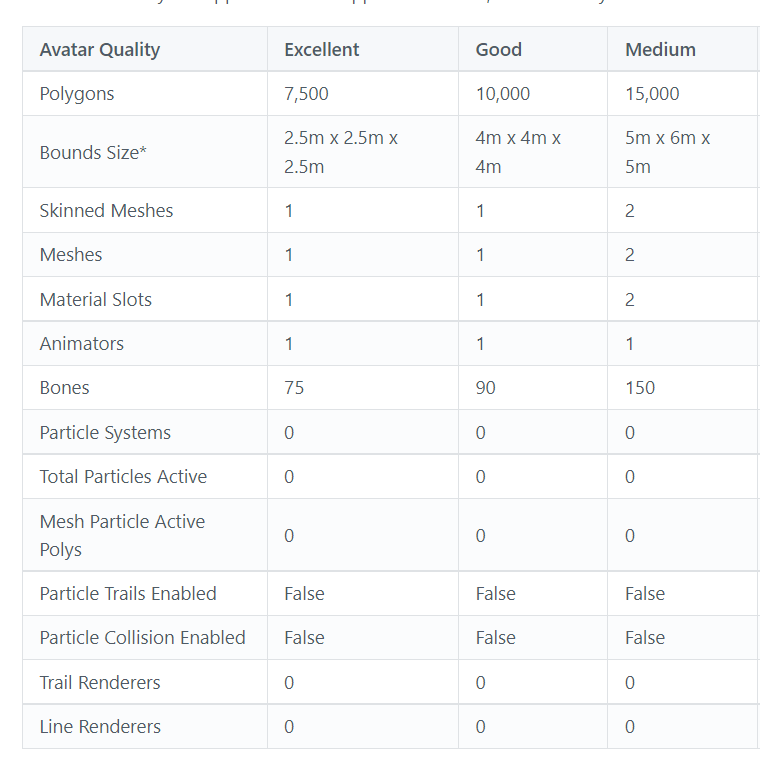
what's the general poly limit for avatars so quest 2 users can see it by default?
buoyant holly
 dense ember
which one of those can quest 2 users see by default??
buoyant holly
I showed all the ones that will be seen by default in the screenshot
dense ember
aah
ty
can I make an avatar that shows up as lowpoly/compatible for quest users, but high quality for everyone else?
buoyant holly
yes basically the PC and the quest Avatar can be two completely different models so you could definitely use a higher-quality version for the pc
dense ember
ah cool
 fair oriole
Hey so ran into an issue that might be exactly the same, and found a solution (attachment 1)
Before (none was set) (pic 1), after (pic 2), my arms are split because of a blendshape on them and the lighting was wrong


 fair oriole
Hey so ran into an issue that *might* be exactly the same, and found a solution ...
fair oriole
fair oriole
Hey so ran into an issue that *might* be exactly the same, and found a solution ...
Here's a much better example / showing it off. I split the mesh since it has blendshapes and 32k+ polys, and I'm glad this fix worked!

 tall sedge
Hey I was wondering if there is a better way to have one mesh have multiple textures, aka skins? Would I just have to go and atlas them all to one texture sheet or is there something neat I can do with poiyomi shader?
I tried messing around with decals but I don't think that's the right way of doing things since I don't think you can toggle them on and off with animations (from what I can tell so far)
Feel free to ping me if you have a solution.
 stray tangle
tall sedge
Hey I was wondering if there is a better way to have one mesh have multiple text...
stray tangle
tall sedge
Hey I was wondering if there is a better way to have one mesh have multiple text...
decals would work, you can toggle them on and off by animating the alpha. you can also use the RGBA masking section
tall sedge
stray tangle
decals would work, you can toggle them on and off by animating the alpha. you ca...
I cant seem to get that to work as well I try animating it by hitting record and moving the slider to get the values on the animation but it isn't working ingame

 gloomy stratus
anyone knows how to make expressions linked to both hands gesture?
like happy when both hands are doing the thumbs up gesture
stray tangle
tall sedge
I cant seem to get that to work as well I try animating it by hitting record and...
did you mark those properties as animatable?
otherwise you won't be able to animate them when the shader is locked
 proper grail
gloomy stratus
anyone knows how to make expressions linked to both hands gesture?
like happy wh...
proper grail
gloomy stratus
anyone knows how to make expressions linked to both hands gesture?
like happy wh...
Itll look something like this
Theres a teeny tiny problem with knuckles controllers tho as vrchat has a little dead zone between thumbstick touch thumbs up/fist/fingergun that blips to an idle mix
 unreal plover
proper grail
~~Itll look something like this~~
~~Theres a teeny tiny problem with knuckles co...
unreal plover
proper grail
~~Itll look something like this~~
~~Theres a teeny tiny problem with knuckles co...

hey
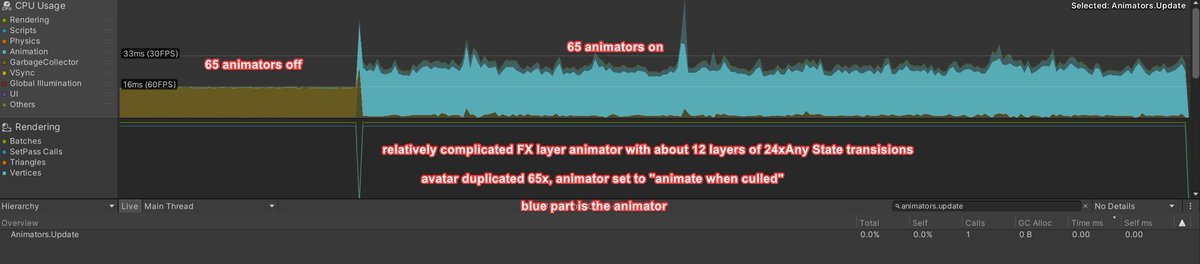
don't use massive amounts of transitions out of Any State. you're asking the animator to check dozens (or god forbid, hundreds) of conditions every frame the animator runs. its ok to check that many once when params change, not EVERY UPDATE.
tia
pulls out popcorn https://t.co/rP6kj93MZ2
Likes
626
Retweets
251

 Twitter
·
proper grail
Twitter
·
proper grail
I will admit I used any state out of lazyness, 36 animation boxes to fill out instead of 64. Any state has constantly been a mystery! A bad mystery. A mystery that every time ive used it only causes weirdness.
fair oriole
gloomy stratus
anyone knows how to make expressions linked to both hands gesture?
like happy wh...
Try out Av3 combo gesture expressions on github
 timber marten
Any state does exactly what it says it does, Any state connected can be triggered from any state
It's more of a shortcut than anything
You can set up back and forth transitions from every state, or just use any state
Not sure why the vilification... just like in that tweet, the issue is being that there are no transitions between states - which kind of removes the blending between those states...
For simple on off things it's one thing, but for stuff like hand gestures you need that blending between states or it will look janky.
Otherwise there is no real difference using any state vs tons of interconnected state transitions besides having a greater control over the way and timing of the state transitions
timber marten
tall sedge
I cant seem to get that to work as well I try animating it by hitting record and...
Decals work like matcaps, you replace , add, or multiply
timber marten
tall sedge
Hey I was wondering if there is a better way to have one mesh have multiple text...
You can rebake textures if you don't plan to have very complex materials, on most avatars you can usually smash materials In half by using clever masking
 vital mist
timber marten
You can set up back and forth transitions from every state, or just use any stat...
vital mist
timber marten
You can set up back and forth transitions from every state, or just use any stat...
could try the interruption source option instead of linking each state together in a web? i didn't realize what the option exactly did until digging in the replies https://twitter.com/PokerfaceCactus/status/1496231384368783369?t=WVe8yj_QFCxySyeichcHaw&s=19

@dtupper you can actually blend from pose A > pose B even if your path is Pose A > Neutral > Pose B by setting your interrupt source on the transition from A > neutral to 'next state' .. as this causes it to blend the transitions from A > neutral > neutral > B together in a fluid motion.
Twitter
·
timber marten
Don't think you can play with other options regardless
I could be wrong though
If it goes to an exit state
vital mist
i remember being able to but I'm unable to check at the moment
can always go back to neutral anyway
timber marten
Maybe
But the overhead is still negligible unless you set up an entire int layer with any state
🤷♂️
vital mist
oh yeah no it's only really notable if you get into the hundreds total, but it's still good info to know
timber marten
I would think Hai would have implemented this
unreal plover
vital mist
oh yeah no it's only really notable if you get into the hundreds total, but it's...
Yes, but when you're in a packed lobby, every tiniest bit helps. It's just that, the more people do it, the more noticeable it is, like any other optimization
timber marten
I don't think it will make as big an impact as you think, especially in cases like hand gestures where an animation is always played
Otherwise I feel like the dev team would be saying this explicitly and not tip toeing around it by saying "could work, maybe, I donno, how's it work anyway"
And also change their example controllers
🤷♀️ lead by example imo
tall sedge
stray tangle
did you mark those properties as animatable?
That was it I forgot you needed to do that with poiyomi thanks a ton for the help.
unreal plover
timber marten
I don't think it will make as big an impact as you think, especially in cases li...
https://twitter.com/dtupper/status/1496709477403222021
Otherwise I feel like the dev team would be saying this explicitly and not tip toeing around it by saying "could work, maybe, I donno, how's it work anyway"
Because it's difficult to police/benchmark and provide useful feedback. Similar to shaders/materials/toggles: yes you can use these numbers as an indicator, but they can't predict the complete performance. You can take an excellent performing PC, smack a laggy fur shader on it and it'll perform worse than most medium avatars
@Digitrevx @FrostKittyPaw @thryrallo sure, but honestly I kinda just trust our engineers at their word, they know more than i do, and the bench is trivial to repro. but sure, a picture! https://t.co/9mFkyq1Zvw
 Twitter
·
timber marten
Twitter
·
timber marten
LOL
shoot I would have just shot for the moon and done 24 layers of 255 ints
but I think this is demonstrating my point, I only use any states on hand gestures and plan to use layer controls to turn them off anyway - read the comments on what you posted, even tupper says sub 10 any state is either better or the same - if his information is correct
which I don't feel is too much overhead
🤷♂️
and there is a vast difference of 12x24x65 vs 7x2x65
proper grail
Methinks the takeaway is that any state will check every transition regardless if a related parameter has changed every frame* while a regular state acts as expected
 delicate urchin
is there really no free/open source tool to combine skinned meshes in the unity editor?
I feel like surely this community came up with something 🧐
unreal plover
delicate urchin
is there really no free/open source tool to combine skinned meshes in the unity ...
I've started working on that, but put it on hiatus due to time constraints. Feel free to try it out, fork/make a PR. It works on all of my personal projects, but there are probably still some edge cases where it completely breaks. https://github.com/Naraenda/PerfHammer

GitHub
PerfHammer is a Unity tool to optimize (VRChat) assets. - GitHub - Naraenda/PerfHammer: PerfHammer is a Unity tool to optimize (VRChat) assets.
unreal plover
Guaranteed it'll break animations
unreal plover
I've thought of a system to fix animations, it's just too time consuming for me to work on as I have too many other projects going on right now
timber marten
Oh wait , red clocks name by mesh don't they
Mmm
There is a script, can't recall its name, but it sets up toggles for you by promoting the use of mesh disabling
So... every model has like 12+meshes
I kri
It's such a pain to fix
unreal plover
If it's a PC avatar it's better to use UV based masking. Like Poiyomi v8 UDIM Discard. Up to 16 toggles in one material/mesh
Silent Cel Shading Shader also does this
no such system on quest unfortunately
timber marten
Guessing it's a multipass alpha mask?
I haven't used v8 yet, last I checked it was in its testing phase
unreal plover
timber marten
Guessing it's a multipass alpha mask?
If Poiyomi did it the same way Silent did, it's done by moving the vertices outside the view frustum so they'll get discarded when doing the clipping check. The only performance costs for rendering a toggled off item is thus only the vertex part of the shader.
https://gitlab.com/s-ilent/SCSS/-/blob/master/Assets/Silent's Cel Shading Shader/Shaders/SCSS_Forward.cginc#L72
timber marten
Mm... I don't really speak shader too well, but I'm assuming you are saying it shifts the uv positions rather than manipulating an alpha mask
Or masks
unreal plover
timber marten
Mm... I don't really speak shader too well, but I'm assuming you are saying it s...

GitLab
A surface shader for Unity providing cel-shading. (Forward rendering only)
stray tangle
delicate urchin
is there really no free/open source tool to combine skinned meshes in the unity ...
not sure why you would want to do that really
it's a dear simple thing to do in blender
any model edits should be done in blender
Unity is not a substitute for a 3d modeling program, it's a game engine
timber marten
unreal plover
https://gitlab.com/s-ilent/SCSS/-/wikis/Manual/Inventory-System
So, yes? That article says a lot if things, not too sure about the actual impact of some of it though
unreal plover
stray tangle
it's a dear simple thing to do in blender
The average kitbasher has 0 blender skills lol
It's simple once you know, but most people won't touch blender because it just looks to daunting
timber marten
It is daunting, what you mean
unreal plover
timber marten
So, yes? That article says a lot if things, not too sure about the actual impact...
Yea it masks them based on UV position, but it's in a single pass
timber marten
The skill cap is very high
That's pretty good actually
Good for instant on/off stuff
Not sure about 16 toggles per though
stray tangle
I know, but ctrl + J isn't so hard
timber marten
Unless it's a low detail avatar or you want really minute things changed
unreal plover
Joining meshes, and merging materials. And CATs atlas is poopy 😂
timber marten
Because combining 16 materials, even assuming half of them have actual texturing would need a fairly large texture
stray tangle
unreal plover
Joining meshes, _and merging materials_. And CATs atlas is poopy 😂
yea atlas is bad, Bake is immensely better
stray tangle
Bake joins all meshes, re packs UVs, bake all the original textures into the new UV map, including all PBR textures. it can also decimate, and it will bake the original to the decimated version when doing the normal bake
timber marten
Is bake a new cats plug-in or blender plug-in or something
unreal plover
Still, last time I checked, bake doesn't allow you to have the fine control over what gets merged. It's good for fallbacks, but when people already have made their avatar in Unity, it's just too much of a hassle for them to set up textures properly in Blender to actually make use of those features. Let alone set up all the PBR nodes.....
stray tangle
unreal plover
Still, last time I checked, bake doesn't allow you to have the fine control over...
you can just temporarily drag a mesh out of the armature
to exclude it
timber marten
I mean baking can be done regardless
I bake stuff all the time
Manually though
And no not bread
unreal plover
stray tangle
you can just temporarily drag a mesh out of the armature
I know you can, but realize that the average avatar creator does not have the expertise nor the patience to go through learning and doing all that
Most people just download a bunch of random assets, smack them on their armature in Unity and call it a day
timber marten
Plus procedural decimation, kinda sucks
Unless it's like, houdini
And I'm not sure about one click either
 marble meadow
Hi, I try make a chibi via vroid studio s but can't find right size,anyone got tips? I tryed youtube no success sorry if it is in wrong chat
 calm spade
 torn fiber
need help with cats blender plugin its reporting no mesh found
torn fiber
need help with cats blender plugin its reporting no mesh found
You don't have an armature ?
 glass ibex
torn fiber
glass ibex
torn fiber
No Armature=Cats don't see your mesh.
glass ibex
yep, that'll make it recognize it. ^^
 gray gull
Hello, I am trying to make a avatar for quest mobile and I keep running into this error "Avayar uses unsupported shader 'CubedParadox/Flat Lit toon' " even though I have changed things around that should make it work, someone help please!

 tawdry venture
gray gull
Hello, I am trying to make a avatar for quest mobile and I keep running into thi...
tawdry venture
gray gull
Hello, I am trying to make a avatar for quest mobile and I keep running into thi...
Make new materials.
Shader parameters can get left behind if you just change the shader on existing materials that confuse the SDK.
gray gull
tawdry venture
Make new materials.
Hey thanks for responding, how would I make new materials? I just only started doing this 2 days ago just for this avatar and all of this I do not know.
 gray gull
sorry im not sure where to do this, can you do a step by step process maybe?
sorry in advance
gray gull
gray gull
sorry in advance
Nevermind that, I figurd it out! Thanks for helping. Cheers.
 honest frigate
Hi, can someone tell me if adding parent constrains will impact performance more than actually parenting the bones?
what if the parent bone has dynamic bones or physic bones?
unreal plover
constraints have a unnoticeable higher impact on performance than actually parenting the bone. You won't notice it but don't go in and use thousands of constraints
honest frigate
ok, thank you
 prisma bison
I'm not sure if this is the right channel, but I'm working on an avatar and when I changed the shaders to optimize it for quest use, a few of the textures on the face (that had previously been using the sprite texture instead of a shader) broke and it looks really messy. Does anybody have a solution? (This is my first time making an avatar so I'm sorry if the answer is really obvious.)

 unreal plover
Quest doesn't support transparency, which is why you see the black outlines
Only way to fix that is to cut out the parts in Blender
heady smelt
Learned that the hard way when I first messed around with SS Link
The eyes...The horrible, empty eyes!
prisma bison
Ok, thanks. Now my problem is that I've got no clue how to bring this from unity into blender. The tutorials used a file that I don't have. Does anyone have any tips?
Like, how do I get the FBX file?
unreal plover
right click the asset and use show in explorer, that's your FBX file.
prisma bison
The prefab asset?
unreal plover
the one with the > icon on the right side
unreal plover
Do you have CATs?
prisma bison
yup
unreal plover
Did you import with CATs?
prisma bison
I tried, and It said the file isn't correct :/
ruby isle
prisma bison
I tried, and It said the file isn't correct :/
What kind of file is it
prisma bison
ruby isle
What kind of file is it
not sure. I may have used the wrong thing but nothing here has the file extension of .FBX
should I send a screenshot of my assets?
ruby isle
prisma bison
should I send a screenshot of my assets?
Sure go ahead
prisma bison
Everything in my assets is here. I don't have the FBX asset that everyone in the tutorial videos do.

 onyx harness
prisma bison
Everything in my assets is here. I don't have the FBX asset that everyone in the...
onyx harness
prisma bison
Everything in my assets is here. I don't have the FBX asset that everyone in the...
The arrow indicates it has embedded data which usually means it's an fbx among other things. Best thing to look for though if you want to find the fbx
 prisma bison
onyx harness
The arrow indicates it has embedded data which usually means it's an fbx among o...
prisma bison
onyx harness
The arrow indicates it has embedded data which usually means it's an fbx among o...
I tried importing that and it didn't work. Do I need to use a converter or something?
onyx harness
prisma bison
I tried importing that and it didn't work. Do I need to use a converter or somet...
depends on what it did
onyx harness
prisma bison
Does this help?
oh, it's a prefab with embedded data. That's new to me.
You can see the file type in unity here when it's selected

Search for this in your Project window
t:model
prisma bison
Ummmm...

I feel like something isn't right here
could the fact that I imported the model from VRoidhub have anything to do with it?
delicate urchin
stray tangle
not sure why you would want to do that really
Sorry I completely forgot about this.
My wife loves shopping avatars on booth, they usually come with 20-30 meshes for customising outfits, but often no .blend files.
So I was looking for a way to optimise them without having to redo the entire pipeline from importing the .fbx file into Blender, setting up animations, shaders, avatar parameters, etc.
stray tangle
you don't need to redo everything
it's simply a matter of bringing it to blender, doing all the fixes you need, then re-exporting and overring the model in Unity
as long as you never unpacked the model in the first place, Unity will just update your model with the new version in place
without having to redo anything
delicate urchin
What happens to all the mesh renderers in the prefab?
stray tangle
what do you mean exactly? the ones that were there that you removed in blender?
or merged?
delicate urchin
When you purchase an avatar, they usually come with prefabs that are already set up with the avatar descriptor and all.
I wonder what happens when you just replace the fbx of them 
I actually never tried that.
stray tangle
you can also just use Pumkin's avatar tools to copy everything from one model to another
dynamic bones, descriptor and all
delicate urchin
oh? I didn't know about that. That might solve the problem.
 hot anchor
im new to unity and trying to port an avatar to quest but it says i have too many materials and polygons. how do i reduce the number of materials and polygons
sorry if this is the wrong channel
buoyant holly

Did this video help you? Consider sending me a tip on Ko-fi! https://ko-fi.com/sippbox
Making optimized Quest models is hard. But it doesn't have to be! With recently updated polygon limits and fallback avatars, it's a better time than ever to create something that represents you to Quest users! Hopefully this tutorial will help you out!
0:00 ...
hot anchor
buoyant holly
https://www.youtube.com/watch?v=8MkgXcidxg4
thanks i probably should have just looked it up on youtube in the first place lol
buoyant holly
this is a pretty good tutorial to start with
 echo geyser
Blender is a good tutorial
 ornate harbor
whenever i join my avatars meshes in unity the mb drastically increases??
is there a workaround to this?

before and after
only thing changed are the joined meshes
ruby isle
ornate harbor
only thing changed are the joined meshes
Remove unused blendshapes
ruby isle
And lower poly counts
 ruby isle
 umbral hedge
on blender i have no clue which one is polys
umbral hedge
on blender i have no clue which one is polys
Triangles are polygons
umbral hedge
tysm
buoyant holly
that would still put you very poor but definitely an improvement
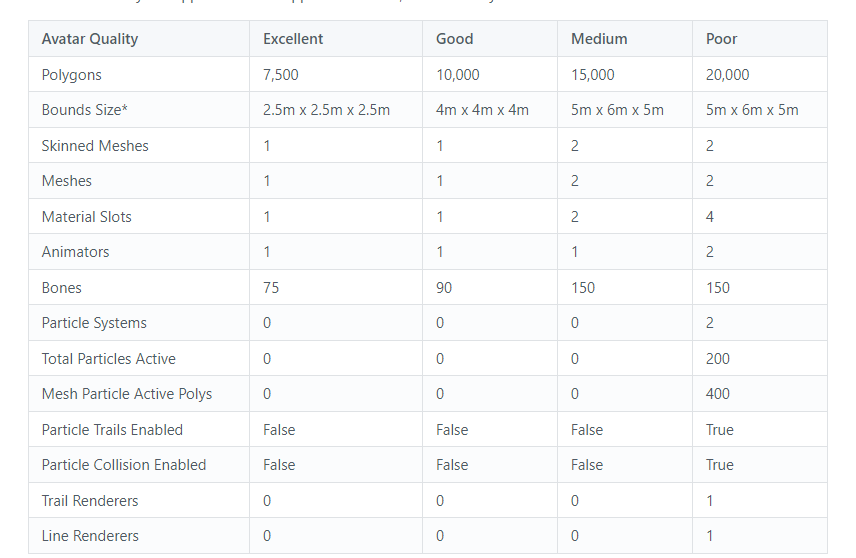
I would try the shaved off 264 polys
umbral hedge
i can probably do that however for the textures, they are all in unity
my model is just blank in blender
so im unable to do the cats texture merge thing
buoyant holly
you can just import the textures into blender
umbral hedge
Idk if the textures I have are supported
They are .mat
And I actually have 26,000 polys because I forgot something was hidden 💔 I’m struggling, I’ve been trying to get this avatar quest ready for 2 painful days
buoyant holly
umbral hedge
They are .mat
that's the files for the material settings not the textures themselves
umbral hedge
Oh my b
oooo

idk if this is a problem but my character has like set up shaders, poiyomi toon
god i looked it up i can't use anything but mobile shaders...
buoyant holly
yup
 solemn owl
I'm trying to use the Bake function in Cats for Quest optimisation and it throws me this error

Anybody knows how to fix it lol
If I try the PC option Blender just crashes
 high kiln
use blender 2.9
high kiln
i think this error only shows in versions above 2.9
solemn owl
huh ok
Yeah, I think I will do what I need by hand

Lol

I Can't even create an atlas. 😄

Ok, apparently I cannot save an atlas in a folder where I have already save one.
After some random key bashing it worked
 wraith trench
When i press upload avatar nothing happens and it doesn’t show any fixes I need to make what should I do
 dim badger
Is there a way to either get things like normal, matellic, emission maps into blender and use cats to create atlases, or an easy way to atlas them in unity or some other program?
Optimised my avatar for 'good' on pc, just struggling with the atlassing
Avi has 16 materials, most with emission maps, matellic maps, normals, so not really looking to do that by hand..
heady smelt
You just go into gimp and overlay the various maps on top of the texture atlas. Not hard whatsoever
You kinda have to do it that way, too, because otherwise if you create different atlases for each map, they won’t match up and will look funky
 mossy stump
Hello! Is there an alternative to particle trails that works within the Good range?
 pulsar cypress
So when i try to create an atlas for my model it does this? i have no idea whats happening

also when i press save atlas to it doesnt ask for a location it just does it
 lavish pebble
Can I use Poiyomi shader for my avatar and standard shader for items I spawn in? Or should I stick to only Poiyomi and find workarounds so I don't have to use 2 shaders
sick timber
lavish pebble
Can I use Poiyomi shader for my avatar and standard shader for items I spawn in?...
Yes, you can use two different shaders across your entire avatar.
lavish pebble
Yes, I know I can, but would that be ideal if I'm trying to optimize my avatar? Should I use 1 custom shader on my whole avatar or can I use 1 custom and a standard unity shader? When would that be a consern to avatar performance?
 upper yacht
stray tangle
upper yacht
stray tangle
ehh, depends
7.X and up have the locking system, which generates a new shader for every material with all of the unused code stripped out
I rely on a lot of poiyomi features for my avatar, but there also nothing wrong using Standard if it has everything you need
 lone tiger
People would only need to actually lock all of the materials used throughout all animations on their avatars. If you don't do that and engage automatic locking by publishing your avatar, it will only lock in materials that are currently on your avatar in the scene. Others will stay unlocked.
I think this causes some avatars to freeze your game when you load them in.
 crisp monolith
I reduce polygons in blender, but when I import fbx to unity and put it in scene, it has the same amount of polygons as before (or just like 20k less than before)
Never happened to me before, tried redecimating it, tried new blender project, anyone know whats going on? Only this avatar apparently
Doesn't happen if I import the blender file into hierarchy, only fbx.
It was enabled by default, just like when I optimized avis before
An I cant upload using the blender file cause it wont detect visemes
I always export as a new fbx, didnt overwrite
Apply modifiers was unchecked, you think that could be it?
i'm trying
actually
i decimated using decimate modifiers
so maybe lol
so cute
omg it worked
that was it! just found it weird that this was checked by default before cause i never had this happen to me. Thank youuu
i decimated mesh by mesh, everything except the one that has the face
heady smelt
Ok so where would I ask this (I'm super new to this) I got everything working except an issue with my avatars tie clipping in it's chest, and I'm having trouble getting it both PC and quest compatible. Again I've never done this really and I figured out everything else but these have me stumped
 red basin
Help, my avatar becomes suburnt when i switch the model to android compatible in unity


 normal nova
dim badger
Is there a way to either get things like normal, matellic, emission maps into bl...
normal nova
dim badger
Is there a way to either get things like normal, matellic, emission maps into bl...
CATS bake does those
 glad vault
I exported the model like the one below. What's happening in top?

 spare adder
BIG THANKS! My first crack at pulling an avatar from Unity to Blender to optimize for Quest - got the 33,000 polygon count down to 9989 (faces in Blender). When I imported it back to Unity, it said I had 2147483647 Polygons! Checking that checkbox fixed it - 9989 polygons as reported by Blender.
heady smelt
glad vault
I exported the model like the one below. What's happening in top?
More than likely your model has ngones (faces with 5 or more edges) so the software is making up it's own rules on how to cut up each face to make it into triangles that can be rendered out in games
heady smelt
spare adder
BIG THANKS! My first crack at pulling an avatar from Unity to Blender to optimiz...
I was so confused by this as well
 crisp monolith
Question: If I do not apply decimate and export, will it not be on the final fbx?
 high kiln
crisp monolith
Question: If I do not apply decimate and export, will it not be on the final fbx...
high kiln
crisp monolith
Question: If I do not apply decimate and export, will it not be on the final fbx...
yes it will be in final fbx
but that can create problems with blendshapes
crisp monolith
high kiln
but that can create problems with blendshapes
I'm asking cause I used to decimate and not apply, and it would be in the final fbx.
Then One time one specific avatar wouldn't export to the fbx, it had always the original number of polygons.
Someone said I should click on the export option that says "apply modifiers" under geometry in the export window.
But then I did, it messed up the blendshapes badly, like it said it would
So now I don't know what to do... lol I'm not decimating the blend shape mesh btw.
 high kiln
crisp monolith
I'm asking cause I used to decimate and not apply, and it would be in the final ...
high kiln
crisp monolith
I'm asking cause I used to decimate and not apply, and it would be in the final ...
well so you applied decimator on meshes that have none of shape keys?
crisp monolith
high kiln
well so you applied decimator on meshes that have none of shape keys?
yes, like shirts for example
high kiln
crisp monolith
yes, like shirts for example
well it shouldn't affect shape keys when for example shirt isn't part of shape key
crisp monolith
high kiln
well it shouldn't affect shape keys when for example shirt isn't part of shape k...
question is why when i use decimate in everything, its not exporting to fbx
high kiln
hmm do you have only decimator as unapplied modifier?
hot anchor
how do i reduce polygons in blender
high kiln
hot anchor
how do i reduce polygons in blender
depends you can use decimate modifier but it can give bad effects.
hot anchor
high kiln
depends you can use decimate modifier but it can give bad effects.
ok ill try that thanks
crisp monolith
high kiln
hmm do you have only decimator as unapplied modifier?
I think I know what happened. It wont apply because every mesh has shape keys, for making it smaller instead of toggling on and off.
high kiln
crisp monolith
I think I know what happened. It wont apply because every mesh has shape keys, f...
hmm idk if that is case, you can always make copy of blender file remove them and test if it will work
crisp monolith
high kiln
hmm idk if that is case, you can always make copy of blender file remove them an...
It only worked after removing shape keys AND cliking apply, just removing it didnt automatically work when exporting
crisp monolith
i had to delete shape keys from other meshes in order to apply the decimate
just deleting and not applying didnt work
high kiln
yeah you can use addon for applying modifiers when you have shape keys
crisp monolith
it will apply modifies although it has shape keys? and wont break it?
high kiln
well it probably will since you decimate vertices which are needed for shape key data
you said you have shape key for making them small so they blend inside body hmm you can always make toggles instead of doing that
crisp monolith
high kiln
you said you have shape key for making them small so they blend inside body hmm ...
yes, I know, but when I made a blendshape for a specific bone, it added a shape key to every mesh even the ones that had nothing to do with that bone
therefore making it impossible for me to apply decimate
and also, it wouldnt let me see sculpting in real time, it would only update changes after going to edit mode
high kiln
yes bcs decimator if not applied is keep trying to decimate it in real time after you do changes
GitHub
Blender script. Contribute to przemir/ApplyModifierForObjectWithShapeKeys development by creating an account on GitHub.
crisp monolith
I know I should have decimated and applied before creating shape keys, now I know that.
I was formulating a very long question but found out the answer when I was writing it lol
@high kiln thank you a lot for yout time, it really helped
 pure bridge
will CAT's atlas multiple texture maps or do i need to do them one at a time and hope for the best?
crisp monolith
pure bridge
will CAT's atlas multiple texture maps or do i need to do them one at a time and...
it does multiple

 high kiln
solemn owl
How do I solve this error ?
high kiln
solemn owl
How do I solve this error ?
downgrade blender to 2.9
solemn owl
high kiln
downgrade blender to 2.9
Actually wrong, I just found the problem - there was a PSD image and it needed to be a different format, I used PNG just now
high kiln
well ok i thought you already used pngs and it still didn't worked
it happened to me in cats when i used 3.0
heady smelt
pfff psd more like trashsd
heady smelt
Mmmmm colliders when
 ruby isle
heady smelt
Mmmmm colliders when
ruby isle
heady smelt
Mmmmm colliders when
Weird in this picture I see no colliders or bones. My safety settings are on
crisp monolith
Best way to size down an avi? Besides deleting unnecessary bones, crunch compressing, sizing down textures...
I even decimating polygons but didnt change that much
 radiant shadow
Remove blendshapes if you have alot
 plain crystal
Can someone give me recommendations for my avatar please? It's my first time doing one.
I will try to make one with blender but I don't know how that works yet
So i just made a Vroid character and customized everything

 ivory charm
what do you want recommendations for ? style?
the only recommendation I can give is to make sure it'll appear for quest users
which means reducing poly count and combining materials
and doing the auto-fixes in Unity before publishing
 indigo jungle
Does CATS' atlasing system support Normal Maps applied through shader nodes?
tawdry venture
No, it only supports Diffuse.
stray tangle
indigo jungle
Does CATS' atlasing system support Normal Maps applied through shader nodes?
CATS Bake does
should be using that, not atlas
does every pbr map
indigo jungle
Good to know
Haven't used CATS in awhile, but I'm working with a well optimized but messy model and I'm too lazy to combine mats myself
Well... Well optimized meshes, just a TON of mats.
They used normals instead of complex meshes, good on em but you shouldn't need 26 mats
indigo jungle
Welp, Bake just... doesn't wanna work for me.

AH, armature was hidden. It's also screaming that it can't use more than 8 UV maps so I would have to atlas anyways
Yeah, Bake isn't doing much. Only brings it down to 17 materials.
indigo jungle
I only have 3.0 cause this is a fresh WIndows install, I can just downgrade back to 2.8
stray tangle
2.93.8 should be best
plain crystal
ivory charm
what do you want recommendations for ? style?
Something like that yes. Because I only designed some clothes and put a cookie sticker on the face
And to about how much polygons should I put it down for quest users?
ivory charm
under 20,000

a VRoid avi will be hard to get over medium though, mine came into Blender at 38,000 and I narrowed it down to 19998 without it looking too bad. i think depending on hair though it could be easier

 robust anchor
just particles
 fringe wasp
Hi, I have a question: can I upload an avatar that has two different models for PC and Quest? Basically, I want to make a 20k poly model for PC and then upload a 10k poly model for Quest to also use as a fallback, while using the same blueprint ID.
I just want to make sure this is how it works or if I have to upload a separate avatar for fallback use
I'm new to this and I can't exactly test on both platforms, I only have VRC on PC
buoyant holly
fringe wasp
Hi, I have a question: can I upload an avatar that has two different models for ...
yes each platform can have a different model
fringe wasp
Awesome, thank you very much
buoyant holly
while still being the same Avatar ID
fringe wasp
Ok sweet. I just wanted to be reassured I uploaded my stuff right lol
heady smelt
I was also curious about this which is good to know!
plain crystal
ivory charm
under 20,000
Ok thank you
plain crystal
ivory charm
a VRoid avi will be hard to get over medium though, mine came into Blender at 38...
I'm not planing to stay at vroid for ever tho. I want to make my next avatar with Blender. But im still trying to figure out how that works
 wary badger
Anyway to optimize having multiple audio sources?
heady smelt
Does anyone know how to do this I been having trouble with this

 stray tangle
heady smelt
Does anyone know how to do this I been having trouble with this
stray tangle
heady smelt
Does anyone know how to do this I been having trouble with this
your avatar does not have the visemes needed for VRChat
heady smelt
How do I get that
stray tangle
you will need to create them yourself, or pay someone to do it. if you're doing it yourself, you can use the CATS plugin to help speed things up
it has a feature to generate all of the required viseme shape keys only given the CH, OH and AA visemes
if you can find blendshapes on that model that closely match what those 3 should look like, CATS can use them to attempt to create the visemes for you
heady smelt
Is there a tutorial
stray tangle
maybe? never had to look that up sorry
heady smelt
It’s fine but I do better with help from someone or watching them
It helps me learn more
Besides I am new to blender
stray tangle
well at least now you know what to do
all that's left is to figure out how to do it
heady smelt
heady smelt
Does anyone know how to do this I been having trouble with this
The one selected on the second image is A followed by I U E O but you do need to utilize Cats in order to create the rest

This tutorial shows you how to optimize your VRoid Model for VRChat using 𝗩𝗥𝗼𝗶𝗱 𝗦𝘁𝘂𝗱𝗶𝗼
and 𝗕𝗹𝗲𝗻𝗱𝗲𝗿. We aim to get medium or good performance ranking!
𝗕𝗹𝗲𝗻𝗱𝗲𝗿 𝟮.𝟴𝟯: https://download.blender.org/release/Blender2.83/
𝗖𝗔𝗧𝗦 𝗽𝗹𝘂𝗴𝗶𝗻: https://github.com/GiveMeAllYourCats/cats-blender-plugin
𝗠𝗮𝘁𝗲𝗿𝗶𝗮𝗹 𝗖𝗼𝗺𝗯𝗶𝗻𝗲𝗿 𝗮𝗱𝗱-𝗼𝗻: https://vrcat.club/threads/materia...
This video is time-stamped on how you're meant to do it within Blender (ver 2.93 works best with this pluggin)
You can watch the rest of the video as well to understand what's happening
heady smelt
Okay
 terse escarp
Why does unity scream that my avatar will kill vrchat but when i use it its literally the only good performance avatar in most public servers?
stray tangle
the VRChat performance rating is not truly indicative of real-world performance. that, and the fact that other avatars are likely far worse than yours lol
 languid quartz
terse escarp
Why does unity scream that my avatar will kill vrchat but when i use it its lite...
languid quartz
terse escarp
Why does unity scream that my avatar will kill vrchat but when i use it its lite...
can you screenshot what it says?
terse escarp
(My laptop cant screenshot) my quest can run this fine
 high kiln
lmao ofc it's very poor so many particles
they are heavy on performance
also 18 material slots isn't good too
terse escarp
high kiln
also 18 material slots isn't good too
I have seen a 38 material slot avatar with no performance loss
high kiln
depends on your pc
languid quartz
PC that's probably fine somewhat until you use the particles, but people can set up a particle limiter on PC so most of those won't be shown to anyone who is using that.
terse escarp
high kiln
depends on your pc
Im a quest standalone player
high kiln
if you have 38 materials ask other quest users if their performance drop
they will usually say yes
terse escarp
high kiln
if you have 38 materials ask other quest users if their performance drop
I saw that avatar, someone else was in it
stray tangle
and how many people were in the lobby exactly?
terse escarp
12
high kiln
could be someone optimized it better
languid quartz
Also, the issue is not how your avatar alone performs. It's how much resources your Avatar takes up.
You can have very shitty avatars seemingly perform fine if it's just that Avatar and the world, but when you start having to consider you also need to render everyone else around you...
 distant jetty
if you make the inside probably ~416, I am very bored yes
 dusk badge
How to attach a part of a model to a bone in blender?
 terse gale
dusk badge
How to attach a part of a model to a bone in blender?
terse gale
dusk badge
How to attach a part of a model to a bone in blender?
are you asking about weight painting where that part will deform or parenting where the part just follows the bone. Also: #avatar-rigging
 shrewd dawn
How many particles is too many?
onyx harness
Depends on the audience and that they’re doing
ruby isle
shrewd dawn
How many particles is too many?
The SDK tells you
VRChat
The Avatar Performance Ranking System allows you to see how much a user's avatar is affecting performance via analysis of the components on that user's avatar. You can also use it on yourself to see how performant your avatar is. This system is provided to inform users what is likely the most perfor...
shrewd dawn
ruby isle
https://docs.vrchat.com/docs/avatar-performance-ranking-system#pc-limits
Almost everyone's avatar is already on very poor performance anyways so idk how mine compares to others in the grand scheme of things
But I do need like 40 particle emitters with ribbon trails
ruby isle
Well I don't suggest adding onto the problem
shrewd dawn
Technically 80 since each of those has a subemitter
ruby isle
Yeah that's gonna kill fps
shrewd dawn
ruby isle
Yeah that's gonna kill fps
Well the main emitters only have 1 particle active at a time, maybe 2
The trail subemitters have like 30 active at a time each
30*40 would be 1200 particles
Man if VRChat would just allow more non-default scripts this would be so much easier
ruby isle
They can't due to security risks
shrewd dawn
That's why I said more, not all
ruby isle
But like what more could they add?
shrewd dawn
You should be able to like submit scripts to be reviewed before they approve it or not
shrewd dawn
ruby isle
But like what more could they add?
Maybe one that actually does tron trails correctly
ruby isle
That would require so much unnecessary extra work on both parties
ruby isle
shrewd dawn
Maybe one that actually does tron trails correctly
Literally set a trail renderer to Z facing
shrewd dawn
ruby isle
Literally set a trail renderer to Z facing
Do that, put it on a sword, and swing the sword left to right
Then try to tell me that again lmao
ruby isle
That's not set correctly
shrewd dawn
It is, both in this attempt and in my own we first aligned it properly
 shrewd dawn
It looks fine if you swing it with the blade
I know
I know exactly what you are saying
ruby isle
Then make sure it's aligned correctly


 shrewd dawn
What are you doing differently to align yours?
ruby isle
shrewd dawn
That's not different
ruby isle
This must be set on the trail renderer. Once set, it will act as a trail in 3D space
shrewd dawn
Correct
ruby isle
So rotate yours 90 degrees
ruby isle
Does it still face the camera?
ruby isle
Then you gotta make sure it's rotated correctly. It definitely seems wrong
shrewd dawn
So how do you make sure it's rotated correctly?
ruby isle
Let me try to give an example
If I rotate this:


This is what yours looks like
So I would rotate mine this way on X

And this would give the results in the first image
shrewd dawn
So transformed how many degrees on which axis?
ruby isle
90 on whichever axis it takes for yours to be flat
Imagine it being an actual 3D flat plane object
shrewd dawn
alright so I rotated it so that in relation to the blade the Z axis is shifted 90 degrees, since the trail looks like this, and nothing changed after that rotation


it's still not parallel to the blade on that motion
I widened it a bit here, alone the axis of the blade edge it works
 ruby isle
Why is your origin there
shrewd dawn

Because you don't swing a blade with the handle in the center of your body
so I have it under the box to simulate that
ruby isle
Okay so what object is the trail attached to
shrewd dawn
the blade itself, the blue bit
ruby isle
Thats what's wrong. Create an empty object under the blade and attach the trail to that. Then you can manipulate the trail rotation separately from the blade itself
shrewd dawn
So should I rotate the empty object or the trail?
ruby isle
Rotate the empty


 ruby isle
Rotate the trail to whatever it takes to align it
You have complete control on the angle
shrewd dawn
ruby isle
Rotate the trail to whatever it takes to align it
What I just showed you is after the adjustment
ruby isle
Adjust more then
ruby isle
If I want a cube rotated 45 degrees and I rotate it 30, what would you do to it?
shrewd dawn
ruby isle
If I want a cube rotated 45 degrees and I rotate it 30, what would you do to it?
adjust it 15 more, but you'd think anything would change at 30.
ruby isle
Exactly. So what's stopping you from rotating your trail more? You're not at your desired angle
shrewd dawn
okay just
listen to what I am going to say very carefully

angle's wrong, means I should probably adjust -65 on the Z axis
heady smelt
Ooo cool sword
shrewd dawn
since that's what it's at

so lets do that
is it now at -65

angle's definitely off here but lets ignore that apparently

notice how nothing changed.
 shrewd dawn
z is the axis it's not lined up with
but fine lets try that
lets set y to 90
well something did change, however,


it threw off another axis
that's what I'm saying is the issue with Z transform alignment
ruby isle
Import this, transfer "Demonstration" to your scene.
It's a flat plane with a trail on it
Don't touch the trail object, pretend the plane is the trail
So rotate that plane and see what the trail does
 shrewd dawn
so it can only be one sided?
ruby isle
No it's just by default shaders are one sided
shrewd dawn
how do you make it two sided?
 ruby isle
Well you can't expect a flat plane to work when you move it that way
shrewd dawn
but that's literally how I want the sword to work
if I can't move it every direction and have the trail be parallel to the blade it's not gonna work
ruby isle
You want a beat saber effect?
shrewd dawn
Yes, that's a good comparison actually
ruby isle
See my trails are set up exactly that way on my avatar
shrewd dawn
so how do you prevent that rotation?
ruby isle
Mine doesn't do that
shrewd dawn
Does the one on your avatar work any differently?
ruby isle
No not really
shrewd dawn
bruh
ruby isle
Here's my settings if you wanna copy them
 shrewd dawn
how's it set up rotation-wise in relation to the blade?

 shrewd dawn
and how's it set up in the hierarchy?
shrewd dawn
I thought you said you had it under an empty though
ruby isle
The trail is
shrewd dawn
is that empty not under the lightstick?
 shrewd dawn
okay, that's how mine's set up then
heady smelt
Y'all are smart
ruby isle
Well then something is wonky on your set up because mine works just like beat saber


 heady smelt
Turn it

 ruby isle
Oh then your rotation is different
A different axis should be your Up
So your green is pointing down
A different one should be
shrewd dawn
green is pointing down
ruby isle
So make a different one point down
Honestly, just mess around with it until you get your effect
shrewd dawn
ruby isle
Honestly, just mess around with it until you get your effect
that is all I have done for a week my guy
ruby isle
Well then no idea. I can tell you that's not proper Z transform behaviour though
shrewd dawn
well this is the first I'm hearing of someone who actually got Z transform working as it should lol
ruby isle
I've been using Unity for over 8 years so I'd hope so
shrewd dawn
There has to be something different about how yours is set up
heady smelt
Can't you ^^ just send him the sword?
ruby isle
True
heady smelt
Sorry if that's dumb-
shrewd dawn
we could try that, I have a lot of extra assets in this project though
shrewd dawn
How do I do that?
ruby isle
Drag the sword from the scene to your assets folder. Right click that new asset and click Export
ruby isle
shrewd dawn
lmk if you have any luck with that
Set rotation of the trail to this:

Don't mind the scale, I just normalized it
shrewd dawn
the trail or the empty object?
 shrewd dawn

 shrewd dawn
alignment along the blade is off
 ruby isle
You can fix that by moving it
shrewd dawn
it's still doing this as well
 ruby isle
Don't worry about that. It happens when you reset because it immediately moves to a new rotation
Swinging it around works just fine for me
And in VR you will never have it reset like it does in Unity
heady smelt
Dinnernone if you don't mind me asking can I see the avatar this is for?
shrewd dawn
nope it's still doing it
 shrewd dawn
heady smelt
Dinnernone if you don't mind me asking can I see the avatar this is for?
shrewd dawn
heady smelt
Dinnernone if you don't mind me asking can I see the avatar this is for?
it's unrelated to the blade, just a custom gryphon avatar lol
heady smelt
Ohh
shrewd dawn
it's not in this project though
ruby isle
 shrewd dawn
what does your hierarchy and stuff look like?
shrewd dawn
and what's the empty set to?
ruby isle
 shrewd dawn
rotation-wise
ruby isle
I rotated "Trail"
shrewd dawn
only trail?
shrewd dawn
I might've just found it as well, it seems related to speed
ruby isle
Set the scale of "Trail" to 1, and set the width to .001. For some reason the small scale makes it misbehaves
 shrewd dawn
slow

 ruby isle
It should work as intended then

 ruby isle
Are you getting that from resetting the rotation?
 ruby isle
How quickly
shrewd dawn
like 2 revolutions a second
ruby isle
This?
 shrewd dawn
Can't exactly tell from that but it seems like that yeah
seems to do that in this axis as well for blade alignment


it's like it forgets it's rotation after it goes a certain speed
ruby isle
That is kind of intended behaviour. The entire trail rotates to the orientation at all times, and when you rotate super fast the old parts have to catch up
If you lower the Min Vertex Distance it may improve, also lowering Time will decrease the amount it needs to calculate in the past
But I don't think you'll ever be able to swing it that fast in VR anyways
If you are, you're using it wrong
shrewd dawn
moved min vertex distance from .1 to .001, nothing changed. Wouldn't changing the time change the length of the tail as well?
ruby isle
Yes but it's the only thing you can do to lower that inaccuracy
But like I said, I don't think you'll be able to reach those speeds in VR
shrewd dawn
wouldn't it go that fast just walking?
ruby isle
On my end you have to swing it pretty gosh darn hard to get this effect I see
Like almost fling
shrewd dawn
I see it after moving it like a 6th of the way across my mousepad
ruby isle
This is literally me sliding it as fast as possible


(With more time for demonstration)
shrewd dawn
maybe your sensitivity is just super low
 ruby isle
That looks fine to me
shrewd dawn
oh yeah that would do it, you're swinging it from the center of the blade

it's obv not gonna go as fast on a smaller radius of swing lol
is there not a way to scale it back though?
ruby isle
Okay I see your outcome when rotating from another origin
shrewd dawn
there we go
ruby isle
I still don't think it'll be happening in VR, but I'm not sure what is happening here
shrewd dawn
would the scale of the objects affect anything?
cuz I have Weapon_Sword_15 set to like 200
ruby isle
Ah fixed
shrewd dawn
like maybe it just thinks it's going way faster because it's trying to calculate it on a much smaller scale
oh what'd you do?
 shrewd dawn
predictably
ruby isle
So what I would suggest is to pick either axis to have this issue happen and test in VR. If it doesn't happen often or at all then I wouldn't worry about it
I recommend 0 on X as it prevents this during a slice
shrewd dawn
and we're sure it's not because of the scale of the sword?
cuz if you set it to 1 and look how far away it is from the offset rotation, that's a massive radius in comparison
shrewd dawn
lmao I think the scaling's off
 ruby isle
Yeah scale that to your avatar
May or may not fix it, but I still suggest testing in VR
shrewd dawn
okay, 15 seems about right
lemme test the spin now
oh okay I think I remember why I upped the scale to begin with, the camera moved way too fast for me to be able to use properly
ruby isle
Just scale to your avatar and test in VR
shrewd dawn
Alright I think I completely fucked up my project
god damn it
I can't figure out how tf to scale this thing without messing up the shader effects and now I've packed and unpacked this thing so many times that Unity's going nuts on me
You can't even see the the weapon anymore when the root of it goes out of frame
ruby isle
Sounds like its a skinned mesh
shrewd dawn
I figured out what was wrong with the shader effects, apparently poiyomi acts differently when the VRChat SDK is in the same project
idk how tf to fix that though
 wheat garden
Skinned Mesh Renderer > Does checking off Update When Offscreen do anything in terms of framerate, and what does it actually do?
Adding to this, what is a preferable Bounds Center and Extent supposed to be?
proper grail
Update when offscreen is bad, it ignores camera clip bounds. Optimally all skinned renderers for the same avatar have the same bounds and anchor
heady smelt
technical difficulties here
I can't find where it lets me adjust facial/mouth expression for AEIOU


 undone moat
 ruby isle
Hah funny meme
 fallow pendant
undone moat
fallow pendant
undone moat
cope
undone moat
fallow pendant
cope
blocks shaders for everyone except friends
fallow pendant
undone moat
*blocks shaders for everyone except friends*
good
thats smart
i really dont understand the meme though
undone moat
jokes aside, it is so sad that I have to block shaders for everyone because I want to see people the way they want to look instead of the default uncostomized base
fallow pendant
the way they “want” to look?
undone moat
you know these avatars with a million custumization options?
you block shaders for them, they look completely uncustomized then
undone moat
oh yes, poiyomi is very powerful and is actually good, however, most sane individuals will have shaders blocked for everyone except friends so I can't see that your avatar has different color hair or a different colored dress
fallow pendant
very true
undone moat
i find that blocking shaders greatly reduces my chances of random crashes in public instances and makes sure I don't get people spamming worldwide shaders or fullscreenshaders making me sick
but at what cost 😦
fallow pendant
yeah it absolutely does. thats why i have them off for everyone
but i still dont understand the making fun of poiyomi
undone moat
oh that meme
 undone moat
I think the meme meant that you can accomplish most of the things with standard shaders while having great performance and no bloat
fallow pendant
well yeahhhh
undone moat
but people take the easy route and use poyiomi because it "just works"
fallow pendant
but it’s WAY too hard for a vrchat player to figure out
which is why poiyomi exists
undone moat
yes 😦
fallow pendant
i find that poiyomi existing helps with shader optimization tbh
i started with poiyomi, got really good at using it, and then became curious on how to limit my shader usage with the same results
undone moat
yeah I am only experimenting with poiyomi too, but what kills me is the fact that it is non-existent on the quest, so avatar will look really different between PC and quest
fallow pendant
not necessarily true
theres a lot you simply can do
cant*
but theres also a LOT of matcap magic
and you can animate the standard lite shader
 nova hornet
I use LilToon on PC (It has the option to set the fallback shader so I have better control over how my Avi looks with custom shaders blocked)
And Matcap Lit on Quest and Standard for emissions
normal nova
General just... PBR can pull a lot of weight
 stray quarry
 languid apex
Just realized I could have a standard shader and a animation to swap to poiyomi when people show my avatar
So I have the best of both worlds
robust anchor
there's also the case to consider where shaders are blocked, but animations aren't
ruby isle
You can just switch the shader to Standard, edit the settings, and then switch back to Poiyomi. It will remember the settings you set for Standard
heady smelt
can someone please share a vrm to blender import please?
my cats is giving me an error


I don't know how to fix this
 high kiln
you can use 2.93.8
 static birch
Can someone help me with textures for my avatar, it's a spiderman avatar I created for vrchat and uploaded it to pc, and now I'm trying to port it to quest, the only problem is I don't know how to get a similar or same metallic type reflection or even a mirror for the lens, can someone help me with this?
 willow tiger
heady smelt
high kiln
you can use 2.93.8
willow tiger
heady smelt
high kiln
you can use 2.93.8
how do you bypass this?

oh what, I can just extract this
whoops
 high kiln
click tab on keyboard
 heady smelt
high kiln
https://github.com/Grim-es/material-combiner-addon/archive/master.zip
heady smelt
high kiln
https://github.com/Grim-es/material-combiner-addon/archive/master.zip
thanks
heady smelt
high kiln
https://github.com/Grim-es/material-combiner-addon/archive/master.zip
which unity do you recommend to adjust the rest?
2019.80?
high kiln
if you want use it for vrchat 2019.4.31f1 is right one
heady smelt
gotcha
 heady smelt
high kiln
if you want use it for vrchat 2019.4.31f1 is right one
heady smelt
high kiln
if you want use it for vrchat 2019.4.31f1 is right one
something messed up

don't have access to builder
high kiln
heady smelt
something messed up
right click on vrchat folder in assets and reimport.
heady smelt
high kiln
right click on vrchat folder in assets and reimport.
already did that
did it again
 high kiln
you don't know basics of uploading avatar?
high kiln
you need avatar descriptor on it like on pc version.
you need watch this tutorial https://www.youtube.com/watch?v=rRAnDMUbWt8&t=228s&ab_channel=VRChatLearningChannel
Part 1: https://www.youtube.com/watch?v=xjS8rreIMos
00:00 - Intro
00:19 - Importing Your Avatar: UnityPackage Import
00:42 - Importing Your Avatar: FBX Import
01:20 - Importing Your Avatar: FBX Rig Configuration
02:23 - Importing Your Avatar: FBX Material Setup
03:56 - Avatar Descriptor
04:25 - Avatar Descriptor: View Position
04:45 - Avatar De...
heady smelt
high kiln
you need watch this tutorial https://www.youtube.com/watch?v=rRAnDMUbWt8&t=228s&...
oh that!
thanks for the vid.
but already got the most of that stuff done.
just trying to convert these to become quest friendly so quest users can actually see me +_+

alright, so I guess my blender files didn't extract properly if it's making me redo all these
back to blender -_-
high kiln
heady smelt
alright, so I guess my blender files didn't extract properly if it's making me r...
no you imported new file into unity so it doesn't have data from it being previously in unity.
so you need to redo stuff
heady smelt
high kiln
so you need to redo stuff
whaa.
high kiln
if you don't want to, you need to actually replace it with avatar that already have avatar descriptor etc on
heady smelt
high kiln
if you don't want to, you need to actually replace it with avatar that already h...
they're already made, just removing some extra stuff like in the tutorial vids
gonna do this tomorrow, too sleepy
thanks for the info
fallow pendant
does anyone know how to combine all of my hair bones into one or two bones without screwing up weight painting?
 steep acorn
this has probably been asked before, but what is the max ammount of polygons on quest 2? Or just like the recommended :3
buoyant holly
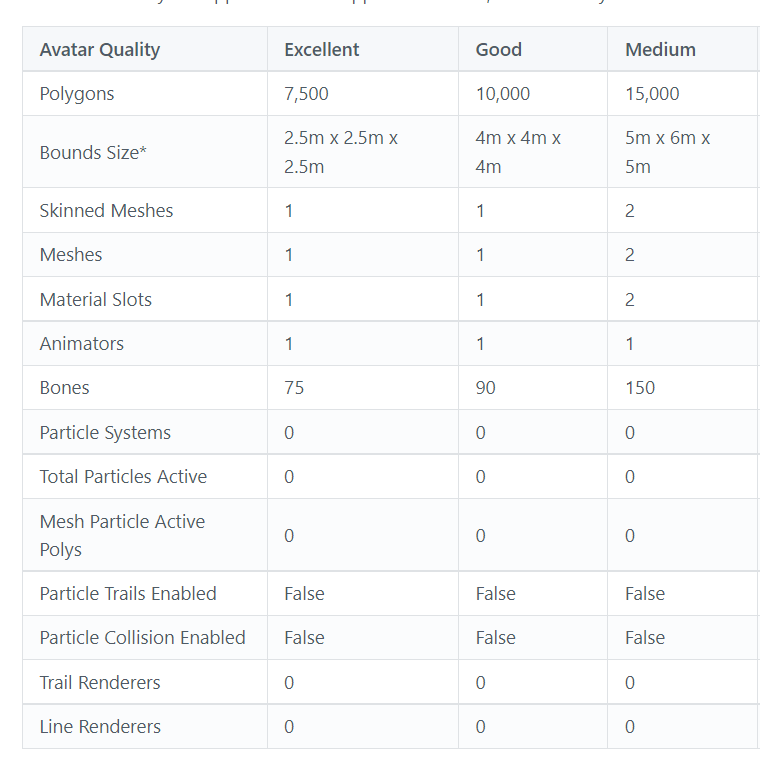
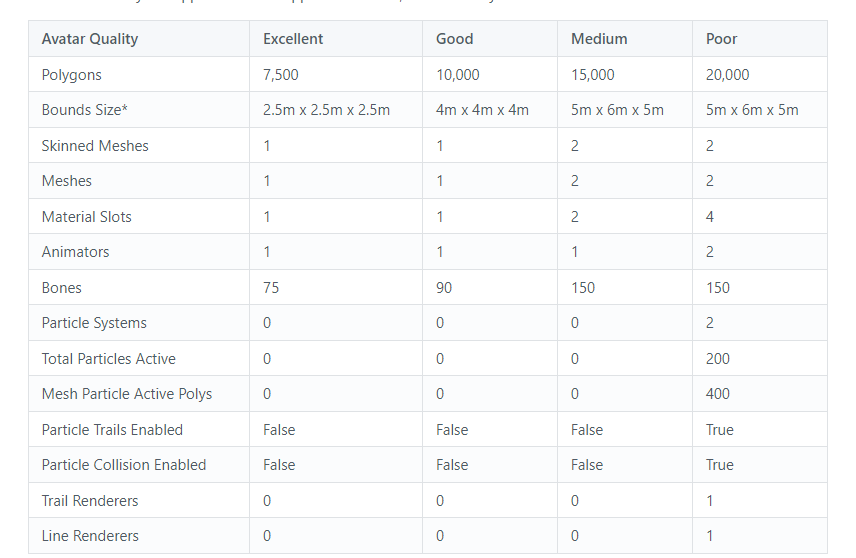
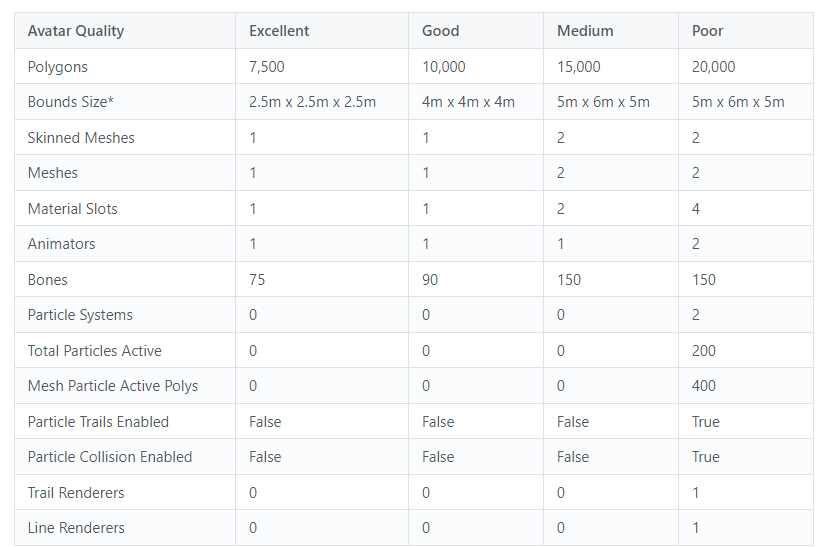
20000 before you're very poor
VRChat
The Avatar Performance Ranking System allows you to see how much a user's avatar is affecting performance via analysis of the components on that user's avatar. You can also use it on yourself to see how performant your avatar is. This system is provided to inform users what is likely the most perfor...
 heady smelt
too many
can't do it

this is not quest friendly at all
can't desolve without fking up textures
 raw plover
heady smelt
this is not quest friendly at all
raw plover
heady smelt
this is not quest friendly at all
Decimate the faces
Reduce bones
Compress the textures
Try to crunch them too
And yeah. You can just add a basic quest 2 support by changing the shaders to the VRchat/mobile/standart or toonlit. That's it
Your avatar will not show by default, but if they want, they can enable it and see it

 crisp ermine

 buoyant holly

A (semi) brief introduction to fallback avatars for VRChat, aimed at intermediate creators.
Resources In This Video:
https://docs.vrchat.com/docs/avatar-fallback-system
https://github.com/absolute-quantum/cats-blender-plugin
My Links:
https://www.tiktok.com/@chimericcurios
https://twitter.com/ChimericCurios
https://chimericcurios.booth.pm
Mus...
vrchat cats has a tool that can spit out like a quest optimized Avatar and a couple of clicks
nova hornet
heady smelt
whaa.
Use PumkinsTools to copy stuff from the PC one to the new Quest FBX
nova hornet
buoyant holly
vrchat cats has a tool that can spit out like a quest optimized Avatar and a cou...
There's also Polytool on Gumroad but it doesn't work as well on Anime/Human avatars
 ebon kite
anyone have advice on how to use the latest version of CATS' atlas feature? I've tried using it a few times but it just seems to break the model.
more specifically, how to use this menu:

All I really want to do is have atlas groups for
1)skin
2)eyes
3)shirt
4)everything else
nova hornet
ebon kite
anyone have advice on how to use the latest version of CATS' atlas feature? I've...
What ever is checkmarked will be saved to an atlas
so just checkmark all the skin then "Save Atlas to" etc
Though I highly recommend learning how to manually atlas stuff especially with VRoid models
ebon kite
nova hornet
What ever is checkmarked will be saved to an atlas
so just checkmark all the ski...
thanks! do you know any good guides on how to manually atlas?
also why is it better to manually atlas?
ruby isle
ebon kite
also why is it better to manually atlas?
VRoid textures even up having a LOT of empty space in the texture. If you automatically atlas them with Cats, that empty space will still be there and as a result you'll end up with huge files. Manually atlasing takes some effort so you'll need to find some tutorials or something, but it allows you to utilize the empty space for other textures and results in smaller files and better quality
heady smelt
nova hornet
Use PumkinsTools to copy stuff from the PC one to the new Quest FBX
Pumpkin tools?
 nimble kindle
you could always just upload the quest version as a test avatar for PC
nimble kindle
well.. that’s how you would see how the quest version looks ingame?
with the quest version of your avatar, just keep your unity platform on windows instead of android, then locally test the avatar
it’ll look exactly the same as it would on quest, the mobile shaders work on the windows build
nimble kindle
🤔
fallow pendant
anyone know how i can combine all of my hair bones into one bone without screwing up the weight painting?
stray tangle
fallow pendant
anyone know how i can combine all of my hair bones into one bone without screwin...
use CATS to merge the bones
rather than just deleting the bones
nova hornet
heady smelt
Pumpkin tools?
GitHub
A toolbox for easily setting up VRChat avatars in Unity. Adds functionality to the editor and automates some of the tedious tasks. - rurre/PumkinsAvatarTools
nova hornet
ebon kite
thanks! do you know any good guides on how to manually atlas?
Not a guide but a useful tool
https://amanbairwal.gumroad.com/l/TransferImages?recommended_by=library
Doesn't do margins but they did make one that does if you want me to send it
If you need help with the tool lmk

Gumroad
My All-In-One RanTools (and P-Cutter) Addon is at flat 20% OFF using the code 'newyear' . You can check it out here:https://amanbairwal.gumroad.com/l/rantoolsTransfer Images is a free Blender Addon that allows you to transfer images from one UV map to another UV map in just a few Clicks.Free Script Sundays E03 - 'Transfer Images':Usage:> In Shad...
 coarse vine
ebon kite
thanks! do you know any good guides on how to manually atlas?
coarse vine
ebon kite
thanks! do you know any good guides on how to manually atlas?
https://docs.google.com/document/d/13-LzjODZ0RbBooAOK5uszoIuvb8yfy4vYxwXsaDdZZg/mobilebasic
Here's a guide for manually atlasing on blender I've used before, worked pretty well for me.
ebon kite
nova hornet
Not a guide but a useful tool
https://amanbairwal.gumroad.com/l/TransferImages?r...
Thanks. I'll take a look and try it out tomorrow
ebon kite
coarse vine
https://docs.google.com/document/d/13-LzjODZ0RbBooAOK5uszoIuvb8yfy4vYxwXsaDdZZg/...
This looks really useful. Thank you
 buoyant geode
im trying to optimize my avatar because its over the 10mb limit for quest, and i deleted some assets and it went from 10.8mbs to 16mb somehow, does anyone know how to fix this?
heady smelt
nova hornet
https://github.com/rurre/PumkinsAvatarTools/releases
isn't this glitchy
nova hornet
heady smelt
isn't this glitchy
Haven't had any issues with it personally
 solemn bough
Is there a more optimized way to handle this than these skinned mesh renders?
Its not required to be much more than working, but I'd like it to be above "verypoor"
 stray tangle
solemn bough
Is there a more optimized way to handle this than these skinned mesh renders?
It...
stray tangle
solemn bough
Is there a more optimized way to handle this than these skinned mesh renders?
It...
bring that into blender and fix it
can't do much about it in Unity lol, it's a game engine, not a 3D modeling program
solemn bough
well, what in blender do I need to do? I dont really know a better way than the current method
stray tangle
well first, can any of those meshes be removed?
if they aren't needed, might aswell start by removing them
solemn bough
All of these are supposed to be toggleable, as they're the entire outfits of the player characters in the game
I could make them all seperate, but thats a lot more work over time.
I just want a good "super customizable" one that shows off everything.
If I was to merge all of these, how in gods name do I toggle them?
 stray tangle
do you really need every piece to be individually toggleable? what if you had certain "outfits" instead
like all of the snow gear as one mesh
solemn bough
its probably the better long term option...
buoyant holly
and you'd probably want to make some texture atlases
like all of the snow gear on one texture
solemn bough
solemn bough
Is there a more optimized way to handle this than these skinned mesh renders?
It...
in this one I did at least
its a far better optimization than it was before, which was a mess.
and the cats plugin link to the auto-texture-atlaser or whatever it was kinda is dea.d
ah well customized outfits are a no-go I guess.
buoyant holly
well I suppose you could try combining pieces to get under very poor
mostly just focusing on not being very poor because there is a resource cap to poor can tell at a glance you're not outrageously unoptimized
we're as very poor could be like one over the limit or like 1,000
solemn bough
I'll just focus on skinned mesh renders for now and make just outfits toggleable.
 mellow parrot
Hi, Im trying to change a shader so that i can use an avatar i found on quest, but it wont let me. Anyone know how to fix?

 mossy cargo
solemn bough
and the cats plugin link to the auto-texture-atlaser or whatever it was kinda is...
mossy cargo
solemn bough
and the cats plugin link to the auto-texture-atlaser or whatever it was kinda is...
use blender 2.9, you can get it through the betas on steam or manually download older versions with a bit of googling. CATS hasn't been updated for 3.0
you can export an fbx from your current project and then import it into 2.9. the blend file wont work on previous versions
onyx harness
mellow parrot
Hi, Im trying to change a shader so that i can use an avatar i found on quest, b...
Either export the materials from the fbx import settings or create a new material and apply it over this one.
You can’t edit the materials whilst they’re embedded afaik
 fickle atlas
how to combine materials without breaking the model’s uv mapping?
i have 13 mat slots/13 unique textures, and admittedly i don’t remember how to do it on a pre-existing mesh
buoyant holly

Have any questions ask away
In this video I will be going over how to install addons like cats/material combiner then going over how to make a atlas for your avatar.
blender 2.91.2
LINKS:
blender https://www.blender.org/download/
cats-blender-plugin https://github.com/GiveMeAllYourCats/cats-blender-plugin
material-combiner-addon http...

1:50 tutorial starts
I say I found the add on, but in reality I was banging my head into a wall trying to atlas and my friend said "just use this"
TexTools
https://github.com/SavMartin/TexTools-Blender/releases/tag/v1.4.4
UVPackmaster
https://uvpackmaster.com/uvpackmaster-for-blender/
I would appreciate a follow social media. @mcphersonsound ...
videos that show two different methods for doing it
fickle atlas
thanks. didn’t know how folks did it nowadays
buoyant holly
the first method is a bit faster but has less efficient to texture packing but the second one is a bit more manual so you can get everything stacked efficiently
fickle atlas
will probably use the manual way then 👍
buoyant holly
example of what I meant by the inefficient packing as because that's small little texture exist it generates all that empty space on the right because it can only operate by rearranging tiles https://i.gyazo.com/dacedae0ed0ce4603b5bc75824e226f4.png
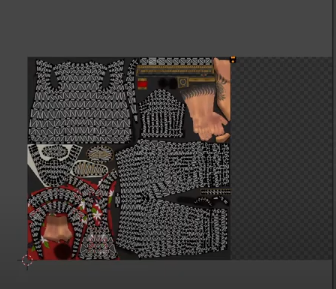
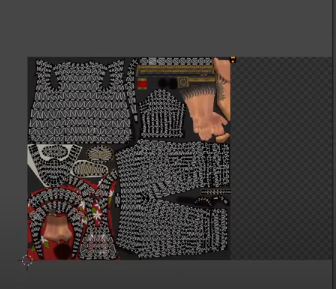
the first method
fickle atlas
couldn’t you just crop it, assuming the texture exports with all of that empty space?
buoyant holly
you would still have to adjust the uv to fit the new texture space if you cropped it
like yeah the appropriate thing to do would just be relocate that small texture to somewhere empty on the big textures and relocate it uy
fickle atlas
i see i see
buoyant holly
hope your texture combining goes well
 keen rain
as i did not want to use cloth physics i used some physbones to simulate cloth however i did not want to use too many and now the mesh is clipping through the body. is there a better way to fix this or do i need to pepper the plane with physbones?
im asking it this way since atm the bones are just moving past the colliders and not stopping because of it. also, how would i connect these rows of physbones? im having them in a cape and wouldnt it cause problems if one row stays way back because of an arm and the other row swings the whole way forward?
ruby isle
keen rain
as i did not want to use cloth physics i used some physbones to simulate cloth h...
Skirts should never be made out of bones if you want to avoid clipping. There is no way to avoid clipping with bones. Cloth is your best bet really
keen rain
cape and coat, not skirt but when doing it with bones what would be the best way?
ruby isle
Well for physbones you can create a plane collider for the body
ruby isle
That's the tradeoff you need to make with bones. Sacrificing accuracy
keen rain
but bones will be the only way to make it quest compatible
how many cloth simulations are allowed? for pc?
ruby isle
200 verts is Very Poor
radiant shadow
201 is, 200 poor (have one with 199)
been testing to replace cloth with physbone stuff ,it was .eeeeeeehhh
coarse vine
Is there any problems with using a texture that's halfway between 1k and 2k?
proper grail
If its not a power of two, it gets stretched or squished to be
coarse vine
proper grail
If its not a power of two, it gets stretched or squished to be
That would cause issues then. Thanks for the heads up!
buoyant holly
coarse vine
Is there any problems with using a texture that's halfway between 1k and 2k?
if it helps the texture can be a rectangle that's still a power of 2 so 1024 x 2048 is a valid power of 2 texture
keen rain
for props, is it more efficient to have them on your main mesh as separate layers and enable/disable them this way or is it better to move them to its own mesh and hide/unhide it there?