#avatar-optimization
1 messages · Page 51 of 1
 wet hornet
 regal drift
Yes, most definitely, there is one of a submarine but it's currently a placeholder and the submarine just float spast
I'm going to use a 3d Reconstruction software to make a model submarine I'm going to create IRL of a K 278 to replace the Akula one I have rn
Already ordered the set haha
wet hornet
Nice, nice. Ok, for making the actual file size smaller, select all of the textures that your avatar uses for animations, body, etc... and on the import settings near the bottom, make sure that the compression quality is set to normal and then enable crunch compression and keep them at 50, then hit apply. Might take a second for them to go through, but it'll greatly help the size of it. If there's any textures that just look horribly bad because of this, just up the compression on those ones to like 75 or something. Any compression is better than none
You can do them all individually or try to select them all at once whatever's easiest
regal drift
Thank you! ^_^
wet hornet
If that doesn't help that much in regards to file-size, then it goes beyond my realm of help
But hell I used this method on a world of mine and almost halved the download size and made uploading my avatars a lot faster, so if anything it'll help a little
regal drift
Yeah, thank you! ^_^ And may I ask, what websites would be good to upload it too? And how would I go about doing it? Deviantart maybe?
wet hornet
Uploading straight into VRChat marking the avatar as public is the easiest. Making a simple world with an avatar pedestal, tagging it as an avatar world is probably the easiest way to get people to use it. I don't know of any websites specifically where it would be good to upload a VRChat-specific avatar, but DeviantArt would definitely be one of the first places I thought about.
 supple reef
Out of curiosity, how much does Audio affect avatar optimization?
Like do too many audio sources make it go into the orange?
 zenith plaza
@supple reef if you have more than 4 audio sources you go to medium performance 
supple reef
Ah, thanks for the heads-up.
 heady smelt
do normal maps work for avatars? do they work WELL?
 cerulean holly
Depends on a world, on some you can't really see normal map details but with right lighting it looks good
heady smelt
so if the world is made properly it looks good. but other than that it will look like garbage?
 jovial grail
Depends on the shader
And how it uses the normal maps
Normal maps affect how light appears to bounce off surfaces afaik so if there's no lights or shadows it won't do anything
heady smelt
I understand that. If my environment is dark I want my avatar to reflect that. but sometimes with normal maps it just looks freakin weird.
cerulean holly
Yup, normal maps don't look so good in dark environments
 hoary juniper
That's not how it works
cerulean holly
Not sure how other shaders look like with normal map but if you try to put normal map with standard shader* from object that is much higher poly (like after subdivision) it may look like it is inside of a glass
hoary juniper
Dark or light doesn't affect the normal map
It's the normal map that affects the lighting
The normal map shifts the lighting one way or the other, so if you see weird artifacts, that means your normal map is going too far
heady smelt
ok im trying to make a 70k avatar look like a 21k avatar using a normal map to add sculpted details. can I do that in vrchat and not have it look like crap? yes or no
cerulean holly
If geometry isn't much different then yes. Actually scratch that. I haven't sculpt anything so I shouldn't be answering that
I only had some engravings and extrusions added to armor and I removed some edge loops for clothing and only got it on normal map so I could save on poly count
You probably want to sculpt a face with lots of details on high poly and have pretty basic low poly face mesh
hoary juniper
Maybe they got the polygon count backwards?
 graceful vine
Sound like it
 pure bridge

i just optimized a TDA bse 🤡
one material, one texture, eye tracking and visemes set up, full body ready-ish
 buoyant holly
cool
 thin trail
Does anyone happen to have a female elf tda model resource?
 shut sequoia
you could always find some elf ears and add them
 split hound
@thin trail consider not using TDA. https://booth.pm/en/items/1197108 is CC:BY 4.0 (meaning completely free to use) and has two kinds of elf ears, and normal ears too.

★★★ 2A-7用アイテム ★★★ ■ VRC用メカ外装「NK-2(ニクツ)」(われもの注意 様の作成) https://booth.pm/ja/items/1570497 ■ 2a7s用着せ替えメイド服(えくれあ 様の作成) https://booth.pm/ja/items/1437043 ■ ビ...
pure bridge
@thin trail if u have to use TDA, dm me cuz i have an optimized base ready for vrchat if you really need / want it. ready-ish for full body and already has eye tracking / visemes set up. that being said, i still highly implore that you listen to Lhun and try out the base above
there's also Shapell on booth if i can find the link

 calm spade
Are you using an add-on ?
pure bridge
noooope
also just learned that i need to be following the shapes of the mesh so i can use less quads instead of trying to grid everything resulting in high and low detail areas (aaaaa) so i need tto re-do the chest and shoulder tomorrow to try and curb those..triangle snakes..or whatever that is
basically i made / shrinkwrapped a really basic sweater, set up snapping, mirror, and shrinkwrap on a plane and just started from there
heady smelt
shader issue. Why does my shader look like this. Im using a TF2 shader
 teal knot
@lament garden hello o/ I just read your manual texture atlas tutorial on VRcat, thanks for a great write-up! A couple of weeks ago I started played around with baking texture atlas' in 2.8 using the same technique, but I ran into an issue where, if any of the textures use alpha transparency, the alpha is instead written as black when baking the diffuse map. This makes the transparent parts look terrible if actually used as such. Did you encounter this issue, or do you know if there's a way to fix it?
 lament garden
@teal knot Im glad i could be of some help! For transparent objects the current solution is to bake those items onto a separate texture!
^ this is your answer here
teal knot
Hm, right, converting the pure black to fully transparent in an image editor. But what about partially transparent pixels? I can't remember quite what the diffuse bake does to those...
lament garden
so for things like that i'd recommend editing the transparency post bake
otherwise you're probably going to have to know a little bit more about the nodes that are in play here
teal knot
I guess there's not much choice :( oh well, thanks for the help! One would think that Blender would want to support transparency in diffuse baking to appeal to games developers. I read some reports that it's possible when baking with the old internal renderer in Blender 2.79 and older instead of cycles...
lament garden
oh baking with transparency was much easier in 2.79
teal knot
You think there's another way? I've been trying to learn more about the baking process and how the node setup affects it, but it's hard to find resources on it honestly
lament garden
texture atlas add on just covered it all
i'll have to do some research i've been meaning to do it just haven't gotten around to it
Plus i was expecting Shanie to release a video on the same topic XD
i guess it is also still in the works!
teal knot
I searched the Blender issue tracker to see if someone had reported it as a bug, and while I found some tickets that seemed like they could be relevant, I didn't find anything that was spot on. So my guess is... either 1) it is possible somehow, or 2) Blender considers it an enhancement and not a bug, so it's not appropriate for the issue tracker, or 3) it's a bug and no-one reported it yet
lament garden
You think it would be much easier to find solution but literally everything you don't want pops up when you search for it
teal knot
yeah :(
pure bridge
first genuine attempt
meh
okay ish ig except for my triangle cheating
now to end my life and make a mobile version
buoyant holly
if you're not planning to use the subdivision modifier on it there's nothing wrong with triangle cheating
 buoyant holly
yay that's a lot less triangles
 gritty cairn
i just wanna know if anyone can add bones to this avatar for me just the normal bones nothing big pm or dm me please
heady smelt
You can commission someone to weight paint/rig the model for you in vrctraders.
 pale tide
i finished my avatar all i need to do is publish it. but i can't can someone help me?
 safe swift
check if you have Chest and Neck mapped in humanoid rig
pale tide
is it called "Upper Chest"
 tranquil crag
@pale tide You need to have the Chest object assigned to the Chest bone. Same for Spine, Neck and Head. Leave Upper Chest empty!
pale tide
like this? i believe it's wrong
safe swift
spine in spine, chest in chest
pale tide
ok
graceful vine
@heady smelt A tf2 shader as in ripped from tf2 and put in unity, or a ported shader?
 marsh trail
I found this but i'm unsure if it's what's being used
https://wiki.unity3d.com/index.php/TeamFortress2Shader
 random flare
The issue is so general it might even be working correctly for all we know
Was the shader made for vrchat? If not it might have scripts running in tha back which is not possible in vrc
heady smelt
@graceful vine
marsh trail
Shader header says it was made with shaderforge, so i suppose it's an attempted recreation
heady smelt
yes its a recreation.
random flare
How does the lighting gradient look like?
 ocean anchor
So when i run my model through the VR SDK in unity, it claims my model has 2,147,483,647 polys (Max INT) value, which is completely wrong as Unity itself will say that the model only has 1800~ polys. Has anyone encountered this issue before? Have tried reinstalling both Unity and the SDK, as well as reimporting the model.
heady smelt
Are you on the right version of unity, I hear thats usually the issue
 cursive nebula
is it OK like have 9 or 10 materials in my avatar?
cerulean holly
Yup, not ideal but it is ok
 tall lichen
Aight so my situation is that I have literally no experience with 3D animation and model editing or creation. I know that a furret model exists somewhere in game, but none of them work with quest. My theory is that if you replaced the model with the furret from Pokemon Go, instead of wherever the other model was pulled/created, and kept all the same animations, it would work. I need someone to do that, if that's possible
heady smelt
If you want something commissioned try vrctraders
tall lichen
And if I'm broke? Lol
buoyant holly
learn how to use blender
tall lichen
Welp
marsh trail
The furret would need to be uploaded for quest, as far as i recall its polycount is low so switching it out for the GO counterpart won't be useful
If it's not on Quest, it simply wasn't uploaded for it
cursive nebula
do I must create Atlas for combine all the meterials in avatar? or is ok to have 10~12 meterials
marsh trail
General thing, it's "ok" to have virtually anything, but if you want to optimize an avatar or perhaps your avatar is lagging other users, you should atleast consider doing such
@cursive nebula
cursive nebula
I haven't seen anyone saying my avatar is lagging but I hate the error messages warnning me every time upload new.:(
and I when I trying to create meme avatar, it get me start with warning...
marsh trail
You can optimize it if the warnings bother you aswell, it's all about what you want to do at the end of the day
cursive nebula
but if I optimize it I can't apply shades or props what I wants
looping Dilemma...
")
 solid smelt
If you are worried about being optimized and also having all your stuff then its probably best to have two versions
buoyant holly
yes that way you can save the unoptimized version for dinner parties with couple of friends
 smoky lantern
@solid smelt Serious question. Ever heard of IK driven chains for dynamic hair?
A single dynamic bone with gravity at the end of your hair chain and then use some IK script on the chain targeting that single dynamic bone.
Wonder if that's cheaper than having an entire chain as dynamic bones.
buoyant holly
yeah but no scripting so we couldn't do that if we wanted to
smoky lantern
@buoyant holly Lol Silly, Final IK is whitelisted.
buoyant holly
okay good to know
solid smelt
I doubt it is cheaper if you actually care about optimization @smoky lantern. However youll be able to "cheat" around the performance blocking stuff
For example the performance blocker doesn't care about my Final IK on the spider but it still takes 1-0.8ms in the editor to run everything
so the performance hit is there its just not seen by VRC. If youre really interested I would do a profiler comparison between the two set ups
smoky lantern
@solid smelt lol Your entire spider versus a single aim IK chain though?
solid smelt
Well it depends on how many chains you do. You could easily match how many components im using
which is technically around 10 or so
smoky lantern
But 4 VR IK versus 4 aim IK even. 🤔
😂
I have my current project at around .4-.6, for now.
solid smelt
Well I dont know how much each component eats up ms wise so its all guess work. My VRIK is on LOD 1 and grounder is using fastest so its as good as it gets for me
smoky lantern
Using tricky aim IK with DB. Not in the way I described though. An example is the last gif I posted in #development-advanced.
Halp, btw.
It broked.
Back to work though!
solid smelt
lol let me read up
pure bridge
4 materials to one
still unsatisfied with shadows
dunno if i should start testing a load of things amongst a shitload of shaders or if i should sit my head down and mess around with normals more
calm spade
try other ramps ?
pure bridge
no the colors and raamps are good
i just dont like the shape of the shadows
im still learning how to git better at shadows
but like
at least im okayish at 3d modeli ng and sculpting enough to start fucking with normal maps and vertex normals to manipulate the shadows
the idea is to make pretty low poly meshes and then i might just make normal maps every time i want them to have better shadows, for toon shading
my end result is nice, curvy, cylindrical shadows like this:
is what i wanna aim for
calm spade
yeah, that'd require a smooth mesh as well then
pure bridge
well i am gonna make it somewhat smooth so it looks convincing ^ ^`
wouldnt wanna paint shadows on like 6 quads with no edge loops
my first sweater model was 2.5k tris, i wanna see if i can make my next below 1.5k
for reference
next one i work on will look somewhat like that, less folds and more defined, "inflated" or slim curves
where i see fit
then a high detail, really smooth and
ehhhh
idk, cylindrical? bubbly? inflated?
im basically gonna make like a ballon-puppet version of any mesh i work on to get the look i desire
and see how that works
 random sparrow
does higher poly make much od a difference in preformance?
calm spade
yes
pure bridge
yes. for whatever reason there's a meme amongst vrchatters that high tri counts dont matter but its pretty 🤡 🤡 🤡
if youre really unsure then run the unity profiler for your content
triangles, drawcalls, materials and meshes will readily bite your system in the ass if youre not careful
buoyant holly
yeah as you have to consider the effects of okay what if all the avatars in the room are equally as bad with all that
shut sequoia
Even looking at the profiler, tricount's effect is laughably negligible
smoky lantern
Tri count only matters in regards to constantly active shapekeys once your tris pass a certain threshold, and that's only a bug.
Unless you're an absolute ass about it. Pardon the language.
buoyant holly
yeah the being an absolute ass about it is why I find folk saying it doesn't matter to be a bit of a problem
like sure I can put a million triangles on an avatar if you take Triangle doesn't matter to literally
smoky lantern
I think my absolute hard cut-off is probably a couple hundred K. And it's always been there for me. My perf isn't hurt by rendering a few million. It's literally everything else that's added to that tri count.
Like an unoptimized light for example.
buoyant holly
yeah but you're probably going to be in a world of hurt if everyone has a million tri Avatar
smoky lantern
lol I've shared an instance full of excessively detailed android girls and I'm fine.
buoyant holly
question 2D or VR
smoky lantern
Like over a dozen avatars over 200k. It's a matter of other aspects.
VR. Index. A bit more demanding than most headsets.
buoyant holly
glad that worked well for you
smoky lantern
Before stats, it worked well for more than realized it.
Glad DB limiter exists now. Oh wait, that's actually expensive for performance to have on anyway.
But yeah, majority of the time it was things like materials or DB.
Because before the public world shaming and avatar stats, people had 0 reasons to be forced to be considerate regarding those.
 timid bridge
@pale tide I got the exactly same problem have you figured out how to fix it yet?
 dense crane
anyone got any advice for how to make sure that the avatars feet arent clipping through the ground completely
shut sequoia
https://youtu.be/td3JXwlnww0 just learn to do it yourself, that's also not an optimization question but here ya go anyway

This Tutorial with teach you how to create face gestures using MMDs pre made blendshapes. This also goes over the Custom Override Feature.
https://www.twitch.tv/kareeda
https://www.patreon.com/Kareeda
https://twitter.com/TheKareeda
Join My Community Discord @ http://discord....
heady smelt
what if your avatar doent have fingers
Then you make fake fingers, otherwise you won't be allowed to use the humanoid rig and animations
shut sequoia
If you have fake fingers (finger bones) then you can just ignore the part about fingers
and just do the gesture and place them under the corresponding emote slot
smoky lantern
Or have Index and never animate fingers agaaain.
I lied. I still have to do it for public avatars.
random sparrow
what is the biggest recromended size for a single texture material?
 ember surge
U can go as high as 8k
random sparrow
ty
ember surge
Oh looky who here
safe swift
make sure to set high quality and crunch compress it to 100
random sparrow
i'll keep that in mind
pure bridge
for most avatars, though, 2k is a comfortable size
for quest, drop it to less than 1k
if your avatar is flat colored, take advantage of UV "palette" textures like this:
my example doewsnt exist nooo
so i cant find the texture for this anymore but this avatar's texture is literally 8px by 4px or something like that
each pixel is a different color
UVs are selectively placed over the relevant pixel that is needed
if your emaking really toonish quest avatars or toonish avatars in general, that technique can be pretty handy for ultimate memory optimization
since textures are often heavy-hitters in avatar size
random sparrow
Is it more optimized to make weapons small shape key bones in the body or separate models in unity that’s stacked in the armature?
calm spade
It's better for it to be part of the main model and hidden through an animation rather than its own object
random sparrow
Was hopping so, I could atlas the weapon as well
calm spade
Well if you atlas it then you can't unhide it
If it's the same material
Unless you make your UVs in a way that lets you animate it, but that's a lot more complicated
random sparrow
The material and Uv shouldn’t change? All it is moving bones and resizing bones right?
smoky lantern
If you make the weapon geometry a part of your main mesh in blender then add its atlas to the atlas of the main mesh, it should be fine to make a shapekey that hides it so long as the mesh is under 65k tris.
calm spade
Could also be a blendshape i think ?
smoky lantern
goof
calm spade
oh you suggested shapekey, yeah i think it's a good option
smoky lantern
Even if it's over 65k tris, if you set the default state of the shapekey to hidden and the active state to show, it'll be fine. There's just a bug that affects performance if you have active shapekeys on a mesh that's over 65k tris.
@random sparrow
random sparrow
Didn’t know you could set a shapekey as hidden and active
smoky lantern
@random sparrow Ah, I just mean hidden as in the shapekey being 0 and active as the shapekey being 100.
But if you want the prop hidden by default, that should be it's 0 state, not it's 100 state.
random sparrow
That type of hidden
smoky lantern
If you have the shapekey set to any value other than 0 by default it's considered an active shapekey. It's been known to affect performance if the model is over 65k to have a shapekey active at all times.
If it's not over 65k, don't worry about it too much.
random sparrow
Interesting and informative
 shrewd shell
Does anyone know how to make it so my swords are equipped
 vocal carbon
Can someone help me?
How I can make this avatar for both plateforms?
 high lark
@vocal carbon Basically you upload the quest version of your avatar, and the pc version of your avatar, to the same avatar id. That’ll make it so quest users see the version you uploaded for quest when you are in the avatar, and pc users see the version you uploaded for pc when ur in the avatar.
 tacit smelt
does the quest show avatars that has more than 5k polys?
or they all automatically blocked?
I can decimate my model to 7-8k but 5k is impossible
 karmic condor
over 7.5k is blocked by performance blocker, but can be changed to be shown by default. 10k or higher must be manually shown each time.
tacit smelt
oh so 7.5k still shows for quests?
cerulean holly
Yup
karmic condor
if you haven't look into retopogizing your models. Just decimation will make it look and bend badly.
buoyant holly
as the decimate tool doesn't take into consideration Edge loops
karmic condor
^^^ exactly.
tacit smelt
I have no idea what that is
karmic condor
edge loops loops are extra polys that allow pivots to pivot without looking bad.
buoyant holly


basically the decimate tool turns it into a random pile of triangles instead of nice squares that go left to right
tacit smelt
oh ok this English I can understand 😄
karmic condor
welcome to the rabbit hole
buoyant holly
stuff doesn't Bend good if it's a random pile of triangles
cerulean holly
also makes the mesh more difficult to modify as a bonus
buoyant holly
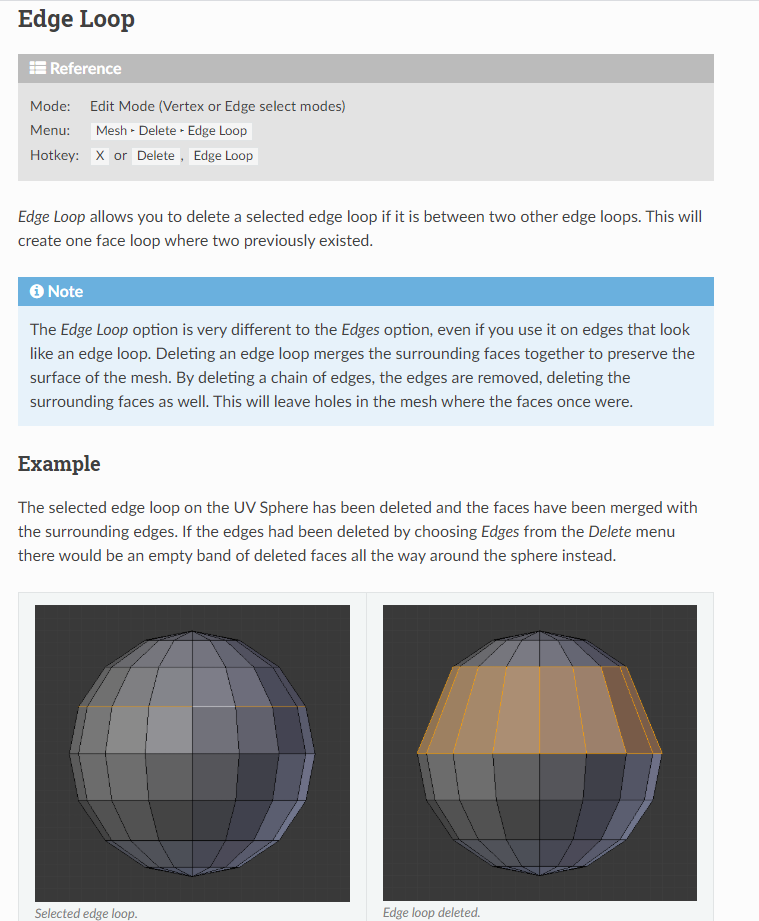
like for example with that tube I could just dissolve that Loop. Selected and make it have less polygons
buoyant holly
so honestly you might be better off to make the polygon count Lower dissolving those Edge loops
rather than trying to use the decimate tool
 tacit smelt
oh dang this is nice
buoyant holly
and you're able to select multiple edges with the edge Loop tool so you should be able to like delete every other loop on the leg for example
tacit smelt
I'm unable to select the loops for some reason
maybe Blender doesn't see them as loops
even though they look like loops
buoyant holly
mind if I see a screenshot
cerulean holly
It is because it has been already triangulated
You can untriangulate it with alt+J but mind that it may not do very good job everywhere
buoyant holly
yep as they need to be squares for the tool to work and those squares have been converted into triangles
 worldly bronze
Funfact for those that might not know:
you can decimate meshes without removing shapekeys by selecting the part you want to decimate in edit mode, then clicking Mesh>Clean Up>Decimate Geometry
tacit smelt
ty I definitely did not know this
tacit smelt
can someone help me with this
everytime I try combining materials with the atlas tool it messes up the materials that I don't want to merge
 worthy hinge
Did you uncheck materials that you want to exclude from merging?
vocal carbon
You late,sorry
 dim saddle
hello im trying to set up my dynamic bones but when i try to test nothing work
calm spade
how are you testing ?
dim saddle
via the play button from the scene
calm spade
you may have too much damping and stiffness ?
dim saddle
damping and stiffness ?
sorry i just understand what you meant by damping and stiffness i lowered both of those setting but nothing
calm spade
then maybe there's no weight paint on those bones
dim saddle
ok thanks for the help
 amber hemlock
before decimating, make a vert group that contains the entire model except for verts you don't want to decimate. then add that that vert group to the decimator and it will only decimate verts in that vert group. it's very easy to conserve detail where you want it
then you can go in and remove/add verts to that vert group and exit edit mode for a live preview, then apply the decimator when you're happy
There's a lot of alternatve ways to simply models, and people trash on the default decimator modifier a lot but it's honestly the best way to simply models if you know how to mark areas as important
 fiery snow
is there a way to import an avatar in .fbx into blender without breaking it?
calm spade
Look at the import settings and chose ones that don't break
fiery snow
didn't even realize there were import settings for cats lol. selected fbx and it worked like a charm! thanks 😛
 pine veldt
Is there a way to take your vrc avatars that you've upload and put them in gta 5?
buoyant holly
you would need the model files for the Avatar to do that
buoyant holly
I'm not quite sure as I haven't done Grand Theft Auto modding
buoyant holly
yep
 dark sigil
why is it saying that my avatar has 12k polys when i decimated it already down to 8k?
i'm guessing its only reading faces? not verts?
karmic condor
it say 12k tris right there in blender
buoyant holly
because it's counting the triangles not the vertices
dark sigil

ohhhh
so all this time i have been reading it wrong
it doesn't count face or verts, but only tris
buoyant holly
yes
dark sigil
thats funny cuz in maya they did it differently
i didn't know the word tris is another word for polygon
thanks!~
buoyant holly
technically a polygon can be made out of multiple triangles but as far as the rendering engines concerned it's all triangles
the measurement of faces is probably what you were expecting on polygons
dark sigil
yeah
buoyant holly
as a face can have more than 3 vertices
but yeah you need to bring the triangle/face countdown
 hasty zinc
i need someone to make me a avatar
heady smelt
Ask in VRCTraders in #community-servers-old
hasty zinc
ok
 thorn vale
I recently uploaded a Quest version of my avatar using the technique from the cross-platform doc page (two projects, upload to same avatar ID).
I went back to my PC project afterwards to upload an update for the PC version, but I keep getting this error. (Unpublished because I tried deleting the avatar, didn't fix it)
cerulean holly
Even if you have separate project for PC version of your avatar and another for Quest they will both change platforms so you have to change build back to PC
thorn vale
Really? Even if it says PC/Mac/Linux in the titlebar?
I'll see what I can do about changing it back then, thank you.
cerulean holly
Nah, if it says it is for PC already then something is wrong I guess
thorn vale
Before learning I needed 2 projects, I switched the first project to Android but cancelled it mid-conversion. That might have done it - I'm switching to Android then switching back to PC now
Thanks for the help ^^
cerulean holly
Thanks not deserved cos I actually didn't help you but ok 😄
 pale elm
Hi, can I add only music without animation as emote to the avatar?
 left spire
p sure you can add music and animation together
 distant osprey
I have a question about dynamic bones physics. I'm sure this question was already questioned but i cannot find it ...
I want to add gravity/force to my avatar, so when i lead forward, my hair does not point to horizon.
This works well with bones which are straight to the ground like on the sleeves but when i add it to my hair which has some angle, the hair is pulled downward.
Does anyone knows a sollution how to fix it? (I'm new at creating ...)
Thank you very much :3
solid smelt
Well its pulled downward because it has the force applied. You should mess with inert and elasticity to get your parts to act realistically or point the bones downward in blender edit mode so the force only acts on them when you move.
The second point doesn't work very well if you have a long bone chain though. I'd recommend messing the the settings and possibly creating graphs to have more advanced control
distant osprey
@solid smelt Thank you :3
smoky lantern
@distant osprey Can also give gravity a try instead. It surprises me the number of people that avoid it. You just need low values. Gravity will only kick in if you rotate the root bone of the script past a certain threshold.
Force will always be active. Gravity is only active when it passes a certain point. Very useful.
dense crane
how do i keep my models texture colours when merging the textures into one, because i have parts different colours but when i merge them together it just goes bauge.
 grave fjord
for some reason the vrchat sdk control panel wont come up so i cant upload a new avatar can someone help me with this
heady smelt
Reinstall the sdk and be sure to use the right one
zenith plaza
Also be sure to check your console for errors to see the actual problem
 heady smelt
after texture atlassing a model, how do I use a toon shader on it?
heady smelt
Click the material and change the shader.
heady smelt
thx
heady smelt
It wont let me lol even though im on PC
im clicking it option not avaliable
I can delete my own messages so 🤷♀️
marsh trail
@heady smelt you can't edit the message?
If you can edit it, you can erase the whole message whilst editing and hit enter, it will prompt to delete it
jovial grail
Could also be because ||attention|| 
heady smelt
why would I want attention from not being able to delete a message XD
anyways I see you later
also I just had to reload Discord :3 it was bugged
jovial grail
You never know 🤷🏻♂️
dense crane
anyone know how to fix this?
calm spade
Fox what ?
dense crane
?
the um origin point is behind the model and it makes it warped and not work properly...
 mellow pike
I have the same issue with my knee and leg bones
dense crane
Like the clothes are in the right position but the torso is all stringy and broke
dense crane
Ow
mellow pike
ya it happened when i added a lightning effect
it moves the bone around in play
and the cherry on the cake
heady smelt
Try to reset the components used for position/rotation/scaling
You can also drag a new model into the scene and check if he got the same issue
 mystic trout
I haven't played VRChat for a short while
Suddenly my avatar polys on the performance display spiked
I used to have around 35K polys
However, this is the thing. I made a second body for my avatar which can only be toggled from my inventory system (emotes tab)
calm spade
that also counts
calm spade
you can probably decimate the second copy to try and stay below the 70k limit
mystic trout
is there a way to do this without requiring a second body?
mystic trout
Rollthered's fire
calm spade
well, you could enable the material on you with a gesture ?
mystic trout
I could just axe the feature from my avatar considering I don't use it as often
Yeah but when I move around the gesture would disable, right?
mystic trout
emotes from the inventory system stay active
until i disable it
but finger poses, if i turn around using the artificial rotation (WMR controller)
the gesture would be interrupted
or perhaps, is there a way to use gestures to toggle it without it disappearing once I stop the gesture?
calm spade
if you toggle the gesture mode off while one is active, it'll remain on yes
mystic trout
ohhh
good idea
Removed the second body itself, not like I'm gonna use it much anyways. Hopefully can save a couple frames
from 86K to 63K, hopefully better :)
safe swift
you don't need 2nd body, can add an extra material slot and drop it there
dense crane
So I’m needing to compress my texture files into smaller numbers but when i do it they all seem to take over the entire models example: if i made an atlas for my shirt it would the take over the texture of the ski, glasses , boots, jacket and leg warmers.
Any advice how to avoid this
random flare
You can try attlasing manually
dense crane
thats what i did but it still applys the texture to every part/
random flare
Have more than one material lol
dense crane
i do
random flare
That it cant take up two materials
dense crane
fixed nvm
 sage rivet
Nothing to do with with optimization really but I just got called pretentious by a friend of a friend for suggesting that people try to optimize
Woooooo
pure bridge
does he also blame the developers for shitty vrc performance?
sage rivet
They all do
pure bridge
yeah so do i lol but thats like. 10% of the problem
all the stuff we can do now is like. 80% of optimization
which is to not have a lot of shit you dont need
buut what can you do?
thats what the safety system is for lmao
sage rivet
Yeah I'm working on my first right now and I'm aiming for medium
Maybe I should hit then with a 500k tri avatar with "beautiful" hair bones and show them how annoying they are
sage rivet
I actually want people to see my stuff though!
pure bridge
ikr
really just
most of the lag in this game can be solved by hitting "combine materials" in cats
and then fucking around with alpha settings in unity
sage rivet
Mats hardly do anything -same guy
pure bridge
mats >>>> triangles
i learned a funny funny thing a week ago
i thought that in all cases one material was one drawcall
turns out its not all
if you have real time lights
its 6 drawcalls per material
calm spade
at least one drawcall
pure bridge
rip everyone in pretty worlds
calm spade
If the world is pretty and optimized, that's alright 
pure bridge
yeah but like 20 people with 20 materials each hop in, "wah why does it run like shit"
sage rivet
I guess I just needed to vent about trying to keep myself in the constraints of "medium" when everyone I know is just beyond very poor
calm spade
Once you involve dynamic bones, it's the best you can do
 dark crow
trying to optimise the mats with Matcombiner and getting a tracebacke error
 storm ingot
if it is the utf-8 error .. keep trying and it will work after a bunch of times
@dark crow
storm ingot
go over each material and reselect the textures (try having the images in folders with regular letters (no japanese symbols etc)
having the textures in the same place as the model instead of in a separate folder also helps.
 sly widget
with the current system even hidden objects and bones count towards the overall score so it's kinda meh and i feel needs work
cus lets be honest those hidden objects don't even count if your settings stop them from appearing in the first place
😔
shut sequoia
Yup, entire system needs an overhaul
storm ingot
hidden does not mean it is not loaded into the whole scene (watch boundary break and you see that every single object and character is loaded in a scene/world but just out of sight)
solid smelt
Yeah but while a hidden mesh takes memory to remember its there or load it in at first, it does not take frames as you dont render it
marsh trail
I feel like hidden items should be listed, but performance should be measured by an actual estimate based upon what the avatar has instead of a gate on every item that when passed sets the entire performance rating of that avatar in the garbage bin, regardless of the rest of the items present
That and avatars could have a dynamic performance system (granted this would need a massive overhaul and could make it easier to make absurd public avatars or even incur a performance hit in it of itself) in which the avatars' performance would changed based upon its currently displayed items, these could be set as "flags" on runtime that would shift based upon what items are present, and if the system does indeed shift to a weighted value rather than gating, it could give rather accurate estimates of said avatars rating and would in a sense nullify avatars made to annoy others
Just an idea in the sea of many comments past
high lark
I think though in the context of performance blocking that'd be an issue
cuz if u can only load up to excellent to idk medium models for whatever reason, and someone turns into a very poor, the stuff is already being rendered, so ur comp is already taking the performance hit, and on top of that has to try and actively block out that avatar
if an avatar can suddenly load an addition 20k polys on me for some animation than id rather know about it beforehand instead of it being hidden because weeeell its not activated all the time
marsh trail
That is where the performance hit i'd imagine'd come from, though you wouldn't incur the lag of an overwhelming avatar if the system properly blocked/unblocked it accordingly, since things going over the treshold would be blocked and vice-versa
high lark
I think that'd also take vrchat understanding what exactly is being activated or unactivated at anytime
marsh trail
That's why i mentioned sort of a "flag" system, as the server'd get a input stating X is on, send request to other user, if threshold over Y then = hide
That would avoid suddenly loading something crazy to block, but it would require more server activity, which would likely cause issues, man it's though gettin' an idea that just sticks
high lark
itd also probably take longer to upload avatars and get into avatars cuz it has to take all these extra details into consideration
marsh trail
That depends actually
If it's checked on upload, it wouldn't need further inspection unless updated, but it would likely increase server load and upload times, or if it's read on runtime (on avatar load), it'd have less server impact, no upload impact, but more detrimental avatar loadings due to checkup (which could be cache'd aswell i imagine)
This is of course assuming a flag system like that is possible
high lark
I think the check on upload could take longer, cuz my assumption is that as of current, the way they check performance is basically to ask "whats under the avatar root?" and thas it
so it might need an extra step or two to go "whats here and activated and whats here and not activated"
marsh trail
I don't think that's the case actually, unless they changed the system more than i imagined
You see, before hidden items were being read by the system, enabled items would show up on it, enabling items (if i recall correctly) would display said enabled items, i think it's, or was, a constantly checking system
high lark
so like if u had a gun and it was disabled, it wouldnt read like the polys it has?
marsh trail
Though i may be misremembering, but yes, that was the case
If i am incorrect in that assesment i'd like to be corrected of course, i can't recall the old system too well myself
marsh trail
I think they implemented the checker before the performance rankings
So likely prior
It was just a way to checkup some basic avatar stats
high lark
gotcha
marsh trail
Then came performance ratings and then safety menus iirc
There was a huge shitstorm over the naming of the highest tier trust level aswell, can't recall its name even now, it was an orange color i think, right above purple in trust
high lark
Veteran?
marsh trail
Yep
high lark
Gotcha!
ive heard about that but i never understood how it was different than trusted the sequel
marsh trail
I honestly don't know why it happened, i was never fond of the trust level myself as i feel like it's not a good way to gate out users like that, even though it does detriment evil intent users that like making alts and don't know how to abuse it
There's certain variables that i feel weigh a little bloody much, let's just put it that way, since i'm taking this to #general-media levels of derailing
high lark
Ah gotcha!
marsh trail
That meaning that i'm ceasing to speak about it as my walls of text need not flood this channel, which has better uses than my usual ranting
high lark
Ok!!
I think on the optimization thing, as long as theres some level of protection so a seemingly excellent avatar cant spawn in a gajillion particles and ten meshes or anything with 0 warnin or safety, we'll be gucci
either via ur flaggin idea or how its done now or what have u
marsh trail
Yeah i'm hoping it gets both overhauled and refined in some manner, many users have requested a weighted system already, though i imagine it'd be difficult
 grim oracle
So my avatar has his eyes on his feet, and i don'T think he can crouch, how can i fix that?
random flare
Its just a small dot
grim oracle
where should i put it, in front of the eyes?
random flare
Between the eyes
grim oracle
alright attempt #2
random flare
Also you didnt answer my second question
grim oracle
well it's kermit, hes a two legged frog
random flare
Is the rig of the fbx file set to humanoid in unity?
grim oracle
how do i check
grim oracle
humanoid
grim oracle
idk, should be?
random flare
Than upload
grim oracle
seems to be, i think i did the right thing
random flare
All the bones are assigned correctly I am assuming
grim oracle
yeah
random flare
Also wrong channel
grim oracle
Well anywho it hink i got it now, so thanks xD
 glossy igloo
What's probably the best ways of lowering file sizes? The file size started from 40mb and I was able to drop it down to 11mb by making the textures 1024p PNG files, but the file needs to be lower than 10mb for it to upload
Not sure what else I can do to lower it aside from take out things I mostly need
glossy igloo
Not yet, I might try it. How much would it bring down file size, say if I crunch compressed a png that's 2 mb?
And yes, Quest uploading
glossy igloo
There's 8 for the body, then a few more if you wanna count the textures for other game objects
karmic condor
that is way to many for quest. You should try atlasing those textures into ideally 1 texture.
but yeah, crunch compress then set quality to 100 will solve the file size issue.
glossy igloo
I know I could, but I never done it before so I wanted to try other methods of lowering it first
 modest nebula
How many polys is too many polys?
karmic condor
Better would be to have 1 texture, set it atac (I think that is what it is called) 4x4 compression and get a high quality vibrant texture on quest
@modest nebula for pc <70,000 is the limit before getting the very poor avatar, on quest <10,000
glossy igloo
Most avatars for Quest can do fine when they're over 10,000, but be sure it doesn't go WAY over limit, or use particles that are too demanding
karmic condor
its nice when they are bellow that limit because users don't have to show your avatar.
glossy igloo
Okay, I got it low enough
calm spade
Most avatars cannot do fine above 10000 lol, that's why there is limits
 sick timber
Someone was using an avatar ON QUEST with 100,000 tris. They had the visitor rank though so they couldn't do much.
calm spade
report those people then, impacting user's performance like that is malicious
sick timber
It was blocked by performance settings.
 undone kernel
Hmm
undone kernel
okay I was going to go ahead and just atlas but the video I followed combined here first
undone kernel
so I think I do need the combination prior to atlas
I've got way too many material slots... rather not do stuff by hand
I think I just didn't import it correctly
 leaden hamlet
i already tried asking in the cats discord but still havent gotten a response. im not sure if the most recent update broke it or something but the atlas feature doesnt work anymore. all it does it put on texture and then a small white square for everything else. it didnt do this a day ago. the textures arent even that big.
it does it no matter what combination of materials i try.
calm spade
Recent update ? You're on Blender 2.79
calm spade
Yeah, which is meant for the newest blender versions
calm spade
It's pret much the same
You can also change the key mapping configuration to be the same as 2.79
The only big difference is that the N menu changed side, and remove doubles is called merge by distance
Aside from that, it's all the same
leaden hamlet
guess ill go do that then
karmic condor
Yeah I had the same issue a few weeks ago, update blender is the fix. Layout is the same
random flare
it really isnt
a lot of things were renamed and repositioned in the menus
so pretty much get ready to google how to find everything again
also I wanted to ask
how does one delete hierarchy in 2.8?
just like we used to be able to do in 2.7
 soft trellis
this isn't supposed to be just 1 flat color. how do I color specific faces without coloring the entire thing?
for example, coloring just this panel
calm spade
You need to select another material and hit "Apply" @soft trellis
calm spade
create a new one then ?
soft trellis
so, I've made the material. and it just colors the entire mask that 1 color.
calm spade
create two then
you'd need at least one for the mask, and another for the pieces you wanna change
soft trellis
ok
done that
I got the colors I wanted. I just don't know how to apply them to specific areas
undone kernel
CATS in 2.81 when atlas
 modest marsh
Hey, I have an avatar that looks normal in unity but when i put it in the world ppl say i have no eyes and things like that... I wonder if there is somthing with the shaders, im not sure. Any reason for this or can i Get some help please
@ me if you can help
storm ingot
@modest marsh depending on the shader you use you could turn backface culling OFF (sometimes turning Z-write off also works)
 ancient star
you dont have to use cats to combine materials @undone kernel
 still perch
better results not directly
if you manually do it you can more optimal place stuff and downscale things that dont need to be as big and thus maybe get it on a smaller texture size then tiling, which would be better. 
random flare
I do it just because it looks cleaner
still perch
on the texture image you mean?
cus on the model it shouldn't look any different since it just tiles the textures into one bigger one.
But that means you gotta keep all the wasted "dead zones" 
 native mist
How would I make a cape/skirt not look awful in Quest version? Like make the cloth stay vertical to the floor when bending forward.
still perch
This channel here is for optimizing avatar (mainly for the pc version) you propably want to ask in #avatar-quest
native mist
my bad
 gilded girder
The face on my avatar glows in the dark, should I make the entire body glow in the dark or would it look weird
Should I get rid of the face glow in the dark
Why did I write this here
pure bridge
aesthetic choices are in your hands. typically people opt for certain "materials" in the aesthetic rather than technical sense (skin, metal, fabric) to be glow in the dark only
most people opt for emissive eyes and sometimes hair
gilded girder
Yeah the eyes and hair are but idk if I should make the body or not
 torn schooner
This is probably a really simple solution but with the material combiner in blender, when I generate my atlas, several parts of my avatar lose their textures / materials
Any known fixes?
safe swift
@torn schooner could be an issues that it adds diffuse colour, select your mesh and run this script
import bpy
r,g,b = (1, 1, 1) # Set color RGB value
for o in bpy.context.selected_objects:
for slot in o.material_slots:
slot.material.diffuse_color = (r,g,b)
it will set diffuse for all materials to 1 1 1, with material combiner the diffuse gets added to texture
torn schooner
Just copy and paste that in the scipting area?
safe swift
create new text document in blender and then rightclick and Run
be sure your mesh is selected
if this doesn't fix it, then make a screenshot of your problem
 sand oak
so in the performance doc, when it says "dynamic bone components", does that mean the number of bones that are using the DB script?
jovial grail
that means dynamic bone scripts attached
sand oak
okay, so in laymans terms how many dynamic bones I use?
jovial grail
how many scripts you attach, i guess
if that's what you mean by dynamic bones
because dynamic bones could also imply bones, that are made dynamic..
heady smelt
you can attach as many script as you want
as many as you need
try to keep the bone counts as low as possible
sand oak
VRChat
The Avatar Performance Ranking System allows you to see how much a user's avatar is affecting performance via analysis of the components on that user's avatar. You can also use it on yourself to see how performant your avatar is. This system is provided to inform users what i...
heady smelt
and try to avoid colliders if possible
sand oak
"Dynamic Bone Components"
I don't speak unity so I'm not sure what a component is per se
heady smelt
dynamic bone component is the actual script that you use
sand oak
and can one script affect more than one bone? like a whole hierarchy of bones?
heady smelt
the Dynamic Bone script affect all Child of the parent bone (the one with the actual script on it)
jovial grail
All the things a game object has in the inspector are components
A transform component, a skinned mesh renderer component, a avatar descriptor component, etc
heady smelt
components are just how you add functionnality to a GameObject
sand oak
yeah, I just didn't know if you needed one DB script per bone that should be dynamic or if they can affect childbones
jovial grail
oof, that'd be hell
they affect children yes
you can see lines and spheres for each db chain
heady smelt
You basically add the component to the parent bone that you are going to use as the Root bone
sand oak
aight
heady smelt
that's why it's a good idea to make "root" bones
sand oak
thanks for explaining
heady smelt
for example
you would make a "root hair bone" that's parented to the head bone
and all the hair bones are parented to that Root bone
it's easier to set up and faster
you don't have to play around with exclusions
sand oak
would you then need a collider in the head so the hair can't clip into it as easily?
heady smelt
you can use a collider but they are extremely janky and perform very badly
so it's best to avoid them
sand oak
okay
heady smelt
you usually avoid clipping by using proper settings on the dyn bone component
sand oak
kay, guess it'll be fun when I get to play around with that
also, if I wanted to give my breasts some jiggle
would one bone be enough then?
heady smelt
better to have 2 in my experience
sand oak
or would you do 2 bones in the breasts and then one root?
heady smelt
2 bones and 1 root yeah
sand oak
and I guess you'd have to adjust the settings so they don't just sag down
heady smelt
they won't sag down if you don't use the force or gravity settings so you are good to go there
heady smelt
gravity / force is a bit weird to use
but you'll see for yourself when you test it out
jovial grail
Mess with curves until it looks right
but it's hell
and never use colliders to stop stuff, they're super janky
heady smelt
i forgot which one is which but one require super high values to do anything and one require extremely low value to affect the bones
 thin path
I am trying to optimize materials in CATS for a quest avatar can someone help me?
 unreal plover
Just run everything tru matcombiner?
thin path
I tried that
calm spade
you can def report the avatar, if it impacts performance that much then it's malicious
heady smelt
You report the creator yes
tacit smelt
ty I definitely will
 silent viper
Or you could hide very poor avatars
 granite salmon
Can someone help me with my issue with optimizing my avatar in Blender? Something keeps messing up for me in blender when I try to optimize it to create a texture atlas.
This is before creating the atlas https://gyazo.com/179b01e23f6a460c335f3217b5d04e61

VS after optimization. https://gyazo.com/abb227567e575694f7e39fb07bd39a70

I am under the 70k poly limit at just slightly above 50k, so I'm really not sure how to fix this from happening
solid smelt
You can't atlas something completely if parts are using opaque and parts are using transparent (like blush) you can atlas them but would need to seperate them afterwards.
Looks like you have the faces of your meshes flipped as well, you can select faces in edit mode and flip their normals to fix that
pure bridge
you can use cutout tho
granite salmon
If I have 6 materials as opposed to the recommended 4 from CATS, will this make a huge difference for others and myself in game?
solid smelt
Not really no. Obviously the less materials the better but 6 isn't that much.
hoary juniper
It really depends on the world and how many other people you're hanging with.
In a world with realtime directional light and shadows, you'll be rendered 6 times, and then if you open up a mirror, you'll be rendered 12 more times...
 gleaming yacht
and parts are using transparent (like blush)
You use a separate mesh for blush? 😮
solid smelt
Seperate submesh/material for blush. Parts as a word was probably too vauge but jargon confuses people more often than not
gleaming yacht
IIRC a sub-mesh is equivalent to a mesh when talking skinned meshes, performance wise. So that does not change anything about my reaction.
solid smelt
It's more optimized to have a single skinned mesh with multiple materials than multiple 1 material skinned meshes. If anything there is no choice as you can't have a single material be transparent and opaque at the same time without doing something overly complicated.
storm ingot
with various in-game tests 15 materials is about the max before the game starts affecting low end system performance (tested in black cat /great pug and mmd dance world)( 12 avatars tested with poiyomi toon shaders and silent’s cell shader) (avatars ranging from 1 atlas’d to 25 materials)
no dyn bones or particles
hoary juniper
Rather than having it be part of the skinned mesh renderer, you're arguably better off putting the blush on a seperate mesh renderer that you toggle on and off with an animation.
You save on performance because it's not a skinned mesh, and because a blush should never cast shadows or write to depth, it's only one extra draw call
Simply attach it to your head bone and you're good to go.
Incidentally, it seems like a popular strategy in Unity mobile development is to have a face mesh without any skinned bones and only shapekeys that just gets attached to the head bone. Though, I'd like to know the specifics of how that works out for VRC optimisation...
 dawn elm
I got the Unity 2017.4.28f1, and dont really know what Vrchat SDK but i have a problem with some 20K plygon-limit. How do i get rid of it, other Unity or SDK?
heady smelt
the 20k limit was removed a long time ago
if you still have that limit then you are using the wrong sdk
dawn elm
okok, so just updating the sdk will fix it?
heady smelt
yeah, download the new one through the website
dawn elm
thx dude :]
 empty geyser
is there any way to combine materials but still be able to edit individual parts of a model?
calm spade
Blender 🙂
empty geyser
Yes but how would I be able to edit specific parts of the model, when you combine materials and apply a shader, the shader will edit all the materials that were combined.
calm spade
Yeah, you're supposed to combine the parts that use the same shader
 proper grail
Some shaders come with a mask option to let you use two shaders in one. But yeah, the idea is to use the least amount of shaders
jovial grail
that's probably way more expensive than just to have 2 materials
 barren rose
hello i need help i cant upload my charecter to VRChat but my trust level is user
heady smelt
Do you have a vrc avatar descriptor component on your avatar
dawn elm
kinda deleted my old sdk from unity and then imorted the new-er one, all my dynamicBones kida got "errored". Is there something i can do to restor them?
hmm... cant even get the control ---- thingy (where you upload), the only thing that shows up is clear cache and playerpref
 novel perch
some people told me the mirror in my world was a bit lower resolution than like 1:1 reflection, but it's just the normal mirror asset from the sdk. Is there a higher resolution version of the standard mirror asset? For me it looks fine
zenith plaza
I feel like you got the wrong channel but the mirror script includes a resolution setting @novel perch
@dawn elm there is a error in your project stopping scripts from running correctly you need to check your console and fix the issue.
novel perch
oh ok thanks
dawn elm
thx 👌
 iron brook
im having treble uploading an avatar can anyone help
 white berry
so in blender i have 29.5k tris, but the vrc sdk says its like over 2 bil
any idea how to fix this?
zenith plaza
You most likely have a model that has been set to read only either the main mesh or some smaller object you've added in unity
If the sdk can't read the file properly it just goes to the max integer value possible and that happens
white berry
i just loaded it in, model only
zenith plaza
If you upload it and check the performance rating ingame what does it say
white berry
im not good with unity though. the only thing i did was make materials to replace the broken ones
pure bridge
ignore the polygon warning
zenith plaza
Something in the file is stopping unity from reading it fully
pure bridge
it will likely be interpreted correctly by the client performance thing
that number means that something went deathly wrong in the editor performance interpreter thingy (read 1's message)
white berry
one sec im gonna try to redo this and only use things i defienitely need
but i thought i did it all right
unless me loading the sdk after the model is ok
zenith plaza
Try finding the fbx inside your assets folder right click on it then "Show in Explorer" and then right click the file in your file explorer and check whether the read only is checked at the bottom
You should also set the fbx as humanoid in import settings otherwise it won't be animated as stated in the sdk
white berry
it isnt
zenith plaza
That's what it usually has been in the past but there's plenty reason what could stop unity from being able to read the file so it's a bit of a 🤷♂️ problem without seeing the project properly
zenith plaza
Yeah that's plenty errors to cause problems
Are you on the latest sdk and correct version of unity?
white berry
latest sdk and unity 2019.2.19f1
zenith plaza
Oh yeah that's the wrong version of unity then
white berry
what version do i need?
zenith plaza
2017.4.28f1 currently
white berry
thanks, i hope this works
zenith plaza
Should work a lot better at least, uploading an avatar in 2019 you wouldn't be able to use it even if you managed to upload from that version
white berry
man the future sounds rough
white berry
well i uploaded it and now im floating and t posing
zenith plaza
"You should also set the fbx as humanoid in import settings otherwise it won't be animated as stated in the sdk" as I mentioned above ^^
white berry
wait wheres import settings?
zenith plaza
Select the model in your assets in unity
empty geyser
For some reason I can't combine materials on an object I imported to blender
Like I can't generate a material list.
Anyone know how to fix?
calm spade
through the mats combiner ?
empty geyser
Yea
calm spade
is it a single object ? As all parts joined
empty geyser
It's not an avatar mind you, it's just a separate part of the avatar that has too many materials.
Yeah it's a single object and all parts are joined.
It's just a mesh
calm spade
What happens when you click the generate list ?
empty geyser
Nothing
calm spade
try to open the blender console and check there
empty geyser
How can I do that?
Ah okay I figured it out.
Gimme a sec.
Yeah nothing happens in the console either.
calm spade
also make sure you got the correct version of the addon for your blender version
empty geyser
Yep just checked, I got the latest version.
calm spade
worth asking there then https://discord.gg/cRDuWA
empty geyser
okay
empty geyser
Is there any real way to see how many Mb an avatar is before uploading?
solid smelt
Best thing to do IIRC is to export it all into a unity package without dependencies like shaders and see the size of that
empty geyser
Honestly they should implement a way to see when exporting, the size of an avatar could literally cause people to crash.
I accidently crashed a friend of mine last night when loading into one of my avatars just because (I'm guessing) the size of it was insane.
Probably over 140mb.
solid smelt
That shouldnt be that bad, just a long load. Only time I crashed someone with an avatar was with 6ish uncompressed 8K texture sheets. You can throw your avatar suggestion on the pile though, doubt anything will happen anytime soon.
Maybe theyll eventually add avatar file size to the performance settings ((((:
empty geyser
It's apparently really bad for people with bad computers. Specifically people who have non-dedicated GPUs and are running off of a really old GPU, or even a CPU-based gpu. My friend crashes every time I load in with that avatar.
Other people have no issues at all with the avatar too, so it's GOTTA be the sheer size of the avatar.
He can't even load into a world that's over 150mb anyways, so I'm almost positive it's because of the file size.
heady smelt
You can check the Avatar size before uploading btw
empty geyser
How?
heady smelt
Go through the upload process
But don't upload
It's going to write the info in the unity log
empty geyser
oh hmm okay
heady smelt
You can check it in the console or open the log file
heady smelt
😔
solid smelt
@empty geyser Looking through the console after upload under the PutSimpleFileToURL message has an aws link for where the avatar is stored. I put in the link up to "...vrca?" and it downloaded a .vrca file of what Im assuming is my avatar. The file size is just a bit smaller than what it is if I package it up into a .unitypackage
empty geyser
After upload?
I thought it was before.
Okay I'll try that.
But either way, I just tested my avatar with a crappy laptop I own, and it nearly crashed my laptop, and took forever to load in. So either way I'm going to have to optimize it a bit.
solid smelt
Yeah the link only showed up after upload because thats when it gets put into AWS
worthy hinge
@empty geyser If you build the avatar, the VRCA file is located in %LOCALAPPDATA%\Temp\DefaultCompany\[ProjectName] before uploading
empty geyser
Thanks
 sweet mason


 empty geyser
Oh my god, I just got around to checking and my avatar, before compressing it a bit, was 141mb!
pure bridge
remember to compress!
calm spade
Even with compression that's way too much
karmic condor
agreed
pure bridge
yeah how tje hell did you come up to 141mb avatar?
heady smelt
8k textures
pure bridge
that is bigger than the great pug and the black cat combined
karmic condor
they would have to manually set import setting to be 8k, maybe too many textures and long audio sources.
calm spade

empty geyser
I compressed the gifs though, it's around 50 now.
@calm spade suprisingly enough, it's actually just poor.
calm spade
Still 50mb 
empty geyser
Yeah it's a lottt still but it's still a really cool avatar too so I'm okay with that.
It's not crashing anyone anymore and it loads in within seconds now so it's much better.
solid smelt
I think I hit 300mb on one of my avatars with the gif setup but I never checked the vrca file
Compressing massive texture sheets makes them look so bad
empty geyser
yeah exactly
solid smelt
Nothing you can do. Definitely painful to turn a 5mb mp4 into 4 25mb texture sheets cuz video players are banned lol
empty geyser
Yep lol
empty geyser
Actually I just found out that it's not the gif size, but the amount of frames in the gif. @solid smelt
Late response but I just thought you should know.
solid smelt
The amount of frames in a gif is its size though? I meant size as in length or number of frames
So like a "large" gif is also a long gif as it has a lot of frames
empty geyser
Not from my experience actually.
The actual size of the gif was only 9mb
but it had over 150 frames
this can cause major lag when spawning in from my experience
It's possible to have the same amount of frames with a low file size when you compress.
solid smelt
Well its exponential with the frames and file size, I would gauge size of the final texture sheet instead of the gif size
To be honest I stopped doing the gif/texture sheet thing because its unbelievable that we have to do it that way when the video player is staring me in the face
empty geyser
I don't use texture sheets, I just import the gifs and they work without any issues.
Also in my case, gifs do work better and are much smaller in size.
 river iris
I wonder if anyone here know of this free plugin for Blender 2.8+? https://github.com/SavMartin/TexTools-Blender/releases

GitHub
TexTools is a UV and Texture tool set for 3dsMax created several years ago. This open repository will port in time several of the UV tools to Blender in python. For more information on TexTool&...
 gaunt sorrel
Heya, I'm having some trouble using atlassing for material optimization
I'm having to apply the textures to the components of the item individually instead of just applying it to the whole object
calm spade
Are all your meshes joined in blender ?
gaunt sorrel
@calm spade It doesn't appear so. Do I have to join them all manually into one mesh?
calm spade
Yep
gaunt sorrel
Gotcha. Fixed it by selecting everything and using the Join button. Just imported it into Unity and it worked like a charm, thanks!
pine veldt
how do i search all the dynamic bone colliders in the search bar in hierachy?
calm spade
t:dynamicbonecollider
heady smelt
Can you help me? I can't build the avatar. avatar creator status not yet allowed.
calm spade
No one can help you with that, you need to spend more time on VRChat
sand oak
so I assume that if my model has for instance 4 material slots, but I put the same material in all 4 slots in unity, it will still count as 4 slots in the performance stats?
 lone tiger
Yes
sand oak
dang
so I can't skip the step of having to collapse all materials I previously made for each part of clothing etc for easier texturing in substance 😐
jovial grail
It's easy to combine the slots
I think cats can combine same materials with a button (not the material combiner, simpler)
heady smelt
yep
jovial grail
Otherwise just go to edit mode, face select mode and click on one face, it will select the material that face uses (or select the material manually), then click select in the materials panel and it will select all faces with that material, then click on another material and press assign, it will add those faces to that material and the other one will remain empty
Only do that if they're using the same texture
sand oak
yeah I know it's easy to do, but it's annoying
cause it's basically a destructive process
so I guess that should be done as the very last step when I want to push the final version of the avatar and I know I'm not going to make any big changes, and before that I'll just upload it with all the material slots still in to test it in game
sand oak
nah, I care about the performance ranking
jovial grail
poi shaders usually have masks for things so you can often cut down the number of textures and materials you need for things with different settings alone
sand oak
yeah, that's what I'm using
 warped sparrow
Huh. Came back to VRChat after some time, and apparently my avatar's stats have changed? Did they change it to include disabled/toggleable items, at some point?
jovial grail
Disabled stuff's always counted yeah
warped sparrow
Geez, I must have missed that change. It tanked almost all of my avatars' performance grades.
It's a shame. The weights were already lopsided enough to deal with. x.x
Definitely think something else has happened, though. I know for a fact that I've never uploaded an avatar with 129 materials.
Maybe I need to reupload or something.
 tribal ruin
Do you have any particle systems? @warped sparrow
Each particle system is counted as a material slot
Even if the renderer is turned off
solid smelt
Can be two with trails
tribal ruin
Yeah
I know that my avatars read at like 40 materials because of my complicated particle systems
Even though my mesh will only have 1 to 6 materials
Honestly it's annoying having to tell people every time somebody comes up to me and starts shouting "atlas your sh*t"
heady smelt
just atlas then ¯_(ツ)_/¯
solid smelt
If only that was possible, even if you use a texture sheet for all your particles it still counts as seperate materials
heady smelt
no excuses
solid smelt
It's not an excuse when it's impossible lmao
tribal ruin
You can't atlas particle systems
My avatars textures are already atlased
Pay attention please
warped sparrow
Oh, wow, really? For the avatar in question, that probably is it, yeah. Man, seems like it just gets worse and worse, sometimes.
Yeah, I atlas every one of my avatar's textures. I only have more than one material for metal, so I can make it shine.
tribal ruin
Yeah, makes sense
I use standard roughness, so I can make it all one material
Because you can assign both metallic maps and roughness maps which can make cloth and shiny metal both work on the same material
A lot of people don't use PBR though, so for that, it's kind of necessary to split materials for different effects
warped sparrow
Mm. I don't know. This whole ordeal has kind of taken the wind out of my sails for getting back to work in VRChat.
tribal ruin
Understandable
Its hard to be motivated when it feels like the system is fighting you
Honestly, I've given up on caring about the avatar performance rating. I make my stuff as performant as possible, but it can't always be trusted as the final word
People still should, mind you
Especially if they don't know what's what
I appreciate the system's existence, but it hinders people who try to find creative workarounds for vrchats limited avatar functionality.
Until Avatars2.0 comes out, there's not much we can do
solid smelt
Avatar performance should always be second to what you want to do. Even if you can't get under the arbitrary limits you should optimize as much as you can.
tribal ruin
Exactly
random flare
I have 170mb big avatars and everyones fine with it lol
heady smelt
...
sand oak
I know I wuldn't be
would take like over a minute for me to download your avatar in game
if it doesn't get blocked by the performance limiter
random flare
I mean thats the kindof avatar I show for a few minutes and never use again
Like if you REALLY want to do something dont let it hold you back
hoary juniper
That would take me several minutes to download
At that point you're best off making a world
solid smelt
Showing people worlds is really disjointed, better to show them in the heat of the moment on an avatar
hoary juniper
Heat of the moment, downloading 180mb?
solid smelt
Faster than dropping a portal and separating everyone
Even if it takes a while to load at least you load it while talking instead of the brutal load screens
hoary juniper
At least a portal is consensual
solid smelt
I wouldn't be against having avatar file size be in the performance settings but I would doubt their arbitrary limits would be well placed.
heady smelt
A good limit would be hard to find but a 150mb avatar is definitely ridiculous
It's heavier than the pug
solid smelt
I wanted to check how big my largest avatar was but all my old projects refuse to open anymore. It was probably just shy of 100mb
Just some specific things take a lot of space since we have to do them in backwards ways to workaround the blacklist
random flare
Well it was an avatar with s 6 minute spritesheet
People still find it entertainig. Making it a world would defeat the purpose
 sturdy socket
I'm curios how big my ava is if I enable future proofing
random flare
I cant even upload with future proofing on lmao
smoky lantern
What were the proper settings on the Material Combiner to avoid lossy Atlasing?
Note the arch above the lashes.
You can see it in her Blush too.
Left is After, Right is Before.
warped sparrow
I'm kind of new to trails. I've got a really simple effect that uses three trails, but I'd like to combine it into one, if possible, in order to optimize. It's three trails, each with a specific color, no bells or whistles. Anyone have any ideas?

Showing what it is, if that helps.
hoary juniper
@smoky lantern What does the final texture map look like?
warped sparrow
I think I figured something out with a fancy material combination.
warped sparrow
Now... the really troublesome one.
6 Total Materials, unfortunately, but because of how VRC counts materials, that is somehow 129.
And I'm not really sure I can combine them, since these are rigidbodies and separate meshes that operate using Final IK's Aim At Script.
Might be 7 Materials, counting the particle systems.
solid smelt
Why are they separate meshes?
You can use final IK and VRC IK Followers on orphan bones all in the same rig
empty geyser
For some reason, when I go and try to save a material atlas in blender, the model loses all the materials and it's completely white.
hoary juniper
@warped sparrow When VRC says materials, it's counting each material slot on each mesh, separately. This isn't a bug. If a material is on two meshes, Unity has to render the two seperate. If a material is on two slots, Unity has to render them separately.
If you want to see your true cost, point the camera at your avatar and check the draw call count in Stats
heady smelt
Hey
I got a model from Sketchfab designed for use with VRChat
so a lot of the rigging and stuff is already done, but i'm unable to get it in game as there's too many Rigidbodies
I don't fully understand it but from what I can see every arm, leg and hand joint is a rigidbody
there's 111 of them