#avatar-optimization
1 messages · Page 49 of 1
 lusty parrot
 sonic lodge
Anyone got a river model that looks like this arm
 azure berry
Just got into edit mode and move the emote stuff back into the face @lusty parrot
lusty parrot
I manually removed it dw
 broken laurel
@lusty parrot 𝘐 𝘍𝘪𝘨𝘶𝘳𝘦𝘥 𝘠𝘰𝘶 𝘏𝘢𝘷𝘦 𝘈 𝘗𝘢𝘳𝘦𝘯𝘵𝘪𝘯𝘨 𝘗𝘳𝘰𝘣𝘭𝘦𝘮 𝘞𝘪𝘵𝘩 𝘠𝘰𝘶𝘳 𝘌𝘮𝘰𝘵𝘦𝘴 𝘐𝘯 𝘠𝘰𝘶𝘳 𝘏𝘦𝘢𝘥... 𝘠𝘰𝘶 𝘏𝘢𝘷𝘦 𝘛𝘰 𝘈𝘶𝘵𝘰𝘮𝘢𝘵𝘪𝘤 𝘞𝘦𝘪𝘨𝘩𝘵𝘴 𝘛𝘰 𝘐𝘵..
 graceful vine
Why is that all italics and every word capitalised, I thought my phone was using the wrong font for a moment
 fresh turret
who can help me with this This avatar does not contain an animation, and will not animate in VRchat
fresh turret
i dont know how i do it and tutorials dont do aniting
pls heelp
how i put on humanoid
where is select prefab
graceful vine
Is the mesh rigged
Does the avatar have a skeleton
Also we are in the wrong channel #avatar-rigging
lusty parrot
When I move my head my body moves with it.
 dusky lynx
pretty sure thats normal
 random flare
How can I create an atlas when using cycles render?
 trail folio
Does anyone have any good plug in for Blender 2.8 which helps with atlasing? Since baking it 1 material at a time is just wrong in 2.8
ofcourse I want to move UV islands manually
 pure bridge
for me, im honestly thinking about just using the cat's manual tool first and then baking from that new material
afaik ive yet to run into any materials that would lose quality if i baked them twice, and with the style that i prefer i dont think i ever will. depends on whatever you're doing though, of course
@trail folio other than what ive said, im not sure if there's a plugin out yet specifically for helping with the whole baking part
 uncut valley
anyone can help me. Its saying my avatar is to short should be shoulder of 20cm... I made it big and uploaded it to Vrchat but its unplayable Im too big
can anyone help with this please?
 safe swift
adjust viewpoint in descriptor
 radiant shell
ive got an avatar that occasionally has the camera clip through the head whenever looking directly up or down, otherwise the view point is fine
ive heard proper weight painting can help fix it but ive had no improvements so far
i guess one of my questions is if the avatar descriptor is binded to the head bone, or if its just a fixed point
 buoyant holly
you're unlikely to have any takers @crisp oyster as Avatar creation is complicated and time-consuming so most folks prefer to be compensated
buoyant holly
and don't think spamming all the Avatar channels is a great way to get answers
uncut valley
@safe swift you talking about the little ball that supposed to go in the head. just adjust that your saying?
safe swift
yes
uncut valley
@safe swift have you encountered this problem before or something?
 heady smelt
making a avatar. do normal maps display right in vr chat. sometimes I know in game maps the lighting in the room can make it look strange
Depends on what shader you're using
maya phong shaders
what shaders would you recommend?
ill send a image of my progress so you know what materials are supposed to be what.
 cerulean holly
Use standard shader
There are a few types available, use the one that has texture slots for textures you export
Those shaders are used if you want physicaly based rendering materials which is what you want in this case and yes your avatar may look strange in worlds with hard lights or it will be dark if there aren't good light sources in a world
 solid smelt
Using reros standard gives you a fallback cubemap to alleviate the problem of poor lighting in worlds
heady smelt
^^^^^^
heady smelt
k guys back with another question. since its been about 8 months since ive made an avatar. what is the preferred joint orientation?
buoyant holly

Here is how to do the elbow that the late great Paul Steed taught me when we were on tour for Autodesk. It uses only 1 bone influence per vert and looks like the arm creases. Perfect for mobile games.
Retweets
602
Likes
2406

 Twitter
 sturdy socket
Just because you did not get help does not mean the comunity is Aids and nobody helps others
A lot of peps don't have experienced your problem, so they don't know how to help
That being said, could you sent a picture of your avatar showing the viewpoint ball?
I might be able to help
Also frking freak, you are asking in the wrong dang channel you fool! Go to #avatars-2-general
Nice delete man
uncut valley
Im just frustrated as hell. Maybe yelling can get me a solution, maybe not. Been on this shit for months and just burnt. The ball is on top of my beanie.
sturdy socket
It should be between the eyes a little bit inside the head
Also what are the avatar dimensions, sometime they can import really small or really large
You can easily check by adding a cube to the world scene, it will always be 1 meter in all directions
uncut valley
imma check.
So I added the cube and it seems to be in good sizing. I rigged my armature in blender. I change the Blender units from Blender units to Centimeters. Since the error message was your "Avatar is too short should be 20cm shoulder height" I have noticed when I play VRChat I have seen microsized characters so I am assuming this a BUG from VRchats SDK package.
graceful vine
Reply in #avatars-2-general
uncut valley
@graceful vine k
 normal verge
Sooo Blender 2.8 change the entire layout and now I have no idea where everything is anymore. Does anyone know the process for doing manual texture atlasing on models for the new blender? I'm asking because I literally can't find the UV or UV bake functions anymore.
 proper grail
Be sure to make a second UV before the atlasing process. Yeah in 2.8 one can use the UV editing tab to move all the uvs at once, than bake each material to a generated image.
And its bake diffuse color
normal verge
The bake option is not there on the right side properties window. I'm guessing my blender 2.8 is missing some files or options?
normal verge
Oh it's on Evee
Now I see them, thanks.
Could perhaps tell me were the unwrap function is now?
proper grail
I uh, only know how to use blender to limited dissolve to lower tris, merge meshes to lower skinned meshes, and combine like shaders
normal verge
No problem. Thanks for the assist anyways.
 near narwhal
 marsh trail
@near narwhal decrease the amount of bones affected by dynamic bones as it states in the image
I think the maximum count is 16 for good (green)
heady smelt
Im now in the process of painting weights. before I continue Is there anything special I need to do with how my rig is set up/oriented/named to allow for this? I remember my last avatar the eye tracking wouldnt work. IDK if the plugin that helped me with it wasn't compatible with the version of blender I had or what. anyway here is a picture of my rig.
 calm spade
You most likely were using an upper chest bone, which breaks the eye tracking
heady smelt
but everything looks good with this one?
calm spade
as far as i can tell yes
heady smelt
YESh!
 feral rapids
im trying to get this avatar quest compatable but when i put the quest shaders on it does this.
supposed to look like this?
graceful vine
rule 15 & #avatar-quest
heady smelt
Hey do the lower eyelid visemes even DO anything? can I leave them out?
heady smelt
leave them empty/basis, or it will trigger whatever is in the slot when you tilt your head down
heady smelt
dont understand why it needs two blendshapes for that
solid smelt
Same reason we have separate blendshapes for blinking even though vrc just does both at the same time
heady smelt
so it uses the morph for blinking and lower eyelids to preform a blink motion?
heady smelt
ok is it ok if blend shapes effect multiple objects? I have it effecting the teeth, tongue, head etc...
solid smelt
You would have to animate the blendshape on every mesh, a single slendshape can only influence a single mesh.
Also lower eyelids are just not used, it's best to leave them blank as stated before. It's probably legacy in a sense
 forest swan
how do i select only the body on an avatar without the face? im trying to decimate in unity
solid smelt
Unity is not for mesh editing. It's best to bring the model back into blender or another model editor and decimate there. If youre hell bent on decimating in unity somehow then you would need to separate the body mesh from the face mesh IIRC
 amber ridge
@forest swan don’t decimate in unity. Use blender. There’s even tools to help, like CATS
 amber hemlock
Separate left and right blend shapes are used separately. If your avatar looks diagonally up you will see one eye open more than the other if properly set up. It looks good actually as that’s how eyes work. The eyes open up more when looking up, and close a little when looking down
It is most beneficial for sphere type eyes as that avoids the bug-eyed stare look
heady smelt
ok Idk what the deal is but the blendshapes arend freaking working. its probably something stupid. could someone take a look?
calm spade
What's all that ?
Also you can't really do visemes if your lips are stuck together
holy shit wait, you created an additional mesh for every single viseme you made
heady smelt
ok so my visemes effect 4 objects, the face, the inner mouth, tongue, upper teeth and lower teeth.
I created everything in maya. the blendshapes work perfectly over there
calm spade
Sadly that's not how blendshapes work in unity
Or in blender actually
It has to be one object, and the same mesh as Basis
 dim lake
If i use psd files as textures, they get flatten on import anyway, so size is the same as i would save it into png, but when avatar is getting uploaded does it upload psd file itself or flattened image of psd (so with reduced size)?
 hoary juniper
Neither. It converts the texture into Unity's internal format and uploads that.
dim lake
I see, so i can use psd files in project's asset folder so i can easly edit them if needed. Thanks.
 analog slate
I have a dilema related to shaders and I wonder if anyone here has ever seen anything similar to what I'm looking for.
My personal avatar has three materials at the moment:
- Body_main (toon shader with outlines)
- Body_alt (toon shader without outlines)
- Clothes (toon shader with outlines and normal map)
All of them use cubed's toon shader.
I would like to combine these three into one texture, but this is currently not possible. I can combine Body_main and Clothes, as the cubes shader supports outlines and normal maps at the same time just fine. However, I can't combine it with Body_alt as that one has no outlines (teeth look horrendous with big outlines) and I have no way of choosing which parts of the textures won't have lines (or which ones can have a transparent color).
I tried poiomi's shader (not sure if that's the exact name), which lets you add a texture file for the outlines, but unfoetunately it ignores the alpha channel (or I don't know how to make that work) so I can't make it transparent.
My avatar is pretty optimized already but it would be nice to have one single material. I'll be really grateful if someone can help me out.
 pine flame
I mean everything up to 4 is rated excellent anyways but you can at least combine two
I had some preliminary work for outlines where they can change color based on a map but no actual making them disappear in my shader
However I do distinctly remember someone talking about making outlines disappear in a single material
graceful vine
@analog slate Use a shader that supports normal maps and outlines, like Poiyomi's shader. Cubeds shader is basically deprecated now
That would get you down to atleast two materials
Depending on your tri count, you could model the outline rather than depending on the shader to handle it
analog slate
Aw, I guess that's my only option. My tri count is close to 20k, so doubling to 40k isn't that much but maybe it's better to just have two materials instead of doubling the polys. Thank you so much for the advice though!
Also, how comes cubeds is considered deprecated? Is it because the dev abandoned it or something?
graceful vine
Precisely.
 devout sequoia
is 12 materials super bad or will it not do too much?
graceful vine
In vrchat standards it's more than acceptable, videogame standards that's really bad
devout sequoia
i'd combine my materials, but the update button doesnt exist and my combiner in cats is out of date apparently.
graceful vine
Learn to do it manually 😉
devout sequoia
i would if i werent so lazy. heheh. thanks for the info though
 clever swan
Or load in Material Combiner to Blender separately
Materials for me comes down to "how many different shaders do I need to use" and group them that way. Normally it's only 3 or so at most.
 sudden zodiac
@devout sequoia This is the latest version: https://github.com/Grim-es/material-combiner-addon/archive/master.zip
Install it and then uninstall your old one
 devout moss
Hoi I want to make an avatar from scratch and I want to "study" a good model, well optimised, with good animations, joints, bones, and stuff
Any idea?
Im a perfectionnist and if I make a model and after I make it I find that I should have done something different ill go nuts so better look the "best outcome" and learn from it
If you can answer please @at me
heady smelt
does anyone know some rules of thumb when rigging for vrchat? an example of the kind of tips im looking for would be like when your arms go over your head the rig rotates the arm bone X and the shoulder bone Y. or then you look up your head is rotated X and your neck Y
 hollow loom
is this where someone tells me how to port avatar to blender?
heady smelt
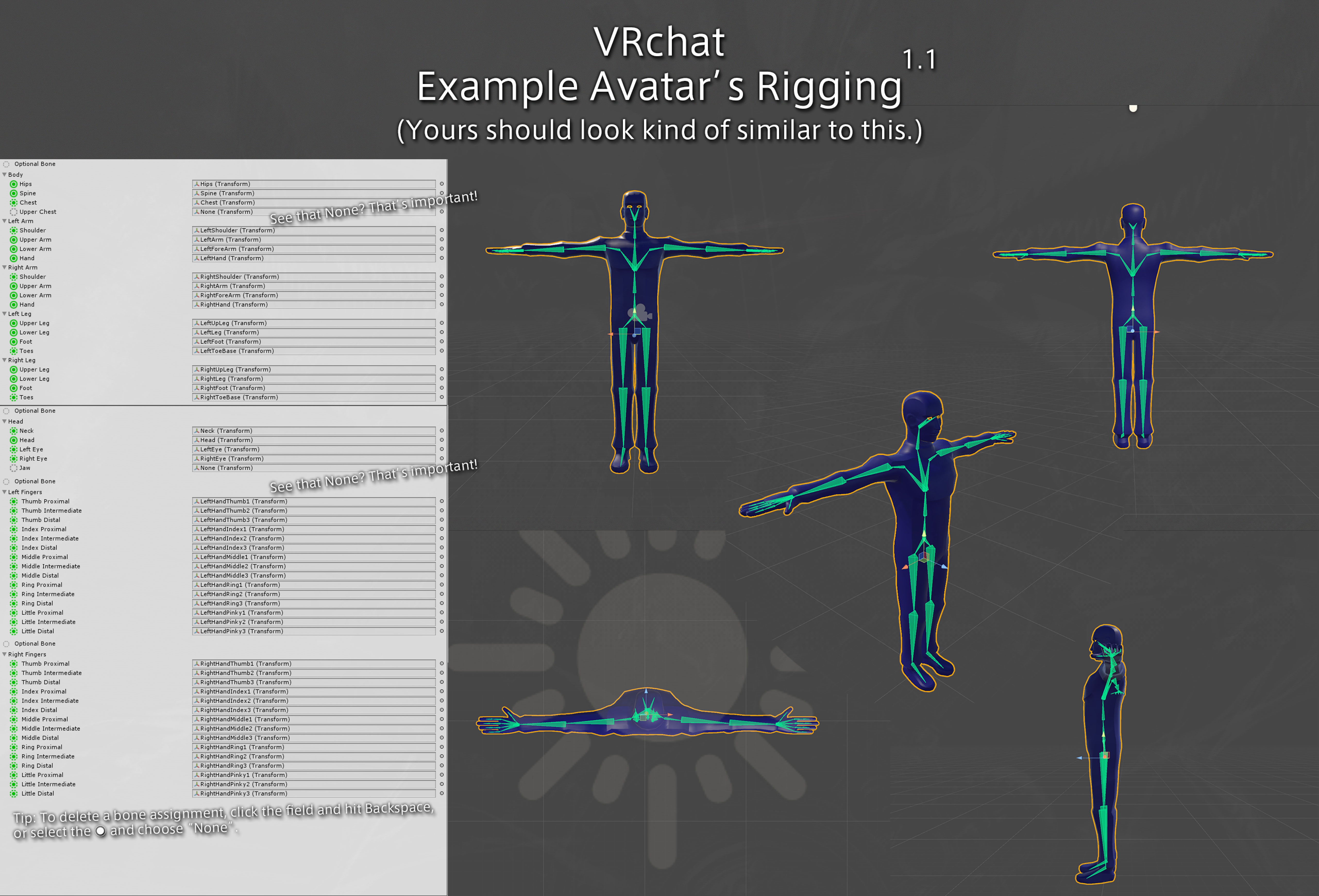
@devout moss Im the same way with my models. but there is not much to "study" if you already know basic workflow your golden. I would recommend studying the default avatar rig, and where its bones are relative to others. https://files.catbox.moe/q85jfj.jpg
 dusky cloak
Does having even 1 dynamic bone collider set your model to poor?
Nvm it's the check count not the collider itself
On a different note - what's the different between these 2 greens - one excellent and one good?
 shut sequoia
yeah
dusky cloak
Fuck it then there's no point me creating an atlas if I'm just going to have Good rating anyway
zz
shut sequoia
True
 sweet mason
1 material less then 32k(7.5k) tris, 16 transform but 8 dynamic components. So I end up medium
devout moss
@heady smelt Thanks a lot Ill start starting using the vr chat model
heady smelt
ive noticed when I extend my arm fully my arms reach past the model. is there away to allow stretching or something to the avatar
 lament garden
does anyone know how to atlas in 2.8 yet?
 jovial grail
I think that happens if your material is just a flat color
lament garden
it ignored everything and just took the flat colors XD
either way, I'd rather bake manually
lament garden

In this episode I take all the textures from the house model we did in the previous episode https://youtu.be/4c64OqXQj3Y and apply them all/bake them to one ...
this is in 2.79 but it uses nodes so i assume it'll work in 2.80
definitely not as great as the texture atlas plugin, but at least it looks like i'll have control over the uv mapping
lament garden
So i figured out how to do it without having to open the node editor
I apologize for the mess of words but this will get you an atlas that can be done manually
Texture Atlas guide for 2.8
coming soon
calm spade
@lament garden If you ever get this tutorial in image/video format, ping me and I'll pin it in this channel !
clever swan
@lament garden May be worth making a GitHub gist of it for now so that it's linkable at least.
lament garden
Hek yeah, when i get some time maybe later today I'll be sure to
heady smelt
what does leg stretch and armstretch do in muscle settings of the rig
clever swan
It's for testing what it looks like when you splay out
lament garden
@proper grail When atlasing, did you create a image node that was disconnected from everything?
heno
english
proper grail
@lament garden Yeah every material got one of these, if even one doesnt have it it seems to corrupt the diffuse color bake. Feel free to make them each their own image to layer them in gimp and export as .psd just to make things easier to edit too
lament garden
I'm writing a guide and I made the mistake of using the image in the UVeditor as the bake target
I'll be sure to mention you in the credits ^^
proper grail
Yeah its a pain when that happens, "Circular dependency in image.png" and it overwrites it. Happens when theres no generated image Or one of the textures is the highlighted/selected one
lament garden
that's exactly what happened and I was scratching my head as to why
I've learned something new
 brazen wolf
So I have a question.
lament garden
shoot
brazen wolf
Now I know how to 3D model and stuff but not in unity. How come when I see avatar performance it's always red?
Is there a way to download the avatar and redo it to make it perfect?
lament garden
Where would you be downloading it from? Unless you have it stored in your drive or have access to it from a website
If it's an avatar you've seen in-game you can ask the creator/uploader and see if they'll share their files with you
brazen wolf
Alright. Thanks.
Now one more question.
Hehm
How do you pull a model from another game? Unless I get it from a download site.
Because I need a rig
And Skelton and stuff but
I'm trying to make a Mr.X but uh.
Heh
I dunno how to add a lot of stuff 😂
graceful vine
Thats something youll have to research in your own time, its against the rules to discuss that here.
brazen wolf
Alright. And either way. I have no clue how to do it.
I used Auto CAD as my first modeling software and 3D Print stuff
But I dont know of I can transfer a model from there to Blender and then Unity
Never tried it and I dont want to fill up my laptop with softwares.
lament garden
You can always try your hand at creating models from scratch, I'm taking classes to do just that
brazen wolf
I have a certification in that software but everything else.
No clue
So I'll teach myself
lament garden
you can transfer models from blender to unity via FBX
brazen wolf
I'll try it.
lament garden
it's not too bad
brazen wolf
Thanks again.
lament garden
anytime
brazen wolf
Now. Time to see how to use all this
I'm curious.
How times will I crash my laptop and mess up my OS experimenting
🤔
Time to find out
brazen wolf
Hey Katt
You would know this more than me but have certain avatars crashing me for some unexplained reason.
Is it the avatar or me?
@lament garden
lament garden
A lot of avatars aren't optimized very well, but there is also the possibility of people running around with modded clients. I'd have to know more to say if it's your computer or not
brazen wolf
Hm. Thanks for the heads up.
lament garden
I have the guide written, I'm going to post it on my server for review and then look at it and have it posted tomorrow.
 random osprey
It is possible you have a broken avatar. I had a weird avatar that refused to work if I had it on when starting game. If I switched to it after spawning in world it never caused any more problems until restarting.
brazen wolf
So found out that my laptop had a out dated driver and my graphics card hadn't been updated.
So it was just mainly me.
Welp time to go fix the shit I done.
I updated them but I all the avatars with like alot of shaders and stuff dosent lag me at all
brazen wolf
So I want to start 3D modeling but I dont know what I should download beside Unity.
What else do I need?
clever swan
Unity is just an "arranger" so to speak, modelling is done in programs like Blender, Maya and such.
clever swan
Make model in Blender. Export from Blender as FBX. Load FBX into Unity and configure rig + other SDK required features. Use SDK in Unity to upload into VRChat.
brazen wolf
Now I NEVER used blender. What IF I did Auto Cad > Unity or Blender > SDK > VRchat
clever swan
If CAD can export FBX files with actual rigged bones then yes, but I doubt ACAD supports armatures does it?
Also are you intending on using a house as an avatar? lol
jovial grail
As long as you set it up the same it should work. People generally use blender because of cats but you don't have to, cats just makes it much faster and easier to do some of the more tedious and repetitive things
I've modelled some accesories in max and moved to blender to rig and export but in the end learning to do it in blender was better for me
clever swan
@brazen wolf Blender > SDK > VRChat is the same as Blender > Unity >VRChat btw as the SDK is a Unity plugin.
brazen wolf
Not an ameture. Certified.
And yes. A house as an avatar would be nice. No one would make a avatar as a house because how complex it is. @clever swan .
@jovial grail What do you mean by Cats?
The animal?
clever swan
CATS is a Blender plugin to help fix/automate some of the modelling/importing process.
brazen wolf
Ah.
jovial grail
It's a blender addon for vchat that does everything
clever swan

GitHub
:smiley_cat: A tool designed to shorten steps needed to import and optimize models into VRChat. Compatible models are: MMD, XNALara, Mixamo, DAZ/Poser, Blender Rigify, Sims 2, Motion Builder, 3DS M...
brazen wolf
Thank you.
When I get home I will get everything in order.
I want to make some avatars like these.
clever swan
I have a nine tailed fox, but it's literally a fox woman with nine tails 😉
brazen wolf
Maybe even make a place for them too
Heh, no thanks. But there is am avatar I am looking for.
To try messing with.
clever swan
The remake of SCP is in Unity isn't it? So those models, if you can find them will actually be 99% ready to go probably.
brazen wolf
Looks like these.
I want to make them on my own though.
Taking someone else's model and calling it my own isnt my style.
Rather make it myself.
clever swan
Why are those suddenly so popular? I've seen so many of them lately.
brazen wolf
Ikr
I crashed from them but found out like some of my drivers were needed of an update. So did my graphics cardm
Might as well get to know what they are and find out why rather than how.
heady smelt
another person also asks for that avatar...
mmmm....
shut sequoia
oh i was wondering what that thing wasa, ive seen it a lot recently
Seems like something that'd be available on someone's gumroad
brazen wolf
Trying to figure out why it been crashing me.
Besides the common bad computer and
Client and shader responses
 vital mist
🤔
clever swan
Possibly something the shader does that triggered a bug in your driver that's since been fixed?
brazen wolf
I updated the driver
I dont know. Still trying to find out what's on that avatar tho.
amber ridge
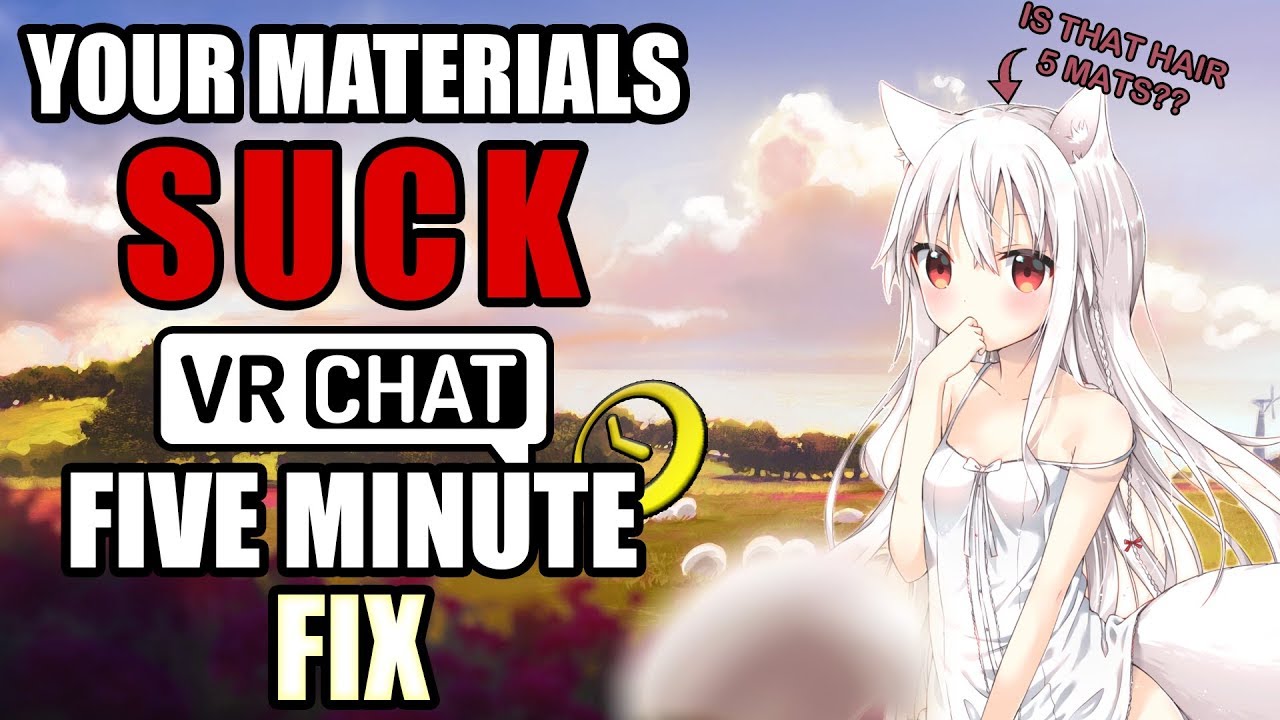
Quick Tutorial on Atlasing with CATS for newbies who need to bring their material count down from, say, 40 to 3 or 4 (there are more efficient ways but this is done in 5 minutes, not 40): https://www.youtube.com/watch?v=YUZeBfYbfVo
I honestly had enough of hearing that basic optimization of your avatar takes too long. So I did it in five minutes. Let's work to make high material counts ...
dusky cloak
Boooo
get your atlas out of here
If I wanted one I'd visit a library or a gym boooo
clever swan
Can't listen with sound to check, but it does it cover atlasing catastrophically failing?
I've often had atlassing cause the textures to either disappear, change colour, rearrange or just generally break.
amber ridge
I don't go over transparency masks but I believe the buttons under the "material" tab fix most of these issues (which are referenced)
If it doesn't, it does for 95% of people
The people it doesn't work for can always leave a comment 💬
clever swan
The buttons under the materials tab are often what breaks it in the first place (I guess atlasing has to perform those actions to do the atlas). In a good amount of the models I've had to work on, atlasing "as is" has basically just broken things.
I'll try and find some examples, but it's been a while since I've worked on something raw imported.
brazen wolf
Hey so. I need some help deciding on one of the many avatars I am planning to make.
I have some pictures to reference from.
But I need a vote
OMICRON-RHO
Nu-7
Beta-7
PSI-8
E-11
Of one of these
clever swan
Atlasing is the easy bit, dealing with atlas breakages is what needs a guide 😦
@brazen wolf I'd be surprised if most people know what those were and even less know what they're supposed to look like....
brazen wolf
Do you know what they are.
I mean
I have some reference points to make from
But I wana know which one to make first.
My friends opinions are biased so I kinda dont want that.
clever swan
@amber ridge Example. Left is before. Right is after using "Standardise Textures". Note the eyes are now wrong and the horns and tail are both now really dark.
Then, further on from that, if you just straight atlas instead, the wing texture disappears, as does the scarf (I assume something to do with double sided textures?)
Another example, before and after atlasing.
calm spade
There's a lot of feedback to post in the Cats discord, and possibly sending to shotariya so that they can understand and eventually fix, but posting here won't do much ^
clever swan
And another. This one looks like backface culling again though. These are just examples for Shane really.
Annoyingly I can't find any of the ones that go horribly, horribly wrong at the moment, as those would be a better example.
 clever swan
But yeah, people need to be aware that you can't just say "Atlas!" especially to people that don't know what they are doing because... what happens when it breaks? None of the (many, at this point) tutorials seem to address fixing the issues.
I'm not sure it's something Shot can technically fix as the issue often seems to come down to different textures needing different settings, which they don't have when they're unified in an atlas. So you have to manually work around it instead.
pure bridge
usually if using an auto atlas tool goes wrong you start messing around with the material list, texture assignment, or outright deleting materials. Else, manual atlas, which is tedious if youre on 2.8 but still pretty good on 2.79
im not home yet so i cant help with this specific issue but if i had to guess it prob has something to do with tex assignment in the materials
calm spade
Well, there can only be certain settings per file type, so accounting for those might be possible through detection. I don't think the "convert to .png" is automatically done though ?
clever swan
I've worked around all the issues myself in the past, this was just directed at the people making atlasing tutorials that don't address there being issues with atlasing (or the people thinking about atlasing that assume it'll all "just work fine").
pure bridge
ah. yeah, your point is still fair
clever swan
Convert to png hasn't ever caused issues for me, I don't see that as one that could cause problems as that's more a meta change than an actual material change.
Because I remember when I first started trying to atlas and ran into a bunch of issues, but assumed I'd just broken blender or something as no-one had mentioned there being the chance that it freaks out, swaps textures or does other weird things.
calm spade
I've had very little success with the auto atlasing myself so far, but when it works, it works like a charm
clever swan
It seems to depend entirely on how elaborate the texture setup is in the first place. If they've used a lot of Blender's functionality then chances are it'll go very wonky. If it's just a simple "Here's a texture, it's on the thing!" then it often works perfectly.
Here's an example of that. Textures still appear to be correct, but are now... just wrong.
amber ridge
I mean you're linking stuff with specialized transparency which most people with their first humanoid don't have
So in this regard a tutorial for baby's first Avatar and how to make you not bullshit levels of  is what people need
And if you break for some reason, you an get help to fix it in the comments
graceful vine
real  hours
hours
amber ridge
I’ve gotten multiple requests from people to create a discord for avatar work and patch info and I’m like “uhhhh we don’t need another copy of #avatar-optimization or the CATS discord or VRC Traders or whatever, just go there and get help”
clever swan
The second and third I linked were basic MMD avatars, nothing special.
amber ridge
I mean they do have transparency in their eyes but I don't know whats up with that red hair
Really that MMD artist shouldn't have created a whole plane of transpaency for eyes but gotta have that extra layer for sheen I guess...
For that tutorial I literally just took a random avatar off bowlRoll and started recording
clever swan
I guess it's more of a "please mention that stuff can and will go wrong on occasion" just so people aren't left confused.
amber ridge
Saying this (sorry I’m at work) yes, I was going to tackle these issues in manual atlassing in Blender 2.8
In fact if you have a great avatar to create a tutorial with that has these issues that I can use @clever swan i would love to use it as a demo
Not now of course but whenever; digging through avatars to find broken ones in the right amount of ways can be tedious 🙂
graceful vine
get it to 1 or we arent friends 😎
 eager lantern
Don't worry, already in progress. The only reason I had so many materials because most of them were tinted to a color in Unity.
Yeah, this is what I'm currently working on.
lament garden
Now just waiting on approval from a VRcat moderator for that manual atlas guide for 2.8
posting soon
eager lantern
Oh that would be absolutely helpful for me, since I'm on 2.8
lament garden
@calm spade
Manual Texture Atlas Guide for Blender 2.8
https://vrcat.club/threads/kattsunes-guide-to-a-manual-texture-atlas-in-blender-2-8.3359/
If the first link doesn't work
https://docs.google.com/document/d/1lZLI6RNoZB3KsdFYrH6vpuC4AOs-2pesnOimd-r6Ib8/edit?usp=sharing

Google Docs
Kattsune’s Guide to a Manual Texture Atlas in Blender 2.8 Introduction Heno! I’ve noticed that a lot of people are still getting use to Blender 2.8 or are just new to atlasing. Well I have some information that will make people who have used the “Texture Atla...
eager lantern
Oh, so that's how you prepare the materials. That was the part I was stuck on. Thanks!
Damn it 2.8.
lament garden
anytime :3
lament garden
if you have any questions let me know!
proper grail
@lament garden hey solid guide only two things i can think of is seperating atlasing opaque and transparent for shader and compression reasons and to put in large bold letters under the clean up part Save a backup of your avatar
lament garden
So for all transparent items, save them on a separate atlas and use them on a separate material right?
I'll be sure to update the guide with these things. Thanks again for your help
proper grail
Yeah but transparency is a bit of a pain it cant have any pure black #000000 because the diffuse will paint pure black as transparent, than ya gotta color to alpha #000000 in an image editor
forest swan
is there a way to remove dynamic bones in unity?
 vital mist

forest swan
oh okay, lemme check
brazen wolf
🤔
I have no clue what this convosertion about but I see people using my favorite emoji
vital mist
it is pretty good
clever swan
@forest swan Remove dynamic bones from Unity, or remove dynamic bones from a model?
forest swan
from a model
clever swan
Find the root of the bone on the model and just remove it from the component list on the right. You can look for the root by tracing where all the white lines lead back to on your model in the scene window.
forest swan
thanks!
jovial grail
You can also get my pumkin tools, select avatar and click remove dynamic bones to remove all of them at once 
GitHub
A tool to speed up setting up VRChat avatars in Unity - rurre/PumkinsAvatarTools
amber ridge
@jovial grail can you add a bit more to that readme file? I'm pretty interested in learning more
Sorry my unreliable Network sent that twice
sudden zodiac
@amber ridge Thake a look at the wiki https://github.com/rurre/PumkinsAvatarTools/wiki
GitHub
A tool to speed up setting up VRChat avatars in Unity - rurre/PumkinsAvatarTools
jovial grail
👍
 carmine blaze
If I wanted to make an avatar taller in VRChat, would I just increase the scale in Unity and then move the viewpoint?
 verbal orchid
That works, yes. You should scale it so that the 3 values (x, y, z) are the same though, otherwise it will deform when rotated
carmine blaze
ok cool thank you
proper grail
Sometimes you gotta set the rig as generic than back to humanoid tho after scaling, animations seem to play at the scale it was at when rigged
proper grail
That was vague, looks like the view ball moves up or down but its really the avatar playing an animation growing or shrinking
buoyant holly
Blender
 spring citrus
What kind of animation are you making?
For actual character movement animation and such, rainwolf is correct. If the animation is for something like changing a mesh and materials or modifying them or anything else unity based, it must be done in unity @brazen wolf
brazen wolf
Like emotes and such?
spring citrus
Well, you can use an animation you made in blender in an emote. But to setup the emote it must be done in Unity
 north pewter
Hey guys, not sure if the right place to ask but, how badly would decimation mess up weight paints? I have a skirt that needs decimating badly but I don't want it to mess up the weight painting too much
cerulean holly
Easiest way to find out is to save -> decimate -> pose mode -> see how the skirt moves
Think it shouldn't be to hard to just remove every second edge loop if it skirt so you can try that instead if decimating it doesn't satisfy you
buoyant holly
yeah removing Edge Loops is going to be better
north pewter
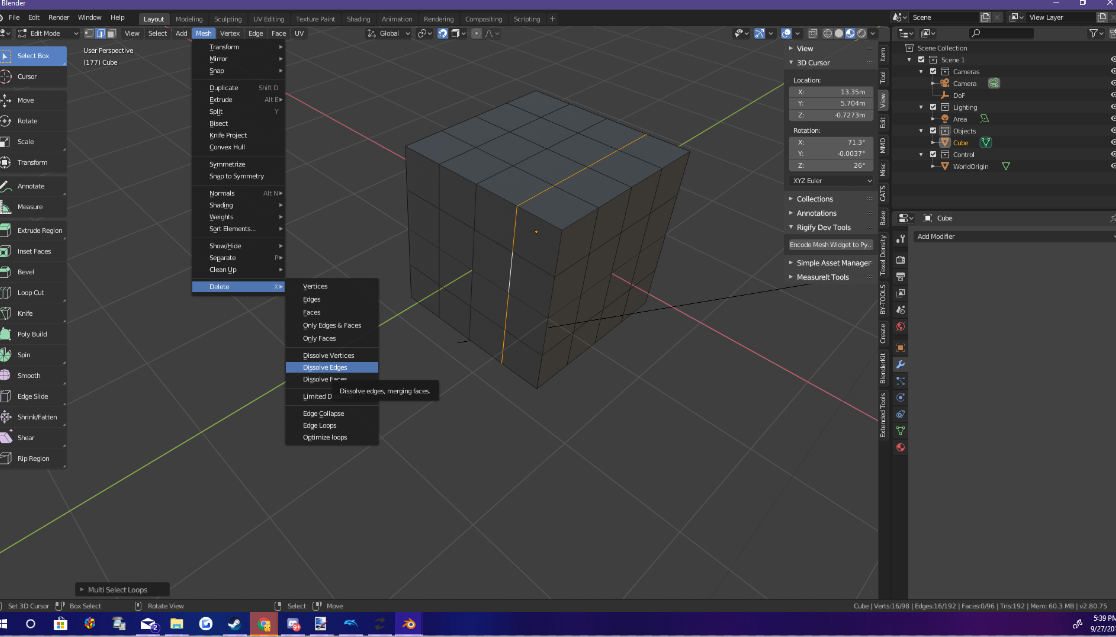
True I might as well just try it and see what it looks like, how do I remove edge loops though? not sure what they are

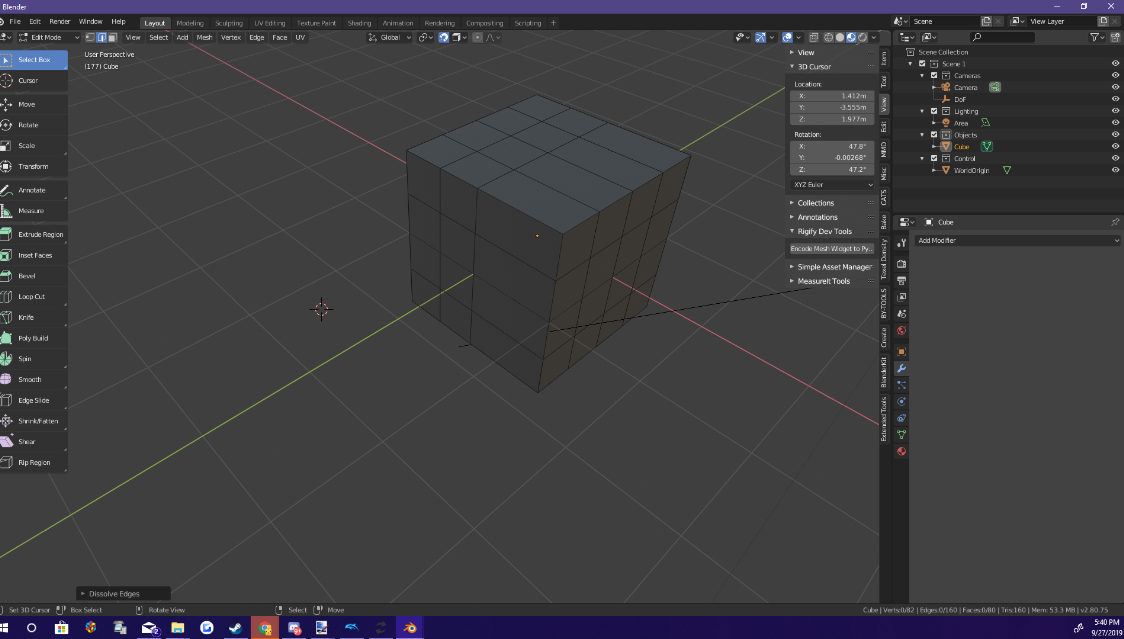 buoyant holly
so as they said select every second edge off of your skirt and dissolve them
north pewter
Yeah I think that'll work
I'll try decimation first anyway and see if it actually looks alright
buoyant holly
yeah but the edge Loop dissolving is going to animate better
north pewter
true
buoyant holly
and it's a good skill to learn so I would try the edge loops
especially important if you're trying to reduce polygons on the faces
north pewter
Yeahh you're right, probably the better option for me 😛
buoyant holly
and it's probably less likely to result in it doing stupid things
north pewter
Yeah I've found decimation to be weird sometimes
buoyant holly
well it is a bit of a dumb algorithm
but not nearly as dumb as the one they use on Second Life
north pewter
Oh god that game
buoyant holly
yes where nobody bothers to optimize their content as they're okay playing at 10 frames per second
and people's avatars can have more polygons than an entire match of OverWatch
north pewter
yep 😂
buoyant holly
I haven't done investigations to see if they use more texture space than an OverWatch match
but probably
north pewter
I've never been near it, just heard horror stories lul
 safe spade
does the unbound upper chest still matter in unity?
calm spade
only if you care about eye tracking
heady smelt
hey I've noticed proportional bodies still for some reason the arms are not long enough in VRC. how much long should you make the arm? is it the forearm that i should make longer, the arm, the shoulder, or a combination of the 3?
 fickle parrot
it might also help to move the avatar descriptor back. It might be too far forward
 minor wren
lower your user height if you care about arms being straight
the game assumes your wingspan from your height set in the menu
 restive sedge
I made one single message, and it removed it for spamming? God dammit.
OK here we go again
Is anyone having problems with the CATS plugin lately?
Using the "Fix model" with any options selected completely breaks my model, making the upper body stretch strangely.
I want to remove a bunch of weightless bones but now I can't. Blender version 2.79b.
clever swan
Is your model an MMD?
clever swan
So it looks fine in Blender and Unity, it's only broken in game?
restive sedge
When hitting "play" in Unity it looks broken as well
In blender it looks fine, in unity it looks fine as well
clever swan
Is this a model that you've already worked on in Unity, then worked on some more in Blender then saved over the FBX you already have in Unity?
restive sedge
Yeah
I've never had this specific issue before, I haven't changed anything in my workflow.
clever swan
I have, it's pretty usual if you've moved the mesh or bones. Two things I normally try to fix it with.
Actually first, does this model have any animations or dynamic bones?
restive sedge
Yeah a few, ears and tail.
clever swan
Animations will all have the original locations of those bones/meshes saved, if you've moved them at all, so that's something to be aware of. Also, Dynamic Bones also seem to save the position of the bone when they're first added, so if you ever change that bone position (e.g. in an updated FBX) it'll just revert the moment the dynamic bones kick in (which is a pain in the ass).
Only way I've found to get around that is to disable all the dynamic bones, save over the FBX again, go into rig and do Pose > Reset, Pose > Enforce T-Pose, do "revert to prefab" on any of the bones which are in the wrong place in scene view, THEN reenable dynamic bones, at which point it should then use the new positions as their actual starting location.
jovial grail
Hmm, I think I'll look into fixing up the bones by manually changing their values
restive sedge
It seems that changing rig from humanoid to none and then back to humanoid has fixed the problem, but it's still strange to me.
Hasn't ever happened before.
Thanks for the tips @clever swan
clever swan
@jovial grail THAT'S why autocomplete never works for your name, I keep typing Pump... anyway. Any chance of adding that as a feature to your addon, if it's even possible? Fix dynamic bone root values?
@restive sedge Doing the pose reset basically does the same thing btw, but is faster and avoids having to remap bones if you had to change any, just FYI.
restive sedge
Ah alright, thanks.
I just had to put the toes back so no biggie.
It keeps forgetting it has toes
clever swan
Yeah, that's always an odd one. Also it putting the spine in the chest and leaving the chest empty, despite being named and positioned correctly is another common one.
restive sedge
Alright, back to work we go!
Thanks for helping me on my way!
clever swan
No problem.
heady smelt
@minor wren thats because your wingspan is the same as your height IRL
@fickle parrot its supposed to be right between the eyes right?
fickle parrot
eh, technically but not really in all cases
minor wren
yeah, there are some variations to that in real life
and in game arms are usually too long with your real height for most people I know
clever swan
That's because most MMD avatars are basically spiders.
clever swan
Y-Bot actually worked pretty well for me, it was almost spot on and the floor was infact in the right place.
MMD avatars normally have insanely long legs and arms that are also too long.
minor wren
well my mmd (based) avatars also have the floor at the right place, but my real life arms are too short for ybot
it's almost like people are differently shaped
clever swan
Well yes, but MMD avatars are notorious for having stupidly long legs (I assume as they're all based around dancing).
jovial grail
@clever swan Yes, my name is misspelled 
I will look into it. Worst case scenario it will just remove and readd all dbones
clever swan
Thanks, would be highly useful. Unfortunately just turning them off and back on doesn't do anything.
heady smelt
hello, have you got any ideas of what can you use for modify the polygon of a model for the limit of vrchat (sorry for my english ^^')
jovial grail
Use blender to decimate. I think CATS can do it for you, but you can look for a tutorial on youtube
clever swan
@heady smelt CATS can auto-decimate but it rarely works well. Manually decimating works best (in Blender).
heady smelt
okay i use it before and i just want too see what kind of tool is the best, soo thank you ! ^^
 shy blaze
any idea why my avatar would look like this after making it into an atlas and importing it to unity?
shy blaze
i checked that, its at 0 😦
pure bridge
all of them ? including blushy emotes?
feff....okay, so all of your alpha emote (blushies, star eyes, etc.) sit on their own meshes
usually they are put inside of the head mesh but idk if this is by design, that image you posted above, which implies that they sit outside of the head
since you atlased your textures, all of them were brought up to 100% opacity, and/or their positions got fucked. its an easy fix tho since re-making those shape keys is literally just moving all of the planes forward and backward, its just tedious is all
of course i have no idea how ur mesh is set up so its up to u to figure that out
calm spade
you can also go back and not atlas those in the face
shy blaze
But then it would around 16 materials sadly, i don't want to lag people .
calm spade
you have 15 materials in the face ?
shy blaze
no i was just giving an example, its more like 8.
so i should just try to isolate those from the atlas?
 radiant shadow
Think that model dont have a shapekey to hide/show the blushes, usually need to add those in blender so they are hidden, you can also just remove the texture on them in unity ,
pure bridge
@shy blaze what thulen said, you can always make things easier and just delete or alpha-ize the bits you dont want nor plan on using in your textures
if youre not using unique facial expressions like blushies at all, you can just go over them with an alpha brush and call it a day
 late raven
hey, I have a Banjo and Kazooie model im working with, and I was wondering if it was possible to give a model 2 sets of arms and 2 heads so that Kazooie can move in synch with Banjo?
hoary juniper
If you're not using the model, remove the polygons. Don't just paint it transparent. That's bad for performance
 lapis wigeon
not sure if it's appropriate for some of these... not sure if there's any I can tackle in Blender since Im nervous about trying to mess around in Unity due to me being a newb
jovial grail
Did you import this from blender or get it from somewhere?
calm spade
Looks like a world lol
lapis wigeon
I imported it from Blender, it's a model I made on my own
it's supposed to be an avatar
jovial grail
Click on the fbx file you imported and in the inspector click on rig, and set it to homanoid if you didn't. Then click configure and map the bones that are missing, shown in the error
Just put them into the appropriate slots on the humanoid map thing
clever swan
Nah, Blender has a camera and light by default so they may just be left over from the stock blueprint.
jovial grail
Oh yeah, that's right
calm spade
there's two lights here, default scene only has 1
jovial grail
Depending on tutorial they might have added another
lapis wigeon
maybe I added too many lights and I didnt notice
jovial grail
But you generally don't want either ingame
lapis wigeon
Im fairly newbie in Blender... since I havent used it a lot in the past
clever swan
If it's an avatar when you really want 0 lights.
jovial grail
You can have lights but it's usually not necessary
You can just remove them in unity as well
lapis wigeon
ehhh let me read the fbx file thing Pumkin said so I will be scrolled up in the chat
but first is there really anything I can do in Blender first?
clever swan
FBX > Rig > Humanoid. Apply. Configure.
clever swan
Nah, delete the light and camera in Blender, but you don't need to worry about that until you go back to it to work on it later.
jovial grail
You can remove the lights and cameras and then export again
clever swan
For now you can just delete them in Unity, also there are FBX options on the first page where you can simply tell it not to import the lights and cameras, so you can keep them in Blender if you're using them to see how things look.
lapis wigeon
that sounds more simple and useful, Enverex
clever swan
First page of the FBX, there are tickboxes saying what to import, so just untick the light and camera options there.
lapis wigeon
hmm I think something went wrong with the armature...
some reason one of the first parts of the arm is going across the chest
and I know I didnt do that in Blender
here's a screenshot (I may post screenshots for second opinions...)
clever swan
In the Rig Configure, do Pose > Reset, Pose > Enforce T-Pose
See if that fixes it
Although I don't see the issue you mentioned in that picture
You haven't mapped the Chest btw
lapis wigeon
how do I do that? 🤔
clever swan
Also you have your arm mapped to your thumb? lol. You need to correct a lot of those mappings.
clever swan
Either drag them from the list on the left into the respective boxes on the right, or click the little circles next to each box and select the right bone.
Upper Chest should be empty.
lapis wigeon
see a friend of mine tutored me through the armature making process for a Mobian/Sonic-based character
and only said one type of chest
clever swan
You should have Hips > Spine > Chest > Neck > Head (going from waist to head)
You just need to put Chest in
lapis wigeon
ok got that
now the thumb...
is it possible I may have missed a few armature bones?
Im seeing things like thumb3.L, thumb3.L_end and when I click on them nothing seems to be appearing
clever swan
They may exist, but not be absolutely tiny or something silly
It works in a tree so just drag stuff over to where it's named for now
lapis wigeon
ok I think I need to fire up Blender and look at the armature again to see if I got the thing set up properly
I feel I have done something stupid with it on Blender
clever swan
Rename the bones in Blender, that would be my first bit of advice there.
lapis wigeon
yea... thought something was funny with the arm
accidentally set the parent for this arm part to be one of the left arms 🤦
fixed now hopefully
and you mentioned thumbs..
do you think I set the fingers and thumb's parents to the wrong part?
clever swan
Those look like they're parented to the arm rather than the hand
lapis wigeon
yeah I guess I should fix that xD
now do hips have to be a child of any bone? I know the hips have to parent the legs
just wanted to make sure I got the armature right this time ^^'
clever swan
Nope, hips are the core basically
lapis wigeon
ah ok ^^
oh sweet
went to export it as a new .fbx, shoved it in Unity and the performance is looking good so far
guess I'll tackle one more thing which is that top amber coloured one
my character's meant to be short so I dont think Im worried about her size
nvm xD
ok I think I fixed the pelvis and the thighs
nvm...
not sure how to fix the angle of the pelvis and thighs
clever swan
Ignore that for now, it's close enough
lapis wigeon
ok ^^
heady smelt
Anybody some ideas which dynamic bones setting i can use for such cloth for a "smooth" moovement? test some stuff but iam to dumb for this to find the right settings
 glad swallow

Dynamic Bones - 20 USD on the Unity Asset Store! http://u3d.as/7fH VRChat Community Discord: https://vrchat.net/discord Download VRChat! http://store.steampo...
might help
late raven
Is there any way to make the Z axes work on non-humanoid avatars?
clever swan
Nope
late raven
not even adding another camera or something?
clever swan
You can't add additional cameras
late raven
damn....

 pure bridge
@balmy wadi your thigh bones are bent in a little bit too hard. reduce them very close to 180. also, move your hip bone above the top of your thigh bones if you want it to work well with full body tracking
 arctic vortex
Does the use of dynamic bones in say the hair of an avatar bring its rating all the way down? Or could you end mid way by using as little bones as possible and weighting multiple strands together to it?
I don't really want to do dynamic bones if the model ends up being in the lowest rating it can be.
cerulean holly
If you use like 32 or 36 it will be down to medium than you still have some extra bones for poor rating if I remember correctly
and sure you can paint several strands to a single bone
 clear horizon
How can i fix this? please help
calm spade
remove physics rigid bodies ?
 dense crane
so i need some help setting up an eye blinking
calm spade
Help with what ?
jovial grail
A light and glow would be 2 very different things. A light would be an object that casts light into the world but can cause fps drops, while a glow can be done with changing your materials to give it emissions, which just makes it look like it glows but it doesn't actually cast light, and shouldn't affect fps at all
What exactly are you trying to do
calm spade
Make an emission mask for the eye from your texture, and then add it to your material
dense crane
in unity or blender?
jovial grail
Yeah just make a copy of your texture and make everything except the eye black
Then plug the new texture into the emission slot on the shader
No need to do anything in blender for this
dense crane
might need to take me step by step haha
jovial grail
It's literally just that
Make a copy of it and open in photoshop or something, paint everything except the eye full black
dense crane
the model is all one piece
jovial grail
It doesn't matter, it's all about the extra texture
dense crane
ok
jovial grail
After you make that, import it into unity and plug it into here https://puu.sh/EpU63/e8f5e206eb.png
 heady smelt
hey guys, got a problem. In Blender looks my model like this: https://prnt.sc/pg4v0m and in unity is the name tag dissapeared: https://prnt.sc/pg4v3a what can i do to fix this? if i zoom into the bode i see the nametag from inside again
solid smelt
Change the emission color to white if your texture has color or your desired color if you texture is white
@heady smelt Your normals are flipped, you can turn on backface culling in blender to see that
You can select the faces of the nametag, press space and type flip you can flip the normals
dense crane
so then what or is it done?
solid smelt
It's done, if you reduce lighting in your scene it should be glowing
calm spade
yeah that's how emission works !
heady smelt
@solid smelt what? dont understand what u want from me 😄
dense crane
thanks
heady smelt
nvm found it @solid smelt thank u!
the intensity value to the right of emission color should be higher than 1.0 or it won't glow
@dense crane
heady smelt
glow is not the right word: if it's lower than 1.0 it will glow in the dark, if it's higher than 1.0 in most HDR worlds it will bloom
and you get the fuzzy edges
dense crane
i dont know what ya mean
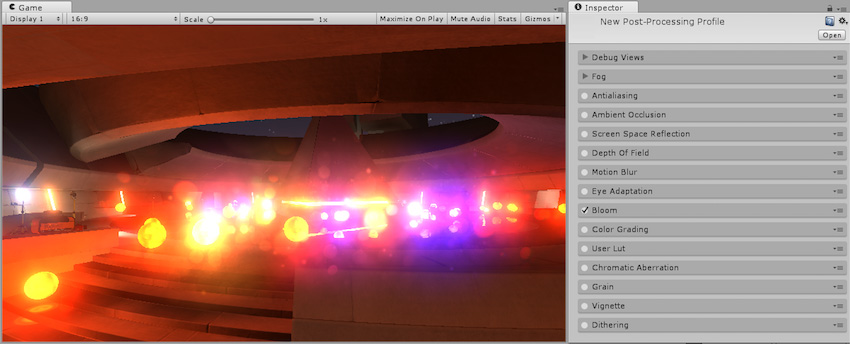 dense crane
ok
heady smelt
you won't see the effect in unity unless you add post processing to your avatar project, but it will work in worlds with post processing when you upload
dense crane
so i got the emision on the model and i need to do more now???
heady smelt
it will glow now, you can test it by toggling the directional light off
the bloom is only visible when you're in a world that has the effect
heady smelt
no, just emissive color is enough
dense crane
ok
dense crane
Anyone have any, useful advice for weight painting?
calm spade
use auto weight paint, and then fix things
 deft furnace
This is a bit i havnt dug into yet: Transparency - in images it is a gradual thing, how does it work on avatars?
From what ive seen the transparency in textures is binary, either you see part of the texture or you dont, no inbetweensies.
So does one need to assign a separate material/shader for something that should be semi translucent but not invisible? Like colored glasses for example?
calm spade
There's is a lot of transparent shaders
Standard even does it
It's just opacity too
deft furnace
But is opacity gradual? Can i make something tinted without having to assign its own material and a transparent shader?
 nimble quarry
Yeah, you can pack the alpha/opacity into the alpha channel of the albedo so you can do all sorts of masks there! The masks don't need to be 0 or 1.0 either, only the cutout transparency mode will work like that.
 tranquil dune
Not sure if this is a the right channel, but does anyone know a quick way to bake a bunch of EEVEE materials on different objects to a texture?
deft furnace
@tranquil dune i think this covers the basics https://www.youtube.com/watch?v=o0lTz25xcx0
Enjoy the videos and music you love, upload original content, and share it all with friends, family, and the world on YouTube.
tranquil dune
@deft furnace Thanks, looks like I'll have to write a script of find an addon for what I'm looking to do. There's a lot of materials and I still want normals, roughness, specularity, ao maps. I just kinda want to be able to unwrap and then just hit "Bake" and generates and merges all the textures.
 storm ingot
@tranquil dune material combiner is what you need...it is part of the Cats plugin for blender
GitHub
:smiley_cat: A tool designed to shorten steps needed to import and optimize models into VRChat. Compatible models are: MMD, XNALara, Mixamo, DAZ/Poser, Blender Rigify, Sims 2, Motion Builder, 3DS M...
tranquil dune
That sounds like something I'd find useful for more than just VRChat. I have a bunch of models for my own games that need merged materials and baked node setup! Thanks! @storm ingot
random flare
Doesnt work for cycles render btw
 trail estuary
whats the poly limit guys?
solid smelt
There is none, only the performance system. Above 70k will mark you as very poor
heady smelt
whats the recommended max resolution for avatar textures?
 novel grove
@heady smelt as i heard some rare bad video cards can't handle 8k textures, so yes you should aim for 4k
 obtuse raptor
Does anyone know why this happens? Atlasing a texture, but the hat on my avatar is changed to the texture of the hair.
calm spade
there's an error at the top referencing an addon called magicuv ?
obtuse raptor
Oh, that's an addon for UV mapping, like QOL improvements. Even after disabling it, I'm still getting an error. It's really strange.
obtuse raptor
It did, but I did remove it, always do after several issues in the past
I think this issue here started right around the time I updated MatCombiner wholly
My temporarily solution for now is to leave the hat and clothes as individual materials, since I meet the material cap anyway, but it just means I can't fully optimize like I normally do.
heady smelt
Hey do idle animations still work on avatars if you have full body tracking? I was making a robot, and wanted it to kind of jitter like this http://66.media.tumblr.com/tumblr_m8u0btbrtg1qfzolpo1_400.gif
 calm spade
 visual dock
@heady smelt I've only ever tested that based on idles using shapekeys and bones not used via humanoid.
My guess would be any bones used in an idle are disabled when in fbt if part of the humanoid set up.
 quasi token
How do I fix so much polygons on my character. It has like 175178 but the original I had was normally about 70k. Anyway I can lower this a bit
clever swan
Did you accidentally duplicate the model or something?
quasi token
I put the original model into a adobe to rig it and then it added the bones.
Actually I see. The original one had a lot more bones in it than the other one. So if there anyways I can edit it then? To like have blender remove some of the polys?
clever swan
You can do Decimation in Blender to lower the poly count
buoyant holly
and also dissolving Edge loops can work quite well if you're wanting more control over it
quasi token
Thanks so much
random flare
Be sure to renove doubles too
 civic rover
Rip normals
 stiff vine
Rip normals
hoary juniper
Rip normals
 timber blaze
Rip normals
jovial grail
Rip normals
 delicate turtle
slamron piR
sudden zodiac
Rip normies
random flare
Pros make their own normals
heady smelt
^
pure bridge
some days i feel like recalculating my normals inwards
 candid sedge

 tall juniper
Ok so I finally got my avatar going in Unity, but now I'm not sure which one to keep for the game. The one on the left is the vrm version and the one on the right is the fbx version.
 supple latch
Got an issue with my audio on avatars making studders. I've added the VRC_spacial audio source but its still a problem , do you guys know a fix
tall juniper
Can anyone help me out?
cerulean holly
@tall juniper use fbx
tall juniper
Ok, and delete the vrm?
cerulean holly
Yeah
heady smelt
idk where else to post this but, im making avatars for my future world, and i know how to do animations, gestures, and whatnot, but when i test them on game my hands mmake a claw gesture instead of rock n roll or victory and etc, idk how to fix it, and im doing everything right but for sme reason it still does that fro all my avatars ahhhhhh
heady smelt
You have to recreate the hand animation
heady smelt
@heady smelt I dun understand..
You have to remake the hand gesture on the animation for the gesture you're trying to map to.
heady smelt
picture this: i am an avatar in vr chat. using body tracking I lift my arm above my head so that it is pointing straight up at the sky. how much of this motion is done by the shoulder bone, and how much is done by the arm bone? If I knew this it would be a lot easier to paint weights.
calm spade
Shoulder motion is only for the remaining 10% of your movement up
It's actually kinda hard to make the shoulder bone move
So naturally you'll most likely never see it move
clever swan
It raises up though. That said, the movement on the shoulders now is completely different in FBT than it does normally. It looks better in FBT. Which is going to be used going forward?
calm spade
Yep
 jade ice
Can anyone tell me how to use the weapon/ability of an avatar?
 still perch
This channel here is for help and questions in regard to optimizing avatars.
And since every avatar is different there is no universal answere to your question, you need to test out all gestures/emotes and see what they do.
jade ice
I did but none can act the abilities, i saw players that cloned my avatar and were able to use them and they were on pc too
Others were able to use the sniper on the avatar's back and a special dance emote
@still perch does It make any difference if I use a gamepad?
jade ice
Then, is there any way to bind them?
still perch
I have no idea, but i dont think so. (Officially)
Regardless, this channel is still ment for Avatar Optimization. 🙂
jade ice
Where can I ask then?
still perch
Either one of the general channels or maybe user support.
heady smelt
is there anyway to atlas the Tafi avatars yet?
solid smelt
Best way is to probably import them into blender and use CATs to auto atlas it
sudden zodiac
How many materials do these tafi avatars have? 🤔
heady smelt
was like 14 mats
solid smelt
That's a big rip
Guess it makes sense since its a bunch of separate parts but it's going to be "atlas your damn models" time again if people use it a bunch
sudden zodiac
But how would you atlas it if you upload it to Vrchat directly?
marsh trail
From what i recall reading, these things are supposedly optimized through their client or w/e and then shipped out
But apparently they're not?
Like, i read their stuff, and another thing their supposed client does is create LOD groups for avatars, which as we all know, displays all LOD's at once for avatars (they work far better in worlds, but VR users only see LOD0 when completely up-close and the "lowest" LOD at any other distance), so that statement also perplexed me
Seemingly these avatars are made in their client, and have no direct customizable unity access, so users have no access to the actual files for further editing
Or atleast, that's what i've discerned from reading it and a friend testing it
Ironically, these avatars are supposedly completely available to be sold as the users' own creation, but the user has no direct access to them
From their site
Manage
Run your avatar and asset library with a versatile CMS
Flexible CMS
Define and organize the who, what and where of your Avatar content libraries. Our online CMS let’s you manage your Avatars wherever and whenever you please
Content Authoring Tools
Create your own avatar look by using our Authoring Tools — Tafi avatars can fit the most exacting vision and style
Distribute
The first platform to bring portable avatars to life. Tafi avatars can go anywhere they need to go
Cross-Platform Content Streaming
Tafi avatars will go anywhere our SDK is found. Optimized for mobile, VR/AR and games, the Tafi SDK allows for a mult-application, multi-developer avatar experience
Run-time LOD System
Auto-magically optimize your avatars for any target device or experience with the Tafi SDK - from LOD systems, asset instancing, to run-time figure decimation — Tafi Avatars work hard to work well
Monetize
Engage your users and fuel your platform
Ecommerce
Tafi provides everything you need to bring a digital economy to your platform. Sell avatar assets, skins and premium content to power your growth and development.
Avatar Marketplace
Let your community of content creators sell avatar assets on your platform to provide a diverse marketplace that benefits your users, your artists and your bottom line.
okay that's complete fail sandwich if you can actually access the avatars
shut sequoia
i cant even find a way to delete them 👀
buoyant holly
that's not good
I guess we're stuck with anime waifus for now because they goofed up so hard Tafi avatars
 tribal ruin
Anybody know of a good optimized particle shader that supports additive and Alpha blended?
 silent rose
i need help
im trying to make a avatar but it keep saying the spine hierarchy is missing
still perch
This channel here is for optimization related things, look up the normal #avatars-2-general channel 
Or for that specific issue potentially #avatar-rigging (Dont post it in both tho)
tribal ruin
So I have an issue. I have a particle system that is kind of laggy because the particles are all additive, and the overdraw kills peoples' frames (trying to compute so many transparent graphics on top of eachother) and I was wondering if I can optimize this to make it perform better while still retaining transparency
I can't reduce the number of particles because it kills the effect I'm going for (explosion) but there's never more than a thousand particles at any given time. (I'm using sprite sheets)
It looks like this
Ping me if you have any ideas
heady smelt
a thousand particles shouldn't be too laggy, it's probably the distortion effect using unnamed grab passes
tribal ruin
It's not. I've had that since forever and it never caused lag. It only got bad when I increased the size and number of particles.
hoary juniper
One THOUSAND particles?
@tribal ruin Open up the Frame Debugger window and pause the explosion and show us how many draw calls it is. Also, how many grab passes it takes. Also, how many seperate components your system has.
 balmy wadi
Question for anyone, I've attempted to use a 4k image for a shirt I mapped, however when pulling it up in unity it still comes out pixelated. I even bumped the image up to 8k to see if that made a difference, and all it did was make it slightly smaller and still as pixelated
is there like a limit to unity's handling of resolutions or what
balmy wadi
oop nevermind, I figured out it was my import settings for the texture, was default set to 2k
just changed that and my shirt looks clean af now
buoyant holly
personally 4K for just a t-shirt sounds like Overkill
considering when are you ever going to have the shirts cover your entire screen
still perch
make sure to set the texture size within unity to the right size
and 4k should be good for the whole model if done right
buoyant holly
yep as that's a whole texture Atlas
balmy wadi
the entire image isn't being rendered, only a the mapped section which was probably in the range of 1k. due to laziness I'm not gonna reopen blender to remap it. ez way was to upscale the resolution in PS so the image compression stopped making it look awful 🙂
only chumps atlas, don't mind me with my 12 materials 🙂
buoyant holly
boo you and your 12 4K materials
and you can change compression settings Unity uses
clever swan
Setting compression quality to high results in identical looking textures for me, no obvious image compression artifacting at all. Or is it the scaling/scaler you're concerned about?
marsh trail
That is indeed a huge waste of resources if the only rendered portion is like 1k, you might aswell delete the entirety of everything not being used and just scale the UV to fit the new resolution, it really shouldn't be that hard to do, atlasing aside, it really gives you no benefits to have your texture rendering set to 4k for a 1k texture
clever swan
Oh, I see what they said now. I've seen that on a bunch of MMDs too. Massive empty textures with a tiny corner used. :/
buoyant holly
yes it's absolutely horrible when they do that
solid smelt
Just makes texture atlasing feel so good though
buoyant holly
yup
 undone cradle
Dunno where to ask but I think this is the most relevant.
When I try to use Material Combiner it spits out an error mentioning the model's skin texture, even if I try to make an atlas map without the skin texture.
 woeful stag
@undone cradle , maybe i can help
Show me the materials list in blender
Are you using CATs plugin? Also how many skin meshes does your avatar have?
sudden zodiac
@undone cradle Look at that last line with OSError in it, it cannot identify the image skin_body.png. Check if this file exists or if something is wrong with it
undone cradle
Sorry for taking so long, @woeful stag, it has 18 materials.
@sudden zodiac I've tried renaming the skin texture and whatnot but it still can't identify it, it's there alright.
Problem seems to be here, but I don't understand what it's whining about.
Read through the Python script in question.
The only textures I have edited are the ones that make it throw errors. (I use GIMP for texture editing)
undone cradle
woeful stag
Which material has the texture thats causing the error?
undone cradle
skin_body is what's acting up, or are you talking about something else?
woeful stag
Could you go to the materials section for that particular material?
(Are you able to do screenshare? Maybe?)
undone cradle
Yeah, sure.
woeful stag
Under MMD texture, click the x to remove it and relocate it
Save this as a new blender file
After that, try optimization(CATS) > save atlas to
Then try combining the materials
@undone cradle
undone cradle
Yea, doing it rn.
Nope, didn't work.
Didn't really relocate anything though, I just set it to the same path again. Should I put the textures in another folder?
woeful stag
Give me a couple of minutes, so you want to combine all the materials together
undone cradle
That's what an atlas map is, yes?
woeful stag
Yes
undone cradle
Right, you probably want the texture folder too. 😅
Tested with the original skin texture, it works.
It's NSFW though. :/
undone cradle
Without the atlas map and NSFW or with?
woeful stag
The blender file has some errors upon loading
undone cradle
It's a 2.80 file.
undone cradle
Ah well, sent you the FBX anyway.
undone cradle
Solution: use MS Paint.
 wind crater
Hey I'm trying to make an avatar and when I upload it through the vrchatsdk on unity it works great for pc, but when I switch to android and click build and publish, it says "future proofing your content" and then nothing happens after its finished, I have 0 errors on my project when I switch to android so I don't think its a model issue
it should be fine but when I click build and publish nothing happens
 sharp sluice
I just did my first manual texture atlas on blender and somehow all my blendshapes are messed up. Can someone tell me what I did wrong?
 fringe wigeon
how is this reduced
clever swan
Did you modify the mesh in Blender?
@fringe wigeon You need to have less dynamic bones, or exclude more things on the dynamic bones you want to keep. Realistically you want to be at 32 or less else they'll be disabled entirely for most people.
fringe wigeon
ah ok
im not sure how i can exclude the things, what i mean is i dont know where to exclude and which component
clever swan
There's an exclusion option on the dynamic bones component, you set that to the amount you want to exclude and then drag in the bones to exclude into the newly appeared boxes.
fringe wigeon
what i meant is i dont know which bone to exclude
wind crater
For some reason I get this when I try to make my avatar quest compatible by going into android mode (This doesn't appear on windows mode)
clever swan
@fringe wigeon You need to plan it out in your head and use play mode to test it, basically.
@wind crater Are you trying to change an existing project, or are you importing the content into a new project?
wind crater
Change an existing one @clever swan
clever swan
I'm not sure that's something you can do, I've always been told to reimport the content so that's what I'd recommend here really. Export what you need (with dependencies) from the original project, create a new empty Android project, then import.
wind crater
Didn't work 😞
clever swan
Same error or different error?
clever swan
And you're using the latest SDK from the VRC website?
safe swift
@wind crater click on Clear, then enter playmode, then click on red icon to show only red errors and post a screenshot
wind crater
it should be the latest version, ill try redownloading and re loading it
still doesnt work even when redownloading the newest version
wind crater
I have .net but what is mono?
I installed the latest versions of .net and mono and restarted my computer
still the same problem
wind crater
I pretty much gave up, picked up a different model that was similar and redid the entire thing, it works now, probably had something wrong with that model, thanks alot anyways guys
 grim mortar
@wind crater what version of unity and what .Net runtime did you install?
wind crater
unity 2017.4.28f1 and the latest .net i think it was 4.7
 upbeat lava
I must decimate an avatar, but the Mantis LOD tool I use isn't available anymore. What should I do?
calm spade
remove edge loops manually
marsh trail
@upbeat lava the tool is still available as far as i can tell http://www.mesh-online.net/
And both standard and professional editions are also still up
https://assetstore.unity.com/packages/tools/modeling/mantis-lod-editor-standard-edition-14356
https://assetstore.unity.com/packages/tools/modeling/mantis-lod-editor-professional-edition-37086
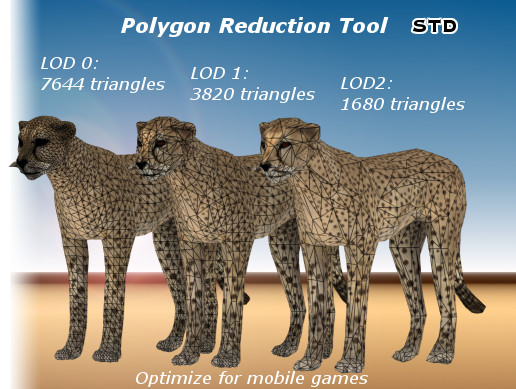
Mantis LOD Editor Std is a polygon reduction toolset (include an editor extension and a standalone app), you can simplify your meshes and make LOD from within Unity's editor or from the standalone app.
Most important, the toolset can generate high quality LOD with very low t...

Mantis LOD Editor Pro is a polygon reduction toolset (include an editor extension, a command-line tool, a standalone app, a progressive mesh generator, and a progressive mesh runtime), you can simplify your meshes and make LOD from within Unity's editor, or from the command-l...
upbeat lava
They had a free online version that you would import into Unity without the asset store. @marsh trail
marsh trail
That i do remember, doesn't the old one work anymore?
buoyant holly
looking at the screenshots that provides it's pretty much unusable for avatars as it pretty much destroys the topology making it impossible for anything to bend nicely and no blend shapes
marsh trail
That is not true actually, it keeps blendshapes without fault and topology was preserved enough for proper bending, unless decimated to a ridiculous degree
I recall using the free online edition myself and that's what i saw
buoyant holly
even that LOD one is demonstrating issues that would make bend tricky
as there was several big long triangles and basically not enough loops around the knees
marsh trail
Those are very small polycounts, LOD1 there is essentially Quest-ready polywise, Mantis works far better on larger scales, it's very hard for proper guess work with a very limited polycount
buoyant holly
well I be a bit less hesitant if I saw some examples of it on a character actually animating not on essentially statues
marsh trail
The upper limit back in the 5.6.3p1 days was 20k, compared to the LOD's in display there... yeah...
I'm curious about weither or not mantis still works as an extension script though
I do still have it, so i could test it later on
buoyant holly
cool as screenshots aren't expiring confidence in the animation capability of LOD model
marsh trail
Yeah and i completely get that, they could've used humanoids for references, but i guess they kept it simple
buoyant holly
which doesn't make me confident it's going to work well as an avatar optimization tool
marsh trail
I recall decimating a model with it from around 70k down to bellow 20k way back then, and it did work pretty well from what i recall, but i can't vouch for it right now due to not knowing if such is still the case


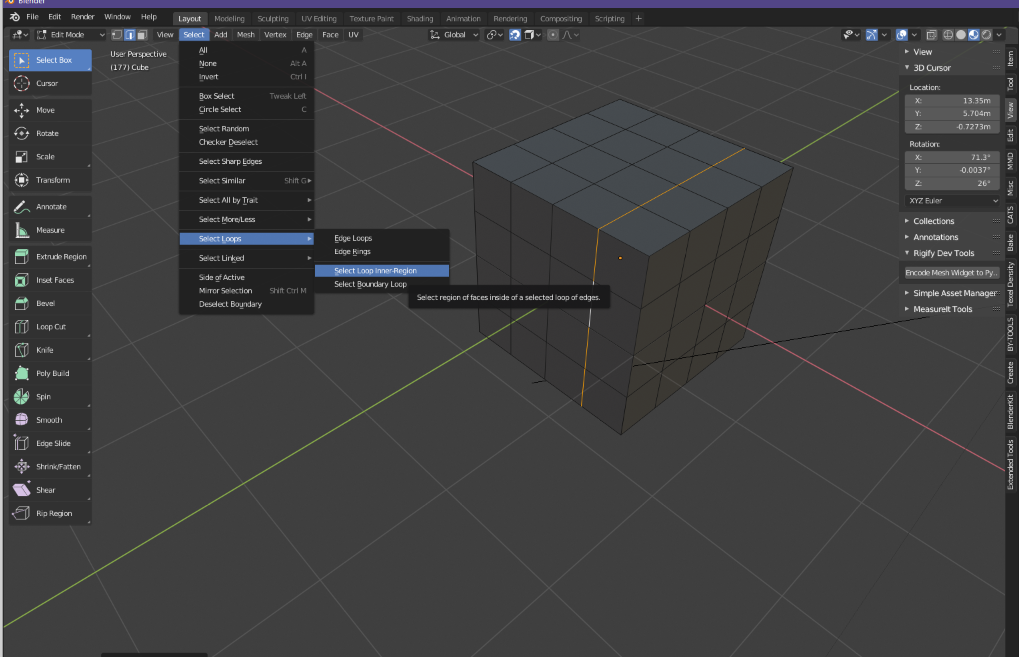
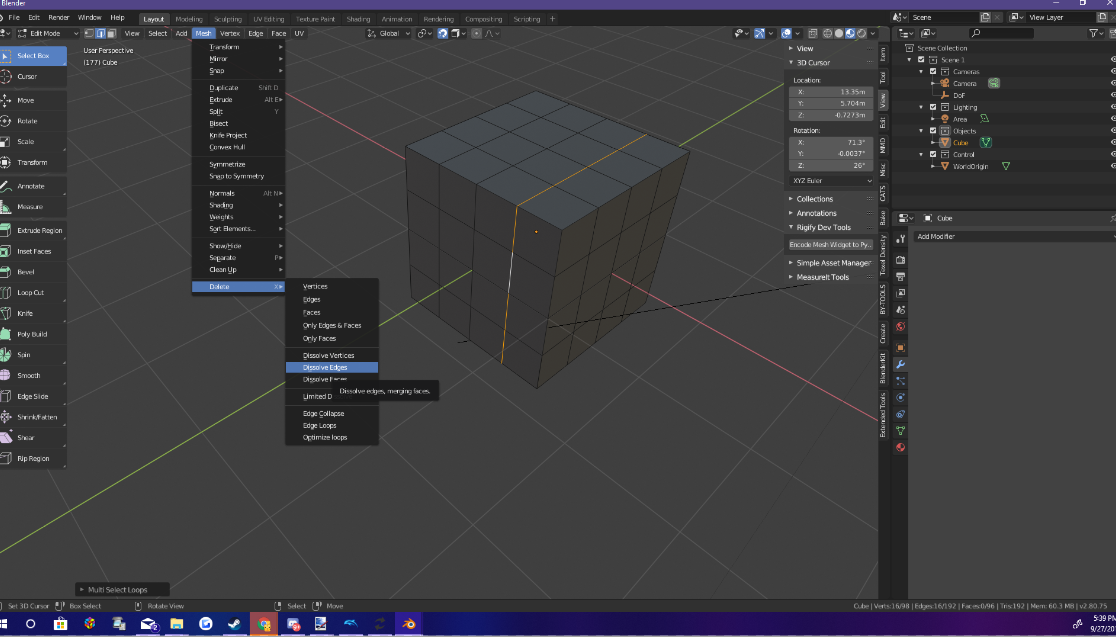
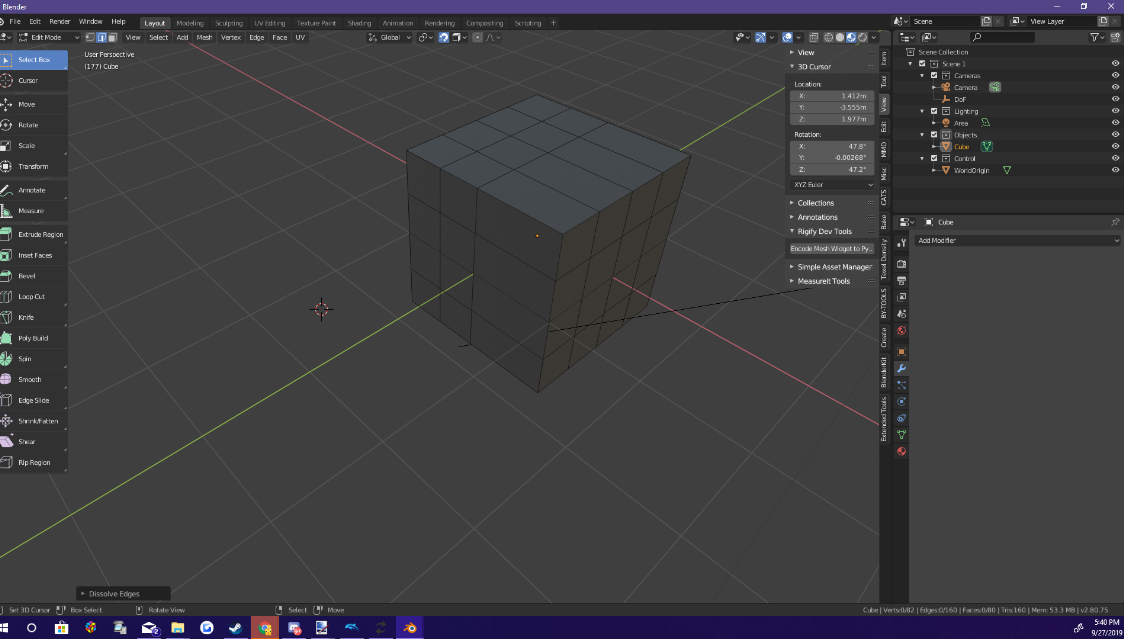


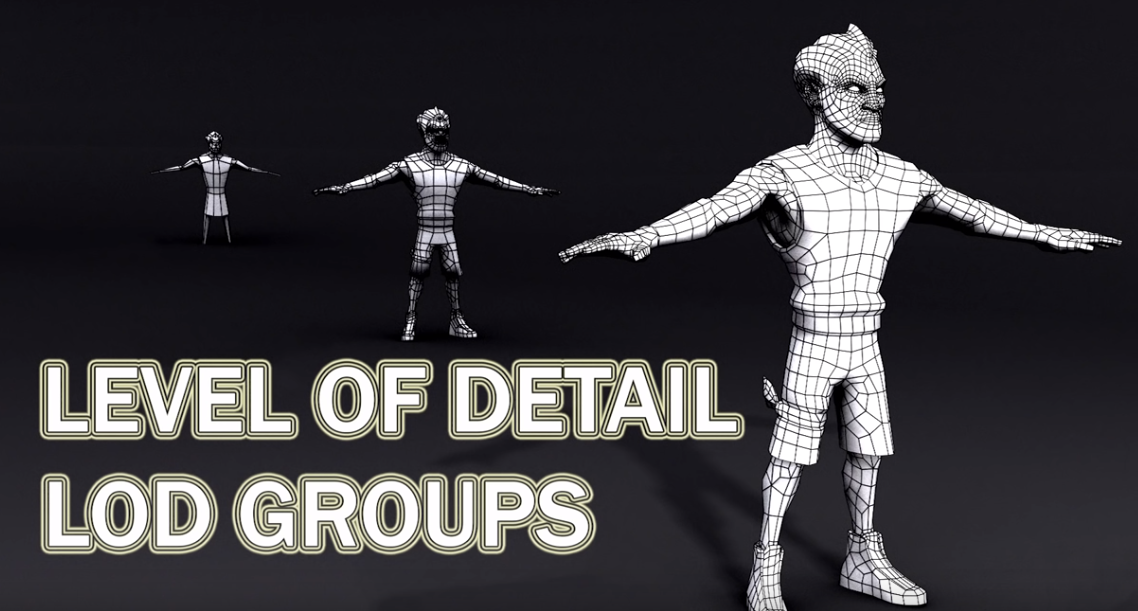 marsh trail
You could try their free tool from their website, although the unity script is no longer there
buoyant holly
if it doesn't have its Unity scripts it doesn't work
marsh trail
I have a feeling they paywalled the features as you could extract the fbx from unity and they currently state with their new tool
"You can evaluate the product with your own 3d models except that you can not save to disk."
It does work, again from their site
"Download and trial our Standalone Trial Edition v3.0(Last updated on August 29, 2019), which runs as a standalone applications on OSX and Windows platform, can simplify huge 3d models while remaining all animation/rigs."
It's not necessarily unity bound, they even allowed optimization via CMD (if i recall correctly), everything is done server-side, you upload mesh data, input value, they give you the result
buoyant holly
hopefully it works well for you personally I don't care too much at the moment as all of my avatar stuff is hyena based so it's already Quest compatible
marsh trail
Well i decimate everything in blender, so it's kinda useless for me, but it did work pretty well before, i have a feeling it won't work at all though, they seem to be going full-out paywall and will likely reject all connections
still perch
Please look up the normal #avatars-2-general channel for that
This one here is about Optimizing.
quasi token
is there a way to decimate an avatar in blender without it combining all the textures together?
calm spade
I don't think decimating is supposed to do that by default
 dense creek
Hey I converted this Player model for personal use but it says that the performance is poor, i tried looking at what was red in the list but nothing has worked, have i done something wrong?
still perch
The model has 19 Materials, you wanna combine materials / textures into a bigger Atlas texture insted of tons of individual ones.
dense creek
how do i do that?
dense creek
hmm i think i found the video (its this one right? https://www.youtube.com/watch?time_continue=179&v=5LwRi26RxSQ)
A short video with Tupper describing how to create a texture atlas for your VRChat avatar. Software used: Unity 5.6.3 - https://unity3d.com Blender - https:/...
calm spade
Yep !
Some of the steps may be a bit different since that video was made last year
But the general idea is the same, and cats combiner should help
dense creek
hmm yeah they did change the blender ui a bit
calm spade
If you use blender 2.8, press N
Cats is on the right side
The cats UI hasn't changed though
dense creek
yeah im using the steam version of blender
i think i found where it is (i wish the sidebar would stay up everytime i make a new model conversion
ok i will look at doing that tomorrow (its dark over here now)
 mild reef
What software should I use to make an avatar?
calm spade
Blender @mild reef
mild reef
Do you have the link? I don't know where to download it
 rotund spire

Home of the Blender project - Free and Open 3D Creation Software
 primal elbow
hey, so I'm trying to give a couple dynamic bones a common parent, is there any way of disabling the bones between the root parent and the actual bones I want affected?
marsh trail
You can exclude them from the script but anything under them will be excluded aswell @primal elbow
primal elbow
darn
mild reef

heady smelt
Anyone here know how to get a gesture to be longer than 0.01 seconds? I've made a looping animation but the loop is too long for the limit
calm spade
gestures have this limitation
heady smelt
Well yeah
But I've seen a lot of gestures that don't use it. Some are longer and a bit more complex, and some are minutes long
I don't want to do anything nearly that extensive of course, but there must be a way, right?
calm spade
they probably enable an animator, but that's a question for #animation
upbeat lava
Apparently Full-Body IK and Tracking is now a requirement?
upbeat lava
No. It won't allow for me to upload.
I understand it isn't meant to be that way, but apparently my SDK decided to become a pestering demon
The upload button is greyed out, and is not able to be clicked
 limber vale
odd
upbeat lava
I have no idea how to fix it, either, do you have any suggestions? Because ever since the Quest update, the SDK has been so janky. And if I try to remove the SDK and get the new one, it's just going to break everything and probably break the SDK - it has happened to me numerous times.
upbeat lava
That's what I nailed it down to, but now I am encountering errors with the SDK itself
marsh trail
Which errors?
marsh trail
Oh, i see
 sweet pivot
Anyone know how to change the rate at which particles fire from a particle system?
calm spade
emission rate ?
sweet pivot
@calm spade Yeah. Like changing the particles' emission rate to go with a "beat" or "rythm" so to speak
calm spade
Oh that's a bit more complicated
If you have an animation then you can time it with an animation event that enables the particle system
sweet pivot
Okay, that's what I was considering doing if there wasn't any other way. It's just position based, so it'll be easy.
Thanks, though.
 leaden hamlet
i guess this would be the right channel, how exactly does the sdk count material slots? i only have 4 materials in my scene, yet it thinks there are 5?
its not that big of a problem, but i would much rather my avatar be rated excellent if its something this small to fix
sweet mason
go in blender and check if you really have 4 material
leaden hamlet
im positive there is only 3 on the main mesh, and one of my weapon
sweet mason
merge everything to see
leaden hamlet
actually, now that im looking at in blender, there wasnt even a material there
im going to add 1 in and see what happens
is it because there is two instances of the weapon? the both use the same material though.
solid smelt
Doesn't matter I think, two identical objects with a material each counts as two materials IIRC
leaden hamlet
That's honestly stupid if that's right
buoyant holly
no that's not the case because then the entire premise of using texture Atlas is falls apart
timber blaze
that is the case iirc
 wet hornet
For every material that you have to apply to an object, even if they are identical materials, you get a call for it
The premise of using a texture atlas allows you to take the textures for several, disconnected things, put their textures into 1 file, and then use that 1 file in 1 material that affects all of the meshes after they've been combined and using the same material
If you don't combine the meshes so that they all use the same material you might as well not bother atlasing the textures because all you are doing at that point is reducing the resolution of the textures
clever swan
You'd think that areas using identical materials would be automatically batched/merged. Is that something which is addressed in newer Unity versions, or...?
buoyant holly
I think that's more has to do with the fact that we're dealing with skinned mesh renderer on avatars
it totally does batching on environment objects
marsh trail
There's very specific criterias for draw call batching, moving meshes can be batched but they have an even more limited polycount https://docs.unity3d.com/Manual/DrawCallBatching.html
 solid smelt
Yeah batching really just doesn't happen with avatars IIRC. Using an atlas of two separate pieces is still good because then people only have to load one texture and then just spread it over the items. But it's probably fine to not atlas separate parts as long as their textures are reasonable
You're not really supposed to atlas separate pieces though (looking at professionally made game models)
 drowsy current
Better use dynamic bone on head and make head and eyes exlusions. or use separate components for just hair. Or it soesnt mater?
clever swan
Depends where you want the bones to bend really. I use an extra hair_root bone and parent all the dynamic hair to that normally.
still perch
Please dont ask the same question across multiple channels.
You question is still the second last message in #avatars-2-general
This here is also not an apropriate channel for that question.
 sand oak
so if my avatar has >70000 polygons it will always get marked as "very poor" even if every other criterium falls into the "excellent" range?
clever swan
You want to stay above Very Poor because that's basically the lowest / trash rating. It's the one where if anyone's hiding things, it'll be that rating. Where as everything else (e.g. Poor, Medium, etc) all still have limits so you know they're not too bad.
sand oak
I know, but I'm not sure where all I could save polys
guess that's what I get for doing a bad sculpt and an even worse retopo on top of that
clever swan
You've retopo'd and are STILL over 70k? Can we see a picture?
solid smelt
Shouldn't be too bad to apply subsurf and then decimate/retopologize in specific areas
sand oak
hm, yeah I guess I can try that
sand oak
ok, I think I'll give up on that for this avatar... it's my first one so I think I just have to cut my losses and accept that it'll be displayed as very poor just because it's slightly over the 70k limit
clever swan
Can't you just decimate it very slightly or even just merge by distance?
sand oak
yeah, I guess if I decimate it just enough to be below 70k it won't look that bad
doesn't look like it's affecting topology in critical areas too much
clever swan
The Poor -> Very Poor jump is very important so I'd honestly do everything I can to avoid it.
sand oak
yeah, I'll try
sand oak
I hope this ranking system gets revamped at some point
I feel like if anything it should be like a weighted system, certain criteria affect your avatars rating more than others
solid smelt
They have expressed interest in doing a weighted system, but I've more than given up on trying to comply with the system tbh. I just optimize as much as reasonable and call it a done day
sand oak
yeah, that's sadly what I hear from a lot of people
that actually make avatars from scratch
well, I hope when I start the model with box modeling next time I'll have more control over the topology
probably also comes with experience I guess
solid smelt
Yeah I don't make things from scratch but if you do you have much more freedom with your topology of poly count. Keep in mind you can make a high poly and low poly version and then bake the high poly onto the low poly via normal mapping
sand oak
yeah, I'm aware
for this one I did an initial sculpt, then retopo and now I'm just using subsurf to smooth everything off
but since I've never done this before my topology is all over the place
but yeah it looks like with the decimate modifier I can "cheat" my way to sub 70k
solid smelt
Yeah a first time is a first time. Don't beat yourself up if it's not perfect cuz now you know what to look out for your next time around
clever swan
There's two hard walls that I avoid - 1st is going over 32 dynamic bones. If you do this then many (most?) people won't see any of your dynamic bones as they'll all be disabled. 2nd is the 70k tris to make sure I avoid "Very Poor" rating. I've been keeping very poor rated avatars off lately and my framerates (and overall hitching) have been so much better.
solid smelt
For me those are the two I don't really care about tbh. Dynamic bones being disabled isn't a big deal for me as I'd rather have it be all or nothing instead of having not enough bones. Main things I care about are skinned meshes, material slots, and rigid bodies
clever swan
It's pretty easy to stay below the meshes and materials limit, where as it's pretty easy to go over the 70k limit, hence the focus. The dynamic bones thing is an issue for me because no-one wants a 5m static tail...
calm spade
I've turned off dynamic bones completely, but I might adjust my json