#avatar-optimization
1 messages · Page 25 of 1
 worthy sigil
 cosmic folio
It's outdated, doesn't work well with the latest versions of blender, doesn't actually save you time, etc... You will likely spend more time fixing the problems with it then if you just figured out how to do it yourself.
Plus it doesn't actually do anything revolutionary
99% of the things it does are extremely simple
Mainly a compatibility thing tho. The thing is broken
worthy sigil
it aint broken for me - and it offers shortcuts to commonly done things so i dont see why not use it
depend on it? hell no. use it? why not
worthy sigil
why would one use such an old version of blender
cosmic folio
Because that's the latest one where 90% of cats features even work in
worthy sigil
thats probably because youre using the official old cats
some other dev made a version that works on new blender
cosmic folio
I see. Interesting
worthy sigil
GitHub
A continuation of the Cats Blender Plugin which is tool designed to shorten steps needed to import and optimize models into VRChat. Compatible models are: MMD, XNALara, Mixamo, DAZ/Poser, Blender R...
for blender 5 etc
since this is a different dev, you wont get support in the official cats discord for this software obviously but iirc this dude has a discord too
cosmic folio
Well if it works then it works.
worthy sigil
does for me on blender 4.5 lts
cosmic folio
However I will note a few things. Cats has a cap inherently on how much it can optimize your avatar. The texture atlaser is incredibly wasteful and doesn't do any actual optimization really, just makes it one big image. The poly count optimization should not be used really at all on your avatar because of how it's going to mess with normals and articulation. The material combiner is a fix for an issue you shouldn't have.
Like I highly recommend people learn how to actually do the optimization steps.
The visemes stuff and armature merging is cool though
worthy sigil
sure
 trim glen
cosmic folio
Because that's the latest one where 90% of cats features even work in
trim glen
cosmic folio
Because that's the latest one where 90% of cats features even work in
I use the newest versions of both and they work perfectly
 mystic owl
Today I want to show a new way I’m optimizing my avatars
With a few tricks, I can add a lot of features and extra functionality without tanking the VRChat performance rating.
This avatar for example has
*- three toggleable outfits (and technically this setup can support even more)
- separately toggleable items like headpiece, earrings, necklace and weapon
- 52+ blendshapes for VRCFaceTracking (89 overall)
- 7 different dance emotes
- full PhysBones setup
- SPS setup*
Even with all of that, the avatar still ends up with an overall “Good” rating.
The main reason this works is how the avatar is structured internally.
Previously, each outfit had its own SkinnedMeshRenderer with multiple materials, which quickly pushed the rating to “Poor” or even “Very Poor” just because of mesh and material count.
With this new approach, all outfits are combined into a single mesh and material.
Visibility is handled through Vertex Color bitmasks and a custom shader that decides what should actually be rendered.
On top of that, I’m using proper texture atlasing and mesh baking to keep draw calls and memory usage low.
Same visual result, way better performance.


 radiant shadow
sdk stats not right, vrcfury adding stuff check it when you are in play mode - it wont be anything but very poor if you use sps (++lights ++contacts)
 spring sun
mystic owl
**Today I want to show a new way I’m optimizing my avatars**
With a few tricks,...
spring sun
mystic owl
**Today I want to show a new way I’m optimizing my avatars**
With a few tricks,...
Sps requires a light so thats automatically poor rating
mystic owl
spring sun
Sps requires a light so thats automatically poor rating
yea, that's true.
But not all avatars I make this way are using SPS. 😄
and all Avatars without VRCFury stuff are definitely better rated than before
 flint igloo
how can I reduce the MiB size of a mesh? The head Im using has a lot of blendshapes+extra meshes in the blendshapes. I tried ro just delete the extra meshes that I didn’t want to use, and that lowered the blendshape polygon count, but then the vram went up a ton (the head was ~8 Mib and it went up to 70 Mib) idk how to reduce blendshaped without ruining the vram
 cold yarrow
can you remove unused blendshapes?
flint igloo
cold yarrow
can you remove unused blendshapes?
I tried but then that messed up the expressions+idle expression
cold yarrow
don't remove blendshapes you use 🙂
flint igloo
I didn’t :(, i only removed the blendshapes I didnt even touch in unity, but it still messed it up
cold yarrow
not sure why that would happen
flint igloo
Idk either, I redid it twice just to make sure but the expression kept defaulting to one that had the weight at 0
Is there any other optimization tips besides deleting blendshapes?
cold yarrow
"the expression"?
flint igloo
cold yarrow
"the expression"?
Like when I uploaded the new fbx to unity, the face was messed up and stuck on one of the premade expressions the creator made
cold yarrow
oh - go into the mesh renderer, find the list of blendshapes, and right click and reset. If you remove some the order will be rearranged and anything you have set might be the wrong thing now.
Also check the ones used in the avatar descriptor for eyelids, they might be wrong after that too
flint igloo
Ill try that tomorrow, i need a break from my computer lol. Thanks, hopefully that will work
cold yarrow
I usually sort the eyelid ones on top 'cause I did this so many times
 sweet ruin
flint igloo
Ill try that tomorrow, i need a break from my computer lol. Thanks, hopefully th...
sweet ruin
flint igloo
Ill try that tomorrow, i need a break from my computer lol. Thanks, hopefully th...
Otherwise, things like "Dark Avatar Optimizer" can cut down on blendshapes and some other things too. I suggest you check it out for some easier optimization.
You can also drop textures of the avatar, thats a fast way of bringing down vram and download size too
flint igloo
sweet ruin
Otherwise, things like "Dark Avatar Optimizer" can cut down on blendshapes and s...
The textures were actually really low, for some reason it was just the head that went from ~8 Mib to 70
sweet ruin
Well 1MiB is 8Mib
1 Mebibyte = 8 Mebibit
I am pretty sure you mean MiB though (Mebibyte).
You can use something like Thrys performance tools to inspect what will takr up lots of space in the avatar if you want
flint igloo
sweet ruin
I am pretty sure you mean MiB though (Mebibyte).
You can use something like Thry...
Ill get a picture when I get home because I don’t remember, I am using the thrys preformance tools tho
flint igloo
sweet ruin
I am pretty sure you mean MiB though (Mebibyte).
You can use something like Thry...
I did mean MiB, and i just don’t understand why it goes up so high when I delete extra objects (the head came with tears, blush, heart eyes, and I deleted the objects in blender)

this is what it used to be (also texture memory is high on this model because it’s before I used vrcquest tools to make new ones)

Would deleting all blendshapes (except for visme) be the best option? And the quest version just have no facial expressions? I would just leave all the objects in the head so hopefully it will go back down to 8-9 MiB
cold yarrow
if you can't save space elsewhere, sure
you could also decrease the mesh size by decreasing poly count
 zealous wigeon
flint igloo
Would deleting all blendshapes (except for visme) be the best option? And the qu...
zealous wigeon
flint igloo
Would deleting all blendshapes (except for visme) be the best option? And the qu...
Using D4rk's avatar optimizer, as mentioned above, or VRCFury's blendshape optimizer would be best, then only unanimated shapes are removed when uploading and not permanently gone and if any of the shapes are for editing the look of the mesh then they are baked into the mesh, removing the blendshape but keeping the look.
I don't think there is any good reason to permanently remove blendshapes if they actually have utility when it is so easy to cull the ones not needed.
flint igloo
zealous wigeon
Using D4rk's avatar optimizer, as mentioned above, or VRCFury's blendshape optim...
the vrcfury one is already added, so ill try the other one
flint igloo
cold yarrow
you could also decrease the mesh size by decreasing poly count
how do you do that?
zealous wigeon
flint igloo
the vrcfury one is already added, so ill try the other one
Uh, you don't need both, they do the exact same thing.
And you won't see any difference inside Unity, they only do their thing after you click upload
cold yarrow
flint igloo
how do you do that?
there are lots of discussions and tutorials on ways to reduce poly count in here
flint igloo
zealous wigeon
And you won't see any difference inside Unity, they only do their thing after yo...
i cant upload the android version because its just over the uncompressed size limit
which is why im trying to fix this
zealous wigeon
flint igloo
i cant upload the android version because its just over the uncompressed size li...
Well, if VRCFury's blendshape optimizer isn't doing it then neither will D4rk.
Keep the blendshape optimizer and look at reducing the uncompressed size elsewhere.
How many polygons/tris does the SDK say you have?
flint igloo
zealous wigeon
Well, if VRCFury's blendshape optimizer isn't doing it then neither will D4rk.
K...
i cantt, becasue the only thing taking up room acording to thrys preformance tools is the blendshapes
zealous wigeon
flint igloo
i cantt, becasue the only thing taking up room acording to thrys preformance too...
Thry is reporting the entire mesh's size, this is only partially blendshapes.
The other things included in that number are vertex colors, UV maps and just the sheer number of polygons in general
Basically anything that is baked into the data of the mesh itself
flint igloo
model with all extra blendshapes and model without extra blendshapes

 zealous wigeon
Yeah, blendshapes can take up serious amounts of VRAM
The former image is still likely the same as you are getting with the blendshape optimizer.
zealous wigeon
flint igloo
model with all extra blendshapes and model without extra blendshapes
I am confused, you mean that the model is taking up more space after you removed blendshapes?
flint igloo
zealous wigeon
I am confused, you mean that the model is taking up more space after you removed...
After I removed blendshapes, the vram went up but blendshape size went down
and I dont want the vram to go up
Im really just trying to find how to get rid of this extra 1 MB
 zealous wigeon
Did you overwrite the fbx file or did you save it separately?
flint igloo
zealous wigeon
Did you overwrite the fbx file or did you save it separately?
They both separate fbx models
zealous wigeon
Can you rephrase that?
flint igloo
rephrase what
zealous wigeon
You didn't answer my question in a way I understood
flint igloo
zealous wigeon
Did you overwrite the fbx file or did you save it separately?
i didnt overwrite anything, its seperatr
zealous wigeon
Alright, check that the import settings are the same
flint igloo
Yes they are the same
I just want to know how I can reduce the uncompressed size enough to just upload it, it’s going to be poor performance no matter what. I tried deleting extra assets that are part of toggles and that didn’t change anything, and the textures are all already optimized. I dont know what to do.
 zealous wigeon
Just curious, but could you click the mesh (in Thry click the monster head mesh so it appears in the inspector)

 zealous wigeon
flint igloo
I just want to know how I can reduce the uncompressed size enough to just upload...
zealous wigeon
flint igloo
I just want to know how I can reduce the uncompressed size enough to just upload...
If it had any texture swaps then you will need to duplicate the animator so you can remove those layers inside entirely.
Any materials referenced by an animation in an animator are included even if the mesh the materials go on are removed.
flint igloo
zealous wigeon
If it had any texture swaps then you will need to duplicate the animator so you ...
I will do that
ok I just restarted the project and i gues it fixed itself, everything went down to how it was and the only thing needing work is blendshapes
 flint igloo
zealous wigeon
Just curious, but could you click the mesh (in Thry click the monster head mesh ...
flint igloo
zealous wigeon
Just curious, but could you click the mesh (in Thry click the monster head mesh ...
 zealous wigeon
flint igloo
zealous wigeon
flint igloo
Well, with 58 blendshapes, where I assume at least 40 aren't referenced by default by any animation you might be good to upload with blendshape optimizer.
 vivid sorrel
I remodeled the Meta Rayban Display glasses to fit my vrc avatar (1,888 triangles)
Never really fully modeled, unwrapped, and textured from "scratch" before so this was kinda my first attempt. Can't really complain, doesn't look too bad on pc or quest


 sweet ruin
vivid sorrel
I remodeled the Meta Rayban Display glasses to fit my vrc avatar (1,888 triangle...
sweet ruin
vivid sorrel
I remodeled the Meta Rayban Display glasses to fit my vrc avatar (1,888 triangle...
Good job, nice
 somber notch
vivid sorrel
I remodeled the Meta Rayban Display glasses to fit my vrc avatar (1,888 triangle...
somber notch
vivid sorrel
I remodeled the Meta Rayban Display glasses to fit my vrc avatar (1,888 triangle...
Looks good the old one looks like they didn't even try to optimize it
 obsidian lake
trying to optimize my avatar to be medium on quest and still keep all my clothes (I haven't finished texturing a few of them yet) 🙏

I started at exactly 20k because i relied on my memory and thought that was the requirement for medium but it was for poor lol so I'm almost halfway there but I'm struggling D:
vivid sorrel
somber notch
Looks good the old one looks like they didn't even try to optimize it
It wasnt made for an avatar or anything, the original was ripped right from the meta website lol
somber notch
vivid sorrel
It wasnt made for an avatar or anything, the original was ripped right from the ...
Oh that's makes sense
obsidian lake
idk how much more i can do 😭

i still need to get rid of 2,467 polygons gahh
i see a few small areas i can get rid of things but there is really not that much more i can do 😵💫
 unborn isle
Why not make each outfit a separate avatar
obsidian lake
unborn isle
Why not make each outfit a separate avatar
I want to be able to mix and match clothing, not just have whole outfits :D
So like any top piece with any bottom
I could just give up and let it be poor on quest, it would let me add more color customization
 heady smelt
can you make me a emo avatar
cold yarrow
heady smelt
can you make me a emo avatar
Go to the VRC Traders discord if you want to commission someone - you'll just get scammers messaging you around here.
 alpine badger
Could anybody help me with quest optimization? I am doing an avatar commission for a friend, and when I tried to add this avatar to blender to optimize it, this is the monstrosity I see...
 sweet ruin
@obsidian lake You could combine some clothing and make blendshapes for it. For example the boots and shoes i guess
Then this would mean you would always display a few more tries, but it would be lower in tries in total
and you can save upon material slots
sweet ruin
alpine badger
Could anybody help me with quest optimization? I am doing an avatar commission f...
Thats a lot of bones...
obsidian lake
sweet ruin
<@747700311002710027> You could combine some clothing and make blendshapes for i...
That could maybe work if I redid the textures, but it wouldn't save any material slots, these clothing items are all on the same texture and material slot, which would probably end up eating the VRAM for textures if I had to make multiple of them (it would have to include copies of everything else)
I might just give up and let it be poor though, that would give me some extra polygons to add more clothing or some props, and then I could also add some more customization (extra hue shift on quest)
The clothes right now all have blendshapes to hide them, what I need to do to get it to medium on quest is to reduce the polygon count
alpine badger
sweet ruin
Thats a lot of bones...
I know that's the problem with It 😭
 nocturne niche
How can I best optimize this?
 sweet ruin
nocturne niche
How can I best optimize this?
sweet ruin
nocturne niche
How can I best optimize this?
You can drop textures, so they are not 4k when you upload them. Otherwise, remove clothing and stuff you don't need and you cna add some vrcfury optimizing stuff or even use stuff like dark avatar optimizer
nocturne niche
How does it work? VRCfury. So, optimize it.
sweet ruin
@nocturne niche https://blackwolfwoof.com/s/2zZdktxD6qKJddA/preview

those two you can use as example
Otherwise i use dark avatar optimizer https://blackwolfwoof.com/s/nYYBm4c8mKWTzZb/preview
https://github.com/d4rkc0d3r/d4rkAvatarOptimizer?tab=readme-ov-file


GitHub
d4rkpl4y3r's VRChat Avatar 3.0 optimizer. Contribute to d4rkc0d3r/d4rkAvatarOptimizer development by creating an account on GitHub.
And thry's performance tools to see how much my avi takes for each texture

GitHub
Contribute to Thryrallo/VRC-Avatar-Performance-Tools development by creating an account on GitHub.
This will require little to no previous knowledge
nocturne niche
thx
cold yarrow
our own, sure 🙂
spring sun
People upload avatars yes? Thats how they are put in vrchat
alpine badger
https://discord.com/channels/189511567539306508/730948141196509297 You're supposed to go to this channel to discuss questions like this
cold yarrow
haha, it's a quote, I guess you didn't get the reference.
always
Definitely.
Objection: relevance?
haha
spring sun
Should play less ace attorney if you think this is like a court room
cold yarrow
You either.
again, not sure why that's relevant here?
but none of this is about avatar optimization anyway.
It wasn't clear what you were asking, and I was snarkily pointing that out. I guess you missed the humor. Anyway, take your off-topic questions to the right place next time.
spring sun
sucks to suck I g
 warm cloud
wait what happened here?
cold yarrow
the person I was talking with deleted their messages.
cold yarrow
probably just ask your question, if you have one
 lone cave
I just get the feeling that my model got the uh, HL2 cinematic mod "fully modeled" treatment
clearly, somebody had ulterior motives making this model.
almost under the 70k line now, though...
 long gust
lone cave
I just get the feeling that my model got the uh, HL2 cinematic mod "fully modele...
long gust
lone cave
I just get the feeling that my model got the uh, HL2 cinematic mod "fully modele...
Oh dear god
lone cave
long gust
Oh dear god
tbf it wasn't as in depth but uh, it was def more detailed in places that it maybe didn't need to be
 bright zinc
\
 runic slate
does anyone know the best method of creating a texture atlas in blender without having to manually rearrange all the uvs? there has to be a tool for it. the material combiner that's part of cats does not seem to work
zealous wigeon
runic slate
does anyone know the best method of creating a texture atlas in blender without ...
https://github.com/teamneoneko/material-combiner-addon
This fork supports Blender 5.0.
GitHub
Blender addon for material combining, uv bounds fixing - teamneoneko/material-combiner-addon
runic slate
zealous wigeon
https://github.com/teamneoneko/material-combiner-addon
This fork supports Blende...
i'm on 4.5
unfortunately
zealous wigeon
runic slate
i'm on 4.5
Did you try just downloading the repo files on their own instead of the older release?
runic slate
wdym?
are you saying this version should work with 4.5? i'm using the original by grim-es
zealous wigeon
runic slate
are you saying this version should work with 4.5? i'm using the original by grim...
It might do, the repo is still maintained, but they haven't made any releases, but Blender addons are just python zip files so just downloading the repo as a zip file would likely work.
And I imagine that the link in the installation section, which doesn't take you to releases, works too.
 runic slate
that's irrelevant because the page makes it very clear it's for 5.0 and not earlier versions
 zealous wigeon
runic slate
that's irrelevant because the page makes it very clear it's for 5.0 and not earl...
zealous wigeon
runic slate
that's irrelevant because the page makes it very clear it's for 5.0 and not earl...
Sorry for being unclear, I meant the original repo
cold yarrow
I'm happy to see that's up to date for 5.0
runic slate
oh i see, you mean just downloading the source instead of the release
zealous wigeon
runic slate
oh i see, you mean just downloading the source instead of the release
Yeah
runic slate
i'll try that out
i'm fairly certain i downloaded it using that button and not the releases one. blender says i'm on 2.1.3 while the latest "release" is 2.1.2.9
yeah, i believe it's the latest release
for more information on the issue i'm having, the other textures don't appear in the generated atlas. they are all set up the same way with similar naming convention, but the sweater material is the only one that shows up in the final atlas.


 cold yarrow
yeah this matches what I though I heard about how well it works
runic slate
that's the albedo but the other pbr textures are still missing the other ones
i think i fixed the issue
aparently they were being added to the atlas, but theyw ere like, miniscule for some reason, even though the actual textures are not that small in comparisson to the sweater one. so i had to scale them up by like 4x which make them their actual size in the atlas. very odd
lone cave
getting closer...
 lone cave
one more thing to gun down.
 lone cave
ah. yeah. right. that's one of the first things I should've done.

I'm gonna have to make the changes to the bones in a new FBX and then port everything over, right?
this sounds like maybe a plan for future spiral!
lone cave
oh hey guess what there were a handful of just totally unused bones I could exclude or remove

 proper grail
The jiggliest
 stray escarp
Anyone know how to optimize an avatar for quest? 😭I’ve been at this for 2 hours. It’s saying the avatar download size is too big. It is 32mb but I want it to at least be 10 mb for upload
Any tips or tools
 fiery raft
stray escarp
Anyone know how to optimize an avatar for quest? 😭I’ve been at this for 2 hours...
fiery raft
stray escarp
Anyone know how to optimize an avatar for quest? 😭I’ve been at this for 2 hours...
I used a combo of D3rk Optimizer, VRCFury, and I think VRCQuestTools. I may have used one other thing as well, but I can't really remember my process for it.
But yeah, despite not being able to be of much help, grabbing those is where I'd start, personally.
 quartz carbon
Can anyone help with optimization? I'm losing my mind, lol! I have D4rk Avatar optimizer and VRCFury but it's still "very poor" in terms of performance. I'm a complete n00b to this stuff.
 gritty terrace
you could try using thrys avatar performance tool to see whats taking up the most space to get an idea of what needs fixing but doing unity only optimization doesnt get you very far if what you started with is super unoptimized
you might have to take a look into optimizing it in blender
quartz carbon
gritty terrace
you could try using thrys avatar performance tool to see whats taking up the mos...
Ok, maybe that’s what I need to figure out next. I’m pulling my hair out doing this for the first time.
lone cave
yippee

think I'd have to make serious sacrifices to achieve quest compat
for now I'll just impostor it
 remote plinth
Hey, I want to remove a few meshes from my avatar. Are there any addons that allow that? In Blender exporting the avatar messes up some bones and I don't feel like dealing with it
sweet ruin
@remote plinth What did you set your export settings to?
 sweet ruin
THe only thing i do different is use FBX Unit Scale under "Apply scaling", otherwise, what gets messed up about your bones?
@remote plinth pong
remote plinth
No matter what bone rotation I set, ears are always set to a different rotation
or in bones configuration every bone is at x0y0z0 (not in t pose)
cold yarrow
redo the rig setup after you re export
remote plinth
that's what i was trying to do
i was even trying to copy every bone rotation and shi with pumpkin tools
that wont help either
cold yarrow
no I mean, set it to generic, apply, then set to humanoid and do the usual thing
then possibly copy stuff to a new copy of the avatar
remote plinth
I know I already tried that but do they all have to match exactly, or can I just get rid of a couple?
cold yarrow
eh? You need all the humanoid bones, beyond that you can do whatever you want.
 chrome nebula
hey i need help with my avi opti i still need to get rid of 29k of triangles but I have no idea how
sweet ruin
chrome nebula
hey i need help with my avi opti i still need to get rid of 29k of triangles but...
Thats quite a lot.
Do you have any clothing you could remove which you don't want to might not need?
If that still isn't enough, you could remove the back of the eyes or parts of the mesh that is never seen such as the back of the eyes.
Thats how i'd start
chrome nebula
sweet ruin
Thats quite a lot.
Do you have any clothing you could remove which you don't wan...
I tried to remove clothes an stuff that why I am down from over 300k to 99k
But my biggest problem ist i dont know how to remove Triangles witout braking the whol avatar
spring sun
chrome nebula
But my biggest problem ist i dont know how to remove Triangles witout braking th...
Blender
Edit mode mesh
Select verts
Delete
If you mean to lower the topology
You can dissolve edges
Decimate
Retopology in general
Etc
sweet ruin
^
 lime garnet
Another advice : use an atlas texture if possible.
 latent wind
Hi! Is there a way to delete occluded meshes that are always occluded? For example, skin under cloth or part of my hair mesh that will never show up even at max angle of PhysBones angle limit. I know I can probably do it with raycast or AO bake in blender, but things get non-trivial when taking bones into account
heady smelt
I don’t know if this is allowed in here but is anyone a content creator that can help me set up my OBS or TikTok Studios so I can start record recording clips/making content?
gritty terrace
heady smelt
I don’t know if this is allowed in here but is anyone a content creator that can...
i doubt this is the discord to ask in but this is definitely not the channel
 spring sun
latent wind
Hi! Is there a way to delete occluded meshes that are always occluded? For examp...
spring sun
latent wind
Hi! Is there a way to delete occluded meshes that are always occluded? For examp...
Blender
latent wind
spring sun
Blender
Thanks I know how to do it with raycast or AO bake for a static mesh, but wonder if there is a simple workflow that can take VRChat physbone limit into account
spring sun
latent wind
Thanks I know how to do it with raycast or AO bake for a static mesh, but wonder...
Ehhhh not really?
latent wind
spring sun
Ehhhh not really?
Hmm, thanks I see. Maybe I have to manually clean up the redundant hair mesh then..
spring sun
Just select by loops if you can
somber notch
latent wind
Hi! Is there a way to delete occluded meshes that are always occluded? For examp...
Don't know why ur talking about raycasts and ao but just delete the faces and any bones if they are affecting only the parts you deleted
cold yarrow
depends why they are there - could be "delete excess props" or "delete excess clothing prefabs", could be "go into blender and delete or merge some bones"
cold yarrow
Yeah that was clear from your first message.
 dawn delta
Issue resolved
latent wind
somber notch
Don't know why ur talking about raycasts and ao but just delete the faces and an...
I'm working with a procedural, anime-style long hair mesh consists of many strands, that maybe 10–20% of the faces are "internal" and completely occluded (when Physbones angle limit are also accounted). Since it's procedural I would want to avoid manual labor to deleting them.
I mention raycast and AO because one solution I can think of is to export hair animation from Unity into blender, bake AO for each frame, and delete faces that's completely occluded in all frames. But I imagine this should be a common problem and a solution or tool probably already exists
sweet ruin
Hehe, when you make sure that the right compression and lowest possible texture size is used, that still looks good.
I managed to optimize my avatar even more by pressing a smidge more out of it


- -2 Skinned meshes
- -280KB download size
- -6.66MB VRAM
sweet ruin
When selecting the fallback shader, which one would the right Toon Standard from VRChat/Mobile/Toon Standard?
I am asking, because it looks a bit funny
 zealous wigeon
sweet ruin
https://blackwolfwoof.com/s/b2zsQ2JoyKfRnCE/preview
zealous wigeon
sweet ruin
https://blackwolfwoof.com/s/b2zsQ2JoyKfRnCE/preview
Would highly assume it is just "toonstandard", the one blow is a pc exclusive variant with outlines and mobile toon is probably mobile/toon lit.
 cold yarrow
hahah that's a great point!
 dull latch
Not sure if this is the right channel.... but can someone possibly teach me how to make textures?
 ivory sluice
 amber hemlock
Just avatar optimization things
amber hemlock
Just avatar optimization things
(that's just unlit/color)
 flat comet
is it really that important to have triangles everywhere in blender
zealous wigeon
flat comet
is it really that important to have triangles everywhere in blender
Unity triangulates it regardless, unless you use the keep quads toggle, but then it is the GPU triangulating it anyway (but doing it this late helps with specific shader effects).
So just keep everything as quads in Blender, n-gons are obviously bad, but no harm with quads and it makes working on the avatar easier.
 lean elm
hey, so im trying to optimize my avatar in unity using D4rkpl4y3r's avatar optimizer, but its not able to do it and giving me this error NullReferenceException: Object reference not set to an instance of an object
d4rkAvatarOptimizer+<>c.<LogAvatarStats>b__142_0 (UnityEngine.Component c) (at ./Packages/d4rkpl4y3r.d4rkavataroptimizer/Editor/d4rkAvatarOptimizer.cs:697)
System.Linq.Lookup2[TKey,TElement].Create (System.Collections.Generic.IEnumerable1[T] source, System.Func2[T,TResult] keySelector, System.Collections.Generic.IEqualityComparer1[T] comparer) (at <70471b9615aa4ecfa3ed1abb95b73832>:0)
System.Linq.GroupedEnumerable2[TSource,TKey].ToArray () (at <70471b9615aa4ecfa3ed1abb95b73832>:0) System.Linq.Buffer1[TElement]..ctor (System.Collections.Generic.IEnumerable`1[T] source) (at <70471b9615aa4ecfa3ed1abb95b73832>:0)
if anyone has any insight or better plugins, pls let me know DX
flat comet
zealous wigeon
Unity triangulates it regardless, unless you use the keep quads toggle, but then...
Noted 📝 thank you :3
 covert lotus
My VRChat avatar has a problem.
When I use it in-game, the clothes and hair do not move with the body and stay stiff instead of following the avatar’s movements.
In Unity, everything looks fine, but inside VRChat the clothes and hair are not attached or rigged correctly.
I would really appreciate any help on how to fix this issue.

 cold yarrow
not an optimization question - see #avatar-help
 night inlet
lean elm
hey, so im trying to optimize my avatar in unity using D4rkpl4y3r's avatar optim...
night inlet
lean elm
hey, so im trying to optimize my avatar in unity using D4rkpl4y3r's avatar optim...
you likely have some missing scripts on your avatar
night inlet
I uploaded a new version of the optimizer that shouldn't crash on those anymore
 deep axle
covert lotus
My VRChat avatar has a problem.
When I use it in-game, the clothes and hair do n...
deep axle
covert lotus
My VRChat avatar has a problem.
When I use it in-game, the clothes and hair do n...
This usually happens because the clothes or hair aren’t bound to the avatar’s armature make sure they use a Skinned Mesh Renderer and share the same bones as the body also check that the Root Bone is assigned correctly and that everything is using one armature if the hair should be dynamic, add VRC PhysBones otherwise it will stay stiff in VRChat
 solar sluice
wtf
 sweet ruin
@solar sluice Where did you find this? How did you check that
try building locallly and then look at the vrca https://vsk.lox9973.com/abstat/
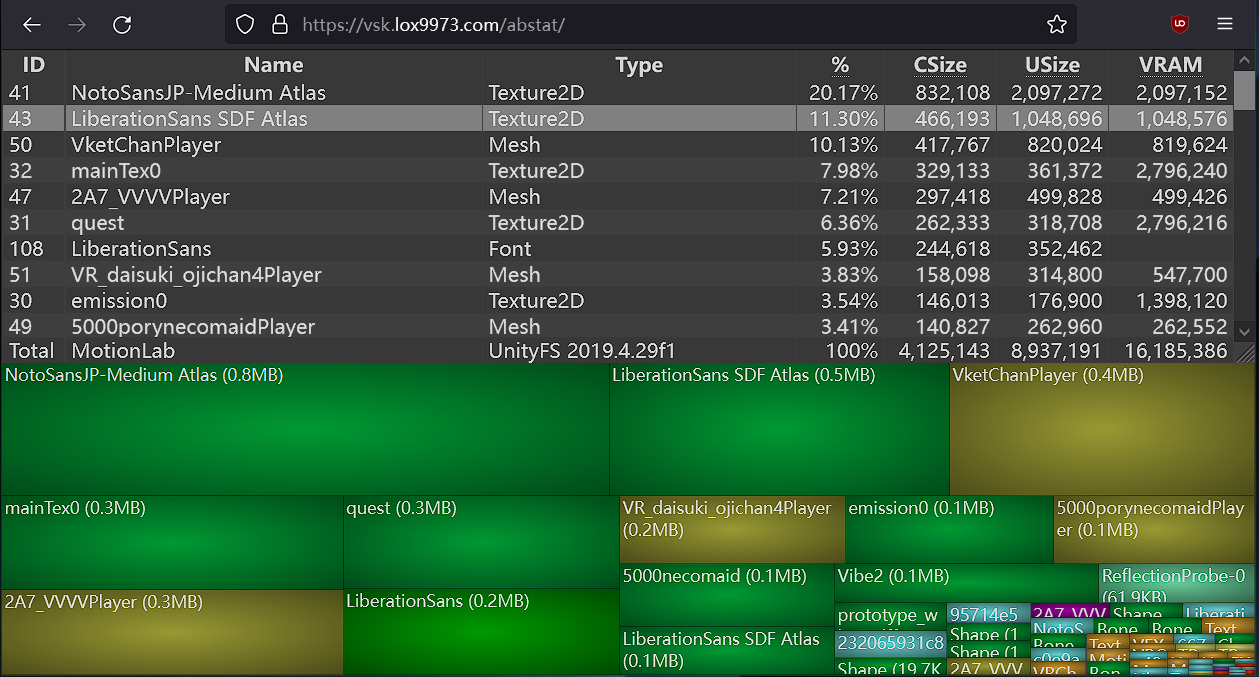
A WinDirStat-like online Unity asset bundle inspector
solar sluice
sweet ruin
try building locallly and then look at the vrca https://vsk.lox9973.com/abstat/
wdym b uild locally and how do i use the vrca
also yeah vrcfury is making temporary textures and its eating my storage completely
doubling my texture size
i use build size viewer with muni
sweet ruin
solar sluice
wdym b uild locally and how do i use the vrca
You build your avatar locally so you have access to the VRCA file and then you see what is in there
solar sluice
i had 200 mbs free on this avatar before editing, i only added like 60 mbs of assets and the rest was tattoos
and now its magically 600 over i optimized a lot of stuff down and like im pissed
how do i access the vrca file after building and testing
solar sluice
yep im looking at it but i cannot find it at all
solar sluice

vrcfury temp files are still existant here
and are still actively eating my avatar space
sweet ruin
do you see any dupes there?
solar sluice
multiple ones that say vrcfury
are dupes.
i have several that are duped.
literally vrcfury has like 20 temp files just doubled and its still eating my storage
sweet ruin
Hm i can't see any of that, might just be me though. Try joinign the vrcfury discord server an ask there ig
they know their stuff better than me
solar sluice
it literally says vrcfury
sweet ruin
cool, i have multiple vrcfury things as well, but thats because i have added multiple things with it
doesn't mean its a dupe
sweet ruin
but again, ask on the vrcfury server, they are able to explain it there
solar sluice
and its literally why my avatar is surprassing more of limits than it should
sweet ruin
Do you also have Direct tree optimizer and blend shape optimizer added?
solar sluice
sweet ruin
Do you also have Direct tree optimizer and blend shape optimizer added?
idk what that is but how do i turn on mip map streaming
its why the vrcfury is making temp files
on the text listed beside it it explains
sweet ruin
the vrc sdk should tell you and give you an autofix usually, otherwise check your textures and hit this on every one of them
https://blackwolfwoof.com/s/46Mcw6T6tmSa8o8/preview
 solar sluice
i dont have mip streaming on my textures as an option
yeah i did auto fix it but i see that all of them are still making temp files because of the fact mip map is not enabled on them
sweet ruin
huh, never seen that before. How does it look for you?
solar sluice
 solar sluice
ok thanks ill update shortly gonna test this
sweet ruin
👍 gl
solar sluice
sweet ruin
👍 gl
is crunch compression really good for like space?
ive heard good and bad abt it so im not sure i usually dont mess with crunch compression LMO
sweet ruin
solar sluice
is crunch compression really good for like space?
Uhhh tbh i recently played around with crunch vs compression.
I switched to compression now, as it i think also affects uncompressed size. I think crunch is just download size, but not vram.
https://www.poiyomi.com/blog/2022-10-17-texture-optimization this here discribes everything quite well.
I dropped my textures until i noticed a difference that was too ugly, and i changedt he compression for desktop texturs like BC5 for notmal maps or DXT1 compressed for things that are black and white such as masks
Tips and guidelines for optimizing texture memory (VRAM) and filesize for VRChat creation.
Don't quote me on the compression vs crunch though.
For example for my body that is 2k, my normals are just 256, as higher i see no difference in quality.


due to some compression artifacts i went with BC7 here
solar sluice
sweet ruin
*due to some compression artifacts i went with BC7 here*

lmaoooo
first it was my sdk needed to be 3.9.0 or higher
now its telling me avatar not found
sscreaming
sweet ruin
@night inlet Hewwo, i found an issue with d4rkAvatarOptimizer's "Use Shader Toggles"
https://blackwolfwoof.com/s/2So7tHNjzye4LH5/download/Awooo_tBatt.mp4
TLDR;
Warmers on the avatar work via the Catsuit object. It has blendshapes to hide/make smaller the catsuit (torso)
When "Use Shader Toggles" is on, this breaks.
if you need the project or want me to do some debugging feel free to say something
nocturne niche
how do i make the download size smaller im on 13.82MB and have to god down to 10MB or Somting
 fringe wing
nocturne niche
how do i make the download size smaller im on 13.82MB and have to god down to 10...
fringe wing
nocturne niche
how do i make the download size smaller im on 13.82MB and have to god down to 10...
easiest way is to make things more simple or delete things. Maybe make the resolution of the textures 1 or 2k instead of 4k or delete the mesh on one of your toggles
gritty terrace
removing unused blendshapes is another thing you can do since that takes up alot of space on a model in most cases
night inlet
sweet ruin
<@88772088013283328> Hewwo, i found an issue with d4rkAvatarOptimizer's "Use Sh...
you can make a bug report on my github if you want. tho unless you find a relatively minimal reproduction case its unlikely I can figure out whats going wrong here.
nocturne niche
gritty terrace
removing unused blendshapes is another thing you can do since that takes up alot...
Okay thx
sweet ruin
Soooo, i just found a funny.
This is for everyone using Pointless Creation assets.
https://blackwolfwoof.com/s/Lfo33DeY69cyLKT/preview
https://blackwolfwoof.com/s/mqXYFPAaE4zaBC7/preview
The banner in the Pointless Creation script takes up some space in the avatar. If it is removed, the space is freed again. It is called 1.png
Remove the script from your avatar if you want to save some space for free and use their assets.
I have also gone ahead and emailed them about this, and i think, that there will soon be an update for all assets, that include a fix that doesn't include the script and banner in the upload anymore.


To remove it, just click the 3 dots and hit remove
https://blackwolfwoof.com/s/FLzHekXt7QMCqer/preview
 sweet ruin
it has quite the impact too


my download size halfed
and so did my uncompressed size
gritty terrace
ewww pointless creations 🤢
sweet ruin
gritty terrace
ewww pointless creations 🤢
Huh, whats wrong about them?
gritty terrace
they got outed as a long-time pdf a few months back, tons of creators released announcements about it and their seperation from working/supporting them in any way
i cant remeber if there was any docs released on it but there were several videos with proof and such
 hollow depot
sweet ruin
Huh, whats wrong about them?
hollow depot
sweet ruin
Huh, whats wrong about them?
They're a pedo i'm pretty sure
I just make my own version of their assets using sketchfab models, good practice
sweet ruin
Hmm, never heard about them being bad. Got any proof of it? Feel free to dm me, that way mods don't get mad for callouts
cold yarrow
yeah this is kinda off-topic
hollow depot
sweet ruin
Hmm, never heard about them being bad. Got any proof of it? Feel free to dm me, ...
Did some research and it might be false? From what I read they were barely 18 dating a 16 year old
 cursive rover
Does anyone have tips on how to make a mobile friendly version of alpha clipped materials?
Tried testing out different mobile friendly stuff but the ones that alpha clip don't end up using culling properly, and those that have proper culling seem to not work with alpha clipping
spring sun
Alpha clipped?
 zealous void
cursive rover
Does anyone have tips on how to make a mobile friendly version of alpha clipped ...
zealous void
cursive rover
Does anyone have tips on how to make a mobile friendly version of alpha clipped ...
Generally there isn't a way to do it cleanly without manual geometric clipping.
It's unfortunate but it's just that the Android renderer is a tiled renderer and doesn't benifit in the same way that DX/GL benifit from it.
In other words, the graphics hack that makes clipped less heavy doesn't work on Quest therefore is a hard 'no'.
cursive rover
Ah thanks for explaining! I'll edit my model more in Blender to hopefully mitigate the issues
sweet ruin
Squeezing out everything i got again hehe
https://blackwolfwoof.com/s/BRxzxPDHRRzSYfN/preview

- -1 Basic mesh
- -700 mesh particle triangles
- -4 max particles
- -1 material slot
- -1MB download size
soon it will be good on desktop lol
Physbone components i can get to good if i want too
Material slots uhhhh definetly no.
sweet ruin
Turns out some of the creators i use assets from have some un-needed stuff in there
I checked it out with tools like Thrys performance tools and lilAvatarUtils
 polar tundra
anyone else ever replace their fbx through blender and sometimes the size just, blows up for no reason?
 cold yarrow
polar tundra
anyone else ever replace their fbx through blender and sometimes the size just, ...
cold yarrow
polar tundra
anyone else ever replace their fbx through blender and sometimes the size just, ...
a, just overwrite instead of doing that
b, make sure you use the same option for "apply scalings" in the FBX export dialog as was used before. Usually that's FBX All unless you know it should be something else.
polar tundra
cold yarrow
a, just overwrite instead of doing that
b, make sure you use the same option for...
wdym overwrite? also i keep using the same export settings but ill try changing them a bit
cold yarrow
you don't need to manually swap the mesh object, just overwrite the .fbx and it'll be updated
(unless you unpacked your avatar prefab... which... don't.)
polar tundra
cold yarrow
you don't need to manually swap the mesh object, just overwrite the .fbx and it'...
i select the fbx itself from unity and export it into it from blender to replace it
it just does that for whatever reason every now and then and then i somehow accidentally fix it eventually
cold yarrow
Yes, that's good. I generally don't bother to re-import, I keep my blender projects.
I import once, then from then on the blender -> unity path is one-way for me.
there are lots of ways to do it, of course.
 arctic falcon
Is there a way to turn off poiyomi auto-lock so i can use d4rk optimiser instead, it says it does the same thing but with more opportunity to combine materials
 oblique mesa
Say your body's main texture is 2K, is there any reason for your emission texture to also be 2K? I'm thinking since it's just emissions it could be 1K or even less?
cold yarrow
go as small as you can
radiant shadow
you can bake the part that need to be emissioned somewhere else on the texture then emission map can be miniscule <256x256 ( show it into a corner for exsample) - left one would require higher resolution or it will bleed over

 oblique mesa
I have it for stars that are all over my body
cursive rover
Highly recommend using this package:
https://github.com/Limitex/avatar-compressor
GitHub
LAC: Avatar Compressor: Non-Destructive Avatar Compression Utilities - Limitex/avatar-compressor
It decreased my textures down from 70 something to 20 something mb (could've been more extreme with the optimization but hey it works)
Also in general recommend using the AAO optimizer mentioned in the link as well
(If someone has a tutorial on the merge physbones thing, let me know because I'd want to incorporate it into my model
cursive rover
Also in general if you have trouble with the repository, just download the package (it's what I ended up needing to do because it wasn't going to download otherwise)
AAO also helped decrease the number of skinned mesh renders
 shell hatch
This will be fine for a Quest avatar, I'm sure....
 sweet ruin
shell hatch
This will be fine for a Quest avatar, I'm sure....
sweet ruin
shell hatch
This will be fine for a Quest avatar, I'm sure....
Oof
My quest avi has 15k for my medium one and 30k for the very poor one i think
shell hatch
sweet ruin
My quest avi has 15k for my medium one and 30k for the very poor one i think
This was meshy's first rendering. I've got to find a way to make it less without it looking like crap lol
zealous wigeon
shell hatch
This was meshy's first rendering. I've got to find a way to make it less without...
Being an AI I doubt any settings on it will help you, you will need to retopology the entire thing on your own.
And if this is an avatar then you will doubly so, highly doubt the topology was placed in such a way where it will bend well.
 glad ridge
shell hatch
This will be fine for a Quest avatar, I'm sure....
glad ridge
shell hatch
This will be fine for a Quest avatar, I'm sure....
I'm not so sure
shell hatch
Yeah, I think it's a wash, too complex
glad ridge
That's a lot of Tris
somber notch
shell hatch
This will be fine for a Quest avatar, I'm sure....
Definitely quest will render with no issues
 humble atlas
This is a bit more of a blender question but how would i be able to delete some verticies/faces but still leave around the same "roundness"
Essentially i wanna get rid of the belly button and breasts this avatar has for some micro optimizing (I am 2844 triangles over the limit and i wanna get down to medium again x3)
 cold yarrow
you don't delete them, you dissolve them
but you may still need to reshape
Also you can often slide vertices (shift+v) and preserve shape
humble atlas
Any decent resources on dissolving and reshaping then that you may be aware of that i can follow you can suggest? I am a pretty blender newbie so im not too aware on how to do this stuff
cold yarrow
sorry no, I don't really keep around links to tutorials
humble atlas
No worries thanks anyway, just knowing what to search is great help
 cold slate
Hey all! I'm working on the quest version of my avi, everything is done except file size. When I change my textures max size, the file size does not change in vrcsdk. How do I fix this?
spring sun
cold slate
Hey all! I'm working on the quest version of my avi, everything is done except f...
The file size warning tells you last build
cold slate
I don't understand?
 stable juniper
that means, build once again
cold slate
Like, start over??
spring sun
No
obsidian lake
cold slate
Hey all! I'm working on the quest version of my avi, everything is done except f...
You need to press the "build and upload" or "build and test" option in order for it to update
The analogy I like to use to explain this is that you are shipping off a package with your avatar disassembled and packed up inside to VRChat's server. In order to measure the size of the package, you need to actually pack everything up into the box and take measurements, otherwise you're just guessing what the size will be.
When you 'build' the avatar, you are basically packing it up, which is why you need to do this in order to measure the file size.
cold slate
Ahhhh I see! Interesting, it has always auto updated for me in real time. Thank you! I will try that!
obsidian lake
cold slate
Ahhhh I see! Interesting, it has always auto updated for me in real time. Thank ...
Right now, it's just telling you that it was too big last time and that you should trim or compress some stuff and then try again.
You may be thinking of texture VRAM, that is calculated as an estimate before uploading iirc.
It doesn't provide an estimate for build size though, that's much harder to estimate in real-time
sweet ruin
Had some fun setting the right compression for my mobile avatars lol

Also pls do not ask how my texture memory is higher on my fallback than my optimized one... i will look into it
Its the same material too what the fuck xd
How did i fuck that up lmao
cursive rover
cold slate
Hey all! I'm working on the quest version of my avi, everything is done except f...
what Diven is saying is none of the information will be updated unless you publish(or build) the model. There will be a version number increase when this happens as well
 buoyant holly
💬 1 🔁 9 ❤️ 18 📝 0
Sometimes I see avatars using 4k/8k textures to add ultra-high details (textile, skin, leather), but it's rarely needed.
So, here's a short thread about Secondary Maps/Details mask, which most shaders support (even Unity Standard).
Example: 8192px NM | 256px tiled NM
#VRChat


 median obsidian
so im trying to optimized a avatar and remove clothes and only keep stockings hoodie the hair and face tracking on it for the avatr but the creator told me something aboiut uv tile discord toggle
i have no idea what that is but seems to require belnder
and im not understanding this at all how to get the fbx or avatr at least in blender so i can delete the clothes
 sweet ruin
How many bones 💀💀💀
 slim iris
Not enough, I can still see the avatar under there. 🫣
sweet ruin
10/10 answer lol
sweet ruin
median obsidian
Are the clothings done via extra meshes you can delete in unity, or only via blender if it is only one mesh?
median obsidian
sweet ruin
Are the clothings done via extra meshes you can delete in unity, or only via ble...
I’ll be honest I have no clue-
I can’t delete the clothes in unity at all
It’s all molded together but toggles
The creator sent me this
Just a quick explanation of how to use Poiyomi shader's UV Tile Discard feature.
My VTuber model: https://camsaviis.gumroad.com/l/CamsRemi
Poiyomi Docs: https://www.poiyomi.com/special-fx/uv-tile-discard
Poiyomi Patreon (pls sub): https://www.patreon.com/poiyomi
Poiyomi Discord: https://discord.gg/poiyomi
Hopefully it's helpful.
TIMESTAMPS
...
sweet ruin
Ig you can do that too, but you can also remove the materials and some clothing and bones manually
There is a shortcut to disconnect all meshes that are not connected. Then you can select each mesh and delete atuff you don't need, and then select all again and merge them back together
This does require basic blender skills though
median obsidian
sweet ruin
This does require basic blender skills though
I tried to find where I can delete it but even watching the video confused me harder
median obsidian
sweet ruin
There is a shortcut to disconnect all meshes that are not connected. Then you ca...
Where do I go for the shortcut?
sweet ruin
median obsidian
I tried to find where I can delete it but even watching the video confused me ha...

Blender Stack Exchange
I Need to know how to Ungroup Meshes that were Previously joined Without Undoing History.
I Am attempting to ungroup things like these.
If you select anything on the models in there you will notice
Then you can join them back together afterwards
median obsidian
You.are.a.god
sweet ruin
I am at work rn, otherwise i could quickly show you via a video
 median obsidian
sweet ruin
Go to bed 😭
median obsidian
sweet ruin
Go to bed 😭
What is sleep
 stone fog
So... I'm currently trying to cut down on the sheer amount of bones my avatar has (400+) but when I try and merge all the hair bones which is where the majority of them are, my model comes out looking like this in unity... I'm thinking I skipped a step that I don't know about 😅

I'm using the cats plugin in blender to merge the bones
It seems my avatar has some "end bones" that I can't change otherwise something similar will happen... guess I just have to roll with the 400+ bones...?
stone fog
also found that she comes with a marker that allows me to place 2500 particles so... that's going bye bye
cold yarrow
if you're in blender and don't have end bones there, but do in Unity, uncheck the "leaf bones" option in the FBX export window.
if you do in Blender, you could probably just delete them.
(obviously verify they are unused first)
stone fog
cold yarrow
if you're in blender and don't have end bones there, but *do* in Unity, uncheck ...
I do see them in blender, but even when those are the only things I delete the model still comes out looking like that lol
cold yarrow
oh I didn't say it would affect what the model looks like
I can't tell what is going on in that pic, maybe if you showed the "correct" look... or the armature? You might have to explain what you did leading up to the problem
stone fog
Fair enough - I’ll have to do that when I get to my pc
stone fog
cold yarrow
if you're in blender and don't have end bones there, but *do* in Unity, uncheck ...
I might have misunderstood this - do you mean if there's bones after deleting the end bones and importing to unity? I believe add leaf bones has been off this whole time, but I can doulble check that when I make this quick video of what I'm doing
cold yarrow
you mentioned "end bones" and I was just suggesting a place to look for the cause of them
stone fog
ah okay
Yeah right now I just got back so I'll run through the process
ugh apparently unity didn't like that I decimated the skin, it's showing position errors for the animations now? Whatever, I'll just stick with the original model and work with those bones for now
 cold yarrow
yeah that ^ happens when you export the armature differently - perhaps you used a different setting for Apply Scalings in the export dialog?
generally use FBX All unless you know it should be something else.
stone fog
hmm okay, that's what it's defaulted to but I'll mess with that later lol
surprised that uploaded, but that's my current process
noticing that the armature has stayed the same in unity even though I made sure leaf bones were turned off - seems like it's just pulling from a saved armature somewhere?
it is showing those armature errors even though I haven't changed anything with the model itself :P
cold yarrow
also, I have no idea what cats does for exporting
stone fog
I think it just changes some settings, but I can try exporting normally - pretty sure it'll do the same though
cold yarrow
probably you'll need to set the rig to generic then redo the humanoid setup
stone fog
oof alright
Okay, so I exported the model without using cats at all (animation was turned on now so maybe that was the problem for the t-pose?) but when I export to unity there's still end bones even with leaf bones off in blender - is that what you were saying for redoing the humanoid setup?
cold yarrow
no, it was because of the error that said bones are different lengths
stone fog
ah okay - yeah no error like that now, but the armature in unity hasn't changed :/
could I just... delete the _end game objects?
okay so I ended up merging all the hair bones and the same thing happened as before - I did make sure the export settings were correct but the thing that half fixed it was turning the leaf bones back on... though now her legs are still messed up lol
 cold yarrow
with that bone length discrepency showing, the avatar's appearance is going to be wrong, you'll need to redo the rig to see it correct
also... is that avatar unpacked?
it won't get updates when you overwrite the .fbx file if so
stone fog
I believe it is, it's been updating when I've changed the model before
I've just never changed the bones which is what's messing it up
spring sun
stone fog
I've just never changed the bones which is what's messing it up
you cant change the bones or export settings of an unpacked fbx
stone fog
Okay, how would I pack it to change the bones and then later import it back into unity?
spring sun
you cant repack a model
stone fog
So I'm just stuck with the 440 bones then?
spring sun
youd have to drag in a new copy of the fbx into scene
stone fog
that's what I've been doing, I take the fbx model, change it a bit, then overwrite the old one when putting it into the assets folder
spring sun
thats not dragging it into scene
stone fog
or do you mean like this
 spring sun
youd have to basically start over and transfer all the stuff to the new fbx
since you unpacked it for whatever reason
spring sun
then the person that made the avatar is dumb
stone fog
they put 300+ bones in the hair, I figured as much already
stone fog
stone fog
could I just... delete the _end game objects?
note to self: don't do this unless you want an eldritch horror on your hands
stone fog
Alrighty - got the packaged fbx into the scene, everything seems to be working fine - now if I change the bones with blender they should update?
cold yarrow
if you overwrite the .fbx file, using the same "apply scalings" setting every time, and do not unpack, yes.
stone fog
Awesome, thanks so much for your help by the way
Final question actually: The whole point of me doing this optimization was so that people won't automatically see my impostors - currently vrc sdk is saying I have 146k triangles, do I have to bring that below 70k for people to see my avatar instead of the impostor?
Otherwise that would be the only thing "above maximum" after I merge the bones
Speaking of which, it's now much better!
cold yarrow
You have to go below 70k in order to be Medium on PC. If that's your target
stone fog
Right - I just know that sometimes even if I have my settings to where even if someone's avatar is categorized as "very poor" it will still be disabled, especially if there are too many bones and such
Last night i encountered a person on quest that didn't realize the pc version of their avatar had 800k triangles and 600 some bones...
cold yarrow
I block based on download size, but the ranking isn't a bad idea.
stone fog
Oh wait i worded that weirdly
I also block based on download size - very poor avatars still get loaded but only if they're below the 400 bone count afaik
I'll just have to go around and ask if people see my avi or the impostor lol
stone fog
ugh, still problems. I had to manually put the physbone components back, so I took them from the other armature, copied and pasted as new, and put in the new armature transforms, but now when I launch I get this eldritch creature... I'm confident I added all the physbones in, is there a reason this is happening? Previously it ran, but just without any physbones. This only happened after I put the physbone components in...


I mean... the head and hair look fine at least...

ok so it was just not having the chest mapped to the rig, lovely
okay new question: the bones were halved, but in unity the gameobjects for said bones are still there, and since they're packaged I seemingly can't move them or delete the ones the armature does not have...
first image is ear root in blender, second is in unity


 median ledge
So recently made my first public avatar, though for some reason it's only good optimazation when it should be excellent, im just unsure what's causing that


 stable juniper
see bounds. it's a bit larger than 2.5x2.5x2.5(excellent)
median ledge
how would i fix that? (Which i assumes somewhere in unity)
stable juniper
look at all your Skinned Mesh Renderer components.
they should have a "Bounds" property.
consider the center position and the size of the bounding box, making sure it doesn't exceed 2.5m.
or, you can just make your avatar a little smaller in Blender.
(btw, idk about normal Mesh Renderer)
sweet ruin
median ledge
So recently made my first public avatar, though for some reason it's only good o...
I personally use FACS Utils and the auto bounds thing to make them as small as possible
median obsidian
im trying to get one hair in this but tis all combined together and deleteingt each strand will take a long time a i seperate it?

instead of deleting each one\
cold yarrow
mark seams at the roots, then select faces limited by seams
median obsidian
where would i go for that ive never touched blender beofre
cold yarrow
oh well if you're just deleting just select a loop around the root of a strand, delete it, then select with 'l' the now separate part and delete it all
select an edge (or edge loop), right-click, mark seam
median obsidian
i dont wanna delte it all but most of the hair but keep one hair style on it
hmm
cold yarrow
well try selecting a face then ctrl+l to see what is linked, maybe you'll get lucky and it's separate sub-meshes
median obsidian
 cold yarrow
looks like you aren't in mesh edit mode, of course you can't select faces in other modes.
cold yarrow
select something first, it'll select all parts linked to it
median obsidian
 cold yarrow
not sure why you're doing a loop cut?
median obsidian
uh
restarted

this is what i tlooks like when i throw the fbx in here
im trying to keep one hair style and the hoodie on
but im not sure how i seperate everything and not indivdual because the hair seems to move by strands and not the entire hair togethert moving
 shy yacht
m trying to optimize this avatars download size for quest, can someone help me out?
 spring sun
you dont need several 4k textures
spring sun
make them smaller in the settings
spring sun
the texture
shy yacht
dude
spring sun
the literal texture file
shy yacht
Where is the fucking texture
spring sun
idk its your project
shy yacht
:/
gritty terrace
it'll be somewhere in your asset files and this is how you'd lower the resolution: (credits to liindy)
shy yacht
Im still so confused
Ykw
F this
Im going to bed
Is there anyone at all i can ask to optimize my avatar for me
gritty terrace
for free? likely no but you'd wanna look in VRCTraders (link in #1204490664637890580) additionally if your model is a paid model you'll have to purchase the base version for whomever would be doing the work
sweet ruin
shy yacht
Im still so confused
About what, the video shows exactly what to do and how to do it.
Look through your folders for names like Materials or Textures.
Otherwise click on your Body in thr Hirachy of your avatar, find your materials, click on them, and find the textures.
Otherwise tools like thry's performance tools also exist to find textures and recommend changes. There shoukd be videos for that on yt as well
stone fog
I'd have to get back to my main pc to get pictures, but currently my avatar has I believe 53 physbone components, one for each strand of hair, but most of them have the same exact settings except for their transforms. Is there a way that I can merge those together so I can have less than the 45 max?
cold yarrow
Sure, have a common root bone and put the physbone component on that
stone fog
Omg that's so easy I don't know why I didn't think to try that
There's literally already a HairRoot gameobject/bone but I guess the miniscule changes to the gravity parameter warranted 53 physbone components 😭
cold yarrow
yep
you can do some level of per-bone changes using the curves, but they'd still apply to all chains from the root
 prisma citrus
trying to figure out how to make a toggleable prop (just a mesh attached to the hand) not use a separate mesh, how do i do this while still making it a toggle? with 2 meshes i'm at medium and i want to try to get up to good. i already have it down to 1 material with both textures on it but i guess it still counts as 2 materials because of the 2 separate meshes
 lethal magnet
guess this would be an optimization question. is the hand topology/polly count here okay?
 sweet ruin
Before

After

-4 Skinned meshes
-5 Materials
UV Tile Discard with poiyomi :)
On mobile sadly not compatible (UV tile discard for toon standard when :3)
https://www.youtube.com/watch?v=Tfw3nGoxQ6Q tutorial i used to learn this

this is a better way to handle toggles and hide parts of your body on vrchat avatars
⚠️when you're finished making animations, go in your FX controller and delete the animations in base layer
music: nobonoko - Tokyo Fashion District
What you need:
Basic blender knowledge
Basic unity knowledge
sweet ruin
@night inlet The newest version of d4rkAvatarOptimizer 4.1.0 seems to crash for me on build
https://blackwolfwoof.com/s/2KcRFMpAFHAMo8q/preview
4.0.5 is ok though

NullReferenceException: Object reference not set to an instance of an object
d4rkpl4y3r.AvatarOptimizer.AnimatorOptimizer.Copy (UnityEditor.Animations.AnimatorController source, System.String path, System.Collections.Generic.Dictionary`2[TKey,TValue] fxLayerMap) (at ./Packages/d4rkpl4y3r.d4rkavataroptimizer/Editor/AnimatorOptimizer.cs:48)
d4rkAvatarOptimizer.FixAllAnimationPaths () (at ./Packages/d4rkpl4y3r.d4rkavataroptimizer/Editor/d4rkAvatarOptimizer.cs:2014)
d4rkAvatarOptimizer.Optimize () (at ./Packages/d4rkpl4y3r.d4rkavataroptimizer/Editor/d4rkAvatarOptimizer.cs:226)
d4rkpl4y3r.AvatarOptimizer.AvatarBuildHook.OnPreprocessAvatar (UnityEngine.GameObject avatarGameObject) (at ./Packages/d4rkpl4y3r.d4rkavataroptimizer/Editor/AvatarBuildHook.cs:71)
UnityEngine.Debug:LogException(Exception)
d4rkpl4y3r.AvatarOptimizer.AvatarBuildHook:OnPreprocessAvatar(GameObject) (at ./Packages/d4rkpl4y3r.d4rkavataroptimizer/Editor/AvatarBuildHook.cs:76)
VRC.SDKBase.Editor.BuildPipeline.VRCBuildPipelineCallbacks:VRC.SDKBase.Editor.BuildPipeline.VRCBuildPipelineCallbacks.OnPreprocessAvatar_Patch3(GameObject)
nadena.dev.ndmf.ApplyOnPlay:MaybeProcessAvatar(OnDemandSource, MonoBehaviour) (at ./Packages/nadena.dev.ndmf/Editor/ApplyOnPlay.cs:98)
nadena.dev.ndmf.runtime.AvatarActivator:Awake() (at ./Packages/nadena.dev.ndmf/Runtime/ApplyOnPlayGlobalActivator.cs:190)
UnityEngine.GameObject:AddComponent()
nadena.dev.ndmf.runtime.RuntimeUtil:GetOrAddComponent(GameObject) (at ./Packages/nadena.dev.ndmf/Runtime/RuntimeUtil.cs:42)
nadena.dev.ndmf.runtime.ApplyOnPlayGlobalActivator:Awake() (at ./Packages/nadena.dev.ndmf/Runtime/ApplyOnPlayGlobalActivator.cs:125)
https://github.com/d4rkc0d3r/d4rkAvatarOptimizer/issues/180 aaaand it was fixed 🫡
GitHub
👋 With the version 4.1.0 my avatar no longer builds. NullReferenceException: Object reference not set to an instance of an object d4rkpl4y3r.AvatarOptimizer.AnimatorOptimizer.Copy (UnityEditor.Anim...
4.1.1 has been released
sweet ruin
When using RGBA color masking via vertex colors, this does a funny
https://blackwolfwoof.com/s/TLFmXe9AopYe2Xr/preview

when switching into my avatar it looks fine though
https://blackwolfwoof.com/s/BEKEfwFXxymdxFt/preview

Is it because the animator is not loaded and it makes it look like that?
In unity it looks ok too

-# ping on reply ty
long gust
 true dome
||Dcxhj||
true dome
||Dcxhj||

 proper falcon
Some one told me that if an object has high poly count, its better to have more than one mesh renderer for performance?
cold yarrow
In previous versions of Unity there was a significant performance penalty after a certain amount of polygons, but it's no longer really relevant.
proper grail
Yeah unity couldnt count past 65554 back in the day, poor thing
true dome
Vc
 fleet goblet
Hey im wondering if anyone knows a way to optimize the V model made by AlexandrStariy for quest- its at like 12.82 and i cant get it to go any lower than that without deleting parts of the model ive already tried decreasing the texture and removing bone phys but its still being difficult, sorry if this is heckin stupid im reletivly new to this-
radiant shadow
if you using vrcfury, try blendshape optimizer, it removes unused ones - might scrape a few mb
 sweet ruin
fleet goblet
Hey im wondering if anyone knows a way to optimize the V model made by AlexandrS...
sweet ruin
fleet goblet
Hey im wondering if anyone knows a way to optimize the V model made by AlexandrS...
You can also set the compression ratio. For some textures, even if 2k, you can get them down to quite the small amount.
the ASTC compression is 6x6 by default, but try 12x12 and see if it still looks ok. It will be significantly smaller then
fleet goblet
Ill give both of these a try
sweet ruin

feel free to ask if you still need to get it smaller
i managed to squeeze a lot out of my model making it Download 1.73MB, Texture: 4.28MB, Uncompressed: 10.80MB
https://blackwolfwoof.com/s/F2oq2Rgj4KXx5fw/preview

 oblique shoal
fleet goblet
Hey im wondering if anyone knows a way to optimize the V model made by AlexandrS...
oblique shoal
fleet goblet
Hey im wondering if anyone knows a way to optimize the V model made by AlexandrS...
If you’re still over the limit, check for unused materials, meshes and animation clips in the avatar. Sometimes the model has extra stuff that isn’t actually used but still counts toward size. Also try converting some textures to ASTC 12x12 or even lowering a few non-important ones to 1k/512. That usually helps shave off a couple more MB for Quest
sweet ruin

This is how i did it
Compress all icons and et them to 128x128 as they don't need to be smaller / bigger
ASTC 12x12
texture atlas for my main textures on ASTC 5x5 as that still looks acceptable on mobile, and my 2k emission on ASTC 12x12 as it doesn't need to be 5x5 as it makes no difference in visible quality
all icons set as "texture type" sprite 2D and mipmaps off
https://blackwolfwoof.com/s/fxTd5tPJTZScQjx/preview
 fleet goblet
i got so excited that it was finally uploading and instead it failed the security check vr just hates this model istg
 craggy ferry
Hi! I have an avatar with 500k polygons
I was wondering any tips so I don’t have to get rid of any assets or anything
 fossil mason
craggy ferry
I was wondering any tips so I don’t have to get rid of any assets or anything
fossil mason
craggy ferry
I was wondering any tips so I don’t have to get rid of any assets or anything
what issues are you facing about it mate
craggy ferry
fossil mason
what issues are you facing about it mate
Apparently it might not be possible to put it on quest?
It’s still in blender) it’s a pc/quest avatar)
So does that change anything?
fossil mason
500k polygons is quite heavy for Quest avatars, which is probably why it may not upload. Since it's still in Blender, it can usually be optimized without removing assets by reducing poly density and optimizing materials. If you'd like, you can send the file or a screenshot and I can take a quick look for you.
craggy ferry
fossil mason
500k polygons is quite heavy for Quest avatars, which is probably why it may not...
Maby, I have to see I’ll give an update in a few days 🥲
This is prob one of the biggest avatars
fossil mason
No worries! Yeah 500k is quite big for a Quest avatar 😅
zealous wigeon
500k is a lot of a PC avatar, for Quest it would most likely get caught by the server-side checks to detect malicious avatars.
craggy ferry
zealous wigeon
500k is a lot of a PC avatar, for Quest it would most likely get caught by the s...
It’s not like that Dw
It just has a lot of dresses
And things
I have no intention on crashing people
craggy ferry
Well, there is safety settings? I just wanna know if it’s possible to put it in the game
craggy ferry
radiant shadow
you are bigger then 20 people , more like 30
It has a lot of toggles
Like for different dresses, asset, items, etc
radiant shadow
'why is my quest crashing' /blame vrchat not the user right
quest are potatos and dont have much ram
any idea how much 500k takes ?
craggy ferry
radiant shadow
'why is my quest crashing' /blame vrchat not the user right
I’ll put in my bio, just have it off 😕
No
lol
I’m not the one quest conversations
(I’m having someone else do it)
If there is a way so people don’t crash
I would love to know
At the end of the day, if that’s the case I will make multiple avatars
So I don’t crash anyone
radiant shadow
vrchat quest limits currently are set cause we have quest 2 users , so its lower then it could be q3 isnt that much better on the ram department
craggy ferry
radiant shadow
vrchat quest limits currently are set cause we have quest 2 users , so its lower...
BOO that sucks
craggy ferry
I hope one day the game just it possible for a mil without crashing people
I am not a crasher, I’m just into fashion 💅
2 avatars unless she finds a way
 forest chasm
I need some fix with updating an old model i ported to vrchat in i think 2024/2025. long story short, i am updating with simple new toggles (control the eye expressions, control the mouth expressions with ints) and added gogo freeze
the old avatar says the texture memory is around 413.52 MB (PC), but when updating it gives me an error saying it's around 788.08 MB (PC)
I have not updated my textures to be any larger nor added new textures, i even downscaled textures who have no detail and are there just for colors and did so with masks that dont need to be high res quality to look good.
is this like a glitch or an update?

 cold yarrow
that's a huge amount of texture memory
have less stuff on there, or make the textures way smaller
forest chasm
cold yarrow
have less stuff on there, or make the textures *way* smaller
😭 ill try but the textures become very pixelized when i do that
i would have to un atlas the main textrues so theyre smaller which will take a while but i can always do it later
fossil mason
craggy ferry
2 avatars unless she finds a way
This is most likely related to changes in the VRChat SDK rather than anything you added. Newer SDK versions calculate texture memory differently and include more factors like compression formats and generated variants, which can make older avatars suddenly report much higher texture usage. You will need to review the materials and texture import settings to identify what’s causing the jump and optimize it so the avatar can upload normally.
zealous void
forest chasm
😭 ill try but the textures become very pixelized when i do that
i would have to...
2 things. One, yes, they will become more pixelated. Two, if you can, atlas via texel density (Pixel size on the model.) by hand.
Additional thing, you should realize nobody cares how pixellated your avatar's props and models are. Likewise, nobody cares if you have super detailed normals. Or you'd think, see, people 'care' but in a different way, they care about your avatar's performance, they start turning it off.
You could accept the texture reduction, or you should look into Detail Maps.
For reference, this is a 512x512 texture using a 32x32 detail texture. I feel like it proves itself.
 forest chasm
zealous void
You could accept the texture reduction, or you should look into Detail Maps.
forest chasm
zealous void
You could accept the texture reduction, or you should look into Detail Maps.
thanks for the advice!! unfortunately the model doesnt need detail map due to it being super cartoony
i am working on a fix and manually separating the atla for the body and clothes. I did buy the model and did not check how large the two textures were before making them into an atlas, then making diff skins out of said atlas
it may take awhile but im in no rush to get this out ngl
buoyant holly
good idea when making your modeling decisions to stare at the avatar from about 5 ft away as that's going to be the view distance most people are seeing it at
zealous void
forest chasm
thanks for the advice!! unfortunately the model doesnt need detail map due to it...
Keep in mind many have 'private models' which are not performance limited, so if you'd like to keep the texture memory higher on it, people do do that.
When I refer to private models I'm not referring to TOS-violating models to be clear, but rather models intended for groups of 2-4 maximum. Models intended not to be ever turned off, to be always automatically by-hand enabled.
You'll just want an optimized variant ideally with optimized triangle counts, reduced physics bones, reduced particles if you use particles, and reduced materials via atlassing.
Where you can then upload a fallback avatar for both that fits into the 'extreme optimized' category with aggressive atlassed materials on medium minimum.
The goal is to never go to impostor.
As long as you're technically visible, you're good.
sweet ruin
zealous void
For reference, this is a 512x512 texture using a 32x32 detail texture. I feel li...
Damn, looks amazing for that res 👍
Did you do RGBA color mapping?
sweet ruin
sure thing
dp?
also how fucking obvious can you be
especially in the server

scammer
zealous void
sweet ruin
Damn, looks amazing for that res 👍
Did you do RGBA color mapping?
The way it works is it uses a dirt smudging for the base color and then a simple detail normal and detail albedo that multiplies over it.
Vertex colors to mask it.
sweet ruin
zealous void
Vertex colors to mask it.
Not bad not bad
I tried to use vertex colors on my avatar, but they are not supported by fallback shaders, so my avatar turned gray where i used them
sweet ruin
sweet ruin
When using RGBA color masking via vertex colors, this does a funny
https://blac...
see ^
zealous void
Oh that's simple, yes. Certain fallback shaders can have a vertex color tint.
I believe it can be disabled if you temporarily set the material to the fallback shader, set the parameter, and then turn it back. @sweet ruin
sweet ruin
zealous void
Oh that's simple, yes. Certain fallback shaders can have a vertex color tint.
Huh, how?
You mean check which fallback shader is used (for me Unity Standard, as the toon standard has some issues so i had to switch)
Toon standard seems to support it ig
https://blackwolfwoof.com/s/Zk6A6dbZLQKCKyK/preview

(i used RGBA color masking here for funsies)
-# Also i think i got what you mean
Lemme see if those colors now show up in my details menu and when my shaders are disabled
if yes then i did it right what you said, if no uhhh yea.
Nope


This is what i did
https://blackwolfwoof.com/s/yNdrACgKDJkZqN9/download/Awooo_OsOva.mp4
Do you have any toggle set in poiyomi that would correctly translate to toon standard, that would allow this?
zealous void
sweet ruin
Huh, how?
I may misunderstand the problem.
sweet ruin
For the fallback shader it is white, and in the avatar preview it shows gray, even though it should be either red, green and blue, or the actual colors (RGBA color masking via vertex colors)
 zealous void
sweet ruin
For the fallback shader it is white, and in the avatar preview it shows gray, ev...
zealous void
sweet ruin
For the fallback shader it is white, and in the avatar preview it shows gray, ev...
Rather, what's the intended look?
sweet ruin
The vertex color itself is RGB (red green and blue) currently, as i use it for RGBA color masking via vertex colors in poiyomi.
Ultimately my goal is it for the colors to be the actual colors (brown white, gray)
https://blackwolfwoof.com/s/AM9fFoNLLJZkymP/preview

I could also paint the vertex colors in brown white gray. I just experimented around with rgba color masking here
rn they are R G B though
zealous void
sweet ruin
The vertex color itself is RGB (red green and blue) currently, as i use it for R...
Oh, generally you don't want to use it for non-details such as FX or... well, detail textures.
You aren't able to do this form of colorblending in the standard shader.
sweet ruin
sorry, i am confused, What do you mean?
Instead of putting on my texture, i experimented around by using vertex colors, as i do not have any gradients.
This would allow me to save a texture, optimizing my avatar a tiny bit
-# Ignoring the fact that my fluff texture is already 128x128 and is literally like 20KB more when using it over vertex colors- but hey xd

current fluff (full 4k)
zealous void
sweet ruin
*sorry, i am confused, What do you mean?*
Vertex Colors used explicitly for masking shader coloring wouldn't be able to in the fallback apply these colors.
This would need to be in a fallback texture and the shader would need to support a fallback texture.
sweet ruin
Hmm yea
I also thought of that, but my point of using vertex coloring here is saving data. Here is how both look like
Basicall no difference in how it looks when sahders are enabled.
https://blackwolfwoof.com/s/LzBf5AM85fcyoBJ/download/Awooo_q2Py0.mp4
I think i gotta disable RGBA color masking and jump back to pure vertex colors (brown, white, gray)
but this still does not translate to my fallback shader somehow
zealous void
sweet ruin
but this still does not translate to my fallback shader somehow
Definitely should.
My apologies though, brainfog recently.
sweet ruin
No worries 🖤 thanks for helping (even though i haven't figured out how to translate it to fallback)
Lemme quickly get it painted and disable RGBA color masking, uno momento
sweet ruin
zealous void
Definitely should.
Hmm i still did not get it to translate. From what i heard, you managed to do it?
you are using poiyomi as well right?
zealous void
sweet ruin
Hmm i still did not get it to translate. From what i heard, you managed to do it...
I use my own shader.
sweet ruin
Damn 🔥
proper grail
sweet ruin
https://blackwolfwoof.com/s/F3GSWzX3L9Mjynw/preview
my favorite thing in the world is solid monocolor 4k images
buoyant holly
sweet ruin
https://blackwolfwoof.com/s/F3GSWzX3L9Mjynw/preview
if you just want to have the fluffy the solid colors you could just shove the UVS of those in the same spots where those colors are on the main body texture and that would show up in the fall back Shaders
sweet ruin
ig
 analog rover
quick question is using mesh compression a good idea to reduce file sizes?
zealous wigeon
analog rover
quick question is using mesh compression a good idea to reduce file sizes?
Mesh compression reduces the quality of the mesh, better to use something like VRCFury's blendshape optimizer since unless your mesh has way too many polygons then the only things that will be taking up space most likely are lots of extra UVMaps or blendshapes/shapekeys (same thing)
sweet ruin
I only had issues with mesh compression tbh, it very quickly distorts the mesh and breaks things
 trail pilot
yeah, getting rid of unused blendshapes is huge
blendshapes are basically an extra set of positions for every vertex in your model
(and possibly normals and tangents as well, if you're importing blendshape normals from the FBX)
solar sluice
anyone help out my situation my avatar was at 520 mbs so i removed like 10 things ( clothing, shoes, accessories. ) it jumped up to 780 mbs. ive lowered EVERY texture socks,shorts,underwear, etc small things are set to 32-300 res. clothing 500 to 1000 res. only few ones that are 4k res is the skin. the fbx itself is 40 smth mbs but theres just the fact ive deleted items and it went up
i tried again to lower everything and change versions
im checking uni optimizer and thrys tools
 verbal rivet
solar sluice
anyone help out my situation my avatar was at 520 mbs so i removed like 10 thing...
verbal rivet
solar sluice
anyone help out my situation my avatar was at 520 mbs so i removed like 10 thing...
That usually means some textures or materials got duplicated or the atlas broke during edits. All you need to do is to fix it by re-merging the materials, compressing all textures properly, and cleaning out any unused files.you'll also double check the skin textures since those can take up a lot of space. It’s not an issue with the avatar itself, just something that happens sometimes during optimization.
 hard summit
I found an avatar i would love to use... but

Everyone in that discord says they compressed the textures, but never said how they did it, and the discord has no activity since 2022
Can anyone help me, the avatar is free too
||will only say the name of the avatar in DM for "reasons"||
zealous wigeon
hard summit
Everyone in that discord says they compressed the textures, but never said how t...
The check you are running into is because the textures are compressed, this avatar was likely uploaded by people before VRChat added the very reasonable uncompressed size limits (which stops people from just compressing avatars heavily, since compressed avatars are the same size as uncompressed ones after download).
You have to reduce the size of the textures, I recommend https://github.com/Thryrallo/VRC-Avatar-Performance-Tools if you don't know much about Unity, it will suggest texture formats sizes (not very smartly, but it will do it).
And you should really be way below 500MB uncompressed, it is also just rude to take up that much of people's RAM and most likely VRAM because it is most likely textures.
GitHub
Contribute to Thryrallo/VRC-Avatar-Performance-Tools development by creating an account on GitHub.
hard summit
zealous wigeon
The check you are running into *is* because the textures are compressed, this av...
omg that worked

It said it was at 1GB and got it down to 300MB
hard summit
a server mate got it down to 138.96 MB
 spring sun
138mb is insane
are you even compressing the textures
you also dont need multiple 8k textures
hard summit
it a free avatar i like the look of, not going to change it
139.96 MB VS 1 GB
ill take the lesser
ivory sluice
it is pretty high but tbf it's more concerning that the download size is so low relatively, which probably means that the textures are crunched which will greatly affect the visual quality of the avatar
long gust
hard summit
a server mate got it down to 138.96 MB
I sense an immense decompression lag spike
 craggy ferry
Ok, great news! We figured it out, my avatar needs to be 2 avatars):
craggy ferry
Thank you, but once we figured it out, everything will work out! Thank you to eveyone who gave suggestions!
Long story short it’s for pc-quest and vr dosnt like quest users
I’m ok with the two avatars
I’m happy! It’s good quality
Yea
So eveything went smoothly
Hope one day they allow quest to have a 1 mil triangles/polygons
 charred mural
is there an easy way to combine 2 materials into 1 without requiring unity?
I exported a model made using VRoidStudio and the best it could give me was 2 materials (or 4 or 8 or 12) but not 1.
It does work, but android complains about it being 2 materials and then puts my avatar into Medium
on itself it isnt a bad thing, but considering that the average quest user will see the imposter when an avatar is medium, and considering my impostor is looking really bad, I would prefer the avatar to be Good instead. (I know I cannot get excellent since the polygons are only optimized for pc to be excellent, but yeah Good would be fine with me)
so yeah, am I forced to use blender for this or is there a quick and easy tool to do this without blender?
cold yarrow
charred mural
is there an easy way to combine 2 materials into 1 without requiring unity?
I e...
The issue is you need to modify the model, so you need something that edits models. Doable manually in Blender in various ways, and there are some ok plugins but I don't know the current state of them, last time I looked they weren't great.
I know some other tools have been shared in here in the past.
ah, I guess the material-combiner blender add-on is no longer being worked on either
charred mural
I have basically 0 experience in blender.
im also unsure if I even have a model that blender can use, as I had to do some trickery to get the vrm into a usable vrchat avatar model prefab.
so im unsure if I even got an editable model.
cold yarrow
if you got it out of VRoid Studio you can just import the .vrm into Blender with the right add-on, then deal with it like any other model
charred mural
okey
charred mural
cold yarrow
if you got it out of VRoid Studio you can just import the .vrm into Blender with...
thank you. I've been able to merge materials now
 scenic valve
So, mesh compression isn't really an option for some outfits for my model since they introduce an insane amount of clipping. What would be a better solution for reducing the size of meshes since I can't upload 2 outfits to my model to quest. The poly count isn't even that absurd and I already use modular tools to remove unused blendshapes/merge same ratio blendshapes
spring sun
split the outfits between multiple avatar uploads
scenic valve
I already understood that as an option but that doesn't answer my question as I have been able to fit more onto other avatars
spring sun
cant really tell much without actually seeing the stats of the outfits
scenic valve
One of them has 52k verts, 51k faces, 101k tris. The other has 24k verts, 23k faces and 46.5k tris
spring sun
that is absurd especially for quest
scenic valve
The entire asset bundle is 200k tris, but not the worst I've seen on quest
spring sun
just because its not the worst doesnt make it any better
Im not entirely surprised its too much for you to upload
scenic valve
I understand what you're getting at, and I do plan to reduce vertex and tri count, but the raw numbers are not indicative of why it's preventing me from uploading, so I'd appreciate less of dancing around my question and more what I even need to look for as I have blender open waiting
scenic valve
That doesn't properly explain why it is I can fit more onto another model, but not with these specific outfits
spring sun
blendshapes on a mesh technically account for every vert of the mesh even if the blendshape only moves 1 of them
meaning separate the meshes buuut that also means multiple meshes which also isnt great
if the tri count is high on a mesh with blendshapes it can cause it to be dense
scenic valve
Alright! That's something I didn't know and I understand that now. That's what I was looking for
night inlet
spring sun
blendshapes on a mesh technically account for every vert of the mesh even if the...
they don't. any vertex with 0 deltas for position, normal & tangent doesn't exist in the blendshape. thats why when unity calculates blendshape tangents (not legacy blendshapes) you get big meshes (sometimes). since then all those verts suddenly can have non 0 deltas for tangets / normals.
 obsidian venture
is there a way beside manual weight paint to make a hair have less bones?
i dont wanna do it manuallyyy anymore
spring sun
Dissolve bones
obsidian venture
spring sun
Dissolve bones
sorry ive never used this before but i hear it alot is this a unity or blender thing and then how do i go about it
spring sun
Blender
Instead of deleting you dissolve
It basically za handos the bone and stitches together what it was attached to
Like dissolve bone 2
Bones 1 and 3 connect in the middle and share the weights that 2 had
spring sun
night inlet
they don't. any vertex with 0 deltas for position, normal & tangent doesn't exis...
Do they not?
The last time I tested by making a blank blendshape and moving 1 vert caused a mesh to jump in size
night inlet
spring sun
Do they not?
The last time I tested by making a blank blendshape and moving 1 ve...
yep, I found that out when investigating the bad perf unity 2019 had with blendshape skinning. good that those days are over (https://gist.github.com/d4rkc0d3r/f77c1e96d4aeefd0d1eaf13fb096a2de)
and text serialization of meshes in unity makes them look like this. the index is the vertexid that that entry moves

 dim ginkgo
Are animation layers that only have local parameters still processed for remote players?
For example: Suppose I were to have an animation layer with animation logic that uses only local parameters, then used that layer to drive synced parameters for use in direct blendtrees. Would the animation layers with only local parameters still be checked every update for remote players or would they be ignored on the remote player's end?
Also, are animation layers with a weight of 0 disabled or processed every update?
 robust anchor
dim ginkgo
Are animation layers that only have local parameters still processed for remote ...
robust anchor
dim ginkgo
Are animation layers that only have local parameters still processed for remote ...
the animator does not know if a parameter is synced or not. (it's just that non-synced parameters will stay at their default value forever on the remote side, unless set through a parameter driver)
dim ginkgo
In that case is there any way to disable specific animation layers for remote players while keeping them working for the local player?
sweet ruin
dim ginkgo
In that case is there any way to disable specific animation layers for remote pl...
You could add a check for the parameter IsLocal, which is a default parameter
A transition
dim ginkgo
sweet ruin
You could add a check for the parameter IsLocal, which is a default parameter
My problem with that is that if i use the IsLocal Parameter on every layer, it will still check the layer with it every gameUpdate, I'm wondering if theres a way to prevent local players from processing these layers from receiving updates in the first place
dim ginkgo
dim ginkgo
Also, are animation layers with a weight of 0 disabled or processed every update...
Hence this, if animation layers with a weight of 0 are skipped over rather than being processed in the background, I can use this to reduce the amount of processing required every update
sweet ruin
Hmm i understand, but no, i dont think so
robust anchor
dim ginkgo
Hence this, if animation layers with a weight of 0 are skipped over rather than ...
I am not sure, but I believe at least the state transitions are still checked even for weight 0 layers.
But if you park the layer in a state where there is only one transition to check, and its only condition is a single parameter being checked, that's the best you can do.
dim ginkgo
robust anchor
I am not sure, but I believe at least the state transitions are still checked ev...
Gotcha
obsidian venture
spring sun
Instead of deleting you dissolve
ok question i understand how to do this for like 4 bones but how would i go about dissovling 2 bones? like do i just dissolve bone 2 and it goes into bone one or does there have to be a bone on both sides to work? sorry for all the questions
also if i dissolve a bone does it delete or do i still have to delete the bone??
spring sun
obsidian venture
ok question i understand how to do this for like 4 bones but how would i go abou...
it just puts it to wherever the chain exists
dissolving removes and transfers the data to the other parts of the chain
or at least attempts to do it cleanly
obsidian venture
spring sun
dissolving removes and transfers the data to the other parts of the chain
i think im doing it wrong nothing is happening but ima just mess around a bit and try to figure it out
yeah i guess 2 isnt long enough to be a chain
i might stick doing this manually

 quaint veldt
Just out of curiosity, did vrc recently change avatar requirements? My green avatar is now a medium but I can't find anything about it in the patch notes.
radiant shadow
nope
quaint veldt
Weird
radiant shadow
is it green in unity or webpage , unity wont be correct if you using vrcfury/modular avatar ect
quaint veldt
It was green in vrchat, recently changed to medium and only noticed today
it's saying green in unity but medium everywhere else
but it used to be green in vrc at some point
charred mural
quaint veldt
Just out of curiosity, did vrc recently change avatar requirements? My green ava...
the physbone collider limit seems to have been enforced since the update yes
it wasn't active before, but now it is.
reduce your physbone colliders to like 4 or 0 and you're back to what your optimization level used to be
 proud wing
I bought a fantastic avatar recently that has a flickering/redrawing-a-sketch effect that works on both pc and quest. It seems to work by switching through 3 different materials on a constant loop (Body1,Body2,Body3) and also does it with clothes. So 6 materials total, 2 slots. On Pc it has a Good rank. I assumed because it uses the same method on Quest, that it would be ranked VeryPoor since it technically has 6 Materials (But only shows 2 at any given time). There's still two meshes on the quest version, but when I go to upload it... It's saying this is a Medium quest avatar with 2 Material Slots. The textures are nice and small, so it isn't a big drain in terms of file size, but I feel like I'm misunderstanding how the rank system currently views Materials and their slots. I guess what I'm asking is do material swaps not count towards the total Slots, and just kinda effects the file size since there would be more images packaged into the avatar?
 supple dirge
proud wing
I bought a fantastic avatar recently that has a flickering/redrawing-a-sketch ef...
supple dirge
proud wing
I bought a fantastic avatar recently that has a flickering/redrawing-a-sketch ef...
Avatar ranks cannot detect matswaps, unsure about the server side checks tho
zealous wigeon
proud wing
I bought a fantastic avatar recently that has a flickering/redrawing-a-sketch ef...
For most of the time vrc has been around the material stat have in actuality been material slots, but a few months ago that seemed to change, the server side checking counting them as well, maybe they changed it back, donno, don't have enough material swaps to notice.
But regardless, according to my understanding of how material work there is no extra cost to unloaded materials outside of the extra bytes they take, so it only counting material slots makes sense.
proud wing
Neat! I went ahead with the upload and the website also is saying the Quest version is Medium if that's what you mean by server side. That's so cool, thanks for the responses!
supple dirge
proud wing
Neat! I went ahead with the upload and the website also is saying the Quest vers...
Would still recommend to check in-game to make sure the rank doesn't change once loaded
spring sun
proud wing
I bought a fantastic avatar recently that has a flickering/redrawing-a-sketch ef...
Its still only 2 material slots cause materials are independant of the slots
You can only ever render 2 slots at a time cause thats the max amount of slots you have but you have more materials which take up more space in the file size
Same reason why having 1 material being used in 2 material slots is counted as 2 material slots
trail pilot
to oversimplify it: each material slot is a command sent to the GPU
that's why VRChat cares about the slot count
 worldly hull
I optimized my Avatar even more, so it hopefull will can keep its medium performance rank and still have a bunch of toggle Items and Clothings.
34691polygons is the avatar itself and the long chain of polygons are all the items and clothings I want to add.
 sweet ruin
Good job :3
worldly hull
by adding more things to the Avatar, 1 main problem is the amount of polygons (what I managed to lower down enough to stay bellow the 70K.
But still, there are the Material Slots abs Mesh Renderer Limits and at the moment, I have 17 items + the avatar itself with his own extra 3 materials.

The only question is: is it worth putting in all that effort for a medium-performance avatar?
Especially when everyone else either hides them - regardless of whether your avatar is ranked as "good" or "very poor" or just has very poor avatars enabled by default.
Your single avatar won’t fix the performance in a full lobby, and as far as I know, there are no public instances where the owner can prevent people from equipping poor or very poor avatars, -or in case if its possible, I never saw a public Lobby with Performance-Rank limitation enabled.
cold yarrow
worldly hull
The only question is: is it worth putting in all that effort for a medium-perfor...
IMO if you want people to see it, make it medium.
worldly hull
cold yarrow
IMO if you want people to see it, make it medium.
How many peoples in VRChat limit Avatars by Medium or poor rank instead of hiding everyone or showing everyone?
cold yarrow
I have no idea what others do, but I personally limit by download size
charred mural
worldly hull
How many peoples in VRChat limit Avatars by Medium or poor rank instead of hidin...
vrchat (at least for pc) only allows you to select "Block very poor" or "block poor and below" (or dont block)
medium ranked should be fine most of the time
Do note that quest/android users do have medium blocked by default, I believe it was.
but of course they can always enable your avatar anyhow
 keen dove
charred mural
vrchat (at least for pc) only allows you to select "Block very poor" or "block p...
keen dove
charred mural
vrchat (at least for pc) only allows you to select "Block very poor" or "block p...
I mean, quest users barely can load avatars anyways, at least quest 2
It's awful, I have seen them loading into empty box and only being able to load 2 avatars before it runs out of ram
 vapid shore
everything that isn't an untextured humanoid with a 3-digit polycount is VeryPoor on quest anyway so there's no point in optimizing for it
gritty terrace
that's just not true and you should be aiming to make it optimized for the sake of others
the more people creating,using and wearing optimized models the less major lag spikes and crashes they and others would encounter
vapid shore
literally any poor/medium-rated avatar still being
on quest
most people (as evidenced by this server) are too stupid/computer-illiterate or used to things running like shit to care so it's not worth going any farther than making sure you're not in excess of 100mb uncompressed/80mb texture memory
unless you're going to a group that's super autistic about performance ratings like that or something
 wet spindle
vapid shore
everything that isn't an untextured humanoid with a 3-digit polycount is VeryPoo...
wet spindle
vapid shore
everything that isn't an untextured humanoid with a 3-digit polycount is VeryPoo...
oh c'mon even e·boy models have mobile-friendly versions sometimes
i know somepony who takes booth creature avatars and cuts them down to even 10k tris sometimes
(my current main is mobile!poor after some light edgeloop removal, but it doesn't have fingers so not the fairest comparison)
vapid shore
doesn't have fingers
case in point
for q*est people your model will either look like shit or run like shit
wet spindle
of course you focus on the weakest point which i purposefully put in parentheses
vapid shore
then even beside that there's literally never been a time where I've seen a model that looked good and ran good by quest standards
quest's requirements for "good" optimization are so strict that it's often just not worth it to invest in
wet spindle
my from-scratch model does have fingers (and pawpads, and lazily-made gloves) and it's still in medium tier
(wouldn't say it's good™ but that's a skill issue on my end)
these were made by a professional company so not a fair comparison but i got an excellent-tier human from here https://github.com/microsoft/Microsoft-Rocketbox
all of these are pc!excellent and mobile!poor, even the one with 9 frickin' tails https://ziodynes098.gumroad.com/
vapid shore
the techniques you have to take advantage of to make a pre-existing model into something of this quality and optimization level take me back into the other point of "it's not worth it"
especially when VRC just runs like shit by default
things get a lot less painful when you're making an avatar from-the-ground-up to be cross compatible otherwise
wet spindle
see above:
i know somepony who takes booth creature avatars and cuts them down to even 10k tris sometimes
i've done it myself even, yes it takes a while but i wouldn't say it's advanced wizardry
certainly the creator of a base ought to be able to do it, if they care
or heck there's two separate blender plugins that'll half-decently decimate it for you (i should try tuxedo at some point)
i will at least admit that vrchat seems partially to blame though, i've been in another metaverse (which idk if i can name) with dozens of avatars and it was shockingly buttery
vapid shore
wet spindle
see above:
> i know somepony who takes booth creature avatars and cuts them down...
I'm aware that someone can do that if they're autistic enough
the point is that unless it's something obviously bad like some e-person slop with like a thousand assets on one model it's not really worth pursuing optimization because VRC will run like shit by default
you can do it but you'll probably compromise a lot on quality and waste a bunch of time accommodating for hardware that wouldn't've handled your avatar/the game itself anyway
wet spindle
you keep grabbing the least easy possibility and exaggerating its difficulty while ignoring the rest
there are some models where it's genuinely as easy as reducing your subdivision modifier from 2 to 1
wet spindle
the creator does, is part of my point
(blender does have an Un-Subdivide function and it does work for the most part, but i'd be wary of recommending it as is)
it could also be fun if somepony figured out a way to share an optimization "patch" for an avatar without the avatar itself, like those face tracking add-ons
sweet ruin
wet spindle
it could also be fun if somepony figured out a way to share an optimization "pat...
I think such already works. I have seen some software that uses the original fbx and then once you run the program it modifies it and adds / changes stuff
I saw that with the Sweetwater Nardoragon detailed maw
 wary gyro
Why in the name of all that is holy unholy and in-between is the max polygon count before you get to very poor only 70k. Every single time I go to optimize an avi to bring it to an event I have to do a whole song and dance to try and squeeze it down to 70k or less polygons
Every other performance measurement makes sense, but polygon count does not affect performance so much it needs such a (relatively) small cap. If it were just 30k more, half my Avis would magically be poor or better
This rant is brought to you by me fiddling around with my human avi for the past week x-x
wet spindle
wary gyro
Why in the name of all that is holy unholy and in-between is the max polygon cou...
from what i know the official stance is, they're targeting 80 players and a total of 5.6m tris is already a lot
whiiich idk how much i buy that, big events already often require medium+ avatars (unless vrchat inc has ambitions to go above 80 i suppose)
the latest livestream on twitch had a big ol q&a mostly about avatars, there might be some wisdom there
zealous wigeon
wet spindle
from what i know the official stance is, they're targeting 80 players and a tota...
VRChat definitely has ambitions to let you go above 80, but it wouldn't surprise me if going above that forced the rank gating on.
I think VRChat's networking is currently "stable" to about 150-200 people in one instance going off the tests I have seen done.
Also it is 70k tris times some multiplier based on the world (like for every light, the depth texture and there was something more) and some times the shader you are using if it has multiple passes.
But if they move it up to 100k then it will not take a day before people start wanting it raised even higher and a few months until new assets and base avatars start taking it into account negating the whole increase.
What VRChat in my opinion should do is different, separating static tris and skinned tris, static meshes are after all a whole lot cheaper to render than skinned ones and this way it would indirectly provide an increase, one that hopefully doesn't negate itself.
 proud tusk
I really like how this Avatar look, but will all this fur shader cause people lag?

 cold yarrow
which shader is it?
proud tusk
cold yarrow
which shader is it?
It came with the Booth package I bought for the wings. It's based on LilToon.
cold yarrow
ah, I didn't know they had a fur shader. not sure then.
I'd bet if it's not Warren's, then "maybe?" is a decent answer 🙂
proud tusk
The fur shader came with the fuzzy collar around the neck to go with the wings, but I was experimenting with copying the effect to the clothes materials.
ivory sluice
proud tusk
I really like how this Avatar look, but will all this fur shader cause people la...
that shader does vertical cards instead of repeating the mesh over itself repeatedly so it won't be very performant but it's definitely faster than other fur shaders, so better use this one than a different one
 velvet crow
For anyone familiar with d4rk's optimizer, I can't remember: How do you get it to play nicely with VRCFury?
I feel like I remember that there is a circumstance already handled by either one noticing the other, but I can't remember the order/position of where to put the script.
sweet ruin
velvet crow
For anyone familiar with d4rk's optimizer, I can't remember: How do you get it t...
Tbh it does complain about vrcf but i just let it complain and ignore that
worldly hull
I just found out that Faces and Triangles are 2 different things. I expected my avatar is bellow the 70K limit + a Cape.fbx I HOPED to add later in Unity, not knowing that the decimate modifier shows me the "Faces" and not the "Triangles".
In my case it was: "54,372 Faces / 66,973 Triangles".
A trap I have fallen for...
 sterile trail
how do I decrease this?
 cold yarrow
Remodel in Blender or similar
zealous wigeon
sterile trail
how do I decrease this?
With how unreasonably high that is, even for PC, what exactly is your avatar?
sterile trail
zealous wigeon
With how unreasonably high that is, even for PC, what exactly is your avatar?
an angry birds star wars boba fett model I found on sketchfab
zealous wigeon
Well, it wasn't hard to find.

I feel like this must be photogrammetry, could be AI generated too I suppose.
First of all, do not use this until you have fixed the triangle problem, 700k is unreasonable for either Quest or PC.
@sterile trail While fixing this would be trivial in Blender, it has such an unreasonably large amount of triangles that just using decimation would lower it heavily without making a noticeable looking difference.
The easiest tool that comes to mind outside of sticking it in Blender though would be Polytool, but it is paid.
Alternatively there is this Japanese tool https://note.com/azukimochi25/n/n13837d7f015e you will need to translate the guide, it does the same decimation that you could do in Blender, but in Unity instead.

note(ノート)
まえがき このツールは、lilさんが公開しているlilNDMFMeshSimplifierというツールの解説記事です。 NDMF対応のため、非破壊で実行時にのみメッシュの削減ができます。 読者想定 ・軽量化に興味がある改変中級・上級者向け ・とにかくお手軽にメッシュ削減が...
sterile trail
zealous wigeon
<@850524779337351198> While fixing this would be trivial in Blender, it has such...
hmm, okkie
sterile trail
zealous wigeon
<@850524779337351198> While fixing this would be trivial in Blender, it has such...
 zealous wigeon
sterile trail
zealous wigeon
sterile trail
I assume that would have been part of the guide, you need the Non-Destructive Modular Framework package too.
sterile trail
zealous wigeon
I assume that would have been part of the guide, you need the Non-Destructive Mo...
I don't know how to download it
zealous wigeon
sterile trail
I don't know how to download it
It is part of https://modular-avatar.nadena.dev/
Did notice that going to the github for what I sent above https://github.com/lilxyzw/lilNDMFMeshSimplifier it says it has been discontinued and to use https://github.com/RamType0/Meshia.MeshSimplification instead, it still requires NDMF.
Drag-and-Drop Avatar Assembly
GitHub
Burst accelerated mesh simplification. Contribute to RamType0/Meshia.MeshSimplification development by creating an account on GitHub.
polar tundra
anyone know if theres a texture optimizer? i dont want to figure out which compression types to use
 tight badger
Unity has a built in texture optimizer
sweet ruin
polar tundra
anyone know if theres a texture optimizer? i dont want to figure out which compr...
BC1 for no transparency
BC3 for transparency
BC7 if the other two look shit and if you have compression artifacts
BC5 for normal maps (Red Green channels)
BC4 for masks (usually black and white) (Red channel)
Bc 3 is default and is normal quality preset, if you don't overwrite it for desktop
And then just drop the texture resolution until they look shit and voilà
There is a package that i forgot the name of which does it in one click (the texture resolution)
If someone could add that here and ping them that would be nice
radiant shadow
polar tundra
anyone know if theres a texture optimizer? i dont want to figure out which compr...
https://github.com/Thryrallo/VRC-Avatar-Performance-Tools - checks your avatar materials / textures , can change resolution / compression with a click - a thing i wish sdk had buildt in

GitHub
Contribute to Thryrallo/VRC-Avatar-Performance-Tools development by creating an account on GitHub.
 flint quest
Fahhh the materials aren’t changing

 sick relic
flint quest
Fahhh the materials aren’t changing
sick relic
flint quest
Fahhh the materials aren’t changing
Note that "material slots" are not the same as "materials".
flint quest
sick relic
Note that "material slots" are *not* the same as "materials".
Ah, I see, ty for telling me^^
trail pilot
Material Slots counts how many commands Unity has to send to the GPU, basically
using animations to switch materials doesn't change how many commands your avatar sends
 cobalt hatch
(FIXED)
idk if i need to ask this here but
for some reason the sdk is telling me that the size is more then 10.00mb (for quest) and i cant update it
the model is literally all in one mesh and the texture is literally all in one image
is it cus the toggles or something? it have 11 toggles (that are just retextures) and the gogoloco toggles
and the bones are the mixamo bones
and it has custom walk/run/idle animations, but the idle is literally 1 frame and the walk/run is just 3 frames
 sweet ruin
cobalt hatch
**(FIXED)**
idk if i need to ask this here but
for some reason the sdk is telli...
sweet ruin
cobalt hatch
**(FIXED)**
idk if i need to ask this here but
for some reason the sdk is telli...
Sometimes it says garbage. Did you try to upload it and get an error saying it is too big?
cobalt hatch
sweet ruin
Sometimes it says garbage. Did you try to upload it and get an error saying it i...
the first time yes and rn it let me upload
thanks for let me know that the thing sometimes tells me wrong stuff btw
 pseudo adder
Hey so im like very very new to unity and when i wanna upload my avatar i see a bunch of this but i have 0 clue how to fix it, i have vrcfury but idk if that will fix it
 sick relic
pseudo adder
Hey so im like very very new to unity and when i wanna upload my avatar i see a ...
sick relic
pseudo adder
Hey so im like very very new to unity and when i wanna upload my avatar i see a ...
These are not the problem.
pseudo adder
sick relic
These are not the problem.
so my avatar is fine?
cus there arent any other problems besides those
sick relic
pseudo adder
so my avatar is fine?
Still can't tell whether your avatar is totally fine or not. But what you're showing definitely not problem.
pseudo adder
well im not sure what the problem is
im trying to upload it rn and ive been waiting 15 minutes
sick relic
pseudo adder
im trying to upload it rn and ive been waiting 15 minutes
Better screenshot the entire unity screen.

 sick relic
pseudo adder
sick relic
pseudo adder
At this point, just force close unity and try again.
sick relic
pseudo adder
same thing happens
Are you doing multiplatform build?
pseudo adder
taking some time reboot
pseudo adder
sick relic
Are you doing multiplatform build?
no just windows
since it says android should i multi build?
sick relic
pseudo adder
since it says android should i multi build?
Better keep it only one platform at a time. Some script might be breaking it. But since there is no error showing up in the console, I can't identify what issue it's coming from.
pseudo adder
is there any way i can find this error
pseudo adder
It just takes so long to publish idk what the issue is
Why is this so complicated 💔
worldly hull
Is it possible that the Phys Bone Collider Count –Counter is broken?
Because I noticed instandly that my avatar was rated as poor instead of medium. But the Upload-Tool showed everything is fine for medium performance.
Well, I pressed the select buttons next to Phys Bone Collider Count and counted 20 GameObjects with VRC Phy Bone Collider in each one.
Is this a bug that only I have or is it for other peoples here also miscounting?

 robust anchor
are you using tools that automatically modify your avatar before upload (e.g. VRCFury)?
Those may add physbones and colliders depending on how they are configured.
The upload tool can only measure the statistics before any such modifications.
charred mural
since the update to imposters, they did start to enforce some stuff related to Phys Bone Collider stuff, which they didnt do before that update...
i dont think that is related to it tho
worldly hull
robust anchor
are you using tools that automatically modify your avatar before upload (e.g. VR...
Yes but I also tried it already without it and in both cases its the same result.
sweet ruin
worldly hull
Is it possible that the Phys Bone Collider Count –Counter is broken?
Because I n...
Maybe you can also combine some physbones.
Your count will go down and transforms up
Example:
Ears
Booba
But
For my ears i added a root ear bone, and then restricted the movement of the ones that were unneeded.
RootEar (phys)
RootEarLeft (0°)
RoorEarRight (0°)
EarL & R 1-3 (40°)
As example
worldly hull
sweet ruin
Maybe you can also combine some physbones.
Your count will go down and transform...
This was not my question.
I just want to know, why it says not 20 instead of 16, when 16 is not correct.
sweet ruin
robust anchor
are you using tools that automatically modify your avatar before upload (e.g. VR...
I am gonna guess this ^
I use lilavatarutils and drag my avi in it (which includes vrcf stuff)
https://lilxyzw.github.io/lilAvatarUtils/
A VitePress site
Then i can see all physbones and count how many and jump to them etc
worldly hull
sweet ruin
I use lilavatarutils and drag my avi in it (which includes vrcf stuff)
https://l...
I dont know it and never used it.
I try to keep it simple and the obly thing I use is gogoloco but like O said, even without VRCFury and Gogoloco, the VRC-Upload-Window still says only 16 even if it selects 20 when I hit Select.
sweet ruin
worldly hull
I dont know it and never used it.
I try to keep it simple and the obly thing I u...
Well, i just suggested it has helped me find an issue where i duplicated my tail by accident which lead to my fallback breaking as it medium on mobile randomly
i can show you how it looks like if you want


-# This is another package showing the actual performance after building it. I used it here to show you that it found all physbones that were shown in lilavatarutils
as example 4 components
worldly hull
sweet ruin
Well, i just suggested it has helped me find an issue where i duplicated my tail...
But why do you need all that for something the VRCSDK should be able to by default in the first place?
Couting 20 gameobjects and pretending like its just 16, until you see the truth in the avatar details of your game.
 hallow elm
likely cause sdk cant track all the ndmf scripts that only apply upon upload
 desert turret
Does anyone have the time to help me figure out how to switch my platform to android? even after installing its still giving me issues </3..

 barren mural
desert turret
Does anyone have the time to help me figure out how to switch my platform to and...
barren mural
desert turret
Does anyone have the time to help me figure out how to switch my platform to and...
Honestly I'd suggest reinstalling unity hub
sweet ruin
desert turret
Does anyone have the time to help me figure out how to switch my platform to and...
Can you show where/how you installed it?
-# guessing it might have installed for a wrong version or something
glad ridge
I wonder if I add eboy repellant spray will make my western style Avi more optimize
 oblique ingot
any advice on optimising vroid avatars ive got a little experience on blender but idk how to optimise without completely remaking the hair
 empty beacon
It’s saying I didn’t upload the pc version of the opti avisar but it’s right here and I did upload the pc-/quest version
 devout oxide
so im on very poor for android so how do i improve it??
also before you dm me im not willing to paying to get help.. otherwise ill marked you as spam.. and im saying it again im not paying anything.. otherwise dm will be perm closed if i get it again asking me to pay you to get help
charred mural
devout oxide
so im on very poor for android so how do i improve it??
also before you dm me i...
what are the performance stats on your avatar saying right now?
Cause uhm you need to meet these requirements:
https://creators.vrchat.com/avatars/avatar-performance-ranking-system/#mobile-limits
 charred mural
oblique ingot
any advice on optimising vroid avatars ive got a little experience on blender bu...
charred mural
oblique ingot
any advice on optimising vroid avatars ive got a little experience on blender bu...
export the vrm file with optimized polygons from within vroid before putting it into unity.
Just play around with the reduce polygons sliders. Try to get polygons below 15000 for excellent PC (or below 7500 for excellent mobile and pc)
The only thing I did in blender was combining the last two materials into one material, but that was only to fix some warning for the mobile versions
This is what I ended up using for my avatar. And mine is an excellent on windows and a medium on mobile:
 charred mural
empty beacon
It’s saying I didn’t upload the pc version of the opti avisar but it’s right her...
charred mural
empty beacon
It’s saying I didn’t upload the pc version of the opti avisar but it’s right her...
are they the same avatar id?
devout oxide
charred mural
what are the performance stats on your avatar saying right now?
Cause uhm you n...

yea but how do i reduce it.. its my first time
charred mural
thats not what I asked for.....
uhm
I prefer an in-game mobile screenshot or a screenshot of the errors list in unity
empty beacon
charred mural
are they the same avatar id?
I fixed it
devout oxide
well in vr yea imposter fallback
charred mural
devout oxide
well in vr yea imposter fallback
I mean, if you do have a phone/quest/headset, then open the details page on there and screenshot
otherwise open unity, switch to android and then show screenshot of the "Review Any Errors"
devout oxide
charred mural
I mean, if you do have a phone/quest/headset, then open the details page on ther...
OK will do later
devout oxide
charred mural
I mean, if you do have a phone/quest/headset, then open the details page on ther...
 charred mural
devout oxide
charred mural
devout oxide
yeah so its mostly those material slots that are your problem.
with your triangles count you will get it to medium, if you fix the material slots
devout oxide
so how do i reduce it
charred mural
if you click the select button, then it shows you which stuff all have material slots
radiant shadow
fixable in blender , not to hard - atlas/bake your texture

easiest way - matcombiner > you now have 1 texture and 1 material , unless you must have more (uv tile offset/ect would want +1 )
devout oxide
radiant shadow
fixable in blender , not to hard - atlas/bake your texture
is there plugin or what
cold yarrow
for Blender? I like SimpleBake, it definitely speeds things up.
devout oxide
yes blender
devout oxide
charred mural
if you click the select button, then it shows you which stuff all have material ...
alr got it merge so i drag fbx to mixamo but not working at all
charred mural
I dunno what mixamo is...
charred mural
never heared of it, so cannot help you.
the only thing I know is that you must combined material slots to get a medium avatar (and else reduce the triangles to 7500 to get an excellent on mobile)
devout oxide
well im trying to rig
charred mural
hmm so you didnt merge the materials on the already rigged model?
devout oxide
i did merge material
charred mural
yeah but apperently not on the rigged model?