#avatar-optimization
1 messages · Page 16 of 1
 zealous wigeon
 heady smelt
All the years I've spent in unity I never knew you could have seperate settings ...
heady smelt
All the years I've spent in unity I never knew you could have seperate settings ...
Since VRChat now wants you to use ASTC for Android, it is quite useful to know.
zealous wigeon
heady smelt
Do you have a reccomendation on which format to use?
I am not great with this, ASTC is what you should use on Quest at least, 12x12 is the smallest size one.
For PC I am very unsure, BC7 is what I think high quality compression is. DXT1 I have used at times when I don't need an alpha channel, not sure if it was the default one though.
heady smelt
zealous wigeon
I am not great with this, ASTC is what you should use on Quest at least, 12x12 i...
Sure thing, I'll play around with them. Thanks for the help! 
 copper verge
Well over 17 materials swap animations on several renderers
 vapid elm
Anyone know a good method for optimizing an avi's mesh and material count?, I've tried both way's I could think of. One being having toggles set as separate mesh and having the materials all joined into one but the issue with doing it that way is the texture overall doesn't look to good and obvisually the mesh count is really high. I then tried doing it the other way around by joining all the meshes into one and making a material for each part and toggling it using an invisible material, and yes the texture overall looks better but now there's the issue of there being a lot of materials, So I was just wondering if there's a method were I can have the benefit's of both worlds, and if not, which one is better to do so in the terms of optimization
sorry for the long paragraph😅
 ruby isle
vapid elm
Anyone know a good method for optimizing an avi's mesh and material count?, I've...
ruby isle
vapid elm
Anyone know a good method for optimizing an avi's mesh and material count?, I've...
Make different copies of your avatar with different outfits/toggles to cut down on them overall. Avatars don't need a ton of toggles in one
 floral mica
vapid elm
Anyone know a good method for optimizing an avi's mesh and material count?, I've...
floral mica
vapid elm
Anyone know a good method for optimizing an avi's mesh and material count?, I've...
look into uv tile discarding
 vapid bluff
vapid elm
Anyone know a good method for optimizing an avi's mesh and material count?, I've...
vapid bluff
vapid elm
Anyone know a good method for optimizing an avi's mesh and material count?, I've...
for mesh optimization youd either have to look into
- retopoing manually or with an addone like remesher
- dissolving unnecessary loops/topology
- minimizing to only necessary blendshapes on the mesh
for materials look into and practice
- merging meshes together
- getting used to UV discard workflow
- using multiple UV sets
- Editing UV islands/unwrapping
- Using RGBA packed texture masks for RGBA color masking & global masks
- Using vertex colors
- downscaling texture resolutions
- lowering bit depth of non gradient black and white masks
- use 2048 high quality as opposed to any 4096 normal quality
- get rid of any unnecessary textures such as heightmaps, things like that
its very doable, u just have to make a solid plan and stick to it
vapid elm
floral mica
look into uv tile discarding
is that possible for quest?, Ik how to do it for pc but idk the method to do it for quest since poi toon shaders don't work on the android upload unless I preform a forced upload, but then it's extremally un optimized lol
zealous wigeon
vapid elm
is that possible for quest?, Ik how to do it for pc but idk the method to do it ...
It isn't possible to do, firstly because none of the Quest shaders are all that fancy feature wise and because you aren't allowed to use custom shaders on Quest and sidestepping that would very likely break the ToS, since you would likely need to do SDK modifications.
vapid elm
so what I'm hearing is it's impossible to make an avi with around 10 or 16 toggles that works for both pc and quest, and falls under the perfect rating

my dreams have been crushed
I wonder if maybe I could just create a toggle method for the uv's using a custom script for the quest side...
my pea brain Is gonna go try even tho I doubt it will work lol
 raw oar
you know, i cant really tell whats wrong with my avatar. The polygons doesnt seem THAT bad riiiight..?

 raw oar
lmao i dont understand, does it think im uploading EVERYTHING in my folder???
my avatar is barely 20000 polys
vapid elm
raw oar
you know, i cant really tell whats wrong with my avatar. The polygons doesnt see...
how does your pc even let you run that unity project without lagging?
raw oar
vapid elm
how does your pc even let you run that unity project without lagging?
cuz my model isnt actually 200 million polys lmfao
its 20000
raw oar
idk whats happening or why is it thinking that its 10000 times the amount of polys
ye i think its cuz it wants to upload ALL of my models stored in my folder
 buoyant holly
I suggest checking for Auto fixing messages and clicking Auto fixing all those
as I know there's some sort of checkbox setting that makes it spit out that ridiculous number
vapid elm
raw oar
idk whats happening or why is it thinking that its 10000 times the amount of pol...
have you tried running it threw a test upload with like build size viewer?
raw oar
ahhh, so much better

 raw oar
still 3 times taller than normal tho lol
vapid elm
would be something you'd need to change in blender, or maybe if you set the height just a little to tall in unity just lower it down and make em smaller
other than that it looks very solid for an optimized avi
 vapid elm
ok that makes more sense for the height lol
raw oar
lol
 heady smelt
is it better to assemble my avatar with all the clothing I want and then optimize it in blender? or is it better to optimize each piece of clothing separately then build the avatar
vapid elm
heady smelt
is it better to assemble my avatar with all the clothing I want and then optimiz...
id say do it separate, then combine the mesh after done optimizing
heady smelt
vapid elm
id say do it separate, then combine the mesh after done optimizing
ok thanks
also is there like an addon to blender that can make it easier to attach clothing with premade armature? I'm working with stuff from booth and wondered if that exists (cause i know there's stuff for unity)
vapid elm
it also help's to know which mesh isn't very optimized when it's separate
heady smelt
vapid elm
it also help's to know which mesh isn't very optimized when it's separate
true
vapid elm
heady smelt
ok thanks
also is there like an addon to blender that can make it easier to atta...
can use the cat's plugin
heady smelt
vapid elm
can use the cat's plugin
ok thanks
buoyant holly
VRCFury could also be used in unity for combining the armatures which would make the workflow a little bit more non-destructive
Attach clothing, props, etc to bones on the avatar
floral mica
vapid elm
so what I'm hearing is it's impossible to make an avi with around 10 or 16 toggl...
you would have to do blendshape toggles then
quest limits are insanely tight
blendshape toggles are not too bad anymore since we're on 2022
 gray citrus
Thinking about learning sculpting and just wanting to know how expensive is a baked normal map usually? And can it create performance issues?
 tulip rose
Once you bake something in 3d, it gets reduced to a single texture. Normal maps are almost free extra detail. Best to export at a large size and shrink down in unity to a normal amount of vram useage.
 raw yoke
what method is recommended for combining multiple materials into one atlas?
cats doesnt seem to handle normals/specularity/emission. ive heard the addon principled baker get recommended, but when it try to install it gives me errors for not using version 2.7. should i downgrade? is there another tool for this?
 cold yarrow
There's a bunch - you could manually do it, you could do a bake in Blender or with various add-ons to help, you could just setup your UVs and make a combined material from scratch
You can also use the development version of cats with Blender 3.x if you prefer to go that way
raw yoke
what addons are available to do that?
id prefer to avoid doing it manually since ive just had a nightmarish experience with manual texture atlasing and all having to mash together all the various maps and masks
cold yarrow
I've used SimpleBake a whole lot, it generally works for this to but normal baking can sometimes be an advanced thing
raw yoke
thank you for the recommendation
 drifting turtle
raw yoke
thank you for the recommendation
drifting turtle
raw yoke
thank you for the recommendation
https://www.youtube.com/watch?v=VnmYM3vkYBk
This vid helped me a lot, it uses simplebake

Fast tutorial for material optimization easily applicable to VRChat.
Get the model I am VTubing in: https://camsaviis.gumroad.com/l/CamsRemi
Check out my Shop: https://camsaviis.gumroad.com
SimpleBake addon: https://blendermarket.com/products/simplebake---simple-pbr-and-other-baking-in-blender-2
UVPackMaster addon: https://uvpackmaster.com
raw yoke
oh awesome!
 vital hound
how fix ?
 heady smelt
Any ideas why Blender really want's to make my Atlas an all black texture?
 zealous wigeon
heady smelt
Any ideas why Blender really want's to make my Atlas an all black texture?
zealous wigeon
heady smelt
Any ideas why Blender really want's to make my Atlas an all black texture?
Are you using a standard "shader" (forgot what Blender calls them, might be shader)?
And the atlaser takes the images from their locations, it cannot handle textures that it doesn't know where to find, so if it is this then just reselect the textures (from the file explorer that is) in each material.
vapid bluff
heady smelt
Any ideas why Blender really want's to make my Atlas an all black texture?
make sure ur UVmaps are all named the same before atlasing
some atlasers can have issues if its not
heady smelt
Thanks for the advice, I gotta look into it. It's a old ass ps1 model with like, 32 materials ; _ ;
 jade light
How do i add a blendshape toggle?
 willow wave
Same as mesh toggles, just animate the blendshape instead of the mesh.
vapid elm
anyone have some tips on what might be the best option to pick for quest?

I'm just stumped on which format I should use lol
cause like

DAMN

 wind herald
I think either of these?
 zealous wigeon
vapid elm
anyone have some tips on what might be the best option to pick for quest?
zealous wigeon
vapid elm
anyone have some tips on what might be the best option to pick for quest?
The recommended is ASTC, the higher the block size (12x12) the less size it takes up, which of course sacrifices quality, but not as badly as I expected it to, so play around with it.
Not sure if you can test how it looks inside of the Unity editor, at least I haven't played around enough to know if you can.
wind herald
I might be wrong, but I believe unity shows the texture for your current build target
And yeah, higher block sizes are more efficient as ASTC always uses 16 bytes per block
zealous wigeon
wind herald
I might be wrong, but I believe unity shows the texture for your current build t...
That would make sense, should play around more with the setting then, I didn't notice any difference at all playing setting different ASTC block sizes.
 radiant shadow
You can get vram checker and set format type there easier , 4k works easy on a quest av  unless you need excellent rating (this is one of mine)

GitHub
Contribute to Thryrallo/VRC-Avatar-Performance-Tools development by creating an account on GitHub.
wind herald
radiant shadow
You can get vram checker and set format type there easier , 4k works easy on a q...
those are not formats supported on quest though
radiant shadow
uh i just uploaded it, so yes
 radiant shadow
see it sets it

This isnt something new for me, done it since quest builds were out
wind herald
 radiant shadow
 want more
 wind herald
oh, i misunderstood
the default should be ASTC
but ASTC is not enforced
my bad lol


while astc looks a little worse when you use 12x12, it uses just around a quarter of the vram that dxt1 does
8x8 seems to have the same visual quality as dxt1
6x6 is better and also still has lower vram usage

6x6

8x8
radiant shadow
all my quest avs are good+ rated 🔨 under 10k poly im never on quest mode so its just fallbacks anyway
textures are baked so they are very packed into a 4k
raw yoke
do meshes in deactived game objects use draw calls?
cold yarrow
no
 fiery chasm
I used the decimate --> un-subdivide modifier because the original asset was WAYYYY too large (talking like 2 million polys). I'm at 600k right now but any further makes it look terrible. It also created these seams in the mesh. Is there any way I can salvage this? I have no way to go backwards since I applied the modifier a long time ago
I'm just trying to make the poly count really low, but anything I try either crashes blender or takes forever to load because of how many polys it has

 worthy sigil
I made great experience with quad remesher. Alternatively, remesh by hand but yeah its insanely dense.
wind herald
Quad remesher is magic
fiery chasm
I'll look into that. I ended up using MeshLab
 vagrant skiff
Hi
 warm bolt
For my avatar I’m use to import the .Unitypackage and all the rigging, blendshapes, physbones, ect… are all setup, then I just apply a new texture from substance painter and add some clothes with VRCFury.
But now I’m trying to figure out how to optimize the mesh for a lower poly count.
If I edit the mesh and import the new fbx file am I going to need to manually setup the entire rig, controlls, ect… or can I transfer those over?
radiant shadow
overwrite one in scene, long as you didnt unpack
warm bolt
radiant shadow
overwrite one in scene, long as you didnt unpack
I think I may have unpacked but I should be able to make a new packed prefab.
cold yarrow
Just use Pumkin's tools to copy to a new unpacked one. And then don't unpack it 🙂
 alpine talon
Anyone familiar with VRC Quest tools? I'm trying to convert this avatar to Quest, but the convert button is greyed out. I don't know how to deal with the specific problems mentioned above, like the multiple physbones in a single game object.


Like, it's telling me to change the shaders but I don't know how?

 warm bolt
cold yarrow
Just use Pumkin's tools to copy to a new unpacked one. And then don't unpack it...
warm bolt
cold yarrow
Just use Pumkin's tools to copy to a new unpacked one. And then don't unpack it...
Someone just told me about those told today too. Never heard of them before.
alpine talon
I figured things out nvm
raw oar
fiery chasm
I used the decimate --> un-subdivide modifier because the original asset was WAY...
2 million is nothing compared to what i went throught lmao
 fiery chasm
raw oar
2 million is nothing compared to what i went throught lmao
fiery chasm
raw oar
2 million is nothing compared to what i went throught lmao
what in the....
raw oar
fiery chasm
what in the....
2 billion polys lmao
raw oar
oh
ye you are right, the height might be the problem...
ya know what i love about this
vrchat still lets me upload it lol
cold yarrow
that large polygons number is because you don't have read/write enabled on your FBX file, look in the inspector for that file, in the left-most tab, which I can't remember the name of
raw oar
cold yarrow
that large polygons number is because you don't have read/write enabled on your ...
i know, i already fixed it
cold yarrow
oh good 🙂
raw oar
it was one of the "fix now" thingys
cold yarrow
raw oar
it was one of the "fix now" thingys
yeah, I didn't see that in the pic, it's why I mentioned it
 heavy abyss
Anyway to remove all phys bone components?
nvm VRCQuestTools has a phys bone checker
heavy abyss
Any tips to lower avatar memory? Stuck at 26mb no matter how much I lower texture resolution
I've also used PolyTools and QuestTools and I can't seem to lower it
 proper grail
if you dont use mesh deforming blendshapes, set blendshape normals to none.
if none of your textures use the alpha channel, dont use high quality (visually, not space saving wise) compression. High quality adds an alpha channel doubling memory usage.
delete unused blendshapes in blender or something before export.
lower non-color data textures (masks and maps) resolution, those can usually be 512x512 or lower.
heavy abyss
proper grail
if you dont use mesh deforming blendshapes, set blendshape normals to none.
if n...
aight
 hardy hound
heavy abyss
I've also used PolyTools and QuestTools and I can't seem to lower it
hardy hound
heavy abyss
I've also used PolyTools and QuestTools and I can't seem to lower it
Remove unused blendshapes, normals, compress textures and soo on
 umbral fulcrum
What's the easiest way to shave 3 whole megabytes off my quest avi?
Textures are all either 1080 or 540.
Compression settings perhaps?
Also, if I have an emission map in a material, but then toggle off emission as i'ts unneeded, will it still be "in" the material?
 scenic valve
Yes
texture format is also important and some occupy much less space though if this is for quest, it already changes all textures to a format that takes up less space
zealous wigeon
umbral fulcrum
What's the easiest way to shave 3 whole megabytes off my quest avi?
Textures are...
VRCFury's blendshape optimizer can be used to bring it down just below the limit, blendshapes can take up a surprising amount of MB.
umbral fulcrum
I'll keep that in mind. Though I believe the avatar may already have that.
heavy abyss
hardy hound
Remove unused blendshapes, normals, compress textures and soo on
Is there a way in Unity to remove all blendshapes?
alpine talon
Anyone here know how to auto convert unsupported shaders (like MToon) to Quest supported Mobile shaders in Unity?
hardy hound
heavy abyss
Is there a way in Unity to remove all blendshapes?
doing anything in unity is harder than learning the basics of blender
heavy abyss
hardy hound
doing anything in unity is harder than learning the basics of blender
Yes IK that, I already know the entirety of blender (8 years of experience) but whenever I reimport a .fbx into unity it always breaks the avi no matter what I try to do so I'm trying to do everything in Unity
and FBX Exporter ain't working either so I can even export the .asset
radiant shadow
unpacked ? that would do it
heavy abyss
radiant shadow
<:ratl:1090025945081065493> unpacked ? that would do it
Yeah, it is unpacked
Though I think I was finally able to get FBX Exporter working by doing smth weird
heavy abyss
heavy abyss
Though I think I was finally able to get FBX Exporter working by doing smth weir...
nvm still broken
Would removing unused materials lower memory usage?
 paper zinc
No, unused materials don't get uploaded
paper zinc
heavy abyss
Is there a way in Unity to remove all blendshapes?
And there is. Vrcfury or d4rk's optimiser can freeze and remove non-animated blendshapes on build
wind herald
heavy abyss
Though I think I was finally able to get FBX Exporter working by doing smth weir...
fbx exporter in unity?
if so, don't use that
 wanton carbon
heavy abyss
Yes IK that, I already know the entirety of blender (8 years of experience) but ...
wanton carbon
heavy abyss
Yes IK that, I already know the entirety of blender (8 years of experience) but ...
I use pumpkin’s avatar tools (unity plugin) so when I re-import my fbx my avatar doesn’t get turned into string cheese
Otherwise I’d lose my mind long before I finish the thing
umbral fulcrum
paper zinc
And there is. Vrcfury or d4rk's optimiser can freeze and remove non-animated ble...
do I need that on each mesh renderer or once on the whole avatar?
heavy abyss
paper zinc
And there is. Vrcfury or d4rk's optimiser can freeze and remove non-animated ble...
I'll look into that
heavy abyss
paper zinc
And there is. Vrcfury or d4rk's optimiser can freeze and remove non-animated ble...
D4rk's helped alot but now I am in the troubling time of micro-optimization ☠️

 spring sun
have you optimized the textures yet
heavy abyss
spring sun
have you optimized the textures yet
Yes
 heavy abyss
spring sun
also a lot of bones
heavy abyss
spring sun
also a lot of bones
Yes I'm porting it from a PC Avi
I've tried running it through PolyTools to reduce polys and other things but the model does not like the decimate algorithim it is using
spring sun
one large texture with 1 material slot is much better than a bunch of material slots and a bunch of textures
heavy abyss
spring sun
one large texture with 1 material slot is much better than a bunch of material s...
I didn't make the model... I'm just porting it...
spring sun
what model
heavy abyss
NSFW Model
I'll tell you in DMs if you still want to know
Alright, so 630 KB to go

Welp I scared him off
spring sun
or Im just not replying
paper zinc
umbral fulcrum
do I need that on each mesh renderer or once on the whole avatar?
Once on the avatar root, vrcfury has some components that go on mesh renderers as well though like deleting objects on upload or forcing states on upload
 mint topaz
heavy abyss
mint topaz
heavy abyss
are you looking to optimize overall
heavy abyss
mint topaz
are you looking to optimize overall
Looking just to port it to quest


 opaque summit
nvm i got it
umbral fulcrum
Got my avatar down to 11MB. All textures are 512, removed most normal maps and things, uneeded bones, only 4 physbones, no contact receivers and got the blendshape optimiser.
I can't get it down to 10MB though. Any things to try?
 crisp oak
umbral fulcrum
Got my avatar down to 11MB. All textures are 512, removed most normal maps and t...
crisp oak
umbral fulcrum
Got my avatar down to 11MB. All textures are 512, removed most normal maps and t...
decimate your mesh 🤷
zealous wigeon
umbral fulcrum
Got my avatar down to 11MB. All textures are 512, removed most normal maps and t...
Do you have a lot of animations on the avatar?
And check Thry's avatar evaluator, it can list all textures, which can help give you an idea of what is taking up space and if you missed a texture.
umbral fulcrum
not loads. facial gestures mainly and some now unused toggles as I removed the clothes and stuff
umbral fulcrum
zealous wigeon
And check Thry's avatar evaluator, it can list all textures, which can help give...
Thanks
is thry avatar emulator separate? I seem to have a few thry tings in my project already from a while ago but I don't see anything on an emulator
zealous wigeon
umbral fulcrum
Thanks
I think you could also use the worldtoolkit as it can list everything taking up space, however then you'll have to make a scene that only has the avatar you are uploading for an accurate result. You would have to know what stuff isn't going to be uploaded with the avatar though, scene specific stuff.
zealous wigeon
umbral fulcrum
is thry avatar emulator separate? I seem to have a few thry tings in my project ...
Evalutator https://github.com/Thryrallo/VRC-Avatar-Performance-Tools?tab=readme-ov-file#avatar-evaluator
GitHub
Contribute to Thryrallo/VRC-Avatar-Performance-Tools development by creating an account on GitHub.
umbral fulcrum
ree go it down to 10MB but still won't let me quest upload. Need to shave off a few decimals
 trim sierra


 sick timber
trim sierra
sick timber
trim sierra
D:
 exotic hazel
I think the answer is "no" based on what I've Googled, but just in case there's something new going around -
Is it possible to test how the toggles look for Quest users while using a PC avatar?
Some Quest users that see my avatar see it without pants (and other users see the pants for some reason), just from toggling GoGo Loco stuff. I think I understand that parameters are the problem, I just want a way to test changes to them.
zealous wigeon
exotic hazel
I think the answer is "no" based on what I've Googled, but just in case there's ...
There is not.
Your best bet is to just keep the same parameter list between PC and Quest and it should work.
With VRCFury you'd have to have the packages in the same order on the avatar and it should line up.
exotic hazel
zealous wigeon
There is not.
Your best bet is to just keep the same parameter list between PC a...
What if my PC avatar is using more parameters for something PC-only, like the Cig & Zippo addon? I tried adding those parameters to the Quest version but I think they were auto-removed because it's not installed there.
Also, when I asked about needing GoGo on a Quest avatar when I already had it on the PC version, I was told it wasn't necessary? Is that incorrect?
zealous wigeon
exotic hazel
What if my PC avatar is using more parameters for something PC-only, like the Ci...
Parameters aren't removed if they are unused, so probably just in the wrong order, the order of the parameter list is really important.
zealous wigeon
exotic hazel
Also, when I asked about needing GoGo on a Quest avatar when I already had it on...
Quite sure you need it on the Quest version as well, no reason to not have it.
exotic hazel
It might've been the way I added them - I just used the Compare function of VSCode to make sure the two files were exactly the same, then loaded them up in Unity.
zealous wigeon
exotic hazel
It might've been the way I added them - I just used the Compare function of VSCo...
Which wouldn't catch what VRCFury does, since it adds stuff during upload or when in playmode and only then, non-destructive editing.
And if you add the same parameters that a VRCFury package requires then it will ignore them and create its own.
exotic hazel
zealous wigeon
Quite sure you need it on the Quest version as well, no reason to not have it.
Oh, it was actually franada (the creator of GGL) that said it: https://i.imgur.com/n1ZGiaF.png
It's just a private avatar so I was looking to optimize. Was curious if it was needed. I think most people put GGL on both versions for quest users to use it also.
 zealous wigeon
exotic hazel
Oh, it was actually franada (the creator of GGL) that said it: https://i.imgur.c...
zealous wigeon
exotic hazel
Oh, it was actually franada (the creator of GGL) that said it: https://i.imgur.c...
Ah, ok.
But does make the parameter issue a thing, so probably want to have gogo on both because of that.
exotic hazel
zealous wigeon
Which wouldn't catch what VRCFury does, since it adds stuff during upload or whe...
Yup, this makes sense.
Yeah, I think you're right, especially when the issue happened while I was toggling Gogo Loco stuff. Maybe franada isn't aware of that.
zealous wigeon
Think they are aware, this is VRChat issue, an annoying one.
VRCFury makes it more annoying to deal with since you can't pre-make the parameter list.
exotic hazel
zealous wigeon
Think they are aware, this is VRChat issue, an annoying one.
VRCFury makes it mo...
Oh, I see. Because all the parameter changes are done during the compile of VRCfury?
zealous wigeon
Yeah
exotic hazel
Thus, all the more reason for me to have GGL on both versions of the avatar. I'm sold.
zealous wigeon
I don't know if this is how it works, but I assume VRCFury starts with the top package and goes down.
If it does that then all packages that aren't going to be used on the Quest version will need to be run first and all their parameters would need to be noted down and pasted into the Quest parameter list.
exotic hazel
zealous wigeon
I don't know if this is how it works, but I assume VRCFury starts with the top p...
Ok - even though the Quest avatar doesn't have any of the things those parameters represent? Files should still be a mirror image?
zealous wigeon
exotic hazel
Ok - even though the Quest avatar doesn't have any of the things those parameter...
I kind of forget something, ints bools and floats are ordered separately, so as long as you just make sure that all bools, floats or ints that appear on both PC and Quest are the same, then you can add extra to PC.
But yes, generally it is simpler if they are just literally the same, even if Quest doesn't use the parameters at all.
exotic hazel
Aww shit. I forgot I had uploaded GGL on a second attempt at a Quest avatar, and it's placed last on both PC and Quest versions, and the parameters are exactly the same, so sayeth VSCode compare (minus whatever VRCFury does).
I think my last resort was just unchecking the "Synced" checkmark beside the pants parameter just so I don't look like a Ken Doll to Quest users and just say "fuck it" to all the other weirdness that might happen.
zealous wigeon
The parameter list can basically be like this and still work. The cross compatible ones just have to come first.
- HairStyle (int) PC/Quest
- Clothing (int) PC/Quest
- Material swap (int) PC
- headpat (bool) PC/Quest
- ragdoll (bool) PC
zealous wigeon
exotic hazel
Aww shit. I forgot I had uploaded GGL on a second attempt at a Quest avatar, and...
You can find the final parameter list VRCFury makes when in playmode, it replaces the parameter list that is normally slotted into your avatar.
Should allow you to compare, would just need to copy and save it somewhere else since VRCFury deletes it when you exit playmode or finish uploading.
exotic hazel
Oh, that might help, thank you.
exotic hazel
zealous wigeon
Should allow you to compare, would just need to copy and save it somewhere else ...
Ok, this might've solved my whole parameter problem. I'm seeing a whole section of 14 parameters on my PC version but not my Quest version - the lollipop 😆 . So I'm guessing I'd need to install that on my Quest version also, even though it won't work, and I'd probably need to remove physbones from it and other junk?
Or, no. I can just add those parameters to the Quest version and then call it done.
zealous wigeon
exotic hazel
Or, no. I can just add those parameters to the Quest version and then call it do...
Or upload the PC version with the lolipop last in the list, then it should be appended to the ends of the parameter list and not cause any problems.
exotic hazel
zealous wigeon
Or upload the PC version with the lolipop last in the list, then it should be ap...
Ah, clever. Ok. I did it by just brute-forcing the parameters into the Quest version and then re-play mode'd both and compared both VRC files in VSCode to make sure. They're both exactly the same now. Going to try walking around and asking people if I'm wearing pants sometime soon 😆
Thanks a lot for the assist. Fingers crossed.
 smoky compass
Did something happen to Quest optimization levels? My taidem used to be green but is now red 😦
zealous wigeon
smoky compass
Did something happen to Quest optimization levels? My taidem used to be green bu...
Only thing I can think of that has changed is that texture memory is counted, but that happened months ago https://creators.vrchat.com/avatars/avatar-performance-ranking-system/#android-limits
The Avatar Performance Ranking System allows you to see how much a user's avatar is affecting performance via analysis of the components on that user's avatar. You can also use it on yourself to see how performant your avatar is.
smoky compass
Thank you I must have missed that
vapid elm
umbral fulcrum
Got my avatar down to 11MB. All textures are 512, removed most normal maps and t...
reduce the Polly count in blender
anyone know why my avi lags quest users?, The texture size on the avi is in the green and the polly count is at 140k. I have other avi's around the same polly count and even worse texture optimization and they don't lag quest users at all, but for some reason this one in particular does?, could it maybe be how the textures are compressed in unity that causes this?
ik I tried using the android compression on this avi just to test it to see if it's better than just the normal default method of lowering the texture size
cold yarrow
140k is pretty far into Very Poor territory on quest, for good reason. Do you have all 140k visible but the non-laggy avatars have those disabled or hidden, like hidden clothing or other assets?
vapid elm
If you mean that in the sense of does it have toggles and other set of clothes yes, so not all meshes are visible at once
cold yarrow
yeah
vapid elm
not all meshes are visible at once on the avi
I have more unoptimized avatars that are quest and they don't lag quest users, but for some reason this one avi absolutely destroys there frames. but the weird thing is, is that not all quest people I have shown it to share the same experience, some say it's fine, and other's beg me to change out of the avi
cold yarrow
weird
vapid elm
I think it might be the new compression method I used. is the only thing new I tried and it seems to look good for the stats on the avi, but ig it lags people for some reason?
idk...
😭
cold yarrow
oh that could be the case, some of those are harder for the processor to do
vapid elm
ig time to redo all the texture quality for quest
raw oar
anyone know why the emissions keep turning off on the shader..?
spring sun
raw oar
anyone know why the emissions keep turning off on the shader..?
it currently doesnt work
raw oar
spring sun
it currently doesnt work
rip
smoky compass
I still experience the quest 3 random stutter freeze occasionally. Does anyone know why?
Could it be my avatar, world, other people causing it?
 fresh trail
heavy abyss
fresh trail
heavy abyss
Make the material in 1 shader but max out at 4 if needed. You’ll have to do that in blender,
If you can bring down the amount of bones by half that should boost the performance
fresh trail
trim sierra
I use the metaspark ar plugin to help reduce polys. Anything that isn’t visible to the users delete for that version of the model that will also help with polygons(you can view how many polygons your avatar has in blender if you go into overlays and click statistics on)
fresh trail
trim sierra
When it comes to your textures, you only get up to four slots max so try to use as much space as possible on one before moving to the next. If you can get your UV to be in squares, it is a lot easier to organize so that way you can have as many of the textures on one PNG as possible.
Also, remember to all of your messages once you’re ready to export from blender, so that way you only have one mesh renderer in unity
trim sierra
Ok ill try
wind herald
fresh trail
When it comes to your textures, you only get up to four slots max so try to use ...
What do you mean by four slots?
 golden talon
So I have an unused material in my prefab, and I want to remove it for optimization sake. However, I have no idea how to do it, if it's even possible. Does anyone have any suggestions?
 cold yarrow
if it's not applied to a mesh object either by default or via animation, I wouldn't expect it to get uploaded with the avatar
 warm cloud
i'm trying to upload an avatar for quest, right?
and for SOME REASON, it says it's 18mb??? but when removing the locomotion controller, EVERYTHING IS FINE and it uploads as normal!
i checked EVERY animation file that's used in that controller, and NONE of them were 18 mb, or even close to that! the model is nowhere that size either, and the textures are below 1 mb in total aswell.
I'M SO CONFUSED what am i doing wrong???
spring sun
warm cloud
i'm trying to upload an avatar for quest, right?
and for SOME REASON, it says it...
if adding the layer causes it to go up to 18mb then its something to do with the layer
warm cloud
spring sun
if adding the layer causes it to go up to 18mb then its something to do with the...
how do i fix it??
i'm using the default locomotion layer that's from vrchat's example folder
spring sun
warm cloud
how do i fix it??
i'm using the default locomotion layer that's from vrchat's ex...
idk what all you put on the model
warm cloud
spring sun
idk what all you put on the model
i replaced the default animations with custom ones?
but if animations themselves were the issue, then how come the action layer doesn't do the same thing? i have custom animations on there too
cold yarrow
warm cloud
i'm trying to upload an avatar for quest, right?
and for SOME REASON, it says it...
Thry's avatar tools helps you find what things are what size, it's really useful for this. Also possibly your mesh has lots of blendshapes - those take up a lot of space too.
warm cloud
cold yarrow
Thry's avatar tools helps you find what things are what size, it's really useful...
it is not the fbx, i already said so. it has no blendshapes.
cold yarrow
ah I must have missed that. Still, that tool has help me find textures I didn't know were getting applied.
wind herald
switch to windows, build a test avatar, then inspect using https://vsk.lox9973.com/abstat/
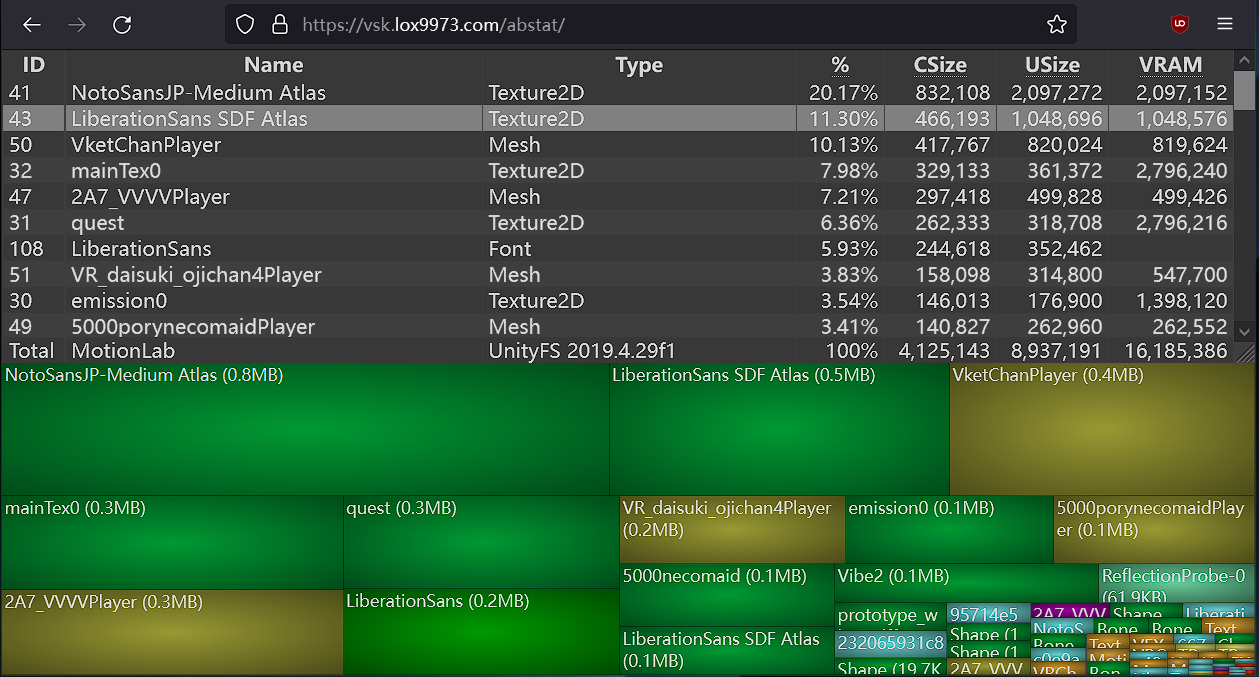
A WinDirStat-like online Unity asset bundle inspector
 sinful depot
ohohoho i didnt even add anything
 spring sun
polygon count or the fact it is 4 materials
crisp oak
Atlas your materials
raw yoke
ive got a texture atlas that im putting emissions on. ive noticed in this case i can tile the emission map and then apply a mask to prevent the map from applying to the other three textures on the atlas
it seems like its a win win. i get higher resolution on the emission map and less vram usage than if i used a map/mask for the whole atlas
but is this actually optimizing it? is this creating extra work for the computer that i dont know about?
 cold yarrow
you can often make the map itself pretty low quality
Basically go low, like 512, and see if it still looks ok, bump it up if not.
raw yoke
cold yarrow
Basically go low, like 512, and see if it still looks ok, bump it up if not.
yeah it was distractingly bad at low rez
this was my little workaround for that, and it looks nice and it saves 2 megs of texture memory according to my little gauge
but im just nervous that tiling it secretly quadruples the vram usage or otherwise does something worse than just having a mostly empty high rez map
because i got no clue how this really works lol
cold yarrow
Aww, yeah sometimes it just is.
So there's a tradeoff - one 4k texture vs. several smaller ones and each of them causing a draw call.
raw yoke
this is tiling a smaller image across the 4k texture atlas and using a mask to hide the unwanted tiles
maybe i should just show the texture atlas to make it clear what im doin
1 sec
cold yarrow
oh wait, this is sounding weird now 🙂
usually when you do an atlas your UV map takes care of where things go and you don't have to do funny things with masks to deal with it
raw yoke
this is for an emission effect using poiyomi shaders
cold yarrow
Possibly you can take advantage of packing multiple masks into a single texture via the channels. Maps less so of course....
raw yoke
like i guess to generalize my question (thank you for your patience while i work to articulate this)
is a 1k texture tiled four times across a 2k atlas's uv map, with the three unwanted tiles hidden by a mask, going to be more efficient than just using a 2k texture?
cold yarrow
No - but why would you have unwanted tiles?
trying to use one texture set in multiple materials?
raw yoke
pictures might tell a thousand words here
cold yarrow
they might 🙂
raw yoke
so ive got this angel avatar
im using an emission layer to bake the light from the halo onto the hair. im not adding it to the main texture because i wanna be able to turn the baked light off and on as part of animations [1st image]
since the atlas is 4k [2nd image] using low rez textures looks bad pretty quickly, and id rather not have a 2k texture just for a gimmick.
since the effect is contained entirely in the top left corner of the atlas [3rd image], i figured i could use a 1k texture [4th image] and then use poiyomi's tiling option to apply it four times across the atlas [5th image]
doing this would result in weird mismatches where the tiled texture goes where it shouldnt [6th image], so i use a 32x32 mask to make sure only the hair quarter of the texture atlas gets the emission effect [7th image]


 raw yoke
im just a hobbyist so idk what the precise vocabulary is for any of these terms
yeah thats essentially what im doing
cold yarrow
right but I mean with Poi's decal feature
raw yoke
yeah
cold yarrow
it'd mean the halo effect could just be a much smaller texture, positioned appropriately, and it also has emission
raw yoke
perhaps this is something i dont understand about textures then
oh wait yeah i see what yore saying
cold yarrow
yeah
raw yoke
im basically doing that but using an emission layer(?) and i can see why that's not optimal in terms of using the shader if i want more decals and emissions
but it should be in effect the same thing as using the decal layer right?
cold yarrow
decals are great for stuff like this, affecting a small section with their own whatever sized texture - I use them for tshirt logos a lot, but this is a neat use
oh true but the emission layer applies to the whole material and must be masked/etc. whereas the decal is applied on top of that at whatever position and size you like and has its own emission settings, and can be a way smaller texture
raw yoke
i know decals have emissions, i used a decal for the gowing eye effect you can see in the 6th picture
cold yarrow
oh ok, I figured that was just a normal emission section
(I do eye glow there with a mask)
raw yoke
like my one hesitation is idk if you can animate decal emissions like you can with an emission layer
i dont see why you couldnt but i dont know what i dont know lol
raw yoke
i mean it sounds like the reasonable and simple thing to do is to move that to the decal then, because thats basically what ive already set up only for emission
thank you for you help
cold yarrow
of course! It's a pretty interesting problem
raw yoke
like its a lot of thought and effort i suppose for saving 2mg of vram when my avatar's already well under medium performance rank for texture usage
but i dont want to do the thing where i get into a habit of thinking im optimizing something and do it a bunch and then find out later ive actually made it worse
cold yarrow
haha it IS, but a) you can then tell people YOU did it and so should they b) it's a fun problem to solve c) it opens you up to doing even more stuff now that you have more available space and d) your own avatar's performance affects you as well
raw yoke
tbh vrchat is just kind of a pretense for messing around in unity and blender at this point like its important because it gets me to think about these things but at this point vr chat is mostly for showing off the avatar and talking to people who know more about avatars than me haha
raw yoke
tyty i baked it blender and then turned it black and white and posterized it to make it more resilient to downscaling
cold yarrow
oh cool
 elder laurel
A few weeks ago when I first got into modding my personal avatar, I saw something called d4rkpl4y3r's optimizer script, which I used. I'm wondering though if there's a different optimizer I should use. Also, should I use the optimizer's feature of creating an optimized copy in Unity, then putting VRCFury plugins on the copy? I noticed one plugin I used was fixed when I didn't optimize my avatar on upload. I also can't seem to fly with GoGo Loco Beyond, and am wondering if maybe this is also because the optimizer script broke it.
cold yarrow
I suspect if you start layering up complicated tools which do behind-the-scenes magic, there will be conflicts.
 night inlet
elder laurel
A few weeks ago when I first got into modding my personal avatar, I saw somethin...
night inlet
elder laurel
A few weeks ago when I first got into modding my personal avatar, I saw somethin...
do not do any extra work on the optimized copy. it is intended for testing in editor or straight upload.
if the optimizer breaks stuff you can try to make a bug report here: https://github.com/d4rkc0d3r/d4rkAvatarOptimizer/issues
and maybe I'll be able to fix it
cold yarrow
oh hi! Cool script, lots of neat stuff inside.
elder laurel
night inlet
do not do any extra work on the optimized copy. it is intended for testing in ed...
Thanks! If it turns out the issue is more me just not grokking the manual, would you be patient enough with me to tell me what settings to change, or what might be causing conflicts?
Though one tricky part is that the plugin that was giving me issues is a paid plugin.
wind herald
night inlet
do not do any extra work on the optimized copy. it is intended for testing in ed...
I really should figure out how to properly use it, never got the hang of the mesh merging lol
elder laurel
night inlet
do not do any extra work on the optimized copy. it is intended for testing in ed...
If I'm also using an Android conversion script, should I apply that first to make an Android copy, then apply the optimizer to the copy?
night inlet
elder laurel
If I'm also using an Android conversion script, should I apply that first to mak...
probably do the android conversion first, then optimizer
(the android part of my optimizer isn't used much so dunno how well it will work/help you)
 eternal axle
Question for those who know:
Since would it be better for an avatar with 8 material slots to use a single atlased 8K material slot with UV tile discard for toggles, or is it still better to have a 4K body texture mat slot, an outfit mat slot that is 4K, etc? Keep in mind this is using 4K responsibly. All my models are rated good.
Basically; is it stupid to put an entire model on a single 8K mat slot and just atlas everything?
buoyant holly
the 8K texture would be doubling the vram for no reason
eternal axle
Technically yes,
The theory I want to try is if you can pack a bunch of smaller 2K normals, metallics, etc into a single texture
Because when I cut my models down on VRAM I usually end up deleting a bunch in small detail maps (AO, Normal, etc). But If I am going to have a normal map anyway, why not put them all into one normal map
proper grail
normals, data, and visible color are types of textures you would want separated, much like separating transparent and opaque/cutout materials. Focus on the least amount of meshes and materials off of that.
eternal axle
Right now I am running a single mesh and toggling via UV tile dissolve
proper grail
so in short, atlas everything you can that the shader you will use supports the features you would like
eternal axle
Yeah it's mostly just a thought experiment. Since I'm constantly trying to get my stuff better and better rated/performant
don't do it

 eternal garnet
buoyant holly
the 8K texture would be doubling the vram for no reason
eternal garnet
buoyant holly
the 8K texture would be doubling the vram for no reason
quadrupling actually
1024x1024 = 1 million pixels
2048x2048 = 4 million pixels
4096x4096 = 16 million pixels
8182x8182 = 64 million pixels
twice the resolution = 4 times as much pixels
going with higher (but less) atlassed textures requires very specific setup if you want to make the most of it without incurring extra VRAM usage.
If your model has 4 equally big mats then thats a good place to do an atlas.
If your model has 6 mats.... i'd highly suggest against atlassing everything together, rather atlas 4 of them together and the other 2 (preferably the odd ones out) separate.
Commonly avatars use ~ 8 mats (if they aren't horribly optimized), that would be 2 atlasses 4 textures each for optimal usage assuming each of those 4 sets have equal texture size. Otherwise you'd require 16 mats to atlas everything together equally and if you start mixing and matching it gets worse.
1 4K atlas could fit:
4 x 2K
or
2 x 2K, 8 x 1K
or
1 x 2K, 4 x 1K, 32 x 512
etc
wind herald
buoyant holly
the 8K texture would be doubling the vram for no reason
quadrupling
 short spoke


 frosty fern
I got this pink dog girl avatar down from "Very Poor" to "Medium" on PC! Now I have another avatar to wear to events and such. ^^
 elder laurel
night inlet
do not do any extra work on the optimized copy. it is intended for testing in ed...
elder laurel
night inlet
do not do any extra work on the optimized copy. it is intended for testing in ed...
So, I figured out what was breaking my plugins, and it had nothing to do with your script, but instead it had to do with dragging prefabs straight from the file explorer to the root of my avatar. Since my avatar has a scale transform at its root, this seems to break prefabs, unless I drag the prefab into the world before then dragging it to the avatar. It just so happens that I had done this accidentally the time when I also disabled your script to troubleshoot.
Sorry if that's TMI.
 pine radish
So, what is better for avatar texture optimization (in-game performance):
One single 4096x4096 texture for all its body or four different 1024x1024 textures? It's better to load a heavy tex or some smaller ones 4 times?
Using the ".zip extraction logic", it's faster to extract a single big file than a lot of small ones, isn't it?
 heavy knot
a single 4k BC7 compressed texture is 21mb in VRAM, 4 BC7 compressed 1k textures would be 5.2mb in VRAM
pine radish
Oh shi thanks, I was "optimizing" my avatar in the worse way so... I had a big atlas for all of it and I was having UV problems because of it
pine radish
heavy knot
a single 4k BC7 compressed texture is 21mb in VRAM, 4 BC7 compressed 1k textures...
oh wait, you mean 5.2mb for EACH or all of them?
pine radish
oh right, thanks again
proper grail
because 4096^2 is a number, that 2048^2 x 4 equals. Four 2048^2 images make a 4k image. four 1k images make a 2k image, because squared. To be equal you would need 16 1k images to make a 4k atlas. You could make a 2k atlas out of four 1k images with no quality change.
pine radish
Oh so I expressed myself wrong, so my question is four 2k textures or one 4k texture?
it's so numbers my brain go weeewooo
My question is like: same amount of info (technically?) but is more performant to run 4 small textures (that have the same pixel amount of the big one) or 1 big one?
heavy knot
the amount of textures won't really matter, it's just the amount of VRAM you're using
pine radish
got it, thanks : )
wind herald
heavy knot
a single 4k BC7 compressed texture is 21mb in VRAM, 4 BC7 compressed 1k textures...
one 4k is not 4 1ks
its 16 1ks
1 4k is 4 2k and each 2k is 4 1k
proper grail
Irc users are incapable of reading any message but one confirmed
wind herald
proper grail
Irc users are incapable of reading any message but one confirmed
chicken sandwich
 snow knot
To add onto what was said earlier. It also depends on what that atlased texture is being used on. 4 draw calls is more expensive than 1 draw call so you're still probably saving performance with an atlased model. Though there are exceptions.
 subtle arch
How tf do people even get to 500mb texture memory and over 100 material slots???
I know it's easier to not give a f about optimization but I couldn't imagine working with an avatar like that inside Unity
Like you'd need a whole ass UML diagram to keep track of everything
 onyx harness
Not really.
If you're using 1k, 2k and 4k textures and have things like diffuse, normal, metallic, roughness, specular, ambient occlusion and masking textures for each material; different clothing/outfits/accessories, it'll stack up pretty fast. Not to mention gifs which I've removed before being like +100mb alone. It's definitely a lot easier to fall into if you're combining a bunch of assets together from a few other creators, which is a very common thing to do.
Plus currently most people learn to make toggles by doing mesh toggles. Every article of clothing, every accessory, each thing is a new mesh leading to 40 meshes. Maybe an asset comes as 3 meshes for toggling with 3 material slots per mesh. toss 10 of those on your model and plus the head, hair, body and maybe some other things you'll be in the triple digits for slots.
And that's not even starting on the Particle systems or other Renderers
It's not good, but it's common.
subtle arch
onyx harness
Not really.
If you're using 1k, 2k and 4k textures and have things like diffuse...
And 10 of those people are enough to make GPUs without 8GB of VRAM go belly up. In my experience a lot of materials do not need maps as high as 2k or even 1k so the Texture Memory thing is something I will never understand. Yesterday 80% of my 24 gigs of VRAM were occupied. Shameless
heavy knot
I love how those avatars are basically either Booth avatars with every outfit you can find, or the most disgusting looking eboy avatar
there's nothing else in that class
onyx harness
Yep. People will texture their models in other programs where it's full res, move to unity and then cry that it's blurry so they set it to 4k. That or they'll zoom right in and view the model from 0.2m away and judge the quality there. Most people in vrchat aren't going to get within 2m of you and if your perf is that bad, some will just have you hidden to begin with
subtle arch
Also if you have so damn many toggles I'd consider giving yourself the inconvenience of making a few alternative avatars instead of inconveniencing everybody else in the instance
onyx harness
I can understand the 3x, 4x, 5x  limit models if it's used in a private world with like 5 people in it. If no one is around then you can be 5 people's worth of performance, but you'll just see it everywhere in every public world with 25/30 people doing it.
subtle arch
or maybe you don't need to have multiple dick types and maybe you don't need to switch between innie and outie depending on your mood at the time
heavy knot
subtle arch
like I bet at least 50% of these togglable meshes never see the light of the game engine
subtle arch
subtle arch
or maybe you don't need to have multiple dick types and maybe you don't need to ...
god that sounds so horrible
onyx harness
even with those things, you don't need them on the model if you're in public
heavy knot
hell, that's not bad at all
onyx harness
I do get that a lot of people don't wish to learn unity/blender, i get it, but I do still encourage people to try the models they buy/download in game and see what they actually use, then go into even just unity and delete the things they don't touch.
If the thing is always off then there's no point having it
I wish more people would delete things they don't like on the models I put together
subtle arch
I'm awful at both but the least I can do is join meshes and combine same materials and maybe decimating
wind herald
me with my good rated avatar that uses 5mb of vram :3
 amber hemlock
Intentionally using more triangles than needed because "Good" makes the nametag smaller than "Excellent"  🤌
🤌
wind herald
😭
just put contacts on your avatar
probably the most optimized way to make it less optimized
if that makes any sense
cold yarrow
haha that's an amusing thing to consider
you could drop a disabled light on it, "Poor" is the same length as "Good"
wind herald
most things that are disabled will have no impact on performance
 oblique patio
new things are new
https://creators.vrchat.com/avatars/#write-defaults-on-states

VRChat allows you to create and upload custom avatars!
heavy knot
I would ignore that warning in all honesty, write defaults off makes you do extra work for the same result
onyx harness
As long as you don't mix you're fine. Though there are setups that intentionally have mixed, like mine, so this warning will be fun going forward.
 humble atlas
Question: is there an easy way to just switch an old Body with a new optimised body
i atlased mine just now but idk how to replace it and dont wanna break anything like blendershapes
humble atlas
i uh tried using a mesh transfer tool...
to put it shrimply it became amogus shaped so i think SOMETHING went wrong
zealous wigeon
humble atlas
Question: is there an easy way to just switch an old Body with a new optimised b...
Assuming you exported without "add leaf bones" in Blender then you can often times just overwrite the fbx.
You also have to make sure to export it correctly, if the armature is set to 100 scale in Unity, then export with "all local", if it is scale 1 then "FBX All"
 raven bluff
Are the links in the pinned messages still valid?
There is a way... as long as you didn't modify the mesh, unity doesnt like that.
For precaution make a backup of your project.
Exort the FBX from blender un the unity folder where your FBX is located, for examples Assets->Avatar->FBX->Avatar.fbx and you want to give the fbx from blender the same name.
AFter that unity should take care of it and replace the old fbx with the new fbx
 obsidian lake
onyx harness
Not really.
If you're using 1k, 2k and 4k textures and have things like diffuse...
obsidian lake
onyx harness
Not really.
If you're using 1k, 2k and 4k textures and have things like diffuse...
this is why as much as it's cool that people make unity assets that make it easier for beginners to make avatars, i really think beginners should be making avatars in blender instead, and should definitely be learning about optimization. When I started making avatars, I wanted them to all be medium or better on quest
onyx harness
raven bluff
There is a way... as long as you didn't modify the mesh, unity doesnt like that....
As long as you don't unpack the fbx in the scene you can change anything you want on the model and it'll update. I've changed sexes and even species on some reimports.
Keep in mind if you change bones; removing/renaming them, any added components to those objects could be lost.
But yes, making a backup is always a good move. So many times have people overwritten and then complained something broke with 0 way to recover...
 livid hornet
I have these messages on unity (2019) while making an avatar (quest / android) with the sdk and wont let me upload, on which ones should i focus on fixing to be able to upload?
 cold yarrow
See the different icon for the last one? That's a blocker, you must fix that one.
obsidian lake
livid hornet
I have these messages on unity (2019) while making an avatar (quest / android)...
the sdk should let you upload, do you have any stop sign errors?
obsidian lake
cold yarrow
See the different icon for the last one? That's a blocker, you must fix that one...
no that's the poor icon?

cold yarrow
oh it is
cold yarrow
sorry, had the window too small
obsidian lake
you're good dw
it doesn't look like vrchat discord has an emoji for the stop sign one
cold yarrow
stupid (I mean great) high-res display
livid hornet
So, the physbones are not the problem?
obsidian lake
wait can you not use emojis from other servers here??
obsidian lake
livid hornet
So, the physbones are not the problem?
do you have any stop sign errors?
or do you get an error when trying to upload?
cold yarrow
livid hornet
So, the physbones are not the problem?
If you're ok with being very very poor on quest, then it's not a problem
obsidian lake
like after you press build and publish
livid hornet
obsidian lake
do you have any stop sign errors?
the ones from the image only
obsidian lake
livid hornet
the ones from the image only
so it does let you upload then?
livid hornet
obsidian lake
so it does let you upload then?
Nope
 livid hornet
these are the stop signs / errors right?
cold yarrow
that first one
obsidian lake
livid hornet
these are the stop signs / errors right?
it is shaped like a stop sign
🛑
livid hornet
cold yarrow
that first one
Holy sheep! it worked!
thanks
i thought i had to do more stuff than simply press auto fix, like optimize the avatar and stuff
obsidian lake
livid hornet
i thought i had to do more stuff than simply press auto fix, like optimize the a...
if you want better performance though you need to reduce poly count, material slots, and physbone components
cold yarrow
well you should do that but you can upload without 🙂
Remember the game needs to render your own very poor avatar at least twice 🙂
livid hornet
cold yarrow
well you *should* do that but you can upload without 🙂
ill have to learn how hehehe
F :V
 royal laurel
hey, im not sure if its an optimization thing or something because ive been trying to shrink my avatars file size. but i can only preview it in game, right?
well: for some reason its not uploading? like itll log in, do the build process, and then give up without any error, ive been at this for 6ish hours in total and idk why its desiding not to fully upload. console only says the traditional red error of "SDK out of date" but if i try to upload an older after in the same project, it is happy for some reason
cold yarrow
Which SDK version, which Unity version?
royal laurel
ive accepted defeat today
royal laurel
cold yarrow
Which SDK version, which Unity version?
3.5.1 somehow and 2022.3.6f1 feradey edition
i think its vrchats cdn is being a bumhole for me atm so im just going to mess with the avatar and hope the file size behaves
acc for me to continue, i need to be able to upload cus im also doing rigging edits and im too lazy to dl a player controller. whyyyyyyyyyyyyy
cold yarrow
royal laurel
3.5.1 somehow and 2022.3.6f1 feradey edition
Ok that's the right combo then
royal laurel
sorry for the bothering, ive just been dealing with this issue for like... 8 hours now lol
just passively trying to update an avatar to make sure something works
 final trail
Hey so im in need of ways to compress individual .anim files in unity, is anyone aware of anyways that isnt having to go and tediously delete every other 2nd/3rd key frame from an animation? would save me alot of headaches
 calm spade
final trail
Hey so im in need of ways to compress individual .anim files in unity, is anyone...
calm spade
final trail
Hey so im in need of ways to compress individual .anim files in unity, is anyone...
There's plenty of scripts to do that automatically out there already, some Unity asset store tools can also do it but all cost money afaik. .anim files are just really fucking heavy and removing keyframes like that will definitely result in some visual issues, but yeah it's usually the only way to reduce size, as well as removing scale keyframes if not used
final trail
calm spade
There's plenty of scripts to do that automatically out there already, some Unity...
thanks for replying, yeah ive been searching for scripts/unity addons to do the job sadly all ive been able to find has been paid assets on the store, addons that no longer work, or a sea of things saying "haha yeah just use keyframe reduction on the fbx" which of course as you know, doesnt work in my situation
ive even tried exporting the animations with a humanoid rig as a fbx from unity with unity's export to fbx addon but sadly the animations just kinda lose everything
cold yarrow
technically they're YAML files so you could edit them that way.... but they really aren't pretty inside at all 🙂
I've done it a few times, but the kind of thing you're talking about doing would probably be worse than doing it manually.
and writing a script to would probably not be ideal unless you know for sure deleting ever other is righ - I'd be some of those you'd want to manually look at to be sure the animation still looks right. What a pain.
 umbral echo
If I decimate an avatar for a quest version (the PC is huge), can I keep the visemes and shape keys? any good way to do this?
cold yarrow
you'll probably have to be more targeted than just run a decimate modifier
calm spade
final trail
thanks for replying, yeah ive been searching for scripts/unity addons to do the ...
Friend of mine had this script and found it for me
Right click an animation, "Key reduction half" I think
Probably backup beforehand
Also this was in the 2017 days I think so it might be broke
Hopefully works for you
cold yarrow
gotta run that through a translator for the comments, but it seems reasonable at a quick glance
maaaaybe I'll save that for a rainy day 🙂
paper zinc
umbral echo
If I decimate an avatar for a quest version (the PC is huge), can I keep the vis...
The short answer is no, blender can't apply a modifier to any mesh with shape keys
wind herald
umbral echo
If I decimate an avatar for a quest version (the PC is huge), can I keep the vis...
dissolving edge loops is a much better way to reduce poly count
wind herald
paper zinc
The short answer is no, blender can't apply a modifier to any mesh with shape ke...
decimate is an operator too
which you can use on meshes with shape keys
paper zinc
Oh right true
wind herald

okay for quick poly reductions
but i prefer dissolving edge loops manually instead
paper zinc
Manually dissolving is the way to get actually geood results, yeah. Decimate is indiscriminate, doesn't know or care which places need more geometry
wind herald
allows you to selectively keep more mesh resolution in areas that need it, keeps uv maps intact, keeps topology intact (mostly)
cold yarrow
paper zinc
The short answer is no, blender can't apply a modifier to any mesh with shape ke...
wellll....... there are some really nice plugins that let you do that like this one: https://github.com/przemir/ApplyModifierForObjectWithShapeKeys
Or you can apply the modifier as a shape key and then apply that to Basis with blend from shape

GitHub
Blender script. Contribute to przemir/ApplyModifierForObjectWithShapeKeys development by creating an account on GitHub.
paper zinc
cold yarrow
wellll....... there are some really nice plugins that let you do that like this ...
plugins I don't know about, but
Or you can apply the modifier as a shape key and then apply that to Basis with blend from shape
this only works for certain modifiers that just move geometry around, for example lattice. anything that adds or removes geometry can't be applied as a shapekey
cold yarrow
Yep, absolutely true.
I tend to use that plugin, it's worked in most cases for me so far
 quaint pier
Trying to transfer bone weight and uh.. should I be worried?
 quaint pier
Nvm, when in doubt - turn it off and on again
wind herald
cold yarrow
wellll....... there are some really nice plugins that let you do that like this ...
Really don‘t get why blender can‘t do this automatically
Clearly you can apply it to a mesh with shape keys by just applying it as a shape key and then to basis
cold yarrow
yeah I'm a bit surprised there's nothing to just do it in the cases where it's clearly possible
wind herald
Another annoying thing is having to apply poses like this lol
At least i haven’t found a better way besides plugins
Armature modifier then saving as shape key
cold yarrow
I do really like that plugin, so far it's been great
paper zinc
There are a lot of little things about blender that don't make much sense
Like why can't you add a shape key while in edit mode
spring sun
because it gets angry
paper zinc
 there is no logical reason for this
cold yarrow
paper zinc
Like why can't you add a shape key while in edit mode
This one annoys me all the time.
 zealous void
How can I optimize my custom dynamics for Quest users so that they can see them? I'm looking to make a fallback avatar that has the little gizmos on it, all my little fidget toys guns and swords which are also fidget toys that Quest users can see. I have a few ideas but I was wondering if anyone knew how to do it concretely.
wind herald
What custom dynamics?
zealous void
wind herald
What custom dynamics?
Dynamics I've made.
For example, I have a Kerambit Knife for my Joongi Han avatar.
You can unsheath it by grabbing a physbone and stretching it. The stretching controls the animation time until its stretched to a certain length where its just moved to the hand.
Pointing moves it to your index and spins it.
I'd like to be able to have this system on a fallback.
One idea I have is to perhaps bake it into the same skinned mesh renderer SourceEngine style.
To save on Skinned Mesh Renderers.
Have it scaled down instead of gameobject disabled.
zealous void
Really...?
wind herald
You would have to do things like turning off one mesh and turning on another
Or hiding it with blendshapes
Which are both pretty bad
zealous void
Man, optimizing for Quest users seems like hell.
wind herald
It is
That‘s why most people don‘t do it at all
I mean even I have not uploaded a quest version of my main avatar, which is Good on pc
zealous void
How do you interact with Quest users then? It gets frustrating to setup a complex avatar full of little toys that is relatively optimized, and only have the occasional person have the ability to see it.
spring sun
zealous void
How do you interact with Quest users then? It gets frustrating to setup a comple...
dont stick everything on the same avatar
wind herald
zealous void
How do you interact with Quest users then? It gets frustrating to setup a comple...
I don‘t for the most part
I rarely ever visit public instances and pretty much none of my friends are on quest standalone
Running into a quest user is a rare occurrence
zealous void
spring sun
dont stick everything on the same avatar
A big thing for me since I came from source engine is optimization, once the toys are made in full I plan to do several rounds of optimization.
 summer goblet
so i am replacing materials with the same material to reduce material slots ,
but for some reason it wouldnt go down

these clothes used to have their own material but i replaced it with the red one , but it hasnt dropped at all
heavy knot
Material slots are the physical thing on the mesh itself, you'll need to go in blender and reduce them from there
summer goblet
heavy knot
Material slots are the physical thing on the mesh itself, you'll need to go in b...
yeh but im replacing them with that material, it should overwrite it
heavy knot
using the same material on each slot won't reduce the amount of slots your using
these are each of the slots, which are only modifable through a 3D editing program (like blender). The other solution would be to use D4rk's Avatar Optimizer to do this automatically for you
 royal laurel
hey, i use beldner 3.6.1 and im trying to edit topology for teeth but its like clicking behind the normals. if anyone is making avatars, can you help?
 stoic gust
is 16K polygons good for quest comptaibility?
it might be around 18k by the time i get the hands done
hopefully 17 if i optimize it good enough
heavy knot
stoic gust
is 16K polygons good for quest comptaibility?
The Avatar Performance Ranking System allows you to see how much a user's avatar is affecting performance via analysis of the components on that user's avatar. You can also use it on yourself to see how performant your avatar is.
elder laurel
This is more a question of curiosity: are there any scripts that can take two different meshes, and figure out how to make one a total shape key of the other? For example, if you had a jacket and a sweater mesh, it would figure out how to have all the polys of the jacket be able to reconfigure themselves into the shape of the sweater, with the weight painting being appropriate.
cold yarrow
haven't seen it, that seems crazy to attempt to do automatically, but you could probably use a shrinkwrap modifier in Blender to get close and save that as a shape key.
wind herald
elder laurel
This is more a question of curiosity: are there any scripts that can take two di...
you can try https://mmemoli.gumroad.com/l/tOKEh

Gumroad
This add on is to transfer mesh data from a target to a specified source based on different sample spaces.It works like the Maya mesh transfer attributes.The add on lives in the Property panel under the mesh Data.The Sample spaces are World, Local, Active UV and Topology.The mesh data includes:Shape (on the mesh or as a shape key)UVVertex Groups...
combine that with a shrinkwrap maybe
 tawdry wyvern
I have an avi that performs incredibly bad, and disabling the animator gives a huge performance boost.
Any suggestions on what to look at specifically for the animator and animations?
So far I've:
- Reduced amount of animation layers to around 20
- Removed any state transitions
- Removed tons of animated material properties
- Disabled some animated physbones
But it's still not where it should be at..
cold yarrow
tawdry wyvern
I have an avi that performs incredibly bad, and disabling the animator gives a h...
can you define "performs bad" here?
zealous wigeon
tawdry wyvern
I have an avi that performs incredibly bad, and disabling the animator gives a h...
For animator benchmarks https://notes.sleightly.dev/benchmarks/ is quite informative.
 tawdry wyvern
I was having some major frame rates differences after turning off the animator completely.
But now I'm not seeing that anymore. So I think I got the animator optimized.
heavy knot
Any State is fine, just don't use the "Can transition to self" function on the transitions coming from Any State
wind herald
tawdry wyvern
I have an avi that performs incredibly bad, and disabling the animator gives a h...
vrcfury offers a direct tree optimizer which optimizes all non-conflicting layers into a large single direct mode blend tree
you could give that a shot maybe
cold yarrow
ooh, I didn't know it did that, I was considering writing such a thing
wind herald
it‘s pretty robust nowadays
night inlet
my optimizer does it too
cold yarrow
well then I don't have to build it! Thanks for doing it 🙂
wind herald
night inlet
my optimizer does it too
cool ^^
there are a couple edge cases where optimizing into a blend tree doesn’t work well though
like for rotation animations
cold yarrow
or when you want to play with animation speed
elder laurel
is this something I should strive to fix? Or can it be safely ignored? For the face control, I basically just took the left hand layer from my FX controller, and gave each transition an additional condition to check for a particular contact receiver to be active.

the ears are just two blend trees, and the Any State only goes to Neutral if both hands are not equal to Fist. The ears perk so long as I'm using the Fist gesture on my left hand, and the gesture weight is greater than 0.01, while on the right hand the Droop only activates if there is a gesture weight less than 0.01 on my left hand, my right hand has a Fist, and the Gesture Weight of my right hand is greater than 0.01.
 cold yarrow
why is there an anystate there?
elder laurel
I think it was in the layer by default, so I utilized it. Should I avoid the use of it?
should I have the two trees just feed back to the neutral instead?
cold yarrow
I don't see what it's doing here at all, if all ways in just go to one state, it seems unnecessary
oh - you have no way out of the states other than via AnyState, I see.
I suppose it's a valid way of doing things.
elder laurel
also, this is the mess I get after applying GoGo Loco. Do I just leave it alone?
 cold yarrow
I'm guessing this is from VRC Fury, which I've never used, so have no real suggestions
elder laurel
ah, fair. When does the number of FX Layers start becoming an issue?
cold yarrow
https://notes.sleightly.dev/benchmarks/ some interesting testing and discussion here
(I happened to have this page open actually)
elder laurel
So, this is what the Gesture Controller looks like currently. Would it cause performance issues if I had Any State instead jump to an empty state if the GestureRight condition and the Wrist_Touched condition are met, and then from there transition to the appropriate facial expression only based on GestureLeft? Would this cause similar issues to having "Can Transition to Self" enabled? If so, could I fix that by having the Receiver type of the Contact Receiver be "On Enter" instead of "Constant"?

also, sorry that this is a little off-topic, but it seems that no matter how small I made the transition duration, unless I make it zero, there seems to be a max speed at which it'll transition to the next facial expression.
night inlet
elder laurel
ah, fair. When does the number of FX Layers start becoming an issue?
you don't need to worry about single digit layer count. that said there is no fixed number where it "starts becoming an issue". the more layers there are, the slower the animator is.
elder laurel
I'm curious though what the thresholds are for different performances rankings of number of FX layers, since I noticed it's included in your script, but not on the VRChat website.
night inlet
I just made up some numbers that sounded half reasonable (on pc its the same as material count and for android half of that)
 bold wharf
cold yarrow
I don't see what it's doing here at all, if all ways in just go to one state, it...
bold wharf
cold yarrow
I don't see what it's doing here at all, if all ways in just go to one state, it...
its there to prevent dead-ending. It'll reset you back to neutral. Could do the same with either a transition to exit or reverse back to neutral.
cold yarrow
bold wharf
its there to prevent dead-ending. It'll reset you back to neutral. Could do the ...
Yep, I realized that after I said it, that was the next message I sent
bold wharf
As you can see, my reading comprehension is impeccable
This is why we read through the entire conversation first 😔
cold yarrow
hey I think overall we've provided detail that can help others, so everyone wins here 🙂
 restive night
blender-related question
so I have several assets that uses the same base, but I want to use just the base armature instead of relying on parent constraints within unity
how do I make it so that the assets use the base armature of an avatar?
cold yarrow
in each of the assets' armature modifiers, select the base avatar's armature.
Weight paint accordingly.
restive night
uhhh
I'd rather not?
the assets are made for the base avatar I'm working on
I was able to merge the bones together as one armature, but how I was able to do that is still a mystery to me
cold yarrow
If you want to do it in Unity there are some tools for it
wind herald
restive night
blender-related question
so I have several assets that uses the same base, but I...
There are two steps to link clothes to an avatar using VRCFury:
doing it in blender is as easy as kazin said
just select the mesh in blender, go to the modifiers tab and swap the armature to the base avatar's armature
or use vrcfury 🙂
snow knot
wind herald
doing it in blender is as easy as kazin said
If the clothes have additional bones that aren't on the og model it becomes less simple.
cold yarrow
that's not too bad, you just have to merge them on 🙂
 dusty sable
I'm looking for some ways to make a fallback avatar that will work on quest with (quite long) skirt. Is there some known trick that I can use? Any ideas? So far best I could do with lowering physbone and colliders count is something like that, but it's FAR from being even medium on quest, so I'm looking for a way to do it without physbones (or sth D:)
 wind herald
dusty sable
I'm looking for some ways to make a fallback avatar that will work on quest with...
wind herald
dusty sable
I'm looking for some ways to make a fallback avatar that will work on quest with...
instead of colliders, utilize limits in the physbone components
you can define a max angle along with pitch, roll and yaw to limit how far and where they can rotate
 near raptor
😐
 heavy knot
near raptor
😐
heavy knot
near raptor
😐
SDK version 3.5.1 fixes this issue of displaying rounded filesizes
near raptor
heavy knot
SDK version 3.5.1 fixes this issue of displaying rounded filesizes
That’s the one I was using
I just removed a pice of clothing tho so it’s fine
 low halo
I have an avatar I converted to quest and I literally removed everything and compressed it to and it still says it's to big I'm at 11 mb and yet I can't upload it
wind herald
What do the validations in the sdk show?
hardy hound
near raptor
I just removed a pice of clothing tho so it’s fine
Just doenscale texture
 lean wedge
low halo
I have an avatar I converted to quest and I literally removed everything and com...
lean wedge
low halo
I have an avatar I converted to quest and I literally removed everything and com...
Maybe decimate some polys in blender?
 lapis cedar
uh oh, any ideas how to optimize phys bone collision checks, I managed to get them up to 1428 ;-;
and I need to get my avi from very poor to poor 
lean wedge
lapis cedar
uh oh, any ideas how to optimize phys bone collision checks, I managed to get th...
If you merge bones in blender I think :3 You can merge some to parent bones I think
lapis cedar
lean wedge
If you merge bones in blender I think :3 You can merge some to parent bones I th...
I guess I can sacrifice some of the hair movement ;-;
But anyways not sure how much it'll help as the avi has quite a few colliders to stop physics based objects from clipping through body
Any idea id there better way to do that than having lots of colliders around
lean wedge
A lot of people sacrifice colliders for quest tbh
Most of the time I just save chest and floor colliders if I’m capable
lapis cedar
pcvr usage
lean wedge
Ohhh
Yeah I’d say floor, chest, and maybe wherever else hair clips or toys. You gotta be sparing
lapis cedar
just few events I wanna use the avi on have no very poor rule
lean wedge
Ohh I see
lapis cedar
lean wedge
Yeah I’d say floor, chest, and maybe wherever else hair clips or toys. You gotta...
hair clips pretty much all around the body as it's pretty long 
lean wedge
Oh nuu
Maybe sacrifice a few bones then? :o
That way you can delete more colliders for optimization
lapis cedar
prolly should, the hair I got for temporary usage untill I learn to make visually appealing ones is bretty bony one haha
lean wedge
Yee :o
radiant shadow
can rotate the bones so they points toward avatar/mesh, then use angle limits to avoid them ever clipping
no collider needed
lapis cedar
radiant shadow
can rotate the bones so they points toward avatar/mesh, then use angle limits to...
oh, I should look into that
lapis cedar
radiant shadow
can rotate the bones so they points toward avatar/mesh, then use angle limits to...
I just remember when I tried to do that with other asset, had the problem that I could only edit angle limits to all of the bones in the asset instead of select few, or do I need to add sepperate phys bone component for the bones I want to add angle limit to?
radiant shadow
Thats where the recalculate roll comes in , no bone will have the same rotation
otherwise they are the same and one setting will be wierd for all of them
lapis cedar
radiant shadow
Thats where the recalculate roll comes in , no bone will have the same rotation
oh, so there was an checkbox or something like that I didn't notice
lapis cedar
oooooh
radiant shadow
wont clip after (old av)
if you use fbt its super easy to still clip it but eeh well
cold yarrow
radiant shadow
Oh good, you even have a video of this - this is the best way to do it, for sure.
lapis cedar

 peak lion
My avatar is around 7 MB, would I need to reduce it further to allow GoGo Loco? Because last time I tried it would bring it up to 15 MB, and could not get it to port to quest because of that
 regal basin
So I'm trying to pack a detail mask into the alpha channel of an existing rgb texture. Though I'm running into trouble because it seems unity applys a white matte to the rgb channels where the alpha is even with "alpha is transparency" off. Am I doing something wrong or is this just yet another unity bug?
oh ok nevermind, it looks like unity expects premultiplied alpha, which is confusing because im packing a mostly unrelated mask, but sure, whatever
cold yarrow
peak lion
My avatar is around 7 MB, would I need to reduce it further to allow GoGo Loco? ...
I don't see what in gogo loco would increase it that much
regal basin
regal basin
oh ok nevermind, it looks like unity expects premultiplied alpha, which is confu...
no wait it still not quite right, now the parts not affected look too dark, ugh
proper grail
regal basin
So I'm trying to pack a detail mask into the alpha channel of an existing rgb te...
when saving this texture, if an option window comes up be sure to check the funny save data from alpha = 0 checkbox. Otherwise where its fully alpha your data will turn to all 0s which is that weird white edge outline thing. Alsoand unless you need to save this texture as high quality compression and youre just packing data in for no cost, keep your data packs rgb as rgba is double the size.
regal basin
proper grail
when saving this texture, if an option window comes up be sure to check the funn...
It looks like the issue is blender cannot export png files with straight alpha, if you ask it to it exports with a strange sorta inverse premultiplied alpha (where the multiplied areas get brighter instead)
so far the only workaround I’ve found is to use exr files
proper grail
oh yeah, same issue as described. export as rgb and a separately and pack manually. Or that works too
regal basin
what’s more worrying is I’ve been exporting moes metallic maps like this for years and not noticing lol
proper grail
and uh, set the save to format from srgb perceived to raw/data
(strange sorta inverse premultiplied alpha)
to
... dont
regal basin
its already set to raw, doesnt seem to affect that
proper grail
huh blender weird. Metallic in the sdsf can affect bake colors too, but thats a longshot
regal basin
weirdly some people said tif should also work, but for me it seems to have the same issue as png
oh wait maybe 16bit tifs work, but not 8bit
no wait thats even weirder, 16bit tifs look properly premultiplied, while 8bit tifs get the strange inverse premultiply that pngs do
but either way tif wont work for packing work because its not straight alpha
ok so I settled on exr with unity override to the format so it imports as bc7 instead of hdr.
moral of the story: never try to pack masks alongside color textures unless you like pain
 marble rain
ngl those new limits are abit wierd. Ram isn't a issue
 silver anchor
What’s some of the best plugins for unity for optimizing an avatar that I can get on VCC?
marble rain
uh i mean depends on what kind of optimization you look for @silver anchor
Vrcfury can help. and dr4k or whatever its called
silver anchor
marble rain
Vrcfury can help. and dr4k or whatever its called
Oki Ty! How can VRCFURY help with optimization?
silver anchor
marble rain
uh i mean depends on what kind of optimization you look for <@757558312740061184...
Just any and all ahah wanna start making avatars optimized
buoyant holly
marble rain
ngl those new limits are abit wierd. Ram isn't a issue
the quest has unified Ram so it's absolutely an issue on there
marble rain
buoyant holly
the quest has unified Ram so it's absolutely an issue on there
well its not for the quest either so. the patch is for non quest on the quest it remains the same 10 mb
buoyant holly
they also tweaked the quest numbers as far as the maximum
And some people do upload avatars on PC that are quite the ram hogs with lots of animations and audio sources separate from the using way too much vram issue
zealous wigeon
marble rain
ngl those new limits are abit wierd. Ram isn't a issue
It is if you only have 16GB, which statistically half the people on Steam do.
I think having these limits are entirely reasonable, you really do not need, nor should, have that much memory usage for a single avatar.
marble rain
it's still far from a issue with Ram lol. not a single person has complained about that ever. and if i remember correctly they mentioned this will only affect 2% of the playerbase
buoyant holly
marble rain
it's still far from a issue with Ram lol. not a single person has complained abo...
that 2% number was how many avatars are affected by the new limits
 marble rain
so i did remember it correct just in the wrong order
 ivory sluice
It's been a long time since i haven't unlocked very poor avatars but back then i ran vrchat mostly on virtual memory because of the absurd amounts of vram some people used, in most cases by crunching 8k maps so the download size is smaller
marble rain
that said yea 1.2 gb is way to much imao with that 200 mb it diff will be better.
marble rain
ivory sluice
It's been a long time since i haven't unlocked very poor avatars but back then i...
i never even unlock poor lol. i always check poor/very poor users before i unhide em. if it says texture memory 200 or so mb i am just naah nope
and i do have 12 gb of vram
buoyant holly
this is a nice change as far as clearing up ambiguous language
 ivory sluice
buoyant holly
this is a nice change as far as clearing up ambiguous language
ivory sluice
buoyant holly
this is a nice change as far as clearing up ambiguous language
It's not something big but it's nice to make it more clear
buoyant holly
I have seen a decent amount of times on this forum hey why doesn't my avatar fit in the limits the polygons says it should be fine even though it's a triangle that's needed
cold yarrow
there needs to be a way to see what an avatar's got for stats before you agree to download it
marble rain
cold yarrow
there needs to be a way to see what an avatar's got for stats before you agree t...
just hide anyone that is not your friend by default. and you wont download it
cold yarrow
oh I do, and also limit download size, but it's more that I occasionally want to see something and it'd be nice to be warned before I take the plunge
 waxen estuary
ivory sluice
It's been a long time since i haven't unlocked very poor avatars but back then i...
waxen estuary
ivory sluice
It's been a long time since i haven't unlocked very poor avatars but back then i...
crunch does not help at all, and honestly most avatars don't even need 8k, nor 4k, nor even 2k textures.
For example my avatar I been working on for months works and looks just fine with a single 1024 x 1024 texture.
For both PC & quest.
😅
Also most materials one could get away with using pure rgb nodes in blender and using the blender material-combiner extension to atlas them to 10x10 px islands on said atlas texture.
That is how I reduced my avatar to that size of a texture.
cold yarrow
that's a great technique if all you need are solid colors
obsidian lake
cold yarrow
that's a great technique if all you need are solid colors
I do a lot of my cartoon style avatars like that now, you can also do some funky stuff with UVs to get lines on stuff without having to texture them based on the mesh
cold yarrow
Yeah I love the idea
obsidian lake
I don't have wifi rn so sorry for picture of a screen lol


But here's an example of an avatar I'm working on rn that uses that technique
Most of those blocks of color are for solid colors
Or like lines or sections of colors
So I don't have to draw them or add extra geometry
cold yarrow
oh very nice
zealous void
What is this referring to?
 heavy knot
put outfits seperately on seperate newly uploaded avatars by themselves
zealous void
heavy knot
put outfits seperately on seperate newly uploaded avatars by themselves
I see. I thought there was a way to "swap" avatars by toggle, moving outfits to separate avatars.
obsidian lake
zealous void
I see. I thought there was a way to "swap" avatars by toggle, moving outfits to ...
You can have toggles for outfits, it's just saying that it's not very optimized.
zealous void
obsidian lake
You can have toggles for outfits, it's just saying that it's not very optimized.
Oh, I know! I just thought it was referring to some sort of new system that would let you easily swap avatars via toggle for outfits to further optimize heavy avatars.
marble rain
there are a crap ton of ways to reduce overall use. but most avatars wont ever use that much Ram
 karmic laurel
If I had a texture that is 1024 and accidentally kept it on 2048 in the thingy where u change resolution and compression stuff is that a bad or does that do nothing cuz the original is smaller anyway?
buoyant holly
karmic laurel
If I had a texture that is 1024 and accidentally kept it on 2048 in the thingy w...
it's not going to make the texture bigger than it already is
 proud mango
Hi everyone, I was wondering there a way/methods to put baked textures or textures in general and convert/bake them into a vertex colours?
 atomic smelt
Trying to optimize my Vroid avatar to work on quest. Anyone know how to fix these weird texture, and model issues?


Normally looks like this.

Is there anything I can do to make these issues not happen?
 tranquil glen
atomic smelt
Trying to optimize my Vroid avatar to work on quest. Anyone know how to fix thes...
tranquil glen
atomic smelt
Trying to optimize my Vroid avatar to work on quest. Anyone know how to fix thes...
the usual "cut the transparent part with knife tool" procedure
#avatar-general message
atomic smelt
tranquil glen
the usual "cut the transparent part with knife tool" procedure
https://discord.c...
Hm, that is on unity or will I have to install blender?
Also I don't get what the video is or how to do that stuff.
tranquil glen
atomic smelt
Hm, that is on unity or will I have to install blender?
blender
atomic smelt
Wait, figured it out. Gotta figure out the cutting stuff now,
It looks like normal in Blender though.
wind herald
waxen estuary
crunch does not help at all, and honestly most avatars don't even need 8k, nor 4...
- it doesn't help and 2. your cpu has to uncrunch, which makes your game freeze when loading someone's avatar with crunched textures
waxen estuary
ye
makes it worse when the pc is set up to use 512 MB of VRAM and nowhere in the bios lets you change this to reserve more of the system shared ram for this.
floral mica
4k/2k are definitely needed if theres small detail bits where the uv may be small
ruby isle
floral mica
4k/2k are definitely needed if theres small detail bits where the uv may be smal...
2k is plenty. If you need more than 2k then you're either focusing too much on the unnecessary details of your avatar or you have too many textures in general (in the case of atlasing)
marble rain
waxen estuary
makes it worse when the pc is set up to use 512 MB of VRAM and nowhere in the bi...
ram and vram is very different. and shared ram has nothing todo with vram
waxen estuary
floral mica
i will usually do 4k on the body texture
lol I can fit plenty of details on a 1k body texture. If done creatively it provides more than enough and provides similar if not the exact same details as a 4k texture.
Just learn how to pack your uv’s smarter.
Also consider modeling half the body and using mirror modifier so it only requires 1 uv for both sides for half the texture work needed as well.
same is normally said for head as well and other mesh except hair
hair is the special asymmetrical part of an avatar.
Rest is most of the time symmetrical unless it is some oddly shaped accessory that goes on only a single side of the avatar.
floral mica
i don't make stuff from scratch
waxen estuary
That is most of why my avatar legit uses a single 1k image texture for the whole thing btw.
I don’t either
but I mess with the UV and abuse mirror modifier to optimize texture usage so
yeah
floral mica
if a single 4k still leaves me with plenty of room idrc about wasting the time doing that 🤷
waxen estuary
Bruh it’s not wasting time
floral mica
if the end result is the same
waxen estuary
Think of the people seeing your avatar in the game
you will make people’s gpus work extra hard
waxen estuary
also with enough 4k textures you can also blow out someone’s new 4090 btw
waxen estuary
floral mica
oh no +10mb of vram
actually more than that
each 4k is 400% more vram than 1k, 8k is 400% more than 4k.
etc
each 4k texture is legit 20 MB of vram sometimes too
floral mica
that depends on the format
radiant shadow
4k isnt that big
 waxen estuary
Assuming png with alpha that is not DXT1
marble rain
thats not even the best compression either
waxen estuary
Also consider most people on vrchat has 512 MB of VRAM too
floral mica
huh?
radiant shadow
wat no
waxen estuary
so an avatar with say 30 4k textures and say there is 5 of those
that will trip up Windows TDR for sure
marble rain
most people have 100-200 lol
floral mica
who is running a 2000s gpu?
waxen estuary

Describes timeout detection and recovery (TDR) for the Windows Display Driver Model (WDDM)
waxen estuary
floral mica
who is running a 2000s gpu?
funny my Ryzen 7 5825U has 512 MB of VRAM
marble rain
tdr never happens from lack of vram
radiant shadow
if you are still running that low vram , be lucky it can even run vrchat , single room can eat more then 512
floral mica
lol according to who?
 marble rain
waxen estuary
most people who use vrc is on laptops
marble rain
waxen estuary
most people who use vrc is on laptops
also false
radiant shadow
my laptop have 4gb vram and its like 10 years old
buoyant holly
normal Ram is not terribly relevant as far as the texture size questions on pc
floral mica
thats where vram gets dumped when you inevitably fill so
waxen estuary
Also at the same time my laptop should be able to use vrchat normally as well. 
buoyant holly
radiant shadow
4k isnt that big
if you're using any PBR texturing you would probably need to have that number be 3 times bigger
heavy knot
iGPUs use the system memory for VRAM
waxen estuary
HP HP Pavilion Laptop 15-eh2xxx is the laptop I use btw (2 TB NVMe SSD (WD Green), 64 GB DDR4-3200 memory 1600 MHz (2x 32 GB))
waxen estuary
heavy knot
iGPUs use the system memory for VRAM
yes, but also there is a maximum amount of processing they can handle as well
and with the TDP of my APU being 15 WATTS that becomes a problem quickly.
Which probably explains why whenever I run VRCHAT ALONE it drains the battery even when connected to my 45 WATT charger.
I could use the 55 WATT charger from my older laptop that fits on it, however it might instead damage it.
heavy knot
waxen estuary
yes, but also there is a maximum amount of processing they can handle as well
that's the same for any other piece of silicon
waxen estuary
exactly
so optimizing textures as much as possible by doing tricks I discussed above (with smarter UV placements onto a smaller texture surface and using mirror modifier for half the mesh) would result in similar to exact same details with 400% less size (or more).
Also it don't matter what format the texture is stored the GPU converts it to a form that it understands anyways 😅.
marble rain
waxen estuary
so optimizing textures as much as possible by doing tricks I discussed above (wi...
your way below specs. so it matters not how much
also format matters hugely
obsidian lake
marble rain
most people have 100-200 lol
100-200 textures?? who would need that many??
marble rain
obsidian lake
100-200 textures?? who would need that many??
no 100-200 mb of vram
obsidian lake
oh okay i got scared for a second
waxen estuary
with 1 MB texture VRAM and 5 MB of mesh VRAM
so yeah
now do math assume there is 400 of my avatars in a world I am in
how much VRAM would it use compared to many others (with 100~200 MB VRAM each).
😅
waxen estuary
waxen estuary
with 1 MB texture VRAM and 5 MB of mesh VRAM
this is pc version btw, quest is lower than 1 MB of texture VRAM, 1 MB is with backface culling off on PC).
buoyant holly
could we see a picture of the very well optimized Avatar
waxen estuary
sure
let me boot up unity rq
So 400 of my avatar (PC version): approx. 2.4 GB VRAM (both texture and mesh VRAM)
400 of avatars using 100~200 MB VRAM (most of the time texture alone and not mesh): approx. 40 GB~80 GB VRAM (again sometimes without the mesh and textures alone)

Also some meshes like the ones in my avatar I got away with using a single material that in blender has no texture, but a solid color that is picked by a color picker, that when I atlas becomes 10x10 px on the texture 😅.
marble rain
waxen estuary
my avatar looks very good (realistic even)
doubtful.
ruby isle
Realistic looks bad in VRChat though
waxen estuary
well more like semi-realistic really.
ivory sluice
PBR shading looks as realistic as it can
That it looks bad or good depends on the world itself
waxen estuary
ye
wind herald
waxen estuary
funny my Ryzen 7 5825U has 512 MB of VRAM
i think you can actually assign more in the bios
proper grail
that number is a forced minimum, it scales as needed. only bad things come from raising the forced minimum
wind herald
yeah, "shared" gpu memory and allat
waxen estuary
wind herald
i think you can actually assign more in the bios
I tried, did not see it
 fathom gust
I'm going to try and optimize a pc only avatar soon to use as my main but I'm super new to doing it. Any big things that usually take up a lot of space that I should focus on Optimizing first?
heavy knot
fathom gust
I'm going to try and optimize a pc only avatar soon to use as my main but I'm su...
what are you optimizing for mainly? Are you optimizing for a specific vrchat performance rank or just to get it to have a decent total frametime?
fathom gust
Just to get it to upload on the android build which is 10mb
heavy knot
primarily it would be reducing the amount of textures it uses and reducing texture size, and if there's any dance animations remove those since they can be pretty huge and can't be compressed too well.
fathom gust
heavy knot
primarily it would be reducing the amount of textures it uses and reducing textu...

thats what i need to get down
heavy knot
fathom gust
yep. about me rn
buoyant holly
fathom gust
https://www.poiyomi.com/blog/2022-10-17-texture-optimization some decent text documentation on reducing texture memory size
Tips and guidelines for optimizing texture memory (VRAM) and filesize for VRChat creation.
fathom gust
buoyant holly
https://www.poiyomi.com/blog/2022-10-17-texture-optimization some decent text do...
thank you! i will use this
buoyant holly
fathom gust
thank you! i will use this
glad to be of help and your texture memory would need Improvement even on PC they are options in the texture in port settings to set the size per platform
heavy knot
1024 can be used for most things if their UVs are fine, never use 4k+ for something like this
fathom gust
would it tank the resolution too much?
heavy knot
depends
fathom gust
could 2k work?
heavy knot
make sure to be looking at your avatar at a comfortable distance, gotta remember people aren't gonna be eyeballing every detail so some things can have a lower resolution
fathom gust
thats true, would you reccomend i upload it first to test out the different resolutions?
or juist look in the unity page
heavy knot
looking at it in Unity will be the same as in the game
it'll show it in the respective compression format
fathom gust
ok, sounds good. and just for clerification texture memory is not relevant to the ingame size right?
in terms of uploading for quest with the 10mb limit
or will it change both
heavy knot
Texture memory is different from the AssetBundle build size, yeah
texture memory is the texture VRAM usage when the assetbundle is decompressed (loaded in the game)
fathom gust
so the ingame size doesnt contribute to frame drops as much as the texture resolution will?
heavy knot
texture resolution won't effect framerate at all unless the it is outside the GPUs VRAM, which that sense you could say VRAM can effect FPS
if you want to directly fix FPS issues with your avatar, you'd want to mainly minimize the amount of material slots you use
fathom gust
so for the pc build i can leave everything the same but i should lower the texture resolution correct?
heavy knot
that texture memory usage is pretty high so I would yeah, since VRChat is probably going to block viewing that avatar by default with their new "Uncompressed size" limit coming out in a couple months
fathom gust
do you know what that limit will be or around what i should aim to get the avatar to?
buoyant holly

you'll be fine as far as the new change but you still probably should cut your texture memory usage in like 1/2

you should aim for under 150 megabytes at minimum on PC @fathom gust
fathom gust
ok that shouldnt be too incredibly hard to acheive then
buoyant holly
and like your metallic smoothness map doesn't need to be the same resolution as your color texture
fathom gust
i have no clue what that is
buoyant holly
okay in that case I would suggest you just half resolution like most of your textures on your Avatar to see what happens as far as setting your PC numbers
and you can set the resolution in the texture import settings non-destructively
fathom gust
i just got my avi and have compressed and half'd most the textures for the body, how would i check the numbers on it?
heavy knot
the SDK builder tab will show it in the performance stats
fathom gust
ah thats right, thank you
im having trouble with logging into the sdk, its not sending me the verification code
ive been trying for the past 10 minutes
buoyant holly
not that it would help with your SDK problem but making a texture half Rez uses 1/4 of vram
fathom gust
thats good, right.?
ok so i changed it for a bunch of the textures and it only went down by around 3 mb 😭
i need it down another around 50
buoyant holly
this tool can tell you what's taking up file size on your avatar when you do a test upload on pc https://github.com/oneVR/VRWorldToolkit

GitHub
Unity Editor extension for making VRChat worlds. Contribute to oneVR/VRWorldToolkit development by creating an account on GitHub.
fathom gust
🙏
fathom gust
anyone willing to teach me how to use blender to optimize a avatar?
ive never touched blender before
calm spade
fathom gust
anyone willing to teach me how to use blender to optimize a avatar?
That would be a very large undertaking for someone, so I suggest following tutorials for that first
https://www.youtube.com/playlist?list=PL2EEbgwoJzdt5kFVDyY2lliNqf7cWJeD3
YouTube
Want to make your own Anime style avatar? For Things like VRChat, Vtubing/streaming and game creation? Stick around, I'm going to let you in on all my secret...


 fathom gust
i do have 1 thing though, how would i get my model into blender when all i have is these?
 calm spade
fathom gust
calm spade
fathom gust
The FBX file you would want to import is the avatar that is shown in your assets in your unity project
fathom gust
calm spade
The FBX file you would want to import is the avatar that is shown in your assets...
got it down from 40mb 😄

might do some more work on it tomorrow but i have work but hopefully that will fix a lot of the space issues!
buoyant holly
fathom gust
got it down from 40mb 😄
still too big for Quest but definitely nice Improvement where was most of that megabytes hiding
fathom gust
I just put everything into 4ths/squares whatever it's called instead of triangles
And then pressed all of the textures down
I'll probably see how far I can push some of it after work but that's all I could figure out in the hour and a half before I left
buoyant holly
fathom gust
I just put everything into 4ths/squares whatever it's called instead of triangle...
that's not going to help any because Unity only uses triangles that's going to become triangles again when it's imported
but it definitely can be easier to dissolve Edge Loops when they're squares instead of triangles
fathom gust
I watched a blender video for Optimizing avatars and that's what it said to do :p
buoyant holly
like it definitely seems like you did something to take care of the file size just it probably wasn't turning it back into quads
fathom gust
Well as long as the file stays like that then it's cool
fathom gust
buoyant holly
like it definitely seems like you did something to take care of the file size ju...
I'll most likely tinker with it more when I'm home. And is the size of the fbx file the size of the entire thing?
For exporting and what not
Or does it only contribute a little
buoyant holly
fathom gust
I'll most likely tinker with it more when I'm home. And is the size of the fbx f...
the fbx would only be the mesh data not the the textures
fathom gust
So the "in-game size"?
Like if I wanted to upload it with nothing tinkered, the ingame size would = the fbx file size
buoyant holly
fathom gust
Like if I wanted to upload it with nothing tinkered, the ingame size would = the...
fbx+ all of the pngs that make up your textures
fathom gust
buoyant holly
fbx+ all of the pngs that make up your textures
So the goal for quest is to get the fbx > 10mb ?
buoyant holly
fbx & pngs > 10mb
fathom gust
buoyant holly
fbx & pngs > 10mb
theoretically since im uploading the avatar to the same blueprint as the pc version could i remove all the png's from the menu since i would only be seeing the pc version?
it would remove a little bit of space that i wouldnt really be using
waxen estuary
or just size down each texture as much as possible
like 8k -> 4k
4k -> 2k
2k -> 1k
in that order
and then test it in vrchat and see if it still looks fine.
After that I would consider implementing an atlas using the material combiner blender extension.
but first optimize the UV's as well to allow much smaller textures than those as well while preserving as much quality as possible.
For example if you see texture > 10x10 px that is a single solid color consider converting it to a solid color node instead of a texture from a file and using that extension to convert it to a 10x10 px island inside of the atlas texture to save space as well.
marble rain
waxen estuary
For example if you see texture > 10x10 px that is a single solid color consider ...
that wouldn't do anything. and you wouldnt have any texture then apart from a flat color. also there are limits as to how far down you can go with textures or even colors before it turns into a a impossible to view mess.
waxen estuary
marble rain
that wouldn't do anything. and you wouldnt have any texture then apart from a fl...
true but for things that would look the same way regardless it would cut down on size a metric ton.
fathom gust
waxen estuary
or just size down each texture as much as possible
I already put it way down in unity with crunch
waxen estuary
lol crunch changes nothing
if anything it makes things worse
as now your cpu has to then uncrunch those textures before the gpu can use them.
Resulting in major performance problems.
The only fix is to downsize the textures.
fathom gust
I've been told crunch compression is good for texture memory
Is it just a temp fix to be able to upload it?
And then it breaks in game again?
So what's the deal with that😭
I'm very confused now
radiant shadow
crunch is bad - only for those who need to fit within 10mb usually use em , pc should never use it
heavy knot
fathom gust
I've been told crunch compression is good for texture memory
crunch compression is just for the download size of the avatar
it won't effect VRAM since it's uncompressed on load
radiant shadow

VRChat Ask Forum
Welcome to the Developer Update for 14 March 2024! Today’s Dev Update thumbnail features Interstellar… by TontonDemon! Watch your step in the elevator and… try not to stand too close to the edge for this one, okay? If you’d like to catch up, you can read our previous Developer Update from 29 February. Important Info / Announcements Join th...
fathom gust
heavy knot
it won't effect VRAM since it's uncompressed on load
Very good to know, might re-upload my pc avi then
Would crunch compression also contribute to avatar switch lag for other people?
heavy knot
it can add more to it, yes
fathom gust
Hmm ok
waxen estuary
it also can contribute to people crashing as well.
especially if you got like 200~300 4 or 8k textures
as it can easily overwhelm even a 4090.
with enough avatars like that that is.
fathom gust
I have no 4-8k, it's all 2k or less
So it really shouldn't strain too much
I think the pc version should be fine, if too many people have issues with it I'll re-upload it without so much crunch compression but I don't think I did too much h
For the quest version I'll make sure to do minimal crunch
Only maybe to squeeze under the limit
waxen estuary
quest does not need crunch at all
it will overpower it
and make it so hot it be like roasting their head like a grilled cheese
radiant shadow
some random quest fallback with 4k texture still under 10mb limit - 2.3mb compressed - no crunch / 9.9k tris
 waxen estuary
I have a single 1k atlas texture my avatar uses
for both pc and quest
bc I upload both with same fbx project and texture
😅
marble rain
heavy knot
it won't effect VRAM since it's uncompressed on load
not correct. nothing is uncompressed into vram. it stays compressed. however crunch compression does not affect vram that is true.
heavy knot
So
How would AssetBundle size be effected, but not VRAM without uncompressing that texture
it has to be uncrunched somewhere
marble rain
because the compressed format gets only uncompressed. to the cpu
but the underlying format which is compressed
stays that way when it gets uploaded to the gpu
or send over rather
heavy knot
So, then where is that texture that is unaffected in size to GPU memory at all in the AssetBundle
are we just trying to nitpick certain keywords here?
marble rain
the texture was uncompressed by the cpu. which is stored in memory. but the gpu gets the compressed version of it since it knows how to read the compresed data faster.
heavy knot
My point still went across in the original post. VRAM usage is not effected
marble rain
you just need to word it differently.
heavy knot
I didn't try to blow out a explanation of crunch formats to someone
cause that wasn't the question
marble rain
anyway dont use crunch compression. unless very specific needs are required. but even then lowering texture resolution might be more beneficial
fathom gust
so i made the new fbx for it and replaced it in the file in unity but it just seemed to kinda break, did i do something wrong?
does the prefab asset have anything to do with this?

 lapis prawn
fathom gust
lapis prawn
fathom gust
earlier it was mentioned you have to drop it into the prefab in windows, not unity. then drop the entire thing into unity.


