#open-beta-discussion
19 messages · Page 6 of 1
 quaint geode
 waxen horizon
Thanks :)
 small surge
The new shader variants might be a unity update 🤷
 hallow stream
if you want an example to look at there's a sample in the sdk
 zenith obsidian
anyone has good tips for making pushing phys bones with colliders more smooth when only using a couple bones? i don't really know how to explain it but with dynamic bones i could make it when i touched/pushed them it looked more soft and squishy where they got moved freely in any direction. while with phys bones they move more or less like a stiff chain of bones that bend each other a bit. no real softness.
hmm this seems kinda like the thing i mean. phys bone collision being kinda stiff and choppy, while dynamic bone collision is super smooth and pretty https://feedback.vrchat.com/open-beta/p/1181-physbone-collider-looks-weak-in-some-conditions

 obsidian wagon
i can give you a couple in some hours
 shrewd estuary
quaint geode
check the Avatar Dynamics Hub (search "dynamics" in the world search)
shrewd estuary
quaint geode
check the Avatar Dynamics Hub (search "dynamics" in the world search)
the robot one in that world is the best avatar
this is not up for debate
obsidian wagon
we need more examples 🙄
 timber jewel
uh I feel like the head colliders scaling is a bit broken xD

 rose stag
 mossy python
Yes that’s Quest
timber jewel
timber jewel
uh I feel like the head colliders scaling is a bit broken xD
https://feedback.vrchat.com/open-beta/p/1183-head-collider-scaling-is-broken-in-unity made a canny for it
shrewd estuary
holy cow
 muted bloom
Can I chose which of the default collisions interact with a phys bone?
 molten cobalt
cool
mossy python
timber jewel
https://feedback.vrchat.com/open-beta/p/1183-head-collider-scaling-is-broken-in-...
I made one for that last night with a gif and everything
Oh wait that’s another head collider issue I blind
timber jewel
yup xD
 lean linden
Hello, i have made phys bones on my model
but i think i missed a step
do i have to install a beta version of vrchat?
its not working on my headset
timber jewel
yeah you need
lean linden
where is it ? 😮
 bright jungle
lean linden
do i have to install a beta version of vrchat?
bright jungle
lean linden
do i have to install a beta version of vrchat?
Yes, see the top of #open-beta-info c:
 arctic fable
Yo, I got a question on the whole open beta stuff. For some reason the only avatar that works for it (in my case) is the one from the dynamics world. So like do any of y’all know what the problem is?
lean linden
thank u u all are epic 😄
small surge
enable debug, some auto converted bones are super tiny radius wich make em hard to interact with
lean linden
bright jungle
Yes, see the top of <#449348023147823124> c:
i'm sorry, i don't see the details
and where i can change the version
bright jungle
lean linden
i'm sorry, i don't see the details
See this: <#open-beta-discussion message>
shrewd estuary
@lean linden
bright jungle
shrewd estuary
<@266158786069135361>
hA
lean linden
ooo
bright jungle
i nyoome
lean linden
on phone! oki doki thank u so much
 wheat fjord
is it true if you're moving fast enough physbones can move through colliders?
 gilded stream
wheat fjord
is it true if you're moving fast enough physbones can move through colliders?
gilded stream
wheat fjord
is it true if you're moving fast enough physbones can move through colliders?
Yes
They have no problem sliding through colliders under enough force.
 unkempt sentinel
are plane colliders infinite?
wheat fjord
Oh wait, its so my hair doesn't go through the floor
shrewd estuary
wheat fjord
also what are floor colliders for
they keep your physics bones from going through the floor of the world
 mortal plume
afaik yes they are infinite
wheat fjord
which I guess I really don't mind if it does happen
mortal plume
floor colliders are especially useful for longer tails
can also be useful for hair but not as much
wheat fjord
I have a demon tail
gilded stream
Oh, just noticed the latest SDK is not updated in #open-beta-info
wheat fjord
How long before this beta goes live?
gilded stream
wheat fjord
How long before this beta goes live?


 winged scarab
wheat fjord
How long before this beta goes live?
winged scarab
wheat fjord
How long before this beta goes live?
Too many rumors tbh, so I say wait and find out
wheat fjord
But I'm impatient
gilded stream
wheat fjord
But I'm impatient


I feel you though.
I'm so ready for Avatar Dynamics to release to live
muted bloom
are the default colliders on the avatar descriptor for your own phys bones collisions, others phys bones collisions, or contacts? or all of the above?
wheat fjord
contacts
winged scarab
wheat fjord
But I'm impatient
A lot of people are including myself but it should be fine
muted bloom
i see the hands as two spheres though in game debug
wheat fjord
It mentions that it's only hands at this time
wheat fjord
I wanna kick people though
winged scarab
Triggers are a thing right?
small surge
my test room has high runspeed, ive seen colliders lag behind me , the default ones will too
wheat fjord
How much more optimized are physbones than dynamic bones?
I'm trying to remember what they had said in a blog but my memory is broken
timber jewel
gilded stream
So far only hands are used for collision.
and fingers
wheat fjord
and I need more
gilded stream
timber jewel
and fingers
Ah yes, that's right.
winged scarab
wheat fjord
How much more optimized are physbones than dynamic bones?
Uhhh 12x?
small surge
each component runs on its own core vs old does only one
gilded stream
wheat fjord
I'm trying to remember what they had said in a blog but my memory is broken
They quoted something like 10x or so more efficient.
muted bloom
I can confirm index finger movement can flick other peoples dynamic bones
winged scarab
winged scarab
Uhhh 12x?
If my photographic memory wants to work
gilded stream
muted bloom
I can confirm index finger movement can flick other peoples dynamic bones
😏
Uh-huh.
muted bloom
🥴
wheat fjord
winged scarab
If my photographic memory wants to work
is that with or without player to player collisons?
molten cobalt
gilded stream
They quoted something like 10x or so more efficient.
16 to 20 x in the articles
timber jewel
I made a canny for a better collider section in the Avatar Descriptor which would alow you to select which contacts are also used for Phys Bones
https://feedback.vrchat.com/open-beta/p/1181-suggestion-for-a-better-collider-section-in-the-avatar-descriptor
gilded stream
molten cobalt
16 to 20 x in the articles
Yeah that sounds right.
 muted bloom
wheat fjord
How much more optimized are physbones than dynamic bones?
muted bloom
wheat fjord
How much more optimized are physbones than dynamic bones?
I’ve heard 12x to 20x better in worst-case situations.
timber jewel
wheat fjord
is that with or without player to player collisons?
yes it id
 dim cloak
winged scarab
dim cloak
winged scarab
I dont think this quite translates directly into fps though haha
muted bloom
In average cases.. 100 fold better
winged scarab
dim cloak
I dont think this quite translates directly into fps though haha
Nope
dim cloak
it's not like everyone is going to be hitting 144fps now
shrewd estuary
muted bloom
I’ve heard 12x to 20x better in worst-case situations.
can't wait to see avatars with 20 times the amount of physics bones
dim cloak
but in lobbies FULL of people you should be at a higher fps overall
winged scarab

gilded stream
I've definitely got more FPS with this update than anything else.
wheat fjord
12-20x with player to player collisions is pretty impressive considering how bad it would have been if they just had gone and made dynamic bones interactive
dim cloak
gilded stream
I've definitely got more FPS with this update than anything else.
oh don't get me wrong i have too. I do actually hit close to 144 in lobbies a lot of times now, but still.. in most people's scenarios they wont.
dim cloak
wheat fjord
12-20x with player to player collisions is pretty impressive considering how bad...
100% agree
gilded stream
dim cloak
oh don't get me wrong i have too. I do actually hit close to 144 in lobbies a lo...
Yeah, depends on the hardware for sure.
 hard turret
Dammit never really considered late-joiners sync. I'll add it now, shouldn't take me more than 15 minutes and 1 extra bool
wheat fjord
some avatars have a 1k-7k collison count
which is insane
then adding player interaction on that would murder your frame rate
gilded stream
Meh, player-to-player interaction support was added via modding, and it wasn't too bad.
dim cloak
I would still love to see feet get added into the interaction mask between player to player though
wheat fjord
gilded stream
Meh, player-to-player interaction support was added via modding, and it wasn't t...
on a 2k-5k collision count? You can't tell me that doesn't have a severe frame impact
timber jewel
dim cloak
I would still love to see feet get added into the interaction mask between playe...
that's one part of my canny
winged scarab
O.o
gilded stream
wheat fjord
on a 2k-5k collision count? You can't tell me that doesn't have a severe frame i...
On high counts, definitely.
bright jungle
frametimes go brr
dim cloak
timber jewel
that's one part of my canny
link and ill upvote if i haven't already
timber jewel
dim cloak
link and ill upvote if i haven't already
wheat fjord
Any amount of frames I get to keep is good
dim cloak
upvoted ^.^
wheat fjord
I need my frames bro
bright jungle
you only have about ~11ms per frame if you're trying to hit 90FPS, and Dynamic Bones can easily chew more than that
gilded stream
Don't steal my frames bro!
wheat fjord
bright jungle
you only have about ~11ms per frame if you're trying to hit 90FPS, and Dynamic B...
and it does
bright jungle
especially with avatars with tons of colliders, like that one with 7k colliders
shrewd estuary
dim cloak
oh don't get me wrong i have too. I do actually hit close to 144 in lobbies a lo...
i have my indexs refresh rate set to 144 as well
i got the whole speedometer im gonna use the whole speedometer
dim cloak
bright jungle
you only have about ~11ms per frame if you're trying to hit 90FPS, and Dynamic B...
Been getting anywhere from 6 - 15ish cpu frametimes in lobbies ranging from 6 or 7 people to 32 on the beta. Has been quite nice.
gilded stream
I forget, when updating the SDK, which things do you have to delete, was it just the VRCSDK folder?
bright jungle
Assets\VRCSDK\SDK3A\Editor\PhysboneMigration.cs
gilded stream
bright jungle
``Assets\VRCSDK\SDK3A\Editor\PhysboneMigration.cs``
?
wheat fjord
bright jungle
especially with avatars with tons of colliders, like that one with 7k colliders
7k is the highest I have seen, but I've seen too many at like 1k-2k
shrewd estuary
gilded stream
?
that's what you delete
wheat fjord
Usually egirls with super long hair
bright jungle
dim cloak
Been getting anywhere from 6 - 15ish cpu frametimes in lobbies ranging from 6 or...
yos, actually having frametimes now is nice lmao
gilded stream
shrewd estuary
that's what you delete
Oh, I deleted the whole SDK folder, standard practice, you know?
bright jungle
gilded stream
?
that's the file to delete, as noted in #open-beta-announcements
dim cloak
it's very nice haha
shrewd estuary
(me trying my best to not bring up the 14k hair colliders)
wheat fjord
oh god
shrewd estuary
failed instantly
gilded stream
bright jungle
that's the file to delete, as noted in <#503009489486872583>
That's only if you import it overtop the old one.
bright jungle
wheat fjord
7k is the highest I have seen, but I've seen too many at like 1k-2k
don't worry, their optimized version ""only"" had 1.2k
wheat fjord
Only lol
bright jungle
their rig: has an AMD Epyc 7742 in it
wheat fjord
so if you had 1.2k for physbones that would practically be no worse than having like 100
dynamic bones collisons or like 60 if we're going with the 20 times better mark.
small surge
stopped caring about hair clipping on my avs awhile ago, dont use colliders, now i can do limits & curves to avoid in physbones, radius on collision is very handy for the new colliders tho
muted bloom
gilded stream
That's only if you import it overtop the old one.
if you don't import over the old one, the file won't be there to delete anyway :P
gilded stream
muted bloom
if you don't import over the old one, the file won't be there to delete anyway ...
🙄
I'm asking if there was anything else to delete other than the SDK Folder when updating, just like a generalized question. I follow the standard instructions, but every time I delete the folder and import the new SDK, the SDK doesn't load.
 loud zephyr
So I'm new here and I heard about the new IK thing and I'm a bit confused, are you able to use it on oculus quest 2
shrewd estuary
loud zephyr
So I'm new here and I heard about the new IK thing and I'm a bit confused, are y...
no
loud zephyr
Dang
muted bloom
gilded stream
I'm asking if there was anything else to delete other than the SDK Folder when u...
Do NOT delete the SDK folder
import overtop, then delete the one file
If you delete the SDK folder, you will trash all of your animation state behavoirs
gilded stream
muted bloom
If you delete the SDK folder, you will trash all of your animation state behavoi...
What are those again?
muted bloom
Important things.
shrewd estuary
deleting the sdk is how uhhh everything ever breake
shrewd estuary
bright jungle
``Assets\VRCSDK\SDK3A\Editor\PhysboneMigration.cs``
just delete this
gilded stream
whomp whomp, I must be confusing instructions.
muted bloom
gilded stream
What are those again?
VRC Animator Tracking Controls, VRC Parameter Drivers, VRC Playable Layer Control, VRC Temporary Pose Space, VRC Locomotion Control
shrewd estuary
delete physbonemigration.cs
muted bloom
a few others as well,,, they will all be removed in all of your controllers, if you have your project exist for a moment without a SDK
and they won't fix when you import the new one
dim cloak
muted bloom
If you delete the SDK folder, you will trash all of your animation state behavoi...
eh i didn't when i deleted mine and imported, always done it that way.
small surge
Ive deleted sdk folder multiple times never really broken anything
gilded stream
Hmm, interesting, I've never seen that happen before actually. Then again I always make a new scene when I used to do it.
muted bloom
Using a new scene may prevent the scrub
small surge
But i dont like doing it, so i try to avoid (always have a backup)
dim cloak
same scene and all
shrewd estuary
i just throw in the new sdk over the old one
muted bloom
Well multiple people have said it happens for them, so i'm not alone
gilded stream
50/50 chance I guess.
muted bloom
if you're deleting the SDK without a backup, you're playing with fire
shrewd estuary
shrewd estuary
i just throw in the new sdk over the old one
after all that's literally all you have to do to update sdk3
all you should have to do anyways
gilded stream
Okay we get it
lean linden
Hello i've got a new problem, no one is in any servers that i join
since i installed the beta
gilded stream
Correct
lean linden
the servers are public but nothing
gilded stream
You can only see other people that are in the beta as well
small surge
only people on open beta see other open beta'er
lean linden
oh
gilded stream
Oh?
small surge
*Please note that this Open Beta is not network-compatible
molten cobalt
it seems like this open Beta is the first open Beta a lot of people have have tried
small surge
Theres so many, usually its a desert
molten cobalt
I guess everybody is just so gosh darn excited about Avatar Dynamics
gilded stream
As they should be, I suppose.
 sand ember
molten cobalt
I guess everybody is just so gosh darn excited about Avatar Dynamics
sand ember
molten cobalt
I guess everybody is just so gosh darn excited about Avatar Dynamics
Of course quest can finally see ears and tails move
And wings
small surge
Pretty big change , its another '3.0' for me
bright jungle
avatars 3+1
gilded stream
molten cobalt
or 3.0+
3.0+, now with subscriber features!
small surge
for me 3.1 was bool, 3.2 this one
 molten cobalt
good point I probably should go with a different name as there are no subscription-based features in the recent updates
small surge
Is Animated behaves even when its grabbed and still on, had a grab detect and turn it off but not really needed anymore
(other ear will still animate since its a test and im using 2 anims one for each)
molten cobalt
small surge
for me 3.1 was bool, 3.2 this one
does open Sound control featuring in your number convention
small surge
Things ill never use like osc , handy to have , ill likely never see it in use
molten cobalt
fair just figured I'd bring it up because for a lot of folks a lot more Avatar creation possibilities opened by it
muted bloom
small surge
Things ill never use like osc , handy to have , ill likely never see it in use
If you use XSOverlay or OVRToolkit, you are just adding one parameter away from receiving OSC, since they're already sending it to you.
bright jungle
XSOverlay outputs OSC? o:
muted bloom
Yep
muted bloom
News to me! I heard it outputs if you are currently using the overlay lol
shrewd estuary
molten cobalt
it seems like this open Beta is the first open Beta a lot of people have have tr...
prolly because they put out an announcement for this one
muted bloom
Yeah it's being advertized in-game on the quick menu
molten cobalt
that would certainly explain the high volume of quest users
shrewd estuary
saw a couple kids on the beta
shrewd estuary
they can it just takes a long ass time for the quest to recognize that you opted out
timber jewel
yeah idk why the updating system of the Quest 2 is so broken / slow
muted bloom
Facebook's issue, VRChat has no control of Quest OS
timber jewel
ik lol
 alpine cliff
If I upload an avatar through open beta sdk, avatar is uploaded on just beta right? Live version is separate?
muted bloom
It is not separate
shrewd estuary
stuff that's only on beta (like physics bones) just won't work on live
timber jewel
alpine cliff
If I upload an avatar through open beta sdk, avatar is uploaded on just beta rig...
it will also be Uploaded for the live version, but if you use it on the live version all the Avatar Dynamics stuff wont be on it
muted bloom
Stuff on beta will load on live, but it will be missing any of the new stuff
gilded stream
Useful for uploading quest avatars now though!
muted bloom
For example, if you have an avatar with phys bones, the phys bones will obviously be missing if you load into it on live
alpine cliff
Meh, okay, that's disappointing
muted bloom
but otherwise, it will still work fine
gilded stream
alpine cliff
Meh, okay, that's disappointing
Is it?
timber jewel
I would still wait before updating any Public Avatars, you never know what is going to change which would result in to you having to rework them again
alpine cliff
gilded stream
Is it?
yup, I can't port avatars now, i have to wait for dynamics going live
muted bloom
timber jewel
I would still wait before updating any Public Avatars, you never know what is go...
nah, they can deal with not having dynamics for a while lol
timber jewel
timber jewel
I would still wait before updating any Public Avatars, you never know what is go...
I only updated on version of my Avatar because of this as an example
gilded stream
alpine cliff
yup, I can't port avatars now, i have to wait for dynamics going live
Ah, yeah pretty standard sadly.
alpine cliff
thanks for answers 👍
muted bloom
they can play on beta if they want their dynamics right now
xD
I just updated all my publics
gilded stream
Quest avatars can get updated now, and when Dynamics goes live, they'll already be ready to go.
muted bloom
technically if you are clever you can have both dynamics and phys bones on the same avatar, and make a beta-version detector to swap
timber jewel
why though? xD
muted bloom
that way it works on both
basically a contact that triggers itself to swap to phys bones, but the contact is missing on live so it doesn't swap
molten cobalt
would be a waste of engineering time compared to just waiting a couple of weeks
muted bloom
You underestimate my amount of time
shrewd estuary
id rather make a working hair blow dryer instead
molten cobalt
shrewd estuary
id rather make a working hair blow dryer instead
now the question is can you make that work on other people's avatars
muted bloom
I'm still doing science with spring joints + draggable phys bones
there is good stuff to be found here
shrewd estuary
molten cobalt
now the question is can you make that work on other people's avatars
maybe
 lusty rapids
I can't wait till open beta to open for everyone
small surge
See some public avs have GIANT colliders when you enable debug
shrewd estuary
what's the launch argument for enabling Avatar dynamics debug?
or do you get there a different way
shrewd estuary
alr thx
small surge
Had to hide one that took up the entire room
 timber plinth
realized a couple of things about physbones also
it doesnt like it when things arent native <1,1,1> scale
either because the armature has scaling, the bone has scaling, or the bone changes its scaling
it just acts completely wrong
arctic fable
Do y’all know of any quest physbone avatar worlds?
molten cobalt
basically there are none except for the Avatar Dynamics hub because everybody is working on their personal avatars
 nova wedge
So I'm curious, why is there such a higher performance rating cost for physbone components compared to transforms? It seems like this discrepancy encourages weird setups like putting it on the head bone and using a stiffness curve rather than a bunch of different components, but does it actually run faster?
muted bloom
lusty rapids
I can't wait till open beta to open for everyone
The beta is free to opt in by anyone, both PC and Quest version are supported
 granite falcon
When will the bones update be on live
muted bloom
No release date given - most betas last a few weeks.
lusty rapids
muted bloom
The beta is free to opt in by anyone, both PC and Quest version are supported
I know I meant when it goes live
molten cobalt
lusty rapids
I know I meant when it goes live
nobody knows at this point probably a couple of weeks
 mighty holly
question: say im using the avatar dynamics sdk but im playing in the standard build... will it mess up my avatar?
 hexed tide
"I can't wait till"
muted bloom
mighty holly
question: say im using the avatar dynamics sdk but im playing in the standard bu...
It won't do anything bad - you just won't see the phys bones.
Of course, if you remove the dynamic bones, it won't have those either.
mighty holly
it it possible to use both or will that break it?
muted bloom
you can use both, but if you aren't smart about it, the beta will have doubled phys bones
since it converts dyn to phys
 muted bloom
then upload to a separate blueprint <3
mighty holly
okie 👍
lusty rapids
molten cobalt
nobody knows at this point probably a couple of weeks
Ya
 stable wave
Does anyone know if it's possible to spawn a decal where a receiver hits a sender?
 fiery mist
so with these new colliders you could say make an actual transformation item for avatars?
mighty holly
muted bloom
then upload to a separate blueprint <3
oh! can i still upload an avatar with dynamic bones under the avatar dynamics sdk or does that need to be seperate?
 gritty salmon
dim cloak
gritty salmon
dim cloak
And pretty much everyone else is autoconverting them, so we'll just all see your wonky physbones conversion lol
muted bloom
mighty holly
oh! can i still upload an avatar with dynamic bones under the avatar dynamics sd...
You can upload DB in the new SDK. it will give you a warning saying you shouldn't use them anymore, and you can ignore it.
mighty holly
okay sounds good!
 proven oxide
Game purchases are tied to your oculus account, so yes it will delete your downloads and data, but as long as they were purchased on the account you use for oculus, you can download them again
 oak isle
Alrigthy
 inner kayak
proven oxide
Game purchases are tied to your oculus account, so yes it will delete your downl...
inner kayak
proven oxide
Game purchases are tied to your oculus account, so yes it will delete your downl...
oculus has cloud saves, you can check from the oculus site to see what is backed up and when
proven oxide
o nice

 twin fossil
Is there a way to test parameters for [object]_IsGrabbed and the like within unity for avatar testing?
inner kayak
Av3Emulator + the SDK built in physbone grabbing in game view
inner kayak
twin fossil
Is there a way to test parameters for [object]_IsGrabbed and the like within uni...
twin fossil
thank you
 dark dune
So, I've been off on other projects, but I'm circling back to worldspace props now and I'm a little out of date on what other folks have been working on. Has anyone figured out a way to use physbones to create props that can be picked up and moved around by other players, and that stick in world space? I have one prototype that sticks in worldspace, and you can rotate it around a fixed point, but it doesn't translate yet. Wondering if anyone has a method for that before I spend a whole evening banging my head against the problem 🙂
 coarse stag
Try the Av3Emualtor to version 2.9.7 if you want to test PhysBone or ContactReceiver and parameters in the editor.
https://github.com/lyuma/Av3Emulator/releases
It should fix those errors.
GitHub
Emulator for VRChat's Avatars 3.0 system, built on the Unity PlayableGraph API - lyuma/Av3Emulator
coarse stag
twin fossil
Is there a way to test parameters for [object]_IsGrabbed and the like within uni...
^
inner kayak
uh huh...
 molten cobalt
perhaps crunch compress a texture a little bit more
inner kayak
im building for windows .-.
inner kayak
inner kayak
uh huh...
clearing cache and restarting unity fixed it
 tender dome
how do i make this cooler
just a sphere on my hand is pretty lame
dim cloak
Make the sphere change to the same color as your clothes as ya do it ^.^
And maybe put a cool poiyomi effect or somethin' on it too haha
 near grove
How do you switch to beta on pc?
 surreal pier
near grove
How do you switch to beta on pc?
surreal pier
near grove
How do you switch to beta on pc?
Look at #open-beta-info
near grove
Ah Ty! Didn’t see that before
 bright pewter
tender dome
how do i make this cooler
bright pewter
tender dome
how do i make this cooler
make it a colorwheel you can tap on and have a rotating thing that spins around pointing to the color you picked
 frosty river
tender dome
https://cdn.discordapp.com/attachments/841946469204623381/952006671444611143/202...
frosty river
tender dome
https://cdn.discordapp.com/attachments/841946469204623381/952006671444611143/202...
Could you pull on one of the hoodie cords to set the colour?
 brave forge
tender dome
https://cdn.discordapp.com/attachments/841946469204623381/952006671444611143/202...
brave forge
tender dome
https://cdn.discordapp.com/attachments/841946469204623381/952006671444611143/202...
Try to make it stay in 1 spot while you move around it. (That be pretty cool, but rip quest constraints xD )
 static light
frosty river
Could you pull on one of the hoodie cords to set the colour?
static light
frosty river
Could you pull on one of the hoodie cords to set the colour?
thats a good idea
 strange spoke
tender dome
https://cdn.discordapp.com/attachments/841946469204623381/952006671444611143/202...
strange spoke
tender dome
https://cdn.discordapp.com/attachments/841946469204623381/952006671444611143/202...
could be like a rainbow prism bracelet
 storm turret
Hey, does anyone know how to fix vrchat? I'm stuck in the open beta- no one I know is on it- I'm on quest 2
I genuinely cannot leave open beta
It won't update, I'm actually just stuck. No matter how many times I switch over to the live version it doesn't work
No one warned me about this when I read about quest stuff
frosty river
From what I've gathered from people talking you need to set your options to the live version and then reinstall the game rather than just waiting for it to update. And also make sure you are doing that from the quests main account
storm turret
I've heard people say that doesn't work, is it worth trying?
tender dome
switch to live, uninstall, wait, reinstall
bright pewter
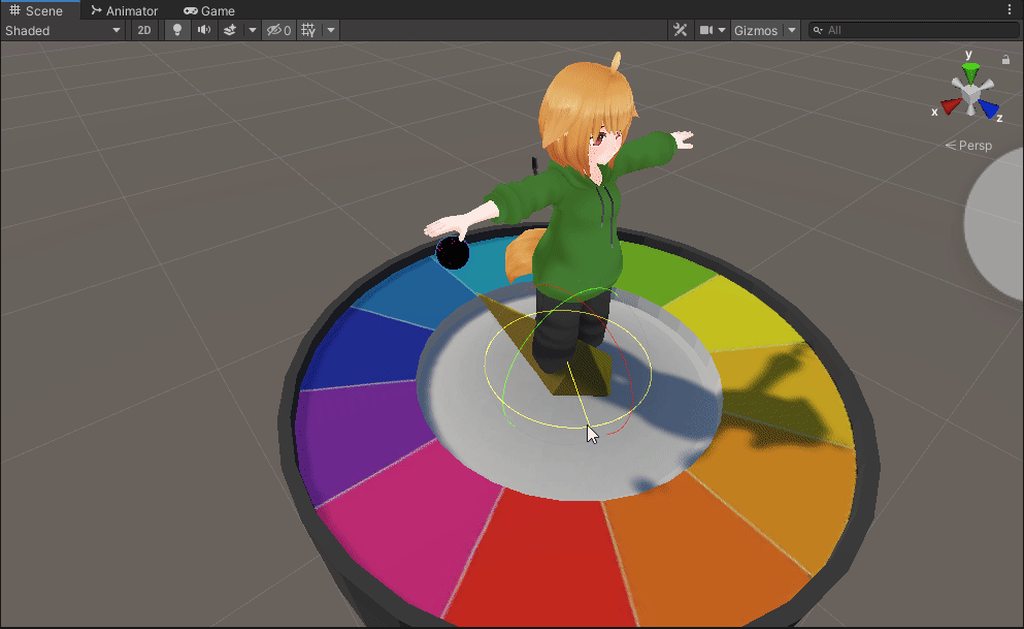
@tender dome here's colorwheel with rigged hand


 bright pewter
obviously, anyone else can use it too
tender dome
lets see what i can do with this bad boy
bright pewter
bonus points if you manage to make the handle grabbable so you can spin it around and make that pick the color
tender dome
i think the hand is rigged to the whole model, not just the hand
 spare dirge
Uhm hihi! I have a question! I'm not sure if this is the right place to ask or not- but uhm when I go into beta and wanna see if the dynamics work with my friends would the need to go into beta aswell-?
frosty river
Yes
spare dirge
Oh thank you so much!!
bright pewter
frosty river
spare dirge
Oh thank you so much!!
The beta is not compatible with live so unless you are both on it you would not see each other at all
tender dome
 bright pewter
is that rotating the bone or the model
spare dirge
frosty river
The beta is not compatible with live so unless you are both on it you would not ...
So we would both need to be in beta correct?
tender dome
the bone
bright pewter
wtf
frosty river
Yes, also if you are using quest be aware some people have issues reverting back to live
bright pewter
let me open it in unity and figure out rig params
spare dirge
frosty river
Yes, also if you are using quest be aware some people have issues reverting back...
I had the problem last night- I did figure out how to fix it tho, anywho thank you so much!
bright pewter
@tender dome fixed it. Turns out Unity needs a root bone
 covert remnant
I'm going to try uninstalling and reinstalling VRCHAT to get back to live on oculus quest 2. Hopefully this fixes it
I'm hoping my saved avatars, friends and stuff save
molten cobalt
covert remnant
I'm hoping my saved avatars, friends and stuff save
yes that's all saved on the cloud not on your hard drive
tender dome
bright pewter
<@!277915248743284736> fixed it. Turns out Unity needs a root bone
probably not exactly what you had in mind, but im tired.
thank you for the model though, very cool
bright pewter
neat
tender dome
ill probably do proper contacts for each individual color tomorrow
fuck i wanna go to AD beta hubs to show people this but its always quest users there
 fiery pebble
does anyone know where I can get the new dynamic bones? The 24fps ones?
muted bloom
tender dome
ill probably do proper contacts for each individual color tomorrow
if you get the bone's float _angle param you won't need individual contact points
infinite hues
tender dome
true
muted bloom
Don't ask me how to do that :D
muted bloom
There's a good tutoral guy on youtube i know called sippbox i'll ask him to make a vid for it
tender dome
i hate that guy his videos never work for me
mortal plume
what a loser amirite
tender dome
i cant watch more than 5 seconds of his content cause his voice sucks
muted bloom
tender dome
i hate that guy his videos never work for me
you should make them i'm sure you'd be better
mortal plume
yeah!
muted bloom
tender dome
let me open up notepad and hypercam 2
Good choice here's some audio for it https://www.youtube.com/watch?v=TKfS5zVfGBc&ab_channel=XUMON
tender dome
am i tripping or is the uploaders pfp an NFT
muted bloom
yeah i'm pretty sure that's an cgi nft monke
tender dome
damn my hypercam 2 is unregistered
i hope this big white watermark in the corner of the video doesnt get too distracting and somehow become an internet culture phenomenon
 hollow belfry
fiery pebble
does anyone know where I can get the new dynamic bones? The 24fps ones?
hollow belfry
fiery pebble
does anyone know where I can get the new dynamic bones? The 24fps ones?
I don't know what'cha talkin'bout willis
But read #open-beta-announcements and #open-beta-info
 dawn topaz
i hate to sound like a broken record but how do i get out of beta from quest 2
near grove
dawn topaz
i hate to sound like a broken record but how do i get out of beta from quest 2
I believe you just use the oculus app, to into settings for VRChat, and turn off beta
dawn topaz
nah, if i join and look in settings i still have the option to enable and disable avatar interactions even though it says im on live
i cant join mah friends either
frosty river
Make sure you are on the main account on the quest, change the version back to live, uninstall vrchat and then reinstall it again
dawn topaz
gad damn
frosty river
Might want to wait a bit between the uninstall and reinstall
dawn topaz
i thought thats what needed to happen i just didnt want to do it since it will actually take a day to reinstall
near grove
dawn topaz
i thought thats what needed to happen i just didnt want to do it since it will a...
It took me 3 days to install VRChat
I blame my internet
dawn topaz
so no other way besides reinstalling the game
frosty river
That method seems to solve the issue for most people
hollow belfry
Why would it take you that long to install
Also if your internet is as bad, how can you even play the actual game
My condolences
near grove
hollow belfry
Also if your internet is as bad, how can you even play the actual game<:vrcJamie...
My internet sometimes works, sometimes it doesn't, fricking Telstra
 flat patrol
tender dome
flat patrol
tender dome
So how exactly you play and stop an animation ?
Animate a float that animate a float I supose
 onyx spire
how do i get out of the vrchat beta on quest?
hollow belfry
onyx spire
how do i get out of the vrchat beta on quest?
Deselect beta, uninstall, reinstall
dim cloak
flat patrol
Animate a float that animate a float I supose
proximity receiver
use it to drive motion time
onyx spire
hollow belfry
Deselect beta, uninstall, reinstall
thx
hollow belfry
frosty river
Make sure you are on the main account on the quest, change the version back to l...
Basically this
 lime yarrow
I'd like it if they'd implement bools and Ints to contact receivers before release rather than after. Not a huuuge fan of having to make layers dedicated to converting them
dim cloak
lime yarrow
I'd like it if they'd implement bools and Ints to contact receivers before relea...
I highly agree with this. I could have almost half of the parameters in my FX at the moment if we could just use bools.. and quite a few less layers.
hollow belfry
Wait what, so if you only want to register a touch/no touch thing you need an int?
flat patrol
dim cloak
use it to drive motion time
Won't it reset to 0 went out of range?
hollow belfry

lime yarrow
So you can't use them to directly drive any other types of synced parameters
flat patrol
Motion time or multiply
lime yarrow
If you're trying to drive a synced bool, you need to convert it to a bool in the animator using parameter drivers
Which is kind of a pain
flat patrol
The use multiply speed would do the start and stop
lime yarrow
And if it's supposed to be an int, and you have a bunch of them, you need to set up a driver for every possible int number per value
dim cloak
flat patrol
Won't it reset to 0 went out of range?
Could make it so that a gesture or something causes it to turn off the prox sensor and it should leave the value where it's at at that point.
flat patrol
I should consider multiply speed with contact for future gimmic.
Start and stop like show with the wheel a good example
dim cloak
flat patrol
I should consider multiply speed with contact for future gimmic.
I use it for making my tail wag faster when someone headpats me 😄
lime yarrow
Like I have about 35 outfits on my main avatar, (mostly texture/colour pallette swaps) and in order to make that into a functioning outfit menu, I'd need to set up a layer that converts like 35 different floats (or float values, so like decimals...) Into ints
And that sounds like hell
And that's on top of having to already set up about 35 receivers
Lmao
flat patrol
Anyway. Thanks for the idea
 tough abyss
flat patrol
So how exactly you play and stop an animation ?
tough abyss
flat patrol
So how exactly you play and stop an animation ?
Most simple way to do this is to use a contact to animate the speed of a state to 0 or 1. When touching its 1 and playing animation. When not touching its 0 and frozen.
tender dome
flat patrol
So how exactly you play and stop an animation ?
motion time
tender dome
oh yeah i meant multiplier
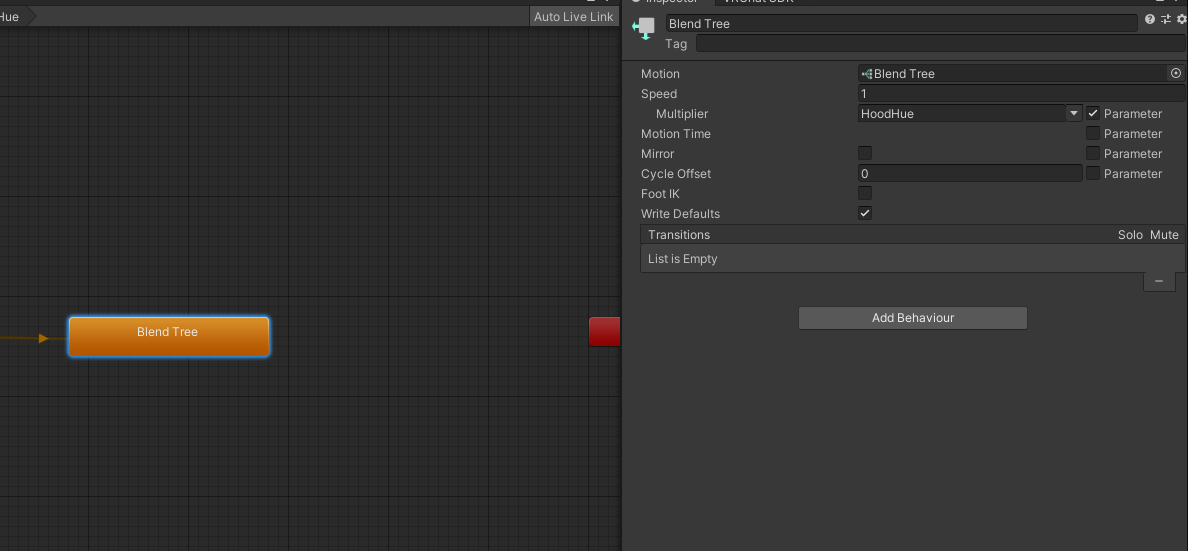
i actually never noticed but i meant to use motion time, guess multiply works though https://i.imgur.com/uAlkl5F.png
 flat patrol
Since it's a float
It play and stop the animation perfectly
Constant might work best since it's 1 or 0
Proximity will make it unstable
But smoothly idk. Need testing
 molten heron
Forgive me, but how do you switch back to LIVE?
tender dome
im using constant
shrewd estuary
molten heron
Forgive me, but how do you switch back to LIVE?
same way you got into the beta
if you're on quest, you'll just have to reinstall a couple of times.
facebook is very dumb when it comes to switching in and out of betas
shrewd estuary
no prob
 primal nest
I hope that works for me
covert remnant
It worked
 wintry heath
Hey so with open beta my avatar has gained a new locomotion error,(made me struggle for days thinking it was the avatar lol) it's not following properly and when I sit the avatar just floats in the air sitting, any fix for this or just wait and hope they fix it?
 jagged tapir
Hmmmm
timber plinth
i wonder how bad it would be
to have several contacts all over the body
and have it correlate to bone / blend shape
quest compatible petting?
🤔
jagged tapir
If you want something compatible quest
Remove the word "several"
 half tiger
timber plinth
quest compatible petting?
half tiger
timber plinth
quest compatible petting?
Dude that sounds actually amazing.
jagged tapir
 timber plinth
jagged tapir
If you want something compatible quest
Remove the word "several"
timber plinth
jagged tapir
If you want something compatible quest
Remove the word "several"
no
i didnt say quest optimized
i said quest compatible
how do physbone collision checks scale?
are they per transform now or are they per combination of transforms?
flat patrol
Good or go home
timber plinth
so if you had a chain of 4 bones would it be 3*colliders?
i would assume so since now they interact with these weird capsule colliders now
as opposed to little spheres
timber plinth
flat patrol
Good or go home

||no||
show avatar or see fallback
im optimizing on quest, but im not going to optimize to the point of making it ugly af
thats what fallbacks are for
 raw forge
Excellent plz
 fluid bronze
Anybody know if the Devs have any plans to fix the conversion process from Dynamic -> PhysX not converting the gravity values? That's the biggest problem with the conversion process on my avatars right now; since things like long hair, scarfs, etc. use gravity and elasticity is removed to offset this, the current conversion process doesn't factor gravity so the bones in mention get stuck in a "Zero G" state, and I can't very well start applying fixes until the final update releases because the new SDK with PhysX can't be added to the live game as it stands yet.
 tulip beacon
Well because they are set up different you may just have to do it yourself, which isnt hard, you could just select all the hair phys bones at once then give them all gravity at once
this is how i have my hair settings

the gravity scales very quickly so id say something between 0.01 - 0.2 is desirable
 jaunty sentinel
tulip beacon
the gravity scales very quickly so id say something between 0.01 - 0.2 is desira...
jaunty sentinel
tulip beacon
the gravity scales very quickly so id say something between 0.01 - 0.2 is desira...
SMe with physics bones
I think I used like 0.1 and it was way too much
fluid bronze
tulip beacon
Well because they are set up different you may just have to do it yourself, whic...
Yeah, I know that-- At the very least they should have the Z value convert into the gravity slot, since most avatars only use that for Up/Down gravity on dynamic bones-- Like I said, I don't technically mind fixing them appropriately with PhysX, the problem being that the PhysX SDK isn't set up with the current live game, so I can't very well start applying fixes yet-- I also have 260+ avatars to go through to find out which ones do and don't use gravity, so the lack of conversion hurts a bit.
As for the value, I always usually used anywhere between -0.001 to -0.01, depending on the bone, otherwise yes, the drag becomes ridiculous.
 stable wagon
i gone with .2 seem like it did fine
max is way too much
for my plushy tail. i did .2 gravity and add ground colliders. best idea i ever done
i set pull to 0 as well

 ebon goblet
I put the beta version on and afterwards I couldn't see anyone, any help please
fluid bronze
ebon goblet
I put the beta version on and afterwards I couldn't see anyone, any help please
The Beta version doesn't sync with the live game-- only other people using the Beta. You'll have to switch back to the normal version to see people.
ebon goblet
Thanks
timber plinth
there is no separate setting for Stretch pulling, so be careful when using 0.0 Pull because if your bones get Stretch’d they will not go back to their original size/state
near grove
eh i clicked the button to automaticly convert dynamic bones into phys bones and well it just wiped my dynamic bones but didnt add phys bones
is that supposed to happen?
timber plinth
i have an absolutely brilliant idea for a public physbone avatar but i do not want to spoil it

wheat fjord
jagged tapir
https://cdn.discordapp.com/attachments/838115497450930196/949518203585953822/unk...
thanks for posting this

 open mountain
do we have a window for when physbone will officially come out?
lime yarrow
open mountain
do we have a window for when physbone will officially come out?
No, sorry. This is a rather large update (perhaps one of the biggest in terms of game-changing features) so I'd expect it to be in beta for a while longer than usual.
But I've been wrong before
but it's best to temper expectations
 tranquil sequoia
Is phys bones a actual thing now?
 strange spoke
timber plinth
i have an absolutely brilliant idea for a public physbone avatar but i do not wa...
strange spoke
timber plinth
i have an absolutely brilliant idea for a public physbone avatar but i do not wa...
is it snakes cardboard box XD
timber plinth
no but its tv show related
timber plinth
i wonder though also
is there a way to offset the limit angle?
i wanted to make something that opens like a door using physbones
that can close and then open and act like an open door
i guess i will have to have the door halfway open to start, but i don’t know how that will be affected by animating the door to stay closed
perhaps i can use a plane collider instead as a cheap way of doing this
strange spoke
yeah i was thinking a collider might help
winged scarab
lime yarrow
but it's best to temper expectations
^^^ I think waiting is a good thing so people have stuff to be excited for
near grove
Anyone else having the issue after trying the beta where they switch an avatar and it goes into “PC” mode and you have to switch out of it for your hands to work again?
wheat fjord
has anyone else noticed on pc the 3d audio in the beta messes up?
Requiring a vrc restart fix
timber jewel
wheat fjord
has anyone else noticed on pc the 3d audio in the beta messes up?
Really really weird issue I encountered:
https://feedback.vrchat.com/open-beta/p/1183-small-pull-does-not-work-if-parent-of-the-phys-bone-root-is-moved-scaled
wintry heath
Hey so I wanna know if I can fix this > my avatar when in beta doesnt properly follow it'll turn but it wont go up nor down, when I sit the avatar just levitates in the air, is it fixable or a beta issue I gotta wait for them to fix?
timber jewel
does your avatar have any phys / dynmaic bones on any of the humanoid bones? (e.g. head, chest, spine, hip, etc.)
near grove
I really enjoyed doing this 2 min thingy... I am in love with the physic bones already!
wintry heath
I'll check if it does the next time I'm in, cause I converted iits dynamic bones to physbones
timber jewel
wintry heath
I'll check if it does the next time I'm in, cause I converted iits dynamic bones...
yeah phys bones don't work that well with them being on humanoid bones
 midnight dome
phys bones amaze me and i dont know why
wintry heath
Well hopefully that's the problem and I can fix it cuz it is causing many much annoyance
midnight dome
i wonder when it will go live
tulip beacon
Anyone have a decent setup of phys bones for like flowy dresses or skirts? Im using this so far
 wheat fjord
tulip beacon
Anyone have a decent setup of phys bones for like flowy dresses or skirts? Im us...
wheat fjord
tulip beacon
Anyone have a decent setup of phys bones for like flowy dresses or skirts? Im us...
its going be different for every avatar
 unkempt crag
question: when upgrading to the latest beta SDK, do we delete the physbonemigration.cs before or after upgrading to prevent errors?
lime yarrow
near grove
I really enjoyed doing this 2 min thingy... I am in love with the physic bones a...
Did you ask Physbones to marry you?

Using Physbone Angle with a Rotation Constraint to control a parameter with the angle of your hand
But no, it's actually a really good way to angle particle start rotation to get around the gimbled nature of velocity based mesh particles not being able to be rolled left and right properly
timber jewel
unkempt crag
question: when upgrading to the latest beta SDK, do we delete the physbonemigrat...
doesn't really matter
unkempt crag
so it's not used in the new version?
timber jewel
it's not but it can cause issues if it's still there
so remove it either before or afterwards
timber plinth
if you update in-place then u need to remove it because unity doesnt delete stuff when importing packages
thats why vrchat recommends clearing out the sdk before import
 storm mica
timber plinth
thats why vrchat recommends clearing out the sdk before import
storm mica
timber plinth
thats why vrchat recommends clearing out the sdk before import
not anymore with sdk3, because your stuff can break because of missing references
timber plinth
what missing references? the references usually fix themselves after import
 fallow rock
storm mica
not anymore with sdk3, because your stuff can break because of missing reference...
fallow rock
storm mica
not anymore with sdk3, because your stuff can break because of missing reference...
Personally I've deleted the sdk from the project dozens upon dozens of times without any references breaking. Not saying it won't happen but I've yet to be included in that. I've never saved or closed the project whilst the sdk was missing, maybe that is a cause of it, I'm not sure.
surreal pier
fallow rock
Personally I've deleted the sdk from the project dozens upon dozens of times wit...
VRChat
If you need to update your SDK, it is important that you follow these steps to ensure the update proceeds properly and you don't have any old/conflicting files. Version Control If you know how to use it, you may find it beneficial to use version control software like Git to manage your project. You ...
usually it's good idea to follow the proper docs
surreal pier
unkempt crag
question: when upgrading to the latest beta SDK, do we delete the physbonemigrat...
you can delete it afterwards
fallow rock
I wasn't deleting it to upgrade, I was just commenting on references not breaking when it was removed
 fallow rock
If you delete the SDK with Unity closed and open Unity without the SDK installed
This does not apply in the scenarios I mentioned. "I've never saved or closed the project whilst the sdk was missing" I added this to say the project has always been open before deletion and stayed open till after the sdk was reimported.
fallow rock
@sleek badger This one
Test out the Phys bones through the Game window
 sleek badger
ahh!
here it is
thank youuu
for reference


i seem to only be able to enter this chat through notifications/mentions
..weird....
anyway yeah how do i grab the model?
i can click on the arrows and such but that locks it to one axis
how do i move it freely?
fallow rock
Move the Main Camera closer to the model so you can interact with it
sleek badger
i am interacting with it
its close enough

i just wanna know how to grab and move it
fallow rock
Either the arrows or the squares between the arrows to move it on 1 axis or on 2
As for grabbing and posing the Phys bones you have to do it through the Game window using the Main Camera
sleek badger
fallow rock
Either the arrows or the squares between the arrows to move it on 1 axis or on 2
yes but that restricts it to an axis
i wanna move it freely like when you press g in blender
sleek badger
fallow rock
As for grabbing and posing the Phys bones you have to do it through the Game win...
how do i test grabbing and posing in the game window?
fallow rock
sleek badger
i wanna move it freely like when you press g in blender
that's not a thing in unity. You have the translation tools
sleek badger
fallow rock
that's not a thing in unity. You have the translation tools
how is that not a thing?? thats like the most basic feature ever
well thats dumb
mortal plume
if you grab one of those, you can move it in 2 axis
sleek badger
mortal plume
if you grab one of those, you can move it in 2 axis
greeeaaaat -_-
sleek badger
sleek badger
how do i test grabbing and posing in the game window?
also how do i get closer to the model?
fallow rock
Moving things in all 3 dimensions sound annoying for unity imo. Not really the same uses as blender.
sleek badger
in the game window
fallow rock
 sleek badger
fallow rock
Moving things in all 3 dimensions sound annoying for unity imo. Not really the s...
sleek badger
fallow rock
Moving things in all 3 dimensions sound annoying for unity imo. Not really the s...
well im literally in a situation where i could REALLY use it
and it being OPTIONAL inherently cannot be annoying
sleek badger
lime yarrow
https://vrchat.canny.io/open-beta/p/1183-receiver-islocal-toggle-for-remote-clie...
uh?
 sleek badger
so how do i grab and pose her?
sleek badger
sleek badger
so how do i grab and pose her?
bump :,)
fallow rock
sleek badger
so how do i grab and pose her?
You can grab and pose bones affected by Phys Bones by left clicking to grab and right clicking to pose.
sleek badger
fallow rock
You can grab and pose bones affected by Phys Bones by left clicking to grab and ...
weird left click didnt seem to do anything
i guess ill try again
thanks

um i seem to have accidentally transformed the tail without meaning to
how do i reset this?
lime yarrow
You have to be in the game window for it to work
sleek badger
i tried putting 0 on everything but its not letting me change the number
fallow rock
give the Phys bones a radius else you'll never hit the bones
lime yarrow
and your camera has to have a certain Tag
sleek badger
lime yarrow
You have to be in the game window for it to work
i know, i was in game window
sleek badger
fallow rock
give the Phys bones a radius else you'll never hit the bones
ahhh thats probably it, thanks
sleek badger
lime yarrow
and your camera has to have a certain Tag
a certain.. wha?
lime yarrow
One second, I can't remember what the tag was

 fallow rock
no, that drop down menu that says "Tag"
sleek badger
i see it
 autumn stream
I would like it if there is a dynamic bones to physics bones converter in the sdk
lime yarrow
Yeah you're good.
lime yarrow
autumn stream
I would like it if there is a dynamic bones to physics bones converter in the sd...
There is. It's at the top under VRChat
sleek badger
how do i reset the accidental transformation on the tail?
ctrl z didnt seem to work either
lime yarrow
right click the word transform and hit revert
or rather the word translation
and also rotation
sleek badger
you mean reset?
lime yarrow
No
should be an option for revert
reset will set it to 0,0,0
which may not be the default rest pose
fallow rock
if it's been unpacked there won't be
 autumn stream
lime yarrow
There is. It's at the top under VRChat
autumn stream
lime yarrow
There is. It's at the top under VRChat
where am I lost?
 fallow rock
sleek badger
uh...???
fallow rock
sleek badger
uh...???
exiting play mode will reset everything to where it was when you clicked it
sleek badger
oh okay thanks
lime yarrow
autumn stream
where am I lost?
 sleek badger
wait so do i keep this?

is this right?
or can i put these back to 0 and 1
idk why scale is 0.999999 on one of them
lime yarrow
Unity does that sometimes
Still not sure why
it will randomly set things to like a millionth off
don't worry about it
sleek badger
sooo do i change it?
lime yarrow
doesn't matter
sleek badger
??
lime yarrow
won't make any difference visibly
lime yarrow
it's literally like 0.0000001 off from 1
sleek badger
that are wayyyyyyyyy off
fallow rock
no, they have those offsets from their parent
fallow rock
you'll get used to it
sleek badger
wait whats the difference between allowing collision and adding a collider?

is collider the one that adds effects and collision just moving out of the way when being touched?
 jovial sedge
Colliders setting is like, for making it so a bone collides with specific stuff you set up already
lime yarrow
Allow collision enables other people to touch it
jovial sedge
So if you want long hair not to clip into your torso, you'll put a collider in your torso then in Colliders assign it to the hair
fallow rock
mhmm
jovial sedge
I think it does yeah
sleek badger
wait how do i get descriptions back?

a sec ago i could hover over these to read what they do
jovial sedge
The one issue right now with it all is if you try to make a collider in your head to stop like, your bangs from going through your forehead, it doesn't work clientside right now because your head getting scaled down on your side
sleek badger
but now it just gives me a double arrow symbol and i cant read it anymore
fallow rock
gotta be out of play mode, puts unity in a different mode iirc
sleek badger
fallow rock
gotta be out of play mode, puts unity in a different mode iirc
ohhh ok thanks
wait what do i put here

also how do i know what size to put?
i dont really know how big ''1'' is
fallow rock
jovial sedge
The one issue right now with it all is if you try to make a collider in your hea...
Had this issue with Dynamics too. Can solve it on Pc with an empty gameObject on your neck that's Parent Constrained to the Head Bone. Just gotta put the collider on that 'Dummy Head' object
no constraints on Quest removes that possibility though
:/
jovial sedge
It's some array or whatever it's called, Size 1 means one collider to assign to it, size 2 means two colliders to assign
jovial sedge
then there on Element 0 you'll put the collider you want that bone to interact with
jovial sedge
Allow Collision will let other people's colliders interact with you, at least the VRC built in ones will
sleek badger
and what exactly are colliders? other bones?
jovial sedge
The default colliders are like, the ones on your hands and stuff
fallow rock
Colliders is another component you need to set up on objects
sleek badger
does that mean if i want to grab my tail ill have to add colliders to every single finger bone?
jovial sedge
Nah, those are done automatically
jovial sedge
You can edit them a little in the Avatar Descriptor too
sleek badger
do i assign all 20+ colliders from the hand to the tail..?
jovial sedge
Nope
sleek badger
so what do i do?
jovial sedge
you just want to be able to grab your own tail with your hand yeah?
sleek badger
me and others yeah
jovial sedge
literally nothing then
sleek badger
oh
sleek badger
so all colliders work with hands automatically?
jovial sedge
All physbones do yeah
jovial sedge
you only really use custom collider stuff when you want specific niche stuff done
sleek badger
so what do i put the collider size as then ?.?
jovial sedge
Just leave it on 0 I guess
sleek badger
oh ok
but didnt some tell me i needed to make it bigger so i could grab it in the game window
i guess ill just try again anyways
jovial sedge
That'd be under like, Collision > Radius
sleek badger
im clicking and dragging and nothing is happening
 sleek badger
jovial sedge
That'd be under like, Collision > Radius
sleek badger
jovial sedge
That'd be under like, Collision > Radius
ohhh ok
i can change these things in ''play'' mode right?
jovial sedge
Yeah
just know when you exit they'll go back to what they were before play mode so you'll have to do them again
sleek badger
so something like this would be good? or is it better if its a bit bigger
 sleek badger
jovial sedge
just know when you exit they'll go back to what they were before play mode so yo...
sleek badger
jovial sedge
just know when you exit they'll go back to what they were before play mode so yo...
oh..... well thats exactly why i was asking xD
gotta be out of playmode then, its just for testing, got it
jovial sedge
That should be fine really
The grab radius on hands is pretty freaking big but ideally you want it big enough that a hand just touching it in general will move it
sleek badger
why dont i see the radius on the tip of my tail?

on the middle it shows fine

also should i be concerned about this
 mortal plume
wait did you add a phys bone to every bone...?
sleek badger
dunno how long its been there
mortal plume
you only add a phys bone component to the first bone in the chain
sleek badger
mortal plume
wait did you add a phys bone to *every* bone...?
ive only added it to two of the tail bones
sleek badger
mortal plume
you only add a phys bone component to the first bone in the chain
ahh okay
i dont wanna add it to the very first one though
it looks better
because it stays more in place
mortal plume
that's fine
jovial sedge
Yeah it's okay to add two if you want really specific movement
sleek badger
but what if you had a weird shaped tail?
jovial sedge
just know that it's a tiny bit more of a performance impact, apparently
sleek badger
youd NEED several so you could have a more accurate ''hitbox'' for grabbing
what if you have a long tail and its currently curled up
the hitbox is straight
the end of it would just move out of the hitbox
jovial sedge
It entirely depends on the way the bone itself is set up really
sleek badger
or ''collider radius''
sleek badger
jovial sedge
It entirely depends on the way the bone itself is set up really
how come?
molten cobalt
sleek badger
how come?
the hitboxes would be coming from the bones so how the bones are oriented would dictate the boxes
fallow rock
Phys relies on endpoints to know where to draw the capsules.
fallow rock
sleek badger
on the middle it shows fine
in this case give yourself an Endpoint Position so you can have Tail 3 also use Phys
mortal plume
sleek badger
youd NEED several so you could have a more accurate ''hitbox'' for grabbing
no, you use the radius curve
dictates the size of the collider spheres along the length of the chain
sleek badger
radius curve?
sleek badger
mortal plume
dictates the size of the collider spheres along the length of the chain
so it automatically moves along the connected bones?
sleek badger
fallow rock
in this case give yourself an Endpoint Position so you can have Tail 3 also use ...
but do i really need tail 3 to use them..?
wait
fallow rock
you don't need to do anything when it comes to Phys
sleek badger
i thought you meant tail 1
ohhhh
endpoint position dictates how far down the chain the physbones apply?
fallow rock
no, it adds an end object to the chain so the last object can use Phys too
some models have _End bones so you wouldn't need to use it
but this model doesn't so having a value in there will let Tail3 work
sleek badger
okay i dont get it anymore but sure xD
so
right now
i cant grab the tip
only the middle
which is the bone i applied physbones to
so how can i make this extend to the tip?
like, rn its not letting me pull from the tip


what i want is to be able to do this
 fallow rock
 mortal plume
keep in mind that bones don't have "length" in unity, bones are just points in space
sleek badger
also is there a way to automatically apply things you changed in play mode?
or is the only real way to screenshot and match after
sleek badger
fallow rock
okay
jovial sedge
you can always like, copy the component then paste as values after leaving play
fallow rock
you can Copy the component, or make a prefab of the avatar
sleek badger
jovial sedge
you can always like, copy the component then paste as values after leaving play
ah okay
thanks
im wondering, ingame, when someone poses you
assuming noone undoes the pose by grabbing
does it just stay forever?
jovial sedge
Yeah
sleek badger
does it return to its normal shape after a while? can you choose how long until that happens?
oh okay
second thing i said would be neat
jovial sedge
if there is a timer I've never seen it
fallow rock
how far does that persist? if I close vrchat and come back the next day is it still going to be posed?
sleek badger
they should add that itd be useful ^^
sleek badger
fallow rock
how far does that persist? if I close vrchat and come back the next day is it st...
good question
jovial sedge
I think the avatar being reset in general will undo the pose
sleek badger
maybe its like the quick menu?
sleek badger
which'd mean it stays i think
jovial sedge
I could test but setting up my headset is a pain in the ass
sleek badger
i can image some people use these to style their avatars
sleek badger
ohh
itd be neat if
ingame
you could set a pose as the new ''default''
like
say you have a rabbit character
and you fold down one ear
so you set that as the new default
you can remove the default back to the true default anytime
it doesnt change the model itself
its just a thing ingame
i think thatd be neat ^^
fallow rock
you could do that with an animation. Though that'd only be good for a personal model
can't add animations to someone elses public after all
sleek badger
yeah i meant with physbones specifically tho
so you can make new ''defaults'' on the fly
jovial sedge
can always make a canny feature request I think
sleek badger
without having to animate anything outside the game
sleek badger
jovial sedge
can always make a canny feature request I think
canny?
 unkempt finch
Having an issue where I cannot get a tail wag animation to play when the headpat sender and contact point meet, it shows in play mode that its playing the animation and in the animation preview it shows the tail moving but doesnt during play mode or ingame
 sleek badger
im too lazy to make a request tbh xD but if anyone wants to go ahead lel
jovial sedge
it's the feature request/bug report place
sleek badger
jovial sedge
it's the feature request/bug report place
place?
unkempt finch
here is it showing in the preview moving but not in play mode
 jovial sedge
can see all the current things people want there
 jovial sedge
I've never had to and I really don't know what it does, so I probably wouldn't recommend it
fallow rock
only really need to fill that in if the first bone of the chain isn't the object the component is on
sleek badger
okay there
 sleek badger
fallow rock
only really need to fill that in if the first bone of the chain isn't the object...
sleek badger
fallow rock
only really need to fill that in if the first bone of the chain isn't the object...
i mean..... its not
fallow rock
Such as I put my Ear Phys on my Ears mesh so when the mesh is disabled, the Phys will also turn off in 1 action. For that the Root transform is the Ears Root bone on my head
 fallow rock
You'll see what it does if you plugged in a bone
fallow rock
it's dictating the start of the Phys chain
sleek badger
also ear mesh? dont you add the phys to the.. bones?
fallow rock
sleek badger
also ear mesh? dont you add the phys to the.. bones?
yes, and like I said "For that the Root transform is the Ears Root bone on my head"
sleek badger
fallow rock
it's dictating the start of the Phys chain
so why would i put that as anywhere but where i chose to put it? wouldnt changing that only act like if i had just placed the phys on the root bone anyways?
sleek badger
fallow rock
yes, and like I said "For that the Root transform is the Ears Root **bone** on m...
ah yeah sorry, my brain kinda bluescreened at that 😂
jovial sedge
I don't understand half of what's said in this channel don't worry :^)
sleek badger
thank you xD
jovial sedge
I threw myself into Unity headfirst with all this VRC stuff
fallow rock
Yeah I'm not planning on scrolling up anytime soon
sleek badger
what on earth do you mean with ''when the mesh is disabled''
fallow rock
had like 1000+ missed messages
fallow rock
sleek badger
what on earth do you mean with ''when the mesh is disabled''
My model toggles some object on/off by disabling the object entirely
sleek badger
like i added the tail and it literally just looks as if it is now gonna move and be grabbable too which i DONT want
 fallow rock
thus I put the phys on that object to be disabled saving on a bit of performance
sleek badger
yep

see
why would i do that
this is the reason i DIDNT add physbones to the root bone in the first place
fallow rock
in time you'll find use cases for it. Some people put all they're phys on the same object as the Descriptor
sleek badger
also
fallow rock
keeps it all in 1 place
sleek badger
i still cant grab the tip of the tail
jovial sedge
It's probably because the endpoints are making the bones clip into each other
sleek badger
fallow rock
in time you'll find use cases for it. Some people put all they're phys on the sa...
well ill just refuse to do it until i run into an issue that makes me actually need to do it then lol
eh?
bright jungle
have you specified an endpoint o:
jovial sedge
you're probably accidentally grabbing the middle one because the tip is halfway enveloped by it lol
sleek badger
jovial sedge
you're probably accidentally grabbing the middle one because the tip is halfway ...
i see
i guess ill try and make them smaller?
sleek badger
bright jungle
have you specified an endpoint o:
an endpoint? how do i do that?
as far as i can see i can only specify the position
bright jungle
near the top of the physbone component, you should be able to specify an endpoint position
sleek badger

oh well yeah
of course i did that else it wouldnt look like this


i changed it to 4
if there a way to change the size individually?
 cursive bridge
yeah scribble
quaint geode
if you wanted to finetune the settings more, the circles are going outside the tail (so reducing radius slightly), and after doing that you can see if you need to extend the endpoint more so it reaches the end of the tail*
bright pewter
sleek badger
wait whats this?
say you put the physbone component on your head, you could se the root as a bone at the start of the hair.
cursive bridge
use the curve button next to it
Next to where u set Radius
next to that number is a C button
click it and a little line graph pops up, click on THAT
and tell it to start at 0 size and then go to 1
then the base of your tail will be tiny and the tip the full size
cursive bridge
You can mess with the Curve to get your colliders to match your tail shape, but so long as it starts at 0, the base will be small at least
sleek badger
to fit the shape?
cursive bridge
Oh I thought you wanted the tip to be easiest to grab?
And the base least likely to get grabbed?
sleek badger
wait how do i get it more exact than this?
 cursive bridge
double click on the linegraph
sleek badger
putting 00 after the dot just makes it tiny no matter how high the number behind it
cursive bridge
it spawns a popup with the graph in it
sleek badger
cursive bridge
double click on the linegraph
i dont wanna change the graph just the base radius
cursive bridge
Yes
sleek badger
unless you cant
cursive bridge
That is what I am telling you how to do.
Follow these instructions:
Put 0.04 in the box, if that’s your tail collider size.
Then double click on that bright teal graph box thing.
sleek badger

 ivory vigil
How do I get rid of it on quest
cursive bridge
then double click on the middle of the line
this makes a NEW point
drag that one over towards the left and up
sleek badger
um ok
bright jungle
ivory vigil
How do I get rid of it on quest
switch to live, uninstall the game, and reinstall the game
ivory vigil
How do I get rid of beta on quest
sleek badger
 cursive bridge
so your graph starts at 0–this makes the base one as tiny as possible—and then after the base one is done being tiny, the graph goes back up to 1 for the rest of them
You need to double click somewhere on the line to make at least one extra point
sleek badger
i love the phrase ''done being tiny'' 😂
thats what we should call growing up in general tbh
cursive bridge
The 1 on the graph represents “your full size” which can be whatever you put as your number
0.04
sleek badger
''oh my daughter stopped being tiny a few weeks ago ^^''
cursive bridge
XD
sleek badger
cursive bridge
The 1 on the graph represents “your full size” which can be whatever you put as ...
uh......huhh...?


 cursive bridge
I’m not sure what’s not clear here. Have your graph’s leftmost point be 0,0
leave its rightmost point at 1,1
bright jungle
collision radius: 0.04 (this is your base value)
1 on the graph - 100% of the base value
0 on the graph - 0% of the base value
sleek badger
cursive bridge
I’m not sure what’s not clear here. Have your graph’s leftmost point be 0,0
you do not comprehend the extend of my stupidity
sleek badger
bright jungle
collision radius: 0.04 (this is your base value)
1 on the graph - 100% of the ba...
right okay...
i.. think... i get it........ maybe
hh
my brain hurts 😂
cursive bridge
You’ll see once you make the third point and watch what happens when you move it