#world-optimization
1 messages · Page 26 of 1
 gentle gust
 strong loom
True but what would be a good estimate to work towards
since im planning on optimising some stuff later on when im done building it
 lilac saddle
anyone know if Occlusion Culling works with VRC Worlds?
 untold apex
yes
lilac saddle
nice, thanks for that wasn't sure didnt see it on the VRC SDK website
gentle gust
strong loom
True but what would be a good estimate to work towards
it really depends too much on the type of world, layout, artstyle etc to say
strong loom
gentle gust
it really depends too much on the type of world, layout, artstyle etc to say
i pretty much based it on this reference image and went from there

the gist
simplicity and small abstract furniture
gentle gust
the best way to test is upload -> see if you can hit 90-120fps in VR everywhere you look
strong loom
gentle gust
the best way to test is upload -> see if you can hit 90-120fps in VR everywhere ...
Good Point
I will cobble it together and see if it works out once i made some progress
strong loom
gentle gust
the best way to test is upload -> see if you can hit 90-120fps in VR everywhere ...
i get over 100fps on desktop.
testing it in vr in a bit
i noticed later that some normals are inverted on the bed mesh
strong loom
gentle gust
the best way to test is upload -> see if you can hit 90-120fps in VR everywhere ...
i tested in VR. I got about 110 fps in every area. With a Friend it hovered about 60 FPS
gentle gust
shoot me the link to the world (can be private) and ill check it out myself if you want and tell you how it runs on my end
strong loom
sure
the baked lighting is a bit scuffed but i will try to fix that later
its still heavily wip
 raven zenith
What's the recommended texture resolution for objects?
untold apex
it's entirely dependent on the object's size, how close you can get to it, how much detail you need, etc. generally the smaller you can get away with, the better, since textures usually make up the largest part of the download size for a world
 pallid gale

This video isn't a fully comprehensive look into texel density but you should get a good understanding of what it is and why you need to consider texel density as you layout your UV tiles.
.......................................................................................
► Click Here To Subscribe: http://bit.ly/sub2joshvfx
Support me on ...
 lofty musk
Hi all! I read in the VR Chat developer documentation that it suggests to avoid having 3 video sources in one room as it can cause issues. I tested and verified only one of the 3 works. I was really hoping to have it to at least appear to have another TV with a looping animation next to the original which has Wolfe video player on it. Any suggestions?
 hybrid ridge
lofty musk
Hi all! I read in the VR Chat developer documentation that it suggests to avoid...
hybrid ridge
lofty musk
Hi all! I read in the VR Chat developer documentation that it suggests to avoid...
Have the first video load on start and loop, so it loads initially and doesn't interfere with the others
100% do not recommend
If the animation is simple enough do a spritesheet animation
lofty musk
hybrid ridge
If the animation is simple enough do a spritesheet animation
Alright I will try the sprite sheet - I was able to create a sprite sheet using ezgif.com - Is there a tutorial or video you would recommend for the remainder of the process? Thanks!!
hybrid ridge
Honestly not sure on the actual execution, it should be the same as a normal sprite animation with a sprite sheet
Its probably a unity sprite tutorial
lofty musk
Thanks 🙂
lofty musk
Thanks, I was able to get it working using animated sprites! I even learned something new!
The key is to click the png and change type to sprite

How to import sprite sheets into unity
Interested In learning how to code with Python? Checkout my courses for Beginners
How to Build GUI Apps with Python and Tkinter
https://www.udemy.com/share/103cfr/
Learn Python From Scratch and Build 10 Programs
https://www.udemy.com/share/102FAw/
A Practical Guide to Coding With Python
https://www.ud...
 covert wolf
are these for sale somewhere i fucking love them
covert wolf
im an idiot it was right there x.x thank you wolf! 🙂
pallid gale
glad to be of help
 gritty roost
anyone know how i can make the lighmap not take up 128mb?

but also have the lighting not be horrendous
nevermind apparently its 300mb now
i have no idea what to do
hoping to get the entire world to hit 100mb or less
 unkempt summit
download https://github.com/oneVR/VRWorldToolkit so you can get a breakdown of each asset size

GitHub
Unity Editor extension for making VRChat worlds. Contribute to oneVR/VRWorldToolkit development by creating an account on GitHub.
if you want to reduce size, an easy way is to reduce the resolution of images. There might be huge normal maps, lightmaps
pallid gale
I suppose you could lower the Texel density on the lightning as you wouldn't want to use values intended for indoor maps for a large outdoor map
gritty roost
unkempt summit
download https://github.com/oneVR/VRWorldToolkit so you can get a breakdown of e...
i use that
unkempt summit
then you can tell what the largest assets were
gritty roost
pallid gale
I suppose you could lower the Texel density on the lightning as you wouldn't wan...
theres an indoor scene as well
gritty roost
unkempt summit
then you can tell what the largest assets were
i do know tho
the ligthmap
i wanna know how to generate a smaller one
that also looks okay
pallid gale
as I said lower the textile density on your lighting
gritty roost
yea ill try that
pallid gale

You can support me on my pateron
https://www.patreon.com/mcphersonsound
This is a longer tutorial than normal and there is a lot to cover so here are time stamps for your convivence.
00:00 what is baked lighting
00:35 setting up lights
1:23 preparing meshes to bake
2:30 generate lightmap UV
3:28 light probes
5:10 reflection probes
6:00 emissive ...
 pallid gale
you would want the lightmap resolution setting because lightmap size would just dictate the max size a light map can be before you make a new one
so reducing lightmap size would just make more light Maps that would probably end up with the same file size
unkempt summit
looking at the scene you have a huge plane with plenty of repeated assets, not sure if it works but maybe the plane's lightmap can be set smaller using "Scale in Lightmap"


Unity Forum
Hi, I just wanted to confirm that these 2 scenarios are basically the same when lightbaking
Scenario 1 : Lightmap resolution 10 and object lightmap...
pallid gale

GitLab
An addon for Unity that lets you define bounding boxes that set the relative lightmapping quality of objects within them to a specified value.
unkempt summit
wow cool tool
also, I wish it was possible to have an asset bake a lightmap once and just not refresh it, so I can clone the asset with the same lighting since they are not going to be different
since in that scene, it doesnt look like the lighting changes much for each tower
pallid gale
so it looks like the screenshot doesn't have like any lighting besides for the ambient lighting
 hearty ore
So, I wanna optimize my world by atlasing everything together, but I ran into the issue of needing to extend UVs beyond the image edges to tile it all properly. Is there a way to tile UVs so that I don't have to extend the UVs past the image border?
ex:
 pallid gale
basically you would cut your geometry into strips that would fit into the 0to 1 https://i.gyazo.com/19f31e422f52fe4a39c5627b44af4d4c.png

of course you would have the pieces on top of the wood I just stack them like that for visual clarity
but I would also note that you could have like a atlas for stuff that tiles left-to-right and a separate list for like uniquely textured props
hearty ore
That's what I feared I would have to do. I didn't want to increase my map's poly count too much
pallid gale
also wonder if you should worry about the atlas once you actually have more of it done so you know what textures you actually need
hearty ore
I'll probably slice the wallpaper I currently have on there into sections to fit other wallpaper colors on there and use the other space for other stuff. I do not want my geometry being more complicated than it needs to be
pallid gale
also it's not the end of the world if you have a couple of tiling texture that cover a good chunk of the space
hearty ore
The issue comes down wanting to confine UVs to a small portion of the texture and then repeat the texture across the UV length
pallid gale
also if it's helpful your textures don't need to stay Square they could be rectangles so you could stack like tiling textures that go left to right on top of each other
hearty ore
Oh. Okay then. I guess I have room to spare since my textures are only 512
pallid gale


Free 4 Part Tutorial Series on making trim sheets:
Part 1 - https://youtu.be/DipfrjCgYW8
Part 2 - https://youtu.be/Tspveb9bjYA
Part 3 - https://youtu.be/CarefswACgs
Part 4 - https://youtu.be/VEHsZniXguY
Free UE4 lighting presets + Tutorial : https://youtu.be/_bqpw5sOwr4
Get the example texture and mesh files from this tutorial: https://gumroad....
trim sheets are also a quite helpful concept to learn for environment art
pallid gale
hearty ore
So, I wanna optimize my world by atlasing everything together, but I ran into th...
https://www.youtube.com/watch?v=urrhgBHVYGQ&list=PLHPl0SFKkUjNcC8r3tLFW1-WCdNCAAFjV but if it helps here is a video tutorial on how to shove all of the tiling textures onto an atlas even if that might be a little overkill on a chill bedroom map

Have you done static batching and baking lights and still look for more ways to optimize? Gather all your focus and hard optimize your work to run using one (1) single Material to pull off some real VR magic! Not just for Quest users, but anyone seeking maximum visual fidelity at smooth fps.
This is the hidden ingredient behind Eventide and Atol...
untold apex
i can't begin to describe how helpful a good trim sheet can be. they take some planning but they will save you so much space
and by some planning, i mean a lot. i screwed up my proportions a few times before i understood how to plan them properly

 fallow drum
Yea if you dont build with trim sheets in mind from the start, it can be very hard or even impossible to make them work for you geo if you dont make stuff with them in mind.
pallid gale
yup but it is relatively smooth sailing once you actually got the trim sheet set up because you can make like new objects pretty quickly and have them look relatively nice with like hardly any file size or vram as they are reusing the texture


all of the stuff in red in the second screenshot is using trim sheets
fallow drum
Completely unrelated but i really like how they put the darker ends on the glass
or maybe thats a specific glass shader 🤔
pallid gale
https://vrchat.com/home/world/wrld_b1317301-d8fa-4d49-816e-0a695989342b the world if you want to go explore it and look at some nice trim sheets
fallow drum
I really should use them more often.
pallid gale
yeah they can definitely help optimization and potentially make your Maps look nicer
pallid gale
have no clue about the glass

Welcome to the ultimate trim texture creation series. In part 1 we plan out our trim sheet for maximum re-use and success.
Part 2 - Sculpting in Zbrush: https://youtu.be/Tspveb9bjYA
Part 3 - Substance Painter: https://youtu.be/CarefswACgs
Part 4 - Trim Texture UV techniques: https://youtu.be/VEHsZniXguY
The original trim texture overview vide...
fallow drum
I'd probably make them in blender + substance
pallid gale
yeah that works fine and dandy just sharing tutorials so you have some idea of the general thought process
lilac saddle
is there a way to free up space in my world without removing anything
pallid gale
first figure out what's taking up space https://github.com/oneVR/VRWorldToolkit
GitHub
Unity Editor extension for making VRChat worlds. Contribute to oneVR/VRWorldToolkit development by creating an account on GitHub.
fallow drum
lilac saddle
is there a way to free up space in my world without removing anything
^ and once you've used that to find all the big textures, lower their resolution and enable crunch compression on them


 pallid gale
do you have a picture that shows the trim sheet
 pallid gale
very nice
untold apex
it really does take a little work to plan out, but once you get it, it's so helpful in reducing material and texture load. to generate it i just modeled some high resolution bevels and decorative trims, laid them out in a grid, then baked out maps in substance painter.
pallid gale
yep that's how one goes about it
untold apex
floor tiles, fountain and planters are handled the same way... each group of eight tiles is a square segment picked from the trim sheet.

 pallid gale
nice
untold apex
stuff like puddles and extra detail is just done via the height and roughness maps: you could do huge rooms using this method and never lose texture detail with a single 2k or 4k map.

it's so much fun to set stuff up this way rather than the traditional method of using single tiled materials or just laying everything out by hand
final product's here if you want to see it. https://vrchat.com/home/world/wrld_2e37b570-7f57-46d5-9ef5-e33d1326c70b?__cf_chl_tk=FfzG3joEK_T88VHCRrMgrurcQOKo9bMvEQr5.cHqDAA-1646163326-0-gaNycGzNCf0
pallid gale
thanks for the world link
untold apex
of course! trying to get more people to see it anyways. if i ever have the time i'm hoping to do a more detailed write-up.
pallid gale
yeah that would be cool a write-up
 tawdry spoke
Anyone who knows how to add music to a world in vr chat? I'm looking for the spotify playlist in Club Ruby
 torn crypt
untold apex
it's so much fun to set stuff up this way rather than the traditional method of ...
torn crypt
untold apex
it's so much fun to set stuff up this way rather than the traditional method of ...
vry nice! this was how I navigated base mats w/ VRC stuff for a bit + it worked really well. I eventually decided to go back to using tiling base mats (+ blend mats) though because I kept getting nasty mip bleeding whenever I couldn't be precious about what was on the base mat atlas
Blend mats also ended up being a more scalable way to hit target texel density (at least in my case) because I could just tile material layers as needed which I couldn't do with everything being trims/atlases as it basically became defined by the texture res
pallid gale
you could potentially use shaders to Overlay some like stuff on top of the trims
and the typical workflow of trim sheets would still have tiling textures for like walls and stuff
torn crypt
Yeah! Trims are definitely helpful for scalable use + maintaining texel res in a lot of case.. Base materials for like walls and those sorts of structures can still benefit from being tiling mats, I think. Maybe not on Quest though because doing layer blends might get a bit expensive
pallid gale
don't have a quest myself so haven't exactly benchmarked material blending
torn crypt
Same 😅 You'd eat some cost from the extra texture samples + lerps but it might be alright in the end if you offset the overhead by using it to make some sort-of uber material that gets used across tons of stuff
 brave charm
Can you make see through glass for quest?
untold apex
yes, on worlds. but be careful about overdoing it, the quest does not like transparency
brave charm
ok
pallid gale
it is essentially a cellphone the quest power-wise
 spark latch
Hi there! I'm wondering if anybody can help me out in here, I have a world and it runs pretty well but for some reason, the world has a massive lag spike to everyone when another player joins the world. Does anyone know how I could fix this?
 versed lichen
Any player with any avatar ?
hybrid ridge
spark latch
Hi there! I'm wondering if anybody can help me out in here, I have a world and i...
Do you have any scripts that deal with player login?
or is it mostly a scriptless world?
if so it may just be VRC in general
spark latch
I have scripts for mirrors, object toggle for post processing and world objects, video player, the VRC Billiards, Skee ball, and VRCadet pinball machine, and a few objects that are pickup objects. My concern is that there is two car models in the world that may be affecting optimization.

Good thinking though, I should look at the scripts it's likely that may be the issue
It appears to happen mostly with heavy avatars
untold apex
those heavy avatars might have a lot of colliders built-in.
excessive collision checks is a great way to lag a world.
spark latch
True
 nimble osprey
whats a decent texture resolution to make it look nice but not laggy/big download?
untold apex
totally arbitrary. depends on how close you're getting, what the texture is, are you atlasing or tiling textures, etc
the best resolution to use is the minimum required to make your object not look terrible
pallid gale
like Texel density might be a useful concept to learn https://www.youtube.com/watch?v=2-mIY87314g
This video isn't a fully comprehensive look into texel density but you should get a good understanding of what it is and why you need to consider texel density as you layout your UV tiles.
.......................................................................................
► Click Here To Subscribe: http://bit.ly/sub2joshvfx
Support me on ...
 vale dock
need some help understanding the profiler / debugger

i have this scene that has a large number of meshes/game objects but all of them are static and should be batched down into like 11 batches since thats the number of materials these objects share
where exactly is the total number of drawcalls being described? on the one hand it says that the total number of drawcalls being used is 163 which just shouldnt be true if there is only 11 materials being used and theyre all being batched, and on the other hand the frame debugger is implying that there should only be 30? unless im misunderstanding something
vale dock
im just going to assume that the number of passes/drawcalls in the frame debugger is the final number of drawcalls in this scene after all batching is said and done and hopefully i dont get bit for that
especially considering that i can just walk into my own world in VR totally fine
no idea how it will hold up full of people though. yet
 obtuse bear
vale dock
need some help understanding the profiler / debugger
obtuse bear
vale dock
need some help understanding the profiler / debugger
This is all very inaccurate data, a number of optimizations are performed during the build and the number of calls is always reduced.
But the number of draw calls causes almost everything that renders. Shaders, lighting, UI canvases, poly count, materials and textures.
 twilit atlas
you can btw step through it and see how it renders in the game window
 viscid hatch
untold apex
floor tiles, fountain and planters are handled the same way... each group of eig...
viscid hatch
untold apex
floor tiles, fountain and planters are handled the same way... each group of eig...
sexy
 glass dust
Hmm, is it possible to render something for only one eye and duplicate it on the other? I have a procedural skybox shader which is working pretty well, but the performance isn't quite where I want it. Since it is a skybox, the eye parallax doesn't contribute to anything since it's infinitely far away, so in theory I could just get away with rendering it once and blitting it to the other eye. Has anyone implemented this, and how?
pallid gale
you could just turn the procedural Skybox into textures
glass dust
Unfortunately not, it includes my (animated) cloud shader
 stable pecan
Running into some issues with my world performance when facing my mirror, its a smaller room in general. Any optimization tips?
 copper valve
I'm having a weird issue on Quest where after a while of being in my world the FPS will increase. I want to figure out why it starts out 10fps lower for a good few minutes.
 tulip berry
is it better to have one particle system with all the particles or many particle systems with less particles? basically making fireflies over a large area, a couple particle systems with 10 max particles or one system with 100?
 quasi flower
tulip berry
is it better to have one particle system with all the particles or many particle...
quasi flower
tulip berry
is it better to have one particle system with all the particles or many particle...
From my experience just use the one system but if you need more then one it’s not a big deal. It’s more what the system is actually doing. 100 particles isn’t gonna do hardly anything to frames so don’t stress about it
 shut thunder
So how do I so occlusion with udon?
The only tutorials I could find for still going off the Sdk 2 set up with triggers
fallow drum
Occlusion is a unity thing, it is unaffected by udon
shut thunder
fallow drum
Occlusion is a unity thing, it is unaffected by udon
https://www.youtube.com/watch?v=KF0_5eYry2M I meant something like this love❤️ not to sure how to do something tigger based in new udon system haha
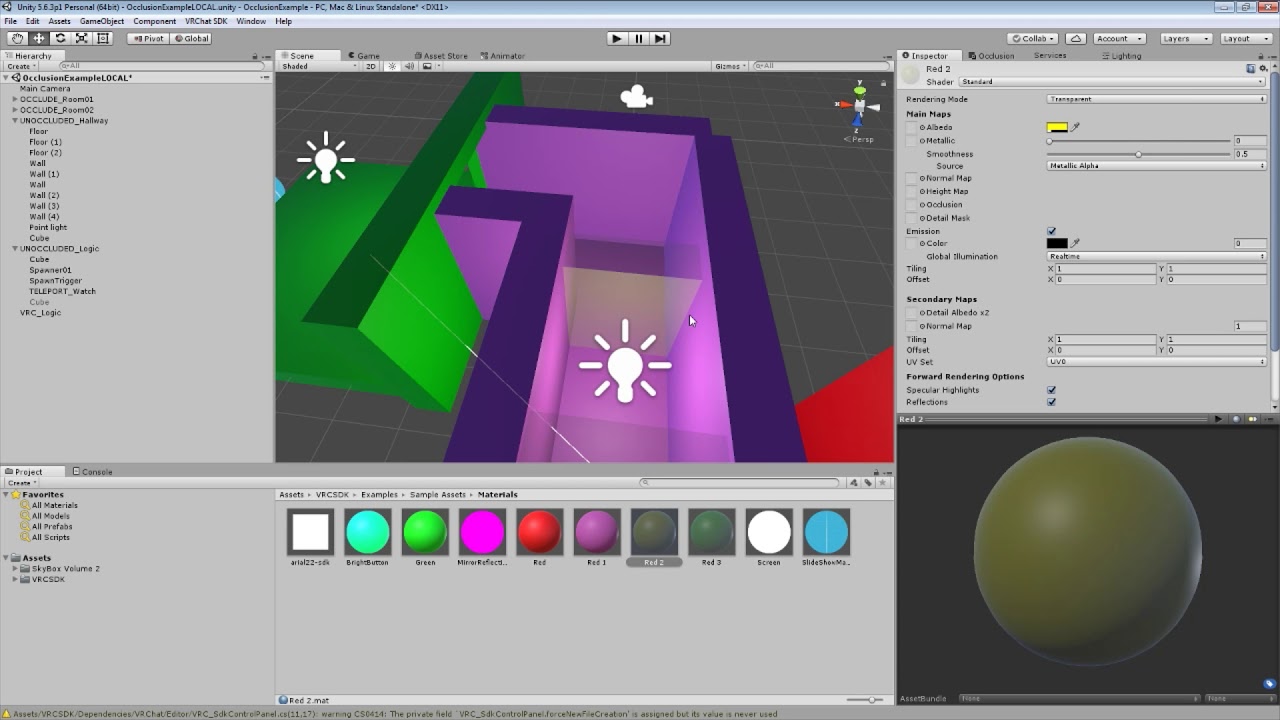
How to set up VRChat trigger-based occlusion in Unity, thus improving the performance of your world maps in VRChat.
fallow drum
shut thunder
https://www.youtube.com/watch?v=KF0_5eYry2M I meant something like this love❤️ n...
Oh, you'd just put trigger colliders with an udon behavior player enter /exit events to unload stuff.
Sounds like a lot of work though when you could just set up the builtin unity occlusion and it works fine (Most of the time XD ).
shut thunder
fallow drum
Oh, you'd just put trigger colliders with an udon behavior player enter /exit ev...
Ok got ya hah sounds good. Lol it’s been along time since I’ve worked with the unity and working with unity plus the Udon thing is so confusing 😵 thank u for the help
fallow drum
No worries.
 pale pine
Anyone got experience with Occlusion culling?
Have an issue where my assets glitch in and out constantly.
Just not sure if I can fix that using Smallest Occluder/ Hole
Seems to only glitch when you get kinda close to other assets.
hearty ore
There are some tutorials out there, but a common pitfall of occlusion culling is its not perfect or (mostly) guarantees objects are visible like frustum
pallid gale

GitLab
A surface shader for Unity providing cel-shading. (Forward rendering only)
 cinder tusk
Does anyone have any tips when it comes to finding the causes of various crashes for a game world for lower end players? I've not been able to replicate myself but last night we were having various peeps suddenly crash out and I'm not sure if its my world, VRC, just them, etc etc. But we did have some times where suddenly like, five people would crash out suddenly all together while everyone else was fine.
untold apex
I'd guess that's more a server problem than something specific in your world. it's probably worth another stress test with lots of players just to be sure.
 rose wolf
cinder tusk
Does anyone have any tips when it comes to finding the causes of various crashes...
rose wolf
cinder tusk
Does anyone have any tips when it comes to finding the causes of various crashes...
try asking for debug logs when that happens. thatll hopefully get you more info on the situation
cinder tusk
rose wolf
try asking for debug logs when that happens. thatll hopefully get you more info ...
Hopefully going to do more testing this week. I've worked out some ways to reduce about 300 draw calls so far that should help people as well.
pallid gale
cinder tusk
Hopefully going to do more testing this week. I've worked out some ways to reduc...
out of curiosity what did you do to reduce all of those draw calls
cinder tusk
pallid gale
out of curiosity what did you do to reduce all of those draw calls
Turning off the real time directional sun light when the local player is entirely indoors and doesn't have a view outside for a start.
Also turned off GPU instancing on some shaders, only used on very small meshes and also significantly reduced the number of light probes. The default settings for magic light probes put a ton in and really I only needed. One every 2m or so.
 long pumice
i need help my world is pc only and not quest compat how do i make it quest compat
untold apex
switch the target build to quest via the control panel, then pray that your world will actually perform well
hearty ore
How expensive are custom render textures with a pretty low refresh rate (as in not updating often)
torn crypt
hearty ore
How expensive are custom render textures with a pretty low refresh rate (as in n...
I imagine the bigger perf hit will be from the camera rendering (assuming you're manually updating with camera.Render();?). I think it's a bit of a loaded question though. There's some memory overhead with render textures but that'll ultimately depend on the size and format of the RT (+ if you're using AA, need mips, or need it to have a depth buffer).
It'd also really depend on the use case too! For example, if you need to do something with ReadPixels to copy the render texture -> Texture2D - you can definitely run into perf issues / stalls but that's not native to the render texture itself obviously
 deep flower
hearty ore
How expensive are custom render textures with a pretty low refresh rate (as in n...
deep flower
hearty ore
How expensive are custom render textures with a pretty low refresh rate (as in n...
if you're talking about shader-based custom render textures, the performance impact should be the same as a regular texture during the frames it does not update. performance impact during frames it updates depends on the shader used to update it[and the size of the texture], but in my experience it's not too bad if you don't go overboard with scale.
since unlike camera based render textures, the scene does not have to be rendered again, so a whole lot of time is saved
which is why, if you can achieve the effect with a shader based custom render texture, it's better to do so than to do it with a camera-based render texture setup
 outer quartz
What is the best way to profile a world for performance? Is the built in unity profiler the way to go or is there some 3rd party system.
torn crypt
outer quartz
What is the best way to profile a world for performance? Is the built in unity p...
Profiler and Frame Debugger are definitely the first ones to use + should give you enough insight to be alright!
If you have mystery perf issues that can't be tracked down by either of those, then you can break out the big guns with RenderDoc or Intel GPA in client too (but I feel like that's rare)
outer quartz
torn crypt
Profiler and Frame Debugger are definitely the first ones to use + should give y...
Thank you! Going to start learning how to use and understand the profiler.
 lost storm
Hia I need some help anyone know how to do x-ray shaders for the quest for like game markers
 solemn tapir
lost storm
Hia I need some help anyone know how to do x-ray shaders for the quest for like ...
solemn tapir
lost storm
Hia I need some help anyone know how to do x-ray shaders for the quest for like ...
An X-ray shader, which I mean honestly you'd want to elaborate. But as I understand what you're asking. Would require a grabpass, which can't be done on quest in worlds or on avatars.
 spring blade
Howdy :3 does anyone have any rough guideline or estimate for texture sizes? I've made many of scenes before, but never for VRChat, and so I fear I might go overboard with high res textures that aren't necessary for VR and will make it so the worldsize is larger
twilit atlas
spring blade
Howdy :3 does anyone have any rough guideline or estimate for texture sizes? I'v...
crunching textures can remedy the size to degrees, also look into VRWorldToolkit, it helps you to mass import textures and have an overview of uncompressed sizes
spring blade
thanks a lot cake! ^^
I'll definitely look into that toolkit
lost storm
solemn tapir
An X-ray shader, which I mean honestly you'd want to elaborate. But as I underst...
Like x-ray so they can see markers like in Mudder and among us
 wind portal
hi, i want to make a quest version of my world, the docs seem to be a little outdated and there isnt much information about world limitations. Ive heard people say that video players are not supported but dont see anything mentioned about it on the docs.
Do i need to remove any video players?
Also the docs mention a 50mb world size limit but didnt a recent vrchat update list in the patch notes that its now a 100mb?
And are there any other things i need to take into consideration? Thanks for the help!
unkempt summit
wind portal
hi, i want to make a quest version of my world, the docs seem to be a little out...
world size limit is 100mb. Custom shaders are allowed but those that use grabpass does not work (recommended you download vr worldtoolkit as it can warn you on that). Transparencies are fine but it is heavy so don't use it too much. Video is supported but NOT youtube links, videos work fine if you host them privately like google drive or dropbox.
wind portal
unkempt summit
world size limit is 100mb. Custom shaders are allowed but those that use grabpas...
so if i am using merlinvr udon video player, it would be best to just disable that object or completely delete out of my hierarchy?
unkempt summit
Most udon stuff should work fine as it is, unless you are using shader trickery. So in many cases, converting the world to Quest should be pretty straightforward without needing to change anything much. However optimizing the world for Quest is another matter. Real time lights, unoptimized things, undisabled mirrors will slow down on Quest devices greatly. It is best to look at the Stats in Unity and try to achieve a drawcall 100 and below (the lower the better)
unkempt summit
wind portal
so if i am using merlinvr udon video player, it would be best to just disable th...
If you are maintaining a PC/Quest world together, basically how networking works is the scene hierarchy must be exactly the same. So if you delete the video player from Quest, it must be deleted from PC as well if you want to maintain sync. However, you can disable the video player component only on Quest and sync will still be maintained as the hierarchy is not changed. (Of course this means Quest users can't watch videos)
However since video player works on Quest (just not youtube), you can leave it in as it is actually. It will not cause any problem except Quest people just cant see youtube links
wind portal
i see, good to know
unkempt summit
PC users can also insert non-youtube links to allow Quest users to watch videos
wind portal
and yeah, i am trying to maintain a pc/quest world. im looking into making spaceship hangout quest compatible. the world has been out on pc for a long time already but i recently finished a big update. So now im looking into the possibility of making it for quest. i just dont have a quest myself so i have to rely on friends to test it for me
unkempt summit
yeah, in this case the important thing is to look at the drawcalls. Quest is surprisingly weak and I did not know how terrible my world performed until I had gotten a Quest myself. (It was running like 30fps which Quest users told me it is fine but I'm like, no that's not)
if you can keep it to like below 30 it will be great, otherwise aim for like below 100. Anything above is not really good. Avoid realtime lights, transparencies, mirrors, and make things static.
wind portal
whole world is already static, and lights are baked. World itself is pretty big though.
duplicated project is currently still switching over to android, taking a while, ill check the draw calls in a bit, but im pretty sure it was more than a 100 when i checked that a couple months ago for the pc version
unkempt summit
you should enable local cache server to reduce the time it takes to switch over, it helps a lot https://docs.unity3d.com/Manual/CacheServer.html
it takes up space though
wind portal
so i know you can look at the stats menu ingame to see your draw calls, but is there a way to see what is adding to that number?
unkempt summit
What I do is I look at the stats within Unity itself after pressing the play button. I can then identify the biggest culprits by disabling/enabling gameobjects
oh yeah remember that enabling global instance on your materials helps reduce the drawcalls
wind portal
is it not enabled by default? if so are there any downsides to it or should i just enable it on both quest and pc version?
unkempt summit
there are no downsides i think, just enable it on all of them as you can
wind portal
alright good to know
unkempt summit
it is not enabled by default
wind portal
i wonder why thats the case then
@unkempt summit so this is if im looking away from my world (in the pc version)

and this is if im looking towards the center of it
 unkempt summit
ah, yeah that's definitely not good (even the FPS itself is not good if this is on your PC)
set up occlusion culling by defining an occlusion area and then bake occlusion
wind portal
ingame performance sits around 74 fps on my index, which is basically as high as ive ever seen in vrchat if its not a blank world
wind portal
unkempt summit
set up occlusion culling by defining an occlusion area and then bake occlusion
already have that
unkempt summit
ah hmm
wind portal
from everyone who has been in my world so far, theyve all said performance is great ingame
unkempt summit
then take sometime time and disable certain parts of your environment to get a gauge of how expensive it is, and see if you can do anything about it. Those drawcalls can definitely be improved
wind portal
alright
ive also seen mentioning of merging meshes, but does that help if youre already occlusion culling?
unkempt summit
yeah what I mean is that FPS does not mean a good sign if you are hoping to port it to Quest, which is much weaker. For example my world when optimized is like 500 fps and above
wind portal
unkempt summit
yeah what I mean is that FPS does not mean a good sign if you are hoping to port...
ah i see
unkempt summit
I personally don't go to that extent haha (but I use only low poly assets so I don't know)
see if you can identify the expensive things in your world, there is a good chance you can reduce it. But if you cant then what the heck just upload it
wind portal
i have my world laid out like this, when i disable individual sections, most dont change anything, only the ones that are in front of me reduce it by about 50-100
 unkempt summit
oh yeah you should see if disabling the mirror helps. If only the mirror is causing that issue then it's a simple problem to fix
wind portal
mirrors are off by default
unkempt summit
ah okay. Hmm what's the drawcall if you disable everything except the room you are in
wind portal
depending on where im standing in the room, 50-70
i just enabled gpu instancing on all the modular world pieces materials
unkempt summit
so its only the rooms that you dont see that is adding all those drawcalls?
wind portal
unkempt summit
so its only the rooms that you dont see that is adding all those drawcalls?
seems like it
i dont see them because im behind a closed door, but the door isnt static for occlusion culling
unkempt summit
ah. Well if there's no choice then it's fine. Personally I did a bit of work by segmenting my rooms and then having a toggle such that, if the player is in that area, the room is enabled
but that is a bit of manual work haha so by default, this is probably the best you can do without doing things like atlasing all your textures
wind portal
this is with gpu instancing on, didnt seem to affect much depending on where im looking

 unkempt summit
yeah that scene looks nice, maybe that's the limit you can go as far as the automatic optimizations goes
wind portal
alright, well, thanks for your input, really appreciated 🙂
unkempt summit
no problem, glad I could help!
if I want to try optimize that, I'll put area based toggles to manually do my own culling
just to enable/disable the rooms that you have in your scene, it seems well organised
wind portal
well, the issue with that is, from where i was standing. the areas i could disable that affected draw calls, if i disable them, they would disable wall pieces visable at that point
wind portal
wind portal
this is with gpu instancing on, didnt seem to affect much depending on where im ...
for example, the theather room had draw calls reduced if i disabled it from where i was standing in this picture, but the walls you can see through the door frame would have been disabled by doing that
wind portal
so it looks like the occlusion is already doing a lot of the work
unkempt summit
ah yeah
wind portal
unkempt summit
put the walls into another object
i do actually have them seperated like that
 unkempt summit
I see
wind portal

let me see if disabling anything else than the walls helps draw calls
looks like i could get around 30 draw calls per room repending on what parts i disable
but it still varies hard depending on what part youre looking at
unkempt summit
Yeah I found out that manually disabling rooms is better than the occlusion culling
I guess the issue is you have a lot of materials and they are not atlased
Which is a lot of work to fix
wind portal
one more quick question, can i have settings be different on objects without causing syncing issues?
like i have a script that spawns new space locations, and some locations have RT lights, theres a button to disable those, but by default its on. can i change the script to have the default be off, or do the settings need to be the same? @unkempt summit
unkempt summit
Try not to change the scene hierarchy by not instantiating new oblects
Just disabling and enabling is fine
deep flower
wind portal
i dont see them because im behind a closed door, but the door isnt static for oc...
that's what occlusion portals are for.
they basically act like a solid object for occlusion culling, except it has a toggle to "open" it, making it no longer occlude stuff.
 molten bison
wind portal
its not instantiating them, just toggling already existing objects
molten bison
wind portal
its not instantiating them, just toggling already existing objects
Yes I am using occlusion portals too and they work nicely. Interestingly enough I also use that same asset pack :) It's great value but some walls have transparent materials I think which disables occlusion culling for them, so I blocked stuff manually with EditorOnly cubes.
But I still think manually toggling rooms might be better in a similar way for doors. Turning off Udon processing and audio sources for examples in blocked rooms should also give some more performance.
Just have to make sure scripts can resync after being toggled back on I think.
outer quartz
wind portal
this is with gpu instancing on, didnt seem to affect much depending on where im ...
Use the Draw call/batches number from the statistics window but take the "FPS" a little less seriously since unity is including the time used to run the editor in that number.
I just wanted to make the comment for others that might think the FPS would be close to in game FPS
unkempt summit
ah yeah it's not
outer quartz
~~ Also, and someone please correct me if they have more info, organizing a scene with empty game objects has a run time performance hit because they are still technically game objects. ~~
As in I remember seeing that the game engine is doing parent child transform math for all of them.
unkempt summit
I would think if the objects' ain't moving it should be fine. (Otherwise that seems to be a big hindsight)
Esp if those are already static
outer quartz
Did a little more looking and seems like its for moving objects like you said.
I still wish unity had a folder system for the scene heirarchy
pallid gale
https://gitlab.com/s-ilent/SCSS/-/wikis/Other/Occlusion-Culling @wind portal a helpful guide on occlusion culling and you'd probably want to see if you can put your non tiling textures on a atlas
GitLab
A surface shader for Unity providing cel-shading. (Forward rendering only)
 young dove
Hi there, is it normal for draw calls to batch in spikes like so?
https://cdn.discordapp.com/attachments/307446969029230593/958920062713098290/unknown.png

I had just thought I would expect batching to be persistent, or do I have the wrong idea of how it functions?
young dove
determined it to be the behavior around a realtime reflection probe
hearty ore
Does SendCustomEventDelayedSeconds use a form of Update on the backend for when to trigger timers?
I'm asking because I'm curious as to if looping with a delay seconds is better performing than just using Update or FixedUpdate
 autumn quest
how do i help Compress my world for the Questies
i Compressed a few Textures and Audio files
but
pallid gale
https://github.com/oneVR/VRWorldToolkit this is a handy tool that has a compress all textures button and tells you what takes up file size on a map

GitHub
Unity Editor extension for making VRChat worlds. Contribute to oneVR/VRWorldToolkit development by creating an account on GitHub.
autumn quest
how do i use it to compress stuff?
too lazy to read the 2 hours of exposition
@pallid gale
pallid gale
the page for it is not terribly long
pallid gale


like if you're going to do World development you're going to have to get used to reading documentation
autumn quest
ive been making worlds for over a year, just never needed to go higher than 100 MB yet, now i have, and need to fix it
pallid gale
then yeah the screenshots I posted would cover what you need to know to Crunch compress everything
autumn quest
 pallid gale
do you have the Android build installed for Unity
 topaz hinge
asks for help
gets docu
"mmmm nah too long, spoonfeed me the docu"
fallow drum
topaz hinge
*asks for help*
gets docu
"mmmm nah too long, spoonfeed me the docu"
When it takes longer to type out the question than it would to just read the page provided with the info 🤣
 serene sparrow
Hey mates, i'd like to ask if anyone has a link on the low hanging fruit for quest map optimizations?
i have a very simple world with a large plane as a floor, a mirror, wolfe's video player, a billiards table and a few avatar pedestals. It seems like the quest is kinda struggling to run this, especially when the balls are rolling in the billiards table
is there anything i should look at before straight up disabling some bits of the map?
I'll be taking a look at the import settings guide from the pins, and maybe try to switch around some materials
solemn tapir
serene sparrow
i have a very simple world with a large plane as a floor, a mirror, wolfe's vide...
The pool table will always kill quest. It should be on a toggle and defaulted off locally for them. Also do all you can to reduce the draw calls by reducing the number of materials. Can even remove the drop shadow on the balls. There's not much you can do to improve this. The physics of the table is simply too much for a quest.
Putting the table in its own area such that the rest of the world can be disabled using an area trigger can help a bit too, so that the only thing really running is the table.
rose wolf
didnt someone here figure out why the table was too heavy and how to fix?
serene sparrow
hmm i see
solemn tapir
There's been a few forks that have in various ways improved it. But afaik the community table hasn't implemented any of that.
serene sparrow
it was meant to be my home map, with these couple of things kinda always on
solemn tapir
It's just simply hard to manage the physics for the quest. Especially q1 . Q2 does a lot bettet
serene sparrow
wasnt aware it was such a performance hog
solemn tapir
I mean having everything on by default is kinda bad design anyways. Just using area triggers to manage where the player is, ensuring that only logic in that area is running, is a very basic step to easily improve performance
serene sparrow
i mean, it is literally a 5x5m or so square
😆
but yeah, i'll see if i can fiddle with the table
solemn tapir
Well, might be a good idea to start building out some areas xP
serene sparrow
its just a spot for me to spend 5 seconds calibrating in
and maybe play a game if someone joins in on me
you mentioned the shadows being remove-able?

i'll try to gut that table a little
rose wolf
i mean, if the planes on y=0, you could use the original pool table. that ran well
serene sparrow
original?
solemn tapir
You'll break sync if you just remove them. You can just remove the shadow, just remove the mesh renderer. And plz don't use the OG table. He deserves no support for his bs
serene sparrow
i dont mind gutting both PC and quest equally, would that break sync as well?
solemn tapir
Also, your pens each use two shaders. You can reduce a ton of draw calls by replacing the material on each pen to be the same.
serene sparrow
would that make all pens share the same color?
serene sparrow
Ah i see
solemn tapir
Each is two materials
serene sparrow
do you know if there is anything i need to watch out for in the video player?
i might just disable it on the quest lol, seems fairly useless
solemn tapir
Not really. It's just a player. ProTv is prob the best cross platform player but all the major ones work fine
serene sparrow
protv? ty
solemn tapir
It's free on booth
serene sparrow
i just got the first one that showed up on google
solemn tapir
serene sparrow
i dont mind gutting both PC and quest equally, would that break sync as well?
As long as they're identical you won't break sync. It's often just easier to disable the mesh renderer than to worry about that but none the less.
serene sparrow
oh, i can disable the mesh without breaking it, great
pretty new to this, thank you
solemn tapir
Sync is determined by object position in the hierarchy, not the contents of the objects (simplification)
serene sparrow
so it is part of the scene even if i upload it as disabled?
solemn tapir
Unity assigns a sync ID from the top down. So sync objects tend to be best places at the top
Yes.
serene sparrow
i thought it cleared up stuff, but that might've been avatar uploads
 willow panther
Hey, So i have a world that was made for quest using a bunch of models that included LOD To minimize lag, Is there a way i could bypass the sdk default settings and change the LOD Bias?
serene sparrow
solemn tapir
Yes.
i managed to get the world running way better by re-assigning materials, thank you
but i broke the table 😂
oops
pallid gale
willow panther
Hey, So i have a world that was made for quest using a bunch of models that incl...
you're not able to tamper with the LOD bias settings of the sdk
 hasty acorn
When i build and test my world it sends me home, any help?
solemn tapir
hasty acorn
When i build and test my world it sends me home, any help?
Quest or PC?
Do you have a spawn point set in your world descriptor or is it empty?
hasty acorn
solemn tapir
Quest or PC?
Do you have a spawn point set in your world descriptor or is it e...
Got it fixed, thanks
topaz hinge
 pallid thicket
<@70347370923040768> I need to report a vrc user
pallid thicket
<@70347370923040768> I need to report a vrc user
dont tag staff, read #moderation-reports and follow its instructions
pallid thicket
Ok
serene sparrow
wtf lol
lilac saddle
pallid gale
https://i.gyazo.com/8b1a19d9e50f516fdcf947539207cccc.png
I do optimization this way but when I use the mass compression it never seems to work
Rn I'm making a club world can anyone tell me any tricks and methods they know for performance boosting?
All I've done for optimizing is just dropping Size of materials to 1024 and compressing it at 50% quality
untold apex
material atlasing, careful use of transparency, gpu instancing, static batching
untold apex
dropping texture sizes will reduce build size but not necessarily have an impact on framerate
lilac saddle
I'd love to learn all methods if there is videos or guides for fps boost and dropping MB size
untold apex
material atlasing basically means combining the materials of neighboring objects whenever possible so that for any given viewpoint you are using as few materials as possible
lilac saddle
Ahh alright I'm not sure how to do that though
lilac saddle
untold apex
material atlasing, careful use of transparency, gpu instancing, static batching
I'd love to learn about all this stuff
untold apex
you can probably just look up atlasing. it's the reason the standard shader exists... 90% of materials can be described by that one shader. let's say you have a bunch of dishes and utensils sitting on a table. you could give each fork, knife and plate its own material, but that makes the render engine work way harder. instead, you set up the UVs of all those objects so that they fit within a single map, and use textures to differentiate the various material properties. now all that table setting is a single material
gpu instancing is what you use for objects that exist over and over again in the scene. you just enable it in the shader. the engine will automatically try to optimize identical meshes using the same material if this is enabled
static batching is a semi automated process. anything in your world that doesn't move, generally speaking, should be static. unity will automatically combine nearby static objects into single meshes where possible to save on draw calls
this requires that you use baked lighting, which is generally what you want for performance anyways. real-time lights area huge performance hit and should be avoided. always bake your lighting
you also have occlusion culling, which takes some work to set up. this acts as a hint to the engine to tell unity that you can't see through certain objects, so it can hide things behind that object to save draw calls
lilac saddle
untold apex
you can probably just look up atlasing. it's the reason the standard shader exis...
Alright I'll definitely look that up that sounds very useful
lilac saddle
untold apex
you also have occlusion culling, which takes some work to set up. this acts as a...
Ooo that's very useful
I never knew what those meant
pallid gale

like here's an example of a texture Atlas
GitLab
A surface shader for Unity providing cel-shading. (Forward rendering only)
lilac saddle
Ohhh that makes sense
pallid gale
documentation on occlusion culling and something that also helps is making sure all your lighting is baked so that you're not needing to do calculations every frame on how your shadows work
lilac saddle
90% of my lighting is baked but I have some real time lights
That need to stay that way
 untold apex
yeah, then just be extra careful to minimize other expensive operations in those areas, and understand that they're going to impact performance quite a lot
lilac saddle
This is without a doubt most expensive area
 hazy haven
If one of your shaders rely on the realtime directional light, you can delete the rest of them
Only if you have duplicated it around the world
Also whatever that fog is on the floor, if thats a particle system then you should reduce it down until you start seeing changes.
lilac saddle
It's a smoke machine from a prefab pack I have
lilac saddle
is there an easy way to see if occlusion culling is working
lilac saddle
also which is better gpu instancing or static batching
untold apex
if you're using copies of the same mesh with the same material over and over again, gpu instancing is probably the better choice. but it's hard to say if one method is always better than the other. profiling is the way to tell
if your objects are very lightweight, like just a handful of triangles, you're probably better off static batching
solemn tapir
lilac saddle
is there an easy way to see if occlusion culling is working
Scene view, top left, change the render mode from shaded to overdraw.
Then go to the occlusion culling tab, click on the visualization tab.
On the camera in your scene view, enable view lines and volumes.
Move camera around.
lilac saddle
untold apex
if your objects are very lightweight, like just a handful of triangles, you're p...
so the way in interpreting this is, high quality prefabs = gpu instancing (if im using multiple of the same kind) and static batching for stuff like walls and floors and low quality stuff
lilac saddle
solemn tapir
Scene view, top left, change the render mode from shaded to overdraw.
Then go ...
alright thanks
lilac saddle
solemn tapir
Scene view, top left, change the render mode from shaded to overdraw.
Then go ...
should my camera be made big enough to cover entire world or small
untold apex
lilac saddle
so the way in interpreting this is, high quality prefabs = gpu instancing (if im...
yeah, assuming that those high quality prefabs are being used repeatedly throughout the scene and with the same material, and have more than about 256 vertices
untold apex
if you have a lot of one-off props there's no real reason to gpu instance. as far as anti-aliasing goes there's not much you can do. any post-processing method for AA is not compatible with VR
lilac saddle
so i shouldnt bother with antialiasing?
untold apex
i assume you're applying it to a post-process volume? it won't work in VR.
lilac saddle
never done it before
untold apex
or, well, it might do something, but definitely not something you want it to do
lilac saddle
i dont think pc users are gonna lag in my world anyways
im mainly trying to get things optimized so there is minimal lag when my club reaches higher player count
also any tips for reducing mb size?
solemn tapir
Without reading everything typed, post processing should only be used for Bloom and color grading. That's it.
solemn tapir
lilac saddle
also any tips for reducing mb size?
Use crunch compression on all textures and compress all FBXs to medium
untold apex
lilac saddle
also any tips for reducing mb size?
crunch your textures and use as low a resolution as you can get away with based on your level's needs
lilac saddle
solemn tapir
Use crunch compression on all textures and compress all FBXs to medium
oo never knew about fbx thing
i usually crunch my textures to 1024
untold apex
mesh compression is available in the inspector for any input mesh
crunching is not the same as file resolution
lilac saddle
my light maps are a big killer rn for mb size
solemn tapir
Yes. Click on the fbx, in the inspector, set to Medium. You'll typically never see a loss in quality at medium. Don't go higher than that or it will reduce the visual quality.
 solemn tapir
Yes. Baked lighting takes up space. Tailor your settings to be as low as possible while maintaining the visuals you desire. You can also crunch your light maps
solemn tapir
Your meshes are all separated
solemn tapir
Most likely.
lilac saddle
how can i combine them reduce light maps?
solemn tapir
Using a script to do so in unity or export and do so in blender (best method is blender use fbx exporter to send to blender). You want to be logical about it tho. Things should be joined in neighboring groups, not all together, so frustum culling still works well.
Also, many things may or may not even need light mapping. Ensure you're light mapping only the meshes you need. You can use shaders to create the look of shading without actually baking lights to it.
There's never a one size fits all solution. Stuff like good optimization is a lot of things all coming together in a logical way for your project.
lilac saddle
seems like i have a lot to learn
lilac saddle
solemn tapir
Using a script to do so in unity or export and do so in blender (best method is ...
how can i stop unity from creating light maps for meshes?
by unchecking the create lightmap uvs box?
untold apex
turn off "lightmap static" in the inspector
lilac saddle
untold apex
turn off "lightmap static" in the inspector
where can i find that?
untold apex
on the top right corner of the inspector for any game object, you have that "Static" flag. but there's a bunch of options within that
you can pick and choose what type of static flags you want for any given gameobject
 untold apex
ah sorry misworded, just turn off contribute gi
lilac saddle
so turning that off will mean it will not get light mapped?
lilac saddle
alright good
ill do that on a lot of things that wont even need light
and see how it turns out
solemn tapir
On the mesh renderer itself. Under the lighting tab....

But yes. You should also uncheck the tag. Regardless. Section B of the mesh renderer, disable everything you don't need for that specific mesh.
lilac saddle
alright
lilac saddle
solemn tapir
Yes. Click on the fbx, in the inspector, set to Medium. You'll typically never s...

for this where is the option to set it lower/higher?
ohh nnvm
spotted it
untold apex
Mesh Compression
lilac saddle
so weird i reduced the amount of lightmap there and somehow my build size is the same
untold apex
reducing the number of objects present in the lightmap is likely to just make the other objects take up more space in the uv map. what you might need to do is adjust your lightmap resolution so that you're using less texels per unit
solemn tapir
U also need to ya know. Rebake
fallow drum
They shouldnt all be seperate lightmaps though. You need to turn up the lightmap resolution in unity id assume
looks like you're baking a whole lot of 1k lightmaps instead of 4k ones
fallow drum
lilac saddle
so weird i reduced the amount of lightmap there and somehow my build size is th...
what is this set to?
 lilac saddle
untold apex
reducing the number of objects present in the lightmap is likely to just make th...
lilac saddle
untold apex
reducing the number of objects present in the lightmap is likely to just make th...
Alright
lilac saddle
solemn tapir
U also need to ya know. Rebake
I did rebake.
lilac saddle
fallow drum
what is this set to?
I'll look into this tomorrow. I'm working rn (night shift) but thank you
fallow drum
👍 feel free to @ when you do
 cerulean locust
can someone tell me what does this mean and how i can fix it?
 fallow drum
cerulean locust
can someone tell me what does this mean and how i can fix it?
fallow drum
cerulean locust
can someone tell me what does this mean and how i can fix it?
Expand your error console and see if there are any other errorcs coming before that.
 frail wyvern
how do you view how big a filesize of a quest world in unity?
rose wolf
frail wyvern
how do you view how big a filesize of a quest world in unity?
either with the worldtoolkit by 1 or you can manually check with the compilelog
lilac saddle
fallow drum
👍 feel free to @ when you do
@fallow drum
ok so
it was set on 1024
so i changed it to 2048
rebaked
took a lot longer
i have less light maps but my build size is bigger
 versed lichen
How big is the world you're baking ?
 versed lichen
What lightmapping settings do you have ?
 versed lichen
You need to scroll down
lilac saddle
 lilac saddle
 versed lichen
enable ambient occlusion
 versed lichen
Ah, go with 4 then

 pallid gale
texels per unit should be at 20
pallid gale
Ruuubick instruction should cover most everything else
lilac saddle
alright
 blissful wasp
Hey, my pickup items have different topology/tris and such
Would it still be a good idea to atlas them to the same material and use GPU Instancing?
all my item textures are around 16x16 so an atlas wouldn't lose any detail
For extra context I have around 6 unique items (more planned)
and 2 pairs which are the same mesh just different texture/material those I assume would be good to atlas
(then I'd be able to make more duplicates too) what I'm wondering is if the unique ones would benefit
because from what I understand even if it's the same material if it's a different mesh then it's an extra draw call
so I dunno if it'd help much there
and then as far as saving dl/cache size as I said my textures are like max 16x16 so I doubt there'd be much
 agile hawk
It's good to atlas. Even if it's not to reduce draw calls.
Though, from the context I have is that you have no identical mesh with the same material, so, GPU instancing wouldn't help reduce draw calls or do anything.
GPU instancing requires identical mesh, identical materials, and static batching off.
Static batching works a bit better because it only needs identical materials, but, don't work on dynamic objects.
unkempt summit
 inland bobcat
What could i do to try to lower my world size
inland bobcat
What could i do to try to lower my world size
Download VR World Toolkit, make a build and then you can use it to see what assets are taking up space, so you can think how to reduce it
inland bobcat
Pretty sure its mainly lightmaps but ill look at it
unkempt summit
if its lightmaps then you'll need to reduce the quality. Other factors could be you are using huge normal maps or textures (well just scale them down using gimp or photoshop)
but first to understand why, its best you get VR World Toolkit
inland bobcat
importing it right now 🙂
twilit atlas
don't scale them down using photo manipulation software
use VRWorldToolkit to set the import sizes accordingly, it has a mass importer tool for this
unkempt summit
yeah, you'll need to make a build first before it will show the information. It shows information from your last build
twilit atlas
also allows you to set crunch levels
unkempt summit
oooh
twilit atlas
providing high resolution base graphics/textures and then setting the import settings is a way more flexible workflow
solemn tapir
Just remember that crunching textures only lowers the download size, not the size in memory...

 near juniper
pallid gale
https://docs.unity3d.com/2019.1/Documentation/Manual/TextureStreaming.html
near juniper
pallid gale
https://docs.unity3d.com/2019.1/Documentation/Manual/TextureStreaming.html
Is it literally just a memory cap?
So performance gets priority?
near juniper
awhh poopie
 solemn tapir
Well yes. Cuz the entire terrain is one mesh. And you're always right next to it
Could do it still if it's just some generic meshes with textures that aren't specifically terrain and your terrain is cut up in chunks.
pallid gale
I guess the question is would that actually help much in vrchat given that you're not going to be loading like big open-world Maps?
 cursive rock
Who knows how to make the on/off button control?
 obtuse bear
cursive rock
How did you solve the problem?
obtuse bear
cursive rock
How did you solve the problem?
Leave one variable game object, and add a mirror there in the inspector.
solemn tapir
cursive rock
How did you solve the problem?
You named your variable "vrcmirror" but that's just a variable to toggle a game object you just arbitrarily names vrcmirror. If the public variable is left empty, it defaults to "self" so it toggles the object the Udon behavior is on. I explain this more at the link above. The gist is you need to drag and drop the actual mirror into the public variable.
cursive rock
How do I sit a chair? 👉 👈

 unique kite
cursive rock
How do I sit a chair? 👉 👈
unique kite
cursive rock
How do I sit a chair? 👉 👈
You don't until you fix the errors preventing the udon behaviors from loading. You also need to use the appropriate channel which would at least demonstrate you are paying attention. #world-development
cursive rock
unique kite
You don't until you fix the errors preventing the udon behaviors from loading. Y...
ok
 versed lichen
 spiral nova
Have you ever used this plugin, I imported it into minecraft but I can't use it
spiral nova
Have you ever used this plugin, I imported it into minecraft but I can't use it

What do you mean by imported into minecraft ?
spiral nova
world
Sorry, my English is not very good
imported it into my world but I can't use it
😱
spiral nova
versed lichen
<:whatthe:581188620409634826>
It seems like it's a problem with my setup
versed lichen
Were there any console errors in unity ?
There might be a specific udon version required 
spiral nova
 versed lichen
These aren't errors
spiral nova
 spiral nova
versed lichen
These aren't errors
spiral nova
versed lichen
These aren't errors
It doesn't seem to be this either
versed lichen
Is there only one ?
 versed lichen
I'm not sure, is there no documentation on the item page on booth ?

 stray oak
Do you have UdonSharp in your project? Maybe it requires that
stray oak
Did you import UdonSharp first, before importing the plugin?
spiral nova
yes
 spring laurel
Does anyone knows if scaling a gameobject impact the world's optimisation ?
I mean does a very tiny prop with a lot of poly have an higher impact than an enormous low poly structure ?
I'm trying to do an Island so I wanna know this to think about how big I can make it
unkempt summit
you can have a high poly prop with LOD levels so you dont have to render the full model from far distance, but if you dont do LOD then that high poly prop will be heavy
whereas low poly structure, obviously its good
there's no way the low poly prop will be heavier than the high poly prop at any size, unless you do LOD for the high poly prop
spring laurel
Okay thanks
So the size of the props doesn't really change much about the impact ?
unkempt summit
even if you are drawing a high poly prop with a size of 1mm, all of the polygon's drawing will have to be computed, they dont get culled automatically
so yeah, using LOD is a way to reduce the impact of high poly stuff
spring laurel
All right
So basically if I use a cube, I can make it very big and it wont affect anything ?
unkempt summit
that is absolutely no problem yeah
spring laurel
Let's go thanks
I'm doing an island so I'm gonna make a lowpoly and scale it a lot
unkempt summit
anyway, the impact of that is so insignificant compared to drawing 20 avatars on screen, that has no LOD level
other factors, such as changing materials, will affect more than just drawing a larger triangle on screen
yeah, upscaling a low poly island is def no problem
spring laurel
I'm planning on doing a cartoon water shader, will the size of the plane (with the shader on it) affect it's impact or it's the same as the island ?
unkempt summit
doing as in you are making a water shader or using someone else's
again, any performance hit from drawing a larger triangle is extremely insignificant compared to rendering avatars, so it doesnt matter
so technically yes, but no its miniscule compared to everything your modern device is processing
spring laurel
True some avatars are heavier than some worlds xD
deep flower
the only thing that scaling up an object might make worse performance-wise is making it more likely for that object to be in frame
if the object is in frame, it impacts performance much more than if it isn't in frame.
although this goes for the performance impact of the shader used to render it, not for the performance impact due to the number of polygons or such.
and unless you do crazy stuff in the shader, that particular impact is irrelevant compared to other performance impacts
lilac saddle
Hi! I can't find the settings to lower the resolution of all of the textures in the world. Could somebody show it for me?
stray oak
lilac saddle
Hi! I can't find the settings to lower the resolution of all of the textures in ...
I think that would be in Project Settings > Quality > Rendering > Texture Quality. But I don't think VRChat allows these settings to be modified, so instead you'd need to manually change the import size of each texture
lilac saddle
That's not it, there was another setting for is
stray oak
Oh, maybe you mean the mass texture importer from the VR World Toolkit? You have to download that separately from the SDK
untold apex
there's a package called vrc world toolkit
it has a mass texture importer script that can batch compress textures
stray oak

GitHub
After successfully importing the release unity package the toolkit menu will appear in the Unity top bar as VRWorld Toolkit - If it does not, check Troubleshooting for common problems and solutions...

 neon plover
can someone help me with Switching to Android:AndroidPlayer is disabled
 frigid iron
neon plover
can someone help me with Switching to Android:AndroidPlayer is disabled
frigid iron
neon plover
can someone help me with Switching to Android:AndroidPlayer is disabled
- In Unity hub, click on installs on the left side of Unity hub
- Click the gear icon on the 2019.4.31f1 install, and click add modules
- Install the Android build support, Android SDK & NDK Tools, and OpenJDK
inland bobcat
yall think me copying and pasting 3 different "grass" items around to make a "3d looking" carpet

would make lag
untold apex
hard to say for sure. make sure GPU instancing is enabled on their material and check your draw calls in the game view
 frail radish
inland bobcat
yall think me copying and pasting 3 different "grass" items around to make a "3d...
frail radish
inland bobcat
yall think me copying and pasting 3 different "grass" items around to make a "3d...
Im pretty sure there is a shader you could use instead, to make it easier, and on top of that
inland bobcat
i loaded into the world and it seemed like nothing different was happening, FPS seemed fine to me
 echo siren
Does baking occlusion really meaningfully affect performance??
untold apex
depends on your world and how much objects occlude each other.
 twilit atlas
occlusion relies on having proper occluders and occludees, it is something you design a world around if you need it
large transparent windows are a very hard design to incorporate into this
your stats look a bit scary for this scene however
are these all real time lights?
inland bobcat
echo siren
The Waffle House!
echo siren
twilit atlas
your stats look a bit scary for this scene however
are these all real time light...
All baked except one real time light in the parking lot
im really not sure why it performs so poorly lol
echo siren
inland bobcat
The Waffle House!
Yesss! Waffle House On The Moon!
i am on a pretty low end machine, a laptop with a 1060
Is there a meaningful performance hit from having higher res baked lightmaps??
twilit atlas
echo siren
Is there a meaningful performance hit from having higher res baked lightmaps??
there is also a cost for everything, this has one too but can be ignored
you have a lot of batches and setpass calls
why do you have a realtime light at the parking lot? they end up doubling a lot of the stats
echo siren
twilit atlas
there is also a cost for everything, this has one too but can be ignored
you ha...
i think i was mistaken because looking back i didn't see any
how can i affect the batches and setpass calls??
thank you for the help ;;
I keep seeing recs to add occlusion culling, but like we said there's really no case when much of anything is realistically going to be culled
I wonder if it comes down to the fact that this was a DAE model imported into blender to some extent

so
disabling the building mesh makes performance skyrocket lol

that seems to be the culprit
this stupid DAE file has been a nightmare since day one
solemn tapir
echo siren
this stupid DAE file has been a nightmare since day one
You can just import it into blender and export as an fbx. DAE alone won't kill perf tho, it's probably super high poly, looks like it's an absurd amount of separate meshes as well so a ton of draw calls, and I assume you've put a mesh collider on each of the meshes. So a ton of bad practices.
Import it into blender. Merge things into logical groups so you have a bare minimum number of separate meshes. Decimate it or remesh it so any high poly mesh is much more reasonable, and export it as an fbx
Basically, way too many draw calls and I suspect way too high poly, especially bad it you're using mesh colliders.
twilit atlas
model type is irrelevant, unity imports into its very own representation
echo siren
Yeah what I mean by that is that because it was a DAE file auto-generated from CAD, it's not at all optimised for this sort of performance requirement. I honestly might be best suited to just remodel it from scratch because it's not particularly complicated, rather than go to the effort of trying to remesh it. I've spent so much time screwing around with the terrible topology that was generated
untold apex
echo siren
Yeah what I mean by that is that because it was a DAE file auto-generated from C...
CAD topo is an absolute nightmare to work with. you're best off using it as an armature to model on top of so that you have better control over your edge loops / UV seams, then bake AO/normals from the original hi rez tessellation onto your clean model
viscid hatch
I feel like I should be getting more frames less drawcalls, but then you realize it's the lighting
 echo siren
untold apex
CAD topo is an absolute nightmare to work with. you're best off using it as an a...
echo siren
untold apex
CAD topo is an absolute nightmare to work with. you're best off using it as an a...
Yeah D: I learned this the hard way, it's been super annoying the entire time. I thought it would save time given Waffle House model exists but it just made it worse all around lol
Do you have a rec for baking the AO/Normals? Not ever done that before
untold apex
echo siren
Do you have a rec for baking the AO/Normals? Not ever done that before
it depends on your software, really. i usually use substance painter for this. i'm sure blender has its own system, but i don't know blender.
 surreal shoal
why arent my atlas'd textures going with the fbx into unity?
 vague umbra
Is it possible to add items to a VRCObjectPool on start or some other event?
twilit atlas
vague umbra
Is it possible to add items to a VRCObjectPool on start or some other event?
that defeats the purpose of the object pool's synced nature
what are trying to achieve?
vague umbra
I have a bunch of items that I am spawning one at a time, and I want to be able to edit one and update them all, so if I use one item and copy it then i'm set, but then I have to update every copy each time I want to make an edit
vague umbra
Also, adding 180 items one at a time to the object pool is tedious
 hollow elk
vague umbra
Also, adding 180 items one at a time to the object pool is tedious
hollow elk
vague umbra
Also, adding 180 items one at a time to the object pool is tedious
You can select the game object with the object pool > lock the inspector > select all the objects you want in the pool then drag all of them into the pool at once
vague umbra
Where do I drop them to make it take all of them?
hollow elk
set the pool back to 0 items and then drag it on the "pool" text
vague umbra
omg ty
still a pain to have to delete -> edit -> duplicate though, so some way to programmatically duplicate them and add them to the pool would be great
viscid hatch
surreal shoal
why arent my atlas'd textures going with the fbx into unity?
did you set the atlased texture to the fbx in blender and then export the fbx to unity?
surreal shoal
viscid hatch
did you set the atlased texture to the fbx in blender and then export the fbx to...
i figured it out. thanks thouh
lilac saddle
When trying to compress my world size using the texture crunching option on the vrcworldtoolkit, it will gather the assets for awhile and then unity will crash everytime. Does anyone know how to fix? I am wanting to upload my world for quest use but I am not able to with this issue.
solemn tapir
lilac saddle
When trying to compress my world size using the texture crunching option on the ...
You're probably running out of memory. Manually crunch your textures yourself rather than using the bulk tool.
Also, don't cross post issues in multiple threads. Pick a thread and post once. You end up wasting people's time by doing that.
lilac saddle
solemn tapir
You're probably running out of memory. Manually crunch your textures yourself ra...
Will do. Sorry. Also, manually crunch each texture? That would take me forever would it not?
solemn tapir
lilac saddle
Will do. Sorry. Also, manually crunch each texture? That would take me forever w...
Not really. Depends how many you have, and you can do a few at the same time. You should have your asset folder organized such that they are together anyways. Plus it's a one time and done kinda thing.
lilac saddle
I used used project view and search t:texture, it brought up all textures. Then I tried Ctrl+a to select all, but it wouldn't select all and freezes my unity everytime.
How would I do them all at once manually?
solemn tapir
You don't want to do them all at once..... That's why you're crashing most likely
lilac saddle
Alright, how would I do more than one at a time?
solemn tapir
I've personally never used a bulk processing tool. It's not hard to manage your textures. If your project is so absolutely massive and your asset folder is so absolutely not organized then you have other issues on hand lol.
Just go to your textures in your asset folder and drag select a few, or shift click, or control click. Whatever method you want.
Just work through your hierarchy and find all your textures and crunch em. Doesn't take long.
lilac saddle
solemn tapir
I've personally never used a bulk processing tool. It's not hard to manage your ...
Will try that thanks. Hopefully it'll let me select multiples as I couldn't select but one earlier. I'll try those methods
lilac saddle
@solemn tapir thanks, what you said is working. Now, it's been a long time since I've worked on this project. How do I upload it for quest once I'm done compressing?
untold apex
lilac saddle
<@485247584907034628> thanks, what you said is working. Now, it's been a long ti...
switch your build target to quest in the sdk window, then watch for broken materials. anything that uses a grabpass will fail
you need the Android libraries installed if you haven't already; this can be done from the unity hub
lilac saddle
Anyone know a good way for size reference of objects in the world? It seems like most world have it right where as mine I can't seem to get it porportionate
 pallid gale
a Unity cube is 1 meter
and the capsule collider for avatars Collision is 2 m tall for answering like how big doors should be
pallid gale
oh yeah good point
serene sparrow
cpu go brrr
 brisk lance
Should you delete all the lights after baking? Or just leave them?
twilit atlas
leave them, you can mark them editor-only if you want, helps when you use bakery components, they will just print warnings in the log
echo siren

Get the Mesh Combine Studio 2 package from Nathaniel Doldersum and speed up your game development process. Find this & other Modeling options on the Unity Asset Store.
Anyone ever tried to use this or similar assets with VRC? Is it possible?
pallid gale
echo siren
https://assetstore.unity.com/packages/tools/modeling/mesh-combine-studio-2-10195...
haven't tried it but it should work fine as it's doing stuff at editing time generating new mesh files not runtime scripts
echo siren
hmmm i wonder if it's worth trying
solemn tapir
echo siren
https://assetstore.unity.com/packages/tools/modeling/mesh-combine-studio-2-10195...
It works fine, I own it and have used it, including many assets from MC Studio. It's just a mesh combining tool. It is better to do this in blender however. Important to ensure you're fully aware of what it is and if you truly need it or will leverage it.
pallid gale
like it's not going to do you any good to combine meshes that are using different materials as an example as that would still be the amount of materials in draw calls
solemn tapir
Yes. It's very easy to misuse the tool and actually hurt performance by reducing the effectiveness of occlusion and frustum culling. Everything needs to be leveraged appropriately and with intent.
echo siren
Isn't the purpose moreso to automate that process that would have to be done manually in Blender?
 lapis charm
 OK
OK
solemn tapir
lapis charm
<:tanabae:385251008714113034> OK
Wat
 pallid gale
that's a lot of batches
solemn tapir
1.8m tris 3.5m verts. 5k batches. 3k calls.
Lmfao. 101 ways to not design a world
solemn tapir
That doesn't mean it has to be ass designed.
Also floating point errors go brrrr
My world is also rather... Huge and is a literal fraction of those stats. Good game dev is important if you want people to be able to actually enjoy it in VR lol.
Your screen is showing 15ms of frame time with a resolution of basically 720p with a single camera.... I'm sure your post is for funnies but I do hope you intend on actually profiling and optimizing that lmao
 willow gorge
that train has long left the station
i am working on this autism project since a year and a lot of my mindset has changed since then, i did not follow a structured approach and my choice of tools ||proBuilder|| is a so-called "oof" moment. since it would take a disproportional amount of work in fixing the sins of the past, the council has decided that it is good enough for a night of attentionwhoring before putting it back into storage as a ethernal reminder on how to not do it.
solemn tapir
It's never too late.... I mean there's no reason to have 3k calls. Like. You're doing something extremely wrong that has nothing to do with probuilder
Like, is ever mesh sperated, and each set as a shadow caster and you're using realtime lighting with shadows?
You can also just export your probuilder meshes to blender.
unkempt summit
i wonder how many triangles my large world have, im sure its not close to a million
solemn tapir
Tbf gpus can handle a shit fuck ton of polies, as long as they don't have mesh colliders. A static hp mesh won't be too much of an issue. But absurd draw calls def is. Hp meshes really become an issue if you try and do a collision check against every face, ie, mesh collider.
twilit atlas
it's why most games build their layout around occlusion culling or let objects pop in via lods if you really need a vast view
solemn tapir
Indeed. Designing the world to leverage occlusion and frustum culling is very valuable
pallid gale
which is kind of why essentially s-shaped hallways are very common in video games
as it lets you sarv unload one area and loading another without noticing
unkempt summit
(but in vrchat people dont care)
throws all the effects without regard for framerate as long as one screenshot looks nice enough to lure people in
solemn tapir
super bad ass looking world preview
It's actually just a photo of a texture on a quad and the world is absolutely shit
twilit atlas
gamedev is hard, many/most are just doing it as a hobby in vrchat 
it's always great if people do decide to optimise 
solemn tapir
It's my hobby. But it's also important to learn and study and read and watch and ask and implement what you learn and iterate over and over to build something unique and cool that you can be proud of that doesn't nuke everyone's computer
Takes time. And dedication. But if you have those two things, you can manage it. But if you just accept " it is what it is" then you won't get very far.
pallid gale
and also there's the extra consideration of low frame rate can make people literally nauseous in vrchat
willow gorge
atleast it looks pretty 🥰
 pallid gale
looks like it would be trivially easy to cut down on the draw calls as it looks like it's a bunch of solid colors so you could put everything on one texture Atlas
solemn tapir
Merge individual buildings.
Atlas textures
Leverage occlusion culling
Bake all lights
unkempt summit
did you identify what the costliest parts? You can do that by just disabling parts of your world and seeing the drawcalls go down
that doesnt look like it should be that heavy, culling seems very possible
solemn tapir
Culling would def be possible.
But you'd want to merge thing into logical groups to improve culling performance
Is your lighting baked? I suspect you are using realtime shadows too, considering how high your draw calls are
Also, you only have one reflection probe? Is it baked?
A single reflection probe in that scene would only be useful for baking the skybox and nothing else at low res.
willow gorge
solemn tapir
Merge individual buildings.
Atlas textures
Leverage occlusion culling
Bake all ...
The Lights are all baked. there are 0 (zero) real time lights.
Billboards are atlassed as best as possible.
Textures are from a asset pack. Which makes it very very tedious to atlas them.
Designing and creating the buildings was done without the practice of separating by materials.
culling is already baked in
reflection probe is baked. Same as the lights with bakery.
i did not put more than one lightprobe because unity literally crashes when i did that.
unkempt summit
those stats seems like its because you are viewing from the top, what's the stats if you zoom it down?
willow gorge
the 350 megabyte filesize comes from these. and the lightmaps.
 solemn tapir
Even then, 3k draws is pretty insane
Something is causing absurd calls, it should be tracked down. Consider learning the profiler and frame debugger.
willow gorge
unkempt summit
those stats seems like its because you are viewing from the top, what's the stat...
 solemn tapir
willow gorge
solemn tapir
willow gorge
Wait. That's street level facing a building. Yet it still has that many draw calls and Tris. Certainly test your occlusion culling and ensure it's working as intended. You can enable a view called overdraw in the scene view to see what is rendering through a mesh in the frustum
willow gorge
solemn tapir
Wait. That's street level facing a building. Yet it still has that many draw cal...
yes, i have just noticed that i cleared the occlusion data yesterday and forgot to rebake it
pallid gale
that would explain it
solemn tapir
Occlusion culling has a performance overhead cost for the CPU, it's important to logically merge things together, such as whole buildings, so that you don't have so many draw calls. I still don't see how you can have that many draw calls.
Too many separated meshes or small meshes will require really bad occlusion settings which will have a high file size and higher CPU cost.
willow gorge
society
 solemn tapir
Yeaaaa. Def use overdraw render mode to see what's being rendered in the frustum
Top left corner of the scene tab
You can also enable the visualization mode in the occlusion tab and enable render lines on the camera with that on
Those two things will give you a picture of what's going on.
You might see 200fps and go "that's not bad" but remember this is at basically 720p render res for a single camera. So it's actually really bad.
Ideally you want to be under 200 calls. Realistically under 100
willow gorge
i think its this but its okay resource checker has given up as well and is crying in a corner.

and as said, mainly used probuilder
and probuilder does not like merging meshes
solemn tapir
Probuilder is fine.
willow gorge
no
solemn tapir
You can always just export as fbx into blender and merge then export back into unity.
There's nothing intrinsically wrong or bad with with probuilder and nothing stopping you from just sending it through blender real quick.
Regardless, the overdraw render mode, and visualization mode in occlusion culling are good starts to figuring things out and dialing in your occlusion settings.
willow gorge
go on, press the export as fbx button
i will watch and laught as unity crashes
probuilder is good, yes
but after a certain threshhold it starts to be... excentric
solemn tapir
Doesn't crash for me. What,, you have 4gb of ram?
unkempt summit
impressive using probuilder to make that model though
i got sick of it pretty fast, just trying to make a simple room
willow gorge
i had to restore the project from backups numerous times because something with probuilder
be it "haha when you open the project all the meshes are at 0, 0, 0"
or "xd, you cant extrude faces anymore"
solemn tapir
All the more reason to export your stuff into blender
willow gorge
or "okay, so you combined a mesh. what are uv's"
solemn tapir
Combining meshes in unity produces a mesh that can't be compressed and isn't ideal
pallid gale
also kind of hard to generate lightmap uvs with a Unity mesh file
willow gorge
see where the issue is? this should have been considered earlier in the planning and tool evaluation phase. with the knowledge that i have today, i definitively would have used blender for modeling, however past-liechty, present-liechty and future-liechty are not very cooperative
to fix it now would be too much work to justify for basically a big shitpost
pallid gale
I don't particularly see what's the problem with convert exporting the stuff now?
unkempt summit
i think there must still be other issues
pallid gale
and even if you don't want to update the world it would still be good to try so you learn the skill
unkempt summit
like just disabling game objects to see what has the most impact is also good
solemn tapir
unkempt summit
i think there must still be other issues
Indeed. That many draw calls aren't to blame on probuilder. Something is up
Overdraw, visualization mode, profiler, frame debugger, toggling things, export one by one as fbx into blender.
No use repeating more for me. Lol. Good luck
unkempt summit
it will be good knowledge anyway, optimizing things are fun
solemn tapir
If I've learned anything pushing over 1,200 updates to my world, it's that optimization is the bulk of the work
unkempt summit
true
worlds can be made so much more quickly if we just ignore performance constraints. Instead over 50% of the time it is spent on making things run in a lighter way
 still pelican
for people that want to get what you made from unity back into blender,
unity has made an fbx exporter tool

it makes it verry eazy to get everything merged and optimized in blender
 sterile echo
Guys ,in terms of optimization: i'm making a room with pool tiles, but with a large floor i wanted to make the texture fit as possible the walls like the "OK" circle

I noticed that i cant do it for all walls so the best way that came in my mind was to divide the floor in some parts and set individually the texture (i'm using probuilder UV's editor)
Should it work or its bad in terms of optimization? i dont know if i'm explained well
deep flower
I've had a similar problem, and in general there are three solutions:
- change the texture to follow the UV map [this will prevent the texture from being tile-able though, so if you have to tile an entire room be prepared for a massive texture]
- edit the UV maps to align with the tiling factors of the texture [mess, and will need to be redone whenever the tiling factors change
- do not use a texture, instead have a shader generate the tiles on the fly based on where a given pixel is in 3D space
option 1 will consume a lot of GPU memory and probably look bad too because the texel density will probably end up really low
option 2 is a pain to set up, and you'll have to do it again whenever the size of the tiles change
option 3 will render a tad slower[depending on how complex the tile generating algorithm is], but will reduce world download size because there is no texture, and has the added benefit of "infinite detail" [no matter how close the player gets, the tiles won't get pixel-y]
Since I can write shaders, I personally went with option 3, and my particular world performed well enough that the performance impact of generating the tiles on the fly did not cause noticeable framerate loss with my vr setup on a gtx 1070
untold apex
sterile echo
Should it work or its bad in terms of optimization? i dont know if i'm explained...
chopping up the floor a bit and using UVs to tweak texture placement is negligible in terms of performance. what you don't want to do is add extra materials to solve texturing issues, except as a last resort
sterile echo
I've solved with M127's 2nd solution, and by slight changing some sizes of walls, floors etc
Now everything match
pallid gale
cool
sterile echo
It's possible to enable fps permanent visible in the "built and test"?
Cause the only way i know its to open the vrchat menu during testing
solemn tapir
Looking at fps is really only a small part of the picture and isn't the best metric to use for testing. You should be profiling with the profile and frame debugger tools in unity while moving your camera around or changing between cameras. Looking at frame times for the CPU and GPU as well as memory usage and using the overdraw rendering view and visualization mode in occlusion culling to determine what is being drawn. I seldom do any performance testing in game, only testing things like networking in game, or the raw functioning of things. Your fps doesn't really give you any view of why or what is causing your frames to be a certain way, not does it really tell you how well other people's systems will react, it's a blind metric, whereas the profiling tools in unity give you highly in depth look into exactly what has the highest draw times and what is being rendered or operated.
 weak walrus
willow gorge
society
weak walrus
willow gorge
society
I'm a musician and VR chat noob that has recently made a world. I'm trying to optimize it. Noob question: How do i see my statistics window like yours? 🙂
versed lichen
weak walrus
I'm a musician and VR chat noob that has recently made a world. I'm trying to op...
Stats button, top right corner of Game window
weak walrus
solemn tapir
Looking at fps is really only a small part of the picture and isn't the best met...
reading your replies has helped me a ton, thank you
my word is a spaceship on a spaceship.... and omg do I have a lot of optimizing to do 😦
right now you can see one ship docked on the other from my main "cantina" room.... Question: Could I put up a wall and occlude the smaller ship so users wouldn't have to render it everytime they look around in the Cantina?
main room

Zeppelin asset thingy
 weak walrus
😦 I should just make two worlds shouldn't I 😦 😦
solemn tapir
Do whatever you want. Looks cool tho dude.
You can dynamically load ans unload assets using area triggers too.
pallid gale
a spaceship like that is going to have like the doors be the choke points so you can do it as manual triggers
solemn tapir
Indeed. Only one area even needs to be loaded at all. Occlusion culling could probably be leveled well too.
Actually the first screenshot looks kinda open so idk what the occluders would be. Maybe design in some walls. But regardless. Can deff use area triggers n shit and only load chunks. Your file size tho
weak walrus
solemn tapir
Actually the first screenshot looks kinda open so idk what the occluders would b...
The first screen shot has assets my friend made me in blender (i've never been in blender) so it runs WAY smoother. I first just had that main room, but then of course was like "dur dur why don't i add moar!" 😦
weak walrus
solemn tapir
You can dynamically load ans unload assets using area triggers too.
thats great info thank you
weak walrus
pallid gale
a spaceship like that is going to have like the doors be the choke points so you...
ahhh, so each room gets loaded when a user clicks on the doors to go in each room?
pallid gale
yes or just walks past a archway that has the trigger
weak walrus
I think the suggestions you made were right: I'm going to do the dynamic loading and unload the first and second room (ships). When a user portals outside the zeppelin will load and the first room the cantina will unload. Thank you again @solemn tapir you really helped
blissful wasp
Is there any way to automatically split a mesh into chunks in a program like Blender?
I have this massive mesh of cubes that I need to split into smaller sections of cubes
Goal would be 16x16 grids
And my blender is lagging just switching from Vertex to Face selection in Edit mode
deep flower
depends on where the split is supposed to be. so long as you don't want to cut a surface apart, you can just go to:
mesh -> separate -> by loose parts
in edit mode in blender
if you want to cut a surface apart, you'll have to do it manually
 crimson girder
How many materials is too many for a VRChat PC world?
Im not sure whats the best way to go about this texture wise. Ive made a sci-fi satellite building in blender. At the moment it is one Object. I will be texturing it in substance painter. Substance looks at the materials and creates a Texture set list for each one.
So previously on my first attempt I had the model in four parts, but some of the different parts shared a material. In substance the texture set had them overlapping on the UV's even with the sperate UV's in blender. (Im new to this so likely not doing this correctly)
Is it best to separate the model up by material in blender. Then Create a UV map for each material that can be packed better?


 topaz hinge
with the amount of materials i see in your blender, thats too much imo
but i see solid colors, so you could easily get away with remapping those colors to a tiny image with a few pixels for each other
stray oak
crimson girder
How many materials is too many for a VRChat PC world?
Im not sure whats the be...
Not sure about your questions but just wanna say that looks super cool and I'm really curious to see how it turns out! Are you open to collabs or commissions? I could totally use something like that for a standalone game I'm making
crimson girder
Ah so those colours are just placeholders as in substance ill be using some smart materials and sbar's (Kinda like this but atm Im just throwing stuff around while I figure stuff out) so i cant do the pixel trick.
I thought this was too many.... but my issue was this has been my attempt to fix a problem I had before. >.<
So originally I had the building in 4 parts. Dome Main Front and Glass I planned to have just one UV map and material for each part and use fill masks in substance to separate up the bits like walls, frames, floor ect
Problem was when I did that I had horrible resolution and bleeding across faces even with a big margin in the UV unwrap (I used smart project im still learning this) I knew I could fix this bleeding if I gave those those parts into their own materials. Then substance treats them as sep UV maps and wont bleed them anymore.
But then....as i had the building in 4 parts with 4 uv maps. When I took that into substance it was creating a texture set for each material and with some being mapped to different UV it puts them over the top of each other. (like in last pic i sent)
So I was now at lots of materials with their own UVs so i can get a neat paint in substance XD Can you tell I have no idea what Im doing yet
 crimson girder
stray oak
Not sure about your questions but just wanna say that looks super cool and I'm r...
crimson girder
stray oak
Not sure about your questions but just wanna say that looks super cool and I'm r...
and tysm! I honestly appreciate that! But i think i need to learn a bit more before i start any commissions or anything like that.
 pallid gale
you can utilize tiling textures for your Maps so you don't have to uniquely texture everything @crimson girder
stray oak
inland bobcat
How could i lower this?
Use VR World Toolkit to figure out what's taking up the most space (likely huge textures, normal maps and lightmaps) then lower the import resolutions and apply crunch compression where applicable
I used that and found I had a ton of 4k normal maps that were practically one solid color with no detail lol. Others were more important that they stay 4k but right away it was super obvious what could easily be shaved off to go from 200mb to 100 for my world
frigid iron
inland bobcat
How could i lower this?
Yes what jasono is saying about textures is right, crunch compressive them can reduce world size but from anywhere between 10% and 500% if none are compressed already
versed lichen
inland bobcat
How could i lower this?
Use the vrworldtoolkit to see what your build is made out of
weak walrus
inland bobcat
How could i lower this?
I am a noob here and in Unity, but someone helped me by telling me to take off the Alpha channel of those textures that didn't need it.
Does anyone know the line of code that can Dynamically unload/load an asset/prefab? I want to make an object, upon player entering the object, unload one asset while simulteaniosly loading another.
pallid gale
I don't recall how you do that off the top of my head but you can definitely do that in udon
blissful wasp
deep flower
depends on where the split is supposed to be. so long as you don't want to cut a...
They aren't loose parts though
blissful wasp
weak walrus
Does anyone know the line of code that can Dynamically unload/load an asset/pref...
I use cyantrigger make a box collider on an empty object mark it as trigger and static
Set it to activate one gameobject and turn off another on "PlayerCollisionTrigger"(?) Change it from VRCDirect to Local
If I messed up describing it here I feel you can still figure it out
weak walrus
blissful wasp
I use cyantrigger make a box collider on an empty object mark it as trigger and ...
forgive me, but its the "set it to activate one gameobject and turn off another" is where I'm stuck :(. I have cyantrigger and the collider set up.
blissful wasp
weak walrus
forgive me, but its the "set it to activate one gameobject and turn off another"...
Give me a minute to open unity I'll screenshot how I have it set up in Cyantrigger alright?
need to close Blender first as my project there is using like 90% of my ram
blissful wasp
weak walrus
forgive me, but its the "set it to activate one gameobject and turn off another"...
GameObject.SetActive twice once for active second for inactive

Or if you're putting your trigger on like an enterence/exit/in-between bit maybe it could just a GameObject.ToggleActive?
weak walrus
blissful wasp
GameObject.SetActive twice once for active second for inactive
wow thank you so much, never have recieved so much help in a discord. Yall are awesome
weak walrus
blissful wasp
I use cyantrigger make a box collider on an empty object mark it as trigger and ...
I can't seem to change it from VRC_direct. It's grey'd out and unclickable. How can I change this?
 blissful wasp
weak walrus
I can't seem to change it from VRC_direct. It's grey'd out and unclickable. How ...
blissful wasp
weak walrus
I can't seem to change it from VRC_direct. It's grey'd out and unclickable. How ...
Collision Trigger not just enter
also mark the collider as trigger
weak walrus
blissful wasp
Collision **Trigger** not just enter
Thank you again. very very very helpful
fist pumping... it workd! Feels so good thank you

 candid fable
if I change the quality in my project setting and restart my project, it is always reset, anyone have an idea why ?
stray oak
candid fable
if I change the quality in my project setting and restart my project, it is alwa...
VRChat has it's own settings that the SDK purposely prevents you from overriding
candid fable
ok...
cinder tusk
I'm doing some Quest optimisation today, what's the recommend max texture size, light map size, etc?
pallid gale
VRChat
Creating content for VRChat Quest is a challenge-- you have to create attractive, compelling content all the while keeping the content optimized for a mobile device. These are the same challenges that game developers must deal with while building for mobile. Here, we'll give you some general guideli...
 timber coyote
How do I make my skybox a smaller size?
Right now my skybox is half my world download size.
serene sparrow
crunch it? i assume its a high resolution texture
versed lichen
It's probably a 6 sided skybox
timber coyote
After some optimizations, crunching and munching.
Now at 25 instead of 50.
That's pretty good.
If I convert my music files to ogg I could probably get that even lower.
But I think I'm good at this point
obtuse bear
If you convert music to ogg you will get no smaller and even bigger build size.
Do not do this. Select the music file and in the inspector set the desired compression for it.
timber coyote
obtuse bear
If you convert music to ogg you will get no smaller and even bigger build size.
...
Eh? Why would it get bigger?
Oggs can be compressed more.
obtuse bear
timber coyote
Eh? Why would it get bigger?
Oggs can be compressed more.
each conversion is unnecessary garbage in a file that compresses very badly.
Unity already converts to ogg when importing, which can be seen in the inspector.
timber coyote
Hm, alright.
obtuse bear
timber coyote
Hm, alright.
 obtuse bear
timber coyote
Hm, alright.
obtuse bear
timber coyote
Hm, alright.
Quality 50 can be safely set, there will be good sound and good compression.
timber coyote
Mine are all just public domain recordings anyways so it'll be aite.
lilac saddle
I've been wondering for a while now, I've noticed alot of worlds on Oculus Quest 2 havent been working, an example being box avoid game, where everything is pitch black, everything is still there but I just can't see it, and I haven't been able to find any info about why, does anyone have any idea?
 barren rapids
Hey so I've got a world with a sun that moves over time, is it possible to like bake multiple shadows based on different sun positions so I don't use a huge real-time light?
blissful wasp
lilac saddle
I've been wondering for a while now, I've noticed alot of worlds on Oculus Quest...
I think that was caused by an update to a newer version of Unity
all the world creator would have to do in that case to fix it is just upload it in I think 2018/2019 Unity
If it's not that idk
timber coyote
For world creation, would it be better to make a series of modular wall, floor and roof assets and construct my environments using those, and then to GPU instance them into one material?
Because right now I modeled my entire world in Blender with each piece and I feel concerned about the amounts of redundant materials
twilit atlas
timber coyote
Because right now I modeled my entire world in Blender with each piece and I fee...
gpu instancing works only on multiple copies of the same mesh
you likely want to bring down materials by atlas'ing the textures
timber coyote
twilit atlas
gpu instancing works only on multiple copies of the same mesh
you likely want ...
They would be the same mesh if it’s the same wall being repeated
There’s a lot of material redundancy because I use the exact same texture for a lot of things
The only way to conquer that would be to atlas all the textures onto one including all the tiling I’ve been using and that’s gonna be one big package there
untold apex
using the same texture for things is good. that's not going to make anything more difficult
assuming the textures are the same, you can use the same material for everything and you're good. even without gpu instancing that's going to reduce draw calls considerably, and static batching can handle a lot of the rest
you can try instancing and profile both options, see what it gets you
timber coyote
Oh, if I have all my static stuff marked as static, they’re already on the same material… ohh right. I always forget about static batching
I should be pretty alright then?
untold apex
well, you won't know until you profile, but probably. gpu instancing is great, but you do have to be using the same mesh for everything
timber coyote
Yeah, I’ll have to take a look when I get home.
I think my world performance is fine but I’m considering future proofing for expansion and building up
I’d rather not be a map that suddenly gets big but sacrifices everything from performance
fallow drum
The thing about static batching that nobody seems to mention is that if your objects are lightmapped, they need to be on the same lightmap otherwise they can't be batched together.
Something to keep in mind.
pallid gale
so is that a case like manually merging stuff together might help so that they all use the same light map
fallow drum
Indeed
I've made a world from lots of modular walls etc and then the same thing in blender from solid components and it droped the draw calls by a lot
pallid gale
like I have an acquaintance that's working on a Unity tool that handles automatically merging that stuff in a sensible manner
fallow drum
I have on actually for merging a bunch of stuff that I got recently like that that would've been handy.
pallid gale
nice
blissful wasp
Is there a way to grab a players FPS?
I wanna make it so that things happen based on a players FPS
like if they drop down to 20FPS or lower
switch everything to a super optimized version or teleport them somewhere
etc
mainly in this instance just to make it so if someone turns on the HQ mirror and it kills them it'll turn itself off
maybe prompt them if they were okay with the FPS they were getting and if so turn it back on
solemn tapir
Id personally find that pretty annoying. Many people are fine with lower fps. Giving them the tools to mange it in a nice looking menu can be helpful without being forceful. If a mirror being turned on kills people, focusing on optimization, checking overdraw, ensuring things are culling, and perhaps offering a HQ and lq button rather than forcing the mirror to HQ with a single button can be viable.
fallow drum
I lived at like 16 Fps in full lobbies when partying until I upgraded my pc
You get used to it xD
blissful wasp
solemn tapir
Id personally find that pretty annoying. Many people are fine with lower fps. Gi...
maybe prompt them if they were okay with the FPS they were getting and if so turn it back on
If they're okay with it sure fine
fallow drum
And fps can dip randomly when people do things so I'd you game is running dine and it randomly turns your stuff off would be anoying.
I'm a big fan of just having a potato mode button for people
topaz hinge
making something that grabs someone's fps seems like more work than its worth when you can just optimize your whole world. there's a mirror prefab with 3 quality buttons on it on vrcprefabs i think lol
fallow drum
Yea. Idk if there's a direct fps hook bit you could check the time between update events and that would be reflective of the time between frames
viscid hatch
timber coyote
After some optimizations, crunching and munching.
Now at 25 instead of 50.
That...
I compress my aufio with Audacity and the built in Unity and make it quiet to where you can hear it but not loud because you hear the compression.
barren rapids
Is it possible to bake multiple sets of shadows for a scene?
 spice turtle
Is there any ways to optimize lighting for android outside of baking lights I placed on the map, anything world wise I should be doing? I have one area of the map that just nearly crashes the game and I think it may have to do with lighting
pallid gale
well make sure there's no real-time lights whatsoever for 1 and do you have any particularly complicated custom shaders in that area
spice turtle
I dont believe so, most items I made with basic shapes in that area, all my textures are compressed too
pallid gale
I suppose time to use the frame debugger https://docs.unity3d.com/2019.4/Documentation/Manual/FrameDebugger.html
spice turtle
Can anyone determine anything about optimization from this data, this might as well be a foreign language to me
 unique kite

View this video in context on the Unity Learn site:
http://www.unity3d.com/learn/tutorials/modules/intermediate/graphics/frame-debugger
In this video we'll look at how to use Unity's Frame Debugger to analyze and trouble shoot graphical performance.
Help us caption & translate this video!
spice turtle
Alright well that’s cool and all that I can watch it render frame by frame but how does that show me what is crashing my game😂 theres no “game crashing frame” that shows whats bugging out
stray oak
spice turtle
Can anyone determine anything about optimization from this data, this might as w...
That is a crap ton of draw calls. You want to figure out why all of the things in that gigantic list are being drawn separately and not in groups or at the same time in fewer passes. If you click on one of the steps in that list like "Draw Mesh Cube (37)" it should tell you why it's drawing that cube separately from the one before it. Maybe your objects are not marked as static, or the materials do not use instancing? Maybe you have a ton of separate materials and textures in your scene?
spice turtle
it was the static option, went through marked what needed to be static and turn on the occlusion
stray oak
Noice. What's the number of calls on that list now?
solemn tapir
Just clicking the static box is bad practice indeed. I wish people making tutorials would stop suggesting this. Checking that box enables everything. Batching, occluder, occlude, nav mesh, etc etc. Lots of stuff that can have negative ramifications depending on the project. Then everything in your scene is set to try and batch and your occlusion culling sucks ass.
spice turtle
Went from 10k down to 6k
stray oak
Dang that's still a lot for quest. Here's a reference from oculus that I keep handy
 spice turtle
What else could be causing that now I set the proper things to static?
solemn tapir
Tons of materials
Also if your meshes don't share lightmaps they won't Bach
There's a lot of reasons something won't batch tho
stray oak
Materials on non static objects not using instancing, or having lots of different materials, lots of skinned mesh renderers, crazy shaders or lots of transparent things. The frame debugger should help give you at least some info when you click on each call
solemn tapir
I assume your lighting is static too and baked?
spice turtle
Yarp
solemn tapir
No realtime shadows
spice turtle
Looks like 90% of these events are draw mesh
solemn tapir
Posting a screen of the entire project can help us
You prob have a ton of sperated meshes
With different materials
stray oak
Yeah how many separate materials are in your scene
spice turtle
Can you check that easily?
solemn tapir
Indeed.


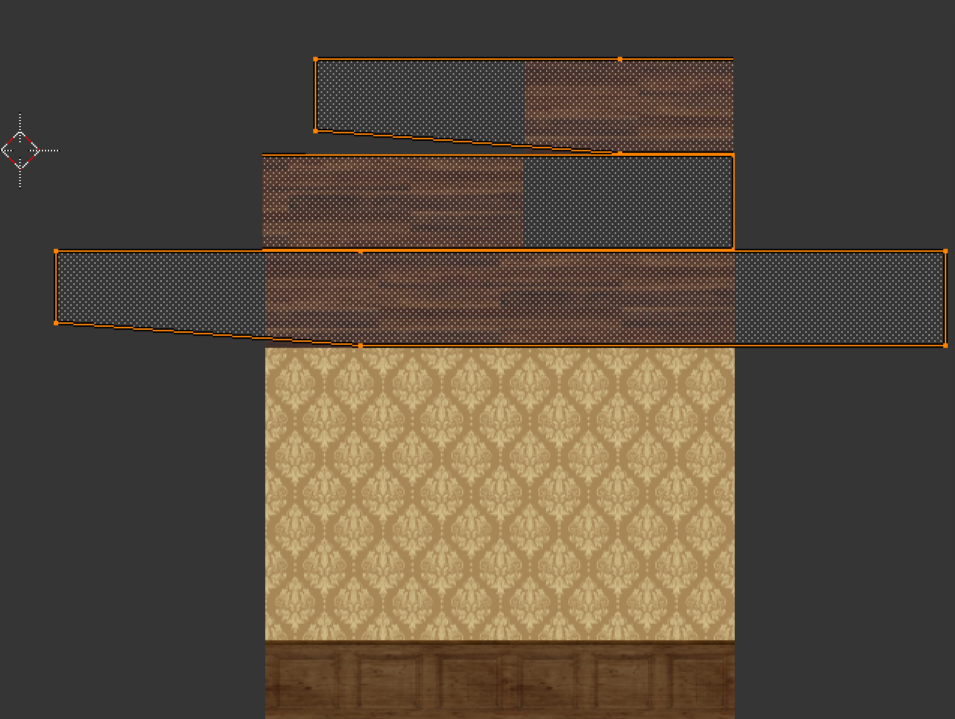
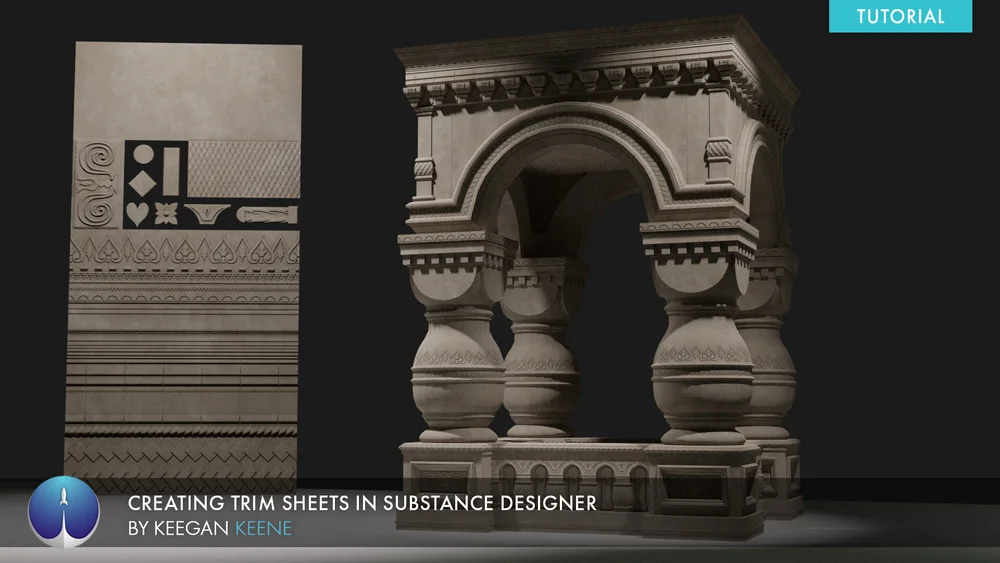

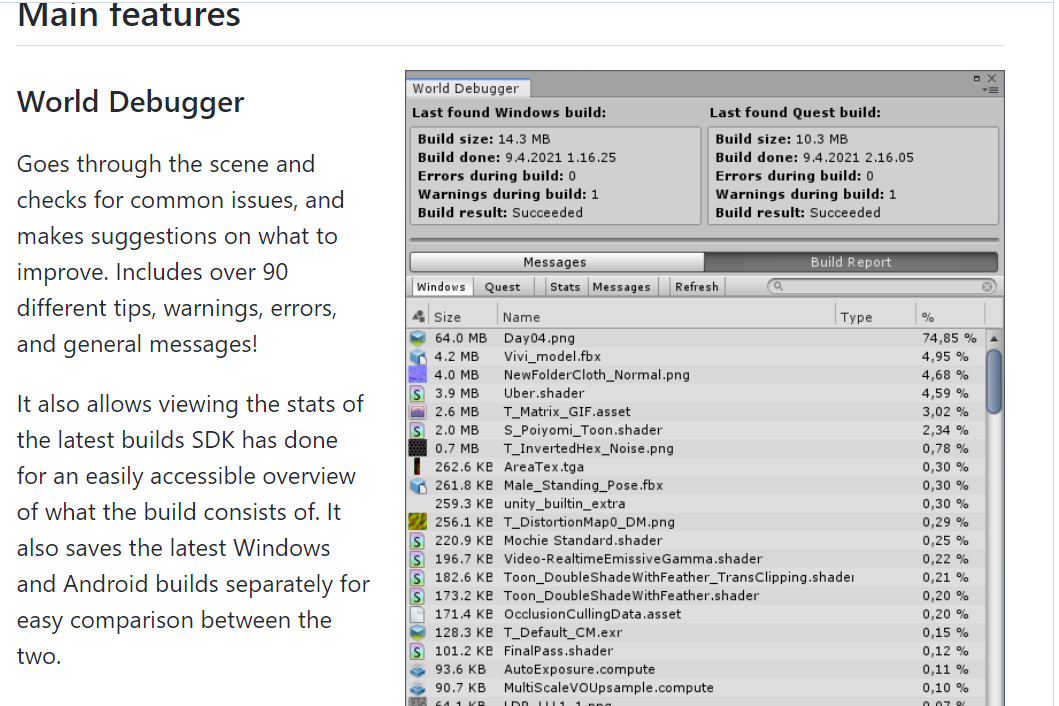

 solemn tapir
Ooof
Yea. You need to be merging a ton of shit
So many separate meshes will lead to bad occlusion culling too, increasing cpu overhead
You can also use resource checker or VR world toolkit to see more info about your materials and number of meshes
stray oak
I'm very confused why it says the object is being affected by multiple lights... Maybe the lighting is not actually getting baked here
spice turtle
Theres several area lights of different color would that affect that?
solemn tapir
Are they baked?
spice turtle
 stray oak
If you disable those lights does the scene look different? That's how I do a sanity check to make sure my lights baked properly 😅
solemn tapir
Go to the lighting tab under rendering
In the windows drop down on the menu bar at the top
You'll want to read or watch about baking probablyz or check #world-lighting as default settings prob won't be best.
spice turtle
Ok in that tab whats next
solemn tapir
So yeah.
1: too many meshes
2: too many materials
3: lights weren't actually baked
= High draw calls
spice turtle
 solemn tapir
spice turtle
Ok in that tab whats next
solemn tapir
spice turtle
Ok in that tab whats next
Well, set everything to baked. And bake it. But the default settings prob won't be ideal so you'll want to read up
Set source for environmental to color and choose a neutral color like a soft gray (artistic choice of your own)
Set environment reflections to probe(if you want, skybox would reflect your skybox onto Everything)
Hit generate.
Wait.
spice turtle
Theres skybox or custom
stray oak
Yeah scroll to the bottom of that window, lightmapping settings are what you want to tweak here. Then click generate and watch it take 30 mins and make everything look like crap 😅 and then watch a lightmapping tutorial and fix things up and tweak settings until it finally looks good. At least that's how I did it
solemn tapir
Lmao basically
It's a lot of trial and error
But you'll want to merge meshes first.
Baking with so many sperate meshes will take more time and then when you merge them later, you'll just need to bake again and prob change lightmap res settings
spice turtle
I dont have a probe option for reflection
solemn tapir
Ignore that then. It's been a while. I'm walking my dog through a desert rn so I'm talking purely from memory
spice turtle
Ok well Ill tackle that later since it will take a while, how do I combine meshes?
solemn tapir
#world-lighting is where you'd want to move to for lighting specific questions
solemn tapir
spice turtle
Ok well Ill tackle that later since it will take a while, how do I combine meshe...
Blender
You can do it in unity, but it has a lot of drawbacks if you do. Such as being unable to compress the mesh
spice turtle
Will dragging objects into a parent object help it run better?
solemn tapir
Best to export things into blender and merge them logically there then export as fbx back to unity
It won't help performance necessarily, but it will make your project easier to manage and will make exporting things as an fbx easier
Things should be logically grouped together. Not just an endless long list.