#world-optimization
1 messages · Page 21 of 1
 austere ember
austere ember
austere ember
more like lag
 rose wolf
how many draws/verts are visible when you put the camera at spawn?
austere ember
i dont- aaaaa
rose wolf
move la camera to spawn, click the game tab. and then click stats in the middlish right top
austere ember
i see verts, but not draws, and my verts is 4.8m
rose wolf
that aint too bad, could be better, batches are somewhat close to the number of draw
500meters is 500 cubes right?, id go with the defaul settings
austere ember
yes
also it is on default
im trying to make it a bit more optimized and user friendly
rose wolf
if the trees starting flickerings, make the top setting number higher
oj also, make sure the trees are set to static
are you using real time lights?
austere ember
i think theres a couple real time lights but idk
rose wolf
hrrrmmm, should bake for more performance
austere ember
oh its only the worlds directional light
rose wolf
shoukd still bake that, itll cut a lot of draws since its a directional light
makes the screen go buttery smooth
 astral trout
Aside from frustrum culling (which is where unity culls things not in your FoV), occlusion culling may not be as useful if your terrain is a wide open field as there wouldn't be enough occluders to block line of sight. Are your trees individual meshes or unity speed trees? If they are individual meshes you may want to consider merging them in groups. Especially if you have a lot of trees.
 feral plover
Sounds like a good place to make sure you've enabled GPU instancing on your materials, too.
Also, configuring LODs? I haven't tried working with LOD yet, but a place that's 500 meters is probably a good spot for that. I'd be interested to see how they got walked through LODs for this instance.
 ocean stag
Hey, I ve been looking for a solution to make different layers render in different distances. For example Player from 0.05 to 100 and the rest from 0.05 to 1000. Is there a way to do so?
 mild rune
@astral trout-senpai, are you familiar with google Seurat?
austere ember
so yea my world will randomly teleport you back to spawn for some fucks reason and i dont know how to fix. how do i resolve this issue >->
 versed lichen
Are you using CyanEmu ? If not you should so that you can debug your world in Unity
versed lichen
austere ember
how the hell do i install it .-.
versed lichen
"Just import into your project"
versed lichen
wdym by something in the file assets
 cold prairie
You opened a different scene?
 abstract otter
Hey, im just trying around and making a world, ive ran into an issue, i want to make a optimized mirror that only reflects the characters like most worlds have. when i only select player in reflect layers on the mirror nothing is showing up on the mirror. anyone who knows a fix to my issue?
versed lichen
player is other people
abstract otter
So there has to be more of the options in the mirrors reflect layer? do you know which i would need?
cold prairie
MirrorReflection is yourself
So for all players you want Player and MirrorReflection
abstract otter
Okay ill try that, thanks for the help ! 🙂
 south knot
Is there any solution to fix problem that getting lag while loading avatars in the world?
That problem got worse in my world that named "Hwabon Night" after SDK 3 Update
versed lichen
loading what types of avatars ?
south knot
what you mean types?
versed lichen
excellent or very poor
south knot
almost peoples was using very poor avartars
wait Is this supposed to be an optimization of avatar?
versed lichen
Yes, the poorer the avatar, the worse the hitch will be for others when they join
south knot
Thank you for your reply
 leaden helm
I'm making a world and it says it has both quest and pc support, but when I try to join it on either system, the world begins to load then sends me back home. Any ideas as to why this is?
 tardy otter
@leaden helm what is your worlds MB size on quest, if its over 50 MB quest simply cant join it
leaden helm
tardy otter
<@!280077320906211338> what is your worlds MB size on quest, if its over 50 MB q...
How do I check the file size?
tardy otter
vrchat website under your created worlds @leaden helm
leaden helm
It's far from over 50 MB
 thorny crag
There isn't really a better place to ask this so I'll ask here I suppose. Is it possible to apply backface culling to worldspace canvases?
 safe phoenix
How do you make the collider for a wall only affect the wall and not the hole in the wall as well?
rose wolf
wym? like a mesh collider?
safe phoenix
Yes...
rose wolf
depends on hole
rose wolf
hole not tall enough probably
safe phoenix
The hole is over 2m tall...
rose wolf
put a cube next to it
safe phoenix
rose wolf
thats def not big enough
 boreal marsh
why am i lagging when player join my world?
rose wolf
@boreal marsh avatars
rose wolf
yes
 lilac saddle
why does it leak through like this?
i have all these solid overlapping occlusion cubes
and occlusion areas
occlusion bake settings and the occlusion area for this room
also having the inverse issue with things getting occluded by nothing
working better with one of the cubes on one of the walls removed
but i really shouldn' need to rely on gaps that require me to design my map around having holes in my rooms
 nimble mortar
kinda need advice on what I have been doing for my world, currently each area I have (spawn/main area/ different game rooms and so have you all have sky boxes around them that I make a occluder static, the rest of the stuff inside them I make a occludee static. is this bad to do? I tried the normal way already and it didn't seem to work as well and I have tried the skybox method but I am getting to the point where that even isn't working now :/ any advice?
rose wolf
wdym?
nimble mortar
ok well I need help with occlusion bc I could never get it to work properly :/ really frustrating
rose wolf
what is it doing?
nimble mortar
like for example I have a city spawn but it loads in the club farther away
the only way I have gotten this to work somewhat ok is setting up like cube skyboxes around each area and setting them to occluder
rose wolf
that works
usually people will put rooms under or on top of eachother so theres less of a chance of loading them in
nimble mortar
well it was working
but after like 6 skyboxes
I put another room, another skybox and then the culling size went from 70 to 30 and now it breaks the culling?
so idk what to do now :/
rose wolf
did you change statics or moved anything
nimble mortar
nope
like rn it would be set to 70 kb and all is culling
but then I put a new skybox on a new area and it shows everything
weird af
happening with 2 new rooms now so it will be a issue
I could put them on top of each other? is that better?
rose wolf
rebake real quick
yes, i usually recommend stacking rooms since windows are usually not above or below
rose wolf
like 50 cubes or so, so no one can hear eachother
nimble mortar
50 cubes?
rose wolf
far from each other
nimble mortar
well I just had them spread out apart from each other
rose wolf
if they are visible thru any windows from 1000 meters/cubes away. they will load
nimble mortar
yeah that's the problem
so basically
square skyboxes around each room, that far apart
that was working
6th or 7th skybox made it stopped working :/
so now idk what to do
at this point I would pay someone to help me with this bc it's been the most frustrating thing LOL
rose wolf
and everything is set to static?
cold prairie
If that's all your problem is just lower your far clip to only render the current "room"
rose wolf
setting the far distance is a good idea
nimble mortar
I think it is currently 250 or 200
cold prairie
Do you need the camera rendering that far anywhere in the world?
nimble mortar
I don't believe so
cold prairie
Should always have the camera far clip as small as you can based on your world
nimble mortar
well for one
does that effect things such as resets and things triggering in other rooms for people? also does that make it so people in other rooms don't render
cold prairie
Well nothing past the point you set will not render it won't affect any behaviours
cold prairie
I mean usually yeah
nimble mortar
hmm I just can't get it to work well :/
it works fine except all the new rooms I have done :/
for some odd reason
astral trout
you should also set occlusion areas on the rooms so unity will not calculate high precision occlusion data for all the empty space between rooms
 willow otter
I changed the skybox in my world and added a cube, but when I go to test it nothing changes it still uses the same skybox and the cube I placed won't appear
cold prairie
I'm gonna go on a guess you wanted a new skybox so you searched the unity asset store for some free ones and found AllSkyFree skybox pack which after importing that started happening, because allskyfree contains a broken script in it that stops unity from building than you need to remove
willow otter
Exactly, do I delete it?
willow otter
Ahh I see, I appreciate it =)
 merry yarrow
Anyone happen to know if Mipmap streaming works with Worlds? Or does the whole scene load defeating the point of Mipmap Streaming?
 mystic willow
So question. If my world is one big mesh, would I need to split it up for occlusion Culling to work? I made it one mesh to reduce the size of the lighting maps, as when split it was close to 200mb of lighting maps.
 gusty umbra
@mystic willow Yes, it cannot occlude an object that is also the same you're currently on / looking at. Typically all non combined objects should occlude properly.
mystic willow
So would it be worth splitting the mesh up? I would prefer not to lose the Lightmap Optimization. Maybe I can just make the tunnels in the buildings Occluded, or just seperate the map into like 4 pieces
Before it was well over 60 meshes
 viscid root
I cant tell if my world performance is getting better I used super combiner and I see that Batches actually went up.
Im not sure how to tell if your performance is getting better
This was before^^^
 muted pilot
numbers like that never actually effected my space or frames of the world so I dont think it will be that bad
rose wolf
@viscid root looks like more verts appeared
astral trout
mystic willow
So would it be worth splitting the mesh up? I would prefer not to lose the Light...
it really depends, how many polygons is the mesh total? if its not too much its probably fine to leave it as it is.
you want to take advantage of occlusion culling sure, but it wouldn't make sense to split up say a 10k poly mesh for that etc
astral trout
viscid root
I cant tell if my world performance is getting better I used super combiner and ...
considering your frame time is more or less the same, there isnt really any difference. I've never used super combiner so i don't know the specifics, but check if when after combining etc if the original assets are in the scene and if you have duplicates of the original and the combined meshes it outputs.
mystic willow
astral trout
it really depends, how many polygons is the mesh total? if its not too much its ...
Fairly certain its a hell of a lot more trhen 10k
astral trout
well for a world, even 100-200k mesh is fine honestly
unless you also have a lot of other things in those areas which pushes your graphical budget down
mystic willow
I'm working on a couple city blocks
However its night, so I have a fair amount of lights
 pallid gale
then you would want to bake all of your lighting
 karmic wraith
anyone know why even after changing nothing my world lost about 20 frames with like 4 people in it?
I was told it was an avatar api error on vrchats side since this didn't used to happen at all
mystic willow
What Texture compression override should I use for Quest?
astral trout
crunch all the things
but for light maps, use ASTC 4x4
but your map is for quest? then yeah maybe you do wanna split that mesh up lol
mystic willow
I'm making it cross platform
So I will definitely be compressing textures a little more heavily on the Quest version
Also, I'm having the One Eye Render Bug on quest as is, any idea what causes it and how to fix it?
astral trout
issue with swapping platforms on sdk
swap back to pc then back to android using unity build settings
mystic willow
I thought it might be something like that
Do the reference camera render distance settings help at all on Quest?
Like if I set render distance to say 50, would it have the same effecct as culling on anything farther then that, or does it work differently?
astral trout
yeah its basically culling anything past 50
sort of anyways, things that are partially culled will still be rendered of course, but if its fully out of the render distance it shouldnt be rendering
mystic willow
So I still need to seperate the mesh
I think I'm just going to seperate the internal structures of the buildings and then just split the main mehs into 6 or 8 parts
This is what I have btw, in case you have any suggestions..
astral trout
how many polygons is it total?
astral trout
200k isn't that bad at all
rather than splitting it up in large chunks, personally i'd go for the more detailed objects
have the "base" map be a single mesh
should also have less lightmapping issues that way I would think
mystic willow
Yeah, I think I might just make the halls and like the lightposts and screens and trees cull
versed lichen

Polygonal Mind
How to improve the loading and performance of your VRChat world with Occlusion Culling using Unity 3D. Save resources with these tricks!
versed lichen
versed lichen
https://www.polygonalmind.com/blog-posts/optimizing-vrchat-worlds-occlusion-cull...
 dense briar
Hello! I have a weird problem with my world and I don't understand why it's happening; so, some areas of my world were lagging (from 80fps to 40fps) and it's mostly happening inside 2 buildings. After hours, I've discovered that, for some reason, the cause of the lag is the Post Processing Layer on the camera, and to be more clear, I don't mean that the problem was some sort of post process effect that I added, I'm talking about just having just the Post Process Layer on the camera without any type of effect will make that area lag. This problem happens only in VR (on pc I have 91fps on all the map) and it seems to happen when there's a "lot" of objects in the view (and by a lot I mean like 30/40 objects static with LOD). Is there a way to fix this?
versed lichen
I have strong doubts about that 
Can you post screenshots about the game window with stats enabled in unity in those problem areas ?
dense briar
Sure, wait a sec lol
That's usually the position where I start to lag, when I'm a bit more far from it and I'm still looking in the same direction it doesn't give me this problem, only when I'm starting to get closer
Oh, and another weird thing that I forgot to mention, even if I disable all the objects inside and the mesh of the building I'm still experiencing lag for some reason
versed lichen
What are your post processing settings ?
dense briar
Well, the trigger with the camera, for the layer I've made one called PostProcess and it's the only layer selected, no Anti-aliasing and Stop NaN Propagation unchecked
versed lichen
but which post processing effects do you have

GitHub
CyanEmu is a VRChat client emulator in Unity. Includes a player controller with interact system. Works with SDK2 and SDK3. - CyanLaser/CyanEmu
Install this and see if you can repro in editor
viscid root
Has anyone tried supercombiner before? Like does anyone know if it actually works
dense briar
versed lichen
but which post processing effects do you have
Oh, but it does that even if there's no effects, I've tried to delete all the Post Processing Volume but it still gives me the same problem, I can solve it just removing the Post Processing Layer from the camera, only then I don't get lag anymore
dense briar
versed lichen
Install this and see if you can repro in editor
I already have it, from Unity it doesn't have any particular problem, the screen I've sent here is with CyanEmu, and it happens only when I play it in VR from VRChat (at least, if you mean play in VR with CyanEmu I don't know how to do it, for me it's only playing like the pc version lol)
versed lichen
I've never heard of post processing lag before so whatever you did is new
dense briar
I know, I mean, I was hoping it happened to someone else to understand it more, but I'm really confused on what's happening, it never happened to me before, the only information I have is that having it on the camera makes some areas of my world lagging, I guess I'll just investigate more
cold prairie
Do remember to come back to post what it was if you figure it out
dense briar
Sure!
dense briar
dense briar
Hello! I have a weird problem with my world and I don't understand why it's happ...
Ok so, I've tried to look more into it, and apparently it's happening only in VRChat, to be more clear, I've tried to test the map in VR inside Unity with CyanEmu (in the end I found a way to make it work lol) and the fps are constant at ~90fps even in the problematic area (with some dropping frames to 70fps but mostly caused by the editor itself and just for a second, then it returns to 90fps), so I guess it's not really a problem of the Post Processing itself but how VRChat render the Post Processing or at least it's something happening inside VRChat, I'm not sure if this will do something but I'll try to clean the cache of VRChat to make sure it's not something on my pc, but that's what I got so far
dense briar
Last test about this because I'm really tired of this, and I've discovered something really interesting, I've tried to clear the cache and nothing changed, but I've tried VRChat only from Oculus, so to understand if that was a problem of VRChat or not, I've tried with Steam, and surprisingly there's no lag, so I guess in the end the fault is the Oculus app or at least there's something wrong in my app, I'm not sure, but at least now I know what's happening
 tardy wing
So I tried making my world quest compatible, and when I switched it over to android everything but the log in screen disappeared from the control panel
tardy wing
Does anyone have an idea of how to fix this?
mystic willow
That's not normal. I'd personally just reimport the SDK package
rose wolf
restart unity
 toxic stag
dense briar
Last test about this because I'm really tired of this, and I've discovered somet...
toxic stag
dense briar
Last test about this because I'm really tired of this, and I've discovered somet...
Maybe you can try different quality settings (press shift when you launch vrc) or super sampling settings (in oculus) to find the cause
Use oculus debug tool to get cpu/gpu render time, so you might get an idea on which one is the bottleneck
https://developer.oculus.com/documentation/native/pc/dg-debug-tool/
nimble mortar
Would someone be able to tell me what I'm looking for exactly in profiler? I am starting to have fps issues and can't pinpoint it
versed lichen
What do you see in the stats panel of the game window ?
nimble mortar
wdym? batches and such?
I was just worried bc it went from like a solid 90 fps on desktop at spawn to a 70-90 fps at spawn
:/
versed lichen
Do you have occlusion culling baked ?
dense briar
toxic stag
Use oculus debug tool to get cpu/gpu render time, so you might get an idea on wh...
Oh, I didn't know about this one, I'll check it out later, thank you!
nimble mortar
I do yes @versed lichen
versed lichen
What is in the camera view ? Lots of objects ?
nimble mortar
that is the me running cyanemu at spawn
it used to be 250-300 or more fps
which is why I am confused
I tried disabling things to see what it was
:/
versed lichen
yeah but i can't see what's on your screen
nimble mortar
ah gotcha
1 sec
main spawn is a city environment
batched a good amount so :/
versed lichen
oh, i assume those lights aren't baked
nimble mortar
well I guess I can ask you this because I am confused even though I thought they were ok
I started using bakery
I thought they were baked?
because I put bakery point lights on them
unless I am understanding it wrong
versed lichen
So you then baked them and now you have lightmaps ?
versed lichen
ok, have you tried turning off the city meshes in view and see if that affected the batch count at all ?
optimizing a large empty scene like this is usually difficult because occlusion can't do much
nimble mortar
yeah, I did my occlusion method kinda weird which I'm not sure helped or hurt it
Ill try that
ok so
went from 736 to 373 batches
dense briar
toxic stag
Maybe you can try different quality settings (press shift when you launch vrc) o...
Ok so... I feel such an idiot, but in the end you were right, I don't know when and why my Oculus was set to give priority to graphics, I've changed it to performance and now is working great as it should, it's honestly the last thing I could think of 😑 oh well, mystery solved, thank you for the help! 😄
 orchid rose
So I have these guns that spawn kill all bullets but they are out of sync for every player, does anyone know how to fix this
 dawn dagger
Any ideas why my YouTube link won’t play on any players in any worlds? I’m on PC and have “allow untrusted URLs” checked. Thanks.
rose wolf
@dawn dagger is it a playlist
orchid rose
Its for a weapons system
dawn dagger
rose wolf
<@!773608331076042782> is it **a playlist**
No just a single URL player
dawn dagger
rose wolf
<@!773608331076042782> is it **a playlist**
But I would be interested to know if there is a world where I could run a selection of video streams according to a playlist if that is possible..
rose wolf
its currently only possible to do so using a realtime usharp algorithim, such as EWA or anon's player
dawn dagger
rose wolf
its currently only possible to do so using a realtime usharp algorithim, such as...
Ah ok. Do you know of any worlds where that is available?
rose wolf
you can try my drawing or presentation room
if you want to do like radio streams or sound cloud, i suggest the parallexure
dawn dagger
Awesomeness- many thanks, will check them out!
astral trout
..it is also possible to do it on sdk2 worlds, and my world on sdk2 can let you input a url sequentially without clearing previously entered urls
 robust olive
Is it possible to make occlusion culling only apply to players?
I can't use occlusion culling for everything since it causes issues with objects disappearing randomly, so I've had to use Udon to cull with triggers
Annoyingly, it's possible to see players just floating in space
cold prairie
Well if you mark stuff just as occluders and not occludees sure
Generally you should always mark objects properly depending on what it is since you don't want everything to act as both
robust olive
Now that I think about it
none of the rooms in my map need to be either
I'm using triggers to hide all the rooms you're not in
cold prairie
But you are still gonna need those occluders if you want to occlude players
robust olive
I plan to use large dividers between each room
the rooms aren't connected physically, but with a bunch of teleports in a hub room
so each room is blocked off
cold prairie
Then you just need to lower the far clip
robust olive
Where would I find that?
I saw someone else mention the far clip plane but all I could find were options for cameras
cold prairie
Setup a reference camera in the scene descriptor and that will allow you to change it
 winged haven
i have downloaded the free double sided shader from the unity store. i am sable to get double sided shaders, however, there is no option to add an emission map to the double sided shaders (unless i missed it). How does one have a double sided shader with an emission map. I have created a low poly plant for my world, using bent planes and projecting a texture onto it. I want the plant to also have parts that glow. I have created the emission map already and got it to look right in blender. Thanks!
astral trout
there should be a couple of unity standard based shaders with culling options you can use

GitHub
Customized Builin Shaders. Contribute to AoiKamishiro/UnityShader_CustomBuiltin development by creating an account on GitHub.
winged haven
thank you so much i was able to use that shader for cutout and disableed culling
 meager basin
Hi everyone, Quick question,
Let say I have 30 files that aren't being used in the Scene, But they are just in the Unity project, Do they take memory/Storage in the uploaded version to VRChat ?
cold prairie
No
meager basin
cold prairie
No
Thank you
 austere talon
Are there any disadvantages of setting Texture Type to Single Channel for a greyscale texture?
 wet quartz
Anyone know what the best settings for lightmap compression is for the Quest?
My scene looks good on PC, but there is a big difference in the Quest
I have baked, so its mostly my lightmaps that get compressed and look ugly
wet quartz
Thank you 😄 also saw that my PlayerSettings on Android build was set to Linear for some reason, so changing that back to gamma should also help
astral trout
uh, isnt vrchat using Linear colour space?
I don't think you can change that nor would any settings there have any effect
wet quartz
Oh, well maybe I should change back then. I'm just used to not using linear
astral trout
its changed to linear because importing the vrcsdk does some setup and thats one of the settings it changes iirc
wet quartz
Well thank you for probably saving me alot of time
 tight onyx
Anyone use a Unity add-on called OneBatch?
 gloomy fossil
Hey everyone! I need some help with a world I'm currently working on, for some reason after staying a bit on the world, the world would suddenly be very very laggy. I'm pretty sure it has to do with respawning objects in the world but I'm not sure how to fix it or go about it, does anyone have any suggestions? I would very much appreciate it o.o thank you guys!
World is running 2.0 sdk
 potent garnet
Hello everyone, a question, can I use mesh collider instead of box and capsule collider...etc will it work or effect performance?
versed lichen
Depends what it's on
potent garnet
for the whole world, I put the world in blender and combine all the meshes together already, sorry if my answer isn't specific or correct my first time making a world
versed lichen
For the whole world that would be terrible
The terrain should be separated
make a duplicate of it, decimate it a lot and then use that mesh as the terrain mesh collider
for all the other objects in the world, use box colliders or capsules wherever you can
potent garnet
thank you
 dreamy shard
i got a question about vrc triggers
if you have 10 cubes with an OnEnterTrigger assigned to each one, is it more costly than 1 cube?
like, does the simple existence of having alot of triggers do anything?
versed lichen
Yes trigger components have a cost, but you can afford 10
dreamy shard
im asking because i made a really thick kill box with rooms inside, but a mesh collider can't be set to is trigger without becoming convex, negating the interior because the verts inside aren't attatched
so im resorting to a single cube mesh with multiple box colliders set to is trigger
alright, that works
 olive nova
I have a world on quest where I just made a platform and mirror. Everything is fine but the floor is giving them double vision. Its using standard shader. What is causing this
versed lichen
Skybox shader most likely
 last plover
dreamy shard
alright, that works
last plover
dreamy shard
alright, that works
oh no, I remember that name... oh god
 hazy swan
pretty sure this is the right place to ask this.. is it possible to use VRC_Pickup for a video player? like is it possible to pick up and move a video player in a world like a T.v? also can i make a video player look like a hologram? in other words can i wrap a video player around a cylinder and allow players to move it around my world..or better yet can i connect several video players to the same cylinder with simultaneous live feeds?
rose wolf
i mean yea
hazy swan
i want to use a multi-camera setup to stream myself into the game like a hologram. im new to unity and from what little i read i can wrap several video players around a cylinder but before i make the effort i just want to make sure i can move the media player and other players would see it?
rose wolf
uhhh, possibly with a shader, but if its an irl hologram setup... thatd be extremely hard to set up for this game
cold prairie
If you know how to code shaders from scratch and do some creative uv work with a video player sure
But if you are just starting out that's gonna take a while
Though I guess depending on how good of a result you want the harder it will be to achieve
hazy swan
im reading normally to move a object around i would use a box collider and add the component VRC_Pickup. would the same steps apply for moving my cylinder around?
rose wolf
yes maam
potent garnet
Hello, I have a question, its better to join meshes or use occlusion for better performance
versed lichen
it depends on the world 
if you can often occlude them at the same time, joining is the best choice
versed lichen
if it's not very detailed meshes then you can probably merge it as a single piece
for the pieces that aren't part of the structures they can probably be occluded
@potent garnet
potent garnet
ok, thanks you
 rapid hull
Hello, I am trying to optimise my world and I would like to know if it is possible to have a button in-game to disable terrain grass?
rose wolf
depends if the grass is seperate from the terrain
rapid hull
Oh, no it is not I didn't knew it was possible, how can I achieve this? Thanks for your answer
rose wolf
uhhh, ive never made terrain in unity, so possibly what you could do (which will add to file size) is have a terrain with no grass and more low poly terrain, and then one with grass and such and swich between. another thing you could do is LOD on the terrain if thats possible of unity terrain
however, id wait for someone who has done unity terrain for the best results/tips
rapid hull
Oh ok, I see, so I could duplicate my terrain and erase all textures on it, then on the second one all grass details so i have two of them, I'll see what I do since it is for Quest and right now my map size is 48mb and the cap is 50, thank you for the answer thought!
rose wolf
id make the terrain def low poly for the quest version, youll want to make the verts number as small as possible. along with the world size since more quest users will complain at 30+ mb downloads
rapid hull
The thing is I'm afraid that by lowering the poly counts since i'm applying a new definition it will erases all data of the terrain, I'll have to reshape everything :/
rose wolf
thats fair - ive never messed with terrain so you technicaly have the first call on what to do
rapid hull
Oh wait, I just saw that there is a value called "Detail density" in the terrain tab, with this I can adjust how much grass there is, I will turn it down for now on for better performances!
rose wolf
there we go lol
rapid hull
Yep! that will definitivly do, since rn there is a TON of grass for the whole map, it might be too much for the Quest to render lol, thanks for your help!
 gusty stratus
Hey, idk if this is supposed to be in here. But, i just made my first vrchat world that is currently in labs right now, but it has this problem with the right eye not rendering on quest and i tried some things that my friend suggested but it still doesn't work. I don't know if its my unity/sdk version.
rose wolf
@gusty stratus got reflection probes?
rose wolf
what shaders are present? double check on probes
gusty stratus
i have no clue what probes are
rose wolf
ok then you probs have either more than one camera or way too many particles to render
gusty stratus
i have the main camera and vrc camera
rose wolf
get rid of one of thm for quest
gusty stratus
ok
astral trout
if you swapped platforms via sdk, there is an issue that causes the right eye rendering issue
swap to pc and back to android via build settings
you can also try the workaround in this canny
gusty stratus
its ok, it was the camera. it works now Thanks @rose wolf
rose wolf
that canny report is incorrect
gusty stratus
i look at that and it did not work
rose wolf
what didnt?
cold prairie
This channel is about how to optimize worlds not really related to here 🤔
 fast delta
i do hope you realize that there is no "troubleshooting for low framerate" channel, so i chose the most relevant one, if there is a more relevant one i do insist you lead me there
cold prairie
 calm wave
would it be an optimization to replace signs i have (currently PNG that need to be kind of high res to be readable) with UI elements?
I was told this might adversely affect performance, i was wondering how badly
i can show screenshots to illustrate what im talking about but it has promotional links so i dont want to make things odd by posting it here
can send over DM
 reef cypress
Just blur out the links i guess
robust olive
What layers should I disable on my mirrors?
Only one mirror is enabled at any given point on my map
but the frames still drop a little
calm wave
calm wave
would it be an optimization to replace signs i have (currently PNG that need to ...
can anyone answer this?
astral trout
calm wave
can anyone answer this?
Its fine, a few ui elements isnt going to kill your performance or make any noticeable difference
astral trout
robust olive
What layers should I disable on my mirrors?
depends on whether you want a full mirror or "low quality" mirror that only shows players.
For the latter, its Player and Mirror Reflection
For full mirror its those 2 plus whichever layers things in your map are on. Usually default and pickups if you have any.
calm wave
@astral trout thanks, how much is "a few" though?
for example i have 3 smaller signs which are colored panels with text
i have 3 larger signs which have multiple colored panels and text
almost every of the 10 rooms has a small UI with color block buttons with text overlaid to toggl ethings
can i send you some examples in DM, screenshots?
so you can maybe judge it better
astral trout
I'm no expert on the subject, but as far as I can tell with the profiler, unity does a pretty decent job batching ui elements together so its not like its a single draw call for every element
sure i guess
but if you really want to see if theres any issues you should run the profiler and see what the draw calls and frame times are like with and without the posters
and since you have different rooms, its not like they will all be on at the same time with occlusion culling
meager basin
Quick question!
Is there any difference between having a mirror OFF when world is loaded with a toggle to turn it on / off compared to having a mirror already ON with toggle to turn it off / on ?
astral trout
the difference is people will load in and get lower performance than they would with the mirror off
 autumn glade
if I use occlusion culling shoudl I still deactive room meshes that are out of sight?
 quartz shard
if mess up you need the object that messet up the position and change the static if you got both occludee and occluder
robust olive
Is it possible to put clip planes on mirrors?
I've tried disabling all unnecessary layers on the mirrors in my world, but the framerates still drop because mirror culling is off.
I'd turn it on, but everything flickers.
astral trout
set layers up so only what you can see from the mirror is on the layer the mirror reflects
robust olive
The only stuff visible in the mirror is basic geometry
Isn't there a shader that adds a fake room to mirrors?
Maybe I could use that.
astral trout

GitLab
A shader that renders the area's reflection probe on the inside, which is only visible through a mirror. This is useful for creating a low-quality proxy background of...
you should always have a "low quality" option anyway
robust olive
would using that shader have an advantage over adding a duplicate plane with a chrome material on it?
 harsh geode
robust olive
would using that shader have an advantage over adding a duplicate plane with a c...
harsh geode
robust olive
would using that shader have an advantage over adding a duplicate plane with a c...
The decision is completely up to you whether or not you’d like to have a fake room “Matcap” or use a simple plane with a different material on it. If you just use a mirror that reflects just this plane with the players, it’s going to be better than everything rendered in the mirror regardless
The only questionable thing is if that chrome shader is just a regular standard shader using textures and different maps, or if it’s a really unoptimized one like starnest
robust olive
harsh geode
The only questionable thing is if that chrome shader is just a regular standard ...
I worded that badly, I just meant a fully metallic shader.
The map itself is a mall, and the mirrors are in each of the bathrooms. If I have culling on everything flickers, if I have culling off it renders the whole maps even though you can't see out of the bathroom.
For now this is what I'm doing, using the reflection probe's cube projection to add a fake room on a mirror that only shows players.
robust olive
astral trout
https://gitlab.com/s-ilent/vrc-mirror-proxy-area
Do you have much experience with this shader? I'm having flickering issues.
astral trout
disable occlusion culling in mirrors
robust olive
it's off
astral trout
what do you mean by flickering? the entire proxy area flickers in and out?
robust olive
If I'm close to the mirror and someone stands at the back of the room, they flicker
not fully, just parts of their avatar
the same happened for them when I stood at the back
astral trout
might just have to make the proxy area a bit bigger
robust olive
wouldn't that make the whole room bigger in the mirror?
robust olive
If we're both at the back of the room, the flickering doesn't happen
it's only in the specific case where someone is far away while you're up close
astral trout
weird, whats your camera clipping plane
robust olive
I haven't set one for this map since it's very large and there are areas where you can see across the whole map
I figured it'd be pointless
astral trout
i mean, did you set the far range very high then?
robust olive
I didn't set one at all, there's no reference camera
astral trout
okay so its not that then
I havent seen this happen in my use of that shader so
probably best to ask the author themselves
 molten fjord
So... I haven't really mentioned it much, but if you parent all of the objects in a world to a single bone, CATS Bake can combine it to a single material
Using multiple parent bones could work to export multiple meshes (for better culling) but I haven't toyed with it
versed lichen
Does it combine using shotariya's combiner ?
molten fjord
No, it manually puts everything in the same UV space and tells Blender to bake everything, so, re-render everything to new textures
 river violet
Are Lightmaps not counting into the overall size of the World?
versed lichen
they do
river violet
as much as unity says? So if a lightmap is 100mb then it add 100 mb to the world size?
river violet
hmm okay maybe preview is showing me something wired then. Cause i basicly cut my Lightmaps from 128mb down to 52mb. And when i was preview it it was basicly the same size xD
well .. not really it got smaller by.. 4mb xD
and this would maybe more from the fact that i deleted some meshes.
versed lichen
Are you using the world toolkit ?
river violet
?
versed lichen
river violet
ah something that i needed 😄 thanks for that
 desert gust
this might be the wrong channel but i couldn't find one that fits better but anyhow, i found a world that's over 500mb, and i think 500mb is the limit? is this even allowed? (note, i did not make the world, i just found it)
lilac saddle
question is: whats inside that world I wonder
robust olive
Is there an issue with enabling GPU instancing on every material?
lots of posts online mention how good it is to have turned on
but surely there's a reason it's not on by default
rose wolf
@desert gust the theoritical limit is 19.90 GB. the biggest public world size was 1.02 GB. so theres no reason thats not allowed
astral trout
I dont know where you pulled that 19.90GB number from, but 4gb is the max size for downloadable asset bundles for unity, and i'm pretty certain the sdk/api will throw an error saying your asset bundle is too big well before that as well.
 agile hawk
@robust olive GPU instancing doesn't work with static batching. Static batching takes priority over GPU instancing in situations where it happens. But, no, there's no problem with it.
robust olive
agile hawk
<@!177883653894832128> GPU instancing doesn't work with static batching. Static ...
Which is more effective?
I know it probably depends on the situation, so in my case I have a lot of small objects
all one model
agile hawk
entirely dependent on what you have. GPU instancing allows you to essentially copy paste render multiples of the same mesh. Like, a bunch of balls going around. Note one thing though, skinned meshes do not work with GPU instancing. Why? Because, GPU instancing does identical meshes. Meshes deformed differently (and thus not identical) by method of rotating bones do not work.
Static batching makes it so all non-moving objects that share the same material renders together. Which is why rotation, movement, and sizing of statically batched objects look weird. And static batching also have the detriment of a memory impact compared to GPU instancing. So, in a scene with a lot of objects that are exactly the same, it'll eat memory.
So, for cups and plates, stuff people move and touch and throw. GPU instancing will help to a degree. While static batching will make them not ideal.
robust olive
agile hawk
entirely dependent on what you have. GPU instancing allows you to essentially co...
So assuming there are >1000 identical static objects with the same materials, which would you use?
no skinned mesh renderers, nothing dynamic
I know >1000 is a lot, but I've taken as many precautions as I can so far (LODs, Culling, and batching/instancing depending on what you'd recommend)
agile hawk
It's really hard to say. Since with one setup one is better, in another, the other. It's honestly best to test. If you have something static, using static batching should in most cases be better, though.
robust olive
The issue is that I get 90FPS either way on desktop
I'll just have to wait until I can get on VR
agile hawk
Yea, it's a little bit like that. Sadly.
You can see the difference in batching from Unity though. It'll tell some of the story.
cold prairie
Put --fps=1000 as a launch command to "uncap" your fps I usually have that set when benchmarking on desktop
Otherwise Intel GPA for profiling
meager basin
Hi, I have a bit of an issue and I try to fix it with my world.
I tried deleting post processing, same issue.
I have also tried disabling the Main camera before publishing it to VRChat but same issue.
Laggy in both Unity editor and In VRChat
Issue: World is laggy
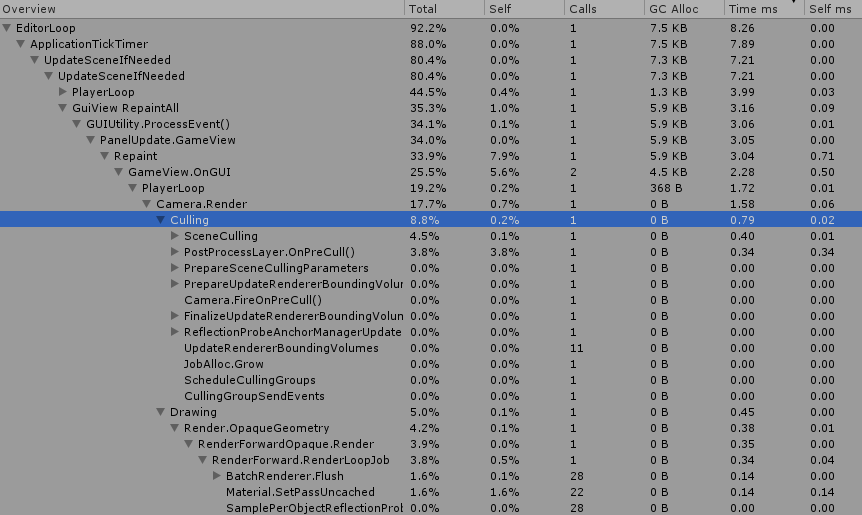
I investigated with Unity profiler and found this:
https://i.imgur.com/Pym77so.png
https://i.imgur.com/dNFd0j2.png
https://i.imgur.com/9MS6MQC.png
Is there anything I can do for it?


 versed lichen
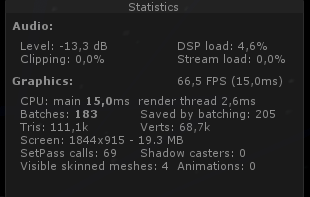
Can you show the world stats in the play window ?
 versed lichen
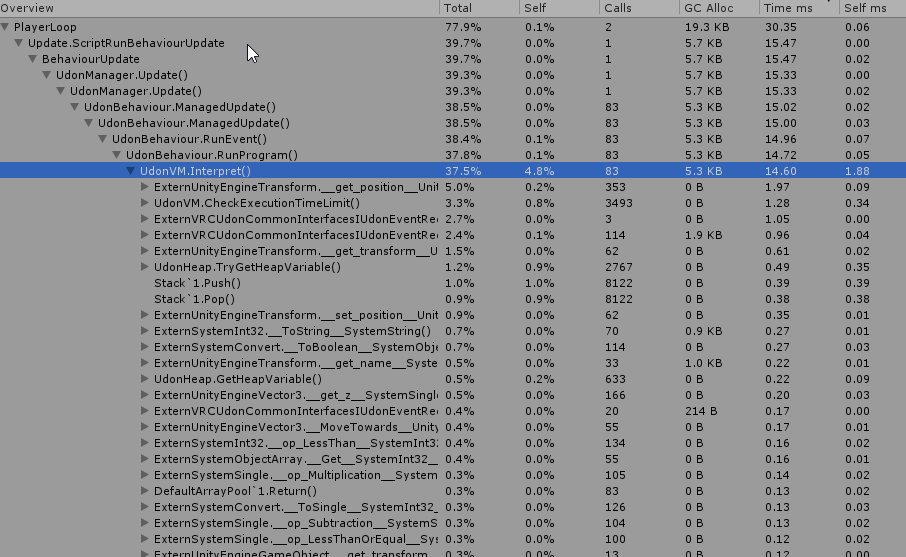
Sounds like a specific udon issue then, did you ask in #udon-general ? Might be too many update calls
meager basin
versed lichen
Sounds like a specific udon issue then, did you ask in <#657394772603830360> ? M...
Hmm must be because the lag is the same at 2.7K and at 120K
https://i.imgur.com/FVGSAA7.png
 versed lichen
yeah that's not an amount that should cause any performance issue
meager basin
versed lichen
yeah that's not an amount that should cause any performance issue
I don't know Udon stats, but does this look bad?
https://i.imgur.com/mb3PHTu.png
 versed lichen
i don't know much about it either
but if it's udon specific then it's not really optimization, it means you're doing something incorrectly in your graph most likely
meager basin
I'll go ask in Udon question!
 nocturne crypt
Alright so I want to optimize my world. Does anyone have a good tutorial recommendation? Is that pinned one on VRCATS from 2018 still the go to?
versed lichen
You can still use the one pinned from Jetdog @nocturne crypt
 brave silo
Hi there. Can anyone help me. I keep trying to upload and test my world and it will not update the world to the most up to date one I have created. I have never had a problem until now. It juat will not update. I have tried to reload unity and the vrc ask and it still loads a old version. Please help.
nocturne crypt
Is there any profiler for world development so I can see what’s eating all my frames? I get 70-80fps on desktop and then only 30-40fps in VR
agile hawk
Unity has a profiler, there's also several tools such as the stats panel to show batches and other things.
nocturne crypt
Cool. Thx
Hopefully that’ll tell me what’s stealing my frames
I followed the optimization pdf and it did help a bit
nocturne crypt
Does this look high? This is in desktop testing with my camera at the main spawn point
agile hawk
What is the playerloop that has 10ms on it? the top one
But, yea, seems like you have 396 draw calls. Do you have occlusion setup and static batching? Lightmap baking would probably help too.
nocturne crypt
This is what’s under the cpu call. Two events each take up about 30%
I’m not 100% sure what those events are. I do have a couple Udon Sharp scripts running
I’m not sure if occlusion would help. My work is pretty open
And I did to light map baking
The only real-time light is a directional light that lights the world
And I checked the static box on all static objects. Does this batch them?
agile hawk
If you hit play mode, you see a small stats tab, right, top right of the view port, the little window you see the scene in.
nocturne crypt
I also checked GPU Instancing on the shaders
agile hawk
Also, is the mode on the light mixed or real-time? A real-time light would double the batch count.
Static batching takes precedence over GPU instancing
nocturne crypt
The directional light is mixed
All the torches are baked
Ah okay
Does just checking the box enable batching?
agile hawk
It does a lot under the hood, but, the simple answer would be yes
You'd have to probably atlas materials or find out if your objects have duplicated materials on them in a 3D program such as Blender to reduce batches. And as for the script, I'd say get some help to see if it's behaving oddly in #udon-general or if there is some better way of handling it.
nocturne crypt
Does having a mesh collider that is on but not convex drain resources?
I’m not using it since I made simple box colliders
versed lichen
Depends on the mesh complexity
nocturne crypt
Okay. So I’ll uncheck the mesh colliders since I don’t need them and hopefully save some frames.
I honestly don’t know why my world is kind of laggy. I baked the lighting and turned on dynamic occlusion on everything but pickup objects
And all the mirrors are off to begin with
versed lichen
You won't save any frame unless that mesh collider is actively used for the whole world and is high poly
Use the stats in the game window to see where the issues are
nocturne crypt
I don’t really know how to interpret this. I mean I know what the information is, but I don’t know what are normal ranges for the values
Are those too many Tris, like the objects I used need to be more low poly?
robust olive
nocturne crypt
I don’t really know how to interpret this. I mean I know what the information is...
What are your PC's specs? Ideally you want to be above 90FPS in VR mode
nocturne crypt
Pretty crappy specs. i7-8750H, GTX 1050Ti, 16GB RAM
nocturne crypt
@robust olive ^^. And most worlds in VRC, like the Room in the Rain and Met I get like 30-40fps in VR mode with all the post processing turned off.
lilac saddle
my lux water shader isn't showing in game, it's just fully invisible but fine in unity, how would I fix?
 fair agate
@nocturne crypt the two numbers that you care about there in the stats window are batches and tris. (These are only one measure of performance, but a good place to start. ) For PC, under 300 batches and under 500k tris (less is always better of course) is an ok target. For Quest 1 I believe the guidelines are 50 batches and 50k tris, though I have broken the tris rule for sure.
I would say your world is borderline, especially once you get a bunch of people in there, there is no good occluders so you will see everything all the time. Lower poly models, LODs, or add some big rocks or vegetation for ground level occlusion would help.
 crimson turtle
Graphically i see no issues with that stats window, the render thread is taking 1.6ms per frame lol
i'd try to figure out what is causing the cpu to get bogged so much
nocturne crypt
Thanks!
nocturne crypt
fair agate
I would say your world is borderline, especially once you get a bunch of people ...
I’ll try to add some large rocks
nocturne crypt
crimson turtle
i'd try to figure out what is causing the cpu to get bogged so much
I ran profiler and came up with this. Is this pointing to an issue with one of the unity scripts?
fair agate
Gpu is fine. Your cpu is very sad. I would try removing or disabling scripts to see where the problem is.
Then work on occlusion
nocturne crypt
fair agate
Gpu is fine. Your cpu is very sad. I would try removing or disabling scripts to ...
Okay. Thank you for the advice!
crimson turtle
yeah graphics wise this looks good even for quest
removing stuff won't improve it any further
lilac saddle
can a smart person perhaps help me improve performance in my map? It seems that it's not GPU since the batches is low, so I'm guessing it's other stuff including Udon
versed lichen
#udon-general is more relevant for that 
lilac saddle
dude i get pointed every which way
sometimes i ask in udon-questions and get told to ask elsewhere
😔
cold prairie
It do be like that sometimes
But I guess I would say as well that purely udon optimization would be better suited for #udon-general 
lilac saddle
well i don't know if it's udon for sure
udon might be a factor
but like looking at my screenshot, are you able to identify if udon is a big drag?
i see 'physics update' taking a long time
versed lichen
What's in your world ?
lilac saddle
a bunch
physical interaction buttons, an NPC which has a bunch of logic in it, a fish tank with some animated models (but if they aren't in the frame then it shouldn't impact things afaik), many pick ups but the vast majority don't have gravity enabled, a private rooms system with one synced variable for the shared state, many cameras but they're all disabled, many mirrors but again, all disabled
video player
i'm not even sure playerinteraction does anything in the editor
versed lichen
Are your pickups kinematic ?
lilac saddle
i have a bunch of timers but someone mentioned that they only really have an impact if there's like 500 of them wew
uh
oh and 8 ball
no they aren't
is that bad
versed lichen
Well that's probably the reason for the continuous physics check ? Try disabling all pickups in the world and run it again
lilac saddle
struggling to find clear information about what is kinematic actually does and what the differences are
but ye i'll try that now
ok well i'm very confused
/ lost
is it not showing rendering info even though CPU is selected?
also PlayerLoop is way less, yet the CPU main time is the same/ worse?
versed lichen
What do you see in the stats of the game window ?
lilac saddle
versed lichen
ok ? 7ms isn't the end of the world
lilac saddle
dude my other map gets like 3.8ms
versed lichen
Do they have as much stuff in it ?
versed lichen
Well, stuff = more ms
lilac saddle
people aren't going to use the map if it falls to pieces when 20 people are there
versed lichen
WIth udon you need things enabled at start at least, but you can disable afterward
Do you have occlusion culling set up ?
lilac saddle
yes
also a max camera render distance of like 35
so it's p aggressive with that and i think that shows with the low batches count
versed lichen
But you still get 80 draw calls looking at a corridor 
cold prairie
Manually optimizing your occlusion culling will help save some cpu depending on how much data you got right now
lilac saddle
i don't know how to optimise that tbh with you
would that involve removing occluder static on most things
i have occlusion areas set up already (though things might have changed since i put them in)
cold prairie

GitLab
A surface shader for Unity providing cel-shading. (Forward rendering only)
Those are the most important things when setting up your occlusion
lilac saddle
i'm not sure occlusion culling is a big factor here though (?)
cold prairie
Always could be better unless you marked things correctly from the start
More data you have more cpu computation it takes to use that data
Just saying since it's a easy thing to optimize
lilac saddle
ok i'll go through and update that, thanks
lilac saddle
ok well so
now there's 50 more batches
:waha:
though i can add a couple more occlusion cubes in
cold prairie
Not sure how you managed to get more batches unless if you removed static occlusion marks on things that shouldn't have had them removed
lilac saddle
i removed occluder from a bunch of things and added ocludee to a few
cold prairie
Originally everything wasn't marked as an occludee?
lilac saddle
a few bits weren't
cold prairie
You might want to consider the occluder on the things you marked off then esp around that area
Hard to say without knowing how you changed things
lilac saddle
added some occlusion cubes that were missing
the cpu time is kinda everywhere so it's hard to really tell but rn it's under 5 pretty consistently
which is nice
but the size of the occlusion data is only slightly smaller (like 193kb now compared with 220kb or something before)
cold prairie
Yeah I did say above it depends on how much data you are working with since I can't really see how big your world is from just that picture
lilac saddle
i marked all the pickups as kinematic
i'd really want a solid full FPS when it's just me in the world
i feel like that should be totally doable
cold prairie
You don't get it right now?
lilac saddle
it's shaky
cold prairie
Do you have a uploaded world id of that place?
lilac saddle
wrld_1b3b3259-0a1f-4311-984e-826abab6f481
i'll push the up to date version in a mo
🙏 🙏
cold prairie
Alright I won't check it before that then
lilac saddle
aight pls do 🙏 @cold prairie
it's almost there but not quite
dropping to 40 sometimes
lilac saddle
around the whole map wew
lobby and main area (past the first sliding doors) especially
lilac saddle
ye i haven't done any particular optimisations outside of the obvious
and its probuilder
cold prairie
😅
nocturne crypt
fair agate
Gpu is fine. Your cpu is very sad. I would try removing or disabling scripts to ...
Idk. I disable and then reenabled all my scripts and now my cpu dropped to 8.3ms
cold prairie
lilac saddle
and its probuilder
Yeah looking trough the drawcalls the main problem just seems to be the amount of separate meshes and or materials
lilac saddle
what the best solution to that?
cold prairie
Atlas and combine stuff
lilac saddle
the world is a mix of probuilder and objects from assets pacjs
i don't know how possible it is to atlas with this setup 
cold prairie
You'll just need to take things to blender and put some work into it
I can't see any obvious problems
It's just that you need to put some serious work into optimization
This view should not be 800 drawcalls
lilac saddle
how did you get the number?
cold prairie
Profiling with Intel GPA
cold prairie
Just looking around
lilac saddle
can i join you?
cold prairie
Sure
 limber roost
Hey all, I am working on a World that is Quest first and am having an issue getting metal or frankly any reflections to render. I have reflection probes and metalness + Smoothness on the Standard Lite material all the way up, what else is needed? Is it even possibly to mimic realistic PBR Materials (limited in the world of course) on Quest VRChat?
Using Bakery for lighting fyi if that matters, if this is the wrong channel please point me to the right one xp
autumn glade
so if I have a house, should I join and atlas each room seperately for occlusion (resulting in one material per room), or should I just join the whole thing together as one atlased mesh (one material)
limber roost
autumn glade
so if I have a house, should I join and atlas each room seperately for occlusion...
Each room separately probably is my recommendation at the minimum. Depending on fidelity and targeting Quest or not you could go even further
autumn glade
targeting quest, plan to seperate and atlas each room then
limber roost
autumn glade
targeting quest, plan to seperate and atlas each room then
if your modeling and texturing yourself just test often, I have found I have a lot more room to play with using ASTC texture compression and Bakery lighting then I thought possible. Obviously avoid PBR materialing if you can both for performance and quantity of textures increasing
 junior cobalt
Can anyone let me know if there's any obvious performance problems in this screenshot? Basically just a box without a ceiling, a pool table prefab, a unity synced video player, some pickupable props, and scrollview with buttons (like 1300 of them though)
I ask because I had some quest users test out a world I'm working on and they weren't able to select anyone, and some history in this discord said that could be an FPS issue

I haven't done really any optimization but this is what I see when running with CyanEmu
 limber roost
That try count looks high, I am not sure the recommendation for Quest but I want to say under 50k tris
junior cobalt
It looks like a ton of these come from that scrollview, when staring on it and turning off/on the scrollview it goes from 46k to 128k. VRChat's recommendations to recommend <50k.
The scrollview is a list of buttons with song title / buttons with most of it offscreen at any given time. Any ideas for how to have a big list that's more performant for quest since that seems to be a ton of this? I guess I could add a toggle for it on/off as a simple thing
limber roost
My world on Quest right now has just under 100k tris and is basically rock solid at 72 fps on OG Quest besides some spikes every few secs that I think is VRChat overhead. It may be that you just can't have 50k polys in view at any one time, I am baking my Occlusion
junior cobalt
How do you view FPS on quest? I didn't do anything special with lighting so am definitely going to read up a bit on baking it all in today to see how that helps
 hidden flame
I dont typically worry about poly count, even for quest worlds. Mostly occlusion culling will reduce it to whats seen anyways. And you should always bake your lights. Realtime lighting is disabled for quest users
limber roost
junior cobalt
How do you view FPS on quest? I didn't do anything special with lighting so am d...
I use https://developer.oculus.com/documentation/tools/tools-ovrmetricstool/ since I develop for Quest in general, this is global though and needs to be sideloaded. If you just want FPS when u pull up the global menu with I think A on the bottom right you can see ping and FPS
Describes how to use OVR Metrics Tool (OVRMetricsTool), including installation, Report Mode, Performance HUD, remote device management.
autumn glade
I’d like to uv my things to a 2x2 pixel texture, any good guides on that?
 sinful pebble
how many materials would you say is appropriate for a standard vrchat world?
versed lichen
kinda depends on the size of the world
 astral flame
Hello, is it normal for the SDK to row to death when an empty is overloaded?
versed lichen
row to death ? Overloaded ?
astral flame
Having a lot of elements in a single empty, its slows down the SDK a lot, when I click on "builder" the panel takes 700,000 years to display, and when I empty an empty this problem no longer exists
versed lichen
How many is "a lot"
astral flame
I would say 400
sinful pebble
hmmm. I didn't know that. Would you say a handful of smaller empties with things in them is better than 1 full empty?
or a "full" if you will
😛
astral flame
This is what I was telling myself, but this problem does not come from Unity but really from the SDK, suddenly I am raising the problem again because this can lead to freezing the SDK if some exceeds a certain threshold in a single empty , it could literally break a project
 pliant topaz

Is this really that much of a performance hit? and if so, would making the cameras a local toggle solve anything?
cold prairie
Really depends, if your camera is rendering all the things as they player your GPU will have to handle drawing everything again doubling your draw calls
If you have three cameras then it's triple the drawcalls
Having it on a local toggle allows people with lower end computers to toggle the huge performance draw off
lilac saddle
so isKinematic
how much difference does it make for a world with say, 50 pickups?
i like my pickups having some physics - rapidly slowing down when thrown, coliding with one another
hidden flame
Well for starters, i wouldnt want 50 pickups in a world, that sounds like a huge fps drop. And iskinematic will not give you any physics unless picked up.
fair agate
I would recommend always having kinematic rigidbodies unless the physics is absolutely necessary. And remove ownership transfer on collision. You can have 50 synced physics objects, but if someone decides to pile them all in a corner in a crowded instance, you can easily cause network desync issues.
One way around this is to put in a short reset--if they are not being held after a short time, reset them to their default position, so you don't end up with a pile of jittering lag.
meager basin
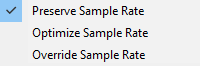
When picking audio quality,
Is there any performance difference by using different sample rates in Unity in a published world?
Would the performance for example be be better if I picked Any of these options over the other?
Example:
Picking "Override sample rate" might produces small audio delays because Unity has edited the file (As an example), Or are they all the same?
 torn crypt
different targets can have different native sampling rates so a patchwork quilt of varied sample rates will ultimately get interpolated to the native rate...but that's normal + vry fast afaik. General rule of thumb is to stick with preserve or optimize, but use preserve when you're dealing with audio you plan to manipulate at runtime (like pitch-shifting, etc). I wouldn't override unless you have an explicit reason for doing so!
meager basin
torn crypt
different targets can have different native sampling rates so a patchwork quilt ...
Sent you a DM with a few questions
 gray minnow
I am having lots of high quality trees in my forest scene. However, they are very big and 100% / LOD0 is active far too early thereby. What should I do?
 feral plover
gray minnow
I am having lots of high quality trees in my forest scene. However, they are ver...
feral plover
gray minnow
I am having lots of high quality trees in my forest scene. However, they are ver...
Are you familiar with modifying LOD groups?
It seems like what you're asking is just how to change the LOD threshold, but I may be misunderstanding. To move the LOD threshold, just click the side of the border between the LOD levels and drag
I have my own question about LODs! I'm trying to use cross fade with a sprite renderer. Really simple, I just want the sprite to cross fade from LOD0 to culled. I enabled crossfade and set a width, but it's still just popping, no fade 😕 does cross fade only work with mesh renderers?
feral plover
Another LODs question-- Does VRChat override my project's LOD bias setting? In editor the distances are definitely applied, but when I load up a test build, they seem to always be LODing at the same distance no matter how the bias is set
Answer seems to be yes. I tested values down to .1 and the game seems to always reflect a value of 1.5, which is the default value, at least in the SDK
feral plover
Thank you!
junior cobalt
I'm planning on adding ~5k or so empty game objects (with just a script on them) that aren't visible anywhere. Would you expect that to have much of an impact on performance? Would setting them as active or not change that?
 simple lodge
If they have a script, then they might - will the scripts have update/fixedupdate loops? Other logic?
Inactive objects don't have the update loops run on them (iirc), so if they're all inactive then it should be ok (a bit of a mess in the editor, though)
junior cobalt
No they basically just store some small data I can't compute at runtime. I'm basically using them as a static array I can index into to pull data from. If there are other good ways to do this then let me know 🙂 I'm new to all this
simple lodge
(though after a quick bit of checking, apparently there's very little overhead for empty GOs - one guy tested right up to crash with no performance hit, so I'd guess it's entirely RAM).
If you're using them as an array, why not use an array? If you're aiming for sync, then you'll still encounter Udon's problems with max synced variables (plus each variable will be synced at each network frame, eating bandwidth)
junior cobalt
An array would be nice, but this is my workaround for not being able to construct VRCUrls at runtime, I'm scripting the creation of these objects and setting the URL since that's the only way (afaik) you can instantiate VRCUrls without typing them in by hand
simple lodge
Ahhh I see - I don't really know much about work with VRCUrls, so I can't really help 😅
But I don't think you'll run up against RAM limits, so you should be safe

 cold prairie
Don't have player local enabled in mirrors it's only for first person view
Otherwise I mean mirrors have to render everything visible in your world multiple times over so if your world isn't optimized the mirror will be laggy too
I would check how many drawcalls are happening while the mirror is on from the game views stats window
lilac saddle
thanks
fair agate
@junior cobalt 5k gameobjects aren’t that bad at all, or even that many in the grand scheme of things, although having scripts on them might be. Just keep them under a single parent at the top level of the hierarchy for best results.
junior cobalt
I read somewhere that TextMeshPro should generally be used over Text, does this still apply for optimization for VRChat worlds?
In particular I have a big scrollview of ~1k buttons that have two text elements on them each, and I'm wondering if swapping would be preferable
lilac saddle

textures have stopped compressing in my project - it just suddenly stopped working. None of them (this one is png, not psd) are respecting the max-size. I hit apply, it appears to do something, but then nothing changes
google finds me one result of someone having the same issue but no answer
nothing in the console

got it
this tab UI is still garbage and not communicating to the user that the android tab's settings are overriding the Default tab is doubling down on that shit ui
junior cobalt
Does spawn position have an effect on optimization? Right now quest users have some serious lag when people spawn in that I’d like to improve if possible.
Right now I see a flicker of them in the middle of the room and then they spawn behind a wall at the edge. Would moving it future away have much of an effect?
autumn glade
is it possible to toggle baked occlusion data? I guess I can make an occlussion area and edit its bounds and toggle that, but wonder if we have access to the baked data itself
maybe just make an occlusion portal and not mess with that data? Example: box room with a wall dividing the middle. default is wall is on and occlusion enabled so it won't render the other side of the wall. I want to be able to toggle the dividing wall and remove occlusion. The dividing wall can't be static since it's subject to toggle, so how would this be achieved?
autumn glade
wait is it as simple as toggling occlussion culling flag on the main camera?
astral trout
autumn glade
maybe just make an occlusion portal and not mess with that data? Example: box r...
that's exactly what occlusion portals are intended for.
you add an occlusion portal with the same bounding box as your wall and toggle it with the wall
autumn glade
does the portal need to be active when I bake the occlusion data?
astral trout
yes
I use it with a mirror here but you get the idea https://cdn.nyanpa.su/v/anGp1z8L.webm
autumn glade
I'll give it a try. toggling the main camera occlusion flag is also tempting for an all-or-none setting for what I need atm too, want to learn portal for future projects though
wasn't there an audio occlusion area included in a recent update too, where player audio can't traverse an area?
astral trout
i dont think you can even target the player camera component to modify its parameters, as the reference camera just has its values copied over
autumn glade
and toggling the open parameter of the occlusion portal seems to do what I need
now to see what I remember on that audio occlusion announcement, I thought for sure there was something where you could define a boundary where player audio wouldn't pass through
anyway thanks for the occlusion portal tip
junior cobalt
junior cobalt
Does spawn position have an effect on optimization? Right now quest users have s...
want to bump this again since I moved the spawn real far and still noticed that the player briefly flickers in the middle of the map (maybe where the VRCWorld is positioned?) before being teleported to the actual spawn.
Is it something like the initial loading in point is always at (0, 0), where VRCworld is, or something else or not actually a thing I can fix?
astral trout
yeah its something that happens when people load in, they briefly appear at 0,0,0
from their perspective they load in at spawn, its just others see them there for a moment
junior cobalt
Thanks, so would putting the real spawn at that location make it so people in the other parts of the world wouldn't lag out when people first spawn?
I still expect them to a bit once they teleport into the main room but it seems a little better for it to not be every time
astral trout
most of the lag likely comes from the act of downloading their avatar, unpacking the avatar bundle and loading it into the scene, which will happen whether they are seen or not, so i don't think there is much you can do about it. Stuttering is common on quest when avatars load, especially on quest 1.
but still, it would be good to move things around so either 0,0,0 is your spawn or out of sight so as to avoid having that momentary load in being seen
junior cobalt
Thanks for the help! That all makes sense, and yeah I'll zero out the spawn to avoid the flicker
autumn glade
Just wanted to double check, player rendering and player animation is subject to world occlusion right? Including dynamic bone updates? The default animator has culling but I’m not sure how vrchat handles this
junior cobalt
Can anyone speak to the accuracy of the unity project settings recommended in this video? https://www.youtube.com/watch?v=4Sm25H14h2k
versed lichen
They start by saying to not use post processing to save performance, so I'd say you can if it's whatever else is in that video
astral trout
I cannot recommend a fair bit of advice in that video.
For starters, post processing does incur a small overhead, depending on which effects you use. Some can be quite heavy like depth of field, but you really shouldn't be using that in VR anyway, unless for certain gimmicks like an underwater blur effect. But telling people to just not use post processing for the sake of optimization makes no sense. Using post processing does not mean your map will not be optimized or run well, on the contrary people make well performing maps that has post processing all the time.
You shouldn't follow optimization advice for the sake of doing so, but rather look at your cpu and gpu budget, and adjust accordingly based on what you are trying to achieve. If you have the room to afford post processing while meeting your performance budget, by all means do so. The performance cost from what I've seen is small, around 0.5ms, though your mileage may vary depending on effects used.
A good guide to look up for post processing is Silent's guide: https://gitlab.com/s-ilent/SCSS/-/wikis/Other/Post-Processing
A large portion of the video seems to be dedicated to project settings. The funny thing is, most of the project settings will have zero effect on your maps. That's because a good chunk of those settings are used as part of the resulting executable the unity editor will build when creating a unity game. With VRChat maps, you are uploading an asset bundle, not a game executable, and VRChat's project settings will be applied, not yours. Of course, some settings will work, such as editor specific settings with regards to default values for imports, and from what I hear certain environmental parameters might carry over such as physics gravity strength, though you are highly discouraged to mess with these. Everything else has no effect in VRChat.
GitLab
A surface shader for Unity providing cel-shading. (Forward rendering only)
cold prairie
☝️ Like half of that video doesn't do anything
astral trout
The video also tells you to use gpu instancing without telling you why, and they even say they don't know why. There are many reasons to use gpu instancing and many reasons not to, and it all varies depending on your map and what you are trying to do. You shouldn't always enable it. Static batching will also take priority over gpu instancing if your objects are static anyway. You should reference the original unity documentation on these to learn how they work instead.
https://docs.unity3d.com/Manual/DrawCallBatching.html
https://docs.unity3d.com/Manual/GPUInstancing.html
 junior cobalt
Thanks for the thorough response! I totally agree that blindly following a video isn’t a great way to optimize, especially if you don’t know the reasons why 😀
And thanks for the links too, I mostly just want to learn more about it so I can effectively profile and optimize if needed. I’ll definitely be reading through those.
 modest ridge
junior cobalt
Can anyone speak to the accuracy of the unity project settings recommended in th...
modest ridge
junior cobalt
Can anyone speak to the accuracy of the unity project settings recommended in th...
one tid bit on project settings --> quality i lowered that to allow only "low" and below, and somehow my world size got reduced by almost 40%, with no visual or performance difference. i have learned a lot about optimization in general though, profiling, etc., if you have any questions. i dont want to spam this channel but theres a ton you can do to optimize things
cold prairie
I'm kind of doubtful on that 40% unless I see a build report comparison of what actually got reduced since those settings shouldn't really affect file size 🤔
junior cobalt
modest ridge
one tid bit on project settings --> quality i lowered that to allow only "low" a...
If you want to spam me in DMs or share other good resources I'm open to it XD I've been consuming whatever I can find on the topic since I want my world to work really well on PC & Quest. I've watched various YouTube videos and read through jetdog8808's guide, xiexe's baked lighting guide, and s-ilent's post processing one.
So far my world does still perform pretty well on those platforms but I want to make sure I don't do something to break it as I keep building it out 😂
lilac saddle

went through and merged a ton of things
the batches is down a nice chunk but the performance is the same
the tri count is only 100k more
surely the 200 batches should mean way more than 100k tris?
lilac saddle
it is very sad indeed
i've pretty much given up on getting good occlusion now
(good = what you would expect to be occluded being occluded)
might see if i can do a quick and dirty merge/ atlas job
 winged sinew
What kind of merging have you been doing?
modest ridge
lilac saddle
hey let me know how you make out. i'm using similar assets, and have ~750 batches in my main room and idk what to do about it. i have basic occlusion, but not sure what 'merging' is (although if it doesn't make a difference it doesn't matter!)
lilac saddle
merging probuilder objects and a bunch of random meshes from asset packs
i used a unity tool to merge the non-probuilder meshes
but i think atlasing is more important wew
modest ridge
what unity tool did you use if you don't mind me asking? is this like a boolean addition in the probuilder experimental tools? not clear on merging
junior cobalt
Definitely a micro optimization here, but if I want a collider on a quad, should I use a mesh collider or box?
simple lodge
junior cobalt
Definitely a micro optimization here, but if I want a collider on a quad, should...
A mesh collider will always run a per-triangle collision calculation that is, on its own, more complex than for an entire box collider.
If you desperately need collision fidelity, then you're stuck with the mesh collider, but if its interactions don't need to be completely accurate, always opt for one of the basic shape colliders.
junior cobalt
simple lodge
A mesh collider will *always* run a per-triangle collision calculation that is, ...
Thanks for the info about the differences, a box collider is totally fine here since it's just a wall
modest ridge
lilac saddle
it's called meshcombiner <@!307702251969839115>
thanks! will check that out
lilac saddle
👍
i think i'll try it again later and then see if i can move it to blender, decimate and atlas, and then re-import
autumn glade
if I have two box colliders slightly overlapping, it does cause some lag calcuations correct? what's the best way to see if there's any overlap? the physical debugger visualization is just a sea of pink
 tranquil dagger
i get 20fps when i look at my lights
im new to building worlds
and ideas
i think it might be because there are 2 lights jammed inside of eachother
but i aint sure

wait
should all my lights be baked?
rose wolf
yes you should bake
rose wolf
thatd also cause lag lol
rose wolf
do they flicker? was there any improvement at all? were the lights actually set to bake
tranquil dagger
yeah
i just set them to bake instead of realtime
was there anything else i needed to do
i enabled global baked lights or whatever
they dont work now xD

the point lights are set to baked
and when i turn on the baked global then go off
unless the lights are set to realtime
simple lodge
I'm pretty sure you need to actually bake the lights, too (click a "generate lighting" button).
I don't really do anything with lighting, but as far as I know, just setting the lights to "baked" doesn't actually do the baking.
simple lodge
rose wolf
make sure everything is set to static, go to lightmapping settings, and hit generate and itll start baking
I don’t know shy that never sent lol
simple lodge
Just make sure the lightmap resolution isn't too big
rose wolf
the default shoukd be set to 512 per map, and the res is like 10. so it shouldnt do anything too crazy
tranquil dagger
wait where do i see static
rose wolf
i was more in depth in my earlier reply that never sent
but you need to click everything in hierarchy and in the inpector at the top right, therell be a static button
make sure its check marked
 little flower
would it help in a world to have rooms turn off locally once you teleport into another room?
i have the plan on making a world with multiple rooms which you can access with a teleport that looks like a elevator and all rooms except the one you're in are turned off with local but once you click on the room you wanna go to you will be teleported to it at the same time the room's meshes and all get turned on and the room you're leaving gets all of that turned off
versed lichen
Occlusion culling is better
autumn glade
yes, texture size is one of the major contributors to file size, after you build and test/private upload the world, run the worldtoolkit and it will show you the assets contributing to file size. It's pinned to this channel
autumn glade
remember that import compression only saves on world file size, it will uncompress in memory. best practices is to go into an image editor and rescale by %. Tedious to do on most so at least focus on the largest filesize ones
 frigid ridge


Quick question
Why the FUCK am I going so slow? Did I get the scaling wrong? Do I need to make the world smaller? Do I need to make myself bigger? https://t.co/Z9w1wZUaPu
 Twitter
·
cold prairie
Twitter
·
cold prairie
What do you have the speed set to right now in the world?
frigid ridge
Lemme check rq
frigid ridge
Actually how do I check
cold prairie
Well depends on if you are using sdk2 or sdk3 and if you used the vrcworld prefab or not
frigid ridge
I got it
autumn glade
so with a LQ mirror, I have a non-static wall but a closed occlusion portal. it will still render players behind the wall. I assume because of the shader. Would that closed occlusion portal still stop players rendering behind the wall normally or does it have to be static?
frigid ridge
It was set to a walk speed of 2 so I made it 20 instead
cold prairie
autumn glade
so with a LQ mirror, I have a non-static wall but a closed occlusion portal. it...
Mirrors have occlusion disabled by default in them since it's buggy most of time with how they function
You can enable it in the mirror inspector if you want
autumn glade
got it, thanks
lilac saddle

these numbers are pretty cringe
oh i guess i'll get told to go post in the udon channel again wew
autumn glade
so did a stress test with 80 people. 4 connected rooms in a box divided by walls with occlusion. it felt like it was working as loading each room hitched a bit as it began displaying and animating all players in that room, but even in an empty room I was stuck at 30fps (populated rooms I was at 20fps). Do occlusion calcuations have a CPU overhead? Would it be better to seperate the rooms, move them apart and rely on camera clipping plane instead?
 near isle
hi! bit of a little issue
not sure why but 2 items in my world arent reflected in the mirror, i've chalked it down to the fact that "interactive'' is not checked off in the reflect layers tab
is there a way for me to change these objects to reflect like normal objects? i'm not sure why they're under interactive
changing the shaders didnt do anything and as far as i can tell the mesh renderer settings are the same as everything else in the world
near isle
also probably unimportant but was just wondering if theres any way to keep windy terrain grass in sync with the mirror, the same grass in the mirror is blowing at different rates than the grass that right next to you
autumn glade
Is there a way to see draw calls live from the client (not unity), I assume it’s a graphic driver inspector or something similar
versed lichen
Intel GPA
 vivid dirge
anyone know why when i hit play the lightmaps on my terrain do this?
 versed lichen
Check your console
vivid dirge
this is all it really said

but that was during baking
and it looked fine in the editor until i pressed play and then it switched to that and stayed that way after i went back to edit mode
for reference this is what it looked like after baking but before hitting play
 vivid dirge
actually now that i think about it it's probably bakery's fault
yup it was bakery's fault
vivid dirge
the sun is at a steep angle so the shadows are small, and also on the opposite side from the camera
also it's baked shadowmask with a directional light for specular highlights
modest ridge
i have one lingering major "bug" in my world. whenever an [unoptimized] avatar loads (player join or avatar change) in my world, everyone lags pretty hard for a couple seconds. these same avatars don't have that kind of effect in any other world. i've tried looking into it before, but I'm at a loss. cyanemu can't emulate poor avatars/network latency, so i have no real way to test. any ideas?
versed lichen
Ask people to use better avatars
The hitch happens in all worlds, but the performance of the world definitely matters too
modest ridge
i'd prefer to fix the root cause though, theres something about my world specifically that makes it pretty bad
versed lichen
Post a screenshot of the stats window in game window of unity
modest ridge
some places in my world have high batches/tris/verts, some low, but this was taking at a place & view that me & friends are most often in, and where we all experience that hitch
 versed lichen
That's not very high, shouldn't cause anything by itself
Do people spawn in your view ?
modest ridge
no, they spawn far away & in a separate area. the spawn room itself should have good stats since you can't see much in it
i lied, the spawn room isn't great

well but although the spawn effects things, so does an already loaded player, changing avatar in the same location as the first screenshot. there no difference in the hitch(?)
versed lichen
people actually spawn at 0,0,0 for a brief moment, is your world spawn also there ?
modest ridge
no, i can do that though
versed lichen
Then you'll need to fix the perf at spawn
modest ridge
i can do that no problem, if need be i'll make a blank box at 0,0,0 that you can TP out of. i'd be surprised if that fixes people changing avatars at any location in the world though
versed lichen
It's less about them than it's about you, you don't want people loading in front of you basically
But i mean, shit avatars will always do that much
modest ridge
i have to wonder if it isn't something weird like: the world is fairly big with lots of chairs (a few hundred). is there code that runs on avatar change/load, that would be exacerbated by poor avatars
modest ridge
versed lichen
It's less about them than it's about you, you don't want people loading in front...
it happens whether they change right in front of me, or load in very far away
versed lichen
Yeah there won't be much difference, but at least some of it get culled when not in view afaik
modest ridge
versed lichen
Yeah there won't be much difference, but at least some of it get culled when not...
oh hmm, if they briefly spawn at 0,0,0, which is not in an OcclusionArea, would that make everyone suffer? i have since moved the spawn to 0,0,0 which IS in an occlusion area, but that might be an explanation
versed lichen
It should help a bit for people outside, but initially loading the avatar should still hitch harsh
modest ridge
ok will give that a try. this is a long shot since I know very little about VRC networking/architecture. are private/unpublished worlds treated differently than public ones?
versed lichen
It's on the avatar, not on the world though
modest ridge
gotcha, just not 100% clear on the use of dedicated servers vs P2P. i glean its mostly p2p, but not sure what role, if any, dedicated servers play (aside from downloading assets)
versed lichen
That would change nothing about this issue, the avatars just load assets and decompile, so depending on what they use, it can be a ton
People unironically use 8k textures
modest ridge
versed lichen
People unironically use 8k textures
yeah, but i have a friend who when changing into a particular avatar makes my world lag pretty bad. but we were in a popular club world the other day w/ ~40 people, and he changed into it and it was only a minor hitch. a fraction of what happens in my world. same avatar
versed lichen
You had it cached ?
modest ridge
i set my cache to like 100gb, so everything should be cached lol. his avatar should always be cached for me
versed lichen
Does it hitch every time in your world even when cached ?
modest ridge
versed lichen
Does it hitch every time in your world even when cached ?
i'm pretty sure, but i will test later to make 100% sure thats the case
versed lichen
Sounds like your friend needs to make better avatars
modest ridge
versed lichen
Sounds like your friend needs to make better avatars <:lulw:538055164679159858>
haha this is true, but the fact that it [seemingly] doesn't cause issue in any other world is what perplexes me. there is 100% something specific about my world that causes this, i've never seen this behavior in any other world - I do see hitching, but its always very minor
another thought is: i have several render textures & camera components, but the camera components are always off by default so they should never be rendering things (unless someone turns it on, only 1 at a time)
versed lichen
I've personally not been in a world that didn't have this problem
We have multiple events weekly that hold 40-80 people, and no matter the world, which are different every week, it still happens
modest ridge
for sure. in any other world, on my hardware, a typical poor avatar will hitch me for idk ~200-500ms? in my world, everyone dies/thinks they crashed for several seconds. sometimes almost 10 seconds
we joke that its not a bug, but a feature to let us know when someone joined
 last sinew
When ever i open the vrcsdk control panel to upload a world in vrc it takes a really long time to load and then when it loads and i click another button it take a really long time for that to load. is there anything i can do?
 hasty merlin
Hmm, Whenever I bake the occlusion culling and try to save after it's done I get this error. Anyone know how to fix it? It won't let me open the project up again, same error message pops up. I can delete the occlusion data and then it lets me load the project again, but you know, then I don't have any occlusion culling... This is the 3rd time I've tried.

if you can't read the error in the pic it says: dataOffset != file.GetPosition()
astral trout
hasty merlin
Hmm, Whenever I bake the occlusion culling and try to save after it's done I get...
Not sure, but it wouldn't hurt to clear the occlusion culling cache, which unity doesn't clear by itself.
Rather than clearing it manually I would recommend grabbing 1's vrworldtoolkit https://github.com/oneVR/VRWorldToolkit which can do it, among other things like check for common world issues and recommendations.
a quick search online shows that the most common cause of that error is insufficient disk space
hasty merlin
Hmm, alrighty then I'll check out that tool, and I just checked, yup drive is full haha
Thanks!
lilac saddle
Hello everyone. It's my first time here. I try to upload a world, but there is a limit of 50MB. Is there any way to increase this limit?
Appreciate it!
versed lichen
You have to decrease your world size
hasty merlin
That's just a quest limitation right?
versed lichen
It is
 native badger
Hello, im owner of a free lag world, and lately im facing a issue: when a player joins/change avatar, everyone in the world gets a 1 - 3 seconds lag, is there a way to fix it?
agile hawk
It has to do with avatar unpacking and other things. So, no.
Unoptimized avatar = lag
 spice raft
Is there a hard vert cap, and if there is what is it?
desert gust
hey uhh people have been reporting my new world for not being optimized enough, what should i do? i already optimized it as much as i can
rose wolf
that is too vague
versed lichen
desert gust
hey uhh people have been reporting my new world for not being optimized enough, ...
Post a screenshot of the game stats in unity
desert gust
how do i check that?
versed lichen
That tells me you haven't optimized much in your world
The game window in Unity has an option for stats in the top right corner
desert gust
how do i enable that?
versed lichen
By pressing the stats button
desert gust
wheres that located? sorry i am very new to this
versed lichen
desert gust
Okay
autumn glade
Is there a reason to just not crunch compression things as a general matter of course? It still uncompresses when loaded live, not sure if that's a real concern though
versed lichen
You compress file size, not memory
rose wolf
ram goes brr
 unkempt trail
I cannot get into my world,I tried cause I had one of my friends update the music but then it decided to not letting me in to my created world
cold prairie
unkempt trail
I cannot get into my world,I tried cause I had one of my friends update the musi...
https://github.com/oneVR/VRWorldToolkit/releases
Import this and check VRWorld Toolkit > World Debugger from the top bar
 modest zealot
Thank you for this
 stiff barn
So I got this world that I have had for quite some time and I would like to make it quest compatible. How exactly can I do that? Would it be a headache to make an existing world compatible?
versed lichen
Depends what kind of world
stiff barn
Just a small apartment
 turbid sable
Quick question and my apologies if I'm interrupting: Why when im using SDK3 with worlds, the end result in- app is always greater in MB size than calculated?
Example, I upload a world with just the meshes (About 12 voxel objects/ sharing the same mat), and in vrchat it says its about 1MB. Then when I start adding other Udon things, like toggles, for whatever reason the MB size is now 43MB.
Been using the recommended unity (2018.4.20f1), no mods, everything standard (plus a few external assets like Cyan Emu and Udon sharp- but the issue is the same without those assets).
What I mean by "calculated" - is when I compare the original world version (all the meshes) before adding one Udon object.
The only thing I might suspect that is wrong, is that when uploading, it takes longer than usual. I'll leave that info here and ping me if there is an answer. Im about nearly frustrated, since I've been following all optimization tricks that I know "works." (Using less objects, toggling sections of a room, baked lightmaps, etc etc...)
versed lichen
stiff barn
Just a small apartment
What's the size of the world ?
stiff barn
versed lichen
What's the size of the world ?
Around 2 mb i think? I recently compressed some of the textures so ill have to see what the new size is
versed lichen
2mb world ? Is there just an empty room with textures ?
Quest can easily handle something like that
stiff barn
versed lichen
2mb world ? Is there just an empty room with textures ?
Okay i dont know where I got that number. Its 31 mbs lol
versed lichen
31mb is still fine
stiff barn
versed lichen
31mb is still fine
It still reads that it isnt quest compatible. Does it just take a moment to update?
versed lichen
Did you upload it on android ?
stiff barn
I uploaded it from my windows pc
versed lichen
VRChat
Want to get started making some content for VRChat on the Oculus Quest? You've come to the right place! This page will consist of navigation to various other pages concerning content creation for Quest, cross-platform setup, and other related guides. Our documentation on creating content for the Ocu...
stiff barn
Oh I dont have a quest. Im just doing this so my friends who are can join
rose wolf
you need to upload it under android
in order to have a pc-qc world, you need to upload it twice
 turbid scroll
For optimising worlds, it's the amount of different materials that hits performance, right? Not objects with the same material?
Just making sure before I try making stuff, because I might have understood it wrong
cold prairie
Kind of yes but also depends
If you have separate objects with the same material it's still gonna be separate draws for them that need to happen but reusing materials will help performance
turbid scroll
I see, thanks!
autumn glade
https://gyazo.com/e5221498b7590649e9901750fd969c32 Occlusion issue. I have a very large manually set occlusion area surrounding this room, I bake occlusion and it still gives me the individual cells https://gyazo.com/b05e3afbf235f7f1aa37c86acd1d46cf I don't want it to build that, I want it to strictly be no occlusion calculations within the area. I'm running into issues where things aren't displaying right and I think it's because of these calculated occlusion areas rather than my manually set one. Can I bake and have it ignore any calculations within my manual occlusion area volume? Unity docs specifically state to use manual Occlusion Areas to avoid it otherwise calculating scene geometry.

 autumn glade
increasing the cell size to greater than my areas seemed to help, but I would like to build those cells in areas that I'm not manually placing occlusion areas
autumn glade
also now seeing the way mirrors treat occlusion portals is wierd. it will cull things at a very far distance and not always obey a closed occlusion portal, making a lot of flickering at many angles
https://gyazo.com/b8db2e2eba3f038ae169d30278fde78b This is from the mirror, closed occlusion portal is behind me, and behind that is an outside wall far away. it should render the skybox at all times, but at different viewpoint angles it will ignore the occlusion portal and render past it.
I actually see a similar result when I face that direction, the walls far away will pop in by view change even with the closed occlusion portal up. https://gyazo.com/92e83c63e53f22ed927bd0d073a2b323 This screenshot confirms the closed occlusion portal is working


 astral trout
Occlusion areas just tells unity to prioritize those regions for high precision calculations. It will still do some occlusion calculations for areas outside of your defined occlusion areas just at significantly reduced precision. It saves a lot of computation and reduces occlusion bake size.
With regards to mirrors, occlusion just doesn't work well with mirrors, and there's really not much you can do about it. Its why occlusion culling is disabled by default in mirrors. If you want to restrict what a mirror renders, the best way is to put the areas you want to show up in a mirror into its own layer, and have the mirror only show those layers, rather than the whole map.
autumn glade
Thank you for the review
 hybrid ridge
I'm finding a lot of FPS drop related to around 15 Worldspace UI Panels in my world, is there any sort of optimization I can take to remedy the issue
I have made sure the EventCamera is set properly to the default camera, as well as making sure Transparent Mesh culling is on
I attempted using Occlusion baking, with all UI panels in view it offers nothing since all panels can be visible at once
 narrow shell
hey guys im in the process of creating a world and just wondering if theirs a way to remove the grass when turning on a mirror ?
simple lodge
You don't want the mirror rendering the grass? The easiest way to do this is to move the grass to a new unity layer, then disable that layer in the mirror settings.
 tacit kettle
Anybody got any wierd optimisation tips for me? I think I've done pretty well, including PostProcessing toggles, using Occlusion and adding extra Occlusion portals to force the issue a bit more, using only 6 models in the world with only 2 materials... Got a fairly high sync bandwidth requirement though with my card game and beer pong tables (not sure if there's much I can do about that) as well as 4 total active audio sources connected to an Udon video player
All lighting baked ofc
Performance is relatively good and works well on Quest also, but ofc when filling it up past 40 people (which I do, a lot) it starts to fall apart a fair bit
rose wolf
sounds like a good enough set up. its probs avatars and syncing up with multiple people that is hurting you
versed lichen
@tacit kettle Post pics of game view in editor with stats menu open
autumn glade
is there a resource on how to read the unity profiler when it comes to udon? I'm getting main thread spikes every 60 frames or so and the thread details show udon behavior updates/constraint updates/animator updates. just don't know if that's just the normal cycle and normal