#world-optimization
1 messages · Page 20 of 1
 cold prairie
 lilac saddle
Yes, avatar sounds should match maximum speaking distance so that it doesn't go to a max of 500 meters.
I saw the default logarithmic roll off is set to max 500meters.
As soon as I saw that I lowered it to like 20 meters.
 quick coral
Quick question: does this material limit apply to all worlds?
https://docs.vrchat.com/docs/submitting-a-world-to-be-made-public
A friend and I are debating on if it does or it only applies to avatars on pedestals in worlds.
VRChat
Want to make your world public? You've come to the right place. There's a few things you should take into consideration before submitting your world to Community Labs. Make sure you read all of this! Failure to do so may result in your world being taken down, or never leaving Community Labs! If your...
cold prairie
If any avatars are taken down it usually comes from reports which usually come from avatars that visibly drop your fps
quick coral
Like if we create just one big world for people to visit and there are no pedestals, is there a mat limit?
cold prairie
Oh you mean like that
I mean there isn't really a material limit for worlds but ofcourse if your world lags everyone out it will most likely be taken private
Performance is the real concern not the amount of materials
quick coral
Thanks
 midnight hornet
So does anyone have recommendations of a scene size detector? Like being able to see the size of world instead of just seeing it in vrchat while loading the map
I bought one but it doesnt seem to work.
lilac saddle
Is there a way to do sound proofing other than making the map bigger? Maybe there should be an option in the SDK for a sound sphere that blocks outside sounds and blocks sound from exiting said sound sphere. Not in Udon, I mean just as part of the SDK.
It would override maximum distance of sounds from an avatar so that only people in that room can hear the sound or the player's voice.
Would it be possible to add a sound optimization tool like like that as part of the SDK some day?
Is it possible to make an invisible box where it's not possible to drop portals in a certain place in a map like in staircases for example? Like a message box could pop up saying "Can't place portal here." or something.
Cause someone dropped a portal in a narrow staircase as I was walking upstairs once.
 torn crypt
lilac saddle
Is there a way to do sound proofing other than making the map bigger? Maybe ther...
torn crypt
lilac saddle
Is there a way to do sound proofing other than making the map bigger? Maybe ther...
You can use the Player Audio Override to change voice distance, and use triggers + animations to change audio sources when you enter new areas.
The current spatialization solution already uses a "shoebox-model" to handle limited audio propagation, but you wouldn't really want to use a one-size-fits-all radius to handle audio occlusion. There's solutions that exist that take the environment into account to determine if/how a player should hear an audio source but they aren't (yet) implemented into VRC
lilac saddle
Thanks for the response, I just posted a suggestion for this on the feedback website. All the sphere would do is replace the maximum distance value on all avatars' 3d sounds to a certain number of meters. There would still be leaks but it's better than nothing.
midnight hornet
 versed lichen
World toolkit
versed lichen
World toolkit
Thanks, Found a great one^^
 indigo coral
QUESTION! 🙂 So, I am using a MeshBaker plugin to combine objects for optimization.
I am combining 28 different objects with 9 materials into a Skinned mesh.
Before the bake, I am getting 128 batches and 82 SetPass calls.
After the bake, I am getting 84 batches but 85 SetPass calls!
I am baffled as to why my setpass calls went UP if the batches were so dramatically reduced.
so
- why would this happen?
and - am I still increasing performance by doing this, since the batches were cut so much, or am I actually HURTING my performance, since the setpass calls went up?
Anyone know?
versed lichen
can you screenshot the objects in scene ?
indigo coral
sure! so it's 8 Standard shader materials, all glow/glass/or metallic. and one VR particle shader
I have had amazing results with this plugin before, which is why i'm baffled right now
 agile island
I have an issue in my world where players are crashing it by picking up too many objects and piling them up. Is there a good way to resolve this without greatly reducing the number of pickups I have? I thought about changing the physics matrix so pickups can't collide with each other at all, which is not an ideal solution, but I don't think I can actually modify that since its in the project settings. I have the collision type for all the objects set to Discreet, but I have not been able to find a whole lot of information about how this compares with the other modes, Continuous, Continuous Dynamic, and Continuous Speculative in terms of how performant they will be with a hundred rigidbodies in the scene, and in terms of whether or not they will produce physics that are more stable and less inclined to jittering and exploding when too many objects are touching one another. I'm willing to accept slightly poorer performance in general for much more stable physics overall.
agile island
So I ended up testing the Continuous Speculative method this evening in VRChat. In my first test by myself, I noticed that just walking over the cars seemed to be a little less glitchy. And throwing the cars around also seemed to have less glitching when they collided. So I brought a bunch of friends to the world and we threw every car into a giant pit as before... And surprisingly, there were no major issues! The world continued to run normally, with no dramatic drop in framerate or freezing when dozens of cars were piled up. Half as many cars used to cause the physics to blow up. Of course, it wasn't entirely without issues. Speculative collision uses a bounding box that increases in size based on the speed of the object, so trying to throw cars onto this giant pile started to become more difficult because phantom collisions would be detected and the cars would bounce off thin air when thrown onto the pile. The cars also jiggled a bit in the pile but only occasionally would a car shoot out of the pile. And of course players trying to walk on the pile would find themselves yeeted some ways away. But that's fine. I didn't expect perfect physics. Under normal usage, the physics works just fine and if the pile is glitchy, that's fine too so long as it doesn't kill the world. I don't know if the Continuous Dynamic mode would work a bit better or worse than the Speculative in this extreme case, but that might be something worth testing later.
lilac saddle
Pickups can be fairly dodgy in VRChat, i would just disable gravity by using the 'is kinematic' option.
lilac saddle
I'm taking a look at optimising my world and I lack understanding of how light probes impact performance
I have an Elevator with a bunch of cubes on each interior edge
I didn't want them to have lighting baked into them so I unchecked 'Lightmap Static' on the cubes
however, doing this seems to have caused extra draw calls because each cube is affected by a different set of light probes
the cubes and the light probes don't move so this is obv a totally unnecessary performance cost
Should I be checking Lightmap Static but then unticking Lightmap Static on the component to avoid this?
that makes no sense wew
i guess these are the same
How do I make it so that they aren't causing more draw calls based on the objects using different light probes, considering that these objects are static, without including them in the lightmap?
lilac saddle
Tons of meshes are causing extra draw calls because they are lit by a different light probe
some of them don't even need lighting because the meshes themselves are a light
]
ton of draw calls where 1 max is needed
 agile hawk
Objects with different material/lighting properties can't be batched together in Unity. Since they have different light probes they have different properties, therefore, can't be batched. At least in forward rendering.
cold prairie
Could always just set the anchor override be same
lilac saddle
oh right, i had it in my head that the anchor override was for reflections-
i'd rather the reflection probes were correct but for this issue i might do it anyway, thanks
lilac saddle
i've updated things and the batches number is down but overall the performance is still quite bad
what would be the best way to quickly learn how to optimise unity scenes? I don't need to know everything, nor all the technical aspects, but I'd like to make worlds that have great performance
one of my other maps is twice as performant as this one
i'm checking the performance optimization basics but i want to do a lot better
versed lichen
i don't know how performance could be bad with this low batches/draw calls tbh
cold prairie
Have you checked your output log while in game?
Once before when I spent a while trying to help someone optimize their world we got the batches down from 500 to 40 or so but it was still lagging we noticed that their output log was getting spammed to hell and was the only cause of the lag
 winged sinew
@lilac saddle Did you try
- setting an anchor override on the cubes to override their light probe sampling position
- setting lightmap static, then setting lightmap scale on the cubes to 0
lilac saddle
i tried both (for the light fixtures in the ceiling) - i tried lightmap static + lightmap scale 0 but it didn't work and still relied on light probes. I then did the anchor override and that seems to have brought the batches down a bit but ye
winged sinew
Are all your materials using parallax?
Unity parallax is cheap and nasty but it's still slow
lilac saddle
idk what that is
also Ruuubick and 1 I'm looking at the CPU main number
in unity
my other map is at 2ms
this one is around 4
winged sinew
Your other SS has this
lilac saddle
i have some materials with height maps
so i'm guessing yes
i actually did wonder how much difference shaders made
idk if using mobile shaders would make much difference
winged sinew
Using mobile shaders is pointless, they cut out too much
One thing I'd recommend is merging your property textures together. i.e. combining metallic, smoothness, and AO maps. I have a tool for that included in Simple Lazy Triplanar https://s-ilent.booth.pm/items/2552376 which generates a texture you can plug into normal Standard for all 3 slots
lilac saddle
neat, i'll check it out ty
 tough bolt
what am I doing wrong here?
versed lichen
Making a world with three mirrors enabled by default
 tranquil zephyr
there will be no hall of mirrors xD
tough bolt
still can't do it with 3
tranquil zephyr
wait people still use the word like that...?
tough bolt
tranquil zephyr
wait people still use the word like that...?
what year is it?
tranquil zephyr
2020 afaik
tough bolt
ummm... then I'll say...
"this is very yaoi"
tranquil zephyr
:/
 shrewd harbor
SDK --> Settings --> Uncheck future proof world if you haven't already
 autumn glade
trying to plan a quest compatable world that can potentially hold 30-40 people for a community event. Do occlussion portals stop avatar rendering , or does render distance on main camera affect avatar rendering distance? I guess I could also make the rooms 5 miles away from each other if distances avatar rendering, etc. basically, what stops other players from rendering?
 merry plinth
so myVRChat SDK tab is not appearing next to my inspector tab. Thus not allowing me to build my world and test it. There to seems to be some issue with the SDK Builder in which it' ssaying some menu item already exists with that name in the error log
cold prairie
So you don't see this button?
cold prairie
autumn glade
trying to plan a quest compatable world that can potentially hold 30-40 people f...
Occlusion does stop avatars from rendering yeah and so does far clip plane, usually nice to have far clip as small as you can possibly for the world in question
merry plinth
cold prairie
So you don't see this button?
okay. yes I see it now. sorry haha. my layout was not matching the layout of the poeple's tutorial son youtube. thank you!
cold prairie
Okay
 static trail
Anyone know where the "Mine" worlds section has disappeared to? I see it briefly before it updates and disappears.
versed lichen
Can you check your outputlog for any relevant message ?
static trail
Hmmm...
static trail
versed lichen
Can you check your outputlog for any relevant message ?
Some 2020.12.09 18:12:51 Error - [Always] The response was null. State: TimedOut
Exception: null
Network Reachability: Reachable via Local Area Network.
2020.12.09 18:12:51 Error - Could not fetch worlds, with error - Response was null.
Network Reachability: Reachable via Local Area Network.
The only thing that looks related... 🤔
They actually appeared the last time I relogged... but not the 2 times before that.
It did a bunch of PLAYLIST GET id=usr_ ... worlds1 private Favourites, etc before that.
versed lichen
Could be vrchat itself at the moment in that case then
static trail
Mm, seems up and down. Probably related to that server thing earlier.
Similar thing in Unity too... was trying to upload, and it wasn't retrieving the world details from the ID. Just gave me a new world upload instead.
shrewd harbor
Trying to nail down some optimization to get my world size down, but I'm running into some weird issues with compressing textures
World Debugger build report shows this on 6 textures:
When one of those textures, in reality is this: (they're all <100KB each)
cold prairie
That's the processed size which can vary greatly from the original file size
All I'm doing for the build report is reading the data that unity gives me so there should not be much room for failure there
shrewd harbor
Ahh, makes sense. Thanks for the info!
cold prairie
Though what does unity show as their file size in the preview when you select the texture @shrewd harbor
shrewd harbor
It actually doesn't give me a size when those textures are selected
cold prairie
What kind of textures are they?
shrewd harbor
Metallic maps
cold prairie
Alternatively do you have the substance material extension installed because that can hide the size from the preview
shrewd harbor
Ahh, you know what, I do, this was an older world where I did a lot of testing/dicking around in
cold prairie
If you aren't using it remove it from the project if you want to see the sizes in the previews
shrewd harbor
Will do
 potent garnet
Hey guys, I have a question for optimization what should I do more beside combine meshes and materials?
potent garnet
Thank you
 pallid gale

You can support me on my pateron
https://www.patreon.com/mcphersonsound
This is a longer tutorial than normal and there is a lot to cover so here are time stamps for your convivence.
00:00 what is baked lighting
00:35 setting up lights
1:23 preparing meshes to bake
2:30 generate lightmap UV
3:28 light probes
5:10 reflection probes
6:00 emissive ...

VRCat: Community-Run VRChat Forums
Greetings! Over my course of playing VRChat I've noticed that most worlds, mainly the ones that have baked lighting, are done poorly, or in an...
shrewd harbor
Combining meshes... What's the general go-to process for that? In that, what objects should I aim to be combining, and is there such a thing as over-combining?
 hazy haven
What I do is I combine almost all the meshes that uses same material, like walls and floors for example
I consider making everything into one mesh as over-combining because occlusion culling would be pointless to use then.
lilac saddle
any other way to fix this annoying dark ceiling when baking lights?
shrewd harbor
@hazy haven Ok, that was more or less what I was thinking. Thank you!
 nova sphinx
Not sure where to ask this exactly, but I need help.. ..optimizing? my SDK3 world.
Essentially, I'm trying to translate Mimiga Village from Cave Story into a world, which entails transferring a 2D realm into a 3D space.
The issue is, working with Unity's snap-to-grid and cube sizing is a drag. There are tiny little seams throughout the blocks everywhere, and I'm going to have to make more complex "voxel" tiles for things like slopes and extra details. The white, non-textured tiles are where slopes should be.
If you've seen the Outer Wall world in VRChat, you should know my overall goal here.
TL;DR: How can I make better tiles for this world that aren't just cubes with textures on them and also make it so I'm not pulling my hair out to edit the layout of the level? Do I make voxel models in another software first? If so, where and how? Haven’t had much luck with MagicaVoxel..
For context the world in this image is made of many, MANY individual cubes scaled at 1.75 and snapped accordingly to the grid to give it an 8-bit feel.
versed lichen
blender would make it easy, not sure there's a simple solution in unity aside from snapping, maybe probuilder tools ?
nova sphinx
not sure what you mean by “probuilder tools” but if i can use blender i just need to make each mesh in some ratio in accordance with 16x16, right? I think I could subdivide a cube to get that..
versed lichen
Sure
nova sphinx
Alright. I’ll try this out and put results when I can.
 astral trout
is it possible to turn off the depth buffer once its been turned on via post processing dof? i noticed it remains on after the post process is turned on and off, incuring a performance hit
 lusty forge
astral trout
is it possible to turn off the depth buffer once its been turned on via post pro...
lusty forge
astral trout
is it possible to turn off the depth buffer once its been turned on via post pro...
it was that
 rose wolf
what
lilac saddle
IMO, turning on Future proof just make your world bigger (file size for upload) because it'll include the whole SDK itself
tranquil zephyr
last i checked it was a deprecated feature anyway. i think the original purpose was to allow creators to be able to restore old projects later on if they lost it. but it didnt get implemented.
ive had it turned off for forever now after it broke a world upload.
versed lichen
Don't use 8k, be mindful of polygons once you're in the millions
Decompression hits hard, lots of vram
also you don't need realistic nature in vr, headsets aren't there yet
so it doesn't make a difference
powerful, yes, but they don't have the resolution
the VRam cost isn't worth it unless the whole world is atlased on a single texture
rose wolf
quick question: when trying to compress a texture, i am able to do so via crunch compression and such, but when it comes to lightmaps, i am able to according to unity. but when i upload, the world size acts like i never compressed the lightmaps at all
versed lichen
and even then it's worse
versed lichen
rose wolf
quick question: when trying to compress a texture, i am able to do so via crunch...
You can downscale the lightmaps
or change the type
rose wolf
but im unable to crunch compress. correct?
versed lichen
correct
rose wolf
ok, thank you, that explains a lot
versed lichen
it's all PC ones or quest
Sure, do you know a lot of people with a Varjo headset ?
correct
so they're not there yet
yep, they need their own separate android build
quest is quest 1 and quest 2
on the pc version of the world yep
pallid gale
also you don't need 8K textures for doing Landscapes as there is material blending
 topaz gale
wuts the correct unity needed to be used for udon?
tranquil zephyr
2018.4.20f1 is the unity you need for anything vrchat right now
 quick coral
Texture questions:
- We're going to have multiple booths all with their own set of textures in a world, what's the best way to keep quality up without crashing potato OSs?
- What kind of ways are there to deal with different rezolutions in a world? would VRChat deal with that client side or is this something we should be setting up in our worlds?
rose wolf
@quick coral id try to have the smallest amount of textures as possible. such as atlasing, but usually that doesnt impact fps too bad, just camera angle changes.
for resolutions, id limit all textures to 1024 to be safe if you have 500 or more
world file size would love that and ram
also try occulson culling
quick coral
So if only a max of like 5 booths are visible at any time and the rest is hidden by other meshes, it should help?
rose wolf
for cpus, it would. but most fps challenges would lie in the gpu, so technically it wouldnt really do that much, ive just heard that people use occulsion culling for pickups
 rose crater
the universal rule is the less draw calls the better, the more you can cull is always better
atlasing and such, combining meshes, etc is to help reduce the amount you'll need to draw
im assuming the booths will be pretty lowpoly? so i think the better route would be atlasing as much as you can
especially if this is in a giant empty room, then culling wouldnt do too much for you in the first place
quick coral
Thanks
 stray condor
If I want to make a floorplan using blender and import that into unity, is there anything I should be conscious of for performance in game?
Ive never made a world for VR chat before, so im just trying to get an idea of what I need to be concerned about
 hidden flame
@stray condor Surprised no one here answered you, but really nothing too much to worry about if it is just basic building. The main things that you should not use or limit is real time lighting and intensive shaders. If you are still hurting in performance, such as a large world, you could use occlusion culling as it will help by not rendering things out of view.
 sick haven
main things to concider: keep draw calls low. bake lighting where you can. make use of LOD's where you can. dont go overboard with polygon budgets. keep colliders simple.
if you wanna go really in depth.
https://simonschreibt.de/gat/renderhell/
stray condor
Awesome, Thanks!
lilac saddle
Is there a pen package for SDK3 yet?
rose wolf
@lilac saddle what kind of pens? like noe orrrrr...
lilac saddle
@rose wolf Yea, like the ones on midnight rooftop and summer solitude
rose wolf
@lilac saddle k
lilac saddle
hola
cold prairie
lilac saddle
Is there a pen package for SDK3 yet?
Qvpen has sdk3 and sdk2 versions for download
https://booth.pm/ja/items/1555789

VRChatのワールド用のペンセットです。 消しゴム機能も付いています。 Quest向けマテリアルに差し替えた場合はTrailRendererのWidthの値を0より大きい値にしてください(0.005など) 完璧に同期が取れるというわけではなく、速めにペンを運ぶと同期が取れにくくなります。その場合はゆっくり書くなどしてください。 Presentation RoomなどのようなLate Joinerへの同期は取れません。 デスクトップモードの人が書いた文字はVRモードに比べるとあまり同期しません。 ※ExMenu用最小限アセット ExMenu(拡張メニュー) (
lilac saddle
Just got this in my dms too, thanks!
 mild rune
@versed lichen is it possible to combine materials for worlds like you can with avatars to save on draw calls?
versed lichen
Definitely
mild rune
is it the same process?
versed lichen
But make sure you don't do that randomly
take culling into account, because if you atlas textures, then you can't batch or occlude as easily
but otherwise same process yeah
mild rune
how many verts is too many verts in a world
mild rune
wat do
versed lichen
what are you baking ?
mild rune
@versed lichen pretty much every map for a world terrain I made. But I think there's something wrong with the UVs, because painting one side seems to simultaneously paint other parts of the mesh as well. Not sure what to do
the materials being applied are also scaling up too much and it looks low resolution
mild rune
doesn't substance painter automatically check for overlapping UVs when it bakes them?
I will end up baking the lighting in unity
versed lichen
it'll bake even if it's overlapping
mild rune
should I just import the UVs I automatically generated in blender?
@versed lichen This doesn't look right at all..
rose wolf
ive never trusted blender uvs for 2.8 or 2.9, theyre a bit too unreliable
rose wolf
i mean, i use 2.4.9 blender and it usually does pretty good at uvs. but if all else fails. export a fbx/dae/obj and generate there. if the uv is already mapped in blender, it should be fine for textures
mild rune
Ohh... Substance painter won't automatically assign UVs will it?
I thought it did that when you baked
rose wolf
no, uv maps are pre generated in the weightmapping window? (in 2.4.9, dk what its called in 2.8)
mild rune
how do I assign my UV map to my mesh in substance painter?
rose wolf
when baked is when hel goes loose and after a few hours realize that lightmap uvs werent generated properly
rose wolf
there should be a way to view uvmaps in edit mode
yes
but it seems you want textures/material uvs
mild rune
yeah for the moment
just can't figure out how to assign my UVs I imported from blender in substance painter
rose wolf
i mean, if you substance paint and it looks like its working correctly, it should export fine
how did you import?
mild rune
how will it know what the UV map looks like if I export without assigning one?
I just imported the mesh as normal
@rose wolf it seems to work if I'm doing as you say, but I still can't figure out why the materials are blowing up when I paint with them
they're too big and its making them super low res
rose wolf
thats odd, i can’t remember how to do it in new blender, but there should be a setting in the weightmap window (if thats what its called now) to adjusted the resolution of the uv matrix
map*
dont make a matrix
rose wolf
I know 🤥 how to do this in autodesk, ive never seen blender be able to do this
but im sure online theres a video or stepguide thatll lead you to the settings that does that exact thing
mild rune
the thing I need to fix is called the "Texel Density" I guess
@versed lichen would you happen to know how to adjust texel density from blender 2.8?
versed lichen
texel density of ?
versed lichen

mild rune
too low res when I paint
versed lichen
isn't it because your terrain is super large ?
mild rune
it is super large but the materials are applying their textures as if the object is super small

In this video we discuss UV mapping and texel density in regards to maximizing texture resolution.
Support thread:
versed lichen
Did you bake at 4k res ?
mild rune
yes
versed lichen
what does the UV look like ?
mild rune

Here is Blender tutorial on how you can control texel density using only Blender 2.8 without any third-party plugins. This way always works and you can do this at any time. You just need to create simple 1 by 1 meter plane and apply to it special texture - UV checker grid, which you can generate inside Blemder. Then you can apply material with t...
wait... All I had to do was scale the UV map up??
rose wolf
yes
mild rune
@rose wolf @versed lichen See, when I paint onto the mesh in substance painter, the entire map for the massive terrain mesh gets painted really low resolution with whatever material I use
versed lichen
Well that's a very low res texture for a giant mesh ?
mild rune
@versed lichen shouldn't it tile?
versed lichen
nope
mild rune
then how would anyone paint a large object in substance painter?
versed lichen
They usually don't
or they do with tilable texture through specific smart materials
mild rune
the UV map is only 1024 x 1024. Couldn't I just increase the resolution of the UV map?
@versed lichen
versed lichen
I don't know if that makes a difference in substance but you can try
mild rune
how would I do that
versed lichen
maybe, but you'll still be stretching this low res image on the whole terrain so 
pallid gale
large terrain is usually done with material blending or some sort of Shader to where it makes it less noticeable the tiling
but yeah there's no way to make a uniquely unwrapped texture look good for very large terrain
mild rune
@pallid gale what shader should I use for my terrain?
mild rune
@versed lichen does reusing the same material on different objects with distinct meshes save on performance vs. using a separate material?
@rose wolf
versed lichen
that's how you're usually supposed to do it
rose wolf
yes
mild rune
or is it more about the amount of material "slots?"
rose wolf
i mean.... thats what i do lol
rose wolf
it is, unless you are good with memorizing where stuff
umm, i wouldnt, vrc sdk has trouble with big parents and children
wouldnt risk it unless you need to
mild rune
kk
@rose wolf is it easier for the computer to render copies of the same object? or is it going to render out each tree individually?
rose wolf
i mean, it slightly helps if theyre all the same prefab
mild rune
well they're the same mesh
rose wolf
but its so small, that you cant even tell on a gpuless environment
i mean yea, but theyre all prefabbed anyway, so it should be as good as it can
mild rune
o
in theory y couldn't I just combine every static object into one big mesh and material?
mild rune
@rose wolf thanks for the help btw. Is there any way to see the total verticies in your world in unity from a certain camera angle?
rose wolf
yea, if you go to game and turn on graphics, i think it tells you
mild rune
@rose wolf can't find the graphics option
mild rune
@rose wolf why does the game think there are 420,000 verts? I can't have more than 40,000 verts in this current scene
rose wolf
i mean, its pretty easy to "get lost in the sauce" when making new vertices. but if there is truly 40k verts in the scene, then its seeing something you cant
mild rune
the terrain is only a few thousand verts and each tree cluster has a LOD that makes them only a few thousand verts as well when far away
is it based on where the main camera is?
rose wolf
yes, but ive never seen that menu, so you may be seeing the whole scene at once with the lods occuring
mild rune
no matter where I put the camera it says 400k verts
rose wolf
which is usually about 3-4x the amount of the original amount when using lods
rose wolf
well at least it was a big difference
maybe there were 400k verts instead of 40k
unless everything has lod or cascading
but im pretty sure cascades dont mess with verts, just textures
mild rune
@rose wolf this is my terrain in Blender. There's literally nothing else in the scene
rose wolf
what did you export it as?
rose wolf
and you told it to import the normals (i doubt it will mess with verts but maybe)
nah, unless unity acc counts res as excess verts for some reason? but i doubt that as well
rose wolf
i would say export as a dae, but dae are more calculated and might make unity see more verts
mild rune
@rose wolf turning my terrain off sets the verts to only 7
so it must be the terrain
but why..
rose wolf
thats super odd
mild rune
does it have to do with the imported maps from substance painter?
why would that affect verts? doesn't make sense
rose wolf
i mean, possibly. but it shouldnt since the model in blender is less
is there multiple copies of the same terrain in the scene?
mild rune
@rose wolf i don't think so, but I do have my scene descriptor on the terrain. is that okay?
rose wolf
id put the scene desc on a new game object and not on a mesh/terrain
also these are the stats i see, youre look different
mild rune
@rose wolf
https://answers.unity.com/questions/885348/object-have-way-more-vertices-than-it-should.html

Unity is the ultimate game development platform. Use Unity to build high-quality 3D and 2D games, deploy them across mobile, desktop, VR/AR, consoles or the Web, and connect with loyal and enthusiastic players and customers.
rose wolf
was that able to help you?
(my world is very massive and needs better occulsion cullinging so thats why my tris and stuff are high)
mild rune
The total verts and tris counts are also useful as some things like real-time lighting and shadows render the same mesh multiple times so this value can be much higher than the sum of all of the verts and tris in your scene.
maybe its poiyomi
rose wolf
ive never seen a shader change verts before
mild rune
just wanna know whats dropping my fps to 45 in vr
rose wolf
realtime lights changing
mild rune
i didnt add lighting yet
rose wolf
hmmm, how many materials are present? and gpu set
cus that world with 89.1M verts, i brought many people with vr and they get 60fps
mild rune
@rose wolf oh rly?
is it okay to bake occlusion culling into the world with the unity menu?
or does vrchat handle its own occlusion culling
rose wolf
you should use unity culling, but use a lesser setting if stuff is atlasing
mild rune
@rose wolf is it okay to bake after you already bake? Like can I bake it once to test it out and then bake it again for the final version?
mild rune
kk
astral trout
for large worlds you want to use occlusion zones to basically tell unity which areas are important and where users will primarily be
also for smaller objects and what not, you'll want to turn off occluder static, as they are unlikely to occlude anything, and depending on your bake settings can cause issues where the map starts randomly flickering in different spots
cold prairie

GitLab
A surface shader for Unity providing cel-shading. (Forward rendering only)
astral trout
I would also highly recommend using occlusion portals on mirrors if they have a significant amount of scenery behind them, and turn them on and off with the mirror.
mild rune
@astral trout thank you
@astral trout
why are my draw calls so high with so few meshes in the world?
mild rune
what shader is that?
@astral trout I have 1 mesh (terrain mesh) and 1 material on it, and I get 15 draw calls
mild rune
@astral trout is there any way to disable that? It seems to be hurting me more than helping, since the terrain can't exactly occlude itself anyway
astral trout
it's also for frustum culling
terrain out of your view wont be rendered etc
also make sure draw instanced is enabled https://nyanpa.su/i/B7Fo1XFy.png
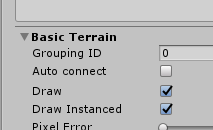
 mild rune
@astral trout thanks for the help again. And where do you find that menu
astral trout
under terrain settings
mild rune
@astral trout where are terrain settings? I just have my mesh with a collider
astral trout
wait, are you not using unity terrain?
mild rune
no, first world
astral trout
so its just a large mesh?
mild rune
yep, the entire terrain is a large mesh with 1 material
astral trout
huh, and this mesh alone is 15 draw calls?
mild rune
apparently
rose wolf
yea ihni either
mild rune
doesn't have anything to do with UVs right?
mild rune
I never messed with light settings yet but I'm not sure
astral trout
Window > Rendering > Light explorer
mild rune
mild rune
no, I only baked occlusion culling
astral trout
can you show a screenshot of the scene and the stats window with just that terrain?
mild rune
but when I disable everything else in the world except for the terrain, its still 15 draw calls
yes
astral trout
skybox will also add to draw calls
mild rune
had my lake and river enabled, but its just 2 more meshes and 1 more material
terrain is 12
astral trout
post processing?
astral trout
and what are stats like with everything disabled
 quartz shard
skybox can that be?
astral trout
so 5 from terrain
mild rune
so
why would the skybox be 7
and why would the terrain be 5?
the skybox is very simple
astral trout
1 draw call for each side
mild rune
is that normal?
astral trout
skybox is 6 draw calls, and theres a base 1 drawcall for the scene
mild rune
so that's normal and there's no way to mitigate that?
astral trout
depends on the skybox i believe? ones that just use a single cube map should be 1 draw call maybe?
honestly these numbers are still very low
rose wolf
i see 6 textures, therefore, that miht contribute
mild rune
but what about the terrain? gonna take a 200 IQ guess to figure that one out at this rate
astral trout
single material?
astral trout
its just all the materials used in your scene i believe
mild rune
🤔
what the heck is this material 0.11..
sec
that's just for the trees so it shouldn't affect the terrain
terrain is absolutely 1 mat
astral trout
I wouldnt use a toon shader for a map unless you're really specifically going for a certain look
also make sure all objects are set as static etc
mild rune
they are
astral trout
look at the difference with the lights on and off for your terrain i suppose
mild rune
@astral trout how do I turn off lighting
astral trout
just disable the object?
mild rune
its 2 draw calls with the object disabled (one by default + 1 for skybox)
astral trout
i mean for the terrain mesh without lights
astral trout
you have a directional light in your scene
you can just disable that object
or disable the component from the light explorer
later on for optimization, if you dont need real time lights, you may want to consider baking your lights
mild rune
yeah I was gonna bake them when im done
I think you're right and its just making chunks for the terrain
probably not much I can do to fix that
I need to figure out why I'm getting so many draw calls when I'm literally reusing the same material on multiple trees
sounds like I need to just do all of the trees in blender and combine them into one mesh
but then I can't LOD them
astral trout
seperate meshes are still seperate draw calls
regardless of sharing the same material or not
however, if set as batching static unity will batch them together
mild rune
is there any way I can combine them in unity without having to do it in blender?
astral trout
unless you have a lot of these, static batching is good enough in most cases
mild rune
what does static batching do?
mild rune
is one batched set of draw calls equal to 1 non-batched draw call?
astral trout
no
astral trout
there is some overhead
mild rune
how much better is batching vs. not batching?
quartz shard
i useng probuilder to combine them you can make the objeckt probuilder objeckt
mild rune
@quartz shard 😮
astral trout
I cant give you any definitive numbers for that, it varies widely depending on scene
quartz shard
both ther is sdk 2 and 3
mild rune
its 3
quartz shard
no idea about that
astral trout
there is no difference between sdk2 and sdk3 in terms of graphical and rendering related issues
quartz shard
yea that should be rigth why its for building stuf
mild rune
@quartz shard @astral trout okay but I can't find it in the asset store
astral trout
you get it from unity package manager
astral trout
Window > package manager
quartz shard
he try to find it and the only think that show up is this i think
quartz shard
nope i think its a part of unity now ? not sure
but you dont need it i never have use it
quartz shard
its easy
if you use the probuilder objeckt its one klick
if you got a objeckt that is not probuilder you can make it to it with one klick
mild rune
mild rune
quartz shard
if you got a objeckt that is not probuilder you can make it to it with one klick
how do I do this
mild rune
do I have to make the objects into pro-builder objects first?
how do I make the objects pro-builder objects
quartz shard
if its not yes
i use icon mode so its now little dificult for me see
mine look like this xD
mild rune
is that this?
quartz shard
that make the objeckt to probuilder
mild rune
so I click that first and then combine?
mild rune
they probably dont work
but its fine
probably better to save on draw calls vs. save on verts
quartz shard
you need to think now its one mesh
so occlusion if you got yor objeckt difrent locasion you need to think its on mesh now so keep that in mind
one mesh
quartz shard
np
mild rune
@quartz shard @astral trout @rose wolf one more question for now. So verticies don't really impact performance as much in vrchat? Like is a couple hundred thousand verticies going to kill my fps or not?
rose wolf
it shouldnt
astral trout
polygons will always affect fps regardless of any game
rose wolf
unless theyre like all in your face
astral trout
however the modern gpu can easily handle millions of polygons
rose wolf
yea, a cpu can handle about 4 million at 60 fps
astral trout
i wouldnt start worrying about it unless you're above 500k-1m
or if you're targeting quest
mild rune
kk
astral trout
of course, people on budget computers may experience worse but you know
rose wolf
apu or gpuless you normally need to worry about draw calls
mild rune
also, how come my blender verts for my map are only 10k but in unity its 200k? does unity divide up higher shapes into triangles? why would that add verts?
astral trout
real time lights etc
mild rune
ah
mild rune
I cant figure out how to atlas this tree cluster which has a needlessly separate material for the bark and the branches. This person really moved around their blender setup, and the UV editor doesn't even show the UV map for the branches.
agile hawk
Export the FBX and import the FBX, or append the model in a fresh blend.
mild rune
oh thats a good idea
mild rune
@astral trout Do you know why unity is spending 8 draw calls on my forest object which is one big mesh with 2 materials?
is it breaking it into chunks?
@quartz shard @agile hawk
TaSuKeTeeee
agile hawk
8 draw calls.
2 materials = 2 draw calls,
Light hitting material = 2 draw calls (per object)
Shadows = 1 draw call (per object)
Should be divided like that, I believe?
rose crater
not really, depends on the rendering method
forward rendering for example can do it in one draw call, but deferred may take more
not sure what vrchat does
shadows will take one draw call yeah, but I’m not sure if the unity profiler includes that in the same stat
astral trout
vrchat is forward rendering
mild rune
@agile hawk does marking objects with same materials as static automatically apply batching or do I need to activate something
@astral trout
@rose crater
astral trout
as long as static batching is checked
unity will apply static batching if it can
objects need to have the same material
and also some shaders i believe can set a flag that disables static batching
also please chill on the pings lol
I'm not entirely sure on the specifics of real time lights effects on draw calls, but from a quick check it looks like a single directional light increases the number of batches a fair bit
i tend to avoid using real time lights at all and bake everything
mild rune
@astral trout where would one check this
astral trout
if you marked it as static it'll check all by default https://nyanpa.su/i/KaE81Xbl.png
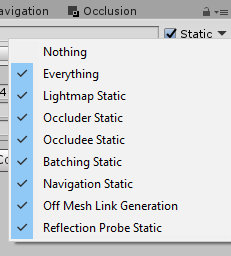
 mild rune
@astral trout what is generally considered a decent amount of draw calls for a world? Also what is generally considered poor optimization? I know its more complicated than that, but I want a rough estimate of where I should be at
mild rune
@astral trout @rose crater zzzz does this thing ever work? Does it just take a long time?
@agile hawk @quartz shard
rose wolf
id assume using that would take a while
quartz shard
i think you use the probuilder program to compi mesh about that program you use now i have no idea
now about the warning you geting i am not so exp on that i most ignore stuf like that antil i get a problem
astral trout
I don't have any experience with that tool you're using.
As for draw calls, obviously you really don't want thousands of them. But it also depends on what you are trying to achieve.
What is your performance target? 90 fps with multiple people and a mirror? 144fps for index? etc etc and what kind of hardware etc?
Personally, I try to stay below 200-300 max, and go as low as I possibly can without sacrificing graphical fidelity unless needed.
Also please, you don't have to ping me every time. I try to answer questions here occasionally whenever I can and have to free time to look but I rather not be pinged multiple times for every small question.
mild rune
@astral trout my performance target is 90 FPS with a few optimized avatars in the world, which I know is difficult to achieve, but I still wanna try
with a GTX 1080 and 10700k 5.1 Ghz allcore
whoops sorry I pinged you before I read your message not to ping you
 bitter yoke
Is the FOV on VRChat fixed?
Or can it be changed depending on the world?
versed lichen
it is fixed
bitter yoke
Thank you.
By the way, what is the FOV value?
versed lichen
different per headset
bitter yoke
Thank you.
How about in desktop mode?
mild rune
@versed lichen do you know any good materials that teach texture atlasing in blender 2.8?
versed lichen
plenty on youtube yeah
mild rune
i see a lot for 2.7
mild rune
do the atlas's need to be squares or can they be rectangles?
I have 3 textures to atlas but I can't make a square with 3
astral trout
90 fps with a few people with optimized avatars in a world is not that hard at all to be honest, unless you're doing a really big world or detailed world
as long as you combine meshes where you can, bake lights, good use of occlusion culling its quite achievable
I have an aging 4790k with a 1080 as well, and my personal target is to maintain 90 fps with a htc vive at 125% supersampling while alone in the map with a full mirror on in the most complex area
mild rune
Is it okay to atlas textures that have transparency with textures that don't?
astral trout
you want to keep transparent and opaque textures seperate
mild rune
but can I atlas transparent and opaque textures in the same atlas?
versed lichen
yes
 fiery bramble
both build & test or build & publish arent working can anyone help
mild rune
Ruubick-sama, do I have to compress high res textures before atlasing them? what if they dont fit in my grid?
would you rather occlusion cull a high resolution grass texture or atlas it with the rest of your scenery?
If I atlas it, is the scene going to pull the texture from memory for each piece of grass, or is it going to collectively pull it once from memory for every piece of grass?
mild rune
do you know if I can atlas something that has an alpha map? Do I have to make a separate alpha map the size of the atlas and then just apply that to my transparent objects as usual in unity? ex:
lilac saddle
fiery bramble
both build & test or build & publish arent working can anyone help
check console log n see if there's any error
mild rune
does blender have a console?
mild rune
Is it okay to make an atlas of multiple atlases?
astral trout
when you atlas, unless its a shader that specifically has features like a detail texture mapping on a seperate uv map, you will want to keep all your textures with the same uv layout. it doesn't have to be the same size per say, just the same aspect ratio and layout. So yes if you atlas the diffuse/albedo texture, you need to do the same for the alpha maps, normal maps, emissions etc.
an atlas of multiple atlases is just a bigger atlas lol. though typically you'd keep them to a max of 4k I suppose, but don't quote me on that. personally I wouldn't go higher than that but I don't know if theres any standard practice for it.
mild rune
ty for the knowledge
lilac saddle
i seem to have changed the view for the Texture inspector but I don't know how to get it back to normal
oh god it's the same on another project
pls help
wow so apparently 'Default' is a button, not the title of the panel
S Tier UI design Unity
mild rune
@lilac saddle I hate unity xd
lilac saddle
the worst ui thing i've seen in a long time
 dusty prairie
What's considered 'Too high' of a poly count for a world? I'm working on a pretty large one but the actual poly count shouldn't be too high after cleaning it up
astral trout
Its not so much of the total poly count of the entire world, but rather how much of it a user would view at any given time.
In any case, reducing cpu overhead is much more important than gpu load for optimization in vrchat or in general.
Poly counts of 1-2m is not as bad as 1000+ draw calls. How much poly's do you have?
dusty prairie
16000ish prior to optimization, but also not even closed to finished. It is a pretty large world though, didn't think about the fact that it's a wide open space having an effect tho.
Little cube with the camera is for scale
astral trout
oh thats fine lol
versed lichen
That's extremely low
astral trout
16k is nothing, i'd be more conscious of number of materials and meshes
versed lichen
it'd even be low for quest
dusty prairie
Dope, I imagine I'll probably hit 200k-ish after I apply all the mirrors and subdivision modifiers tho.
Question though, when I model flat objects do I still need to stress about them only having 4 vertices, or is it irrelevant if it's a flat surface? Sorry still new to this!
versed lichen
Subdiv on hard surface ?
if it's a quad then yeah, having 4 vertices should be the goal
dusty prairie
So then I should make an effort to correct surfaces like this and use only quads?
versed lichen
Oh, yeah for things like that it's irrelevant sorry
dusty prairie
thank god, I made 0 effort to use quads xD You guys are awesome, thanks for the help!
mild rune
@versed lichen Are we allowed to use 8k Textures on this game?
this terrain mesh is so large that no matter how well I seam the UV map, I can't fit everything in a way that doesn't distort. But I wouldn't have this problem if I could simply map everything to an 8k texture
rose wolf
wondering if theres any proof of lag when using an audio listener and reverb surface?
rose wolf
also, for doing reflections, has there been proof in using a projector having better performance than just using a realtime reflection probe for light projections
 sour seal
Question uhh
I made a world back when vrchat first came out, it's all of twilight town from kingdom hearts 2 (all of it) and back then I could load into the level no issues, now I load in and I get 1 fps
What gives?
rose wolf
what do you mean by "loading in now" as to what it was before? did you update it since?
sour seal
No I've not touched it since vr chat came out
When I enter the level I get a solid 3 fps
astral trout
what version of unity is this world? unity 5.6.3p1
a lot of things have changed since then and worlds in 5.6.3p1 can have a fair bit of issues
sour seal
The original unity from back then
I never finished it because the teleporter stopped working and nobody knew how to finish
Is it impossible to migrate it to new ask?
Sdk*
astral trout
yeah its possible to update to the latest version, but if you're coming from more than 1 major unity version behind, it might be a bit difficult
Might be best to export as much of the project you can and import it to a fresh project on the latest supported unity version and sdk
rather than trying to upgrade the existing project
sour seal
Alrighty, yeah I just wish I can complete it one day
It's every area of twilight town linked by teleporters
astral trout
what is the world id if i may ask?
sour seal
But one teleporter out of spawn only respawns you back into spawn, every other year works, and never could fix it
It's private
Never could fix the issue back then
shrewd harbor
Hey, I'm plugging away on optimizing my latest map, still a lot to learn on my end, but I'm concentrating on world size for now. One of the asset packs I'm using uses .asset texture arrays, and are quite large (3 files totaling 55MB in build viewer). Any way to reduce the size of these files?
 grave frost
Is there a maximum file size for worlds?
cold prairie
shrewd harbor
Hey, I'm plugging away on optimizing my latest map, still a lot to learn on my e...
As far as I know the main way would be to just compress the original images you are creating the texture array from
cold prairie
grave frost
Is there a maximum file size for worlds?
https://docs.vrchat.com/docs/submitting-a-world-to-be-made-public
"If your world is very large in filesize, we may ask you to reduce the size of the world and remove it from Public in the meantime. Try to keep your worlds under 200MB."
VRChat
Want to make your world public? You've come to the right place. There's a few things you should take into consideration before submitting your world to Community Labs. Make sure you read all of this! Failure to do so may result in your world being taken down, or never leaving Community Labs! If your...
grave frost
cool thanks
tranquil zephyr
have they ever even asked..? there are tons of worlds that go wayyy above 200. some ive seen go up to 500!
cold prairie
That's why it says may
If your world has a good reason to be over 200 mb or it goes unnoticed it won't get taken private
tranquil zephyr
yeah i just mention it since it doesnt feel like its ever been asked
cold prairie
But if you have a world that's just a empty plane with 300 mb size then yeah...
shrewd harbor
I'm trying to diagnose some performance issues in a world of mine, but I can't see anything outstanding that could be causing it. In VR, the FPS basically swings back and forth between 60 and 120 FPS every 2 - 3 seconds. I've seen similar performance issues in a ton of worlds where FPS swings wildly, but it's always down to 50% of whatever the headset refresh is (when I use my CV1 it swings between 45 and 90 FPS). I've been doing some testing with the profiler, and it the only thing I see spiking up frametime is VSync.
Is Vsync really the root cause of this? Is this known behaviour?
Some SS:
(I've done all the typical optimization steps in this world, combining meshes, baked lighting, occlusion culling. Only thing I haven't done is delete some faces on objects the player will never see)
shrewd harbor
All of my materials are set for GPU instancing, but, you're right, I didn't see that before, 207 is definitely too high
This is the view from that frame:
versed lichen
Did you setup occlusion culling ?
shrewd harbor
The only thing that stands out as potentially causing that high number of textures, is the monitor on that front desk is from an asset pack that uses big texture arrays for all of their objects, so that monitor might be causing it to load the textures for every item in the array?
Occlusion culling is baked
versed lichen
yep, but there's still 500+ unaccounted batches
shrewd harbor
Time to go batch hunting
astral trout
while those draw call numbers are a tad high, you should also disable vsync in unity editor to get a better idea of your expected performance in game
Edit > Project Settings > Quality > V Sync Count: Don't Sync.
shrewd harbor
Perfect, thanks for the direction!
So, I've started digging in on those batches this morning, and they are all in RenderForward.RenderLoopJob. I think I'm going to have to sit down and plug through some youtube tutorials on all this, but, if I'm understanding what I'm seeing here, these objects are not being statically batched when they should be.
All of the objects specifically mentioned in this list, include this message on the Inspector view:
shrewd harbor
I think I found the issue, reflection probes were affecting how it statically batched objects. I tested disabling the probes and cut the batches in half, and reduced draw calls by over 200.
astral trout
oh yeah, when you have multiple reflection probes, unity cant batch meshes that are affected by different reflection probes together
shrewd harbor
Thanks again for the tips. I'm definitely going to need to dig deeper still, as I'm still seeing more or less the exact same FPS swings, even after all of the optimization I've done thus far. I feel like it might be staying at max FPS slightly more often now, but it's hard to tell when it's async warping all of my pretty parallel lines every 2 seconds
astral trout
Its still a lot of draw calls, and looking at your frame debugger, your scene is made up of a lot of cubes? might want to consider merging meshes together
though, if you made it all in unity, you're going to have to find some unity tools to merge meshes
I think probuilder might be able to do it for you? but I don't really have much experience using it
I use mesh baker and mesh combine studio 2 if i need to do it in unity, but those are paid tools.
shrewd harbor
Makes sense! I built this world 100% in unity, using probuilder. I've taken a single pass on it so far merging meshes that make sense to, but I can definitely go further and merge a lot more together
astral trout
ah yeah if you're already using probuilder then you want to go ahead and merge as much as you can
but be smart about it so that you merge objects in groups that's conducive to occlusion culling
shrewd harbor
Oh, absolutely, I've been trying to keep that in mind with what I've done so far. I've learned so much since starting this map, there's some areas I could just remake to reduce the number of individual meshes
astral trout
you could also benefit from some atlasing of materials too, judging by the number of set pass calls
shrewd harbor
I'll have to teach myself how to do that, haha, but, good to know. Ideally I'll do everything I can to improve this world, so the next project I start I can keep all this in mind right from the start
astral trout
not sure if probuilder has any texture atlasing tools builtin, might have to do it manually, ie. combining 2 textures together and changing the uv maps accordingly
also when measuring performance, you'll want to pay more attention to the frame timings rather than just fps, there are some settings for that in steam vr
the reason you see FPS swings is because you are probably right at the threshold for 120 fps
when your frame timings drop below the required for 120 fps, vr will automatically drop to half and use reprojection
90 fps = 11.1ms
120 fps = 8.3ms
144 fps = 6.9ms
shrewd harbor
Ahh! Thank you, that explains it. I have to guess then I'm just dropping barely below the threshold\
astral trout
more or less, i've noticed that reprojection kicks in for me at 90 fps around 10-10.5ms, but its probably because of tiny spikes that push it over often enough
shrewd harbor
Alright, it's definitely running better than it was before, and I've shaved off nearly 100Mb off my lightmaps. I'd call that a win. Just need to clean up some occlusion culling issues, then I should be good to go.
 livid bolt
Is there a way to make it so that canvases don't get culled? If I don't want a mesh renderer to cull, I can just turn off "Dynamic Occluded" but there is no such option for canvases
 quiet geode
i thought it culled if you had the game object set to occludee static. Leave that unchecked for your canvas game object. That might work
uless u mean a canvas on a non static object still get culled even when occludee static is off
lilac saddle
how the fuck does occlusion work
i have this gigantic occlusion cube
and it doesn't work
why the fuck is this visible?
various bits pop in when viewed from below in spite of this gigantic cube being in the way
and to show that the cube is doing most of the work, this is how it looks when i bake occlusion without it
so why is it being dicky? why is unity not seeing a massive solid object and calculating its occlusive range correctly?
look at the size of this cube
look at it
what is unity getting confused about?
and yes, the canvas shown in the screenshot is marked static (as are the other canvases that pop in)
astral trout
whats your settings?
lilac saddle
5, .25
100 on backface
but this is a gigantic cube with no holes in it and no way for the camera to possibly see around it
astral trout
try changing smallest occluder to 1
also ideally put occlusion areas on places where people will actually be
astral trout
is each menu its own canvas?
lilac saddle
yes
but this isn't the only example
bake has jumped up massively in size weirdly
oh, smallest occluder
all the way on the other side of the map
totally occluded multiple times over
yet unity thinks otherwise
astral trout
i mean, it depends on how your meshes are joined
lilac saddle
if i turn the camera slightly
the statues are individual meshes
i don't see any reason for them to not be occluded by multiple walls/ occluder cubes
like i can try putting in a bunch of cubes where all the walls are
but i don't understand the first example
how do i occlude different areas of the map from one another?
i don't really want to manually do it on events since pickups/ screens might not update correctly
astral trout
have you tried putting down occlusion areas yet
lilac saddle
i read about it but it read as if it were exclusive to non-static objects
i've really gotta go to bed (4am) but ye
astral trout
these articles go in depth on how occlusion culling works https://blogs.unity3d.com/2013/12/02/occlusion-culling-in-unity-4-3-the-basics/

Unity Technologies Blog
The following blog post was written by Jasin Bushnaief of Umbra Software to explain the updates to occlusion culling in Unity Pro 4.3. Unity 4.3 includes a plethora of improvements. One of the completely re-implemented subsystems is occlusion culling. Not only has the interface been simplified and the culling runtime itself revamped, a number of...
its old but i expect most of it is still relevant as its still the same library
lilac saddle
i didn't really find anything of particular use in it unfortunately
i added cubes on all the walls
and while it's generally good
there's still some weird spots
circled area should obv be super occluded
i can try the occlusion volume thing but i'd really like to know what unity is doing here so i can just do normal occlusion culling
like this isn't an awkward scenario
i have a ton of flexibility and i'm happy to do it the way unity wants
like i can even get up close to the occluder below the upper area
and it just looks straight through it
so the issue is not that the occluder is too close or too far from the camera
lilac saddle
epic
there's so many occluders in the way
and yet 😔
should be blocked by the stairs, the colliders around the tunnel, the floor of the other area...
is this why void club uses teleports
because occlusion doesn't work
this hole is tiny
 ocean ibex
Try occlusion portals and trigger them on/off with OnEnter trigger. They seem to work sometimes
at least they work for static meshes, with players in game it seems to not be perfect
@lilac saddle
lilac saddle
i'll try that, thanks
 rain marsh
is there a difference between having 100 meshes vs having 100 meshes joined together as one mesh? Because if the 100 meshes were joined it would be come 1 mesh, but none of the combined meshes are connect to each other so it is still 100 objects...
i want to make an object break apart into a bunch of smaller objects so im wondering what the difference in performance would be if its 1 mesh of 100 pieces vs 100 meshes, one for each piece.
lilac saddle
there really is fuck all about Occlusion Portals on google
gonna try it out in a test scene with multiple clients...
versed lichen
@rain marsh One object is one object, one hundred objects are one hundred objects
lilac saddle
the camera has to be inside the occlusion portal rather than it being an occluder that can be toggled
In the Scene view, move the Camera to a position where it is directly in front of the Occlusion Portal.
this is wrong 😔
but after making the cube bigger it now occludes from the outside as well
bitch make up your mind
if you're too small to be an occluder, then don't ever occlude
astral trout
if you have it on default settings for that bake with smallest occluder 5, then obviously the cube is probably too small...
the documentation describes the system as conservative, and that using a smaller value for smallest occluder will also make it less conservative. if something isnt being occluded, you can try lowering the value to see if it helps. In addition, using occlusion areas is helpful because you are telling unity that these areas are where occlusion should be primarily considered, and if you have disjointed areas like what you are trying to do, it is especially useful if you are trying to have less conservative settings as unity will only precalculate higher precision data for the occlusion areas, and not the intermediary spaces.
 digital ermine
Are there any general optimization issues involving terrains with VRC? I hear they are rather unoptimized but want to make sure because I could really use their functionality.
rose wolf
i mean, usually theyre fine. but i have seen people have troubles with its uv mapping and light map uv mapping
which makes them harder to optimize
digital ermine
I will be hiding the terrain itself, I only need the grass settings to work.
I'm not going to get a better result just using particle systems in blender, so i'm sort of avoiding that route.
rose wolf
then id assume youd be safe, as long as the meshes are seperated in some form
particles can cause optimization issues. unless youre very particle savvy (not me lol)
digital ermine
yes, I am trying to spread heavy grass onto a large area of land so it's certainly not optimized to use blender particle systems lol
rose wolf
oh my lol
astral trout
terrain is fine and works well with occlusion culling if set up right, but how are you planning on hiding the terrain? transparent texture?
you want to make sure draw instanced in terrain setting is checked, and adjust detail resolution per patch to reduce draw calls
unity terrain does a pretty decent job at batching detail meshes, I have a pretty heavy scene here with thousands of grass/flower detail meshes of 6 different types, and the difference in draw calls with them all on and off is just 33, and has a negligible very minimal impact on performance.
https://nyanpa.su/i/USfd1Zbc.jpg
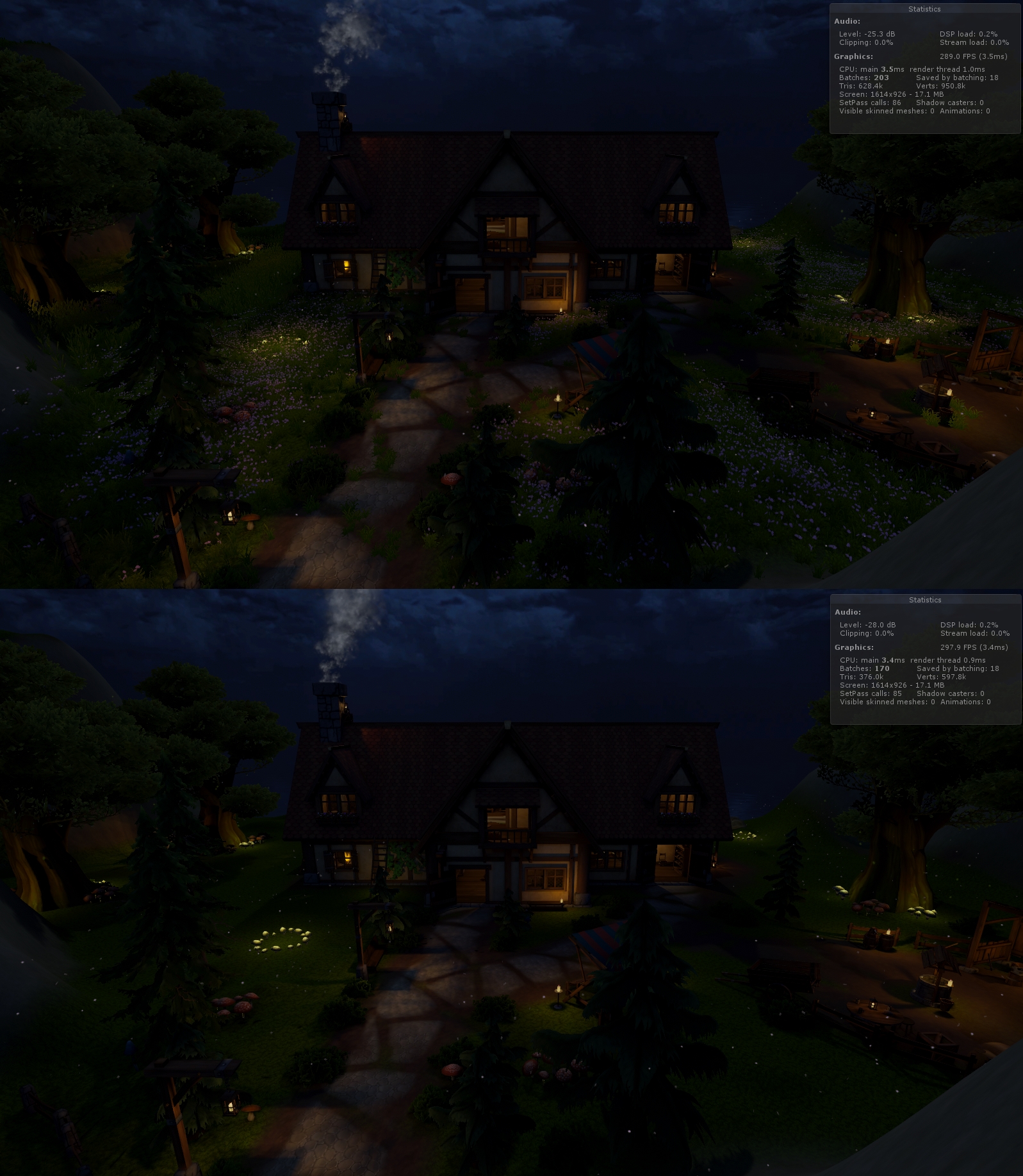

of course, detail meshes can significantly increase polygon count in your scene so take care to keep that in mind.
you can also adjust the detail density and render range on terrain settings accordingly
 latent relic
is there something within unity that lets me set up pipelines for desktop and quest so i can turn off shaders and optimise things in a manage-able way ?
rose wolf
@latent relic wdym?
latent relic
so lets say you have a map with a bunch of textures and shaders
and for desktop when i build i want it to have everything at 1k and shaders on
but on quest i want to build with shaders off and everything like 256 resolution
is that a thing >?
im coming from other game engines
rose wolf
correct madam
was there a problem making you unable to seperate for some odd reason? or is this a base querY?
latent relic
for other tools you can create like a build target and it knows what optimisations to do when you build
otherwise you would have to make 2 versions of the world side by side ?
rose wolf
well for one, the sdk builder isnt responsible for any optimizations, thats on you. but technically you have 2 worlds of the same world, one is better for pc, and one is better for quest. does this make sence?
imagine 2 servers in 1 server, one is only accessible with a unique password (pc) and the other is accessed with another unique password (quest)
they cannot intertwine
latent relic
im essentially building the same unity map to two different destinations, just with low poly/textures
rose wolf
correct madam
astral trout
@latent relic https://github.com/JordoVR/EasyQuestSwitch

GitHub
EasyQuestSwitch is a Unity editor tool developed for VRChat world creators, it can automate changes to components within a scene as soon as the build platform is changed from PC to Android (for Ocu...
astral trout
also if you havent, you can set up a local cache server so that unity doesn't have to reimport all your files every time you switch platforms https://docs.unity3d.com/2018.4/Documentation/Manual/CacheServer.html
but also take note that there is currently an issue with switching platforms via the sdk, and its recommended that you instead switch through unity's build settings in the mean time
lilac saddle
hey, im having a weird issue where VRC is ignoring my LOD and shadowmask settings. I have a default quality set and even removed all other qualities, yet vrc always changes it.. this is SDK3.. anyone else had this happen?


 cold prairie
https://github.com/oneVR/VRWorldToolkit/releases
You can import this and check VRWorld Toolkit > World Debugger to see what is causing it to be that huge
 livid dragon
okay thank you so much
cold prairie
lilac saddle
hey, im having a weird issue where VRC is ignoring my LOD and shadowmask setting...
You can't really change the quality settings they will always abide by the settings pinned in #development-advanced
If those are the settings you mean
@livid dragon if it's not directly obvious from the world debugger what would be causing it feel free to show some pictures
livid dragon
its just that file
i have other worlds and theyre not that big
i just recreated it on another file and it was fine
cold prairie
Yeah that usually works if it's an option for you
 feral plover
When I'm baking a build, the SDK is only grabbing all the assets and their dependencies, right? Any files in the project folder that aren't used or depended upon don't get included?
cold prairie
Basically yeah
Check the world debugger in my world tools if you want to see all the files included in your latest build
https://github.com/oneVR/VRWorldToolkit/releases
 austere ember
i said this in #world-development but ive got this
68% of the textures used in the scene have not been crunch compressed. Crunch compression can significantly reduce the size of the world download. It can be found in the textures import settings.
astral trout
thats just an optimization tip, you can reduce your world size significantly by crunch compressing textures
lilac saddle
austere ember
so its not a necessary thing to do?
Not necessary but I tried it myself and I recommend you trying it. You barely loose any details.
 white spade
OK.. Question for all those versed in unity, I'm trying to import my world model from sketchup, but after extracting the textures and materials, none of them are showing up on my model. What gives?
rose wolf
@white spade is obj?
white spade
skp
rose wolf
ive never even seen a skp work in unity before @white spade , but if it worked so far, try replacing the materials
mild rune
Can you have multiple Google Seurat meshes in one scene? And create a smooth transition when moving the camera between each Seurat mesh?
@lilac saddle That's beautiful ^^
torn crypt
mild rune
Can you have multiple Google Seurat meshes in one scene? And create a smooth tr...
I can't think of a reason why you couldn't, but I'm not sure what you mean by creating a smooth transition when moving the camera between the meshes. Do you mean when someone leaves the headbox bounds?
mild rune
yes
torn crypt
Easiest method would probably be to teleport the player when they leave the sweet spot, but depending on the scale of your environment - that might not be ideal. In those cases, you might have to entertain a solution where the player remains within the headbox bounds, and the meshes themselves change/toggle. Not sure how you'd pull a smooth transition though, you could fade to black for a moment during the switches at least
mild rune
you might have to entertain a solution where the player remains within the headbox bounds, and the meshes themselves change/toggle 🤔
torn crypt
I'd honestly opt for teleporting as long as your Seurat meshes/environments aren't large enough that you'd be teleporting players into NaN land to make it work. Not sure what you're exactly trying to accomplish or how it relates to other players in the instance tho!
mild rune
@torn crypt is there a limit to the box dimensions for seurat calculation? What's the largest you can generate from?
torn crypt
mild rune
<@!361205965468467212> is there a limit to the box dimensions for seurat calcula...
I honestly haven't tried extending beyond "typical" bounds in quick tests, but how it holds up is likely gonna be dependent on your environment, your settings at capture + the parameters you're using when you generate the mesh.
The headbox seemed sorta akin to the sweet spot of speakers or the spot where the distance between the speakers and your ears are equidistant. The further you deviated from that sweet spot - the less accurate the representation becomes (and in Seurat's case, where you'll start to see distortion or seams)
torn crypt
It'd be baked into the texture that the mesh uses. So yeah, you could use real-time lighting in the scene that you plan to capture (but then it effectively becomes baked via Seurat)
I wouldn't use real-time lighting WITH Seurat meshes because it obviously wouldn't cast shadows properly or anything
Let me know how it works if you test with large bounds tho - I've been curious about using Seurat as a way to optimize distant vista assets/landscapes that are far outside of the playable area.
mild rune
@torn crypt Ah I understand. I'll let you know, but first I have to learn how to use Seurat in the first place, and there isn't a whole lot of educational material out there so it might take me a while
mild rune
@torn crypt-Senpai, do you know if Seurat captures its images after post processing or before?
torn crypt
mild rune
<@!361205965468467212>-Senpai, do you know if Seurat captures its images after p...
I think it may inherit PPFX if it's on the camera you've also put the headbox capture component on, but I haven't tested it recently. It lets you export the captured images out in HDR presumably so you can handle post-processing effects like bloom from the Seurat mesh (bcs you wouldn't want to bake that into the capture) so prob safe to disable or remove post-processing from the cam when you go to capture
lilac saddle
does anyone properly understand occlusion baking?
i redesigned my lobby to prevent this shit from happening and it still does it
the way i've laid the connecting portion out was to guarantee occlusion
yet it just ignores the walls
and i put in giant occlusion cubes along each individual wall to make sure
how do normal games handle this?
occlusion just seems to get worse the further the distance is
the tunnel here is a magic occlusion dodging device
i don't want to have to rely on occlusion portals and manually doing stuff where it absolutely isn't necessary
mild rune
@torn crypt but do shadows and baked lighting get baked into the Seurat mesh? I'd imagine if not there would be no way to make them look right, considering the geometry of the resultant mesh is too simplistic and it relies on alpha cutout
feral plover
This guide recommends that I disable skybox lighting, but I don't understand why 🤔
https://unity3d.com/how-to/optimize-mobile-VR-games
Is it doing more than just picking an average color to create some ambient light?
I'm also not sure how to disable Environment lighting. I can't disable it, only pick one and turn intensity down to 0
mild rune
what is HDRP?
torn crypt
mild rune
<@!361205965468467212> but do shadows and baked lighting get baked into the Seur...
Yeah! You got it - you basically want your static scene/environment to be production final before you capture it bcs what you see is effectively what you get there.
HDRP is the high definition render pipeline, we don't/can't use it in VRChat but you can use it in your source scene for a Seurat capture if that's what you're getting at. (You could even use an offline renderer for a Seurat capture if you wanted to - think there's only a Maya plugin though)
torn crypt
lilac saddle
i don't want to have to rely on occlusion portals and manually doing stuff where...
occlusion portals could probably benefit you in the case of your level design. difficult to see what's going on in those stills though - this might help you: https://gitlab.com/s-ilent/SCSS/-/wikis/Other/Occlusion-Culling
GitLab
A surface shader for Unity providing cel-shading. (Forward rendering only)
lilac saddle
i'll take a look through this after work, thanks
 nimble mortar
would it be a bad idea optimizing wise to disable a area locally as a player leaves it?
mild rune
Single Mesh Single Draw Call vs. occlusion?
does it depend on the complexity of what would be occluded?
versed lichen
yes
mild rune
@versed lichen is there any way to get the main camera to display meshes that are very far away? I'm losing vision on some of my mountains in this scene because they're too far away from the main camera
versed lichen
Distance Clip > Far
mild rune
where is that
versed lichen
In the camera
mild rune
okay im going to take a look
this thing?
okay it works
does this affect performance? I'm only really going to use this camera for Seurat capture
mild rune
okay
nimble mortar
Well so far I have been trying to optimize a bunch, any other tips that might help? just frustrating having 25-30 fps with 24 people in a world even tho they are in different places
I used occlusion already and it seems to work I believe
astral trout
what kind of performance load does your world have in general? In terms of draw calls, polygons, etc in those areas. You can check that in unity with unity profiler ctrl+7
honestly with that many people 30 fps is quite common depending on your hardware and how heavy your world is, and how heavy those avatars are as well.
nimble mortar
hmm where do I check that exactly?
@astral trout
I opened the profiler and see alot of info
astral trout
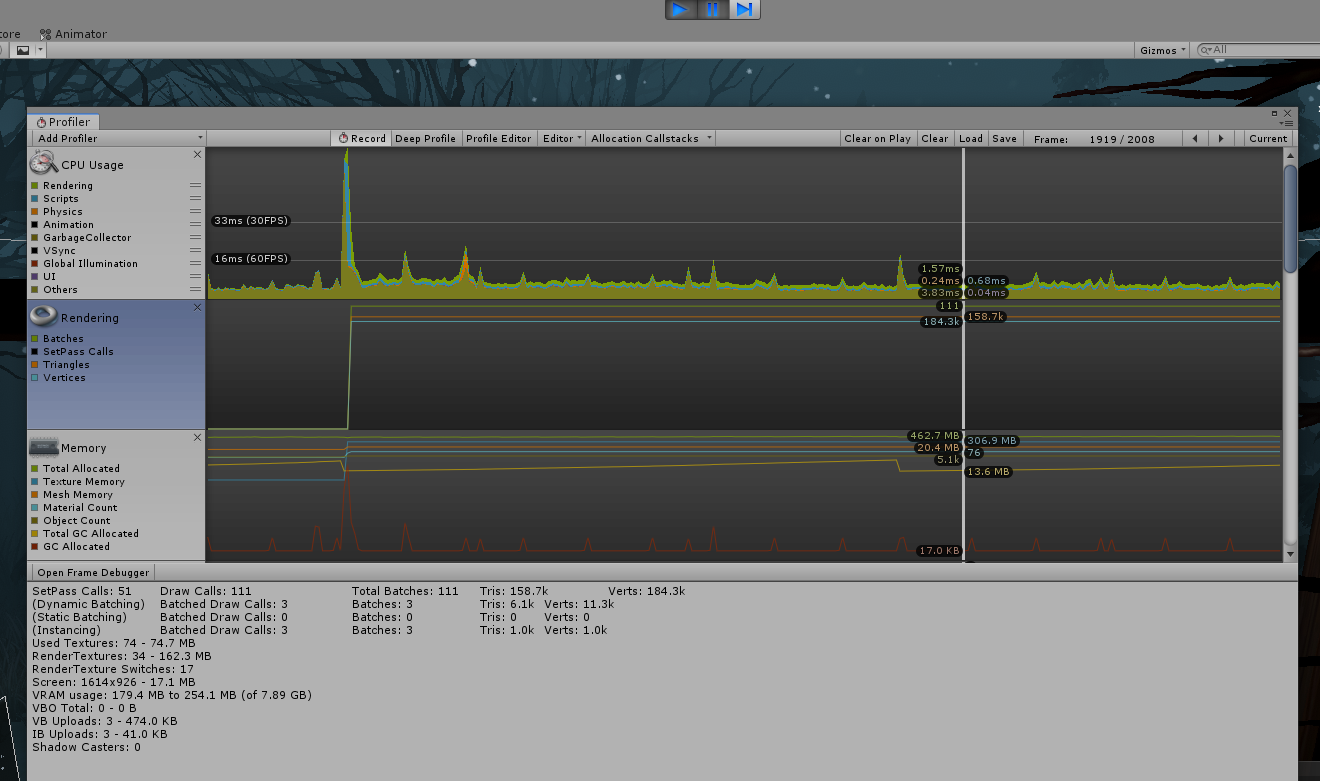
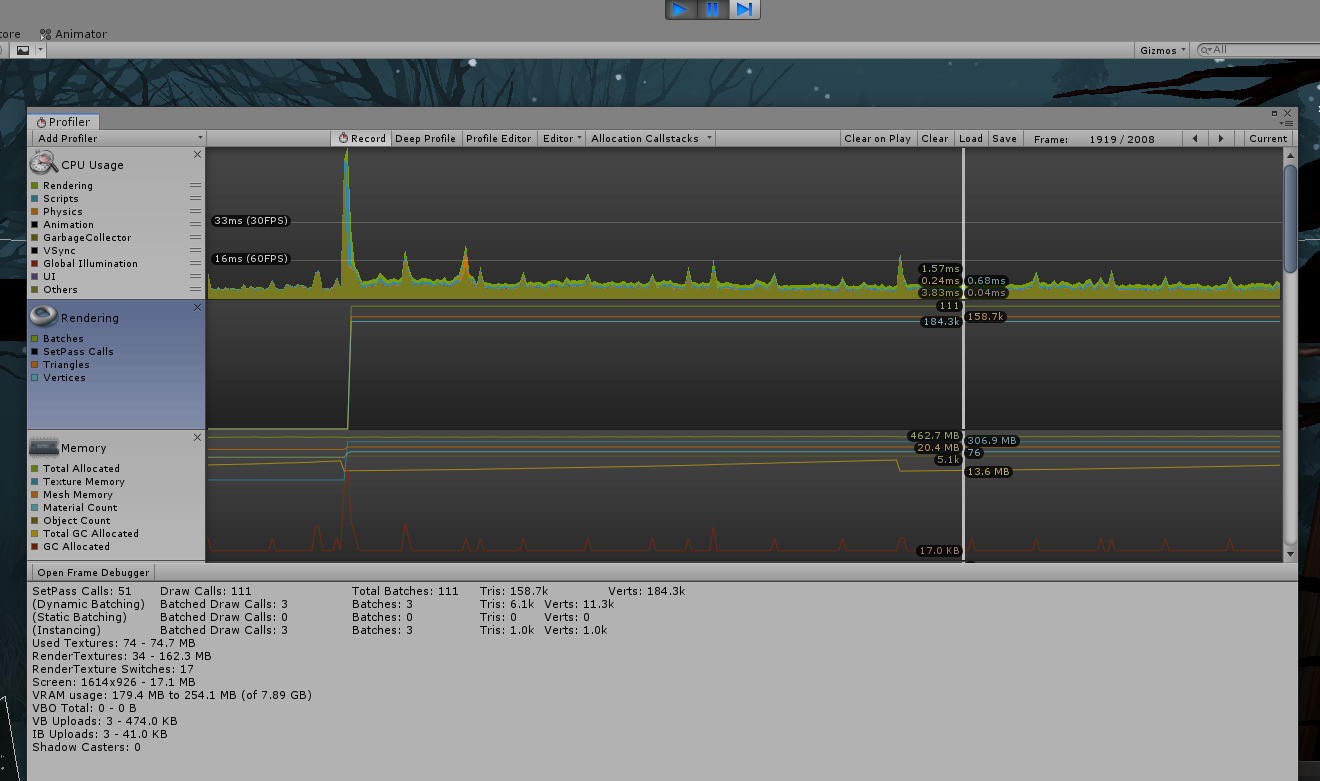
you want to play the scene, and make sure you have a camera active
then click on somewhere in the timeline for rendering
and it'll show you those stats below
those would be of interests to see how heavy the scene is from that camera's point of few, and potentially show what could be done to optimize
nimble mortar
standing in part of the world with cyanemu rn
not sure I understand too much tbh
astral trout
click on somewhere in rendering
astral trout
thats a fair bit of draw calls, and set pass calls too
I take it you have a lot of materials and separate meshes in your world?
nimble mortar
I did try to mesh combine wit hunity
196 materials I think or less
tbh if this could be fixed or helped I would pay someone to learn the ways LOL it's frustrating af
astral trout
in general I try to aim for 200~ draw calls tops
nimble mortar
so what would be the best way to fix that?
combining meshes and getting rid of materials
rose wolf
correct
astral trout
do you have a lot of pick ups?
mild rune
@nimble mortar why don't you create texture atlasses and combine some of your meshes?
nimble mortar
less then 10 pickups I believe
astral trout
are your static meshes set as static?
nimble mortar
I tried meshing a few things and combining but sometimes it would break lighting so I was worried
and yeah
they are
astral trout
what were you using to combine meshes in unity?
mild rune
PrObUiLdEr
 lean prawn
can someone tell me why the heck in my sdk3 world even after adding a vrc ui shape component and having my canvas in the default or player layer my users STILL cannot click buttons without opening there menu or at all???
rose wolf
@lean prawn ask udon
lean prawn
👍
feral plover
Does anyone know about how expensive performance-wise are UI canvases? Does each add a draw call? They don't use a material, just a sprite, so I'd hope they'd be cheap. But the question is whether they're cheaper than a button with a mesh
austere ember
how to i optimize tree rendering?
cuz one of my friends said that u can optimize it by making trees only appear in the players directional PoV.
rose wolf
@austere ember that sounds like occulsion culling
austere ember
how i do?
rose wolf
go to window up top. and i think under rendering, therell be a thing called “occulsion”. that tab will allow you to bake occulsion culling and help remove unseen treea