#world-optimization
1 messages · Page 12 of 1
 harsh holly
 analog kraken
"it takes your world, and exports it into a package, saving it above your assets folder. I don’t know why it crashes, but it is probably trying to do too much. Future proofing doesn’t really help when people complain about losing the entire project..." -According to CyanLaser
harsh holly
yeah, I'm keeping it off from now on
 lilac saddle
Might want to clear your dynamic materials from VRCWorld periodically. Set it to 0.
Went from 150 mb to 90mb just the other day when i set it to 0.
 red scaffold
Anyone know how to make an entity follow a player? Kinda like a monster chasing the player.
 coarse jay
@red scaffold Toybox prefab has following NPC example
red scaffold
I’ll have a look at that. Thanks.
 fair agate
There are many ways! But start with the Player Tracker prefab. From there you can use AI — the AI Pets Pack from the database has very simple AI examples to start with and a readme. You can also use various camera scripts like Autocam or FollowTarget if it is flying.
 young jewel
what is the avatar polygon limit and what is the best way to safely decimate a model?
analog kraken
there is no limit now, but if its over 70k then it's rated very poor. As for decimation you might have better luck asking in #avatar-optimization because this current channel is for worlds
 mild sleet
SWEEE
 ocean quail
Pros and Cons of having world music saved in project as files vs using a youtube link with the vrc sync?
I only need audio so thought there wouldn't be any point in the video sync, but I am worried about world size having to load the audio files with the world
 rocky osprey
Pros of having it in the world:
-More reliable Its way more reliable and doesnt rely on connection at all, so no stutter, no randomly stop working one day because youtube-dl is broken
-Easy to sync up if you have a button to restart it.
-No downtime waiting on youtube downloading the song in real time, its downloaded at the world download.
Cons of having it in the world:
-Bigger file size, but if you are smart you can get audio files much smaller than you think
-Its technically illegal because you are redistributing the song technically
Flip all of those points backwards for pros and cons of using a stream @ocean quail
ocean quail
k, thanks @rocky osprey
 west zinc
Use audacity with about 15-25 quality ogg export to really lower filesize
Import it to streaming mode to save player ram
 fierce yoke
I'm having trouble getting my world size below 100mb, even though there's not many objects in my world. What other steps can I take to compress my map file size further without significantly impacting quality?
So far, I've baked all static lights, made sure to keep all non-moving objects static, tried to reduce poly count of objects, reduced max res of textures to 512 and 1024, kept my skybox res at 2048, lightmap size at 512.
 steel mason
what u can do is open compiled asset bundle and open it to check file sizes and see what hogs the most space
 steep temple
Go to your scene descriptor and set the dynamic material size to 0
steel mason
^
steel mason
@fierce yoke https://www.youtube.com/watch?v=3ROLLu6wO_0

Introductory tutorial on using the Unity Asset Bundle Extractor (UABE) to copy game assets out of 7D2D for use in making new game objects.
cant provide direct link as i dont have it here
fierce yoke
Thank you
steel mason
from what i remember there are versions of it
where it just crash
if u open vrc bundle in it
so try other versions
steep temple
It's some thing that VRC added for something
You can safely set it to 0
It can keep materials that you might not even use
fierce yoke
@steel mason Where is the vrc bundle located? Is it in the project folder?
steep temple
You'd be better off looking at the Editor.log
steel mason
if u check console once u press to upload world but dont press upload just check console while the vrc menu shows up
it was somewhere in AppData
@fierce yoke
fierce yoke
Okay, I'll check now
fierce yoke
Thank you! @steel mason @steep temple I got my world down from 125mb to 67mb! :D
steep temple
Woo!
fierce yoke
Now I just have to figure out why my ui panel isn't working 😛
lilac saddle
@fierce yoke I have an awesome trick for reducing the size if in case your skybox is massive like my own, I bake a reflection probe off of it and then just set the reflection probe as the new skybox lol
this is basically if your skybox is over 8mb which is what reflection probes tend to be for me
 coarse tree
that actually also runs faster in unity as a cubemap
lilac saddle
I forgot to mention, you'll want a 1024 resolution capture not 2048 as that will make it blurry (for me anyway), and you want to set the layers to nothing so it only captures the skybox
coarse tree
skybox x1024_x2048
skybox xVHDRI
ya the skybox x1024 = 8mb and the x2048 = 32mb
But 2048 is so amazing looking
fierce yoke
@lilac saddle Oh that's awesome, I'll definitely give that a try. My skybox is the largest file in my map (30mb!)
lilac saddle
Could also try crunch compression on each 1024 texture?
 hallow sandal
Dont crunch a skybox pls LOL
lilac saddle
Why not?
steep temple
@hallow sandal Yeah, why not?
hallow sandal
Cause the quality on cubemaps is already questionable and crunch compression just makes them look like absolute ass
lilac saddle
crunch compression at 100% quality should be okay.
If it's a 6 sided skybox then it shouldn't really matter.
analog kraken
I've heard that crunch compressing a cubemap will actually make the file larger unless you actually lower the quality a decent amount. Not something I've tried myself, but something to keep in mind
 lean lodge
Yes, that's true. Crunching a cubemap at 100 quality makes it look worse and makes the file bigger.
It's kind of annoying because if saved as 6 individual textures, it can be crunch compressed very well
steep temple
Oh yeah I forgot about the size thing.
lean lodge
If you wanna compress a skybox, use 6 individual textures or lower the size on it.
Maybe you can fiddle with the platform-specific settings to get a different texture format, I don't know. That would be very useful.
lilac saddle
what are good settings for an optimzied mirror that still shows the objects in the room? If you know what i mean ;w;
lilac saddle
@lilac saddle change the culling mask so it only reflects player (other players) and mirror reflection (your avatar) and a single other layer you use with your environment on it, depends on your scene
this way you can select exactly which background things you want to be seen in the mirror and you won't reflect anything else (don't reflect default or any other layers)
tysm!!
it also helps when the mirror is in a place where it doesn't have to reflect the whole world, so the mirror doesn't have to draw everything, so making it face a wall or something really helps
 faint hinge
does it matter at all if the texture size is 512x1024 or is that the same as being 1024x1024
analog kraken
I don't really know the specifics but unity will treat it like its 1024 by 1024 in terms of how it does compression, or something along those lines?
lean lodge
No, it's fine either way.
The texture doesn't have to be square, the problems arise when it's not a power of two. In this case, even though it's not square, it is a power of two.
coarse tree
@faint hinge
just a few points to consider concerning texture size:
- if your texture is not correct Unity import settings will cause it to scale down resolution
- if your texture is not correct compression becomes sketchy in that you could get dither banding especially in postprocessing
- if your texture is not correct if a mip map it will not work correctly
- if a texture is not correct can cause jarring in streaming from a distance
its a good practice to optimized textures so they are divisible of 4 and or commonly called power of 2 (256, 512, 1024, 2048, etc.)
Power Of 2 Image Resizer
:https://github.com/RyanAWalters/PowerOf2ImageResizer

GitHub
Power of 2 Image Resizer for Game Engine Textures. Contribute to RyanAWalters/PowerOf2ImageResizer development by creating an account on GitHub.
i would think the problem with 512x1024 unity may scale scale down resolution ?\ perhaps but you could test that
lilac saddle
crunch
compress
textures
but on skyboax be careful of generating mp maps, they create seam lines
 winged sinew
@coarse tree No, 512x1024 will be preserved
 cyan vigil
How can I boost the fps in my world when I have baked lightning etc + done everything toogleable in the world?
 versed lichen
What is your world made out of ?
 barren gyro
in addition to what @versed lichen said, do you have any sound? Incorrect sound settings can really sap ram from the system.
I'm assuming the world is https://vrchat.net/home/launch?worldId=wrld_9305fffb-f9c3-4e88-ab1e-cea0be7d3cf7

The official Sheriff's Office of VRChat․
I wish I wasn't at work, I would take a look for you
cyan vigil
My world is made out of cubes. Not the map stated above ^.
I've made objects static and followed several videos but still I get 25-45 fps in the world.
versed lichen
in vr ?
cyan vigil
yes
versed lichen
What's the ID ?
cyan vigil
wrld_62cdc3bb-b4a9-4e68-b2a3-669372a633f3
I have only tried the world in test-mode. Should I try to upload it as private and check?
versed lichen
Ah, yes
cyan vigil
the map is made out of cubes and cylinders straight from Unity if that has something to say with performance
map should be uploaded private now. lemme check if that helped
it's the directional lightning source which is realtime
i've baked all other lightmaps so idk how 1 directional light can steal 50 fps O.o
this is the only realtime light on the map. is my settings wrong?
versed lichen
It should only apply a culling mask on things you want it to light up
usually default, player and player local
cyan vigil
ah thanks. I made a button to turn the light off/on same for audio on the map. does two audio sources steal fps?
versed lichen
They shouldn't have an effect
cyan vigil
ok
lean lodge
Audio sources have a very slight performance impact on the CPU, but with only two you won't notice anything.
Remember that VRChat still remains pretty stable with 20+ player audio sources in the map at once
 torn crypt
They can scale CPU usage pretty quickly if you're doing something like using Vorbis and have the load in set to compressed in memory. But even with 5 of those sources, it's CPU hit is still probably under ~5%. Probably more important to consider for Quest, and still great to consider for optimization-sake on PC; but unlikely to tank your performance
barren gyro
what @torn crypt said, @cyan vigil . I've helped many world creators with audio in the past, it's ASTOUNDINGLY bad because it saps your ram in a very annoying way which can have a knock-on effect. It'll seem like it's not the thing eating your frames, but it actually is, because the game is waiting for load events from the audio , which might be sitting on a slow hard-drive of yours for example.
it's a bit complicated - Audio Clip importing is very similar to texture/mesh importing. Unity supports many different audio formats, but in the end it converts them all to preferred (by the engine) format.
The profiler window contains an audio pane that can reveal detailed information about performance metrics and a log for any audio activity for the past rendered frames
you may want to look because if everything else is simplistic enough it might just be that
most of all, using "load in background" will thread the audio, telling unity not to wait for it
if that is not selected, it can cause stuttering and lag
All Audio Clips are imported by default with “Decompress On Load” Load Type and “Vorbis” Compression Format
This is bad, because playing it will require AS MUCH ram as it's decompressed value.
which can get huge
here are the three
Compressed In Memory – Audio Clip will be stored in RAM and will be uncompressed when played. Does not require additional memory for playing.
Streaming – Audio Clip will be stored on a device persistent memory (hard drive, flash drive etc) and streamed when played. Does not require RAM for storing and playing (at least this value is not significant).
Decompress On Load – Audio Clip will be stored in RAM uncompressed. This option requires the most memory but playing it won’t require so much CPU power as the rest.
you should use the first one for things that play sorta infrequently but are small - like a bird chirp in a certain area maybe
"streaming" for background ambient audio or music.
decompress on load: never, unless it's something critical that needs to play at exactly the right time
barren gyro
honestly, if you have a bunch of music clips, decompress on load for all of them will tank performance
way more then you think. I think you might be mistaken on that one @versed lichen - it'll eat all your ram and it'll be on the same thread as the game
a really good example was Club Rogue - i worked with him to fix the issue and that was the problem in the end
versed lichen
How many audio sources and what kind of audio though ?
barren gyro
that's just it, so for him, he had a background ambisonic for the ships coming in and some humming I believe in one area
but, there was also the dj panel upstairs. All of them were using the default audio load settings and his map would tank to 20-30fps on ryzen 7 and 1080ti
changing to "load in background" and "streaming" or "compressed in memory" basically fixed everything.
versed lichen
Was he decompressing on load voluntarily ?
barren gyro
no, that's a unity setting for how the audio is handled
"Decompress On Load" is the default and quite frankly sucks
because it not only does a cpu operation to decompress the file while it's loading or queued, it eats all your ram to do so for no benefit
pretty sure it's less threaded than other settings too.
versed lichen
Is Unity aware of that ?
barren gyro
if they're not, I would be shocked, there's been a few well published posts about this . Decompressed on load is great for something like a uncompressed pcm gunshot sound in a side scroller or something like that - which might be why it's the default
but it's not intended for background stuff at all
lilac saddle

There are many things that may go wrong with your game development. Your models may have too many triangles for your target platform to handle, your algorithms may be too expensive for your CPU, and a
barren gyro
great little post here: https://blog.theknightsofunity.com/wrong-import-settings-killing-unity-game-part-2/ and https://blog.theknightsofunity.com/wrong-import-settings-killing-unity-game-part-1/
There are many things that may go wrong with your game development. Your models may have too many triangles for your target platform to handle, your algorithms may be too expensive for your CPU, and a
There are many things that may go wrong with your game development. Your models may have too much triangles than your target platform can handle, your algorithms may be too expensive for your CPU, an
beat me to it 1001 lol
barren gyro
part 1 is also super relevant because enforcing some of those settings in a intelligent way in the vrcsdk might help with performance a bit
@versed lichen you might remember my pool map, I had set the music audio up in there to work well on quest so I was pretty picky about how it's configured as to not eat the very limited ram
ironically in some ways I wonder if the quest version threads things a bit better
versed lichen
Thanks, i've changed a bunch of settings for the audio on my maps now 😄
coarse tree
wow put that in the place hope and dreams go to die
canny reports
Live, laugh, love, audio
barren gyro
I'm glad I was able to illuminate, there's a lot of weird stuff that basically hooks update() and trying to make as many of VRChat's scripts use Async might help for things end users can't optimize
 lilac saddle
when adding an object that you can pickup, how do you make it an equipable? (ie. if you pick it up, you dont need to keep holding the button)
torn crypt
I remember seeing a diagram that was great for explaining the trade-offs re: audio load types and compression formats awhile back, but I can't find it for the life of me so I'm gonna put together a new, possibly more VRC-relevant version for the sake of community info here : )
@lilac saddle I think you might be looking for the auto-hold option that should be on the VRC_Pickup component
lilac saddle
ye found it, thanks
torn crypt
Alright, as I mentioned earlier: https://i.imgur.com/DiMXMVd.png A bit oversimplified, but should be a decent quick-look guide on audio load types + compression formats! (+ yes, I copped the VRChat design language for clout  )
)
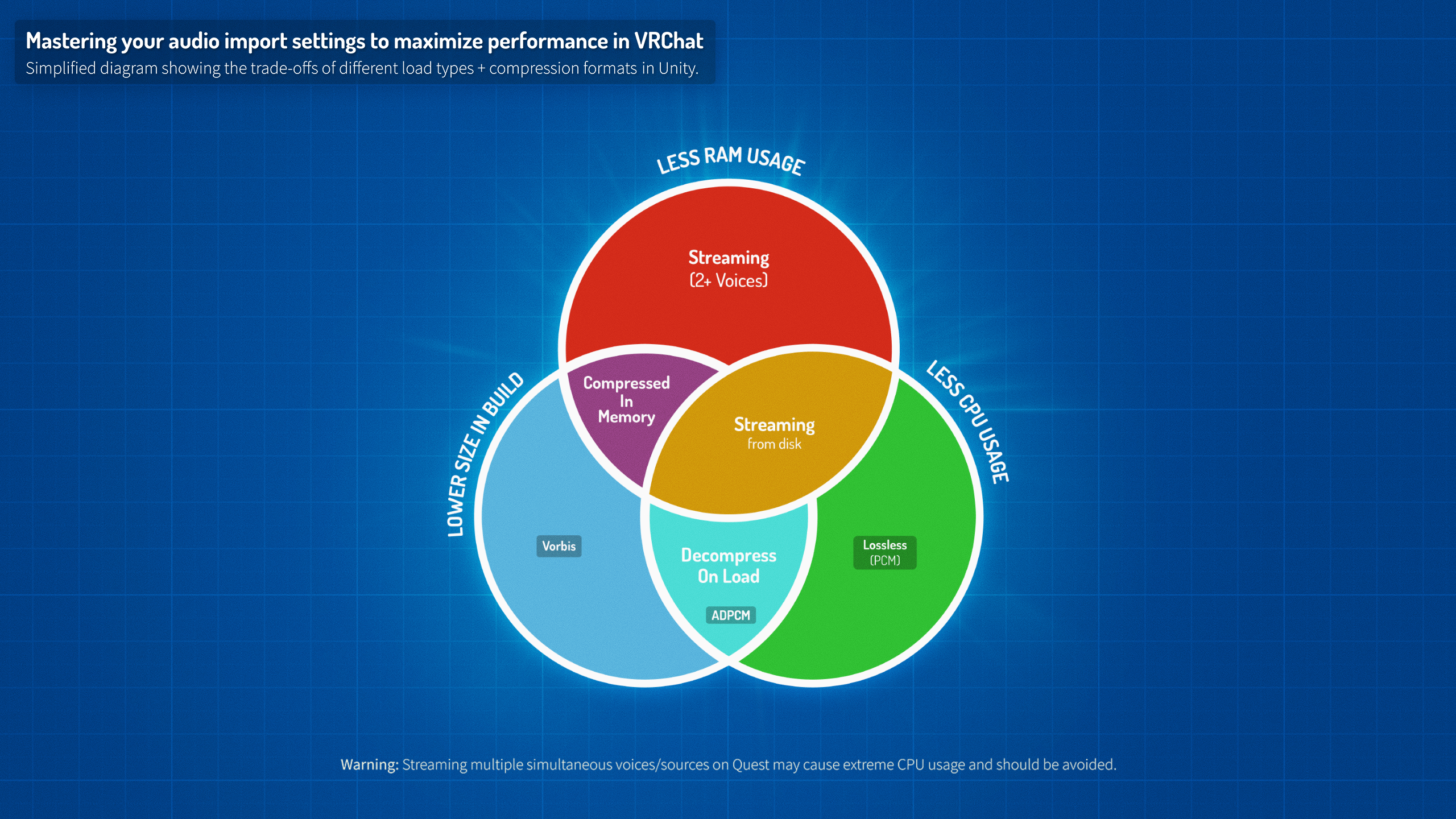
Audio nerd / engineer folks - if there's any inaccuracies let me know + I'll fix. I can't find the original reference diagram this was based off of where there was probably more technical info so I had to go off what I know/remember! Still doesn't account for Preload Audio Data and Load In Background which seems wrong so if anyone comes up with a clever way to add that into the graphic, lemme kno.
 late shuttle
How do i make mirrors distance based
west zinc
@torn crypt that is a great graphic. My only nitpick is it doesn't convey that choice of compression and load should also be informed by the length of the audio file.
west zinc
That may just require it’s own info graphic.
torn crypt
@west zinc That's vry true. I like to imagine that if someone is using this diagram that they could still figure out appropriate settings relative to their input but it's prob worth adding a reminder to keep length/size in mind.
Might need a separate diagram for Load In Background + Preload Audio Data bcs what they're set at can determine if you're getting frame drops, etc. when the clip first loads in (and that's where size/length can rlly play a big part too!). I have no clue how to visually show that info without it being wall of text-y, though. 🤔
 nocturne robin
What are layer settings for a mirror that only shows players
west zinc
Mirror reflection and players
nocturne robin
thanks
 sullen zenith
Hey so... this computing occlusion thing seems to be stuck here. Any suggestions on how i can fix this?
versed lichen
that's a lot of objects 
 native owl
Is there a way to have multiple Post Processing Profile and switch them through a UI, I've been trying to get something to work for a month and I still couldn't get anything to work
versed lichen
profiles or volumes ?
You can just enable volumes instead, or make a slider for intensity i believe ?
I know it's possible !
But not really optimization related
native owl
Yeah I posted in #world-development a month ago 2 or 3 times and didn't got a reply
Like I would want to slightly Tweak my PP profile through the UI while in the world, Because for Desktop User the Depth of Field is Too much but it's perfect for VR users, while for VR users the Screen space is the issue but Not for Desktop, and I would need a slider or a button to disable and enable those Feature in the world
versed lichen
@noble yarrow Did you do it in your world by any chance ?
 noble yarrow
yes, it can be done in several ways, the easiest to do is deactivating a postprocesing volume and activating another, you have to use postprocessing v2 for this
Although depth of field in vr is not recommended
noble yarrow
another way of doing it would be combining volumes like in this example, and with a button or using a prefab that detects if the user is in vr or in a desktop, activate or deactivate it
native owl
Oh yeah, I was using the wrong Post Processing, now it makes more sense, I'll just use the new one, and also the depth of field really wasn't an issue for VR users, the world has been public for a while and no one complained, yet
noble yarrow
If you need a tutorial for the postprocessing stack v2, here is the guide of silen = https://gitlab.com/s-ilent/SCSS/wikis/Other/Post-Processing

GitLab
A surface shader for Unity providing cel-shading. (Forward rendering only)
native owl
Thanks a lot I think I'll handle it alone now ❤
noble yarrow
You're welcome, if you have another doubt do not hesitate to ask!
winged sinew
dan.puzey == jazzyfunkygamergeek
This is the problem I was faced with when building The Signal From Tolva. The builds would take hours and it was the OC bake causing issues. I should pause to explain what I was doing in full. I value...
 lean folio
Anybody know a fix to a problem, The avatar pedestal doesn't work, Yes, the model is public. i don't know the cause
west zinc
Is this within a large collider?
 wind nest
So I'm creating a world. Everything in it doesn't move, so for optimization sake, I made everything static. However, now it is taking forever to finish the lighting jobs. Unity has been displaying "7/11 Light Transport | 18 jobs" forever now. I just want to publish the world. Any suggestions?
analog kraken
go to your lighting window and disable auto generate lightmaps and it will stop. If you have a lot of light sources then you should bake the lighting but its better to do it on your own terms and settings instead of having unity do it without your input
wind nest
okay but will it take a long time anyways when I go and publish?
analog kraken
no, with auto generate off it won't bake the lighting at all unless you manually go to the lighting window and bake it. The default lighting settings are also pretty crap so if you do need to bake later on you can just modify the settings and it won't take nearly as long
analog kraken
you'll still have lighting but it'll be in real time. If your map is only one directional light or no lighting at all then the performance impact is minimal (without shadows at least). If you other types of lights then you should bake it but change the settings first. Here's a good guide on that https://vrcat.club/threads/xiexes-lighting-tutorial-how-to-get-good-at-baked-lighting-101.2081/

VRCat: Community-Run VRChat Forums
Greetings! Over my course of playing VRChat I've noticed that most worlds, mainly the ones that have baked lighting, are done poorly, or in an...
wind nest
ok thank you, i only have one light source
red scaffold
Trying to update my avatar world, but my unity keeps crashing every time I click upload.
winged sinew
On pickup objects rigidbodies, Discrete or Continuous physics?
analog kraken
probably Discrete
lilac saddle
discrete, continous does heavier collision physics by checking for sweep collisions between dynamic rigidbodies (movements so fast that it collided between frames)
red scaffold
Figured it out. Just had to disable future proof publishing.
lilac saddle
epic gamers I come to you all with some questions.
I have a world right now using a single VRC_Sync video Player script with over 30 links... And from what I can read with the console logs ( right shift + ~ + 3 ) the Video panel take litteraly ages to load.
Is there anyways to split the loading into different part or anything ? ( Even if only the master can launch the video or anything. )
I'm pretty new to all of this but yeah ; apparently the panel is just never ready. :<
analog kraken
I don't think there's much you can do about that, the player needs to load every link that it was given. You could try taking out some of the URLs, or use a video player where players put in the URLs themselves
lilac saddle
I guess the world load the URLs of hidden video players aswell ?
Also I had another question ; Is it possible to keep the last frame when pausing a video ?
So the texture just don't go back to the original default texture.
https://niyah.eu/i/13755.png I guess ?
 winged sinew
Disable ambient occlusion
lilac saddle
@fierce yoke Yeah, either disable AO or make sure our surface writed to teh depthbuffer so the AO takes it into account - right now the AO is ignoring it and drawing shadows for stuff behind it.
I got a question for my Oculus Quest World. But noone is in that channel and i think it's valid on pc too. So here we go:
I want to play a mix tape in my world that would clearly break the 20MB limit for Quest Worlds. So i figure i (just) stream it from my Webspace for Cloud. Does anyone know if i can use my own custom scripts in my worlds? Would also be sweet to thus be able to change the mixtape based on season and holidays and such...
lilac saddle
hello someone can help me to put this in a world I have a hard time
coarse tree
@fierce yoke
others are having similar issues with amply occlusion
if this is amplify occlusion let me know i will ping you a link to follow the subject with the Dev
fierce yoke
Thanks everyone, it was the AO. I forgot I had it toggled on in my PP settings.
lean lodge
Yeah it doesn't work in this game
lilac saddle
@lilac saddle For iwaSyncVideo you need to have EventSystem in the Hierarchy. So drag and drop it in and also follow the directions on the screenshot.
lilac saddle
@lilac saddlethank you very much, it served me too much thanks
 winged pewter
how do i make an avatar pedestal reserved?(only a specific person can use it).I've seen them in some worlds but don't know how to do it
 strange prism
If the avatar is private, then only the owner an use the pedestal. @winged pewter
 upbeat reef
hey !
 viral merlin
Hey I'm having issues with water, it causes immense fps drop in my world was wondering if you guys had any tips.
Feel free to dm me I have to head back to work.
rocky osprey
@viral merlin what water shader are you using
coarse tree
in most cases its related to the way the water shader does its reflections
 gritty cobalt

Is there any way to make the vrcsyncplayer not pre-load every links put in it ?
Would ; for exemple, make like 5 players with 4 of them disabled by default be better ? Then enabling just the one needed for the first raw of buttons for exemple.
It's kind of stupid that it's loading every URLs tho ; it's even lagging my unity when I have to much links in the component :<
analog kraken
nah that won't work, as long as it's in the scene the URL is being loaded (I'm pretty sure at least)
gritty cobalt
Even if disabled ? that's a big fat F.
Litteraly what i get the moment i get into the world

Been 30min, still waiting for it to be ready or something. Maybe I should have a trigger to activate it instead of having it on 24/7
analog kraken
how many URLs do you have? Do you really need that many?
gritty cobalt
Yes I do ; They're not youtube videos either.
Tho apparently, if the vrcsyncplayer is off ; it's not loading them so i'll just split the movies into different players and check if it fix the long ass 150 years loading 
and I have around 50 links ~
gritty cobalt
Well ; time to split the link into differents players, seem to be working that way.
steep temple
As long as there can only be 1 player on at a time, it should be fine.
gritty cobalt
Yush, that's what i'm planning on.
gonna split the first UI into sections ; Surely by years / period I guess
gritty cobalt
Nearly sure the fact that having a lot of links in the component making my unity lag is related with the fact that the game take years to load ; I did put a lot of video players just to try it out and every single one of them load perfectly and instantly with like 4/5 links instead of the whole 50 links i had before
¯_(ツ)_/¯
 manic elm
I ported a world from the Source engine to Unity, and the world has a number of buildings that are made of multiple box meshes:
if the assumption is that players will be jumping around and climbing these buildings, is it more efficient to keep them as separate meshes so box colliders can be used, or combine them in blender and use a convex mesh collider?
lilac saddle
box colliders are always cheaper, but you could merge the mesh and place multiple box colliders yourself in the right places
to have the best of both worlds
also unless you really need the 'ridges' to be in the collider shape, using one stretched box collider would be even cheaper
manic elm
you're not wrong, just depends on how optimized I want to go with it
lilac saddle
yeah, primitive colliders and compound colliders are the least work for unity
from high physics load to low physics load: Mesh > Box > Capsule > Sphere
although the last three are all massively cheaper than even low poly mesh colliders
so even having 8 box colliders added to a mesh is cheaper than a mesh of 8 boxes with a mesh collider component on it
winged sinew
If they are all using the same material, mark them as Static and Unity should merge them for you
👀
 wind jacinth
I had a friend that was insistent that mesh colliders weren't a problem on static objects like basic terrain. and that I should only worry if it's a rigid body.
lean lodge
That isn't how it works lol
Although mesh colliders are probably a lot worse when not on a static object
To the point where two non-static non-convex mesh colliders can't even collide, I think
torn crypt
I'm using the standard shader's secondary map to add some detail normals on an object + for some reason the detail mask isn't actually masking in Unity. My mask tex is a grayscale B/W - should I be packing my mask into the alpha channel instead [similar to how Metallic works]?
Derp, nevermind - figured it out. For anyone who runs into this in the future: Detail masks require that the mask be packed into the alpha channel...but you can just open your B/W mask texture's import settings and change your 'Alpha Source' to "From Gray Scale" + it will automagically do that for you.
steep temple
If you hover over the text for the map it'll tell you that, roughly.
wind jacinth
I ended up replacing all my colliders. I thought it was going to be a pain, but only took about 30 minutes even including some really weird shapes
 small charm
Hey guys I'm new to making worlds and I just uploaded it privately, I don't have any of my friends online and was wondering if someone would want to do me a solid and have a look at it in game. My gut says it needs to be heavily optimized.
 timber apex
Would it be bad on performance to have a bunch of particle systems, if each particle system is set to never have more than one particle at once?
west zinc
would they be mesh particles or have collision, if no, than you should be fine.
winged sinew
@timber apex What are you trying to do?
Note that Unity's particles are, in their most basic form, pretty fast. The expensive part is when you have big particles, or particles using a complex shader, or LOTS of complex particles.
timber apex
Im using default particles to simulate blinking lights. I have them set to emit a particle every second, and have each one last half a second.
lilac saddle
hello, I wanted to know what I could do to up my worlds framerate because in certain area's Im getting lower that 90fps, also sometimes in the area's that dip lower than 90 fps it dips to about 30 then sometimes goes back to 90
The only things that I have in those area's with the framedrops are furniture and lighting
versed lichen
Non baked lighting is a big performance drop
lilac saddle
are there any tutorials on baked lighting?
coarse tree
VRCat: Community-Run VRChat Forums
Greetings! Over my course of playing VRChat I've noticed that most worlds, mainly the ones that have baked lighting, are done poorly, or in an...
 cosmic carbon
Any tutorials on bloom or post processing?
 slate lion
The above tutorial goes into that stuff near the end
versed lichen
@cosmic carbon https://gitlab.com/s-ilent/SCSS/wikis/Other/Post-Processing
GitLab
A surface shader for Unity providing cel-shading. (Forward rendering only)
coarse tree
did you bake it
rocky osprey
What's the issue?
coarse tree
50% of the questions have ADD and probably posted the same question in 12 different groups ..
lilac saddle
It looks like the shader is unlit, are you using standard shader?
 narrow bane
I was wondering. What do most of you do for colliders on stairs? An angled box collider, a box collider for each step, or a mesh collider?
slate lion
Pretty sure, optimization wise, it would be angled box collider > mesh collider > box collider for each step. I would recommend the angled ramp so that when walking up the stairs it isn't so disjointed
lilac saddle
Switch the second and third ones around scion
Unless the mesh collider is marked as Convex
If you want one of the easier and a still relatively optimized staircase without having to do too much tweaking with a box collider, a convex mesh collider will complete the task for you. It’s simply done by putting the mesh collider component and marking it as convex
lilac saddle
Depends on the staircase tbh
Spiral stair cases it wouldn’t work well, but straight ones it should be fine
 deft goblet
It would be nice if cats had an option to simply atlas an avatar, WITHOUT combining everything into a single material.
Most of the time, I want to do that MANUALLY, I just want everything to reference one big atlas, but stay as separate materials and let me decide which locations on the model to make the same material slot
lilac saddle
@deft goblet theres nothing stopping you making more materials again after you atlas the model
deft goblet
Yes but then i have to set them all up over again
time consuming
i just wanna atlas and not have it be destructive
lilac saddle
I mean, if the mesh UVs are already atlased, it just becomes a task of breaking the model into individual parts, selecting the things you want to be one part of the model (maybe the skin so face, body, hands, feet, legs and combine them in one and assign them a separate material then repeat for the clothing and the hair and thats it. It'd literally take 5 minutes to do so...
Its also very easy to do considering a handy tool blender has called... vertex groups which are essentially ways for you to select certain vertices on a single mesh and group them for later use.
 icy shuttle
@deft goblet You are in luck then, because cats will have that option very soon 😁
lilac saddle
so cats will have a world domination button soon, right? @icy shuttle
icy shuttle
@lilac saddle It already started, just look at the CATS trailer. You can't stop us anymore
https://static.tvtropes.org/pmwiki/pub/images/burns_transparent.png
 deft goblet
Excellent
 split shell
question about the VRC_SpatialAudioSource and VRC_PlayerAudioOverride
I tried using it but it didn't work on the world i am working on
is there something I need to set up?
or something to make it work?
steep temple
Wrong channel but did you read the docs?
 random cliff
After the update, the sound broke. When you come close, it intensifies, and when you move away it decreases. How to make VRC_player Audio Override so that the sound of the voice is the same at a certain distance. For example, 40 meters.
west zinc
Check your worlds spatialization settings on the new spatialization component, you can disable that components spatialization settings if you like
wind jacinth
read the blog post in the announcement, it has a pretty detailed description of each property. there's an example scene in the sdk that shows off how to set it up
I think you can bump the "near" value up to 40 under the advanced settings and that will do what you want.
torn crypt
You could argue the sound ~was~ broke, but is no longer 🤔 The docs are good! They did a great job on them for this update. Trust the docs, read the docs, love the docs.
 golden coral
probably a silly question: I was messing around with stuff on my world, and I set all the lights to baked, and uploaded it that way. the result is this. the lights appear all blown out and blinding. Why is that?
rocky osprey
Are you using and post processing
gritty cobalt
post processing bloom ?
golden coral
I am
is that whats doing it?
because when theya re set to mixed or realtime, they look fine
 lavish mason
anyone else having issues with GFX.WaitForPresent taking up this much render time?
torn crypt
@lavish mason Shot in the dark, but try going to Edit > Project Settings > Quality, and change the V Sync Count param to "Don't Sync" if it's not set to that.
lilac saddle
that gets overwritten ingame though I think, but it turns vsync off in unity at least
torn crypt
yeah, I figure it's probably not even an issue in-game if that's what causing it - but I could understand the anxiety of seeing something just eating up 30ms in the profiler 🙃
lilac saddle
that's facts, seeing the UI eat up all that precious precious gpu time is a shiver down my spine too 😄
lavish mason
@torn crypt well that may have stopped it happening in the editor but the frame rate differential between editor and in game is absolutely horrible , like in editor its anywhere from 106fps to 130fps outside with the trees in view but in game its anywhere from 38 to 15
though some people with less powerful setups than others get better fps. eg a 1060 user apparently was getting 70 to 80 while a 1080 user was getting 30 to 45
i genuinely have no idea what's going on to be honest
torn crypt
How many draw calls / batches does it say in stats? You might be checking framerates in editor, but Unity's game window may be at a way lower resolution with a way narrower frustrum bcs of the aspect ratio than what you're seeing at runtime
lavish mason
at most there's about 1560 to 1570 from a birds eye view of the main area
with an fov of 75
and resolution of 2160x1440
fps is about 147 to 160
torn crypt
That might be your issue. Oculus recommends ~500-1000 draw calls, but we have to account for the variable of (poorly-optimized) avatars so it might be safe to say 250-500.
I'd check draw calls by using a simple FPS controller or just moving the camera around the playable area (because users will usually not get the bird's eye view I assume). I'd do it in Play Mode too if you're not, just to make sure you're seeing it post-batching
lavish mason
oh yeah those are post batched calls in play mode. another thing I'm noticing too, disabling vsync didn't fix GFX.WaitForPresent issue, it seems to get worse the closer the camera is to the trees.
which seems to line up with the issue I've been having as of late with cutout causing unreasonable amounts of lag
oh dear
torn crypt
You have any external stuff outside of Unity that might be contributing to it? You got all your occlusion culling setup? You might just be drawing too much stuff!
lavish mason
i have occlusion setup yes and i don't have anything running in the background aside from task manager
and snipping tool but that shouldn't do much. also this position is particularly unusual, 596 draw calls/batches and I'm only getting about 90 fps compared to other areas where i can get over 120 fps with over 1000 draw calls/batches
id say its the shader but its literally just standard cutout
torn crypt
Hmm, something is off there. You seem to be in reasonable perf-budget! I'm confused as to how you have so many shadow casters with ~600 draw calls. Mixed lighting? The only thing I could think is maybe you're super CPU bound for some reason?
torn crypt
So WaitForPresent is basically when your main is ready to move onto the next frame, but your render thread is still waiting on the GPU to actually display the current frame. It's super vague without more context. It could be telling you that you're CPU-bound or GPU-bound depending on where the time is being spent
VSync is usually the EZ fix common culprit (it's how I fixed this when I had the same issue!), but in your case....something else is up
I'm leaning toward you possibly being CPU-bound, but I have no clue why. I'd check your timeline in the profiler to see the relationship between WaitForPresent and Camera.Render
lavish mason
at least from what i can tell there isn't one, Camera. Render seems to be relatively smooth while GFX.WaitForPresent seems to drop periodically
torn crypt
Hmm. Another shot in the dark, do you have audio implemented in your world rn?
lavish mason
yes
torn crypt
What are the audio clip import settings on those
lavish mason
all of them are default settings
torn crypt
Can you switch all of those to PCM and Decompress On Load + then check perf? (just to debug - you wouldn't wanna do this for your actual build)
winged sinew
@golden coral Bakery or Enlighten? There might be light leaking from the inside out. Or the lightmap UVs on the meshes don't have a high enough padding amount set
lavish mason
@torn crypt virtually no change in performance
torn crypt
Damn, I was hoping that might be a fringe fix. There was someone who had a perf issue recently, and the cause ended up being their audio
I think the only thing you'll be able to do here unless someone else has another suggestion is to granularly go through the profiler, and the frame debugger. If you ~still~ can't find the issue, you might have to break out the big guns with RenderDoc, haha
lavish mason
ah thanks anyway, though it seems to be something to do with alpha test as far as i can tell, but the real question is why is alpha test taking so long to render
as i understand that should be relatively easy to render (at least for pc GPUs)
trees set to opaque
torn crypt
Maybe you have some shader that's doing something intensive like tessellation? It'd cost but wouldn't show up in your stats. When I originally had this issue, I fell down the rabbit hole of forums for answers; I saw people saying things like Shadowplay and G-Sync can cause weird occurrences when you're profiling too
Did that fix it relative to when you were using cutout?
lavish mason
fps in that spot was around 90 with cutout
standard shader btw no extream fx going on, the trees did have a vertex displacement shader on them though but that did nothing to the render times in comparison to standard cutout
if this is a unity or driver bug im gona kick myself
torn crypt
So possibly this is just a straight issue of tons of transparent objects having a lot of overdraw? it's peculiar though because I feel like I've seen the same density of cut-out leaves in VRChat without this issue.
Well - you did say that other players went in the world and ranged in perf, right?
lavish mason
yeah some were fine and getting around 70 while me and others were getting around 30
also an interesting side note, people with 30 fps couldn't see the sun but people with 70 could (unity's procedural skybox shader)
torn crypt
It's weird because within that range at least on the GPU side, you really should be taking less than 11ms. I think you switching from cutout to opaque might just be diffusely decreasing the GPU cost, but the actual culprit might lay elsewhere with memory or CPU
lavish mason
true, though i do remember awhile back before i reinstalled windows i was having some weird fps isues
again cutout being the worst offender, though not the only.
torn crypt
I saw someone mention the Windows Game Bar shit messing with Unity before, so possibly - but it shouldn't (really) affect run-time performance. Sometimes when I run into issues like this I just kind of rebake occlusion culling and republish it to see if it fixes itself, lmao. Sometimes it works, and I don't ask questions (but most likely you have some heavy profiling ahead of you)
lavish mason
yeah i'll hopefully find a fix soon, thanks for your help though
lilac saddle
maybe the difference for people is their quality settings (desktop/vr low/high) .. it does change the pipeline and LOD a little for instance
there's some older quality settings pinned in #development-advanced, right at the top of the pins
torn crypt
^^ great point - considering the amount of shadow casting from mixed lights there + how those change between the settings! It might not solve the WaitForPresent in editor, but it might be the root of the fickle perf issue
lavish mason
@lilac saddle ah that would seem to be part of it, i went from around 30fps (vr high) to around 70fps (desktop low)
lavish mason
damn this is going to be difficult to optimize
torn crypt
Are you using LODs on the trees? Implementing 'em might help, could cull a lot of the distant ones out to prevent some overdraw. Not sure how LODs affect shadow casters, though
lavish mason
unfortunately they never came with lods, Reach may have some sort of Realtime solution like unreal
torn crypt
Dang. I'd suggest maybe some form of free AutoLOD script from github, but I think when you're dealing with cards for trees - it'd probably just destroy it rather than simplify it. Perhaps you can just set up LOD Groups just to go from LOD0 to Culled after a certain range
lavish mason
it'd look a bit weird i guess that's my only option for now
torn crypt
Yeah, you'd probably get pop-ins and pop-outs. To be fair, I played Battlefield V recently and saw everything popping in and out so if it's good enough for EA! ¯_(ツ)_/¯ hahaha
lavish mason
heh yeah
winged sinew
@lavish mason All the same tree model?
Are they static batched? Are they instanced? Are there light probes or are they light mapped?
lavish mason
@winged sinew technically the whole map is one model but the trees are separate meshes with a few different types,
everything is static batched and lightmapped
winged sinew
Hmmmm
That might be a problem
Or rather, that is an issue I ran into with a map I was working on but never released
IIRC alpha test can't do the same optimisations that opaque can and with static batching all the trees are rendered as one giant mesh that can't be culled or clipped properly (I think?) so it becomes extremely expensive to render
I need to know what you mean by "one model" though
lavish mason
the whole map is a single .fbx file (minus some of the skybox)
winged sinew
Which matches your scenario closer:
map.fbx, which expands into a long hierarchy containing Tree, Tree.001, Tree.002... of individual trees
map.fbx, which expands into a long hierarchy of dirt, grass, wood, wood 2, wood 5, leaves, leaves 3, leaves 6 containing a bunch of tree parts in each
map.fbx, which contains one mesh, Map, with 40 materials
And: if you select a tree, is the transform position at the origin (0,0,0)
lavish mason
oh right, so its basically a missive collection of objects in the hierarchy, everything from terrain to cloud plains. also the trees are the leaves plus the trunk in one mesh
winged sinew
Hmmmm...
Okay, that's better than my awful scenario
What is the performance like if you disable all the trees?
Can you show me an individual tree in the inspector?
lavish mason
so in editor play mode from this position i get 140 to 150 fps
and with them disabled i get around about 176 to 178
winged sinew
Hmmmm
What's concerning there is that you have lots of draw calls saved in static batching.
A few months ago VRC fixed a bug that was breaking static batching entirely, but there are also things that could stop it from working in world too
Are there any animated materials in the world?
Have you placed light probes in the map?
lavish mason
i have animated water (your shader btw, verry good), a scrolling waterfall shader and a double-sided vertex displacement shader on the leaves
and yes i have light probes setup just abut everywhere
lavish mason
yes and its only the directonal light, everything else is baked mesh emission
the buildings in the background have casting and receiving off though
lavish mason
yes, inside the bases and looking over the cliff you'll get anywhere from 80 to 90 (had in index user say they were getting 105) but the moment you look into the trees you get anywere from 30 to 40
also here's one of the trees in the inspector
winged sinew
You're in play mode?
lavish mason
yes
lilac saddle
hello
lavish mason
also if you wanted to know camara.render is taking about 4.5ms per frame(i think its per frame)
winged sinew
How many reflection probes do you have?
lavish mason
9 right now
lavish mason
i haven't, but what should i be looking for?
winged sinew
Don't know, just to make sure there isn't any errors there...
In the profiler, can you go into any more detail than OnRender?
lavish mason
well i don't quite know other than its very consistent
also i do mention in the title and the description that it has problems, it is public right now if you wanted to go in there and get a better idea of the performance isues
its name is ridgeline
winged sinew
Okay, I'll take a look
torn crypt
@lavish mason Jumped into your world after I profiled mine today to see what might be going on. Vry pretty world btw! It looks like there's a major discrepancy between what Unity is saying and what's happening at runtime. You've got 2000+ drawcalls happening at the spawn
I think you might just be drawing too much per frame. Peep the video + watch the draw calls as I turn toward the trees. Maybe rethink mixed lighting? Occlusion culling doesn't seem to be working too well across the map, so you might need to manually cull those distant trees with an LOD Group! https://streamable.com/ws7my
 lavish mason
interesting, its like batching isn't doing anything at all
torn crypt
I thought the same thing, hopped into mine to see if that was the case but it (seems) to be alright in mine if not slightly elevated. I'm gonna double check tomorrow just to make sure VRC isn't inadvertently breaking batching or something.
I think there is something weird going on. I captured a trace just to get more info...but there were idles in the driver queue for the GPU (so seemingly not fully utilized?) + it didn't seem necessarily CPU-bound either. Voodoo shit!
Actually, it looks like the idles overlap with the capture software running a process so probably just not a transparent capture. Disregard that last part - drawcalls are still an issue tho, lmao.
lavish mason
ah no worries, but yeah there's defiantly something up with the drawcalls because from roughly the same position in editor im getting about 1390 with 2890 saved by batching
torn crypt
If you wanna check from near the edge of the spawn bay to compare, this is a screen I grabbed
winged sinew
I would say there's no actual basis for "you're doing too much!" if it performs fine in play mode
winged sinew
You may want to file a report on Canny with the RenderDoc data provided, a link to the world and screenshots from the editor
torn crypt
That's vry true, good point. because only in VRChat is it doing too much per frame - I forgot that it's generally running well within budget in editor, derp. I'm not sure what the solution is to the discrepancy without working around it.
You wanna do that Heavynator? I used Intel GPA, I dunno if they'd prefer RenderDoc
winged sinew
Oh, I thought it was RenderDoc
The solution in my eyes is to ask someone on the team to look at it if there's so many extra calls in desktop mode
Which means... writing a Canny!
torn crypt
Same shit as RenderDoc sorta kinda, not open-source afaik (but prettier 🌞 )
lavish mason
@torn crypt yeah, i have renderdoc though i could never figure out how to use it so i might try the intel tool and see what i can put together. and thanks for all your insight btw.
steep temple
FYI RenderDoc and other things don't show batching.
lavish mason
ah intelGPA it is then
torn crypt
@steep temple As in there's a bias in what it's displaying when it shows draw calls (bcs Unity uses batches which doesn't necessarily = draw calls), or meaning that you can't track down if something is batching?
torn crypt
I mean it does sort of beg a good question of what the actual relationship or difference between a batch and a drawcall is, at least! haha
steep temple
I see about 2500 'draw calls' from spawn
steep temple
Also like 7 grab passes for some reason
lavish mason
the grab passes may be the water
winged sinew
7 grab passes? How much water is there?
lavish mason
some puddles a river and part of the ocean
coarse tree
so the puddles do they have something special like ripples or rain drops
lavish mason
there using Silents water shader just some basic ripples with distortion
coarse tree
oh so your using the silant water for puddles
lavish mason
yes, as well as every other body of water except for the distant ocean.
coarse tree
for the puddles you may change the shader to one that does not use grabpass
lavish mason
righto, i might have to make that myself, because the depth fade on silents shader is really nice
coarse tree
well the silant shader never named the grabpass 
@lavish mason check your DM i sent you a puddle shader with no grabpass
steep temple
We also need a common queue!
coarse tree
at the moment i never named my grabpass also but i don't think many people are using my shader
red scaffold
So I've seen a few avatar worlds that have exclusive avatars for a certain user.
Does anybody know how to replicate that? If so, please let me know~
slate lion
If you put a private avatar on a pedestal it is unusable except for the owner. If they put it on the pedestal like that then they are probably testing it before making it public
 sturdy stratus
does turning fog on at the lighting tab help at all with stopping rendering people that are literally 5x the length of the box away?
winged sinew
No.
torn crypt
You can set up a reference camera (if you haven't already) and use the far clipping plane to prevent rendering after a set distance (relative to the camera). The only factor the fog plays is it might help you bring that far plane closer without seeing any visible cut-off!
sturdy stratus
using LOD's for now but ill give that a go at some point thank you!
 steep parrot
Does anyone know of any world optimization guides besides the official VRC documentation and the guide made by Jetdog8808 (https://www.dropbox.com/sh/hmln4vtgbvnm8mp/AABvlLb_Mf80HZY6SD3WbUFTa?dl=0) ? I'm looking for more resources 😃

lesser known tips are good too
versed lichen
What are you looking for specifically ?
steep parrot
@versed lichen Just something like a list of techniques for reducing file size and lag 😃
versed lichen
You're better off showing your world here and asking specific questions, there is a lot of tiny steps you can take, but possible that a majority wouldn't do anything for you
torn crypt
If you're looking for general optimization tips, you could look up some info on how to optimize games! There's plenty of bespoke guides/vids revolving around Unity. The methods/concepts we use for optimization are generally pretty standard within game dev. We just don't have to worry about code optimization + have to make extra considerations for download size
 viral marsh
Yup! Most things you find about optimizing stuff in Unity in general applies!
Especially if they are talking about mobile (phone games). Those need lots of optimizing
versed lichen
Just came across a good tip https://twitter.com/FreyaHolmer/status/799602767081848832


How to fix Z-fighting #unitytips https://t.co/JXS47UDrDO
Retweets
8864
Likes
17704
 Twitter
torn crypt
Twitter
torn crypt
business up front, party in back
deft goblet
Ah yes the shove it under the rug method
 stuck shore
Is there any way I can toggle post processing effects with a button press in a world?
analog kraken
Yes, if you're using v2 you can just disable the post processing volume
stuck shore
With a vrc_trigger?
analog kraken
Yeah, just use SetGameObjective False on the object itself or SetComponentActive False on the Volume component
stuck shore
This is what I have set up on the button but the post processing effects don't turn off when I interact with the button
analog kraken
I think you're using post processing v1 instead of v2, which means you can't toggle it at runtime. You'll have to use v2
analog kraken

GitHub
Post Processing Stack. Contribute to Unity-Technologies/PostProcessing development by creating an account on GitHub.
the setup is a bit different so I'd suggest reading through this guide https://gitlab.com/s-ilent/SCSS/wikis/Other/Post-Processing
GitLab
A surface shader for Unity providing cel-shading. (Forward rendering only)
stuck shore
Got it, thanks
stuck shore
So I created an empty game object and put the Post-Processing Volume on it but what do I do with the object now?
analog kraken
create the post processing profile for it. Also make sure you put the post processing layer on the camera beforehand, specified a layer and set the post processing volume object to that layer
stuck shore
Would you mind getting in a quick call with me? I feel like I followed all the instructions perfectly and it's not working
analog kraken
I can't at the moment but try reviewing everything with this video tutorial? https://www.youtube.com/watch?v=W9m4UwNLTxM

Join the GameDevNetwork Discord server: https://discord.gg/gdn Host: LiamSorta Learn how to use the beta release of Unity 2017's Post Processing v2 stack. Ma...
stuck shore
Alright, I'll check it out thanks
winged sinew
@stuck shore Make sure you're only disabling non essential effects like bloom, don't disable tonemapping or I'll be very cross
 grim ivy
Speaking of bloom, I implemented my own bloom shader in OpenGL and noticed that the gaussian blur pass hits performance quite hard. Does this apply to Unity or do they have some other mehod?
Edit: Nevermind, I just disabled all post processing in my world because it isn't really making a big difference and I want to hit that 90.
winged sinew
@grim ivy The post-processing stack does the blur with a compute shader and some other optimisations, so it's quite cheap. Use the post-process stack instead of your own effects unless they're very specific/custom, as it has access to optimisations (like doing things in seperate render targets) that we don't, and you'll be fine.
(It also depends on how simple your implementation was, there are a LOT of tricks for doing gaussian blur quickly and the naive method is ultra slow in comparison)
 lethal leaf
This has probably been asked somewhere, but im at a loss. I have a world with multiple triggers, sound effects, lights, furniture, and a landscape. Upon baking and uploading, the world was at 133mb. In an attempt to drop that down, I erased all the terrain and meshes I added with it, I deleted furniture, etc until it was as barren as I could have. Upon test again, it only dropped to 130... So i erased the lightmaps. Baked at a low res and checked again. Now its 137mb... Am i missing something here?
steep temple
@lethal leaf Try clearing your dynamic materials in the scene descriptor
lethal leaf
Oh, that just shaved off 35mb haha Mind explaining why those pile up or what they are??
Thank you btw
wind jacinth
they're fixing that in the next patch I think, but it's been like that forever, it just builds up all the materials you might use over time. set the size to 0 and it will regenerate the list when you build.
west zinc
@blissful crane read the above post
 blissful crane
i just goes back to what it was when i build (clearing dynamic materials)
 snow jetty
does anyone know a good Video player with URL input in game?
lilac saddle
There is some video players on VRC Prefabs list https://tinyurl.com/vrcprefabs @snow jetty
red scaffold
Is there a way to have a colorblind mode for a world? I wanna implement something like that for one of my worlds.
torn crypt
@red scaffold Good idea! I'm not 100% familiar with all the intricacies of color blindness, but if it helps: within the color grading section of the Post-Processing stack - there's a curve called Hue vs Hue. This curve basically lets you shift colors on a per-color basis (so you can make blues actually look red, etc.) You could make these on profiles so they're switchable at runtime. There are probably other gameplay things to consider too (like using icons vs colors when possible, etc.)
red scaffold
That could work, but I need the option to toggle that.
So when a player clicks on a button for Protanope, the colors change to that.
For example.
torn crypt
@red scaffold Yeah! You can toggle between post-processing volumes using UI buttons or triggers (as long as you're using post-processing stack v2). 🌞
GitHub
Post Processing Stack. Contribute to Unity-Technologies/PostProcessing development by creating an account on GitHub.
red scaffold
Hmm...
I'm a bit of a noob when it comes to scripts I don't use in unity lol
I'll probably have to find some sort of tutorial...
torn crypt
https://gitlab.com/s-ilent/SCSS/wikis/Other/Post-Processing This might be a better starting point as it was written for VRChat use cases! @red scaffold
GitLab
A surface shader for Unity providing cel-shading. (Forward rendering only)
torn crypt
As in using Unity's UI system to toggle between post-processing profiles?
 oak sage
how can i get the same video player on multiple screens like the hang out house?
 mossy coral
Set video player to render to a render texture, use same render texture / material for each video player
oak sage
Thankiiiii
barren gyro
want a quick performance bump on all your worlds?
stop using Shadowmask for mixed/realtime lights
baked indirect -
It provides the same visual effect as Realtime Lighting, It provides real-time shadows for all combinations of static and dynamic GameObjects, It provides indirect lighting. But it's baked
it compiles the shadows from the baked lightmask
annnnnd it's super great performance
you can also use subtractive, which will provide even less resource intensive lighting. Shadowmask will fallback on full on realtime when it has more than 4 things to occlude from which I suspect is why it ends up using more than baked indirect with lots of players, which gets information from light probes too. It's contrary to the unity documentation but vrchat is unique with all it's players in a scene
 near juniper
Also to add on to this, look into culling mask for realtime lights as well.
Just found out about those and how useful they are. So much information out there that I never knew.
So if you are doing weird shader stuff that needs the depth from the directional light you can make use of that culling layer.
 foggy root
Is there any information on Shader optimization? I think these glowing shaders are killing my FPS
 willow hinge
U would have to mess with the shader code, or use a more optimized shader @foggy root
foggy root
ok cool I'll search for some more optimized glow shaders then lol
coarse jay
@foggy root to optimize shader - do one pass, optimize instructions by checking compiled code and searching for : ret , dont use keywords (maybe 🤔)
winged sinew
Glowing how?
foggy root
@winged sinew it's the MK Glow shaders
 whole pumice
Hello, for my new world i want to use a world setting board, does anyone know how to toggle the Post-processing?
just simply toggle the camera on/off or use "SetComponentActive" on the camera's post processing doesn't seem to work
I'm kinda a noob in this area 😅
Never mind, a bit of scrolling up here answered my question 😂 🤦
foggy root
@whole pumice I'm a "noob" too, don't be so hard on yourself lol honest mistake
foggy root
Anybody optimizing their world be sure to read Jetdog's releases on World Optimization, it's really good. Especially the lighting part. That's a huge factor in performance.
I went from 43 FPS with no Post Processing to over 80 FPS WITH post processing by baking meshes and adjusting the lighting settings
 buoyant marsh
I remember seeing something a while back about unused prebabs and world sizes, does anyone know what I'm talking about and can explain it fully?
strange prism
Clear your dynamic materials list in the scene descriptor. ?
winged sinew
@whole pumice Make sure you're only disabling the bloom and other settings, not the tone mapping
 hazy hawk
Is there any way to increase the draw distance in a world?
analog kraken
increase the Far Clip on your reference camera
http://vrchat.wikidot.com/worlds:guides:render-distance
 tiny star
Should I try to have ecerything in one fbx with multiple mesh and armature or separeted fbx. And for the collider compknent Is there a way to rename or mark them because kind if hard to find the right ont in a object/room with complicate topo since its multiple object merged
winged sinew
Seperated.
 hasty merlin
Would having most of the map in one fbx file cause performance issues? I have a fairly huge city district that had to be assembled in one file at the start, but I suppose it would be possible to split it up now that its all together.
rocky osprey
Depending on the size yeah it can be bad for perf
Especially with colission mesh
Separating is better for occlusion too
hasty merlin
That might be why I'm having so many issues with occlusion then
Its pretty huge and made up of a ton of meshes
 plush crest
It does not matter if its one fbx or more, it matters if objects themselves are merged or not (as you can have multiple meshes/objects in single fbx file)
 faint holly
What is the best was for putting materials into a world through blender or unity?
versed lichen
That's a very confusing question, what are you trying to do ?
coarse tree
@faint holly
its dependent on if your going to use a seamless texture or something special
once its in Unity you don't have control over UV direction and UV mapping so if option its best to get it aligned in blender and do the final shader work in Unity
faint holly
Ok thank you very much I haven’t done any texturing yet but only modelling.. I feel like that would be the easiest option yea and sorry I don’t know much about it
 real niche
Y'all how long is baking lights supposed to take? Mine was going for over a day when it ran out of memory and stopped. :/
Is there anyway to make it easier on my computer? I'm making my first world so I'm probably doing it wrong 😖
I was using the light settings here: https://vrchat.fandom.com/wiki/Lighting_Settings

VRChat Wikia
Unity only allows for certain environment lighting changes while running a scene, which is the reason some scenes using the default lighting settings have pitch black shadows and non reflective...
analog kraken
yeah turn down the baked resolution. For test bakes I usually use 10-20, 40-60 is more like a final bake
foggy root
@real niche make sure realtime lighting isn't on, that makes it take forever. Lightmap resolution can be set to 10 too, and make sure Lightmap size is 2048. That sped up my light bake by hourssss. Also check your light sources too
These are my current settings
hazy hawk
Does anyone know of a way to not render terrain grass in a mirror?
willow hinge
I think terrain grass is part of the layer the terrain is so u would have to not render the terrain at all I think, may be wrong tho @hazy hawk
hazy hawk
Thats what I thought, but conveniently all my grass is on a completely different terrain than the one you walk on. Problem is, when I set that up to a specific layer and turn it off in the mirror settings, it still shows up in game, although I can see it working correctly in Unity
willow hinge
Not sure then
tiny star
Change the layer to something you desactivate on your mirror @hazy hawk
willow hinge
That's what they tried to do @tiny star
hazy hawk
^
real niche
@foggy root Thanks, will try that!
 analog ether
I'd like to dip into world creation. Is there a comprehensive list of tutorials and best practices?
rocky osprey
Rule 1: dont lag
analog ether
Rule2: do not add mirrors
rocky osprey

VRCat: Community-Run VRChat Forums
This is still a work in progress but I'm working on a tutorial for world optimization. I'm be looking for feedback on things to add or edit. I'll be...
When in doubt, check the pins
 pallid gale
if you must have mirrors have them only turn on when you're right next to them and the ability to turn them off
rocky osprey
Bonus points for no mirrors
foggy root
people freak out if there are no mirrors lol
red scaffold
Is there a way to trigger a world spawnpoint to move somewhere else?
I have a few ideas on how to get something like that to work, but I just wanna see if anybody else here that's smarter than me could tell me how.
Which is probably everyone here.
willow hinge
yeah think so with an animation state? @red scaffold
red scaffold
@willow hinge I'm gonna try setting a entertrigger when the player respawns.
Like if a player clicks on a ball, it teleports him to a room, but also enables a trigger where he spawns. If the player touches the trigger (Aka, respawn), he'll touch the trigger and be teleported back to the room again.
 gray nymph
anybody else having problems with the post processing stack v2? seems broken since the update :o
analog kraken
I've heard a few people have been having trouble with it. Overall it should still be working but it seems like it doesn't for a select few
willow hinge
yeah i noticed it worked in vr but not desktop for me lol
 gritty cobalt
thanks gamer
wind jacinth
ooo I'll have to remember that
wind jacinth
I have an optimization question related to the vrc_pickup script. If I wanted to do add a bunch of glowsticks to my map, what is the most optimal way to do it? I gather I should have each one based off the same prefab and material, disable casting and receiving shadows etc. I've heard other club owners in the past say something about them not taking resources when they're reset to their original position and that's why they have a timer on drop... but I find that hard to believe. Also if I have a local "disable" button when someone chooses to hide them, would I want to disable the GameObject, or will that mess up the pickup script and desync things?
versed lichen
If they're batched and not using realtime light/emission then it should be fine
wind jacinth
what about performance of all the object syncing if they're not in use? it's a world used for events so it regularly has 30-40 people
any tips or things to watch out for?
versed lichen
Not much you can do with object sync AFAIK, but if it's glowstick then the cost should be minimal
(they won't collide with anything, they won't bounce, simple mesh and collider, etc)
wind jacinth
capsule collider better than box?
strange prism
Sphere > Capsule > Box >>> Mesh
But that is in general. Not sure what you need this for.
wind jacinth
glad you reminded me to check batching... I checked the frame debugger and it said they weren't batching because they were under different light probes
which isn't entirely true because they're all beside each other, but I guess they would have different weights from blending the nearest probes
plush crest
Yup, thats why, for glowsticks your're better off having them unlit and instanced (to get different colors)
wind jacinth
I have enable gpu instancing checked on the material, is that what you mean?
plush crest
yes, but batching takes priority and need to check frame debugger to see if meshes do get instanced
 finite flame
I have an interior where all the geometry is made of various modules, so many pieces are repeated, usually 4x4m pieces. All static and lightmap is baked onto them. Is there anything else I can do to optimize?
torn crypt
Are you having perf issues? Are all your modular assets sharing a material / packed into the least amount of materials as possible?
finite flame
I have like 3 materials for the entire enviro. I want as much room as possible for other fancy stuff so I make as many optimizations as possible.
https://i.imgur.com/XeI2eZL.png current state of the space
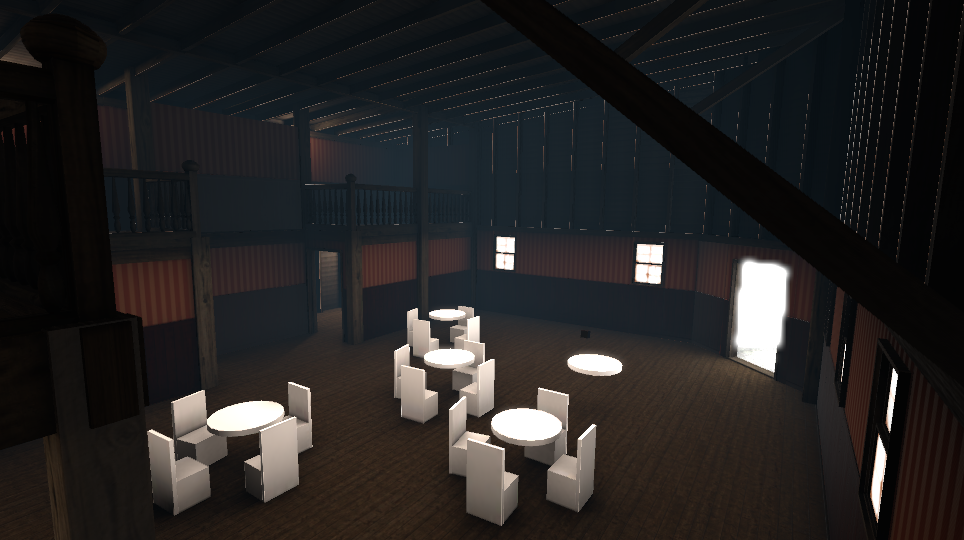
Essentially looking for underrated optimization tips.
considering chopping up the floor as well, because the reflection captures doesn't look very good with one big floor plane
also helps with culling
the stats
doesn't seem to batch much, despite everything being static
turns out the mirror was turned on, doubling the counts. Still thinking there are gains to be made tho
torn crypt
You can check the Frame Debugger to see why things aren't batching! Things like a static object being affected by more than one reflection probe or geo being seperated across multiple lightmaps can prevent it from batching, etc.
I know you said you wanna do other fancy stuff, but ~145-290 batches (or sorta kinda - draw calls) is well within perf budget for us already! Oculus recommends 500-1000, but from my poking around it seems that the most populated worlds tend to hang around 250-500 draw calls
finite flame
I see, yeah the reflection probes nearly triple the batch count. I'll look into reducing the amount.
I have a lot of overlapping probes atm
and a somewhat dense light probe group
torn crypt
Objects being affected by multiple light probes will break static batching, but it's usually rare that you'd be using static batching without being lightmap static!
finite flame
yeah everything is lightmap static. So the light probes shouldn't care about that geo.
Anyway, thanks guys. I'll look into the probes, seems to have the most effect.
deft goblet
It’s so weird that sphere and capsules are easier to simulate than boxes. It makes sense it’s just counter intuitive
 sweet sinew
@tiny star You get 50 because you see everything. Set up occlusion and occlusion boxes around the areas you want. Bake occlusion and that should make it better
wind jacinth
if all you rooms are separated like that and you are teleporting between them anyway, you can lower the far distance in your main camera
tiny star
what number should i have then
50 is not low enough
i pull back the camera to the the worst scenario
pallid gale
how much texture Atlas is going on currently in your map
also definitely set up that occlusion culling
as you shouldn't be able to replicate that camera shot because I doubt you would be putting colliders on the ground outside of the rooms
pallid gale
it's probably not going to be too hard to just Atlas everything together
tiny star
one per room
because its not culling friendly to atlas stuff that are far aways on the same material
pallid gale
yes would be reasonable
tiny star
now that I selected everything I have this stats.
am confuse
anyway people always have max fps in my map
pallid gale
so how did it somehow gained 10 times the batches
tiny star
So
what I should do since my room are quite small. its to have one mesh one texture one material
I a select nothing and just look at the camera view here I have this
pallid gale
maybe some of those extra batches coming from your collider's somehow I'm not quite sure
pallid gale
but yeah you might want to get those occlusion boxes setup so that you're not rendering any of the other rooms
tiny star
and for the mirror what I done is. Set the other room layer to water for example and turn of water reflection in the mirror
versed lichen
I don't think you should care about 13 batches lol
All you can do here is join your meshes/atlas your textures
I'm guessing you baked your light too
Also why are a lot of objects on the water layer ?
tiny star
so they dont reflect in the mirror. idk what am doing
versed lichen
Did you bake your lights ?
pallid gale
any particular reason your paint it manually
tiny star
I dont have bakery something addon. And can be(fun) to do.
versed lichen
So there's no light in your scene at all ?
tiny star
no
versed lichen
how do you plan on lighting users
tiny star
ambient light
pallid gale
there built-in light baking tools so you don't need an add-on for that
tiny star
go see those 2 map idk what to say
pallid gale
VRCat: Community-Run VRChat Forums
Greetings! Over my course of playing VRChat I've noticed that most worlds, mainly the ones that have baked lighting, are done poorly, or in an...
so you can learn how the light Baker works
winged sinew
That's all hand painted lighting? That looks very nice
torn crypt
Probably still faster than Enlighten too 😓
pallid gale
yeah but the hand-painted wouldn't have any light probes
so lighting levels don't do anything to the avatar
winged sinew
That would be fine if they had Bakery, then they could just bake light probes from it
But without it, I wonder...
torn crypt
I imagine it's possible without it if Bakery is pulling it by doing a separate bake for just the probes, but they'd have to go through the work of relighting the scene to match their hand-painted lighting
That concept of hand-painted lighting makes me wonder what would happen if you threw lightmaps into a GAN to do some form of hand-painted style transfer 🤔
pallid gale
or maybe in future just conventionally baking and then redoing the light map to be hand drawn
lilac saddle
Is it serious? do you use a standard way to create lighting? there is Gpu Bakery
pallid gale
then again I don't know any way to importing light Maps or editing them externally so never mind about hand painting them idea
that would actually affect the light nodes
wind jacinth
https://docs.unity3d.com/Manual/Lightmaps-TechnicalInformation.html here's the info, the alpha channel is a multiplier for hdr. I tried opening it in gimp to manually fix some errors but with lightmap compression on it saves it in a format that doesn't import correctly by default... I don't have photoshop but maybe that can open it or someone has built a plugin
you could dynamically light objects with your hand painted lightmap
 proven granite
Does anyone know if the person who made the Phoenix Wright avatar world plans to make it quest compatible
coarse tree
you may wish to ask that question in #avatar-optimization
proven granite
Apologies
winged sinew
@torn crypt You misunderstand: Bakery has a probe only baking feature. Unity doesn't let you do that
torn crypt
Oh! I didn't mean natively or anything. 🤓 I thought Bakery did it's light probes using Unity's shit for L2/Legacy, but used it's own thing during baking for L1
Or are you talking about lighting your entire scene by just baking probes + never baking lightmaps at all?
coarse tree
i think you are correct with L2, and for L1 i think it still uses the system from L2 and the hard work of L1 is coming from the shader ? i was just wondering about this same subject in another forum lol for different reasons
..
 humble bluff
I want add post processing to a map - where should i start - any tutorials i should read ? please any info welcome.
lilac saddle
@humble bluff download this zip from unity: https://github.com/Unity-Technologies/PostProcessing/archive/v2.zip
unzip it and only copy the folder called PostProcessing into your assets folder
A good quickstart guide is here https://github.com/Unity-Technologies/PostProcessing/wiki/Quick-start
GitHub
Post Processing Stack. Contribute to Unity-Technologies/PostProcessing development by creating an account on GitHub.
a more vrchat specific guide can be found here: https://gitlab.com/s-ilent/SCSS/wikis/Other/Post-Processing
GitLab
A surface shader for Unity providing cel-shading. (Forward rendering only)
humble bluff
thank you @lilac saddle
lilac saddle
enjoy! please remember that some effects don't work in vr or look really bad in vr headsets, so have somebody test it if you're on desktop 👍
humble bluff
Post Processing - something i do is wrong - my unity scene look amazing after add PP - Play mode same - VRChat > nothing, scene is as before - No post processing at all - i must miss something ?
Also camera preview not show post processing ?
lilac saddle
@humble bluff put the camera in your scene in the 'reference camera' slot in the VRCWorld object
versed lichen
How many cameras do you have ?
humble bluff
i think 7 in total
versed lichen
And your main camera is in a post processing volume ?
humble bluff
ok i not sure how i check this question
versed lichen
Did you create a post processing volume ?
humble bluff
yes - i have create volume script - is attached to main camera
plush crest
Thats why, reference camera gets disabled and only its parameters are copied. have the volume on separate gameobject
versed lichen
Gotta read the steps carefully !
lilac saddle
^ the volume should be on an empty gameobject and in it's own layer you should make especially for PPS, it's in the manual
humble bluff
I thought i read all - is confuse for me - now nothing is work so i try again from beginning - i appreciate all the help - i just wrong tool in box - sorry
lilac saddle
don't worry, moving the volume to an empty object and making a custom layer for it should fix it
torn crypt
@winged sinew o0o, that's interesting. Does it break batching because objects are getting lit by different probes? Unity posted a blog this week talking about how they were gonna let you do that natively in future versions, and I was wondering how they were gonna pull it without breaking batching
winged sinew
Well, the map already has lighting, so it doesn't need to worry about probes. Only objects do.
 icy sage
Some people tell me that real time lighting doesn’t cause issues only if you have like50 or more real time lighting but other say go full on bake
strange prism
Real time shadows will always cause issues. Baked lights will also generally be more performant.
icy sage
What if it’s real time with no shadows?
strange prism
Baked will be better.
Overall, you should check draw calls rather than how much impact will this light have. You want to lower draw calls and realtime lights usually add more.
wind jacinth
real time lights cause (at least depending on the material) one drawcall per light source per material. by my limited understanding, light probes consolidate that. wouldn't be such a big deal if it weren't for the fact it's currently popular to have 20-30 materials on your avatar for some reason. the second you start putting realtime lights in your world, people will blame your world for being unoptimized.
icy sage
Hmm because everyone’s models is trash that’s why..
wind jacinth
baked will always be better, but theoretically a few real time light sources here and there isn't bad. it's just that it adds up quickly with all the custom content in the room. you could play around with the layer masks or vertex lights though if you want to get cheeky.
 past imp
yeah in general you'd wanna bake lights, the only time I'd say use a real time light is if you're lazy and you only have a single directional light without any shadows since that isn't gonna affect performance, or if you know it's gonna be a smaller world and you need an effect for like a horror map
icy sage
I asked someone what kind of lighting In there discord and they reply with: Probably some form of sun-matched emission panels.. and I don’t know what that is so I couldn’t reply sounding smart.. what is that so I can sound smart again
It doesn’t seem right for a world lighting..
wind jacinth
might have been referring to a baked area light or something with a cookie if you're talking about a window
icy sage
I thought it was a real time emmesion.. don’t know really but not a big issue
 marsh ivy
does anyone know what this means or what went wrong?
winged sinew
I really wouldn't say "always cause issues", that's an over simplification
(For a single pass material)
Baked lighting only: 1 material, 1 draw call
Single directional light with no shadows: 1 material, 1 draw call
Single directional light with shadows: 1 material, 4-6 draw calls (depending on graphics settings)
So worlds with real-time shadows are 4-6 times more expensive
That's a best case scenario. Then you have point lights and spotlights
Point lights without shadows: +1 draw call
Spot lights without shadows: +1 draw call
If you enable any shadows, Unity renders depth, so that's +1 draw call. Then...
Spot lights with shadows: +2 draw calls
Point lights with shadows: +1 to +7 draw calls!!
gritty cobalt
Talking about drawcalls and materials ; Would you recommend using the Bakery standard or the default one ?
versed lichen
If you're talking about light baking, if you can afford bakery then go for it
wind jacinth
I can afford it, but I read the docs and it seems like a pain to add all the scripts and try to convert everything while maintaining the same look on an existing project
willow hinge
Probably at first yeah but once ur used to it, its probably more time saving to do it since it can take less time then unity baking @wind jacinth
gritty cobalt
Nah ; I'm talking about the shader to use since Bakery offer a "Bakery Standard shader" aswell and i'm not exactly sure of which one to use between the two :
willow hinge
Ohhh yeah forgot about the shader
versed lichen
I believe the bakery standard shader is required for a specific type of normals baking, but I don't think there's a point using it for any other reason
torn crypt
Yeah, you need to use the Bakery shader for some directionality modes + for vertex lightmapping. Although even with directional modes like Dominant Direction where it's not required, you could still possibly benefit from getting approx. baked specular by using the Bakery shader
As for perf, it might be discretely slower than Unity standard depending on the directional mode + what you have toggled on per material, but I don't think it's natively slower (if we were to side-by-side with all the Bakery toggles turned off). I haven't profiled it, just an assumption off what it's doing ¯_(ツ)_/¯
winged sinew
@gritty cobalt In this scope, it makes no difference. Bakery's standard doesn't use additional passes.
However, it uses additional shader features (keywords) with features enabled which can lead to issues if the client's got too many loaded. That's a seperate problem though.
You can avoid that using Merlin's Bakery adapter, which is also needed for the extra lightmaps to work in worlds. But it won't affect objects or avatars.
https://github.com/Merlin-san/VRC-Bakery-Adapter

GitHub
A script that handles converting Bakery RNM and SH directional lightmap bindings into a format that VRChat can process - Merlin-san/VRC-Bakery-Adapter
gritty cobalt
Thannks you ! :)
lilac saddle
My world is so optimize
@gritty cobalt i put my easel i sculpted into my world
4 mb avatar world
@versed lichen are you proud of me
gritty cobalt
Lmao
lilac saddle
Lol
coarse tree
lol ya @gritty cobalt i believe the bakery shader was used so heavy in that world as it used a lot of bakery specific lights such as light mesh so be carful to change some of them .. it did not use an=y custom light bake settings that would have needed the Merlin adaptor .. other than the light mesh the bakery standard added a new range of baking L1 light probes and its optimization .. you can verify more about L1 in the wiki pages for it but i think its needed .. you could switch back to L2 standard but possible trouble with the GI for the movie screen ?
@winged sinew Yes bakery uses a lot of keywords i think its 25 total .. the build was heavy as it needed to cover so many if and if pipelines if think
 thin schooner
Hi, I have a map called Cabin Sauna that has one real time light, a point light, that has an animation on it that lowers the intensity of the light and raises it, creating a flickering effect. The map is incredibly laggy though, I'm assuming due to the realtime light. With only 3 people in it we were all getting ~30fps.
But if I bake the lights, I wouldn't be able to have an animation that changes the intensity to give a flickering effect, right? So what should I do?
coarse tree
the one light should not be that bad .. the problem starts when you load up a lot of realtime lights with hard shadows
correct .. you may wish to look into mixed lighting
versed lichen
What do you need the realtime light for kizzy ?
coarse tree
you should check how many drawcalls you have and use profiler to narrow the look for reason
thin schooner
For the flickering fire in the sauna
I thought it was weird that it lags so much with just one realtime light, but im not sure what else it can be. it's a very small map with not much in it
versed lichen
Did you cull the light's layers ?
thin schooner
I'm not sure what that means so assumingly no. here are the settings
that's basically the size of the entire map right there
coarse tree
does it use particles
thin schooner
There are smoke particles yes, but not attached to the light
It's only 25 particles
coarse tree
i would not think 1 realtime light would have a major impact
did you check how many drawcalls ?
thin schooner
I kinda forgot how to do that. Something to do with opening the profiler, playing the scene, and pointing the camera at the map right?
coarse tree
ya something like that i have not been in game for a long time i tend to stick to making assets and let others run the final testing in game
@versed lichen
versed lichen
@thin schooner It's culling mask
coarse tree
@thin schooner also i am certain you get a build report when you upload
versed lichen
It tells the light what layers it should affect
If the light is just for the environment then set the layer to default/environment
not anything else
I think the frame debugger does that also
for perf checking
but you can just see the basic stats by using the game view mode, the stats panel, and rotating your camera transform
thin schooner
So does this mean 167 draw calls?
coarse tree
i tend to do all that offline in Unity and use some tools attached to my camera to show me framerates and profiler to pin down heavy loads
167 is not bad
for a world
versed lichen
@thin schooner Yes, but that's not indicative of the perf caused by other things
thin schooner
versed lichen
You could still have something causing perf drops in a few places
thin schooner
Could it have anything to do with the size of the unity scene or something?
versed lichen
no
thin schooner
not like file size, but overall size
versed lichen
you have to move your camera and find that spot where performance is ass
unless you map is a gigabyte then no
coarse tree
yup move around slowly and find the heavy angles
run a build report first pin down the heavy stuff
versed lichen
keep in mind that 150 drawcalls for a tiny map is kinda high
I don't know how tiny it is though
coarse tree
if your using a complex shader that could make things slow also
thin schooner
I'm using Cubed Flat Lit Toon MMD, maybe using regular Cubed instead might help
coarse tree
in a large maps 1000+ assets in one room you could see 1000-1500 calls and still get 90+ FPS
ya get ride of the toon shaders in maps
they are not optimized for worlds
versed lichen
definitely, the smaller the room, the more concentrated the drawcalls are
thin schooner
What shader would you recommend?
versed lichen
For a world ? Definitely not a toon one
coarse tree
for s fast test drop every thing in to standard first and run it
past imp
the standard shader is fine 90% of the time
coarse tree
^^
past imp
you can use a toon shader for a world if you wan't but it'll look like crap
versed lichen
Not if you bake it 
coarse tree
ya a toon shader will have a lot of extra stuff you never use and run slow in world
standard is a good start point to get your level tested for performance benchmark
past imp
not really, toon shaders are a lot simpler than standard
thin schooner
Standard isn't flat lit though
past imp
but it's toon lighting so it's probably not what the person is looking for
and no normals
flat lit doesn't look good in worlds
coarse tree
the only lighting in toon extra for world use is you dont need rim lighting and its masking used common in toon setups .. but toons do draw correct on lighting in real time and do have use in worlds for certain items
thin schooner
and now im getting 90 fps even with mirrors on in desktop, hah, this is gonna make it hard to figure out.
coarse tree
mirror is a super heavy hitter
past imp
the drawcalls is probably from the real time light you have in your scene
coarse tree
one mirror per map max is recommended with toggle off
past imp
I don' think that many drawcalls would kill performance, but when more people join they'll also be be affected by the light
causing more performance issues
especially if their avatars aren't optimized
coarse tree
ya but hate to say one light kills that much so i think the shader may be darwing one that one time as its more complex
versed lichen
a light wouldn't drop you below 30fps
past imp
if you need a light I'd suggest turning off shadows
coarse tree
best to get a baseline in standard and work thru it
versed lichen
wouldn't be a shader either if it's a specific spot
coarse tree
^^
versed lichen
find the spot in your world first, then check in unity
thin schooner
Been looking around but don't seem to see any spot that's worse than others, although hard to check now since im getting 90 on desktop. Could the constant changing of the light's intensity due to the animation to make it flicker have anything to do with this? Especially since it casts shadows on everyone
coarse tree
Before you say you had 3 others in the room
past imp
changing intensity wouldn't be doing that it'd just be the light source itself
thin schooner
yeah I'll have to test when I'm able to get more people in the room
past imp
like I said if you really need a real time light turn off shadows
coarse tree
did they have a bad model killing every one .. test all with the same models can help
past imp
shadows will increase drawcalls per model by a bunch
coarse tree
ya shadows can kill very fast in realtime
versed lichen
Best is to bake lights that aren't moving in any case
past imp
yeah avoid using soft shadows too, hard shadows are cheaper, but still expensive compared to none
coarse tree
realy ?
past imp
yeah
coarse tree
well i tend to bake amost every thing and try probes for the mixed end
hard shadows tend to give a more sharp shaddow and dont look as nice
i can see why soft is cheaper now
**Hard
versed lichen
I was told when i started that anything realtime is expensive, regardless of what it is
thin schooner
unfortunately will probably have to keep the shadows for the sauna appeal
coarse tree
pehaps tweaking the resolution .. changing the shader from bilinear to bicubic and light mapping should resolve this issue
versed lichen
Why would the light of the fire flicker ?
coarse tree
its a fire
thin schooner
yeah it's basically like a fire inside of the little oven there
versed lichen
your fire flickers when there's no wind ?
thin schooner
which then heats up the coals ontop
coarse tree
try mixed on that light
thin schooner
well fire flickers in general
past imp
yeah realtime stuff is more expensive since you're calculating on the fly, but hard shadows are cheaper than softshadows
thin schooner
you light a candle and put it against a wall, you'll see the shadows move a little
also just irl experience from being in a sauna like that
past imp
if you really need that effect in your worlds you can't really optimize it further
versed lichen
yeah but that tiny fire wouldn't make the entire room flicker hopefully
past imp
besides setting the shadows to hard
thin schooner
nah it doesnt make the entire room flicker, it's more subtle
coarse tree
ya just need a small area just in from of it
but i realy cant feel that is the massive drop in frames it must be more to it
versed lichen
Are you using post processing ?
thin schooner
a real sauna would be much much darker, but then it's hard to see in VR lol
don't think so
versed lichen
Ah, yeah then get on it !
thin schooner
never done anything with post processing before, i'll have to look into that
coarse tree
get it optimized before you move it to that
thin schooner
well, hopefully i'll figure this out eventually as to what's causing the frame drops at times. thank you for all the help and advice
coarse tree
or you just add a new layer of complexity to dubug
look for heavy memory items in your build report also
it could help a lot down the road to fix them up
 misty olive
"167 draw calls is not that much for a world"
Me:
so umm
How do people get away with having trees/grass if it just accumulates draws like that? Do i need to bake?
i would assume that these items are already set to static if part of the terrain
analog kraken
Terrain just sucks in general, not much you can do about it besides not using it. E.g, place your trees manually instead of painting them so they can be batched. Grass you really need to use sparingly, though I think there's DirectX 11 grass in the asset store which performs a lot better? Turning down the 'detail distance' can also help lower how much grass is being seen at once
misty olive
Oh wow. And here I thought using the place mass trees and paint grass would have been the more kosher way of doing things.
just by removing most of the grass out of the view alone
Thanks Igbar
misty olive
it works, thanks @median stag and Rokk
 north delta
lots of people use particle systems for grass
misty olive
Is there an example I could find of a particle system being used for grass?
that sounds interesting too
north delta
You just set the particles to have a very long lifetime and set the max particle size to whatever you need
I'm not entirely sure how optimized it is but I have 6 grass systems in a small world with like 2k particles each and the world in total is only 60 draw calls
 dreamy shard
I'm making a UI menu and using the vrc_ui shape script that displays the long blue beam to toggle with.
How can i adjust the range so you dont touch the menu from 100 meters away?
analog kraken
you can't adjust the range manually like that. You'd have to use an OnEnterTrigger to detect when players are close, or set the layer to UiMenu instead so players have to open their menu to interact with it
 median stag
I was @'ed
Funny enough, I have forgotten how to setup terrain and had to figure it out twice.
harsh holly
Quick question that I'm pretty sure the answer is 'yes' for, but does everything in my Unity scene get uploaded to VRC even if it's an inactive object?
 coarse cedar
unless it's tagged as EditorOnly, yes
lilac saddle
yes, inactive objects get uploaded because there's a chance they get enabled
harsh holly
EditorOnly, interesting. Where is that toggle located?
lilac saddle
it's not a toggle, it's a tag
tag an object as editoronly and it will be ignored in the upload
coarse cedar
right above Transform
 lilac saddle
flawless victory >.<
rocky osprey
When you have an element selected A and D (and the arrow keys) function as a left/right input.
misty olive
oh hey zoidberg
dreamy shard
hey katt
misty olive
that's the navigation option you want to set it to none
it will be set to vertical or horizontal by default
dreamy shard
thanks!
misty olive
any time :3
dreamy shard
i also made an OnEnterTrigger cube
it disables the ui script blue laser pointer so you dont adjust settings from a mile away
misty olive
Yeah you shouldn't have to worry about directional keys from changing your UI settings now
dreamy shard
my OnEnterTrigger doesnt fakin work
@misty olive do you have a method for limiting the distance one can adjust the menu?
or do i set Toggle to Enabled?
OnEnterTrigger literally wont work, regardless of setting it to Enable the UI component
misty olive
I haven't tackled that issue before, but I would try using an OnExitTrigger that perhaps blocks the UI with another object with the mesh left unrendered. Im in the process of building a UI system now so I'll let you know what works @dreamy shard
dreamy shard
k
misty olive
but then how do you get it to come back..
analog kraken
@dreamy shard check this page for OnEnterTrigger, it might help sort out your problem
http://vrchat.wikidot.com/world-component:vrc-trigger:conditions:onentertrigger
misty olive
thanks
gritty cobalt
Is there a way to see the numbers of drawcall done in game without modifying the game ?
would be good to have it somewhere with a right shift ` 6 or something :(
analog kraken
I don't know if it counts as modifying but you can check drawcalls in any game using Intel's Graphics Performance Analyzer, I've used it a bit in VRChat and it's a big help
torn crypt
+1 for Intel GPA - it's a great tool! Just be aware that if you're gonna profile in VR mode, you might see a bit more draw calls than you do in Unity's profiler. VRC overhead (UI, avatars, etc.) being one obvious reason - but the other is that single-pass stereo does the one pass through the renderloop, but still does a draw per eye. It's way faster (relative to multi-pass), but it will still count up in GPA.
gritty cobalt
Thanks you guys ! :)
 finite prawn
Anyone able to help me with Occlusion Culling? Despite there being a wall right there, the rest of the map renders. I'm really new to this so I don't know what any of it means >_>
strange prism
I typically make everything in the scene not occluder static but only occludee static. I then create new editor only cubes that actually define the occlusion areas. This doesn’t always work for every map.
finite prawn
Not entirely sure how that could help here...
torn crypt
Do you have that wall marked as static? You can change whether something is occluder static (meaning it occludes objects behind it) and occludee static (meaning it gets culled if it's behind something + you can't see it) in the static flags. The occlusion culling system can be kind of wonky tho so Cyan creates primitive cube geometry to act as the occluders just to force things behind it to be culled/occluded during the occlusion bake
finite prawn
Tis all static
finite prawn
I believe I fixed it. had to change the "smallest occluder"
torn crypt
Good! The default settings def aren't always a catch-all. Not sure if you had to increase or decrease to fix your issue - but keep in mind that dropping the smallest occluder value will cost you some extra CPU time (+ you'll have larger occlusion data sizes)
 sly summit
Hey peeps! Is there a list somewhere of the layers and their functions for VRC?
some of them have obvious functions, like walkthrough and pickup, but some are also very mysterious to me... PickupNoEnvironment, as an example... whats the difference?
analog kraken
gotcha covered
http://vrchat.wikidot.com/worlds:layers
sly summit
ah yes there it is! thank you very much ^^
red scaffold
Is it possible to change the gravity in a world via triggers?
 dry spoke


