#avatar-rigging
1 messages · Page 206 of 1
 crisp tendon
But if it moves at a different rate than the rest, it means weight paint problem one way or another
Unless the meshes aren't joined and they're rotating around different origins
 winter heart
like here in object data properties?

ah hey, clicking fix model actually fixed it lol ty for the help tho
 bronze copper
(Might not be a rigging specific thing, but I don't know what other channel it would fit better into) How would I go about making parts of my avatar (eyes and tail specifically) no longer affected by lighting? I want them to give the effect of glowing without actually giving off light, so the best option I can think is just not having shadows darken them and always be at 100% light level. Is it a Unity thing or a Blender thing? All materials are merged into 1 currently and Google is just assuming I mean there's an issue with lighting and how to make it normal.
 quaint cosmos
Materials need to be assigned in Unity so anything you do with your material will need to be redone in Unity. What you want is an unlit material so you just want to make sure the areas you want to be unlit are assigned their own material in Blender so you have multiple material slots and then you create the actual materials in Unity. For future reference, this is a #shaders question.
bronze copper
So one material is all the regular stuff, and a different material for the unshaded stuff? Also, thank you!
quaint cosmos
🙏 Yup, you'll probably want to use a standard or standard lite material (depending on whether you care about quest support) for everything you want to have shadows and and unlit material for the other stuff. The only thing that really matters in how the model is exported is that the parts you want to have different materials are assigned to different material slots. There are unlit materials in Unity but if you want to have the avatar work on Quest, you'll need to use the VRChat mobile shaders. Unfortunately, I don't think the lightmapped shader in there works even though it's supposed to so you'll want to go with matcap lit if you care about Quest.
 fading verge
How can I change it to humanoid rig ?
 quaint cosmos
Click the model in the project tab (not in the hierarchy) and one of the options that will show up in the inspector is rig, it's in there.
 kindred rover
fading verge
How can I change it to humanoid rig ?
kindred rover
fading verge
How can I change it to humanoid rig ?
Setting it to humanoid is done thrown import settings for the fbx file.
Find the fbx file (favourites > all models), and change it from generation to humanoid. Hit apply, then go in am check to make sure everything got mapped right. Chest commonly dose not get mapped, and random things get mapped to the jaw.
 limpid cairn
what do i do if my character doesnt have feet nor hands
do i still have to put the armature bones for them
kindred rover
Yes, it's best to just set them up. That way it can use humanoid rigging.
 foggy anvil

 fair gorge
so I have a dynamic bone thats only one bone, and I'm trying to make it 3 bones instead, would anyone know a good way to do that?
quaint cosmos
In edit mode, you can select a bone and then go to armature -> subdivide and set the cuts to 2
fading verge
Hello ! So as you can see the hair on my avatar isn’t moving with my head and my body clips through my clothes. I am very close to making a successful avatar and I’m so excited, I just need these things fixed, does anyone know what I need to do ?


 quaint cosmos
Is there any way to adjust the ground floor location for an avatar in Unity? I know I can move it up in Blender but it would be nice if I could just scale the legs up or down in Unity and be able to make that the new ground floor since the model animates perfectly aside from that issue.
 sleek isle
Lift the hip in the humanoid window
quaint cosmos
sleek isle
Lift the hip in the humanoid window
Didn't seem to work unless there is something that needs to be done other than changing the position in configuration and applying. I've verified the position change was applied and the body is significantly higher in the humanoid configuration menu but the line indicating the ground floor remains at the same place.
 wet linden
quaint cosmos
Didn't seem to work unless there is something that needs to be done other than c...
wet linden
quaint cosmos
Didn't seem to work unless there is something that needs to be done other than c...
remove and replace model in the scene or use pumkins avatar tools to reset to t-pose
fading verge

this is happeninfg
i transfered the weight painting of the wickerbeast to the cloak ive modelled
but it just isnt working right
anyone able to help
 quaint cosmos
I'm not sure what I'm looking at but transferring weights from the body to clothing is generally only going to look good without alteration if the clothing is close to the body. If things are more baggy, you might need to do a bit of manual painting to get them to deform properly.
fading verge
idk what to do though
everything looks fine except those steel ends of the jacket

wtf is going on there
crisp tendon
what about the bone above ?

 quaint cosmos
Seems like the upper leg should have at least some weight on the botttom of those edge pieces but it appears to have none. I would separate those to a new object and then blue the bottom of the weight so it's more cyan and less dark blue.
fading verge
alright ima chop it in half and do this
its been a while since ive rigged anything how do you reset bone position again xD

wait here or
 quaint cosmos
The top picture is a bit heavily weighted but does it improve it when you have it like that?
quaint cosmos
You added more weight to the bottom of that part of the model and it changed nothing? It may not fix it but it should do something.
fading verge
\

it just looks like that lower part is locked
Its not weighted to anything elswe other than the spine
quaint cosmos
That part should have some weight from the lower leg. If you select the lower leg vertex group and try to add weight there, does it not do anytthing?
fading verge
ok this isdriving me up the wall nothings workign
and i cant figure out why
the models fine
i just want it to work on the wickerbeast model
is there any other way i should rig it other than a weight paint transfer
quaint cosmos
It doesn't seem like the issue is the rigging, it's the weighting, and you aren't always going to get perfect results from transferring weights, sometimes you need to paint them manually.
fading verge
i just cant tell whats going wrong in the weighting ;-;
quaint cosmos
How do your weights look now on the part with the problem?
In the upper leg vertex group, specifically.

 quaint cosmos
The weight on the thigh looks a bit too strong if anything and you might want to add a bit more weight to the bottom for the hip. It just takes some experimentation.
 quaint cosmos
It still looks like the weights are too extreme on the lower leg to me since it's bending so much.


 fading verge
Hey I'm having a huge problem with my trackers, I have 11 point tracking and for some reason my avatars won't reliably attach to my knee and feet trackers. The avatar either attaches to knee OR feet on either leg and almost never both and I have no idea why. I've removed most mods and tried a change in most settings. Has anyone heard of this?
 fervent hornet
Should post an image of your armature. Also probably shouldn't state that you're breaking TOS in the official Discord🤷
 fierce brook
Hey, I'm pretty new to the blender/modeling side of creating avatars, want to try my hand at making some clothing, however, I would want to make clothing for an avatar that I have already heavily customized/edited in unity. This leads me to my question, is it possible to weight paint a piece of clothing on a copy of the models FBX, then somehow add the clothing in unity and have it react as it did on the copy? I really don't want to have to completely redo a bunch of my unity work.
quaint cosmos
Yeah, you just do your painting, join it to the FBX and overwrite the FBX in your project. You might want to back the file up just in case but it should retain all of your avatar descriptor/animator controller stuff.
fading verge
is upperchest still something i should Not Use
quaint cosmos
I think it's fine just not required.
 hazy quest
i made a 3d model and i want to make it a avatar how do i do that
 vast glen
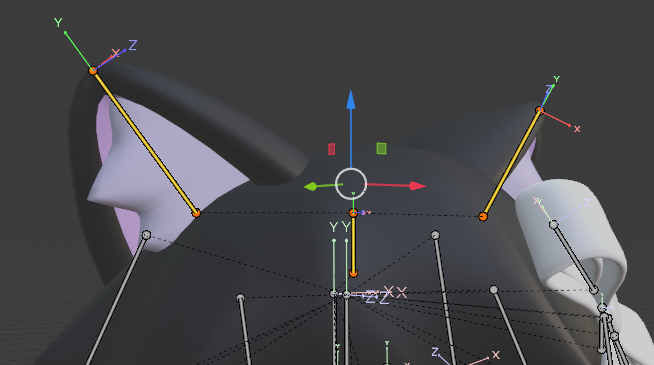
Heya, I do not know if this Counts as Rigging or not, but I do need help with an avatar. I decided to go back and work on a Protogen I wanted to make, but I cant figure out how to Parent the Horns properly or how to lock them to the Head at all. Is there a way to do this? Does this have to be done in Blender or am I able to do it in Unity?
 crisp tendon
vast glen
Heya, I do not know if this Counts as Rigging or not, but I do need help with an...
crisp tendon
vast glen
Heya, I do not know if this Counts as Rigging or not, but I do need help with an...
Just drop the object under the head bone !
winter heart
where would I put a collider to prevent things like tail+hair clipping through the ground? srry if this belongs more in avatar help, people are currently talking and I don't wanna cut in lol
 pliant sky
Does anyone know what I did wrong

 brazen cosmos
no idea what this means when imported into unity

 dreamy quartz
how do i go on about rigging a shirt with buttons on it? im not sure how to weight paint them without them deforming or floating away q-q
 rough portal
If I was trying to make an avatar that moves on four legs for quest, where should I start looking, I have seen some stuff with dynamic bones, but I think that's disabled for quest?
fading verge
rough portal
If I was trying to make an avatar that moves on four legs for quest, where shoul...
There is literally no way to do that, sadly.
The only way to move more than 2 legs at once is a job for constraints and only constraints.
And.... you guessed it...
they're not for quest.
rough portal
Must bones be within the model?
 rotund kraken
constraints or ik 2 which can't be done on quest
adding more bones to your model wont do anything
 pale pumice
rough portal
If I was trying to make an avatar that moves on four legs for quest, where shoul...
pale pumice
rough portal
If I was trying to make an avatar that moves on four legs for quest, where shoul...
There's a discord for this, lots of neat progress has been made but it's not perfect, and yeah, not really going to work on quest. happy to share the link if you want
rotund kraken
pale pumice
There's a discord for this, lots of neat progress has been made but it's not per...
id be interested in checking that out, i have some dryad models i want to tinker with lol
rough portal
pale pumice
There's a discord for this, lots of neat progress has been made but it's not per...
That would be amazing, thanks :)
 mortal tinsel
For some reason my avatars leg goes janky when i'm ingame or in play mode - any ideas how to fix this?
 gritty tinsel
How can I make it so the dress moves with the character
 quaint cosmos
gritty tinsel
How can I make it so the dress moves with the character
quaint cosmos
gritty tinsel
How can I make it so the dress moves with the character
Physbones, there are tutorials for setting them up but I don't know which to recommend.
quaint cosmos
mortal tinsel
For some reason my avatars leg goes janky when i'm ingame or in play mode - any ...
Have you gone through the steps to set up those digitigrade legs? I understand it's kind of complicated. https://cdn.discordapp.com/attachments/390924372782612480/991844903044788355/Digitigrade_tutorial_2.png
 mortal tinsel
quaint cosmos
Have you gone through the steps to set up those digitigrade legs? I understand i...
mortal tinsel
quaint cosmos
Have you gone through the steps to set up those digitigrade legs? I understand i...
I have, and they work in-game
I haven't tested with fullbody yet but I notice this problem on desktop
 pale basin
hey, so when exporting my avi from blender some of her bones grow. I was wondering if anyone knew if this mattered or if I can just ignore the problem? Cause I've been looking for a fix for 2 days including remaking the armature and nothing helps
crisp tendon
pale basin
hey, so when exporting my avi from blender some of her bones grow. I was wonderi...
Wdym by bones grow ?
pale basin

 pale basin
crisp tendon
Wdym by bones grow ?
pale basin
crisp tendon
Wdym by bones grow ?
I mean they literally just grow. Like I scaled them up
crisp tendon
Are you not exporting with leaf bones ?
It shouldn't really make a difference though
pale basin
I've tried both with and without, this happens regardless
will it even affect anything if they do grow out like that? Like, if their angles are still the same, does it have any effects what size they are?
Cause if not or its unnoticeable that'll at least put me somewhat at ease
crisp tendon
pale basin
will it even affect anything if they do grow out like that? Like, if their angle...
It shouldn't have any effect 
pale basin
ok, thank you! In that case I can just keep going and hopefully Version2 when I get to her magically won't have this problem 🤣
 outer lance
what script/ package do people use to add clothes to where it wraps around avatars?

seen a couple on booth but not sure which is the one for this vrchat sdk


 north flax
depends if you want it to bend or not, really.
fading verge
north flax
depends if you want it to bend or not, really.
sort of do? i guess?
it might look weird right
turned out fine
gritty tinsel
How do u make the clothes move with the character inside

The body is fully rigged btw is just that I made the clothes myself and the character with vroid
 craggy hare
can someone help me with how to fix loop parents on blender plz
 weary valve
gritty tinsel
How do u make the clothes move with the character inside
weary valve
gritty tinsel
How do u make the clothes move with the character inside
I would think to combine parts of the clothing woth the character so when you walk it moves the clothing corosponding to the body? I dont really create avatars
 sage patio
if you have 0 idea what you're talking about, then it might not be the best idea to give advice
sage patio
gritty tinsel
How do u make the clothes move with the character inside
you need to weight paint your dress to move with the bones in your armature. you can get a good start by transferring the weights from the body to the dress, which should take care of the torso/shoulders. for the skirt part, you will either need to weight paint it very well to the legs to move semi-realistically, or add extra bone chains to allow it to have dynamics
gritty tinsel
sage patio
you need to weight paint your dress to move with the bones in your armature. you...
how do i transfer the weights up?
sage patio
search up "Blender weight transfer"

 gentle tartan
hi, does anyone know how to copy over the rigging of a model to a different one?
quaint cosmos
That's also weight transfer, though it isn't going to work too well if the models aren't similar. Then, you just need to assign it the right armature in the modifier panel.
 proud kelp
Hope this is the right place to ask but- anyone know a good world to be able to see your bones in vrchat? trying to fix my rig but I have a really bulky avatar so its hard to tell exactly what's happening when I bind my full body?
 rapid vapor
can anyone help me fix my avatar the whole thing is backwards and ive tried everything
 proud kelp
was it like this when you imported it? or were you trying to change something and it broke? is it all twisted up in the humanoid rig configuration?
rapid vapor
its been like this since the start, ive thought it has something to do with the mesh being backwards but I cant flip that without the skeleton getting messed up
proud kelp
when you open the configuration menu is twisted in the same way? have you tried resetting the pose in there?
 rapid vapor
when i do that this happens to the model

the jaw arms and legs are all messed up
and in vr the hands are on the wrong controllers as well as the camera being made extremeley tiny
like my floor in real life is nowhere near the actual floor in game
because of how tiny the camera gets
proud kelp
that sounds like a few different issues hmm
can you show the rig? like when your in the configuration menu you should be able to see how the bones are rotated
rapid vapor
the only bones it says are rotating wrong are the thumbs feet and pelvis

at least when its in the default t pose and not the enforced t pose
the reason i think it has something to do with the mesh being backwards is because it does this to the thumbs

its trying to put them on the other side of the hand
proud kelp
OH yeah, almost positive you have them named wrong, its based off their left/right not your perspective so its all flipped, think about when your using it, your left hand would be their left hand if that makes sense
you can try just swapping all the bones in the remapping to test it then enforce the t-pose though with the hands it might take a bit and could just be faster to fix the naming
then in the unity scene re-add or reset it cause it doesnt update the transformations very well in my experience
rapid vapor
So I should swap the right bones with the left bones in the config?
proud kelp
you can try it to test it, but yeah it looks like you just got your left and right confused lol
so the reason it's backwards is that rotates all them as if they were the proper L/R but its flipped
rapid vapor
all of the bones start with a b should I rename theme and remove the b from them?
proud kelp
I dont think that makes too much of a difference if they all auto assigned "correctly" before, just making sure the left and rights are correct will at least make it so that you shouldn't have any problems in the future. I mean you can remove it if you wanna to clean it up though since your renaming them anyway
rapid vapor
thank you so much it worked
proud kelp
awesome!! glad that was able to fix it lol
 magic bane
I would like to setup a button that people are able to interact with using Physbones. But i have no idea how to setup the bones. How would i go about doing this?
 crisp tendon
magic bane
I would like to setup a button that people are able to interact with using Physb...
crisp tendon
magic bane
I would like to setup a button that people are able to interact with using Physb...
You would rely on the Shift + S function to set the bone at the bottom edge height of the button itself, and weight paint it, so that when people press, the bone and shrink, and so will the button, if you don't want the bone to move to the sides, you could have another bone that just constraint copies the location of that first bone
Or could just be an animation on trigger that scale the bone, based on proximity
sage patio
could also technically use a contact receiver set to Proximity
and either animate a blendshape or a bone on the model
magic bane
Alright, thanks a lot! I'll try to mess with it.
 next spruce
do i need to have a blender bone to attach a physbone to or can i just place physbones without needing a blender bone?
quaint cosmos
If you don't need to use bones, how does it handle weighting? Can you just assign a physbone to a vertex group? I haven't messed with them yet but I'm going to need to soon.
next spruce
for me, i dont even need them to move, just static there to connect the hair to a single bone so it shows up as a single phys bone
 limber field
I merged armatures, one didnt even have fingers bones, was adding a shirt and it broke my fingers. Any tips?


 stable mantle
im trying to merge a head to a body base and everytime I do it, the head merges to the bodies neck bone and gets rid of the heads head bone, how do I fix it
next spruce
is it possible to make a loop with bones?
quaint cosmos
next spruce
is it possible to make a loop with bones?
I don't think you can merge the last bone in a chain to the first one so not really.
 lusty jackal
Can you use DQ skinning or skin morphs in vrc?
crisp tendon
No idea what either of those things are

 solid torrent
The bones need to be parented to eachother. I assume you just added more bones without parenting them. Anyway, when editing the armature, there should be a bone tab on the right. There you can view the selected bones parent, wether it’s attached or not (you do not want them attached (attaching effectively attaches the head of the parent to the tail of the bone)), and some other stuff.
fading verge
i know i just forgot how to do it
solid torrent
fading verge
i know i just forgot how to do it
Fair
quaint cosmos
How can I stop my avatars knees from rotating inwards when I raise my head? This seems to only be happening with this one avatar and nothing seems to fix it.
solid torrent
Yeah, the bone tab thing, set the parent to the bone you want to parent them to, make sure the “attached” box isn’t checked, and it should be good
 sinful flare
I want to and bones to my bunny slippers ears. For hair i had to attach the hair bones to the hair root that is parented to head. Do i need to make something similar here or can i just parent the ear bones to the foot bone?
 fading verge
so i know my model will never be 1 to 1 scale to my body but is there any quick small fix that i can do in blender to make it feel like my knees are at least at my knees? the models legs i have seem to be a bit long but they look odd if i shorten them.. should i maybe make the arms a little longer? or what would be the best course of action here
fervent hornet
fading verge
so i know my model will never be 1 to 1 scale to my body but is there any quick ...
It's all proportions, so instead of making the legs shorter you can make the torso or arms longer
So for example if you wanted to make the legs an inch shorter, you could instead make the stomach .25in taller, chest .25inch taller, elbow .25in longer and forearm .25in longer
Spread it all out
fading verge
fervent hornet
It's all proportions, so instead of making the legs shorter you can make the tor...
hmm.. i see.. im afraid of it looking gaudy with this model bit i can give it a shot ! is there any way to do this in pose mode without effecting like.. the head or do i have to do -.25 in pose mode
fervent hornet
Yeah I was gonna mention, in the bone settings there is an option to disable something like "copy scale from parent"
Have to check it individually for every bone you don't want to copy parent
fading verge
fervent hornet
Yeah I was gonna mention, in the bone settings there is an option to disable som...
in here right?
 fervent hornet
Yeah should be there if you scroll down in that
fading verge
fervent hornet
Yeah should be there if you scroll down in that
i think i found it!! 🙏 thank you.. can i maybe send a screenshot and maybe you can have a look to see if the proportions look off to you compared to the og? 
fervent hornet
fading verge
i think i found it!! 🙏 thank you.. can i maybe send a screenshot and maybe yo...
Proportions are highly variable to the user, what may work for me and my body type may not work for you 😅
Unless your proportions are insane, no one will notice small things besides yourself. Most anime characters have horrible proportions and no one cares
fading verge
fervent hornet
Proportions are highly variable to the user, what may work for me and my body ty...
yee im just afraid of it lookin weird and me not realizing it but thank you either way!! and yeahh i just hate the way it feels is all like.. i lay my legs flat and their knees are like still up LOL
fervent hornet
Having it be proportional should look better, at the very least it will feel better!
quaint cosmos
Does anyone know why my avatars knees rotate inward when the legs straighten fully? If they're at all bended, it looks fine but as soon as they're fully extended they rotate.
 sleek radish
fading verge
How do you uhh
sleek radish
fading verge
How do you uhh
Select all knuckle bones. Select Hand bone. Right click, Make Parent, keep offset.
sleek radish
quaint cosmos
Does anyone know why my avatars knees rotate inward when the legs straighten ful...
Legs too short, bone roll issues.
Show me your bones.
sleek radish
fervent hornet
Yeah I was gonna mention, in the bone settings there is an option to disable som...
That reminds me I have to finish working on the ESC Armature so that people don't have to do that stuff any more. =_=
quaint cosmos
sleek radish
Legs too short, bone roll issues.
The legs are fairly long so I don't think it's that but maybe bone roll
 sage patio
uhh why tf are there extra bones above the legs
fading verge
iuts
fading verge
sleek radish
Select all knuckle bones. Select Hand bone. Right click, Make Parent, keep offse...
way too late
sage patio
you also don't need any IK rigging for vrchat
quaint cosmos
I use Auto Rig Pro for my rigging and it usually works fine, that's just how it rigs things. None of my other avatars rigged this way do this but maybe I can go in and fuse some bones if it might help.
sage patio
this is all you should have

dividing the chest bone into chest/upperchest can also help the IK
automatic tools will only get you so far.
quaint cosmos
Generally it works just fine, though, just not in this case so it would be nice to know what the difference is. The only option I have is to not export twist bones but I usually leave that alone and it works fine. Maybe someone else uses ARP and knows what might be up, thanks.
sage patio
you can leave in some twist bones, since they can be useful. the most useful ones are the forearm ones
quaint cosmos
Sorry, those are actually just the bones before exporting to the humanoid rig configuration, if I open them back up in Blender after exporting,, the bones look weird but still deform properly and they also look normal inside of Unity.

 sleek radish
sage patio
you also don't need any IK rigging for vrchat
sleek radish
sage patio
you also don't need any IK rigging for vrchat
Define "Need". 
quaint cosmos
I have to make everything cross-compatible so I don't think I have access to that. I guess I could do it just for the PC version but switching the materials from Standard Lite to Standard is already enough hassle. I managed to reduce the problem by rotating the legs out a bit before exporting. It's still not perfect but it's better. The bones look really weird when I open the model in Blender but aside from that one issue, the model moves quite well.
sage patio
sleek radish
Define "Need". <:vrcTupSmug:907460633069490216>
like, knee/elbow bend target bones
don't need that
quaint cosmos
I guess the smart thing would just be to have 2 separate objects using the same blueprint so I wouldn't have to keep swapping stuff out.
sleek radish
sage patio
like, knee/elbow bend target bones
Laughs in ECS Armature having...what is it like 20 fixbones?
Kek.
But it works.
And they're made to be optional anyway
sage patio
fixbones aren't the same though
because those can have their uses in VRC
IK bones do not
quaint cosmos
Auto Rig Pro has export options for Unreal and Unity/Humanoid so I can use the same rig for fancy IK stuff and VRChat and it just gets rid of what isn't needed. I'm sure you can get better results with a custom rig if you know what you're doing but it works way better than Mixamo.
It even builds an IK/FK switch for you if you don't want to use IK for whatever reason.
sleek radish
Huh. Neat.
fading verge
fervent hornet
Having it be proportional should look better, at the very least it will feel bet...
im very short so im unsure of what to do, i changed the proportions (or i thought I did) and uploaded but it still felt the same when i was in game? my legs were still longer
fervent hornet
fading verge
im very short so im unsure of what to do, i changed the proportions (or i though...
Did you redo the humanoid configuration after the scaling changes were made?
fading verge
fervent hornet
Did you redo the humanoid configuration after the scaling changes were made?
i mean i applied the rest pose and it looks like its been changing in unity but maybe i should've like fixed the model with cats right after ?
fervent hornet
fading verge
i mean i applied the rest pose and it looks like its been changing in unity but ...
Yeah I wouldn't do anything with cats once you're to this point. Probably just need to keep messing with the model. Keep in mind with ik2 you can choose to use your height for scaling or your proportions
sleek radish
Ye, useful for people like me, who have gorilla arms.
sage patio
CATS is an extremely useful set of tools, just like Pumkin tools for unity is. you just need to know how to use it, and know that "Fix model" is not a magic button that fixes any and every issue
there is a bug with Apply pose as rest pose that makes it so your basis layer is not updated. to fix it, go to each of your meshes on your avatar, go to edit mode, and select the Basis shape key. select one vertex, hit G, 0, Enter. repeat for every mesh
alternatively, run this script in the blender scripting window:
dude why does the bot keep yelling at me for trying to paste a code snippet
 wind osprey
import bpy
import numpy as np

for mesh in bpy.data.meshes:
    if mesh.shape_keys:
        reference_key = mesh.shape_keys.reference_key
        if reference_key:
            co_array = np.empty(len(mesh.vertices)*3, dtype=np.single)
            reference_key.data.foreach_get('co', co_array)
            mesh.vertices.foreach_set('co', co_array)
From @sage patio (hope the bot doesn't yeet me for this)
sage patio
seems to work fine with you, thanks ^^
 terse kayak
what exactly are the naming conventions regarding individual bones with Avatar 3? and will i run into issues if i exclude bones that would normally be included on whatever standard humanoid rig is used?
ah, wait. i think i understand now.
 scenic lodge
im getting a bone heat failing thing
or it does this

and idk how to fix XD
oh i didnt select the whole objject when joining

 primal island
anyway to define what the head of the avatar is without having a bone structure/avatar?
quaint cosmos
 cursive depot
how do i rig an avatar i made in blender?
cursive depot
how do i rig an avatar i made in blender?
Simplest way is probably Mixamo. Unity will generally recognize whatever bone names you have so long as they have the expected relationship but you can also set assign them manually.
fading verge
What does the avatar actually look like? Cause that might be the issue
 near nebula
What do I need to change in the avatar controllers to allow lip-sync in MMD worlds? I have tried everything. The only thing that works is coping and pasting someone else's avatar controller I found on the internet (Rindo avatar controller). I do not wish to copy and paste someone else work.
rough portal
can anyone explain why the head is dragging the shoulders about?
 fading verge
rough portal
can anyone explain why the head is dragging the shoulders about?
fading verge
rough portal
can anyone explain why the head is dragging the shoulders about?
Run normalize weights on that and see if that fixes it
In case you need location it is: Weights > Normalize all
rough portal
that did the trick, thank you 🙂
fading verge
No problema
 ripe flower
how am i supposed to know what is wrong when unity does say at all

is there something im missing
ive tried rotating it every way imaginable
fervent hornet
ripe flower
how am i supposed to know what is wrong when unity does say at all
Enforce tpose from the pose dropdown at the bottom of the humanoid configuration menu in the inspector tab
ripe flower
you're my hero
 spiral elbow
hey everyone i was wondering how i could fix this problem with my rigging
 sage patio
your rig is the least of your concern
spiral elbow
when i put my hand near my head or behind it then points the elbow in my face vs outwards
i bought this avi like this
so i intend to do hella optimization
 serene surge
spiral elbow
i bought this avi like this
serene surge
spiral elbow
i bought this avi like this
I am so sorry to hear that
spiral elbow
yeah its not exactly optimized lol but i can make it work and optimize it but i do wanna fix the rig warning so it fixes how the elbow and knee faces
quaint cosmos
I have that same LowerArm warning on my avatars and they move fine so you might be alright there but yeah, I don't know why you would sell an avatar for VRChat that can't be used in VRChat.
Or I guess it can if they enable very poor avatar visibility but that's a dangerous game
Can you upload it to see if it moves well? You might be fine.
fierce brook
quaint cosmos
Yeah, you just do your painting, join it to the FBX and overwrite the FBX in you...
I'm a bit confused by what you mean by "overwrite" the FBX in my project. Simply replacing the FBX just ends in a bunch of "missing".
Sorry for replying to your response so long after you gave it lol
spiral elbow
ive uploaded and tested and when i put hands on my cheaks and move my hands back the elbows face inwards abit instead of facing out wards
its usable forsure and some people just like to be extravagant as fuck
quaint cosmos
fierce brook
I'm a bit confused by what you mean by "overwrite" the FBX in my project. Simply...
That's strange. The animations should just be referencing the various bones and vertex groups so if those are the same, it should be fine but I also don't tend to do a lot of fancy stuff with the animation controllers on my characters.
Is there anything that can be done with tweaking the behavior of the eye look beyond what is included in the avatar descriptor? I have the Excited and Confident sliders all the way to the extreme and and the eyes track my reflection in the mirror but when it comes to looking at other avatars, the movement is minimal. I've increased the ranges in the various directions to extreme levels but still very little change.
sage patio
fierce brook
I'm a bit confused by what you mean by "overwrite" the FBX in my project. Simply...
don't delete the FBX from your current project first. when you replace it, do not do it through the unity window
either do it via the file explorer, or by exporting from blender into the correct place
next spruce
how do you make the bones visible through the mesh in blender?
 next spruce
thanks
quaint cosmos
Has anyone else experienced eye look working for looking at a mirror but not for looking at other avatars? I know I've had this happen before but I forget whether I ever fixed it or just forgot about it and moved on to another avatar. Because of the way the eyes are angled, the eye bones aren't perfectly straight so I guess that could be an issue but like I said, they behave more or less how I want them to when the avatar is looking at themselves.
quaint cosmos
Is view position a factor? I've never been quite sure where to set that, I just experiment until it seems good. I tried changing the Z position from .13 where it was (slightly inside the head between the eyes) to the standard .2 (about 6 inches in front of the forehead) but that doesn't seem to do anything. Everything looks good in the inspector when testing beyond it being a little extreme as I was hoping that it being too subtle was the problem
 hexed beacon
Does anybody have a solid reference to learn about what bones are actually necessary to be compatible with VRChat, rigging in unity, creating custom animations, and dynamic clothing/hair.
I've got a working avatar (my first) made from modified pre existing assets and I'd like to know how to make it better. The standard animations look slouchy and the way its currently rigged is causing the wrist to look like it's breaking and separating from the arm. Probably a parenting issue, but there's so many bones and IK bones I don't know where to look.
Is there a better way to troubleshoot other than guessing the bone and reuploadong a test avatar, restarting vrchat and checking it out?
spiral elbow
still wondering how i can fix this bone problem ?
 quaint cosmos
You might be able to use a program like CATS to merge whatever bones are between the bones it wants to be directly connected or just re-rig the model.
 quaint cosmos
I just scale down the parent object in Unity until it's the right scale. In this case, .01
crisp tendon
Can't you just uncheck the Apply Unit on export ?
 spiral elbow
quaint cosmos
You might be able to use a program like CATS to merge whatever bones are between...
spiral elbow
quaint cosmos
You might be able to use a program like CATS to merge whatever bones are between...
I'll give it a try thanks :)
fervent hornet
When exporting an fbx, change "All Local" to "FBX Units Scale" to fix the scaling differences
Unless new blender changes all that shit 😭
 heavy tinsel
fervent hornet
Unless new blender changes all that shit 😭
heavy tinsel
fervent hornet
Unless new blender changes all that shit 😭
It's the same in the latest IIRC.
 wicked slate
What happend?


 dense vale
I gotta question that'll probably need someone of a higher level of rigging skill than normal: If i do one of those simple IK rigs in blender, do i need to remove that when i go to export a model? or can i leave it in and it wont mess with the "Create from this model" option in the rigging tab of unity?
 opaque forge
I did some sculpturing in blender and unity won't import the new fbx anymore, keep getting this Transform Armature 1 not found in HumanDescription

I don't know what's this Armature 1, i don't have anything called that the entire time
opaque forge
I think I know why: When i import fbx in blender, it automatically adds a parent called Armature above my current Armature
does anyone know how to disable it?
thanks


 lime remnant
Does anyone have any hair rigging examples?
lime remnant
Trying to make 3 bones go into 7 rings. Will this work alright for hair? I have about 60 strands of hair and I'm told there are only 8 physbone scripts and 64 bones are able to be affected by them. Which means I'll have to limit the bones and probably a lot of hair strands.
 crisp tendon
lime remnant
Trying to make 3 bones go into 7 rings. Will this work alright for hair? I have ...
crisp tendon
lime remnant
Trying to make 3 bones go into 7 rings. Will this work alright for hair? I have ...
You really want to have strands that will move in the same direction to be affected by a single chain of bone if possible
 pure dome
i keep forgetting how bones work with jiggle physics, im updating my model for use with physbones. i feel like i remember the point of rotation sometimes being weird with dynamic bones, like, instead of at the head of the physics bone it'd rotate around either the head or tail or the root bone?
basically what im asking is should i have the tail of this root bone lined up with the heads of the ears like this https://i.imgur.com/tAUHM0e.png


or should i slide it up so the bottom of the root bone is lined up with the bottom of the ear bones?
(or does it even matter)
crisp tendon
That root bone would be irrelevant if they were parented to the head bone, they rotate around their own head transform
pure dome
ok yeah see that's what makes sense but i swear i have vague nightmarish memories of it NOT working like that, back when i used dynamic bones
i'm making root bones anyway though since i heard it can sometimes cause problems if you use standard armature bones as roots for physbones
 slow juniper
oh can it? i've just been using the armature bones
but to be fair i've never touched dynamic bones
pure dome
slow juniper
oh can it? i've just been using the armature bones
the pinned comment on this video says so, at least https://www.youtube.com/watch?v=PTTnWUkswkU

Did this video help you? Consider sending me a tip on Ko-fi! https://ko-fi.com/sippbox
The Avatar Dynamics update recently dropped for VRChat, and with it brings the highly anticipated replacement for dynamic bones, PhysBones! With Physbones, you can apply secondary motion to parts of your avatar, such as hair or skirts, making avatars much mor...
slow juniper
aren't humanoid bones things like fingers and legs and whatnot?
cause i've been using them for tails and ears and other things and have been alright
pure dome
yeah, ive also never run into problems but since i was already in blender i figured better safe than sorry
 boreal crow
hii i have a problem
how can I make a hip bone

Like the 2 hip bones are seperate
how can I make them both same bone
because it wants only one hip bone in vrchat sdk
pure dome
if it were me i'd go into blender and edit the rig but i dunno if theres an easier way or not
pure dome
either delete one and fix up weight painting or merge them together
boreal crow
and how can I merge them bones together?
solid torrent
boreal crow
Are you referring to the upper leg bones? The ones in the bottom of the picture?
boreal crow
the ones that are grey!
boreal crow
 solid torrent
Those don’t need to exist, the bone they are parented to should be the hip bone
You can have bones not be attached to their patent by toggling the “connected” thing in blender. It can be found in the menu that looks like a bone when editing the armature.
pure dome
im not 100% sure if you'd actually need to merge them but if you do heres an addon https://www.youtube.com/watch?v=rlodnvd8y6g

Asset Creation Toolset is Many Tools for Game Asset Creation.
With This Tool You Can Delete (or Dissolve) Selected Bones (Exclude Active) and Transfer Vertex Weights to Active Bone.
Addon Available Free for Blender 2.81, 2.80 and 2.79 (Some functions depends from version)
GitHub: https://github.com/mrven/Blender-Asset-Creation-Toolset
Gumroad...
boreal crow
I'll try the addon!
thank you!
OHHH i think i understood now
the hip bones are not supposed to be connected to both bones
solid torrent
Also, do y’all have a list of the names for the bone hierarchy unity expects? I’ve gotten mixed results from Google and I have no idea what naming conventions are used. I could trial and error it by importing it, testing if it finds the bone, and renaming it if it didn’t like it.
I’m also unsure of how I would go about adding props which should be “stuck” to part of the mesh, like toggleable socks, and a different prop that uses physbone components (a scarf with a tail thing). In blender both are attached alright, but the scarf has its own bone for the mesh which the tail bones are parented to. The socks are basically the feet but upscaled and recolored, so they share vertex groups and bones with the main mesh. TLDR I’m unsure of how bones and stuff interact with VRChats prop system, and what needs to happen in blender for it to work..
pure dome
solid torrent
Also, do y’all have a list of the names for the bone hierarchy unity expects? I’...
i have a tutorial series on youtube where i swear i thought i remembered concisely listing out all the correct bone names but i cant find where i do that so instead if you have no other options you can skim through the "creating an armature" segment here to look at all the names i use https://www.youtube.com/watch?v=A1EIoprnrMg&list=PLSjFpQ6OxyAUcRerrGyyAKeQ_KjXG9JjN&index=7

Part 4 of a series in which I guide you through the overall process of creating a 3D virtual avatar starting from nothing for use in VRM applications and VRChat, using Blender and Unity. Here we experience rigging, weight painting, and all the pain associated with them.
Dikko's rigging videos:
https://www.youtube.com/watch?v=NOmO3sBFNDU
https:/...
solid torrent
pure dome
i have a tutorial series on youtube where i swear i thought i remembered concise...
Thanks!
solid torrent
Yes, you did include a list of names. It scrolls a bit but yes it’s there
lime remnant
crisp tendon
You really want to have strands that will move in the same direction to be affec...
So should I just have three phys bones and all strands on the middle, left, and right side?

Almost finished giving each hair strand three bones.
Some I guess, like the back hair, won't be affected.
Since I have too many hair strands using too many bones.
quaint cosmos
Seems like strands that are all in a similar location could be controlled by a single chain vs having one for each but I guess that's more accurate.
lime remnant
Another question, I guess, although my original question was if I were doing the bones correctly in belnder lol...
If the player grabbed on the left side and the right side also has strands going forwards to the front, would both sides be grabbed if I used the same physbone script?
This is my first VR Chat model so I'm a bit confused by the entire thing.
The first question was, though, if three bones per hair were enough... and since some of the bones were going out of the hair, does that matter?
crisp tendon
lime remnant
So should I just have three phys bones and all strands on the middle, left, and ...
Three chains, yes
lime remnant
Does that mean only three portions of hair can be grabbed or could each strand be grabbed?
Like, do they all get grabbed because the script portion is being called?
lime remnant
Like, is this okay?

Finished them all. Most are going forward. Some are going left and some are going right. I can just skip the ones on the back of the head.

So three scripts would be fine, I cannot just put all of them on a single script adding up to like 64 bones?
 nocturne sleet
you could, create a hair root bone and make it the parent of the three roots you have rn
lime remnant
Yeah, that is what I was going to do. One bone going out the head and parent it to every end of all the hairs. I thought that would work.