#avatar-rigging
1 messages · Page 187 of 1
 ocean crane
oh uhhh I think I need to move and name things then
 sage patio
naming is not important
ocean crane
 ocean crane
in the collection it's the humanoid one
sage patio

the dalek's rig would be under Armature (green one)
but not under Hips
as that is the root of the humanoid armature
ocean crane
I named the armature sections of the humanoid one. So I need to put the Dalek armatures under the red arrow, right?

 ocean crane
Uhhhh not sure how to get it to look like that o.o mine is just that straight line of bones and thats it xD
 sage patio
well first, you should name those bones appropriately
will make it a lot easier
then, you can change the parent of a bone by either going to the bone properties tab with a bone selected in edit mode
 ocean crane
named them. bone 005 is the same as lower back for some reason

 ocean crane
yep that's what it was! I'm in edit mode rn in the bone editor
sage patio
here is a reference for the bone structure and semi-standard bone naming
ocean crane
oh jeez that's a lot o.o
ocean crane
yeah I think I may delete the extra fingers haha
sage patio
I'm not sure how many finger bones the SDK needs
ocean crane
im in the edit mode bone menu
 sage patio
like for each finger
ocean crane
sage patio
like for each finger
oh okay
I'll leave it with all 5 for now unless I find out I don't need the other 2
ocean crane
Alrighty!
sage patio
you may also be fine with one bone for each finger
ocean crane
Noted! So for the head bone it's parented to the neck, I need to parent the dome to the head and the eyestalk to the head, right? or do I need to sort out my bone hierarchy not working first?
it's not letting me parent the shoulder to the upper back
sage patio
ocean crane
Noted! So for the head bone it's parented to the neck, I need to parent the dome...
the humanoid rig and dalek rig are completely separate for now
you're only worrying about the humanoid rig rn
ocean crane
oh okay! so I'm trying to get the hierarchy to be like the one you showed by re-parenting the humanoid bones to eachother in the edit mode and bone menu, right?
So far this is where I've gotten to
 sage patio
ocean crane
oh okay! so I'm trying to get the hierarchy to be like the one you showed by re-...
sage patio
ocean crane
oh okay! so I'm trying to get the hierarchy to be like the one you showed by re-...
all of the limbs should not be under their own armatures
you can join them together by selecting them in object mode and doing CTRL + J
that will put all of the bones under the same one
ocean crane
oh okay I thought I was supposed to parent them and when that didn't work I was confused... heh... thank you!
sage patio
you can only parent bones to bones that are under the same armature
ocean crane
That probably explains why they weren't parented properly then xD
 pale palm
can someon help me? i cant get the bones in my ears to wiggle
 astral egret
How do I connect my mesh to the bones? I merged the armatures and now it doesn't come with

 balmy nebula
did you fix the model again with the cats plugin after you merged them?
ocean crane
astral egret
How do I connect my mesh to the bones? I merged the armatures and now it doesn't...
I'm sorry I'm still new to this and mostly work with low bone rigs but you should need to either parent or join the meshes together. It looks like the clothes are separate from the body
sage patio
@ocean crane irrelevant, joining the meshes won't fix it
the issue is that the mesh is either looking for the wrong armature, or that they forgot to merge the bones
try clicking on the mesh in object mode, then go to the modifiers tab in the bottom right (blue wrench icon). then, look for the Armature modifier, and make sure the correct mesh is specified under Object@astral egret
ocean crane
oh okie my bad!
 unkempt hull
currently having a headache over porting the first model I ever made in blender into vrchat as an avatar. I was really hoping I wouldn't have to completely overhaul the skeleton but it seems like that might be the case.
 ocean crane
unkempt hull
currently having a headache over porting the first model I ever made in blender ...
ocean crane
unkempt hull
currently having a headache over porting the first model I ever made in blender ...
not sure about the rest but from my understanding there needs to be a thumb, index and middle finger
 fierce grail
That is not a proper humanoid rig, look at pinned messages for how it should look like. Remember that not all of them need to be weighted to a mesh.
 fading verge
anyone able to help me? my point of view is on my forehead, but in unity it does look in the right place, I figured is something in blender, probably the bones, not sure. Anyone able to help me? (I'm sorry for bad english)
 wicked lily
fading verge
anyone able to help me? my point of view is on my forehead, but in unity it does...
wicked lily
fading verge
anyone able to help me? my point of view is on my forehead, but in unity it does...
Hey, I can't provide any help sorry, but I just wanted to say your English is great, good job 👍
 crisp tendon
fading verge
anyone able to help me? my point of view is on my forehead, but in unity it does...
crisp tendon
fading verge
anyone able to help me? my point of view is on my forehead, but in unity it does...
Can you post pictures of your unity screen ? Are you using custom animations ?
 stable bridge
hay so my avatars hoodie wont move up with arms when im trying to rig can someone help me cm me if you can
 sullen escarp
I have a model and when I port it to unity, it’s missing the chest bone even though it’s there in blender and correctly parented


 desert sky
What's the best way to rig a characters hand if they have no fingers? Should I just remove the hand bones or leave them in place
 kindred pollen
You need at least three finger bones mapped on each hand (thumb, index and middle iirc) for the IK to work, though they don't need to be weight-painted to anything
desert sky
Sounds good. The character wont be interacting with the world and its mesh doesn't have any fingers
desert sky
First time rigging and messing with blender so this should be an absolute nightmare
desert sky
Wow people made this seem a lot more complicated... This way actually very easy
sage patio
desert sky
Wow people made this seem a lot more complicated... This way actually very easy
yea it's not that bad once you get the hang of it
weight painting is a little tedious but also not bad
desert sky
When I finish with the bone structure should I generate the rig under the Object data properties tab?
sage patio
desert sky
When I finish with the bone structure should I generate the rig under the Object...
I mean you're already making the rig, right?
the next part would be the weight painting
essentially just telling each vertex which bones should have an influence on them
 desert sky
Huh the tutorial I've been following did not cover that topic
sage patio
there are some ways to do automatic weight painting, but none are perfect
one way you can do it is by parenting the mesh to the armature, and selecting "With automatic weights"
the shortcut to parent stuff is CTRL + P in object mode
so you'd select the mesh first, then shift click the armature, then CTRL + P
desert sky
I'm just parenting the bones to the mesh using automatic weights
desert sky
So he did cover it My bad
sage patio
parenting the bones to the mesh?
sage patio
can you show me what your hierarchy looks like lol
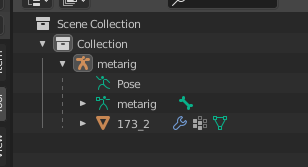 sage patio
ye that's fine
 sage patio
no
desert sky
I know that's mostly for more advanced rigging features ( animations )
desert sky
Fair what does the community normally use?
sage patio
most people use avatar bases that are already rigged, but doing the rigging yourself is a good idea
you just place the bones where they should be, and then do the weight painting
that's all it is
 desert sky
Yeah I just added the meta rig then positioned the bones by hand
sage patio
you should try to have your bones have descriptive names
desert sky
Hmm just going to download that image 😄
 desert sky
How can I see the weight painting colors?
sage patio
by clicking on the mesh and switching to Weight painting mode
either in the top left, or by doing CTRL + Tab
desert sky
Hmm yeah he's very blue
sage patio
you have to click on the vertex groups in the list
when you're weight painting, you're just telling the vertices which vertex group they belong to
and how much they belong to them
desert sky
?
sage patio
if a vertex group has the same name as a bone, that bone will move the vertices in the group
desert sky
Oh
sage patio

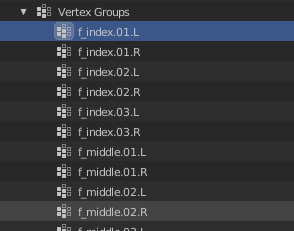 sage patio
you know that you don't need to upload screenshots right]
when you select the area, just do CTRL + C
then CTRL + V in discord
sage patio
Win + V is the shortcut for the clipboard history
desert sky
😄
I was just using mixamo ( fucking sucked ) so I decided to do it the right way instead... This is a lot better and I have way more control over the bones and posing
sage patio
ye definitely
desert sky
Thank you for your help Sacred
sage patio
👍
 lilac parrot
 ocean crane
I see ODM gear straps >w> sorry I'm too new to this to help just had to appreciate a fellow SnK fan
fading verge
what is that error?

 willow knoll
Try setting the animation type to None then applying, then setting it back to Humanoid and applying again.
Otherwise take it back to Blender and check your armature for exactly what the error says, duplicates.
crisp tendon
Nah you just need to click configure and remove the eye from the jaw slot @fading verge
By default Unity does that sometimes
because you know, Unity
fading verge
oki! thank you <3
fading verge
so, I upload an avatar as build and test and the view point look just fine

but when I publish it the view point go up to the forehead

anyone knows what can be the problem?
 crisp tendon
Your custom animation may be the issue, make sure to test it in Play mode in unity
fading verge
Is there a way to make the view point follow emotes? cause i got some final fantasy 14 ( the online one idk whats the name ) its cool and all but with my having an out of body experience in VR is like..??
crisp tendon
nope
fading verge
damn
oh well, maybe future updates
would be nice for PC players..cause i know VR is more like " YOU create your own movement ish " but here in PC lol
 sleek isle
fading verge
so, I upload an avatar as build and test and the view point look just fine
sleek isle
fading verge
so, I upload an avatar as build and test and the view point look just fine
Are your feet in the ground
fading verge
sleek isle
Are your feet in the ground
yes, they are
crisp tendon
hip height ?
fading verge
crisp tendon
Your custom animation may be the issue, make sure to test it in Play mode in uni...
hmm, I already tried taking off all animations and uplading, didnt work
sleek isle
Lift the hip in the humanoid tab then
fading verge
sleek isle
Lift the hip in the humanoid tab then
what do u mean? (sorry my english)
fading verge
oki
 fervent hornet
Your hips are probably upside down
fading verge
fervent hornet
Your hips are probably upside down
what does that mean?
fading verge
sleek isle
Move the hip bone 🦴 up
sadly that didnt work
fervent hornet
Post a orthographic front view of your armature in blender
 fervent hornet
Did you post anything about having issues with a 7 degree difference? I think I answered a question that no longer exists
fading verge
fervent hornet
Did you post anything about having issues with a 7 degree difference? I think I ...
not me
fervent hornet
Sorry then, they deleted their question
Give me a second to read what yours is
Do you still have armature rig config errors?
fading verge
yes
the only thing is the point of view
I dont know why is on my forehead when I upload to vrc
fervent hornet
In your config menu, you should reset and reapply the tpose to get rid of these errors
 fading verge
fervent hornet
In your config menu, you should reset and reapply the tpose to get rid of these ...
fading verge
fervent hornet
In your config menu, you should reset and reapply the tpose to get rid of these ...
oki give me one sec
fading verge
fervent hornet
In your config menu, you should reset and reapply the tpose to get rid of these ...
how do I exactly do that? sorry
well
I did it
it did fix the error
but the eyes are crossed now
??
 fervent hornet
Go to those specific bones, right click the transform component, revert to prefab
fading verge
fervent hornet
Go to those specific bones, right click the transform component, revert to prefa...
eye bones?
fervent hornet
Yeah
fervent hornet
I guess
 royal granite
the character im importing is already rigged and has a skeleton but it's not carrying over to unity
 errant sleet
im looking for someone who can rig some bones for me, for some reason my blender wont work
no matter what i do blender never actually installs
i can send the fbx file
 misty aspen
Does anyone have any idea why my avatars legs lift off the ground when I bend down to touch my toes? Pic and vid following
 sleek isle
That the consequence of not having toe bone. Not sure why user still argu it's bad to have them. 🧠.
@misty aspen
misty aspen
Thanks for the info, I'll add it and test if it fixes it 👍
 boreal oasis
any good tutorials for adding dynamic bones to hair?
 urban jungle
I'm having a bit of trouble getting the bones on the paws to show up correctly, the model is supposed to display them like this

but in t-pose in the unity rig editor it shows them like this
 sleek isle
Place your character in a T/A pose to begin with. Instead of. Ahhh, where's my hug.
urban jungle
he's already in a t-pose, this issue only happens while he's in a t-pose.
 sleek isle
By changing the rest pose in blender for instance
urban jungle
I don't know how I would recreate the exact unity t-pose in blender, I know unity is pretty specific about what it classifies as a t-pose to unity.
urban jungle
I put him in a t-pose in blender, the paws are still in the same pose
 glass pulsar
this is probably extremely basic but it's not an issue I've had before
I have an avatar with a large head, and when I place the descriptor eyes to the correct place, the camera pivots in a weird way that makes menus awkward use.
I can only assume it's a rigging thing, since the camera pivots based on the head.
sleek isle
glass pulsar
I have an avatar with a large head, and when I place the descriptor eyes to the ...
Think as if it was a mascot costume. Where a human head should be.
boreal oasis
im doing some weight painting but for some reason it keeps selecting faces and not the bone when i hold shift to click
figured it out. i had the vertex select mode on
 coarse solstice
i'm about to uninstall blender, the bones are there, but it REFUSES to stop leaving shit behind
 rough solstice
Can anyone help me figure out why my knees are bent when using FBT for my latest avatar?
hand = held over my actual head

and here's a profile of the armature
 fading verge
i mean cause..you bones are not straight, which is normal..alot of model's legs a bent a little bit like yours
but try moving the leg bones
move it into the position just like the mesh
yea..your bones are more bent then the mesh
rough solstice
it wasn't that
was the spine and chest not being long enough
and the hips not being far enough above the leg bones
and the hip being reversed.
 rare hamlet
When I have my arm outstretched completely my avatars elbows are still bent. Where should I put my avatars wrist bone in relation to the hip bone (how long should my arm be) so this doesn’t happen?
 fierce shard
need help coloring the texture. for some reason the cursor freezes when i click and hold on the mouse button

 solid adder
Wrong place.
fierce shard
i was told to post it here
fierce shard
@frigid shuttle
 frigid shuttle
Me and someone else.
solid adder
More texture work than rigging though
 zenith dust
solid adder
zenith dust
solid adder
Since there's no channel for texturing as far as I know, probably have to rely on one of the two avatar general channels and hope someone knows.
coarse solstice
can someone show me how to rig this model? every time i apply the armature, it binds to things that shouldnt be bound
and leaves behind others
solid adder
Not in avatar requests and certainly not rigging. 
coarse solstice
so no one can... okie
rough solstice
rare hamlet
When I have my arm outstretched completely my avatars elbows are still bent. Whe...
that might be more an issue with how tall you've set your ingame height to be
try adjusting that a bit to see if it changes
if nothing else it's the easiest thing to change and revert if that's not the problem
sage patio
coarse solstice
can someone show me how to rig this model? every time i apply the armature, it b...
you shouldn't be applying the armature modifier
coarse solstice
the video guide i was given said to do it tho
and even using an auto rigger like mixamo keeps messing it up
the back armor keeps tracking with either the arms or head and messing up
rare hamlet
rough solstice
that might be more an issue with how tall you've set your ingame height to be
Cool. I’ll try that thx
 ionic tinsel
So after modifying my models legs in blender to be slightly smaller and adjusting the origin point as tutorials have instructed, exporting it back into unity results in this. https://i.imgur.com/z7HySf0.png
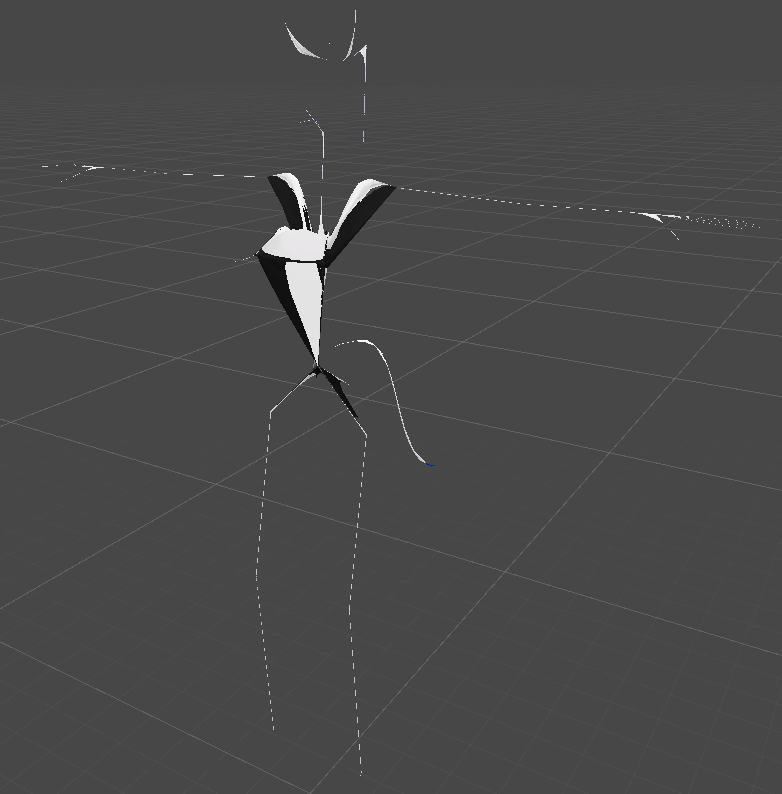
 gusty compass
fierce shard
need help coloring the texture. for some reason the cursor freezes when i click ...
gusty compass
fierce shard
need help coloring the texture. for some reason the cursor freezes when i click ...
Is the correct chat for that
gusty compass
ionic tinsel
So after modifying my models legs in blender to be slightly smaller and adjustin...
Oh my god
ionic tinsel
gusty compass
Oh my god
Please help me. I don't want to be noodles. xD
gusty compass
I have no fckn ideia what happen there
:v
Try to export on a different format
Like obj
sage patio
ionic tinsel
So after modifying my models legs in blender to be slightly smaller and adjustin...
export using the CATS plugin to make sure the scaling is correct
not using blender's FBX exporter
make sure you also don't have any shape keys active in blender
fervent hornet
Exporting using blenders FBX exporter is fine, you just need to set the scale to "FBX units scale" instead of "All local"
That specific problem is caused by exporting an all local on top of an fbx unit scaled model, just reseting and reapplying the tpose fixes it
ionic tinsel
Thank you guys. Trying now and I'll update how it goes.
ionic tinsel
Importing/Exporting through CATS worked out. Thank you very much.
fierce shard
i don't know what this 'animation' stuff mean

why does this avatar insist on making things hard for me DXDXDXDX
 tranquil marsh
I don't know
 lethal chasm
Click auto fix and add animator component and drag custom override empty into the animator component
@fierce shard
fierce shard
animator don't have auto fix
lethal chasm
yes, you have to add it
where it says add component

then drag a "custom override empty" into "animator"
tranquil marsh
Is it hard to rig? If not I might start and try to make an avatar
 tranquil marsh
ok i just need to make a model. do you know how people get that cartoon effect on models?
fierce shard
doesn't have that
 solar pike
Try the CubedShaders
 mental hamlet
hi, any way to scale the skeleton back to the mesh? i scaled the mesh a few days ago so i can't go back sadly

when i scale the skeleton it takes the mesh with it
solar pike
is that a nude avatar? 
lethal chasm
mental hamlet
you go back to Object-> edit mode
fierce shard
@lethal chasm doesn't have custom override empty'
mental hamlet
no, i will add the clothes later on @solar pike xD
lethal chasm
fierce shard
<@!532972626398806016> doesn't have custom override empty'
look for it in search bar
fierce shard
i did
fierce shard
believe sk3
lethal chasm
ohhhhhhh
mental hamlet
@lethal chasm thanks alot lol found it
lethal chasm
then you dont need that
you have to make an animator, then make a vrc menu and vrcparameter
fierce shard
???
lethal chasm
the animator has to be empty
fierce shard
you mean uncheck it?
lethal chasm
then you make an avatar descriptor which has custom animations, and the FX one should have custom handslayer animations
no, you should have it itn
but remove any components
so it should be set to none
fierce shard
you're not making sense
lethal chasm
ill pull out an sdk3 avatar and give tutorial
let me share screen in dm
may i call?
 sudden nova
hi, i tried to rig a very basic model with mixamo
removed the upper chest and changed the chest to spine2
but in vrc, i cant seem to move my pov up or down (the head itself does move)
any ideas why that might be?
 lofty depot
hey folks, I'm gonna try here, cuz I think the problem is with a rigging setting somewhere. I crack open the base package, and everything's fine. But then I import the .fbx file to blender, and even if I directly re-export it without any changes, something goes funky with the armature. Basically, the ears and tail of the avatar get smooshed (tail) or inside-out (ears). The only thing special about those is that they have some dynamic bones involved.
 crisp tendon
are you exporting with cats ?
lofty depot
I've tried with cats and without
sage patio
lofty depot
hey folks, I'm gonna try here, cuz I think the problem is with a rigging setting...
you should export with CATS
also, if that happens, just drag a new FBX from the project window into the scene
you can use Pumkin's avatar tools to copy everything from the old model to the new one
lofty depot
I am super new to all this.
are there any gotcha settings in CATS export that could be tripping me up?
sage patio
it happens because the position of stuff in that instance of the FBX in the scene doesn't match the positions in the new version
like I said, drag the FBX into the scene again
if that doesn't fix it, click on the FBX, go to Rig, click Configure, click Pose (near the bottom), click Reset, then Enforce T pose
then click Apply, then Done
lofty depot
Trying all that now
Dragging a new version of the FBX seems to have detached all of the animations. Choosing expressions doesn't do anything now, and the dynamic bones in the ears and tail are rigid.
lofty depot
Okay yeah. So grabbing the .fbx blew away the VRC Avatar Descriptor
That's gonna be a massive pain if I do any tweaking and testing
lofty depot
Is there a way to slide a modified mesh into an avatar already in the scene? When I try to export just the mesh and replace the default with the skinned mesh renderer, it flips upside down.
 slender ice
Hey there. Having a bit of an issue with full body tracking. When I go to calibrate, everything looks fine....

...but this happens when I calibrate

Any idea what could be causing this?
(this is an avatar I made btw, I'm thinking I somehow messed up something in rigging but I have no idea what to change)
crisp tendon
rotate your hip tracker ?
 blissful silo
hi, i'm stuck on something i feel must be so so simple, but i'm just not getting it. i need this piece to move with my sleeve bone, but it moves with the wrist bone instead. i'm on blender 2.91. i'm seeing it suggested i select the bone in object mode, then the mesh with shift+click, ctrl-p, then set the object's parent with automatic weight; but i can't seem to select that bone? sorry if this is super simple, but i would definitely appreciate the guidance


^this is with the sleeve bone moved btw, maybe it would've been more helpful showing the wrist bent or something ahaha; either way, its not attached to the intended bone 😔
slender ice
blissful silo
hi, i'm stuck on something i feel must be so so simple, but i'm just not getting...
With your mesh in edit mode, select all the vertices of that peice. Now select the vertex group associated with your sleeve bone and hit "assign", ensuring "weight" is set to 1.0
blissful silo
slender ice
With your mesh in edit mode, select all the vertices of that peice. Now select t...
thank you so much for your help!! seems to be perfect!!
slender ice
slender ice
Hey there. Having a bit of an issue with full body tracking. When I go to calibr...
Also RE: this, did a bit more digging and apparently this is a common and mysterious FBT bug. oh well
slender ice
blissful silo
thank you so much for your help!! seems to be perfect!!
Awesome! Glad I could help
sleek isle
slender ice
...but this happens when I calibrate
Lift the base of the hip a little until it don't tilt that much
slender ice
sleek isle
Lift the base of the hip a little until it don't tilt that much
What do you mean by lift the base of the hip? Like move the root of the hip bone up?
sage patio

 golden kernel
Does anyone have a good chart to use as reference for lip sync visemes
sage patio
A complete table of visemes detected by Oculus Lipsync, with reference images.
@golden kernel
"Visemes" is an oculus standard
golden kernel
Thank you
 quiet cargo
hello! I'm having troubles where my avatar is snaping back and force when i sit and lean forward in fbt, i've been trying to adjust the view point and change the length of the neck and chest bones around but it's still doing it 🤔 If anyone knows what exactly I'd have to touch that would help a lot !
crisp tendon
Difficult to tell without any idea what your rig looks like

 crisp tendon
Neck head and chest aren't connected ?
quiet cargo
i tried to see with having them disconnected coz i heard that it was caused by the neck bone being too long
but it didn't solve my problem
crisp tendon
Your spine and hip aren't connected either
quiet cargo
ye was just moving things around for the same reason
it was doing it even when everything was connected
crisp tendon
In that case I'm not sure, do you have a video of the issue ?
quiet cargo
huh unfortunetly not
it's like it doesn't follow my head and just snaps back to it at some point when i'm done leaning forward or going back to a straight sitting position
crisp tendon
Could be a tracking issue rather than an armature one ?
quiet cargo
no it's only with this avatar
and it happened with other avatars that weren't mine too, but idk how ppl fixed it sadly
if they did
 acoustic moat
Thinking about it i think this is now a rigging question

My boy has 3 eyes
Any interesting tricks i could use for the 3rd eye to also act as a main eye that looks around?
crisp tendon
rotation constraint on the bone from one of the other two eyes
eye bones need to be straight up though
acoustic moat
@crisp tendon ohhh good idea. I'll give it a go!
is there a math way to set it up as an average between the two?
crisp tendon
If you weight paint the bone to the two eye it might have that effect ?
acoustic moat
Hmm its close. it does rotate with the other eye bone. BUT it also moves around the other eye. I'm not sure what to do here or what option to click. Unless i'm just missing where to apply rotation constraint entirely

@crisp tendon

atleast the rotations are good
 crisp tendon
well no the bones all need to be parented to the head bone
acoustic moat
true. i'm missing where to add the rotation constraint then
I tried this one too but it effects entire objects instead of individual bones
 crisp tendon
in unity lol
 crisp tendon

sage patio
acoustic moat
<@!97980768323633152> ohhh good idea. I'll give it a go!
is there a math way to ...
Rotation constraints can have multiple sources
each source has a Weight
you could add both eye bones as the sources, with 0.5 weight each
some other options to move that eye include: an animation that makes it move around semi-randomly
aswell as manually being able to control it using a 2 axis puppet
you can also implement both of those solutions at once
it can move randomly by default, and then when you change the X or Y values using the puppet, it can leave the animation state and go to the Blend tree state, where it's controlled
same as how I have my tail control lol
automatic tail wag, while also being able to control it
crisp tendon
rotation constraint with two sources at equal weight sounds like the best way to do this !
sleek isle
You want it to still wag when you control it or not.
crisp tendon
wag their eye ?
 gusty flint
I need help rigging this model
 slender ice
sage patio
slender ice
sage patio
This is helpful, thanks!
gusty flint
im mainly considering a potential rig for it where it moves semi-realistically (arms and legs dont bend)
as you can see, I am using blender
crisp tendon
Honestly, rigging the model would be easy, but if it's not supported by custom animations that would look very weird
slender ice
gusty flint
im mainly considering a potential rig for it where it moves semi-realistically (...
Hm.. This sounds like it would be more of an issue with messing with the vrchat IK system than a rigging problem, yeah. It looks pretty easy to rig but you'd have to specify custom walking animations and a custom IK system
gusty flint
I'm considering something where
when the user moves their forearm, it moves the model's entire arm
slender ice
hm. you might be able to do something where you have a default humanoid rig, and then another set of bones that are set to follow those bones according to certain constraints in unity
crisp tendon
Constraints is definitely the way to go for this
gusty flint
I will make a visual example so that this makes more sense
Something like this

where if the forearms are at a 90 degree angle, the model's arms will rotate 90 degrees
slender ice
I thinkI know what' you're going for. Basically you'd set up a humanoid rig for the IK system to use, but then have a different, extra bone in the armature that the arm is actually rigged to and do it to where it follows, say, just the rotation of the lowerarm bone along a certain axis. I havent messed much with constraints in unity but I feel like that would be possible
slender ice
Well, you'd rig in blender first
 slender ice
Should just be something in your viewport display settings... what are you needing textures for?
gusty flint
the textures (face and torso design for example) I need to be able to be exported into the file I will use when I port it to unity
the textures are visible in material preview mode, but not in solid mode
slender ice
As long as the texture is assigned to the base color slot in the material, and shows up when you preview it, it should come with it when you export the .fbx. It doesn't particualrly matter what display mode you're in.
Another option would be to save the textures as images and create a new material in unity that uses them. Depends what youre going for.
gusty flint
good idea, luckily all the details for this model are in a folder (like the original model I imported here)
im very rusty in using Blender for rigging, so I will need a lot of help
slender ice
If you're just needing help creating the humanoid rig, there are lots of good tutorials online! It's just a matter of dragging out your bones, naming them correctly, and hitting symmetrize. The only part that's different is you'll probably wanna create your own vertex groups for the extra bones and assign with 1.0 weight instead of the automatic rigging thing (so you'd just parent it with empty weights and add them manually.
I'm not sure how stiff you want things to be but you'll have to get creative with how you constrain your rigid parts to the humanoid rig (think about what happens when the player bends down, tilts the head, etc)
I know when they were making the lego games they took a lot of liberties with how the characters were allowed to move 😛 real lego movement is super limiting
gusty flint
yeah, the most liberties I am doing are that the arms have free rotation
I am basing the rigging choices off of the theatrical Lego Movies
slender ice
There may be some kind of constraint you can set up were the arm bone is always set to point at the location of the hand bone, that might work the best. But i'm not 100% on that
gusty flint
yeah, thats a good idea
I set up a humanoid rig in blender

I am going to modify it to fit with my idea
slender ice
gusty flint
Woh bro what are all those face bones 😂
slender ice
Yeah I figured, I've just not seen a rig that looks like that before 😛
Its even got tiddy bones
slender ice
gusty flint
im using the human meta-rig from the riggify addon
Ahh ok
gusty flint
how do I change certain bones to fit it on the model?
slender ice
But yeah if you scale the rig to roughly fit in the model and then add in a whole new set of bones for the rigid movements, and just make the weights 1.0 on all of them you should be good to go
slender ice
gusty flint
how do I change certain bones to fit it on the model?
Oh uh.. you edit the rig in edit mode
slender ice
I will say you're picked a pretty tricky/specific project to practice rigging/avatar creation on 😛
It'll probably more helpful for you to follow a tutorial for making a humanoid rig from scratch to get more comfortable with editing/creating rigs
gusty flint
okay!
trying to rig it myself so far and

its bad
idk if im doing something wrong or if this is how its supposed to look for what im planning
slender ice
I mean, it looks like a decent start... the hip bones just look a little weird. just keep messing around and learning (I don't wanna spam this chat with the bare basics of rigging in blender)
gusty flint
okay! I will try my best
heres the finished rig

kinda looks like ass but thats expected
I converted it to FBX
slender ice
This kind of gave me an idea... I wonder what the vrchat IK system will think if you make the forearm and shin bones absurdly short 😛 I'll have to mess around with that later
cause that would make your life easier when if comes to constraints
or it might just lead to general weirdness
gusty flint
should I use SDK2 or SDK3 for porting it to Unity
slender ice
SDK3 is the only one i've worked with, it's the current one
slender ice
I will say though I think you're a bit early for the fbx export part. You'll want the whole rig (with the humanoid and extra parts) set up and skinned (unless youve done that already)
gusty flint
I made the rig, I dont know how to set it up and skin it
crisp tendon
gusty flint
heres the finished rig
That's never going to work FYI, you need the complete humanoid rig that Unity requires
The difficult part is the weight paint and constraints
gusty flint
SHIT.
slender ice
Tbh you'll probably want to follow some more basic rigging tutorials... like I don't wanna be unhelpful but these kinds of questions go beyond stuff that's specific to vrchat
crisp tendon
Yeah, that's full custom rig and animations territory
gusty flint
shit shit shit shit shit shit
goddammit I'll never make my dream VRChat model of Lloyd 😔
crisp tendon
You can, just need to learn a few basics
and you have tons of visual references for how things should look, so that's even easier
gusty flint
the only way I ever will will be if the people at The Models Resource get some of those freaking models from the lego videogames uploaded
the only lego models they have are the ones of Marty McFly and Shaggy Rogers from Lego Dimensions
slender ice
I mean if this is the model you're wanting and you have it imported/textured into blender I think you can make this work. To be honest I'd be willing to mess around with it in my free time to see if I can get it to work. I'd just need the .blend file of what you got
slender ice
gusty flint
I'll see if I can mess around with this later tonight. I'll be doing some work on my own avatar as well
gusty flint
thanks
 hearty thunder
If a different channel would be better for this, I'll move this there.
Tutorial for doing real digitigrade legs that is fully compatible with default systems (fullbody, default animation sets, etc).
(This one's outdated. The newer one should be easy enough to find searching "Digitigrade")
 slender ice
hearty thunder
If a different channel would be better for this, I'll move this there.
Tutorial ...
slender ice
hearty thunder
If a different channel would be better for this, I'll move this there.
Tutorial ...
Dude this is epic
willow knoll
Whooaaa
I am on board with this idea
@sage patio is this similar to what you tried?
slender ice
hearty thunder
If a different channel would be better for this, I'll move this there.
Tutorial ...
Thanks so much for sharing this! Can't wait to try it out
hearty thunder
slender ice
Thanks so much for sharing this! Can't wait to try it out
No problem. I'd genuinely be curious to see how well it performs with different leg proportions, as I've only done it with the one model, and how well it works is gonna be highly tied to how much range of movement the leg sections have.
kindred pollen
hearty thunder
If a different channel would be better for this, I'll move this there.
Tutorial ...
vv cool! will def keep in mind o:
sage patio
willow knoll
<@!93092275638251520> is this similar to what you tried?
thanks for the ping, seems like exactly what I was doing
minus the second IK chain, which was the thing I was missing
I was going to try to implement that
since I was doing some research and came across this

I was doing it with nanachi leg, which have much shorter "knee" bones
so I might need to tweak stuff
but who knows
also, Dragon, is there any noticeable "lag" on the legs?
hearty thunder
Not sure if what's depicted in the picture is quite the same thing. Seems to have something on the foot pointing towards some point in space?
The real breakthrough trying to figure it out was coming to the conclusion that half rotation constraint/half IK was the way to go to get good results.
hearty thunder
sage patio
also, Dragon, is there any noticeable "lag" on the legs?
As for lag, not too much from my testing. There is a bit of wobble at extremes, but that's largely down to locking the knee to one axis to prevent flipping than lag from the IK.
Outside of particularly busy rooms, it can become a bit odd if you're at 2fps.
fading verge
so when I try to join the skeleton and meshes of 2 different models I keep getting this when I do ctrl+j

how do I prevent the mesh from moving/resizing when I join them
sage patio
fading verge
how do I prevent the mesh from moving/resizing when I join them
apply all transforms using CTRL + A > All transforms
fading verge
thanks
another issue I noticed keeps popping up is the weird texturing on the model when in blender

same model shows up fine in unity

cant figure out why it looks so weird in blender
 hexed sparrow
fading verge
cant figure out why it looks so weird in blender
hexed sparrow
fading verge
cant figure out why it looks so weird in blender
your normals are probably facing the wrong way
or something
go into edit mode on basis (assuming your model has shape keys) and click
Mesh<Normals<Recalculate outside
and then, Mesh<Normals<Set from faces
I'm not sure if that's the exact path but you'll find it if you're an avid blender user
should fix the issue
fading verge
it didnt do anything
fading verge
When I join two models and their armatures together the body's bones lose weight painting
sleek isle
fading verge
When I join two models and their armatures together the body's bones lose weight...
Bone 🦴 don't have weight, it's the mesh. The two don't share the same Vertex groups name probably.
It's case sensitive.
fading verge
ah
well actually neither have vertex groups for the other because im putting together a neck+head with a body
what do i do about that
sleek isle
If there's bone 🦴 and a vertex group. They will move together if the mesh have an armature modifier with the armature assign into it.
fading verge
so vertex groups only combine if theres a modifier?
sleek isle
No
rough solstice
https://www.youtube.com/watch?v=Bc39JiY7gSc Really happy with how the rig turned out for this.

Thank you YouTube for the copyright warning so I could copy paste the moonrunes of the song's title.
fading verge
still havent solved this if anyone could help

 dusty sparrow

need help
never rigged in my life
i can copy armaturs off of other models right? I have a skeleton for the same body type but im not sure how to do it
crisp tendon
You can copy other armatures, but they would still need to be weight painted
I'd recommend trying Mixamo
crisp tendon
Well Mixamo is for times when you can't do better yourself. If you can weight paint then definitely do that manually
dusty sparrow
the big issue with mixamo is this character's pose.
and the textures
you think i can get the underbody rigged and the armor set on seperately?
crisp tendon
Well yeah, you can remove the vertex groups of the upper body when you import it back
dusty sparrow
I can just add the armor on top, its not supposed to be moving anyway
And the weights should be in place properly as they’re from another spartan with more armor, I think it’ll work
 gleaming mesa
weird weight painting issue: in blender, the strand of hair moves like this when i translate it:

in unity it does this:

it's as if unity doesnt see some lower threshold...
i wonder if normalizing those weights would work?
this is how it looks in weight paint mode:

sampling the upper weights that go to 0 in unity, they're like 0.2
this is what the head bone says:
 gleaming mesa
oh god setting the "quality" in the skinned mesh renderer to 2 did it
dusty sparrow
Are there any like, rigging services? This is giving me way too much trouble.
sleek isle
Unity have a limit of 4
 umbral lichen
anyone know why he looks like this in unity but not in blender?
 gusty flint
slender ice
I'll see if I can mess around with this later tonight. I'll be doing some work o...
gusty flint
slender ice
I'll see if I can mess around with this later tonight. I'll be doing some work o...
@slender ice any update?
slender ice
gusty flint
<@!279773271287791619> any update?
I got a chance to put a rig together the other night that I think will work. It looks like some of the textures may not have come through with the .blend file but I assume if I send it back they will appear for you. As I was rigging I noticed that rather than being all one mesh, every part in the model is a different mesh - this can cause some performance problems if they aren't properly joined (you can do it using the CATS plug-in I think but I haven't gotten to trying that yet). Another option may be to just parent the meshes to the bones individually in unity rather than making them skinned mesh renders. I'll let you know what I find out
coarse solstice
hey, anyone know how to fix a rigging issue in blender?
I added a helmet to my armature and it refuses to move with the bones
 slender ice
coarse solstice
I added a helmet to my armature and it refuses to move with the bones
slender ice
coarse solstice
I added a helmet to my armature and it refuses to move with the bones
When you say you "added a helmet to your Armature" what do you mean?
Like there's a bone for the helmet or the helmet part of the mesh doesn't move with the head bone?
fading verge
Random question, I have some hair ribbons that have already been joined to the head bone and have their own bones; the ribbon itself is weighted to the ribbon bones and also to the head
does it have to be weighted to the head?
or am I okay removing the head weights and just keeping it weighted to solely just the ribbon bones to avoid the weird tearing i'm getting

That's when moving the ribbon in unity, it tears instead of cleanly breaking away. Is that due to it being weighted to the head?
 errant bloom
hello! importing a .vrm (converted to an .obj) into mixamo, and... something has gone horribly wrong.

help?
 vocal horizon
wtf XD
 vocal horizon
ow
errant bloom
using .fbx instead of .obj this time, fingers crossed
messed up the shirt textures but everything else seems good to go! :D

(taken mid-dance)
vocal horizon
Oh it stay good now
vocal horizon
errant bloom
messed up the shirt textures but everything else seems good to go! :D
Nah it's ok
 frank palm
either unity or blender is creating these end_end_end_end_end... points, probably on import. I dont know what's going on. Does somebody know? It gives me a headache especially because of dynamic bones, which are limited for most people.
 frank palm
Nevermind, it's an option in blender export called "Add Leaf Bones" under Armature.
crisp tendon
you should use Cats export
gleaming mesa
sleek isle
Unity have a limit of 4
it was set to auto and only using one apparently, but i needed two. not more than that
sage patio
umbral lichen
anyone know why he looks like this in unity but not in blender?
at the bottom of that screen, click Pose, then Reset, then Enforce T Pose
make sure that all of the bones are also mapped correctly
 glass panther
I haven't made proper mouth visemes in a bit. But i've noticed that in Blender my visemes are perfectly fine, but when i speak in game a couple of blendshapes in particular have mishapen verts. Same thing when testing the blendshapes in Unity. Does anyone know what's happening here?
Ah Calculating normals seems to fix this. Never had this issue before 
crisp tendon
@glass panther

 hallow sierra
How do you rig an avatar
crisp tendon
With bones, you can try Mixamo
 tribal pecan
can somebody have a look at my avatar armature? I am trying to get it FBT compatible (currently only using hip tracker but the two feet trackers should arrive soon). Every time I calibrate the hip seems to somehow bend forward

I have gone through Kungs video guide but haven't found any misalignments in my armature so far

 crisp tendon
take pictures in orthographic mode, with 3 and 1 on your num pad

 crisp tendon
Make sure your legs go straight down
raise your hip bone slightly
and clear bone rolls before exporting
glass panther
@crisp tendon Thanks Ruuubick 🙏 Problem solved!
tribal pecan
crisp tendon
and clear bone rolls before exporting
thanks for the suggestions vrc just doesn't want to start rn so i can't test it now but thanks so far 🙂
sleek isle
crisp tendon
Make sure your legs go straight down
I would say. It's doing this no matter the rig configuration last time I was 4PT.
 meager turtle
Having this really odd issue with clothing on my armature in Blender. Moving the bones around in pose mode, the clothing follows perfectly fine. But moving the armature in object mode... well, this happens. It oddly only happens on the other clothing items I've created, but not the shirt. Any advice?
crisp tendon
Are they merged ?
meager turtle
As in, are the shirts, shorts, body, etc all merged into a single object?
crisp tendon
yes
meager turtle
No, they're separate objects for now. I plan on merging them together when I export out to Unity. But it seems merging them together fixes it, and when I separate it back out, it works just fine too. Maybe it's because of where the origin of the objects were? Idk. Very odd
sage patio
meager turtle
No, they're separate objects for now. I plan on merging them together when I exp...
try applying all transforms in object mode by doing CTRL + A > All transforms
meager turtle
sage patio
try applying all transforms in object mode by doing CTRL + A > All transforms
No dice there, same issue :/
sage patio
try doing so on every mesh
and make sure that the origin point is at 0,0,0
indicated by the small orange ball
meager turtle
Same issue.
But, I know merging the clothing with the body, and then separating back out seems to do the trick, oddly enough.
crisp tendon
What kind of modifiers do you have ? Can you screenshot the rest of you window
meager turtle
The only modifier I have on the clothing is the armature modifier
 lofty depot
Cranky little problem here. I've got an animation that slightly rotates the base of the ears on my model, but when that bone rotates, the mesh like...doesn't follow correctly? It gets all jaggy.

 lofty depot
Oop! Solved! It was a really weird weight painting issue. Kinda nuked it and started over, and it seems to be good.
 cerulean breach
how do you guys do clothes for avatars? i have two separate fbx files, one for the avatar and one for the clothing, and i cant figure out how to make it work properly in unity
apart from going into the clothes armature and adding a parent constraint onto every single object, to parent it to its equivalent in the avatar armature
lofty depot
Could put the mesh in place, join it to the body, then do your weight painting to make the clothes vertices move with the body bones?
(This is a wild-ass guess, cuz nobody else is answering)
 keen steppe
yeah pretty much it just place the mesh and add the weight accordingly
lofty depot
Be sure to make a vertex group around the new stuff before you stick it in place tho 🙂
keen steppe
To the same armature I never use a independent one
I mean you could have it's own but seems over complex
cerulean breach
lofty depot
Could put the mesh in place, join it to the body, then do your weight painting t...
i already have weight paints and everything, but unity seemingly doesnt let me use the body's armature for the clothing because the clothing is a separate fbx with its own (identical) armature
lofty depot
If it was me hacking away at it, I'd delete the clothing armature, reset all the weights, then CTRL-J join the clothing mesh to the body mesh, then get painting again.
lofty depot
Ohhh
Then I have reached the depth of my hackery, and you'll have to lean on someone who actually knows what they're doing
rare hamlet
Why does my avatar's feet go through the floor in Unity and VRC, but it looks fine in Blender?

Not Play Mode

Play mode with Lyuma Avatar Tester (Same issue in VRC)
 rare hamlet
 fervent hornet
Does resetting the t-pose in the rig configure menu move the mode at all?
rare hamlet
fervent hornet
Does resetting the t-pose in the rig configure menu move the mode at all?
I'll try that an retest.
thx
rare hamlet
fervent hornet
Does resetting the t-pose in the rig configure menu move the mode at all?
No. It's still through the floor in VRC. Looks fine in Unity now though
fervent hornet
If the animation plays fine in unity via emulator but not in VRC I dunno what to tell you
rare hamlet
Yeah. It's really strange. All I did was lengthen the leg bones in Blender to make the avi taller and then move the whole bones up in pose mode so the avatar was still on the floor
fervent hornet
If you do that you need to reset and reapply the t-pose, it should work after that
Bone changes in the FBX are not automatically done in the config menu
rare hamlet
I'll try again. I just change the rig to generic and then back to humanoid to clear any Unity stuff that was randomly lingering
If I just click reset, I get this error:

Do I just apply the T pose after?
fervent hornet
You need to apply the tpose
rare hamlet
Looks okay in the rig now

Looks fine in Lyuma editor also. I'm deleting the old test avatar and reuploading
I don't get it... It's still broken in VRC
rare hamlet
I'm an idiot. I was uploading a test avatar, but was using the online version....
fervent hornet
😔
sage patio
cerulean breach
i already have weight paints and everything, but unity seemingly doesnt let me u...
you should not be doing this in unity
unity is not a substitute for a 3d modeling program
this is something you should be doing in Blender
cerulean breach
im not trying to use it as a substitute for a 3d modelling program
i just wanna apply some clothes i made in blender onto an existing avatar in unity
sage patio
adding to a model is definitely something you need to be doing in blender
cerulean breach
my main problem with that is that i wanna distribute the clothes to others easily
and its extremely painful for people to have to take a new fbx and set up their avatar all over again
sage patio
cerulean breach
my main problem with that is that i wanna distribute the clothes to others easil...
there is no way to simply just slap the outfit in Unity and expect it to work with the model
it's much better to put it in blender
people are going to have to throw it in blender anyways if they need to adjust the fit
cerulean breach
its already fitted to the exact model
and it has the exact same armature
im just trying to figure out if theres a way to take the skinned mesh renderer and tell it to use the other armature
sage patio
no
that's not how it works
if the bone names are all the same as the base model, then it's very easy to do in blender
cerulean breach
i basically have this
 sage patio
just open up the blender project for your avatar, import the model of the outfit, take the outfit mesh out of its armature and put it in the avatar's armature (you can do that in object mode by holding shift and dragging the object).
then, go to the modifiers tab, and change the object in the Armature modifier to point to the model's armature. finally, delete the armature that came with the outfit
if the people you are distributing it to also have models which have the same bone names, you can just send them the mesh without an armature
that way, all they need to do is import it, parent it under the armature, and edit/add the armature modifier to point to the model's armature
fading verge
can someone help me with this pls

 queen bison
I have a pretty good 3D model of iron man and i've been rigging it up and animating it and stuff, but it was made standing up, so it's not exactly designed with joints in mind. Any tips/ideas at what I should do here to make it look natural but robotic?


I'm prepared to commission it out if it ends up being too hard but ngl I mostly want to do it myself for experience
 manic marsh
you should add extra bones that only move the elbow and knee plates
than you can use rotation constrains in unity to make them move only 50% or however much you need from the total rotation of the arm/leg
queen bison
I plan on having it quest compatible at some point so if there's a solution that doesn't involve that then I'm happy, but the weight painting is fine as far as I can tell like it is, just it has gaps that I'm not sure how I should adjust the weights
sage patio
queen bison
I plan on having it quest compatible at some point so if there's a solution that...
the weights should be distributed perfectly evenly
set the weights of all of the vertices in the kneecap to 0.5 for the upper leg, and 0.5 for the lower leg
queen bison
Issue is more that I can’t figure out which bit of the mesh I should use as the knee pad. You can see in the elbow I figured it out pretty clearly, but it still has gaps either side
 hard sail
One message removed from a suspended account.
sage patio
hard sail
One message removed from a suspended account.
you can either start from a base model you can find on websites such as Booth or Gumroad, or you can make your own from scratch in a 3D modeling program like Blender. do note that making an avatar from scratch takes a lot of work, and will easily take you days or weeks. you can also use https://readyplayer.me/vrchat to create a humanoid avatar based on your likeness or customized. there is also VRoid to make anime avatars.
for base models, you can also browse this list https://gitlab.com/s-ilent/SCSS/-/wikis/Other/Avatar-Models for mainly anime avatars and a few random ones, or this one https://www.vrcarena.com/category/avatar for furry avatars

Use Ready Player Me avatar maker to create your own VRChat avatars. Choose from 200 avatar customization options to express your identity.

GitLab
A surface shader for Unity providing cel-shading. (Forward rendering only)
Download base models or find links to download them.
hard sail
sage patio
you can either start from a base model you can find on websites such as Booth or...
One message removed from a suspended account.
 winged shale
Is there a way to add 2 "outfits" into one avatar? I know how to use toggles, but I can't figure out how to add 2 rigged models. One of the two models has some unique bones, but most of them are the same. Is there a way to do this?
fervent hornet
You can have infinite meshes attached to the same armature, then just swap between the meshes
Merge the armatures so that you have one armature with every bone and it should be fine
winged shale
I tried assigning both models the same Root Bone in unity, but that didn't work. Is this something I need to do in blender?
sage patio
winged shale
I tried assigning both models the same Root Bone in unity, but that didn't work....
absolutely
on the model with just the outfit, delete all of the bones that are not relevant to the movement of the clothes. that means, arms, legs, head, etc. then, in object mode, select the mesh of the outfit, and then do CTRL C. in your other project with the main model, do CTRL V. it should copy over the mesh aswell as the cut down armature.
from there, you can reparent the outfit mesh to the main model's armature, and then merge the outfit's armature to the main one. now you should have all of the bones under the same armature, but with some duplicate ones, since you have the bones from your main model, and from the outfit one. to fix this, use CATS to merge each duplicate bones together.
last thing you need to do is click on the outfit mesh in object mode, then go to the modifiers tab, and then look for the Armature modifier. make sure that the Object slot has the main model's armature selected
fading verge
So my friend is trying to upload his avi and it's showing this error

oki just fixed it, he was using old vrc sdk
:P
 solemn flint
I am completely new to blender and I just can't figure rigging out, not even with tutorials. Can someone vc with me and hold my hand through the process?
 harsh storm
Hi, I'm a newbie and have been trying to convert this model to Avatar for a whole week. But for 3 days now I can't solve several problems, without help I can get stuck even more.
The head shifts, the right leg twitches, and the whole body moves in different directions when shifted.
If anyone knows how to fix this, please write to me, thanks.


 honest mirage
solemn flint
I am completely new to blender and I just can't figure rigging out, not even wit...
honest mirage
solemn flint
I am completely new to blender and I just can't figure rigging out, not even wit...
did you watch multiple Tutorials?
solemn flint
Nope, I have rigged in roblox a couple times (since I am a roblox animator) but that's alot different
 feral peak
solemn flint
Nope, I have rigged in roblox a couple times (since I am a roblox animator) but ...
feral peak
solemn flint
Nope, I have rigged in roblox a couple times (since I am a roblox animator) but ...
hi theres a free app called mixamo that has a auto rigger
fading verge
@sage patio can you help me with this?
 sage patio
I just woke up
fading verge
thats ok
tribal pecan
Hi
I am currently trying to set up my avatar for FBT. I already have my hip tracker but sadly the foot trackers will only arrive next week. I already gone through Kungs FBT fixes guide a couple of times. But I still have one problem left I just can't seem to get rid of. Everytime I bind in the hip snaps forward. This results in a strange bend of the body. (Left: normal 3point tracking, right 4point tracking directly after calibration)


 fading verge
sage patio
I just woke up
fading verge
sage patio
I just woke up
you there?
crisp tendon
tribal pecan
Raise your hip bone
tribal pecan
crisp tendon
Raise your hip bone
i did it like this much. sadly didn't really help :/
 crisp tendon
try to shrink your hip bone in half and then clear rolls on all the bones before exporting
tribal pecan
is there a way to know that clearing rolls acutally did do something. I did the select armature -> edit mode -> select all -> alt+r but that doesn't give any feedback if it actually did something ...
tribal pecan
crisp tendon
try to shrink your hip bone in half and then clear rolls on all the bones before...
that seemed to help. When binding in now everything seems fine. But as soon as i look up with my head the problem is back as if from some point on my chin just drags the hips forward
the weight paints look fine though ( haven't touched them in case you are wondering 😉 ) they are still the default vroid -> blender import weights that CATS applied
crisp tendon
I'm not sure, odd issue i don't remember seeing before
tribal pecan
thanks for trying to help 🙂 at least I got it the be a bit better. (If you are courious I get this issue with all vroid exports I have tried so far so shouldn't be hard to replicate)
crisp tendon
Might wanna reach out to people making vroid tutorials on youtube and see if they've seen this issue before
 wild sundial
Hello. I am trying to do that super easy weight painting method that I have seen in a lot of tutorials, but whenever I try to select the body to do the data transfer, I get an error that says "failed to set value". How do I fix this?
 pseudo tree
how do i fix this error on my character rig?
Required VRM HumanBone "hips" is not defined or bone is not found. Fix armature "object" custom property.
fading verge
How do I fix the head bone because it’s saying it’s not properly connected?
 tired glacier
can someone please help me rig this? the weight paint won't even out and it causes stuff like this to happen:

i've tried everything i can think of to fix it; joining the meshes together, reimporting the model, remaking the rig from scratch, but nothing has worked
here's the blend file
sage patio
tired glacier
i've tried everything i can think of to fix it; joining the meshes together, rei...
by "remaking the rig" do you mean just adding the bones, or also doing the weight painting
tired glacier
i mean deleting the armature and redoing the entire thing from scratch
also what irritates me is that it works flawlessly on the right side
 brisk terrace
When i walk forward for a lil bit my model's legs get in front of me and my spine is weirdly aligned like i would be falling backwards. Any idea why ?
brisk terrace
ALso im getting a zero lenght spine error on my rig . anyone ??
fading verge
tired glacier
also what irritates me is that it works flawlessly on the right side

When weight painting if you don't enable X-Mirror in the Options tab, you'll end up weight painting only one side of your model. Given that weight painting is a pain in the butt, you wouldn't want to go through the excercise of trying to duplicate the weights on the other side. This short video shows you how to mirror the weights to the other si...
you may need to do this
 green skiff
Can anyone please tell me how can I reduce the polygons and bounding box im really stuck on this
 kindred pollen
Use CATS Blender Plugin in Blender to atlas and decimate the model's mesh o:
green skiff
Ok i will do that thank you so much
kindred pollen
yw! There's always the #3d-modeling channel too if you need or want help with that c:
sage patio
green skiff
Can anyone please tell me how can I reduce the polygons and bounding box im rea...
the poly count and bounding box are not the things you need to focus on
there are 26 materials
spread across 18 meshes
kindred pollen
oh heck, I didn't even notice the mesh count - absolutely combine those, that'd be another thing to do in Blender o:
 celest bridge
so heres an annoying bug- constraints are not showing in mirror
would having a dynamic bone script on the bones affect that?
sage patio
celest bridge
would having a dynamic bone script on the bones affect that?
possibly yes
tired glacier
fading verge
https://www.youtube.com/watch?v=50lHlmfufnc
thank you god
fading verge
tired glacier
thank you god
Happy to help
 vagrant rapids
@tribal pecan I'm going through a similar set of issues that you either resolved or are dealing with as well still. Most notably that leg-lean
 fickle sinew
I'm being told that I cant upload my avatar without a shoulder bones even though they're supposed to be optional bones, is there some way around this?
 fierce grail
They're optional for Mecanim, but most likely for VRChat they're mandatory.
vagrant rapids
I'm gonna feel a bit silly but my avatar looks like a monstrosity in the Muscles & Settings tab after I had configured the Mapping. I can't say I ever really bothered with this tab before. Is it normally something you gotta tweak when importing a new rigged avatar?
fervent hornet
I havent opened the muscle tab in years, but if its horrible in there thats probably a red flag
vagrant rapids
My guy is leaning like he's doing the one trick from Smooth Criminal, in-game, so I'm starting to think this could be part of what I need to actually fix.
Should I tweak stuff so the model is t-posing or something?
fervent hornet
Show me the rig in blender, orthographic front
vagrant rapids

I've fiddled with the hip (and a bit of the spine) length/size/height a bunch and it's not made much to any change. So right now it's a teeny-weeny bit instead of something a bit more torso-normal.
fervent hornet
The whole spinal hierarchy seems too high, you can also try getting rid of the upper chest until the problem is solved, to remove variables

If the leaning is side to side, make sure your model is perfectly symetrical and that the spine column is directly at 0 on the X axis
vagrant rapids
It's forward-back. This is an example, though less extreme (raised my arms there) This is with 4p Tracking, though the issue still occurs with 3p as well.
 fervent hornet
Can you post an orthographic side view?
vagrant rapids
I'm already following the suggestion, but know I've not made any change in scale other than locked on the Z-axis, so it's all still what it was previously in that regard.
 fervent hornet
Nothing really jumps out, you could try to offset the head of the hips to counter act the tilt. Make sure you are resetting and reapplying the tpose everytime you edit bones
vagrant rapids
Resetting and reapplying it?
fervent hornet
In the humanoid configuration
When you export over an fbx, the bone changes are not applied to the humanoid
vagrant rapids
I'll very much like if this theory I have is correct.
 distant patrol
its the neck bone, most likely
vagrant rapids
3pt looks nice and straight now, but 4pt is still strange. But the tracker isn't reliable for testing. For now I think it's fine. I also went ahead and spun everything around 180 in blender and applied the transformations, since my t-pose was spun around compared to the forced one in unity.
distant patrol
some recommendations to improve tracking for full body.
your knees wanna bend a little forward.
in general the spine and neck should be straight if possible.
the legs should also go straight down if possible, only with the forward bend.
for weird issues with hand and leg lengths its a good idea to measure yourself irl and match the proportions of your avatar to it.
it is possible the tracking cannot solve the bones structure to your proportions well with 4p and causes the bones to bend as result.
vagrant rapids
Indeed. It's why I'm allowing it to possibly be the tracker to be a pretty big one at the moment. I feel more confident now that a lot more uncertainties have been eliminated, though. Thank you all.
sleek isle
embrace the jojo pose
 brisk terrace
I need your help, I made a model and in vrc its askew. The legs get placed a lil bit rotated each and it makes the whole model tilt one way. can you guys help me out . In blender everything is straits and in unity if i use the animator to preview it i can see the issue occuring
 shadow fern
Post screenshots of your rig setup. Multiple angles is best
brisk terrace
ok ill try my best
here is the normal stance without the emulator (so unity only)

This is when im in VRC or when the emulator is on

you can see the knee gets bent forward on one leg
Rig

I don't know how to fix that spine error though.
shadow fern
Is that a completely straight front view? If so your legs do not look symmetrical.
brisk terrace
in the rig ? yes its a front view (flat front)
shadow fern
Okay, yeah, they don't look symmetrical which may cause issues.
brisk terrace
The legs are on the same value , just inverted , lemme see about the knees
the knees were a bit off but no its still off when i try
brisk terrace
i tried reexporting the blend file , doing a full body fix and nothing ... even a fresh model with nothing else than an avatar descriptor on it cause this

so any other ideas ?
brisk terrace
Found it ... problem was the default locomotion idle. was not straight
vagrant rapids
I'm curious if there's a good example of a hand.
I imagine to do a good thumbs up I should have the mesh itself protrude a thumb decently so
OR wait that's where I can just fiddle with the muscle ranges, isn't it?
fading verge
what mobile shader do i use for emmissions?
 still fossil
fading verge
what mobile shader do i use for emmissions?
still fossil
fading verge
what mobile shader do i use for emmissions?
Standard Lite
willow knoll
@hearty thunder I tried setting up your digitigrade legs but mine are behaving like they don't even change anything. The knees still come up to the chest and the ankle isn't parallel at all. Have you gotten any response from others yet?

Small spheres mark the digi bones, large spheres mark the empty anchor objects.
hearty thunder
willow knoll
<@!285191197662904320> I tried setting up your digitigrade legs but mine are beh...
Can't say I've had any responses from anyone else yet.
The knee should largely still come up/down like the normal planti knee, because the hip bones are rotation constrained to each other. If the digi foot is tracking to the planti foot correctly, and the digi heel isn't flipping on you, then it should all be working as expected.
The effect, depending on the proportions, can be extremely subtle. Whenever I try to show it off to other people I have to lift a leg right into the air and squeeze it in before there's any significantly noticeable heel rotation.
willow knoll
Ohhhh....so when we crouch the knee still isn't supposed to bend down?

Like when I drag the plantigrade knees up in Unity's play mode, the legs fold nicely as if the character is crouching like an animal would. You're saying this isn't supposed to be the result when in VRChat?
hearty thunder
Unfortunately no. I really tried to get a effect like that, but going for full IK down the leg made the foot flip on the heel because that was the shortest/easiest way to resolve the IK instead of rotating the joints in the chain about evenly. The best / most stable I could figure it was making the lower 2/3rds of the leg IK track and bend when it would otherwise be impossible if it were plantigrade, hence 50% rotation constraint, 50% IK.
willow knoll
Hmmm okay, I'll get my friend to pull up his foot sometime with it then. I was hoping this setup would give better looking running and crouching animations.
I saw that parallelogram setup that @sage patio was working on is the same one people use natively in Blender. I'm wondering if it will work for this case I'm looking for. No clue if it's possible in Unity, though.
hearty thunder
On mine, I can say the animations are way better, like I think I said in the tutorial, it seemed to do more for those than the full body.
The hard part is the real time nature of it all. There's no way to tweak how exactly FinalIK responds with any actuality, so the best we can get is really hacking at with what little is exposed to the end user.
With pre-rendered stuff, you can easily set up all the limits and constraints to make things move exactly how you like, and then tweak that output frame by frame.
willow knoll
Ahhh I see, perhaps I'll understand the problem fully if I give the it a shot myself.

One more thing to note, I'm getting that lower leg flipping you mentioned and found out that the VRCSDK is disabling my rotation limit hinge scripts?
I can create a test avatar fine but the full upload proccess disables the scripts. 🤔
sage patio
I wonder what would happen if you had a looping animation constantly enabling them lol
hearty thunder
That's odd, never had any rotation limits get removed on me.
willow knoll
They're not removed, just disabled. I hope I don't have to do that lmao
hearty thunder
The enable/disable thing I think was happening to me on upload, just check to turn it on again before uploading another version and it should be fine.
sage patio
so it's possible that it's still being loaded
willow knoll
Okay I'm going to try enabling them during the upload process heheheeehhhh
Bet you didn't expect that you stupid game engine
hearty thunder
May or may not do anything depending on at what point in the process it compiles whether things are turned on or not.
willow knoll
If necessary, which controller would I put such a looping animation into?
hearty thunder
On a general note, it might be possible to get better results with a combination of another constraint for the digi-knee parented to the planti-hip, with a IK chain similar to the 2 bone chain for the ankle, with the main IK going down the entire leg, that would require testing. In a perfect universe, we'd be able to over-rotate a constrained joint to stick a constraint onto for the knee, in the same way you can under-rotate a joint now, but nooooo.
willow knoll
Enabling during the upload proccess works. Silly game engine, tricks are for script kiddies. 😅
After all is said and done, your digitigrade leg setup does work for what it was made to solve. Props to you fren 👍
sage patio
I've yet to sit down and implement it correctly
I spent 2 weeks working on it myself a while back
Scion knows lol
fervent hornet
Last time I tried digitigrade I gave up and made the spider system
sage patio
props to him for giving me a hand
fervent hornet
Like 2 years ago lmao
sage patio
lmao
I wonder how "streamlined" it's possible to get this system
like
granted your avatar rig is done correctly, I wonder if there is a way to make an editor script to set most of it up automatically
fervent hornet
If you keep similar naming most of its drag and drop, at least for the spider system
sage patio
I wonder if dragon's system will work for my avatar
since the digi foot is so much longer
hearty thunder
1/3rd of the effort is before you even get into unity, then you have to set up the humanoid avatar rig so it uses the right legs, then that's the point you could reasonably have a automated script. Which really there isn't all that much to it at that point. Certainly WAY less than the amount of effort it was to get to that point.
fervent hornet
Usually the automated script is to prevent newcomers from making mistakes, I can make a spider in about 30 minutes for blender/unity work, but it obviously takes people much longer when they dont understand the fundamentals and are just following a tutorial
fading verge
Whenever i move my neck in blender, my eyes move with it but when I move the head bone, my eyes stay behind
is that gonna be a problem? if so, how do I fix it?
 marble lake
is the shoulder bone right? i feel like it should go a bit more out
 tribal pecan
vagrant rapids
<@127183480856641538> I'm going through a similar set of issues that you either ...
tribal pecan
vagrant rapids
<@127183480856641538> I'm going through a similar set of issues that you either ...
Things I figured out so far: This seems to be a 4 point tracking issue. I got my foot-trackers today and everything works fine on my avatars now. Also when using 4point tracking the issue seem to be related to the neck bone. I got completely rid of the issue by tuning and scaling my avatar (according to kungs guide and as long as im standing still) but as soon as i lift my chin in 4point tracking the hip bone moves forward and the "bend" occurs without me actually moving my hip (tracker)
vagrant rapids
Hmm, fascinating. And yeah, I imagine once you get to 6 point it eliminates most potential issues like that since you're taking control more of the positioning at that point.
 weak briar
hi everyone✌️ i have a little request. so i have this character model i wanna use in vrchat but it doesnt have a rigged face for lip sync and eye tracking. i know it is a pain to do but i'm askin anyway since i dont know any model makers. could someone pls do that for me? i could also pay for it.
 stable coral
marble lake
is the shoulder bone right? i feel like it should go a bit more out
stable coral
marble lake
is the shoulder bone right? i feel like it should go a bit more out
you can always change it later if you havent skinned it yet, mostly matters where the skinning is in my experience
vagrant rapids
There a way to adjust bones without adjusting the mesh while in Unity? The armature for the head is severely mis-sized but only in Unity
 stark dawn
I need help rigging bones to make the shoes move
cause it has the bones but the shoes just don't move
 hollow iris
pp poo poo
 violet citrus
something changed? my shin are jerking a lot and when I move forward in full body my legs are playing the reverse anim instead of going forward....
kindred pollen
violet citrus
something changed? my shin are jerking a lot and when I move forward in full bod...
Might want to report that to the canny - include an avatar ID preferably! o: https://feedback.vrchat.com/bug-reports/p/update-202121-broke-avatar-locomotion
 round falcon
So
I have a shirt I want to add to an avatar. Said shirt has zero... Anything on it. It's just a model. I don't even know what to search to move forward with figuring it out
this is what I'm working with
sage patio
round falcon
So
I have a shirt I want to add to an avatar. Said shirt has zero... Anything o...
first step would be to fit it to the model
start by moving it in place, and scaling it in the individual directions
by hitting S, followed by the axis you want to scale it on
round falcon
check
 sage patio
X Y or Z
ah, so it's good then
next you should probably use the Transfer weights function in blender
in object mode, select the body mesh first, then the shirt mesh
switch to Weight painting mode
then go to Weights > Transfer weights

set it to Nearest Face Interpolated
then set the Source layers to "By name"
and Destination layers to "All layers"
 sage patio
round falcon
Still doesn't have any binding bits and bobs
sage patio
round falcon
Still doesn't have any binding bits and bobs
that does not matter, it will NOT have its own armature
you can have multiple meshes all under the same armature
also I'm not sure what you mean by "binding bits and bobs"
a mesh will move with bones in the armature IF: the vertices on the mesh are weighed to vertex groups, and those groups have the same name as the bones
@round falconalso, the little "+" tells me that you tried to add this in Unity, which you cannot do
this is something you need to be doing in blender
 gentle veldt
can anyone please provide advice and/or help fix my avatar?
with FBT, my avatar's left hip is tilted upwards. i checked the weight paint and bone placement, both of which looked okay to me. but ofc im no professional with weight paint or bone rigging. basically my newest avatar, trying to use fbt with it but the left hip is tilted up a little as well as the legs seem to be a little twisted. i have not seen this new avatar without FBT tho. and i would provide a picture but atm i do not have one...
round falcon
sage patio
this is something you need to be doing in blender
Might totally be misunderstanding how this works then
So if I open up some other article of clothing. It has the bones in it, and getting it put onto the avatar is just a matter of size tweaking, and parenting everything on the hierarchy

This one, has nothing of the sort
 sage patio
round falcon
Might totally be misunderstanding how this works then
So if I open up some oth...
sage patio
round falcon
Might totally be misunderstanding how this works then
So if I open up some oth...
no, you should really be weighing everything to the same bones
that is fine
first, make sure that mesh is actually parented under the model's armature
which you can do by holding shift and dragging it in
round falcon
So without the stuff to parent everything in once in unity, I'm a bit lost.
End goal is this: I just want a toggleable shirt
sage patio
then, follow my instructions from earlier to learn how to copy all of the weight painting from the body onto the shirt
sage patio
round falcon
So without the stuff to parent everything in once in unity, I'm a bit lost.
End...
that is the outcome, yes
round falcon
So there is seriously no other step after that other than chuck it in unity under armature?
round falcon
Neat. Thought I was missing something obvious. Lemme test real quick
sage patio
to recap:
in blender, make sure the shirt mesh is parented under the model's armature
then, follow my earlier instructions #avatar-rigging message to copy the weights from the body onto the shirt
round falcon
Gotcha
Internet is fritzing out right now sorry. Thinking that's in for messages then they load in. yeesh
Wow that is a way better way of working this stuff.. Yeeeeesh I've been taking the hard way this whole time
sage patio
round falcon
Wow that is a way better way of working this stuff.. Yeeeeesh I've been taking t...
if you get clipping on clothing, the best way to fix that is through a mix of sculpting the clothes, tweaking the weight painting, and most importantly, making a shape key on the main body that shrinks the body in the parts covered by the clothes
fading verge
You can see in the picture i moved the eye bone to the left and the mesh doesnt keep up with it, even though there is max weight on the eye mesh.

how do i make the bone keep up with the mesh?
stark dawn
Thought the mesh needs to keep up with the bone
either way I still need help 😆
need help with shoes not following with armature
Dm if you wanna help
I have 2.79 blender btw
sage patio
@fading verge if you didn't normalize your weights, there would still be weights to some other bone
in edit mode, click on one vertex on the eye, then go to the Item tab in the top right
you will see a list of all vertex weights affecting it
stark dawn
@sage patio
 quiet nova
any ideas how to fix the "bone heat warning. unable to find solution for one or more bones"?
 jolly hollow
Anyone that can find a good video that explains how to add clothes to an model? The ones I've tried doesn't work. Or I'm doing something wrong.
sage patio
jolly hollow
Anyone that can find a good video that explains how to add clothes to an model? ...
first, make sure to have the CATS blender plugin installed.
then, import the model with the outfit into your project. click on the armature that came with it, hit TAB to switch to edit mode, and then use the "Delete zero weight bones" found under Model options > more options. you should then be left with only the bones that have influence on the mesh.
jolly hollow
I do yes
sage patio
after that's done, go to the "Custom model creation" tab in CATS. there should be a section to join two armatures. this option only really works if the outfit's armature has the same bone names as your main armature. if it does, then this should work just fine. you can test if it worked or not by going to pose mode and moving bones to see if it worked correctly.
jolly hollow
That's all?
sage patio
if it did not work as expected, then undo to before you joined the armatures. you will need to merge each bone from the outfit's armature to the model's armature manually
first, put the outfit mesh under the main model's armature, by going to object mode first, and then just dragging it in the hierarchy while holding shift.
then, join the two armatures by first clicking on the outfit armature, then ctrl + clicking on the main armature, and pressing ctrl + J (with the mouse over the 3d view)
you should now see all of the bones under the same armature, and the outfit mesh under that one
now, because the old armature no longer exists, you need to tell the outfit mesh which armature to follow. do that by clicking on the mesh in object mode, then going to the Modifiers tab (blue wrench in bottom right). find the Armature modifier, and then set the correct armature under the "object" section
finally, the last thing to do is to actually merge the bones. in edit mode, find the two matching bones that need to be merged (example: hips.001 and hips, "hips" being the bone from your main armature, which is the one you want to keep). then, click on hips.001, then ctrl + click on hips, and then use the "Merge (To active)" button in the CATS plugin under "Model options"
repeat that for every pair of bones that need to be merged
after that, you should be done, and you can double check it worked by going to Pose mode and moving bones around
one final note: make sure that you do not have the X mirror option enabled when merging the bones
otherwise, you will be merging more than two bones at a time, and it will break stuff
 red charm
How do I go about having bones disconnected from their root bone in Unity? The 2 boob bones are connected to a root with their offset. It looks right in Blender. But in the Unity rigger, it forces them to be connected to the root, which screws up their direction.

 sage patio
@red charm they are still disconnected, the unity rig viewer will show you an extra bone in between
@jolly hollow wrong button
and you need to be in edit mode for the armature for that
jolly hollow
Ooh
 uneven dust
before I finish doing this, do I need the connecting bones for the two sides or should I leave them just parented to that area
 crisp tendon
those bones shouldn't exist
red charm
sage patio
<@104643742484414464> they are still disconnected, the unity rig viewer will sho...
Ok, so different question then. Why is the dynamic bone end length going in the wrong direction?
 uneven dust
ok thank
sorry another question how many bones do I need for fingers and what do the hands look like
crisp tendon
At least three bones, one for three fingers
uneven dust
ok thanks
fading verge
Halp. How do I get my .fbx avatar into unity?
I know nothing about Unity or model design. Why is this looking white?
 crisp tendon
Find a tutorial that goes through the process, it'll answer all your questions
fading verge
Yeahhh I've looked at a few. Only managed to make it this far. Tricky stuff.
sage patio
fading verge
I know nothing about Unity or model design. Why is this looking white?
because materials cannot be brought from blender into unity, completely different set up.
crisp tendon
That's just called making a material, most tutorials go through that step
sage patio
the model still has the material slots, you just need to create materials and assign them
you can use the "extract materials" button on the FBX to automatically create all of the materials you need
then all you need to do is to give them the textures, aswell as a decent shader
fading verge
🤯
I'm usually pretty tech savvy but this is not my forte. May need to pawn this off to an expert.
round falcon
Need a sanity check:
Shape keys can't be copied / transferred between meshes, yeah?
Point is this: need to sort if I still want my breathing idle animation. If I can apply it to clothes by means of blend shapes + animation, then great I'll keep it. If not... Then I'll ditch it so I can fit stuff better
crisp tendon
If the topology is the same I believe you can
 vestal axle
Is there a way I can get two dynamic bones to merge together? Pretty much have the bra and the breast moving seperately and I need them to move together on unity
solemn flint

Tag me if you can help, I'm also willing to hand out the file since I am a total caveman when it comes to blender and Unity
jolly hollow
sage patio
<@199860827115880448> wrong button
Which button?
fierce grail
vestal axle
Is there a way I can get two dynamic bones to merge together? Pretty much have t...
Just merge these bones in Blender
OR
in Unity remove dynamic bone scripts from bra and use rotation constrains to constrain bra bones to breast bones. https://github.com/Naraenda/NarasUnityTools

GitHub
Contribute to Naraenda/NarasUnityTools development by creating an account on GitHub.