#avatar-rigging
1 messages · Page 58 of 1
 merry cloak
 shadow shoal
Check if Neck is mapped
merry cloak
i dont think he as a neck
shadow shoal
Still you have to check
merry cloak
the neck was hidding
 upbeat atlas
mine says add a avatar descriptor when i already have one
also the hips are broken even though i rigged it right
 mental fjord
upbeat atlas
mental fjord
upbeat atlas
here
shadow shoal
You can ignore that
upbeat atlas
i know but the hips still dont work
whenever i look down the hips would bend forward
shadow shoal
That's normal
 agile crater
i dont know about those first two errors but the third one you're getting i have on all of my models and it doesnt seem to matter
shadow shoal
It just simply makes them look a bit weird when idle
upbeat atlas
it didnt happen with my other avatar
 minor sapphire
I have a jaw bone I cant use blend shapes for the mouth cuz teeth is separate mesh so how do I get the jaw bone to work? it doesnt right now and how would I even control how much it opens anyway
agile crater
Im not sure if the method that im using is working because I cant upload to vrchat since the servers are down
but what ive done is use the sculpt tools to make the shape keys
and then use the visemes mode in unity

Google Docs
Name the armature “Armature”. Name the mesh containing both eyeballs “Body”. If possible, make the whole head or avatar a single mesh. Name the bone hierarchy like this. Bones not mentioned can be named whatever. IMPORTANT: You cannot have any bones interrupting the hierarchy. For example, you ca...
this kinda goes over it

In this video i show you what you need to know about using blender to create your own rig ,add textures, apply lipsync, eyetracking and blinking , and even i...
this is pretty much the only video i could find on jaw movement
minor sapphire
if only I could just make the shape key
you see a shape key is tied to a mesh, I ahve a body+head mesh and then a separate mesh with the teeth
if I blend shape the boy+head mesh to open the mouth, teeth stay still
agile crater
im pretty sure you could just move the head + teeth mesh with nothing bad happening
just save your project before u try
*merge not move
i think its recommended that you only have one mesh anyways
minor sapphire
i guess ill try to merge but it will be super hard cuz bottom and top teeth are touching so... you see the problem
upbeat atlas
i made an avatar and the hips were fine but i made another one and it's broken! I'm pretty sure I got it all rigged correctly
Is it because I changed the default animation set to female?
shadow shoal
That shouldn't be the problem
 pallid raft
When I select the model the tab "Model rig animation" doesn't show
 opal phoenix
you selected the fbx file you imported into the project browser? not the one in the scene?
 ripe pewter
I'm porting in Beedle, how would I make his lamp hang naturally?
shadow shoal
Dynamic bones
ripe pewter
I can't seem to find that in the sdk
 olive ivy
Why are the bones like this?
shadow shoal
You need to buy it, $20
olive ivy
'buy it'
upbeat atlas
I still haven't found a solution to this hip problem!!!
shadow shoal
Remove that with cat's blender tools
olive ivy
I tried doing cat's fix button
shadow shoal
Is that the armature?
olive ivy
Ye
shadow shoal
It's time to manually remove those
opal phoenix
@olive ivy is that model an fbx? You can import it with automatic bone orientation
 fading verge
Could someone help me with my murloc model I found by using a software that searches through World Of Warcraft's sources??? I tried adding bones to it... I only encountered more issues down the lane...
ripe pewter
was it not rigged already?
ripe pewter
try looking throught the bone hierarchy, it might just be hidden
 grand drum
can someone tell me
grand drum
what is the bone hierarchy order?
ripe pewter
jeez
fading verge
It comes with original animations too
Aswell as the textures
Hold on I'll bring it up! @grand drum
grand drum
alright thanks
upbeat atlas
How do i fix these shoes?
 stark bobcat
Is it the same with wonky fingers?
 rich wedge
hey does anyone have access to Dynamic Bones I can enlist the help of? that's legit all I need from you, I've done all the blender stuff.
rich wedge
pat pat pat I couldn't see myself spending $20 on virtual hair, lol
fading verge
And I want to crawl into a hole
and cry
because it got cracked
i found out about it
rich wedge
damn
fading verge
each time someone mentions that crack I shed a tear
rich wedge
headpatting
stark bobcat
That guy has gotten rich from the sudden popularity of vrchat though
rich wedge
the writer of that script
fading verge
Ohhh
rich wedge
either way, think you can do the dynamic bones thingy if I shoot ya the model and textures?
fading verge
I am unexperienced? I didnt think before getting dynamic bones 😭
rich wedge
ah
fading verge
I can try atleast
rich wedge
the question is, if the dynamic bones thingy is done, can I open it back up in my own unity and they'd still work?
rich wedge
damn
shadow shoal
You shouldn't need to
opal phoenix
^
 dry marsh
Odd question, but can the SDK be used with Unity on Mac? I'm away from my home computer, but still trying to work on Avatars
fading verge
i think?
rich wedge
should do
grand drum
hey guys quick question
dry marsh
Hmm....I'll try it again then
grand drum
should i make my model stand on the red line or the green line
dry marsh
Thanks, Kaz!
grand drum
on blender
rich wedge
shouldn't have to move the model in blender
upbeat atlas
how do i delete a bone in unity?
rich wedge
I did my bone deletion in blender
upbeat atlas
what does Break Prefab Instance mean?
fading verge
this is the error I get btw? https://gyazo.com/3f877aa06c21b892109d824b9d1f3729

I've fixed it before
but
Than it askes the pelvis, chest are incorrect
something to do with that
neck
upbeat atlas
what does this do?
ripe pewter
it will no longer be linked to the original fbx.
fading verge
Nvm! 62 Bones (Also counting the one from the rest
ripe pewter
probably not good to do in unity
upbeat atlas
well, is there a way to transparent a hierarchy in unity?
 reef shell
is there an isssue at the moment with uploading avatars?
my friend struggling to upload
 burnt talon
My model doesn't have a shoulder, and the upper arm connects with the spine. Is it OK to leave the "Shoulder" bone out?
 red sage
so my model poses perfectly fine in blender weighted etc
then i move it into unity give it the humanoid and descriptor upload it and get straight back into T pose?
opal phoenix
your avatar in game is t-pose?
 foggy acorn
Hello everyone! Is there a way to allign VR controls to Generic Rig? My model missing legs (because it have tail).
 crisp tendon
You can still chose to use a humanoid rig configuration and not weight paint your legs
burnt talon
Welp, my idea didn't work out since it won't export. Can I just add a "dummy" bone in Unity? I basically only have the spine->arm->forearm->hand
Not spine->shoulder->arm->forearm->hand
foggy acorn
I've tried to force my avatar to humanoid rig but my animations starting to... be broken.
crisp tendon
broken how ?
@burnt talon You need a shoulder bone
and yes it can be a dummy bone
burnt talon
Yeah, I realized that too - can you easily add this in Unity?
crisp tendon
in blender
foggy acorn
Arms starts to be looing like in mirror and tail (which supposed to be 2 legs paired in one) starting to twitching terribly around. Or can I just avoid alligning legs at all?
And is T-Pose required if I have custom animations?
crisp tendon
You can chose to weight paint none of them
 vital fulcrum
crisp tendon
vital fulcrum
crisp tendon
animation question would get better answers in #animation
vital fulcrum
someone any idea?
crisp tendon
what are you doing with your model ? @vital fulcrum
vital fulcrum
oh wait wrong channel
foggy acorn
@crisp tendon oh, sorry, didnt see that one xD. I'm pretty new in unity so where can I found an option to "weight"? Maybe in PM
crisp tendon
That would be in blender
 celest charm
uh, I've got a question
I've got a model i converted over from a garry's mod plugin
and it opens in unity fine
except the skeleton doesn't work properly
Is there a way I can just slap that model onto the skeleton of an existing model?
crisp tendon
You can use mixamo to give it a skeleton
that would be much easier if you're a beginner
 lucid isle
I think...i need to either rename or rerig this....
crisp tendon
Making your own skeleton and weight paint
@lucid isle Skeleton looks good, but renaming would help
lucid isle
all of its bones are named moogle....
lucid isle
ithas all the required bones i think
crisp tendon
Even fingers ?
lucid isle
no fingers id have to make those
celest charm
@crisp tendon If i use mixamo is there a way to change where the bones are in the model when in unity?
lucid isle
it dosnt even have hands lol
crisp tendon
In that case use the sample avatar to know which ones you're missing @lucid isle
@celest charm Nope that's in blender
 gaunt dock
anyone doing some contract work?
lucid isle
but first
crisp tendon
@gaunt dock check the vrcat forum and VRC traders discord
crisp tendon
Cat's didn't help ?
lucid isle
and getting it to below 20k might be a tad rough
crisp tendon
From 32K it shouldn't be too bad
lucid isle
thats before that ears tail and antlers though it was at 50kwith the original trim
bc that was all verts
and textures
 crisp tendon
Map your bones 😃
lucid isle
the issue with the skirt tho is its a seperate armature
crisp tendon
@past grail You remember setting it as a humanoid ?
 past grail
yes
crisp tendon
Did you click on configure ?
past grail
yaes
crisp tendon
What did you do afterwards ?
crisp tendon
So you didn't do anything in the configuration ?
past grail
no
crisp tendon
Ok so go back to the configuration and select the bones correctly
but don't chose anything for upper chest
past grail
ok
fading verge
Does anyone know how I can make this mesh deform with the bones?
 stoic urchin
http://up.broly.co/blender_tUKjS.png
Think I should bother with the extra bones?
 crisp tendon
@stoic urchin No way to know what you have with this screenshot
 feral spade
WTF LOL
crisp tendon
@fading verge Check the vertices in blender
burnt talon
OT: I sexually identify myself as apache attack helicopter?
fading verge
ok, I will
past grail
i give up
burnt talon
@crisp tendon Thanks for the help! My avatar now works correctly
crisp tendon
Weight paint 😃 @lapis pasture
 lapis pasture
how do i fix it ?
@crisp tendon
crisp tendon
Check the weight paint on bones in the arms and see what color they are
If you don't know how to do that there's easy tutorials on youtube
past grail
can anybody please turn this into a fbx file?
 meager kiln
can I somehow lock knees so they wont move forward when I look up?\
lapis pasture
@crisp tendon
crisp tendon
wtf
lapis pasture
i need healing
crisp tendon
Can you try to select the armature and Ctrl + A and automatic weight paint ?
past grail
how much would i have to pay for someone to do this for me and all i do is just download what they did open it on unity and publish it myself?
lapis pasture
@past grail
past grail
@lapis pasture ?
past grail
omg
crisp tendon
Probably took 10 seconds
past grail
thanks
lapis pasture
@crisp tendon i cant
meager kiln
im not sure how to make gifs, but i can make a screenshot
 calm needle
add invisbile arm bones
grand drum
how?
crisp tendon
@grand drum yep but you need fingers
meager kiln
@grand drum nice final boss
grand drum
thanks
lapis pasture
@crisp tendon I'd rather not sorry it's just that I made that model from scratch and I want to finish it
crisp tendon
that's veigar ?
meager kiln
yes
crisp tendon
@lapis pasture Good luck then !
lol i saw that
I have one too, it's the best on vrchat, but i can't use it because of copyright  🔫
🔫
lapis pasture
but can you help me finish it ?
crisp tendon
no, a DMCA takedown
grand drum
so i just add bones
crisp tendon
@grand drum dummy bones yes
meager kiln
DMCA?
crisp tendon
@lapis pasture I tried to but you said it didn't work
@grand drum normal bones but no weight paint
meager kiln
in blender i think
crisp tendon
blender weight paint tool
grand drum
so i make the weight for the upper arm and the lower arm 0?
 odd mantle
Is there a way to make this cape not clip through the ground with dynamic bones?
grand drum
hmm
crisp tendon
If you want only your hand to move yes @grand drum
crisp tendon
@odd mantle #development-advanced
grand drum
from the ctrl + P
crisp tendon
nope
odd mantle
That's advanced? D:
crisp tendon
dynamic bones is not really rigging nor is it simple
odd mantle
Alright. I'll go ask there.
odd mantle
ty
past grail
how do i add the colors and shit?
grand drum
i am reading a guide online and i saw the vertex group but i didnt see the weight number
crisp tendon
@past grail #avatars-2-general
@grand drum doesn't matter, just create the necessary bones for the arm
grand drum
i did
crisp tendon
you're good then
crisp tendon
if you already have weight on the glove, no
grand drum
dang i dont know how to do the weight stuff
crisp tendon
check a tutorial, pretty easy
crisp tendon
movement of the mesh
grand drum
also got any recommanded videos?
crisp tendon
they're all good, any will do
crisp tendon
agreed
 south oar
it's possible to rig this model as humanoid?
meager kiln
@crisp tendon Here, screenshots
https://i.imgur.com/ujJ5yfP.png - Bent knees

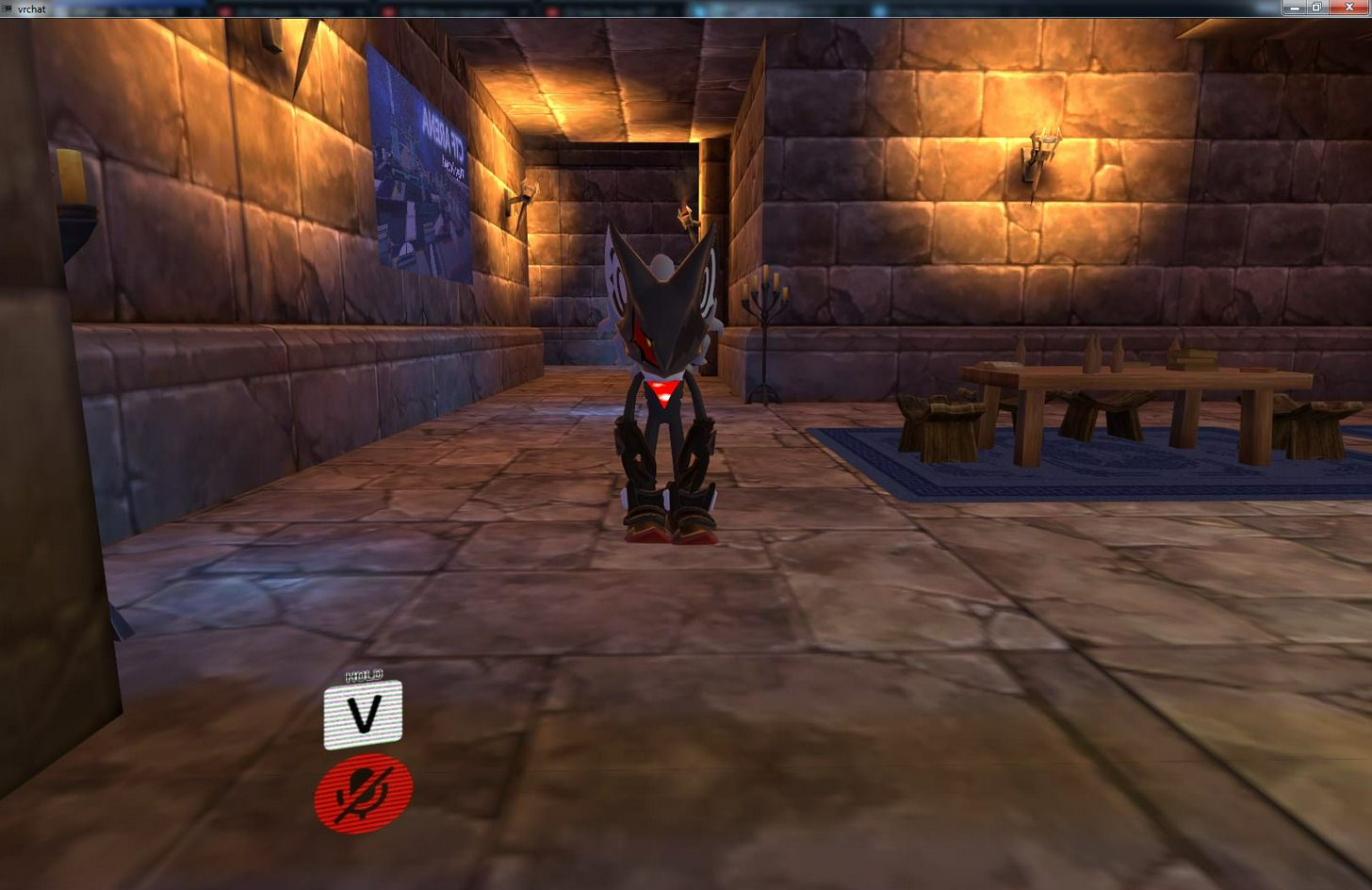
normal ones
it happens when i look upwards
south oar
@crisp tendon you are talking with me?
crisp tendon
@south oar yes
crisp tendon
a skeleton
celest charm
How can I fix this garbage bone structure
crisp tendon
you replace the one you have
@celest charm manually in blender
@meager kiln I'm not sure, is your weight correct in vrchat ?
south oar
@crisp tendon i've to do this in blender or in unity?
meager kiln
uh, how do i check my weight in vrchat?
crisp tendon
in the system menu
meager kiln
maybe height?
meager kiln
weight is measured in kilogramms \ pounds
crisp tendon
You remove the bones in your model, you take the skeleton of the other model, place it in your model, move it around to match your proportions then apply weight paint
@meager kiln sorry i meant height
it should be in meters
crisp tendon
max ?
meager kiln
aka 2.43m
crisp tendon
why would you do that lol
crisp tendon
well clearly something isn't good with your avatar
crisp tendon
then if it's specific to these models i can't help
try to find someone with one of those models in vrchat and ask them i guess ?
meager kiln
 grand drum
so in weight paint mode the more red it is the bendier it gets?
meager kiln
(sorry for the ping)
crisp tendon
If all those models are like that then i have no idea, might be bone rotation or something
@grand drum no, red means force
grand drum
aah i see
meager kiln
is there an option for locking bones or something?
past grail
the eyes are fucked up any fixes?
shadow shoal
Change texture to cutout
grand drum
Ooooh! i get the weight painting now
the only problem i have now is the camera controls
i dont know how to use the camera
 idle bough
@past grail Cutout and the right transparency cut-off will probably fix it
 lilac hound
How do you fix these kind of errors? I tried moving them up on the list but it did nothing
shadow shoal
Ignore that
 naive zinc
Yes
opal phoenix
thats fine
shadow shoal
@lilac hound No
 fading horizon
My avatar doesn't bend when I crouch down, would that be because my avatar has no thumb or pointer or something else? Cause it said full body ik may not work due to it missing thumb and index
grand drum
hey guys i just need the middle thumb and index for the model right?
naive zinc
@grand drum I think all fingers need to be mapped for hand gestures, otherwise you don't even need fingers
@fading horizon Lack of fingers should not effect crouch animation, could just be your taller/shortere than your model so your not considered crouching
grand drum
damn my model only has 4 fingers
naive zinc
You can have an extra finger not weighted to anything
aka it won't actually do anything, but it's still their
fading horizon
I'm getting an error when i try to upload my character that says "failed to create file record" is that related to the slow servers?
naive zinc
@fading horizon Servers are slow, #announcements
celest charm
how does one move a bone in blender without moving the model
 ionic dome
are there any options i should choose for this to make it easier for me?
ionic dome
like i click humanoid right? and then just press configure?
naive zinc
@ionic dome Click apply, only need to config if it throws errors
ionic dome
@naive zinc thank you
 rain fulcrum
of all the anime characters you could bring to vrchat, why kirito?
naive zinc
@livid raft click on left/right hand below the green guy, assign the correct bones
 livid raft
i dont have hand bones
ionic dome
@rain fulcrum just enjoy being Kirito
livid raft
how do i rotate them into the correct tpose?
livid raft
yeah so how do i do that
oh im gonna shrink it turkleton
i havent done it yet
the scale i need is like .025
calm needle
Are are you able to find the skeleton?
livid raft
i have no clue how to use blender

In this tutorial I show you how to rip models from garry's mod and use them as an avatar for vr chat! ---Downloads--- Blender: https://www.blender.org/downlo...
im using this video
i am just trying to get my favorite league characters in vrchat
calm needle
once selected, select the armature tab and put xray
ok, so youc an see them
you just need to rotate them to be angled into the hand properly
livid raft
ahh ok
calm needle
when you click on the armature, you can hit Tab to enter edit mode
you can just grab the tip of the hand bone and position it inside the hand in a natural way. that will fix the rotation in unity
celest charm
@naive zinc many thanks
calm needle
same thing hapepns if the character had fingers
 narrow junco
Hey. I need some help. It says that this model doesnt have upper arms that are specified, and it says the head, feet, and hands arent specified.
livid raft
ok
i think i did it fine
i got armatures on my unity and stuff
but what part of the hand do i assign it to
the armatures in topleft
are in hand
fine
naive zinc
@narrow junco You have the wrong bone in Chest, make sur eit's the immediate parent of the right/left shoulder and neck
livid raft
but what part of hand do i assign it to
calm needle
when you make edits to the seleton in blender and export to unity, you have to reset the model back to genric and them humanoid again for it to update your edits
fading horizon
@narrow junco you're probably gonna want to go into blender and use cats blender plugin. It joins the extra spine bones and such
 swift radish
Hallelujah everyone! I've figured out how to fix the backwards body/arms, front feet issue!
calm needle
gratz
 neon shard
@swift radish what was the problem?
calm needle
im pretty sure he accidently had the model rotated the wrong way in blender
neon shard
I have a friend with the issue
swift radish
These models won't open in blender
The solution is to first twist the feet back to normal, then rotate the root 180°
Then begin the tedious process of reassigning all of the left labeled bones to the right side, and all the right labeled bones to the left. For every bone, even fingers.
Then, viola! Fixed problen
Obviously you don't have to mess with the chest, spine or hips during the reassigning part
neon shard
oh wow..
swift radish
If you want to rename the bones after you can, if the left and right being reversed is confusing at any part of adding animations or dynamic bones
fading verge
How do I fix this? https://gyazo.com/2d93dd46cbc57124794de369f30b062b
 celest charm
after moving the bones around, when i go from edit mode to pose mode in blender, my model horribly deforms
 pseudo silo
@fading verge to fix the dude leaning backwards at a 45 degree angle, you need to make sure the bones are oriented correctly in blender (for example a spine doesn't sit at 45 degrees within your back)
calm needle
you have no chest kazuin
pseudo silo
to fix the missing chest, neck, and shoulders you need to specify them
on the right pane
you can see "O Chest -> None" input
it's possible your rig doesn't have one though, in which case you'd have to fix it in blender
by subdividing bones
fading verge
It came with no chest
I added one bone to it thats all
to fix one of the issues
Like this? Sorry I am a noob
narrow junco
A spine bone that I have in a model supposedly has a bone length of zero. How do i fix this?
fading verge
Got a weird issue. I attached the armature and the mesh together, set automatic weights. The vertex groups are in the body hierarchy but when I go into weight paint mode the character is totally blue. How do I get my groups to show?
swift radish
@Cole no soul
Were you doing my fix? Because my fix is for unity
fading verge
Alright
 languid flower
im having this issue show up any help ?
 cosmic mica
quick question - in avatar descripter is 1.6 the average human height?
shadow shoal
Yes
cosmic mica
thanks
narrow junco
anyone know how to fix this
swift radish
From experience, I just left it alone and it was fine
shadow shoal
@narrow junco You should've deleted zero weight bones with cat's blender tools
swift radish
You do need a neck though, and that's unrigged
celest charm
Can I pay someone to rig a model for me? 😢 this just isn't working for me
celest charm

Shine After Rain
swift radish
That's an obj file type, they can't be opened with bones in blender or unity as far as I know
celest charm
I converted it and tried
swift radish
Try rigging it in mixamo?
swift radish
Cole, I know this is a different version of pain, but xps is easy to import and export in blender
https://asideofchidori.deviantart.com/art/NUNS3-Pain-Deva-Path-FOR-XPS-UNLEASHED-403589986
 vocal laurel
any way to test dynamic bones within Unity Editor?
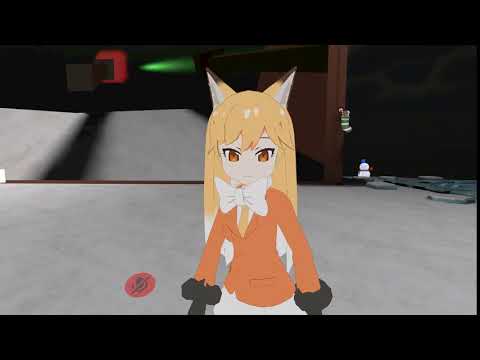 swift radish
@Hellopppp press the play button, select the whole armature, go to scene, drag the body around
celest charm
@swift radish ahh, dude, I appreciate the effort but that version is the only version thats in a server i goto, I was hoping to get that other one going
I'll hav another crack
vocal laurel
ah got it thanks
 golden prawn
Dose anyone know how to make blender from adding bones. At first I thought there were Leaf Bones but I've unchecked that and there still being added?
shadow shoal
Fix the model with cat's blender tools
 tacit pasture
How do i fix this. https://gyazo.com/c1f03c26b583ee38aec0f9682ab2e108
 golden prawn
where do you get that? Is there a link on discord?
tacit pasture
When i move my models legs it does that
celest charm
@swift radish I put the messed up bone model into blender to try and fix it, and I did in edit mode, but when I go back to pose mode evrything is messed up
 mild atlas
is there a way to upload a model to a Steam account and not a VRChat account?
fading verge
any clue why my arms are doing this and the dress is seethrough from the inside?
 topaz dune
@tacit pasture if you have blender you can use weight paint to fix the problem. It happens becourse the vertex isnt fixed to a bone.
tacit pasture
@topaz dune Ah, I see. can you fix it for me if thats okay with you?
topaz dune
yeah, sure.
tacit pasture
Alright, I dm you the file. thanks.
fading verge
or any clue why tohru's tail and skirt are doing this?
i checked the bones and the tail/skirt bones are unused
and the arms are messed up across all three avatars i use
all bent inwards
Sorry for repetitively asking, but when a character clips through the floor when animating, is it a rigging issue? I'm getting these errors.
He clips through very slightly
shadow shoal
Increase Y position when bone mapping
Select his model and make the Y value at 0.08
fading verge
Ah, so the issue is that the bones are mapped too low, so when it goes to animate it shifts the model down?
shadow shoal
The bones aren't mapped low, the model is below the ground
It happens if model was below the ground in Blender
golden prawn
Finally got it working thank you for letting me know about the Cats blender plugin!
fading verge
Whoops. That would explain it. It seemed weird to me because he's above the ground when standing still.
Thanks for the help!
 crude crag
Anyone know why the clavicle isn't showing up? It lets me select each sides bones in unity but the bone isn't showing up in green. Unity and blender screenshots shown
https://cdn.discordapp.com/attachments/390924372782612480/399814283216814080/shoulderbone2.PNG https://cdn.discordapp.com/attachments/390924372782612480/399814859459526656/shoulderbone3.PNG

 cosmic mica
what shader lets a model be double sided?
pseudo silo
@crude crag you have to specify it as the clavicle in the rig configuration
it won't show up unless it's part of the human rig, if it's not bound to anything
crude crag
would that be in blender?
crude crag
right, lemme load up unity real quick
wait what
lmao so I open it today and now it works
apparently it just had to rest for a day XD
 potent hull
Does the length of a character's arms matter? I'm trying to elongate my character's arms but it doesn't seem to change in game?
If I add 20% for example to the entire arm, apply the transform, reimport into Unity, and go in game the character's hands are longer but not the arm
crude crag
It's fine if this spine bone isn't green, right?this all looks good?
 wet violet
hey guys how do you fix this, all my skirts and such only have one face the outer face
the inside is always transparent
potent hull
@wet violet Add a back face to the mesh or use a shader that enables the back face
 limber willow
yo anyone know what this error means?
is vrchat just down or....
did I do something wrong
potent hull
@wet violet What Unity shader do you intend to use?
 uneven fossil
 magic robin
There are people who knows to work with Dynamic Bone? I have a question
shadow shoal
@crude crag Yeah it's all good
 charred sorrel
how do i select different bones while weight painting?
magic robin
@charred sorrel no
I have a beats hole
And I don't know to fix this
charred sorrel
uhh that was a separate question
fading verge
 crude crag
so do you have bones for all of those things?
fading verge
Can someone help me out with this
crude crag
what does your current rig look like, take a picture of the green bones in unity
magic robin
https://images-ext-1.discordapp.net/external/nwvV4eY9IrQkB0Yuzjj3QoUF7OI7gqvUyxUzZd1W6VA/https/4st.me/exBPO.png?width=801&height=676
How to make as well as bottom?

It's a blender
crude crag
Can't help you with fixing the hand bones, but I'll try to help with the red error (that one will actually prevent uploading)
charred sorrel
anyone know how to switch bones while weight painting in blender?

 crude crag
ah that's better. hm.
fading verge
What is full body IK mean tho
IK = inverse kinematics
does*
How does it affect my character
crude crag
okay rhino you want all your bones connected like this
 wispy prawn
@charred sorrel You should just be able to right click the bones on the armature to switch the current one
crude crag
that just means that you can't use it in VR rhino
works fine with mouse and keyboard though
crude crag
yeah this is something you'd do in blender. Save the unity project though
fading verge
can i reimport the fbx file to blender add bones then put it back
 smoky kindle
inverse kinematics is how you go from joint angles to actual position
fading verge
so i won't have to deal with scaling and the view ball
charred sorrel
it grabs the whole skeleton instead
smoky kindle
so if you wanted to step at a position at like coordinates = (x, y, z), there's math behind how the computer knows to move the rig
crude crag
you'll have to do that again I'm afraid. as far as i know anyway gentle. Just write down the numbers you entered and you can reenter them later
smoky kindle
so if your inverse kinematics aren't working properly, the model may not be able to figure out how to get to a point in space, or it might look like it's sliding
crude crag
or type it 😁
fading verge
so whatever i guess
can i have atleast three fingers for the model
cause the hands are like this
 smoky kindle
i recommend you make dummy bones @fading verge
crude crag
hm I don't know. yeah what eliana said.
fading verge
dummy bones?
smoky kindle
add some bones for each finger, but don't weight them to anything
fading verge
okay i am lost with what you said
smoky kindle
so that the computer is happy enough to try and do the inverse kinematics math, even though moving those bones doesn't move the mesh at all
so just add some bones that don't actually move the model
and label them the correct names for the fingers
crude crag
this is something you'd do in blender
smoky kindle
mmhm
fading verge
oh okay
so basically you want me to add some more finger bones to it
but to have no weight right
smoky kindle
that way it will still try to do the math to figure out how the hand should move
mmhm
it will only move the finger you actually have mapped
I mean weighted
fading verge
where would i apply the no wieght part
smoky kindle
you'd just make the bones
and that's it
cuz when making bones, after you make them you weight them
so if you dont weight them to parts of the mesh, they'll have no weight
fading verge
oh i never knew about the weight part
smoky kindle
look up how to do bone making/mesh weighting in blender for a better understanding
fading verge
you think that the problem with the spine is that they are weightless?
smoky kindle
because mesh waiting is useful to know to fix things wrong with the odel
weightless means it wouldn't move the mesh at all, is that the problem you're having?
fading verge
well i am not sure at all
smoky kindle
what happens?
fading verge
maybe it's that
crude crag
no that's not the problem with the spine, the main issue you're having is that your model is too 🅱oneless
 smoky kindle
yeah noo that means you just havent mapped the bones
fading verge
i map bones in unity right?
fading verge
oh i haven't done that
smoky kindle
thats what it looks like
crude crag
you gotta have the bones set up properly in blender to work with though
post a pic of theskeleton in blender
smoky kindle
look up how to map bones for vrchat in unity
theres youtube videos on how to do it
the lack of IK will only make your model look weird, start with getting it into the game first, then improve from there
small steps to gradually learn is what i did
crisp tendon
Lack of IK will just make it not move at all
 smoky kindle
thought you could have models without finger bones, but it would skate due to lack of IK? it still animates when walking
 sinful scaffold
anyone happen to have dynamic bone settings for hanging tassles?
 shrewd idol
Upload servers still dead
crude crag
@fading verge when working with model issues like the error you're having its better to have a picture from the front
fading verge
@smoky kindle So i just add some more finger bones, weight the thumb, middle, and index finger then map the spine
smoky kindle
dont weight anything
smoky kindle
telling you not to weight
just make the bones in the right places in the bone hiearchy
cuz if you dont have those fingers, what would you weight?
fading verge
good point
charred sorrel
why does deleting weight warp the model?
 river mulch
how would I get my shirt to stop clipping through me?
smoky kindle
weight is how parts of the mesh will move with the model, right? so if something isn't weighted, it wont move with whatever bone you're weighting
weighting is basically just modifying some weights, moving it around, seeing all the weird verticies, and redoing it over and over
fading verge
oh but i do want to move my thumb and the cup shaped hand
smoky kindle
so the key part is weight is dependent on the bone
fading verge
oh ok
 daring cairn
Do any of the default avatars work with ankle trackers?
smoky kindle
so your thumb and what, middle finger, are weighted
but you don't want the extra finger bones you don't have to be weighted
fading verge
i didn't know about weighting before you told me about it
smoky kindle
look it up and come back after doing so with questions
fading verge
ok
smoky kindle
look up making bones and weighting in blender just to better understand it
fading verge
kk
smoky kindle
because youll probably use bone weighting in the future if you make more models
fading verge
yeah i do want to make a model i play from league
smoky kindle
shouldn't most models work with ankle trackers?
fading verge
His name is Tahm Kench
sinful scaffold
or there are ways to use a kinnect
smoky kindle
hip is the most important tracker
swift radish
Apparently Kinect tracking is poop
smoky kindle
if you only have 2, use 1 on hip, 1 on a foot
fading verge
How many fingers should i make for each hand @smoky kindle
smoky kindle
also eyyy vex
swift radish
From what I've heard
sinful scaffold
aww thats depressing
smoky kindle
look at the humanoid rig in unity and make sure you have all those bones
fading verge
oh so 5 fingers
smoky kindle
yea
smoky kindle
it gets easier after your first time
fading verge
yeah
The thing that keeps me from quitting is that it is a character i made when i was younger
smoky kindle
it shouldnt be too bad, just gotta make the bones, you dont care about how they look
because they arent weighted
fading verge
okay
smoky kindle
though keep them together cuz you might get an error when enforcing t-pose otherwise
fading verge
but i am suppose to care if i want the thumb, index, and middle finger
cause i want to interact with them
smoky kindle
You only have 1 ''finger'', how are you going to map them??
daring cairn
Darn, I need to buy one more is what you're saying :P?
smoky kindle
if you want you could move partts of the cup-hand different for each finger
yea, sorry man
if you want full body tracking
basically if you dont have the hip, you might have weird jutting motions
fading verge
spine 01 is hip bone
smoky kindle
cuz there's multiple positions for the hip to be able to go
fading verge
?
daring cairn
Would explain why my hip moved with my right foot
fading verge
okay so if i have 1 finger for the cup hand i should weight it so it could move
smoky kindle
its already weighted
fading verge
wat
fading verge
i thought they had to be weight manually
daring cairn
@smoky kindle Know any good strap for the waist?
smoky kindle
well i have no idea where you got this odel from, because you have bones i assume its already pre-rigged
ah dang, dunno, dont actually have vr
daring cairn
oh lol
swift radish
@smoky kindle forgive me for not recognizing the username :o
Where'd we meet?
smoky kindle
i'm Elianabeth, saw you when you were trying to fix your poor bird model
swift radish
OH yeah I fixed him!
smoky kindle
what was the issue?
swift radish
Well let's say when you looked at the model in the muscles settings, he looked like this
I rotated the feet, rotated the root 180°
Then remapped all of the right bones to the left, and all the left bones to the right
Problem solved!
smoky kindle
niiice
swift radish
All in unity too, so no blender wrangling
This solution has fixed like 10 of my models
smoky kindle
i accidentally devolved to making stupid models since the last time you saw me
wow, that's great, you can do it in unity too?
charred sorrel
How come there's a piece of my model that i can't paint?
it just won't let me paint it
smoky kindle
is it a seperate mesh?
swift radish
I don't know the fix for blender, because none of the models would open in blender xD so yeah, the fix is all in unity configuration
charred sorrel
I don't think so, it's not showing in the "layers" so to speak...
nope you're right it is what the heck
why isn't it showing in that section
 granite kestrel
Got two armatures there
Oh wait, that one is hidden
When you select an armature and go to edit mode, can you choose the stuff you can't paint?
crisp tendon
you should be able to delete armature 001
smoky kindle
make sure to merge the meshes though
crisp tendon
They already are
 smoky kindle
yea
crisp tendon
Missing a thumb bone ?
smoky kindle
nope its there, just above
charred sorrel
OHH that worked, thank you! i might have more questions because it's not exporting opaque into unity
smoky kindle
you can fix that in unity
crisp tendon
opaque can be set in unity
fading verge
 smoky kindle
just change material to opaque
fading verge
thumb
charred sorrel
i did, it's still transparent D:
charred sorrel
why the heck is removing the weight paint distorting the model
crisp tendon
because of the rest pose
fading verge
@crisp tendon is it a necessity to apply pose as rest pose?
crisp tendon
It helps for weight painting
fading verge
idek about weight painting
charred sorrel
same
fading verge
but i ain't gonna touch it if i don't need it
charred sorrel
but the pole is moving with his head and it's extremely wonky
i want to get rid of the weight paint
crisp tendon
it's a really cool thing in blender, a thing that you start hating quickly
fading verge
how do i add bones to clothes so i can animate them?
crisp tendon
click on the bone head, then remove the weight paint from the pole
fading verge
what is weight painting good for
crisp tendon
in rest pose
it's good for making objects move the way you want to according to bones
fading verge
it doesn't affect bones right
charred sorrel
how do i revert to rest pose? D:
crisp tendon
 narrow ermine
Do you need to log out of VRchat to upload an avatar?
charred sorrel
OH thank you so much omg
narrow ermine
Is the fact that uploads are failing atm due to the servers dying?
feral spade
Probably lol
crude crag
yes
narrow ermine
Silly dying servers.
charred sorrel
but when i put it back to pose position it gets wonky again
will it still be okay in unity?
crisp tendon
@charred sorrel then you need to apply the pose position as rest position
charred sorrel
pardon my noobiness -- how do i do that?
narrow ermine
No noobiness allowed, get out.
crisp tendon
ctr + p i think
charred sorrel
xD
fading horizon
What does the jaw bone need to be the child of for it to work?
fading horizon
Thanks
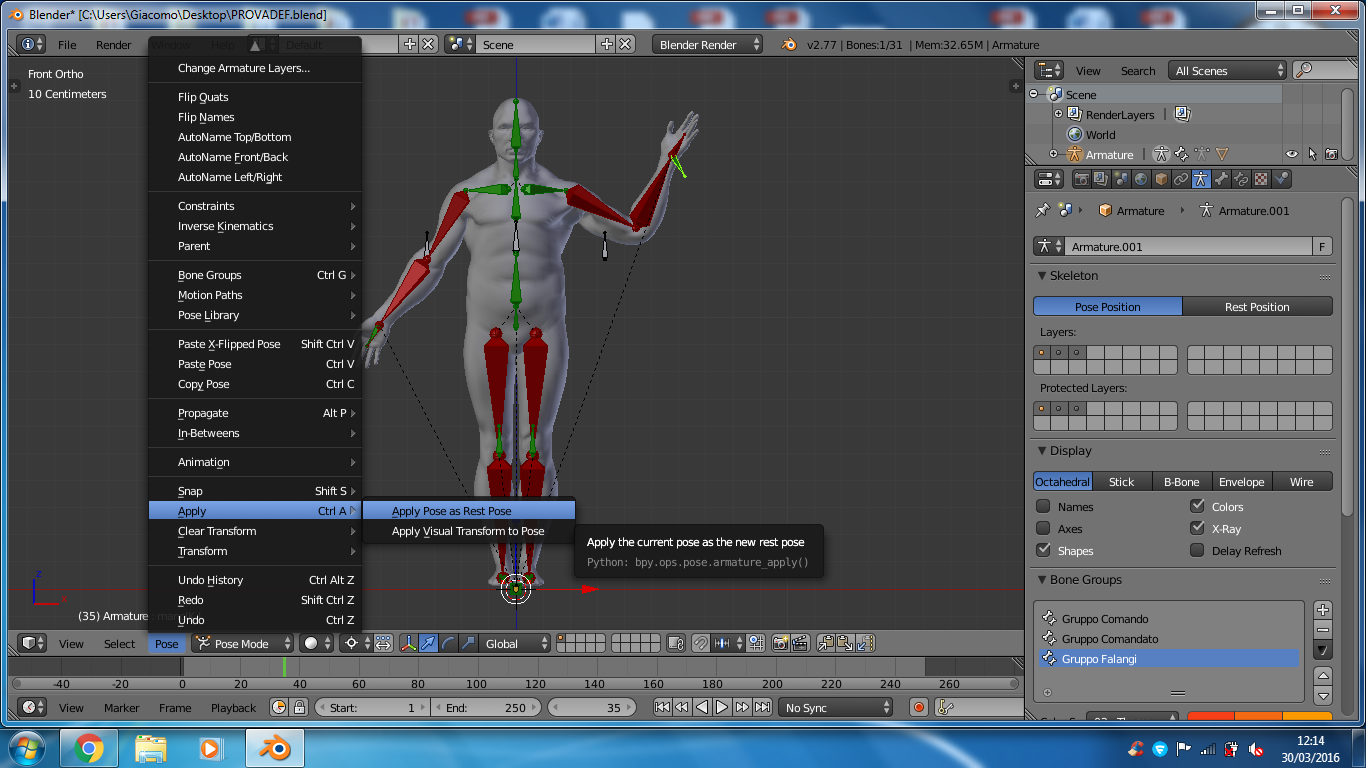 charred sorrel
it disconnected the skeleton from the model
crisp tendon
Was it weight painted ?
fading verge
@crisp tendon question: is it okay if i had a body part that isn't grouped with the body
crisp tendon
What do you mean by isn't grouped ?
 crude crag
thats fine
crisp tendon
You're supposed to join your meshes, so it doesn't matter
fading verge
What would change if i did not join these together
charred sorrel
ionic dome
could someone help me with rigging please?
charred sorrel
should i be concerned?
ionic dome
 tame skiff
^ On that note, what does it mean when the bones are red?
ionic dome
thank you
wispy prawn
If I have a clothes model with armature and a body with a seperate armature, is there a way to directly move the weights from the clothes to the body so it's all one fully rigged model?
sinful scaffold
why can i not move objects in unity anymore...
sinful scaffold
its in t pose
tame skiff
Coming right up Ruubick
crisp tendon
@sinful scaffold press play
narrow ermine
I'm getting an error saying I have a too many polys, I'm about 1k over and I have no way to reduce it. Should I be concerned?
crisp tendon
@wispy prawn You can copy weights if the skeleton is the exact same yes
@narrow ermine Why do you not have a way to reduce them ?
fading verge
how do i add bones to clothes so i can animate them?
sinful scaffold
yeah still not working, i just want to move an object around and its not working
wispy prawn
@crisp tendon It's not the exact same since it's a shirt and it would be odd for a shirt to have leg bones. It does however have the same arm bones. How would I go about copying the weights?
tame skiff
@crisp tendon
narrow ermine
@crisp tendon I'm uploading a groot, it's all one giant texture and stuff, CAT didn't separate them.
@crisp tendon So I couldn't decimate
sinful scaffold
look up mantis LOD editor
crisp tendon
@wispy prawn Oh ok i got your question wrong, no i don't think you can copy the weight painting of a bone for an mesh to a different skeleton
@tame skiff
crisp tendon
yes, thumb index and middle finger
fading verge
oh ok
crisp tendon
it's the minimum, you can obviously get 5
But IK will be disabled if you don't have at least 3
tame skiff
You need fingers, even if they're dummies?
crisp tendon
Yep
charred sorrel
is there any way to like... "copy paste" bones from one hand to the other?
tame skiff
Like in my example, where there's an arm canon on one side?
I still need finger bones for that?
crisp tendon
Press D when you have selected all your bones and move them to the other hand, the connect and parent the bones @charred sorrel
fading verge
ok
crisp tendon
@tame skiff Yep, but dummy will do
fading verge
I also had an error before about the hip and spine before

Is there anything wrong?
charred sorrel
press d?
crisp tendon
to duplicate
fading verge


 charred sorrel
i don't think that worked, is it ctrl d?
crisp tendon
it should be just D, but if ctrl + d works for you that's ok
topaz dune
shift+d
crisp tendon
@fading verge You mean the rotation error ?
topaz dune
if you dublicate in blender that is
sinful scaffold
i think unity broke.... i still cant move this object around...
crisp tendon
screenshot ?
tame skiff
I feel certain there's a faster and more specialized way to mirror copy bones in Blender
crisp tendon
Oh that's just bone mapping then @fading verge
fading verge
where can i bone map
crisp tendon
@tame skiff Yeah but i can't teach that to beginners lol
fading verge
in unity?
crisp tendon
@fading verge Click on configure when you chose humanoid
fading verge
oh ok
sinful scaffold
i cant move any objects in my scene... unless my entire model is selected... why
charred sorrel
how do i edit parents?
tame skiff
Thanks by the way, @crisp tendon
crisp tendon
bone menu after clicking on a specific bone @charred sorrel
charred sorrel
yeah seriously dude you've been a huge help sdfklds
crisp tendon
You're all very welcome
ionic dome
@crisp tendon can you create bones or no?
crisp tendon
in blender yes
ionic dome
ah jeez
fading verge
can someone tell me how to add bones to this chain so it isnt sticking straight out?
crisp tendon
@fading verge Don't need bones, you can select the chain itself in blender and rotate it down
Unless you want dynamic bones
crisp tendon
you can in blender
fading verge
no in blender the chain and the coat are one
crisp tendon
Select one of the vertices and press L
tame skiff
Go into edit mode
crisp tendon
you'll select only the chain
 solemn oasis
Is this where I can ask really stupid questions?
crisp tendon
about bones yes
solemn oasis
Rad
Some bones aren't moving the model when I rotate them in pose mode even after weight painting them red
I think it may have something to do with them not being attached to the hips+spine which do move when I rotate them
crisp tendon
🤔
solemn oasis
If I'm just a moron and should just watch/read more pls tell me
crisp tendon
Not that's a pretty specific question don't worry
Can you export your fbx and send it to me ?
solemn oasis
sure
narrow ermine
@crisp tendon Server related?
crisp tendon
I believe it is yep
tame skiff
Why use fbx when unity can read .blend files? Serious question.
crisp tendon
I just like fbx for mixamo
it's a one fits all kinda thing
Uh, what are you trying to do with your model @solemn oasis
solemn oasis
Okay so my intention is to just eventually animate the legs
But from what I understand I need to rig the legs and then move on from there
crisp tendon
Well, you would need to make your own animations for everything
 main sage
ok so, i gotta rename all the bones in blender cuz this model has em named like Bone001 and such
crisp tendon
Right now you have 0 weight paint @solemn oasis
main sage
on an avatar rig, is the spine bone below (not parent but physically) the chest bone?
crisp tendon
yes
main sage
k
solemn oasis
Ah yeah so I had more before but I thought maybe it was messing something up so I just put some on one leg
I'll find it one sec
fading verge
What is the best for rendering mode?
solemn oasis
should be the back left leg
fading verge
is it cut out or opaque
crisp tendon
@fading verge rendering mode ? As in material ?