#avatar-rigging
1 messages · Page 15 of 1
 hasty cloud
 pseudo trout
hasty cloud
pseudo trout
hasty cloud
basically
have an animation where ur blade is spinning
and leave loop time on
then
connect it to a new layer
place in your animation
and ur done lol
welp imma go to sleep
hasty cloud
glad i could help!
 night spear
so does anyone know why does importing into blender causes any and all models to become corrupted? this is only on blender, 3ds max and unity it looks fine. people in the blender server are being useless


 sleek apex
night spear
so does anyone know why does importing into blender causes any and all models to...
sleek apex
night spear
so does anyone know why does importing into blender causes any and all models to...
This most likely has to do with high triangle count, especially since it looks like you’re working with a lot of rounder surfaces. Try lowering the detail on your model in blender, then importing them back in.
 arctic sundial
It has to do with the armature being rotated 90 degrees. Unparent the armature, rotate on axis by 90, then reparent in the same position
night spear
sleek apex
This most likely has to do with high triangle count, especially since it looks l...
yeah thats the thing, cant do anything "inside blender" at all, this happens right when i import, whether via settings or via cats plugin
sleek apex
night spear
yeah thats the thing, cant do anything "inside blender" at all, this happens rig...
Have you make mean of using Roblox for importing the model,I think making use of this don't corrupt
night spear
precisely, it is for roblox specifically, which is why i was trying to merge the meshes
 tranquil furnace
Hey people, does anyone know if it's possible to make "2D eyes"? Like, I have a model that is heavily reliant on 2D textures and I felt that it'd be cool to animate its eyes through textures, thank you in advance
Or in other words - 2D textures change

VRChat model for blindy and blondie !!
you can purchase the model here:
https://kilerbomb.gumroad.com/l/pokablindy
or
https://kilerbomb.booth.pm/items/4170624
(gumroad + booth now compatible with paypal)
little guide to import the model in vrchat with unity (there's a few steps):
https://imgur.com/a/dZ5VALW
kilerbomb's page and twitter:
https...
Similar to this basically
 opaque crag
Anyone have any tips for rigging for a FBT rig to be as accurate as possible, I have tons of really strange issues like my knees not bending straight and weird things like that, I can't find any information on the steps to take to ensure my rig is 'perfect' for accurate tracking. the rig at the very least is proportionally correct to my own proportions IRL so there's that.
Update : Don't solicit me. I'm not going to commission anyone for anything.
 fervent mantle
night spear
so does anyone know why does importing into blender causes any and all models to...
fervent mantle
night spear
so does anyone know why does importing into blender causes any and all models to...
did you use fbx exporter on unity to get the fbx? cause thats what it looks like lol
fervent mantle
tranquil furnace
Hey people, does anyone know if it's possible to make "2D eyes"? Like, I have a ...
I mean you can do material swap animations for the eyes
night spear
fervent mantle
did you use fbx exporter on unity to get the fbx? cause thats what it looks like...
correct. had to get the fbx for the youtuber
the model itself is a youtuber, just need a few adjustments
 warm aspen
Hello friends, I was wondering
How to not lose your mind when weight painting ?
night spear
so wish ai can do that automatically
warm aspen
🥲


It does not make any sense.
I smoothed out the weight but it acts like I just colored the thing red
fervent mantle
night spear
correct. had to get the fbx for the youtuber
did you rip it? cause thats what it's sounding like
night spear
had a friend do it for me, saw no other way
usually one has to be extremely popular for their model to show up in sketch fab n such
fervent mantle
night spear
had a friend do it for me, saw no other way
rotate the mesh 90%
night spear
i do find it odd because on a preview in every other software besides blender, the model appears normal
fervent mantle
night spear
so wish ai can do that automatically
you need more verticies it's too low poly for a good smooth bend
warm aspen
fervent mantle
you need more verticies it's too low poly for a good smooth bend
Are you talking about my cape ?
fervent mantle
warm aspen
Are you talking about my cape ?
yeah sorry i replied to the wrong thing lol
warm aspen
That's quiet enough polygons imo.
Normally with the weight I painted it should slowly lose deformation towards the center.
But here it's an all or nothing for some reason
 river ingot
warm aspen
🥲
river ingot
warm aspen
🥲
You should have the orange up to the 3rd square, the green at the fourth, and so on. Then have it blended in with the conjoining bone so both have blue/green at the same centered column where they meet.
river ingot
opaque crag
Anyone have any tips for rigging for a FBT rig to be as accurate as possible, I ...

[Update 11/10/2021]
In Unity 2019 it's easier for the project to break during file overwrite. It's better not to delete the .meta file when overwriting anymore.
[Update 8/6/2020] (Avatars 3.0 info / current state of "RIG HACK" fixes):
*With the new FBT head-locked binding method the "Shoulder Flop Fix" of lowering the viewball is no longer r...
 pale pumice
warm aspen
Hello friends, I was wondering
How to not lose your mind when weight painting ?
pale pumice
warm aspen
Hello friends, I was wondering
How to not lose your mind when weight painting ?
whisky
warm aspen
Damn, I was using Vodka
pale pumice
oh that'll work too. I just like the taste of straight whisky more
opaque crag
river ingot
https://www.youtube.com/watch?v=2sfTEBAl8sA&t=2849s
A few of his tips are fairly outdated
river ingot
opaque crag
A few of his tips are fairly outdated
that was a while ago heh
river ingot
opaque crag
A few of his tips are fairly outdated
following this? that vid says to make them straight from hand to hand, but this picture shows to bend the knees etc etc..

 trim nexus
Anyone ever have to deal with their avatars tiptoeing everywhere and then settling into a michael jackson stance?

 soft kite
Hello everyone
trim nexus
🗿
fervent mantle
trim nexus
Anyone ever have to deal with their avatars tiptoeing everywhere and then settli...
most of the time its a playspace issue
like its detecting your floor lower than it is
trim nexus
that actually would make perfect sense thank you
trim nexus
it helped but its still a bit off, the leaning when the legs are not locked is still a problem
 covert junco
hello guys i need someone who can help me rig my vrchat avatar
 hollow quartz
river ingot
following this? that vid says to make them straight from hand to hand, but this ...
hollow quartz
river ingot
following this? that vid says to make them straight from hand to hand, but this ...
Limbs need to have a slight bend in the way you'd expect them to bend
This goes for rigging in general, not just VRChat
 turbid pecan
anyone know why this keeps happening ;w;

 rare moon
turbid pecan
anyone know why this keeps happening ;w;
rare moon
turbid pecan
anyone know why this keeps happening ;w;
You need to select your fbx, then in the inspector go to rig, then click configure. Then assign the chest bone correctly.
river ingot
unity
 chilly badge
hello, so im trying to upload an avi for the first time and im running Windows 11 on my mac. its running fine and should upload other than the fact that i dont knwo what this means. could anyone tell me when i need to do? i dont know the names of most things so if someone could speak newbie to me it would be appreciated ;-;
 rare moon
chilly badge
hello, so im trying to upload an avi for the first time and im running Windows 1...
rare moon
chilly badge
hello, so im trying to upload an avi for the first time and im running Windows 1...
select your avatar, then in the inspector, find blueprint ID and click "Detatch"
also this is the rigging channel, so if you're asking for help unrelated to rigging it's probably better to ask in #avatar-help
chilly badge
oh im sorry i didnt know which channel to put it in
hasty cloud
im having an issue where when i try auto-weigting a clothing to my armature, it says: "Bone Heat Weighting: failed to find solution for one or more bones"

 brazen island
i dont quite remember but i think it doesnt like loose meshes so select main linked part, separate it and auto weight, then weightpaint the chain manually or smth and combine
hasty cloud
brazen island
i dont quite remember but i think it doesnt like loose meshes so select main lin...
i tried, it doesnt work...
i separated not only the chains, but the long sleeves
hasty cloud
ah i made it work
 icy horizon
im trying to break these into their own individual pieces and im not really sure how i would do that, would anyone be willing to help
 river ingot
icy horizon
im trying to break these into their own individual pieces and im not really sure...
river ingot
icy horizon
im trying to break these into their own individual pieces and im not really sure...
I know a manual way to go about seperating the meshes. Cats also has a "Seperate mesh" option that might work on it too. Then there may be a trick for blender that has some college level way to go about it.
icy horizon
i just need them to be in seperate pieces so quest doesnt die when i try to make them toggle individually
 hard cedar
icy horizon
i just need them to be in seperate pieces so quest doesnt die when i try to make...
hard cedar
icy horizon
i just need them to be in seperate pieces so quest doesnt die when i try to make...
Go in Edit mode, hover the piece you want to seperate, press "L". enjoy this life hack 😍 (and then press P to seperate by selection after you've finished selecting)
icy horizon
Thank you but it seems that the avatar just probably won't work for quest with the toggles with how it's designed
Thanks for the tip though :) I'll use this in the future
river ingot
looks like what you need to toggle are already seperated on the right, their just hidden?
arctic sundial
icy horizon
Thank you but it seems that the avatar just probably won't work for quest with t...
Too many polygons or skinned meshes?
icy horizon
arctic sundial
Too many polygons or skinned meshes?
Sadly
rare moon
arctic sundial
Too many polygons or skinned meshes?
Is there a hard limit for that? I've seen some really poor stats on quest avis, like 400k polygons and almost 100 materials and like 70 something skinned mesh renderers
It won't perform well but I didn't think there was a hard limit for those things, or if there was that it was pretty high
arctic sundial
As you can see, i was asking them that and didnt really get a definitive answer as to what the issue is.
brazen island
with a lot of stuff comes huge model size, and theres 10mb hard limit
 lone mural
when im making a "happy" shape key expression in blender, can i just name it whatever i want
rare moon
lone mural
when im making a "happy" shape key expression in blender, can i just name it wha...
yes
 hollow apex
worked fine in blender but... I have no idea why this is happening.

not my first rig rodeo but not a clue why this is happening.
I'm not sure... tested in blender it worked fine. i dont know what could possibly be wrong

Ive noticed in blender after combining the amatures, that everything is completely out of order.. I have no idea how to fix the bone order? the head bone is seperate from the rest of the body. does anyone know if this can be fixed? I am not familiar with rigging but I guess I'll start there becauuse this isn't correct
 hollow apex
I fixed the rig but... no luck. is anyone able to help?
 river ingot
hollow apex
I fixed the rig but... no luck. is anyone able to help?
river ingot
hollow apex
I fixed the rig but... no luck. is anyone able to help?
agh, thats a blendshape problem. If you change something on blender, it can have an affect on the blendshapes i.e. what are used for facial expressions for talkig etc.
If you have save points its better to go back to a prior one.
hollow apex
river ingot
agh, thats a blendshape problem. If you change something on blender, it can have...
oh! okay. so its the blendshapes..
should i delete the blendshapes then>?
i can try deleting the blendshapes and exporting the test to see. ill get back to it asap
also thank you!
river ingot
just make a save before you do..heh..I deleted all mine and now I have to make new ones to make the mouth move when he speaks..=(
hollow apex
river ingot
just make a save before you do..heh..I deleted all mine and now I have to make n...
so what would i do to have visemes but avoid this? and oh gosh that sounds bad D: I just deleted the visemes just now and exported but didn't save so that i could test to do a diagnostic test
ok deleted the visemes but it still turns out to be this. I've never had this before im so confused.

so its not the visemes. but.. in blender everything looks normal..
 river ingot
im not sure theres a big difference between the two?
lone mural
Does anyone know why this could be happening?? im trying to edit expressions on my face and i wanna keep symmetrical, but any time i try, there are a handful of vertices that stay put and dont move...

 lone mural
Does anyone know why this could be happening?? im trying to edit expressions on...
lone mural
lone mural
Does anyone know why this could be happening?? im trying to edit expressions on...
im editing the corner of my mouth btw
lone mural
pls
hasty cloud
i'd prolly recommend using sculpt tool instead
 stuck mesa
hi guys so im tryna get this guy to work and ive rigged him up, weight painted, but troubles come in importing him into unity, as the rig tool thing inside doesnt recognize all of my bones, or marks them red even if theyre correctly assigned, anyone know why this is happening? also says my model isnt in a t-pose, i thought an A-pose is sufficient?
 brazen island
you have extra bones, its hips - upper leg (with gap), also your hip bone is upside down
also no feet
arctic sundial
no feet
stuck mesa
brazen island
you have extra bones, its hips - upper leg (with gap), also your hip bone is ups...
do you mean these 2?

and i thought it didnt need feet because of a different rig i saw on google images
ill get to fixing that
 balmy delta
You need feet but you dont need toes
stuck mesa
oh okay thanks
balmy delta
Also it being not in Tpose doesnt entirely matter
Since in unity you can just force tpose
Or in blender just pose it as tpose before exporting
river ingot

 meager turtle
Any tips for what I'm doing wrong rigging the hands here? They're weirdly rotated relative to my controllers, and the fingers seem to be rotating somewhat oddly as well


In contrast, on a different avatar

 meager turtle
This is how the bones are set up on the hand in the first screenshot

And this is how they're set up on the hand in the second screenshot
 arctic sundial
Have you checked muscle settings in unity?
meager turtle
arctic sundial
Have you checked muscle settings in unity?
How do I check that?
arctic sundial
If you do not animate your hand gestures, unity assigns default ones. Muscle settings control how far fingers bend when opening, closing the fist as well as max value rotations. They can be found in the import settings of your fbx, specifically in the rig configuration
It may or may not be that. I cant see anything wrong with your rig in blender tho
meager turtle
ah. well this is how its set up in the import settings. They look fine to me, as these are the usual settings I use for models and it typically works fine

 arctic sundial
Top, second image
Go into muscle settings and close the hand, see if its weird there too.
meager turtle
arctic sundial
Go into muscle settings and close the hand, see if its weird there too.
I assume I should use "Finger Open Close" to check?
arctic sundial
Its effectively the same as moving all fingers separately, just in one slider
You will see the values shift
meager turtle
Yeah no this is how it looks in Unity when using the Finger Open Close slider

In contrast to how it looks in VRChat
 meager turtle
arctic sundial
Is it like this in play mode?
meager turtle
arctic sundial
Is it like this in play mode?
The model just stays in place when going into play mode. Do I need something like gesture manager to test it?
arctic sundial
Yep
meager turtle
arctic sundial
Yep
seems fine in editor?

could it be that i'm using index controllers?
arctic sundial
meager turtle
could it be that i'm using index controllers?
Im unsure how that would make it so much worse but do you have other controllers you can test with?
meager turtle
I can test with Quest controllers in a bit, sure.
river ingot
thats fixed in the animation proxys that are default in the sdk folder. You can change the "idle" proxy and adjust the finger positioning in it and add it in to the locomotion slot in vrc descriptor...but I havent done that in a little while so it might not be locomotion..but its one of those.
meager turtle
river ingot
thats fixed in the animation proxys that are default in the sdk folder. You can ...
o lord... i feel like i should be able to do something in Blender to fix this though, given other models don't have that issue
meager turtle
arctic sundial
Im unsure how that would make it so much worse but do you have other controllers...
late response but yeah, the issue still persists with quest controllers.


in contrast, here's how it looks on the other hands i showed previously


and here's a comparison of how the hand is rotated with the quest controllers

 meager turtle
...turns out it just needed a reupload LOL
hollow quartz
unity moment
 random bridge
Hello
 slate sapphire
im editing my avi i bought, currently it only has Proximal and Intermediate finger bones, and some world interactions just dont work, supposedly since i dont have the third finger bone. for example, the sunset bar drink machine works fine with my other avis, just not this one. how would i add a third finger bone?
its a deira btw
 slate monolith
hey im looking for someone that is good at rigging (not using auto riggers) trying to get a character rigged willing to pay commision also dont want the character shared or used as its a personal avatar i have made from scratch im just not the best at rigging
arctic sundial
You will likely get scam dms from people here
slate monolith
sad any idea where to look? i have tried fiver and all 3 people just used riggafy and its not awfull but not what i want
arctic sundial
Vrctraders from #1204490664637890580 - they have a verified artist role unlike here
slate monolith
mk thanks so much ❤️
fervent mantle
Boo 🤮
balmy delta

 radiant seal
Not sure if this is where I should ask this or not, but I need some help with creating a snake hand puppet and not sure how to do that or rig it properly. I've seen and used snake hand puppet models in the past and I'd like to have the body trail behind the head and allow me to kinda pose the snake by moving around (i.e. if I want to coil it up into a spot and stuff manually)
balmy delta
have the physbone set to 0 pull
 royal torrent
so I'm having an issue with my earring bone having no volume in unity (thus it doesn't swing and is kinda locked to the root ear bone). anyone know why this might be? thanks!

 royal torrent
so I'm having an issue with my earring bone having no volume in unity (thus it d...
royal torrent
royal torrent
so I'm having an issue with my earring bone having no volume in unity (thus it d...
Fixed: made sure to export FBX to include leaf bones
arctic sundial
royal torrent
Fixed: made sure to export FBX to include leaf bones
You could save yourself the bones and instead set an end point in the script
 still heart
i forgot how to parent bones to the head tryin to make ear bones for this thing, i made bone groups for the left and right ear and put bones on them wight paint it to the bone groups but nah

i hope i post this in the right chat
arctic sundial
still heart
i forgot how to parent bones to the head tryin to make ear bones for this thing,...
Select the armature, go to edit mode, then in the bone panel you will have "relations" section under which you can set the parent bone
brazen island
@still heart you want to parent ear bones to the head? using ctrl select all immediate children, then also select parent (it is bright yellow), ctrl+p, keep offsets
 brazen island
oh, you first must merge them in one armature
ctrl+j also after selecting main armature last
 brazen island
object mode
 arctic sundial
ctrl + j

 quiet socket
So I want to know how I can add animations to my avatar but idk where to start or how. For example, i want some sort of techy mechanical arm that when I use a toggle, I want my arm to turn into a gun or something. How can I figure out how to do that type of stuff?
it’ll be a VRoid avi too btw
 fading verge
Experienced riggers only, please
I've made a collar and need some help with understanding weight painting root bones. As you can see, the collar has 5 components meant to have physics applied (the collar centerpiece and the 4 strings of stars on either side).
In the video, the first bone I'm rotating is the root of the star strings which is meant to decrease the number of physbone components needed in unity. Next I rotate the neck bone and everything moves as intended because all the charms are parented to the neck as they should be. The problem comes when I rotate the head bone. I obviously can't have more than one parent for any given bone and I don't want to have to use constraints because I plan to release this asset pack for sale and want it to be as user friendly as possible.
I believe (I could be wrong) the solution is to weight paint the collar to the root and edit the weights accordingly, but I have no idea where to start on that. Does anyone have any ideas or tips?

This is "2024-03-30 03-22-08" by Whoopzee bumbles on Vimeo, the home for high quality videos and the people who love them.
river ingot
shouldnt it be painted to the head as it is usually weighing over the neck? The neck doesnt really need to be weight to the neck bone, mines weighed to the head bone for the most part. So maybe the necklace should be weighed with the head too?
fading verge
river ingot
shouldnt it be painted to the head as it is usually weighing over the neck? The ...
When you say necklace, do you mean the charms? Because the base of it Is weighted to the head as needed, but if I were to weight paint the dangly charms to the head it would cause very unpleasant morphing
especially with physics introduced
hasty cloud
i would recommend weight painting the necklace entirely to the neck bone, and avoid the head bone
 gaunt jay
I've got a fbx where the head is tilted a bit too much down and it's very uncomfortable to use
I just want change the angle up by about 25-30 degrees
I tried just rotating the bone head in unity, but vrchat ignores it
I tried with cats plugin (apply pose as rest pose / pose to shape key), and while it works, it broke all the others blendshapes
Ex. it had a blendshape to turn on eyelashes, but they didn't get updated to the new rotation and now they're positioned incorrectly
https://i.imgur.com/lpDj2eP.png
Is there an easy way to rotate the head without breaking everything else?
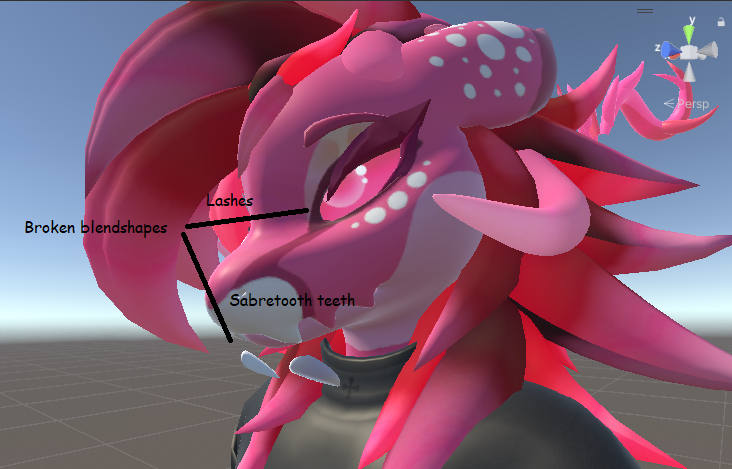 fading verge
hasty cloud
i would recommend weight painting the necklace entirely to the neck bone, and av...
fading verge
hasty cloud
i would recommend weight painting the necklace entirely to the neck bone, and av...
If I do that, it'll clip like nobody's business. With this base, avoiding weighting to the head bone is just not an option
This is a commercial project. I won't settle for something like that.
river ingot
fading verge
When you say necklace, do you mean the charms? Because the base of it Is weighte...
okay, that came out wrong then. That does look mindbogglign when you moved the head in the video. Normally, you would have blue/green weights on the head/neck for each bone. (Head is red, with blue green on neck. Neck is red, with blue green going into the head, but not entirely into the head.) First I want to know if you did this with the weighing of the roots?
B.) You may have the roots of the charms parented to the top of the neck bone. But I think you can have them weighed to the entirety of the neck bone, or the bottom of it instead. OR C.) You can have the root bones "Connected" To the neck bone..so they have to move with the neck bone moves..otherwise they remain floating like they are, I think that might solve it too. I do that with some bones and it has better consecutive chain reactions.
 final idol
Hi, when putting on my avatar my viewpoint seems to be far out in front of me, even though it's set up inside the head in Unity, is there a fix ?
quiet socket
For some reason when i try to enable an addon ive installed, i get this error and dont know how to fix it.

 uncut breach
it most likely doesn't support Blender 4.1
quiet socket
is there a way i can downgrade my blender version? cause alot of useful addons keep giving me this error.
but you were right. it was a 3.0 addon
i have 4.1 currently for blender
uncut breach
Here's all the blender versions
you most likely will get the best support with 3.6 LTS
quiet socket
uncut breach
you most likely will get the best support with 3.6 LTS
"Microsoft Defender SmartScreen prevented an unrecognized app from starting. Running this app might put your PC at risk"
uncut breach
that just means the code isn't signed and doesn't necessarily mean it's malicious
read more > run anyway
quiet socket
ah okay i got it and its working now, thank you!
hasty cloud
fading verge
If I do that, it'll clip like nobody's business. With this base, avoiding weight...
then maybe parent the chain bones to the neck bone
quiet socket
So with rigging, how do i make it so i can get like separate parts of my arm to move and not just like the elbows and fingers and stuff? i want to make it so that the top of my arm opens up, and like a little futuristic gun pops out or something, but idk how to do any of that or where to start.

kinda like this, but the gun retracts out of the arm.
 brazen island
noone stops you from having bones other than humanoid ones, if they are children of lower arm they all will follow it, then weightpaint stuff to them, then animate their movement
river ingot
final idol
Hi, when putting on my avatar my viewpoint seems to be far out in front of me, e...
should be at tip of nose
final idol
river ingot
should be at tip of nose
was an import error
fading verge
hasty cloud
then maybe parent the chain bones to the neck bone
They are 
It's not the neck weighting that's a problem
It's the head weighting
Ffs I need to find a better place to ask for help -.-
hasty cloud
fading verge
They are <:vrcSkull:585749770442899466>
omg mb i meant the head bone XD
im so sorry lol
fading verge
river ingot
B.) You may have the roots of the charms parented to the top of the neck bone. B...
In the video I posted there's no weighting on the root. The root is parented to the neck bone, but not connected. I'm not really sure how connecting them would change anything other than sorta screwing up the origin point of the chains' rotations. Also I'm not familiar with the ability to change the location where a bone is parented on any given bone (eg changing the parenting location from the end of a bone to the base of a bone)
Also if I were to parent the bones to the head, they would rotate with the head and not the neck
That would be pretty funky
hasty cloud
doesnt the necklace also rotate with the head bone..? .-.
fading verge
Only the base, but it does that because it won't have physics
The problem arises with the parts of it that will have physics applied
If I weight the parts that are meant to have physics to any bones other than the ones that are meant to have physics applied, it will have horrible morphing
hasty cloud
dont, all i suggested was to parent the chain bones (the phys bones) to the head bone
i mean have u tried at least?
 hasty cloud
yikes yeah nope
fading verge
Yeah I'm stumped
I know it's possible to get this rigged properly, anything is
but I have 0 idea where to begin
hasty cloud
take it slow, i think the main problem is the weight painting
dont beat yourself down over weight painting, bc no one is good at it
fading verge
thing is, the base of the collar is fine
hasty cloud
well...
it is moving kinda irregularly..
for example, the weight painting is causing what i suppose are metal rings/holes to bend
fading verge
I mean yeah, but that was something I planned to address after figuring out the parenting issues because that is a simple weight painting issue. As for the parts that are meant to have physics applied, I know that's not weight painting. I'm thinking my only option for this might be constraints
I wanted to avoid that because this is a commercial project and I wanted it to be as user friendly as possible, but if that's that way it has to be then so be it I suppose
river ingot
are there bones on the charms? I have earings with chains, the chains have no bones and they move freely when I move the head around bu tare still attached to the ears.
fading verge
yeah there are
fading verge
river ingot
are there bones on the charms? I have earings with chains, the chains have no bo...
Lemme send a pic if what the armature looks like
 river ingot

I'm working on chains hanging from the legs myself, its a similar problem.

But the ear chains work correctly and they have no bones on them..
 fading verge
Yeah that's why I think it's a parenting issue that can really only be solved by constraints
I know if I removed the bones and weight painted accordingly, the problem would solve itself
buuuut I want physics xD
 robust crescent
not seeing a dotted line are they connected to anything
river ingot
Bunch of trial and error, its the scientific way to solve the problem
river ingot

You can change the parenting easier using the drop down menu in "relations"
Also in that category, try out the "inherit rotation"
Along with the featured "inherit scale" with another drop down menu of customizable options

Also..there is supposed to be an "end" bone after the last bone for physbones..or there used to be.
You can also change whether its parented to the head or tail in this window on slightly different tab
 fading verge
That is honestly really useful information
Next time I open up my project I'm gonna toy around with it a bit
 harsh dew
anyone know why automatic weights is not doing what its supposed too? lol
not sure if showing the topology helps
 balmy delta
that looks pretty normal for automatic weights
harsh dew
its never usually this bad tho
like, it cant tell which leg is which?
I move the arm, and the entire body and head moves?
like ive done something wrong with the mesh, im not sure what tho
river ingot
harsh dew
anyone know why automatic weights is not doing what its supposed too? lol
auto weights never worked for me neither
brazen island
use mixamo as a starting point for humanoid, autoweight usable only for lesser stuff
 honest obsidian
harsh dew
anyone know why automatic weights is not doing what its supposed too? lol
honest obsidian
harsh dew
anyone know why automatic weights is not doing what its supposed too? lol
Oh
Create a another duplicate of the mesh
Use remesh modifier and use voxels
And the apply modifier
And then auto weight paint the skeleton to the duplicate voxalized mesh
After that transfer the voxalized mesh to the rig
The non duplicated one
Then bam
At college rn so I cant show
@harsh dew
 slow trout
I have the z axis facing forwards in blender for the leg's, would that be what's breaking the avi?


Here's the blender photo's


my goal is to make it so the leg's go forward when crouching a little instead of out to the side's
harsh dew
honest obsidian
After that transfer the voxalized mesh to the rig
I shall give it a go
 lilac frigate
I'm struggling to figure out what to do about this issue I ran into. I prefer using IK both lock as it feels the best to me, but my avatar's spine seems to squish a lot. It didn't bother me until recently when I noticed that it deforms my clothes in a strange way, and I can't figure out how to fix it. I can't seem to recreate it in blender, so I'm not sure what to do to fix it. Ideally I'm looking for a way to prevent my clothes deforming while still using both lock.


 copper halo
lilac frigate
I'm struggling to figure out what to do about this issue I ran into. I prefer u...
copper halo
lilac frigate
I'm struggling to figure out what to do about this issue I ran into. I prefer u...
Me the spine shorter i guese
river ingot
lilac frigate
I'm struggling to figure out what to do about this issue I ran into. I prefer u...
adjust the height, if its too tall it'll make the ava squat and maybe lean forward with legs bent
 lucid fulcrum
How can I link their system For vrchat? I explain, I have an ammunition belt, I would like to make it dynamic. Are there any options?

 honest obsidian
lucid fulcrum
How can I link their system For vrchat? I explain, I have an ammunition belt, I ...
honest obsidian
lucid fulcrum
How can I link their system For vrchat? I explain, I have an ammunition belt, I ...
Wdym by dynamic?
Like it connects to the hand?
lucid fulcrum
I didn't understand
I want to add kinematics for vr chat in unity itself, so that the tape dangles when you move your hand.

Or I'm a fool and I'm doing the wrong thing...
river ingot
you want the belt loose when you move the gun around?
lucid fulcrum
river ingot
you want the belt loose when you move the gun around?
yep
Until I came to a decision, I spent the whole damn day
river ingot
lucid fulcrum
yep
Try removing the bones on it and just weight paint it to the two ends that it's attached to. it'll move where those move etc..
 torpid burrow
any idea on how i should weight paint this to prevent this sort of wierd warping


 pale pumice
not sure I see the clipping?
arctic sundial
torpid burrow
any idea on how i should weight paint this to prevent this sort of wierd warping
Do you mean the edgy/hard deformation?
torpid burrow
no clipping but the back end of the weight paint was bending really wierdly

dont really know why it happend
river ingot
I've had that happen, its normal. got to play around with things a lot on blender.
 rustic fog
So I've suddenly got this error, and I cant continue without fixing it. The issue is Im certain that the head,hands,and feet bones are mapped, as well as the upper arms. There are some risidual bones from the porting process that I should probably get rid of, but Idk if thats what is causing the issue.

 rustic fog
Ive already tried digging through the server, I cant figure it out for the life of me. Ive tried the trick of adding and deleting a second model, tried using CATS, I cant get it to not do this.
rustic fog
It does not let you upload or test with this error
 cobalt condor
oh
rustic fog
🥹
river ingot
u namef them wrong
 cobalt condor
its bc i didn't do the expression thing, i dont know how too 😭
river ingot
cobalt condor
how do i fix this
wow..300k! thats like ultra high tech vr equipment avatar. I think you need like 32k for quest to see it max, and under 70k is something to try for. Your not the first one or the last to have one that large.
cobalt condor
yeah it was very messed up
river ingot
the expression thing is in the sdk asset folder in creators companion..
cobalt condor
i tried to fix it but i couldn't
river ingot
its usually set at default but you can drop a customized version into the slot
cobalt condor
someone is doing the avatar rigging for me
cobalt condor
i have gogoloco and a few toggles on it
i believe i have a ss

not all of them where showing up
and not all of them were working
so yeah
river ingot
oo...that'll be complex to figure out. You'll have to like double check all the toggles and the whole nine yards to see where the error is. That could require learning how to make toggles the right way and or getting someone else to do it for you..
There are different creators who make youtube vids on the subject. I'd check a few different ones cause some will be out dated before 3.0 and won't function the same as the current version.
I could post up some examples of mine but I need to go to sleep early tonight 😦
cobalt condor
ur fine
 mental hamlet
I added some accessories to my avatar and scaled them perfectly to my model but now when I merge armatures it rescales them to the same height like my model which is really annoying and I realized the accessories have their own "height"? I don't know how to get rid of that, any idea?

the orange lines are the floor level of the accessories which is higher than my model's
I can simply delete the lines but then it also rescales everything >.<
 mental hamlet
nvm found it
 brazen island
you better to just apply all transforms (ctrl+a) so your scale is also 1 1 1 on everything. it would tp origin point to 0 0 0 i believe
 gloomy bloom
How could a set up an avatar with no Arms to take controller rotation for the hands?
mental hamlet
try VRC Traders discord server, you'll have more luck over there
 slow hound
mental hamlet
try VRC Traders discord server, you'll have more luck over there
slow hound
mental hamlet
try VRC Traders discord server, you'll have more luck over there
Thank you
brazen island
@gloomy bloom use humanoid rig anyway 
gloomy bloom
brazen island
<@709224391946534963> use humanoid rig anyway <:vrcAevSip:567580842822467585>
The IK freaks out and makes the hands spin
mental hamlet
hello, I am using Physbones for my tail on my avatar and it looks near perfect, the only thing I am missing is a little bit of "shake" when I stop moving? the tail comes to a full halt and I wish it would still jiggle a little bit after moving, could someone help maybe? here are my settings. I have to leave the gravity at 0.6

I am trying since an hour and nothing comes even close to what I want :/
river ingot
mental hamlet
hello, I am using Physbones for my tail on my avatar and it looks near perfect, ...
woo neat, i didnt know to add colliders to the element sections, thanks!
balmy delta
mental hamlet
hello, I am using Physbones for my tail on my avatar and it looks near perfect, ...
You are looking for momentum
Set it to closer to .9 instead of .3
mental hamlet
okay will try it out, thank you!
 fleet knot
Mlem
 faint lantern
Hey, I guess I don't really understand how weight paint / rig works
I have like tried millions times on different clothes and always end with poor result / buggy, I think I don't understand something,
Is someone able to vc to like teach me what I'm missing ?
Like this is what happen, but strangely my vertex group seems to be fine ?


and the paint job seems good ?
 arctic sundial
What makes you think the chest is the culprit? Is the weight painting copied from the body or painted manually?
faint lantern
arctic sundial
What makes you think the chest is the culprit? Is the weight painting copied fro...
copied btw they had booba bones but I deleted them + vertex group because I don't have booba
river ingot
I could screen share and see if I could help u figure it out, maybe sunday evening or after.
faint lantern
Hey sure why not feel free to dm
 safe schooner
faint lantern
Hey sure why not feel free to dm
safe schooner
faint lantern
Hey sure why not feel free to dm
yo bro
faint lantern
safe schooner
yo bro
?
safe schooner
faint lantern
?
could the rigging be the problem?
faint lantern
safe schooner
could the rigging be the problem?
Idk I don't think so, I guess it's mostly an animation issue
safe schooner
faint lantern
Idk I don't think so, I guess it's mostly an animation issue
ye, you think its the idle anim?
faint lantern
safe schooner
ye, you think its the idle anim?
I guess
 honest niche
ok im trying to rig a model with digi legs, do i make the bones follow the legs like this or make them flat normal human legs?

(put this in the wrong channel the first time mb)
 loud storm
anyone know why my avatar's hands are looking like this when they look normal in the armature configuration view?


its like the finger bones are too far in the hand
they also do this weird thing in animation mode too, i am very unsure of what to do

 spice badger
loud storm
anyone know why my avatar's hands are looking like this when they look normal in...
spice badger
loud storm
anyone know why my avatar's hands are looking like this when they look normal in...
did you try to inforce the T POSE when rigging your avatar in unity ?
fading verge
does anybody know how to fix this ?? only the top of the sleeves move with my avi

 fair thorn
fading verge
does anybody know how to fix this ?? only the top of the sleeves move with my av...
fair thorn
fading verge
does anybody know how to fix this ?? only the top of the sleeves move with my av...
You gotta weight paint the sleeves, too.
fading verge
fair thorn
You gotta weight paint the sleeves, too.
how do I weight paint them alone ?
fair thorn
fading verge
how do I weight paint them alone ?
What do you mean by this? Are the shirt sleeves combined in the same mesh with the body?
fading verge
this is how the jacket came and im not sure how to weight paint the sleeves


im new to making avatars :,)
fair thorn
fading verge
this is how the jacket came and im not sure how to weight paint the sleeves
Then I don’t really think you gotta worry about the mesh part whatsoever.
Here’s a thing. Whenever you’re weight painting it, if you turn on the X mirror mode, it replicates the weight painting that is done on both sides so you can get through it faster.
I would try to give other helpful tips but I’m as just as bad at Blender. At least, that’s what I think.
fading verge
fair thorn
Then I don’t really think you gotta worry about the mesh part whatsoever.
Here’...
ohh okay thank you
fading verge
fair thorn
Then I don’t really think you gotta worry about the mesh part whatsoever.
Here’...
should I remove the armature to the hood??
river ingot

I've been meaning to update this video for a very VERY long time. But, we're finally here. Everything you need to know in order to start painting weight layers onto your character!!! Hope it helps :)
Female Body Model Link:
https://www.youtube.com/watch?v=_XfvLpLyulI
You can find my entire Blender 2.8 Speed Tutorial series here:
https://www....
fading verge
I followed the weight painting tut and it still does the same thing
river ingot
fading verge
I followed the weight painting tut and it still does the same thing
ooo..I see..you got 2 skeletons. You need to delete the one thats still there. By the looks of it you might have more than 2..tricky.
 zealous kayak
What if the model already has a rig
fading verge
river ingot
ooo..I see..you got 2 skeletons. You need to delete the one thats still there. B...
The jacket comes with a skeleton.. should I delete that?
honest niche
ok i asked this id a dif channel but realized i should be in this one. the legs are giving me issue. in unity the pose is right, but in game one foot was off. so i was told to fix the rig to how i wanted it and when i did it did fix the stand but when i walk then stand still the legs spred weird for a second before fixing. how do i fix this?


 trim nexus
I cant seem to click any specific bone in weight paint mode in blender, I can only get them through the vertex groups and then some are missing
trying to select these with ctrl click or shift click in 3.6 doesnt seem to work
 robust crescent
depends on your settings , mine is right click

(blender 3.6.9 but im still using old keymaps)
trim nexus
yeah ive got it on shift click but it doesnt do anything it seems
actually it selects the body but no bones
 trim nexus
is that something that you customized yourself then?
I cant seem to enter pose mode while in weight paint mode
robust crescent
object mode > select weight paint its now in pose mode

or select bones in edit mode, then mesh > weight paint
robust crescent
depends what you have selected
(edit mode) bones ? it wont show weight paint, bones + mesh it will
balmy delta
isnt normally where you press R if I remember correctly
trim nexus
what is
balmy delta
after selecting the bone/weight paint I mean
trim nexus
R doesnt seem to do anything
balmy delta
not selecting
trim nexus
shift r toggles weight paint mode though
okay through assigning automatic through bones I have been able to include one more bone into the vertex group
 sweet forge
question!!
these finger chains are made to be parented to the middle of its corresponding finger but it breaks those fingers as well, any tips on how to fix this? tysm!!
 rare moon
sweet forge
question!!
these finger chains are made to be parented to the middle of its corr...
rare moon
sweet forge
question!!
these finger chains are made to be parented to the middle of its corr...
It might have to do with the child order and/or the position of your finger bones in the rig config
rustic fog
Anyone know what might be going wrong with the thumbs here? Ive been trying to rotate the bones in blender to get them right but I just cant figure out whats going wrong


I can rotate them to proper positions in Unity, but it yells at me about the avatar not being in a T-Pose
rustic fog
Ok I fixed it, not really sure how, I just redid the importing process in blender and CATS and stuff
river ingot
fading verge
The jacket comes with a skeleton.. should I delete that?
Make a backup save of the file. Then, using the trick shown in the video, copy the weights from the jacket bones to the body bones, then delete the jacket bones. Or you'll have to manually weight paint it where it needs doctoring. But it shouldnt have two skeletons like that. That may be from the jacket belonging to another avatar, or as a seperate asset that was already preweighed for this intent but they didnt clean it up for you fully.
 sullen arrow
I got a Final IK tracking question........... What if I dont want 2 legs with 4 bones each, but 10 legs and 7 bones each?

https://static.wikia.nocookie.net/infinity-train/images/0/03/Tumblr_inline_ognqnm3O121reyujy_500.gif


 iron hill
Is it possible to constraint a bone's length to another bone's rotation in pose space in unity ? I'm using it in blender as a elbow helper bone, but I don't find such a constraint in unity , I only find rotation to rotation, or scale to scale
 tepid umbra
I'm having a minor but annoying problem: I scaled the arm bones on this avatar to match my real arms, as they were too short at all arm/height ratio settings previously. I think I got it right, but I think there's something not quite right about the shoulder. When my arms are straight up over my head, the controllers are further out than the avatar hands, and when the arms are straight down at my sides, the avatar's elbows are bent.


Does anyone have any clues from looking at this as to why that might happen, and how I can adjust it? I'm not 100% sure it's the shoulder, but as far as I can tell the arms reach the same spot spot at the hips (when they're correctly extended in posing) as mine do irl.
Adjusting the arm/height ratio only straightens the elbows but at expense of the controllers getting further out over my head, or gets them in my hands over my head but makes the elbows more bent when my hands are at my sides, so I'm pretty sure I've got that right.


 balmy delta
tepid umbra
I'm having a minor but annoying problem: I scaled the arm bones on this avatar t...
balmy delta
tepid umbra
I'm having a minor but annoying problem: I scaled the arm bones on this avatar t...
itd be your view point height
tepid umbra
is it that it's incorrect with respect to the shoulders?
balmy delta
tepid umbra
is it that it's incorrect with respect to the shoulders?
well you irl do not have the proportions of a furry deer so stuff like where your hands are will be off
one being where the view point is because it doesnt stretch the distance of your tracking points
if you lowered the view point it would for the most part fix the hand issues but now also cause your view point to be off relative to the avatar's face
its generally a balancing act with stuff like this
robust crescent
id straighten that arm , see if theres any difference

also this world you can look at your bones https://vrchat.com/home/world/wrld_01025423-c339-4735-8af9-ba45cc9e46f2

アバターのボーンの位置角度をチェックするワールド。This is the world that checks the position angle of the avatar's bones
tepid umbra
oh damn that looks useful as hell, thanks
 manic marsh
sullen arrow
I got a Final IK tracking question........... What if I dont want 2 legs with 4 ...
manic marsh
sullen arrow
I got a Final IK tracking question........... What if I dont want 2 legs with 4 ...
Can't really add more bones because how the ik system on spiders works but you could probably have a normal spider setup that is just the bones and then use that to drive longer ik chains
 dusk fractal
is this bad?

 mint solar
am I able to use an existing rigged model to rig one that isn't?
river ingot
dusk fractal
is this bad?
looks like your dino has some weight paint issues. I'm also suffering a problem with my avis hand that i cant seem to fix so hopefully it may be a system thing and not our fault at all.
dusk fractal
does it have to be humanoid? because my model isnt humanoid
brazen island
@dusk fractal unity avatars are supposed to be humanoid, since their whole point is to play generic animations on any human-ish model, otherwise youre in a funny world of making your own animation controllers
with generic rig you can do almost anything (without fbt/vr), just with how much effort compared to humanoid?
@mint solar what? you can reuse an armature but autoweighting kinda bad for the whole model. if you need to rig smth, start with mixamo, then do manually other things (physics stuff etc)
dusk fractal
so your saying is that i should stay in generic rig?
brazen island
if youre desktop user and you already have all the animations (ie its game rip or smth), yes.
tho its still plenty of work to make it run around etc
mint solar
brazen island
<@385962494700683264> what? you can reuse an armature but autoweighting kinda ba...
oh ok, thx
dusk fractal
brazen island
if youre desktop user and you already have all the animations (ie its game rip o...
so humanoid rig is for with vr headset and generic is for avatars that is for pc users?
mint solar
I made a new rig and whatnot, but whenever I try to attatch it with automatic weights it doesn't work
 brazen island
humanoid if for what at least reminds of a human, generic is for chairs, four legged cats, headcrabs etc. you can rig dino to a humanoid, it wont be 1:1 but its doable
dusk fractal
mint solar
I made a new rig and whatnot, but whenever I try to attatch it with automatic we...
have you applied all transforms to the armature? or model?
dusk fractal
brazen island
humanoid if for what at least reminds of a human, generic is for chairs, four le...
so would be recomended for me to use generic?
brazen island
i have no idea what your model is.
dusk fractal
mint solar
idk
select the armature and press ctrl + a and select all transforms
brazen island
@mint solar use mixamo , it will give you decent vr capable rig
mint solar
brazen island
<@385962494700683264> use mixamo , it will give you decent vr capable rig
ok
brazen island
also i used f4 model and it worked fine without rerigging iirc so why even do this?
mint solar
brazen island
also i used f4 model and it worked fine without rerigging iirc so why even do th...
I got it from sketchfab and it didn't come rigged
mint solar
brazen island
<@385962494700683264> use mixamo , it will give you decent vr capable rig
it won't let me upload it to mixamo...
it keeps on saying this

 mild temple
How can i fix my fix my rig?
I forgor to apply mirror modifier before the weight painting, so now every bone on the left side, has weights on both left and right sides
 robust crescent
 either remove weightpaint manually , or seperate ear temporary and remove the vertex group (does that work ? - tested yes)
 crimson kernel
Good lord.. I don't wanna rerig this-

is there a way I can just yk put them together?
rare moon
crimson kernel
Good lord.. I don't wanna rerig this-
merge the bones?
GitHub
A tool to merge bones, along with associated vertex groups, for quickly reducing the amount of bones in 3D models - vr-voyage/blender_bones_merger
rare moon
crimson kernel
I'm unable to locate the option to merge
in edit mode, right click
 rare moon
crimson kernel
rare moon
crimson kernel
this means your vertex groups aren't named correctly
 burnt nebula
Is it possible to have an avatar with two armatures, each armature with its corresponding skinned mesh?
balmy delta
thatd just double the amount of bones but sure
only 1 of the armatures will be the humanoid bones
burnt nebula
balmy delta
only 1 of the armatures will be the humanoid bones
can I stop controlling one armature to start controlling the other with action layers?
changing the unity-avatar config? (maybe this is not needed?)
balmy delta
burnt nebula
can I stop controlling one armature to start controlling the other with action l...
no
you cant change what armature you are controlling
however using constraints you can constrain an armature to the humanoid one BUT that is pc only and really jank
burnt nebula
so, if there is a second armature, I will have to animate it bone by bone?
like a horse for example
or a dragon
balmy delta
its never going to work how you are wanting to
brazen island
burnt nebula
like a horse for example
both vrc ik or unity avatars are meant to run bipedal humanoids only. if you manage to get one nonhumanoid avatar run in a desirable way, it is possible to merge it with a humanoid one for sure. if you have no idea where and how to source an animations of a horse or a dragon or you want them to properly follow hand controllers, reconsider.
burnt nebula
brazen island
both vrc ik or unity avatars are meant to run bipedal humanoids only. if you man...
I don't want the animal to be controlled by tracking but just to have some locomotion animation and maybe, to follow the head for orientation.
brazen island
head - constraints ie pc only. whole body - shouldnt be a problem
well, following root in vr
not head
river ingot
A few months ago there was a thing to have 2 armatures, one mirrored the other one and they were both different colored meshes.
 solid panther
oops wrong chat mb
 low otter
guys, how much joint bones i can add maximum on a vr character?
 wheat surge
do I need wing bones If they are opened by blendshape?
 devout epoch
wheat surge
do I need wing bones If they are opened by blendshape?
devout epoch
wheat surge
do I need wing bones If they are opened by blendshape?
Bones and blendshape are just different ways to animate something. Both have their pros and cons, but they also have specific uses as well. So it just depends on what your trying to accomplish.
wheat surge
gotcha
 thorn quiver
hey was merging a hair onto an avatar and its doing this any idea how to fix?
 devout epoch
It's not in the collection, just drag and drop it on
fading verge
Okay I have found like no tutorials how do I rig a phys bone onto something, do I just straight up put bones where I want phys bones to be or do I have to install that wiggle plugin
river ingot
yah, you have to extrude a bone, deconnect it from the parent, then weight paint it onto the mesh that you want it controlling.
fading verge
Ok thanks man
honest niche
ive realized i asked in the wrong channel again. what would be the best way to rig these legs?


 sterile whale
So i have this cloak model, and i want to rig it. or atleast give some kind of physics to it. Whats the easiest way to do so?
 river ingot
sterile whale
So i have this cloak model, and i want to rig it. or atleast give some kind of p...
river ingot
sterile whale
So i have this cloak model, and i want to rig it. or atleast give some kind of p...
delete all meshes underneath it so it wont clip.
 sour hare
thorn quiver
hey was merging a hair onto an avatar and its doing this any idea how to fix?
sour hare
thorn quiver
hey was merging a hair onto an avatar and its doing this any idea how to fix?
Deselect them, drag the non grey one into the grey one
wheat surge
Do I need to setup IK in blender or will VRChat make it automatically?
 fallen whale
wheat surge
Do I need to setup IK in blender or will VRChat make it automatically?
fallen whale
wheat surge
Do I need to setup IK in blender or will VRChat make it automatically?
VRChat will do it, just make sure you have the necessary bones.
wheat surge
fallen whale
VRChat will do it, just make sure you have the necessary bones.
thanks!
 hearty slate
hey! i'm trying to attach a piece of clothing to a rigged avatar, i've mostly gotten it to work. in some poses it stays attached and in the right place during, but in some other poses it goes off-center and weird. any ideas? are there specific offsets for certain poses?
(i'm using poses from GoGoLoco)
 dapper crescent
Are you attaching the clothing in blender then bringing it to unity to test poses? Or solely unity
honest niche
ok so im editing this model to make it into a oc of mine (havent done textures yet) but for some reason in game this single strand of hair is just floating off by the head even tho its weight painted right and right in unity. any ideas on how to fix this??


 river ingot
honest niche
ok so im editing this model to make it into a oc of mine (havent done textures y...
river ingot
honest niche
ok so im editing this model to make it into a oc of mine (havent done textures y...
delete the vertex group of the bone, then reweight paint it
 idle cape
honest niche
ive realized i asked in the wrong channel again. what would be the best way to r...
idle cape
honest niche
ive realized i asked in the wrong channel again. what would be the best way to r...
this is very late haha. hopefully it still helps!! i found that the way that worked best for me for this kind of shape was to set the knee joint at the first joint on the leg, and then just put the foot joint all the way down, so the calf bone is perpendicular to the ground. then i move the toe part of the foot bone to the front of the foot. this is what worked for me! i wish you luck!!
my turn for a question! :) does anyone have any idea what the best way to rig a set of wings for a vrchat avatar is, without using a million and a half physbones? XD
honest niche
idle cape
this is very late haha. hopefully it still helps!! i found that the way that wor...
omg ok ill try that next time for sure ty!
ok i can help with that question! so look at ur arm, make the bones as u would for the arm then add like 1-3 bones for the long feathers at the end if u wanna give it little more of a wiggle
i like adding 3 cuz i like the wiggle
idle cape
cool! do you usually have the feathers as separate pieces, or are they all connected in the mesh?
idk if that question made sense haha. i have set up my model with each feather as a separate mesh for now, and intend to join them all together into one mesh after they have been individually rigged. its not working so great atm 😅
honest niche
i like doing them sep personally but i guess it depends on the style u want to go for
idle cape
yeah, that makes sense! ill do some more messing around. glad to know im at least heading in the right direction! thanks so much!!
honest niche
OK NEW ISSUE!! at some point along the way i had messed up the expressions and now it only works on the lashes. the animation is still right and the blenshapes on the face still work in both unity and blender


it all looks right to me??? why did it break if i wasnt even messing with that only weight paints
fixed it never mind!

 waxen sapphire
Hello! I'm new here and am actually looking for someone to help me rig and texture my avatar
balmy delta
waxen sapphire
Hello! I'm new here and am actually looking for someone to help me rig and textu...
you dont ask for commissions here
go to vrctraders
waxen sapphire
balmy delta
you dont ask for commissions here
go to vrctraders
Okay
 fading widget
How tf do bones work??
 tawdry meteor
Herro Happy VRC friends! I think rigging is the right place for this... I'm looking for a bit of advice around.. foot rigging! In fbt, when I roll my feet a bit, the avi's foot looks like the pics.. Is this normal? ... Do I need to shorten the legs a bit to better match my tracker locations?...or a bit of weight paintin? Anyone know if there's any way to optimize this to look better, or am I just being too picky? 


 river ingot
tawdry meteor
Herro Happy VRC friends! I think rigging is the right place for this... I'm loo...
river ingot
tawdry meteor
Herro Happy VRC friends! I think rigging is the right place for this... I'm loo...
you could A.) in Vrchat theres an option to change the height which u could try. b.) if you try to move your foot in the way your doing in the vid, its impossible. so you could either add constraints to it in unity in the bone rigging section to disable your foot from being able to move like that. or C.) weight paint it differently.
 livid vault
I unfortunately bought a model with not so good weightpainting, what could be causing this issue? because i've been trying to paint it in so many ways but the upper arm still clips with the sweater when i twist the arm.
 balmy delta
livid vault
I unfortunately bought a model with not so good weightpainting, what could be ca...
balmy delta
livid vault
I unfortunately bought a model with not so good weightpainting, what could be ca...
weight paint it better
the sweater isnt influenced by the arms enough in the shoulders
tawdry meteor
river ingot
you could A.) in Vrchat theres an option to change the height which u could try....
I didn't know you could add constraints in unity! I'm not sure the correct way to weight paint it better, so the constraints sound like a great option, thanks!
livid vault
balmy delta
weight paint it better
The problem with that is, if i add weights from the shoulder bones, it makes it worse 😛
and if you mean it by adding more weight to the highest point in the upper arm, it's full on red.
balmy delta
livid vault
The problem with that is, if i add weights from the shoulder bones, it makes it ...
Other bones can share weights to something
river ingot
livid vault
The problem with that is, if i add weights from the shoulder bones, it makes it ...
could add constraints so the shoulder wont twist..
technically all you can twist are the elbows and beyond
livid vault
how do i add constraints? This is new territory for me when it comes to weight painting
river ingot
in unity, under the rigging section, there's a secont tab up top for the muscles etc..
it solve sa lot of problems..
livid vault
ooooh, i have to give that a look, thanks a lot for the tip! ❤️
river ingot
yah, it was a real problem solver for me when i was figuring out the shoulders too
gloomy bloom
Help
The other digits have the same bone Rotation
The other hand is mirrored and is completely fine

 tawdry meteor
river ingot
yah, it was a real problem solver for me when i was figuring out the shoulders t...
tawdry meteor
river ingot
yah, it was a real problem solver for me when i was figuring out the shoulders t...
Is there a way to test it in unity? It seems like you just lower the range, but I'm not sure how to test whether its working?
river ingot
yah, theres the slider bar for the different bone angles. You can slide it and it'll show what it does in the avatar window at the top with a gemoetric angle showing what your controlling etc. If you need a vid i can make a short one.
 river ingot
gloomy bloom
Help
The other digits have the same bone Rotation
The other hand is mirrored and...
river ingot
gloomy bloom
Help
The other digits have the same bone Rotation
The other hand is mirrored and...
that could be an idle proxy fix...one hand is in a fist maybe, the other is in idle/stretched out. not sure what your proxies are fixed at. but you can change them via the locomotion/gesture drop ins on the descriptor and edit the finger positionings that route..
gloomy bloom
river ingot
that could be an idle proxy fix...one hand is in a fist maybe, the other is in i...
Is like that in Editor when I do Inforce T Pose
gloomy bloom
I just found what's wrong
The Index is the Thumb and the Thumb is the Index
It's all labeled in Chinese that I can read so I didn't know
 obtuse spire
gloomy bloom
Help
The other digits have the same bone Rotation
The other hand is mirrored and...
obtuse spire
gloomy bloom
Help
The other digits have the same bone Rotation
The other hand is mirrored and...
my hands after I hit a counter while playing vrchat
tawdry meteor
river ingot
yah, theres the slider bar for the different bone angles. You can slide it and i...
Last question from me XD. Is this overridden when using FBT? I lowered the contraints, but it didn't seem to do anything.
river ingot
tawdry meteor
Last question from me XD. Is this overridden when using FBT? I lowered the con...
Technicaly I'm not sure. Constraints are popular to use in blender, but they don't transfer over to unity so you have to do it in that rigging section. I haven't really tested it out completely But It seemed to have fixed the shoulders for me. You may need to edit your weightpainting too.
I think I'd just lower the weightpaint from the lower leg and into the foot so it won't bend where the bones meet at. I did try the bone in unity via the rig section, and they didn't have a constraint for the angle your having problems with.
You could also lower the trackers and put them on the top of your feet.
Ive seen them also on the side at the anklebone.
 vale kettle
so weird issue, its hard to explain, but for some reason my avi i just finished acts as if its always in fbt spine lock hips mode, and it doesnt matter what i do its always like that. and the weird thing is ive used and worked on tons of avis with the same base and they have never done it, but this one does and its weird, when i stand up straight then move my head down the avuis head stays in place but mine moves till i start leaning foward, its very odd to me, the avi base is a deira (alt version aka maruchi hands) if that help
 dusk veldt
my avatar started having this weird problem where its head tilts to the side and its neck kind of twists with the body when walking sideways, after I added blend trees to toggle 'flight mode' animations with a parameter. i have a parent constraint rooted on the head for a flight platform toggled on during flight, but it shouldn't move the head when its turned off. what should I do

 nova shard
dusk veldt
my avatar started having this weird problem where its head tilts to the side and...
nova shard
dusk veldt
my avatar started having this weird problem where its head tilts to the side and...
the video doesnt quite show it all that well but it could be a case of phybones on the head not excluding the head bone possibly?
 ornate scarab
When rigging a basic jiggle bone pair, do you weight paint to the first or last bone?
I've got the last bone painted but idk if that's right
river ingot
ornate scarab
I've got the last bone painted but idk if that's right
the last bone is for programming, it doesnt require weight painting.
ornate scarab
river ingot
the last bone is for programming, it doesnt require weight painting.
oh so the paint should be on the first bone?
robust crescent
whenever i see those end bones, i remove em (or merge them to parent - incase they have a tiny weightpaitning ) , you dont need em to use physbone - endpoint act the same way
 turbid valve
Hi guys, I am trying to create a full body rig avatar please let me know ways to implement that. I am using OVR so please suggest me ways to implement using that
dusk veldt
nova shard
the video doesnt quite show it all that well but it could be a case of phybones ...
I’ll look into that. Thanks
river ingot
ornate scarab
oh so the paint should be on the first bone?
yessir. as Thulen was saying, you can delete that last bone if you want to. If you got the settings set the right way it'll automaticaly create an end bone when you export I think. You could actually, Copy the vertices for the end bone and paste them onto the first bone so you dont have to weight paint it all over again etc.
ornate scarab
river ingot
yessir. as Thulen was saying, you can delete that last bone if you want to. If y...
yeah I just renamed the vertex group so it transferred the paint over
turbid valve
Hi guys, I am trying to create a full body rig avatar please let me know ways to implement that. I am using OVR so please suggest me ways to implement using that
Can someone help me with this
balmy delta
A full body rig is just a humanoid rig
Also ovr wouldnt be impemented into avatars at all
turbid valve
No I want to the avatar to move his head legs and hand when I move in real
balmy delta
turbid valve
No I want to the avatar to move his head legs and hand when I move in real
Then thats full body tracking
Unrelated to avatars
 frank osprey
Hey guys! just wanna know if there's any resources for Full body VR using Meta XR in Unity. Anyone help :(?
copper halo
turbid valve
No I want to the avatar to move his head legs and hand when I move in real
yes... thats just a normal humanoid avatar
river ingot
turbid valve
Hi guys, I am trying to create a full body rig avatar please let me know ways to...

 grand dome
I'm been trying to figure out how this person animated their OC's eyelids in blender. https://twittervx.com/Tr0xaz/status/1740201915470975436/video/1
If anyone could help, that would be awesome.

can't find the original tweet but I'm still flabbergasted by how much this one blew up
Quoting vonix 👻 (@vonixskulls)
since its the end of the year, what's your most popular art?
Getting the shutter eye open is one thing, but trying to make it move around and make sure it keeps a consistent shape is what I'm trying to figure out.

 balmy delta
think of it like how an actual shutter works
grand dome
balmy delta
think of it like how an actual shutter works
What do you mean?
balmy delta
so for one thing
a shutter moves by rotating triangles not shifting like how you are trying to
grand dome
I got that, but that doesn't really help me understand how I would get the open part to move around and not split up/merge into other panels.
balmy delta
grand dome
I got that, but that doesn't really help me understand how I would get the open ...
panels are stacks on top of each other
which you just rotate each triangle or slide the entire triangle based on where you want the opening
grand dome
balmy delta
panels are stacks on top of each other
which you just rotate each triangle or sl...
Oh, so it's layered on top of one another?
balmy delta
an aperture shutter works by rotating very thin triangles on top of each other
in order for it to move to the sides
it needs to either rotate each triangle (like move it to the left you rotate the left side out and the right side in) or just slide the entire mechanism
moving the entire thing would be easier
grand dome
Problem is that I'm trying to work with a specific stylized model, and there isn't really space to move the entire mechanism around unfortunately
balmy delta
you can fit the entire thing onto a sphere
balmy delta
grand dome
I'm been trying to figure out how this person animated their OC's eyelids in ble...
this specifically isnt entirely a model
or if it is is just blendshapes that face the look
 civic elm
Question for those who weight paint
VRChat only allows a maximum of 4 groups per bone
I've having a lot of problems working with this
I can go into blender and "limit the total" but when I go to make my changes and fix the weight painting it causes the problems again
Is it possible to always limit weights in blender?
This way I can work with the limit in place
wheat surge
Hi! Does anyone know why my bones in unity are messed up? I used youtube tutorial from Kaideart to make digitigrade legs, and in blender bones are parallel, but when I setup it in Unity it messes up. On tutorial they didn't do so. All scale applied in blender (unless I should somehow apply scale/transform on bones too). I resized avatar in blender and reimported it, but applied scale and did "non/human" unity ritual.


 rare moon
wheat surge
Hi! Does anyone know why my bones in unity are messed up? I used youtube tutoria...
rare moon
wheat surge
Hi! Does anyone know why my bones in unity are messed up? I used youtube tutoria...
Try in configure going to pose>reset. If that doesn't work, you can pose the bones yourself in the configure settings
 sturdy pond
is this [https://ask.vrchat.com/t/future-of-final-ik/22492] forum post correct? do i need to find a finalIK 1.9 download to get stuff to work in vrc?
sturdy pond
yeah im talkin to the VRLabs folks rn, it must be 1.9
VRC should really list that in the docs somewhere, bit of a shitty thing to try to figure out as an end user
cause right now it's just a quote of the tagline for FinalIK
https://creators.vrchat.com/worlds/supported-assets/#final-ik
You can use certain external assets that use scripts in VRChat worlds.
ah, that can apparently be done if your fork the docs. time to go make a PR
wheat surge
rare moon
Try in configure going to pose>reset. If that doesn't work, you can pose the bon...
thanks, that did it, but ruined T-pose. But atleast now I see where the problem lies - I modeled this avatar in A-pose, and Unity is touchy about it. I guess easiest way would be to make it T-pose in blender and reimport
rare moon
wheat surge
thanks, that did it, but ruined T-pose. But atleast now I see where the problem ...
Then enforce tpose
Same menu
Pose>enforce tpose
wheat surge
rare moon
Then enforce tpose
Yeah, tried that, didn't work, messed up with leg bones again, so I just posed it in blender and reimported
now works okayish, next time will definitely sculpt in T-pose
maybe even will remodel tshirt when I have will to do so, cause now it looks shitty with arms up
anyways, thanks for help!
 main ore
anyone know how to rig a r6 blocky roblox avatar 🥺
 patent elk
Anyone know why when I try to export a blender file from blender as a vrm file why the bones don’t line up correctly
main ore
hi commisioners send me a friend request and a message request pls
devout epoch
main ore
hi commisioners send me a friend request and a message request pls
I very much don't recommend doing this. A ton of people get scammed through these very methods. Try VRCTraders in #1204490664637890580 . They are more reliable and less likely to have scammers.
patent elk
Can someone help me fix this

 river ingot
patent elk
Can someone help me fix this
river ingot
patent elk
Can someone help me fix this
The wrist and forearm bone could be connected to solve it. it'll keep them attached at least.
patent elk
river ingot
The wrist and forearm bone could be connected to solve it. it'll keep them attac...
How do I do that? I’m new at rigging
 patent elk
Thank you
river ingot
👍
patent elk
river ingot
Is that in blender?
river ingot
yessir
patent elk
Thank you again
river ingot
you can ask anytime on here, theres all numbers of people who'll help.
patent elk
river ingot
you can ask anytime on here, theres all numbers of people who'll help.
May I ask you what to do now
 river ingot
Ah, click on the wrist bone, 2.) click on the relations tab in that bottom right window. 3.) choose the forearm or whatever bone your connecting the wrist to. 4.) click the 'connected" button so its on. 5.) If you haven't already, you should drag the wrist bone and all parts of it to the forearm bone where it should be. Maybe it needs to be put in T-pose mode too..thats usually required for unity
patent elk
river ingot
Ah, click on the wrist bone, 2.) click on the relations tab in that bottom right...
Thank you, how do I t pose in blender? Sorry for all the questions lol
 zenith olive
im not sure what happened here im so new to blender and well unity i learned already but im not sure how to fix this
 brazen island
probably missing/wrongly named vertex group for toe, check weight painting
river ingot
patent elk
Thank you, how do I t pose in blender? Sorry for all the questions lol

If you add-on the "cats plugin" it has a pose mode that makes it easier to turn on and off. Otherwise theres a default one on blender.
obtuse spire
zenith olive
im not sure what happened here im so new to blender and well unity i learned alr...
long toe alert!
main ore
any commisioners? dm/friend req me
balmy delta
main ore
any commisioners? dm/friend req me
Go to vrctraders and ask there
You will only get scammers here
obtuse spire
(all of which have horrible grammar for some reason)
 orchid cloud
Greetings! I'm currently building an Avatar from the ground up for someone and I have a question about animations:
Is it possible to have in-between animations?
Such as; You toggle the Avatar to sit down, but instead of instantly snapping to the sit-down pose it plays a sit-down animation first.
Huh... is this the right place to ask such a question, or would Avatar Help be more appropriate?
balmy delta
orchid cloud
Greetings! I'm currently building an Avatar from the ground up for someone and I...
its technically possible but youd need to set it up to do so
youd just add another animation in between the different states
well 2 animations
one for down and one for up
itd work very weird in vr tho since its not an instant movement
orchid cloud
I would just play the sit-down animation in reverse.
balmy delta
orchid cloud
I would just play the sit-down animation in reverse.
youd need a second animation state either way
one playing forward the other playing backwards
orchid cloud
Right. This can be done with custom animation trees? I'm pretty new to Unity.
 orchid cloud
balmy delta
orchid cloud
balmy delta
Hah, looks very similar to Godot.
balmy delta
youd make it this instead

I would also add one for standing to prone tho so it also has ones for that so you dont have to go through 2 transitions
 orchid cloud
balmy delta
youd make it this instead
orchid cloud
balmy delta
youd make it this instead
Yeah, as soon as I saw the picture of the animation tree and paths I knew it'd probably be something like this. Very similar to Godot.
So, exporting a character as an FBX file from Blender and then importing the asset into Unity will have the animations/actions exported with it? So this will make them selectable in the animation tree?
balmy delta
well youd have the animations but youd need to extract them or make duplicates of them to use them
since the animator layers are done in unity
orchid cloud
Right. I'll have to figure out how to do that. At least I know it's possible now.
balmy delta
just look at the default transitions and copy them
patent elk
river ingot
Thank you so much for all your help you saved me money, someone was trying to get 100 dollars from me just for them to rig it 😓
balmy delta
orchid cloud
Right. I'll have to figure out how to do that. At least I know it's possible now...
but with exit time or transition duration
exit time will delay how the transition so you cant just instantly do the next animation
changing the transition duration will let you instantly go to the next transition effectively skipping to the next animation
patent elk
orchid cloud
Right. I'll have to figure out how to do that. At least I know it's possible now...
I know a tutorial video on this that helped me
orchid cloud
patent elk
I know a tutorial video on this that helped me
Post away. I'll take anything that helps.
patent elk
orchid cloud
Post away. I'll take anything that helps.
https://youtu.be/XqtSg6_W07Y?si=8NH8QXlzyNQb_9l6 this helped me learn how to use the toggle system

Did this video help you? Consider sending me a tip on Ko-fi! https://ko-fi.com/sippbox
Welcome to my updated tutorial on creating toggles for your 3.0 avatar! This video goes over using bools to toggle a prop in your hand, and using ints to swap through accessories! Hopefully this helps you make your avatar more customizable!
0:00 - Intro
0:15...
orchid cloud
Thank you, both of you. ^^
patent elk
orchid cloud
Thank you, both of you. ^^
Of course we are happy to help
dusk veldt
it's like the fifth time I've had to relearn how to export an fbx from blender, since every time i forget how it works and end up with a faceplanting avatar in unity. My guess is I messed up the armature parenting. any ideas?
Didn't have this symbol before, what does this mean
 arctic sundial
dusk veldt
Didn't have this symbol before, what does this mean
arctic sundial
dusk veldt
Didn't have this symbol before, what does this mean

Blender Stack Exchange
The white arrow in attached image, what does it mean? I use Windows and there is no tool tip with info.
 blissful island
This popped up when I tried to generate a humanoid rig on my kitavali, does anyone know what smoothing groups are and how I can fix this?
 honest niche
idk where to ask this, but im trying to make clothes for a avi and pressed a button and now the mesh looks like this?? what does it mean and how do i put it back?
 pale pumice
blissful island
This popped up when I tried to generate a humanoid rig on my kitavali, does anyo...
pale pumice
blissful island
This popped up when I tried to generate a humanoid rig on my kitavali, does anyo...
Probably just enable "legacy blendshape normals" in the model settings (first tab) and otherwise ignore it.
pale pumice
honest niche
idk where to ask this, but im trying to make clothes for a avi and pressed a but...
can you not undo? It's hard to see what happened without seeing the previous sate
honest niche
I've tried undoing it. It only messes with the messhes I've edited and not whatever the heck happened
river ingot
honest niche
idk where to ask this, but im trying to make clothes for a avi and pressed a but...
are you referring to the bottom pieces sticking out?
honest niche
Nope so u know how normally everything is just a mat gray? The chest/shirt bit is like a metallic almost gray and idk how or why
river ingot
honest niche
Nope so u know how normally everything is just a mat gray? The chest/shirt bit i...
There are 4 spheres at the top right of that window which changes the mesh appearance. B.) If you click on a seperate mesh, the unclicked on meshes will be a different shade/color while in an edit mode. c.) there could be other buttons you could press or unpress to see if it'll change it back, trial and error till you find out what button it was. Just save it before hand incase you do something to make it worse.
honest niche
omg that worked. and yea i need to find the button
 lunar tangle

no idea what this means
Nvm Fixed it, Apparently if you name a Mesh "head" it confuses Unity
honest niche
again idk where to post this, but even with symatry tool on it fucks up the other side??? idk how to explain this other then it just doesnt pull all the dots like it does to the side im working on
 river ingot
honest niche
river ingot
honest niche
would need a screenshot of the top right corner of that window with all the mirroring buttons on it
honest niche
river ingot
would need a screenshot of the top right corner of that window with all the mirr...
 river ingot
nothing different than whats on mien
honest niche
I was able to finish the avi with the weird whatever it was doing. I'm working on a new model now, how would I go about making the 2nd pair of arms to move for pc? I haven't gotten to that part yet, still modeling. But I haven't the slightest clue on how people make them work lol

 pale pumice
honest niche
I was able to finish the avi with the weird whatever it was doing. I'm working ...
pale pumice
honest niche
I was able to finish the avi with the weird whatever it was doing. I'm working ...
You rig them the same way as the primary set, and in Unity, use rotation constraints so they mirror the other arm.
 knotty mural
are you excited for constraints on quest i know i am (i only have one avatar that will probably use them if i ever get the inspiration to do that)
honest niche
Rotation constraints? Where would that be in unity?
Wait they are coming to quest???? Omg that's so exciting!
pale pumice
I'm excited for constraints that work in local orientation vs. only world space
pale pumice
honest niche
Rotation constraints? Where would that be in unity?
they're just another component: https://docs.unity3d.com/Manual/class-RotationConstraint.html
 honest niche
Oh! Omg ty!
honest niche
i dont want to use too many bones for the hair, do u guys think this would work ok?

how im thinking of weightpainting it
 balmy delta
you could do it in 3 but it good
hasty cloud
knotty mural
are you excited for constraints on quest i know i am (i only have one avatar tha...
fuck yes, its about time they add rotation constraints for quest lol
 atomic harness
how do you rig the inside of the mouth? how you paint it?
river ingot
atomic harness
how do you rig the inside of the mouth? how you paint it?
Thats a blendshape deal, mine was painted to the head entirely.
 burnt flame
I'm working on my first model, just to see if this is something I can feasibly do, so it's fairly simple. About to start rigging today, and I wanted to know if I'm meant to rig my physbones in Blender, and if I can like, mark them as physbones in Unity or something, or if they get added in Unity or what. This is all very new to me and I'm teaching myself, and haven't gotten to the Unity side of stuff yet, so this might be a very ??? question, but I don't want to add a bunch of bones and ruin the model or something... ^^;
river ingot
burnt flame
I'm working on my first model, just to see if this is something I can feasibly d...
The physbone programming is done in unity. You can make the bones for them in blender. You assign the bones as physbones in unity. As well as colliding bones.
burnt flame
Alright, thank you.
Can physbones have animations, too?
My model has wings, which I'd like to give a little animation, but I also think it'd be cute if they could be bumped around a bit and stuff.
honest niche
asking this here instead
ok so im making a angel dust avatar. i want to make a toggle for the gloves on the second pair of arms so u can have the gloves on or off, but i also want to make a toggle to remove the second arms. how would i go about making a toggle that disables to gloves if the second arms arent active? cuz at the moment i have a toggle for both separately which is kinda annoying.i hope that makes sense
 opal bluff
how to you rig digitigrade legs? im making an avatar with them and i realized its probably not as simple as id think. youtube tutorials are a bit confusing too
 weak thorn
Hi is there an up to date video tutorial on how to create and rig a model then upload it to vrc from start to finish?
pale pumice
opal bluff
how to you rig digitigrade legs? im making an avatar with them and i realized it...
I usually reference this: https://www.furaffinity.net/view/44035707/

A method for implementing digitigrade legs into ChilloutVR / VRChat that results in realistic bending of joints, despite all systems bet ...
hasty cloud
honest niche
asking this here instead
ok so im making a angel dust avatar. i want to make a ...
in the animator, select the animation that turns off the arms and add the "VRCAvatarParameterDriver" behavior. Then, click "add" under debug string, set the destination to the parameter of your gloves, and set the value to whatever makes your gloves turn off
 broken matrix
Does anyone have any recommendations for rigging a hood on a hoodie so that it can be up and down, but still properly move with my head? As far as I understand, if I weight paint it to the head (for when it is up) it will still move with the head, even if I make a shapekey for it to fold down behind me. I thought that weight painting it to bones that I set up with physbones could work and I could pose/snap it with constraints in unity, but the weight painting seems like it would cause the hood to move a bit odd if I did it that way. So I wanted to ask if anyone has rigged a moveable hood and would have any advice for going about doing that.


 river ingot
broken matrix
Does anyone have any recommendations for rigging a hood on a hoodie so that it c...
river ingot
broken matrix
Does anyone have any recommendations for rigging a hood on a hoodie so that it c...
a toggle. Make two hoodie versions, one up, one down, and you can have them interchangeable through the toggle menu.
broken matrix
river ingot
a toggle. Make two hoodie versions, one up, one down, and you can have them inte...
I'm trying to keep the avatar optimized as it's medium right now and if I had two different versions I would end up over 70k polygons.
river ingot
just for the hoodie, not the entire sweater, just the hood part
broken matrix
Oh, I see what you mean. I was hoping to make it interactable for others, so I've been messing with rigging the hood with bones to see if I can get nice movement so I can use physbones with it.
I might use that as a fallback plan if I can't get anything else to work though
rare moon
broken matrix
Does anyone have any recommendations for rigging a hood on a hoodie so that it c...
you could use a proxy physbone attached to your chest to move it and have an animation that affects the weights for the sources on rotation constraints between the chest and head/neck?
so duplicate the neck and headbones and weight paint to that instead. If you've already done your weight painting, just seperate the hoodie object and change the names of the neck and head vertex groups to match the new bones
then you can join it again
and then also make a physbone the goes in the direction that you want to grab from and either use stretch or squish parameters to determine how far pulled it is then use motion time on an animation that controls the constraints
broken matrix
rare moon
so duplicate the neck and headbones and weight paint to that instead. If you've ...
I'm kind of doing something like this at the moment. I made a set of bones attached to my neck (should change it to my chest in hindsight) that I have the lower part of the hood weighted to so that when it folds back it looks clean and then I have a single bone with the rest of the upper hood weighted to it at the moment. But I'm finding that (with the hobkin head being so big) I think i'll need a couple bones for the top so that I can fold it in on itself a bit to make it look better.
rare moon
alright i'm glad you're figuring it out ^^
broken matrix
Thank ya! It's interesting to mess with since I haven't done anything like it before haha.
 soft belfry
Hi I do have a model with this armature and somehow in tracking when I seat instead of sitting the model crouches. I´ve been unable to identify the problem.

Supposedely is something here in the legs but I dunno what

 valid canopy
soft belfry
Hi I do have a model with this armature and somehow in tracking when I seat inst...
valid canopy
soft belfry
Hi I do have a model with this armature and somehow in tracking when I seat inst...
That sounds like a Unity issue rather
If the model is crouching instead of sitting, that is a Sitting layer issue
balmy delta
soft belfry
Hi I do have a model with this armature and somehow in tracking when I seat inst...
The rig has nothing to do with animation
soft belfry
balmy delta
The rig has nothing to do with animation
Thanks for the feedback Diven and @valid canopy
dusk veldt
how do i rig an avatar such that some parts will move along with the bones, but no deform with the bones, for something like armour? thanks
balmy delta
dusk veldt
how do i rig an avatar such that some parts will move along with the bones, but ...
Weightpaint in the entirety of the panel
Like make the entire panel share identical weights
Rather than each vertice having different weights
dusk veldt
ah ok
 ruby anvil
I downloaded this avatar online and I really want to use it for the game. Should I fix the bones or should I start from zero?

Also out of curiosity, since his model has texture instead of the standard face rigging, how should I set up the visemes?
Also, I'm sorry if this isn't the right terminology, I'm new to most controls on 3d programs
balmy delta
youd have an easier time using sprite sheets
fading verge
anyone know how to separate the eye texture from a face mesh?
ruby anvil
balmy delta
youd have an easier time using sprite sheets
This is my first time trying to do something like this so I can't answer that 😭
But I did end up finding a solution for the joints so I'm happy
 umbral summit
dumb question, but is the end bone for the neck required? i only see an end bone being used if there's a dynamic bone or physbone being used on a neck.
brazen island
what. neck ends up with head
umbral summit
the base i have, has a neck bone, then neck end bone.
brazen island
neck end bone=head
umbral summit
this is what id assume, however this base has a neck end bone without a head.
brazen island
well it doesnt matter to unity what you call it. its still considers next bone after neck to be head
you must have at least hips-spine-chest-neck-head for humanoid
umbral summit
yes, im just headswapping so im going to use the head as the next child bone.
umbral summit
ye
brazen island
but unity will be considering neck-end or whatever to be the head. maybe would affect auto generated contacts or smth
umbral summit
we will find out, im mainly just using this as a learning curve so whether something breaks or not then it wont bother me.
river ingot
fading verge
anyone know how to separate the eye texture from a face mesh?
from the face mesh picture? You can edit the photo/texture image and or crop them apart. Then paste what you want in their place. You can also use UVwrap to adjust the eye to a new texture as necessary.
river ingot
ruby anvil
visemes won't be necessary unless you really want the lips to move when you speak. Then you'll need to work on blendshapes.
river ingot
ruby anvil
Bones should be up and down, not sticking out forward like yours are
 ruby anvil
river ingot
visemes won't be necessary unless you really want the lips to move when you spea...
ruby anvil
river ingot
visemes won't be necessary unless you really want the lips to move when you spea...
This is so helpful, I’ll look into this! Thank you so much!
ruby anvil
river ingot
Bones should be up and down, not sticking out forward like yours are
I figured 😭 the model I downloaded came like that automatically but I ended up figuring out a solution for the bones to be properly aligned
 radiant carbon
I understand you can configure the shape, size and position for PhysBone collider components, but is it possible to do so for the collision of the PhysBones themselves? It seems it’s only possible to configure the radius of the collision and nothing else. I’m trying to configure my avatar with PhysBones but I’m having difficulty with the collision aspect since I am unable to reposition it. I do not want to redo my entire armature for this unless strictly necessary.
Apologies in advance for the confusion. 🙏
brazen island
you can only set radius and curve to scale it inbetween joints
river ingot
radiant carbon
I understand you can configure the shape, size and position for PhysBone collide...
I think theres an option to choose which bones it will collide with, Ive seen someone post a screenshot of it before..im still figuring out how to make mine work the right way myself..

are you asking if one physbone can be an element to collide with another physbone?
I can't even get my sdk to work right now let alone the collider elements to show up under the collider drop down menu..this software is kind of shitty.
radiant carbon
river ingot
are you asking if one physbone can be an element to collide with another physbon...
What I’m wondering is if it’s possible to change the position of the PhysBone’s OWN collision so that it better fits the mesh’s shape. Whenever I configured the collision it either stuck out too far from the mesh itself or was too far inward to act reasonably as collision.
I’m sorry, it’s hard to explain but I’ll send screenshots when I get the chance.
river ingot
the radius?
you can adjust the radius to do that.There's also versions of the radius so its different shapes..
rare moon
umbral summit
dumb question, but is the end bone for the neck required? i only see an end bone...
you don't need end bones (leaf bones) in most situations, even with physbones. for physbones you can just use endpoints on the physbone component. This is more optimized anyways. The only situations in which you need end bones is if you 1) need different lengths of bones at the end of chains which are on the same physbone component or 2) you need to have something weight painted to the end bone (like for stretch)
radiant carbon
Just an update, I might’ve found a workaround to my issue. I duplicated the bone I wanted to attach the PhysBone component to, put it into the correct position, removed the original’s PhysBone and put one on the duplicate, parented the duplicate to the original and set the root bone to the original.
It seems to work in Unity but I have yet to try it out in VRChat. Wish me luck 😬
radiant carbon
radiant carbon
Just an update, I *might’ve* found a workaround to my issue. I duplicated the bo...
Never mind, I just put the PhysBone on the end bone and it seems to work better. No duplicate necessary.
rare moon
radiant carbon
What I’m wondering is if it’s possible to change the **position of the PhysBone’...
Use physbone curves?
radiant carbon
rare moon
Use physbone curves?
Yep! I used them to reduce the radius of the root bone’s collider to 0 while allowing the leaf bones’ position (and therefore the collider position) to be edited.
atomic harness
fading verge
anyone know how to separate the eye texture from a face mesh?
i don't think you have been answered, one way you can do it is giving the eyes a different material. by selecting the eyes in blender and applying a new material.
rare moon
radiant carbon
Yep! I used them to reduce the radius of the root bone’s collider to 0 while all...
Oh btw you don't need leaf bones if you don't have anything weightpainted to them. Just use endpoints. Then you can also adjust the position in unity.
radiant carbon
rare moon
Oh btw you don't need leaf bones if you don't have anything weightpainted to the...
Thanks for the tips! I managed to figure it out and it looks like it’s working just fine!
 steady eagle
Greetings, I need some help with a Gordon Freeman avatar I'm making. The model has already been riggred properly before and, and I needed to fix it for VRChat, stangly. Once I click apply, and then done. The model reverts to its "Pre-fixed state" as I call it.

 astral scaffold
burnt flame
Alright, thank you.
Can physbones have animations, too?
My model has wings, whic...
astral scaffold
burnt flame
Alright, thank you.
Can physbones have animations, too?
My model has wings, whic...
I didn't see this answered so, yes! just make sure the "is animated" check box is ticked on your physbone, I figured this out because i wanted the wings on my avi to be able to fold up instead of just a boring toggle
steady eagle
steady eagle
Greetings, I need some help with a Gordon Freeman avatar I'm making. The model h...
Forgot to add this
 astral scaffold
Rename your mesh, it can't have the same name as your bone (spine, neck, head, etc...)
steady eagle
astral scaffold
Rename your mesh, it can't have the same name as your bone (spine, neck, head, e...
I just did that and it keeps reverting back to "head"
Is it with the actual model itself, or just when I import it into unity?
astral scaffold
I've only had this error once, and i renamed the mesh in blender and reimported into unity and that solved it
burnt flame
astral scaffold
I didn't see this answered so, yes! just make sure the "is animated" check box i...
Yeah, I got it figured out once I started actually messing around in Unity, but thank you~!
 marble echo
hey does anyone know how to put bone poses in shape keys? like have a bone move in a blendshape/shapekey
nova shard
when getting an avatar to use a humanoid rig does it require the optional bones to be rigged up aswell? (fingers,toes,upper chest etc)
brazen island
marble echo
hey does anyone know how to put bone poses in shape keys? like have a bone move ...
only in unity animation.
brazen island
nova shard
when getting an avatar to use a humanoid rig does it require the optional bones ...
neck despite being optional in unity is required by vrc afaik, otherwise no.
 unreal sluice
Question, Is A-pose a valid starting pose for rigging in Unity?
robust crescent
rigging in unity? does not compute humanoid in unity works with A or T
unreal sluice
Oh!
That's what I meant, sorry I'm still learning terminology
I'm learning to use the companion thing
 copper rover
I am looking to rotate 2 different bones. They live in different location but I would like to rotate them on their own axis. If I parent them then the child would rotate on the parent's axis, which isn't what I want.
Essentially, I would like hands and the hands should mirror in their behaviour. Is this doable without using rotation constraints?
fading verge
Um unity is giving me the error: the angle between the pelvis and thigh bones should be close to 180 degrees (this avatars angle is 0.0) your avatar may not work well with with full body IK and tracking can somebody tell me how to fix this?
nova shard
if its yellow it can be ignored
river ingot
fading verge
Um unity is giving me the error: the angle between the pelvis and thigh bones sh...
 robust crescent
Likely did a vrm convert in unity (euw)
civic elm
Is there a better version of cats blender plugin?
river ingot
civic elm
Is there a better version of cats blender plugin?
what version are you using?
 meager zealot
any idea how to fix this error?
 balmy delta
You have something else also named that
civic elm
river ingot
what version are you using?
dev build
rare moon
copper rover
I am looking to rotate 2 different bones. They live in different location but I ...
For hand tracking or index? Not without constraints. For any other controllers, yes. Just have your animations be mirrored. Idk exactly how you want it to be set up, that's up to you. Just edit your gesture controller.


 mortal mauve
Hello! I am very new to VRchat. (i.e. haven't played the game. don't even have a headset yet)
So I have a model I'm working on and he's got these claw feet, and I was wondering what I should do for them. Ideally I want them to open and close with only one or two bones. I was told that usually for Unity you want to have a single mesh. I was going to use drivers and shapekeys for this, but apparently drivers don't translate to Unity. Of course I could just rig every single claw on the feet, but I'd like to avoid that if possible.
Any suggestions?

 balmy delta
just use blendshapes if you dont want to use bones
you can do it entirely with 1 blendshape
mortal mauve
ty!
burnt flame
If I set a single bone as the root of a physbone for hair, and then have multiple chains of bones off it, can they all be manipulated independently of each other, or will they all move at once?
balmy delta
they are all independent but only one can be grabbed at a time
rare moon
mortal mauve
Hello! I am very new to VRchat. (i.e. haven't played the game. don't even have a...
Unrelated, but play the game. You can play without a headset, you just either need a windows pc or a powerful android phone/tablet. You need a VRChat account (not steam, oculus, or anything else) logged into your game, and then you will start gaining trust. You need to be trust level New User in order to upload any content.
brazen island
rare moon
Unrelated, but play the game. You can play without a headset, you just either ne...
new user
burnt flame
balmy delta
they are all independent but only one can be grabbed at a time
Can they all be influenced and bumped around at the same time separately, or just the one you grab?
brazen island
each bone will collide/play simulation separately yes, having one root bone for many hair strands is the intended use.
burnt flame
Okay, thank you, I'll do that then~
river ingot
 dapper path
id need to see it in blender
rare moon
brazen island
new user
You're right I was really tired when I wrote that lol
 hearty cloak
Why cant I edit the scale, rotation or position of bones in the unity animation editor?
when i try to edit it just snaps back to its original position transformmation
oh wait i realized what i was doing wrong
Actually, no
is it impossible to move bones freely in an animation
dapper path
river ingot
id need to see it in blender
I already fixed it, apparently unity doesnt go well with rigify quantity of spine bones
rare moon
hearty cloak
Why cant I edit the scale, rotation or position of bones in the unity animation ...
You can do this, just not with bones assigned to the humanoid rig
hearty cloak
rare moon
You can do this, just not with bones assigned to the humanoid rig
That sounds very difficult to fix, is it possible to have two rigs at the same time?
rare moon
hearty cloak
That sounds very difficult to fix, is it possible to have two rigs at the same t...
Humanoid bones use a muscle system, it's better imo to animate them in blender and export in unity
Since it will convert your transform animations to humanoid
But you still can't transform or scale them
Only rotate
hearty cloak
rare moon
Humanoid bones use a muscle system, it's better imo to animate them in blender a...
Well, what I wish to do requires bones to be scaled and reshaped
repositioned
rare moon
hearty cloak
Well, what I wish to do requires bones to be scaled and reshaped
You can use proxy bones
hearty cloak
Oh, are there any resources for that?
rare moon
Only works for end bones on quest
But for PC you can use constraints
Constraints are coming to quest this year though
So you just have multiple rigs for these parts and constrain the bones to the humanoid rig (which isn't weighted to anything)
Use rotation constraints
hearty cloak
Hmm, I'mm not sure I understand, are there any tutorials for this?
rare moon
hearty cloak
Hmm, I'mm not sure I understand, are there any tutorials for this?
I'm not really sure. You basically just duplicate your bones and then use the duplicate ones as the humanoid rig
Then you just add rotation constraints onto the weighted bones
You can just duplicate part of it if you only need to do this to part of the rig
For example if it just is for the arms, duplicate the arm bones and make sure they are parented correctly (as if you had two pairs of arms)
You basically have a "ghost" rig that does the movements
And that won't be able to scale
Then the actual rig just copies the rotation from the "ghost" rig
Which allows you to scale and move them however you like
hearty cloak
How do I change the rig type after a rig has been imported?
rare moon
hearty cloak
How do I change the rig type after a rig has been imported?
In the rig import settings, why do you need to change it?
hearty cloak
Well, I can just duplicate it in blender I suppose
rare moon
If it's set to humanoid, you won't have to change it, but you might need to remap bones if you want to do what I am talking about
rare moon
hearty cloak
Well, I can just duplicate it in blender I suppose
Yeah you have to do that
Since it has to be in the same fbx
You can't edit fbx files in unity but you can in blender
hearty cloak
rare moon
You can't edit fbx files in unity but you can in blender
adding a second rig gave me this error
 rare moon
hearty cloak
adding a second rig gave me this error
rare moon
hearty cloak
adding a second rig gave me this error
Scroll down and click pose>enforce tpose
 rare moon
hearty cloak
so the bones cant have the same names?
rare moon
hearty cloak
so the bones cant have the same names?
Yeah i didn't think you would rename them to be the same 😅
hearty cloak
Hmm, alright, I'm a little confused right now, do i have to reimport the exact same rig with different bone names, or does it have to be just the bones I want to transform?
How do I tell it one rig is a humanoid rig and the other rig isn't?
balmy delta
hearty cloak
How do I tell it one rig is a humanoid rig and the other rig isn't?
you cant if they are the same name because computers dont have common sense and get confused by it
just have them named differently then only apply rigging to one of them
hearty cloak
one is called rig the other is Rig_Other
balmy delta
but the bones under it are named the same thing
hearty cloak
Oh
balmy delta
you cant even have a mesh named the same as a bone
hearty cloak
Alright, i renamed all the bones and it imported into unity, now how do i drive the skeleton with the other?
balmy delta
constraints
hearty cloak
So the setup should be
Humanoid Rig controls the Non-humanoid rig that controls the avatar, right?
balmy delta
I dont know the entirety of the conversation but sure
rare moon
hearty cloak
So the setup should be
Humanoid Rig controls the Non-humanoid rig that controls...
Yep
rare moon
balmy delta
I dont know the entirety of the conversation but sure
They are trying to scale and translate humanoid bones so I said to use a proxy rig with rotation constraints so the other properties can be animated as transforms while keeping the avatar as humanoid
balmy delta
hm
you would need to parent constraint the hip
or really any of the bones would work as a parent/position constraint but the hip is best because it is the root of the avatar
I just say parent constraint as itll be 1 less constraint than splitting it between a rotation and position
if you dont have it track the position of it then it wont move around properly
rare moon
Ohh yeah I was kinda assuming you would just duplicate the parts you need and parent them to the same bone
hearty cloak
So do i have to mannually add a constraint to every bone?
rare moon
hearty cloak
So do i have to mannually add a constraint to every bone?
Yes, but do you need to animate every bone?
Like scale and/or translation
If it's just rotation you can do that without it
hearty cloak
I dunno, maybe?
rare moon
hearty cloak
I dunno, maybe?
What is your end goal?
hearty cloak
widen the shoulders and shrink the head of my avatar so he appears to become more mmuscula while scaling his entire size to be bigger
i might also use it to interpolate between tracked movement and animated movement
rare moon
hearty cloak
widen the shoulders and shrink the head of my avatar so he appears to become mor...
Okay then you will only really need this on the arms
The head you can use a child bone for the weight painting instead since it's just on the end
hearty cloak
But it seems it didnt like having bones from different skeletons in the same humanoid rig, everything turned red until i had replaced all the bones
rare moon
hearty cloak
But it seems it didnt like having bones from different skeletons in the same hum...
Yeah put it in the same rig
Like just duplicate the bones in edit mode
I wish I could show an example but my computer is broken
hearty cloak
I'll just go through the painstaking process
maybe i wanna do something really crazy with my avatar later on, nothing is off-limits with Riilu
rare moon
hearty cloak
I'll just go through the painstaking process
I'm almost home, when I get home in a few mins if you want we can get on a vc and you can share your screen and i can walk you through it
hearty cloak
Sure
rare moon
Hello scammer

 balmy delta
I genuinely cant tell if that was supposed to be ironic or not
 pliant veldt
You must be a comedian 😂🤣
balmy delta
why does every scam account always use "3d artist with 6 years of experience"
sure bud
sure you can
rare moon
Can you also get me banned?
For bad language
Because I called you a scammer
Aww
Guess I have to leave :(
You're really good at this
Okay I left
Dw I'm gone
 lost narwhal

 balmy delta
yea lol
 coarse pumice
question, several years ago before avatars 3.0 came out, everyone forced T pose on avatar bases in blender, so that the shoulders dont look saggy anymore in vrchat, when an avatar stands. Is it still relevant in current vrchat version? or will the shoulders look ok now even if an avatar is in standard A pose?
balmy delta
coarse pumice
question, several years ago before avatars 3.0 came out, everyone forced T pose ...
The pose didnt dictate the shoulders
Its generally just easier editing the model in t-pose
And just going "enforce t-pose" in unity and leaving the in scene model in whatever pose
coarse pumice
it did though, there was a huge difference in my models
but thnx for the info anyway
balmy delta
Its not a requirement in blender because the humanoid rig is done in unity
 gaunt swift
anyone know how to rig a vrchat model
im getting a costume model made from someone but they don't rig it so i need someone to do it, i also need blendshapes setup
balmy delta
gaunt swift
anyone know how to rig a vrchat model
im getting a costume model made from some...
go to vrctraders
gaunt swift
balmy delta
go to vrctraders
?
gaunt swift
balmy delta
if you are needing someone to do it go to vrctraders
but why this is avatar rigging chat
balmy delta
gaunt swift
but why this is avatar rigging chat
all you will get is scammers here
gaunt swift
balmy delta
all you will get is scammers here
iv seen that so far
balmy delta
vrctraders is where you usually go when you want to get someone to do something be it either make you a model or fix it
gaunt swift
balmy delta
vrctraders is where you usually go when you want to get someone to do something ...
im getting my model made froma trustable sorce since they made bubblez model
if you know who that is
broken matrix
Does anyone have suggestions for working around clipping issues for clothing that is being made to be sold for an avatar base that doesn't originally have blendshapes or anything set up on it to mitigate clipping in a typical way? I have very minimal clipping in normal scenarios, but some of the more extreme limb positions there ends up being clipping in some spots and the only way I know to deal with it is via blendshapes and/or UV tile discard. But that is not really feasible if the clothing is being sold for an avatar base that doesn't already have blendshapes set up for it already.
Am I in a scenario where I should just leave the clipping in those more extreme scenarios as is, or is there a good method for me to get rid of those clipping areas without having to utilize blendshapes/tile discard?
river ingot
Are the clothes optional? i.e. does it have a naked option without the clothes? If it doesn't need to be naked, you could delete the flesh mesh beneath the clothes so only the clothes exist, and there won't be anything to clip through.
 digital scarab
hhhow would i go about rigging this thing

 slate ember
How do I add a chest rig to a avi that does not have a chest rig mainly fnaf
 polar leaf
digital scarab
hhhow would i go about rigging this thing
polar leaf
digital scarab
hhhow would i go about rigging this thing
What is there to rig
digital scarab
polar leaf
What is there to rig
the turret, at least, i want it to move independently of the body
like an actual tank
broken matrix
river ingot
Are the clothes optional? i.e. does it have a naked option without the clothes? ...
I'm looking to make clothing that fits different furry models so they don't normally have clothes as it is, but the idea behind the clothing is that it is something that is sold separately from models that others have created.
I.e. clothing that others could throw on to their models with minimal effort, ideally.
hearty cloak
digital scarab
the turret, at least, i want it to move independently of the body
add a bone to the rig, with its origin where the turret should rotate, call it "turret" or something, then select the whole turret annd add it to a vertex group "turret" with a weight of 1
river ingot
broken matrix
I'm looking to make clothing that fits different furry models so they don't norm...
Most i've seen recommended is to copy the vertices for the weight painting from the body and paste it onto the clothes so their identical.
broken matrix
river ingot
Most i've seen recommended is to copy the vertices for the weight painting from ...
I gotcha! I'll see if I can get something figured out for it, thanks!
 fringe abyss
hello everyone here, I wonder if anyone know how to make a two-anchor rope or chains with Final IK and physbones? I'm having some problems here.. well I used FABRIK and the preview in Unity looks great, but after uploading to VRChat it just seems like Final IK isn't working at all


The two ends just hang down separately, making it look nothing like a cohesive unit
btw yes i need some gravity in physbones and have already set some colliders
digital scarab
hearty cloak
add a bone to the rig, with its origin where the turret should rotate, call it "...
now that im actually on a computer: would it be necessary to apply one to the barrel as well?
digital scarab
so uh
how do i fix this 😰
 digital scarab
so uh
how do i fix this 😰
digital scarab
digital scarab
so uh
how do i fix this 😰
i fixed it, but it don't work 😔
 gray cave
making a model with barbie-style feet since im putting him in high heels, wondering if i follow the contours of the mesh seen here when i add in the foot bones, or if i'm supposed to add in the footbones as if he has flat feet. like will rigging the feet in a high heel shape mess up full body tracking/walking animations?
 rare moon
digital scarab
so uh
how do i fix this 😰
rare moon
digital scarab
so uh
how do i fix this 😰
This rig won't do much btw unless you animate it. If you want it to follow the motion of the head, you'll need to have a "ghost rig" aka bones in the same rig that create a full humanoid rig. Make sure the scale of it has the head where you want the viewpoint to be. Then in unity you can use a rotation constraint on the turret to match the rotation to the head
 eager geyser
What change to my avatar armature should I change if I encounter that when I put, in real life, one hand on top of my face and another one on my chin, it looks like in the picture on my avatar?
