#avatar-rigging
1 messages · Page 13 of 1
 brazen island
 dark glacier
What's that
brazen island
otherwise you can have vertex painted both 1 or smth to different bones instead of its wights acros the bones being 1 total
so without normalization its not guaranteed that if your vertex is red on some group its blue on all other groups
 river ingot

 cedar violet
Hello! I was wondering, how to use parent constraints to dress up an avatar
brazen island
why would you need a parent contraint for this. unless its a grabbable hat or smth.
cedar violet
I want to add the clothes to an avatar but the only way i know of doing it is putting the bones of the clothing on the same bone on unity and i want a different method rather than that to make it look better and to not break the bones
And i heard about u can do it by using parent constraints
 coarse pond
cedar violet
I want to add the clothes to an avatar but the only way i know of doing it is pu...
coarse pond
cedar violet
I want to add the clothes to an avatar but the only way i know of doing it is pu...
oh my god u just bombed my brain with knowledge
 fervent mantle
cedar violet
I want to add the clothes to an avatar but the only way i know of doing it is pu...
fervent mantle
cedar violet
I want to add the clothes to an avatar but the only way i know of doing it is pu...
you can but honestly learning blender and weight painting is overall a better option
coarse pond
ima bomb
brazen island
cedar violet
I want to add the clothes to an avatar but the only way i know of doing it is pu...
you want to keep all your bones in one armature. parent constraints are used when you need smth more than just attach a to b for performance reasons (usually, to attach partially, to change parent by animation, to attach inbetween multiple sources). if your clothes use some extra bones, merge them with main armature and make sure bone names on body and cloth are the same. and that should be it.
and slapping parent constraints would be way more work than renaming bones too
cedar violet
Yeah but how do i merge them thats the thing, im still very new when it comes to armatures
 lapis nova
hello! speaking of constraints, my arm twist constraints don't seem to work in vrchat at all, while they work just fine in unity... can anybody help figuring this out?
lapis nova
cedar violet
Yeah but how do i merge them thats the thing, im still very new when it comes to...
do you use blender? I can explain how to do that in blender
lapis nova
lapis nova
hello! speaking of constraints, my arm twist constraints don't seem to work in v...
I figured this out, the avatar was not being saved in the correct folder and I was testing an older version
cedar violet
lapis nova
do you use blender? I can explain how to do that in blender
Yeah i use blender too
lapis nova
cedar violet
Yeah i use blender too
parent the clothes to the armature with armature deform, then transfer weights from your base mesh to the clothes with a modifier
add the modifier "data transfer" to the clothes, set as target the body, enable "vertex data", inside it "vertex groups", method "nearest face interpolated" or "project face interpolated" (both should work but one may be a bit better than the other for some use cases)
then apply the modifier and you can use weight paint to improve the weights if needed
if you set the armature in pose mode and click the clothes in the outliner you can use weight painting and move the bones at the same time
shift+click a bone to choose it
you don't need substance painter for any of that, all you need is to edit the UVs so they don't overlap, maybe all you need is to use the new "pack islands" functionality in blender 3.6, in the "UV" menu
cedar violet
lapis nova
parent the clothes to the armature with armature deform, then transfer weights f...
Thanks for the help, i appreciate it a lot
 leaden zinc
hi.... kind of new to blender, but there is a slightly tricky question:
I neatly painted the weight of my mesh, but somehow afterwards I accidentally unparented the mesh with armature, so the bones won't control the mesh any more but the vertex groups in the mesh are still painted. How do I re-parent the mesh to rig again without clean out all the previously painted vertex group?
thanks a loooooooot
ah ok, solved! Select Armature deform works!
river ingot
make more save points so u can revert to a prior save 😄
leaden zinc
river ingot
make more save points so u can revert to a prior save 😄
yup yup thats what i did, cant risk 10 hours of weight paint 

 versed sphinx
thats im made smthing wrong when transfer or my rig is too bad ?


1st time try to add into VR
 balmy delta
versed sphinx
thats im made smthing wrong when transfer or my rig is too bad ?
balmy delta
versed sphinx
thats im made smthing wrong when transfer or my rig is too bad ?
I have no clue what you just said
versed sphinx
well, i try transfer my character from blender to Unity, tried creating a rig just like I saw in the video
But I got a large number of errors

And just wondering from knowledgeable people what could be the cause?
versed sphinx
wrong name of the dice or the hierarchy is wrong, maybe the rig isn't right at all
versed sphinx
balmy delta
Your first message was incredibly broken english
sorry
balmy delta
I assume export settings or parenting issues in heierchy
Like the bones not being parent and child of the correct bones
versed sphinx
i was using Auto rig pro

maybe in this problem
well, then ill try to remake all hierarchy
thx for help
balmy delta
It normally has hips as the top most parent
Hips > spine, tailroot, leg L, leg R > and so on
leaden zinc
for vrchat, making eye blink, is it better to rig the eyelids or use shape keys?
i already made rigs for eyelids, but then on an official avatar tutorial its using shape keys
river ingot
leaden zinc
i already made rigs for eyelids, but then on an official avatar tutorial its usi...
never heard of bones on them, but if it works
leaden zinc
ok i tried both: blink shape is much easier! for whom might be wondering too
 dim veldt
How do I rig a league of legends model so they can be able to do perform emotes from league of legends game?
 lusty storm
Can someone rig an avatar for me? It'll need to be rigged for Quest 2. Nvm, I've found someone
 upper imp
@lusty storm @lusty storm DM
balmy delta
dim veldt
How do I rig a league of legends model so they can be able to do perform emotes ...
Its not the rig thats the issue
Its the animation needing to be remade or converted
 tired marten
I'm pretty much totally new to avatar creation, I want to rig a Ghostface model but don't know how, I tried using an auto-rigger but it confuses the sleeve with the thumb so it basically scuffs the hand, can someone show me how to rig this thing?
 kind mortar
tired marten
I'm pretty much totally new to avatar creation, I want to rig a Ghostface model ...
kind mortar
tired marten
I'm pretty much totally new to avatar creation, I want to rig a Ghostface model ...
You can use Mixamo, it's free and easssyy
brazen island
or accurig, also free and it allows to map fingers
 surreal jewel
tired marten
I'm pretty much totally new to avatar creation, I want to rig a Ghostface model ...
surreal jewel
tired marten
I'm pretty much totally new to avatar creation, I want to rig a Ghostface model ...
Sure, I can help you with that. Rigging can be a bit tricky, but I'll guide you through the basic steps.
 trim nexus
hey whats that key in blender to fix the jank ass camera
trim nexus
period on numpad only
 vestal condor
Can someone correct me on this, feel like I'm wrong. I always thought with weight painting, each vertex shares a value up to 1 with the bones. and so if you make a vertex to 1 on a specific bone it'll remove the weight from other bones. but even after I maxed a weight to one bone, the other still moved it slightly. whats happening?
brazen island
@vestal condor theres Auto Normalize option for this behavior, you need to enable it, otherwise weights per group are independent
 narrow vortex
advanced(ish?) rigging question; kitbashing a critter (thus colors not final), and I want to make it so the shoulder blade glides across the surface of his body when the shoulder bone is moved. Specifically, if I rotate it forwards/backwards it rotates from the center of the body like normal. But when I rotate the shoulder up/down, the shoulder doesnt rotate, it just moves up and down, parallel to the spine


current set up (will symmetrize once everything in the arm is rigged)
 narrow vortex
figured out I need constraints, but advice on the exact set up would still be helpful
river ingot
constraints for that part would be done in unity under the bone rigging section, the second part of it is where u can customize how far the bones move in given directions. Easy setup, just a little time consuming.
 harsh dew
Ive weight painted one set of feathers on a character I've modelled, is there a way I can quickly like mirror them to the right side as well?

the mesh is identical
fixed it dw, just had to like delete the non painted half and apply a mirror modifier, you can create vertex groups with opposite side in the name. Wing.L -> create Wing.R
river ingot
narrow vortex
kinda wished I could do it from blender but I understand why I cant
You can, if your programming a game or video. But it won't export via .fbx into unity.
 wraith vapor
narrow vortex
river ingot
You can, if your programming a game or video. But it won't export via .fbx into ...
wraith vapor
narrow vortex
river ingot
You can, if your programming a game or video. But it won't export via .fbx into ...
I see
thanks again
 cold totem
can somebody remind me how to transfer weight painting from my body onto a bikini?
ping me if you respond pls
or dm
narrow vortex
river ingot
constraints for that part would be done in unity under the bone rigging section,...
coming back to this, do you have a tutorial on how to do this that you'd recommend? I'm unsure how to get to that menu
oh frick its 4 am I'm so sorry for the ping
narrow vortex
nevermind bud, after testing in game turns out the clavicle behaves just how I needed it to - like a clavicle. who'd've guessed?
thank you for the help though
 tough plinth
Hi: I just have a quick question, is rigging more fixed/segmented/mechanical joints like this possible, rather than usual "ball sockets"? Im starting on my first vrchat character model and I'm unsure what's possible
 river ingot
narrow vortex
coming back to this, do you have a tutorial on how to do this that you'd recomme...
river ingot
narrow vortex
coming back to this, do you have a tutorial on how to do this that you'd recomme...
https://youtu.be/406OTtDHOgk I just put this vid togethr, didn't take long, it also barely has anything a real video would have added to it. Follow the mouse, pause as needed, and it'll lead you through the process with a few examples of what does what. If you have questions afterwards let me know.
river ingot
tough plinth
Hi: I just have a quick question, is rigging more fixed/segmented/mechanical joi...
yes, you can adjust the bones weight painting to be weighed to those particular arm segments. As well as add constraints to how they move and in which directions when the bones are moved.
tough plinth
Yes, just needed confirmation that bone constraints were possible thx 👍
brazen island
*on pc only
narrow vortex
river ingot
https://youtu.be/406OTtDHOgk I just put this vid togethr, didn't take long, i...
woah thank you
 copper halo
brazen island
*on pc only
copper halo
brazen island
*on pc only
On pc only, but not in mirrors on the beta*
 sand charm
Hi
 twin halo
I'm trying to add a piece of clothing to an avi and the clothing isn't rigged at all- nor is the clothing for the specific base, how exactly do I rig it to the avi? Is there a simple way to just fit it to the avi and then take the avi's armature and place it on the clothing?? dm or reply with ping plez
balmy delta
twin halo
I'm trying to add a piece of clothing to an avi and the clothing isn't rigged at...
Blender
If it isnt rigged at all then you need to rig it in blender
twin halo
And how exactly do I do that?
balmy delta
Weight painting and sculpting
Its not simple at all and you would probably need to learn the basics in blender first
twin halo
Thank you^^
brazen island
@twin halo you can always start with transfer mesh data modifier - vertex groups - nearest face projected or interpolated (4th or 5th option, try both), for pretty tight stuff its usually enough
twin halo
Well I'm having a problem with the mesh turning invisible once it hits unity-
brazen island
thats was still blender
river ingot
twin halo
Well I'm having a problem with the mesh turning invisible once it hits unity-
invisible or white/blank?
twin halo
river ingot
invisible or white/blank?
Invisible but then on the other side it's visible
twin halo
Some parts are visible but some aren't-
kind mortar
twin halo
Invisible but then on the other side it's visible
It's called backface culling, if you're doing this for quest, you'll have to flip the faces in Blender, if you're on pc, make your shader turn off backfaces
copper halo
kind mortar
It's called backface culling, if you're doing this for quest, you'll have to fli...
reccomended to do it on pc avatars aswell since arealit does not work on backfaces.... so if you want the avatar to look good in worlds that use it. i would reccomend doing it there aswell
 flat osprey
twin halo
Some parts are visible but some aren't-
flat osprey
twin halo
Some parts are visible but some aren't-
Use this option on your mesh in Edit mode. Outside == Blue, Inside == Red. You can use a function called "recalculate outside" or "flip normals" to make sure everything on the outside is blue.
 kind mortar
copper halo
reccomended to do it on pc avatars aswell since arealit does not work on backfac...
kind mortar
copper halo
reccomended to do it on pc avatars aswell since arealit does not work on backfac...
👀
 winged moat
can someone please help me rig my model?
 nimble quest
 tribal basin
im having trouble trying to get the avatar rig open so i can fix the spine issue im having?? idk how to get to it 😭

it doesn't help that the avatar i'm working with has a preset rig and doesn't seem to allow me to access the avatar mapping tab

 river ingot
tribal basin
im having trouble trying to get the avatar rig open so i can fix the spine issue...
river ingot
tribal basin
im having trouble trying to get the avatar rig open so i can fix the spine issue...
That may need to be done in blender if the neck bone isn't labeled "neck"
river ingot
 surreal shale
ankles need to be swapped, their on the wrong sides. You may have too many arm bones, there shouldnt be one in the middle. But it looks like its more of a problem that a lot of the bones are on the wrong side of the body
surreal shale
river ingot
ankles need to be swapped, their on the wrong sides. You may have too many arm b...
I actually fixed it, the bones had mirrored names.
 fading verge
new to unity so i want someone to figure out what to do here

 torn igloo
fading verge
new to unity so i want someone to figure out what to do here
torn igloo
fading verge
new to unity so i want someone to figure out what to do here
have to rerig it to humanoid
 fading verge
torn igloo
have to rerig it to humanoid
fading verge
torn igloo
have to rerig it to humanoid
do you know how to leave the inspector thing first? im sorry im new
torn igloo
fading verge
do you know how to leave the inspector thing first? im sorry im new
scroll down with the bigger bar, and then hit done
also to rerig it, you need blender
fading verge
torn igloo
also to rerig it, you need blender
i have blender
also yes the rig is humanoid
torn igloo
looking at the prefab, there is no armature?
fading verge
torn igloo
looking at the prefab, there is no armature?
where is prefab
torn igloo
fading verge
where is prefab
there is no start parent that has children to make an armature, so you must rig this yourself
 fading verge
torn igloo
there is no start parent that has children to make an armature, so you must rig ...
fading verge
torn igloo
there is no start parent that has children to make an armature, so you must rig ...
i have a question
torn igloo
?
fading verge
torn igloo
?
so i play vrchat on pc right
do you also have to rig it for pc
for non vr mode
torn igloo
fading verge
do you also have to rig it for pc
you have to rig it regardless because there are no bones to animate even for a generic rig
fading verge
torn igloo
you have to rig it regardless because there are no bones to animate even for a g...
so when i rig will it be usable for both non vr and vr?
brazen island
when you on desktop it plays some default animations like walking looking etc. humanoid avatar shouldnt have any difference between pc/vr/fbt its just what is controlling it parts, animation or tracking
fading verge
brazen island
when you on desktop it plays some default animations like walking looking etc. h...
does this apply to vr mode aswell?
brazen island
unless im too cooked i explicietly mentioned it. you either a rock/chair/cardboard box or a humanoid that will (should, you can still break it) get all the benefits of vr/fbt
fading verge
brazen island
unless im too cooked i explicietly mentioned it. you either a rock/chair/cardboa...
alright so what im hearing is that there are default animations (for non-vr) and a default rig depending on what rig your using for vr mode?
brazen island
for every humanoid avi theres default set of animations that you run depending on your tracking. rig=skeleton definition and its relation to mesh, it doesnt change between modes, it just flatscreen user cant move their hand and nonfbt cant lift their leg without some animation.
eveb fbt ones use animations to run around (tho its disableable)
fading verge
im just hoping i can import it to vrchat now
i dont think theres any rig i wanna add to it
for now i just wanna see how it looks in game
although one thing im concerned about
the models hands look like gloves
brazen island
lemmy say it the other wsy aroundm if it can perform default emotions - its ok. without the proper rig itd be a solid object like pvc anime figure independent of your platform
fading verge
not enough bones to create human avatar
tribal basin
river ingot
That may need to be done in blender if the neck bone isn't labeled "neck"
i know its been a while but, in blender, where would i find the rigging tab? (if that's what im assuming i should do)
fading verge
is there a way i can insert a default animation?
brazen island
@tribal basin theres no such thing, its either efit mode with an armsture selected or weightpaikt with mesh selected
@fading verge make unity recognize your rig as a humanoid, done
tribal basin
i found a video just now, i'm gonna try and make a rig from scratch for the first time 🤞
fading verge
brazen island
<@456226577798135808> make unity recognize your rig as a humanoid, done
how i do that
brazen island
@tribal basin you can always use mixamo/accurig as a starting point
fading verge
brazen island
<@456226577798135808> make unity recognize your rig as a humanoid, done
i tried but it says not enough bones
this is what im looking at
 brazen island
@fading verge yep. 17 is the bare minimum for vrc i believe, fix your armature
fading verge
brazen island
<@456226577798135808> yep. 17 is the bare minimum for vrc i believe, fix your ar...
what should i do??
 tribal basin
i think my problems are stemming from the fact that the model i'm using isn't a complete character model but i may be making up excuses
fading verge
nooooooooooooooooooooooooooooo
 round wasp
is there any specific naming of joints i have to follow?
brazen island
no, unity tries to guess it from the hierarchy
round wasp
alirghty, thanks
brazen island
@round wasp tho if youre going for physbones etc name it like z_bonename (z_boob.L) or smth so the humanoid bones would be the top children.
round wasp
ah alright, i'm just doing a normal humanoid avatar so i def won't be needing those
round wasp
do i have to IK anything for the rig? or just skeleton binded to model?
 umbral fossil
Hey quick question
There are two models that I really want to rig, I'm broke and don't want to pay anyone else to do it so I want to learn how to do it myself
I know there are a lot of rigging tutorials out there but like which one is the best for beginners who have never done anything like that
I know a bit how Blender works but that's about where my knowledge ends
 delicate kelp
umbral fossil
Hey quick question
There are two models that I really want to rig, I'm broke and...
delicate kelp
umbral fossil
Hey quick question
There are two models that I really want to rig, I'm broke and...
If they're humanoid models then you can use rigify (built in blender addon) to do all the hard work (all you have to do is position it). Look up a tutorial for it, it's fortunately quite simple!
umbral fossil
delicate kelp
If they're humanoid models then you can use rigify (built in blender addon) to d...
I'm not sure if that's gonna work because I ripped the models from a game directly and because of that they're not in a t-pose
But more complicated poses
They are humanoid but their poses don't really lend themselves to ''it's clear which bone goes where''
delicate kelp
umbral fossil
They are humanoid but their poses don't really lend themselves to ''it's clear w...
t-pose/a-pose are ideal for the best deformations, but other poses will "work" (though if this is for an avatar it may turn out poorly). If you want to test it out you can still pose the rigify bones in the same pose which is still pretty simple. But depending on if the model's topology or if it was even built for deformations at all it may be "not good" to "really bad". You might have to make modifications to the model to be more deformation friendly before rigging
umbral fossil
Hold on I'll send a few screenshots so you can get an idea of what the model looks like


This is the 2nd model

 delicate kelp
Oh that's not too bad, you should be able to rig that with rigify. Again results wont be perfect without modifications, but it may be serviceable at least
delicate kelp
I didn't mention any tutorials, but it's so easy to learn you can find one under 10 minutes no problem. I didn't watch this one but here's the first result on google, it should cover it https://www.youtube.com/watch?v=snvlZcQUoXs
umbral fossil
oh
Alright
I have another question as well, how does rigging props to the model work
umbral fossil
umbral fossil
Cause if everything goes well this model would have three props that you can activate and deactivate : a staff in the right hand, a wand in the left hand and a hat
delicate kelp
umbral fossil
I have another question as well, how does rigging props to the model work
You mean like attaching props? You can probably just parent the prop to the hand bone. I never did VRC stuff so idk how the SDK handles activating/deactiavting but yea that should work fine anyway
umbral fossil
delicate kelp
You mean like attaching props? You can probably just parent the prop to the hand...
I've been looking for a while but I can't find where to download rigify
delicate kelp
umbral fossil
I've been looking for a while but I can't find where to download rigify
You don't download rigify, it comes with blender. You only have to enable it in addons, the tutorial I sent covers that at the start of the vid
delicate kelp
Np
umbral fossil
I didn't watch it yet cause I thought I'd need to install it first
delicate kelp
Yea totally understandable
umbral fossil
delicate kelp
Yea totally understandable
Did I do this right?
 umbral fossil
This is the 2nd model
umbral fossil
umbral fossil
This is the 2nd model
Now I have another question, cause like this character doesn't have legs, do I still have to add leg bones?
balmy delta
To be humanoid yes
 umbral fossil
delicate kelp
Yea totally understandable
umbral fossil
delicate kelp
Yea totally understandable
Alright it doesn't uh, quite work like it's supposed to
umbral fossil
Because I rigged it directly from a game itself
It's nowhere to be found online
So it's still in the same pose as when I rigged it
ripped
I mean ripped
Not rigged
balmy delta
its much easier to rig it when its in tpose
umbral fossil
May be but there is no t pose of this anywhere
balmy delta
then edit the mesh into a tpose
balmy delta
the entire body is one mesh correct?
umbral fossil
Yeah
balmy delta
just click it and enter edit mode then just pose the arms
delicate kelp
umbral fossil
Alright it doesn't uh, quite work like it's supposed to
For the stuff like moving the fingers you'll have to adjust the weight painting and make the finger bones not affect the body at all. It's a simple fix, just paint out the body on the finger bones
umbral fossil
delicate kelp
For the stuff like moving the fingers you'll have to adjust the weight painting ...
ah
delicate kelp
You can delete your current rig and unhide the metarig to do the adjustments
umbral fossil
Don't I have to do the weight painting on the rig itself though, not the metarig?
delicate kelp
the metarig is the bones
delicate kelp
ah I see what you mean. It requires both the bones and the mesh
each bone has its own weight paint values. Weight painting just determines how much each bone affects the mesh (from not at all, to completely, and anything in between)
delicate kelp
yup perfect
delicate kelp
you already have the rig (the bones), but yea weight painting is next
for the drapes you probably just want to have 100% influence from the root bone (pelvis) unless you plan on making physics for it. I don't have experience on physics though so I couldn't help there
balmy delta
the best you would get with the current rig is the hip down being completely red
umbral fossil
delicate kelp
for the drapes you probably just want to have 100% influence from the root bone ...
I don't know what that means
delicate kelp
umbral fossil
I don't know what that means
Basically weight paint the drapes completely red (on the pelvis/hip bone)
umbral fossil
Ah, alright
So how do I know where goes how much weight paint
Especially on stuff like the fingers?
river ingot
fingers should have a rainbow coloring, red for middle, then yellow, green, blue. green/blue can overlap other bone weights. Just measure them by the bone length. Also I noticed while weightpainting one bone, you painted over something beyond that bone which was causing something else to move when moving that bone. Like the fingers, weight paint away from the body next time so it won't spray onto the body too. Also the hand and pelvic bones may not be connected which would cause them to not move with the upper body when moving it.
umbral fossil
river ingot
fingers should have a rainbow coloring, red for middle, then yellow, green, blue...
Okay but then how to I paint each individual finger piece (thumbsL001, thumbL002, etcetera), which part should have the most and least weight paint then since they're so close to eachother
fading verge
tyyoo whats the rigging template?
nvm i found it
do i need hands ?
i have rec room like hands in my character
balmy delta
fading verge
tyyoo whats the rigging template?
Hand bone/wrist bone
Fingers dont matter
fading verge
ok phew
 leaden solstice
nvm
 solemn lintel
I've consistently had this problem with a variety of different rigs within Blender, and after a lot of googling I can't find a solution to my particular problem...
The issue is that when I rotate an avatar's head to look down or look up, the eyes and teeth poke out of the head the further the head is rotated. I have the eyes and teeth fully weighted to their own bones. Their bones are parented to the head bone. Is there some kind of weird bone parent / weighting hierarchy that I'm doing wrong?
solemn lintel
^ I solved my own problem
The issue was that some random bone unrelated to the head had a barely-perceptible amount of vertex weight influence over the head, so once I removed that influence entirely it stopped the bad eye and teeth movement
 eternal kernel
Is there a good "Stretch To" constraint in Unity that is compatible with VRChat? In Blender there's a Stretch To constraint that is useful for rigging pistons for example, and 3dsMax and Maya have bone settings, bone node trees, and other methods to allow them to stretch to a certain target.
The best option I can think of for Unity is using a PhysBone that stretches to it's child "end" bone. And that end bone has a parent constraint to another bone, like the forearm.
river ingot
there is a stretch option on physbones..true..
eternal kernel
I did use the physbones for these head cables and it worked out pretty well after playing with the settings
This used a similar setup, allbeit multiple bones for the wires. I just wasn't sure if there was a better way to get a Stretch To rig in Unity without the use of custom scripts
 eternal kernel
I'm adding on to this, it seems like my method doesn't actually work. The thing I'm trying to get is this bone to scale on the y axis to the opposite blue piston. I thought maybe the PhysBones might work, but nothing I'm doing seems to actually make it stretch to get to it's child bone and work. Are there some sort of optional stretchy bones vrchat can do? I could make a script to do what I'm wanting but of course VRChat wouldn't use it.
Adding on to this, the "Stretch To" constraint I want I don't nesecarily need on the arm (I can't get away with it just with an Aim Constraint). The problem is that I have bones that need this feature since the rig is that much more complex in these spots
 eternal kernel
Are there IK constraints in Unity? I know VRChat uses FinalIK but it is a paid addon and VRChat doesn't necessarily recommend it's usage, so it would be a gamble to try to use it. Honestly I'm surprised Unity doesn't have any more constraints since Unreal Engine has Control Rigs you can make and animate in the engine
 formal hare
How much use do the shoulders see in-game? Ie, how poor of weight painting can I get away with on them for it not to be a big issue ingame?
 rare moon
eternal kernel
Are there IK constraints in Unity? I know VRChat uses FinalIK but it is a paid a...
rare moon
eternal kernel
Are there IK constraints in Unity? I know VRChat uses FinalIK but it is a paid a...
I think you have to use final IK? I don't believe there are any IK components in Unity by default, and the only IK components whitelisted for vrchat are final IK
river ingot
formal hare
How much use do the shoulders see in-game? Ie, how poor of weight painting can I...
technically, if you put constraints on them in the rigging section, they won't have to move much forward or backwards, or even up or down. Most basic avatars have weights mostly moving the arms around and aren't weightpainting the shoulders to move honestly.
 rustic fox
not sure what to do, but just added bones to this in blender and got everything connected but not sure how to set up the avatar for the animator, any help would be great
 rustic fox
Figured it out
 devout pike
Hi I'm looking for a way to make floating orb eyes with narrowing and changing shape smoothly, for now got 2 ideas, make each mode separate on invisible eyeballs or make red glowing eyeball and eyelids making most of it invisible making desired shapes?
 fresh charm
Hello im trying to find out how to set my avatar in Unity to A pose position (like T pose but it is A).
fading verge
do the skeletons have to be symmetrical? i have the arm completely symmetrical however the fingers are slightly off on one side
i tried messing with the model to make it look better but it's a robot hand so it looks weird when scaled
would be easier to change the bones to fit it better
 oblique furnace
@fading verge The skeleton doesn't have to be perfectly symmetrical when it comes down to rotations, but both sides should at least have the same reach when fully stretched out because proportions.
In Unity when configuring a humanoid rig, you can enforce a T Pose to see how it looks when everything is supposed to be pointing in their correct directions. VRChat puts your humanoid models into an IK pose when initially loaded which you can also view, but only in play mode with an animator who's default state is the IK pose. You can also provide your own IK pose animation should yours be special. Refer to the default IK pose animation on how it should look.
iirc, you can also do the same for T pose, but there is something that can be said about deviating from standards because the defaults usually should just work
 empty compass
Hi, do I go here for rigging help or is it at the #avatar-help do i request help with rigging?
I'm having some issues with the my hands in VR with a custom avatar
empty compass
Sorry for the spamming of images in advance: So I'm rigging my Avatar and the hands deform to odd shapes. But my bone structure and hierarchy seem to be correct. So to make sure that this wasn't and issue with my model or rig I downloaded a clean model from Mixamo into blender and exported it to vrchat and still had the same hand deformaties.


here is the clean mixamo model with the same issue


Its the hand dents and curled back fingers on the oben hand that is getting me. How do I make the hands look natural lik this spiderman model?

 fervent mantle
empty compass
Its the hand dents and curled back fingers on the oben hand that is getting me. ...
fervent mantle
empty compass
Its the hand dents and curled back fingers on the oben hand that is getting me. ...
weight painting
empty compass
fervent mantle
weight painting
I tried that :/ oh well. I'll keep at it then. Thank you anyways, honestly
river ingot
empty compass
Its the hand dents and curled back fingers on the oben hand that is getting me. ...
I had that problem too. you have to go into the sdk, pull out the locomotion, gestures, and idle and put change the way the fingers are in idle in the animation window in unity. then put that idle file into the gestures 'idle" slot..and the locomotions slot.

it may be more complicated than that but its a off of the top of my head way to explain it.

garr...theres the windows u need open. At the top right is the idle pose, and the "open' button at the top right of that, click that, and it'll open the bottom left window. there you have to change the decimals around so the fingers are at the lineage that you want them to be at for the idle pose. Then you insert that idle pose into the gestures and locomotion where needed to replace the default idle.
oh yah, then those customized gestures, locomotions etc, have to be put in the respective slots in the avatar descriptor.
 untold thorn
I'm trying to parent the bones on my character, but blender won't let me. Does anyone know how to fix this?
When I try to parent the bones to each other, the option to do so is grayed out.
 arctic sundial
that may happen if the bones are not joined (different armatures, merge them first)
river ingot
cats plugin also has an option that does it for u
untold thorn
arctic sundial
that may happen if the bones are not joined (different armatures, merge them fir...
I think I did that already, but I'll try it again.
 zealous latch
I'm in the process of making a custom avatar for myself and I'm having trouble figuring something out. I'm still working on the model and the armature in blender, and I can't find any guides that explain how to set up the armature for what I'm trying to achieve. This is my very first avatar so I may have bitten off more than I can chew. I'm trying to create a humanoid avatar with four arms, and I want to set up the armature in a way where I can switch between controlling each set of arms individually, or as one unit. I know it's possible because I've used an avatar with that kind of feature before, but I have no idea how to set it up myself
The arms are both humanoid, one having hands and the other ending in large claws that do not pose or flex.
copper halo
river ingot
cats plugin also has an option that does it for u
default blender without cats has that option
no need for cats. it just breaks more than it fixes
river ingot
copper halo
default blender without cats has that option
true
river ingot
zealous latch
I'm in the process of making a custom avatar for myself and I'm having trouble f...
you can have one arm mirroring the other on each side..but not all individually, you would need 4 arms yourself for that, or have 2 with just physbones that kind of wobble around when u move or have a seperate animation going on via a toggle or something.
 indigo lake
zealous latch
I'm in the process of making a custom avatar for myself and I'm having trouble f...
indigo lake
zealous latch
I'm in the process of making a custom avatar for myself and I'm having trouble f...
Woa im makin a four armed one too
Aint that crazy
If u get your answer can u mention it to me pretty pls that sounds cool
 ebon elbow
hello
I put a hoodie on my avatar in blender and weight painted it so it stays and stretches with my avatar pretty good.
the hoodie does not have any armature but it has two drawstrings for the hood.
I put my own bones on the drawstrings as separate armatures and I don't know if that's correct, but I'm just trying to make it so that the drawstrings will hang down and maybe shake around a little bit if i'm moving.
the problem I'm at right now is that the bones on the drawstrings aren't actually attached to the hoodie yet. I'm not sure how I should approach this, any ideas?
 ebon elbow
 river ingot
ebon elbow
river ingot
ebon elbow
They look close to the neck, or upper chest bone,(if you have one) Parent them to either of them. Looks like they may be parented to soemthing downwards according to those dotted lines
 faint crow
Hey, i was switching from 2019-2022 unity, and my avatar's rigs dont work anymore. with 2019 everything is fine but 2022 unity it breaks them, claming the character isnt in t-pose, and, even when I use 'reenforce tpose' it still doesnt work, and jsut acts liek it never had a rig in the first place. its frustrating because i wante to be ableto use 2022 but it jsut seems unusable. Has anybody else run into this issue? ( i can provide pics if wanted as well)
 turbid verge
i’m having a hard time rigging pants
 turbid verge
i can get everything to anchor to my hips, but nothing else on the pants connect with the body, they just stay in play
 celest oyster
My model in unity is in A pose and it makes adding certain assets a pain in the ass, is there a way to make him T pose by default?
arctic sundial
Change the rest pose to be T-pose in blender
 covert summit
celest oyster
My model in unity is in A pose and it makes adding certain assets a pain in the ...
covert summit
celest oyster
My model in unity is in A pose and it makes adding certain assets a pain in the ...
you can also use pumkin tools and use the reset pose thing to force it into T pose
should an avatars arm be as straight as possible with a sligh bend near the elbow
 torn palm
 river ingot
turbid verge
i can get everything to anchor to my hips, but nothing else on the pants connect...
river ingot
turbid verge
i can get everything to anchor to my hips, but nothing else on the pants connect...
is it all weightpainted to the legs/hips etc?
river ingot
celest oyster
My model in unity is in A pose and it makes adding certain assets a pain in the ...
via blender setting it as default pose
river ingot
leaden solstice
need help my sdk isent showing up in my unity
this should be listed in the creator companion section. With Creator Companion installed, sdk is automatically installed with it as default.
turbid verge
river ingot
is it all weightpainted to the legs/hips etc?
i actually got it fixed thx tho
 floral crystal
torn palm
floral crystal
torn palm
I actually just had this issue and it was because I renamed my Armature in Blender.
https://forum.unity.com/threads/humanoid-but-isnt-specified-and-mapped-are-litterally-specified-and-mapped-in-the-rig.509615/


Unity Forum
I am not sure what the actual hell is going on. I'm getting these messages on VRchat Tab that the things are not specified and when i checked it is...
 thorn wasp
quick question, my avatar's spine/chest/upper chest seem to shrink into eachother when sitting.
Does having upper chest make this more common?
Does shrinking the neck bone do anything nowadays?
Is this being caused because the spine-chest-upperchest isnt long enough? or too long? in comparison to legs or arms?
kind mortar
thorn wasp
quick question, my avatar's spine/chest/upper chest seem to shrink into eachothe...
Don't have a upper chest, unless you want issues
thorn wasp
kind mortar
Don't have a upper chest, unless you want issues
thought there was a mention they fixed the upper chest issues, but guess i'll go back to removing it.
 wispy agate
Hey guys im just trying out editing the rig on the base I use for my personal and im looking at another base I got and I noticed the neck, chest, spine hips and leg bones all have a roll of 0 on this other base where mine has different values on each which is correct should humanoid bones have roll applied?
 pale pumice
you really want 0 roll on everything humanoid, and also eyes
 crisp linden
Posting this here cause i wasnt sure where it would Go
I need help fixing a Issue
its not detecting a Humanoid Rig in unity for some reason well kind of
when i enforced T Pose it works
WHen i save it doesnt save the T pose and Still shows the same error
even when i put in a T Pose Default It doesnt work.
Hope these images help but i Dont know if its a Unity issue or Blender issue.


 wintry maple
Weight painting issue
soo.. id weight paint on one bone but 1) its not mirroring and 2) if i go to another bone if just appears on the first bone i painted
or sometimes when i to paint somewhere it wont appear at all
river ingot
crisp linden
Posting this here cause i wasnt sure where it would Go
I need help fixing a Issu...
I put mine in t-pose in blender and save it as defaul there. Then it does so in unity when u drop it in. Whats the error showing?
river ingot
wintry maple
Weight painting issue
soo.. id weight paint on one bone but 1) its not mirroring...
In the top right is the xyz buttons, I think the "x" one will mirror side to side when u paint. Useful for like body, but not arm bones or the like where u need a left and right side. 2. I think u need to click on the mesh a certain way to make the mesh active or, alt+A then it'll paint.
crisp linden
river ingot
I put mine in t-pose in blender and save it as defaul there. Then it does so in ...
i will try
crisp linden
river ingot
I put mine in t-pose in blender and save it as defaul there. Then it does so in ...
how do i change the avatar pose to T pose?
river ingot
crisp linden
how do i change the avatar pose to T pose?
In blender, you have to put it into pose mode, then rotate the arms and other body parts into position

 junior goblet
there should be an option in unity (in the assets, click on ur model, then rig, then change the animation type to humanoid, then apply, the hit configure, scroll down on the right side til u see a dropdown menu named "Pose" and click Enforce T-Pose)
river ingot
Its how your bones should be positioned in relation to the body for a T-pose.
 mellow nymph
I made custom clothing that is linked to a skeleton in blender, weight painted, and can be posed just fine, but when it imports into Unity, I'm met with this error; what's the deal and how can I fix this issue?
 mellow nymph
Figured it out, Taking the FBX to substance and then exporting it from there sort of broke the skeleton binding, so I had to take the exported FBX back into blender and RE-Apply the armature...
Follow up question: Anyone know if it's possible to prevent substance from breaking the pose/losing the bone weight data?
 white needle
does anyone know how to fix this im fairly new to blender so i don't know what this is or how to fix it

alot of the bones are paired to the hips
 bold field
white needle
does anyone know how to fix this im fairly new to blender so i don't know what t...
bold field
white needle
does anyone know how to fix this im fairly new to blender so i don't know what t...
Look up how to parent bones, and parent them to their closest bone (finger to wrist and face bones to head for example)
wintry maple
my avatar is actling like the legs wont work? as in theyll be in the right place and stuff but they dont move at all.
i cant find where to check the armature rig in unity either
i dont know if this js the right channel for this or not
arctic sundial
The legs dont move in play mode or ingame? (big difference)
wintry maple
both
in play mode (using gesture manager) they stay scrunched up
in game they stay straight down even if i move around
arctic sundial
Yea sounds like maybe the leg assignm,ent wasnt done right in unity
Find the fbx file of the avatar in your asset folder
When you click on it there, you will see there are import settings in the inspector. That is where you will find the rig tab
wintry maple
i know how to find it usually but im not seeing that in here
arctic sundial
Lets try a picture because otherwise i can only guess what you are/arent seeing
wintry maple
feel i should not that the avatar changes body types and all the files i see in here for models arent any fbx stuffs?
 arctic sundial
That looks like the separate meshes
wintry maple
the only other thing i see aside from these mesh is the prefab for the avatar
arctic sundial
The prefab will include the fbx it uses
Usually how i find this fast is i go into the avatar descriptor of my avatar and it will have an "avatar" assignes (the blue stick man symbol) - when clicking that, itll jump to where thats from
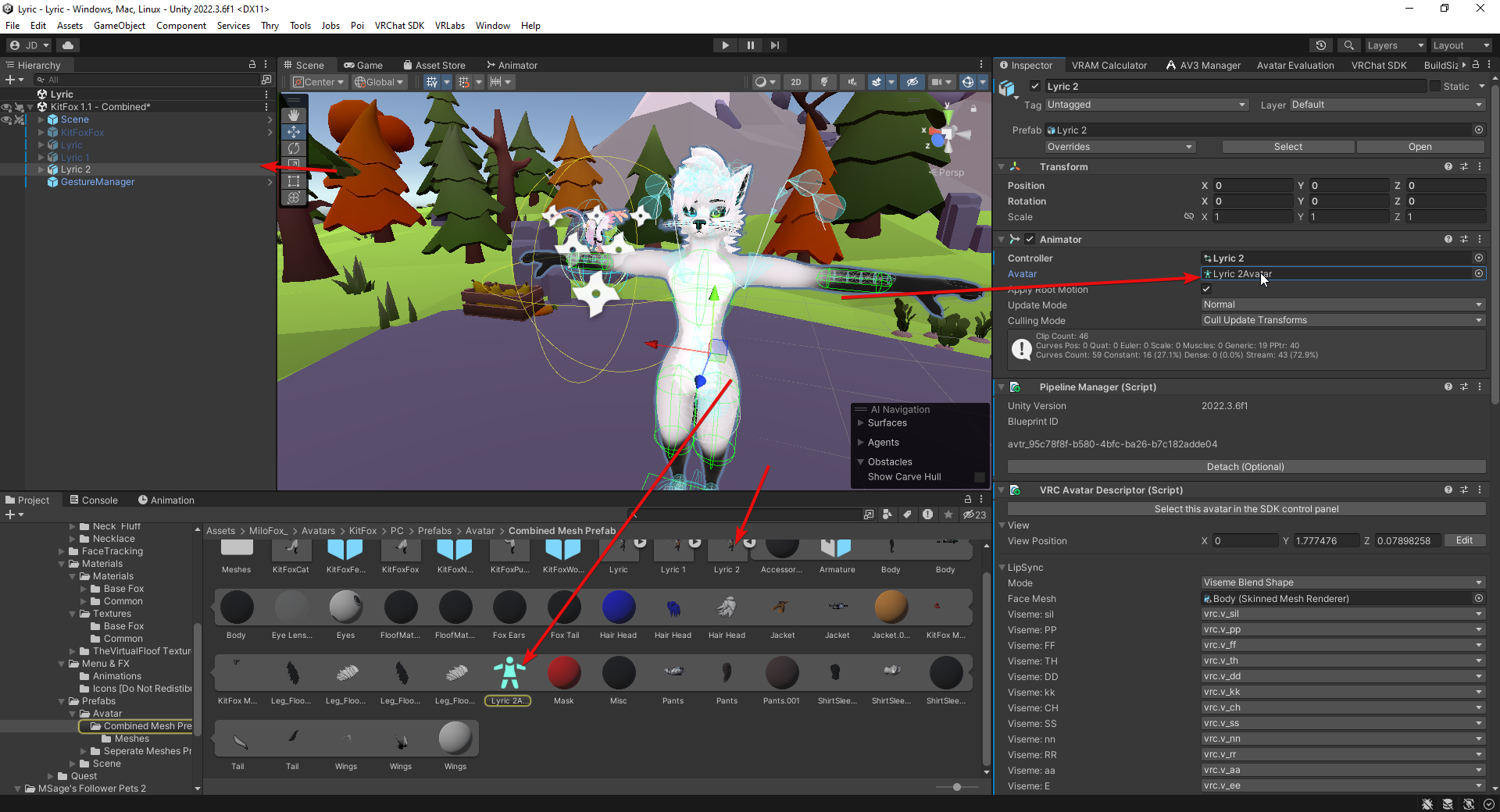 wintry maple

dont quesrion the avatar haha
shes adorable
what if i tried to delete that rig? would it direct me to create a new one?
arctic sundial
No, you create them in the import settings of the avatar
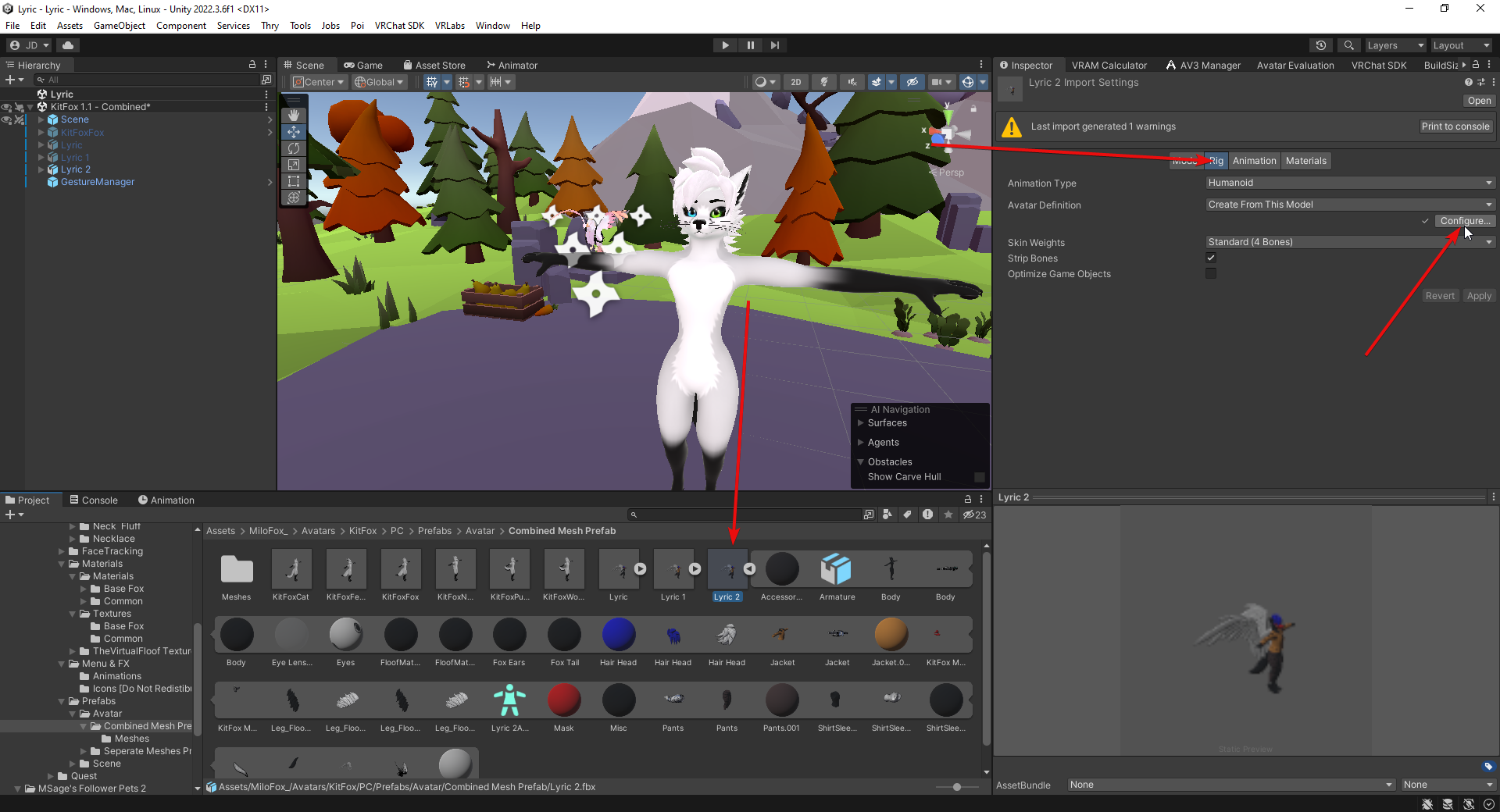
I have a feeling its gonna be on the body. But i dont get why someone would pluck all the parts apart like that. Its confusing af and unclear
wintry maple
i dont see anywhere i can do that 😭😭
arctic sundial
Which mesh does the body use? If you click the body and the mesh it says in the inspector, where does it lead you
 arctic sundial
the heck is your inspector
wintry maple
lol
wintry maple
all the same way
arctic sundial
Thats so weird, i have never seen an avatar that doesnt have a prefab. Well, you can still edit the existing "avatar" i guess
Perhaps duplicate it first, then open/edit it there, then assign the edit in the descriptor
 strange yarrow

I've watched something like this and below the comments one guy said there are also twist bones for upper arm twist bones, but I failed to make it in Unity with Rotation Constraint
Is there any ways to make it?
 ashen iris
Realizing this is probably the better place to put it, but trying to get these earring bones to work properly. Everything deforms/poses as it should in blender, however in Unity in play mode, the only unweighted part of the mesh is completely wacked out (second photo). Moves in weird ways and isn't anchored in place, cannot figure out for the life of me why its doing this. Even the motion works and anchors properly for the rest of the bone stack, except the stud that's supposed to be stationary on the ear,

 river ingot
ashen iris
Realizing this is probably the better place to put it, but trying to get these e...
river ingot
ashen iris
Realizing this is probably the better place to put it, but trying to get these e...
you said its unweighted and the unweighed part is whats messing up? That sounds like the solution.
ashen iris
Does it need to be? Its stationary and even trying to flip back through some other models led me to believe it didnt have to be since theres no bones or movement necessary for that part in particular
river ingot
weight paint it to whatever the ears weightpainted to and it'll stay in place with the ear.
ashen iris
river ingot
weight paint it to whatever the ears weightpainted to and it'll stay in place wi...
That does make sense, Ill try that, thank you
ashen iris
That seems to have been the problem, cheers!
 grave oak
Hi, so I have a question relating to weight painting. Is it possible when selecting a vertex group, that the corresponding bone of the vertex group shows up or is highlighted?
I figured it out, all good. In object mode you have to click the armature, then shift click the mesh, go into weight paint mode, then ctrl left click the corresponding bone for that vertex group.
turbid verge
Glad you could figure it out, sorry that no one was available to help
 indigo nacelle
Are there any good guides on making you own animations for you avatar. Im talking like animate a dance or something in blender and put it into unity. I have a rigged model and i want to bring it into unity with its animations but the bone dependancies dont match up to a normal humanoid skeleton
 analog quest
i'm trying to update to new unity version and it thinks my avatar is not rigged correctly but it clearly is???
 arctic sundial
I saw someone say in the past to change your rig to non humanoid, save, then back to humanoid
Maybe that helps "refresh it"?
 weak yarrow
analog quest
i'm trying to update to new unity version and it thinks my avatar is not rigged ...
weak yarrow
analog quest
i'm trying to update to new unity version and it thinks my avatar is not rigged ...
can you verify on your avatar animator that the armature object is selected ?
analog quest
weak yarrow
can you verify on your avatar animator that the armature object is selected ?
this animator? or did i lose something on the sdk upgrade?
 analog quest
arctic sundial
I saw someone say in the past to change your rig to non humanoid, save, then bac...
analog quest
arctic sundial
I saw someone say in the past to change your rig to non humanoid, save, then bac...
thanks for the suggestion but it didn't seem to help
weak yarrow
yeah no, your animator does have the avatar field correctly filled. Maybe you don't use the right one, if you can verify that.
analog quest
as far as i can tell that's the only compatible object
it seems to be inside teh imported fbx
weak yarrow
and when you select it, you should click on configure in the inspector
see if your rig is good on this one
formal hare
I've got this couple of vertices that seem to move with the left middle finger when they shouldn't. I fixed this in blender and unity-and everything is perfect there-but ingame i cant get this problem to go away.
How do I fix this/diagnose the issue if I can't see anything wrong in blender/unity?
 arctic sundial
Did you give weight cleanup or weight normalization a try yet?
formal hare
no idea what those are haha
arctic sundial
Weight cleanup: removes weights below a threshold that you can specify, which works well for getting rid of them areas you cannot see as theyre dark blue but when picking with dropper, show theres like .000001 weight on it https://docs.blender.org/manual/en/latest/scene_layout/object/editing/cleanup.html
Normalize will make sure all weights will add up to 1 https://docs.blender.org/manual/en/latest/sculpt_paint/weight_paint/editing.html#normalize-all
formal hare
ill give it a shot, thanks
river ingot
u can also go to the rig section, and theres a tab for muscles and constraints. It'll let you test your avatar when it moves different bones to see if there are any weight paint issues and or bone mishaps.
 peak osprey
analog quest
i'm trying to update to new unity version and it thinks my avatar is not rigged ...
peak osprey
analog quest
i'm trying to update to new unity version and it thinks my avatar is not rigged ...
having the same issue, were u able to find a solution?
analog quest
i think it was because my fbx had been unpacked and edited. dragging back in the fbx and attaching an avatar descriptor to it seemed to solve it
peak osprey
analog quest
i think it was because my fbx had been unpacked and edited. dragging back in the...
like, deleting the first attempt and reimporting entirely? starting from scratch and putting the descriptor on before unpacking?
very new to unity, sorry for lots of questions
oh also this is a quest avatar im trying to make, idk if that makes a difference
analog quest
i literally just dragged a second copy up from assets to the heirarchy without deleting at first to test. if you have more than one descriptor in the scene the top of the sdk control panel lets you choose which to upload/edit/ec
once the new copy was working i did eventually delete the old though
peak osprey
worked perfectly, thank you @analog quest ❤️
analog quest
no problem. now if only i could get past this blender import issue lol

 arctic sundial
What happens if you detach the mesh?

Exporting from Blender to Unity can result in rotation and scale issues that are not intuitive to fix. This video teaches how to fix them for meshes attached to an armature.
Complete Playlist:
https://www.youtube.com/playlist?list=PLq7npTWbkgVBAtQs4p4iYxlfWrKRkNc6O
Relevant links:
Penguin Mesh Download - https://immersivelimit.page.link/pengui...
crisp linden
Having issues with my Legs when i crouch down the Legs Spread out in a V shape rather then the Normal l l shape How can i fix that?
 robust crescent
straighten your legs (blender) or go bowlegged 🐇
crisp linden
robust crescent
straighten your legs (blender) or go bowlegged 🐇
how do i do that?
can bowlegged be done in Unity?
robust crescent
nope
if they arent straight when viewed from front they either go in or out when crouching

closer to that less issues
crisp linden
robust crescent
if they arent straight when viewed from front they either go in or out when crou...
I am new to Rigging so How do i fix the legs?

Do i Change the Roll?
crisp linden
robust crescent
alright so this is what it looks like atm

and this is the Full legs

 balmy oracle
Does my Avatar NEED chest and shoulder bones? I'm trying to rig an animatronic and its not going well.
kind mortar
balmy oracle
Does my Avatar NEED chest and shoulder bones? I'm trying to rig an animatronic a...
Yes it needs everything but it does not have to be weight painted
balmy oracle
yikes, so how do I fix this?

 kind mortar
balmy oracle
yikes, so how do I fix this?
kind mortar
balmy oracle
yikes, so how do I fix this?
fix what? It looks fine?
balmy oracle
the neck and shoulder is coming out, they aren't moving together properly
kind mortar
Weight paint needs to be fixed then
balmy oracle
ive tried that but it doesnt seem to change a thing
guess ill just mess with it some more
fervent mantle
balmy oracle
guess ill just mess with it some more
realistically the shoulders and neck don't move much, the rig on that model should be fine, I have it and I dont really have any issues with it
 short spindle
I wanna rig this so bad but idk how to. I tried looking up a tutorial but it confused me. Does anyone have a quick rundown?
 kind mortar
short spindle
I wanna rig this so bad but idk how to. I tried looking up a tutorial but it con...
kind mortar
short spindle
I wanna rig this so bad but idk how to. I tried looking up a tutorial but it con...
I would take the shortcut/easy cheaty way and use Mixamo tbh >_>
 patent ether
If i wanted to rig a model that looks like this for example how would that work becuse of the neck?

 balmy delta
patent ether
If i wanted to rig a model that looks like this for example how would that work ...
balmy delta
patent ether
If i wanted to rig a model that looks like this for example how would that work ...
The 90 angle of the neck part of the head
 carmine ibex
i just spent 10 hours rigging and weight painting a roblox avatar, turned out well
 river ingot
short spindle
I wanna rig this so bad but idk how to. I tried looking up a tutorial but it con...
river ingot
short spindle
I wanna rig this so bad but idk how to. I tried looking up a tutorial but it con...
If you use the standard required bones, a lot of the required ones can be made really short/small, and just use one arm bone, one leg bone etc for the actual movements.
 fresh wave
Jeez rigging is impossible
Can anyone help me with my avatar rigging I’m doing horrible
 short spindle
river ingot
If you use the standard required bones, a lot of the required ones can be made r...
short spindle
river ingot
If you use the standard required bones, a lot of the required ones can be made r...
no I meant how do I actually use the bones FOR rigging?
copper halo
balmy oracle
Does my Avatar NEED chest and shoulder bones? I'm trying to rig an animatronic a...
Yes
copper halo
patent ether
If i wanted to rig a model that looks like this for example how would that work ...
Blue = neck, red = head
 river ingot
short spindle
no I meant how do I actually use the bones FOR rigging?
river ingot
short spindle
no I meant how do I actually use the bones FOR rigging?
In Blender, the mesh has to be weightpainted to the bones. Constraints or restraints on bone movement while in game can be done only in unity under the secondary tab in the rigging section.
patent ether
copper halo
Blue = neck, red = head
I mean like the bones because you know the head isn't ontop of the heck.
fading verge
Hello. I am looking for some help/advice in finding a way to get my SecondLife avatar into VR Chat. if anyone is knowledgable in this regard, please DM me
 dreamy heron
Hiyaaaa, I wanna get into learning how to use blender for VRchat. More specifically rigging clothes to preexisting models and weightpainting them on. (Especially clothes that aren’t fit for a specific base I use.)
Does anyone know a good source of materials and or videos I could use to learn?
 urban nymph
if anyone could help me, Ive been going at this for hours trying to rig this skirt to work with physbone but no matter what I do/changes I make, it keeps colliding with the thighs. Could someone help me? 😭

 spiral pecan
urban nymph
if anyone could help me, Ive been going at this for hours trying to rig this ski...
spiral pecan
urban nymph
if anyone could help me, Ive been going at this for hours trying to rig this ski...
do you have physbone colliders on your leg and them assigned to the bones?
 wheat geyser
Does anyone have experience in making a short legged avatar work with FBT without the legs folding weirdly when going into a crouching position? I know it can't be 1 to 1 tracking because of the body proportion but there must be some way to make the legs at least not go crazy and act normally.


 wheat tulip
urban nymph
if anyone could help me, Ive been going at this for hours trying to rig this ski...
wheat tulip
urban nymph
if anyone could help me, Ive been going at this for hours trying to rig this ski...
Add external collidors
What external collidors do is force the dress to stay within the external collidors radius.
 modern crystal
question, what are the REQUIRED bones for a humanoid rig?
robust crescent
these , toes and fingers not needed


 river ingot
 stone swift
they look divided into a few thick segments..maybe just one on each shoulder portion and maybe one or two in the back at the ends
 slow trout
empty compass
I tried that :/ oh well. I'll keep at it then. Thank you anyways, honestly
slow trout
empty compass
I tried that :/ oh well. I'll keep at it then. Thank you anyways, honestly
ik this is a very late reply to ya post, but you can try just adding a gesture layer on the avi, and then going into each hand pose animation, and fixing it by slightly adjusting each finger. Here's a reference vid https://www.youtube.com/watch?v=Ql-FTv5ujgU

First find one of the default VRC gestures, their properties have "Animator." with all the fingers' stretches etc.
Then edit it with a temporary controller (preferably on a duplicated/backed up model)
Edit to your liking
Lastly, make sure it's in the gesture controller of your Model, in the Avatar Descriptor.
Need more help? Contact me! Una...
short spindle
Does anybody know how to rig something like this? All the tutorials I found didn't really help me and everytime I try to rig it, the model breaks. Also Mixamo doesn't work with this model either so that's out of the picture.

 hollow bronze
Jus rig it without fingies
That what i did for my avatar
It only needs the minimum requiremenys
short spindle
it still breaks though
i'm trying to do vector rigging but I have no idea how to do it properly
well, I think that's what it's called anyways
short spindle
hollow bronze
Jus rig it without fingies
and keep in mind, I can't rig like... at all. I'm only trying to do it myself because i'm broke and have nobody else to help with this.
short spindle
thanks, i'll send the .blend file
hollow bronze
👍
 torn locust
short spindle
Does anybody know how to rig something like this? All the tutorials I found didn...
torn locust
short spindle
Does anybody know how to rig something like this? All the tutorials I found didn...
i need this so bad🥲
short spindle
torn locust
i need this so bad🥲
it's hopefully almost done being added to VRchat but I have the model rigged by VY here if you wanna check it out in Blender.
torn locust
short spindle
it's hopefully almost done being added to VRchat but I have the model rigged by ...
ill wait till its on vrc!!
 neon compass
I made this Blender Addon that helps you attach objects to the mesh, it generates weight paint and shape keys automatically
It greatly speeds up the work of putting piercings or earrings on your avatar
https://vxtwitter.com/DX_Nacca/status/1743387640685113694
I'm working on this little tool
Addon to Automate Rigging Piercings and Earrings on Mesh with Weight Paint and Shape Keys
#VRChat #Blender
💖 0
 wise brook
Im having an issue with unity 2022 when i try to add phys bones nothing happends i
see them or anything and i know there there idk what the issue is help plz 🙏
pale pumice
wise brook
Im having an issue with unity 2022 when i try to add phys bones nothing happends...
post a screenshot of the physbone component and the bone chain in the hierarchy?
wise brook
its weird cause it works for some but not everting like the butt root it wont do anything nether the thigh
 wise brook
pale pumice
post a screenshot of the physbone component and the bone chain in the hierarchy?
wise brook
pale pumice
post a screenshot of the physbone component and the bone chain in the hierarchy?
idk the bone is there but no idea why isnt not working
robust crescent
add endpoint (y)
wise brook
robust crescent
add endpoint (y)
oh im slow ty ❤️
 clear barn
Unity Avatar armature config has slots for Chest and Upper Chest. It seems like most avatars don't use or have a bone for Upper Chest. Is there some reason for this, some reason it still shouldn't be used in sdk3?
robust crescent
you can use them , older avs we just unmapped/merged them
 limber oasis
do i need to get the fingers, skirt ends, and toe ends streightened out? if so how precise do i need to be?

 safe bane
would anyone be willing to rig a model for me for 10 bucks
pale pumice
ha
kind mortar
safe bane
would anyone be willing to rig a model for me for 10 bucks
Never ask here, unless you want to be scammed, always vrc traders
safe bane
kind mortar
Never ask here, unless you want to be scammed, always vrc traders
Alright where is that a new server or another chat
kind mortar
safe bane
Alright where is that a new server or another chat
Have you tried mixamo? it's free and works really well usually
safe bane
kind mortar
Have you tried mixamo? it's free and works really well usually
I have not
safe bane
kind mortar
Have you tried mixamo? it's free and works really well usually
What’s it called
kind mortar
 open night
hello i need a person that will make a spiderman avatar for me
 robust moat
any idea why this would happen?
Pops up when entering paymode after setting up physbones
 balmy delta
open night
hello i need a person that will make a spiderman avatar for me
balmy delta
open night
hello i need a person that will make a spiderman avatar for me
Never ask here
Go to vrctraders and expect to pay money for it
 little lark
Could I get some help with rigging an avatar? If their's a video or something I'd really appreciate it. I am starting with just a simple cube man, so it shouldn't be too difficult right?
wintry maple
what is this message trying to tell me???
 brazen island
@wintry maple rename your mesh from head to smth else
or the bone? probably the bone to not mess up expressions?
brazen island
so theyre not the same
wintry maple
 brazen island
and the hierarchy looks like?

 brazen island
hierarchy. just screenshot the whole screen, hierarchy and green man included
 brazen island
would help if i could see anything related to the head bone🫠
both panels omit right informatiom
wintry maple
aarrgsgg im sorry
 wintry maple
uhhhhh hold on let me do it in blender and re import
i had to rename it in blender
says its finer now
thank you most!
brazen island
np
also if you know blender you can merge head and body now, it should ne more optimised for 2022. unless youd have to redo the animations.
tho im not sure about memory usage with blendshapes
pale pumice
brazen island
tho im not sure about memory usage with blendshapes
afaik that hasn't changed
brazen island
@pale pumice i mean would body+head take more/less/same vram against combimed
slow trout
little lark
Could I get some help with rigging an avatar? If their's a video or something I'...
https://www.youtube.com/watch?v=2QkgqsRyRMo heres two video's to help ya starting out https://www.youtube.com/watch?v=FzRLR8SGVK0

Everything I taught you about Armatures 2 years ago is no longer valid, I want you to take that information, wrap it up in toilet paper and flush it. Treat it like how you treat your Least favourite sibling and only be nice to them when you want something.
Throw your whole armature away and pay attention. I got ahold of Full Body Tracking and m...

Let’s be honest, most people take one look at weight painting and think “This looks like what happens when a drunk unicorn stands on a train track and an unfortunate passer-by happens to be a little too close after the resulting collision.”
I promise you once you get to understand certain repeated patters and recognise them. What was once a pot...
 waxen gulch
anyone know to to add shoes to an avi that has the feet like this? im new to adding clothes and wanted to add these to my avatar and never have used blender b4 for this.
 modern crystal
is having one bone for the hands fine?
balmy delta
modern crystal
is having one bone for the hands fine?
fingers are not required
balmy delta
waxen gulch
anyone know to to add shoes to an avi that has the feet like this? im new to add...
bit annoying and easier done in unity being honest
just slap the shoes at that angle in blender and then when rigging in unity just rotate the feet bones then lower the avi
modern crystal
balmy delta
fingers are not required
so just one bone as the hand is fine? gotcha.
waxen gulch
balmy delta
bit annoying and easier done in unity being honest
just slap the shoes at that a...
AHHH Thank youuuuu
kind mortar
waxen gulch
AHHH Thank youuuuu
Honestly what I do is just pose the feet flat, then set it as the rest pose, then you can edit the bone to go back to the way it was. it seems complicated but it's really easy and takes not even a minuite
river ingot
waxen gulch
anyone know to to add shoes to an avi that has the feet like this? im new to add...
yah, you should change the "rest pose" so the feet are flat like the shoes are. Then you'd need to weight paint the shoes to the feet so they'll move when the feet move.
 deft tusk
i wonder what makes some avatar lift their heels and stand on their toes when floating midair using spacedrag (like the one in OVR Advanced Settings) while others dont
is that related to rig settings?
river ingot
deft tusk
i wonder what makes some avatar lift their heels and stand on their toes when fl...
I know it'll hang in default, but if I put my trackers on it'll be flat on the floor
in vr descriptor you may need to double check what your dropping into the idle and locomotion boxes, then check the customizations your dropping in there to make sure their all set the way you want them.
little lark
slow trout
https://www.youtube.com/watch?v=2QkgqsRyRMo heres two video's to help ya startin...
Probably the most help I've ever gotten from this discord. Thank you.
slow trout
no worries lol
 astral quest
does anyone know why my edit mode and object mode for this mesh differ, I want to make a shape key but without the two being the same I cant really set the key? when in pose mode everything looks like the first picture

 slow trout
what you can do it make extra bones on the avatars legs that aren't the main leg and knee or ankle bones, and weight paint the legs to the extra ones instead and have then parented to the bone closest to them, I what I did for my titan avi's so the legs would keep there bend without straitening out, you also want to try and make the foot/ankle bone and toe bone flat on the ground in blender
slow trout
astral quest
does anyone know why my edit mode and object mode for this mesh differ, I want t...
looks like you just need to rest pose mode
In Object Data Properties, enable Rest Position. Don't forget to re-enable Pose Position once you're done.
you can also try this

In this video I explain how to reset the pose position to the rest position. This is useful if you want to remove any transforms that you have done to the character. If you find the video useful or interesting consider subscribing.
#blender3d #blendertutorials #tutorial
slow trout
astral quest
does anyone know why my edit mode and object mode for this mesh differ, I want t...
if trying both these options don't work, you might need to just re position it manually
astral quest
slow trout
if trying both these options don't work, you might need to just re position it m...
turning the mesh modifier "bind to vertex groups" also set its position back, is that something ok to turn off?
slow trout
if you turn that off and go into pose mode on the model, the bones might not move with the mesh anymore
oh wait
slow trout
astral quest
turning the mesh modifier "bind to vertex groups" also set its position back, is...
try this

this video shows how to apply the current pose of your character as a rest pose, This works without the cats plugin. and you would need this when retargeting animations...
like and subscribe so this video can get to someone who needs this.
btw in the vid he apply's the armature in the modifier menu, you don't need to do that
astral quest
slow trout
btw in the vid he apply's the armature in the modifier menu, you don't need to d...
ok so the rest position is the same as the edit position, my issue is that I need the mesh to be in the pose position when I edit it, is that possible?
I need to make the objest sit at a certain location when I turn on the shape key and the position would be different if I editied it in rest
slow trout
slow trout
https://www.youtube.com/watch?v=766q97OHy1E
you should be able to do that using this method
 steady loom
Anyone know why an aim constraint might be doing this?

The Aim constraint looks like this,

Each hand has an empty, which is aim constrained to an empty in the other hand.
Unchecking freeze rotation axis seems to cause some serious issues with it, but i can't find a way to stop it rotating in the hand.
slow trout
steady loom
Anyone know why an aim constraint might be doing this?
both hands seem to be rotating fine with the sword?, do you just want the wrist to rotate with the handle of the blade better or something?
oh wait, you just want it to rotate in only one hand at a time?
steady loom
I want the sword to not spin weirdly when i move it in certain angles,
the wrist of the "main" hand holding it (in this case the left one) should control the roll of the blade
but instead the sword seems to spin bizzarely,
slow trout

Don't @ me about my Windows I'm too lazy to activate it.
I didn't mention this does not work with all weapon models, sometimes things flip rotations and you might have to edit the position in Blender then apply transforms.
Hammer: https://sketchfab.com/3d-models/steampunk-hammer-axe-fbcf242edc6b433a8b744247b3bd2ced
My Discord: https://discord...
try this vid
I haven't watched the vid in awhile but it should have a solution to ya problem
hopefully😅
steady loom
yeah i saw that and tried it but it doesn't stop the rotation
especially as it's basically how i've got it set up already
slow trout
only thing I could think of would be to use an Ik setup using final ik
would mean you would have to redo the constraints tho lol
plus the whole unity package to get final ik is like 60$ sumthin US I think
slow trout
lmao, I feel ya on that one
steady loom
I just want it to lock on one axis and "look at" with the other two, this should be relatively simple,
but for whatever reason, it just... isn't.
slow trout

unity go buur
I only know how to do that set up using final ik so me is not much help, Im sorry
Ig just try reposting later if ya still stuck on it and someone else might know
sorry g😅
 charred kite
Hey, I'm trying to port this model to vrchat but realized that the arm orientation is facing outwards instead of downwards, so the animations look messed up, what would be the best way to fix this?
 deft tusk
river ingot
I know it'll hang in default, but if I put my trackers on it'll be flat on the f...
deft tusk
river ingot
I know it'll hang in default, but if I put my trackers on it'll be flat on the f...
even without trackers some avatars dont raise their heels midair so I was wondering what was making the difference
is there a way to edit that default state somehow?
 crimson roost
deft tusk
even without trackers some avatars dont raise their heels midair so I was wonder...
crimson roost
deft tusk
even without trackers some avatars dont raise their heels midair so I was wonder...
Most likely has to do with the base, for example, zinpia fit base has a "heel" and "flat foot" base for the two different poses, and clothing/shoes also associate with one type or the other when shopping for assets. If i understand what you are saying thats probably what its about.
steady loom
slow trout
sorry g😅
no problem, thanks for trying man :)
 orchid breach
Hey, its my first time trying to setup assets (clothes) ment for specific avatars to other ones in blender... i have absolutely no experience at all in blender but somewhat decent in unity and ive been following a yt tutorial for setting up clothes which do not have premade armature.
My Question now is, is there a way to merge armatures if the asset already contains some additional bones?
(The Asset is made for Rex and im trying to use it for Magpie, but the Asset has additional bones to use physbones on) (Also tried to use CATS but i cant seem to get it to work on blender 4.02, and my downgrade fails.)
Thanks in Advance! 🧡
crimson roost
I mean the actual model its self, not a layer or anyrhing. They are seperate fbx files just to be on their toes or not
Same for panda base and many orher bases
deft tusk
i see...i thought you meant Locomotion layer
crimson roost
No worries, and to answer the original question, there is unfortunately no way as far as my knowledge to make them flat foot without editing the mesh itself, whcih you may aswell just make a new avi at that point
deft tusk
so unless i do something about changing the fbx it's impossible to change that default settings?
crimson roost
As far as im aware yes
deft tusk
oof i see...so gotta edit the meshes then
crimson roost
Which is why avatar base creators make tak seperate fbxs
crimson roost
deft tusk
oof i see...so gotta edit the meshes then
Problem with that is if you do somehow managae to make it flat foot it will mess up whatever shoes and possibley pants its wearing
deft tusk
surprising to know such simple thing isnt customizable outside rebuilding the prefabs
crimson roost
deft tusk
surprising to know such simple thing isnt customizable outside rebuilding the pr...
Yeah its all for the sake of bones, gotta think about how a bone has to have a certain state its in, when i wear full body if im in a high heel avatar, its gotta have the feet pointed down otherwise i would have to always be on my tip toes trying to imitate that look
deft tusk
some avatars have blendshapes to toggle high heels at the body, but even that still doesnt prevent the spacedrag pose
crimson roost
Indeed, some avatars do have blend shapes, it all depends on the base
ZINFIT and Panda base v1 do not have blend shapes on feet
deft tusk
so i guess its natural to make the default as high heel because it should work ok for FBT players
crimson roost
I suppose, whats the avatar you are refering too in all this?
deft tusk
many examples
like ones from komado seems to be all in default
while some like manuka or mizuki or others are always fixed as flat foot when in midair
i wonder if the latter have problems to make tippy toe poses in FBT?
crimson roost
Ahh right, yeah im pretty sure they are just using different fbxs. Because when i create my avis i use mostly flat foot 95% of the time, and when i use fbt in them they never tip toe with playspace so im unsure
crimson roost
Thats my best guess
deft tusk
if you dont need it then making it flat would work
crimson roost
Im still fairly new to creation so i cant be 100% certain, but thats my somewhat educated guess
deft tusk
if you need it then leave it as default, then it would be possible to tippy toe while FBT but will also force it when space dragged midair
thus always needing a solid ground to maintain a flat foot
...i tried to bypass this by adding ground pb collider and applying it to foot pbs but it still didnt work, so i guess im out of ideas now
crimson roost
Sorry i coulsnt be more help mate, hope you figure out what you need
deft tusk
no need to be sorry, thanks a bunch as it was enlightening enough for me and i wish you a good day or night
river ingot
It used to be, if in blender, the avis flatfooted with the xyz plane. Then when you drop it into unity, and reset the position so its centered in the xyz plane there, then that would technically solve the problem. But I've been creating for over a year, and do my own avis and this seems like a recent glitch in the vrchat system more than anything else. I've seen other avis experiencing the same problem, so it might be a system techinical issue until they fix it.
 undone beacon
#avatar-help message Help pls
 dapper moon
does anyone know how to fix joints twisting? I tried to fix with copy rotation constraints but those don't work in Unity
 modern crystal
is the bone for the head optional or no?
kind mortar
modern crystal
is the bone for the head optional or no?
Nope, you have to have a head!
modern crystal
kind mortar
Nope, you have to have a head!
oh okay then!
 thin jay
I rigged my model but his legs both bend weirdly in one direction when standing idle

Even tho in blender, they are perfectly straight

 devout epoch
thin jay
Even tho in blender, they are perfectly straight
devout epoch
thin jay
Even tho in blender, they are perfectly straight
They do need to be perfectly straight in that orientation, but the knees need to be slightly forward. Are they slightly forward?
thin jay
devout epoch
They do need to be perfectly straight in that orientation, but the knees need to...
Yeah, even with the bend it was having the issue, but I added gogo Loco and it magically fixed itself lol
 south tendon
Had fun riggin another military avi. Guns being added as I post this


 modern crystal
so when i parent them, the line goes like this and doesnt go on the other end, how do i fix this?
 kind mortar
modern crystal
so when i parent them, the line goes like this and doesnt go on the other end, h...
kind mortar
modern crystal
so when i parent them, the line goes like this and doesnt go on the other end, h...
Click the one you wanna parent first then the parent then shift, then ctrl p, connected or keep offset
modern crystal
kind mortar
Click the one you wanna parent first then the parent then shift, then ctrl p, co...
well then this would happen, im trying to make the ends close to each other connect
 kind mortar
Move the bone over there, then parent it conncted
balmy delta
You can also merge the points
modern crystal
kind mortar
Move the bone over there, then parent it conncted
Oh okay then
modern crystal
kind mortar
Move the bone over there, then parent it conncted
so like this right?
 river ingot
If you ever wandered how to handle good parenting, this is the video for you! In the next 60 seconds, you will know everything you need about parenting! Hope you guys enjoy the video!
If you enjoyed this video, please don't forget to like and subscribe for more content!
You can find my entire Blender 2.8 Speed Tutorial series playlist here:
ht...
vestal condor
I need to remove a couple bones from an armature and need help.
how do I transfer the weight to a different bone?
vestal condor
To phrase better, I want to transfer the weight of a bone to its parent
river ingot
I do it the basic way. But theres a college way to go about it with the shortcuts..
fading verge
Okay so I rigged a model to be used in Unity. I rigged the eyes so they and look around but when I try to put it in and applied the eyes they roll in a weird position. They look fine in blender but crooked in Unity, how do i fix that?
brazen island
@fading verge eye bones (not the eyes themselved) should be perfectly vertical in blender in default position, not looking "forward"
fading verge
Okay, let me try that
 soft kernel
can some one help ?
 river ingot
soft kernel
can some one help ?
river ingot
soft kernel
can some one help ?
whats the bone at the very bottom for?
copper halo
river ingot
whats the bone at the very bottom for?
looks like a root bone, does not need to be there but should work just find with it there
river ingot
also, the legs look to be weight painted badly, thats what she sprobably referring to. Maybe someone weighpainted the arms and the legs at the same time from the same angle. You'll have to set the weightpaint to 0 on the legs on the arm/hand/finger bone vertex groups, then repaint them to the leg bones.

For VRChat: When you have weight paint issues, and want to know how to fix them. A quick step by step process with little tricks I learned in the process of fixing my own I haven't seen on anyone elses videos.
 nocturne quiver
i set up a model ripped from a game and ive got everything pretty much figured out, but for the life of me i cant fix the wrists. when they bend up and down they sort of cave in on themselves and it's really bugging me. does anyone have any suggestions?
balmy delta
you dont have a head or shoulders bones
 stable oyster
Anyone know any addons to auto rig a model im too lazy to do it myself
stable oyster
👍
 placid trail
Ok so I want to transfer this head rig into the other head rig. How would I do that?🍝🦅
 robust crescent
select those 2 then ctrl+click head_m >>> ctrl+p - keep offset
 placid trail
robust crescent
select those 2 then ctrl+click head_m >>> ctrl+p - keep offset
placid trail
robust crescent
select those 2 then ctrl+click head_m >>> ctrl+p - keep offset
Thanks for the response! The ctrl+p didn’t do anything. Also, wouldn’t I just select Head_M.001 since it’s the parent to everything under it?
(And then ctrl+click on the Head_M)
placid trail
So how do I solve this problem?
nocturne quiver
placid trail
Thanks for the response! The ctrl+p didn’t do anything. Also, wouldn’t I just se...
im not the most knowledgeable at all but from what ive seen, you have to select every bone you want to move since it doesn't account for parenting when you select
nocturne quiver
placid trail
So how do I solve this problem?
this video really helped me with moving bones to other rigs, you can follow the steps for any area you want to move https://youtu.be/Fb2zcAWaij8?si=En7FHLD065mhSK2Z

There are very few tutorials that show you how to move bones from one armature to another in Blender - It's really easy, so let me show you exactly how in the next 60 seconds-!!
If you enjoyed this video, I have a small 1$ Member perk available for anyone who would like to help us save up for better tools to improve the content here like Hardwa...
placid trail
nocturne quiver
im not the most knowledgeable at all but from what ive seen, you have to select ...
Gotcha, I did a little more experimenting and I think Thulen was right. I found what he was talking about through the menu rather than shortcuts
I’ll check out that video, thanks!
nocturne quiver
yeah, you'll want to do just p instead of control p to separate the bones and then there a short process to move them over, then all you have to do is make sure the parents are in the correct order
nocturne quiver
placid trail
I’ll check out that video, thanks!
np! ive actually been really struggling to do this with a big chunk of an armature for a while now so you asked the one question that i can answer lol
im currently attempting to replace the rig's hands and wrists with a different model's to see if it'll maybe stop it from being wonky 
nocturne quiver
thank you, i really hope so too lol, it's been really bugging me
i just learned how to do anything in blender and unity (didnt even know how to upload) like 3 days ago and i figured everything else out except for these damn wrists 😭 i even learned weight painting
but yeah i hope that works for you! happy to help :)
placid trail
Same 😂
I’ve been at this for the past 5 days now with no prior blender experience
I’m at least a novice now
Still an ocean to swim through though
nocturne quiver
same here, i swore I'd never touch avatar making since it was way too complicated for me to understand, but then i couldn't find an avatar of a model i really wanted so i ended up learning everything somehow

 cerulean temple
As someone who's been doing Blender for like 2 or 3 years. There is a lot to learn about it.
nocturne quiver
placid trail
https://tenor.com/view/thanos-gif-25117042
not many people rip the evil within avatars unfortunately
placid trail
nocturne quiver
not many people rip the evil within avatars unfortunately
Lmao, what does that even mean
cerulean temple
cerulean temple
As someone who's been doing Blender for like 2 or 3 years. There is a lot to lea...
😭 it took me like 4 months to learn there is a redo shortcut cause i just thought you couldn't redo
placid trail
cerulean temple
As someone who's been doing Blender for like 2 or 3 years. There is a lot to lea...
And I believe it
nocturne quiver
cerulean temple
As someone who's been doing Blender for like 2 or 3 years. There is a lot to lea...
yeah i dont think ive even slightly looked at the surface lol, im just planning to do this model and im done with avatars, ive been meaning to learn blender anyway though
placid trail
cerulean temple
😭 it took me like 4 months to learn there is a redo shortcut cause i just thoug...
You poor thing
nocturne quiver
cerulean temple
😭 it took me like 4 months to learn there is a redo shortcut cause i just thoug...
thankfully im familiar with program shortcuts since i use drawing programs consistently
nocturne quiver
placid trail
Lmao, what does that even mean
it's an older game, similar to resident evil
cerulean temple
I also do alot of programs but most use Ctrl Y to do redo
Blender does ctrl shift z iirc (i go zombie no think mode when im in blender)
nocturne quiver
all my programs use ctrl shift z so i was really confused why i couldn't redo in unity lmao
cerulean temple
Switching from Blender and PaintDotNet I'll always hit the wrong combo when I first go from one to the other lmao
placid trail
nocturne quiver
it's an older game, similar to resident evil
Oh gotcha
I didn’t see the title
nocturne quiver
gotta head out now, hope the info helped!
placid trail
Yes! Thank you!
nocturne quiver
np!
placid trail
Does a character really need to be in a t-pose, or is it optional?
nocturne quiver
placid trail
Does a character really need to be in a t-pose, or is it optional?
needed
t or a
placid trail
A-pose is when the arms are down a bit right?
nocturne quiver
yup
placid trail
Ok, is there a way to specify the A-pose with Unity?
cerulean temple
afaik it should know when it's T or A
and it'll auto put it in a t-pose
(i forget specifics. i haven't made an avi in a year)
placid trail
Yeah, that screws up my model when it autos
placid trail
Mine came in an A pose
cerulean temple
placid trail
Yeah, that screws up my model when it autos
ah. yeah, you probably need to pose your model more closely to a t-pose or a-pose and then when it automatically does it, it should do it better. (atleast i remember having to do that once)
 fair thorn
Could someone help? I’m trying to edit a rig, and when I entered it, the Hips bone was created weirdly. It didn’t exactly look like a hip bone should. Anyone know a way to fix this?
pale pumice
fair thorn
Could someone help? I’m trying to edit a rig, and when I entered it, the Hips bo...
could you share a pic? Hard to know what you mean otherwise
 pale pumice
you've got 'extrude' mode selected on the left there - pick the arrow in the box at the top
otherwise it looks like a bone. Though I'd probably correct the roll, it looks non-zero.
fair thorn
pale pumice
you've got 'extrude' mode selected on the left there - pick the arrow in the box...
I’m a little soft brained right now so idk what you mean by the arrow in the box at the top 😅
pale pumice
in the tool list on the left side
fair thorn
Is it the gizmos one?
pale pumice
the one you've got active is for doing bone extruding, if I recall correctly. I'm guessing that's why the bone looks funny, with the yellow plus and the circle
fair thorn
I pressed the arrow and bow box whats next
pale pumice
did it change things?
fair thorn
All it did was hide the gizmos for me. Idk if im looking somewhere wrong or what
pale pumice
I guess I'm not sure what it is you think is incorrect here
fair thorn
I thought there was two bones for hips naturally, and that they were sideways. 😅
pale pumice
ohhh
check this: #avatar-rigging message
generally there's just a single bone for hips
fair thorn
pale pumice
generally there's just a single bone for hips
Oh. So its not really broken?
pale pumice
doesn't look broken to me!
fair thorn
Oh ok thanks for your help
placid trail
robust crescent
select those 2 then ctrl+click head_m >>> ctrl+p - keep offset
This method worked for me and now I keep entering object mode after ctrl+clicking on the head_m
nocturne quiver
im just trying to assign bone weights to my mesh but the option is grayed out 😭
 nocturne quiver
so i can do it on the same model that i havent edited the bones in a certain way for
placid trail
Gotcha
nocturne quiver
so i tried to take the mesh from that one and add the bones to it
and it grays out 😭
so there's something wrong with the bones
placid trail
On my end of frustration, I uploaded my avi to vrc and the body mesh was turned around, but the joints were inverted so it looked like it was facing forward from its back, and then the clothes were not attached to the body mesh.
I tried a some different things and the body is facing forward now, but the arms are flailing up like a boogie monster, and the clothes are still not attached to the body rig even though I parented them🫠
nocturne quiver
that all definitely sounds frustrating
did you weight paint the clothes with the rig? that's what im trying to do atm
 nocturne quiver
yeah, parenting is a different thing from weight painting afaik
there's an auto mode which mostly works but it can get messy sometimes, to avoid that i've just been selecting groups of bones at a time and doing them one by one
but i managed to mess up the bones so im trying to do that now 😭
placid trail
Do you know what CATS is?
nocturne quiver
this entire folder is me trying to figure out a single model
 placid trail
Oh man
nocturne quiver
placid trail
Do you know what CATS is?
yeah my problem is actually CATS unfortunately
placid trail
I can’t use it on 4.0 🥲
nocturne quiver
when i used it it messed up the bones so im going in and fixing everything myself
it was very helpful for visemes though
placid trail
I saw some methods in this thread ill try tomorrow
I’m gonna play vrc and lament not having the avi ready when it should have been done by now
nocturne quiver
im supposed to be asleep 😭 been staying up way too late the past few nights trying to get this done
placid trail
I really really didn’t want to play it without having the model done, but I’m starting to grow grey hairs from this shit
nocturne quiver
placid trail
I really really didn’t want to play it without having the model done, but I’m st...
me too man
placid trail
I need a break haha
placid trail
nocturne quiver
im supposed to be asleep 😭 been staying up way too late the past few nights try...
Same!
nocturne quiver
im not gonna be able to sleep if i dont make at least some progress
i hope you're able to figure yours out!!
i got in trouble for using all caps woops
but i figured it out!!!
nocturne quiver
my issue
if you run into the same problem in the future, make sure your mesh's object is set to the correct armature
 placid trail
What problem was that for?
nocturne quiver
nocturne quiver
im just trying to assign bone weights to my mesh but the option is grayed out 😭
this one, it has to do with the weight painting for the clothes
if i did all this and the wrists still dont work im gonna scream 💀
placid trail
I really really hope it’s fixed
nocturne quiver
thank you man, me too
placid trail
What happened with your wrists?
nocturne quiver
and i hope you're able to fix your problem
so basically they bend really weird and it's bugging the shit out of me
like they cave into themselves when i test in vr
nocturne quiver
thankfully it's only when i bend them, but it's very obvious and it's annoying me so bad lmao
placid trail
Oh I was just testing it on desktop for now
I haven’t even tried using my arms in vr, lol
nocturne quiver
getting into vr is a whole nother ballpark
crunchy fingers, broken wrists, wonky angles
this shit is hard 😭
placid trail
Almost thinking I should pay someone to do it
nocturne quiver
i was considering it and i've done it before for a more complex game model, but this one is from a 2014 game so i figured i could do it
i'm basically done, if the wrists are fixed then all i need to do is shading and im good
and i will never touch an avatar again lmao
placid trail
Hey, I’m doing that too lol
nocturne quiver
it is a very tedious process indeed
placid trail
I thought it’d be easy peasy since the model was already made, but NAWWW
nocturne quiver
i knew it wasnt going to be that easy but good lord, how do people do this with really complex models?? lol
nocturne quiver
indeed
every time im like "ok finally, this is the one"
nope
i have so many test builds 😭
placid trail
I know😭
I have like final 1, final 2, final with armature 1, final with armature 1 and material bake 5, etc
The worst part is that idk if I made a mistake or not way back. I don’t think that’s the case, but it still haunts me rn
So how exactly did you fix your wrists?
nocturne quiver
i just tested it and if it didnt work i'd go through all my other tests and find a better version and then start from there again lol
nocturne quiver
placid trail
So how exactly did you fix your wrists?
so basically
i grabbed another model that i know works properly
stole its wrists
reparented everything
and am hoping that it works
if not then i will lose it
placid trail
Gotcha
My arms were working, now they’re not
I’ll try in vr and see what I should do
nocturne quiver
if you like slightly look at a bone or weight paint the wrong way the entire model blows up lmao
placid trail
Lol
nocturne quiver
ive been getting by with a lot of googling
placid trail
Lots of forums
fading verge
𝐖𝐬𝐠 𝐠𝐮𝐲𝐬
nocturne quiver
hello
placid trail
One thing I didn’t know is how the bones had to be joined in the same rig to swap around
nocturne quiver
losing our minds over rigging 😭
placid trail
nocturne quiver
that i cannot sit through if they're longer than 5 minutes
True that
fading verge
𝐘𝐨𝐮 𝐤𝐧𝐨𝐰 𝐰𝐡𝐚𝐭 𝐠𝐨𝐭 𝐦𝐞 𝐝𝐢𝐬𝐚𝐩𝐩𝐨𝐢𝐧𝐭𝐞𝐝
placid trail
What’s that
nocturne quiver
placid trail
One thing I didn’t know is how the bones had to be joined in the same rig to swa...
yeah, i still forget that once in a while lol
fading verge
𝐈 𝐝𝐨𝐧'𝐭 𝐤𝐧𝐨𝐰 𝐡𝐨𝐰 𝐭𝐨 𝐦𝐚𝐤𝐞 𝐚 𝐚𝐯𝐚𝐭𝐚𝐫 𝐚𝐧𝐝 𝐈 𝐫𝐞𝐚𝐥𝐥𝐲 𝐰𝐚𝐧𝐭𝐞𝐝 𝐭𝐨 𝐟𝐢𝐧𝐝 𝐚 𝐯𝐞𝐥𝐯𝐞𝐭 𝐚𝐧𝐝 𝐯𝐞𝐧𝐞𝐞𝐫 𝐚𝐯𝐚𝐭𝐚𝐫 𝐟𝐫𝐨𝐦 𝐭𝐫𝐨𝐥𝐥𝐬 𝐛𝐮𝐭 𝐧𝐨 𝐨𝐧𝐞 𝐡𝐚𝐬 𝐦𝐚𝐝𝐞 𝐢𝐭
𝐈 𝐡𝐚𝐯𝐞 𝐚 𝐩𝐜 𝐛𝐮𝐭 𝐈 𝐧𝐞𝐞𝐝 𝐡𝐞𝐥𝐩 𝐦𝐚𝐤𝐢𝐧𝐠 𝐚 𝐚𝐯𝐚𝐭𝐚𝐫
placid trail
nocturne quiver
yeah, i still forget that once in a while lol
I nearly raged for the first time cause I didn’t know why it wasn’t working
nocturne quiver
fading verge
𝐈 𝐡𝐚𝐯𝐞 𝐚 𝐩𝐜 𝐛𝐮𝐭 𝐈 𝐧𝐞𝐞𝐝 𝐡𝐞𝐥𝐩 𝐦𝐚𝐤𝐢𝐧𝐠 𝐚 𝐚𝐯𝐚𝐭𝐚𝐫
you and me both 😔
nocturne quiver
placid trail
I nearly raged for the first time cause I didn’t know why it wasn’t working
ive been surprisingly patient knowing how worked up i can get, i went into this knowing it would be tough as shit lol
fading verge
𝐈 𝐰𝐚𝐧𝐭 𝐭𝐨 𝐦𝐚𝐤𝐞 𝐚 𝐛𝐨𝐠𝐠𝐨 𝐚𝐯𝐚𝐭𝐚𝐫 𝐟𝐫𝐨𝐦 𝐭𝐢𝐤𝐭𝐨𝐤😭
placid trail
First, you need to get the model online, design it yourself, or pay for someone to make it
nocturne quiver
definitely get frustrated a lot though
nocturne quiver
placid trail
First, you need to get the model online, design it yourself, or pay for someone ...
^
fading verge
placid trail
First, you need to get the model online, design it yourself, or pay for someone ...
𝐃𝐌 𝐦𝐞 𝐈 𝐧𝐞𝐞𝐝 𝐚 𝐟𝐮𝐥𝐥 𝐥𝐢𝐬𝐭 𝐨𝐧 𝐡𝐨𝐰 𝐭𝐨 𝐝𝐨 𝐢𝐭
nocturne quiver
it really depends
every process is different so you're not gonna get an exact formula
fading verge
𝐈 𝐡𝐚𝐯𝐞 𝐚 𝐬𝐜𝐫𝐞𝐞𝐧𝐬𝐡𝐨𝐭 𝐨𝐟 𝐨𝐧𝐞 𝐨𝐟 𝐦𝐲 𝐟𝐚𝐯𝐨𝐫𝐢𝐭𝐞 𝐚𝐯𝐚𝐭𝐚𝐫𝐬
 placid trail
nocturne quiver
ive been surprisingly patient knowing how worked up i can get, i went into this ...
placid trail
nocturne quiver
ive been surprisingly patient knowing how worked up i can get, i went into this ...
Yeah, I’m pretty tolerant with things I know are difficult. However, that doesn’t include when things work one moment, then don’t work the next and keep sending you to object mode when you want to be in edit mode
fading verge
𝐈 𝐡𝐨𝐩𝐩𝐢𝐧𝐠 𝐨𝐧 𝐯𝐫𝐜𝐡𝐚𝐭 𝐫𝐧
nocturne quiver
placid trail
Yeah, I’m pretty tolerant with things I know are difficult. However, that doesn’...
for real lmao, the object mode edit mode thing has really been tripping me up
fading verge
𝐀𝐧𝐲𝐨𝐧𝐞 𝐰𝐚𝐧𝐧𝐚 𝐣𝐨𝐢𝐧
placid trail
What’s up with the font
fading verge
𝐈 𝐣𝐮𝐬𝐭 𝐥𝐢𝐤𝐞 𝐢𝐭
nocturne quiver
fair enough
fading verge
𝐌𝐲 𝐮𝐬𝐞𝐫 𝐢𝐬 𝐧𝐞𝐬𝐬𝐢𝐢𝐬𝐆𝐨𝐥𝐝
nocturne quiver
im good, thank you for the offer though :)
fading verge
𝐀𝐝𝐝 𝐦𝐞 𝐢𝐟 𝐲𝐨𝐮 𝐰𝐚𝐧𝐭
placid trail
fading verge
𝐈 𝐣𝐮𝐬𝐭 𝐥𝐢𝐤𝐞 𝐢𝐭

I’m frustrated and sassy rn
I wanted to kick a puppy because of troubleshooting
Then I backed off and watch The Walking Dead for a bit
nocturne quiver
something messed up 😭
placid trail
nocturne quiver
something messed up 😭
What
nocturne quiver
these damn wrists
placid trail
nocturne quiver
these damn wrists
What do you call someone who rigs professionally?
nocturne quiver

 nocturne quiver
placid trail
What do you call someone who rigs professionally?
nocturne quiver
placid trail
What do you call someone who rigs professionally?
a mastermind
genius
 placid trail
Lol
nocturne quiver
it came like that and it works so i figured i wouldnt mess with it
nocturne quiver
yeah that was me messing around in pose mode
placid trail
This sure is a brain teaser
nocturne quiver
i can somewhat test what it'll be like in vr for bigger issues, but i gotta fully get in it to find the little ones
placid trail
I have multiple object and rigs, most of them have an animations folder, armature folder, and a bone folder. Do those all need to stick together?
I moved some armatures into another single rig
nocturne quiver
yeah im pretty sure they all need to be in the same parent folder or else you cant connect them with each other
that's likely why the arms are wonky
placid trail
That’s probably the problem
My problem is that when I went to Unity to configure everything, the head, eyes, and jaw were in a separate armature for some reason, and when I moved them, I could finally use the sdk builder, but now the arms are broken or the torso is backwards
nocturne quiver
i can definitely see why you're frustrated
placid trail
Yeah, I might have to move the armature bones in a single file then, but it might even screw it up more. Or by some chance miracle it fixed the arm issue
Then I gotta attach the clothing to the body beyond the parenting I was promised to work
nocturne quiver
what ive been doing is going back to files where parts worked to take screenshots so i can recreate the bone hierarchy
nocturne quiver
placid trail
Then I gotta attach the clothing to the body beyond the parenting I was promised...
yeah the problem is parenting is different from attaching the clothes
placid trail
nocturne quiver
yeah the problem is parenting is different from attaching the clothes
 nocturne quiver
agreed lol
placid trail
I took a snapshot of someone’s clothing proposal. Hopefully I can fix that problem
nocturne quiver
okay i fixed the downward bend

 placid trail
Cool
nocturne quiver
the upward is still wonky though akjgds
placid trail
I feel like mark watney in the Martian. He’s like “once you solve one problem, you move onto the next, then the next, and the next, and once you solve enough problems, you get to come home.”
 nocturne quiver
me rn 😭
placid trail
The end of this project feels so near
 nocturne quiver
aha!
 nocturne quiver
the parts that were protruding had bones under them so i either removed them if they werent completely necessary or just moved them around
placid trail
nocturne quiver
the parts that were protruding had bones under them so i either removed them if ...


 nocturne quiver
basically the mesh is supposed to just wrap around the bones, so i think of it as layers
placid trail
How many hours of sleep you running on
nocturne quiver
ummm
lemme think
ive gotten like 15 hours of sleep in the past 3 days i think gdfjknsgfd
nocturne quiver
i have a habit of staying up extremely late
i went to sleep around 11am yesterday
nocturne quiver
glares

that's not supposed to be there
rahhh
at least i realized i can just pose it in blender, i was hopping in vr to check every time i made a change before 😭
placid trail
I can’t even right now, I’ve been at it for a while now. I need new brain with new sleep for new work
nocturne quiver
i just use pose mode
placid trail
I do that too. It’s just like, “yeah thanks for trying”
nocturne quiver
was that why you were asking about tposing and stuff?
placid trail
Maybe? I was having trouble in Unity
nocturne quiver
ahh i see
placid trail
Separate from my troubles in blender fn
nocturne quiver
both come with different struggles lol
placid trail
Unity’s slogan: we unify your struggles here
Blender’s slogan: put your brain in the blender
nocturne quiver
there we go
 nocturne quiver
placid trail
Unity’s slogan: we unify your struggles here
Blender’s slogan: put your brain in...
nocturne quiver
placid trail
Unity’s slogan: we unify your struggles here
Blender’s slogan: put your brain in...
for real
the only thing that's helping me is im a fulltime artist so i have a pretty good grasp of how 3d things work
placid trail
I’m tired and need to recoup sleep
nocturne quiver
get some good sleep man, it was nice chatting :D i hope you're able to get your model fixed easily
placid trail
You too! Maybe I’ll catch you tomorrow when I troubleshoot sheiße
nocturne quiver
maybe lol! see you later :D
placid trail
Auf Wedersehen!