I'm making a model in blender using the cats plugin. I've made models before just fine, however on this particular model, both hair assets I put on her will not follow her head. When I test in pose mode, it stays in place while the rest of her twists. I've already merged their armatures, and done everything as I normally do. I cannot figure this out.
#avatar-rigging
1 messages · Page 8 of 1
 quaint cosmos
 frozen radish
I'm making a model in blender using the cats plugin. I've made models before jus...
frozen radish
I'm making a model in blender using the cats plugin. I've made models before jus...
Did you give the hair any weight painting?
frozen radish
Myself no, but the creator has it all set up usually to work perfect
quaint cosmos
frozen radish
Myself no, but the creator has it all set up usually to work perfect
Okay but that's not going to help with things you add, you need to tell the model how it's supposed to be influenced by the rig using weights.

I've been meaning to update this video for a very VERY long time. But, we're finally here. Everything you need to know in order to start painting weight layers onto your character!!! Hope it helps :)
Female Body Model Link:
https://www.youtube.com/watch?v=_XfvLpLyulI
If you enjoyed this video, please don't forget to like and subscribe!
You ca...
frozen radish
quaint cosmos
Okay but that's not going to help with things you add, you need to tell the mode...
I got it to work thanks to this, so thank you
and now I have another issue of I'm trying to put pasties on a model but they aren't weightpainted, and when I try to weightpaint them, no vertex groups appear as an option to weightpaint them to/no bones, and if I just start painting them they default to spine despite the fact that there are breast bones directly under them, and idk how to select those
quaint cosmos
frozen radish
and now I have another issue of I'm trying to put pasties on a model but they ar...
Vertex groups won't just appear when you parent a model to a rig, you need to use the automatic weights or empty groups option. For your case, since you only want the breast bones to affect the pasties, I'd create a vertex group with the same name as each breast bone and then weight the pasties to the appropriate one. So long as the mesh has the armature set properly in the modifiers panel and the vertex group has the name of the correct bone, it will be weighted to that bone.
frozen radish
quaint cosmos
Vertex groups won't just appear when you parent a model to a rig, you need to us...
You're a lifesaver, thank you immensely
 marsh widget
what is "Vertex Color"?
oh patapon, its old
how about you make a humaniod armature, then only use the bones needed?
 brazen island
@marsh widget verticies can store colors, pixels between them being interpolated based on normals, thats it. In unity pc shaders tend to ignore them but quest ones actually take them into account
marsh widget
ok, thanks
 little kindle
marsh widget
how about you make a humaniod armature, then only use the bones needed?
little kindle
marsh widget
how about you make a humaniod armature, then only use the bones needed?
Would that work?
 midnight jay
frozen radish
I'm making a model in blender using the cats plugin. I've made models before jus...
midnight jay
frozen radish
I'm making a model in blender using the cats plugin. I've made models before jus...
you didnt need to weightpaint the hair again. you just needed to assign all the top hairs (ones that would be touching your head. and assign them to head in your parental bones.
 cedar wave
Anyone here ridiculously skilled at blender
Like it is going to take someone who is beyond my already high level
Reason why, is I’m getting errors that no conventional fix will fix
 sharp quiver
where do i go to do the rigging?
im on blender rn
got a model loaded up
also is there a way for your model to have assets affected by gravity? like hair?
 fading verge
yea phys bones have a gravity option
although ive only ever used phys bones on single objects not thousands of strands of hair so
brazen island
cedar wave
Anyone here ridiculously skilled at blender
if you have question, you better ask it, not trying to present you problem as unsovable
cedar wave
brazen island
if you have question, you better ask it, not trying to present you problem as un...
All options done to fix substance version of my base, nothing will work
Everything you can answer next, it has been done
At the point to where I can find answers in any forums
brazen island
@cedar wave as i said you never told your problem. if its unfixable and you claim that none of us will be able to fix it, then your next destinnation is church or whatever you worship. or support. if youre THAT highlevel then dont bother peasant like us please.
cedar wave
brazen island
<@1019260137472536651> as i said you never told your problem. if its unfixable ...
blender/unity fbx's wont display substance version fbx texutring
brazen island
both of them wil show it only after you populate the slots (nodes for blender) for some shader tharlt supports all those properties
thats like 3-5 textures for proper pbr
cedar wave
Not for PBR
I’m not rendering anything
The texture itself
IE a straight line becomes slightly knobby/curvy for zero reason
cedar wave
What I need to do is find a way to get unity’s triangulation formula and apply that to a substance version of my base
quaint cosmos
So you need to find out how Unity handles triangulation and apply that in Substance? What does that have to do with Blender, then?
You should be able to just triangulate the mesh yourself and then you don't need to worry about Unity handling it.
 harsh skiff
What would I need to fix if an Avatar I use, when using FBT the leg directions are inverted? If I move my left leg outward to the left, it moves inward, and vice versa for both legs
Forward and backwards are fine though
cedar wave
quaint cosmos
You should be able to just triangulate the mesh yourself and then you don't need...
It isn’t the same
cedar wave
quaint cosmos
You should be able to just triangulate the mesh yourself and then you don't need...
Also not what I’m trying to do, I need to fix something that was distributed in the past, and getting the triangulation formula from unity is my only way right now
Because then it would equal out triangulating just in blender
I scoff at people who triangulate in blender, you’re only killing your FBX and making it more unreliable to edit on
and creating larger .blend files as you add on the avatar
With my base people are able to pull the organic, good topo FBX straight from unity to edit on- maximizing compatability and minimizing time and worrying if the FBX in blender is up to date
The only triangulation that is forced to happen in the whole avatar process post topology is unity’s interpreter system
I believe I can pull this interpreted version with the FBX Export plug-in
Which in fact is NOT ILLEGAL
And which in fact IS AVAILABLE on unity’s website
But if this does not work, I know it is still possible to take their version of my mesh.
 peak herald
can someone rig this for me cause I suck at it and It looks bad when I try.
quaint cosmos
Tried Mixamo.com?
peak herald
still looks like crap
peak herald
his mesh twists alot when its not supposed to
 eternal wraith
So I'm having a problem with the SDK not realizing that the avatar is in fact rigged, is there anything anyone knows to help with this problem?

 quaint cosmos
eternal wraith
So I'm having a problem with the SDK not realizing that the avatar is in fact ri...
quaint cosmos
eternal wraith
So I'm having a problem with the SDK not realizing that the avatar is in fact ri...
Looks like there might be issues with your hierarchy, you don't want a left and right hip bone and it looks like there might be important humanoid bones parented to your robe bones which Unity isn't going to like.
eternal wraith
How may I fix this issue?
quaint cosmos
eternal wraith
How may I fix this issue?
Go into Blender and then make sure the bones are parented correctly, with the hips being the parent of spine, then chest, then upper chest (optional), neck, and head. Arms should be shoulder, upper arm, arm, hand, and 3 finger bones per finger. Legs are upper leg, lower leg, foot, and toe. You can have other bones but they shouldn't get in the way of your hierarchy. For the hips, you would need to merge your left and right pelvis into a single hip bone.
eternal wraith
quaint cosmos
Go into Blender and then make sure the bones are parented correctly, with the hi...
Alright, can I get back with you tomorrow about this issue? Cause I gotta go and I'm probably not going to return until tomorrow.
quaint cosmos
eternal wraith
Alright, can I get back with you tomorrow about this issue? Cause I gotta go and...
Sure, you can always @ me if you like
eternal wraith
Thanks man.
 wet wren
quaint cosmos
Probably something to do with how your eye look settings are set.
wet wren
quaint cosmos
Probably something to do with how your eye look settings are set.
It has none yet lol. It should be moving with the head
Well at the tike it was but now i set the looking up but it doesnt follow the head
quaint cosmos
Those eyes are definitely rotating as you move your head so I'm not sure how that would happen without eye look.
wet wren
Idk i never set it up at the time so idk lol
But i just put some bones on it not to long ago and set them up but they still sink into the head
wet wren
quaint cosmos
Those eyes are definitely rotating as you move your head so I'm not sure how tha...
Ohhh i see why you think that. No they wernt moving with the head at all. They wernt even moving from their spot
quaint cosmos
wet wren
Ohhh i see why you think that. No they wernt moving with the head at all. They w...
They were rotating, though, if you look at second 18, the eyes are clearly rotated. That can be the case even if your weighting is wrong which is probably your main issue. The eyes need to be weighted to the head.
 rotund kraken
 bold talon
Well, armature.
bold talon
Well, armature.
here
bold talon
For blender
rotund kraken
yes thats an fbx
bold talon
Fbx is unity
bold talon
If it was blender, it'd be .blend
wet wren
quaint cosmos
They were rotating, though, if you look at second 18, the eyes are clearly rotat...
They never moved though lol. Its cause i turned my head. But i did set them back up though theyre still not following the head properly but they rotate now. Imma try and make them a single part of the head and see if theyll follow properly
 terse timber
Has anyone dealt with this issue before?

 eternal wraith
quaint cosmos
Go into Blender and then make sure the bones are parented correctly, with the hi...
eternal wraith
quaint cosmos
Go into Blender and then make sure the bones are parented correctly, with the hi...
Hey! Hate to bother you but I was about to check the rig on blender because I just got home and I remembered that I don't really know how to check that kind of stuff? I am very new to all of this so I don't understand much.
quaint cosmos
eternal wraith
Hey! Hate to bother you but I was about to check the rig on blender because I ju...
I probably just recommend watching some rigging tutorials, you're going to have to do a fair amount of editing of your bone hierarchy as well as merging bones together which is going to be kind of tough to go through step by step. If you watch some basic rigging tutorials, it should go over how parenting works.
eternal wraith
quaint cosmos
I probably just recommend watching some rigging tutorials, you're going to have ...
I'm starting to slowly realize how fucked this rig is, should the cape be a part of the rig?
Yeah after looking at what rigs should look like I'm starting to loose hope for this rig and may try rigging it from scratch.
 quaint cosmos
eternal wraith
Yeah after looking at what rigs should look like I'm starting to loose hope for ...
quaint cosmos
eternal wraith
Yeah after looking at what rigs should look like I'm starting to loose hope for ...
It might not be unsalvageable but that's a big part of your problem, you have important bones parented to the cape bones. You can have cape bones but the humanoid bones shouldnt be parented to them
eternal wraith
So I should just start from scratch on this rig?
quaint cosmos
You could, Mixamo would be the easiest option. The cape bones are really only if you wanted to set up physbones
eternal wraith
quaint cosmos
You could, Mixamo would be the easiest option. The cape bones are really only if...
What's mixamo? And I deleted the rig and it still shows the rig vertexes
 quaint cosmos
eternal wraith
What's mixamo? And I deleted the rig and it still shows the rig vertexes
quaint cosmos
eternal wraith
What's mixamo? And I deleted the rig and it still shows the rig vertexes
Mixamo.com and deleting a rig won't delete the vertex groups. You can do that with that dark arrow pointing down on the right if you like but Mixamo will create its own regardless
Vertex groups are for more than just rigging so you wouldn't want removing a rig to remove those.
eternal wraith
quaint cosmos
Vertex groups are for more than just rigging so you wouldn't want removing a rig...
Where in mixamo can I find the automatic rigging?
It's saying it can it just isn't showing me where.
 eternal wraith
quaint cosmos
Vertex groups are for more than just rigging so you wouldn't want removing a rig...
eternal wraith
quaint cosmos
Vertex groups are for more than just rigging so you wouldn't want removing a rig...
Do you know how to turn a .Blend file into a xbf, obj, or zip file?
quaint cosmos
eternal wraith
Where in mixamo can I find the automatic rigging?
You need to login (you can use a google account) and then it should take you directly to the page where you can upload a character.
eternal wraith
I was able to do it but when I tried importing the XBF file into blender it decided to crash.
quaint cosmos
eternal wraith
Do you know how to turn a .Blend file into a xbf, obj, or zip file?
Do you mean an FBX? You can export to FBX or OBJ (FBX is better for Unity) using File -> Export in Blender. Zip files are a different thing, you don't really turn a file into a zip file, you use a zip file to compress a file which will be uncompressed later into its original format.
eternal wraith
Yeah fbx
quaint cosmos
eternal wraith
I was able to do it but when I tried importing the XBF file into blender it deci...
Not sure on that one, maybe give it another shot? Sometimes Blender just does that.
eternal wraith
Alright it's working now, I think.

Actually no I don't think it's working.
Wait no
quaint cosmos
eternal wraith
Alright it's working now, I think.
Does the robe have an extra set of hands?
Mixamo should rig everything you export to it, did you perhaps not include the robe in the export?
Still weird that it seems to have a set of hands with it
eternal wraith
I got it, but now I'm worried, how would I make it where the cape moves with the arms?
Also does this look correct from the front?
 quaint cosmos
If you exported that to Mixamo as a single FBX, it should have rigged the character with the robe automatically. The fact that it doesn't look like the robe is rigged makes it seem like it wasn't rigged with the character.
Yeah, looks about right, you'll have to try moving it and you might have to refine the weight painting a bit
eternal wraith
Oh yeah I removed the robe because I thought it looked cursed with it on, lemmie remake it to see if it looks better.
I also chose the wrong finger structure 💀
I'm sorry if it's difficult to work with me.
quaint cosmos
No worries. Mixamo isn't great with fingers so you'll have to do some manual weighting if you want those to move well but it's the best free automatic rigging tool I've used.
eternal wraith
Okay NOW I think it's bone correctly.

I think I have to individually bone the fingers though
eternal wraith
quaint cosmos
No worries. Mixamo isn't great with fingers so you'll have to do some manual wei...
Don't I have to rig his eyes and mouth now as well?
Also, why does his bones extend past his head like that?
Oh and is there any way I can keep him in a T pose in edit mode? It would help with fixing the bones in the fingers.
quaint cosmos
eternal wraith
Also, why does his bones extend past his head like that?
Mixamo adds a head_top bone. Not sure why, you can delete it if you like. You don't really rig the mouth for VRChat. You can if it helps you create shape keys but shape keys are how visemes (mouth shapes) are made. You will nee to rig the eyes, yes.
quaint cosmos
eternal wraith
Oh and is there any way I can keep him in a T pose in edit mode? It would help w...
He's not in a T pose in edit mode? I think you can click one of the options at the top of the armature modifier in the modifiers panel to change that, not sure which one off the top of my head.
eternal wraith
Yeah in pose mode on the edit it's in a A pose position while in pose mode it T poses in pose mode.
eternal wraith
quaint cosmos
He's not in a T pose in edit mode? I think you can click one of the options at t...
So I got the right hand done, do you think this looks good?
 quaint cosmos
eternal wraith
So I got the right hand done, do you think this looks good?
quaint cosmos
eternal wraith
So I got the right hand done, do you think this looks good?
It's not bad, you could do a bit more straightening so the joints align better and getting more of a straight path for the thumb
eternal wraith
Okay I think I'm done with the hands, do I have to name them individually?
What the fuck happened to it in pose mode.

The skeleton moved but not the model.
How do I fix this? @quaint cosmos ?
quaint cosmos
eternal wraith
How do I fix this? <@334006467805839372> ?
What do you mean? Edits made in edit mode shouldn't move the model, that's what pose mode is for.
Did you move it in pose mode or edit mode?
eternal wraith
I was supposed to make the bones in pose mode?
quaint cosmos
No, you edit the placement in Edit mode to match the mesh, then you use pose mode for posing.
eternal wraith
I did match the mesh, I think, but as you see the fingers didn't move but the bones did.
 quaint cosmos
It looks like you tried to put it into a t pose in edit mode so the bones are now in a t pose but that won't effect the mesh until you try to move it and then everything will be misaligned.
 quaint cosmos
Your edits made in edit mode should have been small adjustments to line up the bones a bit closer to where the mesh already was. I'm not sure what you were trying to do in edit mode so it's hard to advise you.
This is why it would really help to watch some rigging videos, you really need a good understanding of the function of the various modes.
eternal wraith
I mean the rig looks fine, I don't understand why it wouldn't work.


 quaint cosmos
If it's aligned with the mesh in edit mode, you might need to look at the weights. Try going into pose mode on the rig, then press A to select all the bones, then do ctrl + G, ctrl + R, ctrl + S to revert all the transforms. Then, you need to move the bones in pose mode to check the weights.
Just having the bones lined up isn't enough to make the model move well.
I've been meaning to update this video for a very VERY long time. But, we're finally here. Everything you need to know in order to start painting weight layers onto your character!!! Hope it helps :)
Female Body Model Link:
https://www.youtube.com/watch?v=_XfvLpLyulI
If you enjoyed this video, please don't forget to like and subscribe!
You ca...
wet wren
why is my avatars eyes not turning properly with the head? (eye bones were not touched but the models head bone was twisted)
 little kindle
Are avatars supposed to be one single piece?
quaint cosmos
little kindle
Are avatars supposed to be one single piece?
Unless there's a reason they shouldn't be (toggles, mostly) it's better that way. I think Quest avatars can have 2 separate models before they become very poor quality and PC avatars can have a ton but combining meshes is always preferable for performance.
little kindle
quaint cosmos
Unless there's a reason they shouldn't be (toggles, mostly) it's better that way...
I have a part of my avatar that goes wonky if I join it with the other parts.
quaint cosmos
little kindle
I have a part of my avatar that goes wonky if I join it with the other parts.
Wonky how? Could be something that could be solved but if it's just one separate mesh, it's probably fine.


 quaint cosmos
Is there a modifier on it you need to apply?
You might also want to apply all your transforms before joining.
little kindle
It's got subdivision on the top bits.
Can't have subdivision on the bottom without messing it up.
quaint cosmos
Yeah, I'd apply the modifier before joining or else it's going to inherit the modifiers of the object it's joined to
quaint cosmos
No worries 🙏
little kindle
But now comes the main issue I've been having the past week.
I can't get the rig to function properly.
I'm not sure if it has to do with the weight painting, but the body stretches all weird whenever I move the arms.
quaint cosmos
Do the arms have the necessary geometry to bend properly?
little kindle
Also, is there a way to make the arms and legs function while remaining internal?
As in they're separate from the body?
little kindle
quaint cosmos
Do the arms have the necessary geometry to bend properly?
They should.
I added a whole bunch of vertexes.
quaint cosmos
You might also have weights for the arm bones extending beyond where the arms are.
little kindle
I'm going for a kinda cartoony thing where the arms don't cause the body to move.

So I'm having the legs and arms extend into the body so they don't pop out if I stretch my arms or legs too far out.
quaint cosmos
That's way more edges than you need for the arms but they should be able to bend, anyway. Can you post an example of this weird deformation?
little kindle
Kinda like floaty hands would be if there were no arms, except the arms would be anchored inside the body.

This is still happening. :/
THAT one might be a weight paint issue.
quaint cosmos
little kindle
Kinda like floaty hands would be if there were no arms, except the arms would be...
Yeah, definitely weight paint
little kindle
But this here is what I'm trying to prevent.
 quaint cosmos
Also weight paint
little kindle
That side of the body gets squashed if I move the arm.
The weight paint seems to be nonexistent.
If that's true, then shouldn't it not move at all?
Or am I misunderstanding weight paint?
quaint cosmos
If you don't want the arms to affect the body at all, the quickest way to do that is to go into edit mode, press L when hovering over the body, then press P to separate the body. Then select the body, delete all the vertex groups on it aside from what should be affecting it (the spine and such) and then rejoin.
little kindle
The arms and legs are still separate.
quaint cosmos
This ensures there are no improper weights from vertex groups that shouldn't influence it.
little kindle
So I guess I can skip that first step.
quaint cosmos
Yeah
 quaint cosmos
That just tells you that one individual bone isn't weighted to it and sometimes the weights can be subtle and hard to see
I don't see any other reason that deformation would occur aside from weights so best to be thorough.
little kindle
._.
 quaint cosmos
Yeah, you definitely have arm weights on the body
little kindle
Is there a reason the weight paints are invisible?
quaint cosmos
Either you don't have the right bone selected to see them or it's subtle but still weighted, that's why we delete the groups entirely.
This could happen if any of the parts of that arm chain are weighted to the body, not just the selected bone.
little kindle
How do I check what is weighted to what in this area?
 quaint cosmos
little kindle
How do I check what is weighted to what in this area?
quaint cosmos
little kindle
How do I check what is weighted to what in this area?
You either have to go through all the vertex groups and carefully look for any change in coloration or just delete the vertex groups that shouldn't influence it like I said.
little kindle
quaint cosmos
You either have to go through all the vertex groups and carefully look for any c...
Wouldn't that make those areas of the sphere more flat?
Or should I just not do automatic weights?
quaint cosmos
little kindle
Wouldn't that make those areas of the sphere more flat?
Automatic weights are definitely going to make nearby bones influence the geometry like what you're seeing
little kindle
Would locking the body before weighting work?
quaint cosmos
Why are you trying to weight it again? You already have weights.
little kindle
I could undo the automatic weight, lock the body, then do it again.
quaint cosmos
Or just delete the vertex groups but apparently that option is off the table.
I swear, some people live to make their lives more difficult.
little kindle
I'm new to Blender, I don't know how to do a whole lot.
How do you delete individual vertices?
quaint cosmos
You aren't deleting vertices, you're deleting vertex groups. If you select the object and go to the panel on the right that looks like an upside down triangle, you can find the vertex groups. With the body selected, delete any that refer to the arms or legs.
little kindle
Oh, okay.
Thanks.
Well, seems everything else moves properly except the legs for some reason.
 vital gust
can there be mutliple bones armature , cause i have many hair with different bones for physbone or do they all have to be one armature to work ?
little kindle
Should I be applying the armature modifier? That seems to break things too.
Applying it makes the arms stop working.
quaint cosmos
little kindle
Should I be applying the armature modifier? That seems to break things too.
No, don't apply the armature modifier. Where the legs connected to the body when you deleted the vertex groups? If not, that shouldn't have had any influence.
little kindle
quaint cosmos
No, don't apply the armature modifier. Where the legs connected to the body when...
Nah, they never moved to begin with.
I locked all the needed stuff on each part and deleted the rest.
Right thigh, knee, ankle, foot for right side, etc.
quaint cosmos
Oh, alright, well then you'll want to weight those to the leg bones. You can try automatic weighting on there, would be a start at least.
little kindle
How do I weight to a specific area of an armature?
quaint cosmos
little kindle
How do I weight to a specific area of an armature?
You weight to specific bones by selecting the vertex group and then going into weight paint mode and painting on your weights from weight 0 (dark blue) to red (1)
You can also select vertices in edit mode and assign them to the vertex groups using the assign button that will show up under the vertex group panel
little kindle
And can you symmetrize that?
Or mirror it?
Or would I have to copy-paste the legs?
quaint cosmos
little kindle
Or would I have to copy-paste the legs?
If you go to the top panel on the right, the tool panel, there are a number of different symmetry options. I always forget which do what but if you play with the different options, you should find one that does what you want.
The top panel of the window where the modifiers panel is.
peak herald
anyone mind helping me rig my avatar as a humanoid rig
bold talon
How can I export the example avatar armature and import that into blender?
rotund kraken
it should be an fbx somewhere in your project files
but didnt i give you the armature a few days ago lol
 livid gulch
Anyone got a decent guide on rotational constraints please? Just can't seem to wrap my head around it.
 hazy gazelle
Anybody know what causes the humanoid config break like this where you end up having to click the configure button twice?
https://i.gyazo.com/d9396281913a81e7a524117f35e37924.mp4
And then afterwards that window with the single config button gets locked on in the inspector when you click done so you have to unlock it too
Surely I can't be the only one whose ever run into the issue with how often it's happened over the years across different versions of unity..
 delicate leaf
can someone rig my model?
i am not good at rigging models and I have a model I want rigged
 kind mortar
delicate leaf
can someone rig my model?
kind mortar
delicate leaf
can someone rig my model?
Go to VRC Traders and get a commission done for that
delicate leaf
ok
 tired timber
hazy gazelle
Anybody know what causes the humanoid config break like this where you end up ha...
tired timber
hazy gazelle
Anybody know what causes the humanoid config break like this where you end up ha...
Probably just unity being unity
fading verge
can someone explain why adding a copy rotation bone constraint here makes the element flip upside down? i used the copy rotation on some other bones and never ran into this issue before D:

 little kindle
Man, I finish my avatar and see that I can’t even use it without the new user rank in-game.
And then I see an avatar of the character I was trying to make that’s animated as if it came straight from the game.
Looks like it was a huge waste of my time. 😔
quaint cosmos
Not a waste of time if you learned something but yeah, most major IPs will already have avatars in VRChat.
little kindle
What I really need to learn is how they added all the bells and whistles that I can only wish mine had.
fading verge
there will always be someone with a shinier, better avatar, but don't get discouraged, the artist didn't get to that skill level overnight and you'll get there too, little by little :3
livid gulch
Hi all, can somebody link me to a tutorial that would help me link rotations and from one armature to another please? Thanks!
 brazen island
@livid gulch #avatar-rigging message
fading verge
do models need all bones?
For example if I had a character with no arms, how would that work?
brazen island
@fading verge you need most of humanoid bones for animations to work, just dont weightpaint anything to them.
you can remove fingers
 fervent basin
Is there any documentation on how the hands work in VRC?
There is some documentation on valves hand skeleton but I don't know if that applies here, as it also uses IK Aux bones and finger tip bones
 dusky comet
Y'all my avatars keep going halfway through the ground and i tried adding bones and contacts or sumthin but it ain't working does anyone know what I'm doing wrong?
 robust mantle
fervent basin
Is there any documentation on how the hands work in VRC?
robust mantle
fervent basin
Is there any documentation on how the hands work in VRC?
what is your issue ?
robust mantle
dusky comet
Y'all my avatars keep going halfway through the ground and i tried adding bones ...
sure i can take a look at your problem
fervent basin
robust mantle
what is your issue ?
I am wanting to make hands but wanting too read up on the whole how vrc impliments finger tracking
As reading up on documentation before seems like a smart idea
Just there is really not offfical documentation on rigs it seems hhh
robust mantle
if you build adequate joints in your skeletal structure and asign them to the right bone in unity your hands should work fine with most VR hardware. Documentation is a good idea if you had something more complex in mind
fervent basin
Eh it's more of just I have seen a bunch of avatars with a range of good to bad hands and wanted to be in the good half lol
But yeah that kinda seems like the way is make it seem right and then move it around a bunch to fix
Thumbs are the scary part...
robust mantle
if your character is in the proper T-pose you should not have any issues with the default setting, depending on your controllers they rotate in a single axis defined but the joints or bones you applied to your character, for exemple with the index controllers its somewhere around 25 degree in the main defined rotation axis for every unit of distance with your fingers in real life
 coral hazel
So for some reason, Unity is asking me to manually insert the chest bone to my model, even though it's called "Chest" and it's in the correct hierarchy. I've done this for several other avatars and I've had no issues, and now it's giving me beef. I don't want to manually insert this bone every time I want to update its mesh. What am I missing to make Unity assign this bone like it normally done?
Spine hierarchy missing elements, please map: Chest
The model has a chest bone, it is in the right place in the rig hierarchy, other models I have have the exact same layout and naming for bones and doesn't have this issue
 fervent hornet
coral hazel
So for some reason, Unity is asking me to manually insert the chest bone to my m...
fervent hornet
coral hazel
So for some reason, Unity is asking me to manually insert the chest bone to my m...
It's guessing, never found a reason why it gets it right or wrong.
Honestly you should just fix how you are getting your model into unity, export as an fbx that is replacing the existing one, as long as you didn't unpack the prefab it will overwrite with your new changes perfectly basically every time. Unless you make bone changes, you shouldn't need to configure the humanoid more than once a model
coral hazel
fervent hornet
It's guessing, never found a reason why it gets it right or wrong.
Honestly you...
I already do that, but thanks. I tried applying the chest bone manually, then found I needed to apply it for every revision (no bone changes were made), and then on the most recent revision, (again, no bone changes), it seems to apply it automatically. So I guess this is just Unity things
fervent hornet
Might be something else breaking it, even with bone changes you should only need to reapply the tpose and what not, not fix slots
fervent basin
robust mantle
if your character is in the proper T-pose you should not have any issues with th...
Yeah the thing I am mostly trying to figure out is what is the proper tpose
as hands vary so much in VRC especially the thumbs ;w;
robust mantle
fervent basin
Yeah the thing I am mostly trying to figure out is what is the proper tpose
you can DM me a screen shot of your avi i can check it out
or i can show you some i made and compare them to your avi
 modest kiln
coral hazel
So for some reason, Unity is asking me to manually insert the chest bone to my m...
modest kiln
coral hazel
So for some reason, Unity is asking me to manually insert the chest bone to my m...
Do you have the bone controlling any of the mesh?
 regal leaf
how should i go about rigging these hands

do i add a main finger bone and just have 3 ghost fingers to appease unity or is there a different way
robust mantle
Do each fingers but skin them in 3 parts
So you can still point using your index
Like index major and pinky skip the ring finger
But your weights to maybe .75 at max and falloff toward the knuckles you should have a very nice comfy hand
Topologie looks nice too
regal leaf
tyy
fervent basin
robust mantle
you can DM me a screen shot of your avi i can check it out
I dont have a hand made yet for them I am sculpting one and kinda wanting to figure out how they work before slamming one on an avatar
I want to make a ghetto write up on it
part of that is trying to even figure out what pose to sculpt the hand in first

this pose seems fine for like not getting remeshs to stick fingers together but I would think a relaxed slight grip would be better for topology stretching... just not sure if VRC will like a hand imported like that
 nova skiff
in unity some of the bones on my avi are like staying put and not moving when i move my avi around in play mode
nvm
robust mantle
fervent basin
part of that is trying to even figure out what pose to sculpt the hand in first
hey nice hand ! this pose is okay try to get your palm aligned with the X axis and the fingers somewhat straight your thumb should not be an issue if you need more help do not hesitate to poke me
fervent basin
Yeah I kinda just sculpted my irl hand and am gonna styalize it more
I want the hand to end up in a pose like this for flexing

I had to turn it green as hands are consided explicit by discord AI
vital gust
this is the first time im exporting to unity , im a unity nab when it comes to avatars ,
so this is the first error im getting into , anyone know how i fix this ?

 quaint cosmos
You could check the import messages but at a glance, you're definitely missing some required bones. You should have a hip bone, a spine, a chest, a neck, and a head. You just have a spine, chest, and head so you're not going to have a lot of success in creating a humanoid rig from that.
You also have no feet or hands which i think are required.
rotund kraken
required but you dont need to weight paint them
can use this to check what you're missing
vital gust
quaint cosmos
You could check the import messages but at a glance, you're definitely missing s...
oh crap.. i would have to repaint alot of stuff
vital gust
rotund kraken
can use this to check what you're missing
i will save this fbx thanks alot , but is there a way i can fix this without having to reweight paint the whole thing ?
ill try subdevide some stuff
quaint cosmos
You can subdivide the bones to make new bones but I'm not sure how that will impact your weights, you will likely have to make some adjustments
rotund kraken
you don't have to redo all of them, but basically what krampus said ^
i personally make myself suffer so i do some rigs in mixamo and clean it up in blender
quaint cosmos
It's not a bad option, though Mixamo tends to struggle the farther away you are from a standard humanoid.


 quaint cosmos
vital gust
k it says
quaint cosmos
vital gust
k it says
And it's properly assigned in the configuration panel? Sometimes it's a bit of a mystery as to why Unity complains about certain things. I would import a fresh fbx rather than overwriting your existing one if you haven't been, that can be unpredictable depending on how it's set up.
vital gust
quaint cosmos
And it's properly assigned in the configuration panel? Sometimes it's a bit of a...
ooh ok , ill try mess with the config, it wanted me to save scene thats why i was stuck 😛
vital gust
how does the Bones for hair work , do they need to be in the same armature as the whole body or ?
or can it have its own armature ?
quaint cosmos
I've never tried having 2 armatures, not sure why you would want to do that. You can have extra bones for physbones but they shouldn't interfere with your humanoid hierarchy so you don't want any important bones parented to them.
vital gust
quaint cosmos
I've never tried having 2 armatures, not sure why you would want to do that. You...
oh . well it seems like im having issues with this current bone ive made, i will try add the one @rotund kraken sent me , but i would like to keep the hair armature cause that took like a whole day ,
i have to figure out a way how to get his fbx to my doll while having the hair
in the same armature
vital gust
quaint cosmos
I've never tried having 2 armatures, not sure why you would want to do that. You...
what if i have many hairs with bones in them , isnt it going to clutter the whole thing ,
having multiple armature will keep it more cleaner or ?
rotund kraken
i sent the armature fbx so you can reference what youre missing
merging them will probably cause more problems than solving them
your hair bones can be in the same armature
when you go into the configuration panel, it will tell you what bones are optional and what bones arent
i cant help much as i just got into bed
i think theres some rigging videos specifically meant for vrchat

Hoi there, Rain sensei here, this video is a recap of my 3D modelling series Parts 12 to 13, covering rigging your model.
if at any point you feel as if you need a more thorough explaination, seek out the relevant episode and scrub through it to find what you are looking for, I will slowly explain things in those videos, so please check the ori...
vital gust
rotund kraken
i sent the armature fbx so you can reference what youre missing
ah right , ill try fix mine then ,
it can be in the same armature , but i would like to have multiple hair with bones in them , but i would end up clutter up the whole screen with bones for the hairs , but keeping the separated for hair wouldnt that be a good idea or ?
rotund kraken
im kind of confused as to what you're asking unless its seperating the hair bones into a seperate armature
you can keep your hair bones on the same armature
looking at previous pics of your rig, you dont have to do anything to your hair bones
vital gust
no i know , this is more for the future when i add more hairs , and having to add bones to them , its the top is already cluttered with bones for my first hair ..
 rotund kraken
yeah u can just hide them temporarily
quaint cosmos
Do you really need the labels on? I think you can hide the bones individually in the viewport but I know that can be a bit of a pain
vital gust
ok lets say .. i found a hair on gumroad with bones in them , how would i add those to my current armature ?
quaint cosmos
What I would do is unparent the mesh and rename the vertex groups to match the bones on the target armature but that might not be the only way.
rotund kraken
depends on if its made for a different head but usually i just delete the head bone of the hair, parent the armature leftover to my original, reparent the start of the bone chains to a dummy root, parent the dummy root to the head bone, check in pose mode
vital gust
ah ok , alot of great info guys , thanks alot i appreciate it @rotund kraken@quaint cosmos
rotund kraken
careful about random DMs trying to get you to buy something, they're a scam
i keep seeing this guy with a belnder t pose profile pic and a new account typing in here
im suspicious of it
im sick of em trying to take advantage of people who dont know any better lol
 livid kite
yoo uhh.. i wanted to remove the tail and the hair from the sample avatar but that results in both clipping to the feet, now im trying to remove them in blender without any blender experience, could need some help there

 nova skiff
How do I fix the hands

 robust mantle
livid kite
yoo uhh.. i wanted to remove the tail and the hair from the sample avatar but th...
robust mantle
livid kite
yoo uhh.. i wanted to remove the tail and the hair from the sample avatar but th...
You removed the joints so the skinning was applied to the root motion try to delete the mesh first
robust mantle
nova skiff
How do I fix the hands
Middle knuckle joint is badly oriented so it rotates in the wrong axis make sure all your fingers are properly oriented
Try to display local rotation axis and make sur they all match
Blender as inversed axis to unity watch out for that as well
 thick haven
Would someone be interested in creating me a cell shaded full custom character to emulate drawn look, I can provide textures to make easier!
Complete with emotes, if this sounds possible let me know 💜

 gloomy bloom
Is there a way to supperate the Elbow and wrist rotation
I have a Prosthetic arm
robust mantle
thick haven
Would someone be interested in creating me a cell shaded full custom character t...
i can try to do it can i see what you were aiming for
robust mantle
gloomy bloom
Is there a way to supperate the Elbow and wrist rotation
I have a Prosthetic arm
can you provide more context of what youre trying to reach
gloomy bloom
robust mantle
can you provide more context of what youre trying to reach
The model I have has the elbow and wrist twist joint supperate
I will to replicate that in game
robust mantle
yea i figured thats what you were asking for but you know does it function like a human arm ? what axis of rotation do you want to separate ? is it removable ? how is your rig built ? do you want a puppet mecanism for it ? Do you want to have translations follow but exclude rotations ?
gloomy bloom
robust mantle
yea i figured thats what you were asking for but you know does it function like ...
Prosthetic human arm
 robust mantle
oh just adjust your skinning then
gloomy bloom
Skinning?
robust mantle
the weight painting of skin cluster deformer
the thing that make your character deform with the joints\bones
gloomy bloom
It's a mechanical thing
I don't want it to stretch
I want two supperate joints in the arm
robust mantle
it wont stretch if you make it right you can do whats called ''hard skinning'' its used for mecanical things or hard surface
gloomy bloom
Never heard of it
Google time
robust mantle
half of my Avi's are robots its really easy to do
i do not use blender, but the logic is to push 100% of the weight to a single joint and then parent them in a logical way considering the pivot points and making sure it is parented to the humanoide armature
youre looking for an option usually called 'flood' in other 3D packages
gloomy bloom
robust mantle
i do not use blender, but the logic is to push 100% of the weight to a single jo...
How do I make sure that it rotates on Axi in VRC?
robust mantle
if your joints are properly oriented and you parent your special skinning joints accordingly you should have no issues
based on the screen shot you provided you could just remove skinning data from the elbow and it will twist at the proper place
gloomy bloom
robust mantle
if your joints are properly oriented and you parent your special skinning joints...
So it's a Rig on a Rig?
robust mantle
Its a big pet peeve but nothing in VRC is a ''Rig'' its merely 1\3 of a rig 70% of the work of rigging is not painting weights and placing bones.
Its merely pivot points to specify where it should rotate or hold the skinning data of a part of your mesh. Bones are part of a armature that is part of a rig usually
you are restricted to the base humanoid for VRC so you have to work around it or include it in your character to make all of your functions work as wanted
gloomy bloom
So Pivot constraint In Blender?
fading verge
gloomy bloom
Prosthetic human arm
you'd make a a fake elbow arm. call it prostheticelbow or something. parent it to the real elbow bone. it controls the mesh that is above that is above the elbow, make sure its only weight painted to the parts of the mesh that should rotate. and the real elbow doesnt touch that parts.
in unity, you'd add a rotation constarint to the prosthetic elbow and constrain it to the wrist, use only y axis in settings. done so for my own arm, looks pretty neat
robust mantle
 gloomy bloom
robust mantle
gloomy bloom
robust mantle
Good diagram
Brain understand
fading verge
I'd make a duplicate of the elbow, rather than a new bone that points up. if it's up, then the rotation constraint might be using a different axis then y. might be x, etc., so make sure to test around.
robust mantle
duplicating is the safest option yes or if you can display the rotation axis you can adjust it more precisely
Here is the result with this set-up
 gloomy bloom
robust mantle
gloomy bloom
robust mantle
How does the Constraint component work?
Relative?
robust mantle
Im unsure in unity try them out and try to rotate the wrist if it behave properly it should work in game
i did my demo in Maya
 storm vault
Anyone know how to weight paint
 faint cypress
Greetings chat, small question
If i'm making an avatar without legs or feet (visually), how do i set it up?

Image for refference
gloomy bloom
fading verge
you'd make a a fake elbow arm. call it prostheticelbow or something. parent it t...
Its rotating funky
fading verge
gloomy bloom
Its rotating funky
make a fake bone for the paart rotating funkily. give it a rotation xonstaint but give it elbow?
problem often occurs when a bone is the wrong shaoe or sze
@robust mantle might be able to help furhter
robust mantle
your orientation is not the same on the child of constraint and parent
your joints need to match orientation for them to rotate properly
gloomy bloom
robust mantle
your joints need to match orientation for them to rotate properly
Give them the same Bone roll?
faint cypress
faint cypress
If i'm making an avatar without legs or feet (visually), how do i set it up?
Sorry for boosting this again but
I need help with this because the rig itself is done and
i kinda want to finish this
faint cypress
Question, are leg bones required or can i just have feet?
quaint cosmos
faint cypress
Question, are leg bones required or can i just have feet?
Bones are required but you don't have to give them weights. I've heard people having issues with having bones with no weights but you can just make a single vert somewhere slightly weights to that bone to make sure it's weighted to something.
 quaint cosmos
Just make sure the parenting is right
robust mantle
gloomy bloom
Give them the same Bone roll?
The same orientation your rotation axis must match
faint cypress
quaint cosmos
Just make sure the parenting is right
Do i just link them to the torso?
robust mantle
faint cypress
If i'm making an avatar without legs or feet (visually), how do i set it up?
Create phantom(no skinning) legs and assign them to the unity humanoid they will have no deformer impact on your mesh
robust mantle
faint cypress
Do i just link them to the torso?
Try to match the humanoid config as mutch as you can unity is picky about it

 quaint cosmos
You need to hit apply
faint cypress
Oh my bad LOL
Sorrys
I assume i need to name them exactly like "Head" "Torso" etc?
 quaint cosmos
In the configure tab, you can assign the bones to a appropriate slot
faint cypress
Oh
quaint cosmos
If the legs aren't parented right, you might have issues.
faint cypress
I parented the top legs to the torso and the bottom legs to the top ones
Is that enough=+
?*
quaint cosmos
the upper legs should be parented to the hips, then the lower to the upper, and the feet to the lower


 jolly pike
Armature is most of the time if not always not the hip bone
 quaint cosmos
I think it will look best if you give all of the spine bones some length and weight so there isn't a hard cutoff in how the model bends.
jolly pike
But most of the time the hipe are small, then the spine goes to like just above the bellybutton and then the chest bone goes from that with its upper point between the shoulders
quaint cosmos
faint cypress
I just made this up real quick
I don't know what I'm looking at
Some sort of tail?
 quaint cosmos
I'd just assign the whole bottom of the hip bone but you still want some of the spine and chest assigned to the upper part of the body.
Yeah, don't do that, you need to just use the regular humanoid bones. Anything else should just be physbones
faint cypress
I made the whole rig myself without using the template
quaint cosmos
Okay but you still need to match the configuration in terms of order and parenting.
faint cypress
Yeah i do know
quaint cosmos
Unless you want to make all your own animations
faint cypress
Which is why i'm asking about if the location matters here
faint cypress
faint cypress
And if this would be okay
jolly pike
Also shouldnt the spine and hip be facing upwards
I got no experience with rigging but I saw it sometimes i blender
quaint cosmos
No, you can;t just have a bunch of tail bones in there, you need to have the trunk moving with the proper humanoid bones.
quaint cosmos
I don't know, it's probably easier to start from scratch. That's why the templates exist, you need to adhere to that structure. You can not weight certain things but you can't just invent your own armature structure unless you don't want to use the humanoid animation set in which case the model will just t-post unless you assign your own animations.
faint cypress
Well thaty
sucks
I'll just start again i guess
Do you happen to have the template atleast?
Ok i found it
Now
To actually explain what i want to do
The idea was for the worm to walk on it's tail and blah blah blah
So i assumed i just needed to set the foot where it would walk from
Right?
Or is that not how it works?
quaint cosmos
Kind of, you wouldn't want the feet to have any weights or else you're going to have a weird undulating lump. I'd just put the hips on the floor on the same level as the the feet and weight that whole lower area to the hip bone and weight the upper torso appropriately to the spine, chest, neck, and head. Then just align the arms and only weight the hands.
faint cypress
Ok you
lost me
I aligned the hips to the floor with the feet, yes
Now i weight the entire tail part to the hip bone
quaint cosmos
Yup
It's not going to have much slither action on account of the fact that humans don't slither but there's not much to be done about that without custom animations
faint cypress
Damn
I was thinking of using phis bones and phis colliders to make the bones drag along the floor
You know what
I think i'll take a break
I'll come back to this tomorrow i guess
quaint cosmos
It's might work less predictably than you think but you could still use phybones for the tail, you just don't want it to interfere with your humanoid rig hierarchy. Just make that its own offshoot
faint cypress
Shrug
Thanks for the help though
I had started this dumb thing before my vacations and i came back to it with full confidence after finding some tutorials but
Seems like i was just a big dumb
quaint cosmos
If this is your first avatar, it was maybe not the ideal choice. Humanoid rigs expect humanoid characters so the further you are from that, the more tricky things become.

 quaint cosmos
faint cypress
Not much but i rigged tis HenchMan Model for fun
quaint cosmos
faint cypress
Not much but i rigged tis HenchMan Model for fun
Is the chest map in the configuration menu?
quaint cosmos
faint cypress
Now that i published it and all i can't find it!
In "My Avatars" it should be in Uploaded if you've uploaded it to the platform you're on, otherwise it might not show up
 quaint cosmos
faint cypress
quaint cosmos
faint cypress
Maybe give it a minute to update since this is your first avatar? There should be an Uploaded tab under Recently Used
quaint cosmos
You could try publishing again. Might be like the updated worlds bug where the worlds update but the menus fail to reflect that sometimes. Never run into it myself but it might have to do with it being your first avatar.
faint cypress
I'll try yea
 tender mulch
hello! do you use twisted bones to correct wrist rotations? or there is something i dont know about humanoid rigging in unity?
 tropic cosmos
tender mulch
hello! do you use twisted bones to correct wrist rotations? or there is somethin...
tropic cosmos
tender mulch
hello! do you use twisted bones to correct wrist rotations? or there is somethin...
you can try twisted bones, i dont really know much about rigging humanoids but i remember from attaching clothes onto my avatar that theres twisted bones on it as well.
faint cypress
I may be rigging yet another avatar

 quaint cosmos
bold talon
quaint cosmos
bold talon
You can change it in Blender in the bone relations or re-order them in the hierarchy in Unity if you unpack the prefab. Also, do you really need 82 materials on Quest? I'm amazed it'll let you publish that.
 stuck inlet
"Fix Model" in CATS does the bones perfectly even for his snake arm, however the textures start freaking out and I haven't been able to find a solution
Update: Actually did end up finding a way by disabling "Combine same materials"
 rose wagon
faint cypress
I'll try yea
rose wagon
faint cypress
I'll try yea
If you've uploaded a new model there's a bug since over a year ago where you have to restart the game to see it yet vanilla vrchat still refuses to add a restart button
faint cypress
I have closed and reopened the game a couple of times but the avatar still doesn't show up
rose wagon
Ok then it's likely you uploaded it with the wrong version of unity
Which version are you using?
 rose wagon
I don't know then. This game can be so frustrating to make content for
faint cypress
It's not like i logged with the wrong acc because the offline avatars do build and show up correctly
quaint cosmos
faint cypress
I have closed and reopened the game a couple of times but the avatar still doesn...
I'm not sure, I've never had that happen before. Does the avatar say it has PC support in the builder?
faint cypress
Yes it does
faint cypress
@quaint cosmosSorry for being late, was at dinner

But this is what it shows
And i can see they're up

I just can't see them in-game
quaint cosmos
🤷 I'm really not sure, all signs point to them being uploaded.
 halcyon sable
I forget how to make vertex groups out of a pre-existing armature applied to a model
..If that's even possible; my memory acts up a lot
I completely forget how to do this kind of stuff since the first time I did it; is this how I set up the rig initally in Blender?
 brazen island
@halcyon sable normally a mesh should be a child of armature, not the other way around
brazen island
halcyon sable
I forget how to make vertex groups out of a pre-existing armature applied to a m...
select mesh, then armature, then ctrl+p.
halcyon sable
Got it. I’ll try doing all that in the morning.
bold talon
Can someone send be a blender armature for the vrchat models? The ones i'm being sent aren't parented correctly
brazen island
@bold talon that armature template is correct, so there's must be a skill issue.
bold talon
Well why is the bone parenting incorrect?
brazen island
idk how you managed to make it incorrect. need more info about your issue
 nocturne sleet
So I've moved the arms into this pose to facilitate the modeling of this cloth thing above, but when I transfer vertex group data, Blender considers what I did as the base default position, and thus deforms the cloth inwards, inside of the body
A way I can think around this would be to apply this as rest pose temporarily, transfer weights, then move back to T-pose, but would there be another way?
 halcyon sable
brazen island
<@465648692406517760> normally a mesh should be a child of armature, not the oth...
halcyon sable
brazen island
<@465648692406517760> normally a mesh should be a child of armature, not the oth...
So like this?
 halcyon sable
Okay, so after a lot of time spent weighting, it all looks pretty perfect..
minus the back hair.

 brazen island
@nocturne sleet pretty sure it just depends on order of armature and transfer modifiers.
halcyon sable
I know I can fix this somehow; it must be a weight thing I did with the neck vertex group.
nocturne sleet
brazen island
<@129945909164376064> pretty sure it just depends on order of armature and trans...
oh makes sense!
I went with my solution and it worked fine, but I'll remember next time, thanks!
I do have another question tho:
How would you go about rigging such a cloth? It's kind of a "shoulder skirt" which makes it even more difficult to manage since arms rotate both ways, unlike legs 🤔
brazen island
@nocturne sleet idk, i made jacket that hangs off shoulders and had to dump it since had no idea how to rig it properly
try skirt approach maybe (so give it its own bones and use dynamics colliders)
nocturne sleet
will try yeah, thanks!
halcyon sable
halcyon sable
I know I can fix this somehow; it must be a weight thing I did with the neck ver...
Problem solved! And yes, it was the neck vertex group weighting that was the problem.


So as for the dynamic bones in the back hair
(and maybe the bow too)
faint cypress
Back at it again

Also finally found my avatars!!

Buut the problem is that they're on a separate account with my gmail while i play with the acc i made with steam
:/
quaint cosmos
Oh, well you need to use the login credentials you use to log into your account to log into the builder
 winter heart
could anyone help with this? I want the halo to stay in place like in the first screenie and spin on the Y axis, however when I spin it it goes off skew like in the 2nd pic. any idea how to stop that?

 winter heart
^ was told to use local by someone, no difference
winter heart
 sleek isle
Soo stilted forward
sleek isle
Soo stilted forward
tysm
 digital bone
Im new to this rigging stuff in blender, so im not sure if this rig is good for VR chat. Im using koikatsu to blender tutorial but I wanna optimize the model and whatnot so everyone can see it.
 rose wagon
digital bone
Im new to this rigging stuff in blender, so im not sure if this rig is good for ...
rose wagon
digital bone
Im new to this rigging stuff in blender, so im not sure if this rig is good for ...
I see skirt bones but no skirt. If they're not used it's best to just click "merge weights to parents "on them
It deletes them but safer than just clicking delete
Hair bones also should be positioned correctly so they move properly in vrchat with physbones, (only move the end of the bone, not the top)
And I'd delete any facial bones you know you won't be using
faint cypress
quaint cosmos
Oh, well you need to use the login credentials you use to log into your account ...
Yeah but the thing is
How
I made my main acc using the "log in with steam" button
quaint cosmos
faint cypress
I made my main acc using the "log in with steam" button
So you don't need to login to VRChat at all? I'm not familiar with Steam logins but I assumed you'd still need a username and a password. You could try your Steam credentials.
faint cypress
I'll try
brazen island
@quaint cosmos you can play vrc with steam or oculus account. you cannot upload stuff with it
@faint cypress you need to link your account in vrchat.com/home
brazen island

VRChat
Completing this process will grant you the benefits of a full VRChat account, such as the ability to gain Trust Ranks and upload content while keeping the simplicity of being able to log in with a ...
 fallow halo
hello guys, I'm having this issue with the ankles of a model, I'm using leg trackers but the ankles seem to get crazy and bend really weird for some reason, could it be that the legs of the model are too short?
help please
rose wagon
fallow halo
hello guys, I'm having this issue with the ankles of a model, I'm using leg trac...
Looks like a rig problem, Try fixing it with cats blender plugin?,
If it is just the ankle bone (hard to tell) it could be because the feet are so small
In the video the ankle is wiggled around, if that wasn't you wiggling your foot I'd check all vertex groups/weight paint and check all constraint components in unity if there are any
 shy stirrup
So like in blender how do I fuck with the skeleton?

 humble beacon
shy stirrup
So like in blender how do I fuck with the skeleton?
humble beacon
shy stirrup
So like in blender how do I fuck with the skeleton?
You mean edit the bones? Press Tab
shy stirrup
So in actuality I just decided to start from scratch
shy stirrup
How do I keep the rig from getting mangled going from unity to blender
 warped hinge
does anyone know how to weight paint a drink. the liquid inside the cup to only move left to right and not clip through the cup???
brazen island
@warped hinge shader
warped hinge
brazen island
<@1012379615798505483> shader
a few people used physbones tho
brazen island
having hard time imagining it for anything but sphere. lets see if someone has better ideas.
digital bone
When it comes to rigging, my avatar has hooves instead of a foot, do i need any bone/pose parts revolving around the toes if it does? pic for exazmple

(For better context: Im using a plugin to import Koikatsu sunshine models into Blender so i can try to get them optimized and working for VR chat)
 serene ginkgo
my microorganism nishiki is broken 😭 why is it moving Everything its not supposed to like the front hair and fin things
(nvm im very stupid and i just needed to figure out weight painting)


 terse timber
Society…
 still lark
terse timber
Society…
still lark
terse timber
Society…
Not sure what that is but seems like a weight painting issue, did you make the avatar or download it?
I would open it in a 3d program and try to pose it ,look at the weight paint, roll of the joints maybe
Hello!
I'm trying to weight paint the arms of this character -
https://i.imgur.com/KOsjRHX.png
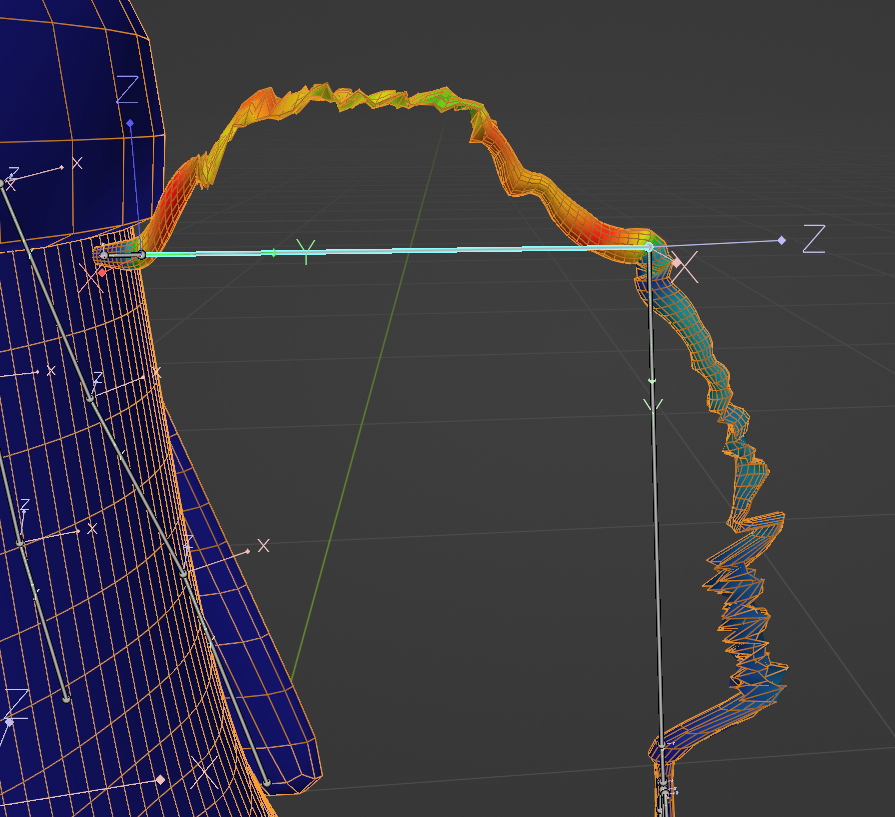
His arm is pretty much just a cyllinder with a lot of loop cuts. Automatic weights did an ok job making it able to bend https://i.imgur.com/sEh5Jdb.png, but I wanted to make it bend more naturally like a noodle as this character has no elbow. I wanted to achieve something similar to how the legs bend in this character - https://i.imgur.com/WsmKZmZ.png
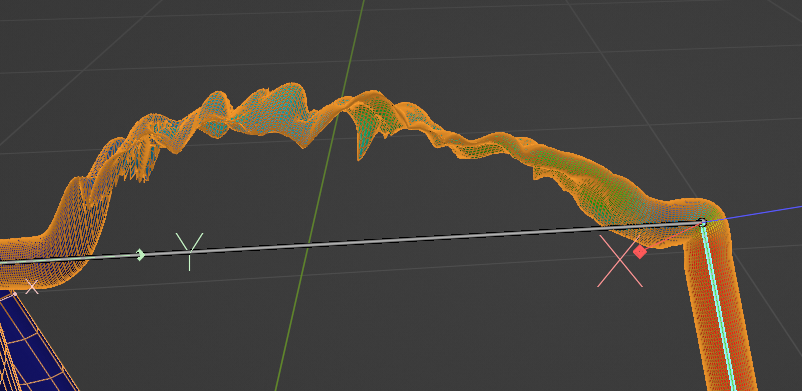
For some reason moving the armature really "smushes" the arms. they stop being rounded and cave in on themselves, not maintining their roundness.
https://i.imgur.com/EHNWvHX.png
https://i.imgur.com/EHNWvHX.png
I've tried adding more topology and the problem persists (https://i.imgur.com/i1Wy2a4.png here is with subdivision 2 applied).
Also tried checking Perserve Volume in the armature modifier without much luck. Seems like some problem with the rigging? Does someone know what I'm doing wrong?

 fading verge
still lark
Hello!
I'm trying to weight paint the arms of this character -
https://i.imgur....
fading verge
still lark
Hello!
I'm trying to weight paint the arms of this character -
https://i.imgur....
Looks like its painted to something else
 tranquil gulch
If I have a non humanoid rig how would I get the transforms for the hands?
 somber bolt
After todays vrchat update my hands don't move at all and I don't know why, with physbones toggled you can see they don't move, but hand colliders do. Hand gestures work so it's not a weight paint issue.
 somber bolt
in unity humanoid configuration you can see the hand moves upwards

hard bone is also assigned correctly
brazen island
@somber bolt gogoloco
somber bolt
brazen island
<@212972248238129152> gogoloco
this avatar's hands only break when the PhysBones are placed on my hands, that's still GoGoLoco's fault?

^ only right side broken
both controllers positioned upwards, left hand has no PhysBones
 brazen island
@somber bolt you cannot place physbones onto humanoid bones
only on aux like tails hair etc
somber bolt
it worked fine before this update...
somber bolt
dang 
brazen island
use constraints i guess
somber bolt
brazen island
use constraints i guess
Which type of constraint would I use to move the hand bones? I have no knowledge about them
brazen island
@somber bolt rotation i think. tbf never tried cloning hands etc
somber bolt
I did some research and found out it's related to what runs first in the player animation loop, if PhysBones run before player controller movement then there's no issue, if the PhysBones run last then they override controller movement
During this update they must have changed the order in which PhysBones are executed in the render pipeline
But they didn't include that change in the patch notes
That's why my hand colliders appear fine, but hands do not
 unborn oar
Heloo I'm trying to figure this out for couple of hours but i cannot find any solution. I need to move Jaw and tongue in the same move but i tried nearly everything and i have still problems like that

 buoyant pilot
parent tongue to jaw?
unborn oar
buoyant pilot
parent tongue to jaw?
Its parented
buoyant pilot
then you should be able to just move the jawbone no?
unborn oar
 unborn oar
buoyant pilot
then you should be able to just move the jawbone no?
unborn oar
buoyant pilot
then you should be able to just move the jawbone no?
I want to move jaw with tongue but tongue is still clipping in weird places
buoyant pilot
what happens when you rotate only the root jawbone?
unborn oar
 unborn oar
buoyant pilot
are all your bones properly centered and scale is uniform?
unborn oar
buoyant pilot
are all your bones properly centered and scale is uniform?
I set every X axis to 0 and roll to 0 rn but no changes

 buoyant pilot
unborn oar
buoyant pilot
unborn oar
so this image looks like you're rotating the jaw side-to-side, is the tongue moving faster than the jaw then?
unborn oar
buoyant pilot
so this image looks like you're rotating the jaw side-to-side, is the tongue mov...
Correct
 buoyant pilot
do any of the tongue bones have constraints on them?
unborn oar
Jaw have 0 weight on tongue, tongue haves only weight for tongue. I'm not sure if i understood this well

 buoyant pilot
hmm
can you check the scale on the jawbone? pose mode and then N to open the transform and check the scale
unborn oar
This is my first avatar and I'm newbie with bones and rigging

And i set 0 in the same places for all of the tongue bones
buoyant pilot
check in pose mode
unborn oar
 buoyant pilot
is the tongue a separate mesh from the rest of the avatar?
unborn oar
Yup
buoyant pilot
can you check the modifiers on the tongue?
 unborn oar
okay, thank you very much anyway :)
buoyant pilot
if you'd be okay with sending me the blend file I could take a quick lookthru to see if I find anything, but otherwise yeah
unborn oar
I can't :c
i think maybe the place of bones are in the wrong spot but idk. I will try to do something :/
buoyant pilot
good luck
fading verge
unborn oar
Heloo I'm trying to figure this out for couple of hours but i cannot find any so...
This should be a weight paint problem. the tounge or the jaw is painted to something other than its bones.
maybe head. and the other isn't, so it doesn't follow. equalize those or make sure only the bone controls that part of the mesh?
unborn oar
Oh!
unborn oar
fading verge
This should be a weight paint problem. the tounge or the jaw is painted to somet...

Maybe that's the case
vertex group from bone
:C


okay now my bones disappeared in object mode and i can see only one xD
ehhh
 craggy cradle
hi. ive been trying to rescale my avatars limbs to the right proportions. all meshes have a basis shapekey. but the ones that has a few shapekeys for toggles dont want to follow along with the rest of the model like in the picture.

 visual forum
Have spent hours trying to figure out how to fix the two errors above. I've been poking around on blender but I can't find anything that will let me change how the bones are parented or even move them around. 💦 I'm very new to this, so I apologize if the answer is right in front of my nose.

 cerulean surge
I have two issues, 1 being one of the jacket cuffs is deciding to float in space. 2 the eyes dont line up correctly they are out of sync with each other so in testing hey both just roll into the head to the sides. Note: model was commissioned im just trying to rig it to vrchat myself and im new with this xD any help would be super appreciated


 uncut breach
visual forum
Have spent hours trying to figure out how to fix the two errors above. I've been...
uncut breach
visual forum
Have spent hours trying to figure out how to fix the two errors above. I've been...
you can look at a bone's parent in the bone properties tab>relations

make sure shoulders and neck have the chest as the parent
visual forum
I saw this, but it was greyed out and wouldn't let me change what the parent was.
I also saw something mentioning unpacking the prefab to move the bones, would that work?

And these are the bones they say need to move. Chest is set to spine1, so I'd swear the neck and shoulders are already hooked to it but I'm not sure.
 cerulean surge
I have two issues, 1 being one of the jacket cuffs is deciding to float in space...
cerulean surge
cerulean surge
I have two issues, 1 being one of the jacket cuffs is deciding to float in space...
Found out how to fix eye issue still need help with jacket x.x
 young vapor
can someone help me with rigging?
quaint cosmos
young vapor
can someone help me with rigging?
That is what this channel is for
quaint cosmos
Okay, well if you want help, you're going to need to specify what sort of help you need. Do you just want a beginner rigging tutorial?
quaint cosmos
Hoi there, Rain sensei here, this video is a recap of my 3D modelling series Parts 12 to 13, covering rigging your model.
if at any point you feel as if you need a more thorough explaination, seek out the relevant episode and scrub through it to find what you are looking for, I will slowly explain things in those videos, so please check the ori...
It's a bit old but the rig seems to match what is required for a modern humanoid rig
young vapor
ok
young vapor
quaint cosmos
It's a bit old but the rig seems to match what is required for a modern humanoid...
do I need to download the github thing?
quaint cosmos
young vapor
do I need to download the github thing?
No. CATS has some useful features but you can rig just fine without it.
still lark
young vapor
I can't connect the head bone with the neck bone
for those kind of questions you should really watch rainhet's (or any other) tutorial from start to finish
quaint cosmos
young vapor
I can't connect the head bone with the neck bone
If the hotkey they mentioned doesn't work, you can just delete the head bone and extrude out from the neck. I'm not really sure why they did it that way. You can also connect it in the bone tab in relations but that's a little bit more involved.
young vapor
quaint cosmos
If the hotkey they mentioned doesn't work, you can just delete the head bone and...
ok
also do I NEED to name the bones?
still lark
young vapor
also do I NEED to name the bones?
if you want to be an anarchist no but if you name them it helps with organization and automatic detection
young vapor
still lark
if you want to be an anarchist no but if you name them it helps with organizatio...
ok
quaint cosmos
young vapor
also do I NEED to name the bones?
^ It'll make your life a lot easier if the tip of your index finger isn't called spine 47, especially when you need to weight paint.
still lark
Does anyone have experience with rigging non-human hands (like claws)?
My character's hands are shaped like this -https://i.imgur.com/tWaJTqd.png and VRchat really doesn't like it when I rig it normally. The thumb mainly is problematic and it clips with other fingers https://i.imgur.com/ZmuH4s1.png
The weight paint is fine and all, my problem is when vrchat's avatar controller moves the thumb differently from other fingers. it moves to the side still compared to the in and out movement of the other fingers
quaint cosmos
still lark
Does anyone have experience with rigging non-human hands (like claws)?
My charac...
Never rigged a 3 finger hand but I have rigged 4 finger hands. Best option is to include those other fingers in the rig so they don't mess with your gestures and just not weight them to anything.
I wouldn't assign any of the fingers to the thumb bone.
still lark
Ooh, thanks, i'll try that
young vapor
the tutorial is harder now because the hand is not flat, its horizontal.
 plush sorrel
quaint cosmos
https://www.youtube.com/watch?v=6WqCUdilzS8
plush sorrel
quaint cosmos
https://www.youtube.com/watch?v=6WqCUdilzS8
If i make a avatar with no visible arms and hands what am i meant to do?
quaint cosmos
plush sorrel
If i make a avatar with no visible arms and hands what am i meant to do?
Add arms and hands to your rig and don't weight it to anything.
 mental forge
I had posted in the wrong channel so moving here
Can someone give me advice on my rig? I kind of eye balled it
it seems to deform okish


but I want to know if I'm doing anything silly. Ignore the blue lines I used them to decide where I'd put bones
rotund kraken
looks okay so far? heres the humanoid armature unity uses if it could be of any help
 stable trellis
How the hell do bones in blender work
im working with a premade model
nothing has weight paint
but when i add a bone
its not attatched to anything in unity
i legit dont understand
if anyone knows any good tutorials lmk
 kind ore
adding a bone != rigging
bones have no data to be told what to do just by chucking it in
it requires weight painting, which is a part of rigging
stable trellis
Yes and thats why its so hard for me to undestand
because somehow
the premade models i bought dont
have that
kind ore
is it the same link
stable trellis
yep
kind ore
i highly doub tthat
stable trellis
bitch is blue
what can i say
 stable trellis
no
it is a part of it
kind ore
ah i see it now
kind ore
stable trellis
no
it is a part of it
it moves via physbones
or rather, a singular physbone
there is no need to adjust the tail
stable trellis
oh i know
i was just thinking about adding some more bones to it
stable trellis
but if i threw it to unity
it wouldnt react with anything
idk why
kind ore
because you need to add a physbone component
stable trellis
no.
stable trellis
Even in blender the bones i added dont react with anything xd
kind ore
kind ore
adding a bone != rigging
.
quaint cosmos
But are they weighted to anything?
quaint cosmos
Also, the model might look blue because you don't have the appropriate vertex group selected. It will only show you the weights for the selected vertex group
stable trellis
quaint cosmos
Also, the model might look blue because you don't have the appropriate vertex gr...
Oh
i see
that actually explained stuff ty
i had no idea what the hell vertex groups were for xd
quaint cosmos
It's not their only purpose, you can also use vertex groups for saving selections and isolating modifiers to certain vertices but the main thing they are is a bridge between the rig and the model. If the model has an armature modifier assigned to an armature, so long as the vertex group name matches the name of a bone, the bone will influence the vertices assigned to that vertex group.
stable trellis
i see
legit learning more about 3d models than in my uni course rn lmao
 inland patrol
somber bolt
both controllers positioned upwards, left hand has no PhysBones
inland patrol
somber bolt
both controllers positioned upwards, left hand has no PhysBones
I made a bug report about this issue, and I found that it has to do with the setting 'multi-child type' being set to 'ignore'
The update 1286 seemed to break animation on any bones where the physics should be ignored. depending on how you want the physics to work you may be able to temporarily set the setting to 'first' or make it it work with it. https://feedback.vrchat.com/bug-reports/p/physbones-isanimated-is-broken-again

I was a bit late to reply to it since I realized its not to do with the IK but couldn't find why
 river bough
hey, im using mixxamo, or whatever the site is called, my model is not lining up on the symetrical line, meaning the wrist, elbows, knees, are not symmetrical
how do i fix this
i could deactiovate the symmetrical, but then whta if its not symmetrical
mental forge
ok $200
quaint cosmos
river bough
how do i fix this
Try going into Blender and seeing if the model is aligned over the origin. If not, try aligning it (using a plane to clearly bisect the model can help) and then use Ctrl + A to apply the transforms
mental forge
rotund kraken
looks okay so far? heres the humanoid armature unity uses if it could be of any ...
this might actually be helpful, thanks
river bough
quaint cosmos
Try going into Blender and seeing if the model is aligned over the origin. If no...
i did take it to blender, btu didnt do what you said, when i saved it as a fbx from blender, it wouldnt load into the miximo
quaint cosmos
river bough
i did take it to blender, btu didnt do what you said, when i saved it as a fbx f...
Not sure about that, Mixamo can have weird errors sometimes. You could try saving it as an OBJ instead
river bough
quaint cosmos
Not sure about that, Mixamo can have weird errors sometimes. You could try savin...
ive found another issue with it, it fixes the models legs
the knees are supposed to be bent backwards
miximo fixed it
quaint cosmos
Mixamo is designed for humanoids with standard leg configurations, you're not going to have much luck getting it to properly rig digitigrade legs, that's a bit of an involved process
 river bough
quaint cosmos
https://cdn.discordapp.com/attachments/390924372782612480/991844903044788355/Dig...
river bough
quaint cosmos
https://cdn.discordapp.com/attachments/390924372782612480/991844903044788355/Dig...
i cant see the words
i do have another model of the one im trying to make, all rigged, everythings done, but rated very poor by the vrchat sdk thing
quaint cosmos
river bough
i cant see the words
You need to open in browser after clicking on it
river bough
oh, ty
quaint cosmos
river bough
i do have another model of the one im trying to make, all rigged, everythings do...
It might not need to be rerigged then, that generally isn't the issue with performance. What errors does it give?
river bough
quaint cosmos
It might not need to be rerigged then, that generally isn't the issue with perfo...
to many pollygons
theres more one sec
quaint cosmos
river bough
to many pollygons
You can decimate it and it will still keep the rig, though it might not move as well. The proper way to optimize a mesh is to dissolve edge loops but that takes a lot longer, especially if you're far from your polygon target.
Is this intended as a Quest-compatible avatar?
river bough
it is my intend to make it a quest compatable, yes
skin mesh renderer error
map: neck
materials spot
quaint cosmos
Can you just post a screenshot? I don't know what materials spot means.


 river bough
quaint cosmos
Can you just post a screenshot? I don't know what materials spot means.
river bough
quaint cosmos
Can you just post a screenshot? I don't know what materials spot means.
i think it means to many materials
quaint cosmos
Material slots, yeah, that means too many materials. I wouldn't personally bother with this model, it's too far from being Quest-compatible, you'd need to reduce the polygon count to 1/7th to even be poor quality, you'd need 1/8th the number of mesh renderers and the same for material slots. It's technically possible but it would be a lot of work especially if you want it to move and look good.
river bough
quaint cosmos
Material slots, yeah, that means too many materials. I wouldn't personally bothe...
kk ty
 oblique furnace
My model's hands are all screwed up after enforcing a pose to it in Unity, but they're just fine in blender. I think I need some help on this one


nvm. Seems like I just needed to reset the post of the model and then re enforce t-pose
somber bolt
inland patrol
I made a bug report about this issue, and I found that it has to do with the set...
Almost all my bird avatars got broken hands due to the update, my fix was cloning the arm bone so that both the armature and PhysBones have separates bones to pose. I noticed the PhysBones simply overwrite armature posing.
inland patrol
This is what causes it for me
here on my wings, the right arm bone has the physbone component, but since the right arm has 2 bones, the feathers and the right forearm, it gets ignored and should animate as though it didn't have physbones on it. instead the recent update has accidently made it where anything ignored by physbones like that just doesn't animate ever

I know its not just with the IK tracked armature though, because I also have a second set of wings connected as an extra bone to the back that use the same method which also broke, so it's definitely an issue with isanimated in general
The canny was marked as tracked though, so it will probably be fixed some time soon without having to reconfigure all your avatars. (maybe just temporarily edit the ones you use regularly)
buoyant pilot
aren't you not supposed to put physbones on humanoid bones?
inland patrol
it's not recommended, but theoretically these don't affect humanoid bones. those get ignored by multi-child type anyways
buoyant pilot
so it's an optimization
inland patrol
yeah, it makes these wings and similar ones viable for quest
buoyant pilot
because less overall bones?
inland patrol
yeah, or in this case less physbone components. Each branching feather bone would require one, making 6 components in total when this method only uses 2. Leaving space for hair, dresses, etc
buoyant pilot
couldn't you duplicate the limb and parent the duplicate to the limb, then put the physbone component on the duplicate?
that way it's the same number of physbone transforms
inland patrol
nah not for this specific issue, since the full arm wouldn't follow the rotation of the arm
the issue right now isn't that it didn't work, just that isanimated is broken on any bone
not just the IK ones
inland patrol
generally when any bone is underneath a physbone component, all animations are stopped for optimization, even when that bone isn't affected by the physics
This still works as intended, however when a bone is ignored by multi-child type, it also ignores that check to see if it can still be animated or something along those lines
buoyant pilot
so its only an issue if there's animations on something on the limb?
inland patrol
it's only an issue if the animated bone has 2 or more childed bones
buoyant pilot
even if there's no animations on any of those child bones?
inland patrol
the animations will work on the child bones, but not on any bone with more than 1 childed bone if multi-child type is ignore, meaning that parent bone shouldn't be affected by physics
buoyant pilot
oh so gestures aren't working then?
inland patrol
That's why it messes with something like hands, or in my case the arm, but it should still work if you put it on the fingers, or if you set multi-child type to first it could possibly still work
inland patrol
it's always good to know how something should work vs how it is working
If I set the physbone type to first here, the arms themselves should actually animate properly. Then they'd also be affected by physics though which isn't what I want

for some people, that might be a viable solution to issues they are having right now though. so it's worth knowing
buoyant pilot
so you need to set each arm bone to Root so that they don't get affected by physics, but since isAnimated isn't working, IK isn't working?
inland patrol
that's pretty much the issue, though it also affects a second set of wings not connected to the IK since they also use multi-child type ignore
buoyant pilot
and that's a problem because you want another animation to play for them?
i.e. gestures or something else
inland patrol
well, it's more like this

on the left is the issue bone, when physics should be ignored altogether, it also ignores the isanimated check
this is most notable on the arm here, since it is supposed to be at my side but instead can't leave T-pose
but the same issue happens on any bone that should be able to animate
buoyant pilot
oh wait I missed the part where there was only one physbone component per arm
inland patrol
the arm on the right has multi-child type set to first, so the entire arm flows like a physbone. so it's not to do with the IK breaking with physbones, but specifically when a bone that should animate is told not to have physics applied to it since it has multiple child bones
buoyant pilot
can you control the right arm or is it just flopping down here?
inland patrol
It animates properly, yeah
I don't think it's fixable at the current update, and it is a bug which only was created in 1286, I just removed physbones on my avatars until it's patched. The bug was already marked as tracked on my canny post after all, why bother making a solution personally
But it's important to reply to people who think they'll have to remake all of their avatars
buoyant pilot
inland patrol
the arm on the right has multi-child type set to first, so the entire arm flows ...
so on the left arm, animations/IK should still work on the forearm and wrist, but the upper arm is ignoring isAnimated so it won't move?
or rather, how are you freezing transforms on the humanoid bones in multichild: Ignore?
inland patrol
will not work on forearm or wrist, since the forearm has 2 bones on my avatar, and the wrist has all 5 fingers
Multi-child ignore means that any bone with 2 or more child bones won't be affected physbones, with first it will flow as though connected directly to the first child bone, and with average it will create an average of the child bone positions as the end of the parent bone
 astral quest
so I added a little flapping bird to my avatar, but when I attach it to a physbone the flapping animation stops, how can I attach this rigged model to a phys bone and keep its animation?
 inland patrol
that'd be done by checking 'isanimated' on the physbone for that bird. Hopefully you won't have issues but if the animation doesn't fully work, there is a bug right now
buoyant pilot
inland patrol
If I set the physbone type to first here, the arms themselves should actually an...
is this the non-arm wing then? I don't see any fingers affected by the physbone
inland patrol
well, on my model I actually removed the finger bones, I was giving a more generalization
for my model I had to make 1 finger bone that was affected by physbones to actively make the hand not be affected by physbones, and the finger bones weren't necessary. So the issue still happens on other avatars
right here you can see a collider that is that extra bone, which with multi-child type ignore will make it so that bone gets physics but the hand itself won't

That bit of pointless physics makes VR feasible
well, it did
buoyant pilot
Won't multi-child ignore only make the root bone (upper arm) not affected by physics?
inland patrol
no, it affects any bone on the physbone chain that has 2 or more child bones
buoyant pilot
what
inland patrol
meaning that the arm, upper arm, and the hand don't have physics
inland patrol
unity doesn't have endpoints to their bones, so it just acts like the next bone in the line is the end point in vrchat. physbones were made to have that be adjustable with this setting for avatars where that default isn't what you want. A really convenient result of that is multi-child type ignore where those bones just don't have physics at all
buoyant pilot
so you're using endpoint position then
or do you have leaf bones on the tips of the wing
inland patrol
I have end bones yeah, that's more so because I directly used a blender model which isn't recommended
buoyant pilot
inland patrol
so why aren't the feathers affected by physics on the left here?
inland patrol
the reason is that end bones will add 1 to the amount of physbone transforms, even though they don't have any change in function from endpoint positions
oh those are
buoyant pilot
ah ok, hard to see
inland patrol
yeah my bad, the physics on that arm still work properly, the only issue is on any bone where multi-child type has ignored physics ignores animations
buoyant pilot
inland patrol
no, it affects any bone on the physbone chain that has 2 or more child bones
I'd love to see this added to the docs, it's really good to know
but I think I finally understand now
thanks for dealing with my questions lol
inland patrol
as someone who doesn't read the docs, I did a lot of trial and error and reading random people's avatar issues to find this out
it's a shame it's bugged right now
buoyant pilot
that seems like a pretty substantial issue though, I'd be surprised if it didn't get fixed
inland patrol
it got marked as tracked on my bug report, I'm just hoping it gets fixed this week since I'm not the only person I know who uses the exact same base model
buoyant pilot
what base is it if you don't mind me asking?
inland patrol
it's the nenon harpy by aokuro on booth, pretty good model and it's a classic
a great one for wing physics
buoyant pilot
thx
inland patrol
it didn't actually have physbones at the time I downloaded it, I believe it gets updated though
 robust crescent
end bones add up in transforms, better off using endpoints they are free 'bones' , these are all 1 bone each , optimized it ages ago so its good ranked/1mat

not quite the same av but similar wings
inland patrol
it's the same creator, I believe that was the nunon model. And I know about end bones being unoptimal, I had to edit other avatars to get it to work, but I like being able to edit the blender model to make my adjustments without having to redo a lot of settings, so I leave end-bones when it doesn't go over the limit
yeah that's the nunon model.
astral quest
so my bird will fully animate in unity but wings wont flap in game? anyone know why that might be?

 inland patrol
how do you have the wings rigged?
inland patrol
astral quest
actually I think I see the issue, can you adjust endpoint position until physbones for the wings appear to line up?
because I don't see physbone outlines for the wings themselves
astral quest
inland patrol
actually I think I see the issue, can you adjust endpoint position until physbon...
lemme try
astral quest
inland patrol
actually I think I see the issue, can you adjust endpoint position until physbon...
so they do appear but once I do that the bird no longer goes up and down
inland patrol
yeah I worried that might happen, thats to do with a current bug in the past 2 updates
the bird not going up and down is a bug, but until it's fixed each wing might need a physbone component, or you could set the multi-child type to average
astral quest
inland patrol
yeah I worried that might happen, thats to do with a current bug in the past 2 u...
I actually accidentally added a root transform, I deleted that and now it works perf 🤘🏻
inland patrol
👍
Should work fine then
hopefully you don't get any other issues with the isanimated bug, it's painful
astral quest
inland patrol
hopefully you don't get any other issues with the isanimated bug, it's painful
would you know how I could animate an on and off animation for it? when I click on the bird when animating the avitar it takes it out of animating the avatar and starts animating the bird
inland patrol
unity only does 1 preview at a time in the scene editor, I would say though that you can just make the animation play on it's own layer on the additive avatar animation layer
that's probably the most optimal way to have it in practice
inland patrol
astral quest
would you know how I could animate an on and off animation for it? when I click ...
oh, wait, for animating it on and off?
Probably an animation in the FX layer that disables the game object and re-enables it when a bool is true or false. There are a lot of steps to that that you can find in videos if you haven't done toggles before
 livid hollow
eye bones get sucked in to the avatar when moving around in-game, how do i fix this?
btw these are the eye bones

i figured it out
so
the eye bones do not move with the head when i rotate the head a bit
how can i make them rotate with the head properly
astral quest
inland patrol
oh, wait, for animating it on and off?
Probably an animation in the FX layer tha...
ive done toggles its just when I record the animation and click on the bird to turn it off while recording it just switches over to recording an animation on the bird instead
astral quest
livid hollow
so
maybe parent them to the main head bone?
inland patrol
you don't have an animator on the bird, right?
astral quest
inland patrol
you don't have an animator on the bird, right?
i do
livid hollow
astral quest
maybe parent them to the main head bone?
gonna try that
inland patrol
astral quest
i do
you'll want the animation to be on the avatar itself, instead of the bird
livid hollow
astral quest
maybe parent them to the main head bone?
doesn't work what
wait
oh
it does work
oopsies
nice i fixed it
astral quest
inland patrol
you'll want the animation to be on the avatar itself, instead of the bird
meaning I would have to reanimate everything right?
inland patrol
astral quest
meaning I would have to reanimate everything right?
you may have to. unfortunately
astral quest
inland patrol
you may have to. unfortunately
wait I think I can animate the mesh turning on and off to hide it
inland patrol
you might be able to make the animation, but I'm not sure it's possible to have that toggle in game if it's not on the avatar itself
brazen island
@astral quest if bird just flaps wings you can have separate animator with this one animation on it. everything controllable, like showing it should be in main animator (fx layer) tho.
astral quest
brazen island
<@742451554812035173> if bird just flaps wings you can have separate animator wi...
Only problem is clicking the bird to turn it off takes me out of recording an animation for my avatar
brazen island
@astral quest oh, just edit file or rename
or remove animator temporarily
or place bird inside an empty object, thats probably what i do
astral quest
brazen island
or place bird inside an empty object, thats probably what i do
yah none of these work the bird just dissappears because it has its own animator
astral quest
inland patrol
you might be able to make the animation, but I'm not sure it's possible to have ...
ok so I reanimated it under my avatar now but when the animation activates in game my character goes into the generic pose for animation while the bird flaps, is there a way for it to not effect my avatar and just the bird?
brazen island
astral quest
yah none of these work the bird just dissappears because it has its own animator
and you want it to do what instead?
faint cypress
Not sure if it goes here, but there isn't a "Avatar texturing" channel so this is the best i have

I'm trying to apply a normal texture to this model but nothing's showing up
How do i fix this'
?*
fading verge
faint cypress
Oh, thanks you
astral quest
brazen island
and you want it to do what instead?
Turn on and off not just be gone entirely
inland patrol
astral quest
Turn on and off not just be gone entirely
make an animator for the bird flying animation specifically in the additive layer on your avatar's 'playable layers', there the flying animation should have no effect on your avatars main animations
then for the toggle have the animation to disable and enable the bird game object on the FX layer
buoyant pilot
@inland patrol letsgooo
 inland patrol
oh. dang, ˡᵉᵗ'ˢ ᵍᵒᵒᵒ
I literally took a picture of that exact post 1 minute before it got marked as available in future release. What perfect timing for me to miss that
brazen island
@astral quest then i guess youre doing something wrong. i have separate model with its own animator/animation and i can turn this model on and off whenever i want.
inland patrol
kind ore
what happened this time
it is a bug where any physbone that should be physics ignored is also isanimated ignored, broke a lot of avatars. Notably nearly every one I heard of were ones with wings.
The second most common issue is when the physbones for hair were left on the head bone instead of their own dedicated hair root bone, but that's a fixable issue as apposed to more dependent avatars
astral quest
inland patrol
it is a bug where any physbone that should be physics ignored is also isanimated...
Yah definitely the best route I found was re-animating it through my main avatar and then putting the animation in gestures and now I can make it do other animations with my fingers too
astral quest
inland patrol
make an animator for the bird flying animation specifically in the additive laye...
oh shoot didnt see this, this would have been good too
kind ore
inland patrol
it is a bug where any physbone that should be physics ignored is also isanimated...
l m a o
 still thicket
ok so im making an avatar with a prop that has a mouth that moves when you talk do you know how to make that
uncut breach
Are you saying you want 2 meshes using visemes?
still thicket
yeah i think
its kinda confusing
im just gonna finish up the prop model and then like explain it
uncut breach
VRChat does have a viseme parameter, I wonder if someone has made a preset viseme animator layer
but you could also just merge the mesh with the face mesh and make it use the same blendshapes
 fierce grail
uncut breach
VRChat does have a viseme parameter, I wonder if someone has made a preset visem...
fierce grail
uncut breach
VRChat does have a viseme parameter, I wonder if someone has made a preset visem...
 eager lodge
hi thereee im at a point of learning blender/unity that i cant rly get too much help from my friend group because they dont really mess in blender too much. But does anyone here have any experience with idk maybe skirt bones specifically? I'm adding one to an avi and i did all the bones and weight painting and stuff but im having a problem like no matter what settings im putting on them in unity for in game they just constantly have this weird like stuttering issue? I've checked and turned all physbone settings off and on like to see if it was in those or even in rotation/parent constraints but i literally just can not find the answer anywhere and maybe someone had skirt exp and could help pls? ;-;
 lean hinge
Really quick question. Does anyone know if it's possible to rig your shapekeys just with a UV map? Like changing the position on a UV map per key?
or do shapekeys only work with object movement?
still thicket
hey how do you merge something like a cloak or a shawl to an avatar and make the bones move with the arms and make them like moveable and a toggle
 reef parrot
is there a way to make a second set of bones mimic the first one exactly? (or make a mesh mimic another regardless of distance from armature?) (( I want to create a set of hands that are like 10 feet away but if i connect them to the normal arms in the armiture it makes them bend all weird (((cause they are moved but the armiture hasnt moved)


I dont think i can do this in blender
but
maybe theres a thing in unity?
(is there a asset or somthing that makes bone mimic eachother? were i can have a second set of hand bones, that mimic the first?)
still thicket
reef parrot
is there a way to make a second set of bones mimic the first one exactly? (or ma...
thats exactly what I was asking haha😂
reef parrot
oh, well lets hope we get a answer
reef parrot
still thicket
or else my cloak is going to be in permanent tpose form
do you mean like clothing?
or like somthing thats a distance away like mine?
reef parrot
so you want to rig your clothing?
you could auto rig?
you can click your mesh, then click the armiture (so that the mesh is dark ornge and the armiture is light ornge) then ctrl p
reef parrot
still thicket
like that
then select auto weights
(oh to do the selections thing on the rig then armiture you need to hold ctrl((or at least on blender 2.90)))
still thicket
on blender?
still thicket
reef parrot
(oh to do the selections thing on the rig then armiture you need to hold ctrl((o...
perfect i have that version
will that translate over to unity
reef parrot
still thicket
perfect i have that version
if they are connected in blender they should work in unity
still thicket
reef parrot
if they are connected in blender they should work in unity
is there a guide on how to do this btw
brazen island
@reef parrot on pc its done via rotation constraints in unity
reef parrot
sorry about caps, forgot it was on
reef parrot
brazen island
<@502707612622651392> on pc its done via rotation constraints in unity
thanlks
 fresh hull
Hi all, i have a little Rigging-problem with my avatar that i just made in Blender - In Vrchat, the legs are twisted outwards while standing, but are normal when running/walking etc. Does someone here might know a possible cause of this? Here are some pictures while running (first picture) vs while standing (second picture):


i thought i had to do something with the bone orientation in blender, but that seems fine:
