#world-development
39 messages · Page 135 of 1
 frigid estuary
I was just confused about whether or it only talks about a SDK3 update in general.
 kind leaf
unless you go with cyantriggers with the patreon addon but even that doesnt cover complex shit
frigid estuary
yes
 quaint salmon
kind leaf
quaint salmon
kind leaf
simple scripts which has a complexity only limited to the level of interaction you need, Youtube searches for unity quests will point you in the right direction. you can us Udon but will be confused as its an interpretation of Unity's Visual Scripting which was intended only for prototyping , or you can install UdonSharp and follow along with most tutorials 1:1. There are also quest prefabs on vrcprefabs.com

 green lagoon
show us your console to see the error logs
 deft geode
any problems?
green lagoon
looks to me that like the vrchat servers are cranky so nothing wrong you did on your end
so I might suggest waiting a while to try again
deft geode
alr
deft geode
my mesh collider on my map isnt working
i put it like it should be put but it aint workin
i think it might be a blender issue but idk how to fix

how to fix this
 bold ibex
You might be able to slide It back into place with the arrows
deft geode
bold ibex
You might be able to slide It back into place with the arrows
nope
it moves with it
bold ibex
Welp
deft geode
the colliders are also a little bigger than the actual mesh
bold ibex
Hmm I'm not too sure
 cobalt prawn
deft geode
cobalt prawn
deft geode
Is the collider a different object than the mesh? Do you have multiple copies of the map in your project folder? Looks like either the collider is referencing the wrong mesh, or the collider is a separate object with a different scale
 nocturne crown
is it possible to make a circular mirror? Or any work around to make it happen?
cobalt prawn
nocturne crown
is it possible to make a circular mirror? Or any work around to make it happen?
I think you can just grab a circular mesh and attach the VRCMirrorReflection component to it
nocturne crown
cobalt prawn
I think you can just grab a circular mesh and attach the VRCMirrorReflection com...
Ive never tried that but ill give it a go and see if anything breaks 😬
cobalt prawn
Which is interesting tbh, I'm surprised more worlds don't have stylized mirror shapes with special borders and such if it's that easy
Alternately you can replace the mesh in the mesh filter component of an existing mirror prefab
frigid estuary
[SDK3] i got .mp4 links for my world but they dont work on video players synchronized. locally they are working but only on my side (master of instance).
https://cdn2.eso.org/videos/dome_preview/The-Sun-show.mp4
I'm using TVPro. YouTube links work perfectly fine on it though.
frigid estuary
proTV is still playing at 720, even though i've been using both YouTube and other sources higher than that. i'm a bit desperate right now 😅
It looks so low quality I'm not even sure it's playing at 720, but rather 480, even though it says 1080 maximum resolution in the players settings
 glad palm
Does anyone know any world creators who do commissions?
 white moon
glad palm
Does anyone know any world creators who do commissions?
white moon
glad palm
Does anyone know any world creators who do commissions?
Go to #community-servers-old and join the VRC Traders server. They have people there for doing commissions.
bold ibex
Do you guys think this will work

For VRC

Use the Pro Radar Builder from DaiMangou on your next project. Find this utility tool & more on the Unity Asset Store.
green lagoon
it wouldn't work if it uses any runtime scripting
so you probably couldn't have the radar actually work
 desert python
frigid estuary
proTV is still playing at 720, even though i've been using both YouTube and othe...
desert python
frigid estuary
proTV is still playing at 720, even though i've been using both YouTube and othe...
yt will always down scale in game.
mp4s are the way to go (h.264) but as for it playing locally. can mean many things unless you hit the local button in the editor by accident at one point
 pearl plume
anyone know how I can fix the lever so I can't pick it up?

 brittle stirrup
Are crossplatform movie players privately programmed and made by the creator of the world?
 reef yacht
bold ibex
could someone help me with this error?
reef yacht
bold ibex
could someone help me with this error?
it's looking for an asset on your hard drive and it isn't there
 winter meadow
Does Anyone have a good tutorial on how to make NPC's That chase you around if your in a specific range or a field of range
frigid estuary
desert python
yt will always down scale in game.
mp4s are the way to go (h.264) but as for it...
thats what the settings look like on my video player.

 desert python
frigid estuary
thats what the settings look like on my video player.
desert python
frigid estuary
thats what the settings look like on my video player.
so the highest that tv will render at is 1080p, my suggestion is to try setting it to 4k and see if results get any better, what does that video youre trying to play dimensions are exactly?
fyi - bitrate can also result in different quality
frigid estuary
desert python
so the highest that tv will render at is 1080p, my suggestion is to try setting ...
The resolution is 1024x1024, the bitrate is probably relatively high, it is about 1.15 to 1.50 MB per minute.
I remember there's some worlds that have a 4K toggle for ProTV. I think I havent found a prefab for that toggle yet if there is one. And if there is none I wonder how it works. The synchronization in those worlds always worked well for me and others.
desert python
frigid estuary
I remember there's some worlds that have a 4K toggle for ProTV. I think I havent...
thats the default protv prefab. i can’t remember the exact name but it should be included
that tv you have right there can also change to default 4k
if you want a more indepth explaination. you can probs go to the architech assets discords abd ask about
frigid estuary
desert python
if you want a more indepth explaination. you can probs go to the architech asset...
i wish i could, theres no working link to the discord. it also seems the version where you can switch quality is a "legacy version" in the prefabs. so not sure how I will solve the problem yet. thank you for all the help!
 compact stirrup
I'm sure I'm just overlooking something, but when I build and test the camera is at floor level and my triggercolliders don't seem to work. I can move around and I don't fall through the floor, but the scale feels way off due to how low the camera is. Anyone have an idea of what I'm missing?
It happens in VR and Forced non VR
desert python
frigid estuary
i wish i could, theres no working link to the discord. it also seems the version...
the one on booth not working for you?
desert python
frigid estuary
i wish i could, theres no working link to the discord. it also seems the version...
that version should be fine iirc
 torpid isle
Is there a way i can test my world in the unity editor with out building because compiling and building my world takes a very long time
white moon
torpid isle
Is there a way i can test my world in the unity editor with out building because...
Google cyanemu, that lets you test in editor
Very handy
torpid isle
white moon
Google cyanemu, that lets you test in editor
thx very useful
 covert sandal
Does anyone here do commissions for worlds and knows how to set stage Amp and stuff up for let's say a club?
I would try and make it myself but the most I can do is an open field with trees...wich is I've heard easy...😅im still new to world making
bold ibex
covert sandal
Does anyone here do commissions for worlds and knows how to set stage Amp and st...
I have a udon graph that boots your voice volume when you enter a zone, I'm at work for the next 8 hours but if no one shows you how to do it by then I'll send it to you when I get home
The people in this server showed me how to do it
bold ibex
covert sandal
Does anyone here do commissions for worlds and knows how to set stage Amp and st...
I have also made a club too
I recommend trying to learn how to make your own worlds instead of doing commissions
It opens up a whole world of possibilities and things you can do when you learn how to do it
Its hard work but it pays off
white moon
It's a rewarding process to learn stuff imo
But if you need something quick or just don't want to learn then comissionns are fine
Or if you just want that extra quality.
Creators that have been making stuff for a long time and do it as a job just make much higher quality stuff generally
 faint geyser
hey how can i fix this error
Assets\UdonSharp\Editor\Editors\UdonSharpGUI.cs(252,53): error CS0246: The type or namespace name 'UdonSharpProgramAsset' could not be found (are you missing a using directive or an assembly reference?)
 runic epoch
i have an object here

that will not sync with quest builds no matter what i do
its the same object with the same values and everything
white moon
runic epoch
its the same object with the same values and everything
Syncing is based mainly on hierarchy order.
If your quest version has any extra objects or less objects than the PC one, or they are in a different order, it won't sync right
 stone marsh
runic epoch
its the same object with the same values and everything
stone marsh
runic epoch
its the same object with the same values and everything
Exactly as they said above. But to also include, unity does syncing from the top down. So if you have a lot of sync objects, it's best to place them at the top of the hierarchy to help reduce issues.
Cloning the scene so you have a PC scene and a Quest scene that are identical. Then remove the components from individual game objects that don't function on quest, but ensuring absolutely that you keep the game objects exactly the same. Only removing components, not the onbjects themselves.s
faint geyser
hey how can i fix this error
Assets\UdonSharp\Editor\Editors\UdonSharpGUI.cs(252,53): error CS0246: The type or namespace name 'UdonSharpProgramAsset' could not be found (are you missing a using directive or an assembly reference?)
stone marsh
faint geyser
hey how can i fix this error
```Assets\UdonSharp\Editor\Editors\UdonSharpGUI.cs...
Post a screenshot of your entire console. Don't just copy and paste one error.
faint geyser
stone marsh
Post a screenshot of your entire console. Don't just copy and paste one error.
nvm i some how fixed it
 worldly hull
can someone show me where to buy high quality city skyboxes?
 wild jackal
ive been asking around to no avail so this is my last resort
I’m a beginner at world-making and I’ve been following this very helpful tutorial on yt and I legit only placed the floor and a spawn point but for some reason, the game isn’t letting me test it out? I screenshotted the whole log. I tried googling this but it seems everyone’s problems are so varried

please help ;-; i dont know what im doing wrong
 mild spade
That error you are getting usually means there are other errors that are causing that error. You should check all the red errors on the console, not just one. Start form the top of the list.
wild jackal
mild spade
That error you are getting usually means there are other errors that are causing...
okay
wild jackal
mild spade
That error you are getting usually means there are other errors that are causing...
heres as much as i can fit on screen starting from the top

does this help
mild spade
Hmm im not sure about those errors. Try clicking "collapse" then "clear" and see which ones stays. If nothing stays then uncheck "clear on Play" then enter and exit play mode to see which one appears.

 mild spade
Try restarting Unity and check if the problem persists. If it does, go into Window and select Package manager and search for Cinemachine and install it. Hopefully that will make the error go away.
 wild jackal
since this is my 8th time restarting the softwear imma try installing it
ill keep u updated
omg it worked 😭
wild jackal
mild spade
Try restarting Unity and check if the problem persists. If it does, go into Wind...
Thank you sm😭
 lethal sleet
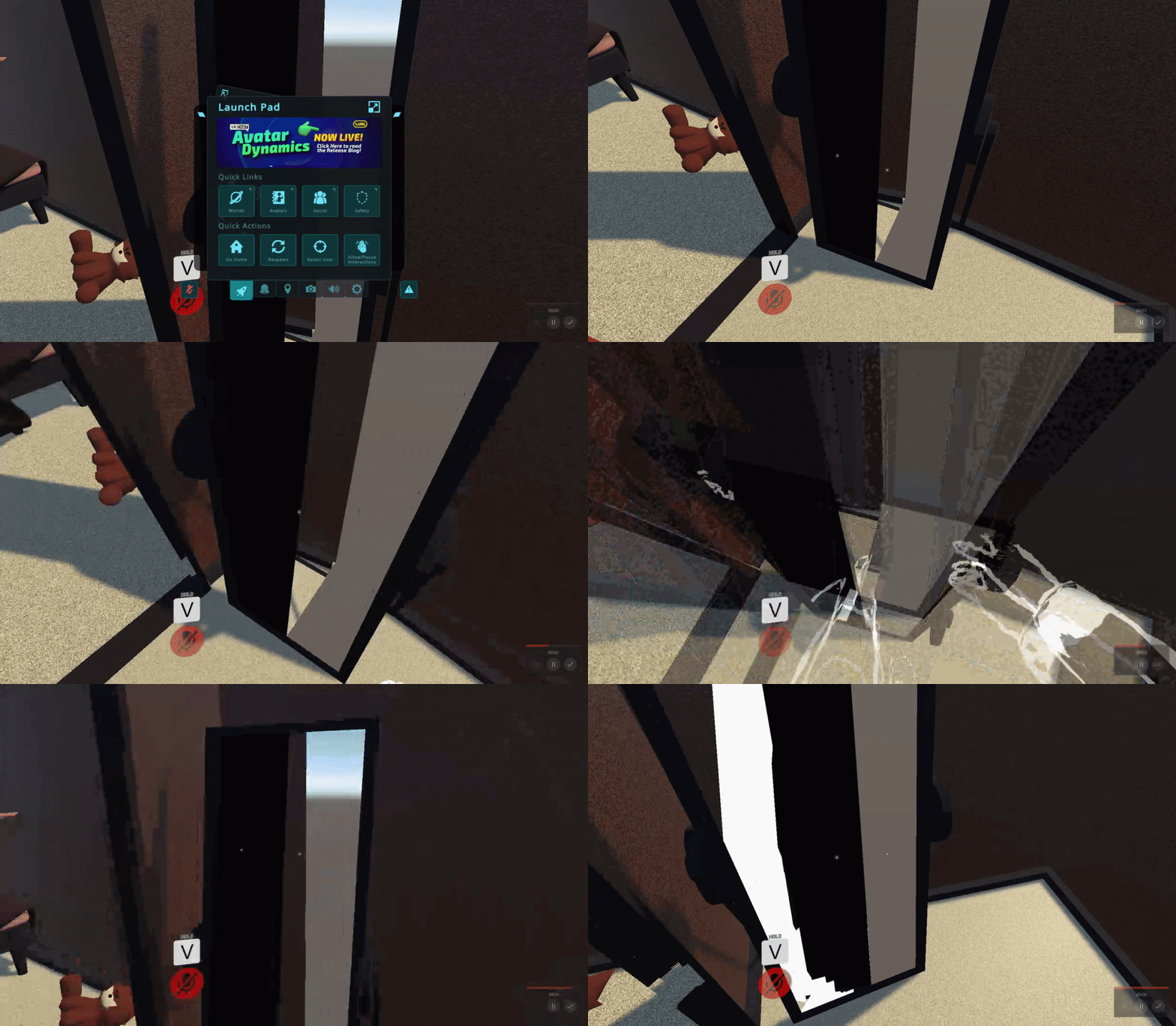
so my mirrors keep doing this, is there anything I need to be doing to make them work?
it reflects UI stuff perfectly but like nothing else

here's a video of just a plane with the VRC mirror reflection component in my world
nevermind I was just stupid lmao
wild jackal
F
 scarlet geyser
Is there any way to make the mirror resolution lower than x256?
 bold ibex
covert sandal
Does anyone here do commissions for worlds and knows how to set stage Amp and st...
bold ibex
covert sandal
Does anyone here do commissions for worlds and knows how to set stage Amp and st...
here is the udon graph

attach this to a cube with a box collider set as is trigger and you should be golden
 weary root
I want to take a picture a certain amount of seconds after a button is pressed, and then display it on a screen :)
Is there anyone who knows of a tutorial for something like that? ^^
 upper obsidian
weary root
I want to take a picture a certain amount of seconds after a button is pressed, ...
upper obsidian
weary root
I want to take a picture a certain amount of seconds after a button is pressed, ...
From the simplest is to use
SendCustomEventDelayedSeconds and camera with render texture.
 mystic atlas
hopefully easy solution, i added water to my world, looks good on desktop but in vr theres like this eyeball slicing glare coming from the water and idk what setting on the water material i need to change
 halcyon iron
Hello, I am currently making a Unity Project. (My first VRC build)
Any experienced people have advice/tips I can get? (VRC related)
Planning on making a allyway as a my home world filled with useful stuff like a green screen and wholesome pictures

I also would like to know some shortcuts because building everything from scratch will take a while.
 stiff gate
Working on a punch out world
Uploaded and published the Minor Circuit for public (I don't own the map btw, rights go to nintendo-)
Might make the other ones as well, who knows

 tropic cedar
Is there a good way to snap picked-up objects to a grid?
 eager garnet
Can someone please tell me how to make a chair or station in my world that overrides a persons animations to make them dance or do a specific pose? I sort of got it to work, but it won’t override the avatars position or neck and head movement.
I’ve looked and I can’t find any up to date info
upper obsidian
eager garnet
Can someone please tell me how to make a chair or station in my world that overr...
VRChat
Used to allow users to sit down. Example can be found in the SDK as VRCChair. This component can also be used on avatars to create seats on avatars! This component acts a bit differently in VRCSDK2 and VRCSDK3. We support SDK2 and SDK3 stations that have animations to drive either SDK2 or SDK3-based...
kind leaf
you can't by intention. With Udon its possible but frowned upon because its rude to force someones camera to move. What you managed to accomplish is how far we are expected to influence an avatar.
its rude because animation usually are not vr friendly and can make ppl sick.
stone marsh
You don't actually move the camera, the user sits in a station and an animation plays. This is why the camera is fixed in MMD worlds where you can make your avatar dance, you're simply sitting in a station watching your avatar dance. It is possible to create the illusion of moving the view camera, but you don't actually move it, you steal it essentially, Eccentric Rooms is a good example of this, you're actually just sitting in stations but it looks like you're running around like normal, it's only noticable when you look closely at the IK of avatars or when you try and drop a portal. Most people don't realize they're not actually their avatar, rather controlling a custom animation while their actual view is being stolen as they're really just floating in space, stationary, in a station.
eager garnet
upper obsidian
https://docs.vrchat.com/docs/vrc_station
i love when people here answerer a question by pointing to the docs, even though the fact the question was asked was because the docs alone were not helpful enough to understand how to achieve what is wanted, as they only really contain literal explanations of what each component is and what it does in a vacuum, and not instructions on how to use it to get any given desired effect that may not even have been originally intended as a use for the component but has become common practice
(tldr: im sick of people just responding with "just read lol" instead of giving actual helpful advice)
 rain shadow
stone marsh
You don't actually move the camera, the user sits in a station and an animation ...
rain shadow
stone marsh
You don't actually move the camera, the user sits in a station and an animation ...
The Eccentric Rooms world doesn't actually override the local players locomotion
The stations are just to sync remote players relative to the world as it moves around the local player
upper obsidian
eager garnet
i love when people here answerer a question by pointing to the docs, even though...
Seated Disable and there will be only animation, it is also written in the documentation.
rain shadow
eager garnet
i love when people here answerer a question by pointing to the docs, even though...
You can import VRCSDK3A.dll and VRCAnimatorTrackingControlEditor.cs from AVSDK3 Over SDK3Udon to get access to VRC Animator Tracking Control which you can add to the animation state
eager garnet
rain shadow
You can import VRCSDK3A.dll and VRCAnimatorTrackingControlEditor.cs from AVSDK3 ...
thank you
rain shadow
eager garnet
thank you
Just trying now this seems like it may not actually work with the latest SDK versions
Actually nevermind seems like it does
stone marsh
rain shadow
The Eccentric Rooms world doesn't actually override the local players locomotion
You can absolutely tell just by looking it does.... Especially when rotating ones avatar.
 round arrow
My world is in the labs but when people favourite it it dose not show up that it's been favourite on the website
rain shadow
stone marsh
You can absolutely tell just by looking it does.... Especially when rotating one...
Just went to the world and there is no difference?
It's a mobile station locally but seated for remote players
stone marsh
Not what I saw when a massive group of us inspected it in detail. Unless something has changed. I'll stick to what I said as I'm more inclined to trust my personal observations until reinspection. Anyways.
halcyon iron
Can somebody please tell me how to upscale textures
My bricks aren't normal size and the concrete is so small you can see the pattern repeating easily
white moon
halcyon iron
Can somebody please tell me how to upscale textures
My bricks aren't normal size...
If you made the objects, change the UV maps. Scale them up
If you didn't you can try changing the tiling amount on the material
halcyon iron
white moon
If you didn't you can try changing the tiling amount on the material
Where do I find the tiling amount
I'm pretty new
white moon
halcyon iron
Where do I find the tiling amount
On the material. There is an x any y value for tiling.
Can't take a screenshot of it as I'm not at home ATM
 kind leaf
eager garnet
i love when people here answerer a question by pointing to the docs, even though...
kind leaf
eager garnet
i love when people here answerer a question by pointing to the docs, even though...
linking docs is common because anyone that assists here on the regular will confirm that more that 60% of all requests for help is due to failure to follow the simple and well explained documentation for setting up your first world. That being said, the question was answered by two other people besides the link. So you can be sick of linking all you want, but we will continue to do so until the message is clear. Don't buy an Ikea desk and try setting it up without the instructions.
kind leaf
round arrow
My world is in the labs but when people favourite it it dose not show up that it...
That doesnt sound sus at all. I don't expect the website to treat favorites and visits as critical update notifications to push. Normally you don't know who or when a favorite is made so you have no idea of knowing when its updated. Ied expect at a minimum its every 15minutes but an hour would be acceptable.
round arrow
kind leaf
That doesnt sound sus at all. I don't expect the website to treat favorites and ...
No but in the website screen it shows number of favorites but it still shows 0
kind leaf
how long has it been since you or your friends favorited the world?
round arrow
12 hour
kind leaf
That is a bit long, unfortunately this isnt the channel to ask in, we can give you advice from experience but many mechanics are not exposed to us, and we have no idea about the website unless exposed somewhere else. Best direction for you would be to submit a support ticket in detail #vrchat-support. But a handful of favorites is not mission critical to the success of a world, and the registering of a favorite is not a #world-development issue. asking how to improve the likelihood of a favorite however would be
bold ibex
Does anyone know what it would take to make something like this?
I'm looking to either find a prefab or create something from scratch that would enable browsing worlds from a panel like this and then dropping a portal to whatever world that was clicked on.
Bonus if the world can be set to whichever instance type (friends+ for example) they want before dropping the portal.
Any pointers would be helpful as I am new to world creation/Unity.

 white moon
bold ibex
Does anyone know what it would take to make something like this?
I'm looking t...
white moon
bold ibex
Does anyone know what it would take to make something like this?
I'm looking t...
I assume all the portals are premade and disabled, and when you click the button it enables the portal for that specific world.
bold ibex
That sounds right. But I'm not sure about how the rest of it would work. The scrolling and clicking aspect of the panel and if there would be a way to set the instance type before making the portal appear.
 dark trout
Hey unity 2019.131f(close enough) i cant seem to find double sided material as an option, and i dont want to use shaders, what i do to fix one sided materials?
upper obsidian
The material has no options or settings.
This is the layer for the mesh and shader.
dark trout
uhm, so when i go to layer my mesh, it'll fix my one sided mesh?
 pearl scarab
Anybody know why I cant move forward? I keep getting these errors when I try to use CyanEmu to test my world

 dark trout
is it mandatory to use a shader to have double sided meshe's i ticked the box in blender as i output as fbx, but, yeah, no luck
 dry goblet
You need a shader that can yeah. Thankfully a lot of shaders can including nice normal default ones
 odd summit
my friend is getting this issue on a new project and we dont know what it could be. new project and new sdk. if you know please reply to this msg so i see thx

 coarse swan
It's been a bit, wanted to check in on functionality I'm hoping exists eventually: is it possible yet to apply variables you "send" with the user on a portal, in some way another? IE if I have 3 portals in World A that point to World B, on entering World B it can tell which portal you used to get there?
Also: is it possible yet to automate compiling and pushing of worlds in command line? I have tonnes of worlds and having to compile them and push manually is killer.
IE if I make one all tweak to an asset all worlds use, do I still have to manually go through them one by one pushing those changes?
halcyon iron
What's the fastest way to quest optimize your world
I'm a little confused on how to optimize the world at all
 solar citrus
helluuuu uhm is there someone online that could awnser a noob in unity some questions? xD before I buy Assets xD
desert python
halcyon iron
What's the fastest way to quest optimize your world
occulsion culling, use better shaders, be low poly would be the easiest path
desert python
solar citrus
helluuuu uhm is there someone online that could awnser a noob in unity some ques...
wjat kind of querie
halcyon iron
My world is going to be very simple its just a simplistic allyway with a green screen and stuff
Is it possible a world could be simple enough to not need to optimize
I feel like the textures could be a problem
solar citrus
@desert python like what kind of assets i can use and textures and making decoration or glass panels or the mirror stuff u know ^^
desert python
halcyon iron
Is it possible a world could be simple enough to not need to optimize
remember to bake lights and occulsion and youll be fine unless you hear issues
desert python
solar citrus
<@657567702608642078> like what kind of assets i can use and textures and making...
booth.pm and gumroad has a lot of assets you could use
 dawn fossil
Is there a way to get to the sdk cantroll panel without the button on the top if the screen? I dont have an option to get in through it

 remote bobcat
dawn fossil
remote bobcat
dawn fossil
https://github.com/oneVR/VRWorldToolkit/releases try debugger

GitHub
Unity Editor extension for making VRChat worlds. Contribute to oneVR/VRWorldToolkit development by creating an account on GitHub.
dawn fossil
remote bobcat
https://github.com/oneVR/VRWorldToolkit/releases try debugger
its on but what do i do now?
remote bobcat
check if it gonna find flaws in your project
 remote bobcat
you need to fix all errors in console
dawn fossil
i got no idea how to even start
remote bobcat
by reimporting sdk
dawn fossil
should i delete the foulders first?
remote bobcat
you can remove just sdk folder and import it again


 dusk sapphire
you installed qvpen's without installing udonsharp first
delete the qvpens folder, import udonsharp, then import qvpens
dawn fossil
I'll do that just a sec
dusk sapphire
you shouldn't have 2 vrworldtoolkit folders either
dawn fossil
Oh alright
It's back now,thank you both so much!!
@dusk sapphire @remote bobcat
wait-
whats this?
 dusk sapphire
build again, udonsharp wasn't done compiling some scripts
dawn fossil
wait wdum?
 azure anchor
I am trying to get this wall to be shown for players. What is the easiest way to do that?

 near escarp
Double sided shader
green lagoon
or just duplicating the faces
azure anchor
green lagoon
or just duplicating the faces
I tried doing that but it was being wonky
azure anchor
near escarp
Double sided shader
This is blender. Would that still work?
near escarp
You can turn off backface culling in blender for that
green lagoon
azure anchor
I tried doing that but it was being wonky
you need to flip the normals of those duplicated faces so the wall would show up on both sides
azure anchor
green lagoon
you need to flip the normals of those duplicated faces so the wall would show ...
I can try again
azure anchor
near escarp
You can turn off backface culling in blender for that
Would that be easier than duplicating the faces?
green lagoon
turning off the backface culling in blender will have no effect in unity
eager garnet
eager garnet
Can someone please tell me how to make a chair or station in my world that overr...
update: still cant get the station to override, i tried checking and unchecking the seated option and neither worked. i tried importing VRCSDK3A.dll and VRCAnimatorTrackingControlEditor.cs from AVSDK3 but it caused errors that prevented me from building to test it. Ive read the documentation a few times now but again, its not too friendly to someone slow like me. if anyone has any tips or ideas i can try that would be helpful for the next time i get the chance to work on it.
azure anchor
green lagoon
turning off the backface culling in blender will have no effect in unity
How should I duplicate them without messing it up?
green lagoon
you duplicate the faces and then flip the normals so you have a 2 sided object
I guess question would be would you be even having a scenario where you see both sides of the wall
as blender screenshots not quite enough context
azure anchor
Yes. I have a window and you can see the backside of the wall
green lagoon
cool
azure anchor
I forgot how to duplicate 🤦♂️
green lagoon
shift D
azure anchor
Thank you!
 leaden sphinx
azure anchor
I am trying to get this wall to be shown for players. What is the easiest way to...
leaden sphinx
azure anchor
I am trying to get this wall to be shown for players. What is the easiest way to...
solidify modifier may help too :P
upper obsidian
eager garnet
update: still cant get the station to override, i tried checking and unchecking ...
Disable seated on the station, add any humanoid animation to the station. That's all it takes.
 kind leaf
did you verify the animation type is humanoid?
eager garnet
maybe i should clarify just in case here, its playing the animation, but after 1 second the head stops animating and goes back to as if im just standing there, while the rest of the body attempts to continue the motion
rain shadow
eager garnet
maybe i should clarify just in case here, its playing the animation, but after 1...
When you imported AnimatorTrackingControl and VRCSDK3A.dll what errors did you get?
eager garnet
i solved the errors already, but it still doesnt fix the head
rain shadow
You will need to add the AnimatorTrackingControl to your animation state in the animator
And have it set to override everything as animation
eager garnet
yeah i did that
 rain shadow
Can you show your animator
eager garnet
 rain shadow
Which ones did you set to override
eager garnet
all of them
rain shadow
eager garnet
all of them
Try see if this works?
eager garnet
rain shadow
Try see if this works?
it works, thank you
 safe copper
In the VRC Station component, does the Player Mobility value Mobile work? According to the docs, that should allow a user to move while using a station, but it does not. It doesn't appear to change anything
kind leaf
its intended to be used when using the station hack. Using stations to override the default controller. if you want to slide on ice you need to use this hack, or if you want to make a large robot that the player enters, or a car, this hack.
but there are no well know guides on the custom side of stations. You either wing it with w/e unity knowledge you have or check vrcprefabs.com for prefabs that fit/semi fit your needs and reverse engineer them.
vrc does have an official tutorial person now but they are slower than molasses at getting new content out
rain shadow
safe copper
In the VRC Station component, does the `Player Mobility` value `Mobile` work? Ac...
For mobile stations work you will need to have it set as mobile with disable station exit enabled and seated disabled
It also wont work if the station is a prefab as stations will always revert to their prefabbed values on build
safe copper
ah I see, thanks everyone
 thorny zodiac
i made new world from scratch in blender and when i try test the world and upload world i can test it my self and keep kicking me out from world on sdk 3 how to fix that
nothing in world because plan model of work place i made just dont understand why its kicking me out from the world i made to test it
white moon
@thorny zodiac when you say kick out what do you mean?
thorny zodiac
like i just made model of my world
and i just import on my unity to use it
i model made in blender
not even finish but all area i did is finish
but when i try to test my world in unity let me publish it
but when i want go to world always kick me
i dont no why doing that and using sdk 3
white moon
What so you mean it kicks you
Does it crash?
Freeze? Your get thrown out of the model physically?
thorny zodiac
no just kick from the world it wont let u go in
white moon
What unity version are you using?
thorny zodiac
like say if u try to make world right and then u wanted to test it
and when u get in ur world and load but then kick u from world go back to ur home world
update version
white moon
What number? If you can copy paste or screenshot it
thorny zodiac
its one that everyone has use for unity
 gaunt egret
did you make a spawn point
thorny zodiac
 gaunt egret
yeah, i don't think you can upload without it but sometimes it doesn't put itself as the spawn for some reason
thorny zodiac
ya i fix that spawn sense first time using sdk 3
because what i am doing making world for sdk 3 so be first time using it
im SDK 2 person who always use sdk 2
for my worlds
but when i try to upload my sdk 3 and my world when i try get in it kicks me out and take me back to my home world
i all ready did scene discriptor
and spawn
i just said i uploaded the world and work fine when i upload it when i get inside kick me and bring me back in my home world
white moon
Does it run in editor if you test using cyanemu?
thorny zodiac
when i tried testing it by my self kick me
go to build and test
kick me same way
thorny zodiac
so when i try build and publish right the two window keep popping up
i deleted everything and deleted world but does give me new world
can i ask u guys quest how do u u use sdk 3 because i know im doing this right but this always happenn when i try publish im take screen shoot
white moon
I've never had this issue. I just build and upload and it works.
You must have an error somewhere that's breaking it.
thorny zodiac


i use this VRCSDKWORLD
but everytime i use it and do spawn kick me form the world
unless not doing it right
i need do more then something for it?
white moon
Nope that's the one. Just drop it where you like and away you go.
Do you have any errors in the console?
thorny zodiac
ok so i got it work so i didnt no it needed to have the thing drag for spawn
make it work
so new to SDK 3
so now i got it work now only thing is cant freaken move
why
white moon
Oh yes you do have to actually place that prefab in your scene to be able to spawn
Having something in the asset folder won't do the job
You can't move by default in the editor.
If you want to be able to you want to download cyanemu and install that
thorny zodiac
so where do u need to download that cyanemu
i got in world fine now but i cant move
gaunt egret
i thought you used clientsim 
thorny zodiac
like i dunno why cant move in my world is this bug on sdk 3
gaunt egret
put collision on your map and move the spawn a tiny bit above it
thorny zodiac
i have it so i can stand on the map
but some reason my friend testing this map for me can move just fine but im on vr i cant move
i can only jump
white moon
Ahk if they're using client sim then ignore me
I tried to install it the other day but the url in the install instructions was saying it wasn't valid 😑
 white moon
You probably have a walk / run speed of 0 on your vrc world object
white moon
I'm not sure how that would work. Make run something higher than walk
thorny zodiac
let me see
wow
wow
im so done
i did everything on three and i can finally move
thanks so much winguy
u two little tiny
thorny zodiac
here u guys for helping me here build half of it that i have done so far but u can see when i took beta test in the world, U want ty WInGuy for helping me with SDK 3 and this world i made that not done yet but soon be done before next month and i will have grand opening show off my world. Game dev who make games for his own game be easter egg show off his own game for his demo. So guys want see it u can add me under name Yukikami98


 rich trellis
so im working on a world and i was wanting to have a ranking system to where i give certain users a rank and it displays above their avatars. Can anyone point me in the right direction on how i would go about doing this!
 thin shale
Hi everybody, could you tell me if google drive is still whitelisted as a source for video links ( both pc and quest) ? i've been trying for a while by using direct share links, converting the shareable url in direct raw URL , tried putting the shortcut for the youtube-dl in front of the link etc but nothing seems to work. the file is an mp4 h 264 video file
upper obsidian
thin shale
Hi everybody, could you tell me if google drive is still whitelisted as a source...
VRChat
The following services are on the video player whitelist. If a service is not on this list, it will not play unless "Allow Untrusted URLs" is checked in Settings. Whitelisted Services The services listed below are inherently trusted and are permitted with our default URL whitelist. The resource bein...
thin shale
upper obsidian
https://docs.vrchat.com/docs/www-whitelist
thanks , i've reviewed the list and confirmed that <gdrive is still whitelisted, i just can't seem to find a way to make use of the urls
upper obsidian
thin shale
thanks , i've reviewed the list and confirmed that <gdrive is still whitelisted,...
Check if there is a problem with the link or the video codec is not suitable. You can watch through the console in vrchat when you start the video.
thin shale
upper obsidian
Check if there is a problem with the link or the video codec is not suitable. Yo...
i got the link from the "Get link > anyone with the link " tab, the codec is right ( h 264 was the recommended one if i m not wrong. i didn't understand the last trick you were explaining, chich console are you talking about ? you mean console tab in unity?
upper obsidian
thin shale
i got the link from the "Get link > anyone with the link " tab, the codec is rig...
https://docs.vrchat.com/docs/launch-options At least --enable-debug-gui
VRChat
There are several launch options available for VRChat. If you are using Steam, you can set these easily in the Properties for VRChat, found by right-clicking on VRChat's entry in your game list. After clicking Properties, click on Set Launch Options, then put your desired launch options in. If you a...
and RShift + Backtick + 3 Toggles visibility of console debug menu
thin shale
wow thank you 🙂 i'll ckech it right away
lethal sleet
is there any way to see exactly where an empty gameobject is pointing? I've been trying to setup spawns and chairs but it's so hard to guess where it's going to point without build & testing
kind leaf
the blue arrow if orientation is local.
you can also do the build and test once to get the orientation and then add a random object like a tiny sphere to the front of the empty as a child and set this object to be editor only in the tags. Prefab it and then you can just reuse the "empty" with a clear indicator of the front forr all your needs.
 grave mantle
Mornin' y'all!
I'm making a world that has a door in it leading to an avatar room- thing is, there are two parts to said door. Is there any way to have a trigger that animates both parts of the door upon activation?
context is that one side of the door is completely transparent, so I have to have two separate objects that represent both sides of the door

 quaint viper
A very simple solution would be to have one side animated, and simply have the other side as a child object to the animated one, so it moves with it.
worldly hull
can anyone explain why these objects all have different positions but appear in the same spot?
 vague pivot
worldly hull
can anyone explain why these objects all have different positions but appear in ...
vague pivot
worldly hull
can anyone explain why these objects all have different positions but appear in ...
If I had to guess it's the child objects, spheres, underneath your new game objects that are also moved
dawn fossil
Idk why everything I do and it gives me a pop-up saying that the world is too large for vrchat to load
Idk what's the problem
vague pivot
How big is the project file?
 unborn iris
hi im not entirely sure why buy when i try to go into local testing it only loads and does nothing else. its my first time working on a world, am i missing something obvious?
vague pivot
Do you have cyanemu installed?
unborn iris
yes
vague pivot
I'm not sure if it's required for cyan emu however vrchat has something you need to run it
Just loading a project to double check
unborn iris
okok
vague pivot
yeah
 vague pivot
ah ok
unborn iris
ill message here again after building more to see if im still stuck😭 lol
thank you btw
worldly hull
vague pivot
If I had to guess it's the child objects, spheres, underneath your new game obje...
you're right thanks :3
vague pivot
np
 low osprey
Does anyone knows why it has color on it every time when I bake light but i have only DirectLight in my scene

 trim nacelle
that's because exr compression, only way to avoid it (kinda) is to set the resolution higher, or modify the shader or texture so it uses only one channel, or setting its compression to none (that will increase the size a lot)
azure anchor
How big can quest worlds be again?
green lagoon
100mb
bold ibex
any ideas why this doesn't work in game but works in the game window?


Layer in the sounds of Dynamic City Ambience from Cafofo for your next project. Browse all audio options on the Unity Asset Store.
creator said it should work in vrc
but nothing happens in game
green lagoon
bold ibex
any ideas why this doesn't work in game but works in the game window?
you can't use C sharp in vrchat
green lagoon
basically you can't use that sound control at all
stone marsh
If it gives you the raw audio files you can just use those however
bold ibex
stone marsh
If it gives you the raw audio files you can just use those however
It does
Just very unfortunate
Gonna see if I can try and use them but idk..
stone marsh
Yep. U can.
azure anchor
green lagoon
100mb
Okay good. Just double checking
green lagoon
so probably a good idea to use crunch compression on your textures so they don't take up as much file size
halcyon iron


it's pretty simple but I'm just amazed that its only been 3 days with unity and my home world is almost done
green lagoon
definitely a pretty decent start for 3 days
 whole shoal
i've noticed that the video player in my world works fine on pc but does not work on quest. is there any way to fix this?
stone marsh
whole shoal
i've noticed that the video player in my world works fine on pc but does not wor...
What are the video sources you're trying to play on quest?
whole shoal
just a simple youtube video
stone marsh
You can't play YouTube on quest because the quest doesn't have youtubedl
whole shoal
aw bruh
halcyon iron
how do I add text to my world. I wanna add a sign over my mirror saying don't be a degenerate
if anyone knows
whole shoal
do audio players for mp3 files work on quest?
stone marsh
whole shoal
do audio players for mp3 files work on quest?
If you mean just playing an MP3 on a audio source, then yes.
whole shoal
sweet
how do i import an audio clip into unity? for some reason when i import an mp3 file as an asset, it won't let me do anything with it. i can't apply it to an audio source.
the mp3 file works fine when i open it in the downloads folder, but for some reason in unity it says it's 0 bytes and there's no waveform at the bottom of the inspector
 swift pulsar
Did you convert it using a janky youtube to mp3 website?
whole shoal
yea...... :/
swift pulsar
Yeah, I had that issue as well
whole shoal
but i dont get how it works when i play the file itself but in unity it doesnt work
whole shoal
soooo how do i fix it
stone marsh
whole shoal
soooo how do i fix it
Open it in Audacity and save as mp3
whole shoal
i dont have audacity
stone marsh
Download it
Helps to reduce it to mono to save space too. Audio can take up a chunk of space and every mb matters for quest. Hour long songs can be reduced to under 10mb pretty easy in audacity.
swift pulsar
By chance does anyone know what's happening here? The entrance has a glossy effect even though it's using the same material as the other walls, have generated lightmaps and is static
 whole shoal
@stone marsh when i put the mp3 into audacity it turns into really loud abrasive static, how should i fix this
stone marsh
whole shoal
<@485247584907034628> when i put the mp3 into audacity it turns into really loud...
Download the audio again from a better download site. You most likely have a corrupt mp3
 spark grotto
can i share some progress on a world that im making?
 gaunt egret
ayy thats sick
cobalt prawn
swift pulsar
By chance does anyone know what's happening here? The entrance has a glossy effe...
Looks like the material is using reflections, and if they're separate meshes maybe only the entrance mesh renderer is set to use reflection probes?
spark grotto
gaunt egret
ayy thats sick
thank you!
cobalt prawn
swift pulsar
By chance does anyone know what's happening here? The entrance has a glossy effe...
It's a separate property from metallic/smoothness btw
 vapid lotus
is there a way to make only one person able to grab an item by account
bold ibex
vapid lotus
is there a way to make only one person able to grab an item by account
I'd love to know that too but I have my doubts
 trim musk

 finite hare
Hi everyone. I have a question about making a world and I didn't know who to ask so I'll ask here.
Is it possible to make a world where the master can disable all mic/mute everyone except himself/herself? on click of a button?(So it can be turned on and off) Ideally I want to make a world for my friend who is a streamer/singer and she sings in vrchat sometimes but she often gets interrupted by random people passing by. This actually discourages her to perform in vrchat but if I could make a safe place for her and other artists to perform, I think it would be awesome
kind leaf
finite hare
Hi everyone. I have a question about making a world and I didn't know who to ask...
betterplayeraudio for vrchat, google. muting people that you want in your world is a shit idea tho. Your vocalist might need her safe space but no one appreciates being muted. Again, BetterPlayerAudio will be your solution to the correct setup. Audio zones where the vocalist can be in there own little sound bubble and be heard but cant hear whats going on outside.
upper obsidian
finite hare
Hi everyone. I have a question about making a world and I didn't know who to ask...
The VRChat Safety is enough to block everyone's microphones for the right amount of time.
round arrow
Hi so I Wana hide peoples name tags in my world dose any one know if there's a shader or something
finite hare
kind leaf
betterplayeraudio for vrchat, google. muting people that you want in your world ...
thank you!
 sullen fiber
Anyone know a rain system that doesn't kill quest?
 ember vault
heyo! I can in something way do the mirror can reflection to another mirror? I want do mirror room
upper obsidian
ember vault
heyo! I can in something way do the mirror can reflection to another mirror? I w...
They are already displayed in each other, but most likely you need to use a custom shader to improve optimization and avoid display conflicts.
 high stirrup
https://gyazo.com/176052dc5361c09cbf374183b17c3264 I'm sort of new to blender, and I'm trying to figure out what's causing these flipped faces after exporting. Anyone know?
 trim nacelle
that's because of the normal orientation, on blender go to edit mode, select all the faces, click alt n and recalculate inside
also to enable backfacing on blender go to the solid viewport and on the top right extend the shader settings and enable backface culling

or also on the arrow on the right you can enable face orientation (with backface culling disabled)
 high stirrup
Thanks a lot!! You da best!
azure anchor
What is the easiest way to put text in Unity?
 somber wraith
How do you guys handle optimizing for people with quests linking to pc. I have had people on full pc vr that had specs barely above minimum system requirements and it ran fine for them, I had quest only users and it ran fine for them as well, but now 2 people with west's linked to pc joined and it ran terrible for them. (although I had a quest pc user before and it was fine for them) why is that. Is it because the quest link isn't performing well or is my world at fault
weary root
I'm working with an imported unityproject, but I'm having issue transforming objects. What could be the reason for this? :)
anything I select doesn't seem to move anything :/
cobalt prawn
weary root
anything I select doesn't seem to move anything :/
What if you remove the animation from that root object? Maybe it's overriding the transform
weary root
cobalt prawn
What if you remove the animation from that root object? Maybe it's overriding th...
hmm that didn't seem to change the result.
Thanks for wanting to help by the way ^^
cobalt prawn
Yea I'm not sure, I'm guessing there's some script or component hidden somewhere that's overriding control but it's hard to say without being able to poke around
vague pivot
If you disable the parent object does the mesh disappear?
cobalt prawn
Fwiw, your mesh collider is clearly referencing a different mesh than the mesh renderer, which is weird
vague pivot
good spot
weary root
vague pivot
If you disable the parent object does the mesh disappear?
it does ^^
cobalt prawn
Yea so regardless of the collider setup that mesh oughta be moving
weary root
cobalt prawn
Yea I'm not sure, I'm guessing there's some script or component hidden somewhere...
I'll try to use a tool to remove all scripts
since that is not the part I'm interested in about the world, and VRC wouldn't allow that anyways
hmm... didn't change the situation.
gameobjects do toggle, but changing their transform is not possible :/
there's definitely some weird setting-up that happened here
azure anchor
I am trying to add text to my world but it keeps making a text underneath prefab from a different object. How do I fix this?
bold ibex
How do I apply mesh colliders
I’ve seen so many videos but non cover the problem I’m having
cobalt prawn
bold ibex
How do I apply mesh colliders
Add component > mesh collider (do this on the same object that has the mesh filter/mesh renderer). What's the problem you're having?
cobalt prawn
weary root
there's definitely some weird setting-up that happened here
Are any of your root objects' scale set to 0 maybe?
 cobalt prawn
Yeah, you need to put a mesh collider on the same object as the mesh
Also, you can use the windows snip tool (windows + shift + S) to quickly take screenshots which you can easily crop and copy/paste into discord 🙂
 cobalt prawn
No no
That mesh collider you have, it's currently on an empty object in your scene hierarchy and thus does not know what shape to make itself into. You want to find the object in your scene which has the mesh filter and mesh renderer components you want to add the collider to, then add the mesh collider component to that object. It's likely a child object of the empty object you have selected
Hope that makes sense
 graceful igloo
Is anybody not working on a project rn?
vague pivot
Any reason?
graceful igloo
Just looking for someone to answer a few questions and potentially work with me to make a world
vague pivot
oh ok
graceful igloo
I just have a few questions on the limitations of the platform and stuff
vague pivot
I could try answer them, by platform do you mean unity or vrchat or both?
gaunt egret
ask your questions, dont ask to ask
graceful igloo
More vr chat but possibly both
So I was asking a few of these in general but I also have a few more
Is there a detail/size limit or is it just better practice to keep the scale down for lag?
Like I know in rr there’s ink. Is there a similar cap in vrc?
gaunt egret
quest world is 100mb
vague pivot
In terms of object size unity does have a limit however you'd be doing something wrong if you hit it
it's huge
gaunt egret
learning how to optimize is a good skill, but for quest the world size limit is 100mb
you should always have good practices like texture atlasing and joining meshes
graceful igloo
What are the most common types of interactable worlds? Like I’ve seen test pilot and other vehicle worlds but what are some other types
vague pivot
I'd say most common one's I've seen are game worlds, like truth or dare, spin the bottle and other party games like that
But in terms of interactivity it usually depends on what the map maker puts in
graceful igloo
Can I make it so there is only ever one instance of a world? So in other words you’d be around everyone that is currently in that world with no division.
vague pivot
I don't think so, whenever a world is published from the Unity editor there isn't any option to make it exclusive and every world I've been in has allowed me to create a clone of it.
gaunt egret
if you upload the world privately, only you can invite people to that world. you can't control the amount of instances a world has
graceful igloo
Can I prevent others from formulating invites?
vague pivot
To your instance yes, by making it private, but not to all instances
kind leaf
Instance type > Invite means only you can invite others. Invite + means you or your friends can invite.
kind leaf
Specific people? Only if you do friends+ and setup your friends list to only include people you want. Bit of a hassle, not worth it
graceful igloo
Ok
Well thank you guys so much for the help
I may be back later with more questions but I’m all out rn
weary root
cobalt prawn
Are any of your root objects' scale set to 0 maybe?
some of them are set to "-1"
but changing those to a different value, like 1, has the same not-being-able-to-transform issue
bold ibex
So, I assume there is a tradeoff between having lots of separate pieces of mesh and having occlusion culling setup properly, vs having them combined to reduce draw calls, but are there any rough guidelines as to how many separate materials and submeshes will start to become an issue?
I know this isn't very easy to answer, nor is there really one answer, but any sort of guidance would be greatly appreciated.
Where I'm at right now, but a lot of stuff is still to be combined.

 ruby jay
what matters are the unity stats in play mode
it really depends on the scene, try not to exceed like 200 batches.. and that can be fairly lot
bold ibex
Yeah, that shouldn't be a problem.
If you had said 20
lol
Yay, lots of atlasing ahead of me
cobalt prawn
bold ibex
Yay, lots of atlasing ahead of me
Here are the official Oculus recommendations regarding Quest draw calls. This is pretty much what I use as reference when I'm looking at batching and instancing and all that jazz
 cobalt prawn
If you're only doing PC though, I'm not sure- I feel like all these numbers might as well be 100x lol
bold ibex
If I shoot for quest numbers as close as possible, I'll never make something that runs like crap in PC is the hope, lol
cobalt prawn
Definitely 👍
halcyon iron
why does my world not have windows support
i made a new update and now its quest only
nvm
vapid lotus
trim musk
https://feedback.vrchat.com/feature-requests/p/people-who-blocked-me-should-be-v...
why is this wanting to connect to my account
trim musk
vapid lotus
why is this wanting to connect to my account
That’s just how the VRChat Canny is
But don’t worry, it’s been resolved
The VRChat canny is their website for bug reports and feature requests
vapid lotus
ok
 versed plover
how to i export keyframed animations from blender to unity, its just a animation on some cubes no armatures
trim nacelle
on unity, there should appear an arrow next to the blender file, expand it and there should appear an animation, select it and click ctrl d to duplicate it as an editable animation
versed plover
got that, it shows up in unity, but when i try and preview it it just cycles really fast through one frame and dosent show the other 99 frames?
trim nacelle
so is it one frame only?
versed plover
ill send videos that'll probably be easier to explain
 lean condor
 versed plover
got it to recodnize the 100 frames but nothing happes in the preview tab for the animation
trim nacelle
try adding an animator on the root of the model with the animation as the default block
faint geyser
what is the asset the if you are far enough you will not see the room like in this world
https://vrchat.com/home/world/wrld_1b482eca-bede-4de8-88a8-bbb6ca7e24cd

just a small world packed with stuff to do in a comfy atmosphere there is a video player there is beer pong there is a pool table as well as never have i ever out side and a few drink games in doors …
kind leaf
Ugh, not normally done with an asset lol. You can set up an occlusion wall or reduce your max distance on your reference camera. The 1k view distance default for the camera is a waste for interior builds.
faint geyser
oh
kind leaf
if you use real time lighting you can also opt for LOD groups.
faint geyser
is there a video for it
kind leaf
for what?
faint geyser
faint geyser
what is the asset the if you are far enough you will not see the room like in th...
this
kind leaf
for what method i meant... Occlusion walls, no not really. View distance is self explanatory, just inspect your reference camera and lower the distance to whatever is required to fit the largest room, and just place your other rooms that much further away. For LOD Grouping just youtube search Unity LOD Group
kind leaf
I use the 2nd method using the reference camera
faint geyser
am I supposed to have a camera in the world already
kind leaf
all worlds come with one.
faint geyser
nvm im dum lol
kind leaf
are you using the vrcworld prefab as well?
the thing with the scene descriptor n stuff
kind leaf
make sure the scene camera is referenced in the scene descriptor or nothing you change on the camera will be applied in game
faint geyser
ok
bold ibex
cant find vrcscene descriptor if that’s what’s i need for a world😭😭
kind leaf
its a component... or just use the VRCWorld prefab
 sonic goblet
I can't access the control panel, what do I do?

 outer onyx
Need help or a point to right direction. Anyone know how to make a surface slide-able like on ice when player steps on it? I tried the material physics, but only info I get is to use c sharp codes with it. thanks~
stone marsh
sonic goblet
I can't access the control panel, what do I do?
What version of unity are you using?
sonic goblet
stone marsh
What version of unity are you using?
 stone marsh
sonic goblet
stone marsh
sonic goblet
Post a screenshot of your console in it's entirety. You only need to show red stop sign errors. You can hide the yellow triangles and info blurbs in the top right corner of the console.
 grave pagoda
I've been trying to make a world gimmick where a projector shader only affects the the player models in the mirror, like the mirrored model is the only way you could see the projector effect, but it's been bothering me, as nothing seems to be working. I've tried culling main cameras in unity, and trying to set layers around to ignore the player's view. It doesn't quite work as expected. No matter what I've done, it's always shown up on the person's camera
trim nacelle
Are you using an actual projector or that decal shader that ppl use for the (annoyingly) popular butter avatar?
And do you mean that you want the shader to only render on the mirror reflection?
 woven frigate
There anyone selling a working grill prefab
Making a camp world and want a grill that works
grave pagoda
trim nacelle
Are you using an actual projector or that decal shader that ppl use for the (ann...
An actual projector.
Yes, just the mirror reflection, while not being visible to the player pov outside of the reflection
trim nacelle
Ok imma send the line you have to put on your shader one min
bool mirror = unity_CameraProjection[2][0] != 0.0 || unity_CameraProjection[2][1] != 0.0;
this bool returns true on the mirror and false if not iirc
grave pagoda
trim nacelle
Ok imma send the line you have to put on your shader one min
Oh! Thank you! I'll test it out when I get back to my pc!
trim nacelle
ye welcomee
now that i think about it, since it's for a world, i think you could also mask it on a layer called mirror reflection or something, bu ti'm not 100% sure of this one
somber wraith
this question is less technical. how would you guys go about promoting your world to let it stay relevant. my world made it out of the labs today morning and it had an initial visitor rush on it and expectantly, it died down rather quick. i want my world to stay used tho. what would be the methods to get it out there the most
kind leaf
somber wraith
this question is less technical. how would you guys go about promoting your worl...
#shameless-self-promotion and twitter, but if you dont have a reason for word of mouth promotion then no amount of self promotion matters.
 scenic kraken
somber wraith
this question is less technical. how would you guys go about promoting your worl...
scenic kraken
somber wraith
this question is less technical. how would you guys go about promoting your worl...
Make sure to have a good looking thumbnail, not just a screenshot of the world, make sure your world performs well and is polished well (depending on the world this could be different things, like having good lighting or having good looking menus), this increases the chance people will favorite your world and show it to their friends
If you have a game or avatar world don't forget to add the "game" or "avatars" tag to make it appear in the games/avatars section
You can also for a temporarly player count boost update the world so it appears in "updated recently". VRChat is kinda glitchy with it so it doesn't always register, so sometimes you have to update multiple times before it appears there. Updating your world's description on the site also counts as an update
VRChat's world discovery is kinda bad, so you pretty much have to rely on other people and the updated recently tab to get players, aside from posting it on social media which obviously lets more people know about your world
If your world gets really popular it might appear in the "hot" tab, that's where you'll get lots of players. You get in the hot tab by getting heat, which you get from people visiting, favoriting and the amount of time they spend in your world. This is why most worlds either have no one playing it or hunderds of people playing them.
Heat resets every 2 weeks, but if you get far enough in the hot tab you'll probably have enough favorites to get there again which is why you always see the same few worlds on the top
somber wraith
scenic kraken
Make sure to have a good looking thumbnail, not just a screenshot of the world, ...
oh yeah, itotally forgot you can edit the description with the webpage. do you know what the Youtube Preview Id is for?
 scenic kraken
On the site you can embed a youtube video as a world trailer
but it can't be seen in-game
only on the site
somber wraith
ah, neat since i made one anyway
weird, cant update the description. alwayss gives out an error sign


 kind leaf
vry realistic, bathroom alone looks like it will detonate a headset.
 long copper
yo whenever I try to build and test my world it loads and then sends me back and doesnt launch vrchat, and idk why
upper obsidian
long copper
yo whenever I try to build and test my world it loads and then sends me back and...
Check if the path is specified in the sdk settings to vchat.exe, and check the console, there are all build errors if any.
 barren pivot
help please

i'm just trying to get my VRCworldSDK window to pop back up
i'm a noob with unity
long copper
pls help, my unity just plays the windows audio whenever I try to publish my world, im also a noob with unity lol
 grave pagoda
trim nacelle
ye welcomee
now that i think about it, since it's for a world, i think you could...
grave pagoda
trim nacelle
ye welcomee
now that i think about it, since it's for a world, i think you could...
And testing worked out! That's what I ended up doing, so I can cast and cull on that layer, which made it much easier for the mirrors
trim nacelle
perfect then :0
 stone marsh
 tidal bear
Hope none of those high poly meshes have mesh colliders lol
trim nacelle
yes plz
 trim nacelle
ewe
stone marsh
tidal bear
Doesnt seem that bad
As long as you don't have mesh colliders on em lol
tidal bear
i know
trim nacelle
well anyways remember that you can select edge loops and dissolve them with ctrl x
vague pivot
You could probably get away with lower res textures in some areas
If it runs well on your target platform, then I wouldn't bother trying to lower them as it looks very nice rn
vague pivot
ah sorry for being patronising
tidal bear
im trying to make this as realistic as possible
no worries
ofc ill downscale everything if needed for quest
vague pivot
Could I ask, did you make the building in blender like you did with the props or did you use probuilder?
vague pivot
oh nice, gonna say it looks really good
tidal bear
Thank you
vague pivot
Pintrest is a godsend for reference images haha
vague pivot
Do you know how long you spent on that world or have you been working on it every now and then?
tidal bear
for quite a while
hmmm
Hold on
I dont know the dates
but what I can say is that this has been worked on for a few months now
like a month? excluding all the breaks ive taken off from this
vague pivot
oh nice, the time's defo paying off.
tidal bear
yeye\
sonic goblet
So I want to make an object fade away as a player approaches, how would I do that?
woven frigate
so i got a world model but i have no idea how to make it a workable world
sonic goblet
woven frigate
so i got a world model but i have no idea how to make it a workable world

In this tutorial I will show you how to get started with making your own VRChat world with the new VRChat SDK3 and the Udon programming system!
https://docs.vrchat.com/docs/current-unity-version
High-Quality and Low-Quality Mirror Tutorial: https://youtu.be/zUALbgztU5Y
Timestamps:
- Intro 00:00
- Download Unity and the VRChat SDK 00:38
- Make...
bold ibex

Having major issues with lighting certain objects in my world. I turned all the lights off but alot of the meshes are still getting light from somewhere
bold ibex

It also happens with the walls
I don't know what or how it's happening. Even when I get a wall that works right if I move it there then the wired light glitch still happens
 spark crater
Can the post process ( for PC ) be applied only to the world, and not affecting the avatars ?
 frigid yew
Anyone know why VRC_Pickup wouldn't be showing up as a component?

I'm just trying to add it to a sphere
If I try to drag the script in manually it says this

 iron glacier
frigid yew
Anyone know why VRC_Pickup wouldn't be showing up as a component?
iron glacier
frigid yew
Anyone know why VRC_Pickup wouldn't be showing up as a component?
pickups are only available for worlds in the udon sdk. you have the vrc avatar descriptor so I assume you are using the avatar sdk. If you have both sdk's in one project, try making a new project with only the world sdk
frigid yew
Ahhh my bad, thanks!
long copper
does anybody know why my unity crashes whenever I try to build and test?
 kind leaf
long copper
does anybody know why my unity crashes whenever I try to build and test?
kind leaf
long copper
does anybody know why my unity crashes whenever I try to build and test?
dataoffset means you are out of space.
long copper
so does that mean I have to high res stuff?
kind leaf
it means ur hd is full, or too full to build
high stirrup
My Unity Hub doesn't open projects and I can't open them through the files. What can I do?
white moon
long copper
can I change the location of it somehow
Just cut the project folder and last it to a different HDD.
Or delete some other things from the drive
long copper
oh ok thank you
round arrow
Is it against tos to hide name plates in game worlds like in the lobby they will be there but once in the game map I want them to be hidden cus with the big friend icon I can see them from far away
And it makes it unfair
I know murder 4 dose it when the lights are off
long copper
how do i make my world quest compatible
round arrow
long copper
how do i make my world quest compatible
Swap the platform in the build settings and change the shaders and world to be okay on the quest also test it on the quest if U don't have a quest I'll test the frame rate for you
long copper
round arrow
Swap the platform in the build settings and change the shaders and world to be o...
the switch build target to android option?
bold ibex
If anyone sees this and they are a game developer I have a great game idea! Dm me if interested
green lagoon
long copper
the switch build target to android option?
yes
long copper
green lagoon
yes
when I select that option nothing happenms
round arrow
long copper
when I select that option nothing happenms
U need to download the Android Unity extensions
long copper
where do I get the extentions
green lagoon
VRChat
Setting up a cross-platform world or avatar is actually quite straightforward! In short, all you have to do is use a duplicate project to build an Android version of the asset, and upload it to the same content ID as the VRChat PC asset. The client will manage which version it needs to download. If ...
somber wraith
i set up some post processing for mypc world. however, the bloom also affects the avatars which is a problem for very white avatars. i still want to keep the bloom in the world, is there anyway to do that without it messing with avatars?
green lagoon
not really because post-processing just works with the final image so there's no way to separate avatars
so you'd probably want to play with your settings so it doesn't go overboard on white

GitLab
A surface shader for Unity providing cel-shading. (Forward rendering only)
round arrow
@green lagoon could you answer my question?
round arrow
round arrow
Is it against tos to hide name plates in game worlds like in the lobby they will...
This ^
gaunt egret
it is against tos
green lagoon
round arrow
But murder dose it
it possible for both of those to be breaking the rules
round arrow
Well it hasn't been taken down so how is that far jar can break tos
gaunt egret
it probably doesn't get reported? who knows man
round arrow
Maybe it's just for avatars I might ask support
Vrchat world's uses to have it as well back in the day but it might of changed
It's fine I'll work out how to do it could do something like prom hunt how the avatars and name tags go into the ground
gaunt egret
dont be shocked if you can't find much if any information on it lol
or if your world gets taken down
round arrow
gaunt egret
or if your world gets taken down
I don't think it would I think it's more for intrusive avatars and world's completely removing name tags name tags are in the lobby just not in the game map when playing
 glacial panther
Anyone seen this issue before? I've added 2 pedestals but their image is greyed out

They work properly when i go and click them, so its not like i did it any differently than the pedestals besides it
and the avatar has a proper picture too, and is public

 tiny river
Does anyone know a world where you can touch other players and you can grab them and pull them around like the skyrim vr phisics mod?
 scenic trout
im trying to make a model do an animation in my world can someone help
azure anchor
My object is green/orange in Blender and I know if I export it, it will be messed up. How do I fix this?
 versed plover
azure anchor
My object is green/orange in Blender and I know if I export it, it will be messe...
versed plover
azure anchor
My object is green/orange in Blender and I know if I export it, it will be messe...
99% sure that means there’s key frames on it, did you mean to add key frames for animations to your object?
azure anchor
versed plover
99% sure that means there’s key frames on it, did you mean to add key frames for...
There is no animations what's so ever
I don't even know what this is so I must of accidently did something
versed plover
Do you see an animation tab at the bottom of your screen when you click on the object in question
Or like a timeline
 next fern
My world refuses to upload correctly. It works on build and test, works on build & publish, but clicking the actual upload button does not work
What do I do?
azure anchor
versed plover
Do you see an animation tab at the bottom of your screen when you click on the o...
How do I remove this?
azure anchor
next fern
My world refuses to upload correctly. It works on build and test, works on build...
Like when you click it, doesn't do anything?
next fern
yes
versed plover
azure anchor
How do I remove this?
If you see the animation/timeline tab at the bottom, there might be small yellow diamonds, do you see thoes
Like small yellow diamonds in the timeline
azure anchor
next fern
yes
You made sure to click everything that needs to be checked?
azure anchor
versed plover
If you see the animation/timeline tab at the bottom, there might be small yellow...
I do
next fern
yes
versed plover
Click on them and delete them, thoes are key frames for an animation
glacial panther
glacial panther
Anyone seen this issue before? I've added 2 pedestals but their image is greyed ...
update on this

left it simmering during the night and that seems to have fixed it
probably some vrchat cdn / cache nonsense
versed plover
Realistically it probably wont mess up anything if you just leave it but just so you know what it is
azure anchor
versed plover
Realistically it probably wont mess up anything if you just leave it but just so...
Thank you so much. It's just moves on me where I don't want them lol
versed plover
Yeah, you probably accidentally hit the i key which adds key frames
And subsequently turns thoes values orange/green
somber wraith
scenic trout
im trying to make a model do an animation in my world can someone help
i have models with animations in my world, what do you need?
scenic trout
somber wraith
i have models with animations in my world, what do you need?
its fine i figured it out
i forgot to rig the model 🤣
next fern
next fern
My world refuses to upload correctly. It works on build and test, works on build...
anyone know how to fix this?
vague pivot
Did you agree to the T&Cs on the upload screen?
 somber wraith
wait, is there a new world sdk? mine looks different
next fern
maybe? but I downloaded and updated it yesterday
and I don't see why it'd let me test it if it won't upload
somber wraith
so if you click on upload nothign happens? maybe an error occured while oyu were updating the sdk and now its broken
next fern
yes and maybe? it says nothing to import
somber wraith
is your world assets in the same hierachy than your world descriptor?

 next fern
I don't understand
 pale marlin
how do I fix the desync issue between quest and pc regarding chairs and globally synced toggleables?
It's really important for the purpose of this world that I'm able to fix this issue
desert python
pale marlin
how do I fix the desync issue between quest and pc regarding chairs and globally...
you need your hierarchies between the quest scene and pc scene to be the same
 zinc sonnet
Hey, anyone know where I could find the VRCBillards Prefab with the interactive buttons?
After quite a bit of digging, I'm gonna assume that it got lost in a closed git...
pale marlin
desert python
you need your hierarchies between the quest scene and pc scene to be the same
they should be the same, though...
It only desyncs things that are labelled the same name with different numbers at the end
desert python
right
pale marlin
desert python
right
yeah the hierarches are the same, I just checked. And I was wrong. It did desync one thing that was labelled completely differently
are disabled objects excluded from the hierarchy?
desert python
no. whatever is in that hierarchy will be there no matter disabled
 uneven bane
i added a billiard to my world but the view while playing is over the roof so cant see the table, is it possible to move it a bit down?
pale marlin
Then how do I fix it?
desert python
pale marlin
Then how do I fix it?
assuming its an object and has object sync?
cus the best that i can say is that hierarchies must be the same or they will not be able to cross talk between pc and quest
 sweet stone
whenever i import the world sdk into unity, it prompts me the choice to have unity's api updater to update them, should i update them?
pale marlin
ahh okay. So they all need object sync? They're not pickups, but they are supposed to be synced between quest and pc. They're seats and text that are disabled and enabled between canvasses
desert python
uneven bane
i added a billiard to my world but the view while playing is over the roof so ca...
possible, i havent messed with that table in a while but im sure theres a camera inside its hierarchy that you can edit to move or clip away the roof
uneven bane
i m gonna check, it should be easy to fix
desert python
pale marlin
ahh okay. So they all need object sync? They're not pickups, but they *are* supp...
oh, then it wouldnt br object sync youd want then
it would be scripting and hierarchies at that point
pale marlin
How would scripting be involved between quest and pc?
desert python
if its networked
uneven bane
aah the camera was invisible sorry for interrupting here thanks @desert python i remember you btw
pale marlin
it uses synced variables and changes them and then pushes the change to all people
also, the chairs don't have any excess scripting in them other than a script I got from booth that autoadjusts your height on the seat to the height of your avatar
desert python
ok then hierRchy is the final thing again
pale marlin
But I don’t see any differences in hierarchy between quest and pc except for certain things being disabled
desert python
then id check again cus I don’t know what else would be issue
pale marlin
desert python
then id check again cus I don’t know what else would be issue
Does the hierarchy include variables in udon scripting?
I figured it out!! Apparently, everything that’s enabled on pc have to be enabled on quest
zinc sonnet
Sorry to ask this question again, but it kinda got lost in the previous discussion.
I am trying to track down the billiards prefab with the interactive button menu.
It would be great if anyone could tell me where to look for it
green lagoon

GitHub
VRCBilliards: Community Edition. Contribute to VRCBilliards/vrcbce development by creating an account on GitHub.
 broken jackal
Im working on TWD's Alexandria, So far i have modeled the whole Monroe's house (doesnt have textures yet so that why it looks so weirdly colored)
 zinc sonnet
green lagoon
https://github.com/VRCBilliards/vrcbce
zinc sonnet
green lagoon
https://github.com/VRCBilliards/vrcbce
I guess that's the only one left out there...
They sadly don't have a prefab with the menu I was looking for,
but thank you anyways!
green lagoon
I suppose you could modify yourself to use the physics buttons
zinc sonnet
Yeah, I guess there's no other way left.
It seems the existing one is lost from the internet after Xierxe removed their Repo from git...
Only way I could explain this...
 valid urchin
To those who are fans of Avatar: The Last Airbender world, Any suggestions on the update? I'm thingking of remodeling it completely when transitioning to Udon, or just filling in the empty space
long copper
Hey when I switched my build target to android to make it compatible it took away my pc compatibility
how do I get both
white moon
long copper
Hey when I switched my build target to android to make it compatible it took awa...
You build and publish for one, then switch and build and publish for the other
long copper
likie two diferent world?
long copper
white moon
You build and publish for one, then switch and build and publish for the other
would they join together If I did that
green lagoon
long copper
would they join together If I did that
yes as they would both have the same build ID
white moon
long copper
likie two diferent world?
No the same world. You just change the build target and reupload it
long copper
oh ok
white moon
And preferably you want to change most of the materials to a quest shader for the quest version
green lagoon
GitHub
EasyQuestSwitch is a Unity editor tool developed for VRChat world creators, it can automate changes to components within a scene as soon as the build platform is changed from PC to Android (for Ocu...
spark crater
Can the post process ( for PC ) be applied only to the world, and not affecting the avatars ?
white moon
somber wraith
wait, is there a new world sdk? mine looks different
Yea I've never seen that either. I didn't think there is a new sdk?
next fern
I think I figured it out, testing
yep, I had the pipeline manager somehow attached to something random
would never have known
bold ibex
hey so im making my first world and im tryna upload it but i cant because vrchat sdk says "reload sdk"
green lagoon
spark crater
Can the post process ( for PC ) be applied only to the world, and not affecting ...
that is not possible because the post-processing doesn't have any way to differentiate as it only has the final image to work with
bold ibex
how do i fix it
spark crater
green lagoon
that is not possible because the post-processing doesn't have any way to differe...
might a material be affecting all layers but the player ?
bold ibex
bold ibex
hey so im making my first world and im tryna upload it but i cant because vrchat...
can someone help me
 main pendant
how get this
 versed plover
main pendant
how get this
versed plover
main pendant
how get this
Drag the vrcworld prefab in the vrcexamples folder into the world
main pendant
😦
main pendant
versed plover
Drag the vrcworld prefab in the vrcexamples folder into the world
where can i get the vrcworld prefab
these?
 versed plover
Left one
 versed plover
👍🏼
main pendant
music isnt working
im gonna have to update it
how do i put my mp3 file in the audio clip place?
 somber wraith
import it into your project and drag it in
main pendant
versed plover
👍🏼
yo dude i cant drag my mp3 file in here, what do i need to do?
 versed plover
You just need to put the mp3 into the assets tab on the bottom, then yes you can and it’ll play on load
main pendant
so
let me try it
its still not playing
making worlds is easier than making avatars
not gonna lie
gaunt egret
main pendant
not gonna lie
show the whole inspector for your audio source
main pendant
gaunt egret
show the whole inspector for your audio source
let me try\

this good?
main pendant
gaunt egret
click play on awake
tysm
 pulsar crow
Does anyone know why my reflection probes are rotated?

The reflections show properly if I rotate the "mirror" 45d
 peak whale
zinc sonnet
Yeah, I guess there's no other way left.
It seems the existing one is lost from ...
peak whale
zinc sonnet
Yeah, I guess there's no other way left.
It seems the existing one is lost from ...
Are you talking about this repo? https://github.com/kahayes14/VRCBilliards
GitHub
VRChat Billiards - Updated and maintained. Contribute to kahayes14/VRCBilliards development by creating an account on GitHub.
bold ibex
hmm i know i wanna eventually learn how to make a world in udon (maybe) but is it possible to still make worlds without udon and not sdk3?
green lagoon
SDK 2 is deprecated and eventually will unable to be uploaded
so you'll pretty much have to use SDK 3
pulsar crow
bold ibex
hmm i know i wanna eventually learn how to make a world in udon (maybe) but is i...
SDK2 still exists, but highly discouraged from using as content using SDK2 might not work at any given time possibly without warning
green lagoon
https://github.com/CyanLaser/CyanTrigger this tool basically lets you use SDK 2 style triggers
GitHub
CyanTrigger is a new compiler for Udon with focus on in-scene editing. The interface resembles the old SDK2 VRC Trigger interface, but has more functionality. CyanTrigger has full access to all of ...
bold ibex
green lagoon
https://github.com/CyanLaser/CyanTrigger this tool basically lets you use SDK 2 ...
oh? thatll be very helpful because i get so confused with udon
green lagoon
and you don't exactly need to know how udon Works to use other people's udon Scripts
bold ibex
green lagoon
and you don't exactly need to know how udon Works to use other people's udon Scr...
im sure id need to know things if something goes wrong that i have no idea why or some set ups for things are really complicated are they not?
green lagoon
I bumped into plenty that's pretty much just dragged prefab into map your done like people's various mirrors and interactive games
bold ibex
green lagoon
I bumped into plenty that's pretty much just dragged prefab into map your done l...
i guess what im wanting to do is add audio and toggling mirrors but also toggling certain other things, but not anything too fancy or complicated
just things being turned on and off
green lagoon
the vrchat prefab database should have pre-made versions of those
 robust otter
Ive tried 2 different Video players and im getting the same error for both. Im not exactly sure what the problem is and I am using the latest SDK and Udon Sharp. and the latest Video Player

and im getting a bunch of errors with Udon Sharp as well but i wasnt exactly sure which channel to use for it
stone marsh
robust otter
and im getting a bunch of errors with Udon Sharp as well but i wasnt exactly sur...
Post a screenshot of your actual console
 harsh wagon
How would I go about making a world infinite? Nothing too crazy, just a flat plane forever with some props spawned randomly


 white moon
robust otter
white moon
robust otter
There's nothing wrong with the tv. Something mor fundamental is broken in your project which is meaning it can't compile.
What is the very first errors in the console? What that first pic at the top?
If possible I'd just say start a new project and make sure to I port everything in order and stop as soon as you get the first error
robust otter
Well I dont have errors happen until i import the video players
thats exactly what I did. even the QV Pens worked perfectly fine. as soon as i imported the Video players thats when i get the Udon errors
white moon
It builds and plays fine without the video player?
robust otter
yep
once i import the video player it breaks everything in my project so then i do have to start over completely
robust otter
the what? The first video player i used was Wolfe's but even he is unsure of the problem. Then i used ProTv and it gives me the same thing
white moon

GitHub
A basic video player made for VRChat using Udon and UdonSharp - GitHub - MerlinVR/USharpVideo: A basic video player made for VRChat using Udon and UdonSharp
That one
robust otter
I have not tried that one.
white moon
You shouldn't have to restart if it's just the player breaking things though. You should just have to delete the folder from the player that gets installed and it should work again
robust otter
i do and then nothing works. like i delete the video player folder and my qv pens and anything else using Udon or Udon Sharp doesnt work anymore
 delicate quest
I just uploaded the world but I had the option to select community labs which I did because I thought it would get more engagement etc. I never uploaded the world but I am a trusted user if I didn’t select community labs wouldn’t it have automatically went in to. Community labs since it was my first world?
robust otter
When you upload a world it just uploads it as a private world. not a public one. so no one would see it unless its in community labs and then hopefully itll become a public world
white moon
robust otter
i do and then nothing works. like i delete the video player folder and my qv pen...
What errors remain after the video player is removed?
Sounds like the import is just triggering a hidden issue somewhere
robust otter
Just the same ones where things cant be found but when i close the project and re open it, this is what i get

Even when i reimport Udon or Udon Sharp it doesnt fix anything. and if i try re importing the SDK or anything still nothing
and my SDK is broken
white moon
Are you using thr download version of the sdk or the new one from the git?
robust otter
Im using the one you get from the VRChat website
 white moon
I'm assuming you got the correct version of unity?
white moon
That is weird. I'm not sure then.
robust otter
yee i dont know either
white moon
Maybe try out the new git version of the sdk see if it still does the same thing
white moon
Copied from a post how to do it elsewhere:
If you are using the old method of SDK importing (like for existing projects), you can import the latest U# 1.0 beta release from merlin's discord.
If you are using (or want to use) the new package managed format (introduced in the JokeJam world jam kit), you need to follow these steps (based on my research, not official):
Make sure git is installed (or at least available in the PATH) on your local machine (git-scm.com).
Make a new project (not required, but highly recommended).
Add these packages to your project manifest "Packages/manifest.json":
"com.vrchat.base": "https://github.com/vrchat/packages.git?path=/packages/com.vrchat.base",
"com.vrchat.worlds": "https://github.com/vrchat/packages.git?path=/packages/com.vrchat.worlds",
"com.vrchat.udonsharp": "https://github.com/vrchat-community/UdonSharp.git?path=/Packages/com.vrchat.UdonSharp#1.0.0",
"com.vrchat.clientsim": "https://github.com/vrchat-community/ClientSim.git?path=/Packages/com.vrchat.ClientSim#1.1.3",
NOTE: The # terms specify which tag or branch to use.
Please double check the respective repositories for the latest branch or tag that you may want to use, as they may change in the future.
Refocus unity, wait for loading to finish. Save, close and reopen project.
Open “VRChat SDK > Reload Plugins” in menu, just for good measure.
Add "/Packages/VRChat SDK - Worlds/Runtime/Required/Prefabs/VRCWorld" to the scene
Double check SceneDescriptor/VRCWorld you just added to make sure there is a valid spawn element present, add one if not.
Open "VRChat SDK > Utilities > ClientSim" and activate each button.
Open "VRChat SDK > Show Control Panel", login, go to builder script and activate each the layers and collision matrix buttons.
Save and restart Unity for good measure..
NOTE: Do NOT mix the old and new methods of SDK importing. That will very likely cause issues.
GitHub
Client Simulator for World Building. Contribute to vrchat-community/ClientSim development by creating an account on GitHub.

GitHub
A compiler for compiling C# to Udon assembly. Contribute to vrchat-community/UdonSharp development by creating an account on GitHub.
Although out can add it to the project through the package manager, not the manifest
white moon
There must be a better install instructions somewhere XD
kind leaf
yeah when all the udon script get flagged as missing/failed to compile when inspected in the inspector as shown in the screenshot, all you need to do is reimport the DLL files Project>VRCSDK>Plugins>Select all>Reimport. It's actual a common hiccup when unity has another issue with a different script failing to compile.
robust otter
Ive tried reimporting the DLL files and it still didnt work. I did that like 3 times
delicate quest
robust otter
When you upload a world it just uploads it as a private world. not a public one....
It became public! :)
robust otter
yayyy!! Congratss!!
 copper compass
is there a way to remove a quest version of a world other than privating the existing and just uploading on a new ID?
robust otter
If i make a world in the community labs, how long until i can see it in the community labs by searching it? because i see the world in the community labs list on the main world page but i cant actually look it up
delicate quest
robust otter
If i make a world in the community labs, how long until i can see it in the comm...
It appears instantly
Also idk about searching it unless you do it on the website or your profile
I don’t completely know since it’s not “Public” it’s open to friends and community labs
robust otter
Ive tried and i cant find it unless i like find it from my "Mine" list. Or if i send a link to it from the site
delicate quest
Check unity
delicate quest
robust otter
Ive tried and i cant find it unless i like find it from my "Mine" list. Or if i ...
What’s your vrc name? If you don’t mind me asking?
robust otter
Its the same as my discord but i dont have it under my name since i made it for a friend so its under her account.
robust otter
Okay
delicate quest
Found it? @robust otter
robust otter
Sorry was updating it Where do i find that?
delicate quest
It should pop up after you published or change some thing about it
It’s just going to open the world on the VR chat website
Log in on the website and then click worlds> mine
The account it was uploaded to
robust otter
right. So i see it there in the website
robust otter
yeah but the only way for me to find it is if i go through the labs list on the main page. I cant find it by looking it up or anywhere/ any way else
delicate quest
robust otter
yeah but the only way for me to find it is if i go through the labs list on the ...
Yeah because it’s not public yet
It was doing well earlier it will be public in one time
Just hang out in public instances
robust otter
okee
 graceful radish
robust otter
Just the same ones where things cant be found but when i close the project and r...
graceful radish
robust otter
Just the same ones where things cant be found but when i close the project and r...
^
bold ibex
I have a question, iv wondered this for awhile now. Sometikes i come into a world that has copyrighted music, and i wanted to know, how the process works for that. Are they just adding copy righted music and not caring about the consequences or can you add any music as long as you give credit?
For me i have always used copy right free music
trim nacelle
Perhaps it's not taken down till they catch you and notice vrchat about this or they don't take it as a copyright infringement, or maybe it is playing on a video player, meaning it's playing from a source of theirs, meaning there's no copyright infringement
Take in mind they can still take down your content if it infringes their copyright
Someone was once complaining about their vrchat world being taken down because of copyright (cuz they ripped an entire boneworks scene)
So ye you don't need to fear music copyright if it's playing on a video player afaik
 wild knoll
how do you stop doing in this like flat mode i cant rotate my camera and its like a 2d scene ??
 remote bobcat
u have 2d turned on below scene tab
vague pivot
hotkey is "2" in case you do it again
wild knoll
THANK YOU
 delicate hill
I just want to ask - what exactly exists in the realm of Twitch integration into VRChat thus far that's accessible? A big one would be to somehow have a Twitch Chat linked in my upcoming streaming-studio world, maybe even on a little grabbable tablet. It'd be amazing for streaming and content creation. Personally I think it'd be awesome to have stream be able to see they're part of it - but as far as I'm currently aware, the only way is to have something integrated into my own VR HUD. I'm aware of that stuff. I more mean ways of displaying Twitch/Twitch Chat within a world.
white moon
delicate hill
I just want to ask - what exactly exists in the realm of Twitch integration into...
You'd have to stream the twitch chat from a PC via a video stream to a stream in-game which you could put on the tablet or something like that.
 unique radish
@white moon do you know if phys bones are allowed in worlds I havent tried
near escarp
It's planned in the future
white moon
unique radish
<@277663731390087169> do you know if phys bones are allowed in worlds I havent t...
^ not yet. Is planned as ruuubick said.
main pendant
how do i update my world?
vague pivot
Like upload to vrchat or from sdk2 to 3?
main pendant
its sdk3
vague pivot
so you just want to upload it again?
vague pivot
In what way?
vague pivot
"update" could mean quite a few things
main pendant
yeah iguess
vague pivot
Your world got a specific theme?
vague pivot
Have you got 2 floppas?
main pendant
yup
vague pivot
add another
main pendant
i did
vague pivot
then
add another on top of that
refer to my previous 3 comments for more instructions
vague pivot
"updating" your world is sort of a creative thing if you just want to add to it
there's not really a fixed way of doing it
You could make more 3d assets in blender then bring them into unity
delicate hill
white moon
You'd have to stream the twitch chat from a PC via a video stream to a stream in...
Thanki! Also, ohhai Mod
I haven't seen you in a while x3
white moon
delicate hill
I haven't seen you in a while x3
Indeed!
I'd recommend you check out vrcdn or you want a way to stream to the screen outside of twitch. I use it for dj streams and it's really good.
bold ibex
anyone got an idea about depth buffers? I got an issue where objects behind a mirror are rendered through it and i can't figure out what's causing it since the mirror is set to not render the depth buffer and the fog in my world in general.
works perfectly fine when i turn the fog off but there must be a way to get it fixed since my friend uses the same method and it works perfectly fine for him lol
he's also clueless why it doesn't work in my world
delicate hill
white moon
Indeed!
I'd recommend you check out vrcdn or you want a way to stream to the scr...
VRCDN? :O.
white moon
delicate hill
VRCDN? :O.
https://vrcdn.live/
It's a content streaming system, like twitch but the streams aren't on any public website. Its designed for streaming to vr
VRCDN - Low latency streaming network designed for VR platforms.
delicate hill
:O!
bold ibex
trim nacelle
Take in mind they can still take down your content if it infringes their copyrig...
Alright thank you
trim nacelle
yww
 trail dome
 coral kelp
is their a mega man legends world for quest ?